


LET’S GET STARTED WITH
Jessica Danielle Smith, MLIS
Gumberg Library, Duquesne University
smithj23@duq.edu
412.396.6133
PRESENTATION OVERVIEW
Throughout this presentation and live demo, you will learn how to:
 Create an account in RefWorks
 Customize your account
 Create/manage a folder
 Add a reference manually
o Import a BOOK from DUCAT
o EXPORT ARTICLES from databases or Google Scholar into
RefWorks, and
 Create a bibliography
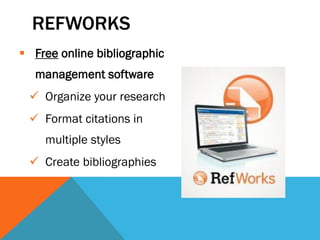
REFWORKS
 Free online bibliographic
management software
 Organize your research
 Format citations in
multiple styles
 Create bibliographies
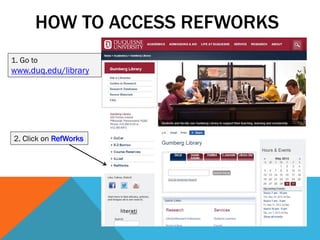
HOW TO ACCESS REFWORKS
1. Go to
www.duq.edu/library
2. Click on RefWorks
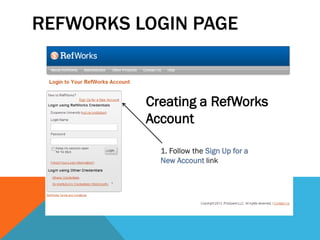
REFWORKS LOGIN PAGE
1. Follow the Sign Up for a
New Account link
Creating a RefWorks
Account
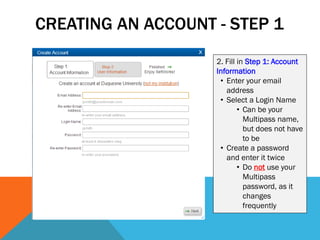
CREATING AN ACCOUNT - STEP 1
2. Fill in Step 1: Account
Information
• Enter your email
address
• Select a Login Name
• Can be your
Multipass name,
but does not have
to be
• Create a password
and enter it twice
• Do not use your
Multipass
password, as it
changes
frequently
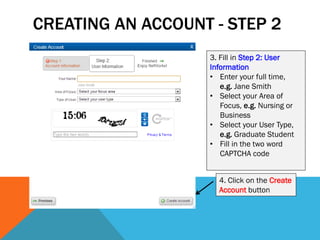
CREATING AN ACCOUNT - STEP 2
3. Fill in Step 2: User
Information
• Enter your full time,
e.g. Jane Smith
• Select your Area of
Focus, e.g. Nursing or
Business
• Select your User Type,
e.g. Graduate Student
• Fill in the two word
CAPTCHA code
4. Click on the Create
Account button
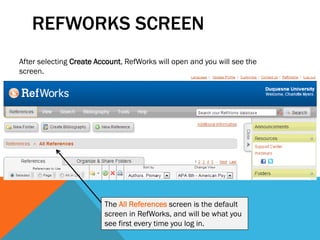
REFWORKS SCREEN
After selecting Create Account, RefWorks will open and you will see the
screen.
The All References screen is the default
screen in RefWorks, and will be what you
see first every time you log in.
CUSTOMIZE YOUR ACCOUNT
You may want to customize your account so that you can
display your references in the citation style(s) you normally
use.
For example, you might be using:
 APA 6th edition,
 MLA 7th edition, or
 Chicago 16th edition
RefWorks has hundreds of styles to choose from!
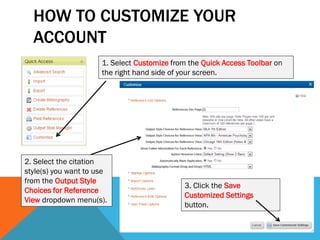
HOW TO CUSTOMIZE YOUR
ACCOUNT
1. Select Customize from the Quick Access Toolbar on
the right hand side of your screen.
2. Select the citation
style(s) you want to use
from the Output Style
Choices for Reference
View dropdown menu(s).
3. Click the Save
Customized Settings
button.
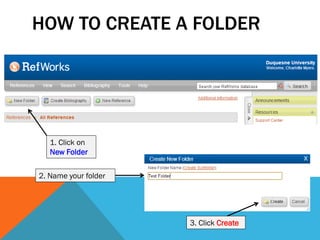
HOW TO CREATE A FOLDER
1. Click on
New Folder
2. Name your folder
3. Click Create
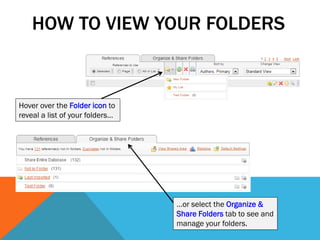
HOW TO VIEW YOUR FOLDERS
Hover over the Folder icon to
reveal a list of your folders…
…or select the Organize &
Share Folders tab to see and
manage your folders.
CONGRATULATIONS!
You have:
Created a RefWorks account
Customized it to include the citation styles you
prefer
Created at least one folder where you can place
your references
Now you are ready to start adding references!
 Good for websites
 When using a database that does not allow direct export to
RefWorks
 When you are unable to export from a database for any reason
 You have a book or article that you found elsewhere
Add a Reference
Manually to
GETTING REFERENCES INTO
REFWORKS
Add a reference manually
Import a BOOK from DUCAT
EXPORT ARTICLES from databases or Google
Scholar into RefWorks
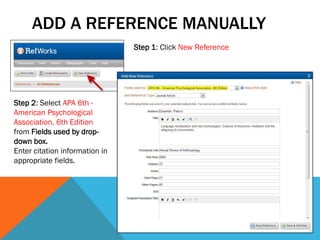
ADD A REFERENCE MANUALLY
Step 1: Click New Reference
Step 2: Select APA 6th -
American Psychological
Association, 6th Edition
from Fields used by drop-
down box.
Enter citation information in
appropriate fields.
IMPORT BOOK REFERENCES
FROM DUCAT INTO REFWORKS
 You cannot export references from DuCat into RefWorks
 You CAN import them while within RefWorks
oYou would want to do your DuCat search in DuCat and
THEN, once you know your book, import it through
RefWorks
 Steps for adding a book from DuCat to RefWorks here
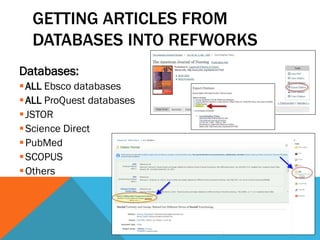
GETTING ARTICLES FROM
DATABASES INTO REFWORKS
Databases:
ALL Ebsco databases
ALL ProQuest databases
JSTOR
Science Direct
PubMed
SCOPUS
Others
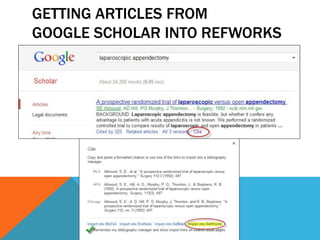
GETTING ARTICLES FROM
GOOGLE SCHOLAR INTO REFWORKS
Google Scholar limits Google searches to scholarly
items only (e.g., books, scholarly journal articles,
reports, etc.)
Links back to full-text articles in our databases
CAN export from Google Scholar to RefWorks
GETTING ARTICLES FROM
GOOGLE SCHOLAR INTO REFWORKS
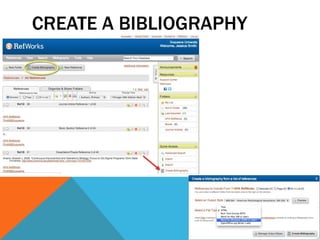
CREATE A BIBLIOGRAPHY
From a folder of references
In APA 6th style
Create a Reference List in Word
Learn how to create a bibliography in RefWorks
here
CREATE A BIBLIOGRAPHY
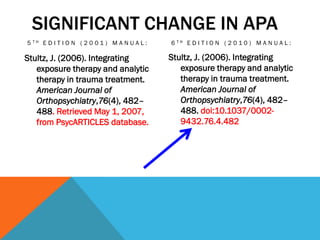
SIGNIFICANT CHANGE IN APA
5 T H E D I T I O N ( 2 0 0 1 ) M A N U A L : 6 T H E D I T I O N ( 2 0 1 0 ) M A N U A L :
Stultz, J. (2006). Integrating
exposure therapy and analytic
therapy in trauma treatment.
American Journal of
Orthopsychiatry,76(4), 482–
488. Retrieved May 1, 2007,
from PsycARTICLES database.
Stultz, J. (2006). Integrating
exposure therapy and analytic
therapy in trauma treatment.
American Journal of
Orthopsychiatry,76(4), 482–
488. doi:10.1037/0002-
9432.76.4.482
WHAT IS A DOI?
A DOI (digital object identifier) is a unique alphanumeric string assigned by the
International DOI Foundation that serves as a persistent identifier.
doi:10.1037/0002-9432.76.4.482
New format as a link: http://dx.doi.org/10.1037/0002-9432.76.4.482
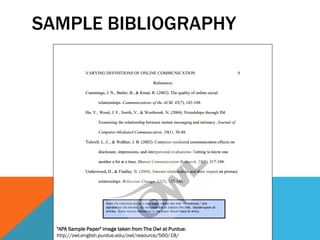
SAMPLE BIBLIOGRAPHY
"APA Sample Paper" image taken from The Owl at Purdue:
http://owl.english.purdue.edu/owl/resource/560/18/
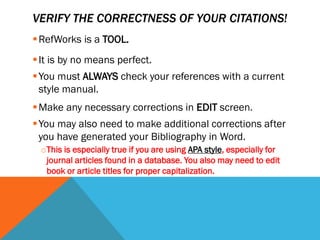
VERIFY THE CORRECTNESS OF YOUR CITATIONS!
RefWorks is a TOOL.
It is by no means perfect.
You must ALWAYS check your references with a current
style manual.
Make any necessary corrections in EDIT screen.
You may also need to make additional corrections after
you have generated your Bibliography in Word.
oThis is especially true if you are using APA style, especially for
journal articles found in a database. You also may need to edit
book or article titles for proper capitalization.

RefWorks for APA Citation Style

  • 1.
    LET’S GET STARTEDWITH Jessica Danielle Smith, MLIS Gumberg Library, Duquesne University smithj23@duq.edu 412.396.6133
  • 2.
    PRESENTATION OVERVIEW Throughout thispresentation and live demo, you will learn how to:  Create an account in RefWorks  Customize your account  Create/manage a folder  Add a reference manually o Import a BOOK from DUCAT o EXPORT ARTICLES from databases or Google Scholar into RefWorks, and  Create a bibliography
  • 3.
    REFWORKS  Free onlinebibliographic management software  Organize your research  Format citations in multiple styles  Create bibliographies
  • 4.
    HOW TO ACCESSREFWORKS 1. Go to www.duq.edu/library 2. Click on RefWorks
  • 5.
    REFWORKS LOGIN PAGE 1.Follow the Sign Up for a New Account link Creating a RefWorks Account
  • 6.
    CREATING AN ACCOUNT- STEP 1 2. Fill in Step 1: Account Information • Enter your email address • Select a Login Name • Can be your Multipass name, but does not have to be • Create a password and enter it twice • Do not use your Multipass password, as it changes frequently
  • 7.
    CREATING AN ACCOUNT- STEP 2 3. Fill in Step 2: User Information • Enter your full time, e.g. Jane Smith • Select your Area of Focus, e.g. Nursing or Business • Select your User Type, e.g. Graduate Student • Fill in the two word CAPTCHA code 4. Click on the Create Account button
  • 8.
    REFWORKS SCREEN After selectingCreate Account, RefWorks will open and you will see the screen. The All References screen is the default screen in RefWorks, and will be what you see first every time you log in.
  • 9.
    CUSTOMIZE YOUR ACCOUNT Youmay want to customize your account so that you can display your references in the citation style(s) you normally use. For example, you might be using:  APA 6th edition,  MLA 7th edition, or  Chicago 16th edition RefWorks has hundreds of styles to choose from!
  • 10.
    HOW TO CUSTOMIZEYOUR ACCOUNT 1. Select Customize from the Quick Access Toolbar on the right hand side of your screen. 2. Select the citation style(s) you want to use from the Output Style Choices for Reference View dropdown menu(s). 3. Click the Save Customized Settings button.
  • 11.
    HOW TO CREATEA FOLDER 1. Click on New Folder 2. Name your folder 3. Click Create
  • 12.
    HOW TO VIEWYOUR FOLDERS Hover over the Folder icon to reveal a list of your folders… …or select the Organize & Share Folders tab to see and manage your folders.
  • 13.
    CONGRATULATIONS! You have: Created aRefWorks account Customized it to include the citation styles you prefer Created at least one folder where you can place your references Now you are ready to start adding references!
  • 14.
     Good forwebsites  When using a database that does not allow direct export to RefWorks  When you are unable to export from a database for any reason  You have a book or article that you found elsewhere Add a Reference Manually to
  • 15.
    GETTING REFERENCES INTO REFWORKS Adda reference manually Import a BOOK from DUCAT EXPORT ARTICLES from databases or Google Scholar into RefWorks
  • 16.
    ADD A REFERENCEMANUALLY Step 1: Click New Reference Step 2: Select APA 6th - American Psychological Association, 6th Edition from Fields used by drop- down box. Enter citation information in appropriate fields.
  • 17.
    IMPORT BOOK REFERENCES FROMDUCAT INTO REFWORKS  You cannot export references from DuCat into RefWorks  You CAN import them while within RefWorks oYou would want to do your DuCat search in DuCat and THEN, once you know your book, import it through RefWorks  Steps for adding a book from DuCat to RefWorks here
  • 18.
    GETTING ARTICLES FROM DATABASESINTO REFWORKS Databases: ALL Ebsco databases ALL ProQuest databases JSTOR Science Direct PubMed SCOPUS Others
  • 19.
    GETTING ARTICLES FROM GOOGLESCHOLAR INTO REFWORKS Google Scholar limits Google searches to scholarly items only (e.g., books, scholarly journal articles, reports, etc.) Links back to full-text articles in our databases CAN export from Google Scholar to RefWorks
  • 20.
    GETTING ARTICLES FROM GOOGLESCHOLAR INTO REFWORKS
  • 21.
    CREATE A BIBLIOGRAPHY Froma folder of references In APA 6th style Create a Reference List in Word Learn how to create a bibliography in RefWorks here
  • 22.
  • 23.
    SIGNIFICANT CHANGE INAPA 5 T H E D I T I O N ( 2 0 0 1 ) M A N U A L : 6 T H E D I T I O N ( 2 0 1 0 ) M A N U A L : Stultz, J. (2006). Integrating exposure therapy and analytic therapy in trauma treatment. American Journal of Orthopsychiatry,76(4), 482– 488. Retrieved May 1, 2007, from PsycARTICLES database. Stultz, J. (2006). Integrating exposure therapy and analytic therapy in trauma treatment. American Journal of Orthopsychiatry,76(4), 482– 488. doi:10.1037/0002- 9432.76.4.482
  • 24.
    WHAT IS ADOI? A DOI (digital object identifier) is a unique alphanumeric string assigned by the International DOI Foundation that serves as a persistent identifier. doi:10.1037/0002-9432.76.4.482 New format as a link: http://dx.doi.org/10.1037/0002-9432.76.4.482
  • 25.
    SAMPLE BIBLIOGRAPHY "APA SamplePaper" image taken from The Owl at Purdue: http://owl.english.purdue.edu/owl/resource/560/18/
  • 26.
    VERIFY THE CORRECTNESSOF YOUR CITATIONS! RefWorks is a TOOL. It is by no means perfect. You must ALWAYS check your references with a current style manual. Make any necessary corrections in EDIT screen. You may also need to make additional corrections after you have generated your Bibliography in Word. oThis is especially true if you are using APA style, especially for journal articles found in a database. You also may need to edit book or article titles for proper capitalization.