React Native
Mehmet Ali BAĞCI
Agenda
Tools to build mobile apps
What is React Native?
Why RN?
Why not RN?
How React Native draw?
JSX
Styling
Demo Application
Q&A
Approach of Mobile App Development
Approximately 20-30 screens
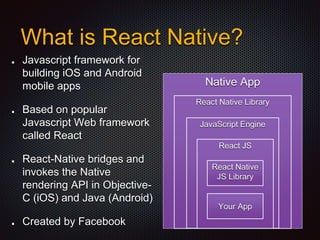
What is React Native?
Javascript framework for
building iOS and Android
mobile apps
Based on popular
Javascript Web framework
called React
React-Native bridges and
invokes the Native
rendering API in Objective-
C (iOS) and Java (Android)
Created by Facebook
Native App
React Native Library
JavaScript Engine
React JS
React Native
JS Library
Your App
Native Experience
One language rules them all, JavaScript.
Fast & Great Development Experience
Don’t Waste Time Recompiling (Hot Reloading)
80% Share code between Android & iOS
Great Debugging Tool using Chrome Developer Tools
Be able to bridge with Native Code when we need to
Why React Native?
React-Native is still relatively young compared with
Native iOS and Android Communities (Released on
2015)
Some of Native API still are not supported. (But you
can use the native libraries through)
Add one additional layer to mobile app project.
Why NOT React Native?
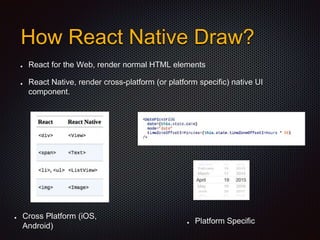
React for the Web, render normal HTML elements
React Native, render cross-platform (or platform specific) native UI
component.
How React Native Draw?
Cross Platform (iOS,
Android)
Platform Specific
Platform Specific Components
Code is javascript
Styles are … javascript
Views are … javascript
Layout calculation is … javascript
Everything is JavaScript
Combining JavaScript and XML-markup syntax to
create view.
Single File Concept (Write down at Component
Class), Not Seperate Files (Split HTML, CSS, JS)
JSX
var app = <Nav color="blue">
<Profile>click</Profile>
</Nav>
var Nav, Profile;
var app = React.createElement(
Nav,
{color:"blue"},
React.createElement(Profile, null, "click")
);
In Web, We have CSS, necessary part of the Web.
In React-Native, We have something similar to CSS, called
Flexbox Layout Model.
Styling
FlexBox
<View style={styles.container}>
<View style={[styles.box, styles.box1]}></View>
<View style={[styles.box, styles.box2]}></View>
<View style={[styles.box, styles.box3]}></View>
</View>
const styles = StyleSheet.create({
container: {
flex: 1,
flexDirection: 'column'
},
box: {
height: box_height
},
box1: {
backgroundColor: '#2196F3'
},
box2: {
backgroundColor: '#8BC34A'
},
box3: {
backgroundColor: '#e3aa1a'
}
});
flexDirection:
'column'
flexDirection:
'row'
Demo Application
SONY BBS - React Native

SONY BBS - React Native

  • 1.
  • 2.
    Agenda Tools to buildmobile apps What is React Native? Why RN? Why not RN? How React Native draw? JSX Styling Demo Application Q&A
  • 4.
    Approach of MobileApp Development Approximately 20-30 screens
  • 5.
    What is ReactNative? Javascript framework for building iOS and Android mobile apps Based on popular Javascript Web framework called React React-Native bridges and invokes the Native rendering API in Objective- C (iOS) and Java (Android) Created by Facebook Native App React Native Library JavaScript Engine React JS React Native JS Library Your App
  • 6.
    Native Experience One languagerules them all, JavaScript. Fast & Great Development Experience Don’t Waste Time Recompiling (Hot Reloading) 80% Share code between Android & iOS Great Debugging Tool using Chrome Developer Tools Be able to bridge with Native Code when we need to Why React Native?
  • 7.
    React-Native is stillrelatively young compared with Native iOS and Android Communities (Released on 2015) Some of Native API still are not supported. (But you can use the native libraries through) Add one additional layer to mobile app project. Why NOT React Native?
  • 8.
    React for theWeb, render normal HTML elements React Native, render cross-platform (or platform specific) native UI component. How React Native Draw? Cross Platform (iOS, Android) Platform Specific
  • 9.
  • 10.
    Code is javascript Stylesare … javascript Views are … javascript Layout calculation is … javascript Everything is JavaScript
  • 11.
    Combining JavaScript andXML-markup syntax to create view. Single File Concept (Write down at Component Class), Not Seperate Files (Split HTML, CSS, JS) JSX var app = <Nav color="blue"> <Profile>click</Profile> </Nav> var Nav, Profile; var app = React.createElement( Nav, {color:"blue"}, React.createElement(Profile, null, "click") );
  • 12.
    In Web, Wehave CSS, necessary part of the Web. In React-Native, We have something similar to CSS, called Flexbox Layout Model. Styling
  • 13.
    FlexBox <View style={styles.container}> <View style={[styles.box,styles.box1]}></View> <View style={[styles.box, styles.box2]}></View> <View style={[styles.box, styles.box3]}></View> </View> const styles = StyleSheet.create({ container: { flex: 1, flexDirection: 'column' }, box: { height: box_height }, box1: { backgroundColor: '#2196F3' }, box2: { backgroundColor: '#8BC34A' }, box3: { backgroundColor: '#e3aa1a' } }); flexDirection: 'column' flexDirection: 'row'
  • 14.