AUTHOR
R.D.SIVAKUMAR,M.Sc.,M.Phil.,M.Tech.,
Assistant Professor of Computer Science &
Assistant Professor and Head, Department of M.Com.(CA),
Ayya Nadar Janaki Ammal College,
Sivakasi – 626 124.
Mobile: 099440-42243
e-mail : sivamsccsit@gmail.com
website: www.rdsivakumar.blogspot.in
CO-AUTHOR
K.SIVAKAMI, B.Com. (CA)
Student of M.Com. (CA)
Ayya Nadar Janaki Ammal College,
Sivakasi – 626 124.
Adobe premiere
Adobe premiere
• Adobe premiere is a real-time; timeline based video
editing software application.
• It is part of the adobe creative suite developed by
adobe systems.
Adobe premiere
• This software has been used by television
broadcasters like BBC.
• It has been used in films, such as dust to glory,
captain Abu read, and superman returns, for the video
capture process.
Features
• Premiere pro supports high resolution video editing at
up to 10,240* 8,192 resolutions.
• Audio sample-level editing, VST audio plug-in
support, and 5.1 surround sound mixing are available.
Features
• It supports a wide variety of video and audio file
formats. When used with cineform’s neo line of plug-
ins, it supports 3d editing with the ability to view 3d
material using 2d monitors.
Features
• Premiere pro integrates with adobe Photoshop.
Photoshop files can be opened inside premiere pro
and edited.
User interface
• The main window of adobe premiere is the
application window. Panels are organized in
application window in an arrangement called a
workspace.
• We can customize a workspace by arranging panels in
the layout that best suits the working style.
User interface
• As we rearrange panels, the other panels resize
automatically to fit the window.
• We can create and save several custom workspaces
for different tasks-for example, one for editing and
one for previewing.
Editing sequences and clips
• In premiere pro, we can specify the setting for each
sequence, trim the clips, and assemble clips in
sequences.
Editing sequences and clips
• Every premiere pro project can contain one or more
sequences. Each sequence in a project can have
different settings.
Editing sequences and clips
• For example, one project can contain one sequence
optimized for 30-fbs DV assets.
• The term ‘fps’ stands for frames per second.
• A sequence can consist of multiple video and audio
tracks running parallel in a timeline pane.
Editing sequences and clips
• Multiple tracks are used to superimpose or mix clips.
A sequence must contain at least one video track and
one audio track.
Editing sequences and clips
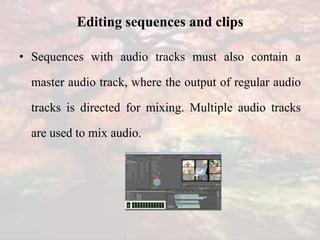
• Sequences with audio tracks must also contain a
master audio track, where the output of regular audio
tracks is directed for mixing. Multiple audio tracks
are used to mix audio.
Editing audio
• In premiere pro, we can edit audio, add effects to it,
and mix as many tracks of audio in a sequences.
• Tracks can contain mono, stereo, or 5.1 surround
channels.
Editing audio
• To work with audio, you must first import it into a
project or record it directly to a track. You can import
audio clips or video clips that contain audio.
Titling and the titler
• The titler is a versatile tool enabling you to create, not
just titles and credits, but animated composites as well.
• The titler is a collection of related panels. We can load
more than one title into the titler.
• We can choose the title we want to view by choosing its
name in the title tab menu.
•
Adobe Premier - R.D.Sivakumar

Adobe Premier - R.D.Sivakumar

  • 1.
    AUTHOR R.D.SIVAKUMAR,M.Sc.,M.Phil.,M.Tech., Assistant Professor ofComputer Science & Assistant Professor and Head, Department of M.Com.(CA), Ayya Nadar Janaki Ammal College, Sivakasi – 626 124. Mobile: 099440-42243 e-mail : sivamsccsit@gmail.com website: www.rdsivakumar.blogspot.in CO-AUTHOR K.SIVAKAMI, B.Com. (CA) Student of M.Com. (CA) Ayya Nadar Janaki Ammal College, Sivakasi – 626 124. Adobe premiere
  • 2.
    Adobe premiere • Adobepremiere is a real-time; timeline based video editing software application. • It is part of the adobe creative suite developed by adobe systems.
  • 3.
    Adobe premiere • Thissoftware has been used by television broadcasters like BBC. • It has been used in films, such as dust to glory, captain Abu read, and superman returns, for the video capture process.
  • 4.
    Features • Premiere prosupports high resolution video editing at up to 10,240* 8,192 resolutions. • Audio sample-level editing, VST audio plug-in support, and 5.1 surround sound mixing are available.
  • 5.
    Features • It supportsa wide variety of video and audio file formats. When used with cineform’s neo line of plug- ins, it supports 3d editing with the ability to view 3d material using 2d monitors.
  • 6.
    Features • Premiere prointegrates with adobe Photoshop. Photoshop files can be opened inside premiere pro and edited.
  • 7.
    User interface • Themain window of adobe premiere is the application window. Panels are organized in application window in an arrangement called a workspace. • We can customize a workspace by arranging panels in the layout that best suits the working style.
  • 8.
    User interface • Aswe rearrange panels, the other panels resize automatically to fit the window. • We can create and save several custom workspaces for different tasks-for example, one for editing and one for previewing.
  • 9.
    Editing sequences andclips • In premiere pro, we can specify the setting for each sequence, trim the clips, and assemble clips in sequences.
  • 10.
    Editing sequences andclips • Every premiere pro project can contain one or more sequences. Each sequence in a project can have different settings.
  • 11.
    Editing sequences andclips • For example, one project can contain one sequence optimized for 30-fbs DV assets. • The term ‘fps’ stands for frames per second. • A sequence can consist of multiple video and audio tracks running parallel in a timeline pane.
  • 12.
    Editing sequences andclips • Multiple tracks are used to superimpose or mix clips. A sequence must contain at least one video track and one audio track.
  • 13.
    Editing sequences andclips • Sequences with audio tracks must also contain a master audio track, where the output of regular audio tracks is directed for mixing. Multiple audio tracks are used to mix audio.
  • 14.
    Editing audio • Inpremiere pro, we can edit audio, add effects to it, and mix as many tracks of audio in a sequences. • Tracks can contain mono, stereo, or 5.1 surround channels.
  • 15.
    Editing audio • Towork with audio, you must first import it into a project or record it directly to a track. You can import audio clips or video clips that contain audio.
  • 16.
    Titling and thetitler • The titler is a versatile tool enabling you to create, not just titles and credits, but animated composites as well. • The titler is a collection of related panels. We can load more than one title into the titler. • We can choose the title we want to view by choosing its name in the title tab menu. •