
From Search to Found

Grant Ingersoll ‐ Eran Yaniv
Thursday, August 6, 2009
Agenda
     Introductions
         Apache Solr background
     LucidWorks for Solr
     Installing LucidWorks for Solr
     Searching your domain with Solr
     Putting Solr into production
     Questions


                              Lucid Imagination, Inc.
Introductions
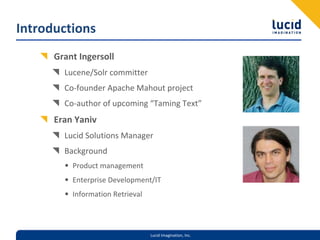
      Grant Ingersoll
        Lucene/Solr committer
        Co‐founder Apache Mahout project
        Co‐author of upcoming “Taming Text”
      Eran Yaniv
        Lucid Solutions Manager
        Background
        • Product management
        • Enterprise Development/IT
        • Information Retrieval


                                  Lucid Imagination, Inc.
Apache Solr Background
     Lucene‐based Search server plus many enterprise tools
       REST‐like API
       Faceting
       Distributed/Replication
       Easy configuration
       Many other features: 
       http://lucene.apache.org/solr/features.html
     Created at CNET by Yonik Seeley (Lucid co‐founder)
       Donated to the Apache Software Foundation in 2006
       Solr 1.4 release coming soon


                                 Lucid Imagination, Inc.
Solr Basics
       Content is modeled via Documents and Fields
         Content can be text, integers, floats, dates, custom
         Analysis can be employed to alter content before indexing
         Controlled via schema.xml
       Searches are supported through a wide range of Query 
     options
         Keyword
         Terms
         Phrases
         Wildcards, other
       Many clients available: HTTP, Java, Ruby, PHP, .NET, etc.

                                 Lucid Imagination, Inc.
Solr Basics
      Schema
        Define Field Types, Fields, field metadata and Analysis
        <field name="name" type="text" indexed="true" 
        stored="true"/>
        Copy Fields, Dynamic Fields, Similarity overrides
      Solr Config
        Define low‐level Lucene controls
        Specify how clients interact with Solr via Request Handlers (“mini 
        servlets”)
        Configure highlighting, spell checking, admin, etc. 


                                Lucid Imagination, Inc.
LucidWorks for Solr
      Based on Apache Solr 1.3 plus
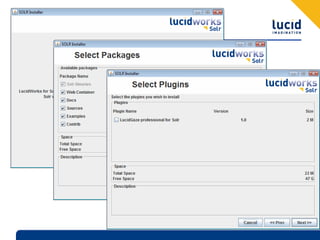
        Installer for Linux and Windows
        Specific patches from Solr 
        • faceting improvements, other
        30‐day free “Get Started” program
        Bundled:
        • JRE
        • Apache Tomcat
        • Optimized KStemmer implementation
        • Luke
        • Lucid Gaze for Solr


                                Lucid Imagination, Inc.
Getting Started
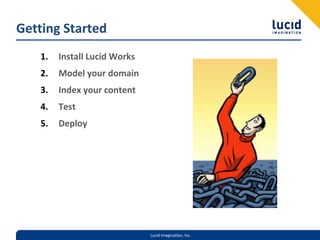
    1.   Install Lucid Works
    2.   Model your domain
    3.   Index your content
    4.   Test
    5.   Deploy


                               Lucid Imagination, Inc.
Install Lucid Works
      Free certified distribution
        Introduced to many new users
        New users frequently use “Get Started”
        Over 50% of the cases: “How to install”
      Installer
        Simple
        Plugins and enhancements
        Updateable
        Support for Linux, Windows (Mac?)
        UI and headless


                               Lucid Imagination, Inc.
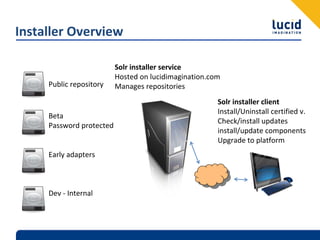
Installer Overview

                          Solr installer service
                          Hosted on lucidimagination.com
     Public repository    Manages repositories
                                                       Solr installer client
                                                       Install/Uninstall certified v.
     Beta
                                                       Check/install updates
     Password protected
                                                       install/update components
                                                       Upgrade to platform
     Early adapters


     Dev ‐ Internal
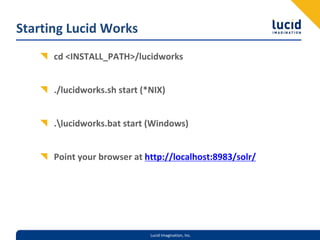
Starting Lucid Works
      cd <INSTALL_PATH>/lucidworks


      ./lucidworks.sh start (*NIX) 


      .lucidworks.bat start (Windows)


      Point your browser at http://localhost:8983/solr/


                              Lucid Imagination, Inc.
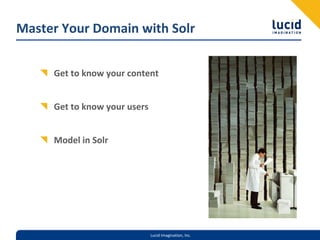
Master Your Domain with Solr


     Get to know your content


     Get to know your users


     Model in Solr


                              Lucid Imagination, Inc.
Modeling your Content
     Collection/Aggregate
       Examine collection level stats, like:
       • MIME Types
       • Number of Docs
       • Update rates
       • Languages present
       • Much, much more
       Look for patterns and relationships
       Identify helpful resources


                                Lucid Imagination, Inc.
Modeling your Content
      Randomly sample a set of your documents
      Look for:
        Common structures like titles, tables, columns, etc.
        Important metadata
        Tokenization issues
        • Try out in http://localhost:8983/solr/admin/analysis.jsp
        Importance Indicators
        May also look at paragraph, sentence, word and character issues
       Often useful to run docs through indexing process in an 
    iterative process


                                  Lucid Imagination, Inc.
Understanding your Users
  UI Expectations


  Speed and Relevance


  Search and Discovery
    Search
    Faceting
    Did you mean?
    Similar Pages (More Like This)
    Highlighting
    Document/Results Clustering
Build your Application
  Map your content into Documents and Fields via the Solr schema


  Setup your Solr access patterns in the solrconfig.xml


  Index your content 


  Search


                               Lucid Imagination, Inc.
Indexing
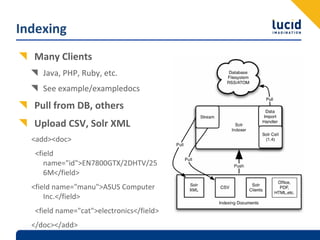
  Many Clients
     Java, PHP, Ruby, etc.
     See example/exampledocs
  Pull from DB, others
  Upload CSV, Solr XML
  <add><doc>
   <field 
      name="id">EN7800GTX/2DHTV/25
      6M</field>
  <field name="manu">ASUS Computer 
      Inc.</field>
   <field name="cat">electronics</field>
  </doc></add>
Search

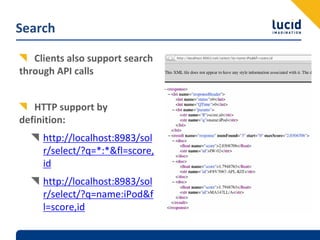
   Clients also support search 
through API calls


   HTTP support by 
definition:
     http://localhost:8983/sol
     r/select/?q=*:*&fl=score,
     id
     http://localhost:8983/sol
     r/select/?q=name:iPod&f
     l=score,id
Load Testing
      Solr scales quite well, but you should still load test to 
    establish performance specs for your application
         Apache JMeter can be a good start


      Ideally, playback old logs at the rate they occurred


       As with any Java application, keep an eye on JVM factors 
    like heap size and garbage collection


                               Lucid Imagination, Inc.
Improving Performance
     Search
        Avoid wildcards, or at least require prefix
        Catch‐all field for “generic” search
        Choose proper faceting method for the situation
        Replicate/Shard
     Indexing
        Minimal analysis to achieve results (speeds indexing)
        Multi‐threaded, batch submission
     Usual Suspects:  CPU, Memory, Disk, JVM
      http://www.lucidimagination.com/Community/Hear‐from‐
    the‐Experts/Articles/Scaling‐Lucene‐and‐Solr/

                                Lucid Imagination, Inc.
Relevance Testing
      Often overlooked until there is a problem; instead plan for it 
    upfront


      Types:
         Ad hoc
         Log based/ QA driven
         Standard Collections and Queries (TREC)


      Best Practice:  Take top 50 or so queries by volume, plus ~20 
    random queries and rate the top ten results as relevant, 
    somewhat relevant, not relevant, embarrassing

                                Lucid Imagination, Inc.
Troubleshooting Relevance in LucidWorks for Solr

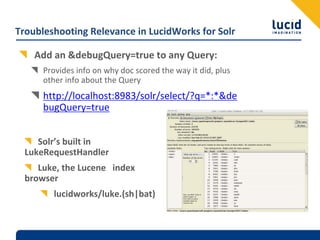
    Add an &debugQuery=true to any Query:
      Provides info on why doc scored the way it did, plus 
      other info about the Query
      http://localhost:8983/solr/select/?q=*:*&de
      bugQuery=true


     Solr’s built in 
  LukeRequestHandler
     Luke, the Lucene  index 
  browser
         lucidworks/luke.(sh|bat)
Improving your Search

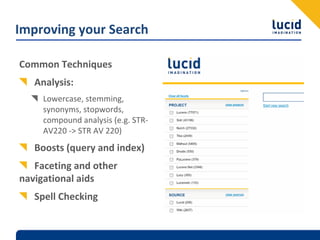
Common Techniques
   Analysis:
     Lowercase, stemming, 
     synonyms, stopwords, 
     compound analysis (e.g. STR‐
     AV220 ‐> STR AV 220)
   Boosts (query and index)
   Faceting and other 
navigational aids
   Spell Checking
Improving your Queries
      Disjunction Max Query (more in a minute)
      Better stop word handling
      Phrase Queries and other Position‐based Queries
        “quick red fox”~3
      Recency/Freshness
      Invisible Queries
        Relevance Feedback and “More Like This”
      Fake Queries


                              Lucid Imagination, Inc.
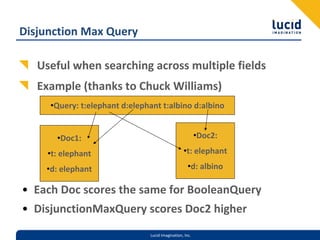
Disjunction Max Query

   Useful when searching across multiple fields
   Example (thanks to Chuck Williams)
     •Query: t:elephant d:elephant t:albino d:albino


       •Doc1:                                             •Doc2:

     •t: elephant                                 •t: elephant

    •d: elephant                                     •d: albino

• Each Doc scores the same for BooleanQuery
• DisjunctionMaxQuery scores Doc2 higher
                                Lucid Imagination, Inc.
Advanced Techniques
     Payloads
       http://www.lucidimagination.com/blog/2009/08/05/getting‐
       started‐with‐payloads/
       DelimitedPayloadTokenFilter (better name?)
       • Add payloads inline:  foo|2.3 bar|5.4
       BoostingFunctionTermQuery (Lucene 2.9, Solr 1.4)
     Natural Language Processing
       Named Entity Extraction (OpenNLP, Stanford NER, Commercial)
       Sentiment Analysis
       Event Detection
       Relationship Identification

                                 Lucid Imagination, Inc.
Solr in Production
      Hardware
      Monitoring
        Lucid Gaze for Solr
        Nagios, Hyperic, Port monitoring
      Troubleshooting
        Solr Community – ad hoc support
        Lucid Support – Commercial support with SLAs
      Growth
        Query Volume
        Index Size


                                 Lucid Imagination, Inc.
Lucid Gaze for Solr
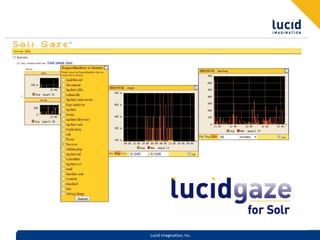
      Monitor Solr Request Handlers


      Comes with LucidWorks for Solr


      http://localhost:8983/gaze


                            Lucid Imagination, Inc.
Lucid Imagination, Inc.
Resources
   Websites
      http://www.lucidimagination.com
      http://search.lucidimagination.com
      http://lucene.apache.org/solr
   Solr Support and Training
      http://www.lucidimagination.com/How‐We‐Can‐Help
      SLAs, Public, Private and Online Training for Solr and Lucene
   Mailing Lists
      solr‐user@lucene.apache.org


                               Lucid Imagination, Inc.

Getting started faster with LucidWorks for Solr

  • 1.
  • 2.
    Agenda Introductions Apache Solr background LucidWorks for Solr Installing LucidWorks for Solr Searching your domain with Solr Putting Solr into production Questions Lucid Imagination, Inc.
  • 3.
    Introductions Grant Ingersoll Lucene/Solr committer Co‐founder Apache Mahout project Co‐author of upcoming “Taming Text” Eran Yaniv Lucid Solutions Manager Background • Product management • Enterprise Development/IT • Information Retrieval Lucid Imagination, Inc.
  • 4.
    Apache Solr Background Lucene‐based Search server plus many enterprise tools REST‐like API Faceting Distributed/Replication Easy configuration Many other features:  http://lucene.apache.org/solr/features.html Created at CNET by Yonik Seeley (Lucid co‐founder) Donated to the Apache Software Foundation in 2006 Solr 1.4 release coming soon Lucid Imagination, Inc.
  • 5.
    Solr Basics Content is modeled via Documents and Fields Content can be text, integers, floats, dates, custom Analysis can be employed to alter content before indexing Controlled via schema.xml Searches are supported through a wide range of Query  options Keyword Terms Phrases Wildcards, other Many clients available: HTTP, Java, Ruby, PHP, .NET, etc. Lucid Imagination, Inc.
  • 6.
    Solr Basics Schema Define Field Types, Fields, field metadata and Analysis <field name="name" type="text" indexed="true"  stored="true"/> Copy Fields, Dynamic Fields, Similarity overrides Solr Config Define low‐level Lucene controls Specify how clients interact with Solr via Request Handlers (“mini  servlets”) Configure highlighting, spell checking, admin, etc.  Lucid Imagination, Inc.
  • 7.
    LucidWorks for Solr Based on Apache Solr 1.3 plus Installer for Linux and Windows Specific patches from Solr  • faceting improvements, other 30‐day free “Get Started” program Bundled: • JRE • Apache Tomcat • Optimized KStemmer implementation • Luke • Lucid Gaze for Solr Lucid Imagination, Inc.
  • 8.
    Getting Started 1. Install Lucid Works 2. Model your domain 3. Index your content 4. Test 5. Deploy Lucid Imagination, Inc.
  • 9.
    Install Lucid Works Free certified distribution Introduced to many new users New users frequently use “Get Started” Over 50% of the cases: “How to install” Installer Simple Plugins and enhancements Updateable Support for Linux, Windows (Mac?) UI and headless Lucid Imagination, Inc.
  • 10.
    Installer Overview Solr installer service Hosted on lucidimagination.com Public repository Manages repositories Solr installer client Install/Uninstall certified v. Beta Check/install updates Password protected install/update components Upgrade to platform Early adapters Dev ‐ Internal
  • 12.
    Starting Lucid Works cd <INSTALL_PATH>/lucidworks ./lucidworks.sh start (*NIX)  .lucidworks.bat start (Windows) Point your browser at http://localhost:8983/solr/ Lucid Imagination, Inc.
  • 13.
    Master Your Domain with Solr Get to know your content Get to know your users Model in Solr Lucid Imagination, Inc.
  • 14.
    Modeling your Content Collection/Aggregate Examine collection level stats, like: • MIME Types • Number of Docs • Update rates • Languages present • Much, much more Look for patterns and relationships Identify helpful resources Lucid Imagination, Inc.
  • 15.
    Modeling your Content Randomly sample a set of your documents Look for: Common structures like titles, tables, columns, etc. Important metadata Tokenization issues • Try out in http://localhost:8983/solr/admin/analysis.jsp Importance Indicators May also look at paragraph, sentence, word and character issues Often useful to run docs through indexing process in an  iterative process Lucid Imagination, Inc.
  • 16.
    Understanding your Users UI Expectations Speed and Relevance Search and Discovery Search Faceting Did you mean? Similar Pages (More Like This) Highlighting Document/Results Clustering
  • 17.
    Build your Application Map your content into Documents and Fields via the Solr schema Setup your Solr access patterns in the solrconfig.xml Index your content  Search Lucid Imagination, Inc.
  • 18.
    Indexing Many Clients Java, PHP, Ruby, etc. See example/exampledocs Pull from DB, others Upload CSV, Solr XML <add><doc> <field  name="id">EN7800GTX/2DHTV/25 6M</field> <field name="manu">ASUS Computer  Inc.</field> <field name="cat">electronics</field> </doc></add>
  • 19.
    Search Clients also support search  through API calls HTTP support by  definition: http://localhost:8983/sol r/select/?q=*:*&fl=score, id http://localhost:8983/sol r/select/?q=name:iPod&f l=score,id
  • 20.
    Load Testing Solr scales quite well, but you should still load test to  establish performance specs for your application Apache JMeter can be a good start Ideally, playback old logs at the rate they occurred As with any Java application, keep an eye on JVM factors  like heap size and garbage collection Lucid Imagination, Inc.
  • 21.
    Improving Performance Search Avoid wildcards, or at least require prefix Catch‐all field for “generic” search Choose proper faceting method for the situation Replicate/Shard Indexing Minimal analysis to achieve results (speeds indexing) Multi‐threaded, batch submission Usual Suspects:  CPU, Memory, Disk, JVM http://www.lucidimagination.com/Community/Hear‐from‐ the‐Experts/Articles/Scaling‐Lucene‐and‐Solr/ Lucid Imagination, Inc.
  • 22.
    Relevance Testing Often overlooked until there is a problem; instead plan for it  upfront Types: Ad hoc Log based/ QA driven Standard Collections and Queries (TREC) Best Practice:  Take top 50 or so queries by volume, plus ~20  random queries and rate the top ten results as relevant,  somewhat relevant, not relevant, embarrassing Lucid Imagination, Inc.
  • 23.
    Troubleshooting Relevance in LucidWorks for Solr Add an &debugQuery=true to any Query: Provides info on why doc scored the way it did, plus  other info about the Query http://localhost:8983/solr/select/?q=*:*&de bugQuery=true Solr’s built in  LukeRequestHandler Luke, the Lucene  index  browser lucidworks/luke.(sh|bat)
  • 24.
    Improving your Search Common Techniques Analysis: Lowercase, stemming,  synonyms, stopwords,  compound analysis (e.g. STR‐ AV220 ‐> STR AV 220) Boosts (query and index) Faceting and other  navigational aids Spell Checking
  • 25.
    Improving your Queries Disjunction Max Query (more in a minute) Better stop word handling Phrase Queries and other Position‐based Queries “quick red fox”~3 Recency/Freshness Invisible Queries Relevance Feedback and “More Like This” Fake Queries Lucid Imagination, Inc.
  • 26.
    Disjunction Max Query Useful when searching across multiple fields Example (thanks to Chuck Williams) •Query: t:elephant d:elephant t:albino d:albino •Doc1: •Doc2: •t: elephant •t: elephant •d: elephant •d: albino • Each Doc scores the same for BooleanQuery • DisjunctionMaxQuery scores Doc2 higher Lucid Imagination, Inc.
  • 27.
    Advanced Techniques Payloads http://www.lucidimagination.com/blog/2009/08/05/getting‐ started‐with‐payloads/ DelimitedPayloadTokenFilter (better name?) • Add payloads inline:  foo|2.3 bar|5.4 BoostingFunctionTermQuery (Lucene 2.9, Solr 1.4) Natural Language Processing Named Entity Extraction (OpenNLP, Stanford NER, Commercial) Sentiment Analysis Event Detection Relationship Identification Lucid Imagination, Inc.
  • 28.
    Solr in Production Hardware Monitoring Lucid Gaze for Solr Nagios, Hyperic, Port monitoring Troubleshooting Solr Community – ad hoc support Lucid Support – Commercial support with SLAs Growth Query Volume Index Size Lucid Imagination, Inc.
  • 29.
    Lucid Gaze for Solr Monitor Solr Request Handlers Comes with LucidWorks for Solr http://localhost:8983/gaze Lucid Imagination, Inc.
  • 30.
  • 31.
    Resources Websites http://www.lucidimagination.com http://search.lucidimagination.com http://lucene.apache.org/solr Solr Support and Training http://www.lucidimagination.com/How‐We‐Can‐Help SLAs, Public, Private and Online Training for Solr and Lucene Mailing Lists solr‐user@lucene.apache.org Lucid Imagination, Inc.