R User Group Meeting
Using R in Kaggle Competitions
25th January 2017
Garrett Teoh Hor Keong
What is Kaggle?
Learn, Explore,
Compete, Have Fun
Which Competition
to Participate?
Featured
Competitive
(Count towards rank)
Recruitment
Competitive Solo
(Count towards rank)
Playground
Non Competitive
(Does not count towards rank)
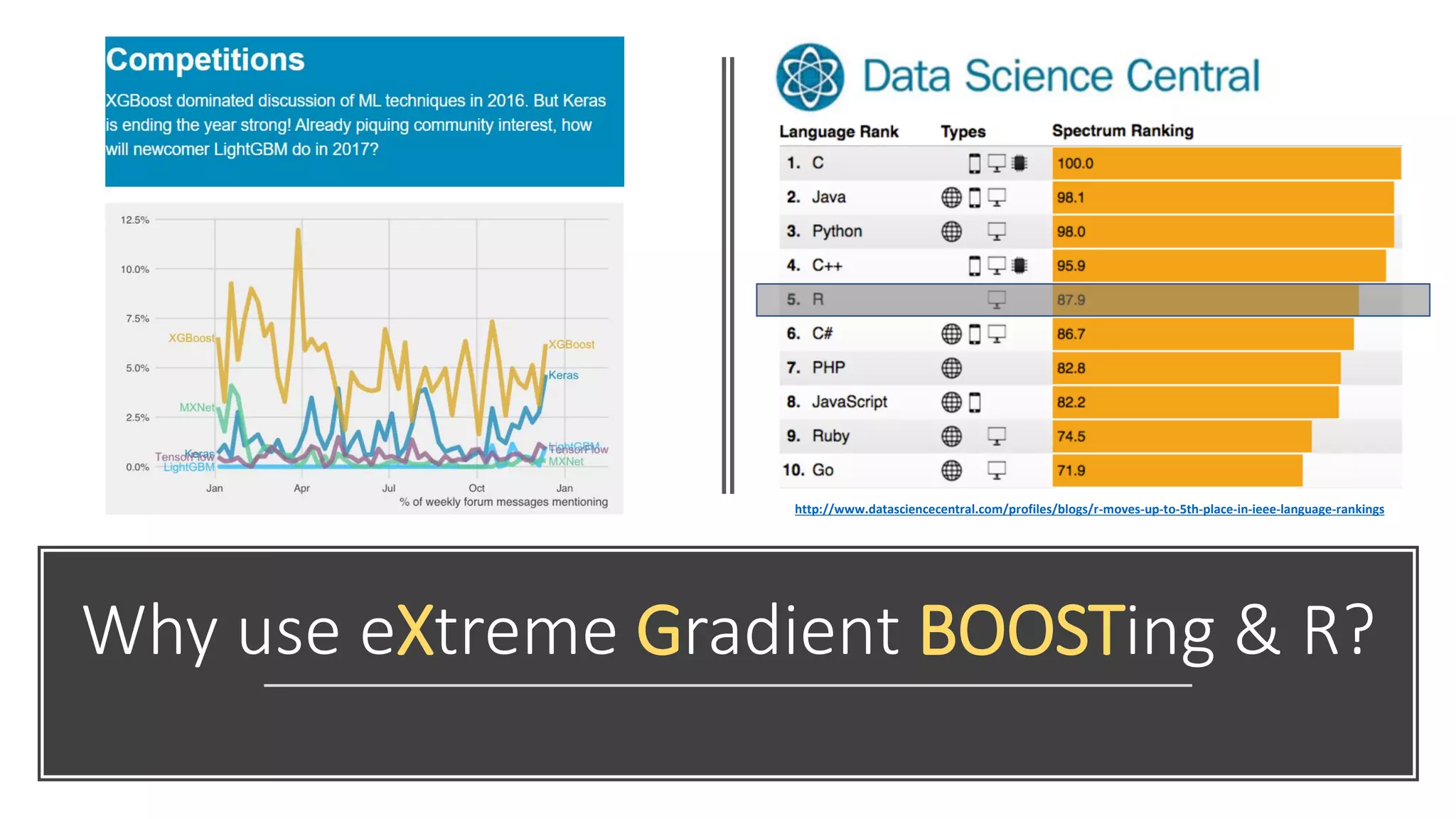
Why use eXtreme Gradient BOOSTing & R?
http://www.datasciencecentral.com/profiles/blogs/r-moves-up-to-5th-place-in-ieee-language-rankings
Choosing a
Competition
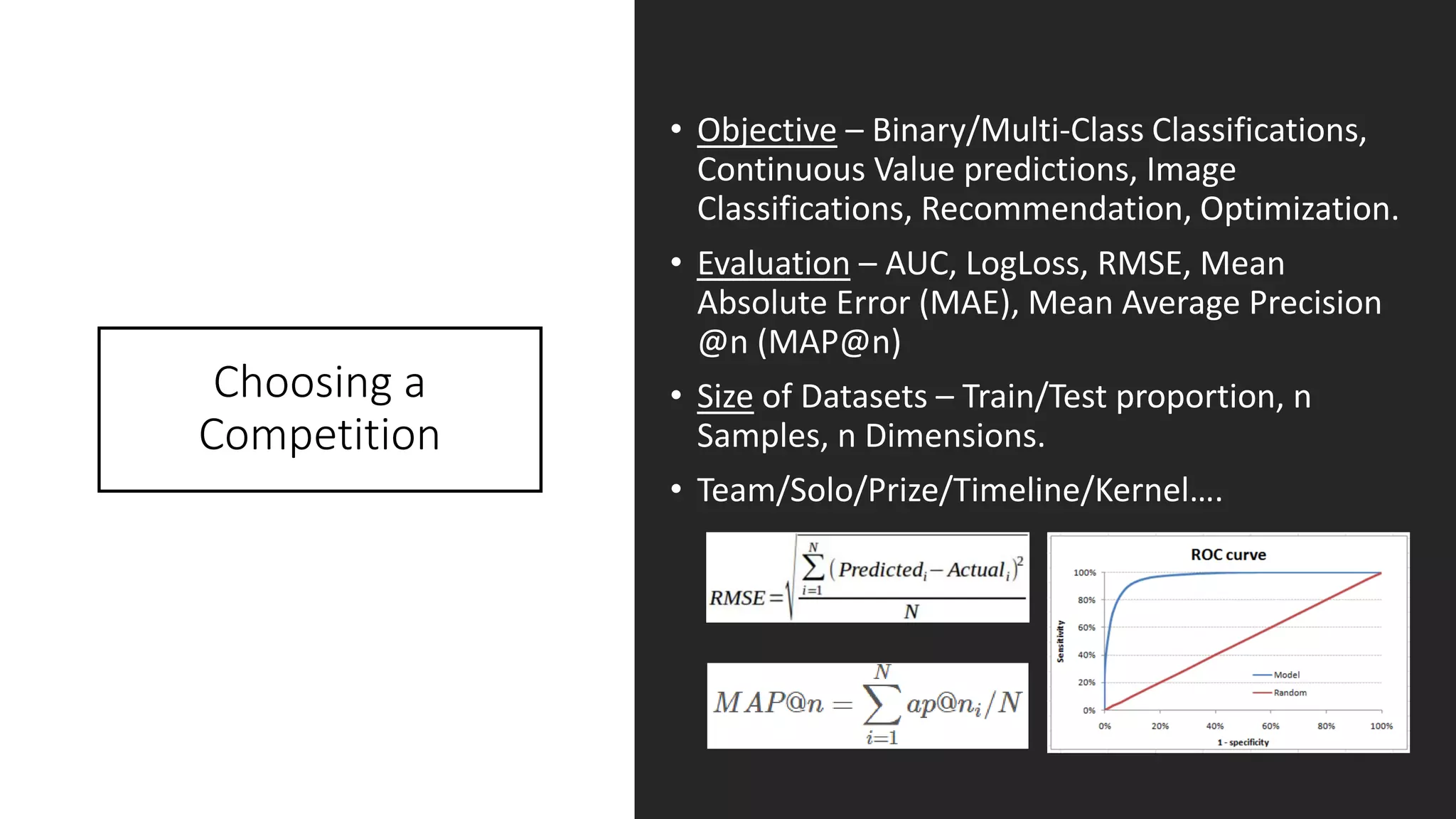
• Objective – Binary/Multi-Class Classifications,
Continuous Value predictions, Image
Classifications, Recommendation, Optimization.
• Evaluation – AUC, LogLoss, RMSE, Mean
Absolute Error (MAE), Mean Average Precision
@n (MAP@n)
• Size of Datasets – Train/Test proportion, n
Samples, n Dimensions.
• Team/Solo/Prize/Timeline/Kernel….
Starting a
Competition
• Downloading datasets – Train, Test, and
Submission.
• Matching sample IDs in test.csv -> IDs in
submission.csv
• Timeline – First submission, Merger (teams),
Final submission.
• Rules – No sharing of information between
teams, no public datasets, one account per
competitor, daily submission limit of 5. *Take
note for team forming criteria: Total Subs <=
(Days competition running * 5)
• Public & Private LB – Only public scoring will be
shown, private scores will be revealed at the
end of the competition.
BNP Paribas
Challenge Example
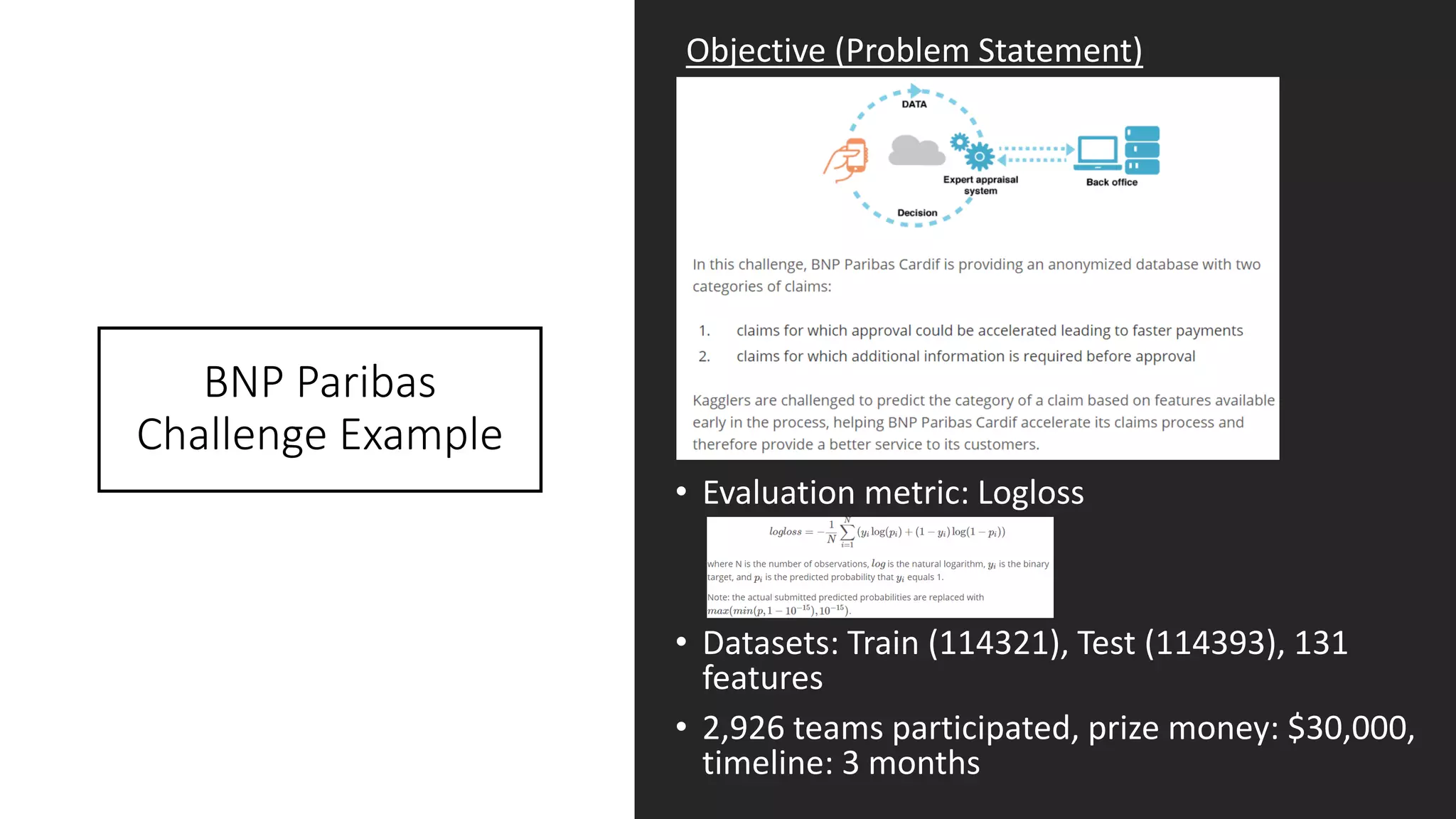
• Evaluation metric: Logloss
• Datasets: Train (114321), Test (114393), 131
features
• 2,926 teams participated, prize money: $30,000,
timeline: 3 months
Objective (Problem Statement)
R Code: Essential Packages
READR
- for reading in input
files and writing
output submission
files in .csv
01
XGBOOST
- machine learning
algorithm, trees or
linear regression based
booster
02
CARET
- data splitting and pre-
processing. model
tuning and feature
selections
03
MLMETRICS
- collection of various
evaluation metrics.
04
BINR
- cutting numerical
values into evenly
distributed groups
(bins), for basic features
engineering
05
DPLYR
- handy tools for data
manipulations e.g.
n_distinct, arrange,
filter and etc.
06
GGPLOT2
- the famed R elegant
data visualization tools
for bar charts, line
graphs, histograms and
more…
07
R Code: Features
Exploration (Basic)
• Check row IDs, submission IDs, and
make copy of train set
response/outcomes.
• Check for missing data – NAs.
• Check for valid and correct data types.
• Integer (Nominal vs Ordinal)
• Categorical (Nominal vs Ordinal)
• Numerical
• Boolean
• Date
• Check for n unique values for
Categorical/Integer features, range,
mean, median for Numerical/Integer
features.
• Run the nearZeroVar “CARET” package.
• Review/Remove near zero variance features
• Remove all zero variance features
R Code: Features
Exploration (Basic)
DEMO
R Code: Build & Make First Submission
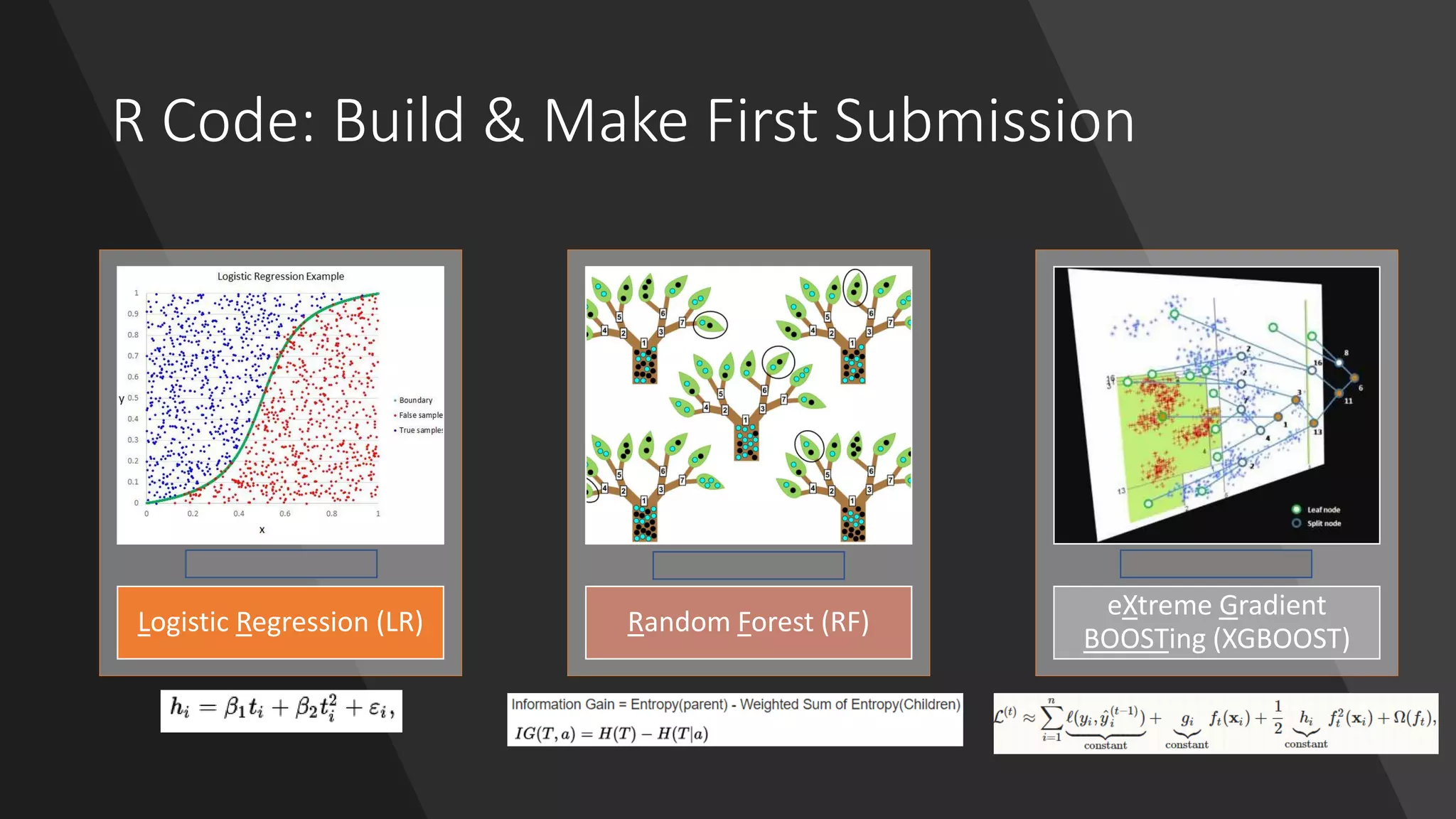
Logistic Regression (LR)
Rank on PB: 2,364
Random Forest (RF)
Rank on PB: 2,842
eXtreme Gradient
BOOSTing (XGBOOST)
Rank on PB: 2,164
R Code: Your First
Submission to Kaggle (GSD)
DEMO
Moving Up Ranks On
Kaggle: Key Points
Cross Validation (Bread & Butter)
• Data Partitioning, how many K-folds?
Features Engineering (Most of time)
• One-Hot Encoding, log-scale or z-score transformations, binarized,
recode, Quadratic Discriminant Analysis, entropy, hashing.
Tune Your Model! (Don’t be lazy)
• Regression Based: Alpha, Gamma, Regularization parameters and etc..
• Tree Based: Max depth, N trees, min leaf/child, and etc…
• Gradient Boosting: Learning rate, subsample, features subsampling,
hessian gradient loss function, n rounds, gamma, max_depth
Ensemble (Stacking & Blending)
• Dark Art: Simple/rank averaging, weighted/geometric averaging
• White Magic: Blending features, stacking models, multi stage stacker
What does it mean
to do a Cross
Validation?
How does it help to
improve a model?
• Model Evaluation Method
• Helps to generalize model and build
model’s resiliency towards outliers
• Prevents significant LB shake-ups
• Gives clearer indication whether model A
performs better then model B
• Three ways to perform CV
1. Hold-out: train/test set, typically
70/30 setup
2. K-fold CV: same as above but repeated
over k-times leaving out 1 set as test,
and k-1 set as training. Computational
time is dependant on k-folds
3. Leave-one-out: Best CV, same as
above but leaving out only one sample
point and has to be repeated over n
samples time. Most expensive CV but
provides the best results from the
averaged errors
How to Set
Up Cross
Validation?
4 fold CV
Hold out 25%
samples Train 75% samples
3 fold CV
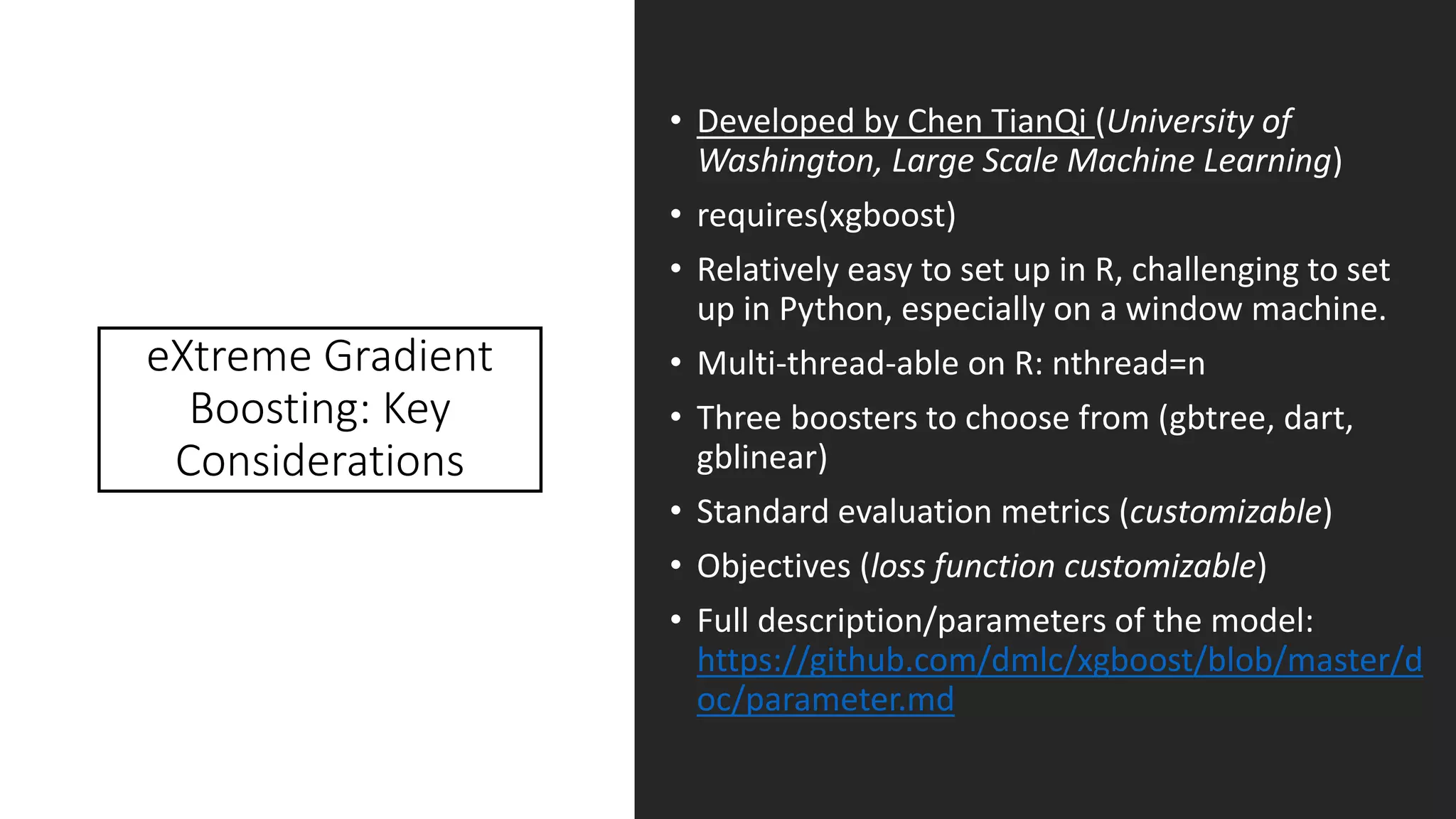
eXtreme Gradient
Boosting: Key
Considerations
• Developed by Chen TianQi (University of
Washington, Large Scale Machine Learning)
• requires(xgboost)
• Relatively easy to set up in R, challenging to set
up in Python, especially on a window machine.
• Multi-thread-able on R: nthread=n
• Three boosters to choose from (gbtree, dart,
gblinear)
• Standard evaluation metrics (customizable)
• Objectives (loss function customizable)
• Full description/parameters of the model:
https://github.com/dmlc/xgboost/blob/master/d
oc/parameter.md
XGBOOST: Tuning
Hyper Parameters
• eta; default = 0.3
• Learning rate of the loss function, aka step size shrinkage
• Range [0 – 1]; 0.005 – 0.05 (0.005)
• A lower learning rate should have higher nrounds
• colsample_bytree; default = 1
• Number of features to consider for building each tree
• Range [0 – 1]; 0.15 – 0.85 (0.05)
• subsample; default = 1
• Random selection of samples for building model, 0.5 = 50%
• Range [0 – 1]; 0.70 – 0.95 (0.05)
• max_depth; default = 6
• Maximum depth of a tree
• Range [1 – ∞]; 4 – 20 (1)
• Higher values will overfit, monitor CV validation, influence computational speed
• scale_pos_weight; default = 1
• Useful for unbalanced class (scaled accordingly to positive vs negative cases)
• Should be scaled to the ratio of ∑(negative cases) / ∑(positive cases)
XGBOOST: Advance
Tuning and
Customizations
• min_child_weight; default = 1
• Minimum sum of instance weight (hessian gradient) in a child node, loss
derivatives.
• Range [0 – ∞]; 0 – 10 (1)
• Higher values to be conservative, adjust accordingly with max_depth
• gamma; default = 0
• Minimum loss reduction to create a further partition leaf node. Pseudo
regularization hyperparameter of gradient boosting (hyper sensitive to
datasets).
• Range [0 - ∞]; 0 – 20 (0.1, 0.01, 1)
• Higher values will make the model more conservative. Mostly used for
stacking/ensemble models.
• eval_metric
• Default metric assigned for respective objective, rmse for regression, auc for
binary logistic, map for ranking.
• Customized function takes in 2 input: “yhat” and “xgb.DMatix object”, where
yhat = ground truth from train set and getinfo(dtrain, labels) = predicted.
• objective
• Input same as eval_metric (yhat & xgb.Dmatrix)
• Needed output has to return a list(grad=grad, hess=hess)
Features
Engineering: Most
Popular Picks
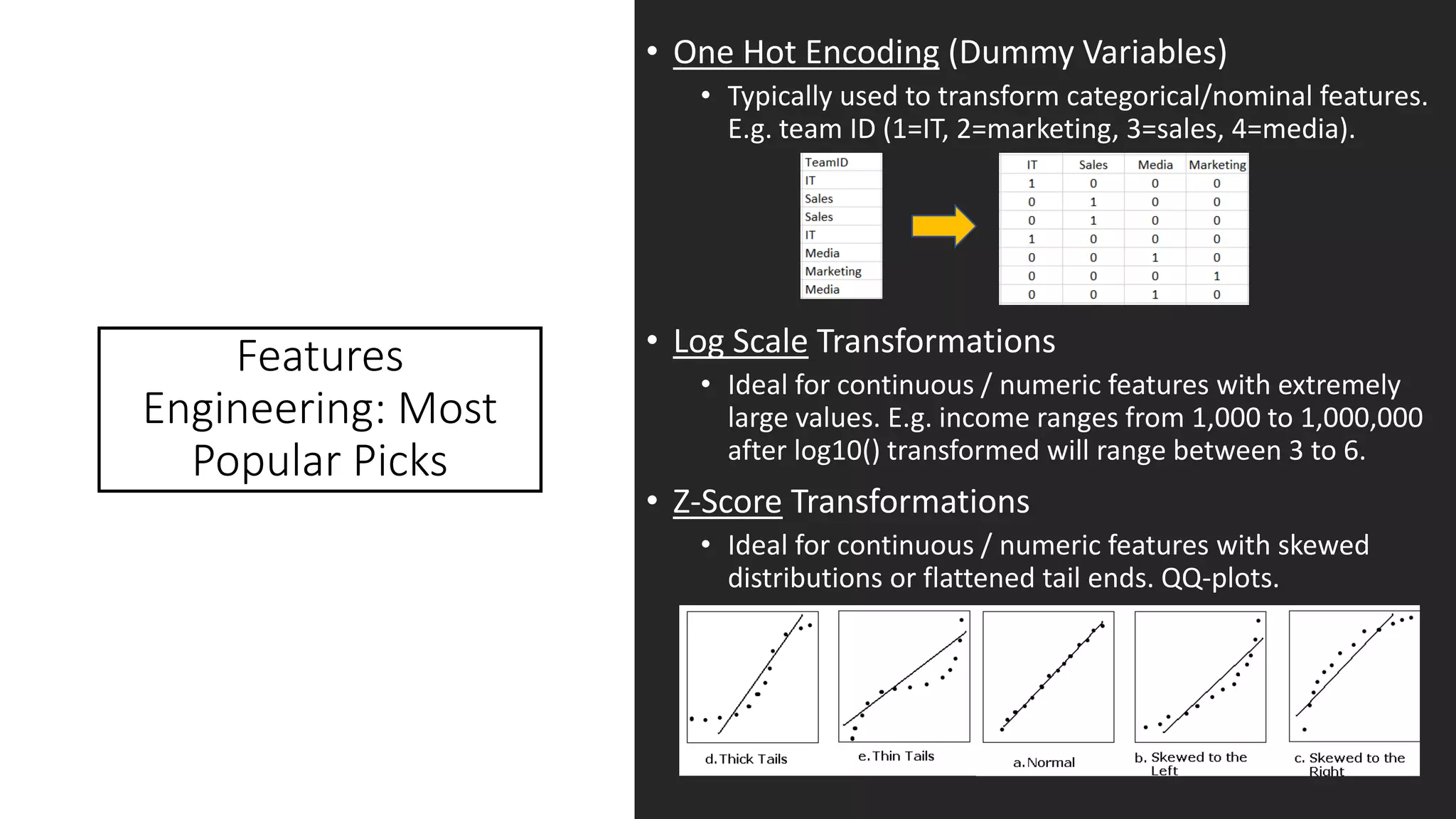
• One Hot Encoding (Dummy Variables)
• Typically used to transform categorical/nominal features.
E.g. team ID (1=IT, 2=marketing, 3=sales, 4=media).
• Log Scale Transformations
• Ideal for continuous / numeric features with extremely
large values. E.g. income ranges from 1,000 to 1,000,000
after log10() transformed will range between 3 to 6.
• Z-Score Transformations
• Ideal for continuous / numeric features with skewed
distributions or flattened tail ends. QQ-plots.
Features
Engineering: Most
Popular Picks (Cont.)
• Binarized Features
• Ideally for converting continuous features into n bins.
• Range of values that are highly correlated with
response. E.g. age (13-99), response = spending power
(e.g. house, luxury goods, etc..) age groups < 18 (low);
18 > age <= 25 (medium); 25 > age <= 40 (high); age >
40 (sub medium high).
• “Categorized” bins and further One-Hot Encode it.
• Pairwise Linear Features
• Using any 2 features to create new feature.
• Applicable for Categorical/Integer features (interaction
term * or ratio is applicable). E.g. session time per
article (ratio), article view by country (*). N (f1 nominal)
x M (f2 nominal) of new features are created.
• Higher Order Polynomial Features
• Same as above, but using second, third, ….and higher
order are used.
• E.g. of a quadratic relationship with linear component:
features a, b given y:
Ensemble Models
• Different Models Definition
• Different Seed
• Combinations of different hyperparameters
• Combinations of different features set
• Algorithms (GLMNET, ENET, NNET, RF, XGBOOST, RLIGHTGBM and
etc….)
• Dark Art
• Averaging on all submissions.
• Rank averaging – sort all predictions for each model and rank
them; distribute prediction scores according to their ranks.
• Weighted averaging/ranking. Same as previous but assigning
different weights on each/combination of models.
• Random guess / based on modeler’s experience.
• White Magic
• Model based approach to ensemble. (requires at least 100
models, or 50% of dataset dimensions)
• Predict train + test dataset
• Model predictions are used as new features.
• Blended approach – Using model predictions + original data
features to build next stage predictions.
• Stacking approach – Only use model predictions for next stage
predictions.
• Multi-stages (usually 3rd stage and 4th is a dark art averaging)
R Code: Improving Your
Submission on Getting a
Decent Rank with XGB
DEMO
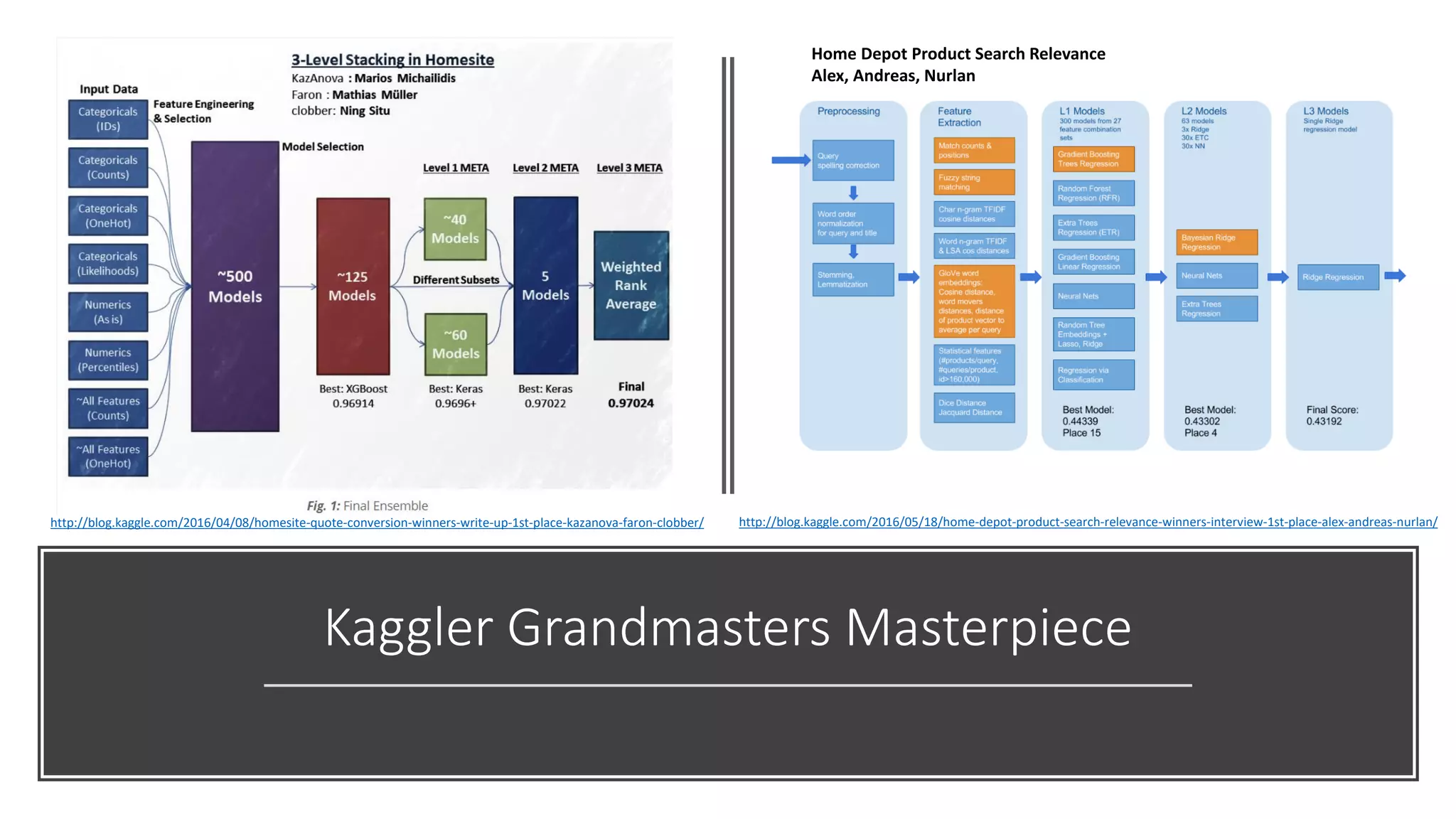
Kaggler Grandmasters Masterpiece
http://blog.kaggle.com/2016/04/08/homesite-quote-conversion-winners-write-up-1st-place-kazanova-faron-clobber/
Home Depot Product Search Relevance
Alex, Andreas, Nurlan
http://blog.kaggle.com/2016/05/18/home-depot-product-search-relevance-winners-interview-1st-place-alex-andreas-nurlan/
Thank You!
25th January 2017
RUGS SG
Garrett Teoh

R user group meeting 25th jan 2017

  • 1.
    R User GroupMeeting Using R in Kaggle Competitions 25th January 2017 Garrett Teoh Hor Keong
  • 3.
    What is Kaggle? Learn,Explore, Compete, Have Fun
  • 4.
    Which Competition to Participate? Featured Competitive (Counttowards rank) Recruitment Competitive Solo (Count towards rank) Playground Non Competitive (Does not count towards rank)
  • 5.
    Why use eXtremeGradient BOOSTing & R? http://www.datasciencecentral.com/profiles/blogs/r-moves-up-to-5th-place-in-ieee-language-rankings
  • 6.
    Choosing a Competition • Objective– Binary/Multi-Class Classifications, Continuous Value predictions, Image Classifications, Recommendation, Optimization. • Evaluation – AUC, LogLoss, RMSE, Mean Absolute Error (MAE), Mean Average Precision @n (MAP@n) • Size of Datasets – Train/Test proportion, n Samples, n Dimensions. • Team/Solo/Prize/Timeline/Kernel….
  • 7.
    Starting a Competition • Downloadingdatasets – Train, Test, and Submission. • Matching sample IDs in test.csv -> IDs in submission.csv • Timeline – First submission, Merger (teams), Final submission. • Rules – No sharing of information between teams, no public datasets, one account per competitor, daily submission limit of 5. *Take note for team forming criteria: Total Subs <= (Days competition running * 5) • Public & Private LB – Only public scoring will be shown, private scores will be revealed at the end of the competition.
  • 8.
    BNP Paribas Challenge Example •Evaluation metric: Logloss • Datasets: Train (114321), Test (114393), 131 features • 2,926 teams participated, prize money: $30,000, timeline: 3 months Objective (Problem Statement)
  • 9.
    R Code: EssentialPackages READR - for reading in input files and writing output submission files in .csv 01 XGBOOST - machine learning algorithm, trees or linear regression based booster 02 CARET - data splitting and pre- processing. model tuning and feature selections 03 MLMETRICS - collection of various evaluation metrics. 04 BINR - cutting numerical values into evenly distributed groups (bins), for basic features engineering 05 DPLYR - handy tools for data manipulations e.g. n_distinct, arrange, filter and etc. 06 GGPLOT2 - the famed R elegant data visualization tools for bar charts, line graphs, histograms and more… 07
  • 10.
    R Code: Features Exploration(Basic) • Check row IDs, submission IDs, and make copy of train set response/outcomes. • Check for missing data – NAs. • Check for valid and correct data types. • Integer (Nominal vs Ordinal) • Categorical (Nominal vs Ordinal) • Numerical • Boolean • Date • Check for n unique values for Categorical/Integer features, range, mean, median for Numerical/Integer features. • Run the nearZeroVar “CARET” package. • Review/Remove near zero variance features • Remove all zero variance features
  • 11.
  • 12.
    R Code: Build& Make First Submission Logistic Regression (LR) Rank on PB: 2,364 Random Forest (RF) Rank on PB: 2,842 eXtreme Gradient BOOSTing (XGBOOST) Rank on PB: 2,164
  • 13.
    R Code: YourFirst Submission to Kaggle (GSD) DEMO
  • 14.
    Moving Up RanksOn Kaggle: Key Points Cross Validation (Bread & Butter) • Data Partitioning, how many K-folds? Features Engineering (Most of time) • One-Hot Encoding, log-scale or z-score transformations, binarized, recode, Quadratic Discriminant Analysis, entropy, hashing. Tune Your Model! (Don’t be lazy) • Regression Based: Alpha, Gamma, Regularization parameters and etc.. • Tree Based: Max depth, N trees, min leaf/child, and etc… • Gradient Boosting: Learning rate, subsample, features subsampling, hessian gradient loss function, n rounds, gamma, max_depth Ensemble (Stacking & Blending) • Dark Art: Simple/rank averaging, weighted/geometric averaging • White Magic: Blending features, stacking models, multi stage stacker
  • 15.
    What does itmean to do a Cross Validation? How does it help to improve a model? • Model Evaluation Method • Helps to generalize model and build model’s resiliency towards outliers • Prevents significant LB shake-ups • Gives clearer indication whether model A performs better then model B • Three ways to perform CV 1. Hold-out: train/test set, typically 70/30 setup 2. K-fold CV: same as above but repeated over k-times leaving out 1 set as test, and k-1 set as training. Computational time is dependant on k-folds 3. Leave-one-out: Best CV, same as above but leaving out only one sample point and has to be repeated over n samples time. Most expensive CV but provides the best results from the averaged errors
  • 16.
    How to Set UpCross Validation? 4 fold CV Hold out 25% samples Train 75% samples 3 fold CV
  • 17.
    eXtreme Gradient Boosting: Key Considerations •Developed by Chen TianQi (University of Washington, Large Scale Machine Learning) • requires(xgboost) • Relatively easy to set up in R, challenging to set up in Python, especially on a window machine. • Multi-thread-able on R: nthread=n • Three boosters to choose from (gbtree, dart, gblinear) • Standard evaluation metrics (customizable) • Objectives (loss function customizable) • Full description/parameters of the model: https://github.com/dmlc/xgboost/blob/master/d oc/parameter.md
  • 18.
    XGBOOST: Tuning Hyper Parameters •eta; default = 0.3 • Learning rate of the loss function, aka step size shrinkage • Range [0 – 1]; 0.005 – 0.05 (0.005) • A lower learning rate should have higher nrounds • colsample_bytree; default = 1 • Number of features to consider for building each tree • Range [0 – 1]; 0.15 – 0.85 (0.05) • subsample; default = 1 • Random selection of samples for building model, 0.5 = 50% • Range [0 – 1]; 0.70 – 0.95 (0.05) • max_depth; default = 6 • Maximum depth of a tree • Range [1 – ∞]; 4 – 20 (1) • Higher values will overfit, monitor CV validation, influence computational speed • scale_pos_weight; default = 1 • Useful for unbalanced class (scaled accordingly to positive vs negative cases) • Should be scaled to the ratio of ∑(negative cases) / ∑(positive cases)
  • 19.
    XGBOOST: Advance Tuning and Customizations •min_child_weight; default = 1 • Minimum sum of instance weight (hessian gradient) in a child node, loss derivatives. • Range [0 – ∞]; 0 – 10 (1) • Higher values to be conservative, adjust accordingly with max_depth • gamma; default = 0 • Minimum loss reduction to create a further partition leaf node. Pseudo regularization hyperparameter of gradient boosting (hyper sensitive to datasets). • Range [0 - ∞]; 0 – 20 (0.1, 0.01, 1) • Higher values will make the model more conservative. Mostly used for stacking/ensemble models. • eval_metric • Default metric assigned for respective objective, rmse for regression, auc for binary logistic, map for ranking. • Customized function takes in 2 input: “yhat” and “xgb.DMatix object”, where yhat = ground truth from train set and getinfo(dtrain, labels) = predicted. • objective • Input same as eval_metric (yhat & xgb.Dmatrix) • Needed output has to return a list(grad=grad, hess=hess)
  • 20.
    Features Engineering: Most Popular Picks •One Hot Encoding (Dummy Variables) • Typically used to transform categorical/nominal features. E.g. team ID (1=IT, 2=marketing, 3=sales, 4=media). • Log Scale Transformations • Ideal for continuous / numeric features with extremely large values. E.g. income ranges from 1,000 to 1,000,000 after log10() transformed will range between 3 to 6. • Z-Score Transformations • Ideal for continuous / numeric features with skewed distributions or flattened tail ends. QQ-plots.
  • 21.
    Features Engineering: Most Popular Picks(Cont.) • Binarized Features • Ideally for converting continuous features into n bins. • Range of values that are highly correlated with response. E.g. age (13-99), response = spending power (e.g. house, luxury goods, etc..) age groups < 18 (low); 18 > age <= 25 (medium); 25 > age <= 40 (high); age > 40 (sub medium high). • “Categorized” bins and further One-Hot Encode it. • Pairwise Linear Features • Using any 2 features to create new feature. • Applicable for Categorical/Integer features (interaction term * or ratio is applicable). E.g. session time per article (ratio), article view by country (*). N (f1 nominal) x M (f2 nominal) of new features are created. • Higher Order Polynomial Features • Same as above, but using second, third, ….and higher order are used. • E.g. of a quadratic relationship with linear component: features a, b given y:
  • 22.
    Ensemble Models • DifferentModels Definition • Different Seed • Combinations of different hyperparameters • Combinations of different features set • Algorithms (GLMNET, ENET, NNET, RF, XGBOOST, RLIGHTGBM and etc….) • Dark Art • Averaging on all submissions. • Rank averaging – sort all predictions for each model and rank them; distribute prediction scores according to their ranks. • Weighted averaging/ranking. Same as previous but assigning different weights on each/combination of models. • Random guess / based on modeler’s experience. • White Magic • Model based approach to ensemble. (requires at least 100 models, or 50% of dataset dimensions) • Predict train + test dataset • Model predictions are used as new features. • Blended approach – Using model predictions + original data features to build next stage predictions. • Stacking approach – Only use model predictions for next stage predictions. • Multi-stages (usually 3rd stage and 4th is a dark art averaging)
  • 23.
    R Code: ImprovingYour Submission on Getting a Decent Rank with XGB DEMO
  • 24.
    Kaggler Grandmasters Masterpiece http://blog.kaggle.com/2016/04/08/homesite-quote-conversion-winners-write-up-1st-place-kazanova-faron-clobber/ HomeDepot Product Search Relevance Alex, Andreas, Nurlan http://blog.kaggle.com/2016/05/18/home-depot-product-search-relevance-winners-interview-1st-place-alex-andreas-nurlan/
  • 26.
    Thank You! 25th January2017 RUGS SG Garrett Teoh