This was the newest piece of technology that related to
our research. It allowed us to research similar aspects
of film to ours. It gave us more material and ideas to
work with in order to make an idea that suited the
crime thriller genre as much as possible. By having
access to YouTube we could also export our film so
that it could be viewed worldwide. It gave us a wider
audience and not just confine us to people we knew
personally. YouTube also enabled us to look at other
A2 videos and compare them to ours to see if there
were any improvements we could make and see how
effective our video was.
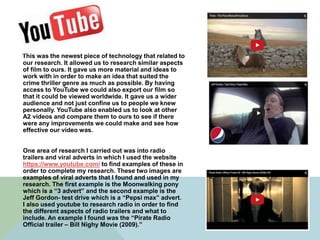
One area of research I carried out was into radio
trailers and viral adverts in which I used the website
https://www.youtube.com/ to find examples of these in
order to complete my research. These two images are
examples of viral adverts that I found and used in my
research. The first example is the Moonwalking pony
which is a “3 advert” and the second example is the
Jeff Gordon- test drive which is a “Pepsi max” advert.
I also used youtube to research radio in order to find
the different aspects of radio trailers and what to
include. An example I found was the “Pirate Radio
Official trailer – Bill Nighy Movie (2009).”
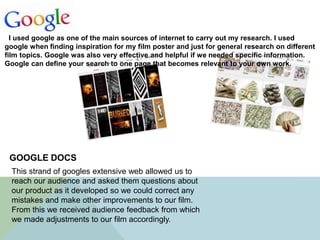
I used google as one of the main sources of internet to carry out my research. I used
google when finding inspiration for my film poster and just for general research on different
film topics. Google was also very effective and helpful if we needed specific information.
Google can define your search to one page that becomes relevant to your own work.
This strand of googles extensive web allowed us to
reach our audience and asked them questions about
our product as it developed so we could correct any
mistakes and make other improvements to our film.
From this we received audience feedback from which
we made adjustments to our film accordingly.
GOOGLE DOCS
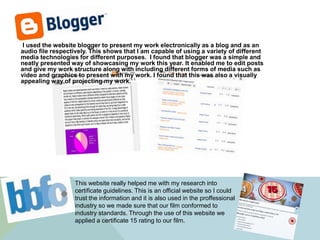
I used the website blogger to present my work electronically as a blog and as an
audio file respectively. This shows that I am capable of using a variety of different
media technologies for different purposes. I found that blogger was a simple and
neatly presented way of showcasing my work this year. It enabled me to edit posts
and give my work structure along with including different forms of media such as
video and graphics to present with my work. I found that this was also a visually
appealing way of projecting my work.
This website really helped me with my research into
certificate guidelines. This is an official website so I could
trust the information and it is also used in the proffessional
industry so we made sure that our film conformed to
industry standards. Through the use of this website we
applied a certificate 15 rating to our film.
PHOTOSHOP
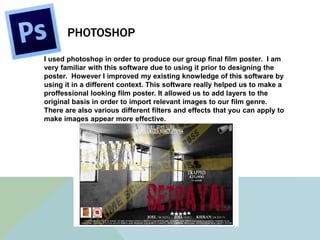
I used photoshop in order to produce our group final film poster. I am
very familiar with this software due to using it prior to designing the
poster. However I improved my existing knowledge of this software by
using it in a different context. This software really helped us to make a
proffessional looking film poster. It allowed us to add layers to the
original basis in order to import relevant images to our film genre.
There are also various different filters and effects that you can apply to
make images appear more effective.
CELTX
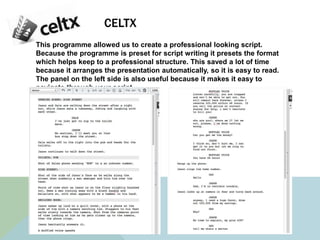
This programme allowed us to create a professional looking script.
Because the programme is preset for script writing it presets the format
which helps keep to a professional structure. This saved a lot of time
because it arranges the presentation automatically, so it is easy to read.
The panel on the left side is also useful because it makes it easy to
navigate through your script.
FINAL CUT EXPRESS
The editing software package has been priceless throughout. Without
it we would not have been able to upload our video footage to be able
to create our film. This programme is a really easy to use form of
software yet there is all of the tools needed to create an industry
standard product.
SONY HDV 1000 CAMERA AND TRIPOD
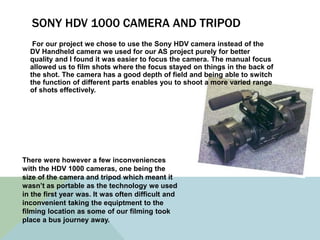
For our project we chose to use the Sony HDV camera instead of the
DV Handheld camera we used for our AS project purely for better
quality and I found it was easier to focus the camera. The manual focus
allowed us to film shots where the focus stayed on things in the back of
the shot. The camera has a good depth of field and being able to switch
the function of different parts enables you to shoot a more varied range
of shots effectively.
There were however a few inconveniences
with the HDV 1000 cameras, one being the
size of the camera and tripod which meant it
wasn’t as portable as the technology we used
in the first year was. It was often difficult and
inconvenient taking the equiptment to the
filming location as some of our filming took
place a bus journey away.

Quesion 4 evaluation

  • 2.
    This was thenewest piece of technology that related to our research. It allowed us to research similar aspects of film to ours. It gave us more material and ideas to work with in order to make an idea that suited the crime thriller genre as much as possible. By having access to YouTube we could also export our film so that it could be viewed worldwide. It gave us a wider audience and not just confine us to people we knew personally. YouTube also enabled us to look at other A2 videos and compare them to ours to see if there were any improvements we could make and see how effective our video was. One area of research I carried out was into radio trailers and viral adverts in which I used the website https://www.youtube.com/ to find examples of these in order to complete my research. These two images are examples of viral adverts that I found and used in my research. The first example is the Moonwalking pony which is a “3 advert” and the second example is the Jeff Gordon- test drive which is a “Pepsi max” advert. I also used youtube to research radio in order to find the different aspects of radio trailers and what to include. An example I found was the “Pirate Radio Official trailer – Bill Nighy Movie (2009).”
  • 3.
    I used googleas one of the main sources of internet to carry out my research. I used google when finding inspiration for my film poster and just for general research on different film topics. Google was also very effective and helpful if we needed specific information. Google can define your search to one page that becomes relevant to your own work. This strand of googles extensive web allowed us to reach our audience and asked them questions about our product as it developed so we could correct any mistakes and make other improvements to our film. From this we received audience feedback from which we made adjustments to our film accordingly. GOOGLE DOCS
  • 4.
    I used thewebsite blogger to present my work electronically as a blog and as an audio file respectively. This shows that I am capable of using a variety of different media technologies for different purposes. I found that blogger was a simple and neatly presented way of showcasing my work this year. It enabled me to edit posts and give my work structure along with including different forms of media such as video and graphics to present with my work. I found that this was also a visually appealing way of projecting my work. This website really helped me with my research into certificate guidelines. This is an official website so I could trust the information and it is also used in the proffessional industry so we made sure that our film conformed to industry standards. Through the use of this website we applied a certificate 15 rating to our film.
  • 5.
    PHOTOSHOP I used photoshopin order to produce our group final film poster. I am very familiar with this software due to using it prior to designing the poster. However I improved my existing knowledge of this software by using it in a different context. This software really helped us to make a proffessional looking film poster. It allowed us to add layers to the original basis in order to import relevant images to our film genre. There are also various different filters and effects that you can apply to make images appear more effective.
  • 6.
    CELTX This programme allowedus to create a professional looking script. Because the programme is preset for script writing it presets the format which helps keep to a professional structure. This saved a lot of time because it arranges the presentation automatically, so it is easy to read. The panel on the left side is also useful because it makes it easy to navigate through your script.
  • 7.
    FINAL CUT EXPRESS Theediting software package has been priceless throughout. Without it we would not have been able to upload our video footage to be able to create our film. This programme is a really easy to use form of software yet there is all of the tools needed to create an industry standard product.
  • 8.
    SONY HDV 1000CAMERA AND TRIPOD For our project we chose to use the Sony HDV camera instead of the DV Handheld camera we used for our AS project purely for better quality and I found it was easier to focus the camera. The manual focus allowed us to film shots where the focus stayed on things in the back of the shot. The camera has a good depth of field and being able to switch the function of different parts enables you to shoot a more varied range of shots effectively. There were however a few inconveniences with the HDV 1000 cameras, one being the size of the camera and tripod which meant it wasn’t as portable as the technology we used in the first year was. It was often difficult and inconvenient taking the equiptment to the filming location as some of our filming took place a bus journey away.