QTP Scripts http://www.gcreddy.com/
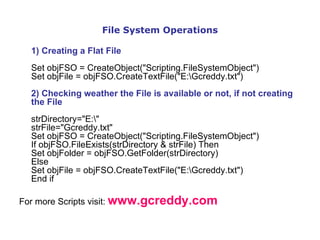
File System Operations 1) Creating a Flat File Set objFSO = CreateObject("Scripting.FileSystemObject") Set objFile = objFSO.CreateTextFile("E:\Gcreddy.txt") 2) Checking weather the File is available or not, if not creating the File strDirectory="E:\" strFile="Gcreddy.txt" Set objFSO = CreateObject("Scripting.FileSystemObject") If objFSO.FileExists(strDirectory & strFile) Then Set objFolder = objFSO.GetFolder(strDirectory) Else Set objFile = objFSO.CreateTextFile("E:\Gcreddy.txt") End if For more Scripts visit:  www.gcreddy.com
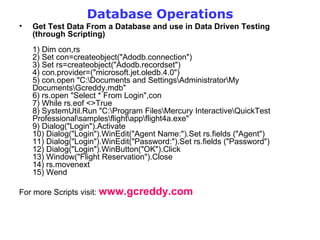
Database Operations Get Test Data From a Database and use in Data Driven Testing (through Scripting) 1) Dim con,rs 2) Set con=createobject(&quot;Adodb.connection&quot;) 3) Set rs=createobject(&quot;Adodb.recordset&quot;) 4) con.provider=(&quot;microsoft.jet.oledb.4.0&quot;) 5) con.open &quot;C:\Documents and Settings\Administrator\My Documents\Gcreddy.mdb&quot; 6) rs.open &quot;Select * From Login&quot;,con 7) While rs.eof <>True  8) SystemUtil.Run &quot;C:\Program Files\Mercury Interactive\QuickTest Professional\samples\flight\app\flight4a.exe&quot; 9) Dialog(&quot;Login&quot;).Activate 10) Dialog(&quot;Login&quot;).WinEdit(&quot;Agent Name:&quot;).Set rs.fields (&quot;Agent&quot;) 11) Dialog(&quot;Login&quot;).WinEdit(&quot;Password:&quot;).Set rs.fields (&quot;Password&quot;) 12) Dialog(&quot;Login&quot;).WinButton(&quot;OK&quot;).Click 13) Window(&quot;Flight Reservation&quot;).Close 14) rs.movenext 15) Wend For more Scripts visit:  www.gcreddy.com
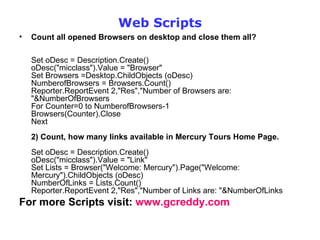
Web Scripts Count all opened Browsers on desktop and close them all? Set oDesc = Description.Create()  oDesc(&quot;micclass&quot;).Value = &quot;Browser&quot;  Set Browsers =Desktop.ChildObjects (oDesc) NumberofBrowsers = Browsers.Count()  Reporter.ReportEvent 2,&quot;Res&quot;,&quot;Number of Browsers are: &quot;&NumberOfBrowsers For Counter=0 to NumberofBrowsers-1 Browsers(Counter).Close Next 2) Count, how many links available in Mercury Tours Home Page. Set oDesc = Description.Create()  oDesc(&quot;micclass&quot;).Value = &quot;Link&quot;  Set Lists = Browser(&quot;Welcome: Mercury&quot;).Page(&quot;Welcome: Mercury&quot;).ChildObjects (oDesc) NumberOfLinks = Lists.Count()  Reporter.ReportEvent 2,&quot;Res&quot;,&quot;Number of Links are: &quot;&NumberOfLinks  For more Scripts visit:  www.gcreddy.com
Excel Scripts Create an Excel file, enter some data and save the file through VB scripting?  1) Dim objexcel 2) Set objExcel = createobject(&quot;Excel.application&quot;) 3) objexcel.Visible = True 4) objexcel.Workbooks.add 5) objexcel.Cells(1, 1).Value = &quot;Testing&quot; 6) objexcel.ActiveWorkbook.SaveAs(&quot;f:\exceltest.xls&quot;) 7) objexcel.Quit 2) Data Driven Testing through an External Excel Sheet 1) Set myExcel=Createobject(&quot;Excel.Application&quot;) 2) Set myFile=myExcel.workbooks.open (&quot;C:\Documents and Settings\admin\My Documents\gcreddy.xls&quot;) 3) Set mySheet=myFile.worksheets(&quot;Sheet1&quot;) 4) Rows_Count=mySheet.usedrange.rows.count 5) For i= 1 to Rows_Count 6) Agent=mySheet.cells(i,&quot;A&quot;) 7) pwd=mySheet.Cells(i,&quot;B&quot;) 8) SystemUtil.Run &quot;C:\Program Files\Mercury Interactive\QuickTest Professional\samples\flight\app\flight4a.exe&quot;,&quot;&quot;,&quot;C:\Program Files\Mercury Interactive\QuickTest Professional\samples\flight\app\&quot;,&quot;open&quot; 9) Dialog(&quot;Login&quot;).Activate 10) Dialog(&quot;Login&quot;).WinEdit(&quot;Agent Name:&quot;).Set Agent 11) Dialog(&quot;Login&quot;).WinEdit(&quot;Password:&quot;).SetSecure pwd 12) Dialog(&quot;Login&quot;).WinEdit(&quot;Password:&quot;).Type micReturn  13) Window(&quot;Flight Reservation&quot;).Close 14) Next For more Scripts visit:  www.gcreddy.com

Qtp Scripts

  • 1.
  • 2.
    File System Operations1) Creating a Flat File Set objFSO = CreateObject(&quot;Scripting.FileSystemObject&quot;) Set objFile = objFSO.CreateTextFile(&quot;E:\Gcreddy.txt&quot;) 2) Checking weather the File is available or not, if not creating the File strDirectory=&quot;E:\&quot; strFile=&quot;Gcreddy.txt&quot; Set objFSO = CreateObject(&quot;Scripting.FileSystemObject&quot;) If objFSO.FileExists(strDirectory & strFile) Then Set objFolder = objFSO.GetFolder(strDirectory) Else Set objFile = objFSO.CreateTextFile(&quot;E:\Gcreddy.txt&quot;) End if For more Scripts visit: www.gcreddy.com
  • 3.
    Database Operations GetTest Data From a Database and use in Data Driven Testing (through Scripting) 1) Dim con,rs 2) Set con=createobject(&quot;Adodb.connection&quot;) 3) Set rs=createobject(&quot;Adodb.recordset&quot;) 4) con.provider=(&quot;microsoft.jet.oledb.4.0&quot;) 5) con.open &quot;C:\Documents and Settings\Administrator\My Documents\Gcreddy.mdb&quot; 6) rs.open &quot;Select * From Login&quot;,con 7) While rs.eof <>True 8) SystemUtil.Run &quot;C:\Program Files\Mercury Interactive\QuickTest Professional\samples\flight\app\flight4a.exe&quot; 9) Dialog(&quot;Login&quot;).Activate 10) Dialog(&quot;Login&quot;).WinEdit(&quot;Agent Name:&quot;).Set rs.fields (&quot;Agent&quot;) 11) Dialog(&quot;Login&quot;).WinEdit(&quot;Password:&quot;).Set rs.fields (&quot;Password&quot;) 12) Dialog(&quot;Login&quot;).WinButton(&quot;OK&quot;).Click 13) Window(&quot;Flight Reservation&quot;).Close 14) rs.movenext 15) Wend For more Scripts visit: www.gcreddy.com
  • 4.
    Web Scripts Countall opened Browsers on desktop and close them all? Set oDesc = Description.Create() oDesc(&quot;micclass&quot;).Value = &quot;Browser&quot; Set Browsers =Desktop.ChildObjects (oDesc) NumberofBrowsers = Browsers.Count() Reporter.ReportEvent 2,&quot;Res&quot;,&quot;Number of Browsers are: &quot;&NumberOfBrowsers For Counter=0 to NumberofBrowsers-1 Browsers(Counter).Close Next 2) Count, how many links available in Mercury Tours Home Page. Set oDesc = Description.Create() oDesc(&quot;micclass&quot;).Value = &quot;Link&quot; Set Lists = Browser(&quot;Welcome: Mercury&quot;).Page(&quot;Welcome: Mercury&quot;).ChildObjects (oDesc) NumberOfLinks = Lists.Count() Reporter.ReportEvent 2,&quot;Res&quot;,&quot;Number of Links are: &quot;&NumberOfLinks For more Scripts visit: www.gcreddy.com
  • 5.
    Excel Scripts Createan Excel file, enter some data and save the file through VB scripting? 1) Dim objexcel 2) Set objExcel = createobject(&quot;Excel.application&quot;) 3) objexcel.Visible = True 4) objexcel.Workbooks.add 5) objexcel.Cells(1, 1).Value = &quot;Testing&quot; 6) objexcel.ActiveWorkbook.SaveAs(&quot;f:\exceltest.xls&quot;) 7) objexcel.Quit 2) Data Driven Testing through an External Excel Sheet 1) Set myExcel=Createobject(&quot;Excel.Application&quot;) 2) Set myFile=myExcel.workbooks.open (&quot;C:\Documents and Settings\admin\My Documents\gcreddy.xls&quot;) 3) Set mySheet=myFile.worksheets(&quot;Sheet1&quot;) 4) Rows_Count=mySheet.usedrange.rows.count 5) For i= 1 to Rows_Count 6) Agent=mySheet.cells(i,&quot;A&quot;) 7) pwd=mySheet.Cells(i,&quot;B&quot;) 8) SystemUtil.Run &quot;C:\Program Files\Mercury Interactive\QuickTest Professional\samples\flight\app\flight4a.exe&quot;,&quot;&quot;,&quot;C:\Program Files\Mercury Interactive\QuickTest Professional\samples\flight\app\&quot;,&quot;open&quot; 9) Dialog(&quot;Login&quot;).Activate 10) Dialog(&quot;Login&quot;).WinEdit(&quot;Agent Name:&quot;).Set Agent 11) Dialog(&quot;Login&quot;).WinEdit(&quot;Password:&quot;).SetSecure pwd 12) Dialog(&quot;Login&quot;).WinEdit(&quot;Password:&quot;).Type micReturn 13) Window(&quot;Flight Reservation&quot;).Close 14) Next For more Scripts visit: www.gcreddy.com