Visit:   www.gcreddy.com                         for QTP Information


               Types of Statements in QTP Test
We use different types of statements in QTP Test or Test script

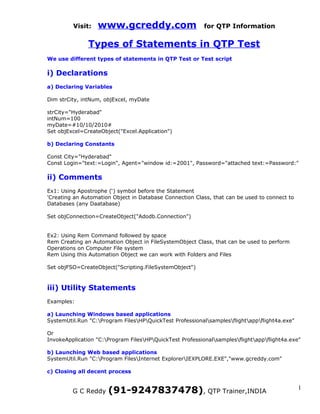
i) Declarations
a) Declaring Variables

Dim strCity, intNum, objExcel, myDate

strCity="Hyderabad"
intNum=100
myDate=#10/10/2010#
Set objExcel=CreateObject("Excel.Application")

b) Declaring Constants

Const City="Hyderabad"
Const Login="text:=Login", Agent="window id:=2001", Password="attached text:=Password:"

ii) Comments
Ex1: Using Apostrophe (‘) symbol before the Statement
'Creating an Automation Object in Database Connection Class, that can be used to connect to
Databases (any Daatabase)

Set objConnection=CreateObject("Adodb.Connection")


Ex2: Using Rem Command followed by space
Rem Creating an Automation Object in FileSystemObject Class, that can be used to perform
Operations on Computer File system
Rem Using this Automation Object we can work with Folders and Files

Set objFSO=CreateObject("Scripting.FileSystemObject")


iii) Utility Statements
Examples:

a) Launching Windows based applications
SystemUtil.Run "C:Program FilesHPQuickTest Professionalsamplesflightappflight4a.exe"

Or
InvokeApplication "C:Program FilesHPQuickTest Professionalsamplesflightappflight4a.exe"

b) Launching Web based applications
SystemUtil.Run "C:Program FilesInternet ExplorerIEXPLORE.EXE","www.gcreddy.com"

c) Closing all decent process


         G C Reddy    (91-9247837478), QTP Trainer,INDIA                                      1
Visit:    www.gcreddy.com                         for QTP Information

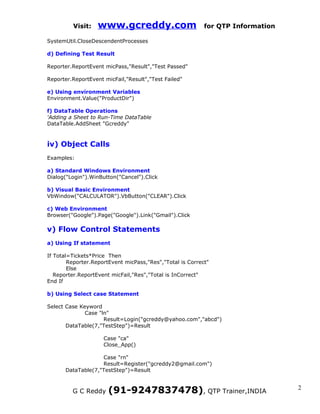
SystemUtil.CloseDescendentProcesses

d) Defining Test Result

Reporter.ReportEvent micPass,"Result","Test Passed"

Reporter.ReportEvent micFail,"Result","Test Failed"

e) Using environment Variables
Environment.Value("ProductDir")

f) DataTable Operations
'Adding a Sheet to Run-Time DataTable
DataTable.AddSheet "Gcreddy"


iv) Object Calls
Examples:

a) Standard Windows Environment
Dialog("Login").WinButton("Cancel").Click

b) Visual Basic Environment
VbWindow("CALCULATOR").VbButton("CLEAR").Click

c) Web Environment
Browser("Google").Page("Google").Link("Gmail").Click

v) Flow Control Statements
a) Using If statement

If Total=Tickets*Price Then
        Reporter.ReportEvent micPass,"Res","Total is Correct"
        Else
   Reporter.ReportEvent micFail,"Res","Total is InCorrect"
End If

b) Using Select case Statement

Select Case Keyword
              Case "ln"
                     Result=Login("gcreddy@yahoo.com","abcd")
       DataTable(7,"TestStep")=Result

                     Case "ca"
                     Close_App()

                   Case "rn"
                   Result=Register("gcreddy2@gmail.com")
      DataTable(7,"TestStep")=Result


         G C Reddy     (91-9247837478), QTP Trainer,INDIA                        2
Visit:   www.gcreddy.com                        for QTP Information


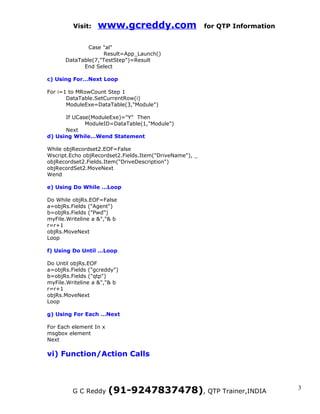
              Case "al"
                   Result=App_Launch()
      DataTable(7,"TestStep")=Result
            End Select

c) Using For…Next Loop

For i=1 to MRowCount Step 1
       DataTable.SetCurrentRow(i)
       ModuleExe=DataTable(3,"Module")

      If UCase(ModuleExe)="Y" Then
             ModuleID=DataTable(1,"Module")
      Next
d) Using While…Wend Statement

While objRecordset2.EOF=False
Wscript.Echo objRecordset2.Fields.Item("DriveName"), _
objRecordset2.Fields.Item("DriveDescription")
objRecordSet2.MoveNext
Wend

e) Using Do While …Loop

Do While objRs.EOF=False
a=objRs.Fields ("Agent")
b=objRs.Fields ("Pwd")
myFile.Writeline a &","& b
r=r+1
objRs.MoveNext
Loop

f) Using Do Until …Loop

Do Until objRs.EOF
a=objRs.Fields ("gcreddy")
b=objRs.Fields ("qtp")
myFile.Writeline a &","& b
r=r+1
objRs.MoveNext
Loop

g) Using For Each …Next

For Each element In x
msgbox element
Next

vi) Function/Action Calls


         G C Reddy      (91-9247837478), QTP Trainer,INDIA                     3
Visit:    www.gcreddy.com                       for QTP Information

a) Function calls

Dim myDate
myDate=Date
Msgbox myDate
Msgbox NOW ‘Built-in Function

Call Login (“gcreddy”,”mercury”) ‘User defined Function

b) Action Calls

RunAction "Registration [Orders]", oneIteration

vii) Check point statements
Window("Flight Reservation").WinEdit("Name:").Check CheckPoint("Name:")

viii) Output value statements
Window("Flight Reservation").WinButton("Update Order").Output CheckPoint("Update Order")

ix) Synchronization point statements
Window("Flight Reservation").WinButton("Delete Order").WaitProperty "enabled", True, 30000

x) VB Script statements
Examples:

a) Synchronization using Wait Statement

Wait 10

b) Code Optimization Using With and End With Statements

With Dialog("Login")
       .Activate
       .WinEdit("Agent Name:").Set "vdfdg"
       .WinEdit("Password:").SetSecure "4d52b150608f41854dfd1714582004f58c475d84"
       .WinButton("OK").Click
End With

c) Defining Private Functions using Private statement

Private Function Login(UserId, Password)
--------
Statements
----------
----------
End Function

d) Storing Object Reference using Set Statement

Set myPage=Browser("QuickTest Professional").Page("QuickTest Professional")


          G C Reddy   (91-9247837478), QTP Trainer,INDIA                                     4
Visit:    www.gcreddy.com              for QTP Information


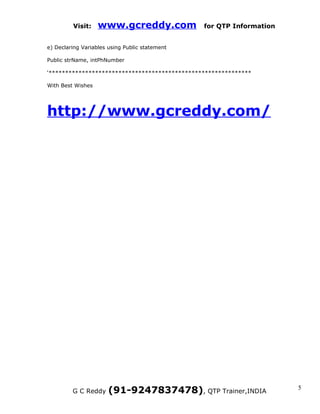
e) Declaring Variables using Public statement

Public strName, intPhNumber

‘*************************************************************

With Best Wishes


http://www.gcreddy.com/


         G C Reddy     (91-9247837478), QTP Trainer,INDIA             5

Qtp test

  • 1.
    Visit: www.gcreddy.com for QTP Information Types of Statements in QTP Test We use different types of statements in QTP Test or Test script i) Declarations a) Declaring Variables Dim strCity, intNum, objExcel, myDate strCity="Hyderabad" intNum=100 myDate=#10/10/2010# Set objExcel=CreateObject("Excel.Application") b) Declaring Constants Const City="Hyderabad" Const Login="text:=Login", Agent="window id:=2001", Password="attached text:=Password:" ii) Comments Ex1: Using Apostrophe (‘) symbol before the Statement 'Creating an Automation Object in Database Connection Class, that can be used to connect to Databases (any Daatabase) Set objConnection=CreateObject("Adodb.Connection") Ex2: Using Rem Command followed by space Rem Creating an Automation Object in FileSystemObject Class, that can be used to perform Operations on Computer File system Rem Using this Automation Object we can work with Folders and Files Set objFSO=CreateObject("Scripting.FileSystemObject") iii) Utility Statements Examples: a) Launching Windows based applications SystemUtil.Run "C:Program FilesHPQuickTest Professionalsamplesflightappflight4a.exe" Or InvokeApplication "C:Program FilesHPQuickTest Professionalsamplesflightappflight4a.exe" b) Launching Web based applications SystemUtil.Run "C:Program FilesInternet ExplorerIEXPLORE.EXE","www.gcreddy.com" c) Closing all decent process G C Reddy (91-9247837478), QTP Trainer,INDIA 1
  • 2.
    Visit: www.gcreddy.com for QTP Information SystemUtil.CloseDescendentProcesses d) Defining Test Result Reporter.ReportEvent micPass,"Result","Test Passed" Reporter.ReportEvent micFail,"Result","Test Failed" e) Using environment Variables Environment.Value("ProductDir") f) DataTable Operations 'Adding a Sheet to Run-Time DataTable DataTable.AddSheet "Gcreddy" iv) Object Calls Examples: a) Standard Windows Environment Dialog("Login").WinButton("Cancel").Click b) Visual Basic Environment VbWindow("CALCULATOR").VbButton("CLEAR").Click c) Web Environment Browser("Google").Page("Google").Link("Gmail").Click v) Flow Control Statements a) Using If statement If Total=Tickets*Price Then Reporter.ReportEvent micPass,"Res","Total is Correct" Else Reporter.ReportEvent micFail,"Res","Total is InCorrect" End If b) Using Select case Statement Select Case Keyword Case "ln" Result=Login("gcreddy@yahoo.com","abcd") DataTable(7,"TestStep")=Result Case "ca" Close_App() Case "rn" Result=Register("gcreddy2@gmail.com") DataTable(7,"TestStep")=Result G C Reddy (91-9247837478), QTP Trainer,INDIA 2
  • 3.
    Visit: www.gcreddy.com for QTP Information Case "al" Result=App_Launch() DataTable(7,"TestStep")=Result End Select c) Using For…Next Loop For i=1 to MRowCount Step 1 DataTable.SetCurrentRow(i) ModuleExe=DataTable(3,"Module") If UCase(ModuleExe)="Y" Then ModuleID=DataTable(1,"Module") Next d) Using While…Wend Statement While objRecordset2.EOF=False Wscript.Echo objRecordset2.Fields.Item("DriveName"), _ objRecordset2.Fields.Item("DriveDescription") objRecordSet2.MoveNext Wend e) Using Do While …Loop Do While objRs.EOF=False a=objRs.Fields ("Agent") b=objRs.Fields ("Pwd") myFile.Writeline a &","& b r=r+1 objRs.MoveNext Loop f) Using Do Until …Loop Do Until objRs.EOF a=objRs.Fields ("gcreddy") b=objRs.Fields ("qtp") myFile.Writeline a &","& b r=r+1 objRs.MoveNext Loop g) Using For Each …Next For Each element In x msgbox element Next vi) Function/Action Calls G C Reddy (91-9247837478), QTP Trainer,INDIA 3
  • 4.
    Visit: www.gcreddy.com for QTP Information a) Function calls Dim myDate myDate=Date Msgbox myDate Msgbox NOW ‘Built-in Function Call Login (“gcreddy”,”mercury”) ‘User defined Function b) Action Calls RunAction "Registration [Orders]", oneIteration vii) Check point statements Window("Flight Reservation").WinEdit("Name:").Check CheckPoint("Name:") viii) Output value statements Window("Flight Reservation").WinButton("Update Order").Output CheckPoint("Update Order") ix) Synchronization point statements Window("Flight Reservation").WinButton("Delete Order").WaitProperty "enabled", True, 30000 x) VB Script statements Examples: a) Synchronization using Wait Statement Wait 10 b) Code Optimization Using With and End With Statements With Dialog("Login") .Activate .WinEdit("Agent Name:").Set "vdfdg" .WinEdit("Password:").SetSecure "4d52b150608f41854dfd1714582004f58c475d84" .WinButton("OK").Click End With c) Defining Private Functions using Private statement Private Function Login(UserId, Password) -------- Statements ---------- ---------- End Function d) Storing Object Reference using Set Statement Set myPage=Browser("QuickTest Professional").Page("QuickTest Professional") G C Reddy (91-9247837478), QTP Trainer,INDIA 4
  • 5.
    Visit: www.gcreddy.com for QTP Information e) Declaring Variables using Public statement Public strName, intPhNumber ‘************************************************************* With Best Wishes http://www.gcreddy.com/ G C Reddy (91-9247837478), QTP Trainer,INDIA 5