gcrindia@gmail.com


              Working with Files
I) Computer file System
In computing, a file system (often also written as filesystem) is a method for storing
and organizing computer files and the data they contain to make it easy to find and
access them. File systems may use a data storage device such as a hard disk or CD-
ROM.

II) Working with Drives and Folders

a) Creating a Folder

Option Explicit
Dim objFSO, objFolder, strDirectory
strDirectory = "D:logs"
Set objFSO = CreateObject("Scripting.FileSystemObject")
Set objFolder = objFSO.CreateFolder(strDirectory)

b) Deleting a Folder

Set oFSO = CreateObject("Scripting.FileSystemObject")
oFSO.DeleteFolder("E:FSO")

c) Copying Folders

Set oFSO=createobject("Scripting.Filesystemobject")
oFSO.CopyFolder "E:gcr6", "C:jvr", True

d) Checking weather the folder available or not, if not creating the folder

Option Explicit
Dim objFSO, objFolder, strDirectory
strDirectory = "D:logs"
Set objFSO = CreateObject("Scripting.FileSystemObject")
If objFSO.FolderExists(strDirectory) Then
   Set objFolder = objFSO.GetFolder(strDirectory)
   msgbox strDirectory & " already created "
else
Set objFolder = objFSO.CreateFolder(strDirectory)
end if

e) Returning a collection of Disk Drives

Set oFSO = CreateObject("Scripting.FileSystemObject")
Set colDrives = oFSO.Drives
For Each oDrive in colDrives
MsgBox "Drive letter: " & oDrive.DriveLetter
Next

f) Getting available space on a Disk Drive


      G.C.Reddy, QTP Trainer, Hyderabad (9247837478)                                1
gcrindia@gmail.com


Set oFSO = CreateObject("Scripting.FileSystemObject")
Set oDrive = oFSO.GetDrive("C:")
MsgBox "Available space: " & oDrive.AvailableSpace

III) Working with Flat Files
a) Creating a Flat File
Set objFSO = CreateObject("Scripting.FileSystemObject")
Set objFile = objFSO.CreateTextFile("E:ScriptLog.txt")

b) Checking weather the File is available or not, if not creating the File

strDirectory="E:"
strFile="Scripting.txt"
Set objFSO = CreateObject("Scripting.FileSystemObject")
If objFSO.FileExists(strDirectory & strFile) Then
Set objFolder = objFSO.GetFolder(strDirectory)
Else
Set objFile = objFSO.CreateTextFile("E:ScriptLog.txt")
End if
c) Reading Data character by character from a Flat File
Set objFSO = CreateObject("Scripting.FileSystemObject")
Set objFile = objFSO.OpenTextFile("E:gcr.txt", 1)
Do Until objFile.AtEndOfStream
  strCharacters = objFile.Read(1)
  msgbox strCharacters
Loop
d) Deleting Data From a Flat File
e) Comparing Flat Files
f) Searching Particular Strings in a Flat File
d) Reading Data line by line from a Flat File

Set objFSO = CreateObject("Scripting.FileSystemObject")
Set objFile = objFSO.OpenTextFile("E:gcr.txt", 1)
Do Until objFile.AtEndOfStream
  strCharacters = objFile.Readline
  msgbox strCharacters
Loop

e) Reading data from a flat file and using in data driven testing

Dim fso,myfile
Set fso=createobject("scripting.filesystemobject")
Set myfile= fso.opentextfile ("F:gcr.txt",1)
myfile.skipline
While myfile.atendofline <> True
x=myfile.readline
s=split (x, ",")


      G.C.Reddy, QTP Trainer, Hyderabad (9247837478)                         2
gcrindia@gmail.com

SystemUtil.Run "C:Program FilesMercury InteractiveQuickTest Professionalsamples
flightappflight4a.exe","","C:Program FilesMercury InteractiveQuickTest
Professionalsamplesflightapp","open"
Dialog("Login").Activate
Dialog("Login").WinEdit("Agent Name:").Set s(0)
Dialog("Login").WinEdit("Password:").SetSecure s(1)
Dialog("Login").WinButton("OK").Click
Window("Flight Reservation").Close
Wend

f) Writing data to a text file

Dim Stuff, myFSO, WriteStuff, dateStamp
dateStamp = Date()
Stuff = "I am Preparing this script: " &dateStamp

Set myFSO = CreateObject("Scripting.FileSystemObject")
Set WriteStuff = myFSO.OpenTextFile("e:gcr.txt", 8, True)
WriteStuff.WriteLine(Stuff)
WriteStuff.Close
SET WriteStuff = NOTHING
SET myFSO = NOTHING

g) Delete a text file

Set objFSO=createobject("Scripting.filesystemobject")
Set txtFilepath = objFSO.GetFile("E:gcr.txt")
 txtFilepath.Delete()


h) Checking weather the File is available or not, if available delete the File

strDirectory="E:"
strFile="gcr.txt"
Set objFSO = CreateObject("Scripting.FileSystemObject")
If objFSO.FileExists(strDirectory & strFile) Then
Set objFile = objFSO.Getfile(strDirectory & strFile)
objFile.delete ()
End if

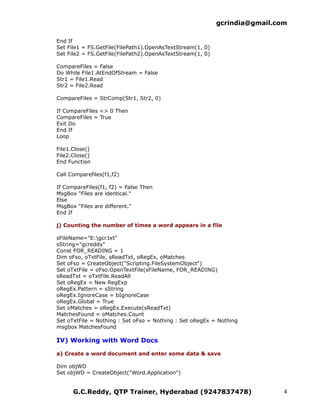
i) Comparing two text files

Dim f1, f2
f1="e:gcr1.txt"
f2="e:gcr2.txt"
Public Function CompareFiles (FilePath1, FilePath2)
Dim FS, File1, File2
Set FS = CreateObject("Scripting.FileSystemObject")

If FS.GetFile(FilePath1).Size <> FS.GetFile(FilePath2).Size Then
CompareFiles = True
Exit Function


      G.C.Reddy, QTP Trainer, Hyderabad (9247837478)                               3
gcrindia@gmail.com

End If
Set File1 = FS.GetFile(FilePath1).OpenAsTextStream(1, 0)
Set File2 = FS.GetFile(FilePath2).OpenAsTextStream(1, 0)

CompareFiles = False
Do While File1.AtEndOfStream = False
Str1 = File1.Read
Str2 = File2.Read

CompareFiles = StrComp(Str1, Str2, 0)

If CompareFiles <> 0 Then
CompareFiles = True
Exit Do
End If
Loop

File1.Close()
File2.Close()
End Function

Call Comparefiles(f1,f2)

If CompareFiles(f1, f2) = False Then
MsgBox "Files are identical."
Else
MsgBox "Files are different."
End If

j) Counting the number of times a word appears in a file

sFileName="E:gcr.txt"
sString="gcreddy"
Const FOR_READING = 1
Dim oFso, oTxtFile, sReadTxt, oRegEx, oMatches
Set oFso = CreateObject("Scripting.FileSystemObject")
Set oTxtFile = oFso.OpenTextFile(sFileName, FOR_READING)
sReadTxt = oTxtFile.ReadAll
Set oRegEx = New RegExp
oRegEx.Pattern = sString
oRegEx.IgnoreCase = bIgnoreCase
oRegEx.Global = True
Set oMatches = oRegEx.Execute(sReadTxt)
MatchesFound = oMatches.Count
Set oTxtFile = Nothing : Set oFso = Nothing : Set oRegEx = Nothing
msgbox MatchesFound

IV) Working with Word Docs

a) Create a word document and enter some data & save

Dim objWD
Set objWD = CreateObject("Word.Application")


      G.C.Reddy, QTP Trainer, Hyderabad (9247837478)                        4
gcrindia@gmail.com

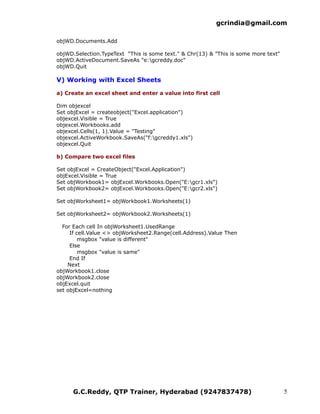
objWD.Documents.Add

objWD.Selection.TypeText "This is some text." & Chr(13) & "This is some more text"
objWD.ActiveDocument.SaveAs "e:gcreddy.doc"
objWD.Quit

V) Working with Excel Sheets

a) Create an excel sheet and enter a value into first cell

Dim objexcel
Set objExcel = createobject("Excel.application")
objexcel.Visible = True
objexcel.Workbooks.add
objexcel.Cells(1, 1).Value = "Testing"
objexcel.ActiveWorkbook.SaveAs("f:gcreddy1.xls")
objexcel.Quit

b) Compare two excel files

Set objExcel = CreateObject("Excel.Application")
objExcel.Visible = True
Set objWorkbook1= objExcel.Workbooks.Open("E:gcr1.xls")
Set objWorkbook2= objExcel.Workbooks.Open("E:gcr2.xls")

Set objWorksheet1= objWorkbook1.Worksheets(1)

Set objWorksheet2= objWorkbook2.Worksheets(1)

  For Each cell In objWorksheet1.UsedRange
     If cell.Value <> objWorksheet2.Range(cell.Address).Value Then
         msgbox "value is different"
     Else
         msgbox "value is same"
     End If
    Next
objWorkbook1.close
objWorkbook2.close
objExcel.quit
set objExcel=nothing


      G.C.Reddy, QTP Trainer, Hyderabad (9247837478)                                 5

File System Operations

  • 1.
    gcrindia@gmail.com Working with Files I) Computer file System In computing, a file system (often also written as filesystem) is a method for storing and organizing computer files and the data they contain to make it easy to find and access them. File systems may use a data storage device such as a hard disk or CD- ROM. II) Working with Drives and Folders a) Creating a Folder Option Explicit Dim objFSO, objFolder, strDirectory strDirectory = "D:logs" Set objFSO = CreateObject("Scripting.FileSystemObject") Set objFolder = objFSO.CreateFolder(strDirectory) b) Deleting a Folder Set oFSO = CreateObject("Scripting.FileSystemObject") oFSO.DeleteFolder("E:FSO") c) Copying Folders Set oFSO=createobject("Scripting.Filesystemobject") oFSO.CopyFolder "E:gcr6", "C:jvr", True d) Checking weather the folder available or not, if not creating the folder Option Explicit Dim objFSO, objFolder, strDirectory strDirectory = "D:logs" Set objFSO = CreateObject("Scripting.FileSystemObject") If objFSO.FolderExists(strDirectory) Then Set objFolder = objFSO.GetFolder(strDirectory) msgbox strDirectory & " already created " else Set objFolder = objFSO.CreateFolder(strDirectory) end if e) Returning a collection of Disk Drives Set oFSO = CreateObject("Scripting.FileSystemObject") Set colDrives = oFSO.Drives For Each oDrive in colDrives MsgBox "Drive letter: " & oDrive.DriveLetter Next f) Getting available space on a Disk Drive G.C.Reddy, QTP Trainer, Hyderabad (9247837478) 1
  • 2.
    gcrindia@gmail.com Set oFSO =CreateObject("Scripting.FileSystemObject") Set oDrive = oFSO.GetDrive("C:") MsgBox "Available space: " & oDrive.AvailableSpace III) Working with Flat Files a) Creating a Flat File Set objFSO = CreateObject("Scripting.FileSystemObject") Set objFile = objFSO.CreateTextFile("E:ScriptLog.txt") b) Checking weather the File is available or not, if not creating the File strDirectory="E:" strFile="Scripting.txt" Set objFSO = CreateObject("Scripting.FileSystemObject") If objFSO.FileExists(strDirectory & strFile) Then Set objFolder = objFSO.GetFolder(strDirectory) Else Set objFile = objFSO.CreateTextFile("E:ScriptLog.txt") End if c) Reading Data character by character from a Flat File Set objFSO = CreateObject("Scripting.FileSystemObject") Set objFile = objFSO.OpenTextFile("E:gcr.txt", 1) Do Until objFile.AtEndOfStream strCharacters = objFile.Read(1) msgbox strCharacters Loop d) Deleting Data From a Flat File e) Comparing Flat Files f) Searching Particular Strings in a Flat File d) Reading Data line by line from a Flat File Set objFSO = CreateObject("Scripting.FileSystemObject") Set objFile = objFSO.OpenTextFile("E:gcr.txt", 1) Do Until objFile.AtEndOfStream strCharacters = objFile.Readline msgbox strCharacters Loop e) Reading data from a flat file and using in data driven testing Dim fso,myfile Set fso=createobject("scripting.filesystemobject") Set myfile= fso.opentextfile ("F:gcr.txt",1) myfile.skipline While myfile.atendofline <> True x=myfile.readline s=split (x, ",") G.C.Reddy, QTP Trainer, Hyderabad (9247837478) 2
  • 3.
    gcrindia@gmail.com SystemUtil.Run "C:Program FilesMercuryInteractiveQuickTest Professionalsamples flightappflight4a.exe","","C:Program FilesMercury InteractiveQuickTest Professionalsamplesflightapp","open" Dialog("Login").Activate Dialog("Login").WinEdit("Agent Name:").Set s(0) Dialog("Login").WinEdit("Password:").SetSecure s(1) Dialog("Login").WinButton("OK").Click Window("Flight Reservation").Close Wend f) Writing data to a text file Dim Stuff, myFSO, WriteStuff, dateStamp dateStamp = Date() Stuff = "I am Preparing this script: " &dateStamp Set myFSO = CreateObject("Scripting.FileSystemObject") Set WriteStuff = myFSO.OpenTextFile("e:gcr.txt", 8, True) WriteStuff.WriteLine(Stuff) WriteStuff.Close SET WriteStuff = NOTHING SET myFSO = NOTHING g) Delete a text file Set objFSO=createobject("Scripting.filesystemobject") Set txtFilepath = objFSO.GetFile("E:gcr.txt") txtFilepath.Delete() h) Checking weather the File is available or not, if available delete the File strDirectory="E:" strFile="gcr.txt" Set objFSO = CreateObject("Scripting.FileSystemObject") If objFSO.FileExists(strDirectory & strFile) Then Set objFile = objFSO.Getfile(strDirectory & strFile) objFile.delete () End if i) Comparing two text files Dim f1, f2 f1="e:gcr1.txt" f2="e:gcr2.txt" Public Function CompareFiles (FilePath1, FilePath2) Dim FS, File1, File2 Set FS = CreateObject("Scripting.FileSystemObject") If FS.GetFile(FilePath1).Size <> FS.GetFile(FilePath2).Size Then CompareFiles = True Exit Function G.C.Reddy, QTP Trainer, Hyderabad (9247837478) 3
  • 4.
    gcrindia@gmail.com End If Set File1= FS.GetFile(FilePath1).OpenAsTextStream(1, 0) Set File2 = FS.GetFile(FilePath2).OpenAsTextStream(1, 0) CompareFiles = False Do While File1.AtEndOfStream = False Str1 = File1.Read Str2 = File2.Read CompareFiles = StrComp(Str1, Str2, 0) If CompareFiles <> 0 Then CompareFiles = True Exit Do End If Loop File1.Close() File2.Close() End Function Call Comparefiles(f1,f2) If CompareFiles(f1, f2) = False Then MsgBox "Files are identical." Else MsgBox "Files are different." End If j) Counting the number of times a word appears in a file sFileName="E:gcr.txt" sString="gcreddy" Const FOR_READING = 1 Dim oFso, oTxtFile, sReadTxt, oRegEx, oMatches Set oFso = CreateObject("Scripting.FileSystemObject") Set oTxtFile = oFso.OpenTextFile(sFileName, FOR_READING) sReadTxt = oTxtFile.ReadAll Set oRegEx = New RegExp oRegEx.Pattern = sString oRegEx.IgnoreCase = bIgnoreCase oRegEx.Global = True Set oMatches = oRegEx.Execute(sReadTxt) MatchesFound = oMatches.Count Set oTxtFile = Nothing : Set oFso = Nothing : Set oRegEx = Nothing msgbox MatchesFound IV) Working with Word Docs a) Create a word document and enter some data & save Dim objWD Set objWD = CreateObject("Word.Application") G.C.Reddy, QTP Trainer, Hyderabad (9247837478) 4
  • 5.
    gcrindia@gmail.com objWD.Documents.Add objWD.Selection.TypeText "This issome text." & Chr(13) & "This is some more text" objWD.ActiveDocument.SaveAs "e:gcreddy.doc" objWD.Quit V) Working with Excel Sheets a) Create an excel sheet and enter a value into first cell Dim objexcel Set objExcel = createobject("Excel.application") objexcel.Visible = True objexcel.Workbooks.add objexcel.Cells(1, 1).Value = "Testing" objexcel.ActiveWorkbook.SaveAs("f:gcreddy1.xls") objexcel.Quit b) Compare two excel files Set objExcel = CreateObject("Excel.Application") objExcel.Visible = True Set objWorkbook1= objExcel.Workbooks.Open("E:gcr1.xls") Set objWorkbook2= objExcel.Workbooks.Open("E:gcr2.xls") Set objWorksheet1= objWorkbook1.Worksheets(1) Set objWorksheet2= objWorkbook2.Worksheets(1) For Each cell In objWorksheet1.UsedRange If cell.Value <> objWorksheet2.Range(cell.Address).Value Then msgbox "value is different" Else msgbox "value is same" End If Next objWorkbook1.close objWorkbook2.close objExcel.quit set objExcel=nothing G.C.Reddy, QTP Trainer, Hyderabad (9247837478) 5