QR Codes and Libraries
                                      Katrina L. Miday
                                     Library Consultant
                                    State Library of Ohio


What are QR Codes?

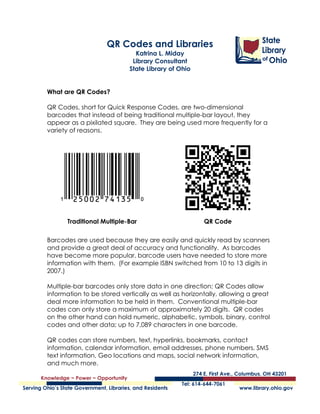
QR Codes, short for Quick Response Codes, are two-dimensional
barcodes that instead of being traditional multiple-bar layout, they
appear as a pixilated square. They are being used more frequently for a
variety of reasons.


          Traditional Multiple-Bar                          QR Code

Barcodes are used because they are easily and quickly read by scanners
and provide a great deal of accuracy and functionality. As barcodes
have become more popular, barcode users have needed to store more
information with them. (For example ISBN switched from 10 to 13 digits in
2007.)

Multiple-bar barcodes only store data in one direction; QR Codes allow
information to be stored vertically as well as horizontally, allowing a great
deal more information to be held in them. Conventional multiple-bar
codes can only store a maximum of approximately 20 digits. QR codes
on the other hand can hold numeric, alphabetic, symbols, binary, control
codes and other data; up to 7,089 characters in one barcode.

QR codes can store numbers, text, hyperlinks, bookmarks, contact
information, calendar information, email addresses, phone numbers, SMS
text information, Geo locations and maps, social network information,
and much more.

QR Codes and Libraries                                                      1
Katrina Miday, Library Consultant
State Library of Ohio
06/23/2011
Along with storing a large amount of data QR Codes can display
information in a variety of sizes and resolutions depending on how the
code will be used. QR Codes will also work up to 30% of the time when
partially damaged, unlike “multi-bar” barcodes which become
unreadable.

Reading QR Codes
Reading and using QR codes is limited to people who own smartphones
or other mobile devices with cameras and a barcode scanning app. If
you own such a device and would like to get started, go to your device’s
app store, and download a barcode scanner, there are free and paid
versions.

http://news.cnet.com/qr-code-readers-for-iphone
http://2d-code.co.uk/qr-code-readers/
http://gizmodo.com/5713768/the-best-barcode-scanner-apps
http://www.theitechblog.com/1552/11-best-qr-bar-code-reader-scanner-
apps-android/
http://socialwayne.com/2010/08/30/code-reader-iphone-apps/
(These are in no way an endorsement of individual applications, just a
place for you to start to investigate and research yourself.)

Once you have your app installed, find a QR Code to scan. Like this one:


With most apps, after you scan the QR Code it asks what you want to do
with the information, depending on the type of information it holds. The
QR Code you just scanned should have opened an email addressed to
me, or asked if you wanted to send me one.


QR Codes and Libraries                                                     2
Katrina Miday, Library Consultant
State Library of Ohio
06/23/2011
Utilizing QR Codes
QR Codes are used in the same way conventional barcodes have been,
but are now also being used to link people to a plethora of information
with a simple scan. They appear on a variety of products, advertisements,
websites, and they are even being used by realtors, appearing in
people’s front lawns.

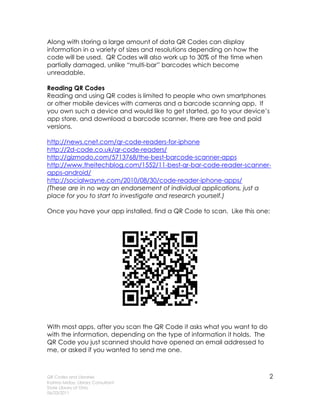
                              Starbucks uses QR codes in their mobile application
                              for Starbucks Cards. Instead of handing the barista a
                              card, customers can now open the app on their
                              phone and allow the barista to scan the QR Code
                              that appears. Starbucks also, in partnership with Lady
                              Gaga, held a scavenger hunt in their stores utilizing
                              QR codes. Customers would scan the codes around
                              the store and the first customers to solve the puzzles
                              won prizes.


Other Examples
  • United Airlines uses them as digital boarding passes.
  • Google provides a QR Code to your business’ Google Places page
      when you register your business with Google Places.
  • Art galleries and museum exhibits are using them to display
      information about the piece or exhibit.
  • Barnes & Noble includes them on brochures to lead customers to
      their nook mobile Application.


Use in Libraries
Many libraries have begun to integrate QR
Codes into their library services.

Hyperlinks
Libraries can do many things with simple
hyperlink QR Code:
    • Link to the mobile version of the website
    • Link to videos the library has created
           o Video interviews of the staff
           o Book commercials
           o How-to videos
    • Display links on physical materials to digital materials
           o Add links to the stacks to collections of online resources
QR Codes and Libraries                                                             3
Katrina Miday, Library Consultant
State Library of Ohio
06/23/2011
o Display QR codes to online databases for journals and articles
             o Put QR codes directly on materials to link to book reviews,
                 movie trailers and more.
             o Add QR Codes directly to books to link to the digital versions
                 of the titles
    •    QR code generators can
         create calendar events
         that patrons can add to
         their personal calendars on
         their devices
             o Add QR codes to
                 event posters
             o Add them to your
                 online calendar so
                 patrons can add
                 them to their phones
                 and devices quickly
                 and easily
    •    Open a text message to
         the library
    •    Integrate the codes into
         scavenger hunts within the
         library

How to create a QR Code
To create QR Codes yourself you           http://on.fb.me/lPvfJo
will need a computer with an
internet connection, and knowledge how to save an image from the
internet, and then add that image to documents or print it out.

    1. Use a QR Code Generator to create your barcode
    2. Scan the barcode to make sure the data appears how you would
       like it to and does what it was intended to do
    3. Save or print the QR Code image that is created for your
       information
    4. Place the QR Code image within documents, or add it to physical
       items

Things to consider while creating the QR Code:
   • Size
          o Where are you going to display the barcode?
          o Will the image be large enough to scan?


QR Codes and Libraries                                                      4
Katrina Miday, Library Consultant
State Library of Ohio
06/23/2011
•    Clarity
            o Will the barcode be easily readable by a mobile device at
                the size you are creating it at?
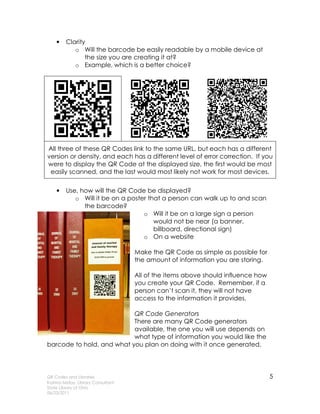
            o Example, which is a better choice?


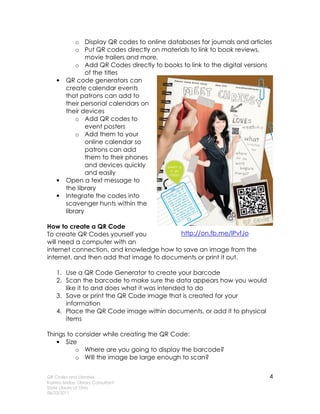
All three of these QR Codes link to the same URL, but each has a different
version or density, and each has a different level of error correction. If you
were to display the QR Code at the displayed size, the first would be most
 easily scanned, and the last would most likely not work for most devices.

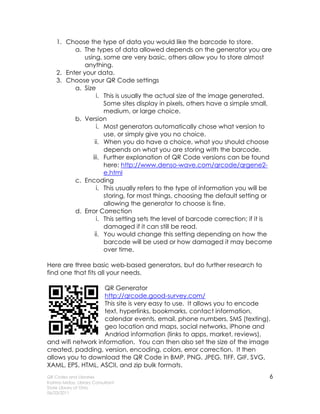
    •    Use, how will the QR Code be displayed?
            o Will it be on a poster that a person can walk up to and scan
               the barcode?
                                   o Will it be on a large sign a person
                                       would not be near (a banner,
                                       billboard, directional sign)
                                   o On a website

                                    Make the QR Code as simple as possible for
                                    the amount of information you are storing.

                                    All of the items above should influence how
                                    you create your QR Code. Remember, if a
                                    person can’t scan it, they will not have
                                    access to the information it provides.

                           QR Code Generators
                           There are many QR Code generators
                           available, the one you will use depends on
                           what type of information you would like the
barcode to hold, and what you plan on doing with it once generated.


QR Codes and Libraries                                                            5
Katrina Miday, Library Consultant
State Library of Ohio
06/23/2011
1. Choose the type of data you would like the barcode to store.
          a. The types of data allowed depends on the generator you are
              using, some are very basic, others allow you to store almost
              anything.
    2. Enter your data.
    3. Choose your QR Code settings
          a. Size
                   i. This is usually the actual size of the image generated.
                      Some sites display in pixels, others have a simple small,
                      medium, or large choice.
          b. Version
                   i. Most generators automatically chose what version to
                      use, or simply give you no choice.
                  ii. When you do have a choice, what you should choose
                      depends on what you are storing with the barcode.
                 iii. Further explanation of QR Code versions can be found
                      here: http://www.denso-wave.com/qrcode/qrgene2-
                      e.html
          c. Encoding
                   i. This usually refers to the type of information you will be
                      storing, for most things, choosing the default setting or
                      allowing the generator to choose is fine.
          d. Error Correction
                   i. This setting sets the level of barcode correction; if it is
                      damaged if it can still be read.
                  ii. You would change this setting depending on how the
                      barcode will be used or how damaged it may become
                      over time.

Here are three basic web-based generators, but do further research to
find one that fits all your needs.

                   QR Generator
                   http://qrcode.good-survey.com/
                   This site is very easy to use. It allows you to encode
                   text, hyperlinks, bookmarks, contact information,
                   calendar events, email, phone numbers, SMS (texting),
                   geo location and maps, social networks, iPhone and
                   Andriod information (links to apps, market, reviews),
and wifi network information. You can then also set the size of the image
created, padding, version, encoding, colors, error correction. It then
allows you to download the QR Code in BMP, PNG, JPEG, TIFF, GIF, SVG,
XAML, EPS, HTML, ASCII, and zip bulk formats.
QR Codes and Libraries                                                          6
Katrina Miday, Library Consultant
State Library of Ohio
06/23/2011
Quafter
                    http://keremerkan.net/qr-code-and-2d-code-
                    generator/
                    This generator allows you to store a vast variety of
                    information than the standard hyperlink or email
                    information. Some of the more unusual information
                    stored are Foursquare venue URL, sent a tweet,
YouTube URLs, and formatted text, just to name a few. It also allows you
to create micro QR Codes (not all scanners can scan this type), set the
size, colors, and output type and error correction levels.


                  QR Stuff
                  http://www.qrstuff.com/
                  This one lets you include a variety of information
                  including Paypal “Buy Now” link information, social
                  media information and more. It also lets you set the
                  color of the barcode, but it does not allow you to set
                  the size, resolution or encoding, and forces you to sign
up for an account (free) for other advanced settings.


Resources:

                             “About 2D Code,” Denso Wave Inc., accessed June
                            15, 2011, http://www.denso-
                            wave.com/qrcode/aboutqr-e.html.


                            Gwyneth A. Jones “Cool QR Codes in the Classroom
                            and Library,” The Daring School Library Blog, December
                            16, 2010, accessed June 16, 2011, http://mhms-
                            media.blogspot.com/2010/12/cool-qr-codes-in-
                            classroom-library.html.


QR Codes and Libraries                                                          7
Katrina Miday, Library Consultant
State Library of Ohio
06/23/2011
Jamie Turner, “2-D Codes: The 10 Commandments for
                            Marketers,” Mashable, January 28, 2011, accessed
                            June 15, 2011, http://mashable.com/2011/01/28/qr-
                            code-business-tips/.


                            Jamie Turner, “HOW TO: Grow Your Sales and Revenue
                            Using 2D Codes,” Mashable, February 18, 2011,
                            accessed June 15, 2011,
                            http://mashable.com/2011/02/18/2d-codes-for-
                            business/.


                            Jeff Korhan, “How QR Codes Can Grow Your Business,”
                            Social Media Examiner, February 7, 2011, accessed
                            June 15, 2011,
                            http://www.socialmediaexaminer.com/how-qr-codes-
                            can-grow-your-business/.


                            Jennifer Van Grove, “Starbucks & Lady Gaga Team Up
                            On Scavenger Hunt,” Mashable, May 19, 2011,
                            accessed June 15, 2011,
                            http://mashable.com/2011/05/19/srch/.


                            Jolie O’Dell, “Who’s Really Scanning All Those QR
                            Codes? [INFOGRAPHIC],” Mashable, March 4, 2011,
                            accessed June 15, 2011,
                            http://mashable.com/2011/03/04/qr-codes-
                            infographic/.


QR Codes and Libraries                                                          8
Katrina Miday, Library Consultant
State Library of Ohio
06/23/2011
Robin Ashford, “QR Codes and Academic Libraries:
                            Reaching mobile users,” College and Research Library
                            News, vol. 71 no. 10 (2010): 526-30,
                            http://crln.acrl.org/content/71/10/526.full.


                            Todd Wasserman, “Picasso Exhibit Gets Interactive With
                            QR Codes & Augmented Reality [PICS],” Mashable,
                            February 10, 2011, accessed June 15, 2011,
                            http://mashable.com/2011/02/10/qr-codes-picasso/.


                            “What does it mean to be human,” Smithsonian
                            Institution, accessed June 15, 2011,
                            http://humanorigins.si.edu/resources/multimedia/mobil
                            e-apps.


                            “Where in the Library is Carmen Sandiego?: An
                            Interactive Library Mystery Game”, Lafayette College
                            Library, last updated September 6, 2010, accessed
                            June 15, 2011,
                            http://library.lafayette.edu/carmensandiego.


Image Sources:

http://www.flickr.com/photos/halfhollowhills/4504965499/in/photostream/
http://www.flickr.com/photos/25095603@N07/5021688103/in/set-
72157625028207818
QR Codes were created by the author using a QR Generator:
http://qrcode.good-survey.com/


QR Codes and Libraries                                                             9
Katrina Miday, Library Consultant
State Library of Ohio
06/23/2011
Additional Reading:

QR tags and mobile 'phones in the library
http://librarymobiles.blogspot.com/2009/10/extreme-makeover-
transforming-face-of.html

Why QR Codes Will Go Mainstream [OPINION]
http://mashable.com/2011/03/08/mainstream-qr-codes/

QR codes for libraries - some thoughts
http://musingsaboutlibrarianship.blogspot.com/2010/02/qr-codes-for-
libraries-some-thoughts.html

HOW TO: Use QR Codes for Small Business Marketing
http://mashable.com/2010/06/23/qr-codes-small-biz/

HOW TO: Use QR Codes for Event Marketing
http://mashable.com/2011/02/22/qr-code-event-marketing/

5 Unique Uses for QR Codes http://mashable.com/2009/01/07/qr-codes/

HOW TO: Create and Deploy Your Own QR Codes
http://mashable.com/2010/08/23/how-to-create-qr-codes/

QR Code Generators Online http://2d-code.co.uk/qr-code-generators/

QR Code and 2d Barcode Readers http://2d-code.co.uk/qr-code-
readers/

“Staff QR Code Posters” Delaware County District Library, last updated
May 15, 2011, accessed June 15, 2011,
http://www.facebook.com/media/set/?set=a.222388107787338.74586.130
204850338998.


QR Codes and Libraries                                                10
Katrina Miday, Library Consultant
State Library of Ohio
06/23/2011

Qr codes and libraries

  • 1.
    QR Codes andLibraries Katrina L. Miday Library Consultant State Library of Ohio What are QR Codes? QR Codes, short for Quick Response Codes, are two-dimensional barcodes that instead of being traditional multiple-bar layout, they appear as a pixilated square. They are being used more frequently for a variety of reasons. Traditional Multiple-Bar QR Code Barcodes are used because they are easily and quickly read by scanners and provide a great deal of accuracy and functionality. As barcodes have become more popular, barcode users have needed to store more information with them. (For example ISBN switched from 10 to 13 digits in 2007.) Multiple-bar barcodes only store data in one direction; QR Codes allow information to be stored vertically as well as horizontally, allowing a great deal more information to be held in them. Conventional multiple-bar codes can only store a maximum of approximately 20 digits. QR codes on the other hand can hold numeric, alphabetic, symbols, binary, control codes and other data; up to 7,089 characters in one barcode. QR codes can store numbers, text, hyperlinks, bookmarks, contact information, calendar information, email addresses, phone numbers, SMS text information, Geo locations and maps, social network information, and much more. QR Codes and Libraries 1 Katrina Miday, Library Consultant State Library of Ohio 06/23/2011
  • 2.
    Along with storinga large amount of data QR Codes can display information in a variety of sizes and resolutions depending on how the code will be used. QR Codes will also work up to 30% of the time when partially damaged, unlike “multi-bar” barcodes which become unreadable. Reading QR Codes Reading and using QR codes is limited to people who own smartphones or other mobile devices with cameras and a barcode scanning app. If you own such a device and would like to get started, go to your device’s app store, and download a barcode scanner, there are free and paid versions. http://news.cnet.com/qr-code-readers-for-iphone http://2d-code.co.uk/qr-code-readers/ http://gizmodo.com/5713768/the-best-barcode-scanner-apps http://www.theitechblog.com/1552/11-best-qr-bar-code-reader-scanner- apps-android/ http://socialwayne.com/2010/08/30/code-reader-iphone-apps/ (These are in no way an endorsement of individual applications, just a place for you to start to investigate and research yourself.) Once you have your app installed, find a QR Code to scan. Like this one: With most apps, after you scan the QR Code it asks what you want to do with the information, depending on the type of information it holds. The QR Code you just scanned should have opened an email addressed to me, or asked if you wanted to send me one. QR Codes and Libraries 2 Katrina Miday, Library Consultant State Library of Ohio 06/23/2011
  • 3.
    Utilizing QR Codes QRCodes are used in the same way conventional barcodes have been, but are now also being used to link people to a plethora of information with a simple scan. They appear on a variety of products, advertisements, websites, and they are even being used by realtors, appearing in people’s front lawns. Starbucks uses QR codes in their mobile application for Starbucks Cards. Instead of handing the barista a card, customers can now open the app on their phone and allow the barista to scan the QR Code that appears. Starbucks also, in partnership with Lady Gaga, held a scavenger hunt in their stores utilizing QR codes. Customers would scan the codes around the store and the first customers to solve the puzzles won prizes. Other Examples • United Airlines uses them as digital boarding passes. • Google provides a QR Code to your business’ Google Places page when you register your business with Google Places. • Art galleries and museum exhibits are using them to display information about the piece or exhibit. • Barnes & Noble includes them on brochures to lead customers to their nook mobile Application. Use in Libraries Many libraries have begun to integrate QR Codes into their library services. Hyperlinks Libraries can do many things with simple hyperlink QR Code: • Link to the mobile version of the website • Link to videos the library has created o Video interviews of the staff o Book commercials o How-to videos • Display links on physical materials to digital materials o Add links to the stacks to collections of online resources QR Codes and Libraries 3 Katrina Miday, Library Consultant State Library of Ohio 06/23/2011
  • 4.
    o Display QRcodes to online databases for journals and articles o Put QR codes directly on materials to link to book reviews, movie trailers and more. o Add QR Codes directly to books to link to the digital versions of the titles • QR code generators can create calendar events that patrons can add to their personal calendars on their devices o Add QR codes to event posters o Add them to your online calendar so patrons can add them to their phones and devices quickly and easily • Open a text message to the library • Integrate the codes into scavenger hunts within the library How to create a QR Code To create QR Codes yourself you http://on.fb.me/lPvfJo will need a computer with an internet connection, and knowledge how to save an image from the internet, and then add that image to documents or print it out. 1. Use a QR Code Generator to create your barcode 2. Scan the barcode to make sure the data appears how you would like it to and does what it was intended to do 3. Save or print the QR Code image that is created for your information 4. Place the QR Code image within documents, or add it to physical items Things to consider while creating the QR Code: • Size o Where are you going to display the barcode? o Will the image be large enough to scan? QR Codes and Libraries 4 Katrina Miday, Library Consultant State Library of Ohio 06/23/2011
  • 5.
    Clarity o Will the barcode be easily readable by a mobile device at the size you are creating it at? o Example, which is a better choice? All three of these QR Codes link to the same URL, but each has a different version or density, and each has a different level of error correction. If you were to display the QR Code at the displayed size, the first would be most easily scanned, and the last would most likely not work for most devices. • Use, how will the QR Code be displayed? o Will it be on a poster that a person can walk up to and scan the barcode? o Will it be on a large sign a person would not be near (a banner, billboard, directional sign) o On a website Make the QR Code as simple as possible for the amount of information you are storing. All of the items above should influence how you create your QR Code. Remember, if a person can’t scan it, they will not have access to the information it provides. QR Code Generators There are many QR Code generators available, the one you will use depends on what type of information you would like the barcode to hold, and what you plan on doing with it once generated. QR Codes and Libraries 5 Katrina Miday, Library Consultant State Library of Ohio 06/23/2011
  • 6.
    1. Choose thetype of data you would like the barcode to store. a. The types of data allowed depends on the generator you are using, some are very basic, others allow you to store almost anything. 2. Enter your data. 3. Choose your QR Code settings a. Size i. This is usually the actual size of the image generated. Some sites display in pixels, others have a simple small, medium, or large choice. b. Version i. Most generators automatically chose what version to use, or simply give you no choice. ii. When you do have a choice, what you should choose depends on what you are storing with the barcode. iii. Further explanation of QR Code versions can be found here: http://www.denso-wave.com/qrcode/qrgene2- e.html c. Encoding i. This usually refers to the type of information you will be storing, for most things, choosing the default setting or allowing the generator to choose is fine. d. Error Correction i. This setting sets the level of barcode correction; if it is damaged if it can still be read. ii. You would change this setting depending on how the barcode will be used or how damaged it may become over time. Here are three basic web-based generators, but do further research to find one that fits all your needs. QR Generator http://qrcode.good-survey.com/ This site is very easy to use. It allows you to encode text, hyperlinks, bookmarks, contact information, calendar events, email, phone numbers, SMS (texting), geo location and maps, social networks, iPhone and Andriod information (links to apps, market, reviews), and wifi network information. You can then also set the size of the image created, padding, version, encoding, colors, error correction. It then allows you to download the QR Code in BMP, PNG, JPEG, TIFF, GIF, SVG, XAML, EPS, HTML, ASCII, and zip bulk formats. QR Codes and Libraries 6 Katrina Miday, Library Consultant State Library of Ohio 06/23/2011
  • 7.
    Quafter http://keremerkan.net/qr-code-and-2d-code- generator/ This generator allows you to store a vast variety of information than the standard hyperlink or email information. Some of the more unusual information stored are Foursquare venue URL, sent a tweet, YouTube URLs, and formatted text, just to name a few. It also allows you to create micro QR Codes (not all scanners can scan this type), set the size, colors, and output type and error correction levels. QR Stuff http://www.qrstuff.com/ This one lets you include a variety of information including Paypal “Buy Now” link information, social media information and more. It also lets you set the color of the barcode, but it does not allow you to set the size, resolution or encoding, and forces you to sign up for an account (free) for other advanced settings. Resources: “About 2D Code,” Denso Wave Inc., accessed June 15, 2011, http://www.denso- wave.com/qrcode/aboutqr-e.html. Gwyneth A. Jones “Cool QR Codes in the Classroom and Library,” The Daring School Library Blog, December 16, 2010, accessed June 16, 2011, http://mhms- media.blogspot.com/2010/12/cool-qr-codes-in- classroom-library.html. QR Codes and Libraries 7 Katrina Miday, Library Consultant State Library of Ohio 06/23/2011
  • 8.
    Jamie Turner, “2-DCodes: The 10 Commandments for Marketers,” Mashable, January 28, 2011, accessed June 15, 2011, http://mashable.com/2011/01/28/qr- code-business-tips/. Jamie Turner, “HOW TO: Grow Your Sales and Revenue Using 2D Codes,” Mashable, February 18, 2011, accessed June 15, 2011, http://mashable.com/2011/02/18/2d-codes-for- business/. Jeff Korhan, “How QR Codes Can Grow Your Business,” Social Media Examiner, February 7, 2011, accessed June 15, 2011, http://www.socialmediaexaminer.com/how-qr-codes- can-grow-your-business/. Jennifer Van Grove, “Starbucks & Lady Gaga Team Up On Scavenger Hunt,” Mashable, May 19, 2011, accessed June 15, 2011, http://mashable.com/2011/05/19/srch/. Jolie O’Dell, “Who’s Really Scanning All Those QR Codes? [INFOGRAPHIC],” Mashable, March 4, 2011, accessed June 15, 2011, http://mashable.com/2011/03/04/qr-codes- infographic/. QR Codes and Libraries 8 Katrina Miday, Library Consultant State Library of Ohio 06/23/2011
  • 9.
    Robin Ashford, “QRCodes and Academic Libraries: Reaching mobile users,” College and Research Library News, vol. 71 no. 10 (2010): 526-30, http://crln.acrl.org/content/71/10/526.full. Todd Wasserman, “Picasso Exhibit Gets Interactive With QR Codes & Augmented Reality [PICS],” Mashable, February 10, 2011, accessed June 15, 2011, http://mashable.com/2011/02/10/qr-codes-picasso/. “What does it mean to be human,” Smithsonian Institution, accessed June 15, 2011, http://humanorigins.si.edu/resources/multimedia/mobil e-apps. “Where in the Library is Carmen Sandiego?: An Interactive Library Mystery Game”, Lafayette College Library, last updated September 6, 2010, accessed June 15, 2011, http://library.lafayette.edu/carmensandiego. Image Sources: http://www.flickr.com/photos/halfhollowhills/4504965499/in/photostream/ http://www.flickr.com/photos/25095603@N07/5021688103/in/set- 72157625028207818 QR Codes were created by the author using a QR Generator: http://qrcode.good-survey.com/ QR Codes and Libraries 9 Katrina Miday, Library Consultant State Library of Ohio 06/23/2011
  • 10.
    Additional Reading: QR tagsand mobile 'phones in the library http://librarymobiles.blogspot.com/2009/10/extreme-makeover- transforming-face-of.html Why QR Codes Will Go Mainstream [OPINION] http://mashable.com/2011/03/08/mainstream-qr-codes/ QR codes for libraries - some thoughts http://musingsaboutlibrarianship.blogspot.com/2010/02/qr-codes-for- libraries-some-thoughts.html HOW TO: Use QR Codes for Small Business Marketing http://mashable.com/2010/06/23/qr-codes-small-biz/ HOW TO: Use QR Codes for Event Marketing http://mashable.com/2011/02/22/qr-code-event-marketing/ 5 Unique Uses for QR Codes http://mashable.com/2009/01/07/qr-codes/ HOW TO: Create and Deploy Your Own QR Codes http://mashable.com/2010/08/23/how-to-create-qr-codes/ QR Code Generators Online http://2d-code.co.uk/qr-code-generators/ QR Code and 2d Barcode Readers http://2d-code.co.uk/qr-code- readers/ “Staff QR Code Posters” Delaware County District Library, last updated May 15, 2011, accessed June 15, 2011, http://www.facebook.com/media/set/?set=a.222388107787338.74586.130 204850338998. QR Codes and Libraries 10 Katrina Miday, Library Consultant State Library of Ohio 06/23/2011