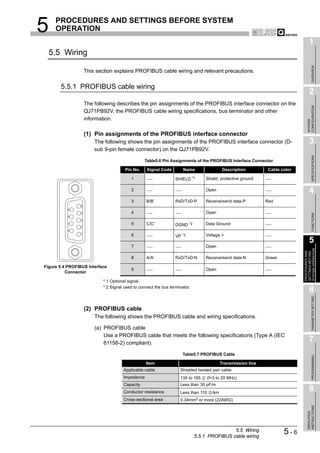
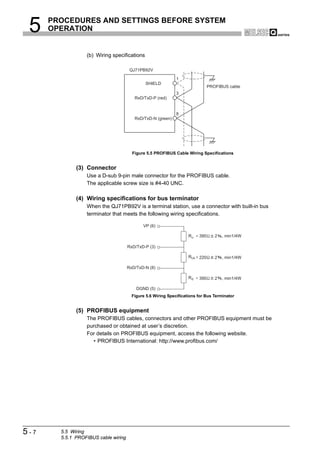
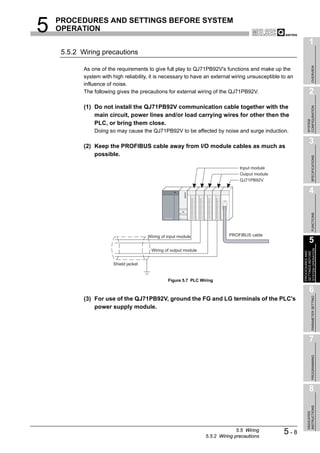
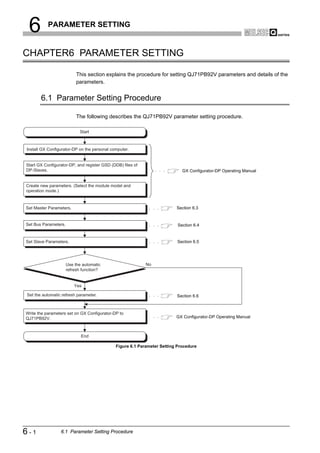
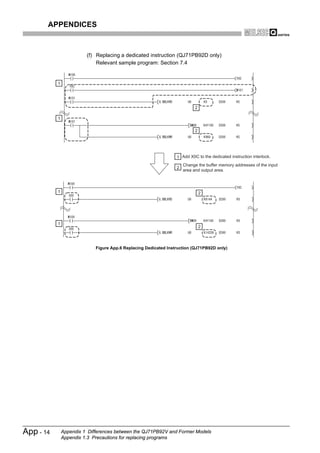
PROFIBUS-DP Master Module
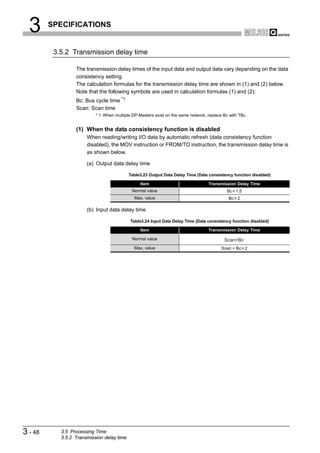
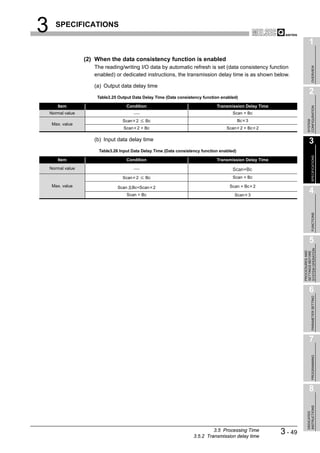
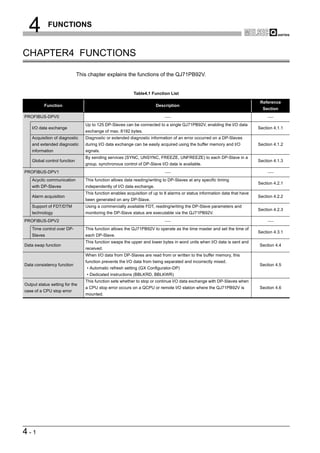
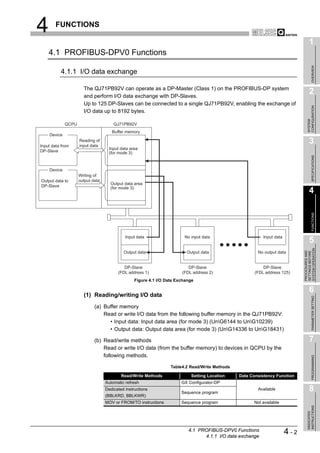
User's Manual


  Mitsubishi Programmable
  Logic Controller

                            QJ71PB92V
SAFETY PRECAUTIONS
                                 (Read these precautions before using.)

Before using this product, please read this manual and the relevant manuals introduced in this manual
carefully and pay full attention to safety to handle the product correctly.
The instructions given in this manual are concerned with this product. For the safety instructions of the
programmable controller system, please read the user's manual of the CPU module used.
In this manual, the safety instructions are ranked as "DANGER" and "CAUTION".


             DANGER          Indicates that incorrect handling may cause hazardous conditions,
                             resulting in death or severe injury.

                             Indicates that incorrect handling may cause hazardous conditions,
             CAUTION         resulting in medium or slight personal injury or physical damage.

Note that the    CAUTION level may lead to a serious consequence according to the circumstances.
Always follow the instructions of both levels because they are important to personal safety.

Please save this manual to make it accessible when required and always forward it to the end user.


[DESIGN PRECAUTIONS]
                                               DANGER
    When a communication error occurs on PROFIBUS-DP, the status of the faulty station is as shown
    below.
    Create an interlock circuit in the sequence program using the communication status information to
    ensure the system operates safely (Input X1, buffer memory 5A20H to 5B19H (23072 to 23321)).
     An erroneous output or malfunction may cause accidents.
    (1) The QJ71PB92V holds the input data before the communication failure.
    (2) When the QJ71PB92V has gone down, the output status of each DP-Slave is dependent on the
        QJ71PB92V parameter setting on GX Configurator-DP.
    (3) When a DP-Slave has gone down, the output status of the other DP-Slaves is dependent on the
        QJ71PB92V parameter setting on GX Configurator-DP.

    Do not output the "use prohibited" signal as the output signal to an intelligent function module from
    the PLC CPU.
    Wiring data into the "system area" or outputting a signal for "use prohibited" may cause system
    malfunciton in the PLC.


                                                                                                     A-1
[DESIGN PRECAUTIONS]
                                            DANGER
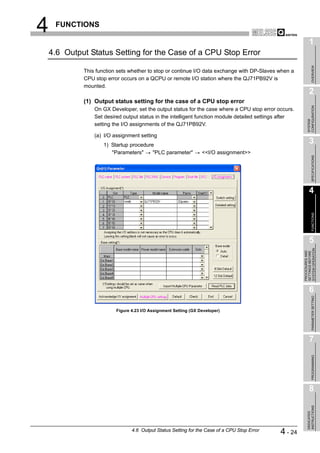
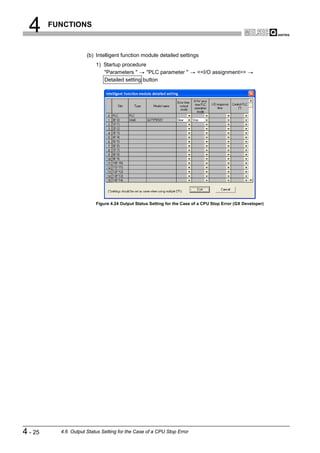
  When a stop error has occurred on a CPU module, the communication status varies depending on
  the error time output mode setting of GX Developer as shown below.
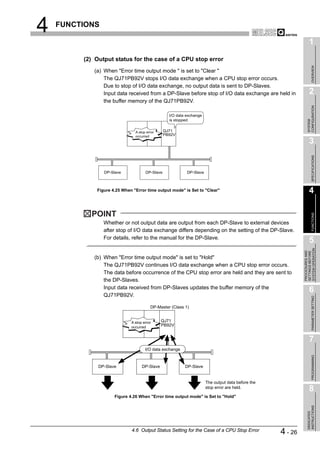
  (1) When "Error time output mode" is set to "Hold".
      (a) Communications with DP-Slaves are continued.
      (b) Input data received from DP-Slaves are updated into the buffer memory of the QJ71PB92V.
      (c) For the output data sent from the QJ71PB92V to DP-Slaves, the values at the time of the
          CPU module stop error are held.
  (2) When "Error time output mode" is set to "Clear"
      (a) Communications with DP-Slaves are interrupted, and output data are not sent.
      (b) Input data received from DP-Slaves are held in the buffer memory of the QJ71PB92V.


                                            CAUTION
  Do not install PROFIBUS cables together with the main circuit or power lines or bring them close to
  each other.
  Keep a distance of 100mm (3.9inch) or more between them.
  Failure to do so may cause malfunctions due to noise.


[INSTALLATION PRECAUTIONS]
                                            CAUTION
  Use the PLC under the environment specified in the user’s manual of the CPU module to be used.
  Otherwise, it may cause electric shocks, fires, malfunctions, product deterioration or damage.


  While pressing the installation lever located at the bottom of the module, insert the module fixing
  projection into the fixing hole in the base unit to mount the module.
  Incorrect mounting may cause malfunctions, a failure or a drop of the module.
  In an environment of frequent vibrations, secure the module with the screw.


  Tighten the screw within the specified torque range.
  If the screw is too loose, it may cause a drop of the module, a short circuit or malfunctions.
  Overtightening may damage the screw and/or the module, resulting in a drop of the module, a short
  circuit or malfunctions.


  Be sure to shut off all phases of the external power supply used by the system before mounting or
  removing the module.
  Failure to do so may damage the module.


A-2
[INSTALLATION PRECAUTIONS]
                                             CAUTION
  Do not directly touch the conductive part or electronic components of the module.
  Doing so may cause malfunctions or a failure of the module.


[WIRING PRECAUTIONS]
                                             DANGER
  Be sure to shut off all phases of the external power supply used by the system before wiring
  PROFIBUS cables.
  Failure to do so may result in failure or malfunctions of the module.


                                             CAUTION
  Carefully prevent foreign matter such as dust or wire chips from entering the module.
  Failure to do so may cause a fire, failure or malfunctions.


  Be sure to place the PROFIBUS cables in a duct or clamp them.
  If not, dangling cables may be shifted or inadvertently pulled, resulting in damages to the module or
  cables or malfunctions due to poor cable contact.


  When disconnecting the PROFIBUS cable, do not pull it by holding the cable part.
  Be sure to hold its connector which is plugged into the module.
  Pulling the cable with it connected to the module may damage the module and/or cable, or cause
  malfunctions due to poor contact of the cable.


  A protective film is attached onto the module top to prevent foreign matter such as wire chips from
  entering the module when wiring.
  Do not remove the film during wiring.
  Remove it for heat dissipation before system operation.


                                                                                                   A-3
[STARTING AND MAINTENANCE PRECAUTIONS]
                                              DANGER
  Before cleaning, be sure to shut off all phases of the external power supply used by the system.
  Failure to do so may cause electrical shocks.


                                              CAUTION
  Do not disassemble or modify the module.
  Doing so may cause failure, malfunctions, personal injuries and/or a fire.


  Be sure to shut off all phases of the external power supply before mounting or removing the module.
  Failure to do so may result in failure or malfunctions of the module.


  Module installation to or removal from the base unit is limited to 50 times after the first use of the
  product. (IEC 61131-2 compliant)
  Exceeding 50 times may cause malfunctions.


  Before handling modules, touch a grounded metal object to discharge the static electricity from the
  human body.
  Not doing so may cause failure or malfunctions of the module.


[DISPOSAL PRECAUTIONS]
                                              CAUTION
  When disposing of this product, treat is as an industrial waste.


A-4
REVISIONS
                                                           * The manual number is given on the bottom left of the back cover.
  Print Date         * Manual Number                                             Revision
  Aug., 2005      SH(NA)-080572ENG-A First edition


                                                                                 Japanese Manual Version SH-080571-A
This manual confers no industrial property rights or any rights of any other kind, nor does it confer any patent licenses.
Mitsubishi Electric Corporation cannot be held responsible for any problems involving industrial property rights which may
occur as a result of using the contents noted in this manual.

                                        2005 MITSUBISHI ELECTRIC CORPORATION


                                                                                                                         A-5
INTRODUCTION

Thank you for purchasing the Mitsubishi programmable logic controller, MELSEC-Q series.
Please read this manual carefully before use to develop familiarity with the functions and performance, and
use it correctly.

                                                            CONTENTS

SAFETY PRECAUTIONS •••••••••••••••••••••••••••••••••••••••••••••••••••••••••••••••••••••••••••••••••••••••••••••••••••••• A - 1
REVISIONS ••••••••••••••••••••••••••••••••••••••••••••••••••••••••••••••••••••••••••••••••••••••••••••••••••••••••••••••••••••••• A - 5
INTRODUCTION •••••••••••••••••••••••••••••••••••••••••••••••••••••••••••••••••••••••••••••••••••••••••••••••••••••••••••••••• A - 6
CONTENTS••••••••••••••••••••••••••••••••••••••••••••••••••••••••••••••••••••••••••••••••••••••••••••••••••••••••••••••••••••••• A - 6
ABOUT MANUALS ••••••••••••••••••••••••••••••••••••••••••••••••••••••••••••••••••••••••••••••••••••••••••••••••••••••••••••• A - 10
COMPLIANCE WITH THE EMC AND LOW VOLTAGE DIRECTIVES •••••••••••••••••••••••••••••••••••••••••••••• A - 10
ABOUT THE GENERIC TERMS AND ABBREVIATIONS•••••••••••••••••••••••••••••••••••••••••••••••••••••••••••••• A - 11
GLOSSARY•••••••••••••••••••••••••••••••••••••••••••••••••••••••••••••••••••••••••••••••••••••••••••••••••••••••••••••••••••••• A - 12
PACKING LIST•••••••••••••••••••••••••••••••••••••••••••••••••••••••••••••••••••••••••••••••••••••••••••••••••••••••••••••••••• A - 13


CHAPTER1 OVERVIEW                                                                                                     1 - 1 to 1 - 3
     1.1     Features ••••••••••••••••••••••••••••••••••••••••••••••••••••••••••••••••••••••••••••••••••••••••••••••••••••••••••••••1 - 2


CHAPTER2 SYSTEM CONFIGURATION                                                                                         2 - 1 to 2 - 8
     2.1     Applicable System •••••••••••••••••••••••••••••••••••••••••••••••••••••••••••••••••••••••••••••••••••••••••••••••••2 - 1
        2.1.1     Precautions for use on MELSECNET/H remote I/O stations •••••••••••••••••••••••••••••••••••••••••2 - 3
     2.2     PROFIBUS-DP Network Configuration •••••••••••••••••••••••••••••••••••••••••••••••••••••••••••••••••••••••••2 - 4
        2.2.1     Basic configuration of the PROFIBUS-DP network•••••••••••••••••••••••••••••••••••••••••••••••••••••2 - 4
        2.2.2     PROFIBUS-DP network configuration examples •••••••••••••••••••••••••••••••••••••••••••••••••••••••2 - 6
     2.3     Checking the Function Version and Serial No.••••••••••••••••••••••••••••••••••••••••••••••••••••••••••••••••2 - 8


CHAPTER3 SPECIFICATIONS                                                                                             3 - 1 to 3 - 49
     3.1     Performance Specifications •••••••••••••••••••••••••••••••••••••••••••••••••••••••••••••••••••••••••••••••••••••••3 - 1
     3.2     Function List•••••••••••••••••••••••••••••••••••••••••••••••••••••••••••••••••••••••••••••••••••••••••••••••••••••••••3 - 3
     3.3     Input/Output Signals to/from PLC CPU •••••••••••••••••••••••••••••••••••••••••••••••••••••••••••••••••••••••••3 - 4
        3.3.1     List of I/O signals ••••••••••••••••••••••••••••••••••••••••••••••••••••••••••••••••••••••••••••••••••••••••••••••3 - 4
        3.3.2     Details of I/O signals••••••••••••••••••••••••••••••••••••••••••••••••••••••••••••••••••••••••••••••••••••••••••3 - 6
     3.4     Buffer Memory ••••••••••••••••••••••••••••••••••••••••••••••••••••••••••••••••••••••••••••••••••••••••••••••••••••• 3 - 17
        3.4.1     Buffer memory list ••••••••••••••••••••••••••••••••••••••••••••••••••••••••••••••••••••••••••••••••••••••••••• 3 - 17
        3.4.2     Local station information area •••••••••••••••••••••••••••••••••••••••••••••••••••••••••••••••••••••••••••• 3 - 20
        3.4.3     Operation mode change area••••••••••••••••••••••••••••••••••••••••••••••••••••••••••••••••••••••••••••• 3 - 22
        3.4.4     I/O data exchange area •••••••••••••••••••••••••••••••••••••••••••••••••••••••••••••••••••••••••••••••••••• 3 - 23
        3.4.5     Slave status area •••••••••••••••••••••••••••••••••••••••••••••••••••••••••••••••••••••••••••••••••••••••••••• 3 - 27
        3.4.6     Diagnostic information area ••••••••••••••••••••••••••••••••••••••••••••••••••••••••••••••••••••••••••••••• 3 - 30
        3.4.7     Extended diagnostic information read area •••••••••••••••••••••••••••••••••••••••••••••••••••••••••••• 3 - 35


A-6
3.4.8     Bus cycle time area ••••••••••••••••••••••••••••••••••••••••••••••••••••••••••••••••••••••••••••••••••••••••• 3 - 36
    3.4.9     Global control area•••••••••••••••••••••••••••••••••••••••••••••••••••••••••••••••••••••••••••••••••••••••••• 3 - 37
    3.4.10    Acyclic communication area •••••••••••••••••••••••••••••••••••••••••••••••••••••••••••••••••••••••••••••• 3 - 39
    3.4.11    Alarm area •••••••••••••••••••••••••••••••••••••••••••••••••••••••••••••••••••••••••••••••••••••••••••••••••••• 3 - 43
    3.4.12    Time control area•••••••••••••••••••••••••••••••••••••••••••••••••••••••••••••••••••••••••••••••••••••••••••• 3 - 43
   3.5   Processing Time •••••••••••••••••••••••••••••••••••••••••••••••••••••••••••••••••••••••••••••••••••••••••••••••••• 3 - 44
    3.5.1     Bus cycle time ••••••••••••••••••••••••••••••••••••••••••••••••••••••••••••••••••••••••••••••••••••••••••••••• 3 - 44
    3.5.2     Transmission delay time ••••••••••••••••••••••••••••••••••••••••••••••••••••••••••••••••••••••••••••••••••• 3 - 48


CHAPTER4 FUNCTIONS                                                                                               4 - 1 to 4 - 26
   4.1   PROFIBUS-DPV0 Functions •••••••••••••••••••••••••••••••••••••••••••••••••••••••••••••••••••••••••••••••••••••4 - 2
    4.1.1     I/O data exchange ••••••••••••••••••••••••••••••••••••••••••••••••••••••••••••••••••••••••••••••••••••••••••••4 - 2
    4.1.2     Acquisition of diagnostic and/or extended diagnostic information ••••••••••••••••••••••••••••••••••• 4 - 4
    4.1.3     Global control function ••••••••••••••••••••••••••••••••••••••••••••••••••••••••••••••••••••••••••••••••••••••• 4 - 7
   4.2   PROFIBUS-DPV1 Functions ••••••••••••••••••••••••••••••••••••••••••••••••••••••••••••••••••••••••••••••••••• 4 - 11
    4.2.1     Acyclic communication with DP-Slaves••••••••••••••••••••••••••••••••••••••••••••••••••••••••••••••••• 4 - 11
    4.2.2     Alarm acquisition •••••••••••••••••••••••••••••••••••••••••••••••••••••••••••••••••••••••••••••••••••••••••••• 4 - 14
    4.2.3     FDT/DTM technology••••••••••••••••••••••••••••••••••••••••••••••••••••••••••••••••••••••••••••••••••••••• 4 - 16
   4.3   PROFIBUS-DPV2 Functions ••••••••••••••••••••••••••••••••••••••••••••••••••••••••••••••••••••••••••••••••••• 4 - 17
    4.3.1     Time control over DP-Slaves ••••••••••••••••••••••••••••••••••••••••••••••••••••••••••••••••••••••••••••• 4 - 17
   4.4   Data Swap Function •••••••••••••••••••••••••••••••••••••••••••••••••••••••••••••••••••••••••••••••••••••••••••••• 4 - 19
   4.5   Data Consistency Function ••••••••••••••••••••••••••••••••••••••••••••••••••••••••••••••••••••••••••••••••••••• 4 - 21
   4.6   Output Status Setting for the Case of a CPU Stop Error •••••••••••••••••••••••••••••••••••••••••••••••••• 4 - 24


CHAPTER5 PROCEDURES AND SETTINGS BEFORE SYSTEM OPERATION 5 - 1 to 5 - 8
   5.1   Implementation and Installation ••••••••••••••••••••••••••••••••••••••••••••••••••••••••••••••••••••••••••••••••••5 - 1
    5.1.1     Handling precautions •••••••••••••••••••••••••••••••••••••••••••••••••••••••••••••••••••••••••••••••••••••••••5 - 1
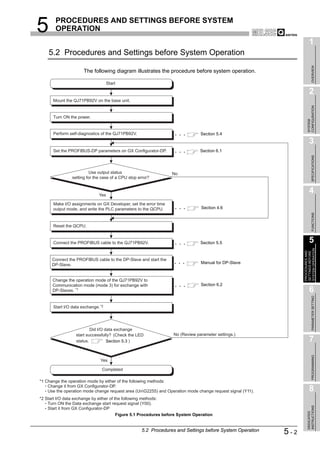
   5.2   Procedures and Settings before System Operation••••••••••••••••••••••••••••••••••••••••••••••••••••••••••5 - 2
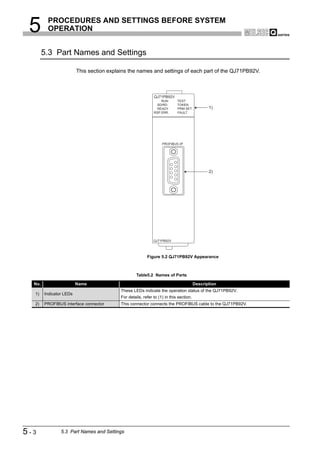
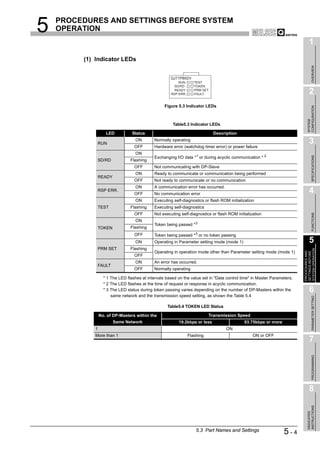
   5.3   Part Names and Settings••••••••••••••••••••••••••••••••••••••••••••••••••••••••••••••••••••••••••••••••••••••••••5 - 3
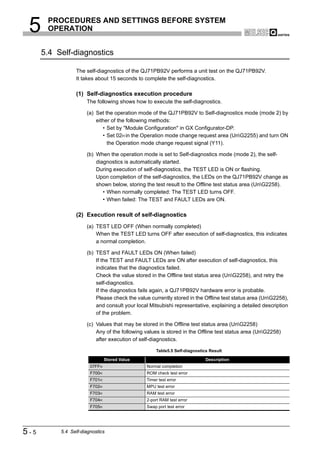
   5.4   Self-diagnostics •••••••••••••••••••••••••••••••••••••••••••••••••••••••••••••••••••••••••••••••••••••••••••••••••••••5 - 5
   5.5   Wiring •••••••••••••••••••••••••••••••••••••••••••••••••••••••••••••••••••••••••••••••••••••••••••••••••••••••••••••••••5 - 6
    5.5.1     PROFIBUS cable wiring •••••••••••••••••••••••••••••••••••••••••••••••••••••••••••••••••••••••••••••••••••••5 - 6
    5.5.2     Wiring precautions ••••••••••••••••••••••••••••••••••••••••••••••••••••••••••••••••••••••••••••••••••••••••••••5 - 8


CHAPTER6 PARAMETER SETTING                                                                                       6 - 1 to 6 - 17
   6.1   Parameter Setting Procedure•••••••••••••••••••••••••••••••••••••••••••••••••••••••••••••••••••••••••••••••••••••6 - 1
   6.2   Operation Mode Setting •••••••••••••••••••••••••••••••••••••••••••••••••••••••••••••••••••••••••••••••••••••••••••6 - 2
   6.3   Master Parameters •••••••••••••••••••••••••••••••••••••••••••••••••••••••••••••••••••••••••••••••••••••••••••••••••6 - 4
   6.4   Bus Parameters •••••••••••••••••••••••••••••••••••••••••••••••••••••••••••••••••••••••••••••••••••••••••••••••••••••6 - 6
   6.5   Slave Parameters •••••••••••••••••••••••••••••••••••••••••••••••••••••••••••••••••••••••••••••••••••••••••••••••••••6 - 8
   6.6   Automatic Refresh Parameters •••••••••••••••••••••••••••••••••••••••••••••••••••••••••••••••••••••••••••••••• 6 - 12
    6.6.1     Automatic refresh parameter setup procedure •••••••••••••••••••••••••••••••••••••••••••••••••••••••• 6 - 12
    6.6.2     Automatic Refresh Settings (Select Areas for Update with CPU) ••••••••••••••••••••••••••••••••• 6 - 13


                                                                                                                              A-7
6.6.3    Writing Automatic Refresh Parameters ••••••••••••••••••••••••••••••••••••••••••••••••••••••••••••••••• 6 - 15
      6.6.4    Number of set automatic refresh parameters •••••••••••••••••••••••••••••••••••••••••••••••••••••••••• 6 - 16


CHAPTER7 PROGRAMMING                                                                                               7 - 1 to 7 - 59
  7.1     I/O Data Exchange Program Examples ••••••••••••••••••••••••••••••••••••••••••••••••••••••••••••••••••••••••7 - 1
      7.1.1    Program examples using automatic refresh •••••••••••••••••••••••••••••••••••••••••••••••••••••••••••••7 - 4
      7.1.2    Program example using dedicated instructions •••••••••••••••••••••••••••••••••••••••••••••••••••••••••7 - 7
      7.1.3    Program example using the MOV instruction ••••••••••••••••••••••••••••••••••••••••••••••••••••••••••••7 - 8
  7.2     Program Example for Acquisition of Extended Diagnostic Error Information••••••••••••••••••••••••••••7 - 9
  7.3     Program Example for Global Control Function•••••••••••••••••••••••••••••••••••••••••••••••••••••••••••••• 7 - 10
  7.4     Program Example for Acyclic Communication with DP-Slaves •••••••••••••••••••••••••••••••••••••••••• 7 - 11
      7.4.1    READ services (Class1_SERVICE, Class2_SERVICE)••••••••••••••••••••••••••••••••••••••••••••• 7 - 13
      7.4.2    WRITE services (Class1_SERVICE, Class2_SERVICE) ••••••••••••••••••••••••••••••••••••••••••• 7 - 16
      7.4.3    INITIATE service (Class2_SERVICE)••••••••••••••••••••••••••••••••••••••••••••••••••••••••••••••••••• 7 - 19
      7.4.4    ABORT service (Class2_SERVICE)••••••••••••••••••••••••••••••••••••••••••••••••••••••••••••••••••••• 7 - 23
      7.4.5    Program example ••••••••••••••••••••••••••••••••••••••••••••••••••••••••••••••••••••••••••••••••••••••••••• 7 - 25
  7.5     Program Example for Alarm Acquisition•••••••••••••••••••••••••••••••••••••••••••••••••••••••••••••••••••••• 7 - 27
      7.5.1    Alarm read request (without ACK) ••••••••••••••••••••••••••••••••••••••••••••••••••••••••••••••••••••••• 7 - 28
      7.5.2    Alarm ACK request ••••••••••••••••••••••••••••••••••••••••••••••••••••••••••••••••••••••••••••••••••••••••• 7 - 32
      7.5.3    Alarm read request (with ACK) ••••••••••••••••••••••••••••••••••••••••••••••••••••••••••••••••••••••••••• 7 - 37
      7.5.4    Program example ••••••••••••••••••••••••••••••••••••••••••••••••••••••••••••••••••••••••••••••••••••••••••• 7 - 43
  7.6     Program Example for Time Control over DP-Slaves ••••••••••••••••••••••••••••••••••••••••••••••••••••••• 7 - 44
      7.6.1    Time data read request •••••••••••••••••••••••••••••••••••••••••••••••••••••••••••••••••••••••••••••••••••• 7 - 45
      7.6.2    Time data write request (UTC format)••••••••••••••••••••••••••••••••••••••••••••••••••••••••••••••••••• 7 - 47
      7.6.3    Time data write request •••••••••••••••••••••••••••••••••••••••••••••••••••••••••••••••••••••••••••••••••••• 7 - 49
      7.6.4    Program example ••••••••••••••••••••••••••••••••••••••••••••••••••••••••••••••••••••••••••••••••••••••••••• 7 - 51
  7.7     Program Example When Mounting the QJ71PB92V on a MELSECNET/H Remote I/O Network 7 - 53
      7.7.1    Program example for the I/O data exchange function (When mounted on a remote I/O station)
               •••••••••••••••••••••••••••••••••••••••••••••••••••••••••••••••••••••••••••••••••••••••••••••••••••••••••••••••••• 7 - 53
      7.7.2    Other precautions ••••••••••••••••••••••••••••••••••••••••••••••••••••••••••••••••••••••••••••••••••••••••••• 7 - 59


CHAPTER8 DEDICATED INSTRUCTIONS                                                                                      8 - 1 to 8 - 5
  8.1     BBLKRD Instruction ••••••••••••••••••••••••••••••••••••••••••••••••••••••••••••••••••••••••••••••••••••••••••••••••8 - 2
  8.2     BBLKWR Instruction••••••••••••••••••••••••••••••••••••••••••••••••••••••••••••••••••••••••••••••••••••••••••••••••8 - 4


CHAPTER9 TROUBLESHOOTING                                                                                           9 - 1 to 9 - 18
  9.1     Error Check Using the LEDs and Corrective Actions ••••••••••••••••••••••••••••••••••••••••••••••••••••••••9 - 1
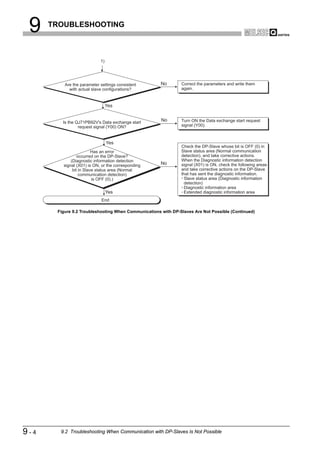
  9.2     Troubleshooting When Communication with DP-Slaves Is Not Possible ••••••••••••••••••••••••••••••••9 - 3
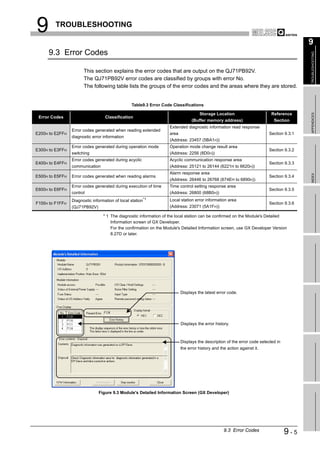
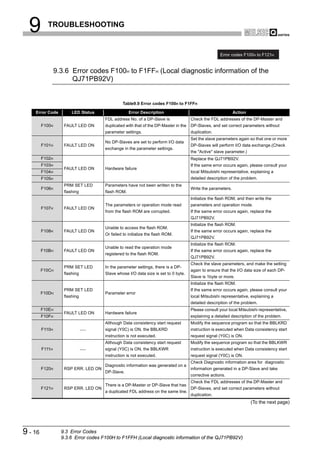
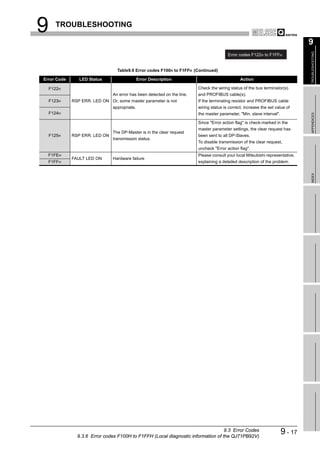
  9.3     Error Codes ••••••••••••••••••••••••••••••••••••••••••••••••••••••••••••••••••••••••••••••••••••••••••••••••••••••••••9 - 5
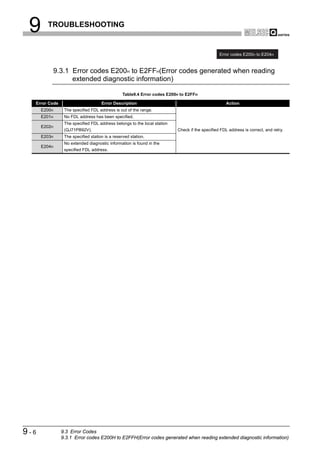
      9.3.1    Error codes E200H to E2FFH(Error codes generated when reading extended diagnostic
               information) •••••••••••••••••••••••••••••••••••••••••••••••••••••••••••••••••••••••••••••••••••••••••••••••••••••9 - 6
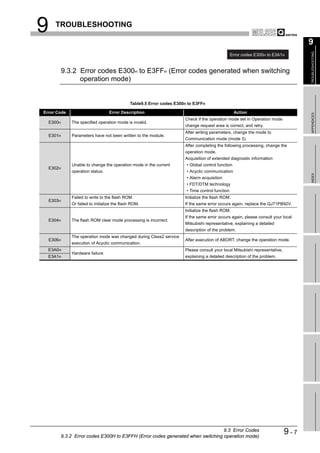
      9.3.2    Error codes E300H to E3FFH (Error codes generated when switching operation mode)•••••••9 - 7
      9.3.3    Error codes E400H to E4FFH (Error codes generated during acyclic communication) •••••••••9 - 8
      9.3.4    Error codes E500H to E5FFH (Error codes generated when reading alarms) •••••••••••••••••• 9 - 12
      9.3.5    Error codes E600H to E6FFH (Error codes generated when executing time control) ••••••••• 9 - 15


A-8
9.3.6     Error codes F100H to F1FFH (Local diagnostic information of the QJ71PB92V) •••••••••••••• 9 - 16
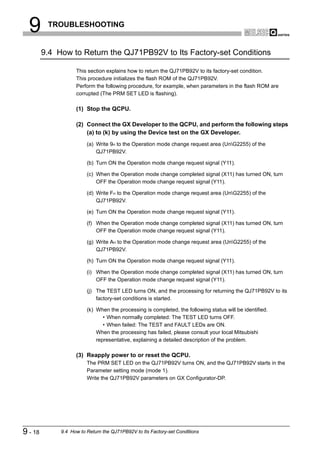
   9.4    How to Return the QJ71PB92V to Its Factory-set Conditions•••••••••••••••••••••••••••••••••••••••••••• 9 - 18

APPENDICES                                                                                    App - 1 to App - 15
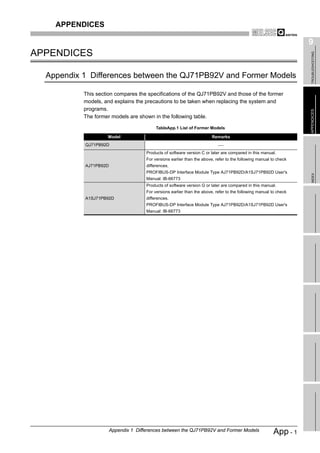
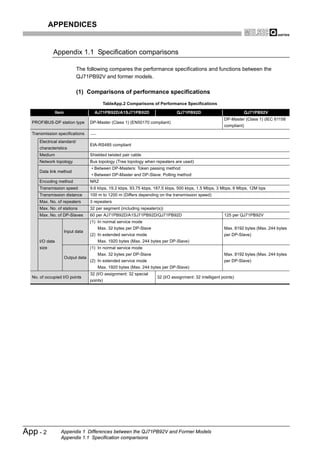
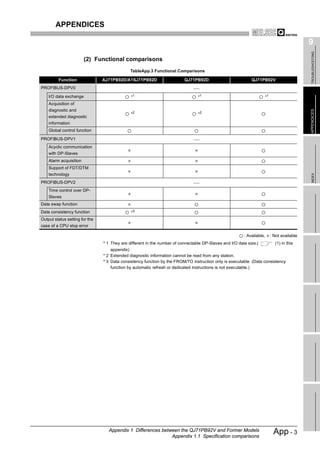
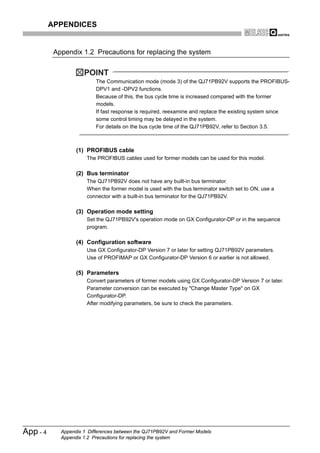
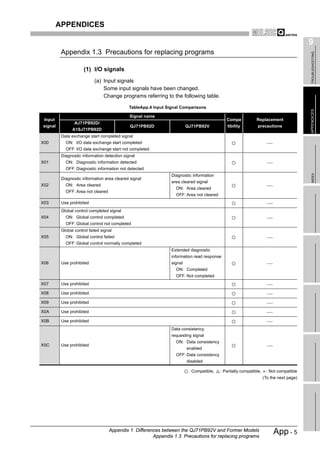
  Appendix 1     Differences between the QJ71PB92V and Former Models•••••••••••••••••••••••••••••••••••• App - 1
    Appendix 1.1 Specification comparisons••••••••••••••••••••••••••••••••••••••••••••••••••••••••••••••••••••••• App - 2
    Appendix 1.2 Precautions for replacing the system•••••••••••••••••••••••••••••••••••••••••••••••••••••••••• App - 4
    Appendix 1.3 Precautions for replacing programs ••••••••••••••••••••••••••••••••••••••••••••••••••••••••••• App - 5
  Appendix 2 External Dimensions •••••••••••••••••••••••••••••••••••••••••••••••••••••••••••••••••••••••••••••••••App - 15

INDEX                                                                                       Index - 1 to Index - 2


                                                                                                                   A-9
ABOUT MANUALS

                          The following manuals are related to this product.
                          Please purchase them if necessary.

Related Manuals


                                                                                                         Manual Number
                                          Manual Name
                                                                                                          (Model Code)
GX Configurator-DP Version 7 Operating Manual
                                                                                                         SH-080579ENG
  Explains the overview, installation method, screen operations, etc. of GX Configurator-DP Version 7.
                                                                                                            (13JU54)
                                                                                  (Sold separately)
GX Configurator-DP Operating Manual (CommDTM)
                                                                                                         SH-080582ENG
  Explains the overview, installation and operating methods, etc, of MELSOFT PROFIBUS
                                                                                                            (13JU55)
  CommDTM.                                                                        (Sold separately)


COMPLIANCE WITH THE EMC AND LOW VOLTAGE DIRECTIVES

                          When incorporating the Mitsubishi PLC into other machinery or equipment
                          and keeping compliance with the EMC and low voltage directives, refer to
                          Chapter 3 "EMC Directive and Low Voltage Instruction" of the User’s Man-
                          ual (hardware) supplied with your CPU module or base unit.
                          The CE logo is printed on the rating plate of the PLC, indicating compliance
                          with the directives.
                          Note that no additional measures are necessary for this product to make
                          compliance with the directives.


A - 10
ABOUT THE GENERIC TERMS AND ABBREVIATIONS

                     Unless otherwise specified, this manual uses the following generic terms
                     and abbreviations to describe the Type QJ71PB92V PROFIBUS-DP Mas-
                     ter Module.

 General term/Abbreviation                                        Description
QJ71PB92V                    Abbreviation of the model QJ71PB92V, PROFIBUS-DP master module
PROFIBUS-DP                  Abbreviation of PROFIBUS-DP network
MELSECNET/H                  Abbreviation of MELSECNET/H network system
QCPU                         Generic term for
                             Q00JCPU,Q00CPU,Q01CPU,Q02CPU,Q02HCPU,Q06HCPU,Q12HCPU,Q25HCPU,
CPU module                   Q12PHCPU,and Q25PHCPU modules
GX Developer                 Generic term for the product name SWnD5C-GPPW-E (n=4 or later)
                             Configuration tool for QJ71PB92V
GX Configurator-DP
                             Generic term of the product model SWnD5C-PROFID-E (n=7 or later)


                                                                                                A - 11
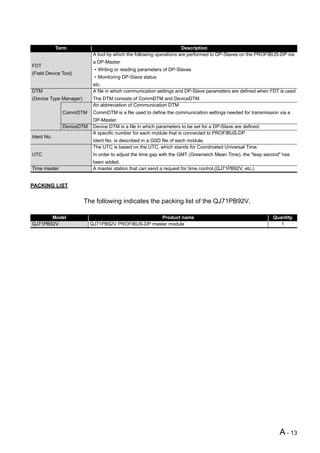
GLOSSARY

                           This part explains the glossary used in this manual.


            Term                                                        Description
                              A basic version of PROFIBUS-DP.
                              The following functions are executable:
PROFIBUS-DPV0                  • I/O data exchange
                               • Diagnostic information notification
                              etc.
                              A PROFIBUS-DP version for which the following functions have been added to the basic
                              functionality of PROFIBUS-DPV0
PROFIBUS-DPV1                  • Acyclic communication
                               • Alarm function
                              etc.
                              A PROFIBUS-DP version for which the following functions have been added to the
                              PROFIBUS-DPV1 functionality
PROFIBUS-DPV2
                               • Time stamping
                              etc.
                 Class 1      A device exchanging I/O data with a DP-Slaves. (QJ71PB92V, QJ71PB92D, etc)
                              A device that communicates with DP-Slaves and checks their FDL address settings and/or
DP-Master                     operation states
                 Class 2
                              The DP-Master (Class 2) is used as a DP-Master for supervising the network, which can start,
                              maintain, and diagnose the system.
DP-Slave                      A device that exchanges I/O data with a DP-Master (Class 1). (QJ71PB93D, ST1H-PB, etc)
Repeater                      A device used to connect different segments of PROFIBUS-DP
Bus terminator                A terminating resistor that is connected to either end of each segment on PROFIBUS-DP
                              Software used to set bus parameters, slave parameters, etc. and to write them to a DP-Master
Configuration tool
                              (GX Configurator-DP, etc.)
                              An electronic file that contains parameters of a DP-Slave
GSD file
                              The GSD file is used to set up the slave parameters on GX Configurator-DP.
                              The numbers assigned to a DP-Master and DP-Slaves
FDL address
                              The FDL address is set within the range from 0 to 125.
                              The parameter used for the communication setting of PROFIBUS-DP
Bus parameter
                              The bus parameter is set up on the GX Configurator-DP.
                              The parameter used for the settings (FDL address, transmission speed, etc.) of the
Master parameter              QJ71PB92V
                              The master parameter is set up on the GX Configurator-DP.
                              The parameter for a DP-Slave, which is set on the DP-Master.
Slave parameter               The slave parameter is set up on the GX Configurator-DP.
                              The setting items are described on the GSD File.
I/O CONFIGURATION
                              Information on I/O configuration of a DP-Slave
DATA
I/O data exchange             This function allows I/O data exchange between a DP-Master (Class 1) and DP-Slaves.
                              This function enables synchronization command transmission for I/O data from a DP-Master
Global control
                              (Class 1) to DP-Slaves.
                              Diagnostic information of PROFIBUS-DP, which is detected by a DP-Master or notified by a
Diagnostic information
                              DP-Slave
Extended diagnostic error     Diagnostic information specific to each DP-Slave
information                   Each of DP-Slaves notifies of it to the DP-Master when an error is detected.
                                                                                                             (To the next page)


A - 12
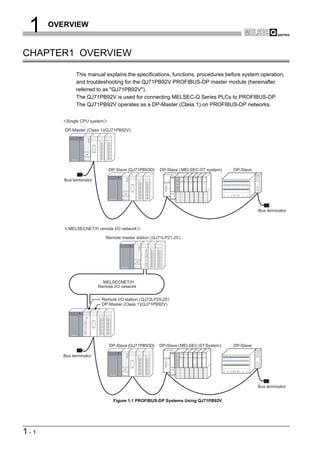
Term                                                     Description
                           A tool by which the following operations are performed to DP-Slaves on the PROFIBUS-DP via
                           a DP-Master
FDT
                           • Writing or reading parameters of DP-Slaves
(Field Device Tool)
                           • Monitoring DP-Slave status
                           etc.
DTM                        A file in which communication settings and DP-Slave parameters are defined when FDT is used
(Device Type Manager)      The DTM consists of CommDTM and DeviceDTM.
                           An abbreviation of Communication DTM
              CommDTM      CommDTM is a file used to define the communication settings needed for transmission via a
                           DP-Master.
              DeviceDTM    Device DTM is a file in which parameters to be set for a DP-Slave are defined.
                           A specific number for each module that is connected to PROFIBUS-DP
Ident No.
                           Ident No. is described in a GSD file of each module.
                           The UTC is based on the UTC, which stands for Coordinated Universal Time.
UTC                        In order to adjust the time gap with the GMT (Greenwich Mean Time), the "leap second" has
                           been added.
Time master                A master station that can send a request for time control.(QJ71PB92V, etc.)


PACKING LIST

                        The following indicates the packing list of the QJ71PB92V.

       Model                                        Product name                                            Quantity
QJ71PB92V                 QJ71PB92V PROFIBUS-DP master module                                                  1


                                                                                                               A - 13
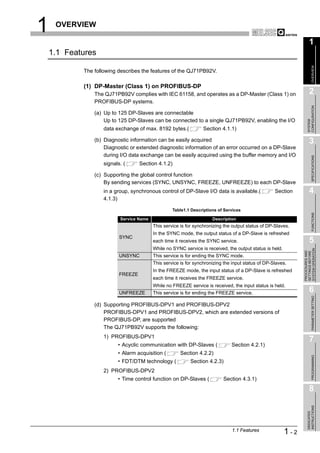
1    OVERVIEW


CHAPTER1 OVERVIEW

               This manual explains the specifications, functions, procedures before system operation,
               and troubleshooting for the QJ71PB92V PROFIBUS-DP master module (hereinafter
               referred to as "QJ71PB92V").
               The QJ71PB92V is used for connecting MELSEC-Q Series PLCs to PROFIBUS-DP.
               The QJ71PB92V operates as a DP-Master (Class 1) on PROFIBUS-DP networks.


          Single CPU system

         DP-Master (Class 1)(QJ71PB92V)


                               DP-Slave (QJ71PB93D)     DP-Slave ( MELSEC-ST system)                                                                                    DP-Slave
                                                                                             S T 1 PS D                            S T 1 PD D
                                                                              S T1 H- P B


         Bus terminator
                                                                                            RUN    ERR    RUN   ERR   RUN   ERR   RUN    ERR    RUN   ERR   RUN   ERR
                                                                                            SYS            11   21     11   21


                                                                                            AUX
                                                                                              .                                   AUX
                                                                   RELEASE


                                                           RESET


                                                               PROFIBUS I/F


                                                                                                                                                                                   Bus terminator


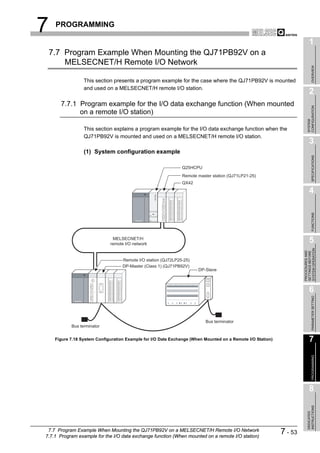
           MELSECNET/H remote I/O network

                              Remote master station (QJ71LP21-25 )


                            MELSECNET/H
                          Remote I/O network


                           Remote I/O station ( QJ72LP25-25 )
                           DP-Master (Class 1)(QJ71PB92V)


                               DP-Slave (QJ71PB93D)    DP-Slave (MELSEC-ST System)                                                                                      DP-Slave
                                                                                            S T 1 PS D                            S T 1 PD D
                                                                              S T1 H- P B


         Bus terminator
                                                                                            RUN   ERR     RUN   ERR   RUN   ERR   RUN   ERR     RUN   ERR   RUN   ERR
                                                                                            SYS           11    21    11    21


                                                                                            AUX
                                                                                              .                                   AUX
                                                                   RELEASE


                                                           RESET


                                                              PROFIBUS I/F


                                                                                                                                                                                   Bus terminator


                                 Figure 1.1 PROFIBUS-DP Systems Using QJ71PB92V


1-1
1    OVERVIEW

                                                                                                                      1
    1.1 Features


                                                                                                                           OVERVIEW
            The following describes the features of the QJ71PB92V.

            (1) DP-Master (Class 1) on PROFIBUS-DP
                The QJ71PB92V complies with IEC 61158, and operates as a DP-Master (Class 1) on                       2
                PROFIBUS-DP systems.


                                                                                                                    CONFIGURATION
                (a) Up to 125 DP-Slaves are connectable
                    Up to 125 DP-Slaves can be connected to a single QJ71PB92V, enabling the I/O


                                                                                                                    SYSTEM
                    data exchange of max. 8192 bytes.(            Section 4.1.1)

                (b) Diagnostic information can be easily acquired                                                     3
                    Diagnostic or extended diagnostic information of an error occurred on a DP-Slave
                    during I/O data exchange can be easily acquired using the buffer memory and I/O


                                                                                                                           SPECIFICATIONS
                    signals. (      Section 4.1.2)

                (c) Supporting the global control function
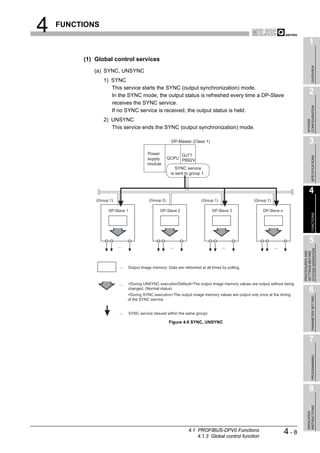
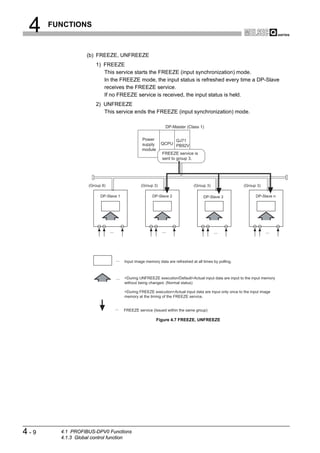
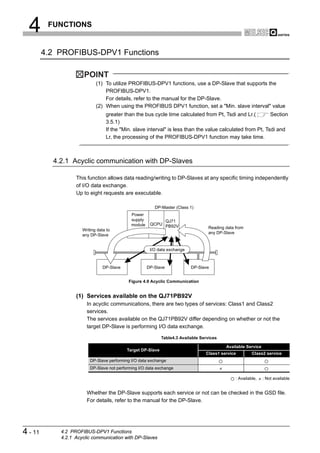
                    By sending services (SYNC, UNSYNC, FREEZE, UNFREEZE) to each DP-Slave
                    in a group, synchronous control of DP-Slave I/O data is available.(             Section           4
                    4.1.3)

                                                   Table1.1 Descriptions of Services


                                                                                                                           FUNCTIONS
                           Service Name                               Description
                                          This service is for synchronizing the output status of DP-Slaves.
                                          In the SYNC mode, the output status of a DP-Slave is refreshed
                           SYNC
                                          each time it receives the SYNC service.                                     5
                                          While no SYNC service is received, the output status is held.


                                                                                                                SYSTEM OPERATION
                                                                                                                PROCEDURES AND
                                                                                                                SETTINGS BEFORE
                           UNSYNC         This service is for ending the SYNC mode.
                                          This service is for synchronizing the input status of DP-Slaves.
                                          In the FREEZE mode, the input status of a DP-Slave is refreshed
                           FREEZE
                                          each time it receives the FREEZE service.
                                          While no FREEZE service is received, the input status is held.
                           UNFREEZE       This service is for ending the FREEZE service.                              6

                                                                                                                           PARAMETER SETTING
                (d) Supporting PROFIBUS-DPV1 and PROFIBUS-DPV2
                    PROFIBUS-DPV1 and PROFIBUS-DPV2, which are extended versions of
                    PROFIBUS-DP, are supported
                    The QJ71PB92V supports the following:
                    1) PROFIBUS-DPV1
                                                                                                                      7
                          • Acyclic communication with DP-Slaves (             Section 4.2.1)
                          • Alarm acquisition (        Section 4.2.2)
                                                                                                                           PROGRAMMING


                          • FDT/DTM technology (           Section 4.2.3)
                    2) PROFIBUS-DPV2
                          • Time control function on DP-Slaves (           Section 4.3.1)
                                                                                                                      8
                                                                                                                    INSTRUCTIONS
                                                                                                                    DEDICATED


                                                                               1.1 Features               1-2
1    OVERVIEW


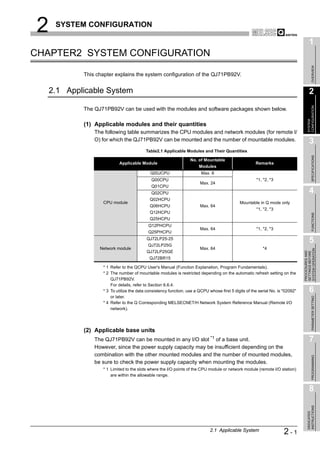
              (2) I/O data consistency
                   Using the automatic refresh setting in GX Configurator-DP or dedicated instructions
                   (BBLKRD/BBLKWR) ensures data consistency when reading/writing I/O data from the
                   QJ71PB92V buffer memory. (         Section 4.5)

              (3) Easy parameter setup
                   Use of GX Configurator-DP enables bus parameters, master parameters, slave
                   parameters, and various other parameters to be easily set up. (     CHAPTER 6)

              (4) Swapping of I/O data
                   The upper and lower bytes can be reversed (swapped) in word units when I/O data is
                   sent or received.
                   This simplifies programming as you no longer need to create a program for swapping
                   the upper and lower bytes on the QJ71PB92V or DP-Slave. (         Section 4.4)

              (5) Mountable on MELSECNET/H remote I/O station
                   The QJ71PB92V can be mounted on a MELSECNET/H remote I/O station.
                   This allows you to install the QJ71PB92V at a remote site away from the QCPU.
                   (     Section 7.7)

              (6) Output status setting for the case of a CPU stop error (Stop/Continue of
                  I/O data exchange)
                   For the case of a CPU stop error on a QCPU or remote I/O station where the
                   QJ71PB92V is mounted, whether to stop or continue I/O data exchange with DP-
                   Slaves can be specified. (     Section 4.6)


1-3     1.1 Features
2    SYSTEM CONFIGURATION

                                                                                                                                      1
CHAPTER2 SYSTEM CONFIGURATION


                                                                                                                                           OVERVIEW
            This chapter explains the system configuration of the QJ71PB92V.


    2.1 Applicable System                                                                                                             2


                                                                                                                                    CONFIGURATION
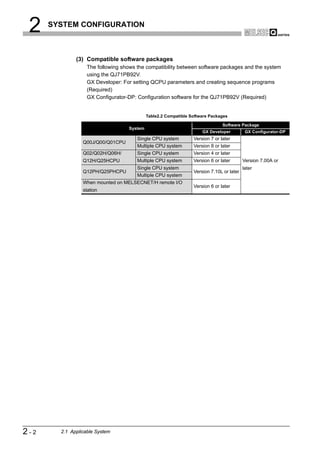
            The QJ71PB92V can be used with the modules and software packages shown below.


                                                                                                                                    SYSTEM
            (1) Applicable modules and their quantities
                The following table summarizes the CPU modules and network modules (for remote I/
                O) for which the QJ71PB92V can be mounted and the number of mountable modules.                                        3
                                          Table2.1 Applicable Modules and Their Quantities


                                                                                                                                           SPECIFICATIONS
                                                                  No. of Mountable
                           Applicable Module                                                          Remarks
                                                                       Modules
                                            Q00JCPU                     Max. 8
                                             Q00CPU                                                    *1, *2, *3
                                                                        Max. 24
                                             Q01CPU
                                             Q02CPU                                                                                   4
                                            Q02HCPU
                   CPU module                                                                 Mountable in Q mode only
                                            Q06HCPU                     Max. 64
                                                                                                       *1, *2, *3
                                            Q12HCPU


                                                                                                                                           FUNCTIONS
                                            Q25HCPU
                                           Q12PHCPU
                                                                        Max. 64                        *1, *2, *3
                                           Q25PHCPU
                                          QJ72LP25-25
                                           QJ72LP25G
                                                                                                                                      5
                  Network module                                        Max. 64                           *4


                                                                                                                                SYSTEM OPERATION
                                          QJ72LP25GE


                                                                                                                                PROCEDURES AND
                                                                                                                                SETTINGS BEFORE
                                            QJ72BR15

                   * 1 Refer to the QCPU User's Manual (Function Explanation, Program Fundamentals).
                   * 2 The number of mountable modules is restricted depending on the automatic refresh setting on the
                       QJ71PB92V.
                       For details, refer to Section 6.6.4.
                   * 3 To utilize the data consistency function, use a QCPU whose first 5 digits of the serial No. is "02092"         6
                       or later.


                                                                                                                                           PARAMETER SETTING
                   * 4 Refer to the Q Corresponding MELSECNET/H Network System Reference Manual (Remote I/O
                       network).


            (2) Applicable base units
                The QJ71PB92V can be mounted in any I/O slot *1 of a base unit.                                                       7
                However, since the power supply capacity may be insufficient depending on the
                combination with the other mounted modules and the number of mounted modules,
                                                                                                                                           PROGRAMMING


                be sure to check the power supply capacity when mounting the modules.
                   * 1 Limited to the slots where the I/O points of the CPU module or network module (remote I/O station)
                       are within the allowable range.


                                                                                                                                      8
                                                                                                                                    INSTRUCTIONS
                                                                                                                                    DEDICATED


                                                                             2.1 Applicable System                    2-1
2    SYSTEM CONFIGURATION


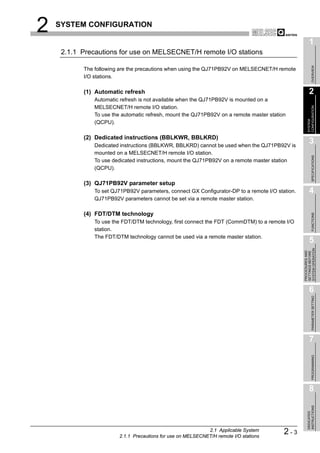
              (3) Compatible software packages
                   The following shows the compatibility between software packages and the system
                   using the QJ71PB92V.
                   GX Developer: For setting QCPU parameters and creating sequence programs
                   (Required)
                   GX Configurator-DP: Configuration software for the QJ71PB92V (Required)


                                            Table2.2 Compatible Software Packages

                                                                               Software Package
                                   System
                                                                     GX Developer          GX Configurator-DP
                                       Single CPU system         Version 7 or later
                 Q00J/Q00/Q01CPU
                                       Multiple CPU system       Version 8 or later
                 Q02/Q02H/Q06H/        Single CPU system         Version 4 or later
                 Q12H/Q25HCPU          Multiple CPU system       Version 6 or later       Version 7.00A or
                                       Single CPU system                                  later
                 Q12PH/Q25PHCPU                                  Version 7.10L or later
                                       Multiple CPU system
                 When mounted on MELSECNET/H remote I/O
                                                                 Version 6 or later
                 station


2-2     2.1 Applicable System
2   SYSTEM CONFIGURATION

                                                                                                        1
     2.1.1 Precautions for use on MELSECNET/H remote I/O stations


                                                                                                             OVERVIEW
           The following are the precautions when using the QJ71PB92V on MELSECNET/H remote
           I/O stations.

           (1) Automatic refresh                                                                        2
               Automatic refresh is not available when the QJ71PB92V is mounted on a
               MELSECNET/H remote I/O station.


                                                                                                      CONFIGURATION
               To use the automatic refresh, mount the QJ71PB92V on a remote master station


                                                                                                      SYSTEM
               (QCPU).

           (2) Dedicated instructions (BBLKWR, BBLKRD)
               Dedicated instructions (BBLKWR, BBLKRD) cannot be used when the QJ71PB92V is
                                                                                                        3
               mounted on a MELSECNET/H remote I/O station.


                                                                                                             SPECIFICATIONS
               To use dedicated instructions, mount the QJ71PB92V on a remote master station
               (QCPU).

           (3) QJ71PB92V parameter setup
               To set QJ71PB92V parameters, connect GX Configurator-DP to a remote I/O station.         4
               QJ71PB92V parameters cannot be set via a remote master station.

           (4) FDT/DTM technology


                                                                                                             FUNCTIONS
               To use the FDT/DTM technology, first connect the FDT (CommDTM) to a remote I/O
               station.
               The FDT/DTM technology cannot be used via a remote master station.
                                                                                                        5


                                                                                                  SYSTEM OPERATION
                                                                                                  PROCEDURES AND
                                                                                                  SETTINGS BEFORE
                                                                                                        6

                                                                                                             PARAMETER SETTING


                                                                                                        7
                                                                                                             PROGRAMMING


                                                                                                        8
                                                                                                      INSTRUCTIONS
                                                                                                      DEDICATED


                                                             2.1 Applicable System
                        2.1.1 Precautions for use on MELSECNET/H remote I/O stations
                                                                                          2-3
2     SYSTEM CONFIGURATION


      2.2 PROFIBUS-DP Network Configuration


        2.2.1 Basic configuration of the PROFIBUS-DP network

                This section explains the basic PROFIBUS-DP configuration for using the QJ71PB92V as
                a DP-Master (Class 1).

                (1) System equipment
                     The following table shows the equipment required for the PROFIBUS-DP system.

                                                          Table2.3 System Equipment

                         System Equipment                                    Description
                      DP-Master (Class 1)          QJ71PB92V
                      Configuration tool           GX Configurator-DP Version 7.00A or later
                      DP-Slave                     QJ71PB93D, ST1H-PB, etc.
                      Repeater                     Required when 32 or more DP-Slaves are connected
                      PROFIBUS cable
                                                          Section 5.5.1
                      Bus terminator


                (2) Network configuration
                     In the PROFIBUS-DP system configuration, the following conditions must be
                     satisfied:

                     (a) Number of connectable modules per QJ71PB92V
                         DP-Master *1 + DP-Slaves             126
                         * 1 Including the QJ71PB92V

                     (b) Number of connectable modules per segment
                         DP-Master *1 + DP-Slaves + repeaters *2            32
                         * 1 Including the QJ71PB92V
                         * 2 A repeater is counted for both segments.

                     (c) No. of repeaters
                         Up to 3 repeaters can be used for communication between the QJ71PB92V and
                         any DP-Slave.

                     (d) Multi-master system
                         1) When using Mitsubishi products as DP-Masters
                            The following DP-Masters are not connectable to the PROFIBUS-DP where
                            the QJ71PB92V is connected.
                            To use any of the following DP-Masters, configure another network.
                               • QJ71PB92D
                               • AJ71PB92D
                               • A1SJ71PB92D


2-4       2.2 PROFIBUS-DP Network Configuration
          2.2.1 Basic configuration of the PROFIBUS-DP network
2   SYSTEM CONFIGURATION

                                                                                              1
             2) When using other vendor's products as DP-Masters
                When a communication chip of ASPC2 STEP C mode or equivalent is used,


                                                                                                   OVERVIEW
                the DP-Master cannot be connected to the PROFIBUS-DP in which the
                QJ71PB92V is included.
                To use a DP-Master with such a communication chip, configure another
                network.                                                                      2
                For the communication chip currently used, consult its manufacturer.


                                                                                            CONFIGURATION
                                                                                            SYSTEM
                                                                                              3


                                                                                                   SPECIFICATIONS
                                                                                              4


                                                                                                   FUNCTIONS
                                                                                              5


                                                                                        SYSTEM OPERATION
                                                                                        PROCEDURES AND
                                                                                        SETTINGS BEFORE
                                                                                              6

                                                                                                   PARAMETER SETTING


                                                                                              7
                                                                                                   PROGRAMMING


                                                                                              8
                                                                                            INSTRUCTIONS
                                                                                            DEDICATED


                                       2.2 PROFIBUS-DP Network Configuration
                          2.2.1 Basic configuration of the PROFIBUS-DP network
                                                                                 2-5
2    SYSTEM CONFIGURATION


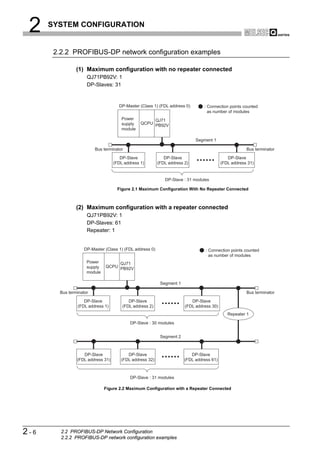
       2.2.2 PROFIBUS-DP network configuration examples

                (1) Maximum configuration with no repeater connected
                     QJ71PB92V: 1
                     DP-Slaves: 31


                                     DP-Master (Class 1) (FDL address 0)        : Connection points counted
                                                                                  as number of modules
                                       Power         QJ71
                                       supply   QCPU PB92V
                                       module

                                                                            Segment 1

                         Bus terminator                                                               Bus terminator
                                      DP-Slave               DP-Slave                        DP-Slave
                                   (FDL address 1)        (FDL address 2)                 (FDL address 31)


                                                             DP-Slave : 31 modules

                                    Figure 2.1 Maximum Configuration With No Repeater Connected


                (2) Maximum configuration with a repeater connected
                     QJ71PB92V: 1
                     DP-Slaves: 61
                     Repeater: 1


                    DP-Master (Class 1) (FDL address 0)                          : Connection points counted
                                                                                   as number of modules
                     Power         QJ71
                     supply   QCPU PB92V
                     module

                                                           Segment 1

        Bus terminator                                                                                Bus terminator
                   DP-Slave               DP-Slave                        DP-Slave
                (FDL address 1)        (FDL address 2)                 (FDL address 30)
                                                                                             Repeater 1

                                           DP-Slave : 30 modules


                                                           Segment 2


                   DP-Slave              DP-Slave                         DP-Slave
                (FDL address 31)      (FDL address 32)                 (FDL address 61)


                                           DP-Slave : 31 modules

                              Figure 2.2 Maximum Configuration with a Repeater Connected


2-6      2.2 PROFIBUS-DP Network Configuration
         2.2.2 PROFIBUS-DP network configuration examples
2   SYSTEM CONFIGURATION

                                                                                                                                      1
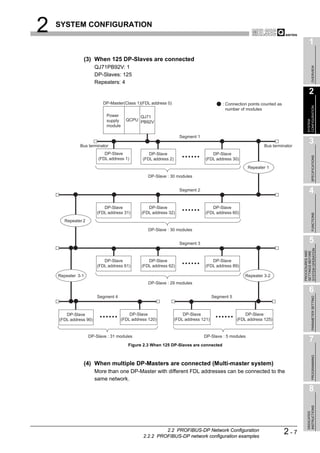
               (3) When 125 DP-Slaves are connected
                       QJ71PB92V: 1


                                                                                                                                           OVERVIEW
                       DP-Slaves: 125
                       Repeaters: 4
                                                                                                                                      2
                          DP-Master(Class 1)(FDL address 0)                              : Connection points counted as


                                                                                                                                    CONFIGURATION
                                                                                           number of modules
                            Power           QJ71
                            supply     QCPU PB92V


                                                                                                                                    SYSTEM
                            module

                                                                   Segment 1

              Bus terminator                                                                                  Bus terminator
                                                                                                                                      3
                           DP-Slave               DP-Slave                         DP-Slave


                                                                                                                                           SPECIFICATIONS
                        (FDL address 1)        (FDL address 2)                  (FDL address 30)
                                                                                                      Repeater 1

                                                  DP-Slave : 30 modules


                                                                   Segment 2                                                          4
                           DP-Slave              DP-Slave                          DP-Slave
                        (FDL address 31)      (FDL address 32)                  (FDL address 60)


                                                                                                                                           FUNCTIONS
      Repeater 2

                                                  DP-Slave : 30 modules


                                                                   Segment 3                                                          5


                                                                                                                                SYSTEM OPERATION
                                                                                                                                PROCEDURES AND
                                                                                                                                SETTINGS BEFORE
                           DP-Slave              DP-Slave                          DP-Slave
                        (FDL address 61)      (FDL address 62)                  (FDL address 89)

    Repeater 3-1                                                                                     Repeater 3-2
                                                  DP-Slave : 29 modules
                                                                                                                                      6
                        Segment 4                                                    Segment 5


                                                                                                                                           PARAMETER SETTING
       DP-Slave                          DP-Slave                    DP-Slave                        DP-Slave
    (FDL address 90)                 (FDL address 120)           (FDL address 121)               (FDL address 125)


                   DP-Slave : 31 modules                                       DP-Slave : 5 modules
                                                                                                                                      7
                                        Figure 2.3 When 125 DP-Slaves are connected
                                                                                                                                           PROGRAMMING


               (4) When multiple DP-Masters are connected (Multi-master system)
                       More than one DP-Master with different FDL addresses can be connected to the
                       same network.

                                                                                                                                      8
                                                                                                                                    INSTRUCTIONS
                                                                                                                                    DEDICATED


                                                        2.2 PROFIBUS-DP Network Configuration
                                               2.2.2 PROFIBUS-DP network configuration examples
                                                                                                                          2-7
2     SYSTEM CONFIGURATION


      2.3 Checking the Function Version and Serial No.

                 This section explains how to check the function version and serial No. of the QJ71PB92V.

                 (1) Checking the "Rating plate" on the side of the module
                      The serial No. and function version of the module are printed in the SERIAL section of
                      the rating plate.


                                                                                       Serial No. (Upper 5 digits)
                                                                                       Function version
                                             07091                B

                                                                                       Conformed standard


                                                       Figure 2.4 Rating Plate


                 (2) Checking through GX Developer
                      The following explains how to check the serial No. and function version of the module
                      through GX Developer.
                      The serial No. and function version are displayed on the "Product information list" or
                      "Module's Detailed Information" screen of GX Developer.
                      The procedure for checking the serial No. and function version on the "Product
                      information list" screen is shown below.
                      Start Procedure
                      [Diagnostics]   [System monitor]         [Product information list]


                                                 Figure 2.5 Product Information List
                      [Serial No., Ver.]
                         • The serial No. of the module is displayed in the "Serial No." column.
                         • The function version of the module is displayed in the "Ver." column.

2-8        2.3 Checking the Function Version and Serial No.
3          SPECIFICATIONS

                                                                                                                                               1
CHAPTER3 SPECIFICATIONS


                                                                                                                                                    OVERVIEW
                             This chapter explains the performance and transmission specifications of the QJ71PB92V.
                             For details of the general specifications, refer to the QCPU User's Manual (Hardware
                             Design, Maintenance and Inspection).
                                                                                                                                               2
      3.1 Performance Specifications


                                                                                                                                             CONFIGURATION
                                                                                                                                             SYSTEM
                             The performance specifications of the QJ71PB92V are given below.

                                                     Table3.1 Performance Specifications

                Item                                                                 Specifications
                                                                                                                                               3
 PROFIBUS-DP station type           DP-Master (Class 1)


                                                                                                                                                    SPECIFICATIONS
 Transmission specifications
     Electrical standard/
                                    EIA-RS485 compliant
     characteristics
     Medium                         Shielded twisted pair cable (          Section 5.5.1)
     Network topology               Bus topology (Tree topology when repeaters are used)
                                    • Between DP-Master and DP-Master: Token passing method                                                    4
     Data link method
                                    • Between DP-Master and DP-Slave:           Polling method
     Encoding method                NRZ
     Transmission speed *1          9.6 kbps to 12 Mbps (           (1) in this section)


                                                                                                                                                    FUNCTIONS
     Transmission distance          Differs depending on the transmission speed(              (1) in this section)
     Max. No. of repeaters          3 repeaters
     Max. No. of stations           32 per segment (including repeater(s))
     Max. No. of DP-Slaves          125 per QJ71PB92V                                                                                          5
     I/O data          Input data   Max. 8192 bytes (Max. 244 bytes per DP-Slave)


                                                                                                                                         SYSTEM OPERATION
                                                                                                                                         PROCEDURES AND
                                                                                                                                         SETTINGS BEFORE
     size              Output data Max. 8192 bytes (Max. 244 bytes per DP-Slave)
 Number of writes to flash
                                    Max. 100000 times
 ROM
 No. of occupied I/O points         32 (I/O assignment: 32 intelligent points)
 Internal current consumption
                                    0.57 A
 (5VDC)                                                                                                                                        6
 External dimensions                98(3.86 in.) (H) x 27.4(1.08 in.) (W) x 90(3.54 in.) (D) [mm]


                                                                                                                                                    PARAMETER SETTING
 Weight                             0.13 kg

                                       * 1 The transmission speed is controlled within        0.2%. (Compliant with IEC 61158-2)


                                                                                                                                               7
                                                                                                                                                    PROGRAMMING


                                                                                                                                               8
                                                                                                                                             INSTRUCTIONS
                                                                                                                                             DEDICATED


                                                                                           3.1 Performance Specifications          3-1
3    SPECIFICATIONS


              (1) Transmission distance
                                                      Table3.2 Transmission Distance

                                                                                  Max. Transmission Distance when
                       Transmission Speed          Transmission Distance
                                                                                          Repeater is Used *1
                    9.6 kbps
                    19.2 kbps                    1200 m (3937 ft.)/segment    4800 m (15748 ft.)/network
                    93.75 kbps
                    187.5 kbps                   1000 m (3281 ft.)/segment    4000 m (13123 ft.)/network
                    500 kbps                     400 m (1312 ft.)/segment     1600 m (5249 ft.)/network
                    1.5 Mbps                     200 m (656 ft.)/segment      800 m (2625 ft.)/network
                    3 Mbps
                    6 Mbps                       100 m (328 ft.)/segment      400 m (1312 ft.)/network
                    12 Mbps

                       * 1 The max. transmission distance in the table above is based on the case where 3 repeaters are
                           used.
                           The calculation formula for the transmission distance extended using a repeater(s) is:
                   Max. transmission distance [m/network] = (Number of repeaters + 1) x Transmission distance [m/segment]


3-2     3.1 Performance Specifications
3       SPECIFICATIONS

                                                                                                                                                 1
    3.2 Function List


                                                                                                                                                      OVERVIEW
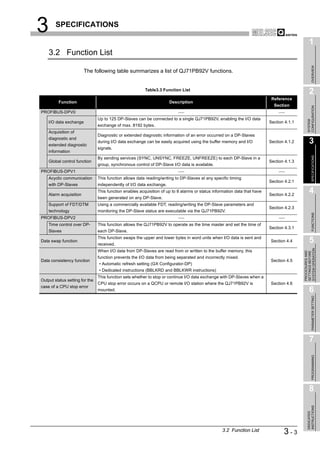
                        The following table summarizes a list of QJ71PB92V functions.


                                                         Table3.3 Function List
                                                                                                                                                 2
                                                                                                                            Reference
         Function                                                     Description
                                                                                                                             Section


                                                                                                                                               CONFIGURATION
PROFIBUS-DPV0
                                Up to 125 DP-Slaves can be connected to a single QJ71PB92V, enabling the I/O data


                                                                                                                                               SYSTEM
    I/O data exchange                                                                                                      Section 4.1.1
                                exchange of max. 8192 bytes.
    Acquisition of
                                Diagnostic or extended diagnostic information of an error occurred on a DP-Slaves
    diagnostic and
    extended diagnostic
                                during I/O data exchange can be easily acquired using the buffer memory and I/O            Section 4.1.2         3
                                signals.
    information


                                                                                                                                                      SPECIFICATIONS
                                By sending services (SYNC, UNSYNC, FREEZE, UNFREEZE) to each DP-Slave in a
    Global control function                                                                                                Section 4.1.3
                                group, synchronous control of DP-Slave I/O data is available.
PROFIBUS-DPV1
    Acyclic communication       This function allows data reading/writing to DP-Slaves at any specific timing
                                                                                                                           Section 4.2.1
    with DP-Slaves              independently of I/O data exchange.

    Alarm acquisition
                                This function enables acquisition of up to 8 alarms or status information data that have
                                                                                                                           Section 4.2.2
                                                                                                                                                 4
                                been generated on any DP-Slave.
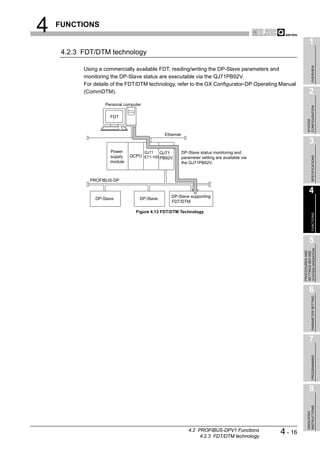
    Support of FDT/DTM          Using a commercially available FDT, reading/writing the DP-Slave parameters and
                                                                                                                           Section 4.2.3
    technology                  monitoring the DP-Slave status are executable via the QJ71PB92V.


                                                                                                                                                      FUNCTIONS
PROFIBUS-DPV2
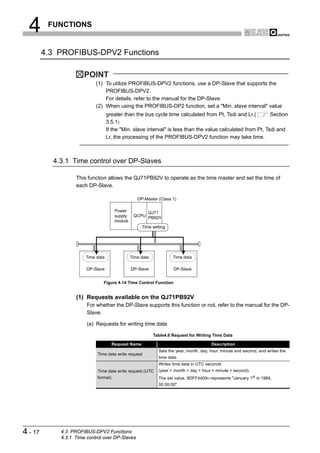
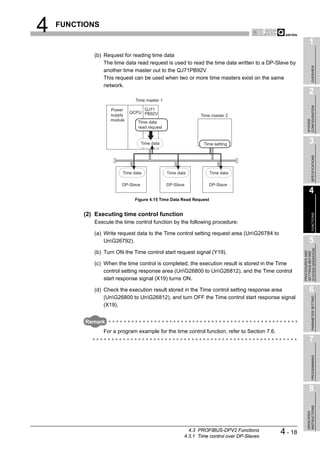
    Time control over DP-       This function allows the QJ71PB92V to operate as the time master and set the time of
                                                                                                                           Section 4.3.1
    Slaves                      each DP-Slave.
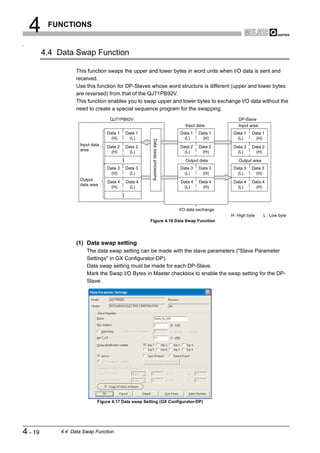
                                This function swaps the upper and lower bytes in word units when I/O data is sent and
Data swap function
                                received.
                                                                                                                           Section 4.4           5


                                                                                                                                           SYSTEM OPERATION
                                When I/O data from DP-Slaves are read from or written to the buffer memory, this


                                                                                                                                           PROCEDURES AND
                                                                                                                                           SETTINGS BEFORE
                                function prevents the I/O data from being separated and incorrectly mixed.
Data consistency function                                                                                                  Section 4.5
                                • Automatic refresh setting (GX Configurator-DP)
                                • Dedicated instructions (BBLKRD and BBLKWR instructions)
                                This function sets whether to stop or continue I/O data exchange with DP-Slaves when a
Output status setting for the
                                CPU stop error occurs on a QCPU or remote I/O station where the QJ71PB92V is               Section 4.6
case of a CPU stop error
                                mounted.                                                                                                         6

                                                                                                                                                      PARAMETER SETTING


                                                                                                                                                 7
                                                                                                                                                      PROGRAMMING


                                                                                                                                                 8
                                                                                                                                               INSTRUCTIONS
                                                                                                                                               DEDICATED


                                                                                                  3.2 Function List               3-3
3        SPECIFICATIONS


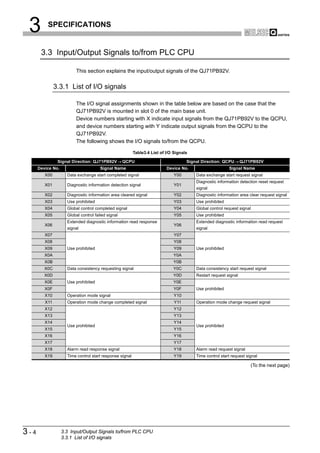
       3.3 Input/Output Signals to/from PLC CPU

                         This section explains the input/output signals of the QJ71PB92V.


               3.3.1 List of I/O signals

                         The I/O signal assignments shown in the table below are based on the case that the
                         QJ71PB92V is mounted in slot 0 of the main base unit.
                         Device numbers starting with X indicate input signals from the QJ71PB92V to the QCPU,
                         and device numbers starting with Y indicate output signals from the QCPU to the
                         QJ71PB92V.
                         The following shows the I/O signals to/from the QCPU.

                                                          Table3.4 List of I/O Signals

                Signal Direction: QJ71PB92V         QCPU                             Signal Direction: QCPU       QJ71PB92V
      Device No.                       Signal Name                         Device No.                     Signal Name
         X00         Data exchange start completed signal                      Y00       Data exchange start request signal
                                                                                         Diagnostic information detection reset request
         X01         Diagnostic information detection signal                   Y01
                                                                                         signal
         X02         Diagnostic information area cleared signal                Y02       Diagnostic information area clear request signal
         X03         Use prohibited                                            Y03       Use prohibited
         X04         Global control completed signal                           Y04       Global control request signal
         X05         Global control failed signal                              Y05       Use prohibited
                     Extended diagnostic information read response                       Extended diagnostic information read request
         X06                                                                   Y06
                     signal                                                              signal
         X07                                                                   Y07
         X08                                                                   Y08
         X09         Use prohibited                                            Y09       Use prohibited
         X0A                                                                  Y0A
         X0B                                                                  Y0B
         X0C         Data consistency requesting signal                       Y0C        Data consistency start request signal
         X0D                                                                  Y0D        Restart request signal
         X0E         Use prohibited                                           Y0E
         X0F                                                                   Y0F       Use prohibited
         X10         Operation mode signal                                     Y10
         X11         Operation mode change completed signal                    Y11       Operation mode change request signal
         X12                                                                   Y12
         X13                                                                   Y13
         X14                                                                   Y14
                     Use prohibited                                                      Use prohibited
         X15                                                                   Y15
         X16                                                                   Y16
         X17                                                                   Y17
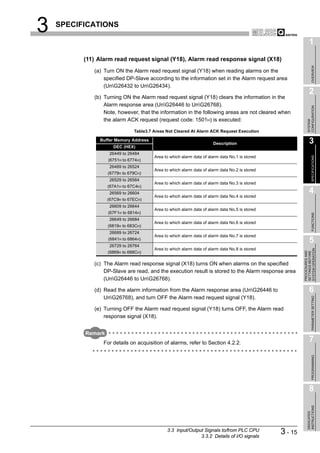
         X18         Alarm read response signal                                Y18       Alarm read request signal
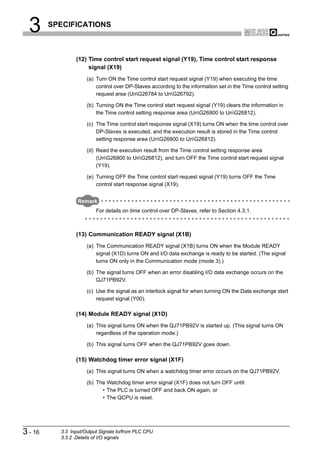
         X19         Time control start response signal                        Y19       Time control start request signal

                                                                                                                      (To the next page)


3-4                3.3 Input/Output Signals to/from PLC CPU
                   3.3.1 List of I/O signals
3    SPECIFICATIONS

                                                                                                                               1

                                            Table3.4 List of I/O Signals (Continued)


                                                                                                                                    OVERVIEW
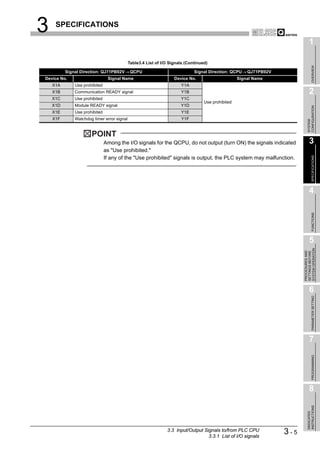
          Signal Direction: QJ71PB92V        QCPU                            Signal Direction: QCPU    QJ71PB92V
Device No.                      Signal Name                        Device No.                      Signal Name
    X1A       Use prohibited                                          Y1A
    X1B       Communication READY signal                              Y1B                                                      2
    X1C       Use prohibited                                          Y1C
                                                                                  Use prohibited
    X1D       Module READY signal                                     Y1D


                                                                                                                             CONFIGURATION
    X1E       Use prohibited                                          Y1E
    X1F       Watchdog timer error signal                             Y1F


                                                                                                                             SYSTEM
                      POINT
                               Among the I/O signals for the QCPU, do not output (turn ON) the signals indicated               3
                               as "Use prohibited."


                                                                                                                                    SPECIFICATIONS
                               If any of the "Use prohibited" signals is output, the PLC system may malfunction.


                                                                                                                               4


                                                                                                                                    FUNCTIONS
                                                                                                                               5


                                                                                                                         SYSTEM OPERATION
                                                                                                                         PROCEDURES AND
                                                                                                                         SETTINGS BEFORE
                                                                                                                               6

                                                                                                                                    PARAMETER SETTING


                                                                                                                               7
                                                                                                                                    PROGRAMMING


                                                                                                                               8
                                                                                                                             INSTRUCTIONS
                                                                                                                             DEDICATED


                                                               3.3 Input/Output Signals to/from PLC CPU
                                                                                  3.3.1 List of I/O signals
                                                                                                                   3-5
3    SPECIFICATIONS


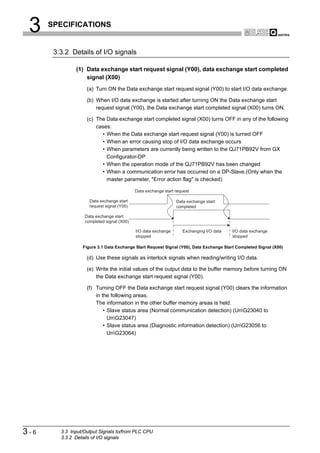
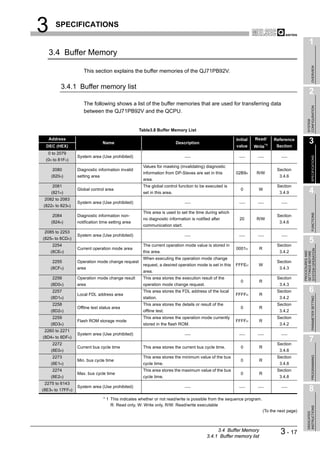
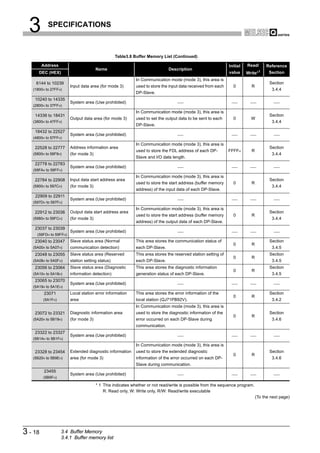
       3.3.2 Details of I/O signals

               (1) Data exchange start request signal (Y00), data exchange start completed
                   signal (X00)
                    (a) Turn ON the Data exchange start request signal (Y00) to start I/O data exchange.

                    (b) When I/O data exchange is started after turning ON the Data exchange start
                        request signal (Y00), the Data exchange start completed signal (X00) turns ON.

                    (c) The Data exchange start completed signal (X00) turns OFF in any of the following
                        cases:
                          • When the Data exchange start request signal (Y00) is turned OFF
                          • When an error causing stop of I/O data exchange occurs
                          • When parameters are currently being written to the QJ71PB92V from GX
                            Configurator-DP
                          • When the operation mode of the QJ71PB92V has been changed
                          • When a communication error has occurred on a DP-Slave.(Only when the
                            master parameter, "Error action flag" is checked)

                                            Data exchange start request

                     Data exchange start                        Data exchange start
                     request signal (Y00)                       completed

                   Data exchange start
                   completed signal (X00)

                                            I/O data exchange      Exchanging I/O data   I/O data exchange
                                            stopped                                      stopped

                  Figure 3.1 Data Exchange Start Request Signal (Y00), Data Exchange Start Completed Signal (X00)

                    (d) Use these signals as interlock signals when reading/writing I/O data.

                    (e) Write the initial values of the output data to the buffer memory before turning ON
                        the Data exchange start request signal (Y00).

                    (f) Turning OFF the Data exchange start request signal (Y00) clears the information
                        in the following areas.
                        The information in the other buffer memory areas is held.
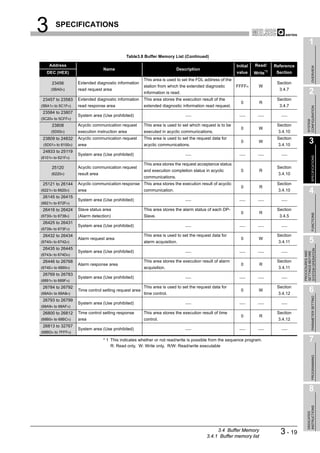
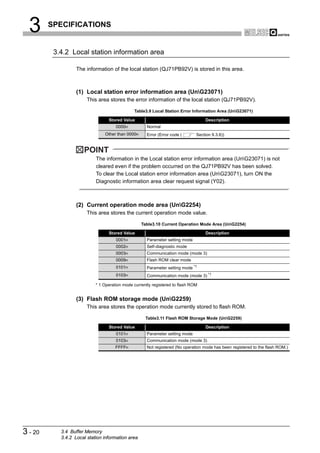
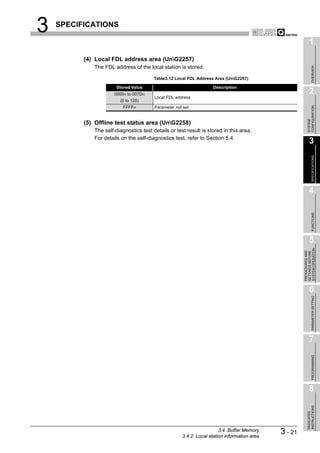
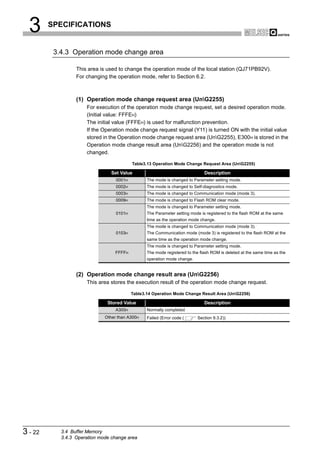
                            • Slave status area (Normal communication detection) (UnG23040 to
                              UnG23047)
                            • Slave status area (Diagnostic information detection) (UnG23056 to
                              UnG23064)


3-6      3.3 Input/Output Signals to/from PLC CPU
         3.3.2 Details of I/O signals
3   SPECIFICATIONS

                                                                                                             1
          (2) Diagnostic information detection reset request signal (Y01), Diagnostic
              information detection signal (X01)


                                                                                                                  OVERVIEW
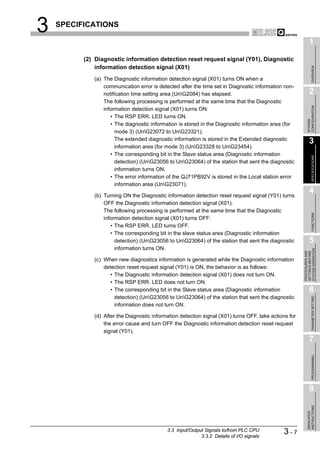
             (a) The Diagnostic information detection signal (X01) turns ON when a
                 communication error is detected after the time set in Diagnostic information non-
                 notification time setting area (UnG2084) has elapsed.                                      2
                 The following processing is performed at the same time that the Diagnostic


                                                                                                           CONFIGURATION
                 information detection signal (X01) turns ON:
                    • The RSP ERR. LED turns ON.


                                                                                                           SYSTEM
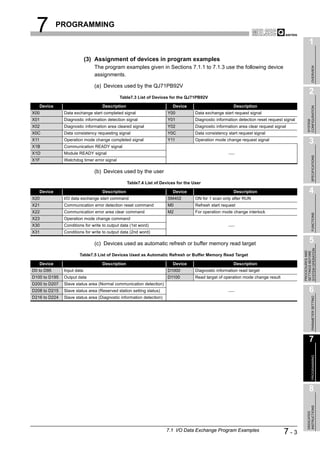
                    • The diagnostic information is stored in the Diagnostic information area (for
                      mode 3) (UnG23072 to UnG23321).
                      The extended diagnostic information is stored in the Extended diagnostic
                                                                                                             3
                      information area (for mode 3) (UnG23328 to UnG23454).
                    • The corresponding bit in the Slave status area (Diagnostic information


                                                                                                                  SPECIFICATIONS
                      detection) (UnG23056 to UnG23064) of the station that sent the diagnostic
                      information turns ON.
                    • The error information of the QJ71PB92V is stored in the Local station error
                      information area (UnG23071).

             (b) Turning ON the Diagnostic information detection reset request signal (Y01) turns
                                                                                                             4
                 OFF the Diagnostic information detection signal (X01).
                 The following processing is performed at the same time that the Diagnostic


                                                                                                                  FUNCTIONS
                 information detection signal (X01) turns OFF:
                    • The RSP ERR. LED turns OFF.
                    • The corresponding bit in the slave status area (Diagnostic information
                      detection) (UnG23056 to UnG23064) of the station that sent the diagnostic            5
                      information turns ON.


                                                                                                       SYSTEM OPERATION
                                                                                                       PROCEDURES AND
                                                                                                       SETTINGS BEFORE
             (c) When new diagnostics information is generated while the Diagnostic information
                 detection reset request signal (Y01) is ON, the behavior is as follows:
                    • The Diagnostic information detection signal (X01) does not turn ON.
                    • The RSP ERR. LED does not turn ON.
                    • The corresponding bit in the Slave status area (Diagnostic information                 6
                      detection) (UnG23056 to UnG23064) of the station that sent the diagnostic

                                                                                                                  PARAMETER SETTING
                      information does not turn ON.

             (d) After the Diagnostic information detection signal (X01) turns OFF, take actions for
                 the error cause and turn OFF the Diagnostic information detection reset request
                 signal (Y01).
                                                                                                             7
                                                                                                                  PROGRAMMING


                                                                                                             8
                                                                                                           INSTRUCTIONS
                                                                                                           DEDICATED


                                            3.3 Input/Output Signals to/from PLC CPU
                                                           3.3.2 Details of I/O signals
                                                                                              3-7
3    SPECIFICATIONS


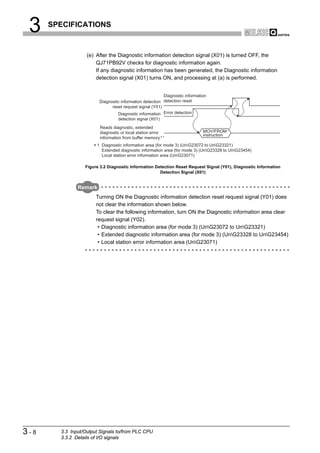
                   (e) After the Diagnostic information detection signal (X01) is turned OFF, the
                       QJ71PB92V checks for diagnostic information again.
                       If any diagnostic information has been generated, the Diagnostic information
                       detection signal (X01) turns ON, and processing at (a) is performed.


                                                         Diagnostic information
                        Diagnostic information detection detection reset
                              reset request signal (Y01)
                                 Diagnostic information Error detection
                                 detection signal (X01)
                         Reads diagnostic, extended
                         diagnostic or local station error                   MOV/FROM
                                                             1
                                                                             instruction
                         information from buffer memory.
                       1 Diagnostic information area (for mode 3) (UnG23072 to UnG23321)
                         Extended diagnostic information area (for mode 3) (UnG23328 to UnG23454)
                         Local station error information area (UnG23071)

                  Figure 3.2 Diagnostic Information Detection Reset Request Signal (Y01), Diagnostic Information
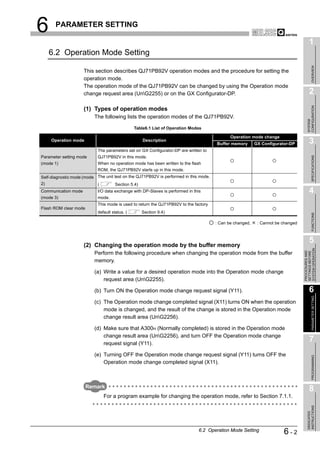
                                                      Detection Signal (X01)


               Remark
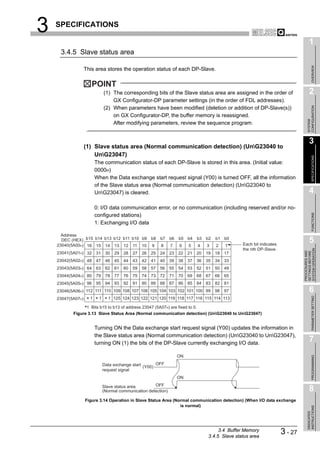
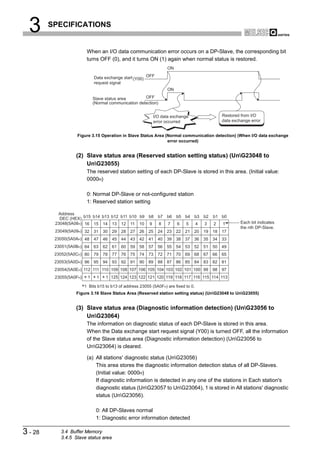
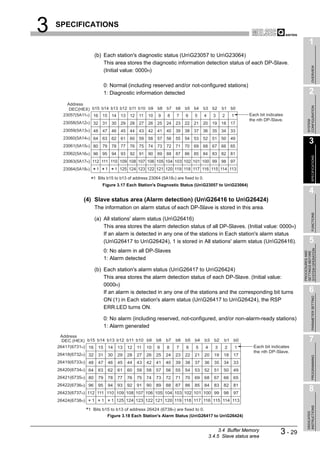
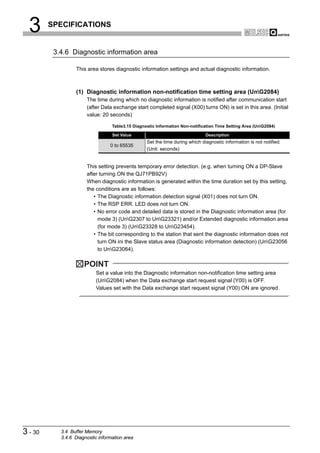
                       Turning ON the Diagnostic information detection reset request signal (Y01) does
                       not clear the information shown below.
                       To clear the following information, turn ON the Diagnostic information area clear
                       request signal (Y02).
                        • Diagnostic information area (for mode 3) (UnG23072 to UnG23321)
                        • Extended diagnostic information area (for mode 3) (UnG23328 to UnG23454)
                        • Local station error information area (UnG23071)


3-8     3.3 Input/Output Signals to/from PLC CPU
        3.3.2 Details of I/O signals
3   SPECIFICATIONS

                                                                                                                         1
          (3) Diagnostic information area clear request signal (Y02), Diagnostic
              information area cleared signal (X02)


                                                                                                                              OVERVIEW
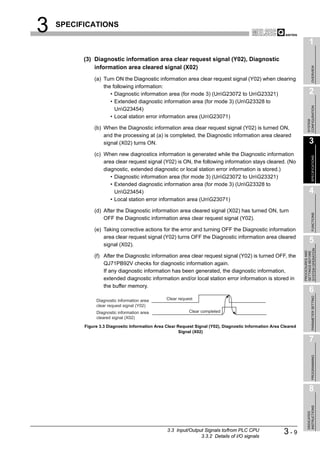
              (a) Turn ON the Diagnostic information area clear request signal (Y02) when clearing
                  the following information:
                     • Diagnostic information area (for mode 3) (UnG23072 to UnG23321)                                 2
                     • Extended diagnostic information area (for mode 3) (UnG23328 to


                                                                                                                       CONFIGURATION
                       UnG23454)
                     • Local station error information area (UnG23071)


                                                                                                                       SYSTEM
              (b) When the Diagnostic information area clear request signal (Y02) is turned ON,
                  and the processing at (a) is completed, the Diagnostic information area cleared
                  signal (X02) turns ON.                                                                                 3
              (c) When new diagnostics information is generated while the Diagnostic information


                                                                                                                              SPECIFICATIONS
                  area clear request signal (Y02) is ON, the following information stays cleared. (No
                  diagnostic, extended diagnostic or local station error information is stored.)
                     • Diagnostic information area (for mode 3) (UnG23072 to UnG23321)
                     • Extended diagnostic information area (for mode 3) (UnG23328 to
                       UnG23454)                                                                                        4
                     • Local station error information area (UnG23071)

              (d) After the Diagnostic information area cleared signal (X02) has turned ON, turn


                                                                                                                              FUNCTIONS
                  OFF the Diagnostic information area clear request signal (Y02).

              (e) Taking corrective actions for the error and turning OFF the Diagnostic information
                  area clear request signal (Y02) turns OFF the Diagnostic information area cleared
                  signal (X02).
                                                                                                                         5


                                                                                                                   SYSTEM OPERATION
                                                                                                                   PROCEDURES AND
                                                                                                                   SETTINGS BEFORE
              (f) After the Diagnostic information area clear request signal (Y02) is turned OFF, the
                  QJ71PB92V checks for diagnostic information again.
                  If any diagnostic information has been generated, the diagnostic information,
                  extended diagnostic information and/or local station error information is stored in
                  the buffer memory.
                                                                                                                         6

                                                                                                                              PARAMETER SETTING
               Diagnostic information area       Clear request
               clear request signal (Y02)
               Diagnostic information area                  Clear completed
               cleared signal (X02)

          Figure 3.3 Diagnostic Information Area Clear Request Signal (Y02), Diagnostic Information Area Cleared
                                                        Signal (X02)

                                                                                                                         7
                                                                                                                              PROGRAMMING


                                                                                                                         8
                                                                                                                       INSTRUCTIONS
                                                                                                                       DEDICATED


                                                 3.3 Input/Output Signals to/from PLC CPU
                                                                3.3.2 Details of I/O signals
                                                                                                          3-9
3      SPECIFICATIONS


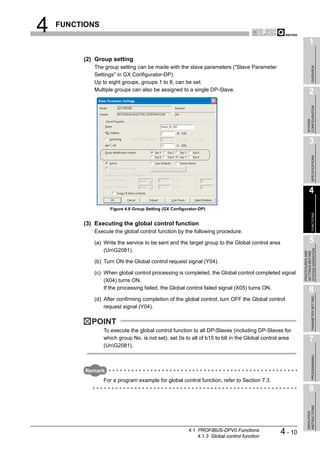
                 (4) Global control request signal (Y04), Global control completed signal
                     (X04)
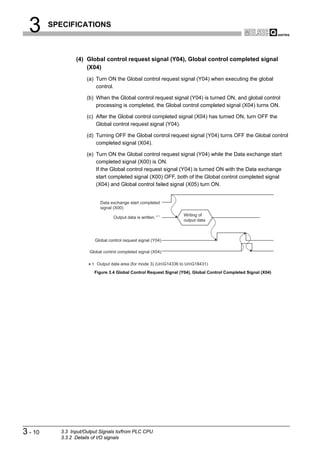
                      (a) Turn ON the Global control request signal (Y04) when executing the global
                          control.

                      (b) When the Global control request signal (Y04) is turned ON, and global control
                          processing is completed, the Global control completed signal (X04) turns ON.

                      (c) After the Global control completed signal (X04) has turned ON, turn OFF the
                          Global control request signal (Y04).

                      (d) Turning OFF the Global control request signal (Y04) turns OFF the Global control
                          completed signal (X04).

                      (e) Turn ON the Global control request signal (Y04) while the Data exchange start
                          completed signal (X00) is ON.
                          If the Global control request signal (Y04) is turned ON with the Data exchange
                          start completed signal (X00) OFF, both of the Global control completed signal
                          (X04) and Global control failed signal (X05) turn ON.


                            Data exchange start completed
                            signal (X00)
                                                             1      Writing of
                                   Output data is written.
                                                                    output data


                         Global control request signal (Y04)

                       Global control completed signal (X04)

                        1 Output data area (for mode 3) (UnG14336 to UnG18431)
                         Figure 3.4 Global Control Request Signal (Y04), Global Control Completed Signal (X04)


3 - 10     3.3 Input/Output Signals to/from PLC CPU
           3.3.2 Details of I/O signals
3   SPECIFICATIONS

                                                                                                                  1
          (5) Global control failed signal (X05)


                                                                                                                       OVERVIEW
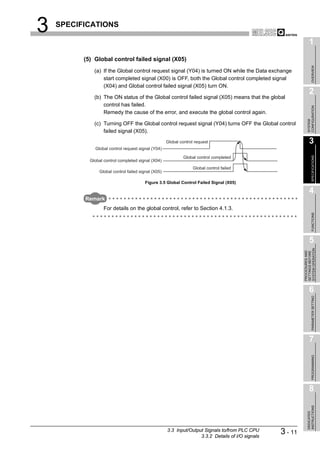
              (a) If the Global control request signal (Y04) is turned ON while the Data exchange
                  start completed signal (X00) is OFF, both the Global control completed signal
                  (X04) and Global control failed signal (X05) turn ON.
                                                                                                                  2
              (b) The ON status of the Global control failed signal (X05) means that the global
                  control has failed.


                                                                                                                CONFIGURATION
                  Remedy the cause of the error, and execute the global control again.


                                                                                                                SYSTEM
              (c) Turning OFF the Global control request signal (Y04) turns OFF the Global control
                  failed signal (X05).
                                                     Global control request                                       3
              Global control request signal (Y04)


                                                                                                                       SPECIFICATIONS
                                                              Global control completed
            Global control completed signal (X04)
                                                                   Global control failed
                Global control failed signal (X05)

                                        Figure 3.5 Global Control Failed Signal (X05)

                                                                                                                  4
          Remark
                   For details on the global control, refer to Section 4.1.3.


                                                                                                                       FUNCTIONS
                                                                                                                  5


                                                                                                            SYSTEM OPERATION
                                                                                                            PROCEDURES AND
                                                                                                            SETTINGS BEFORE
                                                                                                                  6

                                                                                                                       PARAMETER SETTING


                                                                                                                  7
                                                                                                                       PROGRAMMING


                                                                                                                  8
                                                                                                                INSTRUCTIONS
                                                                                                                DEDICATED


                                                     3.3 Input/Output Signals to/from PLC CPU
                                                                    3.3.2 Details of I/O signals
                                                                                                   3 - 11
3      SPECIFICATIONS


                 (6) Extended diagnostic information read request signal (Y06), Extended
                     diagnostic information read response signal (X06)
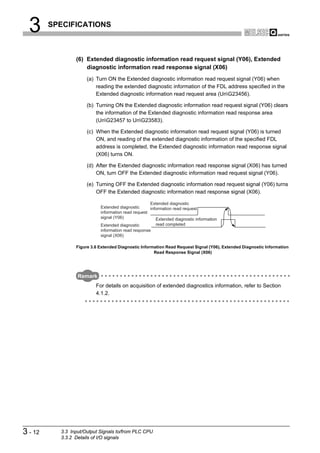
                      (a) Turn ON the Extended diagnostic information read request signal (Y06) when
                          reading the extended diagnostic information of the FDL address specified in the
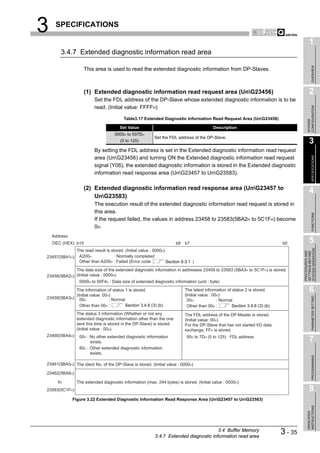
                          Extended diagnostic information read request area (UnG23456).

                      (b) Turning ON the Extended diagnostic information read request signal (Y06) clears
                          the information of the Extended diagnostic information read response area
                          (UnG23457 to UnG23583).

                      (c) When the Extended diagnostic information read request signal (Y06) is turned
                          ON, and reading of the extended diagnostic information of the specified FDL
                          address is completed, the Extended diagnostic information read response signal
                          (X06) turns ON.

                      (d) After the Extended diagnostic information read response signal (X06) has turned
                          ON, turn OFF the Extended diagnostic information read request signal (Y06).

                      (e) Turning OFF the Extended diagnostic information read request signal (Y06) turns
                          OFF the Extended diagnostic information read response signal (X06).

                                                     Extended diagnostic
                            Extended diagnostic      information read request
                            information read request
                            signal (Y06)                Extended diagnostic information
                            Extended diagnostic         read completed
                            information read response
                            signal (X06)

                 Figure 3.6 Extended Diagnostic Information Read Request Signal (Y06), Extended Diagnostic Information
                                                      Read Response Signal (X06)


                  Remark
                          For details on acquisition of extended diagnostics information, refer to Section
                          4.1.2.


3 - 12     3.3 Input/Output Signals to/from PLC CPU
           3.3.2 Details of I/O signals
3   SPECIFICATIONS

                                                                                                                           1
          (7) Data consistency start request signal (Y0C), Data consistency
              requesting signal (X0C)


                                                                                                                                OVERVIEW
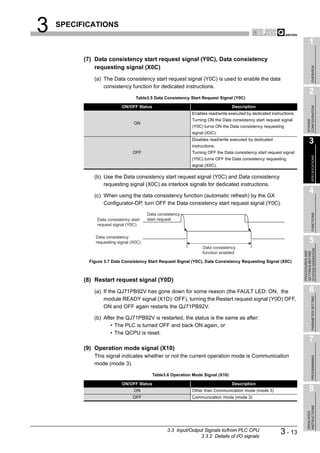
             (a) The Data consistency start request signal (Y0C) is used to enable the data
                 consistency function for dedicated instructions.
                                                                                                                           2
                                  Table3.5 Data Consistency Start Request Signal (Y0C)

                           ON/OFF Status                                         Description


                                                                                                                         CONFIGURATION
                                                            Enables read/write executed by dedicated instructions.
                                                            Turning ON the Data consistency start request signal


                                                                                                                         SYSTEM
                                 ON
                                                            (Y0C) turns ON the Data consistency requesting
                                                            signal (X0C).
                                                            Disables read/write executed by dedicated
                                                            instructions.
                                                                                                                           3
                                OFF                         Turning OFF the Data consistency start request signal


                                                                                                                                SPECIFICATIONS
                                                            (Y0C) turns OFF the Data consistency requesting
                                                            signal (X0C).

             (b) Use the Data consistency start request signal (Y0C) and Data consistency
                 requesting signal (X0C) as interlock signals for dedicated instructions.

             (c) When using the data consistency function (automatic refresh) by the GX
                                                                                                                           4
                 Configurator-DP, turn OFF the Data consistency start request signal (Y0C).


                                                                                                                                FUNCTIONS
                                        Data consistency
              Data consistency start    start request
              request signal (Y0C)

              Data consistency
              requesting signal (X0C)                                                                                      5
                                                                  Data consistency


                                                                                                                     SYSTEM OPERATION
                                                                                                                     PROCEDURES AND
                                                                                                                     SETTINGS BEFORE
                                                                  function enabled

           Figure 3.7 Data Consistency Start Request Signal (Y0C), Data Consistency Requesting Signal (X0C)


          (8) Restart request signal (Y0D)
             (a) If the QJ71PB92V has gone down for some reason (the FAULT LED: ON, the                                    6

                                                                                                                                PARAMETER SETTING
                 module READY signal (X1D): OFF), turning the Restart request signal (Y0D) OFF,
                 ON and OFF again restarts the QJ71PB92V.

             (b) After the QJ71PB92V is restarted, the status is the same as after:
                    • The PLC is turned OFF and back ON again, or
                    • The QCPU is reset.
                                                                                                                           7
          (9) Operation mode signal (X10)
             This signal indicates whether or not the current operation mode is Communication
                                                                                                                                PROGRAMMING


             mode (mode 3).

                                          Table3.6 Operation Mode Signal (X10)

                           ON/OFF Status                                         Description
                                 ON                         Other than Communication mode (mode 3)                         8
                                OFF                         Communication mode (mode 3)
                                                                                                                         INSTRUCTIONS
                                                                                                                         DEDICATED


                                                 3.3 Input/Output Signals to/from PLC CPU
                                                                3.3.2 Details of I/O signals
                                                                                                          3 - 13
3      SPECIFICATIONS


                 (10) Operation mode change request signal (Y11), Operation mode change
                      completed signal (X11)
                      (a) Turn ON the Operation mode change request signal (Y11) when changing the
                          operation mode to the one set in the Operation mode change request area
                          (UnG2255).
                          The operation mode can be changed without resetting the QCPU.

                      (b) Turning ON the Operation mode change request signal (Y11) clears the
                          information of the Operation mode change result area (UnG2256).

                      (c) The Operation mode change completed signal (X11) turns ON when the operation
                          mode is changed, and the result of the change is stored to the Operation mode
                          change result area (UnG2256).

                      (d) Make sure that A300H (Normally completed) is stored in the Operation mode
                          change result area (UnG2256), and turn OFF the Operation mode change
                          request signal (Y11).

                      (e) Turning OFF the Operation mode change request signal (Y11) turns OFF the
                          Operation mode change completed signal (X11).


                     POINT
                          Do not turn the power OFF or reset the QCPU during the operation mode
                          registration to the flash ROM by turning ON the Operation mode change request
                          signal (Y11).
                          Turn the power OFF or reset the QCPU after the Operation mode change
                          completed signal (X11) has turned ON.
                          If the power is turned OFF or the QCPU is reset by mistake, register the operation
                          mode to the flash ROM again.


3 - 14     3.3 Input/Output Signals to/from PLC CPU
           3.3.2 Details of I/O signals
3   SPECIFICATIONS

                                                                                                               1
          (11) Alarm read request signal (Y18), Alarm read response signal (X18)


                                                                                                                    OVERVIEW
             (a) Turn ON the Alarm read request signal (Y18) when reading alarms on the
                 specified DP-Slave according to the information set in the Alarm request area
                 (UnG26432 to UnG26434).
                                                                                                               2
             (b) Turning ON the Alarm read request signal (Y18) clears the information in the
                 Alarm response area (UnG26446 to UnG26768).


                                                                                                             CONFIGURATION
                 Note, however, that the information in the following areas are not cleared when
                 the alarm ACK request (request code: 1501H) is executed:


                                                                                                             SYSTEM
                               Table3.7 Areas Not Cleared At Alarm ACK Request Execution

               Buffer Memory Address
                                                                      Description                              3
                     DEC (HEX)
                    26449 to 26484
                                        Area to which alarm data of alarm data No.1 is stored


                                                                                                                    SPECIFICATIONS
                   (6751H to 6774H)
                    26489 to 26524
                                        Area to which alarm data of alarm data No.2 is stored
                   (6779H to 679CH)
                    26529 to 26564
                                        Area to which alarm data of alarm data No.3 is stored
                   (67A1H to 67C4H)
                    26569 to 26604                                                                             4
                                        Area to which alarm data of alarm data No.4 is stored
                   (67C9H to 67ECH)
                    26609 to 26644
                                        Area to which alarm data of alarm data No.5 is stored
                   (67F1H to 6814H)


                                                                                                                    FUNCTIONS
                    26649 to 26684
                                        Area to which alarm data of alarm data No.6 is stored
                   (6819H to 683CH)
                    26689 to 26724
                                        Area to which alarm data of alarm data No.7 is stored
                   (6841H to 6864H)
                                                                                                               5
                    26729 to 26764
                                        Area to which alarm data of alarm data No.8 is stored


                                                                                                         SYSTEM OPERATION
                                                                                                         PROCEDURES AND
                   (6869H to 688CH)


                                                                                                         SETTINGS BEFORE
             (c) The Alarm read response signal (X18) turns ON when alarms on the specified
                 DP-Slave are read, and the execution result is stored to the Alarm response area
                 (UnG26446 to UnG26768).

             (d) Read the alarm information from the Alarm response area (UnG26446 to                         6
                 UnG26768), and turn OFF the Alarm read request signal (Y18).

                                                                                                                    PARAMETER SETTING
             (e) Turning OFF the Alarm read request signal (Y18) turns OFF, the Alarm read
                 response signal (X18).


          Remark
                 For details on acquisition of alarms, refer to Section 4.2.2.
                                                                                                               7
                                                                                                                    PROGRAMMING


                                                                                                               8
                                                                                                             INSTRUCTIONS
                                                                                                             DEDICATED


                                              3.3 Input/Output Signals to/from PLC CPU
                                                             3.3.2 Details of I/O signals
                                                                                                3 - 15
3      SPECIFICATIONS


                 (12) Time control start request signal (Y19), Time control start response
                      signal (X19)
                      (a) Turn ON the Time control start request signal (Y19) when executing the time
                          control over DP-Slaves according to the information set in the Time control setting
                          request area (UnG26784 to UnG26792).

                      (b) Turning ON the Time control start request signal (Y19) clears the information in
                          the Time control setting response area (UnG26800 to UnG26812).

                      (c) The Time control start response signal (X19) turns ON when the time control over
                          DP-Slaves is executed, and the execution result is stored in the Time control
                          setting response area (UnG26800 to UnG26812).

                      (d) Read the execution result from the Time control setting response area
                          (UnG26800 to UnG26812), and turn OFF the Time control start request signal
                          (Y19).

                      (e) Turning OFF the Time control start request signal (Y19) turns OFF the Time
                          control start response signal (X19).


                  Remark
                          For details on time control over DP-Slaves, refer to Section 4.3.1.


                 (13) Communication READY signal (X1B)
                      (a) The Communication READY signal (X1B) turns ON when the Module READY
                          signal (X1D) turns ON and I/O data exchange is ready to be started. (The signal
                          turns ON only in the Communication mode (mode 3).)

                      (b) The signal turns OFF when an error disabling I/O data exchange occurs on the
                          QJ71PB92V.

                      (c) Use the signal as an interlock signal for when turning ON the Data exchange start
                          request signal (Y00).

                 (14) Module READY signal (X1D)
                      (a) This signal turns ON when the QJ71PB92V is started up. (This signal turns ON
                          regardless of the operation mode.)

                      (b) This signal turns OFF when the QJ71PB92V goes down.

                 (15) Watchdog timer error signal (X1F)
                      (a) This signal turns ON when a watchdog timer error occurs on the QJ71PB92V.

                      (b) The Watchdog timer error signal (X1F) does not turn OFF until:
                            • The PLC is turned OFF and back ON again, or
                            • The QCPU is reset.


3 - 16     3.3 Input/Output Signals to/from PLC CPU
           3.3.2 Details of I/O signals
3      SPECIFICATIONS

                                                                                                                                                   1
    3.4 Buffer Memory


                                                                                                                                                        OVERVIEW
                     This section explains the buffer memories of the QJ71PB92V.


         3.4.1 Buffer memory list
                                                                                                                                                   2
                     The following shows a list of the buffer memories that are used for transferring data


                                                                                                                                                 CONFIGURATION
                     between the QJ71PB92V and the QCPU.


                                                                                                                                                 SYSTEM
                                                   Table3.8 Buffer Memory List

    Address                                                                                                       Read/
                                 Name                                    Description
                                                                                                        Initial              Reference
                                                                                                                                                   3
  DEC (HEX)                                                                                             value     Write*1      Section
   0 to 2079
                  System area (Use prohibited)


                                                                                                                                                        SPECIFICATIONS
 (0H to 81FH)
                                                     Values for masking (invalidating) diagnostic
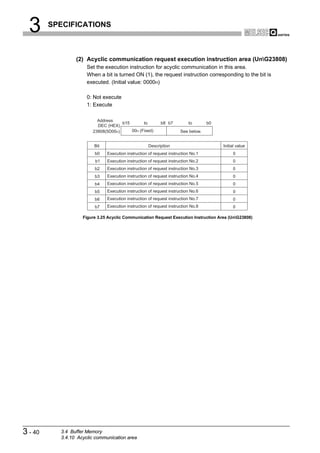
     2080         Diagnostic information invalid                                                                               Section
                                                     information from DP-Slaves are set in this         02B9H      R/W
     (820H)       setting area                                                                                                  3.4.6
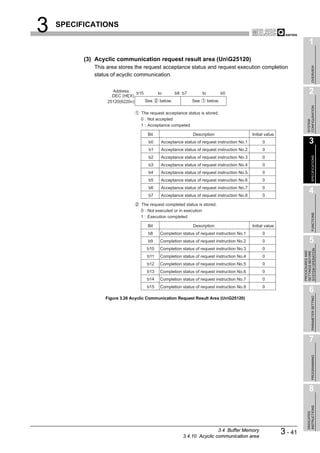
                                                     area.
     2081                                            The global control function to be executed is                             Section
     (821H)
                  Global control area
                                                     set in this area.
                                                                                                          0         W
                                                                                                                                3.4.9              4
 2082 to 2083
                  System area (Use prohibited)
(822H to 823H)
                                                     This area is used to set the time during which


                                                                                                                                                        FUNCTIONS
     2084         Diagnostic information non-                                                                                  Section
                                                     no diagnostic information is notified after          20       R/W
     (824H)       notification time setting area                                                                                3.4.6
                                                     communication start.
 2085 to 2253
                  System area (Use prohibited)
(825H to 8CDH)
     2254                                            The current operation mode value is stored in                             Section
                                                                                                                                                   5
                  Current operation mode area                                                           0001H       R


                                                                                                                                             SYSTEM OPERATION
    (8CEH)                                           this area.                                                                 3.4.2


                                                                                                                                             PROCEDURES AND
                                                                                                                                             SETTINGS BEFORE
                                                     When executing the operation mode change
     2255         Operation mode change request                                                                                Section
                                                     request, a desired operation mode is set in this   FFFEH       W
    (8CFH)        area                                                                                                          3.4.3
                                                     area.
     2256         Operation mode change result       This area stores the execution result of the                              Section
                                                                                                          0         R
    (8D0H)        area                               operation mode change request.                                             3.4.3
     2257
                  Local FDL address area
                                                     This area stores the FDL address of the local
                                                                                                        FFFFH       R
                                                                                                                               Section             6

                                                                                                                                                        PARAMETER SETTING
    (8D1H)                                           station.                                                                   3.4.2
     2258                                            This area stores the details or result of the                             Section
                  Offline test status area                                                                0         R
    (8D2H)                                           offline test.                                                              3.4.2
     2259                                            This area stores the operation mode currently                             Section
                  Flash ROM storage mode                                                                FFFFH       R
    (8D3H)                                           stored in the flash ROM.                                                   3.4.2
 2260 to 2271
                  System area (Use prohibited)
(8D4H to 8DFH)
     2272                                                                                                                      Section
                                                                                                                                                   7
                  Current bus cycle time             This area stores the current bus cycle time.         0         R
    (8E0H)                                                                                                                      3.4.8
                                                                                                                                                        PROGRAMMING


     2273                                            This area stores the minimum value of the bus                             Section
                  Min. bus cycle time                                                                     0         R
    (8E1H)                                           cycle time.                                                                3.4.8
     2274                                            This area stores the maximum value of the bus                             Section
                  Max. bus cycle time                                                                     0         R
    (8E2H)                                           cycle time.                                                                3.4.8
 2275 to 6143
                  System area (Use prohibited)
(8E3H to 17FFH)                                                                                                                                    8
                                 * 1 This indicates whether or not read/write is possible from the sequence program.
                                     R: Read only, W: Write only, R/W: Read/write executable
                                                                                                                                                 INSTRUCTIONS


                                                                                                                        (To the next page)
                                                                                                                                                 DEDICATED


                                                                                             3.4 Buffer Memory
                                                                                        3.4.1 Buffer memory list
                                                                                                                                 3 - 17
3        SPECIFICATIONS


                                                  Table3.8 Buffer Memory List (Continued)

         Address                                                                                               Initial   Read/      Reference
                                       Name                                  Description
      DEC (HEX)                                                                                                value     Write*1      Section
                                                            In Communication mode (mode 3), this area is
    6144 to 10239                                                                                                                     Section
                        Input data area (for mode 3)        used to store the input data received from each      0         R
   (1800H to 27FFH)                                                                                                                    3.4.4
                                                            DP-Slave.
    10240 to 14335
                        System area (Use prohibited)
   (2800H to 37FFH)
                                                            In Communication mode (mode 3), this area is
    14336 to 18431                                                                                                                    Section
                        Output data area (for mode 3)       used to set the output data to be sent to each       0         W
   (3800H to 47FFH)                                                                                                                    3.4.4
                                                            DP-Slave.
    18432 to 22527
                        System area (Use prohibited)
   (4800H to 57FFH)
                                                            In Communication mode (mode 3), this area is
    22528 to 22777      Address information area                                                                                      Section
                                                            used to store the FDL address of each DP-          FFFFH       R
   (5800H to 58F9H)     (for mode 3)                                                                                                   3.4.4
                                                            Slave and I/O data length.
    22778 to 22783
                        System area (Use prohibited)
   (58FAH to 58FFH)
                                                            In Communication mode (mode 3), this area is
    22784 to 22908      Input data start address area                                                                                 Section
                                                            used to store the start address (buffer memory       0         R
   (5900H to 597CH)     (for mode 3)                                                                                                   3.4.4
                                                            address) of the input data of each DP-Slave.
    22909 to 22911
                        System area (Use prohibited)
   (597DH to 597FH)
                                                            In Communication mode (mode 3), this area is
    22912 to 23036      Output data start address area                                                                                Section
                                                            used to store the start address (buffer memory       0         R
   (5980H to 59FCH)     (for mode 3)                                                                                                   3.4.4
                                                            address) of the output data of each DP-Slave.
    23037 to 23039
                        System area (Use prohibited)
     (59FDH to 59FFH)
    23040 to 23047      Slave status area (Normal           This area stores the communication status of                              Section
                                                                                                                 0         R
   (5A00H to 5A07H)     communication detection)            each DP-Slave.                                                             3.4.5
    23048 to 23055      Slave status area (Reserved         This area stores the reserved station setting of                          Section
                                                                                                                 0         R
   (5A08H to 5A0FH)     station setting status)             each DP-Slave.                                                             3.4.5
    23056 to 23064      Slave status area (Diagnostic       This area stores the diagnostic information                               Section
                                                                                                                 0         R
   (5A10H to 5A18H)     information detection)              generation status of each DP-Slave.                                        3.4.5
    23065 to 23070
                        System area (Use prohibited)
   (5A19H to 5A1EH)
          23071         Local station error information     This area stores the error information of the                             Section
                                                                                                                 0         R
         (5A1FH)        area                                local station (QJ71PB92V).                                                 3.4.2
                                                            In Communication mode (mode 3), this area is
    23072 to 23321      Diagnostic information area         used to store the diagnostic information of the                           Section
                                                                                                                 0         R
   (5A20H to 5B19H)     (for mode 3)                        error occurred on each DP-Slave during                                     3.4.6
                                                            communication.
    23322 to 23327
                        System area (Use prohibited)
   (5B1AH to 5B1FH)
                                                            In Communication mode (mode 3), this area is
    23328 to 23454      Extended diagnostic information     used to store the extended diagnostic                                     Section
                                                                                                                 0         R
   (5B20H to 5B9EH)     area (for mode 3)                   information of the error occurred on each DP-                              3.4.6
                                                            Slave during communication.
          23455
                        System area (Use prohibited)
         (5B9FH)

                                       * 1 This indicates whether or not read/write is possible from the sequence program.
                                           R: Read only, W: Write only, R/W: Read/write executable
                                                                                                                               (To the next page)


3 - 18             3.4 Buffer Memory
                   3.4.1 Buffer memory list
3       SPECIFICATIONS

                                                                                                                                                1
                                              Table3.8 Buffer Memory List (Continued)

    Address                                                                                               Initial   Read/     Reference


                                                                                                                                                     OVERVIEW
                                  Name                                    Description
   DEC (HEX)                                                                                              value     Write*1    Section
                                                        This area is used to set the FDL address of the
      23456         Extended diagnostic information                                                                            Section
                                                        station from which the extended diagnostic        FFFFH       W
                    read request area                                                                                           3.4.7
     (5BA0H)
                                                        information is read.                                                                    2
 23457 to 23583     Extended diagnostic information     This area stores the execution result of the                           Section
                                                                                                            0         R
(5BA1H to 5C1FH)    read response area                  extended diagnostic information read request.                           3.4.7


                                                                                                                                              CONFIGURATION
 23584 to 23807
                    System area (Use prohibited)
(5C20H to 5CFFH)


                                                                                                                                              SYSTEM
      23808         Acyclic communication request       This area is used to set which request is to be                        Section
                                                                                                            0         W
     (5D00H)        execution instruction area          executed in acyclic communications.                                    3.4.10
 23809 to 24832     Acyclic communication request       This area is used to set the request data for                          Section
 (5D01H to 6100H)   area                                acyclic communications.
                                                                                                            0         W
                                                                                                                               3.4.10
                                                                                                                                                3
 24833 to 25119
                    System area (Use prohibited)


                                                                                                                                                     SPECIFICATIONS
(6101H to 621FH)
                                                        This area stores the request acceptance status
      25120         Acyclic communication request                                                                              Section
                                                        and execution completion status in acyclic          0         R
     (6220H)        result area                                                                                                3.4.10
                                                        communications.
 25121 to 26144     Acyclic communication response This area stores the execution result of acyclic                            Section
                                                                                                            0         R
(6221H to 6620H)    area                                communication.                                                         3.4.10           4
 26145 to 26415
                    System area (Use prohibited)
(6621H to 672FH)
 26416 to 26424     Slave status area                   This area stores the alarm status of each DP-                          Section
                                                                                                            0         R


                                                                                                                                                     FUNCTIONS
(6730H to 6738H)    (Alarm detection)                   Slave.                                                                  3.4.5
 26425 to 26431
                    System area (Use prohibited)
(6739H to 673FH)
 26432 to 26434                                         This area is used to set the request data for                          Section
(6740H to 6742H)
                    Alarm request area
                                                        alarm acquisition.
                                                                                                            0         W
                                                                                                                               3.4.11           5
 26435 to 26445


                                                                                                                                          SYSTEM OPERATION
                    System area (Use prohibited)


                                                                                                                                          PROCEDURES AND
                                                                                                                                          SETTINGS BEFORE
(6743H to 674DH)
 26446 to 26768                                         This area stores the execution result of alarm                         Section
                    Alarm response area                                                                     0         R
(674EH to 6890H)                                        acquisition.                                                           3.4.11
 26769 to 26783
                    System area (Use prohibited)
(6891H to 689FH)
 26784 to 26792                                         This area is used to set the request data for                          Section
(68A0H to 68A8H)
                    Time control setting request area
                                                        time control.
                                                                                                            0         W
                                                                                                                               3.4.12
                                                                                                                                                6

                                                                                                                                                     PARAMETER SETTING
 26793 to 26799
                    System area (Use prohibited)
(68A9H to 68AFH)
 26800 to 26812     Time control setting response       This area stores the execution result of time                          Section
                                                                                                            0         R
(68B0H to 68BCH)    area                                control.                                                               3.4.12
 26813 to 32767
                    System area (Use prohibited)
(68BDH to 7FFFH)

                                  * 1 This indicates whether or not read/write is possible from the sequence program.                           7
                                      R: Read only, W: Write only, R/W: Read/write executable
                                                                                                                                                     PROGRAMMING


                                                                                                                                                8
                                                                                                                                              INSTRUCTIONS
                                                                                                                                              DEDICATED


                                                                                               3.4 Buffer Memory
                                                                                          3.4.1 Buffer memory list
                                                                                                                                3 - 19
3      SPECIFICATIONS


          3.4.2 Local station information area

                   The information of the local station (QJ71PB92V) is stored in this area.


                   (1) Local station error information area (UnG23071)
                        This area stores the error information of the local station (QJ71PB92V).

                                               Table3.9 Local Station Error Information Area (UnG23071)

                                  Stored Value                                      Description
                                      0000H           Normal
                                Other than 0000H      Error (Error code (      Section 9.3.6))


                      POINT
                            The information in the Local station error information area (UnG23071) is not
                            cleared even if the problem occurred on the QJ71PB92V has been solved.
                            To clear the Local station error information area (UnG23071), turn ON the
                            Diagnostic information area clear request signal (Y02).


                   (2) Current operation mode area (UnG2254)
                        This area stores the current operation mode value.

                                                   Table3.10 Current Operation Mode Area (UnG2254)

                                  Stored Value                                      Description
                                      0001H           Parameter setting mode
                                      0002H           Self-diagnostic mode
                                      0003H           Communication mode (mode 3)
                                      0009H           Flash ROM clear mode
                                      0101H           Parameter setting mode *1
                                      0103H           Communication mode (mode 3) *1

                            * 1 Operation mode currently registered to flash ROM


                   (3) Flash ROM storage mode (UnG2259)
                        This area stores the operation mode currently stored to flash ROM.

                                                     Table3.11 Flash ROM Storage Mode (UnG2259)

                                  Stored Value                                      Description
                                      0101H           Parameter setting mode
                                      0103H           Communication mode (mode 3)
                                      FFFFH           Not registered (No operation mode has been registered to the flash ROM.)


3 - 20      3.4 Buffer Memory
            3.4.2 Local station information area
3   SPECIFICATIONS

                                                                                                           1
          (4) Local FDL address area (UnG2257)
             The FDL address of the local station is stored.


                                                                                                                OVERVIEW
                                        Table3.12 Local FDL Address Area (UnG2257)

                       Stored Value                                Description
                      0000H to 007DH                                                                       2
                                        Local FDL address
                        (0 to 125)


                                                                                                         CONFIGURATION
                          FFFFH         Parameter not set


                                                                                                         SYSTEM
          (5) Offline test status area (UnG2258)
             The self-diagnostics test details or test result is stored in this area.
             For details on the self-diagnostics test, refer to Section 5.4.
                                                                                                           3


                                                                                                                SPECIFICATIONS
                                                                                                           4


                                                                                                                FUNCTIONS
                                                                                                           5


                                                                                                     SYSTEM OPERATION
                                                                                                     PROCEDURES AND
                                                                                                     SETTINGS BEFORE
                                                                                                           6

                                                                                                                PARAMETER SETTING


                                                                                                           7
                                                                                                                PROGRAMMING


                                                                                                           8
                                                                                                         INSTRUCTIONS
                                                                                                         DEDICATED


                                                                      3.4 Buffer Memory
                                                     3.4.2 Local station information area
                                                                                            3 - 21
3      SPECIFICATIONS


          3.4.3 Operation mode change area

                  This area is used to change the operation mode of the local station (QJ71PB92V).
                  For changing the operation mode, refer to Section 6.2.


                  (1) Operation mode change request area (UnG2255)
                      For execution of the operation mode change request, set a desired operation mode.
                      (Initial value: FFFEH)
                      The initial value (FFFEH) is used for malfunction prevention.
                      If the Operation mode change request signal (Y11) is turned ON with the initial value
                      stored in the Operation mode change request area (UnG2255), E300H is stored in the
                      Operation mode change result area (UnG2256) and the operation mode is not
                      changed.

                                           Table3.13 Operation Mode Change Request Area (UnG2255)

                                 Set Value                                     Description
                                   0001H          The mode is changed to Parameter setting mode.
                                   0002H          The mode is changed to Self-diagnostics mode.
                                   0003H          The mode is changed to Communication mode (mode 3).
                                   0009H          The mode is changed to Flash ROM clear mode.
                                                  The mode is changed to Parameter setting mode.
                                   0101H          The Parameter setting mode is registered to the flash ROM at the same
                                                  time as the operation mode change.
                                                  The mode is changed to Communication mode (mode 3).
                                   0103H          The Communication mode (mode 3) is registered to the flash ROM at the
                                                  same time as the operation mode change.
                                                  The mode is changed to Parameter setting mode.
                                  FFFFH           The mode registered to the flash ROM is deleted at the same time as the
                                                  operation mode change.


                  (2) Operation mode change result area (UnG2256)
                      This area stores the execution result of the operation mode change request.

                                           Table3.14 Operation Mode Change Result Area (UnG2256)

                               Stored Value                                    Description
                                   A300H          Normally completed
                              Other than A300H    Failed (Error code (     Section 9.3.2))


3 - 22      3.4 Buffer Memory
            3.4.3 Operation mode change area
3   SPECIFICATIONS

                                                                                                                               1
     3.4.4 I/O data exchange area


                                                                                                                                    OVERVIEW
                 This area is used for the I/O data exchange function.

                     POINT
                          (1) Data are assigned to the I/O data exchange area in the order of GX                               2
                              Configurator-DP parameter settings (in the order of FDL addresses).


                                                                                                                             CONFIGURATION
                          (2) When parameters have been modified (deletion or addition of DP-Slave(s))
                              on GX Configurator-DP, the buffer memory is reassigned.


                                                                                                                             SYSTEM
                              After modifying parameters, review the sequence program.


                                                                                                                               3
                 (1) Input data area (for mode 3) (UnG6144 to UnG10239)
                      When the operation mode is Communication mode (mode 3), input data from DP-


                                                                                                                                    SPECIFICATIONS
                      Slaves are stored in this area.
                      The data length (unit: byte) for each station is variable and assigned based on the
                      slave parameter (Select Modules) set on GX Configurator-DP.
                      The maximum data length per module is 244 bytes, and the total data length for all
                      DP-Slaves can be set up to 8192 bytes.                                                                   4
                      When the data length is an odd number of bytes, 00H is stored to the final high byte.
                      The input data of the next station is assigned starting from the next buffer memory
                      address.


                                                                                                                                    FUNCTIONS
         Address
        DEC (HEX)                                                    b15                b8 b7                    b0
       6144(1800H)                                     6144(1800H) 2nd byte of 1st module   1st byte of 1st module             5
                       Input data of 1st module        6145(1801H) 4th byte of 1st module   3rd byte of 1st module


                                                                                                                         SYSTEM OPERATION
                                                                                                                         PROCEDURES AND
                                                                                                                         SETTINGS BEFORE
            to            (Input data length:
                           23 bytes)

       6156(180CH)
       6157(180DH)
                       Input data of 2nd module        6155(180BH) 22nd byte of 1st module 21st byte of 1st module
            to             (Input data length:         6156(180CH)           00H            23rd byte of 1st module
       6160(1810H)
                            7 bytes)
                                                       6157(180DH) 2nd byte of 2nd module 1st byte of 2nd module
                                                                                                                               6

                                                                                                                                    PARAMETER SETTING
                                                       6158(180EH) 4th byte of 2nd module   3rd byte of 2nd module
                                                       6159(180FH) 6th byte of 2nd module   5th byte of 2nd module

            to                                         6160(1810H)           00H            7th byte of 2nd module


                       Input data of nth module
      10239(27FFH)                                                                                                             7
                 Figure 3.8 Example of Input Data Assignment (1st module: 23 bytes, 2nd module: 7 bytes)
                                                                                                                                    PROGRAMMING


                     POINT
                          The following DP-Slave areas cannot be assigned to the Input data area (for
                          mode 3) (UnG6144 to UnG10239).
                          The areas for the following stations must be skipped.
                                                                                                                               8
                                 • DP-Slave for which the input data length is not assigned.
                                                                                                                             INSTRUCTIONS


                                 • DP-Slave for which the input data length of 0 byte is assigned.
                                                                                                                             DEDICATED


                                                                                 3.4 Buffer Memory
                                                                      3.4.4 I/O data exchange area
                                                                                                                3 - 23
3      SPECIFICATIONS


                    (2) Output data area (for mode 3) (UnG14336 to UnG18431)
                           When the operation mode is Communication mode (mode 3), output data to DP-
                           Slaves are set.
                           The data length (unit: byte) of each station is variable and assigned based on the
                           slave parameter (Select Modules) set on GX Configurator-DP.
                           The maximum data length per module is 244 bytes, and the total data length for all
                           DP-Slaves can be set up to 8192 bytes.
                           When the data length is an odd number of bytes, the final high byte is occupied.
                           Set 00H to the final high byte.
                           The output data of the next station is assigned starting from the next buffer address.

             Address
            DEC (HEX)                                                 b15                b8 b7                    b0
          14336(3800H)                                 14336(3800H) 2nd byte of 1st module   1st byte of 1st module
                         Output data of 1st module     14337(3801H) 4th byte of 1st module   3rd byte of 1st module
               to           (Output data length:
                             23 bytes)

         14348(380CH)
         14349(380DH)                                  14347(380BH) 22nd byte of 1st module 21st byte of 1st module
                         Output data of 2nd module
               to            (Output data length:      14348(380CH)           00H            23rd byte of 1st module
                              7 bytes)
          14352(3810H)                                 14349(380DH) 2nd byte of 2nd module   1st byte of 2nd module
                                                       14350(380EH) 4th byte of 2nd module   3rd byte of 2nd module
                                                       14351(380FH) 6th byte of 2nd module   5th byte of 2nd module
               to
                                                       14352(3810H)           00H            7th byte of 2nd module


                         Output data of nth module
         18431(47FFH)
                    Figure 3.9 Example of Output Data Assignment (1st module: 23 bytes, 2nd module: 7 bytes)


                         POINT
                               The following DP-Slave areas cannot be assigned to the Output data area (for
                               mode 3) (UnG14336 to UnG18431).
                               The areas for the following stations must be skipped.
                                      • DP-Slave for which the output data length is not assigned.
                                      • DP-Slave for which the output data length of 0 byte is assigned.


3 - 24       3.4 Buffer Memory
             3.4.4 I/O data exchange area
3         SPECIFICATIONS

                                                                                                                                          1
                    (3) Address information area (for mode 3) (UnG22528 to UnG22777)
                          When the operation mode is Communication mode (mode 3), the FDL address and


                                                                                                                                               OVERVIEW
                          I/O data length of each DP-Slave are stored in this area.
                          Information of 125 modules is stored in the Address information area (for mode 3) in
                          the same order for each module.                                                                                 2
                          Information for reserved stations is also stored.


                                                                                                                                        CONFIGURATION
  Address
  DEC (HEX)                                                   b15                          b8 b7                              b0
                                                              The FDL address of the 1st module is stored. (Initial value: FFFFH)


                                                                                                                                        SYSTEM
22528(5800H)    FDL address of 1st module
22529(5801H)   I/O data length of 1st module   22528(5800H)   0000H to 007DH (0 to 125): FDL address
                                                              FFFFH                  : No FDL address assigned
22530(5802H)    FDL address of 2nd module
22531(5803H)   I/O data length of 2nd module
                                                            The input data length of the 1st The output data length of the 1st
                                                            module is stored. (Initial value: module is stored. (Initial value:
                                                                                                                                          3
                                                            FFH)                              FFH)
                                                              00H     : The input data          00H     : The output data


                                                                                                                                               SPECIFICATIONS
     to                                        22529(5801H)             length of 0 byte is               length of 0 byte is
                                                                        assigned.                         assigned.
                                                              01H to F4H : Input data           01H to F4H : Output data
                                                                             length                            length
22776(58F8H)   FDL address of 125th module                                   (unit: byte)                      (unit: byte)
22777(58F9H) I/O data length of 125th module                  FFH : Input data not assigned FFH : Output data not assigned

                       Figure 3.10 Address Information Area (for mode 3) (UnG22528 to UnG22777)
                                                                                                                                          4


                                                                                                                                               FUNCTIONS
                                                                                                                                          5


                                                                                                                                    SYSTEM OPERATION
                                                                                                                                    PROCEDURES AND
                                                                                                                                    SETTINGS BEFORE
                                                                                                                                          6

                                                                                                                                               PARAMETER SETTING


                                                                                                                                          7
                                                                                                                                               PROGRAMMING


                                                                                                                                          8
                                                                                                                                        INSTRUCTIONS
                                                                                                                                        DEDICATED


                                                                                      3.4 Buffer Memory
                                                                           3.4.4 I/O data exchange area
                                                                                                                        3 - 25
3           SPECIFICATIONS


                         (4) Input data start address area (for mode 3) (UnG22784 to UnG22908)
                              When the operation mode is Communication mode (mode 3), the start address (buffer
                              memory address) for each DP-Slave's input data is stored in this area.
                              Information of 125 modules is stored in the Input data start address area (for mode 3)
                              in the same order for each module.

      Address
      DEC (HEX)                                                            b15                                                b0
    22784(5900H) Input data start address of 1st module                   The start address (buffer memory address) of the
                                                                          input data of the 1st module is stored. (Initial value:
    22785(5901H) Input data start address of 2nd module
                                                                          FFFFH)
                                                             22528(5800H)
                                                                             1800H to 27FFH : Input data start address
                                                                             FFFFH            : Input data not assigned
         to


   22908(597CH) Input data start address of 125th module

                         Figure 3.11 Input Data Start Address Area (for mode 3) (UnG22784 to UnG22908)


                         (5) Output data start address area (for mode 3) (UnG22912 to UnG23036)
                              When the operation mode is Communication mode (mode 3), the start address (buffer
                              memory address) for each DP-Slave's output data is stored in this area.
                              Information of 125 modules is stored in the Output data start address area (for mode
                              3) in the same order for each module.

     Address
      DEC (HEX)                                                            b15                                                b0
    22912(5980H) Output data start address of 1st module                 The start address (buffer memory address) of the
                                                                         output data of the 1st module is stored.
    22913(5981H) Output data start address of 2nd module
                                                                         (Initial value: FFFFH)
                                                            22912(5980H)
                                                                            3800H to 47FFH : Output data start address
         to                                                                 FFFFH             : Output data not assigned


   22036(59FCH) Output data start address of 125th module

                        Figure 3.12 Output Data Start Address Area (for mode 3) (UnG22912 to UnG23036)


3 - 26           3.4 Buffer Memory
                 3.4.4 I/O data exchange area
3   SPECIFICATIONS

                                                                                                                                          1
     3.4.5 Slave status area


                                                                                                                                               OVERVIEW
                   This area stores the operation status of each DP-Slave.

                      POINT
                              (1) The corresponding bits of the Slave status area are assigned in the order of                            2
                                  GX Configurator-DP parameter settings (in the order of FDL addresses).


                                                                                                                                        CONFIGURATION
                              (2) When parameters have been modified (deletion or addition of DP-Slave(s))
                                  on GX Configurator-DP, the buffer memory is reassigned.


                                                                                                                                        SYSTEM
                                  After modifying parameters, review the sequence program.


                                                                                                                                          3
                   (1) Slave status area (Normal communication detection) (UnG23040 to
                       UnG23047)


                                                                                                                                               SPECIFICATIONS
                         The communication status of each DP-Slave is stored in this area. (Initial value:
                         0000H)
                         When the Data exchange start request signal (Y00) is turned OFF, all the information
                         of the Slave status area (Normal communication detection) (UnG23040 to
                         UnG23047) is cleared.                                                                                           4
                         0: I/O data communication error, or no communication (including reserved and/or no-


                                                                                                                                               FUNCTIONS
                         configured stations)
                         1: Exchanging I/O data

      Address
      DEC (HEX) b15 b14 b13 b12 b11 b10 b9
    23040(5A00H) 16 15 14 13 12 11 10
                                                        b8   b7   b6   b5   b4   b3   b2   b1 b0
                                                                                                      Each bit indicates
                                                                                                                                          5
                                                        9    8    7    6    5    4    3    2    1
                                                                                                      the nth DP-Slave.


                                                                                                                                    SYSTEM OPERATION
                                                                                                                                    PROCEDURES AND
                                                                                                                                    SETTINGS BEFORE
    23041(5A01H) 32      31    30   29   28   27   26   25   24   23   22   21   20   19   18   17
    23042(5A02H) 48      47    46   45   44   43   42   41   40   39   38   37   36   35   34   33
    23043(5A03H) 64      63    62   61   60   59   58   57   56   55   54   53   52   51   50   49
    23044(5A04H) 80      79    78   77   76   75   74   73   72   71   70   69   68   67   66   65
    23045(5A05H) 96      95    94   93   92   91   90   89   88   87   86   85   84   83   82   81
    23046(5A06H) 112 111 110 109 108 107 106 105 104 103 102 101 100 99                    98   97                                        6

                                                                                                                                               PARAMETER SETTING
    23047(5A07H)     1    1     1 125 124 123 122 121 120 119 118 117 116 115 114 113

                 1 Bits b15 to b13 of address 23047 (5A07H) are fixed to 0.
           Figure 3.13 Slave Status Area (Normal communication detection) (UnG23040 to UnG23047)


                         Turning ON the Data exchange start request signal (Y00) updates the information in
                         the Slave status area (Normal communication detection) (UnG23040 to UnG23047),
                         turning ON (1) the bits of the DP-Slave currently exchanging I/O data.
                                                                                                                                          7
                                                                       ON
                                                                                                                                               PROGRAMMING


                              Data exchange start (Y00)     OFF
                              request signal
                                                                       ON

                              Slave status area        OFF
                              (Normal communication detection)                                                                            8
                   Figure 3.14 Operation in Slave Status Area (Normal communication detection) (When I/O data exchange
                                                                 is normal)
                                                                                                                                        INSTRUCTIONS
                                                                                                                                        DEDICATED


                                                                                            3.4 Buffer Memory
                                                                                       3.4.5 Slave status area
                                                                                                                           3 - 27
3      SPECIFICATIONS


                          When an I/O data communication error occurs on a DP-Slave, the corresponding bit
                          turns OFF (0), and it turns ON (1) again when normal status is restored.
                                                                        ON

                              Data exchange start (Y00)     OFF
                              request signal
                                                                        ON

                              Slave status area        OFF
                              (Normal communication detection)


                                                                 I/O data exchange                    Restored from I/O
                                                                 error occurred                       data exchange error


                    Figure 3.15 Operation in Slave Status Area (Normal communication detection) (When I/O data exchange
                                                                error occurred)


                   (2) Slave status area (Reserved station setting status) (UnG23048 to
                       UnG23055)
                          The reserved station setting of each DP-Slave is stored in this area. (Initial value:
                          0000H)

                          0: Normal DP-Slave or not-configured station
                          1: Reserved station setting

           Address
            DEC (HEX) b15 b14 b13 b12 b11 b10 b9            b8     b7   b6   b5 b4     b3   b2   b1 b0
          23048(5A08H) 16 15 14 13 12 11 10                  9     8    7    6    5    4    3    2    1        Each bit indicates
                                                                                                               the nth DP-Slave.
          23049(5A09H) 32     31   30   29   28   27   26   25     24   23   22   21   20   19   18   17
          23050(5A0AH) 48     47   46   45   44   43   42   41     40   39   38   37   36   35   34   33
          23051(5A0BH) 64     63   62   61   60   59   58   57     56   55   54   53   52   51   50   49
          23052(5A0CH) 80     79   78   77   76   75   74   73     72   71   70   69   68   67   66   65
          23053(5A0DH) 96     95   94   93   92   91   90   89     88   87   86   85   84   83   82   81
          23054(5A0EH) 112 111 110 109 108 107 106 105 104 103 102 101 100 99                    98   97
          23055(5A0FH)    1    1    1 125 124 123 122 121 120 119 118 117 116 115 114 113

                         1 Bits b15 to b13 of address 23055 (5A0FH) are fixed to 0.
                   Figure 3.16 Slave Status Area (Reserved station setting status) (UnG23048 to UnG23055)


                   (3) Slave status area (Diagnostic information detection) (UnG23056 to
                       UnG23064)
                          The information on diagnostic status of each DP-Slave is stored in this area.
                          When the Data exchange start request signal (Y00) is turned OFF, all the information
                          of the Slave status area (Diagnostic information detection) (UnG23056 to
                          UnG23064) is cleared.

                          (a) All stations' diagnostic status (UnG23056)
                              This area stores the diagnostic information detection status of all DP-Slaves.
                              (Initial value: 0000H)
                              If diagnostic information is detected in any one of the stations in Each station's
                              diagnostic status (UnG23057 to UnG23064), 1 is stored in All stations' diagnostic
                              status (UnG23056).

                               0: All DP-Slaves normal
                               1: Diagnostic error information detected

3 - 28      3.4 Buffer Memory
            3.4.5 Slave status area
3   SPECIFICATIONS

                                                                                                                                                     1
                      (b) Each station's diagnostic status (UnG23057 to UnG23064)
                          This area stores the diagnostic information detection status of each DP-Slave.


                                                                                                                                                          OVERVIEW
                          (Initial value: 0000H)

                              0: Normal (including reserved and/or not-configured stations)
                              1: Diagnostic information detected                                                                                     2
        Address


                                                                                                                                                   CONFIGURATION
         DEC(HEX) b15 b14 b13 b12 b11 b10 b9                     b8   b7   b6   b5 b4     b3    b2    b1 b0
      23057(5A11H) 16 15 14 13 12 11 10                          9    8    7    6    5    4      3    2       1       Each bit indicates
                                                                                                                      the nth DP-Slave.


                                                                                                                                                   SYSTEM
      23058(5A12H) 32        31       30    29    28   27   26   25   24   23   22   21   20    19    18      17
      23059(5A13H) 48        47       46    45    44   43   42   41   40   39   38   37   36    35    34      33
      23060(5A14H) 64        63       62    61    60   59   58   57   56   55   54   53   52    51    50      49
      23061(5A15H) 80        79       78    77    76   75   74   73   72   71   70   69   68    67    66      65
                                                                                                                                                     3
      23062(5A16H) 96        95       94    93    92   91   90   89   88   87   86   85   84    83    82      81


                                                                                                                                                          SPECIFICATIONS
      23063(5A17H) 112 111 110 109 108 107 106 105 104 103 102 101 100 99                             98      97
      23064(5A18H)       1       1        1 125 124 123 122 121 120 119 118 117 116 115 114 113

                     1 Bits b15 to b13 of address 23064 (5A18H) are fixed to 0.
                             Figure 3.17 Each Station's Diagnostic Status (UnG23057 to UnG23064)
                                                                                                                                                     4
               (4) Slave status area (Alarm detection) (UnG26416 to UnG26424)
                      The information on alarm status of each DP-Slave is stored in this area.


                                                                                                                                                          FUNCTIONS
                      (a) All stations' alarm status (UnG26416)
                          This area stores the alarm detection status of all DP-Slaves. (Initial value: 0000H)
                          If an alarm is detected in any one of the stations in Each station's alarm status
                          (UnG26417 to UnG26424), 1 is stored in All stations' alarm status (UnG26416).                                           5


                                                                                                                                               SYSTEM OPERATION
                              0: No alarm in all DP-Slaves


                                                                                                                                               PROCEDURES AND
                                                                                                                                               SETTINGS BEFORE
                              1: Alarm detected

                      (b) Each station's alarm status (UnG26417 to UnG26424)
                          This area stores the alarm detection status of each DP-Slave. (Initial value:
                          0000H)
                          If an alarm is detected in any one of the stations and the corresponding bit turns                                         6

                                                                                                                                                          PARAMETER SETTING
                          ON (1) in Each station's alarm status (UnG26417 to UnG26424), the RSP
                          ERR.LED turns ON.

                              0: No alarm (including reserved, not-configured, and/or non-alarm-ready stations)
                              1: Alarm generated
     Address
      DEC (HEX) b15 b14 b13 b12 b11 b10 b9                       b8   b7   b6   b5   b4   b3     b2    b1 b0                                         7
    26417(6731H) 16 15 14 13 12 11 10                            9    8    7    6    5     4      3       2       1     Each bit indicates
                                                                                                                        the nth DP-Slave.
    26418(6732H) 32      31          30    29    28    27   26   25   24   23   22   21   20     19   18       17
                                                                                                                                                          PROGRAMMING


    26419(6733H) 48      47          46    45    44    43   42   41   40   39   38   37   36     35   34       33
    26420(6734H) 64      63          62    61    60    59   58   57   56   55   54   53   52     51   50       49
    26421(6735H) 80      79          78    77    76    75   74   73   72   71   70   69   68     67   66       65
    26422(6736H) 96      95          94    93    92    91   90   89   88   87   86   85   84     83   82       81
    26423(6737H) 112 111 110 109 108 107 106 105 104 103 102 101 100 99                               98       97
                                                                                                                                                     8
    26424(6738H)     1       1        1 125 124 123 122 121 120 119 118 117 116 115 114 113
                                                                                                                                                   INSTRUCTIONS


                   1 Bits b15 to b13 of address 26424 (6738H) are fixed to 0.
                                                                                                                                                   DEDICATED


                            Figure 3.18 Each Station's Alarm Status (UnG26417 to UnG26424)


                                                                                                    3.4 Buffer Memory
                                                                                               3.4.5 Slave status area
                                                                                                                                      3 - 29
3      SPECIFICATIONS


          3.4.6 Diagnostic information area

                  This area stores diagnostic information settings and actual diagnostic information.


                  (1) Diagnostic information non-notification time setting area (UnG2084)
                       The time during which no diagnostic information is notified after communication start
                       (after Data exchange start completed signal (X00) turns ON) is set in this area. (Initial
                       value: 20 seconds)

                                   Table3.15 Diagnostic Information Non-notification Time Setting Area (UnG2084)

                                   Set Value                                   Description
                                                   Set the time during which diagnostic information is not notified.
                                  0 to 65535
                                                   (Unit: seconds)


                       This setting prevents temporary error detection. (e.g. when turning ON a DP-Slave
                       after turning ON the QJ71PB92V)
                       When diagnostic information is generated within the time duration set by this setting,
                       the conditions are as follows:
                          • The Diagnostic information detection signal (X01) does not turn ON.
                          • The RSP ERR. LED does not turn ON.
                          • No error code and detailed data is stored in the Diagnostic information area (for
                            mode 3) (UnG2307 to UnG23321) and/or Extended diagnostic information area
                            (for mode 3) (UnG23328 to UnG23454).
                          • The bit corresponding to the station that sent the diagnostic information does not
                            turn ON ini the Slave status area (Diagnostic information detection) (UnG23056
                            to UnG23064).

                      POINT
                            Set a value into the Diagnostic information non-notification time setting area
                            (UnG2084) when the Data exchange start request signal (Y00) is OFF.
                            Values set with the Data exchange start request signal (Y00) ON are ignored.


3 - 30      3.4 Buffer Memory
            3.4.6 Diagnostic information area
3   SPECIFICATIONS

                                                                                                                     1
          (2) Diagnostic information invalid setting area (UnG2080)
             Setting some values to this area can mask (invalidate) any data of the diagnostic


                                                                                                                          OVERVIEW
             information that is sent from a DP-Slave during communication. (Initial value: 02B9H)

             0: Validates the diagnostic information.                                                                2
             1: Invalidates the diagnostic information.
                  Address


                                                                                                                   CONFIGURATION
                 DEC (HEX) b15                        to                      b0
                 2080(820H)                       See below.


                                                                                                                   SYSTEM
                bit                           Description                             Initial value
                b0       Illegal parameter(s) sent from the DP-Master                      1                         3
                b1       Diagnostic information read request                               0
                b2       Fixed to 0                                                        0


                                                                                                                          SPECIFICATIONS
                b3       The DP-Slave is monitored by the watchdog timer.                  1
                b4       DP-Slave entered FREEZE mode.                                     1
                b5       DP-Slave entered SYNC mode.                                       1
                b6       0 (Reserved)                                                      0
                         Excluded from I/O data exchange according to the parameter
                                                                                                                     4
                b7                                                                         1
                         settings

                b8       Unable to exchange I/O data with DP-Slaves.                       0


                                                                                                                          FUNCTIONS
                b9       The DP-Slave is not ready to exchange I/O data.                   1
                         The parameter (No. of I/O bytes) received from the
                b10                                                                        0
                         DP-Master does not match that of the DP-Slave.
                b11      Extended diagnostic information exists.                           0
                b12      The function requested by the DP-Master is not supported.         0
                                                                                                                     5


                                                                                                               SYSTEM OPERATION
                                                                                                               PROCEDURES AND
                b13      Illegal response from DP-Slave                                    0


                                                                                                               SETTINGS BEFORE
                b14      Illegal parameter(s) sent from the DP-Master                      0
                b15      Controlled by another DP-Master                                   0

                      Figure 3.19 Diagnostic Information Invalid Setting Area (UnG2080)


             Even if diagnostic information corresponding to each bit is generated on a DP-Slave,                    6

                                                                                                                          PARAMETER SETTING
             it is not recognized as diagnostic information, and the status of the QJ71PB92V is as
             follows:
                  • The Diagnostic information detection signal (X01) does not turn ON.
                  • The RSP ERR. LED does not turn ON.
                  • No error code and detailed data is stored in the Diagnostic information area (for
                    mode 3) (UnG2307 to UnG23321) and/or Extended diagnostic information area
                    (for mode 3) (UnG23328 to UnG23454).
                                                                                                                     7
                  • The bit corresponding to the station that sent the diagnostic information does not
                                                                                                                          PROGRAMMING


                    turn ON in the Slave status area (Diagnostic information detection) (UnG23056
                    to UnG23064).

            POINT
                 Set values into the Diagnostic information invalid setting area (UnG2080) when                     8
                 the Data exchange start request signal (Y00) is OFF.
                 Values set with the Data exchange start request signal (Y00) ON are ignored.
                                                                                                                   INSTRUCTIONS
                                                                                                                   DEDICATED


                                                                            3.4 Buffer Memory
                                                               3.4.6 Diagnostic information area
                                                                                                      3 - 31
3        SPECIFICATIONS


                         (3) Diagnostic information area (for mode 3) (UnG23072 to UnG23321)
                               (a) This area stores the diagnostic information generated on DP-Slaves during
                                   communication.
                                   Information of 125 modules is stored in Diagnostic information area (for mode 3)
                                   in the same order for each module.
    Address
    DEC(HEX)                                               b15                             b8 b7                                b0
  23072(5A20H)                                           The status 3 information (Whether The FDL address of the 1st
               Diagnostic information
                                                         or not any extended diagnostic       module is stored.
               area of 1st module
  23073(5A21H)                                           information other than the one sent (Initial value: 00H)
  23074(5A22H) Diagnostic information                    this time is stored in the DP-Slave) In the normal status, 00H is stored.
                                            23072(5A20H) of the 1st module is stored.
  23075(5A23H) area of 2nd module                        (Initial value: 00H)                  00H to 7DH (0 to 125): FDL address
                                                            00H : Other extended diagnostic
                                                                   information exists.
      to
                                                            80H : No other extended
                                                                   diagnostic information
                                                                   exists.
  23320(5B18H)                                           The status 1 information of the 1st The status 2 information of the 1st
                 Diagnostic information
                                                         module is stored.                    module is stored.
                 area of 125th module
  23321(5B19H)                              23073(5A21H) (Initial value: 00H)                 (Initial value: 00H)
                                                            00H               : Normal           00H               : Normal
                                                            Other than 00H :           (b)       Other than 00H :           (b)

                         Figure 3.20 Diagnostic Information Area (for mode 3) (UnG23072 to UnG23321)


                             POINT
                                   (1) Data are assigned to the Diagnostic information area (for mode 3) in the order
                                       of GX Configurator-DP parameter settings (in the order of FDL addresses).
                                   (2) When parameters have been modified (deletion or addition of DP-Slave(s))
                                       on GX Configurator-DP, the buffer memory is reassigned.
                                       After modifying parameters, review the sequence program.
                                   (3) The information in Diagnostic information area (for mode 3) (UnG23072 to
                                       UnG23321) is not cleared even if the problem occurred on the DP-Slave has
                                       been solved.
                                       To clear the information in Diagnostic information area (for mode 3)
                                       (UnG23072 to UnG23321), turn ON the Diagnostic information area clear
                                       request signal (Y02).


3 - 32           3.4 Buffer Memory
                 3.4.6 Diagnostic information area
3        SPECIFICATIONS

                                                                                                                                               1
                                (b) Information of status 1 and 2
                                    The diagnostic information generated on DP-Slaves is stored to status 1 and 2,


                                                                                                                                                    OVERVIEW
                                    and corresponding bits turn ON (1).
                                    I/O data exchange between a DP-Master and DP-Slaves is continued even if any
                                    of the following errors occurs.
                                    The following table lists the meaning of each bit, actions to be taken, and the                            2
                                    station where the diagnostic information is detected.


                                                                                                                                             CONFIGURATION
                                                    Table3.16 Diagnostic Information


                                                                                                                                             SYSTEM
 Item      Bit                        Description                                           Action                         Detected in
                                                                      (1) When I/O data exchange is started
                                                                          Normally operating (This occurs every time I/O

           b0    Illegal parameter(s) sent from the DP-Master
                                                                          data exchange is started.)
                                                                                                                           DP-Slave            3
                                                                      (2) During I/O data exchange
                                                                          Check the DP-Slave status and


                                                                                                                                                    SPECIFICATIONS
                                                                          communication line.
           b1    Diagnostic information read request                  Check the DP-Slave status.                           DP-Slave
           b2    0 (Fixed)
           b3    The DP-Slave is monitored by the watchdog timer.     Normally operating                                   DP-Slave
Status 2
           b4    The DP-Slave entered FREEZE mode.                    Normally operating                                   DP-Slave
           b5    The DP-Slave entered SYNC mode.                      Normally operating                                   DP-Slave            4
           b6    0 (Reserved)
                                                                      (1) When I/O data exchange is stopped
                                                                          Normally operating(This occurs every time I/O


                                                                                                                                                    FUNCTIONS
                 Excluded from I/O data exchange according to the         data exchange is stopped.)
           b7                                                                                                              DP-Master
                 parameter settings                                   (2) During I/O data exchange
                                                                          Check if any parameter has been changed
                                                                          from the DP-Master (Class 2) on the network.                         5
                                                                      Check the DP-Slave status and communication


                                                                                                                                         SYSTEM OPERATION
                                                                                                                                         PROCEDURES AND
                                                                                                                                         SETTINGS BEFORE
           b8    Unable to exchange I/O data with DP-Slaves.          line.                                                DP-Master
                                                                      Check the parameters.
                                                                      (1) When I/O data exchange is started
                                                                          Normally operating (This occurs every time I/O
                                                                          data exchange is started.)
           b9    The DP-Slave is not ready to exchange I/O data.                                                           DP-Slave
                                                                      (2) During I/O data exchange
                                                                          Check the DP-Slave status and                                        6

                                                                                                                                                    PARAMETER SETTING
                                                                          communication line.
                 The parameter (No. of I/O bytes) received from the
Status 1   b10                                                        Check the DP-Slave parameters.                       DP-Slave
                 DP-Master does not match that of the DP-Slave.
           b11   There is some extended diagnostic information.       Check the DP-Slave status.                           DP-Master
                                                                      Check if the DP-Slave supports the global control
                 The function requested by the DP-Master is not
           b12                                                        function or not.                                     DP-Slave
                 supported.
                                                                      Verify the DP-Slave specifications.
                                                                                                                                               7
           b13   Illegal response from DP-Slave                       Check the DP-Slave or network status.                DP-Master
           b14   Illegal parameter(s) sent from the DP-Master         Check the parameters.                                DP-Slave
                                                                                                                                                    PROGRAMMING


                                                                      Check if more than one DP-Master are
           b15   Controlled by another DP-Master.                     communicating with the same DP-Slave.                DP-Master
                                                                      Check the parameters.


                                                                                                                                               8
                                                                                                                                             INSTRUCTIONS
                                                                                                                                             DEDICATED


                                                                                            3.4 Buffer Memory
                                                                               3.4.6 Diagnostic information area
                                                                                                                                3 - 33
3       SPECIFICATIONS


                         (4) Extended diagnostic information area (for mode 3) (UnG23328 to
                             UnG23454)
                               This area stores the latest extended diagnostic information occurred during
                               communication.

       Address
        DEC(HEX) b15                                                   b8 b7                                                        b0
                  The FDL address of the DP-Slave that notified of the latest extended diagnostic information in addresses
     23328(5B20H) 23329 to 23454 (5B21H to 5B9EH), is stored. (Initial value: 0000H)
                   0000H to 007DH (0 to 125) : FDL address
                  The data size of the latest extended diagnostic information in addresses 23330 to 23454 (5B22H to 5B9EH)
     23329(5B21H) is stored. (Initial value : 0000H)
                    0000H to 00F4H : Data size of extended diagnostic information (unit: byte)
                  The latest information of status 1 is stored.                The latest information of status 2 is stored.
     23330(5B22H) (Initial value : 00H)                                        (Initial value : 00H)
                   00H               : Normal                                   00H               : Normal
                   Other than 00H :           This section(3)(b)                Other than 00H :           This section(3)(b)
                  The latest status 3 information (Whether or not any          The latest FDL address of the DP-Master is stored.
                  extended diagnostic information other than the one           (Initial value : 00H)
     23331(5B23H) sent this time is stored in the DP-Slave) is stored.         For the DP-Slave that has not started I/O data
                  (Initial value : 00H)                                        exchange, FFH is stored.
                      00H : No other extended diagnostic information            00H to 7DH (0 to 125) : FDL address
                            exists.
                      80H : Other extended diagnostic information
                            exists.
     23332(5B24H)    The latest ident No. of the DP-Slave is stored. (Initial value : 0000H)
     23333(5B25H)

          to          The latest extended diagnostic information (max. 244 bytes) is stored. (Initial value : 0000H)

     23454(5B9EH)
                     Figure 3.21 Extended Diagnostic Information Area (for mode 3) (UnG23328 to UnG23454)


                             POINT
                                    (1) The information in Extended diagnostic information area (for mode 3)
                                        (UnG23328 to UnG23454) is not cleared even if corrective action is taken for
                                        the relevant error that has occurred on a DP-Slave.
                                        To clear the information in Extended diagnostic information area (for mode 3)
                                        (UnG23328 to UnG23454), turn ON the Diagnostic information area clear
                                        request signal (Y02).
                                    (2) When b11 of the Diagnostic information invalid setting area (UnG2080) is set
                                        to ON (1), information is not stored in the Extended diagnostic information
                                        area (for mode 3) (UnG23328 to UnG23454).


3 - 34           3.4 Buffer Memory
                 3.4.6 Diagnostic information area
3    SPECIFICATIONS

                                                                                                                                            1
        3.4.7 Extended diagnostic information read area


                                                                                                                                                 OVERVIEW
                   This area is used to read the extended diagnostic information from DP-Slaves.


                   (1) Extended diagnostic information read request area (UnG23456)                                                        2
                         Set the FDL address of the DP-Slave whose extended diagnostic information is to be
                         read. (Initial value: FFFFH)


                                                                                                                                          CONFIGURATION
                                         Table3.17 Extended Diagnostic Information Read Request Area (UnG23456)


                                                                                                                                          SYSTEM
                                       Set Value                                          Description
                                    0000H to 007DH
                                                          Set the FDL address of the DP-Slave.
                                       (0 to 125)                                                                                           3
                         By setting the FDL address is set in the Extended diagnostic information read request


                                                                                                                                                 SPECIFICATIONS
                         area (UnG23456) and turning ON the Extended diagnostic information read request
                         signal (Y06), the extended diagnostic information is stored in the Extended diagnostic
                         information read response area (UnG23457 to UnG23583).

                   (2) Extended diagnostic information read response area (UnG23457 to
                                                                                                                                            4
                       UnG23583)
                         The execution result of the extended diagnostic information read request is stored in
                         this area.


                                                                                                                                                 FUNCTIONS
                         If the request failed, the values in address 23458 to 23583(5BA2H to 5C1FH) become
                         0H.
    Address
    DEC (HEX) b15                                                     b8   b7                                                b0             5


                                                                                                                                      SYSTEM OPERATION
               The read result is stored. (Initial value : 0000H)


                                                                                                                                      PROCEDURES AND
                                                                                                                                      SETTINGS BEFORE
23457(5BA1H)    A200H               : Normally completed
                Other than A200H : Failed (Error code             Section 9.3.1 )
             The data size of the extended diagnostic information in addresses 23459 to 23583 (5BA3H to 5C1FH) is stored.
23458(5BA2H) (Initial value : 0000H)
               0000H to 00F4H : Data size of extended diagnostic information (unit : byte)
            The information of status 1 is stored.                         The latest information of status 2 is stored.
                                                                           (Initial value : 00H)
                                                                                                                                            6
            (Initial value: 00H)


                                                                                                                                                 PARAMETER SETTING
23459(5BA3H) 00H               : Normal                                     00H               : Normal
              Other than 00H :         Section 3.4.6 (3) (b)                Other than 00H :         Section 3.4.6 (3) (b)
               The status 3 information (Whether or not any                The FDL address of the DP-Master is stored.
               extended diagnostic information other than the one          (Initial value: 00H)
               sent this time is stored in the DP-Slave) is stored.        For the DP-Slave that has not started I/O data
               (Initial value : 00H)                                       exchange, FFH is stored.
23460(5BA4H)     00H : No other extended diagnostic information             00H to 7DH (0 to 125) : FDL address
                       exists.                                                                                                              7
                 80H : Other extended diagnostic information
                       exists.
                                                                                                                                                 PROGRAMMING


23461(5BA5H) The ident No. of the DP-Slave is stored. (Initial value : 0000H)

23462(5BA6H)

      to       The extended diagnostic information (max. 244 bytes) is stored. (Initial value : 0000H)
23583(5C1FH)                                                                                                                                8
              Figure 3.22 Extended Diagnostic Information Read Response Area (UnG23457 to UnG23583)
                                                                                                                                          INSTRUCTIONS
                                                                                                                                          DEDICATED


                                                                                        3.4 Buffer Memory
                                                           3.4.7 Extended diagnostic information read area
                                                                                                                             3 - 35
3      SPECIFICATIONS


          3.4.8 Bus cycle time area

                  This area stores the bus cycle time.


                  (1) Current bus cycle time (UnG2272)
                       The current bus cycle time is stored in this area. (Unit:   1ms)

                  (2) Min. bus cycle time (UnG2273)
                       The minimum value of the bus cycle time is stored in this area. (Unit:   1ms)

                  (3) Max. bus cycle time (UnG2274)
                       The maximum value of the bus cycle time is stored in this area. (Unit:   1ms)


3 - 36      3.4 Buffer Memory
            3.4.8 Bus cycle time area
3   SPECIFICATIONS

                                                                                                                              1
     3.4.9 Global control area


                                                                                                                                   OVERVIEW
            This area is used for the global control function.


            (1) Global control area (UnG2081)                                                                                2
                (a) Set the global control function to be executed.


                                                                                                                            CONFIGURATION
                    Specify the global control service to be sent by bits b5 to b2 in the Global control
                    area, and set the target group No. by bits b15 to b8. (Initial value: 0000H)


                                                                                                                            SYSTEM
                    0: Not execute
                    1: Execute                                                                                                3
                     Address
                    DEC(HEX) b15                      to                    b0


                                                                                                                                   SPECIFICATIONS
                    2081(821H)                     See below.


                  bit                         Description                    Initial value Reference Section
                   b0   Unused (Fixed to 0)                                       0
                   b1   Unused (Fixed to 0)                                       0                                           4
                        UNFREEZE (Retention of the actual input data is
                   b2                                                             0
                        disabled.)
                                                                                                 (b)
                   b3   FREEZE (Actual input data is held and read.)              0


                                                                                                                                   FUNCTIONS
                                                                                          See (b).
                        UNSYNC (Retention of the actual input data is
                   b4                                                             0
                        disabled.)
                   b5   SYNC (Actual output data is written and held.)            0
                   b6   Unused (Fixed to 0)                                       0                                           5


                                                                                                                        SYSTEM OPERATION
                   b7   Unused (Fixed to 0)                                       0


                                                                                                                        PROCEDURES AND
                                                                                                                        SETTINGS BEFORE
                   b8    Executed on DP-Slaves in group 1                         0
                   b9   Executed on DP-Slaves in group 2                          0
                  b10   Executed on DP-Slaves in group 3                          0
                  b11   Executed on DP-Slaves in group 4                          0              (c)
                                                                                          See (c).
                  b12   Executed on DP-Slaves in group 5                          0
                                                                                                                              6
                  b13   Executed on DP-Slaves in group 6                          0


                                                                                                                                   PARAMETER SETTING
                  b14   Executed on DP-Slaves in group 7                          0
                  b15    Executed on DP-Slaves in group 8                         0

                                  Figure 3.23 Global Control Area (UnG2081)


                                                                                                                              7
                                                                                                                                   PROGRAMMING


                                                                                                                              8
                                                                                                                            INSTRUCTIONS
                                                                                                                            DEDICATED


                                                                               3.4 Buffer Memory
                                                                         3.4.9 Global control area
                                                                                                               3 - 37
3      SPECIFICATIONS


                      (b) Setting global control services (b5 to b2)
                          The following service combinations are not executable at the same time.
                             • SYNC and UNSYNC (If both services are attempted concurrently, UNSYNC
                               only is enabled.)
                             • FREEZE and UNFREEZE (If both services are attempted concurrently,
                               UNFREEZE only is enabled.)
                          The following shows the services and their set values for b5 to b2.
                          1) Setting for execution of the SYNC and UNSYNC services

                                                              Table3.18 SYNC/UNSYNC Settings (b5, b4)

                                                                                                              Set Value
                                                     Service to be Executed
                                                                                                     b5                   b4
                                                              SYNC                                    1                   0
                                                            UNSYNC                                        1               1
                                                                                                    0*

                           * 1 When 1 is set to this bit, it is handled as an invalid value. (The operation is the same as when the
                               value is set to 0.)


                           2) Setting for execution of the FREEZE and UNFREEZE services

                                                           Table3.19 FREEZE/UNFREEZE Settings (b3, b2)

                                                                                                              Set Value
                                                     Service to be Executed
                                                                                                     b3                   b2
                                                             FREEZE                                   1                   0
                                                           UNFREEZE                                 0*1                   1

                           * 1 When 1 is set to this bit, it is handled as an invalid value. (The operation is the same as when the
                               value is set to 0.)


                      (c) Setting the target group No. (b15 to b8)
                          Multiple group Nos. can be set for the target group No.
                          When 0s are set to all of b8 to b15, the set global control service is sent to all DP-
                          Slaves (including DP-Slaves for which group No. is not set).


3 - 38     3.4 Buffer Memory
           3.4.9 Global control area
3   SPECIFICATIONS

                                                                                                                 1
     3.4.10 Acyclic communication area


                                                                                                                      OVERVIEW
           The area is used for acyclic communications.


           (1) Acyclic communication request area (UnG23809 to UnG24832)                                       2
               Set the request instruction of acyclic communication in this area. (Initial value: 0000H)
               Up to eight request instructions can be set.


                                                                                                               CONFIGURATION
               For the format for request instructions, refer to Section 7.4.


                                                                                                               SYSTEM
                        Address
                        DEC (HEX)
                      23809(5D01H)                                                                               3
                            to       Request instruction No.1 area (Data size: 128 words)


                                                                                                                      SPECIFICATIONS
                      23936(5D80H)
                      23937(5D81H)

                            to       Request instruction No.2 area (Data size: 128 words)

                      24064(5E00H)
                      24065(5E01H)                                                                               4
                            to
                                     Request instruction No.3 area (Data size: 128 words)
                      24192(5E80H)


                                                                                                                      FUNCTIONS
                      24193(5E81H)

                            to       Request instruction No.4 area (Data size: 128 words)

                      24320(5F00H)                                                                               5
                      24321(5F01H)


                                                                                                           SYSTEM OPERATION
                                                                                                           PROCEDURES AND
                                                                                                           SETTINGS BEFORE
                            to       Request instruction No.5 area (Data size: 128 words)

                      24448(5F80H)
                      24449(5F81H)

                            to       Request instruction No.6 area (Data size: 128 words)

                      24576(6000H)                                                                               6

                                                                                                                      PARAMETER SETTING
                      24577(6001H)

                            to       Request instruction No.7 area (Data size: 128 words)

                      24704(6080H)
                      24705(6081H)

                            to       Request instruction No.8 area (Data size: 128 words)

                      24832(6100H)
                                                                                                                 7
                 Figure 3.24 Acyclic Communication Request Area (UnG23809 to UnG24832)
                                                                                                                      PROGRAMMING


                                                                                                                 8
                                                                                                               INSTRUCTIONS
                                                                                                               DEDICATED


                                                                          3.4 Buffer Memory
                                                          3.4.10 Acyclic communication area
                                                                                                3 - 39
3      SPECIFICATIONS


                 (2) Acyclic communication request execution instruction area (UnG23808)
                      Set the execution instruction for acyclic communication in this area.
                      When a bit is turned ON (1), the request instruction corresponding to the bit is
                      executed. (Initial value: 0000H)

                      0: Not execute
                      1: Execute

                          Address
                                     b15       to          b8 b7          to       b0
                          DEC (HEX)
                        23808(5D00H)     00H (Fixed)                  See below.


                         Bit                         Description                        Initial value
                         b0    Execution instruction of request instruction No.1             0
                         b1    Execution instruction of request instruction No.2             0
                         b2    Execution instruction of request instruction No.3             0
                         b3    Execution instruction of request instruction No.4             0
                         b4    Execution instruction of request instruction No.5             0
                         b5    Execution instruction of request instruction No.6             0
                         b6    Execution instruction of request instruction No.7             0
                         b7    Execution instruction of request instruction No.8             0

                    Figure 3.25 Acyclic Communication Request Execution Instruction Area (UnG23808)


3 - 40     3.4 Buffer Memory
           3.4.10 Acyclic communication area
3   SPECIFICATIONS

                                                                                                                          1
          (3) Acyclic communication request result area (UnG25120)
             This area stores the request acceptance status and request execution completion


                                                                                                                               OVERVIEW
             status of acyclic communication.


                    Address
                    DEC (HEX)
                               b15        to       b8 b7         to            b0                                         2
                  25120(6220H)     See    below.           See        below.


                                                                                                                        CONFIGURATION
                                 The request acceptance status is stored.
                                 0 : Not accepted


                                                                                                                        SYSTEM
                                 1 : Acceptance competed

                                    Bit                     Description                    Initial value
                                     b0    Acceptance status of request instruction No.1         0                        3
                                     b1    Acceptance status of request instruction No.2         0


                                                                                                                               SPECIFICATIONS
                                     b2    Acceptance status of request instruction No.3         0
                                     b3    Acceptance status of request instruction No.4         0
                                     b4    Acceptance status of request instruction No.5         0
                                     b5    Acceptance status of request instruction No.6         0
                                     b6    Acceptance status of request instruction No.7         0
                                     b7    Acceptance status of request instruction No.8         0
                                                                                                                          4
                                 The request completed status is stored.
                                 0 : Not executed or in execution


                                                                                                                               FUNCTIONS
                                 1 : Execution completed

                                    Bit                     Description                    Initial value
                                    b8     Completion status of request instruction No.1         0
                                    b9     Completion status of request instruction No.2         0                        5
                                    b10    Completion status of request instruction No.3         0


                                                                                                                    SYSTEM OPERATION
                                                                                                                    PROCEDURES AND
                                                                                                                    SETTINGS BEFORE
                                    b11    Completion status of request instruction No.4         0
                                    b12    Completion status of request instruction No.5         0
                                    b13    Completion status of request instruction No.6         0
                                    b14    Completion status of request instruction No.7         0
                                    b15    Completion status of request instruction No.8         0
                                                                                                                          6

                                                                                                                               PARAMETER SETTING
                 Figure 3.26 Acyclic Communication Request Result Area (UnG25120)


                                                                                                                          7
                                                                                                                               PROGRAMMING


                                                                                                                          8
                                                                                                                        INSTRUCTIONS
                                                                                                                        DEDICATED


                                                                       3.4 Buffer Memory
                                                       3.4.10 Acyclic communication area
                                                                                                           3 - 41
3      SPECIFICATIONS


                 (4) Acyclic communication response area (UnG25121 to UnG26144)
                      The execution result of acyclic communication is stored in this area. (Initial value:
                      0000H)
                      For the response format for the execution result, refer to Section 7.4.


                                 Address
                                DEC(HEX)
                              25121(6221H)
                                   to           Response area for request instruction
                                                    No.1 (Data size: 128 words)
                              25248(62A0H)
                              25249(62A1H)
                                   to           Response area for request instruction
                                                    No.2 (Data size: 128 words)
                              25376(6320H)
                              25377(6321H)
                                   to           Response area for request instruction
                                                    No.3 (Data size: 128 words)
                              25504(63A0H)
                              25505(63A1H)
                                   to           Response area for request instruction
                                                    No.4 (Data size: 128 words)
                              25632(6420H)
                              25633(6421H)
                                   to           Response area for request instruction
                                                    No.5 (Data size: 128 words)
                              25760(64A0H)
                              25761(64A1H)
                                   to           Response area for request instruction
                                                    No.6 (Data size: 128 words)
                              25888(6520H)
                              25889(6521H)
                                   to           Response area for request instruction
                                                    No.7 (Data size: 128 words)
                              26016(65A0H)
                              26017(65A1H)
                                   to           Response area for request instruction
                                                    No.8 (Data size: 128 words)
                              26144(6620H)

                       Figure 3.27 Acyclic Communication Response Area (UnG25121 to UnG26144)


3 - 42     3.4 Buffer Memory
           3.4.10 Acyclic communication area
3   SPECIFICATIONS

                                                                                                                    1
     3.4.11 Alarm area


                                                                                                                         OVERVIEW
            This area is used for the alarm acquisition.


            (1) Alarm request area (UnG26432 to UnG26434)                                                         2
                Set request data for alarm acquisition in this area. (Initial value: 0000H)
                For the request format, refer to Section 7.5.


                                                                                                                  CONFIGURATION
                                                                                                                  SYSTEM
            (2) Alarm response area (UnG26446 to UnG26768)
                The execution result of alarm acquisition is stored in this area. (Initial value: 0000H)
                For the response format for the execution result, refer to Section 7.5.
                                                                                                                    3
     3.4.12 Time control area


                                                                                                                         SPECIFICATIONS
            This area is used for the time control.


            (1) Time control setting request area (UnG26784 to UnG26792)                                          4
                Set request data for the time control setting in this area. (Initial value: 0000H)
                For the request format, refer to Section 7.6.


                                                                                                                         FUNCTIONS
            (2) Time control setting response area (UnG26800 to UnG26812)
                The execution result of the time control setting is stored in this area. (Initial value:
                0000H)                                                                                              5
                For the response format for the execution result, refer to Section 7.6.


                                                                                                              SYSTEM OPERATION
                                                                                                              PROCEDURES AND
                                                                                                              SETTINGS BEFORE
                                                                                                                    6

                                                                                                                         PARAMETER SETTING


                                                                                                                    7
                                                                                                                         PROGRAMMING


                                                                                                                    8
                                                                                                                  INSTRUCTIONS
                                                                                                                  DEDICATED


                                                                        3.4 Buffer Memory
                                                                        3.4.11 Alarm area
                                                                                                     3 - 43
3       SPECIFICATIONS


         3.5 Processing Time

                        This section explains the bus cycle time and transmission delay time.


            3.5.1 Bus cycle time

                        (1) When a single DP-Master is used

                                                                                                                              Time


           QJ71PB92V
           Buffer memory


           QJ71PB92V
           Internal buffer


                DP-Slave 1


                DP-Slave 2


                DP-Slave 3


                                            Treq (1)       Tres (1)              Treq(2)    Tres (2)              Treq(3)            Tres(3)

                                                Max_Tsdr (1)                        Max_Tsdr (2)                     Max_Tsdr (3)


                                       Lr              Pt (1)                          Pt (2)                               Pt (3)


                                                                      Tsdi (M)                         Tsdi (M)                            Tsdi (M)


                                                                MSI (Min. Slave Interval)

                                                                                      Bc


                                       Figure 3.28 Bus Cycle Time (DP-Master: 1, DP-Slave: 3)


3 - 44          3.5 Processing Time
                3.5.1 Bus cycle time
3          SPECIFICATIONS

                                                                                                                                                 1
                       (a) Bus cycle time (Bc) calculation formula
                           The bus cycle time (Bc) of the DP-Master can be obtained from the following


                                                                                                                                                      OVERVIEW
                           calculation formula.
                           The symbols within the brackets [] indicate units.
                                                   n
                       Bc[s]     Max (MSI,
                                               i       1
                                                           (Pt (i)   Tsdi (M))   Lr)                                                             2
                                                                n=number of DP-Slaves


                                                                                                                                               CONFIGURATION
                           Max (A, B) = A or B, whichever is greater


                                                                                                                                               SYSTEM
                                         Table3.20 Items in the bus cycle time (Bc) calculation formula

           Item                                                            Description
MSI[s]             Minimum polling cycle (Min. slave interval) *1                                                                                3
                   (Polling time to i-th station) = Treq(i) + Max_Tsdr(i)+ Tres(i)


                                                                                                                                                      SPECIFICATIONS
                   • Treq(i)[s] = (Request transmission time of i-th station)
                     = [{(Number of bytes output to i-th station) + 9} 11[bit]] / (Transmission speed[bps])
Pt(i)[s]
                   • Max_Tsdr(i)[s] = (Response time [TBit] of i-th station) *2, *3 / (Transmission speed[bps])
                   • Tres(i)[s] = (Response transmission time of i-th station)
                     = [{(Number of bytes input from i-th station) + 9} 11[bit]] / (Transmission speed[bps])
                                                                                                                                                 4
                   (Request/response processing time [TBit] of DP-Master(QJ71PB92V)*4 / (Transmission
Tsdi(M)[s]
                   speed[bps])


                                                                                                                                                      FUNCTIONS
Lr[s]              (Data refresh time) = 5.50                   10-3 + (Number of DP-Slaves)         100       10-6
                           * 1 The value set on the Master Settings screen of GX Configurator-DP
                           * 2 The MaxTsdr value described in the GSD (DDB) file of the DP-Slave
                           * 3 [TBit] (Bit Time) is a unit that expresses the time required for 1-bit data transmission as "1".                  5
                               The actual processing time differs as shown below depending on the transmission speed.


                                                                                                                                           SYSTEM OPERATION
                                                                                                                                           PROCEDURES AND
                                                                                                                                           SETTINGS BEFORE
                               [Transmission speed is 1.5 Mbps]
                                1[TBit]=1 / (1.5 106)=0.667 10 -6[s]
                               [Transmission speed is 12 Mbps]
                               1[TBit]=1 / (12 106)=0.083 10 -6[s]
                           * 4 The Tsdi value described in the GSD (DDB) file of the QJ71PB92V
                               The Tsdi value varies as shown below depending on the transmission speed.
                               Refer to *3 for the unit [TBit].                                                                                  6

                                                                                                                                                      PARAMETER SETTING
                                              Table3.21 Request/Response Processing Time of DP-Master

                                      Transmission Speed                           Request/Response Processing Time of DP-Master
                          9.6 kbps                                                                      10 TBit
                          19.2 kbps, 93.75 kbps                                                         15 TBit
                          197.5 kbps, 500 kbps                                                          80 TBit
                          1.5 Mbps, 3 Mbps, 6 Mbps, 12 Mbps,                                           150 TBit                                  7
                                                                                                                                                      PROGRAMMING


                                                                                                                                                 8
                                                                                                                                               INSTRUCTIONS
                                                                                                                                               DEDICATED


                                                                                            3.5 Processing Time
                                                                                            3.5.1 Bus cycle time
                                                                                                                                  3 - 45
3           SPECIFICATIONS


                                             (b) Bus cycle time calculation example
                                                 The following shows a calculation example of the bus cycle time:

                                                                                                                    Transmission speed : 1.5Mbps
                                                                DP-Master (FDL address 0)                                              : 3 modules
                                                                                                                    No. of DP-Slave
                                                                      QJ71PB92V
                                                                                                                                                     PROFIBUS-DP


                                             DP-Slave (FDL address 1)                            DP-Slave (FDL address 2)                  DP-Slave (FDL address 3)
                                                  AJ95TB2-16T                                         AJ95TB3-16D                                QJ71PB93D
                                                        Input : 0 points                                 Input : 16 points                        Input : 1 word
                                                        Output: 16 points                                Output: 0 points                         Output: 2 words


                                                                                                        AJ95TB2-16T AJ95TB3-16D QJ71PB93D

                                                             Output data size [byte]                           2                      0                4

                                                             Input data size                  [byte]           0                      2                2

                                                                           Figure 3.29 System Configuration Example

                                                    1) MSI[s] value
                                                             MSI[s]=80                    100            10-6=8.0             10-3
                                                    2) Pt(i)[s] value

                                                                                               Table3.22 Pt(i) Value

                                                                                                                        DP-Slave
              Item
                                    AJ95TB2-16T (FDL address 1)                                         AJ95TB3-16D (FDL address 2)                        QJ71PB93D (FDL address 3)
                            {(2 + 9)              11}        (1.5    106)                         {(0 + 9)     11}           (1.5    106)             {(4 + 9)    11}        (1.5     106)
   Treq(i)[s]
                            = 0.081               10-3                                            = 0.066      10-3                                   = 0.095      10-3
   Response time
                            150                                                                   150                                                 150
   [TBit] of i-th station
   Max_Tsdr(i)[s]           150             (1.5         106) = 0.1        10-3                   150       (1.5         106) = 0.1        10-3       150     (1.5       106) = 0.1      10-3
                            {(0 + 9)              11}        (1.5    106)                         {(2 + 9)     11}           (1.5    106)             {(2 + 9)    11}        (1.5     106)
   Tres(i)[s]
                                                        -3                                                              -3                                              -3
                            = 0.066               10                                              = 0.081      10                                     = 0.081      10
                                                   -3                 -3                                           -3                 -3
                            0.081             10 + 0.1              10 + 0.066                    0.066      10 + 0.1               10 + 0.081        0.095      10-3 + 0.1         10-3 + 0.081
   Pt(i)[s]                 10-3                                                                  10-3                                                10-3
                                                        -3                                                              -3
                                = 0.247            10                                             = 0.247      10                                     = 0.276      10-3

                                                    3) Tsdi(M)[s] value
                                                       Request/response processing time [TBit] of DP-Master (QJ71PB92V)=150
                                                             Tsdi(M)[s]=150 / (1.5                          106)=0.1                10-3
                                                    4) Lr[s] value
                                                             Lr[s]=5.50 10-3+3                             100           10-6=5.80            10-3

                                             Using the values obtained in above 2) to 4),
                                3

                                        (Pt (i)         Tsdi (M))          Lr         {(Pt (1) Tsdi (M)) (Pt (2)                           Tsdi (M)) (Pt (3) Tsdi (M))} Lr
                            i       1
                                                                                      { (0.347 10 3 ) (0.347                               10 3 ) (0.376 10 3 )} 5.80 10                           3

                                                                                                3              3
                                                                                      1.07 10       5.80 10
                                                                                                3
                                                                                      6.87 10
                                             Therefore, the bus cycle time (Bc) value is as follows:
                                                                                      3
                                             Bc[s]            Max (MSI ,                      (Pt (i)      Tsdi (M))           Lr)
                                                                                  i       1

                                                              Max (8.0 10 3 , 6.87                             10 3 )
                                                              8.0 10 3 [s]


3 - 46               3.5 Processing Time
                     3.5.1 Bus cycle time
3   SPECIFICATIONS

                                                                                                                                         1
           (2) When multiple DP-Masters are used
                The bus cycle time (Bc) can be obtained by the following calculation formula when


                                                                                                                                              OVERVIEW
                there are multiple DP-Masters on the same network:
                               n
                TBc[s]                 Bc (n)
                           i       1

                           n Number of DP-Masters
                                                                                                                                         2
                           Bc Bus cycle time of each DP-Master (                     (1) in this section)


                                                                                                                                       CONFIGURATION
                The following shows an example where two DP-Masters exist on the same network.


                                                                                                                                       SYSTEM
        DP-Master 1 executes polling                  DP-Master 2 executes polling         DP-Master 1 executes polling
                                                                                                                                         3
                                                      DP-Master 2 bus cycle                                               Time
         DP-Master 1 bus cycle
         time Bc(1)                                   time Bc(2)


                                                                                                                                              SPECIFICATIONS
                                                TBc


                Figure 3.30 Bus Cycle Time When Two DP-Masters Exist on the Same Network                                                 4


                                                                                                                                              FUNCTIONS
                                                                                                                                         5


                                                                                                                                   SYSTEM OPERATION
                                                                                                                                   PROCEDURES AND
                                                                                                                                   SETTINGS BEFORE
                                                                                                                                         6

                                                                                                                                              PARAMETER SETTING


                                                                                                                                         7
                                                                                                                                              PROGRAMMING


                                                                                                                                         8
                                                                                                                                       INSTRUCTIONS
                                                                                                                                       DEDICATED


                                                                                         3.5 Processing Time
                                                                                         3.5.1 Bus cycle time
                                                                                                                          3 - 47
3      SPECIFICATIONS


          3.5.2 Transmission delay time

                  The transmission delay times of the input data and output data vary depending on the data
                  consistency setting.
                  The calculation formulas for the transmission delay time are shown in (1) and (2) below.
                  Note that the following symbols are used in calculation formulas (1) and (2):
                  Bc: Bus cycle time *1
                  Scan: Scan time
                           * 1 When multiple DP-Masters exist on the same network, replace Bc with TBc.


                  (1) When the data consistency function is disabled
                       When reading/writing I/O data by automatic refresh (data consistency function
                       disabled), the MOV instruction or FROM/TO instruction, the transmission delay time is
                       as shown below.

                       (a) Output data delay time

                                            Table3.23 Output Data Delay Time (Data consistency function disabled)

                                                 Item                              Transmission Delay Time
                                             Normal value                                    Bc 1.5
                                              Max. value                                     Bc 2

                       (b) Input data delay time

                                            Table3.24 Input Data Delay Time (Data consistency function disabled)

                                                 Item                              Transmission Delay Time

                                             Normal value                                  Scan+Bc
                                              Max. value                                  Scan + Bc 2


3 - 48      3.5 Processing Time
            3.5.2 Transmission delay time
3     SPECIFICATIONS

                                                                                                                          1
                   (2) When the data consistency function is enabled
                      The reading/writing I/O data by automatic refresh is set (data consistency function


                                                                                                                               OVERVIEW
                      enabled) or dedicated instructions, the transmission delay time is as shown below.

                      (a) Output data delay time
                                                                                                                          2
                       Table3.25 Output Data Delay Time (Data consistency function enabled)

       Item                          Condition                                   Transmission Delay Time


                                                                                                                        CONFIGURATION
    Normal value                                                                         Scan + Bc


                                                                                                                        SYSTEM
                                   Scan 2     Bc                                              Bc 3
     Max. value
                                    Scan 2 > Bc                                       Scan 2 + Bc 2

                      (b) Input data delay time                                                                           3
                        Table3.26 Input Data Delay Time (Data consistency function enabled)


                                                                                                                               SPECIFICATIONS
       Item                          Condition                                   Transmission Delay Time

    Normal value                                                                         Scan+Bc
                                   Scan 2     Bc                                         Scan + Bc

     Max. value                  Scan < Bc<Scan 2                                      Scan + Bc 2
                                     Scan > Bc                                            Scan 3
                                                                                                                          4


                                                                                                                               FUNCTIONS
                                                                                                                          5


                                                                                                                    SYSTEM OPERATION
                                                                                                                    PROCEDURES AND
                                                                                                                    SETTINGS BEFORE
                                                                                                                          6

                                                                                                                               PARAMETER SETTING


                                                                                                                          7
                                                                                                                               PROGRAMMING


                                                                                                                          8
                                                                                                                        INSTRUCTIONS
                                                                                                                        DEDICATED


                                                                               3.5 Processing Time
                                                                      3.5.2 Transmission delay time
                                                                                                           3 - 49
4          FUNCTIONS


CHAPTER4 FUNCTIONS

                              This chapter explains the functions of the QJ71PB92V.


                                                           Table4.1 Function List

                                                                                                                             Reference
          Function                                                     Description
                                                                                                                              Section
PROFIBUS-DPV0
                                 Up to 125 DP-Slaves can be connected to a single QJ71PB92V, enabling the I/O data
    I/O data exchange                                                                                                       Section 4.1.1
                                 exchange of max. 8192 bytes.
    Acquisition of diagnostic    Diagnostic or extended diagnostic information of an error occurred on a DP-Slaves
    and extended diagnostic      during I/O data exchange can be easily acquired using the buffer memory and I/O            Section 4.1.2
    information                  signals.
                                 By sending services (SYNC, UNSYNC, FREEZE, UNFREEZE) to each DP-Slave in a
    Global control function                                                                                                 Section 4.1.3
                                 group, synchronous control of DP-Slave I/O data is available.
PROFIBUS-DPV1
    Acyclic communication        This function allows data reading/writing to DP-Slaves at any specific timing
                                                                                                                            Section 4.2.1
    with DP-Slaves               independently of I/O data exchange.
                                 This function enables acquisition of up to 8 alarms or status information data that have
    Alarm acquisition                                                                                                       Section 4.2.2
                                 been generated on any DP-Slave.
    Support of FDT/DTM           Using a commercially available FDT, reading/writing the DP-Slave parameters and
                                                                                                                            Section 4.2.3
    technology                   monitoring the DP-Slave status are executable via the QJ71PB92V.
PROFIBUS-DPV2
    Time control over DP-        This function allows the QJ71PB92V to operate as the time master and set the time of
                                                                                                                            Section 4.3.1
    Slaves                       each DP-Slave.
                                 This function swaps the upper and lower bytes in word units when I/O data is sent and
Data swap function                                                                                                          Section 4.4
                                 received.
                                 When I/O data from DP-Slaves are read from or written to the buffer memory, this
                                 function prevents the I/O data from being separated and incorrectly mixed.
Data consistency function                                                                                                   Section 4.5
                                  • Automatic refresh setting (GX Configurator-DP)
                                  • Dedicated instructions (BBLKRD, BBLKWR)
                                 This function sets whether to stop or continue I/O data exchange with DP-Slaves when
Output status setting for the
                                 a CPU stop error occurs on a QCPU or remote I/O station where the QJ71PB92V is             Section 4.6
case of a CPU stop error
                                 mounted.


4-1
4       FUNCTIONS

                                                                                                                                    1
    4.1 PROFIBUS-DPV0 Functions


                                                                                                                                         OVERVIEW
          4.1.1 I/O data exchange

                      The QJ71PB92V can operate as a DP-Master (Class 1) on the PROFIBUS-DP system
                      and perform I/O data exchange with DP-Slaves.
                                                                                                                                    2
                      Up to 125 DP-Slaves can be connected to a single QJ71PB92V, enabling the exchange of


                                                                                                                                  CONFIGURATION
                      I/O data up to 8192 bytes.


                                                                                                                                  SYSTEM
             QCPU                     QJ71PB92V
                                     Buffer memory
    Device

Input data from
                    Reading of
                    input data
                                                                                                                                    3
                                   Input data area
DP-Slave                           (for mode 3)


                                                                                                                                         SPECIFICATIONS
    Device
                    Writing of
Output data to      output data
                                    Output data area
DP-Slave                            (for mode 3)
                                                                                                                                    4


                                                                                                                                         FUNCTIONS
                                            Input data                  No input data                      Input data
                                                                                                                                    5


                                                                                                                              SYSTEM OPERATION
                                                                                                                              PROCEDURES AND
                                                                                                                              SETTINGS BEFORE
                                           Output data                   Output data                    No output data


                                           DP-Slave                       DP-Slave                         DP-Slave
                                        (FDL address 1)                (FDL address 2)                 (FDL address 125)
                                                 Figure 4.1 I/O Data Exchange

                                                                                                                                    6
                      (1) Reading/writing I/O data

                                                                                                                                         PARAMETER SETTING
                            (a) Buffer memory
                                Read or write I/O data from the following buffer memory in the QJ71PB92V:
                                  • Input data: Input data area (for mode 3) (UnG6144 to UnG10239)
                                  • Output data: Output data area (for mode 3) (UnG14336 to UnG18431)

                            (b) Read/write methods                                                                                  7
                                Read or write I/O data (from the buffer memory) to devices in QCPU by the
                                following methods.
                                                                                                                                         PROGRAMMING


                                                                  Table4.2 Read/Write Methods

                                          Read/Write Methods               Setting Location     Data Consistency Function
                                  Automatic refresh                    GX Configurator-DP
                                  Dedicated instructions
                                                                       Sequence program
                                                                                                        Available                   8
                                  (BBLKRD, BBLKWR)
                                  MOV or FROM/TO instructions          Sequence program               Not available
                                                                                                                                  INSTRUCTIONS
                                                                                                                                  DEDICATED


                                                                          4.1 PROFIBUS-DPV0 Functions
                                                                                4.1.1 I/O data exchange
                                                                                                                        4-2
4         FUNCTIONS


                          (2) Starting and stopping I/O data exchange
                                (a) Write the initial value of the output data to the Output data area (for mode 3)
                                    (UnG14336 to UnG18431).

                                (b) Turn ON the Data exchange start request signal (Y00).

                                (c) When I/O data exchange is started after turning ON the Data exchange start
                                    request signal (Y00), the Data exchange start completed signal (X00) turns ON.

                                (d) Input data from DP-Slaves are stored in the Input data area (for mode 3)
                                    (UnG6144 to UnG10239).

                                (e) Turning OFF the Data exchange start request signal (Y00) stops I/O data
                                    exchange.


      [Input data exchange]

                    Data exchange start
                    request signal(Y00)
                  Data exchange start
                  completed signal(X00)

                     Bus cycle time (Bc)                      Bc                 Bc                 Bc

                                                I/O data exchange                                                  I/O data exchange
                                                started                                                            stopped

         Input data area (for mode 3)      Data of previous exchange       Input data         Input data       Input data
         (UnG6144 to UnG10239)                                           at Bc              at Bc            at Bc


      [Output data exchange]

                    Data exchange start
                    request signal(Y00)
                  Data exchange start
                  completed signal(X00)

                     Bus cycle time (Bc)                              Bc                Bc               Bc

                                         I/O data exchange                                                             I/O data exchange
                                         started                                                                       stopped

         Output data area (for mode 3)          Output data        Output data        Output data    Output data
         (UnG14336 to UnG18431)               at Bc              at Bc              at Bc          at Bc


                                                Figure 4.2 I/O Data Exchange Processing


                           Remark
                                        For program examples for the I/O data exchange function, refer to Sections 7.1
                                        and 7.7.


4-3               4.1 PROFIBUS-DPV0 Functions
                  4.1.1 I/O data exchange
4   FUNCTIONS

                                                                                                                        1
     4.1.2 Acquisition of diagnostic and/or extended diagnostic information


                                                                                                                             OVERVIEW
            Diagnostic and/or extended diagnostic information of an error occurred on DP-Slaves
            during I/O data exchange can be easily acquired using buffer memory and I/O signals.
            The cause of errors occurring on DP-Slaves can be checked on the QJ71PB92V from the
            diagnostic and/or extended diagnostic information.                                                          2
                                  DP-Master (Class 1)
                                                    The DP-Slave notifies the QJ71PB92V of the diagnostic


                                                                                                                      CONFIGURATION
                                                    information and extended diagnostic information.
                       Power          QJ71
                       supply    QCPU
                                      PB92V


                                                                                                                      SYSTEM
                       module


                                                                                                                        3
                      DP-Slave               DP-Slave                           DP-Slave


                                                                                                                             SPECIFICATIONS
                                                                             Diagnostic error
                                                                                occurred


                                                                           Extended diagnostic
                                                                              error occurred                            4
                       Figure 4.3 Acquisition of Diagnostic and/or Extended Diagnostic Information


                                                                                                                             FUNCTIONS
            (1) Procedure for acquiring diagnostic and/or extended diagnostic
                information
                The following shows the procedure for acquiring diagnostic and/or extended
                diagnostic information.                                                                                 5


                                                                                                                  SYSTEM OPERATION
                             Generation of diagnostic information


                                                                                                                  PROCEDURES AND
                                                                                                                  SETTINGS BEFORE
                             The RSP ERR. LED turns ON.
                             The diagnostic information detection
                             signal (X01) turns ON.


                        Check the station that sent the diagnostic
                                                                                        This section(2)
                        information.                                                                                    6

                                                                                                                             PARAMETER SETTING
                        The diagnostic information sent from the
                        DP-Slave is read from the QJ71PB92V buffer                      This section(3)
                        memory.


                                    Is extended diagnostic
                                                                      No
                                                                                                                        7
                              information stored in the DP-Slave?
                               (Checking method:
                                      This section(4)(a))
                                                                                                                             PROGRAMMING


                                          Yes
                        The extended diagnostic information is read
                        from the DP-Slave.                                              This section(4)

                                                                                                                        8
                        Check the cause of the error from the
                        diagnostic and/or extended diagnostic
                                                                                                                      INSTRUCTIONS


                        information, and take corrective actions.
                                                                                                                      DEDICATED


                       Figure 4.4 Acquisition of Diagnostic and/or Extended Diagnostic Information

                                                           4.1 PROFIBUS-DPV0 Functions
                      4.1.2 Acquisition of diagnostic and/or extended diagnostic information
                                                                                                            4-4
4    FUNCTIONS


               (2) Checking the station generating diagnostic information
                    The data showing where diagnostic information of each DP-Slave is occurring are
                    stored in the Slave status area (Diagnostic information detection) (UnG23056 to
                    UnG23064).
                    The bit corresponding to the station that sent the diagnostic information turns ON in
                    the Each station's diagnostic status area (UnG23057 to UnG23064).

               (3) Acquiring diagnostic information
                    The diagnostic information of DP-Slaves is stored in the buffer memory of the
                    QJ71PB92V.
                    Read the diagnostic information from the following buffer memory.
                          • Diagnostic information area (for mode 3) (UnG23072 to UnG23321)


4-5     4.1 PROFIBUS-DPV0 Functions
        4.1.2 Acquisition of diagnostic and/or extended diagnostic information
4   FUNCTIONS

                                                                                                           1
         (4) Acquiring extended diagnostic information


                                                                                                                OVERVIEW
            (a) Checking the station generating extended diagnostic information
                For whether extended diagnostic information is stored in any of DP-Slaves or not,
                check each DP-Slave’s Status 1 information that is stored in the Diagnostic
                information area (for mode 3) (UnG23072 to UnG23321).                                    2
                In the case of the 1st DP-Slave, check b11 of buffer memory address 23073


                                                                                                         CONFIGURATION
                (5A21H).

            (b) Acquiring extended diagnostic information from DP-Slaves


                                                                                                         SYSTEM
                Perform the following procedure to acquire extended diagnostic information:
                1) Write the FDL address of the DP-Slave, from which extended diagnostic
                   information is read, to the Extended diagnostic information read request area           3
                   (UnG23456).


                                                                                                                SPECIFICATIONS
                2) Turn ON the Extended diagnostic information read request signal (Y06).
                3) When reading of the extended diagnostic information is completed, the
                   Extended diagnostic information read response signal (X06) turns ON, and the
                   extended diagnostic information is stored in the Extended diagnostic
                   information read response area (UnG23457 to UnG23583).                                4
                4) Check the read extended diagnostic information, and turn OFF the Extended
                   diagnostic information read request signal (Y06).


                                                                                                                FUNCTIONS
          Remark
                For a program example for acquisition of extended diagnostic information, refer to
                Section 7.2.
                                                                                                           5


                                                                                                     SYSTEM OPERATION
                                                                                                     PROCEDURES AND
                                                                                                     SETTINGS BEFORE
           POINT
                The latest extended diagnostic information that occurred during I/O data
                exchange is stored in the buffer memory of the QJ71PB92V.
                To check the latest extended diagnostic information, read it from the following            6

                                                                                                                PARAMETER SETTING
                buffer memory area:
                       • Extended diagnostic information area (for mode 3) (UnG23328 to
                         UnG23454)


                                                                                                           7
                                                                                                                PROGRAMMING


                                                                                                           8
                                                                                                         INSTRUCTIONS
                                                                                                         DEDICATED


                                                        4.1 PROFIBUS-DPV0 Functions
                   4.1.2 Acquisition of diagnostic and/or extended diagnostic information
                                                                                              4-6
4    FUNCTIONS


       4.1.3 Global control function

               By multicasting (broadcasting) data, the QJ71PB92V can simultaneously control I/O data
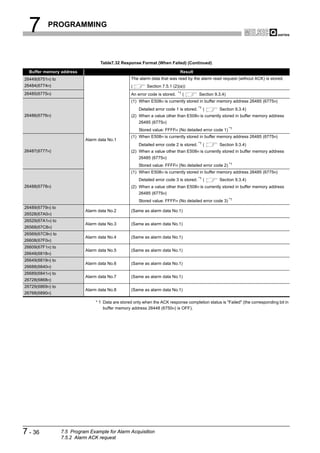
               of each DP-Slave in a specified group.

                                                      DP-Master (Class 1)
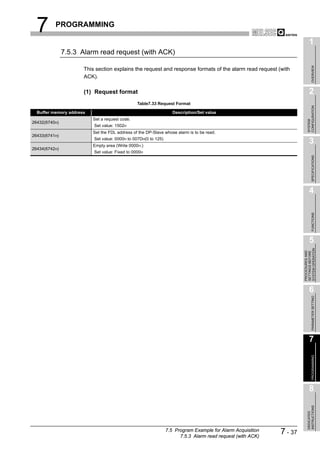
                                           Power         QJ71
                                           supply QCPU PB92V
                                           module
                                                   Sent to group 1


                          DP-Slave       DP-Slave       DP-Slave            DP-Slave         DP-Slave


                                         Group 1                                   Group 2

                                             Figure 4.5 Global Control Function


4-7      4.1 PROFIBUS-DPV0 Functions
         4.1.3 Global control function
4   FUNCTIONS

                                                                                                                                  1
         (1) Global control services


                                                                                                                                       OVERVIEW
            (a) SYNC, UNSYNC
                1) SYNC
                   This service starts the SYNC (output synchronization) mode.
                   In the SYNC mode, the output status is refreshed every time a DP-Slave
                                                                                                                                  2
                   receives the SYNC service.


                                                                                                                                CONFIGURATION
                   If no SYNC service is received, the output status is held.
                2) UNSYNC


                                                                                                                                SYSTEM
                   This service ends the SYNC (output synchronization) mode.

                                                         DP-Master (Class 1)                                                      3
                                          Power             QJ71


                                                                                                                                       SPECIFICATIONS
                                          supply       QCPU PB92V
                                          module
                                                           SYNC service
                                                        is sent to group 1.


                                                                                                                                  4
             (Group 1)                     (Group 2)                     (Group 1)                  (Group 1)

                   DP-Slave 1                     DP-Slave 2                    DP-Slave 3               DP-Slave n


                                                                                                                                       FUNCTIONS
                                                                                                                                  5
                         ...                            ...                          ...                        ...


                                                                                                                            SYSTEM OPERATION
                                                                                                                            PROCEDURES AND
                                                                                                                            SETTINGS BEFORE
                          ...   Output image memory: Data are refreshed at all times by polling.


                          ...   <During UNSYNC execution/Default>The output image memory values are output without being
                                changed. (Normal status)
                                <During SYNC execution>The output image memory values are output only once at the timing
                                                                                                                                  6

                                                                                                                                       PARAMETER SETTING
                                of the SYNC service.


                          ...   SYNC service (Issued within the same group)

                                                       Figure 4.6 SYNC, UNSYNC


                                                                                                                                  7
                                                                                                                                       PROGRAMMING


                                                                                                                                  8
                                                                                                                                INSTRUCTIONS
                                                                                                                                DEDICATED


                                                                  4.1 PROFIBUS-DPV0 Functions
                                                                      4.1.3 Global control function
                                                                                                                      4-8
4    FUNCTIONS


                  (b) FREEZE, UNFREEZE
                      1) FREEZE
                         This service starts the FREEZE (input synchronization) mode.
                         In the FREEZE mode, the input status is refreshed every time a DP-Slave
                         receives the FREEZE service.
                         If no FREEZE service is received, the input status is held.
                      2) UNFREEZE
                         This service ends the FREEZE (input synchronization) mode.

                                                                  DP-Master (Class 1)

                                                     Power           QJ71
                                                     supply     QCPU PB92V
                                                     module
                                                                FREEZE service is
                                                                sent to group 3.


                   (Group 8)                        (Group 3)                      (Group 3)                 (Group 3)

                         DP-Slave 1                        DP-Slave 2                   DP-Slave 3                 DP-Slave n


                               ...                              ...                            ...                       ...


                                     ...   Input image memory data are refreshed at all times by polling.


                                     ...   <During UNFREEZE execution/Default>Actual input data are input to the input memory
                                           without being changed. (Normal status)

                                           <During FREEZE execution>Actual input data are input only once to the input image
                                           memory at the timing of the FREEZE service.


                                     ...   FREEZE service (Issued within the same group)

                                                              Figure 4.7 FREEZE, UNFREEZE


4-9     4.1 PROFIBUS-DPV0 Functions
        4.1.3 Global control function
4   FUNCTIONS

                                                                                                              1
         (2) Group setting
            The group setting can be made with the slave parameters ("Slave Parameter


                                                                                                                   OVERVIEW
            Settings" in GX Configurator-DP).
            Up to eight groups, groups 1 to 8, can be set.
            Multiple groups can also be assigned to a single DP-Slave.                                        2


                                                                                                            CONFIGURATION
                                                                                                            SYSTEM
                                                                                                              3


                                                                                                                   SPECIFICATIONS
                                                                                                              4

                   Figure 4.8 Group Setting (GX Configurator-DP)


                                                                                                                   FUNCTIONS
         (3) Executing the global control function
            Execute the global control function by the following procedure:

            (a) Write the service to be sent and the target group to the Global control area                  5


                                                                                                        SYSTEM OPERATION
                (UnG2081).


                                                                                                        PROCEDURES AND
                                                                                                        SETTINGS BEFORE
            (b) Turn ON the Global control request signal (Y04).

            (c) When global control processing is completed, the Global control completed signal
                (X04) turns ON.
                If the processing failed, the Global control failed signal (X05) turns ON.                    6

                                                                                                                   PARAMETER SETTING
            (d) After confirming completion of the global control, turn OFF the Global control
                request signal (Y04).

           POINT
                To execute the global control function to all DP-Slaves (including DP-Slaves for
                which group No. is not set), set 0s to all of b15 to b8 in the Global control area            7
                (UnG2081).
                                                                                                                   PROGRAMMING


          Remark
                For a program example for global control function, refer to Section 7.3.
                                                                                                              8
                                                                                                            INSTRUCTIONS
                                                                                                            DEDICATED


                                                        4.1 PROFIBUS-DPV0 Functions
                                                            4.1.3 Global control function
                                                                                               4 - 10
4       FUNCTIONS


         4.2 PROFIBUS-DPV1 Functions

                       POINT
                             (1) To utilize PROFIBUS-DPV1 functions, use a DP-Slave that supports the
                                 PROFIBUS-DPV1.
                                 For details, refer to the manual for the DP-Slave.
                             (2) When using the PROFIBUS DPV1 function, set a "Min. slave interval" value
                                  greater than the bus cycle time calculated from Pt, Tsdi and Lr.(         Section
                                  3.5.1)
                                  If the "Min. slave interval" is less than the value calculated from Pt, Tsdi and
                                  Lr, the processing of the PROFIBUS-DPV1 function may take time.


           4.2.1 Acyclic communication with DP-Slaves

                   This function allows data reading/writing to DP-Slaves at any specific timing independently
                   of I/O data exchange.
                   Up to eight requests are executable.

                                                          DP-Master (Class 1)
                                              Power
                                              supply         QJ71
                                              module    QCPU PB92V
                                                                                    Reading data from
                      Writing data to
                                                                                    any DP-Slave
                      any DP-Slave


                                                        I/O data exchange


                                 DP-Slave              DP-Slave             DP-Slave


                                             Figure 4.9 Acyclic Communication


                   (1) Services available on the QJ71PB92V
                        In acyclic communications, there are two types of services: Class1 and Class2
                        services.
                        The services available on the QJ71PB92V differ depending on whether or not the
                        target DP-Slave is performing I/O data exchange.

                                                              Table4.3 Available Services

                                                                                            Available Service
                                            Target DP-Slave
                                                                                   Class1 service         Class2 service
                          DP-Slave performing I/O data exchange
                          DP-Slave not performing I/O data exchange

                                                                                                 : Available,   : Not available


                        Whether the DP-Slave supports each service or not can be checked in the GSD file.
                        For details, refer to the manual for the DP-Slave.


4 - 11       4.2 PROFIBUS-DPV1 Functions
             4.2.1 Acyclic communication with DP-Slaves
4   FUNCTIONS

                                                                                                                           1
           (a) Class1 services
               When executing a Class1 service, verify in advance that the bit corresponding to


                                                                                                                                OVERVIEW
               the target DP-Slave is ON in the Slave status area (Normal communication
               detection) (UnG23040 to UnG23047).

                                         Table4.4 Available Services (Class1 services)
                                                                                                                           2
                        Service Name                                      Description
                READ(Class1_SERVICE)           Reads data from any specified DP-Slave. * 1


                                                                                                                         CONFIGURATION
                WRITE(Class1_SERVICE)          Writes data to any specified DP-Slave.* 1


                                                                                                                         SYSTEM
                * 1 The data that can be read or written by READ or WRITE services vary depending on the DP-Slave
                    to be used.
                    For details, refer to the manual for the DP-Slave.

           (b) Class2 services
                                                                                                                           3
               Connect the line to the DP-Slave by the INITIATE service, and execute the READ


                                                                                                                                SPECIFICATIONS
               and/or WRITE services.
               To end the acyclic communication, disconnect the line from the DP-Slave by the
               ABORT service.
               When executing a Class2 service to a DP-Slave that is exchanging I/O data, verify
               in advance that the bit corresponding to the DP-Slave is ON in the Slave status                             4
               area (Normal communication detection) (UnG23040 to UnG23047).
               When executing a Class2 service to a DP-Slave that is not exchanging I/O data,
               verify in advance that the DP-Slave has been completely activated.


                                                                                                                                FUNCTIONS
               For details, refer to the manual for the DP-Slave.

                                         Table4.5 Available Services (Class2 services)

                        Service Name                                      Description                                      5
                INITIATE(Class2_SERVICE)       Establishes a line connection with any specified DP-Slave.


                                                                                                                     SYSTEM OPERATION
                                                                                                                     PROCEDURES AND
                                                                                                                     SETTINGS BEFORE
                ABORT(Class2_SERVICE)          Disconnects a line connection from any specified DP-Slave.
                                               Reads data from a DP-Slave connected to the line by the INITIATE
                READ(Class2_SERVICE)
                                               service. * 2
                                               Writes data to a DP-Slave connected to the line by the INITIATE
                WRITE(Class2_SERVICE)
                                               service.* 2

                * 2 The data that can be read or written by READ or WRITE services vary depending on the DP-Slave          6

                                                                                                                                PARAMETER SETTING
                    to be used.
                    For details, refer to the manual for the DP-Slave.


                                                                                                                           7
                                                                                                                                PROGRAMMING


                                                                                                                           8
                                                                                                                         INSTRUCTIONS
                                                                                                                         DEDICATED


                                                         4.2 PROFIBUS-DPV1 Functions
                                             4.2.1 Acyclic communication with DP-Slaves
                                                                                                            4 - 12
4      FUNCTIONS


                 (2) Executing acyclic communication
                      Execute the acyclic communication by the following procedure:

                      (a) Write the request instruction to be executed to the Acyclic communication request
                          area (UnG23809 to UnG24832).

                      (b) Turn ON (1) the bit corresponding to the request instruction No. in the Acyclic
                          communication request execution instruction area (UnG23808).

                      (c) When the QJ71PB92V accepts the acyclic communication request instruction, the
                          acceptance status bit in the Acyclic communication request result area
                          (UnG25120) turns ON (1).

                      (d) When execution of the acyclic communication is completed, the completion status
                          bit in the Acyclic communication request result area (UnG25120) turns ON (1),
                          and the execution result is stored in the Acyclic communication response area
                          (UnG25121 to UnG26144).


                  Remark
                          For a program example for acyclic communication, refer to Section 7.4.


4 - 13     4.2 PROFIBUS-DPV1 Functions
           4.2.1 Acyclic communication with DP-Slaves
4   FUNCTIONS

                                                                                                                   1
     4.2.2 Alarm acquisition


                                                                                                                        OVERVIEW
            This function enables acquisition of up to 8 alarms or status information data that have
            been generated on any DP-Slave.
                               DP-Master (Class 1)
                                                                                                                   2
                 Power           QJ71
                 supply     QCPU PB92V


                                                                                                                 CONFIGURATION
                 module


                                                                                                                 SYSTEM
                                                                                  Alarm
                                                                                generation

                DP-Slave                 DP-Slave                      DP-Slave
                                                                                                                   3
                                                                      Alarm 1


                                                                                                                        SPECIFICATIONS
                                                                      Alarm 2


                                                                      Alarm 8

                                     Figure 4.10 Alarm Acquisition
                                                                                                                   4
            (1) Requests available on the QJ71PB92V
                There are the following two ways for acquiring alarms: using the Alarm read request


                                                                                                                        FUNCTIONS
                (without ACK) and Alarm ACK request, and using the Alarm read request (with ACK).
                Whether the DP-Slave supports this function or not can be checked in the GSD file.
                For details, refer to the manual for the DP-Slave.

                (a) Alarm read request (without ACK), Alarm ACK request
                                                                                                                   5


                                                                                                             SYSTEM OPERATION
                    Use these requests when a certain time may be required to return ACK after


                                                                                                             PROCEDURES AND
                                                                                                             SETTINGS BEFORE
                    reading an alarm from a DP-Slave (e.g. when taking corrective actions for the DP-
                    Slave error).
                    The Alarm ACK request enables ACK to be returned for each read-out alarm.

                           Alarm generation                                                                        6

                                                                                                                        PARAMETER SETTING
                 The alarm is read from the
                 DP-Slave.                           ... Alarm read request (without ACK)


                 Take corrective actions for the
                 error that occurred on the DP-
                 Slave.                                                                                            7
                 ACK is returned to the alarm for
                                                                                                                        PROGRAMMING


                 which processing is complete.       ... Alarm ACK request


                             Completed

                  Figure 4.11 Procedure Using Alarm Read Request (without ACK) and                                 8
                                         Alarm ACK Request
                                                                                                                 INSTRUCTIONS
                                                                                                                 DEDICATED


                                                                   4.2 PROFIBUS-DPV1 Functions
                                                                          4.2.2 Alarm acquisition
                                                                                                    4 - 14
4      FUNCTIONS


                    (b) Alarm read request (with ACK)
                        This request automatically sends ACK after reading an alarm.
                        ACK is returned in response to all read-out alarms.

                              Alarm generation


                     The alarm is read from the
                     DP-Slave.

                                                        ... Alarm read request (with ACK)
                     ACK is returned to the alarm for
                     which processing is complete.


                      Take corrective actions for the
                      error that occurred on the
                      DP-Slave.


                                Completed


                           Figure 4.12 Procedure Using Alarm Read Request (with ACK)


                (2) Executing alarm acquisition
                    Execute alarm acquisition by the following procedure:

                    (a) In the Slave status area (Alarm detection) (UnG26416 to UnG26424), identify
                        the DP-Slave where an alarm is occurring.

                    (b) Write the request data to the DP-Slave into the Alarm request area (UnG26432 to
                        UnG26434).

                    (c) Turn ON the Alarm read request signal (Y18).

                    (d) When alarm reading is completed, the read result is stored in the Alarm response
                        area (UnG26446 to UnG26768) and the Alarm read response signal (X18) turns
                        ON.

                    (e) Check the alarm stored in the Alarm response area (UnG26446 to UnG26768),
                        and turn OFF the Alarm read request signal (Y18).


                 Remark
                         For a program example for alarm acquisition, refer to Section 7.5.


4 - 15     4.2 PROFIBUS-DPV1 Functions
           4.2.2 Alarm acquisition
4   FUNCTIONS

                                                                                                              1
     4.2.3 FDT/DTM technology


                                                                                                                   OVERVIEW
           Using a commercially available FDT, reading/writing the DP-Slave parameters and
           monitoring the DP-Slave status are executable via the QJ71PB92V.
           For details of the FDT/DTM technology, refer to the GX Configurator-DP Operating Manual
           (CommDTM).                                                                                         2
                   Personal computer


                                                                                                            CONFIGURATION
                     FDT


                                                                                                            SYSTEM
                                              Ethernet
                                                                                                              3
                     Power         QJ71    QJ71          DP-Slave status monitoring and
                     supply   QCPU E71-100 PB92V


                                                                                                                   SPECIFICATIONS
                                                         parameter setting are available via
                     module                              the QJ71PB92V.


             PROFIBUS-DP

                                                                                                              4
                                                 DP-Slave supporting
               DP-Slave            DP-Slave
                                                 FDT/DTM

                                 Figure 4.13 FDT/DTM Technology


                                                                                                                   FUNCTIONS
                                                                                                              5


                                                                                                        SYSTEM OPERATION
                                                                                                        PROCEDURES AND
                                                                                                        SETTINGS BEFORE
                                                                                                              6

                                                                                                                   PARAMETER SETTING


                                                                                                              7
                                                                                                                   PROGRAMMING


                                                                                                              8
                                                                                                            INSTRUCTIONS
                                                                                                            DEDICATED


                                                            4.2 PROFIBUS-DPV1 Functions
                                                                 4.2.3 FDT/DTM technology
                                                                                               4 - 16
4       FUNCTIONS


         4.3 PROFIBUS-DPV2 Functions

                       POINT
                            (1) To utilize PROFIBUS-DPV2 functions, use a DP-Slave that supports the
                                PROFIBUS-DPV2.
                                For details, refer to the manual for the DP-Slave.
                            (2) When using the PROFIBUS-DP2 function, set a "Min. slave interval" value
                                   greater than the bus cycle time calculated from Pt, Tsdi and Lr.(         Section
                                   3.5.1)
                                   If the "Min. slave interval" is less than the value calculated from Pt, Tsdi and
                                   Lr, the processing of the PROFIBUS-DPV2 function may take time.


           4.3.1 Time control over DP-Slaves

                   This function allows the QJ71PB92V to operate as the time master and set the time of
                   each DP-Slave.

                                                    DP-Master (Class 1)

                                        Power          QJ71
                                        supply    QCPU PB92V
                                        module
                                                      Time setting


                       Time data                 Time data            Time data

                        DP-Slave                 DP-Slave             DP-Slave


                                Figure 4.14 Time Control Function


                   (1) Requests available on the QJ71PB92V
                        For whether the DP-Slave supports this function or not, refer to the manual for the DP-
                        Slave.

                        (a) Requests for writing time data

                                                             Table4.6 Request for Writing Time Data

                                       Request Name                                       Description
                                                               Sets the year, month, day, hour, minute and second, and writes the
                             Time data write request
                                                               time data.
                                                               Writes time data in UTC seconds
                             Time data write request (UTC      (year + month + day + hour + minute + second).
                             format)                           The set value, 9DFF4400H represents "January 1st in 1984,
                                                               00:00:00".


4 - 17       4.3 PROFIBUS-DPV2 Functions
             4.3.1 Time control over DP-Slaves
4   FUNCTIONS

                                                                                                            1
            (b) Request for reading time data
                The time data read request is used to read the time data written to a DP-Slave by


                                                                                                                 OVERVIEW
                another time master out to the QJ71PB92V.
                This request can be used when two or more time masters exist on the same
                network.
                                                                                                            2
                              Time master 1


                                                                                                          CONFIGURATION
                   Power         QJ71
                            QCPU PB92V
                   supply                                     Time master 2
                   module


                                                                                                          SYSTEM
                               Time data
                               read request


                                   Time data                   Time setting                                 3


                                                                                                                 SPECIFICATIONS
                        Time data              Time data          Time data

                        DP-Slave               DP-Slave           DP-Slave
                                                                                                            4
                             Figure 4.15 Time Data Read Request


         (2) Executing time control function


                                                                                                                 FUNCTIONS
            Execute the time control function by the following procedure:

            (a) Write request data to the Time control setting request area (UnG26784 to
                UnG26792).                                                                                 5


                                                                                                      SYSTEM OPERATION
            (b) Turn ON the Time control start request signal (Y19).


                                                                                                      PROCEDURES AND
                                                                                                      SETTINGS BEFORE
            (c) When the time control is completed, the execution result is stored in the Time
                control setting response area (UnG26800 to UnG26812), and the Time control
                start response signal (X19) turns ON.

            (d) Check the execution result stored in the Time control setting response area                 6
                (UnG26800 to UnG26812), and turn OFF the Time control start response signal

                                                                                                                 PARAMETER SETTING
                (X19).


          Remark
                For a program example for the time control function, refer to Section 7.6.
                                                                                                            7
                                                                                                                 PROGRAMMING


                                                                                                            8
                                                                                                          INSTRUCTIONS
                                                                                                          DEDICATED


                                                         4.3 PROFIBUS-DPV2 Functions
                                                       4.3.1 Time control over DP-Slaves
                                                                                             4 - 18
4     FUNCTIONS

"

         4.4 Data Swap Function

                   This function swaps the upper and lower bytes in word units when I/O data is sent and
                   received.
                   Use this function for DP-Slaves whose word structure is different (upper and lower bytes
                   are reversed) from that of the QJ71PB92V.
                   This function enables you to swap upper and lower bytes to exchange I/O data without the
                   need to create a special sequence program for the swapping.
                                   QJ71PB92V                                                          DP-Slave
                                                                                 Input data           Input area
                                 Data 1   Data 1                              Data 1   Data 1      Data 1    Data 1
                                   (H)      (L)                                 (L)      (H)        (L)       (H)


                                                       Data swap processing
                    Input data   Data 2   Data 2                              Data 2   Data 2      Data 2    Data 2
                    area           (H)      (L)                                 (L)      (H)        (L)       (H)

                                                                                 Output data          Output area
                                 Data 3   Data 3                              Data 3   Data 3      Data 3    Data 3
                                   (H)      (L)                                 (L)      (H)        (L)        (H)
                    Output
                                 Data 4   Data 4                              Data 4    Data 4     Data 4    Data 4
                    data area
                                  (H)      (L)                                 (L)       (H)        (L)       (H)


                                                                              I/O data exchange
                                                                                                  H : High byte     L : Low byte
                                                      Figure 4.16 Data Swap Function


                   (1) Data swap setting
                       The data swap setting can be made with the slave parameters ("Slave Parameter
                       Settings" in GX Configurator-DP).
                       Data swap setting must be made for each DP-Slave.
                       Mark the Swap I/O Bytes in Master checkbox to enable the swap setting for the DP-
                       Slave.


                             Figure 4.17 Data swap Setting (GX Configurator-DP)


4 - 19       4.4 Data Swap Function
4   FUNCTIONS

                                                                                                                                                        1
         (2) Invalidating or validating data swap setting
              For DP-Slaves that handle data whose word structure is the same as that of the


                                                                                                                                                             OVERVIEW
              QJ71PB92V, invalidate the data swap setting.
                        QJ71PB92V                                                                       DP-Slave
                                                                         Input data                     Input area
                       Data 1    Data 1                               Data 1   Data 1
                                                                                                                                                        2
                                                                                                      Data 1   Data 1
                         (H)       (L)                                  (H)      (L)                   (H)      (L)


                                                                                                                                                      CONFIGURATION
          Input data   Data 2    Data 2                               Data 2   Data 2                 Data 2   Data 2
          area           (H)       (L)                                  (H)      (L)                    (H)      (L)


                                                                                                                                                      SYSTEM
                                                                         Output data                    Output area
                       Data 3    Data 3                               Data 3   Data 3                 Data 3   Data 3
                         (H)       (L)                                  (H)      (L)                    (H)      (L)
          Output       Data 4    Data 4                               Data 4   Data 4                 Data 4   Data 4
                                                                                                                                                        3
          data area      (H)       (L)                                  (H)      (L)                    (H)      (L)


                                                                                                                                                             SPECIFICATIONS
                                                                      I/O data exchange
                                                                                                    H : High byte      L : Low byte

                                Figure 4.18 When Invalidating the Data Swap Setting
                                                                                                                                                        4
              For DP-Slaves that handle data whose word structure is the reverse of the
              QJ71PB92V, validate the data swap setting.


                                                                                                                                                             FUNCTIONS
                        QJ71PB92V                                                                                    DP-Slave
                                                                                      Input data                     Input area
                       Data 1     Data 1                                         Data 1     Data 1              Data 1     Data 1
                         (H)        (L)                                            (L)        (H)                (L)        (H)                         5
                                               Data swap processing


          Input data   Data 2     Data 2                                         Data 2     Data 2              Data 2     Data 2


                                                                                                                                                  SYSTEM OPERATION
          area


                                                                                                                                                  PROCEDURES AND
                                                                                                                                                  SETTINGS BEFORE
                         (H)        (L)                                            (L)        (H)                (L)        (H)

                                                                                      Output data                    Output area
                       Data 3     Data 3                                         Data 3     Data 3              Data 3     Data 3
                         (H)        (L)                                            (L)        (H)                (L)         (H)
          Output
                       Data 4     Data 4                                         Data 4      Data 4             Data 4     Data 4
          data area
                        (H)        (L)                                            (L)         (H)                (L)        (H)                         6

                                                                                I/O data exchange                                                            PARAMETER SETTING
                                                                                                               H : High byte       L : Low byte

                                     Figure 4.19 When Validating the Data Swap Setting


                                                                                                                                                        7
                                                                                                                                                             PROGRAMMING


                                                                                                                                                        8
                                                                                                                                                      INSTRUCTIONS
                                                                                                                                                      DEDICATED


                                                                                             4.4 Data Swap Function                      4 - 20
4        FUNCTIONS


         4.5 Data Consistency Function

                          When I/O data from DP-Slaves are read from or written to buffer memory, this function
                          prevents the I/O data from being separated and incorrectly mixed.

                          (1) I/O data consistency function
                                  (a) The PROFIBUS-DP bus cycle and QCPU sequence scan are performed
                                      asynchronously.
                                      Because of this, when the QCPU reads input data in the buffer memory during
                                      input data transfer from a DP-Slave to the buffer memory, the original data may be
                                      divided generating inconsistency in the input data. (The same applies to output
                                      data.)
                                      The following shows an example of data inconsistency when data are read from
                                      the QCPU during the input data transfer from a DP-Slave to the buffer memory.
<Before the data consistency function is used>
                                        QJ71PB92V
         QCPU                                                                   DP-Slave
                                      Buffer memory
     1        0                           1           0                         1          0
     3        2                           3           2                         3          2
                                                                                                   : Updated area for data
     B        A                           B           A                         5          4
                                                                                                     transferred from DP-
     D        C                           D           C                         7          6         Slave
                    Read during                             Data transfer                          : Not-updated area for data
                    data transfer                           in process                               transferred from DP-
                                                                                                     Slave
                                              Figure 4.20 Example of Input Data Inconsistency

                                  (b) When the data consistency function is enabled, it makes reading from the QCPU
                                      wait until data transfer from a DP-Slave to the QJ71PB92V buffer memory (Input
                                      data area) is completed, and the reading is executed upon completion of the data
                                      transfer.
                                      Alternatively, the QJ71PB92V stands by for data transfer to DP-Slaves until
                                      writing from the QCPU to the QJ71PB92V buffer memory (Output data area) is
                                      completed, and executes the data transfer upon completion of the writing.
 After the data consistency function is used
       QCPU                           QJ71PB92V                             DP-Slave
                                     Buffer memory
    1        0                        1           0                         1          0
    3        2                        3           2                         3          2
                                                                                                : Updated area for data
    5        4                        5           4                         5          4
                                                                                                  transferred from DP-
    7        6                        7           6                         7          6
                                                                                                  Slave
          Read after completion                           Data transfer                         : Not-updated area for data
          of data transfer                                completed                               transferred from DP-
                                                                                                  Slave

                                              Figure 4.21 Example of Input Data Consistency


4 - 21             4.5 Data Consistency Function
4   FUNCTIONS

                                                                                                           1
            (c) The data consistency function can be used in either of the following methods:
                  • Data consistency function by automatic refresh (GX Configurator-DP)


                                                                                                                OVERVIEW
                       (     (2) in this section )
                     • Data consistency function by dedicated instructions (BBLKRD/BBLKWR)
                      (       (3) in this section )
                                                                                                           2
                 The data consistency function is not usable when data refresh are performed
                 between the QCPU and the QJ71PB92V buffer memory by the MOV or FROM/TO


                                                                                                         CONFIGURATION
                 instruction.


                                                                                                         SYSTEM
            (d) To utilize the data consistency function, use a QCPU whose first 5 digits of the
                serial No. are "02092" or later.

            (e) When the data consistency function is used, the transmission delay time between            3
                the QCPU and DP-Slaves increases as a standby time for read/write from QCPU
                or data transfer with a DP-Slave arises.


                                                                                                                SPECIFICATIONS
                For the transmission delay time, refer to Section 3.5.2.

         (2) Data consistency function by automatic refresh
            The automatic refresh settings are made with the master parameters ("Master
            Settings" in GX Configurator-DP).
                                                                                                           4
            To use the data consistency function by automatic refresh, mark the Autom. Refresh
            and Consistency checkboxes.


                                                                                                                FUNCTIONS
                                                                                                           5


                                                                                                     SYSTEM OPERATION
                                                                                                     PROCEDURES AND
                                                                                                     SETTINGS BEFORE
                                                                                                           6

                                                                                                                PARAMETER SETTING


                Figure 4.22 Automatic Refresh Setting (GX Configurator-DP)

                                                                                                           7
         (3) Data consistency function by dedicated instructions
                                                                                                                PROGRAMMING


            Use the BBLKRD (read) and BBLKWR (write) instructions as dedicated instructions
            for reading/writing QJ71PB92V buffer memory to execute the data consistency
            function.
            For details on dedicated instructions, refer to Chapter 8.
                                                                                                           8
                                                                                                         INSTRUCTIONS
                                                                                                         DEDICATED


                                                           4.5 Data Consistency Function    4 - 22
4      FUNCTIONS


                    POINT
                          Use of dedicated instructions is not allowed when automatic refresh is set.
                          Attempting to execute a dedicated instruction with automatic refresh set will result
                          in non-processing (non-execution).


                  Remark
                          For a program example for the I/O data exchange using dedicated instructions,
                          refer to Section 7.1.2.


4 - 23     4.5 Data Consistency Function
4    FUNCTIONS

                                                                                                              1
    4.6 Output Status Setting for the Case of a CPU Stop Error


                                                                                                                   OVERVIEW
             This function sets whether to stop or continue I/O data exchange with DP-Slaves when a
             CPU stop error occurs on a QCPU or remote I/O station where the QJ71PB92V is
             mounted.
                                                                                                              2
             (1) Output status setting for the case of a CPU stop error


                                                                                                            CONFIGURATION
                 On GX Developer, set the output status for the case where a CPU stop error occurs.
                 Set desired output status in the intelligent function module detailed settings after


                                                                                                            SYSTEM
                 setting the I/O assignments of the QJ71PB92V.

                 (a) I/O assignment setting
                     1) Startup procedure
                                                                                                              3
                        "Parameters"     "PLC parameter"          <<I/O assignment>>


                                                                                                                   SPECIFICATIONS
                                                                                                              4


                                                                                                                   FUNCTIONS
                                                                                                              5


                                                                                                        SYSTEM OPERATION
                                                                                                        PROCEDURES AND
                                                                                                        SETTINGS BEFORE
                                                                                                              6

                                                                                                                   PARAMETER SETTING
                          Figure 4.23 I/O Assignment Setting (GX Developer)


                                                                                                              7
                                                                                                                   PROGRAMMING


                                                                                                              8
                                                                                                            INSTRUCTIONS
                                                                                                            DEDICATED


                                 4.6 Output Status Setting for the Case of a CPU Stop Error    4 - 24
4      FUNCTIONS


                      (b) Intelligent function module detailed settings
                          1) Startup procedure
                             "Parameters "     "PLC parameter "           <<I/O assignment>>
                             Detailed setting button


                          Figure 4.24 Output Status Setting for the Case of a CPU Stop Error (GX Developer)


4 - 25     4.6 Output Status Setting for the Case of a CPU Stop Error
4   FUNCTIONS

                                                                                                                  1
         (2) Output status for the case of a CPU stop error


                                                                                                                       OVERVIEW
            (a) When "Error time output mode " is set to "Clear "
                The QJ71PB92V stops I/O data exchange when a CPU stop error occurs.
                Due to stop of I/O data exchange, no output data is sent to DP-Slaves.
                Input data received from a DP-Slave before stop of I/O data exchange are held in                  2
                the buffer memory of the QJ71PB92V.


                                                                                                                CONFIGURATION
                                                  I/O data exchange
                                                  is stopped.


                                                                                                                SYSTEM
                               A stop error     QJ71
                               occurred         PB92V
                                                                                                                  3


                                                                                                                       SPECIFICATIONS
                DP-Slave             DP-Slave              DP-Slave


             Figure 4.25 When "Error time output mode" is Set to "Clear"                                          4

           POINT


                                                                                                                       FUNCTIONS
                Whether or not output data are output from each DP-Slave to external devices
                after stop of I/O data exchange differs depending on the setting of the DP-Slave.
                For details, refer to the manual for the DP-Slave.
                                                                                                                  5


                                                                                                            SYSTEM OPERATION
                                                                                                            PROCEDURES AND
                                                                                                            SETTINGS BEFORE
            (b) When "Error time output mode" is set to "Hold"
                The QJ71PB92V continues I/O data exchange when a CPU stop error occurs.
                The data before occurrence of the CPU stop error are held and they are sent to
                the DP-Slaves.
                Input data received from DP-Slaves updates the buffer memory of the
                                                                                                                  6
                QJ71PB92V.


                                                                                                                       PARAMETER SETTING
                                        DP-Master (Class 1)


                             A stop error     QJ71
                             occurred         PB92V


                                                                                                                  7
                                     I/O data exchange
                                                                                                                       PROGRAMMING


              DP-Slave             DP-Slave               DP-Slave


                                                                      The output data before the
                                                                      stop error are held.
                                                                                                                  8
                     Figure 4.26 When "Error time output mode" is Set to "Hold"
                                                                                                                INSTRUCTIONS
                                                                                                                DEDICATED


                             4.6 Output Status Setting for the Case of a CPU Stop Error            4 - 26
5     PROCEDURES AND SETTINGS BEFORE SYSTEM
       OPERATION


CHAPTER5 PROCEDURES AND SETTINGS BEFORE
         SYSTEM OPERATION

                 This chapter explains the procedures for connecting the QJ71PB92V to PROFIBUS-DP,
                 wiring and other information.


      5.1 Implementation and Installation

                 This section provides the handling precautions, from unpacking to installation of the
                 QJ71PB92V.
                 For details on implementation and installation of the QJ71PB92V, refer to the "QCPU
                 User's Manual (Hardware Design, Maintenance and Inspection)."


         5.1.1 Handling precautions

                 The following are precautions for handling the QJ71PB92V as a unit.

                 (1) Do not drop the module case or subject it to heavy impact since it is
                     made of resin.

                 (2) Do not remove the printed-circuit board of each module from its case.
                     This may cause a failure in the module.

                 (3) Be careful not to let foreign objects such as wire burrs enter the module
                     during wiring. In the event any foreign object enters, remove it
                     immediately.

                 (4) A protective film is attached onto the module top to prevent foreign
                     matter such as wire chips entering the module when wiring.
                      Do not remove the film during wiring.
                      Remove it for heat dissipation before system operation.

                 (5) Tighten the module fixing screws and connector screws using torque
                     within the following ranges.
                                                         Table5.1 Screw Tightening Torque

                                       Screw Location                              Tightening Torque Range
                        Module fixing screw (M3 screw)                                  0.36 to 0.48 N·m
                        PROFIBUS cable connector screw
                                                                                        0.20 to 0.28 N·m
                        (#4 - 40UNC screws)


5-1        5.1 Implementation and Installation
           5.1.1 Handling precautions
5      PROCEDURES AND SETTINGS BEFORE SYSTEM
       OPERATION
                                                                                                                        1
    5.2 Procedures and Settings before System Operation


                                                                                                                             OVERVIEW
                      The following diagram illustrates the procedure before system operation.

                                    Start

                                                                                                                        2
      Mount the QJ71PB92V on the base unit.


                                                                                                                      CONFIGURATION
      Turn ON the power.


                                                                                                                      SYSTEM
      Perform self-diagnostics of the QJ71PB92V.                                Section 5.4
                                                                                                                        3
      Set the PROFIBUS-DP parameters on GX Configurator-DP.                    Section 6.1


                                                                                                                             SPECIFICATIONS
                          Use output status                      No
                setting for the case of a CPU stop error?


                              Yes
                                                                                                                        4
      Make I/O assignments on GX Developer, set the error time
      output mode, and write the PLC parameters to the QCPU.                    Section 4.6


                                                                                                                             FUNCTIONS
      Reset the QCPU.


      Connect the PROFIBUS cable to the QJ71PB92V.                              Section 5.5                             5


                                                                                                                  SYSTEM OPERATION
                                                                                                                  PROCEDURES AND
                                                                                                                  SETTINGS BEFORE
      Connect the PROFIBUS cable to the DP-Slave and start the
      DP-Slave.                                                                 Manual for DP-Slave


      Change the operation mode of the QJ71PB92V to
      Communication mode (mode 3) for exchange with                             Section 6.2
      DP-Slaves. *1                                                                                                     6

                                                                                                                             PARAMETER SETTING
      Start I/O data exchange. *2


                          Did I/O data exchange
                  start successfully? (Check the LED              No (Review parameter settings.)
                  status.          Section 5.3 )                                                                        7
                                                                                                                             PROGRAMMING


                               Yes

                                Completed

*1 Change the operation mode by either of the following methods:
    Change it from GX Configurator-DP.
    Use the operation mode change request area (UnG2255) and Operation mode change request signal (Y11).               8
*2 Start I/O data exchange by either of the following methods:
    Turn ON the Data exchange start request signal (Y00).
                                                                                                                      INSTRUCTIONS


    Start it from GX Configurator-DP
                                                                                                                      DEDICATED


                                         Figure 5.1 Procedures before System Operation


                                                    5.2 Procedures and Settings before System Operation     5-2
5       PROCEDURES AND SETTINGS BEFORE SYSTEM
         OPERATION


        5.3 Part Names and Settings

                         This section explains the names and settings of each part of the QJ71PB92V.


                                                                                               1)


                                                                                               2)


                                                          Figure 5.2 QJ71PB92V Appearance


                                                    Table5.2 Names of Parts

  No.                    Name                                                           Description
                                           These LEDs indicate the operation status of the QJ71PB92V.
  1)    Indicator LEDs
                                           For details, refer to (1) in this section.
  2)    PROFIBUS interface connector       This connector connects the PROFIBUS cable to the QJ71PB92V.


5-3             5.3 Part Names and Settings
5   PROCEDURES AND SETTINGS BEFORE SYSTEM
    OPERATION
                                                                                                                               1
         (1) Indicator LEDs


                                                                                                                                    OVERVIEW
                                                                                                                               2
                                                  Figure 5.3 Indicator LEDs


                                                                                                                             CONFIGURATION
                                                                                                                             SYSTEM
                                                      Table5.3 Indicator LEDs

                   LED           Status                                     Description

             RUN
                                  ON        Normally operating
                                                                                                                               3
                                  OFF       Hardware error (watchdog timer error) or power failure
                                  ON
                                            Exchanging I/O data *1 or during acyclic communication * 2


                                                                                                                                    SPECIFICATIONS
             SD/RD              Flashing
                                  OFF       Not communicating with DP-Slave
                                  ON        Ready to communicate or communication being performed
             READY
                                  OFF       Not ready to communicate or no communication
                                  ON        A communication error has occurred.
             RSP ERR.
                                  OFF       No communication error                                                             4
                                  ON        Executing self-diagnostics or flash ROM initialization
             TEST               Flashing    Executing self-diagnostics
                                  OFF       Not executing self-diagnostics or flash ROM initialization


                                                                                                                                    FUNCTIONS
                                  ON
                                            Token being passed *3
             TOKEN              Flashing
                                  OFF       Token being passed *3 or no token passing
                                  ON        Operating in Parameter setting mode (mode 1)                                       5
             PRM SET            Flashing


                                                                                                                         SYSTEM OPERATION
                                            Operating in operation mode other than Parameter setting mode (mode 1)


                                                                                                                         PROCEDURES AND
                                                                                                                         SETTINGS BEFORE
                                  OFF
                                  ON        An error has occurred.
             FAULT
                                  OFF       Normally operating

                  * 1 The LED flashes at intervals based on the value set in "Data control time" in Master Parameters.
                  * 2 The LED flashes at the time of request or response in acyclic communication.
                  * 3 The LED status during token passing varies depending on the number of DP-Masters within the              6
                      same network and the transmission speed setting, as shown the Table 5.4


                                                                                                                                    PARAMETER SETTING
                                                   Table5.4 TOKEN LED Status

                No. of DP-Masters within the                             Transmission Speed
                       Same Network                      19.2kbps or less                   93.75kbps or more
            1                                                                     ON
            More than 1                                       Flashing                           ON or OFF
                                                                                                                               7
                                                                                                                                    PROGRAMMING


                                                                                                                               8
                                                                                                                             INSTRUCTIONS
                                                                                                                             DEDICATED


                                                                  5.3 Part Names and Settings                    5-4
5     PROCEDURES AND SETTINGS BEFORE SYSTEM
       OPERATION


      5.4 Self-diagnostics

                 The self-diagnostics of the QJ71PB92V performs a unit test on the QJ71PB92V.
                 It takes about 15 seconds to complete the self-diagnostics.

                 (1) Self-diagnostics execution procedure
                      The following shows how to execute the self-diagnostics.

                      (a) Set the operation mode of the QJ71PB92V to Self-diagnostics mode (mode 2) by
                          either of the following methods:
                             • Set by "Module Configuration" in GX Configurator-DP.
                             • Set 02H in the Operation mode change request area (UnG2255) and turn ON
                               the Operation mode change request signal (Y11).

                      (b) When the operation mode is set to Self-diagnostics mode (mode 2), the self-
                          diagnostics is automatically started.
                          During execution of self-diagnostics, the TEST LED is ON or flashing.
                          Upon completion of the self-diagnostics, the LEDs on the QJ71PB92V change as
                          shown below, storing the test result to the Offline test status area (UnG2258).
                             • When normally completed: The TEST LED turns OFF.
                             • When failed: The TEST and FAULT LEDs are ON.

                 (2) Execution result of self-diagnostics
                      (a) TEST LED OFF (When normally completed)
                          When the TEST LED turns OFF after execution of self-diagnostics, this indicates
                          a normal completion.

                      (b) TEST and FAULT LEDs ON (When failed)
                          If the TEST and FAULT LEDs are ON after execution of self-diagnostics, this
                          indicates that the diagnostics failed.
                          Check the value stored in the Offline test status area (UnG2258), and retry the
                          self-diagnostics.
                          If the diagnostics fails again, a QJ71PB92V hardware error is probable.
                          Please check the value currently stored in the Offline test status area (UnG2258),
                          and consult your local Mitsubishi representative, explaining a detailed description
                          of the problem.

                      (c) Values that may be stored in the Offline test status area (UnG2258)
                          Any of the following values is stored in the Offline test status area (UnG2258)
                          after execution of self-diagnostics.

                                                    Table5.5 Self-diagnostics Result

                                Stored Value                                Description
                        07FFH                  Normal completion
                        F700H                  ROM check test error
                        F701H                  Timer test error
                        F702H                  MPU test error
                        F703H                  RAM test error
                        F704H                  2-port RAM test error
                        F705H                  Swap port test error


5-5        5.4 Self-diagnostics
5    PROCEDURES AND SETTINGS BEFORE SYSTEM
     OPERATION
                                                                                                                                   1
    5.5 Wiring


                                                                                                                                        OVERVIEW
                     This section explains PROFIBUS cable wiring and relevant precautions.


       5.5.1 PROFIBUS cable wiring
                                                                                                                                   2
                     The following describes the pin assignments of the PROFIBUS interface connector on the


                                                                                                                                 CONFIGURATION
                     QJ71PB92V, the PROFIBUS cable wiring specifications, bus terminator and other
                     information.


                                                                                                                                 SYSTEM
                     (1) Pin assignments of the PROFIBUS interface connector
                         The following shows the pin assignments of the PROFIBUS interface connector (D-                           3
                         sub 9-pin female connector) on the QJ71PB92V.


                                                                                                                                        SPECIFICATIONS
                                                 Table5.6 Pin Assignments of the PROFIBUS Interface Connector

                                       Pin No.     Signal Code        Name                 Description         Cable color

                                          1                       SHIELD *1      Shield, protective ground

                                          2                                      Open                                              4
                                          3       B/B'            RxD/TxD-P      Receive/send data-P          Red
                 5
           9
                 4                        4                                      Open


                                                                                                                                        FUNCTIONS
           8
                 3
           7                              5       C/C'            DGND *2        Data Ground
                 2
           6
                 1
                                          6                       VP *2          Voltage +
                                                                                                                                   5
                                          7                                      Open


                                                                                                                             SYSTEM OPERATION
                                                                                                                             PROCEDURES AND
                                                                                                                             SETTINGS BEFORE
                                          8       A/A'            RxD/TxD-N      Receive/send data-N          Green

Figure 5.4 PROFIBUS Interface
                                          9                                      Open
          Connector

                            * 1 Optional signal.
                            * 2 Signal used to connect the bus terminator.
                                                                                                                                   6

                                                                                                                                        PARAMETER SETTING
                     (2) PROFIBUS cable
                         The following shows the PROFIBUS cable and wiring specifications.

                         (a) PROFIBUS cable
                             Use a PROFIBUS cable that meets the following specifications (Type A (IEC
                             61158-2) compliant).
                                                                                                                                   7
                                                                      Table5.7 PROFIBUS Cable
                                                                                                                                        PROGRAMMING


                                                  Item                                    Transmission line
                                      Applicable cable              Shielded twisted pair cable
                                      Impedance                     135 to 165    (f=3 to 20 MHz)
                                      Capacity                      Less than 30 pF/m
                                      Conductor resistance          Less than 110   /km
                                                                                                                                   8
                                      Cross-sectional area          0.34mm2 or more (22AWG)
                                                                                                                                 INSTRUCTIONS
                                                                                                                                 DEDICATED


                                                                                             5.5 Wiring
                                                                             5.5.1 PROFIBUS cable wiring
                                                                                                                      5-6
5    PROCEDURES AND SETTINGS BEFORE SYSTEM
      OPERATION


                  (b) Wiring specifications

                                       QJ71PB92V

                                                              1
                                              SHIELD
                                                                               PROFIBUS cable
                                                              3
                                         RxD/TxD-P (red)


                                                              8
                                         RxD/TxD-N (green)


                                        Figure 5.5 PROFIBUS Cable Wiring Specifications


              (3) Connector
                  Use a D-sub 9-pin male connector for the PROFIBUS cable.
                  The applicable screw size is #4-40 UNC.

              (4) Wiring specifications for bus terminator
                  When the QJ71PB92V is a terminal station, use a connector with built-in bus
                  terminator that meets the following wiring specifications.

                                             VP (6)

                                                                    Ru   390      2   , min1/4W

                                      RxD/TxD-P (3)

                                                                    Rt A 220      2   , min1/4W

                                      RxD/TxD-N (8)

                                                                    Rd   390      2   , min1/4W

                                          DGND (5)
                                        Figure 5.6 Wiring Specifications for Bus Terminator


              (5) PROFIBUS equipment
                  The PROFIBUS cables, connectors and other PROFIBUS equipment must be
                  purchased or obtained at user’s discretion.
                  For details on PROFIBUS equipment, access the following website.
                    • PROFIBUS International: http://www.profibus.com/


5-7     5.5 Wiring
        5.5.1 PROFIBUS cable wiring
5   PROCEDURES AND SETTINGS BEFORE SYSTEM
    OPERATION
                                                                                                                 1
     5.5.2 Wiring precautions


                                                                                                                      OVERVIEW
            As one of the requirements to give full play to QJ71PB92V's functions and make up the
            system with high reliability, it is necessary to have an external wiring unsusceptible to an
            influence of noise.
            The following gives the precautions for external wiring of the QJ71PB92V.                            2
            (1) Do not install the QJ71PB92V communication cable together with the


                                                                                                               CONFIGURATION
                main circuit, power lines and/or load carrying wires for other then the


                                                                                                               SYSTEM
                PLC, or bring them close.
                Doing so may cause the QJ71PB92V to be affected by noise and surge induction.

                                                                                                                 3
            (2) Keep the PROFIBUS cable away from I/O module cables as much as
                possible.


                                                                                                                      SPECIFICATIONS
                                                                                  Input module
                                                                                  Output module
                                                                                  QJ71PB92V

                                                                                                                 4


                                                                                                                      FUNCTIONS
                                        Wiring of input module               PROFIBUS cable
                                                                                                                 5


                                                                                                           SYSTEM OPERATION
                                         Wiring of output module


                                                                                                           PROCEDURES AND
                                                                                                           SETTINGS BEFORE
                        Shield jacket


                                                  Figure 5.7 PLC Wiring

                                                                                                                 6

                                                                                                                      PARAMETER SETTING
            (3) For use of the QJ71PB92V, ground the FG and LG terminals of the PLC's
                power supply module.


                                                                                                                 7
                                                                                                                      PROGRAMMING


                                                                                                                 8
                                                                                                               INSTRUCTIONS
                                                                                                               DEDICATED


                                                                                 5.5 Wiring
                                                                   5.5.2 Wiring precautions
                                                                                                   5-8
6         PARAMETER SETTING


CHAPTER6 PARAMETER SETTING

                           This section explains the procedure for setting QJ71PB92V parameters and details of the
                           parameters.


       6.1 Parameter Setting Procedure

                           The following describes the QJ71PB92V parameter setting procedure.

                            Start


Install GX Configurator-DP on the personal computer.


Start GX Configurator-DP, and register GSD (DDB) files of
DP-Slaves.                                                                  GX Configurator-DP Operating Manual


Create new parameters. (Select the module model and
operation mode.)


Set Master Parameters.                                                   Section 6.3


Set Bus Parameters.                                                       Section 6.4


Set Slave Parameters.                                                    Section 6.5


                      Use the automatic                     No
                      refresh function?


                          Yes

Set the automatic refresh parameter.                                     Section 6.6


Write the parameters set on GX Configurator-DP to
QJ71PB92V.                                                               GX Configurator-DP Operating Manual


                             End

                                             Figure 6.1 Parameter Setting Procedure


6-1              6.1 Parameter Setting Procedure
6      PARAMETER SETTING

                                                                                                                                        1
     6.2 Operation Mode Setting


                                                                                                                                             OVERVIEW
                     This section describes QJ71PB92V operation modes and the procedure for setting the
                     operation mode.
                     The operation mode of the QJ71PB92V can be changed by using the Operation mode
                     change request area (UnG2255) or on the GX Configurator-DP.                                                       2


                                                                                                                                      CONFIGURATION
                     (1) Types of operation modes
                          The following lists the operation modes of the QJ71PB92V.


                                                                                                                                      SYSTEM
                                                Table6.1 List of Operation Modes

                                                                                              Operation mode change
     Operation mode                                  Description
                                                                                       Buffer memory       GX Configurator-DP           3
                            The parameters set on GX Configurator-DP are written to


                                                                                                                                             SPECIFICATIONS
Parameter setting mode      QJ71PB92V in this mode.
(mode 1)                    When no operation mode has been written to the flash
                            ROM, the QJ71PB92V starts up in this mode.
Self-diagnostic mode (mode The unit test on the QJ71PB92V is performed in this mode.
2)                          (         Section 5.4)
Communication mode          I/O data exchange with DP-Slaves is performed in this                                                       4
(mode 3)                    mode.
                            This mode is used to return the QJ71PB92V to the factory
Flash ROM clear mode
                            default status. (        Section 9.4)


                                                                                                                                             FUNCTIONS
                                                                                       : Can be changed,    : Cannot be changed


                                                                                                                                        5
                     (2) Changing the operation mode by the buffer memory


                                                                                                                                  SYSTEM OPERATION
                                                                                                                                  PROCEDURES AND
                                                                                                                                  SETTINGS BEFORE
                          Perform the following procedure when changing the operation mode from the buffer
                          memory.

                          (a) Write a value for a desired operation mode into the Operation mode change
                              request area (UnG2255).

                          (b) Turn ON the Operation mode change request signal (Y11).                                                   6

                                                                                                                                             PARAMETER SETTING
                          (c) The Operation mode change completed signal (X11) turns ON when the operation
                              mode is changed, and the result of the change is stored in the Operation mode
                              change result area (UnG2256).

                          (d) Make sure that A300H (Normally completed) is stored in the Operation mode
                              change result area (UnG2256), and turn OFF the Operation mode change
                              request signal (Y11).
                                                                                                                                        7
                          (e) Turning OFF the Operation mode change request signal (Y11) turns OFF the
                                                                                                                                             PROGRAMMING


                              Operation mode change completed signal (X11).


                       Remark
                                                                                                                                        8
                                For a program example for changing the operation mode, refer to Section 7.1.1.
                                                                                                                                      INSTRUCTIONS
                                                                                                                                      DEDICATED


                                                                               6.2 Operation Mode Setting               6-2
6    PARAMETER SETTING


              (3) Changing the operation mode by GX Configurator-DP
                   Change the operation mode at "Module Configuration" in GX Configurator-DP.
                   For details, refer to the GX Configurator-DP Operating Manual.

              (4) Error codes for the operation mode change failure
                   If the operation mode change is unsuccessfully completed, an error code is stored in
                   the Operation mode change result area (UnG2256) on the QJ71PB92V.
                   For error codes, refer to Section 9.3.2.

              (5) Precautions when changing the operation mode
                   (a) When the operation mode change is attempted during I/O data exchange
                       When the operation mode change is attempted during I/O data exchange, the
                       QJ71PB92V stops I/O data exchange before changing the operation mode.
                       The Data exchange start completed signal (X00) turns OFF.

                   (b) Status in which the operation mode change is not executable
                       The operation mode change is not allowed while the QJ71PB92V is executing the
                       following processing.
                       Change the operation mode after the processing is completed.
                       If the operation mode change is attempted during execution of the following
                       processing, E302H is stored in the Operation mode change result area
                       (UnG2256):
                           • Acquisition of extended diagnostic information
                           • Global control function
                           • Acyclic communication
                           • Alarm acquisition
                           • FDT/DTM technology
                           • Time control function


6-3     6.2 Operation Mode Setting
6      PARAMETER SETTING

                                                                                                                                1
    6.3 Master Parameters


                                                                                                                                     OVERVIEW
                  Set the QJ71PB92V's transmission speed, FDL address and other parameters.

                  (1) Start procedure
                                                                                                                                2
                      (a) Right-click on the DP-Master graphic             [Modify Settings].


                                                                                                                              CONFIGURATION
                                                                                                                              SYSTEM
                                                                                                                                3
                                                  Right-click on the graphic.
                                    Figure 6.2 Master Settings Screen Start Procedure


                                                                                                                                     SPECIFICATIONS
                  (2) Setting items

                                                                                                                                4


                                                                                                                                     FUNCTIONS
                                                                                                                                5


                                                                                                                          SYSTEM OPERATION
                                                                                                                          PROCEDURES AND
                                                                                                                          SETTINGS BEFORE
                                                                                                                                6

                                                                                                                                     PARAMETER SETTING


                                                                                                                                7
                                                      Figure 6.3 Master Settings Screen
                                                                                                                                     PROGRAMMING


                                      Table6.2 Master Parameter Setting Items

           Item                                                    Description
                       Set the name of the DP-Master.
Name
                       Setting range: Up to 17 alphanumeric characters

Baudrate
                       Set the transmission speed of the PROFIBUS-DP.                                                           8
                       Setting range: 9.6 kbps to 12 Mbps (Default: 1.5 Mbps)
                       Set the FDL address.
FDL address
                                                                                                                              INSTRUCTIONS


                       Setting range: 0 to 125 (Default: 0)
                                                                                                                              DEDICATED


                                                                                                     (To the next page)

                                                                                 6.3 Master Parameters          6-4
6        PARAMETER SETTING


                                     Table6.2 Master Parameter Setting Items (Continued)

              Item                                                           Description
                             Set the upper two digits of the start I/O number of the QJ71PB92V.
  Head address on PLC        Set this item when using the POU functions of the GX Configurator-DP.
                             Setting range: 00H to FEH (Default: 00H)
                             Check this checkbox when sending a clear request to all DP-Slaves from the DP-Master.
                             When a communication error occurs even in one DP-Slave, the clear request is sent to all DP-Slaves.
  Error action flag
                             Not checked: The clear request is not sent to all DP-Slaves.
                             Checked: The clear request is sent to all DP-Slaves.
                             Set the minimum required time from the slave polling cycle to the next one.
                             This set value is enabled on all connected DP-Slaves.
  Min. slave interval
                             Set a value for the DP-Slave that needs the longest time.
                             Setting range: 1 to 65535 (Unit:    10   s, Default: 80     100    s)
                             Set the maximum time required for a requester to receive the response in communication between DP-
  Polling timeout            Masters.
                             Setting range: 1 to 65535 (Unit:    1 ms, Default: 50     1 ms)
                             Set the time during which the QJ71PB92V notifies of the DP-Slave operation status.
  Data control time          Set a value of 6 times or more the watchdog control set value of the DP-Slave.
                             Setting range: 1 to 65535 (Unit:    10 ms, Default: 100      10 ms)
                             Check this checkbox to enable the watchdog timer on all DP-Slaves.
                             When the "Watchdog" checkbox is checked in the master parameter setting, "Watchdog" in the slave
  Watchdog                   parameters cannot be set.
                             Not checked: The watchdog timer setting of all DP-Slaves is disabled.
                             Checked: The watchdog timer setting of all DP-Slaves is enabled.
                             Set a watchdog timer value for all DP-Slaves.
  Slave Watchdog time        This setting is available when "Watchdog" is checked.
                             Setting range: 1 to 65025 (Unit:    10 ms, Default: 5     10 ms)
                             Check this checkbox to automatically refresh QCPU devices and QJ71PB92V buffer memory.
  Autom. Refresh             Not checked: Automatic refresh disabled
                             Checked: Automatic refresh enabled
                             Check this checkbox to use the data consistency function when automatic refresh is executed.
                             This checkbox is available when "Autom. Refresh" is checked.
  Consistency
                             Not checked: Data consistency function disabled
                             Checked: Data consistency function enabled
                             Set the time during which the transmission interval of the clock data sent from the time master is
  Watchdog for time sync.    monitored.
                             Setting range: 0 to 65535 (Unit:    10 ms, Default: 0     10 ms)
  Bus Param. button          Displays the Bus Parameter screen. (          Section 6.4)


                            POINT
                                (1) When "Error action flag" is checked, outputs of all DP-Slaves are cleared
                                     when a communication error occurs even in one DP-Slave.
                                     To restart output, perform either of the following operations.
                                        • Turn OFF the Data exchange start request signal (Y00) and then turn it
                                          ON.
                                        • Reset the QCPU.
                                 (2) When using the PROFIBUS-DPV1 or PROFIBUS-DPV2 function, set a "Min.
                                     slave interval" value greater than the bus cycle time calculated from Pt, Tsdi
                                     and Lr.(        Section 3.5.1)
                                     If the "Min. slave interval" is less than the value calculated from Pt, Tsdi and
                                     Lr, the processing of the PROFIBUS-DPV1 or PROFIBUS-DPV2 function
                                     may take time.


6-5              6.3 Master Parameters
6      PARAMETER SETTING

                                                                                                                                             1
    6.4 Bus Parameters


                                                                                                                                                  OVERVIEW
                     Set the PROFIBUS-DP parameters.
                     Normally, the bus parameters are used as default values.
                     When changing some of the bus parameters, make sure of the PROFIBUS-DP standard in
                     advance.                                                                                                                2


                                                                                                                                           CONFIGURATION
                     (1) Start procedure
                         (a) Right-click on the graphic of DP-Master                     [Modify Settings].


                                                                                                                                           SYSTEM
                         (b) Click the Bus Param. button in the Master Settings screen.
                                                                                                                                             3
                     (2) Setting items


                                                                                                                                                  SPECIFICATIONS
                                                                                                                                             4


                                                                                                                                                  FUNCTIONS
                                                                                                                                             5


                                                                                                                                       SYSTEM OPERATION
                                                                                                                                       PROCEDURES AND
                                                                                                                                       SETTINGS BEFORE
                                                           Figure 6.4 Bus Parameter Screen                                                   6

                                                                                                                                                  PARAMETER SETTING
                                           Table6.3 Bus Parameter Setting Items

            Item                                                           Description
                          Sets the transmission speed of the PROFIBUS-DP.
                          When the set value is changed on this screen, the "Baudrate" value in the master parameter settings is
Select Baudrate
                          also changed automatically.
                          Setting range: 9.6 kbps to 12 Mbps (Default: 1.5 Mbps)
                          Set the slot time (maximum time for waiting for a response).
                                                                                                                                             7
Slot Time (T_sl)          If this set time is exceeded, an error will be detected.
                          Setting range: 37 to 16383 (Unit:      TBit, Default: 300      TBit)
                                                                                                                                                  PROGRAMMING


                          Set the minimum response time of responders.
min T_sdr
                          Setting range: 11 to 1023 (Unit:     TBit, Default: 11      TBit)
                          Set the maximum response time of responders.
max T_sdr
                          Setting range: 37 to 1023 (Unit:     TBit, Default: 150       TBit)
                          Set the repeater switching time (the time required for switching the transmission direction of the                 8
                          repeater).
Quiet Time (T_qui)
                          Set 0 when the network does not contain a repeater.
                                                                                                                                           INSTRUCTIONS


                          Setting range: 0 to 127 (Unit:     TBit, Default: 0   TBit)
                                                                                                                                           DEDICATED


                                                                                                                  (To the next page)

                                                                                                 6.4 Bus Parameters            6-6
6        PARAMETER SETTING


                                           Table6.3 Bus Parameter Setting Items (Continued)

               Item                                                               Description
                                Set the setup time.
  Setup Time (T_set)
                                 Setting range: 1 to 255 (Unit:   TBit, Default: 1   TBit)
                                Set the target token rotation time.
  Target Rot. Time (T_tr)
                                 Setting range: 256 to 16777215 (Unit:      TBit, Default: 50000      TBit)
                                Set a constant for controlling the GAP update time (T_gud).
  GAP factor
                                 Setting range: 1 to 100 (Default: Depends on the transmission speed)
                                Set the highest FDL address of DP-Slaves that exist on the network.
  HSA
                                 Setting range: 2 to 126 (Default: 126)
                                Set the maximum number of retries for individual data transmission.
  Max retry limit
                                 Setting range: 1 to 7 (Default: Depends on the transmission speed)


                            Remark
                                   [TBit] (Bit Time) is a unit that expresses the time required for 1-bit data
                                   transmission as "1".
                                   The actual processing time differs as shown below depending on the transmission
                                   speed.
                                   • In the case of 1.5 Mbps, 1[TBit]=1 / (1.5               106)=0.667       10-6[s]
                                   • In the case of 12 Mbps, 1[TBit]=1 / (12 106)=0.083 10-6[s]
                                   TBit is converted into ms automatically on GX Configurator-DP.
                                   The results of the conversion (ms) are displayed on the right side of the screen.


                          (3) Precautions for bus parameter setting
                               For each set value of the max T_sdr, Quiet Time (T_qui) and Setup Time (T_set), set
                               the maximum value among those of the stations connected to PROFIBUS-DP
                               (including the DP-Master).
                               The default value of the QJ71PB92V varies depending on the transmission speed.

                            Table6.4 Default Values of max T_sdr, Quiet Time (T_qui) and Setup Time (T_set)

                                                                      Default Values of QJ71PB92V
               Item              187.5kbps
                                                      500kbps             1.5Mbps            3Mbps            6Mbps     12Mbps
                                   or less
   max T_sdr                          60                100                 150                 250            450       800
   Quiet Time (T_qui)                 0                  0                   0                  3               6         9
   Setup Time (T_set)                 1                  1                   1                   4              8         16


6-7                 6.4 Bus Parameters
6      PARAMETER SETTING

                                                                                                                                       1
    6.5 Slave Parameters


                                                                                                                                            OVERVIEW
                  Set parameters for each DP-Slave.

                  (1) Start procedure
                                                                                                                                       2
                      (a) Right-click on the graphic of DP-Master              [Insert DP-Slave].


                                                                                                                                     CONFIGURATION
                      (b) Select a DP-Slave in the Device Database screen.


                                                                                                                                     SYSTEM
                  (2) Setting items
                      (a) Slave Parameter Settings screen
                                                                                                                                       3


                                                                                                                                            SPECIFICATIONS
                                                                                                                                       4


                                                                                                                                            FUNCTIONS
                                                                                                                                       5


                                                                                                                                 SYSTEM OPERATION
                                                                                                                                 PROCEDURES AND
                                                                                                                                 SETTINGS BEFORE
                                                                                                                                       6

                                                                                                                                            PARAMETER SETTING
                                                   Figure 6.5 Slave Parameter Settings Screen

                                      Table6.5 Slave Parameter Setting Items

           Item                                                       Description
                        Set the name of the DP-Slave.
Name
                         Setting range: max. 17 alphanumeric characters
                        Set the FDL address.
                                                                                                                                       7
FDL Address
                         Setting range: 0 to 125
                        Check this checkbox to use a watchdog timer.
                                                                                                                                            PROGRAMMING


                        When this setting is enabled, a communication error is detected if no data are received from the
                        QJ71PB92V within the time specified in "Slave Watchdog time".
                        (When disabled, a communication error is not detected even if data are no longer received from the
Watchdog                QJ71PB92V.)
                        Once the "Watchdog" checkbox has been checked in the master parameter setting, "Watchdog" in the               8
                        slave parameters cannot be set.
                         Not checked: Watchdog timer disabled (Default)
                                                                                                                                     INSTRUCTIONS


                         Checked: Watchdog timer enabled
                                                                                                                                     DEDICATED


                                                                                                           (To the next page)

                                                                                    6.5 Slave Parameters                   6-8
6         PARAMETER SETTING


                                          Table6.5 Slave Parameter Setting Items (Continued)

               Item                                                               Description
                                 Set the time of the watchdog timer.
                                 This setting is available when "Watchdog" is checked.
  Slave Watchdog time            The set value must satisfy the following condition:
                                 Bus cycle time    Set value of "Slave Watchdog time"           (Set value of "Data control time") / 6
                                 Setting range: 1 to 65025 (Unit:      10 ms or     1 ms, Default: 5     10 ms)
                                 Set the minimum response time required for a DP-Slave to send a response frame to the QJ71PB92V.
  min T_sdr                      Normally, use the default value.
                                 Setting range: 1 to 255 (Unit:     TBit, Default: 11   TBit)
                                 Set the group No. (Grp 1 to Grp 8) of the DP-Slave.
  Group identification           Multiple groups Nos. can also be set.
  number                         Not checked: Not belonging to the group No.
                                 Checked: Belonging to the group No.
                                 Uncheck the box when the DP-Slave is to be set as a reserved station.
  Active                         Not checked: Set as a reserved station.
                                 Checked: Set as a station performing I/O data exchange.
                                 Check the box to check if the DP-Slave supports the Sync function or not in communication for
                                 initialization.
                                 When the DP-Slave does not support the Sync function, diagnostic information is stored in the
  Sync (Output)
                                 Diagnostic information area (for mode 3) (UnG23072 to UnG23321) of the QJ71PB92V.
                                 Not checked: No function check
                                 Checked: Function check performed
                                 Check the box to check if the DP-Slave supports the Freeze function or not in communication for
                                 initialization.
                                 When the DP-Slave does not support the Freeze function, the diagnostic information is stored in the
  Freeze (Input)
                                 Diagnostic information area (for mode 3) (UnG23072 to UnG23321) of the QJ71PB92V.
                                 Not checked: No function check
                                 Checked: Function check performed
                                 Check this checkbox to use the PROFIBUS-DPV1 functions.
                                 This setting is available when the DP-Slave supports the PROFIBUS-DPV1 functions.
  DP V1 Support enable
                                 Not checked: Not use the PROFIBUS-DPV1 functions
                                 Checked: Use the PROFIBUS-DPV1 functions
  DP V1/V2 Slave Parameters      Displays the DP V1/V2 Slave Parameters screen. (               (2)(b) in this section)
  button                         This can be selected when "DP V1 Support enable" is checked.
                                 Set the target device for automatic refresh of input data.
  Input CPU Device *1 *2         Use this setting when changing the refresh target device for each DP-Slave.
                                 For a bit device, setting must be made in units of 16 points.
                                 Sets the target device for automatic refresh of output data.
                         *1 *2   Use this setting when changing the refresh target device for each DP-Slave.
  Output CPU Device
                                 For a bit device, setting must be made in units of 16 points.
                                 Check this box to swap the I/O data of the DP-Slave on the QJ71PB92V buffer memory.
  Swap I/O Bytes in Master       Not checked: No swapping
                                 Checked: Enables data swapping
                                 Used when setting parameters specific to the DP-Slave.
  User Param. button
                                 For details, refer to the manual for the DP-Slave.
                                 Used when setting equipment mounted on the DP-Slave.
  Select Modules button
                                 For details, refer to the manual for the DP-Slave.
                                  * 1 Set "Input CPU Device" and/or "Output CPU Device" when changing the refresh target devices of I/
                                      O data on a per-DP-Slave basis.
                                      When these settings have been made, be sure to check "Slave Specific Transfer" on the Select
                                       Areas for Update with CPU screen. (           Section 6.6.2)
                                  * 2 To refresh I/O data of all DP-Slaves into the same kind of device, use "Block Transfer" on the Select
                                       Areas for Update with CPU screen.(           Section 6.6.2)


6-9                6.5 Slave Parameters
6        PARAMETER SETTING

                                                                                                                                                1
                          (b) DP V1/V2 Slave Parameters Screen


                                                                                                                                                     OVERVIEW
                                                                                                                                                2


                                                                                                                                              CONFIGURATION
                                                                                                                                              SYSTEM
                                          Figure 6.6 DP V1/V2 Slave Parameters Screen
                                                                                                                                                3
                                      Table6.6 DP V1/V2 Slave Parameters Setting Items


                                                                                                                                                     SPECIFICATIONS
            Item                                                            Description
                           Check this box to disable the clear request transmission when a diagnostic error is detected on this DP-
                           Slave, even though the master parameter, "Error action flag" is enabled.
                           Check this checkbox to disable the "Error action flag" setting in the master parameters.
Ignore AutoClear
                           This setting is available when the "Error action flag" setting in the master parameters is enabled.                  4
                           Not checked: Enables "Error action flag" setting.
                           Checked: Disables "Error action flag" setting.
                           Check this checkbox so that the DP-Master resends parameters to DP-Slaves when the DP-Master is


                                                                                                                                                     FUNCTIONS
Initialize slave when      restored from the status of a communication error.
failing to respond         Not checked: Not resend parameters to DP-Slaves.
                           Checked: Resends parameters to DP-Slaves.
                           Check this checkbox to set the "Slave Watchdog time" unit to 1 ms.

Watchdog timebase 1ms
                           This setting is available when the DP-Slave supports this function.                                                  5
                           Not checked: 10 ms units


                                                                                                                                          SYSTEM OPERATION
                                                                                                                                          PROCEDURES AND
                                                                                                                                          SETTINGS BEFORE
                           Checked: 1 ms units
                           Check this checkbox to place the DP-Slave into the 'Fail Safe' status when the DP-Master sends a clear
                           request.
'Fail Safe' function       This setting is available when the DP-Slave supports this function.
enable                     For the 'Fail Safe' setting, refer to the manual for the DP-Slave.
                           Not checked: Not placed into 'Fail Safe' status
                           Checked: Placed into 'Fail Safe' status
                                                                                                                                                6

                                                                                                                                                     PARAMETER SETTING
                           Check this checkbox when the parameter check method for the DP-Slave is different from that of the
                           PROFIBUS standard.
Slave-specific check of    This setting is available when the DP-Slave supports this function.
cfg_data                   For the parameter check method, refer to the manual for the DP-Slave.
                           Not checked: Checks parameters based on the PROFIBUS standard
                           Checked: Checks parameters by the DP-Slave-specific method.
                                                                                                                  (To the next page)            7
                                                                                                                                                     PROGRAMMING


                                                                                                                                                8
                                                                                                                                              INSTRUCTIONS
                                                                                                                                              DEDICATED


                                                                                          6.5 Slave Parameters                   6 - 10
6        PARAMETER SETTING


                                 Table6.6 DP V1/V2 Slave Parameters Setting Items (Continued)

               Item                                                         Description
                              Check this checkbox to enable transmission of the Update Alarm.
                              This setting is available when the DP-Slave supports this function.
   Update Alarm
                              Not checked: Disables transmission of the Update Alarm
                              Checked: Enables transmission of the Update Alarm
                              Check this checkbox to enable transmission of the Status Alarm.
                              This setting is available when the DP-Slave supports this function.
   Status Alarm
                              Not checked: Disables transmission of the Status Alarm
                              Checked: Enables transmission of the Status Alarm
                              Check this checkbox to enable transmission of the Manufacturer Specific Alarm.
   Manufacturer Specific      This setting is available when the DP-Slave supports this function.
   Alarm                      Not checked: Disables transmission of the Manufacturer Specific Alarm
                              Checked: Enables transmission of the Manufacturer Specific Alarm
                              Check this checkbox to enable transmission of the Diagnostic Alarm.
                              This setting is available when the DP-Slave supports this function.
   Diagnostic Alarm
                              Not checked: Disables transmission of the Diagnostic Alarm
                              Checked: Enables transmission of the Diagnostic Alarm
                              Check this checkbox to enable transmission of the Process Alarm.
                              This setting is available when the DP-Slave supports this function.
   Process Alarm
                              Not checked: Disables transmission of the Process Alarm
                              Checked: Enables transmission of the Process Alarm
                              Check this checkbox to enable transmission of the Pull/Plug Alarm.
                              This setting is available when the DP-Slave supports this function.
   Pull/Plug Alarm
                              Not checked: Disables transmission of the Pull/Plug Alarm
                              Checked: Enables transmission of the Pull/Plug Alarm
                              Check this checkbox to acquire alarms one by one for each type when the DP-Slave detects multiple
   Allow max. one alarm of    types of alarms.
   each type                  Not checked: Acquires alarms in order of occurrence. (Max. 8 alarms)
                              Checked: Acquires generated alarms one by one for each type (Max. 6 alarms)


6 - 11            6.5 Slave Parameters
6          PARAMETER SETTING

                                                                                                                                         1
        6.6 Automatic Refresh Parameters


                                                                                                                                              OVERVIEW
                           Set the automatic refresh parameters by which data in the QJ71PB92V buffer memory are
                           automatically transferred to QCPU devices.


               6.6.1 Automatic refresh parameter setup procedure                                                                         2


                                                                                                                                       CONFIGURATION
                           The following describes the automatic refresh parameter setup procedure.


                                                                                                                                       SYSTEM
                               Start

                                                                                                                                         3
Make the automatic refresh setting (Autom.Refresh) and data
                                                                                  Section 6.3
consistency setting (Consistency) in the master parameters.


                                                                                                                                              SPECIFICATIONS
                   Refresh I/O data of all                         No
            DP-Slaves into the same kind of device
                         of QCPU?
                                                                                                                                         4
                         Yes

Set the refresh target device for I/O data in the Select Areas
for Update with CPU screen. (Block Transfer)                                      Section 6.6.2


                                                                                                                                              FUNCTIONS
                                                                   Set the I/O data refresh target device on each
                                                                   DP-Slave in the slave parameter settings.
                                                                                                                     Section 6.5
                                                                   (Addresses in MELSEC CPU Memory)
                                                                                                                                         5


                                                                                                                                   SYSTEM OPERATION
                                                                                                                                   PROCEDURES AND
                                                                                                                                   SETTINGS BEFORE
Set the refresh target device for other than I/O data in the
Select Areas for Update with CPU screen.                                          Section 6.6.2


 Write the automatic refresh parameter to the QCPU.                               Section 6.6.3

                                                                                                                                         6
                               End


                                                                                                                                              PARAMETER SETTING
                                       Figure 6.7 Automatic Refresh Parameter Setup Procedure


                                                                                                                                         7
                                                                                                                                              PROGRAMMING


                                                                                                                                         8
                                                                                                                                       INSTRUCTIONS
                                                                                                                                       DEDICATED


                                                                                6.6 Automatic Refresh Parameters
                                                                 6.6.1 Automatic refresh parameter setup procedure
                                                                                                                         6 - 12
6       PARAMETER SETTING


             6.6.2 Automatic Refresh Settings (Select Areas for Update with CPU)


                             (1) Start procedure
                                (a) [Setup]       [AutoRefresh Settings]

                             (2) Setting items


                                                    Figure 6.8 Writing Automatic Refresh Parameters


                       Table6.7 Setting Items for Automatic Refresh Settings (Select Areas for Update with CPU)

              Item                                                              Description
                                 Check this checkbox to enable the "Addresses in MELSEC CPU Memory" setting in the slave
                                 parameters.
                                 Check the box to change the refresh target device on a per-DP-Slave basis.
   Slave Specific Transfer
                                 When "Slave Specific Transfer" is checked, "Block Transfer" is unchecked.
                                  Not checked: Disables the "Addresses in MELSEC CPU Memory" setting in slave parameters.
                                  Checked: Enables the "Addresses in MELSEC CPU Memory" setting in slave parameters.
                                 Check this checkbox to refresh I/O data of all DP-Slaves into the same kind of device.
                                 When "Block Transfer" is checked, "Slave Specific Transfer" is unchecked.
   Block Transfer
                                  Not checked: Not refresh I/O data of all DP-Slaves into the same kind of device
                                  Checked: Refresh I/O data of all DP-Slaves into the same kind of device.
                                 Set the target device for automatic refresh of input data.
                    Input
                                 For a bit device, setting must be made in units of 16 points.
                                 Set the target device for automatic refresh of output data.
                    Output
                                 For a bit device, setting must be made in units of 16 points.
                                 Set the target device for automatic refresh of the Diagnostic information area (for mode 3) (UnG23072 to
   Comm. Trouble Area
                                 UnG23321).
                                 Set the target device for automatic refresh of the Extended diagnostic information area (for mode 3)
   Extd. Comm. Trouble Area
                                 (UnG23328 to UnG23454).
                                 Set the automatic refresh target devices of the following areas.
                                  • Slave status area (Normal communication detection) (UnG23040 to UnG23047)
   Slave Status Area
                                  • Slave status area (Reserved station setting status) (UnG23048 to UnG23055)
                                  • Slave status area (Diagnostic information detection) (UnG23056 to UnG23064)


6 - 13              6.6 Automatic Refresh Parameters
                    6.6.2 Automatic Refresh Settings (Select Areas for Update with CPU)
6   PARAMETER SETTING

                                                                                                    1
           POINT


                                                                                                         OVERVIEW
             Set "Block Transfer" for the following applications.
                    • To refresh I/O data of all DP-Slaves into the same kind of device
                    • To reduce the number of automatic refresh parameters of the
                      QJ71PB92V, and increase the automatic refresh parameters of other             2
                      intelligent function modules


                                                                                                  CONFIGURATION
                                                                                                  SYSTEM
                                                                                                    3


                                                                                                         SPECIFICATIONS
                                                                                                    4


                                                                                                         FUNCTIONS
                                                                                                    5


                                                                                              SYSTEM OPERATION
                                                                                              PROCEDURES AND
                                                                                              SETTINGS BEFORE
                                                                                                    6

                                                                                                         PARAMETER SETTING


                                                                                                    7
                                                                                                         PROGRAMMING


                                                                                                    8
                                                                                                  INSTRUCTIONS
                                                                                                  DEDICATED


                                                6.6 Automatic Refresh Parameters
               6.6.2 Automatic Refresh Settings (Select Areas for Update with CPU)
                                                                                     6 - 14
6      PARAMETER SETTING


          6.6.3 Writing Automatic Refresh Parameters

                  Write the automatic refresh parameters to the QCPU.
                  Reset the QCPU after writing the automatic refresh parameters.


                  (1) Start procedure
                       (a) [Actions]    [Access Master Module]

                  (2) Setting items
                       Check "Update Autorefresh" and click the Download button.


                                           Figure 6.9 Writing Automatic Refresh Parameters


                      POINT
                           When automatic refresh parameters were written from GX Configurator-DP while
                           GX Developer was running, they are not displayed in file lists such as Read from
                           PLC, Delete PLC data on GX Developer.
                           Update the file lists by the Refresh view button of the Read from PLC or Delete
                           PLC data on GX Developer.


6 - 15      6.6 Automatic Refresh Parameters
            6.6.3 Writing Automatic Refresh Parameters
6   PARAMETER SETTING

                                                                                                                                 1
     6.6.4 Number of set automatic refresh parameters


                                                                                                                                      OVERVIEW
              There are restrictions on the number of automatic refresh parameters that can be set for
              QCPUs.
              This section describes the number of automatic refresh parameters that can be set for
              QCPUs and the QJ71PB92V.                                                                                           2


                                                                                                                               CONFIGURATION
              (1) Number of automatic refresh parameter settings for QCPUs


                                                                                                                               SYSTEM
                   When multiple intelligent function modules are mounted to a QCPU, set automatic
                   refresh parameters of all intelligent function modules by GX Configurator so that the
                   total number of the parameters does not exceed the maximum quantity allowed for
                   the QCPU.
                                                                                                                                 3
                   The following table lists the number of automatic refresh parameters that can be set


                                                                                                                                      SPECIFICATIONS
                   for each QCPU.

                                         Table6.8 Max. No. of Auto-refresh Parameter Settings

                                      CPU Type                       Max. No. of Auto-refresh Parameter Settings
                    Q00J/Q00/Q01CPU                                                       256
                    Q02/Q02H/Q06H/Q12H/Q25HCPU                                            256                                    4
                    Q12PH/Q25PHCPU                                                        256


                                                                                                                                      FUNCTIONS
              (2) Number of automatic refresh parameter settings for the QJ71PB92V
                   The number of automatic refresh parameter settings for the QJ71PB92V varies
                   depending on the automatic refreshing setting method for I/O data.                                            5


                                                                                                                           SYSTEM OPERATION
                   (a) When "Block Transfer" is used


                                                                                                                           PROCEDURES AND
                                                                                                                           SETTINGS BEFORE
                       When the automatic refresh of I/O data is set by "Block Transfer" (i.e. I/O data of
                       all DP-Slaves are refreshed into the same kind of device), up to five automatic
                       refresh parameters can be set per QJ71PB92V.

                                                                                                                                 6

                                                                                                                                      PARAMETER SETTING


                                                                                      Up to 5 automatic refresh
                                                                                      parameters can be set.


                                                                                                                                 7
                                                                                                                                      PROGRAMMING


       Figure 6.10 Number of Automatic Refresh Parameter Settings (When Set by "Block Transfer")


                                                                                                                                 8
                                                                                                                               INSTRUCTIONS
                                                                                                                               DEDICATED


                                                          6.6 Automatic Refresh Parameters
                                             6.6.4 Number of set automatic refresh parameters
                                                                                                                  6 - 16
6      PARAMETER SETTING


                         (b) When "Slave Specific Transfer" is used
                             When the automatic refresh of I/O data is set by "Slave Specific Transfer" (i.e.
                             when changing the refresh target device on a per-DP-Slave basis), the following
                             number of automatic refresh parameters can be set per QJ71PB92V.
                             Max. number of settings = {(Number of connected DP-Slaves)                2} + 3


                                                                Set automatic refresh
                                                                parameters for the "No. of
                                                                DP-Slaves connected to
                                                                the QJ71PB92V x 2".


                                                                                             Set automatic refresh
                                                                                             parameters for the total.


                                                                Up to 3 automatic refresh
                                                                parameters can be set.


         Figure 6.11 Number of Automatic Refresh Parameter Settings (When Set by "Slave Specific Transfer")


6 - 17      6.6 Automatic Refresh Parameters
            6.6.4 Number of set automatic refresh parameters
7    PROGRAMMING

                                                                                                                             1
CHAPTER7 PROGRAMMING


                                                                                                                                  OVERVIEW
            When applying the following program examples to the actual system, make sure to
            examine the applicability of the program and confirm that it will not cause system control
            problems.
                                                                                                                             2
    7.1 I/O Data Exchange Program Examples


                                                                                                                           CONFIGURATION
                                                                                                                           SYSTEM
            This section explains the examples of I/O data exchange programs.
            The following system configuration is used as an example for explanations in Sections
            7.1.1 to 7.1.3.
                                                                                                                             3


                                                                                                                                  SPECIFICATIONS
            (1) System configuration example

                                                   Q25HCPU
                                                   QJ71PB92V (DP-Master (Class 1))
                                                   QX42                                                                      4
                                                                                          DP-Slave


                                                                                                                                  FUNCTIONS
                                                                                                                             5
                                                                                              Bus terminator


                                                                                                                       SYSTEM OPERATION
                                                                                                                       PROCEDURES AND
                                                                                                                       SETTINGS BEFORE
                         Bus terminator

                                   Figure 7.1 System Configuration Example for I/O Data Exchange


            (2) Settings
                (a) QJ71PB92V settings                                                                                       6

                                                                                                                                  PARAMETER SETTING
                                                       Table7.1 QJ71PB92V Settings

                                                   Item                                           Description
                     I/O signals                                                       X/Y000 to X/Y01F
                     FDL address                                                       FDL address 0
                     Transmission speed                                                1.5 Mbps
                     Operation mode                                                    Communication mode (mode 3)           7
                     I/O data area for FDL address 1   Input data area (for mode 3)    6144(1800H) to 6239 (185FH)
                     (Buffer memory)                   Output data area (for mode 3)   14336(3800H) to 14431 (385FH)
                                                                                                                                  PROGRAMMING


                (b) DP-Slave Settings

                                                          Table7.2 DP-Slave Settings

                                                   Item                                           Description
                     FDL address                                                       FDL address 1                         8
                                                       Input data size                 96 words (192 bytes)
                     I/O data size
                                                       Output data size                96 words (192 bytes)
                                                                                                                           INSTRUCTIONS
                                                                                                                           DEDICATED


                                                   7.1 I/O Data Exchange Program Examples                       7-1
7       PROGRAMMING


                           (c) Parameter settings on GX Configurator-DP
                             <Master parameters>


  The transmission
  speed is set.

  Set the FDL address of
  the QJ71PB92V.

  Set the I/O No. of the
  QJ71PB92V.
  (Upper 2 digits)


                             <Slave parameters>


  Set the FDL address of
  the DP-Slave.


  Set this for normal
  DP-Slave


                                                                                             I/O data size is set.


                                Figure 7.2 Example of I/O Data Exchange Parameter Settings


7-2             7.1 I/O Data Exchange Program Examples
7            PROGRAMMING

                                                                                                                                                  1
                             (3) Assignment of devices in program examples
                                The program examples given in Sections 7.1.1 to 7.1.3 use the following device


                                                                                                                                                       OVERVIEW
                                assignments.

                                (a) Devices used by the QJ71PB92V
                                                                                                                                                  2
                                              Table7.3 List of Devices for the QJ71PB92V

      Device                        Description                          Device                         Description


                                                                                                                                                CONFIGURATION
X00             Data exchange start completed signal                   Y00          Data exchange start request signal
X01             Diagnostic information detection signal                Y01          Diagnostic information detection reset request signal


                                                                                                                                                SYSTEM
X02             Diagnostic information area cleared signal             Y02          Diagnostic information area clear request signal
X0C             Data consistency requesting signal                     Y0C          Data consistency start request signal
X11             Operation mode change completed signal                 Y11          Operation mode change request signal
                                                                                                                                                  3
X1B             Communication READY signal
X1D             Module READY signal


                                                                                                                                                       SPECIFICATIONS
X1F             Watchdog timer error signal

                                (b) Devices used by the user

                                                  Table7.4 List of Devices for the User

      Device                        Description                          Device                         Description                               4
X20             I/O data exchange start command                        SM402        ON for 1 scan only after RUN
X21             Communication error detection reset command            M0           Refresh start request
X22             Communication error area clear command                 M2           For operation mode change interlock


                                                                                                                                                       FUNCTIONS
X23             Operation mode change command
X30             Conditions for write to output data (1st word)
X31             Conditions for write to output data (2nd word)

                                (c) Devices used as automatic refresh or buffer memory read target                                                5


                                                                                                                                            SYSTEM OPERATION
                                                                                                                                            PROCEDURES AND
                                                                                                                                            SETTINGS BEFORE
                        Table7.5 List of Devices Used as Automatic Refresh or Buffer Memory Read Target

      Device                        Description                          Device                         Description
D0 to D95       Input data                                             D1000        Diagnostic information read target
D100 to D195    Output data                                            D1100        Read target of operation mode change result
D200 to D207    Slave status area (Normal communication detection)
D208 to D215    Slave status area (Reserved station setting status)                                                                               6

                                                                                                                                                       PARAMETER SETTING
D216 to D224    Slave status area (Diagnostic information detection)


                                                                                                                                                  7
                                                                                                                                                       PROGRAMMING


                                                                                                                                                  8
                                                                                                                                                INSTRUCTIONS
                                                                                                                                                DEDICATED


                                                                       7.1 I/O Data Exchange Program Examples                      7-3
7         PROGRAMMING


              7.1.1 Program examples using automatic refresh

                          This section explains a program for the case where the QJ71PB92V communicates with
                          DP-Slaves using automatic refresh.
                          Program examples in this section are based on the system configuration example shown
                          in Section 7.1.

                          (1) Setting automatic refresh parameters
                                Enable the automatic refresh parameters and the data consistency function.
                                The figure below shows the case that automatic refresh parameters are set by "Block
                                Transfer".
                                     <Master parameters>


            Data consistency
            function is set.
            Automatic refresh
            function is set.


                                     <Slave parameters>


      The refresh destination
      of the I/O data is set.


      Set the refresh destination
      of the slave status area.


                                      Figure 7.3 Automatic Refresh Parameter Setting Example


7-4               7.1 I/O Data Exchange Program Examples
                  7.1.1 Program examples using automatic refresh
7   PROGRAMMING

                                                                                                                                      1
           (2) Program example


                                                                                                                                           OVERVIEW
                                                          Not required when initial settings are not changed
                                                                                                 Initializing Diagnostic
                                                                                                 information invalid setting
                                                                                                 area
                                                                                                 Initializing Diagnostic
                                                                                                                                      2
                                                                                                 information non-notification
                                                                                                 time setting area


                                                                                                                                    CONFIGURATION
                                                                                                 Writing the initial
                                                                                                 value of output data


                                                                                                                                    SYSTEM
                                                                                                    I/O data exchange
                                                                                                    start processing
                                                                                                                                      3


                                                                                                                                           SPECIFICATIONS
                Program for control of DP-Slaves (             (a) )


       Program for reading diagnostic information (            (b) )                                                                  4


                                                                                                                                           FUNCTIONS
         Program for changing the operation mode      (           (c) )
         (Self-diagnostics mode)


                                                                                                                                      5


                                                                                                                                SYSTEM OPERATION
               Figure 7.4 I/O Data Exchange Program Examples (Automatic Refresh)


                                                                                                                                PROCEDURES AND
                                                                                                                                SETTINGS BEFORE
                                                                                                                                      6

                                                                                                                                           PARAMETER SETTING


                                                                                                                                      7
                                                                                                                                           PROGRAMMING


                                                                                                                                      8
                                                                                                                                    INSTRUCTIONS
                                                                                                                                    DEDICATED


                                                    7.1 I/O Data Exchange Program Examples
                                              7.1.1 Program examples using automatic refresh
                                                                                                                        7-5
7    PROGRAMMING


                   (a) Program example for control of DP-Slaves

                                                            Input processing pf input data
                                                            (1st word (b0))
                                                            Input processing of input data
                                                            (1st word (b1))

                                                                                              Writing to output data
                                                                                              (1st word)
                                                                                              Writing to output data
                                                                                              (2nd word)

                          Figure 7.5 Program Example for Control of DP-Slaves


                   (b) Program example for diagnostic information read
                                                                                              Reading the
                                                                                              diagnostic information
                                                                                              (1st module)
                                                                                              Diagnostic information
                                                                                              detection reset request

                                                                                                  Diagnostic
                                                                                                  information area
                                                                                                  clear request

                       Figure 7.6 Program Example for Diagnostic Information Read


                   (c) Program example for operation mode change (Self-diagnostics mode)
                       When changing the operation mode using this program example, do not change
                       the operation mode from GX Configurator-DP.

                                                                                             Writing of operation
                                                                                             mode
                                                                                             (Self-diagnostic mode)
                                                                                             Operation mode change
                                                                                             request


                                                                                             Reading the operation
                                                                                             mode change result

                                                   Processing for normal completion

                                                                                             Operation mode change
                                                                                             completion processing

                                                    Processing for error completion

                                                                                             Operation mode change
                                                                                             completion processing
                                                                                       Operation mode change
                                                                                       completion processing
              Figure 7.7 Program Example for Operation Mode Change (Self-diagnostics Mode)


7-6     7.1 I/O Data Exchange Program Examples
        7.1.1 Program examples using automatic refresh
7    PROGRAMMING

                                                                                                                                             1
       7.1.2 Program example using dedicated instructions


                                                                                                                                                  OVERVIEW
                   This section explains a program in which the QJ71PB92V communicates with DP-Slaves
                   using dedicated instructions.
                   This program example is based on the system configuration example shown in Section
                   7.1.                                                                                                                      2
                                                              Not required when initial settings are not changed


                                                                                                                                           CONFIGURATION
                                                                                                         Initializing Diagnostic
                                                                                                         information invalid


                                                                                                                                           SYSTEM
                                                                                                         setting area
                                                                                                        Initializing Diagnostic
                                                                                                        information non-notification
                                                                                                        time setting area
                                                                                                                                             3
                                                                                                       Writing the initial value
                                                                                                       of output data


                                                                                                                                                  SPECIFICATIONS
                                                                                                            I/O data
                                                                                                            exchange start
                                                                                                            processing


                                                                                                       Execution of BBLKRD                   4
                                                                                                       instruction (Reading
                                                                                                       input data)
                                                                                                       Reading Slave status area


                                                                                                                                                  FUNCTIONS
                 Program for control of DP-Slaves (         Section 7.1.1 (2)(a) )

                                                                                                                                             5
                                                                                                       Execution of BBLKWR


                                                                                                                                       SYSTEM OPERATION
                                                                                                                                       PROCEDURES AND
                                                                                                                                       SETTINGS BEFORE
                                                                                                       instruction (Writing
                                                                                                       output data)


             Program for reading diagnostic information (       Section 7.1.1 (2)(b) )


                                                                                                                                             6

                                                                                                                                                  PARAMETER SETTING
    Program for changing the operation mode (Self-diagnostics mode) (         Section 7.1.1 (2)(c) )


                      Figure 7.8 I/O Data Exchange Program Example (Dedicated instructions)                                                  7
                                                                                                                                                  PROGRAMMING


                                                                                                                                             8
                                                                                                                                           INSTRUCTIONS
                                                                                                                                           DEDICATED


                                                            7.1 I/O Data Exchange Program Examples
                                                   7.1.2 Program example using dedicated instructions
                                                                                                                               7-7
7     PROGRAMMING


          7.1.3 Program example using the MOV instruction

                     This section explains a program in which the QJ71PB92V communicates with a DP-Slave
                     using the MOV instruction.
                     This program example is based on the system configuration example shown in Section
                     7.1.
                                                                 Not required when initial settings are not changed
                                                                                                           Initializing Diagnostic
                                                                                                           information invalid
                                                                                                           setting area
                                                                                                          Initializing Diagnostic
                                                                                                          information non-
                                                                                                          notification time setting
                                                                                                          area
                                                                                                          Writing the initial value
                                                                                                          of output data

                                                                                                             I/O data
                                                                                                             exchange start
                                                                                                             processing


                                                                                                          Reading input data

                                                                                                         Reading Slave status area


                     Program for control of DP-Slaves (        Section 7.1.1 (2)(a) )


                                                                                                          Writing output data


            Program for reading diagnostic information (       Section 7.1.1 (2)(b) )


      Program for changing the operation mode (Self-diagnostics mode) (         Section 7.1.1 (2)(c) )


                            Figure 7.9 I/O Data Exchange Program Example (MOV instruction)


7-8           7.1 I/O Data Exchange Program Examples
              7.1.3 Program example using the MOV instruction
7         PROGRAMMING

                                                                                                                                                 1
        7.2 Program Example for Acquisition of Extended Diagnostic Error
            Information


                                                                                                                                                      OVERVIEW
                          (1) Assignment of devices in program examples
                               The program example in this section uses the following device assignments.
                                                                                                                                                 2
                               (a) Devices used by the QJ71PB92V


                                                                                                                                               CONFIGURATION
                                             Table7.6 List of Devices for the QJ71PB92V

   Device                         Description                            Device                            Description


                                                                                                                                               SYSTEM
             Extended diagnostic information read response
X06                                                                   Y06            Extended diagnostic information read request signal
             signal

                               (b) Devices used by the user
                                                                                                                                                 3
                                                 Table7.7 List of Devices for the User


                                                                                                                                                      SPECIFICATIONS
   Device                        Description                             Device                            Description
X24          Extended diagnostic information read command


                               (c) Devices used as automatic refresh or buffer memory read target
                                                                                                                                                 4
                        Table7.8 List of Devices Used as Automatic Refresh or Buffer Memory Read Target

   Device                         Description                            Device                            Description
D2000 to


                                                                                                                                                      FUNCTIONS
             Extended diagnostic error information read result
D2126 *1
D2500 to     For word conversion of extended diagnostic error
D2502        information data size

                                     * 1 Varies depending on the data size of the extended diagnostic error information.                         5


                                                                                                                                           SYSTEM OPERATION
                                                                                                                                           PROCEDURES AND
                                                                                                                                           SETTINGS BEFORE
                          (2) Program example
                                                                                                               The target FDL address
                                                                                                               is set to 1.
                                                                                                               Extended diagnostic
                                                                                                               information read request
                                                                                                               The read result and data
                                                                                                                                                 6

                                                                                                                                                      PARAMETER SETTING
                                                                                                               size is read.
                                                                                                               Reads the status
                                                                                                               information and FDL
                                                                                                               address.

                                                                                                                   Reads the extended
                                                                                                                   diagnostic error
                                                                                                                   information.                  7
                                                                                                               Extended diagnostic error
                                                                                                                                                      PROGRAMMING


                                                                                                               information read
                                                                                     Processing for            completion processing.
                                                                                     failure of extended
                                                                                     diagnostic error
                                                                                     information read          Extended diagnostic error
                                                                                                               information read
                                                                                                               completion processing.            8
                      Figure 7.10 Program Example for Acquisition of Extended Diagnostic Error Information
                                                                                                                                               INSTRUCTIONS
                                                                                                                                               DEDICATED


                             7.2 Program Example for Acquisition of Extended Diagnostic Error Information                            7-9
7         PROGRAMMING


         7.3 Program Example for Global Control Function

                        (1) Assignment of devices in program examples
                              The program example in this section uses the following device assignments.

                              (a) Devices used by the QJ71PB92V

                                            Table7.9 List of Devices for the QJ71PB92V

   Device                         Description                          Device                               Description
X04          Global control completed signal                        Y04             Global control request signal
X05          Global control failed signal


                              (b) Devices used by the user

                                                Table7.10 List of Devices for the User

   Device                         Description                          Device                               Description
X25          Global control execution command


                        (2) Program example

                                                                                                                 Sends SYNC service to
                                                                                                                 groups 1and 2.
                                                                                                                Global control request


                                                                                                                Global control completion
                                                                                                                processing
                                                                                Processing for failure of
                                                                                global control

                                                                                                                Global control completion
                                                                                                                processing
                                    Figure 7.11 Program Example for Global Control Function


7 - 10          7.3 Program Example for Global Control Function
7    PROGRAMMING

                                                                                                                          1
    7.4 Program Example for Acyclic Communication with DP-Slaves


                                                                                                                               OVERVIEW
            The following explains the request and response formats in acyclic communications,
            providing a program example.
            The request and response formats in this section employ offset addresses (in word units).
            The "offset address" refers to the n-th data in word units starting from the start address of                 2
            the request instruction No. area to be used.


                                                                                                                        CONFIGURATION
                               Table7.11 List of Start Addresses in Request Instruction No. Areas


                                                                                                                        SYSTEM
                                                   Start Address of Acyclic           Start Address of Acyclic
                 Request Instruction No.
                                                 Communication Request Area       Communication Response Area
             Request instruction No.1                    23809 (5D01H)                     25121 (6221H)
             Request instruction No.2                    23937 (5D81H)                     25249 (62A1H)                  3
             Request instruction No.3                    24065 (5E01H)                     25377 (6321H)
             Request instruction No.4                    24193 (5E81H)                     25505 (63A1H)


                                                                                                                               SPECIFICATIONS
             Request instruction No.5                    24321 (5F01H)                     25633 (6421H)
             Request instruction No.6                    24449 (5F81H)                     25761 (64A1H)
             Request instruction No.7                    24578 (6001H)                     25889 (6521H)
             Request instruction No.8                    24705 (6081H)                     26017 (65A1H)

                                                                                                                          4


                                                                                                                               FUNCTIONS
                                                                                                                          5


                                                                                                                    SYSTEM OPERATION
                                                                                                                    PROCEDURES AND
                                                                                                                    SETTINGS BEFORE
                                                                                                                          6

                                                                                                                               PARAMETER SETTING


                                                                                                                          7
                                                                                                                               PROGRAMMING


                                                                                                                          8
                                                                                                                        INSTRUCTIONS
                                                                                                                        DEDICATED


                             7.4 Program Example for Acyclic Communication with DP-Slaves                  7 - 11
7      PROGRAMMING


                       (1) Making a sequence program
                            The following example program is created for executing request instruction No.1.
                            For details on the program example, refer to Section 7.4.5.
     I/O data
     exchange
     normal
                                                                              Reads the execution result and
                                                                              completion status. ( UnG 25120)
     I/O data           DP-Slave
     exchange           exchange Acceptance
     normal             normal   status Completion status
                                                                               Writes the request instruction.
                                                                              (UnG23809 to UnG23936)
                Acyclic
                communication
                execution command                                              Writes the execution instruction.
                                                                              (Set the value to 1.) (UnG23808 )


           Completion status
                                                                              Read the response code and error code.
                                                                              (UnG25121)
     I/O data
     exchange
                        Normally completed
     normal
                                                                               Reads the execution result.
                        = UnG25121Response code                              (UnG25122 to UnG25248)


                                                                               Writes the execution instruction.
                                                                              (Set the value to 0.) (UnG23808)

                        Failed
                                                                               Reads the detailed error code.
                        <>UnG25121Response code                              (UnG25122 to UnG25248)


                                                                              Processing for failed completion


                                                                               Writes the execution instruction.
                                                                              (Set the value to 0.) ( UnG23808)

                                    Figure 7.12 Sequence Program (Acyclic Communication)


7 - 12          7.4 Program Example for Acyclic Communication with DP-Slaves
7          PROGRAMMING

                                                                                                                                1
               7.4.1 READ services (Class1_SERVICE, Class2_SERVICE)


                                                                                                                                     OVERVIEW
                            This section explains the request and response formats of the READ services
                            (Class1_SERVICE, Class2_SERVICE).

                            (1) Request format                                                                                  2
                                                        Table7.12 Request Format


                                                                                                                              CONFIGURATION
       Offset Address                                                      Description/Set Value
                               Set a request code.


                                                                                                                              SYSTEM
                               (1) In READ service (Class1_SERVICE)
+ 0 (+ 0H)                         Set value: 1400H
                               (2) In READ service (Class2_SERVICE)
                                   Set value: 1410H
                                                                                                                                3
                               (1) In READ service (Class1_SERVICE)


                                                                                                                                     SPECIFICATIONS
                                 b15                           b8 b7                         b0
                                                 0                                1)

                                  1) Set the FDL address of the target DP-Slave.
                                     Set value: 00H to 7DH (0 to 125)

                               (2) In READ service (Class2_SERVICE)
                                                                                                                                4
+ 1 (+ 1H)
                                 b15                           b8 b7                         b0
                                                 2)                               1)


                                                                                                                                     FUNCTIONS
                                  1) Set the FDL address of the target DP-Slave.
                                     Set value: 00H to 7DH (0 to 125)

                                  2) Set CommRef No. contained in the response format of the INITIATE service.
                                     Set value: 00H to 7EH (0 to 126) (0 to 126)                                                5


                                                                                                                          SYSTEM OPERATION
                               Set the length of the data to read. (Unit: byte)


                                                                                                                          PROCEDURES AND
                                                                                                                          SETTINGS BEFORE
+ 2 (+ 2H)
                                Set value: 1 to 240
                               Set the slot No. to read.
+ 3 (+ 3H)
                                Set value: 0 to 254
                               Set the index to read.
+ 4 (+ 4H)
                                Set value: 0 to 254

+ 5 (+ 5H) to +127 (+7FH)
                               Empty area (Write 0000H.)                                                                        6

                                                                                                                                     PARAMETER SETTING
                                Set value: Fixed to 0000H


                                                                                                                                7
                                                                                                                                     PROGRAMMING


                                                                                                                                8
                                                                                                                              INSTRUCTIONS
                                                                                                                              DEDICATED


                                             7.4 Program Example for Acyclic Communication with DP-Slaves
                                                 7.4.1 READ services (Class1_SERVICE, Class2_SERVICE)
                                                                                                                 7 - 13
7           PROGRAMMING


                            (2) Response format
                               (a) When normally completed

                                     Table7.13 Response Format (When Normally Completed)

       Offset Address                                                               Result
                              A response code is stored.
                              (1) In READ service (Class1_SERVICE)
+ 0 (+ 0H)                        Stored value: A400H
                              (2) In READ service (Class2_SERVICE)
                                  Stored value: A410H
                              (1) In READ service (Class1_SERVICE)

                                   b15                            b8 b7                            b0
                                                    0                                 1)

                                    1) The FDL address of the DP-Slave is stored.
                                       Stored value : 00H to 7DH (0 to 125)

                              (2) In READ service (Class2_SERVICE)
+ 1 (+ 1H)
                                    b15                               b8 b7                            b0
                                                    2)                                1)

                                    1) The FDL address of the DP-Slave is stored.
                                       Stored value : 00H to 7DH (0 to 125)

                                     2) The CommRef No. is stored.
                                        Stored value : 00H to 7EH (0 to 126)

                              The length of the read data is stored. (Unit: byte)
+ 2 (+ 2H)
                               Stored value: 1 to 240
                              The read slot No. is stored.
+ 3 (+ 3H)
                               Stored value: 0 to 254
                              The read index is stored.
+ 4 (+ 4H)
                               Stored value: 0 to 254
                              The read data are stored.
                              When the read data length is shorter than the length specified in the request format, 0s are stored in the
                              empty area.
                              When the read data length is longer than the length specified in the request format, only data of the
                              specified data length are stored.

                                              b15                             b8 b7                         b0
+ 5 (+ 5H) to +124 (+7CH)
                                   +5 (+5H)                  Data 2                           Data 1

                                   +6 (+6H)                  Data 4                          Data 3

                                      to

                               +124 (+7CH)                Data 240                           Data 239

+125 (+7DH) to                Empty area
+127 (+7FH)                    Stored value: 0000H


7 - 14            7.4 Program Example for Acyclic Communication with DP-Slaves
                  7.4.1 READ services (Class1_SERVICE, Class2_SERVICE)
7          PROGRAMMING

                                                                                                                              1
                            (b) When failed

                                           Table7.14 Response Format (When Failed)


                                                                                                                                   OVERVIEW
       Offset Address                                                          Result
+ 0 (+ 0H)                  An error code is stored. (        Section 9.3.3)
                            (1) In READ service (Class1_SERVICE)
                                                                                                                              2
                              b15                           b8 b7                           b0
                                                                               1)


                                                                                                                            CONFIGURATION
                                              0

                               1) The FDL address of the DP-Slave is stored.


                                                                                                                            SYSTEM
                                  Stored value : 00H to 7DH (0 to 125)

                            (2)In READ service (Class2_SERVICE)
+ 1 (+ 1H)
                               b15                          b8 b7                           b0                                3
                                              2)                               1)


                                                                                                                                   SPECIFICATIONS
                               1) The FDL address of the DP-Slave is stored.
                                  Stored value : 00H to 7DH (0 to 125)

                                2) The CommRef No. is stored.
                                   Stored value : 00H to 7EH (0 to 126)

                            (1) When E403H is currently stored in offset address +0 (+0H)                                     4
                                Detailed error code 1 is stored. (        Section 9.3.3)
+ 2 (+ 2H)
                            (2) When a value other than E403H is currently stored in offset address +0 (+0H)
                                Stored value: FFFFH (No detailed error code 1)


                                                                                                                                   FUNCTIONS
                            (1) When E403H is currently stored in offset address +0 (+0H)
                                Detailed error code 2 is stored. (        Section 9.3.3)
+ 3 (+ 3H)
                            (2) When a value other than E403H is currently stored in offset address +0 (+0H)
                                Stored value: FFFFH (No detailed error code 2)
                            (1) When E403H is currently stored in offset address +0 (+0H)
                                                                                                                              5


                                                                                                                        SYSTEM OPERATION
                                                                                                                        PROCEDURES AND
                                                                                                                        SETTINGS BEFORE
                                Detailed error code 3 is stored. (        Section 9.3.3)
+ 4 (+ 4H)
                            (2) When a value other than E403H is currently stored in offset address +0 (+0H)
                                Stored value: FFFFH (No detailed error code 3)
                            Empty area
+ 5 (+ 5H) to +127 (+7FH)
                            Stored value: 0000H

                                                                                                                              6

                                                                                                                                   PARAMETER SETTING


                                                                                                                              7
                                                                                                                                   PROGRAMMING


                                                                                                                              8
                                                                                                                            INSTRUCTIONS
                                                                                                                            DEDICATED


                                          7.4 Program Example for Acyclic Communication with DP-Slaves
                                              7.4.1 READ services (Class1_SERVICE, Class2_SERVICE)
                                                                                                               7 - 15
7           PROGRAMMING


                 7.4.2 WRITE services (Class1_SERVICE, Class2_SERVICE)

                            This section explains the request and response formats of the WRITE services
                            (Class1_SERVICE, Class2_SERVICE).

                            (1) Request format
                                                         Table7.15 Request Format

       Offset Address                                                      Description/Set Value
                               Set a request code.
                               (1) In WRITE service (Class1_SERVICE)
+ 0 (+ 0H)                         Set value: 1401H
                               (2) In WRITE service (Class2_SERVICE)
                                   Set value: 1411H
                               (1) In WRITE service (Class1_SERVICE)

                                  b15                           b8 b7                         b0
                                                  0                                1)

                                   1) Set the FDL address of the target DP-Slave.
                                      Set value : 00H to 7DH (0 to 125)

                               (2)In WRITE service (Class2_SERVICE)
+ 1 (+ 1H)
                                  b15                           b8 b7                         b0
                                                  2)                               1)

                                   1) Set the FDL address of the target DP-Slave.
                                      Set value : 00H to 7DH (0 to 125)

                                   2) Set CommRef No. contained in the response format of the INITIATE service.
                                      Set value : 00H to 7EH (0 to 126)

                               Set the length of the data to write. (Unit: byte)
+ 2 (+ 2H)
                                Set value: 1 to 240
                               Set the slot No. to write.
+ 3 (+ 3H)
                                Set value: 0 to 254
                               Set the index to write.
+ 4 (+ 4H)
                                Set value: 0 to 254
                               Set the data to write.

                                               b15                           b8 b7                     b0
                                   +5 (+5H)                 Data 2                        Data 1

+ 5 (+ 5H) to +124 (+7CH)          +6 (+6H)                 Data 4                        Data 3

                                        to

                                 124 (+7CH)                 Data 240                     Data 239

+125 (+7DH) to                 Empty area (Write 0000H.)
+127 (+7FH)                     Set value: Fixed to 0000H


7 - 16             7.4 Program Example for Acyclic Communication with DP-Slaves
                   7.4.2 WRITE services (Class1_SERVICE, Class2_SERVICE)
7          PROGRAMMING

                                                                                                                          1
                            (2) Response format


                                                                                                                               OVERVIEW
                               (a) When normally completed

                                     Table7.16 Response Format (When Normally Completed)

       Offset Address                                                              Result                                 2
                              A response code is stored.
                              (1) In WRITE service (Class1_SERVICE)


                                                                                                                        CONFIGURATION
+ 0 (+ 0H)                        Stored value: A401H
                              (2) In WRITE service (Class2_SERVICE)


                                                                                                                        SYSTEM
                                  Stored value: A411H
                              (1) In WRITE service (Class1_SERVICE)
                                  b15                          b8 b7                        b0
                                                                                                                          3
                                                 0                                 1)


                                                                                                                               SPECIFICATIONS
                                  1) The FDL address of the DP-Slave is stored.
                                     Stored value : 00H to 7DH (0 to 125)

                              (2) In WRITE service (Class2_SERVICE)
+ 1 (+ 1H)
                                  b15                          b8 b7                        b0
                                                 2)                                1)                                     4
                                  1) The FDL address of the DP-Slave is stored.
                                     Stored value : 00H to 7DH (0 to 125)


                                                                                                                               FUNCTIONS
                                  2) The CommRef No. is stored.
                                     Stored value : 00H to 7EH (0 to 126)

                              The length of the written data is stored. (Unit: byte)
+ 2 (+ 2H)
                               Set value: 1 to 240
                              Set the written slot No.
                                                                                                                          5
+ 3 (+ 3H)


                                                                                                                    SYSTEM OPERATION
                               Set value: 0 to 254


                                                                                                                    PROCEDURES AND
                                                                                                                    SETTINGS BEFORE
                              Set the written index.
+ 4 (+ 4H)
                               Set value: 0 to 254
                              Empty area
+ 5 (+ 5H) to +127 (+7FH)
                               Stored value: 0000H


                                                                                                                          6

                                                                                                                               PARAMETER SETTING


                                                                                                                          7
                                                                                                                               PROGRAMMING


                                                                                                                          8
                                                                                                                        INSTRUCTIONS
                                                                                                                        DEDICATED


                                            7.4 Program Example for Acyclic Communication with DP-Slaves
                                               7.4.2 WRITE services (Class1_SERVICE, Class2_SERVICE)
                                                                                                           7 - 17
7          PROGRAMMING


                              (b) When failed

                                            Table7.17 Response Format (When Failed)

       Offset Address                                                            Result
+ 0 (+ 0H)                   An error code is stored.(        Section 9.3.3)
                             (1) In WRITE service (Class1_SERVICE)
                                  b15                           b8 b7                         b0
                                                  0                                1)

                                   1) The FDL address of the DP-Slave is stored.
                                      Stored value : 00H to 7DH (0 to 125)

                             (2) In WRITE service (Class2_SERVICE)
+ 1 (+ 1H)
                                  b15                           b8 b7                         b0
                                                  2)                               1)

                                  1) The FDL address of the DP-Slave is stored.
                                     Stored value : 00H to 7DH (0 to 125)

                                  2) The CommRef No. is stored.
                                     Stored value : 00H to 7EH (0 to 126)

                             (1) When E443H is currently stored in offset address +0 (+0H)
                                 Detailed error code 1 is stored. (         Section 9.3.3)
+ 2 (+ 2H)
                             (2) When a value other than E443H is currently stored in offset address +0 (+0H)
                                 Stored value: FFFFH (No detailed error code 1)
                             (1) When E443H is currently stored in offset address +0 (+0H)
                                 Detailed error code 2 is stored. (         Section 9.3.3)
+ 3 (+ 3H)
                             (2) When a value other than E443H is currently stored in offset address +0 (+0H)
                                 Stored value: FFFFH (No detailed error code 2)
                             (1) When E443H is currently stored in offset address +0 (+0H)
                                 Detailed error code 3 is stored. (         Section 9.3.3)
+ 4 (+ 4H)
                             (2) When a value other than E443H is currently stored in offset address +0 (+0H)
                                 Stored value: FFFFH (No detailed error code 3)
                             Empty area
+ 5 (+ 5H) to +127 (+7FH)
                             Stored value: 0000H


7 - 18             7.4 Program Example for Acyclic Communication with DP-Slaves
                   7.4.2 WRITE services (Class1_SERVICE, Class2_SERVICE)
7          PROGRAMMING

                                                                                                                                    1
              7.4.3 INITIATE service (Class2_SERVICE)


                                                                                                                                         OVERVIEW
                        This section explains the request and response formats of the INITIATE service
                        (Class2_SERVICE).

                        (1) Request format                                                                                          2
                                                    Table7.18 Request format


                                                                                                                                  CONFIGURATION
       Offset Address                                               Description/Set Value
                           Set a request code.


                                                                                                                                  SYSTEM
+ 0 (+ 0H)
                            Set value: 1412H
                           Set the FDL address of the DP-Slave to which the network line is connected.
+ 1 (+ 1H)
                            Set value: 0000H to 007DH(0 to 125)
                           Set a transmission timeout value. (Unit: 10ms)
                                                                                                                                    3
                           The setting range differs depending on the DP-Slave specifications.
+ 2 (+ 2H)


                                                                                                                                         SPECIFICATIONS
                           Check the DP-Slave specifications.
                            Set value: 0 to 65535
                           Set Alignment.
                           The setting range differs depending on the DP-Slave specifications.
+ 3 (+ 3H)
                           Check the DP-Slave specifications.
                            Set value: Fixed to 0000H                                                                               4
                           Set Features Supported.
                           The setting range differs depending on the DP-Slave specifications.
+ 4 (+ 4H)
                           Check the DP-Slave specifications.


                                                                                                                                         FUNCTIONS
                            Set value: Fixed to 0001H
                           Set Profile Features Supported.
                           The setting range differs depending on the DP-Slave specifications.
+ 5 (+ 5H)
                           Check the DP-Slave specifications.
                            Set value: Fixed to 0000H                                                                               5


                                                                                                                              SYSTEM OPERATION
                           Set Profile Ident Number.


                                                                                                                              PROCEDURES AND
                                                                                                                              SETTINGS BEFORE
                           The setting range differs depending on the DP-Slave specifications.
+ 6 (+ 6H)
                           Check the DP-Slave specifications.
                            Set value: Fixed to 0000H


                              b15                          b8 b7                          b0
                                               2)                           1)                                                      6

                                                                                                                                         PARAMETER SETTING
                               1) Set S_Type.
+ 7 (+ 7H)                        The setting range differs depending on the DP-Slave specifications.
                                  Check the DP-Slave specifications.
                                  Set value : Fixed to 00H
                               2) Set S_Len.
                                  The setting range differs depending on the DP-Slave specifications.
                                  Check the DP-Slave specifications.
                                  Set value : Fixed to 00H                                                                          7
                                                                                                         (To the next page)
                                                                                                                                         PROGRAMMING


                                                                                                                                    8
                                                                                                                                  INSTRUCTIONS
                                                                                                                                  DEDICATED


                                        7.4 Program Example for Acyclic Communication with DP-Slaves
                                                           7.4.3 INITIATE service (Class2_SERVICE)
                                                                                                                   7 - 19
7          PROGRAMMING


                                             Table7.18 Request format (Continued)

       Offset Address                                                 Description/Set Value


                               b15                         b8 b7                           b0
                                             2)                              1)

                                 1) Sets D_Type.
+ 8 (+ 8H)                          The setting range differs depending on the DP-Slave specifications.
                                    Check the DP-Slave specifications.
                                    Set value : Fixed to 00H
                                 2) Set D_Len.
                                    The setting range differs depending on the DP-Slave specifications.
                                    Check the DP-Slave specifications.
                                    Set value : Fixed to 00H

                             Empty area (Write 0000H.)
+ 9 (+ 9H) to +127 (+7FH)
                             Set value: Fixed to 0000H


7 - 20             7.4 Program Example for Acyclic Communication with DP-Slaves
                   7.4.3 INITIATE service (Class2_SERVICE)
7          PROGRAMMING

                                                                                                                           1
                            (2) Response format


                                                                                                                                OVERVIEW
                               (a) When normally completed

                                    Table7.19 Response Format (When Normally Completed)

       Offset Address                                                          Result                                      2
                              A response code is stored.
+ 0 (+ 0H)
                               Stored value: A412H


                                                                                                                         CONFIGURATION
                                 b15                            b8 b7                        b0


                                                                                                                         SYSTEM
                                                2)                             1)

+ 1 (+ 1H)
                                  1) The FDL address of the DP-Slave connected to the network is stored.
                                     Stored value : 00H to 7DH (0 to 125)                                                  3
                                  2) The CommRef No. is stored.


                                                                                                                                SPECIFICATIONS
                                     Stored value : 00H to 7EH (0 to 126)

                              Max LenDataUnit is stored.
+ 2 (+ 2H)                    The stored value differs depending on the DP-Slave specifications.
                              Check the DP-Slave specifications.


+ 3 (+ 3H)
                              Features Supported is stored.
                              The stored value differs depending on the DP-Slave specifications.
                                                                                                                           4
                              Check the DP-Slave specifications.
                              Profile Features Supported is stored.


                                                                                                                                FUNCTIONS
+ 4 (+ 4H)                    The stored value differs depending on the DP-Slave specifications.
                              Check the DP-Slave specifications.
                              Profile Ident Number is stored.
+ 5 (+ 5H)                    The stored value differs depending on the DP-Slave specifications.
                              Check the DP-Slave specifications.                                                           5


                                                                                                                     SYSTEM OPERATION
                                                                                                                     PROCEDURES AND
                                                                                                                     SETTINGS BEFORE
                                  b15                           b8 b7                        b0
                                                 2)                            1)

+ 6 (+ 6H)                          1) S_Type is stored.
                                       The stored value differs depending on the DP-Slave specifications.
                                       Check the DP-Slave specifications.
                                    2) S_Len is stored.                                                                    6
                                       The stored value differs depending on the DP-Slave specifications.


                                                                                                                                PARAMETER SETTING
                                       Check the DP-Slave specifications.


                                 b15                            b8 b7                        b0
                                                2)                             1)

+ 7 (+ 7H)                          1) D_Type is stored.
                                       The stored value differs depending on the DP-Slave specifications.
                                                                                                                           7
                                       Check the DP-Slave specifications.
                                    2) D_Len is stored.
                                                                                                                                PROGRAMMING


                                       The stored value differs depending on the DP-Slave specifications.
                                       Check the DP-Slave specifications.

                              Empty area
+ 8 (+ 8H) to +127 (+7FH)
                               Stored value: 0000H

                                                                                                                           8
                                                                                                                         INSTRUCTIONS
                                                                                                                         DEDICATED


                                           7.4 Program Example for Acyclic Communication with DP-Slaves
                                                              7.4.3 INITIATE service (Class2_SERVICE)
                                                                                                            7 - 21
7          PROGRAMMING


                              (b) When failed

                                            Table7.20 Response Format (When Failed)

       Offset Address                                                            Result
+ 0 (+ 0H)                   An error code is stored. (        Section 9.3.3)


                                 b15                          b8 b7                          b0
                                                2)                                1)

+ 1 (+ 1H)
                                  1) The FDL address of the DP-Slave connected to the network is stored.
                                     Stored value : 00H to 7DH (0 to 125)

                                  2) The CommRef No. is stored.
                                     Stored value : 00H to 7EH (0 to 126)

                             (1) When E482H is currently stored in offset address +0 (+0H)
                                 Detailed error code 1 is stored. (         Section 9.3.3)
+ 2 (+ 2H)
                             (2) When a value other than E482H is currently stored in offset address +0 (+0H)
                                 Stored value: FFFFH (No detailed error code 1)
                             (1) When E482H is currently stored in offset address +0 (+0H)
                                 Detailed error code 2 is stored. (         Section 9.3.3)
+ 3 (+ 3H)
                             (2) When a value other than E482H is currently stored in offset address +0 (+0H)
                                 Stored value: FFFFH (No detailed error code 2)
                             (1) When E482H is currently stored in offset address +0 (+0H)
                                 Detailed error code 2 is stored. (         Section 9.3.3)
+ 4 (+ 4H)
                             (2) When a value other than E482H is currently stored in offset address +0 (+0H)
                                 Stored value: FFFFH (No detailed error code 3)
                             Empty area
+ 5 (+ 5H) to +127 (+7FH)
                             Stored value: 0000H


7 - 22             7.4 Program Example for Acyclic Communication with DP-Slaves
                   7.4.3 INITIATE service (Class2_SERVICE)
7          PROGRAMMING

                                                                                                                                     1
               7.4.4 ABORT service (Class2_SERVICE)


                                                                                                                                          OVERVIEW
                            This section explains the request and response formats of the ABORT service
                            (Class2_SERVICE).

                            (1) Request format                                                                                       2
                                                        Table7.21 Request Format


                                                                                                                                   CONFIGURATION
       Offset Address                                                   Description/Set Value
                               Set a request code.


                                                                                                                                   SYSTEM
+ 0 (+ 0H)
                                Set value: 1413H


                                   b15                         b8 b7                          b0                                     3
                                                   2)                           1)
+ 1 (+ 1H)


                                                                                                                                          SPECIFICATIONS
                                   1) The FDL address of the DP-Slave to be connected to network is stored.
                                      Set value : 00H to 7DH (0 to 125)
                                   2) Set the CommRef No. contained in the response format of the INITIATE service.
                                      Set value : 00H to 7EH (0 to 126)


                                                                                                                                     4
                                   b15                         b8 b7                          b0
                                                   2)                           1)


                                                                                                                                          FUNCTIONS
                                     1) Set Instance Reason.
+ 2 (+ 2H)                              The setting range differs depending on the DP-Slave specifications.
                                        Check the DP-Slave specifications.
                                        Set value : Fixed to 00H
                                     2) Set Subnet.
                                        The setting range differs depending on the DP-Slave specifications.
                                        Check the DP-Slave specifications.
                                                                                                                                     5


                                                                                                                               SYSTEM OPERATION
                                        Set value : Fixed to 30H


                                                                                                                               PROCEDURES AND
                                                                                                                               SETTINGS BEFORE
                               Empty area (Write 0000H.)
+ 3 (+ 3H) to +127 (+7FH)
                                Set value: Fixed to 0000H


                                                                                                                                     6

                                                                                                                                          PARAMETER SETTING


                                                                                                                                     7
                                                                                                                                          PROGRAMMING


                                                                                                                                     8
                                                                                                                                   INSTRUCTIONS
                                                                                                                                   DEDICATED


                                            7.4 Program Example for Acyclic Communication with DP-Slaves
                                                                 7.4.4 ABORT service (Class2_SERVICE)
                                                                                                                      7 - 23
7          PROGRAMMING


                            (2) Response format
                               (a) When normally completed

                                     Table7.22 Response Format (When Normally Completed)

       Offset Address                                                           Result
                              A response code is stored.
+ 0 (+ 0H)
                               Stored value: A413H


                                 b15                         b8 b7                         b0
                                                 2)                             1)

+ 1 (+ 1H)
                                   1) The FDL address of the DP-Slave connected to the network is stored.
                                      Stored value : 00H to 7DH (0 to 125)

                                   2) The CommRef No. is stored.
                                      Stored value : 00H to 7EH (0 to 126)

                              Empty area
+ 2 (+ 2H) to +127 (+7FH)
                               Stored value: 0000H

                               (b) When failed

                                             Table7.23 Response Format (When Failed)

       Offset Address                                                           Result
+ 0 (+ 0H)                    An error code is stored. (       Section 9.3.3)

                                  b15                         b8 b7                         b0
                                                 2)                             1)

+ 1 (+ 1H)                         1) The FDL address of the DP-Slave connected to the network is stored.
                                      Stored value : 00H to 7DH (0 to 125)

                                   2) The CommRef No. is stored.
                                      Stored value : 00H to 7EH (0 to 126)

                              Empty area
+ 2 (+ 2H) to +127 (+7FH)
                               Stored value: 0000H


7 - 24             7.4 Program Example for Acyclic Communication with DP-Slaves
                   7.4.4 ABORT service (Class2_SERVICE)
7         PROGRAMMING

                                                                                                                                          1
            7.4.5 Program example


                                                                                                                                               OVERVIEW
                       (1) Settings
                            The example program in this section uses the following example requests.

                                                             Table7.24 Details of Program Example
                                                                                                                                          2
                                                     Item                                          Description
                              Request instruction No.                            Request instruction No.1


                                                                                                                                        CONFIGURATION
                              Service name                                       READ service (Class1_SERVICE)
                              DP-Slave FDL address                               FDL address 1


                                                                                                                                        SYSTEM
                              Data length                                        16 bytes
                              Slot No.                                           0
                              Index                                              1
                                                                                                                                          3
                       (2) Assignment of devices in program example


                                                                                                                                               SPECIFICATIONS
                            The program example in this section uses the following device assignments.

                            (a) Devices used by the user

                                             Table7.25 List of Devices for the User

   Device                      Description                          Device                         Description                            4
X26          Acyclic communication execution command


                            (b) Devices used as automatic refresh or buffer memory read target


                                                                                                                                               FUNCTIONS
                    Table7.26 List of Devices Used as Automatic Refresh or Buffer Memory Read Target

   Device                      Description                          Device                         Description
D3000 to
             Acyclic communication response area
                                                                 M100 to
                                                                               Acyclic communication request result area
                                                                                                                                          5
D3012                                                            M115


                                                                                                                                    SYSTEM OPERATION
                                                                                                                                    PROCEDURES AND
                                                                                                                                    SETTINGS BEFORE
                                                                                                                                          6

                                                                                                                                               PARAMETER SETTING


                                                                                                                                          7
                                                                                                                                               PROGRAMMING


                                                                                                                                          8
                                                                                                                                        INSTRUCTIONS
                                                                                                                                        DEDICATED


                                         7.4 Program Example for Acyclic Communication with DP-Slaves
                                                                              7.4.5 Program example
                                                                                                                           7 - 25
7      PROGRAMMING


                 (3) Program example

                                                                                        Reads the acceptance
                                                                                        status and completion
                                                                                        status
                                                                                        Request code is set.
                                                                                         (1400H)
                                                                                        The FDL address of the
                                                                                        target DP-Slave is set
                                                                                        (FDL address 1).
                                                                                        Data length is set.
                                                                                        (16 bytes).

                                                                                        Slot No. is set. (0)

                                                                                        Index is set. (1)

                                                                                        Empty area (0)
                                                                                        Executes Acyclic
                                                                                        communication
                                                                                         (Request instruction
                                                                                         No.1 is executed.)
                                                                                        Reads the response
                                                                                        code and error code
                                                                                        Reads the execution result
                                                                                        Acyclic communication
                                                                                        completion processing

                                                                                        Reads detailed error
                                                                                        code
                                                                Processing for failed
                                                                completion
                                                                                        Acyclic communication
                                                                                        completion processing

           Figure 7.13 Program Example for Acyclic Communication (READ service (Class1_SERVICE))


7 - 26     7.4 Program Example for Acyclic Communication with DP-Slaves
           7.4.5 Program example
7     PROGRAMMING

                                                                                                                                   1
    7.5 Program Example for Alarm Acquisition


                                                                                                                                        OVERVIEW
                   The following explains the request and response formats in alarm acquisition, providing a
                   program example.

                   (1) Making a sequence program                                                                                   2
                           For details on the program example, refer to Section 7.5.4.


                                                                                                                                 CONFIGURATION
I/O data


                                                                                                                                 SYSTEM
exchange
normal                                                                     Reads alarm status of each station.
                                                                           (UnG26417 to UnG26424)
I/O data
exchange
                                                                                                                                   3
normal
                                                                           Writes request data.


                                                                                                                                        SPECIFICATIONS
                                                                           (UnG26432 to UnG26434)
      Alarm generation


I/O data
exchange
normal
                                                                           Read the response code and error code.
                                                                                                                                   4
                                                                           (UnG26446)

                  Normally completed


                                                                                                                                        FUNCTIONS
                   = UnG26446 Response code                               Reads the execution result.
                                                                           (UnG26447 to UnG26768)


                                                                                                                                   5


                                                                                                                             SYSTEM OPERATION
                  Failed


                                                                                                                             PROCEDURES AND
                                                                                                                             SETTINGS BEFORE
                                                                           Reads the detailed error code.
                  <> UnG26446 Response code                               (UnG26447 to UnG26768)


                                                                           Processing for failed completion

                                                                                                                                   6

                                                                                                                                        PARAMETER SETTING
                                  Figure 7.14 Sequence Program (Alarm Acquisition)


                                                                                                                                   7
                                                                                                                                        PROGRAMMING


                                                                                                                                   8
                                                                                                                                 INSTRUCTIONS
                                                                                                                                 DEDICATED


                                                          7.5 Program Example for Alarm Acquisition                 7 - 27
7      PROGRAMMING


         7.5.1 Alarm read request (without ACK)

                 This section explains the request and response formats of the alarm read request (without
                 ACK).

                 (1) Request format
                                                          Table7.27 Request Format

                          Buffer memory address                              Description/Set value
                                                   Set a request code.
                       26432(6740H)
                                                       Set value: 1500H
                                                   Set the FDL address of the DP-Slave whose alarm is to be read.
                       26433(6741H)
                                                       Set value: 0000H to 007DH (0 to 125)
                                                   Empty area (Write 0000H.)
                       26434(6742H)
                                                       Set value: Fixed to 0000H


7 - 28     7.5 Program Example for Alarm Acquisition
           7.5.1 Alarm read request (without ACK)
7       PROGRAMMING

                                                                                                                                                 1
                      (2) Response format


                                                                                                                                                      OVERVIEW
                          (a) When normally completed

                                Table7.28 Response Format (When Normally Completed)

  Buffer memory address                                                        Result                                                            2
                          A response code is stored.
26446(674EH)
                          Stored value: A500H


                                                                                                                                               CONFIGURATION
                          The FDL address of the DP-Slave from which alarm was read is stored.
26447(674FH)
                          Stored value: 0000H to 007DH(0 to 125)


                                                                                                                                               SYSTEM
                          The read completion status of the alarm data is stored.

                              b15        to        b8 b7           to          b0
                                         0                     See below.                                                                        3
                              Bit                Description                            Bit                Description


                                                                                                                                                      SPECIFICATIONS
                                 Read completion status of alarm data No.1                 Read completion status of alarm data No.5
                              b0 0: Failed or not executed                              b4 0: Failed or not executed
                                  1: Normally completed                                     1: Normally completed
26448(6750H)
                                    Read completion status of alarm data No.2                 Read completion status of alarm data No.6
                              b1     0: Failed or not executed                          b5     0: Failed or not executed
                                     1: Normally completed                                     1: Normally completed                             4
                                    Read completion status of alarm data No.3                 Read completion status of alarm data No.7
                              b2     0: Failed or not executed                          b6     0: Failed or not executed
                                     1: Normally completed                                     1: Normally completed


                                                                                                                                                      FUNCTIONS
                                    Read completion status of alarm data No.4                 Read completion status of alarm data No.8
                              b3     0: Failed or not executed                          b7     0: Failed or not executed
                                     1: Normally completed                                     1: Normally completed


26449(6751H)
                                                  The length of the alarm data is stored. (Unit: byte)                                           5
                                                  Stored value: 1 to 64


                                                                                                                                           SYSTEM OPERATION
                                                                                                                                           PROCEDURES AND
                                                                                                                                           SETTINGS BEFORE
                                                  The alarm type is stored.

                                                       Stored           Alarm type
                                                        value
                                                        A510H     Diagnosis alarm
                                                        A511H     Process alarm
26450(6752H)              Alarm data No.1               A512H     Pull alarm                                                                     6

                                                                                                                                                      PARAMETER SETTING
                                                        A513H     Plug alarm
                                                        A514H     Status alarm
                                                        A515H     Update alarm
                                                        A516H     Manufacturer
                                                                  specific alarm

                                                  The slot No. is stored.
26451(6753H)
                                                  Stored value: 0 to 254                                                                         7
                                                                                                                      (To the next page)
                                                                                                                                                      PROGRAMMING


                                                                                                                                                 8
                                                                                                                                               INSTRUCTIONS
                                                                                                                                               DEDICATED


                                                                 7.5 Program Example for Alarm Acquisition
                                                                     7.5.1 Alarm read request (without ACK)
                                                                                                                                 7 - 29
7        PROGRAMMING


                            Table7.28 Response Format (When Normally Completed) (Continued)

  Buffer memory address                                                    Result
                                                The alarm status and sequence No. are stored.

                                                    b15                           b8 b7       to       b3 b2 b1 b0
                                                                  0                           3)           2)    1)

                                                    1) Alarm details category is stored.
                                                       00 : No additional information
                                                       01 : Error detected, and alarm notified from the corresponding slot
26452(6754H)                                           10 : No error occurred after alarm notification from the corresponding slot
                                                       11 : Error occurred after alarm notification from the corresponding slot

                                                    2) Whether individual ACK is required or not is stored.
                                                       0 : No ACK return from the user is required.
                                                       1 : ACK return from the user is required.

                                                    3) Sequence No. is stored.
                            Alarm data No.1            Stored value : 0 to 31

                                                The alarm data are stored.

                                                                  b15                              b8 b7                       b0
                                                   26453(6755H)       Alarm data (2nd byte)            Alarm data (1st byte)
26453(6755H) to
                                                   26454(6756H)       Alarm data (4th byte)            Alarm data (3rd byte)
26484(6774H)
                                                          to

                                                   26484(6774H)    Alarm data (64th byte)             Alarm data (63rd byte)

26485(6775H) to                                 Empty area
26488(6778H)                                    Stored value: 0000H
26489(6779H) to
                            Alarm data No.2     (Same as alarm data No.1)
26528(67A0H)
26529(67A1H) to
                            Alarm data No.3     (Same as alarm data No.1)
26568(67C8H)
26569(67C9H) to
                            Alarm data No.4     (Same as alarm data No.1)
26608(67F0H)
26609(67F1H) to
                            Alarm data No.5     (Same as alarm data No.1)
26648(6818H)
26649(6819H) to
                            Alarm data No.6     (Same as alarm data No.1)
26688(6840H)
26689(6841H) to
                            Alarm data No.7     (Same as alarm data No.1)
26728(6868H)
26729(6869H) to
                            Alarm data No.8     (Same as alarm data No.1)
26768(6890H)


7 - 30            7.5 Program Example for Alarm Acquisition
                  7.5.1 Alarm read request (without ACK)
7        PROGRAMMING

                                                                                                                                                1
                          (b) When failed

                                        Table7.29 Response Format (When Failed)


                                                                                                                                                     OVERVIEW
  Buffer memory address                                                        Result
26446(674EH)              An error code is stored.(           Section 9.3.4)

26447(674FH)
                          The FDL address of the DP-Slave from which the alarm was read is stored.                                              2
                          Stored value: 0000H to 007DH(0 to 125)
                          The read completion status of the alarm data is stored.


                                                                                                                                              CONFIGURATION
                              b15        to           b8 b7          to        b0


                                                                                                                                              SYSTEM
                                        0                       See below.


                              Bit                 Description                           Bit                Description
                                    Read completion status of alarm data No.1                 Read completion status of alarm data No.5         3
                              b0     0: Failed or not executed                          b4     0: Failed or not executed
                                     1: Normally completed                                     1: Normally completed


                                                                                                                                                     SPECIFICATIONS
26448(6750H)
                                    Read completion status of alarm data No.2                 Read completion status of alarm data No.6
                              b1     0: Failed or not executed                          b5     0: Failed or not executed
                                     1: Normally completed                                     1: Normally completed
                                    Read completion status of alarm data No.3                 Read completion status of alarm data No.7
                              b2     0: Failed or not executed                          b6     0: Failed or not executed
                                     1: Normally completed                                     1: Normally completed                            4
                                 Read completion status of alarm data No.4                 Read completion status of alarm data No.8
                              b3 0: Failed or not executed                              b7 0: Failed or not executed
                                  1: Normally completed                                     1: Normally completed


                                                                                                                                                     FUNCTIONS
                                                  (1) When E506H is currently stored in buffer memory address 26446 (674EH)
                                                         Detailed error code 1 is stored. (         Section 9.3.4)
26449(6751H)                                      (2) When a value other than E506H is currently stored in buffer memory address
                                                         26446 (674EH)                                                                          5
                                                         Stored value: FFFFH (No detailed error code 1)


                                                                                                                                          SYSTEM OPERATION
                                                                                                                                          PROCEDURES AND
                                                                                                                                          SETTINGS BEFORE
                                                  (1) When E506H is currently stored in buffer memory address 26446 (674EH)

                                                         Detailed error code 2 is stored. (         Section 9.3.4)
26450(6752H)                                      (2) When a value other than E506H is currently stored in buffer memory address
                                                         26446 (674EH)
                          Response result                Stored value: FFFFH (No detailed error code 2)
                                                  (1) When E506H is currently stored in buffer memory address 26446 (674EH)                     6

                                                                                                                                                     PARAMETER SETTING
                                                         Detailed error code 3 is stored. (         Section 9.3.4)
26451(6753H)                                      (2) When a value other than E506H is currently stored in buffer memory address
                                                         26446 (674EH)
                                                         Stored value: FFFFH (No detailed error code 3)
26452(6754H) to                                   Empty area
26484(6774H)                                          Stored value: 0000H
26485(6775H) to
26488(6778H)
                                                  Empty area
                                                      Stored value: 0000H
                                                                                                                                                7
26489(6779H) to           Empty area
                                                                                                                                                     PROGRAMMING


26768(6890H)              Stored value: 0000H


                                                                                                                                                8
                                                                                                                                              INSTRUCTIONS
                                                                                                                                              DEDICATED


                                                                   7.5 Program Example for Alarm Acquisition
                                                                       7.5.1 Alarm read request (without ACK)
                                                                                                                                 7 - 31
7       PROGRAMMING


               7.5.2 Alarm ACK request

                       This section explains the request and response formats of the alarm ACK request.
                       The alarm ACK request is used for returning ACK to the DP-Slave after execution of the
                       alarm read request (without ACK) and deleting alarms in the DP-Slave.
                       ACK can be returned for each alarm that was read.

                       (1) Request format
                                                      Table7.30 Request Format

  Buffer memory address                                                 Description/Set value
                           Set a request code.
26432(6740H)
                            Set value: 1501H
                           Set the FDL address of the DP-Slave to which ACK is to be returned.
26433(6741H)
                            Set value: 0000H to 007DH(0 to 125)
                           Set the alarm data No. for which ACK is to be returned.

                               b15          to          b8 b7          to        b0
                                        00H (Fixed)              See below.


                                  Bit                    Description
                                  b0     Execution instruction to alarm data No.1

26434(6742H)                      b1     Execution instruction to alarm data No.2
                                  b2     Execution instruction to alarm data No.3
                                  b3     Execution instruction to alarm data No.4
                                  b4     Execution instruction to alarm data No.5
                                  b5     Execution instruction to alarm data No.6
                                  b6     Execution instruction to alarm data No.7
                                  b7     Execution instruction to alarm data No.8


7 - 32           7.5 Program Example for Alarm Acquisition
                 7.5.2 Alarm ACK request
7       PROGRAMMING

                                                                                                                                             1
                      (2) Response format


                                                                                                                                                  OVERVIEW
                          (a) When normally completed

                                Table7.31 Response Format (When Normally Completed)

  Buffer memory address                                                     Result                                                           2
                          A response code is stored.
26446(674EH)
                          Stored value: A501H


                                                                                                                                           CONFIGURATION
                          The FDL address of the DP-Slave that returned ACK is stored.
26447(674FH)
                          Stored value: 0000H to 007DH(0 to 125)


                                                                                                                                           SYSTEM
                          The alarm data read completion status and the ACK response completion status are stored.

                              b15         to        b8 b7          to       b0
                                          2)                       1)                                                                        3
                          (1) The read completion status of the alarm data is stored.


                                                                                                                                                  SPECIFICATIONS
                               Bit                Description                        Bit                Description
                                  Read completion status of alarm data No.1             Read completion status of alarm data No.5
                               b0 0: Failed or not executed                          b4 0: Failed or not executed
                                   1: Normally completed                                 1: Normally completed

                               b1
                                     Read completion status of alarm data No.2
                                      0: Failed or not executed                      b5
                                                                                           Read completion status of alarm data No.6
                                                                                            0: Failed or not executed
                                                                                                                                             4
                                      1: Normally completed                                 1: Normally completed
                                     Read completion status of alarm data No.3             Read completion status of alarm data No.7
                               b2                                                    b6


                                                                                                                                                  FUNCTIONS
                                      0: Failed or not executed                             0: Failed or not executed
                                      1: Normally completed                                 1: Normally completed
                                     Read completion status of alarm data No.4             Read completion status of alarm data No.8
                               b3     0: Failed or not executed                      b7     0: Failed or not executed
                                      1: Normally completed                                 1: Normally completed
26448(6750H)
                                                                                                                                             5
                          (2) The ACK response completion status is stored.


                                                                                                                                       SYSTEM OPERATION
                                                                                                                                       PROCEDURES AND
                                                                                                                                       SETTINGS BEFORE
                               Bit                Description                        Bit                Description
                                  Completion status of response to alarm                 Completion status of response to alarm
                                  data No.1                                              data No.5
                               b8 0: Failed or not executed                          b12 0: Failed or not executed
                                   1: Normally completed                                  1: Normally completed

                                  Completion status of response to alarm                 Completion status of response to alarm
                                                                                                                                             6

                                                                                                                                                  PARAMETER SETTING
                                  data No.2                                              data No.6
                               b9 0: Failed or not executed                          b13 0: Failed or not executed
                                   1: Normally completed                                  1: Normally completed

                                   Completion status of response to alarm                Completion status of response to alarm
                                   data No.3                                             data No.7
                               b10 0: Failed or not executed                         b14 0: Failed or not executed
                                    1: Normally completed                                 1: Normally completed

                                   Completion status of response to alarm                Completion status of response to alarm
                                                                                                                                             7
                                   data No.4                                             data No.8
                               b11 0: Failed or not executed                         b15 0: Failed or not executed
                                                                                                                                                  PROGRAMMING


                                    1: Normally completed                                 1: Normally completed


                                                                                                                  (To the next page)


                                                                                                                                             8
                                                                                                                                           INSTRUCTIONS
                                                                                                                                           DEDICATED


                                                                7.5 Program Example for Alarm Acquisition
                                                                               7.5.2 Alarm ACK request
                                                                                                                             7 - 33
7        PROGRAMMING


                            Table7.31 Response Format (When Normally Completed) (Continued)

  Buffer memory address                                                         Result
26449(6751H) to                                    The alarm data that was read by the alarm read request (without ACK) is stored.
26484(6774H)                                       (         Section 7.5.1 (2)(a))
                                                   A response code is stored. *1
26485(6775H)
                                                   Stored value: A501H
                                                   The alarm type is stored. *1

                                                        Stored         Alarm type
                                                         value
                                                         A510H    Diagnosis alarm type
                                                         A511H    Process alarm
26486(6776H)                                             A512H    Pull alarm
                                                         A513H    Plug alarm
                                                         A514H    Status alarm
                                                         A515H    Update alarm
                                                         A516H    Manufacturer
                                                                  specific alarm
                            Alarm data No.1
                                                   The alarm status and sequence No. are stored. *1

                                                       b15                           b8 b7      to      b3 b2 b1 b0
                                                                       0                        3)          2)     1)

                                                        1) Alarm details category is stored.
                                                           00 : No additional information
                                                           01 : Error detected, and alarm notified from the corresponding slot
26487(6777H)                                               10 : No error occurred after alarm notification from the corresponding slot
                                                           11 : Error occurred after alarm notification from the corresponding slot

                                                        2) Whether individual ACK is required or not is stored.
                                                           0 : No ACK return from the user is required.
                                                           1 : ACK return from the user is required.

                                                        3) Sequence No. is stored.
                                                           Stored value : 0 to 31

                                                   The slot No. is stored. *1
26488(6778H)
                                                   Stored value: 0 to 254
26489(6779H) to
                            Alarm data No.2        (Same as alarm data No.1)
26528(67A0H)
26529(67A1H) to
                            Alarm data No.3        (Same as alarm data No.1)
26568(67C8H)
26569(67C9H) to
                            Alarm data No.4        (Same as alarm data No.1)
26608(67F0H)
26609(67F1H) to
                            Alarm data No.5        (Same as alarm data No.1)
26648(6818H)
26649(6819H) to
                            Alarm data No.6        (Same as alarm data No.1)
26688(6840H)
26689(6841H) to
                            Alarm data No.7        (Same as alarm data No.1)
26728(6868H)
26729(6869H) to
                            Alarm data No.8        (Same as alarm data No.1)
26768(6890H)
                                 * 1 Data are stored only when the ACK response completion status is "Normally completed" (the
                                     corresponding bit in buffer memory address 26448 (6750H) is ON).


7 - 34            7.5 Program Example for Alarm Acquisition
                  7.5.2 Alarm ACK request
7       PROGRAMMING

                                                                                                                                               1
                          (b) When failed

                                         Table7.32 Response Format (When Failed)


                                                                                                                                                    OVERVIEW
  Buffer memory address                                                       Result
26446(674EH)              An error code is stored. (       Section 9.3.4)

26447(674FH)
                          The FDL address of the DP-Slave that returned ACK is stored.                                                         2
                          Stored value: 0000H to 007DH(0 to 125)
                          The alarm data read completion status and the ACK response completion status are stored.


                                                                                                                                             CONFIGURATION
                               b15        to           b8 b7       to         b0


                                                                                                                                             SYSTEM
                                          2)                       1)

                          (1) The read completion status of the alarm data is stored.

                               Bit                 Description                         Bit                Description
                                                                                                                                               3
                                     Read completion status of alarm data No.1               Read completion status of alarm data No.5
                               b0                                                      b4


                                                                                                                                                    SPECIFICATIONS
                                      0: Failed or not executed                               0: Failed or not executed
                                      1: Normally completed                                   1: Normally completed
                                     Read completion status of alarm data No.2               Read completion status of alarm data No.6
                               b1     0: Failed or not executed                        b5     0: Failed or not executed
                                      1: Normally completed                                   1: Normally completed

                               b2
                                     Read completion status of alarm data No.3
                                      0: Failed or not executed                        b6
                                                                                             Read completion status of alarm data No.7
                                                                                              0: Failed or not executed
                                                                                                                                               4
                                      1: Normally completed                                   1: Normally completed
                                     Read completion status of alarm data No.4               Read completion status of alarm data No.8
                               b3     0: Failed or not executed                        b7     0: Failed or not executed


                                                                                                                                                    FUNCTIONS
                                      1: Normally completed                                   1: Normally completed
26448(6750H)
                          (2) The ACK response completion status is stored.


                               Bit                 Description                         Bit                Description                          5
                                  Completion status of response to alarm                   Completion status of response to alarm


                                                                                                                                         SYSTEM OPERATION
                                                                                                                                         PROCEDURES AND
                                                                                                                                         SETTINGS BEFORE
                                  data No.1                                                data No.5
                               b8 0: Failed or not executed                            b12 0: Failed or not executed
                                   1: Normally completed                                    1: Normally completed

                                     Completion status of response to alarm                  Completion status of response to alarm
                                     data No.2                                               data No.6
                               b9     0: Failed or not executed                        b13    0: Failed or not executed
                                      1: Normally completed                                   1: Normally completed                            6

                                                                                                                                                    PARAMETER SETTING
                                   Completion status of response to alarm                  Completion status of response to alarm
                                   data No.3                                               data No.7
                               b10 0: Failed or not executed                           b14 0: Failed or not executed
                                    1: Normally completed                                   1: Normally completed

                                     Completion status of response to alarm                  Completion status of response to alarm
                                     data No.4                                               data No.8
                               b11    0: Failed or not executed                        b15    0: Failed or not executed
                                      1: Normally completed                                   1: Normally completed                            7
                                                                                                                    (To the next page)
                                                                                                                                                    PROGRAMMING


                                                                                                                                               8
                                                                                                                                             INSTRUCTIONS
                                                                                                                                             DEDICATED


                                                                 7.5 Program Example for Alarm Acquisition
                                                                                7.5.2 Alarm ACK request
                                                                                                                                7 - 35
7        PROGRAMMING


                                   Table7.32 Response Format (When Failed) (Continued)

  Buffer memory address                                                       Result
26449(6751H) to                                    The alarm data that was read by the alarm read request (without ACK) is stored.
26484(6774H)                                       (        Section 7.5.1 (2)(a))
26485(6775H)                                       An error code is stored. *1 (         Section 9.3.4)
                                                   (1) When E508H is currently stored in buffer memory address 26485 (6775H)
                                                       Detailed error code 1 is stored. *1 (       Section 9.3.4)
26486(6776H)                                       (2) When a value other than E508H is currently stored in buffer memory address
                                                       26485 (6775H)
                                                       Stored value: FFFFH (No detailed error code 1) *1
                                                   (1) When E508H is currently stored in buffer memory address 26485 (6775H)
                            Alarm data No.1
                                                       Detailed error code 2 is stored. *1 (       Section 9.3.4)
26487(6777H)                                       (2) When a value other than E508H is currently stored in buffer memory address
                                                       26485 (6775H)
                                                       Stored value: FFFFH (No detailed error code 2) *1
                                                   (1) When E508H is currently stored in buffer memory address 26485 (6775H)
                                                       Detailed error code 3 is stored. *1 (       Section 9.3.4)
26488(6778H)                                       (2) When a value other than E508H is currently stored in buffer memory address
                                                       26485 (6775H)
                                                       Stored value: FFFFH (No detailed error code 3) *1
26489(6779H) to
                            Alarm data No.2        (Same as alarm data No.1)
26528(67A0H)
26529(67A1H) to
                            Alarm data No.3        (Same as alarm data No.1)
26568(67C8H)
26569(67C9H) to
                            Alarm data No.4        (Same as alarm data No.1)
26608(67F0H)
26609(67F1H) to
                            Alarm data No.5        (Same as alarm data No.1)
26648(6818H)
26649(6819H) to
                            Alarm data No.6        (Same as alarm data No.1)
26688(6840H)
26689(6841H) to
                            Alarm data No.7        (Same as alarm data No.1)
26728(6868H)
26729(6869H) to
                            Alarm data No.8        (Same as alarm data No.1)
26768(6890H)

                                 * 1 Data are stored only when the ACK response completion status is "Failed" (the corresponding bit in
                                     buffer memory address 26448 (6750H) is OFF).


7 - 36            7.5 Program Example for Alarm Acquisition
                  7.5.2 Alarm ACK request
7       PROGRAMMING

                                                                                                                           1
               7.5.3 Alarm read request (with ACK)


                                                                                                                                OVERVIEW
                      This section explains the request and response formats of the alarm read request (with
                      ACK).

                      (1) Request format                                                                                   2
                                                Table7.33 Request Format


                                                                                                                         CONFIGURATION
  Buffer memory address                                            Description/Set value
                          Set a request code.


                                                                                                                         SYSTEM
26432(6740H)
                          Set value: 1502H
                          Set the FDL address of the DP-Slave whose alarm is to be read.
26433(6741H)
                          Set value: 0000H to 007DH(0 to 125)
                          Empty area (Write 0000H.)
                                                                                                                           3
26434(6742H)
                          Set value: Fixed to 0000H


                                                                                                                                SPECIFICATIONS
                                                                                                                           4


                                                                                                                                FUNCTIONS
                                                                                                                           5


                                                                                                                     SYSTEM OPERATION
                                                                                                                     PROCEDURES AND
                                                                                                                     SETTINGS BEFORE
                                                                                                                           6

                                                                                                                                PARAMETER SETTING


                                                                                                                           7
                                                                                                                                PROGRAMMING


                                                                                                                           8
                                                                                                                         INSTRUCTIONS
                                                                                                                         DEDICATED


                                                                7.5 Program Example for Alarm Acquisition
                                                                      7.5.3 Alarm read request (with ACK)
                                                                                                            7 - 37
7       PROGRAMMING


                      (2) Response format
                          (a) When normally completed

                                Table7.34 Response Format (When Normally Completed)

  Buffer memory address                                                     Result
                          A response code is stored.
26446(674EH)
                          Stored value: A502H
                          The FDL address of the DP-Slave whose alarm was read is stored.
26447(674FH)
                          Stored value: 0000H to 007DH(0 to 125)
                          The alarm data read completion status and the ACK response completion status are stored.

                              b15         to        b8 b7          to       b0
                                          2)                       1)

                          (1) The read completion status of the alarm data is stored.

                               Bit                Description                        Bit                Description
                                  Read completion status of alarm data No.1             Read completion status of alarm data No.5
                               b0 0: Failed or not executed                          b4 0: Failed or not executed
                                   1: Normally completed                                 1: Normally completed
                                     Read completion status of alarm data No.2             Read completion status of alarm data No.6
                               b1     0: Failed or not executed                      b5     0: Failed or not executed
                                      1: Normally completed                                 1: Normally completed
                                     Read completion status of alarm data No.3             Read completion status of alarm data No.7
                               b2     0: Failed or not executed                      b6     0: Failed or not executed
                                      1: Normally completed                                 1: Normally completed
                                     Read completion status of alarm data No.4             Read completion status of alarm data No.8
                               b3     0: Failed or not executed                      b7     0: Failed or not executed
                                      1: Normally completed                                 1: Normally completed
26448(6750H)
                          (2) The ACK response completion status is stored.

                               Bit                Description                        Bit                Description
                                  Completion status of response to alarm                 Completion status of response to alarm
                                  data No.1                                              data No.5
                               b8 0: Failed or not executed                          b12 0: Failed or not executed
                                   1: Normally completed                                  1: Normally completed

                                  Completion status of response to alarm                 Completion status of response to alarm
                                  data No.2                                              data No.6
                               b9 0: Failed or not executed                          b13 0: Failed or not executed
                                   1: Normally completed                                  1: Normally completed

                                   Completion status of response to alarm                Completion status of response to alarm
                                   data No.3                                             data No.7
                               b10 0: Failed or not executed                         b14 0: Failed or not executed
                                    1: Normally completed                                 1: Normally completed

                                   Completion status of response to alarm                Completion status of response to alarm
                                   data No.4                                             data No.8
                               b11 0: Failed or not executed                         b15 0: Failed or not executed
                                    1: Normally completed                                 1: Normally completed


                                                                                                                  (To the next page)


7 - 38         7.5 Program Example for Alarm Acquisition
               7.5.3 Alarm read request (with ACK)
7        PROGRAMMING

                                                                                                                                             1
                          Table7.34 Response Format (When Normally Completed) (Continued)


                                                                                                                                                  OVERVIEW
  Buffer memory address                                                   Result
                                              The length of the alarm data is stored. (Unit: byte)
26449(6751H)
                                              Stored value: 1 to 64
                                              The alarm type is stored.
                                                                                                                                             2
                                                   Stored         Alarm type
                                                    value


                                                                                                                                           CONFIGURATION
                                                    A510H    Diagnosis alarm
                                                    A511H    Process alarm


                                                                                                                                           SYSTEM
26450(6752H)                                        A512H    Pull alarm
                                                    A513H    Plug alarm
                                                    A514H    Status alarm
                                                                                                                                             3
                                                    A515H    Update alarm
                                                    A516H    Manufacturer
                                                             specific alarm


                                                                                                                                                  SPECIFICATIONS
                                              The slot No. is stored.
26451(6753H)
                                              Stored value: 0 to 254
                                              The alarm status and sequence No. are stored.

                                                  b15                           b8 b7       to        b3 b2 b1 b0
                                                                                                                                             4
                          Alarm data No.1                        0                          3)            2)    1)

                                                   1) Alarm details category is stored.
                                                      00 : No additional information


                                                                                                                                                  FUNCTIONS
                                                      01 : Error detected, and alarm notified from the corresponding slot
26452(6754H)                                          10 : No error occurred after alarm notification from the corresponding slot
                                                      11 : Error occurred after alarm notification from the corresponding slot

                                                   2) Whether individual ACK is required or not is stored.
                                                      0 : No ACK return from the user is required.
                                                      1 : ACK return from the user is required.
                                                                                                                                             5


                                                                                                                                       SYSTEM OPERATION
                                                                                                                                       PROCEDURES AND
                                                                                                                                       SETTINGS BEFORE
                                                   3) Sequence No. is stored.
                                                      Stored value : 0 to 31

                                              The alarm data are stored.

                                                                b15                              b8 b7                          b0
                                                 26453(6755H) Alarm data (2nd byte)                  Alarm data (1st byte)
26453(6755H) to
                                                 26454(6756H) Alarm data (4th byte)                  Alarm data (3rd byte)
                                                                                                                                             6

                                                                                                                                                  PARAMETER SETTING
26484(6774H)
                                                        to

                                                 26484(6774H) Alarm data (64th byte)                 Alarm data (63rd byte)


                                                                                                                (To the next page)

                                                                                                                                             7
                                                                                                                                                  PROGRAMMING


                                                                                                                                             8
                                                                                                                                           INSTRUCTIONS
                                                                                                                                           DEDICATED


                                                             7.5 Program Example for Alarm Acquisition
                                                                   7.5.3 Alarm read request (with ACK)
                                                                                                                              7 - 39
7        PROGRAMMING


                            Table7.34 Response Format (When Normally Completed) (Continued)

  Buffer memory address                                                        Result
                                                  A response code is stored. *1
26485(6775H)
                                                   Stored value: A501H
                                                  The alarm type is stored. *1

                                                       Stored       Alarm type
                                                       value
                                                        A510H    Diagnosis alarm
                                                        A511H    Process alarm
26486(6776H)                                            A512H    Pull alarm
                                                        A513H    Plug alarm
                                                        A514H    Status alarm
                                                        A515H    Update alarm
                                                                 Manufacturer
                                                        A516H    specific alarm

                            Alarm data No.1       The alarm status and sequence No. are stored. *1

                                                      b15                           b8 b7      to      b3 b2 b1 b0
                                                                      0                        3)          2)    1)

                                                       1) Alarm details category is stored.
                                                          00 : No additional information
                                                          01 : Error detected, and alarm notified from the corresponding slot
26487(6777H)                                              10 : No error occurred after alarm notification from the corresponding slot
                                                          11 : Error occurred after alarm notification from the corresponding slot

                                                       2) Whether individual ACK is required or not is stored.
                                                          0 : No ACK return from the user is required.
                                                          1 : ACK return from the user is required.

                                                       3) Sequence No. is stored.
                                                          Stored value : 0 to 31

                                                  The slot No. is stored. *1
26488(6778H)
                                                   Stored value: 0 to 254
26489(6779H) to
                            Alarm data No.2       (Same as alarm data No.1)
26528(67A0H)
26529(67A1H) to
                            Alarm data No.3       (Same as alarm data No.1)
26568(67C8H)
26569(67C9H) to
                            Alarm data No.4       (Same as alarm data No.1)
26608(67F0H)
26609(67F1H) to
                            Alarm data No.5       (Same as alarm data No.1)
26648(6818H)
26649(6819H) to
                            Alarm data No.6       (Same as alarm data No.1)
26688(6840H)
26689(6841H) to
                            Alarm data No.7       (Same as alarm data No.1)
26728(6868H)
26729(6869H) to
                            Alarm data No.8       (Same as alarm data No.1)
26768(6890H)
                                 * 1 Data are stored only when the ACK response completion status is Normal completion (the
                                     corresponding bit in buffer memory address 26448 (6750H) is ON).


7 - 40            7.5 Program Example for Alarm Acquisition
                  7.5.3 Alarm read request (with ACK)
7       PROGRAMMING

                                                                                                                                                 1
                          (b) When failed

                                         Table7.35 Response Format (When Failed)


                                                                                                                                                      OVERVIEW
  Buffer memory address                                                         Result
26446 (674EH)             An error code is stored. (           Section 9.3.4)

26447 (674FH)
                          The FDL address of the DP-Slave whose alarm was read is stored.                                                        2
                          Stored value: 0000H to 007DH(0 to 125)
                          The alarm data read completion status and the ACK response completion status are stored.


                                                                                                                                               CONFIGURATION
                               b15        to           b8 b7          to        b0


                                                                                                                                               SYSTEM
                                          2)                          1)

                          (1) The read completion status of the alarm data is stored.

                               Bit                 Description                           Bit                Description
                                                                                                                                                 3
                                     Read completion status of alarm data No.1                 Read completion status of alarm data No.5
                               b0                                                        b4


                                                                                                                                                      SPECIFICATIONS
                                      0: Failed or not executed                                 0: Failed or not executed
                                      1: Normally completed                                     1: Normally completed
                                     Read completion status of alarm data No.2                 Read completion status of alarm data No.6
                               b1     0: Failed or not executed                          b5     0: Failed or not executed
                                      1: Normally completed                                     1: Normally completed

                               b2
                                     Read completion status of alarm data No.3
                                      0: Failed or not executed                          b6
                                                                                               Read completion status of alarm data No.7
                                                                                                0: Failed or not executed
                                                                                                                                                 4
                                      1: Normally completed                                     1: Normally completed
                                     Read completion status of alarm data No.4                 Read completion status of alarm data No.8
                               b3     0: Failed or not executed                          b7     0: Failed or not executed


                                                                                                                                                      FUNCTIONS
                                      1: Normally completed                                     1: Normally completed
26448(6750H)
                          (2) The ACK response completion status is stored.


                               Bit                 Description                           Bit                Description                          5


                                                                                                                                           SYSTEM OPERATION
                                  Completion status of response to alarm                     Completion status of response to alarm


                                                                                                                                           PROCEDURES AND
                                                                                                                                           SETTINGS BEFORE
                                  data No.1                                                  data No.5
                               b8 0: Failed or not executed                              b12 0: Failed or not executed
                                   1: Normally completed                                      1: Normally completed

                                  Completion status of response to alarm                     Completion status of response to alarm
                                  data No.2                                                  data No.6
                               b9 0: Failed or not executed                              b13 0: Failed or not executed
                                   1: Normally completed                                      1: Normally completed                              6

                                                                                                                                                      PARAMETER SETTING
                                   Completion status of response to alarm                    Completion status of response to alarm
                                   data No.3                                                 data No.7
                               b10 0: Failed or not executed                             b14 0: Failed or not executed
                                    1: Normally completed                                     1: Normally completed

                                   Completion status of response to alarm                    Completion status of response to alarm
                                   data No.4                                                 data No.8
                               b11 0: Failed or not executed                             b15 0: Failed or not executed
                                    1: Normally completed                                     1: Normally completed                              7
                                                                                                                      (To the next page)
                                                                                                                                                      PROGRAMMING


                                                                                                                                                 8
                                                                                                                                               INSTRUCTIONS
                                                                                                                                               DEDICATED


                                                                    7.5 Program Example for Alarm Acquisition
                                                                          7.5.3 Alarm read request (with ACK)
                                                                                                                                 7 - 41
7        PROGRAMMING


                                   Table7.35 Response Format (When Failed) (Continued)

  Buffer memory address                                                       Result
                                                   (1) When E506H is currently stored in buffer memory address 26446 (674EH)
                                                       Detailed error code 1 is stored. (        Section 9.3.4)
26449(6751H)                                       (2) When a value other than E506H is currently stored in buffer memory address
                                                       26446 (674EH)
                                                       Stored value: FFFFH (No detailed error code 1)
                                                   (1) When E506H is currently stored in buffer memory address 26446 (674EH)
                                                       Detailed error code 2 is stored. (        Section 9.3.4)
26450(6752H)                                       (2) When a value other than E506H is currently stored in buffer memory address
                                                       26446 (674EH)
                                                       Stored value: FFFFH (No detailed error code 2)
                                                   (1) When E506H is currently stored in buffer memory address 26446 (674EH)
                                                       Detailed error code 3 is stored. (        Section 9.3.4)
26451(6753H)                                       (2) When a value other than E506H is currently stored in buffer memory address
                                                       26446 (674EH)
                                                       Stored value: FFFFH (No detailed error code 3)
26452(6754H) to                                    Empty area
26484(6774H)                                        Stored value: 0000H
                            Alarm data No.1
26485(6775H)                                       An error code is stored. *1 (         Section 9.3.4)
                                                   (1) When E508H is currently stored in buffer memory address 26485 (6775H)
                                                       Detailed error code 1 is stored. *1 (       Section 9.3.4)
26486(6776H)                                       (2) When a value other than E508H is currently stored in buffer memory address
                                                       26485 (6775H)
                                                       Stored value: FFFFH (No detailed error code 1) *1
                                                   (1) When E508H is currently stored in buffer memory address 26485 (6775H)
                                                       Detailed error code 2 is stored. *1 (       Section 9.3.4)
26487(6777H)                                       (2) When a value other than E508H is currently stored in buffer memory address
                                                       26485 (6775H)
                                                       Stored value: FFFFH (No detailed error code 2) *1
                                                   (1) When E508H is currently stored in buffer memory address 26485 (6775H)
                                                       Detailed error code 3 is stored. *1 (       Section 9.3.4)
26488(6778H)                                       (2) When a value other than E508H is currently stored in buffer memory address
                                                       26485 (6775H)
                                                       Stored value: FFFFH (No detailed error code 3) *1
26489(6779H) to
                            Alarm data No.2        (Same as alarm data No.1)
26528(67A0H)
26529(67A1H) to
                            Alarm data No.3        (Same as alarm data No.1)
26568(67C8H)
26569(67C9H) to
                            Alarm data No.4        (Same as alarm data No.1)
26608(67F0H)
26609(67F1H) to
                            Alarm data No.5        (Same as alarm data No.1)
26648(6818H)
26649(6819H) to
                            Alarm data No.6        (Same as alarm data No.1)
26688(6840H)
26689(6841H) to
                            Alarm data No.7        (Same as alarm data No.1)
26728(6868H)
26729(6869H) to
                            Alarm data No.8        (Same as alarm data No.1)
26768(6890H)
                                 * 1 Data are stored only when the ACK response completion status is "Failed" (the corresponding bit in
                                     buffer memory address 26448 (6750H) is OFF).


7 - 42            7.5 Program Example for Alarm Acquisition
                  7.5.3 Alarm read request (with ACK)
7        PROGRAMMING

                                                                                                                                            1
           7.5.4 Program example


                                                                                                                                                 OVERVIEW
                      (1) Settings
                            The example program in this section uses the following example requests.

                                                           Table7.36 Details of Program Example
                                                                                                                                            2
                                                    Item                                           Description
                             Service name                                     Alarm read request (with ACK)


                                                                                                                                          CONFIGURATION
                             DP-Slave FDL address                             FDL address 1


                                                                                                                                          SYSTEM
                      (2) Assignment of devices in program example
                            The program examples in this section use the following device assignments.

                            (a) Devices used by the QJ71PB92V
                                                                                                                                            3


                                                                                                                                                 SPECIFICATIONS
                                         Table7.37 List of Devices for the QJ71PB92V

  Device                       Description                        Device                           Description
X18         Alarm read response signal                         Y18           Alarm read request signal

                            (b) Devices used as automatic refresh or buffer memory read target

                    Table7.38 List of Devices Used as Automatic Refresh or Buffer Memory Read Target
                                                                                                                                            4
  Device                       Description                        Device                           Description
D4000 to                                                       M200 to
            Alarm read request (with ACK) response area                      Slave status area (Alarm detection)


                                                                                                                                                 FUNCTIONS
D4321                                                          M215


                      (3) Program example
                                                                                                                                            5
                                                                                                      Reads the alarm


                                                                                                                                      SYSTEM OPERATION
                                                                                                      status of each


                                                                                                                                      PROCEDURES AND
                                                                                                                                      SETTINGS BEFORE
                                                                                                      station.
                                                                                                      Request code is set. (1502H)
                                                                                                      The FDL address of the
                                                                                                      target DP-Slave is set
                                                                                                      (FDL address 1).
                                                                                                      Empty area (0)                        6

                                                                                                                                                 PARAMETER SETTING
                                                                                                      Executes alarm read.

                                                                                                      Reads the response
                                                                                                      code and error code

                                                                                                      Reads the execution result

                                                                                                      Alarm read completion
                                                                                                      processing
                                                                                                                                            7
                                                                                                      Reads detailed error
                                                                                                      code
                                                                                                                                                 PROGRAMMING


                                                                           Processing for failed
                                                                           completion
                                                                                                      Alarm read completion
                                                                                                      processing

                       Figure 7.15 Program Example for Alarm Acquisition (Alarm Read (with ACK))                                            8
                                                                                                                                          INSTRUCTIONS
                                                                                                                                          DEDICATED


                                                               7.5 Program Example for Alarm Acquisition
                                                                               7.5.4 Program example
                                                                                                                             7 - 43
7       PROGRAMMING


         7.6 Program Example for Time Control over DP-Slaves

                           This section explains the request and response formats in the time control function,
                           providing a program example.

                           (1) Making a sequence program
                                   For details on the program example, refer to Section 7.6.4.

   I/O data
   exchange
   normal                                                                         Writes request data.
                                                                                  (UnG26784 to UnG26792)
           Time control
           execution
           command

   I/O data
   exchange
   normal
                                                                                  Read the response code and error code.
                                                                                  (UnG26800)

                          Normally completed
                                                                                  Reads the execution result.
                          = UnG26800 Response code                               (UnG26801 to UnG26812)


                          Failed
                          <> UnG26800 Response code                              Processing for failed completion


                                        Figure 7.16 Sequence Program (Time Control Function)


7 - 44          7.6 Program Example for Time Control over DP-Slaves
7   PROGRAMMING

                                                                                                            1
    7.6.1 Time data read request


                                                                                                                 OVERVIEW
           This section explains the request and response formats of the time data read request.

           (1) Request format
                                               Table7.39 Request Format
                                                                                                            2
                  Buffer memory address                          Description/Set value


                                                                                                          CONFIGURATION
                                          Set a request code.
                26784(68A0H)
                                          Set value: 1600H


                                                                                                          SYSTEM
                26785(68A1H) to           Empty area (Write 0000H.)
                26792(68A8H)              Set value: Fixed to 0000H

                                                                                                            3


                                                                                                                 SPECIFICATIONS
                                                                                                            4


                                                                                                                 FUNCTIONS
                                                                                                            5


                                                                                                      SYSTEM OPERATION
                                                                                                      PROCEDURES AND
                                                                                                      SETTINGS BEFORE
                                                                                                            6

                                                                                                                 PARAMETER SETTING


                                                                                                            7
                                                                                                                 PROGRAMMING


                                                                                                            8
                                                                                                          INSTRUCTIONS
                                                                                                          DEDICATED


                                  7.6 Program Example for Time Control over DP-Slaves
                                                         7.6.1 Time data read request
                                                                                             7 - 45
7        PROGRAMMING


                        (2) Response format
                             (a) When normally completed

                                     Table7.40 Response Format (When Normally Completed)

  Buffer memory address                                                             Result
                            A response code is stored.
26800(68B0H)
                             Stored value: A600H
                            The year is stored.
26801(68B1H)
                             Stored value: 1984 to 2036
                            The month is stored.
26802(68B2H)
                             Stored value: 1 to 12
                            The day is stored.
26803(68B3H)
                             Stored value: 1 to 31
                            The hour is stored.
26804(68B4H)
                             Stored value: 0 to 23
                            The minute is stored.
26805(68B5H)
                             Stored value: 0 to 59
                            The second is stored.
26806(68B6H)
                             Stored value: 0 to 59
                            1/1000 second is stored.
26807(68B7H)
                             Stored value: 0 to 999
                            The UTC second (year + month + day + hour + minute + second) is stored.
26808(68B8H) to
                            The stored value, 9DFF4400H represents "January 1st in 1984, 00:00:00".
26809(68B9H)
                             Stored value: 9DFF4400H to FFFFFFFFH
26810(68BAH) to             UTC nanosecond (ms to ns setting) is stored.
26811(68BBH)                 Stored value: 00000000H to FFFFFFFFH
                            The clock status is stored.
                                b15 b14     to       b10 b9       b8 b7 b6 b5 b4         b3 b2 b1 b0
                                6)          5)                0      4) 3)    0     2)       0    1)

                                 1) Synchronous setting with the time master is stored.
                                    0 : Not synchronize the time setting with that of the time master.
                                    1 : Synchronize the time setting with that of the time master.
                                 2) Time resolution (minimum unit) setting is stored.
                                    00 : 1ms
                                    01 : 10ms
                                    10 : 100ms
26812(68BCH)                        11 : 1s
                                 3) Summer/Winter time setting is stored.
                                    0 : Winter time setting
                                    1 : Summer time setting
                                 4) Advance notice of summer/winter time switching is stored.
                                    0 : Not switch between summer and winter times in an hour
                                    1 : Switches between summer and winter times in an hour
                                 5) Time difference (the time to be added or subtracted) is stored.
                                    The value, 0 means "No addition or subtraction".
                                    Stored value: 0 to 31 (Unit: x 0.5 hours)
                                 6) Time calculation method is stored.
                                    0 : Adds the time difference
                                    1 : Subtracts the time difference

                             (b) When failed

                                           Table7.41 Response Format (When Failed)

  Buffer memory address                                                             Result
26800(68B0H)                An error code is stored. (             Section 9.3.5)
26801(68B1H) to             Empty area
26812(68BCH)                 Stored value: 0000H


7 - 46            7.6 Program Example for Time Control over DP-Slaves
                  7.6.1 Time data read request
7        PROGRAMMING

                                                                                                                          1
               7.6.2 Time data write request (UTC format)


                                                                                                                               OVERVIEW
                      This section explains the request and response formats of the time data write request
                      (UTC format).

                      (1) Request format                                                                                  2
                                                   Table7.42 Request Format


                                                                                                                        CONFIGURATION
  Buffer memory address                                                   Description/Set value
                          Set a request code.


                                                                                                                        SYSTEM
26784(68A0H)
                          Set value: 1601H
                          Set the UTC second (year + month + day + hour + minute + second).
26785(68A1H) to
                          The set value, 9DFF4400H represents "January 1st in 1984, 00:00:00".
26786(68A2H)
                          Set value: 9DFF4400H to FFFFFFFFH
                                                                                                                          3
26787(68A3H) to           Set UTC nanosecond (ms to ns setting).


                                                                                                                               SPECIFICATIONS
26788(68A4H)              Set value: 00000000H to FFFFFFFFH
                          Set the clock status.

                             b15 b14      to      b10 b9       b8 b7 b6 b5 b4         b3 b2 b1 b0
                              6)          5)               0      4) 3)     0    2)       0    1)

                               1) Set the synchronous setting with the time master.
                                                                                                                          4
                                  0 : Not synchronize the time setting with that of the time master.
                                  1 : Synchronize the time setting with that of the time master.
                               2) Set the time resolution (minimum unit).


                                                                                                                               FUNCTIONS
                                  00 : 1ms
                                  01 : 10ms
                                  10 : 100ms
                                  11 : 1s
26789(68A5H)
                               3) Set summer or winter time.
                                  0 : Set winter time.
                                  1 : Set summer time.
                                                                                                                          5


                                                                                                                    SYSTEM OPERATION
                               4) Set advance notice of summer/winter time switching.


                                                                                                                    PROCEDURES AND
                                                                                                                    SETTINGS BEFORE
                                  0 : Not switch between summer and winter times in an hour
                                  1 : Switches between summer and winter times in an hour
                               5) Set the time difference (the time to be added or subtracted).
                                  The value, 0 means "No addition or subtraction".
                                  Set value: 0 to 31 (Unit: x 0.5 hours)
                               6) Set the time calculation method.
                                  0 : Adds the time difference
                                  1 : Subtracts the time difference
                                                                                                                          6

                                                                                                                               PARAMETER SETTING
26790(68A6H) to           Empty area (Write 0000H.)
26792(68A8H)              Set value: Fixed to 0000H


                                                                                                                          7
                                                                                                                               PROGRAMMING


                                                                                                                          8
                                                                                                                        INSTRUCTIONS
                                                                                                                        DEDICATED


                                                    7.6 Program Example for Time Control over DP-Slaves
                                                              7.6.2 Time data write request (UTC format)
                                                                                                           7 - 47
7        PROGRAMMING


                        (2) Response format
                             (a) When normally completed

                                   Table7.43 Response Format (When Normally Completed)

  Buffer memory address                                                    Result
                            A response code is stored.
26800(68B0H)
                             Stored value: A601H
26801(68B1H) to             Empty area
26812(68BCH)                 Stored value: 0000H

                             (b) When failed

                                           Table7.44 Response Format (When Failed)

  Buffer memory address                                                    Result
26800(68B0H)                An error code is stored. (    Section 9.3.5)
26801(68B1H) to             Empty area
26812(68BCH)                 Stored value: 0000H


7 - 48            7.6 Program Example for Time Control over DP-Slaves
                  7.6.2 Time data write request (UTC format)
7     PROGRAMMING

                                                                                                                       1
        7.6.3 Time data write request


                                                                                                                            OVERVIEW
                  This section explains the request and response formats of the time data write request.

                  (1) Request format
                                                   Table7.45 Request Format
                                                                                                                       2
 Buffer memory address                                                Description/Set value


                                                                                                                     CONFIGURATION
                         Set a request code.
26784(68A0H)
                         Set value: 1602H


                                                                                                                     SYSTEM
                         Set the year.
26785(68A1H)
                         Set value: 1984 to 2036
                         Set the month.
26786(68A2H)
                         Set value: 1 to 12
                                                                                                                       3
                         Set the day.
26787(68A3H)


                                                                                                                            SPECIFICATIONS
                         Set value: 1 to 31
                         Set the hour.
26788(68A4H)
                         Set value: 0 to 23
                         Set the minute.
26789(68A5H)
                         Set value: 0 to 59

26790(68A6H)
                         Set the second.                                                                               4
                         Set value: 0 to 59
                         Set 1/1000 second.
26791(68A7H)
                         Set value: 0 to 999


                                                                                                                            FUNCTIONS
                         Set the clock status.

                          b15 b14        to   b10 b9       b8 b7 b6 b5 b4        b3 b2 b1 b0
                           6)            5)            0      4) 3)   0     2)       0    1)
                                                                                                                       5
                           1) Set the synchronous setting with the time master.


                                                                                                                 SYSTEM OPERATION
                              0 : Not synchronize the time setting with that of the time master.


                                                                                                                 PROCEDURES AND
                                                                                                                 SETTINGS BEFORE
                              1 : Synchronize the time setting with that of the time master.
                           2) Set the time resolution (minimum unit).
                              00 : 1ms
                              01 : 10ms
                              10 : 100ms
                              11 : 1s
26792(68A8H)
                           3) Set summer or winter time.
                              0 : Set winter time.                                                                     6
                              1 : Set summer time.


                                                                                                                            PARAMETER SETTING
                           4) Set advance notice of summer/winter time switching.
                              0 : Not switch between summer and winter times in an hour
                              1 : Switches between summer and winter times in an hour
                           5) Set the time difference (the time to be added or subtracted).
                              The value, 0 means "No addition or subtraction".
                              Set value: 0 to 31 (Unit: x 0.5 hours)
                           6) Set the time calculation method.
                              0 : Adds the time difference                                                             7
                              1 : Subtracts the time difference
                                                                                                                            PROGRAMMING


                                                                                                                       8
                                                                                                                     INSTRUCTIONS
                                                                                                                     DEDICATED


                                                 7.6 Program Example for Time Control over DP-Slaves
                                                                        7.6.3 Time data write request
                                                                                                        7 - 49
7        PROGRAMMING


                        (2) Response format
                             (a) When normally completed

                                   Table7.46 Response Format (When Normally Completed)

  Buffer memory address                                                    Result
                            A response code is stored.
26800(68B0H)
                             Stored value: A602H
26801(68B1H) to             Empty area
26812(68BCH)                 Stored value: 0000H

                             (b) When failed

                                           Table7.47 Response Format (When Failed)

  Buffer memory address                                                    Result
26800(68B0H)                An error code is stored. (    Section 9.3.5)
26801(68B1H) to             Empty area
26812(68BCH)                 Stored value: 0000H


7 - 50            7.6 Program Example for Time Control over DP-Slaves
                  7.6.3 Time data write request
7         PROGRAMMING

                                                                                                                                   1
           7.6.4 Program example


                                                                                                                                        OVERVIEW
                       (1) Settings
                             The example program in this section uses the following example requests.

                                                              Table7.48 Details of Program Example
                                                                                                                                   2
                                                      Item                                           Description
                              Service name                                        Time data write request


                                                                                                                                 CONFIGURATION
                       (2) Assignment of devices in program example


                                                                                                                                 SYSTEM
                             The program example in this section uses the following device assignments.

                             (a) Devices used by the QJ71PB92V
                                                                                                                                   3
                                         Table7.49 List of Devices for the QJ71PB92V


                                                                                                                                        SPECIFICATIONS
  Device                        Description                         Device                          Description
X19         Time control start response signal                   Y19            Time control start request signal

                             (b) Devices used by the user

                                              Table7.50 List of Devices for the User
                                                                                                                                   4
  Device                        Description                         Device                          Description
X27         Time control execution command


                                                                                                                                        FUNCTIONS
                             (c) Devices used as automatic refresh or buffer memory read target

                    Table7.51 List of Devices Used as Automatic Refresh or Buffer Memory Read Target

  Device                        Description                         Device                          Description
                                                                                                                                   5
D5000       Time data write request response area


                                                                                                                             SYSTEM OPERATION
                                                                                                                             PROCEDURES AND
                                                                                                                             SETTINGS BEFORE
                                                                                                                                   6

                                                                                                                                        PARAMETER SETTING


                                                                                                                                   7
                                                                                                                                        PROGRAMMING


                                                                                                                                   8
                                                                                                                                 INSTRUCTIONS
                                                                                                                                 DEDICATED


                                                     7.6 Program Example for Time Control over DP-Slaves
                                                                                 7.6.4 Program example
                                                                                                                    7 - 51
7      PROGRAMMING


                 (3) Program example

                                                                                          Request code is set
                                                                                          (1602H)

                                                                                          Year is set. (2005)


                                                                                          Month is set. (July)

                                                                                          Day is set (1st).

                                                                                          Hour is set. (10 o'clock).

                                                                                          Minute is set. (0 minutes).


                                                                                          Second is set. (0 seconds)


                                                                                          1/000 second value is set. (0)

                                                                                          Clock status is set. (0)


                                                                                          Time control is executed.

                                                                                          Reads the response
                                                                                          code and error code
                                                                Processing for normal
                                                                completion
                                                                                          Time control completion
                                                                                          processing
                                                                Processing for failed
                                                                completion
                                                                                          Time control completion
                                                                                          processing

               Figure 7.17 Program Example for Time Control Function (Time Data Write Request)


7 - 52     7.6 Program Example for Time Control over DP-Slaves
           7.6.4 Program example
7    PROGRAMMING

                                                                                                                            1
    7.7 Program Example When Mounting the QJ71PB92V on a
        MELSECNET/H Remote I/O Network


                                                                                                                                 OVERVIEW
                  This section presents a program example for the case where the QJ71PB92V is mounted
                  and used on a MELSECNET/H remote I/O station.
                                                                                                                            2
       7.7.1 Program example for the I/O data exchange function (When mounted


                                                                                                                          CONFIGURATION
             on a remote I/O station)


                                                                                                                          SYSTEM
                  This section explains a program example for the I/O data exchange function when the
                  QJ71PB92V is mounted and used on a MELSECNET/H remote I/O station.
                                                                                                                            3
                  (1) System configuration example


                                                                                                                                 SPECIFICATIONS
                                                                Q25HCPU
                                                                Remote master station (QJ71LP21-25)
                                                                QX42

                                                                                                                            4


                                                                                                                                 FUNCTIONS
                               MELSECNET/H
                              remote I/O network
                                                                                                                            5


                                                                                                                      SYSTEM OPERATION
                                                                                                                      PROCEDURES AND
                                                                                                                      SETTINGS BEFORE
                                    Remote I/O station (QJ72LP25-25)
                                    DP-Master (Class 1) (QJ71PB92V)
                                                                       DP-Slave


                                                                                                                            6

                                                                                                                                 PARAMETER SETTING

                                                                           Bus terminator
            Bus terminator


     Figure 7.18 System Configuration Example for I/O Data Exchange (When Mounted on a Remote I/O Station)                  7
                                                                                                                                 PROGRAMMING


                                                                                                                            8
                                                                                                                          INSTRUCTIONS
                                                                                                                          DEDICATED


 7.7 Program Example When Mounting the QJ71PB92V on a MELSECNET/H Remote I/O Network
7.7.1 Program example for the I/O data exchange function (When mounted on a remote I/O station)
                                                                                                             7 - 53
7      PROGRAMMING


                 (2) MELSECNET/H (remote I/O network) settings
                      (a) Remote master station (QJ71LP21-25) settings

                                                    Table7.52 Remote Master Station Settings

                                                       Item                                        Description
                           I/O signals                                                   X/Y000 to X/Y01F
                           Station No.                                                   Station No. : 0
                           Transmission speed                                            25 Mbps (MODE 4)
                           Operation mode                                                Online

                      (b) Remote I/O station (QJ72LP25-25) settings

                                                      Table7.53 Remote I/O Station Settings

                                                       Item                                        Description
                           Station No.                                                   Station No. 1
                           Transmission speed                                            25 Mbps (MODE 4)
                           Operation mode                                                Online
                           QJ71PB92V I/O signals                                         X/Y000 to X/Y01F

                      (c) Parameter settings on GX Developer (remote master station)


                                     Figure 7.19 Network Parameter Setting


                 (3) PROFIBUS-DP settings
                      The parameter settings on QJ71PB92V, DP-Slaves and GX Configurator-DP are the
                      same as those explained in Section 7.1.


7 - 54     7.7 Program Example When Mounting the QJ71PB92V on a MELSECNET/H Remote I/O Network
           7.7.1 Program example for the I/O data exchange function (When mounted on a remote I/O station)
7           PROGRAMMING

                                                                                                                                                 1
                            (4) Assignment of devices in program example
                                The program examples in this section use the following device assignments.


                                                                                                                                                      OVERVIEW
                                (a) Devices used by the QJ71PB92V

                                             Table7.54 List of Devices for the QJ71PB92V
                                                                                                                                                 2
     Device                         Description                         Device                           Description
X1000          Data exchange start completed signal                  Y1000          Data exchange start request signal


                                                                                                                                               CONFIGURATION
X101B          Communication READY signal
X101D          Module READY signal


                                                                                                                                               SYSTEM
X101F          Watchdog timer error signal

                                (b) Devices used by the user
                                                                                                                                                 3
                                                  Table7.55 List of Devices for the User


                                                                                                                                                      SPECIFICATIONS
     Device                         Description                         Device                           Description
X20            I/O data exchange start command                       SB20           Network module status
X30            Conditions for write to output data (1st word)        SB47           Host baton pass status
X31            Conditions for write to output data (2nd word)        SB49           Host data link status
M0             Refresh start request                                 SW70.0         Other station baton pass status
M1             For MC instruction                                    SW74.0         Other station data link status                               4
M300           ON for 1 scan only after start of communication       SW78.0         Other station parameter communication status
M301           For REMTO/REMFR instruction interlock                 T0 to T4       For MELSECNET/H interlock
M302           For holding I/O data exchange run


                                                                                                                                                      FUNCTIONS
M303           For REMTO/REMFR instruction interlock
M304           For REMTO/REMFR instruction interlock
M1000          REMTO instruction (Completion)
M1001          REMTO instruction (Result)
M1002          REMTO instruction (Completion)
                                                                                                                                                 5


                                                                                                                                           SYSTEM OPERATION
M1003          REMTO instruction (Result)


                                                                                                                                           PROCEDURES AND
                                                                                                                                           SETTINGS BEFORE
M1004          REMTO instruction (Completion)
M1005          REMTO instruction (Result)
M1006          REMFR instruction (Completion)
M1007          REMFR instruction (Result)
M1008          REMFR instruction (Completion)
M1009          REMFR instruction (Result)                                                                                                        6

                                                                                                                                                      PARAMETER SETTING
M1010          REMTO instruction (Completion)
M1011          REMTO instruction (Result)

                                (c) Devices used as buffer memory read target

                                    Table7.56 List of Devices Used as Buffer Memory Read Target

     Device                         Description                         Device                           Description
D0 to D95      Input data                                            D6000          Diagnostic information invalid setting area
                                                                                                                                                 7
                                                                                    Diagnostic information non-notification time setting
D100 to D195 Output data                                             D6001
                                                                                                                                                      PROGRAMMING


                                                                                    area
D200 to D207 Slave status area (Normal communication detection)
D208 to D215 Slave status area (Reserved station setting status)
D216 to D224 Slave status area (Diagnostic information detection)


                                                                                                                                                 8
                                                                                                                                               INSTRUCTIONS
                                                                                                                                               DEDICATED


         7.7 Program Example When Mounting the QJ71PB92V on a MELSECNET/H Remote I/O Network
        7.7.1 Program example for the I/O data exchange function (When mounted on a remote I/O station)
                                                                                                                                  7 - 55
7      PROGRAMMING


                 (5) Program example
                      (a) Interlock program example for remote master station and remote I/O station
                          Provide interlocks depending on the link status of the remote master station (host
                          station) and remote I/O station (other station).
                          The following example shows a communication program interlock using the link
                          status (SB47, SB49) of the remote master station and the link status (SW70 b0,
                          SW74 b0, SW78 b0) of the remote I/O station (station No. 1).


                                                                                                 SB47 : Host baton pass status

                                                                                                 SB49 : Host data link status

                                                                                                 SW70 : Other station baton
                                                                                                        pass status
                                                                                                 SW74 : Other station data link
                                                                                                        status
                                                                                                 SW78 : Other station parameter
                                                                                                        communication status
                                                                                                 SB20 : Network module status


                    I/O data exchange program (         (b) )


                   Figure 7.20 MELSECNET/H Remote I/O Network Interlock Program Example


                          Set an appropriate value for the timer constant K                according to the following.

                                                        Table7.57 Set Value for Timer Constant

                                          Item                                          Set Value
                           Baton pass status
                                                           (Sequence scan time      4) or more
                           (T0, T2)
                           Cyclic transmission status
                           Parameter communication
                                                           (Sequence scan time   3) or more
                           status
                           (T1, T3, T4)

                          * 1 To prevent control from stopping even if the network detects an instantaneous error due to a cable
                              problem, noise, etc.
                              Note that "4" and "3" represent standard values.


                     POINT
                          For details of the interlock program for the MELSECNET/H remote master station
                          and remote I/O station, refer to the Q Corresponding MELSECNET/H Network
                          System Reference Manual (Remote I/O Network).


7 - 56     7.7 Program Example When Mounting the QJ71PB92V on a MELSECNET/H Remote I/O Network
           7.7.1 Program example for the I/O data exchange function (When mounted on a remote I/O station)
7   PROGRAMMING

                                                                                                                                     1
                      (b) I/O data exchange program example

                     POINT


                                                                                                                                          OVERVIEW
                          After execution of the REMFR/REMTO instruction, it requires several scans until
                          read/write of actual data is completed.
                                                                                                                                     2


                                                                                                                                   CONFIGURATION
                                                         Not required when initial settings are not changed


                                                                                                                                   SYSTEM
                                                                                                                                     3
                                                                                                   Initializing Diagnostic
                                                                                                   information invalid


                                                                                                                                          SPECIFICATIONS
                                                                                                   setting area


                                                                 Processing for failed
                                                                 initialization
                                                                                                                                     4
                                                                                                   Initializing Diagnostic
                                                                                                   information non-
                                                                                                   notification time


                                                                                                                                          FUNCTIONS
                                                                                                   setting area


                                                                 Processing for failed
                                                                 initialization
                                                                                                                                     5


                                                                                                                               SYSTEM OPERATION
                                                                                                                               PROCEDURES AND
                                                                                                                               SETTINGS BEFORE
                                                                                                   Writing the initial value
                                                                                                   of output data


                                                                                                                                     6
                                                                 Processing for failure of


                                                                                                                                          PARAMETER SETTING
                                                                 output data (initial value)
                                                                 writing


                                                                                                    I/O data exchange
                                                                                                    start processing

                                                                                                                                     7
    Figure 7.21 Program Example for the I/O Data Exchange Function (When Mounted on a Remote I/O Station)
                                                                                                                                          PROGRAMMING


                                                                                                       (To the next page)


                                                                                                                                     8
                                                                                                                                   INSTRUCTIONS
                                                                                                                                   DEDICATED


 7.7 Program Example When Mounting the QJ71PB92V on a MELSECNET/H Remote I/O Network
7.7.1 Program example for the I/O data exchange function (When mounted on a remote I/O station)
                                                                                                                    7 - 57
7       PROGRAMMING


                                                                                                         Reading input data


                                                                        Processing for failure of
                                                                        input data reading


                                                                                                         Reading Slave status
                                                                                                         area


                                                                        Processing for failure of
                                                                        Slave status area reading


                         Program for control of DP-Slaves (   Section 7.1.1 (2)(a) )


                                                                                                          Writing output data


                                                                        Processing for failure of
                                                                        output data writing


                                                               Not required when initial settings are not changed
    Figure 7.21 Program Example for the I/O Data Exchange Function (When Mounted on a Remote I/O Station) (Continued)


7 - 58          7.7 Program Example When Mounting the QJ71PB92V on a MELSECNET/H Remote I/O Network
                7.7.1 Program example for the I/O data exchange function (When mounted on a remote I/O station)
7   PROGRAMMING

                                                                                                                 1
     7.7.2 Other precautions


                                                                                                                      OVERVIEW
              When programming for the QJ71PB92V on a MELSECNET/H remote I/O station, pay
              attention to the following.

              (1) QJ71PB92V I/O signals                                                                          2
                   I/O signals of the QJ71PB92V are refreshed into link devices (LX/LY) on the remote I/
                  O station and then transferred to the remote master station.


                                                                                                               CONFIGURATION
                  Make the link devices (LX/LY) of the remote master station refreshed into the devices


                                                                                                               SYSTEM
                  (X/Y) of the QCPU and use them in sequence programs.

              (2) QJ71PB92V buffer memory
                  Use MELSECNET/H dedicated instructions (REMFR/REMTO instructions) for reading
                                                                                                                 3
                  from or writing to the buffer memory of the QJ71PB92V.


                                                                                                                      SPECIFICATIONS
                  After execution of the REMFR/REMTO instruction, several scans are required until
                  read/write of actual data is completed.
                  For details on the REMFR/REMTO instructions, refer to the Q Corresponding
                  MELSECNET/H Network System Reference Manual (Remote I/O network).
                                                                                                                 4


                                                                                                                      FUNCTIONS
                                                                                                                 5


                                                                                                           SYSTEM OPERATION
                                                                                                           PROCEDURES AND
                                                                                                           SETTINGS BEFORE
                                                                                                                 6

                                                                                                                      PARAMETER SETTING


                                                                                                                 7
                                                                                                                      PROGRAMMING


                                                                                                                 8
                                                                                                               INSTRUCTIONS
                                                                                                               DEDICATED


7.7 Program Example When Mounting the QJ71PB92V on a MELSECNET/H Remote I/O Network
                                                             7.7.2 Other precautions
                                                                                                7 - 59
8    DEDICATED INSTRUCTIONS


CHAPTER8 DEDICATED INSTRUCTIONS

            A "dedicated instruction" is defined as an instruction designed to make programming easy
            for use of the intelligent function module functionality.
            This chapter describes the dedicated functions available for the QJ71PB92V.

            (1) List of dedicated functions
                The following list shows the dedicated instructions available for the QJ71PB92V.

                                               Table8.1 List of Dedicated Instructions

                   Dedicated                                                                               Reference
                                                             Description
                  instruction                                                                                  section
                                Reads data from the buffer memory of a specified module, ensuring data
                 BBLKRD                                                                                    Section 8.1
                                consistency.
                                Writes data to the buffer memory of a specified module, ensuring data
                 BBLKWR                                                                                    Section 8.2
                                consistency.


            (2) Precautions when executing dedicated instructions
                (a) When reading or writing I/O data with dedicated instructions, consider the system
                    taking account of the following:
                       • While the QJ71PB92V is implementing the data consistency function, the
                         dedicated instruction is not processed (not executed).(     Section 4.5)
                       • Use of the data consistency function increases the transmission delay
                         time.(     Section 3.5.2)

                (b) For execution of dedicated functions, use a QCPU whose first 5 digits of the serial
                    No. are "02092" or later.

                (c) Use of dedicated instructions is not allowed when automatic refresh is set.
                    Attempting to execute a dedicated instruction with automatic refresh set will result
                    in non-processing (non-execution).

                (d) Before executing a dedicated instruction, turn ON the Data consistency start
                    request signal (Y0C).
                    Attempting to execute a dedicated instruction with the Data consistency start
                    request signal (Y0C) OFF will result in non-processing (non-execution).
                    Use the Data consistency requesting signal (X0C) as an interlock for execution of
                    dedicated instructions.

                          Execution
                          command      X0C
                                                    G.BBLKRD         U0        K6144        D0          K960

                                         Figure 8.1 Example of Dedicated Instruction Interlock


                (e) Dedicated instructions are not executable when the QJ71PB92V is mounted on a
                    MELSECNET/H remote I/O station.

                (f) Execute the BBLKRD and BBLKWR instructions all the time.
                    I/O data may not be read or written in a program where either of the instructions is
                    executed only once at the rising or falling edge of the pulse.


8-1
8            DEDICATED INSTRUCTIONS

                                                                                                                                                   1
          8.1 BBLKRD Instruction


                                                                                                                                                        OVERVIEW
                                           Table8.2 Device Usable in the BBLKRD Instruction

                                                                      Usable device
                       Internal device                   MELSECNET/10(H)         Special
                                                                                                         Index
        Set data       (System, user)        File          Direct J             function
                                                                                                        register
                                                                                                                       Constant
                                                                                                                                     Other
                                                                                                                                                   2
                                          register                               module                                  K, H
                       Bit       Word                      Bit        Word                                Z
                                                                                 U     G


                                                                                                                                                 CONFIGURATION
          n1


                                                                                                                                                 SYSTEM
           D

          n2

                                                                                                                                                   3


                                                                                                                                                        SPECIFICATIONS
        [Instruction    [Execution
        symbol]         condition]
                                          Command
         BBLKRD                                                       G.BBLKRD         Un          n1              D       n2

                                                       Figure 8.2 BBLKRD Instruction
                                                                                                                                                   4
Set data

                                              Table8.3 Set Data in the BBLKRD Instruction


                                                                                                                                                        FUNCTIONS
         Set data                             Description                                       Setting range                   Data type
            Un         QJ71PB92V module start I/O number                                           0 to FFH
                                                                                                                          BIN 16 bits
            n1         Start address of reading data                                        Specified device range
               D       Start No. of the device to which read data are stored                Specified device range        Device name              5


                                                                                                                                             SYSTEM OPERATION
            n2         Number of read data                                                     1 to 4096 (word)           BIN 16 bits


                                                                                                                                             PROCEDURES AND
                                                                                                                                             SETTINGS BEFORE
Function
                             This instruction allows data reading from the buffer memory of a specified module with
                             data consistency ensured.
                                                                                                                                                   6

                                                                                                                                                        PARAMETER SETTING
Error
                             An operation error occurs in the following instances. (Error code: 4101)
                                   • When a value outside the setting range is set to the set data field
                                   • When the size, which is obtained by adding the number of read data to the start
                                     address of reading data, exceeds the buffer memory size
                                   • When the points available for the start address of reading data or after is less
                                     than the number of read data
                                                                                                                                                   7
                                                                                                                                                        PROGRAMMING


                                                                                                                                                   8
                                                                                                                                                 INSTRUCTIONS
                                                                                                                                                 DEDICATED


                                                                                             8.1 BBLKRD Instruction                    8-2
8     DEDICATED INSTRUCTIONS


Program example
                   At the timing of M10 = ON, data of 960 points are read to D0 to D959 from address 6144
                   (1800H) of the Input data area (for mode 3) of the QJ71PB92V (module start I/O No.0) with
                   data consistency ensured.


                               M10    X0C
                                                   G.BBLKRD       U0      K6144       D0    K960

                                            Figure 8.3 BBLKRD Instruction Program Example


8-3          8.1 BBLKRD Instruction
8            DEDICATED INSTRUCTIONS

                                                                                                                                                      1
          8.2 BBLKWR Instruction


                                                                                                                                                           OVERVIEW
                                              Table8.4 Device Usable in the BBLKWR Instruction

                                                                          Usable device
                       Internal device                     MELSECNET/10(H)           Special
                                                                                                           Index
        Set data       (System, user)           File           Direct J             function
                                                                                                          register
                                                                                                                         Constant
                                                                                                                                       Other
                                                                                                                                                      2
                                              register                               module                                K, H
                       Bit       Word                         Bit         Word                              Z
                                                                                     U    G


                                                                                                                                                    CONFIGURATION
          n1


                                                                                                                                                    SYSTEM
           S

          n2

                                                                                                                                                      3


                                                                                                                                                           SPECIFICATIONS
        [Instruction    [Execution
        symbol]         condition]
                                              Command
         BBLKWR                                                           G.BBLKWR        Un         n1              S       n2

                                                         Figure 8.4 BBLKWR Instruction
                                                                                                                                                      4
Set data

                                                 Table8.5 Set Data in the BBLKWR Instruction


                                                                                                                                                           FUNCTIONS
         Set data                                 Description                                     Setting range                   Data type
            Un         QJ71PB92V module start I/O number                                             0 to FFH
                                                                                                                            BIN 16 bits
            n1         Start address for writing data                                          Specified device range
               S       Start No. of the device storing write data                              Specified device range       Device name               5


                                                                                                                                                SYSTEM OPERATION
            n2         Number of write data                                                       1 to 4096 (word)          BIN 16 bits


                                                                                                                                                PROCEDURES AND
                                                                                                                                                SETTINGS BEFORE
Function
                             This instruction allows data writing to the buffer memory of a specified module with data
                             consistency ensured.
                                                                                                                                                      6
Error

                                                                                                                                                           PARAMETER SETTING
                             An operation error occurs in the following instances. (Error code: 4101)
                                   • When a value outside the setting range is set to the set data field
                                   • When the size, which is obtained by adding the number of write data to the start
                                     address for writing data, exceeds the buffer memory size
                                   • When the points available for the start address for writing data or after is less than
                                     the number of write data                                                                                         7
                                                                                                                                                           PROGRAMMING


                                                                                                                                                      8
                                                                                                                                                    INSTRUCTIONS
                                                                                                                                                    DEDICATED


                                                                                               8.2 BBLKWR Instruction                     8-4
8     DEDICATED INSTRUCTIONS


Program example
                   At the timing of M 10 = 10, data of 960 points in D0 to D959 are written to the Output data
                   area (for mode 3) of the QJ71PB92V (module start I/O No.0) with data consistency
                   ensured, starting from address 14336 (3800H).

                               M10     X0C
                                                    G.BBLKWR       U0      K14336      D0    K960

                                             Figure 8.5 BBLKWR Instruction Program Example


8-5          8.2 BBLKWR Instruction
9        TROUBLESHOOTING

                                                                                                                                      9
CHAPTER9 TROUBLESHOOTING


                                                                                                                                      TROUBLESHOOTING
                This chapter explains the troubleshooting and error codes of the QJ71PB92V.
                Before troubleshooting the QJ71PB92V, check that no errors have occurred on the QCPU
                or MELSECNET/H remote I/O network.
                If any error is identified, check the error details and take corrective actions.


    9.1 Error Check Using the LEDs and Corrective Actions


                                                                                                                                      APPENDICES
                This section explains how to check errors by the LEDs or by checking the LED status on
                GX Developer.

                (1) Causes and actions
                       The following table summarizes causes that can be thought from the LED status of
                       the QJ71PB92V and corrective actions to be taken.


                                                                                                                                      INDEX
                                              Table9.1 Causes and Actions

    LED     Status                            Cause                                                    Action
                                                                            Please consult your local Mitsubishi representative,
 RUN         OFF        The watchdog monitoring time has been exceeded.
                                                                            explaining a detailed description of the problem.
                                                                            Read the diagnostic information from the
 RSP ERR.     ON        A communication error has occurred.                 Diagnostic information area (for mode 3)
                                                                            (UnG23072 to UnG23321).
                                                                                • Check the PROFIBUS cable connections.
                                                                                • Check if the bus terminator is connected.
                                                                                • Check if the FDL address of each station is
 TOKEN       OFF        The token is not being rotated. *1
                                                                                 unique.
                                                                                • Check if the FDL address does not exceed the
                                                                                 HSA.
                                                                            Initialize the QJ71PB92V (initialization of the flash
 PRM SET    Flashing    Parameters in the flash ROM are corrupted.          ROM) and write parameters again.

                                                                            (           Section 9.4)
                        The FDL address of a DP-Slave is duplicated with
                                                                            Check the parameters.
                        that of the DP-Master in parameter settings.
                                                                            Initialize the QJ71PB92V (initialization of the flash
 FAULT        ON        Parameters in the flash ROM are corrupted.          ROM) and write parameters again.

                                                                            (           Section 9.4)
                        An unexpected error other than the above has        Please consult your local Mitsubishi representative,
                        occurred.                                           explaining a detailed description of the problem.

                           * 1 Depending on the number of DP-Masters within the same network and the transmission speed
                              setting, the TOKEN LED seems to be unlit even in execution of token passing. (           Section 5.3)


                                              9.1 Error Check Using the LEDs and Corrective Actions                           9-1
9    TROUBLESHOOTING


              (2) Checking the LED status on GX Developer
                   The status of the QJ71PB92V's LEDs can be also checked on the H/W LED
                   Information screen (H/W LED information) of GX Developer.
                   For checking the LED status, use GX Developer Version 8.27D or later.
                   Start Procedure
                   [Diagnostics]    [System monitor]  Module's Detailed Information button
                   H/W Information button


                                                Figure 9.1 H/W Information Screen


                                            Table9.2 Values Displayed at H/W LED Information

                               Value                                        Description
                    0000                        The LED on the QJ71PB92V is OFF.
                    0001                        The LED on the QJ71PB92V is ON.
                    Displaying "0000" and
                                                The LED on the QJ71PB92V is flashing.
                    "0001" alternately.


9-2     9.1 Error Check Using the LEDs and Corrective Actions
9    TROUBLESHOOTING

                                                                                                                     9
    9.2 Troubleshooting When Communication with DP-Slaves Is Not


                                                                                                                     TROUBLESHOOTING
        Possible

                The following shows the troubleshooting procedures when communications between the
                QJ71PB92V and DP-Slaves are not possible.


        Communication with DP-Slave is not possible.


                                                                                                                     APPENDICES
              Are PROFIBUS cables wired                No      Check the PROFIBUS cable connections.
                     correctly?                                (      Section 5.5)


                                Yes
                     Is a bus terminator
            connected to the terminal station of       No      Check the bus terminator and connect it.
                        the network?                           (      Section 5.5.1)


                                                                                                                     INDEX
             Or is the specified bus terminator
                            used?

                                   Yes

                   Is the PROFIBUS-DP
              network configuration correct?           No      Check the PROFIBUS network configuration.
             (No. of connected modules, etc.)                  (      Section 2.2)


                                   Yes


              Has each station connected to            No
                                                               Power ON each station.
            PROFIBUS-DP been powered ON?


                                Yes

                                                               Hardware failure of the QJ71PB92V. Please
                                                       No      consult your local Mitsubishi representative,
           Is the RUN LED on QJ71PB92V ON?                     explaining a detailed description of the
                                                               problem.

                                Yes
                                                               <When the PRM SET LED is ON>
                                                       No      Change the QJ71PB92V's operation mode to
        Is the PRM SET LED on QJ71PB92V OFF?                   Communication mode (mode 3).
                                                               (       Section 6.2)
                                                               <When the PRM SET LED is flashing>
                                                               Set the parameters. (   Chapter 6)
                               Yes

                                                       No      Check the Local station error information
          Is the FAULT LED on QJ71PB92V OFF?                   area and take corrective actions.


                               Yes
                              1)

             Figure 9.2 Troubleshooting When Communications with DP-Slaves Are Not Possible


                       9.2 Troubleshooting When Communication with DP-Slaves Is Not Possible                   9-3
9    TROUBLESHOOTING


                            1)


          Are the parameter settings consistent       No       Correct the parameters and write them
            with actual slave configurations?                  again.


                                 Yes


         Is the QJ71PB92V's Data exchange start       No       Turn ON the Data exchange start request
                 request signal (Y00) ON?                      signal (Y00).


                                 Yes
                                                               Check the DP-Slave whose bit is OFF (0) in
                         Has an error                          Slave status area (Normal communication
                 occurred on the DP-Slave?                     detection), and take corrective actions.
             (Diagnostic information detection                 When the Diagnostic information detection
         signal (X01) is ON, or the corresponding     No       signal (X01) is ON, check the following areas
              bit in Slave status area (Normal                 and take corrective actions on the DP-Slave
                  communication detection)                     that has sent the diagnostic information.
                         is OFF (0).)                            Slave status area (Diagnostic information
                                                                 detection)
                                                                 Diagnostic information area
                                 Yes                             Extended diagnostic information area
                             End

       Figure 9.2 Troubleshooting When Communications with DP-Slaves Are Not Possible (Continued)


9-4     9.2 Troubleshooting When Communication with DP-Slaves Is Not Possible
9        TROUBLESHOOTING

                                                                                                                                          9
     9.3 Error Codes


                                                                                                                                          TROUBLESHOOTING
                       This section explains the error codes that are output on the QJ71PB92V.
                       The QJ71PB92V error codes are classified by groups with error No.
                       The following table lists the groups of the error codes and the areas where they are stored.


                                                 Table9.3 Error Code Classifications

                                                                                     Storage Location                       Reference


                                                                                                                                          APPENDICES
 Error Codes                       Classification
                                                                                 (Buffer memory address)                     Section
                                                                    Extended diagnostic information read response
                 Error codes generated when reading extended
E200H to E2FFH                                                      area                                                  Section 9.3.1
                 diagnostic error information
                                                                    (Address: 23457 (5BA1H))
                 Error codes generated during operation mode        Operation mode change result area
E300H to E3FFH                                                                                                            Section 9.3.2
                 switching                                          (Address: 2256 (8D0H))
                 Error codes generated during acyclic               Acyclic communication response area
E400H to E4FFH                                                                                                            Section 9.3.3
                 communication                                      (Address: 25121 to 26144 (6221H to 6620H))
                                                                    Alarm response area


                                                                                                                                          INDEX
E500H to E5FFH   Error codes generated when reading alarms                                                                Section 9.3.4
                                                                    (Address: 26446 to 26768 (674EH to 6890H))
                 Error codes generated during execution of time     Time control setting response area
E600H to E6FFH                                                                                                            Section 9.3.5
                 control                                            (Address: 26800 (68B0H))
                 Diagnostic information of local station*1          Local station error information area
F100H to F1FFH                                                                                                            Section 9.3.6
                 (QJ71PB92V)                                        (Address: 23071 (5A1FH))

                                  * 1 The diagnostic information of the local station can be confirmed on the Module's Detailed
                                      Information screen of GX Developer.
                                      For the confirmation on the Module's Detailed Information screen, use GX Developer Version
                                      8.27D or later.


                                                                           Displays the latest error code.


                                                                           Displays the error history.


                                                                           Displays the description of the error code selected in
                                                                           the error history and the action against it.


                               Figure 9.3 Module's Detailed Information Screen (GX Developer)


                                                                                                   9.3 Error Codes                  9-5
9      TROUBLESHOOTING


                                                                                               Error codes E200H to E204H


          9.3.1 Error codes E200H to E2FFH(Error codes generated when reading
                extended diagnostic information)

                                                Table9.4 Error codes E200H to E2FFH

  Error Code                        Error Description                                              Action
      E200H     The specified FDL address is out of the range.
      E201H     No FDL address has been specified.
                The specified FDL address belongs to the local station
      E202H
                (QJ71PB92V).                                             Check if the specified FDL address is correct, and retry.
      E203H     The specified station is a reserved station.
                No extended diagnostic information is found in the
      E204H
                specified FDL address.


9-6            9.3 Error Codes
               9.3.1 Error codes E200H to E2FFH(Error codes generated when reading extended diagnostic information)
9    TROUBLESHOOTING

                                                                                                                                   9


                                                                                                                                   TROUBLESHOOTING
                                                                                                 Error codes E300H to E3A1H


          9.3.2 Error codes E300H to E3FFH (Error codes generated when switching
                operation mode)


                                             Table9.5 Error codes E300H to E3FFH

Error Code                        Error Description                                                Action


                                                                                                                                   APPENDICES
                                                                      Check if the operation mode set in Operation mode
  E300H      The specified operation mode is invalid.
                                                                      change request area is correct, and retry.
                                                                      After writing parameters, change the mode to
  E301H      Parameters have not been written to the module.
                                                                      Communication mode (mode 3).
                                                                      After completing the following processing, change the
                                                                      operation mode.
                                                                      Acquisition of extended diagnostic information
             Unable to change the operation mode in the current        • Global control function
  E302H
             operation status.                                         • Acyclic communication


                                                                                                                                   INDEX
                                                                       • Alarm acquisition
                                                                       • FDT/DTM technology
                                                                       • Time control function
             Failed to write to the flash ROM.                        Initialize the flash ROM.
  E303H
             Or failed to initialize the flash ROM.                   If the same error occurs again, replace the QJ71PB92V.
                                                                      Initialize the flash ROM.
                                                                      If the same error occurs again, please consult your local
  E304H      The flash ROM clear mode processing is incorrect.
                                                                      Mitsubishi representative, explaining a detailed
                                                                      description of the problem.
             The operation mode was changed during Class2 service
  E306H                                                               After execution of ABORT, change the operation mode.
             execution of Acyclic communication.
  E3A0H                                                               Please consult your local Mitsubishi representative,
             Hardware failure
  E3A1H                                                               explaining a detailed description of the problem.


                                                                              9.3 Error Codes
       9.3.2 Error codes E300H to E3FFH (Error codes generated when switching operation mode)
                                                                                                                             9-7
9         TROUBLESHOOTING


                                                                                                      Error codes E400H to E435H

              9.3.3 Error codes E400H to E4FFH (Error codes generated during acyclic
                    communication)


                                                    Table9.6 Error codes E400H to E4FFH

 Error Code                         Error Description                                                    Action
   E400H       The FDL address of the target DP-Slave is out of the range.
               The FDL address specified for the target DP-Slave belongs     Check if the specified FDL address is correct, and retry.
   E401H
               to the local station (QJ71PB92V).
   E402H       The read data length is incorrect.                            Check if the specified read data length is correct, and retry.
                                                                             Check the detailed error codes 1 to 3 and take corrective
   E403H       Read error response.
                                                                             actions.
   E404H       The slot number is incorrect.                                 Check if the specified slot number is correct, and retry.
   E405H       The index is incorrect.                                       Check if the specified index is correct, and retry.
                                                                             Check if the specified CommRef number is correct, and
   E406H       The CommRef number is incorrect.
                                                                             retry.
                                                                             Turn ON the Data exchange start request signal (Y00) to
                                                                             start I/O data exchange.
               Class1 service of Acyclic communication was executed while
   E407H                                                                     Verify that the bit corresponding to the DP-Slave is ON in
               I/O data exchange is stopped.
                                                                             the Slave status area (Normal communication detection)
                                                                             (UnG23040 to UnG23047) and then retry.
   E410H       Physical execution error detected.
                                                                             Check the detailed error codes 2 and 3, and take
   E411H       Execution error on the protocol was detected.
                                                                             corrective actions.
   E412H       Execution error on the application was detected.
   E420H       Read error was detected on the DP-Slave side.
   E421H       Write error was detected on the DP-Slave side.
   E422H       Module error was detected on the DP-Slave side.
   E423H       Processing on the DP-Slave side is not available.
   E424H       Application error was detected on the DP-Slave side.
               Request-not-supported error was detected on the DP-Slave
   E425H
               side.
   E426H       Incorrect index was detected on the DP-Slave side.
   E427H       Incorrect data length was detected on the DP-Slave side.
   E428H       Incorrect slot number was detected on the DP-Slave side.
   E429H       Incorrect data type was detected on the DP-Slave side.
               Access to an access-disabled area was attempted from the
   E42AH
               DP-Slave side.
                                                                             Check if the request data supported by the DP-Slave is
   E42BH       Access is not available on the DP-Slave side.
                                                                             correctly set or not, and retry.
   E42CH       The access was rejected on the DP-Slave side.
                                                                             For details, refer to the manual for the DP-Slave.
   E42DH       Incorrect access range was detected on the DP-Slave side.
   E42EH       Incorrect request was detected on the DP-Slave side.
   E42FH       Incorrect data type was detected on the DP-Slave side.
               Incorrect parameter in the request was detected on the DP-
   E430H
               Slave side.
               Resource error was detected during read processing on the
   E431H
               DP-Slave side.
               Resource error was detected during write processing on the
   E432H
               DP-Slave side.
   E433H       The resource is already in use on the DP-Slave side.
   E434H       There is no resource that can be used on the DP-Slave side.
               The service not available for the specified DP-Slave was
   E435H
               requested.
                                                                                                                      (To the next page)


9-8             9.3 Error Codes
                9.3.3 Error codes E400H to E4FFH (Error codes generated during acyclic communication)
9         TROUBLESHOOTING

                                                                                                                                         9


                                                                                                                                         TROUBLESHOOTING
                                                                                                     Error codes E436H to E474H


                                        Table9.6 Error codes E400H to E4FFH (Continued)

Error Code                          Error Description                                                  Action
             Memories used for request processing are insufficient on the
  E436H                                                                     Check if the request data supported by the DP-Slave is
             DP-Slave side.
                                                                            correctly set or not, and retry.
  E437H      The DP-Slave side made this service invalid.
                                                                            For details, refer to the manual for the DP-Slave.
  E438H      The DP-Slave side did not respond to the request
  E440H      The FDL address of the target DP-Slave is out of the range.


                                                                                                                                         APPENDICES
             The FDL address specified for the target DP-Slave belongs      Check if the specified FDL address is correct, and retry.
  E441H
             to the local station (QJ71PB92V).
                                                                            Check if the specified write data length is correct, and
  E442H      The write data length is incorrect.
                                                                            retry.
                                                                            Check the detailed error codes 1 to 3 and take corrective
  E443H      Write error response
                                                                            actions.
  E444H      The slot number is incorrect.                                  Check if the specified slot number is correct, and retry.
  E445H      The index is incorrect.                                        Check if the specified index is correct, and retry.
                                                                            Check if the specified CommRef number is correct, and


                                                                                                                                         INDEX
  E446H      The CommRef number is incorrect.
                                                                            retry.
                                                                            Turn ON the Data exchange start request signal (Y00) to
                                                                            start I/O data exchange.
             Class1 service of Acyclic communication was executed while
  E447H                                                                     Verify that the bit corresponding to the DP-Slave is ON in
             I/O data exchange is stopped.
                                                                            the Slave status area (Normal communication detection)
                                                                            (UnG23040 to UnG23047) and then retry.
  E450H      Physical execution error detected
                                                                            Check the detailed error codes 2 and 3, and take
  E451H      Execution error on the protocol was detected.
                                                                            corrective actions.
  E452H      Execution error on the application was detected.
  E460H      Read error was detected on the DP-Slave side.
  E461H      Write error was detected on the DP-Slave side
  E462H      Module error was detected on the DP-Slave side.
  E463H      Processing on the DP-Slave side is not available
  E464H      Application error was detected on the DP-Slave side.
             Request-not-supported error was detected on the DP-Slave
  E465H
             side.
  E466H      Incorrect index was detected on the DP-Slave side.
  E467H      Incorrect data length was detected on the DP-Slave side.
  E468H      Incorrect slot number was detected on the DP-Slave side.
  E469H      Incorrect data type was detected on the DP-Slave side.
             Access to an access-disabled area was attempted from the
  E46AH                                                                     Check if the request data supported by the DP-Slave is
             DP-Slave side.
                                                                            correctly set or not, and retry.
  E46BH      Access is not available on the DP-Slave side.
                                                                            For details, refer to the manual for the DP-Slave.
  E46CH      The access was rejected on the DP-Slave side.
  E46DH      Incorrect access range was detected on the DP-Slave side.
  E46EH      Incorrect request was detected on the DP-Slave side.
  E46FH      Incorrect data type was detected on the DP-Slave side.
             Incorrect parameter in the request was detected on the DP-
  E470H
             Slave side.
             Resource error was detected during read processing on the
  E471H
             DP-Slave side.
             Resource error was detected during write processing on the
  E472H
             DP-Slave side.
  E473H      The resource is already in use on the DP-Slave side.
  E474H      There is no resource that can be used on the DP-Slave side.
                                                                                                                    (To the next page)


                                                                                   9.3 Error Codes
             9.3.3 Error codes E400H to E4FFH (Error codes generated during acyclic communication)
                                                                                                                                  9-9
9        TROUBLESHOOTING


                                                                                                     Error codes E475H to E4B4H


                                          Table9.6 Error codes E400H to E4FFH (Continued)

    Error Code                         Error Description                                                Action
                  The service not available for the specified DP-Slave was
         E475H
                  requested.
                                                                             Check if the request data supported by the DP-Slave is
                  Memories used for request processing are insufficient on
         E476H                                                               correctly set or not, and retry.
                  the DP-Slave side.
                                                                             For details, refer to the manual for the DP-Slave.
         E477H    The DP-Slave side made this service invalid.
         E478H    The DP-Slave side did not respond to the request.
                  The FDL address of the target DP-Slave is out of the
         E480H
                  range.
                                                                             Check if the specified FDL address is correct, and retry.
                  The FDL address specified for the target DP-Slave
         E481H
                  belongs to the local station (QJ71PB92V).
                                                                             Check the detailed error codes 1 to 3 and take corrective
         E482H    INITIATE error response
                                                                             actions.
         E483H    Invalid Alignment setting                                  Check if the specified Alignment is correct, and retry.
                                                                             Check if the specified CommRef number is correct, and
         E484H    The CommRef number is incorrect.
                                                                             retry.
         E490H    Physical execution error detected.
                                                                             Check the detailed error codes 2 and 3, and take
         E491H    Execution error on the protocol was detected.
                                                                             corrective actions.
         E492H    Execution error on the application was detected.
         E4A0H    Read error was detected on the DP-Slave side.
         E4A1H    Write error was detected on the DP-Slave side.
         E4A2H    Module error was detected on the DP-Slave side.
         E4A3H    Processing on the DP-Slave side is not available.
         E4A4H    Application error was detected on the DP-Slave side.
                  Request-not-supported error was detected on the DP-
         E4A5H
                  Slave side.
         E4A6H    Incorrect index was detected on the DP-Slave side.
         E4A7H    Incorrect data length was detected on the DP-Slave side.
         E4A8H    Incorrect slot number was detected on the DP-Slave side.
         E4A9H    Incorrect data type was detected on the DP-Slave side.
                  Access to an access-disabled area was attempted from
         E4AAH
                  the DP-Slave side.
                                                                             Check if the request data supported by the DP-Slave is
         E4ABH    Access is not available on the DP-Slave side.
                                                                             correctly set or not, and retry.
         E4ACH    The access was rejected on the DP-Slave side.
                                                                             For details, refer to the manual for the DP-Slave.
                  Incorrect access range was detected on the DP-Slave
         E4ADH
                  side.
         E4AEH    Incorrect request was detected on the DP-Slave side.
         E4AFH    Incorrect data type was detected on the DP-Slave side.
                  Incorrect parameter in the request was detected on the
         E4B0H
                  DP-Slave side.
                  Resource error was detected during read processing on
         E4B1H
                  the DP-Slave side.
                  Resource error was detected during write processing on
         E4B2H
                  the DP-Slave side.
         E4B3H    The resource is already in use on the DP-Slave side.
                  There is no resource that can be used on the DP-Slave
         E4B4H
                  side.
                                                                                                                     (To the next page)


9 - 10           9.3 Error Codes
                 9.3.3 Error codes E400H to E4FFH (Error codes generated during acyclic communication)
9    TROUBLESHOOTING

                                                                                                                                        9


                                                                                                                                        TROUBLESHOOTING
                                                                                                   Error codes E4B5H to E4E3H


                                      Table9.6 Error codes E400H to E4FFH (Continued)

Error Code                         Error Description                                                 Action
             The service not available for the specified DP-Slave was
  E4B5H
             requested.
                                                                          Check if the request data supported by the DP-Slave is
             Memories used for request processing are insufficient on
  E4B6H                                                                   correctly set or not, and retry.
             the DP-Slave side.
                                                                          For details, refer to the manual for the DP-Slave.
  E4B7H      The DP-Slave side made this service invalid.


                                                                                                                                        APPENDICES
  E4B8H      The DP-Slave side did not respond to the request.
                                                                          Check if the specified CommRef number is correct, and
  E4C0H      The CommRef number is incorrect.
                                                                          retry.
  E4D0H
  E4D1H
  E4D2H
  E4D3H
  E4D4H
  E4D5H                                                                   Please consult your local Mitsubishi representative,


                                                                                                                                        INDEX
             Hardware failure
  E4D6H                                                                   explaining a detailed description of the problem.
  E4D7H
  E4D8H
  E4D9H
  E4DAH
  E4DBH
             Another Acyclic communication or alarm request is being
 E4DCH                                                                    Verify that another Acyclic communication or alarm
             executed to the same DP-Slave.
                                                                          request has been completed, and then retry.
 E4DDH       There is no executable resource.
  E4DEH      There is an invalid parameter setting.                       Check the parameter settings and then retry.
                                                                          (1) Check the PROFIBUS cable wiring status and start
                                                                              completion status of the DP-Slave, and then retry.
                                                                              For the start completion status of the DP-Slave, refer
             (1) The DP-Slave is not able to respond.                         to the manual for the DP-Slave.
             (2) Because of current processing of a Class2 service,       (2) When Acyclic communications have been
                 the DP-Slave cannot handle the next service.                 continuously executed to the same DP-Slave, check
  E4DFH
             (3) The INITIATE service has not been executed.                  the execution intervals and retry.
             (4) A transmission timeout has occurred after execution of       For the execution intervals of the Acyclic
                 the INITIATE service.                                        communication, refer to the manual for the DP-Slave.
                                                                          (3) Retry after execution of the INITIATE service.
                                                                          (4) Increase the set transmission timeout value of the
                                                                              INITIATE service.
  E4E0H      No response was received from the DP-Slave.                  Check the DP-Slave status and retry.
             Any of the following functions are being executed from the   Verify that the processing of the following functions is
             same DP-Master to the same DP-Slave.                         completed, and retry.
  E4E1H      • Acyclic communication                                      • Acyclic communication
             • Alarm acquisition                                          • Alarm acquisition
             • FDT/DTM technology                                         • FDT/DTM technology
  E4E2H                                                                   Please consult your local Mitsubishi representative,
             Hardware failure
  E4E3H                                                                   explaining a detailed description of the problem.


                                                                                9.3 Error Codes
          9.3.3 Error codes E400H to E4FFH (Error codes generated during acyclic communication)
                                                                                                                               9 - 11
9         TROUBLESHOOTING


                                                                                                      Error codes E500H to E563H


               9.3.4 Error codes E500H to E5FFH (Error codes generated when reading
                     alarms)


                                                    Table9.7 Error codes E500H to E5FFH

  Error Code                             Error Description                                               Action
    E500H       The FDL address of the target DP-Slave is out of the range.
                The FDL address specified for the target DP-Slave belongs
    E501H
                to a non-configured station.
                The FDL address specified for the target DP-Slave belongs     Check if the specified FDL address is correct, and retry.
    E502H
                to the local station (QJ71PB92V).
                The FDL address specified for the target DP-Slave belongs
    E503H
                to a reserved station.
    E504H       The alarm read request code is incorrect.                     Check if the specified request code is correct, and retry.
                                                                              Check if the bit specified in the buffer memory address
    E505H       The ACK request bit is incorrect.
                                                                              26434 (6742H) is correct, and retry.
                                                                              Check the detailed error codes 1 to 3 and take corrective
    E506H       Alarm read error response
                                                                              actions.
                                                                              Turn ON the Data exchange start request signal (Y00),
    E507H       Currently not exchanging I/O data
                                                                              and retry.
                                                                              Check the detailed error codes 1 to 3 and take corrective
    E508H       There is an error response to the ACK request.
                                                                              actions.
                                                                              Check the detailed error codes 2 and 3, and take
    E510H       Physical execution error was detected
                                                                              corrective actions.
                Incorrect parameter in the request was detected on the DP-    Check if the request data supported by the DP-Slave is
    E520H
                Slave side.                                                   correctly set or not, and retry.
    E521H       There is no alarm that can be used on the DP-Slave side.      For details, refer to the manual for the DP-Slave.
                                                                              Check if the DP-Slave supports the alarm function or not,
    E530H       Use of the alarm function is not allowed.
                                                                              and retry.
                                                                              Check if the DP-Slave is properly exchanging I/O data or
    E531H       Invalid DP-Slave status
                                                                              not, and retry.
    E540H       The FDL address of the target DP-Slave is out of the range.
                The FDL address specified for the target DP-Slave belongs
    E541H
                to a non-configured station.
                The FDL address specified for the target DP-Slave belongs     Check if the specified FDL address is correct, and retry.
    E542H
                to the local station (QJ71PB92V).
                The FDL address specified for the target DP-Slave belongs
    E543H
                to a reserved station.
                                                                              Check if the alarm data returning ACK is stored in the
    E544H       The alarm type is incorrect.
                                                                              Alarm response area (UnG26446 to Un26768), and retry.
                                                                              Check the detailed error codes 1 to 3 and take corrective
    E545H       Alarm ACK request error response
                                                                              actions.
    E546H       The slot number is incorrect.                                 Check if the alarm data returning ACK is stored in the
    E547H       The sequence number is incorrect.                             Alarm response area (UnG26446 to Un26768), and retry.
    E550H       Physical execution error was detected
                                                                              Check the detailed error codes 2 and 3, and take
    E551H       Execution error on the protocol was detected.
                                                                              corrective actions.
    E552H       Execution error on the application was detected.
    E560H       Read error was detected on the DP-Slave side.
                                                                              Check if the request data supported by the DP-Slave is
    E561H       Write error was detected on the DP-Slave side.
                                                                              correctly set or not, and retry.
    E562H       Module error was detected on the DP-Slave side.
                                                                              For details, refer to the manual for the DP-Slave.
    E563H       Processing on the DP-Slave side is not available.
                                                                                                                      (To the next page)


9 - 12           9.3 Error Codes
                 9.3.4 Error codes E500H to E5FFH (Error codes generated when reading alarms)
9         TROUBLESHOOTING

                                                                                                                                         9


                                                                                                                                         TROUBLESHOOTING
                                                                                                   Error codes E564H to E59DH


                                        Table9.7 Error codes E500H to E5FFH (Continued)

Error Code                        Error Description                                                   Action
  E564H      Application error was detected on the DP-Slave side.
             Request-not-supported error was detected on the DP-Slave
  E565H
             side.
  E566H      Incorrect index was detected on the DP-Slave side
  E567H      Incorrect data length was detected on the DP-Slave side.


                                                                                                                                         APPENDICES
  E568H      Incorrect slot number was detected on the DP-Slave side.
  E569H      Incorrect data type was detected on the DP-Slave side.
             Access to an access-disabled area was attempted from the
  E56AH
             DP-Slave side.
  E56BH      Access is not available on the DP-Slave side.
  E56CH      The access was rejected on the DP-Slave side.                 Check if the request data supported by the DP-Slave is
  E56DH      Incorrect access range was detected on the DP-Slave side.     correctly set or not, and retry.
  E56EH      Incorrect request was detected on the DP-Slave side.          For details, refer to the manual for the DP-Slave.
  E56FH      Incorrect data type was detected on the DP-Slave side.


                                                                                                                                         INDEX
             Incorrect parameter in the request was detected on the DP-
  E570H
             Slave side.
             Resource error was detected during read processing on the
  E571H
             DP-Slave side.
             Resource error was detected during write processing on the
  E572H
             DP-Slave side.
  E573H      The resource is already in use on the DP-Slave side.
  E574H      There is no resource that can be used on the DP-Slave side.
  E575H      Incorrect parameter exists in the ACK request.
  E576H
             There is no alarm for which ACK can be requested.             Check the alarm status on the specified DP-Slave and
  E580H
                                                                           retry.
  E581H      The alarm specified for ACK request is not found.
                                                                           Check if the DP-Slave supports the alarm function or not,
  E582H      Use of the alarm function is not allowed.
                                                                           and retry.
  E590H
  E591H
  E592H
  E593H
  E594H
                                                                           Please consult your local Mitsubishi representative,
  E595H      Hardware failure
                                                                           explaining a detailed description of the problem.
  E596H
  E597H
  E598H
  E599H
  E59AH
  E59BH      Acyclic communication is executed to the same DP-Slave.       Verify that the Acyclic communication is completed, and
  E59CH      There is no executable resource.                              retry.
  E59DH      There is an invalid parameter setting.                        Check the parameter settings and then retry.
                                                                                                                  (To the next page)


                                                                                  9.3 Error Codes
                      9.3.4 Error codes E500H to E5FFH (Error codes generated when reading alarms)
                                                                                                                                9 - 13
9      TROUBLESHOOTING


                                                                                                    Error codes E59EH to E5A2H


                                         Table9.7 Error codes E500H to E5FFH (Continued)

  Error Code                         Error Description                                                 Action
                                                                            Check the PROFIBUS cable wiring status and start
                                                                            completion status of the DP-Slave, and then retry.
                                                                            When Acyclic communications have been continuously
               The DP-Slave is not able to respond.
                                                                            executed to the same DP-Slave, check the execution
    E59EH      Or, because of current processing of a Class2 service, the
                                                                            intervals and retry.
               DP-Slave cannot handle the next service.
                                                                            For the start completion status of the DP-Slave and the
                                                                            Acyclic communication execution intervals, refer to the
                                                                            manual for the DP-Slave.
    E59FH      No response was received from the DP-Slave.                  Check the DP-Slave status and retry.
               Any of the following functions are being executed from the   Verify that the processing of the following functions is
               same DP-Master to the same DP-Slave.                         completed, and retry.
    E5A0H      • Acyclic communication                                      • Acyclic communication
               • Alarm acquisition                                          • Alarm acquisition
               • FDT/DTM technology                                         • FDT/DTM technology
    E5A1H                                                                   Please consult your local Mitsubishi representative,
               Hardware failure
    E5A2H                                                                   explaining a detailed description of the problem.


9 - 14          9.3 Error Codes
                9.3.4 Error codes E500H to E5FFH (Error codes generated when reading alarms)
9     TROUBLESHOOTING

                                                                                                                                        9


                                                                                                                                        TROUBLESHOOTING
                                                                                                  Error codes E600H to E62DH


            9.3.5 Error codes E600H to E6FFH (Error codes generated when executing
                  time control)


                                                Table9.8 Error codes E600H to E6FFH

Error Code                         Error Description                                                 Action


                                                                                                                                        APPENDICES
  E600H        The request code is incorrect.                              Check if the request code is correct, and retry.
                                                                           After writing clock data from another time master, execute
  E601H        No clock data have been written from another time master.
                                                                           the time data read request again.
  E602H
  E603H
  E604H
  E605H
    E611H
  E612H


                                                                                                                                        INDEX
                                                                           Please consult your local Mitsubishi representative,
  E613H        Hardware failure
                                                                           explaining a detailed description of the problem.
  E614H
  E615H
  E622H
  E623H
  E624H
  E625H
  E626H        Incorrect Year (At the time of write request)
  E627H        Incorrect Month (At the time of write request)
  E628H        Incorrect Day (At the time of write request)
  E629H        Inconsistent Date (At the time of write request)
  E62AH        Incorrect Hour (At the time of write request)               Check if the request data is correct, and retry.
  E62BH        Incorrect Minute (At the time of write request)
  E62CH        Incorrect Second (At the time of write request)
               Clock data is out of the range. (At the time of write
  E62DH
               request)


                                                                                9.3 Error Codes
              9.3.5 Error codes E600H to E6FFH (Error codes generated when executing time control)
                                                                                                                               9 - 15
9         TROUBLESHOOTING


                                                                                                     Error codes F100H to F121H


                 9.3.6 Error codes F100H to F1FFH (Local diagnostic information of the
                       QJ71PB92V)


                                               Table9.9 Error codes F100H to F1FFH

    Error Code          LED Status                 Error Description                                         Action
                                      FDL address No. of a DP-Slave is               Check the FDL addresses of the DP-Master and
         F100H      FAULT LED ON      duplicated with that of the DP-Master in the   DP-Slaves, and set correct parameters without
                                      parameter settings.                            duplication.
                                                                                     Set the slave parameters again so that one or more
                                      No DP-Slaves are set to perform I/O data
         F101H      FAULT LED ON                                                     DP-Slaves will perform I/O data exchange.(Check
                                      exchange in the parameter settings.
                                                                                     the "Active" slave parameter.)
         F102H                                                                       Replace the QJ71PB92V.
         F103H                                                                       If the same error occurs again, please consult your
                    FAULT LED ON      Hardware failure
         F104H                                                                       local Mitsubishi representative, explaining a
         F105H                                                                       detailed description of the problem.
                    PRM SET LED       Parameters have not been written to the
         F106H                                                                       Write the parameters.
                    flashing          flash ROM.
                                                                                     Initialize the flash ROM, and then write the
                                      The parameters or operation mode read          parameters and operation mode.
         F107H      FAULT LED ON
                                      from the flash ROM are corrupted.              If the same error occurs again, replace the
                                                                                     QJ71PB92V.
                                                                                     Initialize the flash ROM.
                                      Unable to access the flash ROM.
         F108H      FAULT LED ON                                                     If the same error occurs again, replace the
                                      Or failed to initialize the flash ROM.
                                                                                     QJ71PB92V.
                                                                                     Initialize the flash ROM.
                                      Unable to read the operation mode
         F10B H     FAULT LED ON                                                     If the same error occurs again, replace the
                                      registered to the flash ROM.
                                                                                     QJ71PB92V.
                                                                                     Check the slave parameters, and make the setting
                    PRM SET LED       In the parameter settings, there is a DP-
         F10CH                                                                       again to ensure that the I/O data size of each DP-
                    flashing          Slave whose I/O data size is set to 0 byte.
                                                                                     Slave is 1byte or more.
                                                                                     Initialize the flash ROM.
                    PRM SET LED                                                      If the same error occurs again, please consult your
         F10DH                        Parameter error
                    flashing                                                         local Mitsubishi representative, explaining a
                                                                                     detailed description of the problem.
         F10E H                                                                      Please consult your local Mitsubishi representative,
                    FAULT LED ON      Hardware failure
         F10FH                                                                       explaining a detailed description of the problem.
                                      Although Data consistency start request        Modify the sequence program so that the BBLKRD
         F110H                        signal (Y0C) is ON, the BBLKRD                 instruction is executed when Data consistency start
                                      instruction is not executed.                   request signal (Y0C) is ON.
                                      Although Data consistency start request        Modify the sequence program so that the BBLKWR
         F111H                        signal (Y0C) is ON, the BBLKWR                 instruction is executed when Data consistency start
                                      instruction is not executed.                   request signal (Y0C) is ON.
                                                                                     Check Diagnostic information area for diagnostic
                                      Diagnostic information was generated on a
         F120H      RSP ERR. LED ON                                                  information generated in a DP-Slave and take
                                      DP-Slave.
                                                                                     corrective actions.
                                                                                     Check the FDL addresses of the DP-Master and
                                      There is a DP-Master or DP-Slave that has
         F121H      RSP ERR. LED ON                                                  DP-Slaves, and set correct parameters without
                                      a duplicated FDL address on the same line.
                                                                                     duplication.
                                                                                                                      (To the next page)


9 - 16             9.3 Error Codes
                   9.3.6 Error codes F100H to F1FFH (Local diagnostic information of the QJ71PB92V)
9     TROUBLESHOOTING

                                                                                                                                 9


                                                                                                                                 TROUBLESHOOTING
                                                                                         Error codes F122H to F1FFH


                                 Table9.9 Error codes F100H to F1FFH (Continued)

Error Code      LED Status                    Error Description                                 Action

    F122H                                                                Check the wiring status of the bus terminator(s)
                               An error has been detected on the line.   and PROFIBUS cable(s).
    F123H    RSP ERR. LED ON Or, some master parameter is not            If the terminating resistor and PROFIBUS cable
                               appropriate.                              wiring status is correct, increase the set value of
    F124H                                                                the master parameter, "Min. slave interval".


                                                                                                                                 APPENDICES
                                                                         Since "Error action flag" is check-marked in the
                                                                         master parameter settings, the clear request has
                               The DP-Master is in the clear request
    F125H    RSP ERR. LED ON                                             been sent to all DP-Slaves.
                               transmission status.
                                                                         To disable transmission of the clear request,
                                                                         uncheck "Error action flag".
  F1FEH                                                                  Please consult your local Mitsubishi representative,
             FAULT LED ON      Hardware failure
  F1FFH                                                                  explaining a detailed description of the problem.


                                                                                                                                 INDEX


                                                                                  9.3 Error Codes
               9.3.6 Error codes F100H to F1FFH (Local diagnostic information of the QJ71PB92V)
                                                                                                                        9 - 17
9       TROUBLESHOOTING


         9.4 How to Return the QJ71PB92V to Its Factory-set Conditions

                    This section explains how to return the QJ71PB92V to its factory-set condition.
                    This procedure initializes the flash ROM of the QJ71PB92V.
                    Perform the following procedure, for example, when parameters in the flash ROM are
                    corrupted (The PRM SET LED is flashing).

                    (1) Stop the QCPU.

                    (2) Connect the GX Developer to the QCPU, and perform the following steps
                        (a) to (k) by using the Device test on the GX Developer.
                         (a) Write 9H to the Operation mode change request area (UnG2255) of the
                             QJ71PB92V.

                         (b) Turn ON the Operation mode change request signal (Y11).

                         (c) When the Operation mode change completed signal (X11) has turned ON, turn
                             OFF the Operation mode change request signal (Y11).

                         (d) Write FH to the Operation mode change request area (UnG2255) of the
                             QJ71PB92V.

                         (e) Turn ON the Operation mode change request signal (Y11).

                         (f) When the Operation mode change completed signal (X11) has turned ON, turn
                             OFF the Operation mode change request signal (Y11).

                         (g) Write AH to the Operation mode change request area (UnG2255) of the
                             QJ71PB92V.

                         (h) Turn ON the Operation mode change request signal (Y11).

                         (i) When the Operation mode change completed signal (X11) has turned ON, turn
                             OFF the Operation mode change request signal (Y11).

                         (j) The TEST LED turns ON, and the processing for returning the QJ71PB92V to its
                             factory-set conditions is started.

                         (k) When the processing is completed, the following status will be identified.
                                • When normally completed: The TEST LED turns OFF.
                                • When failed: The TEST and FAULT LEDs are ON.
                             When the processing has failed, please consult your local Mitsubishi
                             representative, explaining a detailed description of the problem.

                    (3) Reapply power to or reset the QCPU.
                         The PRM SET LED on the QJ71PB92V turns ON, and the QJ71PB92V starts in the
                         Parameter setting mode (mode 1).
                         Write the QJ71PB92V parameters on GX Configurator-DP.


9 - 18        9.4 How to Return the QJ71PB92V to Its Factory-set Conditions
APPENDICES

                                                                                                                    9
APPENDICES


                                                                                                                     TROUBLESHOOTING
  Appendix 1 Differences between the QJ71PB92V and Former Models

           This section compares the specifications of the QJ71PB92V and those of the former
           models, and explains the precautions to be taken when replacing the system and
           programs.


                                                                                                                    APPENDICES
           The former models are shown in the following table.

                                           TableApp.1 List of Former Models

                    Model                                                Remarks
           QJ71PB92D
                                      Products of software version C or later are compared in this manual.
                                      For versions earlier than the above, refer to the following manual to check
           AJ71PB92D                  differences.
                                      PROFIBUS-DP Interface Module Type AJ71PB92D/A1SJ71PB92D User's


                                                                                                                     INDEX
                                      Manual: IB-66773
                                      Products of software version G or later are compared in this manual.
                                      For versions earlier than the above, refer to the following manual to check
           A1SJ71PB92D                differences.
                                      PROFIBUS-DP Interface Module Type AJ71PB92D/A1SJ71PB92D User's
                                      Manual: IB-66773


                       Appendix 1 Differences between the QJ71PB92V and Former Models                     App - 1
APPENDICES


              Appendix 1.1 Specification comparisons

                              The following compares the performance specifications and functions between the
                              QJ71PB92V and former models.

                              (1) Comparisons of performance specifications
                                            TableApp.2 Comparisons of Performance Specifications

                 Item                   AJ71PB92D/A1SJ71PB92D                     QJ71PB92D                          QJ71PB92V
                                                                                                            DP-Master (Class 1) (IEC 61158
  PROFIBUS-DP station type            DP-Master (Class 1) (EN50170 compliant)
                                                                                                            compliant)
  Transmission specifications
      Electrical standard/
                                      EIA-RS485 compliant
      characteristics
      Medium                          Shielded twisted pair cable
      Network topology                Bus topology (Tree topology when repeaters are used)
                                      • Between DP-Masters: Token passing method
      Data link method
                                      • Between DP-Master and DP-Slave: Polling method
      Encoding method                 NRZ
      Transmission speed              9.6 kbps, 19.2 kbps, 93.75 kbps, 187.5 kbps, 500 kbps, 1.5 Mbps, 3 Mbps, 6 Mbps, 12M bps
      Transmission distance           100 m to 1200 m (Differs depending on the transmission speed)
      Max. No. of repeaters           3 repeaters
      Max. No. of stations            32 per segment (including repeater(s))
      Max. No. of DP-Slaves           60 per AJ71PB92D/A1SJ71PB92D/QJ71PB92D                                125 per QJ71PB92V
                                      (1) In normal service mode
                                          Max. 32 bytes per DP-Slave                                        Max. 8192 bytes (Max. 244 bytes
                        Input data
                                      (2) In extended service mode                                          per DP-Slave)
      I/O data                            Max. 1920 bytes (Max. 244 bytes per DP-Slave)
      size                            (1) In normal service mode
                                          Max. 32 bytes per DP-Slave                                        Max. 8192 bytes (Max. 244 bytes
                        Output data
                                      (2) In extended service mode                                          per DP-Slave)
                                          Max. 1920 bytes (Max. 244 bytes per DP-Slave)
                                      32 (I/O assignment: 32 special
  No. of occupied I/O points                                            32 (I/O assignment: 32 intelligent points)
                                      points)


App - 2            Appendix 1 Differences between the QJ71PB92V and Former Models
                   Appendix 1.1 Specification comparisons
APPENDICES

                                                                                                                                               9


                                                                                                                                                TROUBLESHOOTING
                        (2) Functional comparisons
                                              TableApp.3 Functional Comparisons

         Function               AJ71PB92D/A1SJ71PB92D                     QJ71PB92D                          QJ71PB92V
PROFIBUS-DPV0

    I/O data exchange                         *1                                 *1                                     *1
    Acquisition of
    diagnostic and


                                                                                                                                               APPENDICES
                                              *2                                 *2
    extended diagnostic
    information
    Global control function

PROFIBUS-DPV1
    Acyclic communication
    with DP-Slaves
    Alarm acquisition
    Support of FDT/DTM
    technology


                                                                                                                                                INDEX
PROFIBUS-DPV2
    Time control over DP-
    Slaves
Data swap function
Data consistency function                     *3
Output status setting for the
case of a CPU stop error

                                                                                                         : Available,        : Not available
                                * 1 They are different in the number of connectable DP-Slaves and I/O data size.(              (1) in this
                                    appendix)
                                * 2 Extended diagnostic information cannot be read from any station.
                                * 3 Data consistency function by the FROM/TO instruction only is executable. (Data consistency
                                    function by automatic refresh or dedicated instructions is not executable.)


                                  Appendix 1 Differences between the QJ71PB92V and Former Models
                                                             Appendix 1.1 Specification comparisons
                                                                                                                              App - 3
APPENDICES


           Appendix 1.2 Precautions for replacing the system


                      POINT
                           The Communication mode (mode 3) of the QJ71PB92V supports the PROFIBUS-
                           DPV1 and -DPV2 functions.
                           Because of this, the bus cycle time is increased compared with the former
                           models.
                           If fast response is required, reexamine and replace the existing system since
                           some control timing may be delayed in the system.
                           For details on the bus cycle time of the QJ71PB92V, refer to Section 3.5.


                   (1) PROFIBUS cable
                       The PROFIBUS cables used for former models can be used for this model.

                   (2) Bus terminator
                       The QJ71PB92V does not have any built-in bus terminator.
                       When the former model is used with the bus terminator switch set to ON, use a
                       connector with a built-in bus terminator for the QJ71PB92V.

                   (3) Operation mode setting
                       Set the QJ71PB92V's operation mode on GX Configurator-DP or in the sequence
                       program.

                   (4) Configuration software
                       Use GX Configurator-DP Version 7 or later for setting QJ71PB92V parameters.
                       Use of PROFIMAP or GX Configurator-DP Version 6 or earlier is not allowed.

                   (5) Parameters
                       Convert parameters of former models using GX Configurator-DP Version 7 or later.
                       Parameter conversion can be executed by "Change Master Type" on GX
                       Configurator-DP.
                       After modifying parameters, be sure to check the parameters.


App - 4      Appendix 1 Differences between the QJ71PB92V and Former Models
             Appendix 1.2 Precautions for replacing the system
APPENDICES

                                                                                                                                         9
          Appendix 1.3 Precautions for replacing programs


                                                                                                                                          TROUBLESHOOTING
                      (1) I/O signals
                            (a) Input signals
                                Some input signals have been changed.
                                Change programs referring to the following table.

                                             TableApp.4 Input Signal Comparisons


                                                                                                                                         APPENDICES
                                              Signal name
 Input                                                                                       Compa            Replacement
                 AJ71PB92D/
signal                                        QJ71PB92D                  QJ71PB92V           tibility          precautions
                A1SJ71PB92D
          Data exchange start completed signal
X00         ON: I/O data exchange start completed
            OFF: I/O data exchange start not completed
          Diagnostic information detection signal
X01         ON: Diagnostic information detected
            OFF: Diagnostic information not detected


                                                                                                                                          INDEX
                                                                Diagnostic information
          Diagnostic information area cleared signal
                                                                area cleared signal
X02         ON: Area cleared
                                                                  ON: Area cleared
            OFF: Area not cleared
                                                                  OFF: Area not cleared
X03       Use prohibited
          Global control completed signal
X04         ON: Global control completed
            OFF: Global control not completed
          Global control failed signal
X05         ON: Global control failed
            OFF: Global control normally completed
                                                                Extended diagnostic
                                                                information read response
X06       Use prohibited                                        signal
                                                                  ON: Completed
                                                                  OFF: Not completed
X07       Use prohibited

X08       Use prohibited

X09       Use prohibited

X0A       Use prohibited

X0B       Use prohibited
                                                                Data consistency
                                                                requesting signal
                                                                  ON: Data consistency
X0C       Use prohibited
                                                                         enabled
                                                                  OFF: Data consistency
                                                                         disabled

                                                                          : Compatible,   : Partially compatible,    : Not compatible
                                                                                                                    (To the next page)


                                    Appendix 1 Differences between the QJ71PB92V and Former Models
                                                       Appendix 1.3 Precautions for replacing programs
                                                                                                                         App - 5
APPENDICES


                                            TableApp.4 Input Signal Comparisons (Continued)

                                                  Signal name
    Input                                                                                               Compa            Replacement
                      AJ71PB92D/
   signal                                          QJ71PB92D                       QJ71PB92V            tibility         precautions
                      A1SJ71PB92D
             Watchdog timer error
             signal
                                                                                                                   Refer to *1 below when
               ON: Watchdog timer
    X0D                                     Use prohibited                                                         replacing the AJ71PB92D/
                       error occurred
                                                                                                                   A1SJ71PB92D.
               OFF: Watchdog timer
                       error not occurred
    X0E      Use prohibited

    X0F      Use prohibited
                                                                          Operation mode signal
                                                                            ON : Other than
             Operation mode signal
                                                                                   Communication
    X10        ON: Parameter setting mode (mode 1)
                                                                                   mode (mode 3)
               OFF: Other than Parameter setting mode (mode 1)
                                                                            OFF: Communication
                                                                                   mode (mode 3)
             Operation mode change completed signal
    X11        ON: Completed
               OFF: Not completed
    X12      Use prohibited

    X13      Use prohibited

    X14      Use prohibited

    X15      Use prohibited

    X16      Use prohibited

    X17      Use prohibited
                                                                          Alarm read response
                                                                          signal
    X18      Use prohibited
                                                                            ON: Completed
                                                                            OFF: Not completed
                                                                          Time control start response
                                                                          signal
    X19      Use prohibited
                                                                            ON: Completed
                                                                            OFF: Not completed
    X1A      Use prohibited
             Communication READY signal
    X1B        ON: I/O data exchange ready
               OFF: I/O data exchange not ready
    X1C      Use prohibited
             Module READY signal
    X1D        ON: Module start completed
               OFF: Module start not completed
    X1E      Use prohibited
                                            Watchdog timer error signal                                            Refer to *1 below when
    X1F      Use prohibited                   ON: Watchdog timer error occurred                                    replacing the AJ71PB92D/
                                              OFF: Watchdog timer error not occurred                               A1SJ71PB92.

                                                                                    : Compatible,   : Partially compatible,   : Not compatible
                                     * 1 The watchdog timer error signal code has been changed to X1F. Change the corresponding
                                         section in the sequence program.


App - 6         Appendix 1 Differences between the QJ71PB92V and Former Models
                Appendix 1.3 Precautions for replacing programs
APPENDICES

                                                                                                                                           9


                                                                                                                                            TROUBLESHOOTING
                           (b) Output signals
                               Some output signals have been changed.
                               Change programs referring to the following table.

                                            TableApp.5 Output Signal Comparisons

                                              Signal name
Output                                                                                         Compa            Replacement
                AJ71PB92D/
signal                                        QJ71PB92D                  QJ71PB92V             tibility          precautions
               A1SJ71PB92D
         Data exchange start request signal


                                                                                                                                           APPENDICES
 Y00       ON: I/O data exchange start
           OFF: I/O data exchange stop
                                                                Diagnostic information
                                                                detection reset request
                                                                signal
         Diagnostic information detection signal reset signal
                                                                  ON: Diagnostic
 Y01       ON: Communication trouble detection signal reset
                                                                         information
           OFF:                                                          detection signal
                                                                         reset


                                                                                                                                            INDEX
                                                                  OFF:
                                                                Diagnostic information
                                                                area clear request signal
                                                                  ON: Diagnostic
         Diagnostic information area clear request signal
                                                                         information area or
           ON: Diagnostic information area or extended
 Y02                                                                     extended
                  diagnostic information area clear request
                                                                         diagnostic
           OFF:                                                          information area
                                                                         clear request
                                                                  OFF:
                                                                                                          Not used in QJ71PB92V.
         Diagnostic information area type selection signal
                                                                                                          Delete the corresponding
 Y03       ON: Fixed type                                       Use prohibited
                                                                                                          section in the sequence
           OFF: Ring type
                                                                                                          program.
         Global control request signal
 Y04       ON: Global control execution request
           OFF:

 Y05     Use prohibited
                                                                Extended diagnostic
                                                                information read request
                                                                signal
                                                                  ON: Extended
 Y06     Use prohibited                                                  diagnostic
                                                                         information read
                                                                         request
                                                                  OFF:

 Y07     Use prohibited

 Y08     Use prohibited

 Y09     Use prohibited

                                                                          : Compatible,     : Partially compatible,    : Not compatible
                                                                                                                      (To the next page)


                                   Appendix 1 Differences between the QJ71PB92V and Former Models
                                                      Appendix 1.3 Precautions for replacing programs
                                                                                                                           App - 7
APPENDICES


                                     TableApp.5 Output Signal Comparisons (Continued)

                                               Signal name
   Output                                                                                            Compa            Replacement
                   AJ71PB92D/
   signal                                      QJ71PB92D                      QJ71PB92V               tibility         precautions
                 A1SJ71PB92D
    Y0A     Use prohibited

    Y0B     Use prohibited
                                      Dedicated instruction valid    Data consistency start
                                      signal                         request signal
                                         ON: Data consistency          ON: Data consistency
                                               by dedicated                   by dedicated
    Y0C     Use prohibited                     instruction enabled            instruction enabled
                                         OFF: Data consistency         OFF: Data consistency
                                               by dedicated                   by dedicated
                                               instruction                    instruction
                                               disabled                       disabled
            Restart request signal
    Y0D       ON: Restart request
              OFF:

    Y0E     Use prohibited

    Y0F     Use prohibited

    Y10     Use prohibited
            Operation mode change request signal
    Y11       ON: Operation mode change
              OFF:

    Y12     Use prohibited

    Y13     Use prohibited

    Y14     Use prohibited

    Y15     Use prohibited

    Y16     Use prohibited

    Y17     Use prohibited
                                                                     Alarm read request signal
    Y18     Use prohibited                                             ON: Alarm read request
                                                                       OFF:
                                                                     Time control start request
                                                                     signal
    Y19     Use prohibited                                             ON: Time control start
                                                                              request
                                                                       OFF:

    Y1A     Use prohibited

    Y1B     Use prohibited

    Y1C     Use prohibited

    Y1D     Use prohibited

    Y1E     Use prohibited

    Y1F     Use prohibited

                                                                               : Compatible,      : Partially compatible,   : Not compatible


App - 8        Appendix 1 Differences between the QJ71PB92V and Former Models
               Appendix 1.3 Precautions for replacing programs
APPENDICES

                                                                                                                                            9


                                                                                                                                             TROUBLESHOOTING
                         (2) Buffer memory
                               Changes have been made to buffer memory addresses.
                               Change programs referring to the following table.

                                                  TableApp.6 Buffer Memory Comparisons

 AJ71PB92D/A1SJ71PB92D/QJ71PB92D                                     QJ71PB92V
   Buffer                                              Buffer
  memory                                              memory                                                Replacement precautions


                                                                                                                                            APPENDICES
                          Area name                                          Area name
  address                                             address
 DEC (HEX)                                          DEC (HEX)
                                                      6144 to
  0 to 959                                             10239
                 Input area                                        Input data area (for mode 3)
 (0H to 3BFH)                                        (1800H to
                                                       27FFH)
                                                      14336 to
 960 to 1919
                                                       18431
  (3C0H to       Output area                                       Output data area (for mode 3)
                                                     (3800H to
    77FH)
                                                       47FFH)


                                                                                                                                             INDEX
                                                      22528 to
1920 to 2039                                           22777       Address information area (for
                 Address information area
(780H to 7F7H)                                       (5800H to     mode 3)
                                                       58F9H)
                                                      23072 to
2040 to 2079                                           23321       Diagnostic information area (for
                 Diagnostic information area
(7F8H to 81FH)                                       (5A20H to     mode 3) *1                         Buffer memory addresses have been
                                                       5B19H)                                         changed.
                                                      23328 to                                        Change the corresponding section in
2096 to 2110                                           23454       Extended diagnostic                the sequence program.
                 Extended information area
(830H to 83EH)                                       (5B20H to     information area (for mode 3) *1
                                                      5B9EH)
                                                      23056 to
2112 to 2116                                           23064       Slave status area (Diagnostic
                 Slave status area
(840H to 844H)                                       (5A10H to     information detection) *1
                                                       5A18H)
                                                      22784 to
                                                       22908       Input data start address area
                                                     (5900H to     (for mode 3)
                 I/O start address area
2128 to 2247                                           597CH)
                 (Extended service mode
(850H to 8C7H)                                        22912 to
                 (MODE E) only)
                                                       23036       Output data start address area
                                                     (5980H to     (for mode 3)
                                                      59FCH)

                                     * 1 Values stored in the buffer memory and the operation specifications on the QJ71PB92V are
                                          different from those of the former models.(          Section 3.4.1)


                                          Appendix 1 Differences between the QJ71PB92V and Former Models
                                                             Appendix 1.3 Precautions for replacing programs
                                                                                                                               App - 9
APPENDICES


                 (3) Program replacement examples
                     The following example shows how sample programs provided in the QJ71PB92D
                     manual are changed for the QJ71PB92V.
                     For the AJ71PB92D and the A1SJ71PB92D, refer to the following replacement
                     examples.


                     (a) Deleting the diagnostic information area type selection signal (Y03)
                         Relevant sample programs: Sections 7.1, 7.2, 7.3, and 7.4


                                      1


                                                          1 Delete the diagnostic information area type
                                                            selection signal (Y03).


                                     1

                  Figure App.1 Deleting the Diagnostic Information Area Type Selection Signal (Y03)


App - 10   Appendix 1 Differences between the QJ71PB92V and Former Models
           Appendix 1.3 Precautions for replacing programs
APPENDICES

                                                                                                      9


                                                                                                       TROUBLESHOOTING
       (b) Changing an input start address and an output start address
           Relevant sample program: Section 7.3

                                            1


                                            2


                                                                                                      APPENDICES
                                 1 Change the buffer memory address of the input start address.

                                 2 Change the buffer memory address of the output start address.


                                                                                                       INDEX
                                           1


                                           2


             Figure App.2 Changing Input and Output Start Addresses


             Appendix 1 Differences between the QJ71PB92V and Former Models
                                Appendix 1.3 Precautions for replacing programs
                                                                                           App - 11
APPENDICES


                     (c) Changing the input area and output area
                         Relevant sample programs: Section 7.1, 7.2, and 7.4
                         In the following example, the sample program in section 7.2 is replaced.

                                                                2


                                                                1


                                                                2


                                                     1 Change the buffer memory address in the input area.

                                                     2 Change the buffer memory address in the output area.


                                                                2


                                                                1


                                                                2


                                Figure App.3 Changing Input and Output Areas


App - 12   Appendix 1 Differences between the QJ71PB92V and Former Models
           Appendix 1.3 Precautions for replacing programs
APPENDICES

                                                                                                                   9


                                                                                                                    TROUBLESHOOTING
                 (d) Changing a program for input and output data
                     Relevant sample programs: Section 7.1, 7.2, 7.3, and 7.4
                     In the following example, the sample program in section 7.2 is replaced.

  1
             2


                                                                                                                   APPENDICES
             2


                                                        Add the program for reading the each station status from
                                                      1 Slave status area (Normal communication detection).

                                                      2 Add the status read from Slave status area (Normal
                                                        communication detection) to the interlock.
  1


                                                                                                                    INDEX
         2


         2


                       Figure App.4 Changing Program for Input and Output Data


                 (e) Changing the program for reading diagnostic information
                     Relevant sample programs: Section 7.1, 7.2, 7.3, and 7.4

                                              1


     2


                                                  1 Change the program so that each station status is read from
                                                    Slave status area (Diagnostic information detection).
                                                    Change the program so that diagnostic information is read
                                                  2
                                                    from the each station status read at 1 .


                                              1


 2


                   Figure App.5 Changing Program for Reading Diagnostic Information


                       Appendix 1 Differences between the QJ71PB92V and Former Models
                                          Appendix 1.3 Precautions for replacing programs
                                                                                                     App - 13
APPENDICES


                         (f) Replacing a dedicated instruction (QJ71PB92D only)
                             Relevant sample program: Section 7.4


           1


                                                                            2

           1

                                                                            2


                                                                  1 Add X0C to the dedicated instruction interlock.
                                                                      Change the buffer memory addresses of the input
                                                                  2
                                                                      area and output area.


           1                                                                    2


           1
                                                                                2


                             Figure App.6 Replacing Dedicated Instruction (QJ71PB92D only)


App - 14       Appendix 1 Differences between the QJ71PB92V and Former Models
               Appendix 1.3 Precautions for replacing programs
APPENDICES

                                                                                                       9
Appendix 2 External Dimensions


                                                                                                        TROUBLESHOOTING
                                                                                                       APPENDICES
                                                                  98 (3.86)


                                                                                                        INDEX
                   90 (3.54)                                4 (0.16)          27.4 (1.08)


                                                                              Unit : mm (inch)

                         Figure App.7 External Dimensions


                                                 Appendix 2 External Dimensions             App - 15
INDEX
[A]                                                                    Diagnostic information detection signal (X01)•••••• 3-7
ABORT service (Class2_SERVICE) •••••••••••••••• 7-23                   Diagnostic information invalid setting area ••••••••3-31
Acquisition of diagnostic and/or extended diagnostic                   Diagnostic information non-notification time setting
information •••••••••••••••••••••••••••••••••••••••••••••••• 4-4       area •••••••••••••••••••••••••••••••••••••••••••••••••••••••3-30
Acyclic communication area•••••••••••••••••••••••••• 3-39
Acyclic communication request area ••••••••••••••• 3-39               [E]
Acyclic communication request execution instruction                    Each station's alarm status •••••••••••••••••••••••••••3-29
area ••••••••••••••••••••••••••••••••••••••••••••••••••••••• 3-40      Each station's diagnostic status •••••••••••••••••••••3-29
Acyclic communication request result area•••••••• 3-41                 Error check using the LEDs and corrective actions9-1
Acyclic communication response area ••••••••••••• 3-42                 Error Codes ••••••••••••••••••••••••••••••••••••••••••••••• 9-5
Acyclic communication with DP-Slaves •••••••••••• 4-11                 Extended diagnostic information area (for mode 3)
Address information area (for mode 3) ••••••••••••• 3-25                •••••••••••••••••••••••••••••••••••••••••••••••••••••••••••••3-34
Alarm ACK request••••••••••••••••••••••••••••••••••••• 7-32            Extended diagnostic information read area••••••••3-35
Alarm acquisition ••••••••••••••••••••••••••••••••••••••• 4-14         Extended diagnostic information read request area
Alarm area ••••••••••••••••••••••••••••••••••••••••••••••• 3-43         •••••••••••••••••••••••••••••••••••••••••••••••••••••••••••••3-35
Alarm read request signal (Y18) ••••••••••••••••••••• 3-15             Extended diagnostic information read request signal
Alarm read request (with ACK) •••••••••••••••••••••• 7-37              (Y06) ••••••••••••••••••••••••••••••••••••••••••••••••••••••3-12
Alarm read request (without ACK) •••••••••••••••••• 7-28               Extended diagnostic information read response area
Alarm read response signal (X18)••••••••••••••••••• 3-15                •••••••••••••••••••••••••••••••••••••••••••••••••••••••••••••3-35
Alarm request area ••••••••••••••••••••••••••••••••••••• 3-43          Extended diagnostic information read response signal
Alarm response area••••••••••••••••••••••••••••••••••• 3-43            (X06) ••••••••••••••••••••••••••••••••••••••••••••••••••••••3-12
All stations' alarm status •••••••••••••••••••••••••••••• 3-29
All stations' diagnostic status••••••••••••••••••••••••• 3-28         [F]
Automatic Refresh Parameters •••••••••••••••••••••• 6-12
                                                                       FDT/DTM technology ••••••••••••••••••••••••••••••••••4-16
                                                                       Flash ROM storage mode ••••••••••••••••••••••••••••3-20
[B]
                                                                       Functions •••••••••••••••••••••••••••••••••••••••••••••••••• 4-1
BBLKRD Instruction••••••••••••••••••••••••••••••••••••• 8-2
BBLKWR Instruction •••••••••••••••••••••••••••••••••••• 8-4           [G]
Buffer memory list •••••••••••••••••••••••••••••••••••••• 3-17
Bus cycle time••••••••••••••••••••••••••••••••••••••••••• 3-44         Global control area •••••••••••••••••••••••••••••••••••••3-37
Bus cycle time area •••••••••••••••••••••••••••••••••••• 3-36          Global control completed signal (X04)••••••••••••••3-10
Bus parameters •••••••••••••••••••••••••••••••••••••••••• 6-6          Global control failed signal (X05) ••••••••••••••••••••3-11
                                                                       Global control function •••••••••••••••••••••••••••••••••• 4-7
                                                                       Global control request signal (Y04) •••••••••••••••••3-10
[C]
Checking the LED status on GX Developer •••••••• 9-2                  [H]
Communication READY signal (X1B) •••••••••••••• 3-16
Connector ••••••••••••••••••••••••••••••••••••••••••••••••• 5-7        How to return the QJ71PB92V to Its factory-set
Current bus cycle time••••••••••••••••••••••••••••••••• 3-36           conditions ••••••••••••••••••••••••••••••••••••••••••••••••9-18
Current operation mode area •••••••••••••••••••••••• 3-20
                                                                      [I]
[D]                                                                    INITIATE service (Class2_SERVICE) ••••••••••••••7-19
Data consistency function••••••••••••••••••••••••••••• 4-21            Input data area (for mode 3)••••••••••••••••••••••••••3-23
Data consistency requesting signal (X0C) ••••••••• 3-13                Input data start address area (for mode 3) ••••••••3-26
Data consistency start request signal (Y0C) •••••• 3-13                I/O data exchange ••••••••••••••••••••••••••••••••••••••• 4-2
Data exchange start completed signal (X00)••••••• 3-6                  I/O data exchange area •••••••••••••••••••••••••••••••3-23
Data exchange start request signal (Y00) •••••••••• 3-6
Data swap function ••••••••••••••••••••••••••••••••••••• 4-19         [L]
Diagnostic information area •••••••••••••••••••••••••• 3-30            List of I/O signals •••••••••••••••••••••••••••••••••••••••• 3-4
Diagnostic information area clear request signal (Y02)                 Local FDL address area•••••••••••••••••••••••••••••••3-21
 •••••••••••••••••••••••••••••••••••••••••••••••••••••••••••••• 3-9    Local station error information area •••••••••••••••••3-20
Diagnostic information area cleared signal (X02) • 3-9                 Local station information area••••••••••••••••••••••••3-20
Diagnostic information area (for mode 3) •••••••••• 3-32
Diagnostic information detection reset request signal                 [M]
(Y01) ••••••••••••••••••••••••••••••••••••••••••••••••••••••• 3-7
                                                                       Master parameters •••••••••••••••••••••••••••••••••••••• 6-4

Index - 1
Max. bus cycle time •••••••••••••••••••••••••••••••••••• 3-36        [W]
Min. bus cycle time ••••••••••••••••••••••••••••••••••••• 3-36       Watchdog timer error signal (X1F) ••••••••••••••••••3-16
                                                                                                                                  9
Module READY signal (X1D)••••••••••••••••••••••••• 3-16              Wiring specifications for bus terminator ••••••••••••• 5-7


                                                                                                                                  TROUBLESHOOTING
                                                                     WRITE services (Class1_SERVICE,
[O]                                                                  Class2_SERVICE) •••••••••••••••••••••••••••••••••••••7-16
Offline test status area •••••••••••••••••••••••••••••••• 3-21
Operation mode change area •••••••••••••••••••••••• 3-22
Operation mode change completed signal (X11) 3-14
Operation mode change request area•••••••••••••• 3-22
Operation mode change request signal (Y11) •••• 3-14
Operation mode change result area •••••••••••••••• 3-22
Operation mode setting •••••••••••••••••••••••••••••••• 6-2


                                                                                                                                  APPENDICES
Operation mode signal (X10)••••••••••••••••••••••••• 3-13
Output data area (for mode 3) ••••••••••••••••••••••• 3-24
Output data start address area (for mode 3) •••••• 3-26
Output status setting for the case of a CPU stop error
••••••••••••••••••••••••••••••••••••••••••••••••••••••••••••• 4-24

[P]
Parameter setting•••••••••••••••••••••••••••••••••••••••• 6-1
Performance specifications •••••••••••••••••••••••••••• 3-1


                                                                                                                                  INDEX
Pin assignments of the PROFIBUS interface
connector•••••••••••••••••••••••••••••••••••••••••••••••••• 5-6
PROFIBUS cable •••••••••••••••••••••••••••••••••••••••• 5-6
PROFIBUS-DP network configuration••••••••••••••• 2-4
PROFIBUS-DPV0 Functions •••••••••••••••••••••••••• 4-2
PROFIBUS-DPV1 Functions ••••••••••••••••••••••••• 4-11
PROFIBUS-DPV2 Functions ••••••••••••••••••••••••• 4-17

[R]
READ services (Class1_SERVICE,
Class2_SERVICE) ••••••••••••••••••••••••••••••••••••• 7-13
Restart request signal (Y0D) ••••••••••••••••••••••••• 3-13

[S]
Self-diagnostics •••••••••••••••••••••••••••••••••••••••••• 5-5
Slave parameters•••••••••••••••••••••••••••••••••••••••• 6-8
Slave status area ••••••••••••••••••••••••••••••••••••••• 3-27
Slave status area (Alarm detection) •••••••••••••••• 3-29
Slave status area (Diagnostic information detection)
••••••••••••••••••••••••••••••••••••••••••••••••••••••••••••• 3-28
Slave status area (Normal communication detection)
••••••••••••••••••••••••••••••••••••••••••••••••••••••••••••• 3-27
Slave status area (Reserved station setting status)
••••••••••••••••••••••••••••••••••••••••••••••••••••••••••••• 3-28

[T]
Time control area ••••••••••••••••••••••••••••••••••••••• 3-43
Time control over DP-Slaves••••••••••••••••••••••••• 4-17
Time control setting request area ••••••••••••••••••• 3-43
Time control setting response area ••••••••••••••••• 3-43
Time control start request signal (Y19)••••••••••••• 3-16
Time control start response signal (X19) •••••••••• 3-16
Time data read request•••••••••••••••••••••••••••••••• 7-45
Time data write request ••••••••••••••••••••••••••••••• 7-49
Time data write request (UTC format) •••••••••••••• 7-47
Transmission delay time •••••••••••••••••••••••••••••• 3-48


                                                                                                                Index - 2
WARRANTY
Please confirm the following product warranty details before using this product.

1. Gratis Warranty Term and Gratis Warranty Range
   If a.ny faults or defects (hereinafter "Failure") found to be the responsibility of Mitsubishi occurs during use of the product within
   the gratis warranty term, the product shall be repaired at no cost via the sales representative or Mitsubishi Service Company.
   However, if repairs are required onsite at domestic or overseas location, expenses to send an engineer will be solely at the
   customer's discretion. Mitsubishi shall not be held responsible for any re-commissioning, maintenance, or testing on-site that
   involves replacement of the failed module.
   [Gratis Warranty Term]
   The gratis warranty term of the product shall be for one year after the date of purchase or delivery to a designated place.
   Note that after manufacture and shipment from Mitsubishi, the maximum distribution period shall be six (6) months, and the
   longest gratis warranty term after manufacturing shall be eighteen (18) months. The gratis warranty term of repair parts shall
   not exceed the gratis warranty term before repairs.
   [Gratis Warranty Range]
   (1) The range shall be limited to normal use within the usage state, usage methods and usage environment, etc., which follow
        the conditions and precautions, etc., given in the instruction manual, user's manual and caution labels on the product.
   (2) Even within the gratis warranty term, repairs shall be charged for in the following cases.
       1. Failure occurring from inappropriate storage or handling, carelessness or negligence by the user. Failure caused by the
          user's hardware or software design.
       2. Failure caused by unapproved modifications, etc., to the product by the user.
       3. When the Mitsubishi product is assembled into a user's device, Failure that could have been avoided if functions or
          structures, judged as necessary in the legal safety measures the user's device is subject to or as necessary by industry
          standards, had been provided.
       4. Failure that could have been avoided if consumable parts (battery, backlight, fuse, etc.) designated in the instruction
          manual had been correctly serviced or replaced.
       5. Failure caused by external irresistible forces such as fires or abnormal voltages, and Failure caused by force majeure
          such as earthquakes, lightning, wind and water damage.
       6. Failure caused by reasons unpredictable by scientific technology standards at time of shipment from Mitsubishi.
       7. Any other failure found not to be the responsibility of Mitsubishi or that admitted not to be so by the user.

2. Onerous repair term after discontinuation of production
   (1) Mitsubishi shall accept onerous product repairs for seven (7) years after production of the product is discontinued.
       Discontinuation of production shall be notified with Mitsubishi Technical Bulletins, etc.
   (2) Product supply (including repair parts) is not available after production is discontinued.

3. Overseas service
   Overseas, repairs shall be accepted by Mitsubishi's local overseas FA Center. Note that the repair conditions at each FA
   Center may differ.

4. Exclusion of loss in opportunity and secondary loss from warranty liability
   Regardless of the gratis warranty term, Mitsubishi shall not be liable for compensation of damages caused by any cause found
   not to be the responsibility of Mitsubishi, loss in opportunity, lost profits incurred to the user by Failures of Mitsubishi products,
   special damages and secondary damages whether foreseeable or not , compensation for accidents, and compensation for
   damages to products other than Mitsubishi products, replacement by the user, maintenance of on-site equipment, start-up test
   run and other tasks.

5. Changes in product specifications
   The specifications given in the catalogs, manuals or technical documents are subject to change without prior notice.

6. Product application
   (1) In using the Mitsubishi MELSEC programmable logic controller, the usage conditions shall be that the application will not
       lead to a major accident even if any problem or fault should occur in the programmable logic controller device, and that
       backup and fail-safe functions are systematically provided outside of the device for any problem or fault.
   (2) The Mitsubishi programmable logic controller has been designed and manufactured for applications in general industries,
       etc. Thus, applications in which the public could be affected such as in nuclear power plants and other power plants
       operated by respective power companies, and applications in which a special quality assurance system is required, such
       as for Railway companies or Public service purposes shall be excluded from the programmable logic controller
       applications.
       In addition, applications in which human life or property that could be greatly affected, such as in aircraft, medical
       applications, incineration and fuel devices, manned transportation, equipment for recreation and amusement, and safety
       devices, shall also be excluded from the programmable logic controller range of applications.
       However, in certain cases, some applications may be possible, providing the user consults their local Mitsubishi
       representative outlining the special requirements of the project, and providing that all parties concerned agree to the
       special circumstances, solely at the users discretion.
PROFIBUS-DP Master Module
   User's Manual


MODEL   QJ71PB92V-U-SY-E

MODEL        13JR84
CODE


SH(NA)-080572ENG-A(0508)MEE


                      HEAD OFFICE : 1-8-12, OFFICE TOWER Z 14F HARUMI CHUO-KU 104-6212,JAPAN
                      NAGOYA WORKS : 1-14 , YADA-MINAMI 5-CHOME , HIGASHI-KU, NAGOYA , JAPAN


                                           When exported from Japan, this manual does not require application to the
                                           Ministry of Economy, Trade and Industry for service transaction permission.


                                                                                 Specifications subject to change without notice.

Qj71 Pb92 V

  • 1.
    PROFIBUS-DP Master Module User'sManual Mitsubishi Programmable Logic Controller QJ71PB92V
  • 3.
    SAFETY PRECAUTIONS (Read these precautions before using.) Before using this product, please read this manual and the relevant manuals introduced in this manual carefully and pay full attention to safety to handle the product correctly. The instructions given in this manual are concerned with this product. For the safety instructions of the programmable controller system, please read the user's manual of the CPU module used. In this manual, the safety instructions are ranked as "DANGER" and "CAUTION". DANGER Indicates that incorrect handling may cause hazardous conditions, resulting in death or severe injury. Indicates that incorrect handling may cause hazardous conditions, CAUTION resulting in medium or slight personal injury or physical damage. Note that the CAUTION level may lead to a serious consequence according to the circumstances. Always follow the instructions of both levels because they are important to personal safety. Please save this manual to make it accessible when required and always forward it to the end user. [DESIGN PRECAUTIONS] DANGER When a communication error occurs on PROFIBUS-DP, the status of the faulty station is as shown below. Create an interlock circuit in the sequence program using the communication status information to ensure the system operates safely (Input X1, buffer memory 5A20H to 5B19H (23072 to 23321)). An erroneous output or malfunction may cause accidents. (1) The QJ71PB92V holds the input data before the communication failure. (2) When the QJ71PB92V has gone down, the output status of each DP-Slave is dependent on the QJ71PB92V parameter setting on GX Configurator-DP. (3) When a DP-Slave has gone down, the output status of the other DP-Slaves is dependent on the QJ71PB92V parameter setting on GX Configurator-DP. Do not output the "use prohibited" signal as the output signal to an intelligent function module from the PLC CPU. Wiring data into the "system area" or outputting a signal for "use prohibited" may cause system malfunciton in the PLC. A-1
  • 4.
    [DESIGN PRECAUTIONS] DANGER When a stop error has occurred on a CPU module, the communication status varies depending on the error time output mode setting of GX Developer as shown below. (1) When "Error time output mode" is set to "Hold". (a) Communications with DP-Slaves are continued. (b) Input data received from DP-Slaves are updated into the buffer memory of the QJ71PB92V. (c) For the output data sent from the QJ71PB92V to DP-Slaves, the values at the time of the CPU module stop error are held. (2) When "Error time output mode" is set to "Clear" (a) Communications with DP-Slaves are interrupted, and output data are not sent. (b) Input data received from DP-Slaves are held in the buffer memory of the QJ71PB92V. CAUTION Do not install PROFIBUS cables together with the main circuit or power lines or bring them close to each other. Keep a distance of 100mm (3.9inch) or more between them. Failure to do so may cause malfunctions due to noise. [INSTALLATION PRECAUTIONS] CAUTION Use the PLC under the environment specified in the user’s manual of the CPU module to be used. Otherwise, it may cause electric shocks, fires, malfunctions, product deterioration or damage. While pressing the installation lever located at the bottom of the module, insert the module fixing projection into the fixing hole in the base unit to mount the module. Incorrect mounting may cause malfunctions, a failure or a drop of the module. In an environment of frequent vibrations, secure the module with the screw. Tighten the screw within the specified torque range. If the screw is too loose, it may cause a drop of the module, a short circuit or malfunctions. Overtightening may damage the screw and/or the module, resulting in a drop of the module, a short circuit or malfunctions. Be sure to shut off all phases of the external power supply used by the system before mounting or removing the module. Failure to do so may damage the module. A-2
  • 5.
    [INSTALLATION PRECAUTIONS] CAUTION Do not directly touch the conductive part or electronic components of the module. Doing so may cause malfunctions or a failure of the module. [WIRING PRECAUTIONS] DANGER Be sure to shut off all phases of the external power supply used by the system before wiring PROFIBUS cables. Failure to do so may result in failure or malfunctions of the module. CAUTION Carefully prevent foreign matter such as dust or wire chips from entering the module. Failure to do so may cause a fire, failure or malfunctions. Be sure to place the PROFIBUS cables in a duct or clamp them. If not, dangling cables may be shifted or inadvertently pulled, resulting in damages to the module or cables or malfunctions due to poor cable contact. When disconnecting the PROFIBUS cable, do not pull it by holding the cable part. Be sure to hold its connector which is plugged into the module. Pulling the cable with it connected to the module may damage the module and/or cable, or cause malfunctions due to poor contact of the cable. A protective film is attached onto the module top to prevent foreign matter such as wire chips from entering the module when wiring. Do not remove the film during wiring. Remove it for heat dissipation before system operation. A-3
  • 6.
    [STARTING AND MAINTENANCEPRECAUTIONS] DANGER Before cleaning, be sure to shut off all phases of the external power supply used by the system. Failure to do so may cause electrical shocks. CAUTION Do not disassemble or modify the module. Doing so may cause failure, malfunctions, personal injuries and/or a fire. Be sure to shut off all phases of the external power supply before mounting or removing the module. Failure to do so may result in failure or malfunctions of the module. Module installation to or removal from the base unit is limited to 50 times after the first use of the product. (IEC 61131-2 compliant) Exceeding 50 times may cause malfunctions. Before handling modules, touch a grounded metal object to discharge the static electricity from the human body. Not doing so may cause failure or malfunctions of the module. [DISPOSAL PRECAUTIONS] CAUTION When disposing of this product, treat is as an industrial waste. A-4
  • 7.
    REVISIONS * The manual number is given on the bottom left of the back cover. Print Date * Manual Number Revision Aug., 2005 SH(NA)-080572ENG-A First edition Japanese Manual Version SH-080571-A This manual confers no industrial property rights or any rights of any other kind, nor does it confer any patent licenses. Mitsubishi Electric Corporation cannot be held responsible for any problems involving industrial property rights which may occur as a result of using the contents noted in this manual. 2005 MITSUBISHI ELECTRIC CORPORATION A-5
  • 8.
    INTRODUCTION Thank you forpurchasing the Mitsubishi programmable logic controller, MELSEC-Q series. Please read this manual carefully before use to develop familiarity with the functions and performance, and use it correctly. CONTENTS SAFETY PRECAUTIONS •••••••••••••••••••••••••••••••••••••••••••••••••••••••••••••••••••••••••••••••••••••••••••••••••••••• A - 1 REVISIONS ••••••••••••••••••••••••••••••••••••••••••••••••••••••••••••••••••••••••••••••••••••••••••••••••••••••••••••••••••••••• A - 5 INTRODUCTION •••••••••••••••••••••••••••••••••••••••••••••••••••••••••••••••••••••••••••••••••••••••••••••••••••••••••••••••• A - 6 CONTENTS••••••••••••••••••••••••••••••••••••••••••••••••••••••••••••••••••••••••••••••••••••••••••••••••••••••••••••••••••••••• A - 6 ABOUT MANUALS ••••••••••••••••••••••••••••••••••••••••••••••••••••••••••••••••••••••••••••••••••••••••••••••••••••••••••••• A - 10 COMPLIANCE WITH THE EMC AND LOW VOLTAGE DIRECTIVES •••••••••••••••••••••••••••••••••••••••••••••• A - 10 ABOUT THE GENERIC TERMS AND ABBREVIATIONS•••••••••••••••••••••••••••••••••••••••••••••••••••••••••••••• A - 11 GLOSSARY•••••••••••••••••••••••••••••••••••••••••••••••••••••••••••••••••••••••••••••••••••••••••••••••••••••••••••••••••••••• A - 12 PACKING LIST•••••••••••••••••••••••••••••••••••••••••••••••••••••••••••••••••••••••••••••••••••••••••••••••••••••••••••••••••• A - 13 CHAPTER1 OVERVIEW 1 - 1 to 1 - 3 1.1 Features ••••••••••••••••••••••••••••••••••••••••••••••••••••••••••••••••••••••••••••••••••••••••••••••••••••••••••••••1 - 2 CHAPTER2 SYSTEM CONFIGURATION 2 - 1 to 2 - 8 2.1 Applicable System •••••••••••••••••••••••••••••••••••••••••••••••••••••••••••••••••••••••••••••••••••••••••••••••••2 - 1 2.1.1 Precautions for use on MELSECNET/H remote I/O stations •••••••••••••••••••••••••••••••••••••••••2 - 3 2.2 PROFIBUS-DP Network Configuration •••••••••••••••••••••••••••••••••••••••••••••••••••••••••••••••••••••••••2 - 4 2.2.1 Basic configuration of the PROFIBUS-DP network•••••••••••••••••••••••••••••••••••••••••••••••••••••2 - 4 2.2.2 PROFIBUS-DP network configuration examples •••••••••••••••••••••••••••••••••••••••••••••••••••••••2 - 6 2.3 Checking the Function Version and Serial No.••••••••••••••••••••••••••••••••••••••••••••••••••••••••••••••••2 - 8 CHAPTER3 SPECIFICATIONS 3 - 1 to 3 - 49 3.1 Performance Specifications •••••••••••••••••••••••••••••••••••••••••••••••••••••••••••••••••••••••••••••••••••••••3 - 1 3.2 Function List•••••••••••••••••••••••••••••••••••••••••••••••••••••••••••••••••••••••••••••••••••••••••••••••••••••••••3 - 3 3.3 Input/Output Signals to/from PLC CPU •••••••••••••••••••••••••••••••••••••••••••••••••••••••••••••••••••••••••3 - 4 3.3.1 List of I/O signals ••••••••••••••••••••••••••••••••••••••••••••••••••••••••••••••••••••••••••••••••••••••••••••••3 - 4 3.3.2 Details of I/O signals••••••••••••••••••••••••••••••••••••••••••••••••••••••••••••••••••••••••••••••••••••••••••3 - 6 3.4 Buffer Memory ••••••••••••••••••••••••••••••••••••••••••••••••••••••••••••••••••••••••••••••••••••••••••••••••••••• 3 - 17 3.4.1 Buffer memory list ••••••••••••••••••••••••••••••••••••••••••••••••••••••••••••••••••••••••••••••••••••••••••• 3 - 17 3.4.2 Local station information area •••••••••••••••••••••••••••••••••••••••••••••••••••••••••••••••••••••••••••• 3 - 20 3.4.3 Operation mode change area••••••••••••••••••••••••••••••••••••••••••••••••••••••••••••••••••••••••••••• 3 - 22 3.4.4 I/O data exchange area •••••••••••••••••••••••••••••••••••••••••••••••••••••••••••••••••••••••••••••••••••• 3 - 23 3.4.5 Slave status area •••••••••••••••••••••••••••••••••••••••••••••••••••••••••••••••••••••••••••••••••••••••••••• 3 - 27 3.4.6 Diagnostic information area ••••••••••••••••••••••••••••••••••••••••••••••••••••••••••••••••••••••••••••••• 3 - 30 3.4.7 Extended diagnostic information read area •••••••••••••••••••••••••••••••••••••••••••••••••••••••••••• 3 - 35 A-6
  • 9.
    3.4.8 Bus cycle time area ••••••••••••••••••••••••••••••••••••••••••••••••••••••••••••••••••••••••••••••••••••••••• 3 - 36 3.4.9 Global control area•••••••••••••••••••••••••••••••••••••••••••••••••••••••••••••••••••••••••••••••••••••••••• 3 - 37 3.4.10 Acyclic communication area •••••••••••••••••••••••••••••••••••••••••••••••••••••••••••••••••••••••••••••• 3 - 39 3.4.11 Alarm area •••••••••••••••••••••••••••••••••••••••••••••••••••••••••••••••••••••••••••••••••••••••••••••••••••• 3 - 43 3.4.12 Time control area•••••••••••••••••••••••••••••••••••••••••••••••••••••••••••••••••••••••••••••••••••••••••••• 3 - 43 3.5 Processing Time •••••••••••••••••••••••••••••••••••••••••••••••••••••••••••••••••••••••••••••••••••••••••••••••••• 3 - 44 3.5.1 Bus cycle time ••••••••••••••••••••••••••••••••••••••••••••••••••••••••••••••••••••••••••••••••••••••••••••••• 3 - 44 3.5.2 Transmission delay time ••••••••••••••••••••••••••••••••••••••••••••••••••••••••••••••••••••••••••••••••••• 3 - 48 CHAPTER4 FUNCTIONS 4 - 1 to 4 - 26 4.1 PROFIBUS-DPV0 Functions •••••••••••••••••••••••••••••••••••••••••••••••••••••••••••••••••••••••••••••••••••••4 - 2 4.1.1 I/O data exchange ••••••••••••••••••••••••••••••••••••••••••••••••••••••••••••••••••••••••••••••••••••••••••••4 - 2 4.1.2 Acquisition of diagnostic and/or extended diagnostic information ••••••••••••••••••••••••••••••••••• 4 - 4 4.1.3 Global control function ••••••••••••••••••••••••••••••••••••••••••••••••••••••••••••••••••••••••••••••••••••••• 4 - 7 4.2 PROFIBUS-DPV1 Functions ••••••••••••••••••••••••••••••••••••••••••••••••••••••••••••••••••••••••••••••••••• 4 - 11 4.2.1 Acyclic communication with DP-Slaves••••••••••••••••••••••••••••••••••••••••••••••••••••••••••••••••• 4 - 11 4.2.2 Alarm acquisition •••••••••••••••••••••••••••••••••••••••••••••••••••••••••••••••••••••••••••••••••••••••••••• 4 - 14 4.2.3 FDT/DTM technology••••••••••••••••••••••••••••••••••••••••••••••••••••••••••••••••••••••••••••••••••••••• 4 - 16 4.3 PROFIBUS-DPV2 Functions ••••••••••••••••••••••••••••••••••••••••••••••••••••••••••••••••••••••••••••••••••• 4 - 17 4.3.1 Time control over DP-Slaves ••••••••••••••••••••••••••••••••••••••••••••••••••••••••••••••••••••••••••••• 4 - 17 4.4 Data Swap Function •••••••••••••••••••••••••••••••••••••••••••••••••••••••••••••••••••••••••••••••••••••••••••••• 4 - 19 4.5 Data Consistency Function ••••••••••••••••••••••••••••••••••••••••••••••••••••••••••••••••••••••••••••••••••••• 4 - 21 4.6 Output Status Setting for the Case of a CPU Stop Error •••••••••••••••••••••••••••••••••••••••••••••••••• 4 - 24 CHAPTER5 PROCEDURES AND SETTINGS BEFORE SYSTEM OPERATION 5 - 1 to 5 - 8 5.1 Implementation and Installation ••••••••••••••••••••••••••••••••••••••••••••••••••••••••••••••••••••••••••••••••••5 - 1 5.1.1 Handling precautions •••••••••••••••••••••••••••••••••••••••••••••••••••••••••••••••••••••••••••••••••••••••••5 - 1 5.2 Procedures and Settings before System Operation••••••••••••••••••••••••••••••••••••••••••••••••••••••••••5 - 2 5.3 Part Names and Settings••••••••••••••••••••••••••••••••••••••••••••••••••••••••••••••••••••••••••••••••••••••••••5 - 3 5.4 Self-diagnostics •••••••••••••••••••••••••••••••••••••••••••••••••••••••••••••••••••••••••••••••••••••••••••••••••••••5 - 5 5.5 Wiring •••••••••••••••••••••••••••••••••••••••••••••••••••••••••••••••••••••••••••••••••••••••••••••••••••••••••••••••••5 - 6 5.5.1 PROFIBUS cable wiring •••••••••••••••••••••••••••••••••••••••••••••••••••••••••••••••••••••••••••••••••••••5 - 6 5.5.2 Wiring precautions ••••••••••••••••••••••••••••••••••••••••••••••••••••••••••••••••••••••••••••••••••••••••••••5 - 8 CHAPTER6 PARAMETER SETTING 6 - 1 to 6 - 17 6.1 Parameter Setting Procedure•••••••••••••••••••••••••••••••••••••••••••••••••••••••••••••••••••••••••••••••••••••6 - 1 6.2 Operation Mode Setting •••••••••••••••••••••••••••••••••••••••••••••••••••••••••••••••••••••••••••••••••••••••••••6 - 2 6.3 Master Parameters •••••••••••••••••••••••••••••••••••••••••••••••••••••••••••••••••••••••••••••••••••••••••••••••••6 - 4 6.4 Bus Parameters •••••••••••••••••••••••••••••••••••••••••••••••••••••••••••••••••••••••••••••••••••••••••••••••••••••6 - 6 6.5 Slave Parameters •••••••••••••••••••••••••••••••••••••••••••••••••••••••••••••••••••••••••••••••••••••••••••••••••••6 - 8 6.6 Automatic Refresh Parameters •••••••••••••••••••••••••••••••••••••••••••••••••••••••••••••••••••••••••••••••• 6 - 12 6.6.1 Automatic refresh parameter setup procedure •••••••••••••••••••••••••••••••••••••••••••••••••••••••• 6 - 12 6.6.2 Automatic Refresh Settings (Select Areas for Update with CPU) ••••••••••••••••••••••••••••••••• 6 - 13 A-7
  • 10.
    6.6.3 Writing Automatic Refresh Parameters ••••••••••••••••••••••••••••••••••••••••••••••••••••••••••••••••• 6 - 15 6.6.4 Number of set automatic refresh parameters •••••••••••••••••••••••••••••••••••••••••••••••••••••••••• 6 - 16 CHAPTER7 PROGRAMMING 7 - 1 to 7 - 59 7.1 I/O Data Exchange Program Examples ••••••••••••••••••••••••••••••••••••••••••••••••••••••••••••••••••••••••7 - 1 7.1.1 Program examples using automatic refresh •••••••••••••••••••••••••••••••••••••••••••••••••••••••••••••7 - 4 7.1.2 Program example using dedicated instructions •••••••••••••••••••••••••••••••••••••••••••••••••••••••••7 - 7 7.1.3 Program example using the MOV instruction ••••••••••••••••••••••••••••••••••••••••••••••••••••••••••••7 - 8 7.2 Program Example for Acquisition of Extended Diagnostic Error Information••••••••••••••••••••••••••••7 - 9 7.3 Program Example for Global Control Function•••••••••••••••••••••••••••••••••••••••••••••••••••••••••••••• 7 - 10 7.4 Program Example for Acyclic Communication with DP-Slaves •••••••••••••••••••••••••••••••••••••••••• 7 - 11 7.4.1 READ services (Class1_SERVICE, Class2_SERVICE)••••••••••••••••••••••••••••••••••••••••••••• 7 - 13 7.4.2 WRITE services (Class1_SERVICE, Class2_SERVICE) ••••••••••••••••••••••••••••••••••••••••••• 7 - 16 7.4.3 INITIATE service (Class2_SERVICE)••••••••••••••••••••••••••••••••••••••••••••••••••••••••••••••••••• 7 - 19 7.4.4 ABORT service (Class2_SERVICE)••••••••••••••••••••••••••••••••••••••••••••••••••••••••••••••••••••• 7 - 23 7.4.5 Program example ••••••••••••••••••••••••••••••••••••••••••••••••••••••••••••••••••••••••••••••••••••••••••• 7 - 25 7.5 Program Example for Alarm Acquisition•••••••••••••••••••••••••••••••••••••••••••••••••••••••••••••••••••••• 7 - 27 7.5.1 Alarm read request (without ACK) ••••••••••••••••••••••••••••••••••••••••••••••••••••••••••••••••••••••• 7 - 28 7.5.2 Alarm ACK request ••••••••••••••••••••••••••••••••••••••••••••••••••••••••••••••••••••••••••••••••••••••••• 7 - 32 7.5.3 Alarm read request (with ACK) ••••••••••••••••••••••••••••••••••••••••••••••••••••••••••••••••••••••••••• 7 - 37 7.5.4 Program example ••••••••••••••••••••••••••••••••••••••••••••••••••••••••••••••••••••••••••••••••••••••••••• 7 - 43 7.6 Program Example for Time Control over DP-Slaves ••••••••••••••••••••••••••••••••••••••••••••••••••••••• 7 - 44 7.6.1 Time data read request •••••••••••••••••••••••••••••••••••••••••••••••••••••••••••••••••••••••••••••••••••• 7 - 45 7.6.2 Time data write request (UTC format)••••••••••••••••••••••••••••••••••••••••••••••••••••••••••••••••••• 7 - 47 7.6.3 Time data write request •••••••••••••••••••••••••••••••••••••••••••••••••••••••••••••••••••••••••••••••••••• 7 - 49 7.6.4 Program example ••••••••••••••••••••••••••••••••••••••••••••••••••••••••••••••••••••••••••••••••••••••••••• 7 - 51 7.7 Program Example When Mounting the QJ71PB92V on a MELSECNET/H Remote I/O Network 7 - 53 7.7.1 Program example for the I/O data exchange function (When mounted on a remote I/O station) •••••••••••••••••••••••••••••••••••••••••••••••••••••••••••••••••••••••••••••••••••••••••••••••••••••••••••••••••• 7 - 53 7.7.2 Other precautions ••••••••••••••••••••••••••••••••••••••••••••••••••••••••••••••••••••••••••••••••••••••••••• 7 - 59 CHAPTER8 DEDICATED INSTRUCTIONS 8 - 1 to 8 - 5 8.1 BBLKRD Instruction ••••••••••••••••••••••••••••••••••••••••••••••••••••••••••••••••••••••••••••••••••••••••••••••••8 - 2 8.2 BBLKWR Instruction••••••••••••••••••••••••••••••••••••••••••••••••••••••••••••••••••••••••••••••••••••••••••••••••8 - 4 CHAPTER9 TROUBLESHOOTING 9 - 1 to 9 - 18 9.1 Error Check Using the LEDs and Corrective Actions ••••••••••••••••••••••••••••••••••••••••••••••••••••••••9 - 1 9.2 Troubleshooting When Communication with DP-Slaves Is Not Possible ••••••••••••••••••••••••••••••••9 - 3 9.3 Error Codes ••••••••••••••••••••••••••••••••••••••••••••••••••••••••••••••••••••••••••••••••••••••••••••••••••••••••••9 - 5 9.3.1 Error codes E200H to E2FFH(Error codes generated when reading extended diagnostic information) •••••••••••••••••••••••••••••••••••••••••••••••••••••••••••••••••••••••••••••••••••••••••••••••••••••9 - 6 9.3.2 Error codes E300H to E3FFH (Error codes generated when switching operation mode)•••••••9 - 7 9.3.3 Error codes E400H to E4FFH (Error codes generated during acyclic communication) •••••••••9 - 8 9.3.4 Error codes E500H to E5FFH (Error codes generated when reading alarms) •••••••••••••••••• 9 - 12 9.3.5 Error codes E600H to E6FFH (Error codes generated when executing time control) ••••••••• 9 - 15 A-8
  • 11.
    9.3.6 Error codes F100H to F1FFH (Local diagnostic information of the QJ71PB92V) •••••••••••••• 9 - 16 9.4 How to Return the QJ71PB92V to Its Factory-set Conditions•••••••••••••••••••••••••••••••••••••••••••• 9 - 18 APPENDICES App - 1 to App - 15 Appendix 1 Differences between the QJ71PB92V and Former Models•••••••••••••••••••••••••••••••••••• App - 1 Appendix 1.1 Specification comparisons••••••••••••••••••••••••••••••••••••••••••••••••••••••••••••••••••••••• App - 2 Appendix 1.2 Precautions for replacing the system•••••••••••••••••••••••••••••••••••••••••••••••••••••••••• App - 4 Appendix 1.3 Precautions for replacing programs ••••••••••••••••••••••••••••••••••••••••••••••••••••••••••• App - 5 Appendix 2 External Dimensions •••••••••••••••••••••••••••••••••••••••••••••••••••••••••••••••••••••••••••••••••App - 15 INDEX Index - 1 to Index - 2 A-9
  • 12.
    ABOUT MANUALS The following manuals are related to this product. Please purchase them if necessary. Related Manuals Manual Number Manual Name (Model Code) GX Configurator-DP Version 7 Operating Manual SH-080579ENG Explains the overview, installation method, screen operations, etc. of GX Configurator-DP Version 7. (13JU54) (Sold separately) GX Configurator-DP Operating Manual (CommDTM) SH-080582ENG Explains the overview, installation and operating methods, etc, of MELSOFT PROFIBUS (13JU55) CommDTM. (Sold separately) COMPLIANCE WITH THE EMC AND LOW VOLTAGE DIRECTIVES When incorporating the Mitsubishi PLC into other machinery or equipment and keeping compliance with the EMC and low voltage directives, refer to Chapter 3 "EMC Directive and Low Voltage Instruction" of the User’s Man- ual (hardware) supplied with your CPU module or base unit. The CE logo is printed on the rating plate of the PLC, indicating compliance with the directives. Note that no additional measures are necessary for this product to make compliance with the directives. A - 10
  • 13.
    ABOUT THE GENERICTERMS AND ABBREVIATIONS Unless otherwise specified, this manual uses the following generic terms and abbreviations to describe the Type QJ71PB92V PROFIBUS-DP Mas- ter Module. General term/Abbreviation Description QJ71PB92V Abbreviation of the model QJ71PB92V, PROFIBUS-DP master module PROFIBUS-DP Abbreviation of PROFIBUS-DP network MELSECNET/H Abbreviation of MELSECNET/H network system QCPU Generic term for Q00JCPU,Q00CPU,Q01CPU,Q02CPU,Q02HCPU,Q06HCPU,Q12HCPU,Q25HCPU, CPU module Q12PHCPU,and Q25PHCPU modules GX Developer Generic term for the product name SWnD5C-GPPW-E (n=4 or later) Configuration tool for QJ71PB92V GX Configurator-DP Generic term of the product model SWnD5C-PROFID-E (n=7 or later) A - 11
  • 14.
    GLOSSARY This part explains the glossary used in this manual. Term Description A basic version of PROFIBUS-DP. The following functions are executable: PROFIBUS-DPV0 • I/O data exchange • Diagnostic information notification etc. A PROFIBUS-DP version for which the following functions have been added to the basic functionality of PROFIBUS-DPV0 PROFIBUS-DPV1 • Acyclic communication • Alarm function etc. A PROFIBUS-DP version for which the following functions have been added to the PROFIBUS-DPV1 functionality PROFIBUS-DPV2 • Time stamping etc. Class 1 A device exchanging I/O data with a DP-Slaves. (QJ71PB92V, QJ71PB92D, etc) A device that communicates with DP-Slaves and checks their FDL address settings and/or DP-Master operation states Class 2 The DP-Master (Class 2) is used as a DP-Master for supervising the network, which can start, maintain, and diagnose the system. DP-Slave A device that exchanges I/O data with a DP-Master (Class 1). (QJ71PB93D, ST1H-PB, etc) Repeater A device used to connect different segments of PROFIBUS-DP Bus terminator A terminating resistor that is connected to either end of each segment on PROFIBUS-DP Software used to set bus parameters, slave parameters, etc. and to write them to a DP-Master Configuration tool (GX Configurator-DP, etc.) An electronic file that contains parameters of a DP-Slave GSD file The GSD file is used to set up the slave parameters on GX Configurator-DP. The numbers assigned to a DP-Master and DP-Slaves FDL address The FDL address is set within the range from 0 to 125. The parameter used for the communication setting of PROFIBUS-DP Bus parameter The bus parameter is set up on the GX Configurator-DP. The parameter used for the settings (FDL address, transmission speed, etc.) of the Master parameter QJ71PB92V The master parameter is set up on the GX Configurator-DP. The parameter for a DP-Slave, which is set on the DP-Master. Slave parameter The slave parameter is set up on the GX Configurator-DP. The setting items are described on the GSD File. I/O CONFIGURATION Information on I/O configuration of a DP-Slave DATA I/O data exchange This function allows I/O data exchange between a DP-Master (Class 1) and DP-Slaves. This function enables synchronization command transmission for I/O data from a DP-Master Global control (Class 1) to DP-Slaves. Diagnostic information of PROFIBUS-DP, which is detected by a DP-Master or notified by a Diagnostic information DP-Slave Extended diagnostic error Diagnostic information specific to each DP-Slave information Each of DP-Slaves notifies of it to the DP-Master when an error is detected. (To the next page) A - 12
  • 15.
    Term Description A tool by which the following operations are performed to DP-Slaves on the PROFIBUS-DP via a DP-Master FDT • Writing or reading parameters of DP-Slaves (Field Device Tool) • Monitoring DP-Slave status etc. DTM A file in which communication settings and DP-Slave parameters are defined when FDT is used (Device Type Manager) The DTM consists of CommDTM and DeviceDTM. An abbreviation of Communication DTM CommDTM CommDTM is a file used to define the communication settings needed for transmission via a DP-Master. DeviceDTM Device DTM is a file in which parameters to be set for a DP-Slave are defined. A specific number for each module that is connected to PROFIBUS-DP Ident No. Ident No. is described in a GSD file of each module. The UTC is based on the UTC, which stands for Coordinated Universal Time. UTC In order to adjust the time gap with the GMT (Greenwich Mean Time), the "leap second" has been added. Time master A master station that can send a request for time control.(QJ71PB92V, etc.) PACKING LIST The following indicates the packing list of the QJ71PB92V. Model Product name Quantity QJ71PB92V QJ71PB92V PROFIBUS-DP master module 1 A - 13
  • 16.
    1 OVERVIEW CHAPTER1 OVERVIEW This manual explains the specifications, functions, procedures before system operation, and troubleshooting for the QJ71PB92V PROFIBUS-DP master module (hereinafter referred to as "QJ71PB92V"). The QJ71PB92V is used for connecting MELSEC-Q Series PLCs to PROFIBUS-DP. The QJ71PB92V operates as a DP-Master (Class 1) on PROFIBUS-DP networks. Single CPU system DP-Master (Class 1)(QJ71PB92V) DP-Slave (QJ71PB93D) DP-Slave ( MELSEC-ST system) DP-Slave S T 1 PS D S T 1 PD D S T1 H- P B Bus terminator RUN ERR RUN ERR RUN ERR RUN ERR RUN ERR RUN ERR SYS 11 21 11 21 AUX . AUX RELEASE RESET PROFIBUS I/F Bus terminator MELSECNET/H remote I/O network Remote master station (QJ71LP21-25 ) MELSECNET/H Remote I/O network Remote I/O station ( QJ72LP25-25 ) DP-Master (Class 1)(QJ71PB92V) DP-Slave (QJ71PB93D) DP-Slave (MELSEC-ST System) DP-Slave S T 1 PS D S T 1 PD D S T1 H- P B Bus terminator RUN ERR RUN ERR RUN ERR RUN ERR RUN ERR RUN ERR SYS 11 21 11 21 AUX . AUX RELEASE RESET PROFIBUS I/F Bus terminator Figure 1.1 PROFIBUS-DP Systems Using QJ71PB92V 1-1
  • 17.
    1 OVERVIEW 1 1.1 Features OVERVIEW The following describes the features of the QJ71PB92V. (1) DP-Master (Class 1) on PROFIBUS-DP The QJ71PB92V complies with IEC 61158, and operates as a DP-Master (Class 1) on 2 PROFIBUS-DP systems. CONFIGURATION (a) Up to 125 DP-Slaves are connectable Up to 125 DP-Slaves can be connected to a single QJ71PB92V, enabling the I/O SYSTEM data exchange of max. 8192 bytes.( Section 4.1.1) (b) Diagnostic information can be easily acquired 3 Diagnostic or extended diagnostic information of an error occurred on a DP-Slave during I/O data exchange can be easily acquired using the buffer memory and I/O SPECIFICATIONS signals. ( Section 4.1.2) (c) Supporting the global control function By sending services (SYNC, UNSYNC, FREEZE, UNFREEZE) to each DP-Slave in a group, synchronous control of DP-Slave I/O data is available.( Section 4 4.1.3) Table1.1 Descriptions of Services FUNCTIONS Service Name Description This service is for synchronizing the output status of DP-Slaves. In the SYNC mode, the output status of a DP-Slave is refreshed SYNC each time it receives the SYNC service. 5 While no SYNC service is received, the output status is held. SYSTEM OPERATION PROCEDURES AND SETTINGS BEFORE UNSYNC This service is for ending the SYNC mode. This service is for synchronizing the input status of DP-Slaves. In the FREEZE mode, the input status of a DP-Slave is refreshed FREEZE each time it receives the FREEZE service. While no FREEZE service is received, the input status is held. UNFREEZE This service is for ending the FREEZE service. 6 PARAMETER SETTING (d) Supporting PROFIBUS-DPV1 and PROFIBUS-DPV2 PROFIBUS-DPV1 and PROFIBUS-DPV2, which are extended versions of PROFIBUS-DP, are supported The QJ71PB92V supports the following: 1) PROFIBUS-DPV1 7 • Acyclic communication with DP-Slaves ( Section 4.2.1) • Alarm acquisition ( Section 4.2.2) PROGRAMMING • FDT/DTM technology ( Section 4.2.3) 2) PROFIBUS-DPV2 • Time control function on DP-Slaves ( Section 4.3.1) 8 INSTRUCTIONS DEDICATED 1.1 Features 1-2
  • 18.
    1 OVERVIEW (2) I/O data consistency Using the automatic refresh setting in GX Configurator-DP or dedicated instructions (BBLKRD/BBLKWR) ensures data consistency when reading/writing I/O data from the QJ71PB92V buffer memory. ( Section 4.5) (3) Easy parameter setup Use of GX Configurator-DP enables bus parameters, master parameters, slave parameters, and various other parameters to be easily set up. ( CHAPTER 6) (4) Swapping of I/O data The upper and lower bytes can be reversed (swapped) in word units when I/O data is sent or received. This simplifies programming as you no longer need to create a program for swapping the upper and lower bytes on the QJ71PB92V or DP-Slave. ( Section 4.4) (5) Mountable on MELSECNET/H remote I/O station The QJ71PB92V can be mounted on a MELSECNET/H remote I/O station. This allows you to install the QJ71PB92V at a remote site away from the QCPU. ( Section 7.7) (6) Output status setting for the case of a CPU stop error (Stop/Continue of I/O data exchange) For the case of a CPU stop error on a QCPU or remote I/O station where the QJ71PB92V is mounted, whether to stop or continue I/O data exchange with DP- Slaves can be specified. ( Section 4.6) 1-3 1.1 Features
  • 19.
    2 SYSTEM CONFIGURATION 1 CHAPTER2 SYSTEM CONFIGURATION OVERVIEW This chapter explains the system configuration of the QJ71PB92V. 2.1 Applicable System 2 CONFIGURATION The QJ71PB92V can be used with the modules and software packages shown below. SYSTEM (1) Applicable modules and their quantities The following table summarizes the CPU modules and network modules (for remote I/ O) for which the QJ71PB92V can be mounted and the number of mountable modules. 3 Table2.1 Applicable Modules and Their Quantities SPECIFICATIONS No. of Mountable Applicable Module Remarks Modules Q00JCPU Max. 8 Q00CPU *1, *2, *3 Max. 24 Q01CPU Q02CPU 4 Q02HCPU CPU module Mountable in Q mode only Q06HCPU Max. 64 *1, *2, *3 Q12HCPU FUNCTIONS Q25HCPU Q12PHCPU Max. 64 *1, *2, *3 Q25PHCPU QJ72LP25-25 QJ72LP25G 5 Network module Max. 64 *4 SYSTEM OPERATION QJ72LP25GE PROCEDURES AND SETTINGS BEFORE QJ72BR15 * 1 Refer to the QCPU User's Manual (Function Explanation, Program Fundamentals). * 2 The number of mountable modules is restricted depending on the automatic refresh setting on the QJ71PB92V. For details, refer to Section 6.6.4. * 3 To utilize the data consistency function, use a QCPU whose first 5 digits of the serial No. is "02092" 6 or later. PARAMETER SETTING * 4 Refer to the Q Corresponding MELSECNET/H Network System Reference Manual (Remote I/O network). (2) Applicable base units The QJ71PB92V can be mounted in any I/O slot *1 of a base unit. 7 However, since the power supply capacity may be insufficient depending on the combination with the other mounted modules and the number of mounted modules, PROGRAMMING be sure to check the power supply capacity when mounting the modules. * 1 Limited to the slots where the I/O points of the CPU module or network module (remote I/O station) are within the allowable range. 8 INSTRUCTIONS DEDICATED 2.1 Applicable System 2-1
  • 20.
    2 SYSTEM CONFIGURATION (3) Compatible software packages The following shows the compatibility between software packages and the system using the QJ71PB92V. GX Developer: For setting QCPU parameters and creating sequence programs (Required) GX Configurator-DP: Configuration software for the QJ71PB92V (Required) Table2.2 Compatible Software Packages Software Package System GX Developer GX Configurator-DP Single CPU system Version 7 or later Q00J/Q00/Q01CPU Multiple CPU system Version 8 or later Q02/Q02H/Q06H/ Single CPU system Version 4 or later Q12H/Q25HCPU Multiple CPU system Version 6 or later Version 7.00A or Single CPU system later Q12PH/Q25PHCPU Version 7.10L or later Multiple CPU system When mounted on MELSECNET/H remote I/O Version 6 or later station 2-2 2.1 Applicable System
  • 21.
    2 SYSTEM CONFIGURATION 1 2.1.1 Precautions for use on MELSECNET/H remote I/O stations OVERVIEW The following are the precautions when using the QJ71PB92V on MELSECNET/H remote I/O stations. (1) Automatic refresh 2 Automatic refresh is not available when the QJ71PB92V is mounted on a MELSECNET/H remote I/O station. CONFIGURATION To use the automatic refresh, mount the QJ71PB92V on a remote master station SYSTEM (QCPU). (2) Dedicated instructions (BBLKWR, BBLKRD) Dedicated instructions (BBLKWR, BBLKRD) cannot be used when the QJ71PB92V is 3 mounted on a MELSECNET/H remote I/O station. SPECIFICATIONS To use dedicated instructions, mount the QJ71PB92V on a remote master station (QCPU). (3) QJ71PB92V parameter setup To set QJ71PB92V parameters, connect GX Configurator-DP to a remote I/O station. 4 QJ71PB92V parameters cannot be set via a remote master station. (4) FDT/DTM technology FUNCTIONS To use the FDT/DTM technology, first connect the FDT (CommDTM) to a remote I/O station. The FDT/DTM technology cannot be used via a remote master station. 5 SYSTEM OPERATION PROCEDURES AND SETTINGS BEFORE 6 PARAMETER SETTING 7 PROGRAMMING 8 INSTRUCTIONS DEDICATED 2.1 Applicable System 2.1.1 Precautions for use on MELSECNET/H remote I/O stations 2-3
  • 22.
    2 SYSTEM CONFIGURATION 2.2 PROFIBUS-DP Network Configuration 2.2.1 Basic configuration of the PROFIBUS-DP network This section explains the basic PROFIBUS-DP configuration for using the QJ71PB92V as a DP-Master (Class 1). (1) System equipment The following table shows the equipment required for the PROFIBUS-DP system. Table2.3 System Equipment System Equipment Description DP-Master (Class 1) QJ71PB92V Configuration tool GX Configurator-DP Version 7.00A or later DP-Slave QJ71PB93D, ST1H-PB, etc. Repeater Required when 32 or more DP-Slaves are connected PROFIBUS cable Section 5.5.1 Bus terminator (2) Network configuration In the PROFIBUS-DP system configuration, the following conditions must be satisfied: (a) Number of connectable modules per QJ71PB92V DP-Master *1 + DP-Slaves 126 * 1 Including the QJ71PB92V (b) Number of connectable modules per segment DP-Master *1 + DP-Slaves + repeaters *2 32 * 1 Including the QJ71PB92V * 2 A repeater is counted for both segments. (c) No. of repeaters Up to 3 repeaters can be used for communication between the QJ71PB92V and any DP-Slave. (d) Multi-master system 1) When using Mitsubishi products as DP-Masters The following DP-Masters are not connectable to the PROFIBUS-DP where the QJ71PB92V is connected. To use any of the following DP-Masters, configure another network. • QJ71PB92D • AJ71PB92D • A1SJ71PB92D 2-4 2.2 PROFIBUS-DP Network Configuration 2.2.1 Basic configuration of the PROFIBUS-DP network
  • 23.
    2 SYSTEM CONFIGURATION 1 2) When using other vendor's products as DP-Masters When a communication chip of ASPC2 STEP C mode or equivalent is used, OVERVIEW the DP-Master cannot be connected to the PROFIBUS-DP in which the QJ71PB92V is included. To use a DP-Master with such a communication chip, configure another network. 2 For the communication chip currently used, consult its manufacturer. CONFIGURATION SYSTEM 3 SPECIFICATIONS 4 FUNCTIONS 5 SYSTEM OPERATION PROCEDURES AND SETTINGS BEFORE 6 PARAMETER SETTING 7 PROGRAMMING 8 INSTRUCTIONS DEDICATED 2.2 PROFIBUS-DP Network Configuration 2.2.1 Basic configuration of the PROFIBUS-DP network 2-5
  • 24.
    2 SYSTEM CONFIGURATION 2.2.2 PROFIBUS-DP network configuration examples (1) Maximum configuration with no repeater connected QJ71PB92V: 1 DP-Slaves: 31 DP-Master (Class 1) (FDL address 0) : Connection points counted as number of modules Power QJ71 supply QCPU PB92V module Segment 1 Bus terminator Bus terminator DP-Slave DP-Slave DP-Slave (FDL address 1) (FDL address 2) (FDL address 31) DP-Slave : 31 modules Figure 2.1 Maximum Configuration With No Repeater Connected (2) Maximum configuration with a repeater connected QJ71PB92V: 1 DP-Slaves: 61 Repeater: 1 DP-Master (Class 1) (FDL address 0) : Connection points counted as number of modules Power QJ71 supply QCPU PB92V module Segment 1 Bus terminator Bus terminator DP-Slave DP-Slave DP-Slave (FDL address 1) (FDL address 2) (FDL address 30) Repeater 1 DP-Slave : 30 modules Segment 2 DP-Slave DP-Slave DP-Slave (FDL address 31) (FDL address 32) (FDL address 61) DP-Slave : 31 modules Figure 2.2 Maximum Configuration with a Repeater Connected 2-6 2.2 PROFIBUS-DP Network Configuration 2.2.2 PROFIBUS-DP network configuration examples
  • 25.
    2 SYSTEM CONFIGURATION 1 (3) When 125 DP-Slaves are connected QJ71PB92V: 1 OVERVIEW DP-Slaves: 125 Repeaters: 4 2 DP-Master(Class 1)(FDL address 0) : Connection points counted as CONFIGURATION number of modules Power QJ71 supply QCPU PB92V SYSTEM module Segment 1 Bus terminator Bus terminator 3 DP-Slave DP-Slave DP-Slave SPECIFICATIONS (FDL address 1) (FDL address 2) (FDL address 30) Repeater 1 DP-Slave : 30 modules Segment 2 4 DP-Slave DP-Slave DP-Slave (FDL address 31) (FDL address 32) (FDL address 60) FUNCTIONS Repeater 2 DP-Slave : 30 modules Segment 3 5 SYSTEM OPERATION PROCEDURES AND SETTINGS BEFORE DP-Slave DP-Slave DP-Slave (FDL address 61) (FDL address 62) (FDL address 89) Repeater 3-1 Repeater 3-2 DP-Slave : 29 modules 6 Segment 4 Segment 5 PARAMETER SETTING DP-Slave DP-Slave DP-Slave DP-Slave (FDL address 90) (FDL address 120) (FDL address 121) (FDL address 125) DP-Slave : 31 modules DP-Slave : 5 modules 7 Figure 2.3 When 125 DP-Slaves are connected PROGRAMMING (4) When multiple DP-Masters are connected (Multi-master system) More than one DP-Master with different FDL addresses can be connected to the same network. 8 INSTRUCTIONS DEDICATED 2.2 PROFIBUS-DP Network Configuration 2.2.2 PROFIBUS-DP network configuration examples 2-7
  • 26.
    2 SYSTEM CONFIGURATION 2.3 Checking the Function Version and Serial No. This section explains how to check the function version and serial No. of the QJ71PB92V. (1) Checking the "Rating plate" on the side of the module The serial No. and function version of the module are printed in the SERIAL section of the rating plate. Serial No. (Upper 5 digits) Function version 07091 B Conformed standard Figure 2.4 Rating Plate (2) Checking through GX Developer The following explains how to check the serial No. and function version of the module through GX Developer. The serial No. and function version are displayed on the "Product information list" or "Module's Detailed Information" screen of GX Developer. The procedure for checking the serial No. and function version on the "Product information list" screen is shown below. Start Procedure [Diagnostics] [System monitor] [Product information list] Figure 2.5 Product Information List [Serial No., Ver.] • The serial No. of the module is displayed in the "Serial No." column. • The function version of the module is displayed in the "Ver." column. 2-8 2.3 Checking the Function Version and Serial No.
  • 27.
    3 SPECIFICATIONS 1 CHAPTER3 SPECIFICATIONS OVERVIEW This chapter explains the performance and transmission specifications of the QJ71PB92V. For details of the general specifications, refer to the QCPU User's Manual (Hardware Design, Maintenance and Inspection). 2 3.1 Performance Specifications CONFIGURATION SYSTEM The performance specifications of the QJ71PB92V are given below. Table3.1 Performance Specifications Item Specifications 3 PROFIBUS-DP station type DP-Master (Class 1) SPECIFICATIONS Transmission specifications Electrical standard/ EIA-RS485 compliant characteristics Medium Shielded twisted pair cable ( Section 5.5.1) Network topology Bus topology (Tree topology when repeaters are used) • Between DP-Master and DP-Master: Token passing method 4 Data link method • Between DP-Master and DP-Slave: Polling method Encoding method NRZ Transmission speed *1 9.6 kbps to 12 Mbps ( (1) in this section) FUNCTIONS Transmission distance Differs depending on the transmission speed( (1) in this section) Max. No. of repeaters 3 repeaters Max. No. of stations 32 per segment (including repeater(s)) Max. No. of DP-Slaves 125 per QJ71PB92V 5 I/O data Input data Max. 8192 bytes (Max. 244 bytes per DP-Slave) SYSTEM OPERATION PROCEDURES AND SETTINGS BEFORE size Output data Max. 8192 bytes (Max. 244 bytes per DP-Slave) Number of writes to flash Max. 100000 times ROM No. of occupied I/O points 32 (I/O assignment: 32 intelligent points) Internal current consumption 0.57 A (5VDC) 6 External dimensions 98(3.86 in.) (H) x 27.4(1.08 in.) (W) x 90(3.54 in.) (D) [mm] PARAMETER SETTING Weight 0.13 kg * 1 The transmission speed is controlled within 0.2%. (Compliant with IEC 61158-2) 7 PROGRAMMING 8 INSTRUCTIONS DEDICATED 3.1 Performance Specifications 3-1
  • 28.
    3 SPECIFICATIONS (1) Transmission distance Table3.2 Transmission Distance Max. Transmission Distance when Transmission Speed Transmission Distance Repeater is Used *1 9.6 kbps 19.2 kbps 1200 m (3937 ft.)/segment 4800 m (15748 ft.)/network 93.75 kbps 187.5 kbps 1000 m (3281 ft.)/segment 4000 m (13123 ft.)/network 500 kbps 400 m (1312 ft.)/segment 1600 m (5249 ft.)/network 1.5 Mbps 200 m (656 ft.)/segment 800 m (2625 ft.)/network 3 Mbps 6 Mbps 100 m (328 ft.)/segment 400 m (1312 ft.)/network 12 Mbps * 1 The max. transmission distance in the table above is based on the case where 3 repeaters are used. The calculation formula for the transmission distance extended using a repeater(s) is: Max. transmission distance [m/network] = (Number of repeaters + 1) x Transmission distance [m/segment] 3-2 3.1 Performance Specifications
  • 29.
    3 SPECIFICATIONS 1 3.2 Function List OVERVIEW The following table summarizes a list of QJ71PB92V functions. Table3.3 Function List 2 Reference Function Description Section CONFIGURATION PROFIBUS-DPV0 Up to 125 DP-Slaves can be connected to a single QJ71PB92V, enabling the I/O data SYSTEM I/O data exchange Section 4.1.1 exchange of max. 8192 bytes. Acquisition of Diagnostic or extended diagnostic information of an error occurred on a DP-Slaves diagnostic and extended diagnostic during I/O data exchange can be easily acquired using the buffer memory and I/O Section 4.1.2 3 signals. information SPECIFICATIONS By sending services (SYNC, UNSYNC, FREEZE, UNFREEZE) to each DP-Slave in a Global control function Section 4.1.3 group, synchronous control of DP-Slave I/O data is available. PROFIBUS-DPV1 Acyclic communication This function allows data reading/writing to DP-Slaves at any specific timing Section 4.2.1 with DP-Slaves independently of I/O data exchange. Alarm acquisition This function enables acquisition of up to 8 alarms or status information data that have Section 4.2.2 4 been generated on any DP-Slave. Support of FDT/DTM Using a commercially available FDT, reading/writing the DP-Slave parameters and Section 4.2.3 technology monitoring the DP-Slave status are executable via the QJ71PB92V. FUNCTIONS PROFIBUS-DPV2 Time control over DP- This function allows the QJ71PB92V to operate as the time master and set the time of Section 4.3.1 Slaves each DP-Slave. This function swaps the upper and lower bytes in word units when I/O data is sent and Data swap function received. Section 4.4 5 SYSTEM OPERATION When I/O data from DP-Slaves are read from or written to the buffer memory, this PROCEDURES AND SETTINGS BEFORE function prevents the I/O data from being separated and incorrectly mixed. Data consistency function Section 4.5 • Automatic refresh setting (GX Configurator-DP) • Dedicated instructions (BBLKRD and BBLKWR instructions) This function sets whether to stop or continue I/O data exchange with DP-Slaves when a Output status setting for the CPU stop error occurs on a QCPU or remote I/O station where the QJ71PB92V is Section 4.6 case of a CPU stop error mounted. 6 PARAMETER SETTING 7 PROGRAMMING 8 INSTRUCTIONS DEDICATED 3.2 Function List 3-3
  • 30.
    3 SPECIFICATIONS 3.3 Input/Output Signals to/from PLC CPU This section explains the input/output signals of the QJ71PB92V. 3.3.1 List of I/O signals The I/O signal assignments shown in the table below are based on the case that the QJ71PB92V is mounted in slot 0 of the main base unit. Device numbers starting with X indicate input signals from the QJ71PB92V to the QCPU, and device numbers starting with Y indicate output signals from the QCPU to the QJ71PB92V. The following shows the I/O signals to/from the QCPU. Table3.4 List of I/O Signals Signal Direction: QJ71PB92V QCPU Signal Direction: QCPU QJ71PB92V Device No. Signal Name Device No. Signal Name X00 Data exchange start completed signal Y00 Data exchange start request signal Diagnostic information detection reset request X01 Diagnostic information detection signal Y01 signal X02 Diagnostic information area cleared signal Y02 Diagnostic information area clear request signal X03 Use prohibited Y03 Use prohibited X04 Global control completed signal Y04 Global control request signal X05 Global control failed signal Y05 Use prohibited Extended diagnostic information read response Extended diagnostic information read request X06 Y06 signal signal X07 Y07 X08 Y08 X09 Use prohibited Y09 Use prohibited X0A Y0A X0B Y0B X0C Data consistency requesting signal Y0C Data consistency start request signal X0D Y0D Restart request signal X0E Use prohibited Y0E X0F Y0F Use prohibited X10 Operation mode signal Y10 X11 Operation mode change completed signal Y11 Operation mode change request signal X12 Y12 X13 Y13 X14 Y14 Use prohibited Use prohibited X15 Y15 X16 Y16 X17 Y17 X18 Alarm read response signal Y18 Alarm read request signal X19 Time control start response signal Y19 Time control start request signal (To the next page) 3-4 3.3 Input/Output Signals to/from PLC CPU 3.3.1 List of I/O signals
  • 31.
    3 SPECIFICATIONS 1 Table3.4 List of I/O Signals (Continued) OVERVIEW Signal Direction: QJ71PB92V QCPU Signal Direction: QCPU QJ71PB92V Device No. Signal Name Device No. Signal Name X1A Use prohibited Y1A X1B Communication READY signal Y1B 2 X1C Use prohibited Y1C Use prohibited X1D Module READY signal Y1D CONFIGURATION X1E Use prohibited Y1E X1F Watchdog timer error signal Y1F SYSTEM POINT Among the I/O signals for the QCPU, do not output (turn ON) the signals indicated 3 as "Use prohibited." SPECIFICATIONS If any of the "Use prohibited" signals is output, the PLC system may malfunction. 4 FUNCTIONS 5 SYSTEM OPERATION PROCEDURES AND SETTINGS BEFORE 6 PARAMETER SETTING 7 PROGRAMMING 8 INSTRUCTIONS DEDICATED 3.3 Input/Output Signals to/from PLC CPU 3.3.1 List of I/O signals 3-5
  • 32.
    3 SPECIFICATIONS 3.3.2 Details of I/O signals (1) Data exchange start request signal (Y00), data exchange start completed signal (X00) (a) Turn ON the Data exchange start request signal (Y00) to start I/O data exchange. (b) When I/O data exchange is started after turning ON the Data exchange start request signal (Y00), the Data exchange start completed signal (X00) turns ON. (c) The Data exchange start completed signal (X00) turns OFF in any of the following cases: • When the Data exchange start request signal (Y00) is turned OFF • When an error causing stop of I/O data exchange occurs • When parameters are currently being written to the QJ71PB92V from GX Configurator-DP • When the operation mode of the QJ71PB92V has been changed • When a communication error has occurred on a DP-Slave.(Only when the master parameter, "Error action flag" is checked) Data exchange start request Data exchange start Data exchange start request signal (Y00) completed Data exchange start completed signal (X00) I/O data exchange Exchanging I/O data I/O data exchange stopped stopped Figure 3.1 Data Exchange Start Request Signal (Y00), Data Exchange Start Completed Signal (X00) (d) Use these signals as interlock signals when reading/writing I/O data. (e) Write the initial values of the output data to the buffer memory before turning ON the Data exchange start request signal (Y00). (f) Turning OFF the Data exchange start request signal (Y00) clears the information in the following areas. The information in the other buffer memory areas is held. • Slave status area (Normal communication detection) (UnG23040 to UnG23047) • Slave status area (Diagnostic information detection) (UnG23056 to UnG23064) 3-6 3.3 Input/Output Signals to/from PLC CPU 3.3.2 Details of I/O signals
  • 33.
    3 SPECIFICATIONS 1 (2) Diagnostic information detection reset request signal (Y01), Diagnostic information detection signal (X01) OVERVIEW (a) The Diagnostic information detection signal (X01) turns ON when a communication error is detected after the time set in Diagnostic information non- notification time setting area (UnG2084) has elapsed. 2 The following processing is performed at the same time that the Diagnostic CONFIGURATION information detection signal (X01) turns ON: • The RSP ERR. LED turns ON. SYSTEM • The diagnostic information is stored in the Diagnostic information area (for mode 3) (UnG23072 to UnG23321). The extended diagnostic information is stored in the Extended diagnostic 3 information area (for mode 3) (UnG23328 to UnG23454). • The corresponding bit in the Slave status area (Diagnostic information SPECIFICATIONS detection) (UnG23056 to UnG23064) of the station that sent the diagnostic information turns ON. • The error information of the QJ71PB92V is stored in the Local station error information area (UnG23071). (b) Turning ON the Diagnostic information detection reset request signal (Y01) turns 4 OFF the Diagnostic information detection signal (X01). The following processing is performed at the same time that the Diagnostic FUNCTIONS information detection signal (X01) turns OFF: • The RSP ERR. LED turns OFF. • The corresponding bit in the slave status area (Diagnostic information detection) (UnG23056 to UnG23064) of the station that sent the diagnostic 5 information turns ON. SYSTEM OPERATION PROCEDURES AND SETTINGS BEFORE (c) When new diagnostics information is generated while the Diagnostic information detection reset request signal (Y01) is ON, the behavior is as follows: • The Diagnostic information detection signal (X01) does not turn ON. • The RSP ERR. LED does not turn ON. • The corresponding bit in the Slave status area (Diagnostic information 6 detection) (UnG23056 to UnG23064) of the station that sent the diagnostic PARAMETER SETTING information does not turn ON. (d) After the Diagnostic information detection signal (X01) turns OFF, take actions for the error cause and turn OFF the Diagnostic information detection reset request signal (Y01). 7 PROGRAMMING 8 INSTRUCTIONS DEDICATED 3.3 Input/Output Signals to/from PLC CPU 3.3.2 Details of I/O signals 3-7
  • 34.
    3 SPECIFICATIONS (e) After the Diagnostic information detection signal (X01) is turned OFF, the QJ71PB92V checks for diagnostic information again. If any diagnostic information has been generated, the Diagnostic information detection signal (X01) turns ON, and processing at (a) is performed. Diagnostic information Diagnostic information detection detection reset reset request signal (Y01) Diagnostic information Error detection detection signal (X01) Reads diagnostic, extended diagnostic or local station error MOV/FROM 1 instruction information from buffer memory. 1 Diagnostic information area (for mode 3) (UnG23072 to UnG23321) Extended diagnostic information area (for mode 3) (UnG23328 to UnG23454) Local station error information area (UnG23071) Figure 3.2 Diagnostic Information Detection Reset Request Signal (Y01), Diagnostic Information Detection Signal (X01) Remark Turning ON the Diagnostic information detection reset request signal (Y01) does not clear the information shown below. To clear the following information, turn ON the Diagnostic information area clear request signal (Y02). • Diagnostic information area (for mode 3) (UnG23072 to UnG23321) • Extended diagnostic information area (for mode 3) (UnG23328 to UnG23454) • Local station error information area (UnG23071) 3-8 3.3 Input/Output Signals to/from PLC CPU 3.3.2 Details of I/O signals
  • 35.
    3 SPECIFICATIONS 1 (3) Diagnostic information area clear request signal (Y02), Diagnostic information area cleared signal (X02) OVERVIEW (a) Turn ON the Diagnostic information area clear request signal (Y02) when clearing the following information: • Diagnostic information area (for mode 3) (UnG23072 to UnG23321) 2 • Extended diagnostic information area (for mode 3) (UnG23328 to CONFIGURATION UnG23454) • Local station error information area (UnG23071) SYSTEM (b) When the Diagnostic information area clear request signal (Y02) is turned ON, and the processing at (a) is completed, the Diagnostic information area cleared signal (X02) turns ON. 3 (c) When new diagnostics information is generated while the Diagnostic information SPECIFICATIONS area clear request signal (Y02) is ON, the following information stays cleared. (No diagnostic, extended diagnostic or local station error information is stored.) • Diagnostic information area (for mode 3) (UnG23072 to UnG23321) • Extended diagnostic information area (for mode 3) (UnG23328 to UnG23454) 4 • Local station error information area (UnG23071) (d) After the Diagnostic information area cleared signal (X02) has turned ON, turn FUNCTIONS OFF the Diagnostic information area clear request signal (Y02). (e) Taking corrective actions for the error and turning OFF the Diagnostic information area clear request signal (Y02) turns OFF the Diagnostic information area cleared signal (X02). 5 SYSTEM OPERATION PROCEDURES AND SETTINGS BEFORE (f) After the Diagnostic information area clear request signal (Y02) is turned OFF, the QJ71PB92V checks for diagnostic information again. If any diagnostic information has been generated, the diagnostic information, extended diagnostic information and/or local station error information is stored in the buffer memory. 6 PARAMETER SETTING Diagnostic information area Clear request clear request signal (Y02) Diagnostic information area Clear completed cleared signal (X02) Figure 3.3 Diagnostic Information Area Clear Request Signal (Y02), Diagnostic Information Area Cleared Signal (X02) 7 PROGRAMMING 8 INSTRUCTIONS DEDICATED 3.3 Input/Output Signals to/from PLC CPU 3.3.2 Details of I/O signals 3-9
  • 36.
    3 SPECIFICATIONS (4) Global control request signal (Y04), Global control completed signal (X04) (a) Turn ON the Global control request signal (Y04) when executing the global control. (b) When the Global control request signal (Y04) is turned ON, and global control processing is completed, the Global control completed signal (X04) turns ON. (c) After the Global control completed signal (X04) has turned ON, turn OFF the Global control request signal (Y04). (d) Turning OFF the Global control request signal (Y04) turns OFF the Global control completed signal (X04). (e) Turn ON the Global control request signal (Y04) while the Data exchange start completed signal (X00) is ON. If the Global control request signal (Y04) is turned ON with the Data exchange start completed signal (X00) OFF, both of the Global control completed signal (X04) and Global control failed signal (X05) turn ON. Data exchange start completed signal (X00) 1 Writing of Output data is written. output data Global control request signal (Y04) Global control completed signal (X04) 1 Output data area (for mode 3) (UnG14336 to UnG18431) Figure 3.4 Global Control Request Signal (Y04), Global Control Completed Signal (X04) 3 - 10 3.3 Input/Output Signals to/from PLC CPU 3.3.2 Details of I/O signals
  • 37.
    3 SPECIFICATIONS 1 (5) Global control failed signal (X05) OVERVIEW (a) If the Global control request signal (Y04) is turned ON while the Data exchange start completed signal (X00) is OFF, both the Global control completed signal (X04) and Global control failed signal (X05) turn ON. 2 (b) The ON status of the Global control failed signal (X05) means that the global control has failed. CONFIGURATION Remedy the cause of the error, and execute the global control again. SYSTEM (c) Turning OFF the Global control request signal (Y04) turns OFF the Global control failed signal (X05). Global control request 3 Global control request signal (Y04) SPECIFICATIONS Global control completed Global control completed signal (X04) Global control failed Global control failed signal (X05) Figure 3.5 Global Control Failed Signal (X05) 4 Remark For details on the global control, refer to Section 4.1.3. FUNCTIONS 5 SYSTEM OPERATION PROCEDURES AND SETTINGS BEFORE 6 PARAMETER SETTING 7 PROGRAMMING 8 INSTRUCTIONS DEDICATED 3.3 Input/Output Signals to/from PLC CPU 3.3.2 Details of I/O signals 3 - 11
  • 38.
    3 SPECIFICATIONS (6) Extended diagnostic information read request signal (Y06), Extended diagnostic information read response signal (X06) (a) Turn ON the Extended diagnostic information read request signal (Y06) when reading the extended diagnostic information of the FDL address specified in the Extended diagnostic information read request area (UnG23456). (b) Turning ON the Extended diagnostic information read request signal (Y06) clears the information of the Extended diagnostic information read response area (UnG23457 to UnG23583). (c) When the Extended diagnostic information read request signal (Y06) is turned ON, and reading of the extended diagnostic information of the specified FDL address is completed, the Extended diagnostic information read response signal (X06) turns ON. (d) After the Extended diagnostic information read response signal (X06) has turned ON, turn OFF the Extended diagnostic information read request signal (Y06). (e) Turning OFF the Extended diagnostic information read request signal (Y06) turns OFF the Extended diagnostic information read response signal (X06). Extended diagnostic Extended diagnostic information read request information read request signal (Y06) Extended diagnostic information Extended diagnostic read completed information read response signal (X06) Figure 3.6 Extended Diagnostic Information Read Request Signal (Y06), Extended Diagnostic Information Read Response Signal (X06) Remark For details on acquisition of extended diagnostics information, refer to Section 4.1.2. 3 - 12 3.3 Input/Output Signals to/from PLC CPU 3.3.2 Details of I/O signals
  • 39.
    3 SPECIFICATIONS 1 (7) Data consistency start request signal (Y0C), Data consistency requesting signal (X0C) OVERVIEW (a) The Data consistency start request signal (Y0C) is used to enable the data consistency function for dedicated instructions. 2 Table3.5 Data Consistency Start Request Signal (Y0C) ON/OFF Status Description CONFIGURATION Enables read/write executed by dedicated instructions. Turning ON the Data consistency start request signal SYSTEM ON (Y0C) turns ON the Data consistency requesting signal (X0C). Disables read/write executed by dedicated instructions. 3 OFF Turning OFF the Data consistency start request signal SPECIFICATIONS (Y0C) turns OFF the Data consistency requesting signal (X0C). (b) Use the Data consistency start request signal (Y0C) and Data consistency requesting signal (X0C) as interlock signals for dedicated instructions. (c) When using the data consistency function (automatic refresh) by the GX 4 Configurator-DP, turn OFF the Data consistency start request signal (Y0C). FUNCTIONS Data consistency Data consistency start start request request signal (Y0C) Data consistency requesting signal (X0C) 5 Data consistency SYSTEM OPERATION PROCEDURES AND SETTINGS BEFORE function enabled Figure 3.7 Data Consistency Start Request Signal (Y0C), Data Consistency Requesting Signal (X0C) (8) Restart request signal (Y0D) (a) If the QJ71PB92V has gone down for some reason (the FAULT LED: ON, the 6 PARAMETER SETTING module READY signal (X1D): OFF), turning the Restart request signal (Y0D) OFF, ON and OFF again restarts the QJ71PB92V. (b) After the QJ71PB92V is restarted, the status is the same as after: • The PLC is turned OFF and back ON again, or • The QCPU is reset. 7 (9) Operation mode signal (X10) This signal indicates whether or not the current operation mode is Communication PROGRAMMING mode (mode 3). Table3.6 Operation Mode Signal (X10) ON/OFF Status Description ON Other than Communication mode (mode 3) 8 OFF Communication mode (mode 3) INSTRUCTIONS DEDICATED 3.3 Input/Output Signals to/from PLC CPU 3.3.2 Details of I/O signals 3 - 13
  • 40.
    3 SPECIFICATIONS (10) Operation mode change request signal (Y11), Operation mode change completed signal (X11) (a) Turn ON the Operation mode change request signal (Y11) when changing the operation mode to the one set in the Operation mode change request area (UnG2255). The operation mode can be changed without resetting the QCPU. (b) Turning ON the Operation mode change request signal (Y11) clears the information of the Operation mode change result area (UnG2256). (c) The Operation mode change completed signal (X11) turns ON when the operation mode is changed, and the result of the change is stored to the Operation mode change result area (UnG2256). (d) Make sure that A300H (Normally completed) is stored in the Operation mode change result area (UnG2256), and turn OFF the Operation mode change request signal (Y11). (e) Turning OFF the Operation mode change request signal (Y11) turns OFF the Operation mode change completed signal (X11). POINT Do not turn the power OFF or reset the QCPU during the operation mode registration to the flash ROM by turning ON the Operation mode change request signal (Y11). Turn the power OFF or reset the QCPU after the Operation mode change completed signal (X11) has turned ON. If the power is turned OFF or the QCPU is reset by mistake, register the operation mode to the flash ROM again. 3 - 14 3.3 Input/Output Signals to/from PLC CPU 3.3.2 Details of I/O signals
  • 41.
    3 SPECIFICATIONS 1 (11) Alarm read request signal (Y18), Alarm read response signal (X18) OVERVIEW (a) Turn ON the Alarm read request signal (Y18) when reading alarms on the specified DP-Slave according to the information set in the Alarm request area (UnG26432 to UnG26434). 2 (b) Turning ON the Alarm read request signal (Y18) clears the information in the Alarm response area (UnG26446 to UnG26768). CONFIGURATION Note, however, that the information in the following areas are not cleared when the alarm ACK request (request code: 1501H) is executed: SYSTEM Table3.7 Areas Not Cleared At Alarm ACK Request Execution Buffer Memory Address Description 3 DEC (HEX) 26449 to 26484 Area to which alarm data of alarm data No.1 is stored SPECIFICATIONS (6751H to 6774H) 26489 to 26524 Area to which alarm data of alarm data No.2 is stored (6779H to 679CH) 26529 to 26564 Area to which alarm data of alarm data No.3 is stored (67A1H to 67C4H) 26569 to 26604 4 Area to which alarm data of alarm data No.4 is stored (67C9H to 67ECH) 26609 to 26644 Area to which alarm data of alarm data No.5 is stored (67F1H to 6814H) FUNCTIONS 26649 to 26684 Area to which alarm data of alarm data No.6 is stored (6819H to 683CH) 26689 to 26724 Area to which alarm data of alarm data No.7 is stored (6841H to 6864H) 5 26729 to 26764 Area to which alarm data of alarm data No.8 is stored SYSTEM OPERATION PROCEDURES AND (6869H to 688CH) SETTINGS BEFORE (c) The Alarm read response signal (X18) turns ON when alarms on the specified DP-Slave are read, and the execution result is stored to the Alarm response area (UnG26446 to UnG26768). (d) Read the alarm information from the Alarm response area (UnG26446 to 6 UnG26768), and turn OFF the Alarm read request signal (Y18). PARAMETER SETTING (e) Turning OFF the Alarm read request signal (Y18) turns OFF, the Alarm read response signal (X18). Remark For details on acquisition of alarms, refer to Section 4.2.2. 7 PROGRAMMING 8 INSTRUCTIONS DEDICATED 3.3 Input/Output Signals to/from PLC CPU 3.3.2 Details of I/O signals 3 - 15
  • 42.
    3 SPECIFICATIONS (12) Time control start request signal (Y19), Time control start response signal (X19) (a) Turn ON the Time control start request signal (Y19) when executing the time control over DP-Slaves according to the information set in the Time control setting request area (UnG26784 to UnG26792). (b) Turning ON the Time control start request signal (Y19) clears the information in the Time control setting response area (UnG26800 to UnG26812). (c) The Time control start response signal (X19) turns ON when the time control over DP-Slaves is executed, and the execution result is stored in the Time control setting response area (UnG26800 to UnG26812). (d) Read the execution result from the Time control setting response area (UnG26800 to UnG26812), and turn OFF the Time control start request signal (Y19). (e) Turning OFF the Time control start request signal (Y19) turns OFF the Time control start response signal (X19). Remark For details on time control over DP-Slaves, refer to Section 4.3.1. (13) Communication READY signal (X1B) (a) The Communication READY signal (X1B) turns ON when the Module READY signal (X1D) turns ON and I/O data exchange is ready to be started. (The signal turns ON only in the Communication mode (mode 3).) (b) The signal turns OFF when an error disabling I/O data exchange occurs on the QJ71PB92V. (c) Use the signal as an interlock signal for when turning ON the Data exchange start request signal (Y00). (14) Module READY signal (X1D) (a) This signal turns ON when the QJ71PB92V is started up. (This signal turns ON regardless of the operation mode.) (b) This signal turns OFF when the QJ71PB92V goes down. (15) Watchdog timer error signal (X1F) (a) This signal turns ON when a watchdog timer error occurs on the QJ71PB92V. (b) The Watchdog timer error signal (X1F) does not turn OFF until: • The PLC is turned OFF and back ON again, or • The QCPU is reset. 3 - 16 3.3 Input/Output Signals to/from PLC CPU 3.3.2 Details of I/O signals
  • 43.
    3 SPECIFICATIONS 1 3.4 Buffer Memory OVERVIEW This section explains the buffer memories of the QJ71PB92V. 3.4.1 Buffer memory list 2 The following shows a list of the buffer memories that are used for transferring data CONFIGURATION between the QJ71PB92V and the QCPU. SYSTEM Table3.8 Buffer Memory List Address Read/ Name Description Initial Reference 3 DEC (HEX) value Write*1 Section 0 to 2079 System area (Use prohibited) SPECIFICATIONS (0H to 81FH) Values for masking (invalidating) diagnostic 2080 Diagnostic information invalid Section information from DP-Slaves are set in this 02B9H R/W (820H) setting area 3.4.6 area. 2081 The global control function to be executed is Section (821H) Global control area set in this area. 0 W 3.4.9 4 2082 to 2083 System area (Use prohibited) (822H to 823H) This area is used to set the time during which FUNCTIONS 2084 Diagnostic information non- Section no diagnostic information is notified after 20 R/W (824H) notification time setting area 3.4.6 communication start. 2085 to 2253 System area (Use prohibited) (825H to 8CDH) 2254 The current operation mode value is stored in Section 5 Current operation mode area 0001H R SYSTEM OPERATION (8CEH) this area. 3.4.2 PROCEDURES AND SETTINGS BEFORE When executing the operation mode change 2255 Operation mode change request Section request, a desired operation mode is set in this FFFEH W (8CFH) area 3.4.3 area. 2256 Operation mode change result This area stores the execution result of the Section 0 R (8D0H) area operation mode change request. 3.4.3 2257 Local FDL address area This area stores the FDL address of the local FFFFH R Section 6 PARAMETER SETTING (8D1H) station. 3.4.2 2258 This area stores the details or result of the Section Offline test status area 0 R (8D2H) offline test. 3.4.2 2259 This area stores the operation mode currently Section Flash ROM storage mode FFFFH R (8D3H) stored in the flash ROM. 3.4.2 2260 to 2271 System area (Use prohibited) (8D4H to 8DFH) 2272 Section 7 Current bus cycle time This area stores the current bus cycle time. 0 R (8E0H) 3.4.8 PROGRAMMING 2273 This area stores the minimum value of the bus Section Min. bus cycle time 0 R (8E1H) cycle time. 3.4.8 2274 This area stores the maximum value of the bus Section Max. bus cycle time 0 R (8E2H) cycle time. 3.4.8 2275 to 6143 System area (Use prohibited) (8E3H to 17FFH) 8 * 1 This indicates whether or not read/write is possible from the sequence program. R: Read only, W: Write only, R/W: Read/write executable INSTRUCTIONS (To the next page) DEDICATED 3.4 Buffer Memory 3.4.1 Buffer memory list 3 - 17
  • 44.
    3 SPECIFICATIONS Table3.8 Buffer Memory List (Continued) Address Initial Read/ Reference Name Description DEC (HEX) value Write*1 Section In Communication mode (mode 3), this area is 6144 to 10239 Section Input data area (for mode 3) used to store the input data received from each 0 R (1800H to 27FFH) 3.4.4 DP-Slave. 10240 to 14335 System area (Use prohibited) (2800H to 37FFH) In Communication mode (mode 3), this area is 14336 to 18431 Section Output data area (for mode 3) used to set the output data to be sent to each 0 W (3800H to 47FFH) 3.4.4 DP-Slave. 18432 to 22527 System area (Use prohibited) (4800H to 57FFH) In Communication mode (mode 3), this area is 22528 to 22777 Address information area Section used to store the FDL address of each DP- FFFFH R (5800H to 58F9H) (for mode 3) 3.4.4 Slave and I/O data length. 22778 to 22783 System area (Use prohibited) (58FAH to 58FFH) In Communication mode (mode 3), this area is 22784 to 22908 Input data start address area Section used to store the start address (buffer memory 0 R (5900H to 597CH) (for mode 3) 3.4.4 address) of the input data of each DP-Slave. 22909 to 22911 System area (Use prohibited) (597DH to 597FH) In Communication mode (mode 3), this area is 22912 to 23036 Output data start address area Section used to store the start address (buffer memory 0 R (5980H to 59FCH) (for mode 3) 3.4.4 address) of the output data of each DP-Slave. 23037 to 23039 System area (Use prohibited) (59FDH to 59FFH) 23040 to 23047 Slave status area (Normal This area stores the communication status of Section 0 R (5A00H to 5A07H) communication detection) each DP-Slave. 3.4.5 23048 to 23055 Slave status area (Reserved This area stores the reserved station setting of Section 0 R (5A08H to 5A0FH) station setting status) each DP-Slave. 3.4.5 23056 to 23064 Slave status area (Diagnostic This area stores the diagnostic information Section 0 R (5A10H to 5A18H) information detection) generation status of each DP-Slave. 3.4.5 23065 to 23070 System area (Use prohibited) (5A19H to 5A1EH) 23071 Local station error information This area stores the error information of the Section 0 R (5A1FH) area local station (QJ71PB92V). 3.4.2 In Communication mode (mode 3), this area is 23072 to 23321 Diagnostic information area used to store the diagnostic information of the Section 0 R (5A20H to 5B19H) (for mode 3) error occurred on each DP-Slave during 3.4.6 communication. 23322 to 23327 System area (Use prohibited) (5B1AH to 5B1FH) In Communication mode (mode 3), this area is 23328 to 23454 Extended diagnostic information used to store the extended diagnostic Section 0 R (5B20H to 5B9EH) area (for mode 3) information of the error occurred on each DP- 3.4.6 Slave during communication. 23455 System area (Use prohibited) (5B9FH) * 1 This indicates whether or not read/write is possible from the sequence program. R: Read only, W: Write only, R/W: Read/write executable (To the next page) 3 - 18 3.4 Buffer Memory 3.4.1 Buffer memory list
  • 45.
    3 SPECIFICATIONS 1 Table3.8 Buffer Memory List (Continued) Address Initial Read/ Reference OVERVIEW Name Description DEC (HEX) value Write*1 Section This area is used to set the FDL address of the 23456 Extended diagnostic information Section station from which the extended diagnostic FFFFH W read request area 3.4.7 (5BA0H) information is read. 2 23457 to 23583 Extended diagnostic information This area stores the execution result of the Section 0 R (5BA1H to 5C1FH) read response area extended diagnostic information read request. 3.4.7 CONFIGURATION 23584 to 23807 System area (Use prohibited) (5C20H to 5CFFH) SYSTEM 23808 Acyclic communication request This area is used to set which request is to be Section 0 W (5D00H) execution instruction area executed in acyclic communications. 3.4.10 23809 to 24832 Acyclic communication request This area is used to set the request data for Section (5D01H to 6100H) area acyclic communications. 0 W 3.4.10 3 24833 to 25119 System area (Use prohibited) SPECIFICATIONS (6101H to 621FH) This area stores the request acceptance status 25120 Acyclic communication request Section and execution completion status in acyclic 0 R (6220H) result area 3.4.10 communications. 25121 to 26144 Acyclic communication response This area stores the execution result of acyclic Section 0 R (6221H to 6620H) area communication. 3.4.10 4 26145 to 26415 System area (Use prohibited) (6621H to 672FH) 26416 to 26424 Slave status area This area stores the alarm status of each DP- Section 0 R FUNCTIONS (6730H to 6738H) (Alarm detection) Slave. 3.4.5 26425 to 26431 System area (Use prohibited) (6739H to 673FH) 26432 to 26434 This area is used to set the request data for Section (6740H to 6742H) Alarm request area alarm acquisition. 0 W 3.4.11 5 26435 to 26445 SYSTEM OPERATION System area (Use prohibited) PROCEDURES AND SETTINGS BEFORE (6743H to 674DH) 26446 to 26768 This area stores the execution result of alarm Section Alarm response area 0 R (674EH to 6890H) acquisition. 3.4.11 26769 to 26783 System area (Use prohibited) (6891H to 689FH) 26784 to 26792 This area is used to set the request data for Section (68A0H to 68A8H) Time control setting request area time control. 0 W 3.4.12 6 PARAMETER SETTING 26793 to 26799 System area (Use prohibited) (68A9H to 68AFH) 26800 to 26812 Time control setting response This area stores the execution result of time Section 0 R (68B0H to 68BCH) area control. 3.4.12 26813 to 32767 System area (Use prohibited) (68BDH to 7FFFH) * 1 This indicates whether or not read/write is possible from the sequence program. 7 R: Read only, W: Write only, R/W: Read/write executable PROGRAMMING 8 INSTRUCTIONS DEDICATED 3.4 Buffer Memory 3.4.1 Buffer memory list 3 - 19
  • 46.
    3 SPECIFICATIONS 3.4.2 Local station information area The information of the local station (QJ71PB92V) is stored in this area. (1) Local station error information area (UnG23071) This area stores the error information of the local station (QJ71PB92V). Table3.9 Local Station Error Information Area (UnG23071) Stored Value Description 0000H Normal Other than 0000H Error (Error code ( Section 9.3.6)) POINT The information in the Local station error information area (UnG23071) is not cleared even if the problem occurred on the QJ71PB92V has been solved. To clear the Local station error information area (UnG23071), turn ON the Diagnostic information area clear request signal (Y02). (2) Current operation mode area (UnG2254) This area stores the current operation mode value. Table3.10 Current Operation Mode Area (UnG2254) Stored Value Description 0001H Parameter setting mode 0002H Self-diagnostic mode 0003H Communication mode (mode 3) 0009H Flash ROM clear mode 0101H Parameter setting mode *1 0103H Communication mode (mode 3) *1 * 1 Operation mode currently registered to flash ROM (3) Flash ROM storage mode (UnG2259) This area stores the operation mode currently stored to flash ROM. Table3.11 Flash ROM Storage Mode (UnG2259) Stored Value Description 0101H Parameter setting mode 0103H Communication mode (mode 3) FFFFH Not registered (No operation mode has been registered to the flash ROM.) 3 - 20 3.4 Buffer Memory 3.4.2 Local station information area
  • 47.
    3 SPECIFICATIONS 1 (4) Local FDL address area (UnG2257) The FDL address of the local station is stored. OVERVIEW Table3.12 Local FDL Address Area (UnG2257) Stored Value Description 0000H to 007DH 2 Local FDL address (0 to 125) CONFIGURATION FFFFH Parameter not set SYSTEM (5) Offline test status area (UnG2258) The self-diagnostics test details or test result is stored in this area. For details on the self-diagnostics test, refer to Section 5.4. 3 SPECIFICATIONS 4 FUNCTIONS 5 SYSTEM OPERATION PROCEDURES AND SETTINGS BEFORE 6 PARAMETER SETTING 7 PROGRAMMING 8 INSTRUCTIONS DEDICATED 3.4 Buffer Memory 3.4.2 Local station information area 3 - 21
  • 48.
    3 SPECIFICATIONS 3.4.3 Operation mode change area This area is used to change the operation mode of the local station (QJ71PB92V). For changing the operation mode, refer to Section 6.2. (1) Operation mode change request area (UnG2255) For execution of the operation mode change request, set a desired operation mode. (Initial value: FFFEH) The initial value (FFFEH) is used for malfunction prevention. If the Operation mode change request signal (Y11) is turned ON with the initial value stored in the Operation mode change request area (UnG2255), E300H is stored in the Operation mode change result area (UnG2256) and the operation mode is not changed. Table3.13 Operation Mode Change Request Area (UnG2255) Set Value Description 0001H The mode is changed to Parameter setting mode. 0002H The mode is changed to Self-diagnostics mode. 0003H The mode is changed to Communication mode (mode 3). 0009H The mode is changed to Flash ROM clear mode. The mode is changed to Parameter setting mode. 0101H The Parameter setting mode is registered to the flash ROM at the same time as the operation mode change. The mode is changed to Communication mode (mode 3). 0103H The Communication mode (mode 3) is registered to the flash ROM at the same time as the operation mode change. The mode is changed to Parameter setting mode. FFFFH The mode registered to the flash ROM is deleted at the same time as the operation mode change. (2) Operation mode change result area (UnG2256) This area stores the execution result of the operation mode change request. Table3.14 Operation Mode Change Result Area (UnG2256) Stored Value Description A300H Normally completed Other than A300H Failed (Error code ( Section 9.3.2)) 3 - 22 3.4 Buffer Memory 3.4.3 Operation mode change area
  • 49.
    3 SPECIFICATIONS 1 3.4.4 I/O data exchange area OVERVIEW This area is used for the I/O data exchange function. POINT (1) Data are assigned to the I/O data exchange area in the order of GX 2 Configurator-DP parameter settings (in the order of FDL addresses). CONFIGURATION (2) When parameters have been modified (deletion or addition of DP-Slave(s)) on GX Configurator-DP, the buffer memory is reassigned. SYSTEM After modifying parameters, review the sequence program. 3 (1) Input data area (for mode 3) (UnG6144 to UnG10239) When the operation mode is Communication mode (mode 3), input data from DP- SPECIFICATIONS Slaves are stored in this area. The data length (unit: byte) for each station is variable and assigned based on the slave parameter (Select Modules) set on GX Configurator-DP. The maximum data length per module is 244 bytes, and the total data length for all DP-Slaves can be set up to 8192 bytes. 4 When the data length is an odd number of bytes, 00H is stored to the final high byte. The input data of the next station is assigned starting from the next buffer memory address. FUNCTIONS Address DEC (HEX) b15 b8 b7 b0 6144(1800H) 6144(1800H) 2nd byte of 1st module 1st byte of 1st module 5 Input data of 1st module 6145(1801H) 4th byte of 1st module 3rd byte of 1st module SYSTEM OPERATION PROCEDURES AND SETTINGS BEFORE to (Input data length: 23 bytes) 6156(180CH) 6157(180DH) Input data of 2nd module 6155(180BH) 22nd byte of 1st module 21st byte of 1st module to (Input data length: 6156(180CH) 00H 23rd byte of 1st module 6160(1810H) 7 bytes) 6157(180DH) 2nd byte of 2nd module 1st byte of 2nd module 6 PARAMETER SETTING 6158(180EH) 4th byte of 2nd module 3rd byte of 2nd module 6159(180FH) 6th byte of 2nd module 5th byte of 2nd module to 6160(1810H) 00H 7th byte of 2nd module Input data of nth module 10239(27FFH) 7 Figure 3.8 Example of Input Data Assignment (1st module: 23 bytes, 2nd module: 7 bytes) PROGRAMMING POINT The following DP-Slave areas cannot be assigned to the Input data area (for mode 3) (UnG6144 to UnG10239). The areas for the following stations must be skipped. 8 • DP-Slave for which the input data length is not assigned. INSTRUCTIONS • DP-Slave for which the input data length of 0 byte is assigned. DEDICATED 3.4 Buffer Memory 3.4.4 I/O data exchange area 3 - 23
  • 50.
    3 SPECIFICATIONS (2) Output data area (for mode 3) (UnG14336 to UnG18431) When the operation mode is Communication mode (mode 3), output data to DP- Slaves are set. The data length (unit: byte) of each station is variable and assigned based on the slave parameter (Select Modules) set on GX Configurator-DP. The maximum data length per module is 244 bytes, and the total data length for all DP-Slaves can be set up to 8192 bytes. When the data length is an odd number of bytes, the final high byte is occupied. Set 00H to the final high byte. The output data of the next station is assigned starting from the next buffer address. Address DEC (HEX) b15 b8 b7 b0 14336(3800H) 14336(3800H) 2nd byte of 1st module 1st byte of 1st module Output data of 1st module 14337(3801H) 4th byte of 1st module 3rd byte of 1st module to (Output data length: 23 bytes) 14348(380CH) 14349(380DH) 14347(380BH) 22nd byte of 1st module 21st byte of 1st module Output data of 2nd module to (Output data length: 14348(380CH) 00H 23rd byte of 1st module 7 bytes) 14352(3810H) 14349(380DH) 2nd byte of 2nd module 1st byte of 2nd module 14350(380EH) 4th byte of 2nd module 3rd byte of 2nd module 14351(380FH) 6th byte of 2nd module 5th byte of 2nd module to 14352(3810H) 00H 7th byte of 2nd module Output data of nth module 18431(47FFH) Figure 3.9 Example of Output Data Assignment (1st module: 23 bytes, 2nd module: 7 bytes) POINT The following DP-Slave areas cannot be assigned to the Output data area (for mode 3) (UnG14336 to UnG18431). The areas for the following stations must be skipped. • DP-Slave for which the output data length is not assigned. • DP-Slave for which the output data length of 0 byte is assigned. 3 - 24 3.4 Buffer Memory 3.4.4 I/O data exchange area
  • 51.
    3 SPECIFICATIONS 1 (3) Address information area (for mode 3) (UnG22528 to UnG22777) When the operation mode is Communication mode (mode 3), the FDL address and OVERVIEW I/O data length of each DP-Slave are stored in this area. Information of 125 modules is stored in the Address information area (for mode 3) in the same order for each module. 2 Information for reserved stations is also stored. CONFIGURATION Address DEC (HEX) b15 b8 b7 b0 The FDL address of the 1st module is stored. (Initial value: FFFFH) SYSTEM 22528(5800H) FDL address of 1st module 22529(5801H) I/O data length of 1st module 22528(5800H) 0000H to 007DH (0 to 125): FDL address FFFFH : No FDL address assigned 22530(5802H) FDL address of 2nd module 22531(5803H) I/O data length of 2nd module The input data length of the 1st The output data length of the 1st module is stored. (Initial value: module is stored. (Initial value: 3 FFH) FFH) 00H : The input data 00H : The output data SPECIFICATIONS to 22529(5801H) length of 0 byte is length of 0 byte is assigned. assigned. 01H to F4H : Input data 01H to F4H : Output data length length 22776(58F8H) FDL address of 125th module (unit: byte) (unit: byte) 22777(58F9H) I/O data length of 125th module FFH : Input data not assigned FFH : Output data not assigned Figure 3.10 Address Information Area (for mode 3) (UnG22528 to UnG22777) 4 FUNCTIONS 5 SYSTEM OPERATION PROCEDURES AND SETTINGS BEFORE 6 PARAMETER SETTING 7 PROGRAMMING 8 INSTRUCTIONS DEDICATED 3.4 Buffer Memory 3.4.4 I/O data exchange area 3 - 25
  • 52.
    3 SPECIFICATIONS (4) Input data start address area (for mode 3) (UnG22784 to UnG22908) When the operation mode is Communication mode (mode 3), the start address (buffer memory address) for each DP-Slave's input data is stored in this area. Information of 125 modules is stored in the Input data start address area (for mode 3) in the same order for each module. Address DEC (HEX) b15 b0 22784(5900H) Input data start address of 1st module The start address (buffer memory address) of the input data of the 1st module is stored. (Initial value: 22785(5901H) Input data start address of 2nd module FFFFH) 22528(5800H) 1800H to 27FFH : Input data start address FFFFH : Input data not assigned to 22908(597CH) Input data start address of 125th module Figure 3.11 Input Data Start Address Area (for mode 3) (UnG22784 to UnG22908) (5) Output data start address area (for mode 3) (UnG22912 to UnG23036) When the operation mode is Communication mode (mode 3), the start address (buffer memory address) for each DP-Slave's output data is stored in this area. Information of 125 modules is stored in the Output data start address area (for mode 3) in the same order for each module. Address DEC (HEX) b15 b0 22912(5980H) Output data start address of 1st module The start address (buffer memory address) of the output data of the 1st module is stored. 22913(5981H) Output data start address of 2nd module (Initial value: FFFFH) 22912(5980H) 3800H to 47FFH : Output data start address to FFFFH : Output data not assigned 22036(59FCH) Output data start address of 125th module Figure 3.12 Output Data Start Address Area (for mode 3) (UnG22912 to UnG23036) 3 - 26 3.4 Buffer Memory 3.4.4 I/O data exchange area
  • 53.
    3 SPECIFICATIONS 1 3.4.5 Slave status area OVERVIEW This area stores the operation status of each DP-Slave. POINT (1) The corresponding bits of the Slave status area are assigned in the order of 2 GX Configurator-DP parameter settings (in the order of FDL addresses). CONFIGURATION (2) When parameters have been modified (deletion or addition of DP-Slave(s)) on GX Configurator-DP, the buffer memory is reassigned. SYSTEM After modifying parameters, review the sequence program. 3 (1) Slave status area (Normal communication detection) (UnG23040 to UnG23047) SPECIFICATIONS The communication status of each DP-Slave is stored in this area. (Initial value: 0000H) When the Data exchange start request signal (Y00) is turned OFF, all the information of the Slave status area (Normal communication detection) (UnG23040 to UnG23047) is cleared. 4 0: I/O data communication error, or no communication (including reserved and/or no- FUNCTIONS configured stations) 1: Exchanging I/O data Address DEC (HEX) b15 b14 b13 b12 b11 b10 b9 23040(5A00H) 16 15 14 13 12 11 10 b8 b7 b6 b5 b4 b3 b2 b1 b0 Each bit indicates 5 9 8 7 6 5 4 3 2 1 the nth DP-Slave. SYSTEM OPERATION PROCEDURES AND SETTINGS BEFORE 23041(5A01H) 32 31 30 29 28 27 26 25 24 23 22 21 20 19 18 17 23042(5A02H) 48 47 46 45 44 43 42 41 40 39 38 37 36 35 34 33 23043(5A03H) 64 63 62 61 60 59 58 57 56 55 54 53 52 51 50 49 23044(5A04H) 80 79 78 77 76 75 74 73 72 71 70 69 68 67 66 65 23045(5A05H) 96 95 94 93 92 91 90 89 88 87 86 85 84 83 82 81 23046(5A06H) 112 111 110 109 108 107 106 105 104 103 102 101 100 99 98 97 6 PARAMETER SETTING 23047(5A07H) 1 1 1 125 124 123 122 121 120 119 118 117 116 115 114 113 1 Bits b15 to b13 of address 23047 (5A07H) are fixed to 0. Figure 3.13 Slave Status Area (Normal communication detection) (UnG23040 to UnG23047) Turning ON the Data exchange start request signal (Y00) updates the information in the Slave status area (Normal communication detection) (UnG23040 to UnG23047), turning ON (1) the bits of the DP-Slave currently exchanging I/O data. 7 ON PROGRAMMING Data exchange start (Y00) OFF request signal ON Slave status area OFF (Normal communication detection) 8 Figure 3.14 Operation in Slave Status Area (Normal communication detection) (When I/O data exchange is normal) INSTRUCTIONS DEDICATED 3.4 Buffer Memory 3.4.5 Slave status area 3 - 27
  • 54.
    3 SPECIFICATIONS When an I/O data communication error occurs on a DP-Slave, the corresponding bit turns OFF (0), and it turns ON (1) again when normal status is restored. ON Data exchange start (Y00) OFF request signal ON Slave status area OFF (Normal communication detection) I/O data exchange Restored from I/O error occurred data exchange error Figure 3.15 Operation in Slave Status Area (Normal communication detection) (When I/O data exchange error occurred) (2) Slave status area (Reserved station setting status) (UnG23048 to UnG23055) The reserved station setting of each DP-Slave is stored in this area. (Initial value: 0000H) 0: Normal DP-Slave or not-configured station 1: Reserved station setting Address DEC (HEX) b15 b14 b13 b12 b11 b10 b9 b8 b7 b6 b5 b4 b3 b2 b1 b0 23048(5A08H) 16 15 14 13 12 11 10 9 8 7 6 5 4 3 2 1 Each bit indicates the nth DP-Slave. 23049(5A09H) 32 31 30 29 28 27 26 25 24 23 22 21 20 19 18 17 23050(5A0AH) 48 47 46 45 44 43 42 41 40 39 38 37 36 35 34 33 23051(5A0BH) 64 63 62 61 60 59 58 57 56 55 54 53 52 51 50 49 23052(5A0CH) 80 79 78 77 76 75 74 73 72 71 70 69 68 67 66 65 23053(5A0DH) 96 95 94 93 92 91 90 89 88 87 86 85 84 83 82 81 23054(5A0EH) 112 111 110 109 108 107 106 105 104 103 102 101 100 99 98 97 23055(5A0FH) 1 1 1 125 124 123 122 121 120 119 118 117 116 115 114 113 1 Bits b15 to b13 of address 23055 (5A0FH) are fixed to 0. Figure 3.16 Slave Status Area (Reserved station setting status) (UnG23048 to UnG23055) (3) Slave status area (Diagnostic information detection) (UnG23056 to UnG23064) The information on diagnostic status of each DP-Slave is stored in this area. When the Data exchange start request signal (Y00) is turned OFF, all the information of the Slave status area (Diagnostic information detection) (UnG23056 to UnG23064) is cleared. (a) All stations' diagnostic status (UnG23056) This area stores the diagnostic information detection status of all DP-Slaves. (Initial value: 0000H) If diagnostic information is detected in any one of the stations in Each station's diagnostic status (UnG23057 to UnG23064), 1 is stored in All stations' diagnostic status (UnG23056). 0: All DP-Slaves normal 1: Diagnostic error information detected 3 - 28 3.4 Buffer Memory 3.4.5 Slave status area
  • 55.
    3 SPECIFICATIONS 1 (b) Each station's diagnostic status (UnG23057 to UnG23064) This area stores the diagnostic information detection status of each DP-Slave. OVERVIEW (Initial value: 0000H) 0: Normal (including reserved and/or not-configured stations) 1: Diagnostic information detected 2 Address CONFIGURATION DEC(HEX) b15 b14 b13 b12 b11 b10 b9 b8 b7 b6 b5 b4 b3 b2 b1 b0 23057(5A11H) 16 15 14 13 12 11 10 9 8 7 6 5 4 3 2 1 Each bit indicates the nth DP-Slave. SYSTEM 23058(5A12H) 32 31 30 29 28 27 26 25 24 23 22 21 20 19 18 17 23059(5A13H) 48 47 46 45 44 43 42 41 40 39 38 37 36 35 34 33 23060(5A14H) 64 63 62 61 60 59 58 57 56 55 54 53 52 51 50 49 23061(5A15H) 80 79 78 77 76 75 74 73 72 71 70 69 68 67 66 65 3 23062(5A16H) 96 95 94 93 92 91 90 89 88 87 86 85 84 83 82 81 SPECIFICATIONS 23063(5A17H) 112 111 110 109 108 107 106 105 104 103 102 101 100 99 98 97 23064(5A18H) 1 1 1 125 124 123 122 121 120 119 118 117 116 115 114 113 1 Bits b15 to b13 of address 23064 (5A18H) are fixed to 0. Figure 3.17 Each Station's Diagnostic Status (UnG23057 to UnG23064) 4 (4) Slave status area (Alarm detection) (UnG26416 to UnG26424) The information on alarm status of each DP-Slave is stored in this area. FUNCTIONS (a) All stations' alarm status (UnG26416) This area stores the alarm detection status of all DP-Slaves. (Initial value: 0000H) If an alarm is detected in any one of the stations in Each station's alarm status (UnG26417 to UnG26424), 1 is stored in All stations' alarm status (UnG26416). 5 SYSTEM OPERATION 0: No alarm in all DP-Slaves PROCEDURES AND SETTINGS BEFORE 1: Alarm detected (b) Each station's alarm status (UnG26417 to UnG26424) This area stores the alarm detection status of each DP-Slave. (Initial value: 0000H) If an alarm is detected in any one of the stations and the corresponding bit turns 6 PARAMETER SETTING ON (1) in Each station's alarm status (UnG26417 to UnG26424), the RSP ERR.LED turns ON. 0: No alarm (including reserved, not-configured, and/or non-alarm-ready stations) 1: Alarm generated Address DEC (HEX) b15 b14 b13 b12 b11 b10 b9 b8 b7 b6 b5 b4 b3 b2 b1 b0 7 26417(6731H) 16 15 14 13 12 11 10 9 8 7 6 5 4 3 2 1 Each bit indicates the nth DP-Slave. 26418(6732H) 32 31 30 29 28 27 26 25 24 23 22 21 20 19 18 17 PROGRAMMING 26419(6733H) 48 47 46 45 44 43 42 41 40 39 38 37 36 35 34 33 26420(6734H) 64 63 62 61 60 59 58 57 56 55 54 53 52 51 50 49 26421(6735H) 80 79 78 77 76 75 74 73 72 71 70 69 68 67 66 65 26422(6736H) 96 95 94 93 92 91 90 89 88 87 86 85 84 83 82 81 26423(6737H) 112 111 110 109 108 107 106 105 104 103 102 101 100 99 98 97 8 26424(6738H) 1 1 1 125 124 123 122 121 120 119 118 117 116 115 114 113 INSTRUCTIONS 1 Bits b15 to b13 of address 26424 (6738H) are fixed to 0. DEDICATED Figure 3.18 Each Station's Alarm Status (UnG26417 to UnG26424) 3.4 Buffer Memory 3.4.5 Slave status area 3 - 29
  • 56.
    3 SPECIFICATIONS 3.4.6 Diagnostic information area This area stores diagnostic information settings and actual diagnostic information. (1) Diagnostic information non-notification time setting area (UnG2084) The time during which no diagnostic information is notified after communication start (after Data exchange start completed signal (X00) turns ON) is set in this area. (Initial value: 20 seconds) Table3.15 Diagnostic Information Non-notification Time Setting Area (UnG2084) Set Value Description Set the time during which diagnostic information is not notified. 0 to 65535 (Unit: seconds) This setting prevents temporary error detection. (e.g. when turning ON a DP-Slave after turning ON the QJ71PB92V) When diagnostic information is generated within the time duration set by this setting, the conditions are as follows: • The Diagnostic information detection signal (X01) does not turn ON. • The RSP ERR. LED does not turn ON. • No error code and detailed data is stored in the Diagnostic information area (for mode 3) (UnG2307 to UnG23321) and/or Extended diagnostic information area (for mode 3) (UnG23328 to UnG23454). • The bit corresponding to the station that sent the diagnostic information does not turn ON ini the Slave status area (Diagnostic information detection) (UnG23056 to UnG23064). POINT Set a value into the Diagnostic information non-notification time setting area (UnG2084) when the Data exchange start request signal (Y00) is OFF. Values set with the Data exchange start request signal (Y00) ON are ignored. 3 - 30 3.4 Buffer Memory 3.4.6 Diagnostic information area
  • 57.
    3 SPECIFICATIONS 1 (2) Diagnostic information invalid setting area (UnG2080) Setting some values to this area can mask (invalidate) any data of the diagnostic OVERVIEW information that is sent from a DP-Slave during communication. (Initial value: 02B9H) 0: Validates the diagnostic information. 2 1: Invalidates the diagnostic information. Address CONFIGURATION DEC (HEX) b15 to b0 2080(820H) See below. SYSTEM bit Description Initial value b0 Illegal parameter(s) sent from the DP-Master 1 3 b1 Diagnostic information read request 0 b2 Fixed to 0 0 SPECIFICATIONS b3 The DP-Slave is monitored by the watchdog timer. 1 b4 DP-Slave entered FREEZE mode. 1 b5 DP-Slave entered SYNC mode. 1 b6 0 (Reserved) 0 Excluded from I/O data exchange according to the parameter 4 b7 1 settings b8 Unable to exchange I/O data with DP-Slaves. 0 FUNCTIONS b9 The DP-Slave is not ready to exchange I/O data. 1 The parameter (No. of I/O bytes) received from the b10 0 DP-Master does not match that of the DP-Slave. b11 Extended diagnostic information exists. 0 b12 The function requested by the DP-Master is not supported. 0 5 SYSTEM OPERATION PROCEDURES AND b13 Illegal response from DP-Slave 0 SETTINGS BEFORE b14 Illegal parameter(s) sent from the DP-Master 0 b15 Controlled by another DP-Master 0 Figure 3.19 Diagnostic Information Invalid Setting Area (UnG2080) Even if diagnostic information corresponding to each bit is generated on a DP-Slave, 6 PARAMETER SETTING it is not recognized as diagnostic information, and the status of the QJ71PB92V is as follows: • The Diagnostic information detection signal (X01) does not turn ON. • The RSP ERR. LED does not turn ON. • No error code and detailed data is stored in the Diagnostic information area (for mode 3) (UnG2307 to UnG23321) and/or Extended diagnostic information area (for mode 3) (UnG23328 to UnG23454). 7 • The bit corresponding to the station that sent the diagnostic information does not PROGRAMMING turn ON in the Slave status area (Diagnostic information detection) (UnG23056 to UnG23064). POINT Set values into the Diagnostic information invalid setting area (UnG2080) when 8 the Data exchange start request signal (Y00) is OFF. Values set with the Data exchange start request signal (Y00) ON are ignored. INSTRUCTIONS DEDICATED 3.4 Buffer Memory 3.4.6 Diagnostic information area 3 - 31
  • 58.
    3 SPECIFICATIONS (3) Diagnostic information area (for mode 3) (UnG23072 to UnG23321) (a) This area stores the diagnostic information generated on DP-Slaves during communication. Information of 125 modules is stored in Diagnostic information area (for mode 3) in the same order for each module. Address DEC(HEX) b15 b8 b7 b0 23072(5A20H) The status 3 information (Whether The FDL address of the 1st Diagnostic information or not any extended diagnostic module is stored. area of 1st module 23073(5A21H) information other than the one sent (Initial value: 00H) 23074(5A22H) Diagnostic information this time is stored in the DP-Slave) In the normal status, 00H is stored. 23072(5A20H) of the 1st module is stored. 23075(5A23H) area of 2nd module (Initial value: 00H) 00H to 7DH (0 to 125): FDL address 00H : Other extended diagnostic information exists. to 80H : No other extended diagnostic information exists. 23320(5B18H) The status 1 information of the 1st The status 2 information of the 1st Diagnostic information module is stored. module is stored. area of 125th module 23321(5B19H) 23073(5A21H) (Initial value: 00H) (Initial value: 00H) 00H : Normal 00H : Normal Other than 00H : (b) Other than 00H : (b) Figure 3.20 Diagnostic Information Area (for mode 3) (UnG23072 to UnG23321) POINT (1) Data are assigned to the Diagnostic information area (for mode 3) in the order of GX Configurator-DP parameter settings (in the order of FDL addresses). (2) When parameters have been modified (deletion or addition of DP-Slave(s)) on GX Configurator-DP, the buffer memory is reassigned. After modifying parameters, review the sequence program. (3) The information in Diagnostic information area (for mode 3) (UnG23072 to UnG23321) is not cleared even if the problem occurred on the DP-Slave has been solved. To clear the information in Diagnostic information area (for mode 3) (UnG23072 to UnG23321), turn ON the Diagnostic information area clear request signal (Y02). 3 - 32 3.4 Buffer Memory 3.4.6 Diagnostic information area
  • 59.
    3 SPECIFICATIONS 1 (b) Information of status 1 and 2 The diagnostic information generated on DP-Slaves is stored to status 1 and 2, OVERVIEW and corresponding bits turn ON (1). I/O data exchange between a DP-Master and DP-Slaves is continued even if any of the following errors occurs. The following table lists the meaning of each bit, actions to be taken, and the 2 station where the diagnostic information is detected. CONFIGURATION Table3.16 Diagnostic Information SYSTEM Item Bit Description Action Detected in (1) When I/O data exchange is started Normally operating (This occurs every time I/O b0 Illegal parameter(s) sent from the DP-Master data exchange is started.) DP-Slave 3 (2) During I/O data exchange Check the DP-Slave status and SPECIFICATIONS communication line. b1 Diagnostic information read request Check the DP-Slave status. DP-Slave b2 0 (Fixed) b3 The DP-Slave is monitored by the watchdog timer. Normally operating DP-Slave Status 2 b4 The DP-Slave entered FREEZE mode. Normally operating DP-Slave b5 The DP-Slave entered SYNC mode. Normally operating DP-Slave 4 b6 0 (Reserved) (1) When I/O data exchange is stopped Normally operating(This occurs every time I/O FUNCTIONS Excluded from I/O data exchange according to the data exchange is stopped.) b7 DP-Master parameter settings (2) During I/O data exchange Check if any parameter has been changed from the DP-Master (Class 2) on the network. 5 Check the DP-Slave status and communication SYSTEM OPERATION PROCEDURES AND SETTINGS BEFORE b8 Unable to exchange I/O data with DP-Slaves. line. DP-Master Check the parameters. (1) When I/O data exchange is started Normally operating (This occurs every time I/O data exchange is started.) b9 The DP-Slave is not ready to exchange I/O data. DP-Slave (2) During I/O data exchange Check the DP-Slave status and 6 PARAMETER SETTING communication line. The parameter (No. of I/O bytes) received from the Status 1 b10 Check the DP-Slave parameters. DP-Slave DP-Master does not match that of the DP-Slave. b11 There is some extended diagnostic information. Check the DP-Slave status. DP-Master Check if the DP-Slave supports the global control The function requested by the DP-Master is not b12 function or not. DP-Slave supported. Verify the DP-Slave specifications. 7 b13 Illegal response from DP-Slave Check the DP-Slave or network status. DP-Master b14 Illegal parameter(s) sent from the DP-Master Check the parameters. DP-Slave PROGRAMMING Check if more than one DP-Master are b15 Controlled by another DP-Master. communicating with the same DP-Slave. DP-Master Check the parameters. 8 INSTRUCTIONS DEDICATED 3.4 Buffer Memory 3.4.6 Diagnostic information area 3 - 33
  • 60.
    3 SPECIFICATIONS (4) Extended diagnostic information area (for mode 3) (UnG23328 to UnG23454) This area stores the latest extended diagnostic information occurred during communication. Address DEC(HEX) b15 b8 b7 b0 The FDL address of the DP-Slave that notified of the latest extended diagnostic information in addresses 23328(5B20H) 23329 to 23454 (5B21H to 5B9EH), is stored. (Initial value: 0000H) 0000H to 007DH (0 to 125) : FDL address The data size of the latest extended diagnostic information in addresses 23330 to 23454 (5B22H to 5B9EH) 23329(5B21H) is stored. (Initial value : 0000H) 0000H to 00F4H : Data size of extended diagnostic information (unit: byte) The latest information of status 1 is stored. The latest information of status 2 is stored. 23330(5B22H) (Initial value : 00H) (Initial value : 00H) 00H : Normal 00H : Normal Other than 00H : This section(3)(b) Other than 00H : This section(3)(b) The latest status 3 information (Whether or not any The latest FDL address of the DP-Master is stored. extended diagnostic information other than the one (Initial value : 00H) 23331(5B23H) sent this time is stored in the DP-Slave) is stored. For the DP-Slave that has not started I/O data (Initial value : 00H) exchange, FFH is stored. 00H : No other extended diagnostic information 00H to 7DH (0 to 125) : FDL address exists. 80H : Other extended diagnostic information exists. 23332(5B24H) The latest ident No. of the DP-Slave is stored. (Initial value : 0000H) 23333(5B25H) to The latest extended diagnostic information (max. 244 bytes) is stored. (Initial value : 0000H) 23454(5B9EH) Figure 3.21 Extended Diagnostic Information Area (for mode 3) (UnG23328 to UnG23454) POINT (1) The information in Extended diagnostic information area (for mode 3) (UnG23328 to UnG23454) is not cleared even if corrective action is taken for the relevant error that has occurred on a DP-Slave. To clear the information in Extended diagnostic information area (for mode 3) (UnG23328 to UnG23454), turn ON the Diagnostic information area clear request signal (Y02). (2) When b11 of the Diagnostic information invalid setting area (UnG2080) is set to ON (1), information is not stored in the Extended diagnostic information area (for mode 3) (UnG23328 to UnG23454). 3 - 34 3.4 Buffer Memory 3.4.6 Diagnostic information area
  • 61.
    3 SPECIFICATIONS 1 3.4.7 Extended diagnostic information read area OVERVIEW This area is used to read the extended diagnostic information from DP-Slaves. (1) Extended diagnostic information read request area (UnG23456) 2 Set the FDL address of the DP-Slave whose extended diagnostic information is to be read. (Initial value: FFFFH) CONFIGURATION Table3.17 Extended Diagnostic Information Read Request Area (UnG23456) SYSTEM Set Value Description 0000H to 007DH Set the FDL address of the DP-Slave. (0 to 125) 3 By setting the FDL address is set in the Extended diagnostic information read request SPECIFICATIONS area (UnG23456) and turning ON the Extended diagnostic information read request signal (Y06), the extended diagnostic information is stored in the Extended diagnostic information read response area (UnG23457 to UnG23583). (2) Extended diagnostic information read response area (UnG23457 to 4 UnG23583) The execution result of the extended diagnostic information read request is stored in this area. FUNCTIONS If the request failed, the values in address 23458 to 23583(5BA2H to 5C1FH) become 0H. Address DEC (HEX) b15 b8 b7 b0 5 SYSTEM OPERATION The read result is stored. (Initial value : 0000H) PROCEDURES AND SETTINGS BEFORE 23457(5BA1H) A200H : Normally completed Other than A200H : Failed (Error code Section 9.3.1 ) The data size of the extended diagnostic information in addresses 23459 to 23583 (5BA3H to 5C1FH) is stored. 23458(5BA2H) (Initial value : 0000H) 0000H to 00F4H : Data size of extended diagnostic information (unit : byte) The information of status 1 is stored. The latest information of status 2 is stored. (Initial value : 00H) 6 (Initial value: 00H) PARAMETER SETTING 23459(5BA3H) 00H : Normal 00H : Normal Other than 00H : Section 3.4.6 (3) (b) Other than 00H : Section 3.4.6 (3) (b) The status 3 information (Whether or not any The FDL address of the DP-Master is stored. extended diagnostic information other than the one (Initial value: 00H) sent this time is stored in the DP-Slave) is stored. For the DP-Slave that has not started I/O data (Initial value : 00H) exchange, FFH is stored. 23460(5BA4H) 00H : No other extended diagnostic information 00H to 7DH (0 to 125) : FDL address exists. 7 80H : Other extended diagnostic information exists. PROGRAMMING 23461(5BA5H) The ident No. of the DP-Slave is stored. (Initial value : 0000H) 23462(5BA6H) to The extended diagnostic information (max. 244 bytes) is stored. (Initial value : 0000H) 23583(5C1FH) 8 Figure 3.22 Extended Diagnostic Information Read Response Area (UnG23457 to UnG23583) INSTRUCTIONS DEDICATED 3.4 Buffer Memory 3.4.7 Extended diagnostic information read area 3 - 35
  • 62.
    3 SPECIFICATIONS 3.4.8 Bus cycle time area This area stores the bus cycle time. (1) Current bus cycle time (UnG2272) The current bus cycle time is stored in this area. (Unit: 1ms) (2) Min. bus cycle time (UnG2273) The minimum value of the bus cycle time is stored in this area. (Unit: 1ms) (3) Max. bus cycle time (UnG2274) The maximum value of the bus cycle time is stored in this area. (Unit: 1ms) 3 - 36 3.4 Buffer Memory 3.4.8 Bus cycle time area
  • 63.
    3 SPECIFICATIONS 1 3.4.9 Global control area OVERVIEW This area is used for the global control function. (1) Global control area (UnG2081) 2 (a) Set the global control function to be executed. CONFIGURATION Specify the global control service to be sent by bits b5 to b2 in the Global control area, and set the target group No. by bits b15 to b8. (Initial value: 0000H) SYSTEM 0: Not execute 1: Execute 3 Address DEC(HEX) b15 to b0 SPECIFICATIONS 2081(821H) See below. bit Description Initial value Reference Section b0 Unused (Fixed to 0) 0 b1 Unused (Fixed to 0) 0 4 UNFREEZE (Retention of the actual input data is b2 0 disabled.) (b) b3 FREEZE (Actual input data is held and read.) 0 FUNCTIONS See (b). UNSYNC (Retention of the actual input data is b4 0 disabled.) b5 SYNC (Actual output data is written and held.) 0 b6 Unused (Fixed to 0) 0 5 SYSTEM OPERATION b7 Unused (Fixed to 0) 0 PROCEDURES AND SETTINGS BEFORE b8 Executed on DP-Slaves in group 1 0 b9 Executed on DP-Slaves in group 2 0 b10 Executed on DP-Slaves in group 3 0 b11 Executed on DP-Slaves in group 4 0 (c) See (c). b12 Executed on DP-Slaves in group 5 0 6 b13 Executed on DP-Slaves in group 6 0 PARAMETER SETTING b14 Executed on DP-Slaves in group 7 0 b15 Executed on DP-Slaves in group 8 0 Figure 3.23 Global Control Area (UnG2081) 7 PROGRAMMING 8 INSTRUCTIONS DEDICATED 3.4 Buffer Memory 3.4.9 Global control area 3 - 37
  • 64.
    3 SPECIFICATIONS (b) Setting global control services (b5 to b2) The following service combinations are not executable at the same time. • SYNC and UNSYNC (If both services are attempted concurrently, UNSYNC only is enabled.) • FREEZE and UNFREEZE (If both services are attempted concurrently, UNFREEZE only is enabled.) The following shows the services and their set values for b5 to b2. 1) Setting for execution of the SYNC and UNSYNC services Table3.18 SYNC/UNSYNC Settings (b5, b4) Set Value Service to be Executed b5 b4 SYNC 1 0 UNSYNC 1 1 0* * 1 When 1 is set to this bit, it is handled as an invalid value. (The operation is the same as when the value is set to 0.) 2) Setting for execution of the FREEZE and UNFREEZE services Table3.19 FREEZE/UNFREEZE Settings (b3, b2) Set Value Service to be Executed b3 b2 FREEZE 1 0 UNFREEZE 0*1 1 * 1 When 1 is set to this bit, it is handled as an invalid value. (The operation is the same as when the value is set to 0.) (c) Setting the target group No. (b15 to b8) Multiple group Nos. can be set for the target group No. When 0s are set to all of b8 to b15, the set global control service is sent to all DP- Slaves (including DP-Slaves for which group No. is not set). 3 - 38 3.4 Buffer Memory 3.4.9 Global control area
  • 65.
    3 SPECIFICATIONS 1 3.4.10 Acyclic communication area OVERVIEW The area is used for acyclic communications. (1) Acyclic communication request area (UnG23809 to UnG24832) 2 Set the request instruction of acyclic communication in this area. (Initial value: 0000H) Up to eight request instructions can be set. CONFIGURATION For the format for request instructions, refer to Section 7.4. SYSTEM Address DEC (HEX) 23809(5D01H) 3 to Request instruction No.1 area (Data size: 128 words) SPECIFICATIONS 23936(5D80H) 23937(5D81H) to Request instruction No.2 area (Data size: 128 words) 24064(5E00H) 24065(5E01H) 4 to Request instruction No.3 area (Data size: 128 words) 24192(5E80H) FUNCTIONS 24193(5E81H) to Request instruction No.4 area (Data size: 128 words) 24320(5F00H) 5 24321(5F01H) SYSTEM OPERATION PROCEDURES AND SETTINGS BEFORE to Request instruction No.5 area (Data size: 128 words) 24448(5F80H) 24449(5F81H) to Request instruction No.6 area (Data size: 128 words) 24576(6000H) 6 PARAMETER SETTING 24577(6001H) to Request instruction No.7 area (Data size: 128 words) 24704(6080H) 24705(6081H) to Request instruction No.8 area (Data size: 128 words) 24832(6100H) 7 Figure 3.24 Acyclic Communication Request Area (UnG23809 to UnG24832) PROGRAMMING 8 INSTRUCTIONS DEDICATED 3.4 Buffer Memory 3.4.10 Acyclic communication area 3 - 39
  • 66.
    3 SPECIFICATIONS (2) Acyclic communication request execution instruction area (UnG23808) Set the execution instruction for acyclic communication in this area. When a bit is turned ON (1), the request instruction corresponding to the bit is executed. (Initial value: 0000H) 0: Not execute 1: Execute Address b15 to b8 b7 to b0 DEC (HEX) 23808(5D00H) 00H (Fixed) See below. Bit Description Initial value b0 Execution instruction of request instruction No.1 0 b1 Execution instruction of request instruction No.2 0 b2 Execution instruction of request instruction No.3 0 b3 Execution instruction of request instruction No.4 0 b4 Execution instruction of request instruction No.5 0 b5 Execution instruction of request instruction No.6 0 b6 Execution instruction of request instruction No.7 0 b7 Execution instruction of request instruction No.8 0 Figure 3.25 Acyclic Communication Request Execution Instruction Area (UnG23808) 3 - 40 3.4 Buffer Memory 3.4.10 Acyclic communication area
  • 67.
    3 SPECIFICATIONS 1 (3) Acyclic communication request result area (UnG25120) This area stores the request acceptance status and request execution completion OVERVIEW status of acyclic communication. Address DEC (HEX) b15 to b8 b7 to b0 2 25120(6220H) See below. See below. CONFIGURATION The request acceptance status is stored. 0 : Not accepted SYSTEM 1 : Acceptance competed Bit Description Initial value b0 Acceptance status of request instruction No.1 0 3 b1 Acceptance status of request instruction No.2 0 SPECIFICATIONS b2 Acceptance status of request instruction No.3 0 b3 Acceptance status of request instruction No.4 0 b4 Acceptance status of request instruction No.5 0 b5 Acceptance status of request instruction No.6 0 b6 Acceptance status of request instruction No.7 0 b7 Acceptance status of request instruction No.8 0 4 The request completed status is stored. 0 : Not executed or in execution FUNCTIONS 1 : Execution completed Bit Description Initial value b8 Completion status of request instruction No.1 0 b9 Completion status of request instruction No.2 0 5 b10 Completion status of request instruction No.3 0 SYSTEM OPERATION PROCEDURES AND SETTINGS BEFORE b11 Completion status of request instruction No.4 0 b12 Completion status of request instruction No.5 0 b13 Completion status of request instruction No.6 0 b14 Completion status of request instruction No.7 0 b15 Completion status of request instruction No.8 0 6 PARAMETER SETTING Figure 3.26 Acyclic Communication Request Result Area (UnG25120) 7 PROGRAMMING 8 INSTRUCTIONS DEDICATED 3.4 Buffer Memory 3.4.10 Acyclic communication area 3 - 41
  • 68.
    3 SPECIFICATIONS (4) Acyclic communication response area (UnG25121 to UnG26144) The execution result of acyclic communication is stored in this area. (Initial value: 0000H) For the response format for the execution result, refer to Section 7.4. Address DEC(HEX) 25121(6221H) to Response area for request instruction No.1 (Data size: 128 words) 25248(62A0H) 25249(62A1H) to Response area for request instruction No.2 (Data size: 128 words) 25376(6320H) 25377(6321H) to Response area for request instruction No.3 (Data size: 128 words) 25504(63A0H) 25505(63A1H) to Response area for request instruction No.4 (Data size: 128 words) 25632(6420H) 25633(6421H) to Response area for request instruction No.5 (Data size: 128 words) 25760(64A0H) 25761(64A1H) to Response area for request instruction No.6 (Data size: 128 words) 25888(6520H) 25889(6521H) to Response area for request instruction No.7 (Data size: 128 words) 26016(65A0H) 26017(65A1H) to Response area for request instruction No.8 (Data size: 128 words) 26144(6620H) Figure 3.27 Acyclic Communication Response Area (UnG25121 to UnG26144) 3 - 42 3.4 Buffer Memory 3.4.10 Acyclic communication area
  • 69.
    3 SPECIFICATIONS 1 3.4.11 Alarm area OVERVIEW This area is used for the alarm acquisition. (1) Alarm request area (UnG26432 to UnG26434) 2 Set request data for alarm acquisition in this area. (Initial value: 0000H) For the request format, refer to Section 7.5. CONFIGURATION SYSTEM (2) Alarm response area (UnG26446 to UnG26768) The execution result of alarm acquisition is stored in this area. (Initial value: 0000H) For the response format for the execution result, refer to Section 7.5. 3 3.4.12 Time control area SPECIFICATIONS This area is used for the time control. (1) Time control setting request area (UnG26784 to UnG26792) 4 Set request data for the time control setting in this area. (Initial value: 0000H) For the request format, refer to Section 7.6. FUNCTIONS (2) Time control setting response area (UnG26800 to UnG26812) The execution result of the time control setting is stored in this area. (Initial value: 0000H) 5 For the response format for the execution result, refer to Section 7.6. SYSTEM OPERATION PROCEDURES AND SETTINGS BEFORE 6 PARAMETER SETTING 7 PROGRAMMING 8 INSTRUCTIONS DEDICATED 3.4 Buffer Memory 3.4.11 Alarm area 3 - 43
  • 70.
    3 SPECIFICATIONS 3.5 Processing Time This section explains the bus cycle time and transmission delay time. 3.5.1 Bus cycle time (1) When a single DP-Master is used Time QJ71PB92V Buffer memory QJ71PB92V Internal buffer DP-Slave 1 DP-Slave 2 DP-Slave 3 Treq (1) Tres (1) Treq(2) Tres (2) Treq(3) Tres(3) Max_Tsdr (1) Max_Tsdr (2) Max_Tsdr (3) Lr Pt (1) Pt (2) Pt (3) Tsdi (M) Tsdi (M) Tsdi (M) MSI (Min. Slave Interval) Bc Figure 3.28 Bus Cycle Time (DP-Master: 1, DP-Slave: 3) 3 - 44 3.5 Processing Time 3.5.1 Bus cycle time
  • 71.
    3 SPECIFICATIONS 1 (a) Bus cycle time (Bc) calculation formula The bus cycle time (Bc) of the DP-Master can be obtained from the following OVERVIEW calculation formula. The symbols within the brackets [] indicate units. n Bc[s] Max (MSI, i 1 (Pt (i) Tsdi (M)) Lr) 2 n=number of DP-Slaves CONFIGURATION Max (A, B) = A or B, whichever is greater SYSTEM Table3.20 Items in the bus cycle time (Bc) calculation formula Item Description MSI[s] Minimum polling cycle (Min. slave interval) *1 3 (Polling time to i-th station) = Treq(i) + Max_Tsdr(i)+ Tres(i) SPECIFICATIONS • Treq(i)[s] = (Request transmission time of i-th station) = [{(Number of bytes output to i-th station) + 9} 11[bit]] / (Transmission speed[bps]) Pt(i)[s] • Max_Tsdr(i)[s] = (Response time [TBit] of i-th station) *2, *3 / (Transmission speed[bps]) • Tres(i)[s] = (Response transmission time of i-th station) = [{(Number of bytes input from i-th station) + 9} 11[bit]] / (Transmission speed[bps]) 4 (Request/response processing time [TBit] of DP-Master(QJ71PB92V)*4 / (Transmission Tsdi(M)[s] speed[bps]) FUNCTIONS Lr[s] (Data refresh time) = 5.50 10-3 + (Number of DP-Slaves) 100 10-6 * 1 The value set on the Master Settings screen of GX Configurator-DP * 2 The MaxTsdr value described in the GSD (DDB) file of the DP-Slave * 3 [TBit] (Bit Time) is a unit that expresses the time required for 1-bit data transmission as "1". 5 The actual processing time differs as shown below depending on the transmission speed. SYSTEM OPERATION PROCEDURES AND SETTINGS BEFORE [Transmission speed is 1.5 Mbps] 1[TBit]=1 / (1.5 106)=0.667 10 -6[s] [Transmission speed is 12 Mbps] 1[TBit]=1 / (12 106)=0.083 10 -6[s] * 4 The Tsdi value described in the GSD (DDB) file of the QJ71PB92V The Tsdi value varies as shown below depending on the transmission speed. Refer to *3 for the unit [TBit]. 6 PARAMETER SETTING Table3.21 Request/Response Processing Time of DP-Master Transmission Speed Request/Response Processing Time of DP-Master 9.6 kbps 10 TBit 19.2 kbps, 93.75 kbps 15 TBit 197.5 kbps, 500 kbps 80 TBit 1.5 Mbps, 3 Mbps, 6 Mbps, 12 Mbps, 150 TBit 7 PROGRAMMING 8 INSTRUCTIONS DEDICATED 3.5 Processing Time 3.5.1 Bus cycle time 3 - 45
  • 72.
    3 SPECIFICATIONS (b) Bus cycle time calculation example The following shows a calculation example of the bus cycle time: Transmission speed : 1.5Mbps DP-Master (FDL address 0) : 3 modules No. of DP-Slave QJ71PB92V PROFIBUS-DP DP-Slave (FDL address 1) DP-Slave (FDL address 2) DP-Slave (FDL address 3) AJ95TB2-16T AJ95TB3-16D QJ71PB93D Input : 0 points Input : 16 points Input : 1 word Output: 16 points Output: 0 points Output: 2 words AJ95TB2-16T AJ95TB3-16D QJ71PB93D Output data size [byte] 2 0 4 Input data size [byte] 0 2 2 Figure 3.29 System Configuration Example 1) MSI[s] value MSI[s]=80 100 10-6=8.0 10-3 2) Pt(i)[s] value Table3.22 Pt(i) Value DP-Slave Item AJ95TB2-16T (FDL address 1) AJ95TB3-16D (FDL address 2) QJ71PB93D (FDL address 3) {(2 + 9) 11} (1.5 106) {(0 + 9) 11} (1.5 106) {(4 + 9) 11} (1.5 106) Treq(i)[s] = 0.081 10-3 = 0.066 10-3 = 0.095 10-3 Response time 150 150 150 [TBit] of i-th station Max_Tsdr(i)[s] 150 (1.5 106) = 0.1 10-3 150 (1.5 106) = 0.1 10-3 150 (1.5 106) = 0.1 10-3 {(0 + 9) 11} (1.5 106) {(2 + 9) 11} (1.5 106) {(2 + 9) 11} (1.5 106) Tres(i)[s] -3 -3 -3 = 0.066 10 = 0.081 10 = 0.081 10 -3 -3 -3 -3 0.081 10 + 0.1 10 + 0.066 0.066 10 + 0.1 10 + 0.081 0.095 10-3 + 0.1 10-3 + 0.081 Pt(i)[s] 10-3 10-3 10-3 -3 -3 = 0.247 10 = 0.247 10 = 0.276 10-3 3) Tsdi(M)[s] value Request/response processing time [TBit] of DP-Master (QJ71PB92V)=150 Tsdi(M)[s]=150 / (1.5 106)=0.1 10-3 4) Lr[s] value Lr[s]=5.50 10-3+3 100 10-6=5.80 10-3 Using the values obtained in above 2) to 4), 3 (Pt (i) Tsdi (M)) Lr {(Pt (1) Tsdi (M)) (Pt (2) Tsdi (M)) (Pt (3) Tsdi (M))} Lr i 1 { (0.347 10 3 ) (0.347 10 3 ) (0.376 10 3 )} 5.80 10 3 3 3 1.07 10 5.80 10 3 6.87 10 Therefore, the bus cycle time (Bc) value is as follows: 3 Bc[s] Max (MSI , (Pt (i) Tsdi (M)) Lr) i 1 Max (8.0 10 3 , 6.87 10 3 ) 8.0 10 3 [s] 3 - 46 3.5 Processing Time 3.5.1 Bus cycle time
  • 73.
    3 SPECIFICATIONS 1 (2) When multiple DP-Masters are used The bus cycle time (Bc) can be obtained by the following calculation formula when OVERVIEW there are multiple DP-Masters on the same network: n TBc[s] Bc (n) i 1 n Number of DP-Masters 2 Bc Bus cycle time of each DP-Master ( (1) in this section) CONFIGURATION The following shows an example where two DP-Masters exist on the same network. SYSTEM DP-Master 1 executes polling DP-Master 2 executes polling DP-Master 1 executes polling 3 DP-Master 2 bus cycle Time DP-Master 1 bus cycle time Bc(1) time Bc(2) SPECIFICATIONS TBc Figure 3.30 Bus Cycle Time When Two DP-Masters Exist on the Same Network 4 FUNCTIONS 5 SYSTEM OPERATION PROCEDURES AND SETTINGS BEFORE 6 PARAMETER SETTING 7 PROGRAMMING 8 INSTRUCTIONS DEDICATED 3.5 Processing Time 3.5.1 Bus cycle time 3 - 47
  • 74.
    3 SPECIFICATIONS 3.5.2 Transmission delay time The transmission delay times of the input data and output data vary depending on the data consistency setting. The calculation formulas for the transmission delay time are shown in (1) and (2) below. Note that the following symbols are used in calculation formulas (1) and (2): Bc: Bus cycle time *1 Scan: Scan time * 1 When multiple DP-Masters exist on the same network, replace Bc with TBc. (1) When the data consistency function is disabled When reading/writing I/O data by automatic refresh (data consistency function disabled), the MOV instruction or FROM/TO instruction, the transmission delay time is as shown below. (a) Output data delay time Table3.23 Output Data Delay Time (Data consistency function disabled) Item Transmission Delay Time Normal value Bc 1.5 Max. value Bc 2 (b) Input data delay time Table3.24 Input Data Delay Time (Data consistency function disabled) Item Transmission Delay Time Normal value Scan+Bc Max. value Scan + Bc 2 3 - 48 3.5 Processing Time 3.5.2 Transmission delay time
  • 75.
    3 SPECIFICATIONS 1 (2) When the data consistency function is enabled The reading/writing I/O data by automatic refresh is set (data consistency function OVERVIEW enabled) or dedicated instructions, the transmission delay time is as shown below. (a) Output data delay time 2 Table3.25 Output Data Delay Time (Data consistency function enabled) Item Condition Transmission Delay Time CONFIGURATION Normal value Scan + Bc SYSTEM Scan 2 Bc Bc 3 Max. value Scan 2 > Bc Scan 2 + Bc 2 (b) Input data delay time 3 Table3.26 Input Data Delay Time (Data consistency function enabled) SPECIFICATIONS Item Condition Transmission Delay Time Normal value Scan+Bc Scan 2 Bc Scan + Bc Max. value Scan < Bc<Scan 2 Scan + Bc 2 Scan > Bc Scan 3 4 FUNCTIONS 5 SYSTEM OPERATION PROCEDURES AND SETTINGS BEFORE 6 PARAMETER SETTING 7 PROGRAMMING 8 INSTRUCTIONS DEDICATED 3.5 Processing Time 3.5.2 Transmission delay time 3 - 49
  • 76.
    4 FUNCTIONS CHAPTER4 FUNCTIONS This chapter explains the functions of the QJ71PB92V. Table4.1 Function List Reference Function Description Section PROFIBUS-DPV0 Up to 125 DP-Slaves can be connected to a single QJ71PB92V, enabling the I/O data I/O data exchange Section 4.1.1 exchange of max. 8192 bytes. Acquisition of diagnostic Diagnostic or extended diagnostic information of an error occurred on a DP-Slaves and extended diagnostic during I/O data exchange can be easily acquired using the buffer memory and I/O Section 4.1.2 information signals. By sending services (SYNC, UNSYNC, FREEZE, UNFREEZE) to each DP-Slave in a Global control function Section 4.1.3 group, synchronous control of DP-Slave I/O data is available. PROFIBUS-DPV1 Acyclic communication This function allows data reading/writing to DP-Slaves at any specific timing Section 4.2.1 with DP-Slaves independently of I/O data exchange. This function enables acquisition of up to 8 alarms or status information data that have Alarm acquisition Section 4.2.2 been generated on any DP-Slave. Support of FDT/DTM Using a commercially available FDT, reading/writing the DP-Slave parameters and Section 4.2.3 technology monitoring the DP-Slave status are executable via the QJ71PB92V. PROFIBUS-DPV2 Time control over DP- This function allows the QJ71PB92V to operate as the time master and set the time of Section 4.3.1 Slaves each DP-Slave. This function swaps the upper and lower bytes in word units when I/O data is sent and Data swap function Section 4.4 received. When I/O data from DP-Slaves are read from or written to the buffer memory, this function prevents the I/O data from being separated and incorrectly mixed. Data consistency function Section 4.5 • Automatic refresh setting (GX Configurator-DP) • Dedicated instructions (BBLKRD, BBLKWR) This function sets whether to stop or continue I/O data exchange with DP-Slaves when Output status setting for the a CPU stop error occurs on a QCPU or remote I/O station where the QJ71PB92V is Section 4.6 case of a CPU stop error mounted. 4-1
  • 77.
    4 FUNCTIONS 1 4.1 PROFIBUS-DPV0 Functions OVERVIEW 4.1.1 I/O data exchange The QJ71PB92V can operate as a DP-Master (Class 1) on the PROFIBUS-DP system and perform I/O data exchange with DP-Slaves. 2 Up to 125 DP-Slaves can be connected to a single QJ71PB92V, enabling the exchange of CONFIGURATION I/O data up to 8192 bytes. SYSTEM QCPU QJ71PB92V Buffer memory Device Input data from Reading of input data 3 Input data area DP-Slave (for mode 3) SPECIFICATIONS Device Writing of Output data to output data Output data area DP-Slave (for mode 3) 4 FUNCTIONS Input data No input data Input data 5 SYSTEM OPERATION PROCEDURES AND SETTINGS BEFORE Output data Output data No output data DP-Slave DP-Slave DP-Slave (FDL address 1) (FDL address 2) (FDL address 125) Figure 4.1 I/O Data Exchange 6 (1) Reading/writing I/O data PARAMETER SETTING (a) Buffer memory Read or write I/O data from the following buffer memory in the QJ71PB92V: • Input data: Input data area (for mode 3) (UnG6144 to UnG10239) • Output data: Output data area (for mode 3) (UnG14336 to UnG18431) (b) Read/write methods 7 Read or write I/O data (from the buffer memory) to devices in QCPU by the following methods. PROGRAMMING Table4.2 Read/Write Methods Read/Write Methods Setting Location Data Consistency Function Automatic refresh GX Configurator-DP Dedicated instructions Sequence program Available 8 (BBLKRD, BBLKWR) MOV or FROM/TO instructions Sequence program Not available INSTRUCTIONS DEDICATED 4.1 PROFIBUS-DPV0 Functions 4.1.1 I/O data exchange 4-2
  • 78.
    4 FUNCTIONS (2) Starting and stopping I/O data exchange (a) Write the initial value of the output data to the Output data area (for mode 3) (UnG14336 to UnG18431). (b) Turn ON the Data exchange start request signal (Y00). (c) When I/O data exchange is started after turning ON the Data exchange start request signal (Y00), the Data exchange start completed signal (X00) turns ON. (d) Input data from DP-Slaves are stored in the Input data area (for mode 3) (UnG6144 to UnG10239). (e) Turning OFF the Data exchange start request signal (Y00) stops I/O data exchange. [Input data exchange] Data exchange start request signal(Y00) Data exchange start completed signal(X00) Bus cycle time (Bc) Bc Bc Bc I/O data exchange I/O data exchange started stopped Input data area (for mode 3) Data of previous exchange Input data Input data Input data (UnG6144 to UnG10239) at Bc at Bc at Bc [Output data exchange] Data exchange start request signal(Y00) Data exchange start completed signal(X00) Bus cycle time (Bc) Bc Bc Bc I/O data exchange I/O data exchange started stopped Output data area (for mode 3) Output data Output data Output data Output data (UnG14336 to UnG18431) at Bc at Bc at Bc at Bc Figure 4.2 I/O Data Exchange Processing Remark For program examples for the I/O data exchange function, refer to Sections 7.1 and 7.7. 4-3 4.1 PROFIBUS-DPV0 Functions 4.1.1 I/O data exchange
  • 79.
    4 FUNCTIONS 1 4.1.2 Acquisition of diagnostic and/or extended diagnostic information OVERVIEW Diagnostic and/or extended diagnostic information of an error occurred on DP-Slaves during I/O data exchange can be easily acquired using buffer memory and I/O signals. The cause of errors occurring on DP-Slaves can be checked on the QJ71PB92V from the diagnostic and/or extended diagnostic information. 2 DP-Master (Class 1) The DP-Slave notifies the QJ71PB92V of the diagnostic CONFIGURATION information and extended diagnostic information. Power QJ71 supply QCPU PB92V SYSTEM module 3 DP-Slave DP-Slave DP-Slave SPECIFICATIONS Diagnostic error occurred Extended diagnostic error occurred 4 Figure 4.3 Acquisition of Diagnostic and/or Extended Diagnostic Information FUNCTIONS (1) Procedure for acquiring diagnostic and/or extended diagnostic information The following shows the procedure for acquiring diagnostic and/or extended diagnostic information. 5 SYSTEM OPERATION Generation of diagnostic information PROCEDURES AND SETTINGS BEFORE The RSP ERR. LED turns ON. The diagnostic information detection signal (X01) turns ON. Check the station that sent the diagnostic This section(2) information. 6 PARAMETER SETTING The diagnostic information sent from the DP-Slave is read from the QJ71PB92V buffer This section(3) memory. Is extended diagnostic No 7 information stored in the DP-Slave? (Checking method: This section(4)(a)) PROGRAMMING Yes The extended diagnostic information is read from the DP-Slave. This section(4) 8 Check the cause of the error from the diagnostic and/or extended diagnostic INSTRUCTIONS information, and take corrective actions. DEDICATED Figure 4.4 Acquisition of Diagnostic and/or Extended Diagnostic Information 4.1 PROFIBUS-DPV0 Functions 4.1.2 Acquisition of diagnostic and/or extended diagnostic information 4-4
  • 80.
    4 FUNCTIONS (2) Checking the station generating diagnostic information The data showing where diagnostic information of each DP-Slave is occurring are stored in the Slave status area (Diagnostic information detection) (UnG23056 to UnG23064). The bit corresponding to the station that sent the diagnostic information turns ON in the Each station's diagnostic status area (UnG23057 to UnG23064). (3) Acquiring diagnostic information The diagnostic information of DP-Slaves is stored in the buffer memory of the QJ71PB92V. Read the diagnostic information from the following buffer memory. • Diagnostic information area (for mode 3) (UnG23072 to UnG23321) 4-5 4.1 PROFIBUS-DPV0 Functions 4.1.2 Acquisition of diagnostic and/or extended diagnostic information
  • 81.
    4 FUNCTIONS 1 (4) Acquiring extended diagnostic information OVERVIEW (a) Checking the station generating extended diagnostic information For whether extended diagnostic information is stored in any of DP-Slaves or not, check each DP-Slave’s Status 1 information that is stored in the Diagnostic information area (for mode 3) (UnG23072 to UnG23321). 2 In the case of the 1st DP-Slave, check b11 of buffer memory address 23073 CONFIGURATION (5A21H). (b) Acquiring extended diagnostic information from DP-Slaves SYSTEM Perform the following procedure to acquire extended diagnostic information: 1) Write the FDL address of the DP-Slave, from which extended diagnostic information is read, to the Extended diagnostic information read request area 3 (UnG23456). SPECIFICATIONS 2) Turn ON the Extended diagnostic information read request signal (Y06). 3) When reading of the extended diagnostic information is completed, the Extended diagnostic information read response signal (X06) turns ON, and the extended diagnostic information is stored in the Extended diagnostic information read response area (UnG23457 to UnG23583). 4 4) Check the read extended diagnostic information, and turn OFF the Extended diagnostic information read request signal (Y06). FUNCTIONS Remark For a program example for acquisition of extended diagnostic information, refer to Section 7.2. 5 SYSTEM OPERATION PROCEDURES AND SETTINGS BEFORE POINT The latest extended diagnostic information that occurred during I/O data exchange is stored in the buffer memory of the QJ71PB92V. To check the latest extended diagnostic information, read it from the following 6 PARAMETER SETTING buffer memory area: • Extended diagnostic information area (for mode 3) (UnG23328 to UnG23454) 7 PROGRAMMING 8 INSTRUCTIONS DEDICATED 4.1 PROFIBUS-DPV0 Functions 4.1.2 Acquisition of diagnostic and/or extended diagnostic information 4-6
  • 82.
    4 FUNCTIONS 4.1.3 Global control function By multicasting (broadcasting) data, the QJ71PB92V can simultaneously control I/O data of each DP-Slave in a specified group. DP-Master (Class 1) Power QJ71 supply QCPU PB92V module Sent to group 1 DP-Slave DP-Slave DP-Slave DP-Slave DP-Slave Group 1 Group 2 Figure 4.5 Global Control Function 4-7 4.1 PROFIBUS-DPV0 Functions 4.1.3 Global control function
  • 83.
    4 FUNCTIONS 1 (1) Global control services OVERVIEW (a) SYNC, UNSYNC 1) SYNC This service starts the SYNC (output synchronization) mode. In the SYNC mode, the output status is refreshed every time a DP-Slave 2 receives the SYNC service. CONFIGURATION If no SYNC service is received, the output status is held. 2) UNSYNC SYSTEM This service ends the SYNC (output synchronization) mode. DP-Master (Class 1) 3 Power QJ71 SPECIFICATIONS supply QCPU PB92V module SYNC service is sent to group 1. 4 (Group 1) (Group 2) (Group 1) (Group 1) DP-Slave 1 DP-Slave 2 DP-Slave 3 DP-Slave n FUNCTIONS 5 ... ... ... ... SYSTEM OPERATION PROCEDURES AND SETTINGS BEFORE ... Output image memory: Data are refreshed at all times by polling. ... <During UNSYNC execution/Default>The output image memory values are output without being changed. (Normal status) <During SYNC execution>The output image memory values are output only once at the timing 6 PARAMETER SETTING of the SYNC service. ... SYNC service (Issued within the same group) Figure 4.6 SYNC, UNSYNC 7 PROGRAMMING 8 INSTRUCTIONS DEDICATED 4.1 PROFIBUS-DPV0 Functions 4.1.3 Global control function 4-8
  • 84.
    4 FUNCTIONS (b) FREEZE, UNFREEZE 1) FREEZE This service starts the FREEZE (input synchronization) mode. In the FREEZE mode, the input status is refreshed every time a DP-Slave receives the FREEZE service. If no FREEZE service is received, the input status is held. 2) UNFREEZE This service ends the FREEZE (input synchronization) mode. DP-Master (Class 1) Power QJ71 supply QCPU PB92V module FREEZE service is sent to group 3. (Group 8) (Group 3) (Group 3) (Group 3) DP-Slave 1 DP-Slave 2 DP-Slave 3 DP-Slave n ... ... ... ... ... Input image memory data are refreshed at all times by polling. ... <During UNFREEZE execution/Default>Actual input data are input to the input memory without being changed. (Normal status) <During FREEZE execution>Actual input data are input only once to the input image memory at the timing of the FREEZE service. ... FREEZE service (Issued within the same group) Figure 4.7 FREEZE, UNFREEZE 4-9 4.1 PROFIBUS-DPV0 Functions 4.1.3 Global control function
  • 85.
    4 FUNCTIONS 1 (2) Group setting The group setting can be made with the slave parameters ("Slave Parameter OVERVIEW Settings" in GX Configurator-DP). Up to eight groups, groups 1 to 8, can be set. Multiple groups can also be assigned to a single DP-Slave. 2 CONFIGURATION SYSTEM 3 SPECIFICATIONS 4 Figure 4.8 Group Setting (GX Configurator-DP) FUNCTIONS (3) Executing the global control function Execute the global control function by the following procedure: (a) Write the service to be sent and the target group to the Global control area 5 SYSTEM OPERATION (UnG2081). PROCEDURES AND SETTINGS BEFORE (b) Turn ON the Global control request signal (Y04). (c) When global control processing is completed, the Global control completed signal (X04) turns ON. If the processing failed, the Global control failed signal (X05) turns ON. 6 PARAMETER SETTING (d) After confirming completion of the global control, turn OFF the Global control request signal (Y04). POINT To execute the global control function to all DP-Slaves (including DP-Slaves for which group No. is not set), set 0s to all of b15 to b8 in the Global control area 7 (UnG2081). PROGRAMMING Remark For a program example for global control function, refer to Section 7.3. 8 INSTRUCTIONS DEDICATED 4.1 PROFIBUS-DPV0 Functions 4.1.3 Global control function 4 - 10
  • 86.
    4 FUNCTIONS 4.2 PROFIBUS-DPV1 Functions POINT (1) To utilize PROFIBUS-DPV1 functions, use a DP-Slave that supports the PROFIBUS-DPV1. For details, refer to the manual for the DP-Slave. (2) When using the PROFIBUS DPV1 function, set a "Min. slave interval" value greater than the bus cycle time calculated from Pt, Tsdi and Lr.( Section 3.5.1) If the "Min. slave interval" is less than the value calculated from Pt, Tsdi and Lr, the processing of the PROFIBUS-DPV1 function may take time. 4.2.1 Acyclic communication with DP-Slaves This function allows data reading/writing to DP-Slaves at any specific timing independently of I/O data exchange. Up to eight requests are executable. DP-Master (Class 1) Power supply QJ71 module QCPU PB92V Reading data from Writing data to any DP-Slave any DP-Slave I/O data exchange DP-Slave DP-Slave DP-Slave Figure 4.9 Acyclic Communication (1) Services available on the QJ71PB92V In acyclic communications, there are two types of services: Class1 and Class2 services. The services available on the QJ71PB92V differ depending on whether or not the target DP-Slave is performing I/O data exchange. Table4.3 Available Services Available Service Target DP-Slave Class1 service Class2 service DP-Slave performing I/O data exchange DP-Slave not performing I/O data exchange : Available, : Not available Whether the DP-Slave supports each service or not can be checked in the GSD file. For details, refer to the manual for the DP-Slave. 4 - 11 4.2 PROFIBUS-DPV1 Functions 4.2.1 Acyclic communication with DP-Slaves
  • 87.
    4 FUNCTIONS 1 (a) Class1 services When executing a Class1 service, verify in advance that the bit corresponding to OVERVIEW the target DP-Slave is ON in the Slave status area (Normal communication detection) (UnG23040 to UnG23047). Table4.4 Available Services (Class1 services) 2 Service Name Description READ(Class1_SERVICE) Reads data from any specified DP-Slave. * 1 CONFIGURATION WRITE(Class1_SERVICE) Writes data to any specified DP-Slave.* 1 SYSTEM * 1 The data that can be read or written by READ or WRITE services vary depending on the DP-Slave to be used. For details, refer to the manual for the DP-Slave. (b) Class2 services 3 Connect the line to the DP-Slave by the INITIATE service, and execute the READ SPECIFICATIONS and/or WRITE services. To end the acyclic communication, disconnect the line from the DP-Slave by the ABORT service. When executing a Class2 service to a DP-Slave that is exchanging I/O data, verify in advance that the bit corresponding to the DP-Slave is ON in the Slave status 4 area (Normal communication detection) (UnG23040 to UnG23047). When executing a Class2 service to a DP-Slave that is not exchanging I/O data, verify in advance that the DP-Slave has been completely activated. FUNCTIONS For details, refer to the manual for the DP-Slave. Table4.5 Available Services (Class2 services) Service Name Description 5 INITIATE(Class2_SERVICE) Establishes a line connection with any specified DP-Slave. SYSTEM OPERATION PROCEDURES AND SETTINGS BEFORE ABORT(Class2_SERVICE) Disconnects a line connection from any specified DP-Slave. Reads data from a DP-Slave connected to the line by the INITIATE READ(Class2_SERVICE) service. * 2 Writes data to a DP-Slave connected to the line by the INITIATE WRITE(Class2_SERVICE) service.* 2 * 2 The data that can be read or written by READ or WRITE services vary depending on the DP-Slave 6 PARAMETER SETTING to be used. For details, refer to the manual for the DP-Slave. 7 PROGRAMMING 8 INSTRUCTIONS DEDICATED 4.2 PROFIBUS-DPV1 Functions 4.2.1 Acyclic communication with DP-Slaves 4 - 12
  • 88.
    4 FUNCTIONS (2) Executing acyclic communication Execute the acyclic communication by the following procedure: (a) Write the request instruction to be executed to the Acyclic communication request area (UnG23809 to UnG24832). (b) Turn ON (1) the bit corresponding to the request instruction No. in the Acyclic communication request execution instruction area (UnG23808). (c) When the QJ71PB92V accepts the acyclic communication request instruction, the acceptance status bit in the Acyclic communication request result area (UnG25120) turns ON (1). (d) When execution of the acyclic communication is completed, the completion status bit in the Acyclic communication request result area (UnG25120) turns ON (1), and the execution result is stored in the Acyclic communication response area (UnG25121 to UnG26144). Remark For a program example for acyclic communication, refer to Section 7.4. 4 - 13 4.2 PROFIBUS-DPV1 Functions 4.2.1 Acyclic communication with DP-Slaves
  • 89.
    4 FUNCTIONS 1 4.2.2 Alarm acquisition OVERVIEW This function enables acquisition of up to 8 alarms or status information data that have been generated on any DP-Slave. DP-Master (Class 1) 2 Power QJ71 supply QCPU PB92V CONFIGURATION module SYSTEM Alarm generation DP-Slave DP-Slave DP-Slave 3 Alarm 1 SPECIFICATIONS Alarm 2 Alarm 8 Figure 4.10 Alarm Acquisition 4 (1) Requests available on the QJ71PB92V There are the following two ways for acquiring alarms: using the Alarm read request FUNCTIONS (without ACK) and Alarm ACK request, and using the Alarm read request (with ACK). Whether the DP-Slave supports this function or not can be checked in the GSD file. For details, refer to the manual for the DP-Slave. (a) Alarm read request (without ACK), Alarm ACK request 5 SYSTEM OPERATION Use these requests when a certain time may be required to return ACK after PROCEDURES AND SETTINGS BEFORE reading an alarm from a DP-Slave (e.g. when taking corrective actions for the DP- Slave error). The Alarm ACK request enables ACK to be returned for each read-out alarm. Alarm generation 6 PARAMETER SETTING The alarm is read from the DP-Slave. ... Alarm read request (without ACK) Take corrective actions for the error that occurred on the DP- Slave. 7 ACK is returned to the alarm for PROGRAMMING which processing is complete. ... Alarm ACK request Completed Figure 4.11 Procedure Using Alarm Read Request (without ACK) and 8 Alarm ACK Request INSTRUCTIONS DEDICATED 4.2 PROFIBUS-DPV1 Functions 4.2.2 Alarm acquisition 4 - 14
  • 90.
    4 FUNCTIONS (b) Alarm read request (with ACK) This request automatically sends ACK after reading an alarm. ACK is returned in response to all read-out alarms. Alarm generation The alarm is read from the DP-Slave. ... Alarm read request (with ACK) ACK is returned to the alarm for which processing is complete. Take corrective actions for the error that occurred on the DP-Slave. Completed Figure 4.12 Procedure Using Alarm Read Request (with ACK) (2) Executing alarm acquisition Execute alarm acquisition by the following procedure: (a) In the Slave status area (Alarm detection) (UnG26416 to UnG26424), identify the DP-Slave where an alarm is occurring. (b) Write the request data to the DP-Slave into the Alarm request area (UnG26432 to UnG26434). (c) Turn ON the Alarm read request signal (Y18). (d) When alarm reading is completed, the read result is stored in the Alarm response area (UnG26446 to UnG26768) and the Alarm read response signal (X18) turns ON. (e) Check the alarm stored in the Alarm response area (UnG26446 to UnG26768), and turn OFF the Alarm read request signal (Y18). Remark For a program example for alarm acquisition, refer to Section 7.5. 4 - 15 4.2 PROFIBUS-DPV1 Functions 4.2.2 Alarm acquisition
  • 91.
    4 FUNCTIONS 1 4.2.3 FDT/DTM technology OVERVIEW Using a commercially available FDT, reading/writing the DP-Slave parameters and monitoring the DP-Slave status are executable via the QJ71PB92V. For details of the FDT/DTM technology, refer to the GX Configurator-DP Operating Manual (CommDTM). 2 Personal computer CONFIGURATION FDT SYSTEM Ethernet 3 Power QJ71 QJ71 DP-Slave status monitoring and supply QCPU E71-100 PB92V SPECIFICATIONS parameter setting are available via module the QJ71PB92V. PROFIBUS-DP 4 DP-Slave supporting DP-Slave DP-Slave FDT/DTM Figure 4.13 FDT/DTM Technology FUNCTIONS 5 SYSTEM OPERATION PROCEDURES AND SETTINGS BEFORE 6 PARAMETER SETTING 7 PROGRAMMING 8 INSTRUCTIONS DEDICATED 4.2 PROFIBUS-DPV1 Functions 4.2.3 FDT/DTM technology 4 - 16
  • 92.
    4 FUNCTIONS 4.3 PROFIBUS-DPV2 Functions POINT (1) To utilize PROFIBUS-DPV2 functions, use a DP-Slave that supports the PROFIBUS-DPV2. For details, refer to the manual for the DP-Slave. (2) When using the PROFIBUS-DP2 function, set a "Min. slave interval" value greater than the bus cycle time calculated from Pt, Tsdi and Lr.( Section 3.5.1) If the "Min. slave interval" is less than the value calculated from Pt, Tsdi and Lr, the processing of the PROFIBUS-DPV2 function may take time. 4.3.1 Time control over DP-Slaves This function allows the QJ71PB92V to operate as the time master and set the time of each DP-Slave. DP-Master (Class 1) Power QJ71 supply QCPU PB92V module Time setting Time data Time data Time data DP-Slave DP-Slave DP-Slave Figure 4.14 Time Control Function (1) Requests available on the QJ71PB92V For whether the DP-Slave supports this function or not, refer to the manual for the DP- Slave. (a) Requests for writing time data Table4.6 Request for Writing Time Data Request Name Description Sets the year, month, day, hour, minute and second, and writes the Time data write request time data. Writes time data in UTC seconds Time data write request (UTC (year + month + day + hour + minute + second). format) The set value, 9DFF4400H represents "January 1st in 1984, 00:00:00". 4 - 17 4.3 PROFIBUS-DPV2 Functions 4.3.1 Time control over DP-Slaves
  • 93.
    4 FUNCTIONS 1 (b) Request for reading time data The time data read request is used to read the time data written to a DP-Slave by OVERVIEW another time master out to the QJ71PB92V. This request can be used when two or more time masters exist on the same network. 2 Time master 1 CONFIGURATION Power QJ71 QCPU PB92V supply Time master 2 module SYSTEM Time data read request Time data Time setting 3 SPECIFICATIONS Time data Time data Time data DP-Slave DP-Slave DP-Slave 4 Figure 4.15 Time Data Read Request (2) Executing time control function FUNCTIONS Execute the time control function by the following procedure: (a) Write request data to the Time control setting request area (UnG26784 to UnG26792). 5 SYSTEM OPERATION (b) Turn ON the Time control start request signal (Y19). PROCEDURES AND SETTINGS BEFORE (c) When the time control is completed, the execution result is stored in the Time control setting response area (UnG26800 to UnG26812), and the Time control start response signal (X19) turns ON. (d) Check the execution result stored in the Time control setting response area 6 (UnG26800 to UnG26812), and turn OFF the Time control start response signal PARAMETER SETTING (X19). Remark For a program example for the time control function, refer to Section 7.6. 7 PROGRAMMING 8 INSTRUCTIONS DEDICATED 4.3 PROFIBUS-DPV2 Functions 4.3.1 Time control over DP-Slaves 4 - 18
  • 94.
    4 FUNCTIONS " 4.4 Data Swap Function This function swaps the upper and lower bytes in word units when I/O data is sent and received. Use this function for DP-Slaves whose word structure is different (upper and lower bytes are reversed) from that of the QJ71PB92V. This function enables you to swap upper and lower bytes to exchange I/O data without the need to create a special sequence program for the swapping. QJ71PB92V DP-Slave Input data Input area Data 1 Data 1 Data 1 Data 1 Data 1 Data 1 (H) (L) (L) (H) (L) (H) Data swap processing Input data Data 2 Data 2 Data 2 Data 2 Data 2 Data 2 area (H) (L) (L) (H) (L) (H) Output data Output area Data 3 Data 3 Data 3 Data 3 Data 3 Data 3 (H) (L) (L) (H) (L) (H) Output Data 4 Data 4 Data 4 Data 4 Data 4 Data 4 data area (H) (L) (L) (H) (L) (H) I/O data exchange H : High byte L : Low byte Figure 4.16 Data Swap Function (1) Data swap setting The data swap setting can be made with the slave parameters ("Slave Parameter Settings" in GX Configurator-DP). Data swap setting must be made for each DP-Slave. Mark the Swap I/O Bytes in Master checkbox to enable the swap setting for the DP- Slave. Figure 4.17 Data swap Setting (GX Configurator-DP) 4 - 19 4.4 Data Swap Function
  • 95.
    4 FUNCTIONS 1 (2) Invalidating or validating data swap setting For DP-Slaves that handle data whose word structure is the same as that of the OVERVIEW QJ71PB92V, invalidate the data swap setting. QJ71PB92V DP-Slave Input data Input area Data 1 Data 1 Data 1 Data 1 2 Data 1 Data 1 (H) (L) (H) (L) (H) (L) CONFIGURATION Input data Data 2 Data 2 Data 2 Data 2 Data 2 Data 2 area (H) (L) (H) (L) (H) (L) SYSTEM Output data Output area Data 3 Data 3 Data 3 Data 3 Data 3 Data 3 (H) (L) (H) (L) (H) (L) Output Data 4 Data 4 Data 4 Data 4 Data 4 Data 4 3 data area (H) (L) (H) (L) (H) (L) SPECIFICATIONS I/O data exchange H : High byte L : Low byte Figure 4.18 When Invalidating the Data Swap Setting 4 For DP-Slaves that handle data whose word structure is the reverse of the QJ71PB92V, validate the data swap setting. FUNCTIONS QJ71PB92V DP-Slave Input data Input area Data 1 Data 1 Data 1 Data 1 Data 1 Data 1 (H) (L) (L) (H) (L) (H) 5 Data swap processing Input data Data 2 Data 2 Data 2 Data 2 Data 2 Data 2 SYSTEM OPERATION area PROCEDURES AND SETTINGS BEFORE (H) (L) (L) (H) (L) (H) Output data Output area Data 3 Data 3 Data 3 Data 3 Data 3 Data 3 (H) (L) (L) (H) (L) (H) Output Data 4 Data 4 Data 4 Data 4 Data 4 Data 4 data area (H) (L) (L) (H) (L) (H) 6 I/O data exchange PARAMETER SETTING H : High byte L : Low byte Figure 4.19 When Validating the Data Swap Setting 7 PROGRAMMING 8 INSTRUCTIONS DEDICATED 4.4 Data Swap Function 4 - 20
  • 96.
    4 FUNCTIONS 4.5 Data Consistency Function When I/O data from DP-Slaves are read from or written to buffer memory, this function prevents the I/O data from being separated and incorrectly mixed. (1) I/O data consistency function (a) The PROFIBUS-DP bus cycle and QCPU sequence scan are performed asynchronously. Because of this, when the QCPU reads input data in the buffer memory during input data transfer from a DP-Slave to the buffer memory, the original data may be divided generating inconsistency in the input data. (The same applies to output data.) The following shows an example of data inconsistency when data are read from the QCPU during the input data transfer from a DP-Slave to the buffer memory. <Before the data consistency function is used> QJ71PB92V QCPU DP-Slave Buffer memory 1 0 1 0 1 0 3 2 3 2 3 2 : Updated area for data B A B A 5 4 transferred from DP- D C D C 7 6 Slave Read during Data transfer : Not-updated area for data data transfer in process transferred from DP- Slave Figure 4.20 Example of Input Data Inconsistency (b) When the data consistency function is enabled, it makes reading from the QCPU wait until data transfer from a DP-Slave to the QJ71PB92V buffer memory (Input data area) is completed, and the reading is executed upon completion of the data transfer. Alternatively, the QJ71PB92V stands by for data transfer to DP-Slaves until writing from the QCPU to the QJ71PB92V buffer memory (Output data area) is completed, and executes the data transfer upon completion of the writing. After the data consistency function is used QCPU QJ71PB92V DP-Slave Buffer memory 1 0 1 0 1 0 3 2 3 2 3 2 : Updated area for data 5 4 5 4 5 4 transferred from DP- 7 6 7 6 7 6 Slave Read after completion Data transfer : Not-updated area for data of data transfer completed transferred from DP- Slave Figure 4.21 Example of Input Data Consistency 4 - 21 4.5 Data Consistency Function
  • 97.
    4 FUNCTIONS 1 (c) The data consistency function can be used in either of the following methods: • Data consistency function by automatic refresh (GX Configurator-DP) OVERVIEW ( (2) in this section ) • Data consistency function by dedicated instructions (BBLKRD/BBLKWR) ( (3) in this section ) 2 The data consistency function is not usable when data refresh are performed between the QCPU and the QJ71PB92V buffer memory by the MOV or FROM/TO CONFIGURATION instruction. SYSTEM (d) To utilize the data consistency function, use a QCPU whose first 5 digits of the serial No. are "02092" or later. (e) When the data consistency function is used, the transmission delay time between 3 the QCPU and DP-Slaves increases as a standby time for read/write from QCPU or data transfer with a DP-Slave arises. SPECIFICATIONS For the transmission delay time, refer to Section 3.5.2. (2) Data consistency function by automatic refresh The automatic refresh settings are made with the master parameters ("Master Settings" in GX Configurator-DP). 4 To use the data consistency function by automatic refresh, mark the Autom. Refresh and Consistency checkboxes. FUNCTIONS 5 SYSTEM OPERATION PROCEDURES AND SETTINGS BEFORE 6 PARAMETER SETTING Figure 4.22 Automatic Refresh Setting (GX Configurator-DP) 7 (3) Data consistency function by dedicated instructions PROGRAMMING Use the BBLKRD (read) and BBLKWR (write) instructions as dedicated instructions for reading/writing QJ71PB92V buffer memory to execute the data consistency function. For details on dedicated instructions, refer to Chapter 8. 8 INSTRUCTIONS DEDICATED 4.5 Data Consistency Function 4 - 22
  • 98.
    4 FUNCTIONS POINT Use of dedicated instructions is not allowed when automatic refresh is set. Attempting to execute a dedicated instruction with automatic refresh set will result in non-processing (non-execution). Remark For a program example for the I/O data exchange using dedicated instructions, refer to Section 7.1.2. 4 - 23 4.5 Data Consistency Function
  • 99.
    4 FUNCTIONS 1 4.6 Output Status Setting for the Case of a CPU Stop Error OVERVIEW This function sets whether to stop or continue I/O data exchange with DP-Slaves when a CPU stop error occurs on a QCPU or remote I/O station where the QJ71PB92V is mounted. 2 (1) Output status setting for the case of a CPU stop error CONFIGURATION On GX Developer, set the output status for the case where a CPU stop error occurs. Set desired output status in the intelligent function module detailed settings after SYSTEM setting the I/O assignments of the QJ71PB92V. (a) I/O assignment setting 1) Startup procedure 3 "Parameters" "PLC parameter" <<I/O assignment>> SPECIFICATIONS 4 FUNCTIONS 5 SYSTEM OPERATION PROCEDURES AND SETTINGS BEFORE 6 PARAMETER SETTING Figure 4.23 I/O Assignment Setting (GX Developer) 7 PROGRAMMING 8 INSTRUCTIONS DEDICATED 4.6 Output Status Setting for the Case of a CPU Stop Error 4 - 24
  • 100.
    4 FUNCTIONS (b) Intelligent function module detailed settings 1) Startup procedure "Parameters " "PLC parameter " <<I/O assignment>> Detailed setting button Figure 4.24 Output Status Setting for the Case of a CPU Stop Error (GX Developer) 4 - 25 4.6 Output Status Setting for the Case of a CPU Stop Error
  • 101.
    4 FUNCTIONS 1 (2) Output status for the case of a CPU stop error OVERVIEW (a) When "Error time output mode " is set to "Clear " The QJ71PB92V stops I/O data exchange when a CPU stop error occurs. Due to stop of I/O data exchange, no output data is sent to DP-Slaves. Input data received from a DP-Slave before stop of I/O data exchange are held in 2 the buffer memory of the QJ71PB92V. CONFIGURATION I/O data exchange is stopped. SYSTEM A stop error QJ71 occurred PB92V 3 SPECIFICATIONS DP-Slave DP-Slave DP-Slave Figure 4.25 When "Error time output mode" is Set to "Clear" 4 POINT FUNCTIONS Whether or not output data are output from each DP-Slave to external devices after stop of I/O data exchange differs depending on the setting of the DP-Slave. For details, refer to the manual for the DP-Slave. 5 SYSTEM OPERATION PROCEDURES AND SETTINGS BEFORE (b) When "Error time output mode" is set to "Hold" The QJ71PB92V continues I/O data exchange when a CPU stop error occurs. The data before occurrence of the CPU stop error are held and they are sent to the DP-Slaves. Input data received from DP-Slaves updates the buffer memory of the 6 QJ71PB92V. PARAMETER SETTING DP-Master (Class 1) A stop error QJ71 occurred PB92V 7 I/O data exchange PROGRAMMING DP-Slave DP-Slave DP-Slave The output data before the stop error are held. 8 Figure 4.26 When "Error time output mode" is Set to "Hold" INSTRUCTIONS DEDICATED 4.6 Output Status Setting for the Case of a CPU Stop Error 4 - 26
  • 102.
    5 PROCEDURES AND SETTINGS BEFORE SYSTEM OPERATION CHAPTER5 PROCEDURES AND SETTINGS BEFORE SYSTEM OPERATION This chapter explains the procedures for connecting the QJ71PB92V to PROFIBUS-DP, wiring and other information. 5.1 Implementation and Installation This section provides the handling precautions, from unpacking to installation of the QJ71PB92V. For details on implementation and installation of the QJ71PB92V, refer to the "QCPU User's Manual (Hardware Design, Maintenance and Inspection)." 5.1.1 Handling precautions The following are precautions for handling the QJ71PB92V as a unit. (1) Do not drop the module case or subject it to heavy impact since it is made of resin. (2) Do not remove the printed-circuit board of each module from its case. This may cause a failure in the module. (3) Be careful not to let foreign objects such as wire burrs enter the module during wiring. In the event any foreign object enters, remove it immediately. (4) A protective film is attached onto the module top to prevent foreign matter such as wire chips entering the module when wiring. Do not remove the film during wiring. Remove it for heat dissipation before system operation. (5) Tighten the module fixing screws and connector screws using torque within the following ranges. Table5.1 Screw Tightening Torque Screw Location Tightening Torque Range Module fixing screw (M3 screw) 0.36 to 0.48 N·m PROFIBUS cable connector screw 0.20 to 0.28 N·m (#4 - 40UNC screws) 5-1 5.1 Implementation and Installation 5.1.1 Handling precautions
  • 103.
    5 PROCEDURES AND SETTINGS BEFORE SYSTEM OPERATION 1 5.2 Procedures and Settings before System Operation OVERVIEW The following diagram illustrates the procedure before system operation. Start 2 Mount the QJ71PB92V on the base unit. CONFIGURATION Turn ON the power. SYSTEM Perform self-diagnostics of the QJ71PB92V. Section 5.4 3 Set the PROFIBUS-DP parameters on GX Configurator-DP. Section 6.1 SPECIFICATIONS Use output status No setting for the case of a CPU stop error? Yes 4 Make I/O assignments on GX Developer, set the error time output mode, and write the PLC parameters to the QCPU. Section 4.6 FUNCTIONS Reset the QCPU. Connect the PROFIBUS cable to the QJ71PB92V. Section 5.5 5 SYSTEM OPERATION PROCEDURES AND SETTINGS BEFORE Connect the PROFIBUS cable to the DP-Slave and start the DP-Slave. Manual for DP-Slave Change the operation mode of the QJ71PB92V to Communication mode (mode 3) for exchange with Section 6.2 DP-Slaves. *1 6 PARAMETER SETTING Start I/O data exchange. *2 Did I/O data exchange start successfully? (Check the LED No (Review parameter settings.) status. Section 5.3 ) 7 PROGRAMMING Yes Completed *1 Change the operation mode by either of the following methods: Change it from GX Configurator-DP. Use the operation mode change request area (UnG2255) and Operation mode change request signal (Y11). 8 *2 Start I/O data exchange by either of the following methods: Turn ON the Data exchange start request signal (Y00). INSTRUCTIONS Start it from GX Configurator-DP DEDICATED Figure 5.1 Procedures before System Operation 5.2 Procedures and Settings before System Operation 5-2
  • 104.
    5 PROCEDURES AND SETTINGS BEFORE SYSTEM OPERATION 5.3 Part Names and Settings This section explains the names and settings of each part of the QJ71PB92V. 1) 2) Figure 5.2 QJ71PB92V Appearance Table5.2 Names of Parts No. Name Description These LEDs indicate the operation status of the QJ71PB92V. 1) Indicator LEDs For details, refer to (1) in this section. 2) PROFIBUS interface connector This connector connects the PROFIBUS cable to the QJ71PB92V. 5-3 5.3 Part Names and Settings
  • 105.
    5 PROCEDURES AND SETTINGS BEFORE SYSTEM OPERATION 1 (1) Indicator LEDs OVERVIEW 2 Figure 5.3 Indicator LEDs CONFIGURATION SYSTEM Table5.3 Indicator LEDs LED Status Description RUN ON Normally operating 3 OFF Hardware error (watchdog timer error) or power failure ON Exchanging I/O data *1 or during acyclic communication * 2 SPECIFICATIONS SD/RD Flashing OFF Not communicating with DP-Slave ON Ready to communicate or communication being performed READY OFF Not ready to communicate or no communication ON A communication error has occurred. RSP ERR. OFF No communication error 4 ON Executing self-diagnostics or flash ROM initialization TEST Flashing Executing self-diagnostics OFF Not executing self-diagnostics or flash ROM initialization FUNCTIONS ON Token being passed *3 TOKEN Flashing OFF Token being passed *3 or no token passing ON Operating in Parameter setting mode (mode 1) 5 PRM SET Flashing SYSTEM OPERATION Operating in operation mode other than Parameter setting mode (mode 1) PROCEDURES AND SETTINGS BEFORE OFF ON An error has occurred. FAULT OFF Normally operating * 1 The LED flashes at intervals based on the value set in "Data control time" in Master Parameters. * 2 The LED flashes at the time of request or response in acyclic communication. * 3 The LED status during token passing varies depending on the number of DP-Masters within the 6 same network and the transmission speed setting, as shown the Table 5.4 PARAMETER SETTING Table5.4 TOKEN LED Status No. of DP-Masters within the Transmission Speed Same Network 19.2kbps or less 93.75kbps or more 1 ON More than 1 Flashing ON or OFF 7 PROGRAMMING 8 INSTRUCTIONS DEDICATED 5.3 Part Names and Settings 5-4
  • 106.
    5 PROCEDURES AND SETTINGS BEFORE SYSTEM OPERATION 5.4 Self-diagnostics The self-diagnostics of the QJ71PB92V performs a unit test on the QJ71PB92V. It takes about 15 seconds to complete the self-diagnostics. (1) Self-diagnostics execution procedure The following shows how to execute the self-diagnostics. (a) Set the operation mode of the QJ71PB92V to Self-diagnostics mode (mode 2) by either of the following methods: • Set by "Module Configuration" in GX Configurator-DP. • Set 02H in the Operation mode change request area (UnG2255) and turn ON the Operation mode change request signal (Y11). (b) When the operation mode is set to Self-diagnostics mode (mode 2), the self- diagnostics is automatically started. During execution of self-diagnostics, the TEST LED is ON or flashing. Upon completion of the self-diagnostics, the LEDs on the QJ71PB92V change as shown below, storing the test result to the Offline test status area (UnG2258). • When normally completed: The TEST LED turns OFF. • When failed: The TEST and FAULT LEDs are ON. (2) Execution result of self-diagnostics (a) TEST LED OFF (When normally completed) When the TEST LED turns OFF after execution of self-diagnostics, this indicates a normal completion. (b) TEST and FAULT LEDs ON (When failed) If the TEST and FAULT LEDs are ON after execution of self-diagnostics, this indicates that the diagnostics failed. Check the value stored in the Offline test status area (UnG2258), and retry the self-diagnostics. If the diagnostics fails again, a QJ71PB92V hardware error is probable. Please check the value currently stored in the Offline test status area (UnG2258), and consult your local Mitsubishi representative, explaining a detailed description of the problem. (c) Values that may be stored in the Offline test status area (UnG2258) Any of the following values is stored in the Offline test status area (UnG2258) after execution of self-diagnostics. Table5.5 Self-diagnostics Result Stored Value Description 07FFH Normal completion F700H ROM check test error F701H Timer test error F702H MPU test error F703H RAM test error F704H 2-port RAM test error F705H Swap port test error 5-5 5.4 Self-diagnostics
  • 107.
    5 PROCEDURES AND SETTINGS BEFORE SYSTEM OPERATION 1 5.5 Wiring OVERVIEW This section explains PROFIBUS cable wiring and relevant precautions. 5.5.1 PROFIBUS cable wiring 2 The following describes the pin assignments of the PROFIBUS interface connector on the CONFIGURATION QJ71PB92V, the PROFIBUS cable wiring specifications, bus terminator and other information. SYSTEM (1) Pin assignments of the PROFIBUS interface connector The following shows the pin assignments of the PROFIBUS interface connector (D- 3 sub 9-pin female connector) on the QJ71PB92V. SPECIFICATIONS Table5.6 Pin Assignments of the PROFIBUS Interface Connector Pin No. Signal Code Name Description Cable color 1 SHIELD *1 Shield, protective ground 2 Open 4 3 B/B' RxD/TxD-P Receive/send data-P Red 5 9 4 4 Open FUNCTIONS 8 3 7 5 C/C' DGND *2 Data Ground 2 6 1 6 VP *2 Voltage + 5 7 Open SYSTEM OPERATION PROCEDURES AND SETTINGS BEFORE 8 A/A' RxD/TxD-N Receive/send data-N Green Figure 5.4 PROFIBUS Interface 9 Open Connector * 1 Optional signal. * 2 Signal used to connect the bus terminator. 6 PARAMETER SETTING (2) PROFIBUS cable The following shows the PROFIBUS cable and wiring specifications. (a) PROFIBUS cable Use a PROFIBUS cable that meets the following specifications (Type A (IEC 61158-2) compliant). 7 Table5.7 PROFIBUS Cable PROGRAMMING Item Transmission line Applicable cable Shielded twisted pair cable Impedance 135 to 165 (f=3 to 20 MHz) Capacity Less than 30 pF/m Conductor resistance Less than 110 /km 8 Cross-sectional area 0.34mm2 or more (22AWG) INSTRUCTIONS DEDICATED 5.5 Wiring 5.5.1 PROFIBUS cable wiring 5-6
  • 108.
    5 PROCEDURES AND SETTINGS BEFORE SYSTEM OPERATION (b) Wiring specifications QJ71PB92V 1 SHIELD PROFIBUS cable 3 RxD/TxD-P (red) 8 RxD/TxD-N (green) Figure 5.5 PROFIBUS Cable Wiring Specifications (3) Connector Use a D-sub 9-pin male connector for the PROFIBUS cable. The applicable screw size is #4-40 UNC. (4) Wiring specifications for bus terminator When the QJ71PB92V is a terminal station, use a connector with built-in bus terminator that meets the following wiring specifications. VP (6) Ru 390 2 , min1/4W RxD/TxD-P (3) Rt A 220 2 , min1/4W RxD/TxD-N (8) Rd 390 2 , min1/4W DGND (5) Figure 5.6 Wiring Specifications for Bus Terminator (5) PROFIBUS equipment The PROFIBUS cables, connectors and other PROFIBUS equipment must be purchased or obtained at user’s discretion. For details on PROFIBUS equipment, access the following website. • PROFIBUS International: http://www.profibus.com/ 5-7 5.5 Wiring 5.5.1 PROFIBUS cable wiring
  • 109.
    5 PROCEDURES AND SETTINGS BEFORE SYSTEM OPERATION 1 5.5.2 Wiring precautions OVERVIEW As one of the requirements to give full play to QJ71PB92V's functions and make up the system with high reliability, it is necessary to have an external wiring unsusceptible to an influence of noise. The following gives the precautions for external wiring of the QJ71PB92V. 2 (1) Do not install the QJ71PB92V communication cable together with the CONFIGURATION main circuit, power lines and/or load carrying wires for other then the SYSTEM PLC, or bring them close. Doing so may cause the QJ71PB92V to be affected by noise and surge induction. 3 (2) Keep the PROFIBUS cable away from I/O module cables as much as possible. SPECIFICATIONS Input module Output module QJ71PB92V 4 FUNCTIONS Wiring of input module PROFIBUS cable 5 SYSTEM OPERATION Wiring of output module PROCEDURES AND SETTINGS BEFORE Shield jacket Figure 5.7 PLC Wiring 6 PARAMETER SETTING (3) For use of the QJ71PB92V, ground the FG and LG terminals of the PLC's power supply module. 7 PROGRAMMING 8 INSTRUCTIONS DEDICATED 5.5 Wiring 5.5.2 Wiring precautions 5-8
  • 110.
    6 PARAMETER SETTING CHAPTER6 PARAMETER SETTING This section explains the procedure for setting QJ71PB92V parameters and details of the parameters. 6.1 Parameter Setting Procedure The following describes the QJ71PB92V parameter setting procedure. Start Install GX Configurator-DP on the personal computer. Start GX Configurator-DP, and register GSD (DDB) files of DP-Slaves. GX Configurator-DP Operating Manual Create new parameters. (Select the module model and operation mode.) Set Master Parameters. Section 6.3 Set Bus Parameters. Section 6.4 Set Slave Parameters. Section 6.5 Use the automatic No refresh function? Yes Set the automatic refresh parameter. Section 6.6 Write the parameters set on GX Configurator-DP to QJ71PB92V. GX Configurator-DP Operating Manual End Figure 6.1 Parameter Setting Procedure 6-1 6.1 Parameter Setting Procedure
  • 111.
    6 PARAMETER SETTING 1 6.2 Operation Mode Setting OVERVIEW This section describes QJ71PB92V operation modes and the procedure for setting the operation mode. The operation mode of the QJ71PB92V can be changed by using the Operation mode change request area (UnG2255) or on the GX Configurator-DP. 2 CONFIGURATION (1) Types of operation modes The following lists the operation modes of the QJ71PB92V. SYSTEM Table6.1 List of Operation Modes Operation mode change Operation mode Description Buffer memory GX Configurator-DP 3 The parameters set on GX Configurator-DP are written to SPECIFICATIONS Parameter setting mode QJ71PB92V in this mode. (mode 1) When no operation mode has been written to the flash ROM, the QJ71PB92V starts up in this mode. Self-diagnostic mode (mode The unit test on the QJ71PB92V is performed in this mode. 2) ( Section 5.4) Communication mode I/O data exchange with DP-Slaves is performed in this 4 (mode 3) mode. This mode is used to return the QJ71PB92V to the factory Flash ROM clear mode default status. ( Section 9.4) FUNCTIONS : Can be changed, : Cannot be changed 5 (2) Changing the operation mode by the buffer memory SYSTEM OPERATION PROCEDURES AND SETTINGS BEFORE Perform the following procedure when changing the operation mode from the buffer memory. (a) Write a value for a desired operation mode into the Operation mode change request area (UnG2255). (b) Turn ON the Operation mode change request signal (Y11). 6 PARAMETER SETTING (c) The Operation mode change completed signal (X11) turns ON when the operation mode is changed, and the result of the change is stored in the Operation mode change result area (UnG2256). (d) Make sure that A300H (Normally completed) is stored in the Operation mode change result area (UnG2256), and turn OFF the Operation mode change request signal (Y11). 7 (e) Turning OFF the Operation mode change request signal (Y11) turns OFF the PROGRAMMING Operation mode change completed signal (X11). Remark 8 For a program example for changing the operation mode, refer to Section 7.1.1. INSTRUCTIONS DEDICATED 6.2 Operation Mode Setting 6-2
  • 112.
    6 PARAMETER SETTING (3) Changing the operation mode by GX Configurator-DP Change the operation mode at "Module Configuration" in GX Configurator-DP. For details, refer to the GX Configurator-DP Operating Manual. (4) Error codes for the operation mode change failure If the operation mode change is unsuccessfully completed, an error code is stored in the Operation mode change result area (UnG2256) on the QJ71PB92V. For error codes, refer to Section 9.3.2. (5) Precautions when changing the operation mode (a) When the operation mode change is attempted during I/O data exchange When the operation mode change is attempted during I/O data exchange, the QJ71PB92V stops I/O data exchange before changing the operation mode. The Data exchange start completed signal (X00) turns OFF. (b) Status in which the operation mode change is not executable The operation mode change is not allowed while the QJ71PB92V is executing the following processing. Change the operation mode after the processing is completed. If the operation mode change is attempted during execution of the following processing, E302H is stored in the Operation mode change result area (UnG2256): • Acquisition of extended diagnostic information • Global control function • Acyclic communication • Alarm acquisition • FDT/DTM technology • Time control function 6-3 6.2 Operation Mode Setting
  • 113.
    6 PARAMETER SETTING 1 6.3 Master Parameters OVERVIEW Set the QJ71PB92V's transmission speed, FDL address and other parameters. (1) Start procedure 2 (a) Right-click on the DP-Master graphic [Modify Settings]. CONFIGURATION SYSTEM 3 Right-click on the graphic. Figure 6.2 Master Settings Screen Start Procedure SPECIFICATIONS (2) Setting items 4 FUNCTIONS 5 SYSTEM OPERATION PROCEDURES AND SETTINGS BEFORE 6 PARAMETER SETTING 7 Figure 6.3 Master Settings Screen PROGRAMMING Table6.2 Master Parameter Setting Items Item Description Set the name of the DP-Master. Name Setting range: Up to 17 alphanumeric characters Baudrate Set the transmission speed of the PROFIBUS-DP. 8 Setting range: 9.6 kbps to 12 Mbps (Default: 1.5 Mbps) Set the FDL address. FDL address INSTRUCTIONS Setting range: 0 to 125 (Default: 0) DEDICATED (To the next page) 6.3 Master Parameters 6-4
  • 114.
    6 PARAMETER SETTING Table6.2 Master Parameter Setting Items (Continued) Item Description Set the upper two digits of the start I/O number of the QJ71PB92V. Head address on PLC Set this item when using the POU functions of the GX Configurator-DP. Setting range: 00H to FEH (Default: 00H) Check this checkbox when sending a clear request to all DP-Slaves from the DP-Master. When a communication error occurs even in one DP-Slave, the clear request is sent to all DP-Slaves. Error action flag Not checked: The clear request is not sent to all DP-Slaves. Checked: The clear request is sent to all DP-Slaves. Set the minimum required time from the slave polling cycle to the next one. This set value is enabled on all connected DP-Slaves. Min. slave interval Set a value for the DP-Slave that needs the longest time. Setting range: 1 to 65535 (Unit: 10 s, Default: 80 100 s) Set the maximum time required for a requester to receive the response in communication between DP- Polling timeout Masters. Setting range: 1 to 65535 (Unit: 1 ms, Default: 50 1 ms) Set the time during which the QJ71PB92V notifies of the DP-Slave operation status. Data control time Set a value of 6 times or more the watchdog control set value of the DP-Slave. Setting range: 1 to 65535 (Unit: 10 ms, Default: 100 10 ms) Check this checkbox to enable the watchdog timer on all DP-Slaves. When the "Watchdog" checkbox is checked in the master parameter setting, "Watchdog" in the slave Watchdog parameters cannot be set. Not checked: The watchdog timer setting of all DP-Slaves is disabled. Checked: The watchdog timer setting of all DP-Slaves is enabled. Set a watchdog timer value for all DP-Slaves. Slave Watchdog time This setting is available when "Watchdog" is checked. Setting range: 1 to 65025 (Unit: 10 ms, Default: 5 10 ms) Check this checkbox to automatically refresh QCPU devices and QJ71PB92V buffer memory. Autom. Refresh Not checked: Automatic refresh disabled Checked: Automatic refresh enabled Check this checkbox to use the data consistency function when automatic refresh is executed. This checkbox is available when "Autom. Refresh" is checked. Consistency Not checked: Data consistency function disabled Checked: Data consistency function enabled Set the time during which the transmission interval of the clock data sent from the time master is Watchdog for time sync. monitored. Setting range: 0 to 65535 (Unit: 10 ms, Default: 0 10 ms) Bus Param. button Displays the Bus Parameter screen. ( Section 6.4) POINT (1) When "Error action flag" is checked, outputs of all DP-Slaves are cleared when a communication error occurs even in one DP-Slave. To restart output, perform either of the following operations. • Turn OFF the Data exchange start request signal (Y00) and then turn it ON. • Reset the QCPU. (2) When using the PROFIBUS-DPV1 or PROFIBUS-DPV2 function, set a "Min. slave interval" value greater than the bus cycle time calculated from Pt, Tsdi and Lr.( Section 3.5.1) If the "Min. slave interval" is less than the value calculated from Pt, Tsdi and Lr, the processing of the PROFIBUS-DPV1 or PROFIBUS-DPV2 function may take time. 6-5 6.3 Master Parameters
  • 115.
    6 PARAMETER SETTING 1 6.4 Bus Parameters OVERVIEW Set the PROFIBUS-DP parameters. Normally, the bus parameters are used as default values. When changing some of the bus parameters, make sure of the PROFIBUS-DP standard in advance. 2 CONFIGURATION (1) Start procedure (a) Right-click on the graphic of DP-Master [Modify Settings]. SYSTEM (b) Click the Bus Param. button in the Master Settings screen. 3 (2) Setting items SPECIFICATIONS 4 FUNCTIONS 5 SYSTEM OPERATION PROCEDURES AND SETTINGS BEFORE Figure 6.4 Bus Parameter Screen 6 PARAMETER SETTING Table6.3 Bus Parameter Setting Items Item Description Sets the transmission speed of the PROFIBUS-DP. When the set value is changed on this screen, the "Baudrate" value in the master parameter settings is Select Baudrate also changed automatically. Setting range: 9.6 kbps to 12 Mbps (Default: 1.5 Mbps) Set the slot time (maximum time for waiting for a response). 7 Slot Time (T_sl) If this set time is exceeded, an error will be detected. Setting range: 37 to 16383 (Unit: TBit, Default: 300 TBit) PROGRAMMING Set the minimum response time of responders. min T_sdr Setting range: 11 to 1023 (Unit: TBit, Default: 11 TBit) Set the maximum response time of responders. max T_sdr Setting range: 37 to 1023 (Unit: TBit, Default: 150 TBit) Set the repeater switching time (the time required for switching the transmission direction of the 8 repeater). Quiet Time (T_qui) Set 0 when the network does not contain a repeater. INSTRUCTIONS Setting range: 0 to 127 (Unit: TBit, Default: 0 TBit) DEDICATED (To the next page) 6.4 Bus Parameters 6-6
  • 116.
    6 PARAMETER SETTING Table6.3 Bus Parameter Setting Items (Continued) Item Description Set the setup time. Setup Time (T_set) Setting range: 1 to 255 (Unit: TBit, Default: 1 TBit) Set the target token rotation time. Target Rot. Time (T_tr) Setting range: 256 to 16777215 (Unit: TBit, Default: 50000 TBit) Set a constant for controlling the GAP update time (T_gud). GAP factor Setting range: 1 to 100 (Default: Depends on the transmission speed) Set the highest FDL address of DP-Slaves that exist on the network. HSA Setting range: 2 to 126 (Default: 126) Set the maximum number of retries for individual data transmission. Max retry limit Setting range: 1 to 7 (Default: Depends on the transmission speed) Remark [TBit] (Bit Time) is a unit that expresses the time required for 1-bit data transmission as "1". The actual processing time differs as shown below depending on the transmission speed. • In the case of 1.5 Mbps, 1[TBit]=1 / (1.5 106)=0.667 10-6[s] • In the case of 12 Mbps, 1[TBit]=1 / (12 106)=0.083 10-6[s] TBit is converted into ms automatically on GX Configurator-DP. The results of the conversion (ms) are displayed on the right side of the screen. (3) Precautions for bus parameter setting For each set value of the max T_sdr, Quiet Time (T_qui) and Setup Time (T_set), set the maximum value among those of the stations connected to PROFIBUS-DP (including the DP-Master). The default value of the QJ71PB92V varies depending on the transmission speed. Table6.4 Default Values of max T_sdr, Quiet Time (T_qui) and Setup Time (T_set) Default Values of QJ71PB92V Item 187.5kbps 500kbps 1.5Mbps 3Mbps 6Mbps 12Mbps or less max T_sdr 60 100 150 250 450 800 Quiet Time (T_qui) 0 0 0 3 6 9 Setup Time (T_set) 1 1 1 4 8 16 6-7 6.4 Bus Parameters
  • 117.
    6 PARAMETER SETTING 1 6.5 Slave Parameters OVERVIEW Set parameters for each DP-Slave. (1) Start procedure 2 (a) Right-click on the graphic of DP-Master [Insert DP-Slave]. CONFIGURATION (b) Select a DP-Slave in the Device Database screen. SYSTEM (2) Setting items (a) Slave Parameter Settings screen 3 SPECIFICATIONS 4 FUNCTIONS 5 SYSTEM OPERATION PROCEDURES AND SETTINGS BEFORE 6 PARAMETER SETTING Figure 6.5 Slave Parameter Settings Screen Table6.5 Slave Parameter Setting Items Item Description Set the name of the DP-Slave. Name Setting range: max. 17 alphanumeric characters Set the FDL address. 7 FDL Address Setting range: 0 to 125 Check this checkbox to use a watchdog timer. PROGRAMMING When this setting is enabled, a communication error is detected if no data are received from the QJ71PB92V within the time specified in "Slave Watchdog time". (When disabled, a communication error is not detected even if data are no longer received from the Watchdog QJ71PB92V.) Once the "Watchdog" checkbox has been checked in the master parameter setting, "Watchdog" in the 8 slave parameters cannot be set. Not checked: Watchdog timer disabled (Default) INSTRUCTIONS Checked: Watchdog timer enabled DEDICATED (To the next page) 6.5 Slave Parameters 6-8
  • 118.
    6 PARAMETER SETTING Table6.5 Slave Parameter Setting Items (Continued) Item Description Set the time of the watchdog timer. This setting is available when "Watchdog" is checked. Slave Watchdog time The set value must satisfy the following condition: Bus cycle time Set value of "Slave Watchdog time" (Set value of "Data control time") / 6 Setting range: 1 to 65025 (Unit: 10 ms or 1 ms, Default: 5 10 ms) Set the minimum response time required for a DP-Slave to send a response frame to the QJ71PB92V. min T_sdr Normally, use the default value. Setting range: 1 to 255 (Unit: TBit, Default: 11 TBit) Set the group No. (Grp 1 to Grp 8) of the DP-Slave. Group identification Multiple groups Nos. can also be set. number Not checked: Not belonging to the group No. Checked: Belonging to the group No. Uncheck the box when the DP-Slave is to be set as a reserved station. Active Not checked: Set as a reserved station. Checked: Set as a station performing I/O data exchange. Check the box to check if the DP-Slave supports the Sync function or not in communication for initialization. When the DP-Slave does not support the Sync function, diagnostic information is stored in the Sync (Output) Diagnostic information area (for mode 3) (UnG23072 to UnG23321) of the QJ71PB92V. Not checked: No function check Checked: Function check performed Check the box to check if the DP-Slave supports the Freeze function or not in communication for initialization. When the DP-Slave does not support the Freeze function, the diagnostic information is stored in the Freeze (Input) Diagnostic information area (for mode 3) (UnG23072 to UnG23321) of the QJ71PB92V. Not checked: No function check Checked: Function check performed Check this checkbox to use the PROFIBUS-DPV1 functions. This setting is available when the DP-Slave supports the PROFIBUS-DPV1 functions. DP V1 Support enable Not checked: Not use the PROFIBUS-DPV1 functions Checked: Use the PROFIBUS-DPV1 functions DP V1/V2 Slave Parameters Displays the DP V1/V2 Slave Parameters screen. ( (2)(b) in this section) button This can be selected when "DP V1 Support enable" is checked. Set the target device for automatic refresh of input data. Input CPU Device *1 *2 Use this setting when changing the refresh target device for each DP-Slave. For a bit device, setting must be made in units of 16 points. Sets the target device for automatic refresh of output data. *1 *2 Use this setting when changing the refresh target device for each DP-Slave. Output CPU Device For a bit device, setting must be made in units of 16 points. Check this box to swap the I/O data of the DP-Slave on the QJ71PB92V buffer memory. Swap I/O Bytes in Master Not checked: No swapping Checked: Enables data swapping Used when setting parameters specific to the DP-Slave. User Param. button For details, refer to the manual for the DP-Slave. Used when setting equipment mounted on the DP-Slave. Select Modules button For details, refer to the manual for the DP-Slave. * 1 Set "Input CPU Device" and/or "Output CPU Device" when changing the refresh target devices of I/ O data on a per-DP-Slave basis. When these settings have been made, be sure to check "Slave Specific Transfer" on the Select Areas for Update with CPU screen. ( Section 6.6.2) * 2 To refresh I/O data of all DP-Slaves into the same kind of device, use "Block Transfer" on the Select Areas for Update with CPU screen.( Section 6.6.2) 6-9 6.5 Slave Parameters
  • 119.
    6 PARAMETER SETTING 1 (b) DP V1/V2 Slave Parameters Screen OVERVIEW 2 CONFIGURATION SYSTEM Figure 6.6 DP V1/V2 Slave Parameters Screen 3 Table6.6 DP V1/V2 Slave Parameters Setting Items SPECIFICATIONS Item Description Check this box to disable the clear request transmission when a diagnostic error is detected on this DP- Slave, even though the master parameter, "Error action flag" is enabled. Check this checkbox to disable the "Error action flag" setting in the master parameters. Ignore AutoClear This setting is available when the "Error action flag" setting in the master parameters is enabled. 4 Not checked: Enables "Error action flag" setting. Checked: Disables "Error action flag" setting. Check this checkbox so that the DP-Master resends parameters to DP-Slaves when the DP-Master is FUNCTIONS Initialize slave when restored from the status of a communication error. failing to respond Not checked: Not resend parameters to DP-Slaves. Checked: Resends parameters to DP-Slaves. Check this checkbox to set the "Slave Watchdog time" unit to 1 ms. Watchdog timebase 1ms This setting is available when the DP-Slave supports this function. 5 Not checked: 10 ms units SYSTEM OPERATION PROCEDURES AND SETTINGS BEFORE Checked: 1 ms units Check this checkbox to place the DP-Slave into the 'Fail Safe' status when the DP-Master sends a clear request. 'Fail Safe' function This setting is available when the DP-Slave supports this function. enable For the 'Fail Safe' setting, refer to the manual for the DP-Slave. Not checked: Not placed into 'Fail Safe' status Checked: Placed into 'Fail Safe' status 6 PARAMETER SETTING Check this checkbox when the parameter check method for the DP-Slave is different from that of the PROFIBUS standard. Slave-specific check of This setting is available when the DP-Slave supports this function. cfg_data For the parameter check method, refer to the manual for the DP-Slave. Not checked: Checks parameters based on the PROFIBUS standard Checked: Checks parameters by the DP-Slave-specific method. (To the next page) 7 PROGRAMMING 8 INSTRUCTIONS DEDICATED 6.5 Slave Parameters 6 - 10
  • 120.
    6 PARAMETER SETTING Table6.6 DP V1/V2 Slave Parameters Setting Items (Continued) Item Description Check this checkbox to enable transmission of the Update Alarm. This setting is available when the DP-Slave supports this function. Update Alarm Not checked: Disables transmission of the Update Alarm Checked: Enables transmission of the Update Alarm Check this checkbox to enable transmission of the Status Alarm. This setting is available when the DP-Slave supports this function. Status Alarm Not checked: Disables transmission of the Status Alarm Checked: Enables transmission of the Status Alarm Check this checkbox to enable transmission of the Manufacturer Specific Alarm. Manufacturer Specific This setting is available when the DP-Slave supports this function. Alarm Not checked: Disables transmission of the Manufacturer Specific Alarm Checked: Enables transmission of the Manufacturer Specific Alarm Check this checkbox to enable transmission of the Diagnostic Alarm. This setting is available when the DP-Slave supports this function. Diagnostic Alarm Not checked: Disables transmission of the Diagnostic Alarm Checked: Enables transmission of the Diagnostic Alarm Check this checkbox to enable transmission of the Process Alarm. This setting is available when the DP-Slave supports this function. Process Alarm Not checked: Disables transmission of the Process Alarm Checked: Enables transmission of the Process Alarm Check this checkbox to enable transmission of the Pull/Plug Alarm. This setting is available when the DP-Slave supports this function. Pull/Plug Alarm Not checked: Disables transmission of the Pull/Plug Alarm Checked: Enables transmission of the Pull/Plug Alarm Check this checkbox to acquire alarms one by one for each type when the DP-Slave detects multiple Allow max. one alarm of types of alarms. each type Not checked: Acquires alarms in order of occurrence. (Max. 8 alarms) Checked: Acquires generated alarms one by one for each type (Max. 6 alarms) 6 - 11 6.5 Slave Parameters
  • 121.
    6 PARAMETER SETTING 1 6.6 Automatic Refresh Parameters OVERVIEW Set the automatic refresh parameters by which data in the QJ71PB92V buffer memory are automatically transferred to QCPU devices. 6.6.1 Automatic refresh parameter setup procedure 2 CONFIGURATION The following describes the automatic refresh parameter setup procedure. SYSTEM Start 3 Make the automatic refresh setting (Autom.Refresh) and data Section 6.3 consistency setting (Consistency) in the master parameters. SPECIFICATIONS Refresh I/O data of all No DP-Slaves into the same kind of device of QCPU? 4 Yes Set the refresh target device for I/O data in the Select Areas for Update with CPU screen. (Block Transfer) Section 6.6.2 FUNCTIONS Set the I/O data refresh target device on each DP-Slave in the slave parameter settings. Section 6.5 (Addresses in MELSEC CPU Memory) 5 SYSTEM OPERATION PROCEDURES AND SETTINGS BEFORE Set the refresh target device for other than I/O data in the Select Areas for Update with CPU screen. Section 6.6.2 Write the automatic refresh parameter to the QCPU. Section 6.6.3 6 End PARAMETER SETTING Figure 6.7 Automatic Refresh Parameter Setup Procedure 7 PROGRAMMING 8 INSTRUCTIONS DEDICATED 6.6 Automatic Refresh Parameters 6.6.1 Automatic refresh parameter setup procedure 6 - 12
  • 122.
    6 PARAMETER SETTING 6.6.2 Automatic Refresh Settings (Select Areas for Update with CPU) (1) Start procedure (a) [Setup] [AutoRefresh Settings] (2) Setting items Figure 6.8 Writing Automatic Refresh Parameters Table6.7 Setting Items for Automatic Refresh Settings (Select Areas for Update with CPU) Item Description Check this checkbox to enable the "Addresses in MELSEC CPU Memory" setting in the slave parameters. Check the box to change the refresh target device on a per-DP-Slave basis. Slave Specific Transfer When "Slave Specific Transfer" is checked, "Block Transfer" is unchecked. Not checked: Disables the "Addresses in MELSEC CPU Memory" setting in slave parameters. Checked: Enables the "Addresses in MELSEC CPU Memory" setting in slave parameters. Check this checkbox to refresh I/O data of all DP-Slaves into the same kind of device. When "Block Transfer" is checked, "Slave Specific Transfer" is unchecked. Block Transfer Not checked: Not refresh I/O data of all DP-Slaves into the same kind of device Checked: Refresh I/O data of all DP-Slaves into the same kind of device. Set the target device for automatic refresh of input data. Input For a bit device, setting must be made in units of 16 points. Set the target device for automatic refresh of output data. Output For a bit device, setting must be made in units of 16 points. Set the target device for automatic refresh of the Diagnostic information area (for mode 3) (UnG23072 to Comm. Trouble Area UnG23321). Set the target device for automatic refresh of the Extended diagnostic information area (for mode 3) Extd. Comm. Trouble Area (UnG23328 to UnG23454). Set the automatic refresh target devices of the following areas. • Slave status area (Normal communication detection) (UnG23040 to UnG23047) Slave Status Area • Slave status area (Reserved station setting status) (UnG23048 to UnG23055) • Slave status area (Diagnostic information detection) (UnG23056 to UnG23064) 6 - 13 6.6 Automatic Refresh Parameters 6.6.2 Automatic Refresh Settings (Select Areas for Update with CPU)
  • 123.
    6 PARAMETER SETTING 1 POINT OVERVIEW Set "Block Transfer" for the following applications. • To refresh I/O data of all DP-Slaves into the same kind of device • To reduce the number of automatic refresh parameters of the QJ71PB92V, and increase the automatic refresh parameters of other 2 intelligent function modules CONFIGURATION SYSTEM 3 SPECIFICATIONS 4 FUNCTIONS 5 SYSTEM OPERATION PROCEDURES AND SETTINGS BEFORE 6 PARAMETER SETTING 7 PROGRAMMING 8 INSTRUCTIONS DEDICATED 6.6 Automatic Refresh Parameters 6.6.2 Automatic Refresh Settings (Select Areas for Update with CPU) 6 - 14
  • 124.
    6 PARAMETER SETTING 6.6.3 Writing Automatic Refresh Parameters Write the automatic refresh parameters to the QCPU. Reset the QCPU after writing the automatic refresh parameters. (1) Start procedure (a) [Actions] [Access Master Module] (2) Setting items Check "Update Autorefresh" and click the Download button. Figure 6.9 Writing Automatic Refresh Parameters POINT When automatic refresh parameters were written from GX Configurator-DP while GX Developer was running, they are not displayed in file lists such as Read from PLC, Delete PLC data on GX Developer. Update the file lists by the Refresh view button of the Read from PLC or Delete PLC data on GX Developer. 6 - 15 6.6 Automatic Refresh Parameters 6.6.3 Writing Automatic Refresh Parameters
  • 125.
    6 PARAMETER SETTING 1 6.6.4 Number of set automatic refresh parameters OVERVIEW There are restrictions on the number of automatic refresh parameters that can be set for QCPUs. This section describes the number of automatic refresh parameters that can be set for QCPUs and the QJ71PB92V. 2 CONFIGURATION (1) Number of automatic refresh parameter settings for QCPUs SYSTEM When multiple intelligent function modules are mounted to a QCPU, set automatic refresh parameters of all intelligent function modules by GX Configurator so that the total number of the parameters does not exceed the maximum quantity allowed for the QCPU. 3 The following table lists the number of automatic refresh parameters that can be set SPECIFICATIONS for each QCPU. Table6.8 Max. No. of Auto-refresh Parameter Settings CPU Type Max. No. of Auto-refresh Parameter Settings Q00J/Q00/Q01CPU 256 Q02/Q02H/Q06H/Q12H/Q25HCPU 256 4 Q12PH/Q25PHCPU 256 FUNCTIONS (2) Number of automatic refresh parameter settings for the QJ71PB92V The number of automatic refresh parameter settings for the QJ71PB92V varies depending on the automatic refreshing setting method for I/O data. 5 SYSTEM OPERATION (a) When "Block Transfer" is used PROCEDURES AND SETTINGS BEFORE When the automatic refresh of I/O data is set by "Block Transfer" (i.e. I/O data of all DP-Slaves are refreshed into the same kind of device), up to five automatic refresh parameters can be set per QJ71PB92V. 6 PARAMETER SETTING Up to 5 automatic refresh parameters can be set. 7 PROGRAMMING Figure 6.10 Number of Automatic Refresh Parameter Settings (When Set by "Block Transfer") 8 INSTRUCTIONS DEDICATED 6.6 Automatic Refresh Parameters 6.6.4 Number of set automatic refresh parameters 6 - 16
  • 126.
    6 PARAMETER SETTING (b) When "Slave Specific Transfer" is used When the automatic refresh of I/O data is set by "Slave Specific Transfer" (i.e. when changing the refresh target device on a per-DP-Slave basis), the following number of automatic refresh parameters can be set per QJ71PB92V. Max. number of settings = {(Number of connected DP-Slaves) 2} + 3 Set automatic refresh parameters for the "No. of DP-Slaves connected to the QJ71PB92V x 2". Set automatic refresh parameters for the total. Up to 3 automatic refresh parameters can be set. Figure 6.11 Number of Automatic Refresh Parameter Settings (When Set by "Slave Specific Transfer") 6 - 17 6.6 Automatic Refresh Parameters 6.6.4 Number of set automatic refresh parameters
  • 127.
    7 PROGRAMMING 1 CHAPTER7 PROGRAMMING OVERVIEW When applying the following program examples to the actual system, make sure to examine the applicability of the program and confirm that it will not cause system control problems. 2 7.1 I/O Data Exchange Program Examples CONFIGURATION SYSTEM This section explains the examples of I/O data exchange programs. The following system configuration is used as an example for explanations in Sections 7.1.1 to 7.1.3. 3 SPECIFICATIONS (1) System configuration example Q25HCPU QJ71PB92V (DP-Master (Class 1)) QX42 4 DP-Slave FUNCTIONS 5 Bus terminator SYSTEM OPERATION PROCEDURES AND SETTINGS BEFORE Bus terminator Figure 7.1 System Configuration Example for I/O Data Exchange (2) Settings (a) QJ71PB92V settings 6 PARAMETER SETTING Table7.1 QJ71PB92V Settings Item Description I/O signals X/Y000 to X/Y01F FDL address FDL address 0 Transmission speed 1.5 Mbps Operation mode Communication mode (mode 3) 7 I/O data area for FDL address 1 Input data area (for mode 3) 6144(1800H) to 6239 (185FH) (Buffer memory) Output data area (for mode 3) 14336(3800H) to 14431 (385FH) PROGRAMMING (b) DP-Slave Settings Table7.2 DP-Slave Settings Item Description FDL address FDL address 1 8 Input data size 96 words (192 bytes) I/O data size Output data size 96 words (192 bytes) INSTRUCTIONS DEDICATED 7.1 I/O Data Exchange Program Examples 7-1
  • 128.
    7 PROGRAMMING (c) Parameter settings on GX Configurator-DP <Master parameters> The transmission speed is set. Set the FDL address of the QJ71PB92V. Set the I/O No. of the QJ71PB92V. (Upper 2 digits) <Slave parameters> Set the FDL address of the DP-Slave. Set this for normal DP-Slave I/O data size is set. Figure 7.2 Example of I/O Data Exchange Parameter Settings 7-2 7.1 I/O Data Exchange Program Examples
  • 129.
    7 PROGRAMMING 1 (3) Assignment of devices in program examples The program examples given in Sections 7.1.1 to 7.1.3 use the following device OVERVIEW assignments. (a) Devices used by the QJ71PB92V 2 Table7.3 List of Devices for the QJ71PB92V Device Description Device Description CONFIGURATION X00 Data exchange start completed signal Y00 Data exchange start request signal X01 Diagnostic information detection signal Y01 Diagnostic information detection reset request signal SYSTEM X02 Diagnostic information area cleared signal Y02 Diagnostic information area clear request signal X0C Data consistency requesting signal Y0C Data consistency start request signal X11 Operation mode change completed signal Y11 Operation mode change request signal 3 X1B Communication READY signal X1D Module READY signal SPECIFICATIONS X1F Watchdog timer error signal (b) Devices used by the user Table7.4 List of Devices for the User Device Description Device Description 4 X20 I/O data exchange start command SM402 ON for 1 scan only after RUN X21 Communication error detection reset command M0 Refresh start request X22 Communication error area clear command M2 For operation mode change interlock FUNCTIONS X23 Operation mode change command X30 Conditions for write to output data (1st word) X31 Conditions for write to output data (2nd word) (c) Devices used as automatic refresh or buffer memory read target 5 SYSTEM OPERATION PROCEDURES AND SETTINGS BEFORE Table7.5 List of Devices Used as Automatic Refresh or Buffer Memory Read Target Device Description Device Description D0 to D95 Input data D1000 Diagnostic information read target D100 to D195 Output data D1100 Read target of operation mode change result D200 to D207 Slave status area (Normal communication detection) D208 to D215 Slave status area (Reserved station setting status) 6 PARAMETER SETTING D216 to D224 Slave status area (Diagnostic information detection) 7 PROGRAMMING 8 INSTRUCTIONS DEDICATED 7.1 I/O Data Exchange Program Examples 7-3
  • 130.
    7 PROGRAMMING 7.1.1 Program examples using automatic refresh This section explains a program for the case where the QJ71PB92V communicates with DP-Slaves using automatic refresh. Program examples in this section are based on the system configuration example shown in Section 7.1. (1) Setting automatic refresh parameters Enable the automatic refresh parameters and the data consistency function. The figure below shows the case that automatic refresh parameters are set by "Block Transfer". <Master parameters> Data consistency function is set. Automatic refresh function is set. <Slave parameters> The refresh destination of the I/O data is set. Set the refresh destination of the slave status area. Figure 7.3 Automatic Refresh Parameter Setting Example 7-4 7.1 I/O Data Exchange Program Examples 7.1.1 Program examples using automatic refresh
  • 131.
    7 PROGRAMMING 1 (2) Program example OVERVIEW Not required when initial settings are not changed Initializing Diagnostic information invalid setting area Initializing Diagnostic 2 information non-notification time setting area CONFIGURATION Writing the initial value of output data SYSTEM I/O data exchange start processing 3 SPECIFICATIONS Program for control of DP-Slaves ( (a) ) Program for reading diagnostic information ( (b) ) 4 FUNCTIONS Program for changing the operation mode ( (c) ) (Self-diagnostics mode) 5 SYSTEM OPERATION Figure 7.4 I/O Data Exchange Program Examples (Automatic Refresh) PROCEDURES AND SETTINGS BEFORE 6 PARAMETER SETTING 7 PROGRAMMING 8 INSTRUCTIONS DEDICATED 7.1 I/O Data Exchange Program Examples 7.1.1 Program examples using automatic refresh 7-5
  • 132.
    7 PROGRAMMING (a) Program example for control of DP-Slaves Input processing pf input data (1st word (b0)) Input processing of input data (1st word (b1)) Writing to output data (1st word) Writing to output data (2nd word) Figure 7.5 Program Example for Control of DP-Slaves (b) Program example for diagnostic information read Reading the diagnostic information (1st module) Diagnostic information detection reset request Diagnostic information area clear request Figure 7.6 Program Example for Diagnostic Information Read (c) Program example for operation mode change (Self-diagnostics mode) When changing the operation mode using this program example, do not change the operation mode from GX Configurator-DP. Writing of operation mode (Self-diagnostic mode) Operation mode change request Reading the operation mode change result Processing for normal completion Operation mode change completion processing Processing for error completion Operation mode change completion processing Operation mode change completion processing Figure 7.7 Program Example for Operation Mode Change (Self-diagnostics Mode) 7-6 7.1 I/O Data Exchange Program Examples 7.1.1 Program examples using automatic refresh
  • 133.
    7 PROGRAMMING 1 7.1.2 Program example using dedicated instructions OVERVIEW This section explains a program in which the QJ71PB92V communicates with DP-Slaves using dedicated instructions. This program example is based on the system configuration example shown in Section 7.1. 2 Not required when initial settings are not changed CONFIGURATION Initializing Diagnostic information invalid SYSTEM setting area Initializing Diagnostic information non-notification time setting area 3 Writing the initial value of output data SPECIFICATIONS I/O data exchange start processing Execution of BBLKRD 4 instruction (Reading input data) Reading Slave status area FUNCTIONS Program for control of DP-Slaves ( Section 7.1.1 (2)(a) ) 5 Execution of BBLKWR SYSTEM OPERATION PROCEDURES AND SETTINGS BEFORE instruction (Writing output data) Program for reading diagnostic information ( Section 7.1.1 (2)(b) ) 6 PARAMETER SETTING Program for changing the operation mode (Self-diagnostics mode) ( Section 7.1.1 (2)(c) ) Figure 7.8 I/O Data Exchange Program Example (Dedicated instructions) 7 PROGRAMMING 8 INSTRUCTIONS DEDICATED 7.1 I/O Data Exchange Program Examples 7.1.2 Program example using dedicated instructions 7-7
  • 134.
    7 PROGRAMMING 7.1.3 Program example using the MOV instruction This section explains a program in which the QJ71PB92V communicates with a DP-Slave using the MOV instruction. This program example is based on the system configuration example shown in Section 7.1. Not required when initial settings are not changed Initializing Diagnostic information invalid setting area Initializing Diagnostic information non- notification time setting area Writing the initial value of output data I/O data exchange start processing Reading input data Reading Slave status area Program for control of DP-Slaves ( Section 7.1.1 (2)(a) ) Writing output data Program for reading diagnostic information ( Section 7.1.1 (2)(b) ) Program for changing the operation mode (Self-diagnostics mode) ( Section 7.1.1 (2)(c) ) Figure 7.9 I/O Data Exchange Program Example (MOV instruction) 7-8 7.1 I/O Data Exchange Program Examples 7.1.3 Program example using the MOV instruction
  • 135.
    7 PROGRAMMING 1 7.2 Program Example for Acquisition of Extended Diagnostic Error Information OVERVIEW (1) Assignment of devices in program examples The program example in this section uses the following device assignments. 2 (a) Devices used by the QJ71PB92V CONFIGURATION Table7.6 List of Devices for the QJ71PB92V Device Description Device Description SYSTEM Extended diagnostic information read response X06 Y06 Extended diagnostic information read request signal signal (b) Devices used by the user 3 Table7.7 List of Devices for the User SPECIFICATIONS Device Description Device Description X24 Extended diagnostic information read command (c) Devices used as automatic refresh or buffer memory read target 4 Table7.8 List of Devices Used as Automatic Refresh or Buffer Memory Read Target Device Description Device Description D2000 to FUNCTIONS Extended diagnostic error information read result D2126 *1 D2500 to For word conversion of extended diagnostic error D2502 information data size * 1 Varies depending on the data size of the extended diagnostic error information. 5 SYSTEM OPERATION PROCEDURES AND SETTINGS BEFORE (2) Program example The target FDL address is set to 1. Extended diagnostic information read request The read result and data 6 PARAMETER SETTING size is read. Reads the status information and FDL address. Reads the extended diagnostic error information. 7 Extended diagnostic error PROGRAMMING information read Processing for completion processing. failure of extended diagnostic error information read Extended diagnostic error information read completion processing. 8 Figure 7.10 Program Example for Acquisition of Extended Diagnostic Error Information INSTRUCTIONS DEDICATED 7.2 Program Example for Acquisition of Extended Diagnostic Error Information 7-9
  • 136.
    7 PROGRAMMING 7.3 Program Example for Global Control Function (1) Assignment of devices in program examples The program example in this section uses the following device assignments. (a) Devices used by the QJ71PB92V Table7.9 List of Devices for the QJ71PB92V Device Description Device Description X04 Global control completed signal Y04 Global control request signal X05 Global control failed signal (b) Devices used by the user Table7.10 List of Devices for the User Device Description Device Description X25 Global control execution command (2) Program example Sends SYNC service to groups 1and 2. Global control request Global control completion processing Processing for failure of global control Global control completion processing Figure 7.11 Program Example for Global Control Function 7 - 10 7.3 Program Example for Global Control Function
  • 137.
    7 PROGRAMMING 1 7.4 Program Example for Acyclic Communication with DP-Slaves OVERVIEW The following explains the request and response formats in acyclic communications, providing a program example. The request and response formats in this section employ offset addresses (in word units). The "offset address" refers to the n-th data in word units starting from the start address of 2 the request instruction No. area to be used. CONFIGURATION Table7.11 List of Start Addresses in Request Instruction No. Areas SYSTEM Start Address of Acyclic Start Address of Acyclic Request Instruction No. Communication Request Area Communication Response Area Request instruction No.1 23809 (5D01H) 25121 (6221H) Request instruction No.2 23937 (5D81H) 25249 (62A1H) 3 Request instruction No.3 24065 (5E01H) 25377 (6321H) Request instruction No.4 24193 (5E81H) 25505 (63A1H) SPECIFICATIONS Request instruction No.5 24321 (5F01H) 25633 (6421H) Request instruction No.6 24449 (5F81H) 25761 (64A1H) Request instruction No.7 24578 (6001H) 25889 (6521H) Request instruction No.8 24705 (6081H) 26017 (65A1H) 4 FUNCTIONS 5 SYSTEM OPERATION PROCEDURES AND SETTINGS BEFORE 6 PARAMETER SETTING 7 PROGRAMMING 8 INSTRUCTIONS DEDICATED 7.4 Program Example for Acyclic Communication with DP-Slaves 7 - 11
  • 138.
    7 PROGRAMMING (1) Making a sequence program The following example program is created for executing request instruction No.1. For details on the program example, refer to Section 7.4.5. I/O data exchange normal Reads the execution result and completion status. ( UnG 25120) I/O data DP-Slave exchange exchange Acceptance normal normal status Completion status Writes the request instruction. (UnG23809 to UnG23936) Acyclic communication execution command Writes the execution instruction. (Set the value to 1.) (UnG23808 ) Completion status Read the response code and error code. (UnG25121) I/O data exchange Normally completed normal Reads the execution result. = UnG25121Response code (UnG25122 to UnG25248) Writes the execution instruction. (Set the value to 0.) (UnG23808) Failed Reads the detailed error code. <>UnG25121Response code (UnG25122 to UnG25248) Processing for failed completion Writes the execution instruction. (Set the value to 0.) ( UnG23808) Figure 7.12 Sequence Program (Acyclic Communication) 7 - 12 7.4 Program Example for Acyclic Communication with DP-Slaves
  • 139.
    7 PROGRAMMING 1 7.4.1 READ services (Class1_SERVICE, Class2_SERVICE) OVERVIEW This section explains the request and response formats of the READ services (Class1_SERVICE, Class2_SERVICE). (1) Request format 2 Table7.12 Request Format CONFIGURATION Offset Address Description/Set Value Set a request code. SYSTEM (1) In READ service (Class1_SERVICE) + 0 (+ 0H) Set value: 1400H (2) In READ service (Class2_SERVICE) Set value: 1410H 3 (1) In READ service (Class1_SERVICE) SPECIFICATIONS b15 b8 b7 b0 0 1) 1) Set the FDL address of the target DP-Slave. Set value: 00H to 7DH (0 to 125) (2) In READ service (Class2_SERVICE) 4 + 1 (+ 1H) b15 b8 b7 b0 2) 1) FUNCTIONS 1) Set the FDL address of the target DP-Slave. Set value: 00H to 7DH (0 to 125) 2) Set CommRef No. contained in the response format of the INITIATE service. Set value: 00H to 7EH (0 to 126) (0 to 126) 5 SYSTEM OPERATION Set the length of the data to read. (Unit: byte) PROCEDURES AND SETTINGS BEFORE + 2 (+ 2H) Set value: 1 to 240 Set the slot No. to read. + 3 (+ 3H) Set value: 0 to 254 Set the index to read. + 4 (+ 4H) Set value: 0 to 254 + 5 (+ 5H) to +127 (+7FH) Empty area (Write 0000H.) 6 PARAMETER SETTING Set value: Fixed to 0000H 7 PROGRAMMING 8 INSTRUCTIONS DEDICATED 7.4 Program Example for Acyclic Communication with DP-Slaves 7.4.1 READ services (Class1_SERVICE, Class2_SERVICE) 7 - 13
  • 140.
    7 PROGRAMMING (2) Response format (a) When normally completed Table7.13 Response Format (When Normally Completed) Offset Address Result A response code is stored. (1) In READ service (Class1_SERVICE) + 0 (+ 0H) Stored value: A400H (2) In READ service (Class2_SERVICE) Stored value: A410H (1) In READ service (Class1_SERVICE) b15 b8 b7 b0 0 1) 1) The FDL address of the DP-Slave is stored. Stored value : 00H to 7DH (0 to 125) (2) In READ service (Class2_SERVICE) + 1 (+ 1H) b15 b8 b7 b0 2) 1) 1) The FDL address of the DP-Slave is stored. Stored value : 00H to 7DH (0 to 125) 2) The CommRef No. is stored. Stored value : 00H to 7EH (0 to 126) The length of the read data is stored. (Unit: byte) + 2 (+ 2H) Stored value: 1 to 240 The read slot No. is stored. + 3 (+ 3H) Stored value: 0 to 254 The read index is stored. + 4 (+ 4H) Stored value: 0 to 254 The read data are stored. When the read data length is shorter than the length specified in the request format, 0s are stored in the empty area. When the read data length is longer than the length specified in the request format, only data of the specified data length are stored. b15 b8 b7 b0 + 5 (+ 5H) to +124 (+7CH) +5 (+5H) Data 2 Data 1 +6 (+6H) Data 4 Data 3 to +124 (+7CH) Data 240 Data 239 +125 (+7DH) to Empty area +127 (+7FH) Stored value: 0000H 7 - 14 7.4 Program Example for Acyclic Communication with DP-Slaves 7.4.1 READ services (Class1_SERVICE, Class2_SERVICE)
  • 141.
    7 PROGRAMMING 1 (b) When failed Table7.14 Response Format (When Failed) OVERVIEW Offset Address Result + 0 (+ 0H) An error code is stored. ( Section 9.3.3) (1) In READ service (Class1_SERVICE) 2 b15 b8 b7 b0 1) CONFIGURATION 0 1) The FDL address of the DP-Slave is stored. SYSTEM Stored value : 00H to 7DH (0 to 125) (2)In READ service (Class2_SERVICE) + 1 (+ 1H) b15 b8 b7 b0 3 2) 1) SPECIFICATIONS 1) The FDL address of the DP-Slave is stored. Stored value : 00H to 7DH (0 to 125) 2) The CommRef No. is stored. Stored value : 00H to 7EH (0 to 126) (1) When E403H is currently stored in offset address +0 (+0H) 4 Detailed error code 1 is stored. ( Section 9.3.3) + 2 (+ 2H) (2) When a value other than E403H is currently stored in offset address +0 (+0H) Stored value: FFFFH (No detailed error code 1) FUNCTIONS (1) When E403H is currently stored in offset address +0 (+0H) Detailed error code 2 is stored. ( Section 9.3.3) + 3 (+ 3H) (2) When a value other than E403H is currently stored in offset address +0 (+0H) Stored value: FFFFH (No detailed error code 2) (1) When E403H is currently stored in offset address +0 (+0H) 5 SYSTEM OPERATION PROCEDURES AND SETTINGS BEFORE Detailed error code 3 is stored. ( Section 9.3.3) + 4 (+ 4H) (2) When a value other than E403H is currently stored in offset address +0 (+0H) Stored value: FFFFH (No detailed error code 3) Empty area + 5 (+ 5H) to +127 (+7FH) Stored value: 0000H 6 PARAMETER SETTING 7 PROGRAMMING 8 INSTRUCTIONS DEDICATED 7.4 Program Example for Acyclic Communication with DP-Slaves 7.4.1 READ services (Class1_SERVICE, Class2_SERVICE) 7 - 15
  • 142.
    7 PROGRAMMING 7.4.2 WRITE services (Class1_SERVICE, Class2_SERVICE) This section explains the request and response formats of the WRITE services (Class1_SERVICE, Class2_SERVICE). (1) Request format Table7.15 Request Format Offset Address Description/Set Value Set a request code. (1) In WRITE service (Class1_SERVICE) + 0 (+ 0H) Set value: 1401H (2) In WRITE service (Class2_SERVICE) Set value: 1411H (1) In WRITE service (Class1_SERVICE) b15 b8 b7 b0 0 1) 1) Set the FDL address of the target DP-Slave. Set value : 00H to 7DH (0 to 125) (2)In WRITE service (Class2_SERVICE) + 1 (+ 1H) b15 b8 b7 b0 2) 1) 1) Set the FDL address of the target DP-Slave. Set value : 00H to 7DH (0 to 125) 2) Set CommRef No. contained in the response format of the INITIATE service. Set value : 00H to 7EH (0 to 126) Set the length of the data to write. (Unit: byte) + 2 (+ 2H) Set value: 1 to 240 Set the slot No. to write. + 3 (+ 3H) Set value: 0 to 254 Set the index to write. + 4 (+ 4H) Set value: 0 to 254 Set the data to write. b15 b8 b7 b0 +5 (+5H) Data 2 Data 1 + 5 (+ 5H) to +124 (+7CH) +6 (+6H) Data 4 Data 3 to 124 (+7CH) Data 240 Data 239 +125 (+7DH) to Empty area (Write 0000H.) +127 (+7FH) Set value: Fixed to 0000H 7 - 16 7.4 Program Example for Acyclic Communication with DP-Slaves 7.4.2 WRITE services (Class1_SERVICE, Class2_SERVICE)
  • 143.
    7 PROGRAMMING 1 (2) Response format OVERVIEW (a) When normally completed Table7.16 Response Format (When Normally Completed) Offset Address Result 2 A response code is stored. (1) In WRITE service (Class1_SERVICE) CONFIGURATION + 0 (+ 0H) Stored value: A401H (2) In WRITE service (Class2_SERVICE) SYSTEM Stored value: A411H (1) In WRITE service (Class1_SERVICE) b15 b8 b7 b0 3 0 1) SPECIFICATIONS 1) The FDL address of the DP-Slave is stored. Stored value : 00H to 7DH (0 to 125) (2) In WRITE service (Class2_SERVICE) + 1 (+ 1H) b15 b8 b7 b0 2) 1) 4 1) The FDL address of the DP-Slave is stored. Stored value : 00H to 7DH (0 to 125) FUNCTIONS 2) The CommRef No. is stored. Stored value : 00H to 7EH (0 to 126) The length of the written data is stored. (Unit: byte) + 2 (+ 2H) Set value: 1 to 240 Set the written slot No. 5 + 3 (+ 3H) SYSTEM OPERATION Set value: 0 to 254 PROCEDURES AND SETTINGS BEFORE Set the written index. + 4 (+ 4H) Set value: 0 to 254 Empty area + 5 (+ 5H) to +127 (+7FH) Stored value: 0000H 6 PARAMETER SETTING 7 PROGRAMMING 8 INSTRUCTIONS DEDICATED 7.4 Program Example for Acyclic Communication with DP-Slaves 7.4.2 WRITE services (Class1_SERVICE, Class2_SERVICE) 7 - 17
  • 144.
    7 PROGRAMMING (b) When failed Table7.17 Response Format (When Failed) Offset Address Result + 0 (+ 0H) An error code is stored.( Section 9.3.3) (1) In WRITE service (Class1_SERVICE) b15 b8 b7 b0 0 1) 1) The FDL address of the DP-Slave is stored. Stored value : 00H to 7DH (0 to 125) (2) In WRITE service (Class2_SERVICE) + 1 (+ 1H) b15 b8 b7 b0 2) 1) 1) The FDL address of the DP-Slave is stored. Stored value : 00H to 7DH (0 to 125) 2) The CommRef No. is stored. Stored value : 00H to 7EH (0 to 126) (1) When E443H is currently stored in offset address +0 (+0H) Detailed error code 1 is stored. ( Section 9.3.3) + 2 (+ 2H) (2) When a value other than E443H is currently stored in offset address +0 (+0H) Stored value: FFFFH (No detailed error code 1) (1) When E443H is currently stored in offset address +0 (+0H) Detailed error code 2 is stored. ( Section 9.3.3) + 3 (+ 3H) (2) When a value other than E443H is currently stored in offset address +0 (+0H) Stored value: FFFFH (No detailed error code 2) (1) When E443H is currently stored in offset address +0 (+0H) Detailed error code 3 is stored. ( Section 9.3.3) + 4 (+ 4H) (2) When a value other than E443H is currently stored in offset address +0 (+0H) Stored value: FFFFH (No detailed error code 3) Empty area + 5 (+ 5H) to +127 (+7FH) Stored value: 0000H 7 - 18 7.4 Program Example for Acyclic Communication with DP-Slaves 7.4.2 WRITE services (Class1_SERVICE, Class2_SERVICE)
  • 145.
    7 PROGRAMMING 1 7.4.3 INITIATE service (Class2_SERVICE) OVERVIEW This section explains the request and response formats of the INITIATE service (Class2_SERVICE). (1) Request format 2 Table7.18 Request format CONFIGURATION Offset Address Description/Set Value Set a request code. SYSTEM + 0 (+ 0H) Set value: 1412H Set the FDL address of the DP-Slave to which the network line is connected. + 1 (+ 1H) Set value: 0000H to 007DH(0 to 125) Set a transmission timeout value. (Unit: 10ms) 3 The setting range differs depending on the DP-Slave specifications. + 2 (+ 2H) SPECIFICATIONS Check the DP-Slave specifications. Set value: 0 to 65535 Set Alignment. The setting range differs depending on the DP-Slave specifications. + 3 (+ 3H) Check the DP-Slave specifications. Set value: Fixed to 0000H 4 Set Features Supported. The setting range differs depending on the DP-Slave specifications. + 4 (+ 4H) Check the DP-Slave specifications. FUNCTIONS Set value: Fixed to 0001H Set Profile Features Supported. The setting range differs depending on the DP-Slave specifications. + 5 (+ 5H) Check the DP-Slave specifications. Set value: Fixed to 0000H 5 SYSTEM OPERATION Set Profile Ident Number. PROCEDURES AND SETTINGS BEFORE The setting range differs depending on the DP-Slave specifications. + 6 (+ 6H) Check the DP-Slave specifications. Set value: Fixed to 0000H b15 b8 b7 b0 2) 1) 6 PARAMETER SETTING 1) Set S_Type. + 7 (+ 7H) The setting range differs depending on the DP-Slave specifications. Check the DP-Slave specifications. Set value : Fixed to 00H 2) Set S_Len. The setting range differs depending on the DP-Slave specifications. Check the DP-Slave specifications. Set value : Fixed to 00H 7 (To the next page) PROGRAMMING 8 INSTRUCTIONS DEDICATED 7.4 Program Example for Acyclic Communication with DP-Slaves 7.4.3 INITIATE service (Class2_SERVICE) 7 - 19
  • 146.
    7 PROGRAMMING Table7.18 Request format (Continued) Offset Address Description/Set Value b15 b8 b7 b0 2) 1) 1) Sets D_Type. + 8 (+ 8H) The setting range differs depending on the DP-Slave specifications. Check the DP-Slave specifications. Set value : Fixed to 00H 2) Set D_Len. The setting range differs depending on the DP-Slave specifications. Check the DP-Slave specifications. Set value : Fixed to 00H Empty area (Write 0000H.) + 9 (+ 9H) to +127 (+7FH) Set value: Fixed to 0000H 7 - 20 7.4 Program Example for Acyclic Communication with DP-Slaves 7.4.3 INITIATE service (Class2_SERVICE)
  • 147.
    7 PROGRAMMING 1 (2) Response format OVERVIEW (a) When normally completed Table7.19 Response Format (When Normally Completed) Offset Address Result 2 A response code is stored. + 0 (+ 0H) Stored value: A412H CONFIGURATION b15 b8 b7 b0 SYSTEM 2) 1) + 1 (+ 1H) 1) The FDL address of the DP-Slave connected to the network is stored. Stored value : 00H to 7DH (0 to 125) 3 2) The CommRef No. is stored. SPECIFICATIONS Stored value : 00H to 7EH (0 to 126) Max LenDataUnit is stored. + 2 (+ 2H) The stored value differs depending on the DP-Slave specifications. Check the DP-Slave specifications. + 3 (+ 3H) Features Supported is stored. The stored value differs depending on the DP-Slave specifications. 4 Check the DP-Slave specifications. Profile Features Supported is stored. FUNCTIONS + 4 (+ 4H) The stored value differs depending on the DP-Slave specifications. Check the DP-Slave specifications. Profile Ident Number is stored. + 5 (+ 5H) The stored value differs depending on the DP-Slave specifications. Check the DP-Slave specifications. 5 SYSTEM OPERATION PROCEDURES AND SETTINGS BEFORE b15 b8 b7 b0 2) 1) + 6 (+ 6H) 1) S_Type is stored. The stored value differs depending on the DP-Slave specifications. Check the DP-Slave specifications. 2) S_Len is stored. 6 The stored value differs depending on the DP-Slave specifications. PARAMETER SETTING Check the DP-Slave specifications. b15 b8 b7 b0 2) 1) + 7 (+ 7H) 1) D_Type is stored. The stored value differs depending on the DP-Slave specifications. 7 Check the DP-Slave specifications. 2) D_Len is stored. PROGRAMMING The stored value differs depending on the DP-Slave specifications. Check the DP-Slave specifications. Empty area + 8 (+ 8H) to +127 (+7FH) Stored value: 0000H 8 INSTRUCTIONS DEDICATED 7.4 Program Example for Acyclic Communication with DP-Slaves 7.4.3 INITIATE service (Class2_SERVICE) 7 - 21
  • 148.
    7 PROGRAMMING (b) When failed Table7.20 Response Format (When Failed) Offset Address Result + 0 (+ 0H) An error code is stored. ( Section 9.3.3) b15 b8 b7 b0 2) 1) + 1 (+ 1H) 1) The FDL address of the DP-Slave connected to the network is stored. Stored value : 00H to 7DH (0 to 125) 2) The CommRef No. is stored. Stored value : 00H to 7EH (0 to 126) (1) When E482H is currently stored in offset address +0 (+0H) Detailed error code 1 is stored. ( Section 9.3.3) + 2 (+ 2H) (2) When a value other than E482H is currently stored in offset address +0 (+0H) Stored value: FFFFH (No detailed error code 1) (1) When E482H is currently stored in offset address +0 (+0H) Detailed error code 2 is stored. ( Section 9.3.3) + 3 (+ 3H) (2) When a value other than E482H is currently stored in offset address +0 (+0H) Stored value: FFFFH (No detailed error code 2) (1) When E482H is currently stored in offset address +0 (+0H) Detailed error code 2 is stored. ( Section 9.3.3) + 4 (+ 4H) (2) When a value other than E482H is currently stored in offset address +0 (+0H) Stored value: FFFFH (No detailed error code 3) Empty area + 5 (+ 5H) to +127 (+7FH) Stored value: 0000H 7 - 22 7.4 Program Example for Acyclic Communication with DP-Slaves 7.4.3 INITIATE service (Class2_SERVICE)
  • 149.
    7 PROGRAMMING 1 7.4.4 ABORT service (Class2_SERVICE) OVERVIEW This section explains the request and response formats of the ABORT service (Class2_SERVICE). (1) Request format 2 Table7.21 Request Format CONFIGURATION Offset Address Description/Set Value Set a request code. SYSTEM + 0 (+ 0H) Set value: 1413H b15 b8 b7 b0 3 2) 1) + 1 (+ 1H) SPECIFICATIONS 1) The FDL address of the DP-Slave to be connected to network is stored. Set value : 00H to 7DH (0 to 125) 2) Set the CommRef No. contained in the response format of the INITIATE service. Set value : 00H to 7EH (0 to 126) 4 b15 b8 b7 b0 2) 1) FUNCTIONS 1) Set Instance Reason. + 2 (+ 2H) The setting range differs depending on the DP-Slave specifications. Check the DP-Slave specifications. Set value : Fixed to 00H 2) Set Subnet. The setting range differs depending on the DP-Slave specifications. Check the DP-Slave specifications. 5 SYSTEM OPERATION Set value : Fixed to 30H PROCEDURES AND SETTINGS BEFORE Empty area (Write 0000H.) + 3 (+ 3H) to +127 (+7FH) Set value: Fixed to 0000H 6 PARAMETER SETTING 7 PROGRAMMING 8 INSTRUCTIONS DEDICATED 7.4 Program Example for Acyclic Communication with DP-Slaves 7.4.4 ABORT service (Class2_SERVICE) 7 - 23
  • 150.
    7 PROGRAMMING (2) Response format (a) When normally completed Table7.22 Response Format (When Normally Completed) Offset Address Result A response code is stored. + 0 (+ 0H) Stored value: A413H b15 b8 b7 b0 2) 1) + 1 (+ 1H) 1) The FDL address of the DP-Slave connected to the network is stored. Stored value : 00H to 7DH (0 to 125) 2) The CommRef No. is stored. Stored value : 00H to 7EH (0 to 126) Empty area + 2 (+ 2H) to +127 (+7FH) Stored value: 0000H (b) When failed Table7.23 Response Format (When Failed) Offset Address Result + 0 (+ 0H) An error code is stored. ( Section 9.3.3) b15 b8 b7 b0 2) 1) + 1 (+ 1H) 1) The FDL address of the DP-Slave connected to the network is stored. Stored value : 00H to 7DH (0 to 125) 2) The CommRef No. is stored. Stored value : 00H to 7EH (0 to 126) Empty area + 2 (+ 2H) to +127 (+7FH) Stored value: 0000H 7 - 24 7.4 Program Example for Acyclic Communication with DP-Slaves 7.4.4 ABORT service (Class2_SERVICE)
  • 151.
    7 PROGRAMMING 1 7.4.5 Program example OVERVIEW (1) Settings The example program in this section uses the following example requests. Table7.24 Details of Program Example 2 Item Description Request instruction No. Request instruction No.1 CONFIGURATION Service name READ service (Class1_SERVICE) DP-Slave FDL address FDL address 1 SYSTEM Data length 16 bytes Slot No. 0 Index 1 3 (2) Assignment of devices in program example SPECIFICATIONS The program example in this section uses the following device assignments. (a) Devices used by the user Table7.25 List of Devices for the User Device Description Device Description 4 X26 Acyclic communication execution command (b) Devices used as automatic refresh or buffer memory read target FUNCTIONS Table7.26 List of Devices Used as Automatic Refresh or Buffer Memory Read Target Device Description Device Description D3000 to Acyclic communication response area M100 to Acyclic communication request result area 5 D3012 M115 SYSTEM OPERATION PROCEDURES AND SETTINGS BEFORE 6 PARAMETER SETTING 7 PROGRAMMING 8 INSTRUCTIONS DEDICATED 7.4 Program Example for Acyclic Communication with DP-Slaves 7.4.5 Program example 7 - 25
  • 152.
    7 PROGRAMMING (3) Program example Reads the acceptance status and completion status Request code is set. (1400H) The FDL address of the target DP-Slave is set (FDL address 1). Data length is set. (16 bytes). Slot No. is set. (0) Index is set. (1) Empty area (0) Executes Acyclic communication (Request instruction No.1 is executed.) Reads the response code and error code Reads the execution result Acyclic communication completion processing Reads detailed error code Processing for failed completion Acyclic communication completion processing Figure 7.13 Program Example for Acyclic Communication (READ service (Class1_SERVICE)) 7 - 26 7.4 Program Example for Acyclic Communication with DP-Slaves 7.4.5 Program example
  • 153.
    7 PROGRAMMING 1 7.5 Program Example for Alarm Acquisition OVERVIEW The following explains the request and response formats in alarm acquisition, providing a program example. (1) Making a sequence program 2 For details on the program example, refer to Section 7.5.4. CONFIGURATION I/O data SYSTEM exchange normal Reads alarm status of each station. (UnG26417 to UnG26424) I/O data exchange 3 normal Writes request data. SPECIFICATIONS (UnG26432 to UnG26434) Alarm generation I/O data exchange normal Read the response code and error code. 4 (UnG26446) Normally completed FUNCTIONS = UnG26446 Response code Reads the execution result. (UnG26447 to UnG26768) 5 SYSTEM OPERATION Failed PROCEDURES AND SETTINGS BEFORE Reads the detailed error code. <> UnG26446 Response code (UnG26447 to UnG26768) Processing for failed completion 6 PARAMETER SETTING Figure 7.14 Sequence Program (Alarm Acquisition) 7 PROGRAMMING 8 INSTRUCTIONS DEDICATED 7.5 Program Example for Alarm Acquisition 7 - 27
  • 154.
    7 PROGRAMMING 7.5.1 Alarm read request (without ACK) This section explains the request and response formats of the alarm read request (without ACK). (1) Request format Table7.27 Request Format Buffer memory address Description/Set value Set a request code. 26432(6740H) Set value: 1500H Set the FDL address of the DP-Slave whose alarm is to be read. 26433(6741H) Set value: 0000H to 007DH (0 to 125) Empty area (Write 0000H.) 26434(6742H) Set value: Fixed to 0000H 7 - 28 7.5 Program Example for Alarm Acquisition 7.5.1 Alarm read request (without ACK)
  • 155.
    7 PROGRAMMING 1 (2) Response format OVERVIEW (a) When normally completed Table7.28 Response Format (When Normally Completed) Buffer memory address Result 2 A response code is stored. 26446(674EH) Stored value: A500H CONFIGURATION The FDL address of the DP-Slave from which alarm was read is stored. 26447(674FH) Stored value: 0000H to 007DH(0 to 125) SYSTEM The read completion status of the alarm data is stored. b15 to b8 b7 to b0 0 See below. 3 Bit Description Bit Description SPECIFICATIONS Read completion status of alarm data No.1 Read completion status of alarm data No.5 b0 0: Failed or not executed b4 0: Failed or not executed 1: Normally completed 1: Normally completed 26448(6750H) Read completion status of alarm data No.2 Read completion status of alarm data No.6 b1 0: Failed or not executed b5 0: Failed or not executed 1: Normally completed 1: Normally completed 4 Read completion status of alarm data No.3 Read completion status of alarm data No.7 b2 0: Failed or not executed b6 0: Failed or not executed 1: Normally completed 1: Normally completed FUNCTIONS Read completion status of alarm data No.4 Read completion status of alarm data No.8 b3 0: Failed or not executed b7 0: Failed or not executed 1: Normally completed 1: Normally completed 26449(6751H) The length of the alarm data is stored. (Unit: byte) 5 Stored value: 1 to 64 SYSTEM OPERATION PROCEDURES AND SETTINGS BEFORE The alarm type is stored. Stored Alarm type value A510H Diagnosis alarm A511H Process alarm 26450(6752H) Alarm data No.1 A512H Pull alarm 6 PARAMETER SETTING A513H Plug alarm A514H Status alarm A515H Update alarm A516H Manufacturer specific alarm The slot No. is stored. 26451(6753H) Stored value: 0 to 254 7 (To the next page) PROGRAMMING 8 INSTRUCTIONS DEDICATED 7.5 Program Example for Alarm Acquisition 7.5.1 Alarm read request (without ACK) 7 - 29
  • 156.
    7 PROGRAMMING Table7.28 Response Format (When Normally Completed) (Continued) Buffer memory address Result The alarm status and sequence No. are stored. b15 b8 b7 to b3 b2 b1 b0 0 3) 2) 1) 1) Alarm details category is stored. 00 : No additional information 01 : Error detected, and alarm notified from the corresponding slot 26452(6754H) 10 : No error occurred after alarm notification from the corresponding slot 11 : Error occurred after alarm notification from the corresponding slot 2) Whether individual ACK is required or not is stored. 0 : No ACK return from the user is required. 1 : ACK return from the user is required. 3) Sequence No. is stored. Alarm data No.1 Stored value : 0 to 31 The alarm data are stored. b15 b8 b7 b0 26453(6755H) Alarm data (2nd byte) Alarm data (1st byte) 26453(6755H) to 26454(6756H) Alarm data (4th byte) Alarm data (3rd byte) 26484(6774H) to 26484(6774H) Alarm data (64th byte) Alarm data (63rd byte) 26485(6775H) to Empty area 26488(6778H) Stored value: 0000H 26489(6779H) to Alarm data No.2 (Same as alarm data No.1) 26528(67A0H) 26529(67A1H) to Alarm data No.3 (Same as alarm data No.1) 26568(67C8H) 26569(67C9H) to Alarm data No.4 (Same as alarm data No.1) 26608(67F0H) 26609(67F1H) to Alarm data No.5 (Same as alarm data No.1) 26648(6818H) 26649(6819H) to Alarm data No.6 (Same as alarm data No.1) 26688(6840H) 26689(6841H) to Alarm data No.7 (Same as alarm data No.1) 26728(6868H) 26729(6869H) to Alarm data No.8 (Same as alarm data No.1) 26768(6890H) 7 - 30 7.5 Program Example for Alarm Acquisition 7.5.1 Alarm read request (without ACK)
  • 157.
    7 PROGRAMMING 1 (b) When failed Table7.29 Response Format (When Failed) OVERVIEW Buffer memory address Result 26446(674EH) An error code is stored.( Section 9.3.4) 26447(674FH) The FDL address of the DP-Slave from which the alarm was read is stored. 2 Stored value: 0000H to 007DH(0 to 125) The read completion status of the alarm data is stored. CONFIGURATION b15 to b8 b7 to b0 SYSTEM 0 See below. Bit Description Bit Description Read completion status of alarm data No.1 Read completion status of alarm data No.5 3 b0 0: Failed or not executed b4 0: Failed or not executed 1: Normally completed 1: Normally completed SPECIFICATIONS 26448(6750H) Read completion status of alarm data No.2 Read completion status of alarm data No.6 b1 0: Failed or not executed b5 0: Failed or not executed 1: Normally completed 1: Normally completed Read completion status of alarm data No.3 Read completion status of alarm data No.7 b2 0: Failed or not executed b6 0: Failed or not executed 1: Normally completed 1: Normally completed 4 Read completion status of alarm data No.4 Read completion status of alarm data No.8 b3 0: Failed or not executed b7 0: Failed or not executed 1: Normally completed 1: Normally completed FUNCTIONS (1) When E506H is currently stored in buffer memory address 26446 (674EH) Detailed error code 1 is stored. ( Section 9.3.4) 26449(6751H) (2) When a value other than E506H is currently stored in buffer memory address 26446 (674EH) 5 Stored value: FFFFH (No detailed error code 1) SYSTEM OPERATION PROCEDURES AND SETTINGS BEFORE (1) When E506H is currently stored in buffer memory address 26446 (674EH) Detailed error code 2 is stored. ( Section 9.3.4) 26450(6752H) (2) When a value other than E506H is currently stored in buffer memory address 26446 (674EH) Response result Stored value: FFFFH (No detailed error code 2) (1) When E506H is currently stored in buffer memory address 26446 (674EH) 6 PARAMETER SETTING Detailed error code 3 is stored. ( Section 9.3.4) 26451(6753H) (2) When a value other than E506H is currently stored in buffer memory address 26446 (674EH) Stored value: FFFFH (No detailed error code 3) 26452(6754H) to Empty area 26484(6774H) Stored value: 0000H 26485(6775H) to 26488(6778H) Empty area Stored value: 0000H 7 26489(6779H) to Empty area PROGRAMMING 26768(6890H) Stored value: 0000H 8 INSTRUCTIONS DEDICATED 7.5 Program Example for Alarm Acquisition 7.5.1 Alarm read request (without ACK) 7 - 31
  • 158.
    7 PROGRAMMING 7.5.2 Alarm ACK request This section explains the request and response formats of the alarm ACK request. The alarm ACK request is used for returning ACK to the DP-Slave after execution of the alarm read request (without ACK) and deleting alarms in the DP-Slave. ACK can be returned for each alarm that was read. (1) Request format Table7.30 Request Format Buffer memory address Description/Set value Set a request code. 26432(6740H) Set value: 1501H Set the FDL address of the DP-Slave to which ACK is to be returned. 26433(6741H) Set value: 0000H to 007DH(0 to 125) Set the alarm data No. for which ACK is to be returned. b15 to b8 b7 to b0 00H (Fixed) See below. Bit Description b0 Execution instruction to alarm data No.1 26434(6742H) b1 Execution instruction to alarm data No.2 b2 Execution instruction to alarm data No.3 b3 Execution instruction to alarm data No.4 b4 Execution instruction to alarm data No.5 b5 Execution instruction to alarm data No.6 b6 Execution instruction to alarm data No.7 b7 Execution instruction to alarm data No.8 7 - 32 7.5 Program Example for Alarm Acquisition 7.5.2 Alarm ACK request
  • 159.
    7 PROGRAMMING 1 (2) Response format OVERVIEW (a) When normally completed Table7.31 Response Format (When Normally Completed) Buffer memory address Result 2 A response code is stored. 26446(674EH) Stored value: A501H CONFIGURATION The FDL address of the DP-Slave that returned ACK is stored. 26447(674FH) Stored value: 0000H to 007DH(0 to 125) SYSTEM The alarm data read completion status and the ACK response completion status are stored. b15 to b8 b7 to b0 2) 1) 3 (1) The read completion status of the alarm data is stored. SPECIFICATIONS Bit Description Bit Description Read completion status of alarm data No.1 Read completion status of alarm data No.5 b0 0: Failed or not executed b4 0: Failed or not executed 1: Normally completed 1: Normally completed b1 Read completion status of alarm data No.2 0: Failed or not executed b5 Read completion status of alarm data No.6 0: Failed or not executed 4 1: Normally completed 1: Normally completed Read completion status of alarm data No.3 Read completion status of alarm data No.7 b2 b6 FUNCTIONS 0: Failed or not executed 0: Failed or not executed 1: Normally completed 1: Normally completed Read completion status of alarm data No.4 Read completion status of alarm data No.8 b3 0: Failed or not executed b7 0: Failed or not executed 1: Normally completed 1: Normally completed 26448(6750H) 5 (2) The ACK response completion status is stored. SYSTEM OPERATION PROCEDURES AND SETTINGS BEFORE Bit Description Bit Description Completion status of response to alarm Completion status of response to alarm data No.1 data No.5 b8 0: Failed or not executed b12 0: Failed or not executed 1: Normally completed 1: Normally completed Completion status of response to alarm Completion status of response to alarm 6 PARAMETER SETTING data No.2 data No.6 b9 0: Failed or not executed b13 0: Failed or not executed 1: Normally completed 1: Normally completed Completion status of response to alarm Completion status of response to alarm data No.3 data No.7 b10 0: Failed or not executed b14 0: Failed or not executed 1: Normally completed 1: Normally completed Completion status of response to alarm Completion status of response to alarm 7 data No.4 data No.8 b11 0: Failed or not executed b15 0: Failed or not executed PROGRAMMING 1: Normally completed 1: Normally completed (To the next page) 8 INSTRUCTIONS DEDICATED 7.5 Program Example for Alarm Acquisition 7.5.2 Alarm ACK request 7 - 33
  • 160.
    7 PROGRAMMING Table7.31 Response Format (When Normally Completed) (Continued) Buffer memory address Result 26449(6751H) to The alarm data that was read by the alarm read request (without ACK) is stored. 26484(6774H) ( Section 7.5.1 (2)(a)) A response code is stored. *1 26485(6775H) Stored value: A501H The alarm type is stored. *1 Stored Alarm type value A510H Diagnosis alarm type A511H Process alarm 26486(6776H) A512H Pull alarm A513H Plug alarm A514H Status alarm A515H Update alarm A516H Manufacturer specific alarm Alarm data No.1 The alarm status and sequence No. are stored. *1 b15 b8 b7 to b3 b2 b1 b0 0 3) 2) 1) 1) Alarm details category is stored. 00 : No additional information 01 : Error detected, and alarm notified from the corresponding slot 26487(6777H) 10 : No error occurred after alarm notification from the corresponding slot 11 : Error occurred after alarm notification from the corresponding slot 2) Whether individual ACK is required or not is stored. 0 : No ACK return from the user is required. 1 : ACK return from the user is required. 3) Sequence No. is stored. Stored value : 0 to 31 The slot No. is stored. *1 26488(6778H) Stored value: 0 to 254 26489(6779H) to Alarm data No.2 (Same as alarm data No.1) 26528(67A0H) 26529(67A1H) to Alarm data No.3 (Same as alarm data No.1) 26568(67C8H) 26569(67C9H) to Alarm data No.4 (Same as alarm data No.1) 26608(67F0H) 26609(67F1H) to Alarm data No.5 (Same as alarm data No.1) 26648(6818H) 26649(6819H) to Alarm data No.6 (Same as alarm data No.1) 26688(6840H) 26689(6841H) to Alarm data No.7 (Same as alarm data No.1) 26728(6868H) 26729(6869H) to Alarm data No.8 (Same as alarm data No.1) 26768(6890H) * 1 Data are stored only when the ACK response completion status is "Normally completed" (the corresponding bit in buffer memory address 26448 (6750H) is ON). 7 - 34 7.5 Program Example for Alarm Acquisition 7.5.2 Alarm ACK request
  • 161.
    7 PROGRAMMING 1 (b) When failed Table7.32 Response Format (When Failed) OVERVIEW Buffer memory address Result 26446(674EH) An error code is stored. ( Section 9.3.4) 26447(674FH) The FDL address of the DP-Slave that returned ACK is stored. 2 Stored value: 0000H to 007DH(0 to 125) The alarm data read completion status and the ACK response completion status are stored. CONFIGURATION b15 to b8 b7 to b0 SYSTEM 2) 1) (1) The read completion status of the alarm data is stored. Bit Description Bit Description 3 Read completion status of alarm data No.1 Read completion status of alarm data No.5 b0 b4 SPECIFICATIONS 0: Failed or not executed 0: Failed or not executed 1: Normally completed 1: Normally completed Read completion status of alarm data No.2 Read completion status of alarm data No.6 b1 0: Failed or not executed b5 0: Failed or not executed 1: Normally completed 1: Normally completed b2 Read completion status of alarm data No.3 0: Failed or not executed b6 Read completion status of alarm data No.7 0: Failed or not executed 4 1: Normally completed 1: Normally completed Read completion status of alarm data No.4 Read completion status of alarm data No.8 b3 0: Failed or not executed b7 0: Failed or not executed FUNCTIONS 1: Normally completed 1: Normally completed 26448(6750H) (2) The ACK response completion status is stored. Bit Description Bit Description 5 Completion status of response to alarm Completion status of response to alarm SYSTEM OPERATION PROCEDURES AND SETTINGS BEFORE data No.1 data No.5 b8 0: Failed or not executed b12 0: Failed or not executed 1: Normally completed 1: Normally completed Completion status of response to alarm Completion status of response to alarm data No.2 data No.6 b9 0: Failed or not executed b13 0: Failed or not executed 1: Normally completed 1: Normally completed 6 PARAMETER SETTING Completion status of response to alarm Completion status of response to alarm data No.3 data No.7 b10 0: Failed or not executed b14 0: Failed or not executed 1: Normally completed 1: Normally completed Completion status of response to alarm Completion status of response to alarm data No.4 data No.8 b11 0: Failed or not executed b15 0: Failed or not executed 1: Normally completed 1: Normally completed 7 (To the next page) PROGRAMMING 8 INSTRUCTIONS DEDICATED 7.5 Program Example for Alarm Acquisition 7.5.2 Alarm ACK request 7 - 35
  • 162.
    7 PROGRAMMING Table7.32 Response Format (When Failed) (Continued) Buffer memory address Result 26449(6751H) to The alarm data that was read by the alarm read request (without ACK) is stored. 26484(6774H) ( Section 7.5.1 (2)(a)) 26485(6775H) An error code is stored. *1 ( Section 9.3.4) (1) When E508H is currently stored in buffer memory address 26485 (6775H) Detailed error code 1 is stored. *1 ( Section 9.3.4) 26486(6776H) (2) When a value other than E508H is currently stored in buffer memory address 26485 (6775H) Stored value: FFFFH (No detailed error code 1) *1 (1) When E508H is currently stored in buffer memory address 26485 (6775H) Alarm data No.1 Detailed error code 2 is stored. *1 ( Section 9.3.4) 26487(6777H) (2) When a value other than E508H is currently stored in buffer memory address 26485 (6775H) Stored value: FFFFH (No detailed error code 2) *1 (1) When E508H is currently stored in buffer memory address 26485 (6775H) Detailed error code 3 is stored. *1 ( Section 9.3.4) 26488(6778H) (2) When a value other than E508H is currently stored in buffer memory address 26485 (6775H) Stored value: FFFFH (No detailed error code 3) *1 26489(6779H) to Alarm data No.2 (Same as alarm data No.1) 26528(67A0H) 26529(67A1H) to Alarm data No.3 (Same as alarm data No.1) 26568(67C8H) 26569(67C9H) to Alarm data No.4 (Same as alarm data No.1) 26608(67F0H) 26609(67F1H) to Alarm data No.5 (Same as alarm data No.1) 26648(6818H) 26649(6819H) to Alarm data No.6 (Same as alarm data No.1) 26688(6840H) 26689(6841H) to Alarm data No.7 (Same as alarm data No.1) 26728(6868H) 26729(6869H) to Alarm data No.8 (Same as alarm data No.1) 26768(6890H) * 1 Data are stored only when the ACK response completion status is "Failed" (the corresponding bit in buffer memory address 26448 (6750H) is OFF). 7 - 36 7.5 Program Example for Alarm Acquisition 7.5.2 Alarm ACK request
  • 163.
    7 PROGRAMMING 1 7.5.3 Alarm read request (with ACK) OVERVIEW This section explains the request and response formats of the alarm read request (with ACK). (1) Request format 2 Table7.33 Request Format CONFIGURATION Buffer memory address Description/Set value Set a request code. SYSTEM 26432(6740H) Set value: 1502H Set the FDL address of the DP-Slave whose alarm is to be read. 26433(6741H) Set value: 0000H to 007DH(0 to 125) Empty area (Write 0000H.) 3 26434(6742H) Set value: Fixed to 0000H SPECIFICATIONS 4 FUNCTIONS 5 SYSTEM OPERATION PROCEDURES AND SETTINGS BEFORE 6 PARAMETER SETTING 7 PROGRAMMING 8 INSTRUCTIONS DEDICATED 7.5 Program Example for Alarm Acquisition 7.5.3 Alarm read request (with ACK) 7 - 37
  • 164.
    7 PROGRAMMING (2) Response format (a) When normally completed Table7.34 Response Format (When Normally Completed) Buffer memory address Result A response code is stored. 26446(674EH) Stored value: A502H The FDL address of the DP-Slave whose alarm was read is stored. 26447(674FH) Stored value: 0000H to 007DH(0 to 125) The alarm data read completion status and the ACK response completion status are stored. b15 to b8 b7 to b0 2) 1) (1) The read completion status of the alarm data is stored. Bit Description Bit Description Read completion status of alarm data No.1 Read completion status of alarm data No.5 b0 0: Failed or not executed b4 0: Failed or not executed 1: Normally completed 1: Normally completed Read completion status of alarm data No.2 Read completion status of alarm data No.6 b1 0: Failed or not executed b5 0: Failed or not executed 1: Normally completed 1: Normally completed Read completion status of alarm data No.3 Read completion status of alarm data No.7 b2 0: Failed or not executed b6 0: Failed or not executed 1: Normally completed 1: Normally completed Read completion status of alarm data No.4 Read completion status of alarm data No.8 b3 0: Failed or not executed b7 0: Failed or not executed 1: Normally completed 1: Normally completed 26448(6750H) (2) The ACK response completion status is stored. Bit Description Bit Description Completion status of response to alarm Completion status of response to alarm data No.1 data No.5 b8 0: Failed or not executed b12 0: Failed or not executed 1: Normally completed 1: Normally completed Completion status of response to alarm Completion status of response to alarm data No.2 data No.6 b9 0: Failed or not executed b13 0: Failed or not executed 1: Normally completed 1: Normally completed Completion status of response to alarm Completion status of response to alarm data No.3 data No.7 b10 0: Failed or not executed b14 0: Failed or not executed 1: Normally completed 1: Normally completed Completion status of response to alarm Completion status of response to alarm data No.4 data No.8 b11 0: Failed or not executed b15 0: Failed or not executed 1: Normally completed 1: Normally completed (To the next page) 7 - 38 7.5 Program Example for Alarm Acquisition 7.5.3 Alarm read request (with ACK)
  • 165.
    7 PROGRAMMING 1 Table7.34 Response Format (When Normally Completed) (Continued) OVERVIEW Buffer memory address Result The length of the alarm data is stored. (Unit: byte) 26449(6751H) Stored value: 1 to 64 The alarm type is stored. 2 Stored Alarm type value CONFIGURATION A510H Diagnosis alarm A511H Process alarm SYSTEM 26450(6752H) A512H Pull alarm A513H Plug alarm A514H Status alarm 3 A515H Update alarm A516H Manufacturer specific alarm SPECIFICATIONS The slot No. is stored. 26451(6753H) Stored value: 0 to 254 The alarm status and sequence No. are stored. b15 b8 b7 to b3 b2 b1 b0 4 Alarm data No.1 0 3) 2) 1) 1) Alarm details category is stored. 00 : No additional information FUNCTIONS 01 : Error detected, and alarm notified from the corresponding slot 26452(6754H) 10 : No error occurred after alarm notification from the corresponding slot 11 : Error occurred after alarm notification from the corresponding slot 2) Whether individual ACK is required or not is stored. 0 : No ACK return from the user is required. 1 : ACK return from the user is required. 5 SYSTEM OPERATION PROCEDURES AND SETTINGS BEFORE 3) Sequence No. is stored. Stored value : 0 to 31 The alarm data are stored. b15 b8 b7 b0 26453(6755H) Alarm data (2nd byte) Alarm data (1st byte) 26453(6755H) to 26454(6756H) Alarm data (4th byte) Alarm data (3rd byte) 6 PARAMETER SETTING 26484(6774H) to 26484(6774H) Alarm data (64th byte) Alarm data (63rd byte) (To the next page) 7 PROGRAMMING 8 INSTRUCTIONS DEDICATED 7.5 Program Example for Alarm Acquisition 7.5.3 Alarm read request (with ACK) 7 - 39
  • 166.
    7 PROGRAMMING Table7.34 Response Format (When Normally Completed) (Continued) Buffer memory address Result A response code is stored. *1 26485(6775H) Stored value: A501H The alarm type is stored. *1 Stored Alarm type value A510H Diagnosis alarm A511H Process alarm 26486(6776H) A512H Pull alarm A513H Plug alarm A514H Status alarm A515H Update alarm Manufacturer A516H specific alarm Alarm data No.1 The alarm status and sequence No. are stored. *1 b15 b8 b7 to b3 b2 b1 b0 0 3) 2) 1) 1) Alarm details category is stored. 00 : No additional information 01 : Error detected, and alarm notified from the corresponding slot 26487(6777H) 10 : No error occurred after alarm notification from the corresponding slot 11 : Error occurred after alarm notification from the corresponding slot 2) Whether individual ACK is required or not is stored. 0 : No ACK return from the user is required. 1 : ACK return from the user is required. 3) Sequence No. is stored. Stored value : 0 to 31 The slot No. is stored. *1 26488(6778H) Stored value: 0 to 254 26489(6779H) to Alarm data No.2 (Same as alarm data No.1) 26528(67A0H) 26529(67A1H) to Alarm data No.3 (Same as alarm data No.1) 26568(67C8H) 26569(67C9H) to Alarm data No.4 (Same as alarm data No.1) 26608(67F0H) 26609(67F1H) to Alarm data No.5 (Same as alarm data No.1) 26648(6818H) 26649(6819H) to Alarm data No.6 (Same as alarm data No.1) 26688(6840H) 26689(6841H) to Alarm data No.7 (Same as alarm data No.1) 26728(6868H) 26729(6869H) to Alarm data No.8 (Same as alarm data No.1) 26768(6890H) * 1 Data are stored only when the ACK response completion status is Normal completion (the corresponding bit in buffer memory address 26448 (6750H) is ON). 7 - 40 7.5 Program Example for Alarm Acquisition 7.5.3 Alarm read request (with ACK)
  • 167.
    7 PROGRAMMING 1 (b) When failed Table7.35 Response Format (When Failed) OVERVIEW Buffer memory address Result 26446 (674EH) An error code is stored. ( Section 9.3.4) 26447 (674FH) The FDL address of the DP-Slave whose alarm was read is stored. 2 Stored value: 0000H to 007DH(0 to 125) The alarm data read completion status and the ACK response completion status are stored. CONFIGURATION b15 to b8 b7 to b0 SYSTEM 2) 1) (1) The read completion status of the alarm data is stored. Bit Description Bit Description 3 Read completion status of alarm data No.1 Read completion status of alarm data No.5 b0 b4 SPECIFICATIONS 0: Failed or not executed 0: Failed or not executed 1: Normally completed 1: Normally completed Read completion status of alarm data No.2 Read completion status of alarm data No.6 b1 0: Failed or not executed b5 0: Failed or not executed 1: Normally completed 1: Normally completed b2 Read completion status of alarm data No.3 0: Failed or not executed b6 Read completion status of alarm data No.7 0: Failed or not executed 4 1: Normally completed 1: Normally completed Read completion status of alarm data No.4 Read completion status of alarm data No.8 b3 0: Failed or not executed b7 0: Failed or not executed FUNCTIONS 1: Normally completed 1: Normally completed 26448(6750H) (2) The ACK response completion status is stored. Bit Description Bit Description 5 SYSTEM OPERATION Completion status of response to alarm Completion status of response to alarm PROCEDURES AND SETTINGS BEFORE data No.1 data No.5 b8 0: Failed or not executed b12 0: Failed or not executed 1: Normally completed 1: Normally completed Completion status of response to alarm Completion status of response to alarm data No.2 data No.6 b9 0: Failed or not executed b13 0: Failed or not executed 1: Normally completed 1: Normally completed 6 PARAMETER SETTING Completion status of response to alarm Completion status of response to alarm data No.3 data No.7 b10 0: Failed or not executed b14 0: Failed or not executed 1: Normally completed 1: Normally completed Completion status of response to alarm Completion status of response to alarm data No.4 data No.8 b11 0: Failed or not executed b15 0: Failed or not executed 1: Normally completed 1: Normally completed 7 (To the next page) PROGRAMMING 8 INSTRUCTIONS DEDICATED 7.5 Program Example for Alarm Acquisition 7.5.3 Alarm read request (with ACK) 7 - 41
  • 168.
    7 PROGRAMMING Table7.35 Response Format (When Failed) (Continued) Buffer memory address Result (1) When E506H is currently stored in buffer memory address 26446 (674EH) Detailed error code 1 is stored. ( Section 9.3.4) 26449(6751H) (2) When a value other than E506H is currently stored in buffer memory address 26446 (674EH) Stored value: FFFFH (No detailed error code 1) (1) When E506H is currently stored in buffer memory address 26446 (674EH) Detailed error code 2 is stored. ( Section 9.3.4) 26450(6752H) (2) When a value other than E506H is currently stored in buffer memory address 26446 (674EH) Stored value: FFFFH (No detailed error code 2) (1) When E506H is currently stored in buffer memory address 26446 (674EH) Detailed error code 3 is stored. ( Section 9.3.4) 26451(6753H) (2) When a value other than E506H is currently stored in buffer memory address 26446 (674EH) Stored value: FFFFH (No detailed error code 3) 26452(6754H) to Empty area 26484(6774H) Stored value: 0000H Alarm data No.1 26485(6775H) An error code is stored. *1 ( Section 9.3.4) (1) When E508H is currently stored in buffer memory address 26485 (6775H) Detailed error code 1 is stored. *1 ( Section 9.3.4) 26486(6776H) (2) When a value other than E508H is currently stored in buffer memory address 26485 (6775H) Stored value: FFFFH (No detailed error code 1) *1 (1) When E508H is currently stored in buffer memory address 26485 (6775H) Detailed error code 2 is stored. *1 ( Section 9.3.4) 26487(6777H) (2) When a value other than E508H is currently stored in buffer memory address 26485 (6775H) Stored value: FFFFH (No detailed error code 2) *1 (1) When E508H is currently stored in buffer memory address 26485 (6775H) Detailed error code 3 is stored. *1 ( Section 9.3.4) 26488(6778H) (2) When a value other than E508H is currently stored in buffer memory address 26485 (6775H) Stored value: FFFFH (No detailed error code 3) *1 26489(6779H) to Alarm data No.2 (Same as alarm data No.1) 26528(67A0H) 26529(67A1H) to Alarm data No.3 (Same as alarm data No.1) 26568(67C8H) 26569(67C9H) to Alarm data No.4 (Same as alarm data No.1) 26608(67F0H) 26609(67F1H) to Alarm data No.5 (Same as alarm data No.1) 26648(6818H) 26649(6819H) to Alarm data No.6 (Same as alarm data No.1) 26688(6840H) 26689(6841H) to Alarm data No.7 (Same as alarm data No.1) 26728(6868H) 26729(6869H) to Alarm data No.8 (Same as alarm data No.1) 26768(6890H) * 1 Data are stored only when the ACK response completion status is "Failed" (the corresponding bit in buffer memory address 26448 (6750H) is OFF). 7 - 42 7.5 Program Example for Alarm Acquisition 7.5.3 Alarm read request (with ACK)
  • 169.
    7 PROGRAMMING 1 7.5.4 Program example OVERVIEW (1) Settings The example program in this section uses the following example requests. Table7.36 Details of Program Example 2 Item Description Service name Alarm read request (with ACK) CONFIGURATION DP-Slave FDL address FDL address 1 SYSTEM (2) Assignment of devices in program example The program examples in this section use the following device assignments. (a) Devices used by the QJ71PB92V 3 SPECIFICATIONS Table7.37 List of Devices for the QJ71PB92V Device Description Device Description X18 Alarm read response signal Y18 Alarm read request signal (b) Devices used as automatic refresh or buffer memory read target Table7.38 List of Devices Used as Automatic Refresh or Buffer Memory Read Target 4 Device Description Device Description D4000 to M200 to Alarm read request (with ACK) response area Slave status area (Alarm detection) FUNCTIONS D4321 M215 (3) Program example 5 Reads the alarm SYSTEM OPERATION status of each PROCEDURES AND SETTINGS BEFORE station. Request code is set. (1502H) The FDL address of the target DP-Slave is set (FDL address 1). Empty area (0) 6 PARAMETER SETTING Executes alarm read. Reads the response code and error code Reads the execution result Alarm read completion processing 7 Reads detailed error code PROGRAMMING Processing for failed completion Alarm read completion processing Figure 7.15 Program Example for Alarm Acquisition (Alarm Read (with ACK)) 8 INSTRUCTIONS DEDICATED 7.5 Program Example for Alarm Acquisition 7.5.4 Program example 7 - 43
  • 170.
    7 PROGRAMMING 7.6 Program Example for Time Control over DP-Slaves This section explains the request and response formats in the time control function, providing a program example. (1) Making a sequence program For details on the program example, refer to Section 7.6.4. I/O data exchange normal Writes request data. (UnG26784 to UnG26792) Time control execution command I/O data exchange normal Read the response code and error code. (UnG26800) Normally completed Reads the execution result. = UnG26800 Response code (UnG26801 to UnG26812) Failed <> UnG26800 Response code Processing for failed completion Figure 7.16 Sequence Program (Time Control Function) 7 - 44 7.6 Program Example for Time Control over DP-Slaves
  • 171.
    7 PROGRAMMING 1 7.6.1 Time data read request OVERVIEW This section explains the request and response formats of the time data read request. (1) Request format Table7.39 Request Format 2 Buffer memory address Description/Set value CONFIGURATION Set a request code. 26784(68A0H) Set value: 1600H SYSTEM 26785(68A1H) to Empty area (Write 0000H.) 26792(68A8H) Set value: Fixed to 0000H 3 SPECIFICATIONS 4 FUNCTIONS 5 SYSTEM OPERATION PROCEDURES AND SETTINGS BEFORE 6 PARAMETER SETTING 7 PROGRAMMING 8 INSTRUCTIONS DEDICATED 7.6 Program Example for Time Control over DP-Slaves 7.6.1 Time data read request 7 - 45
  • 172.
    7 PROGRAMMING (2) Response format (a) When normally completed Table7.40 Response Format (When Normally Completed) Buffer memory address Result A response code is stored. 26800(68B0H) Stored value: A600H The year is stored. 26801(68B1H) Stored value: 1984 to 2036 The month is stored. 26802(68B2H) Stored value: 1 to 12 The day is stored. 26803(68B3H) Stored value: 1 to 31 The hour is stored. 26804(68B4H) Stored value: 0 to 23 The minute is stored. 26805(68B5H) Stored value: 0 to 59 The second is stored. 26806(68B6H) Stored value: 0 to 59 1/1000 second is stored. 26807(68B7H) Stored value: 0 to 999 The UTC second (year + month + day + hour + minute + second) is stored. 26808(68B8H) to The stored value, 9DFF4400H represents "January 1st in 1984, 00:00:00". 26809(68B9H) Stored value: 9DFF4400H to FFFFFFFFH 26810(68BAH) to UTC nanosecond (ms to ns setting) is stored. 26811(68BBH) Stored value: 00000000H to FFFFFFFFH The clock status is stored. b15 b14 to b10 b9 b8 b7 b6 b5 b4 b3 b2 b1 b0 6) 5) 0 4) 3) 0 2) 0 1) 1) Synchronous setting with the time master is stored. 0 : Not synchronize the time setting with that of the time master. 1 : Synchronize the time setting with that of the time master. 2) Time resolution (minimum unit) setting is stored. 00 : 1ms 01 : 10ms 10 : 100ms 26812(68BCH) 11 : 1s 3) Summer/Winter time setting is stored. 0 : Winter time setting 1 : Summer time setting 4) Advance notice of summer/winter time switching is stored. 0 : Not switch between summer and winter times in an hour 1 : Switches between summer and winter times in an hour 5) Time difference (the time to be added or subtracted) is stored. The value, 0 means "No addition or subtraction". Stored value: 0 to 31 (Unit: x 0.5 hours) 6) Time calculation method is stored. 0 : Adds the time difference 1 : Subtracts the time difference (b) When failed Table7.41 Response Format (When Failed) Buffer memory address Result 26800(68B0H) An error code is stored. ( Section 9.3.5) 26801(68B1H) to Empty area 26812(68BCH) Stored value: 0000H 7 - 46 7.6 Program Example for Time Control over DP-Slaves 7.6.1 Time data read request
  • 173.
    7 PROGRAMMING 1 7.6.2 Time data write request (UTC format) OVERVIEW This section explains the request and response formats of the time data write request (UTC format). (1) Request format 2 Table7.42 Request Format CONFIGURATION Buffer memory address Description/Set value Set a request code. SYSTEM 26784(68A0H) Set value: 1601H Set the UTC second (year + month + day + hour + minute + second). 26785(68A1H) to The set value, 9DFF4400H represents "January 1st in 1984, 00:00:00". 26786(68A2H) Set value: 9DFF4400H to FFFFFFFFH 3 26787(68A3H) to Set UTC nanosecond (ms to ns setting). SPECIFICATIONS 26788(68A4H) Set value: 00000000H to FFFFFFFFH Set the clock status. b15 b14 to b10 b9 b8 b7 b6 b5 b4 b3 b2 b1 b0 6) 5) 0 4) 3) 0 2) 0 1) 1) Set the synchronous setting with the time master. 4 0 : Not synchronize the time setting with that of the time master. 1 : Synchronize the time setting with that of the time master. 2) Set the time resolution (minimum unit). FUNCTIONS 00 : 1ms 01 : 10ms 10 : 100ms 11 : 1s 26789(68A5H) 3) Set summer or winter time. 0 : Set winter time. 1 : Set summer time. 5 SYSTEM OPERATION 4) Set advance notice of summer/winter time switching. PROCEDURES AND SETTINGS BEFORE 0 : Not switch between summer and winter times in an hour 1 : Switches between summer and winter times in an hour 5) Set the time difference (the time to be added or subtracted). The value, 0 means "No addition or subtraction". Set value: 0 to 31 (Unit: x 0.5 hours) 6) Set the time calculation method. 0 : Adds the time difference 1 : Subtracts the time difference 6 PARAMETER SETTING 26790(68A6H) to Empty area (Write 0000H.) 26792(68A8H) Set value: Fixed to 0000H 7 PROGRAMMING 8 INSTRUCTIONS DEDICATED 7.6 Program Example for Time Control over DP-Slaves 7.6.2 Time data write request (UTC format) 7 - 47
  • 174.
    7 PROGRAMMING (2) Response format (a) When normally completed Table7.43 Response Format (When Normally Completed) Buffer memory address Result A response code is stored. 26800(68B0H) Stored value: A601H 26801(68B1H) to Empty area 26812(68BCH) Stored value: 0000H (b) When failed Table7.44 Response Format (When Failed) Buffer memory address Result 26800(68B0H) An error code is stored. ( Section 9.3.5) 26801(68B1H) to Empty area 26812(68BCH) Stored value: 0000H 7 - 48 7.6 Program Example for Time Control over DP-Slaves 7.6.2 Time data write request (UTC format)
  • 175.
    7 PROGRAMMING 1 7.6.3 Time data write request OVERVIEW This section explains the request and response formats of the time data write request. (1) Request format Table7.45 Request Format 2 Buffer memory address Description/Set value CONFIGURATION Set a request code. 26784(68A0H) Set value: 1602H SYSTEM Set the year. 26785(68A1H) Set value: 1984 to 2036 Set the month. 26786(68A2H) Set value: 1 to 12 3 Set the day. 26787(68A3H) SPECIFICATIONS Set value: 1 to 31 Set the hour. 26788(68A4H) Set value: 0 to 23 Set the minute. 26789(68A5H) Set value: 0 to 59 26790(68A6H) Set the second. 4 Set value: 0 to 59 Set 1/1000 second. 26791(68A7H) Set value: 0 to 999 FUNCTIONS Set the clock status. b15 b14 to b10 b9 b8 b7 b6 b5 b4 b3 b2 b1 b0 6) 5) 0 4) 3) 0 2) 0 1) 5 1) Set the synchronous setting with the time master. SYSTEM OPERATION 0 : Not synchronize the time setting with that of the time master. PROCEDURES AND SETTINGS BEFORE 1 : Synchronize the time setting with that of the time master. 2) Set the time resolution (minimum unit). 00 : 1ms 01 : 10ms 10 : 100ms 11 : 1s 26792(68A8H) 3) Set summer or winter time. 0 : Set winter time. 6 1 : Set summer time. PARAMETER SETTING 4) Set advance notice of summer/winter time switching. 0 : Not switch between summer and winter times in an hour 1 : Switches between summer and winter times in an hour 5) Set the time difference (the time to be added or subtracted). The value, 0 means "No addition or subtraction". Set value: 0 to 31 (Unit: x 0.5 hours) 6) Set the time calculation method. 0 : Adds the time difference 7 1 : Subtracts the time difference PROGRAMMING 8 INSTRUCTIONS DEDICATED 7.6 Program Example for Time Control over DP-Slaves 7.6.3 Time data write request 7 - 49
  • 176.
    7 PROGRAMMING (2) Response format (a) When normally completed Table7.46 Response Format (When Normally Completed) Buffer memory address Result A response code is stored. 26800(68B0H) Stored value: A602H 26801(68B1H) to Empty area 26812(68BCH) Stored value: 0000H (b) When failed Table7.47 Response Format (When Failed) Buffer memory address Result 26800(68B0H) An error code is stored. ( Section 9.3.5) 26801(68B1H) to Empty area 26812(68BCH) Stored value: 0000H 7 - 50 7.6 Program Example for Time Control over DP-Slaves 7.6.3 Time data write request
  • 177.
    7 PROGRAMMING 1 7.6.4 Program example OVERVIEW (1) Settings The example program in this section uses the following example requests. Table7.48 Details of Program Example 2 Item Description Service name Time data write request CONFIGURATION (2) Assignment of devices in program example SYSTEM The program example in this section uses the following device assignments. (a) Devices used by the QJ71PB92V 3 Table7.49 List of Devices for the QJ71PB92V SPECIFICATIONS Device Description Device Description X19 Time control start response signal Y19 Time control start request signal (b) Devices used by the user Table7.50 List of Devices for the User 4 Device Description Device Description X27 Time control execution command FUNCTIONS (c) Devices used as automatic refresh or buffer memory read target Table7.51 List of Devices Used as Automatic Refresh or Buffer Memory Read Target Device Description Device Description 5 D5000 Time data write request response area SYSTEM OPERATION PROCEDURES AND SETTINGS BEFORE 6 PARAMETER SETTING 7 PROGRAMMING 8 INSTRUCTIONS DEDICATED 7.6 Program Example for Time Control over DP-Slaves 7.6.4 Program example 7 - 51
  • 178.
    7 PROGRAMMING (3) Program example Request code is set (1602H) Year is set. (2005) Month is set. (July) Day is set (1st). Hour is set. (10 o'clock). Minute is set. (0 minutes). Second is set. (0 seconds) 1/000 second value is set. (0) Clock status is set. (0) Time control is executed. Reads the response code and error code Processing for normal completion Time control completion processing Processing for failed completion Time control completion processing Figure 7.17 Program Example for Time Control Function (Time Data Write Request) 7 - 52 7.6 Program Example for Time Control over DP-Slaves 7.6.4 Program example
  • 179.
    7 PROGRAMMING 1 7.7 Program Example When Mounting the QJ71PB92V on a MELSECNET/H Remote I/O Network OVERVIEW This section presents a program example for the case where the QJ71PB92V is mounted and used on a MELSECNET/H remote I/O station. 2 7.7.1 Program example for the I/O data exchange function (When mounted CONFIGURATION on a remote I/O station) SYSTEM This section explains a program example for the I/O data exchange function when the QJ71PB92V is mounted and used on a MELSECNET/H remote I/O station. 3 (1) System configuration example SPECIFICATIONS Q25HCPU Remote master station (QJ71LP21-25) QX42 4 FUNCTIONS MELSECNET/H remote I/O network 5 SYSTEM OPERATION PROCEDURES AND SETTINGS BEFORE Remote I/O station (QJ72LP25-25) DP-Master (Class 1) (QJ71PB92V) DP-Slave 6 PARAMETER SETTING Bus terminator Bus terminator Figure 7.18 System Configuration Example for I/O Data Exchange (When Mounted on a Remote I/O Station) 7 PROGRAMMING 8 INSTRUCTIONS DEDICATED 7.7 Program Example When Mounting the QJ71PB92V on a MELSECNET/H Remote I/O Network 7.7.1 Program example for the I/O data exchange function (When mounted on a remote I/O station) 7 - 53
  • 180.
    7 PROGRAMMING (2) MELSECNET/H (remote I/O network) settings (a) Remote master station (QJ71LP21-25) settings Table7.52 Remote Master Station Settings Item Description I/O signals X/Y000 to X/Y01F Station No. Station No. : 0 Transmission speed 25 Mbps (MODE 4) Operation mode Online (b) Remote I/O station (QJ72LP25-25) settings Table7.53 Remote I/O Station Settings Item Description Station No. Station No. 1 Transmission speed 25 Mbps (MODE 4) Operation mode Online QJ71PB92V I/O signals X/Y000 to X/Y01F (c) Parameter settings on GX Developer (remote master station) Figure 7.19 Network Parameter Setting (3) PROFIBUS-DP settings The parameter settings on QJ71PB92V, DP-Slaves and GX Configurator-DP are the same as those explained in Section 7.1. 7 - 54 7.7 Program Example When Mounting the QJ71PB92V on a MELSECNET/H Remote I/O Network 7.7.1 Program example for the I/O data exchange function (When mounted on a remote I/O station)
  • 181.
    7 PROGRAMMING 1 (4) Assignment of devices in program example The program examples in this section use the following device assignments. OVERVIEW (a) Devices used by the QJ71PB92V Table7.54 List of Devices for the QJ71PB92V 2 Device Description Device Description X1000 Data exchange start completed signal Y1000 Data exchange start request signal CONFIGURATION X101B Communication READY signal X101D Module READY signal SYSTEM X101F Watchdog timer error signal (b) Devices used by the user 3 Table7.55 List of Devices for the User SPECIFICATIONS Device Description Device Description X20 I/O data exchange start command SB20 Network module status X30 Conditions for write to output data (1st word) SB47 Host baton pass status X31 Conditions for write to output data (2nd word) SB49 Host data link status M0 Refresh start request SW70.0 Other station baton pass status M1 For MC instruction SW74.0 Other station data link status 4 M300 ON for 1 scan only after start of communication SW78.0 Other station parameter communication status M301 For REMTO/REMFR instruction interlock T0 to T4 For MELSECNET/H interlock M302 For holding I/O data exchange run FUNCTIONS M303 For REMTO/REMFR instruction interlock M304 For REMTO/REMFR instruction interlock M1000 REMTO instruction (Completion) M1001 REMTO instruction (Result) M1002 REMTO instruction (Completion) 5 SYSTEM OPERATION M1003 REMTO instruction (Result) PROCEDURES AND SETTINGS BEFORE M1004 REMTO instruction (Completion) M1005 REMTO instruction (Result) M1006 REMFR instruction (Completion) M1007 REMFR instruction (Result) M1008 REMFR instruction (Completion) M1009 REMFR instruction (Result) 6 PARAMETER SETTING M1010 REMTO instruction (Completion) M1011 REMTO instruction (Result) (c) Devices used as buffer memory read target Table7.56 List of Devices Used as Buffer Memory Read Target Device Description Device Description D0 to D95 Input data D6000 Diagnostic information invalid setting area 7 Diagnostic information non-notification time setting D100 to D195 Output data D6001 PROGRAMMING area D200 to D207 Slave status area (Normal communication detection) D208 to D215 Slave status area (Reserved station setting status) D216 to D224 Slave status area (Diagnostic information detection) 8 INSTRUCTIONS DEDICATED 7.7 Program Example When Mounting the QJ71PB92V on a MELSECNET/H Remote I/O Network 7.7.1 Program example for the I/O data exchange function (When mounted on a remote I/O station) 7 - 55
  • 182.
    7 PROGRAMMING (5) Program example (a) Interlock program example for remote master station and remote I/O station Provide interlocks depending on the link status of the remote master station (host station) and remote I/O station (other station). The following example shows a communication program interlock using the link status (SB47, SB49) of the remote master station and the link status (SW70 b0, SW74 b0, SW78 b0) of the remote I/O station (station No. 1). SB47 : Host baton pass status SB49 : Host data link status SW70 : Other station baton pass status SW74 : Other station data link status SW78 : Other station parameter communication status SB20 : Network module status I/O data exchange program ( (b) ) Figure 7.20 MELSECNET/H Remote I/O Network Interlock Program Example Set an appropriate value for the timer constant K according to the following. Table7.57 Set Value for Timer Constant Item Set Value Baton pass status (Sequence scan time 4) or more (T0, T2) Cyclic transmission status Parameter communication (Sequence scan time 3) or more status (T1, T3, T4) * 1 To prevent control from stopping even if the network detects an instantaneous error due to a cable problem, noise, etc. Note that "4" and "3" represent standard values. POINT For details of the interlock program for the MELSECNET/H remote master station and remote I/O station, refer to the Q Corresponding MELSECNET/H Network System Reference Manual (Remote I/O Network). 7 - 56 7.7 Program Example When Mounting the QJ71PB92V on a MELSECNET/H Remote I/O Network 7.7.1 Program example for the I/O data exchange function (When mounted on a remote I/O station)
  • 183.
    7 PROGRAMMING 1 (b) I/O data exchange program example POINT OVERVIEW After execution of the REMFR/REMTO instruction, it requires several scans until read/write of actual data is completed. 2 CONFIGURATION Not required when initial settings are not changed SYSTEM 3 Initializing Diagnostic information invalid SPECIFICATIONS setting area Processing for failed initialization 4 Initializing Diagnostic information non- notification time FUNCTIONS setting area Processing for failed initialization 5 SYSTEM OPERATION PROCEDURES AND SETTINGS BEFORE Writing the initial value of output data 6 Processing for failure of PARAMETER SETTING output data (initial value) writing I/O data exchange start processing 7 Figure 7.21 Program Example for the I/O Data Exchange Function (When Mounted on a Remote I/O Station) PROGRAMMING (To the next page) 8 INSTRUCTIONS DEDICATED 7.7 Program Example When Mounting the QJ71PB92V on a MELSECNET/H Remote I/O Network 7.7.1 Program example for the I/O data exchange function (When mounted on a remote I/O station) 7 - 57
  • 184.
    7 PROGRAMMING Reading input data Processing for failure of input data reading Reading Slave status area Processing for failure of Slave status area reading Program for control of DP-Slaves ( Section 7.1.1 (2)(a) ) Writing output data Processing for failure of output data writing Not required when initial settings are not changed Figure 7.21 Program Example for the I/O Data Exchange Function (When Mounted on a Remote I/O Station) (Continued) 7 - 58 7.7 Program Example When Mounting the QJ71PB92V on a MELSECNET/H Remote I/O Network 7.7.1 Program example for the I/O data exchange function (When mounted on a remote I/O station)
  • 185.
    7 PROGRAMMING 1 7.7.2 Other precautions OVERVIEW When programming for the QJ71PB92V on a MELSECNET/H remote I/O station, pay attention to the following. (1) QJ71PB92V I/O signals 2 I/O signals of the QJ71PB92V are refreshed into link devices (LX/LY) on the remote I/ O station and then transferred to the remote master station. CONFIGURATION Make the link devices (LX/LY) of the remote master station refreshed into the devices SYSTEM (X/Y) of the QCPU and use them in sequence programs. (2) QJ71PB92V buffer memory Use MELSECNET/H dedicated instructions (REMFR/REMTO instructions) for reading 3 from or writing to the buffer memory of the QJ71PB92V. SPECIFICATIONS After execution of the REMFR/REMTO instruction, several scans are required until read/write of actual data is completed. For details on the REMFR/REMTO instructions, refer to the Q Corresponding MELSECNET/H Network System Reference Manual (Remote I/O network). 4 FUNCTIONS 5 SYSTEM OPERATION PROCEDURES AND SETTINGS BEFORE 6 PARAMETER SETTING 7 PROGRAMMING 8 INSTRUCTIONS DEDICATED 7.7 Program Example When Mounting the QJ71PB92V on a MELSECNET/H Remote I/O Network 7.7.2 Other precautions 7 - 59
  • 186.
    8 DEDICATED INSTRUCTIONS CHAPTER8 DEDICATED INSTRUCTIONS A "dedicated instruction" is defined as an instruction designed to make programming easy for use of the intelligent function module functionality. This chapter describes the dedicated functions available for the QJ71PB92V. (1) List of dedicated functions The following list shows the dedicated instructions available for the QJ71PB92V. Table8.1 List of Dedicated Instructions Dedicated Reference Description instruction section Reads data from the buffer memory of a specified module, ensuring data BBLKRD Section 8.1 consistency. Writes data to the buffer memory of a specified module, ensuring data BBLKWR Section 8.2 consistency. (2) Precautions when executing dedicated instructions (a) When reading or writing I/O data with dedicated instructions, consider the system taking account of the following: • While the QJ71PB92V is implementing the data consistency function, the dedicated instruction is not processed (not executed).( Section 4.5) • Use of the data consistency function increases the transmission delay time.( Section 3.5.2) (b) For execution of dedicated functions, use a QCPU whose first 5 digits of the serial No. are "02092" or later. (c) Use of dedicated instructions is not allowed when automatic refresh is set. Attempting to execute a dedicated instruction with automatic refresh set will result in non-processing (non-execution). (d) Before executing a dedicated instruction, turn ON the Data consistency start request signal (Y0C). Attempting to execute a dedicated instruction with the Data consistency start request signal (Y0C) OFF will result in non-processing (non-execution). Use the Data consistency requesting signal (X0C) as an interlock for execution of dedicated instructions. Execution command X0C G.BBLKRD U0 K6144 D0 K960 Figure 8.1 Example of Dedicated Instruction Interlock (e) Dedicated instructions are not executable when the QJ71PB92V is mounted on a MELSECNET/H remote I/O station. (f) Execute the BBLKRD and BBLKWR instructions all the time. I/O data may not be read or written in a program where either of the instructions is executed only once at the rising or falling edge of the pulse. 8-1
  • 187.
    8 DEDICATED INSTRUCTIONS 1 8.1 BBLKRD Instruction OVERVIEW Table8.2 Device Usable in the BBLKRD Instruction Usable device Internal device MELSECNET/10(H) Special Index Set data (System, user) File Direct J function register Constant Other 2 register module K, H Bit Word Bit Word Z U G CONFIGURATION n1 SYSTEM D n2 3 SPECIFICATIONS [Instruction [Execution symbol] condition] Command BBLKRD G.BBLKRD Un n1 D n2 Figure 8.2 BBLKRD Instruction 4 Set data Table8.3 Set Data in the BBLKRD Instruction FUNCTIONS Set data Description Setting range Data type Un QJ71PB92V module start I/O number 0 to FFH BIN 16 bits n1 Start address of reading data Specified device range D Start No. of the device to which read data are stored Specified device range Device name 5 SYSTEM OPERATION n2 Number of read data 1 to 4096 (word) BIN 16 bits PROCEDURES AND SETTINGS BEFORE Function This instruction allows data reading from the buffer memory of a specified module with data consistency ensured. 6 PARAMETER SETTING Error An operation error occurs in the following instances. (Error code: 4101) • When a value outside the setting range is set to the set data field • When the size, which is obtained by adding the number of read data to the start address of reading data, exceeds the buffer memory size • When the points available for the start address of reading data or after is less than the number of read data 7 PROGRAMMING 8 INSTRUCTIONS DEDICATED 8.1 BBLKRD Instruction 8-2
  • 188.
    8 DEDICATED INSTRUCTIONS Program example At the timing of M10 = ON, data of 960 points are read to D0 to D959 from address 6144 (1800H) of the Input data area (for mode 3) of the QJ71PB92V (module start I/O No.0) with data consistency ensured. M10 X0C G.BBLKRD U0 K6144 D0 K960 Figure 8.3 BBLKRD Instruction Program Example 8-3 8.1 BBLKRD Instruction
  • 189.
    8 DEDICATED INSTRUCTIONS 1 8.2 BBLKWR Instruction OVERVIEW Table8.4 Device Usable in the BBLKWR Instruction Usable device Internal device MELSECNET/10(H) Special Index Set data (System, user) File Direct J function register Constant Other 2 register module K, H Bit Word Bit Word Z U G CONFIGURATION n1 SYSTEM S n2 3 SPECIFICATIONS [Instruction [Execution symbol] condition] Command BBLKWR G.BBLKWR Un n1 S n2 Figure 8.4 BBLKWR Instruction 4 Set data Table8.5 Set Data in the BBLKWR Instruction FUNCTIONS Set data Description Setting range Data type Un QJ71PB92V module start I/O number 0 to FFH BIN 16 bits n1 Start address for writing data Specified device range S Start No. of the device storing write data Specified device range Device name 5 SYSTEM OPERATION n2 Number of write data 1 to 4096 (word) BIN 16 bits PROCEDURES AND SETTINGS BEFORE Function This instruction allows data writing to the buffer memory of a specified module with data consistency ensured. 6 Error PARAMETER SETTING An operation error occurs in the following instances. (Error code: 4101) • When a value outside the setting range is set to the set data field • When the size, which is obtained by adding the number of write data to the start address for writing data, exceeds the buffer memory size • When the points available for the start address for writing data or after is less than the number of write data 7 PROGRAMMING 8 INSTRUCTIONS DEDICATED 8.2 BBLKWR Instruction 8-4
  • 190.
    8 DEDICATED INSTRUCTIONS Program example At the timing of M 10 = 10, data of 960 points in D0 to D959 are written to the Output data area (for mode 3) of the QJ71PB92V (module start I/O No.0) with data consistency ensured, starting from address 14336 (3800H). M10 X0C G.BBLKWR U0 K14336 D0 K960 Figure 8.5 BBLKWR Instruction Program Example 8-5 8.2 BBLKWR Instruction
  • 191.
    9 TROUBLESHOOTING 9 CHAPTER9 TROUBLESHOOTING TROUBLESHOOTING This chapter explains the troubleshooting and error codes of the QJ71PB92V. Before troubleshooting the QJ71PB92V, check that no errors have occurred on the QCPU or MELSECNET/H remote I/O network. If any error is identified, check the error details and take corrective actions. 9.1 Error Check Using the LEDs and Corrective Actions APPENDICES This section explains how to check errors by the LEDs or by checking the LED status on GX Developer. (1) Causes and actions The following table summarizes causes that can be thought from the LED status of the QJ71PB92V and corrective actions to be taken. INDEX Table9.1 Causes and Actions LED Status Cause Action Please consult your local Mitsubishi representative, RUN OFF The watchdog monitoring time has been exceeded. explaining a detailed description of the problem. Read the diagnostic information from the RSP ERR. ON A communication error has occurred. Diagnostic information area (for mode 3) (UnG23072 to UnG23321). • Check the PROFIBUS cable connections. • Check if the bus terminator is connected. • Check if the FDL address of each station is TOKEN OFF The token is not being rotated. *1 unique. • Check if the FDL address does not exceed the HSA. Initialize the QJ71PB92V (initialization of the flash PRM SET Flashing Parameters in the flash ROM are corrupted. ROM) and write parameters again. ( Section 9.4) The FDL address of a DP-Slave is duplicated with Check the parameters. that of the DP-Master in parameter settings. Initialize the QJ71PB92V (initialization of the flash FAULT ON Parameters in the flash ROM are corrupted. ROM) and write parameters again. ( Section 9.4) An unexpected error other than the above has Please consult your local Mitsubishi representative, occurred. explaining a detailed description of the problem. * 1 Depending on the number of DP-Masters within the same network and the transmission speed setting, the TOKEN LED seems to be unlit even in execution of token passing. ( Section 5.3) 9.1 Error Check Using the LEDs and Corrective Actions 9-1
  • 192.
    9 TROUBLESHOOTING (2) Checking the LED status on GX Developer The status of the QJ71PB92V's LEDs can be also checked on the H/W LED Information screen (H/W LED information) of GX Developer. For checking the LED status, use GX Developer Version 8.27D or later. Start Procedure [Diagnostics] [System monitor] Module's Detailed Information button H/W Information button Figure 9.1 H/W Information Screen Table9.2 Values Displayed at H/W LED Information Value Description 0000 The LED on the QJ71PB92V is OFF. 0001 The LED on the QJ71PB92V is ON. Displaying "0000" and The LED on the QJ71PB92V is flashing. "0001" alternately. 9-2 9.1 Error Check Using the LEDs and Corrective Actions
  • 193.
    9 TROUBLESHOOTING 9 9.2 Troubleshooting When Communication with DP-Slaves Is Not TROUBLESHOOTING Possible The following shows the troubleshooting procedures when communications between the QJ71PB92V and DP-Slaves are not possible. Communication with DP-Slave is not possible. APPENDICES Are PROFIBUS cables wired No Check the PROFIBUS cable connections. correctly? ( Section 5.5) Yes Is a bus terminator connected to the terminal station of No Check the bus terminator and connect it. the network? ( Section 5.5.1) INDEX Or is the specified bus terminator used? Yes Is the PROFIBUS-DP network configuration correct? No Check the PROFIBUS network configuration. (No. of connected modules, etc.) ( Section 2.2) Yes Has each station connected to No Power ON each station. PROFIBUS-DP been powered ON? Yes Hardware failure of the QJ71PB92V. Please No consult your local Mitsubishi representative, Is the RUN LED on QJ71PB92V ON? explaining a detailed description of the problem. Yes <When the PRM SET LED is ON> No Change the QJ71PB92V's operation mode to Is the PRM SET LED on QJ71PB92V OFF? Communication mode (mode 3). ( Section 6.2) <When the PRM SET LED is flashing> Set the parameters. ( Chapter 6) Yes No Check the Local station error information Is the FAULT LED on QJ71PB92V OFF? area and take corrective actions. Yes 1) Figure 9.2 Troubleshooting When Communications with DP-Slaves Are Not Possible 9.2 Troubleshooting When Communication with DP-Slaves Is Not Possible 9-3
  • 194.
    9 TROUBLESHOOTING 1) Are the parameter settings consistent No Correct the parameters and write them with actual slave configurations? again. Yes Is the QJ71PB92V's Data exchange start No Turn ON the Data exchange start request request signal (Y00) ON? signal (Y00). Yes Check the DP-Slave whose bit is OFF (0) in Has an error Slave status area (Normal communication occurred on the DP-Slave? detection), and take corrective actions. (Diagnostic information detection When the Diagnostic information detection signal (X01) is ON, or the corresponding No signal (X01) is ON, check the following areas bit in Slave status area (Normal and take corrective actions on the DP-Slave communication detection) that has sent the diagnostic information. is OFF (0).) Slave status area (Diagnostic information detection) Diagnostic information area Yes Extended diagnostic information area End Figure 9.2 Troubleshooting When Communications with DP-Slaves Are Not Possible (Continued) 9-4 9.2 Troubleshooting When Communication with DP-Slaves Is Not Possible
  • 195.
    9 TROUBLESHOOTING 9 9.3 Error Codes TROUBLESHOOTING This section explains the error codes that are output on the QJ71PB92V. The QJ71PB92V error codes are classified by groups with error No. The following table lists the groups of the error codes and the areas where they are stored. Table9.3 Error Code Classifications Storage Location Reference APPENDICES Error Codes Classification (Buffer memory address) Section Extended diagnostic information read response Error codes generated when reading extended E200H to E2FFH area Section 9.3.1 diagnostic error information (Address: 23457 (5BA1H)) Error codes generated during operation mode Operation mode change result area E300H to E3FFH Section 9.3.2 switching (Address: 2256 (8D0H)) Error codes generated during acyclic Acyclic communication response area E400H to E4FFH Section 9.3.3 communication (Address: 25121 to 26144 (6221H to 6620H)) Alarm response area INDEX E500H to E5FFH Error codes generated when reading alarms Section 9.3.4 (Address: 26446 to 26768 (674EH to 6890H)) Error codes generated during execution of time Time control setting response area E600H to E6FFH Section 9.3.5 control (Address: 26800 (68B0H)) Diagnostic information of local station*1 Local station error information area F100H to F1FFH Section 9.3.6 (QJ71PB92V) (Address: 23071 (5A1FH)) * 1 The diagnostic information of the local station can be confirmed on the Module's Detailed Information screen of GX Developer. For the confirmation on the Module's Detailed Information screen, use GX Developer Version 8.27D or later. Displays the latest error code. Displays the error history. Displays the description of the error code selected in the error history and the action against it. Figure 9.3 Module's Detailed Information Screen (GX Developer) 9.3 Error Codes 9-5
  • 196.
    9 TROUBLESHOOTING Error codes E200H to E204H 9.3.1 Error codes E200H to E2FFH(Error codes generated when reading extended diagnostic information) Table9.4 Error codes E200H to E2FFH Error Code Error Description Action E200H The specified FDL address is out of the range. E201H No FDL address has been specified. The specified FDL address belongs to the local station E202H (QJ71PB92V). Check if the specified FDL address is correct, and retry. E203H The specified station is a reserved station. No extended diagnostic information is found in the E204H specified FDL address. 9-6 9.3 Error Codes 9.3.1 Error codes E200H to E2FFH(Error codes generated when reading extended diagnostic information)
  • 197.
    9 TROUBLESHOOTING 9 TROUBLESHOOTING Error codes E300H to E3A1H 9.3.2 Error codes E300H to E3FFH (Error codes generated when switching operation mode) Table9.5 Error codes E300H to E3FFH Error Code Error Description Action APPENDICES Check if the operation mode set in Operation mode E300H The specified operation mode is invalid. change request area is correct, and retry. After writing parameters, change the mode to E301H Parameters have not been written to the module. Communication mode (mode 3). After completing the following processing, change the operation mode. Acquisition of extended diagnostic information Unable to change the operation mode in the current • Global control function E302H operation status. • Acyclic communication INDEX • Alarm acquisition • FDT/DTM technology • Time control function Failed to write to the flash ROM. Initialize the flash ROM. E303H Or failed to initialize the flash ROM. If the same error occurs again, replace the QJ71PB92V. Initialize the flash ROM. If the same error occurs again, please consult your local E304H The flash ROM clear mode processing is incorrect. Mitsubishi representative, explaining a detailed description of the problem. The operation mode was changed during Class2 service E306H After execution of ABORT, change the operation mode. execution of Acyclic communication. E3A0H Please consult your local Mitsubishi representative, Hardware failure E3A1H explaining a detailed description of the problem. 9.3 Error Codes 9.3.2 Error codes E300H to E3FFH (Error codes generated when switching operation mode) 9-7
  • 198.
    9 TROUBLESHOOTING Error codes E400H to E435H 9.3.3 Error codes E400H to E4FFH (Error codes generated during acyclic communication) Table9.6 Error codes E400H to E4FFH Error Code Error Description Action E400H The FDL address of the target DP-Slave is out of the range. The FDL address specified for the target DP-Slave belongs Check if the specified FDL address is correct, and retry. E401H to the local station (QJ71PB92V). E402H The read data length is incorrect. Check if the specified read data length is correct, and retry. Check the detailed error codes 1 to 3 and take corrective E403H Read error response. actions. E404H The slot number is incorrect. Check if the specified slot number is correct, and retry. E405H The index is incorrect. Check if the specified index is correct, and retry. Check if the specified CommRef number is correct, and E406H The CommRef number is incorrect. retry. Turn ON the Data exchange start request signal (Y00) to start I/O data exchange. Class1 service of Acyclic communication was executed while E407H Verify that the bit corresponding to the DP-Slave is ON in I/O data exchange is stopped. the Slave status area (Normal communication detection) (UnG23040 to UnG23047) and then retry. E410H Physical execution error detected. Check the detailed error codes 2 and 3, and take E411H Execution error on the protocol was detected. corrective actions. E412H Execution error on the application was detected. E420H Read error was detected on the DP-Slave side. E421H Write error was detected on the DP-Slave side. E422H Module error was detected on the DP-Slave side. E423H Processing on the DP-Slave side is not available. E424H Application error was detected on the DP-Slave side. Request-not-supported error was detected on the DP-Slave E425H side. E426H Incorrect index was detected on the DP-Slave side. E427H Incorrect data length was detected on the DP-Slave side. E428H Incorrect slot number was detected on the DP-Slave side. E429H Incorrect data type was detected on the DP-Slave side. Access to an access-disabled area was attempted from the E42AH DP-Slave side. Check if the request data supported by the DP-Slave is E42BH Access is not available on the DP-Slave side. correctly set or not, and retry. E42CH The access was rejected on the DP-Slave side. For details, refer to the manual for the DP-Slave. E42DH Incorrect access range was detected on the DP-Slave side. E42EH Incorrect request was detected on the DP-Slave side. E42FH Incorrect data type was detected on the DP-Slave side. Incorrect parameter in the request was detected on the DP- E430H Slave side. Resource error was detected during read processing on the E431H DP-Slave side. Resource error was detected during write processing on the E432H DP-Slave side. E433H The resource is already in use on the DP-Slave side. E434H There is no resource that can be used on the DP-Slave side. The service not available for the specified DP-Slave was E435H requested. (To the next page) 9-8 9.3 Error Codes 9.3.3 Error codes E400H to E4FFH (Error codes generated during acyclic communication)
  • 199.
    9 TROUBLESHOOTING 9 TROUBLESHOOTING Error codes E436H to E474H Table9.6 Error codes E400H to E4FFH (Continued) Error Code Error Description Action Memories used for request processing are insufficient on the E436H Check if the request data supported by the DP-Slave is DP-Slave side. correctly set or not, and retry. E437H The DP-Slave side made this service invalid. For details, refer to the manual for the DP-Slave. E438H The DP-Slave side did not respond to the request E440H The FDL address of the target DP-Slave is out of the range. APPENDICES The FDL address specified for the target DP-Slave belongs Check if the specified FDL address is correct, and retry. E441H to the local station (QJ71PB92V). Check if the specified write data length is correct, and E442H The write data length is incorrect. retry. Check the detailed error codes 1 to 3 and take corrective E443H Write error response actions. E444H The slot number is incorrect. Check if the specified slot number is correct, and retry. E445H The index is incorrect. Check if the specified index is correct, and retry. Check if the specified CommRef number is correct, and INDEX E446H The CommRef number is incorrect. retry. Turn ON the Data exchange start request signal (Y00) to start I/O data exchange. Class1 service of Acyclic communication was executed while E447H Verify that the bit corresponding to the DP-Slave is ON in I/O data exchange is stopped. the Slave status area (Normal communication detection) (UnG23040 to UnG23047) and then retry. E450H Physical execution error detected Check the detailed error codes 2 and 3, and take E451H Execution error on the protocol was detected. corrective actions. E452H Execution error on the application was detected. E460H Read error was detected on the DP-Slave side. E461H Write error was detected on the DP-Slave side E462H Module error was detected on the DP-Slave side. E463H Processing on the DP-Slave side is not available E464H Application error was detected on the DP-Slave side. Request-not-supported error was detected on the DP-Slave E465H side. E466H Incorrect index was detected on the DP-Slave side. E467H Incorrect data length was detected on the DP-Slave side. E468H Incorrect slot number was detected on the DP-Slave side. E469H Incorrect data type was detected on the DP-Slave side. Access to an access-disabled area was attempted from the E46AH Check if the request data supported by the DP-Slave is DP-Slave side. correctly set or not, and retry. E46BH Access is not available on the DP-Slave side. For details, refer to the manual for the DP-Slave. E46CH The access was rejected on the DP-Slave side. E46DH Incorrect access range was detected on the DP-Slave side. E46EH Incorrect request was detected on the DP-Slave side. E46FH Incorrect data type was detected on the DP-Slave side. Incorrect parameter in the request was detected on the DP- E470H Slave side. Resource error was detected during read processing on the E471H DP-Slave side. Resource error was detected during write processing on the E472H DP-Slave side. E473H The resource is already in use on the DP-Slave side. E474H There is no resource that can be used on the DP-Slave side. (To the next page) 9.3 Error Codes 9.3.3 Error codes E400H to E4FFH (Error codes generated during acyclic communication) 9-9
  • 200.
    9 TROUBLESHOOTING Error codes E475H to E4B4H Table9.6 Error codes E400H to E4FFH (Continued) Error Code Error Description Action The service not available for the specified DP-Slave was E475H requested. Check if the request data supported by the DP-Slave is Memories used for request processing are insufficient on E476H correctly set or not, and retry. the DP-Slave side. For details, refer to the manual for the DP-Slave. E477H The DP-Slave side made this service invalid. E478H The DP-Slave side did not respond to the request. The FDL address of the target DP-Slave is out of the E480H range. Check if the specified FDL address is correct, and retry. The FDL address specified for the target DP-Slave E481H belongs to the local station (QJ71PB92V). Check the detailed error codes 1 to 3 and take corrective E482H INITIATE error response actions. E483H Invalid Alignment setting Check if the specified Alignment is correct, and retry. Check if the specified CommRef number is correct, and E484H The CommRef number is incorrect. retry. E490H Physical execution error detected. Check the detailed error codes 2 and 3, and take E491H Execution error on the protocol was detected. corrective actions. E492H Execution error on the application was detected. E4A0H Read error was detected on the DP-Slave side. E4A1H Write error was detected on the DP-Slave side. E4A2H Module error was detected on the DP-Slave side. E4A3H Processing on the DP-Slave side is not available. E4A4H Application error was detected on the DP-Slave side. Request-not-supported error was detected on the DP- E4A5H Slave side. E4A6H Incorrect index was detected on the DP-Slave side. E4A7H Incorrect data length was detected on the DP-Slave side. E4A8H Incorrect slot number was detected on the DP-Slave side. E4A9H Incorrect data type was detected on the DP-Slave side. Access to an access-disabled area was attempted from E4AAH the DP-Slave side. Check if the request data supported by the DP-Slave is E4ABH Access is not available on the DP-Slave side. correctly set or not, and retry. E4ACH The access was rejected on the DP-Slave side. For details, refer to the manual for the DP-Slave. Incorrect access range was detected on the DP-Slave E4ADH side. E4AEH Incorrect request was detected on the DP-Slave side. E4AFH Incorrect data type was detected on the DP-Slave side. Incorrect parameter in the request was detected on the E4B0H DP-Slave side. Resource error was detected during read processing on E4B1H the DP-Slave side. Resource error was detected during write processing on E4B2H the DP-Slave side. E4B3H The resource is already in use on the DP-Slave side. There is no resource that can be used on the DP-Slave E4B4H side. (To the next page) 9 - 10 9.3 Error Codes 9.3.3 Error codes E400H to E4FFH (Error codes generated during acyclic communication)
  • 201.
    9 TROUBLESHOOTING 9 TROUBLESHOOTING Error codes E4B5H to E4E3H Table9.6 Error codes E400H to E4FFH (Continued) Error Code Error Description Action The service not available for the specified DP-Slave was E4B5H requested. Check if the request data supported by the DP-Slave is Memories used for request processing are insufficient on E4B6H correctly set or not, and retry. the DP-Slave side. For details, refer to the manual for the DP-Slave. E4B7H The DP-Slave side made this service invalid. APPENDICES E4B8H The DP-Slave side did not respond to the request. Check if the specified CommRef number is correct, and E4C0H The CommRef number is incorrect. retry. E4D0H E4D1H E4D2H E4D3H E4D4H E4D5H Please consult your local Mitsubishi representative, INDEX Hardware failure E4D6H explaining a detailed description of the problem. E4D7H E4D8H E4D9H E4DAH E4DBH Another Acyclic communication or alarm request is being E4DCH Verify that another Acyclic communication or alarm executed to the same DP-Slave. request has been completed, and then retry. E4DDH There is no executable resource. E4DEH There is an invalid parameter setting. Check the parameter settings and then retry. (1) Check the PROFIBUS cable wiring status and start completion status of the DP-Slave, and then retry. For the start completion status of the DP-Slave, refer (1) The DP-Slave is not able to respond. to the manual for the DP-Slave. (2) Because of current processing of a Class2 service, (2) When Acyclic communications have been the DP-Slave cannot handle the next service. continuously executed to the same DP-Slave, check E4DFH (3) The INITIATE service has not been executed. the execution intervals and retry. (4) A transmission timeout has occurred after execution of For the execution intervals of the Acyclic the INITIATE service. communication, refer to the manual for the DP-Slave. (3) Retry after execution of the INITIATE service. (4) Increase the set transmission timeout value of the INITIATE service. E4E0H No response was received from the DP-Slave. Check the DP-Slave status and retry. Any of the following functions are being executed from the Verify that the processing of the following functions is same DP-Master to the same DP-Slave. completed, and retry. E4E1H • Acyclic communication • Acyclic communication • Alarm acquisition • Alarm acquisition • FDT/DTM technology • FDT/DTM technology E4E2H Please consult your local Mitsubishi representative, Hardware failure E4E3H explaining a detailed description of the problem. 9.3 Error Codes 9.3.3 Error codes E400H to E4FFH (Error codes generated during acyclic communication) 9 - 11
  • 202.
    9 TROUBLESHOOTING Error codes E500H to E563H 9.3.4 Error codes E500H to E5FFH (Error codes generated when reading alarms) Table9.7 Error codes E500H to E5FFH Error Code Error Description Action E500H The FDL address of the target DP-Slave is out of the range. The FDL address specified for the target DP-Slave belongs E501H to a non-configured station. The FDL address specified for the target DP-Slave belongs Check if the specified FDL address is correct, and retry. E502H to the local station (QJ71PB92V). The FDL address specified for the target DP-Slave belongs E503H to a reserved station. E504H The alarm read request code is incorrect. Check if the specified request code is correct, and retry. Check if the bit specified in the buffer memory address E505H The ACK request bit is incorrect. 26434 (6742H) is correct, and retry. Check the detailed error codes 1 to 3 and take corrective E506H Alarm read error response actions. Turn ON the Data exchange start request signal (Y00), E507H Currently not exchanging I/O data and retry. Check the detailed error codes 1 to 3 and take corrective E508H There is an error response to the ACK request. actions. Check the detailed error codes 2 and 3, and take E510H Physical execution error was detected corrective actions. Incorrect parameter in the request was detected on the DP- Check if the request data supported by the DP-Slave is E520H Slave side. correctly set or not, and retry. E521H There is no alarm that can be used on the DP-Slave side. For details, refer to the manual for the DP-Slave. Check if the DP-Slave supports the alarm function or not, E530H Use of the alarm function is not allowed. and retry. Check if the DP-Slave is properly exchanging I/O data or E531H Invalid DP-Slave status not, and retry. E540H The FDL address of the target DP-Slave is out of the range. The FDL address specified for the target DP-Slave belongs E541H to a non-configured station. The FDL address specified for the target DP-Slave belongs Check if the specified FDL address is correct, and retry. E542H to the local station (QJ71PB92V). The FDL address specified for the target DP-Slave belongs E543H to a reserved station. Check if the alarm data returning ACK is stored in the E544H The alarm type is incorrect. Alarm response area (UnG26446 to Un26768), and retry. Check the detailed error codes 1 to 3 and take corrective E545H Alarm ACK request error response actions. E546H The slot number is incorrect. Check if the alarm data returning ACK is stored in the E547H The sequence number is incorrect. Alarm response area (UnG26446 to Un26768), and retry. E550H Physical execution error was detected Check the detailed error codes 2 and 3, and take E551H Execution error on the protocol was detected. corrective actions. E552H Execution error on the application was detected. E560H Read error was detected on the DP-Slave side. Check if the request data supported by the DP-Slave is E561H Write error was detected on the DP-Slave side. correctly set or not, and retry. E562H Module error was detected on the DP-Slave side. For details, refer to the manual for the DP-Slave. E563H Processing on the DP-Slave side is not available. (To the next page) 9 - 12 9.3 Error Codes 9.3.4 Error codes E500H to E5FFH (Error codes generated when reading alarms)
  • 203.
    9 TROUBLESHOOTING 9 TROUBLESHOOTING Error codes E564H to E59DH Table9.7 Error codes E500H to E5FFH (Continued) Error Code Error Description Action E564H Application error was detected on the DP-Slave side. Request-not-supported error was detected on the DP-Slave E565H side. E566H Incorrect index was detected on the DP-Slave side E567H Incorrect data length was detected on the DP-Slave side. APPENDICES E568H Incorrect slot number was detected on the DP-Slave side. E569H Incorrect data type was detected on the DP-Slave side. Access to an access-disabled area was attempted from the E56AH DP-Slave side. E56BH Access is not available on the DP-Slave side. E56CH The access was rejected on the DP-Slave side. Check if the request data supported by the DP-Slave is E56DH Incorrect access range was detected on the DP-Slave side. correctly set or not, and retry. E56EH Incorrect request was detected on the DP-Slave side. For details, refer to the manual for the DP-Slave. E56FH Incorrect data type was detected on the DP-Slave side. INDEX Incorrect parameter in the request was detected on the DP- E570H Slave side. Resource error was detected during read processing on the E571H DP-Slave side. Resource error was detected during write processing on the E572H DP-Slave side. E573H The resource is already in use on the DP-Slave side. E574H There is no resource that can be used on the DP-Slave side. E575H Incorrect parameter exists in the ACK request. E576H There is no alarm for which ACK can be requested. Check the alarm status on the specified DP-Slave and E580H retry. E581H The alarm specified for ACK request is not found. Check if the DP-Slave supports the alarm function or not, E582H Use of the alarm function is not allowed. and retry. E590H E591H E592H E593H E594H Please consult your local Mitsubishi representative, E595H Hardware failure explaining a detailed description of the problem. E596H E597H E598H E599H E59AH E59BH Acyclic communication is executed to the same DP-Slave. Verify that the Acyclic communication is completed, and E59CH There is no executable resource. retry. E59DH There is an invalid parameter setting. Check the parameter settings and then retry. (To the next page) 9.3 Error Codes 9.3.4 Error codes E500H to E5FFH (Error codes generated when reading alarms) 9 - 13
  • 204.
    9 TROUBLESHOOTING Error codes E59EH to E5A2H Table9.7 Error codes E500H to E5FFH (Continued) Error Code Error Description Action Check the PROFIBUS cable wiring status and start completion status of the DP-Slave, and then retry. When Acyclic communications have been continuously The DP-Slave is not able to respond. executed to the same DP-Slave, check the execution E59EH Or, because of current processing of a Class2 service, the intervals and retry. DP-Slave cannot handle the next service. For the start completion status of the DP-Slave and the Acyclic communication execution intervals, refer to the manual for the DP-Slave. E59FH No response was received from the DP-Slave. Check the DP-Slave status and retry. Any of the following functions are being executed from the Verify that the processing of the following functions is same DP-Master to the same DP-Slave. completed, and retry. E5A0H • Acyclic communication • Acyclic communication • Alarm acquisition • Alarm acquisition • FDT/DTM technology • FDT/DTM technology E5A1H Please consult your local Mitsubishi representative, Hardware failure E5A2H explaining a detailed description of the problem. 9 - 14 9.3 Error Codes 9.3.4 Error codes E500H to E5FFH (Error codes generated when reading alarms)
  • 205.
    9 TROUBLESHOOTING 9 TROUBLESHOOTING Error codes E600H to E62DH 9.3.5 Error codes E600H to E6FFH (Error codes generated when executing time control) Table9.8 Error codes E600H to E6FFH Error Code Error Description Action APPENDICES E600H The request code is incorrect. Check if the request code is correct, and retry. After writing clock data from another time master, execute E601H No clock data have been written from another time master. the time data read request again. E602H E603H E604H E605H E611H E612H INDEX Please consult your local Mitsubishi representative, E613H Hardware failure explaining a detailed description of the problem. E614H E615H E622H E623H E624H E625H E626H Incorrect Year (At the time of write request) E627H Incorrect Month (At the time of write request) E628H Incorrect Day (At the time of write request) E629H Inconsistent Date (At the time of write request) E62AH Incorrect Hour (At the time of write request) Check if the request data is correct, and retry. E62BH Incorrect Minute (At the time of write request) E62CH Incorrect Second (At the time of write request) Clock data is out of the range. (At the time of write E62DH request) 9.3 Error Codes 9.3.5 Error codes E600H to E6FFH (Error codes generated when executing time control) 9 - 15
  • 206.
    9 TROUBLESHOOTING Error codes F100H to F121H 9.3.6 Error codes F100H to F1FFH (Local diagnostic information of the QJ71PB92V) Table9.9 Error codes F100H to F1FFH Error Code LED Status Error Description Action FDL address No. of a DP-Slave is Check the FDL addresses of the DP-Master and F100H FAULT LED ON duplicated with that of the DP-Master in the DP-Slaves, and set correct parameters without parameter settings. duplication. Set the slave parameters again so that one or more No DP-Slaves are set to perform I/O data F101H FAULT LED ON DP-Slaves will perform I/O data exchange.(Check exchange in the parameter settings. the "Active" slave parameter.) F102H Replace the QJ71PB92V. F103H If the same error occurs again, please consult your FAULT LED ON Hardware failure F104H local Mitsubishi representative, explaining a F105H detailed description of the problem. PRM SET LED Parameters have not been written to the F106H Write the parameters. flashing flash ROM. Initialize the flash ROM, and then write the The parameters or operation mode read parameters and operation mode. F107H FAULT LED ON from the flash ROM are corrupted. If the same error occurs again, replace the QJ71PB92V. Initialize the flash ROM. Unable to access the flash ROM. F108H FAULT LED ON If the same error occurs again, replace the Or failed to initialize the flash ROM. QJ71PB92V. Initialize the flash ROM. Unable to read the operation mode F10B H FAULT LED ON If the same error occurs again, replace the registered to the flash ROM. QJ71PB92V. Check the slave parameters, and make the setting PRM SET LED In the parameter settings, there is a DP- F10CH again to ensure that the I/O data size of each DP- flashing Slave whose I/O data size is set to 0 byte. Slave is 1byte or more. Initialize the flash ROM. PRM SET LED If the same error occurs again, please consult your F10DH Parameter error flashing local Mitsubishi representative, explaining a detailed description of the problem. F10E H Please consult your local Mitsubishi representative, FAULT LED ON Hardware failure F10FH explaining a detailed description of the problem. Although Data consistency start request Modify the sequence program so that the BBLKRD F110H signal (Y0C) is ON, the BBLKRD instruction is executed when Data consistency start instruction is not executed. request signal (Y0C) is ON. Although Data consistency start request Modify the sequence program so that the BBLKWR F111H signal (Y0C) is ON, the BBLKWR instruction is executed when Data consistency start instruction is not executed. request signal (Y0C) is ON. Check Diagnostic information area for diagnostic Diagnostic information was generated on a F120H RSP ERR. LED ON information generated in a DP-Slave and take DP-Slave. corrective actions. Check the FDL addresses of the DP-Master and There is a DP-Master or DP-Slave that has F121H RSP ERR. LED ON DP-Slaves, and set correct parameters without a duplicated FDL address on the same line. duplication. (To the next page) 9 - 16 9.3 Error Codes 9.3.6 Error codes F100H to F1FFH (Local diagnostic information of the QJ71PB92V)
  • 207.
    9 TROUBLESHOOTING 9 TROUBLESHOOTING Error codes F122H to F1FFH Table9.9 Error codes F100H to F1FFH (Continued) Error Code LED Status Error Description Action F122H Check the wiring status of the bus terminator(s) An error has been detected on the line. and PROFIBUS cable(s). F123H RSP ERR. LED ON Or, some master parameter is not If the terminating resistor and PROFIBUS cable appropriate. wiring status is correct, increase the set value of F124H the master parameter, "Min. slave interval". APPENDICES Since "Error action flag" is check-marked in the master parameter settings, the clear request has The DP-Master is in the clear request F125H RSP ERR. LED ON been sent to all DP-Slaves. transmission status. To disable transmission of the clear request, uncheck "Error action flag". F1FEH Please consult your local Mitsubishi representative, FAULT LED ON Hardware failure F1FFH explaining a detailed description of the problem. INDEX 9.3 Error Codes 9.3.6 Error codes F100H to F1FFH (Local diagnostic information of the QJ71PB92V) 9 - 17
  • 208.
    9 TROUBLESHOOTING 9.4 How to Return the QJ71PB92V to Its Factory-set Conditions This section explains how to return the QJ71PB92V to its factory-set condition. This procedure initializes the flash ROM of the QJ71PB92V. Perform the following procedure, for example, when parameters in the flash ROM are corrupted (The PRM SET LED is flashing). (1) Stop the QCPU. (2) Connect the GX Developer to the QCPU, and perform the following steps (a) to (k) by using the Device test on the GX Developer. (a) Write 9H to the Operation mode change request area (UnG2255) of the QJ71PB92V. (b) Turn ON the Operation mode change request signal (Y11). (c) When the Operation mode change completed signal (X11) has turned ON, turn OFF the Operation mode change request signal (Y11). (d) Write FH to the Operation mode change request area (UnG2255) of the QJ71PB92V. (e) Turn ON the Operation mode change request signal (Y11). (f) When the Operation mode change completed signal (X11) has turned ON, turn OFF the Operation mode change request signal (Y11). (g) Write AH to the Operation mode change request area (UnG2255) of the QJ71PB92V. (h) Turn ON the Operation mode change request signal (Y11). (i) When the Operation mode change completed signal (X11) has turned ON, turn OFF the Operation mode change request signal (Y11). (j) The TEST LED turns ON, and the processing for returning the QJ71PB92V to its factory-set conditions is started. (k) When the processing is completed, the following status will be identified. • When normally completed: The TEST LED turns OFF. • When failed: The TEST and FAULT LEDs are ON. When the processing has failed, please consult your local Mitsubishi representative, explaining a detailed description of the problem. (3) Reapply power to or reset the QCPU. The PRM SET LED on the QJ71PB92V turns ON, and the QJ71PB92V starts in the Parameter setting mode (mode 1). Write the QJ71PB92V parameters on GX Configurator-DP. 9 - 18 9.4 How to Return the QJ71PB92V to Its Factory-set Conditions
  • 209.
    APPENDICES 9 APPENDICES TROUBLESHOOTING Appendix 1 Differences between the QJ71PB92V and Former Models This section compares the specifications of the QJ71PB92V and those of the former models, and explains the precautions to be taken when replacing the system and programs. APPENDICES The former models are shown in the following table. TableApp.1 List of Former Models Model Remarks QJ71PB92D Products of software version C or later are compared in this manual. For versions earlier than the above, refer to the following manual to check AJ71PB92D differences. PROFIBUS-DP Interface Module Type AJ71PB92D/A1SJ71PB92D User's INDEX Manual: IB-66773 Products of software version G or later are compared in this manual. For versions earlier than the above, refer to the following manual to check A1SJ71PB92D differences. PROFIBUS-DP Interface Module Type AJ71PB92D/A1SJ71PB92D User's Manual: IB-66773 Appendix 1 Differences between the QJ71PB92V and Former Models App - 1
  • 210.
    APPENDICES Appendix 1.1 Specification comparisons The following compares the performance specifications and functions between the QJ71PB92V and former models. (1) Comparisons of performance specifications TableApp.2 Comparisons of Performance Specifications Item AJ71PB92D/A1SJ71PB92D QJ71PB92D QJ71PB92V DP-Master (Class 1) (IEC 61158 PROFIBUS-DP station type DP-Master (Class 1) (EN50170 compliant) compliant) Transmission specifications Electrical standard/ EIA-RS485 compliant characteristics Medium Shielded twisted pair cable Network topology Bus topology (Tree topology when repeaters are used) • Between DP-Masters: Token passing method Data link method • Between DP-Master and DP-Slave: Polling method Encoding method NRZ Transmission speed 9.6 kbps, 19.2 kbps, 93.75 kbps, 187.5 kbps, 500 kbps, 1.5 Mbps, 3 Mbps, 6 Mbps, 12M bps Transmission distance 100 m to 1200 m (Differs depending on the transmission speed) Max. No. of repeaters 3 repeaters Max. No. of stations 32 per segment (including repeater(s)) Max. No. of DP-Slaves 60 per AJ71PB92D/A1SJ71PB92D/QJ71PB92D 125 per QJ71PB92V (1) In normal service mode Max. 32 bytes per DP-Slave Max. 8192 bytes (Max. 244 bytes Input data (2) In extended service mode per DP-Slave) I/O data Max. 1920 bytes (Max. 244 bytes per DP-Slave) size (1) In normal service mode Max. 32 bytes per DP-Slave Max. 8192 bytes (Max. 244 bytes Output data (2) In extended service mode per DP-Slave) Max. 1920 bytes (Max. 244 bytes per DP-Slave) 32 (I/O assignment: 32 special No. of occupied I/O points 32 (I/O assignment: 32 intelligent points) points) App - 2 Appendix 1 Differences between the QJ71PB92V and Former Models Appendix 1.1 Specification comparisons
  • 211.
    APPENDICES 9 TROUBLESHOOTING (2) Functional comparisons TableApp.3 Functional Comparisons Function AJ71PB92D/A1SJ71PB92D QJ71PB92D QJ71PB92V PROFIBUS-DPV0 I/O data exchange *1 *1 *1 Acquisition of diagnostic and APPENDICES *2 *2 extended diagnostic information Global control function PROFIBUS-DPV1 Acyclic communication with DP-Slaves Alarm acquisition Support of FDT/DTM technology INDEX PROFIBUS-DPV2 Time control over DP- Slaves Data swap function Data consistency function *3 Output status setting for the case of a CPU stop error : Available, : Not available * 1 They are different in the number of connectable DP-Slaves and I/O data size.( (1) in this appendix) * 2 Extended diagnostic information cannot be read from any station. * 3 Data consistency function by the FROM/TO instruction only is executable. (Data consistency function by automatic refresh or dedicated instructions is not executable.) Appendix 1 Differences between the QJ71PB92V and Former Models Appendix 1.1 Specification comparisons App - 3
  • 212.
    APPENDICES Appendix 1.2 Precautions for replacing the system POINT The Communication mode (mode 3) of the QJ71PB92V supports the PROFIBUS- DPV1 and -DPV2 functions. Because of this, the bus cycle time is increased compared with the former models. If fast response is required, reexamine and replace the existing system since some control timing may be delayed in the system. For details on the bus cycle time of the QJ71PB92V, refer to Section 3.5. (1) PROFIBUS cable The PROFIBUS cables used for former models can be used for this model. (2) Bus terminator The QJ71PB92V does not have any built-in bus terminator. When the former model is used with the bus terminator switch set to ON, use a connector with a built-in bus terminator for the QJ71PB92V. (3) Operation mode setting Set the QJ71PB92V's operation mode on GX Configurator-DP or in the sequence program. (4) Configuration software Use GX Configurator-DP Version 7 or later for setting QJ71PB92V parameters. Use of PROFIMAP or GX Configurator-DP Version 6 or earlier is not allowed. (5) Parameters Convert parameters of former models using GX Configurator-DP Version 7 or later. Parameter conversion can be executed by "Change Master Type" on GX Configurator-DP. After modifying parameters, be sure to check the parameters. App - 4 Appendix 1 Differences between the QJ71PB92V and Former Models Appendix 1.2 Precautions for replacing the system
  • 213.
    APPENDICES 9 Appendix 1.3 Precautions for replacing programs TROUBLESHOOTING (1) I/O signals (a) Input signals Some input signals have been changed. Change programs referring to the following table. TableApp.4 Input Signal Comparisons APPENDICES Signal name Input Compa Replacement AJ71PB92D/ signal QJ71PB92D QJ71PB92V tibility precautions A1SJ71PB92D Data exchange start completed signal X00 ON: I/O data exchange start completed OFF: I/O data exchange start not completed Diagnostic information detection signal X01 ON: Diagnostic information detected OFF: Diagnostic information not detected INDEX Diagnostic information Diagnostic information area cleared signal area cleared signal X02 ON: Area cleared ON: Area cleared OFF: Area not cleared OFF: Area not cleared X03 Use prohibited Global control completed signal X04 ON: Global control completed OFF: Global control not completed Global control failed signal X05 ON: Global control failed OFF: Global control normally completed Extended diagnostic information read response X06 Use prohibited signal ON: Completed OFF: Not completed X07 Use prohibited X08 Use prohibited X09 Use prohibited X0A Use prohibited X0B Use prohibited Data consistency requesting signal ON: Data consistency X0C Use prohibited enabled OFF: Data consistency disabled : Compatible, : Partially compatible, : Not compatible (To the next page) Appendix 1 Differences between the QJ71PB92V and Former Models Appendix 1.3 Precautions for replacing programs App - 5
  • 214.
    APPENDICES TableApp.4 Input Signal Comparisons (Continued) Signal name Input Compa Replacement AJ71PB92D/ signal QJ71PB92D QJ71PB92V tibility precautions A1SJ71PB92D Watchdog timer error signal Refer to *1 below when ON: Watchdog timer X0D Use prohibited replacing the AJ71PB92D/ error occurred A1SJ71PB92D. OFF: Watchdog timer error not occurred X0E Use prohibited X0F Use prohibited Operation mode signal ON : Other than Operation mode signal Communication X10 ON: Parameter setting mode (mode 1) mode (mode 3) OFF: Other than Parameter setting mode (mode 1) OFF: Communication mode (mode 3) Operation mode change completed signal X11 ON: Completed OFF: Not completed X12 Use prohibited X13 Use prohibited X14 Use prohibited X15 Use prohibited X16 Use prohibited X17 Use prohibited Alarm read response signal X18 Use prohibited ON: Completed OFF: Not completed Time control start response signal X19 Use prohibited ON: Completed OFF: Not completed X1A Use prohibited Communication READY signal X1B ON: I/O data exchange ready OFF: I/O data exchange not ready X1C Use prohibited Module READY signal X1D ON: Module start completed OFF: Module start not completed X1E Use prohibited Watchdog timer error signal Refer to *1 below when X1F Use prohibited ON: Watchdog timer error occurred replacing the AJ71PB92D/ OFF: Watchdog timer error not occurred A1SJ71PB92. : Compatible, : Partially compatible, : Not compatible * 1 The watchdog timer error signal code has been changed to X1F. Change the corresponding section in the sequence program. App - 6 Appendix 1 Differences between the QJ71PB92V and Former Models Appendix 1.3 Precautions for replacing programs
  • 215.
    APPENDICES 9 TROUBLESHOOTING (b) Output signals Some output signals have been changed. Change programs referring to the following table. TableApp.5 Output Signal Comparisons Signal name Output Compa Replacement AJ71PB92D/ signal QJ71PB92D QJ71PB92V tibility precautions A1SJ71PB92D Data exchange start request signal APPENDICES Y00 ON: I/O data exchange start OFF: I/O data exchange stop Diagnostic information detection reset request signal Diagnostic information detection signal reset signal ON: Diagnostic Y01 ON: Communication trouble detection signal reset information OFF: detection signal reset INDEX OFF: Diagnostic information area clear request signal ON: Diagnostic Diagnostic information area clear request signal information area or ON: Diagnostic information area or extended Y02 extended diagnostic information area clear request diagnostic OFF: information area clear request OFF: Not used in QJ71PB92V. Diagnostic information area type selection signal Delete the corresponding Y03 ON: Fixed type Use prohibited section in the sequence OFF: Ring type program. Global control request signal Y04 ON: Global control execution request OFF: Y05 Use prohibited Extended diagnostic information read request signal ON: Extended Y06 Use prohibited diagnostic information read request OFF: Y07 Use prohibited Y08 Use prohibited Y09 Use prohibited : Compatible, : Partially compatible, : Not compatible (To the next page) Appendix 1 Differences between the QJ71PB92V and Former Models Appendix 1.3 Precautions for replacing programs App - 7
  • 216.
    APPENDICES TableApp.5 Output Signal Comparisons (Continued) Signal name Output Compa Replacement AJ71PB92D/ signal QJ71PB92D QJ71PB92V tibility precautions A1SJ71PB92D Y0A Use prohibited Y0B Use prohibited Dedicated instruction valid Data consistency start signal request signal ON: Data consistency ON: Data consistency by dedicated by dedicated Y0C Use prohibited instruction enabled instruction enabled OFF: Data consistency OFF: Data consistency by dedicated by dedicated instruction instruction disabled disabled Restart request signal Y0D ON: Restart request OFF: Y0E Use prohibited Y0F Use prohibited Y10 Use prohibited Operation mode change request signal Y11 ON: Operation mode change OFF: Y12 Use prohibited Y13 Use prohibited Y14 Use prohibited Y15 Use prohibited Y16 Use prohibited Y17 Use prohibited Alarm read request signal Y18 Use prohibited ON: Alarm read request OFF: Time control start request signal Y19 Use prohibited ON: Time control start request OFF: Y1A Use prohibited Y1B Use prohibited Y1C Use prohibited Y1D Use prohibited Y1E Use prohibited Y1F Use prohibited : Compatible, : Partially compatible, : Not compatible App - 8 Appendix 1 Differences between the QJ71PB92V and Former Models Appendix 1.3 Precautions for replacing programs
  • 217.
    APPENDICES 9 TROUBLESHOOTING (2) Buffer memory Changes have been made to buffer memory addresses. Change programs referring to the following table. TableApp.6 Buffer Memory Comparisons AJ71PB92D/A1SJ71PB92D/QJ71PB92D QJ71PB92V Buffer Buffer memory memory Replacement precautions APPENDICES Area name Area name address address DEC (HEX) DEC (HEX) 6144 to 0 to 959 10239 Input area Input data area (for mode 3) (0H to 3BFH) (1800H to 27FFH) 14336 to 960 to 1919 18431 (3C0H to Output area Output data area (for mode 3) (3800H to 77FH) 47FFH) INDEX 22528 to 1920 to 2039 22777 Address information area (for Address information area (780H to 7F7H) (5800H to mode 3) 58F9H) 23072 to 2040 to 2079 23321 Diagnostic information area (for Diagnostic information area (7F8H to 81FH) (5A20H to mode 3) *1 Buffer memory addresses have been 5B19H) changed. 23328 to Change the corresponding section in 2096 to 2110 23454 Extended diagnostic the sequence program. Extended information area (830H to 83EH) (5B20H to information area (for mode 3) *1 5B9EH) 23056 to 2112 to 2116 23064 Slave status area (Diagnostic Slave status area (840H to 844H) (5A10H to information detection) *1 5A18H) 22784 to 22908 Input data start address area (5900H to (for mode 3) I/O start address area 2128 to 2247 597CH) (Extended service mode (850H to 8C7H) 22912 to (MODE E) only) 23036 Output data start address area (5980H to (for mode 3) 59FCH) * 1 Values stored in the buffer memory and the operation specifications on the QJ71PB92V are different from those of the former models.( Section 3.4.1) Appendix 1 Differences between the QJ71PB92V and Former Models Appendix 1.3 Precautions for replacing programs App - 9
  • 218.
    APPENDICES (3) Program replacement examples The following example shows how sample programs provided in the QJ71PB92D manual are changed for the QJ71PB92V. For the AJ71PB92D and the A1SJ71PB92D, refer to the following replacement examples. (a) Deleting the diagnostic information area type selection signal (Y03) Relevant sample programs: Sections 7.1, 7.2, 7.3, and 7.4 1 1 Delete the diagnostic information area type selection signal (Y03). 1 Figure App.1 Deleting the Diagnostic Information Area Type Selection Signal (Y03) App - 10 Appendix 1 Differences between the QJ71PB92V and Former Models Appendix 1.3 Precautions for replacing programs
  • 219.
    APPENDICES 9 TROUBLESHOOTING (b) Changing an input start address and an output start address Relevant sample program: Section 7.3 1 2 APPENDICES 1 Change the buffer memory address of the input start address. 2 Change the buffer memory address of the output start address. INDEX 1 2 Figure App.2 Changing Input and Output Start Addresses Appendix 1 Differences between the QJ71PB92V and Former Models Appendix 1.3 Precautions for replacing programs App - 11
  • 220.
    APPENDICES (c) Changing the input area and output area Relevant sample programs: Section 7.1, 7.2, and 7.4 In the following example, the sample program in section 7.2 is replaced. 2 1 2 1 Change the buffer memory address in the input area. 2 Change the buffer memory address in the output area. 2 1 2 Figure App.3 Changing Input and Output Areas App - 12 Appendix 1 Differences between the QJ71PB92V and Former Models Appendix 1.3 Precautions for replacing programs
  • 221.
    APPENDICES 9 TROUBLESHOOTING (d) Changing a program for input and output data Relevant sample programs: Section 7.1, 7.2, 7.3, and 7.4 In the following example, the sample program in section 7.2 is replaced. 1 2 APPENDICES 2 Add the program for reading the each station status from 1 Slave status area (Normal communication detection). 2 Add the status read from Slave status area (Normal communication detection) to the interlock. 1 INDEX 2 2 Figure App.4 Changing Program for Input and Output Data (e) Changing the program for reading diagnostic information Relevant sample programs: Section 7.1, 7.2, 7.3, and 7.4 1 2 1 Change the program so that each station status is read from Slave status area (Diagnostic information detection). Change the program so that diagnostic information is read 2 from the each station status read at 1 . 1 2 Figure App.5 Changing Program for Reading Diagnostic Information Appendix 1 Differences between the QJ71PB92V and Former Models Appendix 1.3 Precautions for replacing programs App - 13
  • 222.
    APPENDICES (f) Replacing a dedicated instruction (QJ71PB92D only) Relevant sample program: Section 7.4 1 2 1 2 1 Add X0C to the dedicated instruction interlock. Change the buffer memory addresses of the input 2 area and output area. 1 2 1 2 Figure App.6 Replacing Dedicated Instruction (QJ71PB92D only) App - 14 Appendix 1 Differences between the QJ71PB92V and Former Models Appendix 1.3 Precautions for replacing programs
  • 223.
    APPENDICES 9 Appendix 2 External Dimensions TROUBLESHOOTING APPENDICES 98 (3.86) INDEX 90 (3.54) 4 (0.16) 27.4 (1.08) Unit : mm (inch) Figure App.7 External Dimensions Appendix 2 External Dimensions App - 15
  • 224.
    INDEX [A] Diagnostic information detection signal (X01)•••••• 3-7 ABORT service (Class2_SERVICE) •••••••••••••••• 7-23 Diagnostic information invalid setting area ••••••••3-31 Acquisition of diagnostic and/or extended diagnostic Diagnostic information non-notification time setting information •••••••••••••••••••••••••••••••••••••••••••••••• 4-4 area •••••••••••••••••••••••••••••••••••••••••••••••••••••••3-30 Acyclic communication area•••••••••••••••••••••••••• 3-39 Acyclic communication request area ••••••••••••••• 3-39 [E] Acyclic communication request execution instruction Each station's alarm status •••••••••••••••••••••••••••3-29 area ••••••••••••••••••••••••••••••••••••••••••••••••••••••• 3-40 Each station's diagnostic status •••••••••••••••••••••3-29 Acyclic communication request result area•••••••• 3-41 Error check using the LEDs and corrective actions9-1 Acyclic communication response area ••••••••••••• 3-42 Error Codes ••••••••••••••••••••••••••••••••••••••••••••••• 9-5 Acyclic communication with DP-Slaves •••••••••••• 4-11 Extended diagnostic information area (for mode 3) Address information area (for mode 3) ••••••••••••• 3-25 •••••••••••••••••••••••••••••••••••••••••••••••••••••••••••••3-34 Alarm ACK request••••••••••••••••••••••••••••••••••••• 7-32 Extended diagnostic information read area••••••••3-35 Alarm acquisition ••••••••••••••••••••••••••••••••••••••• 4-14 Extended diagnostic information read request area Alarm area ••••••••••••••••••••••••••••••••••••••••••••••• 3-43 •••••••••••••••••••••••••••••••••••••••••••••••••••••••••••••3-35 Alarm read request signal (Y18) ••••••••••••••••••••• 3-15 Extended diagnostic information read request signal Alarm read request (with ACK) •••••••••••••••••••••• 7-37 (Y06) ••••••••••••••••••••••••••••••••••••••••••••••••••••••3-12 Alarm read request (without ACK) •••••••••••••••••• 7-28 Extended diagnostic information read response area Alarm read response signal (X18)••••••••••••••••••• 3-15 •••••••••••••••••••••••••••••••••••••••••••••••••••••••••••••3-35 Alarm request area ••••••••••••••••••••••••••••••••••••• 3-43 Extended diagnostic information read response signal Alarm response area••••••••••••••••••••••••••••••••••• 3-43 (X06) ••••••••••••••••••••••••••••••••••••••••••••••••••••••3-12 All stations' alarm status •••••••••••••••••••••••••••••• 3-29 All stations' diagnostic status••••••••••••••••••••••••• 3-28 [F] Automatic Refresh Parameters •••••••••••••••••••••• 6-12 FDT/DTM technology ••••••••••••••••••••••••••••••••••4-16 Flash ROM storage mode ••••••••••••••••••••••••••••3-20 [B] Functions •••••••••••••••••••••••••••••••••••••••••••••••••• 4-1 BBLKRD Instruction••••••••••••••••••••••••••••••••••••• 8-2 BBLKWR Instruction •••••••••••••••••••••••••••••••••••• 8-4 [G] Buffer memory list •••••••••••••••••••••••••••••••••••••• 3-17 Bus cycle time••••••••••••••••••••••••••••••••••••••••••• 3-44 Global control area •••••••••••••••••••••••••••••••••••••3-37 Bus cycle time area •••••••••••••••••••••••••••••••••••• 3-36 Global control completed signal (X04)••••••••••••••3-10 Bus parameters •••••••••••••••••••••••••••••••••••••••••• 6-6 Global control failed signal (X05) ••••••••••••••••••••3-11 Global control function •••••••••••••••••••••••••••••••••• 4-7 Global control request signal (Y04) •••••••••••••••••3-10 [C] Checking the LED status on GX Developer •••••••• 9-2 [H] Communication READY signal (X1B) •••••••••••••• 3-16 Connector ••••••••••••••••••••••••••••••••••••••••••••••••• 5-7 How to return the QJ71PB92V to Its factory-set Current bus cycle time••••••••••••••••••••••••••••••••• 3-36 conditions ••••••••••••••••••••••••••••••••••••••••••••••••9-18 Current operation mode area •••••••••••••••••••••••• 3-20 [I] [D] INITIATE service (Class2_SERVICE) ••••••••••••••7-19 Data consistency function••••••••••••••••••••••••••••• 4-21 Input data area (for mode 3)••••••••••••••••••••••••••3-23 Data consistency requesting signal (X0C) ••••••••• 3-13 Input data start address area (for mode 3) ••••••••3-26 Data consistency start request signal (Y0C) •••••• 3-13 I/O data exchange ••••••••••••••••••••••••••••••••••••••• 4-2 Data exchange start completed signal (X00)••••••• 3-6 I/O data exchange area •••••••••••••••••••••••••••••••3-23 Data exchange start request signal (Y00) •••••••••• 3-6 Data swap function ••••••••••••••••••••••••••••••••••••• 4-19 [L] Diagnostic information area •••••••••••••••••••••••••• 3-30 List of I/O signals •••••••••••••••••••••••••••••••••••••••• 3-4 Diagnostic information area clear request signal (Y02) Local FDL address area•••••••••••••••••••••••••••••••3-21 •••••••••••••••••••••••••••••••••••••••••••••••••••••••••••••• 3-9 Local station error information area •••••••••••••••••3-20 Diagnostic information area cleared signal (X02) • 3-9 Local station information area••••••••••••••••••••••••3-20 Diagnostic information area (for mode 3) •••••••••• 3-32 Diagnostic information detection reset request signal [M] (Y01) ••••••••••••••••••••••••••••••••••••••••••••••••••••••• 3-7 Master parameters •••••••••••••••••••••••••••••••••••••• 6-4 Index - 1
  • 225.
    Max. bus cycletime •••••••••••••••••••••••••••••••••••• 3-36 [W] Min. bus cycle time ••••••••••••••••••••••••••••••••••••• 3-36 Watchdog timer error signal (X1F) ••••••••••••••••••3-16 9 Module READY signal (X1D)••••••••••••••••••••••••• 3-16 Wiring specifications for bus terminator ••••••••••••• 5-7 TROUBLESHOOTING WRITE services (Class1_SERVICE, [O] Class2_SERVICE) •••••••••••••••••••••••••••••••••••••7-16 Offline test status area •••••••••••••••••••••••••••••••• 3-21 Operation mode change area •••••••••••••••••••••••• 3-22 Operation mode change completed signal (X11) 3-14 Operation mode change request area•••••••••••••• 3-22 Operation mode change request signal (Y11) •••• 3-14 Operation mode change result area •••••••••••••••• 3-22 Operation mode setting •••••••••••••••••••••••••••••••• 6-2 APPENDICES Operation mode signal (X10)••••••••••••••••••••••••• 3-13 Output data area (for mode 3) ••••••••••••••••••••••• 3-24 Output data start address area (for mode 3) •••••• 3-26 Output status setting for the case of a CPU stop error ••••••••••••••••••••••••••••••••••••••••••••••••••••••••••••• 4-24 [P] Parameter setting•••••••••••••••••••••••••••••••••••••••• 6-1 Performance specifications •••••••••••••••••••••••••••• 3-1 INDEX Pin assignments of the PROFIBUS interface connector•••••••••••••••••••••••••••••••••••••••••••••••••• 5-6 PROFIBUS cable •••••••••••••••••••••••••••••••••••••••• 5-6 PROFIBUS-DP network configuration••••••••••••••• 2-4 PROFIBUS-DPV0 Functions •••••••••••••••••••••••••• 4-2 PROFIBUS-DPV1 Functions ••••••••••••••••••••••••• 4-11 PROFIBUS-DPV2 Functions ••••••••••••••••••••••••• 4-17 [R] READ services (Class1_SERVICE, Class2_SERVICE) ••••••••••••••••••••••••••••••••••••• 7-13 Restart request signal (Y0D) ••••••••••••••••••••••••• 3-13 [S] Self-diagnostics •••••••••••••••••••••••••••••••••••••••••• 5-5 Slave parameters•••••••••••••••••••••••••••••••••••••••• 6-8 Slave status area ••••••••••••••••••••••••••••••••••••••• 3-27 Slave status area (Alarm detection) •••••••••••••••• 3-29 Slave status area (Diagnostic information detection) ••••••••••••••••••••••••••••••••••••••••••••••••••••••••••••• 3-28 Slave status area (Normal communication detection) ••••••••••••••••••••••••••••••••••••••••••••••••••••••••••••• 3-27 Slave status area (Reserved station setting status) ••••••••••••••••••••••••••••••••••••••••••••••••••••••••••••• 3-28 [T] Time control area ••••••••••••••••••••••••••••••••••••••• 3-43 Time control over DP-Slaves••••••••••••••••••••••••• 4-17 Time control setting request area ••••••••••••••••••• 3-43 Time control setting response area ••••••••••••••••• 3-43 Time control start request signal (Y19)••••••••••••• 3-16 Time control start response signal (X19) •••••••••• 3-16 Time data read request•••••••••••••••••••••••••••••••• 7-45 Time data write request ••••••••••••••••••••••••••••••• 7-49 Time data write request (UTC format) •••••••••••••• 7-47 Transmission delay time •••••••••••••••••••••••••••••• 3-48 Index - 2
  • 226.
    WARRANTY Please confirm thefollowing product warranty details before using this product. 1. Gratis Warranty Term and Gratis Warranty Range If a.ny faults or defects (hereinafter "Failure") found to be the responsibility of Mitsubishi occurs during use of the product within the gratis warranty term, the product shall be repaired at no cost via the sales representative or Mitsubishi Service Company. However, if repairs are required onsite at domestic or overseas location, expenses to send an engineer will be solely at the customer's discretion. Mitsubishi shall not be held responsible for any re-commissioning, maintenance, or testing on-site that involves replacement of the failed module. [Gratis Warranty Term] The gratis warranty term of the product shall be for one year after the date of purchase or delivery to a designated place. Note that after manufacture and shipment from Mitsubishi, the maximum distribution period shall be six (6) months, and the longest gratis warranty term after manufacturing shall be eighteen (18) months. The gratis warranty term of repair parts shall not exceed the gratis warranty term before repairs. [Gratis Warranty Range] (1) The range shall be limited to normal use within the usage state, usage methods and usage environment, etc., which follow the conditions and precautions, etc., given in the instruction manual, user's manual and caution labels on the product. (2) Even within the gratis warranty term, repairs shall be charged for in the following cases. 1. Failure occurring from inappropriate storage or handling, carelessness or negligence by the user. Failure caused by the user's hardware or software design. 2. Failure caused by unapproved modifications, etc., to the product by the user. 3. When the Mitsubishi product is assembled into a user's device, Failure that could have been avoided if functions or structures, judged as necessary in the legal safety measures the user's device is subject to or as necessary by industry standards, had been provided. 4. Failure that could have been avoided if consumable parts (battery, backlight, fuse, etc.) designated in the instruction manual had been correctly serviced or replaced. 5. Failure caused by external irresistible forces such as fires or abnormal voltages, and Failure caused by force majeure such as earthquakes, lightning, wind and water damage. 6. Failure caused by reasons unpredictable by scientific technology standards at time of shipment from Mitsubishi. 7. Any other failure found not to be the responsibility of Mitsubishi or that admitted not to be so by the user. 2. Onerous repair term after discontinuation of production (1) Mitsubishi shall accept onerous product repairs for seven (7) years after production of the product is discontinued. Discontinuation of production shall be notified with Mitsubishi Technical Bulletins, etc. (2) Product supply (including repair parts) is not available after production is discontinued. 3. Overseas service Overseas, repairs shall be accepted by Mitsubishi's local overseas FA Center. Note that the repair conditions at each FA Center may differ. 4. Exclusion of loss in opportunity and secondary loss from warranty liability Regardless of the gratis warranty term, Mitsubishi shall not be liable for compensation of damages caused by any cause found not to be the responsibility of Mitsubishi, loss in opportunity, lost profits incurred to the user by Failures of Mitsubishi products, special damages and secondary damages whether foreseeable or not , compensation for accidents, and compensation for damages to products other than Mitsubishi products, replacement by the user, maintenance of on-site equipment, start-up test run and other tasks. 5. Changes in product specifications The specifications given in the catalogs, manuals or technical documents are subject to change without prior notice. 6. Product application (1) In using the Mitsubishi MELSEC programmable logic controller, the usage conditions shall be that the application will not lead to a major accident even if any problem or fault should occur in the programmable logic controller device, and that backup and fail-safe functions are systematically provided outside of the device for any problem or fault. (2) The Mitsubishi programmable logic controller has been designed and manufactured for applications in general industries, etc. Thus, applications in which the public could be affected such as in nuclear power plants and other power plants operated by respective power companies, and applications in which a special quality assurance system is required, such as for Railway companies or Public service purposes shall be excluded from the programmable logic controller applications. In addition, applications in which human life or property that could be greatly affected, such as in aircraft, medical applications, incineration and fuel devices, manned transportation, equipment for recreation and amusement, and safety devices, shall also be excluded from the programmable logic controller range of applications. However, in certain cases, some applications may be possible, providing the user consults their local Mitsubishi representative outlining the special requirements of the project, and providing that all parties concerned agree to the special circumstances, solely at the users discretion.
  • 228.
    PROFIBUS-DP Master Module User's Manual MODEL QJ71PB92V-U-SY-E MODEL 13JR84 CODE SH(NA)-080572ENG-A(0508)MEE HEAD OFFICE : 1-8-12, OFFICE TOWER Z 14F HARUMI CHUO-KU 104-6212,JAPAN NAGOYA WORKS : 1-14 , YADA-MINAMI 5-CHOME , HIGASHI-KU, NAGOYA , JAPAN When exported from Japan, this manual does not require application to the Ministry of Economy, Trade and Industry for service transaction permission. Specifications subject to change without notice.