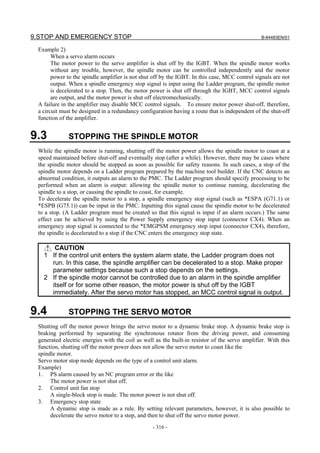
FANUC Series 30*-MODEL B
FANUC Series 31*-MODEL B
FANUC Series 32*-MODEL B


 CONNECTION MANUAL (HARDWARE)


                      B-64483EN/01
• No part of this manual may be reproduced in any form.
 • All specifications and designs are subject to change without notice.


The products in this manual are controlled based on Japan’s “Foreign Exchange and
Foreign Trade Law”. The export of Series 30i-B, Series 31i-B5 from Japan is subject to an
export license by the government of Japan. Other models in this manual may also be
subject to export controls.
Further, re-export to another country may be subject to the license of the government of
the country from where the product is re-exported. Furthermore, the product may also be
controlled by re-export regulations of the United States government.
Should you wish to export or re-export these products, please contact FANUC for advice.


The products in this manual are manufactured under strict quality control. However, when
using any of the products in a facility in which a serious accident or loss is predicted due to
a failure of the product, install a safety device.


In this manual we have tried as much as possible to describe all the various matters.
However, we cannot describe all the matters which must not be done, or which cannot be
done, because there are so many possibilities.
Therefore, matters which are not especially described as possible in this manual should be
regarded as ”impossible”.


This manual contains the program names or device names of other companies, some of
which are registered trademarks of respective owners. However, these names are not
followed by ® or ™ in the main body.
B-64483EN/01                                                                         SAFETY PRECAUTIONS

SAFETY PRECAUTIONS
   Described below are the safety precautions regarding the control units and those peripheral units
   explained herein. The safety precautions must be observed in order to use these units safely.
   Because exchanging, as well as performing daily maintenance operations on, the control units and those
   peripheral units explained herein may incur diverse dangers, you cannot be involved in such work unless
   you have been sufficiently trained for safety.
   Some safety precautions may not apply to your control units or peripheral units explained herein because
   the units have no corresponding function. If this is the case, skip reading those precautions.
   As for safety precautions regarding machine tools, refer to the respective machine manuals provided by
   the machine tool builders.
   Before starting to operate machines for check purposes, be sure to read the manuals provided by the
   machine tool builders and FANUC and sufficiently understand their descriptions.

                                                        Contents

   DEFINITION OF WARNING, CAUTION, AND NOTE.........................................................................s-1
   WARNINGS AND CAUTIONS REGARDING MOUNTING, WIRING, AND EXCHANGING..........s-2
   WARNINGS AND CAUTIONS REGARDING DESIGNING.................................................................s-4
   WARNINGS, CAUTIONS, AND NOTES REGARDING DAILY MAINTENANCE............................s-5

DEFINITION OF WARNING, CAUTION, AND NOTE
   This manual includes safety precautions for protecting the user and preventing damage to the machine.
   Precautions are classified into Warning and Caution according to their bearing on safety. Also,
   supplementary information is described as a Note. Read the Warning, Caution, and Note thoroughly
   before attempting to use the machine.

          WARNING
          Applied when there is a danger of the user being injured or when there is a
          danger of both the user being injured and the equipment being damaged if the
          approved procedure is not observed.

          CAUTION
          Applied when there is a danger of the equipment being damaged, if the
          approved procedure is not observed.

       NOTE
         The Note is used to indicate supplementary information other than Warning and
         Caution.

   •     Read this manual carefully, and store it in a safe place.


                                                         s-1
SAFETY PRECAUTIONS                                                                  B-64483EN/01


WARNINGS AND CAUTIONS REGARDING MOUNTING, WIRING,
AND EXCHANGING
       WARNING
   1 Before starting mounting, wiring, and exchanging, be sure to shut off externally
      supplied power. Otherwise, electrical shocks, breakdown, and blowout may
      occur.
      If a control unit is turned off but other units are not, it is likely that power may be
      supplied to servo units, resulting in the units being damaged and workers getting
      an electrical shock when the units are exchanged.
   2 Voltage lingers in servo and spindle amplifiers for a while even after power has
      been turned off, resulting in workers possibly getting an electrical shock when
      the workers touch them. Before starting to exchange these amplifiers, wait for 20
      minutes after power has been turned off.
   3 Be sure to ground your control units and peripheral units in accordance with your
      national grounding standards (protective grounding class C or stricter).
      Otherwise, electrical shocks, breakdown, and blowout may occur.
   4 In order to prevent damage that may be caused by static electricity, wear a
      grounding wrist strap or take a similar protective measure before starting to
      touch a printed-circuit board or unit or attach a cable.
      Static electricity from human bodies can damage electrical circuits.
   5 In unit replacement, specify the same settings and parameters in the newly
      installed unit as those for the one removed. (For details, refer to the respective
      manuals for the units.)
      Operating the newly installed unit with incorrect settings or parameters will cause
      the machine to behave unexpectedly, possibly leading to a damaged workpiece
      or machine or injury.
   6 If you notice an apparent hardware fault, such as abnormal noise, abnormal
      odor, smoke, ignition, or abnormal heat, in the hardware while power is being
      supplied to it, shut it off at once. These faults can cause fire, breakdown,
      blowout, and malfunction.
   7 The radiating fins of control units, servo amplifiers, spindle amplifiers, and other
      devices can remain very hot for a while after power has been turned off, making
      you get burned if you touch them. Before starting to work on them, wait and
      make sure they are cool.
   8 When exchanging heavy stuff, you should do so together with two or more
      people.
      If you try to exchange heavy stuff all by yourself, you may drop it and get hurt.
   9 Wiring work in the control units and peripheral units must be done only after they
      have been installed. Otherwise, electrical shocks can occur.
   10 Be careful not to damage cables. Otherwise, electrical shocks can occur.
   11 When working, wear suitable clothes with safety taken into account. Otherwise,
      injury and electrical shocks can occur.
   12 Do not work with your hands wet. Otherwise, electrical shocks and damage to
      electrical circuits can occur.


                                             s-2
B-64483EN/01                                                         SAFETY PRECAUTIONS

           CAUTION
          Failing to observe any caution stated below can lead to fire, breakdown, blowout,
          and malfunction.
     1    Do not attach the units directly to any flammable object or install the units near
          any flammable object.
     2    Do not allow any foreign matter (such as a screw, metal chip, or coolant) to get
          in the units.
     3    Handle the units and printed-circuit boards gently because they are precision
          devices. Be careful not to drop them or give a high impact to them.
     4    Lay signal wires away from power wires as stated in this manual.
     5    When fastening each unit or wire, be sure to observe the screw tightening torque
          specified for them. If screws are tightened too weakly or too strongly, it is likely
          that the unit may drop, break, or malfunction, or the wire may be short-circuited.
          Do not forget to tighten all necessary screw.
     6    Do not block any cooling fan air inlet or outlet. For units having no cooling fan,
          allow space for natural convection cooling above and below them.
     7    Be careful not to make an incorrect wiring or connection. Be sure to attach wires
          and cables to their respective corresponding terminals and connectors.
     8    Confirm equipment’s electrical rating stated herein. Do not apply any unspecified
          voltage to the equipment.
     9    Do not confuse voltage polarity. Carefully confirm the arrangement of connector
          pins.
     10   When making a cable assembly, press-mount, crimp, or solder the wires, using
          the tool specified by the cable manufacturer.
     11   Use printed-circuit boards and peripheral units that match your control unit.
     12   When mounting the units, pay attention to their mass.
     13   When detaching a cable from a unit, hold the connector rather than the cable.
          When attaching a cable, be sure to fit its connector to the connector pins
          securely. For connectors having a lock mechanism, be sure to lock them
          securely.
     14   As for the shielding wires of the cables specified herein, securely ground them,
          using, for example, cable clamps.
     15   Always use wires whose length, diameter, heat resistance, and flex resistance
          match their use.


                                               s-3
SAFETY PRECAUTIONS                                                                   B-64483EN/01


WARNINGS AND CAUTIONS REGARDING DESIGNING
      WARNING
   1 When designing, be sure to observe all rules stated in this document and any
     related manuals. Otherwise, it is likely that failure and malfunction may occur.
   2 Failures in the control units and I/O units as well as input power abnormality and
     communication failures can hamper the normal operation of these I/O units.
     Design each I/O unit in such a way that the machine can operate safely, for
     example, by providing an external safety circuit to the I/O unit so that no accident
     will occur even if the I/O unit fails to operate normally.
     The DO function of each I/O unit has been designed in such a way that, if a
     system alarm is issued in the control unit that controls the I/O unit or the power
     of the control unit or the I/O unit is turned off, the DO function of all the I/O units
     is turned off. However, it is not guaranteed that the DO function is surely turned
     off. So, it is requested that, if a signal regarding safety is involved, a safety circuit
     external to each I/O unit must be configured. Using the dual check safety
     function makes it possible to detect a single fault in a portion related to safety.
     For details of the dual check safety function, refer to the FANUC Series
     30i/31i/32i-MODEL B Dual Check Safety Connection Manual (B-64483EN-2).
   3 Coolants containing sulfur or chlorine at a high activation level, oil-free coolants
     called synthetic, and water-soluble coolants at a high alkali level, in particular,
     can largely affect the CNC and peripheral units. Please note that, even if
     consideration is taken to protect them from direct exposure to these coolants,
     the following trouble is likely to occur.
     • Coolants containing sulfur or chlorine at a high activation level
         Some coolants containing sulfur or chlorine are at an extremely high activity
         level. If such a coolant adheres to the CNC or peripheral units, it reacts
         chemically with a material, such as resin, of equipment, possibly leading to
         corrosion or deterioration. If it gets in the CNC or peripheral units, it corrodes
         metals, such as copper and silver, used as component materials, possibly
         leading to a defective component.
     • Synthetic-type coolants having a high permeability
         Some synthetic-type coolants whose lubricating component is, for example,
         PAG (polyalkylene glycol) have an extremely high permeability. If such a
         coolant is used even in equipment having a high closeness, it can readily flow
         into the CNC or peripheral units through, for example, gaskets. It is likely that,
         if the coolant gets in the CNC or a peripheral unit, it may deteriorate the
         insulation and damage the components.
     • Water-soluble coolants at a high alkali level
         Some coolants whose pH is increased using alkanolamine are so strong
         alkali that its standard dilution will lead to pH10 or higher. If such a coolant
         spatters over the surface of the CNC or peripheral unit, it reacts chemically
         with a material, such as resin, possibly leading to corrosion or deterioration.

       CAUTION
      Install each control unit, display unit, MDI unit, and machine operator panel in
      such a place that neither cutting chip nor coolant will spatter to them. Otherwise,
      damage or malfunction may occur.


                                             s-4
B-64483EN/01                                                      SAFETY PRECAUTIONS

WARNINGS, CAUTIONS, AND NOTES REGARDING DAILY
MAINTENANCE
         WARNING
         Battery replacement
         Do not replace batteries unless you have been well informed of maintenance
         work and safety.
         When opening the cabinet and replacing batteries, be careful not to touch any
         high-voltage circuit (marked with     and covered with an electric shock
         prevention cover).
         When the electric shock prevention cover has been removed, you will get an
         electric shock if you touch any high-voltage circuit.

          WARNING
         Fuse replacement
         Before replacing a blown fuse, it is necessary to remove the cause of the blown
         fuse.
         So, do not replace fuses unless you have been well informed of maintenance
         work and safety.
         When opening the cabinet and replacing fuses, be careful not to touch any
         high-voltage circuit (marked with      and covered with an electric shock
         prevention cover).
         When the electric shock prevention cover has been removed, you will get an
         electric shock if you touch any high-voltage circuit.

         CAUTION
         Handle the batteries gently. Do not drop them or give a strong impact to them.

     NOTE
       Each control unit uses batteries, because it must hold data, such as programs,
       offset values, and parameters even when AC power for it is off.
       Back up the data (programs, offset values, and parameters) regularly.
       If the battery voltage becomes low, a low battery voltage alarm is displayed on
       the machine operator’s panel or screen.
       Once the battery voltage alarm has been displayed, replace the batteries within
       one week. Otherwise, the memory contents may be lost.
       For the battery replacement procedure, see Section 4.4, “Batteries”. Recollect or
       discard old batteries in the way your local autonomous community specifies.


                                             s-5
B-64483EN/01                                                                                            PREFACE

PREFACE
   This manual describes the information, that is, electrical and structural specifications, needed in
   connecting machine tools to the control and peripheral units stated below. The manual covers the range
   shown on the total connection diagrams mentioned in Chapter 2. The manual briefly describes the units
   that are used in common with the FANUC control units, such as FANUC I/O units, FANUC PANEL i,
   and servo motors. It also gives supplementary information for use of these units with the control units.
   For detailed specifications, refer to the manuals of these components.
   For options not covered in this manual, also refer to the manuals of these components.

Applicable models
   The models covered by this manual, and their abbreviations are :
                    Model name                                                Abbreviation
   FANUC Series 30i–B                               30i–B                           Series 30i
   FANUC Series 31i–B5                              31i–B5
                                                                                      Series 31i
   FANUC Series 31i–B                               31i–B
   FANUC Series 32i–B                               32i–B                             Series 32i


Organization of this manuals
   This manual consists of chapters 1 to 13 and appendixes at the end of the book.
               Chapter and title                                         Contents
    Chapter 1                        Provides general information related to the connection of the 30i–B series, as
    CONFIGURATION                    well as an introduction to detailed information.
    Chapter 2                        Describes how to connect peripheral units to the 30i–B series.
    TOTAL CONNECTION
    DAIGRAMS
    Chapter 3                        Describes the installation requirements for using the 30i–B series.
    INSTALLATION
    Chapter 4                        Describes how to make connections related to the power supply of the 30i–B
    POWER SUPPLAY                    series.
    CONNECTION
    Chapter 5                        Describes how to connect the peripheral devices to the 30i–B series.
    CONNECTION TO CNC
    PERIOHERALS
    Chapter 6                        Describes how to connect the 30i–B series to servo or spindle amplifiers.
    SERVO AND SPINDLE                Also explains how to connect separate detector interface units.
    INTERFACES
    Chapter 7                        Describes how to connect machine interface I/O units using the FANUC I/O
    CONNECTION TO FANUC I/O          Link i and FANUC I/O Link.
    Link i AND FANUC I/O Link
    Chapter 8                        Describes major units that correspond to the FANUC I/O Link i and FANUC
    UNITS CONNECTED TO FANUC         I/O Link.
    I/O Link i AND FANUC I/O Link
    Chapter 9                        Describes how to handle the emergency stop signal.
    STOP AND EMERGENCY STOP          A lot of important information regarding safety is included. Be sure to read It.
    Chapter 10                       Describes how to connect the 30i–B series to networks.
    CONNECTION TO OTHER
    NETWORKS
    Chapter 11                       Describes connection for the personal computer function with Windows® CE.
    CONNECTION FOR PERSONAL
    COMPUTER FUNCTION WITH
    Windows® CE


                                                      p-1
PREFACE                                                                                      B-64483EN/01


        Chapter and title                                       Contents
  Chapter 12                   Describes how to connect the 30i series to the FANUC PANEL i or a
  CONNECTION WITH THE          commercial personal computer, using the high-speed serial bus (HSSB) or
  FANUC PANEL i AND            Ethernet.
  COMMERCIAL PERSONAL
  COMPUTERS
  Chapter 13                   Describes how to connect a PANEL i to the 30i series.
  PANEL i
  APPENDIX                     A)   OUTLINE DRAWINGS OF UNITS AND CONNECTORS
                               B)   20-PIN INTERFACE CONNECTORS AND CABLES
                               C)   CONNECTION CABLE (SUPPLIED FROM US)
                               D)   OPTICAL FIBER CABLE
                               E)   MEMORY CARD INTERFACE
 Some 30i–B series models have additional personal computer function with Windows® CE. Items
 specific to these models are explained in Chapter 11. Please check them before common items.


                                               p-2
B-64483EN/01                                                                                   PREFACE

Related manuals of Series 30i/31i/32i-MODEL B
   The following table lists the manuals related to Series 30i-B, Series 31i-B, Series 32i-B. This manual is
   indicated by an asterisk(*).

                                          Table 1 Related manuals
                                   Manual name                                    Specification number
    DESCRIPTIONS                                                                 B-64482EN
    CONNECTION MANUAL (HARDWARE)                                                 B-64483EN                 *
    CONNECTION MANUAL (FUNCTION)                                                 B-64483EN-1
    OPERATOR’S MANUAL (Common to Lathe System/Machining Center System)           B-64484EN
    OPERATOR’S MANUAL (For Lathe System)                                         B-64484EN-1
    OPERATOR’S MANUAL (For Machining Center System)                              B-64484EN-2
    MAINTENANCE MANUAL                                                           B-64485EN
    PARAMETER MANUAL                                                             B-64490EN
    Programming
    Macro Executor PROGRAMMING MANUAL                                            B-63943EN-2
    Macro Compiler PROGRAMMING MANUAL                                            B-66263EN
    C Language Executor PROGRAMMING MANUAL                                       B-63943EN-3
    PMC
    PMC PROGRAMMING MANUAL                                                       B-64513EN
    Network
    PROFIBUS-DP Board CONNECTION MANUAL                                          B-63993EN
    Fast Ethernet / Fast Data Server OPERATOR’S MANUAL                           B-64014EN
    DeviceNet Board CONNECTION MANUAL                                            B-64043EN
    FL-net Board CONNECTION MANUAL                                               B-64163EN
    CC-Link Board CONNECTION MANUAL                                              B-64463EN
    Operation guidance function
    MANUAL GUIDE i                                                               B-63874EN
    (Common to Lathe System/Machining Center System) OPERATOR’S MANUAL
    MANUAL GUIDE i (For Machining Center System) OPERATOR’S MANUAL               B-63874EN-2
    MANUAL GUIDE i (Set-up Guidance Functions) OPERATOR’S MANUAL                 B-63874EN-1
    Dual Check Safety
    Dual Check Safety CONNECTION MANUAL                                          B-64483EN-2


Related manuals of SERVO MOTOR αis/αi/βis/βi series
   The following table lists the manuals related to SERVO MOTOR αis/αi/βis/βi series
                                Manual name                                         Specification number
    FANUC AC SERVO MOTOR αi series DESCRIPTIONS                                   B-65262EN
    FANUC AC SPINDLE MOTOR αi series DESCRIPTIONS                                 B-65272EN
    FANUC AC SERVO MOTOR βi series DESCRIPTIONS                                   B-65302EN
    FANUC AC SPINDLE MOTOR βi series DESCRIPTIONS                                 B-65312EN
    FANUC SERVO AMPLIFIER αi series DESCRIPTIONS                                  B-65282EN
    FANUC SERVO AMPLIFIER βi series DESCRIPTIONS                                  B-65322EN
    FANUC SERVO MOTOR αis series
    FANUC SERVO MOTOR αi series
    FANUC AC SPINDLE MOTOR αi series                                              B-65285EN
    FANUC SERVO AMPLIFIER αi series
    MAINTENANCE MANUAL
    FANUC SERVO MOTOR βis series
    FANUC AC SPINDLE MOTOR βi series
                                                                                  B-65325EN
    FANUC SERVO AMPLIFIER βi series
    MAINTENANCE MANUAL


                                                    p-3
PREFACE                                                                                     B-64483EN/01


                                Manual name                                      Specification number
   FANUC AC SERVO MOTOR αi series
   FANUC AC SERVO MOTOR βi series
   FANUC LINEAR MOTOR LiS series                                               B-65270EN
   FANUC SYNCHRONOUS BUILT-IN SERVO MOTOR DiS series
   PARAMETER MANUAL
   FANUC AC SPINDLE MOTOR αi series
   FANUC AC SPINDLE MOTOR βi series
                                                                               B-65280EN
   BUILT-IN SPINDLE MOTOR Bi series
   PARAMETER MANUAL


Related manuals of FANUC PANEL i
  The following table lists the manuals related to FANUC PANEL i.
                              Manual name                                      Specification number
      FANUC PANEL i CONNECTION AND MAINTENANCE MANUAL                     B-64223EN


Related manuals of FANUC I/O Unit
  The following table lists the manuals related to FANUC I/O Unit.
                                 Manual name                                   Specification number
      FANUC I/O Unit-MODEL A CONNECTION AND MAINTENANCE MANUAL            B-61813E
      FANUC I/O Unit-MODEL B CONNECTION AND MAINTENANCE MANUAL            B-62163E
      Handy Machine Operator’s Panel CONNECTION MANUAL                    B-63753EN


Training
  •      FANUC runs FANUC Training Center to train those who will be involved in the connection,
         maintenance, and operation of FANUC products. It is recommended to attend the class so you will
         be able to use the products effectively.
         Visit the following web site for detailed descriptions of its curriculum.
         http://www.fanuc.co.jp/


                                                   p-4
B-64483EN/01                                                                                                      TABLE OF CONTENTS

TABLE OF CONTENTS
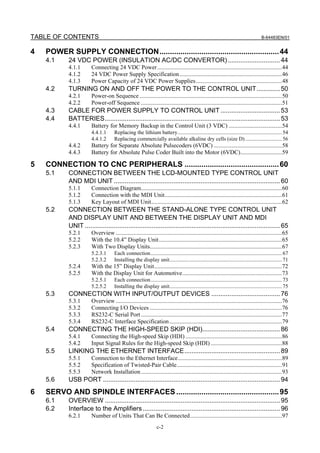
SAFETY PRECAUTIONS............................................................................s-1
      DEFINITION OF WARNING, CAUTION, AND NOTE ............................................. s-1
      WARNINGS AND CAUTIONS REGARDING MOUNTING, WIRING, AND
            EXCHANGING............................................................................................ s-2
      WARNINGS AND CAUTIONS REGARDING DESIGNING ..................................... s-4
      WARNINGS, CAUTIONS, AND NOTES REGARDING DAILY MAINTENANCE .... s-5
PREFACE ....................................................................................................p-1
1     CONFIGURATION .................................................................................. 1
      1.1       CONTROL UNIT CONFIGURATION AND COMPONENT NAMES .............. 1
                1.1.1      Configurations of LCD-mounted Type Control Units .............................................1
                1.1.2      Configurations of Stand-alone Type Control Units..................................................5
                1.1.3      Configurations of Optional Boards ........................................................................10
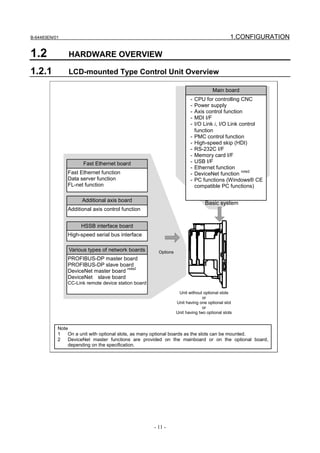
      1.2       HARDWARE OVERVIEW............................................................................ 11
                1.2.1      LCD-mounted Type Control Unit Overview .........................................................11
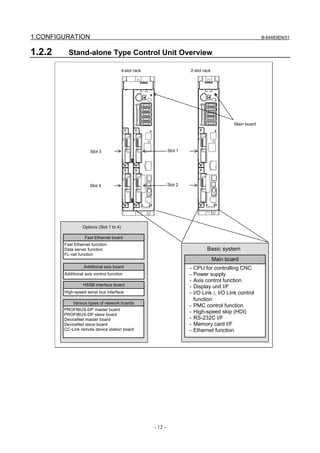
                1.2.2      Stand-alone Type Control Unit Overview..............................................................12

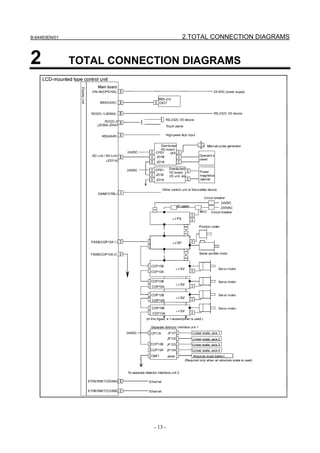
2     TOTAL CONNECTION DIAGRAMS ..................................................... 13
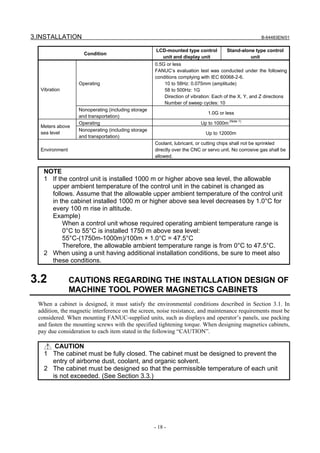
3     INSTALLATION .................................................................................... 17
      3.1       ENVIRONMENTAL REQUIREMENTS OUTSIDE THE CABINET............... 17
                3.1.1      Environmental Conditions outside the Cabinet......................................................17
                3.1.2      Installation Conditions of the Control Unit ............................................................17
      3.2       CAUTIONS REGARDING THE INSTALLATION DESIGN OF MACHINE
                TOOL POWER MAGNETICS CABINETS ................................................... 18
      3.3       THERMAL DESIGN OF THE MACHINE TOOL MAGNETIC CABINET ...... 20
                3.3.1      Temperature Rise within the Machine Tool Magnetic Cabinet..............................20
                3.3.2      Heat Output of Each Unit .......................................................................................20
                3.3.3      Thermal Design of Operator's Panel.......................................................................21
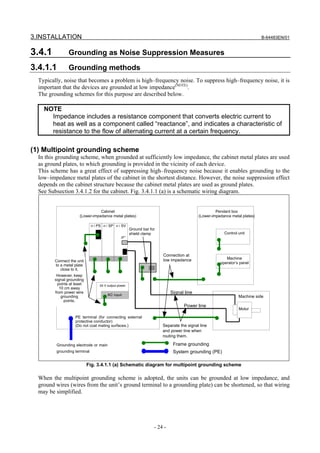
      3.4       COUNTERMEASURES AGAINST NOISE AND GROUNDING .................. 23
                3.4.1      Grounding as Noise Suppression Measures ...........................................................24
                           3.4.1.1      Grounding methods ........................................................................................... 24
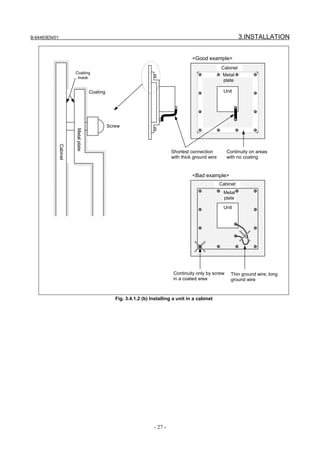
                           3.4.1.2      Cabinet............................................................................................................... 25
                3.4.2      Protective Ground (Grounding for Protection against Indirect Contact) ...............28
                3.4.3      Connecting the Ground Terminal of the Control Unit ...........................................29
                3.4.4      Separating Signal Lines..........................................................................................32
                3.4.5      Noise Suppressor....................................................................................................33
                3.4.6      Cable Clamp and Shield Processing.......................................................................34
                3.4.7      Lightning Surge Absorber Installation ...................................................................37
      3.5       INSTALLING THE CONTROL UNIT............................................................ 38
                3.5.1      Installing the LCD-mounted Type Control Unit ....................................................38
                3.5.2      Installing the Stand-alone Type Control Unit ........................................................39
      3.6       TIGHTENING TORQUE FOR FASTENING UNITS AND GROUND
                TERMINALS ................................................................................................ 40
      3.7       DUSTPROOF MEASURES FOR CABINETS AND PENDANT BOXES ...... 40
      3.8       LCD PROTECTION COVER ....................................................................... 43
      3.9       ATTACHING SCREW CAPS ....................................................................... 43
                                                                     c-1
TABLE OF CONTENTS                                                                                                                     B-64483EN/01


4   POWER SUPPLY CONNECTION......................................................... 44
    4.1    24 VDC POWER (INSULATION AC/DC CONVERTOR) ............................. 44
           4.1.1       Connecting 24 VDC Power ....................................................................................44
           4.1.2       24 VDC Power Supply Specification .....................................................................46
           4.1.3       Power Capacity of 24 VDC Power Supplies..........................................................48
    4.2    TURNING ON AND OFF THE POWER TO THE CONTROL UNIT............. 50
           4.2.1       Power-on Sequence ................................................................................................50
           4.2.2       Power-off Sequence ...............................................................................................51
    4.3    CABLE FOR POWER SUPPLY TO CONTROL UNIT ................................. 53
    4.4    BATTERIES................................................................................................. 53
           4.4.1       Battery for Memory Backup in the Control Unit (3 VDC) ....................................54
                       4.4.1.1       Replacing the lithium battery............................................................................. 54
                       4.4.1.2       Replacing commercially available alkaline dry cells (size D) ........................... 56
           4.4.2       Battery for Separate Absolute Pulsecoders (6VDC) ..............................................58
           4.4.3       Battery for Absolute Pulse Coder Built into the Motor (6VDC)............................59

5   CONNECTION TO CNC PERIPHERALS ............................................. 60
    5.1    CONNECTION BETWEEN THE LCD-MOUNTED TYPE CONTROL UNIT
           AND MDI UNIT ............................................................................................ 60
           5.1.1       Connection Diagram...............................................................................................60
           5.1.2       Connection with the MDI Unit...............................................................................61
           5.1.3       Key Layout of MDI Unit........................................................................................62
    5.2    CONNECTION BETWEEN THE STAND-ALONE TYPE CONTROL UNIT
           AND DISPLAY UNIT AND BETWEEN THE DISPLAY UNIT AND MDI
           UNIT ............................................................................................................ 65
           5.2.1       Overview ................................................................................................................65
           5.2.2       With the 10.4” Display Unit...................................................................................65
           5.2.3       With Two Display Units.........................................................................................67
                       5.2.3.1       Each connection................................................................................................. 67
                       5.2.3.2       Installing the display unit................................................................................... 71
           5.2.4       With the 15” Display Unit......................................................................................72
           5.2.5       With the Display Unit for Automotive...................................................................73
                       5.2.5.1       Each connection................................................................................................. 73
                       5.2.5.2       Installing the display unit................................................................................... 75
    5.3    CONNECTION WITH INPUT/OUTPUT DEVICES ...................................... 76
           5.3.1       Overview ................................................................................................................76
           5.3.2       Connecting I/O Devices .........................................................................................76
           5.3.3       RS232-C Serial Port ...............................................................................................77
           5.3.4       RS232-C Interface Specification............................................................................79
    5.4    CONNECTING THE HIGH-SPEED SKIP (HDI)........................................... 86
           5.4.1       Connecting the High-speed Skip (HDI) .................................................................86
           5.4.2       Input Signal Rules for the High-speed Skip (HDI) ................................................88
    5.5    LINKING THE ETHERNET INTERFACE..................................................... 89
           5.5.1       Connection to the Ethernet Interface......................................................................89
           5.5.2       Specification of Twisted-Pair Cable.......................................................................91
           5.5.3       Network Installation ...............................................................................................93
    5.6    USB PORT .................................................................................................. 94
6   SERVO AND SPINDLE INTERFACES ................................................. 95
    6.1    OVERVIEW ................................................................................................. 95
    6.2    Interface to the Amplifiers ............................................................................ 96
           6.2.1       Number of Units That Can Be Connected..............................................................97
                                                                c-2
B-64483EN/01                                                                                                   TABLE OF CONTENTS

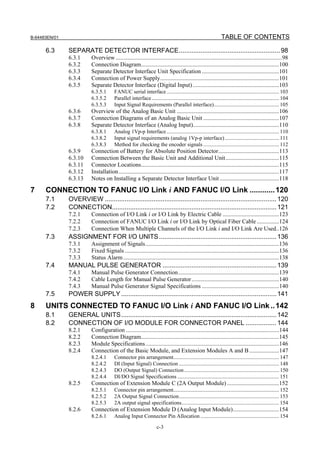
      6.3      SEPARATE DETECTOR INTERFACE........................................................ 98
               6.3.1      Overview ................................................................................................................98
               6.3.2      Connection Diagram.............................................................................................100
               6.3.3      Separate Detector Interface Unit Specification ....................................................101
               6.3.4      Connection of Power Supply................................................................................101
               6.3.5      Separate Detector Interface (Digital Input) ..........................................................103
                          6.3.5.1       FANUC serial interface ................................................................................... 103
                          6.3.5.2       Parallel interface .............................................................................................. 104
                          6.3.5.3       Input Signal Requirements (Parallel interface)................................................ 105
               6.3.6      Overview of the Analog Basic Unit .....................................................................106
               6.3.7      Connection Diagrams of an Analog Basic Unit ...................................................107
               6.3.8      Separate Detector Interface (Analog Input)..........................................................110
                          6.3.8.1       Analog 1Vp-p Interface ................................................................................... 110
                          6.3.8.2       Input signal requirements (analog 1Vp-p interface) ........................................ 111
                          6.3.8.3       Method for checking the encoder signals ........................................................ 112
               6.3.9      Connection of Battery for Absolute Position Detector.........................................113
               6.3.10     Connection Between the Basic Unit and Additional Unit....................................115
               6.3.11     Connector Locations.............................................................................................115
               6.3.12     Installation ............................................................................................................117
               6.3.13     Notes on Installing a Separate Detector Interface Unit ........................................118

7     CONNECTION TO FANUC I/O Link i AND FANUC I/O Link ............ 120
      7.1      OVERVIEW ............................................................................................... 120
      7.2      CONNECTION........................................................................................... 121
               7.2.1      Connection of I/O Link i or I/O Link by Electric Cable ......................................123
               7.2.2      Connection of FANUC I/O Link i or I/O Link by Optical Fiber Cable ...............124
               7.2.3      Connection When Multiple Channels of the I/O Link i and I/O Link Are Used..126
      7.3      ASSIGNMENT FOR I/O UNITS ................................................................. 136
               7.3.1      Assignment of Signals..........................................................................................136
               7.3.2      Fixed Signals ........................................................................................................136
               7.3.3      Status Alarm .........................................................................................................138
      7.4      MANUAL PULSE GENERATOR ............................................................... 139
               7.4.1      Manual Pulse Generator Connection....................................................................139
               7.4.2      Cable Length for Manual Pulse Generator ...........................................................140
               7.4.3      Manual Pulse Generator Signal Specifications ....................................................140
      7.5      POWER SUPPLY ...................................................................................... 141
8     UNITS CONNECTED TO FANUC I/O Link i AND FANUC I/O Link .. 142
      8.1      GENERAL UNITS...................................................................................... 142
      8.2      CONNECTION OF I/O MODULE FOR CONNECTOR PANEL ................. 144
               8.2.1      Configuration .......................................................................................................144
               8.2.2      Connection Diagram.............................................................................................145
               8.2.3      Module Specifications..........................................................................................146
               8.2.4      Connection of the Basic Module, and Extension Modules A and B ....................147
                          8.2.4.1       Connector pin arrangement.............................................................................. 147
                          8.2.4.2       DI (Input Signal) Connection .......................................................................... 148
                          8.2.4.3       DO (Output Signal) Connection ...................................................................... 150
                          8.2.4.4       DI/DO Signal Specifications ........................................................................... 151
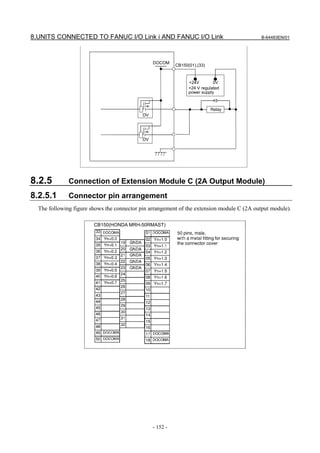
               8.2.5      Connection of Extension Module C (2A Output Module) ...................................152
                          8.2.5.1       Connector pin arrangement.............................................................................. 152
                          8.2.5.2       2A Output Signal Connection.......................................................................... 153
                          8.2.5.3       2A output signal specifications........................................................................ 154
               8.2.6      Connection of Extension Module D (Analog Input Module)...............................154
                          8.2.6.1       Analog Input Connector Pin Allocation .......................................................... 154

                                                                    c-3
TABLE OF CONTENTS                                                                                                                B-64483EN/01

                    8.2.6.2       Analog Input Signal Connections.................................................................... 155
                    8.2.6.3       Analog Input Signal Specifications ................................................................. 156
                    8.2.6.4       Channel selection and A/D conversion data .................................................... 156
         8.2.7      Manual Pulse Generator Connection....................................................................158
         8.2.8      Connection of Basic and Extension Modules.......................................................159
         8.2.9      Module Installation...............................................................................................160
         8.2.10     Other Notes...........................................................................................................165
         8.2.11     Rotary Switch Setting...........................................................................................168
   8.3   CONNECTION OF I/O MODULE FOR OPERATOR'S PANEL (FOR
         MATRIX INPUT) ........................................................................................ 170
         8.3.1      Overall Connection Diagram................................................................................170
         8.3.2      Power Connection ................................................................................................171
         8.3.3      DI/DO Connector Pin Arrangement .....................................................................172
         8.3.4      DI (General-purpose Input Signal) Connection ...................................................173
         8.3.5      DI (Matrix Input Signal) Connection ...................................................................175
         8.3.6      DO (Output Signal) Connection...........................................................................176
         8.3.7      Manual Pulse Generator Connection....................................................................179
         8.3.8      External View.......................................................................................................180
         8.3.9      Specifications .......................................................................................................181
         8.3.10     Other Notes...........................................................................................................182
   8.4   CONNECTION OF I/O MODULE FOR OPERATOR'S PANEL AND I/O
         MODULE FOR POWER MAGNETICS CABINET...................................... 185
         8.4.1      Overall Connection Diagram................................................................................185
         8.4.2      Power Connection ................................................................................................186
         8.4.3      DI/DO Connector Pin Arrangement .....................................................................187
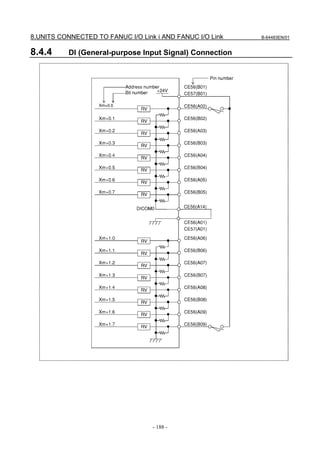
         8.4.4      DI (General-purpose Input Signal) Connection ...................................................188
         8.4.5      DO (Output Signal) Connection...........................................................................192
         8.4.6      Manual Pulse Generator Connection....................................................................193
         8.4.7      External View.......................................................................................................194
         8.4.8      Specifications .......................................................................................................195
         8.4.9      Other Notes...........................................................................................................196
   8.5   CONNECTION OF I/O MODULE TYPE-2 FOR CONNECTOR PANEL.... 198
         8.5.1      Configuration .......................................................................................................198
         8.5.2      Connector Layout Diagram ..................................................................................199
         8.5.3      Connection Diagram.............................................................................................200
         8.5.4      Module Specifications..........................................................................................201
         8.5.5      DI/DO Connector Pin Assignment.......................................................................202
         8.5.6      DI (Input Signal) Connection ...............................................................................203
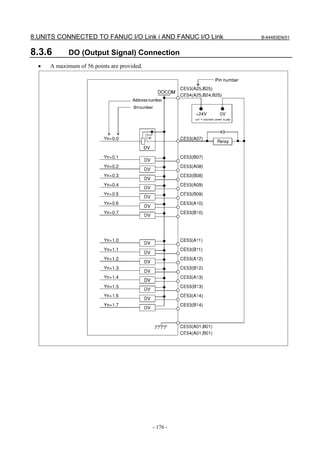
         8.5.7      DO (Output Signal) Connection...........................................................................210
         8.5.8      DI/DO Signal Specifications ................................................................................214
         8.5.9      Power Supply Connection ....................................................................................214
         8.5.10     Manual Pulse Generator Connection....................................................................215
         8.5.11     Connection between Modules ..............................................................................215
         8.5.12     Unit Dimensions...................................................................................................216
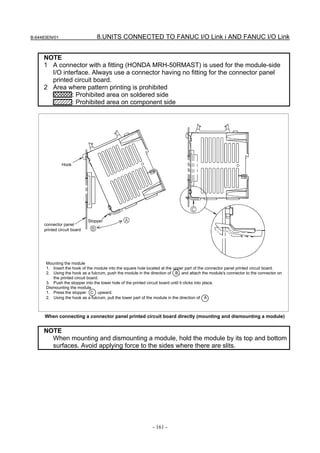
         8.5.13     Mounting the Module...........................................................................................217
         8.5.14     Connector Panel Printed Circuit Board ................................................................218
         8.5.15     Other Notes...........................................................................................................221
   8.6   CONNECTION OF TERMINAL TYPE I/O MODULE ................................. 223
         8.6.1      Overview ..............................................................................................................223
         8.6.2      Module Specifications..........................................................................................224
                    8.6.2.1       Types of modules............................................................................................. 224
                    8.6.2.2       Installation conditions...................................................................................... 225
                    8.6.2.3       I/O signal specifications .................................................................................. 225
                    8.6.2.4       Power supply rating ......................................................................................... 227
                                                             c-4
B-64483EN/01                                                                                                   TABLE OF CONTENTS
                        8.6.2.5       Heat dissipation ............................................................................................... 227
                        8.6.2.6       Weight ............................................................................................................. 228
                        8.6.2.7       Applicable wire................................................................................................ 228
               8.6.3    External View and Dimensions ............................................................................229
                        8.6.3.1       Dimensions (common to the modules) ............................................................ 229
                        8.6.3.2       Dimensions in a maximum configuration (one basic module + three
                                      extension modules) .......................................................................................... 229
                        8.6.3.3       Component names ........................................................................................... 230
               8.6.4    Installation ............................................................................................................233
               8.6.5    Connection ...........................................................................................................235
                        8.6.5.1       Overall connection diagram............................................................................. 235
                        8.6.5.2       Power connection ............................................................................................ 236
                        8.6.5.3       Signal assignment on terminal blocks.............................................................. 237
                        8.6.5.4       DI/DO connection............................................................................................ 240
                        8.6.5.5       Manual pulse generator connection ................................................................. 247
                        8.6.5.6       Inter-module connection.................................................................................. 247
                        8.6.5.7       Cable connection to a terminal block .............................................................. 248
                        8.6.5.8       Detaching a terminal block .............................................................................. 249
               8.6.6    Settings .................................................................................................................250
                        8.6.6.1       Address map .................................................................................................... 250
                        8.6.6.2       DO alarm detection.......................................................................................... 254
                        8.6.6.3       Setting the rotary switch .................................................................................. 256
               8.6.7    Others ...................................................................................................................257
                        8.6.7.1       Method of common pin expansion .................................................................. 257
                        8.6.7.2       Parallel DO (output signal) connection ........................................................... 258
      8.7      FANUC I/O Link CONNECTION UNIT....................................................... 260
               8.7.1    Overview ..............................................................................................................260
               8.7.2    Specification.........................................................................................................261
               8.7.3    Connection ...........................................................................................................264
                        8.7.3.1       I/O Link interface ............................................................................................ 264
      8.8      CONNECTION TO STANDARD MACHINE OPERATOR'S PANEL.......... 266
               8.8.1    Overview ..............................................................................................................266
               8.8.2    Total Connection Diagram ...................................................................................268
               8.8.3    DI/DO Address Map ............................................................................................269
                        8.8.3.1       For connection to the I/O Link i ...................................................................... 269
                        8.8.3.2       For connection to the I/O Link ........................................................................ 269
               8.8.4    Each Connections .................................................................................................270
                        8.8.4.1       Pin assignment ................................................................................................. 270
                        8.8.4.2       Power supply connection................................................................................. 271
                        8.8.4.3       I/O Link connection......................................................................................... 272
                        8.8.4.4       Emergency stop signal connection .................................................................. 272
                        8.8.4.5       Power ON/OFF control signal connection....................................................... 272
                        8.8.4.6       General-purpose DI signal connection ............................................................ 273
                        8.8.4.7       General-purpose DO signal connection........................................................... 275
               8.8.5    Manual pulse generator connection......................................................................276
                        8.8.5.1       When only the manual pulse generator............................................................ 276
                        8.8.5.2       When a pendant type manual pulse generator ................................................. 276
               8.8.6    Connector (on the Cable Side) Specifications......................................................276
               8.8.7    DI/DO Addresses for the Keyboard .....................................................................277
               8.8.8    Code Output for the Rotary Switch ......................................................................278
               8.8.9    Outline ..................................................................................................................279
                        8.8.9.1       Outline of main panel ...................................................................................... 279
                        8.8.9.2       Outline of sub panel A..................................................................................... 280
                        8.8.9.3       Outline of sub panel D..................................................................................... 281
                        8.8.9.4       Connector locations of main panel .................................................................. 282
               8.8.10   Specifications of the Standard Machine Operator’s Panel ...................................283

                                                                   c-5
TABLE OF CONTENTS                                                                                                                         B-64483EN/01

                     8.8.10.1      Installation conditions...................................................................................... 283
                     8.8.10.2      Order specification........................................................................................... 283
                     8.8.10.3      Main panel specification.................................................................................. 283
                     8.8.10.4      Sub panel A, D specification ........................................................................... 283
                     8.8.10.5      Power supply specification .............................................................................. 283
                     8.8.10.6      Heat output ...................................................................................................... 284
                     8.8.10.7      General-purpose DI signal definition .............................................................. 284
                     8.8.10.8      General-purpose DO signal definition............................................................. 284
           8.8.11    Key Tops on the Main Panel ................................................................................284
                     8.8.11.1 Meaning of key symbols.................................................................................. 284
                     8.8.11.2 Detachable key top on the main panel ............................................................. 286
           8.8.12    DO (Output Signal) Error Detection ....................................................................286
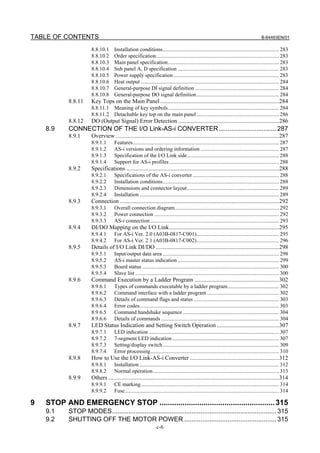
    8.9    CONNECTION OF THE I/O Link-AS-i CONVERTER................................ 287
           8.9.1     Overview ..............................................................................................................287
                     8.9.1.1       Features............................................................................................................ 287
                     8.9.1.2       AS-i versions and ordering information .......................................................... 287
                     8.9.1.3       Specification of the I/O Link side.................................................................... 288
                     8.9.1.4       Support for AS-i profiles ................................................................................. 288
           8.9.2     Specifications .......................................................................................................288
                     8.9.2.1       Specifications of the AS-i converter................................................................ 288
                     8.9.2.2       Installation conditions...................................................................................... 288
                     8.9.2.3       Dimensions and connector layout.................................................................... 289
                     8.9.2.4       Installation ....................................................................................................... 289
           8.9.3     Connection ...........................................................................................................292
                     8.9.3.1       Overall connection diagram............................................................................. 292
                     8.9.3.2       Power connection ............................................................................................ 292
                     8.9.3.3       AS-i connection ............................................................................................... 293
           8.9.4     DI/DO Mapping on the I/O Link..........................................................................295
                     8.9.4.1       For AS-i Ver. 2.0 (A03B-0817-C001)............................................................. 295
                     8.9.4.2       For AS-i Ver. 2.1 (A03B-0817-C002)............................................................. 296
           8.9.5     Details of I/O Link DI/DO ...................................................................................298
                     8.9.5.1       Input/output data area ...................................................................................... 298
                     8.9.5.2       AS-i master status indication ........................................................................... 299
                     8.9.5.3       Board status ..................................................................................................... 300
                     8.9.5.4       Slave list .......................................................................................................... 300
           8.9.6     Command Execution by a Ladder Program .........................................................302
                     8.9.6.1       Types of commands executable by a ladder program...................................... 302
                     8.9.6.2       Command interface with a ladder program ..................................................... 302
                     8.9.6.3       Details of command flags and status ............................................................... 303
                     8.9.6.4       Error codes....................................................................................................... 303
                     8.9.6.5       Command handshake sequence ....................................................................... 304
                     8.9.6.6       Details of commands ....................................................................................... 304
           8.9.7     LED Status Indication and Setting Switch Operation ..........................................307
                     8.9.7.1       LED indication ................................................................................................ 307
                     8.9.7.2       7-segment LED indication ............................................................................... 307
                     8.9.7.3       Setting/display switch ...................................................................................... 309
                     8.9.7.4       Error processing............................................................................................... 310
           8.9.8     How to Use the I/O Link-AS-i Converter ............................................................312
                     8.9.8.1       Installation ....................................................................................................... 312
                     8.9.8.2       Normal operation ............................................................................................. 313
           8.9.9     Others ...................................................................................................................314
                     8.9.9.1       CE marking...................................................................................................... 314
                     8.9.9.2       Fuse.................................................................................................................. 314

9   STOP AND EMERGENCY STOP ....................................................... 315
    9.1    STOP MODES........................................................................................... 315
    9.2    SHUTTING OFF THE MOTOR POWER ................................................... 315
                                                                c-6
B-64483EN/01                                                                                                       TABLE OF CONTENTS

       9.3       STOPPING THE SPINDLE MOTOR ......................................................... 316
       9.4       STOPPING THE SERVO MOTOR ............................................................ 316
       9.5       EMERGENCY STOP SIGNAL................................................................... 317
       9.6       CAUTIONS ABOUT MULTI-PATH CONTROL .......................................... 320
10 CONNECTION TO OTHER NETWORKS ........................................... 321
11 CONNECTION FOR PERSONAL COMPUTER FUNCTION WITH
   Windows® CE .................................................................................... 322
       11.1      TOTAL CONNECTION DIAGRAMS .......................................................... 322
                 11.1.1     LCD-mounted Type Control Unit ........................................................................322
                 11.1.2     Display Unit (Stand-alone Type) .........................................................................323
       11.2      INSTALLATION ......................................................................................... 324
                 11.2.1     Connector Names and Connector Layout.............................................................324
                            11.2.1.1 LCD-mounted type control unit....................................................................... 324
                            11.2.1.2 Display Unit..................................................................................................... 325
                 11.2.2     Heat Output of Each Unit .....................................................................................325
                 11.2.3     Power Supply Capacity of a 24 VDC Power Supply ...........................................326
                 11.2.4     CONNECTION TO CONTROL UNIT ...............................................................327
       11.3      CONNECTION TO PERIPHERAL DEVICES ............................................ 327
                 11.3.1     Main Power Input.................................................................................................327
                 11.3.2     Ethernet (10BASE-T/ 100BASE-TX)..................................................................328
                 11.3.3     Serial Port and USB Port......................................................................................328
                            11.3.3.1      Serial port 1 ..................................................................................................... 328
                            11.3.3.2      Serial Port 2 ..................................................................................................... 330
                            11.3.3.3      USB port (rear side)......................................................................................... 332
                            11.3.3.4      USB port (front side) ....................................................................................... 334
                 11.3.4     High-speed Serial Bus (HSSB) [For Stand-alone Type] ......................................334
                 11.3.5     Buzzer Interface ...................................................................................................335

12 CONNECTION WITH FANUC PANEL i AND COMMERCIAL
   PERSONAL COMPUTERS ................................................................. 336
       12.1      OVERVIEW ............................................................................................... 336
       12.2      CAUTIONS ................................................................................................ 336
       12.3      CONNECTION USING THE HIGH-SPEED SERIAL BUS (HSSB)............ 336
                 12.3.1     Overview ..............................................................................................................336
                 12.3.2     Connection Diagram.............................................................................................337
                 12.3.3     Specifications of a Commercial PC......................................................................337
                 12.3.4     Installation Environment ......................................................................................338
                 12.3.5     Handling Precautions ...........................................................................................338
                 12.3.6     Procedure for Installing Personal Computer Interface Boards .............................338
                 12.3.7     Cable Connection .................................................................................................339
       12.4      CONNECTION USING Ethernet................................................................ 340
                 12.4.1     Overview ..............................................................................................................340
                 12.4.2     Connection Diagram.............................................................................................340

13 PANEL i .......................................................................................................... 341

APPENDIX
A      OUTLINE DRAWINGS OF UNITS AND CONNECTORS ................... 345
B      20-PIN INTERFACE CONNECTORS AND CABLES ......................... 392
                                                                      c-7
TABLE OF CONTENTS                                                                                                               B-64483EN/01


    B.1     BOARD-MOUNTED CONNECTORS ........................................................ 392
            B.1.1      Vertical-type Connectors......................................................................................392
            B.1.2      Straight and Right-angled Connectors (for Spring and Screw-fixing Connector
                       Housings) .............................................................................................................392
    B.2     CABLE CONNECTORS ............................................................................ 393
            B.2.1      Strand Wire Press-mount Connector ....................................................................393
            B.2.2      Soldering Type Connector....................................................................................394
    B.3     RECOMMENDED CONNECTORS, APPLICABLE HOUSINGS, AND
            CABLES .................................................................................................... 395
            B.3.1      Recommended Connectors...................................................................................396
            B.3.2      Applicable Cables.................................................................................................396

C   CONNECTION CABLE (SUPPLIED FROM US)................................. 403
D   OPTICAL FIBER CABLE .................................................................... 406
E   MEMORY CARD INTERFACE............................................................ 416


                                                               c-8
B-64483EN/01                                                                          1.CONFIGURATION


1                 CONFIGURATION
1.1               CONTROL UNIT CONFIGURATION AND COMPONENT
                  NAMES
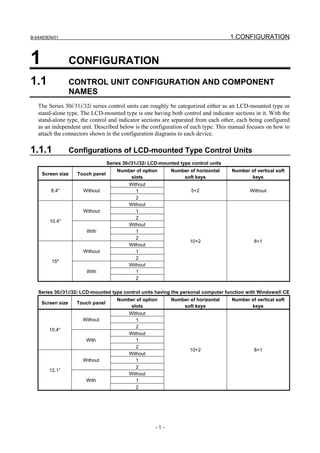
   The Series 30i/31i/32i series control units can roughly be categorized either as an LCD-mounted type or
   stand-alone type. The LCD-mounted type is one having both control and indicator sections in it. With the
   stand-alone type, the control and indicator sections are separated from each other, each being configured
   as an independent unit. Described below is the configuration of each type. This manual focuses on how to
   attach the connectors shown in the configuration diagrams to each device.

1.1.1             Configurations of LCD-mounted Type Control Units
                                  Series 30i/31i/32i LCD-mounted type control units
                                      Number of option       Number of horizontal     Number of vertical soft
    Screen size     Touch panel
                                          slots                  soft keys                   keys
                                           Without
        8.4"          Without                 1                       5+2                    Without
                                              2
                                           Without
                      Without                 1
                                              2
        10.4"
                                           Without
                       With                   1
                                              2
                                                                     10+2                      8+1
                                           Without
                      Without                 1
                                              2
         15"
                                           Without
                       With                   1
                                              2

   Series 30i/31i/32i LCD-mounted type control units having the personal computer function with Windows® CE
                                      Number of option       Number of horizontal     Number of vertical soft
    Screen size     Touch panel
                                          slots                  soft keys                   keys
                                           Without
                      Without                 1
                                              2
        10.4"
                                           Without
                       With                   1
                                              2
                                                                     10+2                      8+1
                                           Without
                      Without                 1
                                              2
        12.1”
                                           Without
                       With                   1
                                              2


                                                      -1-
1.CONFIGURATION                                                                                      B-64483EN/01


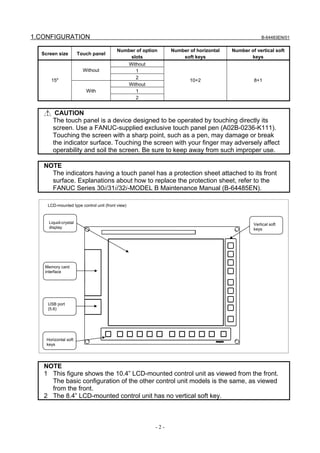
                                        Number of option         Number of horizontal   Number of vertical soft
  Screen size         Touch panel
                                            slots                    soft keys                 keys
                                                 Without
                        Without                     1
                                                    2
      15"                                                               10+2                     8+1
                                                 Without
                         With                       1
                                                    2


        CAUTION
       The touch panel is a device designed to be operated by touching directly its
       screen. Use a FANUC-supplied exclusive touch panel pen (A02B-0236-K111).
       Touching the screen with a sharp point, such as a pen, may damage or break
       the indicator surface. Touching the screen with your finger may adversely affect
       operability and soil the screen. Be sure to keep away from such improper use.

   NOTE
     The indicators having a touch panel has a protection sheet attached to its front
     surface. Explanations about how to replace the protection sheet, refer to the
     FANUC Series 30i/31i/32i-MODEL B Maintenance Manual (B-64485EN).

    LCD-mounted type control unit (front view)


     Liquid-crystal                                                                              Vertical soft
     display                                                                                     keys


   Memory card
   interface


    USB port
    (5.6)


    Horizontal soft
    keys


   NOTE
   1 This figure shows the 10.4” LCD-mounted control unit as viewed from the front.
     The basic configuration of the other control unit models is the same, as viewed
     from the front.
   2 The 8.4” LCD-mounted control unit has no vertical soft key.


                                                           -2-
B-64483EN/01                                                                                       1.CONFIGURATION

     NOTE
     3 The LCD (liquid-crystal display) has been fabricated using an extreme precision
       technology. However, some of their pixels may fail to light or stay constantly
       lighting because of their characteristics. Please be forewarned that these
       phenomena are not faults.

       LCD-mounted type control unit (8.4”LCD unit and 10.4”LCD unit A) (rear view)


                                                                                                     Battery
                                                                    Fan unit
                                                                                                     (4.4)


      FSSB interface
      connectors
      [COP10A-1] (left)
      [COP10A-2] (right)
      (6)


     MDI connector
     [CA55] (5.1)


     Power supply
     connector
     [CPD16A]
     (4.3)


                                     Soft key connectors
                                                                                                               DeviceNet
       Fuse
                                                                                                               connector [TBL]
                                                                                                               (10)

                      I/O device interface
                      connector (RS-232C)
                        [JD56A]    (5.3)

                                                                                      Ethernet connector
                               I/O device interface                                   (Embedded Ethernet)
                               connector (RS-232C)                                    [CD38A] (5.5)
                               [JD36A/JD54] (5.3)


              High-speed skip connector
              [JA40] (5.4)
                                                                                              Ethernet connector
                                               I/O Link i or I/O Link connector               (Multi-function Ethernet)
                                               [JD51A] (7.2)                                  [CD38B] (5.5)


                                                               -3-
1.CONFIGURATION                                                                                                   B-64483EN/01


   NOTE
   1 This figure shows an LCD-mounted control unit having no option slot as viewed
     from the rear. For the rear view of the control units having the personal computer
     function with Windows® CE, see Chapter 11, "Connection for Personal
     Computer Function with Windows® CE".
   2 The numbers in parentheses () in the figures are keyed to the item numbers of
     the descriptions in this manual. The numbers in brackets [] in the figures are
     connector numbers.
   3 Connectors [COP10A-2], [TBL], [CD38A], and [CD38B] may not be provided,
     depending on the specifications of the hardware.

     LCD-mounted type control unit (10.4”LCD unit B and 15”LCD unit) (rear view)


                                                                                                  Battery
                                                                     Fan unit
                                                                                                  (4.4)


    FSSB interface
    connectors
    [COP10A-1] (left)
    [COP10A-2] (right)
    (6)


   MDI connector
   [CA55]   (5.1)


     Fuse


   Power supply
   connector
   [CPD16A]
   (4.3)
                                    Soft key connectors


                    I/O device interface
                    connector (RS-232C)
                      [JD56A]    (5.3)

                                                                                   Ethernet connector
                             I/O device interface                                  (Embedded Ethernet)
                             connector (RS-232C)                                   [CD38S] (5.5)
                             [JD36A/JD54]      (5.3)


            High-speed skip connector
            [JA40] (5.4)
                                                                                           Ethernet connector
                                                I/O Link i or I/O Link connector           (Multi-function Ethernet)
                                                [JD51A]      (7.2)                         [CD38B] (5.5)


                                                                -4-
B-64483EN/01                                                                              1.CONFIGURATION


     NOTE
     1 This figure shows an LCD-mounted control unit having no option slot as viewed
       from the rear. For the rear view of the control units having the personal computer
       function with Windows® CE, see Chapter 11, "Connection for Personal
       Computer Function with Windows® CE".
     2 The numbers in parentheses () in the figures are keyed to the item numbers of
       the descriptions in this manual. The numbers in brackets [] in the figures are
       connector numbers.
     3 Connectors [COP10A-2], [CD38S], and [CD38B] may not be provided,
       depending on the specifications of the hardware.

1.1.2              Configurations of Stand-alone Type Control Units
   Series 30i/31i/32i stand-alone type control units
                         Slot rack name                                     Number of option slots
                            2-slot rack                                                   2
                            4-slot rack                                                   4

   Series 30i/31i/32i display units
      Screen size         Touch panel          Number of horizontal soft keys      Number of vertical soft keys
                             Without
         10.4"
                              With
                                                             10+2                                  8+1
                             Without
          15"
                              With

   Series 30i/31i/32i display units having the personal computer function with Windows® CE
      Screen size         Touch panel          Number of horizontal soft keys       Number of vertical soft keys
                             Without
         10.4"
                              With
                             Without
          12.1”                                               10+2                                 8+1
                              With
                             Without
          15"
                              With

   Series 30i/31i/32i display units directed to automakers
          Screen size                     Touch panel                     Number of vertical soft keys
                                            Without
                  15"                                                           16(left: 8, rights: 8)
                                             With


          CAUTION
         The touch panel is a device designed to be operated by touching directly its
         screen. Use a FANUC-supplied exclusive touch panel pen (A02B-0236-K111).
         Touching the screen with a sharp point, such as a pen, may damage or break
         the indicator surface. Touching the screen with your finger may adversely affect
         operability and soil the screen. Be sure to keep away from such improper use.


                                                        -5-
1.CONFIGURATION                                                                                   B-64483EN/01


   NOTE
     The indicators having a touch panel has a protection sheet attached to its front
     surface. Explanations about how to replace the protection sheet, refer to the
     FANUC Series 30i/31i/32i-MODEL B Maintenance Manual (B-64485EN).

       Stand-alone type control unit (front view)


         Battery (4.4)                                                   Battery connector
                                                                         (4.4)


                                                                         I/O device interface
         I/O device interface                                            connector (RS-232C)
         connector (RS-232C)                                               [JD36A]    (5.3)
           [JD56A]    (5.3)

                                                                         I/O Link i or I/O Link
         Memory card interface                                           connector
                                                                           [JD51A]     (5.4)


                                                                         High-speed skip connector
                                                                          [JD40A]   (6.1)


         Ethernet connector
         (Embedded Ethernet)
          [CD38A]    (5.5)
                                                                         24-VDC power supply
         Optional slot 3                                                 connector
                                                                         [CPD19A] (right)
                                                                         [CPD19B] (left)
                                                                         (4.3)

         Optional slot 1                                                HSSB interface connectors
                                                                        [COP21A]    (5.2)


         FSSB interface
         connectors
         [COP10A-1] (lower)
         [COP10A-2] (upper)
         (7)


         Optional slot 4


         Optional slot 2

                                                                        GND connection terminal
                                                          2-slot rack


                                                    4-slot rack


   NOTE
     The numbers in parentheses () in the figures are keyed to the item numbers of
     the descriptions in this manual. The numbers in brackets [] in the figures are
     connector numbers.


                                                        -6-
B-64483EN/01                                                                                          1.CONFIGURATION

          Display unit for the stand-alone type control unit (10.4”LCD unit A)


               Liquid-crystal                                                                                      Vertical soft
               display                                                                                             keys


                  Memory card
                  interface


                                                                        Front view


                    USB port
                    (5.6)


                   Horizontal soft
                   keys


                                                                        Rear view


                MDI interconnection
                 connector [JA73]
                 (5.2)


                MDI connector
                [CA55]   (5.2)


                  Soft key
                  connectors


                                                                                       Fuse
                                  Video signal                                                               Power supply
                                  interconnection connector                                                  connectors
                                                                                                             [CP1A]
                                  [CA103] (5.2)                                                              [CP1B]     (5.2)

                                                                                     Optical connector for
                                         Touch panel connector                       display control
                                                                                     [COP21B]        (5.2)


     NOTE
     1 The numbers in parentheses () in the figures are keyed to the item numbers of
       the descriptions in this manual. The numbers in brackets [] in the figures are
       connector numbers.
     2 Connectors [JA73] and [CA103], the memory card interface, and USB ports may
     3 See Chapter 11 for explanations about the display unit for the control unit having
       the personal computer function with Windows® CE.
     4 The LCD (liquid-crystal display) has been fabricated using an extreme precision
       technology. However, some of their pixels may fail to light or stay constantly
       lighting because of their characteristics. Please be forewarned that these
       phenomena are not faults.

                                                                 -7-
1.CONFIGURATION                                                                                      B-64483EN/01


      Display unit for the stand-alone type control unit (15”LCD unit and 10.4”LCD unit B)


                                                                                             Vertical soft
                                                                                             keys
        Liquid-crystal
        display


     Memory card                                        Front
     interface


       USB port
       (5.6)


       Horizontal soft
       keys


     MDI connector
     [CA55]   (5.2)


                                                   Rear
      Power supply
      connectors
      [CPD18]    (5.2)


                                                                   Optical connector for
                            Soft key
                            connectors                             display control
        Fuse                                                       [COP21M]        (5.2)


   NOTE
   1 The numbers in parentheses () in the figures are keyed to the item numbers of
     the descriptions in this manual. The numbers in brackets [] in the figures are
     connector numbers.
   2 For the display units for the control units having the personal computer function
     with Windows® CE, see Chapter 11, "Connection for Personal Computer
     Function with Windows® CE".
   3 The LCD (liquid-crystal display) has been fabricated using an extreme precision
     technology. However, some of their pixels may fail to light or stay constantly
     lighting because of their characteristics. Please be forewarned that these
     phenomena are not faults.

                                                         -8-
B-64483EN/01                                                                                                   1.CONFIGURATION

                 Display unit for automotive for the stand-alone type control unit


                                                                                                                     Vertical soft
                                                                                                                     keys


                   Liquid-crystal
                   display
                                                                                                                         MDI


               Memory card                                           Front
               interface


                 USB port
                 (5.2)


                 Function key
                 switches                                                                                Optical connector for
                                                                                                         display control
                                                                                                         [COP21M]        (5.2)


                 Power supply
                 connector
                 [CPD18]   (5.2)


                                                                               Rear


               I/O Link i or I/O Link connector
               (master side) (5.2)
                                                    I/O Link i or I/O Link
                                                    connector (slave side)      I/O Link adapter board
                                                    (5.2)


     NOTE
     1 The numbers in parentheses () in the figures are keyed to the item numbers of
       the descriptions in this manual. The numbers in brackets [] in the figures are
       connector numbers.
     2 The I/O Link i and I/O Link interfaces are optional.
     3 The LCD (liquid-crystal display) has been fabricated using an extreme precision
       technology. However, some of their pixels may fail to light or stay constantly
       lighting because of their characteristics. Please be forewarned that these
       phenomena are not faults.


                                                                    -9-
1.CONFIGURATION                                                                                                        B-64483EN/01


1.1.3         Configurations of Optional Boards

        Additional axis board                                         PROFIBUS-DP slave board


                                     For FSSB interface                                                 For Profibus
                                     [COP10A] (6)                                                       [CN2] (10)


        Fast Ethernet board                                           DeviceNet master board


                                           For Ethernet                                                 For Device NET
                                           [CD38R]    (10)                                              [TBL] (10)


        HSSB interface board                                          DeviceNet slave board


                                   For  HSSB       interface                                            For Device NET
                                   [COP21A] (12.3)                                                      [TBL] (10)


        PROFIBUS-DP master board                                      CC-Link remote device station board


                                           For Profibus                                                 For CC-Link
                                           [CN1]    (10)                                                [CT1] (10)


   NOTE
     The numbers in parentheses () in the figures are keyed to the item numbers of
     the descriptions in this manual. The numbers in brackets [] in the figures are
     connector numbers.
     The Fast Ethernet board may be used also as data server or FL-net functions,
     depending on the settings of parameters.


                                                             - 10 -
B-64483EN/01                                                                                  1.CONFIGURATION

1.2            HARDWARE OVERVIEW

1.2.1          LCD-mounted Type Control Unit Overview

                                                                                    Main board
                                                                        -   CPU for controlling CNC
                                                                        -   Power supply
                                                                        -   Axis control function
                                                                        -   MDI I/F
                                                                        -   I/O Link i, I/O Link control
                                                                            function
                                                                        -   PMC control function
                                                                        -   High-speed skip (HDI)
                                                                        -   RS-232C I/F
                                                                        -   Memory card I/F
                     Fast Ethernet board                                -   USB I/F
                                                                        -   Ethernet function
               Fast Ethernet function                                                             note2
                                                                        -   DeviceNet function
               Data server function                                     -   PC functions (Windows® CE
               FL-net function                                              compatible PC functions)

                     Additional axis board
                                                                                Basic system
               Additional axis control function


                    HSSB interface board
               High-speed serial bus interface

               Various types of network boards         Options
               PROFIBUS-DP master board
               PROFIBUS-DP slave board
                                      note2
               DeviceNet master board
               DeviceNet slave board
               CC-Link remote device station board
                                                                  Unit without optional slots
                                                                               or
                                                                 Unit having one optional slot
                                                                               or
                                                                 Unit having two optional slots


           Note
           1   On a unit with optional slots, as many optional boards as the slots can be mounted.
           2   DeviceNet master functions are provided on the mainboard or on the optional board,
               depending on the specification.


                                                     - 11 -
1.CONFIGURATION                                                                                              B-64483EN/01


1.2.2     Stand-alone Type Control Unit Overview

                                          4-slot rack                     2-slot rack


                                                                                                Main board


                      Slot 3                                     Slot 1


                      Slot 4                                     Slot 2


                  Options (Slot 1 to 4)

                   Fast Ethernet board
        Fast Ethernet function
        Data server function                                                        Basic system
        FL-net function
                                                                                        Main board
                  Additional axis board                                   -   CPU for controlling CNC
        Additional axis control function                                  -   Power supply
                                                                          -   Axis control function
                  HSSB interface board                                    -   Display unit I/F
        High-speed serial bus interface                                   -   I/O Link i, I/O Link control
                                                                              function
            Various types of network boards
                                                                          -   PMC control function
        PROFIBUS-DP master board
        PROFIBUS-DP slave board
                                                                          -   High-speed skip (HDI)
        DeviceNet master board                                            -   RS-232C I/F
        DeviceNet slave board                                             -   Memory card I/F
        CC-Link remote device station board                               -   Ethernet function


                                                        - 12 -
B-64483EN/01                        2.TOTAL CONNECTION DIAGRAMS


2              TOTAL CONNECTION DIAGRAMS


                           - 13 -
2.TOTAL CONNECTION DIAGRAMS                                                                                                                                                      B-64483EN/01


      Stand-alone type control unit
                                             Main board


                        Control unit
                                          24V-IN(CPD19A)                                                                               24 VDC power supply
                                        24V-OUT(CPD19B)                      To I/O device
                                                                                                  Display unit


                                                                 {
                                                                                                  COP21A,B,M
                                       DISPLAY(COP21A)                                                                                        MDI unit
                                                                              24VDC              CP1A       CA55                              CK27
                                                                                                 CP1B                       Memory card
                                                                                                 (Touch panel)
                                                                                                                                                        PANEL i or personal computer

                                                HDI(JA40)                    High-peed skip input

                                                                                          Distributed                              Manual pulse generator
                                                                                          I/O board
                                                                     VDC24              CPD1     JA3                         Operator's
                                         I/O Link i I/O Link                            JD1B                                 panel
                                                    (JD51A)                               JD1A
                                                                                                    Distributed              Power
                                                                  VDC24                 CPD1
                                                                                                    I/O board,               magnetics
                                                                                        JD1B        I/O unit, etc.           cabinet
                                                                                        JD1A

                                                                                        JD1B βamplifier
                                                                                             with I/O Link                              Servo motor
                                                                                        JD1A


                                        R232C-1(JD56A)                                    RS-232C I/O device

                                        R232C-2(JD36A)                                    RS-232C I/O device

                                                                                                                               Circuit breaker
                                                                                                                                            24VDC
                                                                                                         AC reactor                         200VAC
                                                                                                                           MCC      Circuit breaker

                                                                                                    αi PS

                                                                                                                          Position coder


                                        FSSB(COP10A-1)                                              αi SP


                                                                                                                          Serial spindle motor
                                        FSSB(COP10A-2)


                                                                                   COP10B
                                                                                                       αi SV                              Servo motor
                                                                                   COP10A

                                                                                   COP10B                                                 Servo motor
                                                                                                       αi SV
                                                                                   COP10A

                                                                                   COP10B                                                 Servo motor
                                                                                                       αi SV
                                                                                   COP10A

                                                                                   COP10B                                                 Servo motor
                                                                                                       αi SV
                                                                                    COP10A
                                                                               (In this figure, a 1-axis amplifier is used.)

                                                                                   Separate detector interface unit 1
                                                                DC24V              CP11A         JF101                Linear scale, axis 1
                                                                                               JF102                  Linear scale, axis 2
                                                                                  COP10B       JF103                  Linear scale, axis 3
                                                                                  COP10A       JF104                  Linear scale, axis 4
                                                                                   CNF1        JA4A                 Battery for absolute scale
                                                                                                               (Required only when an absolute scale is used)

                                                               To separate detector interface unit 2


                                       ETHERNET(CD38A)                             Ethernet


                                                                                      - 14 -
B-64483EN/01                                                                          2.TOTAL CONNECTION DIAGRAMS

          When optional boards are provided


                         Fast Ethernet board
         Optional slot


                             Memory card        Use a compact flash card purchased from FANUC

                          ETHERNET(CD38R)                           Ethernet or FL-net ,and so on


                         HSSB interface board


                              HSSB(COP21A)                          PANEL i
                                                                    or Personal Computer


                         PROFIBUS-DP
                         master board

                                  PROFI(CN1)                       Other control unit
                                                                   or PROFIBUS device


                         PROFIBUS-DP
                         slave board

                                  PROFI(CN2)                        Other control unit
                                                                    or PROFIBUS device


                         DeviceNet
                         master board

                                 DVNET(TNB)                        Other control unit
                                                                   or DeviceNet device


                         DeviceNet
                         slave board

                                 DVNET(TNB)                        Other control unit
                                                                   or DeviceNet device


                         CC-Link remote
                         device station board

                                 CCLNK(CT1)                        CC-Link device


                                                                      - 15 -
2.TOTAL CONNECTION DIAGRAMS                                                                            B-64483EN/01


      When one or more option boards are present


                     Additional axis
                     board
     Optional slot


                                                                               Circuit breaker

                                                                                             24VDC
                                                               AC reactor
                                                                                            200VAC
                                                                            MCC     Circuit breaker
                                                             αi PS

                                                                            Position coder


                                                             αi SP
                          FSSB(COP10A-3)

                                                                            Serial spindle motor


                                                   COP10B     αi SV                      Servo motor
                                                   COP10A

                                                                                         Servo motor
                                                   COP10B     αi SV
                                                   COP10A
                                                                                         Servo motor
                                                   COP10B     αi SV
                                                   COP10A
                                                                                         Servo motor
                                                   COP10B     αi SV
                                                   COP10A


                                                    - 16 -
B-64483EN/01                                                                                          3.INSTALLATION


3                 INSTALLATION
3.1               ENVIRONMENTAL REQUIREMENTS OUTSIDE THE
                  CABINET

3.1.1             Environmental Conditions outside the Cabinet
   The control unit and the peripheral units have been designed on the assumption that they are housed in
   closed cabinets. In this manual "cabinet" refers to the following:
   •     Cabinet manufactured by the machine tool builder for housing the control unit or peripheral units;
   • Operation pendant, manufactured by the machine tool builder, for housing the display unit, MDI unit,
         or operator's panel.
   •     Equivalent to the above.
   The following table lists the environmental conditions required in installing these cabinets. Section 3.3 of
   this connection manual explains the design conditions regarding installation of cabinets that will meet the
   environmental conditions.

                     Operating                                                     0°C to 45°C
    Ambient
                     Nonoperating (including storage
    temperature of                                                                -20°C to 60°C
                     and transportation)
    the cabinet
                     Temperature change                                   0.3°C/minute or less
                     Normal                                           75%RH or less, no condensation
    Humidity
                     Short period (less than 1 month)                 95%RH or less, no condensation
                     Operating                                                0.5G or less
    Vibration        Nonoperating (including storage
                                                                                   1.0G or less
                     and transportation)
                     Operating                                      Up to 1000 m (see Note 1 in the Subsec. 3.1.2.)
    Meters above
                     Nonoperating (including storage
    sea level                                                                    Up to 12000 m
                     and transportation)
                                                        Normal machine shop environment
                                                        (The environment must be considered if the cabinets are in a
    Environment
                                                        location where the density of dust, coolant, organic solvent,
                                                        and/or corrosive gas is relatively high.)


3.1.2             Installation Conditions of the Control Unit
                                                         LCD-mounted type control              Stand-alone type control
                       Condition
                                                           unit and display unit                         unit
                     Operating                                   0°C to 58°C                            0°C to 55°C
    Ambient          Nonoperating (including storage
                                                                                  -20°C to 60°C
    temperature      and transportation)
                     Temperature change                                   0.3°C/minute or less
                     Normal                                           75%RH or less, no condensation
    Humidity
                     Short period (less than 1 month)                 95%RH or less, no condensation


                                                        - 17 -
3.INSTALLATION                                                                                         B-64483EN/01


                                                      LCD-mounted type control         Stand-alone type control
                     Condition
                                                        unit and display unit                    unit
                                                     0.5G or less
                                                     FANUC’s evaluation test was conducted under the following
                                                     conditions complying with IEC 60068-2-6.
                   Operating                             10 to 58Hz: 0.075mm (amplitude)
   Vibration                                             58 to 500Hz: 1G
                                                         Direction of vibration: Each of the X, Y, and Z directions
                                                         Number of sweep cycles: 10
                   Nonoperating (including storage
                                                                              1.0G or less
                   and transportation)
                   Operating                                              Up to 1000m (Note 1)
   Meters above
                   Nonoperating (including storage
   sea level                                                                 Up to 12000m
                   and transportation)
                                                     Coolant, lubricant, or cutting chips shall not be sprinkled
   Environment                                       directly over the CNC or servo unit. No corrosive gas shall be
                                                     allowed.


    NOTE
    1 If the control unit is installed 1000 m or higher above sea level, the allowable
      upper ambient temperature of the control unit in the cabinet is changed as
      follows. Assume that the allowable upper ambient temperature of the control unit
      in the cabinet installed 1000 m or higher above sea level decreases by 1.0°C for
      every 100 m rise in altitude.
      Example)
           When a control unit whose required operating ambient temperature range is
           0°C to 55°C is installed 1750 m above sea level:
           55°C-(1750m-1000m)/100m × 1.0°C = 47.5°C
           Therefore, the allowable ambient temperature range is from 0°C to 47.5°C.
    2 When using a unit having additional installation conditions, be sure to meet also
      these conditions.


3.2              CAUTIONS REGARDING THE INSTALLATION DESIGN OF
                 MACHINE TOOL POWER MAGNETICS CABINETS
  When a cabinet is designed, it must satisfy the environmental conditions described in Section 3.1. In
  addition, the magnetic interference on the screen, noise resistance, and maintenance requirements must be
  considered. When mounting FANUC-supplied units, such as displays and operator’s panels, use packing
  and fasten the mounting screws with the specified tightening torque. When designing magnetics cabinets,
  pay due consideration to each item stated in the following “CAUTION”.

       CAUTION
    1 The cabinet must be fully closed. The cabinet must be designed to prevent the
      entry of airborne dust, coolant, and organic solvent.
    2 The cabinet must be designed so that the permissible temperature of each unit
      is not exceeded. (See Section 3.3.)


                                                     - 18 -
B-64483EN/01                                                                                  3.INSTALLATION

         CAUTION
     3 A closed cabinet must be equipped with a fan to circulate the air within. (This is
        not necessary for a unit with fan.) The fan must be adjusted so that the air
        moves at 0.5 m/sec along the surface of each installed unit.
        However, do not blow air from the fan directly to the unit, because doing so can
        readily make dust attach the portion where the air flow hits, leading to possible
        trouble. (This is not necessary for a unit with fan.)
     4 For the air to move easily, a clearance of 100 mm is required between each unit
        and the wall of the cabinet.
     5 Each FANUC-supplied unit, such as a display or operator’s panel, has been
        designed on the assumption that they will be mounted using packing and with
        the specified screw tightening torque. Failing to mount them as specified can
        lead to unit damage and/or malfunction. Be sure to use packing and observe the
        specified screw tightening torque. (See Sections 3.6 and 3.7.)
     6 Failing to use packing or to provide complete sealing, or using any packing not
        resistant to coolant in use will allow dust, coolant, and organic solvent to get in
        the cabinet, leading to possible equipment trouble. Be sure to use an appropriate
        packing and a secure sealing.
        In addition, use an appropriate packing and a secure sealing for the cable outlets
        and doors of the machine builder-provided units, such as displays, operator’s
        panels, and cabinet pendant boxes. (See Section 3.7.)
     7 The LCD must not be installed in such a place that coolant would directly fall
        onto the unit. Be sure to attach a protection cover to the LCD if it will be used in
        an environment where it is anticipated that coolant may come into contact with it,
        for example, an environment with a relatively dense oil mist.
     8 Noise must be minimized. As the machine and the control unit are reduced in
        size, the parts that generate noise may be placed near noise-sensitive parts in
        the magnetics cabinet.
        The control unit is built to protect it from external noise. Cabinet design to
        minimize noise generation and to prevent it from being transmitted to the control
        unit is necessary. (See Section 3.4.)
     9 When placing units in the cabinet, also consider ease of maintenance. The units
        should be placed so that they can be checked and replaced easily when
        maintenance is performed.
     10 The hard disk drive and floppy disk drive must not be installed near the source of
        a strong magnetic field.
     11 The installation conditions of the I/O unit and connector panel I/O module must
        be satisfied. In order to secure ventilation in the equipment, mount the I/O unit
        and connector panel I/O module in the specified orientation. Clearances of 100
        mm or more both above and below the I/O unit are required for wiring and
        ventilation.
        Equipment radiating too much heat must not be put below the I/O unit and
        connector panel I/O module.
                                 Top        I/O base unit
                                            (No screws or protrusions shall extend from the
                                            bottom of this unit.)


                                Bottom


                                             - 19 -
3.INSTALLATION                                                                                       B-64483EN/01


3.3             THERMAL DESIGN OF THE MACHINE TOOL MAGNETIC
                CABINET
  The internal air temperature of the cabinet increases when the units and parts installed in the cabinet
  generate heat. Since the generated heat is radiated from the surface of the cabinet, the temperature of the
  air in the cabinet and the outside air balance at certain heat levels. If the amount of heat generated is
  constant, the larger the surface area of the cabinet, the less the internal temperature rises. The thermal
  design of the cabinet refers to calculating the heat generated in the cabinet, evaluating the surface area of
  the cabinet, and enlarging that surface area by installing heat exchangers in the cabinet, if necessary.
  Such a design method is described in the following subsections.

3.3.1           Temperature Rise within the Machine Tool Magnetic Cabinet
  The cooling capacity of a cabinet made of sheet metal is generally 6 W/°C per 1m2 surface area, that is,
  when the 6W heat source is contained in a cabinet having a surface area of 1 m2, the temperature of the air
  in the cabinet rises by 1°C. In this case the surface area of the cabinet refers to the area useful in cooling,
  that is, the area obtained by subtracting the area of the cabinet touching the floor from the total surface
  area of the cabinet. There are two preconditions : The air in the cabinet must be circuited by the fun, and
  the temperature of the air in the cabinet must be almost constant. For example, the operator’s panel
  cabinet may contain an LCD-mounted type control unit or the display of a stand-alone type control unit.
  To keep the temperature in the cabinet at 58°C or below when the ambient temperature is 45°C, the
  equation below must be satisfied.
      Internal heat loss P [W] ≤
      6[W/m2⋅°C] × surface area S[m2] × 13[°C] of rise in temperature
  (A cooling capacity of 6 W/°C assumes the cabinet is so large that agitation with the fan motor does not
  make the temperature distribution uniform. For a small cabinet like the operator's panel, a cooling
  capacity of 8 W/°C, indicated in Subsection 3.3.3, may be used.)
  For example, a cabinet having a surface area of 4m2 has a cooling capacity of 24W/°C. To limit the
  internal temperature increase to 13°C under these conditions, the internal heat must not exceed 312W. If
  the actual internal heat is 360W, however, the temperature in the cabinet rises by 15°C. When this
  happens, the cooling capacity of the cabinet must be improved using the heat exchanger.
  For the power magnetic cabinet containing a stand-alone type control unit, the internal temperature rise
  must be suppressed to 55°C or less, instead of 58°C.

3.3.2           Heat Output of Each Unit
                                                Table 3.3.2 Heat output
                                            Unit                                       Heat output    Remarks
   LCD-mounted type         With 8.4”LCD unit                                          17W            Note 1)
   control unit             With 10.4”LCD unit A                                       18W            Note 1)
                            With 10.4”LCD unit B                                       22W            Note 1)
                            With 15”LCD unit                                           36W            Note 1)
                            Additional heat output from a control unit having          +3W
                            communication features
   Stand-alone type control unit                                                       15W            Note 1)
   CPU card                 Standard version, dedicated to the 32i                     6W
                            High-speed version                                         11W
   Servo card               A11, A12, A13                                              4W
                            A24, A26                                                   6W
   DeviceNet card                                                                      3.5W


                                                        - 20 -
B-64483EN/01                                                                              3.INSTALLATION

                                         Unit                                           Heat output   Remarks
    Optional board        Additional axis board                                         5W
                          Fast Ethernet board                                           3W
                          (when used as data server functions)                          (3.3W)
                          HSSB interface board                                          4W
                          PROFIBUS-DP master board                                      5W
                          PROFIBUS-DP slave board                                       2W
                          DeviceNet master board                                        3W
                          DeviceNet slave board                                         3.5W
                          CC-Link remote device station board                           3W
    Display unit for      10.4”LCD unit A                                               13W
    stand-alone type      10.4”LCD unit A (the first display unit when two are used)    14W
    control unit          10.4”LCD unit A (the second display unit when two are used)   8W
                          10.4”LCD unit B                                               23W
                          15”LCD unit                                                   37W
                          Display unit for automotive                                   37W
    MDI units                                                                           0W


     NOTE
     1 The values listed above do not include any heat output of the CPU card, servo
       card, DeviceNet card, or option boards. To obtain the total heat output of the
       control unit, add the heat output from the CPU card, servo card, DeviceNet card,
       and any option boards.
     2 See Chapter 6 for the heat output of the separate detector interface unit.
     3 See Chapter 8 for the heat output of each I/O unit.
     4 See Chapter 11 for the heat output of the control units having the personal
       computer function with Windows® CE.
     5 Refer to the PANEL i Connection and Maintenance Manual (B-64223EN) for the
       heat output of the PANEL i.

3.3.3           Thermal Design of Operator's Panel
   With a small cabinet like the operator's panel, the heat dissipating capacity of the cabinet is as shown
   below, assuming that there is sufficient mixing of the air inside the cabinet.
   Coated metal surfaces: 8 W/m2°C
   Plastic surfaces: 3.7 W/m2°C

   An example of the thermal design for the cabinet shown in Fig. 3.3.3 is shown below.


                                                     - 21 -
3.INSTALLATION                                                                                 B-64483EN/01


                                                       Fig. 3.3.3

  Assume the following.
  Thermal exchange rates
  Coated metal surfaces             : 8 W/m2⋅°C
  Plastic surfaces                  : 3.7 W/m2⋅°C
  Allowable temperature rise        : 13°C higher than the exterior temperature
  Also, assume the following.
  Dimensions of pendant type cabinet shown in Fig. 3.3.3: 560(W) × 470(H) × 150(D) mm
  Surface area of metallic sections : 0.5722 m2
  Surface area of plastic sections  : 0.2632 m2

  In this case, the allowable total heat dissipation for the cabinet is:
        8 × 0.5722 × 13 + 3.7 × 0.2632 × 13 = 72 W.

  In consequence, it can be concluded that the units shown in Table 3.3.3 on the next page can be installed
  in this cabinet.

                                                      Table 3.3.3
   LCD-mounted type control unit (with 10.4”LCD unit A)                          18W
   Additional heat output from a control unit having communication features      +3W
   CPU card (high-speed version)                                                 11W
   Servo card (A26)                                                              6W
   Optional board (Additional axis board)                                        5W
   Standard machine operator's panel                                             15W(Note)
   120-mm square fan motor for air mixing                                        8W
   Total heat dissipation of the above                                           66W


                                                       - 22 -
B-64483EN/01                                                                             3.INSTALLATION

     NOTE
       The 15 W quoted for the standard machine operator's panel represents an
       example heat output value when half of all the input signals are turned on. This
       value varies, depending on the mechanical configuration.


3.4             COUNTERMEASURES AGAINST NOISE AND
                GROUNDING
   In general, noise can occur because of electrostatic coupling, electromagnetic induction, and ground loop
   and get in a control unit.
   On the control unit side, due consideration is paid to a protective measure for external noise. However, it
   is hard to measure the magnitude and frequency of noise quantitatively and there are lots of uncertainties
   with noise. So, it is important to take measures for minimizing noise occurrence and keeping any noise
   from entering the control unit in order to enhance stability in CNC-based machine tool system operation.
   Grounding the power magnetics cabinet and devices is very important to prevent an electric shock and
   suppress a noise influence. The CNC system uses the following three types of grounding:
   (1) Signal grounding
         This type of grounding is used to supply a reference potential (0 V) for the electrical signal system.
   (2) Frame grounding
         This type of grounding is used for safety reasons as well as to suppress external and internal noise.
         For example, grounding is provided for the device frames, panels, and shielding on the interface
         cables connecting the devices.
   (3) System grounding (PE)
         This type of grounding is used to connect frame grounds, which are provided for the individual
         devices or between the units, to the ground as a system at a single point.
   When designing the power magnetics cabinet, guard against noise in the machine as described in the
   following section.


                                                    - 23 -
3.INSTALLATION                                                                                                               B-64483EN/01


3.4.1            Grounding as Noise Suppression Measures

3.4.1.1          Grounding methods
  Typically, noise that becomes a problem is high–frequency noise. To suppress high–frequency noise, it is
  important that the devices are grounded at low impedance(NOTE).
  The grounding schemes for this purpose are described below.

    NOTE
      Impedance includes a resistance component that converts electric current to
      heat as well as a component called “reactance”, and indicates a characteristic of
      resistance to the flow of alternating current at a certain frequency.

(1) Multipoint grounding scheme
  In this grounding scheme, when grounded at sufficiently low impedance, the cabinet metal plates are used
  as ground plates, to which grounding is provided in the vicinity of each device.
  This scheme has a great effect of suppressing high–frequency noise because it enables grounding to the
  low–impedance metal plates of the cabinet in the shortest distance. However, the noise suppression effect
  depends on the cabinet structure because the cabinet metal plates are used as ground plates.
  See Subsection 3.4.1.2 for the cabinet. Fig. 3.4.1.1 (a) is a schematic wiring diagram.


                                  Cabinet                                                            Pendant box
                       (Lower-impedance metal plates)                                       (Lower-impedance metal plates)

                               α i PS α i SP α i SV
                                                        Ground bar for
                                                        shield clamp                                     Control unit
                                                 JF*


                                                                         Connection at
                                                                         low impedance                    Machine
         Connect the unit                                                                              operator’s panel
         to a metal plate
            close to it.
          However, keep
         signal grounding
           points at least          24 V output power
            10 cm away
         from power wire
                                         AC input
                                                                              Signal line
             grounding                                                                                           Machine side
               points.
                                                                                    Power line
                                                                                                                 Motor

                     PE terminal (for connecting external
                     protective conductor)
                     (Do not coat mating surfaces.)                      Separate the signal line
                                                                         and power line when
                                                                         routing them.

          Grounding electrode or main                                          Frame grounding
          grounding terminal                                                   System grounding (PE)

                             Fig. 3.4.1.1 (a) Schematic diagram for multipoint grounding scheme

  When the multipoint grounding scheme is adopted, the units can be grounded at low impedance, and
  ground wires (wires from the unit’s ground terminal to a grounding plate) can be shortened, so that wiring
  may be simplified.


                                                                     - 24 -
B-64483EN/01                                                                                                         3.INSTALLATION

           CAUTION
          If it is impossible to configure cabinet metal plates with a low impedance, it is
          likely that noise may effect grounding circuits shared by power wires and signal
          wires.

(2) Single–point grounding scheme
   In this grounding scheme, grounding separation is achieved between the signal system and power system,
   and grounding is provided at a single point to suppress the noise influence of the power system on the
   signal system.
   This scheme tends to need longer connection wires for grounding the devices. To produce a sufficient
   effect of suppressing high–frequency noise, it is therefore necessary to use larger–diameter wires or use
   two or more wires for each connection. Fig. 3.4.1.1 (b) is a schematic wiring diagram.


                                  Cabinet                                                              Pendant box

                               α i PS α i SP α i SV
                                                             Ground bar for                                    Control unit
                                                             shield clamp
                                                     JF*


                                                                                                                Machine
                                                                                                             operator’s panel


                              Power system ground
                              bar
                                                                                                 Signal system ground bar
                                         24 V output power

                                             AC input
    Achieve grounding
    separation between
    the signal system
    and power system.
                                                                                                                     Machine side
                                                                                         Signal line

                                   Signal system                                                                     Motor
                                   ground bar                                                  Power line


                          PE terminal (for connecting                          Separate the signal line
                          external protective conductor)
                                                                               and power line when
                                                                               routing them.

               Grounding electrode or
                                                                                     Frame grounding
               main grounding terminal
                                                                                     System grounding (PE)


                          Fig. 3.4.1.1 (b) Schematic diagram for multipoint grounding scheme


3.4.1.2          Cabinet
   A cabinet is an important element in improving noise immunity and suppressing radiated noise. One of
   the causes of problems related to noise immunity and radiated noise is faulty electrical continuity between
   the metal plates that make up the cabinet. Typically, noise that becomes a problem is high–frequency
   noise, against which measures must be taken in the cabinet design.


                                                                      - 25 -
3.INSTALLATION                                                                                           B-64483EN/01


(1) Basic cabinet structure
  A cabinet should basically be made of metal.
  To improve noise immunity, there must be low–impedance electrical continuity between the metal plates
  that make up the cabinet, which are the side plates, top plate, and bottom plate, and a welding–type
  cabinet structure is recommended.
  As for a cabinet welding method, bead welding is more suitable than spot welding for providing
  low–impedance electrical continuity between the metal plates.
  For an assembly–type cabinet structure, provide electrical continuity by bringing the metal plates into
  direct contact with each other, without applying a coating to their joint surface areas.
  In a structure that has the metal plates connected only with wires because of structural constraints,
  low–impedance connections are more difficult to make than in a structure in which welding is made or
  the metal plates are brought into direct contact with each other. It is necessary to maintain sufficient
  levels of items such as the cross–sectional area of a wire to use, continuity of connections, and contact
  areas.


               Bead welding                          Bring the metal plates into direct contact with each
                                                     other, without applying a coating to their joint areas.

                                       Fig. 3.4.1.2 (a) Cabinet structure


    NOTE
      Explained above is how to provide cabinets with low-impedance electrical
      continuity so as to increase noise immunity and to suppress noise radiation. See
      Subsection 3.4.2 for conditions required to configure protective grounding
      circuits.

(2) Mounting units on the cabinet
  The shortest possible lengths of unit ground wires (wires from the unit’s ground terminal to a grounding
  plate) should be used to make connections. A ground wire with a small conductor diameter causes
  impedance to high-frequency noise to become particularly higher, leading to an insufficient grounding
  effect. For the location of the ground terminal of each unit, refer to the manual relevant to the unit. The
  following shows the recommended method by which the metal plate with the unit mounted is installed on
  the cabinet. Care should be taken so that the cabinet and metal plate are connected to each other on their
  broad areas with no coating. It is not recommended that electrical continuity be provided only by screws,
  because impedance to high frequency cannot be sufficiently low.


                                                   - 26 -
B-64483EN/01                                                                                                      3.INSTALLATION


                                                                                         <Good example>
                                                                                                        Cabinet
                         Coating
                                                                                                        Metal
                          mask
                                                                                                         plate

                                       Coating                                                           Unit


                                                 Screw
                         Metal plate
               Cabinet


                                                                               Shortest connection         Continuity on areas
                                                                               with thick ground wire      with no coating


                                                                                         <Bad example>
                                                                                                        Cabinet
                                                                                                         Metal
                                                                                                         plate

                                                                                                         Unit


                                                                                Continuity only by screw     Thin ground wire, long
                                                                                in a coated area             ground wire


                                                    Fig. 3.4.1.2 (b) Installing a unit in a cabinet


                                                                      - 27 -
3.INSTALLATION                                                                                  B-64483EN/01


3.4.2         Protective Ground (Grounding for Protection against Indirect
              Contact)
  Protection against indirect contract is intended to prevent the risk that may occur in a conductive portion
  which is not charged with electricity (applied with voltage) during normal operation but may be charged
  with electricity if insulation is accidentally destroyed. It must be implemented by:
       - measures to prevent the occurrence of a touch voltage, or
       - automatic disconnection of the supply before the time of contact with a touch voltage can become
       hazardous
  As for protective grounding in “automatic disconnection of the supply before the time of contact with a
  touch voltage can become hazardous”, follow any standards the machine tool is supposed to meet. Some
  standard examples follow:
  Regarding protection against indirect contract
       IEC 60364-4-41:2001 and JIS C 60364-4-41:2006 (Electrical installations of buildings - Part 4-41:
       Protection for safety - Protection against electric shock) 413
  Regarding the minimum cross-sectional area of protective conductors
       IEC 60204-1:2005 and JIS B 9960-1:2008 (Safety of Machinery – Electrical Equipment of
       Machines – Part 1: General Requirements) 8.2.2
       NFPA 79:2007 (Electrical Standard for Industrial Machinery) 8.2.2 Equipment Grounding
       (Protective) Conductors and Bonding Jumpers
       NFPA 79:2007 (Electrical Standard for Industrial Machinery) 18.2 Continuity of the Equipment
       Grounding (Protective Bonding) Circuit
  Regarding the cross-sectional area of a protective conductor shared by multiple circuits
       IEC 60364-5-54:2002 and JIS C 60364-5-54:2006 (Electrical installations of buildings – Part 5-54:
       Selection and erection of electrical equipment – Earthing arrangements, protective conductors and
       protective bonding conductors) 543.1.4
  Regarding use of enclosures (cabinets) or frames as protective conductors
       IEC 60204-1:2005 and JIS B 9960-1:2008 (Safety of Machinery – Electrical Equipment of
       Machines – Part 1: General Requirements) 8.2.3
       IEC 60364-5-54:2002 and JIS C 60364-5-54:2006 (Electrical installations of buildings – Part 5-54:
       Selection and erection of electrical equipment – Earthing arrangements, protective conductors and
       protective bonding conductors) 543.2.2, 543.2.3;
       NFPA 79:2007 (Electrical Standard for Industrial Machinery) 12.2.1 Conductor Material


                                                   - 28 -
B-64483EN/01                                                                                      3.INSTALLATION

3.4.3            Connecting the Ground Terminal of the Control Unit
Continuity between the control unit’s and a 0 V terminals
        CAUTION
    In each control unit, the 0 V and ground terminals are electrically connected to each
    other. So, do not connect any external unit’s 0 V connected to the control unit’s 0 V to
    any other line’s grounding electrode that can have an electrical potential different
    from that of the grounding electrode connected to the control unit.


               Machine

                    Control unit                 I/O module                       Power magnetics cabinet
                                                                  DOCOM
                                   Control
                                                                                                   +24V
                                   signal
                                                                  Output
                                                                  signal                       24 VDC
                                                                                                output
                                                                                                power
                                                                                     Relay
                                        0V                            0V                            0V


                                             Control unit’s ground terminal
                                                                               Machine-side main ground terminal
                                                                               (main ground bus)


                                                                    Grounding electrode

                     Fig. 3.4.3 (a) Continuity between the control unit’s ground and 0 V terminals


                                                         - 29 -
3.INSTALLATION                                                                                                      B-64483EN/01


Connecting the ground terminal of an LCD-mounted type control unit
  Connect the 0 V line in the control unit to the cabinet’s metal plate or signal system ground bar nearby via
  the protective ground terminal (see below).


                                             Rear view                                                       Side view


                                                                                             Protective
                                                                                          ground terminal
                                                                                             (M4 stud)


                                                                                            Electric wire
                                                                                               2
                                                                                         (2 mm or thicker)

                                                                                          Protective ground
                                                                                           tap on cabinet’s
                                                                                             metal plate
                  Signal system ground bar

                                                                          Multiple-point grounding

                                                 Single-point grounding


                                      Fig. 3.4.3 (b) Ground terminal connection


                                                            - 30 -
B-64483EN/01                                                                                             3.INSTALLATION

Connecting the ground terminal of a stand-alone type control unit
   Connect an electronics circuit’s 0 V line in the control unit to the cabinet’s metal plate or signal system
   ground bar close to it via the signal ground terminal.
   Use the Faston terminal (FANUC specification: A02B-0166-K330).

                                               Front                                             Side


                                            4-slot rack

                                                 2-slot rack


            Signal ground terminal
           (Faston terminal)

                  Electric wire
                     2
               (2 mm or thicker)


                 Signal system ground bar


                                                                                 Multiple-point grounding:
                                                                                 Connect the 0 V line to a nearby
                                                                                 metal plate connected electrically
                                                                                 to a grounding electrode.
                                            Single-point grounding:
       Frame ground                         Connect the 0 V line to the signal
                                            ground bar connected electrically to a
                                            grounding electrode.

                                                                                             Frame ground

                                       Fig. 3.4.3 (c) Ground terminal connection


                                                               - 31 -
3.INSTALLATION                                                                                        B-64483EN/01


3.4.4          Separating Signal Lines
  The cables used for the CNC machine tool are classified as listed in the following table. Process the
  cables in each group as described in the action column.
                                            Table 3.4.4 Cable grouping
       Group                      Signal line                                        Action
   A           Primary AC power line                            Bind the cables in group A separately (Note 1) from
               Secondary AC power line                          groups B and C, or cover group A with an
               AC/DC power lines (containing the power lines    electromagnetic shield (Note 2).
               for the servo and spindle motors)                See Subsection 3.4.5 and connect spark killers or
               AC/DC solenoid                                   diodes with the solenoid and relay.
               AC/DC relay
   B           DC solenoid (24 VDC)                             Connect diodes with the DC solenoid and relay.
               DC relay (24 VDC)                                Bind the cables in group B separately from group
               DI/DO cable between the I/O unit and power       A, or cover group B with an electromagnetic
               magnetics cabinet                                shield.
               DI/DO cable between the I/O unit and machine     Separate group B as far from group C as
               24 VDC input power cables connected to the       possible.
               control unit and its peripherals                 It is desirable to apply shield processing
                                                                described in Subsection 3.4.6.
   C           I/O Link i or I/O Link cable                     Bind the cables in group C separately from group
               Cable for the position coder                     A, or cover group C with an electromagnetic
               Cable for the manual pulse generator             shield.
                                 (Note 3)
               Cable for the MDI                                Separate group C as far from group B as
               RS–232C interface cable                          possible.
               Cable for the battery                            Be sure to perform shield processing as
               Cable for the Ethernet                           described in Subsection 3.4.6.
               Other cables for which shield processing is
               specified


    NOTE
    1 Binding the cables in one group separately from another means that the groups
      are placed 10 cm or more apart from one another.
    2 Covering a group with an electromagnetic shield means that shielding is
      provided between groups with grounded steel plates.
    3 The shield is not required when the cable for the MDI is no more than 50 cm in
      length.


                                                      - 32 -
B-64483EN/01                                                                                                                      3.INSTALLATION

                                             C a bine t                                                                  P e nda nt b ox


                          24V D C   S p in dle        S e rvo                  I/O                                     C ontrol     U nit
                                    a m p lifie r     a m p lifie r                                                    un it        rece ivin g
                          pow e r                                              U n it
                                                                                                                                    AC
                          sup ply                                                                                                   volta ge
                                                                                                   D uc t


        T o m otor                                                                                 S hielding
                                                                                                      pla te
        an d th e like


                                                                      C a ble of g rou p A              C ab le o f group B , C


                                                                                             S ection of duc t


                                                                                        G roup A            G rou p B , C
                                                                                                   S hielding pla te


                                               Fig. 3.4.4 Cable layout example


3.4.5              Noise Suppressor
   Actuators, such as solenoids and relays, used in power magnetics cabinets need a noise suppressor.
   Because an actuator, which converts electrical energy to mechanical action, is an inductive load, it
   resonates with the parasitic capacitance in a circuit containing it, when it works on and off, thus
   generating intermittent arcs accompanied by abrupt voltage rises and falls at its contacts, hence
   electromagnetic waves interfering with electronics circuits. As a remediation measure, treat the inductive
   load as described below.
   1) While referencing the processing for cable groups A and B described in Subsection 3.4.4,
         “Separating Signal Lines”, apply a CR snubber circuit and a diode, respectively, to an inductive load
         in an AC circuit and that in a DC circuit.
   2) When selecting a CR snubber or diode, observe the following cautions.

Cautions for selecting and using a CR snubber
   •    Use a CR snubber in an AC circuit.
        A varistor, voltage clamping element, can limit the peak of an oscillating voltage waveform but
        cannot relax an abrupt voltage transition . For this reason, we recommend using a CR snubber rather
        than the varistor.
   •    Determine the rating of the resistor and capacitor in the CR snubber according to the steady-state
        current I (A) and DC resistance RL (Ω) of the inductive load as follows:
        1) CR snubber resistance: R ≅ RL(Ω)
                                        2       2
        2)     CR snubber capacitance: I ≤ C ≤ I (μF)
                                             10                20
   •    Place the CR snubber close to the inductive load to minimize its wiring.


                                                                      - 33 -
3.INSTALLATION                                                                                        B-64483EN/01


                                                                  Inductive load (such as relay)


                                                                    CR snubber


                                                                   Motor


                                                                 General-purpose induction motor


                                Fig. 3.4.5 (a) Example of applying a CR snubber


Cautions for selecting and using a diode
  •    A diode (freewheeling diode) can be used as a noise suppressor for a DC driver circuit.
  •    Determine the ratings of the diode according to the drive voltage and current for the inductive load
       (such as a solenoid coil, relay, or motor) as follows:
       1) Voltage rating: Approximately twice the voltage applied to the inductive load
       2) Current rating: Approximately twice the steady-state current flowing through the inductive load

  •    Place the diode close to the inductive load in order to minimize its wiring.


                                 +
                                                                       Inductive load (such as a relay)


                                             Diode
                                     図3.4.5 (b)   Example of applying a diode


3.4.6         Cable Clamp and Shield Processing
  Some cables that are drawn into the control unit, servo amplifier, or spindle amplifier need shielding
  (basically, every signal line needs shielding). Clamp all these cables in the way shown below. This type
  of clamping works for both cable supporting and shielding. Be sure to make clamping because it is quite
  important to make system operation stable. Clamping shield correctly can suppress effect from external
  noise.
  Partially peel the sheath off a cable and expose the shield, and press the exposed portion against the
  ground bar with the clamp. Care should be taken so that the ground bar and shield have a surface contact
  in a larger area. (See the figure below.)
  The machine builder is requested to prepare the ground bar for cable clamping and place it as shown
  below.
  When the multipoint grounding scheme is used, care should be taken so that the ground bar for the shield
  clamp and cabinet are connected at low impedance by, for example, preventing the cabinet side contact
  surface from being coated.
                                                     - 34 -
B-64483EN/01                                                                                                  3.INSTALLATION
   When using an in-line connector or the like to split a cable, it is necessary to connect the shield of one
   portion of the cable and that of the other portion and to keep the total impedance of the two cable portions
   from becoming high. Even if the connector is placed at the inlet of the cabinet, it is also necessary to use
   the shield for the intra-cabinet portion of the cable all the way to the other end of the cable.

               Ground bar for shield clamp

                                                                                     Cable

                                                                                   Metal fittings
                                                                                   for clamp
                                             40 mm to 80 mm


                                                              Fig. 3.4.6 (a) Cable clamp (1)


     NOTE
     1 Select a cable with a proper length.
     2 If the cable is too long, the noise immunity may be reduced or noise may be
       caused on other cables. In addition, when the excess length is coiled, the
       inductance is increased and a high voltage is induced during turning on or off of
       signals. This may cause a failure or a malfunction due to noise.
     3 Bundle and clamp the shields of cables that lead into the control unit or amplifier
       at a point, respectively, close to the unit or amplifier.


                                         Control unit


                                                                                        Cabinet


                                                                                       Ground bar for shield clamp


                              Metal fittings for clamp

                                                              Shield


                                                              Fig. 3.4.6 (b) Cable clamp (2)


                                                                        - 35 -
3.INSTALLATION                                                                                                         B-64483EN/01

  Prepare a ground bar for cable clamping shown below.


                                                                                                           Ground terminal
                                                                                                           (grounded)


                                                   Hole for securing metal
                                                   fitting clamp

                           Mount screw hole

                           Fig. 3.4.6 (c) Ground bar for shield clamp (outline drawing)


  The ground bar for cable clamping must be made of a steel plate at least 2 mm thick and plated with
  nickel.
                                                                     Ground bar for shield clamp
                                   8


                   12


                                              20                                                                (Unit: mm)


              Fig. 3.4.6 (d) Ground bar for shield clamp (hole arrangement and dimension drawing)

                                                        Max. 55
           Reference)


                                                                                    28


                                       6


                                                                                    17
                                                                                                   (Unit: mm)

                             Fig. 3.4.6 (e) Clamping metal fixture (outline drawing)
  Ordering specification for metal fittings for clamp
      A02B-0303-K001 (8 pieces)


                                                            - 36 -
B-64483EN/01                                                                                        3.INSTALLATION

3.4.7          Lightning Surge Absorber Installation
   It is recommended to install a surge absorber between input power lines and between input power lines
   and the ground in order to protect equipment from thunderbolt-caused voltage surges. However, installing
   a surge absorber does not always ensure protection from lightning surges.
   For recommended lightning surge absorbers, refer to your respective servo amplifier descriptions.

Installation procedure
   The surge-absorbing elements used for measures against surges due to lightening must be installed in the
   input power unit as shown in the figure below. The figure below shows an example in which an
   insulating transformer, shown by dotted lines, is not installed. If an insulating transformer is installed,
   surge-absorbing element 2 (between line and ground) is not required.
                                                                                         To control power input for control unit
                                                                 Circuit
                                                                                         24 VDC power and control power
                                                                 breaker
                                                                                         supply input of Power Supply for
                                                                 (MCCB)
                                                                                         servo amplifier

          R                                                                                                 To main circuit
    AC          Circuit     Insulating                           Circuit     Magnetic    AC
    input S                                                                                                 power input of
                breaker     transformer                          breaker     contactor   reactor
                                                                                                            Power Supply for
         T
                (MCCB)                                           (MCCB)                                     servo amplifier

         PE
                                              Circuit
                                              breaker
                                                            a
                                              (5A,MCCB)


                                                                           To other electric parts on the machine


                                          b
                                                                            Surge-absorbing element 1
                                                                            (between lines)


                                                                  Surge-absorbing element 2
                                                                  (between line and ground)


                    Fig. 3.4.7 Example of installing lightning surge absorbers on 200 VAC lines


        CAUTION
     1 For a better surge absorbing effect, the wiring shown by heavy line must be as
       short as possible.
       Wire size : Cross-sectional area at least 2 mm2 large
       Wire length: The sum of the length (a) of the wire for the connection of
                     surge-absorbing element 1 and that (b) of surge-absorbing element
                     2 must be 2 m or less.
     2 If conducting dielectric strength tests by applying overvoltages (1000 VAC and
       1500 VAC) to the power line, remove surge-absorbing element 2. Otherwise, the
       overvoltages would activate the element.


                                                        - 37 -
3.INSTALLATION                                                                                 B-64483EN/01


      CAUTION
    3 The circuit breaker (5A) is a short circuit protection of lines if the surge-absorbing
      elements result in short circuit breakdown due to the absorption of an excessive
      amount of energy.

    NOTE
      The circuit breaker (5A) can be used also for other electric parts on the machine
      because no current flows through surge-absorbing elements 1 and 2 in the
      normal state. The “other electric parts on the machine” can be the control power
      supply of Power Supply for servo unit and the power supply for the fan motor for
      a spindle motor.


3.5              INSTALLING THE CONTROL UNIT
          CAUTION
          The control unit has a built-in fan motor. Failing to secure a space sufficient to
          maintain a satisfactory air flow in the control unit can lead to abnormal heat
          generation and faults.

3.5.1            Installing the LCD-mounted Type Control Unit
  Air enters the control unit through the bottom and is drawn through the fan motor which is located on the
  top of the control unit.
           A                                                                                            B
  Space        , shown in Fig. 3.5.1, must be provided to ensure unrestricted air flow. Also, space
                                                               B
  should be provided whenever possible. When space              cannot be provided, ensure that nothing is
  placed in the immediate vicinity which could obstruct the air flow.
                            AIR FLOW                               AIR FLOW

                                       A                   A                   A


                     50mm


                                                                   Rear view


                     50mm


                                       B                   B                   B


                                                  Fig. 3.5.1
                                                  - 38 -
B-64483EN/01                                                                                 3.INSTALLATION


3.5.2                Installing the Stand-alone Type Control Unit
   Air is fed into the bottom of the unit and output from the fan motor mounted on the top of the unit.
   The spaces shown in Fig. 3.6.2 (areas A and B ) are always required to ensure smooth air flow.
   Also, adequate service access space is required in front of and at the top of the unit so that printed circuit
   boards and the fan motor can be replaced easily if necessary.
   There is a spare connector located at the far end (at middle height) on the right side of the control unit.
   This connector is used for control unit testing and other purposes. Therefore, space (area C ) for
   handling the connector is required.

                                       Space for air flow, and access area for fan unit replacement

                    2-slot rack: Approx. 65
                    4-slot rack: Approx. 95
                                                  30                                  Approx. 180


               50                A                                                          A


                                                  Access space for
                                                  spare connector


               380                            C
                                                                                     Spare connector


               50                B                                                           B
                                                                           80


                                                       Sufficient space for
                                                       replacing a printed circuit
                                                       board is required.                              Unit: mm


                                                        Fig. 3.5.2


                                                         - 39 -
3.INSTALLATION                                                                                    B-64483EN/01


3.6            TIGHTENING TORQUE FOR FASTENING UNITS AND
               GROUND TERMINALS
  The following table lists the tightening torque for screws and nuts used to fasten the units (except those
  having molded mounting parts) explained herein and ground terminals in the units.
                                Screw and nut diameter       Tightening torque
                                          M3                   0.8 to 1.0 N⋅m
                                          M4                   1.6 to 2.0 N⋅m

  The following table lists the tightening torque for screws and nuts used to fasten those units having
  molded mounting parts, such as stand-alone control units and separate detector interface units.
                                Screw and nut diameter       Tightening torque
                                          M4                   1.1 to 1.5 N⋅m
                                          M5                   2.4 to 2.8 N⋅m


         CAUTION
        Be sure to observe the rules listed above when tightening screws. If screws are
        tightened too weakly or too strongly, it is likely that the unit may drop, break, or
        malfunction.
        For units having a touch panel in particular, be sure to observe the above rules.
        Failing to observe them can cause the touch panel to malfunction.

    NOTE
      For units having different installation conditions specified herein, observe them
      first.


3.7            DUSTPROOF MEASURES FOR CABINETS AND
               PENDANT BOXES
  When designing and manufacturing cabinets or pendant boxes for housing displays and operator’s panels,
  they are requested to observe the following cautions to make their structures resistant to intrusion of dust,
  cutting chips, coolant, organic solvent, and oil mist because these cabinets and pendant boxes are
  susceptible to them.
  1) The cabinet and pendant box must be of a hermetically sealed structure.
  2) Apply packing to the panel mounting surface to which a display and operator's panel are to be
        mounted.
  3) Make sure that the door packing of the cabinet and pendant box is sealed firmly.
  4) For a cabinet or pendant box with a rear cover, apply packing to the mounting surface.
  5) Make sure that the cable entrance is sealed with packing, connectors for conduits, etc.
  6) Make sure that all other openings are blocked, if any.
  7) Pay due consideration to keep the display and operator’s panel from direct exposure to cutting chips
        and coolant; do not let any coolant come into contact with them.
  8) Coolant can readily form puddles on the cabinet and pendant box and may drop on the panel surface
        of the display and operator’s panel. Use such a structure that can prevent coolant from forming
        puddles on the display and operator’s panel or dropping on the panel surface.


                                                    - 40 -
B-64483EN/01                                                                   3.INSTALLATION

          WARNING
         Coolants containing sulfur or chlorine at a high activation level, oil-free coolants
         called synthetic, and water-soluble coolants at a high alkali level, in particular,
         can largely affect the CNC and peripheral units. Please note that, even if
         consideration is taken to protect them from direct exposure to these coolants,
         the following trouble is likely to occur.
         - Coolants containing sulfur or chlorine at a high activation level
             Some coolants containing sulfur or chlorine are at an extremely high activity
             level. If such a coolant adheres to the CNC or peripheral units, it reacts
             chemically with a material, such as resin, of equipment, possibly leading to
             corrosion or deterioration. If it gets in the CNC or a peripheral unit, it corrodes
             metals, such as copper and silver, used as component materials, possibly
             leading to a defective component.
         - Synthetic-type coolants having a high permeability
             Some synthetic-type coolants whose lubricating component is, for example,
             PAG (polyalkylene glycol) have an extremely high permeability. If such a
             coolant is used even in equipment having a high closeness, it can readily flow
             into the equipment through, for example, gaskets, or packing. It is likely that,
             if the coolant gets in the CNC or a peripheral unit, it may deteriorate the
             insulation and damage the components.
         - Water-soluble coolants at a high alkali level
             Some coolants whose pH is increased using alkanolamine are so strong
             alkali that its standard dilution will lead to pH10 or higher. If such a coolant
             spatters over the surface of the CNC or peripheral unit, it reacts chemically
             with a material, such as resin, possibly leading to corrosion or deterioration.


                                               - 41 -
3.INSTALLATION                                                                                                             B-64483EN/01

When making screw holes in packing, be careful not to cut to the edge of the packing. Any extra cut can let
coolant get in the cabinet through the screw hole, causing trouble.


                                            Packing
                                                   Screw hole


                                *) When making screw holes in packing, be careful not to cut to the edge of the packing.


                                                                                        Any extra cut can let coolant
                                                                                        get in the cabinet through the
                                                                                        screw hole.
                                            Packing
                                                       Screw hole


Packing for LCD units, MDI units, and standard machine operator’s panels
   Observe the following rough standards for the thickness and hardness of packing used with LCD units
   (included LCD-mounted control units or display units), MDI units, and standard machine operator’s
   panels.

   Thickness     : 1.4mm(including double-stick tape)
   Hardness      : 8(Asker C)

   The following models of packing can be purchased from FANUC. These models are electrically
   conductive. When they are used to mount a unit on a cabinet or pendant box, they leave no electrical gap
   between the unit and cabinet or pendant box, being effective in electromagnetic wave shielding and EMC
   measures.
               Ordering information                                                                 Use
                 A02B-0323-K302                  For 8.4” LCD unit, for standard MDI unit (ONG 8.4” LCD unit)
                 A02B-0323-K301                  For 10.4” LCD unit, for standard MDI unit (ONG vertical type)
                 A02B-0323-K300                                        For 12.1” LCD unit
                 A02B-0323-K304                                         For 15” LCD unit
                 A02B-0323-K306                                  For display unit for automotive
                 A02B-0323-K310                            For standard MDI unit (ONG vertical type)
                 A02B-0323-K313                             For small MDI unit (ONG 8.4” LCD unit)
                 A02B-0323-K314                                For standard MDI unit (QWERTY)
                 A02B-0323-K315                            For standard MDI unit (QWERTY type B)
                 A02B-0323-K320                      For main panel of standard machine operator’s panel


        CAUTION
     1 We have evaluated the above models of packing for many different coolants.
       However, we do not necessarily guarantee that they are resistant to all coolants.
       They are not resistant to, for example, coolants containing sulfur or chlorine at a
       high activation level and water-soluble coolants at a high alkali level.
     2 When attaching these models of packing, observe the cautions provided
       together with them.

When using packing to install a LCD unit, MDI unit, or standard machine operator’s panel in a cabinet or
pendant box, be careful not to pinch the packing between the mounting surface of the cabinet or pendant box
and the brim of the unit being installed.


                                                                        - 42 -
B-64483EN/01                                                                                     3.INSTALLATION

                            When attaching packing,
                                                                   Cabinet, pendant box
                            be careful not to pinch it.


                         LCD unit, MDI unit,
                         standard machine operator’s               Packing
                         panel


3.8            LCD PROTECTION COVER
   FANUC offers LCD-mounted control units and display units having a protection cover for the LCD
   screen and soft keys on their front surface. The protection cover can be purchased also on an unbundling
   basis.

          CAUTION
         Do not install the LCD-mounted control unit and the display unit in such a place
         that coolant would directly fall onto the unit. Be sure to attach a protection cover
         to the LCD-mounted control unit and the display unit if they will be used in an
         environment where it is anticipated that coolant may scatter over them, for
         example, an environment with a relatively dense oil mist.


3.9            ATTACHING SCREW CAPS
   After mounting any of the LCD-mounted control unit, display unit, MDI unit, and machine operator’s
   panel main panel, which are supposed to be mounted on the front of a cabinet or pendant box using M3
   screws, attach screw caps to the screw mounting hole at every corner.


                                                                                          Dent


          CAUTION
         When attaching screw caps, pay due attention to the dent in them and be careful
         not leave any gap. Otherwise, coolant may get in the equipment, causing
         trouble.


                                                          - 43 -
4.POWER SUPPLY CONNECTION                                                                              B-64483EN/01


4                POWER SUPPLY CONNECTION
4.1              24 VDC POWER (INSULATION AC/DC CONVERTOR)

4.1.1            Connecting 24 VDC Power
 Prepare a 24 VDC power supply (insulation AC/DC converter) and supply power to the 24 VDC input of
 the control unit and peripheral units, such as I/O units.
 It is recommended to provide an ON/OFF circuit external to the 24 VDC power supply as shown in Fig.
 4.1.1(a) so that it can turn on and off the AC input to the 24 VDC power supply.
 It is also recommended to use a separate 24 VDC power supply for any unit whose load fluctuates largely
 or which may generate noise, in order to minimize effect of noise and voltage variation to the control unit
 or peripheral unit.

          Main circuit   Magnetic AC line                  Power supply          SV   Control unit
          breaker        contactor filter
                                                                3-phase
    AC input                                                    200VAC for
                                                                power line


                                                                     24 VDC
                                                                     input for          24VDC
                                                                     control            input


                                 ON/OFF
                                                  24VDC power
                                 circuit
                                                     supply


                                                                                                 Peripheral unit such
                                                  24VDC power                                    as an I/O unit
                                                     supply


                                                                                                Device with large
                                                  24VDC power                                   noise or load
                                                     supply                                     fluctuations

                         Fig. 4.1.1 (a) Example of recommended 24 VDC power supply connection


                                                       - 44 -
B-64483EN/01                                                     4.POWER SUPPLY CONNECTION

          CAUTION
        When the ON/OFF circuit is provided on the DC side of a 24 VDC power supply,
        on-time rush current imposes an extremely heavy burden on the relay contact in
        the ON/OFF circuit compared with the time when the ON/OFF circuit is provided
        on the AC side. So, it is necessary to select a relay that is highly resistant to rush
        current. In general, a relay having a high current rating and being large in size
        should be selected.
        In the connection shown in Fig. 4.1.1(b), for example, use a separate 24 VDC
        power supply if voltage variation due to abrupt changes in the load or rush
        current may transiently exceed the rated input voltage range (24 VDC ±10%) for
        the control unit or peripheral unit.
        As for a control unit having the personal computer function with Windows® XP, it
        is likely that input AC shut-down, such as power failure or dip, may corrupt the
        contents of the hard disk or CF card. So, read the PANELi Connection and
        Maintenance Manual (B-64223EN) carefully and understand its contents
        sufficiently.

                 Example 1

                                                                                Control unit or
                   AC input          24VDC power supply                         peripheral unit


                                                                                 Unit with
                                                                                 high load
                                                                                 fluctuation


                 Example 2

                                                                                Control unit or
                   AC input         24VDC power supply                          peripheral unit


                                                                                Unit with high
                                                                                rush current


                  Fig. 4.1.1 (b) Example of connection with high transient voltage variation


                                                   - 45 -
4.POWER SUPPLY CONNECTION                                                                           B-64483EN/01


   NOTE
     Try as much as possible to avoid the configuration shown in Fig. 4.1.1(b) even
     when load fluctuation and rush current are low.
     In a configuration where two or more units are connected to the same 24 VDC
     power supply, the control unit will not be able to start, thus failing to issue an
     alarm, if the power supply fails to operate because of a fault in a unit other than
     the control unit. For this reason, it is likely that it may take time to locate the fault.
     If the 24 VDC power supply for the control unit and peripheral units must be
     connected also to another unit because of a limited space in the power
     magnetics cabinet, insert a noise filter before the 24 VDC input for the control
     unit and peripheral units in order to prevent noise from the 24 VDC power supply
     from entering the control unit and peripheral units after paying due consideration
     to the voltage variation resulting from load fluctuation or rush current.
     (Recommended noise filter: ZGB2203-01U manufactured by TDK)

4.1.2         24 VDC Power Supply Specification
  Specifications of recommended 24 VDC power supply:

 Output voltage: +24V±10% (21.6V to 26.4V)
      (In the 24 VDC input for the control unit and peripheral units, ripple voltage and noise are contained. See
      Fig. 4.1.2.)
 Output current:
      The continuous load current of the 24 VDC power supply is higher than or equal to the current used
      by the control unit and peripheral units that are connected to the power supply.
      (At the maximum temperature inside the power magnetics cabinet in which the power supply is
      located. See Subsection 4.1.3.)
 Load fluctuations (including rush current):
      The output voltage must not go out of the above range due to load fluctuations by external DO and
      other factors.
 Instantaneous input interruption retention time: 10 ms or more (for -100%), 20 ms or more (for -50%)
 Safety standard
      UL 60950-1, CSA-C22.2 No. 60950-1, EN60950-1 approved
 Noise voltage at terminal/electrical field intensity of noise
      EN55011/EN55022-B, FCC-B, VCCI-B compliant


                                                    - 46 -
B-64483EN/01                                                                              4.POWER SUPPLY CONNECTION

       Timing chart                     Instantaneous                Instantaneous
                                        interruption (-100%)         interruption (-50%)

         AC input                              10mS                            20mS
         voltage


            26.4V
         Output
         voltage
            21.6V


                                                                                                   Abrupt load change

         Output
         current
                   0A


                   Example of ripple voltage and noise due to switching power supply
                         26.4V
                                                                                                                             Noise


          In the 24 VDC input for
          the control unit and
          peripheral units, noise
                                                                                                                            Ripple voltage
          and ripple voltage must
          fall within this range.

                                                                                                                             Noise

                         21.6V


                                                          Fig. 4.1.2 (a) Timing chart


          CAUTION
        Do not use any power supply circuit, consisting of a capacitor and rectifier circuit,
        like one shown in Fig. 4.1.2 (b), because it cannot maintain a voltage of 24 VDC
        (the voltage falls to 21.6 V or below in each 24 VDC input for the control unit and
        peripheral units) due to instantaneous interruption or voltage variation in the AC
        input. Instead, use a voltage regulator.


                                                                         Rectifier
                            AC input                                     circuit                              Control unit
                                                                         (*)                                  and other units


                          (*) The rectifier circuit here refers to a diode-based full-wave rectifier circuit or the like.

                        Fig. 4.1.2 (b) Example of a power supply circuit that cannot maintain 24 VDC


                                                                     - 47 -
4.POWER SUPPLY CONNECTION                                                                           B-64483EN/01


4.1.3          Power Capacity of 24 VDC Power Supplies
 The 24 VDC power supply for the control unit and peripheral units must have the power capacity that can
 supply current required by them.
 Calculate the power capacity required of each 24 VDC power supply according to what control unit and
 options are connected to the power supply while referencing Table 4.1.3.

                                              Table 4.1.3 Power capacity
                                       Unit                                        Power capacity    Remarks
  LCD-mounted        With 8.4”LCD unit, 10.4”LCD unit A                            1.6A             Note 1)
  type control unit  With 10.4”LCD unit B                                          1.8A             Note 1)
                     With 15”LCD unit                                              2.4A             Note 1)
                     Additional power capacity from a control unit having          +0.1A
                     communication features
  Stand-alone type control unit                                                    1.6A             Note 1)
  DeviceNet card                                                                   0.1A
  Optional board     Additional axis board                                         0.3A
                     Fast Ethernet board                                           0.1A
                     HSSB interface board                                          0.2A
                     PROFIBUS-DP master board                                      0.2A
                     PROFIBUS-DP slave board                                       0.1A
                     DeviceNet master board                                        0.1A
                     DeviceNet slave board                                         0.1A
                     CC-Link remote device station board                           0.1A
  Display unit for   10.4”LCD unit A                                               0.7A
  stand-alone type 10.4”LCD unit A (the first display unit when two are used)      0.7A
  control unit       10.4”LCD unit A (the second display unit when two are used)   0.4A
                     10.4”LCD unit B                                               1.1A
                     15”LCD unit                                                   1.7A
                     Display unit for automotive                                   1.7A
  MDI units                                                                        0A


   NOTE
   1 Each power capacity listed above does not include that of option boards or the
     DeviceNet card.
   2 When connecting the RS-232C device which will draw power from the control
     unit, add the power capacity that the device requires to the listed power capacity.
   3 Limit the total power consumption of memory cards and USB memories to within
     2 W.
   4 See Chapter 6 for the power capacity of the separate detector interface unit.
   5 See Chapter 8 for the power capacity of I/O units.
   6 See Chapter 11 for the power capacity of the control units having the personal
     computer function with Windows® CE.
   7 Refer to the PANEL i Connection and Maintenance Manual (B-64223EN) for the
     power capacity of the PANEL i.
   8 Selecting 24 VDC power supplies impose restrictions besides their power
     capacity. Be sure to read also Subsection 4.1.2.


                                                      - 48 -
B-64483EN/01                                              4.POWER SUPPLY CONNECTION

          WARNING
         If the machine tool of interest has a vertical axis, it is necessary to select a 24
         VDC power supply that can hold its output of 24 VDC for a prolonged time even
         after the AC input has been interrupted (including power failure and
         instantaneous power interruption) in order to keep a possible fall along the
         vertical axis within an acceptable range. The control unit deenergizes servo
         circuits if its 24 VDC input falls to 21.6 V or below. For this reason, failing to
         maintain the 24 VDC input to the control unit for a satisfactory period after the
         AC input has been interrupted may lead to a larger amount of fall along the
         vertical axis, depending on a peripheral circuit in use, because the servo for the
         vertical axis is deenergized before the peripheral circuit detects an AC input
         interruption and activates the brake. In general, selecting a 24 VDC power
         supply having a power capacity with a wide margin would prolong the hold time
         of the 24 VDC output after an AC input interruption.


                                              - 49 -
4.POWER SUPPLY CONNECTION                                                                                     B-64483EN/01


4.2             TURNING ON AND OFF THE POWER TO THE CONTROL
                UNIT

4.2.1           Power-on Sequence
 Turn on the power to all the units at the same time, or in the following sequence:

  1    Power to the overall machine (AC input)
  2    Servo amplifier control power supply (24VDC)
  3    Power to the slave I/O units connected via the I/O Link or I/O Link i, the separate detector interface unit, and
       the display unit for stand-alone type control unit (24 VDC), power to the control unit (24 VDC), power to the
       separate detector (scale)

 The expression “the same time” here means that the power to the units mentioned in Steps 1 and 2 above
 has been turned on at least within 500 ms after the 24 VDC power supply for the control unit mentioned
 in Step 3 above has been turned on. The power to each unit mentioned in Step 3 must have been turned on
 within a period between 200 ms before the 24 VDC power supply for the control unit is turned on and
 500 ms after that time.

                                                         ON
                         Power to the overall machine
                         Servo amplifier control power
                         supply                          OFF
                                                                                    t1
                                                         ON
                         Power to the control unit

                                                         OFF
                                                                           t2      t3

                         Power to peripheral units       ON
                         (including Power Mate i)
                                                         OFF
                                                          Fig. 4.2.1

             t1:-500ms It is meant that the power to the overall machine and the servo amplifier control
                       power are turned on at least within 500 ms after the control unit power has been
                       turned on.
             t2: 200ms It is meant that the power to peripheral units (including Power Mate i) is turned on
                       not earlier than 200 ms before the control unit power is turned on.
             t3:-500ms It is meant that the power to peripheral units (including Power Mate i) is turned on
                       not earlier than 500 ms before the control unit power is turned on.

      NOTE
        Leave each of the memory backup battery (3 VDC) and separate absolute pulse
        coder battery (6 VDC) connected regardless of whether the control unit power is
        on or off. Removing these batteries with the control unit power turned off can
        corrupt parameters and programs in the control unit as well as position data in
        the pulse coder.
        See Subsection 4.4.1 for explanations about how to replace the memory backup
        battery.
        See Subsection 4.4.2 for explanations about how to replace the separate
        absolute pulse coder battery.


                                                           - 50 -
B-64483EN/01                                                               4.POWER SUPPLY CONNECTION

4.2.2            Power-off Sequence
   Turn off the power to all the units at the same time, or in the following sequence:

    4   Power to the slave I/O units connected via the I/O Link or I/O Link i, the separate detector interface unit, and
        the display unit for stand-alone type control unit (24 VDC), power to the control unit (24 VDC)
    5   Servo amplifier control power supply (24 VDC), power to the separate detector (scale)
    6   Power to the overall machine (AC input)

   The expression “the same time” here means that there is no problem even if the power to the units
   mentioned in Steps 5 and 6 above is turned off not earlier than 500 ms before the power to the control
   unit mentioned in Step 4 above is turned off. If the power to the units mentioned in Steps 5 and 6 is
   turned off earlier, alarm information is left in the control unit. In addition, the power to each peripheral
   unit mentioned in Step 4 above must be turned off not earlier than 500 ms before the power to the control
   unit is turned off. Otherwise, alarm information is left in the control unit.
                                                           ON
                        Power to peripheral units
                        (including Power Mate i)
                                                           OFF
                                                                               t4

                                                           ON
                        Power to the control unit
                                                           OFF
                                                                               t4

                        Servo amplifier control power supply ON
                        Power to the overall machine
                                                           OFF

                                                           Fig. 4.2.2
               t4:500ms It is meant that the power of interest is turned off not earlier than 500 ms before the
                        power to the control unit is turned off.

          CAUTION
         The power to the control unit cannot be turned on or off with peripheral units
         supplied with power.
         Before turning off the power to the control unit, be sure to turn off the power to
         the units (such as slave I/O units connected via the I/O Link i or I/O Link, the I/O
         Link i, I/O Link-equipped βi series servo amplifier, Power Mate i, separate
         detector I/F units, display units for stand-alone type control unit, servo amplifier
         control power, and separate detectors (scale)) connected to the control unit.


                                                           - 51 -
4.POWER SUPPLY CONNECTION                                                         B-64483EN/01


      WARNING
     It is impossible for the control side to control motors if the power supply is off or
     there is no AC input (including power failure). It is necessary for the machine
     side to perform any necessary processing.
     If the control unit is used to control a vertical axis, for example, provide the motor
     with a brake mechanism to prevent a fall along the vertical axis. The brake
     should be controlled in such a way that the motor is clamped when the servo has
     not be started or when the motor is not supposed to rotate and unclamped only
     when it is supposed to rotate. It is common practice to clamp servo motors when
     the servo axes cannot be controlled because of the power supply being off or of
     a power failure. Even with this common practice, a fall may occur along a
     controlled axis before the relay works. So, it is necessary to examine whether
     the fall distance poses any problem.
     Power-off:      Before turning off the control unit power, be sure to apply the
                     brake to clamp the motor.
     Power failure: On detecting a power failure, apply the brake quickly.
                     Turning off the control unit power results in the servo being
                     deenergized. So, select a 24 VDC power supply that can maintain
                     its 24 VDC output for a prolonged time after an AC input
                     interruption.


                                          - 52 -
B-64483EN/01                                                                4.POWER SUPPLY CONNECTION

4.3            CABLE FOR POWER SUPPLY TO CONTROL UNIT
   Supply the power to the control unit from a 24 VDC power supply.
                      Control unit                                                 24VDC power supply

                     CPD16A or CPD19A
                             1   +24V
                             2     0V                                              24VDC stabilized power
                             3                                                     24VDC ±10%

                                        GND


                     Cable
                        CPD16A or CPD19A
                        Tyco Electronics
                        1-178288-3 (housing)                Use terminals that match
                                                                                     24VDC power
                        1-175218-5 (contact)                24 VDC power.            supply

                                        +24V (1)                             +24V
                                          0V (2)                              0V
                                                                              FG
                     Recommended cable: A02B-0124-K830(5m)                  Interconnect 0V and FG, and
                     (Crimp terminal of size M3 is available on the         ground them.
                     24VDC power supply side)


   In the stand-alone type control unit, a voltage of 24 VDC once input to CPD19A can be branched out
   from CPD19B. The terminal arrangement of CPD19B is shown below. With this configuration, it is
   necessary for the 24 VDC power supply to supply as much current to CPD19A as the total of that
   required by the control unit and that required by external devices connected to CPD19B. The
   current-carrying capacity of CPD19B is 1.0 A.
                      Control unit                                               External device

                          CPD19B
                            1    +24V
                            2      0V
                            3


                    Cable

                       CPD19B
                       Tyco Electronics
                                                                   Use terminals that
                       2-178288-3 (housing)
                                                                   match external           External
                       1-175218-5 (contact)
                                                                   devices used.            device

                                        +24V (1)
                                          0V (2)


4.4            BATTERIES
   A system using this control unit uses batteries in the places listed below. Refer to the FANUC PANEL i
   Connection and Maintenance Manual (B-64223EN) for explanations about the batteries used for the
   PANEL i. Used batteries must be discarded according to appropriate local ordinances or rules. When
   discarding batteries, insulate them by using tape and so forth to prevent the battery terminals from
   short-circuiting.


                                                          - 53 -
4.POWER SUPPLY CONNECTION                                                                                  B-64483EN/01


                                    Use                                          Component connected to battery
   Memory backup in the control unit                                         Control unit
   Preservation of the current position indicated by the separate absolute   Separate detector interface unit
   pulse coder
   Preservation of the current position indicated by the absolute pulse      Servo amplifier
   coder built into the motor


4.4.1           Battery for Memory Backup in the Control Unit (3 VDC)
  Offset data, and system parameters are stored in SRAM in the control unit. The SRAM power is backed
  up with the memory backup batteries held in the control unit.
  When the voltage of the battery becomes low, alarm message "BAT" blinks on the LCD screen and the
  battery alarm signal is output to the PMC. Upon the alarm, replace the battery as soon as possible. The
  rough standard for the replacement limit is one week. However, how long the battery lasts after the alarm
  varies, depending on the system configuration of interest.
  If the voltage of the battery becomes any lower, memory can no longer be backed up. Turning on the
  power to the control unit in this state causes system alarm to occur because the contents of memory are
  lost. Clear the entire memory and reenter data after replacing the battery.
  FANUC thus recommends that the battery be replaced periodically, once a year, regardless of whether a
  battery alarm is issued.
  The following two kinds of batteries can be used.
  •     Lithium battery built into the CNC control unit.
  •     Alkaline dry cell (size D) inserted in an external battery case attached to the control unit.

    NOTE
      Before shipped from FANUC, the control unit is equipped with a lithium battery
      set as default. With this lithium battery, memory contents can be preserved for
      one year.

4.4.1.1         Replacing the lithium battery
For LCD-mounted type control unit
  Prepare a new lithium battery (ordering code: A02B-0323-K102).
  (1) Turn on the power to the machine (control unit). After about 30 seconds, turn off the power.
  (2) Take out the lithium battery from the rear of the control unit (by holding the latch of the lithium
       battery and pulling it up while unlatching the claw held in the case).

                                                       Extract the unit while holding this
                                                       portion.


                                                        - 54 -
B-64483EN/01                                                          4.POWER SUPPLY CONNECTION
   (3) Insert a new lithium battery, prepared in advance, into the battery case (by pushing it in until the
       claw of the lithium battery fits in the case). Make sure that the claw is latched securely.


                                                            Push the unit in until the
                                                            claw is latched into the
                                                            case.


          WARNING
         It is likely that the lithium battery may explode unless it is replaced correctly.
         Do not use any battery other than the specified one (A02B-0323-K102).

          CAUTION
         Steps (1) to (3) should be completed within 30 minutes.
         Do not leave the control unit without a battery for any longer than the specified
         period. Otherwise, the contents of SRAM may be lost.
         Before starting battery replacement, save the SRAM contents in a batch. They
         can be restored easily even if they are lost.
         Refer to the Maintenance Manual (B-64485EN) for explanations about how to
         save and restore SRAM contents in a batch.

     NOTE
       Discard used batteries as “industrial waste” according to the rules and
       ordinances of the country where the machine is installed and of the local
       government that has jurisdiction over the location of the machine. When
       discarding them, insulate the battery terminals with tape or the like to protect
       them from short-circuiting.

For stand-alone type control unit
   Prepare a new lithium battery (ordering code: A02B-0200-K102).
   (1) Turn on the power to the machine (control unit). After about 30 seconds, turn off the power.
   (2) Remove the lithium battery from top of the control unit.
       First, pull the lithium battery cable to detach the connector. Then, take out the lithium battery from
       the battery case.
        The battery case is on top of the main board face plate.
   (3) After lithium battery replacement, attach the connector.


                                                   - 55 -
4.POWER SUPPLY CONNECTION                                                                        B-64483EN/01


        WARNING
       It is likely that the lithium battery may explode unless it is replaced correctly.
       Do not use any battery other than the specified one (A02B-0200-K102).

        CAUTION
       Steps (1) to (3) should be completed within 30 minutes.
       Do not leave the control unit without a battery for any longer than the specified
       period. Otherwise, the contents of SRAM may be lost.
       Before starting battery replacement, save the SRAM contents in a batch. They
       can be restored easily even if they are lost.
       Refer to the Maintenance Manual (B-64485EN) for explanations about how to
       save and restore SRAM contents in a batch.

    NOTE
      Discard used batteries as “industrial waste” according to the rules and
      ordinances of the country where the machine is installed and of the local
      government that has jurisdiction over the location of the machine. When
      discarding them, insulate the battery terminals with tape or the like to protect
      them from short-circuiting.

4.4.1.2       Replacing commercially available alkaline dry cells (size D)
 In place of the built-in lithium battery in the control unit, commercially available alkaline dry cells (size
 D) can be used by installing a battery case outside the control unit and inserting the dry cells in the case.

How to connect the battery case to the control unit
  For the LCD-mounted type control unit, connect the battery cable (A02B-0323-K103) to the battery case
  (A02B-0236-C282). For the stand-alone type control unit, use the battery case (A02B-0236-C281), which
  comes with the battery cable attached.


                                                   - 56 -
B-64483EN/01                                                         4.POWER SUPPLY CONNECTION


                   Example of connecting the battery case to the control unit (LCD-mounted type)


     NOTE
     1 The battery cable is engaged with its connector using a simple lock mechanism.
       Fasten the cable at a length of 500 mm or smaller measured from the connector
       with some slack so that the connector will not be disengaged due to the weight
       or tension of the cable.
     2 Keep the battery cable away from any possible noise source, such as power
       wires.

Replacing the alkaline dry cells (size D)
   (1)   Prepare two new alkaline dry cells (size D).
   (2)   Turn on the power to the machine (control unit).
   (3)   Remove the battery case cover.
   (4)   Replace the batteries, paying careful attention to their orientation.
   (5)   Replace the battery case cover.

           CAUTION
          To replace the battery when the power is off, follow the same procedure as that
          for the replacement of a lithium battery, described above.


                                                                     Dry cell × 2

                                                                                    Cover


                               Connection
                               terminal on the rear Mounting hole
                                                    ×4
                                          Battery case


                                                         - 57 -
4.POWER SUPPLY CONNECTION                                                                    B-64483EN/01


4.4.2          Battery for Separate Absolute Pulsecoders (6VDC)
  •     The absolute Pulsecoder uses a battery because it must hold data on absolute positions. When the
        voltage of the batteries for absolute Pulsecoders becomes low, alarm 307 or 306 occurs, with the
        following indication in the CNC state display at the bottom of the CNC screen.
        Alarm 308 (alarm 2 indicating the voltage of the battery becomes low) :
             The indication "APC" blinks in reversed display.
        Alarm 307 (alarm indicating the voltage of the battery becomes low) :
             The indication "APC" blinks in reversed display.
        Alarm 306 (battery zero alarm) :
             The indication "ALM" blinks in reversed display.
  •     When alarm 307 (alarm indicating the voltage of the battery becomes low) occurs, replace the
        battery as soon as possible. In general, the battery should be replaced within one or two weeks,
        however, this depends on the number of Pulsecoders used.
  •     When alarm 306 (battery zero alarm) occurs, Pulsecoders are reset to the initial state, in which
        absolute positions are not held. Alarm 300 (reference position return request alarm) also occurs,
        indicating that reference position return is required.
  •     In general, replace the batteries periodically within the service life listed below.
        -    A06B-6050-K061 or D-size alkaline dry cells (LR20) : Two years (for each six-axis
                                                                        configuration)
        -    A06B-6073-K001 : Two years (for each three-axis configuration)
        -    A06B-6114-K504 : One year (for each three-axis configuration)

      NOTE
        The above values indicate the estimated service life of batteries used with
        FANUC absolute Pulsecoders. The actual battery service life depends on the
        machine configuration based on, for example, detector types. For details,
        contact the machine tool builder.

Replacing batteries
  To prevent absolute position information in absolute Pulsecoders from being lost, turn on the machine
  power before replacing the battery. The replacement procedure is described below.
  <1> Ensure that the power to the servo amplifier is turned on.
  <2> Ensure that the machine is in the emergency stop state (the motor is inactive).
  <3> Ensure that the DC link charge LED of the servo amplifier is off.
  <4> Detach the old batteries and attach new ones.


                                                  - 58 -
B-64483EN/01                                                         4.POWER SUPPLY CONNECTION

          WARNING
     •   The absolute Pulsecoder of each of the αi/αi S series servo motors and the βi S
         series servo motors (βi S0.4 to βi S22) has a built-in backup capacitor.
         Therefore, even when the power to the servo amplifier is off and the batteries
         are replaced, reference position return is not required if the replacement
         completes within less than 10 minutes. Turn the power on and replace the
         batteries if the replacement will take 10 minutes or more.
     •   To prevent electric shock, be careful not to touch metal parts in the power
         magnetics cabinet when replacing the batteries.
     •   Because the servo amplifier uses a large-capacitance electrolytic capacitor
         internally, the servo amplifier remains charged for a while even after the power is
         turned off. Before touching the servo amplifier for maintenance or other
         purposes, ensure your safety by measuring the residual voltage in the DC link
         with a tester and confirming that the charge indication LED (red) is off.
     •   Be sure to replace the batteries with specified ones. Pay attention to the battery
         polarity. If a wrong type of battery is used or a battery is installed with incorrect
         polarity, the battery may overheat, blow out, or catch fire, or the absolute
         position information in the absolute Pulsecoders may be lost.
     •   Ensure that the battery connector is inserted in the correct position.

How to insert batteries into the battery case
   Use the following procedure to replace the batteries in the battery case.
   <1> Loosen the screws on the battery case and detach the cover.
   <2> Replace the batteries in the case (pay attention to the polarity).
   <3> Attach the cover to the battery case.
                         Battery case (with a cover)
                         A06B-6050-K060


                                                           Batteries
                                                           Four A06B-6050-K061 batteries or
                                                           D-size alkaline dry cells


        CAUTION
     • Four D-size alkaline dry cells (LR20) that are commercially available can be
       used as batteries. A set of four A06B-6050-K061 batteries is optionally available
       from FANUC.
     • Replace all the four batteries with new ones. If old and new batteries are mixed,
       the absolute position information in the absolute Pulsecoders may be lost.
     • When connecting batteries, pay due attention to their polarity. If they are
       connected in reverse polarity, it is likely that they may get hot, explode, or catch
       fire. In addition, it is also likely that information on absolute positions may be lost
       from the absolute Pulsecoder.

4.4.3           Battery for Absolute Pulse Coder Built into the Motor (6VDC)
   The battery for the absolute pulse coder built into the motor is installed in the servo amplifier.
   Explanations about how to connect and replace the battery, refer to the maintenance manual for the servo
   amplifier in use.

                                                       - 59 -
5.CONNECTION TO CNC PERIPHERALS                              B-64483EN/01


5        CONNECTION TO CNC PERIPHERALS
5.1      CONNECTION BETWEEN THE LCD-MOUNTED TYPE
         CONTROL UNIT AND MDI UNIT

5.1.1    Connection Diagram

                          LCD-mounted type control unit


                                   CA55


                                     CK27
                            MDI cable


                                                  MDI unit


                                   - 60 -
B-64483EN/01                                             5.CONNECTION TO CNC PERIPHERALS

5.1.2          Connection with the MDI Unit
                        Control unit

                                                                          CK27


                                       Recommended MDI unit
                                       connector
                                       PCR-E20FA(Honda Tsushin Kogyo)
                                       FI30-20S(Hirose Electric)
                                       FCN-247J020-G/E(FUJITSU
                                       COMPONENT)
                                       52622-2011(Molex)


                                                                        CK27


          A02B-0236-K813(45cm)
          A02B-0236-K814(1.5m)

                                          , Maximum cable length : 20m)


     NOTE
       For MDI cable connector mating on the CA55 side, a simple lock mechanism is
       employed. Ensure that a load greater than 1 kg is not applied to the connectors.
       Moreover, clamp the cable so that excessive force is not applied due to
       vibration. However, shielding and clamping are not required for a cable of up to
       50 cm.


                                                - 61 -
5.CONNECTION TO CNC PERIPHERALS                                                                                                           B-64483EN/01


5.1.3          Key Layout of MDI Unit
For Lathe (T series)
  -   Standard MDI unit (ONG keys)
               Help key                   Reset key                Address/numeric keys


                                                                                                                              Edit keys


                                                                                                                              Cancel (CAN) key

         Case shift key


             Shift key                                                                                                        Input key

            AUX key

          CTRL key


            ALT key

            TAB key


                                          Page change keys   Cursor keys                       Function keys


  -   Small MDI unit (ONG keys)
                                                                   Address keys/Numeric keys


                                                                                                               Cancel (CAN) key

                                                                                                               Input key

                          Function keys
                                                                                                               Shift key


                                                                                                               Help key

             Page change keys

                                                                                                               Reset key


                                                                                                               Edit keys


                                                             Cursor keys


                                                                     - 62 -
B-64483EN/01                                                                      5.CONNECTION TO CNC PERIPHERALS

For Machining center (M series)
   -   Standard MDI unit (ONG keys)
                    Help key                  Reset key                Address/numeric keys


                                                                                                                             Edit keys


                                                                                                                             Cancel (CAN) key

               Case shift key


                  Shift key                                                                                                  Input key

                AUX key

               CTRL key


                 ALT key

                 TAB key


                                              Page change keys   Cursor keys                  Function keys


   -   Small MDI unit (ONG keys)
                                                                       Address/numeric keys


                                                                                                              Cancel (CAN) key

                                                                                                              Input key

                              Function keys
                                                                                                              Shift key


                                                                                                              Help key

                  Page change keys

                                                                                                              Reset key


                                                                                                              Edit keys


                                                                 Cursor keys


                                                                         - 63 -
5.CONNECTION TO CNC PERIPHERALS                                                                                                         B-64483EN/01


Common to lathe system / machining center system
  -       Standard MDI unit (QWERTY keys)
                                             Help key                              Function keys


                  Reset key


                Address keys
                                                                                                                            Numeric keys

                Case shift key

                   AUX key

                  CTRL key
                                                                                                                            Shift key

                    ALT key                                                                                                 Input key

                    TAB key


                                         Page change keys   Cursor keys              Edit keys      Cancel (CAN) key


  -       Standard MDI unit (QWERTY type B keys)

                       Reset key

      Case shift key                Help key                    Function keys                             Edit keys
                                                                                                                        Numeric keys


  Address keys


      CTRL key

      ALT key

      TAB key


                                                                                                                              Input key
                                   AUX key                                   Shift key                  Cursor keys
                                                                                                   Page change keys    Cancel (CAN) key


                                                                          - 64 -
B-64483EN/01                                                   5.CONNECTION TO CNC PERIPHERALS

5.2            CONNECTION BETWEEN THE STAND-ALONE TYPE
               CONTROL UNIT AND DISPLAY UNIT AND BETWEEN THE
               DISPLAY UNIT AND MDI UNIT

5.2.1          Overview
   This subsection describes connection between the stand-alone type control unit and display unit. It also
   describes connection between the display unit and MDI unit.

5.2.2          With the 10.4” Display Unit


                        Stand-alone                                      Display unit
                        type control
                            unit
                                        Optical fiber cable
                            COP21A                                      COP21B

                                               External power supply
                                                                        CP1A
                                               24VDC±10%

                                                                        CP1B


                                                                        CA55


                                                                          MDI unit

                                                                        CK27


                                                      - 65 -
5.CONNECTION TO CNC PERIPHERALS                                                                         B-64483EN/01


Connection to the control unit and power supply
  An optical fiber cable is used to make the connection between the control unit and display unit.
  For details of the optical fiber cable, see Appendix D.

  Supply the power to the display unit from an external 24 VDC power supply.
                      Display unit                                               24VDC power supply

                            CP1A
                             1     +24V
                             2       0V                                        24VDC stabilized power
                             3                                                 24VDC ±10%

                                        GND


                     Cable
                        CP1A
                        Tyco Electronics
                        1-178288-3 (housing)                 Use a terminal available
                        1-175218-5 (contact)                 with the 24 VDC power
                                                                                   24VDC power supply
                                                             supply.
                                          +24V (1)                         +24V
                                            0V (2)                           0V
                                                                             FG
                                                                           Make a jumper between 0 V
                     Recommended cable : A02B-0124-K830(5m)                and FG to connect ground.
                     (Crimp terminal of size M3 is available on the 24VDC power supply side)


  Part of the 24 VDC power input to CP1A can be taken out from CP1B by branching. CP1B connection is
  as shown below. In this case, the rating of the external 24 VDC power supplied to CP1A must be the sum
  of the power consumed within the display unit and that supplied to external equipment via CP1B. Up to
  1.0 A can be supplied to the external equipment.
                     Display unit                                               External device

                         CP1B
                            1    +24V
                            2      0V
                            3


                    Cable

                       CP1B
                       Tyco Electronics
                       2-178288-3 (housing)
                                                                  Use terminals that match External
                       1-175218-5 (contact)
                                                                  external devices used. device

                                          +24V (1)
                                            0V (2)


Connection to the MDI unit
  For the connection between the connector (CA55) on the display unit and that (CK27) on the MDI unit,
  see Section 5.1, “Connection between the LCD-mounted Type Control Unit and MDI Unit”.
  With the LCD-mounted type control unit, the connector (CA55) is located on the back of the control unit.
  With the stand-alone type control unit, the connector is located on the back of the display unit.


                                                         - 66 -
B-64483EN/01                                                  5.CONNECTION TO CNC PERIPHERALS

5.2.3          With Two Display Units

5.2.3.1        Each connection

                                                         External
       Stand-alone type                                  power supply
       control unit                                      24VDC±10%


           24V-IN (CPD19A)                               External
                                                         power supply
                                                         24VDC±10%

                                                      1st display unit
                                                      CP1A
                                                      CP1B                                 MDI unit
                                                                         CA55              CK27
                                                                                  MDI
          DISPLAY (COP21A)                            COP21B                      cable
                               Optical fiber cable


                                24-V power                               JA73
                                cable                          CA103


                                                                  Video cable
                                                                  between units
               External                                                               MDI cable
               power supply                                                           between units
               24VDC±10%
                                                               CA103
                                                                         JA73


                                                                                           MDI unit
                                                                         CA55              CK27
                                                      CP1A                        MDI
                                                      CP1B                        cable

                                                      2nddisplay unit


Connection to the control unit, between display units, and to the power
supply
   An optical fiber cable is used to make the connection between the control unit and 1st display unit. Video
   and MDI cables between units are used to make the connection between the 1st and 2nd display units. For
   details of the optical fiber cable, see Appendix D.

   Connect cables between units as follows. The maximum length of a cable between the 1st and 2nd display
   units is 50 m.


                                                     - 67 -
5.CONNECTION TO CNC PERIPHERALS                                                                               B-64483EN/01

 Connection of the MDI cable between units
    1st display unit                                                     2nd display unit

    JA73                                                                  JA73
    PCR-E20MDA                                                            PCR-E20MDA
       1   *KEY00      11   *KEY01                                           1   *KEY00      11   *KEY01
        2  *KEY02      12   *KEY03                                            2  *KEY02      12   *KEY03
        3  *KEY04      13   *KEY05                                            3  *KEY04      13   *KEY05
        4  *KEY06      14   *KEY07                                            4  *KEY06      14   *KEY07
        5  *COM00      15   *COM01                                            5  *COM00      15   *COM01
        6  *COM02      16   *COM03                                            6  *COM02      16   *COM03
        7  *COM04      17   *COM05                                            7  *COM04      17   *COM05
        8  *COM06      18   *COM07                                            8  *COM06      18   *COM07
        9  *COM08      19   *COM09                                            9  *COM08      19   *COM09
       10 *COM10       20   *COM11                                           10 *COM10       20   *COM11


             Cable
                        *KEY00     1                              1     *KEY00
                        *KEY02     2                              2     *KEY02
                        *KEY04     3                              3     *KEY04
                        *KEY06     4                              4     *KEY06
                        *COM00     5                              5     *COM00
                        *COM02     6                              6     *COM02
                        *COM04     7                              7     *COM04
                        *COM06     8                              8     *COM06
                        *COM08     9                              9     *COM08
                        *COM10     10                             10    *COM10
                        *KEY01     11                             11    *KEY01
                        *KEY03     12                             12    *KEY03
                        *KEY05     13                             13    *KEY05
                        *KEY07     14                             14    *KEY07
                        *COM01     15                             15    *COM01
                        *COM03     16                             16    *COM03
                        *COM05     17                             17    *COM05
                        *COM07     18                             18    *COM07
                        *COM09     19                             19    *COM09
                        *COM11     20                             20    *COM11

                                               Shield

                                                                                       Ground the shield of
                                                                                       the cable near each
                                          Ground plate                 Ground plate    display unit.

                            Recommended cable:
                             A02B-0323-K865 (50m)
                             A02B-0303-K848 (30m)
                             A02B-0303-K845 (20m)
                             A02B-0303-K846 (10m)
                             A02B-0303-K847 (5m)
                            Recommended cable–side connectors (JA73):
                             PCR-E20FA (Honda Tsushin Kogyo Co., Ltd.)
                             FI30-20S (Hirose Electric Co., Ltd.)
                            Recommended wire specification:
                             A66L-0001-0284#10P(#28AWG × 10 pairs, maximum cable length: 50m)


                                                         - 68 -
B-64483EN/01                                                                   5.CONNECTION TO CNC PERIPHERALS
   Connection of the video cable between units
                   If a severe noise environment is expected or the length of the video cable between units is longer than 30 m, be sure to
                   mount a ferrite core (A02B-0323-K869) between the 2nd display unit and ground plate on the 2nd display unit.


      1st display unit                                                                      2nd display unit

       CA103                                                                                 CA103
       DV2R024N11                                                                            DV2R024N11
       1   DVI2M          9   DVI1M       17    DVI0M                                        1    DVI2M         9   DVI1M     17   DVI0M
       2   DVI2P         10   DVI1P       18    DVI0P                                        2    DVI2P        10   DVI1P     18   DVI0P
       3   0V            11   0V          19    0V                                           3    0V           11   0V        19   0V
       4   *BLOFFP       12   *RGBENM     20                                                 4    *BLOFFP      12   *RGBENM   20
       5   *BLOFFM       13   *RGBENP     21                                                 5    *BLOFFM      13   *RGBENP   21
       6                 14               22    0V                                           6                 14             22   0V
       7                 15   0V          23    DVICK1P                                      7                 15   0V        23   DVICK1P
       8   0V            16               24    DVICK1M                                      8    0V           16             24   DVICK1M


                         Cable
                                                        1                               1
                                               DVI2M                                         DVI2M
                                                        2                               2
                                               DVI2P                                         DVI2P
                                                        3                               3
                                                  0V                                         0V
                                                        9                               9
                                               DVI1M                                         DVI1M
                                                        10                             10
                                               DVI1P                                         DVI1P
                                                        11                             11
                                                  0V                                         0V
                                                        17                             17
                                               DVI0M                                         DVI0M
                                                        18                             18
                                               DVI0P                                         DVI0P
                                                        19                             19
                                                  0V                                         0V
                                                        23                             23
                                            DVICKP                                           DVICKP
                                                        24                             24
                                           DVICKM                                            DVICKM
                                                        22                             22
                                                  0V                                         0V
                                                        4                               4
                                           *BLOFFP                                           *BLOFFP
                                                        5                               5
                                          *BLOFFM                                            *BLOFFM
                                                        12                             12
                                          *RGBENM                                            *RGBENM
                                                        13                             13
                                          *RGBENP                                            *RGBENP
                                                        15                             15
                                                  0V                                         0V
                                                        8                               8
                                                  0V                                         0V
                                   (Connector frame)              Shield                     (Connector frame)


                                                              Ground plate              Ground plate

                  Recommended cable:                                                    Ground the shield of the cable near each
                    A02B-0323-K860 (50m)                                                display unit.
                    A02B-0303-K843 (30m)
                    A02B-0303-K840 (20m)
                    A02B-0303-K841 (10m)
                    A02B-0303-K842 (5m)
                  Recommended cable–side connectors (CA103):
                    DV2P024M11 (connector)(Japan Aviation Electronics Industry)
                    D045-51839 (housing)(Japan Aviation Electronics Industry)
                  Recommended wire specification:
                    A66L-0001-0511 (Maximum cable length: 50m)


      When connecting the video cable between units to each display unit, fix the
      cable with the cable support plate attached with the unit.


                                                                      - 69 -
5.CONNECTION TO CNC PERIPHERALS                                                                         B-64483EN/01

  Supply the power to the display unit from an external 24 VDC power supply.
                      Display unit                                            24VDC power supply

                     CP1A(X)
                             1       +24V
                             2         0V                                     24VDC stabilized power
                             3                                                24VDC ±10%

                                        GND


                     Cable
                        CP1A(X)
                        Tyco Electronics
                        1-178288-3 (housing)           Use a terminal available with
                        1-175218-5 (contact)           the 24 VDC power supply.
                                                                                   24VDC power supply

                                            +24V (1)                      +24V
                                              0V (2)                        0V
                                                                            FG
                                                                          Make a jumper between 0 V
                     Recommended cable : A02B-0124-K830(5m)               and FG to connect ground.
                     (Crimp terminal of size M3 is available on the 24VDC power supply side)


  To share a power supply between the 1st and 2nd display units, see the figure below.
                        1st display unit                                     2nd display unit

                         CP1B (Y)                                              CP1A (X)
                                 1    +24V                                       1     +24V
                                 2      0V                                       2       0V
                                 3                                               3


                      Cable
                           CP1B (Y)                                       CP1A (X)
                           Tyco Electronics                               Tyco Electronics
                           2-178288-3 (housing)                           1-178288-3 (housing)
                           1-175218-5 (contact)                           1-175218-5 (contact)

                                        +24V (1)                            +24V (1)
                                           0V(2)                               0V(2)


    NOTE
      For power-on and -off timing, see Section 4.2, “TURNING ON AND OFF THE
      POWER TO THE CONTROL UNIT”.
      Make connection so that 24 VDC ±10% power is also supplied to the 2nd display
      unit in the same way as for the 1st display unit.

Connection to the MDI unit
  For the connection between the connector (CA55) on the display unit and that (CK27) on the MDI unit,
  see Section 5.1, “Connection between the LCD-mounted Type Control Unit and MDI Unit”.
  With the LCD-mounted type control unit, the connector (CA55) is located on the back of the control unit.
  With the stand-alone type control unit, the connector is located on the back of the display unit.

    NOTE
      Be sure to use two MDI units of the same type when required.


                                                        - 70 -
B-64483EN/01                                            5.CONNECTION TO CNC PERIPHERALS

5.2.3.2        Installing the display unit


                                Note)
                         60mm


                            50mm        50mm


     NOTE
       100 mm (max) when the connector of the MDI cable between units is
       spring-fixed or 60 mm (max) when it is screw-fixed.


                                               - 71 -
5.CONNECTION TO CNC PERIPHERALS                                                                          B-64483EN/01


5.2.4         With the 15” Display Unit


                        Stand-alone                                                15” display unit
                        type control
                            unit
                                             Optical fiber cable
                             COP21A                                                COP21M

                                                    External power supply
                                                                                   CPD18
                                                    24VDC±10%


                                                                                   CA55


                                                                                      MDI unit

                                                                                   CK27


Connection to the control unit and power supply
  An optical fiber cable is used to make the connection between the control unit and display unit.
  For details of the optical fiber cable, see Appendix D.
  Supply the power to the display unit from an external 24 VDC power supply.

                      Display unit                                             24VDC power supply

                     CPD18 (Y)
                             1   +24V
                             2     0V                                          24VDC stabilized power
                             3                                                 24VDC ±10%

                                       GND


                     Cable
                        CPD18 (Y)
                        Tyco Electronics
                        1-178288-3 (housing)            Use a terminal available with
                        1-175218-5 (contact)            the 24 VDC power supply.
                                                                                    24VDC power supply

                                        +24V (1)                            +24V
                                          0V (2)                            0V
                                                                            FG
                                                                          Make a jumper between 0 V
                     Recommended cable : A02B-0124-K830(5m)               and FG to connect ground.
                     (Crimp terminal of size M3 is available on the 24VDC power supply side)


Connection to the MDI unit
  For the connection between the connector (CA55) on the display unit and that (CK27) on the MDI unit,
  see Section 5.1, “Connection between the LCD-mounted Type Control Unit and MDI Unit”.
  With the LCD-mounted type control unit, the connector (CA55) is located on the back of the control unit.
  With the stand-alone type control unit, the connector is located on the back of the display unit.


                                                          - 72 -
B-64483EN/01                                                          5.CONNECTION TO CNC PERIPHERALS

5.2.5          With the Display Unit for Automotive

5.2.5.1        Each connection
                                  Control unit


                                         24V-IN(CPD19A)


                                      DISPLAY(COP21A)


                                         I/O Link (JD51A)

                                    I/O Link device

                                         I/O Link (JD1B)

                                         I/O Link (JD1A)                               External power
                                                                                       supply
                                                                                       24VDC±10%
                                 Display unit for automotive

                                                                                       I/O Link device
                                                 HSSB (COP21M)


                                                   +24V (CPD18)

                                                                            (Note 1)
                     Card slot


                                                  I/O Link (JD1A)

                                                                        (Note 1)
                                                   I/O Link (JD1B)


                                                                                       USB mouse
                                                                                       USB keyboard

                                                                                       USB mouse
                                                                                       USB keyboard


     NOTE
     1 The I/O Link interface is optional.
     2 On the display unit for automobile manufacturers, the MDI unit is built onto the
       front panel.


                                                             - 73 -
5.CONNECTION TO CNC PERIPHERALS                                                                          B-64483EN/01


Connection to the control unit and power supply
   An optical fiber cable is used to make the connection between the control unit and display unit.
   For details of the optical fiber cable, see Appendix D.
   Supply the power to the display unit from an external 24 VDC power supply.
                       Display unit                                            24VDC power supply

                       CPD18 (Y)
                               1   +24V
                               2     0V                                      24VDC stabilized power
                               3                                             24VDC ±10%

                                      GND


                       Cable
                         CPD18 (Y)
                         Tyco Electronics
                         1-178288-3 (housing)            Use a terminal available with
                         1-175218-5 (contact)            the 24 VDC power supply.
                                                                                    24VDC power supply

                                          +24V (1)                         +24V
                                            0V (2)                            0V
                                                                              FG
                                                                            Make a jumper between 0 V
                       Recommended cable : A02B-0124-K830(5m)               and FG to connect ground.
                       (Crimp terminal of size M3 is available on the 24VDC power supply side)


     NOTE
     1 Keep the power cable away from other cables connected to the display unit.
     2 Turn the power to the display unit on or off within ±100 ms after the power to the
       control unit is turned on or off.

USB port
The display unit for automobile manufacturers has two USB ports on its front panel. These USB ports can be
used to connect a USB memory, USB mouse, and USB keyboard.

        CAUTION
     1 While the control unit is accessing the USB memory, do not turn the power to the
       control unit off or remove the USB memory.
     2 Close the cover of a USB port when the USB port is not used.
     3 The maximum USB power supply (USB_5V) current for the two USB ports is 500
       mA in total.

Connection of vertical soft keys to the I/O Link
As the case of the Display Unit for Automotive has vertical soft keys with I/O Link option, the control unit
can directly read the signals from vertical soft keys via the I/O Link. For the connection of the I/O Link, see
Subsection 7.2.1.


                                                         - 74 -
B-64483EN/01                                                     5.CONNECTION TO CNC PERIPHERALS

Address assignment on the I/O Link for vertical soft keys
Allocate a 2-byte input area on the I/O Link. (Assignment name: /2)
When the start DI address assigned for a soft key is Xm, the assignment is shown below.

                                            7       6        5     4    3         2    1    0
                                Xm+0        L8      L7      L6     L5   L4        L3   L2   L1
                                Xm+1        R8      R7      R6     R5   R4        R3   R2   R1


                         L1                                                  R1

                         L2                                                  R2

                         L3                                                  R3

                         L4                                                  R4

                         L5                                                  R5

                         L6                                                  R6

                         L7                                                  R7

                         L8                                                  R8


5.2.5.2        Installing the display unit
   The display unit for automobile manufacturers requires the following clearances around it.

   A: Clearance required for routing of cables
   B: Clearance required for air to move easily
                                                                                                 80


                                                             B                                   B


                                                          Rear


                                                A                                                A


                                                                                                 90


                                                        - 75 -
5.CONNECTION TO CNC PERIPHERALS                                                                B-64483EN/01


5.3          CONNECTION WITH INPUT/OUTPUT DEVICES

5.3.1        Overview
 An input/output device is used to enter information such as control unit programs and parameters from an
 external device to the control unit, or to output information from the control unit to an external device.
 The input/output devices usable with this control unit include Handy File.
 The interface of the input/output devices electrically conforms to RS232-C, so that a connection can be
 made with a device that has an RS232-C interface.
 The tables below indicate the serial ports of this control unit.
            Port name                                             Interface location
  1CH (JD56A)                         Main control unit
  2CH (JD36A)                         Main control unit                                         Note

 The serial ports of the 15” LCD-mounted type control unit are as listed in the table below, however.
             Port name                                            Interface location
  1CH (JD56A)                         Main control unit
  2CH (JD54)                          Main control unit                                         Note


   NOTE
     When a touch panel is used, this serial port is used for touch panel
     communication on the control unit side, so that this port cannot be used as a
     general-purpose port.

5.3.2        Connecting I/O Devices


                                                                            Punch panel
                                               R232C-1      R232C-2
                                               JD56A        JD36A/JD54


                                This figure shows an
                                example of connection
                                for the LCD-mounted
                                type control unit.
                                                                         External I/O device


                                                         - 76 -
B-64483EN/01                                               5.CONNECTION TO CNC PERIPHERALS

     NOTE
        This interface is the RS232-C interface on the control unit side.
        For these devices, the RS232-C interface on the control unit is used for the
        following cases:
       • Ladder monitoring, storing, or loading using FANUC LADDER III
       • DNC operation via RS232-C, external I/O device control
       • Input/output of parameters and programs by using the control unit screen
            display function

5.3.3          RS232-C Serial Port

                    Control unit


                                                                 Relay connector
                     JD56A, JD36A/JD54                           (DBM-25S)
                     FI80-20P, DF1R020WB1
                     (PCR-EV20MDT)                                1   FG
                                                                             14
                                                                  2   SD
                      1   RD       11 SD                                     15
                                                                  3   RD
                      2   0V       12 0V                                     16
                                                 >„   >„     <    4   RS
                      3   DR       13 ER                                     17
                                                                  5   CS
                      4   0V       14 0V                                     18
                                                                  6   DR
                      5   CS       15 RS                                     19
                                                                  7   SG
                      6   0V       16 0V                                     20    ER
                                                                  8   CD
                      7   CD       17 (*)                                    21
                                                                  9
                      8   0V       18 (+5V)(*)                               22
                                                                 10
                      9   (*)      19 +24V                                   23
                                                                 11
                     10   +24V     20 (+5V)(*)                               24
                                                                 12
                                                                             25    +24V
                                                                 13


     NOTE
     1 Do not connect anything to those pins for which signal names are not indicated.
     2 Pins 18 and 20 (+5V) are provided for touch channel connection.
     3 The upper manufacturer and model on the control unit side are for the
       LCD-mounted type.
       The lower manufacturer and model in parentheses are for the stand-alone type.
     4 Do not connect anything to pins 6 and 8 of JD54 on the 15” LCD-mounted type
       control unit because these signals are reserved.


                                                 - 77 -
5.CONNECTION TO CNC PERIPHERALS                                             B-64483EN/01


                                           (FUJITSU COMPONENT)


                    For LCD-mounted type


                    For stand-alone type


   NOTE
   1 Do not connect anything to those pins for which signal names are not indicated.
   2 Recommended cable-side connector FI30-20S (manufactured by Hirose Electric)
     cannot be used for the stand-alone type.


                                                 - 78 -
B-64483EN/01                                                         5.CONNECTION TO CNC PERIPHERALS

5.3.4            RS232-C Interface Specification
RS232-C Interface signals
   Generally signals as follows are used in RS232-C interface.
                        Control unit

                           Output
                                               SD (Send data)

                           Input               RD (Receive data)


                                               RS (Request to Send)
                                                                               When CS is not used short CS
                                                                               and RS.
                                               CS (Enable to send)

                                                                                     When DR is not used
                                                                                     short DR and ER.
                                               ER (Ready)


                                               DR (Data set ready)

                                                                                     Always short ER and
                                               CD (Check data)                       CD.
                                               SG (Signal ground)


                                               FG (Frame ground)


                                                Fig. 5.3.4 RS232-C interface


Signal description of RS232-C interface
    Signal       I/O                                                  Description
      SD       Output     Sending data               Start bit         Stop bits

      RD        Input     Receiving data

                                                   (When ISO code 0 is sent)

      RS       Output     Sending            This signal is set to on when control unit starts sending data and is turned
                          request            off when transmission ends.
      CS       Input      Sending            When both this signal and the DR signal are set, the control unit can send
                          permitted          data. If I/O device processing is delayed by a punching operation, etc.,
                                             control unit data sending can be stopped by turning off this signal after
                                             sending two characters, including the data being sent currently. If this signal
                                             will not be used, make sure to strap this signal circuit to the RS signal
                                             circuit.
      DR       Input      Data set ready     When I/O device is ready to operate, this signal is set. This signal should
                                             usually be connected to the signal indicating I/O device power supply being
                                             on. (ER signal (Note) of I/O device). See Note below.
                                             The control unit transfers data when this signal is set. If the signals turned
                                             off during data transfer, alarm 086 is issued. If the DR signal will not be
                                             used, make sure to strap this signal circuit to the ER signal circuit.
      ER       Output     Control unit       This signal is set when the control unit is ready to operate. External device
                          ready to           should regard the SD signal as being significant when the ER signal is set.
                          operation
      CD       Input      Signal           Since this signal is not used in connections with I/O device, the signal circuit
                          Condition        must be strapped, inside the connecting cable, to the ER signal circuit.
     SG                   Signal grounding
     FG                   Frame grounding
                                                            - 79 -
5.CONNECTION TO CNC PERIPHERALS                                                                                   B-64483EN/01


      NOTE
        Signal on/off state is defined as follows;
                                                          -3V or lower              +3V or higher
                                      Function                  OFF                       ON
                                   Signal Condition            Marking                  Spacing


Transmission Method of RS232-C interface
  -    Start-stop
  Generally, two transmission methods are available at the serial interface. This control unit uses the
  start-stop method.

      NOTE
        Start-stop method:
           With this method, start and stop signals are output before and after each data
           bit.

                                                        One character in start-stop


                                     b1    b2    b3     b4       b5       b6       b7    b8


                            Start bit           Data bit                                      Stop bits
                                                (8 bits including one parity bit)             (2 bits)


  -    Codes
  Transmission codes are as follows:
  (1) EIA code and Control codes DC1 to DC4.
  (2) ISO code and Control codes DC1 to DC4 (Optional ISO code input is necessary.)
      The connected I/O device must be able to recognize the following control codes, sent from control
      unit.
                   Control code                           8           7        6         5        4           3    2      1
       DC1      Tape reader start                                                       ○                 ○              ○
       DC2      Tape punch designation                                                  ○                 ○       ○
       DC3      Tape reader stop                          ○                             ○                 ○       ○      ○
       DC4      Tape punch release                                                      ○                 ○   ○


      NOTE
        The listed control codes are used for both EIA and ISO.

        In this interface, control codes DC1 to DC4 are used.
        (a) Control unit can control I/O device by issuing codes DC1 to DC4.
        (b) If processing is delayed at the I/O device (when the control unit outputs data)
              (i) External device can temporarily stop control unit data output by using the control unit's
                    CS signal. Data output stops within two characters including a currently transmitting
                    character when CS OFF signal is input to control unit. When CS signal is turned on again,
                    data transmission start.
              (ii) If control code DC3 is input to control unit, control unit stops data output within ten
                    characters. When control code DC1 is input to control unit, control unit starts sending data
                    again.

                                                             - 80 -
B-64483EN/01                                                                5.CONNECTION TO CNC PERIPHERALS
         (c) When the external device is equipped with an ISO/EIA converter, the external device must
             satisfy the specification shown in Table 5.3.4.

                                                                  Table 5.3.4
                         ISO code                                       EIA code                                      Remarks
     Character   8   7    6   5 4         3   2   1   Character    8   7    6 5     4       3   2   1
    0                     ○   ○       ●               0                     ○           ●                   Number     0
    1            ○        ○   ○       ●           ○   1                                 ●           ○       Number     1
    2            ○        ○   ○       ●       ○       2                                 ●       ○           Number     2
    3                     ○   ○       ●       ○   ○   3                         ○       ●       ○ ○         Number     3
    4            ○        ○   ○       ●   ○           4                                 ●   ○               Number     4
    5                     ○   ○       ●   ○       ○   5                         ○       ●   ○   ○           Number     5
    6                     ○   ○       ●   ○ ○         6                         ○       ●   ○ ○             Number     6
    7            ○        ○   ○       ●   ○ ○     ○   7                                 ●   ○ ○ ○           Number     7
    8            ○        ○   ○ ○     ●               8                           ○     ●                   Number     8
    9                     ○   ○ ○     ●           ○   9                         ○ ○     ●         ○         Number     9
    A                ○                ●           ○   a                ○    ○           ●         ○         Address    A
    B                ○                ●       ○       b                ○    ○           ●       ○       ?   Address    B
    C            ○   ○                ●       ○   ○   c                ○    ○   ○       ●       ○ ○         Address    C
    D                ○                ●   ○           d                ○    ○           ●   ○           ?   Address    D
    E            ○   ○                ●   ○       ○   e                ○    ○   ○       ●   ○   ○       ?   Address    E
    F            ○   ○                ●   ○ ○         f                ○    ○   ○       ●   ○ ○             Address    F
    G                ○                ●   ○ ○     ○   g                ○    ○   ○       ●   ○ ○ ○           Address    G
    H                ○            ○   ●               h                ○    ○     ○     ●                   Address    H
    I            ○   ○            ○   ●           ○   i                ○    ○   ○ ○     ●         ○         Address    I
    J            ○   ○            ○   ●       ○       j                ○        ○       ●       ○ ○     ?   Address    J
    K                ○            ○   ●       ○   ○   k                ○        ○       ●       ○           Address    K
    L            ○   ○            ○   ●   ○           l                ○                ●       ○ ○     ?   Address    L
    M                ○            ○   ●   ○       ○   m                ○        ○       ●   ○               Address    M
    N                ○            ○   ●   ○ ○         n                ○                ●   ○   ○           Address    N
    O            ○   ○            ○   ●   ○ ○     ○   o                ○                ●   ○ ○             Address    O
    P                ○        ○       ●               p                ○   ○            ●   ○ ○ ○           Address    P
    Q            ○   ○        ○       ●           ○   q                ○   ○ ○          ●                   Address    Q
    R            ○   ○        ○       ●       ○       r                ○     ○          ●         ○         Address    R
    S                ○        ○       ●       ○   ○   s                  ○ ○            ●       ○           Address    S
    T            ○   ○        ○       ●   ○           t                  ○              ●       ○ ○         Address    T
    U                ○        ○       ●   ○       ○   u                  ○ ○            ●   ○               Address    U
    V                ○        ○       ●   ○ ○         v                  ○              ●   ○   ○       ?   Address    V
    W            ○   ○        ○       ●   ○ ○     ○   w                  ○              ●   ○ ○             Address    W
    X            ○   ○        ○   ○   ●               x                  ○ ○            ●   ○ ○ ○           Address    X
    Y                ○        ○   ○   ●           ○   y                  ○ ○ ○          ●               ?   Address    Y
    Z                ○        ○   ○   ●     ○         z                  ○   ○          ●       ○           Address    Z
    DEL          ○   ○ ○      ○   ○   ●   ○ ○     ○   Del              ○ ○ ○ ○          ●   ○ ○ ○       *
    NUL                               ●               Blank                             ●               *
    BS           ○                ○   ●               BS                    ○   ○       ●     ○         *
    HT                            ○   ●           ○   Tab                   ○ ○ ○       ●   ○ ○         *
    LF or NL                      ○   ●       ○       CR or        ○                    ●
                                                      EOB
    CR           ○                ○ ●     ○       ○                                                     *
    SP           ○        ○         ●                 SP                       ●○                       *
    %            ○        ○         ●     ○       ○   ER                     ○ ●                ○ ○
    (                     ○       ○ ●                 ( 2-4-5 )            ○ ○ ●                ○
    )            ○        ○       ○ ●             ○   ( 2-4-7 )        ○     ○ ●                ○
    +                     ○       ○ ●         ○   ○   +                ○ ○ ○   ●                        *
    -                     ○       ○ ●     ○       ○   -                ○       ●
    :                     ○   ○   ○ ●       ○
    /            ○        ○       ○ ●     ○ ○     ○   /                  ○ ○   ●                  ○
    .                     ○       ○ ●     ○ ○         .                ○ ○   ○ ●                ○ ○
    #            ○        ○         ●       ○     ○
    $                     ○         ●     ○
    &            ○        ○         ●     ○ ○         &                             ○ ● ○ ○             *
    ▽                     ○         ●     ○ ○     ○                                                     *
    *            ○        ○       ○ ●       ○                                                           *
    ,            ○        ○       ○ ●     ○           ,                     ○ ○ ○ ●             ○ ○     *
    ;            ○        ○   ○   ○ ●       ○     ○                                                     *
    <                     ○   ○   ○ ●     ○                                                             *
    =            ○        ○   ○   ○ ●     ○       ○                                                     *
    >            ○        ○   ○   ○ ●     ○ ○                                                           *
    ?                     ○   ○   ○ ●     ○ ○     ○                                                     *
    @            ○ ○                ●                                                                   *
    ”                     ○                   ○                                                         *


                                                                   - 81 -
5.CONNECTION TO CNC PERIPHERALS                                                                                    B-64483EN/01


    NOTE
    1 When the external device is equipped with an ISO/EIA converter, the following
      items must be noted in Table 5.3.4.
                                                          Control out (Comment field start)
                                                          Control in (Comment field end)


         EIA code   (....................))                   CR         o             ..    ..................


                              Condition 1     Condition 1 Condition 2 Condition 3


         ISO code   (.....................)                    LF         :                 ....................

       Condition1 Left parenthesis "("of the ISO code punches holes at bits 2, 4 and 5
                  when used in the EIA code.
                  Right parenthesis ")"of the ISO code punches holes at bits 2, 4 and
                  7 when used in the EIA code.
       Condition2 EIA code CR is LF in ISO code.
       Condition3 EIA code O is : in ISO code.
    2 Control codes DC1 to DC4 are transmission codes output from the control unit.
      So they need not to be punched on the control unit tape.

  (3) Transmission rate (Baud rate)
      The transmission rate (Baud rate) is the number of bits transferred per second.
      The following baud rates are available depending on the system parameter.
      50, 100, 110, 150, 200, 300, 600, 1200, 2400, 4800, 9600

      [Example] Baud rate : 110
      When using one start bit and two stop bits (totaling 11 bits per character):
      Transmission characters/second= 110/11 =10 characters/second (Max.)
  (4) Cable length
      The cable length depends on the external device type. Consult with the device manufacturers for
      actual connecting cable lengths.
      Cable length is as follows by the specification of control unit.
      RS232-C Baud rate 4800 or less: Up to 100 m
                Baud rate 9600 or less: Up to 50 m

Time chart when the control unit receives data (Read into memory)
  (1)   Control unit outputs DC1.
  (2)   The I/O device starts sending data upon receiving DC1.
  (3)   Control unit sends DC3 when control unit processing is delayed.
  (4)   The I/O device stops sending data to control unit after receiving DC3.
        The device may send up to 10 characters after receiving DC3. If it sends more than 10 characters,
        alarm 087 will occur.
  (5)   Control unit reissues DC1 upon completing delayed processing.
  (6)   The I/O device restarts data output upon receiving the DC1 code (the data must be the next data to
        the preceding.)
  (7)   Control unit sends DC3 upon completing data read.
  (8)   The I/O device stops sending data.


                                                                              - 82 -
B-64483EN/01                                                         5.CONNECTION TO CNC PERIPHERALS

                    10ms or longer                                                                  100ms or longer


      ER
       (output)

      RS (output)
                                     DC1         DC3           DC1                           DC3

      SD (output)
                                                                                        ER code

      RD (input)


      DR (input)


      CS (input)

                                                 Up to 10 characters
                      1ms or longer


Time chart when the control unit send data (Punch out)
   (1) Control unit output DC2.
   (2) Control unit outputs punch data in succession.
   (3) When data processing is delayed at the I/O device.
       (a) Data output stops within two characters including a currently transmitting character when CS
            signal is turned off.
            When CS signal is turned on again, data transmission starts. (See Fig. 5.3.4 (b))
       (b) If control code DC3 is input to control unit, control unit stops data output within ten characters.
            When control code DC1 is input to control unit, control unit starts sending data again. (See Fig.
            5.3.4 (c))
   (4) The control unit starts sending the next data if the CS signal is turned on after the I/O device
       completes data processing.
   (5) The control unit issues DC4 upon completing data output.
                    10ms or longer                                                                 100ms or longer


      ER (output)


      RS (output)
                                           DC2                                    DC4

      SD (output)


      RD (input)


      CS (input)


                     1ms or longer                  Within 2 characters

                                                          Fig. 5.3.4 (b)


                                                            - 83 -
5.CONNECTION TO CNC PERIPHERALS                                                                      B-64483EN/01


                  10ms or longer                                                                  100ms or longer


    ER (output)


    RS (output)
                                         DC2                                        DC4

    SD (output)
                                                    DC3              DC1
    RD (input)

                                                    Within 2 characters

    DR (input)


    CS (input)

                  1ms or longer

                                                          Fig. 5.3.4 (c)


Connection between RS232-C interface and external device
                         Control unit side                                      I/O device side


                                               SD                          SD


                                               RD                          RD


                                               RS                          RS


                                               CS                          CS


                                               ER                          ER


                                               DR                          DR


                                               CD                          CD


                                               SG                          SG


                                               FG                          FG


                                                            - 84 -
B-64483EN/01                                                       5.CONNECTION TO CNC PERIPHERALS
   ●    Use the connection shown in the figure below when the ER and DR signals are not used for
        handshaking.
                       Control unit                                                      I/O device side
                       side

                                              SD                              SD


                                              RD                              RD


                                              RS                              RS


                                              CS                              CS


                                              ER                              ER


                                              DR                              DR


                                              CD                              CD


                                              SG                              SG


                                              FG                              FG


   The cable for connecting the I/O device to the control unit should be connected as shown in the below
   diagram.

                      Serial interface

                                         SD
                                         RD
                                         RS
                                         CS
                                         SG
                                         ER
                                         DR


                                         Cable : twist 10 pairs × 0.18mm2, with shield


                                                          - 85 -
5.CONNECTION TO CNC PERIPHERALS                                           B-64483EN/01


5.4        CONNECTING THE HIGH-SPEED SKIP (HDI)

5.4.1      Connecting the High-speed Skip (HDI)

                  Control unit
                     JA40
                     FI80-20P, DF1R020WB1
                     (RCR-EV20MDT)
                     1     HDI0   11   HDI1
                     2      0V    12    0V
                     3     HDI2   13   HDI3
                     4      0V    14    0V
                     5      0V    15   HDI5
                     6     HDI4   16    0V
                     7      <>    17   HDI6
                     8      <>    18    0V
                     9      <>    19   HDI7
                     10     0V    20    0V


   NOTE
   1 The upper manufacturer and model of JA40 are for the LCD-mounted type.
     The lower manufacturer and model in parentheses are for the stand-alone type.
   2 No connections must be made to the pins with angle brackets (<>) because they
     are reserved for expansions.


                                              - 86 -
B-64483EN/01                                              5.CONNECTION TO CNC PERIPHERALS

Cable connections
                     JA40
                              1
                     HDI0
                              2
                       0V
                              11
                     HDI1
                              12
                       0V
                              3
                     HDI2
                              4
                       0V
                              13
                     HDI3
                              14
                       0V
                              6
                     HDI4
                              5 or 10
                       0V
                              15
                     HDI5
                              16
                       0V
                              17
                     HDI6
                              18
                       0V
                              19
                     HDI7
                              20
                       0V
                              7
                              8
                              9
                              10

                                        Shield

                        Ground plate

                  Recommended cable–side connectors
                  PCR-E20FA (Honda Tsushin Kogyo)
                  FI30-20S (Hirose Electric)
                  FCN-247J020-G/E (FUJITSU COMPONENT)
                  52622-2011 (Molex Japan)


     NOTE
       The recommended cable connector FI30-20S (manufactured by Hirose Electric)
       cannot be used for the stand-alone type.


                                                 - 87 -
5.CONNECTION TO CNC PERIPHERALS                                                                     B-64483EN/01


5.4.2           Input Signal Rules for the High-speed Skip (HDI)
Circuit configuration


                                                               Control unit
                                      DRIVER                   IiL/IiH   FILTER   RECEIVER


                                                                   VH/VL

                                               SHIELD


  Absolute maximum rating
  Input voltage range Vin: -3.6V to +13.6V
                                               Input characteristics
                        Unit                      Symbol          Specification              Unit   Remarks
   High level input voltage                          VH             3.6 to 11.6               V
   Low level input voltage                           VL               0 to 1.0                V
                                                                      2 (max)                mA     Vin=5V
   High level input current                          IiH
                                                                     11 (max)                mA     Vin=10V
   Low level input current                           IiL            -8.0 (max)               mA     Vin=0V
   Input signal pulse duration                                       20 (min)                μs
   Input signal delay or variations                                 0.02 (max)               ms


    NOTE
    1 The plus (+) sign of IiH/IiL represents the direction of flow into the receiver. The
      minus (-) sign of IiH/IiL represents the direction of flow out of the receiver.
    2 The high-speed skip signal is assumed to be 1 when the input voltage is at the
      low level and 0 when it is at the high level.
    3 The input level for the control unit receiver is high when the circuit is open. So,
      the input level for the external driver must be low.


                                                     - 88 -
B-64483EN/01                                                5.CONNECTION TO CNC PERIPHERALS

5.5            LINKING THE ETHERNET INTERFACE
          CAUTION
         Before attaching or removing cables, power off the control unit main unit, and
         confirm that the power is off.
         Ask the respective manufacturers for explanations about how to build a network
         and about conditions for using units (such as a media converter, hub,
         transceiver, and cable) other than the control unit. When installing network
         cables, exercise sufficient caution so that the network will not be affected by any
         noise source. Electrically separate the network wiring sufficiently from noise
         sources like motors and their power lines. Also, ground each unit as required. If
         the grounding impedance is high, it may cause trouble in communication. Once
         the equipment is installed, conduct communication tests to verify normal
         operation before starting actual use of the equipment.
         FANUC is not liable to any damage related to trouble arising from any unit other
         than the control unit.

5.5.1          Connection to the Ethernet Interface
   With the 30i-B series, an Ethernet connector (for Multi-function Ethernet) is provided on the
   LCD-mounted type control unit, in addition to the Ethernet connector (for Embedded Ethernet). A hub
   (line concentrator) is used to connect the control unit to a system. A typical example of connection is
   shown below. For the connection of the control unit with the FANUC PANEL i and a commercially
   available personal computer using Ethernet, see also Chapter 12.

     NOTE
       To use the FL-net or Fast Ethernet interface, also refer to the FANUC FL-net
       Board Connection Manual (B-64163EN) or FANUC Fast Ethernet/Fast Data
       Server Operator’s Manual (B-64014EN), respectively.


                             Control unit      Twisted-pair cable


                 Max. 100m


                                                     HUB
                                               (line concentrator)


                                                   - 89 -
5.CONNECTION TO CNC PERIPHERALS                                                           B-64483EN/01


   NOTE
   1 To connect the control unit to the 10BASE-T Ethernet interface, use a hub which
     satisfies the following conditions:
     - Supports 100BASE-TX.
     - Has an auto-negotiation function.
     - Supports store-and-forward switching.
   2 The cable can be up to 100 m long (for the FANUC- recommended cable for
     movable sections, up to 50 m). Do not make the cable longer than necessary.
   3 An Ethernet cable needs clamping to make system operation stable. For details
     of clamping, see Subsection 3.4.6, “Cable Clamp and Shield Processing”. The
     clamp for grounding the shield of the cable can also fix the cable.


                                           Control unit


                                Ethernet cable


                             Clamp


                                                          Grounding plate


    4 Some of the units (hub, transceiver, etc.) required to build a network are not
      dust-proof. They should be enclosed in a dust-proof cabinet. Using them in an
      atmosphere with dust or oil mist may lead to a communication error or failure.

Pin arrangement of the Ethernet connector (CD38A, CD38S, CD38B)
                                     CD38A, CD38S, CD38B
             Pin No.                     Signal name                        Description
               1                                 TX+                        Transmit +
               2                                 TX-                        Transmit -
               3                                 RX+                        Receive +
               4                                                             Not used
               5                                                             Not used
               6                                 RX-                        Receive -
               7                                                             Not used
               8                                                             Not used


                                             - 90 -
B-64483EN/01                                                    5.CONNECTION TO CNC PERIPHERALS

5.5.2           Specification of Twisted-Pair Cable
Cable connection
   The connectors of a cable for connecting between the Ethernet interface (CD38A, CD38S, CD38B) and
   the hub have the pin arrangement shown below.
                      CD38A,CD38S, CD38B                                            HUB

                           1    TX+                                            1         TX+
                                               RJ-45
                           2    TX-            modular jack                    2         TX-
                           3    RX+                                            3         RX+
                           4                                                   4
                           5                                                   5
                           6    RX-                                            6         RX-
                           7                                                   7
                           8                                                   8
                                                       Max. 100m


                      CD38A, CD38S,CD38B                                           HUB

                                                                           1
                                                                                   TX+
                                      1                                    2
                                TX+                                                TX-
                                      2                                    3
                                TX-                                                RX+
                                      3                                    6
                                RX+                                                RX-
                                      6
                                RX-


                                                                        Shield


     NOTE
       The cable can be up to 100 m long (for the FANUC- recommended cable for
       movable sections, up to 50 m). Do not make the cable longer than necessary.

Cable Wires
   Many cables without a shield (UTP cables) are commercially available as twisted pair cables conforming
   to 10BASE-T or 100BASE-TX. To improve noise immunity in factory automation environments,
   however, be sure to use twisted pair cables (STP cables) with a common shield in category 5.

Recommended cable wire (for fixed parts)

                Manufacturer                      Specification                              Remark
    Nissei Electric Co., Ltd.              F-4PWMWMF                           Single-wire cable


     NOTE
       No cable recommended for use in fixed sections shall be used in movable
       sections.
       For movable sections, be sure to use the recommended cables for movable
       sections listed below.


                                                       - 91 -
5.CONNECTION TO CNC PERIPHERALS                                                                    B-64483EN/01


Recommended cable wire (for movable sections)
            Manufacturer                  Specification                          Remark
   Oki Electric Cable Co., Ltd.    AWG26 4P TPMC-C5-F (SB)     Dedicated to FANUC products, with no
   SHINKO ELECTRIC                 FNC-118                     connector
   INDUSTRIES CO., LTD.

      Specification
       •    Ordering specifications : A66L-0001-0453
       •    Electrical characteristic : Complying with EIA/TIA 568A categories 3 and 5
       •    Structure        : Common-shield braided cable with drain wire
                                The conductors of the cable are AWG26 annealed-copper strand wire, with a
                                sheath 0.8 mm thick and an outer diameter of 6.7 ± 0.3 mm
       •    Fire resistance : UL1581 VW-1
       •    Oil resistance : As per FANUC's internal standard (Equivalent to conventional oil-resistant
                                electrical cable)
       •    Flex resistance : Million or more bending cycles with a bending radius of 50 mm (U-shaped
                                bend test)
       •    UL style No.      : AWM20276(80℃/30V/VW-1)

    NOTE
      When using this cable, keep the length between the control unit and hub within
      50 m because of its attenuation performance. Be sure to use the
      TM21CP-88P(03) connector manufactured by Hirose Electric Co., Ltd.

  About cable assemblies
  Oki Electric Cable Co., Ltd. can offer a cable assembly that uses the TM21CP-88P(03) connector made
  by Hirose Electric Co., Ltd. To get this cable assembly, negotiate directly with the manufacturer on its
  specifications (cable length, shipping test, package, etc.).

Connector specification
  An 8-pin modular connector called the RJ-45 is used with a twisted-pair cable for Ethernet interfaces. Use
  the connector listed below or equivalent.
                                                              Manufacturer’s      Manufacturer       Remark
                                                              model number
   Connector used with cable AWG26 4P TPMC-C5-F(SB)         TM21CP-88P(03)       Hirose Electric    (Note)
                                                                                 Co., Ltd.


    NOTE
      About TM21CP-88P(03)
      Ordering specifications: A63L-0001-0823#P
      Complying with EIA/TIA 568A categories 3 and 5
      Ask Hirose Electric Co., Ltd. for explanations about how to attach the connector
      to a cable. (Hirose Electric Co., Ltd. offers the TM21CP-88P(03) Wiring
      Procedure Specification (Engineering Specification No. ATAD-E2367) to explain
      the related technical information.)


                                                   - 92 -
B-64483EN/01                                                     5.CONNECTION TO CNC PERIPHERALS

5.5.3          Network Installation
   Even when the machine satisfies its grounding requirements, noise from the machine may get on
   communication lines depending on the way the machine is installed and its environment, resulting in a
   communication error. Separating and isolating the Ethernet backbone cable and PC from the machine can
   prevent noise from getting on the communication lines.
   An example of connection is shown below.

                 [Example of connection]


                       Note 1                                                             Power supply
                                                                        HUB               for the HUB
                      PC and backbone cable side

                  Electrical separation by                                    STP cable
                                                       STP cable
                  connection with
                  10BASE-T/100BASE-TX

                     Machine system side
                                             Machine                Machine               Machine


                                             Note 1                 Note 1                Note 1


     NOTE
     1 Ground the PC and backbone cable separately from the machine system.
       If this is impossible because there is only one grounding point, use separate
       grounding wires for the PC/backbone cable and the machine system up to the
       grounding point.
       The grounding resistance must not be higher than 100 Ω (class 3 grounding).
       The grounding wire must not be thinner than the AC power line conductor, and
       its cross-sectional area must not smaller than 5.5 mm2.
     2 In some cases, the aforementioned isolation/separation method based on
       10BASE-T/ 100BASE-TX cannot assure normal communication because of
       influence by noise. In such worst environments, use optical fiber media to
       completely isolate the machine from the PC.


                                                        - 93 -
5.CONNECTION TO CNC PERIPHERALS                                                               B-64483EN/01


5.6             USB PORT
The LCD-mounted type control unit and display unit for stand-alone type control unit have a USB port for a
USB memory. Via the USB port, data can be input to the control unit and output from it.


             USB port (front)


     NOTE
     1 For the connection of the USB port on the control unit with the personal
       computer function with Windows® CE, see Chapter 11.
     2 For the connection of the USB ports on the display unit for automobile
       manufacturers, see Subsection 5.2.5.
     3 This USB port is dedicated to a USB memory. Do not connect other USB
       devices to the port.
     4 It is not guaranteed that every commercially available USB memory can operate
       normally. For example, a USB memory with a security function does not operate.
       Some commercially available USB memories may not be designed for the use in
       an FA environment.

        CAUTION
     1 While the control unit is accessing the USB memory, do not turn the power to the
       control unit off or remove the USB memory.
     2 Close the cover of the USB port when no USB memory is inserted.
     3 The maximum USB power supply (USB_5V) current is 500 mA in total.


                                                  - 94 -
B-64483EN/01                                                               6.SERVO AND SPINDLE INTERFACES


6                  SERVO AND SPINDLE INTERFACES
6.1                OVERVIEW

           Control unit


                            COP10A-1 COP10A-2


                                                  Optical fiber cable


                                                                                                         Separate
                                                                                                         detector interface
                                                                                                         unit

               Optical fiber cable


                                         Power supply                                Spindle amplifier
                                                                 Servo amplifier

       This figure is an example of connecting to control unit a LCD-mounted type.


                                                                 - 95 -
6.SERVO AND SPINDLE INTERFACES                                                                     B-64483EN/01

  This chapter describes how to connect the control unit to the servo amplifiers, spindle amplifiers, and
  separate detector interface units.
  The control unit is connected to servo amplifiers, spindle amplifiers, and separate detector interface units
  via serial buses using optical fiber cables (called FSSBs below). Up to three FSSB lines can be connected
  to the control unit. For the 1st and 2nd FSSB lines, optical connectors are located on the servo card of the
  main board (some types of servo cards do not have an optical connector for the 2nd FSSB line). For the
  3rd FSSB line, an optical connector is located on the additional axis board (an additional axis board may
  not be mounted on the control unit because it is optional).
  Slave units to be connected to the control unit must support the 30i-B series. Slave units include servo
  amplifiers, spindle amplifiers, and separate detector interface units.


6.2               Interface to the Amplifiers

 Control unit


        Additional axis board
                                   3rd FSSB line 2)
                  COP10A-3


                                                                                  Slave unit
        Servo card
                                   2nd FSSB line 2)
                  COP10A-2
                                                                              Servo amplifier
                                   1st FSSB line 2)
                  COP10A-1                                                     COP10B
                                                  Optical fiber cable          COP10A


                                                                        3)
                                                                               COP10B
 Maximum allowable cable length
                                                                               COP10A
 1) The total cable length on each line shall satisfy the following
 conditions.
 2) Between the control unit and 1st slave unit:                        3)    Spindle amplifier
   - When A66L-6001-0026#~ is used: 50 m
   - When A66L-6001-0049#~ is used: 100 m
                                                                               COP10B
 3) Between slave units: 40 m
 Note: Slave units include servo amplifiers, spindle amplifiers, and           COP10A
 separate detector interface units.

                                                                               Separate detector
                                                                               interface unit
                                                                        3)
                                                                               COP10B

                                                                               COP10A


  <Total cable length on each line>
    Control mode Maximum total cable length
         HRV2                    500m
         HRV3                    200m
         HRV4                    150m


                                                          - 96 -
B-64483EN/01                                                        6.SERVO AND SPINDLE INTERFACES
   <Optical fiber cable types>
       Usage            Cable drawing number                                      Cable length
    For internal    A02B-0236-K851 to -K856             Length of 10 m or less
    connection      (A66L-6001-0023#~)
    For external    A66L-6001-0026#~                    Length of 50 m or less (40 m or less between slave units)
    connection      A66L-6001-0049#~                    Length of 100 m or less (40 m or less between slave units)


6.2.1              Number of Units That Can Be Connected
   The following table lists the maximum number of controlled axes and control modes for the 30i-B series .

   <Maximum number of servo axes and maximum number of spindle axes for control unit models>
                       Control mode and maximum number of servo axes                Maximum
                                                                                    number of             Remarks
                           HRV2               HRV3                 HRV4
                                                                                   spindle axes
         30i-B            32 axes             32 axes              10 axes            8 axes
     31i-B/31i-B5         20 axes             20 axes              10 axes            6 axes
         32i-B            10 axes             10 axes                                 6 axes          HRV4 not usable

   The maximum total number of servo and spindle axes and connector name for each line differ depending
   on the FSSB line and control mode. See the table below.

   <Maximum number of axes for each line (total number of servo axes and spindle axes)>
                        Control mode and maximum number of axes (servo
                                                                                     Connector
                                       and spindle axes)                                                 Remarks
                                                                                       name
                           HRV2             HRV3            HRV4
    1st FSSB line          28 axes             13 axes               6 axes          COP10A-1        On the servo card
    2nd FSSB line          12 axes             13 axes               6 axes          COP10A-2        On the servo card
                                                                                                     On the additional
     3rd FSSB line           ―                 13 axes               6 axes          COP10A-3
                                                                                                        axis board


     NOTE
     1 The number of axes that can be controlled varies also depending on the
       software series.
     2 When the number of axes that was set for the first FSSB line is zero, no axes
       can be set for the second FSSB line.
     3 Unused optical connectors must be covered with the caps.


                                                          - 97 -
6.SERVO AND SPINDLE INTERFACES                                                                                                    B-64483EN/01

 (1) Example of connecting the control unit and amplifiers
     When the control mode is HRV3, and 16 servo and 4 spindle axes are used

 Since the total number of servo and spindle axes is 20, which exceeds the maximum allowable number of
 axes for each line in HRV3 (13), two FSSB lines are used.

   Control unit


                             1-axis        1-axis     3-axis        3-axis       3-axis        1-axis   1st FSSB line
          COP10A-1
                             SP            SP         SV            SV           SV            SV       10 servo axes and 2 spindle axes


          COP10A-2           3-axis        3-axis     1-axis                                            2nd FSSB line
                                                                    1-axis
                             SV            SV         SP            SP                                  6 servo axes and 2 spindle axes


                                  n-axis    Indicates an n-axis servo amplifier.          1-axis Indicates a spindle amplifier.
                                  SV                                                      SP


6.3               SEPARATE DETECTOR INTERFACE

6.3.1             Overview
                                             Separate detector interface
                                             unit

                                             Basic unit        Additional unit


                                                                                   Digital output
                                                                                   Linear encoder or rotary encoder


           Control unit or the
           previous-stage servo
           amplifier or spindle amplifier

              Optical fiber cable


                                             Separate detector interface
                                             unit

                                             Basic unit

                  Optical fiber cable


                                                                                    Digital output
                                                                                    Linear encoder or rotary encoder


 When a separate detector such as a separate rotary encoder or linear encoder is used, a separate detector
 interface unit is required. The separate detector interface unit is connected through an optical fiber cable
 as an unit on an FSSB line.
                                                                   - 98 -
B-64483EN/01                                                   6.SERVO AND SPINDLE INTERFACES


   A separate detector interface unit consists of a separate detector I/F unit for basic four axes (called a basic
   unit below) and a separate detector I/F unit for additional four axes (called an additional unit below) (the
   additional unit may not be provided). The basic and additional units are connected through a flat cable.

   Up to four separate detectors can be connected for each of the basic and additional units. A separate
   detector refers to a detector that outputs A and B rectangular waveforms (parallel) or a FANUC serial
   interface output detector (serial).

   The maximum number of separate detector interface units that can be connected to an FSSB line is 4 for
   HRV2, 2 for HRV3, and 1 for HRV4 regardless of the control unit model, software series, and servo card
   type.
   Therefore, for HRV2, up to 32 separate detectors can be connected for each line.

   In addition to the digital input type of parallel/serial basic unit as described above, the analog input type
   of analog basic unit is also available.
   When a basic unit is solely described in this chapter, it refers to a basic unit of the digital input type.

     NOTE
     1 The feedback from the separate detector interface unit connected to the first or
       second FSSB line is available for the full-closed loop control of the axis
       connected to the first or second FSSB line. But it is not available for the control
       of the axis connected to the third FSSB line.
     2 The feedback from the separate detector interface unit connected to the third
       FSSB line is available for the full-closed loop control of the axis connected to the
       third FSSB line. But it is not available for the control of the axis connected to the
       first or second FSSB line.
     3 In the mode other than HRV2, the separate detector interface unit must not be
       connected to the FSSB line which no servo axis is connected to.
     4 All units of a separate detector interface unit must support the 30i-B series.
     5 Unused optical connectors must be covered with the caps.


                                                      - 99 -
6.SERVO AND SPINDLE INTERFACES                                                                           B-64483EN/01


6.3.2    Connection Diagram
         Control unit


              Servo card                                                       Servo amplifier
                                            Optical fiber cable
                           COP10A                                                    COP10B
                                                                                     COP10A


                                                                                     COP10B
                                                                                     COP10A


                                                                               Spindle amplifier

                                                                                     COP10B
                                Optical fiber cable
                                                                                     COP10A


                                     Separate detector interface unit (basic unit)

                                         COP10B                 JF101                Encoder axis 1
                                         COP10A                 JF102                Encoder axis 2
           24VDC                         CP11A                  JF103                Encoder axis 3
                                                                JF104                Encoder axis 4
                                         CNF1                   JA4A              Battery for separate
                                                                                  absolute Pulsecoder

            Flat cable
                                     Separate detector interface unit (additional unit)

                                         CNF2                   JF105             Encoder axis 5
                                                                JF106             Encoder axis 6
                                                                JF107             Encoder axis 7
                                                                JF108             Encoder axis 8


                                                      - 100 -
B-64483EN/01                                                            6.SERVO AND SPINDLE INTERFACES

6.3.3              Separate Detector Interface Unit Specification
          Item                                                        Specification
    Power supply     Voltage 24 VDC ±10%
    capacity               Current: 0.9 A (basic unit only), 1.5 A (basic unit + additional unit)
                           Includes the power to be supplied to the detectors.
    Consumption      9W     (for basic four axes)
    power            14W (for basic four axes + additional four axes)
    Ordering         Basic unit          : A02B-0323-C205 (Separate detector I/F unit for basic four axes)
    information      Additional unit     : A02B-0323-C204 (Separate detector I/F unit for additional four axes)
                     Analog basic unit : A06B-6061-C202 (Analog input separate detector I/F unit for basic four axes)
    Method of        An interface unit can be installed by using screws or a DIN rail.
    installation


6.3.4              Connection of Power Supply
   Power to the separate detector interface unit should be supplied from an external 24 V DC power supply.
   An additional unit is powered by a basic unit.
                        Separate detector interface unit
                        (basic unit or analog basic unit)                             External power supply

                            CP11A
                                                                                 24 VDC regulated power
                             1     +24V                                          supply
                             2       0V                                          24 VDC ±10%
                             3
                                     GND


                        Cable

                         CP11A
                         Tyco Electronics
                         1-178288-3 (housing)               Use a terminal available with the
                         1-175218-5 (contact)               24 VDC power supply.
                                                                                       External power supply

                                       +24V (1)                                   +24V
                                         0V (2)                                   0V
                                                                                  FG

                       Cable material    : AWG20-16                        Make a jumper between 0 V
                       Recommended cable : A02B-0124-K830(5m)              and FG to connect ground.
                                           (Crimp terminal of size M3 is available
                                           on the external power supply side)

   The 24 VDC input to CP11A can be output at CP11B for use in branching. A cable with the same
   specifications as for CP11A can be connected to connector CP11B. In this case, the power supplied to
   CP11A should be equal to the sum of the rating of the separate detector interface unit and that of the units
   after CP11B. A current of up to 1.5 A can be supplied via CP11A.

   Be sure to ground the 0-V line of the power supply to the separate detector interface unit. In addition,
   keep any noise source (such as an AC power cable and contactor) away from the power line of the
   separate detector interface unit as far as possible to prevent noise from being picked up through the power
   line.

   For all units of the separate detector interface unit, secure the ground line to the ground terminal (GND)
   for signals, which is located at the bottom of each unit, with an M3 screw as shown in the figure below.
   Connect the ground line to the ground plate of the cabinet.

                                                            - 101 -
6.SERVO AND SPINDLE INTERFACES                                        B-64483EN/01


                                 GND


                   To ground plate of cabinet


   NOTE
     The torque with which a screw is tightened is 0.5 N⋅m or less.


                                                - 102 -
B-64483EN/01                                                       6.SERVO AND SPINDLE INTERFACES

6.3.5          Separate Detector Interface (Digital Input)

6.3.5.1        FANUC serial interface
                  Separate detector interface unit
                                                                       Separate detector
                  (Basic unit or additional unit)
                    JF101 to JF108
                    (PCR-EV20MDT)

                     1     SD     11
                     2    *SD     12     0V
                     3            13
                     4            14     0V
                     5    REQ     15
                     6   *REQ 16         0V
                     7    (+6V)   17                The +6V signal is provided for absolute
                     8            18     +5V        position detectors that require battery backup.
                     9     +5V    19
                    10            20     +5V


                 Cable connection


                                   1
                            SD                                                        SD
                                   2
                         *SD                                                          *SD
                                   5
                          REQ                                                         REQ
                                   6
                         *REQ                                                         *REQ
                                   7
                         (+6V)                                                        (+6V)
                                  18,9
                           +5V                                                        +5V
                                  20
                           +5V                                                        +5V
                                  12
                            0V                                                        0V
                                  14
                            0V                                                        0V
                                  16                Shielded drain wire
                            0V                                                        FG
                                                                  Shield
                                                                                      (Frame
                                         Ground plate                                 ground)
                    Recommended cable:
                    A66L-0001-0286(#20AWG×6+#24AWG×3-pair)
                    Recommended connectors:
                    PCR-E20FA (Honda Tsushin Kogyo)
                    FI30-20S (Hirose Electric)
                    FCN-247J020-G/E (FUJITSU COMPONENT)
                    52622-2011 (Molex)
                    FI40B-2015S (Hirose Electric)

     NOTE
     1 The +5V signals above can be used to feed power to the detectors. The supply
       current per detector is 0.35 A maximum.
       The lower limit of the 5V signals is 4.95 V for the basic unit or 4.9 V for the
       additional unit. Determine the specifications and length of the cable to be used
       so that the specification of the detector is not exceeded.

                                                        - 103 -
6.SERVO AND SPINDLE INTERFACES                                                                B-64483EN/01


   NOTE
   2 Ask the manufacturer of each detector whether it supports the FANUC serial
     interface.

6.3.5.2    Parallel interface
                Separate detector interface unit
                (Basic unit or additional unit)                   Separate detector
                 JF101 to JF108
                 (PCR-EV20MDT)

                 1     PCA     11
                 2    *PCA     12   0V
                 3     PCB     13
                 4    *PCB     14   0V
                 5     PCZ     15
                 6    *PCZ     16   0V
                 7    (+6V)    17
                 8    (REQ)    18   +5V           The +6V and REQ signals are provided for
                 9     +5V     19                 absolute position detectors that require
                 10            20   +5V
                                                  battery backup.

               Cable connection

                               1
                        PCA                                                           PCA
                               2
                      *PCA                                                            *PCA
                               3
                        PCB                                                           PCB
                               4
                      *PCB                                                            *PCB
                               5
                        PCZ                                                           PCZ
                               6
                      *PCZ                                                            *PCZ
                               7
                       (+6V)                                                          (+6V)
                               8
                      (REQ)                                                           (REQ)
                               9
                         +5V                                                          +5V
                               18
                         +5V                                                          +5V
                               20
                         +5V                                                          +5V
                               12
                          0V                                                          0V
                               14
                          0V                                                          0V
                               16
                          0V                                                          0V

                                                         Shield
                                          Ground plate
                  Recommended cable:
                  A66L-0001-0286 (#20AWG×6 + #24AWG×3-pair)
                  Recommended connectors:
                  PCR-E20FA (Honda Tsushin Kogyo)
                  FI30-20S (Hirose Electric)
                  FCN-247J020-G/E (FUJITSU COMPONENT)
                  52622-2011 (Molex)
                  FI40B-2015S (Hirose Electric)


                                                    - 104 -
B-64483EN/01                                                                 6.SERVO AND SPINDLE INTERFACES

     NOTE
       The +5V signals above can be used to feed power to the detectors. The supply
       current per detector is 0.35 A maximum.
       The lower limit of the 5V signals is 4.95 V for the basic unit or 4.9 V for the
       additional unit. Determine the specifications and length of the cable to be used
       so that the specification of the detector is not exceeded.

6.3.5.3        Input Signal Requirements (Parallel interface)
   The feedback signals from the separate detectors connected via the parallel interface are defined as
   follows:

   (1) A and B phase signal input
       This is a method to input position information by the mutual 90 degree phase slip of A and B phase
       signals.
       Detection of the position is performed with the state in which the B phase is leading taken as a shift
       in the plus direction, and the state in which the A phase is leading as a shift in the minus direction.
                                                         A phase signal
                               Shift in plus direction

                                                         B phase signal


                                                         A phase signal
                              Shift in minus direction

                                                         B phase signal


   (2) Phase difference and minimum repeat frequency
                                                                A
                                PCA/*PCA
                                                                     0.5V
                                *PCA/PCA
                                                                     B
                                PCB/*PCB
                                                         0.5V
                                *PCB/PCB
                                                                Td          Td        Td          Td
                                                                                 Tp


   (3) Z phase signal input

                                      *PCZ
                                                                0.5V
                                      PCZ


                                                                Tw
                                                                                           TOFF

                                  Z 相信号


                                                             - 105 -
6.SERVO AND SPINDLE INTERFACES                                                                                       B-64483EN/01


Time requirements
 Requirements for the signals at the input pins of input connectors JF101 to JF108. The signals for these
 connectors are differential input signals with A and B phases. An important factor is time Td from point
 A, when the potential difference between PCA and *PCA exceeds 0.5V, to point B, when the potential
 difference between PCB and *PCB becomes lower than 0.5V. The minimum value of Td is 0.15 μs. The
 period and pulse width of the signals must be long enough to satisfy the above requirements.
 The Z phase signals are also differential signals. There are the following requirements for the time from
 when the potential difference between PCZ and *PCZ exceeds 0.5 V to when it becomes lower than 0.5
 V:

        Tw ≥ 1/4 frequency of the A or B phase signals
        TOFF > 1.5 msec

Input voltage requirements
 The voltage of the A and B phase signals must meet the following requirements:
       High level: 2.4 V or more
       Low level: 0.8 V or less

Receiver circuit
                                     PCA
                     A-phase                          110Ω
                     signal
                                     *PCA
                                                      560Ω              The same circuit is used for the
                                                                        B-phase signals (PCB and *PCB) and
                                                                        one-rotation signals (PCZ and *PCZ).
                                                 5V


Rotation directions of a servo motor and separate Pulsecoder
 If a separate Pulsecoder rotates in a direction opposite to the direction of servo motor rotation when the
 servo motor is rotating, the connection of the feedback cable from the separate Pulsecoder must be
 changed as follows:
 (1) Exchange signal PCA with signal PCB.
 (2) Exchange signal *PCA with signal *PCB.
 The rotation direction can also be changed using a parameter.
 For details, refer to the servo parameter manual.

6.3.6         Overview of the Analog Basic Unit
                                            Separate detector interface
                                            unit
                                            Analog
                                            basic unit       Additional unit


                                                                                  Digital output
           Control unit or the                                                    Linear encoder or rotary encoder
           previous-stage servo
           amplifier or spindle amplifier
                                                                                  Analog 1Vp-p output
              Optical fiber cable                                                 Linear encoder or rotary encoder


                                                              - 106 -
B-64483EN/01                                                                6.SERVO AND SPINDLE INTERFACES
   To use a separate detector with an analog output of 1 Vp-p requires an analog basic unit, which is a basic
   unit of the analog input type. The analog basic unit is connected as a unit on the FSSB line via an optical
   fiber cable.

   Up to four separate detectors with an analog output of 1 Vp-p can be connected to an analog basic unit.
   Four separate detectors with digital output can be connected to the additional unit regardless of whether
   an analog or digital basic unit is used.

     NOTE
     1 The feedback from the separate detector interface unit connected to the first or
       second FSSB line is available for the full-closed loop control of the axis
       connected to the first or second FSSB line. But it is not available for the control
       of the axis connected to the third FSSB line.
     2 The feedback from the separate detector interface unit connected to the third
       FSSB line is available for the full-closed loop control of the axis connected to the
       third FSSB line. But it is not available for the control of the axis connected to the
       first or second FSSB line.
     3 In the mode other than HRV2, the separate detector interface unit must not be
       connected to the FSSB line which no servo axis is connected to.
     4 All units of a separate detector interface unit must support the 30i-B series.
     5 Unused optical connectors must be covered with the caps.
     6 No 1-Vp-p output detector can be connected to additional units.

6.3.7          Connection Diagrams of an Analog Basic Unit
    (1) When encoders with an analog output of 1 Vp-p are connected to the 1st to 4th axes
                     Control unit


                          Servo card                                                Servo amplifier
                                                      Optical fiber cable
                                       COP10A                                          COP10B
                                                                                       COP10A


                                                                                       COP10B
                                                                                       COP10A


                                                                                    Spindle amplifier

                                                                                       COP10B
                                           Optical fiber cable
                                                                                       COP10A


                                                Separate detector interface unit (analog basic unit)

                                                    COP10B          JF111            1Vp-p output encoder for 1st axis
                                                    COP10A          JF112            1Vp-p output encoder for 2nd axis
                         24VDC                      CP11A           JF113            1Vp-p output encoder for 3rd axis
                                                                    JF114            1Vp-p output encoder for 4th axis
                                                    CNF1             JA4A


                                                                 - 107 -
6.SERVO AND SPINDLE INTERFACES                                                                                                   B-64483EN/01

 (2) When encoders with an analog output of 1 Vp-p are connected to the 5th to 8th axes
                               Optical fiber cable


                                           Separate detector interface unit (analog basic unit)

                                                 COP10B         JF111            1Vp-p output encoder for 1st axis
                   Optical fiber cable           COP10A         JF112            1Vp-p output encoder for 2nd axis
                    24VDC                        CP11A          JF113            1Vp-p output encoder for 3rd axis
                                                                JF114            1Vp-p output encoder for 4th axis
                                                 CNF1            JA4A


                                            Separate detector interface unit (analog basic unit)

                                                 COP10B          JF111           1Vp-p output encoder for 5th axis
                                                 COP10A          JF112           1Vp-p output encoder for 6th axis

                                                 CP11A           JF113           1Vp-p output encoder for 7th axis
                                                                 JF114           1Vp-p output encoder for 8th axis
                                                 CNF1            JA4A


 (3) When encoders with an analog output of 1 Vp-p and digital output encoders are connected to the 1st
     to 4th axes
                                Optical fiber cable


                                            Separate detector interface unit (analog basic unit)

                                                  COP10B         JF111            1Vp-p output encoder for 1st axis
                                                  COP10A         JF112            1Vp-p output encoder for 2nd axis
                     24VDC                        CP11A          JF113            1Vp-p output encoder for 3rd axis
                                                                 JF114            1Vp-p output encoder for 4th axis
                                                  CNF1            JA4A            Battery for separate absolute
                                                                                                                    (Note)
                                                                                  Pulsecoder (for additional unit            )
                             Flat cable
                                             Separate detector interface unit (additional unit)

                                                     CNF2         JF105           Digital output encoder for 1st axis
                                                                  JF106           Digital output encoder for 2nd axis
                                                                  JF107           Digital output encoder for 3rd axis
                                                                  JF108           Digital output encoder for 4th axis


                                                              - 108 -
B-64483EN/01                                                               6.SERVO AND SPINDLE INTERFACES
   (4) When encoders with an analog output of 1 Vp-p are connected to the 1st to 4th axes and digital
       output encoders are connected to the 5th to 8th axes
                                Optical fiber cable


                                            Separate detector interface unit (analog basic unit)

                                                  COP10B         JF111            1Vp-p output encoder for 1st axis
                    Optical fiber cable
                                                  COP10A         JF112            1Vp-p output encoder for 2nd axis
                     24VDC                        CP11A          JF113            1Vp-p output encoder for 3rd axis
                                                                 JF114            1Vp-p output encoder for 4th axis
                                                  CNF1            JA4A


                                            Separate detector interface unit (basic unit)

                                                  COP10B         JF101           Digital output encoder for 1st axis
                                                  COP10A         JF102           Digital output encoder for 2nd axis
                     24VDC                        CP11A          JF103           Digital output encoder for 3rd axis
                                                                 JF104           Digital output encoder for 4th axis
                                                  CNF1            JA4A            Battery for separate absolute
                                                                                  Pulsecoder

                              Flat cable
                                            Separate detector interface unit (additional unit)

                                                 CNF2            JF105           Digital output encoder for 5th axis
                                                                 JF106           Digital output encoder for 6th axis
                                                                 JF107           Digital output encoder for 7th axis
                                                                 JF108           Digital output encoder for 8th axis


     NOTE
       When a separate absolute position detector that requires battery backup is
       connected to an additional unit, a battery case for the separate absolute pulse
       coder must be connected to JA4A on the analog basic unit. The battery voltage
       is supplied to the additional unit via the flat cable.


                                                              - 109 -
6.SERVO AND SPINDLE INTERFACES                                                                  B-64483EN/01


6.3.8      Separate Detector Interface (Analog Input)

6.3.8.1    Analog 1Vp-p Interface
                Separate detector interface unit
                (Analog basic unit)                                Analog 1Vp-p output encode

                 JF111~JF114
                 (PCR-EV20MDT)

                  1      A       11 NC(ADIF)
                  2     XA       12  0V
                  3      B       13 NC(BDIF)
                  4     XB       14  0V
                  5      Z       15 NC(T0)
                  6     XZ       16  0V            Leave NC (No Connection) open.
                  7              17
                  8              18 +5V
                  9    +5V       19 NC(PZ)
                  10             20 +5V


                Cable connection


                                 1
                             A                                                        A
                          XA     2                                                    XA
                                 3
                             B                                                        B
                                 4
                          XB                                                          XB
                                 5
                             Z                                                        Z
                                 6                                                    XZ
                          XZ
                                 9
                         +5V                                                          +5V
                                 18
                         +5V                                                          +5V
                                 20
                         +5V                                                          +5V
                                 12
                          0V                                                          0V
                                 14
                          0V                                                          0V
                                 16                Shielded drain wire
                          0V                                                          FG
                                                                                      (Frame
                                                       Shield                         ground)
                                            Ground plate
                   Recommended cable:
                    A66L-0001-0286 (#20AWG × 6 + #24AWG × 3-pair)
                   Recommended connectors:
                    PCR-E20FA (Honda Tsushin Kogyo)
                    FI30-20S (Hirose Electric)
                    FCN-247J020-G/E (FUJITSU COMPONENT)
                    52622-2011 (Molex)
                    FI40B-2015S (Hirose Electric)


   NOTE
     The +5V signals above can be used to feed power to the detectors. The supply
     current per detector is 0.35 A maximum.
     The lower limit of the 5V signals is 4.95 V for the basic unit or 4.9 V for the
     additional unit. Determine the specifications and length of the cable to be used
     so that the specification of the detector is not exceeded.


                                                       - 110 -
B-64483EN/01                                                             6.SERVO AND SPINDLE INTERFACES

6.3.8.2               Input signal requirements (analog 1Vp-p interface)
   A/B (Type I)
                 VB
                                                      a/2
                                                                                      TZ,LZ
       VXA,VXB                                                  a
                                                                            Z
                          VA
                                                      a/2
                                                                                                      c/2 Effective
                                                                                                          component c
                                                  VOA,VOB                                             c/2
                                                                                              VOZ
        0V


                                                                    0V


   A/B (Type II)
                 VB
                         VA
                                                     b/2
                                                            b

                        VXA                          b/2
               VXB


                                                VOA,VOXA
       0V                                       VOB,VOXB


                                                                           Min.    Standard   Max.
                 Item                       Symbol                                                            Unit
                                                                           spec.     spec.    spec.
    Amplitude (phase A/B)      Type I a of phase A and phase B              0.6      1.0       1.5     VP-P
                               Type II Sum of b of phase A and b
                               of phase XA Sum of b of phase B
                               and b of phase XB
    Amplitude (phase Z)        Sum of c of Z and c of XZ (analog            0.2      0.4        -      V
                               signal)
    Center value               Type I VOA,VXA ,VOB,VXB
    (DC level)                 Type II VOA,VOXA ,VOB,VOXB                   2.0      2.5       3.0     V
                                        VOZ,VOXZ
    Offset voltage             Type I VOA-VXA , VOB-VXB                    -0.1       0       +0.1     V
    (phase A/B)                Type II VOA-VOXA , VOB-VOXB
    Offset voltage (phase Z)   VOZ-VOXZ                                    -0.05      0       +0.05    V
    Pulse width of phase Z     TZ                                           600       -         -      nSec
    Length of phase Z          LZ                                           1/4       -         -      Pitch of A (or B)
    Input impedance                                                         100      120       140     Ω
    Input frequency                                                          -        -        200     kHz

   *    The detection precision depends on the precision of signals from the encoder.


                                                       - 111 -
6.SERVO AND SPINDLE INTERFACES                                                                         B-64483EN/01


6.3.8.3       Method for checking the encoder signals
  The check pin board can be used to observe ADIF (differential amplified signal from A and XA input
  signals), BDIF (differential amplified signal from B and XB input signals), T0 (reference voltage), and
  PZ (compared digital signal from Z and XZ input signals).

  (1) Ordering specifications A06B-6071-K290
      Details
           A20B-1005-0340            Printed circuit board with check pins
           A660-2042-T031#L200R0 200-mm cable

  (2) Connection
      Connect the check pin board to the cable of which axis you want to observe the signals.

              Analog input separate detector interface unit

                                       Check pin board
                         JF111                                    1Vp-p output encoder for 1st axis


                         JF112                                    1Vp-p output encoder for 2nd axis


                         JF113                                    1Vp-p output encoder for 3rd axis


                         JF114                                    1Vp-p output encoder for 4th axis


                         JA4A


  (3) Signal output


                                       ⑤        ④        ③       ②        ①

                                       ⑩        ⑨        ⑧       ⑦        ⑥

                                       ⑮        ⑭        ⑬       ⑫        ⑪

                                       ⑳        ⑲        ⑱       ⑰        ⑯
                                 CN1                                             CN2


      Pin number         Signal name                                     Remarks
  ⑪                   ADIF                 Differential amplified signal from A and XA input signals
                                             ADIF = 2 × (XA – A)
  ⑬                   BDIF                 Differential amplified signal from B and XB input signals
                                             BDIF = 2 × (XB – B)
  ⑮                   T0                   Reference voltage 2.5VDC (=1/2Vcc)
  ⑲                   PZ                   Compared digital signal from Z and XZ input signals
  ⑨、⑱、⑳               +5V                  Power
  ⑫、⑭、⑯               0V                   Signal ground


                                                     - 112 -
B-64483EN/01                                                         6.SERVO AND SPINDLE INTERFACES

6.3.9          Connection of Battery for Absolute Position Detector

                                                             Separate detector interface unit
                                                             (Basic unit or analog basic unit)


                                                                 Battery case for the separate
                                                                 absolute Pulsecoder


   When a separate absolute position detector that requires battery backup is connected, a battery case for
   the separate absolute pulse coder must be connected to JA4A on the basic unit (or analog basic unit).
   The battery voltage is supplied to the additional unit via the flat cable.

                      Separate detector interface unit
                      (Basic unit or analog basic unit)                  Battery case for the separate
                                                                         absolute Pulsecoder
                          JA4A
                          (PCR-EV20MDT)
                         01             11
                         02             12                                    (M3 terminal)
                         03 0V          13
                         04             14                                         +              -
                         05             15                                        +6V            0V
                         06             16
                         07 +6V         17
                         08             18
                         09             19
                         10             20


                                                          - 113 -
6.SERVO AND SPINDLE INTERFACES                                                    B-64483EN/01


                   Cable connection
                           JA4A                              Battery case


                             7                                   +
                     +6V                                              +6V
                             3                                   -
                      0V                                              0V
                                                    Shield
                                             Ground plate
                   Recommended cable material:
                            2
                    ≧0.2mm (7/0.18)
                   Recommended connectors:
                    PCR-E20FA (Honda Tsushin Kogyo)
                    FI30-20S (Hirose Electric)
                    FCN-247J020-G/E (FUJITSU COMPONENT)
                    52622-2011 (Molex)


      CAUTION
     If the cable is connected to JA4A when the separate absolute pulse coder
     battery case contains the battery, the battery voltage is applied to the battery
     power supply pin (+6V) for each of the feedback connectors (JF105 to JF108). In
     this case, if the battery line and 0 V are short-circuited, the battery may heat up
     or the protection circuit within the separate detector interface unit may fail. First,
     make sure the battery case contains no battery or the cable is not connected to
     JA4A. Then, complete all cabling work and confirm cables are correctly
     connected. Finally, place the battery or connect the cable to JA4A.


                                             - 114 -
B-64483EN/01                                                          6.SERVO AND SPINDLE INTERFACES

6.3.10          Connection Between the Basic Unit and Additional Unit
   A flat cable is used to connect the basic unit (or analog basic unit) and additional unit as shown below.
   The flat cable is 100 mm long.


                                                   Units viewed from top

                                     Basic unit or analog             Additional unit
                                     basic unit
                                                                                          Mounting
                                                                                          surface


                                        CNF1                           CNF2


                                                     Marking


                                                                                        ▼ mark
                                                            ▼ mark


   Place an order on a flat cable together with separate detector interface units.

6.3.11          Connector Locations
   Connector locations on the basic unit


                             GND


                                                            - 115 -
6.SERVO AND SPINDLE INTERFACES                                    B-64483EN/01

 Connector locations on the additional unit


 Connector locations on the analog basic unit


                          GND


 For the outside dimensions, see Appendix A, “OUTLINE DRAWINGS OF UNITS AND
 CONNECTORS”.


                                                - 116 -
B-64483EN/01                                                     6.SERVO AND SPINDLE INTERFACES

6.3.12         Installation
   1)   Notes on installation
        (1) Use an interface unit in a completely enclosed cabinet.
        (2) Install an interface unit on a vertical surface, and provide a space of 100 mm above and below
            the unit. Below an interface unit, do not place equipment that generates a large amount of heat.
        (3) When using a basic unit (or analog basic unit) and additional unit, place the units as shown
            below so that the flat cable connecting the units does not block the vent holes on the basic unit
            (or analog basic unit). A flat cable not longer than 100 mm must be used.

                                    Vent holes    Flat cable


                                      Basic unit or analog       Additional unit
                                      basic unit


   2)   Installation using screws

                                      Basic unit or analog
                                      basic unit                 Additional unit


   When using both a basic unit (or analog basic unit) and additional unit, install the units as shown above,
   with the mounting holes horizontally separated by 70 to 80 mm.


                                                       - 117 -
6.SERVO AND SPINDLE INTERFACES                                                       B-64483EN/01


6.3.13     Notes on Installing a Separate Detector Interface Unit
   NOTE
     Since a screwdriver must be inserted obliquely to install or remove this unit and
     heat is radiated from the sides of the unit, sufficient access clearances are
     required on both sides of the unit.
     As a guideline, if the front of an adjacent unit appears flush with the unit or
     slightly set back, allow a clearance of about 20 mm between the unit and the
     adjacent unit. If the front of an adjacent unit protrudes beyond the front of the
     unit, allow a clearance of about 70 mm between the unit and the adjacent unit.
     Also, when installing the unit near a side of the cabinet, allow a clearance of
     about 70 mm between the unit and the side of the cabinet.


                          Access clearance near a separate detector interface unit


                                                  - 118 -
B-64483EN/01                                                  6.SERVO AND SPINDLE INTERFACES
   Installing the unit on the DIN rail
                          Installing the unit on
                          the DIN rail


                                                                          DIN rail


                          Removing the unit
                          from the DIN rail


                                                                          DIN rail


   Installing the unit:
   1. Hook the unit on the top of the DIN rail.
   2. Push the unit in until it clicks.
   Removing the unit:
   1. Push down the lock by using a screwdriver.
   2. Remove the unit by pulling the lower end of the unit towards you.


                                                                                DIN rail
                       When the unit is
                       installed on the DIN
                       rail, do not pull the unit
                       upward.


         CAUTION
         Be careful not to damage the lock by applying excessive force to the installed
         unit. When installing and removing the unit, hold the upper and lower ends of the
         unit so that stress is not applied to the side (surface with the slits) of the unit.
         When the unit is installed on the DIN rail, do not pull the unit upward, or the case
         may be damaged.


                                                    - 119 -
7.CONNECTION TO FANUC I/O Link i AND FANUC I/O Link                                                  B-64483EN/01


7              CONNECTION TO FANUC I/O Link i AND
               FANUC I/O Link
         WARNING
        An I/O unit may not operate normally due to a control unit, I/O unit, or input
        power failure, or communication error. To prevent accidents even in this case,
        design the machine to operate safely by making a safety circuit outside the I/O
        unit.
        All DO signals of an I/O unit are designed to be turned off if a system alarm
        occurs in the control unit which controls the I/O unit, or if the power to the control
        unit or I/O unit is turned off. However, it cannot be guaranteed that DO signals of
        the I/O unit will certainly be turned off. Therefore, manage the signals related to
        safety by making a safety circuit outside of the I/O unit. The dual check safety
        function can be used to detect a single failure in the safety-related section. For
        details of the dual check safety function, refer to the FANUC Series
        30i/31i/32i-MODEL B Dual Check Safety Connection Manual (B-64483EN-2).


7.1            OVERVIEW
  The I/O Link i and I/O Link are a serial interface which connects the control unit, I/O Unit-MODEL A,
  Power Mate, and other units and transfers I/O signals (bit data) at high speed between units. In I/O Link i
  and I/O Link control, there are the master station and its slave stations. The master is the control unit, and
  the slaves are other I/O units.
  The status of input signals from the slaves is sent to the master at specified intervals. Output signals from
  the master are also sent to the slaves at specified intervals.
  With the I/O Link i, the communication transfer rate is increased, compared to the I/O Link. More signals
  and slaves (groups) can be connected.

                              Specification comparison of the I/O Link i and I/O Link
                          Item                                   I/O Link               I/O Link i
                                                                            2 ms        (normal mode)
   Transfer cycle                                        2 ms
                                                                            0.5 ms      (high-speed mode)
                                                                            2048/2048   (normal mode)
   Maximum number of I/O signals (per channel)           1024/1024
                                                                            512/512     (high-speed mode)
   Maximum number of I/O signals (per group)             256/256            512/512
                                                                            24 groups   (normal mode)
   Maximum number of groups (per channel)                16 groups
                                                                            5 groups    (high-speed mode)
   Number of channels required for dual check safety     2 channels         1 channel
  *    The normal and high-speed modes can be used simultaneously. For the setting of the high-speed
       mode, refer to the FANUC Series 30i/31i/32i-MODEL B PMC Programming Manual (B-64513EN).
  *    The transfer cycle means the cycle of DI/DO transfer between the master and slaves. For the actual
       delay time, the slave driver and receiver delay times and ladder scan period must be considered.
  *    When dual check safety (safety I/O mode) is used, the maximum number of I/O signals that can be
       used is limited to 28 bytes. For details, refer to the FANUC Series 30i/31i/32i-MODEL B PMC
       Programming Manual (B-64513EN).
  *    The high-speed mode is applied to I/O module for connector panel, I/O module for power magnetics
       cabinet and Terminal type I/O module.


                                                       - 120 -
B-64483EN/01                           7.CONNECTION TO FANUC I/O Link i AND FANUC I/O Link
   The FS30i-B series has a total of three channels of I/O Link i and I/O Link interfaces. When only the I/O
   Link i is used, up to two channels can be used. When only the I/O Link is used, up to three channels can
   be used.

                               Number of channels available for the I/O Link i and I/O Link
                    Item                                        I/O Link                           I/O Link i
    Number of available channels                  Up to 3                             Up to 2

   *     The I/O Link i and I/O Link can be used simultaneously by selecting the I/O Link i and I/O Link for
         each channel. For details, see Section 7.2, “Connection”, below.


7.2             CONNECTION
   With the FS30i-B series, interface connector for the I/O Link i and I/O Link JD51A (for three channels) is
   located on the main board. For channels 1 and 2 of these three channels, the I/O Link i or I/O Link can be
   selected. Channel 3 is available only for the I/O Link. Each of channels 1 and 2 is used for the I/O Link i
   or I/O Link according to the parameter setting. According to the initial setting, channels 1 and 2 are used
   for the I/O Link. For the parameter setting, refer to the FANUC Series 30i/31i/32i-MODEL B PMC
   Programming Manual (B-64513EN).
   In I/O control, there are the master station and its slave stations. The master is the control unit, and the
   slaves are other I/O units. The slaves are divided into groups. Up to 24 slave groups can be connected to
   one channel with the I/O Link i. Up to 16 slave groups can be connected with the I/O Link.
   The I/O Link i and I/O Link are connected in different ways depending on the types of units actually used
   and the number of I/O signals. Therefore, the assignment and addresses of the I/O signals have been made
   programmable with the PMC program. The maximum number of I/O signals available for each channel is
   2048/2048 for the I/O Link i and 1024/1024 for the I/O Link.
   Up to 4096/4096 signals in total can be used for the entire system. Within this range of the total number
   of signals, the I/O Link i or I/O Link can be selected for each channel.

                                                 [Sample available combination]
                    Channel 1       Channel 2        Channel 3        Total number of signals (DI / DO)
                    I/O Link i      I/O Link i       ―                          4096 / 4096
                    I/O Link i      I/O Link         ―                          3072 / 3072
                    I/O Link i      I/O Link         I/O Link                   4096 / 4096
                    I/O Link        I/O Link         I/O Link                   3072 / 3072


       NOTE
       1 The total number of I/O signals that can be used differs depending on the model.
       2 All units connected to the channel used for the I/O Link i must support the I/O
         Link i.
         Do not connect any unit dedicated to the I/O Link i to the channel used for the
         I/O Link.

   An I/O unit has I/O Link i and I/O Link interface connectors JD1A and JD1B. All units with the I/O Link
   i or I/O Link function have these connectors. A cable must always be connected from JD1A to JD1B.
   Although connector JD1A on the last unit is not used and left open, it is not necessary to connect JD1A
   with a terminator.
   The pin assignments of connectors JD1A and JD1B are common to all units with the I/O Link i or I/O
   Link function. They are described in Subsection 7.2.1. Fig. 7.2 shows a connection diagram of the I/O
   Link i or I/O Link.


                                                            - 121 -
7.CONNECTION TO FANUC I/O Link i AND FANUC I/O Link                                                           B-64483EN/01


              Control unit
                                                                       Group 0
                                              I/O Link i or I/O Link
                             JD51A                                     JD1B
                                                                       JD1A


                                                                       Group 1

                                                                       JD1B
                                                                       JD1A


                                                                                           Magnetic circuit
              Maximum number of I/O signals per group
                I/O Link i : 512 / 512
                I/O Link : 256/256                                     Group 2

                                                                       JD1B
              Maximum number of groups per channel
                I/O Link i (normal mode): 24                           JD1A
                I/O Link i (high-speed mode): 5
                I/O Link: 16
                                                                       Group n

              Maximum number of I/O signals per channel                JD1B
                I/O Link i (normal mode): 2048 / 2048
                I/O Link i (high-speed mode): 512/512
                                                                       JD1A
                I/O Link: 1024/1024


                                    Fig. 7.2 I/O Link i or I/O Link connection diagram

  The I/O Link i and I/O Link are connected by an electric cable (Subsection 7.2.1) or by an optical fiber
  cable (Subsection 7.2.2). When an electric cable is used, the maximum cable length between units is 10 m.
  When the cable is laid within the same cabinet(NOTE), however, the maximum length is 15 m. The
  maximum cable length between units can be extended to 200 m with optical fiber cables using an optical
  adapter.
  If any of the following conditions is satisfied, use an optical fiber cable for connecting units:

  •     The cable laid within the same cabinet is longer than 15 m.
  •     The cable is run between different cabinets and is longer than 10 m or the cabinets cannot be
        connected with each other via a ground wire of 5.5 mm2 or more.
  •     The cable may be influenced by strong noise.
        For example, there is a strong electromagnetic noise source such as a welding machine beside the
        cable or a noise generating cable such as a power cable or power magnetic cable runs for a long
        distance in parallel with the cable.

      NOTE
        Different cabinets connected at low impedance by a closed metal duct can be
        assumed to be one cabinet.


                                                             - 122 -
B-64483EN/01                          7.CONNECTION TO FANUC I/O Link i AND FANUC I/O Link

7.2.1          Connection of I/O Link i or I/O Link by Electric Cable
   When an electric cable is used, the maximum cable length between units is 10 m.
   When the cable is laid within the same cabinet, however, the maximum length is 15 m.


     NOTE
     1 The +5 V terminals in parentheses are for supplying the power to an optical
       adapter to be used for connection by an optical fiber cable. Do not connect the
       +5 V terminals when using no optical adapter.
     2 Do not connect the pins in brackets. They are used for connecting channels 2
       and 3 with JD51A.
     3 Do not connect any pin for which no signal is assigned.
     4 Take sufficient measures against noise. See Section 3.4, “Countermeasures
       against Noise and Grounding”.

                       Cable wiring

                                               1                            3
                                         SIN                                    SOUT
                                               2                            4
                                        *SIN                                    *SOUT
                                               3                            1
                                       SOUT                                     SIN
                                               4                            2
                                      *SOUT                                     *SIN
                                               11                          11
                                          0V                                    0V
                                               12                          12
                                          0V                                    0V
                                               13                          13
                                          0V                                    0V
                                               14                          14
                                          0V                                    0V

                                                                  Shield

                                                    Ground plate


   Recommended wire material            A66L-0001-0284#10P (#28AWG × 10 pairs)

   Recommended cable connectors         PCR-E20FA (Honda Tsushin Kogyo Co., Ltd.)
                                        FCN-247J020-G/E (FUJITSU COMPONENT)
                                        52622-2011 (Molex Japan Co., Ltd.)


                                                        - 123 -
7.CONNECTION TO FANUC I/O Link i AND FANUC I/O Link                                                                                                         B-64483EN/01


7.2.2            Connection of FANUC I/O Link i or I/O Link by Optical Fiber
                 Cable
  The I/O Link i and I/O Link can be extended to a maximum length of 200 m with optical fiber cables
  using an optical adapter. The length of the electric cable connected to the optical adapter must not exceed
  2 m (when the recommended wire material is used).

 Connection
            Connecting cable               Optical                   Connecting cable      Connecting cable            Optical                   Connecting cable
            between units                  fiber cable               between units         between units               fiber cable               between units


     Unit                                                                      Unit                                                                      Unit
                         Optical adapter                 Optical adapter                             Optical adapter                 Optical adapter

       JD51A/JD1A       JD1     COPx                     COPx      JD1         JD1B     JD1A        JD1     COPx                     COPx      JD1       JD1B       JD1A


                         Optical fiber cable connection: One stage


                                                                       Optical fiber cable connection: Two stages


 Connecting cable between units
                                                                              Unit side                       Optical adapter side
                                                                                             ,JD51A


                                            []
                                            []                  []
                                            []                  []
                                            []
                                                                []
                                            []


  Recommended wire material                              A66L-0001-0284#10P (#28AWG × 10 pairs)

  Recommended cable connectors PCR-E20FA (Honda Tsushin Kogyo Co., Ltd.)
                               FCN-247J020-G/E (FUJITSU COMPONENT)
                               52622-2011 (Molex Japan Co., Ltd.)

    NOTE
    1 The length of the cable for connecting units must not exceed 2 m (when the
      recommended wire material is used).
    2 Do not connect the pins in brackets. They are used for connecting channels 2
      and 3 with JD51A.
    3 Do not connect any pin for which no signal is assigned.


                                                                                - 124 -
B-64483EN/01                           7.CONNECTION TO FANUC I/O Link i AND FANUC I/O Link

Specifications of optical adapters and optical fiber cables
   The following table lists the specifications of the optical adapter for the I/O Link i.
                                                                     Maximum
                                                   Maximum
                            Transfer                                 number of            Relay with an optical
      Specifications                             transmission                                                     Weight
                             mode                                    connectab             fiber relay adapter
                                                    distance
                                                                      le stages
                                                    200m                5                          None
                          Normal mode
                                                    100m                16                    Up to one point     About
     A13B-0154-B101
                           High-speed                                                                             100 g
                                                    100m                10                    Up to one point
                              mode


     NOTE
       Optical adapter A13B-0154-B101 is for the I/O Link i. They cannot be used for
       the I/O Link.

   The following table lists the specifications of the optical adapter for the I/O Link.
                                                                     Maximum
                                                   Maximum
                                                                     number of            Relay with an optical
      Specifications          Type               transmission                                                     Weight
                                                                     connectab             fiber relay adapter
                                                    distance
                                                                      le stages
                                                    200m                 5                         None           About
     A13B-0154-B001        Normal type
                                                    100m                 5                    Up to one point     100g
                           High-speed                                                                             About
     A13B-0154-B004                                 100m                16                            None
                              type                                                                                100g


     NOTE
     1 Optical adapters A13B-0154-B001 and A13B-0154-B004 are for the I/O Link.
       They cannot be used for the I/O Link i.
     2 Both high-speed- and normal-type adapters cannot be used on the same I/O
       Link line.
     3 When a high-speed type optical adapter is used, the optical fiber relay adapter
       cannot be used.

   The specifications of the optical fiber cable are A66L-2001-0026#~. For details, see Appendix D.
   The specification of the optical fiber relay adapter is A63L-0020-0002. For its external dimensions, see
   Appendix D.

External dimension of optical adapter
                                                        66
                            Connector for unit
                            connecting JD1              40                      4-M3


                                                                             Optical connector
                                                                             COP23 (for I/O Link i)
                                                       FANUC                 COP1 (for I/O Link)
                                 45


                                                                        7


                                                                                                          18


                                                                                                      Unit: mm


                                                           - 125 -
7.CONNECTION TO FANUC I/O Link i AND FANUC I/O Link                                                           B-64483EN/01


Optical adapter installation conditions
 (a) The optical adapter enclosure is not fully sealed; install it with the control unit in the fully enclosed
     cabinet.
 (b) Ground the case using the case fixing screw of the optical adapter.
 (c) The optical adapter is light, and it may not be necessary to mount it with screws. However, keep it
     from coming in contact with other circuits to prevent possible short-circuits. When mounting the
     optical adapter in a cabinet, attach it with an L-type fitting using the case fixing screws (M3) of the
     optical link adapter.


7.2.3          Connection When Multiple Channels of the I/O Link i and I/O
               Link Are Used
  With the FS30i-B series, up to two channels of the I/O Link i interface or up to three channels of the I/O
  Link interface can be used. This feature allows the number of I/O points to be increased to 4096 (4096
  input points and 4096 output points).
  Signals for three channels are assigned to the connector (JD51A) on the main board. When using only
  channel 1, see Subsection 7.2.1.
  When using the channel 2 and channel 3, use the I/O Link branching adapter for two channels or the I/O
  Link branching adapter for three channels to branch the I/O Link i or I/O Link.

    NOTE
      A maximum of eight groups can be connected to the FANUC I/O Unit-Model B
      with three channels.

Using the channel 2
  When using channel 2, use the 2ch I/O Link signal divider for three channels to branch the I/O Link i or
  I/O Link.

Connection

                Main board                   2ch I/O Link signal
                                             divider

                                             JD44B                                Channel 1
                        JD51A                                  JD1A-1
                                                                                  I/O Link i or I/O Link


                                                                                  Channel 2
                                                               JD1A-2
                                                                                  I/O Link i or I/O Link


                                                                    Connection after the 2ch I/O Link signal divider is the
                                                                    same as that for the I/O Link i or I/O Link.


  Specification of the 2ch I/O Link signal divider: A20B-1007-0680 (Weight: 60g)


                                                     - 126 -
B-64483EN/01                      7.CONNECTION TO FANUC I/O Link i AND FANUC I/O Link

Connection between the main board and 2ch I/O Link signal divider

                    Main board                               2ch I/O Link signal divider

                    (such as PCR-E20MDK-SL-A)


     NOTE
     1 The +5 V terminals in parentheses are for supplying the power to an optical
       adapter to be used for connection by an optical fiber cable. Do not connect the
       +5 V terminals when using no optical adapter.
     2 Do not connect the pins in brackets. These signals are used for connecting
       channel 3.
     3 Do not connect any pin for which no signal is assigned.

Cable connection
                                                                    2ch I/O Link signal
                         Main board                                 divider
                             JD51A                                          JD44B
                                      1                                 3
                              SIN1                                          SOUT1
                                      2                                 4
                             *SIN1                                          *SOUT1
                                      3                                 1
                            SOUT1                                           SIN1
                                      4                                 2
                           *SOUT1                                           *SIN1
                                      5                                 7
                              SIN2                                          SOUT2
                                      6                                 8
                             *SIN2                                          *SOUT2
                                      7                                 5
                            SOUT2                                           SIN2
                                      8                                 6
                           *SOUT2                                           *SIN2
                                      11                               11
                                0V                                          0V
                                      12                               12
                                0V                                          0V
                                      13                               13
                                0V                                          0V
                                      14                               14
                                0V                                          0V
                                      15                               15
                                0V                                          0V
                                      18                               18
                             (+5V)                                          (+5V)
                                      20                               20
                             (+5V)                                          (+5V)
                                      9                                 9
                             (+5V)                                          (+5V)
                                                    Shield
                                                        Ground plate

                     *   Do not connect the +5 V terminals when using no optical adapter.


   Recommended wire material:        A66L-0001-0284#10P (#28AWG × 10 pairs)


                                                   - 127 -
7.CONNECTION TO FANUC I/O Link i AND FANUC I/O Link                                          B-64483EN/01

  Recommended cable connectors: PCR-E20FA (Honda Tsushin Kogyo Co., Ltd.)
                                FCN-247J020-G/E (FUJITSU COMPONENT)
                                52622-2011 (Molex Japan Co., Ltd.)

Connection between the 2ch I/O Link signal divider and I/O units
  The 2ch I/O Link signal divider can be connected to I/O units in the same way as for the I/O Link i and
  I/O Link. See Subsection 7.2.1.

Cable length

                 Main board                2ch I/O Link signal divider        I/O Unit

                                   LA
                       JD51A               JD44B
                                                                         LB
                                                             JD1A-1           JD1B


                                                             JD1A-2


    NOTE
      The total of LA and LB must not exceed 10 m, where LA is the length of the cable
      between connector JD51A on the main board and connector JD44B on the 2ch
      I/O Link signal divider, and LB is the length of the cable between connector
      JD1A-1 or JD1A-2 on the 2ch I/O Link signal divider and connector JD1B on the
      I/O unit. When all cables are laid within the same cabinet, however, a total cable
      length of up to 15 m is allowed.


                                                   - 128 -
B-64483EN/01                         7.CONNECTION TO FANUC I/O Link i AND FANUC I/O Link

Installation of the 2ch I/O Link signal divider
   Install the 2ch I/O Link signal divider in a hermetically sealed cabinet like the control unit.

External dimensions of the 2ch I/O Link signal divider
                                                                                     60


                                                                         JD44B   JD1A-1   JD1A-2


                                                          34
                                                    23
                                                                                                               45


                                                                                     85


                                                                                                     Unit:mm


   Allow a clearance of about 10 cm above the adapter for connection and routing of cables.

Installation of the 2ch I/O Link signal divider
   1)   Installation on the DIN rail
        The following figure shows the external dimensions of a recommended DIN rail.

                                                         35

                                                         25


                                                                          Unit: mm


                                  External dimensions of a recommended DIN rail

   2)   Screwing
        The following figure shows drilling on the plate.


                                         11.6


                                          2-M4
                                                               70
                                                                     Unit: mm


                                                 Drilling on the plate


                                                         - 129 -
7.CONNECTION TO FANUC I/O Link i AND FANUC I/O Link                                                                B-64483EN/01


Using the channel 3
  When using channel 3, use the 3ch I/O Link signal divider for three channels to branch the I/O Link i or
  I/O Link.
             Main board                   3ch I/O Link signal divider

                                                                                  Channel 1 and Channel 2
                   JD51A                  JD51B            JD44A-1
                                                                                  (I/O Link i or I/O Link)

                                                           JD44A-2                Channel 2 and Channel 3
                                                                                  (I/O Link i or I/O Link)


                                                              JD1A                Channel 3(I/O Link)


                                                                 Connection after the 3ch I/O Link signal divider is the
                                                                 same as that for the I/O Link i or I/O Link.

  Specification of the 3ch I/O Link signal divider: A20B-1008-0360 (Weight: 80g)

Connection between the main board and 3ch I/O Link signal divider

                          Main board                                3ch I/O Link signal divider

                          (such as PCR-E20MDK-SL-A)


    NOTE
      The +5 V terminals in parentheses are for supplying the power to an optical
      adapter to be used for connection by an optical fiber cable.
      Do not connect the +5 V terminals when using no optical adapter.


                                                       - 130 -
B-64483EN/01                             7.CONNECTION TO FANUC I/O Link i AND FANUC I/O Link

Cable connection
                                                                        3ch I/O Link signal
                            Main board                                  divider
                                  JD51A                                       JD51B
                                              1                           3
                                   SIN1                                       SOUT1
                                              2                           4
                                  *SIN1                                       *SOUT1
                                              3                           1
                                 SOUT1                                        SIN1
                                              4                           2
                                *SOUT1                                        *SIN1
                                              5                           7
                                   SIN2                                       SOUT2
                                              6                           8
                                  *SIN2                                       *SOUT2
                                              7                           5
                                 SOUT2                                        SIN2
                                              8                           6
                                *SOUT2                                        *SIN2
                                              17                         19
                                   SIN3                                       SOUT3
                                              16                         10
                                  *SIN3                                       *SOUT3
                                              19                         17
                                 SOUT3                                        SIN3
                                              10                         16
                                *SOUT3                                        *SIN3
                                              11                         11
                                     0V                                       0V
                                              12                         12
                                     0V                                       0V
                                              13                         13
                                     0V                                       0V
                                              14                         14
                                     0V                                       0V
                                              15                         15
                                     0V                                       0V
                                              9                           9
                                  (+5V)                                       (+5V)
                                              18                         18
                                  (+5V)                                       (+5V)
                                              20                         20
                                  (+5V)                                       (+5V)
                                                        Shield
                                                              Ground plate

                      *     Do not connect the +5 V terminals when using no optical adapter.


   Recommended wire material:              A66L-0001-0284#10P (#28AWG × 10 pairs)

   Recommended cable connectors: PCR-E20FA (Honda Tsushin Kogyo Co., Ltd.)
                                 FCN-247J020-G/E (FUJITSU COMPONENT)
                                 52622-2011 (Molex Japan Co., Ltd.)

Signal configuration of the 3ch I/O Link signal divider
                          3ch I/O Link signal divider


Connection between the 3ch I/O Link signal divider and each channel
   The 3ch I/O Link signal divider can be connected to I/O units in the same way as for the I/O Link i and
   I/O Link. However, note the following points:
   Connector JD44A-1 outputs channel 1 and 2 signals (I/O Link i or I/O Link) and connector JD44A-2
   outputs channel 2 signals (I/O Link i or I/O Link) and channel 3 signals (I/O Link).
   Connector JD1A is dedicated to I/O Link channel 3.


                                                        - 131 -
7.CONNECTION TO FANUC I/O Link i AND FANUC I/O Link                                                      B-64483EN/01

  1)   When the I/O Link i or I/O Link is branched to three channels, normal I/O cables are used for
       JD44A-1, JD44A-2, and JD1A. Channel 1 corresponds to JD44A-1, channel 2 corresponds to
       JD44A-2, and channel 3 corresponds to JD1A.
  2)   When channels 1 and 2 are extended together, the 2ch I/O Link signal divider must be connected to
       JD44A-1 to branch channel 1 and channel 2 at the end of the adapter. JD1A is used as channel 3.
       JD44A-2 is not used.
  3)   When channels 2 and 3 are extended together, the2ch I/O Link signal divider must be connected to
       JD44A-2 to branch to channel 2 and channel 3 at the end of the adapter. JD44A-1 is used as channel
       1. JD1A is not used.

  1)   When three channels are branched

        Main board                       3ch I/O Link signal
                                         divider


               JD51A                     JD51B                    JD44A-1                    Channel 1


                                                                  JD44A-2                    Channel 2


                                                                     JD1A                    Channel 3


  2)   When channels 1 and 2 are extended together

        Main board                3ch I/O Link signal
                                  divider                                    2ch I/O Link signal
                                                                             divider

                JD51A           JD51B            JD44A-1                    JD44B          JD1A-1        Channel 1

                                                                                           JD1A-2        Channel 2

                                                 JD44A-2


                                                        JD1A                 Channel 3


  3)   When channels 2 and 3 are extended together

        Main board               3ch I/O Link signal
                                 divider


                                JD51B           JD44A-1                      Channel 1
                JD51A
                                                                            2ch I/O Link signal
                                                                            divider
                                                JD44A-2                     JD44B          JD1A-1        Channel 2

                                                                                           JD1A-2        Channel 3
                                                        JD1A


                                                        - 132 -
B-64483EN/01                        7.CONNECTION TO FANUC I/O Link i AND FANUC I/O Link

Connection between the 3ch I/O Link signal divider and 2ch I/O Link signal
divider

                    3ch I/O Link signal divider             2ch I/O Link signal divider

                    (PCR-E20MDT)


     NOTE
     1 The +5 V terminals in parentheses are for supplying the power to an optical
       adapter to be used for connection by an optical fiber cable. Do not connect the
       +5 V terminals when using no optical adapter.
     2 Do not connect any pin for which no signal is assigned.

Cable connection
                    3ch I/O Link signal                              2ch I/O Link signal
                    divider                                          divider
                          JD44A–1                                          JD44B
                                       1                               3
                              SIN1                                         SOUT1
                                       2                               4
                             *SIN1                                         *SOUT1
                                       3                               1
                            SOUT1                                          SIN1
                                       4                               2
                           *SOUT1                                          *SIN1
                                       5                               7
                              SIN2                                         SOUT2
                                       6                               8
                             *SIN2                                         *SOUT2
                                       7                               5
                            SOUT2                                          SIN2
                                       8                               6
                           *SOUT2                                          *SIN2
                                       11                             11
                                0V                                         0V
                                       12                             12
                                0V                                         0V
                                       13                             13
                                0V                                         0V
                                       14                             14
                                0V                                         0V
                                       15                             15
                                0V                                         0V
                                       9                               9
                             (+5V)                                         (+5V)
                                       18                             18
                             (+5V)                                         (+5V)
                                       20                             20
                             (+5V)                                         (+5V)
                                                   Shield
                                                      Ground plate

                    * Do not connect the +5 V terminals when using no optical adapter.


   Recommended wire material:        A66L-0001-0284#10P (#28AWG × 10 pairs)

   Recommended cable connectors: PCR-E20FA (Honda Tsushin Kogyo Co., Ltd.)
                                 FCN-247J020-G/E (FUJITSU COMPONENT)
                                 52622-2011 (Molex Japan Co., Ltd.)
                                                  - 133 -
7.CONNECTION TO FANUC I/O Link i AND FANUC I/O Link                                                              B-64483EN/01


Cable length

                 Main board                    3ch I/O Link signal                             I/O Unit
                                               divider
                                      LA                                        LB
                          JD51A               JD51B             JD44A-1                   JD1B

                                                                JD44A-2

                                                                     JD1A


    NOTE
      The total of LA and LB must not exceed 10 m; where LA is the length of the cable
      between connector JD51A on the main board and connector JD51B on the 3ch
      I/O Link signal divider, and LB is the length of the cable between connector
      JD44A-1, JD44A-2, or JD1A on the 3ch I/O Link signal divider and connector
      JD1B on the I/O Unit. When all cables are accommodated in the same cabinet,
      however, a total cable length of up to 15 m is allowed.

Installation of the 3ch I/O Link signal divider
  Install the 3ch I/O Link signal divider in a hermetically sealed cabinet like the control unit.

External dimensions of the 3ch I/O Link signal divider
                                                                                          80


                                                                          JD51B JD44A-1    JD44A-2        JD1A


                                                                                                                            45
                                                       34
                                                 23


                                                                                      105

                                                                                                                 Unit: mm

  Allow a clearance of about 10 cm above the adapter for connection and routing of cables.


                                                      - 134 -
B-64483EN/01                       7.CONNECTION TO FANUC I/O Link i AND FANUC I/O Link

Installation of the 3ch I/O Link signal divider
   1)   Installation on the DIN rail
        The following figure shows the external dimensions of a recommended DIN rail.

                                                     35

                                                     25


                                                                       Unit: mm


                                External dimensions of a recommended DIN rail

   2)   Screwing
        The following figure shows drilling on the plate.


                                        11.6


                                        2-M4              90
                                                                   Unit: mm


                                               Drilling on the plate


                                                    - 135 -
7.CONNECTION TO FANUC I/O Link i AND FANUC I/O Link                                                                                                                                                                                                               B-64483EN/01


7.3                ASSIGNMENT FOR I/O UNITS

7.3.1              Assignment of Signals
  The unit of slaves connected to the I/O Link i and I/O Link is called a group. One group of connected I/O
  units may consist of multiple modules. This unit is called a slot.
  On the I/O Link i and I/O Link, to allow the control unit as the master to control other I/O units as slaves,
  the I/O signals of each I/O unit must be assigned to X addresses (input) and Y addresses (output) of the
  control unit. Assign signals in units of slots for both the I/O Link i and I/O Link.
  In assignment for the I/O Link i, each of basic and extension modules connected to I/O modules for
  connector panel is treated as a slot. A manual pulse generator interface is also treated as one slot. In
  assignment for the I/O Link, the I/O modules for control panel are treated as one slot regardless of how
  many extension modules are connected. A manual pulse generator interface is not also treated as one slot.


                                            Control unit


                                                     Group 0                                                   Group 1                                                                                                Group 2
                                                                                            Extension module


                                                                                                                        Extension module


                                                                                                                                           Extension module
                                                                             Basic module


                                       Operator’s
                                                                                                                                                              IF module


                                                                                                                                                                                                                                                                             (Slot 10)
                                                                                                                                                                          (Slot 1)
                                                                                                                                                                                     (Slot 2)
                                                                                                                                                                                                (Slot 3)
                                                                                                                                                                                                           (Slot 4)
                                                                                                                                                                                                                      (Slot 5)
                                                                                                                                                                                                                                 (Slot 6)
                                                                                                                                                                                                                                            (Slot 7)
                                                                                                                                                                                                                                                       (Slot 8)
                                                                                                                                                                                                                                                                  (Slot 9)
                                       panel I/O
                                       module
                                                              Manual pulse
                                                              generator

                                                                             I/O module for connector panel                                                                                                       I/O Unit-MODEL A
                                                                              Slot 1
                                                                MPG
                                                                Slot


                                                                                              Slot 2


                                                                                                                          Slot 3
                                            Slot 1


                                                                                                                                             Slot 4


                                                                                                                                                                                     Slot 2
                                                                                                                                                                          Slot 1


                                                                                                                                                                                                Slot 3
                                                                                                                                                                                                           Slot 4
                                                                                                                                                                                                                      Slot 5


                                                                                                                                                                                                                                             Slot 7
                                                                                                                                                                                                                                                       Slot 8
                                                                                                                                                                                                                                                                  Slot 9
                                                                                                                                                                                                                                                                             Slot 10
       Assignment for the I/O Link i                                                                                                                                                                                             Slot 6
                                                                                                               Slot 1
                                                     Slot 1


                                                                                                                                                                                     Slot 2
                                                                                                                                                                          Slot 1


                                                                                                                                                                                                Slot 3
                                                                                                                                                                                                           Slot 4
                                                                                                                                                                                                                      Slot 5


                                                                                                                                                                                                                                             Slot 7
                                                                                                                                                                                                                                                       Slot 8
                                                                                                                                                                                                                                                                  Slot 9
                                                                                                                                                                                                                                                                             Slot 10
                                                                                                                                                                                                                                 Slot 6


       Assignment for the I/O Link


7.3.2              Fixed Signals
  Some DI signals are monitored directly by the control unit. Fixed addresses are assigned to these directly
  monitored signals. Select I/O units and assign addresses with attention to the polarity of each signal.
  Whether addresses are assigned to signals are determined according to the machine control type, number
  of controlled axes, and parameter setting. For details, refer to the FANUC Series 30i/31i/32i-MODEL B
  Connection Manual (Function) (B-64483EN-1).

         CAUTION
        The emergency stop signal (*ESP) must be a DI signal at an address for which
        the common voltage is fixed to 24 V so that it functions to the safety side if a
        failure such as cable disconnection occurs.


                                                                             - 136 -
B-64483EN/01                              7.CONNECTION TO FANUC I/O Link i AND FANUC I/O Link
                              Examples of fixed addresses the control unit directly monitors
                                 7          6         5          4           3         2                            1        0
             X004                SKIP        SKIP6        SKIP5        SKIP4           SKIP3              SKIP2   SKIP8    SKIP7
             X005
             X006
             X007
             X008                                                       *ESP
             X009              *DEC8        *DEC7        *DEC6         *DEC5           *DEC4              *DEC3   *DEC2   *DEC1

   The following figure shows an example of assigning fixed signals to I/O modules for connector panel
   connected to the I/O Link.
     When DI addresses are assigned in units of 16 bytes, starting at X0004

      X004                                                                SKIPn and other fixed signals
      X005                                Basic module
      X006
      X007
                                          Extension module
      X008                                                                *ESP fixed signals
                                          1
      X009                                                                *DECn fixed signals
      X010
                                          Extension module
      X011
                                          2
      X012
                                                                       Use the minimum configuration consisting of the basic
      X013                                                             module and extension module 1. Use extension modules 2
                                          Extension module
      X014                                                             and 3 as required. This allows fixed signals such as SKIPn
                                          3
      X015                                                             and *DECn to always be used and the *ESP fixed signal to
      X016 (for 1st MPG)                                               be assigned to an address for which the common voltage is
                                          Extension module             fixed to 24 V.
      X017 (for 2nd MPG)
                                          1                            Also, the manual pulse generator interface of extension
      X018 (for 3rd MPG)                                               module 1 can always be used.
      X019 (DO alarm detection)           Basic module


     When DI addresses are assigned in units of 16 bytes, starting at X0007

     X007
     X008                                Basic module                    *ESP fixed signals
     X009                                                                *DECn fixed signals
     X010
                                         Extension module
     X011
                                         1
     X012
     X013
                                         Extension module
     X014
                                         2
     X015                                                              Use the minimum configuration consisting of the basic
     X016                                                              module only. Use extension modules 1, 2, and 3 as
                                         Extension module              required. In the minimum configuration, SKIP and other
     X017
                                         3                             fixed signals and the manual pulse generator interface of
     X018
                                                                       extension module 1 cannot be used. In this case, however,
     X019 (for 1st MPG)                                                the *DECn fixed signal can always be used and the *ESP
                                         Extension module
     X020 (for 2nd MPG)                                                fixed signal can be assigned to an address for which the
                                         1
     X021 (for 3rd MPG)                                                common voltage is fixed to 24 V in the minimum
                                                                       configuration.
     X022 (DO alarm detection)           Basic module


                                                             - 137 -
7.CONNECTION TO FANUC I/O Link i AND FANUC I/O Link                                                    B-64483EN/01


7.3.3           Status Alarm
  Some I/O units have a function which detects unit errors including DO alarms (DO ground faults) and DO
  common voltage errors. If these units detect an error described above, how detected information is
  transferred to the master differs between the I/O Link and I/O Link i.
  With the I/O Link, detected information is transferred to the master as DI signals. For this reason, to allow
  the master to reference the detected information, as many signals as required for the detected information
  must be assigned to X addresses. As many signals as required for the detected information are assumed as
  the number of DI signals used by the group and channel.
  With the I/O Link i, detected information is called a status alarm, and the CNC is notified of the status
  alarm separate from DI signals. For this reason, it is not necessary to assign the information to X
  addresses. If an error occurs, the information is output to the system relay (R or Z) area. The information
  only for one group per channel is output to the system relay area. Only the information for the first group
  in which a status alarm is detected is output.
  For details of status alarms actually detected by units, see the section for each unit in Chapter 8.
  The following figure shows an example of a system relay area to which to output a status alarm. For
  details of the system relay area, refer to the FANUC Series 30i/31i/32i-MODEL B PMC Programming
  Manual (B-64513EN).

                           [Reference] System relay area related to a status alarm
    Channel 1      Channel 2       7        6         5         4          3          2        1              0
   R9268(Z268)    R9276(Z276)   Status    Type
   R9269(Z269)    R9277(Z277)                                                  Group number
   R9270(Z270)    R9278(Z278)                                                   Slot number
   R9271(Z271)    R9279(Z279)                            Alarm information number
   R9272(Z272)    R9280(Z280)
                                                             Y address number
   R9273(Z273)    R9281(Z281)
   R9274(Z274)    R9282(Z282)                                                          PMC path
   R9275(Z275)    R9283(Z283)                                    Alarm data

                                   [Reference] Simple description of signals
                Name                                             Description
   Status                         Indicates that a status alarm occurs when this signal is set to 1.
   Type                           Indicates the type of status alarm.
                                  0: DO alarm (such as a ground fault), 1: Other than a DO alarm (such as a DO
                                  common voltage error)
   Group number                   Outputs a group number (0 to 23).
   Slot number                    Outputs a numeric value 0 to 31, which indicates slot number 1 to 32.
   Alarm information number       Outputs the position of the alarm information corresponding to the alarm which
                                  occurs (byte position in the slot).
   Y address number               Outputs the Y address number of the relevant DO signal. Valid when the PMC
                                  path value is other than 0.
   PMC path                       Outputs the PMC path at the Y address assigned to the relevant DO signal.
                                  Outputs 0 if no address is assigned to the DO signal.
   Alarm data                     Outputs information on the alarm which occurs. Outputs 1 to the bit corresponding
                                  to the alarm which occurs.


                                                    - 138 -
B-64483EN/01                             7.CONNECTION TO FANUC I/O Link i AND FANUC I/O Link

7.4             MANUAL PULSE GENERATOR
   When multiple I/O units having a manual pulse generator interface are connected, the manual pulse
   generator interface of the I/O unit nearest the control unit on the I/O Link i or I/O Link is enabled in the
   initial status.
   The manual pulse generator interface of a desired I/O unit can be enabled by setting the relevant
   parameter.
   For the parameter setting, refer to the FANUC Series 30i/31i/32i-MODEL B Parameter Manual
   (B-64490EN).

7.4.1           Manual Pulse Generator Connection
   The following figure shows an example in which three manual pulse generators are connected.
                         I/O Unit                                      Manual pulse generator
                                                                       Manual pulse generator #1
                        JA3 (PCR-E20LMDT)                              (M3 screw terminal)
                                                                           3        4       5        6
                         1    HA1        11                              +5V       0V      HA1      HB1
                         2    HB1        12   0V
                                                                       Manual pulse generator #2
                         3    HA2        13
                                                                       (M3 screw terminal)
                         4    HB2        14   0V
                                                                           3        4       5        6
                         5    HA3        15
                                                                         +5V       0V      HA2      HB2
                         6    HB3        16   0V
                         7               17                            Manual pulse generator #3
                         8               18   +5V                      (M3 screw terminal)
                         9    +5V        19                                3        4       5        6
                         10              20   +5V                        +5V       0V      HA3      HB3


                      Cable connection
                                                                       Terminal              Manual pulse
                                                                        block                generator
                                                                                             #1
                              1          7 Red                                           5
                          HA1                                           HA1                   HA1
                              2          7 White                                         6
                          HB1                                           HB1                   HB1
                              9          5 Red                                           3
                          +5V                                           +5V                   +5V
                              12         2 Black                                         4
                           0V                                            0V                   0V
                              3          8 Red                                           5   #2
                          HA2                                           HA2
                              4          8 Black                                         6    HA2
                          HB2                                           HB2
                              18         4 Red                                           3    HB2
                          +5V                                           +5V
                              14         3 Black                                         4    +5V
                           0V                                            0V
                                                                                              0V
                              5          9 Black                                         5
                          HA3                                           HA3                  #3
                              6          9 White                                         6
                          HB3                                           HB3                   HA3
                              20         6 Red                                           3
                          +5V                                           +5V                   HB3
                              16         1 Black                                         4
                           0V                                            0V                   +5V
                                                    Shield                                    0V

                                        Ground plate
                                                   Cable                          Wire


   Recommended wire material :            A66L-0001-0286 (#20AWG×6+#24AWG×3 pairs)
   Recommended connector     :            A02B-0120-K303 (including the following connector and case)
                                          (Connector: FI40-2015S (Hirose Electric Co., Ltd.))
                                          (Case: FI40-20-CV5 (Hirose Electric Co., Ltd.))
   Recommended cables               :     A02B-0120-K841 (7m) (for connecting three manual pulse generators)
                                          A02B-0120-K848 (7m) (for connecting two manual pulse generators)
                                          A02B-0120-K847 (7m) (for connecting one manual pulse generator)
                                          (These cables do not include the wire shown in the above figure.)

                                                             - 139 -
7.CONNECTION TO FANUC I/O Link i AND FANUC I/O Link                                                                         B-64483EN/01


    NOTE
      The number of connectable manual pulse generators depends on the type and
      option configuration.

7.4.2         Cable Length for Manual Pulse Generator
  The manual pulse generator operates on 5 VDC. The supply voltage drop due to the cable resistance must
  be held below 0.2 V (when those of the 0-volt and 5-volt wires are combined), as expressed in the
  following expression:
                                           where
     0.2≥          0.1×R×2L                0.1 = manual pulse generator supply current (0.1 A)
                       m                   R = resistance per unit cable length (Ω/m)
                                           m = number of 0-volt and 5-volt wires
                                           L = cable length (m).

  Therefore, the cable length can be determined using the following expression.
              m
     L≤
              R

  As an example, obtain the cable length when recommended cable wire A66L-0001-0286 is used.
  This cable wire has three paired signal wires and six power connection wires. Since the electric resistance
  of a power connection wire is 0.0394 Ω/m, if three wires are used for 0 V and 5 V, the cable length is:
                 3
     L ≦               = 76.75[m]
              0.0394
  According to the FANUC specifications, however, the maximum transmission distance of a pulse signal
  from a manual pulse generator must not exceed 50 m.
  Therefore, when one manual pulse generator is connected, the maximum cable length is 50 m.
  The maximum cable length is:
  When two manual pulse generators are connected      38.37 m
  When three manual pulse generators are connected    25.58 m

7.4.3         Manual Pulse Generator Signal Specifications
  If the customer will use a manual pulse generator which is not manufactured by FANUC, the following
  conditions must be satisfied.
  The relationship between signals HAn and HBn, and pulses issued to the control unit is as shown in the
  figure below. A cycle of a pulse T1 must be at least 200 μsec and T1/4 must be at least 50 μsec.


                                                              T1
                                 HAn
                                                   T1
                                                                        T1
                                                   4
                                 HBn

                                                                   T1        T1
                                                                   4         4
                       Pulse for the + direction

                       Pulse for the - direction

                                                        Forward rotation                                 Reverse rotation

                                                                                     Reverses the rotation.
                                                                     Click point


                                                                           - 140 -
B-64483EN/01                        7.CONNECTION TO FANUC I/O Link i AND FANUC I/O Link
   The following figure shows the receiver circuit for signals in the manual pulse generator.

                         Manual pulse
                          generator              +5V

                                                                       Filter

                                                       10kΩ
                                                                   R
                              Connector
                                                                                     –

                                                                                     +
                                                                       C


                             0V                                                 0V
                                               Internal receiver
                                               circuit


   The points (thresholds) at which the input signal to the receiver changes are:
   3.7 V or higher when the input signal state changes from the low level to the high level
   1.5 V or lower when the input signal state changes from the high level to the low level


7.5             POWER SUPPLY
   Supply the +24 V power to the slave I/O units connected to the I/O Link i or I/O Link when or before the
   power to the control unit is turned on at the power-on of the system. At the power-off of the system, turn
   the +24 V off when or after the power to the control unit is turned off. For detailed timing specifications
   at power-on and -off, see Section 4.2, “Turning On and Off the Power to the Control Unit”.
   Do not turn the +24 V power to any slave I/O unit off during operation, or a communication alarm with
   the control unit is issued.


                                                     - 141 -
8.UNITS CONNECTED TO FANUC I/O Link i AND FANUC I/O Link                                                       B-64483EN/01


8               UNITS CONNECTED TO FANUC I/O Link i
                AND FANUC I/O Link
8.1             GENERAL UNITS
  Basically, the 30i series can be connected to any unit that has a FANUC I/O Link slave interface. The
  following table lists general units that can be connected to the 30i series. For detailed description of each
  unit, see the section or manual indicated in Detailed description in the table below. Some units are
  available for the I/O Link i and others are available for the I/O Link. Check whether a unit is available for
  the I/O Link i or I/O Link because the assignment method and others may differ. In this manual, a unit is
  available for both the I/O Link i and I/O Link unless otherwise specified.

                                   General units that can be connected to Series 30i
                                   Available
                                                                                                              Detailed
                Unit                 for the                         Description
                                                                                                             description
                                   I/O Link i
    I/O module for connector            ○       Distribution type I/O module that can flexibly             Section 8.2
    panel                                       support a combination of input/output signals
                                                required by a power magnetics circuit. Has a
                                                manual pulse generator interface.
    I/O module for operator's          ○        Unit having an interface with a machine operator's         Section 8.3
    panel (for Matrix Input)                    panel; it has an interface with a manual pulse
                                                generator.
    I/O module for operator's          ○        Unit having an interface with a machine operator's         Section 8.4
    panel                                       panel that handles the input/output signals required
                                                by the power magnetics circuit; it has an interface
                                                with a manual pulse generator.
    I/O module for power               ○        Unit that has an interface with the power magnetics        Section 8.4
    magnetics cabinet                           cabinet. This unit can also handle input/output
                                                signals required for the power magnetics circuit.
    I/O module type-2 for              ○        Distribution type I/O module that can flexibly             Section 8.5
    connector panel                             support a combination of input/output signals
                                                required by a power magnetics circuit. Has a
                                                manual pulse generator interface.
    Terminal type I/O module           ○        I/O module that is equivalent to a connector panel         Section 8.6
                                                I/O module. Input/output signals are connected on a
                                                spring-type terminal block (ferrule terminal block).
    FANUC I/O Unit-MODEL A             ○        I/O unit with a module configuration that can flexibly     Connection and
                                                handle a combination of input/output signals               Maintenance
                                                required for the power magnetics circuit                   Manual
                                                                                                           B-61813E
    FANUC I/O Unit-MODEL B                      I/O unit of distribution type that can flexibly handle a   Connection and
                                                combination of input/output signals required for the       Maintenance
                                                power magnetics circuit                                    Manual
                                                                                                           B-62163E
    Fanuc I/O Link connection                   Unit that makes a connection with a FANUC I/O              Section 8.7
    unit                                        Link master to transfer DI/DO signals
    Servo amplifier βi SV series                Unit that makes a connection with a control unit           Descriptions
    (I/O Link interface)                        through the FANUC I/O Link for servo motor control         B-65322EN
    Standard machine operator's        ○        The appearance of this machine operator's panel is         Section 8.8
    panel                                       consistent with that of the 30i series. The panel can
                                                easily be customized.

                                                        - 142 -
B-64483EN/01                   8.UNITS CONNECTED TO FANUC I/O Link i AND FANUC I/O Link

                                  Available
                                                                                                        Detailed
                 Unit               for the                       Description
                                                                                                       description
                                  I/O Link i
     Handy machine operator's                  Compact handy operation panel, used for operation     Connection
     panel                                     on the machine side, that consists of the manual      Manual
                                               pulse generator, emergency stop switch, enable        B-63753EN
                                               switch, display unit, and input key.
     I/O Link-AS-i converter                   Converter unit for connecting AS-i (Actuator Sensor   Section 8.9
                                               Interface), which is an I/O level open network.


      NOTE
      1 To use a unit listed in the table above that supports the I/O Link i, be sure to
        specify a unit of the ordering specifications described in the relevant section.
      2 The I/O Link i and I/O Link can be used simultaneously for each channel. For
        details, see Section 7.2.


                                                       - 143 -
8.UNITS CONNECTED TO FANUC I/O Link i AND FANUC I/O Link                                                              B-64483EN/01


8.2             CONNECTION OF I/O MODULE FOR CONNECTOR PANEL

8.2.1           Configuration
  As shown in the figure below, an I/O module for connector panel consists of the basic module and
  extension modules (up to three modules).

                                Flat cable for module connection


                                                                                                                   Direction to be
                                                                                                                   used when the
        Direction to be used                                                                                       modules are
        when the modules                                                                                           mounted using
        are connected                                                                                              DIN rails or
        directly to the                                                                                            screws
        connection
        printed circuit board


                                                                                                        Extension module 3
                                   JD1A
                                                         JD1B                             Extension module 2

                                                                            Extension module 1 (with manual pulse generator)


                                                             Basic module
                  I/O Link cable


                 Manual pulse generator cable


    NOTE
      Be sure to install I/O modules for connector panel so that the basic module and
      extension modules are placed as shown in the figure above.
      When the modules are directly connected to the connection printed circuit board
         designed by the machine tool builder:
         Install the extension modules to the right of the basic module on the
         installation plane.
      When the modules are installed using DIN rails or screws:
         Install the extension modules to the left of the basic module on the
         installation plane.


                                                                - 144 -
B-64483EN/01             8.UNITS CONNECTED TO FANUC I/O Link i AND FANUC I/O Link

8.2.2            Connection Diagram
   The following figure shows an example of connecting extension module A, extension module C, and
   extension module D as extension modules.
                                                                                               I/O UNIT
           CNC
                                                                                            JD1B
                    JD51A


                                                    JD1B


                                                                JD1A
                                                CA137            CB150


     Manual pulse
     generator
                                                                                                    +24V power
     Manual pulse                                                                                   supply
     generator
                                              JA3


                                                             DI/DO                                  L1
                                                             module
     Manual pulse
     generator
                                            CA138
                                                                                                    Machine side
                                                                          Connector panel
                                                                 CB150                              DI/DO
                                            CA137

                                             Extension module 1
                                                       Note 1
                                             (with MPG       )

                                                             2A output
                                            CA138            module
                                                                CB154
                                            CA137


                                             Extension module 2

                                                           Analog input
                                            CA138
                                                           module
                                                                 CB157
                                            CA137


                                              Extension module 3


     NOTE
       Extension modules A, B, C, and D can be installed in any position of
       extension modules 1, 2, and 3. If a manual pulse generator interface is
       required, however, be sure to install extension module A in extension module
       1. Other modules cannot be installed in extension module 1.


                                              - 145 -
8.UNITS CONNECTED TO FANUC I/O Link i AND FANUC I/O Link                                                                                                  B-64483EN/01


8.2.3          Module Specifications
                                                    Types of modules
                                          Ordering                                                                                                        Reference
               Name                                             Specifications                                                                  Weight
                                        specifications                                                                                                      item
   I/O module for connector panel
                                      A03B-0824-C001 DI/DO : 24/16                                                                               220g    Subsec. 8.2.4
   (basic module)
   I/O module for connector panel                    DI/DO : 24/16
                                      A03B-0824-C002                                                                                             210g    Subsec. 8.2.4
   (extension module A)                              With MPG interface
   I/O module for connector panel                    DI/DO : 24/16
                                      A03B-0824-C003                                                                                             200g    Subsec. 8.2.4
   (extension module B)                              Without MPG interface
   I/O module for connector panel                    DO : 16
                                      A03B-0824-C004                                                                                             230g    Subsec. 8.2.5
   (extension module C)                              2A output module
   I/O module for connector panel
                                      A03B-0824-C005 Analog input module                                                                         210g    Subsec. 8.2.6
   (extension module D)
                                                     1A
   Fuse (spare parts)                 A03B-0815-K002
                                                     (For basic module)
                                                     20 mm long
   Flat cable between modules         A03B-0815-K100 Suitable for a module interval of 32
                                                     mm


    NOTE
      Be sure to use modules with the ordering specifications listed above in
      combination. Do not use other modules.

  For the specifications (such as signal input requirements) specific to each module, see the relevant pages
  of each item.

Installation conditions
  (1) Use each I/O module in a completely sealed cabinet.
  (2) Use the units under the following ambient temperature conditions:
      Operation:                     0°C to 55°C
      Storage and transportation: -20°C to 80°C
  (3) For other installation conditions, conform to the CNC installation conditions.
  (4) For ventilation within each I/O module, each module must be installed in shown below. Moreover,
      for ventilation and wiring, allow a clearance of 100 mm or more above and below each module.
      Never place a device that generates a large amount of heat below an I/O module.
  (5) Install the basic module and extension modules so that the connection flat cables lie on the top of
      them. Also ensure that the flat cable does not block the vent holes on the basic unit. (See Subsection
      8.2.8.)
                                                                                                 Upper side
                                                                                                  Expansion module 2


                                                                                                                           Expansion module 3
                                                                            Expansion module 1
                                                             Basic module


                                    I/O Link connection
                                     MPG connection                                                                    Lower side


  (6) Install the basic module and extension modules so that they are placed as shown in the figure in
      Subsection 8.2.1.

                                                          - 146 -
B-64483EN/01                8.UNITS CONNECTED TO FANUC I/O Link i AND FANUC I/O Link

        •      When the modules are directly connected to the connection printed circuit board designed by
               the machine tool builder:
               Install the extension modules to the right of the basic module on the installation plane.
        •      When the modules are installed using DIN rails or screws:
               Install the extension modules to the left of the basic module on the installation plane.

Power supply rating
                   Module                 Power supply voltage        Power supply rating       Remarks
    Basic module                       24 VDC ±10% is fed through     0.2A+7.3mA×DI         Number of DI
                                       the I/O connector (CB150) of                         points with DI=ON
    Expansion modules A and B          the basic module;              0.1A+7.3mA×DI         Number of DI
                                       ±10% includes momentary                              points with DI=ON
    Expansion module C (2A output      variations and ripples.        0.1A
    module)
    Expansion module D (analog input                                  0.1A
    module)
   As a guideline for the heat dissipation, assume [above power supply capacity × 24 (W)].

     NOTE
     1 The above power supply rating does not include that to be input to DOCOM for
       DO output.
     2 To connect an optical adapter for the I/O Link i to both connectors JD1A and
       JD1B on the basic module, the above power supply rating + 70 mA is required
       for the power supply of the basic module.

8.2.4            Connection of the Basic Module, and Extension Modules A
                 and B
8.2.4.1          Connector pin arrangement
   The following figure shows the connector pin arrangement of the basic module and extension modules A
   and B.
                            CB150(HONDA MRH-50RMAST)


                                                   - 147 -
8.UNITS CONNECTED TO FANUC I/O Link i AND FANUC I/O Link                                    B-64483EN/01


        CAUTION
        Pins 18 and 50 (+24V) of connector CB150 are used to apply +24 V externally to
        a module. Be sure to connect these pins because the +24 V is used internally.
        Also be sure to connect pins 19 to 23 (0V).

8.2.4.2       DI (Input Signal) Connection
  This subsection describes the DI (input signal) connections of the basic module and expansion modules A
  and B.
  The following figures show DI connection per module. A maximum of 96 signals are available in a
  configuration of one basic module (24 signals) and three extension modules (24 signals each).


                                                - 148 -
B-64483EN/01            8.UNITS CONNECTED TO FANUC I/O Link i AND FANUC I/O Link


     NOTE
       As listed in the table below, Xm+0.0 through Xm+0.7 are DI pins for which a
       common voltage can be selected. That is, by connecting the DICOM0 CB150(24)
       pin to the +24 V power supply, a DI signal can be input with its logical state
       reversed. If, however, a cable is connected to ground, it has the same effect as
       inputting an ON state DI signal. To prevent such accidents, the connection of the
       DICOM0 CB150(24) pin to the 0 V power supply is recommended wherever
       possible.

        For the unconnected pins at the addresses for which the common voltage is fixed
        (from Xm+1.0 to Xm+1.7 and from Xm+2.0 to Xm+2.7), the input is “0”. For the
        unconnected pins at the addresses for which a common voltage can be selected
        (from Xm+0.0 to Xm+0.7), the input is “0” when the DICOM0 CB150(24) pin is
        connected to the 0 V power supply or “1” when it is connected to the +24 V power
        supply. Connect DICOM0 when used. When addresses from Xm+0.0 to Xm+0.7
        are not used, connect DICOM0 to the 0 V power supply.

                   Common voltage for the basic module, and extension modules A and B
                        Address                    Common voltage
                     Xm                Can externally be selected with DICOM0.
                     Xm+1              Cannot be selected.
                     Xm+2              Cannot be selected.


                                              - 149 -
8.UNITS CONNECTED TO FANUC I/O Link i AND FANUC I/O Link                                   B-64483EN/01


8.2.4.3       DO (Output Signal) Connection
  This subsection describes the DO (output signal) connections of the basic module and expansion modules
  A and B.
  The following figures show DI connection per module. A maximum of 64 signals are available in a
  configuration of one basic module (16 signals) and three extension modules (16 signals each).


                                                - 150 -
B-64483EN/01               8.UNITS CONNECTED TO FANUC I/O Link i AND FANUC I/O Link

8.2.4.4        DI/DO Signal Specifications
   This section describes the specifications of the DI/DO signals used with the basic module and expansion
   modules A and B.

                                          DI (input signal specifications)
    Number of points                24 points (per module)
    Contact rating                  30 VDC, 16 mA or more
    Leakage current between         1 mA or less (26.4 V)
    contacts when opened
    Voltage decrease between        2 V or less (including a cable voltage decrease)
    contacts when closed
    Delay time                      The receiver delay time is 2 ms (maximum). In addition, [I/O Link transfer time
                                    between CNC and I/O module] and [ladder scan period (depending on CNC)]
                                    must be considered.

                                        DO (output signal specifications)
    Number of points                16 points (per module)
    Maximum load current when ON    200 mA or less including momentary variations
    Saturation voltage when ON      1 V (maximum) when the load current is 200 mA
    Withstand voltage               24 V +20% or less including momentary variations
    Leakage current when OFF        20 μA or less
    Delay time                      The driver delay time is 50 μs (maximum). In addition, [I/O Link transfer time
                                    between CNC and I/O module] and [ladder scan period (depending on CNC)]
                                    needs to be considered.


ON/OFF of the power supply for DO signals (output signals)
   By turning off (opening) the power supply (DOCOM) for the DO signals (output signals), all the DO
   signals of each module can be turned off at the same time. At this time, the DO state is as shown below.

                                         ON
                               DOCOM
                                         OFF
                      DO state when DO is ON
                      on in the sequence  OFF

                     DO state when DO is ON
                     off in the sequence OFF


     NOTE
       When DO is on in the sequence, the ON/OFF state of DOCOM is directly reflected
       in the DO state as indicated above by the dashed box.

Parallel DO (output signal) connection
   A DO load current of twice the level can be obtained by connecting DO points in parallel and exercising
   ON/OFF control at the same time in the sequence. Namely, the maximum load current per DO point is 200
   mA. By connecting two DO points in parallel and turning on the two DO points at the same time, 400 mA
   can be obtained. In this case, however, the leakage current is doubled up to 40 mA when the DO points are
   turned off.

         CAUTION
         Be sure to connect the bit at the same address for parallel connection.
         Do not connect three or more signals in parallel.

                                                     - 151 -
8.UNITS CONNECTED TO FANUC I/O Link i AND FANUC I/O Link                                    B-64483EN/01


                                                 DOCOM
                                                           CB150(01),(33)


                                                                 +24V        0V
                                                                 +24 V regulated
                                                                 power supply


                                                                            Relay
                                            DV


                                            DV


8.2.5         Connection of Extension Module C (2A Output Module)
8.2.5.1       Connector pin arrangement
  The following figure shows the connector pin arrangement of the extension module C (2A output module).

                        CB150(HONDA MRH-50RMAST)


                                                 - 152 -
B-64483EN/01              8.UNITS CONNECTED TO FANUC I/O Link i AND FANUC I/O Link

8.2.5.2        2A Output Signal Connection
   This subsection describes the connection of extension module C (2A output module).


                                                 - 153 -
8.UNITS CONNECTED TO FANUC I/O Link i AND FANUC I/O Link                                              B-64483EN/01


8.2.5.3         2A output signal specifications
  This subsection describes the specifications of the signals used with extension module C (2A output
  module).

                                      DO (output signal specifications)
   Number of points                     16 points (per module)
                                        2 A or less per point.
   Maximum load current when ON         12 A maximum for the entire module (DO: 16 points) (including
                                        momentary variations).
   Withstand voltage                    24 V +20% or less (including momentary variations)
   Leakage current when OFF             100 μA or less
                                        The driver delay time is 120ns(MAX). In addition, [I/O Link transfer time
   Delay time                           between CNC and I/O module] and [ladder scan period (depending on
                                        CNC)] needs to be considered.


ON/OFF of the power supply for DO signals (output signals)
  For ON/OFF of the power supply (DOCOMA) for the DO signals (output signals), see Subsection 8.2.4.4.

Parallel DO (output signal) connection
  The 2A output module does not allow parallel DO connections.

8.2.6           Connection of Extension Module D (Analog Input Module)

8.2.6.1         Analog Input Connector Pin Allocation
  This subsection describes the pin allocation of extension module D (analog input module).
                         CB150(HONDA MRH-50RMAST)


                                                  - 154 -
B-64483EN/01              8.UNITS CONNECTED TO FANUC I/O Link i AND FANUC I/O Link

8.2.6.2        Analog Input Signal Connections
   This subsection provides a connection diagram of extension module D (analog input module).


     NOTE
     1 In the diagram above, n represents each channel (n = 1, 2, 3, 4).
     2 Current input or voltage input can be selected on a channel-by-channel basis.
       For current input, be sure to connect JMPn to INPn.
     3 For the connection, use a shielded twisted pair.
     4 In the diagram above, the shield of each channel is connected to FGNDn, and
       FGND is used for shield processing of all channels. However, the shield of a
       channel may be directly connected to frame ground with a cable clamp, instead
       of using FGNDn.

                                                 - 155 -
8.UNITS CONNECTED TO FANUC I/O Link i AND FANUC I/O Link                                              B-64483EN/01


    NOTE
    5 If the voltage (current) source has a GND pin, as shown in the figure above,
      connect COMn to this pin. Otherwise, connect INMn and COMn together in the
      analog input module.

8.2.6.3         Analog Input Signal Specifications
  This subsection describes the specifications of the input signals used with extension module D (analog
  input module).

               Item                                  Specifications                         Remarks
   Number of input channels      Four channels
   (Note)
   Analog input                  DC -10 to +10 V (Input resistance: 4.7 MΩ)      Voltage input or current input
                                 DC -20 to +20 mA (Input resistance: 250 Ω)      can be selected on
                                                                                 channel-by-channel basis.
   Digital output (Note)         12 bits (binary)                                Represented as two's
                                                                                 complement
   Input/output correspondence
                                   Analog input     Digital output
                                      +10V             +2000
                                  +5V or +20mA         +1000
                                   0V or 0mA                 0
                                  -5V or -20mA          -1000
                                      -10V              -2000

   Resolution                    5 mV or 20 μA
   Overall precision             Voltage input: ±0.5%                            With respect to full scale
                                 Current input: ±1%
   Maximum input                 ±15V/±30mA
   voltage/current
   Minimum conversion time       [I/O Link transfer time between CNC and I/O
                                 module] and [ladder scan period (depending on
                                 CNC)] needs to be considered.
   Number of occupied            DI = 3 bytes, DO = 2 bytes
   input/output points (Note)


    NOTE
      Extension module D (analog input module) has four input channels. The digital
      output section consists of a group of 12 bits within the three-byte occupied input
      points. This means that the channel to be used can be dynamically selected by the
      ladder. The channel switching DO point for channel selection is included in the
      two-byte occupied output points.

8.2.6.4         Channel selection and A/D conversion data
    NOTE
      For allocation, see Subsection 8.2.10.

 (Channel selection)
  With extension module D (analog input module), which of the four analog input channels is to be the
  target of A/D conversion must be determined with a PMC program. The DO points used for this selection
  are CHA and CHB (two-byte occupied output points). These are mapped as indicated below.

                                                          - 156 -
B-64483EN/01                    8.UNITS CONNECTED TO FANUC I/O Link i AND FANUC I/O Link
        Address in the module         7          6             5         4       3        2          1      0
                             Yn       X          X             X         X       X        X          X      X
                           Yn+1       X          X             X         X       X        X         CHB    CHA
                                  Yn is the first address to which the analog input module is allocated.

   By writing the values indicated below to CHA and CHB, the corresponding channel is selected, and the
   A/D converted data of the channel and the data of the selected channel can be read as DI data. The
   character X indicated above represents an unused bit, so that either 1 or 0 may be written in place of X.
                   CHB                                        CHA                       Channel selected
                     0                                          0                             Channel 1
                     0                                          1                             Channel 2
                     1                                          0                             Channel 3
                     1                                          1                             Channel 4


 (Address)
   A/D conversion data of the channel selected by the above setting is output to two bytes of the three bytes
   of DI (input signals) of the slot to which this module is allocated. The A/D conversion data output
   addresses are as shown below, depending on where extension module D (analog input module) is installed.

 For connection to the I/O Link i
        CAUTION
       For connection to the I/O Link i, be sure to allocate the start address of the slot as
       shown below, according to where the analog input module is installed:
       When connected to extension module 1 (slot 2):
          Xm2 must always be allocated at an odd-numbered address.
       When connected to extension module 2 (slot 3):
          Xm3 must always be allocated at an even-numbered address.
       When connected to extension module 3 (slot 4):
          Xm4 must always be allocated at an odd-numbered address.

   •     When extension module D (analog input module) is installed in extension module 1 (slot 2)
                           Address         7          6              5    4        3      2           1     0
          Xm2(odd-numbered address)                                        Undefined
       Xm2+1(even-numbered address)       D07        D06        D05      D04      D03    D02        D01    D00
        Xm2+2(odd-numbered address)        0          0         CHB      CHA      D11    D10        D09    D08
                                  Xm2 is the start address of slot 2.

   •     When extension module D (analog input module) is installed in extension module 2 (slot 3)
                           Address         7          6          5        4        3      2          1      0
         Xm3(even-numbered address)       D07        D06        D05      D04      D03    D02        D01    D00
        Xm3+1(odd-numbered address)        0          0         CHB      CHA      D11    D10        D09    D08
       Xm3+2(even-numbered address)                                        Undefined
                                  Xm3 is the start address of slot 3.

   •     When extension module D (analog input module) is installed in extension module 3 (slot 4)
                           Address         7          6              5    4        3      2           1     0
          Xm4(odd-numbered address)                                        Undefined
       Xm4+1(even-numbered address)       D07        D06        D05      D04      D03    D02        D01    D00
        Xm4+2(odd-numbered address)        0          0         CHB      CHA      D11    D10        D09    D08
                                  Xm4 is the start address of slot 4.


                                                           - 157 -
8.UNITS CONNECTED TO FANUC I/O Link i AND FANUC I/O Link                                            B-64483EN/01


For connection to the I/O Link
       CAUTION
      For connection to the I/O Link, when an analog input module is used as an
      extension module in the configuration, be sure to allocate the start address of X
      (DI) of the basic module at an even-numbered address.

  •     When extension module D (analog input module) is installed in extension module 1
               Address              7          6         5         4        3         2         1          0
        Xm+3(odd-numbered address)                                  Undefined
       Xm+4(even-numbered address) D07       D06       D05       D04      D03        D02       D01        D00
        Xm+5(odd-numbered address)  0         0        CHB       CHA      D11        D10       D09        D08
                              (Xm is the start address of the basic module connected to this module.)

  •     When extension module D (analog input module) is installed in extension module 2
               Address              7         6         5         4         3         2         1          0
       Xm+6(even-numbered address) D07       D06       D05       D04      D03        D02       D01        D00
        Xm+7(odd-numbered address)  0         0        CHB       CHA      D11        D10       D09        D08
       Xm+8(even-numbered address)                                  Undefined
                              (Xm is the start address of the basic module connected to this module.)

  •     When extension module D (analog input module) is installed in extension module 3
               Address              7          6         5         4        3         2         1          0
        Xm+9(odd-numbered address)                                  Undefined
      Xm+10(even-numbered address) D07       D06       D05       D04      D03        D02       D01        D00
       Xm+11(odd-numbered address)  0         0        CHB       CHA      D11        D10       D09        D08
                              (Xm is the start address of the basic module connected to this module.)

 (A/D conversion data)
  A/D conversion data for the selected channel is output to the above address as 12-bit data in the following
  format.
          Address in the module     7         6         5         4         3         2         1          0
                                Xm D07       D06       D05       D04       D03       D02       D01        D00
                              Xm+1  0         0        CHB       CHA       D11       D10       D09        D08

  D00 to D11 represent 12-bit digital output data. D00 corresponds to weighting of 20 and D10 corresponds
  to that of 210.
  D11 is a sign bit expressed as a two’s complement. CHA and CHB represent an analog input channel.
  This means that when the two bytes above are read with a PMC program, the A-D converted data of the
  input channel represented by CHA and CHB can be read from D11 to D00.

      NOTE
        When two-byte digital output addresses are to be referenced with a PMC
        program, a read must always be performed word-by-word (16 bits).

8.2.7           Manual Pulse Generator Connection
  For an I/O module for connector panel, three manual pulse generators can be connected to extension
  module A. For the connection, see Subsection 7.4.1.

      NOTE
        To use extension module A having a manual pulse generator interface, connect
        the module next to the basic module.

                                                    - 158 -
B-64483EN/01               8.UNITS CONNECTED TO FANUC I/O Link i AND FANUC I/O Link

8.2.8          Connection of Basic and Extension Modules
   Modules can be connected in the same way, regardless of whether you are connecting the basic module to
   an extension module or connecting two extension modules. Connect the modules by using 34-pin flat
   cable connectors as shown in the figure below. Ensure that all 34 pins at one end of the cable are
   connected to the corresponding pins at the other end; e.g., connect the A1 pin to the pin having the same
   designation (A1) at the other end.


                                                                 CA137


                                                                           CA138

                                                                                   CA137
                                           CA137


                                                         CA138


                            Flat cable-side connector specification:
                             HIF3BA-34DA-2.54R (Hirose Electric Co., Ltd.)
                            Module connector-side connector specification:
                             HIF3BA-34PA-2.54DS(Hirose Electric Co., Ltd.) or
                             FAP-3403-1202-0BS (Yamaichi Denki Co., Ltd.)


                                                   - 159 -
8.UNITS CONNECTED TO FANUC I/O Link i AND FANUC I/O Link                                                              B-64483EN/01


   NOTE
     Install the basic module and extension modules so that they are placed as shown
     in the figure above.
     - When the modules are directly connected to the connection printed circuit
         board designed by the machine tool builder:
         Install the extension modules to the right of the basic module on the
         installation plane.
     - When the modules are installed using DIN rails or screws:
         Install the extension modules to the left of the basic module on the installation
         plane.

        Modules need to be spaced at least 32 mm apart, in which case a flat cable of
        about 20 mm in length is required. To install modules further away from each
        other, the cable length will be 20 mm plus the extra distance. Note that the
        maximum length of a flat cable is 300 mm.

        To ensure adequate ventilation, install the modules in such a way that the flat
        cables lie on top of them.
        The basic module has a vent at the top (as indicated by the dotted lines in the
        above figure). Install the modules so that the flat cable does not block the vent.

        Be sure to connect the flat cable from CA137 on a module to CA138 on the next
        module.

8.2.9           Module Installation


        Board thickness: 1.6mm

      Prohibited area  0.9                Prohibited area on
      on component                        soldered side
                    28
      side
                   Square hole
                                                   12
              11


                                      7
                                           57.1


                     R2
                                                   106
              89


                                      No. 1 pin
                      注)         Square hole
                                               6


      Prohibited area on
      component side
                                               3


                                                                                                                 I/O Link
                                 10
      Prohibited area on                                                                                         interface
                                                               I/O interface
      soldered side
                                                                                                           MPG interface
               Dimensions of connector panel
                                                                                                           (for extension module)
               printed circuit board ±0.2                                              JD1A     JD1B

   Connector panel printed circuit board connector specification: HONDA MRH-50FDST (50-pin female straight connector without fitting)

    When connecting a connector panel printed circuit board directly (external module view and mounting
                                                 diagram)
                                                               - 160 -
B-64483EN/01                     8.UNITS CONNECTED TO FANUC I/O Link i AND FANUC I/O Link


     NOTE
     1 A connector with a fitting (HONDA MRH-50RMAST) is used for the module-side
       I/O interface. Always use a connector having no fitting for the connector panel
       printed circuit board.
     2 Area where pattern printing is prohibited
              : Prohibited area on soldered side
              : Prohibited area on component side


               Hook


                             Stopper
     connector panel
     printed circuit board


      Mounting the module
      1. Insert the hook of the module into the square hole located at the upper part of the connector panel printed circuit board.
      2. Using the hook as a fulcrum, push the module in the direction of B , and attach the module's connector to the connector on
         the printed circuit board.
      3. Push the stopper into the lower hole of the printed circuit board until it clicks into place.
      Dismounting the module
      1. Press the stopper C upward.
      2. Using the hook as a fulcrum, pull the lower part of the module in the direction of A .


      When connecting a connector panel printed circuit board directly (mounting and dismounting a module)


     NOTE
       When mounting and dismounting a module, hold the module by its top and bottom
       surfaces. Avoid applying force to the sides where there are slits.


                                                              - 161 -
8.UNITS CONNECTED TO FANUC I/O Link i AND FANUC I/O Link                                              B-64483EN/01


                                                                                     Mount the DIN rail here.


                                                                                   JD1B
                                Note)


                                                                                   JD1A


    I/O interface

                                                                               I/O Link i interface


                                                                              MPG interface
                                                                              (for extension module)


                    When mounting a DIN rail (external module view and mounting diagram)


   NOTE
     Recommended connector:
        A02B-0098-K891 (including the following connector and case)
        (Connector: HONDA MR-50F solder type)
        (Case: HONDA MR-50NSB angled type)
     Recommended wire material:
        A66L-0001-0042(7/0.18, 50 pins)


                                                 - 162 -
B-64483EN/01          8.UNITS CONNECTED TO FANUC I/O Link i AND FANUC I/O Link


                    When mounting a DIN rail (mounting and dismounting a module)


     NOTE
       When dismounting the module, take care not to damage the stopper by applying
       excessive force with the screwdriver.
       When mounting and dismounting a module, hold the module by its top and bottom
       surfaces. Avoid applying force to the sides where there are slits.


                                             - 163 -
8.UNITS CONNECTED TO FANUC I/O Link i AND FANUC I/O Link                                               B-64483EN/01


                                                                                                         Screw
                                                                                                         holes


   I/O interface


                                                                              I/O Link interface


                                                                              MPG interface
                                                                              (for extension module)


                                                      JD1A     JD1B


                   When mounting a module using screws (external module view and mounting diagram)


    NOTE
      Recommended connector:
         A02B-0098-K891 (including the following connector and case)
         (Connector: HONDA MR-50F solder type)
         (Case: HONDA MR-50NSB angled type)
      Recommended wire material:
         A66L-0001-0042(7/0.18, 50 pins)


                                                     - 164 -
B-64483EN/01                     8.UNITS CONNECTED TO FANUC I/O Link i AND FANUC I/O Link

8.2.10         Other Notes
Address allocation
 For connection to the I/O Link i
   For the I/O module for connector panel, I/O addresses are mapped as follows.


                                          DI space map                                 DO space map
                 Xm1                                                         Yn1
                                                                                         Basic module         Slot 1
                 Xm1 + 1                    Basic module         Slot 1      Yn1 + 1
                 Xm1 + 2

                 Xm2                                                         Yn2
                                                                                         Extension module 1   Slot 2
                 Xm2 + 1                    Extension module 1   Slot 2      Yn2 + 1
                 Xm2 + 2

                 Xm3                                                         Yn3
                                                                                         Extension module 2   Slot 3
                 Xm3 + 1                    Extension module 2   Slot 3      Yn3 + 1
                 Xm3 + 2

                 Xm4                                                         Yn4
                                                                                         Extension module 3   Slot 4
                 Xm4 + 1                    Extension module 3   Slot 4      Yn4 + 1
                 Xm4 + 2

                 Xmmpg (for 1st MPG)
                 Xmmpg + 1(for 2nd MPG)     Extension module 1   Slot MPG
                 Xmmpg + 2(for 3rd MPG)


               Xm1, Xm2, Xm3, Xm4, Xmmpg, Yn1, Yn2, Yn3, and Yn4 indicate the start address at allocation.

   Each module is treated as a slot and addresses are allocated for each module. When only the basic module
   is used, allocate 3-byte DI addresses and 2-byte DO addresses to slot 1. When extension modules are
   added, allocate 3-byte DI addresses and 2-byte DO addresses to slots 2, 3, and 4.
   An I/O module for connector panel has an interface for three manual pulse generators. To use manual
   pulse generators, allocate addresses to slot MPG. With this setting, addresses can be allocated to the three
   manual pulse generators at a time (addresses cannot be allocated individually to manual pulse generators).
   Do not use the DI space with the ladder because the CNC processes the manual pulse generator signals
   directly.

     NOTE
     1 Be sure to allocate addresses to the basic module. (DI: 3 bytes, DO: 2 bytes)
     2 Extension module C (2A output module) has no DI signals. For connection to the
       I/O Link i, it is not necessary to allocate addresses to the DI section of extension
       module C.


                                                                   - 165 -
8.UNITS CONNECTED TO FANUC I/O Link i AND FANUC I/O Link                                              B-64483EN/01


For connection to the I/O Link
  For the I/O module for connector panel, I/O addresses are mapped as follows.
                              DI space map                        DO space map

                      Xm                                          Yn
                                             Basic module                        Basic module
                      Xm+1                                        Yn+1
                      Xm+2                                        Yn+2
                                                                                 Extension module 1
                      Xm+3                                        Yn+3
                                             Extension module 1
                      Xm+4                                        Yn+4
                                                                                 Extension module 2
                      Xm+5                                        Yn+5
                      Xm+6                                        Yn+6
                                             Extension module 2                  Extension module 3
                      Xm+7                                        Yn+7
                      Xm+8
                      Xm+9
                                             Extension module 3
                      Xm+10
                      Xm+11
                      Xm+12 (for 1st MPG)
                                             Extension module 1
                      Xm+13 (for 2nd MPG)
                      Xm+14 (for 3rd MPG)
                      Xm+15 (DO alarm        Basic module
                      detection)


  For connection to the I/O Link, allocate addresses to the basic module and extension modules at a time.
  Addresses Xm+12 to Xm+14 are allocated to manual pulse generator and address Xm+15 is allocated to
  the DO alarm regardless of whether an extension module is used. For this reason, allocate DI addresses in
  units of 16 bytes.
  Do not use the DI space with the ladder because the CNC processes the manual pulse generator signals
  directly.

    NOTE
      Extension module C (2A output module) involves no DI signals. For connection
      to the I/O Link, the DI addresses allocated to the 2A output module cannot be
      used. When a 2A output module is installed in extension module 2, for example,
      addresses Xm+6 to Xm+8 cannot be used. (The addresses for other modules
      are not shifted. In this case, the DI addresses for extension module 3 remain
      Xm+9 to Xm+11.)

DO (output signal) error detection
  The DO driver of the Basic and Extension module A/B is capable of detecting an overcurrent and
  measuring its own temperature. If an accident, such as the connecting of the cable to ground, causes an
  abnormal increase in the load current or in the driver temperature, a protection circuit, which is provided
  for each DO driver, is activated and keeps the DO signal in the OFF state until the cause of the problem is
  eliminated. Even if this occurs, the CNC and I/O module continue operating without entering the alarm
  status, but the PMC is notified of the location of the error detected by the DO driver. This information can
  be checked on the PMC status screen or alarm processing can be performed in advance using a ladder to
  help error check and recovery.
  Information reported to the PMC differs depending on whether the I/O Link i or I/O Link is connected.

For connection to the I/O Link i
  For connection to the I/O Link i, a DO error such as a ground fault is detected for each signal. This DO
  error is transferred to the PMC system relay area as a status alarm. The following table lists system relay
  area information and corresponding DO data related to a status alarm. When an alarm data bit is set to “1”,
  the DO driver corresponding to the bit detects an error. Also see Subsection 7.3.3, “Status Alarm”.

  Information output to the system relay area and corresponding location where an error occurred
                                                      - 166 -
B-64483EN/01                      8.UNITS CONNECTED TO FANUC I/O Link i AND FANUC I/O Link

                                                            Address of the DO driver which
     Slot number         Alarm information number                                                          Location
                                                                  detects an error
           1                            0                  Yn1                                          Basic module
           1                            1                  Yn1+1                                        Basic module
           2                            0                  Yn2                                       Extension module 1
           2                            1                  Yn2+1                                     Extension module 1
           3                            0                  Yn3                                       Extension module 2
           3                            1                  Yn3+1                                     Extension module 2
           4                            0                  Yn4                                       Extension module 3
           4                            1                  Yn4+1                                     Extension module 3

   Description of alarm data
         #7             #6              #5            #4                 #3            #2             #1              #0
     Bit 7 error    Bit 6 error     Bit 5 error   Bit 4 error        Bit 3 error   Bit 2 error    Bit 1 error   Bit 0 error


 For connection to the I/O Link
   For connection to the I/O Link, a DO error such as a ground fault is detected for each byte. Data at DI
   address Xm+15 identifies the DO error. The following table lists each bit at DI address Xm+15 and
   corresponding DO area. When a bit at DI address Xm+15 is set to “1”, the corresponding DO driver
   detects an error.
      Alarm detection address and bit                      DO address                                Location
                   Xm+15.0                                      Yn+0                                Basic module
                   Xm+15.1                                      Yn+1                                Basic module
                   Xm+15.2                                      Yn+2                             Extension module 1
                   Xm+15.3                                      Yn+3                             Extension module 1
                   Xm+15.4                                      Yn+4                             Extension module 2
                   Xm+15.5                                      Yn+5                             Extension module 2
                   Xm+15.6                                      Yn+6                             Extension module 3
                   Xm+15.7                                      Yn+7                             Extension module 3


     NOTE
       This function is not supported by the extension module C (2A output module) or
       extension module D (analog input module).


                                                           - 167 -
8.UNITS CONNECTED TO FANUC I/O Link i AND FANUC I/O Link                                                                                                                                                                                             B-64483EN/01


8.2.11                   Rotary Switch Setting
    NOTE
      In the description in this subsection, slots are applicable only for the I/O Link i.

  By changing the setting (rotary switch) for the expansion modules, connections can be made by omitting
  some expansion modules (slots) as shown below.


                                                                                                                                                                                      Extension module 1


                                                                                                                                                                                                                                Extension module 3
                                                                                                                                                                                                           Extension module 2
                         Extension module 1


                                                                    Extension module 3


                                                                                                        Extension module 1


                                                                                                                                                  Extension module 3
                                               Extension module 2


                                                                                                                             Extension module 2


                                                                                                                                                                       Basic module
          Basic module


                                                                                         Basic module


                                                                                                                                                                       (slot 1)


                                                                                                                                                                                      (slot 2)


                                                                                                                                                                                                                                (slot 4)
                                                                                                                                                                                                           (slot 3)
          (slot 1)


                                                                    (slot 4)


                                                                                         (slot 1)


                                                                                                        (slot 2)


                                                                                                                                                  (slot 4)
                                               (slot 3)


                                                                                                                             (slot 3)
                         (slot2)


         Extension module 1 (slot 2) is                                                  Extension module 2 (slot 3) is                                                Extension module 1 (slot 2) and
         omitted.                                                                        omitted.                                                                      extension module 2 (slot 3) are omitted.


  Method of setting (control and method of setting the control)
  As shown below, the control (rotary switch) is located on an expansion module. To change the setting,
  turn the switch with a flat-bladed screwdriver with a tip width of about 2.5 mm.


  The setting position of the control (rotary switch) has the following meaning.
   Setting position                                                                                                                    Meaning of setting
          0                                   This is the standard setting. The rotary switch is factory-set to this position. This setting is used
                                              when no expansion module is omitted.
          1                                   Set the rotary switch on an expansion module to this position when the preceding expansion
                                              module is omitted.
          2                                   Set the rotary switch on an expansion module to this position when the preceding two
                                              expansion modules are omitted.
        3 to F                                This setting is prohibited.


                                                                                                                        - 168 -
B-64483EN/01                                    8.UNITS CONNECTED TO FANUC I/O Link i AND FANUC I/O Link


                                                                                                        •     (When extension module 1 (slot 2) is
                                                                                                              omitted)
                                                                                                              On extension module 2, set the rotary switch to

                 Basic module (slot 1)
                                                                                                              setting position 1. On extension module 3,


                                         Extension module 1


                                                                                   Extension module 3
                                                              Extension module 2
                                                                                                              keep the rotary switch set to setting position 0.


                                         (slot 2)


                                                                                   (slot 4)
                                                              (slot 3)

                                                                                                        •     (When extension module 2 (slot 3) is
                                                                                                              omitted)
                                                                                                              On extension module 3, set the rotary switch to
                 Basic module (slot 1)


                                         Extension module 1


                                                                                   Extension module 3
                                                              Extension module 2


                                                                                                              setting position 1. On extension module 1,
                                                                                                              keep the rotary switch set to setting position 0.
                                         (slot 2)


                                                                                   (slot 4)
                                                              (slot 3)


                                                                                                        • (When extension module 1 (slot 2) and
                                                                                                              extension module 2 (slot 3) is omitted)
                                                                                                              On extension module 3, set the rotary
                 Basic module (slot 1)


                                                                                                              switch to setting position 2.
                                         Extension module 1


                                                                                   Extension module 3
                                                              Extension module 2
                                         (slot 2)


                                                                                   (slot 4)
                                                              (slot 3)


     NOTE
       Extension module A is fitted with an additional rotary switch as other types of
       modules are modified. However, extension module A is always mounted at the
       location of extension module 1, so that its factory setting need not be changed.


                                                                                                            - 169 -
8.UNITS CONNECTED TO FANUC I/O Link i AND FANUC I/O Link                                                        B-64483EN/01


8.3            CONNECTION OF I/O MODULE FOR OPERATOR'S PANEL
               (FOR MATRIX INPUT)

8.3.1          Overall Connection Diagram

                                                                                                       I/O UNIT
      CNC                                                                        JD1B
                   JD51A


                                                       JD1B


                                                                 JD1A
                                                                CE53


   Manual pulse                                      JA3
   generator


                                                                                     Machine operator’s panel
   Manual pulse
   generator

   Manual pulse
   generator


                                                                CE54


         +24V power supply                           CPD1(IN)


         +24V power supply                           CPD1(OUT)


    NOTE
      The following screw type connectors, newly incorporated into the main board of
      control unit, cannot be used to connect the I/O Link i or manual pulse generator.

  Connectors that cannot be used on the cable side
                                                                 Specification          Manufacturer
                    Connector case                                 FI-20-CV7     Hirose Electric Co., Ltd.
              Connector case and connector                       FI30-20S-CV7    Hirose Electric Co., Ltd.


                                                 - 170 -
B-64483EN/01              8.UNITS CONNECTED TO FANUC I/O Link i AND FANUC I/O Link

8.3.2          Power Connection
   Provide the CPD1 (IN) connector, shown below, with the power necessary for printed circuit board
   operation and that for DI operation. To facilitate power division, the power is output to CPD1 (OUT)
   exactly as it is input from CPD1 (IN). When power division is required, use CPD1 (OUT). Up to 1.0 A
   can be supplied by branching.


                                                                            CPD1(IN)

                                                                             01   +24V
                      24 V power                                             02    0V
                      supply
                                                                             03


                                                                           CPD1(OUT)

                                                                            01    +24V
                      24 V power                                            02    0V
                      supply
                                                                            03


                     Recommended cable-side connector:
                         A02B-0120-K324 (including the following connector housing and case)
                         (Housing: Tyco Electronics 1-178288-3)
                         (Contacts: Tyco Electronics 1-175218-5)


     NOTE
       The specification of the power supply connector CPD1 (IN) is the same as that for
       CPD1 (OUT). There are no indications on the printed circuit board to distinguish
       between the IN and OUT connectors.


                                                     - 171 -
8.UNITS CONNECTED TO FANUC I/O Link i AND FANUC I/O Link                      B-64483EN/01


8.3.3        DI/DO Connector Pin Arrangement


        CAUTION
        An output DC voltage of +24 V at CD53 (B02) and CE54 (B02) is for DI signals.
        Do not supply 24 VDC to these pins from the outside.


                                         - 172 -
B-64483EN/01          8.UNITS CONNECTED TO FANUC I/O Link i AND FANUC I/O Link

8.3.4          DI (General-purpose Input Signal) Connection


                                      - 173 -
8.UNITS CONNECTED TO FANUC I/O Link i AND FANUC I/O Link                         B-64483EN/01


   NOTE
     Xm+1.0 through Xm+1.7 are DI pins for which a common voltage can be selected.
     That is, by connecting the COM1 CE54(A02) pin to the +24 V power supply, a DI
     signal can be input with its logical state reversed. If, however, a cable is connected
     to ground, it has the same effect as inputting an ON state DI signal. To prevent this
     from occurring, the connection of the COM1 CE54(A02) pin to the 0 V power
     supply is recommended whereever possible.

      For the unconnected pins at the addresses for which the common voltage is fixed
      (from Xm+0.0 to Xm+0.7), the input is “0”. For the unconnected pins at the
      addresses for which a common voltage can be selected (from Xm+1.0 to Xm+1.7),
      the input is “0” when the COM1 CE54(A02) pin is connected to the 0 V power
      supply or “1” when it is connected to the +24 V power supply. Connect COM1
      when used. When addresses from Xm+1.0 to Xm+1.7 are not used, connect
      COM1 to the 0 V power supply.

                 Common voltage for general-purpose DI
                   Address                 Common voltage
               Xm                Cannot be selected.
               Xm+1             Can externally be selected with COM1.


      CAUTION
      An output DC voltage of +24 V at CD53 (B02) and CE54 (B02) is for DI signals.
      Do not supply 24 VDC to these pins from the outside.


                                            - 174 -
B-64483EN/01               8.UNITS CONNECTED TO FANUC I/O Link i AND FANUC I/O Link

8.3.5           DI (Matrix Input Signal) Connection
   •     A maximum of 56 points are provided.


       NOTE
         Detour prevention diodes must be incorporated for matrix signal input, as shown in
         the following figure. Otherwise, only two signals can be input at the same time.
         Inputting three or more signals simultaneously without using detour prevention
         diodes may result in data input errors.


                               *KCMn


                                                *KYDn


                                                - 175 -
8.UNITS CONNECTED TO FANUC I/O Link i AND FANUC I/O Link   B-64483EN/01


8.3.6        DO (Output Signal) Connection
  •   A maximum of 56 points are provided.


                                             - 176 -
B-64483EN/01   8.UNITS CONNECTED TO FANUC I/O Link i AND FANUC I/O Link


                               - 177 -
8.UNITS CONNECTED TO FANUC I/O Link i AND FANUC I/O Link   B-64483EN/01


                                   - 178 -
B-64483EN/01               8.UNITS CONNECTED TO FANUC I/O Link i AND FANUC I/O Link


8.3.7          Manual Pulse Generator Connection
   For an I/O module for operator’s panel, three manual pulse generators can be connected.
   For the connection, see Subsection 7.4.1.


                                                  - 179 -
8.UNITS CONNECTED TO FANUC I/O Link i AND FANUC I/O Link                                                                B-64483EN/01


8.3.8         External View

                                        5-φ3.2


                                              65


               95                                                                              95


                                                                     24 V power supply
                                                                     connection                            Weight: 170g
                                                         Manual pulse generator connection
                            I/O Link signal connection
        Operator's panel DI/DO interface


                                 Note) Lead wires and other components are mounted on the rear face of the printed circuit
                                       board. Ensure that printed circuit boards are spaced 5 mm or more from one
                                       another to prevent interference.


            : : Polarity guide
            : : A1 pin mark


                                                      Rear mounting area (Perspective drawing
                                                                         viewed from the front)


                                                              - 180 -
B-64483EN/01                  8.UNITS CONNECTED TO FANUC I/O Link i AND FANUC I/O Link

8.3.9            Specifications
Installation specifications
   Install the I/O module in a fully enclosed cabinet.
   For other installation conditions, conform to the CNC installation conditions.

Ordering specifications
                 Item                 Ordering specifications                          Remarks
    I/O module for operator's panel   A03B-0824-K200
    Fuse (spare parts)                A03B-0815-K001              1A


Module specifications
                     Item                         Specification                            Remarks
    General-purpose DI                      16 points                      24-V input
    Matrix DI                               56 points (8 × 7)              5-V input
    DO points                               56 points (8 × 7)              24 V source type output
    MPG interface                           Max. 3 units


Power supply rating
       Module                  Supply voltage             Current rating                    Remarks
                     24 VDC ±10% supplied from the                          The total power consumption of DI points
                     power supply connector CPD1. The                       is included. (This is true when all
    I/O module for
                     allowance of ±10% should include 0.35A                 general-purpose DI points are turned on.)
    operator's panel
                     instantaneous voltage and ripple                       The power consumption of DO points is
                     voltage.                                               not included.


     NOTE
       To connect an optical adapter for the I/O Link i to both connectors JD1A and
       JD1B, the above power supply rating + 70 mA is required.

DI (input signal specifications)
 (General-purpose input signal)
    Contact rating                        30 VDC, 16 mA or more
    Leakage current between contacts when
                                          1 mA or less (26.4 V)
    opened
    Voltage decrease between contacts
                                          2 V or less (including a cable voltage decrease)
    when closed
                                          The receiver delay time is 2 ms (maximum).
    Delay time                            In addition, [I/O Link transfer time between CNC and I/O module] and
                                          [ladder scan period (depending on CNC)] must be considered.


 (Matrix input signal)
    Contact rating                        6 VDC, 2 mA or more
    Leakage current between contacts when
                                          0.2mA or less (6V)
    opened
    Voltage decrease between contacts
                                          0.9 V or less (with a current of 1 mA)
    when closed
                                          The maximum matrix period of 16 ms (maximum).
    Delay time                            In addition, [I/O Link transfer time between CNC and I/O module] and
                                          [ladder scan period (depending on CNC)] must be considered.


                                                       - 181 -
8.UNITS CONNECTED TO FANUC I/O Link i AND FANUC I/O Link                                                          B-64483EN/01


    NOTE
      When detour prevention diodes are used, the voltage drop across closed contacts
      indicated above must be maintained, including the diode voltage drop.

 DO (output signal specifications)
                                                      200 mA or less including momentary current per signal. 3.5 A or less for
   Maximum load current when ON
                                                      DO signals in all
   Saturation voltage when ON                         1 V (maximum) when the load current is 200 mA
   Withstand voltage                                  24 V +20% or less including momentary variations
   Leakage current when OFF                           20μA or less
                                                      The driver delay time is 50 μs (maximum).
   Delay time                                         In addition, [I/O Link transfer time between CNC and I/O module] and
                                                      [ladder scan period (depending on CNC)] must be considered.


    NOTE
      Be sure to connect all DO power supply pins DOCOM.

8.3.10            Other Notes
Address allocation

For connection to the I/O Link i
  For the I/O module for operator’s panel, I/O addresses are mapped as follows.

                                          DI space map                           DO space map
                Xm1                        General-purpose                      Yn1
                Xm1 + 1                    input signal                         Yn1 + 1
                Xm1 + 2                                                         Yn1 + 2
                                           Reserved
                Xm1 + 3                                                         Yn1 + 3  Output signal
                                                                                                         Slot 1
                Xm1 + 4                                                         Yn1 + 4
                Xm1 + 5                                                         Yn1 + 5
                                                                 Slot 1
                Xm1 + 6                                                         Yn1 + 6
                Xm1 + 7                    Matrix input signal                  Yn1 + 7  Reserved
                Xm1 + 8
                Xm1 + 9
                Xm1 + 10
                Xm1 + 11                   Reserved

                Xmmpg     (for 1st MPG)
                Xmmpg + 1 (for 2nd MPG)    Basic module          Slot MPG
                Xmmpg + 2 (for 3rd MPG)

  Xm1, Xmmpg, and Yn1 indicate the start address at allocation.
  Basically, for an I/O module for operator’s panel, allocate 12-byte DI addresses to slot 1 and 8-byte DO
  addresses to slot 1.
  An I/O module for operator’s panel has an interface for three manual pulse generators. To use manual
  pulse generators, allocate addresses to slot MPG. With this setting, addresses can be allocated to the three
  manual pulse generators at a time (addresses cannot be allocated individually to manual pulse generators).
  Do not use the addresses with the ladder because the CNC processes the manual pulse generator signals
  directly.


                                                                 - 182 -
B-64483EN/01                 8.UNITS CONNECTED TO FANUC I/O Link i AND FANUC I/O Link

 For connection to the I/O Link
                                   DI space map                               DO space map

                     Xm                      General-purpose       Yn
                     Xm+1                    input signal          Yn+1
                     Xm+2                                          Yn+2
                                                  Reserved
                     Xm+3                                          Yn+3                        Output
                     Xm+4                                          Yn+4                        signal
                     Xm+5                                          Yn+5
                     Xm+6                    Matrix input signal   Yn+6
                     Xm+7                                          Yn+7                        Reserved
                     Xm+8
                     Xm+9
                     Xm+10
                     Xm+11                        Reserved
                     Xm+12 (for 1st MPG)
                                             Manual pulse
                     Xm+13 (for 2nd MPG)
                                             generator
                     Xm+14 (for 3rd MPG)
                     Xm+15 (DO alarm        (DO alarm detection)
                   detection)

   For connection to the I/O Link, addresses are allocated to general-purpose input signals, matrix input
   signals, manual pulse generators, and DO alarm detection at a time. For this reason, allocate DI addresses
   in units of 16 bytes.
   Do not use the DI space with the ladder because the CNC processes the manual pulse generator signals
   directly.

ON/OFF of the power supply (DO common) for DO signals (output signals)
   For ON/OFF of the power supply pin (DOCOM) for the DO signals (output signals), see Subsection
   8.2.4.4.

Parallel DO (output signal) connection
   For parallel connections of DO signals (output signals), see Subsection 8.2.4.4.

DO (output signal) alarm detection
   The DO driver of an I/O module for operator’s panel is capable of detecting an overcurrent and measuring
   its own temperature. If an accident, such as connecting the cable to ground, causes an abnormal increase in
   the load current or in the driver temperature, a protection circuit, which is provided for each DO driver (1
   byte), is activated which keeps the DO signal for the relevant 1 byte in the OFF state until the cause of the
   problem is eliminated. Even if this occurs, the CNC and I/O module continue operating without entering
   the alarm status, but the PMC is notified of the location of the error detected by the DO driver. This
   information can be checked on the PMC status screen or alarm processing can be performed in advance
   using a ladder to help error check and recovery.
   Information reported to the PMC differs depending on whether the I/O Link i or I/O Link is connected.

 For connection to the I/O Link i
   For connection to the I/O Link i, a DO error such as a ground fault is detected for each byte. This DO error
   is transferred to the PMC system relay area as a status alarm. The following table lists system relay area
   information and corresponding DO data related to a status alarm. When alarm data bit 0 is set to “1”, the
   DO driver indicated by the slot number and byte offset detects an error as listed in the table below. Also
   see Subsection 7.3.3, “Status Alarm”.

   Information output to the system relay area and corresponding location where an error occurred
                    Information output to the system relay area
                                                                                                        Description
          Slot number       Alarm information number      Alarm data bit 0 data
               1                            0                             1                  Yn1 error

                                                        - 183 -
8.UNITS CONNECTED TO FANUC I/O Link i AND FANUC I/O Link                                        B-64483EN/01


                  Information output to the system relay area
                                                                                       Description
        Slot number       Alarm information number      Alarm data bit 0 data
              1                        1                          1             Yn1+1 error
              1                        2                          1             Yn1+2 error
              1                        3                          1             Yn1+3 error
              1                        4                          1             Yn1+4 error
              1                        5                          1             Yn1+5 error
              1                        6                          1             Yn1+6 error


For connection to the I/O Link
  For connection to the I/O Link, a DO error such as a ground fault is detected for each byte. Data at DI
  address Xm+15 identifies the DO error. The following table lists each bit at DI address Xm+15 and
  corresponding DO area. When a bit at DI address Xm+15 is set to “1”, the corresponding DO driver
  detects an error.
    Alarm detection address and bit             DO address                           Remarks
                  Xm+15.0                           Yn+0
                  Xm+15.1                           Yn+1
                  Xm+15.2                           Yn+2
                  Xm+15.3                           Yn+3
                  Xm+15.4                           Yn+4
                  Xm+15.5                           Yn+5
                  Xm+15.6                           Yn+6
                  Xm+15.7                            -                               Reserved


                                                 - 184 -
B-64483EN/01                    8.UNITS CONNECTED TO FANUC I/O Link i AND FANUC I/O Link

8.4               CONNECTION OF I/O MODULE FOR OPERATOR'S PANEL
                  AND I/O MODULE FOR POWER MAGNETICS CABINET
   The difference between the I/O module for operator's panel and the I/O module for power magnetics
   cabinet lies in whether an interface to a manual pulse generator is provided. The power magnetics cabinet
   does not provide an interface to a manual pulse generator.

8.4.1             Overall Connection Diagram

                                                                                                                       I/O UNIT
           CNC
                                                                                                  JD1B
                         I/O Link i
                           JD51A


                                                                  JD1B


                                                                          JD1A
                                                                         CE56


         Manual pulse                                         JA3
         generator


                                                                                                       Machine operator’s panel
         Manual pulse
         generator

         Manual pulse
         generator


                                                                         CE57


                 +24V power supply                            CPD1(IN)


                 +24V power supply                            CPD1(OUT)


     NOTE
       The following screw type connectors, newly incorporated into the main board of
       control unit, cannot be used to connect the I/O Link i or manual pulse generator.

                                      Connectors that cannot be used on the cable side
                                                            Specification                    Manufacturer
                     Connector case                            FI-20-CV7                 Hirose Electric Co., Ltd.
               Connector case and connector                  FI30-20S-CV7                Hirose Electric Co., Ltd.


                                                        - 185 -
8.UNITS CONNECTED TO FANUC I/O Link i AND FANUC I/O Link                                     B-64483EN/01


8.4.2         Power Connection
  Provide the CPD1 (IN) connector, shown below, with the power necessary for the printed circuit board
  operation and that for DI operation. To facilitate power division, the power is output to CPD1 (OUT)
  exactly as it is input from CPD1 (IN). When power division is required, use CPD1 (OUT).
  Up to 1.0 A can be supplied by branching.


                                                                            CPD1(IN)
                                                      DOCOM
                                                                             01    +24V
                     24 V power                                              02     0V
                     supply
                                                                             03


                                                                            CPD1(OUT)

                                                                            01    +24V
                     24 V power                                             02     0V
                     supply
                                                                            03


                     Recommended cable-side connector:
                       A02B-0120-K324 (including the following connector housing and case)
                      (Housing: Tyco Electronics 1-178288-3)
                      (Contacts: Tyco Electronics 1-175218-5)


    NOTE
      The specification of the power supply connector CPD1 (IN) is the same as that for
      CPD1 (OUT). There are no indications on the printed circuit board to distinguish
      between the IN and OUT connectors.


                                                     - 186 -
B-64483EN/01           8.UNITS CONNECTED TO FANUC I/O Link i AND FANUC I/O Link

8.4.3          DI/DO Connector Pin Arrangement


         CAUTION
         An output DC voltage of +24 V at CE56 (B01) and CE57 (B01) is for DI signals.
         Do not supply 24 VDC to these pins from the outside.


                                           - 187 -
8.UNITS CONNECTED TO FANUC I/O Link i AND FANUC I/O Link   B-64483EN/01


8.4.4      DI (General-purpose Input Signal) Connection


                                   - 188 -
B-64483EN/01   8.UNITS CONNECTED TO FANUC I/O Link i AND FANUC I/O Link


                               - 189 -
8.UNITS CONNECTED TO FANUC I/O Link i AND FANUC I/O Link   B-64483EN/01


                                   - 190 -
B-64483EN/01           8.UNITS CONNECTED TO FANUC I/O Link i AND FANUC I/O Link

     NOTE
       Xm+0.0 through Xm+0.7 and Xm+5.0 through Xm+5.7 are DI pins for which a
       common voltage can be selected. That is, by connecting the DICOM0 CE56(A14)
       or DICOM5 CE57(B14) pin to the +24 V power supply, a DI signal can be input
       with its logical state reversed. If, however, a cable is connected to ground, it has
       the same effect as inputting an ON state DI signal. To prevent this from occurring,
       the connection of the DICOM0 CE56(A14) and DICOM5 CE57(B14) pins to the 0
       V power supply is recommended whereever possible.
       For the unconnected pins at the addresses for which the common voltage is fixed,
       the input is “0”. For the unconnected pins at the addresses for which a common
       voltage can be selected, the input is “0” when the DICOMx common select pin is
       connected to the 0 V power supply or “1” when it is connected to the +24 V power
       supply. Connect DICOM0 and DICOM5 when used. When addresses from
       Xm+0.0 to Xm+0.7 and Xm+5.0 to Xm+5.7 are not used, connect DICOM0 and
       DICOM5 to the 0 V power supply.
                                Common voltage for general-purpose DI
                             Address             Common voltage
                         Xm               Can be selected with DICOM0.
                         Xm+1             Cannot be selected.
                         Xm+2             Cannot be selected.
                         Xm+3             Cannot be selected.
                         Xm+4             Cannot be selected.
                         Xm+5             Can be selected with DICOM5.


         CAUTION
         An output DC voltage of +24 V at CE56 (B01) and CE57 (B01) is for DI signals.
         Do not supply 24 VDC to these pins from the outside.


                                            - 191 -
8.UNITS CONNECTED TO FANUC I/O Link i AND FANUC I/O Link   B-64483EN/01


8.4.5      DO (Output Signal) Connection


                                   - 192 -
B-64483EN/01               8.UNITS CONNECTED TO FANUC I/O Link i AND FANUC I/O Link


8.4.6          Manual Pulse Generator Connection
   For an I/O module for operator’s panel, three manual pulse generators can be connected.
   For the connection, see Subsection 7.4.1.


                                                  - 193 -
8.UNITS CONNECTED TO FANUC I/O Link i AND FANUC I/O Link                                                       B-64483EN/01


8.4.7       External View

                                     5-φ3.2


                                        65


                                                                                       95
                95


                                                               24 V power supply
                                                               connection
                                                   Manual pulse generator connection            Weight: 180g
                                  I/O Link signal connection
        Operator's panel DI/DO interface


                                              24-V power supply


                             Note)   Lead wires and other components are mounted on the rear face of the
                                     printed circuit board. Ensure that the printed circuit boards are
                                     spaced 5 mm or more from one another to prevent interference.


         : Polarity guide
         : A1 pin mark


                                                Rear mounting area (Perspective drawing
                                                                   viewed from the front)


                                                         - 194 -
B-64483EN/01                    8.UNITS CONNECTED TO FANUC I/O Link i AND FANUC I/O Link

8.4.8            Specifications
Installation specifications
   Install the I/O module in a fully enclosed cabinet.
   For other installation conditions, conform to the CNC installation conditions.

Ordering specifications
                     Item                    Ordering specifications                     Remarks
                                                                         DI : 48 points
    I/O module for operator’s panel
                                                 A03B-0824-K202          DO : 32 points
    (with MPG interface)
                                                                         With MPG interface
                                                                         DI : 48 points
    I/O module for power magnetics cabinet
                                                 A03B-0824-K203          DO : 32 points
    (without MPG interface)
                                                                         Without MPG interface
    Fuse (spare parts)                           A03B-0815-K001          1A


Module specifications
                     Item                          Specification                         Remarks
    DI points                                48 points                 24-V input
    DO points                                32 points                 24 V source type output
    MPG interface                            Max. 3 units              For A03B-0824-K202


Power supply rating
                                                                             Power supply
               Module                         Supply voltage                                         Remarks
                                                                                rating
    I/O module for operator’s     24 VDC ±10% supplied from the power      0.3A+7.3mA×DI      DI = number of DI
    panel and I/O module for      supply connector CPD1. The allowance                        points in the ON state
    power magnetics cabinet       of ±10% should include instantaneous
                                  voltage and ripple voltage.


     NOTE
       To connect an optical adapter for the I/O Link i to both connectors JD1A and
       JD1B, the above power supply rating + 70 mA is required.

DI (input signal specifications)
(General-purpose input signal)
    Contact rating                        30 VDC, 16 mA or more
    Leakage current between contacts when
                                          1 mA or less (26.4 V)
    opened
    Voltage decrease between contacts
                                          2 V or less (including a cable voltage decrease)
    when closed
                                          The receiver delay time is 2 ms (maximum).
    Delay time                            In addition, [I/O Link transfer time between CNC and I/O module] and
                                          [ladder scan period (depending on CNC)] must be considered.


DO (output signal specifications)
                                             200 mA or less including momentary current per signal. 5.6 A or less for
    Maximum load current when ON
                                             DO signals in all
    Saturation voltage when ON               1 V (maximum) when the load current is 200 mA
    Withstand voltage                        24 V +20% or less including momentary variations
    Leakage current when OFF                 20μA or less


                                                       - 195 -
8.UNITS CONNECTED TO FANUC I/O Link i AND FANUC I/O Link                                                            B-64483EN/01


                                                         The driver delay time is 50 μs (maximum).
      Delay time                                         In addition, [I/O Link transfer time between CNC and I/O module] and
                                                         [ladder scan period (depending on CNC)] must be considered.


       NOTE
         Be sure to connect all DO power supply pins DOCOM.

8.4.9                Other Notes
Address allocation
  -      For connection to the I/O Link i
  For this I/O module, I/O addresses are mapped as follows.
                                         DI space map                                    DO space map
          Xm 1                                                                       Yn1
          Xm 1   +   1                                                               Yn1 + 1   Output signal
                                                                                                               Slot 1
          Xm 1   +   2                    Input signal                               Yn1 + 2
                                                                Slot 1
          Xm 1   +   3                                                               Yn1 + 3
          Xm 1   +   4
          Xm 1   +   5

          Xm mpg         (for 1st MPG)
          Xm mpg + 1     (for 2nd MPG)    Manual pulse          Slot MPG
          Xm mpg + 2     (for 3rd MPG)    generator

  Xm1, Xmmpg, and Yn1 indicate the start address at allocation.

  Basically, for this I/O module, allocate 6-byte DI addresses to slot 1 and 4-byte DO addresses to slot 1.
  An I/O module for operator’s panel has an interface for three manual pulse generators. To use manual
  pulse generators, allocate addresses to slot MPG. With this setting, addresses can be allocated to the three
  manual pulse generators at a time (addresses cannot be allocated individually to manual pulse generators).
  Do not use this area with the ladder because the CNC processes the manual pulse generator signals
  directly.

  -      For connection to the I/O Link
                                   DI space map                                      DO space map

                     Xm                                                       Yn
                                                     Input signal
                     Xm+1                                                     Yn+1                  Output
                     Xm+2                                                     Yn+2                  signal
                     Xm+3                                                     Yn+3
                     Xm+4
                     Xm+5
                     Xm+6                                Not used
                     Xm+7
                     Xm+8
                     Xm+9
                     Xm+10
                     Xm+11
                     Xm+12 (for 1st MPG)
                     Xm+13 (for 2nd MPG)             Manual pulse
                     Xm+14 (for 3rd MPG)             generator
                     Xm+15(DO alarm                 DO alarm
                     detection)                     detection

  For connection to the I/O Link, addresses are allocated to input signals, manual pulse generators, and DO
  alarm detection at a time. For this reason, allocate DI addresses in units of 16 bytes.
  Do not use the DI space with the ladder because the CNC processes the manual pulse generator signals
  directly.

                                                                    - 196 -
B-64483EN/01                    8.UNITS CONNECTED TO FANUC I/O Link i AND FANUC I/O Link

ON/OFF of the power supply (DO common) for DO signals (output signals)
   For ON/OFF of the power supply pin (DOCOM) for the DO signals (output signals), see Subsection
   8.2.4.4.

Parallel DO (output signal) connection
   For parallel connections of DO signals (output signals), see Subsection 8.2.4.4.

DO (output signal) alarm detection
   The DO driver of the I/O module is capable of detecting an overcurrent and measuring its own temperature.
   If an accident, such as the connecting of the cable to ground, causes an abnormal increase in the load
   current or in the driver temperature, a protection circuit, which is provided for each DO driver (1 byte), is
   activated and keeps the DO signal for the relevant 1 byte in the OFF state until the cause of the problem is
   eliminated. Even if this occurs, the CNC and I/O module continues operating without entering the alarm
   status, but the DO driver which detected the error can be checked. If a DO error occurs, this information
   can be checked on the CNC DGN screen or alarm processing can be performed in advance using a ladder
   to help error check and recovery.
   The check area for an error detected by a DO driver differs depending on whether the I/O Link i or I/O
   Link is connected.

   -    For connection to the I/O Link i
   For connection to the I/O Link i, a DO error such as a ground fault is detected for each point. This DO
   error is transferred to the PMC system relay area as a status alarm. The following table lists system relay
   area information and corresponding DO data related to a status alarm. When an alarm data bit is set to “1”,
   the DO driver corresponding to the bit detects an error. Also see Subsection 7.3.3, “Status Alarm”.

   Information output to the system relay area and corresponding location where an error occurred
        Slot number            Alarm information number                Address of the DO driver which detects an error
                1                            0                                               Yn1
                1                            1                                              Yn1+1
                1                            2                                              Yn1+2
                1                            3                                              Yn1+3

   Description of alarm data
           #7             #6            #5            #4                 #3            #2            #1            #0
       Bit 7 error    Bit 6 error   Bit 5 error   Bit 4 error      Bit 3 error     Bit 2 error   Bit 1 error   Bit 0 error


   -    For connection to the I/O Link
   For connection to the I/O Link, a DO error such as a ground fault is detected for each byte. Data at DI
   address Xm+15 identifies the DO error. The following table lists each bit at DI address Xm+15 and
   corresponding DO area. When a bit at DI address Xm+15 is set to “1”, the corresponding DO driver
   detects an error.
       Alarm detection address and bit                     DO address                               Remarks
                     Xm+15.0                                    Yn+0
                     Xm+15.1                                    Yn+1
                     Xm+15.2                                    Yn+2
                     Xm+15.3                                    Yn+3
                     Xm+15.4                                     -                                  Reserved
                     Xm+15.5                                     -                                  Reserved
                     Xm+15.6                                     -                                  Reserved
                     Xm+15.7                                     -                                  Reserved


                                                        - 197 -
8.UNITS CONNECTED TO FANUC I/O Link i AND FANUC I/O Link                                         B-64483EN/01


8.5           CONNECTION OF I/O MODULE TYPE-2 FOR CONNECTOR
              PANEL

8.5.1         Configuration
  I/O module for connector panel type-2 consists of the basic module and up to one extension module as
  shown in the figure below.

                              I/O Link i connector                        Fuse


                                                                                 Inter-module flat cable


      Installed on
      connector panel
      PC board


                     I/O Link i connector


      Connector for manual pulse generator
                                                                              Extension module

                                                               Basic module


    NOTE
      As shown in the figure above, be sure to install the basic module to the left of the
      extension module, viewed from the side of the flat cable for connecting modules.
      This unit cannot be installed on the DIN rail.
      In a maximum configuration, one basic module plus one expansion module can
      be installed per group as shown above (DI/DO=96/64).


                                                     - 198 -
B-64483EN/01               8.UNITS CONNECTED TO FANUC I/O Link i AND FANUC I/O Link

8.5.2           Connector Layout Diagram

           Basic module

                           Fuse


                FANUC I/O link i
               connector (JD1B)                                 Connector for connector
                                                                panel PC board connection
                                                                (CB161)
                FANUC I/O link i
               connector (JD1A)


                  Connector for
        inter-module connection
                       (CA140)


           Connector for manual
           pulse generator (JA3)


                                       Front             Rear


       Extension module


                Connector for
                 inter-module                                     Connector for connector
           connection (CA141)                                     panel PC board connection
                                                                  (CB162)


                                       Front             Rear


                                               - 199 -
8.UNITS CONNECTED TO FANUC I/O Link i AND FANUC I/O Link                                 B-64483EN/01


8.5.3         Connection Diagram


    CNC or preceding
    I/O Link slave unit                                          Following I/O Link
                                                                 slave unit


                                                                   JD1B
          JD1A(JD51A)


                                                  JD1B


                                                         JD1A
        Manual pulse
                                            JA3


                                                                      Connector panel
        generator
                                                         CB161
        Manual pulse                                                                    +24V
        generator                           CA140                                       power


        Manual pulse      Flat cable         Basic module
        generator

                                            CA141
                                                                                        DI/DO on
                                                                                        machine
                                                         CB161                          side


                                             Expansion module


   NOTE
     The maximum configuration of a group consists of one basic module plus one
     expansion module as shown above. At this time, the number of input points is 96,
     and the number of output points is 64. To add points, connect an additional slave
     onto the I/O Link.


                                        - 200 -
B-64483EN/01                 8.UNITS CONNECTED TO FANUC I/O Link i AND FANUC I/O Link

8.5.4           Module Specifications
   Types of modules
                           Item                            Ordering specifications             Specification
    I/O module type-2 for connector panel (basic                 A03B-0824-C040        DI/DO=48/32
    module B1)                                                                         With MPG interface
    I/O module type-2 for connector panel (basic                 A03B-0824-C041        DI/DO=48/32
    module B2)                                                                         Without MPG interface
    I/O module type-2 for connector panel (extension             A03B-0824-C042        DI/DO=48/32
    module E1)
    Fuse (spare parts)                                           A03B-0815-K002        1 A (for basic module)
    Inter-module flat cable                                      A03B-0815-K102        Cable length: 35 mm
                                                                                       Module interval: 5 mm


     NOTE
       Be sure to use modules with the ordering specifications listed above in
       combination. Do not use other modules.

Installation conditions
   (1) Use this I/O module in a completely sealed cabinet.
   (2) Use the units under the following ambient temperature conditions:
       Operation:                     0°C to 55°C
       Storage and transportation: -20°C to 80°C
   (3) For other installation conditions, conform to the CNC installation conditions.
   (4) For ventilation within each I/O module, allow a clearance of 40 mm or more between modules.
       Moreover, allow a clearance of 50 mm or more above and below each module. Never place a device
       that generates a large amount of heat below an I/O module.
   (5) When mounting I/O modules, ensure that the basic module is mounted on the left side when viewed
       from the flat cable.

Power supply rating
         Module                       Supply voltage                  Power supply rating          Remarks
    Basic module        24 VDC ±10% is fed through CB161 and         0.3A+7.3mA×DI          DI = number of DI
                        CB162; ±10% includes momentary                                      points in the ON state
    Extension module    variations and ripples.                      0.2A+7.3mA×DI          DI = number of DI
                                                                                            points in the ON state


   As a guideline for heat dissipation, assume [power supply rating × 24 (W)].

     NOTE
     1 The above power supply rating does not include that to be input to DOCOM for
       DO output.
     2 To connect an optical adapter for the I/O Link i to both connectors JD1A and
       JD1B on the basic module, the above power supply rating + 70 mA is required
       for the power supply of the basic module.


                                                       - 201 -
8.UNITS CONNECTED TO FANUC I/O Link i AND FANUC I/O Link                              B-64483EN/01


8.5.5        DI/DO Connector Pin Assignment
  This subsection describes the DI/DO connector pin assignment of the basic module and extension
  modules.


           Basic module                                Extension module
           CB161(HONDA MRF-96MLST)                     CB162(HONDA MRF-96MLST)
                  A        B         C                         A        B         C
           32   +24V     +24V       +24V                32   +24V       +24V      +24V
           31    0V       0V         0V                 31    0V         0V        0V
           30    0V       0V         0V                 30    0V         0V        0V
           29          DICOM0     Xm+0.0                29            DICOM6    Xm+6.0
           28  Xm+0.1  Xm+0.2     Xm+0.3                28 Xm+6.1     Xm+6.2    Xm+6.3
           27  Xm+0.4  Xm+0.5     Xm+0.6                27 Xm+6.4     Xm+6.5    Xm+6.6
           26  Xm+0.7  Xm+1.0     Xm+1.1                26 Xm+6.7     Xm+7.0    Xm+7.1
           25  Xm+1.2  Xm+1.3     Xm+1.4                25 Xm+7.2     Xm+7.3    Xm+7.4
           24  Xm+1.5  Xm+1.6     Xm+1.7                24 Xm+7.5     Xm+7.6    Xm+7.7
           23  Xm+2.0  Xm+2.1     Xm+2.2                23 Xm+8.0     Xm+8.1    Xm+8.2
           22  Xm+2.3  Xm+2.4     Xm+2.5                22 Xm+8.3     Xm+8.4    Xm+8.5
           21  Xm+2.6  Xm+2.7     Xm+3.0                21 Xm+8.6     Xm+8.7    Xm+9.0
           20  Xm+3.1  Xm+3.2     Xm+3.3                20 Xm+9.1     Xm+9.2    Xm+9.3
           19  Xm+3.4  Xm+3.5     Xm+3.6                19 Xm+9.4     Xm+9.5    Xm+9.6
           18  Xm+3.7  Xm+4.0     Xm+4.1                18 Xm+9.7     Xm+10.0   Xm+10.1
           17  Xm+4.2  Xm+4.3     Xm+4.4                17 Xm+10.2    Xm+10.3   Xm+10.4
           16  Xm+4.5  Xm+4.6     Xm+4.7                16 Xm+10.5    Xm+10.6   Xm+10.7
           15  Xm+5.0  Xm+5.1     Xm+5.2                15 Xm+11.0    Xm+11.1   Xm+11.2
           14  Xm+5.3  Xm+5.4     Xm+5.5                14 Xm+11.3    Xm+11.4   Xm+11.5
           13  Xm+5.6  Xm+5.7     DICOM3                13 Xm+11.6    Xm+11.7   DICOM9
           12  Yn+3.5   Yn+3.6     Yn+3.7               12  Yn+7.5     Yn+7.6    Yn+7.7
           11  Yn+3.2   Yn+3.3     Yn+3.4               11  Yn+7.2     Yn+7.3    Yn+7.4
           10  Yn+2.7   Yn+3.0     Yn+3.1               10  Yn+6.7     Yn+7.0    Yn+7.1
            9  Yn+2.4   Yn+2.5     Yn+2.6               9   Yn+6.4     Yn+6.5    Yn+6.6
            8  Yn+2.1   Yn+2.2     Yn+2.3               8   Yn+6.1     Yn+6.2    Yn+6.3
            7 DOCOM23 DOCOM23      Yn+2.0               7 DOCOM67    DOCOM67     Yn+6.0
            6  Yn+1.5   Yn+1.6     Yn+1.7               6   Yn+5.5     Yn+5.6    Yn+5.7
            5  Yn+1.2   Yn+1.3     Yn+1.4               5   Yn+5.2     Yn+5.3    Yn+5.4
            4  Yn+0.7   Yn+1.0     Yn+1.1               4   Yn+4.7     Yn+5.0    Yn+5.1
            3  Yn+0.4   Yn+0.5     Yn+0.6               3   Yn+4.4     Yn+4.5    Yn+4.6
            2  Yn+0.1   Yn+0.2     Yn+0.3               2   Yn+4.1     Yn+4.2    Yn+4.3
            1 DOCOM01 DOCOM01      Yn+0.0               1 DOCOM45    DOCOM45     Yn+4.0


    NOTE
    1 Each of Xm and Yn represents the start address of the module on the I/O Link.
    2 The A32, B32, and C32 pins of each connector are used to feed 24 V to the
      module externally. Be sure to connect these pins. Be sure to connect the A30,
      A31, B30, B31, C30, and C31 pins to the 0 V power supply.


                                            - 202 -
B-64483EN/01               8.UNITS CONNECTED TO FANUC I/O Link i AND FANUC I/O Link

8.5.6          DI (Input Signal) Connection
   This subsection describes the DI (input signal) connections of the basic module and extension moduless.
   ○ 96 points maximum (Up to 48 points (basic module) + 48 points (extension modules) can be
        connected.)

                                 Address number
                                                                             Pin number
                                 Bit number


                    Xm+0.0        RV
                                                                CB161(C29)

                    Xm+0.1        RV                            CB161(A28)

                    Xm+0.2        RV                            CB161(B28)

                    Xm+0.3        RV                            CB161(C28)

                    Xm+0.4        RV                            CB161(A27)

                    Xm+0.5        RV                            CB161(B27)

                    Xm+0.6        RV                            CB161(C27)

                    Xm+0.7        RV                            CB161(A26)


                Xm+0.0 to Xm+0.7 are DI                         CB161(B29
                signals for which a common
                                           DICOM0
                voltage can be selected.

                                                              CB161(A31,B31,C31,
                                               0V
                                                                    A30,B30,C30)

                    Xm+1.0        RV
                                                                CB161(B26)

                    Xm+1.1        RV
                                                                CB161(C26)

                    Xm+1.2        RV
                                                                CB161(A25)

                    Xm+1.3        RV
                                                                CB161(B25)

                    Xm+1.4        RV
                                                                CB161(C25)

                    Xm+1.5        RV
                                                                CB161(A24)

                    Xm+1.6        RV
                                                                CB161(B24)

                    Xm+1.7        RV
                                                                CB161(C24)


                                                                                          +24V       0V
                                          0V                                              +24 V stabilized
                                                                                          power supply


                                                    - 203 -
8.UNITS CONNECTED TO FANUC I/O Link i AND FANUC I/O Link                                             B-64483EN/01


                            Address number
                                                                           Pi n number
                            Bit numb er


                Xm+2.0       RV
                                                             CB161(A23)


                Xm+2.1       RV
                                                             CB161(B23)


                Xm+2.2       RV
                                                             CB161(C23)


                Xm+2.3       RV
                                                             CB161(A22)


                Xm+2.4       RV
                                                             CB161(B22)


                Xm+2.5       RV
                                                             CB161(C22)


                Xm+2.6       RV
                                                             CB161(A21)


                Xm+2.7       RV                              CB16 1(B21)


                                      0V
                Xm+3.0       RV
                                                            CB161(C21 )

                Xm+3.1       RV
                                                            CB161(A20)

                Xm+3.2       RV
                                                            CB161(B20)

                Xm+3.3       RV
                                                            CB161(C20 )


                Xm+3.4       RV
                                                            CB161(A19)


                Xm+3.5       RV
                                                            CB161(B19)


                Xm+3.6       RV
                                                            CB161(C19 )


                Xm+3.7       RV
                                                            CB161(A18)


           Xm+3.0 to Xm+3.7 are DI                          CB161(C1
           signals for which a common
                                      DICOM3
           voltage c an be selected.


                                                          CB161(A31,B31,C31,
                                           0V
                                                                A30,B30,C30)
                                                                                          +24V     0V
                                                                                         +24V stabilized
                                                                                         power supply


                                                - 204 -
B-64483EN/01            8.UNITS CONNECTED TO FANUC I/O Link i AND FANUC I/O Link


                           Address number
                                                                   Pin number
                           Bit number


               Xm+4.0       RV
                                                      CB161(B18)


               Xm+4.1       RV
                                                      CB161(C18)


               Xm+4.2       RV
                                                      CB161(A17)


               Xm+4.3       RV
                                                      CB161(B17)


               Xm+4.4       RV
                                                      CB161(C17)


               Xm+4.5       RV
                                                      CB161(A16)


               Xm+4.6       RV
                                                      CB161(B16)


               Xm+4.7       RV
                                                      CB161(C16)


                                    0V
               Xm+5.0       RV
                                                      CB161(A15)


               Xm+5.1       RV
                                                      CB161(B15)


               Xm+5.2       RV
                                                      CB161(C15)


               Xm+5.3       RV
                                                      CB161(A14)


               Xm+5.4       RV
                                                      CB161(B14)


               Xm+5.5       RV
                                                      CB161(C14)


               Xm+5.6       RV
                                                      CB161(A13)


               Xm+5.7       RV
                                                      CB161(B13)


                                                  CB161(A31,B31,C31,
                                                        A30,B30,C30)
                                    0V

                                                                                 +24V     0V
                                                                                +24 V stabilized
                                                                                power supply


                                            - 205 -
8.UNITS CONNECTED TO FANUC I/O Link i AND FANUC I/O Link                                            B-64483EN/01


                            Address number
                                                                         Pin number
                            Bit number


               Xm+6.0        RV
                                                            CB162(C29)


               Xm+6.1        RV
                                                            CB162(A28)


               Xm+6.2        RV
                                                            CB162(B28)


               Xm+6.3        RV
                                                            CB162(C28)


               Xm+6.4        RV
                                                            CB162(A27)


               Xm+6.5        RV
                                                            CB162(B27)


               Xm+6.6        RV
                                                            CB162(C27)


               Xm+6.7        RV
                                                            CB162(A26)

          Xm+6.0 to Xm+6.7 are DI
          signals for which a common                        CB162(B29)
          voltage can be selected.

                                                           CB162(A31,B31,C31,
                                            0V                   A30,B30,C30)


                Xm+7.0       RV
                                                            CB162(B26)


                Xm+7.1       RV
                                                            CB162(C26)


                Xm+7.2       RV
                                                            CB162(A25)


                Xm+7.3       RV
                                                            CB162(B25)


                Xm+7.4       RV
                                                            CB162(C25)


                Xm+7.5       RV
                                                            CB162(A24)


                Xm+7.6       RV
                                                            CB162(B24)


                Xm+7.7       RV
                                                            CB162(C24)


                                                                                       +24V     0V
                                       0V                                             +24 V stabilized
                                                                                      power supply


                                                 - 206 -
B-64483EN/01                8.UNITS CONNECTED TO FANUC I/O Link i AND FANUC I/O Link


                                  Address number
                                                                             Pin number
                                  Bit number


                     Xm+8.0        RV
                                                                CB162(A23)


                     Xm+8.1        RV
                                                                CB162(B23)


                     Xm+8.2        RV
                                                                CB162(C23)


                     Xm+8.3        RV
                                                                CB162(A22)


                     Xm+8.4        RV
                                                                CB162(B22)


                     Xm+8.5        RV
                                                                CB162(C22)


                     Xm+8.6        RV
                                                                CB162(A21)


                     Xm+8.7        RV
                                                                CB162(B21)


                                            0V
                      Xm+9.0       RV
                                                                CB162(C21)


                      Xm+9.1       RV
                                                                CB162(A20)


                      Xm+9.2       RV
                                                                CB162(B20)


                      Xm+9.3       RV
                                                                CB162(C20)


                      Xm+9.4       RV
                                                                CB162(A19)


                      Xm+9.5       RV
                                                                CB162(B19)


                      Xm+9.6       RV
                                                                CB162(C19)


                      Xm+9.7       RV
                                                                CB162(A18)


               Xm+9.0 to Xm+9.7 are DI
               signals for which a common                       CB162(C13)
               voltage can be selected.     DICOM9


                                                                CB162(A31,B31,C31,
                                                 0V                   A30,B30,C30)
                                                                                           +24V     0V
                                                                                          +24 V stabilized
                                                                                          power supply


                                                      - 207 -
8.UNITS CONNECTED TO FANUC I/O Link i AND FANUC I/O Link                                     B-64483EN/01


                        Address number
                                                                 Pin number
                        Bit number


              Xm+10.0    RV
                                                    CB162(B18)


              Xm+10.1    RV
                                                    CB162(C18)


              Xm+10.2    RV
                                                    CB162(A17)


              Xm+10.3    RV
                                                    CB162(B17)


              Xm+10.4    RV
                                                    CB162(C17)


              Xm+10.5    RV
                                                    CB162(A16)


              Xm+10.6    RV
                                                    CB162(B16)


              Xm+10.7    RV
                                                    CB162(C16)


                                 0V
              Xm+11.0    RV
                                                    CB162(A15)


              Xm+11.1    RV
                                                    CB162(B15)


              Xm+11.2    RV
                                                    CB162(C15)


              Xm+11.3    RV
                                                    CB162(A14)


              Xm+11.4    RV
                                                    CB162(B14)


              Xm+11.5    RV
                                                    CB162(C14)


              Xm+11.6    RV
                                                    CB162(A13)


              Xm+11.7    RV
                                                    CB162(B13)


                                                   CB162(A31,B31,C31,
                                                         A30,B30,C30)
                                 0V

                                                                               +24V     0V
                                                                              +24 V stabilized
                                                                              power supply


                                         - 208 -
B-64483EN/01            8.UNITS CONNECTED TO FANUC I/O Link i AND FANUC I/O Link

     NOTE
       A common voltage can be selected for DI signals at Xm+0.0 to Xm+0.7, Xm+3.0
       to Xm+3.7, Xm+6.0 to Xm+6.7, and Xm+9.0 to Xm+9.7. That is, by connecting the
       DICOM0, DICOM3, DICOM6, and DICOM9 pins to the +24 V power supply, a DI
       signal can be input with its logical state reversed. If, however, a cable is connected
       to ground, it has the same effect as inputting an ON state DI signal. To prevent
       such accidents, the connection of these pins to the 0 V power supply is
       recommended wherever possible.
       For the unconnected pins at the addresses for which the common voltage is fixed,
       the input is “0”. For the unconnected pins at the addresses for which a common
       voltage can be selected, the input is “0” when the DICOMx common select pin is
       connected to the 0 V power supply or “1” when it is connected to the +24 V power
       supply. Connect DICOM0, DICOM3, DICOM6, and DICOM9 when used. When
       the corresponding address input is not used, connect the DICOM pins to the 0 V
       power supply.

                   Common voltage for general-purpose DI
                    Address               Common voltage
                 Xm               Can be selected with DICOM0.
                 Xm+1             Cannot be selected.
                 Xm+2             Cannot be selected.
                 Xm+3             Can be selected with DICOM3.
                 Xm+4             Cannot be selected.
                 Xm+5             Cannot be selected.
                 Xm+6             Can be selected with DICOM6.
                 Xm+7             Cannot be selected.
                 Xm+8             Cannot be selected.
                 Xm+9             Can be selected with DICOM9.
                 Xm+10            Cannot be selected.
                 Xm+11            Cannot be selected.


                                             - 209 -
8.UNITS CONNECTED TO FANUC I/O Link i AND FANUC I/O Link                                          B-64483EN/01


8.5.7         DO (Output Signal) Connection
  This subsection describes the DO (output signal) connections of the basic module and extension modules.
  ○ 64 points maximum (Up to 32 points (basic module) + 32 points (extension modules) can be
       connected.)
                                                                           Pin number

                                           DOCOM01            CB161(A01,B01)


                              Address number                                    +24V     0V
                              Bit number                                       +24 V stabilized
                                                                               power supply


                    Yn+0.0                                    CB161(C01)
                                                                                    Relay
                                      DV

                    Yn+0.1            DV                      CB161(A02)

                    Yn+0.2            DV                      CB161(B02)

                    Yn+0.3            DV                      CB161(C02)

                    Yn+0.4            DV                      CB161(A03)

                    Yn+0.5            DV                      CB161(B03)

                    Yn+0.6            DV                      CB161(C03)

                    Yn+0.7            DV                      CB161(A04)


                    Yn+1.0            DV                      CB161(B04)

                    Yn+1.1            DV                      CB161(C04)

                    Yn+1.2            DV                      CB161(A05)

                    Yn+1.3            DV                      CB161(B05)

                    Yn+1.4            DV                      CB161(C05)

                    Yn+1.5            DV                      CB161(A06)

                    Yn+1.6            DV                      CB161(B06)

                    Yn+1.7            DV                      CB161(C06)


                                                              CB161(A31,B31,C31,
                                               0V                   A30,B30,C30)


                                                    - 210 -
B-64483EN/01            8.UNITS CONNECTED TO FANUC I/O Link i AND FANUC I/O Link


                                                                    Pin number

                                        DOCOM23
                                                       CB161(A07,B07)


                                                                         +24V     0V
                           Address number                               +24 V stabilized
                           Bit number                                   power supply


               Yn+2.0                                  CB161(C07)
                                                                             Relay
                                   DV

               Yn+2.1              DV
                                                       CB161(A08)

               Yn+2.2              DV
                                                       CB161(B08)

               Yn+2.3              DV
                                                       CB161(C08)

               Yn+2.4              DV
                                                       CB161(A09)

               Yn+2.5              DV
                                                       CB161(B09)

               Yn+2.6              DV
                                                       CB161(C09)

               Yn+2.7              DV
                                                       CB161(A10)


               Yn+3.0              DV                  CB161(B10)

               Yn+3.1              DV                  CB161(C10)

               Yn+3.2              DV                  CB161(A11)

               Yn+3.3              DV                  CB161(B11)

               Yn+3.4              DV                  CB161(C11)

               Yn+3.5              DV                  CB161(A12)

               Yn+3.6              DV                  CB161(B12)

               Yn+3.7              DV                  CB161(C12)


                                                       CB161(A31,B31,C31,
                                        0V                   A30,B30,C30)


                                             - 211 -
8.UNITS CONNECTED TO FANUC I/O Link i AND FANUC I/O Link                                 B-64483EN/01


                                                                  Pin number

                                      DOCOM45
                                                     CB162(A01,B01)


                         Address number                                +24V     0V
                         Bit number                                   +24 V stabilized
                                                                      power supply


                Yn+4.0                               CB162(C01)
                                                                           Relay
                                DV

                Yn+4.1          DV
                                                     CB162(A02)

                Yn+4.2          DV
                                                     CB162(B02)

                Yn+4.3          DV
                                                     CB162(C02)

                Yn+4.4          DV
                                                     CB162(A03)

                Yn+4.5          DV
                                                     CB162(B03)

                Yn+4.6          DV
                                                     CB162(C03)

                Yn+4.7          DV
                                                     CB162(A04)


                Yn+5.0          DV
                                                     CB162(B04)

                Yn+5.1          DV
                                                     CB162(C04)

                Yn+5.2          DV
                                                     CB162(A05)

                Yn+5.3          DV
                                                     CB162(B05)

                Yn+5.4          DV
                                                     CB162(C05)

                Yn+5.5          DV
                                                     CB162(A06)

                Yn+5.6          DV
                                                     CB162(B06)

                Yn+5.7          DV
                                                     CB162(C06)


                                                     CB162(A31,B31,C31,
                                      0V                   A30,B30,C30)


                                           - 212 -
B-64483EN/01            8.UNITS CONNECTED TO FANUC I/O Link i AND FANUC I/O Link

                                                                        Pin number


                                            DOCOM67
                                                          CB162(A07,B07)


                           Address number                                   +24V     0V
                                                                           +24 V stabilized
                           Bit number                                      power supply


               Yn+6.0                                     CB162(C07)
                                                                                 Relay
                                   DV

               Yn+6.1              DV
                                                           CB162(A08)

               Yn+6.2              DV
                                                           CB162(B08)

               Yn+6.3              DV
                                                           CB162(C08

               Yn+6.4              DV
                                                           CB162(A09)

               Yn+6.5              DV
                                                           CB162(B09)

               Yn+6.6              DV
                                                           CB162(C09)

               Yn+6.7              DV
                                                           CB162(A10)


               Yn+7.0              DV
                                                           CB162(B10)

               Yn+7.1              DV
                                                           CB162(C10)

               Yn+7.2              DV
                                                           CB162(A11)

               Yn+7.3              DV
                                                           CB162(B11)

               Yn+7.4              DV
                                                           CB162(C11)

               Yn+7.5              DV
                                                           CB162(A12)

               Yn+7.6              DV
                                                           CB162(B12)

               Yn+7.7              DV
                                                           CB162(C12)


                                                          CB162(A31,B31,C31,
                                        0V                      A30,B30,C30)


                                                - 213 -
8.UNITS CONNECTED TO FANUC I/O Link i AND FANUC I/O Link                                                 B-64483EN/01


8.5.8          DI/DO Signal Specifications
  This subsection describes the specifications of the DI/DO signals used with the basic module and
  extension modules.

  DI (input signal specifications)
          Number of points                                        48 points (per module)
  Contact rating                      30 VDC, 16 mA or more
  Leakage current between contacts    1 mA or less (26.4 V)
  when opened
  Voltage decrease between            2 V or less (including a cable voltage decrease)
  contacts when closed
  Delay time                          The receiver delay time is 2 ms (maximum).
                                      In addition, [I/O Link transfer time between CNC and I/O module] and [ladder
                                      scan period (depending on CNC)] must be considered.

  DO (output signal specifications)
          Number of points                                        32 points (per module)
  Maximum load current when ON        200 mA or less including momentary variations
  Saturation voltage when ON          1 V (maximum) when the load current is 200 mA
  Withstand voltage                   24 V +20% or less including momentary variations
  Leakage current when OFF            20μA or less
  Delay time                          The driver delay time is 50 μs (maximum).
                                      In addition, [I/O Link transfer time between CNC and I/O module] and [ladder
                                      scan period (depending on CNC)] must be considered.


ON/OFF of the power supply (DO common) for DO signals (output signals)
  For ON/OFF of the power supply pin (DOCOM) for the DO signals (output signals), see Subsection
  8.2.4.4.

Parallel DO (output signal) connection
  For parallel connections of DO signals (output signals), see Subsection 8.2.4.4.

8.5.9          Power Supply Connection


                                 +24V                CB161(A32,B32,C32)
                                                     CB162(A32,B32,C32)


                                                                       +24V            0V
                                                                    +24V stabilized power supply


                                                     CB161(A31,B31,C31, A30,B30,C30)
                                     0V              CB162(A31,B31,C31, A30,B30,C30)


                                                       - 214 -
B-64483EN/01                 8.UNITS CONNECTED TO FANUC I/O Link i AND FANUC I/O Link

8.5.10          Manual Pulse Generator Connection
   For I/O module for connector panel type-2, three manual pulse generators can be connected to the basic
   module.
   For the connection, see Subsection 7.4.1.

8.5.11          Connection between Modules
   Connect the basic module with an extension modules by using a 34-pin flat cable. At this time, install an
   extension modules on the right side of the basic module to prevent the I/O Link i connector from being
   covered by the flat cable.


                                              40 mm


               A1 pin mark
                                                                    34-pin flat cable


         I/O Link i
         connector


                             Basic module      Expansion module
                                        Front view


   Flat cable-side connector : Hirose Electric:HIF3BA-34DA-2.54R
   Module-side connector : Hirose Electric:3BA-34PA-2.54DS or
                               Yamaichi Denki:FAP-3403-1202-0BS

     NOTE
       When installing a flat cable, ensure that all pins are connected on a one-to-one
       basis.
       The modules must be spaced at least 40 mm apart.
       In this case, the length of the flat cable is about 35 mm. When the modules are
       separated furthermore, the length of the flat cable is:
       35 mm + (module spacing - 40 mm)
       Note, however, that the maximum allowable flat cable length is 300 mm.


                                                     - 215 -
8.UNITS CONNECTED TO FANUC I/O Link i AND FANUC I/O Link             B-64483EN/01


8.5.12        Unit Dimensions
  The basic module and extension modules have the same dimensions.


  Weight: Basic module          280 g
          Extension modules     210 g


                                               - 216 -
B-64483EN/01               8.UNITS CONNECTED TO FANUC I/O Link i AND FANUC I/O Link

8.5.13         Mounting the Module
   Mounting the module
   1. Insert the hook of the module into the square hole located at the upper part of the connector panel
       printed circuit board.
   2. Using the hook as a fulcrum, push the module in the direction of A and mate the module's connector
       with the connector on the printed circuit board.
   3. Push the stopper into the square hole located at the lower part of the connector panel printed circuit
       board until it clicks into place.

   Dismounting the module
   1. Press point B of the stopper.
   2. Using the hook as a fulcrum, pull the lower part of the module in the direction of C.

     NOTE
       When mounting and dismounting a module, hold the module by its top and
       bottom surfaces. Avoid applying force to the sides (where slits are provided).


                                                      Connector panel PC board


                                                       Hook


                                   A
                                                                                        C
                                                         Stopper
                                                                                                 B


                                                   - 217 -
8.UNITS CONNECTED TO FANUC I/O Link i AND FANUC I/O Link                                                                            B-64483EN/01


8.5.14          Connector Panel Printed Circuit Board

                                                                                      PC board thickness: 1.7±0.1mm
                                                        Square hole (14×12), R1

                                                               Printing prohibited
                                                               area on solder side
                                                               (14×5)

    Printing
    prohibited area
    on component
    side (4 - 5×3)


                                                                                                                        Connector panel PC board mounting plane
    I/O module
    mounting area                                          Provide pedestals on
    (component                                             solder side to
    mounting                                               prevent warpage at
    prohibited)                                            I/O module insertion
                                                           time


                                                        MRF-96MD
                                                        A1 pin


    Printing
    prohibited area
    on solder side
    (14×3)


                                                           Square hole (14×6), R1


                                                          Connector panel PC board
                                                                                           Provide a clearance of at least
                                                                                           6 mm.
        Connector specifications of the connection printed circuit board: HONDA MRF-96FDST(straight, 96 pins, female)


                                                            - 218 -
B-64483EN/01                   8.UNITS CONNECTED TO FANUC I/O Link i AND FANUC I/O Link


                                                                                  50mm


                                                                           10mm           10mm


         Basic
                                                               Expansion module
         module

                                                                                   50mm


               When two modules are placed side by side, the
               modules must be spaced at least 40 mm apart.


     NOTE
     1 To ensure adequate ventilation within an I/O module, allow a clearance of 50
       mm or more above and below the module and a clearance of 10 mm or more on
       the left and right sides. Never place a device that generates a large amount of
       heat below an I/O module.
     2 To the front panel of an I/O module, the cables for the I/O Link i and manual
       pulse generator are connected.
       For cabling, allow a clearance of about 70 mm at the front of an I/O module.
     3 Space the basic module and extension modules at least 40 mm apart from each
       other.
     4 An I/O module is secured to the connector panel by inserting the hook into a
       hole on the connector panel as with the current distribution I/O module. Allow a
       clearance for hooking on the rear side of the connector panel.
     5 For securing an I/O module, four printing prohibited areas are provided on the
       surface of the connector panel, and a printing prohibited area is also provided
       beside the upper and lower square holes on the rear side.
     6 When mounting the basic module and extension modules side by side, ensure
       that the basic module is mounted on the left side when viewed from the I/O Link i
       connector.
     7 When inserting an I/O module into the connector panel, provide pedestals at
       positions nearest to the connector of the connector panel to support the top and
       bottom areas of the connector from the rear side to protect the connector panel
       from being warped.
     8 Ensure that the thickness of the connector panel printed circuit board is 1.7 mm
       ±0.1 mm.

                                                          - 219 -
8.UNITS CONNECTED TO FANUC I/O Link i AND FANUC I/O Link                                     B-64483EN/01

  Dimensions of the connector (HONDA MRF-96FDST) for the connector panel printed circuit board
  (Part order specification drawing number: A03B-0815-K030)


                                                                       <1>


                                                                       <2>


                                                                       <3>


                                                                             Unit: mm


                                                                             <1> Insulator
                                                                             <2> Locking hardware
                                                                             <3> Contact


                                              - 220 -
B-64483EN/01                   8.UNITS CONNECTED TO FANUC I/O Link i AND FANUC I/O Link

8.5.15         Other Notes
Address allocation
   -   For connection to the I/O Link i
   For this I/O module, I/O addresses are mapped as follow:
                                      DI space map                              DO space map
                Xm1                                                        Yn1
                Xm1 + 1                                                    Yn1 + 1   Basic module
                                                                                                    Slot 1
                Xm1 + 2                   Basic module                     Yn1 + 2
                                                           Slot 1
                Xm1 + 3                                                    Yn1 + 3
                Xm1 + 4
                Xm1 + 5

                Xm2                                                        Yn2
                Xm2 + 1                                                    Yn2 + 1   Extension
                                                                                                    Slot 2
                Xm2 + 2                   Extension                        Yn2 + 2   module
                                          module           Slot 2
                Xm2 + 3                                                    Yn2 + 3
                Xm2 + 4
                Xm2 + 5

                Xmmpg (for 1st MPG)
                Xmmpg + 1 (for 2nd MPG)   Basic module     Slot MPG
                Xmmpg + 2 (for 3rd MPG)


   Xm1, Xm2, Xmmpg, Yn1, and Yn2 indicate the start address at allocation.

   For the I/O Link i, each module of I/O module for connector panel type-2 is treated as a slot and addresses
   are allocated for each module. When only the basic module is used, allocate 6-byte DI addresses and
   4-byte DO addresses to slot 1. When an extension module is used, allocate 6-byte DI addresses and 4-byte
   DO addresses to slot 2.
   I/O module for connector panel type-2 has an interface for three manual pulse generators. To use manual
   pulse generators, allocate addresses to slot MPG. With this setting, addresses can be allocated to the three
   manual pulse generators at a time (addresses cannot be allocated individually to manual pulse generators).
   Do not use these addresses with the ladder because the CNC processes the manual pulse generator signals
   directly.

   -   For connection to the I/O Link
   For this I/O module, I/O addresses are mapped as follow:

                                           DI space map                       DO space map
                                Xm                                         Yn
                                Xm + 1                                     Yn + 1    Basic module
                                Xm + 2                  Basic module       Yn + 2
                                Xm + 3                                     Yn + 3
                                Xm + 4                                     Yn + 4
                                Xm + 5                                     Yn + 5    Extension
                                Xm + 6                                     Yn + 6    module
                                Xm + 7                                     Yn + 7
                                Xm + 8                  Extension module
                                Xm + 9
                                Xm + 10
                                Xm + 11
                                Xm + 12 (for 1st MPG)
                                Xm + 13 (for 2nd MPG) Basic module
                                Xm + 14 (for 3rd MPG)
                                Xm + 15 (DO alarm
                                detection)


   For connection to the I/O Link, allocate addresses to the basic module and extension modules at a time.
   Addresses Xm+12 to Xm+14 are allocated to manual pulse generator and address Xm+15 is allocated to
   the DO alarm regardless of whether an extension module is used. For this reason, allocate DI addresses in
   units of 16 bytes.
   Do not use the DI space with the ladder because the CNC processes the manual pulse generator signals
   directly.
                                                              - 221 -
8.UNITS CONNECTED TO FANUC I/O Link i AND FANUC I/O Link                                                      B-64483EN/01


DO (output signal) alarm detection
  The DO driver of this I/O module is capable of detecting an overcurrent and measuring its own
  temperature. If an accident, such as connecting the cable to ground, causes an abnormal increase in the
  load current or in the driver temperature, a protection circuit, which is provided for each DO driver (1
  byte), is activated which keeps the DO signal for the relevant 1 byte in the OFF state until the cause of the
  problem is eliminated. Even if this occurs, the CNC and I/O module continues operating without entering
  the alarm status, but the DO driver which detected the error can be checked. If a DO error occurs, this
  information can be checked on the CNC DGN screen or alarm processing can be performed in advance
  using a ladder to help error check and recovery.
  The check area for an error detected by a DO driver differs depending on whether the I/O Link i or I/O
  Link is connected.

  -    For connection to the I/O Link i
  For connection to the I/O Link i, a DO error such as a ground fault is detected for each point. This DO
  error is transferred to the PMC system relay area as a status alarm. The following table lists system relay
  area information and corresponding DO data related to a status alarm. When an alarm data bit is set to “1”,
  the DO driver corresponding to the bit detects an error. Also see Subsection 7.3.3, “Status Alarm”.

  Information output to the system relay area and corresponding location where an error occurred
                                                               Address of the DO driver
      Slot number        Alarm information number                                                        Location
                                                                which detects an error
            1                         0                    Yn1                                 Basic module
            1                         1                    Yn1+1                               Basic module
            1                         2                    Yn1+2                               Basic module
            1                         3                    Yn1+3                               Basic module
            2                         0                    Yn2                                 Extension module
            2                         1                    Yn2+1                               Extension module
            2                         2                    Yn2+2                               Extension module
            2                         3                    Yn2+3                               Extension module

  Description of alarm data
          #7             #6            #5            #4                #3            #2             #1              #0
      Bit 7 error    Bit 6 error   Bit 5 error   Bit 4 error       Bit 3 error   Bit 2 error    Bit 1 error     Bit 0 error


For connection to the I/O Link
  For connection to the I/O Link, a DO error such as a ground fault is detected for each byte. Data at DI
  address Xm+15 identifies the DO error. The following table lists each bit at DI address Xm+15 and
  corresponding DO area. When a bit at DI address Xm+15 is set to “1”, the corresponding DO driver
  detects an error.
      Alarm detection address and bit                     DO address                              Location
                    Xm+15.0                                    Yn+0                             Basic module
                    Xm+15.1                                    Yn+1
                    Xm+15.2                                    Yn+2
                    Xm+15.3                                    Yn+3
                    Xm+15.4                                    Yn+4                            Extension module
                    Xm+15.5                                    Yn+5
                    Xm+15.6                                    Yn+6
                    Xm+15.7                                    Yn+7


                                                       - 222 -
B-64483EN/01                   8.UNITS CONNECTED TO FANUC I/O Link i AND FANUC I/O Link

8.6                 CONNECTION OF TERMINAL TYPE I/O MODULE

8.6.1               Overview
   The terminal type I/O module has the following features:

   •    Input/output signals are connected on a spring-type terminal block (ferrule terminal block).
   •    A terminal block can be attached to or detached from the main body of the module.
   •    An LED for state indication is provided for each I/O signal.
   •    The terminal type I/O module can be installed on the DIN rail.
   •    By using extension modules, the maximum number of digital input points can be extended to 96 and
        the maximum number of digital output points can be extended to 64.
   •    An extension module with a manual pulse generator (MPG) interface is available.

         CAUTION
         Extension modules D and E have no LED for state indication.

       CNC, etc.

         I/O Link                 Operator's
                                  panel I/O


                                 Terminal type I/O             Terminal type I/O
                                 module                        module
                    I/O Link     (Basic module)                (Extension module)


                                                                                      Up to 3 extension
                                                                                      modules can be
                                                                                      connected.
                                    Input    Output              Input    Output
                                   24 points 16 points          24 points 16 points


         CAUTION
         An I/O link slave unit may not operate normally due to a CNC, I/O Link slave
         unit, or input power failure. To prevent accidents even in this case, design the
         machine to operate safely by making a safety circuit outside the I/O Link slave
         unit.


                                                     - 223 -
8.UNITS CONNECTED TO FANUC I/O Link i AND FANUC I/O Link                                                 B-64483EN/01


8.6.2          Module Specifications

8.6.2.1        Types of modules
                  Item                    Ordering specifications                       Specification
  Basic module                         A03B-0823-C011                   DI/DO: 24/16
                                                                        DI/DO : 24/16
  Extension module A                   A03B-0823-C012
                                                                        With MPG interface
                                                                        DI/DO : 24/16
  Extension module B                   A03B-0823-C013
                                                                        Without MPG interface
                                                                        DO : 16
  Extension module C                   A03B-0823-C014
                                                                        2-A output module
  Extension module D                   A03B-0823-C015                   Analog input module
  Extension module E                   A03B-0823-C016                   Analog output module
  Fuse (spare parts)                   A03B-0823-K001                   2A (for basic module)
  Spare terminal block set
                                                                        Cable-side terminal block set (including each
  (for basic module and extension      A03B-0823-K010
                                                                        of T1 through T4)
  module A/B)
  Spare terminal block set                                              Cable-side terminal block set (including each
                                       A03B-0823-K011
  (for extension module C)                                              of T1 and T2)
  Spare terminal block set                                              Cable-side terminal block set (including each
                                       A03B-0823-K012
  (for extension module D)                                              of T1 and T2)
  Spare terminal block set                                              Cable-side terminal block set (including each
                                       A03B-0823-K013
  (for extension module E)                                              of T1 and T2)
                                                                        Cable length: 100 mm
  Inter-module cable A                 A03B-0823-K100
                                                                        Used for extension module connection


        CAUTION
        A cable-side terminal block is shipped with the main unit. Spare terminal blocks
        are used for replacement.

  Module specifications (common items)
                 Item                        Specification                                Remarks
                                                                        Up to three extension modules connectable
  Interface between basic module
                                    Bus connection using a flat cable   per basic module. Up to two extension
  and extension modules
                                                                        modules D connectable, however.

  For the specifications (such as signal input requirements) specific to each module, see the relevant pages
  of each item.

        CAUTION
       Be sure to use modules with the ordering specifications listed above in
       combination. Do not use other modules.


                                                      - 224 -
B-64483EN/01               8.UNITS CONNECTED TO FANUC I/O Link i AND FANUC I/O Link

8.6.2.2         Installation conditions
   (1) Use this I/O module in a completely sealed cabinet.
   (2) Use the units under the following ambient temperature conditions:
         Operation:                   0°C to 55°C
         Storage and transportation: -20°C to 80°C
   (3) For other installation conditions, conform to the CNC installation conditions.
   (4) Be sure to install this module on a vertical surface and provide a clearance of 100 mm or more both
       above and below the module. Do not place equipment that generates a large amount of heat below
       the I/O module.

8.6.2.3         I/O signal specifications
 Basic module、Extension modules A and B
                                                  Digital input
    Number of points                     24 points
    Common                               8 points/common (6 common terminals)
    Rated input voltage                  24 VDC (+10%, −10%)
    Rated input current                  7 mA (average)
    Polarity                             Xm+0.0 to Xm+0.7: Sink or source type selectable
                                         Xm+1.0 to Xm+1.7, Xm+2.0 to Xm+2.7: Sink type
    ON voltage/current                   20 VDC or more, 6 mA or more
    OFF voltage/current                  8 VDC or less, 1.5 mA or less
    Response time                        The receiver delay time is 2 ms (maximum).
                                         In addition, [I/O Link transfer time between CNC and I/O module] and
                                         [ladder scan period (depending on CNC)] needs to be considered.


                                                 Digital output
    Number of points                     16 points
    Common                               8 points/common (8 common terminals)
    Rated output voltage                 12 VDC to 24 VDC (+20%, −15%)
    Rated output current                 0.2A/pt
    Polarity                             Source type
    Maximum voltage decrease when ON     0.63 V (load current × 1.25Ω)
    Maximum leakage current when OFF     40 μA
    Output protection function           Protection against overheat and overcurrent
    Response time                        The driver delay time is 50 μs (maximum).
                                         In addition, [I/O Link transfer time between CNC and I/O module] and
                                         [ladder scan period (depending on CNC)] needs to be considered.


 Extension module C
                                                 Digital output
    Number of points                       16 points
    Common                                 4 points/common
    Rated output voltage                   12 VDC to 24 VDC (+20%, −15%)
    Rated output current                   2 A/pt (4 A/common)
    Polarity                               Source type
    Maximum voltage decrease when ON       0.18 V (load current × 0.09Ω)
    Maximum leakage current when OFF       0.1mA
    Insulation method                      Photocoupler insulation
    Output protection function             Protection against overheat, overcurrent, short-circuiting, and
                                           disconnection detection


                                                   - 225 -
8.UNITS CONNECTED TO FANUC I/O Link i AND FANUC I/O Link                                                 B-64483EN/01


                                                    Digital output
  Response time                              The driver delay time is 50 μs (maximum).
                                             In addition, [I/O Link transfer time between CNC and I/O module] and
                                             [ladder scan period (depending on CNC)] needs to be considered.


 Extension module D
                                                    Analog input
  Number of input channels                  4 channels
  Analog input range                        -10 VDC to +10 VDC                    Voltage input or current input can
                                            (Input resistance: 4.7 MΩ)            be selected on a
                                            -20 VDC to +20 mA                     channel–by–channel basis by
                                            (Input resistance: 250Ω)              wiring.
  Digital conversion range                  12 bits (binary), two's complement representation
  Input/output correspondence
                                                      Analog input           Digital output
                                                          +10V                    +2000
                                                      +5V or +20mA                +1000
                                                        0V or 0mA                   0
                                                      -5V or -20mA                -1000
                                                          -10V                    -2000
  Resolution                                5 mV or 20 μA
  Overall precision                         Voltage input: ±0.5% (with respect to full scale)
                                            Current input: ±1.0% (with respect to full scale)
  Maximum input voltage/current             ±15 V/±30 mA
  A-D conversion time                       2 ms or less
  Minimum update period of digital output   Ladder scan period of CNC connected
  Number of occupied input/output points    DI = 3 bytes, DO = 2 bytes(NOTE)

         CAUTION
        This module has four analog input channels but has only one 12-bit digital output
        channel within the occupied input points (3 bytes). Namely, a channel for
        conversion is selected dynamically using a ladder program. Channel switching DO
        points for selecting a channel are present in the occupied output points (2 bytes).
        (See Item, “Channel selection and A/D conversion data for extension module D” in
        the Subsection 8.6.6.1, “Address map”.)

 Extension module E
                                                   Analog output
                             (Note 1)
  Number of input channels                       4 channels
  Analog output range (Note 2)                   -10 VDC to +10 VDC (external load resistance 10kΩ or more)
                                                 0 VDC to +20 mA (external load resistance 400Ω or less)
  Digital conversion range                       12 bits (binary), two's complement representation
  Input/output correspondence
                                                                                 Analog output
                                                       Digital input
                                                                       Voltage output    Current output
                                                          +2000              +10V                  -
                                                          +1000              +5V                +20mA
                                                            0                 0V                 0mA
                                                          -1000               -5V                  -
                                                          -2000              -10V                  -
  Resolution                                     5 mV or 20 μA
  Overall precision                              Voltage input: ±0.5% (with respect to full scale)
                                                 Current input: ±1.0% (with respect to full scale)
  D-A conversion time (Note 3)                   1ms or less
  Minimum update period of digital output        Ladder scan period of CNC connected
                                                     - 226 -
B-64483EN/01                   8.UNITS CONNECTED TO FANUC I/O Link i AND FANUC I/O Link

                                                        Analog output
    Number of occupied input/output points (Note 4)   DI = 3 bytes, DO = 2 bytes(NOTE)


            CAUTION
     1     One of the four channels must be selected for output using a ladder program.
           (See Item, “Channel selection and D/A conversion data for extension module E”
           in the Subsection 8.6.6.1, “Address map”.)
     2     There is a choice between use for voltage output or use for current output during
           connection to the terminal section.
     3     The conversion time refers to that only within the module. The actual response
           time includes the scan time determined depending on the system.
     4     The 3 DI bytes are automatically occupied at assignment, but not used. (See
           Item, “Channel selection and D/A conversion data for extension module E” in the
           Subsection 8.6.6.1, “Address map”.)

8.6.2.4          Power supply rating
          Module name                    Supply voltage                                  Current rating
    Basic module                  24 VDC ±10%                         0.2 A + 7.3 mA × DI
                                                                      (DI: Number of DI points in the ON state)
    Extension modules A,B         Supplied from the basic module      0.1 A + 7.3 mA × DI
                                                                      (DI: Number of DI points in the ON state)
    Extension module C            Supplied from the basic module      0.1A
    Extension module D            Supplied from the basic module      0.1A
    Extension module E            Supplied from the basic module      0.16A


        CAUTION
     1 The above power supply rating does not include that to be input to DOCOM0
       and DOCOM1 for DO output.
     2 To connect an optical adapter for the I/O Link i to both connectors JD1A and
       JD1B on the basic module, the above power supply rating + 70 mA is required
       for the power supply of the basic module.

8.6.2.5          Heat dissipation
   The heat dissipation of a module is the sum of "Basic heat dissipation" in the table below plus the total
   obtained by multiplying each of "Heat dissipation per input point" and "Heat dissipation per output point"
   in the table below by the number of points that are turned on at the same time.
                                                                                                Heat dissipation per
                                     Basic heat dissipation         Heat dissipation per
             Module name                                                                          output point (W)
                                              (W)                     input point (W)
                                                                                               IL: Output load current
              Basic module                      4.8                         0.23                    0.04+0.9×IL2
         Extension modules A, B                 2.4                         0.23                    0.04+0.9×IL2
          Extension module C                    2.4                           -                     0.04+0.1×IL2
          Extension module D                    2.4                           -                            -
          Extension module E                    3.8                           -                            -
   [Calculation example]
        When 16 input points, eight 0.1-A output points, and four 0.2-A output points are used for the basic
        module, and eight 2-A output points are used for extension module C
     P=4.8+0.23×16+(0.04+0.9×0.12)×8+(0.04+0.9×0.22)×4+1.0+(0.04+0.09×22)×8
      =13.4W


                                                          - 227 -
8.UNITS CONNECTED TO FANUC I/O Link i AND FANUC I/O Link                                                B-64483EN/01


  8.6.2.6             Weight
                                  Module name                                            Weight (g)
                                   Basic module                                             420
                                Extension module A                                          400
                                Extension module B                                          380
                                Extension module C                                          440
                                Extension module D                                          400
                                Extension module E                                          400

  8.6.2.7             Applicable wire
      Electric wires and ferrule terminals used for connection with a terminal block of this module should have
      the following dimensions:

                 Electric wire size                                         Ferrule terminal
                                                                          φD3

                                                                          φD2

                                                                                       Insulation cover


                                                               L     L2


                                                                           φD1
                                                       The dimensions indicated below are based on the products of
                                                                         Weidmuller Color., Ltd.
Cross sec-                                                                               Inner                 Outer
                                                  Electric wire            Length of                Inner
tional area   JIS VSF              UL1007 UL1015 sheath stripped Overall              diameter of              diam-
                        JIS IV                                              metallic      con-
                                                                                                  diameter
of electric     KIV          2                       length       length                                      eter of
    wire           2    (mm )                                                 part      ductor    of sheath
               (mm )               (AWG) (AWG)      (mm)         L1 (mm)                                      sheath
       2
   (mm )                                                                    L2 (mm) D1 (mm) D2 (mm)
                                                                                                             D3 (mm)
                                                       10           14          8
   0.5           -         -         20      -                                              1         2.6       3.1
                                                       12           16         10
                                                       10           14          8
   0.75         0.5        -         18     20                                             1.2        2.8       3.3
                                                       12           16         10
                                                       10           14          8
   1.0         0.75       0.9         -     18                                             1.4         3        3.5
                                                       12           16         10


          CAUTION
          Use a ferrule terminal from the viewpoint of long-term reliability.


                                                           - 228 -
B-64483EN/01           8.UNITS CONNECTED TO FANUC I/O Link i AND FANUC I/O Link

8.6.3          External View and Dimensions

8.6.3.1        Dimensions (common to the modules)
                                                                        Unit: mm


                                      LINK


                                      ALM


                        FUSE


8.6.3.2        Dimensions in a maximum configuration (one basic module +
               three extension modules)
                                                                        Unit: mm
                                                              280


                                             LINK
                 150


                                             ALM


                               FUSE


                                                    - 229 -
8.UNITS CONNECTED TO FANUC I/O Link i AND FANUC I/O Link                                                    B-64483EN/01


8.6.3.3         Component names

     Basic module A03B-0823-C011
                                                                               As seen from A in figure at left.
    A (See figure at right.)   DI/DO status display LED


                                                          T2

                                                                          CA105
           T1
                                                    Communication
                                                    status display Connector /
                                                    LED             terminal
                                                                                                Use
                                                                     board
                                           LINK
                                                                    number
                                                    Alarm status
                                                                     CP11A         24-VDC power supply input
                                                    display LED
                                           ALM                       CP11B        24-VDC power supply output
                   S             S
                                                                      JD1A            Second I/O link stage
                                                         T4           JD1B             First I/O link stage
          T3                                                         CA105       Extension module connection
                                                           JD1A        T1      DO terminal board with aqua label
                                                                       T2      DO terminal board with lime green
                                                                                               label
                                                                       T3      DI terminal board with yellow label
                                                                       T4       DI terminal board with pink label
     CP11A
                                                               JD1B
                                FUSE


    CP11B


       Blown fuse display LED          Fuse, 2 A


                                                          - 230 -
B-64483EN/01                         8.UNITS CONNECTED TO FANUC I/O Link i AND FANUC I/O Link

         Extension module A               A03B-0823-C012
                                                                             As seen from A in figure at left.
   A (See figure at right.)                                                  (Common to A03B-0823-C012 and A03B-0823-C013)
                              DI/DO status display LED
                                                                          CA105
                                                                          CA106

     T1                                             T2


                                                                          Connector /
                                                                           terminal
                                                                                                       Use
                                                                            board
                                                                           number
                                                                              JA3                MPG interface
                                                     T4
                   S          S                                             CA105     Extension module connection
                                                                                       (to next-stage extension module)
     T3                                                                     CA106     Extension module connection
                                                      JA3                              (to previous-stage basic module)
                                                                               T1     DO terminal board with aqua label
                                                                               T2     DO terminal board with lime green
                                                                                                      label
                                                                               T3     DI terminal board with yellow label
                                                                               T4      DI terminal board with pink label
                                                   Rotary switch


         Extension module B               A03B-0823-C013
   A (See figure at right.)       DI/DO status display LED


                                                                          Connector /
                                                      T2                   terminal
    T1                                                                                                 Use
                                                                            board
                                                                           number
                                                                            CA105     Extension module connection
                                                                                       (to next-stage extension module)
                                                                            CA106     Extension module connection
                                                                                       (to previous-stage basic module)
                                                                              T1      DO terminal board with aqua label
                                                       T4                     T2      DO terminal board with lime green
               S          S
                                                                                                      label
                                                                              T3      DI terminal board with yellow label
                                                                              T4       DI terminal board with pink label
    T3

                                                    Rotary switch


          CAUTION
          Be sure to connect extension module A next to the basic module.

                                                                - 231 -
8.UNITS CONNECTED TO FANUC I/O Link i AND FANUC I/O Link                                                   B-64483EN/01


                                                                  As seen from A in figure at left. (Common to
   Extension module C        A03B-0823-C014                        A03B-0823-C014 and A03B-0823-C015)
                              DO status display LED (green)
  A (See figure at right.)   DO alarm display LED (red)      CA105
                                                             CA106


    T1
                                                     Connector /
                                                      terminal
                                                                                        Use
                                                       board
                                                      number
                                                       CA105                Extension module connection
                                                                          (to next-stage expansion module)
                                                          CA106             Extension module connection
                                                                        (to previous-stage basic or extension
                                                                                       module)
                                                             T1           DO terminal board with aqua label
                                                             T2        DO terminal board with lime green label
    T2


                                                 Rotary switch


  Extension module D         A03B-0823-C015
  A (See figure at right.)


    T1

                                                   Connector /
                                                    terminal
                                                                                       Use
                                                     board
                                                    number
                                                     CA105                Extension module connection
                                                                        (to next-stage expansion module)
                                                      CA106               Extension module connection
                                                                      (to previous-stage basic or extension
                                                                                     module)
                                                          T1        Analog input CH1 and CH2 terminal board
    T2                                                                           with yellow label
                                                          T2        Analog input CH3 and CH4 terminal board
                                                                                  with pink label


                                                  Rotary switch


                                                   - 232 -
B-64483EN/01                   8.UNITS CONNECTED TO FANUC I/O Link i AND FANUC I/O Link

       Extension module E           A03B-0823-C016
                                                                         As seen from A in figure at left.
    A (See figure at right.)
                                                           CA105
                                                           CA106
       T1


                                                       Connector /
                                                        terminal
                                                                                       Use
                                                         board
                                                        number
                                                         CA105             Extension module connection
                                                                         (to next-stage expansion module)
       T2                                                   CA106          Extension module connection
                                                                       (to previous-stage basic or extension
                                                                                       module)
                                                               T1    Analog input CH1 and CH2 terminal board
                                                                                with lime green label
                                                               T2    Analog input CH3 and CH4 terminal board
                                                                                 with sky blue label


                                               Rotary switch


8.6.4            Installation
Mounting holes for screwing
                                        Front view of the module                                             Unit: mm


                                                            2-M4


                                                 - 233 -
8.UNITS CONNECTED TO FANUC I/O Link i AND FANUC I/O Link                                   B-64483EN/01


Using a DIN rail for mounting
 1) Method of mounting


                                                                    DIN rail


                                                                       Locking section

  1)   Place the hook of the module onto the top of the DIN rail.
  2)   Push the module until it clicks into place.

        CAUTION
        Ensure that the locking section is not left lowered.

 2) Method of dismounting


                                                                                DIN rail


  1)   Lower the locking section with a flat-blade screwdriver.
  2)   Pull the lower part of the module toward you.

        CAUTION
        When dismounting the module, be careful not to damage the locking section by
        applying an excessive force.


                                                  - 234 -
B-64483EN/01                    8.UNITS CONNECTED TO FANUC I/O Link i AND FANUC I/O Link

8.6.5              Connection

8.6.5.1            Overall connection diagram
                CNC


                     I/O Link
                       JD51A                                                                JD1B                     JD1A

                                                                                                       I/O Unit, etc.

                                                                                                    Power supply for load
                                       FANUC I/O Link
                                      JD1B            JD1A


                                                                                            T1
     24 VDC power supply                                                                                           Relay, etc.


                                                                           Terminal block
                                      CP11A
                                                                                                                                     16 DO points


                                                                                            T2
                                                  Basic module                                                     Relay, etc.
           External device            CP11B                                                                           Switch, etc.


                                                                                            T3
                                                                                                                                          24 DI
                                                                                                                                          points
                                      CA105


                                                                                            T4
          Inter-module                                                                                                Switch, etc.
          cable A
                                                                                                    Power supply for load
      Manual pulse                               Extension module A
                                      JA3
                                                                                            T1
       generator                                 With manual pulse                                                 Relay, etc.
                                                                         Terminal block


                                                      generator                                                                      16 DO points
                                                                                            T2


      Manual pulse                                       or                                                        Relay, etc
                                      CA106   Extension module B, C, D
       generator
                                                        or E                                                          Switch, etc.
                                                                                            T3 T4


                                                Without manual pulse                                                                      24 DI
      Manual pulse
                                      CA105           generator                                                                           points
       generator                                                                                                      Switch, etc.

                                                                                                    Power supply for load
                                                                                            T1
                                                                           Terminal block


                                                                                                                   Relay, etc.
         Inter-module cable                                                                                                          16 DO points
                                                                                            T2


         A                                    Extension module B, C, D                                              Relay, etc.
                                      CA106
                                                        or E
                                                                                            T3 T4


                                               Without manual pulse                                                   Switch, etc.
                                                      generator                                                                           24 DI
                                      CA105                                                                                               points
                                                                                                                      Switch, etc.

                                                                                                    Power supply for load
         Inter-module
                                                                                            T1
                                                                           Terminal block


         cable A                              Extension module B, C, D
                                                        or E                                                       Relay, etc.
                                                                                            T2


                                               Without manual pulse                                                                  16 DO points
                                      CA106                                                                        Relay, etc.
                                                      generator
                                                                                            T3 T4


                                                                                                                      Switch, etc.
                                      CA105                                                                                               24 DI
                                                                                                                      Switch, etc.        points


          CAUTION
          Extension module C does not have DI points. Only the terminal blocks for DO,
          T1 and T2, are available.
          With extension module D, only the terminal blocks for analog input, T1 and T2,
          are available. With extension module E, only the terminal blocks for analog
          output, T1 and T2, are available.


                                                      - 235 -
8.UNITS CONNECTED TO FANUC I/O Link i AND FANUC I/O Link                                                     B-64483EN/01


8.6.5.2       Power connection
  Supply power to the basic module from the CNC or an external 24 VDC regulated power supply.

                  Basic module                                                  24 VDC power supply
                                                   Connected for input
                    CP11A
                         For input                                                         Regulated
                                                                                         power supply 24
                     A3        A2        A1
                                                                                         VDC ±10%
                               0V
                                                     Tyco Electronics AMP
                     B3        B2        B1
                                                     1-178288-3 (housing)
                               0V                                               Make a selection matching
                                                     1-175218-5 (contact)
                                                                                    the power supply used.
                    CP11B
                   For branch output


                     Key arrangement
                               Recommended cable (for using external power): A02B-0124-K830
                                (5 m long, with an M3 terminal on the 24 V power supply side)


  The 24 VDC input to CP11A (A1, A2) can be output from CP11B (B1, B2) for branching. CP11B (B1,
  B2) is connected as shown below. In this case, the external 24 VDC power supply needs to provide
  CP11A (A1, A2) with a current which is equal to the sum of the current consumed by the control unit and
  the current used via CP11B (B1, B2).
                     Basic module

                    CP11A
                                    For input
                          A3        A2        A1                                        External device
                                    0V
                                                          Connected for branching
                          B3        B2        B1
                                    0V

                   CP11B
                       For branching                   Tyco Electronics AMP
                                                                               Make a selection matching
                                                       2-178288-3 (housing)
                                                                                    the external device.
                                                       1-175218-5 (contact)
                    Key arrangement

  The maximum DC output supplied by the CP11B is 2 A.

       CAUTION
    1 Ensure that +24 V is supplied either when or before the power to the CNC is
      turned on, and that +24 V is removed either when or after the power to the CNC
      is turned off.
    2 When turning off the power to the CNC control unit, be sure to turn off the power
      to the terminal type I/O module and other slave I/O units connected via the I/O
      Link as well.


                                                              - 236 -
B-64483EN/01                8.UNITS CONNECTED TO FANUC I/O Link i AND FANUC I/O Link

8.6.5.3             Signal assignment on terminal blocks
Basic module, Extension modules A and B

     -     Assignment of signals for output
                                  T1 (Label color: Light blue)   Label indication      T2 (Label color: Yellow green) Label indication
                                    1       DOCOM0                  V                       1       DOCOM0                V
                                    2         Yn+0.0                0                       2        Yn+0.1               1
                                    3           0V                  G                       3           0V                G
                                    4         Yn+0.2                2                       4        Yn+0.3               3
                                    5         Yn+0.4                4                       5        Yn+0.5               5
                                    6           0V                  G                       6           0V                G
                                    7         Yn+0.6                6                       7        Yn+0.7               7
                                    8       DOCOM1                  V                       8       DOCOM1                V
                                    9         Yn+1.0                0                       9        Yn+1.1               1
                                    10          0V                  G                      10           0V                G
                                    11        Yn+1.2                2                      11        Yn+1.3               3
                                    12        Yn+1.4                4                      12        Yn+1.5               5
                                    13          0V                  G                      13           0V                G
                                    14        Yn+1.6                6                      14        Yn+1.7               7

     -     Assignment of signals for input
                                  T3 (Label color: Yellow)   Label indication         T4 (Label color: Pink)   Label indication
                                    1        DICOM0                 S                       1       DICOM0                S
                                    2         Xm+0.0                0                       2        Xm+0.1               1
                                    3         Xm+0.2                2                       3        Xm+0.3               3
                                    4         Xm+0.4                4                       4        Xm+0.5               5
                                    5         Xm+0.6                6                       5        Xm+0.7               7
                                    6        DICOM1                 C                       6       DICOM1                C
                                    7         Xm+1.0                0                       7        Xm+1.1               1
                                    8         Xm+1.2                2                       8        Xm+1.3               3
                                    9         Xm+1.4                4                       9        Xm+1.5               5
                                    10        Xm+1.6                6                      10        Xm+1.7               7
                                    11       DICOM1                 C                      11       DICOM1                C
                                    12        Xm+2.0                0                      12        Xm+2.1               1
                                    13        Xm+2.2                2                      13        Xm+2.3               3
                                    14        Xm+2.4                4                      14        Xm+2.5               5
                                    15        Xm+2.6                6                      15        Xm+2.7               7

 -         Terminal block specification
         Terminal block   Terminal block specification on                                       Remarks
             name                   cable side
               T1             Weidmuller BLZF3.5/14F                    Each of terminal blocks T1 and T2 has a different
               T2                                                       color assigned by the label attached to the main unit.
               T3             Weidmuller BLZF3.5/15F                    Each of terminal blocks T3 and T4 has a different
               T4                                                       color assigned by the label attached to the main unit.


            CAUTION
            The terminal blocks on the cable side are shipped with the terminal type I/O
            module.

                                                          - 237 -
8.UNITS CONNECTED TO FANUC I/O Link i AND FANUC I/O Link                                                       B-64483EN/01


Extension module C
  -   Assignment of signals for output
                             T1 (Label color: Light blue) Label indication     T2 (Label color: Yellow green) Label indication
                                   1      DOCOM0                 V                    1       DOCOM2               V
                                   2       Yn+0.0                0                    2        Yn+1.0              0
                                   3        0V-0                 G                    3         0V-2               G
                                   4       Yn+0.1                1                    4        Yn+1.1              1
                                   5       Yn+0.2                2                    5        Yn+1.2              2
                                   6        0V-0                 G                    6         0V-2               G
                                   7       Yn+0.3                3                    7        Yn+1.3              3
                                   8      DOCOM1                 V                    8
                                   9       Yn+0.4                4                    9       DOCOM3               V
                                  10        0V-1                 G                   10        Yn+1.4              4
                                  11       Yn+0.5                5                   11         0V-3               G
                                  12       Yn+0.6                6                   12        Yn+1.5              5
                                  13        0V-1                 G                   13        Yn+1.6              6
                                  14       Yn+0.7                7                   14         0V-3               G
                                                                                     15        Yn+1.7              7

  -   Terminal block specification
       Terminal block name                             Terminal block specification on cable side
               T1                                                    Weidmuller BLZF3.5/14F
               T2                                                    Weidmuller BLZF3.5/15F


Extension module D
  -   Assignment of signals for analog input
                             T1 (Label color: Yellow) Label indication          T2 (Label color: Pink)      Label indication
                                  1        JMP0              J                       1        JMP2                 J
                                   2         INP0                +                   2         INP2                +
                                   3        INM0                 -                   3        INM2                 -
                                   4        COM0                 C                   4        COM2                 C
                                   5         FG0I                F                   5         FG2I                F
                                   6        FG0O                 F                   6        FG2O                 F
                                   7                                                  7
                                   8        JMP1                 J                    8         JMP3               J
                                   9         INP1                +                    9          INP3              +
                                  10        INM1                 -                   10         INM3               -
                                  11        COM1                 C                   11         COM3               C
                                  12         FG1I                F                   12          FG3I              F
                                  13        FG1O                 F                   13         FG3O               F
                                  14                                                 14
                                                                                     15


  -   Terminal block specification
       Terminal block name                             Terminal block specification on cable side
               T1                                                    Weidmuller BLZF3.5/14F
               T2                                                    Weidmuller BLZF3.5/15F


       CAUTION
       The terminal blocks on the cable side are shipped with the terminal type I/O
       module.

                                                       - 238 -
B-64483EN/01              8.UNITS CONNECTED TO FANUC I/O Link i AND FANUC I/O Link


Extension module E
   -   Assignment of signals for analog output
                        T1 (Label color: Yellow green) Label indication    T2 (Label color: Light blue)   Label indication
                                    1         VP1              A                     1         VP3            A
                                    2         VN1              B                     2         VN3            B
                                    3                                                3
                                    4         IP1               C                    4         IP3            C
                                    5         IN1               D                    5         IN3            D
                                    6                                                6
                                    7                                                7
                                    8         VP2               E                    8         VP4            E
                                    9         VN2               F                    9         VN4            F
                                   10                                               10
                                   11         IP2               G                   11         IP4            G
                                   12         IN2               H                   12         IN4            H
                                   13                                               13
                                   14                                               14
                                                                                    15

   -   Terminal block specification
         Terminal block name                           Terminal block specification on cable side
                 T1                                                 Weidmuller BLZF3.5/14F
                 T2                                                 Weidmuller BLZF3.5/15F


         CAUTION
         The terminal blocks on the cable side are shipped with the terminal type I/O
         module.


                                                      - 239 -
8.UNITS CONNECTED TO FANUC I/O Link i AND FANUC I/O Link                                                                                      B-64483EN/01


8.6.5.4               DI/DO connection
Basic module, Extension modules A and B
   DI connection
         Indication on terminal                                                            Inside module
              block label
                                                                                                                                 Address number
                                       Terminal block and pin No.
                                                                    Terminal name                                                Bit number
   A common voltage can be selected.
                                          S ○T3-1                   DICOM0
                                          S ○T3-6                   DICOM0
                                           0   ○T3-2                Xm+0.0          I0
                                           1   ○T4-2                Xm+0.1          I0                            I0      Input circuit 0
                                           2   ○T3-3                Xm+0.2          I0
                                                                    Xm+0.3                           Input pin           LED
                                           3   ○T4-3                                I0
                                           4   ○T3-4                Xm+0.4          I0                                           Receiver
                                           5   ○T4-4                Xm+0.5          I0
                                           6   ○T3-5                Xm+0.6          I0
                                           7   ○T4-5                Xm+0.7          I0              DICOM0

                                          C ○T3-11                  DICOM1
                                          C ○T4-1                   DICOM1
                                          C ○T4-6                   DICOM1                             I :入力回路
                                          C ○T4-11                  DICOM1
                                                                                    I1                     LE
                                           0 ○T3-7                  Xm+1.0
                                           1 ○T4-7                  Xm+1.1          I1                             レシーバ
                                           2 ○T3-8                  Xm+1.2          I1         入力端子
                                           3 ○T4-8                  Xm+1.3          I1
                                           4 ○T3-9                  Xm+1.4          I1                              I1      Input circuit 1
                                           5 ○T4-9                  Xm+1.5          I1
                                           6 ○T3-10                 Xm+1.6          I1                                     LED
                                           7 ○T4-10                 Xm+1.7          I1                      0V
                                                                                                                                   Receiver
                                                                                                            Input pin
  Switch, etc.                            0    ○T3-12               Xm+2.0          I1
                                          1    ○T4-12               Xm+2.1          I1
                                          2    ○T3-13               Xm+2.2          I1
                                          3    ○T4-13               Xm+2.3          I1
                                          4    ○T3-14               Xm+2.4          I1                                      0V
                                          5    ○T4-14               Xm+2.5          I1
                                          6    ○T3-15               Xm+2.6          I1
                                          7    ○T4-15               Xm+2.7          I1


           Control power                                                               24V
                                                                             Fuse                                                             24V
                           24VIN            ○A1                                                                                                     ○
                                          CP11                                2A       制                                     Expansion connector
                            0VIN            ○A2
                                                                                                                 (Connected to extension module)
           Ex-
           ternal         24VOUT               ○B1
                                                                                                                                                    ○
           device                        CP11                                                                                                  0V
                          0VOUT            ○B2
                                                                                              0V                  C      : Control circuit


           CAUTION
          The circuitry enclosed in the dashed rectangle shown above is mounted on the
          basic module only. In the case of an extension module, 24 V for DICOM1 is
          supplied via the extension cable from the basic module or the extension module at
          the preceding stage.


                                                                             - 240 -
B-64483EN/01             8.UNITS CONNECTED TO FANUC I/O Link i AND FANUC I/O Link

          CAUTION
         As listed in the table below, Xm+0.0 through Xm+0.7 are DI terminals for which a
         common voltage can be selected. That is, by connecting DICOM0 (T3-1 and T3-6
         pins) to +24 V, a DI signal can be input with its logical state reversed. If, however,
         a cable is connected to ground, it has the same effect as inputting an ON state DI
         signal. From the safety viewpoint, the connection of DICOM0 (T3-1 and T3-6
         pins) to 0 V is recommended wherever possible.

        For the unconnected pins at the addresses for which the common voltage is fixed
        (from Xm+1.0 to Xm+1.7 and from Xm+2.0 to Xm+2.7), the input is “0”. For the
        unconnected terminals at the addresses for which a common voltage can be
        selected (from Xm+0.0 to Xm+0.7), the input is “0” when DICOM0 (T3-1 and T3-6
        pins) is connected to 0 V or “1” when it is connected to +24. Connect DICOM0
        when used. When addresses from Xm+0.0 to Xm+0.7 are not used, connect
        DICOM0 to the 0 V power supply.
                     Common voltage for the basic module, and extension modules A and B
                         Address                     Common voltage
                      Xm                 Can externally be selected with DICOM0.
                      Xm+1               Cannot be selected.
                      Xm+2               Cannot be selected.


                                                - 241 -
8.UNITS CONNECTED TO FANUC I/O Link i AND FANUC I/O Link                                                                  B-64483EN/01


 DO connection
         Indication on terminal                                                  Inside module
               block label            Terminal block and pin No. Terminal name

                                           V   ○T1-1           DOCOM0
                                           V   ○T2-1           DOCOM0
     +                            L        0   ○T1-2            Yn+0.0           O
                                  L        1   ○T2-2            Yn+0.1           O
    Regulated power
                                  L        2   ○T1-4            Yn+0.2           O
     supply for load
                                  L        3   ○T2-4            Yn+0.3           O
      -                           L        4   ○T1-5            Yn+0.4           O                            Address number
                                  L        5   ○T2-5            Yn+0.5           O                            Bit number
                                  L        6   ○T1-7            Yn+0.6           O
                                  L        7   ○T2-7            Yn+0.7           O
                                           G   ○T1-3             0V
                                           G   ○T2-3             0V
                                           G   ○T1-6             0V
                                               ○T2-6             0V                     0V
                                           G

                                           V ○T1-8             DOCOM1
                                           V ○T2-8             DOCOM1
                                  L        0 ○T1-9              Yn+1.0           O
     +                                                                                                     O : Output circuit
                                  L        1 ○T2-9              Yn+1.1           O
    Regulated power                                                                              DOCOM0
                                  L        2 ○T1-11             Yn+1.2           O
     supply for load                                                                                  or
                                  L        3 ○T2-11             Yn+1.3           O
      -                                    4 ○T1-12                              O               DOCOM1
                                  L                             Yn+1.4                                                  Internal
                                  L        5 ○T2-12             Yn+1.5           O           Output pin                  circuit

                                  L        6 ○T1-14             Yn+1.6           O
                                                                                                       LED
                                  L        7 ○T2-14             Yn+1.7           O
                                           G ○T1-10              0V
                                           G ○T2-10              0V                                   0V
                                           G ○T1-13              0V
          L : Load                         G ○T2-13              0V                     0V


        CAUTION
        Be sure to connect the 0 V signal from the regulated power supply for load to the 0
        V terminal (with label indication "G") of the module. Otherwise, a load error can
        occur.


                                                                   - 242 -
B-64483EN/01                   8.UNITS CONNECTED TO FANUC I/O Link i AND FANUC I/O Link

Extension module C
                                                                                Inside module
       Indication on
    terminal block label

                               Terminal block and pin No.   Terminal name

                                  V ○T1-1                   DOCOM0

     +                     L      0 ○T1-2                   Yn+0.0          O

   Regulated power         L      1 ○T1-4                   Yn+0.1          O
    supply for load        L      2 ○T1-5                   Yn+0.2          O
                                                                                                          Address number
     -                     L      3 ○T1-7                   Yn+0.3          O
                                                                                                          Bit number
                                  G ○T1-3                    0V-0
                                  G ○T1-6                    0V-0


                                  V ○T1-8                   DOCOM1

    +                      L      4 ○T1-9                   Yn+0.4          O

   Regulated power         L      5 ○T1-11                  Yn+0.5          O
    supply for load        L      6 ○T1-12                  Yn+0.6          O

    -                      L      7 ○T1-14                  Yn+0.7          O
                                  G ○T1-10                   0V-1
                                  G ○T1-13                   0V-1


                                  V ○T2-1                   DOCOM2

    +                      L      0 ○T2-2                    Yn+1.0         O

   Regulated power         L      1 ○T2-4                    Yn+1.1         O
    supply for load               2 ○T2-5                    Yn+1.2         O
                           L
    -                      L      3 ○T2-7                    Yn+1.3         O
                                  G ○T2-3                     0V-2
                                  G ○T2-6                     0V-2

                                  V ○T2-9                   DOCOM3                                       O : Output circuit
                                  4 ○T2-10                   Yn+1.4         O          DOCOMn
    +                      L
                                  5 ○T2-12                   Yn+1.5         O                                 Internal
   Regulated power         L
                                                                                       Output pin              circuit
    supply for load        L      6 ○T2-13                   Yn+1.6         O

                                  7 ○T2-15                                  O                   LED
    -                      L                                 Yn+1.7
                                  G ○T2-11                     0V-3
                                                                                           0V-n
                                  G ○T2-14                     0V-3
                                                                                                      n:0-3
               L : Load


           CAUTION
           Be sure to connect the 0 V signal from the regulated power supply for load to the 0
           V terminal (with label indication "G") of the module. Otherwise, a load error can
           occur.


                                                               - 243 -
8.UNITS CONNECTED TO FANUC I/O Link i AND FANUC I/O Link                                                         B-64483EN/01


Extension module D
  In the example of connection below, CH1 is used for voltage input, CH3 is used for current input, and
  CH2 and CH4 are not used.
                                       Label indication                               Inside module
                                                                           Terminal     250Ω
                                                      Terminal block No.    name
      For voltage input                 CH1           J ○T1-1              JMP0

  Voltage +                                           + ○T1-2              INP0

   source -                                           - ○T1-3              INM0

       GND                                            C ○T1-4              COM0
                                                      F ○T1-5              FG0I
                                                      F ○T1-6              FG0O
                                                                                         250Ω
                                                           ○T1-7
                                   NOTE 4
                                            NOTE 3
                                                      J ○T1-8              JMP1
                                                      + ○T1-9              INP1
                          NOTE 2                      - ○T1-10             INM1
                                              CH2
                                                      C ○T1-11             COM1
                                                      F ○T1-12             FG1I
                                        NOTE 1        F ○T1-13             FG1O
                                                                                                      Internal
                                                           ○T1-14                       250Ω
                                                                                                       circuit
     For current input
                                        CH3           J ○T2-1              JMP2
  Current +                                           + ○T2-2              INP2
  source -                                                - ○T2-3          INM2
        GND                                           C ○T2-4              COM2
                                                      F ○T2-5              FG2I
                                                      F ○T2-6              FG2O
                                                           ○T2-7                         250Ω
                                   NOTE 4             J ○T2-8
                                            NOTE 3                         JMP3
                                                     + ○T2-9               INP3
                                                      - ○T2-10             INM3
                                             CH4
                                                     C ○T2-11              COM3
                                                     F ○T2-12              FG3I
                                                     F ○T2-13              FG3O
                                                           ○T2-14
                                                           ○T2-15


       CAUTION
    1 When JMPn and INPn (n=0, 1, 2, 3) are connected with each other, the channel
      becomes a current input channel.
    2 For the connection cable, use a shielded twisted pair.
    3 In the figure above, the shield is connected to FGnI for grounding to FGnO.
      However, the shield may be directly connected to frame ground by using a cable
      clamp without using FGnI and FGnO.


                                                      - 244 -
B-64483EN/01          8.UNITS CONNECTED TO FANUC I/O Link i AND FANUC I/O Link

        CAUTION
     4 When a voltage source (current source) has a GND terminal as shown above,
       connect COMn to the terminal. When no GND terminal is provided, connect
       INMn and COMn with each other on the analog input module as indicated by the
       dotted line. COMn of each channel is connected to the common analog ground
       inside the module.


                                        - 245 -
8.UNITS CONNECTED TO FANUC I/O Link i AND FANUC I/O Link                                           B-64483EN/01


Extension module E
  In the example of connection below, CH1 is used for voltage input, CH3 is used for current input, and
  CH2 and CH4 are not used.
                                                Terminal        Label indication
                                     Terminal
                                      name      block No.
     CH1                                                                    For voltage output      Load
                                      VP1-○TNB1-1           A
                                                                                                  10kΩ or
      DA                                                                                          more
      converter                       VN1-○TNB1-2           B


                                       IP1-○TNB1-4          C


                                       IN1-○TNB1-5          D


     CH2                               VP2-○TNB1-8          E

      DA
      converter                       VN2-○TNB1-9           F


                                       IP3-○TNB1-11 G


                                       IN3-○TNB1-12 H


     CH3                              VP3-○TNB2-1           A

      DA
      converter                       VN3-○TNB2-2           B
                                                                                                   Load
                                                                             For current output
                                       IP3-○TNB2-4          C                                     400Ω or less

                                       IN3-○TNB2-5          D


     CH4                              VP4-○TNB2-8           E

      DA
      converter                       VN4-○TNB2-9           F


                                       IP4-○TNB2-11 G


                                       IN4-○TNB2-12 H


      CAUTION
    1 For connection, use a shielded two-core twisted pair.
    2 Ground the shield of the cable on the load side.
    3 When another unit requiring a power supply is connected to this module, turn the
      power to the basic module on first. If the power to the unit connected to this
      module is turned on first, invalid output or malfunction may cause an accident.


                                                   - 246 -
B-64483EN/01               8.UNITS CONNECTED TO FANUC I/O Link i AND FANUC I/O Link

8.6.5.5        Manual pulse generator connection
   Up to three manual pulse generators can be connected to extension module A. The method of manual
   pulse generator connection is the same as for the connector panel I/O module. For details, see Subsection
   8.2.7.

8.6.5.6        Inter-module connection
   The same inter-module connection method is applied to between the basic module and an extension
   module and between extension modules. For inter-module connection, connect a 52-pin flat cable
   connector to the expansion connectors CA105 and CA106 provided on each module as shown below. At
   this time, connect all 52 pins, paying attention to the connector orientation.

                 Inter-module            Inter-module            Inter-module
                 cable A                 cable A                 cable A


                      CA105                         CA105                    CA105
                                                    CA106                    CA106                  CA106


           Basic module          Expansion module         Expansion module       Expansion module
                                 A, B, C, D, or E         B, C, D, or E          B, C, D, or E


                                            <Cross sectional view>


 Method of detaching a connected cable


                                When detaching a connected cable from a module, release the lock by
                                pushing the latch of the connector on the cable side in the arrow directions
                                shown at the left.


                                                    - 247 -
8.UNITS CONNECTED TO FANUC I/O Link i AND FANUC I/O Link                                        B-64483EN/01


8.6.5.7        Cable connection to a terminal block
  (1) Insert a flat-blade screwdriver with a tip width of about 2.5 mm into a clamp of a terminal block to
      open the fixing bracket.
          Screwdriver
                                                     Clamp


                                                             Recommended screwdriver
                                                               Weidmuller
                                                               Product number: SDI 0.4X2.5X80


  (2) Insert a cable with a ferrule terminal.


  (3) Extract the screwdriver from the clamp to complete cabling.


        CAUTION
        Do not pry the screwdriver in a clamp. Otherwise, the terminal block can be
        damaged.


                                                 - 248 -
B-64483EN/01             8.UNITS CONNECTED TO FANUC I/O Link i AND FANUC I/O Link

8.6.5.8        Detaching a terminal block
   A terminal block can be detached from the main module by loosening the mounting screws at the both
   ends of the terminal block.
                                             Mounting screw


                            Terminal block


                                             Mounting screw


   Tightening torque for the mounting screw: 0.4 Nm maximum


                                                          - 249 -
8.UNITS CONNECTED TO FANUC I/O Link i AND FANUC I/O Link                                                      B-64483EN/01


8.6.6         Settings

8.6.6.1       Address map
Address allocation
For connection to the I/O Link i
  For terminal type I/O module, I/O addresses are mapped as follows.


                                 DI space map                              DO space map
             Xm1                                                      Yn1
                                                                                Basic module         Slot 1
             Xm1 + 1                 Basic module          Slot 1     Yn1 + 1
             Xm1 + 2

             Xm2                                                      Yn2
                                                                                Extension module 1   Slot 2
             Xm2 + 1                 Extension module 1    Slot 2     Yn2 + 1
             Xm2 + 2

             Xm3                                                      Yn3
                                                                                Extension module 2   Slot 3
             Xm3 + 1                 Extension module 2    Slot 3     Yn3 + 1
             Xm3 + 2

             Xm4                                                      Yn4
                                                                                Extension module 3   Slot 4
             Xm4 + 1                 Extension module 3    Slot 4     Yn4 + 1
             Xm4 + 2

             Xmmpg (For 1st MPG)
             Xmmpg + 1(For 2nd MPG) Extension module 1     Slot MPG
             Xmmpg + 2(For 3rd MPG)

              Xm1, Xm2, Xm3, Xm4, Xmmpg, Yn1, Yn2, Yn3, and Yn4 indicate the start address at allocation.

  Each module is treated as a slot and addresses are allocated for each module. When only the basic module
  is used, allocate 3-byte DI addresses and 2-byte DO addresses to slot 1. When extension modules are
  added, allocate 3-byte DI addresses and 2-byte DO addresses to slots 2, 3, and 4.
  An I/O module for connector panel has an interface for three manual pulse generators. To use manual
  pulse generators, allocate addresses to slot MPG. With this setting, addresses can be allocated to the three
  manual pulse generators at a time (addresses cannot be allocated individually to manual pulse generators).
  Do not use the DI space with the ladder because the CNC processes the manual pulse generator signals
  directly.

        CAUTION
        Extension modules C (2A output module) and E (analog output module) have no
        DI signals. For connection to the I/O Link i, it is not necessary to allocate
        addresses to the DI section of extension modules C and E.


                                                          - 250 -
B-64483EN/01                  8.UNITS CONNECTED TO FANUC I/O Link i AND FANUC I/O Link

 For connection to the I/O Link
   For terminal type I/O module, I/O addresses are mapped as follows.
                                 DI space map                        DO space map

                         Xm                                          Yn
                                                    Basic module                    Basic module
                         Xm+1                                        Yn+1
                         Xm+2                                        Yn+2           Extension
                         Xm+3                       Extension        Yn+3           module 1
                         Xm+4                       module 1         Yn+4           Extension
                         Xm+5                                        Yn+5           module 2
                         Xm+6                       Extension        Yn+6           Extension
                         Xm+7                       module 2         Yn+7           module 3
                         Xm+8
                         Xm+9                       Extension
                         Xm+10                      module 3
                         Xm+11
                         Xm+12(for 1st MPG)         Extension
                         Xm+13(for 2nd MPG)         module 1
                         Xm+14(for 3rd MPG)
                         Xm+15(DO alarm             Basic module
                         detection)


   For connection to the I/O Link, allocate addresses to the basic module and extension modules at a time.
   Addresses Xm+12 to Xm+14 are allocated to manual pulse generator and address Xm+15 is allocated to
   the DO alarm regardless of whether an extension module is used. For this reason, allocate DI addresses in
   units of 16 bytes.
   Do not use the DI space with the ladder because the CNC processes the manual pulse generator signals
   directly.

          CAUTION
         DO alarms of extension module C (2A output module) are allocated not to
         Xm+15, but to the DI addresses for extension module 1, 2, or 3. For details, see
         “Extension module C” in Subsection 8.6.6.2.

 Channel selection and A/D conversion data for extension module D
 <Channel selection>
   With extension module D, which of the four analog input channels is to be the target of A/D conversion
   must be determined with a PMC program. The DO points used for this selection are CHA and CHB
   (two-byte occupied output points). These are mapped as indicated below.
                    Address in the module       7          6         5      4         3         2       1     0
                                      Yn        ×          ×         ×      ×         ×         ×       ×     ×
                                    Yn+1        ×          ×         ×      ×         ×         ×      CHB   CHA
                                            Yn is the first address to which the analog input module is allocated.

   By setting the values listed below to CHA and CHB, the corresponding channel is selected, and the A/D
   conversion data of the channel and the data of the selected channel are written in the DI area. The
   character X above represents an unused bit, so either 1 or 0 may be written in place of X.
               CHB                            CHA                                   Channel selected
                0                               0                                      Channel 1
                0                               1                                      Channel 2
                1                               0                                      Channel 3
                1                               1                                      Channel 4


                                                           - 251 -
8.UNITS CONNECTED TO FANUC I/O Link i AND FANUC I/O Link                                          B-64483EN/01


  <Address>
  A/D conversion data of the channel selected by the above setting is output to two bytes of the three bytes
  of DI (input signals) of the slot to which this module is allocated. The A/D conversion data output
  addresses are as shown below, depending on where extension module D (analog input module) is installed.

For connection to the I/O Link i
       CAUTION
      For connection to the I/O Link i, be sure to allocate the start address of the slot as
      shown below, according to where the analog input module is installed:
      When connected to extension module 1 (slot 2):
         Xm2 must always be allocated at an odd-numbered address.
      When connected to extension module 2 (slot 3):
         Xm3 must always be allocated at an even-numbered address.
      When connected to extension module 3 (slot 4):
         Xm4 must always be allocated at an odd-numbered address.

  •     When extension module D (analog input module) is installed in extension module 1 (slot 2)
                          Address     7         6              5     4        3      2        1          0
         Xm2(odd-numbered address)                                    Undefined
      Xm2+1(even-numbered address)   D07       D06        D05       D04      D03   D02       D01       D00
       Xm2+2(odd-numbered address)    0         0         CHB       CHA      D11   D10       D09       D08
                              Xm2 is the start address of slot 2.

  •     When extension module D (analog input module) is installed in extension module 2 (slot 3)
                          Address     7         6          5         4        3     2         1         0
        Xm3(even-numbered address)   D07       D06        D05       D04      D03   D02       D01       D00
       Xm3+1(odd-numbered address)    0         0         CHB       CHA      D11   D10       D09       D08
      Xm3+2(even-numbered address)                                    Undefined
                              Xm3 is the start address of slot 3.

  •     When extension module D (analog input module) is installed in extension module 3 (slot 4)
                          Address     7         6              5     4        3      2        1          0
         Xm4(odd-numbered address)                                    Undefined
      Xm4+1(even-numbered address)   D07       D06        D05       D04      D03   D02       D01       D00
       Xm4+2(odd-numbered address)    0         0         CHB       CHA      D11   D10       D09       D08
                              Xm4 is the start address of slot 4.

For connection to the I/O Link
       CAUTION
      For connection to the I/O Link, when an analog input module is used as an
      extension module in the configuration, be sure to allocate the start address of X
      (DI) of the basic module at an even-numbered address.

  •     When extension module D (analog input module) is installed in extension module 1
              Address                 7         6              5     4        3      2        1          0
       Xm+3(odd-numbered address)                                     Undefined
      Xm+4(even-numbered address)    D07       D06        D05       D04      D03   D02       D01       D00
       Xm+5(odd-numbered address)     0         0         CHB       CHA      D11   D10       D09       D08
                            (Xm is the start address of the basic module connected to this module.)


                                                     - 252 -
B-64483EN/01                 8.UNITS CONNECTED TO FANUC I/O Link i AND FANUC I/O Link

   •      When extension module D (analog input module) is installed in extension module 2
                Address                   7          6          5            4       3       2          1     0
        Xm+6(even-numbered address)      D07        D06        D05          D04     D03     D02        D01   D00
         Xm+7(odd-numbered address)       0          0         CHB          CHA     D11     D10        D09   D08
        Xm+8(even-numbered address)                                          Undefined
                             (Xm is the start address of the basic module connected to this module.)

   •      When extension module D (analog input module) is installed in extension module 3
                Address                   7          6              5        4        3      2          1     0
         Xm+9(odd-numbered address)                                           Undefined
       Xm+10(even-numbered address)      D07        D06        D05          D04      D03    D02        D01   D00
        Xm+11(odd-numbered address)       0          0         CHB          CHA      D11    D10        D09   D08
                             (Xm is the start address of the basic module connected to this module.)

 < A/D conversion data>
   A/D conversion data for the selected channel is output to the above address as 12-bit data in the following
   format.
               Address in the module D         7          6          5        4       3       2         1     0
                                    Xm        D07        D06        D05      D04     D03     D02       D01   D00
                                 Xm+1          0          0         CHB      CHA     D11     D10       D09   D08

                                         Xm is the first address to which extension module D is allocated.


   D00 to D11 represent 12-bit digital output data (complement representation). D00 corresponds to
   weighting of 20 and D11 corresponds to that of -211. That is, D11 is a sign bit represented as a two’s
   complement.
   CHA and CHB represent the channel of which data is converted. This means that when the two bytes
   above are read with a ladder program, the A-D converted data of the input channel represented by CHA
   and CHB can be read from D11 to D00.

           CAUTION
           When two-byte digital output addresses are to be referenced with a ladder
           program, a read must always be performed word-by-word (16 bits).

 Channel selection and D/A conversion data for extension module E
 <Channel selection>
   Extension module E has four analog output channels. Which of the four analog output channels is to be
   output must be determined with a ladder program. CHA and CHB, which are used to select a channel, are
   allocated in the DO address area for the module as shown below.

                 Address in the module         7          6          5        4       3       2         1     0
           Yn(even-numbered address)          D07        D06        D05      D04     D03     D02       D01   D00
         Yn+1(odd-numbered address)           CHB    CHA                0     0      D11     D10       D09   D08

                                         Yn is the start address of the extension module E connected to this module.


            By setting the values listed below to CHA and CHB, the corresponding channel is selected.
                       CHB                                 CHA                      Channel selected
                        0                                   0                          Channel 1
                        0                                   1                          Channel 2
                        1                                   0                          Channel 3
                        1                                   1                          Channel 4


                                                          - 253 -
8.UNITS CONNECTED TO FANUC I/O Link i AND FANUC I/O Link                                            B-64483EN/01


 < D/A conversion data>
  By writing 12-bit digital data in D00 to D11 in the above address map, desired voltage and current are
  output.
  D11 is a sign bit represented as a two’s complement.

              Address in the module       7        6          5       4        3        2        1         0
        Yn(even-numbered address)        D07      D06        D05     D04      D03      D02      D01       D00
       Yn+1(odd-numbered address)       CHB       CHA         0       0       D11      D10      D09       D08

                                      Yn is the start address of the extension module E connected to this module.


         CAUTION
        For connection to the I/O Link, when an analog output module is used as an
        extension module in the configuration, be sure to allocate the start address of Y
        (DO) of the basic module at an even-numbered address.

       CAUTION
    1 Be sure to write the target data for D-A conversion with a PMC program
      word-by-word (16 bits).
    2 The output value of each channel is held until another data is written in that
      channel.
    3 Multiple channels cannot be selected within the same ladder scan period.
      After selecting a channel, wait at least the ladder scan period before selecting
      another channel.

8.6.6.2       DO alarm detection
  The DO driver of the basic module and extension modules A, B, and C is capable of detecting an
  overcurrent and measuring its own temperature. If an accident, such as connecting the cable to ground,
  causes an abnormal increase in the load current or in the driver temperature, a protection circuit, which is
  provided for each DO driver, is activated and keeps the DO signal in the OFF state until the cause of the
  problem is eliminated. Even if this occurs, the CNC and I/O module continue operating without entering
  the alarm status, but the PMC is notified of the location of the error detected by the DO driver. This
  information can be checked on the PMC status screen or alarm processing can be performed in advance
  using a ladder to help error check and recovery.
  Information reported to the PMC differs depending on whether the I/O Link i or I/O Link is connected.

 For connection to the I/O Link i
  For connection to the I/O Link i, a DO error such as a ground fault is detected for each signal. This DO
  error is transferred to the PMC system relay area as a status alarm. The following table lists system relay
  area information and corresponding DO data related to a status alarm. When an alarm data bit is set to “1”,
  the DO driver corresponding to the bit detects an error. Also see Subsection 7.3.3, “Status Alarm”.

  Information output to the system relay area and corresponding location where an error occurred
                                                    Address of the DO driver which
    Slot number       Alarm information number                                                Location
                                                          detects an error
          1                       0                                 Yn1              Basic module
          1                       1                                Yn1+1             Basic module
          2                       0                                 Yn2              Extension module 1
          2                       1                                Yn2+1             Extension module 1
          3                       0                                 Yn3              Extension module 2
          3                       1                                Yn3+1             Extension module 2
                                                   - 254 -
B-64483EN/01                        8.UNITS CONNECTED TO FANUC I/O Link i AND FANUC I/O Link

                                                                    Address of the DO driver which
     Slot number              Alarm information number                                                                    Location
                                                                          detects an error
              4                               0                                           Yn4                  Extension module 3
              4                               1                                          Yn4+1                 Extension module 3

   Description of alarm data
         #7               #6                  #5             #4                     #3               #2              #1               #0
     Bit 7 error      Bit 6 error         Bit 5 error   Bit 4 error           Bit 3 error        Bit 2 error     Bit 1 error      Bit 0 error


           CAUTION
          For operation to be performed when a DO error occurs in extension module C and
          the protection circuit is activated, see “States when the protection function is
          activated in extension module C”.

 For connection to the I/O Link
  Basic module, Extension modules A and B
   For connection to the I/O Link, a DO error such as a ground fault is detected for each byte. Data at DI
   address Xm+15 identifies the DO error. The following table lists each bit at DI address Xm+15 and
   corresponding DO area. When a bit at DI address Xm+15 is set to “1”, the corresponding DO driver
   detects an error.
      Alarm detection address and bit                              DO address                                        Location
                     Xm+15.0                                              Yn+0                                    Basic module
                     Xm+15.1                                              Yn+1                                    Basic module
                     Xm+15.2                                              Yn+2                                 Extension module 1
                     Xm+15.3                                              Yn+3                                 Extension module 1
                     Xm+15.4                                              Yn+4                                 Extension module 2
                     Xm+15.5                                              Yn+5                                 Extension module 2
                     Xm+15.6                                              Yn+6                                 Extension module 3
                     Xm+15.7                                              Yn+7                                 Extension module 3


    Extension module C
   With extension module C, a DO error such as a ground fault is detected for each signal. The DO error is
   input not in the area at Xm+15, but in the area at the DI address listed in the table below.
   •    DO alarm bit addresses when extension module C is allocated as extension modules 1 to 3 (0: No DO
        alarm issued, 1: DO alarm issued). *=Don’t care
                                                                   Bit
    Address           7           6             5          4                3           2             1           0              Module
     Xm+3          Bit 7 of    Bit 6 of      Bit 5 of   Bit 4 of         Bit 3 of    Bit 2 of      Bit 1 of    Bit 0 of
                    Yn+2        Yn+2          Yn+2       Yn+2             Yn+2        Yn+2          Yn+2        Yn+2           DO alarm on
     Xm+4          Bit 7 of    Bit 6 of      Bit 5 of   Bit 4 of         Bit 3 of    Bit 2 of      Bit 1 of    Bit 0 of         extension
                    Yn+3        Yn+3          Yn+3       Yn+3             Yn+3        Yn+3          Yn+3        Yn+3            module 1
     Xm+5              *           *             *          *                *           *             *           *
     Xm+6          Bit 7 of    Bit 6 of      Bit 5 of   Bit 4 of         Bit 3 of    Bit 2 of      Bit 1 of    Bit 0 of
                    Yn+4        Yn+4          Yn+4       Yn+4             Yn+4        Yn+4          Yn+4        Yn+4           DO alarm on
     Xm+7          Bit 7 of    Bit 6 of      Bit 5 of   Bit 4 of         Bit 3 of    Bit 2 of      Bit 1 of    Bit 0 of         extension
                    Yn+5        Yn+5          Yn+5       Yn+5             Yn+5        Yn+5          Yn+5        Yn+5            module 2
     Xm+8              *           *             *          *                *           *             *           *
     Xm+9          Bit 7 of    Bit 6 of      Bit 5 of   Bit 4 of         Bit 3 of    Bit 2 of      Bit 1 of    Bit 0 of
                    Yn+6        Yn+6          Yn+6       Yn+6             Yn+6        Yn+6          Yn+6        Yn+6           DO alarm on
     Xm+10         Bit 7 of    Bit 6 of      Bit 5 of   Bit 4 of         Bit 3 of    Bit 2 of      Bit 1 of    Bit 0 of         extension
                    Yn+7        Yn+7          Yn+7       Yn+7             Yn+7        Yn+7          Yn+7        Yn+7            module 3
     Xm+11             *           *             *          *                *           *             *           *


                                                                   - 255 -
8.UNITS CONNECTED TO FANUC I/O Link i AND FANUC I/O Link                                       B-64483EN/01

  How to view the table above
     DO alarm data assigned to bit 5 of address Yn+3 is written to bit 5 of Xm+4.

      CAUTION
    1 Xm+5, Xm+8, and Xm+11 cannot be used with extension module C.
    2 Even when extension module A or B is allocated as extension module 1 or 2,
      address space is not shifted.

 States when the protection function is activated in extension module C
  The following table lists the DO output and alarm data states when a DO error occurs in extension
  module C and the protection function is activated.
                                                         DO state
                              PMC       Module DO                       DO alarm
           State                                        indication                        Alarm data
                             output      output                         LED (red)
                                                       LED (green)
                               0           OFF             Turned off   Turned off             0
      Normal operation
                               1           ON              Turned on    Turned off             0
    Overheat protection        0           OFF             Turned off   Turned off             0
     function operation        1           OFF             Turned off   Turned on              1
   Over voltage protection     0           OFF             Turned off   Turned on              1
     function operation        1           OFF             Turned off   Turned off             0
                               0           OFF             Turned off   Turned off             0
   Disconnection detection
                               1           ON              Turned on    Turned on              1


       CAUTION
    1 If the overheat protection function or over voltage protection function among the
      protection functions above is activated, the DO bit is kept OFF until the cause is
      eliminated. When the cause is eliminated, the DO bit is set to ON without
      restarting the system.
    2 Disconnection detection is performed by monitoring, with an output element in the
      module, the current flowing through a load when DO output is ON. When the
      detected current value is about 100 mA or less, disconnection detection is
      assumed. So, when a device (such as an LED) with a small load current is
      connected, the DO alarm state results, assuming disconnection detection. Unlike
      the other protection functions, however, this function does not turn off DO output.
      If a connection is reactivated after the state of disconnection is once set,
      disconnection detection is canceled without restarting the system.

8.6.6.3       Setting the rotary switch
         CAUTION
        In the description in this subsection, slots are applicable only for the I/O Link i.

  By changing the setting (rotary switch) for the extension modules, connections can be made by omitting
  some extension modules (slots). Use the same setting method as for I/O modules for connector panel. For
  details, see Subsection 8.2.11.

  Location of the rotary switch
  As shown below, the control (rotary switch) is located on an extension module. To change the setting, turn
  the switch with a flat-bladed screwdriver with a tip width of about 2.5 mm.


                                                 - 256 -
B-64483EN/01                8.UNITS CONNECTED TO FANUC I/O Link i AND FANUC I/O Link


                                                                                 Standard setting


8.6.7           Others
8.6.7.1         Method of common pin expansion
   Additional common pins can be provided by mounting (screwing) a commercially available terminal block
   on the top cover of an extension module.


                                                               Commercial
                                                              terminal block


   Examples of commercial terminal blocks
          Manufacturer                    Model                           Maximum number of poles
            WAGO                        869 series                                  12
           Weidmuller                 ZDUB2.5 series                                10
            OSADA                     TWM10B series                                 14
   For details of the terminal blocks, contact the respective manufacturers.


                                                    - 257 -
8.UNITS CONNECTED TO FANUC I/O Link i AND FANUC I/O Link                                      B-64483EN/01


 Mounting dimensions of a commercial terminal block


                                   Unit: mm

        CAUTION
        To fasten a terminal block, use M3 tap screws not longer than 10 mm.

8.6.7.2       Parallel DO (output signal) connection
 Basic module, Extension modules A and B
  With the basic module and extension modules A and B, a DO load current two times larger can be
  obtained by connecting DO points in parallel and exercising ON/OFF control at the same time in the
  sequence as shown below. Namely, the maximum load current per DO point is 200 mA, but 400 mA can
  be obtained by connecting two DO points in parallel and turning on the two DO points at the same time. In
  this case, however, the leakage current is also doubled up to 40 μA when the DO points are turned off.
                           Terminal type I/O module


                                                                +24 stabilized power
                                                                supply


                                                                            Load


                                                      - 258 -
B-64483EN/01           8.UNITS CONNECTED TO FANUC I/O Link i AND FANUC I/O Link

       CAUTION
     1 Be sure to connect the bit at the same address for parallel connection. Three or
       more signals cannot be connected in parallel.
     2 Extension module C does not allow parallel DO connection.


                                          - 259 -
8.UNITS CONNECTED TO FANUC I/O Link i AND FANUC I/O Link                                              B-64483EN/01


8.7            FANUC I/O Link CONNECTION UNIT

8.7.1          Overview
  The FANUC I/O Link connection unit is provided to connect FANUC I/O Link masters such as CNCs
  with the I/O Link for DI/DO signal transfer.

                         System A                                             System B


                     CNC            +24 V power                               +24 V power       CNC
                                    supply                                    supply


                               I/O Link                                              I/O Link
                               SLAVE                                                 SLAVE


                                                           FANUC I/O Link
                                                            FANUC I/O Link
                                                            connection unit
                                                           Œ‹・‡ƒ†ƒjƒbƒg
                                                      DI                DO

                                                      DO                 DI


          I/O Link MASTER : Series 30i, etc.
          I/O Link SLAVE : I/O Unit, Power Mate, Series 0-C, etc.
                     : FANUC I/O Link


                            Fig. 8.7.1 System which uses FANUC I/O Link connection units

  This unit enables I/O data transfer between two independent I/O Link masters. When the system is
  adjusted or maintained, this unit also allows one I/O Link to operate with the power to the line system of
  the other I/O Link off, that is, with link operation stopped.

    NOTE
    1 If the power to the system is turned off for maintenance or adjustment or link
      operation is stopped due to a failure in the host CNC or a slave unit for either of
      the FANUC I/O Link lines, this connection unit is designed so that it sets DI data
      sent from the stopped system to all “0” and transfers it.
    2 While the two I/O Link lines are communicating with each other normally, if the
      link operation of either line stops or is stopped, it takes several tens to hundreds
      of milliseconds for the function in 1 to take effect. During this period, that data
      which exists immediately before the line stops is transferred.
    3 It cannot be guaranteed that the operations described in 1 and 2 are carried out
      that way. Therefore, manage the signals related to safety by making a safety
      circuit outside of the I/O Link connection unit.


                                                            - 260 -
B-64483EN/01                    8.UNITS CONNECTED TO FANUC I/O Link i AND FANUC I/O Link

8.7.2              Specification
               Item                                                        Specification
    I/O Link function             Provided with two slave mode I/O Link interface channels, between which DI/DO data can be
                                  transferred.

                                  [Interface types]
                                  Electrical - optical
                                  Electrical - electrical   One of the following combinations is selected:
                                  Optical - optical
    Number of DI/DO data          DI: Up to 256, DO: Up to 256
    items                         (The number of data items actually used varies depending on the amount of data
                                  assigned in the host.)
    Power supply                  Each I/O Link interface must be independently supplied with +24 VDC.
                                      Voltage: +24 VDC ±10%
                                      Current: 0.2 A (excluding surge)
                                  If a master unit does not have sufficient capacity to supply power to each unit (0.2 A per
                                  slot), use an external power supply unit. The power supply must be switched on,
                                  either simultaneously with or before, the I/O Link master.
                                  The two systems can be switched on and off independently of each other. Data from
                                  a system to which no power is supplied appears as zeros when viewed from the other
                                  system. The data becomes 0 within 200 ms of the power being switched off.
    External dimensions           180 mm (width) × 150 mm (height) × about 50 mm (depth)
                                         W                   H                 D
                                  Fig. 8.7.2 (b) is an outline drawing of the unit.
    Installation                  The unit, which is a stand-alone type, is installed in the power magnetics cabinet. Fig.
                                  8.7.2 (c) shows how to mount the unit.
    Operating environment         Temperature : 0 to 60°C
                                  Humidity         : 5 to 75% RH (non-condensing)
                                  Vibration        : 0.5 G or less


Ordering information
                                  Interface type                                                    Specification
    Electrical-optical interface                                                                   A20B-2000-0410
    Electrical-electrical interface                                                                A20B-2000-0411
    Optical-optical interface                                                                      A20B-2000-0412


                                                              - 261 -
8.UNITS CONNECTED TO FANUC I/O Link i AND FANUC I/O Link                                           B-64483EN/01


LED indications
                   LED5      LED3                                    LED4        LED2
                   (GREEN)   (RED)                                   (GREEN)     (RED)


                                     DC-DC
                                     CONVERTER


                     CP2                                                      CP1

                                +5V


                                          LED1 (RED)


                                                                      0V                     : Check pin


                                       Fig. 8.7.2(a) LED locations

                     LED status                                        Description
       1               LED1 □              Normal
                       LED1 ■              A RAM parity error occurred because of a hardware failure.
       2             LED4 LED2             CP1 is supplied with the specified voltage.
                      ■      □             (Pilot lamp)
                     LED4 LED2             CP1 is supplied with a voltage that is lower than specified or zero.
                      □      ■
                     LED4 LED2             A communication error occurred in a channel of CP1.
                      ■      ■
       3             LED5 LED3             CP2 is supplied with the specified voltage.
                      ■      □             (Pilot lamp)
                     LED5 LED3             CP2 is supplied with a voltage that is lower than specified or zero.
                      □      ■
                     LED5 LED3             A communication error occurred in a channel of CP2.
                      ■      ■
    : On   : Off


                                               - 262 -
B-64483EN/01              8.UNITS CONNECTED TO FANUC I/O Link i AND FANUC I/O Link


                                                 180                                Unit: mm


                10                               160                           10
         30


                 5


                                              Printed-circuit board
         90


                                                                                         150
         30


        Cable                                                                           Cable
                                              Mounted components


                                                                                        50 or less
                                    Fig. 8.7.2(b) Outline drawing


                                        160                           4-M4   Unit: mm
                     90


                                   Fig. 8.7.2(c) Mounting location


                                               - 263 -
8.UNITS CONNECTED TO FANUC I/O Link i AND FANUC I/O Link                                                                    B-64483EN/01


8.7.3          Connection

8.7.3.1        I/O Link interface
  (1) Connection diagram (example)
                              AC power input                                                AC power input


                                         External power                           External power
                                         (+24 V)                                  (+24 V)
            I/O Link master                                                                                    I/O Link master
                                                                 ③     ③
                                     ①                                                        ①
                   JD1A                                                                                     JD1A
                   (JD51)                                                                                   (JD51)

                                                                                     Optical I/O
                                                                                     Link adapter


                                                      CP*                   CP*
                                                                                              ②
                                                    Electrical       Optical
                                                    interface        interface
                                                    JD1B*                  COPB*


                                                    JD1A*                  COPA*
                                     ①                                                        ②
                                                   FANUC I/O Link connection unit (for
                                                   electrical-optical interface)
                                                                                                    (*)    1 or 2 (channel No.)

          <1> : Signal cable (electrical)
          <2> : Signal cable (optical)          Additionally, the FANUC I/O Link connection unit frame must be grounded.
          <3> : Power supply cable


                                      [Name of I/O Link connection unit connectors]
         Electrical-optical                         Electrical-electrical                Optical-optical
         Connector name                              Connector name                     Connector name
         I/O Link interface                          I/O Link interface                I/O Link interface
     Channel 1        Channel 2               Channel 1            Channel 2        Channel 1       Channel 2
       JD1A1                COPA2                    JD1A1                   JD1A2                        COPA1              COPA2
       JD1B1                COPB2                    JD1B1                   JD1B2                        COPB1              COPB2
        CP1                  CP2                      CP1                     CP2                          CP1                CP2

  (2) Signal cable (electrical)
      For connection of the signal cable (electrical), see Subsection 7.2.1, “Connection of I/O Link i or I/O
      Link by Electric Cable”.
      Since the electrical interface of this unit has no +5 V power supply, the optical adapter cannot be
      connected.
      If you want to use an optical interface, place an order on an I/O Link connection unit with an optical
      interface.

  (3) Signal cable (optical)
      For connection of the signal cable (optical), see Subsection 7.2.2, “Connection of FANUC I/O Link i
      or I/O Link by Optical Fiber Cable”.
      The optical interface of an I/O Link connection unit is equivalent to an optical adapter (normal type).


                                                             - 264 -
B-64483EN/01                8.UNITS CONNECTED TO FANUC I/O Link i AND FANUC I/O Link
   (4) Power supply cable
                                       CP1/CP2 connectors
                                            1                  2                   3
                  Y                       +24V                0V                                 (Input)
                  X                       +24V                0V                                (Output)
        •  24 VDC is supplied via a Y-connector. Provided the power supply has sufficient capacity,
           power can be supplied to another device with the X-side as output.
       •   Power must be supplied to both CP1 and CP2.
       •   Cable-side connector specification
           Y-connector:             A63L-0001-0460#3LKY (Tyco Electronics, 2-178288-3)
           X-connector:             A63L-0001-0460#3LKX (Tyco Electronics, 1-178288-3)
           Contact:                 A63L-0001-0456#BS (Tyco Electronics, 175218-5)
           Ordering information: Y + 3 contacts: A02B-0120-K323
                                    X + 3 contacts: A02B-0120-K324
           Cable material:          Vinyl-insulated electrical wire AWG20-16
           Cable length:            Determine the length of the cable such that the supplied voltage at the
                                    receiving end satisfies the requirements, because the voltage may
                                    fluctuate and drop as a result of the resistance of the cable conductor.
   (5) Frame grounding
       Ground the frame of the unit using a wire having a cross section of at least 5.5 m2. An M4 frame
       ground terminal is provided.


                                                  - 265 -
8.UNITS CONNECTED TO FANUC I/O Link i AND FANUC I/O Link                                         B-64483EN/01


8.8            CONNECTION TO STANDARD MACHINE OPERATOR'S
               PANEL

8.8.1          Overview
  The standard machine operator’s panel for the 30i series consists of the following operator’s panels.

  •    Main panel
       The main panel is a machine operator’s panel connected with the 30i series by the I/O Link i or I/O
       Link with independent key switches all of which key tops are detachable.

  •    Sub panel A, D
       Sub panels A and D are operator’s panels with power ON/OFF, emergency stop, program protect,
       and two override rotary switches to enable the signal from each switch to be transferred to the power
       magnetics cabinet via the main panel.


                                                  - 266 -
B-64483EN/01   8.UNITS CONNECTED TO FANUC I/O Link i AND FANUC I/O Link


                               - 267 -
8.UNITS CONNECTED TO FANUC I/O Link i AND FANUC I/O Link                                  B-64483EN/01


8.8.2      Total Connection Diagram
              CNC                                Standard MDI unit


                                                  CNK2


                                                  CNK1


             MDI (CA55)
                                                    Main panel


                                                                 CM68
         I/O Link (JD51A)
                                                                        General-purpose DI/DO
                                                  JD1B
                                                                 CM69

                                                  JD1A
                                                                 JA3        Manual pulse generator

                                                                            Manual pulse generator
                               Next I/O device
                                                                            Manual pulse generator


                                                                         Pendant type manual
                            +24V Power            CA64(IN)       JA58      pulse generator


                            +24V Power            CA64(OUT)              Sub panel A or D

                                                                 CM65    (SA1)


                                                                 CM66    (SA2)


           Power magnetics cabinet                CA65           CM67    (SA3,SB1 to 3)


   NOTE
    Manual pulse generators cannot be connected to JA3 and JA58 simultaneously.


                                                 - 268 -
B-64483EN/01                    8.UNITS CONNECTED TO FANUC I/O Link i AND FANUC I/O Link

8.8.3             DI/DO Address Map

8.8.3.1           For connection to the I/O Link i
   Address map for connection to the I/O Link i

                                   DI space map                            DO space map
               Xm1                                                      Yn1
                                                                                 Matrix output
               Xm1 + 1             General purpose                      Yn1 + 1
                                                                                 signal
               Xm1 + 2             input signal                         Yn1 + 2
                                                                                 (key LED)
               Xm1 + 3                                                  Yn1 + 3
                                                                                 Including       Slot 1
               Xm1 + 4                                                  Yn1 + 4  general-purpose
               Xm1 + 5                                                  Yn1 + 5  DO
                                                          Slot 1
               Xm1 + 6                                                  Yn1 + 6
                                   Matrix input signal
               Xm1 + 7                                                  Yn1 + 7
                                   (key switch)
               Xm1 + 8
               Xm1 + 9
               Xm1 + 10
               Xm1 + 11

               Xm2 (for 1st MPG)
               Xm2 + 1(for 2nd MPG) Basic module          Slot MPG
               Xm2 + 2(for 3rd MPG)

         Xm1, Xm2, and Yn1 indicate the start address at allocation.

   For the main panel, allocate 12-byte DI addresses to slot 1 and 8-byte DO addresses to slot 1. The main
   panel has an interface for three manual pulse generators. To use manual pulse generators, allocate
   addresses to slot MPG. With this setting, addresses can be allocated to the three manual pulse generators at
   a time (addresses cannot be allocated individually to manual pulse generators). Do not use the addresses
   with the ladder because the CNC processes the manual pulse generator signals directly.

8.8.3.2           For connection to the I/O Link
   Address map for connection to the I/O Link
                                    DI space map                               DO space map

                     Xm                                                 Yn
                     Xm+1                                               Yn+1
                                                   General purpose
                     Xm+2                          input signal         Yn+2                   Matrix output
                     Xm+3                                               Yn+3                        signal
                                                                                                 (key LED)
                     Xm+4                                               Yn+4
                                                                                                  Including
                     Xm+5                                               Yn+5                  general-purpose
                     Xm+6                       Matrix input signal     Yn+6                         DO
                     Xm+7                       (key switch)            Yn+7
                     Xm+8
                     Xm+9
                     Xm+10
                     Xm+11
                     Xm+12 (for 1st MPG)
                                                   Manual pulse
                     Xm+13 (for 2nd MPG)           generator
                     Xm+14 (for 3rd MPG)
                     Xm+15                          Unavailable

   For the main panel, allocate 16-byte DI addresses as one group and 8-byte DO addresses as one group.
   Do not use addresses Xm+12 to Xm+14 in the above table with the ladder because the CNC processes the
   manual pulse generator signals directly.


                                                              - 269 -
8.UNITS CONNECTED TO FANUC I/O Link i AND FANUC I/O Link                                      B-64483EN/01


8.8.4       Each Connections

8.8.4.1     Pin assignment


          Housing: Tyco Electronics 1-17288-3(3 pins type)
          Contact: Tyco Electronics 1-175218-5


          Housing: Tyco Electronics 1-178289-5
          Contact: Tyco Electronics 1-175218-5


          Housing: Tyco Electronics 1-178289-8                Housing: Tyco Electronics 1-178289-8
          Contact: Tyco Electronics 1-175218-5                Contact: Tyco Electronics 1-175218-5


   NOTE
     Input/output Pins shaded by       are in pairs. Only one in each pair is usable.
     Pins shaded by       are those for forwarding signals. Pins with the same name
     are connected directly to one another.


                                                    - 270 -
B-64483EN/01                     8.UNITS CONNECTED TO FANUC I/O Link i AND FANUC I/O Link


                    (for manual pulse generator)                     (for pendant type manual pulse generator)


               Recommended connector for cable of JA3 and JA58
               When the depth of the operator's panel is 60mm min.
                  Hirose electric :FI30-20S (Connector), FI-20-CV7 (Case)
               When the depth of the operator's panel is 80mm min.
                  Recommended connector for cable of JA3:
                    Hirose electric :FI40B-2015S (Connector), FI-20-CV (Case)
                  Recommended connector for cable of JA58:
                    Honda : PCR-E20FA (Connector), PCR-V20LA (Case)
                    Hirose electric : FI30-20S (Connector), FI-20-CV2 (Case)
                    FUJITSU COMPONENT: FCN-247J020-G/E (Connector), FCN-240C020-Y/S (Case)
                    Molex : 52622-2011 (Connector), 52624-2015 (Case)


8.8.4.2           Power supply connection
   The power required for the operation of this operator's panel and for a general DI must be supplied to
   connector CA64 (IN) in the following figure. Since the power input from CA64 (IN) is output to CA64
   (OUT) for easy branching, use the power from CA64 (OUT) when the power must be branched. Up to 1.0
   A can be supplied by branching.

                                                                           CA64(IN)
                                                                           01 +24V
                           24VDC power supply                              02 0V
                                                                           03


                                                                           CA64(OUT)
                           24VDC power supply                              01 +24V
                                                                           02 0V
                                                                           03


     NOTE
       Both connectors CA64(IN) and CA64(OUT) are same specification. And there is
       not indication of (IN) and (OUT) on the PCB.


                                                        - 271 -
8.UNITS CONNECTED TO FANUC I/O Link i AND FANUC I/O Link                                                              B-64483EN/01


8.8.4.3         I/O Link connection
  For I/O Link connection, see Section 7.2.

8.8.4.4         Emergency stop signal connection
  The signal from the emergency stop switch on the sub panel can be connected to the power magnetics
  cabinet via the main panel. (This signal is not sent to the CNC via the I/O Link).
  When sub panel A or D is used, wiring to the emergency stop switch is contained in the sub panel.
                                    Machine operator's panel

                        Sub panel A,D                        Main panel                            Power
                    Emergency stop switch                                                          magnetics
                                                               P.C.B.                              cabinet
                    (SB1)
                                                        CM67             CA65

                                               *ESP                                       *ESP
                                                        A04                  A03                       *ESP

                                   (2a2b)
                                             ESPCM1                                       ESPCM1
                                                        B04                  B03                       +24V


8.8.4.5         Power ON/OFF control signal connection
  The signal from the ON/OFF switch on the sub panel can be connected to the power magnetics cabinet via
  the main panel. (This signal is not sent to the CNC via the I/O Link).
  When sub panel A or D is used, wiring to the ON/OFF switch is contained in the sub panel.
                                             Machine operator's panel

                           Sub panel A,D                          Main panel                             Power
                                                                                                         magnetics
                                                                        P.C.B.                           cabinet
                           ON switch (SB2)
                                                               CM67                CA65

                                                      EON
                                                               A01                  A01                        EON
     Only for sub
     panel D


                                                      COM1
                                                               A02                  A02                        COM
                           OFF switch (SB3)
                                                      EOFF
                                                               B01                  B01                        EOFF


                                                      COM2
                                                               B02                  B02


                                                              - 272 -
B-64483EN/01           8.UNITS CONNECTED TO FANUC I/O Link i AND FANUC I/O Link

8.8.4.6        General-purpose DI signal connection


     NOTE
     1 Connection of Xm+0.0 to Xm+0.7, Xm+1.0 to Xm+1.4 shows when the Sub panel
       A/D is used.
     2 When sub panel A or D is used, the cables to the rotary switches and wiring to the
       memory protect switch are contained in the sub panel.

                                          - 273 -
8.UNITS CONNECTED TO FANUC I/O Link i AND FANUC I/O Link                      B-64483EN/01


   NOTE
   3 JA58 DI signals can be used as a signal for axis selection or multiplier setting
     when a pendant type manual pulse generator is connected. Do not connect any DI
     signal used for axis selection or multiplier setting to CM68.


       CAUTION
      An output DC voltage of +24 V at CM68 (A1), CM69 (A1), CM65 (A04), CM66
      (A04), JA58 (10), and JA58 (19) is for DI signals. Do not supply 24 VDC to these
      pins from the outside.

   NOTE
   1 JA58 DI signals can be used as a signal for axis selection or multiplier setting
     when a pendant type manual pulse generator is connected. Do not connect any DI
     signal used for axis selection or multiplier setting to CM68.


                                        - 274 -
B-64483EN/01            8.UNITS CONNECTED TO FANUC I/O Link i AND FANUC I/O Link

     NOTE
     2 Xm+3.0 to 3.7 have a common line that is possible to select the source/sink type.
       If DICOM (CM69-B06pin) is connected to +24V, the DI signal logic is negative. But
       in this connection, if the DI signal wires happen to drop the ground level, the status
       of the DI signal is same as the DI signal is "ON". From the safety viewpoint,
       DICOM should be connected 0V.
     3 From the safety viewpoint, Emergency Stop signal must be assigned on the
       address Xm+0.0 to 0.7 or Xm+1.0 to 1.7 or Xm+2.0 to 2.7. As refer to the
       Subsection 8.8.3, assign the Emergency stop DI.
     4 For the unconnected pins at addresses fro which the common voltage is fixed
       (from Xm+0.0 to Xm+0.7, from Xm+1.0 to Xm+1.7, and from Xm+2.0 to Xm+2.7),
       the input is “0”. For the unconnected pins at the addresses for which a common
       voltage can be selected (from Xm+3.0 to Xm+3.7), the input is “0” when the
       DICOM (CM69 (B06) pin) is connected to 0 V or “1” when it is connected to +24 V.
       Connect DICOM (CM69 (B06) pin) when used. When addresses from Xm+3.0 to
       Xm+3.7 are not used, connect DICOM to 0 V.

8.8.4.7        General-purpose DO signal connection


                                            - 275 -
8.UNITS CONNECTED TO FANUC I/O Link i AND FANUC I/O Link                                                        B-64483EN/01


    NOTE
      Yn+5.3 can be used when a pendant type manual pulse generator is connected to
      JA58. In this case, however, do not connect Yn+5.3 to CM68.

8.8.5         Manual pulse generator connection

8.8.5.1       When only the manual pulse generator
  For the connection when only three manual pulse generators are connected, see Subsection 7.4.1.

8.8.5.2       When a pendant type manual pulse generator
  To use a pendant type manual pulse generator, connect it to JA58.

                            Main panel A, B, A1, B1
                                                                        Pendant type manual
                                                                          pulse generator


                                                                               Axis      Multiplier
                                                                             selection    setting


    NOTE
    1 When Xm+1.5 to Xm+2.5 of connector JA58 are allocated as the DIs used for the
      axis selection and multiplier setting, Xm+1.5 to Xm+2.5 of connector CM68 cannot
      be used.
    2 One DO is available for the manual pulse generator side at the user's direction.
      When this is used, Yn+5.3 of CM68 cannot be used, as in the case for DIs above.

8.8.6         Connector (on the Cable Side) Specifications
                Connector                             Manufacture specification                        Order specification
   JD1A, JD1B, JA3, JA58                      Stand wire       Hirose                                 A02B-0236-K302
   (Operators panel depth=60mm min.)          press-mount type FI30-20S (Connector)
                                                               FI-20-CV7 (Case)
   JD1A, JD1B, JA58                           Soldering type   Honda                                  A02B-0120-K301
   (Operators panel depth=80mm min.)                           PCR-E20FS (Connector)
                                                               PCR-V20LA (Case)
                                                               Hirose
                                                               FI40B-20S (Connector)
                                                               FI-20-CV2 (Case)
                                              Stand wire       Honda                                  A02B-0120-K302
                                              press-mount type PCR-E20FA (Connector)
                                                               PCR-V20LA (Case)
                                                               Hirose
                                                               FI30-20S (Connector)
                                                               FI-20-CV2 (Case)

                                                      - 276 -
B-64483EN/01                     8.UNITS CONNECTED TO FANUC I/O Link i AND FANUC I/O Link

                     Connector                          Manufacture specification               Order specification
    JA3 (Operators panel depth=80mm min.) Soldering type           Hirose                      A02B-0120-K303
                                                                   FI40B-2015S (Connector)
                                                                   FI-20-CV (Case)
    CA64 (IN),                                Tyco Electronics                                 A02B-0120-K324
    CA64 (OUT)                                1-178288-3 (Housing)
                                              1-175218-5 (Contact)
    CM67                                      Tyco Electronics                                 A02B-0236-K312
                                              178289-5 (Housing)
                                              1-175218-5 (Contact)
    CM68,                                     Tyco Electronics                                 A02B-0236-K313
    CM69                                      178289-8 (Housing)
                                              1-175218-5 (Contact)
    CM65,                                     Hirose                                           A02B-0236-K314
    CM66                                      HIF3BA-10D-2.54R
    CA65                                      Hirose                                           A02B-0120-K343
                                              HIF3BA-20D-2.54R
    CA55                                      JAV                                              A02B-0236-K303
                                              LY10-DC10 (Housing)
                                              LY10-C2-3 (Contact)


8.8.7                DI/DO Addresses for the Keyboard
   I/O address of Keyswitches (matrix input) and LED (matrix output) on the keyboard of Main panel are as
   follows.
                BIT
    Key/LED                    7         6          5              4            3         2            1        0
       Xm+4/Yn+0               B4       B3         B2             B1            A4       A3           A2        A1
       Xm+5/Yn+1               D4       D3         D2             D1            C4       C3           C2        C1
       Xm+6/Yn+2               A8       A7         A6             A5            E4       E3           E2        E1
       Xm+7/Yn+3               C8       C7         C6             C5            B8       B7           B6        B5
       Xm+8/Yn+4               E8       E7         E6             E5            D8       D7           D6        D5
       Xm+9/Yn+5                        B11        B10            B9                     A11          A10       A9
      Xm+10/Yn+6                        D11        D10            D9                     C11          C10       C9
      Xm+11/Yn+7                                                                         E11          E10       E9

                                                        Keyswitches / LED position
               LED

     Keyswitches

                A


                B


                C


                D


                E


         Address           1        2   3      4          5       6       7          8    9      10        11


                                                        - 277 -
8.UNITS CONNECTED TO FANUC I/O Link i AND FANUC I/O Link                                                             B-64483EN/01


8.8.8         Code Output for the Rotary Switch
  When sub panel A or D is used, a real Gray code is output from the rotary switches as listed in the tables
  below.

  Feedrate override rotary switch (SA1)
     %        0    1   2        4   6    8   10    15   20    30     40   50      60       70   80       90   95 100 105 110 120
   Xm+0.0          ●   ●                 ●   ●                ●      ●                     ●    ●                 ● ●
   Xm+0.1              ●    ●       ●    ●                           ●        ●   ●        ●                          ● ● ●
   Xm+0.2                           ●    ●   ●     ●    ●        ●   ●        ●                                               ●
   Xm+0.3                                               ●        ●   ●        ●   ●        ●    ●        ●    ● ● ● ● ●
   Xm+0.4                                                                                                     ● ● ● ● ●
   Xm+0.5          ●        ●            ●         ●             ●            ●            ●             ●        ●       ●
  Spindle override rotary switch (SA2)
      %           50       60           70        80         90       100          110           120
    Xm+0.6                 ●            ●                              ●            ●
    Xm+0.7                              ●         ●          ●         ●
    Xm+1.0                                                   ●         ●               ●             ●
    Xm+1.1
    Xm+1.2                 ●                      ●                       ●                          ●
    Xm+1.3


    NOTE
      Xm+0.5 and Xm+1.2 are parity bits.


                                                        - 278 -
B-64483EN/01             8.UNITS CONNECTED TO FANUC I/O Link i AND FANUC I/O Link

8.8.9          Outline

8.8.9.1        Outline of main panel


                                              Packing attachment area
                                                                        Mass: 1.3kg


     NOTE
       Install the main panel in a vertical direction.


                                             - 279 -
8.UNITS CONNECTED TO FANUC I/O Link i AND FANUC I/O Link              B-64483EN/01


8.8.9.2    Outline of sub panel A


             Ground stud
             (M4×10)                                       Mass: 0.7kg


                                                           Unit: mm


                           Panel-cut drawing


                                        - 280 -
B-64483EN/01          8.UNITS CONNECTED TO FANUC I/O Link i AND FANUC I/O Link

8.8.9.3        Outline of sub panel D


                                                           Ground stud
                                                           (M4×10)


                                                       Mass: 1.0kg


                                                       Unit: mm


                                 Panel-cut drawing


                                        - 281 -
8.UNITS CONNECTED TO FANUC I/O Link i AND FANUC I/O Link                  B-64483EN/01


8.8.9.4    Connector locations of main panel


                                                      Ground stud
                   Fuse (1A)                          (M4×10)


                                                                             Ground
                                                                             terminal
                                                                             (M3
                                                                             screw)


                                                               Unit: mm

                                View from rear side


                                     - 282 -
B-64483EN/01                    8.UNITS CONNECTED TO FANUC I/O Link i AND FANUC I/O Link

8.8.10           Specifications of the Standard Machine Operator’s Panel
8.8.10.1 Installation conditions
   Install this I/O module in a fully enclosed cabinet.
   For other installation conditions, conform to the CNC installation conditions.

8.8.10.2 Order specification
                             Name                          Order specification                        Remarks
    Standard machine operators panel Main panel            A02B-0323-C231             Symbol and alphabet keys
    Standard machine operators panel Sub panel A           A02B-0236-C232
    Standard machine operators panel Sub panel D           A02B-0236-C244
    Set of transparent key tops                            A02B-0236-K170             55 key tops
    Set of blank key tops                                  A02B-0236-K171             55 key tops
    Set of symbol English key tops                         A02B-0236-K174             34 labeled key tops + 21 blank key tops
    Set of blank key tops (color: red)                     A02B-0236-K175             100 red blank key tops
    Set of blank key tops (color: green)                   A02B-0236-K176             100 green blank key tops
    Set of blank key tops (color: blue)                    A02B-0236-K177             100 blue blank key tops
    Set of blank key tops (color: yellow)                  A02B-0236-K178             100 yellow blank key tops
    Fuse (spare parts)                                     A02B-0815-K001             1A

8.8.10.3 Main panel specification
                      Item                     Specification                                  Remarks
    General-purpose DI points               32 points                    24VDC type input
    General-purpose DO points               8 points                     24VDC type output
    Keyswitches                             55 keys                      Matrix DI
    LED                                     Green                        Attached to all keyswitches, Matrix DO
    Manual pulse generator interface        Max. 3 units                 Only available for Series 30i.

8.8.10.4 Sub panel A, D specification
                                    Specification of Sub panel
               Item                                                                            Remarks
                                        A               D
    Override rotary switch              2                  2             5 bit real gray code output (with a parity bit)
                                                                         Number of Contact : 4 (contact a × 2, contact b × 2)
    Emergency stop switch               1                  1
                                                                         M3.5 Screw
                                                                         The key cannot be removed in the program protect off
    Program protect key                 1                  1
                                                                         state.
                                                                         Sub panel A: Contact c × 1
    ON switch                           1                  1             Sub panelD: Contact c × 2, illumination type (24 VDC,
                                                                         resistance contained)
    OFF switch                          1                  1             Contact c × 1


8.8.10.5 Power supply specification
                         Item                         Specification                               Remarks
    24VDC±10% (from Power connector                0.3A+7.3mA×DI
    CA64, including momentary values)

     NOTE
       The above power supply rating does not include that to be input to DOCOM for
       DO output.


                                                               - 283 -
8.UNITS CONNECTED TO FANUC I/O Link i AND FANUC I/O Link                                                B-64483EN/01


8.8.10.6 Heat output
           Heat output                                                  Remarks
  15W                              When 50% of general-purpose input signals and key LEDs on the main panel are on


8.8.10.7 General-purpose DI signal definition
  Contact rating                   30 VDC, 16 mA or more
  Leakage current between
                                   1 mA or less (26.4 V)
  contacts when opened
  Voltage decrease between
                                   2 V or less (including a cable voltage decrease)
  contacts when closed
                                   The receiver delay time is 2 ms (maximum). In addition, [I/O Link transfer time
  Delay time                       between CNC and I/O module] and [ladder scan period (depending on CNC)] must
                                   be considered.


8.8.10.8 General-purpose DO signal definition
  Maximum load current when        200 mA or less including momentary variations
  ON
  Saturation voltage when ON       1 V (maximum) when the load current is 200 mA
  Withstand voltage                24 V +20% or less including momentary variations
  Leakage current when OFF         5μA 以下
                                   The driver delay time is 50 μs (maximum). In addition, [I/O Link transfer time
  Delay time                       between CNC and I/O module] and [ladder scan period (depending on CNC)] needs
                                   to be considered.
  Output protection function       Protection against overheat, overcurrent, and short-circuiting (for each point)


8.8.11           Key Tops on the Main Panel
8.8.11.1 Meaning of key symbols
        Symbol           English                                      Meaning of key

                          AUTO         AUTO mode selection signal; Sets automatic operation mode.


                          EDIT         EDIT mode selection signal; Sets program edit operation mode.


                           MDI         MDI mode selection; Sets MDI mode.

                         REMOTE        DNC operation mode; Sets DNC operation mode.

                           REF         Reference position return mode selection; Sets reference position return
                         RETURN        mode.

                          JOG          JOG feed mode selection; Sets jog feed mode.

                          INC
                                       Step feed mode selection; Sets step feed mode.
                          JOG

                         HANDLE        Manual handle feed mode selection; Sets manual handle feed mode.

                                       Teach-in jog (reach-in handle) mode selection signal; Sets teach-in jog
                         TEACH
                                       (teach-in handle) mode.
                         SINGLE        Single block signal; Executes program one by one. This key is used to check
                         BLOCK         a program.
                                                       - 284 -
B-64483EN/01        8.UNITS CONNECTED TO FANUC I/O Link i AND FANUC I/O Link

        Symbol   English                                   Meaning of key
                 BLOCK     Block delete; Skips the execution of the blocks d ending with the end of block
                 DELETE    (;) when this button is pressed during automatic operation.
                  PRG      Program stop(output only); Turns on the LED on the button when automatic
                  STOP     operation is stopped by M00 specified in the program.
                  OPT      Optional stop; Stops automatic operation after execution of the block of a
                  STOP     program where M01 is specified in the program.
                           Program restart; A program may be restart at a block by specifying the
                 RESTART   sequence number of the block, after automatic operation is stopped because
                           of a broken tool or for holidays.
                           Dry run; Sets the axis feedrate to the jog feedrate instead of a programmed
                  DRY      feedrate when automatic operation is performed by setting this button to on.
                  RUN      This function is used to check only the movement of the tool when no
                           workpiece is mounted.
                           Machine lock; Updates only position display on the screen without making any
                   MC
                           axis movement, when automatic operation is performed by setting this button
                  LOCK
                           to on. This function is used to check a program.
                  CYCLE
                           Cycle start; Start automatic operation.
                  START
                  CYCLE
                           Cycle stop; Stops automatic operation.
                  STOP

                           Manual handle feed magnification:
                           Magnification for manual handle feed.
                           Magnified by 1, 10, 100, 1000.

                           Manual feed axis selection; Axes are selected, when these buttons are set to
                           on in the jog feed mode or step feed mode.
                           Manual feed operation; Performs movement along selected axes when these
                           buttons are set on in the jog feed mode or step feed mode.
                  RAPID    Traverse; Performs jog feed at rapid traverse rate when this button is set to on.
                  SPDL     Positive spindle rotation direction; Rotates the spindle motor in the positive
                   CW      direction.
                  SPDL     Negative spindle rotation direction; Rotates the spindle motor in the negative
                  CCW      direction.
                  SPDL
                           Spindle stop; Stops the spindle motor rotation.
                  STOP


                                           - 285 -
8.UNITS CONNECTED TO FANUC I/O Link i AND FANUC I/O Link                                                      B-64483EN/01


8.8.11.2 Detachable key top on the main panel
  All key tops on the main panel are detachable, which allows you to make your original key layout easily.
  A transparent key top (available as an option) can be used to insert a film sheet with marking into the key.
                                                                   Symbolic key top or
                                                                   Blank key top


                                                                   Transparent key top


                                                                   Film sheet (Note)
                                                                   (12.5mm×12.5mm, Thickness: Up to 0.1 mm)


    NOTE
      Use the oil-proof sheet in the environment which oil is used for.

8.8.12         DO (Output Signal) Error Detection
  The DO driver of the main panel has the output protection function for each output signal. If an accident,
  such as connecting the cable to ground, causes an abnormal increase in the load current or in the driver
  temperature, a protection circuit, which is provided for each DO driver, is activated and keeps the DO
  signal in the OFF state. Even if this occurs, the CNC and I/O module continue operating without entering
  the alarm status, but the PMC is notified of the location of the error detected by the DO driver. This
  information can be checked on the PMC status screen or alarm processing can be performed in advance
  using a ladder to help error check and recovery.

  When the above protection function is activated by the DO driver, the relevant error is output as a status
  alarm and transferred to the PMC system relay area. The following table lists system relay area
  information and corresponding DO data related to a status alarm. When an alarm data bit is set to “1”, the
  DO driver corresponding to the bit detects an error. For details of the status alarm, see Subsection 7.3.3,
  “Status Alarm”.

  Information output to the system relay area and corresponding location where an error occurred
                Information output to the system relay area                      Address of the DO driver which
           Slot number                  Alarm information number                       detects an error
                1                                  0                         Yn1 error
                1                                  1                         Yn1+1 error
                1                                  2                         Yn1+2 error
                1                                  3                         Yn1+3 error
                1                                  4                         Yn1+4 error
                1                                  5                         Yn1+5 error
                1                                  6                         Yn1+6 error
                1                                  7                         Yn1+7 error


    NOTE
      When the main panel is connected on the I/O Link, the output protection function
      is activated, but no alarm can be detected.

                                                   - 286 -
B-64483EN/01                 8.UNITS CONNECTED TO FANUC I/O Link i AND FANUC I/O Link

8.9              CONNECTION OF THE I/O Link-AS-i CONVERTER

8.9.1            Overview
   The FANUC I/O Link-AS-i converter unit (hereinafter referred to as the AS-i converter) is a stand-alone
   unit that converts I/O Link data to the Actuator Sensor Interface (hereinafter referred to as the AS-i),
   which is an I/O-level open network.

          CAUTION
         The AS-i converter is a unit dedicated to I/O Link connection. It cannot be used
         for I/O Link i connection.

8.9.1.1          Features
   The AS-i converter converts the AS-i to the I/O Link so that the DI/DO signals of an AS-i slave module
   can be used by the PMC of a CNC that has the I/O Link.
               CNC

               I/O LINK
                                       I/O Unit

                                                                    AS-i power supply
                                                                (commercially available)
                      I/O Link           I/O Link- AS-i
                                                                                       AS-i
                                         converter unit

                                                                AS-i slave        AS-i slave      AS-i slave

                                                               (commercially     (commercially   (commercially

                                                                 available)       available)      available)


8.9.1.2          AS-i versions and ordering information
   Two major versions of the AS-i are available: Ver. 2.0 and Ver. 2.1.
    AS-i version                                         Ver. 2.0                                 Ver. 2.1
    Maximum number of I/O points            124 input points/124 output points     248 input points/186 output points
    Maximum number of slaves                31 (standard slave)                    62 (A/B slave)
                                                                                   Caution) When standard slaves
                                                                                             such as analog slaves
                                                                                             are used, the maximum
                                                                                             number of slaves is 31.
    Maximum cable length                    100 m                                  100 m
    Cycle time                              5 ms/31 units                          10 ms/62 units
    Analog input/output                     The user needs to make a data          Input/output can be performed
                                            control sequence.                      easily with a command.
    Ordering information of the AS-i        A03B-0817-C001                         A03B-0817-C002
    converter


                                                     - 287 -
8.UNITS CONNECTED TO FANUC I/O Link i AND FANUC I/O Link                                            B-64483EN/01


8.9.1.3        Specification of the I/O Link side
                                          For Ver. 2.0                            For Ver. 2.1
                                        A03B-0817-C001                          A03B-0817-C002
                                                                        512 input points/512 output points
   Number of occupied points   256 input points/256 output points
                                                                    Note) Two successive groups are occupied.

    NOTE
      Note that when the AS-i converter is used, a large number of I/O points are
      occupied on the I/O Link side as described in Subsection 8.9.4.

8.9.1.4        Support for AS-i profiles
                                                For Ver. 2.0                                 For Ver. 2.1
                                              A03B-0817-C001                               A03B-0817-C002
      Master profile                          Equivalent to M1                             Equivalent to M1e
                                                   7.1 / 7.2
      Analog profile                                                                           7.3 / 7.4
                            Note) The user needs to make a data control sequence.


8.9.2          Specifications

8.9.2.1        Specifications of the AS-i converter
 Power supply
                                                  For Ver. 2.0                          For Ver. 2.1
                                                A03B-0817-C001                        A03B-0817-C002
          Power supply capacity
                                                      100mA                                120mA
   Input power supply: 24 VDC (±10%)
            Heat dissipation                           2.4W                                 2.9W


 Weight
                         For Ver. 2.0                                          For Ver. 2.1
                       A03B-0817-C001                                        A03B-0817-C002
                            350g                                                    370g


8.9.2.2        Installation conditions
  (1) Use this I/O module in a completely sealed cabinet.
  (2) Use the units under the following ambient temperature conditions:
      Operation:                    0°C to 55°C
      Storage and transportation: -20°C to 80°C
  (3) For other installation conditions, conform to the CNC installation conditions.
  (4) Be sure to install this unit on a vertical surface and provide a clearance of 100 mm or more both
      above and below the unit. Do not place equipment that generates a large amount of heat below this
      unit.


                                                    - 288 -
B-64483EN/01            8.UNITS CONNECTED TO FANUC I/O Link i AND FANUC I/O Link

8.9.2.3        Dimensions and connector layout
                                                                                     Unit: mm


                                                                                        AS-i
                                                                                        terminal
                                                                                        block

               CP1    JD1A          JD1B


8.9.2.4        Installation
 Mounting hole for screwing


                                            Front view of the unit
                                                                     Unit: mm


     NOTE
     1 A screwdriver is inserted on a slant to mount and dismount the unit, so that a
       sufficient maintenance space is required on both sides of the unit. When the
       front face of an adjacent unit is flush with the front face of the unit or is recessed,
       provide a clearance of about 20 mm from the adjacent unit. When the front face
       of an adjacent unit is more projected toward you than the front face of the unit,
       provide a clearance of about 70 mm from the adjacent unit.
     2 When the unit is to be installed near a side plane of the cabinet, provide a
       clearance of about 70 mm between the unit and the side plane of the cabinet.


                                             - 289 -
8.UNITS CONNECTED TO FANUC I/O Link i AND FANUC I/O Link         B-64483EN/01


                                                      Unit: mm


                                  View from top


                                    - 290 -
B-64483EN/01                  8.UNITS CONNECTED TO FANUC I/O Link i AND FANUC I/O Link

 Using a DIN rail for mounting
     Method of mounting


                                                                       DIN rail


   1.     Place the hook of the unit onto the top of the DIN rail.
   2.     Push the unit until it clicks into place.

         Method of dismounting


                                                                        DIN rail


   1.     Lower the locking section with a flat-blade screwdriver.
   2.     Pull the lower part of the unit toward you.

        NOTE
          When dismounting the unit, be careful not to damage the locking section by
          applying an excessive force. When mounting and dismounting the unit, hold the
          unit by its top and bottom surfaces. Avoid applying force to the sides (where slits
          are provided).


                                                      - 291 -
8.UNITS CONNECTED TO FANUC I/O Link i AND FANUC I/O Link                                                              B-64483EN/01


8.9.3           Connection

8.9.3.1         Overall connection diagram

                CNC


                  I/O Link                                                       FANUC I/O Link
                    JD51A


                                                       JD1B               JD1A                        JD1B             JD1A
                                             CP1
    24 VDC power supply
                                                           AS-i converter                                   I/O Unit, etc.

                                                       CP1 Terminal block


                                              CP1                                       AS-i cable
          External device


                                              AS-i power supply                  AS-i slave                  AS-i slave


8.9.3.2         Power connection
  Supply power to the AS-i converter from the CNC or an external 24 VDC regulated power supply.

                       AS-i converter

                        CP1
                             For branch output
                                                                                      24 VDC power supply
                            B1   B2     B3
                                                    Connected for input                    Regulated
                            +24E 0V
                                                                                         power supply
                            A1    A2    A3                                               24 VDC ±10%
                            +24   0V

                                   For input
                                                      Tyco Electronics AMP         Make a selection matching
                                                      1-178288-3 (housing)          the power supply used.
                                                      1-175218-5 (contact)
                            Key arrangement

                                                 Recommended cable (for using external power):

                                                                  A02B-0124-K830


  The 24 VDC input to CP1 (A1, A2) can be output from CP1 (B1, B2) for branching. CP1 (B1, B2) is
  connected as shown below. In this case, the external 24 VDC power supply needs to provide CP1 (A1,
  A2) with a current which is equal to the sum of the current consumed by the control unit and the current
  used via CP1 (B1, B2).

                                                              - 292 -
B-64483EN/01                 8.UNITS CONNECTED TO FANUC I/O Link i AND FANUC I/O Link


                            AS-i converter

                            CP1
                             For branch output                                          External device

                             B1   B2     B3            Connected for branch output
                             +24E 0V

                             A1     A2   A3
                             +24    0V
                                                      Tyco Electronics AMP             Make a selection
                                    For input         2-178288-3 (housing)           matching the external
                                                      1-175218-5 (contact)                 device.


                          Key arrangement


   The DC output current supplied from CP1 (B1, B2) is 1 A maximum.

     NOTE
     1 Ensure that +24 V is supplied either when or before the power to the CNC is
       turned on, and that +24 V is removed either when or after the power to the CNC
       is turned off.
     2 When turning off the power to the CNC control unit, be sure to turn off the power
       to the AS-i converter and other slave I/O units connected via the I/O Link as well.
     3 Turn on the power to the AS-i power supply (power supply connected to the AS-i
       communication cable) either when or before the power to the CNC control unit is
       turned on. If the power to the AS-i power supply is turned on after the power to the
       CNC control unit is turned on, the system may not be started.

8.9.3.3         AS-i connection
                                                 Terminal block mounting screw


                                                                                                   +: Brown


        The two (+) terminals and                                                                   AS-i cable
        the two (−) terminals are
        connected with each
        other in the AS-i
        converter.
                                                                                                    -: Blue


                                                         - 293 -
8.UNITS CONNECTED TO FANUC I/O Link i AND FANUC I/O Link                                        B-64483EN/01


  1)     Peel off the coating of the AS-i cable then screw the cable onto the terminal block of the AS-i
         converter.
  2)     This terminal block is detachable, and work can be done on the terminal block after being detached
         from the AS-i converter. When attaching the terminal block, firmly tighten the screws for mounting
         the terminal block.
  3)     To facilitate AS-i cable branching, two AS-i + terminals and two AS-i − terminals are provided. A +
         terminal and a − terminal are connected with each other in the AS-i converter. Use those terminals
         that can be handled more easily.
  4)     Do not connect two cables to each terminal.
  5)     Connect the GND terminal to ground.

       NOTE
         To protect against induction noise, separate high-voltage lines and the power line
         from the AS-i communication cable as much as possible. (It is recommended to
         separate high-voltage lines and the power line from the AS-i communication cable
         by 300 mm or more.) Moreover, attach a surge absorber to a device that tends to
         generate noise.


                                                   - 294 -
B-64483EN/01                8.UNITS CONNECTED TO FANUC I/O Link i AND FANUC I/O Link

8.9.4          DI/DO Mapping on the I/O Link

8.9.4.1        For AS-i Ver. 2.0 (A03B-0817-C001)
   On the I/O Link, 32 bytes are assigned for input and 32 bytes are assigned for output.
   Assignment name: OC03I for input, OC03O for output
                                <Input>                                                <Output>
         X            bit 7-4             bit 3-0                    Y            bit 7-4         bit 3-0
        +0            DI #1             Reserved                    +0           DO #1           Reserved
        +1            DI #3                DI #2                    +1           DO #3            DO #2
        +2            DI #5                DI #4                    +2           DO #5            DO #4
        +3            DI #7                DI #6                    +3           DO #7            DO #6
        +4            DI #9                DI #8                    +4           DO #9            DO #8
        +5           DI #11               DI #10                    +5           DO #11           DO #10
        +6           DI #13               DI #12                    +6           DO #13           DO #12
        +7           DI #15               DI #14                    +7           DO #15           DO #14
        +8           DI #17               DI #16                    +8           DO #17           DO #16
        +9           DI #19               DI #18                    +9           DO #19           DO #18
        +10          DI #21               DI #20                    +10          DO #21           DO #20
        +11          DI #23               DI #22                    +11          DO #23           DO #22
        +12          DI #25               DI #24                    +12          DO #25           DO #24
        +13          DI #27               DI #26                    +13          DO #27           DO #26
        +14          DI #29               DI #28                    +14          DO #29           DO #28
        +15          DI #31               DI #30                    +15          DO #31           DO #30
        +16            AS-i master status (1)                       +16              Command flag
        +17            AS-i master status (2)                       +17              Command code
        +18              Board status (1)                           +18          Command parameter (1)
        +19              Board status (2)                           +19          Command parameter (2)
        +20            Slave list (1) #1 to #7                      +20          Command parameter (3)
        +21           Slave list (2) #8 to #15                      +21          Command parameter (4)
        +22           Slave list (3) #16 to #23                     +22                 Reserved
        +23           Slave list (4) #24 to #31                     +23                 Reserved
        +24              Command status                             +24                 Reserved
        +25            Command error code                           +25                 Reserved
        +26         Command response data (1)                       +26                 Reserved
        +27         Command response data (2)                       +27                 Reserved
        +28         Command response data (3)                       +28                 Reserved
        +29         Command response data (4)                       +29                 Reserved
        +30                   Reserved                              +30                 Reserved
        +31                   Reserved                              +31                 Reserved


     NOTE
       A number after # represents an AS-i slave number.


                                                    - 295 -
8.UNITS CONNECTED TO FANUC I/O Link i AND FANUC I/O Link                                    B-64483EN/01


8.9.4.2       For AS-i Ver. 2.1 (A03B-0817-C002)
  On the I/O Link, 64 bytes are assigned for input and 64 bytes are assigned for output.
  Assignment name: OC03I for input, OC03O for output. Two successive groups are assigned.
 <Input>
                              Group α                                   Group α+1
      X           bit 7-4          bit 3-0                  X'          bit 7-4             bit 3-0
     +0          DI #1A              Reserved              +0           DI #1B            Reserved
     +1          DI #3A                DI #2A              +1           DI #3B             DI #2B
     +2          DI #5A                DI #4A              +2           DI #5B             DI #4B
     +3          DI #7A                DI #6A              +3           DI #7B             DI #6B
     +4          DI #9A                DI #8A              +4           DI #9B             DI #8B
     +5         DI #11A               DI #10A              +5           DI #11B           DI #10B
     +6         DI #13A               DI #12A              +6           DI #13B           DI #12B
     +7         DI #15A               DI #14A              +7           DI #15B           DI #14B
     +8         DI #17A               DI #16A              +8           DI #17B           DI #16B
     +9         DI #19A               DI #18A              +9           DI #19B           DI #18B
     +10        DI #21A               DI #20A              +10          DI #21B           DI #20B
     +11        DI #23A               DI #22A              +11          DI #23B           DI #22B
     +12        DI #25A               DI #24A              +12          DI #25B           DII#24B
     +13        DI #27A               DI #26A              +13          DI #27B           DI #26B
     +14        DI #29A               DI #28A              +14          DI #29B           DI #28B
     +15        DI #31A               DI #30A              +15          DI #31B           DI #30B
     +16           AS-i master status (1)                  +16                   Reserved
     +17           AS-i master status (2)                  +17                   Reserved
     +18              Board status (1)                     +18                   Reserved
     +19              Board status (2)                     +19                   Reserved
     +20          Slave list (1) #1A to #7A                +20           Slave list (5) #1B to #7B
     +21         Slave list (2) #8A to #15A                +21          Slave list (6) #8B to #15B
     +22         Slave list (3) #16A to #23A               +22          Slave list (7) #16B to #23B
     +23         Slave list (4) #24A to #31A               +23          Slave list (8) #24B to #31B
     +24             Command status                        +24                   Reserved
     +25            Command error code                     +25                   Reserved
     +26        Command response data (1)                  +26         Command response data (5)
     +27        Command response data (2)                  +27         Command response data (6)
     +28        Command response data (3)                  +28         Command response data (7)
     +29        Command response data (4)                  +29         Command response data (8)
     +30                  Reserved                         +30                   Reserved
     +31                  Reserved                         +31                   Reserved


    NOTE
      A number and letter after # represent an AS-i slave number.


                                                - 296 -
B-64483EN/01              8.UNITS CONNECTED TO FANUC I/O Link i AND FANUC I/O Link

 <Output>
                             Group α                             Group α+1
        Y       bit 7-4           bit 3-0             Y'        bit 7-4           bit 3-0
       +0      DO #1A           Reserved              +0       DO #1B           Reserved
       +1      DO #3A            DO #2A               +1       DO #3B            DO #2B
       +2      DO #5A            DO #4A               +2       DO #5B            DO #4B
       +3      DO #7A            DO #6A               +3       DO #7B            DO #6B
       +4      DO #9A            DO #8A               +4       DO #9B            DO #8B
       +5      DO #11A          DO #10A               +5       DO #11B          DO #10B
       +6      DO #13A          DO #12A               +6       DO #13B          DO #12B
       +7      DO #15A          DO #14A               +7       DO #15B          DO #14B
       +8      DO #17A          DO #16A               +8       DO #17B          DO #16B
       +9      DO #19A          DO #18A               +9       DO #19B          DO #18B
       +10     DO #21A          DO #20A               +10      DO #21B          DO #20B
       +11     DO #23A          DO #22A               +11      DO #23B          DO #22B
       +12     DO #25A          DO #24A               +12      DO #25B          DO #24B
       +13     DO #27A          DO #26A               +13      DO #27B          DO #26B
       +14     DO #29A          DO #28A               +14      DO #29B          DO #28B
       +15     DO #31A          DO #30A               +15      DO #31B          DO #30B
       +16           Command flag                     +16             Reserved
       +17          Command code                      +17             Reserved
       +18      Command parameter (1)                 +18        Command parameter (6)
       +19      Command parameter (2)                 +19        Command parameter (7)
       +20      Command parameter (3)                 +20        Command parameter (8)
       +21      Command parameter (4)                 +21        Command parameter (9)
       +22      Command parameter (5)                 +22             Reserved
       +23             Reserved                       +23             Reserved
       +24             Reserved                       +24             Reserved
       +25             Reserved                       +25             Reserved
       +26             Reserved                       +26             Reserved
       +27             Reserved                       +27             Reserved
       +28             Reserved                       +28             Reserved
       +29             Reserved                       +29             Reserved
       +30             Reserved                       +30             Reserved
       +31             Reserved                       +31             Reserved


     NOTE
     1 A number and letter after # represent an AS-i slave number.
     2 To group α, the standard slave or an A slave of the A/B slaves is assigned.
       To group α+1, a B slave of the A/B slaves is assigned.


                                            - 297 -
8.UNITS CONNECTED TO FANUC I/O Link i AND FANUC I/O Link                                                           B-64483EN/01


8.9.5               Details of I/O Link DI/DO

8.9.5.1             Input/output data area
 For AS-i Ver. 2.0 (A03B-0817-C001)
  Input signals are assigned to X+0 to X+15, and output signals are assigned to Y+0 to Y+15. Each bit set
  to 1 represents the ON state, and each bit set to 0 represents the OFF state.

 <Input>
    Address           bit 7          bit 6        bit 5        bit 4       bit 3        bit 2              bit 1       bit 0
       X+0                         DI of slave address #1                                       Reserved
                      IN4             IN3          IN2          IN1      Reserved     Reserved       Reserved        Reserved
       X+1                         DI of slave address #3                             DI of slave address #2
                      IN4             IN3          IN2          IN1        IN4           IN3          IN2              IN1
        :              :               :             :            :          :             :            :                :
        :              :               :             :            :          :             :            :                :
       X+15                       DI of slave address #31                            DI of slave address #30
                      IN4             IN3          IN2          IN1        IN4           IN3          IN2              IN1


 <Output>
    Address           bit 7          bit 6        bit 5        bit 4       bit 3        bit 2              bit 1       bit 0
       Y+0                        DO of slave address #1                                        Reserved
                     OUT4          OUT3         OUT2           OUT1      Reserved     Reserved       Reserved        Reserved
       Y+1                        DO of slave address #3                             DO of slave address #2
                     OUT4          OUT3         OUT2           OUT1       OUT4        OUT3         OUT2               OUT1
        :              :              :            :             :          :            :            :                 :
        :              :              :            :             :          :            :            :                 :
       Y+15                       DO of slave address #31                            DO of slave address #30
                     OUT4           OUT3         OUT2          OUT1       OUT4         OUT3         OUT2              OUT1


 For AS-i Ver. 2.1 (A03B-0817-C002)
  Input signals are assigned to X+0 to X+15 (group α) and X'+0 to X'+15 (group α+1), and output signals
  are assigned to Y+0 to Y+15 (group α) and Y'+0 to Y'+15 (group α+1). Each bit set to 1 represents the
  ON state, and each bit set to 0 represents the OFF state.
 <Input>
        Address           bit 7         bit 6       bit 5        bit 4      bit 3        bit 2             bit 1       bit 0
             X+0                    DI of slave address #1A                                     Reserved
   G                        IN4          IN3         IN2          IN1     Reserved     Reserved       Reserved       Reserved
   r         X+1                    DI of slave address #3A                          DI of slave address #2A
   o                        IN4          IN3         IN2          IN1        IN4          IN3         IN2              IN1
   u          :              :             :           :            :          :            :           :                :
   p          :              :             :           :            :          :            :           :                :
            X+15                    DI of slave address #31A                         DI of slave address #30A
   α                        IN4          IN3         IN2          IN1        IN4          IN3         IN2              IN1
   G        X'+0                    DI of slave address #1B                                     Reserved
   r                        IN4          IN3         IN2          IN1     Reserved     Reserved       Reserved       Reserved
   o        X'+1                    DI of slave address #3B                          DI of slave address #2B
   u                        IN4          IN3         IN2          IN1        IN4          IN3         IN2              IN1
   p          :              :             :           :            :          :            :           :                :
              :              :             :           :            :          :            :           :                :
   α        X'+15                   DI of slave address #31B                         DI of slave address #30B
   +                        IN4          IN3         IN2          IN1        IN4          IN3         IN2              IN1
   1

                                                            - 298 -
B-64483EN/01                       8.UNITS CONNECTED TO FANUC I/O Link i AND FANUC I/O Link

 <Output>
          Address              bit 7        bit 6      bit 5       bit 4          bit 3      bit 2         bit 1        bit 0
               Y+0                   DO of slave address #1A                                    Reserved
    G                        OUT4(NOTE)     OUT3      OUT2        OUT1        Reserved     Reserved      Reserved   Reserved
    r          Y+1                   DO of slave address #3A                            DO of slave address #2A
    o                        OUT4(NOTE)     OUT3      OUT2        OUT1       OUT4(NOTE)     OUT3        OUT2            OUT1
    u        :                   :             :         :          :           :              :           :              :
    p        :                   :             :         :          :           :              :           :              :
           X+15                      DO of slave address #31A                           DO of slave address #30A
    α                        OUT4(NOTE)     OUT3      OUT2        OUT1       OUT4(NOTE)     OUT3        OUT2            OUT1
    G          Y'+0                  DO of slave address #1B                                    Reserved
    r                         Reserved      OUT3      OUT2        OUT1        Reserved     Reserved      Reserved   Reserved
    o          Y'+1                  DO of slave address #3B                           DO of slave address #2B
    u                         Reserved      OUT3      OUT2        OUT1        Reserved     OUT3        OUT2             OUT1
    p        :                   :             :         :          :            :            :           :               :
             :                   :             :         :          :            :            :           :               :
    α      Y'+15                     DO of slave address #31B                          DO of slave address #30B
    +                         Reserved      OUT3      OUT2        OUT1        Reserved     OUT3        OUT2             OUT1
    1


     NOTE
       A number and letter after # represent an AS-i slave number.
       When the standard slave is used, DI/DO signals are assigned to group α (X+0 to
       X+15 and Y+0 to Y+15).
       When the A/B slave is used, OUT4 is reserved and cannot be used.

8.9.5.2               AS-i master status indication
    Address            Bit               Item                        Bit status                      Condition for ON
        X+16           0        Offline phase status       0: Not offline                  When a command for setting the
                                                           1: Offline                      offline status such as a command
                                                                                           for configuration registration is
                                                                                           executed or the AS-i power supply
                                                                                           is turned off
                       1        AS-i power supply          0: Normal                       When the AS-i power supply
                                monitor                    1: Decreased voltage or         voltage has decreased or the AS-i
                                                           OFF                             power supply is turned off
                       2        Operation status           0: Initialization in progress   The normal operation mode is set
                                                           or start-up operation in        when AS-i communication is
                                                           progress                        enabled.
                                                           1: Normal operation mode
                       3        Operation mode             0: Protection mode              When the configuration mode is
                                                           1: Configuration mode           set
                       4        Status of automatic        0: Disabled                     Status where automatic
                                addressing                 1: Enabled                      addressing is enabled (when the
                                                                                           protection mode is set, automatic
                                                                                           addressing is enabled, and one
                                                                                           slave is detached)
                       5        Reserved
                       6        Connection of slave        0: Not connected                When a slave with address 0 is
                                with address 0             1: Connected                    connected
                       7        Matching of current        0: Mismatch                     When the registered configuration
                                configuration with         1: Match                        matches detected slaves
                                registered configuration


                                                               - 299 -
8.UNITS CONNECTED TO FANUC I/O Link i AND FANUC I/O Link                                                         B-64483EN/01

   Address      Bit                      Item                          Bit status                    Condition for ON
     X+17        0             Offline operation status       0: Not offline
                                                              1: Offline
                 1             Reserved
                 2             EEPROM status in AS-i          0: Abnormal                   When the EEPROM in the AS-i
                               master                         1: Normal                     master is normal
                 3             Automatic addressing           0: Disabled                   When automatic addressing is
                               enable status                  1: Enabled                    enabled
               4 to 7          Reserved


8.9.5.3        Board status
   Address       Bit                           Item                                         Bit status
     X+18         0                   AS-i data ready              0: DI/DO data is    1: DI/DO data is valid.
                                                                   invalid.
                  1                    Error status                0: Normal           1: Alarm
                  2                  AS-i master error             0: Normal           1: AS-i master error
                  3                    ROM error                   0: Normal           1: ROM error
                  4                     RAM error                  0: Normal           1: RAM error
                  5                  Watchdog alarm                0: Normal           1: CPU watchdog alarm
                  6                     Reserved
                  7                     Reserved
     X+19      0 to 3                Software version
               4 to 7                Hardware version


    NOTE
      To use the AS-i safely, be sure to monitor the AS-i status.
      When using DI/DO data on the AS-i side, be sure to monitor the AS-i power
      supply monitor information in Subsection 8.9.5.2, the AS-i data ready bit in
      Subsection 8.9.5.3, and other error information items. If any of these information
      items indicates an error or illegal status, the DI/DO data on the AS-i converter
      side is also invalid. So, correct the system to maintain the safe status.

8.9.5.4        Slave list
  From addresses X+20 to X+23 (plus X'+20 to X'+23 for Ver. 2.1), data is output in one of four different
  modes, depending on the list output mode setting (bits 6 and 7 of Y+16 (Subsection 8.9.6.3)).

 For AS-i Ver. 2.0 (A03B-0817-C001)
     Address           bit 7           bit 6          bit 5         bit 4      bit 3        bit 2        bit 1      bit 0
      X+20             #7              #6             #5            #4          #3          #2            #1      Reserved
      X+21             #15             #14            #13           #12         #11         #10           #9         #8
      X+22             #23             #22            #21           #20         #19         #18          #17        #16
      X+23             #31             #30            #29           #28         #27         #26          #25        #24


                                                                 - 300 -
B-64483EN/01                 8.UNITS CONNECTED TO FANUC I/O Link i AND FANUC I/O Link

 For AS-i Ver. 2.1 (A03B-0817-C002)
       Group       Address      bit 7    bit 6       bit 5     bit 4   bit 3   bit 2   bit 1         bit 0
                    X+20       #7A      #6A      #5A           #4A     #3A     #2A      #1A        Reserved
         α          X+21       #15A     #14A     #13A          #12A    #11A    #10A     #9A          #8A
                    X+22       #23A     #22A     #21A          #20A    #19A    #18A    #17A         #16A
                    X+23       #31A     #30A     #29A          #28A    #27A    #26A    #25A         #24A
                    X'+20      #7B      #6B      #5B           #4B     #3B     #2B      #1B        Reserved
        α+1         X'+21      #15B     #14B     #13B          #12B    #11B    #10B     #9B          #8B
                    X'+22      #23B     #22B     #21B          #20B    #19B    #18B    #17B         #16B
                    X'+23      #31B     #30B     #29B          #28B    #27B    #26B    #25B         #24B

   Mode 0: Discrepancy between LPS (list of configured slaves) and LES (list of detected slaves)
      0: There is no discrepancy between LPS and LES.
      1: There is a discrepancy between LPS and LES.

   Mode 1: Contents of LES (list of detected slaves)
      0: Slaves not connected
      1: Slaves currently connected

   Mode 2: Contents of LAS (list of active slaves)
      0: Slaves not active
      1: Slaves currently active

   Mode 3: Contents of LPS (list of configured slaves)
      0: Slaves not configured
      1: Slaves configured

   Check LES (mode 1) to know which slave is connected.
   Check LPS (mode 2) to know which slave is configured.
   Set mode 0 in normal operation. If a configuration mismatch error occurs during operation in the
   protection mode, a mismatching slave can be identified by the discrepancy between LPS and LES (mode
   0).

     NOTE
       If the list output mode is switched, up to about 3 seconds may be required until
       an output change actually takes place after the mode switching. When reading
       with a ladder, be sure to check the list output mode in status information
       beforehand.


                                                     - 301 -
8.UNITS CONNECTED TO FANUC I/O Link i AND FANUC I/O Link                                                  B-64483EN/01


8.9.6             Command Execution by a Ladder Program
  A ladder program can read or write the parameter of an AS-i slave unit, can change addresses, and can
  read the I/O configuration and ID code.

8.9.6.1           Types of commands executable by a ladder program
                       Command code                       Description                       Parameter     Response
                          (HEX)                                                             byte length   data byte
                                                                                                           length
                           0AH         Writes the parameter of a particular slave to the           2          0
                                       EEPROM.
                           0BH         Reads the parameter of a particular slave from the          1          1
                                       EEPROM.
                           0CH         Writes a parameter to a particular slave.                   2          1
                           0DH         Reads the parameter of a particular slave.                  1          1
                           12H         Reads the I/O configuration and ID code of a                1          2
                                       particular slave.
                           17H         Changes the address of a particular slave.                  2          0
   For Ver. 2.1 only       29H         Reads the analog input data of a particular slave.          1          8
   For Ver. 2.1 only       2AH         Writes analog output data to a particular slave.            9          0


8.9.6.2           Command interface with a ladder program
 DO (PMC → AS-i converter)
                        Address             Name                                     Description
                         Y+16           Command flag             Command execution request flag, list output setting
                                                                                     mode
                         Y+17       Command code                               Command code
                         Y+18     Command parameter 1                When the command has a parameter
                         Y+19     Command parameter 2                          Same as above
                         Y+20     Command parameter 3                          Same as above
                         Y+21     Command parameter 4                          Same as above
   For Ver. 2.1 only     Y+22     Command parameter 5                          Same as above
   For Ver. 2.1 only     Y'+18    Command parameter 6                          Same as above
   For Ver. 2.1 only     Y'+19    Command parameter 7                          Same as above
   For Ver. 2.1 only     Y'+20    Command parameter 8                          Same as above
   For Ver. 2.1 only     Y'+21    Command parameter 9                          Same as above


 DI (AS-i converter → PMC)
                        Address                 Name                                    Description
                         X+24             Command status                         End flag, list output status
                         X+25           Command error status               Error code of the executed command
                         X+26         Command response data 1             When the command has response data
                         X+27         Command response data 2                         Same as above
                         X+28         Command response data 3                         Same as above
                         X+29         Command response data 4                         Same as above
   For Ver. 2.1 only     X'+26        Command response data 5                         Same as above
   For Ver. 2.1 only     X'+27        Command response data 6                         Same as above
   For Ver. 2.1 only     X'+28        Command response data 7                         Same as above
   For Ver. 2.1 only     X'+29        Command response data 8                         Same as above


                                                       - 302 -
B-64483EN/01                     8.UNITS CONNECTED TO FANUC I/O Link i AND FANUC I/O Link

8.9.6.3            Details of command flags and status
      Address              Bit                                         Description
       Y+16               0       Request flag 1: Requested
                       1 to 5                                              Reserved
                          6       List output request mode
                                      Bit 7 Bit 6                    Description
                                        0      0    Discrepancy between LPS and LES
                           7            0      1    LES (list of detected slaves)
                                        1      0    LAS (list of active slaves)
                                        1      1    LPS (list of configured slaves)


       X+24               0       End flag 1: End of command
                          1       Error flag 1: Command error (For details, see Subsection 8.9.6.4, "Error codes".)
                       2 to 5                                             Reserved
                          6       List output mode
                                      Bit 7 Bit 6                   Description
                                        0      0   Discrepancy between LPS and LES
                           7            0      1   LES (list of detected slaves)
                                        1      0   LAS (list of active slaves)
                                        1      1   LPS (list of configured slaves)


8.9.6.4            Error codes
               Error code (HEX)                                            Description
                     00H                                          Normal command termination
                     02H                                               Slave address error
                     03H                               The specified slave is not active (not listed in LAS).
                     04H                                          A slave with address 0 exists.
                     05H                                            AS-i communication error
                     06H                                                  EEPROM error
                     07H                                          Command or parameter error
                     08H                                             In executable command
                     09H                                    Command error (command code error)


                                                         - 303 -
8.UNITS CONNECTED TO FANUC I/O Link i AND FANUC I/O Link                                                  B-64483EN/01


8.9.6.5         Command handshake sequence
                Command code

          Command parameter

                                       <1>
                  Request flag
                                                                            <3>
                                                                                           <4>
                      End flag


                   Error status

                Response data
                                                     Command execution

                                                           <2>


  <1> PMC side: Command code is written after checking that both of the request flag and end flag are
      OFF. If the command has parameter data, the parameter data is written simultaneously. Next, the
      request flag is set to ON. Within the same scan period, command code may be written and the
      request flag may be set to ON.

  <2> Converter side: When the request flag is set, command code is read then the command is executed.
      Upon completion of command execution, error status and response data are transferred then the end
      flag is set to ON.

  <3> PMC side: The end flag set to ON is awaited. When the end flag is set to ON, error status is read. In
      the case of normal termination with response data, the response data is read. Upon completion of
      processing, the end flag is set to OFF.

  <4> Converter side: When the request flag is set to OFF, the end flag is set to OFF.

    NOTE
      The operations of <2> and <4> are performed by the AS-i converter.

8.9.6.6         Details of commands
 (1) Writing the parameter of a particular slave to the EEPROM of the AS-i master
                     Address       bit 7     bit 6        bit 5     bit 4         bit 3   bit 2   bit 1        bit 0
    Execution        Y+17                                                0AH
      data           Y+18                            Slave address (01H to 1FH, 21H to 3FH)(NOTE)
                     Y+19                             0                               Parameter value
                  Y+20 to Y+21                                         Not set
    Response         X+25                                             Error code
      data
  A parameter value written to the EEPROM of the AS-i master is not transferred to slaves at the time of
  command execution but is transferred to each slave when the power is turned on next time.


                                                     - 304 -
B-64483EN/01               8.UNITS CONNECTED TO FANUC I/O Link i AND FANUC I/O Link

 (2) Reading the parameter of a particular slave from the EEPROM of the AS-i
      master
                      Address       bit 7     bit 6        bit 5     bit 4    bit 3     bit 2        bit 1   bit 0
      Execution       Y+17                                                0BH
        data          Y+18                            Slave address (01H to 1FH, 21H to 3FH)(NOTE)
                   Y+19 to Y+21                                         Not set
      Response         X+25                                            Error code
        data           X+26                            0                               Parameter value

 (3) Writing a parameter to a particular slave
                      Address       bit 7     bit 6        bit 5     bit 4    bit 3     bit 2        bit 1   bit 0
      Execution       Y+17                                                0CH
        data          Y+18                            Slave address (01H to 1FH, 21H to 3FH)(NOTE)
                      Y+19                             0                               Parameter value
                   Y+20 to Y+21                                         Not set
      Response        X+25                                             Error code
        data          X+26                             0                                Parameter echo
   A parameter value is transferred to a slave at the time of command execution. However, the parameter
   value is not stored in the EEPROM of the AS-i master, so that the parameter value is lost when the power
   is turned off.

 (4) Reading the parameter of a particular slave
                      Address       bit 7     bit 6        bit 5     bit 4    bit 3     bit 2        bit 1   bit 0
      Execution       Y+17                                               0DH
        data          Y+18                            Slave address (01H to 1FH, 21H to 3FH)(NOTE)
                   Y+19 to Y+21                                         Not set
      Response         X+25                                            Error code
        data           X+26                            0                               Parameter value

 (5) Reading the I/O configuration and ID code of a particular slave
                      Address       bit 7     bit 6        bit 5     bit 4    bit 3     bit 2        bit 1   bit 0
      Execution       Y+17                                                12H
        data          Y+18                            Slave address (01H to 1FH, 21H to 3FH)(NOTE)
                   Y+19 to Y+21                                         Not set
      Response         X+25                                            Error code
        data           X+26                            0                                    ID code
                       X+27                            0                               I/O configuration

 (6) Changing the address of a particular slave
                      Address       bit 7     bit 6        bit 5     bit 4    bit 3     bit 2        bit 1   bit 0
      Execution       Y+17                                             17H
        data          Y+18                  Slave address before change (01H to 1FH, 21H to 3FH)(NOTE)
                      Y+19                   Slave address after change (01H to 1FH, 21H to 3FH)(NOTE)
                   Y+20 to Y+21                                       Not set
      Response        X+25                                          Error code
        data
   This command cannot be executed when a slave with address 0 is connected.


                                                      - 305 -
8.UNITS CONNECTED TO FANUC I/O Link i AND FANUC I/O Link                                                         B-64483EN/01


 (7) Reading the analog input data of a particular slave
                     Address          bit 7        bit 6         bit 5     bit 4         bit 3   bit 2   bit 1        bit 0
    Execution         Y+17                                                     29H
      data            Y+18                                        Slave address (01H to 1FH)(NOTE)
                  Y+19 to Y+21                                                Not set
                  Y'+18 to Y'+21                                              Not set
    Response          X+25                                                  Error code
      data
                      X+26                                       Channel 1 input data (higher byte)
                      X+27                                       Channel 1 input data (lower byte)
                      X+28                                       Channel 2 input data (higher byte)
                      X+29                                       Channel 2 input data (lower byte)
                      X'+26                                      Channel 3 input data (higher byte)
                      X'+27                                      Channel 3 input data (lower byte)
                      X'+28                                      Channel 4 input data (higher byte)
                      X'+29                                      Channel 4 input data (lower byte)
  This command can be executed only with an AS-i converter of Ver. 2.1.

 (8) Writing analog output data to a particular slave
                     Address          bit 7         bit 6        bit 5     bit 4         bit 3   bit 2   bit 1        bit 0
    Execution          Y+17                                                        2AH
      data
                      Y+18                                        Slave address (01H to 1FH)(NOTE)
                      Y+19                                       Channel 1 output data (higher byte)
                      Y+20                                       Channel 1 output data (lower byte)
                      Y+21                                       Channel 2 output data (higher byte)
                      Y+22                                       Channel 2 output data (lower byte)
                      Y'+18                                      Channel 3 output data (higher byte)
                      Y'+19                                      Channel 3 output data (lower byte)
                      Y'+20                                      Channel 4 output data (higher byte)
                      Y'+21                                      Channel 4 output data (lower byte)
    Response          X+25                                                  Error code
      data
  This command can be executed only with an AS-i converter of Ver. 2.1.

    NOTE
      Input an AS-i slave address number as follows:
                 Slave type                                           Address input method
          Standard slave or A slave           Input an address number directly in hexadecimal (01H to 1FH).
                  B slave                     Input an address number added to 32 (20hex) in hexadecimal.
                                              Example)     When the address is 10B
                                                           10 + 32 → 42 (Input 2Ahex.)
       An analog slave is a standard slave to which address distinction between A and
       B is not applicable. So, input an address number directly in hexadecimal (01H to
       1FH).


                                                            - 306 -
B-64483EN/01               8.UNITS CONNECTED TO FANUC I/O Link i AND FANUC I/O Link

8.9.7           LED Status Indication and Setting Switch Operation
                           (1)LED


                 (2) 7-sgment LED
                 (2)7セグメント LED


                                                                         (3) Setting/display switch
                                                                         (3)設定表示スイッチ


                                                                       Note) This indication is provided
                                                                             only on an AS-i converter
                                                                             of Ver. 2.1.


                                                                             (4) AS-i terminal block

                                                                             (4)AS-i 端子台


8.9.7.1         LED indication
                Name      Color                                      Description
     Overall    POW      Green      Indicates that the power to the AS-i converter is on.
                ERR       Red       Turned on when there is an error. (For error details, check the other LEDs,
                                    7-segment LEDs, and status on the I/O Link.)
     I/O Link   RDY      Green      Turned on when the I/O Link is ready for communication.
                ALM       Red       Indicates that an alarm is issued on the I/O Link. (For error details, check the
                                    7-segment LEDs.)
      AS-i      AUP      Green      Turned on when the operation mode is the protection mode and automatic
                                    addressing is enabled.
                CM       Green      Turned on when the operation mode is the configuration mode and turned off
                                    when the operation mode is the protection mode.
                APF        Red      Turned on when the voltage of the AS-i power supply is low.
                CER        Red      Turned on when there is a discrepancy between the configured slaves and the
                                    currently connected slaves (when there is a discrepancy in LPS, ID code, or I/O
                                    configuration).


8.9.7.2         7-segment LED indication
                LED indication                                              Description
                 No indication                  Normal operation
                      E0                        AS-i master error
                      E1                        AS-i master EEPROM error
                      E2                        ROM error
                                                     - 307 -
8.UNITS CONNECTED TO FANUC I/O Link i AND FANUC I/O Link                                                     B-64483EN/01

                LED indication                                                Description
                        E3                       RAM error
                        E5                       Command execution error, SET switch execution error
                        E6                       I/O Link slave watchdog alarm
                        E7                       I/O Link RAM error
                        E8                       Watchdog alarm 1
              E9 or "." (dot) of X10             Watchdog alarm 2
                     00 to 31                    Slave address indication (See the table below and the next page.)
                 "." (dot) of X1                 Turned on when a B slave address is indicated.
                        88                       Initialization in progress, mode switching in progress, AS-i power
                                                 supply voltage decrease

     Operation mode              In normal operation                When the setting switch (DISP) is pressed
   Configuration mode       No display                      Displays all connected slaves at intervals of about one
                                                            second (display of LES).
   Protection mode          The smallest slave address      Displays all configuration-mismatching slaves at intervals
                            among those of the              of about one second (displays a list of discrepancies
                            configuration-mismatching       between LPS and LES).
                            slaves is displayed.            * No data is displayed when there is no
                                                            configuration-mismatching slave.

 Order of slave number display with Ver. 2.1
  Slave numbers are displayed in the order from standard slaves or A slaves (with "." of X1 turned off) to B
  slaves (with "." of X1 turned on).

  (Example)
      When the following slaves are connected, the slave numbers are displayed in the order shown below:
               Address #10                  Standard slave
               Address #20A                 A/B slave
               Address #20B                 A/B slave
               Address #30                  Standard slave

   Address #10                    Address #20A                   Address #30                    Address #20B
   Standard slave                   A/B slave                    Standard slave                   A/B slave


    X10                          X10                             X10                         X10


      X1                           X1                            X1                            X1

                     ●B-                         ●B-                              ●B-                         ●B-
                     SLAVE                       SLAVE                            SLAVE                       SLAVE


                                                                             "." (dot) of X1 is turned on.


                                                       - 308 -
B-64483EN/01                8.UNITS CONNECTED TO FANUC I/O Link i AND FANUC I/O Link

8.9.7.3        Setting/display switch
     Switch                                               Operation mode
                             Configuration mode                                     Protection mode
      DISP                                       The addresses of slaves are displayed.
                             No additional input is accepted until the addresses of all slaves are displayed.
               The addresses of all slaves are displayed at            The addresses of all configuration-mismatching
               intervals of about 1 second. (LES is displayed).        slaves are displayed at intervals of about 1
                                                                       second. (A list of discrepancies between LPS
                                                                       and LES is displayed.)

                                                                    No data is displayed when there is no
                                                                    configuration-mismatching slave.
       SET                                         The operation mode is switched.
               Holding down this switch continually does not switch the mode successively. Be sure to turn off this
               switch for 1 second or more before switching to the next mode.
               Pressing this switch for 5 seconds or more           Pressing this switch for 5 seconds or more
               registers the current slave configuration (LPS, ID   changes the mode to the configuration mode.
               code, I/O configuration, and parameters), enables
               automatic addressing, and switches the mode to
               the protection mode.

               Pressing this switch for less than 5 seconds         Pressing this switch for less than 5 seconds
               changes the mode to the protection mode. In this     does not change the mode.
               case, however, the configuration is not registered
               and automatic addressing is not enabled.


     NOTE
       If a slave with address 0 is connected, the configuration cannot be registered
       and the mode is not switched to the protection mode. Alarm E5 is indicated.


                                                      - 309 -
8.UNITS CONNECTED TO FANUC I/O Link i AND FANUC I/O Link                                                B-64483EN/01


8.9.7.4          Error processing
  Check the error state with the LED indication and the status signals on the I/O Link.
     Alarm or         LED indication    Status signals on I/O Link             Cause and corrective action
     warning         LED     7-segment ERR         AS-i    Others
                                LED                data
                                         X+18     ready
                                         bit 1    X+18
                                                   bit 0
     Normal           -      Turned off    0         1        -                              -
    operation
   Configuration      CER      (NOTE)       0        1        X+16 There are discrepancies between the
    mismatch       turned on                                 bit 7=0 registered configuration and the current slave
                                                                     configuration. Pressing DISP in the protection
                                                                     mode       displays    the    addresses      of
                                                                     configuration-mismatching slaves.
                                                                     The cause may be a slave unit failure, AS-i
                                                                     cable disconnection, or AS-i communication
                                                                     error due to noise.
  Initialization in  -            88        0        0        X+16     or X+17
   progress, or                                              bit 0=1    bit 0=1
  mode switching
    in progress
    AS-i power      APF           88        1        0        X+16 Check if the AS-i power supply is normal and
  supply voltage turned on                                   bit 1=1 check also if the cable from the AS-i power
     decrease                                                        supply is normal.
                                                                     This error is automatically recovered when the
                                                                     AS-i power supply becomes normal.
    AS-i master       ERR         E1        1        0        X+17 Restart the power supply. The registered
     EEPROM        turned on                                 bit 2=0 configuration may have been destroyed. So,
       error                                                         register the configuration again (according to
                                                                     NOTE below).
                                                                     If this error still occurs, replace the AS-i
                                                                     converter.
    AS-i master       ERR         E0        1        0        X+18 Restart the power supply. If this error still
       error       turned on                                 bit 2=1 occurs, replace the AS-i converter.
    ROM error         ERR         E2        1        0        X+18 Replace the AS-i converter.
                   turned on                                 bit 3=1
     RAM error        ERR         E3        1        0        X+18 Replace the AS-i converter.
                   turned on                                 bit 4=1
    Watchdog 1        ERR         E8        1        0        X+18 Replace the AS-i converter.
                   turned on                                 bit 5=1
    Watchdog 2        ERR         E9 or     1        0           -   An I/O Link system alarm is issued on the NC
                   turned on   "." of X10                            side.
                                                                     Replace the AS-i converter.
      I/O Link        ERR         E6        -        -           -   An I/O Link system alarm is issued on the NC
        slave      turned on                                         side.
     watchdog                                                        The power to another device connected to the
                                                                     I/O Link may be turned off, or the I/O Link cable
                                                                     may be disconnected.
                                                                     An I/O Link communication error may have
                                                                     occurred due to noise.
      I/O Link        ERR         E7        -        -           -   An I/O Link system alarm is issued on the NC
     RAM error     turned on                                         side.
                                                                     Replace the AS-i converter.


                                                   - 310 -
B-64483EN/01                    8.UNITS CONNECTED TO FANUC I/O Link i AND FANUC I/O Link

     NOTE
     1 In the protection mode, the smallest one of the addresses of the
       configuration-mismatching slaves is displayed. No data is displayed in the
       configuration mode.
     2 Use a ladder program to detect and display an AS-i converter error.
     3 When an AS-i converter error occurs, both of the DO signals and DI signals are
       turned off.
     4 When AS-i communication fails, a watchdog alarm is issued on the slave unit
       side. When a slave watchdog alarm is issued, the behavior of DO signals is
       determined by the type of slave unit and parameter setting. For details, refer to
       the specifications of the slave unit.
     5 Corrective action for an AS-i master EEPROM error
       When the 7-segment LEDs indicate E1, the registered configuration may have
       been destroyed. So, register the configuration again according to the procedure
       below.
                                                       Turn off the power.


                                      Turn on the power again while setting the switch to SET.


                                The 7-segment LEDs indicate "E1". (Keep the switch set to SET.)


                     Keep the switch set to SET until the LED ”CM” switches from off to on or vice versa.
                                        (This operation may require 5 seconds or more.)


                Release the switch. Next, turn off the power then turn on the power again to restart the system.


               The register configuration is recovered if the 7-segment LEDs do not indicate "E1". (If the LED ”CM” is
               turned on, protect the registered configuration in preparation for subsequent operation. Keep the switch
               set to SET until the LED "CM" is turned off. This operation may require 5 seconds or more.)


                             If the 7-segment LEDs still indicate "E1" after the operation above,
                             replace the AS-i converter.


         *     Note that if "E1" is indicated, the CNC may not be started.

         AS-i converters with this function were shipped in June, 2005 or later.
         The corrective action mentioned above cannot be applied to those AS-i
         converters that were shipped earlier. In this case, replace the AS-i converter if an
         EEPROM error occurs.


                                                           - 311 -
8.UNITS CONNECTED TO FANUC I/O Link i AND FANUC I/O Link                                                 B-64483EN/01


8.9.8         How to Use the I/O Link-AS-i Converter

8.9.8.1       Installation
  The operation below can be performed even when the I/O Link is not connected (for example, when the
  power to the CNC is not turned on with only the power to the AS-i converter and AS-i power supply
  turned on or when the I/O Link cable is not connected).

                                                                      Start


                                           Install AS-i converter, AS-i slaves, and AS-i power supply.


                                                         Set addresses of AS-i slaves.


                                                               Connect AS-i cable.


                                            Turn on power to AS-i converter and AS-i power supply.


            Mode           LED "CM"
         Configuration     Turned on                                                            YES
          Protection       Turned off                         Configuration mode?


                                                                 NO

                                    Press SET switch for 5 seconds or more to set configuration mode.


                                        Press DISP switch to check currently connected slave number.


                                        Press SET switch for 5 seconds or more to set protection mode.


                                                                End of installation


    NOTE
    1 When the operation mode is switched to the protection mode, the slave
      configuration is registered and automatic addressing is enabled.
    2 The operation mode remains unchanged, regardless of whether the power to the
      AS-i converter is turned on or off. To switch the operation mode, use the SET
      switch.


                                                    - 312 -
B-64483EN/01                8.UNITS CONNECTED TO FANUC I/O Link i AND FANUC I/O Link

8.9.8.2         Normal operation
 (1) Operation mode
   The protection mode is used in normal operation.
   In this mode, a configuration mismatch error occurs and CER is turned on if communication with an AS-i
   slave unit is disabled for a cause such as a disconnected cable, AS-i communication error, and slave unit
   failure.

 (2) Alarm monitor
   Monitor the alarm signal (alarm issued by bit 1 of X+18 set to 1) on the I/O Link with a CNC ladder
   program and ensure that a PMC alarm is issued to notify maintenance staff if an error occurs.
   Check the cause of an alarm with the LED indications and the status signals (X+16 to X+18) on the I/O
   Link then take a proper corrective action.

 (3) Configuration mismatch
   A configuration mismatch means that the current slave configuration differs from the slave configuration
   registered when the operation mode is switched from the configuration mode to the protection mode.
   Pressing the DISP switch in the protection mode when CER is turned on displays all
   configuration-mismatching slave numbers sequentially.
   Monitor for this configuration-mismatching error (bit 7 of X+16) with a CNC ladder program and ensure
   that a PMC alarm is issued to notify maintenance staff if this error occurs. To take a proper corrective
   action, maintenance staff can identify the slave number in question by pressing the DISP switch as
   mentioned earlier.
   With a ladder program, configuration-mismatching slave numbers can be displayed on the display unit of
   the CNC.

 (4) Causes of configuration mismatch and corrective action
   A configuration mismatch can occur for a cause such as a disconnected cable, communication error, and
   AS-i slave unit failure.

       a) Disconnected cable
   The cause may be identified as a disconnected cable if all slaves after a particular slave are
   configuration-mismatching slaves.

       b) Communication error
   A temporary communication error may be recovered by restarting the operation. In this case, however,
   check whether a large noise source is located nearby and whether all connections are made normally.

       c) Slave unit failure
   If normal operation cannot be resumed after a restart, the cause may be a slave unit hardware failure.
   When only one slave unit is to be replaced, an address number can be automatically set with the
   automatic addressing function.
   When multiple slave units are to be replaced, addresses for the slave units can be set on a one-by-one
   basis with the automatic addressing function or addresses for all slaves can be set beforehand using the
   addressing device.

       d) No address setting
   An AS-i slave with address "0" is connected.

 (5) AS-i data ready flag (X+18: Bit 0)
   Before reading DI signals with a ladder, check that the AS-i data ready flag is set to 1. If the flag is set to
   0, do not use DI signals.


                                                     - 313 -
8.UNITS CONNECTED TO FANUC I/O Link i AND FANUC I/O Link                                            B-64483EN/01


8.9.9          Others

8.9.9.1        CE marking
  The AS-i converter has CE marking certification.
  Note, however, that because of its conformance to the AS-i EN standard (EN50295), the AS-i converter
  has not undergone surge test.

8.9.9.2        Fuse
  The AS-i converter has a built-in fuse. If the fuse blows, replace the fuse after correcting the cause.

           Blown fuse indication                     Rating                    Ordering information
                 POW is off.                           1A                         A03B-0815-K001
  A fuse is installed on the printed circuit board inside the unit.


                                                     - 314 -
B-64483EN/01                                                          9.STOP AND EMERGENCY STOP


9               STOP AND EMERGENCY STOP
9.1             STOP MODES
   If the control unit enters the alarm state, the servo and spindle motors stop (Note).

     NOTE
       A servo motor attached to a vertical axis or spindle which is not manufactured by
       FANUC may not stop. And, a stop of the spindle motor depends on a Ladder
       program.

   There are the following stop modes:
   1. Stop by shutting off the motor power
   2. Controlled stop without shutting off the motor power
   3. Stop by shutting off the motor power after a controlled stop

   A controlled stop is the quickest. However, a stop may be made by immediately shutting off the motor
   power for safety reasons.

          WARNING
         Pressing the RESET key stops the running program. As a result, the servo axis
         stops and the spindle axis remains rotating without changing the speed. The
         RESET key may not function due to an MDI failure or the like, so, for safety, use
         the emergency stop button instead of the RESET key to stop the motor safely.
         When a failure of the control unit, machine contact, or connection is also
         assumed, further safety actions must be taken.


9.2             SHUTTING OFF THE MOTOR POWER
   The motor power may be shut off through an IGBT (transistor) or an electromechanical scheme that
   controls mechanical contacts. When an amplifier is used, the motor power is shut off by an IGBT
   (transistor) based on the control unit alarm state (or Ladder program). To shut off the motor power
   through an electromechanical scheme, a line contactor must be installed on the power input line in the
   Power Supply, thereby providing a direct contactor shut-off route. (See Fig. 9.5 (a) in Section 9.5,
   "EMERGENCY STOP SIGNAL.")
   The Power Supply provides MCC control signals (MCCOFF3 and MCCOFF4) for controlling the
   contactor. However, these signals are enabled only when the motor power to all servo and spindle
   amplifiers connected to the Common Power Supply is shut off through the IGBT.
   Example 1)
        When the *ESP signal is input to the Power Supply
        The motor power to both servo and spindle amplifiers is shut off by the IGBT, after which MCC
        control signals are output.


                                                      - 315 -
9.STOP AND EMERGENCY STOP                                                                       B-64483EN/01

 Example 2)
       When a servo alarm occurs
       The motor power to the servo amplifier is shut off by the IGBT. When the spindle motor works
       without any trouble, however, the spindle motor can be controlled independently and the motor
       power to the spindle amplifier is not shut off by the IGBT. In this case, MCC control signals are not
       output. When a spindle emergency stop signal is input using the Ladder program, the spindle motor
       is decelerated to a stop. Then, the motor power is shut off through the IGBT, MCC control signals
       are output, and the motor power is shut off electromechanically.
 A failure in the amplifier may disable MCC control signals. To ensure motor power shut-off, therefore,
 a circuit must be designed in a redundancy configuration having a route that is independent of the shut-off
 function of the amplifier.


9.3           STOPPING THE SPINDLE MOTOR
 While the spindle motor is running, shutting off the motor power allows the spindle motor to coast at a
 speed maintained before shut-off and eventually stop (after a while). However, there may be cases where
 the spindle motor should be stopped as soon as possible for safety reasons. In such cases, a stop of the
 spindle motor depends on a Ladder program prepared by the machine tool builder. If the CNC detects an
 abnormal condition, it outputs an alarm to the PMC. The Ladder program should specify processing to be
 performed when an alarm is output: allowing the spindle motor to continue running, decelerating the
 spindle to a stop, or causing the spindle to coast, for example.
 To decelerate the spindle motor to a stop, a spindle emergency stop signal (such as *ESPA (G71.1) or
 *ESPB (G75.1)) can be input in the PMC. Inputting this signal cause the spindle motor to be decelerated
 to a stop. (A Ladder program must be created so that this signal is input if an alarm occurs.) The same
 effect can be achieved by using the Power Supply emergency stop input (connector CX4). When an
 emergency stop signal is connected to the *EMGPSM emergency stop input (connector CX4), therefore,
 the spindle is decelerated to a stop if the CNC enters the emergency stop state.

      CAUTION
   1 If the control unit enters the system alarm state, the Ladder program does not
     run. In this case, the spindle amplifier can be decelerated to a stop. Make proper
     parameter settings because such a stop depends on the settings.
   2 If the spindle motor cannot be controlled due to an alarm in the spindle amplifier
     itself or for some other reason, the motor power is shut off by the IGBT
     immediately. After the servo motor has stopped, an MCC control signal is output.


9.4           STOPPING THE SERVO MOTOR
 Shutting off the motor power brings the servo motor to a dynamic brake stop. A dynamic brake stop is
 braking performed by separating the synchronous rotator from the driving power, and consuming
 generated electric energies with the coil as well as the built-in resistor of the servo amplifier. With this
 function, shutting off the motor power does not allow the servo motor to coast like the
 spindle motor.
 Servo motor stop mode depends on the type of a control unit alarm.
 Example)
 1. PS alarm caused by an NC program error or the like
      The motor power is not shut off.
 2. Control unit fan stop
      A single-block stop is made. The motor power is not shut off.
 3. Emergency stop state
      A dynamic stop is made as a rule. By setting relevant parameters, however, it is also possible to
      decelerate the servo motor to a stop, and then to shut off the servo motor power.
                                                  - 316 -
B-64483EN/01                                                        9.STOP AND EMERGENCY STOP
   4.    System alarm
         A dynamic brake stop is made.
   If the servo motor cannot be controlled, a dynamic brake stop is unconditionally made.


9.5             EMERGENCY STOP SIGNAL
   The emergency stop signal is provided to bring a machine tool to an emergency stop. It is input to the
   CNC controller and Power Supply. The Power Supply outputs a motor power MCC control signal, which
   can be used to switch the power applied to the Power Supply on and off. An emergency stop signal is
   usually generated by closing the B contact of a pushbutton switch.
   When the emergency stop signal (*ESP) contact is closed, the CNC controller enters the emergency stop
   released state, such that the servo and spindle motors can be controlled and operated.
   When the emergency stop signal (*ESP) contact opens, the CNC controller is reset and enters the
   emergency stop state, and the servo and spindle motors stop.
   Inputting an emergency stop signal causes the servo motor power to be shut off through the IGBT,
   bringing the servo motor to a dynamic brake stop. Even in this case, however, a servo motor attached to a
   vertical axis can move under the force of gravity. To overcome this problem, use a servo motor with a
   brake. By using relevant parameters, it is also possible to decelerate the servo motor to a stop, and then to
   shut off the servo motor power.
   While the spindle motor is running, shutting off the motor power to the spindle amplifier allows the
   spindle motor to continue running under its own inertia, which may be quite dangerous. With an αi series
   amplifier, when the emergency stop signal (*ESP) contact opens, it is possible to confirm that the spindle
   motor is decelerated to a stop, and then to shut off the spindle motor power through the IGBT.
   When the motor power to both servo and spindle amplifiers is shut off through the IGBT, the Power
   Supply outputs a motor power MCC control signal, which can be used to directly shut off the power with
   an external line contactor.

   To configure an emergency stop circuit in compliance with JIS safety standards in JIS B 9960-1
   (IEC60204-1), observe the following cautions. JIS B 9960-1 specifies that an emergency stop circuit shall
   function as a category 0 or 1 stop.

   Category 0 stop:
   Stopping by immediate removal of power to the machine actuators

   Category 1 stop:
   A controlled stop with power to the machine actuators available to achieve the stop and then removal of
   power when the stop is achieved

   Fig. 9.5 (a) shows an example showing how to make connections for the emergency stop signal with this
   CNC controller and αi series servo amplifier to comply with the EC Machine Instructions. Fig. 9.5 (b)
   shows a flow diagram of the emergency stop circuit signals.


                                                    - 317 -
9.STOP AND EMERGENCY STOP                                                                                                    B-64483EN/01


                                                                          Emergency stop
                                                                          button S1
        Safety relay
        module            Safety input 1

          Emergency
                          Safety input 2
            stop K1
                                              MCC      K0                                 Ready     S2
                                Reset/
                       feedback input


                                                                                 CNC
                                                    Emergency stop K1
                                                                                 +24
                                                                                 *ESP


                                                                                 αi series servo amplifier            SV
                                                                                 (PS)                                 SP

                                                    Emergency stop K1
                                                                                 +24(CX4)          *ESP               *ESP
                                                                                 *ESP(CX4)         (CXA2A)            (CXA2B)
                                         Emergency stop K1 off delay
                                                                                 MCCOFF3(CX3)
                                                                                 MCCOFF4(CX3)

          Power to the magnetic contactor coil                   Spark killer
                                                                                        L1 L2 L3


                                                     coil
                            Main circuit
                            breaker


                                      Magnetic contactor K0           AC reactor


              Break power (+)


                  Other            CNC conditions           Emergency           Motor brake coil
                                                                                                         Break power (-)
                  conditions       SA                       stop K1


                       Fig. 9.5(a) Example of connections with an αi series servo amplifier


   NOTE
   1 The above example of connections is equivalent to an emergency stop circuit
     which functions as a category 1 stop.
   2 Set the off delay timer for shutting the power to the magnetic contactor coil in the
     above example as follows:
     - Set a value which allows the time required to normally stop by the spindle.
     - Set a value which allows the feed axis stop time also when the feed axis
        quick stop function and vertical axis fall prevention function are used.


                                                                - 318 -
B-64483EN/01                                                                                        9.STOP AND EMERGENCY STOP


                                                                                    Emergency stop
                                                                                    button S1
                 Safety relay
                 module                 Safety input 1

                  Emergency
                                        Safety input 2
                      stop K1
                                                            MCC      K0                              Ready        S2
                                              Reset/

                                       feedback input


                                                            CNC
                           Emergency stop K1
                                                            +24
                                            Contact input   *ESP(X8.4)                                                      Delay timer
                                                                                                *ESP(spindle)


                                                                                              Internal signal                       Internal signal


                                                            αi series servo amplifier               SP                                SV
                                                            (PS)
                           Emergency stop K1
                                                               24V
                                           Contact input       *ESP

                                                                                                           AND                          Delay timer

                                                               Magnetic contactor                        0 after the
                 Emergency stop K1 off delay                                             Internal        spindle stops   Internal              AND
                                                               shut-off
                                                                                         signal                          signal
                                                                              OR

        Power to the
        magnetic
        contactor coil                                                                               Power shut-off                      Power shut-off


                                coil
       Main circuit
                                                                                                          Motor                             Motor
       breaker


                           MCC K0                 AC reactor


                                            Fig. 9.5(b) Flow diagram of emergency stop circuit signals


        CAUTION
     1 This CNC controller can detect overtravel by using a software limit function. If
       the software limit function does not operate effectively due to a failure, resulting
       in a possible serious accident or loss, install a safety circuit, for example, a
       stroke end limit switch arranged in series with the emergency stop button.
     2 To use a spindle motor and amplifier produced by a manufacturer other than
       FANUC, refer to the corresponding documentation as well as this manual.
       Design the emergency stop sequence such that, if the emergency stop signal
       contact opens while the spindle motor is rotating, the spindle motor is
       decelerated until it stops.


                                                                               - 319 -
9.STOP AND EMERGENCY STOP                                                                                                                                                                                                                  B-64483EN/01


9.6                           CAUTIONS ABOUT MULTI-PATH CONTROL
 For multi-path control, multiple paths (up to 10 paths) belong to a machine group, and multiple machine
 groups (up to three groups) constitute a system.

 Example) Multi-path control configuration

                                                         Control unit

                                                             Machine group 1                                                                                              Machine group 2


                                                                     Path 1                           Path 2                  Path 3                                                Path 4


                                                                  Axis        Axis              Axis         Axis           Axis   Axis                                            Axis        Axis


                                                                                                                         Fig. 9.6 (a)

 To prevent an emergency stop in one machine group from affecting another within a multi-path control
 system, a separate emergency stop circuit (see Fig. 9.6 (b)) must be provided for each machine group.
   Machine group 1                                                                                                                 Machine group 2
                                                                    Emergency stop                                                                                                                      Emergency stop
                                                                    button S1                                                                                                                           button S1
   Safety relay                                                                                                                     Safety relay
   module            Safety input 1                                                                                                 module               Safety input 1

    Emergency                                                                                                                        Emergency
                     Safety input 2                                                                                                                      Safety input 2
      stop K1                                                                                                                          stop K1
                                         MCC      K0                                  Ready     S2                                                                           MCC K0                                     Ready S2
                           Reset/                                                                                                                              Reset/
                  feedback input                                                                                                                      feedback input


                                                                           CNC                                                                                                                                 CNC
                                               Emergency stop K1                                                                                                                   Emergency stop K1
                                                                           +24                                                                                                                                 +24
                                                                           *ESP                                                                                                                                *ESP


                                                                           αi series servo amplifier              SV                                                                                           αi series servo amplifier         SV
                                                                           (PS)                                   SP                                                                                           (PS)                              SP

                                               Emergency stop K1                                                                                                                   Emergency stop K1
                                                                           +24(CX4)           *ESP                *ESP                                                                                         +24(CX4)        *ESP              *ESP
                                                                           *ESP(CX4)          (CXA2A)             (CXA2B)                                                                                      *ESP(CX4)       (CXA2A)           (CXA2B)
                                    Emergency stop K1 off delay                                                                                                         Emergency stop K1 off delay
                                                                           MCCOFF3(CX3)                                                                                                                        MCCOFF3(CX3)
                                                                           MCCOFF4(CX3)                                                                                                                        MCCOFF4(CX3)

      Power to the magnetic contactor coil                  Spark killer                                                                  Power to the magnetic contactor coil                  Spark killer
                                                                                     L1 L2 L3                                                                                                                         L1 L2 L3


                                                coil                                                                                                                                coil
                       Main circuit                                                                                                                        Main circuit
                       breaker                                                                                                                             breaker


                                       Magnetic                  AC reactor                                                                                                Magnetic                  AC reactor
                                       contactor K0                                                                                                                        contactor K0
         Break power (+)                                                                                                                    Break power (+)


             Other            CNC conditions           Emergency      Motor brake coil                                                           Other            CNC conditions           Emergency      Motor brake coil
                                                                                                     Break power (-)                                                                                                                Break power (-)
             conditions       SA                       stop K1                                                                                   conditions       SA                       stop K1


                                                                                                                         Fig. 9.6 (b)


                                                                                                                         - 320 -
B-64483EN/01                                          10.CONNECTION TO OTHER NETWORKS


10             CONNECTION TO OTHER NETWORKS
   The 30i series can be connected to the following networks. For an explanation of how to make the
   connection, refer to the manuals listed below:

                                  Manual title                                   Manual code
    FANUC Fast Ethernet / Fast Data Server OPERATOR’S MANUAL               B-64014EN
    FANUC PROFIBUS-DP Board CONNECTION MANUAL                              B-63993EN
    FANUC DeviceNet Board CONNECTION MANUAL                                B-64043EN
    FANUC FL-net Board CONNECTION MANUAL                                   B-64163EN
    FANUC CC-Link Board CONNECTION MANUAL                                  B-64463EN


     NOTE
       For connection when an Ethernet connector (for Multi-function Ethernet)
       provided on the LCD-mounted type control unit is used, refer to the FANUC
       FL-net Board Connection Manual (B-64163EN) or FANUC Fast Ethernet/Fast
       Data Server Operator’s Manual (B-64014EN) in addition to Section 5.5 in this
       manual.


                                                 - 321 -
11.CONNECTION FOR PERSONAL COMPUTER FUNCTION WITH Windows® CE                                 B-64483EN/01


11        CONNECTION FOR PERSONAL
          COMPUTER FUNCTION WITH Windows®
          CE
11.1      TOTAL CONNECTION DIAGRAMS

11.1.1    LCD-mounted Type Control Unit


             LCD-mounted type control
             unit


                        24V-IN(CPD16A)
                        I/O LINK(JD51A)
                              HDI(JA40)
                              MDI(CA55)     See Chapters 4 to 10 for explanations about the
                       FSSB(COP10A-1)       connection
                       FSSB(COP10A-2)


                         R232-1(JD56A)                RS-232C I/O device


                                                          RS-232C I/O device
                     R232-2/USB(JD54)
                                                    {     Personal computer
                                                          USB printer
                                                          USB keyboard


                                                      Ethernet
                   ETHERNET (CD38S)


                                                      Ethernet
                   ETHERNET (CD38B)


                       BUZZER for T.P.                        Buzzer
                               (CA76)


                                          - 322 -
B-64483EN/01    11.CONNECTION FOR PERSONAL COMPUTER FUNCTION WITH Windows® CE

11.1.2         Display Unit (Stand-alone Type)

                     Control unit

                            Main board
                                  HSSB(COP21A)


                     MDI unit


                                            (CK27)


                      Display unit
                                                                          +24VDC power supply

                                         MDI(CA55)


                                     HSSB(COP21M)


                                     24V-IN(CPD18)


                                                               {
                                                                   RS-232-C I/O device
                                                                   Personal computer
                                R232-2/USB(JD54)                   USB keyboard
                                                                   USB printer


                                      R232-1(JD36)             RS-232C I/O device


                                                               Ethernet
                              ETHERNET(CD38S)


                                BUZZER for T.P.                       Buzzer
                                        (CA76)


   For any connection other than the above, see Chapters 4 to 10.


                                                     - 323 -
11.CONNECTION FOR PERSONAL COMPUTER FUNCTION WITH Windows® CE                                              B-64483EN/01


11.2           INSTALLATION

11.2.1         Connector Names and Connector Layout
11.2.1.1 LCD-mounted type control unit
                                                        Fan motor                   Battery


               CA76


                                          COP10A-1
                                                                Rear view
                                                COP10A-2


                                                        JD56A     JA40

               Fuse                            CA55


               CPD16A


                                                                    JD54    JD51A       CD38S      CD38B
                                                 Soft key


   Connector No.                                  Function                                        Reference item
  CPD16A              Connector for power supply                                              11.3.1
  JD51A               Connector for I/O Link i or I/O Link                                    8.2
  JA40                Connector for high-speed skip                                           5.4
  JD56A               Connector for I/O device interface                                      11.3.3.1
  CA55                Connector for MDI                                                       5.1
  COP10A-1/2          Connector for servo unit (1 : left side, 2 : right side)                7.1, 7.2, 7.3.1
  JD54                Connector for I/O device interface or USB device connection             11.3.3.2, 11.3.3.3
  CD38S               Connector for Ethernet (Windows CE control or Embedded Ethernet)        5.5
  CD38B               Connector for Ethernet (Multi-function Ethernet)                        5.5
  CA76                Connector for buzzer                                                    11.3.5


                                                      - 324 -
B-64483EN/01     11.CONNECTION FOR PERSONAL COMPUTER FUNCTION WITH Windows® CE

11.2.1.2 Display Unit

                                                         Fan motor                Battery


                                                        Rear view


                                               COP21M
                                     CA55


                 CPD18      Fuse         Soft key        JD54        JD36       CA76          CD38S


    Connector No.                                   Function                                       Reference item
    CPD18              Connector for power supply                                           11.3.1
    COP21M             Connector for HSSB                                                   Appendix D
    CA55               Connector for MDI                                                    5.1
    JD54               Connector for I/O device interface or USB device connection          11.3.3.2 , 11.3.3.3
    CD38S              Connector for Ethernet (Windows CE control)                          5.5
    JD36               Connector for I/O device interface                                   11.3.3.1
    CA76               Connector for buzzer                                                 11.3.5


11.2.2           Heat Output of Each Unit
                                             Unit                                                 Heat output     Remarks
    LCD-mounted type control       With 10.4”LCD unit                                            22W              Note 1)
    unit                           With 12.1”LCD unit                                            25W              Note 1)
                                   With 15”LCD unit                                              36W              Note 1)
                                   Additional heat output from a control unit having             +3W
                                   communication features
    Display unit for Stand-alone   10.4”LCD unit                                                 23W
    type control unit              12.1”LCD unit                                                 25W
                                   15”LCD unit                                                   37W


                                                         - 325 -
11.CONNECTION FOR PERSONAL COMPUTER FUNCTION WITH Windows® CE                                    B-64483EN/01


    NOTE
    1 The values listed above do not include any heat output of the CPU card, servo
      card, or option boards. To obtain the total heat output of the control unit, add the
      heat output from the CPU card, servo card, and any option boards. For the heat
      output from the CPU card, servo card, and option boards, see Subsection 3.3.2,
      “Heat Output of Each Unit”.
    2 See Chapter 6 for the heat output of the separate detector interface unit.
    3 See Chapter 8 for the heat output of each I/O unit.

11.2.3         Power Supply Capacity of a 24 VDC Power Supply
  Using the personal computer function with Windows® CE requires a 24 VDC ±10% power input that
  satisfies the requirements listed below.
  The tolerance ±10% includes instantaneous changes and ripples.

                                        Unit                                      Power supply   Remarks
                                                                                    capacity
  LCD-mounted type control       With 10.4”LCD unit                              1.9A            Note 1)
  unit                           With 12.1”LCD unit                              2.0A            Note 1)
                                 With 15”LCD unit                                2.5A            Note 1)
                                 Additional power capacity from a control unit   +0.1A
                                 having communication features
  Display unit for Stand-alone   10.4”LCD unit                                   1.2A
  type control unit              12.1”LCD unit                                   1.3A
                                 15”LCD unit                                     1.8A


    NOTE
    1 The values listed above do not include any power supply capacity required by
      option boards. For the power supply capacity required by option boards, see
      Subsection 4.1.3, “Power Capacity of 24 VDC Power Supplies”.
    2 When any RS-232C unit to which power is supplied from the control unit is
      connected, add the required power capacity.
    3 Use memory cards and USB memories that consume no more than 2.5 W.
    4 See Chapter 6 for the power capacity of the separate detector interface unit.
    5 For the power capacity of each I/O unit, see Chapter 8.
    6 For selecting a 24 VDC power supply, there are restrictions on other than the
      power capacity. Be sure to also see Subsection 4.1.2.


                                                       - 326 -
B-64483EN/01     11.CONNECTION FOR PERSONAL COMPUTER FUNCTION WITH Windows® CE

          WARNING
         If the machine tool has a vertical axis, it is necessary to select a 24 VDC power
         supply that can hold its output of 24 VDC for a prolonged time even after the AC
         input has been interrupted (including power failure and instantaneous power
         interruption) in order to keep a possible fall along the vertical axis within an
         acceptable range. The control unit deenergizes servo circuits if its 24 VDC input
         falls to 21.6 V or below. For this reason, failing to maintain the 24 VDC input to
         the control unit for a satisfactory period after the AC input has been interrupted
         may lead to a larger amount of fall along the vertical axis, depending on a
         peripheral circuit in use, because the servo for the vertical axis is deenergized
         before the peripheral circuit detects an AC input interruption and activates the
         brake. In general, selecting a 24 VDC power supply having a power capacity
         with a wide margin would prolong the hold time of the 24 VDC output after an AC
         input interruption.

11.2.4           CONNECTION TO CONTROL UNIT
   For the display unit, place the rotary switch to 0 (initial setting).

                               Connection mode           Rotary switch setting
                                     Default                            0
                                     Reserve                         1 to F


     NOTE
       Do not set the rotary switch to the Reserve position.


11.3             CONNECTION TO PERIPHERAL DEVICES

11.3.1           Main Power Input
     LCD-mounted type and Display unit

       CPD16A (LCD-mounted type)
       CPD18 (Display unit)

                                                                        +24VDC input

                       1    +24V

                        2    0V                   Tyco Electronics
                        3                                                         Housing             Contact
           GND                                      LCD-mounted type              1-178288-3          1-175218-5
                                                    Display unit                  2-178288-3          1-175218-5
                                                 Separate housings are used for the LCD-mounted Type and the display unit.


                                                       - 327 -
11.CONNECTION FOR PERSONAL COMPUTER FUNCTION WITH Windows® CE                                                            B-64483EN/01

  i)     Cable connection
                             CPD16A
                             or                                                           External power
                             CPD18                                                        supply
                                         1
                              +24V                                                        +24V
                                         2
                                    0V                                                      0V


                     Recommended cable: A02B-0124-K830(5m)
                                        (Crimp terminal of size M3 is available on the external power supply side)


       NOTE
       1 As countermeasures against noise, keep the power cable away from other
         cables connected to the LCD-mounted type control unit or display unit.
       2 Turn the power to the display unit on or off at the same time when turning the
         power to the control unit on or off (within ±100 ms). The power to the display unit
         cannot be turned on or off independently of the power to the control unit.

11.3.2               Ethernet (10BASE-T/ 100BASE-TX)
  For Ethernet connection, see Section 5.5.

11.3.3               Serial Port and USB Port
  Connector JD54 on the LCD-mounted type control unit and display unit functions as a serial port and
  USB port.
  Connector JD56A on the LCD-mounted type control unit and connector JD36 on the display unit function
  as a serial port.

11.3.3.1 Serial port 1
       LCD-mounted type (JD56A) or                                 Relay connector (example 1)         Relay connector (example 2)
       display unit (JD36)                                                D-SUB 25                         D-SUB 9
                                                                         1    FG                           1   CD
                                                                                     14                              6     DR
         PCR-E20MD                                                       2    SD                           2   RD
                                                                                     15                              7     RS
         1              11                                               3    RD                           3   SD
              RD             SD                                                      16                              8     CS
         2    0V        12   0V                                          4    RS                           4   ER
                                                                                     17                              9      RI
                                                                         5    CS                           5   SG
         3    DR        13   ER                                                      18
                                                                         6    DR
         4    0V        14    0V                                                     19
                                                                         7    SG
         5    CS        15   RS              Shield                                  20   ER
         6              16                                               8    CD
              0V              0V                                                     21
         7    CD        17    (*)                                        9
                                                                                     22    RI
                                                                         10
         8    0V        18 (+5V)(*)                                                  23
                                                                         11
         9     (*)      19   +24V                                                    24
                                                                         12
         10   +24V      20 (+5V)(*)                                                  25   +24V
                                                                         13


       NOTE
       1 The +24V signal is used as the power supply to FANUC’s RS-232C device.
       2 Pins with no signal name must be left open.
       3 The +5V pins with pin Nos. 18 and 20 must be left open.

                                                               - 328 -
B-64483EN/01    11.CONNECTION FOR PERSONAL COMPUTER FUNCTION WITH Windows® CE

   (i)   Connection example (Example 1: Conversion to D-SUB 25-pin connector)
                           Relay中継コネクタ
                                connector
                            D-SUB 25 (example 1) Recommended wire specification:
                                 D-SUB 25(例1)
          JD56A,JD36
                                                   A66L-0001-0284#10P
                                                   (#28AWG×10-pair)
     SD 11                          02 SD
     0V 12                                         Recommended connector for cable and housing (JD56A or JD36
                                                   side) :
     RD 01                          03 RD
                                                          Connector           Housing           Manufacture
     0V 02                                          PCR-E20FA          PCR-V20LA              Honda Tsushin
     RS 15                          04 RS                                                     Kogyo
     0V 16                                          FI30-20S           FI-20-CV2              Hirose
                                                                       FI-20-CV7              Electric
     CS 05                          05 CS
                                                    FCN-247J020-G/E      FCN-240C020-Y/S      FUJITSU
     0V 06                                                                                    COMPONENT
     DR 03                          06 DR           52622-2011           52624-2015           Molex Japan
     0V 04
     ER 13                          20 ER            Recommended cable (name: Punch panel)
                                                     For JD36, JD56A, JD54
     0V 14                                           Narrow type
     CD 07                          08 CD                 A02B-0236-C191 (1m)
     0V 08                                                A02B-0236-C192 (2m)
                                    22 RI                 A02B-0236-C193 (5m)

   +24V 10                          07 SG
   +24V 19                          25 +24V
                  シールド
                  Shield            01 FG
           Ground 接地板
                  plate         GND


   (ii) Connection example (Example 2: Conversion to D-SUB 9-pin connector)
                                                                Relay connector
                                                                 D-SUB 9 (example 2)
                                        JD56A,JD36

                                   SD   11                             3 SD
                                   0V   12
                                   RD   01                             2 RD
                                   0V   02
                                   RS   15                             7 RS
                                   0V   16
                                   CS   05                             8 CS
                                   0V   06
                                   DR   03                             6 DR
                                   0V   04
                                   ER   13                             4 ER
                                   0V   14
                                   CD   07                             1 CD
                                   0V 08
                                                                       9 RI
                                 +24V 10           Shield              5 SG
                                 +24V 19      Ground plate


                                                      - 329 -
11.CONNECTION FOR PERSONAL COMPUTER FUNCTION WITH Windows® CE                                             B-64483EN/01

  (iii) Connection example (Example 3: Connection with a PC for remote debugging)
                                                                 Relay connector
                                                                  D-SUB 9 (example 3)
                                      JD56A,JD36

                                 SD   11                                 3 SD
                                 0V   12
                                 RD 01                                   2 RD
                                 0V 02
                                 RS 15                                   7 RS
                                 0V 16
                                 CS 05                                   8 CS
                                 0V 06
                                 DR 03                                   6 DR
                                 0V 04
                                 ER 13                                   4 ER
                                 0V 14
                                 CD 07                                   1 CD
                                                                         9 RI
                                +24V 10         Shield                   5 SG
                                +24V 19    Ground plate


    NOTE
      For connection with a PC, create a cable according to the connector pin
      arrangement on the PC side.

11.3.3.2 Serial Port 2
    LCD-mounted type or                                   Relay connector (example 1)   Relay connector (example 2)
    display unit                                              D-SUB 25                     D-SUB 9
                                                             1      FG                     1   CD
      JD54                                                               14                           6     DR
      PCR-E20MD                                              2      SD                     2   RD
                                                                         15                           7     RS
                                                             3      RD                     3   SD
       1    RD     11   SD                                               16                           8     CS
                                                             4      RS                     4   ER
       2     0V    12   0V                                               17                           9      RI
                                                             5      CS                     5   SG
       3    DR     13   ER                                               18
                                                             6      DR
       4     0V    14   0V                                               19
                                                             7      SG
       5     CS    15   RS        Shield                                 20     ER
                                                             8      CD
       6 Reserve 16 Reserve                                              21
                                                             9
       7    CD     17 Reserve                                            22     RI
                                                             10
       8 Reserve 18 Reserve                                              23
                                                             11
       9 Reserve 19     +24V                                             24
                                                             12
       10   +24V   20 Reserve                                            25   +24V
                                                             13


    NOTE
    1 The +24V signal is used as the power supply to FANUC’s RS-232C device.
    2 This connector is used also as a USB port. The Reserve pins must be left open.


                                                   - 330 -
B-64483EN/01       11.CONNECTION FOR PERSONAL COMPUTER FUNCTION WITH Windows® CE

   (i)    Connection example (Example 1: Conversion to D-SUB 25-pin connector)
                                Relay connector
                                  中継コネクタ                    Recommended wire specification:
                                 D-SUB 25 (example 1)
            JD54                   D-SUB 25(例1)               A66L-0001-0284#10P
                                                              (#28AWG×10-pair)

         SD 11                          02 SD                Recommended connector and housing (JD54 side):

         0V 12                                                    Connector             Housing       Manufacture

         RD 01                          03 RD                  PCR-E20FA           PCR-V20LA          Honda Tsushin
                                                                                                      Kogyo
         0V 02                                                 FI30-20S            FI-20-CV2          Hirose Electric
         RS 15                          04 RS                                      FI-20-CV7
         CS 05                          05 CS                  FCN-247J020-G/E     FCN-240C020-Y/S    FUJITSU
                                                                                                      COMPONENT
         DR 03                          06 DR
                                                               52622-2011          52624-2015         Molex Japan
         0V 04
         ER 13                          20 ER                 Recommended cable (name: Punch panel)
                                                              For JD36A, JD56A, JD54
         0V 14                                                Narrow type
         CD 07                          08 CD                      A02B-0236-C191 (1m)
                                        22 RI                      A02B-0236-C192 (2m)
                                                                   A02B-0236-C193 (5m)
   +24V 10                              07 SG
   +24V 19                              25 +24V
                       Shield
                       シールド             01 FG
                 Ground接地板
                       plate       GND


   (ii) Connection example (Example 2: Conversion to D-SUB 9-pin connector)
                                                                  Relay connector
                                                                   D-SUB 9 (example 2)
                                         JD54

                                   SD   11                                  3 SD
                                   0V   12
                                   RD   01                                  2 RD
                                   0V   02
                                   RS   15                                  7 RS
                                   CS   05                                  8 CS
                                   DR   03                                  6 DR
                                   0V   04
                                   ER   13                                  4 ER
                                   0V   14
                                   CD   07                                  1 CD
                                                                            9 RI
                                 +24V 10                                    5 SG
                                 +24V 19
                                                    Shield
                                             Ground plate


                                                        - 331 -
11.CONNECTION FOR PERSONAL COMPUTER FUNCTION WITH Windows® CE                              B-64483EN/01

  (iii) Connection example (Example 3: Connection to a PC for remote debugging)
                                                           Relay connector
                                                            D-SUB 9 (example 3)
                                    JD54

                               SD 11                              3 SD
                               0V 12
                               RD 01                              2 RD
                               0V 02
                               RS 15                              7 RS
                               CS 05                              8 CS
                               DR 03                              6 DR
                               0V 04
                               ER 13                              4 ER
                               0V 14
                               CD 07                              1 CD
                                                                  9 RI
                             +24V 10                              5 SG
                             +24V 19
                                              Shield
                                         Ground plate


    NOTE
      For connection with a PC, create a cable according to the connector pin
      arrangement on the PC side.

11.3.3.3 USB port (rear side)
  This port is used to connect a USB keyboard or USB printer.

              LCD-mounted type or                                        Relay connector
              display unit                                                USB
                 JD54                                                    1      5V
                 PCR-E20MD                                               2      D-
                  1 Reserve 11 Reserve                                   3      D+
                  2 Reserve 12 USB_0V                                    4      0V
                  3 Reserve 13 Reserve
                  4 Reserve 14 Reserve
                  5 Reserve 15 Reserve
                  6 USB_+ 16 Reserve
                  7 Reserve 17 Reserve
                  8 USB_- 18 Reserve
                  9 Reserve 19 Reserve
                 10 Reserve 20 USB_5V


    NOTE
      This connector is used also as a serial port. The Reserve pins must be left open.


                                                 - 332 -
B-64483EN/01      11.CONNECTION FOR PERSONAL COMPUTER FUNCTION WITH Windows® CE

   (i)     Connection example (conversion to a USB connector (type A, receptacle))
                                                 Recommended cable specification:
                                                 Use a USB compliant cable.
                  JD54             USB connector Recommended connector and housing (JD54 side):
                                                      Connector             Housing           Manufacture
          USB_+ 06                    03   D+
                                                  PCR-E20FA            PCR-V20LA            Honda Tsushin
          USB_- 08                    02   D-                                               Kogyo
                 12                   04   0V
          USB_0V                                  FI30-20S             FI-20-CV2            Hirose Electric
                 20                   01   5V
          USB_5V
                         Shield                                        FI-20-CV7
                                                  FCN-247J020-G/E      FCN-240C020-Y/S      FUJITSU
                                                                                            COMPONENT
                                                  52622-2011           52624-2015           Molex Japan


         NOTE
         1 Commercially available USB devices are prone to compatibility problems with
           personal computers to some degree. It is not guaranteed that every
           commercially available USB device can operate properly with personal
           computers. Machine tool builders are requested to check the operability of the
           USB devices they select. Keep in mind that commercially available USB devices
           are generally neither dust-proof nor moisture-resistant.
         2 Generally, USB devices can be connected with the power kept on (hot plugging).
           With this connector (JD54), however, hot plugging cannot be performed. By
           using a USB connector (type A, receptacle) as a relay connector, hot plugging
           becomes possible in the outer range from the USB relay connector.
         3 The maximum USB power supply (USB_5V) current on the front and rear sides
           is 500 mA in total.


                                                    - 333 -
11.CONNECTION FOR PERSONAL COMPUTER FUNCTION WITH Windows® CE                 B-64483EN/01


11.3.3.4 USB port (front side)
  This port is used to connect a USB keyboard or USB printer.


                                    USB port (front)


    NOTE
    1 Commercially available USB devices are prone to compatibility problems with
      personal computers to some degree. It is not guaranteed that every
      commercially available USB device can operate properly with personal
      computers. Machine tool builders are requested to check the operability of the
      USB devices they select. Keep in mind that commercially available USB devices
      are generally neither dust-proof nor moisture-resistant.
    2 The USB port on the front side allows a device to be connected to the port with
      the power kept on (hot plugging).
    3 The maximum USB power supply (USB_5V) current on the front and rear sides
      is 500 mA in total.

11.3.4         High-speed Serial Bus (HSSB) [For Stand-alone Type]
  For details of the optical fiber cable and relay adapter, see Appendix D.


                                                   - 334 -
B-64483EN/01           11.CONNECTION FOR PERSONAL COMPUTER FUNCTION WITH Windows® CE

11.3.5                 Buzzer Interface
   The personal computer function with Windows® CE has a buzzer output connector (CA76) for touch
   panel confirmation so that an externally connected buzzer can be driven to sound as the touch panel is
   touched.

   -      Specifications of a connectable buzzer
                                                  Operating voltage              Operating current
       Specification                                       5V                       20 mA max.


   -      Connector (CA76)
       Connector used (device side)       Molex Japan 5045-02A
                                          Molex Japan 5051-02 (housing)
       Mating connector (cable side)
                                          Molex Japan 5159PBTL (terminal)


   -      Buzzer output circuit (equivalent circuit)
                                           +5V

                                                                     CA76
                                                 Resistor
                                                                      01     +      Buzzer
                                                                                    (connected
                                                                                    externally)
                                                                      02     -


                       Buzzer ON
                       signal (internal
                       CNC signal)

                                                      0V


            CAUTION
            Never short-circuit the connector pins.
            Be careful not to apply noise to the connection cable of the buzzer.


                                                           - 335 -
12.CONNECTION WITH FANUC PANEL i AND COMMERCIAL PERSONAL COMPUTERS                               B-64483EN/01


12             CONNECTION WITH FANUC PANEL i AND
               COMMERCIAL PERSONAL COMPUTERS
12.1           OVERVIEW
  This chapter describes how to connect the control unit to the FANUC PANEL i or a commercial personal
  computer, using the high-speed serial bus (HSSB) or Ethernet.


12.2           CAUTIONS
  The FANUC PANEL i or a Windows-compatible personal computer commercially available is to be
  connected. The user (machine tool builder or end user) is required to procure and maintain a commercial
  personal computer if the user is to use it. FANUC owns the copyright for the driver used to connect a
  personal computer. The software mentioned above and the contents of the related manuals may not be
  used or reproduced in part or whole without the prior written permission of FANUC.

    NOTE
    1 IBM is a registered trademark of IBM Corp. of the US.
    2 Windows is registered trademarks of Microsoft Corp. of the US.
    3 The company and product names mentioned in this manual are trademarks or
      registered trademarks of the respective companies.


12.3           CONNECTION USING THE HIGH-SPEED SERIAL BUS
               (HSSB)

12.3.1         Overview
  The high-speed serial bus (HSSB) enables the high-speed transfer of large amounts of data between a
  commercial personal computer and the control unit, by connecting them via a high-speed optical fiber.
  For an LCD-mounted type control unit, an HSSB interface board is inserted in an optional slot. For a
  stand-alone type control unit, the HSSB interface is provided as standard. It also allows an HSSB
  interface board to be inserted in an optional slot. On the personal computer, an appropriate interface board
  is installed. You can use the FANUC PANEL i instead of a commercial PC. The FANUC PANEL i
  comes standard with the HSSB interface.


                                                   - 336 -
B-64483EN/01      12.CONNECTION WITH FANUC PANEL i AND COMMERCIAL PERSONAL COMPUTERS

12.3.2           Connection Diagram
                                                                                            COP21N
                           Personal computer                                                HSSB interface board for
                           interface board (for PCI)                                        control unit
                                                                                            (optional slot)


                                  COP21M

                                                                    LCD-mounted type control unit (rear)


           Commercial PC


                                                                  COP21A
                                                                  (main board)
                                                                                         COP21N
                                                                                         HSSB interface board for control
                                                                                         unit
                            COP21M                                                       (optional slot)

                                                                  Stand-alone type control unit
               PANEL i
                                    Note: Only an interface board for the PCI bus is provided as the interface board to
                                          be installed in the personal computer.


12.3.3           Specifications of a Commercial PC
     NOTE
     1 The machine tool builder or end user is required to procure and maintain the
       personal computer.
     2 FANUC is not liable for any problems resulting from the operation of users'
       personal computers, regardless of whether the operations are normal or
       abnormal.
     3 Perform a connection test between the PC and control unit before using the PC
       sufficiently.

   (1) The PC must have a PCI slot (5 V) to install an interface board.
   (2) An HSSB driver must be installed on the PC. The HSSB driver is stored on the FOCAS1/2 library
       disk (ordering information: A02B-0207-K737).
   (3) Following shows the required power of the interface board for PCI type.

                Drawing No.                      Specification                   Power supply requirements
    A20B-8101-0162                           2ch specification        +5V 1.5A
    A20B-8101-0163                           1ch specification        +5V 1A


                                                        - 337 -
12.CONNECTION WITH FANUC PANEL i AND COMMERCIAL PERSONAL COMPUTERS                              B-64483EN/01


12.3.4         Installation Environment
  (1) HSSB Interface Board For Personal Computer
        Ambient temperature     Operating                        0 to 55°C
                                Non-operating                    -20 to 60°C
        Humidity                Usual                            10 to 75% (non-condensing)
                                Short-term (within one month)    10 to 95% (non-condensing)
        If the environmental requirement of the using personal computer is different from the above, please
        keep the environmental requirement to be satisfied by the both equipments.

  (2) HSSB Interface Board For control unit
      Strictly keep environmental requirement about each control unit in which the interface boards are
      installed.

12.3.5         Handling Precautions
  (1) Personal computer interface board
      (a) Electrostatic interference
           The personal computer interface board is shipped in an anti-static bag. To store or transport the
           interface board, always place it in the anti-static bag. Before removing the interface board from
           the anti-static bag, ground your body.
      (b) Protection of card edge terminals
           When handling the personal computer interface board, do NOT touch its card edge terminals
           (the gold-plated contacts which engage with a mating connector). If you accidentally touch
           any card edge terminal, wipe it gently with clean or ethyl alcohol-dipped tissue paper or
           absorbent cotton. Do not use any organic solvent other than ethyl alcohol.
  (2) Optical connector and fiber cable
      See Appendix D.

12.3.6         Procedure for Installing Personal Computer Interface Boards
          WARNING
         Before starting to mount or remove a personal computer interface board, switch
         off the personal computer and its peripheral devices, and disconnect their power
         supply cables. Otherwise, there is a serious danger of electric shock.

  (1) Remove the covering plate of extension slot on the personal computer.
  (2) Insert the interface board for the personal computer to the PCI connector tightly.
  (3) Screw the plate of interface board to the computer.
  (4) Confirm connection (in only case of HSSB multi-connection)
      Confirm following items for installing drivers of HSSB interface board in case of HSSB
      multi-connection.
      -    PCI slot number which HSSB board is mounted (slot number is marked to PCB normally).
      -    Correspondence between HSSB channel and CNC
  (5) Restore the covering plate.

    NOTE
      Do not touch the leads running to the card edge of the interface board (that
      match with connectors).


                                                   - 338 -
B-64483EN/01       12.CONNECTION WITH FANUC PANEL i AND COMMERCIAL PERSONAL COMPUTERS

12.3.7           Cable Connection
       HSSB interface board for control unit                         Personal computer interface board
                                               Optical fiber cable   or PANELi
       or main board for stand alone type

                           COP21N
                           or                                             COP21M
                           COP21A


   (1) Optical fiber cable for HSSB
       Cable for inside wire
       A66L-6001-0023#L~ (maximum cable length: 10m)
       Cable for outside wire
       A66L-6001-0026#L~ (maximum cable length: 50m)
       Low-loss cable for outside wire (for relay only)
       A66L-6001-0029#L~ (maximum total length of two cables: 35 m)
       High-speed low-loss cable for outside wire
       A66L-6001-0049#L~ (maximum cable length: 100m, maximum total length of two cables for
       relay: 55m)
   (2) Low-loss optical junction adapter
       A63L-0020-0004

     NOTE
     1 For explanations about how to specify the length of the underscored portion and
       the related cautions, see Appendix D.
     2 The machine tool builder cannot cut or connect any optical fiber cable. Be sure
       to use the cables above.


                                                    - 339 -
12.CONNECTION WITH FANUC PANEL i AND COMMERCIAL PERSONAL COMPUTERS                                     B-64483EN/01


12.4          CONNECTION USING Ethernet

12.4.1        Overview
  You can connect the control unit with a commercial PC to use the PC as the display unit of the control
  unit and transfer data between the control unit and PC, using Ethernet. You can also use the Ethernet
  display function to perform maintenance and IPL operation for the control unit from the PC at power-on.
  You can use the FANUC PANEL i instead of a commercial PC.

12.4.2        Connection Diagram

                                                                                     Fast Ethernet board
                                              LCD-mounted type control unit          (optional slot)
                                              (rear)


                             Ethernet port


                                              CD38A,CD38B (main board)


         Commercial PC


                                                          CD38A
                                                          (main board)
                                                                                 CD38R
                         CD38U                                                   Fast Ethernet board
                                                                                 (optional slot)

           PANEL i                                        Stand-alone type control unit


    NOTE
    1 For connection to the Ethernet interface, see Section 5.5.
    2 For connection using the Fast Ethernet board, refer to the FANUC Fast
      Ethernet/Fast Data Server Operator’s Manual (B-64014EN). When a PC is
      connected using Fast Ethernet, the Ethernet display function cannot be used to
      perform maintenance and IPL operation for the control unit from the PC at
      power-on.
    3 For the Ethernet display function, refer to Appendixes B and C in the FANUC
      PANEL i Connection and Maintenance Manual (B-64223EN). The Ethernet
      display function is available when a PC is connected using Embedded Ethernet
      on a stand-alone type control unit. The function cannot be used on any
      LCD-mounted type control unit or with Fast Ethernet.


                                                - 340 -
B-64483EN/01                                                                                13.PANEL i


13             PANEL i
   The PANEL i is on an IBM PC compatible panel computer. Connecting the PANEL i to the control unit
   via an optical fiber (high-speed serial bus) or Ethernet can provide a system with PC functions.

   For details of the PANEL i (including installation environment conditions and connection), refer to the
   FANUC PANEL i Connection and Maintenance Manual (B-64223EN). For connection with the control
   unit, see Chapter 12.


                                                 - 341 -
APPENDIX
A. OUTLINE DRAWINGS OF
B-64482EN/01                                          APPENDIX                     UNITS AND CONNECTORS


A                  OUTLINE DRAWINGS OF UNITS AND
                   CONNECTORS
Outline drawings for LCD-mounted type control unit
                                    Name                                        See
    Control unit                                8.4” LCD                     Fig. U1
                                                10.4” LCD                    Fig. U2
                                                12.1” LCD                    Fig. U3
                                                15” LCD                      Fig. U4


Outline drawings for stand-alone type control unit
                                    Name                                                   See
    Control unit                                2 slots                      Fig. U5
                                                4 slots                      Fig. U6
    Display unit                                10.4” LCD                    Fig. U7
                                                12.1” LCD                    Fig. U8
                                                15” LCD                      Fig. U9
    Display unit for automobile manufacturer    15” LCD                      Fig. U10, Fig. U10-2, Fig. U10-3


Other outline drawings
                                            Name                                                        See
    Small MDI unit (ONG, for 8.4” LCD)                                                       Fig. U11
    Standard MDI unit (ONG, for 8.4” LCD)                                                    Fig. U12
    Standard MDI unit (ONG, horizontal placement)                                            Fig. U13-1
                                                                                             Fig. U13-2
    Standard MDI unit (ONG, vertical placement)                                              Fig. U14-1, Fig. U14-2
    Standard MDI unit (QWERTY)                                                               Fig. U15-1, Fig. U15-2
    MDI unit (QWERTY TYPE B)                                                                 Fig. U16-1, Fig. U16-2
    Manual pulse generator                                                                   Fig. U17
    Pendant type manual pulse generator                                                      Fig. U18
    Separate detector interface unit or analog input separate detector interface unit        Fig. U19
    Absolute pulse coder battery case for a separate detector                                Fig. U20
    Battery case for external installation                                                   Fig. U21
    Punch panel (for LCD-mounted type control unit)                                          Fig. U22
    Punch panel (for stand-alone type control unit)                                          Fig. U23
    HSSB interface board on the personal computer side                                       Fig. U24


                                                         - 345 -
A. OUTLINE DRAWINGS OF
   UNITS AND CONNECTORS              APPENDIX                                                     B-64482EN/01


                                                  0 slot               1 slot                  2 slots


                                                  Dashed line:   Area for packing attachment


                                                                         Weight: 2.4 kg
                                                                         (Unit: mm)


                   Fig. U1   LCD-mounted type control unit - 8.4” LCD


                                        - 346 -
A. OUTLINE DRAWINGS OF
B-64482EN/01                     APPENDIX                       UNITS AND CONNECTORS


                                              0 slot               1 slot               2 slots


                                                Dashed line:   Area for packing attachment


                                                                            Weight: 2.6 kg
                                                                            (Unit: mm)


               Fig. U2   LCD-mounted type control unit - 10.4” LCD


                                    - 347 -
A. OUTLINE DRAWINGS OF
   UNITS AND CONNECTORS                                 APPENDIX                                                 B-64482EN/01


                                                                         8-M4 stud          8-M4 stud          8-M4 stud


                                                                      0 slot               1 slot             2 slots


                                                                 Dashed line:   Area for packing attachment


                                                                                           Weight: 3.5 kg
                                                                                           (Unit: mm)

     12.1" unit mounting hole machining drawing
     (Mount the unit onto the outside of the cabinet then
     secure the unit with nuts from the inside.)


                                Fig. U3     LCD-mounted type control unit – 12.1” LCD


                                                            - 348 -
A. OUTLINE DRAWINGS OF
B-64482EN/01                                               APPENDIX                                UNITS AND CONNECTORS


                                                                                     8-M4 stud           8-M4 stud             8-M4 stud


                                                                            0 slot                   1 slot                    2 slots


                                                                              Dashed line:       Area for packing attachment


                                                                                                          Weight: 5 kg
           15" unit mounting hole machining drawing                                                       (Unit: mm)
           (Mount the unit onto the outside of the cabinet then
           secure the unit with nuts from the inside.)


                                    Fig. U4      LCD-mounted type control unit - 15” LCD


                                                                  - 349 -
A. OUTLINE DRAWINGS OF
   UNITS AND CONNECTORS             APPENDIX                                       B-64482EN/01


                                Memory card


                                                                  Weight: 1.7 kg
                                                                  (Unit: mm)


                    Fig. U5   Stand-alone type control unit - 2 slots


                                       - 350 -
A. OUTLINE DRAWINGS OF
B-64482EN/01                   APPENDIX                   UNITS AND CONNECTORS


                         Memory card


                                                           Weight: 2.2 kg
                                                           (Unit: mm)


               Fig. U6   Stand-alone type control unit - 4 slots


                                  - 351 -
A. OUTLINE DRAWINGS OF
   UNITS AND CONNECTORS             APPENDIX                                               B-64482EN/01


                                                         Dashed line:   Area for packing attachment


                                                                   Weight: 2.0 kg
                                                                   (Unit: mm)


                          Fig. U7   Display unit - 10.4” LCD


                                      - 352 -
A. OUTLINE DRAWINGS OF
B-64482EN/01                                APPENDIX                   UNITS AND CONNECTORS


                                                                                6-M4 stud


                                                                       Dashed line:
                                                                       Area for packing attachment


                                                                                   Weight: 3.2 kg
                                                                                   (Unit: mm)


               12.1" unit mounting hole machining drawing
               (Mount the unit onto the outside of the cabinet then
               secure the unit with nuts from the inside.)


                                 Fig. U8    Display unit - 12.1” LCD


                                                - 353 -
A. OUTLINE DRAWINGS OF
   UNITS AND CONNECTORS                        APPENDIX                                                B-64482EN/01


                                                                                            8-M4 stud


                                                                         Dashed line:
                                                                         Area for packing attachment


                                                                                   Weight: 4.6 kg
                                                                                   (Unit: mm)
              15" unit mounting hole machining drawing
              (Mount the unit onto the outside of the cabinet then
              secure the unit with nuts from the inside.)


                                     Fig. U9    Display unit - 15" LCD


                                                  - 354 -
A. OUTLINE DRAWINGS OF
B-64482EN/01                                APPENDIX                 UNITS AND CONNECTORS


                                                                           14-M4 stud


        Max.
        80mm
                                                                                     13mm


                                          Top view


                   Door mounting screws

                                           482.6
           354.8


                                                                                Door mounting screws


                                          Front view

                                                                          Mass: 5.8kg
                                                                           (Unit: mm)


                     Fig. U10   Display unit for automobile manufacturer - 15” LCD


                                               - 355 -
A. OUTLINE DRAWINGS OF
   UNITS AND CONNECTORS                  APPENDIX                                                 B-64482EN/01


             7.5      97.9            134.6                134.6        97.9        7.5


                                                                                          6.8

                                                                                                      29.6
                                                                                          101.6
                                                                                          76.2
                                                                                          101.6

                                                                                                      29.6
                                                                                          6.8
                                              Rear view                  38


         Frame ground                                 85
         M4 × 10mm


                                       Drawing of the lower-right
                                       corner on the rear


             Fig. U10-2   Display unit for automobile manufacturer - 15” display unit


                                            - 356 -
A. OUTLINE DRAWINGS OF
B-64482EN/01                                          APPENDIX                     UNITS AND CONNECTORS


                                                           473

                               97.9            134.6                   134.6          97.9


                                                                                                        29.6
                                                                                                        101.6
                                                325              450


                                                                                                        76.2
                                                                                                        101.6
                6.8


                                                                                                        29.6
                                   7.5

                                                      14-φ5                    Area for packing attachment


                                                 Panel cut drawing


          (Mount the unit onto the outside of the cabinet then secure the unit with nuts from the inside.)


                      Fig. U10-3    Display unit for automobile manufacturer - 15” display unit


                                                       - 357 -
A. OUTLINE DRAWINGS OF
   UNITS AND CONNECTORS            APPENDIX                                                 B-64482EN/01


                                               Dashed line:   Area for packing attachment


                                                                                Weight: 0.6 kg
                                                                                (Unit: mm)


                     Fig. U11 Small MDI unit (ONG, for 8.4” LCD)


                                     - 358 -
A. OUTLINE DRAWINGS OF
B-64482EN/01                  APPENDIX                 UNITS AND CONNECTORS


                                                      Dashed line:   Area for packing attachment


                                                                             Weight: 1.0 kg
                                                                             (Unit: mm)


               Fig. U12 Standard MDI unit (ONG, for 8.4” LCD)


                                 - 359 -
A. OUTLINE DRAWINGS OF
   UNITS AND CONNECTORS              APPENDIX                                               B-64482EN/01


                                                          Dashed line:   Area for packing attachment


                                                                                  Weight: 1.0 kg
                                                                                  (Unit: mm)


                 Fig. U13-1 Standard MDI unit (ONG, horizontal placement)


                                        - 360 -
A. OUTLINE DRAWINGS OF
B-64482EN/01                              APPENDIX                 UNITS AND CONNECTORS


                                                                                 Connector


               Backup unit                                                   Weight: 1.5 kg
                                                                             (Unit: mm)


               Fig. U13-2 Standard MDI unit (ONG, horizontal placement, backup unit)


                                            - 361 -
A. OUTLINE DRAWINGS OF
   UNITS AND CONNECTORS             APPENDIX                                               B-64482EN/01


                                                             Dashed line:
                                                             Area for packing attachment


                                                                                   Weight: 1.2 kg
                                                                                   (Unit: mm)


                 Fig. U14-1 Standard MDI unit (ONG, vertical placement)


                                       - 362 -
A. OUTLINE DRAWINGS OF
B-64482EN/01                             APPENDIX                 UNITS AND CONNECTORS


                                                                                         Connector


                                                                                 Weight: 1.7 kg
                  Backup unit
                                                                                 (Unit: mm)


               Fig. U14-2 Standard MDI unit (ONG, vertical placement, backup unit)


                                           - 363 -
A. OUTLINE DRAWINGS OF
   UNITS AND CONNECTORS          APPENDIX                                              B-64482EN/01


                                                         Dashed line:
                                                         Area for packing attachment


                                                                        Weight: 1.0 kg
                                                                        (Unit: mm)


                      Fig. U15-1 Standard MDI unit (QWERTY)


                                    - 364 -
A. OUTLINE DRAWINGS OF
B-64482EN/01                    APPENDIX                 UNITS AND CONNECTORS


                                                                           Connector


                                                                    Weight: 1.5 kg
                              Backup unit                           (Unit: mm)


               Fig. U15-2 Standard MDI unit (QWERTY, backup unit)


                                   - 365 -
A. OUTLINE DRAWINGS OF
   UNITS AND CONNECTORS                                         APPENDIX                                                                 B-64482EN/01


     Top view


     Front view

                                                                                                                                         Side view


                                                                                                                            On the back of the
                                                                                                                            unit, clearance is
                                                                                       20                    7-M4 stud      required for cable
     Rear view
                                                                                                                            connection.
                                                                                                              Protective grounding stud
                                                                                                     30       (M4)


                                                                                                                 Dashed line:
                                                                                                                   Area for packing attachment


                                                                                                                         Weight:    1.1 kg

                                                                                                                         (Unit:    mm)
                                                      Panel cut drawing


          (Mount the unit onto the outside of the cabinet then secure the unit with nuts from the inside.)


                                               Fig. U16-1 MDI unit (QWERTY TYPE B)


                                                                    - 366 -
A. OUTLINE DRAWINGS OF
B-64482EN/01                   APPENDIX                 UNITS AND CONNECTORS


                                                                     Connector


                       Backup unit                                Weight: 1.6 kg
                                                                  Unit:   mm


               Fig. U16-2 MDI unit (QWERTY TYPE B, backup unit)


                                  - 367 -
A. OUTLINE DRAWINGS OF
   UNITS AND CONNECTORS            APPENDIX                               B-64482EN/01


                               3-M4
                               φ72, equally spaced


                                                        Mass: 0.2 kg
                                                        (Unit: mm)


                          Fig. U17 Manual pulse generator


                                                                       Mass: 0.4kg
                                                                       (Unit: mm)


                    Fig. U18 Pendant type manual pulse generator


                                      - 368 -
A. OUTLINE DRAWINGS OF
B-64482EN/01                                        APPENDIX                  UNITS AND CONNECTORS


                                                                                   Mass: 0.4kg
                                                                                   (Unit: mm)


               Fig. U19 Separate detector interface unit or analog input separate detector interface unit


                                                       - 369 -
A. OUTLINE DRAWINGS OF
   UNITS AND CONNECTORS                          APPENDIX                                                B-64482EN/01


                                                                                            4-φ4.3 mounting hole
                                                                                                      Minus terminal
                                                                                                      with 3-M3
                                                                                                      screw holes
                                                                                                       Plus terminal with
                                                                                                       3-3M screw holes


                 Countersink for 4-M4                                                   Plus polarity indication
                                                                                   Minus polarity indication


                                                                                 Mass: 0.4 kg (case only)
    Mounting hole machining drawing                                              (Unit: mm)


                        Fig. U20 Absolute pulse coder battery case for a separate detector


                                                    - 370 -
A. OUTLINE DRAWINGS OF
B-64482EN/01                          APPENDIX                          UNITS AND CONNECTORS
                                 Main unit
               Lid
                                                       Mass: 0.9 kg (case only)
                                                       (Unit: mm)


                                                               Mounting hole machining drawing


                                                       Countersink for 4-M4


                                                                With a battery cable 14 m long


                     Fig. U21 Battery case for external installation


                                             - 371 -
A. OUTLINE DRAWINGS OF
   UNITS AND CONNECTORS                                         APPENDIX                                                                        B-64482EN/01


                              Mounting hole machining drawing


                                                                           A paint masking zone 8 mm wide is provided on the periphery of the
                                                                           rear of the plate.


                 Fig. U22 Punch panel (for LCD-mounted type control unit)


                                                                 - 372 -
A. OUTLINE DRAWINGS OF
B-64482EN/01                                    APPENDIX                     UNITS AND CONNECTORS


                                            A paint masking zone 8 mm wide is provided on the
                                            periphery of the rear of the plate.

                            Fig. U23 Punch panel (for stand-alone type control unit)

   The panel cut dimensions of this punch panel are indicated below.


                                                   - 373 -
A. OUTLINE DRAWINGS OF
   UNITS AND CONNECTORS                     APPENDIX                                       B-64482EN/01


                                                                                    Mass : 0.1kg
                                                                                    Unit : mm
    (for 1ch)   (for 2ch)

                      Fig. U24 HSSB interface board on the personal computer side


                                              - 374 -
A. OUTLINE DRAWINGS OF
B-64482EN/01                                       APPENDIX                 UNITS AND CONNECTORS

Connectors
                                Fig. title                                 Specification No.      Fig. No.
   PCR connector (soldering type)                                      PCR-E20FS               Fig. C1 (a)
   FI40 connector                                                      FI40-2015S              Fig. C1 (b)
   Connector case (PCR type manufactured by HONDA TSUSHIN              PCR-V20LA/PCR-V20LB     Fig. C2 (a)
   KOGYO)
   Connector case (FI type manufactured by HIROSE ELECTRIC)            FI-20-CV                Fig. C2 (b)
   Connector case (manufactured by FUJITSU COMPONENT)                  FCN-240C20-Y/S          Fig. C2 (c)
   Connector case (PCR type manufactured by HIROSE ELECTRIC)           FI-20-CV7               Fig. C2 (d)
   Connector (1) for servo side manufactured by Tyco Electronics       AMP1-178128-3           Fig. C3 (a)
   Connector (2) for servo side manufactured by Tyco Electronics       AMP2-178128-3           Fig. C3 (b)
   Connector (3) for +24 V power supply manufactured by Tyco           AMP1-178288-3           Fig. C3 (c)
   Electronics
   Connector (4) for +24 V power supply manufactured by Tyco           AMP2-178288-3           Fig. C3 (d)
   Electronics
   Contact for connector manufactured by Tyco Electronics              AMP1-175218-2/5         Fig. C3 (e)
                                                                       AMP1-175196-2/5
   Connector (case) manufactured by HONDA TSUSHIN KOGYO                                        Fig. C4 (a)
   Connector (angled case) manufactured by HONDA TSUSHIN                                       Fig. C4 (b)
   KOGYO
   Connector (male) manufactured by HONDA TSUSHIN KOGYO                                        Fig. C4 (c)
   Connector (female) manufactured by HONDA TSUSHIN KOGYO                                      Fig. C4 (d)
   Connector (terminal layout) manufactured by HONDA TSUSHIN                                   Fig. C4 (e)
   KOGYO
   Connector (3 pins/brown) manufactured by Burndy Japan               SMS3PN-5                Fig. C5
   Connector for flat cable manufactured by HIROSE ELECTRIC            HIF3BB-50D-2.54R        Fig. C6
                                                                       HIF3BB-34D-2.54R
   Connector (for MDI) manufactured by Japan Aviation Electronics      LY10-DC20               Fig. C7 (a)
   Contact (for MDI) manufactured by Japan Aviation Electronics        LY10-C2-3               Fig. C7 (b)
   Punch panel connector for reader/punch interface                                            Fig. C8 (a)
   Locking plate for reader/punch interface connector                                          Fig. C8 (b)
   Connector (for distribution I/O connection printed circuit board)   MRH-50FD                Fig. C9
   manufactured by HONDA TSUSHIN KOGYO
   Connector (for loader I/O board) manufactured by Tyco Electronics   AMP178214-1             Fig. C10
   Faston terminal                                                     A02B-0166-K330          Fig. C11


                                                      - 375 -
A. OUTLINE DRAWINGS OF
   UNITS AND CONNECTORS           APPENDIX                        B-64482EN/01


                     Fig. C1 (a) PCR connector (soldering type)


                                     - 376 -
A. OUTLINE DRAWINGS OF
B-64482EN/01        APPENDIX                UNITS AND CONNECTORS


               Fig. C1 (b) FI40 connector


                       - 377 -
A. OUTLINE DRAWINGS OF
   UNITS AND CONNECTORS                APPENDIX                                       B-64482EN/01


          Fig. C2 (a) Connector case (PCR type manufactured by HONDA TSUSHIN KOGYO)


                                          - 378 -
A. OUTLINE DRAWINGS OF
B-64482EN/01                             APPENDIX                 UNITS AND CONNECTORS


               Fig. C2 (b) Connector case (FI type manufactured by HIROSE ELECTRIC)


                Fig. C2 (c) Connector case (manufactured by FUJITSU COMPONENT)


                                            - 379 -
A. OUTLINE DRAWINGS OF
   UNITS AND CONNECTORS                  APPENDIX                                       B-64482EN/01


            Fig. C2 (d) Connector case (PCR type manufactured by HIROSE ELECTRIC)


            Fig. C3 (a) Connector (1) for servo side manufactured by Tyco Electronics


                                           - 380 -
A. OUTLINE DRAWINGS OF
B-64482EN/01                                    APPENDIX                 UNITS AND CONNECTORS


                   Fig. C3 (b) Connector (2) for servo side manufactured by Tyco Electronics


               Fig. C3 (c) Connector (3) for +24 V power supply manufactured by Tyco Electronics


                                                  - 381 -
A. OUTLINE DRAWINGS OF
   UNITS AND CONNECTORS                   APPENDIX                                           B-64482EN/01


         Fig. C3 (d) Connector (4) for +24 V power supply manufactured by Tyco Electronics


                Fig. C3 (e) Contact for connector manufactured by Tyco Electronics


                                            - 382 -
A. OUTLINE DRAWINGS OF
B-64482EN/01                               APPENDIX               UNITS AND CONNECTORS


                  Fig. C4 (a) Connector (case) manufactured by HONDA TSUSHIN KOGYO


               Fig. C4 (b) Connector (angled case) manufactured by HONDA TSUSHIN KOGYO


                                              - 383 -
A. OUTLINE DRAWINGS OF
   UNITS AND CONNECTORS              APPENDIX                                  B-64482EN/01


            Fig. C4 (c) Connector (male) manufactured by HONDA TSUSHIN KOGYO


                                       - 384 -
A. OUTLINE DRAWINGS OF
B-64482EN/01                                 APPENDIX                UNITS AND CONNECTORS


                  Fig. C4 (d) Connector (female) manufactured by HONDA TSUSHIN KOGYO


               Fig. C4 (e) Connector (terminal layout) manufactured by HONDA TSUSHIN KOGYO
                                                - 385 -
A. OUTLINE DRAWINGS OF
   UNITS AND CONNECTORS              APPENDIX                                 B-64482EN/01


              Fig. C5 Connector (3 pins/brown) manufactured by Burndy Japan


                                        - 386 -
A. OUTLINE DRAWINGS OF
B-64482EN/01                           APPENDIX                 UNITS AND CONNECTORS


               Fig. C6 Connector for flat cable manufactured by HIROSE ELECTRIC


                                          - 387 -
A. OUTLINE DRAWINGS OF
   UNITS AND CONNECTORS                 APPENDIX                                        B-64482EN/01


                           (pitch)


           Fig. C7 (a) Connector (for MDI) manufactured by Japan Aviation Electronics


                                           - 388 -
A. OUTLINE DRAWINGS OF
B-64482EN/01                               APPENDIX                  UNITS AND CONNECTORS


               Fig. C7 (b) Contact (for MDI) manufactured by Japan Aviation Electronics


                     Fig. C8 (a) Punch panel connector for reader/punch interface


                                              - 389 -
A. OUTLINE DRAWINGS OF
   UNITS AND CONNECTORS                       APPENDIX                                        B-64482EN/01


                       Fig. C8 (b) Locking plate for reader/punch interface connector


  Fig. C9 Connector (for distribution I/O connection printed circuit board) manufactured by HONDA TSUSHIN
                                                     KOGYO


                 Fig. C10 Connector (for loader I/O board) manufactured by Tyco Electronics


                                                 - 390 -
A. OUTLINE DRAWINGS OF
B-64482EN/01                     APPENDIX                      UNITS AND CONNECTORS


               17604-1 manufactured by Tyco Electronics or
               FVDDF2-250B TYPEⅠ manufactured by J.S.T. Mfg.


                          Fig. C11 Faston terminal


                                     - 391 -
B. 20-PIN INTERFACE
   CONNECTORS AND CABLES                     APPENDIX                                        B-64483EN/01


B            20-PIN INTERFACE CONNECTORS AND
             CABLES
B.1          BOARD-MOUNTED CONNECTORS

B.1.1        Vertical-type Connectors
 Models: PCR-EV20MDT (Honda Tsushin)
           52618-2011 (Molex Japan)
 These board-mounted connectors have been specially developed to achieve the high packing density
 required for FANUC products. As explained in the following subsection, Honda PCR series connectors
 can be used as cable connectors because the mating mechanism of the newly developed connectors is
 compatible with that of the Honda PCR series connectors. To support this specification extensively, many
 connector manufacturers are now developing custom-tailored cable connectors. (Note that these cables
 cannot be used with screw-fixing cable connector housings.)

B.1.2        Straight and Right-angled Connectors (for Spring and
             Screw-fixing Connector Housings)
 Models: FI80-20P (straight connector) (Hirose Electric)
           DF1R020WB1 (straight connector) (Japan Aviation Electronics)
           PCR-E20LMDETZ-SL (right-angled connector) (Honda Tsushin)
 These connectors are used for the main and option boards. As cable connectors, they are compatible with
 screw-fixing connector housings as well as the spring locking connector housings.


                                                - 392 -
B.20-PIN INTERFACE
B-64483EN/01                                           APPENDIX                 CONNECTORS AND CABLES

B.2                 CABLE CONNECTORS
   Cable connectors consist of a connector main body and housing. The models listed below are available.
   Those connectors not marked with an asterisk are currently being mass-produced as manufacturer's
   standard models. Those marked with an asterisk are produced according to custom specifications by
   FANUC.

                                              Table B.1 Cable connectors
                                                          Connector                               Applicable cable
         Use                Type            Manufacture                  Housing model
                                                             model                                outside diameter
   General use       Strand wire            Honda          PCR-E20FA          PCR-V20LA*        φ6mm(φ5.7 to 6.5)
   MDI,IO Link i,    press-mount type       Tsushin
   I/O Link, etc.                           Hirose         FI30-20S*          FI-20-CV2*        φ6.2mm(φ5.5 to 6.5)
                                            Electric
                                            FUJITSU        FCN-247J020-G/E    FCN-240C020-Y/S   φ5.8mm(φ5.5 to 6.5)
                                            COMPONET
                                            Molex Japan    52622-2011*        52624-2015*       φ6.2mm(φ5.9 to 6.5)
                     Strand wire            Hirose         FI30-20S*          FI-20-CV7*        φ6.2mm(φ5.5 to 6.5)
                     press-mount type       Electric                          (Low screw-fixing
                     (when a low                                              housing)
                     screw-fixing housing
                     is used)
                     Soldering type       Honda            PCR-E20FS          PCR-V20LA*        φ6mm(φ5.7 to 6.5)
                                          Tsushin
                                          Hirose           FI40B-20S*         FI-20-CV2*        φ6.2mm(φ5.5 to 6.5)
                                          Electric         FI-40B-20S*        FI-20-CV5*        φ9.2mm(φ8.9 to 9.5)
                                                           (FI40A-20S*)
                                                           FI40B-20S*         FI-20-CV6*        φ10.25mm(φ9.5 to 11.0)
   For Pulsecoder, Soldering type           Hirose         FI40B-2015S*       FI-20-CV*         φ8.5mm(φ8.0 to 9.0)
   coaxial cable,                           Electric       (FI40-2015S*)
   linear scale,                                           FI40B-20S*         FI-20-CV5*        φ9.2mm(φ8.9 to 9.5)
   manual pulse                                            (FI40-20S*)
   generator, etc.                                         FI40B-20S*         FI-20-CV6*        φ10.25mm(φ9.5 to 11.0)
                                            Honda          PCR-E20FS          PCR-V20LA*        φ6mm(φ5.7 to 6.5)
                                            Tsushin


B.2.1               Strand Wire Press-mount Connector
   With this connector, #28AWG wires are press-connected to each pin at the same time. The cost of
   producing a cable/connector assembly with this connector model is much lower than with connectors
   designed for crimping or soldering.
          Connector model                                           Supplementary description
           (manufacturer)
    FI-20-CV7 (Hirose Electric)         Low connector housing, more compact than conventional models. The housing
                                        can be fastened to a board-mounted connector by means of a screw lock. It is
                                        intended mainly for connecting the board-mounted connectors used on the main
                                        and option boards of the LCD-mounted type (see Section B.1.2). Note that this
                                        connector housing cannot be used for conventional board-mounted connectors.


                                                          - 393 -
B. 20-PIN INTERFACE
   CONNECTORS AND CABLES                           APPENDIX                                               B-64483EN/01


B.2.2         Soldering Type Connector
 Details of soldering type connectors and their housings are summarized below.

                        Table B.4 Details of soldering type connectors and housings
        Connector model                                   Supplementary description
         (manufacturer)
  PCR-E20FS (Honda Tsushin)         Soldering type connector for general signals. This is suitable for producing cable
                                    assemblies in small quantities, as well as on-site.
  FI40-20S (Hirose Electric)        Equivalent to Honda Tsushin PCR-E20FS
  FI40B-20S (Hirose Electric)       Has the same number of pins as the FI40-20S, but features a wider soldering
  (formerly, FI40A-20S)             pitch, facilitating soldering and enabling the use of thicker wires. Its reinforced
                                    pins allow wires as thick as #17AWG to be soldered to the FI40B-20S (wires no
                                    thicker than #20AWG can be used with the FI40A-20S). Note, however, that a
                                    thick wire, such as #17AWG, should be used with a more robust housing like the
                                    FI-20-CV6.
  FI40B-2015S (Hirose Electric)     Features a wider soldering pitch, attained by using the space provided by
  (formerly, FI40-2015S)            thinning out some pins. Also features tougher pins, compared with its
                                    predecessor, the FI40-2015S. These pins can be soldered to wires as thick as
                                    #17AWG, provided that the cable diameter does not exceed 8.5 mm.


         Housing model                                          Supplementary description
         (manufacturer)
  FI-20-CV5 (Hirose Electric)       Should be used with the FI40B-20S. This is a plastic housing designed for use
                                    with a cable that is 9.2 mm in diameter.
  FI-20-CV6 (Hirose Electric)       Should be used with the FI40B-20S. This housing, however, can be used with a
                                    thicker cable (such as 10.25 mm) than is possible with the FI-20-CV5. Its
                                    components are die cast.

 In addition to the combinations shown in Table B.1, Hirose soldering-type connectors can be combined
 with the housings listed below. Ensure that the diameter of the cable used with each housing satisfies the
 requirements of that housing.
     Connector model              Housing model (applicable cable diameter)
       FI40B-2015S         ⇔         FI-20-CV (8.5 mm in diameter) only
  (formerly FI40-2015S)

         FI40-20S                           FI-20-CV2 (φ6.2mm)
        FI40B-20S          ⇔                FI-20-CV5 (φ9.2mm)
   (formerly FI40A-20S)                    FI-20-CV6 (φ10.25mm)
 Those listed on the left can be used.


                                                      - 394 -
B.20-PIN INTERFACE
B-64483EN/01                                         APPENDIX            CONNECTORS AND CABLES

B.3              RECOMMENDED CONNECTORS, APPLICABLE
                 HOUSINGS, AND CABLES
                        Table B.5 Recommended connectors, applicable housings, and cables
    Connector name                                                       Compatible cable
                             FANUC-approved       FANUC-approved
    referenced in the                                                     (cable diameter)
                                connector             housing                                     Remarks
       Connection                                                      FANUC development
                              (manufacturer)       (manufacturer)
         Manual                                                        Ordering specification
                        PCR-E20FA (Honda             PCR-V20LA (Honda                            Plastic
                        Tsushin)                     Tsushin)                                    housing
                                                     FI-20-CV2 (Hirose                           Metal
                        FI30-20S (Hirose Electric)
    PCR-E20FA                                        Electric)                                   housing
    Strand wire                                      FCN-240C020-Y/S
                        FCN-247J020-G/E                                                          Plastic
    press-mount type                                 (FUJITSU
                        (FUJITSU COMPONET)                                                       housing
                                                     COMPONET)
                                                     52624-2015 (Molex   A66L-0001-0284#10P      Plastic
                        52622-2011 (Molex Japan)
                                                     Japan)              (6.2 mm in diameter)    housing
    PCR-E20FA
                                                     FI-20-CV7 (Hirose                           Plastic
    Strand wire         FI30-20S (Hirose Electric)
                                                     Electric)                                   housing
    press-mount type
                        PCR-E20FS (Honda             PCR-V20LA (Honda                            Plastic
    PCR-E20FS           Tsushin)                     Tsushin)                                    housing
    Soldering type                                   FI-20-CV2 (Hirose                           Plastic
                        FI40-20S (Hirose Electric)
                                                     Electric)                                   housing
    FI40B-2015S
    (formerly           FI40B-2015S                                      A66L-0001-0286 (Note)
                                                     FI-20-CV (Hirose                            Plastic
    I40-2015S)          (formerly FI40-2015S)                            A66L-0001-0402 (Note)
                                                     Electric)                                   housing
    15-pin soldering    (Hirose Electric)                                (8.5 mm in diameter)
    type
                        FI40B-20S                                        A66L-0001-0367
    FI40B-20S                                        FI-20-CV5 (Hirose                           Plastic
                        (formerly FI40A-20S)                             A66L-0001-0368
    (formerly                                        Electric)                                   housing
                        (Hirose Electric)                                (9.2 mm in diameter)
    FI40A-20S)
                        FI40B-20S (Hirose            FI-20-CV6 (Hirose   A66L-0001-0403 (Note)   Metal
    Soldering type
                        Electric)                    Electric)           (9.8 mm in diameter)    housing


     NOTE
       As pulse coder cables, the following cables are available: Cable that can be up
       to 20 m long (A66L-0001-0286), cable that can be up to 30 m long
       (A66L-0001-0402), and cable that can be up to 50 m (A66L-0001-0403).
       Cables A66L-0001-0402 and A66L-0001-0403 have not only the same level of
       oil resistance as conventional cables, but also bending resistance (cable, 100
       mm in diameter, capable of withstanding at least 10 million bending cycles), and
       are UL- and CSA-certified.


                                                      - 395 -
B. 20-PIN INTERFACE
   CONNECTORS AND CABLES                             APPENDIX                                       B-64483EN/01


B.3.1              Recommended Connectors
Press-mount type connector assembly tools and jigs
   Connector model
                              FANUC-approved
   referenced in the
                                 connector            Wire forming tool      Press-mounting tool       Remark
      Connection
                               (manufacturer)
        Manual
   PCR-E20FA             PCR-E20FA                   PCS-K2A               FHPT-918A
                         (Honda Tsushin)             JGPS-015-1/1-20       MFC-K1                     (Note 1)
                                                     JGPS-014              PCS-K1
                                                     FHAT-918A
                         FI30-20S                    FI30-20CAT            FI30-20/ID
                         (Hirose Electric)           FI30-20CAT1           HHP-502
                                                                           FI30-20GP
                         FCN-247J020-G/S             FCN-237T-T043/H       FCN-237T-T109/H
                         (FUJITSU COMPONET)                                FCN-247T-T066/H
                                                     FCN-237T-T044/H
                                                     FCN-237T-T062/H
                         52622-2011                  57829-5000            57830-5000
                         (Molex Japan)               57823-5000            57824-5000


    NOTE
    1 Those tools indicated by shading are available from FANUC (specification
      number A02B-0120-K391).
    2 The tools available from each manufacturer are specifically designed for use with
      the connectors manufactured by that manufacturer.

B.3.2              Applicable Cables
Materials for cable assemblies
  Machine tool builders are required to manufacture or procure the materials for the cable assemblies to be
  used with their products. FANUC recommends the following materials as being suitable for interface
  connectors. Individual machine tool builders are encouraged to contact each cable manufacturer for
  themselves, as required.

                                                     FANUC specification
     Material           Use         Constitution                               Manufacturer         Remark
                                                         number
                                             2
   10-pair cable    General use     0.08mm           A66L-0001-0284 #10P    Hitachi Cable
                                    10-pair                                 Oki Electric Cable
                                                                            SHINKO ELECTRIC
                                                                            INDUSTRIES
   12-conductor     Pulsecoder,     0.5mm2           A66L-0001-0286         Hitachi Cable        20 m or less
   composite        linear scale,   6-conductor                             Oki Electric Cable
   cable            manual pulse    0.18mm2 3-pair                          SHINKO ELECTRIC
                    generator                                               INDUSTRIES
                                    0.75mm2          A66L-0001-0402         Oki Electric Cable   30 m or less
                                    6-conductor                                                  Usable on
                                    0.18mm2 3-pair                                               movable parts
                                    1.25mm2          A66L-0001-0403         Oki Electric Cable   50 m or less
                                    6-conductor                                                  Usable on
                                    0.18mm2 3-pair                                               movable parts


                                                       - 396 -
B.20-PIN INTERFACE
B-64483EN/01                                       APPENDIX               CONNECTORS AND CABLES

10-pair cable
   (a) Specifications
                        Item                          Unit                        Specifications
    Product No.                                         -         A66L-0001-0284#10P
    Manufacturer                                        -         Hitachi Cable,Ltd.
                                                                  Oki Electric Cable, Co.,Ltd.
                                                                  SHINKO ELECTRIC INDUSTRIES CO., LTD.
    Rating                                              -         60°C 30V : UL2789
                                                                  80°C 30V : UL80276
    Material           Conductor                        -         Stranded wire of tinned annealed copper (ASTM
                                                                  B-286)
                       Insulator                        -         Cross-linked vinyl
                       Shield braid                     -         Tinned annealed copper wire
                       Sheath                           -         Heat-resistant oil-proof vinyl
    Number of pairs                                   Pairs       10
    Conductor          Size                           AWG         28
                       Structure                  Conductors/mm   7/0.127
                       Outside diameter                mm         0.38
    Insulator          Thickness                       mm         0.1
                                                                  Thinnest portion : 0.8 (3.1mm)
                       Outside diameter               mm          0.58
                       (approx.)
                       Core style (rating)            mm          UL15157(80°C , 30V)
    Twisted pair       Outside diameter               mm          1.16
                       (approx.)
                       Pitch                          mm          20 or less
    Lay                                                -          Collect the required number of twisted pairs into
                                                                  a cable, then wrap binding tape around the
                                                                  cable. To make the cable round, apply a cable
                                                                  separator as required.
    Lay diameter (approx.)                             mm         3.5
    Drain wire                                    Conductors/mm   Hitachi Cable : Not available
                                                                  Oki Electric Cable : Available,10/0.12
                                                                  SHINKO ELECTRIC INDUSTRIES CO., LTD. :
                                                                  Not available
    Shield braid       Element wire diameter          mm          0.12
                       Braid density                  %           85 or more
    Sheath             Color                           -          Black
                       Thickness                      mm          1.0
                       Outside diameter               mm          6.2
                       (approx.)
    Standard length                                    m          200
    Packing method                                      -         Bundle
    Electrical         Electric resistance            Ω/km        233 or less
    performance        (at 20°C )
                       Insulation resistance         MΩ-km        10 or less
                       (at 20°C )
                       Dielectric strength (AC)      V/min.       300
    Flame resistance                                   -          Shall pass flame resistance test VW-1SC of UL
                                                                  standards.


                                                     - 397 -
B. 20-PIN INTERFACE
   CONNECTORS AND CABLES                            APPENDIX                                             B-64483EN/01

  (b) Structure drawing


Composite 12-core cable
  (a) Specifications
                       Item                             Unit                        Specifications
   Product No.                                            -                       A66L-0001-0286
   Manufacturer                                           -                        Oki Cable, Ltd.
                                                                           Hitachi Electric Cable Co., Ltd.
                                                                    SHINKO ELECTRIC INDUSTRIES CO., LTD.
   Rating                                                 -                           80°C, 30V
   Material            Conductor,                         -          Strand wire of tinned annealed copper (JIS
                       braid-shielded wire, drain                                       C3152)
                       wire
                       Insulator                          -              Heat-resistant flame-retardant vinyl
                       Sheath                             -         Oil-proof, heat-resistant, flame-retardant vinyl
   Number of wires (wire ons.)                          Cores             6 (1 to 6)          6 (three pairs) (7 to 9)
   Conductor           Size                             mm2                   0.5                      0.18
                       Structure                    Conductors/mm          20/0.18                    7/0.18
                       Outside diameter                  mm                  0.94                      0.54
   Insulator           Standard thickness (The           mm                  0.25                       0.2
                       minimum thickness is at
                       least 80% of the
                       standard thickness.)
                       Outside diameter                 mm                  1.50                       0.94
   Twisted pair        Outside diameter                 mm                                             1.88
                       Direction of lay                  -                                             Left
                       Pitch                            mm                                          20 or less
   Lay                                                   -           Twist the wires at an appropriate pitch so the
                                                                    outermost layer is right-twisted, and wrap tape
                                                                      around the outermost layer. Apply a cable
                                                                                separator as required.
   Lay diameter (approx.)                               mm                                5.7


                                                      - 398 -
B.20-PIN INTERFACE
B-64483EN/01                                          APPENDIX                CONNECTORS AND CABLES
                        Item                               Unit                       Specifications
    Drain wire          Size                              mm2                                 0.3
                        Structure                       Wires/mm                            12/0.18
                        Outside diameter                   mm                                0.72
    Shield braid        Element wire diameter              mm                                0.12
                        Thickness                          mm                                 0.3
                        Braid density                       %                                 70
                        Outside diameter                   mm                                 6.3
    Sheath              Color                               -                                Black
                        Standard thickness (The            mm                                 1.1
                        minimum thickness is at
                        least 85% of the
                        standard thickness.)
                        Outside diameter                   mm                         8.5Max. 9.0 (Note)
    Standard length                                         m                               100
    Packing method                                           -                             Bundle
    Electrical          Electric resistance (at            Ω/km             39.4 (1 to 6)            113 (7 to 9)
    performance         20°C) (wire nos.)
                        Insulation resistance (at         MΩ-km                               15
                        20°C)
                        Dielectric strength (AC)          V/min.                             500
    Flame resistance                                        -          Shall pass flame resistance test VW-1SC of UL
                                                                                         standards.


     NOTE
       The maximum outside diameter applies to portions other than the drain wire.

   (b) Cable structure
       The cable structure is shown below.


   (c) Specifications
                       Item                                                 Specification
    FANUC specification number                            A66L-0001-0402                     A66L-0001-0403
    Manufacturer                                                     Oki Electric Cable Co., Ltd.
                                                    A-conductor     B-conductor       A-conductor      B-conductor


                                                         - 399 -
B. 20-PIN INTERFACE
   CONNECTORS AND CABLES                          APPENDIX                                               B-64483EN/01


                    Item                                                   Specification
  Conductor        Constitution                   16/0.12          3/22/0.12              16/0.12        7/16/0.12
                   Number of conductors/        (0.18mm2)         (0.75mm2)             (0.18mm2)       (1.25mm2)
                   mm
                   Typical outside diameter        0.55              1.20                   0.55          1.70
                   (mm)
  Insulation       Color                        White, red,       Red, black            White, red,     Red, black
  (polyester)                                     black                                   black
                   Typical thickness (mm)         0.16               0.23                 0.16            0.25
                   Typical outside diameter       0.87               1.66                 0.87            2.20
                   (mm)
  Pair twisting    Constitution                 White-red,                              White-red,
                                                white-black,                            white-black,
                                               and black-red                           and black-red
                   Direction of twisting            Left                                    Left
                                               Typical pitch:                          Typical pitch:
                                                  20 mm                                   20 mm
  Assembling by    Number of strands or              3                 6                     3              6
  twisting         conductors
                   Direction of twisting                     Left                                 Left
                   Taping                     Twisting is wrapped with washi, or   Twisting is wrapped with washi, or
                                                    Japanese paper, tape.                Japanese paper, tape.
                   Typical outside diameter                   5.7                                  6.9
                   (mm)
  Braided          Typical strand diameter                                      0.14
  shielding        (mm)
                   Typical density (mm)                                       80
                   Drain                         A 12/0.18 mm wire is roughly wrapped under braided shielding.
                   Typical outside diameter                 6.4                                7.6
                   (mm)
  Sheath           Color                                                  Black (matted)
  (polyurethane)   Typical thickness (mm)                   1.05                                  1.1
                   Vertical taping                        Vertically taped with washi under sheathing.
                   Outside diameter (mm)                  8.5±0.3                               9.8±0.3
  Finished         Typical length (m)                                           100
  assembly         Short size                                         Basically not approved.
  Finished         Rating                                                   80°C 30V
  assembly         Standard                    Shall comply with UL STYLE 20236 and CSA LL43109 AWM I/II A
  performance                                                            80°C 30V FT-1.
                   Flame resistance                            Shall comply with VW-1 and FT-1.
  Electrical       Conductor resistance        103 or lower      25.5 or lower       103 or lower     15.0 or lower
  performance      Ω/km (20°C)
                   Insulation resistance                                    1 or higher
                   MΩ/km (20°C)
                   Dielectric strength                                        A.C 500
                   V-min
  Insulation       Tensile strength                                         9.8 or higher
  performance      N/mm2
                   Elongation %                                           100 or higher
                   Tensile strength after                       At least 70% of that before aging
                   aging %
                   Elongation after                             At least 65% of that before aging
                   aging %
                   Aging condition                                   For 168 hours at 113°C


                                                     - 400 -
B.20-PIN INTERFACE
B-64483EN/01                                    APPENDIX                CONNECTORS AND CABLES
                     Item                                             Specification
    Sheathing       Tensile strength N/mm2                              9.8 or higher
    performance     Elongation %                                       100 or higher
                    Tensile strength after                   At least 70% of that before aging
                    aging %
                    Elongation after                         At least 65% of that before aging
                    aging %
                    Aging condition                               For 168 hours at 113°C
    Cable cross
    section


5-core coaxial cable
   (a) Specifications
                     Item                           Unit                            Description
    Specification                                     -                          A66L-0001-0371
    Manufacture                                       -                    HITACHI CABLE CO., LTD.
    Number of Conductors                            Core                                  5
    Inside           Size                           mm2                                0.14
    Conductor        Components              Conductors(PCS)/mm                       7/0.16
                     Material                         -                    Tin-coated Soft Copper Wire
                     Diameter (approx.)              mm                                0.48
    Insulator        Material (Color)                 -              Polyethylene (White), heat-resistant 80°C
                     Thickness                       mm                                0.71
                     Diameter (approx.)              mm                                1.90
    Outside          Material                         -               Tin-coated Soft Copper Wire (Rolled)
    Conductor        Diameter of                     mm                                0.08
                     Component-Wire
                     Density                        %                                95 or more
                     Thickness                      mm                                    0.2
    Jacket           Material                        -                       Vinyl, heat-resistant 80°C
                     Color                           -                    Black. White. Red. Green. Blue
                     Thickness                      mm                                   0.15
                     Diameter (approx.)             mm                                    2.6
    Twisted Assembly Diameter (approx.)             mm                                    7.1
    Thickness of Paper Tape                         mm                                   0.05
    Shield braid     Wire dia. Material             mm                  0.12 (Tin-coaded soft copper wire)
                     Density                        %                           80 or more (typ 82%)
                     Thickness                      mm                                    0.3
                     Diameter                       mm                                    7.8
    Sheath           Material, Color                 -                Oil Tight Vinyl (A), Black, heat-resistant
                                                                                        80°C
                     Thickness                     mm                        0.7 (Min. thickness: 0.56)
    Finish Diameter                                mm                                  9.2±0.3
    Conductor Resistance (20°C)                    Ω/km                              143 or less


                                                   - 401 -
B. 20-PIN INTERFACE
   CONNECTORS AND CABLES                          APPENDIX                                      B-64483EN/01


                     Item                             Unit                    Description
  Dielectric strength                                  -       1000 VAC must be withstood for one minute.
  (between internal conductor and external
  conductor)
  Insulation resistance                              MΩ-km                    1000 or more
  (between internal conductor and external
  conductor, 20°C)
  Impedance (10MHz)                                    Ω                          75±5
  Standard Capacitance (1MHz)                        nF/km                         56
  Standard Attention                                 dB/km                         53
  Weight                                             kg/km                        105
  Standard Length                                      m                          200
  Package form                                         -                         Bundle

 An example of circuit testing 20-pin interface cable


                             ⋅
                             ⋅
                             ⋅

              Ω
                  Resistor


             Check every     ⋅
             pin             ⋅
                             ⋅

                                                                   Cable (20-pin interface connector)


                                             PCB connector     PCR-E20LMD-SL (Honda)
                                                               Available from general manufacturers


                                                     - 402 -
C.CONNECTION CABLE
B-64483EN/01                                      APPENDIX                           (SUPPLIED FROM US)


C                 CONNECTION CABLE (SUPPLIED FROM
                  US)
                                   Maximum allowable cable length between units
                                                                                             Maximum cable
                  Cable type                               Use and condition
                                                                                               length (m)
    MDI cable                            Control unit-to-MDI unit                           20m
    I/O Link i or I/O Link cable         Electrical cable                                   10m          (Note 2)
                                         Electrical-to-optical conversion adapter           2m
                                         Optical fiber cable                                200m
    Position coder cable                 Control unit-position coder                        50m
    Manual pulse generator cable         Connector panel I/O operator's panel I/O           50m
                                         module-to-manual pulse generator
    FSSB cable                           See Appendix D.
    HSSB cable                           See Appendix D.
    RS232-C communication cable          4800 baud or less                                  100m
                                         9600 baud                                          50m
    RS-422 communication cable           9600 baud or less                                  800m
                                         19.2K baud                                         50m


     NOTE
     1 The maximum cable lengths listed above apply only when the respective
       recommended cables stated in the text are used. If a non-recommended cable is
       used, the maximum cable length may not be guaranteed. Cables other than those
       listed above are used between units in the 30i series. See the respective
       descriptions in this manual for details of these cables.
     2 This cable can be extended to up to 15 m if it is used within the cabinet.

           Purpose                                Description                            Specification      Length
    Power supply cable                         AMP2-178288-3
    for I/O unit

    Control unit (CP1B)                                                                A02B-0236-K843      5m


                                                         SMS3PNS-5
    I/O Unit (CP31)
    MDI cable
    LCD-mounted type                         FI-20-CV7
    control unit or display                                                             A02B-0236-K813       45cm
    unit for stand-alone
    type
    (CA55)
                                                                                        A02B-0236-K814       1.5m
                                                           LY10-DC20
    MDI unit (CK1)


                                                     - 403 -
C. CONNECTION CABLE
   (SUPPLIED FROM US)                    APPENDIX                                                            B-64483EN/01


         Purpose                         Description                                               Specification   Length
  Manual pulse
  generator cable (for
  one unit)
                            FI40-2015S
  Control unit (JA3)
                                                                                                 A02B-0120-K847    7m
                                          M3 crimp style terminal
  Manual pulse
  generator terminal
  board
  Manual pulse
  generator cable (for
  two units)

                             FI40-2015S
  Control unit (JA3)
                                                                                                 A02B-0120-K848    7m

                                         M3 crimp style terminal
  Manual pulse
  generator terminal
  board
  Manual pulse
  generator cable (for
  three units)
                                                                             3

                                                                                     3


                                                                                         3

                                                                                             3
                            FI40-2015S
  Control unit (JA3)
                                                                                                 A02B-0120-K841    7m

                                           M3 crimp style terminal
                                                                     2


                                                                         2


                                                                                 2


                                                                                         2


  Manual pulse
  generator terminal
  board
  I/O Link i or I/O Link
  cable

  Control unit (JD51A)


                                                                                                 A02B-0120-K842    5m
  I/O unit (JD1B)
                             PCR-E20FA
  I/O unit (JD1A)


  I/O unit (JD1B)
  I/O Link i or I/O Link
  cable

  Control unit (JD51A)
                                                                                                 A02B-0236-K848    1m
                             PCR-E20FA
  I/O Link signal divider
  (2 channels)
  (JD44B)


                                           - 404 -
C.CONNECTION CABLE
B-64483EN/01                                           APPENDIX                              (SUPPLIED FROM US)
           Purpose                                      Description                                  Specification   Length
    I/O Link i or I/O Link
    cable

    Control unit (JD1A)
                                                                                                   A02B-0303-K849    1m
                                           PCR-E20FA
    I/O Link signal divider
    (3 channels)
    (JD1B)
    I/O Link i or I/O Link
    cable between units
                                                                                                   A03B-0807-K803    1m
    (For optical I/O Link
                                           PCR-E20FA
    connection)
    Control unit power
                                       M3 crimp style terminal
    supply cable

    Stabilized power
                                                                                                   A02B-0124-K830    5m
    supply (24 VDC)

                                           AMP1-178288-3
    Control unit (CP1A)


    Ethernet extension
                                            M3 crimp style terminal                                A02B-0323-K850    7m
    connector
                              TMP21P-88P
                                                                                       569013-1

    Battery cable for an
    external LCD-mounted
    type control unit
                                                   Battery connector      M4 crimp style
                                                   (dedicated to FANUC)   terminal
    Control unit
    (CA131)                                                                           (+: white)   A02B-0323-K103    14m
                                                                                      (-: black)

    Battery for an external
    control unit (terminal
    block)


                                                           - 405 -
D.OPTICAL FIBER CABLE                         APPENDIX                                        B-64483EN/01


D               OPTICAL FIBER CABLE
  The 30i series uses optical fiber cables for the following interfaces. This table lists the usable
  combinations.

                                          Recommended            Maximum allowable         Applicable
           Interface         Junction
                                         optical fiber cable   transmission distance    junction adapter
  I/O Link i or I/O Link      None      A66L-6001-0026#L~              200m
  interface *1                Exist     A66L-6001-0026#L~            100m *2           A63L-0020-0002

                              None      A66L-6001-0023#L~              10m

  High-speed serial bus       None      A66L-6001-0026#L~              50m
  (HSSB) interface
  Between stand-alone         None      A66L-6001-0049#L~              100m
  control unit and display
  unit                        Exist     A66L-6001-0029#L~            35m *2            A63L-0020-0004

                              Exist     A66L-6001-0049#L~            55m *2            A63L-0020-0004

                              None      A66L-6001-0023#L~              10m
  Serial servo bus (FSSB)
  interface                   None      A66L-6001-0026#L~            50m     *3

                              None      A66L-6001-0049#L~            100m     *3


       CAUTION
    1 When an optical fiber cable is used for connection.
    2 Optical fiber cables can be relayed at up to one point. The total length of the two
      cables must not exceed the maximum transmission distance. The two cables
      must be optical fiber cables of the same type.
    3 There are the following restrictions on the cable length for the FSSB:
      • Between the control unit and 1st slave unit:
          - When A66L-6001-0026#L~ is used: 50 m
          - When A66L-6001-0049#L~ is used: 100 m
      • Between slave units: 40 m
      • Total cable length per FSSB line in each control mode:
           HRV2・・・・500m
           HRV3・・・・200m
           HRV4・・・・150m


                                                - 406 -
B-64483EN/01                                              APPENDIX                         D.OPTICAL FIBER CABLE

Notes on the specifications of optical fiber cable
   (1) Supported optical cables
   <1> Internal cord type cable...................................... A66L-6001-0023#L□R□□□
       Length ........................................................... 0.15 to 10m
       Code diameter .................................................... φ2.2mm × 2 cords
       Tensile strength
          Optical fiber cord ......................................... 7kg per cord
          Between optical fiber cord and connector ..... 2kg
       Minimum bending radius of optical fiber cord .. 25mm
       Operating temperature........................................ -20 to 70 °C
                                                                                                                   Unit: mm
                  7

                   6.7         14 max.              100 typ.                                      Two cords are bound together.


                 21

                                                       Code

                                  Fig. D (a) External dimensions of internal cord type cable

   <2> External type cable           ........................................................ A66L-6001-0026#LxRxxx
                                     ........................................................ A66L-6001-0029#LxRxxx
                                     ........................................................ A66L-6001-0049#LxRxxx
       Length      .......................................................................... 1 to 200m
       Optical fiber cord diameter ................................................. φ2.2mm × 2 cords
       Diameter of cable with reinforced cover............................. φ7.6mm(A66L-6001-0026, -0029)
                                     ........................................................ φ8.2mm(A66L-6001-0049)
        Tensile strength
           Cable with reinforced cover ......................................... 75kg
           Optical fiber cord.......................................................... 7kg/1 cord
           Between optical fiber cord and connector .................... 2kg
       Minimum bending radius of optical fiber cord ................... 25mm
       Minimum bending radius of cable with reinforced cover ... 50mm
       Bending resistance (cable with reinforced cover)                               10 million bending cycles at room temperature
                                                                                      (when the bending radius is 100 mm)
       Flame resistance .................................................................. Equivalent to UL VW-1
       Operating temperature......................................................... -20 to 70 °C
                                                                                                                    Unit: mm

                  8.2

                         6.7     19 max.              150 typ.                         35 typ.


                  21

                                                               Code                        Bush                 Reinforced cover

                                         Fig. D (b) External dimensions of external cable


                                                                - 407 -
D.OPTICAL FIBER CABLE                          APPENDIX                                         B-64483EN/01

                                    Table D (a) Standard cable length
                      Internal cord type cable                  External cable
                          A66L-6001-0023#                     A66L-6001-0026#
                   Specification        Length         Specification        Length
                      L150R0             0.15m              L1R003           1.0 m
                      L300R0             0.3 m              L2R003           2.0 m
                      L500R0             0.5 m              L3R003           3.0 m
                      L1R003             1.0 m              L5R003           5.0 m
                      L2R003             2.0 m              L7R003           7.0 m
                      L3R003             3.0 m              L10R03           10.0m
                      L5R003             5.0 m              L15R03           15.0m
                      L7R003             7.0 m              L20R03           20.0m
                      L10R03             10.0 m             L30R03           30.0m
                                                            L50R03           50.0m
                                                            L100R03          100m
                                                            L200R03          200m


  (2) Cable selection
  •   Always use an external cable when the cable is to be laid outside the power magnetics cabinet or
      main unit cabinet, where it may be pulled, rubbed, or stepped on.
  •   Use an external cable when part of the cabling is to be subject to movement.
      For example, when connecting a movable operation pendant box to the power magnetics cabinet
      using an optical fiber cable, use an external cable because the cable is likely to be bent, pulled, or
      twisted repeatedly even if frequent system operation is not expected.
      The force likely to be applied when the cable is installed or moved for maintenance purposes does
      not need to be taken into consideration.
  •   Use an external cable in locations where sparks or flame are a danger. Although the internal cord
      type cable (A66L-6001-0023#~) is covered by nonflammable resin, the cover, if exposed to frame
      for a long time, may melt, allowing the fiber cable inside to burn.
  •   Use an external cable when the cable is expected to be pulled with considerable force during
      installation (the force applied to the cable must be within the specified tensile strength limit at all
      times). For example, even though installing a cable in a cable duct can be regarded as internal
      cabling, a cable of the appropriate type must be selected according to the tensile force to be applied
      to the cable during installation.
  •   Both the internal cord type and external cables have the same oil and heat resistance properties.


                                                  - 408 -
B-64483EN/01                                                 APPENDIX                      D.OPTICAL FIBER CABLE

   (3) Procuring the cable
   All optical fiber cables mentioned above are special cable products with optical connectors, which are
   designed, produced, and tested to ensure the required system performance and reliability. The users
   cannot process and produce these cables on their own. The users cannot also cut or connect them after
   purchase on their own. Purchase cables of the necessary length.
   Cables are available from either FANUC or any of the FANUC-approved manufacturers listed in Table D
   (b). (Purchase A66L-6001-0029#~ and A66L-6001-0049#~ from FANUC, however.)

                     Table D (b) FANUC-approved cable manufacturers and cable model numbers (retail)

   <1> Internal cord type cable : A66L-6001-0023#L□R□□□
                   Manufacturer                               Model number                         Remark
    Tyco Electronics                                  *-353373-*
    Japan Aviation Electronics Industry, Ltd.         PF-2HB209-**M-F-1           ** indicates the cable length (m).
    Hirose Electric Co., Ltd.                         H07-P22-F2VCFA-**           ** indicates the cable length (m).


   <2> External Cable : A66L-6001-0026#L□R□□□
                   Manufacturer                               Model number                         Remark
    Tyco Electronics                                  *-353199-*
    Japan Aviation Electronics Industry, Ltd.         CF-2HB208-**M-F-1           ** indicates the cable length (m).
    Hirose Electric Co., Ltd.                         H07-P22-F2NCFA-**           ** indicates the cable length (m).
    Oki Electric Cable Co., Ltd.                      OPC201HPXF-**MB             ** indicates the cable length (m).


   (4) Handling precautions
   <1> Protection during storage
       When the electrical/optical conversion module mounted on the printed circuit board and the optical
       fiber cable are not in use, their mating surfaces must be protected with the lid and caps with which
       they are supplied. If left uncovered, the mating surfaces are likely to become dirty, possibly resulting
       in a poor cable connection.
                      Electrical/optical conversion module                           Lid


                       Optical fiber cable                              Optical fiber cable caps


       Fig. D (c) Protection of electrical/optical conversion module and optical fiber cable (when not in use)

   <2> Optical fiber cable
       •    Make sure that the bending radius and tensile strength of the cable are always within their
            ranges described in the specifications (see the first item), regardless of whether the cable is
            stored or routed and whether operation is in progress or not.
       •    Although the reinforcing cover of the external cable has sufficient mechanical strength, be
            careful not to drop heavy objects on the cable.


                                                              - 409 -
D.OPTICAL FIBER CABLE                                APPENDIX                                                  B-64483EN/01


     •      Grasp the optical connector firmly when connecting or disconnecting the cable. Do not pull on
            the optical fiber cord itself. (The maximum tensile strength between the fiber cord and
            connector is 2 kg. Applying greater force to the cord is likely to cause the connector to come
            off, making the cable unusable.)
     •      Once connected, the optical connector is automatically locked by the lock levers on its top. To
            remove the connector, release the lock levers and pull the connector.
     •      Although optical connectors cannot be connected in other than the correct orientation, always
            take note of the connector's orientation before making the connection.
     •      Before installing an external cable, fix either a wire with a hook or a tension member to the
            reinforcing cover of the optical connector and pull the wire or tension member, as shown in Fig.
            D (d). This is done to prevent a tensile force from being applied between the fiber cord and
            connector. If no tensile force is applied between the fiber cord and connector when installing
            the cable, you can hold the reinforcing cover of the connector directly and pull it. In the case of
            an internal cord, which does not have a reinforcing cover, apply the same protective measures,
            as instructed in Fig. D (d), for that portion of the cable where the two cords are bound together,
            in order to prevent a tensile force from being applied between the fiber cord and connector. In
            the same way as for an external cable, if no tensile force is applied between the fiber cord and
            connector during installation, you can hold the shielded part of the cable directly and pull it.
            Because the combined tensile strength of the two cords is only 14 kg, however, avoid applying
            too great a force to the cable during installation, regardless of whether you have taken the
            protective measures.
                             Optical connector                         Reinforcing cover   Optical connector


                                                  Wire with a hook
         Reinforcing cover
                                                                                                   Tension member


                Tape                                                                       Tape


          2 cords combined


                                           Fig. D (d) Prior to installing a cable

     •      Take care to keep both parts of the optical connector (cable side and PCB side) clean. If they
            become dirty, wipe them with tissue paper or absorbent cotton to remove dirt. The tissue paper
            or absorbent cotton may be moistened with ethyl alcohol. Do not use any organic solvent other
            than ethyl alcohol.
     •      Fix the reinforcing cover of the external cable or the cord binding portion of the internal cord
            type cable by using a cable clamp, as shown in Fig. D (e), to prevent the weight of the optical
            fiber cable from being applied directly to the connecting part of the optical connector.
            (Recommended cable clamp) Recommended cable clamps are listed below. Use a clamp that
                                            grasps the optical fiber cable lightly; the clamp should not apply
                                            excessive pressure to the cable.
            For an external cable           CKN-13SP (with sponge) (Kitagawa Industry Co., Ltd.)
            For an internal cord type cable MN-1 (Kitagawa Industry Co., Ltd.)


                                                        - 410 -
B-64483EN/01                                               APPENDIX                      D.OPTICAL FIBER CABLE
                                                                                   Reinforcing cover of external cable or cord
               Optical connector                   Optical fiber cord              binding portion of internal cord type cable


                      Bending radius of 25 mm or more
                      (Make the bending radius as large
                      as possible.)

                                                          Cable clamp   Bending radius of 50 mm or more (for reinforcing cover)
                                                                        Bending radius of 25 mm or more (for cord binding portion)
                                                                        (Make the bending radius as large as possible.)

                                    Fig. D (e) Fixing the optical fiber cable with a clamp

        •      Any superfluous portion of the cable may be wound into loops. Should this prove necessary,
               make sure the diameter of each loop is at least 150 mm (for an external cable) or at least 100
               mm (for an internal cord type cable). Winding the cable into smaller loops may produce sharp
               curves that exceed the specified bending radius limit without the user being aware. Such
               bending can result in a greater transmission loss, ultimately leading to an optical
               communication failure.
        •      When using a nylon band (cable tie) as a cable clamp, follow the instructions given below. Also,
               take care not to apply a bending force to one particular part of the cable when fixing it with a
               clamp. Failing to clamp the cable correctly may cut or damage it.
               (External cable)
                     Do not clamp the uncovered portion of the cable with a nylon band. When clamping the
                     cable by the reinforcing cover, the clamping force is not an important factor to cons
B 64483 en-01
B 64483 en-01
B 64483 en-01
B 64483 en-01
B 64483 en-01
B 64483 en-01
B 64483 en-01
B 64483 en-01
B 64483 en-01
B 64483 en-01
B 64483 en-01
B 64483 en-01
B 64483 en-01

B 64483 en-01

  • 1.
    FANUC Series 30*-MODELB FANUC Series 31*-MODEL B FANUC Series 32*-MODEL B CONNECTION MANUAL (HARDWARE) B-64483EN/01
  • 2.
    • No partof this manual may be reproduced in any form. • All specifications and designs are subject to change without notice. The products in this manual are controlled based on Japan’s “Foreign Exchange and Foreign Trade Law”. The export of Series 30i-B, Series 31i-B5 from Japan is subject to an export license by the government of Japan. Other models in this manual may also be subject to export controls. Further, re-export to another country may be subject to the license of the government of the country from where the product is re-exported. Furthermore, the product may also be controlled by re-export regulations of the United States government. Should you wish to export or re-export these products, please contact FANUC for advice. The products in this manual are manufactured under strict quality control. However, when using any of the products in a facility in which a serious accident or loss is predicted due to a failure of the product, install a safety device. In this manual we have tried as much as possible to describe all the various matters. However, we cannot describe all the matters which must not be done, or which cannot be done, because there are so many possibilities. Therefore, matters which are not especially described as possible in this manual should be regarded as ”impossible”. This manual contains the program names or device names of other companies, some of which are registered trademarks of respective owners. However, these names are not followed by ® or ™ in the main body.
  • 3.
    B-64483EN/01 SAFETY PRECAUTIONS SAFETY PRECAUTIONS Described below are the safety precautions regarding the control units and those peripheral units explained herein. The safety precautions must be observed in order to use these units safely. Because exchanging, as well as performing daily maintenance operations on, the control units and those peripheral units explained herein may incur diverse dangers, you cannot be involved in such work unless you have been sufficiently trained for safety. Some safety precautions may not apply to your control units or peripheral units explained herein because the units have no corresponding function. If this is the case, skip reading those precautions. As for safety precautions regarding machine tools, refer to the respective machine manuals provided by the machine tool builders. Before starting to operate machines for check purposes, be sure to read the manuals provided by the machine tool builders and FANUC and sufficiently understand their descriptions. Contents DEFINITION OF WARNING, CAUTION, AND NOTE.........................................................................s-1 WARNINGS AND CAUTIONS REGARDING MOUNTING, WIRING, AND EXCHANGING..........s-2 WARNINGS AND CAUTIONS REGARDING DESIGNING.................................................................s-4 WARNINGS, CAUTIONS, AND NOTES REGARDING DAILY MAINTENANCE............................s-5 DEFINITION OF WARNING, CAUTION, AND NOTE This manual includes safety precautions for protecting the user and preventing damage to the machine. Precautions are classified into Warning and Caution according to their bearing on safety. Also, supplementary information is described as a Note. Read the Warning, Caution, and Note thoroughly before attempting to use the machine. WARNING Applied when there is a danger of the user being injured or when there is a danger of both the user being injured and the equipment being damaged if the approved procedure is not observed. CAUTION Applied when there is a danger of the equipment being damaged, if the approved procedure is not observed. NOTE The Note is used to indicate supplementary information other than Warning and Caution. • Read this manual carefully, and store it in a safe place. s-1
  • 4.
    SAFETY PRECAUTIONS B-64483EN/01 WARNINGS AND CAUTIONS REGARDING MOUNTING, WIRING, AND EXCHANGING WARNING 1 Before starting mounting, wiring, and exchanging, be sure to shut off externally supplied power. Otherwise, electrical shocks, breakdown, and blowout may occur. If a control unit is turned off but other units are not, it is likely that power may be supplied to servo units, resulting in the units being damaged and workers getting an electrical shock when the units are exchanged. 2 Voltage lingers in servo and spindle amplifiers for a while even after power has been turned off, resulting in workers possibly getting an electrical shock when the workers touch them. Before starting to exchange these amplifiers, wait for 20 minutes after power has been turned off. 3 Be sure to ground your control units and peripheral units in accordance with your national grounding standards (protective grounding class C or stricter). Otherwise, electrical shocks, breakdown, and blowout may occur. 4 In order to prevent damage that may be caused by static electricity, wear a grounding wrist strap or take a similar protective measure before starting to touch a printed-circuit board or unit or attach a cable. Static electricity from human bodies can damage electrical circuits. 5 In unit replacement, specify the same settings and parameters in the newly installed unit as those for the one removed. (For details, refer to the respective manuals for the units.) Operating the newly installed unit with incorrect settings or parameters will cause the machine to behave unexpectedly, possibly leading to a damaged workpiece or machine or injury. 6 If you notice an apparent hardware fault, such as abnormal noise, abnormal odor, smoke, ignition, or abnormal heat, in the hardware while power is being supplied to it, shut it off at once. These faults can cause fire, breakdown, blowout, and malfunction. 7 The radiating fins of control units, servo amplifiers, spindle amplifiers, and other devices can remain very hot for a while after power has been turned off, making you get burned if you touch them. Before starting to work on them, wait and make sure they are cool. 8 When exchanging heavy stuff, you should do so together with two or more people. If you try to exchange heavy stuff all by yourself, you may drop it and get hurt. 9 Wiring work in the control units and peripheral units must be done only after they have been installed. Otherwise, electrical shocks can occur. 10 Be careful not to damage cables. Otherwise, electrical shocks can occur. 11 When working, wear suitable clothes with safety taken into account. Otherwise, injury and electrical shocks can occur. 12 Do not work with your hands wet. Otherwise, electrical shocks and damage to electrical circuits can occur. s-2
  • 5.
    B-64483EN/01 SAFETY PRECAUTIONS CAUTION Failing to observe any caution stated below can lead to fire, breakdown, blowout, and malfunction. 1 Do not attach the units directly to any flammable object or install the units near any flammable object. 2 Do not allow any foreign matter (such as a screw, metal chip, or coolant) to get in the units. 3 Handle the units and printed-circuit boards gently because they are precision devices. Be careful not to drop them or give a high impact to them. 4 Lay signal wires away from power wires as stated in this manual. 5 When fastening each unit or wire, be sure to observe the screw tightening torque specified for them. If screws are tightened too weakly or too strongly, it is likely that the unit may drop, break, or malfunction, or the wire may be short-circuited. Do not forget to tighten all necessary screw. 6 Do not block any cooling fan air inlet or outlet. For units having no cooling fan, allow space for natural convection cooling above and below them. 7 Be careful not to make an incorrect wiring or connection. Be sure to attach wires and cables to their respective corresponding terminals and connectors. 8 Confirm equipment’s electrical rating stated herein. Do not apply any unspecified voltage to the equipment. 9 Do not confuse voltage polarity. Carefully confirm the arrangement of connector pins. 10 When making a cable assembly, press-mount, crimp, or solder the wires, using the tool specified by the cable manufacturer. 11 Use printed-circuit boards and peripheral units that match your control unit. 12 When mounting the units, pay attention to their mass. 13 When detaching a cable from a unit, hold the connector rather than the cable. When attaching a cable, be sure to fit its connector to the connector pins securely. For connectors having a lock mechanism, be sure to lock them securely. 14 As for the shielding wires of the cables specified herein, securely ground them, using, for example, cable clamps. 15 Always use wires whose length, diameter, heat resistance, and flex resistance match their use. s-3
  • 6.
    SAFETY PRECAUTIONS B-64483EN/01 WARNINGS AND CAUTIONS REGARDING DESIGNING WARNING 1 When designing, be sure to observe all rules stated in this document and any related manuals. Otherwise, it is likely that failure and malfunction may occur. 2 Failures in the control units and I/O units as well as input power abnormality and communication failures can hamper the normal operation of these I/O units. Design each I/O unit in such a way that the machine can operate safely, for example, by providing an external safety circuit to the I/O unit so that no accident will occur even if the I/O unit fails to operate normally. The DO function of each I/O unit has been designed in such a way that, if a system alarm is issued in the control unit that controls the I/O unit or the power of the control unit or the I/O unit is turned off, the DO function of all the I/O units is turned off. However, it is not guaranteed that the DO function is surely turned off. So, it is requested that, if a signal regarding safety is involved, a safety circuit external to each I/O unit must be configured. Using the dual check safety function makes it possible to detect a single fault in a portion related to safety. For details of the dual check safety function, refer to the FANUC Series 30i/31i/32i-MODEL B Dual Check Safety Connection Manual (B-64483EN-2). 3 Coolants containing sulfur or chlorine at a high activation level, oil-free coolants called synthetic, and water-soluble coolants at a high alkali level, in particular, can largely affect the CNC and peripheral units. Please note that, even if consideration is taken to protect them from direct exposure to these coolants, the following trouble is likely to occur. • Coolants containing sulfur or chlorine at a high activation level Some coolants containing sulfur or chlorine are at an extremely high activity level. If such a coolant adheres to the CNC or peripheral units, it reacts chemically with a material, such as resin, of equipment, possibly leading to corrosion or deterioration. If it gets in the CNC or peripheral units, it corrodes metals, such as copper and silver, used as component materials, possibly leading to a defective component. • Synthetic-type coolants having a high permeability Some synthetic-type coolants whose lubricating component is, for example, PAG (polyalkylene glycol) have an extremely high permeability. If such a coolant is used even in equipment having a high closeness, it can readily flow into the CNC or peripheral units through, for example, gaskets. It is likely that, if the coolant gets in the CNC or a peripheral unit, it may deteriorate the insulation and damage the components. • Water-soluble coolants at a high alkali level Some coolants whose pH is increased using alkanolamine are so strong alkali that its standard dilution will lead to pH10 or higher. If such a coolant spatters over the surface of the CNC or peripheral unit, it reacts chemically with a material, such as resin, possibly leading to corrosion or deterioration. CAUTION Install each control unit, display unit, MDI unit, and machine operator panel in such a place that neither cutting chip nor coolant will spatter to them. Otherwise, damage or malfunction may occur. s-4
  • 7.
    B-64483EN/01 SAFETY PRECAUTIONS WARNINGS, CAUTIONS, AND NOTES REGARDING DAILY MAINTENANCE WARNING Battery replacement Do not replace batteries unless you have been well informed of maintenance work and safety. When opening the cabinet and replacing batteries, be careful not to touch any high-voltage circuit (marked with and covered with an electric shock prevention cover). When the electric shock prevention cover has been removed, you will get an electric shock if you touch any high-voltage circuit. WARNING Fuse replacement Before replacing a blown fuse, it is necessary to remove the cause of the blown fuse. So, do not replace fuses unless you have been well informed of maintenance work and safety. When opening the cabinet and replacing fuses, be careful not to touch any high-voltage circuit (marked with and covered with an electric shock prevention cover). When the electric shock prevention cover has been removed, you will get an electric shock if you touch any high-voltage circuit. CAUTION Handle the batteries gently. Do not drop them or give a strong impact to them. NOTE Each control unit uses batteries, because it must hold data, such as programs, offset values, and parameters even when AC power for it is off. Back up the data (programs, offset values, and parameters) regularly. If the battery voltage becomes low, a low battery voltage alarm is displayed on the machine operator’s panel or screen. Once the battery voltage alarm has been displayed, replace the batteries within one week. Otherwise, the memory contents may be lost. For the battery replacement procedure, see Section 4.4, “Batteries”. Recollect or discard old batteries in the way your local autonomous community specifies. s-5
  • 9.
    B-64483EN/01 PREFACE PREFACE This manual describes the information, that is, electrical and structural specifications, needed in connecting machine tools to the control and peripheral units stated below. The manual covers the range shown on the total connection diagrams mentioned in Chapter 2. The manual briefly describes the units that are used in common with the FANUC control units, such as FANUC I/O units, FANUC PANEL i, and servo motors. It also gives supplementary information for use of these units with the control units. For detailed specifications, refer to the manuals of these components. For options not covered in this manual, also refer to the manuals of these components. Applicable models The models covered by this manual, and their abbreviations are : Model name Abbreviation FANUC Series 30i–B 30i–B Series 30i FANUC Series 31i–B5 31i–B5 Series 31i FANUC Series 31i–B 31i–B FANUC Series 32i–B 32i–B Series 32i Organization of this manuals This manual consists of chapters 1 to 13 and appendixes at the end of the book. Chapter and title Contents Chapter 1 Provides general information related to the connection of the 30i–B series, as CONFIGURATION well as an introduction to detailed information. Chapter 2 Describes how to connect peripheral units to the 30i–B series. TOTAL CONNECTION DAIGRAMS Chapter 3 Describes the installation requirements for using the 30i–B series. INSTALLATION Chapter 4 Describes how to make connections related to the power supply of the 30i–B POWER SUPPLAY series. CONNECTION Chapter 5 Describes how to connect the peripheral devices to the 30i–B series. CONNECTION TO CNC PERIOHERALS Chapter 6 Describes how to connect the 30i–B series to servo or spindle amplifiers. SERVO AND SPINDLE Also explains how to connect separate detector interface units. INTERFACES Chapter 7 Describes how to connect machine interface I/O units using the FANUC I/O CONNECTION TO FANUC I/O Link i and FANUC I/O Link. Link i AND FANUC I/O Link Chapter 8 Describes major units that correspond to the FANUC I/O Link i and FANUC UNITS CONNECTED TO FANUC I/O Link. I/O Link i AND FANUC I/O Link Chapter 9 Describes how to handle the emergency stop signal. STOP AND EMERGENCY STOP A lot of important information regarding safety is included. Be sure to read It. Chapter 10 Describes how to connect the 30i–B series to networks. CONNECTION TO OTHER NETWORKS Chapter 11 Describes connection for the personal computer function with Windows® CE. CONNECTION FOR PERSONAL COMPUTER FUNCTION WITH Windows® CE p-1
  • 10.
    PREFACE B-64483EN/01 Chapter and title Contents Chapter 12 Describes how to connect the 30i series to the FANUC PANEL i or a CONNECTION WITH THE commercial personal computer, using the high-speed serial bus (HSSB) or FANUC PANEL i AND Ethernet. COMMERCIAL PERSONAL COMPUTERS Chapter 13 Describes how to connect a PANEL i to the 30i series. PANEL i APPENDIX A) OUTLINE DRAWINGS OF UNITS AND CONNECTORS B) 20-PIN INTERFACE CONNECTORS AND CABLES C) CONNECTION CABLE (SUPPLIED FROM US) D) OPTICAL FIBER CABLE E) MEMORY CARD INTERFACE Some 30i–B series models have additional personal computer function with Windows® CE. Items specific to these models are explained in Chapter 11. Please check them before common items. p-2
  • 11.
    B-64483EN/01 PREFACE Related manuals of Series 30i/31i/32i-MODEL B The following table lists the manuals related to Series 30i-B, Series 31i-B, Series 32i-B. This manual is indicated by an asterisk(*). Table 1 Related manuals Manual name Specification number DESCRIPTIONS B-64482EN CONNECTION MANUAL (HARDWARE) B-64483EN * CONNECTION MANUAL (FUNCTION) B-64483EN-1 OPERATOR’S MANUAL (Common to Lathe System/Machining Center System) B-64484EN OPERATOR’S MANUAL (For Lathe System) B-64484EN-1 OPERATOR’S MANUAL (For Machining Center System) B-64484EN-2 MAINTENANCE MANUAL B-64485EN PARAMETER MANUAL B-64490EN Programming Macro Executor PROGRAMMING MANUAL B-63943EN-2 Macro Compiler PROGRAMMING MANUAL B-66263EN C Language Executor PROGRAMMING MANUAL B-63943EN-3 PMC PMC PROGRAMMING MANUAL B-64513EN Network PROFIBUS-DP Board CONNECTION MANUAL B-63993EN Fast Ethernet / Fast Data Server OPERATOR’S MANUAL B-64014EN DeviceNet Board CONNECTION MANUAL B-64043EN FL-net Board CONNECTION MANUAL B-64163EN CC-Link Board CONNECTION MANUAL B-64463EN Operation guidance function MANUAL GUIDE i B-63874EN (Common to Lathe System/Machining Center System) OPERATOR’S MANUAL MANUAL GUIDE i (For Machining Center System) OPERATOR’S MANUAL B-63874EN-2 MANUAL GUIDE i (Set-up Guidance Functions) OPERATOR’S MANUAL B-63874EN-1 Dual Check Safety Dual Check Safety CONNECTION MANUAL B-64483EN-2 Related manuals of SERVO MOTOR αis/αi/βis/βi series The following table lists the manuals related to SERVO MOTOR αis/αi/βis/βi series Manual name Specification number FANUC AC SERVO MOTOR αi series DESCRIPTIONS B-65262EN FANUC AC SPINDLE MOTOR αi series DESCRIPTIONS B-65272EN FANUC AC SERVO MOTOR βi series DESCRIPTIONS B-65302EN FANUC AC SPINDLE MOTOR βi series DESCRIPTIONS B-65312EN FANUC SERVO AMPLIFIER αi series DESCRIPTIONS B-65282EN FANUC SERVO AMPLIFIER βi series DESCRIPTIONS B-65322EN FANUC SERVO MOTOR αis series FANUC SERVO MOTOR αi series FANUC AC SPINDLE MOTOR αi series B-65285EN FANUC SERVO AMPLIFIER αi series MAINTENANCE MANUAL FANUC SERVO MOTOR βis series FANUC AC SPINDLE MOTOR βi series B-65325EN FANUC SERVO AMPLIFIER βi series MAINTENANCE MANUAL p-3
  • 12.
    PREFACE B-64483EN/01 Manual name Specification number FANUC AC SERVO MOTOR αi series FANUC AC SERVO MOTOR βi series FANUC LINEAR MOTOR LiS series B-65270EN FANUC SYNCHRONOUS BUILT-IN SERVO MOTOR DiS series PARAMETER MANUAL FANUC AC SPINDLE MOTOR αi series FANUC AC SPINDLE MOTOR βi series B-65280EN BUILT-IN SPINDLE MOTOR Bi series PARAMETER MANUAL Related manuals of FANUC PANEL i The following table lists the manuals related to FANUC PANEL i. Manual name Specification number FANUC PANEL i CONNECTION AND MAINTENANCE MANUAL B-64223EN Related manuals of FANUC I/O Unit The following table lists the manuals related to FANUC I/O Unit. Manual name Specification number FANUC I/O Unit-MODEL A CONNECTION AND MAINTENANCE MANUAL B-61813E FANUC I/O Unit-MODEL B CONNECTION AND MAINTENANCE MANUAL B-62163E Handy Machine Operator’s Panel CONNECTION MANUAL B-63753EN Training • FANUC runs FANUC Training Center to train those who will be involved in the connection, maintenance, and operation of FANUC products. It is recommended to attend the class so you will be able to use the products effectively. Visit the following web site for detailed descriptions of its curriculum. http://www.fanuc.co.jp/ p-4
  • 13.
    B-64483EN/01 TABLE OF CONTENTS TABLE OF CONTENTS SAFETY PRECAUTIONS............................................................................s-1 DEFINITION OF WARNING, CAUTION, AND NOTE ............................................. s-1 WARNINGS AND CAUTIONS REGARDING MOUNTING, WIRING, AND EXCHANGING............................................................................................ s-2 WARNINGS AND CAUTIONS REGARDING DESIGNING ..................................... s-4 WARNINGS, CAUTIONS, AND NOTES REGARDING DAILY MAINTENANCE .... s-5 PREFACE ....................................................................................................p-1 1 CONFIGURATION .................................................................................. 1 1.1 CONTROL UNIT CONFIGURATION AND COMPONENT NAMES .............. 1 1.1.1 Configurations of LCD-mounted Type Control Units .............................................1 1.1.2 Configurations of Stand-alone Type Control Units..................................................5 1.1.3 Configurations of Optional Boards ........................................................................10 1.2 HARDWARE OVERVIEW............................................................................ 11 1.2.1 LCD-mounted Type Control Unit Overview .........................................................11 1.2.2 Stand-alone Type Control Unit Overview..............................................................12 2 TOTAL CONNECTION DIAGRAMS ..................................................... 13 3 INSTALLATION .................................................................................... 17 3.1 ENVIRONMENTAL REQUIREMENTS OUTSIDE THE CABINET............... 17 3.1.1 Environmental Conditions outside the Cabinet......................................................17 3.1.2 Installation Conditions of the Control Unit ............................................................17 3.2 CAUTIONS REGARDING THE INSTALLATION DESIGN OF MACHINE TOOL POWER MAGNETICS CABINETS ................................................... 18 3.3 THERMAL DESIGN OF THE MACHINE TOOL MAGNETIC CABINET ...... 20 3.3.1 Temperature Rise within the Machine Tool Magnetic Cabinet..............................20 3.3.2 Heat Output of Each Unit .......................................................................................20 3.3.3 Thermal Design of Operator's Panel.......................................................................21 3.4 COUNTERMEASURES AGAINST NOISE AND GROUNDING .................. 23 3.4.1 Grounding as Noise Suppression Measures ...........................................................24 3.4.1.1 Grounding methods ........................................................................................... 24 3.4.1.2 Cabinet............................................................................................................... 25 3.4.2 Protective Ground (Grounding for Protection against Indirect Contact) ...............28 3.4.3 Connecting the Ground Terminal of the Control Unit ...........................................29 3.4.4 Separating Signal Lines..........................................................................................32 3.4.5 Noise Suppressor....................................................................................................33 3.4.6 Cable Clamp and Shield Processing.......................................................................34 3.4.7 Lightning Surge Absorber Installation ...................................................................37 3.5 INSTALLING THE CONTROL UNIT............................................................ 38 3.5.1 Installing the LCD-mounted Type Control Unit ....................................................38 3.5.2 Installing the Stand-alone Type Control Unit ........................................................39 3.6 TIGHTENING TORQUE FOR FASTENING UNITS AND GROUND TERMINALS ................................................................................................ 40 3.7 DUSTPROOF MEASURES FOR CABINETS AND PENDANT BOXES ...... 40 3.8 LCD PROTECTION COVER ....................................................................... 43 3.9 ATTACHING SCREW CAPS ....................................................................... 43 c-1
  • 14.
    TABLE OF CONTENTS B-64483EN/01 4 POWER SUPPLY CONNECTION......................................................... 44 4.1 24 VDC POWER (INSULATION AC/DC CONVERTOR) ............................. 44 4.1.1 Connecting 24 VDC Power ....................................................................................44 4.1.2 24 VDC Power Supply Specification .....................................................................46 4.1.3 Power Capacity of 24 VDC Power Supplies..........................................................48 4.2 TURNING ON AND OFF THE POWER TO THE CONTROL UNIT............. 50 4.2.1 Power-on Sequence ................................................................................................50 4.2.2 Power-off Sequence ...............................................................................................51 4.3 CABLE FOR POWER SUPPLY TO CONTROL UNIT ................................. 53 4.4 BATTERIES................................................................................................. 53 4.4.1 Battery for Memory Backup in the Control Unit (3 VDC) ....................................54 4.4.1.1 Replacing the lithium battery............................................................................. 54 4.4.1.2 Replacing commercially available alkaline dry cells (size D) ........................... 56 4.4.2 Battery for Separate Absolute Pulsecoders (6VDC) ..............................................58 4.4.3 Battery for Absolute Pulse Coder Built into the Motor (6VDC)............................59 5 CONNECTION TO CNC PERIPHERALS ............................................. 60 5.1 CONNECTION BETWEEN THE LCD-MOUNTED TYPE CONTROL UNIT AND MDI UNIT ............................................................................................ 60 5.1.1 Connection Diagram...............................................................................................60 5.1.2 Connection with the MDI Unit...............................................................................61 5.1.3 Key Layout of MDI Unit........................................................................................62 5.2 CONNECTION BETWEEN THE STAND-ALONE TYPE CONTROL UNIT AND DISPLAY UNIT AND BETWEEN THE DISPLAY UNIT AND MDI UNIT ............................................................................................................ 65 5.2.1 Overview ................................................................................................................65 5.2.2 With the 10.4” Display Unit...................................................................................65 5.2.3 With Two Display Units.........................................................................................67 5.2.3.1 Each connection................................................................................................. 67 5.2.3.2 Installing the display unit................................................................................... 71 5.2.4 With the 15” Display Unit......................................................................................72 5.2.5 With the Display Unit for Automotive...................................................................73 5.2.5.1 Each connection................................................................................................. 73 5.2.5.2 Installing the display unit................................................................................... 75 5.3 CONNECTION WITH INPUT/OUTPUT DEVICES ...................................... 76 5.3.1 Overview ................................................................................................................76 5.3.2 Connecting I/O Devices .........................................................................................76 5.3.3 RS232-C Serial Port ...............................................................................................77 5.3.4 RS232-C Interface Specification............................................................................79 5.4 CONNECTING THE HIGH-SPEED SKIP (HDI)........................................... 86 5.4.1 Connecting the High-speed Skip (HDI) .................................................................86 5.4.2 Input Signal Rules for the High-speed Skip (HDI) ................................................88 5.5 LINKING THE ETHERNET INTERFACE..................................................... 89 5.5.1 Connection to the Ethernet Interface......................................................................89 5.5.2 Specification of Twisted-Pair Cable.......................................................................91 5.5.3 Network Installation ...............................................................................................93 5.6 USB PORT .................................................................................................. 94 6 SERVO AND SPINDLE INTERFACES ................................................. 95 6.1 OVERVIEW ................................................................................................. 95 6.2 Interface to the Amplifiers ............................................................................ 96 6.2.1 Number of Units That Can Be Connected..............................................................97 c-2
  • 15.
    B-64483EN/01 TABLE OF CONTENTS 6.3 SEPARATE DETECTOR INTERFACE........................................................ 98 6.3.1 Overview ................................................................................................................98 6.3.2 Connection Diagram.............................................................................................100 6.3.3 Separate Detector Interface Unit Specification ....................................................101 6.3.4 Connection of Power Supply................................................................................101 6.3.5 Separate Detector Interface (Digital Input) ..........................................................103 6.3.5.1 FANUC serial interface ................................................................................... 103 6.3.5.2 Parallel interface .............................................................................................. 104 6.3.5.3 Input Signal Requirements (Parallel interface)................................................ 105 6.3.6 Overview of the Analog Basic Unit .....................................................................106 6.3.7 Connection Diagrams of an Analog Basic Unit ...................................................107 6.3.8 Separate Detector Interface (Analog Input)..........................................................110 6.3.8.1 Analog 1Vp-p Interface ................................................................................... 110 6.3.8.2 Input signal requirements (analog 1Vp-p interface) ........................................ 111 6.3.8.3 Method for checking the encoder signals ........................................................ 112 6.3.9 Connection of Battery for Absolute Position Detector.........................................113 6.3.10 Connection Between the Basic Unit and Additional Unit....................................115 6.3.11 Connector Locations.............................................................................................115 6.3.12 Installation ............................................................................................................117 6.3.13 Notes on Installing a Separate Detector Interface Unit ........................................118 7 CONNECTION TO FANUC I/O Link i AND FANUC I/O Link ............ 120 7.1 OVERVIEW ............................................................................................... 120 7.2 CONNECTION........................................................................................... 121 7.2.1 Connection of I/O Link i or I/O Link by Electric Cable ......................................123 7.2.2 Connection of FANUC I/O Link i or I/O Link by Optical Fiber Cable ...............124 7.2.3 Connection When Multiple Channels of the I/O Link i and I/O Link Are Used..126 7.3 ASSIGNMENT FOR I/O UNITS ................................................................. 136 7.3.1 Assignment of Signals..........................................................................................136 7.3.2 Fixed Signals ........................................................................................................136 7.3.3 Status Alarm .........................................................................................................138 7.4 MANUAL PULSE GENERATOR ............................................................... 139 7.4.1 Manual Pulse Generator Connection....................................................................139 7.4.2 Cable Length for Manual Pulse Generator ...........................................................140 7.4.3 Manual Pulse Generator Signal Specifications ....................................................140 7.5 POWER SUPPLY ...................................................................................... 141 8 UNITS CONNECTED TO FANUC I/O Link i AND FANUC I/O Link .. 142 8.1 GENERAL UNITS...................................................................................... 142 8.2 CONNECTION OF I/O MODULE FOR CONNECTOR PANEL ................. 144 8.2.1 Configuration .......................................................................................................144 8.2.2 Connection Diagram.............................................................................................145 8.2.3 Module Specifications..........................................................................................146 8.2.4 Connection of the Basic Module, and Extension Modules A and B ....................147 8.2.4.1 Connector pin arrangement.............................................................................. 147 8.2.4.2 DI (Input Signal) Connection .......................................................................... 148 8.2.4.3 DO (Output Signal) Connection ...................................................................... 150 8.2.4.4 DI/DO Signal Specifications ........................................................................... 151 8.2.5 Connection of Extension Module C (2A Output Module) ...................................152 8.2.5.1 Connector pin arrangement.............................................................................. 152 8.2.5.2 2A Output Signal Connection.......................................................................... 153 8.2.5.3 2A output signal specifications........................................................................ 154 8.2.6 Connection of Extension Module D (Analog Input Module)...............................154 8.2.6.1 Analog Input Connector Pin Allocation .......................................................... 154 c-3
  • 16.
    TABLE OF CONTENTS B-64483EN/01 8.2.6.2 Analog Input Signal Connections.................................................................... 155 8.2.6.3 Analog Input Signal Specifications ................................................................. 156 8.2.6.4 Channel selection and A/D conversion data .................................................... 156 8.2.7 Manual Pulse Generator Connection....................................................................158 8.2.8 Connection of Basic and Extension Modules.......................................................159 8.2.9 Module Installation...............................................................................................160 8.2.10 Other Notes...........................................................................................................165 8.2.11 Rotary Switch Setting...........................................................................................168 8.3 CONNECTION OF I/O MODULE FOR OPERATOR'S PANEL (FOR MATRIX INPUT) ........................................................................................ 170 8.3.1 Overall Connection Diagram................................................................................170 8.3.2 Power Connection ................................................................................................171 8.3.3 DI/DO Connector Pin Arrangement .....................................................................172 8.3.4 DI (General-purpose Input Signal) Connection ...................................................173 8.3.5 DI (Matrix Input Signal) Connection ...................................................................175 8.3.6 DO (Output Signal) Connection...........................................................................176 8.3.7 Manual Pulse Generator Connection....................................................................179 8.3.8 External View.......................................................................................................180 8.3.9 Specifications .......................................................................................................181 8.3.10 Other Notes...........................................................................................................182 8.4 CONNECTION OF I/O MODULE FOR OPERATOR'S PANEL AND I/O MODULE FOR POWER MAGNETICS CABINET...................................... 185 8.4.1 Overall Connection Diagram................................................................................185 8.4.2 Power Connection ................................................................................................186 8.4.3 DI/DO Connector Pin Arrangement .....................................................................187 8.4.4 DI (General-purpose Input Signal) Connection ...................................................188 8.4.5 DO (Output Signal) Connection...........................................................................192 8.4.6 Manual Pulse Generator Connection....................................................................193 8.4.7 External View.......................................................................................................194 8.4.8 Specifications .......................................................................................................195 8.4.9 Other Notes...........................................................................................................196 8.5 CONNECTION OF I/O MODULE TYPE-2 FOR CONNECTOR PANEL.... 198 8.5.1 Configuration .......................................................................................................198 8.5.2 Connector Layout Diagram ..................................................................................199 8.5.3 Connection Diagram.............................................................................................200 8.5.4 Module Specifications..........................................................................................201 8.5.5 DI/DO Connector Pin Assignment.......................................................................202 8.5.6 DI (Input Signal) Connection ...............................................................................203 8.5.7 DO (Output Signal) Connection...........................................................................210 8.5.8 DI/DO Signal Specifications ................................................................................214 8.5.9 Power Supply Connection ....................................................................................214 8.5.10 Manual Pulse Generator Connection....................................................................215 8.5.11 Connection between Modules ..............................................................................215 8.5.12 Unit Dimensions...................................................................................................216 8.5.13 Mounting the Module...........................................................................................217 8.5.14 Connector Panel Printed Circuit Board ................................................................218 8.5.15 Other Notes...........................................................................................................221 8.6 CONNECTION OF TERMINAL TYPE I/O MODULE ................................. 223 8.6.1 Overview ..............................................................................................................223 8.6.2 Module Specifications..........................................................................................224 8.6.2.1 Types of modules............................................................................................. 224 8.6.2.2 Installation conditions...................................................................................... 225 8.6.2.3 I/O signal specifications .................................................................................. 225 8.6.2.4 Power supply rating ......................................................................................... 227 c-4
  • 17.
    B-64483EN/01 TABLE OF CONTENTS 8.6.2.5 Heat dissipation ............................................................................................... 227 8.6.2.6 Weight ............................................................................................................. 228 8.6.2.7 Applicable wire................................................................................................ 228 8.6.3 External View and Dimensions ............................................................................229 8.6.3.1 Dimensions (common to the modules) ............................................................ 229 8.6.3.2 Dimensions in a maximum configuration (one basic module + three extension modules) .......................................................................................... 229 8.6.3.3 Component names ........................................................................................... 230 8.6.4 Installation ............................................................................................................233 8.6.5 Connection ...........................................................................................................235 8.6.5.1 Overall connection diagram............................................................................. 235 8.6.5.2 Power connection ............................................................................................ 236 8.6.5.3 Signal assignment on terminal blocks.............................................................. 237 8.6.5.4 DI/DO connection............................................................................................ 240 8.6.5.5 Manual pulse generator connection ................................................................. 247 8.6.5.6 Inter-module connection.................................................................................. 247 8.6.5.7 Cable connection to a terminal block .............................................................. 248 8.6.5.8 Detaching a terminal block .............................................................................. 249 8.6.6 Settings .................................................................................................................250 8.6.6.1 Address map .................................................................................................... 250 8.6.6.2 DO alarm detection.......................................................................................... 254 8.6.6.3 Setting the rotary switch .................................................................................. 256 8.6.7 Others ...................................................................................................................257 8.6.7.1 Method of common pin expansion .................................................................. 257 8.6.7.2 Parallel DO (output signal) connection ........................................................... 258 8.7 FANUC I/O Link CONNECTION UNIT....................................................... 260 8.7.1 Overview ..............................................................................................................260 8.7.2 Specification.........................................................................................................261 8.7.3 Connection ...........................................................................................................264 8.7.3.1 I/O Link interface ............................................................................................ 264 8.8 CONNECTION TO STANDARD MACHINE OPERATOR'S PANEL.......... 266 8.8.1 Overview ..............................................................................................................266 8.8.2 Total Connection Diagram ...................................................................................268 8.8.3 DI/DO Address Map ............................................................................................269 8.8.3.1 For connection to the I/O Link i ...................................................................... 269 8.8.3.2 For connection to the I/O Link ........................................................................ 269 8.8.4 Each Connections .................................................................................................270 8.8.4.1 Pin assignment ................................................................................................. 270 8.8.4.2 Power supply connection................................................................................. 271 8.8.4.3 I/O Link connection......................................................................................... 272 8.8.4.4 Emergency stop signal connection .................................................................. 272 8.8.4.5 Power ON/OFF control signal connection....................................................... 272 8.8.4.6 General-purpose DI signal connection ............................................................ 273 8.8.4.7 General-purpose DO signal connection........................................................... 275 8.8.5 Manual pulse generator connection......................................................................276 8.8.5.1 When only the manual pulse generator............................................................ 276 8.8.5.2 When a pendant type manual pulse generator ................................................. 276 8.8.6 Connector (on the Cable Side) Specifications......................................................276 8.8.7 DI/DO Addresses for the Keyboard .....................................................................277 8.8.8 Code Output for the Rotary Switch ......................................................................278 8.8.9 Outline ..................................................................................................................279 8.8.9.1 Outline of main panel ...................................................................................... 279 8.8.9.2 Outline of sub panel A..................................................................................... 280 8.8.9.3 Outline of sub panel D..................................................................................... 281 8.8.9.4 Connector locations of main panel .................................................................. 282 8.8.10 Specifications of the Standard Machine Operator’s Panel ...................................283 c-5
  • 18.
    TABLE OF CONTENTS B-64483EN/01 8.8.10.1 Installation conditions...................................................................................... 283 8.8.10.2 Order specification........................................................................................... 283 8.8.10.3 Main panel specification.................................................................................. 283 8.8.10.4 Sub panel A, D specification ........................................................................... 283 8.8.10.5 Power supply specification .............................................................................. 283 8.8.10.6 Heat output ...................................................................................................... 284 8.8.10.7 General-purpose DI signal definition .............................................................. 284 8.8.10.8 General-purpose DO signal definition............................................................. 284 8.8.11 Key Tops on the Main Panel ................................................................................284 8.8.11.1 Meaning of key symbols.................................................................................. 284 8.8.11.2 Detachable key top on the main panel ............................................................. 286 8.8.12 DO (Output Signal) Error Detection ....................................................................286 8.9 CONNECTION OF THE I/O Link-AS-i CONVERTER................................ 287 8.9.1 Overview ..............................................................................................................287 8.9.1.1 Features............................................................................................................ 287 8.9.1.2 AS-i versions and ordering information .......................................................... 287 8.9.1.3 Specification of the I/O Link side.................................................................... 288 8.9.1.4 Support for AS-i profiles ................................................................................. 288 8.9.2 Specifications .......................................................................................................288 8.9.2.1 Specifications of the AS-i converter................................................................ 288 8.9.2.2 Installation conditions...................................................................................... 288 8.9.2.3 Dimensions and connector layout.................................................................... 289 8.9.2.4 Installation ....................................................................................................... 289 8.9.3 Connection ...........................................................................................................292 8.9.3.1 Overall connection diagram............................................................................. 292 8.9.3.2 Power connection ............................................................................................ 292 8.9.3.3 AS-i connection ............................................................................................... 293 8.9.4 DI/DO Mapping on the I/O Link..........................................................................295 8.9.4.1 For AS-i Ver. 2.0 (A03B-0817-C001)............................................................. 295 8.9.4.2 For AS-i Ver. 2.1 (A03B-0817-C002)............................................................. 296 8.9.5 Details of I/O Link DI/DO ...................................................................................298 8.9.5.1 Input/output data area ...................................................................................... 298 8.9.5.2 AS-i master status indication ........................................................................... 299 8.9.5.3 Board status ..................................................................................................... 300 8.9.5.4 Slave list .......................................................................................................... 300 8.9.6 Command Execution by a Ladder Program .........................................................302 8.9.6.1 Types of commands executable by a ladder program...................................... 302 8.9.6.2 Command interface with a ladder program ..................................................... 302 8.9.6.3 Details of command flags and status ............................................................... 303 8.9.6.4 Error codes....................................................................................................... 303 8.9.6.5 Command handshake sequence ....................................................................... 304 8.9.6.6 Details of commands ....................................................................................... 304 8.9.7 LED Status Indication and Setting Switch Operation ..........................................307 8.9.7.1 LED indication ................................................................................................ 307 8.9.7.2 7-segment LED indication ............................................................................... 307 8.9.7.3 Setting/display switch ...................................................................................... 309 8.9.7.4 Error processing............................................................................................... 310 8.9.8 How to Use the I/O Link-AS-i Converter ............................................................312 8.9.8.1 Installation ....................................................................................................... 312 8.9.8.2 Normal operation ............................................................................................. 313 8.9.9 Others ...................................................................................................................314 8.9.9.1 CE marking...................................................................................................... 314 8.9.9.2 Fuse.................................................................................................................. 314 9 STOP AND EMERGENCY STOP ....................................................... 315 9.1 STOP MODES........................................................................................... 315 9.2 SHUTTING OFF THE MOTOR POWER ................................................... 315 c-6
  • 19.
    B-64483EN/01 TABLE OF CONTENTS 9.3 STOPPING THE SPINDLE MOTOR ......................................................... 316 9.4 STOPPING THE SERVO MOTOR ............................................................ 316 9.5 EMERGENCY STOP SIGNAL................................................................... 317 9.6 CAUTIONS ABOUT MULTI-PATH CONTROL .......................................... 320 10 CONNECTION TO OTHER NETWORKS ........................................... 321 11 CONNECTION FOR PERSONAL COMPUTER FUNCTION WITH Windows® CE .................................................................................... 322 11.1 TOTAL CONNECTION DIAGRAMS .......................................................... 322 11.1.1 LCD-mounted Type Control Unit ........................................................................322 11.1.2 Display Unit (Stand-alone Type) .........................................................................323 11.2 INSTALLATION ......................................................................................... 324 11.2.1 Connector Names and Connector Layout.............................................................324 11.2.1.1 LCD-mounted type control unit....................................................................... 324 11.2.1.2 Display Unit..................................................................................................... 325 11.2.2 Heat Output of Each Unit .....................................................................................325 11.2.3 Power Supply Capacity of a 24 VDC Power Supply ...........................................326 11.2.4 CONNECTION TO CONTROL UNIT ...............................................................327 11.3 CONNECTION TO PERIPHERAL DEVICES ............................................ 327 11.3.1 Main Power Input.................................................................................................327 11.3.2 Ethernet (10BASE-T/ 100BASE-TX)..................................................................328 11.3.3 Serial Port and USB Port......................................................................................328 11.3.3.1 Serial port 1 ..................................................................................................... 328 11.3.3.2 Serial Port 2 ..................................................................................................... 330 11.3.3.3 USB port (rear side)......................................................................................... 332 11.3.3.4 USB port (front side) ....................................................................................... 334 11.3.4 High-speed Serial Bus (HSSB) [For Stand-alone Type] ......................................334 11.3.5 Buzzer Interface ...................................................................................................335 12 CONNECTION WITH FANUC PANEL i AND COMMERCIAL PERSONAL COMPUTERS ................................................................. 336 12.1 OVERVIEW ............................................................................................... 336 12.2 CAUTIONS ................................................................................................ 336 12.3 CONNECTION USING THE HIGH-SPEED SERIAL BUS (HSSB)............ 336 12.3.1 Overview ..............................................................................................................336 12.3.2 Connection Diagram.............................................................................................337 12.3.3 Specifications of a Commercial PC......................................................................337 12.3.4 Installation Environment ......................................................................................338 12.3.5 Handling Precautions ...........................................................................................338 12.3.6 Procedure for Installing Personal Computer Interface Boards .............................338 12.3.7 Cable Connection .................................................................................................339 12.4 CONNECTION USING Ethernet................................................................ 340 12.4.1 Overview ..............................................................................................................340 12.4.2 Connection Diagram.............................................................................................340 13 PANEL i .......................................................................................................... 341 APPENDIX A OUTLINE DRAWINGS OF UNITS AND CONNECTORS ................... 345 B 20-PIN INTERFACE CONNECTORS AND CABLES ......................... 392 c-7
  • 20.
    TABLE OF CONTENTS B-64483EN/01 B.1 BOARD-MOUNTED CONNECTORS ........................................................ 392 B.1.1 Vertical-type Connectors......................................................................................392 B.1.2 Straight and Right-angled Connectors (for Spring and Screw-fixing Connector Housings) .............................................................................................................392 B.2 CABLE CONNECTORS ............................................................................ 393 B.2.1 Strand Wire Press-mount Connector ....................................................................393 B.2.2 Soldering Type Connector....................................................................................394 B.3 RECOMMENDED CONNECTORS, APPLICABLE HOUSINGS, AND CABLES .................................................................................................... 395 B.3.1 Recommended Connectors...................................................................................396 B.3.2 Applicable Cables.................................................................................................396 C CONNECTION CABLE (SUPPLIED FROM US)................................. 403 D OPTICAL FIBER CABLE .................................................................... 406 E MEMORY CARD INTERFACE............................................................ 416 c-8
  • 21.
    B-64483EN/01 1.CONFIGURATION 1 CONFIGURATION 1.1 CONTROL UNIT CONFIGURATION AND COMPONENT NAMES The Series 30i/31i/32i series control units can roughly be categorized either as an LCD-mounted type or stand-alone type. The LCD-mounted type is one having both control and indicator sections in it. With the stand-alone type, the control and indicator sections are separated from each other, each being configured as an independent unit. Described below is the configuration of each type. This manual focuses on how to attach the connectors shown in the configuration diagrams to each device. 1.1.1 Configurations of LCD-mounted Type Control Units Series 30i/31i/32i LCD-mounted type control units Number of option Number of horizontal Number of vertical soft Screen size Touch panel slots soft keys keys Without 8.4" Without 1 5+2 Without 2 Without Without 1 2 10.4" Without With 1 2 10+2 8+1 Without Without 1 2 15" Without With 1 2 Series 30i/31i/32i LCD-mounted type control units having the personal computer function with Windows® CE Number of option Number of horizontal Number of vertical soft Screen size Touch panel slots soft keys keys Without Without 1 2 10.4" Without With 1 2 10+2 8+1 Without Without 1 2 12.1” Without With 1 2 -1-
  • 22.
    1.CONFIGURATION B-64483EN/01 Number of option Number of horizontal Number of vertical soft Screen size Touch panel slots soft keys keys Without Without 1 2 15" 10+2 8+1 Without With 1 2 CAUTION The touch panel is a device designed to be operated by touching directly its screen. Use a FANUC-supplied exclusive touch panel pen (A02B-0236-K111). Touching the screen with a sharp point, such as a pen, may damage or break the indicator surface. Touching the screen with your finger may adversely affect operability and soil the screen. Be sure to keep away from such improper use. NOTE The indicators having a touch panel has a protection sheet attached to its front surface. Explanations about how to replace the protection sheet, refer to the FANUC Series 30i/31i/32i-MODEL B Maintenance Manual (B-64485EN). LCD-mounted type control unit (front view) Liquid-crystal Vertical soft display keys Memory card interface USB port (5.6) Horizontal soft keys NOTE 1 This figure shows the 10.4” LCD-mounted control unit as viewed from the front. The basic configuration of the other control unit models is the same, as viewed from the front. 2 The 8.4” LCD-mounted control unit has no vertical soft key. -2-
  • 23.
    B-64483EN/01 1.CONFIGURATION NOTE 3 The LCD (liquid-crystal display) has been fabricated using an extreme precision technology. However, some of their pixels may fail to light or stay constantly lighting because of their characteristics. Please be forewarned that these phenomena are not faults. LCD-mounted type control unit (8.4”LCD unit and 10.4”LCD unit A) (rear view) Battery Fan unit (4.4) FSSB interface connectors [COP10A-1] (left) [COP10A-2] (right) (6) MDI connector [CA55] (5.1) Power supply connector [CPD16A] (4.3) Soft key connectors DeviceNet Fuse connector [TBL] (10) I/O device interface connector (RS-232C) [JD56A] (5.3) Ethernet connector I/O device interface (Embedded Ethernet) connector (RS-232C) [CD38A] (5.5) [JD36A/JD54] (5.3) High-speed skip connector [JA40] (5.4) Ethernet connector I/O Link i or I/O Link connector (Multi-function Ethernet) [JD51A] (7.2) [CD38B] (5.5) -3-
  • 24.
    1.CONFIGURATION B-64483EN/01 NOTE 1 This figure shows an LCD-mounted control unit having no option slot as viewed from the rear. For the rear view of the control units having the personal computer function with Windows® CE, see Chapter 11, "Connection for Personal Computer Function with Windows® CE". 2 The numbers in parentheses () in the figures are keyed to the item numbers of the descriptions in this manual. The numbers in brackets [] in the figures are connector numbers. 3 Connectors [COP10A-2], [TBL], [CD38A], and [CD38B] may not be provided, depending on the specifications of the hardware. LCD-mounted type control unit (10.4”LCD unit B and 15”LCD unit) (rear view) Battery Fan unit (4.4) FSSB interface connectors [COP10A-1] (left) [COP10A-2] (right) (6) MDI connector [CA55] (5.1) Fuse Power supply connector [CPD16A] (4.3) Soft key connectors I/O device interface connector (RS-232C) [JD56A] (5.3) Ethernet connector I/O device interface (Embedded Ethernet) connector (RS-232C) [CD38S] (5.5) [JD36A/JD54] (5.3) High-speed skip connector [JA40] (5.4) Ethernet connector I/O Link i or I/O Link connector (Multi-function Ethernet) [JD51A] (7.2) [CD38B] (5.5) -4-
  • 25.
    B-64483EN/01 1.CONFIGURATION NOTE 1 This figure shows an LCD-mounted control unit having no option slot as viewed from the rear. For the rear view of the control units having the personal computer function with Windows® CE, see Chapter 11, "Connection for Personal Computer Function with Windows® CE". 2 The numbers in parentheses () in the figures are keyed to the item numbers of the descriptions in this manual. The numbers in brackets [] in the figures are connector numbers. 3 Connectors [COP10A-2], [CD38S], and [CD38B] may not be provided, depending on the specifications of the hardware. 1.1.2 Configurations of Stand-alone Type Control Units Series 30i/31i/32i stand-alone type control units Slot rack name Number of option slots 2-slot rack 2 4-slot rack 4 Series 30i/31i/32i display units Screen size Touch panel Number of horizontal soft keys Number of vertical soft keys Without 10.4" With 10+2 8+1 Without 15" With Series 30i/31i/32i display units having the personal computer function with Windows® CE Screen size Touch panel Number of horizontal soft keys Number of vertical soft keys Without 10.4" With Without 12.1” 10+2 8+1 With Without 15" With Series 30i/31i/32i display units directed to automakers Screen size Touch panel Number of vertical soft keys Without 15" 16(left: 8, rights: 8) With CAUTION The touch panel is a device designed to be operated by touching directly its screen. Use a FANUC-supplied exclusive touch panel pen (A02B-0236-K111). Touching the screen with a sharp point, such as a pen, may damage or break the indicator surface. Touching the screen with your finger may adversely affect operability and soil the screen. Be sure to keep away from such improper use. -5-
  • 26.
    1.CONFIGURATION B-64483EN/01 NOTE The indicators having a touch panel has a protection sheet attached to its front surface. Explanations about how to replace the protection sheet, refer to the FANUC Series 30i/31i/32i-MODEL B Maintenance Manual (B-64485EN). Stand-alone type control unit (front view) Battery (4.4) Battery connector (4.4) I/O device interface I/O device interface connector (RS-232C) connector (RS-232C) [JD36A] (5.3) [JD56A] (5.3) I/O Link i or I/O Link Memory card interface connector [JD51A] (5.4) High-speed skip connector [JD40A] (6.1) Ethernet connector (Embedded Ethernet) [CD38A] (5.5) 24-VDC power supply Optional slot 3 connector [CPD19A] (right) [CPD19B] (left) (4.3) Optional slot 1 HSSB interface connectors [COP21A] (5.2) FSSB interface connectors [COP10A-1] (lower) [COP10A-2] (upper) (7) Optional slot 4 Optional slot 2 GND connection terminal 2-slot rack 4-slot rack NOTE The numbers in parentheses () in the figures are keyed to the item numbers of the descriptions in this manual. The numbers in brackets [] in the figures are connector numbers. -6-
  • 27.
    B-64483EN/01 1.CONFIGURATION Display unit for the stand-alone type control unit (10.4”LCD unit A) Liquid-crystal Vertical soft display keys Memory card interface Front view USB port (5.6) Horizontal soft keys Rear view MDI interconnection connector [JA73] (5.2) MDI connector [CA55] (5.2) Soft key connectors Fuse Video signal Power supply interconnection connector connectors [CP1A] [CA103] (5.2) [CP1B] (5.2) Optical connector for Touch panel connector display control [COP21B] (5.2) NOTE 1 The numbers in parentheses () in the figures are keyed to the item numbers of the descriptions in this manual. The numbers in brackets [] in the figures are connector numbers. 2 Connectors [JA73] and [CA103], the memory card interface, and USB ports may 3 See Chapter 11 for explanations about the display unit for the control unit having the personal computer function with Windows® CE. 4 The LCD (liquid-crystal display) has been fabricated using an extreme precision technology. However, some of their pixels may fail to light or stay constantly lighting because of their characteristics. Please be forewarned that these phenomena are not faults. -7-
  • 28.
    1.CONFIGURATION B-64483EN/01 Display unit for the stand-alone type control unit (15”LCD unit and 10.4”LCD unit B) Vertical soft keys Liquid-crystal display Memory card Front interface USB port (5.6) Horizontal soft keys MDI connector [CA55] (5.2) Rear Power supply connectors [CPD18] (5.2) Optical connector for Soft key connectors display control Fuse [COP21M] (5.2) NOTE 1 The numbers in parentheses () in the figures are keyed to the item numbers of the descriptions in this manual. The numbers in brackets [] in the figures are connector numbers. 2 For the display units for the control units having the personal computer function with Windows® CE, see Chapter 11, "Connection for Personal Computer Function with Windows® CE". 3 The LCD (liquid-crystal display) has been fabricated using an extreme precision technology. However, some of their pixels may fail to light or stay constantly lighting because of their characteristics. Please be forewarned that these phenomena are not faults. -8-
  • 29.
    B-64483EN/01 1.CONFIGURATION Display unit for automotive for the stand-alone type control unit Vertical soft keys Liquid-crystal display MDI Memory card Front interface USB port (5.2) Function key switches Optical connector for display control [COP21M] (5.2) Power supply connector [CPD18] (5.2) Rear I/O Link i or I/O Link connector (master side) (5.2) I/O Link i or I/O Link connector (slave side) I/O Link adapter board (5.2) NOTE 1 The numbers in parentheses () in the figures are keyed to the item numbers of the descriptions in this manual. The numbers in brackets [] in the figures are connector numbers. 2 The I/O Link i and I/O Link interfaces are optional. 3 The LCD (liquid-crystal display) has been fabricated using an extreme precision technology. However, some of their pixels may fail to light or stay constantly lighting because of their characteristics. Please be forewarned that these phenomena are not faults. -9-
  • 30.
    1.CONFIGURATION B-64483EN/01 1.1.3 Configurations of Optional Boards Additional axis board PROFIBUS-DP slave board For FSSB interface For Profibus [COP10A] (6) [CN2] (10) Fast Ethernet board DeviceNet master board For Ethernet For Device NET [CD38R] (10) [TBL] (10) HSSB interface board DeviceNet slave board For HSSB interface For Device NET [COP21A] (12.3) [TBL] (10) PROFIBUS-DP master board CC-Link remote device station board For Profibus For CC-Link [CN1] (10) [CT1] (10) NOTE The numbers in parentheses () in the figures are keyed to the item numbers of the descriptions in this manual. The numbers in brackets [] in the figures are connector numbers. The Fast Ethernet board may be used also as data server or FL-net functions, depending on the settings of parameters. - 10 -
  • 31.
    B-64483EN/01 1.CONFIGURATION 1.2 HARDWARE OVERVIEW 1.2.1 LCD-mounted Type Control Unit Overview Main board - CPU for controlling CNC - Power supply - Axis control function - MDI I/F - I/O Link i, I/O Link control function - PMC control function - High-speed skip (HDI) - RS-232C I/F - Memory card I/F Fast Ethernet board - USB I/F - Ethernet function Fast Ethernet function note2 - DeviceNet function Data server function - PC functions (Windows® CE FL-net function compatible PC functions) Additional axis board Basic system Additional axis control function HSSB interface board High-speed serial bus interface Various types of network boards Options PROFIBUS-DP master board PROFIBUS-DP slave board note2 DeviceNet master board DeviceNet slave board CC-Link remote device station board Unit without optional slots or Unit having one optional slot or Unit having two optional slots Note 1 On a unit with optional slots, as many optional boards as the slots can be mounted. 2 DeviceNet master functions are provided on the mainboard or on the optional board, depending on the specification. - 11 -
  • 32.
    1.CONFIGURATION B-64483EN/01 1.2.2 Stand-alone Type Control Unit Overview 4-slot rack 2-slot rack Main board Slot 3 Slot 1 Slot 4 Slot 2 Options (Slot 1 to 4) Fast Ethernet board Fast Ethernet function Data server function Basic system FL-net function Main board Additional axis board - CPU for controlling CNC Additional axis control function - Power supply - Axis control function HSSB interface board - Display unit I/F High-speed serial bus interface - I/O Link i, I/O Link control function Various types of network boards - PMC control function PROFIBUS-DP master board PROFIBUS-DP slave board - High-speed skip (HDI) DeviceNet master board - RS-232C I/F DeviceNet slave board - Memory card I/F CC-Link remote device station board - Ethernet function - 12 -
  • 33.
    B-64483EN/01 2.TOTAL CONNECTION DIAGRAMS 2 TOTAL CONNECTION DIAGRAMS - 13 -
  • 34.
    2.TOTAL CONNECTION DIAGRAMS B-64483EN/01 Stand-alone type control unit Main board Control unit 24V-IN(CPD19A) 24 VDC power supply 24V-OUT(CPD19B) To I/O device Display unit { COP21A,B,M DISPLAY(COP21A) MDI unit 24VDC CP1A CA55 CK27 CP1B Memory card (Touch panel) PANEL i or personal computer HDI(JA40) High-peed skip input Distributed Manual pulse generator I/O board VDC24 CPD1 JA3 Operator's I/O Link i I/O Link JD1B panel (JD51A) JD1A Distributed Power VDC24 CPD1 I/O board, magnetics JD1B I/O unit, etc. cabinet JD1A JD1B βamplifier with I/O Link Servo motor JD1A R232C-1(JD56A) RS-232C I/O device R232C-2(JD36A) RS-232C I/O device Circuit breaker 24VDC AC reactor 200VAC MCC Circuit breaker αi PS Position coder FSSB(COP10A-1) αi SP Serial spindle motor FSSB(COP10A-2) COP10B αi SV Servo motor COP10A COP10B Servo motor αi SV COP10A COP10B Servo motor αi SV COP10A COP10B Servo motor αi SV COP10A (In this figure, a 1-axis amplifier is used.) Separate detector interface unit 1 DC24V CP11A JF101 Linear scale, axis 1 JF102 Linear scale, axis 2 COP10B JF103 Linear scale, axis 3 COP10A JF104 Linear scale, axis 4 CNF1 JA4A Battery for absolute scale (Required only when an absolute scale is used) To separate detector interface unit 2 ETHERNET(CD38A) Ethernet - 14 -
  • 35.
    B-64483EN/01 2.TOTAL CONNECTION DIAGRAMS When optional boards are provided Fast Ethernet board Optional slot Memory card Use a compact flash card purchased from FANUC ETHERNET(CD38R) Ethernet or FL-net ,and so on HSSB interface board HSSB(COP21A) PANEL i or Personal Computer PROFIBUS-DP master board PROFI(CN1) Other control unit or PROFIBUS device PROFIBUS-DP slave board PROFI(CN2) Other control unit or PROFIBUS device DeviceNet master board DVNET(TNB) Other control unit or DeviceNet device DeviceNet slave board DVNET(TNB) Other control unit or DeviceNet device CC-Link remote device station board CCLNK(CT1) CC-Link device - 15 -
  • 36.
    2.TOTAL CONNECTION DIAGRAMS B-64483EN/01 When one or more option boards are present Additional axis board Optional slot Circuit breaker 24VDC AC reactor 200VAC MCC Circuit breaker αi PS Position coder αi SP FSSB(COP10A-3) Serial spindle motor COP10B αi SV Servo motor COP10A Servo motor COP10B αi SV COP10A Servo motor COP10B αi SV COP10A Servo motor COP10B αi SV COP10A - 16 -
  • 37.
    B-64483EN/01 3.INSTALLATION 3 INSTALLATION 3.1 ENVIRONMENTAL REQUIREMENTS OUTSIDE THE CABINET 3.1.1 Environmental Conditions outside the Cabinet The control unit and the peripheral units have been designed on the assumption that they are housed in closed cabinets. In this manual "cabinet" refers to the following: • Cabinet manufactured by the machine tool builder for housing the control unit or peripheral units; • Operation pendant, manufactured by the machine tool builder, for housing the display unit, MDI unit, or operator's panel. • Equivalent to the above. The following table lists the environmental conditions required in installing these cabinets. Section 3.3 of this connection manual explains the design conditions regarding installation of cabinets that will meet the environmental conditions. Operating 0°C to 45°C Ambient Nonoperating (including storage temperature of -20°C to 60°C and transportation) the cabinet Temperature change 0.3°C/minute or less Normal 75%RH or less, no condensation Humidity Short period (less than 1 month) 95%RH or less, no condensation Operating 0.5G or less Vibration Nonoperating (including storage 1.0G or less and transportation) Operating Up to 1000 m (see Note 1 in the Subsec. 3.1.2.) Meters above Nonoperating (including storage sea level Up to 12000 m and transportation) Normal machine shop environment (The environment must be considered if the cabinets are in a Environment location where the density of dust, coolant, organic solvent, and/or corrosive gas is relatively high.) 3.1.2 Installation Conditions of the Control Unit LCD-mounted type control Stand-alone type control Condition unit and display unit unit Operating 0°C to 58°C 0°C to 55°C Ambient Nonoperating (including storage -20°C to 60°C temperature and transportation) Temperature change 0.3°C/minute or less Normal 75%RH or less, no condensation Humidity Short period (less than 1 month) 95%RH or less, no condensation - 17 -
  • 38.
    3.INSTALLATION B-64483EN/01 LCD-mounted type control Stand-alone type control Condition unit and display unit unit 0.5G or less FANUC’s evaluation test was conducted under the following conditions complying with IEC 60068-2-6. Operating 10 to 58Hz: 0.075mm (amplitude) Vibration 58 to 500Hz: 1G Direction of vibration: Each of the X, Y, and Z directions Number of sweep cycles: 10 Nonoperating (including storage 1.0G or less and transportation) Operating Up to 1000m (Note 1) Meters above Nonoperating (including storage sea level Up to 12000m and transportation) Coolant, lubricant, or cutting chips shall not be sprinkled Environment directly over the CNC or servo unit. No corrosive gas shall be allowed. NOTE 1 If the control unit is installed 1000 m or higher above sea level, the allowable upper ambient temperature of the control unit in the cabinet is changed as follows. Assume that the allowable upper ambient temperature of the control unit in the cabinet installed 1000 m or higher above sea level decreases by 1.0°C for every 100 m rise in altitude. Example) When a control unit whose required operating ambient temperature range is 0°C to 55°C is installed 1750 m above sea level: 55°C-(1750m-1000m)/100m × 1.0°C = 47.5°C Therefore, the allowable ambient temperature range is from 0°C to 47.5°C. 2 When using a unit having additional installation conditions, be sure to meet also these conditions. 3.2 CAUTIONS REGARDING THE INSTALLATION DESIGN OF MACHINE TOOL POWER MAGNETICS CABINETS When a cabinet is designed, it must satisfy the environmental conditions described in Section 3.1. In addition, the magnetic interference on the screen, noise resistance, and maintenance requirements must be considered. When mounting FANUC-supplied units, such as displays and operator’s panels, use packing and fasten the mounting screws with the specified tightening torque. When designing magnetics cabinets, pay due consideration to each item stated in the following “CAUTION”. CAUTION 1 The cabinet must be fully closed. The cabinet must be designed to prevent the entry of airborne dust, coolant, and organic solvent. 2 The cabinet must be designed so that the permissible temperature of each unit is not exceeded. (See Section 3.3.) - 18 -
  • 39.
    B-64483EN/01 3.INSTALLATION CAUTION 3 A closed cabinet must be equipped with a fan to circulate the air within. (This is not necessary for a unit with fan.) The fan must be adjusted so that the air moves at 0.5 m/sec along the surface of each installed unit. However, do not blow air from the fan directly to the unit, because doing so can readily make dust attach the portion where the air flow hits, leading to possible trouble. (This is not necessary for a unit with fan.) 4 For the air to move easily, a clearance of 100 mm is required between each unit and the wall of the cabinet. 5 Each FANUC-supplied unit, such as a display or operator’s panel, has been designed on the assumption that they will be mounted using packing and with the specified screw tightening torque. Failing to mount them as specified can lead to unit damage and/or malfunction. Be sure to use packing and observe the specified screw tightening torque. (See Sections 3.6 and 3.7.) 6 Failing to use packing or to provide complete sealing, or using any packing not resistant to coolant in use will allow dust, coolant, and organic solvent to get in the cabinet, leading to possible equipment trouble. Be sure to use an appropriate packing and a secure sealing. In addition, use an appropriate packing and a secure sealing for the cable outlets and doors of the machine builder-provided units, such as displays, operator’s panels, and cabinet pendant boxes. (See Section 3.7.) 7 The LCD must not be installed in such a place that coolant would directly fall onto the unit. Be sure to attach a protection cover to the LCD if it will be used in an environment where it is anticipated that coolant may come into contact with it, for example, an environment with a relatively dense oil mist. 8 Noise must be minimized. As the machine and the control unit are reduced in size, the parts that generate noise may be placed near noise-sensitive parts in the magnetics cabinet. The control unit is built to protect it from external noise. Cabinet design to minimize noise generation and to prevent it from being transmitted to the control unit is necessary. (See Section 3.4.) 9 When placing units in the cabinet, also consider ease of maintenance. The units should be placed so that they can be checked and replaced easily when maintenance is performed. 10 The hard disk drive and floppy disk drive must not be installed near the source of a strong magnetic field. 11 The installation conditions of the I/O unit and connector panel I/O module must be satisfied. In order to secure ventilation in the equipment, mount the I/O unit and connector panel I/O module in the specified orientation. Clearances of 100 mm or more both above and below the I/O unit are required for wiring and ventilation. Equipment radiating too much heat must not be put below the I/O unit and connector panel I/O module. Top I/O base unit (No screws or protrusions shall extend from the bottom of this unit.) Bottom - 19 -
  • 40.
    3.INSTALLATION B-64483EN/01 3.3 THERMAL DESIGN OF THE MACHINE TOOL MAGNETIC CABINET The internal air temperature of the cabinet increases when the units and parts installed in the cabinet generate heat. Since the generated heat is radiated from the surface of the cabinet, the temperature of the air in the cabinet and the outside air balance at certain heat levels. If the amount of heat generated is constant, the larger the surface area of the cabinet, the less the internal temperature rises. The thermal design of the cabinet refers to calculating the heat generated in the cabinet, evaluating the surface area of the cabinet, and enlarging that surface area by installing heat exchangers in the cabinet, if necessary. Such a design method is described in the following subsections. 3.3.1 Temperature Rise within the Machine Tool Magnetic Cabinet The cooling capacity of a cabinet made of sheet metal is generally 6 W/°C per 1m2 surface area, that is, when the 6W heat source is contained in a cabinet having a surface area of 1 m2, the temperature of the air in the cabinet rises by 1°C. In this case the surface area of the cabinet refers to the area useful in cooling, that is, the area obtained by subtracting the area of the cabinet touching the floor from the total surface area of the cabinet. There are two preconditions : The air in the cabinet must be circuited by the fun, and the temperature of the air in the cabinet must be almost constant. For example, the operator’s panel cabinet may contain an LCD-mounted type control unit or the display of a stand-alone type control unit. To keep the temperature in the cabinet at 58°C or below when the ambient temperature is 45°C, the equation below must be satisfied. Internal heat loss P [W] ≤ 6[W/m2⋅°C] × surface area S[m2] × 13[°C] of rise in temperature (A cooling capacity of 6 W/°C assumes the cabinet is so large that agitation with the fan motor does not make the temperature distribution uniform. For a small cabinet like the operator's panel, a cooling capacity of 8 W/°C, indicated in Subsection 3.3.3, may be used.) For example, a cabinet having a surface area of 4m2 has a cooling capacity of 24W/°C. To limit the internal temperature increase to 13°C under these conditions, the internal heat must not exceed 312W. If the actual internal heat is 360W, however, the temperature in the cabinet rises by 15°C. When this happens, the cooling capacity of the cabinet must be improved using the heat exchanger. For the power magnetic cabinet containing a stand-alone type control unit, the internal temperature rise must be suppressed to 55°C or less, instead of 58°C. 3.3.2 Heat Output of Each Unit Table 3.3.2 Heat output Unit Heat output Remarks LCD-mounted type With 8.4”LCD unit 17W Note 1) control unit With 10.4”LCD unit A 18W Note 1) With 10.4”LCD unit B 22W Note 1) With 15”LCD unit 36W Note 1) Additional heat output from a control unit having +3W communication features Stand-alone type control unit 15W Note 1) CPU card Standard version, dedicated to the 32i 6W High-speed version 11W Servo card A11, A12, A13 4W A24, A26 6W DeviceNet card 3.5W - 20 -
  • 41.
    B-64483EN/01 3.INSTALLATION Unit Heat output Remarks Optional board Additional axis board 5W Fast Ethernet board 3W (when used as data server functions) (3.3W) HSSB interface board 4W PROFIBUS-DP master board 5W PROFIBUS-DP slave board 2W DeviceNet master board 3W DeviceNet slave board 3.5W CC-Link remote device station board 3W Display unit for 10.4”LCD unit A 13W stand-alone type 10.4”LCD unit A (the first display unit when two are used) 14W control unit 10.4”LCD unit A (the second display unit when two are used) 8W 10.4”LCD unit B 23W 15”LCD unit 37W Display unit for automotive 37W MDI units 0W NOTE 1 The values listed above do not include any heat output of the CPU card, servo card, DeviceNet card, or option boards. To obtain the total heat output of the control unit, add the heat output from the CPU card, servo card, DeviceNet card, and any option boards. 2 See Chapter 6 for the heat output of the separate detector interface unit. 3 See Chapter 8 for the heat output of each I/O unit. 4 See Chapter 11 for the heat output of the control units having the personal computer function with Windows® CE. 5 Refer to the PANEL i Connection and Maintenance Manual (B-64223EN) for the heat output of the PANEL i. 3.3.3 Thermal Design of Operator's Panel With a small cabinet like the operator's panel, the heat dissipating capacity of the cabinet is as shown below, assuming that there is sufficient mixing of the air inside the cabinet. Coated metal surfaces: 8 W/m2°C Plastic surfaces: 3.7 W/m2°C An example of the thermal design for the cabinet shown in Fig. 3.3.3 is shown below. - 21 -
  • 42.
    3.INSTALLATION B-64483EN/01 Fig. 3.3.3 Assume the following. Thermal exchange rates Coated metal surfaces : 8 W/m2⋅°C Plastic surfaces : 3.7 W/m2⋅°C Allowable temperature rise : 13°C higher than the exterior temperature Also, assume the following. Dimensions of pendant type cabinet shown in Fig. 3.3.3: 560(W) × 470(H) × 150(D) mm Surface area of metallic sections : 0.5722 m2 Surface area of plastic sections : 0.2632 m2 In this case, the allowable total heat dissipation for the cabinet is: 8 × 0.5722 × 13 + 3.7 × 0.2632 × 13 = 72 W. In consequence, it can be concluded that the units shown in Table 3.3.3 on the next page can be installed in this cabinet. Table 3.3.3 LCD-mounted type control unit (with 10.4”LCD unit A) 18W Additional heat output from a control unit having communication features +3W CPU card (high-speed version) 11W Servo card (A26) 6W Optional board (Additional axis board) 5W Standard machine operator's panel 15W(Note) 120-mm square fan motor for air mixing 8W Total heat dissipation of the above 66W - 22 -
  • 43.
    B-64483EN/01 3.INSTALLATION NOTE The 15 W quoted for the standard machine operator's panel represents an example heat output value when half of all the input signals are turned on. This value varies, depending on the mechanical configuration. 3.4 COUNTERMEASURES AGAINST NOISE AND GROUNDING In general, noise can occur because of electrostatic coupling, electromagnetic induction, and ground loop and get in a control unit. On the control unit side, due consideration is paid to a protective measure for external noise. However, it is hard to measure the magnitude and frequency of noise quantitatively and there are lots of uncertainties with noise. So, it is important to take measures for minimizing noise occurrence and keeping any noise from entering the control unit in order to enhance stability in CNC-based machine tool system operation. Grounding the power magnetics cabinet and devices is very important to prevent an electric shock and suppress a noise influence. The CNC system uses the following three types of grounding: (1) Signal grounding This type of grounding is used to supply a reference potential (0 V) for the electrical signal system. (2) Frame grounding This type of grounding is used for safety reasons as well as to suppress external and internal noise. For example, grounding is provided for the device frames, panels, and shielding on the interface cables connecting the devices. (3) System grounding (PE) This type of grounding is used to connect frame grounds, which are provided for the individual devices or between the units, to the ground as a system at a single point. When designing the power magnetics cabinet, guard against noise in the machine as described in the following section. - 23 -
  • 44.
    3.INSTALLATION B-64483EN/01 3.4.1 Grounding as Noise Suppression Measures 3.4.1.1 Grounding methods Typically, noise that becomes a problem is high–frequency noise. To suppress high–frequency noise, it is important that the devices are grounded at low impedance(NOTE). The grounding schemes for this purpose are described below. NOTE Impedance includes a resistance component that converts electric current to heat as well as a component called “reactance”, and indicates a characteristic of resistance to the flow of alternating current at a certain frequency. (1) Multipoint grounding scheme In this grounding scheme, when grounded at sufficiently low impedance, the cabinet metal plates are used as ground plates, to which grounding is provided in the vicinity of each device. This scheme has a great effect of suppressing high–frequency noise because it enables grounding to the low–impedance metal plates of the cabinet in the shortest distance. However, the noise suppression effect depends on the cabinet structure because the cabinet metal plates are used as ground plates. See Subsection 3.4.1.2 for the cabinet. Fig. 3.4.1.1 (a) is a schematic wiring diagram. Cabinet Pendant box (Lower-impedance metal plates) (Lower-impedance metal plates) α i PS α i SP α i SV Ground bar for shield clamp Control unit JF* Connection at low impedance Machine Connect the unit operator’s panel to a metal plate close to it. However, keep signal grounding points at least 24 V output power 10 cm away from power wire AC input Signal line grounding Machine side points. Power line Motor PE terminal (for connecting external protective conductor) (Do not coat mating surfaces.) Separate the signal line and power line when routing them. Grounding electrode or main Frame grounding grounding terminal System grounding (PE) Fig. 3.4.1.1 (a) Schematic diagram for multipoint grounding scheme When the multipoint grounding scheme is adopted, the units can be grounded at low impedance, and ground wires (wires from the unit’s ground terminal to a grounding plate) can be shortened, so that wiring may be simplified. - 24 -
  • 45.
    B-64483EN/01 3.INSTALLATION CAUTION If it is impossible to configure cabinet metal plates with a low impedance, it is likely that noise may effect grounding circuits shared by power wires and signal wires. (2) Single–point grounding scheme In this grounding scheme, grounding separation is achieved between the signal system and power system, and grounding is provided at a single point to suppress the noise influence of the power system on the signal system. This scheme tends to need longer connection wires for grounding the devices. To produce a sufficient effect of suppressing high–frequency noise, it is therefore necessary to use larger–diameter wires or use two or more wires for each connection. Fig. 3.4.1.1 (b) is a schematic wiring diagram. Cabinet Pendant box α i PS α i SP α i SV Ground bar for Control unit shield clamp JF* Machine operator’s panel Power system ground bar Signal system ground bar 24 V output power AC input Achieve grounding separation between the signal system and power system. Machine side Signal line Signal system Motor ground bar Power line PE terminal (for connecting Separate the signal line external protective conductor) and power line when routing them. Grounding electrode or Frame grounding main grounding terminal System grounding (PE) Fig. 3.4.1.1 (b) Schematic diagram for multipoint grounding scheme 3.4.1.2 Cabinet A cabinet is an important element in improving noise immunity and suppressing radiated noise. One of the causes of problems related to noise immunity and radiated noise is faulty electrical continuity between the metal plates that make up the cabinet. Typically, noise that becomes a problem is high–frequency noise, against which measures must be taken in the cabinet design. - 25 -
  • 46.
    3.INSTALLATION B-64483EN/01 (1) Basic cabinet structure A cabinet should basically be made of metal. To improve noise immunity, there must be low–impedance electrical continuity between the metal plates that make up the cabinet, which are the side plates, top plate, and bottom plate, and a welding–type cabinet structure is recommended. As for a cabinet welding method, bead welding is more suitable than spot welding for providing low–impedance electrical continuity between the metal plates. For an assembly–type cabinet structure, provide electrical continuity by bringing the metal plates into direct contact with each other, without applying a coating to their joint surface areas. In a structure that has the metal plates connected only with wires because of structural constraints, low–impedance connections are more difficult to make than in a structure in which welding is made or the metal plates are brought into direct contact with each other. It is necessary to maintain sufficient levels of items such as the cross–sectional area of a wire to use, continuity of connections, and contact areas. Bead welding Bring the metal plates into direct contact with each other, without applying a coating to their joint areas. Fig. 3.4.1.2 (a) Cabinet structure NOTE Explained above is how to provide cabinets with low-impedance electrical continuity so as to increase noise immunity and to suppress noise radiation. See Subsection 3.4.2 for conditions required to configure protective grounding circuits. (2) Mounting units on the cabinet The shortest possible lengths of unit ground wires (wires from the unit’s ground terminal to a grounding plate) should be used to make connections. A ground wire with a small conductor diameter causes impedance to high-frequency noise to become particularly higher, leading to an insufficient grounding effect. For the location of the ground terminal of each unit, refer to the manual relevant to the unit. The following shows the recommended method by which the metal plate with the unit mounted is installed on the cabinet. Care should be taken so that the cabinet and metal plate are connected to each other on their broad areas with no coating. It is not recommended that electrical continuity be provided only by screws, because impedance to high frequency cannot be sufficiently low. - 26 -
  • 47.
    B-64483EN/01 3.INSTALLATION <Good example> Cabinet Coating Metal mask plate Coating Unit Screw Metal plate Cabinet Shortest connection Continuity on areas with thick ground wire with no coating <Bad example> Cabinet Metal plate Unit Continuity only by screw Thin ground wire, long in a coated area ground wire Fig. 3.4.1.2 (b) Installing a unit in a cabinet - 27 -
  • 48.
    3.INSTALLATION B-64483EN/01 3.4.2 Protective Ground (Grounding for Protection against Indirect Contact) Protection against indirect contract is intended to prevent the risk that may occur in a conductive portion which is not charged with electricity (applied with voltage) during normal operation but may be charged with electricity if insulation is accidentally destroyed. It must be implemented by: - measures to prevent the occurrence of a touch voltage, or - automatic disconnection of the supply before the time of contact with a touch voltage can become hazardous As for protective grounding in “automatic disconnection of the supply before the time of contact with a touch voltage can become hazardous”, follow any standards the machine tool is supposed to meet. Some standard examples follow: Regarding protection against indirect contract IEC 60364-4-41:2001 and JIS C 60364-4-41:2006 (Electrical installations of buildings - Part 4-41: Protection for safety - Protection against electric shock) 413 Regarding the minimum cross-sectional area of protective conductors IEC 60204-1:2005 and JIS B 9960-1:2008 (Safety of Machinery – Electrical Equipment of Machines – Part 1: General Requirements) 8.2.2 NFPA 79:2007 (Electrical Standard for Industrial Machinery) 8.2.2 Equipment Grounding (Protective) Conductors and Bonding Jumpers NFPA 79:2007 (Electrical Standard for Industrial Machinery) 18.2 Continuity of the Equipment Grounding (Protective Bonding) Circuit Regarding the cross-sectional area of a protective conductor shared by multiple circuits IEC 60364-5-54:2002 and JIS C 60364-5-54:2006 (Electrical installations of buildings – Part 5-54: Selection and erection of electrical equipment – Earthing arrangements, protective conductors and protective bonding conductors) 543.1.4 Regarding use of enclosures (cabinets) or frames as protective conductors IEC 60204-1:2005 and JIS B 9960-1:2008 (Safety of Machinery – Electrical Equipment of Machines – Part 1: General Requirements) 8.2.3 IEC 60364-5-54:2002 and JIS C 60364-5-54:2006 (Electrical installations of buildings – Part 5-54: Selection and erection of electrical equipment – Earthing arrangements, protective conductors and protective bonding conductors) 543.2.2, 543.2.3; NFPA 79:2007 (Electrical Standard for Industrial Machinery) 12.2.1 Conductor Material - 28 -
  • 49.
    B-64483EN/01 3.INSTALLATION 3.4.3 Connecting the Ground Terminal of the Control Unit Continuity between the control unit’s and a 0 V terminals CAUTION In each control unit, the 0 V and ground terminals are electrically connected to each other. So, do not connect any external unit’s 0 V connected to the control unit’s 0 V to any other line’s grounding electrode that can have an electrical potential different from that of the grounding electrode connected to the control unit. Machine Control unit I/O module Power magnetics cabinet DOCOM Control +24V signal Output signal 24 VDC output power Relay 0V 0V 0V Control unit’s ground terminal Machine-side main ground terminal (main ground bus) Grounding electrode Fig. 3.4.3 (a) Continuity between the control unit’s ground and 0 V terminals - 29 -
  • 50.
    3.INSTALLATION B-64483EN/01 Connecting the ground terminal of an LCD-mounted type control unit Connect the 0 V line in the control unit to the cabinet’s metal plate or signal system ground bar nearby via the protective ground terminal (see below). Rear view Side view Protective ground terminal (M4 stud) Electric wire 2 (2 mm or thicker) Protective ground tap on cabinet’s metal plate Signal system ground bar Multiple-point grounding Single-point grounding Fig. 3.4.3 (b) Ground terminal connection - 30 -
  • 51.
    B-64483EN/01 3.INSTALLATION Connecting the ground terminal of a stand-alone type control unit Connect an electronics circuit’s 0 V line in the control unit to the cabinet’s metal plate or signal system ground bar close to it via the signal ground terminal. Use the Faston terminal (FANUC specification: A02B-0166-K330). Front Side 4-slot rack 2-slot rack Signal ground terminal (Faston terminal) Electric wire 2 (2 mm or thicker) Signal system ground bar Multiple-point grounding: Connect the 0 V line to a nearby metal plate connected electrically to a grounding electrode. Single-point grounding: Frame ground Connect the 0 V line to the signal ground bar connected electrically to a grounding electrode. Frame ground Fig. 3.4.3 (c) Ground terminal connection - 31 -
  • 52.
    3.INSTALLATION B-64483EN/01 3.4.4 Separating Signal Lines The cables used for the CNC machine tool are classified as listed in the following table. Process the cables in each group as described in the action column. Table 3.4.4 Cable grouping Group Signal line Action A Primary AC power line Bind the cables in group A separately (Note 1) from Secondary AC power line groups B and C, or cover group A with an AC/DC power lines (containing the power lines electromagnetic shield (Note 2). for the servo and spindle motors) See Subsection 3.4.5 and connect spark killers or AC/DC solenoid diodes with the solenoid and relay. AC/DC relay B DC solenoid (24 VDC) Connect diodes with the DC solenoid and relay. DC relay (24 VDC) Bind the cables in group B separately from group DI/DO cable between the I/O unit and power A, or cover group B with an electromagnetic magnetics cabinet shield. DI/DO cable between the I/O unit and machine Separate group B as far from group C as 24 VDC input power cables connected to the possible. control unit and its peripherals It is desirable to apply shield processing described in Subsection 3.4.6. C I/O Link i or I/O Link cable Bind the cables in group C separately from group Cable for the position coder A, or cover group C with an electromagnetic Cable for the manual pulse generator shield. (Note 3) Cable for the MDI Separate group C as far from group B as RS–232C interface cable possible. Cable for the battery Be sure to perform shield processing as Cable for the Ethernet described in Subsection 3.4.6. Other cables for which shield processing is specified NOTE 1 Binding the cables in one group separately from another means that the groups are placed 10 cm or more apart from one another. 2 Covering a group with an electromagnetic shield means that shielding is provided between groups with grounded steel plates. 3 The shield is not required when the cable for the MDI is no more than 50 cm in length. - 32 -
  • 53.
    B-64483EN/01 3.INSTALLATION C a bine t P e nda nt b ox 24V D C S p in dle S e rvo I/O C ontrol U nit a m p lifie r a m p lifie r un it rece ivin g pow e r U n it AC sup ply volta ge D uc t T o m otor S hielding pla te an d th e like C a ble of g rou p A C ab le o f group B , C S ection of duc t G roup A G rou p B , C S hielding pla te Fig. 3.4.4 Cable layout example 3.4.5 Noise Suppressor Actuators, such as solenoids and relays, used in power magnetics cabinets need a noise suppressor. Because an actuator, which converts electrical energy to mechanical action, is an inductive load, it resonates with the parasitic capacitance in a circuit containing it, when it works on and off, thus generating intermittent arcs accompanied by abrupt voltage rises and falls at its contacts, hence electromagnetic waves interfering with electronics circuits. As a remediation measure, treat the inductive load as described below. 1) While referencing the processing for cable groups A and B described in Subsection 3.4.4, “Separating Signal Lines”, apply a CR snubber circuit and a diode, respectively, to an inductive load in an AC circuit and that in a DC circuit. 2) When selecting a CR snubber or diode, observe the following cautions. Cautions for selecting and using a CR snubber • Use a CR snubber in an AC circuit. A varistor, voltage clamping element, can limit the peak of an oscillating voltage waveform but cannot relax an abrupt voltage transition . For this reason, we recommend using a CR snubber rather than the varistor. • Determine the rating of the resistor and capacitor in the CR snubber according to the steady-state current I (A) and DC resistance RL (Ω) of the inductive load as follows: 1) CR snubber resistance: R ≅ RL(Ω) 2 2 2) CR snubber capacitance: I ≤ C ≤ I (μF) 10 20 • Place the CR snubber close to the inductive load to minimize its wiring. - 33 -
  • 54.
    3.INSTALLATION B-64483EN/01 Inductive load (such as relay) CR snubber Motor General-purpose induction motor Fig. 3.4.5 (a) Example of applying a CR snubber Cautions for selecting and using a diode • A diode (freewheeling diode) can be used as a noise suppressor for a DC driver circuit. • Determine the ratings of the diode according to the drive voltage and current for the inductive load (such as a solenoid coil, relay, or motor) as follows: 1) Voltage rating: Approximately twice the voltage applied to the inductive load 2) Current rating: Approximately twice the steady-state current flowing through the inductive load • Place the diode close to the inductive load in order to minimize its wiring. + Inductive load (such as a relay) Diode 図3.4.5 (b) Example of applying a diode 3.4.6 Cable Clamp and Shield Processing Some cables that are drawn into the control unit, servo amplifier, or spindle amplifier need shielding (basically, every signal line needs shielding). Clamp all these cables in the way shown below. This type of clamping works for both cable supporting and shielding. Be sure to make clamping because it is quite important to make system operation stable. Clamping shield correctly can suppress effect from external noise. Partially peel the sheath off a cable and expose the shield, and press the exposed portion against the ground bar with the clamp. Care should be taken so that the ground bar and shield have a surface contact in a larger area. (See the figure below.) The machine builder is requested to prepare the ground bar for cable clamping and place it as shown below. When the multipoint grounding scheme is used, care should be taken so that the ground bar for the shield clamp and cabinet are connected at low impedance by, for example, preventing the cabinet side contact surface from being coated. - 34 -
  • 55.
    B-64483EN/01 3.INSTALLATION When using an in-line connector or the like to split a cable, it is necessary to connect the shield of one portion of the cable and that of the other portion and to keep the total impedance of the two cable portions from becoming high. Even if the connector is placed at the inlet of the cabinet, it is also necessary to use the shield for the intra-cabinet portion of the cable all the way to the other end of the cable. Ground bar for shield clamp Cable Metal fittings for clamp 40 mm to 80 mm Fig. 3.4.6 (a) Cable clamp (1) NOTE 1 Select a cable with a proper length. 2 If the cable is too long, the noise immunity may be reduced or noise may be caused on other cables. In addition, when the excess length is coiled, the inductance is increased and a high voltage is induced during turning on or off of signals. This may cause a failure or a malfunction due to noise. 3 Bundle and clamp the shields of cables that lead into the control unit or amplifier at a point, respectively, close to the unit or amplifier. Control unit Cabinet Ground bar for shield clamp Metal fittings for clamp Shield Fig. 3.4.6 (b) Cable clamp (2) - 35 -
  • 56.
    3.INSTALLATION B-64483EN/01 Prepare a ground bar for cable clamping shown below. Ground terminal (grounded) Hole for securing metal fitting clamp Mount screw hole Fig. 3.4.6 (c) Ground bar for shield clamp (outline drawing) The ground bar for cable clamping must be made of a steel plate at least 2 mm thick and plated with nickel. Ground bar for shield clamp 8 12 20 (Unit: mm) Fig. 3.4.6 (d) Ground bar for shield clamp (hole arrangement and dimension drawing) Max. 55 Reference) 28 6 17 (Unit: mm) Fig. 3.4.6 (e) Clamping metal fixture (outline drawing) Ordering specification for metal fittings for clamp A02B-0303-K001 (8 pieces) - 36 -
  • 57.
    B-64483EN/01 3.INSTALLATION 3.4.7 Lightning Surge Absorber Installation It is recommended to install a surge absorber between input power lines and between input power lines and the ground in order to protect equipment from thunderbolt-caused voltage surges. However, installing a surge absorber does not always ensure protection from lightning surges. For recommended lightning surge absorbers, refer to your respective servo amplifier descriptions. Installation procedure The surge-absorbing elements used for measures against surges due to lightening must be installed in the input power unit as shown in the figure below. The figure below shows an example in which an insulating transformer, shown by dotted lines, is not installed. If an insulating transformer is installed, surge-absorbing element 2 (between line and ground) is not required. To control power input for control unit Circuit 24 VDC power and control power breaker supply input of Power Supply for (MCCB) servo amplifier R To main circuit AC Circuit Insulating Circuit Magnetic AC input S power input of breaker transformer breaker contactor reactor Power Supply for T (MCCB) (MCCB) servo amplifier PE Circuit breaker a (5A,MCCB) To other electric parts on the machine b Surge-absorbing element 1 (between lines) Surge-absorbing element 2 (between line and ground) Fig. 3.4.7 Example of installing lightning surge absorbers on 200 VAC lines CAUTION 1 For a better surge absorbing effect, the wiring shown by heavy line must be as short as possible. Wire size : Cross-sectional area at least 2 mm2 large Wire length: The sum of the length (a) of the wire for the connection of surge-absorbing element 1 and that (b) of surge-absorbing element 2 must be 2 m or less. 2 If conducting dielectric strength tests by applying overvoltages (1000 VAC and 1500 VAC) to the power line, remove surge-absorbing element 2. Otherwise, the overvoltages would activate the element. - 37 -
  • 58.
    3.INSTALLATION B-64483EN/01 CAUTION 3 The circuit breaker (5A) is a short circuit protection of lines if the surge-absorbing elements result in short circuit breakdown due to the absorption of an excessive amount of energy. NOTE The circuit breaker (5A) can be used also for other electric parts on the machine because no current flows through surge-absorbing elements 1 and 2 in the normal state. The “other electric parts on the machine” can be the control power supply of Power Supply for servo unit and the power supply for the fan motor for a spindle motor. 3.5 INSTALLING THE CONTROL UNIT CAUTION The control unit has a built-in fan motor. Failing to secure a space sufficient to maintain a satisfactory air flow in the control unit can lead to abnormal heat generation and faults. 3.5.1 Installing the LCD-mounted Type Control Unit Air enters the control unit through the bottom and is drawn through the fan motor which is located on the top of the control unit. A B Space , shown in Fig. 3.5.1, must be provided to ensure unrestricted air flow. Also, space B should be provided whenever possible. When space cannot be provided, ensure that nothing is placed in the immediate vicinity which could obstruct the air flow. AIR FLOW AIR FLOW A A A 50mm Rear view 50mm B B B Fig. 3.5.1 - 38 -
  • 59.
    B-64483EN/01 3.INSTALLATION 3.5.2 Installing the Stand-alone Type Control Unit Air is fed into the bottom of the unit and output from the fan motor mounted on the top of the unit. The spaces shown in Fig. 3.6.2 (areas A and B ) are always required to ensure smooth air flow. Also, adequate service access space is required in front of and at the top of the unit so that printed circuit boards and the fan motor can be replaced easily if necessary. There is a spare connector located at the far end (at middle height) on the right side of the control unit. This connector is used for control unit testing and other purposes. Therefore, space (area C ) for handling the connector is required. Space for air flow, and access area for fan unit replacement 2-slot rack: Approx. 65 4-slot rack: Approx. 95 30 Approx. 180 50 A A Access space for spare connector 380 C Spare connector 50 B B 80 Sufficient space for replacing a printed circuit board is required. Unit: mm Fig. 3.5.2 - 39 -
  • 60.
    3.INSTALLATION B-64483EN/01 3.6 TIGHTENING TORQUE FOR FASTENING UNITS AND GROUND TERMINALS The following table lists the tightening torque for screws and nuts used to fasten the units (except those having molded mounting parts) explained herein and ground terminals in the units. Screw and nut diameter Tightening torque M3 0.8 to 1.0 N⋅m M4 1.6 to 2.0 N⋅m The following table lists the tightening torque for screws and nuts used to fasten those units having molded mounting parts, such as stand-alone control units and separate detector interface units. Screw and nut diameter Tightening torque M4 1.1 to 1.5 N⋅m M5 2.4 to 2.8 N⋅m CAUTION Be sure to observe the rules listed above when tightening screws. If screws are tightened too weakly or too strongly, it is likely that the unit may drop, break, or malfunction. For units having a touch panel in particular, be sure to observe the above rules. Failing to observe them can cause the touch panel to malfunction. NOTE For units having different installation conditions specified herein, observe them first. 3.7 DUSTPROOF MEASURES FOR CABINETS AND PENDANT BOXES When designing and manufacturing cabinets or pendant boxes for housing displays and operator’s panels, they are requested to observe the following cautions to make their structures resistant to intrusion of dust, cutting chips, coolant, organic solvent, and oil mist because these cabinets and pendant boxes are susceptible to them. 1) The cabinet and pendant box must be of a hermetically sealed structure. 2) Apply packing to the panel mounting surface to which a display and operator's panel are to be mounted. 3) Make sure that the door packing of the cabinet and pendant box is sealed firmly. 4) For a cabinet or pendant box with a rear cover, apply packing to the mounting surface. 5) Make sure that the cable entrance is sealed with packing, connectors for conduits, etc. 6) Make sure that all other openings are blocked, if any. 7) Pay due consideration to keep the display and operator’s panel from direct exposure to cutting chips and coolant; do not let any coolant come into contact with them. 8) Coolant can readily form puddles on the cabinet and pendant box and may drop on the panel surface of the display and operator’s panel. Use such a structure that can prevent coolant from forming puddles on the display and operator’s panel or dropping on the panel surface. - 40 -
  • 61.
    B-64483EN/01 3.INSTALLATION WARNING Coolants containing sulfur or chlorine at a high activation level, oil-free coolants called synthetic, and water-soluble coolants at a high alkali level, in particular, can largely affect the CNC and peripheral units. Please note that, even if consideration is taken to protect them from direct exposure to these coolants, the following trouble is likely to occur. - Coolants containing sulfur or chlorine at a high activation level Some coolants containing sulfur or chlorine are at an extremely high activity level. If such a coolant adheres to the CNC or peripheral units, it reacts chemically with a material, such as resin, of equipment, possibly leading to corrosion or deterioration. If it gets in the CNC or a peripheral unit, it corrodes metals, such as copper and silver, used as component materials, possibly leading to a defective component. - Synthetic-type coolants having a high permeability Some synthetic-type coolants whose lubricating component is, for example, PAG (polyalkylene glycol) have an extremely high permeability. If such a coolant is used even in equipment having a high closeness, it can readily flow into the equipment through, for example, gaskets, or packing. It is likely that, if the coolant gets in the CNC or a peripheral unit, it may deteriorate the insulation and damage the components. - Water-soluble coolants at a high alkali level Some coolants whose pH is increased using alkanolamine are so strong alkali that its standard dilution will lead to pH10 or higher. If such a coolant spatters over the surface of the CNC or peripheral unit, it reacts chemically with a material, such as resin, possibly leading to corrosion or deterioration. - 41 -
  • 62.
    3.INSTALLATION B-64483EN/01 When making screw holes in packing, be careful not to cut to the edge of the packing. Any extra cut can let coolant get in the cabinet through the screw hole, causing trouble. Packing Screw hole *) When making screw holes in packing, be careful not to cut to the edge of the packing. Any extra cut can let coolant get in the cabinet through the screw hole. Packing Screw hole Packing for LCD units, MDI units, and standard machine operator’s panels Observe the following rough standards for the thickness and hardness of packing used with LCD units (included LCD-mounted control units or display units), MDI units, and standard machine operator’s panels. Thickness : 1.4mm(including double-stick tape) Hardness : 8(Asker C) The following models of packing can be purchased from FANUC. These models are electrically conductive. When they are used to mount a unit on a cabinet or pendant box, they leave no electrical gap between the unit and cabinet or pendant box, being effective in electromagnetic wave shielding and EMC measures. Ordering information Use A02B-0323-K302 For 8.4” LCD unit, for standard MDI unit (ONG 8.4” LCD unit) A02B-0323-K301 For 10.4” LCD unit, for standard MDI unit (ONG vertical type) A02B-0323-K300 For 12.1” LCD unit A02B-0323-K304 For 15” LCD unit A02B-0323-K306 For display unit for automotive A02B-0323-K310 For standard MDI unit (ONG vertical type) A02B-0323-K313 For small MDI unit (ONG 8.4” LCD unit) A02B-0323-K314 For standard MDI unit (QWERTY) A02B-0323-K315 For standard MDI unit (QWERTY type B) A02B-0323-K320 For main panel of standard machine operator’s panel CAUTION 1 We have evaluated the above models of packing for many different coolants. However, we do not necessarily guarantee that they are resistant to all coolants. They are not resistant to, for example, coolants containing sulfur or chlorine at a high activation level and water-soluble coolants at a high alkali level. 2 When attaching these models of packing, observe the cautions provided together with them. When using packing to install a LCD unit, MDI unit, or standard machine operator’s panel in a cabinet or pendant box, be careful not to pinch the packing between the mounting surface of the cabinet or pendant box and the brim of the unit being installed. - 42 -
  • 63.
    B-64483EN/01 3.INSTALLATION When attaching packing, Cabinet, pendant box be careful not to pinch it. LCD unit, MDI unit, standard machine operator’s Packing panel 3.8 LCD PROTECTION COVER FANUC offers LCD-mounted control units and display units having a protection cover for the LCD screen and soft keys on their front surface. The protection cover can be purchased also on an unbundling basis. CAUTION Do not install the LCD-mounted control unit and the display unit in such a place that coolant would directly fall onto the unit. Be sure to attach a protection cover to the LCD-mounted control unit and the display unit if they will be used in an environment where it is anticipated that coolant may scatter over them, for example, an environment with a relatively dense oil mist. 3.9 ATTACHING SCREW CAPS After mounting any of the LCD-mounted control unit, display unit, MDI unit, and machine operator’s panel main panel, which are supposed to be mounted on the front of a cabinet or pendant box using M3 screws, attach screw caps to the screw mounting hole at every corner. Dent CAUTION When attaching screw caps, pay due attention to the dent in them and be careful not leave any gap. Otherwise, coolant may get in the equipment, causing trouble. - 43 -
  • 64.
    4.POWER SUPPLY CONNECTION B-64483EN/01 4 POWER SUPPLY CONNECTION 4.1 24 VDC POWER (INSULATION AC/DC CONVERTOR) 4.1.1 Connecting 24 VDC Power Prepare a 24 VDC power supply (insulation AC/DC converter) and supply power to the 24 VDC input of the control unit and peripheral units, such as I/O units. It is recommended to provide an ON/OFF circuit external to the 24 VDC power supply as shown in Fig. 4.1.1(a) so that it can turn on and off the AC input to the 24 VDC power supply. It is also recommended to use a separate 24 VDC power supply for any unit whose load fluctuates largely or which may generate noise, in order to minimize effect of noise and voltage variation to the control unit or peripheral unit. Main circuit Magnetic AC line Power supply SV Control unit breaker contactor filter 3-phase AC input 200VAC for power line 24 VDC input for 24VDC control input ON/OFF 24VDC power circuit supply Peripheral unit such 24VDC power as an I/O unit supply Device with large 24VDC power noise or load supply fluctuations Fig. 4.1.1 (a) Example of recommended 24 VDC power supply connection - 44 -
  • 65.
    B-64483EN/01 4.POWER SUPPLY CONNECTION CAUTION When the ON/OFF circuit is provided on the DC side of a 24 VDC power supply, on-time rush current imposes an extremely heavy burden on the relay contact in the ON/OFF circuit compared with the time when the ON/OFF circuit is provided on the AC side. So, it is necessary to select a relay that is highly resistant to rush current. In general, a relay having a high current rating and being large in size should be selected. In the connection shown in Fig. 4.1.1(b), for example, use a separate 24 VDC power supply if voltage variation due to abrupt changes in the load or rush current may transiently exceed the rated input voltage range (24 VDC ±10%) for the control unit or peripheral unit. As for a control unit having the personal computer function with Windows® XP, it is likely that input AC shut-down, such as power failure or dip, may corrupt the contents of the hard disk or CF card. So, read the PANELi Connection and Maintenance Manual (B-64223EN) carefully and understand its contents sufficiently. Example 1 Control unit or AC input 24VDC power supply peripheral unit Unit with high load fluctuation Example 2 Control unit or AC input 24VDC power supply peripheral unit Unit with high rush current Fig. 4.1.1 (b) Example of connection with high transient voltage variation - 45 -
  • 66.
    4.POWER SUPPLY CONNECTION B-64483EN/01 NOTE Try as much as possible to avoid the configuration shown in Fig. 4.1.1(b) even when load fluctuation and rush current are low. In a configuration where two or more units are connected to the same 24 VDC power supply, the control unit will not be able to start, thus failing to issue an alarm, if the power supply fails to operate because of a fault in a unit other than the control unit. For this reason, it is likely that it may take time to locate the fault. If the 24 VDC power supply for the control unit and peripheral units must be connected also to another unit because of a limited space in the power magnetics cabinet, insert a noise filter before the 24 VDC input for the control unit and peripheral units in order to prevent noise from the 24 VDC power supply from entering the control unit and peripheral units after paying due consideration to the voltage variation resulting from load fluctuation or rush current. (Recommended noise filter: ZGB2203-01U manufactured by TDK) 4.1.2 24 VDC Power Supply Specification Specifications of recommended 24 VDC power supply: Output voltage: +24V±10% (21.6V to 26.4V) (In the 24 VDC input for the control unit and peripheral units, ripple voltage and noise are contained. See Fig. 4.1.2.) Output current: The continuous load current of the 24 VDC power supply is higher than or equal to the current used by the control unit and peripheral units that are connected to the power supply. (At the maximum temperature inside the power magnetics cabinet in which the power supply is located. See Subsection 4.1.3.) Load fluctuations (including rush current): The output voltage must not go out of the above range due to load fluctuations by external DO and other factors. Instantaneous input interruption retention time: 10 ms or more (for -100%), 20 ms or more (for -50%) Safety standard UL 60950-1, CSA-C22.2 No. 60950-1, EN60950-1 approved Noise voltage at terminal/electrical field intensity of noise EN55011/EN55022-B, FCC-B, VCCI-B compliant - 46 -
  • 67.
    B-64483EN/01 4.POWER SUPPLY CONNECTION Timing chart Instantaneous Instantaneous interruption (-100%) interruption (-50%) AC input 10mS 20mS voltage 26.4V Output voltage 21.6V Abrupt load change Output current 0A Example of ripple voltage and noise due to switching power supply 26.4V Noise In the 24 VDC input for the control unit and peripheral units, noise Ripple voltage and ripple voltage must fall within this range. Noise 21.6V Fig. 4.1.2 (a) Timing chart CAUTION Do not use any power supply circuit, consisting of a capacitor and rectifier circuit, like one shown in Fig. 4.1.2 (b), because it cannot maintain a voltage of 24 VDC (the voltage falls to 21.6 V or below in each 24 VDC input for the control unit and peripheral units) due to instantaneous interruption or voltage variation in the AC input. Instead, use a voltage regulator. Rectifier AC input circuit Control unit (*) and other units (*) The rectifier circuit here refers to a diode-based full-wave rectifier circuit or the like. Fig. 4.1.2 (b) Example of a power supply circuit that cannot maintain 24 VDC - 47 -
  • 68.
    4.POWER SUPPLY CONNECTION B-64483EN/01 4.1.3 Power Capacity of 24 VDC Power Supplies The 24 VDC power supply for the control unit and peripheral units must have the power capacity that can supply current required by them. Calculate the power capacity required of each 24 VDC power supply according to what control unit and options are connected to the power supply while referencing Table 4.1.3. Table 4.1.3 Power capacity Unit Power capacity Remarks LCD-mounted With 8.4”LCD unit, 10.4”LCD unit A 1.6A Note 1) type control unit With 10.4”LCD unit B 1.8A Note 1) With 15”LCD unit 2.4A Note 1) Additional power capacity from a control unit having +0.1A communication features Stand-alone type control unit 1.6A Note 1) DeviceNet card 0.1A Optional board Additional axis board 0.3A Fast Ethernet board 0.1A HSSB interface board 0.2A PROFIBUS-DP master board 0.2A PROFIBUS-DP slave board 0.1A DeviceNet master board 0.1A DeviceNet slave board 0.1A CC-Link remote device station board 0.1A Display unit for 10.4”LCD unit A 0.7A stand-alone type 10.4”LCD unit A (the first display unit when two are used) 0.7A control unit 10.4”LCD unit A (the second display unit when two are used) 0.4A 10.4”LCD unit B 1.1A 15”LCD unit 1.7A Display unit for automotive 1.7A MDI units 0A NOTE 1 Each power capacity listed above does not include that of option boards or the DeviceNet card. 2 When connecting the RS-232C device which will draw power from the control unit, add the power capacity that the device requires to the listed power capacity. 3 Limit the total power consumption of memory cards and USB memories to within 2 W. 4 See Chapter 6 for the power capacity of the separate detector interface unit. 5 See Chapter 8 for the power capacity of I/O units. 6 See Chapter 11 for the power capacity of the control units having the personal computer function with Windows® CE. 7 Refer to the PANEL i Connection and Maintenance Manual (B-64223EN) for the power capacity of the PANEL i. 8 Selecting 24 VDC power supplies impose restrictions besides their power capacity. Be sure to read also Subsection 4.1.2. - 48 -
  • 69.
    B-64483EN/01 4.POWER SUPPLY CONNECTION WARNING If the machine tool of interest has a vertical axis, it is necessary to select a 24 VDC power supply that can hold its output of 24 VDC for a prolonged time even after the AC input has been interrupted (including power failure and instantaneous power interruption) in order to keep a possible fall along the vertical axis within an acceptable range. The control unit deenergizes servo circuits if its 24 VDC input falls to 21.6 V or below. For this reason, failing to maintain the 24 VDC input to the control unit for a satisfactory period after the AC input has been interrupted may lead to a larger amount of fall along the vertical axis, depending on a peripheral circuit in use, because the servo for the vertical axis is deenergized before the peripheral circuit detects an AC input interruption and activates the brake. In general, selecting a 24 VDC power supply having a power capacity with a wide margin would prolong the hold time of the 24 VDC output after an AC input interruption. - 49 -
  • 70.
    4.POWER SUPPLY CONNECTION B-64483EN/01 4.2 TURNING ON AND OFF THE POWER TO THE CONTROL UNIT 4.2.1 Power-on Sequence Turn on the power to all the units at the same time, or in the following sequence: 1 Power to the overall machine (AC input) 2 Servo amplifier control power supply (24VDC) 3 Power to the slave I/O units connected via the I/O Link or I/O Link i, the separate detector interface unit, and the display unit for stand-alone type control unit (24 VDC), power to the control unit (24 VDC), power to the separate detector (scale) The expression “the same time” here means that the power to the units mentioned in Steps 1 and 2 above has been turned on at least within 500 ms after the 24 VDC power supply for the control unit mentioned in Step 3 above has been turned on. The power to each unit mentioned in Step 3 must have been turned on within a period between 200 ms before the 24 VDC power supply for the control unit is turned on and 500 ms after that time. ON Power to the overall machine Servo amplifier control power supply OFF t1 ON Power to the control unit OFF t2 t3 Power to peripheral units ON (including Power Mate i) OFF Fig. 4.2.1 t1:-500ms It is meant that the power to the overall machine and the servo amplifier control power are turned on at least within 500 ms after the control unit power has been turned on. t2: 200ms It is meant that the power to peripheral units (including Power Mate i) is turned on not earlier than 200 ms before the control unit power is turned on. t3:-500ms It is meant that the power to peripheral units (including Power Mate i) is turned on not earlier than 500 ms before the control unit power is turned on. NOTE Leave each of the memory backup battery (3 VDC) and separate absolute pulse coder battery (6 VDC) connected regardless of whether the control unit power is on or off. Removing these batteries with the control unit power turned off can corrupt parameters and programs in the control unit as well as position data in the pulse coder. See Subsection 4.4.1 for explanations about how to replace the memory backup battery. See Subsection 4.4.2 for explanations about how to replace the separate absolute pulse coder battery. - 50 -
  • 71.
    B-64483EN/01 4.POWER SUPPLY CONNECTION 4.2.2 Power-off Sequence Turn off the power to all the units at the same time, or in the following sequence: 4 Power to the slave I/O units connected via the I/O Link or I/O Link i, the separate detector interface unit, and the display unit for stand-alone type control unit (24 VDC), power to the control unit (24 VDC) 5 Servo amplifier control power supply (24 VDC), power to the separate detector (scale) 6 Power to the overall machine (AC input) The expression “the same time” here means that there is no problem even if the power to the units mentioned in Steps 5 and 6 above is turned off not earlier than 500 ms before the power to the control unit mentioned in Step 4 above is turned off. If the power to the units mentioned in Steps 5 and 6 is turned off earlier, alarm information is left in the control unit. In addition, the power to each peripheral unit mentioned in Step 4 above must be turned off not earlier than 500 ms before the power to the control unit is turned off. Otherwise, alarm information is left in the control unit. ON Power to peripheral units (including Power Mate i) OFF t4 ON Power to the control unit OFF t4 Servo amplifier control power supply ON Power to the overall machine OFF Fig. 4.2.2 t4:500ms It is meant that the power of interest is turned off not earlier than 500 ms before the power to the control unit is turned off. CAUTION The power to the control unit cannot be turned on or off with peripheral units supplied with power. Before turning off the power to the control unit, be sure to turn off the power to the units (such as slave I/O units connected via the I/O Link i or I/O Link, the I/O Link i, I/O Link-equipped βi series servo amplifier, Power Mate i, separate detector I/F units, display units for stand-alone type control unit, servo amplifier control power, and separate detectors (scale)) connected to the control unit. - 51 -
  • 72.
    4.POWER SUPPLY CONNECTION B-64483EN/01 WARNING It is impossible for the control side to control motors if the power supply is off or there is no AC input (including power failure). It is necessary for the machine side to perform any necessary processing. If the control unit is used to control a vertical axis, for example, provide the motor with a brake mechanism to prevent a fall along the vertical axis. The brake should be controlled in such a way that the motor is clamped when the servo has not be started or when the motor is not supposed to rotate and unclamped only when it is supposed to rotate. It is common practice to clamp servo motors when the servo axes cannot be controlled because of the power supply being off or of a power failure. Even with this common practice, a fall may occur along a controlled axis before the relay works. So, it is necessary to examine whether the fall distance poses any problem. Power-off: Before turning off the control unit power, be sure to apply the brake to clamp the motor. Power failure: On detecting a power failure, apply the brake quickly. Turning off the control unit power results in the servo being deenergized. So, select a 24 VDC power supply that can maintain its 24 VDC output for a prolonged time after an AC input interruption. - 52 -
  • 73.
    B-64483EN/01 4.POWER SUPPLY CONNECTION 4.3 CABLE FOR POWER SUPPLY TO CONTROL UNIT Supply the power to the control unit from a 24 VDC power supply. Control unit 24VDC power supply CPD16A or CPD19A 1 +24V 2 0V 24VDC stabilized power 3 24VDC ±10% GND Cable CPD16A or CPD19A Tyco Electronics 1-178288-3 (housing) Use terminals that match 24VDC power 1-175218-5 (contact) 24 VDC power. supply +24V (1) +24V 0V (2) 0V FG Recommended cable: A02B-0124-K830(5m) Interconnect 0V and FG, and (Crimp terminal of size M3 is available on the ground them. 24VDC power supply side) In the stand-alone type control unit, a voltage of 24 VDC once input to CPD19A can be branched out from CPD19B. The terminal arrangement of CPD19B is shown below. With this configuration, it is necessary for the 24 VDC power supply to supply as much current to CPD19A as the total of that required by the control unit and that required by external devices connected to CPD19B. The current-carrying capacity of CPD19B is 1.0 A. Control unit External device CPD19B 1 +24V 2 0V 3 Cable CPD19B Tyco Electronics Use terminals that 2-178288-3 (housing) match external External 1-175218-5 (contact) devices used. device +24V (1) 0V (2) 4.4 BATTERIES A system using this control unit uses batteries in the places listed below. Refer to the FANUC PANEL i Connection and Maintenance Manual (B-64223EN) for explanations about the batteries used for the PANEL i. Used batteries must be discarded according to appropriate local ordinances or rules. When discarding batteries, insulate them by using tape and so forth to prevent the battery terminals from short-circuiting. - 53 -
  • 74.
    4.POWER SUPPLY CONNECTION B-64483EN/01 Use Component connected to battery Memory backup in the control unit Control unit Preservation of the current position indicated by the separate absolute Separate detector interface unit pulse coder Preservation of the current position indicated by the absolute pulse Servo amplifier coder built into the motor 4.4.1 Battery for Memory Backup in the Control Unit (3 VDC) Offset data, and system parameters are stored in SRAM in the control unit. The SRAM power is backed up with the memory backup batteries held in the control unit. When the voltage of the battery becomes low, alarm message "BAT" blinks on the LCD screen and the battery alarm signal is output to the PMC. Upon the alarm, replace the battery as soon as possible. The rough standard for the replacement limit is one week. However, how long the battery lasts after the alarm varies, depending on the system configuration of interest. If the voltage of the battery becomes any lower, memory can no longer be backed up. Turning on the power to the control unit in this state causes system alarm to occur because the contents of memory are lost. Clear the entire memory and reenter data after replacing the battery. FANUC thus recommends that the battery be replaced periodically, once a year, regardless of whether a battery alarm is issued. The following two kinds of batteries can be used. • Lithium battery built into the CNC control unit. • Alkaline dry cell (size D) inserted in an external battery case attached to the control unit. NOTE Before shipped from FANUC, the control unit is equipped with a lithium battery set as default. With this lithium battery, memory contents can be preserved for one year. 4.4.1.1 Replacing the lithium battery For LCD-mounted type control unit Prepare a new lithium battery (ordering code: A02B-0323-K102). (1) Turn on the power to the machine (control unit). After about 30 seconds, turn off the power. (2) Take out the lithium battery from the rear of the control unit (by holding the latch of the lithium battery and pulling it up while unlatching the claw held in the case). Extract the unit while holding this portion. - 54 -
  • 75.
    B-64483EN/01 4.POWER SUPPLY CONNECTION (3) Insert a new lithium battery, prepared in advance, into the battery case (by pushing it in until the claw of the lithium battery fits in the case). Make sure that the claw is latched securely. Push the unit in until the claw is latched into the case. WARNING It is likely that the lithium battery may explode unless it is replaced correctly. Do not use any battery other than the specified one (A02B-0323-K102). CAUTION Steps (1) to (3) should be completed within 30 minutes. Do not leave the control unit without a battery for any longer than the specified period. Otherwise, the contents of SRAM may be lost. Before starting battery replacement, save the SRAM contents in a batch. They can be restored easily even if they are lost. Refer to the Maintenance Manual (B-64485EN) for explanations about how to save and restore SRAM contents in a batch. NOTE Discard used batteries as “industrial waste” according to the rules and ordinances of the country where the machine is installed and of the local government that has jurisdiction over the location of the machine. When discarding them, insulate the battery terminals with tape or the like to protect them from short-circuiting. For stand-alone type control unit Prepare a new lithium battery (ordering code: A02B-0200-K102). (1) Turn on the power to the machine (control unit). After about 30 seconds, turn off the power. (2) Remove the lithium battery from top of the control unit. First, pull the lithium battery cable to detach the connector. Then, take out the lithium battery from the battery case. The battery case is on top of the main board face plate. (3) After lithium battery replacement, attach the connector. - 55 -
  • 76.
    4.POWER SUPPLY CONNECTION B-64483EN/01 WARNING It is likely that the lithium battery may explode unless it is replaced correctly. Do not use any battery other than the specified one (A02B-0200-K102). CAUTION Steps (1) to (3) should be completed within 30 minutes. Do not leave the control unit without a battery for any longer than the specified period. Otherwise, the contents of SRAM may be lost. Before starting battery replacement, save the SRAM contents in a batch. They can be restored easily even if they are lost. Refer to the Maintenance Manual (B-64485EN) for explanations about how to save and restore SRAM contents in a batch. NOTE Discard used batteries as “industrial waste” according to the rules and ordinances of the country where the machine is installed and of the local government that has jurisdiction over the location of the machine. When discarding them, insulate the battery terminals with tape or the like to protect them from short-circuiting. 4.4.1.2 Replacing commercially available alkaline dry cells (size D) In place of the built-in lithium battery in the control unit, commercially available alkaline dry cells (size D) can be used by installing a battery case outside the control unit and inserting the dry cells in the case. How to connect the battery case to the control unit For the LCD-mounted type control unit, connect the battery cable (A02B-0323-K103) to the battery case (A02B-0236-C282). For the stand-alone type control unit, use the battery case (A02B-0236-C281), which comes with the battery cable attached. - 56 -
  • 77.
    B-64483EN/01 4.POWER SUPPLY CONNECTION Example of connecting the battery case to the control unit (LCD-mounted type) NOTE 1 The battery cable is engaged with its connector using a simple lock mechanism. Fasten the cable at a length of 500 mm or smaller measured from the connector with some slack so that the connector will not be disengaged due to the weight or tension of the cable. 2 Keep the battery cable away from any possible noise source, such as power wires. Replacing the alkaline dry cells (size D) (1) Prepare two new alkaline dry cells (size D). (2) Turn on the power to the machine (control unit). (3) Remove the battery case cover. (4) Replace the batteries, paying careful attention to their orientation. (5) Replace the battery case cover. CAUTION To replace the battery when the power is off, follow the same procedure as that for the replacement of a lithium battery, described above. Dry cell × 2 Cover Connection terminal on the rear Mounting hole ×4 Battery case - 57 -
  • 78.
    4.POWER SUPPLY CONNECTION B-64483EN/01 4.4.2 Battery for Separate Absolute Pulsecoders (6VDC) • The absolute Pulsecoder uses a battery because it must hold data on absolute positions. When the voltage of the batteries for absolute Pulsecoders becomes low, alarm 307 or 306 occurs, with the following indication in the CNC state display at the bottom of the CNC screen. Alarm 308 (alarm 2 indicating the voltage of the battery becomes low) : The indication "APC" blinks in reversed display. Alarm 307 (alarm indicating the voltage of the battery becomes low) : The indication "APC" blinks in reversed display. Alarm 306 (battery zero alarm) : The indication "ALM" blinks in reversed display. • When alarm 307 (alarm indicating the voltage of the battery becomes low) occurs, replace the battery as soon as possible. In general, the battery should be replaced within one or two weeks, however, this depends on the number of Pulsecoders used. • When alarm 306 (battery zero alarm) occurs, Pulsecoders are reset to the initial state, in which absolute positions are not held. Alarm 300 (reference position return request alarm) also occurs, indicating that reference position return is required. • In general, replace the batteries periodically within the service life listed below. - A06B-6050-K061 or D-size alkaline dry cells (LR20) : Two years (for each six-axis configuration) - A06B-6073-K001 : Two years (for each three-axis configuration) - A06B-6114-K504 : One year (for each three-axis configuration) NOTE The above values indicate the estimated service life of batteries used with FANUC absolute Pulsecoders. The actual battery service life depends on the machine configuration based on, for example, detector types. For details, contact the machine tool builder. Replacing batteries To prevent absolute position information in absolute Pulsecoders from being lost, turn on the machine power before replacing the battery. The replacement procedure is described below. <1> Ensure that the power to the servo amplifier is turned on. <2> Ensure that the machine is in the emergency stop state (the motor is inactive). <3> Ensure that the DC link charge LED of the servo amplifier is off. <4> Detach the old batteries and attach new ones. - 58 -
  • 79.
    B-64483EN/01 4.POWER SUPPLY CONNECTION WARNING • The absolute Pulsecoder of each of the αi/αi S series servo motors and the βi S series servo motors (βi S0.4 to βi S22) has a built-in backup capacitor. Therefore, even when the power to the servo amplifier is off and the batteries are replaced, reference position return is not required if the replacement completes within less than 10 minutes. Turn the power on and replace the batteries if the replacement will take 10 minutes or more. • To prevent electric shock, be careful not to touch metal parts in the power magnetics cabinet when replacing the batteries. • Because the servo amplifier uses a large-capacitance electrolytic capacitor internally, the servo amplifier remains charged for a while even after the power is turned off. Before touching the servo amplifier for maintenance or other purposes, ensure your safety by measuring the residual voltage in the DC link with a tester and confirming that the charge indication LED (red) is off. • Be sure to replace the batteries with specified ones. Pay attention to the battery polarity. If a wrong type of battery is used or a battery is installed with incorrect polarity, the battery may overheat, blow out, or catch fire, or the absolute position information in the absolute Pulsecoders may be lost. • Ensure that the battery connector is inserted in the correct position. How to insert batteries into the battery case Use the following procedure to replace the batteries in the battery case. <1> Loosen the screws on the battery case and detach the cover. <2> Replace the batteries in the case (pay attention to the polarity). <3> Attach the cover to the battery case. Battery case (with a cover) A06B-6050-K060 Batteries Four A06B-6050-K061 batteries or D-size alkaline dry cells CAUTION • Four D-size alkaline dry cells (LR20) that are commercially available can be used as batteries. A set of four A06B-6050-K061 batteries is optionally available from FANUC. • Replace all the four batteries with new ones. If old and new batteries are mixed, the absolute position information in the absolute Pulsecoders may be lost. • When connecting batteries, pay due attention to their polarity. If they are connected in reverse polarity, it is likely that they may get hot, explode, or catch fire. In addition, it is also likely that information on absolute positions may be lost from the absolute Pulsecoder. 4.4.3 Battery for Absolute Pulse Coder Built into the Motor (6VDC) The battery for the absolute pulse coder built into the motor is installed in the servo amplifier. Explanations about how to connect and replace the battery, refer to the maintenance manual for the servo amplifier in use. - 59 -
  • 80.
    5.CONNECTION TO CNCPERIPHERALS B-64483EN/01 5 CONNECTION TO CNC PERIPHERALS 5.1 CONNECTION BETWEEN THE LCD-MOUNTED TYPE CONTROL UNIT AND MDI UNIT 5.1.1 Connection Diagram LCD-mounted type control unit CA55 CK27 MDI cable MDI unit - 60 -
  • 81.
    B-64483EN/01 5.CONNECTION TO CNC PERIPHERALS 5.1.2 Connection with the MDI Unit Control unit CK27 Recommended MDI unit connector PCR-E20FA(Honda Tsushin Kogyo) FI30-20S(Hirose Electric) FCN-247J020-G/E(FUJITSU COMPONENT) 52622-2011(Molex) CK27 A02B-0236-K813(45cm) A02B-0236-K814(1.5m) , Maximum cable length : 20m) NOTE For MDI cable connector mating on the CA55 side, a simple lock mechanism is employed. Ensure that a load greater than 1 kg is not applied to the connectors. Moreover, clamp the cable so that excessive force is not applied due to vibration. However, shielding and clamping are not required for a cable of up to 50 cm. - 61 -
  • 82.
    5.CONNECTION TO CNCPERIPHERALS B-64483EN/01 5.1.3 Key Layout of MDI Unit For Lathe (T series) - Standard MDI unit (ONG keys) Help key Reset key Address/numeric keys Edit keys Cancel (CAN) key Case shift key Shift key Input key AUX key CTRL key ALT key TAB key Page change keys Cursor keys Function keys - Small MDI unit (ONG keys) Address keys/Numeric keys Cancel (CAN) key Input key Function keys Shift key Help key Page change keys Reset key Edit keys Cursor keys - 62 -
  • 83.
    B-64483EN/01 5.CONNECTION TO CNC PERIPHERALS For Machining center (M series) - Standard MDI unit (ONG keys) Help key Reset key Address/numeric keys Edit keys Cancel (CAN) key Case shift key Shift key Input key AUX key CTRL key ALT key TAB key Page change keys Cursor keys Function keys - Small MDI unit (ONG keys) Address/numeric keys Cancel (CAN) key Input key Function keys Shift key Help key Page change keys Reset key Edit keys Cursor keys - 63 -
  • 84.
    5.CONNECTION TO CNCPERIPHERALS B-64483EN/01 Common to lathe system / machining center system - Standard MDI unit (QWERTY keys) Help key Function keys Reset key Address keys Numeric keys Case shift key AUX key CTRL key Shift key ALT key Input key TAB key Page change keys Cursor keys Edit keys Cancel (CAN) key - Standard MDI unit (QWERTY type B keys) Reset key Case shift key Help key Function keys Edit keys Numeric keys Address keys CTRL key ALT key TAB key Input key AUX key Shift key Cursor keys Page change keys Cancel (CAN) key - 64 -
  • 85.
    B-64483EN/01 5.CONNECTION TO CNC PERIPHERALS 5.2 CONNECTION BETWEEN THE STAND-ALONE TYPE CONTROL UNIT AND DISPLAY UNIT AND BETWEEN THE DISPLAY UNIT AND MDI UNIT 5.2.1 Overview This subsection describes connection between the stand-alone type control unit and display unit. It also describes connection between the display unit and MDI unit. 5.2.2 With the 10.4” Display Unit Stand-alone Display unit type control unit Optical fiber cable COP21A COP21B External power supply CP1A 24VDC±10% CP1B CA55 MDI unit CK27 - 65 -
  • 86.
    5.CONNECTION TO CNCPERIPHERALS B-64483EN/01 Connection to the control unit and power supply An optical fiber cable is used to make the connection between the control unit and display unit. For details of the optical fiber cable, see Appendix D. Supply the power to the display unit from an external 24 VDC power supply. Display unit 24VDC power supply CP1A 1 +24V 2 0V 24VDC stabilized power 3 24VDC ±10% GND Cable CP1A Tyco Electronics 1-178288-3 (housing) Use a terminal available 1-175218-5 (contact) with the 24 VDC power 24VDC power supply supply. +24V (1) +24V 0V (2) 0V FG Make a jumper between 0 V Recommended cable : A02B-0124-K830(5m) and FG to connect ground. (Crimp terminal of size M3 is available on the 24VDC power supply side) Part of the 24 VDC power input to CP1A can be taken out from CP1B by branching. CP1B connection is as shown below. In this case, the rating of the external 24 VDC power supplied to CP1A must be the sum of the power consumed within the display unit and that supplied to external equipment via CP1B. Up to 1.0 A can be supplied to the external equipment. Display unit External device CP1B 1 +24V 2 0V 3 Cable CP1B Tyco Electronics 2-178288-3 (housing) Use terminals that match External 1-175218-5 (contact) external devices used. device +24V (1) 0V (2) Connection to the MDI unit For the connection between the connector (CA55) on the display unit and that (CK27) on the MDI unit, see Section 5.1, “Connection between the LCD-mounted Type Control Unit and MDI Unit”. With the LCD-mounted type control unit, the connector (CA55) is located on the back of the control unit. With the stand-alone type control unit, the connector is located on the back of the display unit. - 66 -
  • 87.
    B-64483EN/01 5.CONNECTION TO CNC PERIPHERALS 5.2.3 With Two Display Units 5.2.3.1 Each connection External Stand-alone type power supply control unit 24VDC±10% 24V-IN (CPD19A) External power supply 24VDC±10% 1st display unit CP1A CP1B MDI unit CA55 CK27 MDI DISPLAY (COP21A) COP21B cable Optical fiber cable 24-V power JA73 cable CA103 Video cable between units External MDI cable power supply between units 24VDC±10% CA103 JA73 MDI unit CA55 CK27 CP1A MDI CP1B cable 2nddisplay unit Connection to the control unit, between display units, and to the power supply An optical fiber cable is used to make the connection between the control unit and 1st display unit. Video and MDI cables between units are used to make the connection between the 1st and 2nd display units. For details of the optical fiber cable, see Appendix D. Connect cables between units as follows. The maximum length of a cable between the 1st and 2nd display units is 50 m. - 67 -
  • 88.
    5.CONNECTION TO CNCPERIPHERALS B-64483EN/01 Connection of the MDI cable between units 1st display unit 2nd display unit JA73 JA73 PCR-E20MDA PCR-E20MDA 1 *KEY00 11 *KEY01 1 *KEY00 11 *KEY01 2 *KEY02 12 *KEY03 2 *KEY02 12 *KEY03 3 *KEY04 13 *KEY05 3 *KEY04 13 *KEY05 4 *KEY06 14 *KEY07 4 *KEY06 14 *KEY07 5 *COM00 15 *COM01 5 *COM00 15 *COM01 6 *COM02 16 *COM03 6 *COM02 16 *COM03 7 *COM04 17 *COM05 7 *COM04 17 *COM05 8 *COM06 18 *COM07 8 *COM06 18 *COM07 9 *COM08 19 *COM09 9 *COM08 19 *COM09 10 *COM10 20 *COM11 10 *COM10 20 *COM11 Cable *KEY00 1 1 *KEY00 *KEY02 2 2 *KEY02 *KEY04 3 3 *KEY04 *KEY06 4 4 *KEY06 *COM00 5 5 *COM00 *COM02 6 6 *COM02 *COM04 7 7 *COM04 *COM06 8 8 *COM06 *COM08 9 9 *COM08 *COM10 10 10 *COM10 *KEY01 11 11 *KEY01 *KEY03 12 12 *KEY03 *KEY05 13 13 *KEY05 *KEY07 14 14 *KEY07 *COM01 15 15 *COM01 *COM03 16 16 *COM03 *COM05 17 17 *COM05 *COM07 18 18 *COM07 *COM09 19 19 *COM09 *COM11 20 20 *COM11 Shield Ground the shield of the cable near each Ground plate Ground plate display unit. Recommended cable: A02B-0323-K865 (50m) A02B-0303-K848 (30m) A02B-0303-K845 (20m) A02B-0303-K846 (10m) A02B-0303-K847 (5m) Recommended cable–side connectors (JA73): PCR-E20FA (Honda Tsushin Kogyo Co., Ltd.) FI30-20S (Hirose Electric Co., Ltd.) Recommended wire specification: A66L-0001-0284#10P(#28AWG × 10 pairs, maximum cable length: 50m) - 68 -
  • 89.
    B-64483EN/01 5.CONNECTION TO CNC PERIPHERALS Connection of the video cable between units If a severe noise environment is expected or the length of the video cable between units is longer than 30 m, be sure to mount a ferrite core (A02B-0323-K869) between the 2nd display unit and ground plate on the 2nd display unit. 1st display unit 2nd display unit CA103 CA103 DV2R024N11 DV2R024N11 1 DVI2M 9 DVI1M 17 DVI0M 1 DVI2M 9 DVI1M 17 DVI0M 2 DVI2P 10 DVI1P 18 DVI0P 2 DVI2P 10 DVI1P 18 DVI0P 3 0V 11 0V 19 0V 3 0V 11 0V 19 0V 4 *BLOFFP 12 *RGBENM 20 4 *BLOFFP 12 *RGBENM 20 5 *BLOFFM 13 *RGBENP 21 5 *BLOFFM 13 *RGBENP 21 6 14 22 0V 6 14 22 0V 7 15 0V 23 DVICK1P 7 15 0V 23 DVICK1P 8 0V 16 24 DVICK1M 8 0V 16 24 DVICK1M Cable 1 1 DVI2M DVI2M 2 2 DVI2P DVI2P 3 3 0V 0V 9 9 DVI1M DVI1M 10 10 DVI1P DVI1P 11 11 0V 0V 17 17 DVI0M DVI0M 18 18 DVI0P DVI0P 19 19 0V 0V 23 23 DVICKP DVICKP 24 24 DVICKM DVICKM 22 22 0V 0V 4 4 *BLOFFP *BLOFFP 5 5 *BLOFFM *BLOFFM 12 12 *RGBENM *RGBENM 13 13 *RGBENP *RGBENP 15 15 0V 0V 8 8 0V 0V (Connector frame) Shield (Connector frame) Ground plate Ground plate Recommended cable: Ground the shield of the cable near each A02B-0323-K860 (50m) display unit. A02B-0303-K843 (30m) A02B-0303-K840 (20m) A02B-0303-K841 (10m) A02B-0303-K842 (5m) Recommended cable–side connectors (CA103): DV2P024M11 (connector)(Japan Aviation Electronics Industry) D045-51839 (housing)(Japan Aviation Electronics Industry) Recommended wire specification: A66L-0001-0511 (Maximum cable length: 50m) When connecting the video cable between units to each display unit, fix the cable with the cable support plate attached with the unit. - 69 -
  • 90.
    5.CONNECTION TO CNCPERIPHERALS B-64483EN/01 Supply the power to the display unit from an external 24 VDC power supply. Display unit 24VDC power supply CP1A(X) 1 +24V 2 0V 24VDC stabilized power 3 24VDC ±10% GND Cable CP1A(X) Tyco Electronics 1-178288-3 (housing) Use a terminal available with 1-175218-5 (contact) the 24 VDC power supply. 24VDC power supply +24V (1) +24V 0V (2) 0V FG Make a jumper between 0 V Recommended cable : A02B-0124-K830(5m) and FG to connect ground. (Crimp terminal of size M3 is available on the 24VDC power supply side) To share a power supply between the 1st and 2nd display units, see the figure below. 1st display unit 2nd display unit CP1B (Y) CP1A (X) 1 +24V 1 +24V 2 0V 2 0V 3 3 Cable CP1B (Y) CP1A (X) Tyco Electronics Tyco Electronics 2-178288-3 (housing) 1-178288-3 (housing) 1-175218-5 (contact) 1-175218-5 (contact) +24V (1) +24V (1) 0V(2) 0V(2) NOTE For power-on and -off timing, see Section 4.2, “TURNING ON AND OFF THE POWER TO THE CONTROL UNIT”. Make connection so that 24 VDC ±10% power is also supplied to the 2nd display unit in the same way as for the 1st display unit. Connection to the MDI unit For the connection between the connector (CA55) on the display unit and that (CK27) on the MDI unit, see Section 5.1, “Connection between the LCD-mounted Type Control Unit and MDI Unit”. With the LCD-mounted type control unit, the connector (CA55) is located on the back of the control unit. With the stand-alone type control unit, the connector is located on the back of the display unit. NOTE Be sure to use two MDI units of the same type when required. - 70 -
  • 91.
    B-64483EN/01 5.CONNECTION TO CNC PERIPHERALS 5.2.3.2 Installing the display unit Note) 60mm 50mm 50mm NOTE 100 mm (max) when the connector of the MDI cable between units is spring-fixed or 60 mm (max) when it is screw-fixed. - 71 -
  • 92.
    5.CONNECTION TO CNCPERIPHERALS B-64483EN/01 5.2.4 With the 15” Display Unit Stand-alone 15” display unit type control unit Optical fiber cable COP21A COP21M External power supply CPD18 24VDC±10% CA55 MDI unit CK27 Connection to the control unit and power supply An optical fiber cable is used to make the connection between the control unit and display unit. For details of the optical fiber cable, see Appendix D. Supply the power to the display unit from an external 24 VDC power supply. Display unit 24VDC power supply CPD18 (Y) 1 +24V 2 0V 24VDC stabilized power 3 24VDC ±10% GND Cable CPD18 (Y) Tyco Electronics 1-178288-3 (housing) Use a terminal available with 1-175218-5 (contact) the 24 VDC power supply. 24VDC power supply +24V (1) +24V 0V (2) 0V FG Make a jumper between 0 V Recommended cable : A02B-0124-K830(5m) and FG to connect ground. (Crimp terminal of size M3 is available on the 24VDC power supply side) Connection to the MDI unit For the connection between the connector (CA55) on the display unit and that (CK27) on the MDI unit, see Section 5.1, “Connection between the LCD-mounted Type Control Unit and MDI Unit”. With the LCD-mounted type control unit, the connector (CA55) is located on the back of the control unit. With the stand-alone type control unit, the connector is located on the back of the display unit. - 72 -
  • 93.
    B-64483EN/01 5.CONNECTION TO CNC PERIPHERALS 5.2.5 With the Display Unit for Automotive 5.2.5.1 Each connection Control unit 24V-IN(CPD19A) DISPLAY(COP21A) I/O Link (JD51A) I/O Link device I/O Link (JD1B) I/O Link (JD1A) External power supply 24VDC±10% Display unit for automotive I/O Link device HSSB (COP21M) +24V (CPD18) (Note 1) Card slot I/O Link (JD1A) (Note 1) I/O Link (JD1B) USB mouse USB keyboard USB mouse USB keyboard NOTE 1 The I/O Link interface is optional. 2 On the display unit for automobile manufacturers, the MDI unit is built onto the front panel. - 73 -
  • 94.
    5.CONNECTION TO CNCPERIPHERALS B-64483EN/01 Connection to the control unit and power supply An optical fiber cable is used to make the connection between the control unit and display unit. For details of the optical fiber cable, see Appendix D. Supply the power to the display unit from an external 24 VDC power supply. Display unit 24VDC power supply CPD18 (Y) 1 +24V 2 0V 24VDC stabilized power 3 24VDC ±10% GND Cable CPD18 (Y) Tyco Electronics 1-178288-3 (housing) Use a terminal available with 1-175218-5 (contact) the 24 VDC power supply. 24VDC power supply +24V (1) +24V 0V (2) 0V FG Make a jumper between 0 V Recommended cable : A02B-0124-K830(5m) and FG to connect ground. (Crimp terminal of size M3 is available on the 24VDC power supply side) NOTE 1 Keep the power cable away from other cables connected to the display unit. 2 Turn the power to the display unit on or off within ±100 ms after the power to the control unit is turned on or off. USB port The display unit for automobile manufacturers has two USB ports on its front panel. These USB ports can be used to connect a USB memory, USB mouse, and USB keyboard. CAUTION 1 While the control unit is accessing the USB memory, do not turn the power to the control unit off or remove the USB memory. 2 Close the cover of a USB port when the USB port is not used. 3 The maximum USB power supply (USB_5V) current for the two USB ports is 500 mA in total. Connection of vertical soft keys to the I/O Link As the case of the Display Unit for Automotive has vertical soft keys with I/O Link option, the control unit can directly read the signals from vertical soft keys via the I/O Link. For the connection of the I/O Link, see Subsection 7.2.1. - 74 -
  • 95.
    B-64483EN/01 5.CONNECTION TO CNC PERIPHERALS Address assignment on the I/O Link for vertical soft keys Allocate a 2-byte input area on the I/O Link. (Assignment name: /2) When the start DI address assigned for a soft key is Xm, the assignment is shown below. 7 6 5 4 3 2 1 0 Xm+0 L8 L7 L6 L5 L4 L3 L2 L1 Xm+1 R8 R7 R6 R5 R4 R3 R2 R1 L1 R1 L2 R2 L3 R3 L4 R4 L5 R5 L6 R6 L7 R7 L8 R8 5.2.5.2 Installing the display unit The display unit for automobile manufacturers requires the following clearances around it. A: Clearance required for routing of cables B: Clearance required for air to move easily 80 B B Rear A A 90 - 75 -
  • 96.
    5.CONNECTION TO CNCPERIPHERALS B-64483EN/01 5.3 CONNECTION WITH INPUT/OUTPUT DEVICES 5.3.1 Overview An input/output device is used to enter information such as control unit programs and parameters from an external device to the control unit, or to output information from the control unit to an external device. The input/output devices usable with this control unit include Handy File. The interface of the input/output devices electrically conforms to RS232-C, so that a connection can be made with a device that has an RS232-C interface. The tables below indicate the serial ports of this control unit. Port name Interface location 1CH (JD56A) Main control unit 2CH (JD36A) Main control unit Note The serial ports of the 15” LCD-mounted type control unit are as listed in the table below, however. Port name Interface location 1CH (JD56A) Main control unit 2CH (JD54) Main control unit Note NOTE When a touch panel is used, this serial port is used for touch panel communication on the control unit side, so that this port cannot be used as a general-purpose port. 5.3.2 Connecting I/O Devices Punch panel R232C-1 R232C-2 JD56A JD36A/JD54 This figure shows an example of connection for the LCD-mounted type control unit. External I/O device - 76 -
  • 97.
    B-64483EN/01 5.CONNECTION TO CNC PERIPHERALS NOTE This interface is the RS232-C interface on the control unit side. For these devices, the RS232-C interface on the control unit is used for the following cases: • Ladder monitoring, storing, or loading using FANUC LADDER III • DNC operation via RS232-C, external I/O device control • Input/output of parameters and programs by using the control unit screen display function 5.3.3 RS232-C Serial Port Control unit Relay connector JD56A, JD36A/JD54 (DBM-25S) FI80-20P, DF1R020WB1 (PCR-EV20MDT) 1 FG 14 2 SD 1 RD 11 SD 15 3 RD 2 0V 12 0V 16 >„ >„ < 4 RS 3 DR 13 ER 17 5 CS 4 0V 14 0V 18 6 DR 5 CS 15 RS 19 7 SG 6 0V 16 0V 20 ER 8 CD 7 CD 17 (*) 21 9 8 0V 18 (+5V)(*) 22 10 9 (*) 19 +24V 23 11 10 +24V 20 (+5V)(*) 24 12 25 +24V 13 NOTE 1 Do not connect anything to those pins for which signal names are not indicated. 2 Pins 18 and 20 (+5V) are provided for touch channel connection. 3 The upper manufacturer and model on the control unit side are for the LCD-mounted type. The lower manufacturer and model in parentheses are for the stand-alone type. 4 Do not connect anything to pins 6 and 8 of JD54 on the 15” LCD-mounted type control unit because these signals are reserved. - 77 -
  • 98.
    5.CONNECTION TO CNCPERIPHERALS B-64483EN/01 (FUJITSU COMPONENT) For LCD-mounted type For stand-alone type NOTE 1 Do not connect anything to those pins for which signal names are not indicated. 2 Recommended cable-side connector FI30-20S (manufactured by Hirose Electric) cannot be used for the stand-alone type. - 78 -
  • 99.
    B-64483EN/01 5.CONNECTION TO CNC PERIPHERALS 5.3.4 RS232-C Interface Specification RS232-C Interface signals Generally signals as follows are used in RS232-C interface. Control unit Output SD (Send data) Input RD (Receive data) RS (Request to Send) When CS is not used short CS and RS. CS (Enable to send) When DR is not used short DR and ER. ER (Ready) DR (Data set ready) Always short ER and CD (Check data) CD. SG (Signal ground) FG (Frame ground) Fig. 5.3.4 RS232-C interface Signal description of RS232-C interface Signal I/O Description SD Output Sending data Start bit Stop bits RD Input Receiving data (When ISO code 0 is sent) RS Output Sending This signal is set to on when control unit starts sending data and is turned request off when transmission ends. CS Input Sending When both this signal and the DR signal are set, the control unit can send permitted data. If I/O device processing is delayed by a punching operation, etc., control unit data sending can be stopped by turning off this signal after sending two characters, including the data being sent currently. If this signal will not be used, make sure to strap this signal circuit to the RS signal circuit. DR Input Data set ready When I/O device is ready to operate, this signal is set. This signal should usually be connected to the signal indicating I/O device power supply being on. (ER signal (Note) of I/O device). See Note below. The control unit transfers data when this signal is set. If the signals turned off during data transfer, alarm 086 is issued. If the DR signal will not be used, make sure to strap this signal circuit to the ER signal circuit. ER Output Control unit This signal is set when the control unit is ready to operate. External device ready to should regard the SD signal as being significant when the ER signal is set. operation CD Input Signal Since this signal is not used in connections with I/O device, the signal circuit Condition must be strapped, inside the connecting cable, to the ER signal circuit. SG Signal grounding FG Frame grounding - 79 -
  • 100.
    5.CONNECTION TO CNCPERIPHERALS B-64483EN/01 NOTE Signal on/off state is defined as follows; -3V or lower +3V or higher Function OFF ON Signal Condition Marking Spacing Transmission Method of RS232-C interface - Start-stop Generally, two transmission methods are available at the serial interface. This control unit uses the start-stop method. NOTE Start-stop method: With this method, start and stop signals are output before and after each data bit. One character in start-stop b1 b2 b3 b4 b5 b6 b7 b8 Start bit Data bit Stop bits (8 bits including one parity bit) (2 bits) - Codes Transmission codes are as follows: (1) EIA code and Control codes DC1 to DC4. (2) ISO code and Control codes DC1 to DC4 (Optional ISO code input is necessary.) The connected I/O device must be able to recognize the following control codes, sent from control unit. Control code 8 7 6 5 4 3 2 1 DC1 Tape reader start ○ ○ ○ DC2 Tape punch designation ○ ○ ○ DC3 Tape reader stop ○ ○ ○ ○ ○ DC4 Tape punch release ○ ○ ○ NOTE The listed control codes are used for both EIA and ISO. In this interface, control codes DC1 to DC4 are used. (a) Control unit can control I/O device by issuing codes DC1 to DC4. (b) If processing is delayed at the I/O device (when the control unit outputs data) (i) External device can temporarily stop control unit data output by using the control unit's CS signal. Data output stops within two characters including a currently transmitting character when CS OFF signal is input to control unit. When CS signal is turned on again, data transmission start. (ii) If control code DC3 is input to control unit, control unit stops data output within ten characters. When control code DC1 is input to control unit, control unit starts sending data again. - 80 -
  • 101.
    B-64483EN/01 5.CONNECTION TO CNC PERIPHERALS (c) When the external device is equipped with an ISO/EIA converter, the external device must satisfy the specification shown in Table 5.3.4. Table 5.3.4 ISO code EIA code Remarks Character 8 7 6 5 4 3 2 1 Character 8 7 6 5 4 3 2 1 0 ○ ○ ● 0 ○ ● Number 0 1 ○ ○ ○ ● ○ 1 ● ○ Number 1 2 ○ ○ ○ ● ○ 2 ● ○ Number 2 3 ○ ○ ● ○ ○ 3 ○ ● ○ ○ Number 3 4 ○ ○ ○ ● ○ 4 ● ○ Number 4 5 ○ ○ ● ○ ○ 5 ○ ● ○ ○ Number 5 6 ○ ○ ● ○ ○ 6 ○ ● ○ ○ Number 6 7 ○ ○ ○ ● ○ ○ ○ 7 ● ○ ○ ○ Number 7 8 ○ ○ ○ ○ ● 8 ○ ● Number 8 9 ○ ○ ○ ● ○ 9 ○ ○ ● ○ Number 9 A ○ ● ○ a ○ ○ ● ○ Address A B ○ ● ○ b ○ ○ ● ○ ? Address B C ○ ○ ● ○ ○ c ○ ○ ○ ● ○ ○ Address C D ○ ● ○ d ○ ○ ● ○ ? Address D E ○ ○ ● ○ ○ e ○ ○ ○ ● ○ ○ ? Address E F ○ ○ ● ○ ○ f ○ ○ ○ ● ○ ○ Address F G ○ ● ○ ○ ○ g ○ ○ ○ ● ○ ○ ○ Address G H ○ ○ ● h ○ ○ ○ ● Address H I ○ ○ ○ ● ○ i ○ ○ ○ ○ ● ○ Address I J ○ ○ ○ ● ○ j ○ ○ ● ○ ○ ? Address J K ○ ○ ● ○ ○ k ○ ○ ● ○ Address K L ○ ○ ○ ● ○ l ○ ● ○ ○ ? Address L M ○ ○ ● ○ ○ m ○ ○ ● ○ Address M N ○ ○ ● ○ ○ n ○ ● ○ ○ Address N O ○ ○ ○ ● ○ ○ ○ o ○ ● ○ ○ Address O P ○ ○ ● p ○ ○ ● ○ ○ ○ Address P Q ○ ○ ○ ● ○ q ○ ○ ○ ● Address Q R ○ ○ ○ ● ○ r ○ ○ ● ○ Address R S ○ ○ ● ○ ○ s ○ ○ ● ○ Address S T ○ ○ ○ ● ○ t ○ ● ○ ○ Address T U ○ ○ ● ○ ○ u ○ ○ ● ○ Address U V ○ ○ ● ○ ○ v ○ ● ○ ○ ? Address V W ○ ○ ○ ● ○ ○ ○ w ○ ● ○ ○ Address W X ○ ○ ○ ○ ● x ○ ○ ● ○ ○ ○ Address X Y ○ ○ ○ ● ○ y ○ ○ ○ ● ? Address Y Z ○ ○ ○ ● ○ z ○ ○ ● ○ Address Z DEL ○ ○ ○ ○ ○ ● ○ ○ ○ Del ○ ○ ○ ○ ● ○ ○ ○ * NUL ● Blank ● * BS ○ ○ ● BS ○ ○ ● ○ * HT ○ ● ○ Tab ○ ○ ○ ● ○ ○ * LF or NL ○ ● ○ CR or ○ ● EOB CR ○ ○ ● ○ ○ * SP ○ ○ ● SP ●○ * % ○ ○ ● ○ ○ ER ○ ● ○ ○ ( ○ ○ ● ( 2-4-5 ) ○ ○ ● ○ ) ○ ○ ○ ● ○ ( 2-4-7 ) ○ ○ ● ○ + ○ ○ ● ○ ○ + ○ ○ ○ ● * - ○ ○ ● ○ ○ - ○ ● : ○ ○ ○ ● ○ / ○ ○ ○ ● ○ ○ ○ / ○ ○ ● ○ . ○ ○ ● ○ ○ . ○ ○ ○ ● ○ ○ # ○ ○ ● ○ ○ $ ○ ● ○ & ○ ○ ● ○ ○ & ○ ● ○ ○ * ▽ ○ ● ○ ○ ○ * * ○ ○ ○ ● ○ * , ○ ○ ○ ● ○ , ○ ○ ○ ● ○ ○ * ; ○ ○ ○ ○ ● ○ ○ * < ○ ○ ○ ● ○ * = ○ ○ ○ ○ ● ○ ○ * > ○ ○ ○ ○ ● ○ ○ * ? ○ ○ ○ ● ○ ○ ○ * @ ○ ○ ● * ” ○ ○ * - 81 -
  • 102.
    5.CONNECTION TO CNCPERIPHERALS B-64483EN/01 NOTE 1 When the external device is equipped with an ISO/EIA converter, the following items must be noted in Table 5.3.4. Control out (Comment field start) Control in (Comment field end) EIA code (....................)) CR o .. .................. Condition 1 Condition 1 Condition 2 Condition 3 ISO code (.....................) LF : .................... Condition1 Left parenthesis "("of the ISO code punches holes at bits 2, 4 and 5 when used in the EIA code. Right parenthesis ")"of the ISO code punches holes at bits 2, 4 and 7 when used in the EIA code. Condition2 EIA code CR is LF in ISO code. Condition3 EIA code O is : in ISO code. 2 Control codes DC1 to DC4 are transmission codes output from the control unit. So they need not to be punched on the control unit tape. (3) Transmission rate (Baud rate) The transmission rate (Baud rate) is the number of bits transferred per second. The following baud rates are available depending on the system parameter. 50, 100, 110, 150, 200, 300, 600, 1200, 2400, 4800, 9600 [Example] Baud rate : 110 When using one start bit and two stop bits (totaling 11 bits per character): Transmission characters/second= 110/11 =10 characters/second (Max.) (4) Cable length The cable length depends on the external device type. Consult with the device manufacturers for actual connecting cable lengths. Cable length is as follows by the specification of control unit. RS232-C Baud rate 4800 or less: Up to 100 m Baud rate 9600 or less: Up to 50 m Time chart when the control unit receives data (Read into memory) (1) Control unit outputs DC1. (2) The I/O device starts sending data upon receiving DC1. (3) Control unit sends DC3 when control unit processing is delayed. (4) The I/O device stops sending data to control unit after receiving DC3. The device may send up to 10 characters after receiving DC3. If it sends more than 10 characters, alarm 087 will occur. (5) Control unit reissues DC1 upon completing delayed processing. (6) The I/O device restarts data output upon receiving the DC1 code (the data must be the next data to the preceding.) (7) Control unit sends DC3 upon completing data read. (8) The I/O device stops sending data. - 82 -
  • 103.
    B-64483EN/01 5.CONNECTION TO CNC PERIPHERALS 10ms or longer 100ms or longer ER (output) RS (output) DC1 DC3 DC1 DC3 SD (output) ER code RD (input) DR (input) CS (input) Up to 10 characters 1ms or longer Time chart when the control unit send data (Punch out) (1) Control unit output DC2. (2) Control unit outputs punch data in succession. (3) When data processing is delayed at the I/O device. (a) Data output stops within two characters including a currently transmitting character when CS signal is turned off. When CS signal is turned on again, data transmission starts. (See Fig. 5.3.4 (b)) (b) If control code DC3 is input to control unit, control unit stops data output within ten characters. When control code DC1 is input to control unit, control unit starts sending data again. (See Fig. 5.3.4 (c)) (4) The control unit starts sending the next data if the CS signal is turned on after the I/O device completes data processing. (5) The control unit issues DC4 upon completing data output. 10ms or longer 100ms or longer ER (output) RS (output) DC2 DC4 SD (output) RD (input) CS (input) 1ms or longer Within 2 characters Fig. 5.3.4 (b) - 83 -
  • 104.
    5.CONNECTION TO CNCPERIPHERALS B-64483EN/01 10ms or longer 100ms or longer ER (output) RS (output) DC2 DC4 SD (output) DC3 DC1 RD (input) Within 2 characters DR (input) CS (input) 1ms or longer Fig. 5.3.4 (c) Connection between RS232-C interface and external device Control unit side I/O device side SD SD RD RD RS RS CS CS ER ER DR DR CD CD SG SG FG FG - 84 -
  • 105.
    B-64483EN/01 5.CONNECTION TO CNC PERIPHERALS ● Use the connection shown in the figure below when the ER and DR signals are not used for handshaking. Control unit I/O device side side SD SD RD RD RS RS CS CS ER ER DR DR CD CD SG SG FG FG The cable for connecting the I/O device to the control unit should be connected as shown in the below diagram. Serial interface SD RD RS CS SG ER DR Cable : twist 10 pairs × 0.18mm2, with shield - 85 -
  • 106.
    5.CONNECTION TO CNCPERIPHERALS B-64483EN/01 5.4 CONNECTING THE HIGH-SPEED SKIP (HDI) 5.4.1 Connecting the High-speed Skip (HDI) Control unit JA40 FI80-20P, DF1R020WB1 (RCR-EV20MDT) 1 HDI0 11 HDI1 2 0V 12 0V 3 HDI2 13 HDI3 4 0V 14 0V 5 0V 15 HDI5 6 HDI4 16 0V 7 <> 17 HDI6 8 <> 18 0V 9 <> 19 HDI7 10 0V 20 0V NOTE 1 The upper manufacturer and model of JA40 are for the LCD-mounted type. The lower manufacturer and model in parentheses are for the stand-alone type. 2 No connections must be made to the pins with angle brackets (<>) because they are reserved for expansions. - 86 -
  • 107.
    B-64483EN/01 5.CONNECTION TO CNC PERIPHERALS Cable connections JA40 1 HDI0 2 0V 11 HDI1 12 0V 3 HDI2 4 0V 13 HDI3 14 0V 6 HDI4 5 or 10 0V 15 HDI5 16 0V 17 HDI6 18 0V 19 HDI7 20 0V 7 8 9 10 Shield Ground plate Recommended cable–side connectors PCR-E20FA (Honda Tsushin Kogyo) FI30-20S (Hirose Electric) FCN-247J020-G/E (FUJITSU COMPONENT) 52622-2011 (Molex Japan) NOTE The recommended cable connector FI30-20S (manufactured by Hirose Electric) cannot be used for the stand-alone type. - 87 -
  • 108.
    5.CONNECTION TO CNCPERIPHERALS B-64483EN/01 5.4.2 Input Signal Rules for the High-speed Skip (HDI) Circuit configuration Control unit DRIVER IiL/IiH FILTER RECEIVER VH/VL SHIELD Absolute maximum rating Input voltage range Vin: -3.6V to +13.6V Input characteristics Unit Symbol Specification Unit Remarks High level input voltage VH 3.6 to 11.6 V Low level input voltage VL 0 to 1.0 V 2 (max) mA Vin=5V High level input current IiH 11 (max) mA Vin=10V Low level input current IiL -8.0 (max) mA Vin=0V Input signal pulse duration 20 (min) μs Input signal delay or variations 0.02 (max) ms NOTE 1 The plus (+) sign of IiH/IiL represents the direction of flow into the receiver. The minus (-) sign of IiH/IiL represents the direction of flow out of the receiver. 2 The high-speed skip signal is assumed to be 1 when the input voltage is at the low level and 0 when it is at the high level. 3 The input level for the control unit receiver is high when the circuit is open. So, the input level for the external driver must be low. - 88 -
  • 109.
    B-64483EN/01 5.CONNECTION TO CNC PERIPHERALS 5.5 LINKING THE ETHERNET INTERFACE CAUTION Before attaching or removing cables, power off the control unit main unit, and confirm that the power is off. Ask the respective manufacturers for explanations about how to build a network and about conditions for using units (such as a media converter, hub, transceiver, and cable) other than the control unit. When installing network cables, exercise sufficient caution so that the network will not be affected by any noise source. Electrically separate the network wiring sufficiently from noise sources like motors and their power lines. Also, ground each unit as required. If the grounding impedance is high, it may cause trouble in communication. Once the equipment is installed, conduct communication tests to verify normal operation before starting actual use of the equipment. FANUC is not liable to any damage related to trouble arising from any unit other than the control unit. 5.5.1 Connection to the Ethernet Interface With the 30i-B series, an Ethernet connector (for Multi-function Ethernet) is provided on the LCD-mounted type control unit, in addition to the Ethernet connector (for Embedded Ethernet). A hub (line concentrator) is used to connect the control unit to a system. A typical example of connection is shown below. For the connection of the control unit with the FANUC PANEL i and a commercially available personal computer using Ethernet, see also Chapter 12. NOTE To use the FL-net or Fast Ethernet interface, also refer to the FANUC FL-net Board Connection Manual (B-64163EN) or FANUC Fast Ethernet/Fast Data Server Operator’s Manual (B-64014EN), respectively. Control unit Twisted-pair cable Max. 100m HUB (line concentrator) - 89 -
  • 110.
    5.CONNECTION TO CNCPERIPHERALS B-64483EN/01 NOTE 1 To connect the control unit to the 10BASE-T Ethernet interface, use a hub which satisfies the following conditions: - Supports 100BASE-TX. - Has an auto-negotiation function. - Supports store-and-forward switching. 2 The cable can be up to 100 m long (for the FANUC- recommended cable for movable sections, up to 50 m). Do not make the cable longer than necessary. 3 An Ethernet cable needs clamping to make system operation stable. For details of clamping, see Subsection 3.4.6, “Cable Clamp and Shield Processing”. The clamp for grounding the shield of the cable can also fix the cable. Control unit Ethernet cable Clamp Grounding plate 4 Some of the units (hub, transceiver, etc.) required to build a network are not dust-proof. They should be enclosed in a dust-proof cabinet. Using them in an atmosphere with dust or oil mist may lead to a communication error or failure. Pin arrangement of the Ethernet connector (CD38A, CD38S, CD38B) CD38A, CD38S, CD38B Pin No. Signal name Description 1 TX+ Transmit + 2 TX- Transmit - 3 RX+ Receive + 4 Not used 5 Not used 6 RX- Receive - 7 Not used 8 Not used - 90 -
  • 111.
    B-64483EN/01 5.CONNECTION TO CNC PERIPHERALS 5.5.2 Specification of Twisted-Pair Cable Cable connection The connectors of a cable for connecting between the Ethernet interface (CD38A, CD38S, CD38B) and the hub have the pin arrangement shown below. CD38A,CD38S, CD38B HUB 1 TX+ 1 TX+ RJ-45 2 TX- modular jack 2 TX- 3 RX+ 3 RX+ 4 4 5 5 6 RX- 6 RX- 7 7 8 8 Max. 100m CD38A, CD38S,CD38B HUB 1 TX+ 1 2 TX+ TX- 2 3 TX- RX+ 3 6 RX+ RX- 6 RX- Shield NOTE The cable can be up to 100 m long (for the FANUC- recommended cable for movable sections, up to 50 m). Do not make the cable longer than necessary. Cable Wires Many cables without a shield (UTP cables) are commercially available as twisted pair cables conforming to 10BASE-T or 100BASE-TX. To improve noise immunity in factory automation environments, however, be sure to use twisted pair cables (STP cables) with a common shield in category 5. Recommended cable wire (for fixed parts) Manufacturer Specification Remark Nissei Electric Co., Ltd. F-4PWMWMF Single-wire cable NOTE No cable recommended for use in fixed sections shall be used in movable sections. For movable sections, be sure to use the recommended cables for movable sections listed below. - 91 -
  • 112.
    5.CONNECTION TO CNCPERIPHERALS B-64483EN/01 Recommended cable wire (for movable sections) Manufacturer Specification Remark Oki Electric Cable Co., Ltd. AWG26 4P TPMC-C5-F (SB) Dedicated to FANUC products, with no SHINKO ELECTRIC FNC-118 connector INDUSTRIES CO., LTD. Specification • Ordering specifications : A66L-0001-0453 • Electrical characteristic : Complying with EIA/TIA 568A categories 3 and 5 • Structure : Common-shield braided cable with drain wire The conductors of the cable are AWG26 annealed-copper strand wire, with a sheath 0.8 mm thick and an outer diameter of 6.7 ± 0.3 mm • Fire resistance : UL1581 VW-1 • Oil resistance : As per FANUC's internal standard (Equivalent to conventional oil-resistant electrical cable) • Flex resistance : Million or more bending cycles with a bending radius of 50 mm (U-shaped bend test) • UL style No. : AWM20276(80℃/30V/VW-1) NOTE When using this cable, keep the length between the control unit and hub within 50 m because of its attenuation performance. Be sure to use the TM21CP-88P(03) connector manufactured by Hirose Electric Co., Ltd. About cable assemblies Oki Electric Cable Co., Ltd. can offer a cable assembly that uses the TM21CP-88P(03) connector made by Hirose Electric Co., Ltd. To get this cable assembly, negotiate directly with the manufacturer on its specifications (cable length, shipping test, package, etc.). Connector specification An 8-pin modular connector called the RJ-45 is used with a twisted-pair cable for Ethernet interfaces. Use the connector listed below or equivalent. Manufacturer’s Manufacturer Remark model number Connector used with cable AWG26 4P TPMC-C5-F(SB) TM21CP-88P(03) Hirose Electric (Note) Co., Ltd. NOTE About TM21CP-88P(03) Ordering specifications: A63L-0001-0823#P Complying with EIA/TIA 568A categories 3 and 5 Ask Hirose Electric Co., Ltd. for explanations about how to attach the connector to a cable. (Hirose Electric Co., Ltd. offers the TM21CP-88P(03) Wiring Procedure Specification (Engineering Specification No. ATAD-E2367) to explain the related technical information.) - 92 -
  • 113.
    B-64483EN/01 5.CONNECTION TO CNC PERIPHERALS 5.5.3 Network Installation Even when the machine satisfies its grounding requirements, noise from the machine may get on communication lines depending on the way the machine is installed and its environment, resulting in a communication error. Separating and isolating the Ethernet backbone cable and PC from the machine can prevent noise from getting on the communication lines. An example of connection is shown below. [Example of connection] Note 1 Power supply HUB for the HUB PC and backbone cable side Electrical separation by STP cable STP cable connection with 10BASE-T/100BASE-TX Machine system side Machine Machine Machine Note 1 Note 1 Note 1 NOTE 1 Ground the PC and backbone cable separately from the machine system. If this is impossible because there is only one grounding point, use separate grounding wires for the PC/backbone cable and the machine system up to the grounding point. The grounding resistance must not be higher than 100 Ω (class 3 grounding). The grounding wire must not be thinner than the AC power line conductor, and its cross-sectional area must not smaller than 5.5 mm2. 2 In some cases, the aforementioned isolation/separation method based on 10BASE-T/ 100BASE-TX cannot assure normal communication because of influence by noise. In such worst environments, use optical fiber media to completely isolate the machine from the PC. - 93 -
  • 114.
    5.CONNECTION TO CNCPERIPHERALS B-64483EN/01 5.6 USB PORT The LCD-mounted type control unit and display unit for stand-alone type control unit have a USB port for a USB memory. Via the USB port, data can be input to the control unit and output from it. USB port (front) NOTE 1 For the connection of the USB port on the control unit with the personal computer function with Windows® CE, see Chapter 11. 2 For the connection of the USB ports on the display unit for automobile manufacturers, see Subsection 5.2.5. 3 This USB port is dedicated to a USB memory. Do not connect other USB devices to the port. 4 It is not guaranteed that every commercially available USB memory can operate normally. For example, a USB memory with a security function does not operate. Some commercially available USB memories may not be designed for the use in an FA environment. CAUTION 1 While the control unit is accessing the USB memory, do not turn the power to the control unit off or remove the USB memory. 2 Close the cover of the USB port when no USB memory is inserted. 3 The maximum USB power supply (USB_5V) current is 500 mA in total. - 94 -
  • 115.
    B-64483EN/01 6.SERVO AND SPINDLE INTERFACES 6 SERVO AND SPINDLE INTERFACES 6.1 OVERVIEW Control unit COP10A-1 COP10A-2 Optical fiber cable Separate detector interface unit Optical fiber cable Power supply Spindle amplifier Servo amplifier This figure is an example of connecting to control unit a LCD-mounted type. - 95 -
  • 116.
    6.SERVO AND SPINDLEINTERFACES B-64483EN/01 This chapter describes how to connect the control unit to the servo amplifiers, spindle amplifiers, and separate detector interface units. The control unit is connected to servo amplifiers, spindle amplifiers, and separate detector interface units via serial buses using optical fiber cables (called FSSBs below). Up to three FSSB lines can be connected to the control unit. For the 1st and 2nd FSSB lines, optical connectors are located on the servo card of the main board (some types of servo cards do not have an optical connector for the 2nd FSSB line). For the 3rd FSSB line, an optical connector is located on the additional axis board (an additional axis board may not be mounted on the control unit because it is optional). Slave units to be connected to the control unit must support the 30i-B series. Slave units include servo amplifiers, spindle amplifiers, and separate detector interface units. 6.2 Interface to the Amplifiers Control unit Additional axis board 3rd FSSB line 2) COP10A-3 Slave unit Servo card 2nd FSSB line 2) COP10A-2 Servo amplifier 1st FSSB line 2) COP10A-1 COP10B Optical fiber cable COP10A 3) COP10B Maximum allowable cable length COP10A 1) The total cable length on each line shall satisfy the following conditions. 2) Between the control unit and 1st slave unit: 3) Spindle amplifier - When A66L-6001-0026#~ is used: 50 m - When A66L-6001-0049#~ is used: 100 m COP10B 3) Between slave units: 40 m Note: Slave units include servo amplifiers, spindle amplifiers, and COP10A separate detector interface units. Separate detector interface unit 3) COP10B COP10A <Total cable length on each line> Control mode Maximum total cable length HRV2 500m HRV3 200m HRV4 150m - 96 -
  • 117.
    B-64483EN/01 6.SERVO AND SPINDLE INTERFACES <Optical fiber cable types> Usage Cable drawing number Cable length For internal A02B-0236-K851 to -K856 Length of 10 m or less connection (A66L-6001-0023#~) For external A66L-6001-0026#~ Length of 50 m or less (40 m or less between slave units) connection A66L-6001-0049#~ Length of 100 m or less (40 m or less between slave units) 6.2.1 Number of Units That Can Be Connected The following table lists the maximum number of controlled axes and control modes for the 30i-B series . <Maximum number of servo axes and maximum number of spindle axes for control unit models> Control mode and maximum number of servo axes Maximum number of Remarks HRV2 HRV3 HRV4 spindle axes 30i-B 32 axes 32 axes 10 axes 8 axes 31i-B/31i-B5 20 axes 20 axes 10 axes 6 axes 32i-B 10 axes 10 axes 6 axes HRV4 not usable The maximum total number of servo and spindle axes and connector name for each line differ depending on the FSSB line and control mode. See the table below. <Maximum number of axes for each line (total number of servo axes and spindle axes)> Control mode and maximum number of axes (servo Connector and spindle axes) Remarks name HRV2 HRV3 HRV4 1st FSSB line 28 axes 13 axes 6 axes COP10A-1 On the servo card 2nd FSSB line 12 axes 13 axes 6 axes COP10A-2 On the servo card On the additional 3rd FSSB line ― 13 axes 6 axes COP10A-3 axis board NOTE 1 The number of axes that can be controlled varies also depending on the software series. 2 When the number of axes that was set for the first FSSB line is zero, no axes can be set for the second FSSB line. 3 Unused optical connectors must be covered with the caps. - 97 -
  • 118.
    6.SERVO AND SPINDLEINTERFACES B-64483EN/01 (1) Example of connecting the control unit and amplifiers When the control mode is HRV3, and 16 servo and 4 spindle axes are used Since the total number of servo and spindle axes is 20, which exceeds the maximum allowable number of axes for each line in HRV3 (13), two FSSB lines are used. Control unit 1-axis 1-axis 3-axis 3-axis 3-axis 1-axis 1st FSSB line COP10A-1 SP SP SV SV SV SV 10 servo axes and 2 spindle axes COP10A-2 3-axis 3-axis 1-axis 2nd FSSB line 1-axis SV SV SP SP 6 servo axes and 2 spindle axes n-axis Indicates an n-axis servo amplifier. 1-axis Indicates a spindle amplifier. SV SP 6.3 SEPARATE DETECTOR INTERFACE 6.3.1 Overview Separate detector interface unit Basic unit Additional unit Digital output Linear encoder or rotary encoder Control unit or the previous-stage servo amplifier or spindle amplifier Optical fiber cable Separate detector interface unit Basic unit Optical fiber cable Digital output Linear encoder or rotary encoder When a separate detector such as a separate rotary encoder or linear encoder is used, a separate detector interface unit is required. The separate detector interface unit is connected through an optical fiber cable as an unit on an FSSB line. - 98 -
  • 119.
    B-64483EN/01 6.SERVO AND SPINDLE INTERFACES A separate detector interface unit consists of a separate detector I/F unit for basic four axes (called a basic unit below) and a separate detector I/F unit for additional four axes (called an additional unit below) (the additional unit may not be provided). The basic and additional units are connected through a flat cable. Up to four separate detectors can be connected for each of the basic and additional units. A separate detector refers to a detector that outputs A and B rectangular waveforms (parallel) or a FANUC serial interface output detector (serial). The maximum number of separate detector interface units that can be connected to an FSSB line is 4 for HRV2, 2 for HRV3, and 1 for HRV4 regardless of the control unit model, software series, and servo card type. Therefore, for HRV2, up to 32 separate detectors can be connected for each line. In addition to the digital input type of parallel/serial basic unit as described above, the analog input type of analog basic unit is also available. When a basic unit is solely described in this chapter, it refers to a basic unit of the digital input type. NOTE 1 The feedback from the separate detector interface unit connected to the first or second FSSB line is available for the full-closed loop control of the axis connected to the first or second FSSB line. But it is not available for the control of the axis connected to the third FSSB line. 2 The feedback from the separate detector interface unit connected to the third FSSB line is available for the full-closed loop control of the axis connected to the third FSSB line. But it is not available for the control of the axis connected to the first or second FSSB line. 3 In the mode other than HRV2, the separate detector interface unit must not be connected to the FSSB line which no servo axis is connected to. 4 All units of a separate detector interface unit must support the 30i-B series. 5 Unused optical connectors must be covered with the caps. - 99 -
  • 120.
    6.SERVO AND SPINDLEINTERFACES B-64483EN/01 6.3.2 Connection Diagram Control unit Servo card Servo amplifier Optical fiber cable COP10A COP10B COP10A COP10B COP10A Spindle amplifier COP10B Optical fiber cable COP10A Separate detector interface unit (basic unit) COP10B JF101 Encoder axis 1 COP10A JF102 Encoder axis 2 24VDC CP11A JF103 Encoder axis 3 JF104 Encoder axis 4 CNF1 JA4A Battery for separate absolute Pulsecoder Flat cable Separate detector interface unit (additional unit) CNF2 JF105 Encoder axis 5 JF106 Encoder axis 6 JF107 Encoder axis 7 JF108 Encoder axis 8 - 100 -
  • 121.
    B-64483EN/01 6.SERVO AND SPINDLE INTERFACES 6.3.3 Separate Detector Interface Unit Specification Item Specification Power supply Voltage 24 VDC ±10% capacity Current: 0.9 A (basic unit only), 1.5 A (basic unit + additional unit) Includes the power to be supplied to the detectors. Consumption 9W (for basic four axes) power 14W (for basic four axes + additional four axes) Ordering Basic unit : A02B-0323-C205 (Separate detector I/F unit for basic four axes) information Additional unit : A02B-0323-C204 (Separate detector I/F unit for additional four axes) Analog basic unit : A06B-6061-C202 (Analog input separate detector I/F unit for basic four axes) Method of An interface unit can be installed by using screws or a DIN rail. installation 6.3.4 Connection of Power Supply Power to the separate detector interface unit should be supplied from an external 24 V DC power supply. An additional unit is powered by a basic unit. Separate detector interface unit (basic unit or analog basic unit) External power supply CP11A 24 VDC regulated power 1 +24V supply 2 0V 24 VDC ±10% 3 GND Cable CP11A Tyco Electronics 1-178288-3 (housing) Use a terminal available with the 1-175218-5 (contact) 24 VDC power supply. External power supply +24V (1) +24V 0V (2) 0V FG Cable material : AWG20-16 Make a jumper between 0 V Recommended cable : A02B-0124-K830(5m) and FG to connect ground. (Crimp terminal of size M3 is available on the external power supply side) The 24 VDC input to CP11A can be output at CP11B for use in branching. A cable with the same specifications as for CP11A can be connected to connector CP11B. In this case, the power supplied to CP11A should be equal to the sum of the rating of the separate detector interface unit and that of the units after CP11B. A current of up to 1.5 A can be supplied via CP11A. Be sure to ground the 0-V line of the power supply to the separate detector interface unit. In addition, keep any noise source (such as an AC power cable and contactor) away from the power line of the separate detector interface unit as far as possible to prevent noise from being picked up through the power line. For all units of the separate detector interface unit, secure the ground line to the ground terminal (GND) for signals, which is located at the bottom of each unit, with an M3 screw as shown in the figure below. Connect the ground line to the ground plate of the cabinet. - 101 -
  • 122.
    6.SERVO AND SPINDLEINTERFACES B-64483EN/01 GND To ground plate of cabinet NOTE The torque with which a screw is tightened is 0.5 N⋅m or less. - 102 -
  • 123.
    B-64483EN/01 6.SERVO AND SPINDLE INTERFACES 6.3.5 Separate Detector Interface (Digital Input) 6.3.5.1 FANUC serial interface Separate detector interface unit Separate detector (Basic unit or additional unit) JF101 to JF108 (PCR-EV20MDT) 1 SD 11 2 *SD 12 0V 3 13 4 14 0V 5 REQ 15 6 *REQ 16 0V 7 (+6V) 17 The +6V signal is provided for absolute 8 18 +5V position detectors that require battery backup. 9 +5V 19 10 20 +5V Cable connection 1 SD SD 2 *SD *SD 5 REQ REQ 6 *REQ *REQ 7 (+6V) (+6V) 18,9 +5V +5V 20 +5V +5V 12 0V 0V 14 0V 0V 16 Shielded drain wire 0V FG Shield (Frame Ground plate ground) Recommended cable: A66L-0001-0286(#20AWG×6+#24AWG×3-pair) Recommended connectors: PCR-E20FA (Honda Tsushin Kogyo) FI30-20S (Hirose Electric) FCN-247J020-G/E (FUJITSU COMPONENT) 52622-2011 (Molex) FI40B-2015S (Hirose Electric) NOTE 1 The +5V signals above can be used to feed power to the detectors. The supply current per detector is 0.35 A maximum. The lower limit of the 5V signals is 4.95 V for the basic unit or 4.9 V for the additional unit. Determine the specifications and length of the cable to be used so that the specification of the detector is not exceeded. - 103 -
  • 124.
    6.SERVO AND SPINDLEINTERFACES B-64483EN/01 NOTE 2 Ask the manufacturer of each detector whether it supports the FANUC serial interface. 6.3.5.2 Parallel interface Separate detector interface unit (Basic unit or additional unit) Separate detector JF101 to JF108 (PCR-EV20MDT) 1 PCA 11 2 *PCA 12 0V 3 PCB 13 4 *PCB 14 0V 5 PCZ 15 6 *PCZ 16 0V 7 (+6V) 17 8 (REQ) 18 +5V The +6V and REQ signals are provided for 9 +5V 19 absolute position detectors that require 10 20 +5V battery backup. Cable connection 1 PCA PCA 2 *PCA *PCA 3 PCB PCB 4 *PCB *PCB 5 PCZ PCZ 6 *PCZ *PCZ 7 (+6V) (+6V) 8 (REQ) (REQ) 9 +5V +5V 18 +5V +5V 20 +5V +5V 12 0V 0V 14 0V 0V 16 0V 0V Shield Ground plate Recommended cable: A66L-0001-0286 (#20AWG×6 + #24AWG×3-pair) Recommended connectors: PCR-E20FA (Honda Tsushin Kogyo) FI30-20S (Hirose Electric) FCN-247J020-G/E (FUJITSU COMPONENT) 52622-2011 (Molex) FI40B-2015S (Hirose Electric) - 104 -
  • 125.
    B-64483EN/01 6.SERVO AND SPINDLE INTERFACES NOTE The +5V signals above can be used to feed power to the detectors. The supply current per detector is 0.35 A maximum. The lower limit of the 5V signals is 4.95 V for the basic unit or 4.9 V for the additional unit. Determine the specifications and length of the cable to be used so that the specification of the detector is not exceeded. 6.3.5.3 Input Signal Requirements (Parallel interface) The feedback signals from the separate detectors connected via the parallel interface are defined as follows: (1) A and B phase signal input This is a method to input position information by the mutual 90 degree phase slip of A and B phase signals. Detection of the position is performed with the state in which the B phase is leading taken as a shift in the plus direction, and the state in which the A phase is leading as a shift in the minus direction. A phase signal Shift in plus direction B phase signal A phase signal Shift in minus direction B phase signal (2) Phase difference and minimum repeat frequency A PCA/*PCA 0.5V *PCA/PCA B PCB/*PCB 0.5V *PCB/PCB Td Td Td Td Tp (3) Z phase signal input *PCZ 0.5V PCZ Tw TOFF Z 相信号 - 105 -
  • 126.
    6.SERVO AND SPINDLEINTERFACES B-64483EN/01 Time requirements Requirements for the signals at the input pins of input connectors JF101 to JF108. The signals for these connectors are differential input signals with A and B phases. An important factor is time Td from point A, when the potential difference between PCA and *PCA exceeds 0.5V, to point B, when the potential difference between PCB and *PCB becomes lower than 0.5V. The minimum value of Td is 0.15 μs. The period and pulse width of the signals must be long enough to satisfy the above requirements. The Z phase signals are also differential signals. There are the following requirements for the time from when the potential difference between PCZ and *PCZ exceeds 0.5 V to when it becomes lower than 0.5 V: Tw ≥ 1/4 frequency of the A or B phase signals TOFF > 1.5 msec Input voltage requirements The voltage of the A and B phase signals must meet the following requirements: High level: 2.4 V or more Low level: 0.8 V or less Receiver circuit PCA A-phase 110Ω signal *PCA 560Ω The same circuit is used for the B-phase signals (PCB and *PCB) and one-rotation signals (PCZ and *PCZ). 5V Rotation directions of a servo motor and separate Pulsecoder If a separate Pulsecoder rotates in a direction opposite to the direction of servo motor rotation when the servo motor is rotating, the connection of the feedback cable from the separate Pulsecoder must be changed as follows: (1) Exchange signal PCA with signal PCB. (2) Exchange signal *PCA with signal *PCB. The rotation direction can also be changed using a parameter. For details, refer to the servo parameter manual. 6.3.6 Overview of the Analog Basic Unit Separate detector interface unit Analog basic unit Additional unit Digital output Control unit or the Linear encoder or rotary encoder previous-stage servo amplifier or spindle amplifier Analog 1Vp-p output Optical fiber cable Linear encoder or rotary encoder - 106 -
  • 127.
    B-64483EN/01 6.SERVO AND SPINDLE INTERFACES To use a separate detector with an analog output of 1 Vp-p requires an analog basic unit, which is a basic unit of the analog input type. The analog basic unit is connected as a unit on the FSSB line via an optical fiber cable. Up to four separate detectors with an analog output of 1 Vp-p can be connected to an analog basic unit. Four separate detectors with digital output can be connected to the additional unit regardless of whether an analog or digital basic unit is used. NOTE 1 The feedback from the separate detector interface unit connected to the first or second FSSB line is available for the full-closed loop control of the axis connected to the first or second FSSB line. But it is not available for the control of the axis connected to the third FSSB line. 2 The feedback from the separate detector interface unit connected to the third FSSB line is available for the full-closed loop control of the axis connected to the third FSSB line. But it is not available for the control of the axis connected to the first or second FSSB line. 3 In the mode other than HRV2, the separate detector interface unit must not be connected to the FSSB line which no servo axis is connected to. 4 All units of a separate detector interface unit must support the 30i-B series. 5 Unused optical connectors must be covered with the caps. 6 No 1-Vp-p output detector can be connected to additional units. 6.3.7 Connection Diagrams of an Analog Basic Unit (1) When encoders with an analog output of 1 Vp-p are connected to the 1st to 4th axes Control unit Servo card Servo amplifier Optical fiber cable COP10A COP10B COP10A COP10B COP10A Spindle amplifier COP10B Optical fiber cable COP10A Separate detector interface unit (analog basic unit) COP10B JF111 1Vp-p output encoder for 1st axis COP10A JF112 1Vp-p output encoder for 2nd axis 24VDC CP11A JF113 1Vp-p output encoder for 3rd axis JF114 1Vp-p output encoder for 4th axis CNF1 JA4A - 107 -
  • 128.
    6.SERVO AND SPINDLEINTERFACES B-64483EN/01 (2) When encoders with an analog output of 1 Vp-p are connected to the 5th to 8th axes Optical fiber cable Separate detector interface unit (analog basic unit) COP10B JF111 1Vp-p output encoder for 1st axis Optical fiber cable COP10A JF112 1Vp-p output encoder for 2nd axis 24VDC CP11A JF113 1Vp-p output encoder for 3rd axis JF114 1Vp-p output encoder for 4th axis CNF1 JA4A Separate detector interface unit (analog basic unit) COP10B JF111 1Vp-p output encoder for 5th axis COP10A JF112 1Vp-p output encoder for 6th axis CP11A JF113 1Vp-p output encoder for 7th axis JF114 1Vp-p output encoder for 8th axis CNF1 JA4A (3) When encoders with an analog output of 1 Vp-p and digital output encoders are connected to the 1st to 4th axes Optical fiber cable Separate detector interface unit (analog basic unit) COP10B JF111 1Vp-p output encoder for 1st axis COP10A JF112 1Vp-p output encoder for 2nd axis 24VDC CP11A JF113 1Vp-p output encoder for 3rd axis JF114 1Vp-p output encoder for 4th axis CNF1 JA4A Battery for separate absolute (Note) Pulsecoder (for additional unit ) Flat cable Separate detector interface unit (additional unit) CNF2 JF105 Digital output encoder for 1st axis JF106 Digital output encoder for 2nd axis JF107 Digital output encoder for 3rd axis JF108 Digital output encoder for 4th axis - 108 -
  • 129.
    B-64483EN/01 6.SERVO AND SPINDLE INTERFACES (4) When encoders with an analog output of 1 Vp-p are connected to the 1st to 4th axes and digital output encoders are connected to the 5th to 8th axes Optical fiber cable Separate detector interface unit (analog basic unit) COP10B JF111 1Vp-p output encoder for 1st axis Optical fiber cable COP10A JF112 1Vp-p output encoder for 2nd axis 24VDC CP11A JF113 1Vp-p output encoder for 3rd axis JF114 1Vp-p output encoder for 4th axis CNF1 JA4A Separate detector interface unit (basic unit) COP10B JF101 Digital output encoder for 1st axis COP10A JF102 Digital output encoder for 2nd axis 24VDC CP11A JF103 Digital output encoder for 3rd axis JF104 Digital output encoder for 4th axis CNF1 JA4A Battery for separate absolute Pulsecoder Flat cable Separate detector interface unit (additional unit) CNF2 JF105 Digital output encoder for 5th axis JF106 Digital output encoder for 6th axis JF107 Digital output encoder for 7th axis JF108 Digital output encoder for 8th axis NOTE When a separate absolute position detector that requires battery backup is connected to an additional unit, a battery case for the separate absolute pulse coder must be connected to JA4A on the analog basic unit. The battery voltage is supplied to the additional unit via the flat cable. - 109 -
  • 130.
    6.SERVO AND SPINDLEINTERFACES B-64483EN/01 6.3.8 Separate Detector Interface (Analog Input) 6.3.8.1 Analog 1Vp-p Interface Separate detector interface unit (Analog basic unit) Analog 1Vp-p output encode JF111~JF114 (PCR-EV20MDT) 1 A 11 NC(ADIF) 2 XA 12 0V 3 B 13 NC(BDIF) 4 XB 14 0V 5 Z 15 NC(T0) 6 XZ 16 0V Leave NC (No Connection) open. 7 17 8 18 +5V 9 +5V 19 NC(PZ) 10 20 +5V Cable connection 1 A A XA 2 XA 3 B B 4 XB XB 5 Z Z 6 XZ XZ 9 +5V +5V 18 +5V +5V 20 +5V +5V 12 0V 0V 14 0V 0V 16 Shielded drain wire 0V FG (Frame Shield ground) Ground plate Recommended cable: A66L-0001-0286 (#20AWG × 6 + #24AWG × 3-pair) Recommended connectors: PCR-E20FA (Honda Tsushin Kogyo) FI30-20S (Hirose Electric) FCN-247J020-G/E (FUJITSU COMPONENT) 52622-2011 (Molex) FI40B-2015S (Hirose Electric) NOTE The +5V signals above can be used to feed power to the detectors. The supply current per detector is 0.35 A maximum. The lower limit of the 5V signals is 4.95 V for the basic unit or 4.9 V for the additional unit. Determine the specifications and length of the cable to be used so that the specification of the detector is not exceeded. - 110 -
  • 131.
    B-64483EN/01 6.SERVO AND SPINDLE INTERFACES 6.3.8.2 Input signal requirements (analog 1Vp-p interface) A/B (Type I) VB a/2 TZ,LZ VXA,VXB a Z VA a/2 c/2 Effective component c VOA,VOB c/2 VOZ 0V 0V A/B (Type II) VB VA b/2 b VXA b/2 VXB VOA,VOXA 0V VOB,VOXB Min. Standard Max. Item Symbol Unit spec. spec. spec. Amplitude (phase A/B) Type I a of phase A and phase B 0.6 1.0 1.5 VP-P Type II Sum of b of phase A and b of phase XA Sum of b of phase B and b of phase XB Amplitude (phase Z) Sum of c of Z and c of XZ (analog 0.2 0.4 - V signal) Center value Type I VOA,VXA ,VOB,VXB (DC level) Type II VOA,VOXA ,VOB,VOXB 2.0 2.5 3.0 V VOZ,VOXZ Offset voltage Type I VOA-VXA , VOB-VXB -0.1 0 +0.1 V (phase A/B) Type II VOA-VOXA , VOB-VOXB Offset voltage (phase Z) VOZ-VOXZ -0.05 0 +0.05 V Pulse width of phase Z TZ 600 - - nSec Length of phase Z LZ 1/4 - - Pitch of A (or B) Input impedance 100 120 140 Ω Input frequency - - 200 kHz * The detection precision depends on the precision of signals from the encoder. - 111 -
  • 132.
    6.SERVO AND SPINDLEINTERFACES B-64483EN/01 6.3.8.3 Method for checking the encoder signals The check pin board can be used to observe ADIF (differential amplified signal from A and XA input signals), BDIF (differential amplified signal from B and XB input signals), T0 (reference voltage), and PZ (compared digital signal from Z and XZ input signals). (1) Ordering specifications A06B-6071-K290 Details A20B-1005-0340 Printed circuit board with check pins A660-2042-T031#L200R0 200-mm cable (2) Connection Connect the check pin board to the cable of which axis you want to observe the signals. Analog input separate detector interface unit Check pin board JF111 1Vp-p output encoder for 1st axis JF112 1Vp-p output encoder for 2nd axis JF113 1Vp-p output encoder for 3rd axis JF114 1Vp-p output encoder for 4th axis JA4A (3) Signal output ⑤ ④ ③ ② ① ⑩ ⑨ ⑧ ⑦ ⑥ ⑮ ⑭ ⑬ ⑫ ⑪ ⑳ ⑲ ⑱ ⑰ ⑯ CN1 CN2 Pin number Signal name Remarks ⑪ ADIF Differential amplified signal from A and XA input signals ADIF = 2 × (XA – A) ⑬ BDIF Differential amplified signal from B and XB input signals BDIF = 2 × (XB – B) ⑮ T0 Reference voltage 2.5VDC (=1/2Vcc) ⑲ PZ Compared digital signal from Z and XZ input signals ⑨、⑱、⑳ +5V Power ⑫、⑭、⑯ 0V Signal ground - 112 -
  • 133.
    B-64483EN/01 6.SERVO AND SPINDLE INTERFACES 6.3.9 Connection of Battery for Absolute Position Detector Separate detector interface unit (Basic unit or analog basic unit) Battery case for the separate absolute Pulsecoder When a separate absolute position detector that requires battery backup is connected, a battery case for the separate absolute pulse coder must be connected to JA4A on the basic unit (or analog basic unit). The battery voltage is supplied to the additional unit via the flat cable. Separate detector interface unit (Basic unit or analog basic unit) Battery case for the separate absolute Pulsecoder JA4A (PCR-EV20MDT) 01 11 02 12 (M3 terminal) 03 0V 13 04 14 + - 05 15 +6V 0V 06 16 07 +6V 17 08 18 09 19 10 20 - 113 -
  • 134.
    6.SERVO AND SPINDLEINTERFACES B-64483EN/01 Cable connection JA4A Battery case 7 + +6V +6V 3 - 0V 0V Shield Ground plate Recommended cable material: 2 ≧0.2mm (7/0.18) Recommended connectors: PCR-E20FA (Honda Tsushin Kogyo) FI30-20S (Hirose Electric) FCN-247J020-G/E (FUJITSU COMPONENT) 52622-2011 (Molex) CAUTION If the cable is connected to JA4A when the separate absolute pulse coder battery case contains the battery, the battery voltage is applied to the battery power supply pin (+6V) for each of the feedback connectors (JF105 to JF108). In this case, if the battery line and 0 V are short-circuited, the battery may heat up or the protection circuit within the separate detector interface unit may fail. First, make sure the battery case contains no battery or the cable is not connected to JA4A. Then, complete all cabling work and confirm cables are correctly connected. Finally, place the battery or connect the cable to JA4A. - 114 -
  • 135.
    B-64483EN/01 6.SERVO AND SPINDLE INTERFACES 6.3.10 Connection Between the Basic Unit and Additional Unit A flat cable is used to connect the basic unit (or analog basic unit) and additional unit as shown below. The flat cable is 100 mm long. Units viewed from top Basic unit or analog Additional unit basic unit Mounting surface CNF1 CNF2 Marking ▼ mark ▼ mark Place an order on a flat cable together with separate detector interface units. 6.3.11 Connector Locations Connector locations on the basic unit GND - 115 -
  • 136.
    6.SERVO AND SPINDLEINTERFACES B-64483EN/01 Connector locations on the additional unit Connector locations on the analog basic unit GND For the outside dimensions, see Appendix A, “OUTLINE DRAWINGS OF UNITS AND CONNECTORS”. - 116 -
  • 137.
    B-64483EN/01 6.SERVO AND SPINDLE INTERFACES 6.3.12 Installation 1) Notes on installation (1) Use an interface unit in a completely enclosed cabinet. (2) Install an interface unit on a vertical surface, and provide a space of 100 mm above and below the unit. Below an interface unit, do not place equipment that generates a large amount of heat. (3) When using a basic unit (or analog basic unit) and additional unit, place the units as shown below so that the flat cable connecting the units does not block the vent holes on the basic unit (or analog basic unit). A flat cable not longer than 100 mm must be used. Vent holes Flat cable Basic unit or analog Additional unit basic unit 2) Installation using screws Basic unit or analog basic unit Additional unit When using both a basic unit (or analog basic unit) and additional unit, install the units as shown above, with the mounting holes horizontally separated by 70 to 80 mm. - 117 -
  • 138.
    6.SERVO AND SPINDLEINTERFACES B-64483EN/01 6.3.13 Notes on Installing a Separate Detector Interface Unit NOTE Since a screwdriver must be inserted obliquely to install or remove this unit and heat is radiated from the sides of the unit, sufficient access clearances are required on both sides of the unit. As a guideline, if the front of an adjacent unit appears flush with the unit or slightly set back, allow a clearance of about 20 mm between the unit and the adjacent unit. If the front of an adjacent unit protrudes beyond the front of the unit, allow a clearance of about 70 mm between the unit and the adjacent unit. Also, when installing the unit near a side of the cabinet, allow a clearance of about 70 mm between the unit and the side of the cabinet. Access clearance near a separate detector interface unit - 118 -
  • 139.
    B-64483EN/01 6.SERVO AND SPINDLE INTERFACES Installing the unit on the DIN rail Installing the unit on the DIN rail DIN rail Removing the unit from the DIN rail DIN rail Installing the unit: 1. Hook the unit on the top of the DIN rail. 2. Push the unit in until it clicks. Removing the unit: 1. Push down the lock by using a screwdriver. 2. Remove the unit by pulling the lower end of the unit towards you. DIN rail When the unit is installed on the DIN rail, do not pull the unit upward. CAUTION Be careful not to damage the lock by applying excessive force to the installed unit. When installing and removing the unit, hold the upper and lower ends of the unit so that stress is not applied to the side (surface with the slits) of the unit. When the unit is installed on the DIN rail, do not pull the unit upward, or the case may be damaged. - 119 -
  • 140.
    7.CONNECTION TO FANUCI/O Link i AND FANUC I/O Link B-64483EN/01 7 CONNECTION TO FANUC I/O Link i AND FANUC I/O Link WARNING An I/O unit may not operate normally due to a control unit, I/O unit, or input power failure, or communication error. To prevent accidents even in this case, design the machine to operate safely by making a safety circuit outside the I/O unit. All DO signals of an I/O unit are designed to be turned off if a system alarm occurs in the control unit which controls the I/O unit, or if the power to the control unit or I/O unit is turned off. However, it cannot be guaranteed that DO signals of the I/O unit will certainly be turned off. Therefore, manage the signals related to safety by making a safety circuit outside of the I/O unit. The dual check safety function can be used to detect a single failure in the safety-related section. For details of the dual check safety function, refer to the FANUC Series 30i/31i/32i-MODEL B Dual Check Safety Connection Manual (B-64483EN-2). 7.1 OVERVIEW The I/O Link i and I/O Link are a serial interface which connects the control unit, I/O Unit-MODEL A, Power Mate, and other units and transfers I/O signals (bit data) at high speed between units. In I/O Link i and I/O Link control, there are the master station and its slave stations. The master is the control unit, and the slaves are other I/O units. The status of input signals from the slaves is sent to the master at specified intervals. Output signals from the master are also sent to the slaves at specified intervals. With the I/O Link i, the communication transfer rate is increased, compared to the I/O Link. More signals and slaves (groups) can be connected. Specification comparison of the I/O Link i and I/O Link Item I/O Link I/O Link i 2 ms (normal mode) Transfer cycle 2 ms 0.5 ms (high-speed mode) 2048/2048 (normal mode) Maximum number of I/O signals (per channel) 1024/1024 512/512 (high-speed mode) Maximum number of I/O signals (per group) 256/256 512/512 24 groups (normal mode) Maximum number of groups (per channel) 16 groups 5 groups (high-speed mode) Number of channels required for dual check safety 2 channels 1 channel * The normal and high-speed modes can be used simultaneously. For the setting of the high-speed mode, refer to the FANUC Series 30i/31i/32i-MODEL B PMC Programming Manual (B-64513EN). * The transfer cycle means the cycle of DI/DO transfer between the master and slaves. For the actual delay time, the slave driver and receiver delay times and ladder scan period must be considered. * When dual check safety (safety I/O mode) is used, the maximum number of I/O signals that can be used is limited to 28 bytes. For details, refer to the FANUC Series 30i/31i/32i-MODEL B PMC Programming Manual (B-64513EN). * The high-speed mode is applied to I/O module for connector panel, I/O module for power magnetics cabinet and Terminal type I/O module. - 120 -
  • 141.
    B-64483EN/01 7.CONNECTION TO FANUC I/O Link i AND FANUC I/O Link The FS30i-B series has a total of three channels of I/O Link i and I/O Link interfaces. When only the I/O Link i is used, up to two channels can be used. When only the I/O Link is used, up to three channels can be used. Number of channels available for the I/O Link i and I/O Link Item I/O Link I/O Link i Number of available channels Up to 3 Up to 2 * The I/O Link i and I/O Link can be used simultaneously by selecting the I/O Link i and I/O Link for each channel. For details, see Section 7.2, “Connection”, below. 7.2 CONNECTION With the FS30i-B series, interface connector for the I/O Link i and I/O Link JD51A (for three channels) is located on the main board. For channels 1 and 2 of these three channels, the I/O Link i or I/O Link can be selected. Channel 3 is available only for the I/O Link. Each of channels 1 and 2 is used for the I/O Link i or I/O Link according to the parameter setting. According to the initial setting, channels 1 and 2 are used for the I/O Link. For the parameter setting, refer to the FANUC Series 30i/31i/32i-MODEL B PMC Programming Manual (B-64513EN). In I/O control, there are the master station and its slave stations. The master is the control unit, and the slaves are other I/O units. The slaves are divided into groups. Up to 24 slave groups can be connected to one channel with the I/O Link i. Up to 16 slave groups can be connected with the I/O Link. The I/O Link i and I/O Link are connected in different ways depending on the types of units actually used and the number of I/O signals. Therefore, the assignment and addresses of the I/O signals have been made programmable with the PMC program. The maximum number of I/O signals available for each channel is 2048/2048 for the I/O Link i and 1024/1024 for the I/O Link. Up to 4096/4096 signals in total can be used for the entire system. Within this range of the total number of signals, the I/O Link i or I/O Link can be selected for each channel. [Sample available combination] Channel 1 Channel 2 Channel 3 Total number of signals (DI / DO) I/O Link i I/O Link i ― 4096 / 4096 I/O Link i I/O Link ― 3072 / 3072 I/O Link i I/O Link I/O Link 4096 / 4096 I/O Link I/O Link I/O Link 3072 / 3072 NOTE 1 The total number of I/O signals that can be used differs depending on the model. 2 All units connected to the channel used for the I/O Link i must support the I/O Link i. Do not connect any unit dedicated to the I/O Link i to the channel used for the I/O Link. An I/O unit has I/O Link i and I/O Link interface connectors JD1A and JD1B. All units with the I/O Link i or I/O Link function have these connectors. A cable must always be connected from JD1A to JD1B. Although connector JD1A on the last unit is not used and left open, it is not necessary to connect JD1A with a terminator. The pin assignments of connectors JD1A and JD1B are common to all units with the I/O Link i or I/O Link function. They are described in Subsection 7.2.1. Fig. 7.2 shows a connection diagram of the I/O Link i or I/O Link. - 121 -
  • 142.
    7.CONNECTION TO FANUCI/O Link i AND FANUC I/O Link B-64483EN/01 Control unit Group 0 I/O Link i or I/O Link JD51A JD1B JD1A Group 1 JD1B JD1A Magnetic circuit Maximum number of I/O signals per group I/O Link i : 512 / 512 I/O Link : 256/256 Group 2 JD1B Maximum number of groups per channel I/O Link i (normal mode): 24 JD1A I/O Link i (high-speed mode): 5 I/O Link: 16 Group n Maximum number of I/O signals per channel JD1B I/O Link i (normal mode): 2048 / 2048 I/O Link i (high-speed mode): 512/512 JD1A I/O Link: 1024/1024 Fig. 7.2 I/O Link i or I/O Link connection diagram The I/O Link i and I/O Link are connected by an electric cable (Subsection 7.2.1) or by an optical fiber cable (Subsection 7.2.2). When an electric cable is used, the maximum cable length between units is 10 m. When the cable is laid within the same cabinet(NOTE), however, the maximum length is 15 m. The maximum cable length between units can be extended to 200 m with optical fiber cables using an optical adapter. If any of the following conditions is satisfied, use an optical fiber cable for connecting units: • The cable laid within the same cabinet is longer than 15 m. • The cable is run between different cabinets and is longer than 10 m or the cabinets cannot be connected with each other via a ground wire of 5.5 mm2 or more. • The cable may be influenced by strong noise. For example, there is a strong electromagnetic noise source such as a welding machine beside the cable or a noise generating cable such as a power cable or power magnetic cable runs for a long distance in parallel with the cable. NOTE Different cabinets connected at low impedance by a closed metal duct can be assumed to be one cabinet. - 122 -
  • 143.
    B-64483EN/01 7.CONNECTION TO FANUC I/O Link i AND FANUC I/O Link 7.2.1 Connection of I/O Link i or I/O Link by Electric Cable When an electric cable is used, the maximum cable length between units is 10 m. When the cable is laid within the same cabinet, however, the maximum length is 15 m. NOTE 1 The +5 V terminals in parentheses are for supplying the power to an optical adapter to be used for connection by an optical fiber cable. Do not connect the +5 V terminals when using no optical adapter. 2 Do not connect the pins in brackets. They are used for connecting channels 2 and 3 with JD51A. 3 Do not connect any pin for which no signal is assigned. 4 Take sufficient measures against noise. See Section 3.4, “Countermeasures against Noise and Grounding”. Cable wiring 1 3 SIN SOUT 2 4 *SIN *SOUT 3 1 SOUT SIN 4 2 *SOUT *SIN 11 11 0V 0V 12 12 0V 0V 13 13 0V 0V 14 14 0V 0V Shield Ground plate Recommended wire material A66L-0001-0284#10P (#28AWG × 10 pairs) Recommended cable connectors PCR-E20FA (Honda Tsushin Kogyo Co., Ltd.) FCN-247J020-G/E (FUJITSU COMPONENT) 52622-2011 (Molex Japan Co., Ltd.) - 123 -
  • 144.
    7.CONNECTION TO FANUCI/O Link i AND FANUC I/O Link B-64483EN/01 7.2.2 Connection of FANUC I/O Link i or I/O Link by Optical Fiber Cable The I/O Link i and I/O Link can be extended to a maximum length of 200 m with optical fiber cables using an optical adapter. The length of the electric cable connected to the optical adapter must not exceed 2 m (when the recommended wire material is used). Connection Connecting cable Optical Connecting cable Connecting cable Optical Connecting cable between units fiber cable between units between units fiber cable between units Unit Unit Unit Optical adapter Optical adapter Optical adapter Optical adapter JD51A/JD1A JD1 COPx COPx JD1 JD1B JD1A JD1 COPx COPx JD1 JD1B JD1A Optical fiber cable connection: One stage Optical fiber cable connection: Two stages Connecting cable between units Unit side Optical adapter side ,JD51A [] [] [] [] [] [] [] [] Recommended wire material A66L-0001-0284#10P (#28AWG × 10 pairs) Recommended cable connectors PCR-E20FA (Honda Tsushin Kogyo Co., Ltd.) FCN-247J020-G/E (FUJITSU COMPONENT) 52622-2011 (Molex Japan Co., Ltd.) NOTE 1 The length of the cable for connecting units must not exceed 2 m (when the recommended wire material is used). 2 Do not connect the pins in brackets. They are used for connecting channels 2 and 3 with JD51A. 3 Do not connect any pin for which no signal is assigned. - 124 -
  • 145.
    B-64483EN/01 7.CONNECTION TO FANUC I/O Link i AND FANUC I/O Link Specifications of optical adapters and optical fiber cables The following table lists the specifications of the optical adapter for the I/O Link i. Maximum Maximum Transfer number of Relay with an optical Specifications transmission Weight mode connectab fiber relay adapter distance le stages 200m 5 None Normal mode 100m 16 Up to one point About A13B-0154-B101 High-speed 100 g 100m 10 Up to one point mode NOTE Optical adapter A13B-0154-B101 is for the I/O Link i. They cannot be used for the I/O Link. The following table lists the specifications of the optical adapter for the I/O Link. Maximum Maximum number of Relay with an optical Specifications Type transmission Weight connectab fiber relay adapter distance le stages 200m 5 None About A13B-0154-B001 Normal type 100m 5 Up to one point 100g High-speed About A13B-0154-B004 100m 16 None type 100g NOTE 1 Optical adapters A13B-0154-B001 and A13B-0154-B004 are for the I/O Link. They cannot be used for the I/O Link i. 2 Both high-speed- and normal-type adapters cannot be used on the same I/O Link line. 3 When a high-speed type optical adapter is used, the optical fiber relay adapter cannot be used. The specifications of the optical fiber cable are A66L-2001-0026#~. For details, see Appendix D. The specification of the optical fiber relay adapter is A63L-0020-0002. For its external dimensions, see Appendix D. External dimension of optical adapter 66 Connector for unit connecting JD1 40 4-M3 Optical connector COP23 (for I/O Link i) FANUC COP1 (for I/O Link) 45 7 18 Unit: mm - 125 -
  • 146.
    7.CONNECTION TO FANUCI/O Link i AND FANUC I/O Link B-64483EN/01 Optical adapter installation conditions (a) The optical adapter enclosure is not fully sealed; install it with the control unit in the fully enclosed cabinet. (b) Ground the case using the case fixing screw of the optical adapter. (c) The optical adapter is light, and it may not be necessary to mount it with screws. However, keep it from coming in contact with other circuits to prevent possible short-circuits. When mounting the optical adapter in a cabinet, attach it with an L-type fitting using the case fixing screws (M3) of the optical link adapter. 7.2.3 Connection When Multiple Channels of the I/O Link i and I/O Link Are Used With the FS30i-B series, up to two channels of the I/O Link i interface or up to three channels of the I/O Link interface can be used. This feature allows the number of I/O points to be increased to 4096 (4096 input points and 4096 output points). Signals for three channels are assigned to the connector (JD51A) on the main board. When using only channel 1, see Subsection 7.2.1. When using the channel 2 and channel 3, use the I/O Link branching adapter for two channels or the I/O Link branching adapter for three channels to branch the I/O Link i or I/O Link. NOTE A maximum of eight groups can be connected to the FANUC I/O Unit-Model B with three channels. Using the channel 2 When using channel 2, use the 2ch I/O Link signal divider for three channels to branch the I/O Link i or I/O Link. Connection Main board 2ch I/O Link signal divider JD44B Channel 1 JD51A JD1A-1 I/O Link i or I/O Link Channel 2 JD1A-2 I/O Link i or I/O Link Connection after the 2ch I/O Link signal divider is the same as that for the I/O Link i or I/O Link. Specification of the 2ch I/O Link signal divider: A20B-1007-0680 (Weight: 60g) - 126 -
  • 147.
    B-64483EN/01 7.CONNECTION TO FANUC I/O Link i AND FANUC I/O Link Connection between the main board and 2ch I/O Link signal divider Main board 2ch I/O Link signal divider (such as PCR-E20MDK-SL-A) NOTE 1 The +5 V terminals in parentheses are for supplying the power to an optical adapter to be used for connection by an optical fiber cable. Do not connect the +5 V terminals when using no optical adapter. 2 Do not connect the pins in brackets. These signals are used for connecting channel 3. 3 Do not connect any pin for which no signal is assigned. Cable connection 2ch I/O Link signal Main board divider JD51A JD44B 1 3 SIN1 SOUT1 2 4 *SIN1 *SOUT1 3 1 SOUT1 SIN1 4 2 *SOUT1 *SIN1 5 7 SIN2 SOUT2 6 8 *SIN2 *SOUT2 7 5 SOUT2 SIN2 8 6 *SOUT2 *SIN2 11 11 0V 0V 12 12 0V 0V 13 13 0V 0V 14 14 0V 0V 15 15 0V 0V 18 18 (+5V) (+5V) 20 20 (+5V) (+5V) 9 9 (+5V) (+5V) Shield Ground plate * Do not connect the +5 V terminals when using no optical adapter. Recommended wire material: A66L-0001-0284#10P (#28AWG × 10 pairs) - 127 -
  • 148.
    7.CONNECTION TO FANUCI/O Link i AND FANUC I/O Link B-64483EN/01 Recommended cable connectors: PCR-E20FA (Honda Tsushin Kogyo Co., Ltd.) FCN-247J020-G/E (FUJITSU COMPONENT) 52622-2011 (Molex Japan Co., Ltd.) Connection between the 2ch I/O Link signal divider and I/O units The 2ch I/O Link signal divider can be connected to I/O units in the same way as for the I/O Link i and I/O Link. See Subsection 7.2.1. Cable length Main board 2ch I/O Link signal divider I/O Unit LA JD51A JD44B LB JD1A-1 JD1B JD1A-2 NOTE The total of LA and LB must not exceed 10 m, where LA is the length of the cable between connector JD51A on the main board and connector JD44B on the 2ch I/O Link signal divider, and LB is the length of the cable between connector JD1A-1 or JD1A-2 on the 2ch I/O Link signal divider and connector JD1B on the I/O unit. When all cables are laid within the same cabinet, however, a total cable length of up to 15 m is allowed. - 128 -
  • 149.
    B-64483EN/01 7.CONNECTION TO FANUC I/O Link i AND FANUC I/O Link Installation of the 2ch I/O Link signal divider Install the 2ch I/O Link signal divider in a hermetically sealed cabinet like the control unit. External dimensions of the 2ch I/O Link signal divider 60 JD44B JD1A-1 JD1A-2 34 23 45 85 Unit:mm Allow a clearance of about 10 cm above the adapter for connection and routing of cables. Installation of the 2ch I/O Link signal divider 1) Installation on the DIN rail The following figure shows the external dimensions of a recommended DIN rail. 35 25 Unit: mm External dimensions of a recommended DIN rail 2) Screwing The following figure shows drilling on the plate. 11.6 2-M4 70 Unit: mm Drilling on the plate - 129 -
  • 150.
    7.CONNECTION TO FANUCI/O Link i AND FANUC I/O Link B-64483EN/01 Using the channel 3 When using channel 3, use the 3ch I/O Link signal divider for three channels to branch the I/O Link i or I/O Link. Main board 3ch I/O Link signal divider Channel 1 and Channel 2 JD51A JD51B JD44A-1 (I/O Link i or I/O Link) JD44A-2 Channel 2 and Channel 3 (I/O Link i or I/O Link) JD1A Channel 3(I/O Link) Connection after the 3ch I/O Link signal divider is the same as that for the I/O Link i or I/O Link. Specification of the 3ch I/O Link signal divider: A20B-1008-0360 (Weight: 80g) Connection between the main board and 3ch I/O Link signal divider Main board 3ch I/O Link signal divider (such as PCR-E20MDK-SL-A) NOTE The +5 V terminals in parentheses are for supplying the power to an optical adapter to be used for connection by an optical fiber cable. Do not connect the +5 V terminals when using no optical adapter. - 130 -
  • 151.
    B-64483EN/01 7.CONNECTION TO FANUC I/O Link i AND FANUC I/O Link Cable connection 3ch I/O Link signal Main board divider JD51A JD51B 1 3 SIN1 SOUT1 2 4 *SIN1 *SOUT1 3 1 SOUT1 SIN1 4 2 *SOUT1 *SIN1 5 7 SIN2 SOUT2 6 8 *SIN2 *SOUT2 7 5 SOUT2 SIN2 8 6 *SOUT2 *SIN2 17 19 SIN3 SOUT3 16 10 *SIN3 *SOUT3 19 17 SOUT3 SIN3 10 16 *SOUT3 *SIN3 11 11 0V 0V 12 12 0V 0V 13 13 0V 0V 14 14 0V 0V 15 15 0V 0V 9 9 (+5V) (+5V) 18 18 (+5V) (+5V) 20 20 (+5V) (+5V) Shield Ground plate * Do not connect the +5 V terminals when using no optical adapter. Recommended wire material: A66L-0001-0284#10P (#28AWG × 10 pairs) Recommended cable connectors: PCR-E20FA (Honda Tsushin Kogyo Co., Ltd.) FCN-247J020-G/E (FUJITSU COMPONENT) 52622-2011 (Molex Japan Co., Ltd.) Signal configuration of the 3ch I/O Link signal divider 3ch I/O Link signal divider Connection between the 3ch I/O Link signal divider and each channel The 3ch I/O Link signal divider can be connected to I/O units in the same way as for the I/O Link i and I/O Link. However, note the following points: Connector JD44A-1 outputs channel 1 and 2 signals (I/O Link i or I/O Link) and connector JD44A-2 outputs channel 2 signals (I/O Link i or I/O Link) and channel 3 signals (I/O Link). Connector JD1A is dedicated to I/O Link channel 3. - 131 -
  • 152.
    7.CONNECTION TO FANUCI/O Link i AND FANUC I/O Link B-64483EN/01 1) When the I/O Link i or I/O Link is branched to three channels, normal I/O cables are used for JD44A-1, JD44A-2, and JD1A. Channel 1 corresponds to JD44A-1, channel 2 corresponds to JD44A-2, and channel 3 corresponds to JD1A. 2) When channels 1 and 2 are extended together, the 2ch I/O Link signal divider must be connected to JD44A-1 to branch channel 1 and channel 2 at the end of the adapter. JD1A is used as channel 3. JD44A-2 is not used. 3) When channels 2 and 3 are extended together, the2ch I/O Link signal divider must be connected to JD44A-2 to branch to channel 2 and channel 3 at the end of the adapter. JD44A-1 is used as channel 1. JD1A is not used. 1) When three channels are branched Main board 3ch I/O Link signal divider JD51A JD51B JD44A-1 Channel 1 JD44A-2 Channel 2 JD1A Channel 3 2) When channels 1 and 2 are extended together Main board 3ch I/O Link signal divider 2ch I/O Link signal divider JD51A JD51B JD44A-1 JD44B JD1A-1 Channel 1 JD1A-2 Channel 2 JD44A-2 JD1A Channel 3 3) When channels 2 and 3 are extended together Main board 3ch I/O Link signal divider JD51B JD44A-1 Channel 1 JD51A 2ch I/O Link signal divider JD44A-2 JD44B JD1A-1 Channel 2 JD1A-2 Channel 3 JD1A - 132 -
  • 153.
    B-64483EN/01 7.CONNECTION TO FANUC I/O Link i AND FANUC I/O Link Connection between the 3ch I/O Link signal divider and 2ch I/O Link signal divider 3ch I/O Link signal divider 2ch I/O Link signal divider (PCR-E20MDT) NOTE 1 The +5 V terminals in parentheses are for supplying the power to an optical adapter to be used for connection by an optical fiber cable. Do not connect the +5 V terminals when using no optical adapter. 2 Do not connect any pin for which no signal is assigned. Cable connection 3ch I/O Link signal 2ch I/O Link signal divider divider JD44A–1 JD44B 1 3 SIN1 SOUT1 2 4 *SIN1 *SOUT1 3 1 SOUT1 SIN1 4 2 *SOUT1 *SIN1 5 7 SIN2 SOUT2 6 8 *SIN2 *SOUT2 7 5 SOUT2 SIN2 8 6 *SOUT2 *SIN2 11 11 0V 0V 12 12 0V 0V 13 13 0V 0V 14 14 0V 0V 15 15 0V 0V 9 9 (+5V) (+5V) 18 18 (+5V) (+5V) 20 20 (+5V) (+5V) Shield Ground plate * Do not connect the +5 V terminals when using no optical adapter. Recommended wire material: A66L-0001-0284#10P (#28AWG × 10 pairs) Recommended cable connectors: PCR-E20FA (Honda Tsushin Kogyo Co., Ltd.) FCN-247J020-G/E (FUJITSU COMPONENT) 52622-2011 (Molex Japan Co., Ltd.) - 133 -
  • 154.
    7.CONNECTION TO FANUCI/O Link i AND FANUC I/O Link B-64483EN/01 Cable length Main board 3ch I/O Link signal I/O Unit divider LA LB JD51A JD51B JD44A-1 JD1B JD44A-2 JD1A NOTE The total of LA and LB must not exceed 10 m; where LA is the length of the cable between connector JD51A on the main board and connector JD51B on the 3ch I/O Link signal divider, and LB is the length of the cable between connector JD44A-1, JD44A-2, or JD1A on the 3ch I/O Link signal divider and connector JD1B on the I/O Unit. When all cables are accommodated in the same cabinet, however, a total cable length of up to 15 m is allowed. Installation of the 3ch I/O Link signal divider Install the 3ch I/O Link signal divider in a hermetically sealed cabinet like the control unit. External dimensions of the 3ch I/O Link signal divider 80 JD51B JD44A-1 JD44A-2 JD1A 45 34 23 105 Unit: mm Allow a clearance of about 10 cm above the adapter for connection and routing of cables. - 134 -
  • 155.
    B-64483EN/01 7.CONNECTION TO FANUC I/O Link i AND FANUC I/O Link Installation of the 3ch I/O Link signal divider 1) Installation on the DIN rail The following figure shows the external dimensions of a recommended DIN rail. 35 25 Unit: mm External dimensions of a recommended DIN rail 2) Screwing The following figure shows drilling on the plate. 11.6 2-M4 90 Unit: mm Drilling on the plate - 135 -
  • 156.
    7.CONNECTION TO FANUCI/O Link i AND FANUC I/O Link B-64483EN/01 7.3 ASSIGNMENT FOR I/O UNITS 7.3.1 Assignment of Signals The unit of slaves connected to the I/O Link i and I/O Link is called a group. One group of connected I/O units may consist of multiple modules. This unit is called a slot. On the I/O Link i and I/O Link, to allow the control unit as the master to control other I/O units as slaves, the I/O signals of each I/O unit must be assigned to X addresses (input) and Y addresses (output) of the control unit. Assign signals in units of slots for both the I/O Link i and I/O Link. In assignment for the I/O Link i, each of basic and extension modules connected to I/O modules for connector panel is treated as a slot. A manual pulse generator interface is also treated as one slot. In assignment for the I/O Link, the I/O modules for control panel are treated as one slot regardless of how many extension modules are connected. A manual pulse generator interface is not also treated as one slot. Control unit Group 0 Group 1 Group 2 Extension module Extension module Extension module Basic module Operator’s IF module (Slot 10) (Slot 1) (Slot 2) (Slot 3) (Slot 4) (Slot 5) (Slot 6) (Slot 7) (Slot 8) (Slot 9) panel I/O module Manual pulse generator I/O module for connector panel I/O Unit-MODEL A Slot 1 MPG Slot Slot 2 Slot 3 Slot 1 Slot 4 Slot 2 Slot 1 Slot 3 Slot 4 Slot 5 Slot 7 Slot 8 Slot 9 Slot 10 Assignment for the I/O Link i Slot 6 Slot 1 Slot 1 Slot 2 Slot 1 Slot 3 Slot 4 Slot 5 Slot 7 Slot 8 Slot 9 Slot 10 Slot 6 Assignment for the I/O Link 7.3.2 Fixed Signals Some DI signals are monitored directly by the control unit. Fixed addresses are assigned to these directly monitored signals. Select I/O units and assign addresses with attention to the polarity of each signal. Whether addresses are assigned to signals are determined according to the machine control type, number of controlled axes, and parameter setting. For details, refer to the FANUC Series 30i/31i/32i-MODEL B Connection Manual (Function) (B-64483EN-1). CAUTION The emergency stop signal (*ESP) must be a DI signal at an address for which the common voltage is fixed to 24 V so that it functions to the safety side if a failure such as cable disconnection occurs. - 136 -
  • 157.
    B-64483EN/01 7.CONNECTION TO FANUC I/O Link i AND FANUC I/O Link Examples of fixed addresses the control unit directly monitors 7 6 5 4 3 2 1 0 X004 SKIP SKIP6 SKIP5 SKIP4 SKIP3 SKIP2 SKIP8 SKIP7 X005 X006 X007 X008 *ESP X009 *DEC8 *DEC7 *DEC6 *DEC5 *DEC4 *DEC3 *DEC2 *DEC1 The following figure shows an example of assigning fixed signals to I/O modules for connector panel connected to the I/O Link. When DI addresses are assigned in units of 16 bytes, starting at X0004 X004 SKIPn and other fixed signals X005 Basic module X006 X007 Extension module X008 *ESP fixed signals 1 X009 *DECn fixed signals X010 Extension module X011 2 X012 Use the minimum configuration consisting of the basic X013 module and extension module 1. Use extension modules 2 Extension module X014 and 3 as required. This allows fixed signals such as SKIPn 3 X015 and *DECn to always be used and the *ESP fixed signal to X016 (for 1st MPG) be assigned to an address for which the common voltage is Extension module fixed to 24 V. X017 (for 2nd MPG) 1 Also, the manual pulse generator interface of extension X018 (for 3rd MPG) module 1 can always be used. X019 (DO alarm detection) Basic module When DI addresses are assigned in units of 16 bytes, starting at X0007 X007 X008 Basic module *ESP fixed signals X009 *DECn fixed signals X010 Extension module X011 1 X012 X013 Extension module X014 2 X015 Use the minimum configuration consisting of the basic X016 module only. Use extension modules 1, 2, and 3 as Extension module required. In the minimum configuration, SKIP and other X017 3 fixed signals and the manual pulse generator interface of X018 extension module 1 cannot be used. In this case, however, X019 (for 1st MPG) the *DECn fixed signal can always be used and the *ESP Extension module X020 (for 2nd MPG) fixed signal can be assigned to an address for which the 1 X021 (for 3rd MPG) common voltage is fixed to 24 V in the minimum configuration. X022 (DO alarm detection) Basic module - 137 -
  • 158.
    7.CONNECTION TO FANUCI/O Link i AND FANUC I/O Link B-64483EN/01 7.3.3 Status Alarm Some I/O units have a function which detects unit errors including DO alarms (DO ground faults) and DO common voltage errors. If these units detect an error described above, how detected information is transferred to the master differs between the I/O Link and I/O Link i. With the I/O Link, detected information is transferred to the master as DI signals. For this reason, to allow the master to reference the detected information, as many signals as required for the detected information must be assigned to X addresses. As many signals as required for the detected information are assumed as the number of DI signals used by the group and channel. With the I/O Link i, detected information is called a status alarm, and the CNC is notified of the status alarm separate from DI signals. For this reason, it is not necessary to assign the information to X addresses. If an error occurs, the information is output to the system relay (R or Z) area. The information only for one group per channel is output to the system relay area. Only the information for the first group in which a status alarm is detected is output. For details of status alarms actually detected by units, see the section for each unit in Chapter 8. The following figure shows an example of a system relay area to which to output a status alarm. For details of the system relay area, refer to the FANUC Series 30i/31i/32i-MODEL B PMC Programming Manual (B-64513EN). [Reference] System relay area related to a status alarm Channel 1 Channel 2 7 6 5 4 3 2 1 0 R9268(Z268) R9276(Z276) Status Type R9269(Z269) R9277(Z277) Group number R9270(Z270) R9278(Z278) Slot number R9271(Z271) R9279(Z279) Alarm information number R9272(Z272) R9280(Z280) Y address number R9273(Z273) R9281(Z281) R9274(Z274) R9282(Z282) PMC path R9275(Z275) R9283(Z283) Alarm data [Reference] Simple description of signals Name Description Status Indicates that a status alarm occurs when this signal is set to 1. Type Indicates the type of status alarm. 0: DO alarm (such as a ground fault), 1: Other than a DO alarm (such as a DO common voltage error) Group number Outputs a group number (0 to 23). Slot number Outputs a numeric value 0 to 31, which indicates slot number 1 to 32. Alarm information number Outputs the position of the alarm information corresponding to the alarm which occurs (byte position in the slot). Y address number Outputs the Y address number of the relevant DO signal. Valid when the PMC path value is other than 0. PMC path Outputs the PMC path at the Y address assigned to the relevant DO signal. Outputs 0 if no address is assigned to the DO signal. Alarm data Outputs information on the alarm which occurs. Outputs 1 to the bit corresponding to the alarm which occurs. - 138 -
  • 159.
    B-64483EN/01 7.CONNECTION TO FANUC I/O Link i AND FANUC I/O Link 7.4 MANUAL PULSE GENERATOR When multiple I/O units having a manual pulse generator interface are connected, the manual pulse generator interface of the I/O unit nearest the control unit on the I/O Link i or I/O Link is enabled in the initial status. The manual pulse generator interface of a desired I/O unit can be enabled by setting the relevant parameter. For the parameter setting, refer to the FANUC Series 30i/31i/32i-MODEL B Parameter Manual (B-64490EN). 7.4.1 Manual Pulse Generator Connection The following figure shows an example in which three manual pulse generators are connected. I/O Unit Manual pulse generator Manual pulse generator #1 JA3 (PCR-E20LMDT) (M3 screw terminal) 3 4 5 6 1 HA1 11 +5V 0V HA1 HB1 2 HB1 12 0V Manual pulse generator #2 3 HA2 13 (M3 screw terminal) 4 HB2 14 0V 3 4 5 6 5 HA3 15 +5V 0V HA2 HB2 6 HB3 16 0V 7 17 Manual pulse generator #3 8 18 +5V (M3 screw terminal) 9 +5V 19 3 4 5 6 10 20 +5V +5V 0V HA3 HB3 Cable connection Terminal Manual pulse block generator #1 1 7 Red 5 HA1 HA1 HA1 2 7 White 6 HB1 HB1 HB1 9 5 Red 3 +5V +5V +5V 12 2 Black 4 0V 0V 0V 3 8 Red 5 #2 HA2 HA2 4 8 Black 6 HA2 HB2 HB2 18 4 Red 3 HB2 +5V +5V 14 3 Black 4 +5V 0V 0V 0V 5 9 Black 5 HA3 HA3 #3 6 9 White 6 HB3 HB3 HA3 20 6 Red 3 +5V +5V HB3 16 1 Black 4 0V 0V +5V Shield 0V Ground plate Cable Wire Recommended wire material : A66L-0001-0286 (#20AWG×6+#24AWG×3 pairs) Recommended connector : A02B-0120-K303 (including the following connector and case) (Connector: FI40-2015S (Hirose Electric Co., Ltd.)) (Case: FI40-20-CV5 (Hirose Electric Co., Ltd.)) Recommended cables : A02B-0120-K841 (7m) (for connecting three manual pulse generators) A02B-0120-K848 (7m) (for connecting two manual pulse generators) A02B-0120-K847 (7m) (for connecting one manual pulse generator) (These cables do not include the wire shown in the above figure.) - 139 -
  • 160.
    7.CONNECTION TO FANUCI/O Link i AND FANUC I/O Link B-64483EN/01 NOTE The number of connectable manual pulse generators depends on the type and option configuration. 7.4.2 Cable Length for Manual Pulse Generator The manual pulse generator operates on 5 VDC. The supply voltage drop due to the cable resistance must be held below 0.2 V (when those of the 0-volt and 5-volt wires are combined), as expressed in the following expression: where 0.2≥ 0.1×R×2L 0.1 = manual pulse generator supply current (0.1 A) m R = resistance per unit cable length (Ω/m) m = number of 0-volt and 5-volt wires L = cable length (m). Therefore, the cable length can be determined using the following expression. m L≤ R As an example, obtain the cable length when recommended cable wire A66L-0001-0286 is used. This cable wire has three paired signal wires and six power connection wires. Since the electric resistance of a power connection wire is 0.0394 Ω/m, if three wires are used for 0 V and 5 V, the cable length is: 3 L ≦ = 76.75[m] 0.0394 According to the FANUC specifications, however, the maximum transmission distance of a pulse signal from a manual pulse generator must not exceed 50 m. Therefore, when one manual pulse generator is connected, the maximum cable length is 50 m. The maximum cable length is: When two manual pulse generators are connected 38.37 m When three manual pulse generators are connected 25.58 m 7.4.3 Manual Pulse Generator Signal Specifications If the customer will use a manual pulse generator which is not manufactured by FANUC, the following conditions must be satisfied. The relationship between signals HAn and HBn, and pulses issued to the control unit is as shown in the figure below. A cycle of a pulse T1 must be at least 200 μsec and T1/4 must be at least 50 μsec. T1 HAn T1 T1 4 HBn T1 T1 4 4 Pulse for the + direction Pulse for the - direction Forward rotation Reverse rotation Reverses the rotation. Click point - 140 -
  • 161.
    B-64483EN/01 7.CONNECTION TO FANUC I/O Link i AND FANUC I/O Link The following figure shows the receiver circuit for signals in the manual pulse generator. Manual pulse generator +5V Filter 10kΩ R Connector – + C 0V 0V Internal receiver circuit The points (thresholds) at which the input signal to the receiver changes are: 3.7 V or higher when the input signal state changes from the low level to the high level 1.5 V or lower when the input signal state changes from the high level to the low level 7.5 POWER SUPPLY Supply the +24 V power to the slave I/O units connected to the I/O Link i or I/O Link when or before the power to the control unit is turned on at the power-on of the system. At the power-off of the system, turn the +24 V off when or after the power to the control unit is turned off. For detailed timing specifications at power-on and -off, see Section 4.2, “Turning On and Off the Power to the Control Unit”. Do not turn the +24 V power to any slave I/O unit off during operation, or a communication alarm with the control unit is issued. - 141 -
  • 162.
    8.UNITS CONNECTED TOFANUC I/O Link i AND FANUC I/O Link B-64483EN/01 8 UNITS CONNECTED TO FANUC I/O Link i AND FANUC I/O Link 8.1 GENERAL UNITS Basically, the 30i series can be connected to any unit that has a FANUC I/O Link slave interface. The following table lists general units that can be connected to the 30i series. For detailed description of each unit, see the section or manual indicated in Detailed description in the table below. Some units are available for the I/O Link i and others are available for the I/O Link. Check whether a unit is available for the I/O Link i or I/O Link because the assignment method and others may differ. In this manual, a unit is available for both the I/O Link i and I/O Link unless otherwise specified. General units that can be connected to Series 30i Available Detailed Unit for the Description description I/O Link i I/O module for connector ○ Distribution type I/O module that can flexibly Section 8.2 panel support a combination of input/output signals required by a power magnetics circuit. Has a manual pulse generator interface. I/O module for operator's ○ Unit having an interface with a machine operator's Section 8.3 panel (for Matrix Input) panel; it has an interface with a manual pulse generator. I/O module for operator's ○ Unit having an interface with a machine operator's Section 8.4 panel panel that handles the input/output signals required by the power magnetics circuit; it has an interface with a manual pulse generator. I/O module for power ○ Unit that has an interface with the power magnetics Section 8.4 magnetics cabinet cabinet. This unit can also handle input/output signals required for the power magnetics circuit. I/O module type-2 for ○ Distribution type I/O module that can flexibly Section 8.5 connector panel support a combination of input/output signals required by a power magnetics circuit. Has a manual pulse generator interface. Terminal type I/O module ○ I/O module that is equivalent to a connector panel Section 8.6 I/O module. Input/output signals are connected on a spring-type terminal block (ferrule terminal block). FANUC I/O Unit-MODEL A ○ I/O unit with a module configuration that can flexibly Connection and handle a combination of input/output signals Maintenance required for the power magnetics circuit Manual B-61813E FANUC I/O Unit-MODEL B I/O unit of distribution type that can flexibly handle a Connection and combination of input/output signals required for the Maintenance power magnetics circuit Manual B-62163E Fanuc I/O Link connection Unit that makes a connection with a FANUC I/O Section 8.7 unit Link master to transfer DI/DO signals Servo amplifier βi SV series Unit that makes a connection with a control unit Descriptions (I/O Link interface) through the FANUC I/O Link for servo motor control B-65322EN Standard machine operator's ○ The appearance of this machine operator's panel is Section 8.8 panel consistent with that of the 30i series. The panel can easily be customized. - 142 -
  • 163.
    B-64483EN/01 8.UNITS CONNECTED TO FANUC I/O Link i AND FANUC I/O Link Available Detailed Unit for the Description description I/O Link i Handy machine operator's Compact handy operation panel, used for operation Connection panel on the machine side, that consists of the manual Manual pulse generator, emergency stop switch, enable B-63753EN switch, display unit, and input key. I/O Link-AS-i converter Converter unit for connecting AS-i (Actuator Sensor Section 8.9 Interface), which is an I/O level open network. NOTE 1 To use a unit listed in the table above that supports the I/O Link i, be sure to specify a unit of the ordering specifications described in the relevant section. 2 The I/O Link i and I/O Link can be used simultaneously for each channel. For details, see Section 7.2. - 143 -
  • 164.
    8.UNITS CONNECTED TOFANUC I/O Link i AND FANUC I/O Link B-64483EN/01 8.2 CONNECTION OF I/O MODULE FOR CONNECTOR PANEL 8.2.1 Configuration As shown in the figure below, an I/O module for connector panel consists of the basic module and extension modules (up to three modules). Flat cable for module connection Direction to be used when the Direction to be used modules are when the modules mounted using are connected DIN rails or directly to the screws connection printed circuit board Extension module 3 JD1A JD1B Extension module 2 Extension module 1 (with manual pulse generator) Basic module I/O Link cable Manual pulse generator cable NOTE Be sure to install I/O modules for connector panel so that the basic module and extension modules are placed as shown in the figure above. When the modules are directly connected to the connection printed circuit board designed by the machine tool builder: Install the extension modules to the right of the basic module on the installation plane. When the modules are installed using DIN rails or screws: Install the extension modules to the left of the basic module on the installation plane. - 144 -
  • 165.
    B-64483EN/01 8.UNITS CONNECTED TO FANUC I/O Link i AND FANUC I/O Link 8.2.2 Connection Diagram The following figure shows an example of connecting extension module A, extension module C, and extension module D as extension modules. I/O UNIT CNC JD1B JD51A JD1B JD1A CA137 CB150 Manual pulse generator +24V power Manual pulse supply generator JA3 DI/DO L1 module Manual pulse generator CA138 Machine side Connector panel CB150 DI/DO CA137 Extension module 1 Note 1 (with MPG ) 2A output CA138 module CB154 CA137 Extension module 2 Analog input CA138 module CB157 CA137 Extension module 3 NOTE Extension modules A, B, C, and D can be installed in any position of extension modules 1, 2, and 3. If a manual pulse generator interface is required, however, be sure to install extension module A in extension module 1. Other modules cannot be installed in extension module 1. - 145 -
  • 166.
    8.UNITS CONNECTED TOFANUC I/O Link i AND FANUC I/O Link B-64483EN/01 8.2.3 Module Specifications Types of modules Ordering Reference Name Specifications Weight specifications item I/O module for connector panel A03B-0824-C001 DI/DO : 24/16 220g Subsec. 8.2.4 (basic module) I/O module for connector panel DI/DO : 24/16 A03B-0824-C002 210g Subsec. 8.2.4 (extension module A) With MPG interface I/O module for connector panel DI/DO : 24/16 A03B-0824-C003 200g Subsec. 8.2.4 (extension module B) Without MPG interface I/O module for connector panel DO : 16 A03B-0824-C004 230g Subsec. 8.2.5 (extension module C) 2A output module I/O module for connector panel A03B-0824-C005 Analog input module 210g Subsec. 8.2.6 (extension module D) 1A Fuse (spare parts) A03B-0815-K002 (For basic module) 20 mm long Flat cable between modules A03B-0815-K100 Suitable for a module interval of 32 mm NOTE Be sure to use modules with the ordering specifications listed above in combination. Do not use other modules. For the specifications (such as signal input requirements) specific to each module, see the relevant pages of each item. Installation conditions (1) Use each I/O module in a completely sealed cabinet. (2) Use the units under the following ambient temperature conditions: Operation: 0°C to 55°C Storage and transportation: -20°C to 80°C (3) For other installation conditions, conform to the CNC installation conditions. (4) For ventilation within each I/O module, each module must be installed in shown below. Moreover, for ventilation and wiring, allow a clearance of 100 mm or more above and below each module. Never place a device that generates a large amount of heat below an I/O module. (5) Install the basic module and extension modules so that the connection flat cables lie on the top of them. Also ensure that the flat cable does not block the vent holes on the basic unit. (See Subsection 8.2.8.) Upper side Expansion module 2 Expansion module 3 Expansion module 1 Basic module I/O Link connection MPG connection Lower side (6) Install the basic module and extension modules so that they are placed as shown in the figure in Subsection 8.2.1. - 146 -
  • 167.
    B-64483EN/01 8.UNITS CONNECTED TO FANUC I/O Link i AND FANUC I/O Link • When the modules are directly connected to the connection printed circuit board designed by the machine tool builder: Install the extension modules to the right of the basic module on the installation plane. • When the modules are installed using DIN rails or screws: Install the extension modules to the left of the basic module on the installation plane. Power supply rating Module Power supply voltage Power supply rating Remarks Basic module 24 VDC ±10% is fed through 0.2A+7.3mA×DI Number of DI the I/O connector (CB150) of points with DI=ON Expansion modules A and B the basic module; 0.1A+7.3mA×DI Number of DI ±10% includes momentary points with DI=ON Expansion module C (2A output variations and ripples. 0.1A module) Expansion module D (analog input 0.1A module) As a guideline for the heat dissipation, assume [above power supply capacity × 24 (W)]. NOTE 1 The above power supply rating does not include that to be input to DOCOM for DO output. 2 To connect an optical adapter for the I/O Link i to both connectors JD1A and JD1B on the basic module, the above power supply rating + 70 mA is required for the power supply of the basic module. 8.2.4 Connection of the Basic Module, and Extension Modules A and B 8.2.4.1 Connector pin arrangement The following figure shows the connector pin arrangement of the basic module and extension modules A and B. CB150(HONDA MRH-50RMAST) - 147 -
  • 168.
    8.UNITS CONNECTED TOFANUC I/O Link i AND FANUC I/O Link B-64483EN/01 CAUTION Pins 18 and 50 (+24V) of connector CB150 are used to apply +24 V externally to a module. Be sure to connect these pins because the +24 V is used internally. Also be sure to connect pins 19 to 23 (0V). 8.2.4.2 DI (Input Signal) Connection This subsection describes the DI (input signal) connections of the basic module and expansion modules A and B. The following figures show DI connection per module. A maximum of 96 signals are available in a configuration of one basic module (24 signals) and three extension modules (24 signals each). - 148 -
  • 169.
    B-64483EN/01 8.UNITS CONNECTED TO FANUC I/O Link i AND FANUC I/O Link NOTE As listed in the table below, Xm+0.0 through Xm+0.7 are DI pins for which a common voltage can be selected. That is, by connecting the DICOM0 CB150(24) pin to the +24 V power supply, a DI signal can be input with its logical state reversed. If, however, a cable is connected to ground, it has the same effect as inputting an ON state DI signal. To prevent such accidents, the connection of the DICOM0 CB150(24) pin to the 0 V power supply is recommended wherever possible. For the unconnected pins at the addresses for which the common voltage is fixed (from Xm+1.0 to Xm+1.7 and from Xm+2.0 to Xm+2.7), the input is “0”. For the unconnected pins at the addresses for which a common voltage can be selected (from Xm+0.0 to Xm+0.7), the input is “0” when the DICOM0 CB150(24) pin is connected to the 0 V power supply or “1” when it is connected to the +24 V power supply. Connect DICOM0 when used. When addresses from Xm+0.0 to Xm+0.7 are not used, connect DICOM0 to the 0 V power supply. Common voltage for the basic module, and extension modules A and B Address Common voltage Xm Can externally be selected with DICOM0. Xm+1 Cannot be selected. Xm+2 Cannot be selected. - 149 -
  • 170.
    8.UNITS CONNECTED TOFANUC I/O Link i AND FANUC I/O Link B-64483EN/01 8.2.4.3 DO (Output Signal) Connection This subsection describes the DO (output signal) connections of the basic module and expansion modules A and B. The following figures show DI connection per module. A maximum of 64 signals are available in a configuration of one basic module (16 signals) and three extension modules (16 signals each). - 150 -
  • 171.
    B-64483EN/01 8.UNITS CONNECTED TO FANUC I/O Link i AND FANUC I/O Link 8.2.4.4 DI/DO Signal Specifications This section describes the specifications of the DI/DO signals used with the basic module and expansion modules A and B. DI (input signal specifications) Number of points 24 points (per module) Contact rating 30 VDC, 16 mA or more Leakage current between 1 mA or less (26.4 V) contacts when opened Voltage decrease between 2 V or less (including a cable voltage decrease) contacts when closed Delay time The receiver delay time is 2 ms (maximum). In addition, [I/O Link transfer time between CNC and I/O module] and [ladder scan period (depending on CNC)] must be considered. DO (output signal specifications) Number of points 16 points (per module) Maximum load current when ON 200 mA or less including momentary variations Saturation voltage when ON 1 V (maximum) when the load current is 200 mA Withstand voltage 24 V +20% or less including momentary variations Leakage current when OFF 20 μA or less Delay time The driver delay time is 50 μs (maximum). In addition, [I/O Link transfer time between CNC and I/O module] and [ladder scan period (depending on CNC)] needs to be considered. ON/OFF of the power supply for DO signals (output signals) By turning off (opening) the power supply (DOCOM) for the DO signals (output signals), all the DO signals of each module can be turned off at the same time. At this time, the DO state is as shown below. ON DOCOM OFF DO state when DO is ON on in the sequence OFF DO state when DO is ON off in the sequence OFF NOTE When DO is on in the sequence, the ON/OFF state of DOCOM is directly reflected in the DO state as indicated above by the dashed box. Parallel DO (output signal) connection A DO load current of twice the level can be obtained by connecting DO points in parallel and exercising ON/OFF control at the same time in the sequence. Namely, the maximum load current per DO point is 200 mA. By connecting two DO points in parallel and turning on the two DO points at the same time, 400 mA can be obtained. In this case, however, the leakage current is doubled up to 40 mA when the DO points are turned off. CAUTION Be sure to connect the bit at the same address for parallel connection. Do not connect three or more signals in parallel. - 151 -
  • 172.
    8.UNITS CONNECTED TOFANUC I/O Link i AND FANUC I/O Link B-64483EN/01 DOCOM CB150(01),(33) +24V 0V +24 V regulated power supply Relay DV DV 8.2.5 Connection of Extension Module C (2A Output Module) 8.2.5.1 Connector pin arrangement The following figure shows the connector pin arrangement of the extension module C (2A output module). CB150(HONDA MRH-50RMAST) - 152 -
  • 173.
    B-64483EN/01 8.UNITS CONNECTED TO FANUC I/O Link i AND FANUC I/O Link 8.2.5.2 2A Output Signal Connection This subsection describes the connection of extension module C (2A output module). - 153 -
  • 174.
    8.UNITS CONNECTED TOFANUC I/O Link i AND FANUC I/O Link B-64483EN/01 8.2.5.3 2A output signal specifications This subsection describes the specifications of the signals used with extension module C (2A output module). DO (output signal specifications) Number of points 16 points (per module) 2 A or less per point. Maximum load current when ON 12 A maximum for the entire module (DO: 16 points) (including momentary variations). Withstand voltage 24 V +20% or less (including momentary variations) Leakage current when OFF 100 μA or less The driver delay time is 120ns(MAX). In addition, [I/O Link transfer time Delay time between CNC and I/O module] and [ladder scan period (depending on CNC)] needs to be considered. ON/OFF of the power supply for DO signals (output signals) For ON/OFF of the power supply (DOCOMA) for the DO signals (output signals), see Subsection 8.2.4.4. Parallel DO (output signal) connection The 2A output module does not allow parallel DO connections. 8.2.6 Connection of Extension Module D (Analog Input Module) 8.2.6.1 Analog Input Connector Pin Allocation This subsection describes the pin allocation of extension module D (analog input module). CB150(HONDA MRH-50RMAST) - 154 -
  • 175.
    B-64483EN/01 8.UNITS CONNECTED TO FANUC I/O Link i AND FANUC I/O Link 8.2.6.2 Analog Input Signal Connections This subsection provides a connection diagram of extension module D (analog input module). NOTE 1 In the diagram above, n represents each channel (n = 1, 2, 3, 4). 2 Current input or voltage input can be selected on a channel-by-channel basis. For current input, be sure to connect JMPn to INPn. 3 For the connection, use a shielded twisted pair. 4 In the diagram above, the shield of each channel is connected to FGNDn, and FGND is used for shield processing of all channels. However, the shield of a channel may be directly connected to frame ground with a cable clamp, instead of using FGNDn. - 155 -
  • 176.
    8.UNITS CONNECTED TOFANUC I/O Link i AND FANUC I/O Link B-64483EN/01 NOTE 5 If the voltage (current) source has a GND pin, as shown in the figure above, connect COMn to this pin. Otherwise, connect INMn and COMn together in the analog input module. 8.2.6.3 Analog Input Signal Specifications This subsection describes the specifications of the input signals used with extension module D (analog input module). Item Specifications Remarks Number of input channels Four channels (Note) Analog input DC -10 to +10 V (Input resistance: 4.7 MΩ) Voltage input or current input DC -20 to +20 mA (Input resistance: 250 Ω) can be selected on channel-by-channel basis. Digital output (Note) 12 bits (binary) Represented as two's complement Input/output correspondence Analog input Digital output +10V +2000 +5V or +20mA +1000 0V or 0mA 0 -5V or -20mA -1000 -10V -2000 Resolution 5 mV or 20 μA Overall precision Voltage input: ±0.5% With respect to full scale Current input: ±1% Maximum input ±15V/±30mA voltage/current Minimum conversion time [I/O Link transfer time between CNC and I/O module] and [ladder scan period (depending on CNC)] needs to be considered. Number of occupied DI = 3 bytes, DO = 2 bytes input/output points (Note) NOTE Extension module D (analog input module) has four input channels. The digital output section consists of a group of 12 bits within the three-byte occupied input points. This means that the channel to be used can be dynamically selected by the ladder. The channel switching DO point for channel selection is included in the two-byte occupied output points. 8.2.6.4 Channel selection and A/D conversion data NOTE For allocation, see Subsection 8.2.10. (Channel selection) With extension module D (analog input module), which of the four analog input channels is to be the target of A/D conversion must be determined with a PMC program. The DO points used for this selection are CHA and CHB (two-byte occupied output points). These are mapped as indicated below. - 156 -
  • 177.
    B-64483EN/01 8.UNITS CONNECTED TO FANUC I/O Link i AND FANUC I/O Link Address in the module 7 6 5 4 3 2 1 0 Yn X X X X X X X X Yn+1 X X X X X X CHB CHA Yn is the first address to which the analog input module is allocated. By writing the values indicated below to CHA and CHB, the corresponding channel is selected, and the A/D converted data of the channel and the data of the selected channel can be read as DI data. The character X indicated above represents an unused bit, so that either 1 or 0 may be written in place of X. CHB CHA Channel selected 0 0 Channel 1 0 1 Channel 2 1 0 Channel 3 1 1 Channel 4 (Address) A/D conversion data of the channel selected by the above setting is output to two bytes of the three bytes of DI (input signals) of the slot to which this module is allocated. The A/D conversion data output addresses are as shown below, depending on where extension module D (analog input module) is installed. For connection to the I/O Link i CAUTION For connection to the I/O Link i, be sure to allocate the start address of the slot as shown below, according to where the analog input module is installed: When connected to extension module 1 (slot 2): Xm2 must always be allocated at an odd-numbered address. When connected to extension module 2 (slot 3): Xm3 must always be allocated at an even-numbered address. When connected to extension module 3 (slot 4): Xm4 must always be allocated at an odd-numbered address. • When extension module D (analog input module) is installed in extension module 1 (slot 2) Address 7 6 5 4 3 2 1 0 Xm2(odd-numbered address) Undefined Xm2+1(even-numbered address) D07 D06 D05 D04 D03 D02 D01 D00 Xm2+2(odd-numbered address) 0 0 CHB CHA D11 D10 D09 D08 Xm2 is the start address of slot 2. • When extension module D (analog input module) is installed in extension module 2 (slot 3) Address 7 6 5 4 3 2 1 0 Xm3(even-numbered address) D07 D06 D05 D04 D03 D02 D01 D00 Xm3+1(odd-numbered address) 0 0 CHB CHA D11 D10 D09 D08 Xm3+2(even-numbered address) Undefined Xm3 is the start address of slot 3. • When extension module D (analog input module) is installed in extension module 3 (slot 4) Address 7 6 5 4 3 2 1 0 Xm4(odd-numbered address) Undefined Xm4+1(even-numbered address) D07 D06 D05 D04 D03 D02 D01 D00 Xm4+2(odd-numbered address) 0 0 CHB CHA D11 D10 D09 D08 Xm4 is the start address of slot 4. - 157 -
  • 178.
    8.UNITS CONNECTED TOFANUC I/O Link i AND FANUC I/O Link B-64483EN/01 For connection to the I/O Link CAUTION For connection to the I/O Link, when an analog input module is used as an extension module in the configuration, be sure to allocate the start address of X (DI) of the basic module at an even-numbered address. • When extension module D (analog input module) is installed in extension module 1 Address 7 6 5 4 3 2 1 0 Xm+3(odd-numbered address) Undefined Xm+4(even-numbered address) D07 D06 D05 D04 D03 D02 D01 D00 Xm+5(odd-numbered address) 0 0 CHB CHA D11 D10 D09 D08 (Xm is the start address of the basic module connected to this module.) • When extension module D (analog input module) is installed in extension module 2 Address 7 6 5 4 3 2 1 0 Xm+6(even-numbered address) D07 D06 D05 D04 D03 D02 D01 D00 Xm+7(odd-numbered address) 0 0 CHB CHA D11 D10 D09 D08 Xm+8(even-numbered address) Undefined (Xm is the start address of the basic module connected to this module.) • When extension module D (analog input module) is installed in extension module 3 Address 7 6 5 4 3 2 1 0 Xm+9(odd-numbered address) Undefined Xm+10(even-numbered address) D07 D06 D05 D04 D03 D02 D01 D00 Xm+11(odd-numbered address) 0 0 CHB CHA D11 D10 D09 D08 (Xm is the start address of the basic module connected to this module.) (A/D conversion data) A/D conversion data for the selected channel is output to the above address as 12-bit data in the following format. Address in the module 7 6 5 4 3 2 1 0 Xm D07 D06 D05 D04 D03 D02 D01 D00 Xm+1 0 0 CHB CHA D11 D10 D09 D08 D00 to D11 represent 12-bit digital output data. D00 corresponds to weighting of 20 and D10 corresponds to that of 210. D11 is a sign bit expressed as a two’s complement. CHA and CHB represent an analog input channel. This means that when the two bytes above are read with a PMC program, the A-D converted data of the input channel represented by CHA and CHB can be read from D11 to D00. NOTE When two-byte digital output addresses are to be referenced with a PMC program, a read must always be performed word-by-word (16 bits). 8.2.7 Manual Pulse Generator Connection For an I/O module for connector panel, three manual pulse generators can be connected to extension module A. For the connection, see Subsection 7.4.1. NOTE To use extension module A having a manual pulse generator interface, connect the module next to the basic module. - 158 -
  • 179.
    B-64483EN/01 8.UNITS CONNECTED TO FANUC I/O Link i AND FANUC I/O Link 8.2.8 Connection of Basic and Extension Modules Modules can be connected in the same way, regardless of whether you are connecting the basic module to an extension module or connecting two extension modules. Connect the modules by using 34-pin flat cable connectors as shown in the figure below. Ensure that all 34 pins at one end of the cable are connected to the corresponding pins at the other end; e.g., connect the A1 pin to the pin having the same designation (A1) at the other end. CA137 CA138 CA137 CA137 CA138 Flat cable-side connector specification: HIF3BA-34DA-2.54R (Hirose Electric Co., Ltd.) Module connector-side connector specification: HIF3BA-34PA-2.54DS(Hirose Electric Co., Ltd.) or FAP-3403-1202-0BS (Yamaichi Denki Co., Ltd.) - 159 -
  • 180.
    8.UNITS CONNECTED TOFANUC I/O Link i AND FANUC I/O Link B-64483EN/01 NOTE Install the basic module and extension modules so that they are placed as shown in the figure above. - When the modules are directly connected to the connection printed circuit board designed by the machine tool builder: Install the extension modules to the right of the basic module on the installation plane. - When the modules are installed using DIN rails or screws: Install the extension modules to the left of the basic module on the installation plane. Modules need to be spaced at least 32 mm apart, in which case a flat cable of about 20 mm in length is required. To install modules further away from each other, the cable length will be 20 mm plus the extra distance. Note that the maximum length of a flat cable is 300 mm. To ensure adequate ventilation, install the modules in such a way that the flat cables lie on top of them. The basic module has a vent at the top (as indicated by the dotted lines in the above figure). Install the modules so that the flat cable does not block the vent. Be sure to connect the flat cable from CA137 on a module to CA138 on the next module. 8.2.9 Module Installation Board thickness: 1.6mm Prohibited area 0.9 Prohibited area on on component soldered side 28 side Square hole 12 11 7 57.1 R2 106 89 No. 1 pin 注) Square hole 6 Prohibited area on component side 3 I/O Link 10 Prohibited area on interface I/O interface soldered side MPG interface Dimensions of connector panel (for extension module) printed circuit board ±0.2 JD1A JD1B Connector panel printed circuit board connector specification: HONDA MRH-50FDST (50-pin female straight connector without fitting) When connecting a connector panel printed circuit board directly (external module view and mounting diagram) - 160 -
  • 181.
    B-64483EN/01 8.UNITS CONNECTED TO FANUC I/O Link i AND FANUC I/O Link NOTE 1 A connector with a fitting (HONDA MRH-50RMAST) is used for the module-side I/O interface. Always use a connector having no fitting for the connector panel printed circuit board. 2 Area where pattern printing is prohibited : Prohibited area on soldered side : Prohibited area on component side Hook Stopper connector panel printed circuit board Mounting the module 1. Insert the hook of the module into the square hole located at the upper part of the connector panel printed circuit board. 2. Using the hook as a fulcrum, push the module in the direction of B , and attach the module's connector to the connector on the printed circuit board. 3. Push the stopper into the lower hole of the printed circuit board until it clicks into place. Dismounting the module 1. Press the stopper C upward. 2. Using the hook as a fulcrum, pull the lower part of the module in the direction of A . When connecting a connector panel printed circuit board directly (mounting and dismounting a module) NOTE When mounting and dismounting a module, hold the module by its top and bottom surfaces. Avoid applying force to the sides where there are slits. - 161 -
  • 182.
    8.UNITS CONNECTED TOFANUC I/O Link i AND FANUC I/O Link B-64483EN/01 Mount the DIN rail here. JD1B Note) JD1A I/O interface I/O Link i interface MPG interface (for extension module) When mounting a DIN rail (external module view and mounting diagram) NOTE Recommended connector: A02B-0098-K891 (including the following connector and case) (Connector: HONDA MR-50F solder type) (Case: HONDA MR-50NSB angled type) Recommended wire material: A66L-0001-0042(7/0.18, 50 pins) - 162 -
  • 183.
    B-64483EN/01 8.UNITS CONNECTED TO FANUC I/O Link i AND FANUC I/O Link When mounting a DIN rail (mounting and dismounting a module) NOTE When dismounting the module, take care not to damage the stopper by applying excessive force with the screwdriver. When mounting and dismounting a module, hold the module by its top and bottom surfaces. Avoid applying force to the sides where there are slits. - 163 -
  • 184.
    8.UNITS CONNECTED TOFANUC I/O Link i AND FANUC I/O Link B-64483EN/01 Screw holes I/O interface I/O Link interface MPG interface (for extension module) JD1A JD1B When mounting a module using screws (external module view and mounting diagram) NOTE Recommended connector: A02B-0098-K891 (including the following connector and case) (Connector: HONDA MR-50F solder type) (Case: HONDA MR-50NSB angled type) Recommended wire material: A66L-0001-0042(7/0.18, 50 pins) - 164 -
  • 185.
    B-64483EN/01 8.UNITS CONNECTED TO FANUC I/O Link i AND FANUC I/O Link 8.2.10 Other Notes Address allocation For connection to the I/O Link i For the I/O module for connector panel, I/O addresses are mapped as follows. DI space map DO space map Xm1 Yn1 Basic module Slot 1 Xm1 + 1 Basic module Slot 1 Yn1 + 1 Xm1 + 2 Xm2 Yn2 Extension module 1 Slot 2 Xm2 + 1 Extension module 1 Slot 2 Yn2 + 1 Xm2 + 2 Xm3 Yn3 Extension module 2 Slot 3 Xm3 + 1 Extension module 2 Slot 3 Yn3 + 1 Xm3 + 2 Xm4 Yn4 Extension module 3 Slot 4 Xm4 + 1 Extension module 3 Slot 4 Yn4 + 1 Xm4 + 2 Xmmpg (for 1st MPG) Xmmpg + 1(for 2nd MPG) Extension module 1 Slot MPG Xmmpg + 2(for 3rd MPG) Xm1, Xm2, Xm3, Xm4, Xmmpg, Yn1, Yn2, Yn3, and Yn4 indicate the start address at allocation. Each module is treated as a slot and addresses are allocated for each module. When only the basic module is used, allocate 3-byte DI addresses and 2-byte DO addresses to slot 1. When extension modules are added, allocate 3-byte DI addresses and 2-byte DO addresses to slots 2, 3, and 4. An I/O module for connector panel has an interface for three manual pulse generators. To use manual pulse generators, allocate addresses to slot MPG. With this setting, addresses can be allocated to the three manual pulse generators at a time (addresses cannot be allocated individually to manual pulse generators). Do not use the DI space with the ladder because the CNC processes the manual pulse generator signals directly. NOTE 1 Be sure to allocate addresses to the basic module. (DI: 3 bytes, DO: 2 bytes) 2 Extension module C (2A output module) has no DI signals. For connection to the I/O Link i, it is not necessary to allocate addresses to the DI section of extension module C. - 165 -
  • 186.
    8.UNITS CONNECTED TOFANUC I/O Link i AND FANUC I/O Link B-64483EN/01 For connection to the I/O Link For the I/O module for connector panel, I/O addresses are mapped as follows. DI space map DO space map Xm Yn Basic module Basic module Xm+1 Yn+1 Xm+2 Yn+2 Extension module 1 Xm+3 Yn+3 Extension module 1 Xm+4 Yn+4 Extension module 2 Xm+5 Yn+5 Xm+6 Yn+6 Extension module 2 Extension module 3 Xm+7 Yn+7 Xm+8 Xm+9 Extension module 3 Xm+10 Xm+11 Xm+12 (for 1st MPG) Extension module 1 Xm+13 (for 2nd MPG) Xm+14 (for 3rd MPG) Xm+15 (DO alarm Basic module detection) For connection to the I/O Link, allocate addresses to the basic module and extension modules at a time. Addresses Xm+12 to Xm+14 are allocated to manual pulse generator and address Xm+15 is allocated to the DO alarm regardless of whether an extension module is used. For this reason, allocate DI addresses in units of 16 bytes. Do not use the DI space with the ladder because the CNC processes the manual pulse generator signals directly. NOTE Extension module C (2A output module) involves no DI signals. For connection to the I/O Link, the DI addresses allocated to the 2A output module cannot be used. When a 2A output module is installed in extension module 2, for example, addresses Xm+6 to Xm+8 cannot be used. (The addresses for other modules are not shifted. In this case, the DI addresses for extension module 3 remain Xm+9 to Xm+11.) DO (output signal) error detection The DO driver of the Basic and Extension module A/B is capable of detecting an overcurrent and measuring its own temperature. If an accident, such as the connecting of the cable to ground, causes an abnormal increase in the load current or in the driver temperature, a protection circuit, which is provided for each DO driver, is activated and keeps the DO signal in the OFF state until the cause of the problem is eliminated. Even if this occurs, the CNC and I/O module continue operating without entering the alarm status, but the PMC is notified of the location of the error detected by the DO driver. This information can be checked on the PMC status screen or alarm processing can be performed in advance using a ladder to help error check and recovery. Information reported to the PMC differs depending on whether the I/O Link i or I/O Link is connected. For connection to the I/O Link i For connection to the I/O Link i, a DO error such as a ground fault is detected for each signal. This DO error is transferred to the PMC system relay area as a status alarm. The following table lists system relay area information and corresponding DO data related to a status alarm. When an alarm data bit is set to “1”, the DO driver corresponding to the bit detects an error. Also see Subsection 7.3.3, “Status Alarm”. Information output to the system relay area and corresponding location where an error occurred - 166 -
  • 187.
    B-64483EN/01 8.UNITS CONNECTED TO FANUC I/O Link i AND FANUC I/O Link Address of the DO driver which Slot number Alarm information number Location detects an error 1 0 Yn1 Basic module 1 1 Yn1+1 Basic module 2 0 Yn2 Extension module 1 2 1 Yn2+1 Extension module 1 3 0 Yn3 Extension module 2 3 1 Yn3+1 Extension module 2 4 0 Yn4 Extension module 3 4 1 Yn4+1 Extension module 3 Description of alarm data #7 #6 #5 #4 #3 #2 #1 #0 Bit 7 error Bit 6 error Bit 5 error Bit 4 error Bit 3 error Bit 2 error Bit 1 error Bit 0 error For connection to the I/O Link For connection to the I/O Link, a DO error such as a ground fault is detected for each byte. Data at DI address Xm+15 identifies the DO error. The following table lists each bit at DI address Xm+15 and corresponding DO area. When a bit at DI address Xm+15 is set to “1”, the corresponding DO driver detects an error. Alarm detection address and bit DO address Location Xm+15.0 Yn+0 Basic module Xm+15.1 Yn+1 Basic module Xm+15.2 Yn+2 Extension module 1 Xm+15.3 Yn+3 Extension module 1 Xm+15.4 Yn+4 Extension module 2 Xm+15.5 Yn+5 Extension module 2 Xm+15.6 Yn+6 Extension module 3 Xm+15.7 Yn+7 Extension module 3 NOTE This function is not supported by the extension module C (2A output module) or extension module D (analog input module). - 167 -
  • 188.
    8.UNITS CONNECTED TOFANUC I/O Link i AND FANUC I/O Link B-64483EN/01 8.2.11 Rotary Switch Setting NOTE In the description in this subsection, slots are applicable only for the I/O Link i. By changing the setting (rotary switch) for the expansion modules, connections can be made by omitting some expansion modules (slots) as shown below. Extension module 1 Extension module 3 Extension module 2 Extension module 1 Extension module 3 Extension module 1 Extension module 3 Extension module 2 Extension module 2 Basic module Basic module Basic module (slot 1) (slot 2) (slot 4) (slot 3) (slot 1) (slot 4) (slot 1) (slot 2) (slot 4) (slot 3) (slot 3) (slot2) Extension module 1 (slot 2) is Extension module 2 (slot 3) is Extension module 1 (slot 2) and omitted. omitted. extension module 2 (slot 3) are omitted. Method of setting (control and method of setting the control) As shown below, the control (rotary switch) is located on an expansion module. To change the setting, turn the switch with a flat-bladed screwdriver with a tip width of about 2.5 mm. The setting position of the control (rotary switch) has the following meaning. Setting position Meaning of setting 0 This is the standard setting. The rotary switch is factory-set to this position. This setting is used when no expansion module is omitted. 1 Set the rotary switch on an expansion module to this position when the preceding expansion module is omitted. 2 Set the rotary switch on an expansion module to this position when the preceding two expansion modules are omitted. 3 to F This setting is prohibited. - 168 -
  • 189.
    B-64483EN/01 8.UNITS CONNECTED TO FANUC I/O Link i AND FANUC I/O Link • (When extension module 1 (slot 2) is omitted) On extension module 2, set the rotary switch to Basic module (slot 1) setting position 1. On extension module 3, Extension module 1 Extension module 3 Extension module 2 keep the rotary switch set to setting position 0. (slot 2) (slot 4) (slot 3) • (When extension module 2 (slot 3) is omitted) On extension module 3, set the rotary switch to Basic module (slot 1) Extension module 1 Extension module 3 Extension module 2 setting position 1. On extension module 1, keep the rotary switch set to setting position 0. (slot 2) (slot 4) (slot 3) • (When extension module 1 (slot 2) and extension module 2 (slot 3) is omitted) On extension module 3, set the rotary Basic module (slot 1) switch to setting position 2. Extension module 1 Extension module 3 Extension module 2 (slot 2) (slot 4) (slot 3) NOTE Extension module A is fitted with an additional rotary switch as other types of modules are modified. However, extension module A is always mounted at the location of extension module 1, so that its factory setting need not be changed. - 169 -
  • 190.
    8.UNITS CONNECTED TOFANUC I/O Link i AND FANUC I/O Link B-64483EN/01 8.3 CONNECTION OF I/O MODULE FOR OPERATOR'S PANEL (FOR MATRIX INPUT) 8.3.1 Overall Connection Diagram I/O UNIT CNC JD1B JD51A JD1B JD1A CE53 Manual pulse JA3 generator Machine operator’s panel Manual pulse generator Manual pulse generator CE54 +24V power supply CPD1(IN) +24V power supply CPD1(OUT) NOTE The following screw type connectors, newly incorporated into the main board of control unit, cannot be used to connect the I/O Link i or manual pulse generator. Connectors that cannot be used on the cable side Specification Manufacturer Connector case FI-20-CV7 Hirose Electric Co., Ltd. Connector case and connector FI30-20S-CV7 Hirose Electric Co., Ltd. - 170 -
  • 191.
    B-64483EN/01 8.UNITS CONNECTED TO FANUC I/O Link i AND FANUC I/O Link 8.3.2 Power Connection Provide the CPD1 (IN) connector, shown below, with the power necessary for printed circuit board operation and that for DI operation. To facilitate power division, the power is output to CPD1 (OUT) exactly as it is input from CPD1 (IN). When power division is required, use CPD1 (OUT). Up to 1.0 A can be supplied by branching. CPD1(IN) 01 +24V 24 V power 02 0V supply 03 CPD1(OUT) 01 +24V 24 V power 02 0V supply 03 Recommended cable-side connector: A02B-0120-K324 (including the following connector housing and case) (Housing: Tyco Electronics 1-178288-3) (Contacts: Tyco Electronics 1-175218-5) NOTE The specification of the power supply connector CPD1 (IN) is the same as that for CPD1 (OUT). There are no indications on the printed circuit board to distinguish between the IN and OUT connectors. - 171 -
  • 192.
    8.UNITS CONNECTED TOFANUC I/O Link i AND FANUC I/O Link B-64483EN/01 8.3.3 DI/DO Connector Pin Arrangement CAUTION An output DC voltage of +24 V at CD53 (B02) and CE54 (B02) is for DI signals. Do not supply 24 VDC to these pins from the outside. - 172 -
  • 193.
    B-64483EN/01 8.UNITS CONNECTED TO FANUC I/O Link i AND FANUC I/O Link 8.3.4 DI (General-purpose Input Signal) Connection - 173 -
  • 194.
    8.UNITS CONNECTED TOFANUC I/O Link i AND FANUC I/O Link B-64483EN/01 NOTE Xm+1.0 through Xm+1.7 are DI pins for which a common voltage can be selected. That is, by connecting the COM1 CE54(A02) pin to the +24 V power supply, a DI signal can be input with its logical state reversed. If, however, a cable is connected to ground, it has the same effect as inputting an ON state DI signal. To prevent this from occurring, the connection of the COM1 CE54(A02) pin to the 0 V power supply is recommended whereever possible. For the unconnected pins at the addresses for which the common voltage is fixed (from Xm+0.0 to Xm+0.7), the input is “0”. For the unconnected pins at the addresses for which a common voltage can be selected (from Xm+1.0 to Xm+1.7), the input is “0” when the COM1 CE54(A02) pin is connected to the 0 V power supply or “1” when it is connected to the +24 V power supply. Connect COM1 when used. When addresses from Xm+1.0 to Xm+1.7 are not used, connect COM1 to the 0 V power supply. Common voltage for general-purpose DI Address Common voltage Xm Cannot be selected. Xm+1 Can externally be selected with COM1. CAUTION An output DC voltage of +24 V at CD53 (B02) and CE54 (B02) is for DI signals. Do not supply 24 VDC to these pins from the outside. - 174 -
  • 195.
    B-64483EN/01 8.UNITS CONNECTED TO FANUC I/O Link i AND FANUC I/O Link 8.3.5 DI (Matrix Input Signal) Connection • A maximum of 56 points are provided. NOTE Detour prevention diodes must be incorporated for matrix signal input, as shown in the following figure. Otherwise, only two signals can be input at the same time. Inputting three or more signals simultaneously without using detour prevention diodes may result in data input errors. *KCMn *KYDn - 175 -
  • 196.
    8.UNITS CONNECTED TOFANUC I/O Link i AND FANUC I/O Link B-64483EN/01 8.3.6 DO (Output Signal) Connection • A maximum of 56 points are provided. - 176 -
  • 197.
    B-64483EN/01 8.UNITS CONNECTED TO FANUC I/O Link i AND FANUC I/O Link - 177 -
  • 198.
    8.UNITS CONNECTED TOFANUC I/O Link i AND FANUC I/O Link B-64483EN/01 - 178 -
  • 199.
    B-64483EN/01 8.UNITS CONNECTED TO FANUC I/O Link i AND FANUC I/O Link 8.3.7 Manual Pulse Generator Connection For an I/O module for operator’s panel, three manual pulse generators can be connected. For the connection, see Subsection 7.4.1. - 179 -
  • 200.
    8.UNITS CONNECTED TOFANUC I/O Link i AND FANUC I/O Link B-64483EN/01 8.3.8 External View 5-φ3.2 65 95 95 24 V power supply connection Weight: 170g Manual pulse generator connection I/O Link signal connection Operator's panel DI/DO interface Note) Lead wires and other components are mounted on the rear face of the printed circuit board. Ensure that printed circuit boards are spaced 5 mm or more from one another to prevent interference. : : Polarity guide : : A1 pin mark Rear mounting area (Perspective drawing viewed from the front) - 180 -
  • 201.
    B-64483EN/01 8.UNITS CONNECTED TO FANUC I/O Link i AND FANUC I/O Link 8.3.9 Specifications Installation specifications Install the I/O module in a fully enclosed cabinet. For other installation conditions, conform to the CNC installation conditions. Ordering specifications Item Ordering specifications Remarks I/O module for operator's panel A03B-0824-K200 Fuse (spare parts) A03B-0815-K001 1A Module specifications Item Specification Remarks General-purpose DI 16 points 24-V input Matrix DI 56 points (8 × 7) 5-V input DO points 56 points (8 × 7) 24 V source type output MPG interface Max. 3 units Power supply rating Module Supply voltage Current rating Remarks 24 VDC ±10% supplied from the The total power consumption of DI points power supply connector CPD1. The is included. (This is true when all I/O module for allowance of ±10% should include 0.35A general-purpose DI points are turned on.) operator's panel instantaneous voltage and ripple The power consumption of DO points is voltage. not included. NOTE To connect an optical adapter for the I/O Link i to both connectors JD1A and JD1B, the above power supply rating + 70 mA is required. DI (input signal specifications) (General-purpose input signal) Contact rating 30 VDC, 16 mA or more Leakage current between contacts when 1 mA or less (26.4 V) opened Voltage decrease between contacts 2 V or less (including a cable voltage decrease) when closed The receiver delay time is 2 ms (maximum). Delay time In addition, [I/O Link transfer time between CNC and I/O module] and [ladder scan period (depending on CNC)] must be considered. (Matrix input signal) Contact rating 6 VDC, 2 mA or more Leakage current between contacts when 0.2mA or less (6V) opened Voltage decrease between contacts 0.9 V or less (with a current of 1 mA) when closed The maximum matrix period of 16 ms (maximum). Delay time In addition, [I/O Link transfer time between CNC and I/O module] and [ladder scan period (depending on CNC)] must be considered. - 181 -
  • 202.
    8.UNITS CONNECTED TOFANUC I/O Link i AND FANUC I/O Link B-64483EN/01 NOTE When detour prevention diodes are used, the voltage drop across closed contacts indicated above must be maintained, including the diode voltage drop. DO (output signal specifications) 200 mA or less including momentary current per signal. 3.5 A or less for Maximum load current when ON DO signals in all Saturation voltage when ON 1 V (maximum) when the load current is 200 mA Withstand voltage 24 V +20% or less including momentary variations Leakage current when OFF 20μA or less The driver delay time is 50 μs (maximum). Delay time In addition, [I/O Link transfer time between CNC and I/O module] and [ladder scan period (depending on CNC)] must be considered. NOTE Be sure to connect all DO power supply pins DOCOM. 8.3.10 Other Notes Address allocation For connection to the I/O Link i For the I/O module for operator’s panel, I/O addresses are mapped as follows. DI space map DO space map Xm1 General-purpose Yn1 Xm1 + 1 input signal Yn1 + 1 Xm1 + 2 Yn1 + 2 Reserved Xm1 + 3 Yn1 + 3 Output signal Slot 1 Xm1 + 4 Yn1 + 4 Xm1 + 5 Yn1 + 5 Slot 1 Xm1 + 6 Yn1 + 6 Xm1 + 7 Matrix input signal Yn1 + 7 Reserved Xm1 + 8 Xm1 + 9 Xm1 + 10 Xm1 + 11 Reserved Xmmpg (for 1st MPG) Xmmpg + 1 (for 2nd MPG) Basic module Slot MPG Xmmpg + 2 (for 3rd MPG) Xm1, Xmmpg, and Yn1 indicate the start address at allocation. Basically, for an I/O module for operator’s panel, allocate 12-byte DI addresses to slot 1 and 8-byte DO addresses to slot 1. An I/O module for operator’s panel has an interface for three manual pulse generators. To use manual pulse generators, allocate addresses to slot MPG. With this setting, addresses can be allocated to the three manual pulse generators at a time (addresses cannot be allocated individually to manual pulse generators). Do not use the addresses with the ladder because the CNC processes the manual pulse generator signals directly. - 182 -
  • 203.
    B-64483EN/01 8.UNITS CONNECTED TO FANUC I/O Link i AND FANUC I/O Link For connection to the I/O Link DI space map DO space map Xm General-purpose Yn Xm+1 input signal Yn+1 Xm+2 Yn+2 Reserved Xm+3 Yn+3 Output Xm+4 Yn+4 signal Xm+5 Yn+5 Xm+6 Matrix input signal Yn+6 Xm+7 Yn+7 Reserved Xm+8 Xm+9 Xm+10 Xm+11 Reserved Xm+12 (for 1st MPG) Manual pulse Xm+13 (for 2nd MPG) generator Xm+14 (for 3rd MPG) Xm+15 (DO alarm (DO alarm detection) detection) For connection to the I/O Link, addresses are allocated to general-purpose input signals, matrix input signals, manual pulse generators, and DO alarm detection at a time. For this reason, allocate DI addresses in units of 16 bytes. Do not use the DI space with the ladder because the CNC processes the manual pulse generator signals directly. ON/OFF of the power supply (DO common) for DO signals (output signals) For ON/OFF of the power supply pin (DOCOM) for the DO signals (output signals), see Subsection 8.2.4.4. Parallel DO (output signal) connection For parallel connections of DO signals (output signals), see Subsection 8.2.4.4. DO (output signal) alarm detection The DO driver of an I/O module for operator’s panel is capable of detecting an overcurrent and measuring its own temperature. If an accident, such as connecting the cable to ground, causes an abnormal increase in the load current or in the driver temperature, a protection circuit, which is provided for each DO driver (1 byte), is activated which keeps the DO signal for the relevant 1 byte in the OFF state until the cause of the problem is eliminated. Even if this occurs, the CNC and I/O module continue operating without entering the alarm status, but the PMC is notified of the location of the error detected by the DO driver. This information can be checked on the PMC status screen or alarm processing can be performed in advance using a ladder to help error check and recovery. Information reported to the PMC differs depending on whether the I/O Link i or I/O Link is connected. For connection to the I/O Link i For connection to the I/O Link i, a DO error such as a ground fault is detected for each byte. This DO error is transferred to the PMC system relay area as a status alarm. The following table lists system relay area information and corresponding DO data related to a status alarm. When alarm data bit 0 is set to “1”, the DO driver indicated by the slot number and byte offset detects an error as listed in the table below. Also see Subsection 7.3.3, “Status Alarm”. Information output to the system relay area and corresponding location where an error occurred Information output to the system relay area Description Slot number Alarm information number Alarm data bit 0 data 1 0 1 Yn1 error - 183 -
  • 204.
    8.UNITS CONNECTED TOFANUC I/O Link i AND FANUC I/O Link B-64483EN/01 Information output to the system relay area Description Slot number Alarm information number Alarm data bit 0 data 1 1 1 Yn1+1 error 1 2 1 Yn1+2 error 1 3 1 Yn1+3 error 1 4 1 Yn1+4 error 1 5 1 Yn1+5 error 1 6 1 Yn1+6 error For connection to the I/O Link For connection to the I/O Link, a DO error such as a ground fault is detected for each byte. Data at DI address Xm+15 identifies the DO error. The following table lists each bit at DI address Xm+15 and corresponding DO area. When a bit at DI address Xm+15 is set to “1”, the corresponding DO driver detects an error. Alarm detection address and bit DO address Remarks Xm+15.0 Yn+0 Xm+15.1 Yn+1 Xm+15.2 Yn+2 Xm+15.3 Yn+3 Xm+15.4 Yn+4 Xm+15.5 Yn+5 Xm+15.6 Yn+6 Xm+15.7 - Reserved - 184 -
  • 205.
    B-64483EN/01 8.UNITS CONNECTED TO FANUC I/O Link i AND FANUC I/O Link 8.4 CONNECTION OF I/O MODULE FOR OPERATOR'S PANEL AND I/O MODULE FOR POWER MAGNETICS CABINET The difference between the I/O module for operator's panel and the I/O module for power magnetics cabinet lies in whether an interface to a manual pulse generator is provided. The power magnetics cabinet does not provide an interface to a manual pulse generator. 8.4.1 Overall Connection Diagram I/O UNIT CNC JD1B I/O Link i JD51A JD1B JD1A CE56 Manual pulse JA3 generator Machine operator’s panel Manual pulse generator Manual pulse generator CE57 +24V power supply CPD1(IN) +24V power supply CPD1(OUT) NOTE The following screw type connectors, newly incorporated into the main board of control unit, cannot be used to connect the I/O Link i or manual pulse generator. Connectors that cannot be used on the cable side Specification Manufacturer Connector case FI-20-CV7 Hirose Electric Co., Ltd. Connector case and connector FI30-20S-CV7 Hirose Electric Co., Ltd. - 185 -
  • 206.
    8.UNITS CONNECTED TOFANUC I/O Link i AND FANUC I/O Link B-64483EN/01 8.4.2 Power Connection Provide the CPD1 (IN) connector, shown below, with the power necessary for the printed circuit board operation and that for DI operation. To facilitate power division, the power is output to CPD1 (OUT) exactly as it is input from CPD1 (IN). When power division is required, use CPD1 (OUT). Up to 1.0 A can be supplied by branching. CPD1(IN) DOCOM 01 +24V 24 V power 02 0V supply 03 CPD1(OUT) 01 +24V 24 V power 02 0V supply 03 Recommended cable-side connector: A02B-0120-K324 (including the following connector housing and case) (Housing: Tyco Electronics 1-178288-3) (Contacts: Tyco Electronics 1-175218-5) NOTE The specification of the power supply connector CPD1 (IN) is the same as that for CPD1 (OUT). There are no indications on the printed circuit board to distinguish between the IN and OUT connectors. - 186 -
  • 207.
    B-64483EN/01 8.UNITS CONNECTED TO FANUC I/O Link i AND FANUC I/O Link 8.4.3 DI/DO Connector Pin Arrangement CAUTION An output DC voltage of +24 V at CE56 (B01) and CE57 (B01) is for DI signals. Do not supply 24 VDC to these pins from the outside. - 187 -
  • 208.
    8.UNITS CONNECTED TOFANUC I/O Link i AND FANUC I/O Link B-64483EN/01 8.4.4 DI (General-purpose Input Signal) Connection - 188 -
  • 209.
    B-64483EN/01 8.UNITS CONNECTED TO FANUC I/O Link i AND FANUC I/O Link - 189 -
  • 210.
    8.UNITS CONNECTED TOFANUC I/O Link i AND FANUC I/O Link B-64483EN/01 - 190 -
  • 211.
    B-64483EN/01 8.UNITS CONNECTED TO FANUC I/O Link i AND FANUC I/O Link NOTE Xm+0.0 through Xm+0.7 and Xm+5.0 through Xm+5.7 are DI pins for which a common voltage can be selected. That is, by connecting the DICOM0 CE56(A14) or DICOM5 CE57(B14) pin to the +24 V power supply, a DI signal can be input with its logical state reversed. If, however, a cable is connected to ground, it has the same effect as inputting an ON state DI signal. To prevent this from occurring, the connection of the DICOM0 CE56(A14) and DICOM5 CE57(B14) pins to the 0 V power supply is recommended whereever possible. For the unconnected pins at the addresses for which the common voltage is fixed, the input is “0”. For the unconnected pins at the addresses for which a common voltage can be selected, the input is “0” when the DICOMx common select pin is connected to the 0 V power supply or “1” when it is connected to the +24 V power supply. Connect DICOM0 and DICOM5 when used. When addresses from Xm+0.0 to Xm+0.7 and Xm+5.0 to Xm+5.7 are not used, connect DICOM0 and DICOM5 to the 0 V power supply. Common voltage for general-purpose DI Address Common voltage Xm Can be selected with DICOM0. Xm+1 Cannot be selected. Xm+2 Cannot be selected. Xm+3 Cannot be selected. Xm+4 Cannot be selected. Xm+5 Can be selected with DICOM5. CAUTION An output DC voltage of +24 V at CE56 (B01) and CE57 (B01) is for DI signals. Do not supply 24 VDC to these pins from the outside. - 191 -
  • 212.
    8.UNITS CONNECTED TOFANUC I/O Link i AND FANUC I/O Link B-64483EN/01 8.4.5 DO (Output Signal) Connection - 192 -
  • 213.
    B-64483EN/01 8.UNITS CONNECTED TO FANUC I/O Link i AND FANUC I/O Link 8.4.6 Manual Pulse Generator Connection For an I/O module for operator’s panel, three manual pulse generators can be connected. For the connection, see Subsection 7.4.1. - 193 -
  • 214.
    8.UNITS CONNECTED TOFANUC I/O Link i AND FANUC I/O Link B-64483EN/01 8.4.7 External View 5-φ3.2 65 95 95 24 V power supply connection Manual pulse generator connection Weight: 180g I/O Link signal connection Operator's panel DI/DO interface 24-V power supply Note) Lead wires and other components are mounted on the rear face of the printed circuit board. Ensure that the printed circuit boards are spaced 5 mm or more from one another to prevent interference. : Polarity guide : A1 pin mark Rear mounting area (Perspective drawing viewed from the front) - 194 -
  • 215.
    B-64483EN/01 8.UNITS CONNECTED TO FANUC I/O Link i AND FANUC I/O Link 8.4.8 Specifications Installation specifications Install the I/O module in a fully enclosed cabinet. For other installation conditions, conform to the CNC installation conditions. Ordering specifications Item Ordering specifications Remarks DI : 48 points I/O module for operator’s panel A03B-0824-K202 DO : 32 points (with MPG interface) With MPG interface DI : 48 points I/O module for power magnetics cabinet A03B-0824-K203 DO : 32 points (without MPG interface) Without MPG interface Fuse (spare parts) A03B-0815-K001 1A Module specifications Item Specification Remarks DI points 48 points 24-V input DO points 32 points 24 V source type output MPG interface Max. 3 units For A03B-0824-K202 Power supply rating Power supply Module Supply voltage Remarks rating I/O module for operator’s 24 VDC ±10% supplied from the power 0.3A+7.3mA×DI DI = number of DI panel and I/O module for supply connector CPD1. The allowance points in the ON state power magnetics cabinet of ±10% should include instantaneous voltage and ripple voltage. NOTE To connect an optical adapter for the I/O Link i to both connectors JD1A and JD1B, the above power supply rating + 70 mA is required. DI (input signal specifications) (General-purpose input signal) Contact rating 30 VDC, 16 mA or more Leakage current between contacts when 1 mA or less (26.4 V) opened Voltage decrease between contacts 2 V or less (including a cable voltage decrease) when closed The receiver delay time is 2 ms (maximum). Delay time In addition, [I/O Link transfer time between CNC and I/O module] and [ladder scan period (depending on CNC)] must be considered. DO (output signal specifications) 200 mA or less including momentary current per signal. 5.6 A or less for Maximum load current when ON DO signals in all Saturation voltage when ON 1 V (maximum) when the load current is 200 mA Withstand voltage 24 V +20% or less including momentary variations Leakage current when OFF 20μA or less - 195 -
  • 216.
    8.UNITS CONNECTED TOFANUC I/O Link i AND FANUC I/O Link B-64483EN/01 The driver delay time is 50 μs (maximum). Delay time In addition, [I/O Link transfer time between CNC and I/O module] and [ladder scan period (depending on CNC)] must be considered. NOTE Be sure to connect all DO power supply pins DOCOM. 8.4.9 Other Notes Address allocation - For connection to the I/O Link i For this I/O module, I/O addresses are mapped as follows. DI space map DO space map Xm 1 Yn1 Xm 1 + 1 Yn1 + 1 Output signal Slot 1 Xm 1 + 2 Input signal Yn1 + 2 Slot 1 Xm 1 + 3 Yn1 + 3 Xm 1 + 4 Xm 1 + 5 Xm mpg (for 1st MPG) Xm mpg + 1 (for 2nd MPG) Manual pulse Slot MPG Xm mpg + 2 (for 3rd MPG) generator Xm1, Xmmpg, and Yn1 indicate the start address at allocation. Basically, for this I/O module, allocate 6-byte DI addresses to slot 1 and 4-byte DO addresses to slot 1. An I/O module for operator’s panel has an interface for three manual pulse generators. To use manual pulse generators, allocate addresses to slot MPG. With this setting, addresses can be allocated to the three manual pulse generators at a time (addresses cannot be allocated individually to manual pulse generators). Do not use this area with the ladder because the CNC processes the manual pulse generator signals directly. - For connection to the I/O Link DI space map DO space map Xm Yn Input signal Xm+1 Yn+1 Output Xm+2 Yn+2 signal Xm+3 Yn+3 Xm+4 Xm+5 Xm+6 Not used Xm+7 Xm+8 Xm+9 Xm+10 Xm+11 Xm+12 (for 1st MPG) Xm+13 (for 2nd MPG) Manual pulse Xm+14 (for 3rd MPG) generator Xm+15(DO alarm DO alarm detection) detection For connection to the I/O Link, addresses are allocated to input signals, manual pulse generators, and DO alarm detection at a time. For this reason, allocate DI addresses in units of 16 bytes. Do not use the DI space with the ladder because the CNC processes the manual pulse generator signals directly. - 196 -
  • 217.
    B-64483EN/01 8.UNITS CONNECTED TO FANUC I/O Link i AND FANUC I/O Link ON/OFF of the power supply (DO common) for DO signals (output signals) For ON/OFF of the power supply pin (DOCOM) for the DO signals (output signals), see Subsection 8.2.4.4. Parallel DO (output signal) connection For parallel connections of DO signals (output signals), see Subsection 8.2.4.4. DO (output signal) alarm detection The DO driver of the I/O module is capable of detecting an overcurrent and measuring its own temperature. If an accident, such as the connecting of the cable to ground, causes an abnormal increase in the load current or in the driver temperature, a protection circuit, which is provided for each DO driver (1 byte), is activated and keeps the DO signal for the relevant 1 byte in the OFF state until the cause of the problem is eliminated. Even if this occurs, the CNC and I/O module continues operating without entering the alarm status, but the DO driver which detected the error can be checked. If a DO error occurs, this information can be checked on the CNC DGN screen or alarm processing can be performed in advance using a ladder to help error check and recovery. The check area for an error detected by a DO driver differs depending on whether the I/O Link i or I/O Link is connected. - For connection to the I/O Link i For connection to the I/O Link i, a DO error such as a ground fault is detected for each point. This DO error is transferred to the PMC system relay area as a status alarm. The following table lists system relay area information and corresponding DO data related to a status alarm. When an alarm data bit is set to “1”, the DO driver corresponding to the bit detects an error. Also see Subsection 7.3.3, “Status Alarm”. Information output to the system relay area and corresponding location where an error occurred Slot number Alarm information number Address of the DO driver which detects an error 1 0 Yn1 1 1 Yn1+1 1 2 Yn1+2 1 3 Yn1+3 Description of alarm data #7 #6 #5 #4 #3 #2 #1 #0 Bit 7 error Bit 6 error Bit 5 error Bit 4 error Bit 3 error Bit 2 error Bit 1 error Bit 0 error - For connection to the I/O Link For connection to the I/O Link, a DO error such as a ground fault is detected for each byte. Data at DI address Xm+15 identifies the DO error. The following table lists each bit at DI address Xm+15 and corresponding DO area. When a bit at DI address Xm+15 is set to “1”, the corresponding DO driver detects an error. Alarm detection address and bit DO address Remarks Xm+15.0 Yn+0 Xm+15.1 Yn+1 Xm+15.2 Yn+2 Xm+15.3 Yn+3 Xm+15.4 - Reserved Xm+15.5 - Reserved Xm+15.6 - Reserved Xm+15.7 - Reserved - 197 -
  • 218.
    8.UNITS CONNECTED TOFANUC I/O Link i AND FANUC I/O Link B-64483EN/01 8.5 CONNECTION OF I/O MODULE TYPE-2 FOR CONNECTOR PANEL 8.5.1 Configuration I/O module for connector panel type-2 consists of the basic module and up to one extension module as shown in the figure below. I/O Link i connector Fuse Inter-module flat cable Installed on connector panel PC board I/O Link i connector Connector for manual pulse generator Extension module Basic module NOTE As shown in the figure above, be sure to install the basic module to the left of the extension module, viewed from the side of the flat cable for connecting modules. This unit cannot be installed on the DIN rail. In a maximum configuration, one basic module plus one expansion module can be installed per group as shown above (DI/DO=96/64). - 198 -
  • 219.
    B-64483EN/01 8.UNITS CONNECTED TO FANUC I/O Link i AND FANUC I/O Link 8.5.2 Connector Layout Diagram Basic module Fuse FANUC I/O link i connector (JD1B) Connector for connector panel PC board connection (CB161) FANUC I/O link i connector (JD1A) Connector for inter-module connection (CA140) Connector for manual pulse generator (JA3) Front Rear Extension module Connector for inter-module Connector for connector connection (CA141) panel PC board connection (CB162) Front Rear - 199 -
  • 220.
    8.UNITS CONNECTED TOFANUC I/O Link i AND FANUC I/O Link B-64483EN/01 8.5.3 Connection Diagram CNC or preceding I/O Link slave unit Following I/O Link slave unit JD1B JD1A(JD51A) JD1B JD1A Manual pulse JA3 Connector panel generator CB161 Manual pulse +24V generator CA140 power Manual pulse Flat cable Basic module generator CA141 DI/DO on machine CB161 side Expansion module NOTE The maximum configuration of a group consists of one basic module plus one expansion module as shown above. At this time, the number of input points is 96, and the number of output points is 64. To add points, connect an additional slave onto the I/O Link. - 200 -
  • 221.
    B-64483EN/01 8.UNITS CONNECTED TO FANUC I/O Link i AND FANUC I/O Link 8.5.4 Module Specifications Types of modules Item Ordering specifications Specification I/O module type-2 for connector panel (basic A03B-0824-C040 DI/DO=48/32 module B1) With MPG interface I/O module type-2 for connector panel (basic A03B-0824-C041 DI/DO=48/32 module B2) Without MPG interface I/O module type-2 for connector panel (extension A03B-0824-C042 DI/DO=48/32 module E1) Fuse (spare parts) A03B-0815-K002 1 A (for basic module) Inter-module flat cable A03B-0815-K102 Cable length: 35 mm Module interval: 5 mm NOTE Be sure to use modules with the ordering specifications listed above in combination. Do not use other modules. Installation conditions (1) Use this I/O module in a completely sealed cabinet. (2) Use the units under the following ambient temperature conditions: Operation: 0°C to 55°C Storage and transportation: -20°C to 80°C (3) For other installation conditions, conform to the CNC installation conditions. (4) For ventilation within each I/O module, allow a clearance of 40 mm or more between modules. Moreover, allow a clearance of 50 mm or more above and below each module. Never place a device that generates a large amount of heat below an I/O module. (5) When mounting I/O modules, ensure that the basic module is mounted on the left side when viewed from the flat cable. Power supply rating Module Supply voltage Power supply rating Remarks Basic module 24 VDC ±10% is fed through CB161 and 0.3A+7.3mA×DI DI = number of DI CB162; ±10% includes momentary points in the ON state Extension module variations and ripples. 0.2A+7.3mA×DI DI = number of DI points in the ON state As a guideline for heat dissipation, assume [power supply rating × 24 (W)]. NOTE 1 The above power supply rating does not include that to be input to DOCOM for DO output. 2 To connect an optical adapter for the I/O Link i to both connectors JD1A and JD1B on the basic module, the above power supply rating + 70 mA is required for the power supply of the basic module. - 201 -
  • 222.
    8.UNITS CONNECTED TOFANUC I/O Link i AND FANUC I/O Link B-64483EN/01 8.5.5 DI/DO Connector Pin Assignment This subsection describes the DI/DO connector pin assignment of the basic module and extension modules. Basic module Extension module CB161(HONDA MRF-96MLST) CB162(HONDA MRF-96MLST) A B C A B C 32 +24V +24V +24V 32 +24V +24V +24V 31 0V 0V 0V 31 0V 0V 0V 30 0V 0V 0V 30 0V 0V 0V 29 DICOM0 Xm+0.0 29 DICOM6 Xm+6.0 28 Xm+0.1 Xm+0.2 Xm+0.3 28 Xm+6.1 Xm+6.2 Xm+6.3 27 Xm+0.4 Xm+0.5 Xm+0.6 27 Xm+6.4 Xm+6.5 Xm+6.6 26 Xm+0.7 Xm+1.0 Xm+1.1 26 Xm+6.7 Xm+7.0 Xm+7.1 25 Xm+1.2 Xm+1.3 Xm+1.4 25 Xm+7.2 Xm+7.3 Xm+7.4 24 Xm+1.5 Xm+1.6 Xm+1.7 24 Xm+7.5 Xm+7.6 Xm+7.7 23 Xm+2.0 Xm+2.1 Xm+2.2 23 Xm+8.0 Xm+8.1 Xm+8.2 22 Xm+2.3 Xm+2.4 Xm+2.5 22 Xm+8.3 Xm+8.4 Xm+8.5 21 Xm+2.6 Xm+2.7 Xm+3.0 21 Xm+8.6 Xm+8.7 Xm+9.0 20 Xm+3.1 Xm+3.2 Xm+3.3 20 Xm+9.1 Xm+9.2 Xm+9.3 19 Xm+3.4 Xm+3.5 Xm+3.6 19 Xm+9.4 Xm+9.5 Xm+9.6 18 Xm+3.7 Xm+4.0 Xm+4.1 18 Xm+9.7 Xm+10.0 Xm+10.1 17 Xm+4.2 Xm+4.3 Xm+4.4 17 Xm+10.2 Xm+10.3 Xm+10.4 16 Xm+4.5 Xm+4.6 Xm+4.7 16 Xm+10.5 Xm+10.6 Xm+10.7 15 Xm+5.0 Xm+5.1 Xm+5.2 15 Xm+11.0 Xm+11.1 Xm+11.2 14 Xm+5.3 Xm+5.4 Xm+5.5 14 Xm+11.3 Xm+11.4 Xm+11.5 13 Xm+5.6 Xm+5.7 DICOM3 13 Xm+11.6 Xm+11.7 DICOM9 12 Yn+3.5 Yn+3.6 Yn+3.7 12 Yn+7.5 Yn+7.6 Yn+7.7 11 Yn+3.2 Yn+3.3 Yn+3.4 11 Yn+7.2 Yn+7.3 Yn+7.4 10 Yn+2.7 Yn+3.0 Yn+3.1 10 Yn+6.7 Yn+7.0 Yn+7.1 9 Yn+2.4 Yn+2.5 Yn+2.6 9 Yn+6.4 Yn+6.5 Yn+6.6 8 Yn+2.1 Yn+2.2 Yn+2.3 8 Yn+6.1 Yn+6.2 Yn+6.3 7 DOCOM23 DOCOM23 Yn+2.0 7 DOCOM67 DOCOM67 Yn+6.0 6 Yn+1.5 Yn+1.6 Yn+1.7 6 Yn+5.5 Yn+5.6 Yn+5.7 5 Yn+1.2 Yn+1.3 Yn+1.4 5 Yn+5.2 Yn+5.3 Yn+5.4 4 Yn+0.7 Yn+1.0 Yn+1.1 4 Yn+4.7 Yn+5.0 Yn+5.1 3 Yn+0.4 Yn+0.5 Yn+0.6 3 Yn+4.4 Yn+4.5 Yn+4.6 2 Yn+0.1 Yn+0.2 Yn+0.3 2 Yn+4.1 Yn+4.2 Yn+4.3 1 DOCOM01 DOCOM01 Yn+0.0 1 DOCOM45 DOCOM45 Yn+4.0 NOTE 1 Each of Xm and Yn represents the start address of the module on the I/O Link. 2 The A32, B32, and C32 pins of each connector are used to feed 24 V to the module externally. Be sure to connect these pins. Be sure to connect the A30, A31, B30, B31, C30, and C31 pins to the 0 V power supply. - 202 -
  • 223.
    B-64483EN/01 8.UNITS CONNECTED TO FANUC I/O Link i AND FANUC I/O Link 8.5.6 DI (Input Signal) Connection This subsection describes the DI (input signal) connections of the basic module and extension moduless. ○ 96 points maximum (Up to 48 points (basic module) + 48 points (extension modules) can be connected.) Address number Pin number Bit number Xm+0.0 RV CB161(C29) Xm+0.1 RV CB161(A28) Xm+0.2 RV CB161(B28) Xm+0.3 RV CB161(C28) Xm+0.4 RV CB161(A27) Xm+0.5 RV CB161(B27) Xm+0.6 RV CB161(C27) Xm+0.7 RV CB161(A26) Xm+0.0 to Xm+0.7 are DI CB161(B29 signals for which a common DICOM0 voltage can be selected. CB161(A31,B31,C31, 0V A30,B30,C30) Xm+1.0 RV CB161(B26) Xm+1.1 RV CB161(C26) Xm+1.2 RV CB161(A25) Xm+1.3 RV CB161(B25) Xm+1.4 RV CB161(C25) Xm+1.5 RV CB161(A24) Xm+1.6 RV CB161(B24) Xm+1.7 RV CB161(C24) +24V 0V 0V +24 V stabilized power supply - 203 -
  • 224.
    8.UNITS CONNECTED TOFANUC I/O Link i AND FANUC I/O Link B-64483EN/01 Address number Pi n number Bit numb er Xm+2.0 RV CB161(A23) Xm+2.1 RV CB161(B23) Xm+2.2 RV CB161(C23) Xm+2.3 RV CB161(A22) Xm+2.4 RV CB161(B22) Xm+2.5 RV CB161(C22) Xm+2.6 RV CB161(A21) Xm+2.7 RV CB16 1(B21) 0V Xm+3.0 RV CB161(C21 ) Xm+3.1 RV CB161(A20) Xm+3.2 RV CB161(B20) Xm+3.3 RV CB161(C20 ) Xm+3.4 RV CB161(A19) Xm+3.5 RV CB161(B19) Xm+3.6 RV CB161(C19 ) Xm+3.7 RV CB161(A18) Xm+3.0 to Xm+3.7 are DI CB161(C1 signals for which a common DICOM3 voltage c an be selected. CB161(A31,B31,C31, 0V A30,B30,C30) +24V 0V +24V stabilized power supply - 204 -
  • 225.
    B-64483EN/01 8.UNITS CONNECTED TO FANUC I/O Link i AND FANUC I/O Link Address number Pin number Bit number Xm+4.0 RV CB161(B18) Xm+4.1 RV CB161(C18) Xm+4.2 RV CB161(A17) Xm+4.3 RV CB161(B17) Xm+4.4 RV CB161(C17) Xm+4.5 RV CB161(A16) Xm+4.6 RV CB161(B16) Xm+4.7 RV CB161(C16) 0V Xm+5.0 RV CB161(A15) Xm+5.1 RV CB161(B15) Xm+5.2 RV CB161(C15) Xm+5.3 RV CB161(A14) Xm+5.4 RV CB161(B14) Xm+5.5 RV CB161(C14) Xm+5.6 RV CB161(A13) Xm+5.7 RV CB161(B13) CB161(A31,B31,C31, A30,B30,C30) 0V +24V 0V +24 V stabilized power supply - 205 -
  • 226.
    8.UNITS CONNECTED TOFANUC I/O Link i AND FANUC I/O Link B-64483EN/01 Address number Pin number Bit number Xm+6.0 RV CB162(C29) Xm+6.1 RV CB162(A28) Xm+6.2 RV CB162(B28) Xm+6.3 RV CB162(C28) Xm+6.4 RV CB162(A27) Xm+6.5 RV CB162(B27) Xm+6.6 RV CB162(C27) Xm+6.7 RV CB162(A26) Xm+6.0 to Xm+6.7 are DI signals for which a common CB162(B29) voltage can be selected. CB162(A31,B31,C31, 0V A30,B30,C30) Xm+7.0 RV CB162(B26) Xm+7.1 RV CB162(C26) Xm+7.2 RV CB162(A25) Xm+7.3 RV CB162(B25) Xm+7.4 RV CB162(C25) Xm+7.5 RV CB162(A24) Xm+7.6 RV CB162(B24) Xm+7.7 RV CB162(C24) +24V 0V 0V +24 V stabilized power supply - 206 -
  • 227.
    B-64483EN/01 8.UNITS CONNECTED TO FANUC I/O Link i AND FANUC I/O Link Address number Pin number Bit number Xm+8.0 RV CB162(A23) Xm+8.1 RV CB162(B23) Xm+8.2 RV CB162(C23) Xm+8.3 RV CB162(A22) Xm+8.4 RV CB162(B22) Xm+8.5 RV CB162(C22) Xm+8.6 RV CB162(A21) Xm+8.7 RV CB162(B21) 0V Xm+9.0 RV CB162(C21) Xm+9.1 RV CB162(A20) Xm+9.2 RV CB162(B20) Xm+9.3 RV CB162(C20) Xm+9.4 RV CB162(A19) Xm+9.5 RV CB162(B19) Xm+9.6 RV CB162(C19) Xm+9.7 RV CB162(A18) Xm+9.0 to Xm+9.7 are DI signals for which a common CB162(C13) voltage can be selected. DICOM9 CB162(A31,B31,C31, 0V A30,B30,C30) +24V 0V +24 V stabilized power supply - 207 -
  • 228.
    8.UNITS CONNECTED TOFANUC I/O Link i AND FANUC I/O Link B-64483EN/01 Address number Pin number Bit number Xm+10.0 RV CB162(B18) Xm+10.1 RV CB162(C18) Xm+10.2 RV CB162(A17) Xm+10.3 RV CB162(B17) Xm+10.4 RV CB162(C17) Xm+10.5 RV CB162(A16) Xm+10.6 RV CB162(B16) Xm+10.7 RV CB162(C16) 0V Xm+11.0 RV CB162(A15) Xm+11.1 RV CB162(B15) Xm+11.2 RV CB162(C15) Xm+11.3 RV CB162(A14) Xm+11.4 RV CB162(B14) Xm+11.5 RV CB162(C14) Xm+11.6 RV CB162(A13) Xm+11.7 RV CB162(B13) CB162(A31,B31,C31, A30,B30,C30) 0V +24V 0V +24 V stabilized power supply - 208 -
  • 229.
    B-64483EN/01 8.UNITS CONNECTED TO FANUC I/O Link i AND FANUC I/O Link NOTE A common voltage can be selected for DI signals at Xm+0.0 to Xm+0.7, Xm+3.0 to Xm+3.7, Xm+6.0 to Xm+6.7, and Xm+9.0 to Xm+9.7. That is, by connecting the DICOM0, DICOM3, DICOM6, and DICOM9 pins to the +24 V power supply, a DI signal can be input with its logical state reversed. If, however, a cable is connected to ground, it has the same effect as inputting an ON state DI signal. To prevent such accidents, the connection of these pins to the 0 V power supply is recommended wherever possible. For the unconnected pins at the addresses for which the common voltage is fixed, the input is “0”. For the unconnected pins at the addresses for which a common voltage can be selected, the input is “0” when the DICOMx common select pin is connected to the 0 V power supply or “1” when it is connected to the +24 V power supply. Connect DICOM0, DICOM3, DICOM6, and DICOM9 when used. When the corresponding address input is not used, connect the DICOM pins to the 0 V power supply. Common voltage for general-purpose DI Address Common voltage Xm Can be selected with DICOM0. Xm+1 Cannot be selected. Xm+2 Cannot be selected. Xm+3 Can be selected with DICOM3. Xm+4 Cannot be selected. Xm+5 Cannot be selected. Xm+6 Can be selected with DICOM6. Xm+7 Cannot be selected. Xm+8 Cannot be selected. Xm+9 Can be selected with DICOM9. Xm+10 Cannot be selected. Xm+11 Cannot be selected. - 209 -
  • 230.
    8.UNITS CONNECTED TOFANUC I/O Link i AND FANUC I/O Link B-64483EN/01 8.5.7 DO (Output Signal) Connection This subsection describes the DO (output signal) connections of the basic module and extension modules. ○ 64 points maximum (Up to 32 points (basic module) + 32 points (extension modules) can be connected.) Pin number DOCOM01 CB161(A01,B01) Address number +24V 0V Bit number +24 V stabilized power supply Yn+0.0 CB161(C01) Relay DV Yn+0.1 DV CB161(A02) Yn+0.2 DV CB161(B02) Yn+0.3 DV CB161(C02) Yn+0.4 DV CB161(A03) Yn+0.5 DV CB161(B03) Yn+0.6 DV CB161(C03) Yn+0.7 DV CB161(A04) Yn+1.0 DV CB161(B04) Yn+1.1 DV CB161(C04) Yn+1.2 DV CB161(A05) Yn+1.3 DV CB161(B05) Yn+1.4 DV CB161(C05) Yn+1.5 DV CB161(A06) Yn+1.6 DV CB161(B06) Yn+1.7 DV CB161(C06) CB161(A31,B31,C31, 0V A30,B30,C30) - 210 -
  • 231.
    B-64483EN/01 8.UNITS CONNECTED TO FANUC I/O Link i AND FANUC I/O Link Pin number DOCOM23 CB161(A07,B07) +24V 0V Address number +24 V stabilized Bit number power supply Yn+2.0 CB161(C07) Relay DV Yn+2.1 DV CB161(A08) Yn+2.2 DV CB161(B08) Yn+2.3 DV CB161(C08) Yn+2.4 DV CB161(A09) Yn+2.5 DV CB161(B09) Yn+2.6 DV CB161(C09) Yn+2.7 DV CB161(A10) Yn+3.0 DV CB161(B10) Yn+3.1 DV CB161(C10) Yn+3.2 DV CB161(A11) Yn+3.3 DV CB161(B11) Yn+3.4 DV CB161(C11) Yn+3.5 DV CB161(A12) Yn+3.6 DV CB161(B12) Yn+3.7 DV CB161(C12) CB161(A31,B31,C31, 0V A30,B30,C30) - 211 -
  • 232.
    8.UNITS CONNECTED TOFANUC I/O Link i AND FANUC I/O Link B-64483EN/01 Pin number DOCOM45 CB162(A01,B01) Address number +24V 0V Bit number +24 V stabilized power supply Yn+4.0 CB162(C01) Relay DV Yn+4.1 DV CB162(A02) Yn+4.2 DV CB162(B02) Yn+4.3 DV CB162(C02) Yn+4.4 DV CB162(A03) Yn+4.5 DV CB162(B03) Yn+4.6 DV CB162(C03) Yn+4.7 DV CB162(A04) Yn+5.0 DV CB162(B04) Yn+5.1 DV CB162(C04) Yn+5.2 DV CB162(A05) Yn+5.3 DV CB162(B05) Yn+5.4 DV CB162(C05) Yn+5.5 DV CB162(A06) Yn+5.6 DV CB162(B06) Yn+5.7 DV CB162(C06) CB162(A31,B31,C31, 0V A30,B30,C30) - 212 -
  • 233.
    B-64483EN/01 8.UNITS CONNECTED TO FANUC I/O Link i AND FANUC I/O Link Pin number DOCOM67 CB162(A07,B07) Address number +24V 0V +24 V stabilized Bit number power supply Yn+6.0 CB162(C07) Relay DV Yn+6.1 DV CB162(A08) Yn+6.2 DV CB162(B08) Yn+6.3 DV CB162(C08 Yn+6.4 DV CB162(A09) Yn+6.5 DV CB162(B09) Yn+6.6 DV CB162(C09) Yn+6.7 DV CB162(A10) Yn+7.0 DV CB162(B10) Yn+7.1 DV CB162(C10) Yn+7.2 DV CB162(A11) Yn+7.3 DV CB162(B11) Yn+7.4 DV CB162(C11) Yn+7.5 DV CB162(A12) Yn+7.6 DV CB162(B12) Yn+7.7 DV CB162(C12) CB162(A31,B31,C31, 0V A30,B30,C30) - 213 -
  • 234.
    8.UNITS CONNECTED TOFANUC I/O Link i AND FANUC I/O Link B-64483EN/01 8.5.8 DI/DO Signal Specifications This subsection describes the specifications of the DI/DO signals used with the basic module and extension modules. DI (input signal specifications) Number of points 48 points (per module) Contact rating 30 VDC, 16 mA or more Leakage current between contacts 1 mA or less (26.4 V) when opened Voltage decrease between 2 V or less (including a cable voltage decrease) contacts when closed Delay time The receiver delay time is 2 ms (maximum). In addition, [I/O Link transfer time between CNC and I/O module] and [ladder scan period (depending on CNC)] must be considered. DO (output signal specifications) Number of points 32 points (per module) Maximum load current when ON 200 mA or less including momentary variations Saturation voltage when ON 1 V (maximum) when the load current is 200 mA Withstand voltage 24 V +20% or less including momentary variations Leakage current when OFF 20μA or less Delay time The driver delay time is 50 μs (maximum). In addition, [I/O Link transfer time between CNC and I/O module] and [ladder scan period (depending on CNC)] must be considered. ON/OFF of the power supply (DO common) for DO signals (output signals) For ON/OFF of the power supply pin (DOCOM) for the DO signals (output signals), see Subsection 8.2.4.4. Parallel DO (output signal) connection For parallel connections of DO signals (output signals), see Subsection 8.2.4.4. 8.5.9 Power Supply Connection +24V CB161(A32,B32,C32) CB162(A32,B32,C32) +24V 0V +24V stabilized power supply CB161(A31,B31,C31, A30,B30,C30) 0V CB162(A31,B31,C31, A30,B30,C30) - 214 -
  • 235.
    B-64483EN/01 8.UNITS CONNECTED TO FANUC I/O Link i AND FANUC I/O Link 8.5.10 Manual Pulse Generator Connection For I/O module for connector panel type-2, three manual pulse generators can be connected to the basic module. For the connection, see Subsection 7.4.1. 8.5.11 Connection between Modules Connect the basic module with an extension modules by using a 34-pin flat cable. At this time, install an extension modules on the right side of the basic module to prevent the I/O Link i connector from being covered by the flat cable. 40 mm A1 pin mark 34-pin flat cable I/O Link i connector Basic module Expansion module Front view Flat cable-side connector : Hirose Electric:HIF3BA-34DA-2.54R Module-side connector : Hirose Electric:3BA-34PA-2.54DS or Yamaichi Denki:FAP-3403-1202-0BS NOTE When installing a flat cable, ensure that all pins are connected on a one-to-one basis. The modules must be spaced at least 40 mm apart. In this case, the length of the flat cable is about 35 mm. When the modules are separated furthermore, the length of the flat cable is: 35 mm + (module spacing - 40 mm) Note, however, that the maximum allowable flat cable length is 300 mm. - 215 -
  • 236.
    8.UNITS CONNECTED TOFANUC I/O Link i AND FANUC I/O Link B-64483EN/01 8.5.12 Unit Dimensions The basic module and extension modules have the same dimensions. Weight: Basic module 280 g Extension modules 210 g - 216 -
  • 237.
    B-64483EN/01 8.UNITS CONNECTED TO FANUC I/O Link i AND FANUC I/O Link 8.5.13 Mounting the Module Mounting the module 1. Insert the hook of the module into the square hole located at the upper part of the connector panel printed circuit board. 2. Using the hook as a fulcrum, push the module in the direction of A and mate the module's connector with the connector on the printed circuit board. 3. Push the stopper into the square hole located at the lower part of the connector panel printed circuit board until it clicks into place. Dismounting the module 1. Press point B of the stopper. 2. Using the hook as a fulcrum, pull the lower part of the module in the direction of C. NOTE When mounting and dismounting a module, hold the module by its top and bottom surfaces. Avoid applying force to the sides (where slits are provided). Connector panel PC board Hook A C Stopper B - 217 -
  • 238.
    8.UNITS CONNECTED TOFANUC I/O Link i AND FANUC I/O Link B-64483EN/01 8.5.14 Connector Panel Printed Circuit Board PC board thickness: 1.7±0.1mm Square hole (14×12), R1 Printing prohibited area on solder side (14×5) Printing prohibited area on component side (4 - 5×3) Connector panel PC board mounting plane I/O module mounting area Provide pedestals on (component solder side to mounting prevent warpage at prohibited) I/O module insertion time MRF-96MD A1 pin Printing prohibited area on solder side (14×3) Square hole (14×6), R1 Connector panel PC board Provide a clearance of at least 6 mm. Connector specifications of the connection printed circuit board: HONDA MRF-96FDST(straight, 96 pins, female) - 218 -
  • 239.
    B-64483EN/01 8.UNITS CONNECTED TO FANUC I/O Link i AND FANUC I/O Link 50mm 10mm 10mm Basic Expansion module module 50mm When two modules are placed side by side, the modules must be spaced at least 40 mm apart. NOTE 1 To ensure adequate ventilation within an I/O module, allow a clearance of 50 mm or more above and below the module and a clearance of 10 mm or more on the left and right sides. Never place a device that generates a large amount of heat below an I/O module. 2 To the front panel of an I/O module, the cables for the I/O Link i and manual pulse generator are connected. For cabling, allow a clearance of about 70 mm at the front of an I/O module. 3 Space the basic module and extension modules at least 40 mm apart from each other. 4 An I/O module is secured to the connector panel by inserting the hook into a hole on the connector panel as with the current distribution I/O module. Allow a clearance for hooking on the rear side of the connector panel. 5 For securing an I/O module, four printing prohibited areas are provided on the surface of the connector panel, and a printing prohibited area is also provided beside the upper and lower square holes on the rear side. 6 When mounting the basic module and extension modules side by side, ensure that the basic module is mounted on the left side when viewed from the I/O Link i connector. 7 When inserting an I/O module into the connector panel, provide pedestals at positions nearest to the connector of the connector panel to support the top and bottom areas of the connector from the rear side to protect the connector panel from being warped. 8 Ensure that the thickness of the connector panel printed circuit board is 1.7 mm ±0.1 mm. - 219 -
  • 240.
    8.UNITS CONNECTED TOFANUC I/O Link i AND FANUC I/O Link B-64483EN/01 Dimensions of the connector (HONDA MRF-96FDST) for the connector panel printed circuit board (Part order specification drawing number: A03B-0815-K030) <1> <2> <3> Unit: mm <1> Insulator <2> Locking hardware <3> Contact - 220 -
  • 241.
    B-64483EN/01 8.UNITS CONNECTED TO FANUC I/O Link i AND FANUC I/O Link 8.5.15 Other Notes Address allocation - For connection to the I/O Link i For this I/O module, I/O addresses are mapped as follow: DI space map DO space map Xm1 Yn1 Xm1 + 1 Yn1 + 1 Basic module Slot 1 Xm1 + 2 Basic module Yn1 + 2 Slot 1 Xm1 + 3 Yn1 + 3 Xm1 + 4 Xm1 + 5 Xm2 Yn2 Xm2 + 1 Yn2 + 1 Extension Slot 2 Xm2 + 2 Extension Yn2 + 2 module module Slot 2 Xm2 + 3 Yn2 + 3 Xm2 + 4 Xm2 + 5 Xmmpg (for 1st MPG) Xmmpg + 1 (for 2nd MPG) Basic module Slot MPG Xmmpg + 2 (for 3rd MPG) Xm1, Xm2, Xmmpg, Yn1, and Yn2 indicate the start address at allocation. For the I/O Link i, each module of I/O module for connector panel type-2 is treated as a slot and addresses are allocated for each module. When only the basic module is used, allocate 6-byte DI addresses and 4-byte DO addresses to slot 1. When an extension module is used, allocate 6-byte DI addresses and 4-byte DO addresses to slot 2. I/O module for connector panel type-2 has an interface for three manual pulse generators. To use manual pulse generators, allocate addresses to slot MPG. With this setting, addresses can be allocated to the three manual pulse generators at a time (addresses cannot be allocated individually to manual pulse generators). Do not use these addresses with the ladder because the CNC processes the manual pulse generator signals directly. - For connection to the I/O Link For this I/O module, I/O addresses are mapped as follow: DI space map DO space map Xm Yn Xm + 1 Yn + 1 Basic module Xm + 2 Basic module Yn + 2 Xm + 3 Yn + 3 Xm + 4 Yn + 4 Xm + 5 Yn + 5 Extension Xm + 6 Yn + 6 module Xm + 7 Yn + 7 Xm + 8 Extension module Xm + 9 Xm + 10 Xm + 11 Xm + 12 (for 1st MPG) Xm + 13 (for 2nd MPG) Basic module Xm + 14 (for 3rd MPG) Xm + 15 (DO alarm detection) For connection to the I/O Link, allocate addresses to the basic module and extension modules at a time. Addresses Xm+12 to Xm+14 are allocated to manual pulse generator and address Xm+15 is allocated to the DO alarm regardless of whether an extension module is used. For this reason, allocate DI addresses in units of 16 bytes. Do not use the DI space with the ladder because the CNC processes the manual pulse generator signals directly. - 221 -
  • 242.
    8.UNITS CONNECTED TOFANUC I/O Link i AND FANUC I/O Link B-64483EN/01 DO (output signal) alarm detection The DO driver of this I/O module is capable of detecting an overcurrent and measuring its own temperature. If an accident, such as connecting the cable to ground, causes an abnormal increase in the load current or in the driver temperature, a protection circuit, which is provided for each DO driver (1 byte), is activated which keeps the DO signal for the relevant 1 byte in the OFF state until the cause of the problem is eliminated. Even if this occurs, the CNC and I/O module continues operating without entering the alarm status, but the DO driver which detected the error can be checked. If a DO error occurs, this information can be checked on the CNC DGN screen or alarm processing can be performed in advance using a ladder to help error check and recovery. The check area for an error detected by a DO driver differs depending on whether the I/O Link i or I/O Link is connected. - For connection to the I/O Link i For connection to the I/O Link i, a DO error such as a ground fault is detected for each point. This DO error is transferred to the PMC system relay area as a status alarm. The following table lists system relay area information and corresponding DO data related to a status alarm. When an alarm data bit is set to “1”, the DO driver corresponding to the bit detects an error. Also see Subsection 7.3.3, “Status Alarm”. Information output to the system relay area and corresponding location where an error occurred Address of the DO driver Slot number Alarm information number Location which detects an error 1 0 Yn1 Basic module 1 1 Yn1+1 Basic module 1 2 Yn1+2 Basic module 1 3 Yn1+3 Basic module 2 0 Yn2 Extension module 2 1 Yn2+1 Extension module 2 2 Yn2+2 Extension module 2 3 Yn2+3 Extension module Description of alarm data #7 #6 #5 #4 #3 #2 #1 #0 Bit 7 error Bit 6 error Bit 5 error Bit 4 error Bit 3 error Bit 2 error Bit 1 error Bit 0 error For connection to the I/O Link For connection to the I/O Link, a DO error such as a ground fault is detected for each byte. Data at DI address Xm+15 identifies the DO error. The following table lists each bit at DI address Xm+15 and corresponding DO area. When a bit at DI address Xm+15 is set to “1”, the corresponding DO driver detects an error. Alarm detection address and bit DO address Location Xm+15.0 Yn+0 Basic module Xm+15.1 Yn+1 Xm+15.2 Yn+2 Xm+15.3 Yn+3 Xm+15.4 Yn+4 Extension module Xm+15.5 Yn+5 Xm+15.6 Yn+6 Xm+15.7 Yn+7 - 222 -
  • 243.
    B-64483EN/01 8.UNITS CONNECTED TO FANUC I/O Link i AND FANUC I/O Link 8.6 CONNECTION OF TERMINAL TYPE I/O MODULE 8.6.1 Overview The terminal type I/O module has the following features: • Input/output signals are connected on a spring-type terminal block (ferrule terminal block). • A terminal block can be attached to or detached from the main body of the module. • An LED for state indication is provided for each I/O signal. • The terminal type I/O module can be installed on the DIN rail. • By using extension modules, the maximum number of digital input points can be extended to 96 and the maximum number of digital output points can be extended to 64. • An extension module with a manual pulse generator (MPG) interface is available. CAUTION Extension modules D and E have no LED for state indication. CNC, etc. I/O Link Operator's panel I/O Terminal type I/O Terminal type I/O module module I/O Link (Basic module) (Extension module) Up to 3 extension modules can be connected. Input Output Input Output 24 points 16 points 24 points 16 points CAUTION An I/O link slave unit may not operate normally due to a CNC, I/O Link slave unit, or input power failure. To prevent accidents even in this case, design the machine to operate safely by making a safety circuit outside the I/O Link slave unit. - 223 -
  • 244.
    8.UNITS CONNECTED TOFANUC I/O Link i AND FANUC I/O Link B-64483EN/01 8.6.2 Module Specifications 8.6.2.1 Types of modules Item Ordering specifications Specification Basic module A03B-0823-C011 DI/DO: 24/16 DI/DO : 24/16 Extension module A A03B-0823-C012 With MPG interface DI/DO : 24/16 Extension module B A03B-0823-C013 Without MPG interface DO : 16 Extension module C A03B-0823-C014 2-A output module Extension module D A03B-0823-C015 Analog input module Extension module E A03B-0823-C016 Analog output module Fuse (spare parts) A03B-0823-K001 2A (for basic module) Spare terminal block set Cable-side terminal block set (including each (for basic module and extension A03B-0823-K010 of T1 through T4) module A/B) Spare terminal block set Cable-side terminal block set (including each A03B-0823-K011 (for extension module C) of T1 and T2) Spare terminal block set Cable-side terminal block set (including each A03B-0823-K012 (for extension module D) of T1 and T2) Spare terminal block set Cable-side terminal block set (including each A03B-0823-K013 (for extension module E) of T1 and T2) Cable length: 100 mm Inter-module cable A A03B-0823-K100 Used for extension module connection CAUTION A cable-side terminal block is shipped with the main unit. Spare terminal blocks are used for replacement. Module specifications (common items) Item Specification Remarks Up to three extension modules connectable Interface between basic module Bus connection using a flat cable per basic module. Up to two extension and extension modules modules D connectable, however. For the specifications (such as signal input requirements) specific to each module, see the relevant pages of each item. CAUTION Be sure to use modules with the ordering specifications listed above in combination. Do not use other modules. - 224 -
  • 245.
    B-64483EN/01 8.UNITS CONNECTED TO FANUC I/O Link i AND FANUC I/O Link 8.6.2.2 Installation conditions (1) Use this I/O module in a completely sealed cabinet. (2) Use the units under the following ambient temperature conditions: Operation: 0°C to 55°C Storage and transportation: -20°C to 80°C (3) For other installation conditions, conform to the CNC installation conditions. (4) Be sure to install this module on a vertical surface and provide a clearance of 100 mm or more both above and below the module. Do not place equipment that generates a large amount of heat below the I/O module. 8.6.2.3 I/O signal specifications Basic module、Extension modules A and B Digital input Number of points 24 points Common 8 points/common (6 common terminals) Rated input voltage 24 VDC (+10%, −10%) Rated input current 7 mA (average) Polarity Xm+0.0 to Xm+0.7: Sink or source type selectable Xm+1.0 to Xm+1.7, Xm+2.0 to Xm+2.7: Sink type ON voltage/current 20 VDC or more, 6 mA or more OFF voltage/current 8 VDC or less, 1.5 mA or less Response time The receiver delay time is 2 ms (maximum). In addition, [I/O Link transfer time between CNC and I/O module] and [ladder scan period (depending on CNC)] needs to be considered. Digital output Number of points 16 points Common 8 points/common (8 common terminals) Rated output voltage 12 VDC to 24 VDC (+20%, −15%) Rated output current 0.2A/pt Polarity Source type Maximum voltage decrease when ON 0.63 V (load current × 1.25Ω) Maximum leakage current when OFF 40 μA Output protection function Protection against overheat and overcurrent Response time The driver delay time is 50 μs (maximum). In addition, [I/O Link transfer time between CNC and I/O module] and [ladder scan period (depending on CNC)] needs to be considered. Extension module C Digital output Number of points 16 points Common 4 points/common Rated output voltage 12 VDC to 24 VDC (+20%, −15%) Rated output current 2 A/pt (4 A/common) Polarity Source type Maximum voltage decrease when ON 0.18 V (load current × 0.09Ω) Maximum leakage current when OFF 0.1mA Insulation method Photocoupler insulation Output protection function Protection against overheat, overcurrent, short-circuiting, and disconnection detection - 225 -
  • 246.
    8.UNITS CONNECTED TOFANUC I/O Link i AND FANUC I/O Link B-64483EN/01 Digital output Response time The driver delay time is 50 μs (maximum). In addition, [I/O Link transfer time between CNC and I/O module] and [ladder scan period (depending on CNC)] needs to be considered. Extension module D Analog input Number of input channels 4 channels Analog input range -10 VDC to +10 VDC Voltage input or current input can (Input resistance: 4.7 MΩ) be selected on a -20 VDC to +20 mA channel–by–channel basis by (Input resistance: 250Ω) wiring. Digital conversion range 12 bits (binary), two's complement representation Input/output correspondence Analog input Digital output +10V +2000 +5V or +20mA +1000 0V or 0mA 0 -5V or -20mA -1000 -10V -2000 Resolution 5 mV or 20 μA Overall precision Voltage input: ±0.5% (with respect to full scale) Current input: ±1.0% (with respect to full scale) Maximum input voltage/current ±15 V/±30 mA A-D conversion time 2 ms or less Minimum update period of digital output Ladder scan period of CNC connected Number of occupied input/output points DI = 3 bytes, DO = 2 bytes(NOTE) CAUTION This module has four analog input channels but has only one 12-bit digital output channel within the occupied input points (3 bytes). Namely, a channel for conversion is selected dynamically using a ladder program. Channel switching DO points for selecting a channel are present in the occupied output points (2 bytes). (See Item, “Channel selection and A/D conversion data for extension module D” in the Subsection 8.6.6.1, “Address map”.) Extension module E Analog output (Note 1) Number of input channels 4 channels Analog output range (Note 2) -10 VDC to +10 VDC (external load resistance 10kΩ or more) 0 VDC to +20 mA (external load resistance 400Ω or less) Digital conversion range 12 bits (binary), two's complement representation Input/output correspondence Analog output Digital input Voltage output Current output +2000 +10V - +1000 +5V +20mA 0 0V 0mA -1000 -5V - -2000 -10V - Resolution 5 mV or 20 μA Overall precision Voltage input: ±0.5% (with respect to full scale) Current input: ±1.0% (with respect to full scale) D-A conversion time (Note 3) 1ms or less Minimum update period of digital output Ladder scan period of CNC connected - 226 -
  • 247.
    B-64483EN/01 8.UNITS CONNECTED TO FANUC I/O Link i AND FANUC I/O Link Analog output Number of occupied input/output points (Note 4) DI = 3 bytes, DO = 2 bytes(NOTE) CAUTION 1 One of the four channels must be selected for output using a ladder program. (See Item, “Channel selection and D/A conversion data for extension module E” in the Subsection 8.6.6.1, “Address map”.) 2 There is a choice between use for voltage output or use for current output during connection to the terminal section. 3 The conversion time refers to that only within the module. The actual response time includes the scan time determined depending on the system. 4 The 3 DI bytes are automatically occupied at assignment, but not used. (See Item, “Channel selection and D/A conversion data for extension module E” in the Subsection 8.6.6.1, “Address map”.) 8.6.2.4 Power supply rating Module name Supply voltage Current rating Basic module 24 VDC ±10% 0.2 A + 7.3 mA × DI (DI: Number of DI points in the ON state) Extension modules A,B Supplied from the basic module 0.1 A + 7.3 mA × DI (DI: Number of DI points in the ON state) Extension module C Supplied from the basic module 0.1A Extension module D Supplied from the basic module 0.1A Extension module E Supplied from the basic module 0.16A CAUTION 1 The above power supply rating does not include that to be input to DOCOM0 and DOCOM1 for DO output. 2 To connect an optical adapter for the I/O Link i to both connectors JD1A and JD1B on the basic module, the above power supply rating + 70 mA is required for the power supply of the basic module. 8.6.2.5 Heat dissipation The heat dissipation of a module is the sum of "Basic heat dissipation" in the table below plus the total obtained by multiplying each of "Heat dissipation per input point" and "Heat dissipation per output point" in the table below by the number of points that are turned on at the same time. Heat dissipation per Basic heat dissipation Heat dissipation per Module name output point (W) (W) input point (W) IL: Output load current Basic module 4.8 0.23 0.04+0.9×IL2 Extension modules A, B 2.4 0.23 0.04+0.9×IL2 Extension module C 2.4 - 0.04+0.1×IL2 Extension module D 2.4 - - Extension module E 3.8 - - [Calculation example] When 16 input points, eight 0.1-A output points, and four 0.2-A output points are used for the basic module, and eight 2-A output points are used for extension module C P=4.8+0.23×16+(0.04+0.9×0.12)×8+(0.04+0.9×0.22)×4+1.0+(0.04+0.09×22)×8 =13.4W - 227 -
  • 248.
    8.UNITS CONNECTED TOFANUC I/O Link i AND FANUC I/O Link B-64483EN/01 8.6.2.6 Weight Module name Weight (g) Basic module 420 Extension module A 400 Extension module B 380 Extension module C 440 Extension module D 400 Extension module E 400 8.6.2.7 Applicable wire Electric wires and ferrule terminals used for connection with a terminal block of this module should have the following dimensions: Electric wire size Ferrule terminal φD3 φD2 Insulation cover L L2 φD1 The dimensions indicated below are based on the products of Weidmuller Color., Ltd. Cross sec- Inner Outer Electric wire Length of Inner tional area JIS VSF UL1007 UL1015 sheath stripped Overall diameter of diam- JIS IV metallic con- diameter of electric KIV 2 length length eter of wire 2 (mm ) part ductor of sheath (mm ) (AWG) (AWG) (mm) L1 (mm) sheath 2 (mm ) L2 (mm) D1 (mm) D2 (mm) D3 (mm) 10 14 8 0.5 - - 20 - 1 2.6 3.1 12 16 10 10 14 8 0.75 0.5 - 18 20 1.2 2.8 3.3 12 16 10 10 14 8 1.0 0.75 0.9 - 18 1.4 3 3.5 12 16 10 CAUTION Use a ferrule terminal from the viewpoint of long-term reliability. - 228 -
  • 249.
    B-64483EN/01 8.UNITS CONNECTED TO FANUC I/O Link i AND FANUC I/O Link 8.6.3 External View and Dimensions 8.6.3.1 Dimensions (common to the modules) Unit: mm LINK ALM FUSE 8.6.3.2 Dimensions in a maximum configuration (one basic module + three extension modules) Unit: mm 280 LINK 150 ALM FUSE - 229 -
  • 250.
    8.UNITS CONNECTED TOFANUC I/O Link i AND FANUC I/O Link B-64483EN/01 8.6.3.3 Component names Basic module A03B-0823-C011 As seen from A in figure at left. A (See figure at right.) DI/DO status display LED T2 CA105 T1 Communication status display Connector / LED terminal Use board LINK number Alarm status CP11A 24-VDC power supply input display LED ALM CP11B 24-VDC power supply output S S JD1A Second I/O link stage T4 JD1B First I/O link stage T3 CA105 Extension module connection JD1A T1 DO terminal board with aqua label T2 DO terminal board with lime green label T3 DI terminal board with yellow label T4 DI terminal board with pink label CP11A JD1B FUSE CP11B Blown fuse display LED Fuse, 2 A - 230 -
  • 251.
    B-64483EN/01 8.UNITS CONNECTED TO FANUC I/O Link i AND FANUC I/O Link Extension module A A03B-0823-C012 As seen from A in figure at left. A (See figure at right.) (Common to A03B-0823-C012 and A03B-0823-C013) DI/DO status display LED CA105 CA106 T1 T2 Connector / terminal Use board number JA3 MPG interface T4 S S CA105 Extension module connection (to next-stage extension module) T3 CA106 Extension module connection JA3 (to previous-stage basic module) T1 DO terminal board with aqua label T2 DO terminal board with lime green label T3 DI terminal board with yellow label T4 DI terminal board with pink label Rotary switch Extension module B A03B-0823-C013 A (See figure at right.) DI/DO status display LED Connector / T2 terminal T1 Use board number CA105 Extension module connection (to next-stage extension module) CA106 Extension module connection (to previous-stage basic module) T1 DO terminal board with aqua label T4 T2 DO terminal board with lime green S S label T3 DI terminal board with yellow label T4 DI terminal board with pink label T3 Rotary switch CAUTION Be sure to connect extension module A next to the basic module. - 231 -
  • 252.
    8.UNITS CONNECTED TOFANUC I/O Link i AND FANUC I/O Link B-64483EN/01 As seen from A in figure at left. (Common to Extension module C A03B-0823-C014 A03B-0823-C014 and A03B-0823-C015) DO status display LED (green) A (See figure at right.) DO alarm display LED (red) CA105 CA106 T1 Connector / terminal Use board number CA105 Extension module connection (to next-stage expansion module) CA106 Extension module connection (to previous-stage basic or extension module) T1 DO terminal board with aqua label T2 DO terminal board with lime green label T2 Rotary switch Extension module D A03B-0823-C015 A (See figure at right.) T1 Connector / terminal Use board number CA105 Extension module connection (to next-stage expansion module) CA106 Extension module connection (to previous-stage basic or extension module) T1 Analog input CH1 and CH2 terminal board T2 with yellow label T2 Analog input CH3 and CH4 terminal board with pink label Rotary switch - 232 -
  • 253.
    B-64483EN/01 8.UNITS CONNECTED TO FANUC I/O Link i AND FANUC I/O Link Extension module E A03B-0823-C016 As seen from A in figure at left. A (See figure at right.) CA105 CA106 T1 Connector / terminal Use board number CA105 Extension module connection (to next-stage expansion module) T2 CA106 Extension module connection (to previous-stage basic or extension module) T1 Analog input CH1 and CH2 terminal board with lime green label T2 Analog input CH3 and CH4 terminal board with sky blue label Rotary switch 8.6.4 Installation Mounting holes for screwing Front view of the module Unit: mm 2-M4 - 233 -
  • 254.
    8.UNITS CONNECTED TOFANUC I/O Link i AND FANUC I/O Link B-64483EN/01 Using a DIN rail for mounting 1) Method of mounting DIN rail Locking section 1) Place the hook of the module onto the top of the DIN rail. 2) Push the module until it clicks into place. CAUTION Ensure that the locking section is not left lowered. 2) Method of dismounting DIN rail 1) Lower the locking section with a flat-blade screwdriver. 2) Pull the lower part of the module toward you. CAUTION When dismounting the module, be careful not to damage the locking section by applying an excessive force. - 234 -
  • 255.
    B-64483EN/01 8.UNITS CONNECTED TO FANUC I/O Link i AND FANUC I/O Link 8.6.5 Connection 8.6.5.1 Overall connection diagram CNC I/O Link JD51A JD1B JD1A I/O Unit, etc. Power supply for load FANUC I/O Link JD1B JD1A T1 24 VDC power supply Relay, etc. Terminal block CP11A 16 DO points T2 Basic module Relay, etc. External device CP11B Switch, etc. T3 24 DI points CA105 T4 Inter-module Switch, etc. cable A Power supply for load Manual pulse Extension module A JA3 T1 generator With manual pulse Relay, etc. Terminal block generator 16 DO points T2 Manual pulse or Relay, etc CA106 Extension module B, C, D generator or E Switch, etc. T3 T4 Without manual pulse 24 DI Manual pulse CA105 generator points generator Switch, etc. Power supply for load T1 Terminal block Relay, etc. Inter-module cable 16 DO points T2 A Extension module B, C, D Relay, etc. CA106 or E T3 T4 Without manual pulse Switch, etc. generator 24 DI CA105 points Switch, etc. Power supply for load Inter-module T1 Terminal block cable A Extension module B, C, D or E Relay, etc. T2 Without manual pulse 16 DO points CA106 Relay, etc. generator T3 T4 Switch, etc. CA105 24 DI Switch, etc. points CAUTION Extension module C does not have DI points. Only the terminal blocks for DO, T1 and T2, are available. With extension module D, only the terminal blocks for analog input, T1 and T2, are available. With extension module E, only the terminal blocks for analog output, T1 and T2, are available. - 235 -
  • 256.
    8.UNITS CONNECTED TOFANUC I/O Link i AND FANUC I/O Link B-64483EN/01 8.6.5.2 Power connection Supply power to the basic module from the CNC or an external 24 VDC regulated power supply. Basic module 24 VDC power supply Connected for input CP11A For input Regulated power supply 24 A3 A2 A1 VDC ±10% 0V Tyco Electronics AMP B3 B2 B1 1-178288-3 (housing) 0V Make a selection matching 1-175218-5 (contact) the power supply used. CP11B For branch output Key arrangement Recommended cable (for using external power): A02B-0124-K830 (5 m long, with an M3 terminal on the 24 V power supply side) The 24 VDC input to CP11A (A1, A2) can be output from CP11B (B1, B2) for branching. CP11B (B1, B2) is connected as shown below. In this case, the external 24 VDC power supply needs to provide CP11A (A1, A2) with a current which is equal to the sum of the current consumed by the control unit and the current used via CP11B (B1, B2). Basic module CP11A For input A3 A2 A1 External device 0V Connected for branching B3 B2 B1 0V CP11B For branching Tyco Electronics AMP Make a selection matching 2-178288-3 (housing) the external device. 1-175218-5 (contact) Key arrangement The maximum DC output supplied by the CP11B is 2 A. CAUTION 1 Ensure that +24 V is supplied either when or before the power to the CNC is turned on, and that +24 V is removed either when or after the power to the CNC is turned off. 2 When turning off the power to the CNC control unit, be sure to turn off the power to the terminal type I/O module and other slave I/O units connected via the I/O Link as well. - 236 -
  • 257.
    B-64483EN/01 8.UNITS CONNECTED TO FANUC I/O Link i AND FANUC I/O Link 8.6.5.3 Signal assignment on terminal blocks Basic module, Extension modules A and B - Assignment of signals for output T1 (Label color: Light blue) Label indication T2 (Label color: Yellow green) Label indication 1 DOCOM0 V 1 DOCOM0 V 2 Yn+0.0 0 2 Yn+0.1 1 3 0V G 3 0V G 4 Yn+0.2 2 4 Yn+0.3 3 5 Yn+0.4 4 5 Yn+0.5 5 6 0V G 6 0V G 7 Yn+0.6 6 7 Yn+0.7 7 8 DOCOM1 V 8 DOCOM1 V 9 Yn+1.0 0 9 Yn+1.1 1 10 0V G 10 0V G 11 Yn+1.2 2 11 Yn+1.3 3 12 Yn+1.4 4 12 Yn+1.5 5 13 0V G 13 0V G 14 Yn+1.6 6 14 Yn+1.7 7 - Assignment of signals for input T3 (Label color: Yellow) Label indication T4 (Label color: Pink) Label indication 1 DICOM0 S 1 DICOM0 S 2 Xm+0.0 0 2 Xm+0.1 1 3 Xm+0.2 2 3 Xm+0.3 3 4 Xm+0.4 4 4 Xm+0.5 5 5 Xm+0.6 6 5 Xm+0.7 7 6 DICOM1 C 6 DICOM1 C 7 Xm+1.0 0 7 Xm+1.1 1 8 Xm+1.2 2 8 Xm+1.3 3 9 Xm+1.4 4 9 Xm+1.5 5 10 Xm+1.6 6 10 Xm+1.7 7 11 DICOM1 C 11 DICOM1 C 12 Xm+2.0 0 12 Xm+2.1 1 13 Xm+2.2 2 13 Xm+2.3 3 14 Xm+2.4 4 14 Xm+2.5 5 15 Xm+2.6 6 15 Xm+2.7 7 - Terminal block specification Terminal block Terminal block specification on Remarks name cable side T1 Weidmuller BLZF3.5/14F Each of terminal blocks T1 and T2 has a different T2 color assigned by the label attached to the main unit. T3 Weidmuller BLZF3.5/15F Each of terminal blocks T3 and T4 has a different T4 color assigned by the label attached to the main unit. CAUTION The terminal blocks on the cable side are shipped with the terminal type I/O module. - 237 -
  • 258.
    8.UNITS CONNECTED TOFANUC I/O Link i AND FANUC I/O Link B-64483EN/01 Extension module C - Assignment of signals for output T1 (Label color: Light blue) Label indication T2 (Label color: Yellow green) Label indication 1 DOCOM0 V 1 DOCOM2 V 2 Yn+0.0 0 2 Yn+1.0 0 3 0V-0 G 3 0V-2 G 4 Yn+0.1 1 4 Yn+1.1 1 5 Yn+0.2 2 5 Yn+1.2 2 6 0V-0 G 6 0V-2 G 7 Yn+0.3 3 7 Yn+1.3 3 8 DOCOM1 V 8 9 Yn+0.4 4 9 DOCOM3 V 10 0V-1 G 10 Yn+1.4 4 11 Yn+0.5 5 11 0V-3 G 12 Yn+0.6 6 12 Yn+1.5 5 13 0V-1 G 13 Yn+1.6 6 14 Yn+0.7 7 14 0V-3 G 15 Yn+1.7 7 - Terminal block specification Terminal block name Terminal block specification on cable side T1 Weidmuller BLZF3.5/14F T2 Weidmuller BLZF3.5/15F Extension module D - Assignment of signals for analog input T1 (Label color: Yellow) Label indication T2 (Label color: Pink) Label indication 1 JMP0 J 1 JMP2 J 2 INP0 + 2 INP2 + 3 INM0 - 3 INM2 - 4 COM0 C 4 COM2 C 5 FG0I F 5 FG2I F 6 FG0O F 6 FG2O F 7 7 8 JMP1 J 8 JMP3 J 9 INP1 + 9 INP3 + 10 INM1 - 10 INM3 - 11 COM1 C 11 COM3 C 12 FG1I F 12 FG3I F 13 FG1O F 13 FG3O F 14 14 15 - Terminal block specification Terminal block name Terminal block specification on cable side T1 Weidmuller BLZF3.5/14F T2 Weidmuller BLZF3.5/15F CAUTION The terminal blocks on the cable side are shipped with the terminal type I/O module. - 238 -
  • 259.
    B-64483EN/01 8.UNITS CONNECTED TO FANUC I/O Link i AND FANUC I/O Link Extension module E - Assignment of signals for analog output T1 (Label color: Yellow green) Label indication T2 (Label color: Light blue) Label indication 1 VP1 A 1 VP3 A 2 VN1 B 2 VN3 B 3 3 4 IP1 C 4 IP3 C 5 IN1 D 5 IN3 D 6 6 7 7 8 VP2 E 8 VP4 E 9 VN2 F 9 VN4 F 10 10 11 IP2 G 11 IP4 G 12 IN2 H 12 IN4 H 13 13 14 14 15 - Terminal block specification Terminal block name Terminal block specification on cable side T1 Weidmuller BLZF3.5/14F T2 Weidmuller BLZF3.5/15F CAUTION The terminal blocks on the cable side are shipped with the terminal type I/O module. - 239 -
  • 260.
    8.UNITS CONNECTED TOFANUC I/O Link i AND FANUC I/O Link B-64483EN/01 8.6.5.4 DI/DO connection Basic module, Extension modules A and B DI connection Indication on terminal Inside module block label Address number Terminal block and pin No. Terminal name Bit number A common voltage can be selected. S ○T3-1 DICOM0 S ○T3-6 DICOM0 0 ○T3-2 Xm+0.0 I0 1 ○T4-2 Xm+0.1 I0 I0 Input circuit 0 2 ○T3-3 Xm+0.2 I0 Xm+0.3 Input pin LED 3 ○T4-3 I0 4 ○T3-4 Xm+0.4 I0 Receiver 5 ○T4-4 Xm+0.5 I0 6 ○T3-5 Xm+0.6 I0 7 ○T4-5 Xm+0.7 I0 DICOM0 C ○T3-11 DICOM1 C ○T4-1 DICOM1 C ○T4-6 DICOM1 I :入力回路 C ○T4-11 DICOM1 I1 LE 0 ○T3-7 Xm+1.0 1 ○T4-7 Xm+1.1 I1 レシーバ 2 ○T3-8 Xm+1.2 I1 入力端子 3 ○T4-8 Xm+1.3 I1 4 ○T3-9 Xm+1.4 I1 I1 Input circuit 1 5 ○T4-9 Xm+1.5 I1 6 ○T3-10 Xm+1.6 I1 LED 7 ○T4-10 Xm+1.7 I1 0V Receiver Input pin Switch, etc. 0 ○T3-12 Xm+2.0 I1 1 ○T4-12 Xm+2.1 I1 2 ○T3-13 Xm+2.2 I1 3 ○T4-13 Xm+2.3 I1 4 ○T3-14 Xm+2.4 I1 0V 5 ○T4-14 Xm+2.5 I1 6 ○T3-15 Xm+2.6 I1 7 ○T4-15 Xm+2.7 I1 Control power 24V Fuse 24V 24VIN ○A1 ○ CP11 2A 制 Expansion connector 0VIN ○A2 (Connected to extension module) Ex- ternal 24VOUT ○B1 ○ device CP11 0V 0VOUT ○B2 0V C : Control circuit CAUTION The circuitry enclosed in the dashed rectangle shown above is mounted on the basic module only. In the case of an extension module, 24 V for DICOM1 is supplied via the extension cable from the basic module or the extension module at the preceding stage. - 240 -
  • 261.
    B-64483EN/01 8.UNITS CONNECTED TO FANUC I/O Link i AND FANUC I/O Link CAUTION As listed in the table below, Xm+0.0 through Xm+0.7 are DI terminals for which a common voltage can be selected. That is, by connecting DICOM0 (T3-1 and T3-6 pins) to +24 V, a DI signal can be input with its logical state reversed. If, however, a cable is connected to ground, it has the same effect as inputting an ON state DI signal. From the safety viewpoint, the connection of DICOM0 (T3-1 and T3-6 pins) to 0 V is recommended wherever possible. For the unconnected pins at the addresses for which the common voltage is fixed (from Xm+1.0 to Xm+1.7 and from Xm+2.0 to Xm+2.7), the input is “0”. For the unconnected terminals at the addresses for which a common voltage can be selected (from Xm+0.0 to Xm+0.7), the input is “0” when DICOM0 (T3-1 and T3-6 pins) is connected to 0 V or “1” when it is connected to +24. Connect DICOM0 when used. When addresses from Xm+0.0 to Xm+0.7 are not used, connect DICOM0 to the 0 V power supply. Common voltage for the basic module, and extension modules A and B Address Common voltage Xm Can externally be selected with DICOM0. Xm+1 Cannot be selected. Xm+2 Cannot be selected. - 241 -
  • 262.
    8.UNITS CONNECTED TOFANUC I/O Link i AND FANUC I/O Link B-64483EN/01 DO connection Indication on terminal Inside module block label Terminal block and pin No. Terminal name V ○T1-1 DOCOM0 V ○T2-1 DOCOM0 + L 0 ○T1-2 Yn+0.0 O L 1 ○T2-2 Yn+0.1 O Regulated power L 2 ○T1-4 Yn+0.2 O supply for load L 3 ○T2-4 Yn+0.3 O - L 4 ○T1-5 Yn+0.4 O Address number L 5 ○T2-5 Yn+0.5 O Bit number L 6 ○T1-7 Yn+0.6 O L 7 ○T2-7 Yn+0.7 O G ○T1-3 0V G ○T2-3 0V G ○T1-6 0V ○T2-6 0V 0V G V ○T1-8 DOCOM1 V ○T2-8 DOCOM1 L 0 ○T1-9 Yn+1.0 O + O : Output circuit L 1 ○T2-9 Yn+1.1 O Regulated power DOCOM0 L 2 ○T1-11 Yn+1.2 O supply for load or L 3 ○T2-11 Yn+1.3 O - 4 ○T1-12 O DOCOM1 L Yn+1.4 Internal L 5 ○T2-12 Yn+1.5 O Output pin circuit L 6 ○T1-14 Yn+1.6 O LED L 7 ○T2-14 Yn+1.7 O G ○T1-10 0V G ○T2-10 0V 0V G ○T1-13 0V L : Load G ○T2-13 0V 0V CAUTION Be sure to connect the 0 V signal from the regulated power supply for load to the 0 V terminal (with label indication "G") of the module. Otherwise, a load error can occur. - 242 -
  • 263.
    B-64483EN/01 8.UNITS CONNECTED TO FANUC I/O Link i AND FANUC I/O Link Extension module C Inside module Indication on terminal block label Terminal block and pin No. Terminal name V ○T1-1 DOCOM0 + L 0 ○T1-2 Yn+0.0 O Regulated power L 1 ○T1-4 Yn+0.1 O supply for load L 2 ○T1-5 Yn+0.2 O Address number - L 3 ○T1-7 Yn+0.3 O Bit number G ○T1-3 0V-0 G ○T1-6 0V-0 V ○T1-8 DOCOM1 + L 4 ○T1-9 Yn+0.4 O Regulated power L 5 ○T1-11 Yn+0.5 O supply for load L 6 ○T1-12 Yn+0.6 O - L 7 ○T1-14 Yn+0.7 O G ○T1-10 0V-1 G ○T1-13 0V-1 V ○T2-1 DOCOM2 + L 0 ○T2-2 Yn+1.0 O Regulated power L 1 ○T2-4 Yn+1.1 O supply for load 2 ○T2-5 Yn+1.2 O L - L 3 ○T2-7 Yn+1.3 O G ○T2-3 0V-2 G ○T2-6 0V-2 V ○T2-9 DOCOM3 O : Output circuit 4 ○T2-10 Yn+1.4 O DOCOMn + L 5 ○T2-12 Yn+1.5 O Internal Regulated power L Output pin circuit supply for load L 6 ○T2-13 Yn+1.6 O 7 ○T2-15 O LED - L Yn+1.7 G ○T2-11 0V-3 0V-n G ○T2-14 0V-3 n:0-3 L : Load CAUTION Be sure to connect the 0 V signal from the regulated power supply for load to the 0 V terminal (with label indication "G") of the module. Otherwise, a load error can occur. - 243 -
  • 264.
    8.UNITS CONNECTED TOFANUC I/O Link i AND FANUC I/O Link B-64483EN/01 Extension module D In the example of connection below, CH1 is used for voltage input, CH3 is used for current input, and CH2 and CH4 are not used. Label indication Inside module Terminal 250Ω Terminal block No. name For voltage input CH1 J ○T1-1 JMP0 Voltage + + ○T1-2 INP0 source - - ○T1-3 INM0 GND C ○T1-4 COM0 F ○T1-5 FG0I F ○T1-6 FG0O 250Ω ○T1-7 NOTE 4 NOTE 3 J ○T1-8 JMP1 + ○T1-9 INP1 NOTE 2 - ○T1-10 INM1 CH2 C ○T1-11 COM1 F ○T1-12 FG1I NOTE 1 F ○T1-13 FG1O Internal ○T1-14 250Ω circuit For current input CH3 J ○T2-1 JMP2 Current + + ○T2-2 INP2 source - - ○T2-3 INM2 GND C ○T2-4 COM2 F ○T2-5 FG2I F ○T2-6 FG2O ○T2-7 250Ω NOTE 4 J ○T2-8 NOTE 3 JMP3 + ○T2-9 INP3 - ○T2-10 INM3 CH4 C ○T2-11 COM3 F ○T2-12 FG3I F ○T2-13 FG3O ○T2-14 ○T2-15 CAUTION 1 When JMPn and INPn (n=0, 1, 2, 3) are connected with each other, the channel becomes a current input channel. 2 For the connection cable, use a shielded twisted pair. 3 In the figure above, the shield is connected to FGnI for grounding to FGnO. However, the shield may be directly connected to frame ground by using a cable clamp without using FGnI and FGnO. - 244 -
  • 265.
    B-64483EN/01 8.UNITS CONNECTED TO FANUC I/O Link i AND FANUC I/O Link CAUTION 4 When a voltage source (current source) has a GND terminal as shown above, connect COMn to the terminal. When no GND terminal is provided, connect INMn and COMn with each other on the analog input module as indicated by the dotted line. COMn of each channel is connected to the common analog ground inside the module. - 245 -
  • 266.
    8.UNITS CONNECTED TOFANUC I/O Link i AND FANUC I/O Link B-64483EN/01 Extension module E In the example of connection below, CH1 is used for voltage input, CH3 is used for current input, and CH2 and CH4 are not used. Terminal Label indication Terminal name block No. CH1 For voltage output Load VP1-○TNB1-1 A 10kΩ or DA more converter VN1-○TNB1-2 B IP1-○TNB1-4 C IN1-○TNB1-5 D CH2 VP2-○TNB1-8 E DA converter VN2-○TNB1-9 F IP3-○TNB1-11 G IN3-○TNB1-12 H CH3 VP3-○TNB2-1 A DA converter VN3-○TNB2-2 B Load For current output IP3-○TNB2-4 C 400Ω or less IN3-○TNB2-5 D CH4 VP4-○TNB2-8 E DA converter VN4-○TNB2-9 F IP4-○TNB2-11 G IN4-○TNB2-12 H CAUTION 1 For connection, use a shielded two-core twisted pair. 2 Ground the shield of the cable on the load side. 3 When another unit requiring a power supply is connected to this module, turn the power to the basic module on first. If the power to the unit connected to this module is turned on first, invalid output or malfunction may cause an accident. - 246 -
  • 267.
    B-64483EN/01 8.UNITS CONNECTED TO FANUC I/O Link i AND FANUC I/O Link 8.6.5.5 Manual pulse generator connection Up to three manual pulse generators can be connected to extension module A. The method of manual pulse generator connection is the same as for the connector panel I/O module. For details, see Subsection 8.2.7. 8.6.5.6 Inter-module connection The same inter-module connection method is applied to between the basic module and an extension module and between extension modules. For inter-module connection, connect a 52-pin flat cable connector to the expansion connectors CA105 and CA106 provided on each module as shown below. At this time, connect all 52 pins, paying attention to the connector orientation. Inter-module Inter-module Inter-module cable A cable A cable A CA105 CA105 CA105 CA106 CA106 CA106 Basic module Expansion module Expansion module Expansion module A, B, C, D, or E B, C, D, or E B, C, D, or E <Cross sectional view> Method of detaching a connected cable When detaching a connected cable from a module, release the lock by pushing the latch of the connector on the cable side in the arrow directions shown at the left. - 247 -
  • 268.
    8.UNITS CONNECTED TOFANUC I/O Link i AND FANUC I/O Link B-64483EN/01 8.6.5.7 Cable connection to a terminal block (1) Insert a flat-blade screwdriver with a tip width of about 2.5 mm into a clamp of a terminal block to open the fixing bracket. Screwdriver Clamp Recommended screwdriver Weidmuller Product number: SDI 0.4X2.5X80 (2) Insert a cable with a ferrule terminal. (3) Extract the screwdriver from the clamp to complete cabling. CAUTION Do not pry the screwdriver in a clamp. Otherwise, the terminal block can be damaged. - 248 -
  • 269.
    B-64483EN/01 8.UNITS CONNECTED TO FANUC I/O Link i AND FANUC I/O Link 8.6.5.8 Detaching a terminal block A terminal block can be detached from the main module by loosening the mounting screws at the both ends of the terminal block. Mounting screw Terminal block Mounting screw Tightening torque for the mounting screw: 0.4 Nm maximum - 249 -
  • 270.
    8.UNITS CONNECTED TOFANUC I/O Link i AND FANUC I/O Link B-64483EN/01 8.6.6 Settings 8.6.6.1 Address map Address allocation For connection to the I/O Link i For terminal type I/O module, I/O addresses are mapped as follows. DI space map DO space map Xm1 Yn1 Basic module Slot 1 Xm1 + 1 Basic module Slot 1 Yn1 + 1 Xm1 + 2 Xm2 Yn2 Extension module 1 Slot 2 Xm2 + 1 Extension module 1 Slot 2 Yn2 + 1 Xm2 + 2 Xm3 Yn3 Extension module 2 Slot 3 Xm3 + 1 Extension module 2 Slot 3 Yn3 + 1 Xm3 + 2 Xm4 Yn4 Extension module 3 Slot 4 Xm4 + 1 Extension module 3 Slot 4 Yn4 + 1 Xm4 + 2 Xmmpg (For 1st MPG) Xmmpg + 1(For 2nd MPG) Extension module 1 Slot MPG Xmmpg + 2(For 3rd MPG) Xm1, Xm2, Xm3, Xm4, Xmmpg, Yn1, Yn2, Yn3, and Yn4 indicate the start address at allocation. Each module is treated as a slot and addresses are allocated for each module. When only the basic module is used, allocate 3-byte DI addresses and 2-byte DO addresses to slot 1. When extension modules are added, allocate 3-byte DI addresses and 2-byte DO addresses to slots 2, 3, and 4. An I/O module for connector panel has an interface for three manual pulse generators. To use manual pulse generators, allocate addresses to slot MPG. With this setting, addresses can be allocated to the three manual pulse generators at a time (addresses cannot be allocated individually to manual pulse generators). Do not use the DI space with the ladder because the CNC processes the manual pulse generator signals directly. CAUTION Extension modules C (2A output module) and E (analog output module) have no DI signals. For connection to the I/O Link i, it is not necessary to allocate addresses to the DI section of extension modules C and E. - 250 -
  • 271.
    B-64483EN/01 8.UNITS CONNECTED TO FANUC I/O Link i AND FANUC I/O Link For connection to the I/O Link For terminal type I/O module, I/O addresses are mapped as follows. DI space map DO space map Xm Yn Basic module Basic module Xm+1 Yn+1 Xm+2 Yn+2 Extension Xm+3 Extension Yn+3 module 1 Xm+4 module 1 Yn+4 Extension Xm+5 Yn+5 module 2 Xm+6 Extension Yn+6 Extension Xm+7 module 2 Yn+7 module 3 Xm+8 Xm+9 Extension Xm+10 module 3 Xm+11 Xm+12(for 1st MPG) Extension Xm+13(for 2nd MPG) module 1 Xm+14(for 3rd MPG) Xm+15(DO alarm Basic module detection) For connection to the I/O Link, allocate addresses to the basic module and extension modules at a time. Addresses Xm+12 to Xm+14 are allocated to manual pulse generator and address Xm+15 is allocated to the DO alarm regardless of whether an extension module is used. For this reason, allocate DI addresses in units of 16 bytes. Do not use the DI space with the ladder because the CNC processes the manual pulse generator signals directly. CAUTION DO alarms of extension module C (2A output module) are allocated not to Xm+15, but to the DI addresses for extension module 1, 2, or 3. For details, see “Extension module C” in Subsection 8.6.6.2. Channel selection and A/D conversion data for extension module D <Channel selection> With extension module D, which of the four analog input channels is to be the target of A/D conversion must be determined with a PMC program. The DO points used for this selection are CHA and CHB (two-byte occupied output points). These are mapped as indicated below. Address in the module 7 6 5 4 3 2 1 0 Yn × × × × × × × × Yn+1 × × × × × × CHB CHA Yn is the first address to which the analog input module is allocated. By setting the values listed below to CHA and CHB, the corresponding channel is selected, and the A/D conversion data of the channel and the data of the selected channel are written in the DI area. The character X above represents an unused bit, so either 1 or 0 may be written in place of X. CHB CHA Channel selected 0 0 Channel 1 0 1 Channel 2 1 0 Channel 3 1 1 Channel 4 - 251 -
  • 272.
    8.UNITS CONNECTED TOFANUC I/O Link i AND FANUC I/O Link B-64483EN/01 <Address> A/D conversion data of the channel selected by the above setting is output to two bytes of the three bytes of DI (input signals) of the slot to which this module is allocated. The A/D conversion data output addresses are as shown below, depending on where extension module D (analog input module) is installed. For connection to the I/O Link i CAUTION For connection to the I/O Link i, be sure to allocate the start address of the slot as shown below, according to where the analog input module is installed: When connected to extension module 1 (slot 2): Xm2 must always be allocated at an odd-numbered address. When connected to extension module 2 (slot 3): Xm3 must always be allocated at an even-numbered address. When connected to extension module 3 (slot 4): Xm4 must always be allocated at an odd-numbered address. • When extension module D (analog input module) is installed in extension module 1 (slot 2) Address 7 6 5 4 3 2 1 0 Xm2(odd-numbered address) Undefined Xm2+1(even-numbered address) D07 D06 D05 D04 D03 D02 D01 D00 Xm2+2(odd-numbered address) 0 0 CHB CHA D11 D10 D09 D08 Xm2 is the start address of slot 2. • When extension module D (analog input module) is installed in extension module 2 (slot 3) Address 7 6 5 4 3 2 1 0 Xm3(even-numbered address) D07 D06 D05 D04 D03 D02 D01 D00 Xm3+1(odd-numbered address) 0 0 CHB CHA D11 D10 D09 D08 Xm3+2(even-numbered address) Undefined Xm3 is the start address of slot 3. • When extension module D (analog input module) is installed in extension module 3 (slot 4) Address 7 6 5 4 3 2 1 0 Xm4(odd-numbered address) Undefined Xm4+1(even-numbered address) D07 D06 D05 D04 D03 D02 D01 D00 Xm4+2(odd-numbered address) 0 0 CHB CHA D11 D10 D09 D08 Xm4 is the start address of slot 4. For connection to the I/O Link CAUTION For connection to the I/O Link, when an analog input module is used as an extension module in the configuration, be sure to allocate the start address of X (DI) of the basic module at an even-numbered address. • When extension module D (analog input module) is installed in extension module 1 Address 7 6 5 4 3 2 1 0 Xm+3(odd-numbered address) Undefined Xm+4(even-numbered address) D07 D06 D05 D04 D03 D02 D01 D00 Xm+5(odd-numbered address) 0 0 CHB CHA D11 D10 D09 D08 (Xm is the start address of the basic module connected to this module.) - 252 -
  • 273.
    B-64483EN/01 8.UNITS CONNECTED TO FANUC I/O Link i AND FANUC I/O Link • When extension module D (analog input module) is installed in extension module 2 Address 7 6 5 4 3 2 1 0 Xm+6(even-numbered address) D07 D06 D05 D04 D03 D02 D01 D00 Xm+7(odd-numbered address) 0 0 CHB CHA D11 D10 D09 D08 Xm+8(even-numbered address) Undefined (Xm is the start address of the basic module connected to this module.) • When extension module D (analog input module) is installed in extension module 3 Address 7 6 5 4 3 2 1 0 Xm+9(odd-numbered address) Undefined Xm+10(even-numbered address) D07 D06 D05 D04 D03 D02 D01 D00 Xm+11(odd-numbered address) 0 0 CHB CHA D11 D10 D09 D08 (Xm is the start address of the basic module connected to this module.) < A/D conversion data> A/D conversion data for the selected channel is output to the above address as 12-bit data in the following format. Address in the module D 7 6 5 4 3 2 1 0 Xm D07 D06 D05 D04 D03 D02 D01 D00 Xm+1 0 0 CHB CHA D11 D10 D09 D08 Xm is the first address to which extension module D is allocated. D00 to D11 represent 12-bit digital output data (complement representation). D00 corresponds to weighting of 20 and D11 corresponds to that of -211. That is, D11 is a sign bit represented as a two’s complement. CHA and CHB represent the channel of which data is converted. This means that when the two bytes above are read with a ladder program, the A-D converted data of the input channel represented by CHA and CHB can be read from D11 to D00. CAUTION When two-byte digital output addresses are to be referenced with a ladder program, a read must always be performed word-by-word (16 bits). Channel selection and D/A conversion data for extension module E <Channel selection> Extension module E has four analog output channels. Which of the four analog output channels is to be output must be determined with a ladder program. CHA and CHB, which are used to select a channel, are allocated in the DO address area for the module as shown below. Address in the module 7 6 5 4 3 2 1 0 Yn(even-numbered address) D07 D06 D05 D04 D03 D02 D01 D00 Yn+1(odd-numbered address) CHB CHA 0 0 D11 D10 D09 D08 Yn is the start address of the extension module E connected to this module. By setting the values listed below to CHA and CHB, the corresponding channel is selected. CHB CHA Channel selected 0 0 Channel 1 0 1 Channel 2 1 0 Channel 3 1 1 Channel 4 - 253 -
  • 274.
    8.UNITS CONNECTED TOFANUC I/O Link i AND FANUC I/O Link B-64483EN/01 < D/A conversion data> By writing 12-bit digital data in D00 to D11 in the above address map, desired voltage and current are output. D11 is a sign bit represented as a two’s complement. Address in the module 7 6 5 4 3 2 1 0 Yn(even-numbered address) D07 D06 D05 D04 D03 D02 D01 D00 Yn+1(odd-numbered address) CHB CHA 0 0 D11 D10 D09 D08 Yn is the start address of the extension module E connected to this module. CAUTION For connection to the I/O Link, when an analog output module is used as an extension module in the configuration, be sure to allocate the start address of Y (DO) of the basic module at an even-numbered address. CAUTION 1 Be sure to write the target data for D-A conversion with a PMC program word-by-word (16 bits). 2 The output value of each channel is held until another data is written in that channel. 3 Multiple channels cannot be selected within the same ladder scan period. After selecting a channel, wait at least the ladder scan period before selecting another channel. 8.6.6.2 DO alarm detection The DO driver of the basic module and extension modules A, B, and C is capable of detecting an overcurrent and measuring its own temperature. If an accident, such as connecting the cable to ground, causes an abnormal increase in the load current or in the driver temperature, a protection circuit, which is provided for each DO driver, is activated and keeps the DO signal in the OFF state until the cause of the problem is eliminated. Even if this occurs, the CNC and I/O module continue operating without entering the alarm status, but the PMC is notified of the location of the error detected by the DO driver. This information can be checked on the PMC status screen or alarm processing can be performed in advance using a ladder to help error check and recovery. Information reported to the PMC differs depending on whether the I/O Link i or I/O Link is connected. For connection to the I/O Link i For connection to the I/O Link i, a DO error such as a ground fault is detected for each signal. This DO error is transferred to the PMC system relay area as a status alarm. The following table lists system relay area information and corresponding DO data related to a status alarm. When an alarm data bit is set to “1”, the DO driver corresponding to the bit detects an error. Also see Subsection 7.3.3, “Status Alarm”. Information output to the system relay area and corresponding location where an error occurred Address of the DO driver which Slot number Alarm information number Location detects an error 1 0 Yn1 Basic module 1 1 Yn1+1 Basic module 2 0 Yn2 Extension module 1 2 1 Yn2+1 Extension module 1 3 0 Yn3 Extension module 2 3 1 Yn3+1 Extension module 2 - 254 -
  • 275.
    B-64483EN/01 8.UNITS CONNECTED TO FANUC I/O Link i AND FANUC I/O Link Address of the DO driver which Slot number Alarm information number Location detects an error 4 0 Yn4 Extension module 3 4 1 Yn4+1 Extension module 3 Description of alarm data #7 #6 #5 #4 #3 #2 #1 #0 Bit 7 error Bit 6 error Bit 5 error Bit 4 error Bit 3 error Bit 2 error Bit 1 error Bit 0 error CAUTION For operation to be performed when a DO error occurs in extension module C and the protection circuit is activated, see “States when the protection function is activated in extension module C”. For connection to the I/O Link Basic module, Extension modules A and B For connection to the I/O Link, a DO error such as a ground fault is detected for each byte. Data at DI address Xm+15 identifies the DO error. The following table lists each bit at DI address Xm+15 and corresponding DO area. When a bit at DI address Xm+15 is set to “1”, the corresponding DO driver detects an error. Alarm detection address and bit DO address Location Xm+15.0 Yn+0 Basic module Xm+15.1 Yn+1 Basic module Xm+15.2 Yn+2 Extension module 1 Xm+15.3 Yn+3 Extension module 1 Xm+15.4 Yn+4 Extension module 2 Xm+15.5 Yn+5 Extension module 2 Xm+15.6 Yn+6 Extension module 3 Xm+15.7 Yn+7 Extension module 3 Extension module C With extension module C, a DO error such as a ground fault is detected for each signal. The DO error is input not in the area at Xm+15, but in the area at the DI address listed in the table below. • DO alarm bit addresses when extension module C is allocated as extension modules 1 to 3 (0: No DO alarm issued, 1: DO alarm issued). *=Don’t care Bit Address 7 6 5 4 3 2 1 0 Module Xm+3 Bit 7 of Bit 6 of Bit 5 of Bit 4 of Bit 3 of Bit 2 of Bit 1 of Bit 0 of Yn+2 Yn+2 Yn+2 Yn+2 Yn+2 Yn+2 Yn+2 Yn+2 DO alarm on Xm+4 Bit 7 of Bit 6 of Bit 5 of Bit 4 of Bit 3 of Bit 2 of Bit 1 of Bit 0 of extension Yn+3 Yn+3 Yn+3 Yn+3 Yn+3 Yn+3 Yn+3 Yn+3 module 1 Xm+5 * * * * * * * * Xm+6 Bit 7 of Bit 6 of Bit 5 of Bit 4 of Bit 3 of Bit 2 of Bit 1 of Bit 0 of Yn+4 Yn+4 Yn+4 Yn+4 Yn+4 Yn+4 Yn+4 Yn+4 DO alarm on Xm+7 Bit 7 of Bit 6 of Bit 5 of Bit 4 of Bit 3 of Bit 2 of Bit 1 of Bit 0 of extension Yn+5 Yn+5 Yn+5 Yn+5 Yn+5 Yn+5 Yn+5 Yn+5 module 2 Xm+8 * * * * * * * * Xm+9 Bit 7 of Bit 6 of Bit 5 of Bit 4 of Bit 3 of Bit 2 of Bit 1 of Bit 0 of Yn+6 Yn+6 Yn+6 Yn+6 Yn+6 Yn+6 Yn+6 Yn+6 DO alarm on Xm+10 Bit 7 of Bit 6 of Bit 5 of Bit 4 of Bit 3 of Bit 2 of Bit 1 of Bit 0 of extension Yn+7 Yn+7 Yn+7 Yn+7 Yn+7 Yn+7 Yn+7 Yn+7 module 3 Xm+11 * * * * * * * * - 255 -
  • 276.
    8.UNITS CONNECTED TOFANUC I/O Link i AND FANUC I/O Link B-64483EN/01 How to view the table above DO alarm data assigned to bit 5 of address Yn+3 is written to bit 5 of Xm+4. CAUTION 1 Xm+5, Xm+8, and Xm+11 cannot be used with extension module C. 2 Even when extension module A or B is allocated as extension module 1 or 2, address space is not shifted. States when the protection function is activated in extension module C The following table lists the DO output and alarm data states when a DO error occurs in extension module C and the protection function is activated. DO state PMC Module DO DO alarm State indication Alarm data output output LED (red) LED (green) 0 OFF Turned off Turned off 0 Normal operation 1 ON Turned on Turned off 0 Overheat protection 0 OFF Turned off Turned off 0 function operation 1 OFF Turned off Turned on 1 Over voltage protection 0 OFF Turned off Turned on 1 function operation 1 OFF Turned off Turned off 0 0 OFF Turned off Turned off 0 Disconnection detection 1 ON Turned on Turned on 1 CAUTION 1 If the overheat protection function or over voltage protection function among the protection functions above is activated, the DO bit is kept OFF until the cause is eliminated. When the cause is eliminated, the DO bit is set to ON without restarting the system. 2 Disconnection detection is performed by monitoring, with an output element in the module, the current flowing through a load when DO output is ON. When the detected current value is about 100 mA or less, disconnection detection is assumed. So, when a device (such as an LED) with a small load current is connected, the DO alarm state results, assuming disconnection detection. Unlike the other protection functions, however, this function does not turn off DO output. If a connection is reactivated after the state of disconnection is once set, disconnection detection is canceled without restarting the system. 8.6.6.3 Setting the rotary switch CAUTION In the description in this subsection, slots are applicable only for the I/O Link i. By changing the setting (rotary switch) for the extension modules, connections can be made by omitting some extension modules (slots). Use the same setting method as for I/O modules for connector panel. For details, see Subsection 8.2.11. Location of the rotary switch As shown below, the control (rotary switch) is located on an extension module. To change the setting, turn the switch with a flat-bladed screwdriver with a tip width of about 2.5 mm. - 256 -
  • 277.
    B-64483EN/01 8.UNITS CONNECTED TO FANUC I/O Link i AND FANUC I/O Link Standard setting 8.6.7 Others 8.6.7.1 Method of common pin expansion Additional common pins can be provided by mounting (screwing) a commercially available terminal block on the top cover of an extension module. Commercial terminal block Examples of commercial terminal blocks Manufacturer Model Maximum number of poles WAGO 869 series 12 Weidmuller ZDUB2.5 series 10 OSADA TWM10B series 14 For details of the terminal blocks, contact the respective manufacturers. - 257 -
  • 278.
    8.UNITS CONNECTED TOFANUC I/O Link i AND FANUC I/O Link B-64483EN/01 Mounting dimensions of a commercial terminal block Unit: mm CAUTION To fasten a terminal block, use M3 tap screws not longer than 10 mm. 8.6.7.2 Parallel DO (output signal) connection Basic module, Extension modules A and B With the basic module and extension modules A and B, a DO load current two times larger can be obtained by connecting DO points in parallel and exercising ON/OFF control at the same time in the sequence as shown below. Namely, the maximum load current per DO point is 200 mA, but 400 mA can be obtained by connecting two DO points in parallel and turning on the two DO points at the same time. In this case, however, the leakage current is also doubled up to 40 μA when the DO points are turned off. Terminal type I/O module +24 stabilized power supply Load - 258 -
  • 279.
    B-64483EN/01 8.UNITS CONNECTED TO FANUC I/O Link i AND FANUC I/O Link CAUTION 1 Be sure to connect the bit at the same address for parallel connection. Three or more signals cannot be connected in parallel. 2 Extension module C does not allow parallel DO connection. - 259 -
  • 280.
    8.UNITS CONNECTED TOFANUC I/O Link i AND FANUC I/O Link B-64483EN/01 8.7 FANUC I/O Link CONNECTION UNIT 8.7.1 Overview The FANUC I/O Link connection unit is provided to connect FANUC I/O Link masters such as CNCs with the I/O Link for DI/DO signal transfer. System A System B CNC +24 V power +24 V power CNC supply supply I/O Link I/O Link SLAVE SLAVE FANUC I/O Link FANUC I/O Link connection unit Œ‹・‡ƒ†ƒjƒbƒg DI DO DO DI I/O Link MASTER : Series 30i, etc. I/O Link SLAVE : I/O Unit, Power Mate, Series 0-C, etc. : FANUC I/O Link Fig. 8.7.1 System which uses FANUC I/O Link connection units This unit enables I/O data transfer between two independent I/O Link masters. When the system is adjusted or maintained, this unit also allows one I/O Link to operate with the power to the line system of the other I/O Link off, that is, with link operation stopped. NOTE 1 If the power to the system is turned off for maintenance or adjustment or link operation is stopped due to a failure in the host CNC or a slave unit for either of the FANUC I/O Link lines, this connection unit is designed so that it sets DI data sent from the stopped system to all “0” and transfers it. 2 While the two I/O Link lines are communicating with each other normally, if the link operation of either line stops or is stopped, it takes several tens to hundreds of milliseconds for the function in 1 to take effect. During this period, that data which exists immediately before the line stops is transferred. 3 It cannot be guaranteed that the operations described in 1 and 2 are carried out that way. Therefore, manage the signals related to safety by making a safety circuit outside of the I/O Link connection unit. - 260 -
  • 281.
    B-64483EN/01 8.UNITS CONNECTED TO FANUC I/O Link i AND FANUC I/O Link 8.7.2 Specification Item Specification I/O Link function Provided with two slave mode I/O Link interface channels, between which DI/DO data can be transferred. [Interface types] Electrical - optical Electrical - electrical One of the following combinations is selected: Optical - optical Number of DI/DO data DI: Up to 256, DO: Up to 256 items (The number of data items actually used varies depending on the amount of data assigned in the host.) Power supply Each I/O Link interface must be independently supplied with +24 VDC. Voltage: +24 VDC ±10% Current: 0.2 A (excluding surge) If a master unit does not have sufficient capacity to supply power to each unit (0.2 A per slot), use an external power supply unit. The power supply must be switched on, either simultaneously with or before, the I/O Link master. The two systems can be switched on and off independently of each other. Data from a system to which no power is supplied appears as zeros when viewed from the other system. The data becomes 0 within 200 ms of the power being switched off. External dimensions 180 mm (width) × 150 mm (height) × about 50 mm (depth) W H D Fig. 8.7.2 (b) is an outline drawing of the unit. Installation The unit, which is a stand-alone type, is installed in the power magnetics cabinet. Fig. 8.7.2 (c) shows how to mount the unit. Operating environment Temperature : 0 to 60°C Humidity : 5 to 75% RH (non-condensing) Vibration : 0.5 G or less Ordering information Interface type Specification Electrical-optical interface A20B-2000-0410 Electrical-electrical interface A20B-2000-0411 Optical-optical interface A20B-2000-0412 - 261 -
  • 282.
    8.UNITS CONNECTED TOFANUC I/O Link i AND FANUC I/O Link B-64483EN/01 LED indications LED5 LED3 LED4 LED2 (GREEN) (RED) (GREEN) (RED) DC-DC CONVERTER CP2 CP1 +5V LED1 (RED) 0V : Check pin Fig. 8.7.2(a) LED locations LED status Description 1 LED1 □ Normal LED1 ■ A RAM parity error occurred because of a hardware failure. 2 LED4 LED2 CP1 is supplied with the specified voltage. ■ □ (Pilot lamp) LED4 LED2 CP1 is supplied with a voltage that is lower than specified or zero. □ ■ LED4 LED2 A communication error occurred in a channel of CP1. ■ ■ 3 LED5 LED3 CP2 is supplied with the specified voltage. ■ □ (Pilot lamp) LED5 LED3 CP2 is supplied with a voltage that is lower than specified or zero. □ ■ LED5 LED3 A communication error occurred in a channel of CP2. ■ ■ : On : Off - 262 -
  • 283.
    B-64483EN/01 8.UNITS CONNECTED TO FANUC I/O Link i AND FANUC I/O Link 180 Unit: mm 10 160 10 30 5 Printed-circuit board 90 150 30 Cable Cable Mounted components 50 or less Fig. 8.7.2(b) Outline drawing 160 4-M4 Unit: mm 90 Fig. 8.7.2(c) Mounting location - 263 -
  • 284.
    8.UNITS CONNECTED TOFANUC I/O Link i AND FANUC I/O Link B-64483EN/01 8.7.3 Connection 8.7.3.1 I/O Link interface (1) Connection diagram (example) AC power input AC power input External power External power (+24 V) (+24 V) I/O Link master I/O Link master ③ ③ ① ① JD1A JD1A (JD51) (JD51) Optical I/O Link adapter CP* CP* ② Electrical Optical interface interface JD1B* COPB* JD1A* COPA* ① ② FANUC I/O Link connection unit (for electrical-optical interface) (*) 1 or 2 (channel No.) <1> : Signal cable (electrical) <2> : Signal cable (optical) Additionally, the FANUC I/O Link connection unit frame must be grounded. <3> : Power supply cable [Name of I/O Link connection unit connectors] Electrical-optical Electrical-electrical Optical-optical Connector name Connector name Connector name I/O Link interface I/O Link interface I/O Link interface Channel 1 Channel 2 Channel 1 Channel 2 Channel 1 Channel 2 JD1A1 COPA2 JD1A1 JD1A2 COPA1 COPA2 JD1B1 COPB2 JD1B1 JD1B2 COPB1 COPB2 CP1 CP2 CP1 CP2 CP1 CP2 (2) Signal cable (electrical) For connection of the signal cable (electrical), see Subsection 7.2.1, “Connection of I/O Link i or I/O Link by Electric Cable”. Since the electrical interface of this unit has no +5 V power supply, the optical adapter cannot be connected. If you want to use an optical interface, place an order on an I/O Link connection unit with an optical interface. (3) Signal cable (optical) For connection of the signal cable (optical), see Subsection 7.2.2, “Connection of FANUC I/O Link i or I/O Link by Optical Fiber Cable”. The optical interface of an I/O Link connection unit is equivalent to an optical adapter (normal type). - 264 -
  • 285.
    B-64483EN/01 8.UNITS CONNECTED TO FANUC I/O Link i AND FANUC I/O Link (4) Power supply cable CP1/CP2 connectors 1 2 3 Y +24V 0V (Input) X +24V 0V (Output) • 24 VDC is supplied via a Y-connector. Provided the power supply has sufficient capacity, power can be supplied to another device with the X-side as output. • Power must be supplied to both CP1 and CP2. • Cable-side connector specification Y-connector: A63L-0001-0460#3LKY (Tyco Electronics, 2-178288-3) X-connector: A63L-0001-0460#3LKX (Tyco Electronics, 1-178288-3) Contact: A63L-0001-0456#BS (Tyco Electronics, 175218-5) Ordering information: Y + 3 contacts: A02B-0120-K323 X + 3 contacts: A02B-0120-K324 Cable material: Vinyl-insulated electrical wire AWG20-16 Cable length: Determine the length of the cable such that the supplied voltage at the receiving end satisfies the requirements, because the voltage may fluctuate and drop as a result of the resistance of the cable conductor. (5) Frame grounding Ground the frame of the unit using a wire having a cross section of at least 5.5 m2. An M4 frame ground terminal is provided. - 265 -
  • 286.
    8.UNITS CONNECTED TOFANUC I/O Link i AND FANUC I/O Link B-64483EN/01 8.8 CONNECTION TO STANDARD MACHINE OPERATOR'S PANEL 8.8.1 Overview The standard machine operator’s panel for the 30i series consists of the following operator’s panels. • Main panel The main panel is a machine operator’s panel connected with the 30i series by the I/O Link i or I/O Link with independent key switches all of which key tops are detachable. • Sub panel A, D Sub panels A and D are operator’s panels with power ON/OFF, emergency stop, program protect, and two override rotary switches to enable the signal from each switch to be transferred to the power magnetics cabinet via the main panel. - 266 -
  • 287.
    B-64483EN/01 8.UNITS CONNECTED TO FANUC I/O Link i AND FANUC I/O Link - 267 -
  • 288.
    8.UNITS CONNECTED TOFANUC I/O Link i AND FANUC I/O Link B-64483EN/01 8.8.2 Total Connection Diagram CNC Standard MDI unit CNK2 CNK1 MDI (CA55) Main panel CM68 I/O Link (JD51A) General-purpose DI/DO JD1B CM69 JD1A JA3 Manual pulse generator Manual pulse generator Next I/O device Manual pulse generator Pendant type manual +24V Power CA64(IN) JA58 pulse generator +24V Power CA64(OUT) Sub panel A or D CM65 (SA1) CM66 (SA2) Power magnetics cabinet CA65 CM67 (SA3,SB1 to 3) NOTE Manual pulse generators cannot be connected to JA3 and JA58 simultaneously. - 268 -
  • 289.
    B-64483EN/01 8.UNITS CONNECTED TO FANUC I/O Link i AND FANUC I/O Link 8.8.3 DI/DO Address Map 8.8.3.1 For connection to the I/O Link i Address map for connection to the I/O Link i DI space map DO space map Xm1 Yn1 Matrix output Xm1 + 1 General purpose Yn1 + 1 signal Xm1 + 2 input signal Yn1 + 2 (key LED) Xm1 + 3 Yn1 + 3 Including Slot 1 Xm1 + 4 Yn1 + 4 general-purpose Xm1 + 5 Yn1 + 5 DO Slot 1 Xm1 + 6 Yn1 + 6 Matrix input signal Xm1 + 7 Yn1 + 7 (key switch) Xm1 + 8 Xm1 + 9 Xm1 + 10 Xm1 + 11 Xm2 (for 1st MPG) Xm2 + 1(for 2nd MPG) Basic module Slot MPG Xm2 + 2(for 3rd MPG) Xm1, Xm2, and Yn1 indicate the start address at allocation. For the main panel, allocate 12-byte DI addresses to slot 1 and 8-byte DO addresses to slot 1. The main panel has an interface for three manual pulse generators. To use manual pulse generators, allocate addresses to slot MPG. With this setting, addresses can be allocated to the three manual pulse generators at a time (addresses cannot be allocated individually to manual pulse generators). Do not use the addresses with the ladder because the CNC processes the manual pulse generator signals directly. 8.8.3.2 For connection to the I/O Link Address map for connection to the I/O Link DI space map DO space map Xm Yn Xm+1 Yn+1 General purpose Xm+2 input signal Yn+2 Matrix output Xm+3 Yn+3 signal (key LED) Xm+4 Yn+4 Including Xm+5 Yn+5 general-purpose Xm+6 Matrix input signal Yn+6 DO Xm+7 (key switch) Yn+7 Xm+8 Xm+9 Xm+10 Xm+11 Xm+12 (for 1st MPG) Manual pulse Xm+13 (for 2nd MPG) generator Xm+14 (for 3rd MPG) Xm+15 Unavailable For the main panel, allocate 16-byte DI addresses as one group and 8-byte DO addresses as one group. Do not use addresses Xm+12 to Xm+14 in the above table with the ladder because the CNC processes the manual pulse generator signals directly. - 269 -
  • 290.
    8.UNITS CONNECTED TOFANUC I/O Link i AND FANUC I/O Link B-64483EN/01 8.8.4 Each Connections 8.8.4.1 Pin assignment Housing: Tyco Electronics 1-17288-3(3 pins type) Contact: Tyco Electronics 1-175218-5 Housing: Tyco Electronics 1-178289-5 Contact: Tyco Electronics 1-175218-5 Housing: Tyco Electronics 1-178289-8 Housing: Tyco Electronics 1-178289-8 Contact: Tyco Electronics 1-175218-5 Contact: Tyco Electronics 1-175218-5 NOTE Input/output Pins shaded by are in pairs. Only one in each pair is usable. Pins shaded by are those for forwarding signals. Pins with the same name are connected directly to one another. - 270 -
  • 291.
    B-64483EN/01 8.UNITS CONNECTED TO FANUC I/O Link i AND FANUC I/O Link (for manual pulse generator) (for pendant type manual pulse generator) Recommended connector for cable of JA3 and JA58 When the depth of the operator's panel is 60mm min. Hirose electric :FI30-20S (Connector), FI-20-CV7 (Case) When the depth of the operator's panel is 80mm min. Recommended connector for cable of JA3: Hirose electric :FI40B-2015S (Connector), FI-20-CV (Case) Recommended connector for cable of JA58: Honda : PCR-E20FA (Connector), PCR-V20LA (Case) Hirose electric : FI30-20S (Connector), FI-20-CV2 (Case) FUJITSU COMPONENT: FCN-247J020-G/E (Connector), FCN-240C020-Y/S (Case) Molex : 52622-2011 (Connector), 52624-2015 (Case) 8.8.4.2 Power supply connection The power required for the operation of this operator's panel and for a general DI must be supplied to connector CA64 (IN) in the following figure. Since the power input from CA64 (IN) is output to CA64 (OUT) for easy branching, use the power from CA64 (OUT) when the power must be branched. Up to 1.0 A can be supplied by branching. CA64(IN) 01 +24V 24VDC power supply 02 0V 03 CA64(OUT) 24VDC power supply 01 +24V 02 0V 03 NOTE Both connectors CA64(IN) and CA64(OUT) are same specification. And there is not indication of (IN) and (OUT) on the PCB. - 271 -
  • 292.
    8.UNITS CONNECTED TOFANUC I/O Link i AND FANUC I/O Link B-64483EN/01 8.8.4.3 I/O Link connection For I/O Link connection, see Section 7.2. 8.8.4.4 Emergency stop signal connection The signal from the emergency stop switch on the sub panel can be connected to the power magnetics cabinet via the main panel. (This signal is not sent to the CNC via the I/O Link). When sub panel A or D is used, wiring to the emergency stop switch is contained in the sub panel. Machine operator's panel Sub panel A,D Main panel Power Emergency stop switch magnetics P.C.B. cabinet (SB1) CM67 CA65 *ESP *ESP A04 A03 *ESP (2a2b) ESPCM1 ESPCM1 B04 B03 +24V 8.8.4.5 Power ON/OFF control signal connection The signal from the ON/OFF switch on the sub panel can be connected to the power magnetics cabinet via the main panel. (This signal is not sent to the CNC via the I/O Link). When sub panel A or D is used, wiring to the ON/OFF switch is contained in the sub panel. Machine operator's panel Sub panel A,D Main panel Power magnetics P.C.B. cabinet ON switch (SB2) CM67 CA65 EON A01 A01 EON Only for sub panel D COM1 A02 A02 COM OFF switch (SB3) EOFF B01 B01 EOFF COM2 B02 B02 - 272 -
  • 293.
    B-64483EN/01 8.UNITS CONNECTED TO FANUC I/O Link i AND FANUC I/O Link 8.8.4.6 General-purpose DI signal connection NOTE 1 Connection of Xm+0.0 to Xm+0.7, Xm+1.0 to Xm+1.4 shows when the Sub panel A/D is used. 2 When sub panel A or D is used, the cables to the rotary switches and wiring to the memory protect switch are contained in the sub panel. - 273 -
  • 294.
    8.UNITS CONNECTED TOFANUC I/O Link i AND FANUC I/O Link B-64483EN/01 NOTE 3 JA58 DI signals can be used as a signal for axis selection or multiplier setting when a pendant type manual pulse generator is connected. Do not connect any DI signal used for axis selection or multiplier setting to CM68. CAUTION An output DC voltage of +24 V at CM68 (A1), CM69 (A1), CM65 (A04), CM66 (A04), JA58 (10), and JA58 (19) is for DI signals. Do not supply 24 VDC to these pins from the outside. NOTE 1 JA58 DI signals can be used as a signal for axis selection or multiplier setting when a pendant type manual pulse generator is connected. Do not connect any DI signal used for axis selection or multiplier setting to CM68. - 274 -
  • 295.
    B-64483EN/01 8.UNITS CONNECTED TO FANUC I/O Link i AND FANUC I/O Link NOTE 2 Xm+3.0 to 3.7 have a common line that is possible to select the source/sink type. If DICOM (CM69-B06pin) is connected to +24V, the DI signal logic is negative. But in this connection, if the DI signal wires happen to drop the ground level, the status of the DI signal is same as the DI signal is "ON". From the safety viewpoint, DICOM should be connected 0V. 3 From the safety viewpoint, Emergency Stop signal must be assigned on the address Xm+0.0 to 0.7 or Xm+1.0 to 1.7 or Xm+2.0 to 2.7. As refer to the Subsection 8.8.3, assign the Emergency stop DI. 4 For the unconnected pins at addresses fro which the common voltage is fixed (from Xm+0.0 to Xm+0.7, from Xm+1.0 to Xm+1.7, and from Xm+2.0 to Xm+2.7), the input is “0”. For the unconnected pins at the addresses for which a common voltage can be selected (from Xm+3.0 to Xm+3.7), the input is “0” when the DICOM (CM69 (B06) pin) is connected to 0 V or “1” when it is connected to +24 V. Connect DICOM (CM69 (B06) pin) when used. When addresses from Xm+3.0 to Xm+3.7 are not used, connect DICOM to 0 V. 8.8.4.7 General-purpose DO signal connection - 275 -
  • 296.
    8.UNITS CONNECTED TOFANUC I/O Link i AND FANUC I/O Link B-64483EN/01 NOTE Yn+5.3 can be used when a pendant type manual pulse generator is connected to JA58. In this case, however, do not connect Yn+5.3 to CM68. 8.8.5 Manual pulse generator connection 8.8.5.1 When only the manual pulse generator For the connection when only three manual pulse generators are connected, see Subsection 7.4.1. 8.8.5.2 When a pendant type manual pulse generator To use a pendant type manual pulse generator, connect it to JA58. Main panel A, B, A1, B1 Pendant type manual pulse generator Axis Multiplier selection setting NOTE 1 When Xm+1.5 to Xm+2.5 of connector JA58 are allocated as the DIs used for the axis selection and multiplier setting, Xm+1.5 to Xm+2.5 of connector CM68 cannot be used. 2 One DO is available for the manual pulse generator side at the user's direction. When this is used, Yn+5.3 of CM68 cannot be used, as in the case for DIs above. 8.8.6 Connector (on the Cable Side) Specifications Connector Manufacture specification Order specification JD1A, JD1B, JA3, JA58 Stand wire Hirose A02B-0236-K302 (Operators panel depth=60mm min.) press-mount type FI30-20S (Connector) FI-20-CV7 (Case) JD1A, JD1B, JA58 Soldering type Honda A02B-0120-K301 (Operators panel depth=80mm min.) PCR-E20FS (Connector) PCR-V20LA (Case) Hirose FI40B-20S (Connector) FI-20-CV2 (Case) Stand wire Honda A02B-0120-K302 press-mount type PCR-E20FA (Connector) PCR-V20LA (Case) Hirose FI30-20S (Connector) FI-20-CV2 (Case) - 276 -
  • 297.
    B-64483EN/01 8.UNITS CONNECTED TO FANUC I/O Link i AND FANUC I/O Link Connector Manufacture specification Order specification JA3 (Operators panel depth=80mm min.) Soldering type Hirose A02B-0120-K303 FI40B-2015S (Connector) FI-20-CV (Case) CA64 (IN), Tyco Electronics A02B-0120-K324 CA64 (OUT) 1-178288-3 (Housing) 1-175218-5 (Contact) CM67 Tyco Electronics A02B-0236-K312 178289-5 (Housing) 1-175218-5 (Contact) CM68, Tyco Electronics A02B-0236-K313 CM69 178289-8 (Housing) 1-175218-5 (Contact) CM65, Hirose A02B-0236-K314 CM66 HIF3BA-10D-2.54R CA65 Hirose A02B-0120-K343 HIF3BA-20D-2.54R CA55 JAV A02B-0236-K303 LY10-DC10 (Housing) LY10-C2-3 (Contact) 8.8.7 DI/DO Addresses for the Keyboard I/O address of Keyswitches (matrix input) and LED (matrix output) on the keyboard of Main panel are as follows. BIT Key/LED 7 6 5 4 3 2 1 0 Xm+4/Yn+0 B4 B3 B2 B1 A4 A3 A2 A1 Xm+5/Yn+1 D4 D3 D2 D1 C4 C3 C2 C1 Xm+6/Yn+2 A8 A7 A6 A5 E4 E3 E2 E1 Xm+7/Yn+3 C8 C7 C6 C5 B8 B7 B6 B5 Xm+8/Yn+4 E8 E7 E6 E5 D8 D7 D6 D5 Xm+9/Yn+5 B11 B10 B9 A11 A10 A9 Xm+10/Yn+6 D11 D10 D9 C11 C10 C9 Xm+11/Yn+7 E11 E10 E9 Keyswitches / LED position LED Keyswitches A B C D E Address 1 2 3 4 5 6 7 8 9 10 11 - 277 -
  • 298.
    8.UNITS CONNECTED TOFANUC I/O Link i AND FANUC I/O Link B-64483EN/01 8.8.8 Code Output for the Rotary Switch When sub panel A or D is used, a real Gray code is output from the rotary switches as listed in the tables below. Feedrate override rotary switch (SA1) % 0 1 2 4 6 8 10 15 20 30 40 50 60 70 80 90 95 100 105 110 120 Xm+0.0 ● ● ● ● ● ● ● ● ● ● Xm+0.1 ● ● ● ● ● ● ● ● ● ● ● Xm+0.2 ● ● ● ● ● ● ● ● ● Xm+0.3 ● ● ● ● ● ● ● ● ● ● ● ● ● Xm+0.4 ● ● ● ● ● Xm+0.5 ● ● ● ● ● ● ● ● ● ● Spindle override rotary switch (SA2) % 50 60 70 80 90 100 110 120 Xm+0.6 ● ● ● ● Xm+0.7 ● ● ● ● Xm+1.0 ● ● ● ● Xm+1.1 Xm+1.2 ● ● ● ● Xm+1.3 NOTE Xm+0.5 and Xm+1.2 are parity bits. - 278 -
  • 299.
    B-64483EN/01 8.UNITS CONNECTED TO FANUC I/O Link i AND FANUC I/O Link 8.8.9 Outline 8.8.9.1 Outline of main panel Packing attachment area Mass: 1.3kg NOTE Install the main panel in a vertical direction. - 279 -
  • 300.
    8.UNITS CONNECTED TOFANUC I/O Link i AND FANUC I/O Link B-64483EN/01 8.8.9.2 Outline of sub panel A Ground stud (M4×10) Mass: 0.7kg Unit: mm Panel-cut drawing - 280 -
  • 301.
    B-64483EN/01 8.UNITS CONNECTED TO FANUC I/O Link i AND FANUC I/O Link 8.8.9.3 Outline of sub panel D Ground stud (M4×10) Mass: 1.0kg Unit: mm Panel-cut drawing - 281 -
  • 302.
    8.UNITS CONNECTED TOFANUC I/O Link i AND FANUC I/O Link B-64483EN/01 8.8.9.4 Connector locations of main panel Ground stud Fuse (1A) (M4×10) Ground terminal (M3 screw) Unit: mm View from rear side - 282 -
  • 303.
    B-64483EN/01 8.UNITS CONNECTED TO FANUC I/O Link i AND FANUC I/O Link 8.8.10 Specifications of the Standard Machine Operator’s Panel 8.8.10.1 Installation conditions Install this I/O module in a fully enclosed cabinet. For other installation conditions, conform to the CNC installation conditions. 8.8.10.2 Order specification Name Order specification Remarks Standard machine operators panel Main panel A02B-0323-C231 Symbol and alphabet keys Standard machine operators panel Sub panel A A02B-0236-C232 Standard machine operators panel Sub panel D A02B-0236-C244 Set of transparent key tops A02B-0236-K170 55 key tops Set of blank key tops A02B-0236-K171 55 key tops Set of symbol English key tops A02B-0236-K174 34 labeled key tops + 21 blank key tops Set of blank key tops (color: red) A02B-0236-K175 100 red blank key tops Set of blank key tops (color: green) A02B-0236-K176 100 green blank key tops Set of blank key tops (color: blue) A02B-0236-K177 100 blue blank key tops Set of blank key tops (color: yellow) A02B-0236-K178 100 yellow blank key tops Fuse (spare parts) A02B-0815-K001 1A 8.8.10.3 Main panel specification Item Specification Remarks General-purpose DI points 32 points 24VDC type input General-purpose DO points 8 points 24VDC type output Keyswitches 55 keys Matrix DI LED Green Attached to all keyswitches, Matrix DO Manual pulse generator interface Max. 3 units Only available for Series 30i. 8.8.10.4 Sub panel A, D specification Specification of Sub panel Item Remarks A D Override rotary switch 2 2 5 bit real gray code output (with a parity bit) Number of Contact : 4 (contact a × 2, contact b × 2) Emergency stop switch 1 1 M3.5 Screw The key cannot be removed in the program protect off Program protect key 1 1 state. Sub panel A: Contact c × 1 ON switch 1 1 Sub panelD: Contact c × 2, illumination type (24 VDC, resistance contained) OFF switch 1 1 Contact c × 1 8.8.10.5 Power supply specification Item Specification Remarks 24VDC±10% (from Power connector 0.3A+7.3mA×DI CA64, including momentary values) NOTE The above power supply rating does not include that to be input to DOCOM for DO output. - 283 -
  • 304.
    8.UNITS CONNECTED TOFANUC I/O Link i AND FANUC I/O Link B-64483EN/01 8.8.10.6 Heat output Heat output Remarks 15W When 50% of general-purpose input signals and key LEDs on the main panel are on 8.8.10.7 General-purpose DI signal definition Contact rating 30 VDC, 16 mA or more Leakage current between 1 mA or less (26.4 V) contacts when opened Voltage decrease between 2 V or less (including a cable voltage decrease) contacts when closed The receiver delay time is 2 ms (maximum). In addition, [I/O Link transfer time Delay time between CNC and I/O module] and [ladder scan period (depending on CNC)] must be considered. 8.8.10.8 General-purpose DO signal definition Maximum load current when 200 mA or less including momentary variations ON Saturation voltage when ON 1 V (maximum) when the load current is 200 mA Withstand voltage 24 V +20% or less including momentary variations Leakage current when OFF 5μA 以下 The driver delay time is 50 μs (maximum). In addition, [I/O Link transfer time Delay time between CNC and I/O module] and [ladder scan period (depending on CNC)] needs to be considered. Output protection function Protection against overheat, overcurrent, and short-circuiting (for each point) 8.8.11 Key Tops on the Main Panel 8.8.11.1 Meaning of key symbols Symbol English Meaning of key AUTO AUTO mode selection signal; Sets automatic operation mode. EDIT EDIT mode selection signal; Sets program edit operation mode. MDI MDI mode selection; Sets MDI mode. REMOTE DNC operation mode; Sets DNC operation mode. REF Reference position return mode selection; Sets reference position return RETURN mode. JOG JOG feed mode selection; Sets jog feed mode. INC Step feed mode selection; Sets step feed mode. JOG HANDLE Manual handle feed mode selection; Sets manual handle feed mode. Teach-in jog (reach-in handle) mode selection signal; Sets teach-in jog TEACH (teach-in handle) mode. SINGLE Single block signal; Executes program one by one. This key is used to check BLOCK a program. - 284 -
  • 305.
    B-64483EN/01 8.UNITS CONNECTED TO FANUC I/O Link i AND FANUC I/O Link Symbol English Meaning of key BLOCK Block delete; Skips the execution of the blocks d ending with the end of block DELETE (;) when this button is pressed during automatic operation. PRG Program stop(output only); Turns on the LED on the button when automatic STOP operation is stopped by M00 specified in the program. OPT Optional stop; Stops automatic operation after execution of the block of a STOP program where M01 is specified in the program. Program restart; A program may be restart at a block by specifying the RESTART sequence number of the block, after automatic operation is stopped because of a broken tool or for holidays. Dry run; Sets the axis feedrate to the jog feedrate instead of a programmed DRY feedrate when automatic operation is performed by setting this button to on. RUN This function is used to check only the movement of the tool when no workpiece is mounted. Machine lock; Updates only position display on the screen without making any MC axis movement, when automatic operation is performed by setting this button LOCK to on. This function is used to check a program. CYCLE Cycle start; Start automatic operation. START CYCLE Cycle stop; Stops automatic operation. STOP Manual handle feed magnification: Magnification for manual handle feed. Magnified by 1, 10, 100, 1000. Manual feed axis selection; Axes are selected, when these buttons are set to on in the jog feed mode or step feed mode. Manual feed operation; Performs movement along selected axes when these buttons are set on in the jog feed mode or step feed mode. RAPID Traverse; Performs jog feed at rapid traverse rate when this button is set to on. SPDL Positive spindle rotation direction; Rotates the spindle motor in the positive CW direction. SPDL Negative spindle rotation direction; Rotates the spindle motor in the negative CCW direction. SPDL Spindle stop; Stops the spindle motor rotation. STOP - 285 -
  • 306.
    8.UNITS CONNECTED TOFANUC I/O Link i AND FANUC I/O Link B-64483EN/01 8.8.11.2 Detachable key top on the main panel All key tops on the main panel are detachable, which allows you to make your original key layout easily. A transparent key top (available as an option) can be used to insert a film sheet with marking into the key. Symbolic key top or Blank key top Transparent key top Film sheet (Note) (12.5mm×12.5mm, Thickness: Up to 0.1 mm) NOTE Use the oil-proof sheet in the environment which oil is used for. 8.8.12 DO (Output Signal) Error Detection The DO driver of the main panel has the output protection function for each output signal. If an accident, such as connecting the cable to ground, causes an abnormal increase in the load current or in the driver temperature, a protection circuit, which is provided for each DO driver, is activated and keeps the DO signal in the OFF state. Even if this occurs, the CNC and I/O module continue operating without entering the alarm status, but the PMC is notified of the location of the error detected by the DO driver. This information can be checked on the PMC status screen or alarm processing can be performed in advance using a ladder to help error check and recovery. When the above protection function is activated by the DO driver, the relevant error is output as a status alarm and transferred to the PMC system relay area. The following table lists system relay area information and corresponding DO data related to a status alarm. When an alarm data bit is set to “1”, the DO driver corresponding to the bit detects an error. For details of the status alarm, see Subsection 7.3.3, “Status Alarm”. Information output to the system relay area and corresponding location where an error occurred Information output to the system relay area Address of the DO driver which Slot number Alarm information number detects an error 1 0 Yn1 error 1 1 Yn1+1 error 1 2 Yn1+2 error 1 3 Yn1+3 error 1 4 Yn1+4 error 1 5 Yn1+5 error 1 6 Yn1+6 error 1 7 Yn1+7 error NOTE When the main panel is connected on the I/O Link, the output protection function is activated, but no alarm can be detected. - 286 -
  • 307.
    B-64483EN/01 8.UNITS CONNECTED TO FANUC I/O Link i AND FANUC I/O Link 8.9 CONNECTION OF THE I/O Link-AS-i CONVERTER 8.9.1 Overview The FANUC I/O Link-AS-i converter unit (hereinafter referred to as the AS-i converter) is a stand-alone unit that converts I/O Link data to the Actuator Sensor Interface (hereinafter referred to as the AS-i), which is an I/O-level open network. CAUTION The AS-i converter is a unit dedicated to I/O Link connection. It cannot be used for I/O Link i connection. 8.9.1.1 Features The AS-i converter converts the AS-i to the I/O Link so that the DI/DO signals of an AS-i slave module can be used by the PMC of a CNC that has the I/O Link. CNC I/O LINK I/O Unit AS-i power supply (commercially available) I/O Link I/O Link- AS-i AS-i converter unit AS-i slave AS-i slave AS-i slave (commercially (commercially (commercially available) available) available) 8.9.1.2 AS-i versions and ordering information Two major versions of the AS-i are available: Ver. 2.0 and Ver. 2.1. AS-i version Ver. 2.0 Ver. 2.1 Maximum number of I/O points 124 input points/124 output points 248 input points/186 output points Maximum number of slaves 31 (standard slave) 62 (A/B slave) Caution) When standard slaves such as analog slaves are used, the maximum number of slaves is 31. Maximum cable length 100 m 100 m Cycle time 5 ms/31 units 10 ms/62 units Analog input/output The user needs to make a data Input/output can be performed control sequence. easily with a command. Ordering information of the AS-i A03B-0817-C001 A03B-0817-C002 converter - 287 -
  • 308.
    8.UNITS CONNECTED TOFANUC I/O Link i AND FANUC I/O Link B-64483EN/01 8.9.1.3 Specification of the I/O Link side For Ver. 2.0 For Ver. 2.1 A03B-0817-C001 A03B-0817-C002 512 input points/512 output points Number of occupied points 256 input points/256 output points Note) Two successive groups are occupied. NOTE Note that when the AS-i converter is used, a large number of I/O points are occupied on the I/O Link side as described in Subsection 8.9.4. 8.9.1.4 Support for AS-i profiles For Ver. 2.0 For Ver. 2.1 A03B-0817-C001 A03B-0817-C002 Master profile Equivalent to M1 Equivalent to M1e 7.1 / 7.2 Analog profile 7.3 / 7.4 Note) The user needs to make a data control sequence. 8.9.2 Specifications 8.9.2.1 Specifications of the AS-i converter Power supply For Ver. 2.0 For Ver. 2.1 A03B-0817-C001 A03B-0817-C002 Power supply capacity 100mA 120mA Input power supply: 24 VDC (±10%) Heat dissipation 2.4W 2.9W Weight For Ver. 2.0 For Ver. 2.1 A03B-0817-C001 A03B-0817-C002 350g 370g 8.9.2.2 Installation conditions (1) Use this I/O module in a completely sealed cabinet. (2) Use the units under the following ambient temperature conditions: Operation: 0°C to 55°C Storage and transportation: -20°C to 80°C (3) For other installation conditions, conform to the CNC installation conditions. (4) Be sure to install this unit on a vertical surface and provide a clearance of 100 mm or more both above and below the unit. Do not place equipment that generates a large amount of heat below this unit. - 288 -
  • 309.
    B-64483EN/01 8.UNITS CONNECTED TO FANUC I/O Link i AND FANUC I/O Link 8.9.2.3 Dimensions and connector layout Unit: mm AS-i terminal block CP1 JD1A JD1B 8.9.2.4 Installation Mounting hole for screwing Front view of the unit Unit: mm NOTE 1 A screwdriver is inserted on a slant to mount and dismount the unit, so that a sufficient maintenance space is required on both sides of the unit. When the front face of an adjacent unit is flush with the front face of the unit or is recessed, provide a clearance of about 20 mm from the adjacent unit. When the front face of an adjacent unit is more projected toward you than the front face of the unit, provide a clearance of about 70 mm from the adjacent unit. 2 When the unit is to be installed near a side plane of the cabinet, provide a clearance of about 70 mm between the unit and the side plane of the cabinet. - 289 -
  • 310.
    8.UNITS CONNECTED TOFANUC I/O Link i AND FANUC I/O Link B-64483EN/01 Unit: mm View from top - 290 -
  • 311.
    B-64483EN/01 8.UNITS CONNECTED TO FANUC I/O Link i AND FANUC I/O Link Using a DIN rail for mounting Method of mounting DIN rail 1. Place the hook of the unit onto the top of the DIN rail. 2. Push the unit until it clicks into place. Method of dismounting DIN rail 1. Lower the locking section with a flat-blade screwdriver. 2. Pull the lower part of the unit toward you. NOTE When dismounting the unit, be careful not to damage the locking section by applying an excessive force. When mounting and dismounting the unit, hold the unit by its top and bottom surfaces. Avoid applying force to the sides (where slits are provided). - 291 -
  • 312.
    8.UNITS CONNECTED TOFANUC I/O Link i AND FANUC I/O Link B-64483EN/01 8.9.3 Connection 8.9.3.1 Overall connection diagram CNC I/O Link FANUC I/O Link JD51A JD1B JD1A JD1B JD1A CP1 24 VDC power supply AS-i converter I/O Unit, etc. CP1 Terminal block CP1 AS-i cable External device AS-i power supply AS-i slave AS-i slave 8.9.3.2 Power connection Supply power to the AS-i converter from the CNC or an external 24 VDC regulated power supply. AS-i converter CP1 For branch output 24 VDC power supply B1 B2 B3 Connected for input Regulated +24E 0V power supply A1 A2 A3 24 VDC ±10% +24 0V For input Tyco Electronics AMP Make a selection matching 1-178288-3 (housing) the power supply used. 1-175218-5 (contact) Key arrangement Recommended cable (for using external power): A02B-0124-K830 The 24 VDC input to CP1 (A1, A2) can be output from CP1 (B1, B2) for branching. CP1 (B1, B2) is connected as shown below. In this case, the external 24 VDC power supply needs to provide CP1 (A1, A2) with a current which is equal to the sum of the current consumed by the control unit and the current used via CP1 (B1, B2). - 292 -
  • 313.
    B-64483EN/01 8.UNITS CONNECTED TO FANUC I/O Link i AND FANUC I/O Link AS-i converter CP1 For branch output External device B1 B2 B3 Connected for branch output +24E 0V A1 A2 A3 +24 0V Tyco Electronics AMP Make a selection For input 2-178288-3 (housing) matching the external 1-175218-5 (contact) device. Key arrangement The DC output current supplied from CP1 (B1, B2) is 1 A maximum. NOTE 1 Ensure that +24 V is supplied either when or before the power to the CNC is turned on, and that +24 V is removed either when or after the power to the CNC is turned off. 2 When turning off the power to the CNC control unit, be sure to turn off the power to the AS-i converter and other slave I/O units connected via the I/O Link as well. 3 Turn on the power to the AS-i power supply (power supply connected to the AS-i communication cable) either when or before the power to the CNC control unit is turned on. If the power to the AS-i power supply is turned on after the power to the CNC control unit is turned on, the system may not be started. 8.9.3.3 AS-i connection Terminal block mounting screw +: Brown The two (+) terminals and AS-i cable the two (−) terminals are connected with each other in the AS-i converter. -: Blue - 293 -
  • 314.
    8.UNITS CONNECTED TOFANUC I/O Link i AND FANUC I/O Link B-64483EN/01 1) Peel off the coating of the AS-i cable then screw the cable onto the terminal block of the AS-i converter. 2) This terminal block is detachable, and work can be done on the terminal block after being detached from the AS-i converter. When attaching the terminal block, firmly tighten the screws for mounting the terminal block. 3) To facilitate AS-i cable branching, two AS-i + terminals and two AS-i − terminals are provided. A + terminal and a − terminal are connected with each other in the AS-i converter. Use those terminals that can be handled more easily. 4) Do not connect two cables to each terminal. 5) Connect the GND terminal to ground. NOTE To protect against induction noise, separate high-voltage lines and the power line from the AS-i communication cable as much as possible. (It is recommended to separate high-voltage lines and the power line from the AS-i communication cable by 300 mm or more.) Moreover, attach a surge absorber to a device that tends to generate noise. - 294 -
  • 315.
    B-64483EN/01 8.UNITS CONNECTED TO FANUC I/O Link i AND FANUC I/O Link 8.9.4 DI/DO Mapping on the I/O Link 8.9.4.1 For AS-i Ver. 2.0 (A03B-0817-C001) On the I/O Link, 32 bytes are assigned for input and 32 bytes are assigned for output. Assignment name: OC03I for input, OC03O for output <Input> <Output> X bit 7-4 bit 3-0 Y bit 7-4 bit 3-0 +0 DI #1 Reserved +0 DO #1 Reserved +1 DI #3 DI #2 +1 DO #3 DO #2 +2 DI #5 DI #4 +2 DO #5 DO #4 +3 DI #7 DI #6 +3 DO #7 DO #6 +4 DI #9 DI #8 +4 DO #9 DO #8 +5 DI #11 DI #10 +5 DO #11 DO #10 +6 DI #13 DI #12 +6 DO #13 DO #12 +7 DI #15 DI #14 +7 DO #15 DO #14 +8 DI #17 DI #16 +8 DO #17 DO #16 +9 DI #19 DI #18 +9 DO #19 DO #18 +10 DI #21 DI #20 +10 DO #21 DO #20 +11 DI #23 DI #22 +11 DO #23 DO #22 +12 DI #25 DI #24 +12 DO #25 DO #24 +13 DI #27 DI #26 +13 DO #27 DO #26 +14 DI #29 DI #28 +14 DO #29 DO #28 +15 DI #31 DI #30 +15 DO #31 DO #30 +16 AS-i master status (1) +16 Command flag +17 AS-i master status (2) +17 Command code +18 Board status (1) +18 Command parameter (1) +19 Board status (2) +19 Command parameter (2) +20 Slave list (1) #1 to #7 +20 Command parameter (3) +21 Slave list (2) #8 to #15 +21 Command parameter (4) +22 Slave list (3) #16 to #23 +22 Reserved +23 Slave list (4) #24 to #31 +23 Reserved +24 Command status +24 Reserved +25 Command error code +25 Reserved +26 Command response data (1) +26 Reserved +27 Command response data (2) +27 Reserved +28 Command response data (3) +28 Reserved +29 Command response data (4) +29 Reserved +30 Reserved +30 Reserved +31 Reserved +31 Reserved NOTE A number after # represents an AS-i slave number. - 295 -
  • 316.
    8.UNITS CONNECTED TOFANUC I/O Link i AND FANUC I/O Link B-64483EN/01 8.9.4.2 For AS-i Ver. 2.1 (A03B-0817-C002) On the I/O Link, 64 bytes are assigned for input and 64 bytes are assigned for output. Assignment name: OC03I for input, OC03O for output. Two successive groups are assigned. <Input> Group α Group α+1 X bit 7-4 bit 3-0 X' bit 7-4 bit 3-0 +0 DI #1A Reserved +0 DI #1B Reserved +1 DI #3A DI #2A +1 DI #3B DI #2B +2 DI #5A DI #4A +2 DI #5B DI #4B +3 DI #7A DI #6A +3 DI #7B DI #6B +4 DI #9A DI #8A +4 DI #9B DI #8B +5 DI #11A DI #10A +5 DI #11B DI #10B +6 DI #13A DI #12A +6 DI #13B DI #12B +7 DI #15A DI #14A +7 DI #15B DI #14B +8 DI #17A DI #16A +8 DI #17B DI #16B +9 DI #19A DI #18A +9 DI #19B DI #18B +10 DI #21A DI #20A +10 DI #21B DI #20B +11 DI #23A DI #22A +11 DI #23B DI #22B +12 DI #25A DI #24A +12 DI #25B DII#24B +13 DI #27A DI #26A +13 DI #27B DI #26B +14 DI #29A DI #28A +14 DI #29B DI #28B +15 DI #31A DI #30A +15 DI #31B DI #30B +16 AS-i master status (1) +16 Reserved +17 AS-i master status (2) +17 Reserved +18 Board status (1) +18 Reserved +19 Board status (2) +19 Reserved +20 Slave list (1) #1A to #7A +20 Slave list (5) #1B to #7B +21 Slave list (2) #8A to #15A +21 Slave list (6) #8B to #15B +22 Slave list (3) #16A to #23A +22 Slave list (7) #16B to #23B +23 Slave list (4) #24A to #31A +23 Slave list (8) #24B to #31B +24 Command status +24 Reserved +25 Command error code +25 Reserved +26 Command response data (1) +26 Command response data (5) +27 Command response data (2) +27 Command response data (6) +28 Command response data (3) +28 Command response data (7) +29 Command response data (4) +29 Command response data (8) +30 Reserved +30 Reserved +31 Reserved +31 Reserved NOTE A number and letter after # represent an AS-i slave number. - 296 -
  • 317.
    B-64483EN/01 8.UNITS CONNECTED TO FANUC I/O Link i AND FANUC I/O Link <Output> Group α Group α+1 Y bit 7-4 bit 3-0 Y' bit 7-4 bit 3-0 +0 DO #1A Reserved +0 DO #1B Reserved +1 DO #3A DO #2A +1 DO #3B DO #2B +2 DO #5A DO #4A +2 DO #5B DO #4B +3 DO #7A DO #6A +3 DO #7B DO #6B +4 DO #9A DO #8A +4 DO #9B DO #8B +5 DO #11A DO #10A +5 DO #11B DO #10B +6 DO #13A DO #12A +6 DO #13B DO #12B +7 DO #15A DO #14A +7 DO #15B DO #14B +8 DO #17A DO #16A +8 DO #17B DO #16B +9 DO #19A DO #18A +9 DO #19B DO #18B +10 DO #21A DO #20A +10 DO #21B DO #20B +11 DO #23A DO #22A +11 DO #23B DO #22B +12 DO #25A DO #24A +12 DO #25B DO #24B +13 DO #27A DO #26A +13 DO #27B DO #26B +14 DO #29A DO #28A +14 DO #29B DO #28B +15 DO #31A DO #30A +15 DO #31B DO #30B +16 Command flag +16 Reserved +17 Command code +17 Reserved +18 Command parameter (1) +18 Command parameter (6) +19 Command parameter (2) +19 Command parameter (7) +20 Command parameter (3) +20 Command parameter (8) +21 Command parameter (4) +21 Command parameter (9) +22 Command parameter (5) +22 Reserved +23 Reserved +23 Reserved +24 Reserved +24 Reserved +25 Reserved +25 Reserved +26 Reserved +26 Reserved +27 Reserved +27 Reserved +28 Reserved +28 Reserved +29 Reserved +29 Reserved +30 Reserved +30 Reserved +31 Reserved +31 Reserved NOTE 1 A number and letter after # represent an AS-i slave number. 2 To group α, the standard slave or an A slave of the A/B slaves is assigned. To group α+1, a B slave of the A/B slaves is assigned. - 297 -
  • 318.
    8.UNITS CONNECTED TOFANUC I/O Link i AND FANUC I/O Link B-64483EN/01 8.9.5 Details of I/O Link DI/DO 8.9.5.1 Input/output data area For AS-i Ver. 2.0 (A03B-0817-C001) Input signals are assigned to X+0 to X+15, and output signals are assigned to Y+0 to Y+15. Each bit set to 1 represents the ON state, and each bit set to 0 represents the OFF state. <Input> Address bit 7 bit 6 bit 5 bit 4 bit 3 bit 2 bit 1 bit 0 X+0 DI of slave address #1 Reserved IN4 IN3 IN2 IN1 Reserved Reserved Reserved Reserved X+1 DI of slave address #3 DI of slave address #2 IN4 IN3 IN2 IN1 IN4 IN3 IN2 IN1 : : : : : : : : : : : : : : : : : : X+15 DI of slave address #31 DI of slave address #30 IN4 IN3 IN2 IN1 IN4 IN3 IN2 IN1 <Output> Address bit 7 bit 6 bit 5 bit 4 bit 3 bit 2 bit 1 bit 0 Y+0 DO of slave address #1 Reserved OUT4 OUT3 OUT2 OUT1 Reserved Reserved Reserved Reserved Y+1 DO of slave address #3 DO of slave address #2 OUT4 OUT3 OUT2 OUT1 OUT4 OUT3 OUT2 OUT1 : : : : : : : : : : : : : : : : : : Y+15 DO of slave address #31 DO of slave address #30 OUT4 OUT3 OUT2 OUT1 OUT4 OUT3 OUT2 OUT1 For AS-i Ver. 2.1 (A03B-0817-C002) Input signals are assigned to X+0 to X+15 (group α) and X'+0 to X'+15 (group α+1), and output signals are assigned to Y+0 to Y+15 (group α) and Y'+0 to Y'+15 (group α+1). Each bit set to 1 represents the ON state, and each bit set to 0 represents the OFF state. <Input> Address bit 7 bit 6 bit 5 bit 4 bit 3 bit 2 bit 1 bit 0 X+0 DI of slave address #1A Reserved G IN4 IN3 IN2 IN1 Reserved Reserved Reserved Reserved r X+1 DI of slave address #3A DI of slave address #2A o IN4 IN3 IN2 IN1 IN4 IN3 IN2 IN1 u : : : : : : : : : p : : : : : : : : : X+15 DI of slave address #31A DI of slave address #30A α IN4 IN3 IN2 IN1 IN4 IN3 IN2 IN1 G X'+0 DI of slave address #1B Reserved r IN4 IN3 IN2 IN1 Reserved Reserved Reserved Reserved o X'+1 DI of slave address #3B DI of slave address #2B u IN4 IN3 IN2 IN1 IN4 IN3 IN2 IN1 p : : : : : : : : : : : : : : : : : : α X'+15 DI of slave address #31B DI of slave address #30B + IN4 IN3 IN2 IN1 IN4 IN3 IN2 IN1 1 - 298 -
  • 319.
    B-64483EN/01 8.UNITS CONNECTED TO FANUC I/O Link i AND FANUC I/O Link <Output> Address bit 7 bit 6 bit 5 bit 4 bit 3 bit 2 bit 1 bit 0 Y+0 DO of slave address #1A Reserved G OUT4(NOTE) OUT3 OUT2 OUT1 Reserved Reserved Reserved Reserved r Y+1 DO of slave address #3A DO of slave address #2A o OUT4(NOTE) OUT3 OUT2 OUT1 OUT4(NOTE) OUT3 OUT2 OUT1 u : : : : : : : : : p : : : : : : : : : X+15 DO of slave address #31A DO of slave address #30A α OUT4(NOTE) OUT3 OUT2 OUT1 OUT4(NOTE) OUT3 OUT2 OUT1 G Y'+0 DO of slave address #1B Reserved r Reserved OUT3 OUT2 OUT1 Reserved Reserved Reserved Reserved o Y'+1 DO of slave address #3B DO of slave address #2B u Reserved OUT3 OUT2 OUT1 Reserved OUT3 OUT2 OUT1 p : : : : : : : : : : : : : : : : : : α Y'+15 DO of slave address #31B DO of slave address #30B + Reserved OUT3 OUT2 OUT1 Reserved OUT3 OUT2 OUT1 1 NOTE A number and letter after # represent an AS-i slave number. When the standard slave is used, DI/DO signals are assigned to group α (X+0 to X+15 and Y+0 to Y+15). When the A/B slave is used, OUT4 is reserved and cannot be used. 8.9.5.2 AS-i master status indication Address Bit Item Bit status Condition for ON X+16 0 Offline phase status 0: Not offline When a command for setting the 1: Offline offline status such as a command for configuration registration is executed or the AS-i power supply is turned off 1 AS-i power supply 0: Normal When the AS-i power supply monitor 1: Decreased voltage or voltage has decreased or the AS-i OFF power supply is turned off 2 Operation status 0: Initialization in progress The normal operation mode is set or start-up operation in when AS-i communication is progress enabled. 1: Normal operation mode 3 Operation mode 0: Protection mode When the configuration mode is 1: Configuration mode set 4 Status of automatic 0: Disabled Status where automatic addressing 1: Enabled addressing is enabled (when the protection mode is set, automatic addressing is enabled, and one slave is detached) 5 Reserved 6 Connection of slave 0: Not connected When a slave with address 0 is with address 0 1: Connected connected 7 Matching of current 0: Mismatch When the registered configuration configuration with 1: Match matches detected slaves registered configuration - 299 -
  • 320.
    8.UNITS CONNECTED TOFANUC I/O Link i AND FANUC I/O Link B-64483EN/01 Address Bit Item Bit status Condition for ON X+17 0 Offline operation status 0: Not offline 1: Offline 1 Reserved 2 EEPROM status in AS-i 0: Abnormal When the EEPROM in the AS-i master 1: Normal master is normal 3 Automatic addressing 0: Disabled When automatic addressing is enable status 1: Enabled enabled 4 to 7 Reserved 8.9.5.3 Board status Address Bit Item Bit status X+18 0 AS-i data ready 0: DI/DO data is 1: DI/DO data is valid. invalid. 1 Error status 0: Normal 1: Alarm 2 AS-i master error 0: Normal 1: AS-i master error 3 ROM error 0: Normal 1: ROM error 4 RAM error 0: Normal 1: RAM error 5 Watchdog alarm 0: Normal 1: CPU watchdog alarm 6 Reserved 7 Reserved X+19 0 to 3 Software version 4 to 7 Hardware version NOTE To use the AS-i safely, be sure to monitor the AS-i status. When using DI/DO data on the AS-i side, be sure to monitor the AS-i power supply monitor information in Subsection 8.9.5.2, the AS-i data ready bit in Subsection 8.9.5.3, and other error information items. If any of these information items indicates an error or illegal status, the DI/DO data on the AS-i converter side is also invalid. So, correct the system to maintain the safe status. 8.9.5.4 Slave list From addresses X+20 to X+23 (plus X'+20 to X'+23 for Ver. 2.1), data is output in one of four different modes, depending on the list output mode setting (bits 6 and 7 of Y+16 (Subsection 8.9.6.3)). For AS-i Ver. 2.0 (A03B-0817-C001) Address bit 7 bit 6 bit 5 bit 4 bit 3 bit 2 bit 1 bit 0 X+20 #7 #6 #5 #4 #3 #2 #1 Reserved X+21 #15 #14 #13 #12 #11 #10 #9 #8 X+22 #23 #22 #21 #20 #19 #18 #17 #16 X+23 #31 #30 #29 #28 #27 #26 #25 #24 - 300 -
  • 321.
    B-64483EN/01 8.UNITS CONNECTED TO FANUC I/O Link i AND FANUC I/O Link For AS-i Ver. 2.1 (A03B-0817-C002) Group Address bit 7 bit 6 bit 5 bit 4 bit 3 bit 2 bit 1 bit 0 X+20 #7A #6A #5A #4A #3A #2A #1A Reserved α X+21 #15A #14A #13A #12A #11A #10A #9A #8A X+22 #23A #22A #21A #20A #19A #18A #17A #16A X+23 #31A #30A #29A #28A #27A #26A #25A #24A X'+20 #7B #6B #5B #4B #3B #2B #1B Reserved α+1 X'+21 #15B #14B #13B #12B #11B #10B #9B #8B X'+22 #23B #22B #21B #20B #19B #18B #17B #16B X'+23 #31B #30B #29B #28B #27B #26B #25B #24B Mode 0: Discrepancy between LPS (list of configured slaves) and LES (list of detected slaves) 0: There is no discrepancy between LPS and LES. 1: There is a discrepancy between LPS and LES. Mode 1: Contents of LES (list of detected slaves) 0: Slaves not connected 1: Slaves currently connected Mode 2: Contents of LAS (list of active slaves) 0: Slaves not active 1: Slaves currently active Mode 3: Contents of LPS (list of configured slaves) 0: Slaves not configured 1: Slaves configured Check LES (mode 1) to know which slave is connected. Check LPS (mode 2) to know which slave is configured. Set mode 0 in normal operation. If a configuration mismatch error occurs during operation in the protection mode, a mismatching slave can be identified by the discrepancy between LPS and LES (mode 0). NOTE If the list output mode is switched, up to about 3 seconds may be required until an output change actually takes place after the mode switching. When reading with a ladder, be sure to check the list output mode in status information beforehand. - 301 -
  • 322.
    8.UNITS CONNECTED TOFANUC I/O Link i AND FANUC I/O Link B-64483EN/01 8.9.6 Command Execution by a Ladder Program A ladder program can read or write the parameter of an AS-i slave unit, can change addresses, and can read the I/O configuration and ID code. 8.9.6.1 Types of commands executable by a ladder program Command code Description Parameter Response (HEX) byte length data byte length 0AH Writes the parameter of a particular slave to the 2 0 EEPROM. 0BH Reads the parameter of a particular slave from the 1 1 EEPROM. 0CH Writes a parameter to a particular slave. 2 1 0DH Reads the parameter of a particular slave. 1 1 12H Reads the I/O configuration and ID code of a 1 2 particular slave. 17H Changes the address of a particular slave. 2 0 For Ver. 2.1 only 29H Reads the analog input data of a particular slave. 1 8 For Ver. 2.1 only 2AH Writes analog output data to a particular slave. 9 0 8.9.6.2 Command interface with a ladder program DO (PMC → AS-i converter) Address Name Description Y+16 Command flag Command execution request flag, list output setting mode Y+17 Command code Command code Y+18 Command parameter 1 When the command has a parameter Y+19 Command parameter 2 Same as above Y+20 Command parameter 3 Same as above Y+21 Command parameter 4 Same as above For Ver. 2.1 only Y+22 Command parameter 5 Same as above For Ver. 2.1 only Y'+18 Command parameter 6 Same as above For Ver. 2.1 only Y'+19 Command parameter 7 Same as above For Ver. 2.1 only Y'+20 Command parameter 8 Same as above For Ver. 2.1 only Y'+21 Command parameter 9 Same as above DI (AS-i converter → PMC) Address Name Description X+24 Command status End flag, list output status X+25 Command error status Error code of the executed command X+26 Command response data 1 When the command has response data X+27 Command response data 2 Same as above X+28 Command response data 3 Same as above X+29 Command response data 4 Same as above For Ver. 2.1 only X'+26 Command response data 5 Same as above For Ver. 2.1 only X'+27 Command response data 6 Same as above For Ver. 2.1 only X'+28 Command response data 7 Same as above For Ver. 2.1 only X'+29 Command response data 8 Same as above - 302 -
  • 323.
    B-64483EN/01 8.UNITS CONNECTED TO FANUC I/O Link i AND FANUC I/O Link 8.9.6.3 Details of command flags and status Address Bit Description Y+16 0 Request flag 1: Requested 1 to 5 Reserved 6 List output request mode Bit 7 Bit 6 Description 0 0 Discrepancy between LPS and LES 7 0 1 LES (list of detected slaves) 1 0 LAS (list of active slaves) 1 1 LPS (list of configured slaves) X+24 0 End flag 1: End of command 1 Error flag 1: Command error (For details, see Subsection 8.9.6.4, "Error codes".) 2 to 5 Reserved 6 List output mode Bit 7 Bit 6 Description 0 0 Discrepancy between LPS and LES 7 0 1 LES (list of detected slaves) 1 0 LAS (list of active slaves) 1 1 LPS (list of configured slaves) 8.9.6.4 Error codes Error code (HEX) Description 00H Normal command termination 02H Slave address error 03H The specified slave is not active (not listed in LAS). 04H A slave with address 0 exists. 05H AS-i communication error 06H EEPROM error 07H Command or parameter error 08H In executable command 09H Command error (command code error) - 303 -
  • 324.
    8.UNITS CONNECTED TOFANUC I/O Link i AND FANUC I/O Link B-64483EN/01 8.9.6.5 Command handshake sequence Command code Command parameter <1> Request flag <3> <4> End flag Error status Response data Command execution <2> <1> PMC side: Command code is written after checking that both of the request flag and end flag are OFF. If the command has parameter data, the parameter data is written simultaneously. Next, the request flag is set to ON. Within the same scan period, command code may be written and the request flag may be set to ON. <2> Converter side: When the request flag is set, command code is read then the command is executed. Upon completion of command execution, error status and response data are transferred then the end flag is set to ON. <3> PMC side: The end flag set to ON is awaited. When the end flag is set to ON, error status is read. In the case of normal termination with response data, the response data is read. Upon completion of processing, the end flag is set to OFF. <4> Converter side: When the request flag is set to OFF, the end flag is set to OFF. NOTE The operations of <2> and <4> are performed by the AS-i converter. 8.9.6.6 Details of commands (1) Writing the parameter of a particular slave to the EEPROM of the AS-i master Address bit 7 bit 6 bit 5 bit 4 bit 3 bit 2 bit 1 bit 0 Execution Y+17 0AH data Y+18 Slave address (01H to 1FH, 21H to 3FH)(NOTE) Y+19 0 Parameter value Y+20 to Y+21 Not set Response X+25 Error code data A parameter value written to the EEPROM of the AS-i master is not transferred to slaves at the time of command execution but is transferred to each slave when the power is turned on next time. - 304 -
  • 325.
    B-64483EN/01 8.UNITS CONNECTED TO FANUC I/O Link i AND FANUC I/O Link (2) Reading the parameter of a particular slave from the EEPROM of the AS-i master Address bit 7 bit 6 bit 5 bit 4 bit 3 bit 2 bit 1 bit 0 Execution Y+17 0BH data Y+18 Slave address (01H to 1FH, 21H to 3FH)(NOTE) Y+19 to Y+21 Not set Response X+25 Error code data X+26 0 Parameter value (3) Writing a parameter to a particular slave Address bit 7 bit 6 bit 5 bit 4 bit 3 bit 2 bit 1 bit 0 Execution Y+17 0CH data Y+18 Slave address (01H to 1FH, 21H to 3FH)(NOTE) Y+19 0 Parameter value Y+20 to Y+21 Not set Response X+25 Error code data X+26 0 Parameter echo A parameter value is transferred to a slave at the time of command execution. However, the parameter value is not stored in the EEPROM of the AS-i master, so that the parameter value is lost when the power is turned off. (4) Reading the parameter of a particular slave Address bit 7 bit 6 bit 5 bit 4 bit 3 bit 2 bit 1 bit 0 Execution Y+17 0DH data Y+18 Slave address (01H to 1FH, 21H to 3FH)(NOTE) Y+19 to Y+21 Not set Response X+25 Error code data X+26 0 Parameter value (5) Reading the I/O configuration and ID code of a particular slave Address bit 7 bit 6 bit 5 bit 4 bit 3 bit 2 bit 1 bit 0 Execution Y+17 12H data Y+18 Slave address (01H to 1FH, 21H to 3FH)(NOTE) Y+19 to Y+21 Not set Response X+25 Error code data X+26 0 ID code X+27 0 I/O configuration (6) Changing the address of a particular slave Address bit 7 bit 6 bit 5 bit 4 bit 3 bit 2 bit 1 bit 0 Execution Y+17 17H data Y+18 Slave address before change (01H to 1FH, 21H to 3FH)(NOTE) Y+19 Slave address after change (01H to 1FH, 21H to 3FH)(NOTE) Y+20 to Y+21 Not set Response X+25 Error code data This command cannot be executed when a slave with address 0 is connected. - 305 -
  • 326.
    8.UNITS CONNECTED TOFANUC I/O Link i AND FANUC I/O Link B-64483EN/01 (7) Reading the analog input data of a particular slave Address bit 7 bit 6 bit 5 bit 4 bit 3 bit 2 bit 1 bit 0 Execution Y+17 29H data Y+18 Slave address (01H to 1FH)(NOTE) Y+19 to Y+21 Not set Y'+18 to Y'+21 Not set Response X+25 Error code data X+26 Channel 1 input data (higher byte) X+27 Channel 1 input data (lower byte) X+28 Channel 2 input data (higher byte) X+29 Channel 2 input data (lower byte) X'+26 Channel 3 input data (higher byte) X'+27 Channel 3 input data (lower byte) X'+28 Channel 4 input data (higher byte) X'+29 Channel 4 input data (lower byte) This command can be executed only with an AS-i converter of Ver. 2.1. (8) Writing analog output data to a particular slave Address bit 7 bit 6 bit 5 bit 4 bit 3 bit 2 bit 1 bit 0 Execution Y+17 2AH data Y+18 Slave address (01H to 1FH)(NOTE) Y+19 Channel 1 output data (higher byte) Y+20 Channel 1 output data (lower byte) Y+21 Channel 2 output data (higher byte) Y+22 Channel 2 output data (lower byte) Y'+18 Channel 3 output data (higher byte) Y'+19 Channel 3 output data (lower byte) Y'+20 Channel 4 output data (higher byte) Y'+21 Channel 4 output data (lower byte) Response X+25 Error code data This command can be executed only with an AS-i converter of Ver. 2.1. NOTE Input an AS-i slave address number as follows: Slave type Address input method Standard slave or A slave Input an address number directly in hexadecimal (01H to 1FH). B slave Input an address number added to 32 (20hex) in hexadecimal. Example) When the address is 10B 10 + 32 → 42 (Input 2Ahex.) An analog slave is a standard slave to which address distinction between A and B is not applicable. So, input an address number directly in hexadecimal (01H to 1FH). - 306 -
  • 327.
    B-64483EN/01 8.UNITS CONNECTED TO FANUC I/O Link i AND FANUC I/O Link 8.9.7 LED Status Indication and Setting Switch Operation (1)LED (2) 7-sgment LED (2)7セグメント LED (3) Setting/display switch (3)設定表示スイッチ Note) This indication is provided only on an AS-i converter of Ver. 2.1. (4) AS-i terminal block (4)AS-i 端子台 8.9.7.1 LED indication Name Color Description Overall POW Green Indicates that the power to the AS-i converter is on. ERR Red Turned on when there is an error. (For error details, check the other LEDs, 7-segment LEDs, and status on the I/O Link.) I/O Link RDY Green Turned on when the I/O Link is ready for communication. ALM Red Indicates that an alarm is issued on the I/O Link. (For error details, check the 7-segment LEDs.) AS-i AUP Green Turned on when the operation mode is the protection mode and automatic addressing is enabled. CM Green Turned on when the operation mode is the configuration mode and turned off when the operation mode is the protection mode. APF Red Turned on when the voltage of the AS-i power supply is low. CER Red Turned on when there is a discrepancy between the configured slaves and the currently connected slaves (when there is a discrepancy in LPS, ID code, or I/O configuration). 8.9.7.2 7-segment LED indication LED indication Description No indication Normal operation E0 AS-i master error E1 AS-i master EEPROM error E2 ROM error - 307 -
  • 328.
    8.UNITS CONNECTED TOFANUC I/O Link i AND FANUC I/O Link B-64483EN/01 LED indication Description E3 RAM error E5 Command execution error, SET switch execution error E6 I/O Link slave watchdog alarm E7 I/O Link RAM error E8 Watchdog alarm 1 E9 or "." (dot) of X10 Watchdog alarm 2 00 to 31 Slave address indication (See the table below and the next page.) "." (dot) of X1 Turned on when a B slave address is indicated. 88 Initialization in progress, mode switching in progress, AS-i power supply voltage decrease Operation mode In normal operation When the setting switch (DISP) is pressed Configuration mode No display Displays all connected slaves at intervals of about one second (display of LES). Protection mode The smallest slave address Displays all configuration-mismatching slaves at intervals among those of the of about one second (displays a list of discrepancies configuration-mismatching between LPS and LES). slaves is displayed. * No data is displayed when there is no configuration-mismatching slave. Order of slave number display with Ver. 2.1 Slave numbers are displayed in the order from standard slaves or A slaves (with "." of X1 turned off) to B slaves (with "." of X1 turned on). (Example) When the following slaves are connected, the slave numbers are displayed in the order shown below: Address #10 Standard slave Address #20A A/B slave Address #20B A/B slave Address #30 Standard slave Address #10 Address #20A Address #30 Address #20B Standard slave A/B slave Standard slave A/B slave X10 X10 X10 X10 X1 X1 X1 X1 ●B- ●B- ●B- ●B- SLAVE SLAVE SLAVE SLAVE "." (dot) of X1 is turned on. - 308 -
  • 329.
    B-64483EN/01 8.UNITS CONNECTED TO FANUC I/O Link i AND FANUC I/O Link 8.9.7.3 Setting/display switch Switch Operation mode Configuration mode Protection mode DISP The addresses of slaves are displayed. No additional input is accepted until the addresses of all slaves are displayed. The addresses of all slaves are displayed at The addresses of all configuration-mismatching intervals of about 1 second. (LES is displayed). slaves are displayed at intervals of about 1 second. (A list of discrepancies between LPS and LES is displayed.) No data is displayed when there is no configuration-mismatching slave. SET The operation mode is switched. Holding down this switch continually does not switch the mode successively. Be sure to turn off this switch for 1 second or more before switching to the next mode. Pressing this switch for 5 seconds or more Pressing this switch for 5 seconds or more registers the current slave configuration (LPS, ID changes the mode to the configuration mode. code, I/O configuration, and parameters), enables automatic addressing, and switches the mode to the protection mode. Pressing this switch for less than 5 seconds Pressing this switch for less than 5 seconds changes the mode to the protection mode. In this does not change the mode. case, however, the configuration is not registered and automatic addressing is not enabled. NOTE If a slave with address 0 is connected, the configuration cannot be registered and the mode is not switched to the protection mode. Alarm E5 is indicated. - 309 -
  • 330.
    8.UNITS CONNECTED TOFANUC I/O Link i AND FANUC I/O Link B-64483EN/01 8.9.7.4 Error processing Check the error state with the LED indication and the status signals on the I/O Link. Alarm or LED indication Status signals on I/O Link Cause and corrective action warning LED 7-segment ERR AS-i Others LED data X+18 ready bit 1 X+18 bit 0 Normal - Turned off 0 1 - - operation Configuration CER (NOTE) 0 1 X+16 There are discrepancies between the mismatch turned on bit 7=0 registered configuration and the current slave configuration. Pressing DISP in the protection mode displays the addresses of configuration-mismatching slaves. The cause may be a slave unit failure, AS-i cable disconnection, or AS-i communication error due to noise. Initialization in - 88 0 0 X+16 or X+17 progress, or bit 0=1 bit 0=1 mode switching in progress AS-i power APF 88 1 0 X+16 Check if the AS-i power supply is normal and supply voltage turned on bit 1=1 check also if the cable from the AS-i power decrease supply is normal. This error is automatically recovered when the AS-i power supply becomes normal. AS-i master ERR E1 1 0 X+17 Restart the power supply. The registered EEPROM turned on bit 2=0 configuration may have been destroyed. So, error register the configuration again (according to NOTE below). If this error still occurs, replace the AS-i converter. AS-i master ERR E0 1 0 X+18 Restart the power supply. If this error still error turned on bit 2=1 occurs, replace the AS-i converter. ROM error ERR E2 1 0 X+18 Replace the AS-i converter. turned on bit 3=1 RAM error ERR E3 1 0 X+18 Replace the AS-i converter. turned on bit 4=1 Watchdog 1 ERR E8 1 0 X+18 Replace the AS-i converter. turned on bit 5=1 Watchdog 2 ERR E9 or 1 0 - An I/O Link system alarm is issued on the NC turned on "." of X10 side. Replace the AS-i converter. I/O Link ERR E6 - - - An I/O Link system alarm is issued on the NC slave turned on side. watchdog The power to another device connected to the I/O Link may be turned off, or the I/O Link cable may be disconnected. An I/O Link communication error may have occurred due to noise. I/O Link ERR E7 - - - An I/O Link system alarm is issued on the NC RAM error turned on side. Replace the AS-i converter. - 310 -
  • 331.
    B-64483EN/01 8.UNITS CONNECTED TO FANUC I/O Link i AND FANUC I/O Link NOTE 1 In the protection mode, the smallest one of the addresses of the configuration-mismatching slaves is displayed. No data is displayed in the configuration mode. 2 Use a ladder program to detect and display an AS-i converter error. 3 When an AS-i converter error occurs, both of the DO signals and DI signals are turned off. 4 When AS-i communication fails, a watchdog alarm is issued on the slave unit side. When a slave watchdog alarm is issued, the behavior of DO signals is determined by the type of slave unit and parameter setting. For details, refer to the specifications of the slave unit. 5 Corrective action for an AS-i master EEPROM error When the 7-segment LEDs indicate E1, the registered configuration may have been destroyed. So, register the configuration again according to the procedure below. Turn off the power. Turn on the power again while setting the switch to SET. The 7-segment LEDs indicate "E1". (Keep the switch set to SET.) Keep the switch set to SET until the LED ”CM” switches from off to on or vice versa. (This operation may require 5 seconds or more.) Release the switch. Next, turn off the power then turn on the power again to restart the system. The register configuration is recovered if the 7-segment LEDs do not indicate "E1". (If the LED ”CM” is turned on, protect the registered configuration in preparation for subsequent operation. Keep the switch set to SET until the LED "CM" is turned off. This operation may require 5 seconds or more.) If the 7-segment LEDs still indicate "E1" after the operation above, replace the AS-i converter. * Note that if "E1" is indicated, the CNC may not be started. AS-i converters with this function were shipped in June, 2005 or later. The corrective action mentioned above cannot be applied to those AS-i converters that were shipped earlier. In this case, replace the AS-i converter if an EEPROM error occurs. - 311 -
  • 332.
    8.UNITS CONNECTED TOFANUC I/O Link i AND FANUC I/O Link B-64483EN/01 8.9.8 How to Use the I/O Link-AS-i Converter 8.9.8.1 Installation The operation below can be performed even when the I/O Link is not connected (for example, when the power to the CNC is not turned on with only the power to the AS-i converter and AS-i power supply turned on or when the I/O Link cable is not connected). Start Install AS-i converter, AS-i slaves, and AS-i power supply. Set addresses of AS-i slaves. Connect AS-i cable. Turn on power to AS-i converter and AS-i power supply. Mode LED "CM" Configuration Turned on YES Protection Turned off Configuration mode? NO Press SET switch for 5 seconds or more to set configuration mode. Press DISP switch to check currently connected slave number. Press SET switch for 5 seconds or more to set protection mode. End of installation NOTE 1 When the operation mode is switched to the protection mode, the slave configuration is registered and automatic addressing is enabled. 2 The operation mode remains unchanged, regardless of whether the power to the AS-i converter is turned on or off. To switch the operation mode, use the SET switch. - 312 -
  • 333.
    B-64483EN/01 8.UNITS CONNECTED TO FANUC I/O Link i AND FANUC I/O Link 8.9.8.2 Normal operation (1) Operation mode The protection mode is used in normal operation. In this mode, a configuration mismatch error occurs and CER is turned on if communication with an AS-i slave unit is disabled for a cause such as a disconnected cable, AS-i communication error, and slave unit failure. (2) Alarm monitor Monitor the alarm signal (alarm issued by bit 1 of X+18 set to 1) on the I/O Link with a CNC ladder program and ensure that a PMC alarm is issued to notify maintenance staff if an error occurs. Check the cause of an alarm with the LED indications and the status signals (X+16 to X+18) on the I/O Link then take a proper corrective action. (3) Configuration mismatch A configuration mismatch means that the current slave configuration differs from the slave configuration registered when the operation mode is switched from the configuration mode to the protection mode. Pressing the DISP switch in the protection mode when CER is turned on displays all configuration-mismatching slave numbers sequentially. Monitor for this configuration-mismatching error (bit 7 of X+16) with a CNC ladder program and ensure that a PMC alarm is issued to notify maintenance staff if this error occurs. To take a proper corrective action, maintenance staff can identify the slave number in question by pressing the DISP switch as mentioned earlier. With a ladder program, configuration-mismatching slave numbers can be displayed on the display unit of the CNC. (4) Causes of configuration mismatch and corrective action A configuration mismatch can occur for a cause such as a disconnected cable, communication error, and AS-i slave unit failure. a) Disconnected cable The cause may be identified as a disconnected cable if all slaves after a particular slave are configuration-mismatching slaves. b) Communication error A temporary communication error may be recovered by restarting the operation. In this case, however, check whether a large noise source is located nearby and whether all connections are made normally. c) Slave unit failure If normal operation cannot be resumed after a restart, the cause may be a slave unit hardware failure. When only one slave unit is to be replaced, an address number can be automatically set with the automatic addressing function. When multiple slave units are to be replaced, addresses for the slave units can be set on a one-by-one basis with the automatic addressing function or addresses for all slaves can be set beforehand using the addressing device. d) No address setting An AS-i slave with address "0" is connected. (5) AS-i data ready flag (X+18: Bit 0) Before reading DI signals with a ladder, check that the AS-i data ready flag is set to 1. If the flag is set to 0, do not use DI signals. - 313 -
  • 334.
    8.UNITS CONNECTED TOFANUC I/O Link i AND FANUC I/O Link B-64483EN/01 8.9.9 Others 8.9.9.1 CE marking The AS-i converter has CE marking certification. Note, however, that because of its conformance to the AS-i EN standard (EN50295), the AS-i converter has not undergone surge test. 8.9.9.2 Fuse The AS-i converter has a built-in fuse. If the fuse blows, replace the fuse after correcting the cause. Blown fuse indication Rating Ordering information POW is off. 1A A03B-0815-K001 A fuse is installed on the printed circuit board inside the unit. - 314 -
  • 335.
    B-64483EN/01 9.STOP AND EMERGENCY STOP 9 STOP AND EMERGENCY STOP 9.1 STOP MODES If the control unit enters the alarm state, the servo and spindle motors stop (Note). NOTE A servo motor attached to a vertical axis or spindle which is not manufactured by FANUC may not stop. And, a stop of the spindle motor depends on a Ladder program. There are the following stop modes: 1. Stop by shutting off the motor power 2. Controlled stop without shutting off the motor power 3. Stop by shutting off the motor power after a controlled stop A controlled stop is the quickest. However, a stop may be made by immediately shutting off the motor power for safety reasons. WARNING Pressing the RESET key stops the running program. As a result, the servo axis stops and the spindle axis remains rotating without changing the speed. The RESET key may not function due to an MDI failure or the like, so, for safety, use the emergency stop button instead of the RESET key to stop the motor safely. When a failure of the control unit, machine contact, or connection is also assumed, further safety actions must be taken. 9.2 SHUTTING OFF THE MOTOR POWER The motor power may be shut off through an IGBT (transistor) or an electromechanical scheme that controls mechanical contacts. When an amplifier is used, the motor power is shut off by an IGBT (transistor) based on the control unit alarm state (or Ladder program). To shut off the motor power through an electromechanical scheme, a line contactor must be installed on the power input line in the Power Supply, thereby providing a direct contactor shut-off route. (See Fig. 9.5 (a) in Section 9.5, "EMERGENCY STOP SIGNAL.") The Power Supply provides MCC control signals (MCCOFF3 and MCCOFF4) for controlling the contactor. However, these signals are enabled only when the motor power to all servo and spindle amplifiers connected to the Common Power Supply is shut off through the IGBT. Example 1) When the *ESP signal is input to the Power Supply The motor power to both servo and spindle amplifiers is shut off by the IGBT, after which MCC control signals are output. - 315 -
  • 336.
    9.STOP AND EMERGENCYSTOP B-64483EN/01 Example 2) When a servo alarm occurs The motor power to the servo amplifier is shut off by the IGBT. When the spindle motor works without any trouble, however, the spindle motor can be controlled independently and the motor power to the spindle amplifier is not shut off by the IGBT. In this case, MCC control signals are not output. When a spindle emergency stop signal is input using the Ladder program, the spindle motor is decelerated to a stop. Then, the motor power is shut off through the IGBT, MCC control signals are output, and the motor power is shut off electromechanically. A failure in the amplifier may disable MCC control signals. To ensure motor power shut-off, therefore, a circuit must be designed in a redundancy configuration having a route that is independent of the shut-off function of the amplifier. 9.3 STOPPING THE SPINDLE MOTOR While the spindle motor is running, shutting off the motor power allows the spindle motor to coast at a speed maintained before shut-off and eventually stop (after a while). However, there may be cases where the spindle motor should be stopped as soon as possible for safety reasons. In such cases, a stop of the spindle motor depends on a Ladder program prepared by the machine tool builder. If the CNC detects an abnormal condition, it outputs an alarm to the PMC. The Ladder program should specify processing to be performed when an alarm is output: allowing the spindle motor to continue running, decelerating the spindle to a stop, or causing the spindle to coast, for example. To decelerate the spindle motor to a stop, a spindle emergency stop signal (such as *ESPA (G71.1) or *ESPB (G75.1)) can be input in the PMC. Inputting this signal cause the spindle motor to be decelerated to a stop. (A Ladder program must be created so that this signal is input if an alarm occurs.) The same effect can be achieved by using the Power Supply emergency stop input (connector CX4). When an emergency stop signal is connected to the *EMGPSM emergency stop input (connector CX4), therefore, the spindle is decelerated to a stop if the CNC enters the emergency stop state. CAUTION 1 If the control unit enters the system alarm state, the Ladder program does not run. In this case, the spindle amplifier can be decelerated to a stop. Make proper parameter settings because such a stop depends on the settings. 2 If the spindle motor cannot be controlled due to an alarm in the spindle amplifier itself or for some other reason, the motor power is shut off by the IGBT immediately. After the servo motor has stopped, an MCC control signal is output. 9.4 STOPPING THE SERVO MOTOR Shutting off the motor power brings the servo motor to a dynamic brake stop. A dynamic brake stop is braking performed by separating the synchronous rotator from the driving power, and consuming generated electric energies with the coil as well as the built-in resistor of the servo amplifier. With this function, shutting off the motor power does not allow the servo motor to coast like the spindle motor. Servo motor stop mode depends on the type of a control unit alarm. Example) 1. PS alarm caused by an NC program error or the like The motor power is not shut off. 2. Control unit fan stop A single-block stop is made. The motor power is not shut off. 3. Emergency stop state A dynamic stop is made as a rule. By setting relevant parameters, however, it is also possible to decelerate the servo motor to a stop, and then to shut off the servo motor power. - 316 -
  • 337.
    B-64483EN/01 9.STOP AND EMERGENCY STOP 4. System alarm A dynamic brake stop is made. If the servo motor cannot be controlled, a dynamic brake stop is unconditionally made. 9.5 EMERGENCY STOP SIGNAL The emergency stop signal is provided to bring a machine tool to an emergency stop. It is input to the CNC controller and Power Supply. The Power Supply outputs a motor power MCC control signal, which can be used to switch the power applied to the Power Supply on and off. An emergency stop signal is usually generated by closing the B contact of a pushbutton switch. When the emergency stop signal (*ESP) contact is closed, the CNC controller enters the emergency stop released state, such that the servo and spindle motors can be controlled and operated. When the emergency stop signal (*ESP) contact opens, the CNC controller is reset and enters the emergency stop state, and the servo and spindle motors stop. Inputting an emergency stop signal causes the servo motor power to be shut off through the IGBT, bringing the servo motor to a dynamic brake stop. Even in this case, however, a servo motor attached to a vertical axis can move under the force of gravity. To overcome this problem, use a servo motor with a brake. By using relevant parameters, it is also possible to decelerate the servo motor to a stop, and then to shut off the servo motor power. While the spindle motor is running, shutting off the motor power to the spindle amplifier allows the spindle motor to continue running under its own inertia, which may be quite dangerous. With an αi series amplifier, when the emergency stop signal (*ESP) contact opens, it is possible to confirm that the spindle motor is decelerated to a stop, and then to shut off the spindle motor power through the IGBT. When the motor power to both servo and spindle amplifiers is shut off through the IGBT, the Power Supply outputs a motor power MCC control signal, which can be used to directly shut off the power with an external line contactor. To configure an emergency stop circuit in compliance with JIS safety standards in JIS B 9960-1 (IEC60204-1), observe the following cautions. JIS B 9960-1 specifies that an emergency stop circuit shall function as a category 0 or 1 stop. Category 0 stop: Stopping by immediate removal of power to the machine actuators Category 1 stop: A controlled stop with power to the machine actuators available to achieve the stop and then removal of power when the stop is achieved Fig. 9.5 (a) shows an example showing how to make connections for the emergency stop signal with this CNC controller and αi series servo amplifier to comply with the EC Machine Instructions. Fig. 9.5 (b) shows a flow diagram of the emergency stop circuit signals. - 317 -
  • 338.
    9.STOP AND EMERGENCYSTOP B-64483EN/01 Emergency stop button S1 Safety relay module Safety input 1 Emergency Safety input 2 stop K1 MCC K0 Ready S2 Reset/ feedback input CNC Emergency stop K1 +24 *ESP αi series servo amplifier SV (PS) SP Emergency stop K1 +24(CX4) *ESP *ESP *ESP(CX4) (CXA2A) (CXA2B) Emergency stop K1 off delay MCCOFF3(CX3) MCCOFF4(CX3) Power to the magnetic contactor coil Spark killer L1 L2 L3 coil Main circuit breaker Magnetic contactor K0 AC reactor Break power (+) Other CNC conditions Emergency Motor brake coil Break power (-) conditions SA stop K1 Fig. 9.5(a) Example of connections with an αi series servo amplifier NOTE 1 The above example of connections is equivalent to an emergency stop circuit which functions as a category 1 stop. 2 Set the off delay timer for shutting the power to the magnetic contactor coil in the above example as follows: - Set a value which allows the time required to normally stop by the spindle. - Set a value which allows the feed axis stop time also when the feed axis quick stop function and vertical axis fall prevention function are used. - 318 -
  • 339.
    B-64483EN/01 9.STOP AND EMERGENCY STOP Emergency stop button S1 Safety relay module Safety input 1 Emergency Safety input 2 stop K1 MCC K0 Ready S2 Reset/ feedback input CNC Emergency stop K1 +24 Contact input *ESP(X8.4) Delay timer *ESP(spindle) Internal signal Internal signal αi series servo amplifier SP SV (PS) Emergency stop K1 24V Contact input *ESP AND Delay timer Magnetic contactor 0 after the Emergency stop K1 off delay Internal spindle stops Internal AND shut-off signal signal OR Power to the magnetic contactor coil Power shut-off Power shut-off coil Main circuit Motor Motor breaker MCC K0 AC reactor Fig. 9.5(b) Flow diagram of emergency stop circuit signals CAUTION 1 This CNC controller can detect overtravel by using a software limit function. If the software limit function does not operate effectively due to a failure, resulting in a possible serious accident or loss, install a safety circuit, for example, a stroke end limit switch arranged in series with the emergency stop button. 2 To use a spindle motor and amplifier produced by a manufacturer other than FANUC, refer to the corresponding documentation as well as this manual. Design the emergency stop sequence such that, if the emergency stop signal contact opens while the spindle motor is rotating, the spindle motor is decelerated until it stops. - 319 -
  • 340.
    9.STOP AND EMERGENCYSTOP B-64483EN/01 9.6 CAUTIONS ABOUT MULTI-PATH CONTROL For multi-path control, multiple paths (up to 10 paths) belong to a machine group, and multiple machine groups (up to three groups) constitute a system. Example) Multi-path control configuration Control unit Machine group 1 Machine group 2 Path 1 Path 2 Path 3 Path 4 Axis Axis Axis Axis Axis Axis Axis Axis Fig. 9.6 (a) To prevent an emergency stop in one machine group from affecting another within a multi-path control system, a separate emergency stop circuit (see Fig. 9.6 (b)) must be provided for each machine group. Machine group 1 Machine group 2 Emergency stop Emergency stop button S1 button S1 Safety relay Safety relay module Safety input 1 module Safety input 1 Emergency Emergency Safety input 2 Safety input 2 stop K1 stop K1 MCC K0 Ready S2 MCC K0 Ready S2 Reset/ Reset/ feedback input feedback input CNC CNC Emergency stop K1 Emergency stop K1 +24 +24 *ESP *ESP αi series servo amplifier SV αi series servo amplifier SV (PS) SP (PS) SP Emergency stop K1 Emergency stop K1 +24(CX4) *ESP *ESP +24(CX4) *ESP *ESP *ESP(CX4) (CXA2A) (CXA2B) *ESP(CX4) (CXA2A) (CXA2B) Emergency stop K1 off delay Emergency stop K1 off delay MCCOFF3(CX3) MCCOFF3(CX3) MCCOFF4(CX3) MCCOFF4(CX3) Power to the magnetic contactor coil Spark killer Power to the magnetic contactor coil Spark killer L1 L2 L3 L1 L2 L3 coil coil Main circuit Main circuit breaker breaker Magnetic AC reactor Magnetic AC reactor contactor K0 contactor K0 Break power (+) Break power (+) Other CNC conditions Emergency Motor brake coil Other CNC conditions Emergency Motor brake coil Break power (-) Break power (-) conditions SA stop K1 conditions SA stop K1 Fig. 9.6 (b) - 320 -
  • 341.
    B-64483EN/01 10.CONNECTION TO OTHER NETWORKS 10 CONNECTION TO OTHER NETWORKS The 30i series can be connected to the following networks. For an explanation of how to make the connection, refer to the manuals listed below: Manual title Manual code FANUC Fast Ethernet / Fast Data Server OPERATOR’S MANUAL B-64014EN FANUC PROFIBUS-DP Board CONNECTION MANUAL B-63993EN FANUC DeviceNet Board CONNECTION MANUAL B-64043EN FANUC FL-net Board CONNECTION MANUAL B-64163EN FANUC CC-Link Board CONNECTION MANUAL B-64463EN NOTE For connection when an Ethernet connector (for Multi-function Ethernet) provided on the LCD-mounted type control unit is used, refer to the FANUC FL-net Board Connection Manual (B-64163EN) or FANUC Fast Ethernet/Fast Data Server Operator’s Manual (B-64014EN) in addition to Section 5.5 in this manual. - 321 -
  • 342.
    11.CONNECTION FOR PERSONALCOMPUTER FUNCTION WITH Windows® CE B-64483EN/01 11 CONNECTION FOR PERSONAL COMPUTER FUNCTION WITH Windows® CE 11.1 TOTAL CONNECTION DIAGRAMS 11.1.1 LCD-mounted Type Control Unit LCD-mounted type control unit 24V-IN(CPD16A) I/O LINK(JD51A) HDI(JA40) MDI(CA55) See Chapters 4 to 10 for explanations about the FSSB(COP10A-1) connection FSSB(COP10A-2) R232-1(JD56A) RS-232C I/O device RS-232C I/O device R232-2/USB(JD54) { Personal computer USB printer USB keyboard Ethernet ETHERNET (CD38S) Ethernet ETHERNET (CD38B) BUZZER for T.P. Buzzer (CA76) - 322 -
  • 343.
    B-64483EN/01 11.CONNECTION FOR PERSONAL COMPUTER FUNCTION WITH Windows® CE 11.1.2 Display Unit (Stand-alone Type) Control unit Main board HSSB(COP21A) MDI unit (CK27) Display unit +24VDC power supply MDI(CA55) HSSB(COP21M) 24V-IN(CPD18) { RS-232-C I/O device Personal computer R232-2/USB(JD54) USB keyboard USB printer R232-1(JD36) RS-232C I/O device Ethernet ETHERNET(CD38S) BUZZER for T.P. Buzzer (CA76) For any connection other than the above, see Chapters 4 to 10. - 323 -
  • 344.
    11.CONNECTION FOR PERSONALCOMPUTER FUNCTION WITH Windows® CE B-64483EN/01 11.2 INSTALLATION 11.2.1 Connector Names and Connector Layout 11.2.1.1 LCD-mounted type control unit Fan motor Battery CA76 COP10A-1 Rear view COP10A-2 JD56A JA40 Fuse CA55 CPD16A JD54 JD51A CD38S CD38B Soft key Connector No. Function Reference item CPD16A Connector for power supply 11.3.1 JD51A Connector for I/O Link i or I/O Link 8.2 JA40 Connector for high-speed skip 5.4 JD56A Connector for I/O device interface 11.3.3.1 CA55 Connector for MDI 5.1 COP10A-1/2 Connector for servo unit (1 : left side, 2 : right side) 7.1, 7.2, 7.3.1 JD54 Connector for I/O device interface or USB device connection 11.3.3.2, 11.3.3.3 CD38S Connector for Ethernet (Windows CE control or Embedded Ethernet) 5.5 CD38B Connector for Ethernet (Multi-function Ethernet) 5.5 CA76 Connector for buzzer 11.3.5 - 324 -
  • 345.
    B-64483EN/01 11.CONNECTION FOR PERSONAL COMPUTER FUNCTION WITH Windows® CE 11.2.1.2 Display Unit Fan motor Battery Rear view COP21M CA55 CPD18 Fuse Soft key JD54 JD36 CA76 CD38S Connector No. Function Reference item CPD18 Connector for power supply 11.3.1 COP21M Connector for HSSB Appendix D CA55 Connector for MDI 5.1 JD54 Connector for I/O device interface or USB device connection 11.3.3.2 , 11.3.3.3 CD38S Connector for Ethernet (Windows CE control) 5.5 JD36 Connector for I/O device interface 11.3.3.1 CA76 Connector for buzzer 11.3.5 11.2.2 Heat Output of Each Unit Unit Heat output Remarks LCD-mounted type control With 10.4”LCD unit 22W Note 1) unit With 12.1”LCD unit 25W Note 1) With 15”LCD unit 36W Note 1) Additional heat output from a control unit having +3W communication features Display unit for Stand-alone 10.4”LCD unit 23W type control unit 12.1”LCD unit 25W 15”LCD unit 37W - 325 -
  • 346.
    11.CONNECTION FOR PERSONALCOMPUTER FUNCTION WITH Windows® CE B-64483EN/01 NOTE 1 The values listed above do not include any heat output of the CPU card, servo card, or option boards. To obtain the total heat output of the control unit, add the heat output from the CPU card, servo card, and any option boards. For the heat output from the CPU card, servo card, and option boards, see Subsection 3.3.2, “Heat Output of Each Unit”. 2 See Chapter 6 for the heat output of the separate detector interface unit. 3 See Chapter 8 for the heat output of each I/O unit. 11.2.3 Power Supply Capacity of a 24 VDC Power Supply Using the personal computer function with Windows® CE requires a 24 VDC ±10% power input that satisfies the requirements listed below. The tolerance ±10% includes instantaneous changes and ripples. Unit Power supply Remarks capacity LCD-mounted type control With 10.4”LCD unit 1.9A Note 1) unit With 12.1”LCD unit 2.0A Note 1) With 15”LCD unit 2.5A Note 1) Additional power capacity from a control unit +0.1A having communication features Display unit for Stand-alone 10.4”LCD unit 1.2A type control unit 12.1”LCD unit 1.3A 15”LCD unit 1.8A NOTE 1 The values listed above do not include any power supply capacity required by option boards. For the power supply capacity required by option boards, see Subsection 4.1.3, “Power Capacity of 24 VDC Power Supplies”. 2 When any RS-232C unit to which power is supplied from the control unit is connected, add the required power capacity. 3 Use memory cards and USB memories that consume no more than 2.5 W. 4 See Chapter 6 for the power capacity of the separate detector interface unit. 5 For the power capacity of each I/O unit, see Chapter 8. 6 For selecting a 24 VDC power supply, there are restrictions on other than the power capacity. Be sure to also see Subsection 4.1.2. - 326 -
  • 347.
    B-64483EN/01 11.CONNECTION FOR PERSONAL COMPUTER FUNCTION WITH Windows® CE WARNING If the machine tool has a vertical axis, it is necessary to select a 24 VDC power supply that can hold its output of 24 VDC for a prolonged time even after the AC input has been interrupted (including power failure and instantaneous power interruption) in order to keep a possible fall along the vertical axis within an acceptable range. The control unit deenergizes servo circuits if its 24 VDC input falls to 21.6 V or below. For this reason, failing to maintain the 24 VDC input to the control unit for a satisfactory period after the AC input has been interrupted may lead to a larger amount of fall along the vertical axis, depending on a peripheral circuit in use, because the servo for the vertical axis is deenergized before the peripheral circuit detects an AC input interruption and activates the brake. In general, selecting a 24 VDC power supply having a power capacity with a wide margin would prolong the hold time of the 24 VDC output after an AC input interruption. 11.2.4 CONNECTION TO CONTROL UNIT For the display unit, place the rotary switch to 0 (initial setting). Connection mode Rotary switch setting Default 0 Reserve 1 to F NOTE Do not set the rotary switch to the Reserve position. 11.3 CONNECTION TO PERIPHERAL DEVICES 11.3.1 Main Power Input LCD-mounted type and Display unit CPD16A (LCD-mounted type) CPD18 (Display unit) +24VDC input 1 +24V 2 0V Tyco Electronics 3 Housing Contact GND LCD-mounted type 1-178288-3 1-175218-5 Display unit 2-178288-3 1-175218-5 Separate housings are used for the LCD-mounted Type and the display unit. - 327 -
  • 348.
    11.CONNECTION FOR PERSONALCOMPUTER FUNCTION WITH Windows® CE B-64483EN/01 i) Cable connection CPD16A or External power CPD18 supply 1 +24V +24V 2 0V 0V Recommended cable: A02B-0124-K830(5m) (Crimp terminal of size M3 is available on the external power supply side) NOTE 1 As countermeasures against noise, keep the power cable away from other cables connected to the LCD-mounted type control unit or display unit. 2 Turn the power to the display unit on or off at the same time when turning the power to the control unit on or off (within ±100 ms). The power to the display unit cannot be turned on or off independently of the power to the control unit. 11.3.2 Ethernet (10BASE-T/ 100BASE-TX) For Ethernet connection, see Section 5.5. 11.3.3 Serial Port and USB Port Connector JD54 on the LCD-mounted type control unit and display unit functions as a serial port and USB port. Connector JD56A on the LCD-mounted type control unit and connector JD36 on the display unit function as a serial port. 11.3.3.1 Serial port 1 LCD-mounted type (JD56A) or Relay connector (example 1) Relay connector (example 2) display unit (JD36) D-SUB 25 D-SUB 9 1 FG 1 CD 14 6 DR PCR-E20MD 2 SD 2 RD 15 7 RS 1 11 3 RD 3 SD RD SD 16 8 CS 2 0V 12 0V 4 RS 4 ER 17 9 RI 5 CS 5 SG 3 DR 13 ER 18 6 DR 4 0V 14 0V 19 7 SG 5 CS 15 RS Shield 20 ER 6 16 8 CD 0V 0V 21 7 CD 17 (*) 9 22 RI 10 8 0V 18 (+5V)(*) 23 11 9 (*) 19 +24V 24 12 10 +24V 20 (+5V)(*) 25 +24V 13 NOTE 1 The +24V signal is used as the power supply to FANUC’s RS-232C device. 2 Pins with no signal name must be left open. 3 The +5V pins with pin Nos. 18 and 20 must be left open. - 328 -
  • 349.
    B-64483EN/01 11.CONNECTION FOR PERSONAL COMPUTER FUNCTION WITH Windows® CE (i) Connection example (Example 1: Conversion to D-SUB 25-pin connector) Relay中継コネクタ connector D-SUB 25 (example 1) Recommended wire specification: D-SUB 25(例1) JD56A,JD36 A66L-0001-0284#10P (#28AWG×10-pair) SD 11 02 SD 0V 12 Recommended connector for cable and housing (JD56A or JD36 side) : RD 01 03 RD Connector Housing Manufacture 0V 02 PCR-E20FA PCR-V20LA Honda Tsushin RS 15 04 RS Kogyo 0V 16 FI30-20S FI-20-CV2 Hirose FI-20-CV7 Electric CS 05 05 CS FCN-247J020-G/E FCN-240C020-Y/S FUJITSU 0V 06 COMPONENT DR 03 06 DR 52622-2011 52624-2015 Molex Japan 0V 04 ER 13 20 ER Recommended cable (name: Punch panel) For JD36, JD56A, JD54 0V 14 Narrow type CD 07 08 CD A02B-0236-C191 (1m) 0V 08 A02B-0236-C192 (2m) 22 RI A02B-0236-C193 (5m) +24V 10 07 SG +24V 19 25 +24V シールド Shield 01 FG Ground 接地板 plate GND (ii) Connection example (Example 2: Conversion to D-SUB 9-pin connector) Relay connector D-SUB 9 (example 2) JD56A,JD36 SD 11 3 SD 0V 12 RD 01 2 RD 0V 02 RS 15 7 RS 0V 16 CS 05 8 CS 0V 06 DR 03 6 DR 0V 04 ER 13 4 ER 0V 14 CD 07 1 CD 0V 08 9 RI +24V 10 Shield 5 SG +24V 19 Ground plate - 329 -
  • 350.
    11.CONNECTION FOR PERSONALCOMPUTER FUNCTION WITH Windows® CE B-64483EN/01 (iii) Connection example (Example 3: Connection with a PC for remote debugging) Relay connector D-SUB 9 (example 3) JD56A,JD36 SD 11 3 SD 0V 12 RD 01 2 RD 0V 02 RS 15 7 RS 0V 16 CS 05 8 CS 0V 06 DR 03 6 DR 0V 04 ER 13 4 ER 0V 14 CD 07 1 CD 9 RI +24V 10 Shield 5 SG +24V 19 Ground plate NOTE For connection with a PC, create a cable according to the connector pin arrangement on the PC side. 11.3.3.2 Serial Port 2 LCD-mounted type or Relay connector (example 1) Relay connector (example 2) display unit D-SUB 25 D-SUB 9 1 FG 1 CD JD54 14 6 DR PCR-E20MD 2 SD 2 RD 15 7 RS 3 RD 3 SD 1 RD 11 SD 16 8 CS 4 RS 4 ER 2 0V 12 0V 17 9 RI 5 CS 5 SG 3 DR 13 ER 18 6 DR 4 0V 14 0V 19 7 SG 5 CS 15 RS Shield 20 ER 8 CD 6 Reserve 16 Reserve 21 9 7 CD 17 Reserve 22 RI 10 8 Reserve 18 Reserve 23 11 9 Reserve 19 +24V 24 12 10 +24V 20 Reserve 25 +24V 13 NOTE 1 The +24V signal is used as the power supply to FANUC’s RS-232C device. 2 This connector is used also as a USB port. The Reserve pins must be left open. - 330 -
  • 351.
    B-64483EN/01 11.CONNECTION FOR PERSONAL COMPUTER FUNCTION WITH Windows® CE (i) Connection example (Example 1: Conversion to D-SUB 25-pin connector) Relay connector 中継コネクタ Recommended wire specification: D-SUB 25 (example 1) JD54 D-SUB 25(例1) A66L-0001-0284#10P (#28AWG×10-pair) SD 11 02 SD Recommended connector and housing (JD54 side): 0V 12 Connector Housing Manufacture RD 01 03 RD PCR-E20FA PCR-V20LA Honda Tsushin Kogyo 0V 02 FI30-20S FI-20-CV2 Hirose Electric RS 15 04 RS FI-20-CV7 CS 05 05 CS FCN-247J020-G/E FCN-240C020-Y/S FUJITSU COMPONENT DR 03 06 DR 52622-2011 52624-2015 Molex Japan 0V 04 ER 13 20 ER Recommended cable (name: Punch panel) For JD36A, JD56A, JD54 0V 14 Narrow type CD 07 08 CD A02B-0236-C191 (1m) 22 RI A02B-0236-C192 (2m) A02B-0236-C193 (5m) +24V 10 07 SG +24V 19 25 +24V Shield シールド 01 FG Ground接地板 plate GND (ii) Connection example (Example 2: Conversion to D-SUB 9-pin connector) Relay connector D-SUB 9 (example 2) JD54 SD 11 3 SD 0V 12 RD 01 2 RD 0V 02 RS 15 7 RS CS 05 8 CS DR 03 6 DR 0V 04 ER 13 4 ER 0V 14 CD 07 1 CD 9 RI +24V 10 5 SG +24V 19 Shield Ground plate - 331 -
  • 352.
    11.CONNECTION FOR PERSONALCOMPUTER FUNCTION WITH Windows® CE B-64483EN/01 (iii) Connection example (Example 3: Connection to a PC for remote debugging) Relay connector D-SUB 9 (example 3) JD54 SD 11 3 SD 0V 12 RD 01 2 RD 0V 02 RS 15 7 RS CS 05 8 CS DR 03 6 DR 0V 04 ER 13 4 ER 0V 14 CD 07 1 CD 9 RI +24V 10 5 SG +24V 19 Shield Ground plate NOTE For connection with a PC, create a cable according to the connector pin arrangement on the PC side. 11.3.3.3 USB port (rear side) This port is used to connect a USB keyboard or USB printer. LCD-mounted type or Relay connector display unit USB JD54 1 5V PCR-E20MD 2 D- 1 Reserve 11 Reserve 3 D+ 2 Reserve 12 USB_0V 4 0V 3 Reserve 13 Reserve 4 Reserve 14 Reserve 5 Reserve 15 Reserve 6 USB_+ 16 Reserve 7 Reserve 17 Reserve 8 USB_- 18 Reserve 9 Reserve 19 Reserve 10 Reserve 20 USB_5V NOTE This connector is used also as a serial port. The Reserve pins must be left open. - 332 -
  • 353.
    B-64483EN/01 11.CONNECTION FOR PERSONAL COMPUTER FUNCTION WITH Windows® CE (i) Connection example (conversion to a USB connector (type A, receptacle)) Recommended cable specification: Use a USB compliant cable. JD54 USB connector Recommended connector and housing (JD54 side): Connector Housing Manufacture USB_+ 06 03 D+ PCR-E20FA PCR-V20LA Honda Tsushin USB_- 08 02 D- Kogyo 12 04 0V USB_0V FI30-20S FI-20-CV2 Hirose Electric 20 01 5V USB_5V Shield FI-20-CV7 FCN-247J020-G/E FCN-240C020-Y/S FUJITSU COMPONENT 52622-2011 52624-2015 Molex Japan NOTE 1 Commercially available USB devices are prone to compatibility problems with personal computers to some degree. It is not guaranteed that every commercially available USB device can operate properly with personal computers. Machine tool builders are requested to check the operability of the USB devices they select. Keep in mind that commercially available USB devices are generally neither dust-proof nor moisture-resistant. 2 Generally, USB devices can be connected with the power kept on (hot plugging). With this connector (JD54), however, hot plugging cannot be performed. By using a USB connector (type A, receptacle) as a relay connector, hot plugging becomes possible in the outer range from the USB relay connector. 3 The maximum USB power supply (USB_5V) current on the front and rear sides is 500 mA in total. - 333 -
  • 354.
    11.CONNECTION FOR PERSONALCOMPUTER FUNCTION WITH Windows® CE B-64483EN/01 11.3.3.4 USB port (front side) This port is used to connect a USB keyboard or USB printer. USB port (front) NOTE 1 Commercially available USB devices are prone to compatibility problems with personal computers to some degree. It is not guaranteed that every commercially available USB device can operate properly with personal computers. Machine tool builders are requested to check the operability of the USB devices they select. Keep in mind that commercially available USB devices are generally neither dust-proof nor moisture-resistant. 2 The USB port on the front side allows a device to be connected to the port with the power kept on (hot plugging). 3 The maximum USB power supply (USB_5V) current on the front and rear sides is 500 mA in total. 11.3.4 High-speed Serial Bus (HSSB) [For Stand-alone Type] For details of the optical fiber cable and relay adapter, see Appendix D. - 334 -
  • 355.
    B-64483EN/01 11.CONNECTION FOR PERSONAL COMPUTER FUNCTION WITH Windows® CE 11.3.5 Buzzer Interface The personal computer function with Windows® CE has a buzzer output connector (CA76) for touch panel confirmation so that an externally connected buzzer can be driven to sound as the touch panel is touched. - Specifications of a connectable buzzer Operating voltage Operating current Specification 5V 20 mA max. - Connector (CA76) Connector used (device side) Molex Japan 5045-02A Molex Japan 5051-02 (housing) Mating connector (cable side) Molex Japan 5159PBTL (terminal) - Buzzer output circuit (equivalent circuit) +5V CA76 Resistor 01 + Buzzer (connected externally) 02 - Buzzer ON signal (internal CNC signal) 0V CAUTION Never short-circuit the connector pins. Be careful not to apply noise to the connection cable of the buzzer. - 335 -
  • 356.
    12.CONNECTION WITH FANUCPANEL i AND COMMERCIAL PERSONAL COMPUTERS B-64483EN/01 12 CONNECTION WITH FANUC PANEL i AND COMMERCIAL PERSONAL COMPUTERS 12.1 OVERVIEW This chapter describes how to connect the control unit to the FANUC PANEL i or a commercial personal computer, using the high-speed serial bus (HSSB) or Ethernet. 12.2 CAUTIONS The FANUC PANEL i or a Windows-compatible personal computer commercially available is to be connected. The user (machine tool builder or end user) is required to procure and maintain a commercial personal computer if the user is to use it. FANUC owns the copyright for the driver used to connect a personal computer. The software mentioned above and the contents of the related manuals may not be used or reproduced in part or whole without the prior written permission of FANUC. NOTE 1 IBM is a registered trademark of IBM Corp. of the US. 2 Windows is registered trademarks of Microsoft Corp. of the US. 3 The company and product names mentioned in this manual are trademarks or registered trademarks of the respective companies. 12.3 CONNECTION USING THE HIGH-SPEED SERIAL BUS (HSSB) 12.3.1 Overview The high-speed serial bus (HSSB) enables the high-speed transfer of large amounts of data between a commercial personal computer and the control unit, by connecting them via a high-speed optical fiber. For an LCD-mounted type control unit, an HSSB interface board is inserted in an optional slot. For a stand-alone type control unit, the HSSB interface is provided as standard. It also allows an HSSB interface board to be inserted in an optional slot. On the personal computer, an appropriate interface board is installed. You can use the FANUC PANEL i instead of a commercial PC. The FANUC PANEL i comes standard with the HSSB interface. - 336 -
  • 357.
    B-64483EN/01 12.CONNECTION WITH FANUC PANEL i AND COMMERCIAL PERSONAL COMPUTERS 12.3.2 Connection Diagram COP21N Personal computer HSSB interface board for interface board (for PCI) control unit (optional slot) COP21M LCD-mounted type control unit (rear) Commercial PC COP21A (main board) COP21N HSSB interface board for control unit COP21M (optional slot) Stand-alone type control unit PANEL i Note: Only an interface board for the PCI bus is provided as the interface board to be installed in the personal computer. 12.3.3 Specifications of a Commercial PC NOTE 1 The machine tool builder or end user is required to procure and maintain the personal computer. 2 FANUC is not liable for any problems resulting from the operation of users' personal computers, regardless of whether the operations are normal or abnormal. 3 Perform a connection test between the PC and control unit before using the PC sufficiently. (1) The PC must have a PCI slot (5 V) to install an interface board. (2) An HSSB driver must be installed on the PC. The HSSB driver is stored on the FOCAS1/2 library disk (ordering information: A02B-0207-K737). (3) Following shows the required power of the interface board for PCI type. Drawing No. Specification Power supply requirements A20B-8101-0162 2ch specification +5V 1.5A A20B-8101-0163 1ch specification +5V 1A - 337 -
  • 358.
    12.CONNECTION WITH FANUCPANEL i AND COMMERCIAL PERSONAL COMPUTERS B-64483EN/01 12.3.4 Installation Environment (1) HSSB Interface Board For Personal Computer Ambient temperature Operating 0 to 55°C Non-operating -20 to 60°C Humidity Usual 10 to 75% (non-condensing) Short-term (within one month) 10 to 95% (non-condensing) If the environmental requirement of the using personal computer is different from the above, please keep the environmental requirement to be satisfied by the both equipments. (2) HSSB Interface Board For control unit Strictly keep environmental requirement about each control unit in which the interface boards are installed. 12.3.5 Handling Precautions (1) Personal computer interface board (a) Electrostatic interference The personal computer interface board is shipped in an anti-static bag. To store or transport the interface board, always place it in the anti-static bag. Before removing the interface board from the anti-static bag, ground your body. (b) Protection of card edge terminals When handling the personal computer interface board, do NOT touch its card edge terminals (the gold-plated contacts which engage with a mating connector). If you accidentally touch any card edge terminal, wipe it gently with clean or ethyl alcohol-dipped tissue paper or absorbent cotton. Do not use any organic solvent other than ethyl alcohol. (2) Optical connector and fiber cable See Appendix D. 12.3.6 Procedure for Installing Personal Computer Interface Boards WARNING Before starting to mount or remove a personal computer interface board, switch off the personal computer and its peripheral devices, and disconnect their power supply cables. Otherwise, there is a serious danger of electric shock. (1) Remove the covering plate of extension slot on the personal computer. (2) Insert the interface board for the personal computer to the PCI connector tightly. (3) Screw the plate of interface board to the computer. (4) Confirm connection (in only case of HSSB multi-connection) Confirm following items for installing drivers of HSSB interface board in case of HSSB multi-connection. - PCI slot number which HSSB board is mounted (slot number is marked to PCB normally). - Correspondence between HSSB channel and CNC (5) Restore the covering plate. NOTE Do not touch the leads running to the card edge of the interface board (that match with connectors). - 338 -
  • 359.
    B-64483EN/01 12.CONNECTION WITH FANUC PANEL i AND COMMERCIAL PERSONAL COMPUTERS 12.3.7 Cable Connection HSSB interface board for control unit Personal computer interface board Optical fiber cable or PANELi or main board for stand alone type COP21N or COP21M COP21A (1) Optical fiber cable for HSSB Cable for inside wire A66L-6001-0023#L~ (maximum cable length: 10m) Cable for outside wire A66L-6001-0026#L~ (maximum cable length: 50m) Low-loss cable for outside wire (for relay only) A66L-6001-0029#L~ (maximum total length of two cables: 35 m) High-speed low-loss cable for outside wire A66L-6001-0049#L~ (maximum cable length: 100m, maximum total length of two cables for relay: 55m) (2) Low-loss optical junction adapter A63L-0020-0004 NOTE 1 For explanations about how to specify the length of the underscored portion and the related cautions, see Appendix D. 2 The machine tool builder cannot cut or connect any optical fiber cable. Be sure to use the cables above. - 339 -
  • 360.
    12.CONNECTION WITH FANUCPANEL i AND COMMERCIAL PERSONAL COMPUTERS B-64483EN/01 12.4 CONNECTION USING Ethernet 12.4.1 Overview You can connect the control unit with a commercial PC to use the PC as the display unit of the control unit and transfer data between the control unit and PC, using Ethernet. You can also use the Ethernet display function to perform maintenance and IPL operation for the control unit from the PC at power-on. You can use the FANUC PANEL i instead of a commercial PC. 12.4.2 Connection Diagram Fast Ethernet board LCD-mounted type control unit (optional slot) (rear) Ethernet port CD38A,CD38B (main board) Commercial PC CD38A (main board) CD38R CD38U Fast Ethernet board (optional slot) PANEL i Stand-alone type control unit NOTE 1 For connection to the Ethernet interface, see Section 5.5. 2 For connection using the Fast Ethernet board, refer to the FANUC Fast Ethernet/Fast Data Server Operator’s Manual (B-64014EN). When a PC is connected using Fast Ethernet, the Ethernet display function cannot be used to perform maintenance and IPL operation for the control unit from the PC at power-on. 3 For the Ethernet display function, refer to Appendixes B and C in the FANUC PANEL i Connection and Maintenance Manual (B-64223EN). The Ethernet display function is available when a PC is connected using Embedded Ethernet on a stand-alone type control unit. The function cannot be used on any LCD-mounted type control unit or with Fast Ethernet. - 340 -
  • 361.
    B-64483EN/01 13.PANEL i 13 PANEL i The PANEL i is on an IBM PC compatible panel computer. Connecting the PANEL i to the control unit via an optical fiber (high-speed serial bus) or Ethernet can provide a system with PC functions. For details of the PANEL i (including installation environment conditions and connection), refer to the FANUC PANEL i Connection and Maintenance Manual (B-64223EN). For connection with the control unit, see Chapter 12. - 341 -
  • 363.
  • 365.
    A. OUTLINE DRAWINGSOF B-64482EN/01 APPENDIX UNITS AND CONNECTORS A OUTLINE DRAWINGS OF UNITS AND CONNECTORS Outline drawings for LCD-mounted type control unit Name See Control unit 8.4” LCD Fig. U1 10.4” LCD Fig. U2 12.1” LCD Fig. U3 15” LCD Fig. U4 Outline drawings for stand-alone type control unit Name See Control unit 2 slots Fig. U5 4 slots Fig. U6 Display unit 10.4” LCD Fig. U7 12.1” LCD Fig. U8 15” LCD Fig. U9 Display unit for automobile manufacturer 15” LCD Fig. U10, Fig. U10-2, Fig. U10-3 Other outline drawings Name See Small MDI unit (ONG, for 8.4” LCD) Fig. U11 Standard MDI unit (ONG, for 8.4” LCD) Fig. U12 Standard MDI unit (ONG, horizontal placement) Fig. U13-1 Fig. U13-2 Standard MDI unit (ONG, vertical placement) Fig. U14-1, Fig. U14-2 Standard MDI unit (QWERTY) Fig. U15-1, Fig. U15-2 MDI unit (QWERTY TYPE B) Fig. U16-1, Fig. U16-2 Manual pulse generator Fig. U17 Pendant type manual pulse generator Fig. U18 Separate detector interface unit or analog input separate detector interface unit Fig. U19 Absolute pulse coder battery case for a separate detector Fig. U20 Battery case for external installation Fig. U21 Punch panel (for LCD-mounted type control unit) Fig. U22 Punch panel (for stand-alone type control unit) Fig. U23 HSSB interface board on the personal computer side Fig. U24 - 345 -
  • 366.
    A. OUTLINE DRAWINGSOF UNITS AND CONNECTORS APPENDIX B-64482EN/01 0 slot 1 slot 2 slots Dashed line: Area for packing attachment Weight: 2.4 kg (Unit: mm) Fig. U1 LCD-mounted type control unit - 8.4” LCD - 346 -
  • 367.
    A. OUTLINE DRAWINGSOF B-64482EN/01 APPENDIX UNITS AND CONNECTORS 0 slot 1 slot 2 slots Dashed line: Area for packing attachment Weight: 2.6 kg (Unit: mm) Fig. U2 LCD-mounted type control unit - 10.4” LCD - 347 -
  • 368.
    A. OUTLINE DRAWINGSOF UNITS AND CONNECTORS APPENDIX B-64482EN/01 8-M4 stud 8-M4 stud 8-M4 stud 0 slot 1 slot 2 slots Dashed line: Area for packing attachment Weight: 3.5 kg (Unit: mm) 12.1" unit mounting hole machining drawing (Mount the unit onto the outside of the cabinet then secure the unit with nuts from the inside.) Fig. U3 LCD-mounted type control unit – 12.1” LCD - 348 -
  • 369.
    A. OUTLINE DRAWINGSOF B-64482EN/01 APPENDIX UNITS AND CONNECTORS 8-M4 stud 8-M4 stud 8-M4 stud 0 slot 1 slot 2 slots Dashed line: Area for packing attachment Weight: 5 kg 15" unit mounting hole machining drawing (Unit: mm) (Mount the unit onto the outside of the cabinet then secure the unit with nuts from the inside.) Fig. U4 LCD-mounted type control unit - 15” LCD - 349 -
  • 370.
    A. OUTLINE DRAWINGSOF UNITS AND CONNECTORS APPENDIX B-64482EN/01 Memory card Weight: 1.7 kg (Unit: mm) Fig. U5 Stand-alone type control unit - 2 slots - 350 -
  • 371.
    A. OUTLINE DRAWINGSOF B-64482EN/01 APPENDIX UNITS AND CONNECTORS Memory card Weight: 2.2 kg (Unit: mm) Fig. U6 Stand-alone type control unit - 4 slots - 351 -
  • 372.
    A. OUTLINE DRAWINGSOF UNITS AND CONNECTORS APPENDIX B-64482EN/01 Dashed line: Area for packing attachment Weight: 2.0 kg (Unit: mm) Fig. U7 Display unit - 10.4” LCD - 352 -
  • 373.
    A. OUTLINE DRAWINGSOF B-64482EN/01 APPENDIX UNITS AND CONNECTORS 6-M4 stud Dashed line: Area for packing attachment Weight: 3.2 kg (Unit: mm) 12.1" unit mounting hole machining drawing (Mount the unit onto the outside of the cabinet then secure the unit with nuts from the inside.) Fig. U8 Display unit - 12.1” LCD - 353 -
  • 374.
    A. OUTLINE DRAWINGSOF UNITS AND CONNECTORS APPENDIX B-64482EN/01 8-M4 stud Dashed line: Area for packing attachment Weight: 4.6 kg (Unit: mm) 15" unit mounting hole machining drawing (Mount the unit onto the outside of the cabinet then secure the unit with nuts from the inside.) Fig. U9 Display unit - 15" LCD - 354 -
  • 375.
    A. OUTLINE DRAWINGSOF B-64482EN/01 APPENDIX UNITS AND CONNECTORS 14-M4 stud Max. 80mm 13mm Top view Door mounting screws 482.6 354.8 Door mounting screws Front view Mass: 5.8kg (Unit: mm) Fig. U10 Display unit for automobile manufacturer - 15” LCD - 355 -
  • 376.
    A. OUTLINE DRAWINGSOF UNITS AND CONNECTORS APPENDIX B-64482EN/01 7.5 97.9 134.6 134.6 97.9 7.5 6.8 29.6 101.6 76.2 101.6 29.6 6.8 Rear view 38 Frame ground 85 M4 × 10mm Drawing of the lower-right corner on the rear Fig. U10-2 Display unit for automobile manufacturer - 15” display unit - 356 -
  • 377.
    A. OUTLINE DRAWINGSOF B-64482EN/01 APPENDIX UNITS AND CONNECTORS 473 97.9 134.6 134.6 97.9 29.6 101.6 325 450 76.2 101.6 6.8 29.6 7.5 14-φ5 Area for packing attachment Panel cut drawing (Mount the unit onto the outside of the cabinet then secure the unit with nuts from the inside.) Fig. U10-3 Display unit for automobile manufacturer - 15” display unit - 357 -
  • 378.
    A. OUTLINE DRAWINGSOF UNITS AND CONNECTORS APPENDIX B-64482EN/01 Dashed line: Area for packing attachment Weight: 0.6 kg (Unit: mm) Fig. U11 Small MDI unit (ONG, for 8.4” LCD) - 358 -
  • 379.
    A. OUTLINE DRAWINGSOF B-64482EN/01 APPENDIX UNITS AND CONNECTORS Dashed line: Area for packing attachment Weight: 1.0 kg (Unit: mm) Fig. U12 Standard MDI unit (ONG, for 8.4” LCD) - 359 -
  • 380.
    A. OUTLINE DRAWINGSOF UNITS AND CONNECTORS APPENDIX B-64482EN/01 Dashed line: Area for packing attachment Weight: 1.0 kg (Unit: mm) Fig. U13-1 Standard MDI unit (ONG, horizontal placement) - 360 -
  • 381.
    A. OUTLINE DRAWINGSOF B-64482EN/01 APPENDIX UNITS AND CONNECTORS Connector Backup unit Weight: 1.5 kg (Unit: mm) Fig. U13-2 Standard MDI unit (ONG, horizontal placement, backup unit) - 361 -
  • 382.
    A. OUTLINE DRAWINGSOF UNITS AND CONNECTORS APPENDIX B-64482EN/01 Dashed line: Area for packing attachment Weight: 1.2 kg (Unit: mm) Fig. U14-1 Standard MDI unit (ONG, vertical placement) - 362 -
  • 383.
    A. OUTLINE DRAWINGSOF B-64482EN/01 APPENDIX UNITS AND CONNECTORS Connector Weight: 1.7 kg Backup unit (Unit: mm) Fig. U14-2 Standard MDI unit (ONG, vertical placement, backup unit) - 363 -
  • 384.
    A. OUTLINE DRAWINGSOF UNITS AND CONNECTORS APPENDIX B-64482EN/01 Dashed line: Area for packing attachment Weight: 1.0 kg (Unit: mm) Fig. U15-1 Standard MDI unit (QWERTY) - 364 -
  • 385.
    A. OUTLINE DRAWINGSOF B-64482EN/01 APPENDIX UNITS AND CONNECTORS Connector Weight: 1.5 kg Backup unit (Unit: mm) Fig. U15-2 Standard MDI unit (QWERTY, backup unit) - 365 -
  • 386.
    A. OUTLINE DRAWINGSOF UNITS AND CONNECTORS APPENDIX B-64482EN/01 Top view Front view Side view On the back of the unit, clearance is 20 7-M4 stud required for cable Rear view connection. Protective grounding stud 30 (M4) Dashed line: Area for packing attachment Weight: 1.1 kg (Unit: mm) Panel cut drawing (Mount the unit onto the outside of the cabinet then secure the unit with nuts from the inside.) Fig. U16-1 MDI unit (QWERTY TYPE B) - 366 -
  • 387.
    A. OUTLINE DRAWINGSOF B-64482EN/01 APPENDIX UNITS AND CONNECTORS Connector Backup unit Weight: 1.6 kg Unit: mm Fig. U16-2 MDI unit (QWERTY TYPE B, backup unit) - 367 -
  • 388.
    A. OUTLINE DRAWINGSOF UNITS AND CONNECTORS APPENDIX B-64482EN/01 3-M4 φ72, equally spaced Mass: 0.2 kg (Unit: mm) Fig. U17 Manual pulse generator Mass: 0.4kg (Unit: mm) Fig. U18 Pendant type manual pulse generator - 368 -
  • 389.
    A. OUTLINE DRAWINGSOF B-64482EN/01 APPENDIX UNITS AND CONNECTORS Mass: 0.4kg (Unit: mm) Fig. U19 Separate detector interface unit or analog input separate detector interface unit - 369 -
  • 390.
    A. OUTLINE DRAWINGSOF UNITS AND CONNECTORS APPENDIX B-64482EN/01 4-φ4.3 mounting hole Minus terminal with 3-M3 screw holes Plus terminal with 3-3M screw holes Countersink for 4-M4 Plus polarity indication Minus polarity indication Mass: 0.4 kg (case only) Mounting hole machining drawing (Unit: mm) Fig. U20 Absolute pulse coder battery case for a separate detector - 370 -
  • 391.
    A. OUTLINE DRAWINGSOF B-64482EN/01 APPENDIX UNITS AND CONNECTORS Main unit Lid Mass: 0.9 kg (case only) (Unit: mm) Mounting hole machining drawing Countersink for 4-M4 With a battery cable 14 m long Fig. U21 Battery case for external installation - 371 -
  • 392.
    A. OUTLINE DRAWINGSOF UNITS AND CONNECTORS APPENDIX B-64482EN/01 Mounting hole machining drawing A paint masking zone 8 mm wide is provided on the periphery of the rear of the plate. Fig. U22 Punch panel (for LCD-mounted type control unit) - 372 -
  • 393.
    A. OUTLINE DRAWINGSOF B-64482EN/01 APPENDIX UNITS AND CONNECTORS A paint masking zone 8 mm wide is provided on the periphery of the rear of the plate. Fig. U23 Punch panel (for stand-alone type control unit) The panel cut dimensions of this punch panel are indicated below. - 373 -
  • 394.
    A. OUTLINE DRAWINGSOF UNITS AND CONNECTORS APPENDIX B-64482EN/01 Mass : 0.1kg Unit : mm (for 1ch) (for 2ch) Fig. U24 HSSB interface board on the personal computer side - 374 -
  • 395.
    A. OUTLINE DRAWINGSOF B-64482EN/01 APPENDIX UNITS AND CONNECTORS Connectors Fig. title Specification No. Fig. No. PCR connector (soldering type) PCR-E20FS Fig. C1 (a) FI40 connector FI40-2015S Fig. C1 (b) Connector case (PCR type manufactured by HONDA TSUSHIN PCR-V20LA/PCR-V20LB Fig. C2 (a) KOGYO) Connector case (FI type manufactured by HIROSE ELECTRIC) FI-20-CV Fig. C2 (b) Connector case (manufactured by FUJITSU COMPONENT) FCN-240C20-Y/S Fig. C2 (c) Connector case (PCR type manufactured by HIROSE ELECTRIC) FI-20-CV7 Fig. C2 (d) Connector (1) for servo side manufactured by Tyco Electronics AMP1-178128-3 Fig. C3 (a) Connector (2) for servo side manufactured by Tyco Electronics AMP2-178128-3 Fig. C3 (b) Connector (3) for +24 V power supply manufactured by Tyco AMP1-178288-3 Fig. C3 (c) Electronics Connector (4) for +24 V power supply manufactured by Tyco AMP2-178288-3 Fig. C3 (d) Electronics Contact for connector manufactured by Tyco Electronics AMP1-175218-2/5 Fig. C3 (e) AMP1-175196-2/5 Connector (case) manufactured by HONDA TSUSHIN KOGYO Fig. C4 (a) Connector (angled case) manufactured by HONDA TSUSHIN Fig. C4 (b) KOGYO Connector (male) manufactured by HONDA TSUSHIN KOGYO Fig. C4 (c) Connector (female) manufactured by HONDA TSUSHIN KOGYO Fig. C4 (d) Connector (terminal layout) manufactured by HONDA TSUSHIN Fig. C4 (e) KOGYO Connector (3 pins/brown) manufactured by Burndy Japan SMS3PN-5 Fig. C5 Connector for flat cable manufactured by HIROSE ELECTRIC HIF3BB-50D-2.54R Fig. C6 HIF3BB-34D-2.54R Connector (for MDI) manufactured by Japan Aviation Electronics LY10-DC20 Fig. C7 (a) Contact (for MDI) manufactured by Japan Aviation Electronics LY10-C2-3 Fig. C7 (b) Punch panel connector for reader/punch interface Fig. C8 (a) Locking plate for reader/punch interface connector Fig. C8 (b) Connector (for distribution I/O connection printed circuit board) MRH-50FD Fig. C9 manufactured by HONDA TSUSHIN KOGYO Connector (for loader I/O board) manufactured by Tyco Electronics AMP178214-1 Fig. C10 Faston terminal A02B-0166-K330 Fig. C11 - 375 -
  • 396.
    A. OUTLINE DRAWINGSOF UNITS AND CONNECTORS APPENDIX B-64482EN/01 Fig. C1 (a) PCR connector (soldering type) - 376 -
  • 397.
    A. OUTLINE DRAWINGSOF B-64482EN/01 APPENDIX UNITS AND CONNECTORS Fig. C1 (b) FI40 connector - 377 -
  • 398.
    A. OUTLINE DRAWINGSOF UNITS AND CONNECTORS APPENDIX B-64482EN/01 Fig. C2 (a) Connector case (PCR type manufactured by HONDA TSUSHIN KOGYO) - 378 -
  • 399.
    A. OUTLINE DRAWINGSOF B-64482EN/01 APPENDIX UNITS AND CONNECTORS Fig. C2 (b) Connector case (FI type manufactured by HIROSE ELECTRIC) Fig. C2 (c) Connector case (manufactured by FUJITSU COMPONENT) - 379 -
  • 400.
    A. OUTLINE DRAWINGSOF UNITS AND CONNECTORS APPENDIX B-64482EN/01 Fig. C2 (d) Connector case (PCR type manufactured by HIROSE ELECTRIC) Fig. C3 (a) Connector (1) for servo side manufactured by Tyco Electronics - 380 -
  • 401.
    A. OUTLINE DRAWINGSOF B-64482EN/01 APPENDIX UNITS AND CONNECTORS Fig. C3 (b) Connector (2) for servo side manufactured by Tyco Electronics Fig. C3 (c) Connector (3) for +24 V power supply manufactured by Tyco Electronics - 381 -
  • 402.
    A. OUTLINE DRAWINGSOF UNITS AND CONNECTORS APPENDIX B-64482EN/01 Fig. C3 (d) Connector (4) for +24 V power supply manufactured by Tyco Electronics Fig. C3 (e) Contact for connector manufactured by Tyco Electronics - 382 -
  • 403.
    A. OUTLINE DRAWINGSOF B-64482EN/01 APPENDIX UNITS AND CONNECTORS Fig. C4 (a) Connector (case) manufactured by HONDA TSUSHIN KOGYO Fig. C4 (b) Connector (angled case) manufactured by HONDA TSUSHIN KOGYO - 383 -
  • 404.
    A. OUTLINE DRAWINGSOF UNITS AND CONNECTORS APPENDIX B-64482EN/01 Fig. C4 (c) Connector (male) manufactured by HONDA TSUSHIN KOGYO - 384 -
  • 405.
    A. OUTLINE DRAWINGSOF B-64482EN/01 APPENDIX UNITS AND CONNECTORS Fig. C4 (d) Connector (female) manufactured by HONDA TSUSHIN KOGYO Fig. C4 (e) Connector (terminal layout) manufactured by HONDA TSUSHIN KOGYO - 385 -
  • 406.
    A. OUTLINE DRAWINGSOF UNITS AND CONNECTORS APPENDIX B-64482EN/01 Fig. C5 Connector (3 pins/brown) manufactured by Burndy Japan - 386 -
  • 407.
    A. OUTLINE DRAWINGSOF B-64482EN/01 APPENDIX UNITS AND CONNECTORS Fig. C6 Connector for flat cable manufactured by HIROSE ELECTRIC - 387 -
  • 408.
    A. OUTLINE DRAWINGSOF UNITS AND CONNECTORS APPENDIX B-64482EN/01 (pitch) Fig. C7 (a) Connector (for MDI) manufactured by Japan Aviation Electronics - 388 -
  • 409.
    A. OUTLINE DRAWINGSOF B-64482EN/01 APPENDIX UNITS AND CONNECTORS Fig. C7 (b) Contact (for MDI) manufactured by Japan Aviation Electronics Fig. C8 (a) Punch panel connector for reader/punch interface - 389 -
  • 410.
    A. OUTLINE DRAWINGSOF UNITS AND CONNECTORS APPENDIX B-64482EN/01 Fig. C8 (b) Locking plate for reader/punch interface connector Fig. C9 Connector (for distribution I/O connection printed circuit board) manufactured by HONDA TSUSHIN KOGYO Fig. C10 Connector (for loader I/O board) manufactured by Tyco Electronics - 390 -
  • 411.
    A. OUTLINE DRAWINGSOF B-64482EN/01 APPENDIX UNITS AND CONNECTORS 17604-1 manufactured by Tyco Electronics or FVDDF2-250B TYPEⅠ manufactured by J.S.T. Mfg. Fig. C11 Faston terminal - 391 -
  • 412.
    B. 20-PIN INTERFACE CONNECTORS AND CABLES APPENDIX B-64483EN/01 B 20-PIN INTERFACE CONNECTORS AND CABLES B.1 BOARD-MOUNTED CONNECTORS B.1.1 Vertical-type Connectors Models: PCR-EV20MDT (Honda Tsushin) 52618-2011 (Molex Japan) These board-mounted connectors have been specially developed to achieve the high packing density required for FANUC products. As explained in the following subsection, Honda PCR series connectors can be used as cable connectors because the mating mechanism of the newly developed connectors is compatible with that of the Honda PCR series connectors. To support this specification extensively, many connector manufacturers are now developing custom-tailored cable connectors. (Note that these cables cannot be used with screw-fixing cable connector housings.) B.1.2 Straight and Right-angled Connectors (for Spring and Screw-fixing Connector Housings) Models: FI80-20P (straight connector) (Hirose Electric) DF1R020WB1 (straight connector) (Japan Aviation Electronics) PCR-E20LMDETZ-SL (right-angled connector) (Honda Tsushin) These connectors are used for the main and option boards. As cable connectors, they are compatible with screw-fixing connector housings as well as the spring locking connector housings. - 392 -
  • 413.
    B.20-PIN INTERFACE B-64483EN/01 APPENDIX CONNECTORS AND CABLES B.2 CABLE CONNECTORS Cable connectors consist of a connector main body and housing. The models listed below are available. Those connectors not marked with an asterisk are currently being mass-produced as manufacturer's standard models. Those marked with an asterisk are produced according to custom specifications by FANUC. Table B.1 Cable connectors Connector Applicable cable Use Type Manufacture Housing model model outside diameter General use Strand wire Honda PCR-E20FA PCR-V20LA* φ6mm(φ5.7 to 6.5) MDI,IO Link i, press-mount type Tsushin I/O Link, etc. Hirose FI30-20S* FI-20-CV2* φ6.2mm(φ5.5 to 6.5) Electric FUJITSU FCN-247J020-G/E FCN-240C020-Y/S φ5.8mm(φ5.5 to 6.5) COMPONET Molex Japan 52622-2011* 52624-2015* φ6.2mm(φ5.9 to 6.5) Strand wire Hirose FI30-20S* FI-20-CV7* φ6.2mm(φ5.5 to 6.5) press-mount type Electric (Low screw-fixing (when a low housing) screw-fixing housing is used) Soldering type Honda PCR-E20FS PCR-V20LA* φ6mm(φ5.7 to 6.5) Tsushin Hirose FI40B-20S* FI-20-CV2* φ6.2mm(φ5.5 to 6.5) Electric FI-40B-20S* FI-20-CV5* φ9.2mm(φ8.9 to 9.5) (FI40A-20S*) FI40B-20S* FI-20-CV6* φ10.25mm(φ9.5 to 11.0) For Pulsecoder, Soldering type Hirose FI40B-2015S* FI-20-CV* φ8.5mm(φ8.0 to 9.0) coaxial cable, Electric (FI40-2015S*) linear scale, FI40B-20S* FI-20-CV5* φ9.2mm(φ8.9 to 9.5) manual pulse (FI40-20S*) generator, etc. FI40B-20S* FI-20-CV6* φ10.25mm(φ9.5 to 11.0) Honda PCR-E20FS PCR-V20LA* φ6mm(φ5.7 to 6.5) Tsushin B.2.1 Strand Wire Press-mount Connector With this connector, #28AWG wires are press-connected to each pin at the same time. The cost of producing a cable/connector assembly with this connector model is much lower than with connectors designed for crimping or soldering. Connector model Supplementary description (manufacturer) FI-20-CV7 (Hirose Electric) Low connector housing, more compact than conventional models. The housing can be fastened to a board-mounted connector by means of a screw lock. It is intended mainly for connecting the board-mounted connectors used on the main and option boards of the LCD-mounted type (see Section B.1.2). Note that this connector housing cannot be used for conventional board-mounted connectors. - 393 -
  • 414.
    B. 20-PIN INTERFACE CONNECTORS AND CABLES APPENDIX B-64483EN/01 B.2.2 Soldering Type Connector Details of soldering type connectors and their housings are summarized below. Table B.4 Details of soldering type connectors and housings Connector model Supplementary description (manufacturer) PCR-E20FS (Honda Tsushin) Soldering type connector for general signals. This is suitable for producing cable assemblies in small quantities, as well as on-site. FI40-20S (Hirose Electric) Equivalent to Honda Tsushin PCR-E20FS FI40B-20S (Hirose Electric) Has the same number of pins as the FI40-20S, but features a wider soldering (formerly, FI40A-20S) pitch, facilitating soldering and enabling the use of thicker wires. Its reinforced pins allow wires as thick as #17AWG to be soldered to the FI40B-20S (wires no thicker than #20AWG can be used with the FI40A-20S). Note, however, that a thick wire, such as #17AWG, should be used with a more robust housing like the FI-20-CV6. FI40B-2015S (Hirose Electric) Features a wider soldering pitch, attained by using the space provided by (formerly, FI40-2015S) thinning out some pins. Also features tougher pins, compared with its predecessor, the FI40-2015S. These pins can be soldered to wires as thick as #17AWG, provided that the cable diameter does not exceed 8.5 mm. Housing model Supplementary description (manufacturer) FI-20-CV5 (Hirose Electric) Should be used with the FI40B-20S. This is a plastic housing designed for use with a cable that is 9.2 mm in diameter. FI-20-CV6 (Hirose Electric) Should be used with the FI40B-20S. This housing, however, can be used with a thicker cable (such as 10.25 mm) than is possible with the FI-20-CV5. Its components are die cast. In addition to the combinations shown in Table B.1, Hirose soldering-type connectors can be combined with the housings listed below. Ensure that the diameter of the cable used with each housing satisfies the requirements of that housing. Connector model Housing model (applicable cable diameter) FI40B-2015S ⇔ FI-20-CV (8.5 mm in diameter) only (formerly FI40-2015S) FI40-20S FI-20-CV2 (φ6.2mm) FI40B-20S ⇔ FI-20-CV5 (φ9.2mm) (formerly FI40A-20S) FI-20-CV6 (φ10.25mm) Those listed on the left can be used. - 394 -
  • 415.
    B.20-PIN INTERFACE B-64483EN/01 APPENDIX CONNECTORS AND CABLES B.3 RECOMMENDED CONNECTORS, APPLICABLE HOUSINGS, AND CABLES Table B.5 Recommended connectors, applicable housings, and cables Connector name Compatible cable FANUC-approved FANUC-approved referenced in the (cable diameter) connector housing Remarks Connection FANUC development (manufacturer) (manufacturer) Manual Ordering specification PCR-E20FA (Honda PCR-V20LA (Honda Plastic Tsushin) Tsushin) housing FI-20-CV2 (Hirose Metal FI30-20S (Hirose Electric) PCR-E20FA Electric) housing Strand wire FCN-240C020-Y/S FCN-247J020-G/E Plastic press-mount type (FUJITSU (FUJITSU COMPONET) housing COMPONET) 52624-2015 (Molex A66L-0001-0284#10P Plastic 52622-2011 (Molex Japan) Japan) (6.2 mm in diameter) housing PCR-E20FA FI-20-CV7 (Hirose Plastic Strand wire FI30-20S (Hirose Electric) Electric) housing press-mount type PCR-E20FS (Honda PCR-V20LA (Honda Plastic PCR-E20FS Tsushin) Tsushin) housing Soldering type FI-20-CV2 (Hirose Plastic FI40-20S (Hirose Electric) Electric) housing FI40B-2015S (formerly FI40B-2015S A66L-0001-0286 (Note) FI-20-CV (Hirose Plastic I40-2015S) (formerly FI40-2015S) A66L-0001-0402 (Note) Electric) housing 15-pin soldering (Hirose Electric) (8.5 mm in diameter) type FI40B-20S A66L-0001-0367 FI40B-20S FI-20-CV5 (Hirose Plastic (formerly FI40A-20S) A66L-0001-0368 (formerly Electric) housing (Hirose Electric) (9.2 mm in diameter) FI40A-20S) FI40B-20S (Hirose FI-20-CV6 (Hirose A66L-0001-0403 (Note) Metal Soldering type Electric) Electric) (9.8 mm in diameter) housing NOTE As pulse coder cables, the following cables are available: Cable that can be up to 20 m long (A66L-0001-0286), cable that can be up to 30 m long (A66L-0001-0402), and cable that can be up to 50 m (A66L-0001-0403). Cables A66L-0001-0402 and A66L-0001-0403 have not only the same level of oil resistance as conventional cables, but also bending resistance (cable, 100 mm in diameter, capable of withstanding at least 10 million bending cycles), and are UL- and CSA-certified. - 395 -
  • 416.
    B. 20-PIN INTERFACE CONNECTORS AND CABLES APPENDIX B-64483EN/01 B.3.1 Recommended Connectors Press-mount type connector assembly tools and jigs Connector model FANUC-approved referenced in the connector Wire forming tool Press-mounting tool Remark Connection (manufacturer) Manual PCR-E20FA PCR-E20FA PCS-K2A FHPT-918A (Honda Tsushin) JGPS-015-1/1-20 MFC-K1 (Note 1) JGPS-014 PCS-K1 FHAT-918A FI30-20S FI30-20CAT FI30-20/ID (Hirose Electric) FI30-20CAT1 HHP-502 FI30-20GP FCN-247J020-G/S FCN-237T-T043/H FCN-237T-T109/H (FUJITSU COMPONET) FCN-247T-T066/H FCN-237T-T044/H FCN-237T-T062/H 52622-2011 57829-5000 57830-5000 (Molex Japan) 57823-5000 57824-5000 NOTE 1 Those tools indicated by shading are available from FANUC (specification number A02B-0120-K391). 2 The tools available from each manufacturer are specifically designed for use with the connectors manufactured by that manufacturer. B.3.2 Applicable Cables Materials for cable assemblies Machine tool builders are required to manufacture or procure the materials for the cable assemblies to be used with their products. FANUC recommends the following materials as being suitable for interface connectors. Individual machine tool builders are encouraged to contact each cable manufacturer for themselves, as required. FANUC specification Material Use Constitution Manufacturer Remark number 2 10-pair cable General use 0.08mm A66L-0001-0284 #10P Hitachi Cable 10-pair Oki Electric Cable SHINKO ELECTRIC INDUSTRIES 12-conductor Pulsecoder, 0.5mm2 A66L-0001-0286 Hitachi Cable 20 m or less composite linear scale, 6-conductor Oki Electric Cable cable manual pulse 0.18mm2 3-pair SHINKO ELECTRIC generator INDUSTRIES 0.75mm2 A66L-0001-0402 Oki Electric Cable 30 m or less 6-conductor Usable on 0.18mm2 3-pair movable parts 1.25mm2 A66L-0001-0403 Oki Electric Cable 50 m or less 6-conductor Usable on 0.18mm2 3-pair movable parts - 396 -
  • 417.
    B.20-PIN INTERFACE B-64483EN/01 APPENDIX CONNECTORS AND CABLES 10-pair cable (a) Specifications Item Unit Specifications Product No. - A66L-0001-0284#10P Manufacturer - Hitachi Cable,Ltd. Oki Electric Cable, Co.,Ltd. SHINKO ELECTRIC INDUSTRIES CO., LTD. Rating - 60°C 30V : UL2789 80°C 30V : UL80276 Material Conductor - Stranded wire of tinned annealed copper (ASTM B-286) Insulator - Cross-linked vinyl Shield braid - Tinned annealed copper wire Sheath - Heat-resistant oil-proof vinyl Number of pairs Pairs 10 Conductor Size AWG 28 Structure Conductors/mm 7/0.127 Outside diameter mm 0.38 Insulator Thickness mm 0.1 Thinnest portion : 0.8 (3.1mm) Outside diameter mm 0.58 (approx.) Core style (rating) mm UL15157(80°C , 30V) Twisted pair Outside diameter mm 1.16 (approx.) Pitch mm 20 or less Lay - Collect the required number of twisted pairs into a cable, then wrap binding tape around the cable. To make the cable round, apply a cable separator as required. Lay diameter (approx.) mm 3.5 Drain wire Conductors/mm Hitachi Cable : Not available Oki Electric Cable : Available,10/0.12 SHINKO ELECTRIC INDUSTRIES CO., LTD. : Not available Shield braid Element wire diameter mm 0.12 Braid density % 85 or more Sheath Color - Black Thickness mm 1.0 Outside diameter mm 6.2 (approx.) Standard length m 200 Packing method - Bundle Electrical Electric resistance Ω/km 233 or less performance (at 20°C ) Insulation resistance MΩ-km 10 or less (at 20°C ) Dielectric strength (AC) V/min. 300 Flame resistance - Shall pass flame resistance test VW-1SC of UL standards. - 397 -
  • 418.
    B. 20-PIN INTERFACE CONNECTORS AND CABLES APPENDIX B-64483EN/01 (b) Structure drawing Composite 12-core cable (a) Specifications Item Unit Specifications Product No. - A66L-0001-0286 Manufacturer - Oki Cable, Ltd. Hitachi Electric Cable Co., Ltd. SHINKO ELECTRIC INDUSTRIES CO., LTD. Rating - 80°C, 30V Material Conductor, - Strand wire of tinned annealed copper (JIS braid-shielded wire, drain C3152) wire Insulator - Heat-resistant flame-retardant vinyl Sheath - Oil-proof, heat-resistant, flame-retardant vinyl Number of wires (wire ons.) Cores 6 (1 to 6) 6 (three pairs) (7 to 9) Conductor Size mm2 0.5 0.18 Structure Conductors/mm 20/0.18 7/0.18 Outside diameter mm 0.94 0.54 Insulator Standard thickness (The mm 0.25 0.2 minimum thickness is at least 80% of the standard thickness.) Outside diameter mm 1.50 0.94 Twisted pair Outside diameter mm 1.88 Direction of lay - Left Pitch mm 20 or less Lay - Twist the wires at an appropriate pitch so the outermost layer is right-twisted, and wrap tape around the outermost layer. Apply a cable separator as required. Lay diameter (approx.) mm 5.7 - 398 -
  • 419.
    B.20-PIN INTERFACE B-64483EN/01 APPENDIX CONNECTORS AND CABLES Item Unit Specifications Drain wire Size mm2 0.3 Structure Wires/mm 12/0.18 Outside diameter mm 0.72 Shield braid Element wire diameter mm 0.12 Thickness mm 0.3 Braid density % 70 Outside diameter mm 6.3 Sheath Color - Black Standard thickness (The mm 1.1 minimum thickness is at least 85% of the standard thickness.) Outside diameter mm 8.5Max. 9.0 (Note) Standard length m 100 Packing method - Bundle Electrical Electric resistance (at Ω/km 39.4 (1 to 6) 113 (7 to 9) performance 20°C) (wire nos.) Insulation resistance (at MΩ-km 15 20°C) Dielectric strength (AC) V/min. 500 Flame resistance - Shall pass flame resistance test VW-1SC of UL standards. NOTE The maximum outside diameter applies to portions other than the drain wire. (b) Cable structure The cable structure is shown below. (c) Specifications Item Specification FANUC specification number A66L-0001-0402 A66L-0001-0403 Manufacturer Oki Electric Cable Co., Ltd. A-conductor B-conductor A-conductor B-conductor - 399 -
  • 420.
    B. 20-PIN INTERFACE CONNECTORS AND CABLES APPENDIX B-64483EN/01 Item Specification Conductor Constitution 16/0.12 3/22/0.12 16/0.12 7/16/0.12 Number of conductors/ (0.18mm2) (0.75mm2) (0.18mm2) (1.25mm2) mm Typical outside diameter 0.55 1.20 0.55 1.70 (mm) Insulation Color White, red, Red, black White, red, Red, black (polyester) black black Typical thickness (mm) 0.16 0.23 0.16 0.25 Typical outside diameter 0.87 1.66 0.87 2.20 (mm) Pair twisting Constitution White-red, White-red, white-black, white-black, and black-red and black-red Direction of twisting Left Left Typical pitch: Typical pitch: 20 mm 20 mm Assembling by Number of strands or 3 6 3 6 twisting conductors Direction of twisting Left Left Taping Twisting is wrapped with washi, or Twisting is wrapped with washi, or Japanese paper, tape. Japanese paper, tape. Typical outside diameter 5.7 6.9 (mm) Braided Typical strand diameter 0.14 shielding (mm) Typical density (mm) 80 Drain A 12/0.18 mm wire is roughly wrapped under braided shielding. Typical outside diameter 6.4 7.6 (mm) Sheath Color Black (matted) (polyurethane) Typical thickness (mm) 1.05 1.1 Vertical taping Vertically taped with washi under sheathing. Outside diameter (mm) 8.5±0.3 9.8±0.3 Finished Typical length (m) 100 assembly Short size Basically not approved. Finished Rating 80°C 30V assembly Standard Shall comply with UL STYLE 20236 and CSA LL43109 AWM I/II A performance 80°C 30V FT-1. Flame resistance Shall comply with VW-1 and FT-1. Electrical Conductor resistance 103 or lower 25.5 or lower 103 or lower 15.0 or lower performance Ω/km (20°C) Insulation resistance 1 or higher MΩ/km (20°C) Dielectric strength A.C 500 V-min Insulation Tensile strength 9.8 or higher performance N/mm2 Elongation % 100 or higher Tensile strength after At least 70% of that before aging aging % Elongation after At least 65% of that before aging aging % Aging condition For 168 hours at 113°C - 400 -
  • 421.
    B.20-PIN INTERFACE B-64483EN/01 APPENDIX CONNECTORS AND CABLES Item Specification Sheathing Tensile strength N/mm2 9.8 or higher performance Elongation % 100 or higher Tensile strength after At least 70% of that before aging aging % Elongation after At least 65% of that before aging aging % Aging condition For 168 hours at 113°C Cable cross section 5-core coaxial cable (a) Specifications Item Unit Description Specification - A66L-0001-0371 Manufacture - HITACHI CABLE CO., LTD. Number of Conductors Core 5 Inside Size mm2 0.14 Conductor Components Conductors(PCS)/mm 7/0.16 Material - Tin-coated Soft Copper Wire Diameter (approx.) mm 0.48 Insulator Material (Color) - Polyethylene (White), heat-resistant 80°C Thickness mm 0.71 Diameter (approx.) mm 1.90 Outside Material - Tin-coated Soft Copper Wire (Rolled) Conductor Diameter of mm 0.08 Component-Wire Density % 95 or more Thickness mm 0.2 Jacket Material - Vinyl, heat-resistant 80°C Color - Black. White. Red. Green. Blue Thickness mm 0.15 Diameter (approx.) mm 2.6 Twisted Assembly Diameter (approx.) mm 7.1 Thickness of Paper Tape mm 0.05 Shield braid Wire dia. Material mm 0.12 (Tin-coaded soft copper wire) Density % 80 or more (typ 82%) Thickness mm 0.3 Diameter mm 7.8 Sheath Material, Color - Oil Tight Vinyl (A), Black, heat-resistant 80°C Thickness mm 0.7 (Min. thickness: 0.56) Finish Diameter mm 9.2±0.3 Conductor Resistance (20°C) Ω/km 143 or less - 401 -
  • 422.
    B. 20-PIN INTERFACE CONNECTORS AND CABLES APPENDIX B-64483EN/01 Item Unit Description Dielectric strength - 1000 VAC must be withstood for one minute. (between internal conductor and external conductor) Insulation resistance MΩ-km 1000 or more (between internal conductor and external conductor, 20°C) Impedance (10MHz) Ω 75±5 Standard Capacitance (1MHz) nF/km 56 Standard Attention dB/km 53 Weight kg/km 105 Standard Length m 200 Package form - Bundle An example of circuit testing 20-pin interface cable ⋅ ⋅ ⋅ Ω Resistor Check every ⋅ pin ⋅ ⋅ Cable (20-pin interface connector) PCB connector PCR-E20LMD-SL (Honda) Available from general manufacturers - 402 -
  • 423.
    C.CONNECTION CABLE B-64483EN/01 APPENDIX (SUPPLIED FROM US) C CONNECTION CABLE (SUPPLIED FROM US) Maximum allowable cable length between units Maximum cable Cable type Use and condition length (m) MDI cable Control unit-to-MDI unit 20m I/O Link i or I/O Link cable Electrical cable 10m (Note 2) Electrical-to-optical conversion adapter 2m Optical fiber cable 200m Position coder cable Control unit-position coder 50m Manual pulse generator cable Connector panel I/O operator's panel I/O 50m module-to-manual pulse generator FSSB cable See Appendix D. HSSB cable See Appendix D. RS232-C communication cable 4800 baud or less 100m 9600 baud 50m RS-422 communication cable 9600 baud or less 800m 19.2K baud 50m NOTE 1 The maximum cable lengths listed above apply only when the respective recommended cables stated in the text are used. If a non-recommended cable is used, the maximum cable length may not be guaranteed. Cables other than those listed above are used between units in the 30i series. See the respective descriptions in this manual for details of these cables. 2 This cable can be extended to up to 15 m if it is used within the cabinet. Purpose Description Specification Length Power supply cable AMP2-178288-3 for I/O unit Control unit (CP1B) A02B-0236-K843 5m SMS3PNS-5 I/O Unit (CP31) MDI cable LCD-mounted type FI-20-CV7 control unit or display A02B-0236-K813 45cm unit for stand-alone type (CA55) A02B-0236-K814 1.5m LY10-DC20 MDI unit (CK1) - 403 -
  • 424.
    C. CONNECTION CABLE (SUPPLIED FROM US) APPENDIX B-64483EN/01 Purpose Description Specification Length Manual pulse generator cable (for one unit) FI40-2015S Control unit (JA3) A02B-0120-K847 7m M3 crimp style terminal Manual pulse generator terminal board Manual pulse generator cable (for two units) FI40-2015S Control unit (JA3) A02B-0120-K848 7m M3 crimp style terminal Manual pulse generator terminal board Manual pulse generator cable (for three units) 3 3 3 3 FI40-2015S Control unit (JA3) A02B-0120-K841 7m M3 crimp style terminal 2 2 2 2 Manual pulse generator terminal board I/O Link i or I/O Link cable Control unit (JD51A) A02B-0120-K842 5m I/O unit (JD1B) PCR-E20FA I/O unit (JD1A) I/O unit (JD1B) I/O Link i or I/O Link cable Control unit (JD51A) A02B-0236-K848 1m PCR-E20FA I/O Link signal divider (2 channels) (JD44B) - 404 -
  • 425.
    C.CONNECTION CABLE B-64483EN/01 APPENDIX (SUPPLIED FROM US) Purpose Description Specification Length I/O Link i or I/O Link cable Control unit (JD1A) A02B-0303-K849 1m PCR-E20FA I/O Link signal divider (3 channels) (JD1B) I/O Link i or I/O Link cable between units A03B-0807-K803 1m (For optical I/O Link PCR-E20FA connection) Control unit power M3 crimp style terminal supply cable Stabilized power A02B-0124-K830 5m supply (24 VDC) AMP1-178288-3 Control unit (CP1A) Ethernet extension M3 crimp style terminal A02B-0323-K850 7m connector TMP21P-88P 569013-1 Battery cable for an external LCD-mounted type control unit Battery connector M4 crimp style (dedicated to FANUC) terminal Control unit (CA131) (+: white) A02B-0323-K103 14m (-: black) Battery for an external control unit (terminal block) - 405 -
  • 426.
    D.OPTICAL FIBER CABLE APPENDIX B-64483EN/01 D OPTICAL FIBER CABLE The 30i series uses optical fiber cables for the following interfaces. This table lists the usable combinations. Recommended Maximum allowable Applicable Interface Junction optical fiber cable transmission distance junction adapter I/O Link i or I/O Link None A66L-6001-0026#L~ 200m interface *1 Exist A66L-6001-0026#L~ 100m *2 A63L-0020-0002 None A66L-6001-0023#L~ 10m High-speed serial bus None A66L-6001-0026#L~ 50m (HSSB) interface Between stand-alone None A66L-6001-0049#L~ 100m control unit and display unit Exist A66L-6001-0029#L~ 35m *2 A63L-0020-0004 Exist A66L-6001-0049#L~ 55m *2 A63L-0020-0004 None A66L-6001-0023#L~ 10m Serial servo bus (FSSB) interface None A66L-6001-0026#L~ 50m *3 None A66L-6001-0049#L~ 100m *3 CAUTION 1 When an optical fiber cable is used for connection. 2 Optical fiber cables can be relayed at up to one point. The total length of the two cables must not exceed the maximum transmission distance. The two cables must be optical fiber cables of the same type. 3 There are the following restrictions on the cable length for the FSSB: • Between the control unit and 1st slave unit: - When A66L-6001-0026#L~ is used: 50 m - When A66L-6001-0049#L~ is used: 100 m • Between slave units: 40 m • Total cable length per FSSB line in each control mode: HRV2・・・・500m HRV3・・・・200m HRV4・・・・150m - 406 -
  • 427.
    B-64483EN/01 APPENDIX D.OPTICAL FIBER CABLE Notes on the specifications of optical fiber cable (1) Supported optical cables <1> Internal cord type cable...................................... A66L-6001-0023#L□R□□□ Length ........................................................... 0.15 to 10m Code diameter .................................................... φ2.2mm × 2 cords Tensile strength Optical fiber cord ......................................... 7kg per cord Between optical fiber cord and connector ..... 2kg Minimum bending radius of optical fiber cord .. 25mm Operating temperature........................................ -20 to 70 °C Unit: mm 7 6.7 14 max. 100 typ. Two cords are bound together. 21 Code Fig. D (a) External dimensions of internal cord type cable <2> External type cable ........................................................ A66L-6001-0026#LxRxxx ........................................................ A66L-6001-0029#LxRxxx ........................................................ A66L-6001-0049#LxRxxx Length .......................................................................... 1 to 200m Optical fiber cord diameter ................................................. φ2.2mm × 2 cords Diameter of cable with reinforced cover............................. φ7.6mm(A66L-6001-0026, -0029) ........................................................ φ8.2mm(A66L-6001-0049) Tensile strength Cable with reinforced cover ......................................... 75kg Optical fiber cord.......................................................... 7kg/1 cord Between optical fiber cord and connector .................... 2kg Minimum bending radius of optical fiber cord ................... 25mm Minimum bending radius of cable with reinforced cover ... 50mm Bending resistance (cable with reinforced cover) 10 million bending cycles at room temperature (when the bending radius is 100 mm) Flame resistance .................................................................. Equivalent to UL VW-1 Operating temperature......................................................... -20 to 70 °C Unit: mm 8.2 6.7 19 max. 150 typ. 35 typ. 21 Code Bush Reinforced cover Fig. D (b) External dimensions of external cable - 407 -
  • 428.
    D.OPTICAL FIBER CABLE APPENDIX B-64483EN/01 Table D (a) Standard cable length Internal cord type cable External cable A66L-6001-0023# A66L-6001-0026# Specification Length Specification Length L150R0 0.15m L1R003 1.0 m L300R0 0.3 m L2R003 2.0 m L500R0 0.5 m L3R003 3.0 m L1R003 1.0 m L5R003 5.0 m L2R003 2.0 m L7R003 7.0 m L3R003 3.0 m L10R03 10.0m L5R003 5.0 m L15R03 15.0m L7R003 7.0 m L20R03 20.0m L10R03 10.0 m L30R03 30.0m L50R03 50.0m L100R03 100m L200R03 200m (2) Cable selection • Always use an external cable when the cable is to be laid outside the power magnetics cabinet or main unit cabinet, where it may be pulled, rubbed, or stepped on. • Use an external cable when part of the cabling is to be subject to movement. For example, when connecting a movable operation pendant box to the power magnetics cabinet using an optical fiber cable, use an external cable because the cable is likely to be bent, pulled, or twisted repeatedly even if frequent system operation is not expected. The force likely to be applied when the cable is installed or moved for maintenance purposes does not need to be taken into consideration. • Use an external cable in locations where sparks or flame are a danger. Although the internal cord type cable (A66L-6001-0023#~) is covered by nonflammable resin, the cover, if exposed to frame for a long time, may melt, allowing the fiber cable inside to burn. • Use an external cable when the cable is expected to be pulled with considerable force during installation (the force applied to the cable must be within the specified tensile strength limit at all times). For example, even though installing a cable in a cable duct can be regarded as internal cabling, a cable of the appropriate type must be selected according to the tensile force to be applied to the cable during installation. • Both the internal cord type and external cables have the same oil and heat resistance properties. - 408 -
  • 429.
    B-64483EN/01 APPENDIX D.OPTICAL FIBER CABLE (3) Procuring the cable All optical fiber cables mentioned above are special cable products with optical connectors, which are designed, produced, and tested to ensure the required system performance and reliability. The users cannot process and produce these cables on their own. The users cannot also cut or connect them after purchase on their own. Purchase cables of the necessary length. Cables are available from either FANUC or any of the FANUC-approved manufacturers listed in Table D (b). (Purchase A66L-6001-0029#~ and A66L-6001-0049#~ from FANUC, however.) Table D (b) FANUC-approved cable manufacturers and cable model numbers (retail) <1> Internal cord type cable : A66L-6001-0023#L□R□□□ Manufacturer Model number Remark Tyco Electronics *-353373-* Japan Aviation Electronics Industry, Ltd. PF-2HB209-**M-F-1 ** indicates the cable length (m). Hirose Electric Co., Ltd. H07-P22-F2VCFA-** ** indicates the cable length (m). <2> External Cable : A66L-6001-0026#L□R□□□ Manufacturer Model number Remark Tyco Electronics *-353199-* Japan Aviation Electronics Industry, Ltd. CF-2HB208-**M-F-1 ** indicates the cable length (m). Hirose Electric Co., Ltd. H07-P22-F2NCFA-** ** indicates the cable length (m). Oki Electric Cable Co., Ltd. OPC201HPXF-**MB ** indicates the cable length (m). (4) Handling precautions <1> Protection during storage When the electrical/optical conversion module mounted on the printed circuit board and the optical fiber cable are not in use, their mating surfaces must be protected with the lid and caps with which they are supplied. If left uncovered, the mating surfaces are likely to become dirty, possibly resulting in a poor cable connection. Electrical/optical conversion module Lid Optical fiber cable Optical fiber cable caps Fig. D (c) Protection of electrical/optical conversion module and optical fiber cable (when not in use) <2> Optical fiber cable • Make sure that the bending radius and tensile strength of the cable are always within their ranges described in the specifications (see the first item), regardless of whether the cable is stored or routed and whether operation is in progress or not. • Although the reinforcing cover of the external cable has sufficient mechanical strength, be careful not to drop heavy objects on the cable. - 409 -
  • 430.
    D.OPTICAL FIBER CABLE APPENDIX B-64483EN/01 • Grasp the optical connector firmly when connecting or disconnecting the cable. Do not pull on the optical fiber cord itself. (The maximum tensile strength between the fiber cord and connector is 2 kg. Applying greater force to the cord is likely to cause the connector to come off, making the cable unusable.) • Once connected, the optical connector is automatically locked by the lock levers on its top. To remove the connector, release the lock levers and pull the connector. • Although optical connectors cannot be connected in other than the correct orientation, always take note of the connector's orientation before making the connection. • Before installing an external cable, fix either a wire with a hook or a tension member to the reinforcing cover of the optical connector and pull the wire or tension member, as shown in Fig. D (d). This is done to prevent a tensile force from being applied between the fiber cord and connector. If no tensile force is applied between the fiber cord and connector when installing the cable, you can hold the reinforcing cover of the connector directly and pull it. In the case of an internal cord, which does not have a reinforcing cover, apply the same protective measures, as instructed in Fig. D (d), for that portion of the cable where the two cords are bound together, in order to prevent a tensile force from being applied between the fiber cord and connector. In the same way as for an external cable, if no tensile force is applied between the fiber cord and connector during installation, you can hold the shielded part of the cable directly and pull it. Because the combined tensile strength of the two cords is only 14 kg, however, avoid applying too great a force to the cable during installation, regardless of whether you have taken the protective measures. Optical connector Reinforcing cover Optical connector Wire with a hook Reinforcing cover Tension member Tape Tape 2 cords combined Fig. D (d) Prior to installing a cable • Take care to keep both parts of the optical connector (cable side and PCB side) clean. If they become dirty, wipe them with tissue paper or absorbent cotton to remove dirt. The tissue paper or absorbent cotton may be moistened with ethyl alcohol. Do not use any organic solvent other than ethyl alcohol. • Fix the reinforcing cover of the external cable or the cord binding portion of the internal cord type cable by using a cable clamp, as shown in Fig. D (e), to prevent the weight of the optical fiber cable from being applied directly to the connecting part of the optical connector. (Recommended cable clamp) Recommended cable clamps are listed below. Use a clamp that grasps the optical fiber cable lightly; the clamp should not apply excessive pressure to the cable. For an external cable CKN-13SP (with sponge) (Kitagawa Industry Co., Ltd.) For an internal cord type cable MN-1 (Kitagawa Industry Co., Ltd.) - 410 -
  • 431.
    B-64483EN/01 APPENDIX D.OPTICAL FIBER CABLE Reinforcing cover of external cable or cord Optical connector Optical fiber cord binding portion of internal cord type cable Bending radius of 25 mm or more (Make the bending radius as large as possible.) Cable clamp Bending radius of 50 mm or more (for reinforcing cover) Bending radius of 25 mm or more (for cord binding portion) (Make the bending radius as large as possible.) Fig. D (e) Fixing the optical fiber cable with a clamp • Any superfluous portion of the cable may be wound into loops. Should this prove necessary, make sure the diameter of each loop is at least 150 mm (for an external cable) or at least 100 mm (for an internal cord type cable). Winding the cable into smaller loops may produce sharp curves that exceed the specified bending radius limit without the user being aware. Such bending can result in a greater transmission loss, ultimately leading to an optical communication failure. • When using a nylon band (cable tie) as a cable clamp, follow the instructions given below. Also, take care not to apply a bending force to one particular part of the cable when fixing it with a clamp. Failing to clamp the cable correctly may cut or damage it. (External cable) Do not clamp the uncovered portion of the cable with a nylon band. When clamping the cable by the reinforcing cover, the clamping force is not an important factor to cons