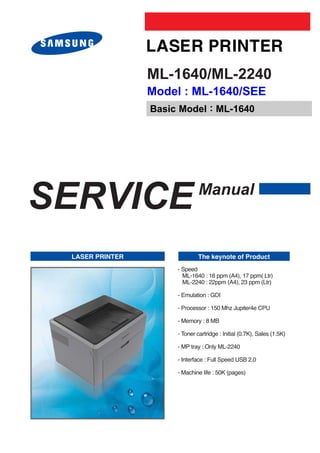
ML-1640/ML-2240
                 Model : ML-1640/SEE
                 Basic Model : ML-1640


SERVICE                        Manual


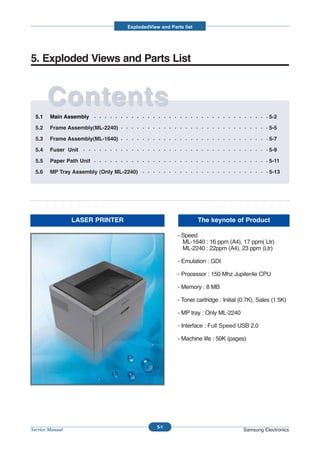
 LASER PRINTER                 The keynote of Product
                      - Speed
                        ML-1640 : 16 ppm (A4), 17 ppm( Ltr)
                        ML-2240 : 22ppm (A4), 23 ppm (Ltr)

                      - Emulation : GDI

                      - Processor : 150 Mhz Jupiter4e CPU

                      - Memory : 8 MB

                      - Toner cartridge : Initial (0.7K), Sales (1.5K)

                      - MP tray : Only ML-2240

                      - Interface : Full Speed USB 2.0

                      - Machine life : 50K (pages)
ELECTRONICS


GSPN (Global Service Partner Network)

North America : service.samsungportal.com
Latin America : latin.samsungportal.com
CIS : cis.samsungportal.com
Europe : europe.samsungportal.com
China : china.samsungportal.com                 Samsung Electronics Co.,Ltd. January 2008
Asia : asia.samsungportal.com                Printed in Korea.
Mideast & Africa : mea.samsungportal.com     VERSION NO. : 1.00       CODE : 1640-D00SEE
Contents


1. Precautions

   1.1 Safety Warning                        1-1
   1.2 Caution for safety                    1-2
   1.3 ESD Precautions                       1-4


2. Product spec and feature

   2.1 Product Specifications                2-1
     2.1.1 Product Overview                  2-1
     2.1.2 Specifications                    2-1
     2.1.3 Model Comparison Table            2-5
     2.1.4 Accessory List                    2-5
   2.2 System Overview                       2-6
     2.2.1 System Outline                    2-6
     2.2.2 H/W Structure and Descriptions   2-12
     2.2.3 S/W Structure and Descriptions   2-25
     2.2.4 Initial Product Installation     2-29


3. Disassembly and Reassembly

   3.1 General Precautions on Disassembly    3-1
   3.2 Disassembly and Reassembly            3-2
     3.2.1 Front Cover                       3-2
     3.2.2 Main Cover                        3-3
     3.2.3 Fuser unit                        3-4
     3.2.4 SMPS board                        3-5
     3.2.5 Main PBA                          3-5
     3.2.6 Drive unit                        3-6
     3.2.7 LSU                               3-7
Continued


     3.2.8 HVPS board                           3-7
     3.2.9 Transfer roller                      3-8
     3.2.10 Pick up roller                      3-8


4. Alignment & Troubleshooting

   4.1 Alignment and Adjustments                4-1
     4.1.1 Sample Pattern                       4-1
     4.1.2 Control Panel                        4-3
     4.1.3 Consumables and Replacement Parts    4-6
     4.1.4 Periodic Defective Image             4-7
     4.1.5 How to use DCU                       4-8
     4.1.6 Paper Path                          4-13
   4.2 Troubleshooting                         4-18
     4.2.1 Checking Symptoms                   4-18
     4.2.2 Bad discharge                       4-21
     4.2.3 Malfunction                         4-28
     4.2.4 Bad Software Environment            4-37
     4.2.5 Bad image                           4-42


5. Exploded Views & Parts List

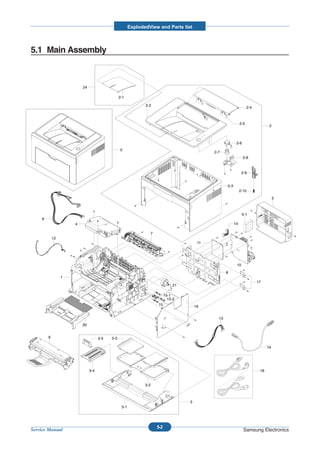
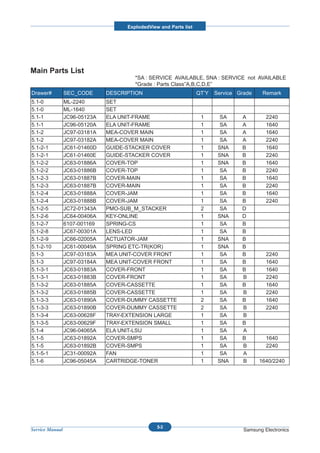
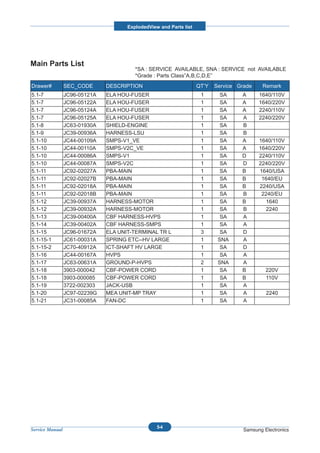
   5.1   Main Assembly                          5-2
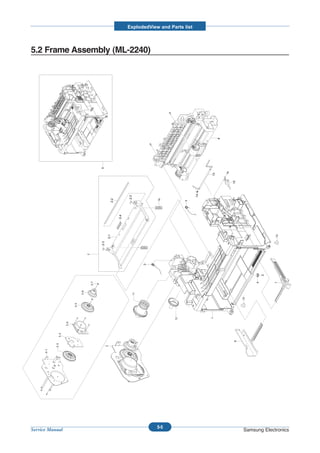
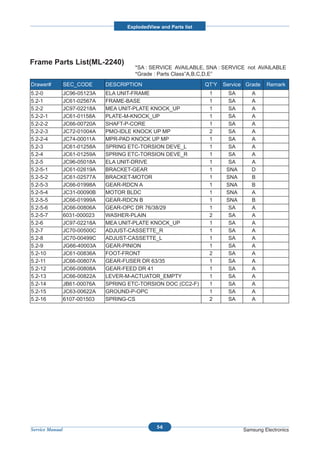
   5.2   Frame Assembly(ML-2240)                5-5
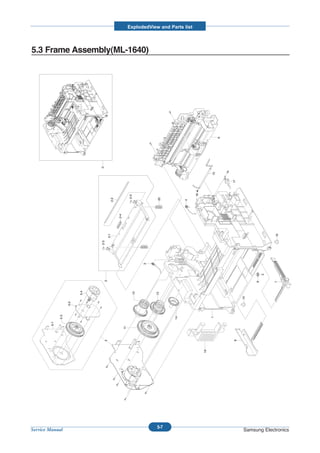
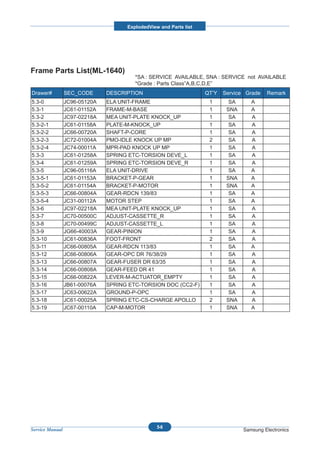
   5.3   Frame Assembly(ML-1640)                5-7
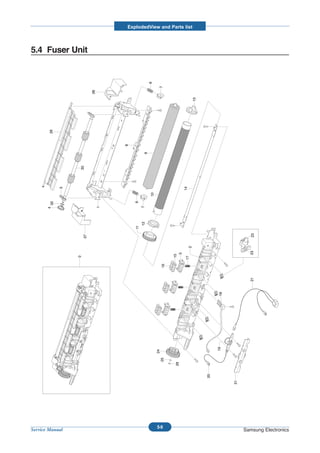
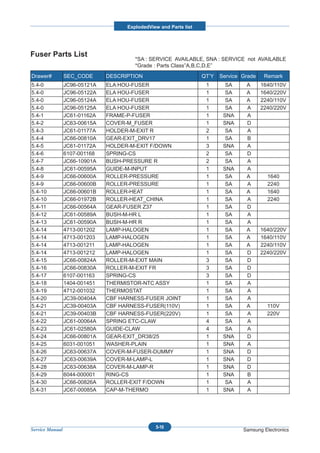
   5.4   Fuser Unit                             5-9
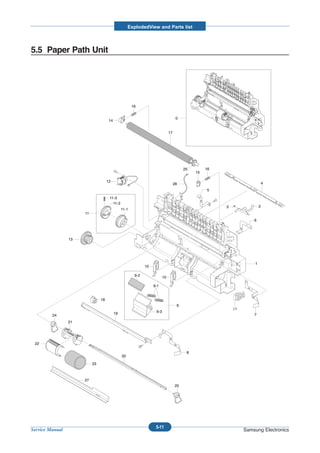
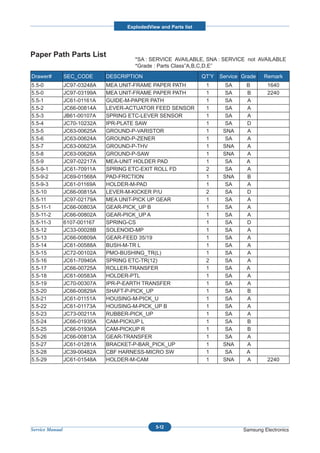
   5.5   Paper Path Unit                       5-11
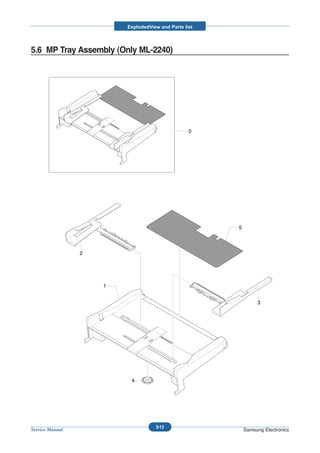
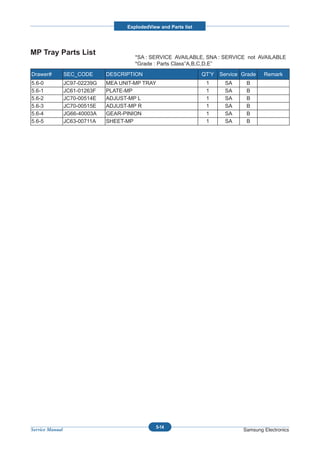
   5.6   MP Tray Assembly (Only ML-2240)       5-13
Continued


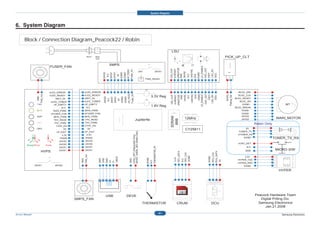
6. System Diagram


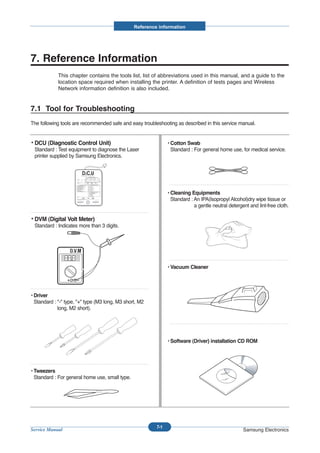
7   Reference Information

    7.1 Troubleshooting Tools                    7-1
    7.2 Acronyms and Abbreviations               7-2
    7.3 Selecting printer locations              7-4
    7.4 Sample Tests Patterns                    7-5
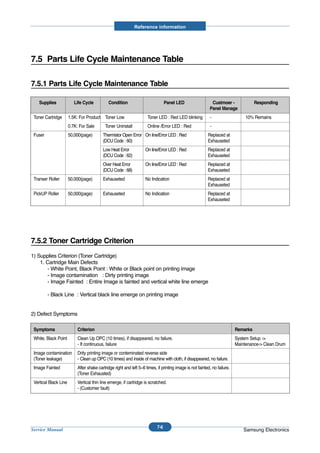
    7.5 Parts Life Cycle Maintenance Table       7-6
      7.5.1 Parts Life Cycle Maintenance Table   7-6
      7.5.2 Toner Cartridge Criterion            7-6
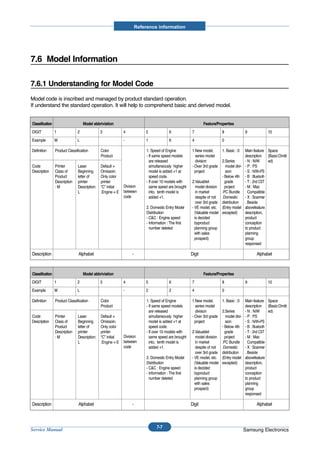
    7.6 Model Information                        7-7
      7.6.1 Understanding for Model Code         7-7
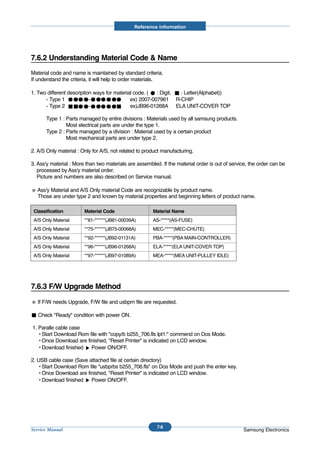
      7.6.2 Understanding Material Code & Name   7-8
      7.6.3 F/W Upgrade Method                   7-8
Precautions


1. Precautions
The cautions below are items needed to keep in mind when maintaining and servicing.
Please read carefully and keep the contents in mind to prevent accidents while servicing and to prevent the
machine from getting damaged.

1.1 Safety Warning
(1) Request service by qualified service person.
Service for this machine must be performed by a Qualified service person. It is dangerous if unqualified ser-
vice personnel or users try to fix the machine.

(2) Do not rebuild.
Do not attach or change parts discretionary. Do not dissemble, fix of rebuilt it. If so, printer will abnormally
work and electric shock or fire may occur.

(3) Laser Safety Statement
The Printer is certified in the U.S. to conform to the requirements of DHHS 21 CFR, chapter 1 Subchapter J
for Class 1(1) laser products, and elsewhere, is certified as a Class I laser product conforming to the
requirements of IEC 825.
Class I laser products are not considered to be hazardous. The laser system and printer are designed so
there is never any human access to laser radiation above a Class I level during normal operation, user
maintenance, or prescribed service condition.

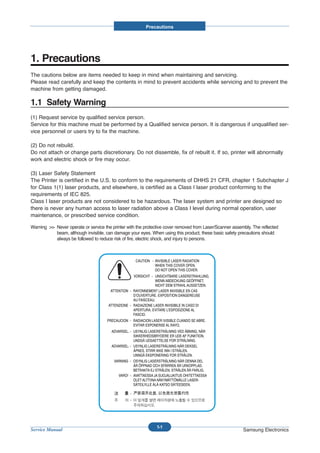
Warning >> Never operate or service the printer with the protective cover removed from Laser/Scanner assembly. The reflected
           beam, although invisible, can damage your eyes. When using this product, these basic safety precautions should
           always be followed to reduce risk of fire, electric shock, and injury to persons.


                                                               1-1
Service Manual                                                                                            Samsung Electronics
Precautions


1.2 Safety Caution
1.2.1 Noxious Material Precaution
The toner in a printer cartridge contains a chemical material, which may harm human body if it is swallowed.
Please keep children out of reach of the toner cartridge.


1.2.2 Electric Shock or fire Precaution
It is possible to get electric shock or burn by fire if you don't fallow the instructions of the manual.

(1) Use exact voltage. Please use an exact voltage and wall socket. If not, a fire or an electric leakage can be
    caused.
(2) Use authorized power cord. Do use the power cord supplied with PRINTER. A fire can happen when over cur-
    rent flows in the power cord.
(3) Do not insert many cords in an outlet. A fire can be occurred due to flow over current in an outlet.
(4) Do not put water or extraneous matter in the PRINTER. Please do not put water, other liquid, pin, clip, etc. It
    can cause a fire, electric shock, or malfunction. If this occurs, turn off the power and remove the power plug
    from outlet immediately.
(5) Do not touch the power plug with wet hand. When servicing, remove the power plug from outlet. Do not insert
    or take off it with wet hand. Electric shock can be occurr.
(6) Caution when inserting or taking off the power plug. The power plug has to be inserted completely. If not, a fire
    can be caused due to poor contact. When taking off the power plug, grip the plug and take it off. If grip the line
    and pull over, it could be damaged. A fire or electric shock could happen.
(7) Management of power cord. Do not bend, twist, or bind it and place other materials on it. Do not fix with sta-
    ples. If the power cord gets damaged, a fire or electric shock can happen. A damaged power cord must be
    replaced immediately. Do not repair the damaged part and reuse it. A repaired part with plastic tape can be
    cause a fire or electric shock. Do not spread chemicals on the power cord. Do not spread insecticide on the
    power cord. A fire or electric shock can be happen due to thinner(weak) cover of the power cord.
(8) Check whether the power outlet and the power plug are damaged, pressed, chopped, or blazing fire or not.
    When such inferiorities are found, repair it immediately. Do not make it pressed or chopped when moving the
    machine.
(9) Caution when there is thundering or lightning, and being flash of lightening. It causes a fire or electric shock.
    Take the power plug off there is thunder. Do not touch cable and device when thundering and flash of lighten-
    ing.
(10) Avoid the place where is moisture or has dust. Do not install the printer where lots of dust or around humidifi-
      er. A fire can occurred. A plug part need to clean well with dried fabric to remove dust. If water drops are
      dripped on the place covered with dust, a fire can occurred.
(11) Avoid direct sunlight. Do not install the printer near window where direct contacts to the sunlight. If the
      machine contacts sunlight long time, the machine cannot work properly because inner temperature of the
      machine is getting hotter. A fire can occur.
(12) Turn off the power and take off the plug when smoke, strange smell, or sound from the machine. If you keep
      using it, a fire can be occurred.
(13) Do not insert steel or metal piece inside/outside of the machine. Do not put steel or metal piece into a ventila-
      tor. An electric shock could happened.


                                                            1-2
Service Manual                                                                                        Samsung Electronics
Precautions


1.2.3 Handling Precautions
If you ignore this information, you could harm machine and could be damaged.

(1) Do not install it on different levels, or slanted floor.
    Please confirm whether it is balanced or not after installation. If it is unbalanced, an accident can be hap-
    pened due to the machine falling over.
(2) Be careful not to insert a finger or hair in the rotating unit.
    Be careful not to insert a finger of hair in the rotating unit (motor, fan, paper feeding part, etc) while the
    machine is operating. Once it happens, you could be harmed.
(3) Do not place a pot containing water/chemical or small metals. If they got caught into the inner side of
    machine, a fire or electric shock can be occurred.
(4) Do not install it where lots of moisture or dust exists or where raindrop reaches. A fire or electric shock
    can be caused.
(5) Do not place a candlelight, burning cigarette, and etc. on the machine. Do not install it near to heater. A
    fire can be occurred.


1.2.4 Assembly/Disassembly precaution
When replacing parts, do it very carefully. Memorize the location of each cable before replace parts for recon-
necting it afterwards. Do memorize. Please perform the steps below before replace or disassembly the parts.

(1) Check the contents stored in the memory. All the information will be erased after replacing main board.
    The information needed to keep has to be written down.
(2) Before servicing or replacing electric parts, take off a plug.
(3) Take off printer cables and power cord connected to printer.
(4) Do use formal parts and same standardized goods when replacing parts.Must check the product name,
    part cord, rated voltage, rated current, operating temperature, etc.
(5) Do not give an over-force when release or tighten up the plastic parts.
(6) Be careful not to drop the small parts such as screws in the printer.
(7) Be careful not to change the location of small parts such as screws when assembling and disassembling.
(8) Do remove dust or foreign matters completely to prevent fire of tracking, short, or etc.
(9) After finished repair, check the assembling state whether it is same as before the repair or not.


                                                       1-3
Service Manual                                                                               Samsung Electronics
Precautions


1.3 ESD Precautions
Certain semiconductor devices can be easily damaged by static electricity. Such components are commonly called
“Electrostatically Sensitive (ES) Devices”, or ESDs. Examples of typical ESDs are: integrated circuits, some field
effect transistors, and semiconductor “chip” components.
The techniques outlined below should be followed to help reduce the incidence of component damage caused by
static electricity.

Caution >>Be sure no power is applied to the chassis or circuit, and observe all other safety precautions.
1. Immediately before handling a semiconductor component or semiconductor-equipped assembly, drain off any
   electrostatic charge on your body by touching a known earth ground. Alternatively, employ a commercially avail-
   able wrist strap device, which should be removed for your personal safety reasons prior to applying power to the
   unit under test.
2. After removing an electrical assembly equipped with ESDs, place the assembly on a conductive surface, such
   as aluminum or copper foil, or conductive foam, to prevent electrostatic charge buildup in the vicinity of the
   assembly.
3. Use only a grounded tip soldering iron to solder or desolder ESDs.
4. Use only an “anti-static” solder removal device. Some solder removal devices not classified as “anti-static” can
   generate electrical charges sufficient to damage ESDs.
5. Do not use Freon-propelled chemicals. When sprayed, these can generate electrical charges sufficient to dam-
   age ESDs.
6. Do not remove a replacement ESD from its protective packaging until immediately before installing it. Most
   replacement ESDs are packaged with all leads shorted together by conductive foam, aluminum foil, or a compa-
   rable conductive material.
7. Immediately before removing the protective shorting material from the leads of a replacement ESD, touch the
   protective material to the chassis or circuit assembly into which the device will be installed.
8. Maintain continuous electrical contact between the ESD and the assembly into which it will be installed, until
   completely plugged or soldered into the circuit.
9. Minimize bodily motions when handling unpackaged replacement ESDs. Normal motions, such as the brushing
   together of clothing fabric and lifting one’s foot from a carpeted floor, can generate static electricity sufficient to
   damage an ESD.


                                                                  1-4
Service Manual                                                                                               Samsung Electronics
Product spec and feature


2. Product specification and feature

2.1 Product Specifications

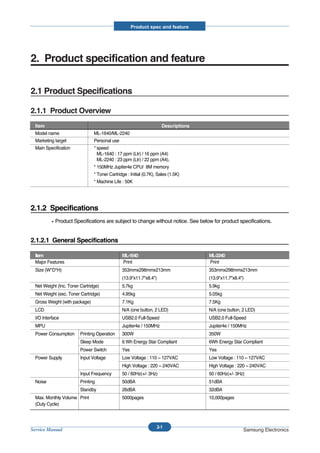
2.1.1 Product Overview
  Item                                                                Descriptions
  Model name                    ML-1640/ML-2240
  Marketing target              Personal use
  Main Specification            * speed
                                  ML-1640 : 17 ppm (Ltr) / 16 ppm (A4)
                                  ML-2240 : 23 ppm (Ltr) / 22 ppm (A4),
                                * 150MHz Jupiter4e CPU/ 8M memory
                                * Toner Cartridge : Initial (0.7K), Sales (1.5K)
                                * Machine Life : 50K


2.1.2 Specifications
            Product Specifications are subject to change without notice. See below for product specifications.


2.1.2.1 General Specifications

  Item                                         ML-1640                               ML-2240
  Major Features                               Print                                 Print
  Size (W*D*H)                                 353mmx298mmx213mm                     353mmx298mmx213mm
                                               (13.9"x11.7"x8.4")                    (13.9"x11.7"x8.4")
  Net Weight (Inc. Toner Cartridge)            5.7kg                                 5.9kg
  Net Weight (exc. Toner Cartridge)            4.95kg                                5.05kg
  Gross Weight (with package)                  7.1Kg                                 7.5Kg
  LCD                                          N/A (one button, 2 LED)               N/A (one button, 2 LED)
  I/O Interface                                USB2.0 Full-Speed                     USB2.0 Full-Speed
  MPU                                          Jupiter4e / 150MHz                    Jupiter4e / 150MHz
  Power Consumption      Printing Operation    300W                                  350W
                         Sleep Mode            6 Wh Energy Star Compliant            6Wh Energy Star Compliant
                         Power Switch          Yes                                   Yes
  Power Supply           Input Voltage         Low Voltage : 110 ~ 127VAC            Low Voltage : 110 ~ 127VAC
                                               High Voltage : 220 ~ 240VAC           High Voltage : 220 ~ 240VAC
                         Input Frequency       50 / 60Hz(+/- 3Hz)                    50 / 60Hz(+/- 3Hz)
  Noise                  Printing              50dBA                                 51dBA
                         Standby               26dBA                                 32dBA
  Max. Monthly Volume Print                    5000pages                             10,000pages
  (Duty Cycle)


                                                                    2-1
Service Manual                                                                                        Samsung Electronics
Product spec and feature


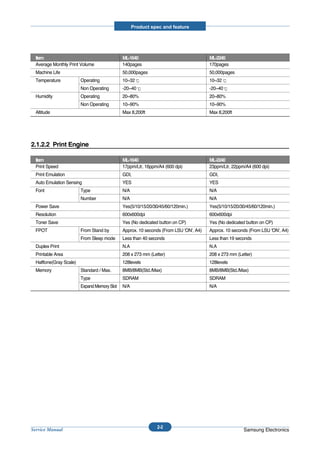
  Item                                        ML-1640                                  ML-2240
  Average Monthly Print Volume                140pages                                 170pages
  Machine Life                                50,000pages                              50,000pages
  Temperature            Operating            10~32                                    10~32
                         Non Operating        -20~40                                   -20~40
  Humidity               Operating            20~80%                                   20~80%
                         Non Operating        10~90%                                   10~90%
  Altitude                                    Max 8,200ft                              Max 8,200ft


2.1.2.2 Print Engine

  Item                                        ML-1640                                  ML-2240
  Print Speed                                 17ppm/Ltr, 16ppm/A4 (600 dpi)            23ppm/Ltr, 22ppm/A4 (600 dpi)
  Print Emulation                             GDI,                                     GDI,
  Auto Emulation Sensing                      YES                                      YES
  Font                   Type                 N/A                                      N/A
                         Number               N/A                                      N/A
  Power Save                                  Yes(5/10/15/20/30/45/60/120min.)         Yes(5/10/15/20/30/45/60/120min.)
  Resolution                                  600x600dpi                               600x600dpi
  Toner Save                                  Yes (No dedicated button on CP)          Yes (No dedicated button on CP)
  FPOT                   From Stand by        Approx. 10 seconds (From LSU 'ON', A4)   Approx. 10 seconds (From LSU 'ON', A4)
                         From Sleep mode      Less than 40 seconds                     Less than 19 seconds
  Duplex Print                                N.A                                      N.A
  Printable Area                              208 x 273 mm (Letter)                    208 x 273 mm (Letter)
  Halftone(Gray Scale)                        128levels                                128levels
  Memory                 Standard / Max.      8MB/8MB(Std./Max)                        8MB/8MB(Std./Max)
                         Type                 SDRAM                                    SDRAM
                         Expand Memory Slot   N/A                                      N/A


                                                               2-2
Service Manual                                                                                         Samsung Electronics
Product spec and feature


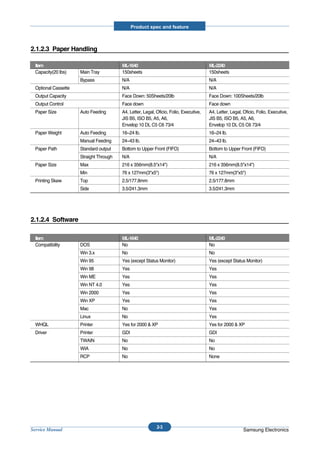
2.1.2.3 Paper Handling

  Item                                   ML-1640                                        ML-2240
  Capacity(20 lbs)    Main Tray          150sheets                                      150sheets
                      Bypass             N/A                                            N/A
  Optional Cassette                      N/A                                            N/A
  Output Capacity                        Face Down: 50Sheets/20lb                       Face Down: 100Sheets/20lb
  Output Control                         Face down                                      Face down
  Paper Size          Auto Feeding       A4, Letter, Legal, Oficio, Folio, Executive,   A4, Letter, Legal, Oficio, Folio, Executive,
                                         JIS B5, ISO B5, A5, A6,                        JIS B5, ISO B5, A5, A6,
                                         Envelop 10 DL C5 C6 73/4                       Envelop 10 DL C5 C6 73/4
  Paper Weight        Auto Feeding       16~24 lb.                                      16~24 lb.
                      Manual Feeding     24~43 lb.                                      24~43 lb.
  Paper Path          Standard output    Bottom to Upper Front (FIFO)                   Bottom to Upper Front (FIFO)
                      Straight Through   N/A                                            N/A
  Paper Size          Max                216 x 356mm(8.5"x14")                          216 x 356mm(8.5"x14")
                      Min                76 x 127mm(3"x5")                              76 x 127mm(3"x5")
  Printing Skew       Top                2.5/177.8mm                                    2.5/177.8mm
                      Side               3.5/241.3mm                                    3.5/241.3mm


2.1.2.4 Software

  Item                                   ML-1640                                        ML-2240
  Compatibility       DOS                No                                             No
                      Win 3.x            No                                             No
                      Win 95             Yes (except Status Monitor)                    Yes (except Status Monitor)
                      Win 98             Yes                                            Yes
                      Win ME             Yes                                            Yes
                      Win NT 4.0         Yes                                            Yes
                      Win 2000           Yes                                            Yes
                      Win XP             Yes                                            Yes
                      Mac                No                                             Yes
                      Linux              No                                             Yes
  WHQL                Printer            Yes for 2000 & XP                              Yes for 2000 & XP
  Driver              Printer            GDI                                            GDI
                      TWAIN              No                                             No
                      WIA                No                                             No
                      RCP                No                                             None


                                                            2-3
Service Manual                                                                                             Samsung Electronics
Product spec and feature


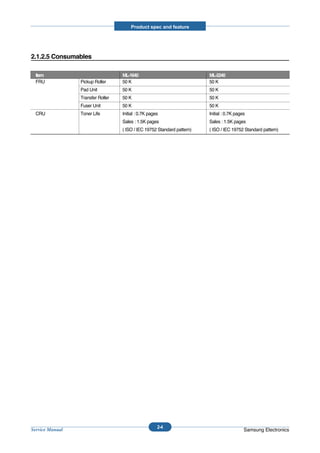
2.1.2.5 Consumables

  Item                             ML-1640                               ML-2240
  FRU            Pickup Roller     50 K                                  50 K
                 Pad Unit          50 K                                  50 K
                 Transfer Roller   50 K                                  50 K
                 Fuser Unit        50 K                                  50 K
  CRU            Toner Life        Initial : 0.7K pages                  Initial : 0.7K pages
                                   Sales : 1.5K pages                    Sales : 1.5K pages
                                   ( ISO / IEC 19752 Standard pattern)   ( ISO / IEC 19752 Standard pattern)


                                                      2-4
Service Manual                                                                              Samsung Electronics
Product spec and feature


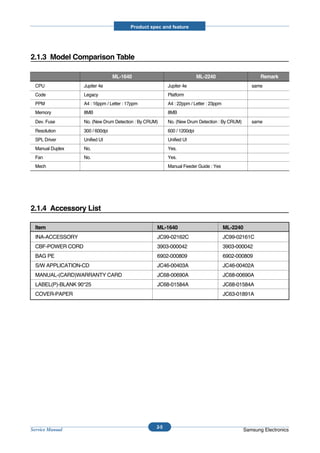
2.1.3 Model Comparison Table

                                  ML-1640                                 ML-2240                     Remark
  CPU              Jupiter 4e                             Jupiter 4e                              same
  Code             Legacy                                 Platform
  PPM              A4 : 16ppm / Letter : 17ppm            A4 : 22ppm / Letter : 23ppm
  Memory           8MB                                    8MB
  Dev. Fuse        No. (New Drum Detection : By CRUM)     No. (New Drum Detection : By CRUM)      same
  Resolution       300 / 600dpi                           600 / 1200dpi
  SPL Driver       Unified UI                             Unified UI
  Manual Duplex    No.                                    Yes.
  Fan              No.                                    Yes.
  Mech                                                    Manual Feeder Guide : Yes


2.1.4 Accessory List

  Item                                              ML-1640                             ML-2240
  INA-ACCESSORY                                     JC99-02162C                         JC99-02161C
  CBF-POWER CORD                                    3903-000042                         3903-000042
  BAG PE                                            6902-000809                         6902-000809
  S/W APPLICATION-CD                                JC46-00403A                         JC46-00402A
  MANUAL-(CARD)WARRANTY CARD                        JC68-00690A                         JC68-00690A
  LABEL(P)-BLANK 90*25                              JC68-01584A                         JC68-01584A
  COVER-PAPER                                                                           JC63-01891A


                                                    2-5
Service Manual                                                                                 Samsung Electronics
Product spec and feature


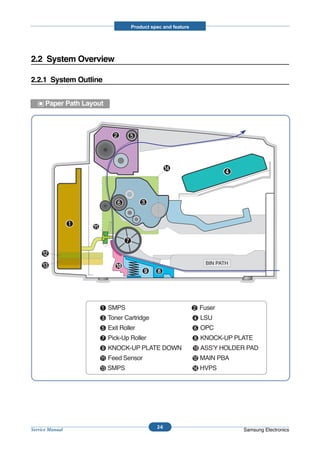
2.2 System Overview

2.2.1 System Outline


      Paper Path Layout


                                    2-6
Service Manual                                       Samsung Electronics
Product spec and feature


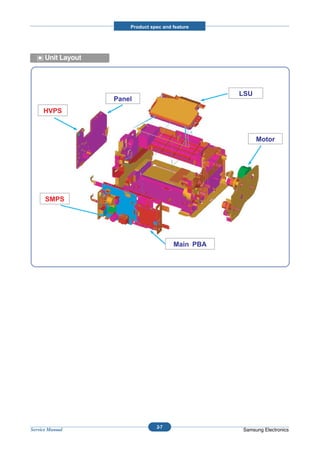
      Unit Layout


                                                    LSU
                    Panel
     HVPS


                                                          Motor


      SMPS


                                         Main PBA


                                  2-7
Service Manual                                      Samsung Electronics
Product spec and feature


2.2.1.1 Feeding

There are the C-path type, which loads papers, and the manual feeder, which supplies paper one by one.The
cassette has the function pad which separates paper one by one, and it has the sensor function to check the
existence of the loading paper.


         1) Feeding Type : MPF Type
         2) Feeding Standard : Center Loading
         3) Feeding Qty : Cassette 150 sheets (75g/ , 20lb paper standard)
         4) Manual 1 sheet (Paper, OHP, Envelope etc.)
         5) Separating Type : Cassette - Friction Pad Type
         6) Driver Type : Driving by Gearing from Main Motor
         7) Pick_up Roller Driver : Solenoid
         8) Paper detecting Sensor : Photo Sensor
         9) Paper Size Sensor : None
         10) Paper Exit Type : Face Down
         11) MP Tray : MP Cassette Type (Cener Loading)


2.2.1.2 Transfer Ass’y

The transfer roller delivers the toner of the OPC drum to the paper.


         - The life span : Print over 50,000 sheets (in 16 ~30 )


2.2.1.3 Driver Ass’y

It is a power delivery unit by gearing. By driving the motor, it supplies the power to the feeding unit, the fusing unit,
and the distributing unit.(Motor drive IC : A3977)


         - It is a power delivery unit by gearing : Feeder/Developer    Motor     Fuser/Exit


2.2.1.4 FUSER

The fuser is consisted of the Heat Lamp,Heat Roller,Pressure Roller,Thermister and Thermostat.
It adheres the toner on the paper with pressure and heat to complete the printing job.


         - Life Cycle : 50K(pages)


                                                           2-8
Service Manual                                                                                     Samsung Electronics
Product spec and feature


1) Heat Lamp
   . Heat Lamp Terminal Shape : Terminal Single Type
   . Voltage 120 V : 115 +/- 5 %
               220 V : 230 +/- 5 %
   . Capacity : 600 Watt (ML-1640), 750 Watt (ML-2240) +/- 5 %
   . Life : 3000 Hr


2) Thermostat
   . Thermostat Type : Non-Contact type THERMOSTAT
   . Control Temperature : 150     5


3) Thermistor
   . Thermistor Type : HF-K7006
   . Temperature Resistance : 7 (180 )
   . SYSTEM Temperature SETTING
         - Stand by : 155 / 145 / 140 +/- 5 (~30page / 31 ~ 60page / 60page~ ) (NN. Plain)
         - Printing : 175 / 170 +/- 5 (~30page / 30page ~) (NN. Plain)
         - Overshoot : 200 or less
         - Overheat : 220 or less


4) Heat roller
   . Length : 247.5 mm
   . Valid length : 222 mm
   . GND Type : H/R Bearing Grounding type By SECC Fuser frame


5) Pressure roller
   . Shaft
         - Length : 237.5 mm
   . Rubber
         - Length : 222 mm


6) Paper separation method
   Teflon sintered Claw System


7) Safety Relevant Facts
   . Protecting device when overheating
         - 1st protecting device : H/W cuts off when detecting an overheating
         - 2st protecting device : S/W cuts off when detecting overheating
         - 3st protecting device : Thermostat cuts off the power
   . Safety device
         - The power of Fuser is cut-off after front cover is open.
         - The overheating safety device for customer
         - The surface temperature of the Fuser Cover is under 80


                                                         2-9
Service Manual                                                                               Samsung Electronics
Product spec and feature


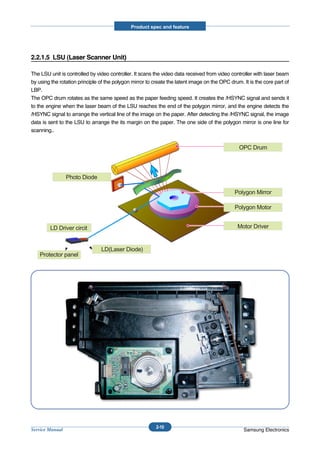
2.2.1.5 LSU (Laser Scanner Unit)

The LSU unit is controlled by video controller. It scans the video data received from video controller with laser beam
by using the rotation principle of the polygon mirror to create the latent image on the OPC drum. It is the core part of
LBP.
The OPC drum rotates as the same speed as the paper feeding speed. It creates the /HSYNC signal and sends it
to the engine when the laser beam of the LSU reaches the end of the polygon mirror, and the engine detects the
/HSYNC signal to arrange the vertical line of the image on the paper. After detecting the /HSYNC signal, the image
data is sent to the LSU to arrange the its margin on the paper. The one side of the polygon mirror is one line for
scanning..


                                                                                                OPC Drum


                 Photo Diode

                                                                                              Polygon Mirror

                                                                                              Polygon Motor


        LD Driver circit                                                                        Motor Driver


                                LD(Laser Diode)
    Protector panel


                                                          2-10
Service Manual                                                                                    Samsung Electronics
Product spec and feature


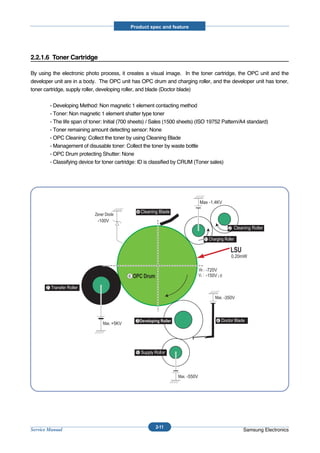
2.2.1.6 Toner Cartridge

By using the electronic photo process, it creates a visual image. In the toner cartridge, the OPC unit and the
developer unit are in a body. The OPC unit has OPC drum and charging roller, and the developer unit has toner,
toner cartridge, supply roller, developing roller, and blade (Doctor blade)


           - Developing Method: Non magnetic 1 element contacting method
           - Toner: Non magnetic 1 element shatter type toner
           - The life span of toner: Initial (700 sheets) / Sales (1500 sheets) (ISO 19752 Pattern/A4 standard)
           - Toner remaining amount detecting sensor: None
           - OPC Cleaning: Collect the toner by using Cleaning Blade
           - Management of disusable toner: Collect the toner by waste bottle
           - OPC Drum protecting Shutter: None
           - Classifying device for toner cartridge: ID is classified by CRUM (Toner sales)


                                                                                 Max -1.4KV

                                                   8 Cleaning Blade
                                -100V
                                                                                                2 Cleaning Roller

                                                                                   1


                                                                                                 0.20mW

                                                                                   -720V
                                               6                                   -150V¡Ø

       7

                                                                                              -350V


                                                   3                                    4
                                        +5KV


                                                   5


                                                                         -550V


                                                            2-11
Service Manual                                                                                         Samsung Electronics
Product spec and feature


2.2.2 H/W Structure and Descriptions

2.2.2.1 H/W Overview

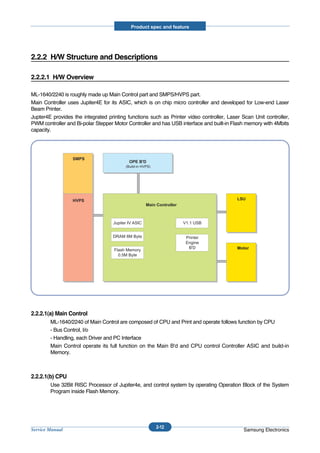
ML-1640/2240 is roughly made up Main Control part and SMPS/HVPS part.
Main Controller uses Jupiter4E for its ASIC, which is on chip micro controller and developed for Low-end Laser
Beam Printer.
Jupter4E provides the integrated printing functions such as Printer video controller, Laser Scan Unit controller,
PWM controller and Bi-polar Stepper Motor Controller and has USB interface and built-in Flash memory with 4Mbits
capacity.


                  SMPS
                                           OPE B'D
                                         (Build-in HVPS)


                  HVPS                                                                    LSU
                                                     Main Controller


                                   Jupiter IV ASIC                     V1.1 USB


                                   DRAM 8M Byte                         Printer
                                                                        Engine
                                                                         B'D              Motor
                                    Flash Memory
                                      0.5M Byte


2.2.2.1(a) Main Control
        ML-1640/2240 of Main Control are composed of CPU and Print and operate follows function by CPU
        - Bus Control, I/o
        - Handling, each Driver and PC Interface
        Main Control operate its full function on the Main B'd and CPU control Controller ASIC and build-in
        Memory.


2.2.2.1(b) CPU
        Use 32Bit RISC Processor of Jupiter4e, and control system by operating Operation Block of the System
        Program inside Flash Memory.


                                                           2-12
Service Manual                                                                               Samsung Electronics
Product spec and feature


        - Main Function Block:   Completely Integrated System for Embedded Applications,
                                 32 Bit Risc Architecture, Efficient and Powerful ARM9 CPU
                                 LSU Interface Module for Interfacing PVC with LSU
                                 2 Channel General Purpose DMA Controller for High Speed I/O
                                 Dual Memory Bus Architecture
        - Operation Frequency : 150MHz
        - Operation Voltage : 3.3V
        - POWER ON RESET TIME : 6.6ms below


2.2.2.1(c) Flash Memory
        Store System Program and can be down load System Program through PC Interface
        - Capacity : 0.5M Byte
        - Access Time : 70 nsec


2.2.2.1(d) DRAM
        When Printing, use Band Buffer, System Working Memory Area .
        - 8M capa : 8M Byte basic.
        - Access Time : 60 nsec


2.2.2.1(e) ENGINE
        This recording method is electrophography method using LSU, which toner is composed of 1 component
        and non magnetic.

  1) Recording Method : LSU(Laser Scanning Unit)
  2) Printing Speed : 22ppm
     (In continuing printing base A4, printing pages from 2nd to last during 1min)
  3) Recording Density : 600 dpi    1200 dpi
  4) Cassette Capa. : Cassette ; 150sheets(75g Base),
     Manual : 1 sheet (Paper, OHP, Envelop, etc )
  5) Paper Size : Cassette ,Manual; Width = 76 ~ 216mm, Length = 125mm ~ 356mm
  6) Effective recording size
        - A4 : 202 x 291 mm
        - Letter : 208 x 273 mm
        - Legal : 208 x 350 mm
        - Folio : 208 x 325 mm
        - Top Margin : 4.23      3 mm
        - Left, Right Margin : 4.23 3 mm
  7) CRU(Toner Cartridge)Life : 1,500pages Printing(A4, 5% Pattern Printing)
  8) First Print Out Time : 10sec( Standby )


                                                        2-13
Service Manual                                                                           Samsung Electronics
Product spec and feature


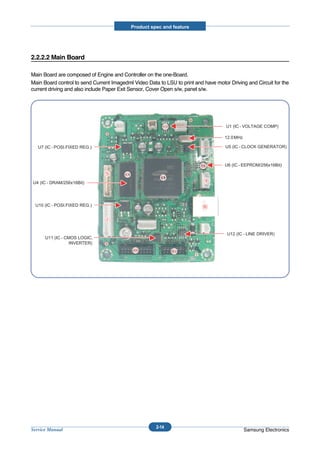
2.2.2.2 Main Board

Main Board are composed of Engine and Controller on the one-Board.
Main Board control to send Current Imagedml Video Data to LSU to print and have motor Driving and Circuit for the
current driving and also include Paper Exit Sensor, Cover Open s/w, panel s/w.


                                                      2-14
Service Manual                                                                               Samsung Electronics
Product spec and feature


  U6(Jupiter 4E)
  - It is a main CPU and an Asic of Jupiter4E which has a CPU core CLK with over 150MHz and a System bus 75MHz.
  - It use 3.3V for operation voltage and I/O, It uses 75MHz for system bus CLK, Built in Flash Memory.

  SDRAM
  - Main memory. SDCLK is 75Mhz.

  Regulator
  - It Supplies the core voltage to CPU by converting 3.3V to 1.8V.

  EEPROM(U8 : 93C66)
  - It is an EEPROM with 12C method.

  SMPS connector(CN7)
  - It connects SMPS, supplies the power, and delivers the high voltage contol signal, etc. If a harness is not normally
    connected to this connector, power cannot be supplied.

  LSU connector(CN14)
  - It connects a LSU.

  BLDC Motor connector(CN9)
  - It connects an main motor and drive a BLDC Motor.

  HVPS connector(CN13)
  - It connects a HVPS.

  DCU connector(CN8)
  - It interface a DCU-JIG

  USB connector(CN10)
  - It interface a the printer.


                                                           2-15
Service Manual                                                                                       Samsung Electronics
Product spec and feature


2.2.2.3 Asic(SPGPm) Specification

2.2.2.3(a) Introduction
Jupiter4E is One-Chip micro-Controller for Low cust Laser beam Printer.

1. One Chip Laser Beam Printer Controller
        - GDI only
        - AMBA AHB used for high speed bus transactions between masters and slaves
        - AMBA APB used for low speed bus transactions between ARM core and peripherals
        - 3 PLLs ( 2 Dithered PLL and 1 General PLL)
                     first for CPU(150MHz), AHB(75MHz), APB(75MHz),
                     second for USB(48MHz)
                     third for PVC(59MHz)
        - 75MHz system operation
        - 1.8V power operation
        - 3.3V tolerant input and bi-directional I/Os
        - SDRAM and IO Address / Data signals multiplexing

2. Integrated ARM940T 32-bit RISC embedded processor core
         - 150MHz core frequency operation
         - Harvard Architecture Cache : 4KByte Instruction cache, 4KByte Data cache
         - Single memory bus architecture

3. Built in Flash Memory
          - 4MBits (128Kx32bits)
          - Serial programming mode using flash programmer tool
          - Internally flash memory read / write operation support
          - Programmable access timing control

4. 32MB Special function Register Area

5. Directly connected to 3 external IO banks (IOC)
         - 32 MB size in each IO bank
         - Programmable setup, access, hold timing
         - Programmable recovery time for slow devices
         - Allows to access peripheral devices such as GPIO control logic

6. Directly connected to 1 external ROM bank (ROMC)
         - 32 MB size for one ROM bank
         - One external flash memory attachable.


                                                         2-16
Service Manual                                                                            Samsung Electronics
Product spec and feature


7. Directly connected to two SDRAM banks (SDRAMC)
         - Extensible architecture
         - Two external SDRAM attachable.
         - SDRAM controller supports PC-100 and PC-133 SDRAM running at 75MHz
         - Up to 32MB per bank.
         - Support for SDRAM configurations including programmable column address
         - Programmable refresh interval

8. Interrupt Controller (INTC)
         - FIQ or IRQ mode operation selectable
         - Programmable Interrupt Enable/Disable

9. USB interface
        - Version 1.1
        - Four 128x8 FIFOs for Data transmission.
        - Interrupt based input / output interface, no DMA based interface support
        - USB wrapper for AHB interface
        - AHB Bus interface

10. Serial port interface (UART)
         - Programmable Baud Rate
         - 2 channel Independent Full Duplex UART
         - Polling, Interrupt based operation support
         - Max 16 byte FIFO to handle SIR Bit Rate Speed

11. Printer video controller for LBP engines (PVC)
         - 80MHz video rate (Hummingbird 2 : letter - 21 ppm, A4 : 20ppm)
         - video data transmitted through LSU Controller

12. Laser Scan Unit (LSU) Controller
        - Laser Scan Unit (LSU) Interface for Laser Diode turn on/off timing control
        - Sample & hold period generation.
        - Auto Power Control for Laser Diode with PID control method using internal 10 bits DAC.
        - LSU clock generation
        - Brushless DC motor control clock generation

13. ADC Interface
       - 4 channels ADC interface for analog devices such as temperature sensor.
       - Programmable ADC Clock Cycle.
       - Automatic or Manual AD Conversion support.
       - 4 Special Function Registers for monitoring the ADC results for 4 channels.


                                                        2-17
Service Manual                                                                               Samsung Electronics
Product spec and feature


14. PWM Controller
       - 4 PWM output ports - THV, BIAS, FAN control and AC ELECTRIFICATION

15. Bi-polar Stepper Motor controller (MOTORC)
        - Phase generation for the purpose of paper feeding
        - fixed hardware phase and current table
        - programmable phase and interval time
        - Interrupt based phase change operation

16. Timer
        - 3 Independent Programmable Timers
        - Watch Dog Timer for S/W Trap

17. Miscellaneous
        - Mux controlled 24 GPI, 28 GPO & 5 GPIO ports .
        - Mutual exclusive GPO/GPIO ports control by the port control enable register
        - Programmable Bus Master Priority.
        - Project code added.


                                                       2-18
Service Manual                                                                          Samsung Electronics
Product spec and feature


2.2.2.4 Sensor Controller

2.2.2.4(a) Paper Feeding/Width
        When a paper passes an actuator of a feed sensor unit after feeding a paper into a set,it detects a signal of
        the photo interrupter and informs the paper feeding status to CPU. After sensing the signal and certain time
        later, it strews an image data.(Related in Paper Front Edge Adjustment)
        If it could not detect the feed sensor within 1 second after feeding a paper, a paper jam0 (CPU#_) occurs.


2.2.2.4(b) Paper Empty Sensing
        The paper empty is detected by the empty sensor mounted to an engine board and the actuator mounted
        to a frame. Paper senses the on/off time of the empty sensor by using CPU and informs the normal
        operation status and the jam occurrence status to CPU.


2.2.2.4(c) Jam Cover/Cover Open Sensing
        ML-1640/2240 uses two M/S:one senses the cover open and the other senses the jam cover open.
        The cover open sensor is located on the left bottom of HVPS.When the front cover is open, +24V supplied
        to each unit (DC fan, Solenoid, Main Motor, Polygon Motor Unit of LSU in Fusing Unit, and HVPS) is
        interrupted.
        The jam cover open sensor is located on the centeral top of HVPS. When the jam cover is open, +24V
        supplied to each unit (DC fan, Solenoid, Main Motor, Polygon Motor Unit of LSU in Fusing Unit, and HVPS)
        is interrupted.
        D0 bit of CPU detects the jam cover open/cover open, and D7 bit of CPU detects the existence of OPC.
        In this case, it informs the status to user by turning on the red LED among OP panel LEDs.


2.2.2.4(d) Solenoid Driving Circuit
        The solenoid consists of two used for paper pick-up and MP signal. D4 bit of CPU turns it on/off, and its
        driving time is 300ms. The diode protects the drive TR from the pulse (noise)generated by de-energizing
        operation of solenoid.


                                                        2-19
Service Manual                                                                                  Samsung Electronics
Product spec and feature


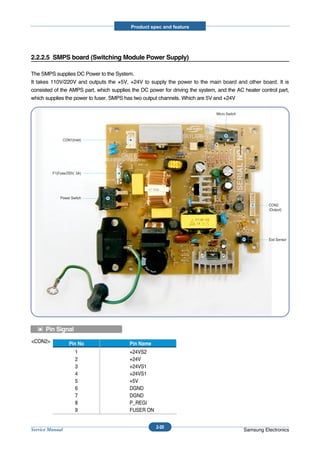
2.2.2.5 SMPS board (Switching Module Power Supply)

The SMPS supplies DC Power to the System.
It takes 110V/220V and outputs the +5V, +24V to supply the power to the main board and other board. It is
consisted of the AMPS part, which supplies the DC power for driving the system, and the AC heater control part,
which supplies the power to fuser. SMPS has two output channels. Which are 5V and +24V

                                                                               Micro Switch


                 CON1(Inlet)


         F1(Fuse/250V, 5A)


             Power Switch
                                                                                                        CON2
                                                                                                        (Output)


                                                                                                        Exit Sensor


      Pin Signal
<CON2>              Pin No                Pin Name
                        1                 +24VS2
                        2                 +24V
                        3                 +24VS1
                        4                 +24VS1
                        5                 +5V
                        6                 DGND
                        7                 DGND
                        8                 P_REGI
                        9                 FUSER ON


                                                     2-20
Service Manual                                                                                Samsung Electronics
Product spec and feature


1) SMPS Specification
       - AC Input
                  Input Rated Voltage : AC 220V ~ 240V, AC 120V / AC 220V(110V version)
                  Input Voltage fluctuating range : AC 90V ~ 135V / AC 180V ~ 270V(220V version)
                  Rated Frequency : 50/60 Hz
                  Frequency Fluctuating range : 47 ~ 63 Hz
                  Input Current : Under 4.0Arms / 2.5Arms
                  (But, the status when lamp is off or rated voltage is inputted/outputted )


        - Rated Output Power
           No              Items                        CH1                       CH2                    Remarks
            1    Channel                        +5V                    +24.0V
            2    Connector pin                  CON 3                  CON 3
                                                5V PIN : 11, 12        24V PIN : 2, 3, 4
                                                GND PIN : 8, 9         GND PIN : 6, 7
            3    Rated Output                   +5V 5%                 +24V      5%
                                                (4.75 ~ 5.25V)         (20.4 ~ 27.6V)
            4    Max. Output current            0.8A                   2.0A
            5    Peak Loading current           1.0A                   2.5A                        1ms
            6    RIPPLE NOISE Voltage           100mVp-p or less       500mVp-p or less
            7    Maximum output                 4W                     24W
            8    Peak output                    5W                     48W                         1ms
            9    Protecttion for loading
                 shorage and overflowing
                 current


        - Consumption Power
           No               Items                  CH1(+5V)               CH2(+24V)                System
            1    Stand-by                       1.0 A                0.4 A                  AVG : 55 Wh
            2    PRINTING                       1.0 A                2.0 A                  AVG : 250 Wh
            3    Sleep-Mode                     0.8 A                0.4 A                  AVG : 10 Wh


        - Power Cord Length : 1830° 50mm
        - Power Cord Switch : Use
        - Feature
                 . Insulating Resistance : 100 or more (at DC 500V)
                 . Insulating revisiting pressure : Must be no problem within 1 min. (at 1000Vac,10mA)
                 . Leaking Current : under 3.5mA
                 . Running Current : under 40A PEAK (AT 25 , COLD START)
                                         under 50A PEAK (In other conditions)
                 . Rising Time : within 2Sec
                 . Falling Time : over 20ms
                 . Surge : Ring Wave 6KV-500A (Normal, Common)


                                                        2-21
Service Manual                                                                                Samsung Electronics
Product spec and feature


         - Environment Condition
                 . Operating temperature range : 0     40
                 . Maintaining temperature range : -20     40
                 . Preserving Humidity Condition : 10% ~ 90% RH
                 . Operating atmospheric pressure range : 1atm


        - EMI Requirement : CISPR ,FCC, CE, MIC,
        - Safty Requrement : IEC950 UL1950, CSA950, C-UL,Semko, EK,CB,
                             CCC(CCIB),GOST, EPA, Power Save


2.2.2.6 HVPS board (High Voltage Power Supply)

The HVPS board creates the high voltage of THV/MHV/Supply/Dev and supplies it to the developer part for making
best condition to display the image. The HVPS part takes the 24V and outputs the high voltage for THV/MHV/BIAS,
and the outputted high voltage is supplied to the toner, OPC cartridge, and transfer roller.


  1) Transfer High Voltage (THV+)
        - Input Voltage : 24 V DC ° 15%
        - Out Voltage : Max. +1.3KV ° 15% (Cleaning,200 )
        - Out Voltage Trigger : 6.5
        - Input Voltage Variation : 5 % below(Variation 21.6V°≠26.4V)
                   Load Variation : % below
        - Out Voltage Rising Time : 100 ms Max
        - Out Voltage Falling Time : 100 ms Max
        - Transfer Variation Voltage on Environment Variation : +650 V(Duty 10%) ~ 5KV (Duty 90%)
        - Control Method on environment : THV-PWM ACTIVE,transfer Active signal, of environment sensing
          voltage is input and get feed back current, and recalculate it to resistence .
        - Control method on transfer output voltage : It is controlled by changing its duty of THVPWM Signal as
          follows. 10% Duty : +650V, 90% Duty : +5KV         5%


  2) Charge Voltage (MHV)
       - Input Voltage : 24 V DC 15%
       - Out Voltage : -1.3KV ~ 3.2%
       - Out Voltage Rising Time : 50 ms Max
       - Out Voltage Falling Time : 50 ms Max
       - Out Voltage Range : 30 ~ 1000
       - Output Control Signal(MHV-PWM) : CPU is HV output when PWM is Low


  3) Developing Voltage (DEV)
       - IInput Voltage : 24 V DC 15%
       - Output Voltage: -350V 4.6%
       - Output Voltage Fluctuation range: PWM Control
       - Input contrast of the output stability degree : 5 % or less
       - Loading contrast : 5 % or less
       - Output Voltage Rising Time : 50 ms Max


                                                       2-22
Service Manual                                                                             Samsung Electronics
Product spec and feature


        - Output Voltage Falling Time : 50 ms Max
        - Output Loading range : 10Mߟ ~ 1000
        - Output Control Signal (BIAS-PWM) : the CPU output is HV output when PWM is low.


  4) Supply
       - Output Voltage : -550 V 8.6%(ZENER using, DEV )
        - Input contrast of the output stability degree : under 5 %
        - Loading contrast : 5 % or less
        - Output Voltage Rising Time : 50 ms Max
        - Output Voltage Falling Time : 50 ms Max
        - Output Loading range : 10 ~ 1000
        - Output Control Signal (BIAS-PWM) : the CPU is HV output when PWM is low.

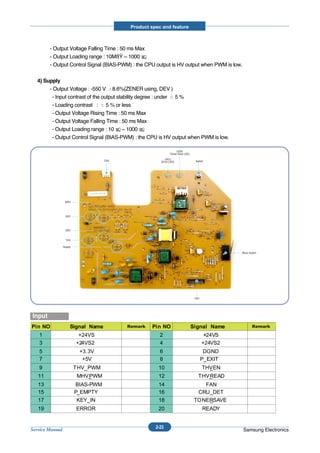
                                                                   LED2
                                                             (Toner Save LED)

                              CN3                        LED1
                                                      (Error LED)               Switch


                  MHV


                  OPC


                  DEV


                   THV

                 Supply

                                                                                         Micro Switch


                                                                                CN1


Input


                                                    2-23
Service Manual                                                                              Samsung Electronics
Product spec and feature


2.2.2.7 FUSER AC POWER CONTROL

Fuser(HEAT LAMP) gets heat from AC power. The AV power controls the switch with the Triac, a semiconductor
switch. The 'ON/OFF control' is operated when the gate of the Triac is turned on/off by Phototriac (insulting part).
In other words, the AC control part is passive circuit, so it turns the heater on/off with taking signal from engine
control part.
When the 'HEATER ON' signal is turned on at engine, the LED of PC1 (Photo Triac) takes the voltage and flashes.
From the flashing light, the Triac part (light receiving part) takes the voltage, and the voltage is supplied to the gate
of Triac and flows into the Triac. As a result, the AC current flows in the heat lamp, and heat is occurred.
On the other hand, when the signal is off, the PC1 is off, the voltage is cut off at the gate of Triac, the Triac
becomes off, and then the heat lamp is turned off.


   1) Triac (THY1) feature :16A, 600V SWITCHING
   2) Phototriac Coupler (PC3)
         . Turn On If Current : 16mA
         . High Repetive Peak Off State Voltage : Min 600V


                                                          2-24
Service Manual                                                                                     Samsung Electronics
Product spec and feature


2.2.3 S/W Structure and Descriptions

The purpose of this document is to describe the design specification of the Engine Control F/W for the
ML-1640/2240.


2.2.3.1 Introduction

This Engine Control Firmware is a program that controls LBP Engine of the ML-1640/2240.
This firmware is executed every 10msec as an interrupt routine of the main system. At stand-by state, this firmware
monitors the enable print command from the main system. If the enable print command is detected, this firmware
controls the Engine Mechanism according to the printing process and paper feeding state. And with the Sleep
command or Wake-Up command, this firmware controls the Engine state.


2.2.3.2 Engine Control F/W Overview

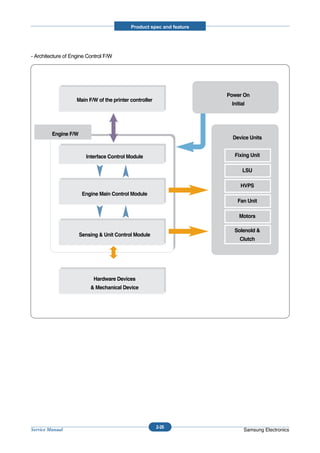
Engine Control F/W is executed every 10msec by timer interrupt of main system. And it consists of 3 control
modules.
       - Engine Main Control, Interface Control and Sensing & Unit Control Module.


Major operations of the Engine Control F/W are following.
        - Control the Pick-Up, Feeding and Discharging of Paper
        - Control the LSU
        - Control the HVPS for the Developer Process
        - Control the Temperature of Fixing unit


Controlling selection to here is added.
         - Second Cassette Feeder(SCF) : N/A


                                                        2-25
Service Manual                                                                                 Samsung Electronics
Product spec and feature


- Architecture of Engine Control F/W


                                                                       Power On
                    Main F/W of the printer controller
                                                                        Initial


         Engine F/W
                                                                         Device Units


                        Interface Control Module                         Fixing Unit

                                                                             LSU

                                                                            HVPS
                       Engine Main Control Module
                                                                           Fan Unit

                                                                            Motors

                                                                         Solenold &
                      Sensing & Unit Control Module
                                                                            Clutch


                           Hardware Devices
                          & Mechanical Device


                                                         2-26
Service Manual                                                                Samsung Electronics
Product spec and feature


2.2.3.3 F/W Architecture of Engine Control Firmware

        - The Engine Control Module is executed every 10msec as interrupt job of main system. There are three
          control modules, i.e., Engine Main Control Module, Engine Interface Module and Sensing & Unit Control
          Module.

        - Probably from usual state it will be able to rehabilitated a prior to entry error state in error condition it is to
          confirm. When the if rehabilitation is possible then after rehabilitating it goes back in usual state, else with
          an error condition it goes in error state. Currently the rehabilitation function of the low heat error , the over
          heat error and the LSU error is embodied.

        - Low Heat Error
          When the error occurrs, it does not indicate an error. It stores the present temperature and supplies the
          heat to the fixing unit during the scheduled time. If the temperature goes up after scheduled time, it goes
          back to a normal state. However, if not, it is formed that an error occurrs.

        - Over Heat Error
          When the error occurs, it informs an error first. It stores the present temperature as well and waits a
          scheduled time. If the temperature goes down after scheduled time, then it goes back to a normal state.
          However, if not, it is formed that an error occurrs.

        - Lsu Error
          When the error occurrs, it does not indicate an error. It accomplishes printing only again. If even time
          when it judges an error, it informs an error. Concretely speaking, if the LReady or Hsync error happens,
          the paper exits out beforehand. And then the engine mode is changed to recovery mode and the engine
          informs the main system of the engine mode. And the engine checks the LSU error in itself. If the error
          doesn’t happen, the printing job will be proceeding.


2.2.3.4 Engine Interface Module Design

Engine Interface Module communicates with the main system in order to receive the command from main system
and to transmit the present engine status for the requested status. There are two sub functions. One is a function to
receive the command from the main system. The other is a function that informs the main system of the current
engine status for the requested item.


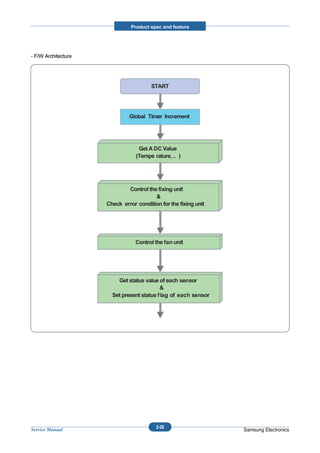
2.2.3.5 Engine Sensing & Unit Control Module Design

Engine Sensing & Unit Control Module consists of 4 sub-functions. The first function is an ADC function that reads
the ADC values of the temperature of the fixing unit. The second one is a fixing unit control function. This function
regulates the temperature of the fixing unit within a fixed range to be set by the paper type and the number of pages
to print out. The third one is a fan control function that controls the fan unit. And the last one sets the flag that
describes the present status of each sensor.


                                                           2-27
Service Manual                                                                                        Samsung Electronics
Product spec and feature


- F/W Architecture


                                       START


                              Global Timer Increment


                                  Get A DC Value
                                 (Tempe rature, .. )


                             Control the fixing unit
                                        &
                     Check error condition for the fixing unit


                                 Control the fan unit


                         Get status value of each sensor
                                           &
                       Set present status flag of each sensor


                                         2-28
Service Manual                                                   Samsung Electronics
Product spec and feature


2.2.4 Initial Product Installation

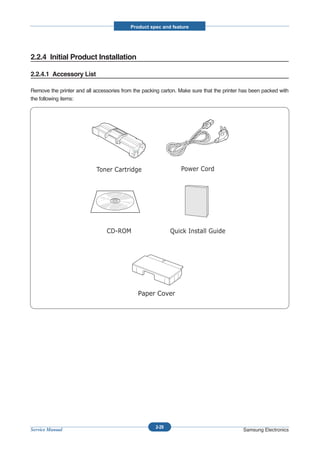
2.2.4.1 Accessory List

Remove the printer and all accessories from the packing carton. Make sure that the printer has been packed with
the following items:


                                                     2-29
Service Manual                                                                             Samsung Electronics
Product spec and feature


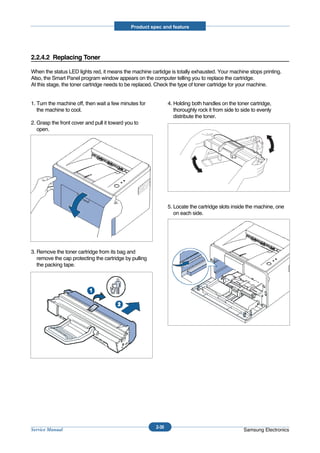
2.2.4.2 Replacing Toner

When the status LED lights red, it means the machine cartidge is totally exhausted. Your machine stops printing.
Also, the Smart Panel program window appears on the computer telling you to replace the cartridge.
At this stage, the toner cartridge needs to be replaced. Check the type of toner cartridge for your machine.


1. Turn the machine off, then wait a few minutes for           4. Holding both handles on the toner cartridge,
   the machine to cool.                                           thoroughly rock it from side to side to evenly
                                                                  distribute the toner.
2. Grasp the front cover and pull it toward you to
   open.


                                                               5. Locate the cartridge slots inside the machine, one
                                                                  on each side.


3. Remove the toner cartridge from its bag and
   remove the cap protecting the cartridge by pulling
   the packing tape.


                                                        2-30
Service Manual                                                                                    Samsung Electronics
Product spec and feature


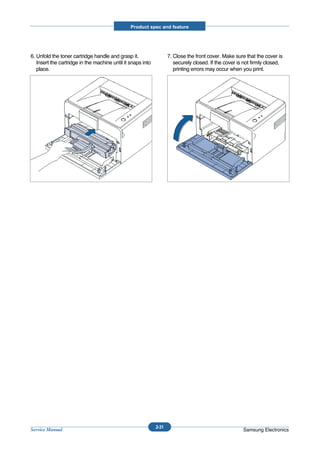
6. Unfold the toner cartridge handle and grasp it.                  7. Close the front cover. Make sure that the cover is
   Insert the cartridge in the machine until it snaps into             securely closed. If the cover is not firmly closed,
   place.                                                              printing errors may occur when you print.


                                                             2-31
Service Manual                                                                                         Samsung Electronics
Product spec and feature


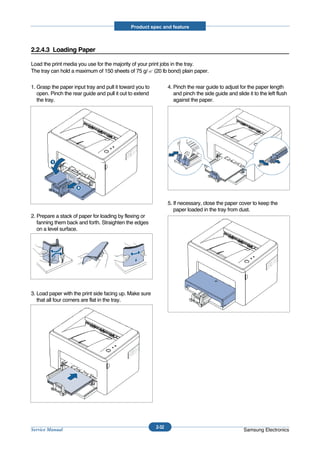
2.2.4.3 Loading Paper

Load the print media you use for the majority of your print jobs in the tray.
The tray can hold a maximum of 150 sheets of 75 g/ (20 lb bond) plain paper.

1. Grasp the paper input tray and pull it toward you to          4. Pinch the rear guide to adjust for the paper length
   open. Pinch the rear guide and pull it out to extend             and pinch the side guide and slide it to the left flush
   the tray.                                                        against the paper.


                                                                 5. If necessary, close the paper cover to keep the
                                                                    paper loaded in the tray from dust.
2. Prepare a stack of paper for loading by flexing or
   fanning them back and forth. Straighten the edges
   on a level surface.


3. Load paper with the print side facing up. Make sure
   that all four corners are flat in the tray.


                                                          2-32
Service Manual                                                                                       Samsung Electronics
Product spec and feature


2.2.4.7 Installing Printer Software

The supplied CD-ROM contains Windows printing software, Linux printing software, on-line User’s Guide and
Acrobat Reader to view the User’s Guide.


1. If you are printing from Windows
        - You can install the following printer software using the CD-ROM.
          • Printer driver for Windows. Use this driver to take full


       - advantage of your printer’s features. For details, see Software User Guide.
         • Status Monitor allows you to see the printing status of the printer. For details, see Software User Guide.


2. If you are printing in Linux
        - Go to Software User Guide for information about installing the Linux driver.


3. System Requirements
      Your machine supports following operating system.
        • Windows 98/Me/2000/XP - The following table shows Windows requirements.

                       Item                                       Requirements
             Operating System             Window 98/Me/2000/XP/Vista
             CPU                          Window 98/Me/2000/XP                Pentium II 400 or higher
                                          Window XP                           Pentium II 933 Ghz or higher
             RAM                          Window 98/Me/2000                   64 MB or higher
                                          Window XP                           128 MB or higher
             Free Disk Space              Window 98/Me/2000                   300 MB or higher
                                          Window XP                           1 GB or higher
             Internet Explorer            5.0 of higher


                                                          2-33
Service Manual                                                                                    Samsung Electronics
Disassembly and Reassembly


3. Disassembly and Reassembly


3.1 General Precautions on Disassembly
When you disassemble and reassemble components, you must use extreme caution. The close proximity of cables to mov-
ing parts makes proper routing a must.
If components are removed, any cables disturbed by the procedure must be restored as close as possible to their original
positions. Before removing any component from the machine, note the cable routing that will be affected.


Whenever servicing the machine, you                               Releasing Plastic Latches
must perform as follows:
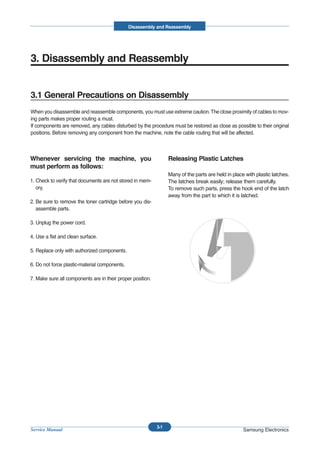
                                                                  Many of the parts are held in place with plastic latches.
1. Check to verify that documents are not stored in mem-          The latches break easily; release them carefully.
   ory.                                                           To remove such parts, press the hook end of the latch
                                                                  away from the part to which it is latched.
2. Be sure to remove the toner cartridge before you dis-
   assemble parts.

3. Unplug the power cord.

4. Use a flat and clean surface.

5. Replace only with authorized components.

6. Do not force plastic-material components.

7. Make sure all components are in their proper position.


                                                            3-1
Service Manual                                                                                       Samsung Electronics
Disassembly and Reassembly


3.2 Disassembly and Reassembly

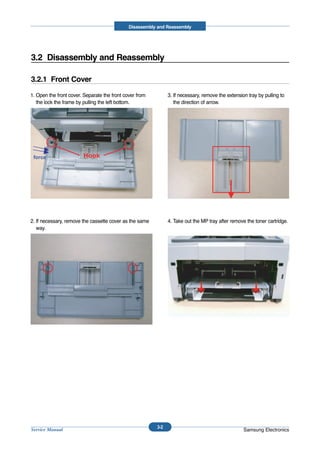
3.2.1 Front Cover

1. Open the front cover. Separate the front cover from         3. If necessary, remove the extension tray by pulling to
   the lock the frame by pulling the left bottom.                 the direction of arrow.


 force                  Hook


2. If necessary, remove the cassette cover as the same         4. Take out the MP tray after remove the toner cartridge.
   way.


                                                         3-2
Service Manual                                                                                     Samsung Electronics
Disassembly and Reassembly


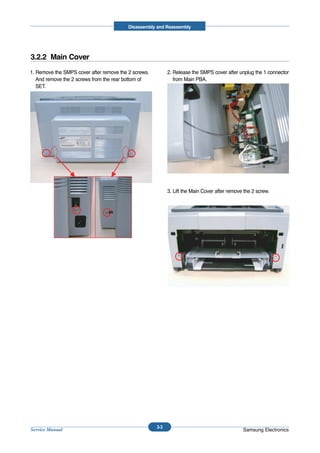
3.2.2 Main Cover
1. Remove the SMPS cover after remove the 2 screws.         2. Release the SMPS cover after unplug the 1 connector
   And remove the 2 screws from the rear bottom of             from Main PBA.
   SET.


                                                            3. Lift the Main Cover after remove the 2 screw.


                                                      3-3
Service Manual                                                                                 Samsung Electronics
Disassembly and Reassembly


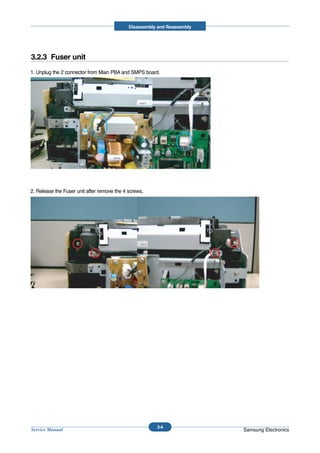
3.2.3 Fuser unit
1. Unplug the 2 connector from Main PBA and SMPS board.


2. Release the Fuser unit after remove the 4 screws.


                                                        3-4
Service Manual                                                            Samsung Electronics
Disassembly and Reassembly


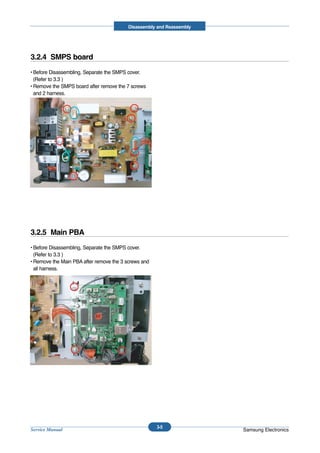
3.2.4 SMPS board
• Before Disassembling, Separate the SMPS cover.
  (Refer to 3.3 )
• Remove the SMPS board after remove the 7 screws
  and 2 harness.


3.2.5 Main PBA
• Before Disassembling, Separate the SMPS cover.
  (Refer to 3.3 )
• Remove the Main PBA after remove the 3 screws and
  all harness.


                                                      3-5
Service Manual                                                         Samsung Electronics
Disassembly and Reassembly


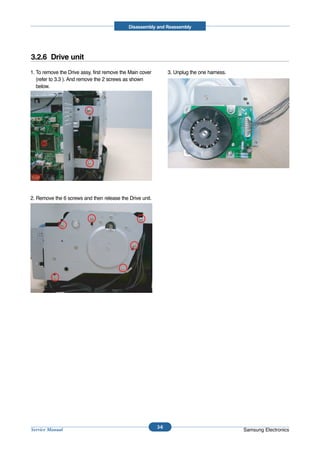
3.2.6 Drive unit
1. To remove the Drive assy, first remove the Main cover         3. Unplug the one harness.
   (refer to 3.3 ). And remove the 2 screws as shown
   below.


2. Remove the 6 screws and then release the Drive unit.


                                                           3-6
Service Manual                                                                                Samsung Electronics
Disassembly and Reassembly


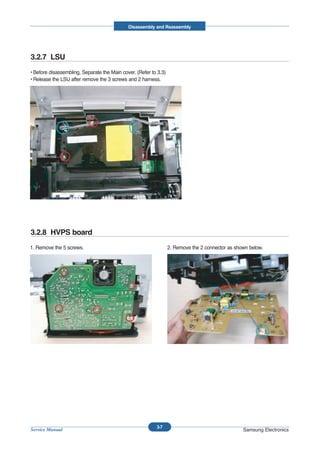
3.2.7 LSU
• Before disassembling, Separate the Main cover. (Refer to 3.3)
• Release the LSU after remove the 3 screws and 2 harness.


3.2.8 HVPS board
1. Remove the 5 screws.                                           2. Remove the 2 connector as shown below.


                                                          3-7
Service Manual                                                                                    Samsung Electronics
Disassembly and Reassembly


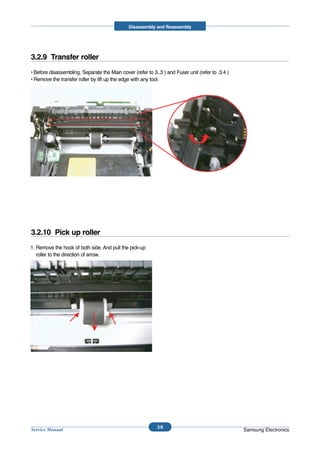
3.2.9 Transfer roller
• Before disassembling, Separate the Main cover (refer to 3..3 ) and Fuser unit (refer to .3.4 )
• Remove the transfer roller by lift up the edge with any tool.


3.2.10 Pick up roller
1. Remove the hook of both side. And pull the pick-up
   roller to the direction of arrow.


                                                             3-8
Service Manual                                                                                     Samsung Electronics
Alignment & Troubleshooting


4. Adjustment and Troubleshooting


4.1 Alignment and Adjustments

4.1.1 Sample Pattern
This product has the several sample patterns for maintenance. With the sample patterns, check the
existence of the abnormality. The patterns help to regularly maintain the product.


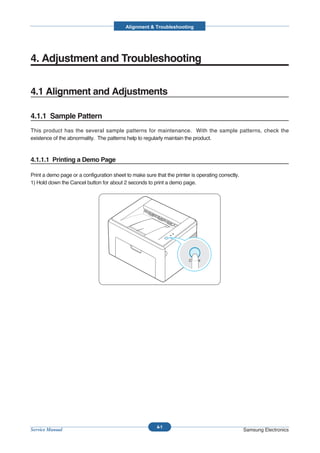
4.1.1.1 Printing a Demo Page

Print a demo page or a configuration sheet to make sure that the printer is operating correctly.
1) Hold down the Cancel button for about 2 seconds to print a demo page.


                                                          4-1
Service Manual                                                                                     Samsung Electronics
Alignment & Troubleshooting


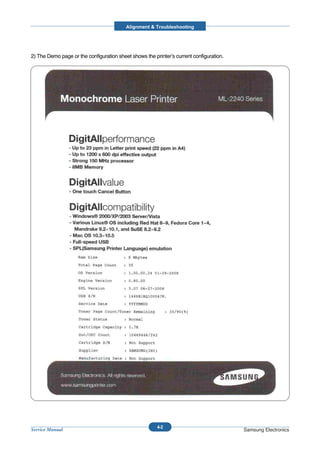
2) The Demo page or the configuration sheet shows the printer’s current configuration.


                                                        4-2
Service Manual                                                                           Samsung Electronics
Alignment & Troubleshooting


4.1.2 Control Panel

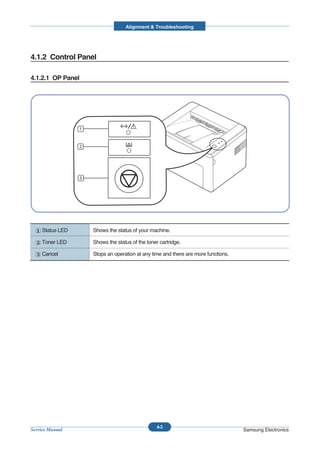
4.1.2.1 OP Panel


     Status LED    Shows the status of your machine.

     Toner LED     Shows the status of the toner cartridge.

     Cancel        Stops an operation at any time and there are more functions.


                                                4-3
Service Manual                                                                    Samsung Electronics
Alignment & Troubleshooting


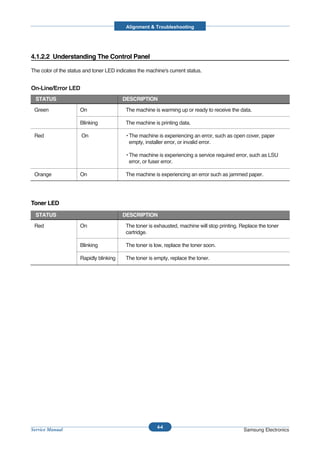
4.1.2.2 Understanding The Control Panel

The color of the status and toner LED indicates the machine's current status.


On-Line/Error LED
  STATUS                                 DESCRIPTION

 Green                On                  The machine is warming up or ready to receive the data.

                      Blinking            The machine is printing data.

 Red                  On                  • The machine is experiencing an error, such as open cover, paper
                                            empty, installer error, or invalid error.

                                          • The machine is experiencing a service required error, such as LSU
                                            error, or fuser error.

 Orange               On                  The machine is experiencing an error such as jammed paper.


Toner LED
  STATUS                                 DESCRIPTION

 Red                  On                  The toner is exhausted, machine will stop printing. Replace the toner
                                          cartridge.

                      Blinking            The toner is low, replace the toner soon.

                      Rapidly blinking    The toner is empty, replace the toner.


                                                        4-4
Service Manual                                                                                 Samsung Electronics
Alignment & Troubleshooting


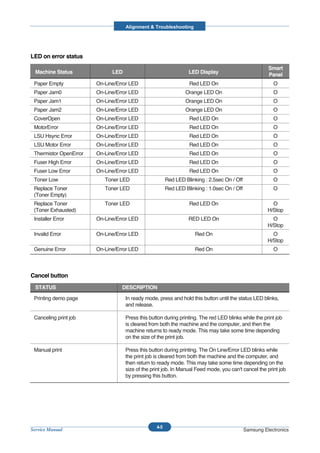
LED on error status
                                                                                                       Smart
  Machine Status              LED                                 LED Display                          Panel
 Paper Empty            On-Line/Error LED                         Red LED On                             O
 Paper Jam0             On-Line/Error LED                       Orange LED On                            O
 Paper Jam1             On-Line/Error LED                       Orange LED On                            O
 Paper Jam2             On-Line/Error LED                       Orange LED On                            O
 CoverOpen              On-Line/Error LED                         Red LED On                             O
 MotorError             On-Line/Error LED                         Red LED On                             O
 LSU Hsync Error        On-Line/Error LED                         Red LED On                             O
 LSU Motor Error        On-Line/Error LED                         Red LED On                             O
 Thermistor OpenError   On-Line/Error LED                         Red LED On                             O
 Fuser High Error       On-Line/Error LED                         Red LED On                             O
 Fuser Low Error        On-Line/Error LED                         Red LED On                             O
 Toner Low                 Toner LED                    Red LED Blinking : 2.5sec On / Off               O
 Replace Toner             Toner LED                    Red LED Blinking : 1.0sec On / Off               O
 (Toner Empty)
 Replace Toner             Toner LED                              Red LED On                             O
 (Toner Exhausted)                                                                                     H/Stop
 Installer Error        On-Line/Error LED                         RED LED On                             O
                                                                                                       H/Stop
 Invalid Error          On-Line/Error LED                            Red On                              O
                                                                                                       H/Stop
 Genuine Error          On-Line/Error LED                            Red On                              O


Cancel button
  STATUS                          DESCRIPTION

 Printing demo page                 In ready mode, press and hold this button until the status LED blinks,
                                    and release.

 Canceling print job                Press this button during printing. The red LED blinks while the print job
                                    is cleared from both the machine and the computer, and then the
                                    machine returns to ready mode. This may take some time depending
                                    on the size of the print job.

 Manual print                       Press this button during printing. The On Line/Error LED blinks while
                                    the print job is cleared from both the machine and the computer, and
                                    then return to ready mode. This may take some time depending on the
                                    size of the print job. In Manual Feed mode, you can't cancel the print job
                                    by pressing this button.


                                                  4-5
Service Manual                                                                               Samsung Electronics
Alignment & Troubleshooting


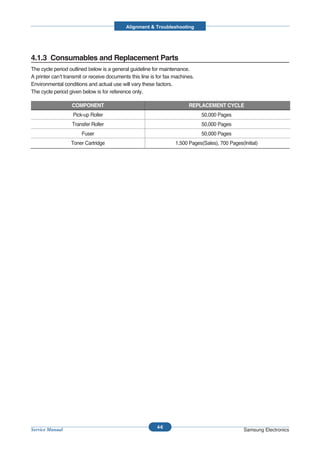
4.1.3 Consumables and Replacement Parts
The cycle period outlined below is a general guideline for maintenance.
A printer can’t transmit or receive documents this line is for fax machines.
Environmental conditions and actual use will vary these factors.
The cycle period given below is for reference only.

                   COMPONENT                                             REPLACEMENT CYCLE
                   Pick-up Roller                                              50,000 Pages
                   Transfer Roller                                             50,000 Pages
                       Fuser                                                   50,000 Pages
                  Toner Cartridge                                  1,500 Pages(Sales), 700 Pages(Initial)


                                                          4-6
Service Manual                                                                                    Samsung Electronics
Alignment & Troubleshooting


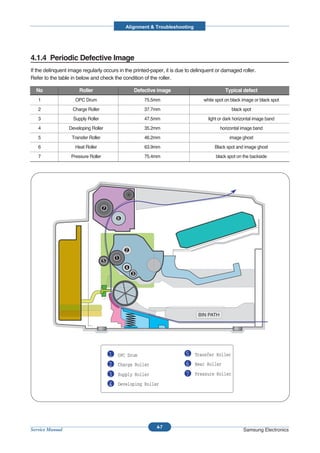
4.1.4 Periodic Defective Image
If the delinquent image regularly occurs in the printed-paper, it is due to delinquent or damaged roller.
Refer to the table in below and check the condition of the roller.

  No                  Roller                    Defective image                            Typical defect
   1                OPC Drum                         75.5mm                     white spot on black image or black spot
   2               Charge Roller                     37.7mm                                   black spot
   3               Supply Roller                     47.5mm                       light or dark horizontal image band
   4             Developing Roller                   35.2mm                              horizontal image band
   5               Transfer Roller                   46.2mm                                  image ghost
   6                Heat Roller                      63.9mm                          Black spot and image ghost
   7              Pressure Roller                    75.4mm                           black spot on the backside


                                                                              BIN PATH


                                     1   OPC Drum                       5   Transfer Roller
                                     2   Charge Roller                  6   Heat Roller

                                     3   Supply Roller                  7   Pressure Roller

                                     4   Developing Roller


                                                          4-7
Service Manual                                                                                      Samsung Electronics
Alignment & Troubleshooting


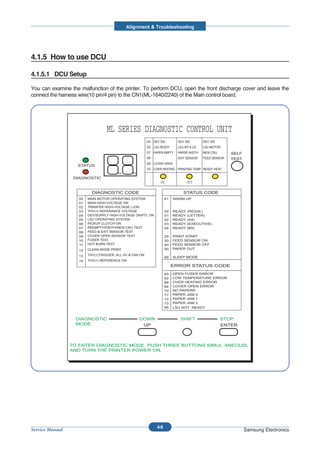
4.1.5 How to use DCU

4.1.5.1 DCU Setup

You can examine the malfunction of the printer. To perform DCU, open the front discharge cover and leave the
connect the harness wire(10 pin/4 pin) to the CN1(ML-1640/2240) of the Main control board.


                                   ML SERIES DIAGNOSTIC CONTROL UNIT
                                                          04 DEV 300        DEV 350       DEV 350
                                                          05 LSU READY      LSU MT & LD   LSU MOTOR
                                                          07 PAPER EMPTY    PAPER WIDTH   NEW CRU       SELF
                                                          08                EXIT SENSOR   FEED SENSOR   TEST
                                                          09 COVER OPEN
                   STATUS
                                                          10 COER HEATING PRINTING TEMP READY HEAT

                  DIAGNOSTIC
                                                                 ON               OFF

                           DIAGNOSTIC CODE                                     STATUS CODE
                    00   MAIN MOTOR OPERATING SYSTEM                 61   WARM UP
                    01   MAIN HIGH-VOLTAGE ON
                    02   TRNSFER HIGH-VOLTAGE (-)ON
                    03   THV(+) REFERANCE VOLTAGE                    00   READY   (REGAL)
                    04   DEV/SUPPLY HIGH-VOLTAGE ON/PTL ON           01   READY   (LETTER)
                    05   LSU OPERATING SYSTEM                        02   READY   (A4)
                    06   PICKUP CLUTCH ON                            03   READY   (EXECUTIVE)
                    07   PEEMPTY/PWITH/NEW CRU TEST                  04   READY   (B5)
                    08   FEED & EXIT SENSOR TEST
                    09   COVER OPEN SENSOR TEST                      20   PRINT START
                    10   FUSER TEST                                  30   FEED SENSOR ON
                    11   HOT BURN TEST                               40   FEED SENSOR OFF
                    12   CLEAN MODE PRINT                            50   PAPER OUT

                    13   THV(+)TRIGGER, ALL HV & FAN ON
                                                                     69   SLEEP MODE
                    14   THV(+) REFERENCE ON
                                                                          ERROR STATUS CODE
                                                                     60   OPEN FUSER ERROR
                                                                     62   LOW TEMPERATURE ERROR
                                                                     68   OVER HEATING ERROR
                                                                     64   COVER OPEN ERROR
                                                                     70   NO PAPERR
                                                                     71   PAPER JAM 0
                                                                     72   PAPER JAM 1
                                                                     73   PAPER JAM 2
                                                                     95   LSU NOT READY


                   DIAGNOSTIC                       DOWN                     SHIFT                  STOP
                   MODE                              UP                                             ENTER


                 TO ENTER DIAGNOSTIC MODE, PUSH THREE BUTTONS SIMUL ANEOUSL
                 AND TURN THE PRINTER POWER ON.


                                                               4-8
Service Manual                                                                                                 Samsung Electronics
Alignment & Troubleshooting


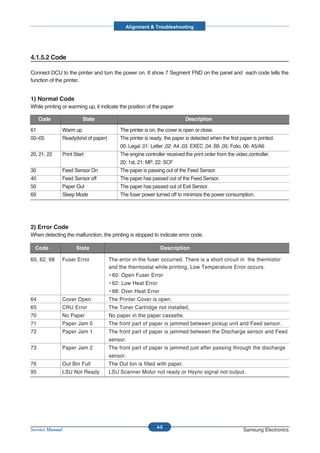
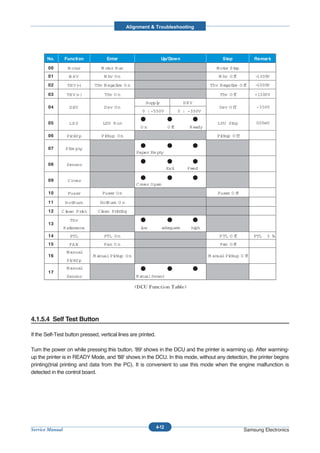
4.1.5.2 Code

Connect DCU to the printer and turn the power on. It show 7 Segment FND on the panel and each code tells the
function of the printer.


1) Normal Code
While printing or warming up, it indicate the position of the paper

     Code               State                                            Description

61            Warm up                    The printer is on, the cover is open or close.
00~05         Ready(kind of paper)       The printer is ready, the paper is detected when the first paper is printed.
                                         00: Legal ,01: Letter ,02: A4 ,03: EXEC ,04: B5 ,05: Folio, 06: A5/A6
20, 21, 22    Print Start                The engine controller received the print order from the video controller.
                                         20: 1st, 21: MP, 22: SCF
30            Feed Sensor On             The paper is passing out of the Feed Sensor.
40            Feed Sensor off            The paper has passed out of the Feed Sensor.
50            Paper Out                  The paper has passed out of Exit Sensor.
69            Sleep Mode                 The fuser power turned off to minimize the power consumption.


2) Error Code
When detecting the malfunction, the printing is stopped to indicate error code.

  Code               State                                  Description

60, 62, 68    Fuser Error            The error in the fuser occurred. There is a short circuit in the thermistor
                                     and the thermostat while printing, Low Temperature Error occurs.
                                     • 60: Open Fuser Error
                                     • 62: Low Heat Error
                                     • 68: Over Heat Error
64            Cover Open             The Printer Cover is open.
65            CRU Error              The Toner Cartridge not installed,
70            No Paper               No paper in the paper cassette.
71            Paper Jam 0            The front part of paper is jammed between pickup unit and Feed sensor.
72            Paper Jam 1            The front part of paper is jammed between the Discharge sensor and Feed
                                     sensor.
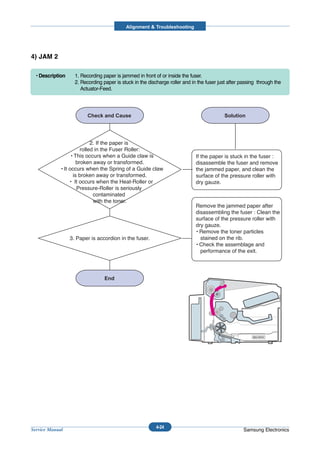
73            Paper Jam 2            The front part of paper is jammed just after passing through the discharge
                                     sensor.
76            Out Bin Full           The Out bin is filled with paper.
95            LSU Not Ready          LSU Scanner Motor not ready or Hsync signal not output.


                                                           4-9
Service Manual                                                                                       Samsung Electronics
Alignment & Troubleshooting


4.1.5.3 Self Diagnostic Mode
If Error code occurs due to malfunction of the printer, perform Self Diagnostic Mode to solve the problem.

The printer works only in the self-test mode to solve the malfunction problem.
To enter the self-test mode, turn the power on pressing the buttons of [Down], [Shift] and [Stop] at the same time.
Release the button within 2 or 3 seconds if 78 shows in the DCU. If 00 shows in the DCU, press the button [Up] or
[Shift] to select the self+test , and press the button of [Enter] to operate. To stop, press the button of [shift] and
[Enter] together.

    Code                                                           Description

    00              Main Motor Operating System
                    Only the main motor is in operation.


    01              Main High Voltage On(THV-)
                    -1400 voltage output by MHV terminal.
                    Caution : High voltage probe should be used.


    02              Transfer High Voltage(-)On(THV-)
                    -1000 voltage output by MHV terminal.
                    Caution : High voltage probe should be used.


    03              Transfer High Voltage (+)Reference on (THV +)
                    +1300 voltage output by MHV terminal.
                    Caution : High voltage probe should be used.

    04              DEV/supply High Voltage : DEV/Supply High Voltage Test.
                    The left one of the three LEDs in the self-test panel is on when DEV high voltage Supply
                    high voltage output by each HV terminal. Press the [Up] button to switch the voltage. The
                    middle and right one of the three LEDs are on and -350 voltage output by DEV HV
                    terminal.
                    Caution : High voltage probe should be used.


    05              LSU Operating System
                    The scanning motor of LSU is in operation, the right LED of the three buttons on. Press
                    the [Up] button to Check LD. LD is functioning and the middle button is on. If the LD is
                    normal, all LEDs are on.


    06              Pickup clutch on
                    The Solenoid in the printer is in operation. To stop the operation, Press the button [shift]
                    and [Enter] together.


                                                            4-10
Service Manual                                                                                   Samsung Electronics
Alignment & Troubleshooting


    Code                                               Description
      07         Paper Empty Sensor Test :
                 If activate the Actuator of the PEMPTY Sensor, the left and right of the three LEDs are
                 on.
                 Paper Empty Sensor ON/OFF             1st LED ON/OFF

      08         Feed & Exit Sensor Test
                 Test the Feed sensor and Discharge sensor in the same way as '07'.
                 Feed Sensor ON/OFF          2nd LED ON/OFF
                 Exit Sensor ON/OFF          3rd LED ON/OFF

      09         Cover Open Sensor Test
                 Test the Cover Open Sensor in th same way as code '07’
                 Cover Open Sensor ON/OFF1st LED ON/OFF

      10         Fuser Test
                 If the [Enter] button pressed, the right LED is on and temperature of the fuser is up to
                 READY Mode. If the [Up] button pressed, the middle LED is on and temperature of the
                 fuser is up to Printing Mode.
                 If you press the button once more, the left LED is on and temperature of the fuser is up to
                 overheat Mode.

      11         Hot Burn Test
                 If the [enter] button pressed, the printer is continuously printing without detection.
                 Turn the power off to stop operation.

      12         Cleaning Mode Print Mode
                 Print the paper to clean the OPC Drum in the Cartridge.

      13         THV(+) TRIGGER. ALL HV :
                 All high voltage output by each HV terminal and LSU and the fan is in operation. In this
                 mode, electronic resistance of transfer roller and high voltage is detected.

      14         PTL Test : (ML-1610 : not design)
                 Indicates the function of the PTL, same method of the code ‘07’.

      15         Fan Test :
                 Indicates the function of the Fan, same method of the code ‘07’.

      16         Manual Pickup Test :
                 Indicates the function of th Manual Pickup, same method of the code ‘07’.

      17         Manual Sensor Test :
                 Indicates the function of the Manual Sensor, same method of the code ‘07’.


                                                    4-11
Service Manual                                                                             Samsung Electronics
Alignment & Troubleshooting


       No.       Function           Enter                        Up/Down                       Stop          Remar k

        00         M otor        M ot R un
                                    or                                                      M ot S t
                                                                                               or op
        01         M HV            M hv O n                                                  M hv O f
                                                                                                    f        -1300V
        02        TH V( )
                       -      Thv N egatve O n
                                       i                                                 Thv N egatve O f
                                                                                                   i    f    -1000V

        03        TH V(+)          Thv O n                                                   Thv O f
                                                                                                   f         +1300V
                                                       Suppl
                                                           y                  DEV
        04         D EV            D ev O n                                                  Dev O ff         -350V
                                                     0 : -550V              0 : -350V

        05         LS U           LSU R un                                                  LSU St
                                                                                                 op           020mV
                                                    On                Of
                                                                       f        R eady
        06        Pi
                   ckU p         Pi
                                  ckup O n                                                  Pi
                                                                                             ckup O ff

        07        P Em pty
                                                  Paper Em pty

        08        Sensor
                                                                      Exi
                                                                        t      Feed

        09         C over
                                                  C over O pen
        10         Fuser          Fuser O n                                                 Fuser O f
                                                                                                    f

        11       H ot urn
                     B           Hot ur O n
                                   B n
        12    Cl
               ean P rnt
                      i         Cl
                                 ean Prntng
                                       ii

                    Thv
        13
                 R eference                         l
                                                    ow           adequate        hi
                                                                                  gh
        14          PTL            PTL O n                                                   P TL O f
                                                                                                    f        PTL   ł ‰
        15         FA N            Fan O n                                                   Fan O f
                                                                                                   f
                  M anual
        16                    M anual Pi
                                       ckup O n                                          M anual Pi
                                                                                                  ckup O f
                                                                                                         f
                  Pi
                   ckU p
                  M anual
        17
                  Sensor                          M anual Sensor


4.1.5.4 Self Test Button

If the Self-Test button pressed, vertical lines are printed.

Turn the power on while pressing this button, '89' shows in the DCU and the printer is warming up. After warming-
up the printer is in READY Mode, and '88' shows in the DCU. In this mode, without any detection, the printer begins
printing(trial printing and data from the PC). It is convenient to use this mode when the engine malfunction is
detected in the control board.


                                                               4-12
Service Manual                                                                                           Samsung Electronics
Alignment & Troubleshooting


4.1.6 Paper Path


1) After taking order, the printer feeds the printing paper from the cassette or manual feeder.

2) The fad paper passes the paper feeding sensor. (Jam 0 occurs if the sensor is not operated after certain time
   passes)

3) The paper passed the paper feeding sensor moves to the paper exit sensor via printing process. (Jam 1 occurs
   if the sensor is not operated after certain time passes)

4) The paper passed the paper exit sensor moves out from the set. (Jam 2 occurs sometime after if the tailing edge
   of the paper is not coming out from the set after the leading edge of paper passes the paper exit sensor.)


                       BIN PATH                                   BIN PATH                                BIN PATH


                                                          4-13
Service Manual                                                                                    Samsung Electronics
Alignment & Troubleshooting


4.1.6.1 Clearing Paper Jams

Occasionally, paper can be jammed during a print job. Some of causes include:
       • The tray is overfilled.
       • The front cover has been opened during a print job.
       • Paper that does not meet paper specifications has been used.
       • Paper that is outside of the supported size range has been

If a paper jam occurs, the On Line/Error LED on the control panel lights orange. Find and remove the jammed paper.
If it is invisible, look inside the printer.


4.1.6.2 In the Paper Exit Area


1. If the paper jams as it exits to the output tray and a          2. Open the top cover and the inner cover.
   long portion of the paper is visible, pull the paper
   straight out.


  When you pull the jammed paper, if there is
  resistance and the paper does not move
  immediately, stop pulling. Continue with the next
  step.


                                                            4-14
Service Manual                                                                                      Samsung Electronics
Alignment & Troubleshooting


3. Loosen the paper if it is caught in the heat rollers.          4. Close the inner cover and the top cover. Printing
   Then pull the paper gently out.                                   resumes automatically.


4.1.6.3 In the Paper Feed Area


1. Remove any misfeed paper by pulling it out by the              2. Open and close the front or top cover to resume
   visible edge from the tray. Make sure that all of the             printing the document from failed pages.
   paper is properly aligned in the tray.


                                                           4-15
Service Manual                                                                                    Samsung Electronics
Alignment & Troubleshooting


4.1.6.4 Around the Toner Cartridge


1. Open the front cover.                                        3. Gently pull the paper toward you.


2. Pull the toner cartridge out and remove it from the          4. Check that there is no other paper in the printer.
   machine.
                                                                5. Reinstall the toner cartridge, and then close the
                                                                   cover. Printing can be resumed.


                                                         4-16
Service Manual                                                                                     Samsung Electronics
Alignment & Troubleshooting


4.1.6.5 Tips for Avoiding Paper Jams

By selecting the correct paper types, most paper jams can be avoided.
        • Ensure that the adjustable guides are positioned correctly.
        • Do not overload the tray.
        • Do not remove the paper from the tray while printing.
        • Flex, fan and straighten the paper before loading.
        • Do not use creased, damp or highly curled paper.
        • Do not mix paper types in the input tray.
        • Use only recommended print media.
        • Ensure that the recommended print side is facing up when loading paper into the input tray.


4.1.6.6 Solving Print Quality Problems

Print Quality Checklist
Print quality problems can be resolved by following the checklist below.
         • Redistribute toner in the toner cartridge
         • Clean the inside of the printer
         • Adjust the print resolution from the printer properties
         • Ensure that the Toner Save mode is off
         • Clear general printing problems
         • Install a new toner cartridge, and check the print quality


                                                        4-17
Service Manual                                                                                 Samsung Electronics
Alignment & Troubleshooting


4.2 Troubleshooting

4.2.1 Checking Symptoms

Before attempting to repair the printer first obtain a detailed description of the problem from the customer.


                 Power On


                                                - No Power
             On-Line LED                        - Power Module error
                ON?
                                                - Main PBA


            On-Line LED                                Indicate                               Refer to
            Green OK?                               "Lamp toggle"                          "Chapter 4.1.4"


          Print(test pattern)


                  printing
                 Quality is                       Refer to "Solution
                 Nomal?                           of Image Problem"


                   END


                                                         4-18
Service Manual                                                                                    Samsung Electronics
Alignment & Troubleshooting


4.2.1.1 Basic Check List

  1. Check the Power.

• Does "Warming Up" appear on the display?
  --> If not check power cable, switch or SMPS.
  --> Does the wall socket work?
• Do the Motors or other components initialize (listen for main motor, fan and LSU sounds)?
  --> If not or there are none of the normal startup sounds check cable, switch or SMPS.
  --> Does the wall socket work?

  2. Check the LED of Panel.

• Is there On-Line LED ON?
   --> If not check power cable, switch SMPS or Main board.
   --> Does the wall socket work?
• Is the abnormal Lamp?
   --> Check the main PBA and cable harness.

  3. Check the Paper Path

• Is there a Paper Jam?
   --> Remove any paper fragments caught in the paper path.
• Paper Jam occurs repeatedly at a specific point in the Paper Path
   --> Open the fuser cover, Jam clear.
   --> Dismantle the machine and carefully inspect the region where the jam occurs.
       (Especially, check if paper fragments are caught in the Fuser

  4. Print the Information Page (Configuration).

• Try printing a test page from a computer.
  --> If there is an error check cables and driver installation.


  5. Check the Print Quality.

•Is there are a Print Quality Problem?
  --> Refer to section 4.2.5 (Page 6-17).

  6. Check consumables (toner etc.).

•Using the keys print the Test Pattern.
  --> Expected life of various consumable parts, compare this with the figures printed and replace as required


                                                               4-19
Service Manual                                                                                      Samsung Electronics
Alignment & Troubleshooting


4.2.1.2 Initial Inspection

  1. Check Power part

1. The printer does not work no matter how long you wait.
   A. Is the Power Switch (printer and wall socket) turned on ?
   B. Is the Power Cord connected to the printer correctly ?
   C. Is the Power cord connected to the wall socket correctly ?
   D. Is wall socket working ?
   E. Is the unit rated at the same voltage as the supply ?
2. Does the Fan work when power is turned on?
   A. Check the connectors on the SMPS.
   B. Check the fuses in the SMPS.(F1)


  2. Check the Installation Environment.

1. Ensure the installation surface is flat, level and free from vibration.
           If necessary move the printer.
2. Ensure that the temperature and humidity of the surroundings are within specification
           If necessary move the printer.
3. Ensure that the printer is position away from any air conditioning or other heating or cooling equipment. Also ensure
   that is not positioned in a direct draft from any air conditioning, fan or open window.
           If necessary move the printer.
4. Ensure the printer is not positioned in direct sunlight.
           If it is unavoidable use a curtain to shade the printer.
5. Ensure the printer is installed in a clean dust free environment.
           Move the printer to clean area if necessary.
6. Some industrial or cleaning processes give of fumes which can affect the printer.
           Move the printer away from this type of air pollution


  3. Check paper type.

1. Use only paper which is of a suitable quality, weight and size?
        See the user guide.


  4. Check the overall condition of the printer

1. Is the printer properly maintained ?
          Clean the Paper Transport Passages.
          Any rollers with dirt surfaces should be cleaned or replaced.


                                                            4-20
Service Manual                                                                                       Samsung Electronics
Alignment & Troubleshooting


4.2.2 Bad discharge


1) Wrong Print Position

  • Description   Printing begins at wrong position on the paper.


                  Wrong sense time caused by
                  defective feed sensor actuator.                   Replace the defective actuator


                                                        4-21
Service Manual                                                                              Samsung Electronics
Alignment & Troubleshooting


2) JAM 0

  • Description      1. Paper is not exited from the cassette.
                     2. Jam-0 occurs if the paper feeds into the printer.


                    1. Check the Solenoid by using                          Replace the solenoid.
                       DCU diagnostic mode 06.


                    2. Check if the pad is loose due                        Replace the side-pad Assembly L
                     to bad sealing of the side-pad.                        or R, if necessary.


                       3. Check the surface of the                          Clean with soft cloth dampened
                     roller-pickup for foreign matter.                      with IPA(Isopropyl Alcohol) or
                                                                            water.


                             4. If the paper
                       feeds into the printer rand
                  Jam 0 occurs, perform DCU to check                        Replace the SMPS, HVPS or
                          feed-sensor of the                                Sensor.
                             engine board.


                                                                                                    BIN PATH


                                                            4-22
Service Manual                                                                                      Samsung Electronics
Alignment & Troubleshooting


3) JAM 1

  • Description      1. Recording paper is jammed in front of or inside the fuser.
                     2. Recording paper is stuck in the discharge roller and in the fuser just after passing through the
                        Actuator-Feed.


                     1. If the recording paper is
                 jammed in front of or inside the fuser.                 Replace the SMPS.
                      (Perform DCU diagnostic
                                code 08)


                            2. If the recording
                     paper is stuck in the discharge                     Reassemble the Actuator-Feed
                 roller and the fuser just after passing                 and Spring-Actuator if the returning
                   through the Actuator-Feed, Feed                       is bad.
                             Actuator may be
                                  defective.


                                                                                                      BIN PATH


                                                            4-23
Service Manual                                                                                        Samsung Electronics
Alignment & Troubleshooting


4) JAM 2

  • Description     1. Recording paper is jammed in front of or inside the fuser.
                    2. Recording paper is stuck in the discharge roller and in the fuser just after passing through the
                       Actuator-Feed.


                             2. If the paper is
                        rolled in the Fuser Roller:
                   • This occurs when a Guide claw is                         If the paper is stuck in the fuser :
                      broken away or transformed.                             disassemble the fuser and remove
             • It occurs when the Spring of a Guide claw                      the jammed paper, and clean the
                    is broken away or transformed.                            surface of the pressure roller with
                  • It occurs when the Heat-Roller or                         dry gauze.
                      Pressure-Roller is seriously
                              contaminated
                              with the toner.
                                                                              Remove the jammed paper after
                                                                              disassembling the fuser : Clean the
                                                                              surface of the pressure roller with
                                                                              dry gauze.
                                                                              • Remove the toner particles
                  3. Paper is accordion in the fuser.                           stained on the rib.
                                                                              • Check the assemblage and
                                                                                performance of the exit.


                                                                                                         BIN PATH


                                                           4-24
Service Manual                                                                                       Samsung Electronics
Alignment & Troubleshooting


5) Multi-Feeding

  • Description      Multiple sheets of paper are fed at once.


                         1. Solenoid malfunction
                 (the solenoid does not work properly):            Replace the solenoid if necessary.
                        Perform DCU Diagnostic
                                Code 06.


                           2. Pad-Friction is                      Clean the pad friction with soft
                       contaminated with foreign                   clothe dampened with IPA
                              matter.(oil...)                      (Isopropyl Alcohol).


                    3. The face of paper is blended.               Use the smooth paper.


                                                           4-25
Service Manual                                                                               Samsung Electronics
Alignment & Troubleshooting


6) Paper rolled in the Fuser

  • Description   If contaminated at intervals of 57mm on the back of a paper.


                     1. Contamination of the                        After disassembling the fuser, clean
                   pressure roller or heat roller                   contamination between the heat
                    (Background, Hot off set).                      roller and the thermostor and
                                                                    remove the contamination of the
                                                                    pressure roller.


                                                                    1. If there is heavy background,
                  2. Check the claw of the fuser                       repair it by the background
                       whether it is unfitted.                         troubleshooting method.
                                                                    2. The surface of the heat roller
                                                                       with IPA or water
                                                                    3. Check the warp or separation of
                                                                       the sprint claw and the holder
                                                                       plate claw, and then manage it.


                                                       4-26
Service Manual                                                                               Samsung Electronics
Alignment & Troubleshooting


7) Paper rolled in the Toner Cartridge (OPC Drum)

  • Description   Paper is rolled up in the OPC.


                    1. Paper is too much thin.                 Recommend to use normal paper.


                                                               How to remove the rolled in the
                                                               OPC Drum.
                  2. The face of paper is curled.              • Remove the paper while turning
                                                                 the OPC Drum against the
                                                                 ongoing direction.


                                                    4-27
Service Manual                                                                        Samsung Electronics
Alignment & Troubleshooting


4.2.3 Malfunction


1) Red LED on (On line/Error LED) (Fuser Error)

  • Description    1. Red LED on (On line/Error LED)
                   2. Gear of the fuser does not work and breaks away melt away.
                      When printing, motor breaks away from its place due to defective fuser gear.


                    1. Check if the thermostat,                      If the thermostat is open replace
                  AC wire and Heat Lamp is open.                     the fuser and check following items.


                                                                     If the thermistor sensor device is
                    2. Check if the thermistor                       located deep in the sponge,
                        sensor is in place.                          replace the fuser.


                     3. Check if the heat lamp                       Check if the circuit of overheat
                          works properly.                            mode works properly.


                     4. Check if the overheat                        Run DCU mode : Perform DCU
                      circuit works properly.                        diagnostic code 10.


                   5. The fuser gear is defective                    Replace Fuser.
                        due to melting away.


                                                        4-28
Service Manual                                                                                   Samsung Electronics
Alignment & Troubleshooting


2) Not function of the gear of the fuser due to melting away

  • Description       The motor breaks away from its place due to gear melting away.


                                 DCU Mode :
                         Check if the Error States
                                                                       1. Replace the Fuser.
                 '60' '62' '68' occur. Check the operation
                                                                       2. Replace the Main Control board.
                   of Fuser Erasing Lamp On/Off with
                                the Error Code
                                  Check -10-.


                                                             4-29
Service Manual                                                                                 Samsung Electronics
Alignment & Troubleshooting


3) Paper Empty

  • Description    The paper lamp on the operator panel is on even when paper is loaded in the cassette.


                    1. Bending or deformation of
                  the actuator of the paper sensor.                 Replace the defective actuator.


                  2. The function of the engine
             board is defective Perform DCU mode :                  Replace the engine board.
                     Perform DCU diagnostic
                              code 8.


                                                        4-30
Service Manual                                                                                 Samsung Electronics
Alignment & Troubleshooting


4) Paper Empty without indication

  • Description    The paper lamp on the operator panel does not come on when the paper cassette is empty.


                    1. Bending or deformation of
                  the actuator of the paper sensor.                Replace the defective actuator.


                  2. The function of the engine
             board is defective Perform. DCU mode :                Replace the engine board.
                     Perform DCU diagnostic
                              code 8.


                                                       4-31
Service Manual                                                                               Samsung Electronics
Alignment & Troubleshooting


5) Cover Open

  • Description   The ERROR lamp is on even when the print cover is closed.


                  1. The Hook Lever in the top                   Replace the hook lever, if defective.
                     cover may be defective.


                       2. Check the connector
                 (Engine B’d´HVPS) and circuit of                1. Check the insertion of the Cover
             the cover switch department in the Main                Open S/W Connect.
               Control board. Perform DCU mode :                 2. Replace the Main Control board
                  If Error state '64' occurs, Check                 or Cover Open S/W.
                       the related codes of the
                             Cover Open
                                 Error.


                                                     4-32
Service Manual                                                                             Samsung Electronics
Alignment & Troubleshooting


6) No lamp on when the cover is open

  • Description      The ERROR lamp does not come on even when the printer cover is open


                         1. Check the connector
                     and circuit of the cover switch               1. Check the insertion of the Cover
                 department in the Main Control board.                Open S/W Connect.
                   Perform DCU mode : If Error state               2. Replace the Main Control board
                     '64' occurs, Check the related                   or Cover Open S/W.
                           codes of the Cover
                               Open Error


                                                         4-33
Service Manual                                                                              Samsung Electronics
Alignment & Troubleshooting


7) Defective motor operation

  • Description   Main motor is not driving when printing, and paper does not feed into the printer, resulting 'Jam 0'.


                     1. Motor harness or sub                           Check the motor harness, replace
                      PCB may be defective.                            it, if defective.


                   2. Perform DCU diagnostic
                                                                       Replace the SMPS, if necessary.
                  code 00 and Check the motor
                            operation.


                                                         4-34
Service Manual                                                                                      Samsung Electronics
Alignment & Troubleshooting


8) No Power

  • Description      When system power is turned on, all lamps on the operator panel do not come on.


                    1. Check if the power input and                   Replace the power supply cord or
                       SMPS output are normal.                        SMPS.


                      2. Check the inferiority of
                  LED-Panel on the front-cover if the                 1. Replace the control board.
                  LED of Panel does not appear after                  2. Replace the LED-panel.
                         normal warming-up.


                                                         4-35
Service Manual                                                                                   Samsung Electronics
Alignment & Troubleshooting


9) Vertical Line Getting Curved

  • Description      When printing, vertical line gets curved.


                          1. If the supply of +24v
                  is unstable in the Main Control board            1. Replace LSU.
                     linking with LSU, check drive by              2. Replace the Main Control board.
                       DCU Mode : LSU Check -05-
                                LSU Motor on.


                                                            4-36
Service Manual                                                                             Samsung Electronics
Alignment & Troubleshooting


4.2.4 Bad Software Environment

1) The printer is not working (1)

  • Description   While Power turned on, the printer is not working in the printing mode.


             1. Run Self-Test Mode :                         Check the power of the printer and perform the
         Turn the power on and pressing                      Self-Test. If the test printing works, that means no
       “System Data List” by pressing Menu-                  problems in the printer itself. If the test printing
              Reports-System Data.                           does not work, that means bad functioning of the
                                                             printer(not because of software).


                2. Check if the PC
                                                             Replace the printer cable. If the problems not
            and the printer is properly
                                                             solved even after the cable replaced, check the
         connected and the toner cartridge
                                                             amount of the remaining toner.
                     installed.

                                                             Check if the connection between PC and printer
                                                             port is proper. If you use windows, check if the
                                                             printer driver in the controller is set up. If the printer
                                                             driver is properly set up, check in which program
                                                             the printing is not working. The best way to find out
     3. Printing is not working in the Windows.
                                                             is to open the memo pad to check the function of
                                                             printing. If it is not working in a certain program,
                                                             adjust the setup the program requires. Sometimes,
                                                             the printout is normal within the Windows basic
                                                             programs, but it's not working in a particular
                                                             program. In such case, install the new driver again.
                                                             If not working in the Windows basic program,
                                                             Check the setup of the port of CMOS is on ECP.
                                                             And check the address of IRQ 7 and 378

              4. Check if the printer                        If the scanner needs to be connected to the printer,
           cable is directly connected to                    first the remove the scanner from the PC to see if
                peripheral devices                           the printer is properly working alone.


                                                      4-37
Service Manual                                                                                     Samsung Electronics
Alignment & Troubleshooting


2) The printer is not working (2)

  • Description    After receiving the printing order, no response at all or the low speed of printing
                   occurs due to wrong setup of the environment rather than malfunction of the printer itself.


                                                              Not working with the message 'insufficient printer
                                                              memory' means hard disk space problem rather
       1. Secure more space of the hard disk.                 than the RAM problem. In this case, provide more
                                                              space for the hard disk. Secure more space using
                                                              the disk utilities program.


            2. Printing error occurs even                     The connection of the cable and printer port is not
             if there is enough space in                      proper. Check if the connection is properly done
                     the hard disk.                           and if the parallel port in CMOS is rightly set up.


                                                              As a printer port, Select ECP or SPP among
                                                              SPP(Normal), ECP, and EPP modes(increase
          3. Check the parallel-port-related                  printing speed) SPP normal mode support 8-bit
              items in the CMOS Setup.                        data transfer, while ECP Mode transfer the 12-bit
                                                              data.


                                                              If the regular font is not printing, the cable or the
                                                              printer driver may be defective.
                                                              Turn the PC and printer off, and reboot the system
            4. Reboot the system to print.                    to print again. If not solved, double-click the printer
                                                              in my computer If the regular fonts are not printed
                                                              this time again. the cable must be defective so
                                                              replace the cable with new one.


                                                       4-38
Service Manual                                                                                    Samsung Electronics
Alignment & Troubleshooting


3) Abnormal Printing

                     The printing is not working properly even when the cable has no problem.
                     (even after the cable is replaced)
  • Description
                     If the printer won't work at all or the strange fonts are repeated, the printer driver may be
                     defective or wrong setup in the CMOS Setup.


            1. Set up the parallel port in                       Select SPP(Normal) or ECP LPT Port the among
                the CMOS SETUP.                                  ECP, EPP or SPP in the CMOS Setup.


                                                                 Check the printer in My Computer.(to see if the
                                                                 printer driver is compatible to the present driver
                  2. Printer Driver Error.                       or delete the old driver, if defective and reinstall
                                                                 the new driver)


                3. Error message from
          insufficient memory. (The printing
     job sometimes stops or due to insufficient                  Delete the unnecessary files to secure enough
        virtual memory, but it actually comes                    space of the hard disk and start printing job again.
             from the insufficient space of
                     the hard disk.)


                                                          4-39
Service Manual                                                                                      Samsung Electronics
Alignment & Troubleshooting


4) SPOOL Error

                   To spool which stands for "simultaneous peripheral operations online" a computer document
                   or task list (or "job") is to read it in and store it, usually on a hard disk or larger storage medi-
  • Description
                   um so that it can be printed or otherwise processed at a more convenient time (for example,
                   when a printer is finished printing its current document).


               1. Insufficient space of                          Delete the unnecessary files to provide more
       the hard disk in the directory assigned                   space to start printing job.
                 for the basic spool.


                                                                 If there are some files with the extension name
     2. If the previous printing error not solved.               of ****.jnl, Delete them and Reboot the Windows
                                                                 to restart printing job.


                                                                 Shut down all other programs except the current
          3. When expected to collide with
                                                                 one, if possible.
                  other program.


              4. When an application                             Delete the printer driver completely and
           program or the printer driver is                      reinstall it.
                    damaged.


                                                                 After rebooting the computer, check for viruses,
             5. When some files related
                                                                 restore the damaged files and reinstall the
            to OS are damaged or virus
                                                                 program to do the printing job.
                     infected.


                                    Continue..


                                                          4-40
Service Manual                                                                                      Samsung Electronics
Alignment & Troubleshooting


          Continue..


       6. Memory is less than suggested one.                      Add up enough memory to the PC.


     How to delete the data in the spool manager.

          In the spool manager, the installed drivers and the list of the documents waiting to be printed are shown.
          Select the document to be deleted and check the delete menu.
          If you intend to delete the current document being printed, the data being transferred to the printer will be put
          out and then the document is removed. Before choosing the document, the menu is still inactive.
          Or put the document out of the list and repeat the routine as in the above or finish the spool manager.


                                                           4-41
Service Manual                                                                                       Samsung Electronics
Alignment & Troubleshooting


4.2.5 Bad image

1) Vertical Black Line and Band

                     1. Straight thin black vertical lines are shown in the print-out.
  • Description
                     2. Dark black vertical bands are shown in the print-out.


  Digital Printer
  Digital Printer
  Digital Printer
  Digital Printer
  Digital Printer

                        1. Damaged develop roller in                        If causes 1 and 2 occur in the
                 the Toner cartridge. Deformed Doctor-blade                 toner cartridge, replace the toner
                              or cleaning-blade.                            cartridge and try to print out.


                           2. Scratched surface of                          Replace the transfer roller if
                    the charge roller in the toner cartridge.               occurred as No. 3.


                           3. Partly depression or
                        deformation on the surface of
                              the transfer roller.


                                                           4-42
Service Manual                                                                                     Samsung Electronics
Alignment & Troubleshooting


2) Vertical White Line

  • Description      White vertical voids in the image.


 Digital Printer
 Digital Printer
 Digital Printer
 Digital Printer
 Digital Printer                                                         Foreign matter stuck onto the
                         1. Foreign matter stuck onto the                window : Clean the LSU window
                             window of internal lenses                   with recommended cleaner(IPA)
                                  of LSU mirror.                         Clean the window with a clean
                                                                         cotton swab.


                                 2. Foreign matter or
                          toner particles between the toner
                  cartridge roller and blade. (In case the life of the   Replace the toner cartridge.
                       toner cartridge has been expired, white
                             lines or light image occur in
                                  front of the image.)


                         3. It may occur when Burr and                   No 3. : Remove the foreign matter
                     foreign substances are on the window                and burr of the exposure window.
                           of the toner cartridge frame.                 (toner cartridge)


                                                                         No. 4. : Open the front cover and
                            4. If the fuser is defective,
                                                                         check ribs that corresponds to the
                          voids occur periodically at the
                                                                         position of the voids. Remove if
                               top of a black image.
                                                                         found.


                         5. It may occur when foreign                    If the problems are not solved,
                       substances are on the OPC Drum.                   replace the toner cartridge.


                                                             4-43
Service Manual                                                                                Samsung Electronics
Alignment & Troubleshooting


3) Horizontal Black Band

  • Description     Dark or blurry horizontal stripes occur in the printing periodically.
                    (They may not occur periodically.)


  Digital Printer
  Digital Printer
  Digital Printer
  Digital Printer
  Digital Printer


                                                                            Clean each voltage terminal of the
                       1. Bad contacts of the voltage                       Charge, Supply, Develop and
                           terminals to developer.                          Transfer roller.(remove the toner
                                                                            particles and paper particles)


                             2. The rollers of
                         developer may be stained.
                                                                            1. Clean the right Gear that has
                          OPC Drum = 75.5mm
                                                                               relatively small gap of the teeth
                          Charge Roller = 37.7mm
                                                                               in the OPC.
                          Supply Roller = 47.5mm
                                                                            2. If the malfunction persists,
                          Develop Roller = 35.2mm
                                                                               replace the developer.
                          Transfer Roller = 46.2mm
                           ransfer
                          Heat Roller = 63.9mm
                          Pressure Roller = 75.4mm


                                                           4-44
Service Manual                                                                                     Samsung Electronics
Alignment & Troubleshooting


4) Black/White Spot

  • Description      1. Dark or blurry spots occur periodically in the printing
                     2. White spots occur periodically in the printing


 Digital Printer
 Digital Printer
 Digital Printer
 Digital Printer
 Digital Printer


                            1. If dark or blurry
                    black spots occur periodically,
              the rollers in the Developer may be conta-                 Print several OPC cleaning Mode
             minated with foreign matte or paper particles.              Prints and then run the Self-test
                     (Charge roller : 37.7mm interval                    2 or 3 times.
                       OPC drum : 75.5mm interval)


                      2. If faded areas or voids                        In case of 75.5 mm interval
                  occur in a black image at intervals                   unremovable in 1, cleanly remove
             of 75.5 mm, or black spots occur elsewhere,                foreign substances stuck on the OPC
                      the OPC drum surface is                           location equivalent to black spots and
                               damaged.                                 white spots with a dry duster.


                                                                         1. The transfer roller guarantees
                                                                            50.000 sheets printing. If the
                             3. If a black image is                         roller's life is expired, replace it.
                   partially broken, the transfer voltage is             2. In case of 37.7 mm interval
                      abnormal or the transfer roller's                     unremovable in 1, take measures
                                life has expired.                           as to replace the develop-er
                                                                            cartridge and try to print out.
                                                                         5. Clean the inside of the set against
                                                                            the paper particles and foreign
                                                                            matter in order not to cause the
                                                                            trouble.


                                                               4-45
Service Manual                                                                                        Samsung Electronics
Alignment & Troubleshooting


5) Light Image

  • Description      The printed image is light, with no ghost.


  Digital Printer
  Digital Printer
  Digital Printer
  Digital Printer
  Digital Printer


                       1. Develop roller is stained when
                                                                      Check if the Toner Save mode is off.
                     the toner of toner cartridge is almost
                                   consumed.


                  2. Ambient temperature is below than 10°C.          Replace the developer cartridge
                                                                      and try to print out.


                      3. Bad contact caused by the toner              Wait 30 minutes after printer is
                  stains between the high voltage terminal in         powered on before you start printing.
                       the HVPS and the one in the set.


                                                                      1. Clean up the contaminated area
                                                                         by the toner.
                      4. Abnormal output from the HVPS.               2. Replace the HVPS if the
                                                                         problems are not solved by the
                                                                         above four directions.


                                                          4-46
Service Manual                                                                             Samsung Electronics
Alignment & Troubleshooting


6) Dark Image or a Black Page

  • Description      The printed image is dark.


  Digital Printer
  Digital Printer
  Digital Printer
  Digital Printer
  Digital Printer


                            1. No charge voltage
                            in the engine board.                    Clean the high voltage charge
                      ( Perform DCU diagnostic code 01)             terminal.


                           2. Charge voltage is not                 1. Check the state of the connector
                          turned on due to the bad                     which connects the engine board
                    contacts between power supply in the               and HVPS.
                      side of the Developer and charge              2. Replace the HVPS if not solved
                              terminal of HVPS.                        by the above direction 1 and 2.


                                                      4-47
Service Manual                                                                           Samsung Electronics
Alignment & Troubleshooting


7) Uneven Density

  • Description     Print Density is uneven between left and right.


                             1. The pressure force
                      on the left and right springs of the
                  transfer roller is not even, the springs are        Replace both the left and right
                  damaged, the transfer roller is improperly          Spring Holder.
                        installed, or the transfer roller
                              bushing or holder is
                                    damaged.


                          2. The toner level is not                   Occur in the developer cartridge,
                     even on the developer roller due to              replace the developer and try to
                               the bad blade.                         print out.


                                                         4-48
Service Manual                                                                              Samsung Electronics
Alignment & Troubleshooting


8) Background

  • Description     Light dark background appears in whole area of the printing.


  Digital Printer
  Digital Printer
  Digital Printer
  Digital Printer
  Digital Printer


                    1. Does character exist less than                 The toner cartridge is basically
                    2% per a page, and hasn’t it been                 designed to print 2,000 sheets
                            used long time?                           with 5% image.


                     2. Does recycle paper be used?                   The A/S is not guaranteed if using
                                                                      recycle paper.


                        3. Has the life span of the                   Replace the developer when the
                            developer ended?                          life span of it has been ended.


                    4. Is the movement(Up and Down)                   Clean the bushing part of the
                        of the transfer roller smooth?                transfer roller.


                         5. Is the HVPS normal?                       If the problem is still not solved,
                                                                      replace the developer.


                                                        4-49
Service Manual                                                                                 Samsung Electronics
Alignment & Troubleshooting


9) Ghost (1)

  • Description       Ghost occurs at 75.5 mm intervals of the OPC drum in the whole printing.


 Digital Printer
 Digital Printer
 Digital Printer
                   75.5mm


 Digital Printer
 Digital Printer                        1. Bad contacts
 Digital Printer                caused by contamination from
                                                                             Clean the terminals when
                            toner particles between high voltage
                              terminal in the main body and the              contaminated by toner particles.
                                        electrode of the
                                           Developer.


                                   2. Bad contacts
                              caused by contamination
                          from toner particles between high                  Occur in the developer cartridge,
                      voltage terminal in the main body and the              replace the developer and try to
                               one in the HVPS board.                        print out.


                             3. The life of developer is expired.            Replace the engine board if not
                                                                             solved by the above directions 1-2.


                                  4. Transfer roller lifetime                If not solved by the direction 3,
                                (50.000 sheets) has expired.                 check the transfer roller lifetime
                                                                             and replace it.


                                5. Abnormal low temperature                  Wait about 1 hour after power on
                                       (below 10°C).                         before using printer.


                                                            4-50
Service Manual                                                                                   Samsung Electronics
Alignment & Troubleshooting


10) Ghost (2)

  • Description       Ghost occurs at 75.5 mm intervals of the OPC drum in the whole printing.
                      (When printing on card stock or transparencies using manual feeder)


 Digital Printer
 Digital Printer
 Digital Printer
                   75.5mm


 Digital Printer
 Digital Printer
 Digital Printer

                            When printing on card stock                  Select 'Thick Mode' on paper type
                            thicker than normal paper or                 menu from the software application
                        transparencies such as OHP, higher               and after using returning to the
                                 transfer voltage is                     original mode is recommended.
                                       required.


                                                         4-51
Service Manual                                                                                   Samsung Electronics
Alignment & Troubleshooting


11) Ghost (3)

  • Description     White ghost occurs in the black image printing at 47.5mm intervals.


  Digital Printer
  Digital Printer
                    47.5mm


  Digital Printer
  Digital Printer
  Digital Printer
  Digital Printer
                                                                           Occur in the developer cartridge,
                                1. The life of the developer               replace the developer and try to
                                     may be expired.                       print out.


                               2. The abnormal voltage and                 Check the approved voltage of the
                             bad contact of the terminal of the            supply roller and contact of the
                                       supply roller                       terminal and adjust if necessary.


                                                               4-52
Service Manual                                                                                  Samsung Electronics
Alignment & Troubleshooting


12) Ghost (4)

  • Description    Ghost occurs at 47.5mm(or 63.9mm) intervals.


 Digital Printer
 Digital Printer
                   47.5 or 63.9mm


 Digital Printer
 Digital Printer
 Digital Printer
 Digital Printer
                                                                                 Disassemble the fuser and
                                    The temperature of the fuser                 remove the contaminated toner
                                         is maintained high.                     particles on the roller and clean
                                                                                 the foreign matter between
                                                                                 Thermistor and Heat roller.
                                                                                 ( Caution : can be deformed)


                                                                   4-53
Service Manual                                                                                        Samsung Electronics
Alignment & Troubleshooting


13) Stains on the Face of Page

  • Description     The background on the face of the printed page is stained.


  Digital Printer
  Digital Printer
  Digital Printer
  Digital Printer
  Digital Printer


                         1. Toner leakage due to
                       improperly sealed developer.                    Replace the developer cartridge.


                                                                      If the transfer roller is contaminated,
                         2. If the transfer roller is                 run PC Cleaning Mode Print 2 or 3
                    contaminated, stains on the face of               times.
                               page will occur.                       And perform Self-Test 2 or 3 times
                                                                      to remove contamination.


                                                       4-54
Service Manual                                                                                Samsung Electronics
Alignment & Troubleshooting


14) Stains on Back of Page

  • Description    The back of the page is stained at 47 mm intervals.


 Digital
 Digital Pri
 Digital Printer
 Digital Printer
 Digital Printer

                                                                         Perform the OPC Cleaning Mode
                    1. Transfer roller is contaminated.                  Print 2 or 3 times. Run Self-Test to
                                                                         remove the contamination of the
                                                                         transfer roller.


                                                                         1. Replace the transfer roller if
                                                                            contaminated severely.
                    2. Pressure roller is contaminated.                  2. Disassemble the fuser and clean
                                                                            the H/R(Heat Roller) and P/R
                                                                            (Pressure roller). And check the
                                                                            area between H/R and
                                                                            Thermistor. If contaminated,
                                                                            clean the area not to be deformed.


                                                      4-55
Service Manual                                                                                 Samsung Electronics
Alignment & Troubleshooting


15) Blank Page Print out (1)

  • Description     Blank page is printed.


  Digital Printer
  Digital Printer
  Digital Printer
  Digital Printer
  Digital Printer


                                                                           Remove contamination of the
                            Bad ground contacts in                         terminals of the developer and
                            OPC and/or developer.                          the unit.


                                                        4-56
Service Manual                                                                                Samsung Electronics
Alignment & Troubleshooting


16) Blank Page Print out (2)

  • Description   1. Blank page is printed.
                  2. One or several blank pages are printed.
                  3. When the printer turns on, several blank pages print.


                       1. Bad ground contacts in                      Remove contamination of the
                         OPC and/or developer.                        terminals of the developer.


                                                                      1. Perform the engine self test using
                                                                         DCU to check if the Solenoid is
                                                                         normal.(refer to code 06)
                          2. Abnormal solenoid.                       2. If not solved by the above
                                                                         directions 1-2, Replace the
                                                                         engine board.
                                                                      3. Turn the power off, delete the
                                                                         data of PC and try printing again.


                                                      4-57
Service Manual                                                                              Samsung Electronics
ExplodedView and Parts list


5. Exploded Views and Parts List


        Contents
  5.1   Main Assembly                                                                          5-2

  5.2   Frame Assembly(ML-2240)                                                                5-5

  5.3   Frame Assembly(ML-1640)                                                                5-7

  5.4   Fuser Unit                                                                             5-9

  5.5   Paper Path Unit                                                                        5-11

  5.6   MP Tray Assembly (Only ML-2240)                                                        5-13


                 LASER PRINTER                                   The keynote of Product

                                                       - Speed
                                                         ML-1640 : 16 ppm (A4), 17 ppm( Ltr)
                                                         ML-2240 : 22ppm (A4), 23 ppm (Ltr)

                                                       - Emulation : GDI

                                                       - Processor : 150 Mhz Jupiter4e CPU

                                                       - Memory : 8 MB

                                                       - Toner cartridge : Initial (0.7K), Sales (1.5K)

                                                       - MP tray : Only ML-2240

                                                       - Interface : Full Speed USB 2.0

                                                       - Machine life : 50K (pages)


                                               5-1
Service Manual                                                                      Samsung Electronics
ExplodedView and Parts list


5.1 Main Assembly


                         24

                                                2-1

                                                              2-2
                                                                                                                         2-4


                                                                                                                   2-5
                                                                                                                                      2


                                                                                                               2-6
                                                0
                                                                                                 2-7
                                                                                                                     2-8


                                                                                                                    2-9


                                                                                                        2-3
                                                                                                                   2-10
                                                                                                                                          5


                                                                                                                    5-1
    9
                     4                                                                                        14

                                                                    7
            12
                                                                                            11


                                                                                                               10

                                                                                                        8
                 1
                                                                                                                               17
                                                                                  21

                                                                              15-1
                                                                                15-2
                                                                        15                 16


                                                                                                   13
                         20


        6                           3-5   3-3

                                                                                                                                     19


                              3-4                                                                                               18


                                                              3-2


                                                                                       3
                                                 3-1


                                                                        5-2
Service Manual                                                                                                       Samsung Electronics
ExplodedView and Parts list


Main Parts List
                                        *SA : SERVICE AVAILABLE, SNA : SERVICE not AVAILABLE
                                        *Grade : Parts Class”A,B,C,D,E”
Drawer#          SEC_CODE      DESCRIPTION                         QT’Y   Service Grade    Remark
5.1-0            ML-2240       SET
5.1-0            ML-1640       SET
5.1-1            JC96-05123A   ELA UNIT-FRAME                       1       SA     A         2240
5.1-1            JC96-05120A   ELA UNIT-FRAME                       1       SA     A         1640
5.1-2            JC97-03181A   MEA-COVER MAIN                       1       SA     A         1640
5.1-2            JC97-03182A   MEA-COVER MAIN                       1       SA     A         2240
5.1-2-1          JC61-01460D   GUIDE-STACKER COVER                  1      SNA     B         1640
5.1-2-1          JC61-01460E   GUIDE-STACKER COVER                  1      SNA     B         2240
5.1-2-2          JC63-01886A   COVER-TOP                            1      SNA     B         1640
5.1-2-2          JC63-01886B   COVER-TOP                            1       SA     B         2240
5.1-2-3          JC63-01887B   COVER-MAIN                           1       SA     B         1640
5.1-2-3          JC63-01887B   COVER-MAIN                           1       SA     B         2240
5.1-2-4          JC63-01888A   COVER-JAM                            1       SA     B         1640
5.1-2-4          JC63-01888B   COVER-JAM                            1       SA     B         2240
5.1-2-5          JC72-01343A   PMO-SUB_M_STACKER                    2       SA     D
5.1-2-6          JC64-00406A   KEY-ONLINE                           1      SNA     D
5.1-2-7          6107-001169   SPRING-CS                            1       SA     B
5.1-2-8          JC67-00301A   LENS-LED                             1       SA     B
5.1-2-9          JC66-02005A   ACTUATOR-JAM                         1      SNA     B
5.1-2-10         JC61-00049A   SPRING ETC-TR(KOR)                   1      SNA     B
5.1-3            JC97-03183A   MEA UNIT-COVER FRONT                 1       SA     B         2240
5.1-3            JC97-03184A   MEA UNIT-COVER FRONT                 1       SA     B         1640
5.1-3-1          JC63-01883A   COVER-FRONT                          1       SA     B         1640
5.1-3-1          JC63-01883B   COVER-FRONT                          1       SA     B         2240
5.1-3-2          JC63-01885A   COVER-CASSETTE                       1       SA     B         1640
5.1-3-2          JC63-01885B   COVER-CASSETTE                       1       SA     B         2240
5.1-3-3          JC63-01890A   COVER-DUMMY CASSETTE                 2       SA     B         1640
5.1-3-3          JC63-01890B   COVER-DUMMY CASSETTE                 2       SA     B         2240
5.1-3-4          JC63-00628F   TRAY-EXTENSION LARGE                 1       SA     B
5.1-3-5          JC63-00629F   TRAY-EXTENSION SMALL                 1       SA     B
5.1-4            JC96-04065A   ELA UNIT-LSU                         1       SA     A
5.1-5            JC63-01892A   COVER-SMPS                           1       SA     B         1640
5.1-5            JC63-01892B   COVER-SMPS                           1       SA     B         2240
5.1-5-1          JC31-00092A   FAN                                  1       SA     A
5.1-6            JC96-05045A   CARTRIDGE-TONER                      1      SNA     B      1640/2240


                                                 5-3
Service Manual                                                                      Samsung Electronics
ExplodedView and Parts list


Main Parts List
                                         *SA : SERVICE AVAILABLE, SNA : SERVICE not AVAILABLE
                                         *Grade : Parts Class”A,B,C,D,E”
Drawer#          SEC_CODE      DESCRIPTION                          QT’Y   Service Grade     Remark
5.1-7            JC96-05121A   ELA HOU-FUSER                         1       SA     A      1640/110V
5.1-7            JC96-05122A   ELA HOU-FUSER                         1       SA     A      1640/220V
5.1-7            JC96-05124A   ELA HOU-FUSER                         1       SA     A      2240/110V
5.1-7            JC96-05125A   ELA HOU-FUSER                         1       SA     A      2240/220V
5.1-8            JC63-01930A   SHIELD-ENGINE                         1       SA     B
5.1-9            JC39-00936A   HARNESS-LSU                           1       SA     B
5.1-10           JC44-00109A   SMPS-V1_VE                            1       SA     A      1640/110V
5.1-10           JC44-00110A   SMPS-V2C_VE                           1       SA     A      1640/220V
5.1-10           JC44-00086A   SMPS-V1                               1       SA     D      2240/110V
5.1-10           JC44-00087A   SMPS-V2C                              1       SA     D      2240/220V
5.1-11           JC92-02027A   PBA-MAIN                              1       SA     B      1640/USA
5.1-11           JC92-02027B   PBA-MAIN                              1       SA     B       1640/EU
5.1-11           JC92-02018A   PBA-MAIN                              1       SA     B      2240/USA
5.1-11           JC92-02018B   PBA-MAIN                              1       SA     B       2240/EU
5.1-12           JC39-00937A   HARNESS-MOTOR                         1       SA     B        1640
5.1-12           JC39-00932A   HARNESS-MOTOR                         1       SA     B        2240
5.1-13           JC39-00400A   CBF HARNESS-HVPS                      1       SA     A
5.1-14           JC39-00402A   CBF HARNESS-SMPS                      1       SA     A
5.1-15           JC96-01672A   ELA UNIT-TERMINAL TR L                3       SA     D
5.1-15-1         JC61-00031A   SPRING ETC--HV LARGE                  1      SNA     A
5.1-15-2         JC70-40912A   ICT-SHAFT HV LARGE                    1       SA     D
5.1-16           JC44-00167A   HVPS                                  1       SA     A
5.1-17           JC63-00631A   GROUND-P-HVPS                         2      SNA     A
5.1-18           3903-000042   CBF-POWER CORD                        1       SA     B         220V
5.1-18           3903-000085   CBF-POWER CORD                        1       SA     B         110V
5.1-19           3722-002303   JACK-USB                              1       SA     A
5.1-20           JC97-02239G   MEA UNIT-MP TRAY                      1       SA     A         2240
5.1-21           JC31-00085A   FAN-DC                                1       SA     A


                                                  5-4
Service Manual                                                                       Samsung Electronics
ExplodedView and Parts list


5.2 Frame Assembly (ML-2240)


                                                                                                           6
                                           0


                                                                                                      13


                                                                                                               15
                                                                                                 14
                                                                   2-3
                                                       2-2


                                                                               16


                                                                                           4
                                                             2-4
                                                 2-1


                                                                                                                                 10
                                           2-3
                                     2


                                                                          3
                                     5-7


                                                                                                                         9


                                                                                                                                7
                               5-6


                                                                     11


                                                                                                                    10
                         5-5


                                                                                      12


                                                                                                      1
                   5-4
             5-2


                                                                                                               8
            5-3


                                                 5
      5-1


                                                                               5-5
Service Manual                                                                                                      Samsung Electronics
ExplodedView and Parts list


Frame Parts List(ML-2240)
                                         *SA : SERVICE AVAILABLE, SNA : SERVICE not AVAILABLE
                                         *Grade : Parts Class”A,B,C,D,E”
Drawer#          SEC_CODE      DESCRIPTION                          QT’Y   Service Grade   Remark
5.2-0            JC96-05123A   ELA UNIT-FRAME                        1       SA      A
5.2-1            JC61-02567A   FRAME-BASE                            1       SA      A
5.2-2            JC97-02218A   MEA UNIT-PLATE KNOCK_UP               1       SA      A
5.2-2-1          JC61-01158A   PLATE-M-KNOCK_UP                      1       SA      A
5.2-2-2          JC66-00720A   SHAFT-P-CORE                          1       SA      A
5.2-2-3          JC72-01004A   PMO-IDLE KNOCK UP MP                  2       SA      A
5.2-2-4          JC74-00011A   MPR-PAD KNOCK UP MP                   1       SA      A
5.2-3            JC61-01258A   SPRING ETC-TORSION DEVE_L             1       SA      A
5.2-4            JC61-01259A   SPRING ETC-TORSION DEVE_R             1       SA      A
5.2-5            JC96-05018A   ELA UNIT-DRIVE                        1       SA      A
5.2-5-1          JC61-02619A   BRACKET-GEAR                          1      SNA      D
5.2-5-2          JC61-02577A   BRACKET-MOTOR                         1      SNA      B
5.2-5-3          JC66-01998A   GEAR-RDCN A                           1      SNA      B
5.2-5-4          JC31-00090B   MOTOR BLDC                            1      SNA      A
5.2-5-5          JC66-01999A   GEAR-RDCN B                           1      SNA      B
5.2-5-6          JC66-00806A   GEAR-OPC DR 76/38/29                  1       SA      A
5.2-5-7          6031-000023   WASHER-PLAIN                          2       SA      A
5.2-6            JC97-02218A   MEA UNIT-PLATE KNOCK_UP               1       SA      A
5.2-7            JC70-00500C   ADJUST-CASSETTE_R                     1       SA      A
5.2-8            JC70-00499C   ADJUST-CASSETTE_L                     1       SA      A
5.2-9            JG66-40003A   GEAR-PINION                           1       SA      A
5.2-10           JC61-00836A   FOOT-FRONT                            2       SA      A
5.2-11           JC66-00807A   GEAR-FUSER DR 63/35                   1       SA      A
5.2-12           JC66-00808A   GEAR-FEED DR 41                       1       SA      A
5.2-13           JC66-00822A   LEVER-M-ACTUATOR_EMPTY                1       SA      A
5.2-14           JB61-00076A   SPRING ETC-TORSION DOC (CC2-F)        1       SA      A
5.2-15           JC63-00622A   GROUND-P-OPC                          1       SA      A
5.2-16           6107-001503   SPRING-CS                             2       SA      A


                                                  5-6
Service Manual                                                                    Samsung Electronics
ExplodedView and Parts list


5.3 Frame Assembly(ML-1640)


                                                                                                              6
                                0


                                                                                                         15


                                                                                                                  17
                                                                                               16
                                                                 2-3


                                                                                 20
                                                2-2


                                                                                           4
                                                      2-4


                                                                                                                                    10
                                          2-1
                                2-3


                                                                            3
                                    2


                                                                                                                            9


                                                                                                                                    7
                          5-4


                                                                       13


                                                                                12


                                                                                                                       10
                    5-2
              5-3


                                                                                      14


                                                                                                         1
        5-1


                                                            11


                                                                                                                  8
                                      5


                                                                                                    19


                                                                                5-7
Service Manual                                                                                                         Samsung Electronics
ExplodedView and Parts list


Frame Parts List(ML-1640)
                                        *SA : SERVICE AVAILABLE, SNA : SERVICE not AVAILABLE
                                        *Grade : Parts Class”A,B,C,D,E”
Drawer#          SEC_CODE      DESCRIPTION                         QT’Y   Service Grade   Remark
5.3-0            JC96-05120A   ELA UNIT-FRAME                       1       SA      A
5.3-1            JC61-01152A   FRAME-M-BASE                         1      SNA      A
5.3-2            JC97-02218A   MEA UNIT-PLATE KNOCK_UP              1       SA      A
5.3-2-1          JC61-01158A   PLATE-M-KNOCK_UP                     1       SA      A
5.3-2-2          JC66-00720A   SHAFT-P-CORE                         1       SA      A
5.3-2-3          JC72-01004A   PMO-IDLE KNOCK UP MP                 2       SA      A
5.3-2-4          JC74-00011A   MPR-PAD KNOCK UP MP                  1       SA      A
5.3-3            JC61-01258A   SPRING ETC-TORSION DEVE_L            1       SA      A
5.3-4            JC61-01259A   SPRING ETC-TORSION DEVE_R            1       SA      A
5.3-5            JC96-05116A   ELA UNIT-DRIVE                       1       SA      A
5.3-5-1          JC61-01153A   BRACKET-P-GEAR                       1      SNA      A
5.3-5-2          JC61-01154A   BRACKET-P-MOTOR                      1      SNA      A
5.3-5-3          JC66-00804A   GEAR-RDCN 139/83                     1       SA      A
5.3-5-4          JC31-00112A   MOTOR STEP                           1       SA      A
5.3-6            JC97-02218A   MEA UNIT-PLATE KNOCK_UP              1       SA      A
5.3-7            JC70-00500C   ADJUST-CASSETTE_R                    1       SA      A
5.3-8            JC70-00499C   ADJUST-CASSETTE_L                    1       SA      A
5.3-9            JG66-40003A   GEAR-PINION                          1       SA      A
5.3-10           JC61-00836A   FOOT-FRONT                           2       SA      A
5.3-11           JC66-00805A   GEAR-RDCN 113/83                     1       SA      A
5.3-12           JC66-00806A   GEAR-OPC DR 76/38/29                 1       SA      A
5.3-13           JC66-00807A   GEAR-FUSER DR 63/35                  1       SA      A
5.3-14           JC66-00808A   GEAR-FEED DR 41                      1       SA      A
5.3-15           JC66-00822A   LEVER-M-ACTUATOR_EMPTY               1       SA      A
5.3-16           JB61-00076A   SPRING ETC-TORSION DOC (CC2-F)       1       SA      A
5.3-17           JC63-00622A   GROUND-P-OPC                         1       SA      A
5.3-18           JC61-00025A   SPRING ETC-CS-CHARGE APOLLO          2      SNA      A
5.3-19           JC67-00110A   CAP-M-MOTOR                          1      SNA      A


                                                 5-8
Service Manual                                                                   Samsung Electronics
ExplodedView and Parts list


5.4 Fuser Unit


                                                 6


                                                       7
                          28


                                                                               13
        26


                                   8


                                             9
                 30


                                                                      14
             3


                                                 10
                                       6
        32


                                            7
                               1
       4


                                            12
                                       11


                                                                                                      23
                     27


                                                                           2


                                                                                                     23
                                                                  5
                                                                15
                 0


                                                                       17
                                                           16


                                                                                                      21
                                                                                         18
                                                                                         19
                                                      24
                                                           25


                                                                29


                                                                                    20


                                                                                              31


                                                      5-9
Service Manual                                                                                     Samsung Electronics
ExplodedView and Parts list


Fuser Parts List
                                        *SA : SERVICE AVAILABLE, SNA : SERVICE not AVAILABLE
                                        *Grade : Parts Class”A,B,C,D,E”
Drawer#          SEC_CODE      DESCRIPTION                         QT’Y   Service Grade    Remark
5.4-0            JC96-05121A   ELA HOU-FUSER                        1       SA     A      1640/110V
5.4-0            JC96-05122A   ELA HOU-FUSER                        1       SA     A      1640/220V
5.4-0            JC96-05124A   ELA HOU-FUSER                        1       SA     A      2240/110V
5.4-0            JC96-05125A   ELA HOU-FUSER                        1       SA     A      2240/220V
5.4-1            JC61-01162A   FRAME-P-FUSER                        1      SNA     A
5.4-2            JC63-00615A   COVER-M_FUSER                        1      SNA     D
5.4-3            JC61-01177A   HOLDER-M-EXIT R                      2       SA     A
5.4-4            JC66-00810A   GEAR-EXIT_DRV17                      1       SA     B
5.4-5            JC61-01172A   HOLDER-M-EXIT F/DOWN                 3      SNA     A
5.4-6            6107-001168   SPRING-CS                            2       SA     D
5.4-7            JC66-10901A   BUSH-PRESSURE R                      2       SA     A
5.4-8            JC61-00595A   GUIDE-M-INPUT                        1      SNA     A
5.4-9            JC66-00600A   ROLLER-PRESSURE                      1       SA     A        1640
5.4-9            JC66-00600B   ROLLER-PRESSURE                      1       SA     A        2240
5.4-10           JC66-00601B   ROLLER-HEAT                          1       SA     A        1640
5.4-10           JC66-01972B   ROLLER-HEAT_CHINA                    1       SA     A        2240
5.4-11           JC66-00564A   GEAR-FUSER Z37                       1       SA     D
5.4-12           JC61-00589A   BUSH-M-HR L                          1       SA     A
5.4-13           JC61-00590A   BUSH-M-HR R                          1       SA     A
5.4-14           4713-001202   LAMP-HALOGEN                         1       SA     A      1640/220V
5.4-14           4713-001203   LAMP-HALOGEN                         1       SA     A      1640/110V
5.4-14           4713-001211   LAMP-HALOGEN                         1       SA     A      2240/110V
5.4-14           4713-001212   LAMP-HALOGEN                         1       SA     D      2240/220V
5.4-15           JC66-00824A   ROLLER-M-EXIT MAIN                   3       SA     D
5.4-16           JC66-00830A   ROLLER-M-EXIT FR                     3       SA     D
5.4-17           6107-001163   SPRING-CS                            3       SA     D
5.4-18           1404-001451   THERMISTOR-NTC ASSY                  1       SA     A
5.4-19           4712-001032   THERMOSTAT                           1       SA     A
5.4-20           JC39-00404A   CBF HARNESS-FUSER JOINT              1       SA     A
5.4-21           JC39-00403A   CBF HARNESS-FUSER(110V)              1       SA     A        110V
5.4-21           JC39-00403B   CBF HARNESS-FUSER(220V)              1       SA     A        220V
5.4-22           JC61-00064A   SPRING ETC-CLAW                      4       SA     A
5.4-23           JC61-02580A   GUIDE-CLAW                           4       SA     A
5.4-24           JC66-00801A   GEAR-EXIT_DR38/25                    1      SNA     D
5.4-25           6031-001051   WASHER-PLAIN                         1      SNA     A
5.4-26           JC63-00637A   COVER-M-FUSER-DUMMY                  1      SNA     D
5.4-27           JC63-00639A   COVER-M-LAMP-L                       1      SNA     D
5.4-28           JC63-00638A   COVER-M-LAMP-R                       1      SNA     D
5.4-29           6044-000001   RING-CS                              1      SNA     B
5.4-30           JC66-00826A   ROLLER-EXIT F/DOWN                   1       SA     A
5.4-31           JC67-00085A   CAP-M-THERMO                         1      SNA     A


                                                5-10
Service Manual                                                                    Samsung Electronics
ExplodedView and Parts list


5.5 Paper Path Unit


                                                       16


                                                                                     0
                                      14


                                                                               17


                                                                                         25        16
                                                                                              15

                                     12
                                                                                    28                                       4
                                                                                                   5

                                      11-3
                                        11-2
                                                                                                        3                2
                                                11-1
                      11
                                                                                                                     6


                 13


                                                                                                                     1
                                                              10

                                                        9-2               10

                                                                   9-1


                                18
                                                                                     9
                                                                                                            29
                                           19                       9-3
         24                                                                                                          7
                 21


 22

                                                                                          8
                                                20

                           23


                      27
                                                                                    25


                                                                    5-11
Service Manual                                                                                                   Samsung Electronics
ExplodedView and Parts list


Paper Path Parts List
                                        *SA : SERVICE AVAILABLE, SNA : SERVICE not AVAILABLE
                                        *Grade : Parts Class”A,B,C,D,E”
Drawer#          SEC_CODE      DESCRIPTION                         QT’Y   Service Grade   Remark
5.5-0            JC97-03248A   MEA UNIT-FRAME PAPER PATH            1       SA     B        1640
5.5-0            JC97-03199A   MEA UNIT-FRAME PAPER PATH            1       SA     B        2240
5.5-1            JC61-01161A   GUIDE-M-PAPER PATH                   1       SA     A
5.5-2            JC66-00814A   LEVER-ACTUATOR FEED SENSOR           1       SA     A
5.5-3            JB61-00107A   SPRING ETC-LEVER SENSOR              1       SA     A
5.5-4            JC70-10232A   IPR-PLATE SAW                        1       SA     D
5.5-5            JC63-00625A   GROUND-P-VARISTOR                    1      SNA     A
5.5-6            JC63-00624A   GROUND-P-ZENER                       1       SA     A
5.5-7            JC63-00623A   GROUND-P-THV                         1      SNA     A
5.5-8            JC63-00626A   GROUND-P-SAW                         1      SNA     A
5.5-9            JC97-02217A   MEA-UNIT HOLDER PAD                  1       SA     A
5.5-9-1          JC61-70911A   SPRING ETC-EXIT ROLL FD              2       SA     A
5.5-9-2          JC69-01568A   PAD-FRICTION                         1      SNA     B
5.5-9-3          JC61-01169A   HOLDER-M-PAD                         1       SA     A
5.5-10           JC66-00815A   LEVER-M-KICKER P/U                   2       SA     D
5.5-11           JC97-02179A   MEA UNIT-PICK UP GEAR                1       SA     A
5.5-11-1         JC66-00803A   GEAR-PICK_UP B                       1       SA     A
5.5-11-2         JC66-00802A   GEAR-PICK_UP A                       1       SA     A
5.5-11-3         6107-001167   SPRING-CS                            1       SA     D
5.5-12           JC33-00028B   SOLENOID-MP                          1       SA     A
5.5-13           JC66-00809A   GEAR-FEED 35/19                      1       SA     A
5.5-14           JC61-00588A   BUSH-M-TR L                          1       SA     A
5.5-15           JC72-00102A   PMO-BUSHING_TR(L)                    1       SA     A
5.5-16           JC61-70940A   SPRING ETC-TR(12)                    2       SA     A
5.5-17           JC66-00725A   ROLLER-TRANSFER                      1       SA     A
5.5-18           JC61-00583A   HOLDER-PTL                           1       SA     A
5.5-19           JC70-00307A   IPR-P-EARTH TRANSFER                 1       SA     A
5.5-20           JC66-00829A   SHAFT-P-PICK_UP                      1       SA     B
5.5-21           JC61-01151A   HOUSING-M-PICK_U                     1       SA     A
5.5-22           JC61-01173A   HOUSING-M-PICK_UP B                  1       SA     A
5.5-23           JC73-00211A   RUBBER-PICK_UP                       1       SA     A
5.5-24           JC66-01935A   CAM-PICKUP L                         1       SA     B
5.5-25           JC66-01936A   CAM-PICKUP R                         1       SA     B
5.5-26           JC66-00813A   GEAR-TRANSFER                        1       SA     A
5.5-27           JC61-01281A   BRACKET-P-BAR_PICK_UP                1      SNA     A
5.5-28           JC39-00482A   CBF HARNESS-MICRO SW                 1       SA     A
5.5-29           JC61-01548A   HOLDER-M-CAM                         1      SNA     A        2240


                                                5-12
Service Manual                                                                    Samsung Electronics
ExplodedView and Parts list


5.6 MP Tray Assembly (Only ML-2240)


                                                  0


                                                       5


                 2


                     1


                                                                3


                          4


                                    5-13
Service Manual                                             Samsung Electronics
ExplodedView and Parts list


MP Tray Parts List
                                        *SA : SERVICE AVAILABLE, SNA : SERVICE not AVAILABLE
                                        *Grade : Parts Class”A,B,C,D,E”
Drawer#          SEC_CODE      DESCRIPTION                         QT’Y   Service Grade   Remark
5.6-0            JC97-02239G   MEA UNIT-MP TRAY                     1      SA      B
5.6-1            JC61-01263F   PLATE-MP                             1      SA      B
5.6-2            JC70-00514E   ADJUST-MP L                          1      SA      B
5.6-3            JC70-00515E   ADJUST-MP R                          1      SA      B
5.6-4            JG66-40003A   GEAR-PINION                          1      SA      B
5.6-5            JC63-00711A   SHEET-MP                             1      SA      B


                                                5-14
Service Manual                                                                    Samsung Electronics
System Diagram


6. System Diagram

       Block / Connection Diagram_Peacock22 / Robin

                                                                                                                                           LSU
                                                       INLET   Main
                                                               S/W
                                                                                                                                                                                          PICK_UP_CLT

                                                                       SMPS


                                                                                                                                                        M


                                                                                                                                                                  C
                               FUSER_FAN


                                                                                                                                                            LD_ENABLE
                                                                                                                                                            DAC_OUT
                                                                                                                                           nPMOTOR
                                                                                                                                           nLREADY
                                                                                                                                           LSU_CLK


                                                                                                                                                            nHSYNC


                                                                                                                                                             LSU_SH
                                                                      Fuser_On
                                                                      nP_FEED
                                                                                                               24V              24VS1


                                                                                                                                           24VS2
                                                                                                                                                                                             SOL


                                                                      24VS2

                                                                      24VS1
                                                                      24VS1

                                                                      DGND
                                                                      DGND


                                                                                                                                                            DGND


                                                                                                                                                            VDO+

                                                                                                                                                            VDO-
                                                                       N.C


                                                                                                                                           GND

                                                                                                                                                             N.C

                                                                                                                                                            5VS
                                                                        5V
                                                                                                                     Feed_Sensor


                                                                                                                     DC

                               nLED_ERROR            nLED_ERROR                                                                                                                                          BLDC_DIR


                                                                      nP_FEED
                                                                      Fuser_On
                  FAN_Vcc


                                                                                                                                                                              DAC_OUT
                                                                                                                                                                       DGND
                                                     nLED_READY


                                                                                                                                                                     nHSYNC
                                                                                                                                                                                                         BLDC_CLK


                                                                                                                                                                                 VDO+
                                                                                                                                                                  LD_ENABLE
                               nLED_READY                                                                                  3.3V Reg


                                                                                                                                                                                 VDO-
                                                                                                                                                                        5VS
                                                                                                                                               24VS2


                                                                                                                                                                                              24VS2
                                                                                                                                                                                          PickUp_Sol
                                                                                                                                            nLREADY

                                                                                                                                                GND
                                                                                                                                            LSU_CLK


                                                                                                                                                                               LSU_SH
                                                                                                                                           nPMOTOR


                                                                                                                                                 N.C
                    GND


                                                                      24VS2

                                                                      24VS1
                                                                      24VS1

                                                                      DGND
                                                                      DGND
                                   nKEY_IN           nKEY_IN                                                                                                                                           BLDC_READY


                                                                       N.C


                                                                        5V
                                                                                                                     DC

                                nLED_TONER           nLED_TONER                                                                                                                                           BLDC_EN
                  THV             nP_EMPTY           nP_EMPTY                                                                                                                                               DGND                           MT
                                                       N.C
                                                                                                                           1.8V Reg                                                                    BLDC_BREAK
                                         N.C
                  MHV             BIAS_PWM           BIAS_PWM                                                                                                                                              DGND
                                nFUSER_FAN           nFUSER_FAN                                                                                                                                            DGND
                  SUP             MHV_PWM            MHV_PWM                                                                                                                                               24VS2


                                                                                                                                           SDRAM
                                                                                                                                                            12MHz                                                                 MAIN_MOTOR
                                                                                                 Jupiter4e                                                                                                 24VS2


                                                                                                                                            8MB
                                  THV_READ           THV_READ
                  DEV             THV_PWM            THV_PWM
                                                                                                                                                                                                                    Robin Only
                                    nTHV_EN          nTHV_EN
                  OPC                      5V           5V                                                                                                  CY25811                                          5V
                                                     nP_EXIT                                                                                                                                             TONER_TX

                                                                               24VS2 / nNEW_DEV (Robin Only)
                                     nP_EXIT
                                         3.3V          3.3V                    nCRU_DET (Peacock22 Only)                                                                                                nTONER_RX
                                        DGND          DGND                                                                                                                                                  DGND                 TONER_TX_RX
                                       24VS2          24VS2
                                       24VS2          24VS2                                                                                                                                              nCRU_DET
         Ready/Error        Toner
                                                      24VS1                                                                                                                                                   N.C


                                                                                                                     THERMISTOR_IN
                                       24VS1
                                       24VS1          24VS1                                                                                                                                                                       MICRO S/W
                       HVPS                                                                                                                                                                                  GND


                                                                                                                                             DEV_DATA


                                                                                                                                                                               DCU_DATA
                                                                                                                                                        DEV_CLK


                                                                                                                                                                               DCU_CLK
                                                  FAN_Vcc


                                                                                                                                                        DGND
                                                                                                                                                                                                             3.3V


                                                                                                                                                                               DGND
                                                                 VBUS


                                                                                                                                                                                                                                       4
                                                                                                                                                                                                                                            3
                                                                                                                                                                                                                                                 2
                                                                                                                                                                                                                                                      1
                                                                                                                                             3.3V
                                                                                                                     DGND
                                                                 GND
                                                  GND


                                                                 GND

                                                                 GND


                                                                                GND


                                                                                                                                                        N.C


                                                                                                                                                                                                                                      a4
                                                                                                                                                                                                                                           a3
                                                                                                                                                                                                                                                a2
                                                                                                                                                                                                                                                     a1
                                                                                                                                                                                                        HYPER_TXD


                                                                                                                                                                                5V
                                                                 D+


                                                                                                                     N.C
                                                                 D-


                                                                                                                                                                                                        HYPER_RXD


                                                                                                                                                                                                                                      b4
                                                                                                                                                                                                                                           b3
                                                                                                                                                                                                                                                b2
                                                                                                                                                                                                                                                     b1
                 24VS1             24VS2                                                                                                                                                                    DGND


                                                                                                                                                                                                                                       8
                                                                                                                                                                                                                                            7
                                                                                                                                                                                                                                                 6
                                                                                                                                                                                                                                                      5
                                                                                                                                                                                                                                   HYPER


                                                                      USB     DEVE                                                                                                                                  Peacock Hardware Team
                                                SMPS_FAN                                                                                                                                                               Digital Priting Div.
                                                                                                                 THERMISTOR                     CRUM                             DCU                                  Samsung Electronics
                                                                                                                                                                                                                         Jan.21.2008

                                                                                                                                     6-1
Service Manual                                                                                                                                                                                                                       Samsung Electronics
Reference information


7. Reference Information
             This chapter contains the tools list, list of abbreviations used in this manual, and a guide to the
             location space required when installing the printer. A definition of tests pages and Wireless
             Network information definition is also included.


7.1 Tool for Troubleshooting
The following tools are recommended safe and easy troubleshooting as described in this service manual.


• DCU (Diagnostic Control Unit)                                 • Cotton Swab
 Standard : Test equipment to diagnose the Laser                  Standard : For general home use, for medical service.
 printer supplied by Samsung Electronics.


                                                                • Cleaning Equipments
                                                                  Standard : An IPA(Isopropyl Alcohol)dry wipe tissue or
                                                                             a gentle neutral detergent and lint-free cloth.

• DVM (Digital Volt Meter)
 Standard : Indicates more than 3 digits.


                                                                • Vacuum Cleaner


• Driver
  Standard : "-" type, "+" type (M3 long, M3 short, M2
             long, M2 short).


                                                                • Software (Driver) installation CD ROM


• Tweezers
  Standard : For general home use, small type.


                                                          7-1
Service Manual                                                                                       Samsung Electronics
Reference information


7.2 Acronyms and Abbreviations(1)
The table below explains the abbreviations and acronyms used in this service manual. Where abbreviations
or acronyms are used in the text please refer to this table.


Abbreviations                                                    Explanation

  AP                                 Access Point
  AC                                 Alternating Current
  APC                                Auto Power Control
  ASIC                               Application Specific Integrated Circuit
  ASSY                               assembly
  BIOS                               Basic Input Output System
  BLDC                               Brush-less Direct Current
  CMOS                               Complementary Metal Oxide Semiconductor
  CN                                 connector
  CON                                connector
  CPU                                Central Processing Unit
  dB                                 decibel
  dbA                                decibel A
  dBM                                decibel milliwatt
  DC                                 direct current
  DCU                                Diagnostic Control Unit
  DPI                                Dot Per Inch
  DRAM                               Dynamic Random Access Memory
  DVM                                Digital Voltmeter
  ECP                                Enhanced Capability Port
  EDC                                Embedded Diagnostic control
  EEPROM                             Electronically Erasable Programmable Read Only Memory
  EMI                                Electro Magnetic Interference
  EP                                 electrophotographic
  EPP                                Enhanced Parallel Port
  FPOT                               First Printout Time
  F/W                                firmware
  GDI                                graphics device interface
  GND                                ground
  HBP                                Host Based Printing
  HDD                                Hard Disk Drive
  H/H                                High temperature and high marshy place
  HV                                 high voltage
  HVPS                               High Voltage Power Supply
  I/F                                interface
  I/O                                Input and Output
  IC                                 integrated circuit
  IDE                                Intelligent Drive electronics or Imbedded Drive Electronics


                                                         7-2
Service Manual                                                                                     Samsung Electronics
Reference information


Acronyms and Abbreviations(2)

Abbreviations                                  Explanation

  IEEE               Institute of Electrical and Electronics Engineers. Inc
  IPA                Isopropy Alcohol
  IPM                Images Per Minute
  LAN                local area network
  lb                 pound(s)
  LBP                Laser Beam Printer
  LCD                Liquid Crystal Display
  LED                Light Emitting Diode
  L/L                Low temperature and low marshy place
  LSU                Laser Scanning Unit
  MB                 megabyte
  MHz                megahertz
  MPF                Multi Purpose Feeder
  NIC                Network Interface Card
  N/N                Normal temperature and normal marshy place
  NVRAM              nonvolatile random access memory
  OPC                Organic Photo Conductor
  OPE                Operate Panel Equipment
  PBA                Printed Board Assembly
  PCL                Printer Command Language , Printer Control Language
  PDL                Page Discription Language
  PPM                Page Per Minute
  PPS                Pulse Per Second
  PS                 Post Script
  PTL                Pre-Transfer Lamp
  PWM                Pulse Width Modulation
  Q-PID              Quick Printer Initiating Device
  Q ty               quantity
  RAM                Random Access Memory
  ROM                Read Only Memory
  SCF                Second Cassette Feeder
  SMPS               Switching Mode Power Supply
  SPGP               Samsung Printer Graphic Processor
  SPL                Samsung Printer Language
  Spool              Simultaneous Peripheral Operation Online
  SW                 switch
  sync               synchronous or synchronization
  USB                Universal Serial Bus
  WECA               Wireless Ethernet Compatibility Alliance


                                     7-3
Service Manual                                                                Samsung Electronics
Reference information


7.3 Selecting printer locations
• Leave enough room to open the printer trays, covers, and allow for proper ventilation. (see diagram
  below)

• Provide the proper environment :
        - A firm, level surface
        - Away from the direct airflow of air conditioners, heaters, or ventilators
        - Free of extreme fluctuations of temperature, sunlight, or humidity
        - Clean, dry, and free of dust


                                                       7-4
Service Manual                                                                          Samsung Electronics
Reference information


7.4 Sample Tests Patterns
The sample patterns shown below are the standard test patterns used in the factory.
The life of the toner cartridge, developer cartridge and printing speed are measured with the pattern shown
below (5%). The A4 ISO 19752 standard pattern samples are reproduced reduced to 70% of the actual A4
size.

A4 ISO 19752 Standard Patterns


                                                    7-5
Service Manual                                                                          Samsung Electronics
Reference information


7.5 Parts Life Cycle Maintenance Table

7.5.1 Parts Life Cycle Maintenance Table

    Supplies              Life Cycle          Condition                           Panel LED                  Custmoer -               Responding
                                                                                                            Panel Manage
 Toner Cartridge       1.5K: For Product Toner Low                    Toner LED : Red LED blinking           -                   10% Remains
                       0.7K: For Sale       Toner Uninstall           Online /Error LED : Red                -
 Fuser                 50,000(page)        Thermistor Open Error On line/Error LED : Red                   Replaced at
                                           (DCU Code : 60)                                                 Exhauseted
                                           Low Heat Error            On line/Error LED : Red               Replaced at
                                           (DCU Code : 62)                                                 Exhauseted
                                           Over Heat Error           On line/Error LED : Red               Replaced at
                                           (DCU Code : 68)                                                 Exhauseted
 Transer Roller        50,000(page)        Exhauseted                No Indication                         Replaced at
                                                                                                           Exhauseted
 PickUP Roller         50,000(page)        Exhauseted                No Indication                         Replaced at
                                                                                                           Exhauseted


7.5.2 Toner Cartridge Criterion
1) Supplies Criterion (Toner Cartridge)
    1. Cartridge Main Defects
       - White Point, Black Point : White or Black point on printing image
       - Image contamination : Dirty printing image
       - Image Fainted : Entire Image is fainted and vertical white line emerge

         - Black Line : Vertical black line emerge on printing image


2) Defect Symptoms

 Symptoms                   Criterion                                                                                       Remarks
 White, Black Point         Clean Up OPC (10 times), if disappeared, no failure.                                            System Setup ->
                            - If continuous, failure                                                                        Maintenance-> Clean Drum
 Image contamination        Drity printing image or conteminated reverse side
 (Toner leakage)            - Clean up OPC (10 times) and inside of machine with cloth, if disappeared, no failure.
 Image Fainted              After shake cartridge right and left 5~6 times, if printing image is not fainted, no failure.
                            (Toner Exhausted)
 Vertical Black Line        Vertical thin line emerge, if cartridge is scratched.
                            - (Customer fault)


                                                                            7-6
Service Manual                                                                                                                  Samsung Electronics
Reference information


7.6 Model Information

7.6.1 Understanding for Model Code
Model code is inscribed and managed by product standard operation.
If understand the standard operation. It will help to comprehend basic and derived model.


Classification                     Model abbriviation                                                          Feature/Properties
DIGIT            1             2               3             4            5              6             7                  8              9         10
Example          M             L                             -            1              6             4                  0

Definition       Product Classification        Color                       1. Speed of Engine          1.New model,       1. Basic : 0 Main feature Space
                                               Product                     - If same speed models        series model                  description (Basic:Omitt
                                                                             are released                division        2.Series      - N : N/W     ed)
Code             Printer        Laser          Default =                     simultaneously higher     - Over 3rd grade    model divi- - P : PS
Description      Class of       Beginning      Omissoin.                     model is added +1 at        project           sion        - S : N/W+PS
                 Product        letter of      Only color                    speed code.                                 - Below 4th - B : Bluetooth
                 Description    printer        printer                     - If over 10 models with    2.Valuablet         grade       - T : 2nd CST
                 :M             Description:   “C” initial   Division        same speed are brought       model division   project     - M : Mac
                                L              .Engine = E   between         into, tenth model is         in market      .PC Bundle      Compatible
                                                             code            added +1.                    despite of not .Domestic     - X : Scanner
                                                                                                          over 3rd grade distribution . Beside
                                                                           2. Domestic Entry Model     - VE model, etc. (Entry model abovefeature
                                                                           Distribution                  (Valuable model excepted)     description,
                                                                           - C&C : Engine speed          is decided                    product
                                                                           - Information : The first     byproduct                     conception
                                                                             number deleted              planning group                to product
                                                                                                         with sales                    planning
                                                                                                         prospect)                     group
                                                                                                                                       responsed

Description                     Alphabet                          -                                    Digit                                  Alphabet


Classification                     Model abbriviation                                                          Feature/Properties
DIGIT            1             2               3             4            5              6             7                  8              9         10
Example          M             L                             -            2              2             4                  0

Definition       Product Classification        Color                       1. Speed of Engine          1.New model,       1. Basic : 0 Main feature Space
                                               Product                     - If same speed models        series model                  description (Basic:Omitt
                                                                             are released                division        2.Series      - N : N/W     ed)
Code             Printer        Laser          Default =                     simultaneously higher     - Over 3rd grade    model divi- - P : PS
Description      Class of       Beginning      Omissoin.                     model is added +1 at        project           sion        - S : N/W+PS
                 Product        letter of      Only color                    speed code.                                 - Below 4th - B : Bluetooth
                 Description    printer        printer                     - If over 10 models with    2.Valuablet         grade       - T : 2nd CST
                 :M             Description:   “C” initial   Division        same speed are brought       model division   project     - M : Mac
                                L              .Engine = E   between         into, tenth model is         in market      .PC Bundle      Compatible
                                                             code            added +1.                    despite of not .Domestic     - X : Scanner
                                                                                                          over 3rd grade distribution . Beside
                                                                           2. Domestic Entry Model     - VE model, etc. (Entry model abovefeature
                                                                           Distribution                  (Valuable model excepted)     description,
                                                                           - C&C : Engine speed          is decided                    product
                                                                           - Information : The first     byproduct                     conception
                                                                             number deleted              planning group                to product
                                                                                                         with sales                    planning
                                                                                                         prospect)                     group
                                                                                                                                       responsed

Description                     Alphabet                          -                                    Digit                                  Alphabet


                                                                                 7-7
Service Manual                                                                                                                           Samsung Electronics
Reference information


7.6.2 Understanding Material Code & Name
Material code and name is maintained by standard criteria.
If understand the criteria, it will help to order materials.

1. Two different description ways for material code. (  : Digit, : Letter(Alphabet))
      - Type 1             -                 ex) 2007-007961 R-CHIP
      - Type 2             -                 ex)JB96-01268A ELA UNIT-COVER TOP

       Type 1 : Parts managed by entire divisions : Materials used by all samsung products.
                Most electrical parts are under the type 1.
       Type 2 : Parts managed by a division : Material used by a certain product
                Most mechanical parts are under type 2.

2. A/S Only material : Only for A/S, not related to product manufacturing.

3. Ass'y material : More than two materials are assembled. If the material order is out of service, the order can be
   processed by Ass'y material order.
   Picture and numbers are also described on Service manual.

  Ass'y Material and A/S Only material Code are recognizable by product name.
  Those are under type 2 and known by material properties and beginning letters of product name.

 Classification         Material Code                  Material Name
 A/S Only Material      **81-******(JB81-00039A)       AS-*****(AS-FUSE)
 A/S Only Material      **75-******(JB75-00068A)       MEC-*****(MEC-CHUTE)
 A/S Only Material      **92-******(JB92-01131A)       PBA-*****(PBA MAIN-CONTROLLER)
 A/S Only Material      **96-******(JB96-01268A)       ELA-*****(ELA UNIT-COVER TOP)
 A/S Only Material      **97-******(JB97-01089A)       MEA-*****(MEA UNIT-PULLEY IDLE)


7.6.3 F/W Upgrade Method
   If F/W needs Upgrade, F/W file and usbprn file are requested.

   Check "Ready" condition with power ON.

1. Paralle cable case
   • Start Download Rom file with "copy/b b255_706.fls lpt1:" commend on Dos Mode.
   • Once Download are finished, "Reset Printer" is indicated on LCD window.
   • Download finished Power ON/OFF.

2. USB cable case (Save attached file at certain directory)
   • Start Download Rom file "usbprbs b255_706.fls" on Dos Mode and push the enter key.
   • Once Download are finished, "Reset Printer" is indicated on LCD window.
   • Download finished Power ON/OFF.


                                                         7-8
Service Manual                                                                                   Samsung Electronics

Samsung ml 1640-ml-2240_sm

  • 1.
    ML-1640/ML-2240 Model : ML-1640/SEE Basic Model : ML-1640 SERVICE Manual LASER PRINTER The keynote of Product - Speed ML-1640 : 16 ppm (A4), 17 ppm( Ltr) ML-2240 : 22ppm (A4), 23 ppm (Ltr) - Emulation : GDI - Processor : 150 Mhz Jupiter4e CPU - Memory : 8 MB - Toner cartridge : Initial (0.7K), Sales (1.5K) - MP tray : Only ML-2240 - Interface : Full Speed USB 2.0 - Machine life : 50K (pages)
  • 2.
    ELECTRONICS GSPN (Global ServicePartner Network) North America : service.samsungportal.com Latin America : latin.samsungportal.com CIS : cis.samsungportal.com Europe : europe.samsungportal.com China : china.samsungportal.com Samsung Electronics Co.,Ltd. January 2008 Asia : asia.samsungportal.com Printed in Korea. Mideast & Africa : mea.samsungportal.com VERSION NO. : 1.00 CODE : 1640-D00SEE
  • 3.
    Contents 1. Precautions 1.1 Safety Warning 1-1 1.2 Caution for safety 1-2 1.3 ESD Precautions 1-4 2. Product spec and feature 2.1 Product Specifications 2-1 2.1.1 Product Overview 2-1 2.1.2 Specifications 2-1 2.1.3 Model Comparison Table 2-5 2.1.4 Accessory List 2-5 2.2 System Overview 2-6 2.2.1 System Outline 2-6 2.2.2 H/W Structure and Descriptions 2-12 2.2.3 S/W Structure and Descriptions 2-25 2.2.4 Initial Product Installation 2-29 3. Disassembly and Reassembly 3.1 General Precautions on Disassembly 3-1 3.2 Disassembly and Reassembly 3-2 3.2.1 Front Cover 3-2 3.2.2 Main Cover 3-3 3.2.3 Fuser unit 3-4 3.2.4 SMPS board 3-5 3.2.5 Main PBA 3-5 3.2.6 Drive unit 3-6 3.2.7 LSU 3-7
  • 4.
    Continued 3.2.8 HVPS board 3-7 3.2.9 Transfer roller 3-8 3.2.10 Pick up roller 3-8 4. Alignment & Troubleshooting 4.1 Alignment and Adjustments 4-1 4.1.1 Sample Pattern 4-1 4.1.2 Control Panel 4-3 4.1.3 Consumables and Replacement Parts 4-6 4.1.4 Periodic Defective Image 4-7 4.1.5 How to use DCU 4-8 4.1.6 Paper Path 4-13 4.2 Troubleshooting 4-18 4.2.1 Checking Symptoms 4-18 4.2.2 Bad discharge 4-21 4.2.3 Malfunction 4-28 4.2.4 Bad Software Environment 4-37 4.2.5 Bad image 4-42 5. Exploded Views & Parts List 5.1 Main Assembly 5-2 5.2 Frame Assembly(ML-2240) 5-5 5.3 Frame Assembly(ML-1640) 5-7 5.4 Fuser Unit 5-9 5.5 Paper Path Unit 5-11 5.6 MP Tray Assembly (Only ML-2240) 5-13
  • 5.
    Continued 6. System Diagram 7 Reference Information 7.1 Troubleshooting Tools 7-1 7.2 Acronyms and Abbreviations 7-2 7.3 Selecting printer locations 7-4 7.4 Sample Tests Patterns 7-5 7.5 Parts Life Cycle Maintenance Table 7-6 7.5.1 Parts Life Cycle Maintenance Table 7-6 7.5.2 Toner Cartridge Criterion 7-6 7.6 Model Information 7-7 7.6.1 Understanding for Model Code 7-7 7.6.2 Understanding Material Code & Name 7-8 7.6.3 F/W Upgrade Method 7-8
  • 6.
    Precautions 1. Precautions The cautionsbelow are items needed to keep in mind when maintaining and servicing. Please read carefully and keep the contents in mind to prevent accidents while servicing and to prevent the machine from getting damaged. 1.1 Safety Warning (1) Request service by qualified service person. Service for this machine must be performed by a Qualified service person. It is dangerous if unqualified ser- vice personnel or users try to fix the machine. (2) Do not rebuild. Do not attach or change parts discretionary. Do not dissemble, fix of rebuilt it. If so, printer will abnormally work and electric shock or fire may occur. (3) Laser Safety Statement The Printer is certified in the U.S. to conform to the requirements of DHHS 21 CFR, chapter 1 Subchapter J for Class 1(1) laser products, and elsewhere, is certified as a Class I laser product conforming to the requirements of IEC 825. Class I laser products are not considered to be hazardous. The laser system and printer are designed so there is never any human access to laser radiation above a Class I level during normal operation, user maintenance, or prescribed service condition. Warning >> Never operate or service the printer with the protective cover removed from Laser/Scanner assembly. The reflected beam, although invisible, can damage your eyes. When using this product, these basic safety precautions should always be followed to reduce risk of fire, electric shock, and injury to persons. 1-1 Service Manual Samsung Electronics
  • 7.
    Precautions 1.2 Safety Caution 1.2.1Noxious Material Precaution The toner in a printer cartridge contains a chemical material, which may harm human body if it is swallowed. Please keep children out of reach of the toner cartridge. 1.2.2 Electric Shock or fire Precaution It is possible to get electric shock or burn by fire if you don't fallow the instructions of the manual. (1) Use exact voltage. Please use an exact voltage and wall socket. If not, a fire or an electric leakage can be caused. (2) Use authorized power cord. Do use the power cord supplied with PRINTER. A fire can happen when over cur- rent flows in the power cord. (3) Do not insert many cords in an outlet. A fire can be occurred due to flow over current in an outlet. (4) Do not put water or extraneous matter in the PRINTER. Please do not put water, other liquid, pin, clip, etc. It can cause a fire, electric shock, or malfunction. If this occurs, turn off the power and remove the power plug from outlet immediately. (5) Do not touch the power plug with wet hand. When servicing, remove the power plug from outlet. Do not insert or take off it with wet hand. Electric shock can be occurr. (6) Caution when inserting or taking off the power plug. The power plug has to be inserted completely. If not, a fire can be caused due to poor contact. When taking off the power plug, grip the plug and take it off. If grip the line and pull over, it could be damaged. A fire or electric shock could happen. (7) Management of power cord. Do not bend, twist, or bind it and place other materials on it. Do not fix with sta- ples. If the power cord gets damaged, a fire or electric shock can happen. A damaged power cord must be replaced immediately. Do not repair the damaged part and reuse it. A repaired part with plastic tape can be cause a fire or electric shock. Do not spread chemicals on the power cord. Do not spread insecticide on the power cord. A fire or electric shock can be happen due to thinner(weak) cover of the power cord. (8) Check whether the power outlet and the power plug are damaged, pressed, chopped, or blazing fire or not. When such inferiorities are found, repair it immediately. Do not make it pressed or chopped when moving the machine. (9) Caution when there is thundering or lightning, and being flash of lightening. It causes a fire or electric shock. Take the power plug off there is thunder. Do not touch cable and device when thundering and flash of lighten- ing. (10) Avoid the place where is moisture or has dust. Do not install the printer where lots of dust or around humidifi- er. A fire can occurred. A plug part need to clean well with dried fabric to remove dust. If water drops are dripped on the place covered with dust, a fire can occurred. (11) Avoid direct sunlight. Do not install the printer near window where direct contacts to the sunlight. If the machine contacts sunlight long time, the machine cannot work properly because inner temperature of the machine is getting hotter. A fire can occur. (12) Turn off the power and take off the plug when smoke, strange smell, or sound from the machine. If you keep using it, a fire can be occurred. (13) Do not insert steel or metal piece inside/outside of the machine. Do not put steel or metal piece into a ventila- tor. An electric shock could happened. 1-2 Service Manual Samsung Electronics
  • 8.
    Precautions 1.2.3 Handling Precautions Ifyou ignore this information, you could harm machine and could be damaged. (1) Do not install it on different levels, or slanted floor. Please confirm whether it is balanced or not after installation. If it is unbalanced, an accident can be hap- pened due to the machine falling over. (2) Be careful not to insert a finger or hair in the rotating unit. Be careful not to insert a finger of hair in the rotating unit (motor, fan, paper feeding part, etc) while the machine is operating. Once it happens, you could be harmed. (3) Do not place a pot containing water/chemical or small metals. If they got caught into the inner side of machine, a fire or electric shock can be occurred. (4) Do not install it where lots of moisture or dust exists or where raindrop reaches. A fire or electric shock can be caused. (5) Do not place a candlelight, burning cigarette, and etc. on the machine. Do not install it near to heater. A fire can be occurred. 1.2.4 Assembly/Disassembly precaution When replacing parts, do it very carefully. Memorize the location of each cable before replace parts for recon- necting it afterwards. Do memorize. Please perform the steps below before replace or disassembly the parts. (1) Check the contents stored in the memory. All the information will be erased after replacing main board. The information needed to keep has to be written down. (2) Before servicing or replacing electric parts, take off a plug. (3) Take off printer cables and power cord connected to printer. (4) Do use formal parts and same standardized goods when replacing parts.Must check the product name, part cord, rated voltage, rated current, operating temperature, etc. (5) Do not give an over-force when release or tighten up the plastic parts. (6) Be careful not to drop the small parts such as screws in the printer. (7) Be careful not to change the location of small parts such as screws when assembling and disassembling. (8) Do remove dust or foreign matters completely to prevent fire of tracking, short, or etc. (9) After finished repair, check the assembling state whether it is same as before the repair or not. 1-3 Service Manual Samsung Electronics
  • 9.
    Precautions 1.3 ESD Precautions Certainsemiconductor devices can be easily damaged by static electricity. Such components are commonly called “Electrostatically Sensitive (ES) Devices”, or ESDs. Examples of typical ESDs are: integrated circuits, some field effect transistors, and semiconductor “chip” components. The techniques outlined below should be followed to help reduce the incidence of component damage caused by static electricity. Caution >>Be sure no power is applied to the chassis or circuit, and observe all other safety precautions. 1. Immediately before handling a semiconductor component or semiconductor-equipped assembly, drain off any electrostatic charge on your body by touching a known earth ground. Alternatively, employ a commercially avail- able wrist strap device, which should be removed for your personal safety reasons prior to applying power to the unit under test. 2. After removing an electrical assembly equipped with ESDs, place the assembly on a conductive surface, such as aluminum or copper foil, or conductive foam, to prevent electrostatic charge buildup in the vicinity of the assembly. 3. Use only a grounded tip soldering iron to solder or desolder ESDs. 4. Use only an “anti-static” solder removal device. Some solder removal devices not classified as “anti-static” can generate electrical charges sufficient to damage ESDs. 5. Do not use Freon-propelled chemicals. When sprayed, these can generate electrical charges sufficient to dam- age ESDs. 6. Do not remove a replacement ESD from its protective packaging until immediately before installing it. Most replacement ESDs are packaged with all leads shorted together by conductive foam, aluminum foil, or a compa- rable conductive material. 7. Immediately before removing the protective shorting material from the leads of a replacement ESD, touch the protective material to the chassis or circuit assembly into which the device will be installed. 8. Maintain continuous electrical contact between the ESD and the assembly into which it will be installed, until completely plugged or soldered into the circuit. 9. Minimize bodily motions when handling unpackaged replacement ESDs. Normal motions, such as the brushing together of clothing fabric and lifting one’s foot from a carpeted floor, can generate static electricity sufficient to damage an ESD. 1-4 Service Manual Samsung Electronics
  • 10.
    Product spec andfeature 2. Product specification and feature 2.1 Product Specifications 2.1.1 Product Overview Item Descriptions Model name ML-1640/ML-2240 Marketing target Personal use Main Specification * speed ML-1640 : 17 ppm (Ltr) / 16 ppm (A4) ML-2240 : 23 ppm (Ltr) / 22 ppm (A4), * 150MHz Jupiter4e CPU/ 8M memory * Toner Cartridge : Initial (0.7K), Sales (1.5K) * Machine Life : 50K 2.1.2 Specifications Product Specifications are subject to change without notice. See below for product specifications. 2.1.2.1 General Specifications Item ML-1640 ML-2240 Major Features Print Print Size (W*D*H) 353mmx298mmx213mm 353mmx298mmx213mm (13.9"x11.7"x8.4") (13.9"x11.7"x8.4") Net Weight (Inc. Toner Cartridge) 5.7kg 5.9kg Net Weight (exc. Toner Cartridge) 4.95kg 5.05kg Gross Weight (with package) 7.1Kg 7.5Kg LCD N/A (one button, 2 LED) N/A (one button, 2 LED) I/O Interface USB2.0 Full-Speed USB2.0 Full-Speed MPU Jupiter4e / 150MHz Jupiter4e / 150MHz Power Consumption Printing Operation 300W 350W Sleep Mode 6 Wh Energy Star Compliant 6Wh Energy Star Compliant Power Switch Yes Yes Power Supply Input Voltage Low Voltage : 110 ~ 127VAC Low Voltage : 110 ~ 127VAC High Voltage : 220 ~ 240VAC High Voltage : 220 ~ 240VAC Input Frequency 50 / 60Hz(+/- 3Hz) 50 / 60Hz(+/- 3Hz) Noise Printing 50dBA 51dBA Standby 26dBA 32dBA Max. Monthly Volume Print 5000pages 10,000pages (Duty Cycle) 2-1 Service Manual Samsung Electronics
  • 11.
    Product spec andfeature Item ML-1640 ML-2240 Average Monthly Print Volume 140pages 170pages Machine Life 50,000pages 50,000pages Temperature Operating 10~32 10~32 Non Operating -20~40 -20~40 Humidity Operating 20~80% 20~80% Non Operating 10~90% 10~90% Altitude Max 8,200ft Max 8,200ft 2.1.2.2 Print Engine Item ML-1640 ML-2240 Print Speed 17ppm/Ltr, 16ppm/A4 (600 dpi) 23ppm/Ltr, 22ppm/A4 (600 dpi) Print Emulation GDI, GDI, Auto Emulation Sensing YES YES Font Type N/A N/A Number N/A N/A Power Save Yes(5/10/15/20/30/45/60/120min.) Yes(5/10/15/20/30/45/60/120min.) Resolution 600x600dpi 600x600dpi Toner Save Yes (No dedicated button on CP) Yes (No dedicated button on CP) FPOT From Stand by Approx. 10 seconds (From LSU 'ON', A4) Approx. 10 seconds (From LSU 'ON', A4) From Sleep mode Less than 40 seconds Less than 19 seconds Duplex Print N.A N.A Printable Area 208 x 273 mm (Letter) 208 x 273 mm (Letter) Halftone(Gray Scale) 128levels 128levels Memory Standard / Max. 8MB/8MB(Std./Max) 8MB/8MB(Std./Max) Type SDRAM SDRAM Expand Memory Slot N/A N/A 2-2 Service Manual Samsung Electronics
  • 12.
    Product spec andfeature 2.1.2.3 Paper Handling Item ML-1640 ML-2240 Capacity(20 lbs) Main Tray 150sheets 150sheets Bypass N/A N/A Optional Cassette N/A N/A Output Capacity Face Down: 50Sheets/20lb Face Down: 100Sheets/20lb Output Control Face down Face down Paper Size Auto Feeding A4, Letter, Legal, Oficio, Folio, Executive, A4, Letter, Legal, Oficio, Folio, Executive, JIS B5, ISO B5, A5, A6, JIS B5, ISO B5, A5, A6, Envelop 10 DL C5 C6 73/4 Envelop 10 DL C5 C6 73/4 Paper Weight Auto Feeding 16~24 lb. 16~24 lb. Manual Feeding 24~43 lb. 24~43 lb. Paper Path Standard output Bottom to Upper Front (FIFO) Bottom to Upper Front (FIFO) Straight Through N/A N/A Paper Size Max 216 x 356mm(8.5"x14") 216 x 356mm(8.5"x14") Min 76 x 127mm(3"x5") 76 x 127mm(3"x5") Printing Skew Top 2.5/177.8mm 2.5/177.8mm Side 3.5/241.3mm 3.5/241.3mm 2.1.2.4 Software Item ML-1640 ML-2240 Compatibility DOS No No Win 3.x No No Win 95 Yes (except Status Monitor) Yes (except Status Monitor) Win 98 Yes Yes Win ME Yes Yes Win NT 4.0 Yes Yes Win 2000 Yes Yes Win XP Yes Yes Mac No Yes Linux No Yes WHQL Printer Yes for 2000 & XP Yes for 2000 & XP Driver Printer GDI GDI TWAIN No No WIA No No RCP No None 2-3 Service Manual Samsung Electronics
  • 13.
    Product spec andfeature 2.1.2.5 Consumables Item ML-1640 ML-2240 FRU Pickup Roller 50 K 50 K Pad Unit 50 K 50 K Transfer Roller 50 K 50 K Fuser Unit 50 K 50 K CRU Toner Life Initial : 0.7K pages Initial : 0.7K pages Sales : 1.5K pages Sales : 1.5K pages ( ISO / IEC 19752 Standard pattern) ( ISO / IEC 19752 Standard pattern) 2-4 Service Manual Samsung Electronics
  • 14.
    Product spec andfeature 2.1.3 Model Comparison Table ML-1640 ML-2240 Remark CPU Jupiter 4e Jupiter 4e same Code Legacy Platform PPM A4 : 16ppm / Letter : 17ppm A4 : 22ppm / Letter : 23ppm Memory 8MB 8MB Dev. Fuse No. (New Drum Detection : By CRUM) No. (New Drum Detection : By CRUM) same Resolution 300 / 600dpi 600 / 1200dpi SPL Driver Unified UI Unified UI Manual Duplex No. Yes. Fan No. Yes. Mech Manual Feeder Guide : Yes 2.1.4 Accessory List Item ML-1640 ML-2240 INA-ACCESSORY JC99-02162C JC99-02161C CBF-POWER CORD 3903-000042 3903-000042 BAG PE 6902-000809 6902-000809 S/W APPLICATION-CD JC46-00403A JC46-00402A MANUAL-(CARD)WARRANTY CARD JC68-00690A JC68-00690A LABEL(P)-BLANK 90*25 JC68-01584A JC68-01584A COVER-PAPER JC63-01891A 2-5 Service Manual Samsung Electronics
  • 15.
    Product spec andfeature 2.2 System Overview 2.2.1 System Outline Paper Path Layout 2-6 Service Manual Samsung Electronics
  • 16.
    Product spec andfeature Unit Layout LSU Panel HVPS Motor SMPS Main PBA 2-7 Service Manual Samsung Electronics
  • 17.
    Product spec andfeature 2.2.1.1 Feeding There are the C-path type, which loads papers, and the manual feeder, which supplies paper one by one.The cassette has the function pad which separates paper one by one, and it has the sensor function to check the existence of the loading paper. 1) Feeding Type : MPF Type 2) Feeding Standard : Center Loading 3) Feeding Qty : Cassette 150 sheets (75g/ , 20lb paper standard) 4) Manual 1 sheet (Paper, OHP, Envelope etc.) 5) Separating Type : Cassette - Friction Pad Type 6) Driver Type : Driving by Gearing from Main Motor 7) Pick_up Roller Driver : Solenoid 8) Paper detecting Sensor : Photo Sensor 9) Paper Size Sensor : None 10) Paper Exit Type : Face Down 11) MP Tray : MP Cassette Type (Cener Loading) 2.2.1.2 Transfer Ass’y The transfer roller delivers the toner of the OPC drum to the paper. - The life span : Print over 50,000 sheets (in 16 ~30 ) 2.2.1.3 Driver Ass’y It is a power delivery unit by gearing. By driving the motor, it supplies the power to the feeding unit, the fusing unit, and the distributing unit.(Motor drive IC : A3977) - It is a power delivery unit by gearing : Feeder/Developer Motor Fuser/Exit 2.2.1.4 FUSER The fuser is consisted of the Heat Lamp,Heat Roller,Pressure Roller,Thermister and Thermostat. It adheres the toner on the paper with pressure and heat to complete the printing job. - Life Cycle : 50K(pages) 2-8 Service Manual Samsung Electronics
  • 18.
    Product spec andfeature 1) Heat Lamp . Heat Lamp Terminal Shape : Terminal Single Type . Voltage 120 V : 115 +/- 5 % 220 V : 230 +/- 5 % . Capacity : 600 Watt (ML-1640), 750 Watt (ML-2240) +/- 5 % . Life : 3000 Hr 2) Thermostat . Thermostat Type : Non-Contact type THERMOSTAT . Control Temperature : 150 5 3) Thermistor . Thermistor Type : HF-K7006 . Temperature Resistance : 7 (180 ) . SYSTEM Temperature SETTING - Stand by : 155 / 145 / 140 +/- 5 (~30page / 31 ~ 60page / 60page~ ) (NN. Plain) - Printing : 175 / 170 +/- 5 (~30page / 30page ~) (NN. Plain) - Overshoot : 200 or less - Overheat : 220 or less 4) Heat roller . Length : 247.5 mm . Valid length : 222 mm . GND Type : H/R Bearing Grounding type By SECC Fuser frame 5) Pressure roller . Shaft - Length : 237.5 mm . Rubber - Length : 222 mm 6) Paper separation method Teflon sintered Claw System 7) Safety Relevant Facts . Protecting device when overheating - 1st protecting device : H/W cuts off when detecting an overheating - 2st protecting device : S/W cuts off when detecting overheating - 3st protecting device : Thermostat cuts off the power . Safety device - The power of Fuser is cut-off after front cover is open. - The overheating safety device for customer - The surface temperature of the Fuser Cover is under 80 2-9 Service Manual Samsung Electronics
  • 19.
    Product spec andfeature 2.2.1.5 LSU (Laser Scanner Unit) The LSU unit is controlled by video controller. It scans the video data received from video controller with laser beam by using the rotation principle of the polygon mirror to create the latent image on the OPC drum. It is the core part of LBP. The OPC drum rotates as the same speed as the paper feeding speed. It creates the /HSYNC signal and sends it to the engine when the laser beam of the LSU reaches the end of the polygon mirror, and the engine detects the /HSYNC signal to arrange the vertical line of the image on the paper. After detecting the /HSYNC signal, the image data is sent to the LSU to arrange the its margin on the paper. The one side of the polygon mirror is one line for scanning.. OPC Drum Photo Diode Polygon Mirror Polygon Motor LD Driver circit Motor Driver LD(Laser Diode) Protector panel 2-10 Service Manual Samsung Electronics
  • 20.
    Product spec andfeature 2.2.1.6 Toner Cartridge By using the electronic photo process, it creates a visual image. In the toner cartridge, the OPC unit and the developer unit are in a body. The OPC unit has OPC drum and charging roller, and the developer unit has toner, toner cartridge, supply roller, developing roller, and blade (Doctor blade) - Developing Method: Non magnetic 1 element contacting method - Toner: Non magnetic 1 element shatter type toner - The life span of toner: Initial (700 sheets) / Sales (1500 sheets) (ISO 19752 Pattern/A4 standard) - Toner remaining amount detecting sensor: None - OPC Cleaning: Collect the toner by using Cleaning Blade - Management of disusable toner: Collect the toner by waste bottle - OPC Drum protecting Shutter: None - Classifying device for toner cartridge: ID is classified by CRUM (Toner sales) Max -1.4KV 8 Cleaning Blade -100V 2 Cleaning Roller 1 0.20mW -720V 6 -150V¡Ø 7 -350V 3 4 +5KV 5 -550V 2-11 Service Manual Samsung Electronics
  • 21.
    Product spec andfeature 2.2.2 H/W Structure and Descriptions 2.2.2.1 H/W Overview ML-1640/2240 is roughly made up Main Control part and SMPS/HVPS part. Main Controller uses Jupiter4E for its ASIC, which is on chip micro controller and developed for Low-end Laser Beam Printer. Jupter4E provides the integrated printing functions such as Printer video controller, Laser Scan Unit controller, PWM controller and Bi-polar Stepper Motor Controller and has USB interface and built-in Flash memory with 4Mbits capacity. SMPS OPE B'D (Build-in HVPS) HVPS LSU Main Controller Jupiter IV ASIC V1.1 USB DRAM 8M Byte Printer Engine B'D Motor Flash Memory 0.5M Byte 2.2.2.1(a) Main Control ML-1640/2240 of Main Control are composed of CPU and Print and operate follows function by CPU - Bus Control, I/o - Handling, each Driver and PC Interface Main Control operate its full function on the Main B'd and CPU control Controller ASIC and build-in Memory. 2.2.2.1(b) CPU Use 32Bit RISC Processor of Jupiter4e, and control system by operating Operation Block of the System Program inside Flash Memory. 2-12 Service Manual Samsung Electronics
  • 22.
    Product spec andfeature - Main Function Block: Completely Integrated System for Embedded Applications, 32 Bit Risc Architecture, Efficient and Powerful ARM9 CPU LSU Interface Module for Interfacing PVC with LSU 2 Channel General Purpose DMA Controller for High Speed I/O Dual Memory Bus Architecture - Operation Frequency : 150MHz - Operation Voltage : 3.3V - POWER ON RESET TIME : 6.6ms below 2.2.2.1(c) Flash Memory Store System Program and can be down load System Program through PC Interface - Capacity : 0.5M Byte - Access Time : 70 nsec 2.2.2.1(d) DRAM When Printing, use Band Buffer, System Working Memory Area . - 8M capa : 8M Byte basic. - Access Time : 60 nsec 2.2.2.1(e) ENGINE This recording method is electrophography method using LSU, which toner is composed of 1 component and non magnetic. 1) Recording Method : LSU(Laser Scanning Unit) 2) Printing Speed : 22ppm (In continuing printing base A4, printing pages from 2nd to last during 1min) 3) Recording Density : 600 dpi 1200 dpi 4) Cassette Capa. : Cassette ; 150sheets(75g Base), Manual : 1 sheet (Paper, OHP, Envelop, etc ) 5) Paper Size : Cassette ,Manual; Width = 76 ~ 216mm, Length = 125mm ~ 356mm 6) Effective recording size - A4 : 202 x 291 mm - Letter : 208 x 273 mm - Legal : 208 x 350 mm - Folio : 208 x 325 mm - Top Margin : 4.23 3 mm - Left, Right Margin : 4.23 3 mm 7) CRU(Toner Cartridge)Life : 1,500pages Printing(A4, 5% Pattern Printing) 8) First Print Out Time : 10sec( Standby ) 2-13 Service Manual Samsung Electronics
  • 23.
    Product spec andfeature 2.2.2.2 Main Board Main Board are composed of Engine and Controller on the one-Board. Main Board control to send Current Imagedml Video Data to LSU to print and have motor Driving and Circuit for the current driving and also include Paper Exit Sensor, Cover Open s/w, panel s/w. 2-14 Service Manual Samsung Electronics
  • 24.
    Product spec andfeature U6(Jupiter 4E) - It is a main CPU and an Asic of Jupiter4E which has a CPU core CLK with over 150MHz and a System bus 75MHz. - It use 3.3V for operation voltage and I/O, It uses 75MHz for system bus CLK, Built in Flash Memory. SDRAM - Main memory. SDCLK is 75Mhz. Regulator - It Supplies the core voltage to CPU by converting 3.3V to 1.8V. EEPROM(U8 : 93C66) - It is an EEPROM with 12C method. SMPS connector(CN7) - It connects SMPS, supplies the power, and delivers the high voltage contol signal, etc. If a harness is not normally connected to this connector, power cannot be supplied. LSU connector(CN14) - It connects a LSU. BLDC Motor connector(CN9) - It connects an main motor and drive a BLDC Motor. HVPS connector(CN13) - It connects a HVPS. DCU connector(CN8) - It interface a DCU-JIG USB connector(CN10) - It interface a the printer. 2-15 Service Manual Samsung Electronics
  • 25.
    Product spec andfeature 2.2.2.3 Asic(SPGPm) Specification 2.2.2.3(a) Introduction Jupiter4E is One-Chip micro-Controller for Low cust Laser beam Printer. 1. One Chip Laser Beam Printer Controller - GDI only - AMBA AHB used for high speed bus transactions between masters and slaves - AMBA APB used for low speed bus transactions between ARM core and peripherals - 3 PLLs ( 2 Dithered PLL and 1 General PLL) first for CPU(150MHz), AHB(75MHz), APB(75MHz), second for USB(48MHz) third for PVC(59MHz) - 75MHz system operation - 1.8V power operation - 3.3V tolerant input and bi-directional I/Os - SDRAM and IO Address / Data signals multiplexing 2. Integrated ARM940T 32-bit RISC embedded processor core - 150MHz core frequency operation - Harvard Architecture Cache : 4KByte Instruction cache, 4KByte Data cache - Single memory bus architecture 3. Built in Flash Memory - 4MBits (128Kx32bits) - Serial programming mode using flash programmer tool - Internally flash memory read / write operation support - Programmable access timing control 4. 32MB Special function Register Area 5. Directly connected to 3 external IO banks (IOC) - 32 MB size in each IO bank - Programmable setup, access, hold timing - Programmable recovery time for slow devices - Allows to access peripheral devices such as GPIO control logic 6. Directly connected to 1 external ROM bank (ROMC) - 32 MB size for one ROM bank - One external flash memory attachable. 2-16 Service Manual Samsung Electronics
  • 26.
    Product spec andfeature 7. Directly connected to two SDRAM banks (SDRAMC) - Extensible architecture - Two external SDRAM attachable. - SDRAM controller supports PC-100 and PC-133 SDRAM running at 75MHz - Up to 32MB per bank. - Support for SDRAM configurations including programmable column address - Programmable refresh interval 8. Interrupt Controller (INTC) - FIQ or IRQ mode operation selectable - Programmable Interrupt Enable/Disable 9. USB interface - Version 1.1 - Four 128x8 FIFOs for Data transmission. - Interrupt based input / output interface, no DMA based interface support - USB wrapper for AHB interface - AHB Bus interface 10. Serial port interface (UART) - Programmable Baud Rate - 2 channel Independent Full Duplex UART - Polling, Interrupt based operation support - Max 16 byte FIFO to handle SIR Bit Rate Speed 11. Printer video controller for LBP engines (PVC) - 80MHz video rate (Hummingbird 2 : letter - 21 ppm, A4 : 20ppm) - video data transmitted through LSU Controller 12. Laser Scan Unit (LSU) Controller - Laser Scan Unit (LSU) Interface for Laser Diode turn on/off timing control - Sample & hold period generation. - Auto Power Control for Laser Diode with PID control method using internal 10 bits DAC. - LSU clock generation - Brushless DC motor control clock generation 13. ADC Interface - 4 channels ADC interface for analog devices such as temperature sensor. - Programmable ADC Clock Cycle. - Automatic or Manual AD Conversion support. - 4 Special Function Registers for monitoring the ADC results for 4 channels. 2-17 Service Manual Samsung Electronics
  • 27.
    Product spec andfeature 14. PWM Controller - 4 PWM output ports - THV, BIAS, FAN control and AC ELECTRIFICATION 15. Bi-polar Stepper Motor controller (MOTORC) - Phase generation for the purpose of paper feeding - fixed hardware phase and current table - programmable phase and interval time - Interrupt based phase change operation 16. Timer - 3 Independent Programmable Timers - Watch Dog Timer for S/W Trap 17. Miscellaneous - Mux controlled 24 GPI, 28 GPO & 5 GPIO ports . - Mutual exclusive GPO/GPIO ports control by the port control enable register - Programmable Bus Master Priority. - Project code added. 2-18 Service Manual Samsung Electronics
  • 28.
    Product spec andfeature 2.2.2.4 Sensor Controller 2.2.2.4(a) Paper Feeding/Width When a paper passes an actuator of a feed sensor unit after feeding a paper into a set,it detects a signal of the photo interrupter and informs the paper feeding status to CPU. After sensing the signal and certain time later, it strews an image data.(Related in Paper Front Edge Adjustment) If it could not detect the feed sensor within 1 second after feeding a paper, a paper jam0 (CPU#_) occurs. 2.2.2.4(b) Paper Empty Sensing The paper empty is detected by the empty sensor mounted to an engine board and the actuator mounted to a frame. Paper senses the on/off time of the empty sensor by using CPU and informs the normal operation status and the jam occurrence status to CPU. 2.2.2.4(c) Jam Cover/Cover Open Sensing ML-1640/2240 uses two M/S:one senses the cover open and the other senses the jam cover open. The cover open sensor is located on the left bottom of HVPS.When the front cover is open, +24V supplied to each unit (DC fan, Solenoid, Main Motor, Polygon Motor Unit of LSU in Fusing Unit, and HVPS) is interrupted. The jam cover open sensor is located on the centeral top of HVPS. When the jam cover is open, +24V supplied to each unit (DC fan, Solenoid, Main Motor, Polygon Motor Unit of LSU in Fusing Unit, and HVPS) is interrupted. D0 bit of CPU detects the jam cover open/cover open, and D7 bit of CPU detects the existence of OPC. In this case, it informs the status to user by turning on the red LED among OP panel LEDs. 2.2.2.4(d) Solenoid Driving Circuit The solenoid consists of two used for paper pick-up and MP signal. D4 bit of CPU turns it on/off, and its driving time is 300ms. The diode protects the drive TR from the pulse (noise)generated by de-energizing operation of solenoid. 2-19 Service Manual Samsung Electronics
  • 29.
    Product spec andfeature 2.2.2.5 SMPS board (Switching Module Power Supply) The SMPS supplies DC Power to the System. It takes 110V/220V and outputs the +5V, +24V to supply the power to the main board and other board. It is consisted of the AMPS part, which supplies the DC power for driving the system, and the AC heater control part, which supplies the power to fuser. SMPS has two output channels. Which are 5V and +24V Micro Switch CON1(Inlet) F1(Fuse/250V, 5A) Power Switch CON2 (Output) Exit Sensor Pin Signal <CON2> Pin No Pin Name 1 +24VS2 2 +24V 3 +24VS1 4 +24VS1 5 +5V 6 DGND 7 DGND 8 P_REGI 9 FUSER ON 2-20 Service Manual Samsung Electronics
  • 30.
    Product spec andfeature 1) SMPS Specification - AC Input Input Rated Voltage : AC 220V ~ 240V, AC 120V / AC 220V(110V version) Input Voltage fluctuating range : AC 90V ~ 135V / AC 180V ~ 270V(220V version) Rated Frequency : 50/60 Hz Frequency Fluctuating range : 47 ~ 63 Hz Input Current : Under 4.0Arms / 2.5Arms (But, the status when lamp is off or rated voltage is inputted/outputted ) - Rated Output Power No Items CH1 CH2 Remarks 1 Channel +5V +24.0V 2 Connector pin CON 3 CON 3 5V PIN : 11, 12 24V PIN : 2, 3, 4 GND PIN : 8, 9 GND PIN : 6, 7 3 Rated Output +5V 5% +24V 5% (4.75 ~ 5.25V) (20.4 ~ 27.6V) 4 Max. Output current 0.8A 2.0A 5 Peak Loading current 1.0A 2.5A 1ms 6 RIPPLE NOISE Voltage 100mVp-p or less 500mVp-p or less 7 Maximum output 4W 24W 8 Peak output 5W 48W 1ms 9 Protecttion for loading shorage and overflowing current - Consumption Power No Items CH1(+5V) CH2(+24V) System 1 Stand-by 1.0 A 0.4 A AVG : 55 Wh 2 PRINTING 1.0 A 2.0 A AVG : 250 Wh 3 Sleep-Mode 0.8 A 0.4 A AVG : 10 Wh - Power Cord Length : 1830° 50mm - Power Cord Switch : Use - Feature . Insulating Resistance : 100 or more (at DC 500V) . Insulating revisiting pressure : Must be no problem within 1 min. (at 1000Vac,10mA) . Leaking Current : under 3.5mA . Running Current : under 40A PEAK (AT 25 , COLD START) under 50A PEAK (In other conditions) . Rising Time : within 2Sec . Falling Time : over 20ms . Surge : Ring Wave 6KV-500A (Normal, Common) 2-21 Service Manual Samsung Electronics
  • 31.
    Product spec andfeature - Environment Condition . Operating temperature range : 0 40 . Maintaining temperature range : -20 40 . Preserving Humidity Condition : 10% ~ 90% RH . Operating atmospheric pressure range : 1atm - EMI Requirement : CISPR ,FCC, CE, MIC, - Safty Requrement : IEC950 UL1950, CSA950, C-UL,Semko, EK,CB, CCC(CCIB),GOST, EPA, Power Save 2.2.2.6 HVPS board (High Voltage Power Supply) The HVPS board creates the high voltage of THV/MHV/Supply/Dev and supplies it to the developer part for making best condition to display the image. The HVPS part takes the 24V and outputs the high voltage for THV/MHV/BIAS, and the outputted high voltage is supplied to the toner, OPC cartridge, and transfer roller. 1) Transfer High Voltage (THV+) - Input Voltage : 24 V DC ° 15% - Out Voltage : Max. +1.3KV ° 15% (Cleaning,200 ) - Out Voltage Trigger : 6.5 - Input Voltage Variation : 5 % below(Variation 21.6V°≠26.4V) Load Variation : % below - Out Voltage Rising Time : 100 ms Max - Out Voltage Falling Time : 100 ms Max - Transfer Variation Voltage on Environment Variation : +650 V(Duty 10%) ~ 5KV (Duty 90%) - Control Method on environment : THV-PWM ACTIVE,transfer Active signal, of environment sensing voltage is input and get feed back current, and recalculate it to resistence . - Control method on transfer output voltage : It is controlled by changing its duty of THVPWM Signal as follows. 10% Duty : +650V, 90% Duty : +5KV 5% 2) Charge Voltage (MHV) - Input Voltage : 24 V DC 15% - Out Voltage : -1.3KV ~ 3.2% - Out Voltage Rising Time : 50 ms Max - Out Voltage Falling Time : 50 ms Max - Out Voltage Range : 30 ~ 1000 - Output Control Signal(MHV-PWM) : CPU is HV output when PWM is Low 3) Developing Voltage (DEV) - IInput Voltage : 24 V DC 15% - Output Voltage: -350V 4.6% - Output Voltage Fluctuation range: PWM Control - Input contrast of the output stability degree : 5 % or less - Loading contrast : 5 % or less - Output Voltage Rising Time : 50 ms Max 2-22 Service Manual Samsung Electronics
  • 32.
    Product spec andfeature - Output Voltage Falling Time : 50 ms Max - Output Loading range : 10Mߟ ~ 1000 - Output Control Signal (BIAS-PWM) : the CPU output is HV output when PWM is low. 4) Supply - Output Voltage : -550 V 8.6%(ZENER using, DEV ) - Input contrast of the output stability degree : under 5 % - Loading contrast : 5 % or less - Output Voltage Rising Time : 50 ms Max - Output Voltage Falling Time : 50 ms Max - Output Loading range : 10 ~ 1000 - Output Control Signal (BIAS-PWM) : the CPU is HV output when PWM is low. LED2 (Toner Save LED) CN3 LED1 (Error LED) Switch MHV OPC DEV THV Supply Micro Switch CN1 Input 2-23 Service Manual Samsung Electronics
  • 33.
    Product spec andfeature 2.2.2.7 FUSER AC POWER CONTROL Fuser(HEAT LAMP) gets heat from AC power. The AV power controls the switch with the Triac, a semiconductor switch. The 'ON/OFF control' is operated when the gate of the Triac is turned on/off by Phototriac (insulting part). In other words, the AC control part is passive circuit, so it turns the heater on/off with taking signal from engine control part. When the 'HEATER ON' signal is turned on at engine, the LED of PC1 (Photo Triac) takes the voltage and flashes. From the flashing light, the Triac part (light receiving part) takes the voltage, and the voltage is supplied to the gate of Triac and flows into the Triac. As a result, the AC current flows in the heat lamp, and heat is occurred. On the other hand, when the signal is off, the PC1 is off, the voltage is cut off at the gate of Triac, the Triac becomes off, and then the heat lamp is turned off. 1) Triac (THY1) feature :16A, 600V SWITCHING 2) Phototriac Coupler (PC3) . Turn On If Current : 16mA . High Repetive Peak Off State Voltage : Min 600V 2-24 Service Manual Samsung Electronics
  • 34.
    Product spec andfeature 2.2.3 S/W Structure and Descriptions The purpose of this document is to describe the design specification of the Engine Control F/W for the ML-1640/2240. 2.2.3.1 Introduction This Engine Control Firmware is a program that controls LBP Engine of the ML-1640/2240. This firmware is executed every 10msec as an interrupt routine of the main system. At stand-by state, this firmware monitors the enable print command from the main system. If the enable print command is detected, this firmware controls the Engine Mechanism according to the printing process and paper feeding state. And with the Sleep command or Wake-Up command, this firmware controls the Engine state. 2.2.3.2 Engine Control F/W Overview Engine Control F/W is executed every 10msec by timer interrupt of main system. And it consists of 3 control modules. - Engine Main Control, Interface Control and Sensing & Unit Control Module. Major operations of the Engine Control F/W are following. - Control the Pick-Up, Feeding and Discharging of Paper - Control the LSU - Control the HVPS for the Developer Process - Control the Temperature of Fixing unit Controlling selection to here is added. - Second Cassette Feeder(SCF) : N/A 2-25 Service Manual Samsung Electronics
  • 35.
    Product spec andfeature - Architecture of Engine Control F/W Power On Main F/W of the printer controller Initial Engine F/W Device Units Interface Control Module Fixing Unit LSU HVPS Engine Main Control Module Fan Unit Motors Solenold & Sensing & Unit Control Module Clutch Hardware Devices & Mechanical Device 2-26 Service Manual Samsung Electronics
  • 36.
    Product spec andfeature 2.2.3.3 F/W Architecture of Engine Control Firmware - The Engine Control Module is executed every 10msec as interrupt job of main system. There are three control modules, i.e., Engine Main Control Module, Engine Interface Module and Sensing & Unit Control Module. - Probably from usual state it will be able to rehabilitated a prior to entry error state in error condition it is to confirm. When the if rehabilitation is possible then after rehabilitating it goes back in usual state, else with an error condition it goes in error state. Currently the rehabilitation function of the low heat error , the over heat error and the LSU error is embodied. - Low Heat Error When the error occurrs, it does not indicate an error. It stores the present temperature and supplies the heat to the fixing unit during the scheduled time. If the temperature goes up after scheduled time, it goes back to a normal state. However, if not, it is formed that an error occurrs. - Over Heat Error When the error occurs, it informs an error first. It stores the present temperature as well and waits a scheduled time. If the temperature goes down after scheduled time, then it goes back to a normal state. However, if not, it is formed that an error occurrs. - Lsu Error When the error occurrs, it does not indicate an error. It accomplishes printing only again. If even time when it judges an error, it informs an error. Concretely speaking, if the LReady or Hsync error happens, the paper exits out beforehand. And then the engine mode is changed to recovery mode and the engine informs the main system of the engine mode. And the engine checks the LSU error in itself. If the error doesn’t happen, the printing job will be proceeding. 2.2.3.4 Engine Interface Module Design Engine Interface Module communicates with the main system in order to receive the command from main system and to transmit the present engine status for the requested status. There are two sub functions. One is a function to receive the command from the main system. The other is a function that informs the main system of the current engine status for the requested item. 2.2.3.5 Engine Sensing & Unit Control Module Design Engine Sensing & Unit Control Module consists of 4 sub-functions. The first function is an ADC function that reads the ADC values of the temperature of the fixing unit. The second one is a fixing unit control function. This function regulates the temperature of the fixing unit within a fixed range to be set by the paper type and the number of pages to print out. The third one is a fan control function that controls the fan unit. And the last one sets the flag that describes the present status of each sensor. 2-27 Service Manual Samsung Electronics
  • 37.
    Product spec andfeature - F/W Architecture START Global Timer Increment Get A DC Value (Tempe rature, .. ) Control the fixing unit & Check error condition for the fixing unit Control the fan unit Get status value of each sensor & Set present status flag of each sensor 2-28 Service Manual Samsung Electronics
  • 38.
    Product spec andfeature 2.2.4 Initial Product Installation 2.2.4.1 Accessory List Remove the printer and all accessories from the packing carton. Make sure that the printer has been packed with the following items: 2-29 Service Manual Samsung Electronics
  • 39.
    Product spec andfeature 2.2.4.2 Replacing Toner When the status LED lights red, it means the machine cartidge is totally exhausted. Your machine stops printing. Also, the Smart Panel program window appears on the computer telling you to replace the cartridge. At this stage, the toner cartridge needs to be replaced. Check the type of toner cartridge for your machine. 1. Turn the machine off, then wait a few minutes for 4. Holding both handles on the toner cartridge, the machine to cool. thoroughly rock it from side to side to evenly distribute the toner. 2. Grasp the front cover and pull it toward you to open. 5. Locate the cartridge slots inside the machine, one on each side. 3. Remove the toner cartridge from its bag and remove the cap protecting the cartridge by pulling the packing tape. 2-30 Service Manual Samsung Electronics
  • 40.
    Product spec andfeature 6. Unfold the toner cartridge handle and grasp it. 7. Close the front cover. Make sure that the cover is Insert the cartridge in the machine until it snaps into securely closed. If the cover is not firmly closed, place. printing errors may occur when you print. 2-31 Service Manual Samsung Electronics
  • 41.
    Product spec andfeature 2.2.4.3 Loading Paper Load the print media you use for the majority of your print jobs in the tray. The tray can hold a maximum of 150 sheets of 75 g/ (20 lb bond) plain paper. 1. Grasp the paper input tray and pull it toward you to 4. Pinch the rear guide to adjust for the paper length open. Pinch the rear guide and pull it out to extend and pinch the side guide and slide it to the left flush the tray. against the paper. 5. If necessary, close the paper cover to keep the paper loaded in the tray from dust. 2. Prepare a stack of paper for loading by flexing or fanning them back and forth. Straighten the edges on a level surface. 3. Load paper with the print side facing up. Make sure that all four corners are flat in the tray. 2-32 Service Manual Samsung Electronics
  • 42.
    Product spec andfeature 2.2.4.7 Installing Printer Software The supplied CD-ROM contains Windows printing software, Linux printing software, on-line User’s Guide and Acrobat Reader to view the User’s Guide. 1. If you are printing from Windows - You can install the following printer software using the CD-ROM. • Printer driver for Windows. Use this driver to take full - advantage of your printer’s features. For details, see Software User Guide. • Status Monitor allows you to see the printing status of the printer. For details, see Software User Guide. 2. If you are printing in Linux - Go to Software User Guide for information about installing the Linux driver. 3. System Requirements Your machine supports following operating system. • Windows 98/Me/2000/XP - The following table shows Windows requirements. Item Requirements Operating System Window 98/Me/2000/XP/Vista CPU Window 98/Me/2000/XP Pentium II 400 or higher Window XP Pentium II 933 Ghz or higher RAM Window 98/Me/2000 64 MB or higher Window XP 128 MB or higher Free Disk Space Window 98/Me/2000 300 MB or higher Window XP 1 GB or higher Internet Explorer 5.0 of higher 2-33 Service Manual Samsung Electronics
  • 43.
    Disassembly and Reassembly 3.Disassembly and Reassembly 3.1 General Precautions on Disassembly When you disassemble and reassemble components, you must use extreme caution. The close proximity of cables to mov- ing parts makes proper routing a must. If components are removed, any cables disturbed by the procedure must be restored as close as possible to their original positions. Before removing any component from the machine, note the cable routing that will be affected. Whenever servicing the machine, you Releasing Plastic Latches must perform as follows: Many of the parts are held in place with plastic latches. 1. Check to verify that documents are not stored in mem- The latches break easily; release them carefully. ory. To remove such parts, press the hook end of the latch away from the part to which it is latched. 2. Be sure to remove the toner cartridge before you dis- assemble parts. 3. Unplug the power cord. 4. Use a flat and clean surface. 5. Replace only with authorized components. 6. Do not force plastic-material components. 7. Make sure all components are in their proper position. 3-1 Service Manual Samsung Electronics
  • 44.
    Disassembly and Reassembly 3.2Disassembly and Reassembly 3.2.1 Front Cover 1. Open the front cover. Separate the front cover from 3. If necessary, remove the extension tray by pulling to the lock the frame by pulling the left bottom. the direction of arrow. force Hook 2. If necessary, remove the cassette cover as the same 4. Take out the MP tray after remove the toner cartridge. way. 3-2 Service Manual Samsung Electronics
  • 45.
    Disassembly and Reassembly 3.2.2Main Cover 1. Remove the SMPS cover after remove the 2 screws. 2. Release the SMPS cover after unplug the 1 connector And remove the 2 screws from the rear bottom of from Main PBA. SET. 3. Lift the Main Cover after remove the 2 screw. 3-3 Service Manual Samsung Electronics
  • 46.
    Disassembly and Reassembly 3.2.3Fuser unit 1. Unplug the 2 connector from Main PBA and SMPS board. 2. Release the Fuser unit after remove the 4 screws. 3-4 Service Manual Samsung Electronics
  • 47.
    Disassembly and Reassembly 3.2.4SMPS board • Before Disassembling, Separate the SMPS cover. (Refer to 3.3 ) • Remove the SMPS board after remove the 7 screws and 2 harness. 3.2.5 Main PBA • Before Disassembling, Separate the SMPS cover. (Refer to 3.3 ) • Remove the Main PBA after remove the 3 screws and all harness. 3-5 Service Manual Samsung Electronics
  • 48.
    Disassembly and Reassembly 3.2.6Drive unit 1. To remove the Drive assy, first remove the Main cover 3. Unplug the one harness. (refer to 3.3 ). And remove the 2 screws as shown below. 2. Remove the 6 screws and then release the Drive unit. 3-6 Service Manual Samsung Electronics
  • 49.
    Disassembly and Reassembly 3.2.7LSU • Before disassembling, Separate the Main cover. (Refer to 3.3) • Release the LSU after remove the 3 screws and 2 harness. 3.2.8 HVPS board 1. Remove the 5 screws. 2. Remove the 2 connector as shown below. 3-7 Service Manual Samsung Electronics
  • 50.
    Disassembly and Reassembly 3.2.9Transfer roller • Before disassembling, Separate the Main cover (refer to 3..3 ) and Fuser unit (refer to .3.4 ) • Remove the transfer roller by lift up the edge with any tool. 3.2.10 Pick up roller 1. Remove the hook of both side. And pull the pick-up roller to the direction of arrow. 3-8 Service Manual Samsung Electronics
  • 51.
    Alignment & Troubleshooting 4.Adjustment and Troubleshooting 4.1 Alignment and Adjustments 4.1.1 Sample Pattern This product has the several sample patterns for maintenance. With the sample patterns, check the existence of the abnormality. The patterns help to regularly maintain the product. 4.1.1.1 Printing a Demo Page Print a demo page or a configuration sheet to make sure that the printer is operating correctly. 1) Hold down the Cancel button for about 2 seconds to print a demo page. 4-1 Service Manual Samsung Electronics
  • 52.
    Alignment & Troubleshooting 2)The Demo page or the configuration sheet shows the printer’s current configuration. 4-2 Service Manual Samsung Electronics
  • 53.
    Alignment & Troubleshooting 4.1.2Control Panel 4.1.2.1 OP Panel Status LED Shows the status of your machine. Toner LED Shows the status of the toner cartridge. Cancel Stops an operation at any time and there are more functions. 4-3 Service Manual Samsung Electronics
  • 54.
    Alignment & Troubleshooting 4.1.2.2Understanding The Control Panel The color of the status and toner LED indicates the machine's current status. On-Line/Error LED STATUS DESCRIPTION Green On The machine is warming up or ready to receive the data. Blinking The machine is printing data. Red On • The machine is experiencing an error, such as open cover, paper empty, installer error, or invalid error. • The machine is experiencing a service required error, such as LSU error, or fuser error. Orange On The machine is experiencing an error such as jammed paper. Toner LED STATUS DESCRIPTION Red On The toner is exhausted, machine will stop printing. Replace the toner cartridge. Blinking The toner is low, replace the toner soon. Rapidly blinking The toner is empty, replace the toner. 4-4 Service Manual Samsung Electronics
  • 55.
    Alignment & Troubleshooting LEDon error status Smart Machine Status LED LED Display Panel Paper Empty On-Line/Error LED Red LED On O Paper Jam0 On-Line/Error LED Orange LED On O Paper Jam1 On-Line/Error LED Orange LED On O Paper Jam2 On-Line/Error LED Orange LED On O CoverOpen On-Line/Error LED Red LED On O MotorError On-Line/Error LED Red LED On O LSU Hsync Error On-Line/Error LED Red LED On O LSU Motor Error On-Line/Error LED Red LED On O Thermistor OpenError On-Line/Error LED Red LED On O Fuser High Error On-Line/Error LED Red LED On O Fuser Low Error On-Line/Error LED Red LED On O Toner Low Toner LED Red LED Blinking : 2.5sec On / Off O Replace Toner Toner LED Red LED Blinking : 1.0sec On / Off O (Toner Empty) Replace Toner Toner LED Red LED On O (Toner Exhausted) H/Stop Installer Error On-Line/Error LED RED LED On O H/Stop Invalid Error On-Line/Error LED Red On O H/Stop Genuine Error On-Line/Error LED Red On O Cancel button STATUS DESCRIPTION Printing demo page In ready mode, press and hold this button until the status LED blinks, and release. Canceling print job Press this button during printing. The red LED blinks while the print job is cleared from both the machine and the computer, and then the machine returns to ready mode. This may take some time depending on the size of the print job. Manual print Press this button during printing. The On Line/Error LED blinks while the print job is cleared from both the machine and the computer, and then return to ready mode. This may take some time depending on the size of the print job. In Manual Feed mode, you can't cancel the print job by pressing this button. 4-5 Service Manual Samsung Electronics
  • 56.
    Alignment & Troubleshooting 4.1.3Consumables and Replacement Parts The cycle period outlined below is a general guideline for maintenance. A printer can’t transmit or receive documents this line is for fax machines. Environmental conditions and actual use will vary these factors. The cycle period given below is for reference only. COMPONENT REPLACEMENT CYCLE Pick-up Roller 50,000 Pages Transfer Roller 50,000 Pages Fuser 50,000 Pages Toner Cartridge 1,500 Pages(Sales), 700 Pages(Initial) 4-6 Service Manual Samsung Electronics
  • 57.
    Alignment & Troubleshooting 4.1.4Periodic Defective Image If the delinquent image regularly occurs in the printed-paper, it is due to delinquent or damaged roller. Refer to the table in below and check the condition of the roller. No Roller Defective image Typical defect 1 OPC Drum 75.5mm white spot on black image or black spot 2 Charge Roller 37.7mm black spot 3 Supply Roller 47.5mm light or dark horizontal image band 4 Developing Roller 35.2mm horizontal image band 5 Transfer Roller 46.2mm image ghost 6 Heat Roller 63.9mm Black spot and image ghost 7 Pressure Roller 75.4mm black spot on the backside BIN PATH 1 OPC Drum 5 Transfer Roller 2 Charge Roller 6 Heat Roller 3 Supply Roller 7 Pressure Roller 4 Developing Roller 4-7 Service Manual Samsung Electronics
  • 58.
    Alignment & Troubleshooting 4.1.5How to use DCU 4.1.5.1 DCU Setup You can examine the malfunction of the printer. To perform DCU, open the front discharge cover and leave the connect the harness wire(10 pin/4 pin) to the CN1(ML-1640/2240) of the Main control board. ML SERIES DIAGNOSTIC CONTROL UNIT 04 DEV 300 DEV 350 DEV 350 05 LSU READY LSU MT & LD LSU MOTOR 07 PAPER EMPTY PAPER WIDTH NEW CRU SELF 08 EXIT SENSOR FEED SENSOR TEST 09 COVER OPEN STATUS 10 COER HEATING PRINTING TEMP READY HEAT DIAGNOSTIC ON OFF DIAGNOSTIC CODE STATUS CODE 00 MAIN MOTOR OPERATING SYSTEM 61 WARM UP 01 MAIN HIGH-VOLTAGE ON 02 TRNSFER HIGH-VOLTAGE (-)ON 03 THV(+) REFERANCE VOLTAGE 00 READY (REGAL) 04 DEV/SUPPLY HIGH-VOLTAGE ON/PTL ON 01 READY (LETTER) 05 LSU OPERATING SYSTEM 02 READY (A4) 06 PICKUP CLUTCH ON 03 READY (EXECUTIVE) 07 PEEMPTY/PWITH/NEW CRU TEST 04 READY (B5) 08 FEED & EXIT SENSOR TEST 09 COVER OPEN SENSOR TEST 20 PRINT START 10 FUSER TEST 30 FEED SENSOR ON 11 HOT BURN TEST 40 FEED SENSOR OFF 12 CLEAN MODE PRINT 50 PAPER OUT 13 THV(+)TRIGGER, ALL HV & FAN ON 69 SLEEP MODE 14 THV(+) REFERENCE ON ERROR STATUS CODE 60 OPEN FUSER ERROR 62 LOW TEMPERATURE ERROR 68 OVER HEATING ERROR 64 COVER OPEN ERROR 70 NO PAPERR 71 PAPER JAM 0 72 PAPER JAM 1 73 PAPER JAM 2 95 LSU NOT READY DIAGNOSTIC DOWN SHIFT STOP MODE UP ENTER TO ENTER DIAGNOSTIC MODE, PUSH THREE BUTTONS SIMUL ANEOUSL AND TURN THE PRINTER POWER ON. 4-8 Service Manual Samsung Electronics
  • 59.
    Alignment & Troubleshooting 4.1.5.2Code Connect DCU to the printer and turn the power on. It show 7 Segment FND on the panel and each code tells the function of the printer. 1) Normal Code While printing or warming up, it indicate the position of the paper Code State Description 61 Warm up The printer is on, the cover is open or close. 00~05 Ready(kind of paper) The printer is ready, the paper is detected when the first paper is printed. 00: Legal ,01: Letter ,02: A4 ,03: EXEC ,04: B5 ,05: Folio, 06: A5/A6 20, 21, 22 Print Start The engine controller received the print order from the video controller. 20: 1st, 21: MP, 22: SCF 30 Feed Sensor On The paper is passing out of the Feed Sensor. 40 Feed Sensor off The paper has passed out of the Feed Sensor. 50 Paper Out The paper has passed out of Exit Sensor. 69 Sleep Mode The fuser power turned off to minimize the power consumption. 2) Error Code When detecting the malfunction, the printing is stopped to indicate error code. Code State Description 60, 62, 68 Fuser Error The error in the fuser occurred. There is a short circuit in the thermistor and the thermostat while printing, Low Temperature Error occurs. • 60: Open Fuser Error • 62: Low Heat Error • 68: Over Heat Error 64 Cover Open The Printer Cover is open. 65 CRU Error The Toner Cartridge not installed, 70 No Paper No paper in the paper cassette. 71 Paper Jam 0 The front part of paper is jammed between pickup unit and Feed sensor. 72 Paper Jam 1 The front part of paper is jammed between the Discharge sensor and Feed sensor. 73 Paper Jam 2 The front part of paper is jammed just after passing through the discharge sensor. 76 Out Bin Full The Out bin is filled with paper. 95 LSU Not Ready LSU Scanner Motor not ready or Hsync signal not output. 4-9 Service Manual Samsung Electronics
  • 60.
    Alignment & Troubleshooting 4.1.5.3Self Diagnostic Mode If Error code occurs due to malfunction of the printer, perform Self Diagnostic Mode to solve the problem. The printer works only in the self-test mode to solve the malfunction problem. To enter the self-test mode, turn the power on pressing the buttons of [Down], [Shift] and [Stop] at the same time. Release the button within 2 or 3 seconds if 78 shows in the DCU. If 00 shows in the DCU, press the button [Up] or [Shift] to select the self+test , and press the button of [Enter] to operate. To stop, press the button of [shift] and [Enter] together. Code Description 00 Main Motor Operating System Only the main motor is in operation. 01 Main High Voltage On(THV-) -1400 voltage output by MHV terminal. Caution : High voltage probe should be used. 02 Transfer High Voltage(-)On(THV-) -1000 voltage output by MHV terminal. Caution : High voltage probe should be used. 03 Transfer High Voltage (+)Reference on (THV +) +1300 voltage output by MHV terminal. Caution : High voltage probe should be used. 04 DEV/supply High Voltage : DEV/Supply High Voltage Test. The left one of the three LEDs in the self-test panel is on when DEV high voltage Supply high voltage output by each HV terminal. Press the [Up] button to switch the voltage. The middle and right one of the three LEDs are on and -350 voltage output by DEV HV terminal. Caution : High voltage probe should be used. 05 LSU Operating System The scanning motor of LSU is in operation, the right LED of the three buttons on. Press the [Up] button to Check LD. LD is functioning and the middle button is on. If the LD is normal, all LEDs are on. 06 Pickup clutch on The Solenoid in the printer is in operation. To stop the operation, Press the button [shift] and [Enter] together. 4-10 Service Manual Samsung Electronics
  • 61.
    Alignment & Troubleshooting Code Description 07 Paper Empty Sensor Test : If activate the Actuator of the PEMPTY Sensor, the left and right of the three LEDs are on. Paper Empty Sensor ON/OFF 1st LED ON/OFF 08 Feed & Exit Sensor Test Test the Feed sensor and Discharge sensor in the same way as '07'. Feed Sensor ON/OFF 2nd LED ON/OFF Exit Sensor ON/OFF 3rd LED ON/OFF 09 Cover Open Sensor Test Test the Cover Open Sensor in th same way as code '07’ Cover Open Sensor ON/OFF1st LED ON/OFF 10 Fuser Test If the [Enter] button pressed, the right LED is on and temperature of the fuser is up to READY Mode. If the [Up] button pressed, the middle LED is on and temperature of the fuser is up to Printing Mode. If you press the button once more, the left LED is on and temperature of the fuser is up to overheat Mode. 11 Hot Burn Test If the [enter] button pressed, the printer is continuously printing without detection. Turn the power off to stop operation. 12 Cleaning Mode Print Mode Print the paper to clean the OPC Drum in the Cartridge. 13 THV(+) TRIGGER. ALL HV : All high voltage output by each HV terminal and LSU and the fan is in operation. In this mode, electronic resistance of transfer roller and high voltage is detected. 14 PTL Test : (ML-1610 : not design) Indicates the function of the PTL, same method of the code ‘07’. 15 Fan Test : Indicates the function of the Fan, same method of the code ‘07’. 16 Manual Pickup Test : Indicates the function of th Manual Pickup, same method of the code ‘07’. 17 Manual Sensor Test : Indicates the function of the Manual Sensor, same method of the code ‘07’. 4-11 Service Manual Samsung Electronics
  • 62.
    Alignment & Troubleshooting No. Function Enter Up/Down Stop Remar k 00 M otor M ot R un or M ot S t or op 01 M HV M hv O n M hv O f f -1300V 02 TH V( ) - Thv N egatve O n i Thv N egatve O f i f -1000V 03 TH V(+) Thv O n Thv O f f +1300V Suppl y DEV 04 D EV D ev O n Dev O ff -350V 0 : -550V 0 : -350V 05 LS U LSU R un LSU St op 020mV On Of f R eady 06 Pi ckU p Pi ckup O n Pi ckup O ff 07 P Em pty Paper Em pty 08 Sensor Exi t Feed 09 C over C over O pen 10 Fuser Fuser O n Fuser O f f 11 H ot urn B Hot ur O n B n 12 Cl ean P rnt i Cl ean Prntng ii Thv 13 R eference l ow adequate hi gh 14 PTL PTL O n P TL O f f PTL ł ‰ 15 FA N Fan O n Fan O f f M anual 16 M anual Pi ckup O n M anual Pi ckup O f f Pi ckU p M anual 17 Sensor M anual Sensor 4.1.5.4 Self Test Button If the Self-Test button pressed, vertical lines are printed. Turn the power on while pressing this button, '89' shows in the DCU and the printer is warming up. After warming- up the printer is in READY Mode, and '88' shows in the DCU. In this mode, without any detection, the printer begins printing(trial printing and data from the PC). It is convenient to use this mode when the engine malfunction is detected in the control board. 4-12 Service Manual Samsung Electronics
  • 63.
    Alignment & Troubleshooting 4.1.6Paper Path 1) After taking order, the printer feeds the printing paper from the cassette or manual feeder. 2) The fad paper passes the paper feeding sensor. (Jam 0 occurs if the sensor is not operated after certain time passes) 3) The paper passed the paper feeding sensor moves to the paper exit sensor via printing process. (Jam 1 occurs if the sensor is not operated after certain time passes) 4) The paper passed the paper exit sensor moves out from the set. (Jam 2 occurs sometime after if the tailing edge of the paper is not coming out from the set after the leading edge of paper passes the paper exit sensor.) BIN PATH BIN PATH BIN PATH 4-13 Service Manual Samsung Electronics
  • 64.
    Alignment & Troubleshooting 4.1.6.1Clearing Paper Jams Occasionally, paper can be jammed during a print job. Some of causes include: • The tray is overfilled. • The front cover has been opened during a print job. • Paper that does not meet paper specifications has been used. • Paper that is outside of the supported size range has been If a paper jam occurs, the On Line/Error LED on the control panel lights orange. Find and remove the jammed paper. If it is invisible, look inside the printer. 4.1.6.2 In the Paper Exit Area 1. If the paper jams as it exits to the output tray and a 2. Open the top cover and the inner cover. long portion of the paper is visible, pull the paper straight out. When you pull the jammed paper, if there is resistance and the paper does not move immediately, stop pulling. Continue with the next step. 4-14 Service Manual Samsung Electronics
  • 65.
    Alignment & Troubleshooting 3.Loosen the paper if it is caught in the heat rollers. 4. Close the inner cover and the top cover. Printing Then pull the paper gently out. resumes automatically. 4.1.6.3 In the Paper Feed Area 1. Remove any misfeed paper by pulling it out by the 2. Open and close the front or top cover to resume visible edge from the tray. Make sure that all of the printing the document from failed pages. paper is properly aligned in the tray. 4-15 Service Manual Samsung Electronics
  • 66.
    Alignment & Troubleshooting 4.1.6.4Around the Toner Cartridge 1. Open the front cover. 3. Gently pull the paper toward you. 2. Pull the toner cartridge out and remove it from the 4. Check that there is no other paper in the printer. machine. 5. Reinstall the toner cartridge, and then close the cover. Printing can be resumed. 4-16 Service Manual Samsung Electronics
  • 67.
    Alignment & Troubleshooting 4.1.6.5Tips for Avoiding Paper Jams By selecting the correct paper types, most paper jams can be avoided. • Ensure that the adjustable guides are positioned correctly. • Do not overload the tray. • Do not remove the paper from the tray while printing. • Flex, fan and straighten the paper before loading. • Do not use creased, damp or highly curled paper. • Do not mix paper types in the input tray. • Use only recommended print media. • Ensure that the recommended print side is facing up when loading paper into the input tray. 4.1.6.6 Solving Print Quality Problems Print Quality Checklist Print quality problems can be resolved by following the checklist below. • Redistribute toner in the toner cartridge • Clean the inside of the printer • Adjust the print resolution from the printer properties • Ensure that the Toner Save mode is off • Clear general printing problems • Install a new toner cartridge, and check the print quality 4-17 Service Manual Samsung Electronics
  • 68.
    Alignment & Troubleshooting 4.2Troubleshooting 4.2.1 Checking Symptoms Before attempting to repair the printer first obtain a detailed description of the problem from the customer. Power On - No Power On-Line LED - Power Module error ON? - Main PBA On-Line LED Indicate Refer to Green OK? "Lamp toggle" "Chapter 4.1.4" Print(test pattern) printing Quality is Refer to "Solution Nomal? of Image Problem" END 4-18 Service Manual Samsung Electronics
  • 69.
    Alignment & Troubleshooting 4.2.1.1Basic Check List 1. Check the Power. • Does "Warming Up" appear on the display? --> If not check power cable, switch or SMPS. --> Does the wall socket work? • Do the Motors or other components initialize (listen for main motor, fan and LSU sounds)? --> If not or there are none of the normal startup sounds check cable, switch or SMPS. --> Does the wall socket work? 2. Check the LED of Panel. • Is there On-Line LED ON? --> If not check power cable, switch SMPS or Main board. --> Does the wall socket work? • Is the abnormal Lamp? --> Check the main PBA and cable harness. 3. Check the Paper Path • Is there a Paper Jam? --> Remove any paper fragments caught in the paper path. • Paper Jam occurs repeatedly at a specific point in the Paper Path --> Open the fuser cover, Jam clear. --> Dismantle the machine and carefully inspect the region where the jam occurs. (Especially, check if paper fragments are caught in the Fuser 4. Print the Information Page (Configuration). • Try printing a test page from a computer. --> If there is an error check cables and driver installation. 5. Check the Print Quality. •Is there are a Print Quality Problem? --> Refer to section 4.2.5 (Page 6-17). 6. Check consumables (toner etc.). •Using the keys print the Test Pattern. --> Expected life of various consumable parts, compare this with the figures printed and replace as required 4-19 Service Manual Samsung Electronics
  • 70.
    Alignment & Troubleshooting 4.2.1.2Initial Inspection 1. Check Power part 1. The printer does not work no matter how long you wait. A. Is the Power Switch (printer and wall socket) turned on ? B. Is the Power Cord connected to the printer correctly ? C. Is the Power cord connected to the wall socket correctly ? D. Is wall socket working ? E. Is the unit rated at the same voltage as the supply ? 2. Does the Fan work when power is turned on? A. Check the connectors on the SMPS. B. Check the fuses in the SMPS.(F1) 2. Check the Installation Environment. 1. Ensure the installation surface is flat, level and free from vibration. If necessary move the printer. 2. Ensure that the temperature and humidity of the surroundings are within specification If necessary move the printer. 3. Ensure that the printer is position away from any air conditioning or other heating or cooling equipment. Also ensure that is not positioned in a direct draft from any air conditioning, fan or open window. If necessary move the printer. 4. Ensure the printer is not positioned in direct sunlight. If it is unavoidable use a curtain to shade the printer. 5. Ensure the printer is installed in a clean dust free environment. Move the printer to clean area if necessary. 6. Some industrial or cleaning processes give of fumes which can affect the printer. Move the printer away from this type of air pollution 3. Check paper type. 1. Use only paper which is of a suitable quality, weight and size? See the user guide. 4. Check the overall condition of the printer 1. Is the printer properly maintained ? Clean the Paper Transport Passages. Any rollers with dirt surfaces should be cleaned or replaced. 4-20 Service Manual Samsung Electronics
  • 71.
    Alignment & Troubleshooting 4.2.2Bad discharge 1) Wrong Print Position • Description Printing begins at wrong position on the paper. Wrong sense time caused by defective feed sensor actuator. Replace the defective actuator 4-21 Service Manual Samsung Electronics
  • 72.
    Alignment & Troubleshooting 2)JAM 0 • Description 1. Paper is not exited from the cassette. 2. Jam-0 occurs if the paper feeds into the printer. 1. Check the Solenoid by using Replace the solenoid. DCU diagnostic mode 06. 2. Check if the pad is loose due Replace the side-pad Assembly L to bad sealing of the side-pad. or R, if necessary. 3. Check the surface of the Clean with soft cloth dampened roller-pickup for foreign matter. with IPA(Isopropyl Alcohol) or water. 4. If the paper feeds into the printer rand Jam 0 occurs, perform DCU to check Replace the SMPS, HVPS or feed-sensor of the Sensor. engine board. BIN PATH 4-22 Service Manual Samsung Electronics
  • 73.
    Alignment & Troubleshooting 3)JAM 1 • Description 1. Recording paper is jammed in front of or inside the fuser. 2. Recording paper is stuck in the discharge roller and in the fuser just after passing through the Actuator-Feed. 1. If the recording paper is jammed in front of or inside the fuser. Replace the SMPS. (Perform DCU diagnostic code 08) 2. If the recording paper is stuck in the discharge Reassemble the Actuator-Feed roller and the fuser just after passing and Spring-Actuator if the returning through the Actuator-Feed, Feed is bad. Actuator may be defective. BIN PATH 4-23 Service Manual Samsung Electronics
  • 74.
    Alignment & Troubleshooting 4)JAM 2 • Description 1. Recording paper is jammed in front of or inside the fuser. 2. Recording paper is stuck in the discharge roller and in the fuser just after passing through the Actuator-Feed. 2. If the paper is rolled in the Fuser Roller: • This occurs when a Guide claw is If the paper is stuck in the fuser : broken away or transformed. disassemble the fuser and remove • It occurs when the Spring of a Guide claw the jammed paper, and clean the is broken away or transformed. surface of the pressure roller with • It occurs when the Heat-Roller or dry gauze. Pressure-Roller is seriously contaminated with the toner. Remove the jammed paper after disassembling the fuser : Clean the surface of the pressure roller with dry gauze. • Remove the toner particles 3. Paper is accordion in the fuser. stained on the rib. • Check the assemblage and performance of the exit. BIN PATH 4-24 Service Manual Samsung Electronics
  • 75.
    Alignment & Troubleshooting 5)Multi-Feeding • Description Multiple sheets of paper are fed at once. 1. Solenoid malfunction (the solenoid does not work properly): Replace the solenoid if necessary. Perform DCU Diagnostic Code 06. 2. Pad-Friction is Clean the pad friction with soft contaminated with foreign clothe dampened with IPA matter.(oil...) (Isopropyl Alcohol). 3. The face of paper is blended. Use the smooth paper. 4-25 Service Manual Samsung Electronics
  • 76.
    Alignment & Troubleshooting 6)Paper rolled in the Fuser • Description If contaminated at intervals of 57mm on the back of a paper. 1. Contamination of the After disassembling the fuser, clean pressure roller or heat roller contamination between the heat (Background, Hot off set). roller and the thermostor and remove the contamination of the pressure roller. 1. If there is heavy background, 2. Check the claw of the fuser repair it by the background whether it is unfitted. troubleshooting method. 2. The surface of the heat roller with IPA or water 3. Check the warp or separation of the sprint claw and the holder plate claw, and then manage it. 4-26 Service Manual Samsung Electronics
  • 77.
    Alignment & Troubleshooting 7)Paper rolled in the Toner Cartridge (OPC Drum) • Description Paper is rolled up in the OPC. 1. Paper is too much thin. Recommend to use normal paper. How to remove the rolled in the OPC Drum. 2. The face of paper is curled. • Remove the paper while turning the OPC Drum against the ongoing direction. 4-27 Service Manual Samsung Electronics
  • 78.
    Alignment & Troubleshooting 4.2.3Malfunction 1) Red LED on (On line/Error LED) (Fuser Error) • Description 1. Red LED on (On line/Error LED) 2. Gear of the fuser does not work and breaks away melt away. When printing, motor breaks away from its place due to defective fuser gear. 1. Check if the thermostat, If the thermostat is open replace AC wire and Heat Lamp is open. the fuser and check following items. If the thermistor sensor device is 2. Check if the thermistor located deep in the sponge, sensor is in place. replace the fuser. 3. Check if the heat lamp Check if the circuit of overheat works properly. mode works properly. 4. Check if the overheat Run DCU mode : Perform DCU circuit works properly. diagnostic code 10. 5. The fuser gear is defective Replace Fuser. due to melting away. 4-28 Service Manual Samsung Electronics
  • 79.
    Alignment & Troubleshooting 2)Not function of the gear of the fuser due to melting away • Description The motor breaks away from its place due to gear melting away. DCU Mode : Check if the Error States 1. Replace the Fuser. '60' '62' '68' occur. Check the operation 2. Replace the Main Control board. of Fuser Erasing Lamp On/Off with the Error Code Check -10-. 4-29 Service Manual Samsung Electronics
  • 80.
    Alignment & Troubleshooting 3)Paper Empty • Description The paper lamp on the operator panel is on even when paper is loaded in the cassette. 1. Bending or deformation of the actuator of the paper sensor. Replace the defective actuator. 2. The function of the engine board is defective Perform DCU mode : Replace the engine board. Perform DCU diagnostic code 8. 4-30 Service Manual Samsung Electronics
  • 81.
    Alignment & Troubleshooting 4)Paper Empty without indication • Description The paper lamp on the operator panel does not come on when the paper cassette is empty. 1. Bending or deformation of the actuator of the paper sensor. Replace the defective actuator. 2. The function of the engine board is defective Perform. DCU mode : Replace the engine board. Perform DCU diagnostic code 8. 4-31 Service Manual Samsung Electronics
  • 82.
    Alignment & Troubleshooting 5)Cover Open • Description The ERROR lamp is on even when the print cover is closed. 1. The Hook Lever in the top Replace the hook lever, if defective. cover may be defective. 2. Check the connector (Engine B’d´HVPS) and circuit of 1. Check the insertion of the Cover the cover switch department in the Main Open S/W Connect. Control board. Perform DCU mode : 2. Replace the Main Control board If Error state '64' occurs, Check or Cover Open S/W. the related codes of the Cover Open Error. 4-32 Service Manual Samsung Electronics
  • 83.
    Alignment & Troubleshooting 6)No lamp on when the cover is open • Description The ERROR lamp does not come on even when the printer cover is open 1. Check the connector and circuit of the cover switch 1. Check the insertion of the Cover department in the Main Control board. Open S/W Connect. Perform DCU mode : If Error state 2. Replace the Main Control board '64' occurs, Check the related or Cover Open S/W. codes of the Cover Open Error 4-33 Service Manual Samsung Electronics
  • 84.
    Alignment & Troubleshooting 7)Defective motor operation • Description Main motor is not driving when printing, and paper does not feed into the printer, resulting 'Jam 0'. 1. Motor harness or sub Check the motor harness, replace PCB may be defective. it, if defective. 2. Perform DCU diagnostic Replace the SMPS, if necessary. code 00 and Check the motor operation. 4-34 Service Manual Samsung Electronics
  • 85.
    Alignment & Troubleshooting 8)No Power • Description When system power is turned on, all lamps on the operator panel do not come on. 1. Check if the power input and Replace the power supply cord or SMPS output are normal. SMPS. 2. Check the inferiority of LED-Panel on the front-cover if the 1. Replace the control board. LED of Panel does not appear after 2. Replace the LED-panel. normal warming-up. 4-35 Service Manual Samsung Electronics
  • 86.
    Alignment & Troubleshooting 9)Vertical Line Getting Curved • Description When printing, vertical line gets curved. 1. If the supply of +24v is unstable in the Main Control board 1. Replace LSU. linking with LSU, check drive by 2. Replace the Main Control board. DCU Mode : LSU Check -05- LSU Motor on. 4-36 Service Manual Samsung Electronics
  • 87.
    Alignment & Troubleshooting 4.2.4Bad Software Environment 1) The printer is not working (1) • Description While Power turned on, the printer is not working in the printing mode. 1. Run Self-Test Mode : Check the power of the printer and perform the Turn the power on and pressing Self-Test. If the test printing works, that means no “System Data List” by pressing Menu- problems in the printer itself. If the test printing Reports-System Data. does not work, that means bad functioning of the printer(not because of software). 2. Check if the PC Replace the printer cable. If the problems not and the printer is properly solved even after the cable replaced, check the connected and the toner cartridge amount of the remaining toner. installed. Check if the connection between PC and printer port is proper. If you use windows, check if the printer driver in the controller is set up. If the printer driver is properly set up, check in which program the printing is not working. The best way to find out 3. Printing is not working in the Windows. is to open the memo pad to check the function of printing. If it is not working in a certain program, adjust the setup the program requires. Sometimes, the printout is normal within the Windows basic programs, but it's not working in a particular program. In such case, install the new driver again. If not working in the Windows basic program, Check the setup of the port of CMOS is on ECP. And check the address of IRQ 7 and 378 4. Check if the printer If the scanner needs to be connected to the printer, cable is directly connected to first the remove the scanner from the PC to see if peripheral devices the printer is properly working alone. 4-37 Service Manual Samsung Electronics
  • 88.
    Alignment & Troubleshooting 2)The printer is not working (2) • Description After receiving the printing order, no response at all or the low speed of printing occurs due to wrong setup of the environment rather than malfunction of the printer itself. Not working with the message 'insufficient printer memory' means hard disk space problem rather 1. Secure more space of the hard disk. than the RAM problem. In this case, provide more space for the hard disk. Secure more space using the disk utilities program. 2. Printing error occurs even The connection of the cable and printer port is not if there is enough space in proper. Check if the connection is properly done the hard disk. and if the parallel port in CMOS is rightly set up. As a printer port, Select ECP or SPP among SPP(Normal), ECP, and EPP modes(increase 3. Check the parallel-port-related printing speed) SPP normal mode support 8-bit items in the CMOS Setup. data transfer, while ECP Mode transfer the 12-bit data. If the regular font is not printing, the cable or the printer driver may be defective. Turn the PC and printer off, and reboot the system 4. Reboot the system to print. to print again. If not solved, double-click the printer in my computer If the regular fonts are not printed this time again. the cable must be defective so replace the cable with new one. 4-38 Service Manual Samsung Electronics
  • 89.
    Alignment & Troubleshooting 3)Abnormal Printing The printing is not working properly even when the cable has no problem. (even after the cable is replaced) • Description If the printer won't work at all or the strange fonts are repeated, the printer driver may be defective or wrong setup in the CMOS Setup. 1. Set up the parallel port in Select SPP(Normal) or ECP LPT Port the among the CMOS SETUP. ECP, EPP or SPP in the CMOS Setup. Check the printer in My Computer.(to see if the printer driver is compatible to the present driver 2. Printer Driver Error. or delete the old driver, if defective and reinstall the new driver) 3. Error message from insufficient memory. (The printing job sometimes stops or due to insufficient Delete the unnecessary files to secure enough virtual memory, but it actually comes space of the hard disk and start printing job again. from the insufficient space of the hard disk.) 4-39 Service Manual Samsung Electronics
  • 90.
    Alignment & Troubleshooting 4)SPOOL Error To spool which stands for "simultaneous peripheral operations online" a computer document or task list (or "job") is to read it in and store it, usually on a hard disk or larger storage medi- • Description um so that it can be printed or otherwise processed at a more convenient time (for example, when a printer is finished printing its current document). 1. Insufficient space of Delete the unnecessary files to provide more the hard disk in the directory assigned space to start printing job. for the basic spool. If there are some files with the extension name 2. If the previous printing error not solved. of ****.jnl, Delete them and Reboot the Windows to restart printing job. Shut down all other programs except the current 3. When expected to collide with one, if possible. other program. 4. When an application Delete the printer driver completely and program or the printer driver is reinstall it. damaged. After rebooting the computer, check for viruses, 5. When some files related restore the damaged files and reinstall the to OS are damaged or virus program to do the printing job. infected. Continue.. 4-40 Service Manual Samsung Electronics
  • 91.
    Alignment & Troubleshooting Continue.. 6. Memory is less than suggested one. Add up enough memory to the PC. How to delete the data in the spool manager. In the spool manager, the installed drivers and the list of the documents waiting to be printed are shown. Select the document to be deleted and check the delete menu. If you intend to delete the current document being printed, the data being transferred to the printer will be put out and then the document is removed. Before choosing the document, the menu is still inactive. Or put the document out of the list and repeat the routine as in the above or finish the spool manager. 4-41 Service Manual Samsung Electronics
  • 92.
    Alignment & Troubleshooting 4.2.5Bad image 1) Vertical Black Line and Band 1. Straight thin black vertical lines are shown in the print-out. • Description 2. Dark black vertical bands are shown in the print-out. Digital Printer Digital Printer Digital Printer Digital Printer Digital Printer 1. Damaged develop roller in If causes 1 and 2 occur in the the Toner cartridge. Deformed Doctor-blade toner cartridge, replace the toner or cleaning-blade. cartridge and try to print out. 2. Scratched surface of Replace the transfer roller if the charge roller in the toner cartridge. occurred as No. 3. 3. Partly depression or deformation on the surface of the transfer roller. 4-42 Service Manual Samsung Electronics
  • 93.
    Alignment & Troubleshooting 2)Vertical White Line • Description White vertical voids in the image. Digital Printer Digital Printer Digital Printer Digital Printer Digital Printer Foreign matter stuck onto the 1. Foreign matter stuck onto the window : Clean the LSU window window of internal lenses with recommended cleaner(IPA) of LSU mirror. Clean the window with a clean cotton swab. 2. Foreign matter or toner particles between the toner cartridge roller and blade. (In case the life of the Replace the toner cartridge. toner cartridge has been expired, white lines or light image occur in front of the image.) 3. It may occur when Burr and No 3. : Remove the foreign matter foreign substances are on the window and burr of the exposure window. of the toner cartridge frame. (toner cartridge) No. 4. : Open the front cover and 4. If the fuser is defective, check ribs that corresponds to the voids occur periodically at the position of the voids. Remove if top of a black image. found. 5. It may occur when foreign If the problems are not solved, substances are on the OPC Drum. replace the toner cartridge. 4-43 Service Manual Samsung Electronics
  • 94.
    Alignment & Troubleshooting 3)Horizontal Black Band • Description Dark or blurry horizontal stripes occur in the printing periodically. (They may not occur periodically.) Digital Printer Digital Printer Digital Printer Digital Printer Digital Printer Clean each voltage terminal of the 1. Bad contacts of the voltage Charge, Supply, Develop and terminals to developer. Transfer roller.(remove the toner particles and paper particles) 2. The rollers of developer may be stained. 1. Clean the right Gear that has OPC Drum = 75.5mm relatively small gap of the teeth Charge Roller = 37.7mm in the OPC. Supply Roller = 47.5mm 2. If the malfunction persists, Develop Roller = 35.2mm replace the developer. Transfer Roller = 46.2mm ransfer Heat Roller = 63.9mm Pressure Roller = 75.4mm 4-44 Service Manual Samsung Electronics
  • 95.
    Alignment & Troubleshooting 4)Black/White Spot • Description 1. Dark or blurry spots occur periodically in the printing 2. White spots occur periodically in the printing Digital Printer Digital Printer Digital Printer Digital Printer Digital Printer 1. If dark or blurry black spots occur periodically, the rollers in the Developer may be conta- Print several OPC cleaning Mode minated with foreign matte or paper particles. Prints and then run the Self-test (Charge roller : 37.7mm interval 2 or 3 times. OPC drum : 75.5mm interval) 2. If faded areas or voids In case of 75.5 mm interval occur in a black image at intervals unremovable in 1, cleanly remove of 75.5 mm, or black spots occur elsewhere, foreign substances stuck on the OPC the OPC drum surface is location equivalent to black spots and damaged. white spots with a dry duster. 1. The transfer roller guarantees 50.000 sheets printing. If the 3. If a black image is roller's life is expired, replace it. partially broken, the transfer voltage is 2. In case of 37.7 mm interval abnormal or the transfer roller's unremovable in 1, take measures life has expired. as to replace the develop-er cartridge and try to print out. 5. Clean the inside of the set against the paper particles and foreign matter in order not to cause the trouble. 4-45 Service Manual Samsung Electronics
  • 96.
    Alignment & Troubleshooting 5)Light Image • Description The printed image is light, with no ghost. Digital Printer Digital Printer Digital Printer Digital Printer Digital Printer 1. Develop roller is stained when Check if the Toner Save mode is off. the toner of toner cartridge is almost consumed. 2. Ambient temperature is below than 10°C. Replace the developer cartridge and try to print out. 3. Bad contact caused by the toner Wait 30 minutes after printer is stains between the high voltage terminal in powered on before you start printing. the HVPS and the one in the set. 1. Clean up the contaminated area by the toner. 4. Abnormal output from the HVPS. 2. Replace the HVPS if the problems are not solved by the above four directions. 4-46 Service Manual Samsung Electronics
  • 97.
    Alignment & Troubleshooting 6)Dark Image or a Black Page • Description The printed image is dark. Digital Printer Digital Printer Digital Printer Digital Printer Digital Printer 1. No charge voltage in the engine board. Clean the high voltage charge ( Perform DCU diagnostic code 01) terminal. 2. Charge voltage is not 1. Check the state of the connector turned on due to the bad which connects the engine board contacts between power supply in the and HVPS. side of the Developer and charge 2. Replace the HVPS if not solved terminal of HVPS. by the above direction 1 and 2. 4-47 Service Manual Samsung Electronics
  • 98.
    Alignment & Troubleshooting 7)Uneven Density • Description Print Density is uneven between left and right. 1. The pressure force on the left and right springs of the transfer roller is not even, the springs are Replace both the left and right damaged, the transfer roller is improperly Spring Holder. installed, or the transfer roller bushing or holder is damaged. 2. The toner level is not Occur in the developer cartridge, even on the developer roller due to replace the developer and try to the bad blade. print out. 4-48 Service Manual Samsung Electronics
  • 99.
    Alignment & Troubleshooting 8)Background • Description Light dark background appears in whole area of the printing. Digital Printer Digital Printer Digital Printer Digital Printer Digital Printer 1. Does character exist less than The toner cartridge is basically 2% per a page, and hasn’t it been designed to print 2,000 sheets used long time? with 5% image. 2. Does recycle paper be used? The A/S is not guaranteed if using recycle paper. 3. Has the life span of the Replace the developer when the developer ended? life span of it has been ended. 4. Is the movement(Up and Down) Clean the bushing part of the of the transfer roller smooth? transfer roller. 5. Is the HVPS normal? If the problem is still not solved, replace the developer. 4-49 Service Manual Samsung Electronics
  • 100.
    Alignment & Troubleshooting 9)Ghost (1) • Description Ghost occurs at 75.5 mm intervals of the OPC drum in the whole printing. Digital Printer Digital Printer Digital Printer 75.5mm Digital Printer Digital Printer 1. Bad contacts Digital Printer caused by contamination from Clean the terminals when toner particles between high voltage terminal in the main body and the contaminated by toner particles. electrode of the Developer. 2. Bad contacts caused by contamination from toner particles between high Occur in the developer cartridge, voltage terminal in the main body and the replace the developer and try to one in the HVPS board. print out. 3. The life of developer is expired. Replace the engine board if not solved by the above directions 1-2. 4. Transfer roller lifetime If not solved by the direction 3, (50.000 sheets) has expired. check the transfer roller lifetime and replace it. 5. Abnormal low temperature Wait about 1 hour after power on (below 10°C). before using printer. 4-50 Service Manual Samsung Electronics
  • 101.
    Alignment & Troubleshooting 10)Ghost (2) • Description Ghost occurs at 75.5 mm intervals of the OPC drum in the whole printing. (When printing on card stock or transparencies using manual feeder) Digital Printer Digital Printer Digital Printer 75.5mm Digital Printer Digital Printer Digital Printer When printing on card stock Select 'Thick Mode' on paper type thicker than normal paper or menu from the software application transparencies such as OHP, higher and after using returning to the transfer voltage is original mode is recommended. required. 4-51 Service Manual Samsung Electronics
  • 102.
    Alignment & Troubleshooting 11)Ghost (3) • Description White ghost occurs in the black image printing at 47.5mm intervals. Digital Printer Digital Printer 47.5mm Digital Printer Digital Printer Digital Printer Digital Printer Occur in the developer cartridge, 1. The life of the developer replace the developer and try to may be expired. print out. 2. The abnormal voltage and Check the approved voltage of the bad contact of the terminal of the supply roller and contact of the supply roller terminal and adjust if necessary. 4-52 Service Manual Samsung Electronics
  • 103.
    Alignment & Troubleshooting 12)Ghost (4) • Description Ghost occurs at 47.5mm(or 63.9mm) intervals. Digital Printer Digital Printer 47.5 or 63.9mm Digital Printer Digital Printer Digital Printer Digital Printer Disassemble the fuser and The temperature of the fuser remove the contaminated toner is maintained high. particles on the roller and clean the foreign matter between Thermistor and Heat roller. ( Caution : can be deformed) 4-53 Service Manual Samsung Electronics
  • 104.
    Alignment & Troubleshooting 13)Stains on the Face of Page • Description The background on the face of the printed page is stained. Digital Printer Digital Printer Digital Printer Digital Printer Digital Printer 1. Toner leakage due to improperly sealed developer. Replace the developer cartridge. If the transfer roller is contaminated, 2. If the transfer roller is run PC Cleaning Mode Print 2 or 3 contaminated, stains on the face of times. page will occur. And perform Self-Test 2 or 3 times to remove contamination. 4-54 Service Manual Samsung Electronics
  • 105.
    Alignment & Troubleshooting 14)Stains on Back of Page • Description The back of the page is stained at 47 mm intervals. Digital Digital Pri Digital Printer Digital Printer Digital Printer Perform the OPC Cleaning Mode 1. Transfer roller is contaminated. Print 2 or 3 times. Run Self-Test to remove the contamination of the transfer roller. 1. Replace the transfer roller if contaminated severely. 2. Pressure roller is contaminated. 2. Disassemble the fuser and clean the H/R(Heat Roller) and P/R (Pressure roller). And check the area between H/R and Thermistor. If contaminated, clean the area not to be deformed. 4-55 Service Manual Samsung Electronics
  • 106.
    Alignment & Troubleshooting 15)Blank Page Print out (1) • Description Blank page is printed. Digital Printer Digital Printer Digital Printer Digital Printer Digital Printer Remove contamination of the Bad ground contacts in terminals of the developer and OPC and/or developer. the unit. 4-56 Service Manual Samsung Electronics
  • 107.
    Alignment & Troubleshooting 16)Blank Page Print out (2) • Description 1. Blank page is printed. 2. One or several blank pages are printed. 3. When the printer turns on, several blank pages print. 1. Bad ground contacts in Remove contamination of the OPC and/or developer. terminals of the developer. 1. Perform the engine self test using DCU to check if the Solenoid is normal.(refer to code 06) 2. Abnormal solenoid. 2. If not solved by the above directions 1-2, Replace the engine board. 3. Turn the power off, delete the data of PC and try printing again. 4-57 Service Manual Samsung Electronics
  • 108.
    ExplodedView and Partslist 5. Exploded Views and Parts List Contents 5.1 Main Assembly 5-2 5.2 Frame Assembly(ML-2240) 5-5 5.3 Frame Assembly(ML-1640) 5-7 5.4 Fuser Unit 5-9 5.5 Paper Path Unit 5-11 5.6 MP Tray Assembly (Only ML-2240) 5-13 LASER PRINTER The keynote of Product - Speed ML-1640 : 16 ppm (A4), 17 ppm( Ltr) ML-2240 : 22ppm (A4), 23 ppm (Ltr) - Emulation : GDI - Processor : 150 Mhz Jupiter4e CPU - Memory : 8 MB - Toner cartridge : Initial (0.7K), Sales (1.5K) - MP tray : Only ML-2240 - Interface : Full Speed USB 2.0 - Machine life : 50K (pages) 5-1 Service Manual Samsung Electronics
  • 109.
    ExplodedView and Partslist 5.1 Main Assembly 24 2-1 2-2 2-4 2-5 2 2-6 0 2-7 2-8 2-9 2-3 2-10 5 5-1 9 4 14 7 12 11 10 8 1 17 21 15-1 15-2 15 16 13 20 6 3-5 3-3 19 3-4 18 3-2 3 3-1 5-2 Service Manual Samsung Electronics
  • 110.
    ExplodedView and Partslist Main Parts List *SA : SERVICE AVAILABLE, SNA : SERVICE not AVAILABLE *Grade : Parts Class”A,B,C,D,E” Drawer# SEC_CODE DESCRIPTION QT’Y Service Grade Remark 5.1-0 ML-2240 SET 5.1-0 ML-1640 SET 5.1-1 JC96-05123A ELA UNIT-FRAME 1 SA A 2240 5.1-1 JC96-05120A ELA UNIT-FRAME 1 SA A 1640 5.1-2 JC97-03181A MEA-COVER MAIN 1 SA A 1640 5.1-2 JC97-03182A MEA-COVER MAIN 1 SA A 2240 5.1-2-1 JC61-01460D GUIDE-STACKER COVER 1 SNA B 1640 5.1-2-1 JC61-01460E GUIDE-STACKER COVER 1 SNA B 2240 5.1-2-2 JC63-01886A COVER-TOP 1 SNA B 1640 5.1-2-2 JC63-01886B COVER-TOP 1 SA B 2240 5.1-2-3 JC63-01887B COVER-MAIN 1 SA B 1640 5.1-2-3 JC63-01887B COVER-MAIN 1 SA B 2240 5.1-2-4 JC63-01888A COVER-JAM 1 SA B 1640 5.1-2-4 JC63-01888B COVER-JAM 1 SA B 2240 5.1-2-5 JC72-01343A PMO-SUB_M_STACKER 2 SA D 5.1-2-6 JC64-00406A KEY-ONLINE 1 SNA D 5.1-2-7 6107-001169 SPRING-CS 1 SA B 5.1-2-8 JC67-00301A LENS-LED 1 SA B 5.1-2-9 JC66-02005A ACTUATOR-JAM 1 SNA B 5.1-2-10 JC61-00049A SPRING ETC-TR(KOR) 1 SNA B 5.1-3 JC97-03183A MEA UNIT-COVER FRONT 1 SA B 2240 5.1-3 JC97-03184A MEA UNIT-COVER FRONT 1 SA B 1640 5.1-3-1 JC63-01883A COVER-FRONT 1 SA B 1640 5.1-3-1 JC63-01883B COVER-FRONT 1 SA B 2240 5.1-3-2 JC63-01885A COVER-CASSETTE 1 SA B 1640 5.1-3-2 JC63-01885B COVER-CASSETTE 1 SA B 2240 5.1-3-3 JC63-01890A COVER-DUMMY CASSETTE 2 SA B 1640 5.1-3-3 JC63-01890B COVER-DUMMY CASSETTE 2 SA B 2240 5.1-3-4 JC63-00628F TRAY-EXTENSION LARGE 1 SA B 5.1-3-5 JC63-00629F TRAY-EXTENSION SMALL 1 SA B 5.1-4 JC96-04065A ELA UNIT-LSU 1 SA A 5.1-5 JC63-01892A COVER-SMPS 1 SA B 1640 5.1-5 JC63-01892B COVER-SMPS 1 SA B 2240 5.1-5-1 JC31-00092A FAN 1 SA A 5.1-6 JC96-05045A CARTRIDGE-TONER 1 SNA B 1640/2240 5-3 Service Manual Samsung Electronics
  • 111.
    ExplodedView and Partslist Main Parts List *SA : SERVICE AVAILABLE, SNA : SERVICE not AVAILABLE *Grade : Parts Class”A,B,C,D,E” Drawer# SEC_CODE DESCRIPTION QT’Y Service Grade Remark 5.1-7 JC96-05121A ELA HOU-FUSER 1 SA A 1640/110V 5.1-7 JC96-05122A ELA HOU-FUSER 1 SA A 1640/220V 5.1-7 JC96-05124A ELA HOU-FUSER 1 SA A 2240/110V 5.1-7 JC96-05125A ELA HOU-FUSER 1 SA A 2240/220V 5.1-8 JC63-01930A SHIELD-ENGINE 1 SA B 5.1-9 JC39-00936A HARNESS-LSU 1 SA B 5.1-10 JC44-00109A SMPS-V1_VE 1 SA A 1640/110V 5.1-10 JC44-00110A SMPS-V2C_VE 1 SA A 1640/220V 5.1-10 JC44-00086A SMPS-V1 1 SA D 2240/110V 5.1-10 JC44-00087A SMPS-V2C 1 SA D 2240/220V 5.1-11 JC92-02027A PBA-MAIN 1 SA B 1640/USA 5.1-11 JC92-02027B PBA-MAIN 1 SA B 1640/EU 5.1-11 JC92-02018A PBA-MAIN 1 SA B 2240/USA 5.1-11 JC92-02018B PBA-MAIN 1 SA B 2240/EU 5.1-12 JC39-00937A HARNESS-MOTOR 1 SA B 1640 5.1-12 JC39-00932A HARNESS-MOTOR 1 SA B 2240 5.1-13 JC39-00400A CBF HARNESS-HVPS 1 SA A 5.1-14 JC39-00402A CBF HARNESS-SMPS 1 SA A 5.1-15 JC96-01672A ELA UNIT-TERMINAL TR L 3 SA D 5.1-15-1 JC61-00031A SPRING ETC--HV LARGE 1 SNA A 5.1-15-2 JC70-40912A ICT-SHAFT HV LARGE 1 SA D 5.1-16 JC44-00167A HVPS 1 SA A 5.1-17 JC63-00631A GROUND-P-HVPS 2 SNA A 5.1-18 3903-000042 CBF-POWER CORD 1 SA B 220V 5.1-18 3903-000085 CBF-POWER CORD 1 SA B 110V 5.1-19 3722-002303 JACK-USB 1 SA A 5.1-20 JC97-02239G MEA UNIT-MP TRAY 1 SA A 2240 5.1-21 JC31-00085A FAN-DC 1 SA A 5-4 Service Manual Samsung Electronics
  • 112.
    ExplodedView and Partslist 5.2 Frame Assembly (ML-2240) 6 0 13 15 14 2-3 2-2 16 4 2-4 2-1 10 2-3 2 3 5-7 9 7 5-6 11 10 5-5 12 1 5-4 5-2 8 5-3 5 5-1 5-5 Service Manual Samsung Electronics
  • 113.
    ExplodedView and Partslist Frame Parts List(ML-2240) *SA : SERVICE AVAILABLE, SNA : SERVICE not AVAILABLE *Grade : Parts Class”A,B,C,D,E” Drawer# SEC_CODE DESCRIPTION QT’Y Service Grade Remark 5.2-0 JC96-05123A ELA UNIT-FRAME 1 SA A 5.2-1 JC61-02567A FRAME-BASE 1 SA A 5.2-2 JC97-02218A MEA UNIT-PLATE KNOCK_UP 1 SA A 5.2-2-1 JC61-01158A PLATE-M-KNOCK_UP 1 SA A 5.2-2-2 JC66-00720A SHAFT-P-CORE 1 SA A 5.2-2-3 JC72-01004A PMO-IDLE KNOCK UP MP 2 SA A 5.2-2-4 JC74-00011A MPR-PAD KNOCK UP MP 1 SA A 5.2-3 JC61-01258A SPRING ETC-TORSION DEVE_L 1 SA A 5.2-4 JC61-01259A SPRING ETC-TORSION DEVE_R 1 SA A 5.2-5 JC96-05018A ELA UNIT-DRIVE 1 SA A 5.2-5-1 JC61-02619A BRACKET-GEAR 1 SNA D 5.2-5-2 JC61-02577A BRACKET-MOTOR 1 SNA B 5.2-5-3 JC66-01998A GEAR-RDCN A 1 SNA B 5.2-5-4 JC31-00090B MOTOR BLDC 1 SNA A 5.2-5-5 JC66-01999A GEAR-RDCN B 1 SNA B 5.2-5-6 JC66-00806A GEAR-OPC DR 76/38/29 1 SA A 5.2-5-7 6031-000023 WASHER-PLAIN 2 SA A 5.2-6 JC97-02218A MEA UNIT-PLATE KNOCK_UP 1 SA A 5.2-7 JC70-00500C ADJUST-CASSETTE_R 1 SA A 5.2-8 JC70-00499C ADJUST-CASSETTE_L 1 SA A 5.2-9 JG66-40003A GEAR-PINION 1 SA A 5.2-10 JC61-00836A FOOT-FRONT 2 SA A 5.2-11 JC66-00807A GEAR-FUSER DR 63/35 1 SA A 5.2-12 JC66-00808A GEAR-FEED DR 41 1 SA A 5.2-13 JC66-00822A LEVER-M-ACTUATOR_EMPTY 1 SA A 5.2-14 JB61-00076A SPRING ETC-TORSION DOC (CC2-F) 1 SA A 5.2-15 JC63-00622A GROUND-P-OPC 1 SA A 5.2-16 6107-001503 SPRING-CS 2 SA A 5-6 Service Manual Samsung Electronics
  • 114.
    ExplodedView and Partslist 5.3 Frame Assembly(ML-1640) 6 0 15 17 16 2-3 20 2-2 4 2-4 10 2-1 2-3 3 2 9 7 5-4 13 12 10 5-2 5-3 14 1 5-1 11 8 5 19 5-7 Service Manual Samsung Electronics
  • 115.
    ExplodedView and Partslist Frame Parts List(ML-1640) *SA : SERVICE AVAILABLE, SNA : SERVICE not AVAILABLE *Grade : Parts Class”A,B,C,D,E” Drawer# SEC_CODE DESCRIPTION QT’Y Service Grade Remark 5.3-0 JC96-05120A ELA UNIT-FRAME 1 SA A 5.3-1 JC61-01152A FRAME-M-BASE 1 SNA A 5.3-2 JC97-02218A MEA UNIT-PLATE KNOCK_UP 1 SA A 5.3-2-1 JC61-01158A PLATE-M-KNOCK_UP 1 SA A 5.3-2-2 JC66-00720A SHAFT-P-CORE 1 SA A 5.3-2-3 JC72-01004A PMO-IDLE KNOCK UP MP 2 SA A 5.3-2-4 JC74-00011A MPR-PAD KNOCK UP MP 1 SA A 5.3-3 JC61-01258A SPRING ETC-TORSION DEVE_L 1 SA A 5.3-4 JC61-01259A SPRING ETC-TORSION DEVE_R 1 SA A 5.3-5 JC96-05116A ELA UNIT-DRIVE 1 SA A 5.3-5-1 JC61-01153A BRACKET-P-GEAR 1 SNA A 5.3-5-2 JC61-01154A BRACKET-P-MOTOR 1 SNA A 5.3-5-3 JC66-00804A GEAR-RDCN 139/83 1 SA A 5.3-5-4 JC31-00112A MOTOR STEP 1 SA A 5.3-6 JC97-02218A MEA UNIT-PLATE KNOCK_UP 1 SA A 5.3-7 JC70-00500C ADJUST-CASSETTE_R 1 SA A 5.3-8 JC70-00499C ADJUST-CASSETTE_L 1 SA A 5.3-9 JG66-40003A GEAR-PINION 1 SA A 5.3-10 JC61-00836A FOOT-FRONT 2 SA A 5.3-11 JC66-00805A GEAR-RDCN 113/83 1 SA A 5.3-12 JC66-00806A GEAR-OPC DR 76/38/29 1 SA A 5.3-13 JC66-00807A GEAR-FUSER DR 63/35 1 SA A 5.3-14 JC66-00808A GEAR-FEED DR 41 1 SA A 5.3-15 JC66-00822A LEVER-M-ACTUATOR_EMPTY 1 SA A 5.3-16 JB61-00076A SPRING ETC-TORSION DOC (CC2-F) 1 SA A 5.3-17 JC63-00622A GROUND-P-OPC 1 SA A 5.3-18 JC61-00025A SPRING ETC-CS-CHARGE APOLLO 2 SNA A 5.3-19 JC67-00110A CAP-M-MOTOR 1 SNA A 5-8 Service Manual Samsung Electronics
  • 116.
    ExplodedView and Partslist 5.4 Fuser Unit 6 7 28 13 26 8 9 30 14 3 10 6 32 7 1 4 12 11 23 27 2 23 5 15 0 17 16 21 18 19 24 25 29 20 31 5-9 Service Manual Samsung Electronics
  • 117.
    ExplodedView and Partslist Fuser Parts List *SA : SERVICE AVAILABLE, SNA : SERVICE not AVAILABLE *Grade : Parts Class”A,B,C,D,E” Drawer# SEC_CODE DESCRIPTION QT’Y Service Grade Remark 5.4-0 JC96-05121A ELA HOU-FUSER 1 SA A 1640/110V 5.4-0 JC96-05122A ELA HOU-FUSER 1 SA A 1640/220V 5.4-0 JC96-05124A ELA HOU-FUSER 1 SA A 2240/110V 5.4-0 JC96-05125A ELA HOU-FUSER 1 SA A 2240/220V 5.4-1 JC61-01162A FRAME-P-FUSER 1 SNA A 5.4-2 JC63-00615A COVER-M_FUSER 1 SNA D 5.4-3 JC61-01177A HOLDER-M-EXIT R 2 SA A 5.4-4 JC66-00810A GEAR-EXIT_DRV17 1 SA B 5.4-5 JC61-01172A HOLDER-M-EXIT F/DOWN 3 SNA A 5.4-6 6107-001168 SPRING-CS 2 SA D 5.4-7 JC66-10901A BUSH-PRESSURE R 2 SA A 5.4-8 JC61-00595A GUIDE-M-INPUT 1 SNA A 5.4-9 JC66-00600A ROLLER-PRESSURE 1 SA A 1640 5.4-9 JC66-00600B ROLLER-PRESSURE 1 SA A 2240 5.4-10 JC66-00601B ROLLER-HEAT 1 SA A 1640 5.4-10 JC66-01972B ROLLER-HEAT_CHINA 1 SA A 2240 5.4-11 JC66-00564A GEAR-FUSER Z37 1 SA D 5.4-12 JC61-00589A BUSH-M-HR L 1 SA A 5.4-13 JC61-00590A BUSH-M-HR R 1 SA A 5.4-14 4713-001202 LAMP-HALOGEN 1 SA A 1640/220V 5.4-14 4713-001203 LAMP-HALOGEN 1 SA A 1640/110V 5.4-14 4713-001211 LAMP-HALOGEN 1 SA A 2240/110V 5.4-14 4713-001212 LAMP-HALOGEN 1 SA D 2240/220V 5.4-15 JC66-00824A ROLLER-M-EXIT MAIN 3 SA D 5.4-16 JC66-00830A ROLLER-M-EXIT FR 3 SA D 5.4-17 6107-001163 SPRING-CS 3 SA D 5.4-18 1404-001451 THERMISTOR-NTC ASSY 1 SA A 5.4-19 4712-001032 THERMOSTAT 1 SA A 5.4-20 JC39-00404A CBF HARNESS-FUSER JOINT 1 SA A 5.4-21 JC39-00403A CBF HARNESS-FUSER(110V) 1 SA A 110V 5.4-21 JC39-00403B CBF HARNESS-FUSER(220V) 1 SA A 220V 5.4-22 JC61-00064A SPRING ETC-CLAW 4 SA A 5.4-23 JC61-02580A GUIDE-CLAW 4 SA A 5.4-24 JC66-00801A GEAR-EXIT_DR38/25 1 SNA D 5.4-25 6031-001051 WASHER-PLAIN 1 SNA A 5.4-26 JC63-00637A COVER-M-FUSER-DUMMY 1 SNA D 5.4-27 JC63-00639A COVER-M-LAMP-L 1 SNA D 5.4-28 JC63-00638A COVER-M-LAMP-R 1 SNA D 5.4-29 6044-000001 RING-CS 1 SNA B 5.4-30 JC66-00826A ROLLER-EXIT F/DOWN 1 SA A 5.4-31 JC67-00085A CAP-M-THERMO 1 SNA A 5-10 Service Manual Samsung Electronics
  • 118.
    ExplodedView and Partslist 5.5 Paper Path Unit 16 0 14 17 25 16 15 12 28 4 5 11-3 11-2 3 2 11-1 11 6 13 1 10 9-2 10 9-1 18 9 29 19 9-3 24 7 21 22 8 20 23 27 25 5-11 Service Manual Samsung Electronics
  • 119.
    ExplodedView and Partslist Paper Path Parts List *SA : SERVICE AVAILABLE, SNA : SERVICE not AVAILABLE *Grade : Parts Class”A,B,C,D,E” Drawer# SEC_CODE DESCRIPTION QT’Y Service Grade Remark 5.5-0 JC97-03248A MEA UNIT-FRAME PAPER PATH 1 SA B 1640 5.5-0 JC97-03199A MEA UNIT-FRAME PAPER PATH 1 SA B 2240 5.5-1 JC61-01161A GUIDE-M-PAPER PATH 1 SA A 5.5-2 JC66-00814A LEVER-ACTUATOR FEED SENSOR 1 SA A 5.5-3 JB61-00107A SPRING ETC-LEVER SENSOR 1 SA A 5.5-4 JC70-10232A IPR-PLATE SAW 1 SA D 5.5-5 JC63-00625A GROUND-P-VARISTOR 1 SNA A 5.5-6 JC63-00624A GROUND-P-ZENER 1 SA A 5.5-7 JC63-00623A GROUND-P-THV 1 SNA A 5.5-8 JC63-00626A GROUND-P-SAW 1 SNA A 5.5-9 JC97-02217A MEA-UNIT HOLDER PAD 1 SA A 5.5-9-1 JC61-70911A SPRING ETC-EXIT ROLL FD 2 SA A 5.5-9-2 JC69-01568A PAD-FRICTION 1 SNA B 5.5-9-3 JC61-01169A HOLDER-M-PAD 1 SA A 5.5-10 JC66-00815A LEVER-M-KICKER P/U 2 SA D 5.5-11 JC97-02179A MEA UNIT-PICK UP GEAR 1 SA A 5.5-11-1 JC66-00803A GEAR-PICK_UP B 1 SA A 5.5-11-2 JC66-00802A GEAR-PICK_UP A 1 SA A 5.5-11-3 6107-001167 SPRING-CS 1 SA D 5.5-12 JC33-00028B SOLENOID-MP 1 SA A 5.5-13 JC66-00809A GEAR-FEED 35/19 1 SA A 5.5-14 JC61-00588A BUSH-M-TR L 1 SA A 5.5-15 JC72-00102A PMO-BUSHING_TR(L) 1 SA A 5.5-16 JC61-70940A SPRING ETC-TR(12) 2 SA A 5.5-17 JC66-00725A ROLLER-TRANSFER 1 SA A 5.5-18 JC61-00583A HOLDER-PTL 1 SA A 5.5-19 JC70-00307A IPR-P-EARTH TRANSFER 1 SA A 5.5-20 JC66-00829A SHAFT-P-PICK_UP 1 SA B 5.5-21 JC61-01151A HOUSING-M-PICK_U 1 SA A 5.5-22 JC61-01173A HOUSING-M-PICK_UP B 1 SA A 5.5-23 JC73-00211A RUBBER-PICK_UP 1 SA A 5.5-24 JC66-01935A CAM-PICKUP L 1 SA B 5.5-25 JC66-01936A CAM-PICKUP R 1 SA B 5.5-26 JC66-00813A GEAR-TRANSFER 1 SA A 5.5-27 JC61-01281A BRACKET-P-BAR_PICK_UP 1 SNA A 5.5-28 JC39-00482A CBF HARNESS-MICRO SW 1 SA A 5.5-29 JC61-01548A HOLDER-M-CAM 1 SNA A 2240 5-12 Service Manual Samsung Electronics
  • 120.
    ExplodedView and Partslist 5.6 MP Tray Assembly (Only ML-2240) 0 5 2 1 3 4 5-13 Service Manual Samsung Electronics
  • 121.
    ExplodedView and Partslist MP Tray Parts List *SA : SERVICE AVAILABLE, SNA : SERVICE not AVAILABLE *Grade : Parts Class”A,B,C,D,E” Drawer# SEC_CODE DESCRIPTION QT’Y Service Grade Remark 5.6-0 JC97-02239G MEA UNIT-MP TRAY 1 SA B 5.6-1 JC61-01263F PLATE-MP 1 SA B 5.6-2 JC70-00514E ADJUST-MP L 1 SA B 5.6-3 JC70-00515E ADJUST-MP R 1 SA B 5.6-4 JG66-40003A GEAR-PINION 1 SA B 5.6-5 JC63-00711A SHEET-MP 1 SA B 5-14 Service Manual Samsung Electronics
  • 122.
    System Diagram 6. SystemDiagram Block / Connection Diagram_Peacock22 / Robin LSU INLET Main S/W PICK_UP_CLT SMPS M C FUSER_FAN LD_ENABLE DAC_OUT nPMOTOR nLREADY LSU_CLK nHSYNC LSU_SH Fuser_On nP_FEED 24V 24VS1 24VS2 SOL 24VS2 24VS1 24VS1 DGND DGND DGND VDO+ VDO- N.C GND N.C 5VS 5V Feed_Sensor DC nLED_ERROR nLED_ERROR BLDC_DIR nP_FEED Fuser_On FAN_Vcc DAC_OUT DGND nLED_READY nHSYNC BLDC_CLK VDO+ LD_ENABLE nLED_READY 3.3V Reg VDO- 5VS 24VS2 24VS2 PickUp_Sol nLREADY GND LSU_CLK LSU_SH nPMOTOR N.C GND 24VS2 24VS1 24VS1 DGND DGND nKEY_IN nKEY_IN BLDC_READY N.C 5V DC nLED_TONER nLED_TONER BLDC_EN THV nP_EMPTY nP_EMPTY DGND MT N.C 1.8V Reg BLDC_BREAK N.C MHV BIAS_PWM BIAS_PWM DGND nFUSER_FAN nFUSER_FAN DGND SUP MHV_PWM MHV_PWM 24VS2 SDRAM 12MHz MAIN_MOTOR Jupiter4e 24VS2 8MB THV_READ THV_READ DEV THV_PWM THV_PWM Robin Only nTHV_EN nTHV_EN OPC 5V 5V CY25811 5V nP_EXIT TONER_TX 24VS2 / nNEW_DEV (Robin Only) nP_EXIT 3.3V 3.3V nCRU_DET (Peacock22 Only) nTONER_RX DGND DGND DGND TONER_TX_RX 24VS2 24VS2 24VS2 24VS2 nCRU_DET Ready/Error Toner 24VS1 N.C THERMISTOR_IN 24VS1 24VS1 24VS1 MICRO S/W HVPS GND DEV_DATA DCU_DATA DEV_CLK DCU_CLK FAN_Vcc DGND 3.3V DGND VBUS 4 3 2 1 3.3V DGND GND GND GND GND GND N.C a4 a3 a2 a1 HYPER_TXD 5V D+ N.C D- HYPER_RXD b4 b3 b2 b1 24VS1 24VS2 DGND 8 7 6 5 HYPER USB DEVE Peacock Hardware Team SMPS_FAN Digital Priting Div. THERMISTOR CRUM DCU Samsung Electronics Jan.21.2008 6-1 Service Manual Samsung Electronics
  • 123.
    Reference information 7. ReferenceInformation This chapter contains the tools list, list of abbreviations used in this manual, and a guide to the location space required when installing the printer. A definition of tests pages and Wireless Network information definition is also included. 7.1 Tool for Troubleshooting The following tools are recommended safe and easy troubleshooting as described in this service manual. • DCU (Diagnostic Control Unit) • Cotton Swab Standard : Test equipment to diagnose the Laser Standard : For general home use, for medical service. printer supplied by Samsung Electronics. • Cleaning Equipments Standard : An IPA(Isopropyl Alcohol)dry wipe tissue or a gentle neutral detergent and lint-free cloth. • DVM (Digital Volt Meter) Standard : Indicates more than 3 digits. • Vacuum Cleaner • Driver Standard : "-" type, "+" type (M3 long, M3 short, M2 long, M2 short). • Software (Driver) installation CD ROM • Tweezers Standard : For general home use, small type. 7-1 Service Manual Samsung Electronics
  • 124.
    Reference information 7.2 Acronymsand Abbreviations(1) The table below explains the abbreviations and acronyms used in this service manual. Where abbreviations or acronyms are used in the text please refer to this table. Abbreviations Explanation AP Access Point AC Alternating Current APC Auto Power Control ASIC Application Specific Integrated Circuit ASSY assembly BIOS Basic Input Output System BLDC Brush-less Direct Current CMOS Complementary Metal Oxide Semiconductor CN connector CON connector CPU Central Processing Unit dB decibel dbA decibel A dBM decibel milliwatt DC direct current DCU Diagnostic Control Unit DPI Dot Per Inch DRAM Dynamic Random Access Memory DVM Digital Voltmeter ECP Enhanced Capability Port EDC Embedded Diagnostic control EEPROM Electronically Erasable Programmable Read Only Memory EMI Electro Magnetic Interference EP electrophotographic EPP Enhanced Parallel Port FPOT First Printout Time F/W firmware GDI graphics device interface GND ground HBP Host Based Printing HDD Hard Disk Drive H/H High temperature and high marshy place HV high voltage HVPS High Voltage Power Supply I/F interface I/O Input and Output IC integrated circuit IDE Intelligent Drive electronics or Imbedded Drive Electronics 7-2 Service Manual Samsung Electronics
  • 125.
    Reference information Acronyms andAbbreviations(2) Abbreviations Explanation IEEE Institute of Electrical and Electronics Engineers. Inc IPA Isopropy Alcohol IPM Images Per Minute LAN local area network lb pound(s) LBP Laser Beam Printer LCD Liquid Crystal Display LED Light Emitting Diode L/L Low temperature and low marshy place LSU Laser Scanning Unit MB megabyte MHz megahertz MPF Multi Purpose Feeder NIC Network Interface Card N/N Normal temperature and normal marshy place NVRAM nonvolatile random access memory OPC Organic Photo Conductor OPE Operate Panel Equipment PBA Printed Board Assembly PCL Printer Command Language , Printer Control Language PDL Page Discription Language PPM Page Per Minute PPS Pulse Per Second PS Post Script PTL Pre-Transfer Lamp PWM Pulse Width Modulation Q-PID Quick Printer Initiating Device Q ty quantity RAM Random Access Memory ROM Read Only Memory SCF Second Cassette Feeder SMPS Switching Mode Power Supply SPGP Samsung Printer Graphic Processor SPL Samsung Printer Language Spool Simultaneous Peripheral Operation Online SW switch sync synchronous or synchronization USB Universal Serial Bus WECA Wireless Ethernet Compatibility Alliance 7-3 Service Manual Samsung Electronics
  • 126.
    Reference information 7.3 Selectingprinter locations • Leave enough room to open the printer trays, covers, and allow for proper ventilation. (see diagram below) • Provide the proper environment : - A firm, level surface - Away from the direct airflow of air conditioners, heaters, or ventilators - Free of extreme fluctuations of temperature, sunlight, or humidity - Clean, dry, and free of dust 7-4 Service Manual Samsung Electronics
  • 127.
    Reference information 7.4 SampleTests Patterns The sample patterns shown below are the standard test patterns used in the factory. The life of the toner cartridge, developer cartridge and printing speed are measured with the pattern shown below (5%). The A4 ISO 19752 standard pattern samples are reproduced reduced to 70% of the actual A4 size. A4 ISO 19752 Standard Patterns 7-5 Service Manual Samsung Electronics
  • 128.
    Reference information 7.5 PartsLife Cycle Maintenance Table 7.5.1 Parts Life Cycle Maintenance Table Supplies Life Cycle Condition Panel LED Custmoer - Responding Panel Manage Toner Cartridge 1.5K: For Product Toner Low Toner LED : Red LED blinking - 10% Remains 0.7K: For Sale Toner Uninstall Online /Error LED : Red - Fuser 50,000(page) Thermistor Open Error On line/Error LED : Red Replaced at (DCU Code : 60) Exhauseted Low Heat Error On line/Error LED : Red Replaced at (DCU Code : 62) Exhauseted Over Heat Error On line/Error LED : Red Replaced at (DCU Code : 68) Exhauseted Transer Roller 50,000(page) Exhauseted No Indication Replaced at Exhauseted PickUP Roller 50,000(page) Exhauseted No Indication Replaced at Exhauseted 7.5.2 Toner Cartridge Criterion 1) Supplies Criterion (Toner Cartridge) 1. Cartridge Main Defects - White Point, Black Point : White or Black point on printing image - Image contamination : Dirty printing image - Image Fainted : Entire Image is fainted and vertical white line emerge - Black Line : Vertical black line emerge on printing image 2) Defect Symptoms Symptoms Criterion Remarks White, Black Point Clean Up OPC (10 times), if disappeared, no failure. System Setup -> - If continuous, failure Maintenance-> Clean Drum Image contamination Drity printing image or conteminated reverse side (Toner leakage) - Clean up OPC (10 times) and inside of machine with cloth, if disappeared, no failure. Image Fainted After shake cartridge right and left 5~6 times, if printing image is not fainted, no failure. (Toner Exhausted) Vertical Black Line Vertical thin line emerge, if cartridge is scratched. - (Customer fault) 7-6 Service Manual Samsung Electronics
  • 129.
    Reference information 7.6 ModelInformation 7.6.1 Understanding for Model Code Model code is inscribed and managed by product standard operation. If understand the standard operation. It will help to comprehend basic and derived model. Classification Model abbriviation Feature/Properties DIGIT 1 2 3 4 5 6 7 8 9 10 Example M L - 1 6 4 0 Definition Product Classification Color 1. Speed of Engine 1.New model, 1. Basic : 0 Main feature Space Product - If same speed models series model description (Basic:Omitt are released division 2.Series - N : N/W ed) Code Printer Laser Default = simultaneously higher - Over 3rd grade model divi- - P : PS Description Class of Beginning Omissoin. model is added +1 at project sion - S : N/W+PS Product letter of Only color speed code. - Below 4th - B : Bluetooth Description printer printer - If over 10 models with 2.Valuablet grade - T : 2nd CST :M Description: “C” initial Division same speed are brought model division project - M : Mac L .Engine = E between into, tenth model is in market .PC Bundle Compatible code added +1. despite of not .Domestic - X : Scanner over 3rd grade distribution . Beside 2. Domestic Entry Model - VE model, etc. (Entry model abovefeature Distribution (Valuable model excepted) description, - C&C : Engine speed is decided product - Information : The first byproduct conception number deleted planning group to product with sales planning prospect) group responsed Description Alphabet - Digit Alphabet Classification Model abbriviation Feature/Properties DIGIT 1 2 3 4 5 6 7 8 9 10 Example M L - 2 2 4 0 Definition Product Classification Color 1. Speed of Engine 1.New model, 1. Basic : 0 Main feature Space Product - If same speed models series model description (Basic:Omitt are released division 2.Series - N : N/W ed) Code Printer Laser Default = simultaneously higher - Over 3rd grade model divi- - P : PS Description Class of Beginning Omissoin. model is added +1 at project sion - S : N/W+PS Product letter of Only color speed code. - Below 4th - B : Bluetooth Description printer printer - If over 10 models with 2.Valuablet grade - T : 2nd CST :M Description: “C” initial Division same speed are brought model division project - M : Mac L .Engine = E between into, tenth model is in market .PC Bundle Compatible code added +1. despite of not .Domestic - X : Scanner over 3rd grade distribution . Beside 2. Domestic Entry Model - VE model, etc. (Entry model abovefeature Distribution (Valuable model excepted) description, - C&C : Engine speed is decided product - Information : The first byproduct conception number deleted planning group to product with sales planning prospect) group responsed Description Alphabet - Digit Alphabet 7-7 Service Manual Samsung Electronics
  • 130.
    Reference information 7.6.2 UnderstandingMaterial Code & Name Material code and name is maintained by standard criteria. If understand the criteria, it will help to order materials. 1. Two different description ways for material code. ( : Digit, : Letter(Alphabet)) - Type 1 - ex) 2007-007961 R-CHIP - Type 2 - ex)JB96-01268A ELA UNIT-COVER TOP Type 1 : Parts managed by entire divisions : Materials used by all samsung products. Most electrical parts are under the type 1. Type 2 : Parts managed by a division : Material used by a certain product Most mechanical parts are under type 2. 2. A/S Only material : Only for A/S, not related to product manufacturing. 3. Ass'y material : More than two materials are assembled. If the material order is out of service, the order can be processed by Ass'y material order. Picture and numbers are also described on Service manual. Ass'y Material and A/S Only material Code are recognizable by product name. Those are under type 2 and known by material properties and beginning letters of product name. Classification Material Code Material Name A/S Only Material **81-******(JB81-00039A) AS-*****(AS-FUSE) A/S Only Material **75-******(JB75-00068A) MEC-*****(MEC-CHUTE) A/S Only Material **92-******(JB92-01131A) PBA-*****(PBA MAIN-CONTROLLER) A/S Only Material **96-******(JB96-01268A) ELA-*****(ELA UNIT-COVER TOP) A/S Only Material **97-******(JB97-01089A) MEA-*****(MEA UNIT-PULLEY IDLE) 7.6.3 F/W Upgrade Method If F/W needs Upgrade, F/W file and usbprn file are requested. Check "Ready" condition with power ON. 1. Paralle cable case • Start Download Rom file with "copy/b b255_706.fls lpt1:" commend on Dos Mode. • Once Download are finished, "Reset Printer" is indicated on LCD window. • Download finished Power ON/OFF. 2. USB cable case (Save attached file at certain directory) • Start Download Rom file "usbprbs b255_706.fls" on Dos Mode and push the enter key. • Once Download are finished, "Reset Printer" is indicated on LCD window. • Download finished Power ON/OFF. 7-8 Service Manual Samsung Electronics