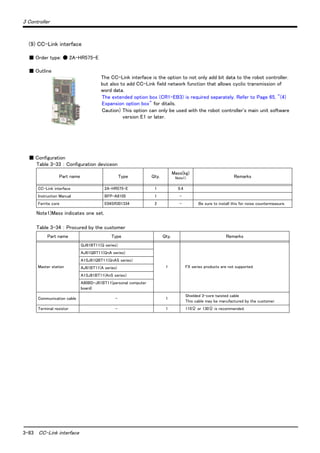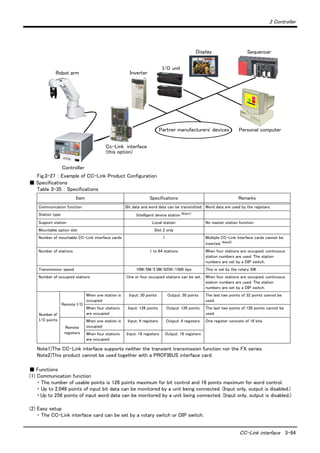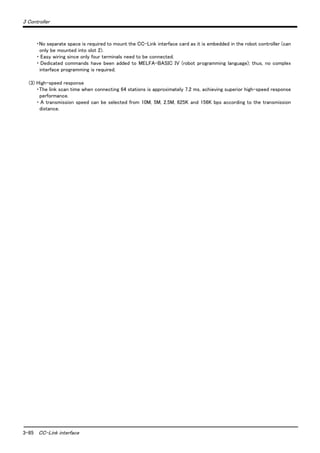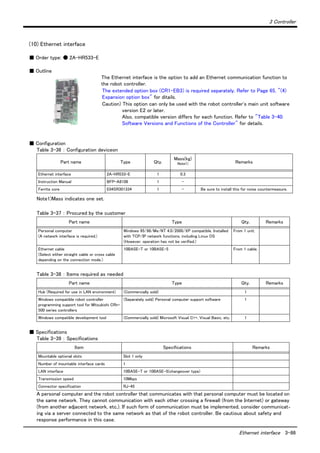


Mitsubishi Industrial Robot
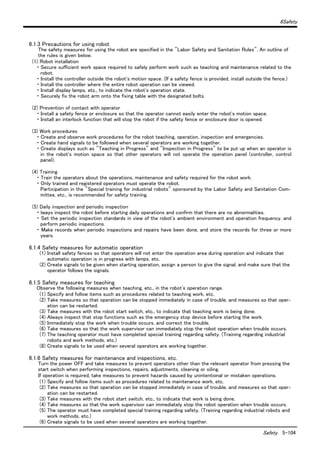
RV-1A/RV-2AJ Series
Standard Specifications Manual
(CR1-571 Controller)
BFP-A8050-K
Supplemental Instruction
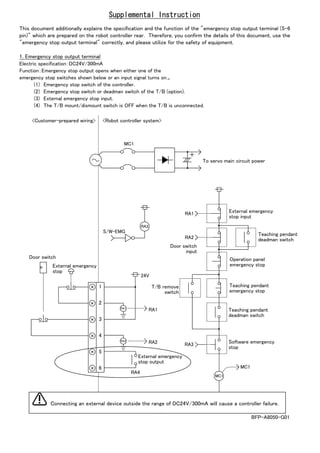
This document additionally explains the specification and the function of the "emergency stop output terminal (5-6
pin)" which are prepared on the robot controller rear. Therefore, you confirm the details of this document, use the
"emergency stop output terminal" correctly, and please utilize for the safety of equipment.
1. Emergency stop output terminal
Electric specification:DC24V/300mA
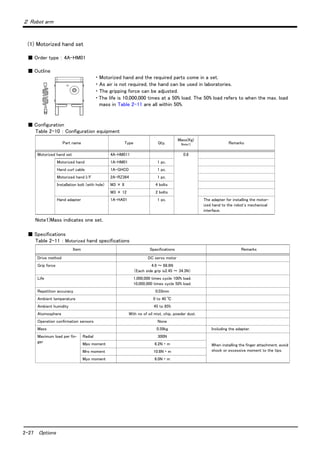
Function:Emergency stop output opens when either one of the
emergency stop switches shown below or an input signal turns on.。
(1) Emergency stop switch of the controller.
(2) Emergency stop switch or deadman switch of the T/B (option).
(3) External emergency stop input.
(4) The T/B mount/dismount switch is OFF when the T/B is unconnected.
1
2
3
4
5
6
RA1
24V
MC1
RA3
+
MC1
S/W-EMG
RA1
RA2
RA3
RA2
RA2
RA4
RA1
MC1
<Customer-prepared wiring> <Robot controller system>
To servo main circuit power
External emergency
stop input
Teaching pendant
deadman switch
Operation panel
emergency stop
Teaching pendant
emergency stop
Teaching pendant
deadman switch
Software emergency
stop
External emergency
stop output
T/B remove
switch
Door switch
input
External emergency
stop
Door switch
BFP-A8050-G01
Connecting an external device outside the range of DC24V/300mA will cause a controller failure.
Supplemental Instruction
Thank you for purchasing the Mitsubishi Industrial Robot MELFA Series.
This document explains partial changes and correction to the specifications of parallel inputs and outputs
of the CR1, CR1B, CR2A and CR2B Mitsubishi Industrial Robot Controllers. Therefore, check the
content, and use it together with your standard specifications and instruction manual.
1. Revision place
We found some erroneous descriptions related to the common method for output circuit of the parallel
input/output unit mounted as a standard.
Revision place Correction Mistake
Common method item shown in the table "Electric
specifications of output circuit"
8 points per common
(common terminal: 8 points)
4 points per common
(common terminal: 4 points)
<Supplementary notes regarding output circuit fuses>
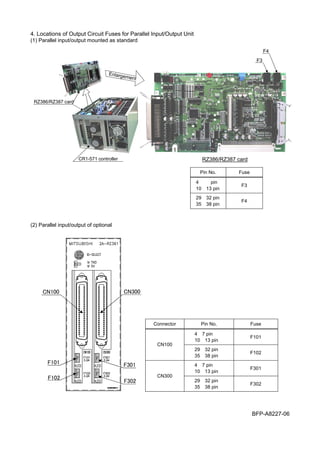
The output circuit protective fuses prevent failure in case of load short-circuit and improper connections.
Please do not connect loads that cause the current to exceed the maximum rated current. If the maximum
rated current is exceeded, the internal transistors may be damaged. The locations of the fuses are
indicated in "4. Locations of Output Circuit Fuses for Parallel Input/Output Unit."
2. Changes
The common method for output circuit of the optional parallel input/output unit has been changed.
Revision place Correction Mistake
Common method item shown in the table "Electric
specifications of output circuit"
8 points per common
(common terminal: 8 points)
4 points per common
(common terminal: 4 points)
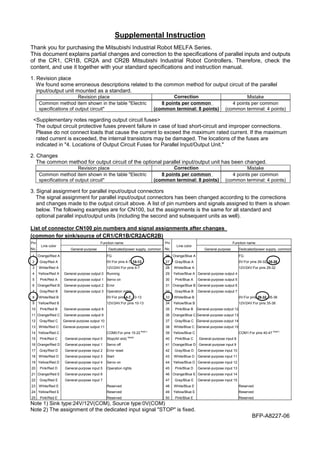
3. Signal assignment for parallel input/output connectors
The signal assignment for parallel input/output connectors has been changed according to the corrections
and changes made to the output circuit above. A list of pin numbers and signals assigned to them is shown
below. The following examples are for CN100, but the assignments is the same for all standard and
optional parallel input/output units (including the second and subsequent units as well).
List of connector CN100 pin numbers and signal assignments after changes
(common for sink/source of CR1/CR1B/CR2A/CR2B)
Function name Function namePin
No.
Line color
General-purpose Dedicated/power supply, common
Pin
No.
Line color
General-purpose Dedicated/power supply, common
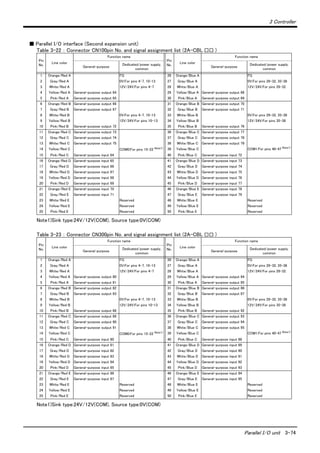
1 Orange/Red A FG 26 Orange/Blue A FG
2 Gray/Red A 0V:For pins 4-7, 10-13 27 Gray/Blue A 0V:For pins 29-32, 35-38
3 White/Red A 12V/24V:For pins 4-7 28 White/Blue A 12V/24V:For pins 29-32
4 Yellow/Red A General-purpose output 0 Running 29 Yellow/Blue A General-purpose output 4
5 Pink/Red A General-purpose output 1 Servo on 30 Pink/Blue A General-purpose output 5
6 Orange/Red B General-purpose output 2 Error 31 Orange/Blue B General-purpose output 6
7 Gray/Red B General-purpose output 3 Operation rights 32 Gray/Blue B General-purpose output 7
8 White/Red B 0V:For pins 4-7, 10-13 33 White/Blue B 0V:For pins 29-32, 35-38
9 Yellow/Red B 12V/24V:For pins 10-13 34 Yellow/Blue B 12V/24V:For pins 35-38
10 Pink/Red B General-purpose output 8 35 Pink/Blue B General-purpose output 12
11 Orange/Red C General-purpose output 9 36 Orange/Blue C General-purpose output 13
12 Gray/Red C General-purpose output 10 37 Gray/Blue C General-purpose output 14
13 White/Red C General-purpose output 11 38 White/Blue C General-purpose output 15
14 Yellow/Red C COM0:For pins 15-22 Note1)
39 Yellow/Blue C COM1:For pins 40-47 Note1)
15 Pink/Red C General-purpose input 0 Stop(All slot) Note2)
40 Pink/Blue C General-purpose input 8
16 Orange/Red D General-purpose input 1 Servo off 41 Orange/Blue D General-purpose input 9
17 Gray/Red D General-purpose input 2 Error reset 42 Gray/Blue D General-purpose input 10
18 White/Red D General-purpose input 3 Start 43 White/Blue D General-purpose input 11
19 Yellow/Red D General-purpose input 4 Servo on 44 Yellow/Blue D General-purpose input 12
20 Pink/Red D General-purpose input 5 Operation rights 45 Pink/Blue D General-purpose input 13
21 Orange/Red E General-purpose input 6 46 Orange/Blue E General-purpose input 14
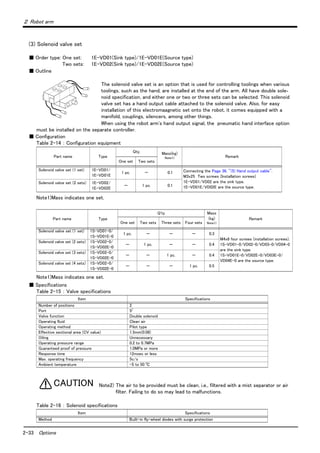
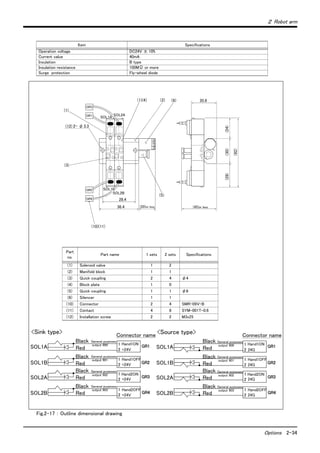
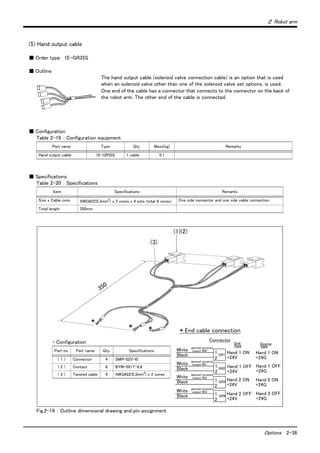
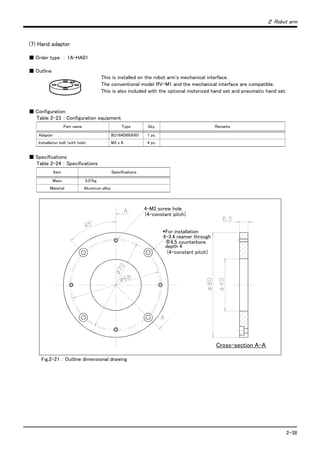
22 Gray/Red E General-purpose input 7 47 Gray/Blue E General-purpose input 15
23 White/Red E Reserved 48 White/Blue E Reserved
24 Yellow/Red E Reserved 49 Yellow/Blue E Reserved
25 Pink/Red E Reserved 50 Pink/Blue E Reserved
Note 1) Sink type:24V/12V(COM), Source type:0V(COM)
Note 2) The assignment of the dedicated input signal "STOP" is fixed.
BFP-A8227-06
4. Locations of Output Circuit Fuses for Parallel Input/Output Unit
(1) Parallel input/output mounted as standard
CR1-571 controller
Enlargement
RZ386/RZ387 card
RZ386/RZ387 card
F3
F4
Pin No. Fuse
4∼7 pin
10∼13 pin
F3
29∼32 pin
35∼38 pin
F4
(2) Parallel input/output of optional
BFP-A8227-06
Connector Pin No. Fuse
4∼7 pin
10∼13 pin
F101
CN100
29∼32 pin
35∼38 pin
F102
4∼7 pin
10∼13 pin
F301
CN300
29∼32 pin
35∼38 pin
F302
F101
F102
F301
F302
CN100 CN300
All teaching work must be carried out by an operator who has received special
training. (This also applies to maintenance work with the power source turned ON.)
Enforcement of safety training
For teaching work, prepare a work plan related to the methods and procedures of
operating the robot, and to the measures to be taken when an error occurs or when
restarting. Carry out work following this plan. (This also applies to maintenance
work with the power source turned ON.)
Preparation of work plan
Prepare a device that allows operation to be stopped immediately during teaching
work. (This also applies to maintenance work with the power source turned ON.)
Setting of emergency stop switch
During teaching work, place a sign indicating that teaching work is in progress on
the start switch, etc. (This also applies to maintenance work with the power source
turned ON.)
Indication of teaching work in progress
Provide a fence or enclosure during operation to prevent contact of the operator
and robot.
Installation of safety fence
Establish a set signaling method to the related operators for starting work, and fol-
low this method.
Signaling of operation start
As a principle turn the power OFF during maintenance work. Place a sign indicat-
ing that maintenance work is in progress on the start switch, etc.
Indication of maintenance work in progress
Before starting work, inspect the robot, emergency stop switch and other related
devices, etc., and confirm that there are no errors.
Inspection before starting work
CAUTION
CAUTION
WARNING
CAUTION
WARNING
CAUTION
CAUTION
CAUTION
Always read the following precautions and the separate
"Safety Manual" before starting use of the robot to learn the
required measures to be taken.
Safety Precautions
The points of the precautions given in the separate "Safety Manual" are given below.
Refer to the actual "Safety Manual" for details.
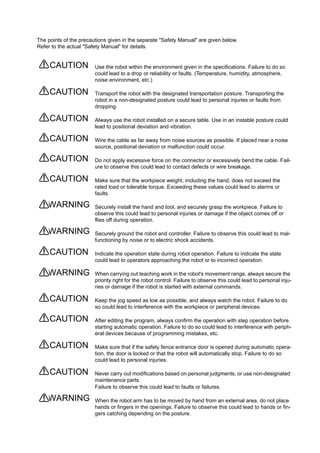
Use the robot within the environment given in the specifications. Failure to do so
could lead to a drop or reliability or faults. (Temperature, humidity, atmosphere,
noise environment, etc.)
Transport the robot with the designated transportation posture. Transporting the
robot in a non-designated posture could lead to personal injuries or faults from
dropping.
Always use the robot installed on a secure table. Use in an instable posture could
lead to positional deviation and vibration.
Wire the cable as far away from noise sources as possible. If placed near a noise
source, positional deviation or malfunction could occur.
Do not apply excessive force on the connector or excessively bend the cable. Fail-
ure to observe this could lead to contact defects or wire breakage.
Make sure that the workpiece weight, including the hand, does not exceed the
rated load or tolerable torque. Exceeding these values could lead to alarms or
faults.
Securely install the hand and tool, and securely grasp the workpiece. Failure to
observe this could lead to personal injuries or damage if the object comes off or
flies off during operation.
Securely ground the robot and controller. Failure to observe this could lead to mal-
functioning by noise or to electric shock accidents.
Indicate the operation state during robot operation. Failure to indicate the state
could lead to operators approaching the robot or to incorrect operation.
When carrying out teaching work in the robot's movement range, always secure the
priority right for the robot control. Failure to observe this could lead to personal inju-
ries or damage if the robot is started with external commands.
Keep the jog speed as low as possible, and always watch the robot. Failure to do
so could lead to interference with the workpiece or peripheral devices.
After editing the program, always confirm the operation with step operation before
starting automatic operation. Failure to do so could lead to interference with periph-
eral devices because of programming mistakes, etc.
Make sure that if the safety fence entrance door is opened during automatic opera-
tion, the door is locked or that the robot will automatically stop. Failure to do so
could lead to personal injuries.
Never carry out modifications based on personal judgments, or use non-designated
maintenance parts.
Failure to observe this could lead to faults or failures.
When the robot arm has to be moved by hand from an external area, do not place
hands or fingers in the openings. Failure to observe this could lead to hands or fin-
gers catching depending on the posture.
CAUTION
CAUTION
CAUTION
CAUTION
CAUTION
CAUTION
WARNING
WARNING
CAUTION
WARNING
CAUTION
CAUTION
CAUTION
CAUTION
WARNING
Do not stop the robot or apply emergency stop by turning the robot control-
ler's main power OFF. If the robot controller main power is turned OFF dur-
ing automatic operation, the robot accuracy could be adversely
affected.Moreover, it may interfere with the peripheral device by drop or
move by inertia of the arm.
Do not turn off the main power to the robot controller while rewriting the
internal information of the robot controller such as the program or parame-
ters.
If the main power to the robot controller is turned off while in automatic
operation or rewriting the program or parameters, the internal information of
the robot controller may be damaged.
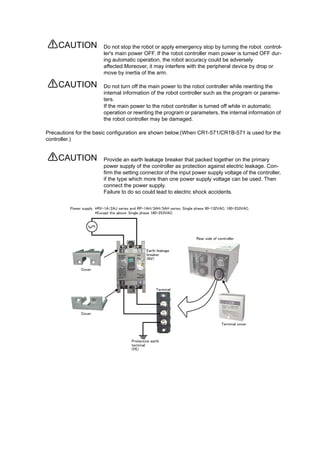
Precautions for the basic configuration are shown below.(When CR1-571/CR1B-571 is used for the
controller.)
Provide an earth leakage breaker that packed together on the primary
power supply of the controller as protection against electric leakage. Con-
firm the setting connector of the input power supply voltage of the controller,
if the type which more than one power supply voltage can be used. Then
connect the power supply.
Failure to do so could lead to electric shock accidents.
CAUTION
CAUTION
CAUTION
Cover
Terminal cover
Rear side of controller
Earth leakage
breaker
(NV)
Protective earth
terminal
(PE)
Cover
Terminal
Power supply *RV-1A/2AJ series and RP-1AH/3AH/5AH series: Single phase 90-132VAC, 180-253VAC.
*Except the above: Single phase 180-253VAC.
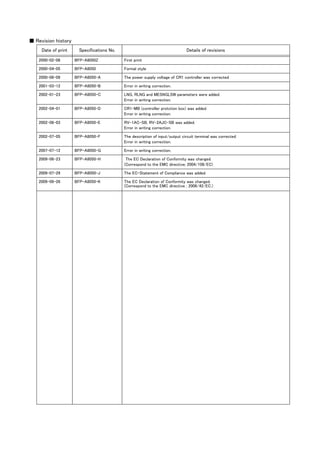
■ Revision history
Date of print Specifications No. Details of revisions
2000-02-08 BFP-A8050Z First print
2000-04-05 BFP-A8050 Formal style
2000-06-09 BFP-A8050-A The power supply voltage of CR1 controller was corrected
2001-03-12 BFP-A8050-B Error in writing correction.
2002-01-23 BFP-A8050-C LNG, RLNG and MESNGLSW parameters were added.
Error in writing correction.
2002-04-01 BFP-A8050-D CR1-MB (controller protction box) was added.
Error in writing correction.
2002-06-03 BFP-A8050-E RV-1AC-SB, RV-2AJC-SB was added.
Error in writing correction.
2002-07-05 BFP-A8050-F The description of input/output circuit terminal was corrected.
Error in writing correction.
2007-07-12 BFP-A8050-G Error in writing correction.
2009-06-23 BFP-A8050-H The EC Declaration of Conformity was changed.
(Correspond to the EMC directive; 2004/108/EC)
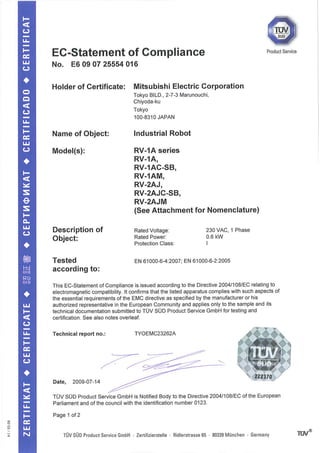
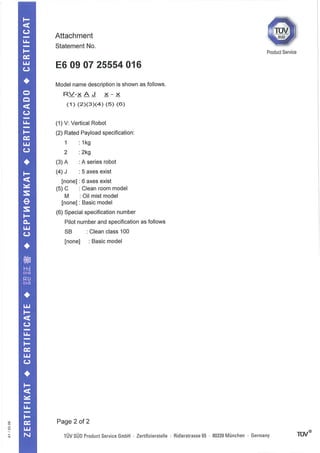
2009-07-29 BFP-A8050-J The EC-Statement of Compliance was added.
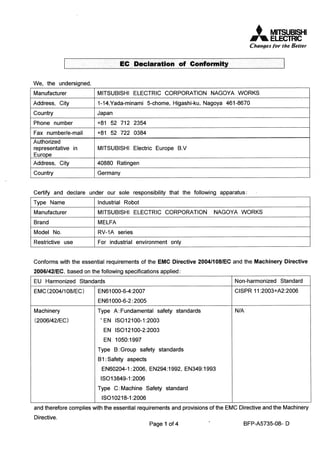
2009-09-26 BFP-A8050-K The EC Declaration of Conformity was changed.
(Correspond to the EMC directive ; 2006/42/EC.)
■ Introduction
The "RV-1A" and "RV-2AJ" are compact industrial robots developed with Mitsubishi's advanced technology.
These robots respond to users needs for compact and flexible production facilities generated due to the recent
diffusion of compact and highly accuracy products such as personal computer related devices, information termi-
nal devices and compact electronic devices for mounting on vehicles, and due to shorter product life cycles.
However, to comply with the target application, a work system having a well-balanced robot arm, peripheral
devices or robot and hand section must be structured.
When creating these standard specifications, we have edited them so that the Mitsubishi robot's characteristics
and specifications can be easily understood by users considering the implementation of robots. However, if there
are any unclear points, please contact your nearest Mitsubishi branch or dealer.
Mitsubishi hopes that you will consider these standard specifications and use our robots.
Note that in this specification document the specifications related to the robot arm is described "2 Robot arm" on
page 5 , the specifications related to the controller "3 Controller" on page 40 , and software functions and a com-
mand list "4 Software" on page 93 separately.
・ No part of this manual may be reproduced by any means or in any form, without prior consent
from Mitsubishi.
・ The contents of this manual are subject to change without notice.
・ The specifications values are based on Mitsubishi standard testing methods.
・ The information contained in this document has been written to be accurate as much as possible.
Please interpret that items not described in this document "cannot be performed." or "alarm
may occur".
Please contact your nearest dealer if you find any doubtful, wrong or skipped point.
・ This Specifications Manual is original.
・ Microsoft, Windows, Microsoft Windows NT are either registered trademarks or trademarks of
Microsoft Corporation in the United States and/or other countries.
Copyright(C) 2005 MITSUBISHI ELECTRIC CORPORATION
Contents
i
Page
1 General configuration .................................................................................................................................................................... 1-1
1.1 Structural equipment ............................................................................................................................................................. 1-1
1.1.1 Standard structural equipment .................................................................................................................................. 1-1
1.1.2 Shipping special specifications ................................................................................................................................... 1-1
1.1.3 Options ................................................................................................................................................................................. 1-1
1.1.4 Maintenance parts ........................................................................................................................................................... 1-1
1.2 Contents of the structural equipment ............................................................................................................................ 1-2
1.2.1 Robot arm ........................................................................................................................................................................... 1-2
1.2.2 Controller ............................................................................................................................................................................ 1-3
1.3 Contents of the Option equipment and special specification .............................................................................. 1-4
2 Robot arm ........................................................................................................................................................................................... 2-5
2.1 Standard specifications ........................................................................................................................................................ 2-5
2.2 Definition of specifications .................................................................................................................................................. 2-6
2.2.1 Pose repeatability ............................................................................................................................................................ 2-6
2.2.2 Rated load (mass capacity) ......................................................................................................................................... 2-7
2.2.3 Protection specifications and working environment ......................................................................................... 2-8
(1) Types of protection specifications ...................................................................................................................... 2-8
2.2.4 Clean specifications ........................................................................................................................................................ 2-9
(1) Types of clean specifications ................................................................................................................................. 2-9
2.3 Names of each part of the robot .................................................................................................................................... 2-10
2.4 Outside dimensions ・ Operating range diagram ........................................................................................................ 2-11
(1) RV-1A/1AC-SB ........................................................................................................................................................ 2-11
(2) RV-2AJ/2AJC-SB ................................................................................................................................................... 2-12
(3) Mechanical interface and Installation surface of RV-1A/2AJ, RV-1AC-SB/2AJC-SB .......... 2-13
2.5 Tooling ........................................................................................................................................................................................ 2-14
2.5.1 Wiring and piping for hand .......................................................................................................................................... 2-14
(1) RV-1A/2AJ (General environment) .................................................................................................................. 2-14
(2) RV-1AC-SB/2AJC-SB (Clean specification) .............................................................................................. 2-15
2.5.2 Internal air piping ............................................................................................................................................................ 2-16
2.5.3 Internal wiring for the pneumatic hand output cable ...................................................................................... 2-16
2.5.4 Internal wiring for the hand check input cable .................................................................................................. 2-16
2.5.5 Wiring and piping system diagram for hand ......................................................................................................... 2-17
(1) RV-1A/2AJ (General environment) .................................................................................................................. 2-17
(2) RV-1AC-SB/2AJC-SB (Clean specification) .............................................................................................. 2-19
2.5.6 Electrical specifications of hand input/output .................................................................................................. 2-21
2.5.7 Air supply circuit example for the hand ............................................................................................................... 2-22
2.6 Shipping special specifications, options, and maintenance parts ...................................................................... 2-23
2.6.1 Shipping special specifications ................................................................................................................................. 2-23
(1) Machine cable extension ........................................................................................................................................ 2-24
2.7 Options ....................................................................................................................................................................................... 2-26
(1) Motorized hand set ................................................................................................................................................... 2-27
(2) Pneumatic hand set .................................................................................................................................................. 2-30
(3) Solenoid valve set ..................................................................................................................................................... 2-33
(4) Hand input cable ........................................................................................................................................................ 2-35
(5) Hand output cable ..................................................................................................................................................... 2-36
(6) Hand curl tube ............................................................................................................................................................ 2-37
(7) Hand adapter ............................................................................................................................................................... 2-38
2.8 Maintenance parts ................................................................................................................................................................. 2-39
3 Controller .......................................................................................................................................................................................... 3-40
3.1 Standard specifications ...................................................................................................................................................... 3-40
3.1.1 Standard specifications ............................................................................................................................................... 3-40
3.1.2 Protection specifications and operating supply ................................................................................................ 3-41
3.2 Names of each part .............................................................................................................................................................. 3-42
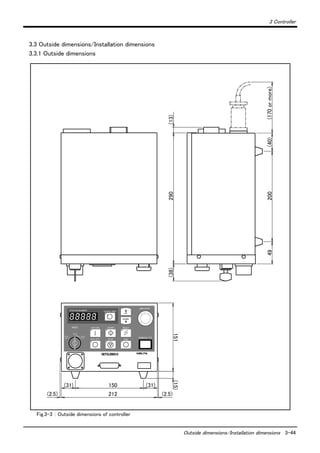
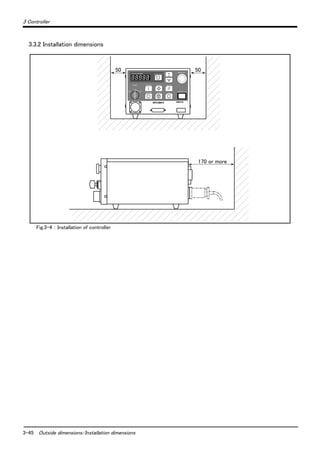
3.3 Outside dimensions/Installation dimensions .............................................................................................................. 3-44
3.3.1 Outside dimensions ....................................................................................................................................................... 3-44
3.3.2 Installation dimensions ................................................................................................................................................. 3-45
Contents
ii
Page
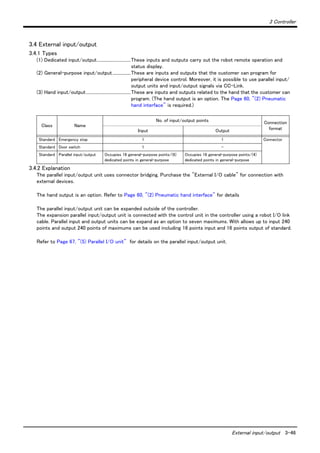
3.4 External input/output ......................................................................................................................................................... 3-46
3.4.1 Types .................................................................................................................................................................................. 3-46
3.4.2 Explanation ....................................................................................................................................................................... 3-46
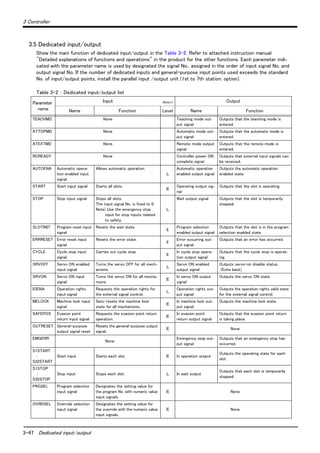
3.5 Dedicated input/output ...................................................................................................................................................... 3-47
3.6 Emergency stop input/output ......................................................................................................................................... 3-49
3.6.1 Connection of the external emergency stop ..................................................................................................... 3-49
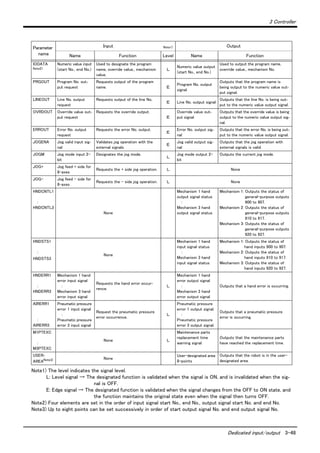
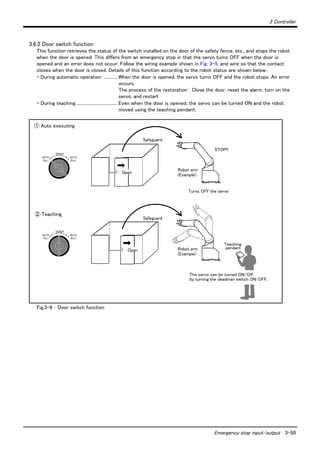
3.6.2 Door switch function ................................................................................................................................................... 3-50
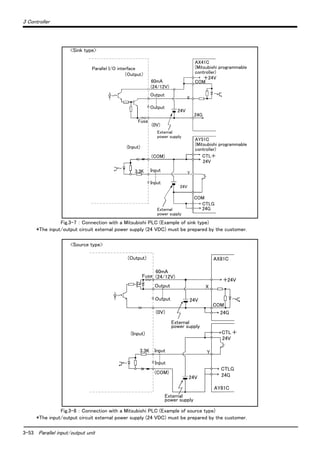
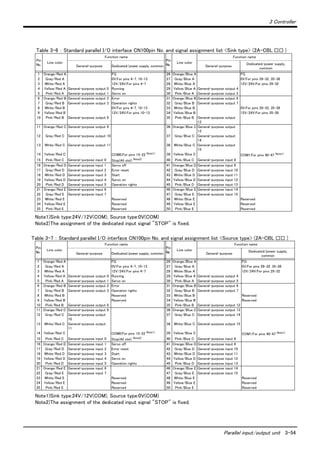
3.7 Parallel input/output unit .................................................................................................................................................. 3-51
3.8 Options ...................................................................................................................................................................................... 3-56
(1) Teaching pendant (T/B) ........................................................................................................................................ 3-57
(2) Pneumatic hand interface ..................................................................................................................................... 3-60
(3) Controller protection box ...................................................................................................................................... 3-62
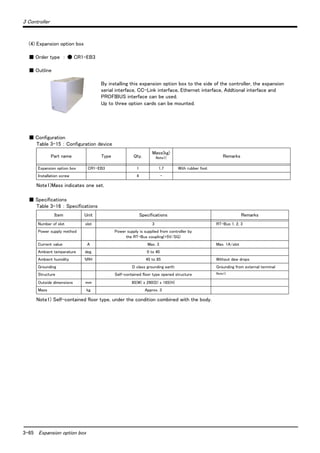
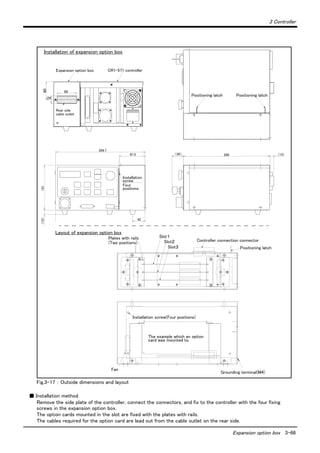
(4) Expansion option box .............................................................................................................................................. 3-65
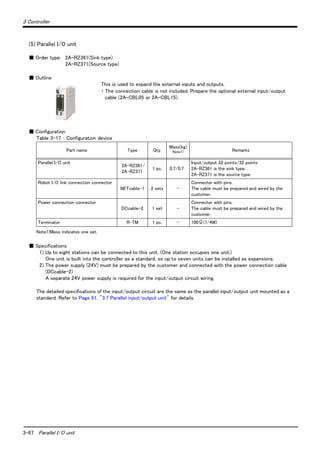
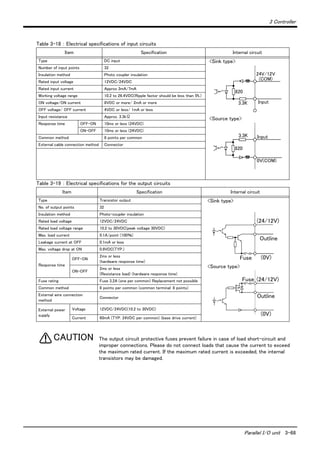
(5) Parallel I/O unit ......................................................................................................................................................... 3-67
(6) External I/O cable .................................................................................................................................................... 3-76
(7) Personal computer cable ....................................................................................................................................... 3-78
(8) Extended serial interface ....................................................................................................................................... 3-80
(9) CC-Link interface ..................................................................................................................................................... 3-83
(10) Ethernet interface .................................................................................................................................................. 3-86
(11) Additional axis interface ...................................................................................................................................... 3-88
(12) Personal computer support software/Personal computer support software mini ..................... 3-90
3.9 Maintenance parts ................................................................................................................................................................ 3-92
4 Software ........................................................................................................................................................................................... 4-93
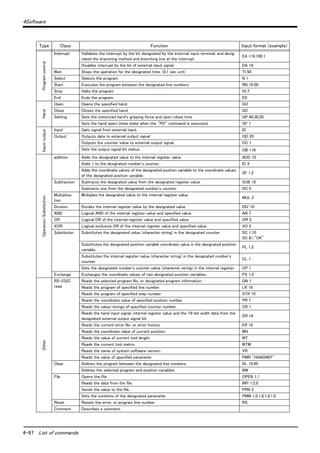
4.1 List of commands ................................................................................................................................................................. 4-93
(1) The procedure of robot language selection ................................................................................................... 4-93
(2) MELFA-BASIC Ⅳ commands ............................................................................................................................. 4-93
(3) MOVEMASTER commands ................................................................................................................................... 4-96
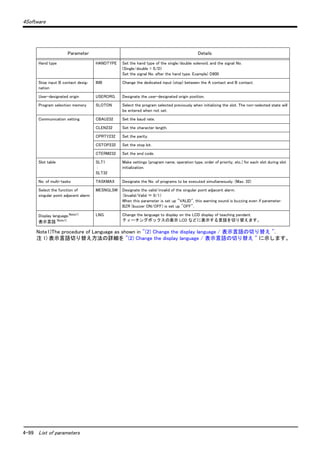
4.2 List of parameters ................................................................................................................................................................ 4-98
(1) List of parameters .................................................................................................................................................... 4-98
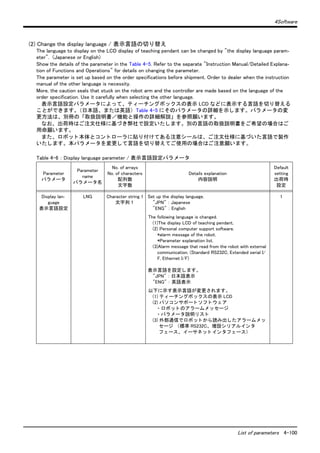
(2) Change the display language / 表示言語の切り替え ............................................................................ 4-100
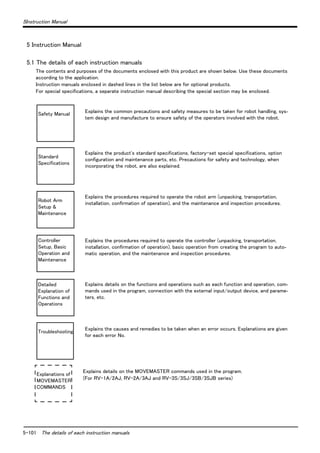
5 Instruction Manual ...................................................................................................................................................................... 5-101
5.1 The details of each instruction manuals ................................................................................................................... 5-101
6 Safety .............................................................................................................................................................................................. 5-103
6.1 Safety ...................................................................................................................................................................................... 5-103
6.1.1 Self-diagnosis stop functions ................................................................................................................................ 5-103
6.1.2 External input/output signals that can be used for safety protection measures ........................... 5-103
6.1.3 Precautions for using robot .................................................................................................................................... 5-104
6.1.4 Safety measures for automatic operation ........................................................................................................ 5-104
6.1.5 Safety measures for teaching ................................................................................................................................ 5-104
6.1.6 Safety measures for maintenance and inspections, etc. ........................................................................... 5-104
6.1.7 Examples of safety measures ................................................................................................................................ 5-105
6.2 Working environment ......................................................................................................................................................... 5-106
6.3 Precautions for handling .................................................................................................................................................. 5-107
7Appendix ...........................................................................................................................................................................Appendix-108
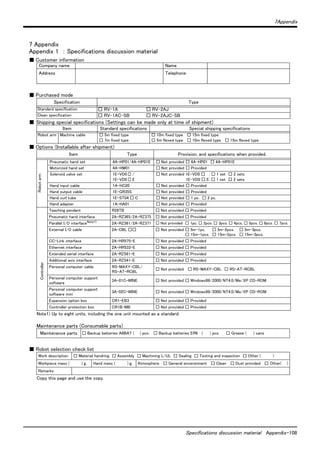
Appendix 1 : Specifications discussion material ......................................................................................... Appendix-108
1-1 Structural equipment
1General configuration
1 General configuration
1.1 Structural equipment
Structural equipment consists of the following types.
1.1.1 Standard structural equipment
The following items are enclosed as a standard.
(1) Robot arm
(2) Controller
(3) Machine cable
(4) Robot arm installation bolts
(5) Earth leakage breaker
(6) Instruction manual, Safety manual
(7) Guarantee card
1.1.2 Shipping special specifications
Part of the standard structural equipment is changed at the time of factory shipment. Consequently, kindly con-
firm the delivery date.
To make changes to the specifications after shipment, service work must be performed at the work site or the
robot must be returned for service.
1.1.3 Options
Installation is possible after shipment. Customer needs to perform the installation work.
1.1.4 Maintenance parts
Consumable parts and spare parts for maintenance use.
For items not listed, contact the dealer where you made your purchase.
1General configuration
Contents of the structural equipment 1-2
1.2 Contents of the structural equipment
1.2.1 Robot arm
The list of structural equipment is shown in Fig. 1-1.
Fig.1-1 : Structural equipment (Robot arm)
Vertical six-axis
RV-1A:General environment
RV-1AC-SB:Clean specification
Hand output cable
・ 1E-GR35S
Hand input cable
・ 1A-HC20
Solenoid valve set
With installation bolts.
<sink type>
・ 1 set: 1E-VD01
・ 2 set: 1E-VD02
<source type>
・ 1 set: 1E-VD01E
・ 2 set: 1E-VD02E
Note) Not clean specification
Hand curl tube
・ 1 set, 2pc. : 1E-ST0402C
・ 2 set, 4pc. : 1E-ST0404C
Pneumatic hand set :
4A-HP01(sink type)/4A-HP01E (source type)
The set consists of the following parts.
・ Pneumatic hand : 1A-HP01/1A-HP01E
・ Solenoid valve set (1 pc.) : 1E-VD01/1E-VD01E
・ Curl cable : 1A-GHCD/1A-GHCD
・ Hand curl tube : 1A-ST0402C/1A-ST0402C
・ Pneumatic hand I/F : 2A-RZ365/2A-RZ375
・ Hand adapter : 1A-HA01/1A-HA01
With installation bolts.
Note) Not clean specification
or
Motorized hand set : 4A-HM01
・ Motorized hand : 1A-HM01
・ Curl cable : 1A-GHCD
・ Motorized hand I/F : 2A-RZ364
・ Hand adapter : 1A-HA01
With installation bolts.
Note) Not clean specification
Hand adapter
: 1A-HA01
With installation bolts.
Vertical five-axis
multiple-jointed type
RV-2AJ:General environment
RV-2AJC-SB:Clean specification
Machine cable fixed type 5m
・ 1A-5CBL-1
Machine cable
・ Fixed type:1A- □□ CBL-1
・ Flexed type:1A- □□ LCBL-1
Note) □□ refer the length.
Refer to section "1.3" for datails.
Pneumatichandcustomer-manufacturedparts
[Caution]
Standard configuration
Special shipping
Option
equipment
specifications
Prepared by customer
1-3 Contents of the structural equipment
1General configuration
1.2.2 Controller
The devices shown below can be installed on the controller.
Personal computer
Preparedby customer
Controller
・ CR1B-571
Pneumatic I/F
・ 2A-RZ365 (Sink)
・ 2A-RZ375 (Source)
Personal computer
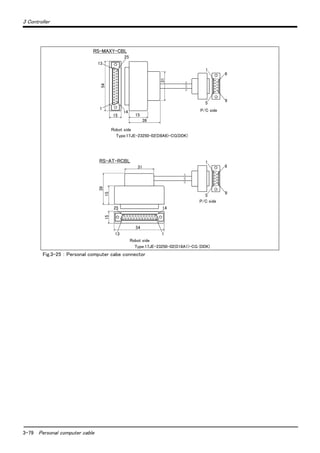
cable
・ RS-MAXY-CBL
・ RS-AT-RCBL
Personal computer support software
(MS-Windows95/98/NT4.0)
・ 3A-01C-WINE(CD-ROM)
Personal computer support software
mini
(MS-Windows95/98/NT4.0)
・ 3A-02C-WINE(CD-ROM)
Teaching pendant
(T/B)
・ R28TB
Parallel I/O unit
・ 2A-RZ361 (Sink)
・ 2A-RZ371 (Source)
External I/O cable
・ 2A-CBL05 (5m)
・ 2A-CBL15 (15m)
E x p a n s i o n
option box
・ CR1-EB3
Extended serial
I/F
・ 2A-RZ581E
ETHERNET I/F
・ 2A-HR533E
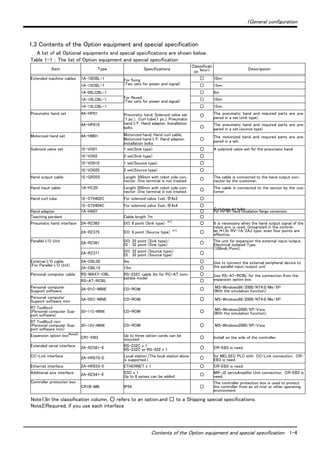
PLC(Programmable
Logic Controller)
External device
Prepared by customer
CC-LINK I/F
・ 2A-HR575E
Additional axis
I/F
・ 2A-RZ541E
*1) There are some restrictions on the
number of optional interfaces and their
combinations.
Refer to the separate "Controller setup,
basic operation, and maintenance" for
details.
Controller protection box
・ CR1-MB
*1) *1) *1) *1)
Standard configuration
[Caution]
equipment
Special shipping
Option
specifications
Prepared by customer
1General configuration
Contents of the Option equipment and special specification 1-4
1.3 Contents of the Option equipment and special specification
A list of all Optional equipments and special specifications are shown below.
Table 1-1 : The list of Option equipment and special specification
Item Type Specifications
Classificati
on Note1)
Note1)In the classification column, ○ refers to an option,and □ to a Shipping special specifications.
Descripsion
Extended machine cables 1A-10CBL-1 For fixing
(Two sets for power and signal)
□ 10m
1A-15CBL-1 □ 15m
1A-05LCBL-1
For flexed
(Two sets for power and signal)
□ 5m
1A-10LCBL-1 □ 10m
1A-15LCBL-1 □ 15m
Pneumatic hand set 4A-HP01 Pneumatic hand, Solenoid valve set
(1 pc.), Curl tube(1 pc.), Pneumatic
hand I/F, Hand adapter, Installation
bolts
○
The pneumatic hand and required parts are pre-
pared in a set.(sink type)
4A-HP01E
○
The pneumatic hand and required parts are pre-
pared in a set.(source type)
Motorized hand set 4A-HM01 Motorized hand, Hand curl cable,
Motorized hand I/F, Hand adapter,
Installation bolts
○
The motorized hand and required parts are pre-
pared in a set.
Solenoid valve set 1E-VD01 1 set(Sink type) ○ A solenoid valve set for the pneumatic hand.
1E-VD02 2 set(Sink type) ○
1E-VD01E 1 set(Source type) ○
1E-VD02E 2 set(Source type) ○
Hand output cable 1E-GR35S Length 350mm with robot side con-
nector. One terminal is not treated. ○ The cable is connected to the hand output con-
nector by the customer.
Hand input cable 1A-HC20 Length 200mm with robot side con-
nector. One terminal is not treated. ○ The cable is connected to the sensor by the cus-
tomer.
Hand curl tube 1E-ST0402C For solenoid valve 1set.:Φ4x2 ○
Curl type air tube
1E-ST0404C For solenoid valve 2set.:Φ4x4 ○
Hand adapter 1A-HA01 ○ For RV-M1 hand installation flange conversion.
Teaching pendant Cable length 7m ○
Pneumatic hand interface 2A-RZ365 DO: 8 point (Sink type) *1)
○ It is necessary when the hand output signal of the
robot arm is used. (Integrated in the control-
ler.)*1)In RV-1A/2AJ type, even four points are
effective.
2A-RZ375 DO: 8 point (Source type) *1)
○
Parallel I/O Unit 2A-RZ361 DO: 32 point (Sink type)/
DI : 32 point (Sink type) ○ The unit for expansion the external input/output.
Electrical isolated Type
(100mA/Point)
2A-RZ371 DO: 32 point (Source type)/
DI : 32 point (Source type) ○
External I/O cable
(For Parallel I/O Unit)
2A-CBL05 5m ○ Use to connect the external peripheral device to
the parallel input/output unit2A-CBL15 15m ○
Personal computer cable RS-MAXY-CBL RS-232C cable 3m for PC-AT com-
patible model
○ Use RS-AT-RCBL for the connection from the
expansion option box.RS-AT-RCBL ○
Personal computer
Support software 3A-01C-WINE CD-ROM ○ MS-Windows98/2000/NT4.0/Me/XP
(With the simulation function)
Personal computer
Support software mini 3A-02C-WINE CD-ROM ○ MS-Windows98/2000/NT4.0/Me/XP
RT ToolBox2
(Personal computer Sup-
port software)
3D-11C-WINE CD-ROM ○ MS-Windows2000/XP/Vista
(With the simulation function)
RT ToolBox2 mini
(Personal computer Sup-
port software mini)
3D-12C-WINE CD-ROM ○ MS-Windows2000/XP/Vista
Expansion option boxNote2)
Note2)Required, if you use each interface
CR1-EB3 Up to three option cards can be
mounted ○ Install on the side of the controller
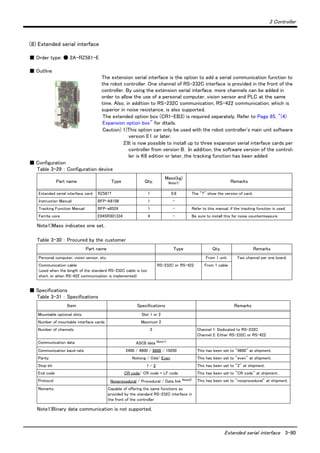
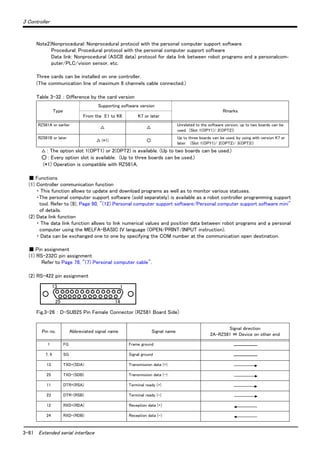
Extended serial interface 2A-RZ581-E RS-232C x 1
RS-232C or RS-422 x 1 ○ CR-EB3 is need.
CC-Link interface 2A-HR575-E Local station (The local station alone
is supported.) ○ for MELSEC PLC with CC-Link connection. CR-
EB3 is need.
Ethernet interface 2A-HR533-E ETHERNET x 1 ○ CR-EB3 is need.
Additional axis interface 2A-RZ541-E SSC x 1
Up to 8 axises can be added ○ MR-J2 servoAmplifer Unit connection. CR-EB3 is
need.
Controller protection box  
CR1B-MB IP54 □
The controller protection box is used to protect
the controller from an oil mist or other operating
environment
2-5 Standard specifications
2Robot arm
2 Robot arm
2.1 Standard specifications
2.1.1 Standard specifications
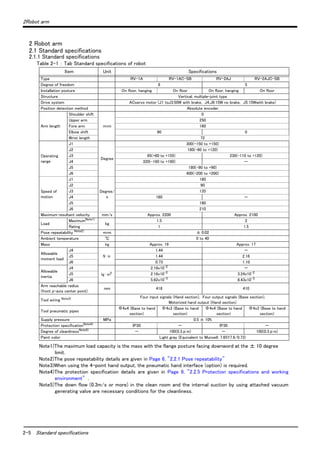
Table 2-1 : Tab Standard specifications of robot
Item Unit Specifications
Type RV-1A RV-1AC-SB RV-2AJ RV-2AJC-SB
Degree of freedom 6 5
Installation posture On floor, hanging On floor On floor, hanging On floor
Structure Vertical, multiple-joint type
Drive system ACservo motor (J1 toJ3:50W with brake, J4,J6:15W no brake, J5:15Wwith brake)
Position detection method Absolute encoder
Arm length
Shoulder shift
mm
0
Upper arm 250
Fore arm 160
Elbow shift 90 0
Wrist length 72
Operating
range
J1
Degree
300(-150 to +150)
J2 180(-60 to +120)
J3   95(+60 to +155) 230(-110 to +120)
J4 320(-160 to +160) -
J5 180(-90 to +90)
J6 400(-200 to +200)
Speed of
motion
J1
Degree/
s
180
J2 90
J3 135
J4 180 -
J5 180
J6 210
Maximum resultant velocity mm/s Approx. 2200 Approx. 2100
Load
MaximumNote1)
Note1)The maximum load capacity is the mass with the flange posture facing downword at the ± 10 degree
limit.
kg
1.5 2
Rating 1 1.5
Pose repeatability Note2)
Note2)The pose repeatability details are given in Page 6, "2.2.1 Pose repeatability"
mm ± 0.02
Ambient temperature ℃ 0 to 40
Mass kg Approx. 19 Approx. 17
Allowable
moment load
J4
N ・ m
1.44 -
J5 1.44 2.16
J6 0.73 1.10
Allowable
inertia
J4
kg ・ m2
2.16x10⁻²
-
J5 2.16x10⁻²
3.24x10⁻²
J6 5.62x10⁻³
8.43x10⁻³
Arm reachable radius
(front p-axis center point)
mm 418 410
Tool wiring Note3)
Note3)When using the 4-point hand output, the pneumatic hand interface (option) is required.
Four input signals (Hand section), Four output signals (Base section),
Motorized hand output (Hand section)
Tool pneumatic pipes
Φ4x4 (Base to hand
section)
Φ4x3 (Base to hand
section)
Φ4x4 (Base to hand
section)
Φ4x3 (Base to hand
section)
Supply pressure MPa 0.5 ± 10%
Protection specificationNote4)
Note4)The protection specification details are given in Page 9, "2.2.5 Protection specifications and working
environment" .
IP30 - IP30 -
Degree of cleanlinessNote5)
Note5)The down flow (0.3m/s or more) in the clean room and the internal suction by using attached vacuum
generating valve are necessary conditions for the cleanliness.
- 100(0.3μm) - 100(0.3μm)
Paint color Light gray (Equivalent to Munsell: 7.65Y7.6/0.73)
2 Robot arm
Definition of specifications 2-6
2.2 Definition of specifications
The accuracy of pose repeatability mentioned in catalogs and in the specification manual is defined as follows.
2.2.1 Pose repeatability
For this robot, the pose repeatability is given in accordance with JIS 8432 (Pose repeatability). Note that the value
is based on 100 measurements (although 30 measurements are required according to JIS).
[Caution] The specified "pose repeatability" is not guaranteed to be satisfied under the following conditions.
[1] Operation pattern factors
1) When an operation that approaches from different directions and orientations are included in rela-
tion to the teaching position during repeated operations
2) When the speed at teaching and the speed at execution are different
[2] Load fluctuation factor
1) When work is present/absent in repeated operations
[3] Disturbance factor during operation
1) Even if approaching from the same direction and orientation to the teaching position, when the
power is turned OFF or a stop operation is performed halfway
[4] Temperature factors
1) When the operating environment temperature changes
2) When accuracy is required before and after a warm-up operation
[5] Factors due to differences in accuracy definition
1) When accuracy is required between a position set by a numeric value in the robot's internal coor-
dinate system and a position within the actual space
2) When accuracy is required between a position generated by the pallet function Note1)
and a posi-
tion within the actual space
Note1)
The pallet function is a function that teaches only the position of the work used as reference (3 to 4 points) and
obtains the remaining positions by calculations, for an operation that arranges works orderly or for an operation
that unloads orderly arranged works. By using this function, for example, in the case of an operation that arranges
works on grid points of 100 x 100, by teaching only three points of four corners, the remaining grid points are
automatically generated; thus, it is not necessary to teach all 10,000 points. For more information about the pallet
function, refer to the separate volume, "Instruction Manual/Detailed Explanation of Functions and Operations."
2-7 Definition of specifications
2 Robot arm
2.2.2 Rated load (mass capacity)
The robot's mass capacity is expressed solely in terms of mass, but even for tools and works of similar mass,
eccentric loads will have some restrictions. When designing the tooling or when selecting a robot, consider the fol-
lowing issues.
(1) The tooling should have the value less or equal than the smaller of the tolerable inertia and the tolerable
moment found in Page 5, "Table 2-1 : Tab Standard specifications of robot"
(2) Fig. 2-1 and Fig. 2-2shows the distribution dimensions for the center of gravity in the case where the vol-
ume of the load is relatively small. Use this figure as a reference when designing the tooling.
(3) When the load is not mass, but force, you should design the tooling so that it does not exceed the value for
allowable moment described in Page 5, "Table 2-1 : Tab Standard specifications of robot"
[Caution] The mass capacity is greatly influenced by the operating speed of the robot and the motion posture.
Even if you are within the allowable range mentioned previously, an overload or generate an overcurrnt
alarm could occur. In such cases, it will be necessary to change the time setting for acceleration/decel-
eration, the operating speed, and the motion posture.
[Caution] The overhang amount of the load for the specified moment and inertia in this section is the dynamic
limit value determined by the motor driving each axis and by the capacity of the reduction gears. Con-
sequently, accuracy cannot be guaranteed for the entire tooling area. Since accuracy is based on the
center point of the mechanical interface surface, position accuracy can diminish as you go away from
the flange surface, or vibration can result, with tooling that is not rigid or that is long.
Fig.2-1 : Position of center of gravity for loads (for loads with comparatively small volume) : RV-1A/1AC-SB
Fig.2-2 : Position of center of gravity for loads (for loads with comparatively small volume) : RV-2AJ/2AJC-SB
0150200250 100
100
150
136
100
150
72300
268 207 147 97
0.3kg
0.5kg
1.0kg
1.5
kg
136
106
106
75
50
50
75
Maximum load capacity
with the flange posture facing downword
Rotation center for J5 axis
Rotation center for J6 axis
100
150
250 200 150 100 72 0
100
150
300
0.5kg
1.0kg
1.5kg
2kg
129
129
91
91
75
75
56
56
254 180 147 110
Rotation center for J5 axis
Rotation center for J6 axis
Maximum load capacity
with the flange posture facing downword
2 Robot arm
Definition of specifications 2-8
2.2.3 Protection specifications and working environment
(1) Types of protection specifications
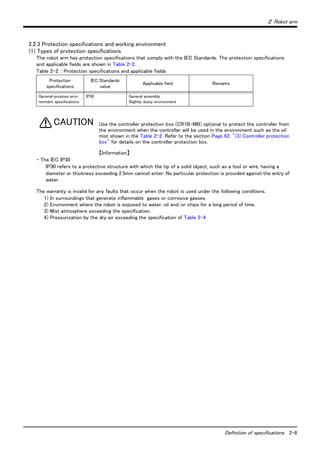
The robot arm has protection specifications that comply with the IEC Standards. The protection specifications
and applicable fields are shown in Table 2-2.
Table 2-2 : Protection specifications and applicable fields
Use the controller protection box (CR1B-MB) optional to protect the controller from
the environment when the controller will be used in the environment such as the oil
mist shown in the Table 2-2. Refer to the section Page 62, "(3) Controller protection
box" for details on the controller protection box.
【Information】
・ The IEC IP30
IP30 refers to a protective structure with which the tip of a solid object, such as a tool or wire, having a
diameter or thickness exceeding 2.5mm cannot enter. No particular protection is provided against the entry of
water.
The warranty is invalid for any faults that occur when the robot is used under the following conditions.
1) In surroundings that generate inflammable gases or corrosive gasses.
2) Environment where the robot is exposed to water, oil and/or chips for a long period of time.
3) Mist atmosphere exceeding the specification.
4) Pressurization by the dry air exceeding the specification of Table 2-4
Protection
specifications
IEC Standards
value
Applicable field Remarks
General-purpose envi-
ronment specifications
IP30 General assembly
Slightly dusty environment
CAUTION
2-9 Definition of specifications
2 Robot arm
2.2.4 Clean specifications
(1) Types of clean specifications
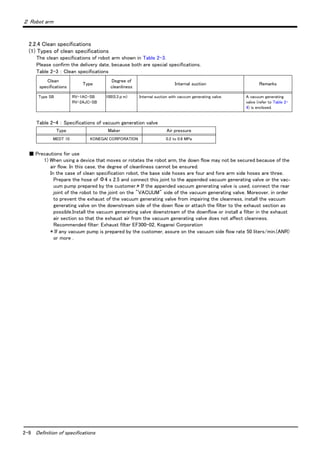
The clean specifications of robot arm shown in Table 2-3.
Please confirm the delivery date, because both are special specifications.
Table 2-3 : Clean specifications
Table 2-4 : Specifications of vacuum generation valve
■ Precautions for use
1) When using a device that moves or rotates the robot arm, the down flow may not be secured because of the
air flow. In this case, the degree of cleanliness cannot be ensured.
In the case of clean specification robot, the base side hoses are four and fore arm side hoses are three.
Prepare the hose of Φ4 x 2.5 and connect this joint to the appended vacuum generating valve or the vac-
uum pump prepared by the customer.* If the appended vacuum generating valve is used, connect the rear
joint of the robot to the joint on the "VACUUM" side of the vacuum generating valve. Moreover, in order
to prevent the exhaust of the vacuum generating valve from impairing the cleanness, install the vacuum
generating valve on the downstream side of the down flow or attach the filter to the exhaust section as
possible.Install the vacuum generating valve downstream of the downflow or install a filter in the exhaust
air section so that the exhaust air from the vacuum generating valve does not affect cleanness.
Recommended filter: Exhaust filter EF300-02, Koganei Corporation
* If any vacuum pump is prepared by the customer, assure on the vacuum side flow rate 50 liters/min.(ANR)
or more .
Clean
specifications
Type
Degree of
cleanliness
Internal suction Remarks
Type SB RV-1AC-SB
RV-2AJC-SB
100(0.3μm) Internal suction with vaccum generating valve. A vacuum generating
valve (refer to Table 2-
4) is enclosed.
Type Maker Air pressure
MEDT 10 KONEGAI CORPORATION 0.2 to 0.6 MPa
2 Robot arm
Names of each part of the robot 2-10
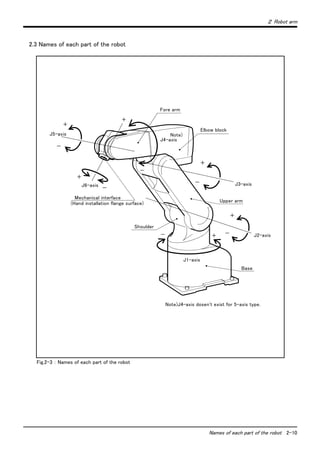
2.3 Names of each part of the robot
Fig.2-3 : Names of each part of the robot
+
+
J6-axis
Mechanical interface
(Hand installation flange surface)
J5-axis
J4-axis
Note)
Note)J4-axis dosen't exist for 5-axis type.
J3-axis
J2-axis
+
+
+
+
-
-
-
-
--
J1-axis
Elbow block
Fore arm
Shoulder
Upper arm
Base
2-11 Outside dimensions ・ Operating range diagram
2 Robot arm
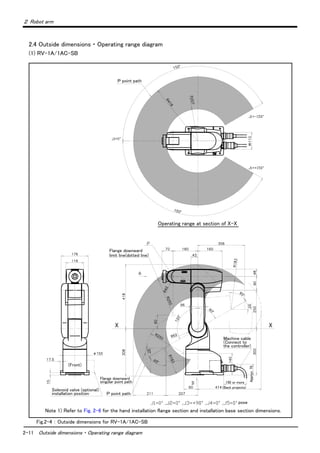
2.4 Outside dimensions ・ Operating range diagram
(1) RV-1A/1AC-SB
Fig.2-4 : Outside dimensions for RV-1A/1AC-SB
X X
Flange downward
limit line(dotted line)
Solenoid valve (optional)
installation position
Flange downward
singular point path
P point path
pose
Machine cable
(Connect to
the controller)
150 or more
(Back projects)
Approx.70
(Front)
P point path
Operating range at section of X-X
Note 1) Refer to Fig. 2-6 for the hand installation flange section and installation base section dimensions.
2 Robot arm
Outside dimensions ・ Operating range diagram 2-12
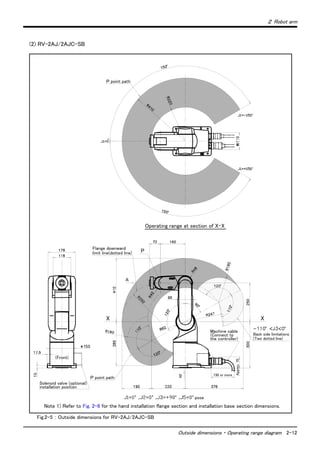
(2) RV-2AJ/2AJC-SB
Fig.2-5 : Outside dimensions for RV-2AJ/2AJC-SB
X X
Flange downward
limit line(dotted line)
Solenoid valve (optional)
installation position
Back side limitations
P point path
pose
Machine cable
(Connect to
the controller)
150 or more
Approx.70
(Front)
P point path
P
(Two dotted line)
Operating range at section of X-X
Note 1) Refer to Fig. 2-6 for the hand installation flange section and installation base section dimensions.
2-13 Outside dimensions ・ Operating range diagram
2 Robot arm
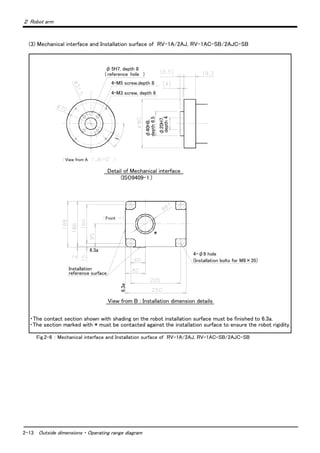
(3) Mechanical interface and Installation surface of RV-1A/2AJ, RV-1AC-SB/2AJC-SB
Fig.2-6 : Mechanical interface and Installation surface of RV-1A/2AJ, RV-1AC-SB/2AJC-SB
(ISO9409-1 )
φ5H7, depth 8
( reference hole )
4-M5 screw,depth 8
4-M3 screw, depth 6
View from A
Detail of Mechanical interface
φ40H8,
depth6.5
φ20H7,
depth4
Front
4-φ9 hole
(Installation bolts for M8×35)
Installation
reference surface
View from B : Installation dimension details
・The contact section shown with shading on the robot installation surface must be finished to 6.3a.
・The section marked with * must be contacted against the installation surface to ensure the robot rigidity.
*
6.3a
6.3a
2 Robot arm
Tooling 2-14
2.5 Tooling
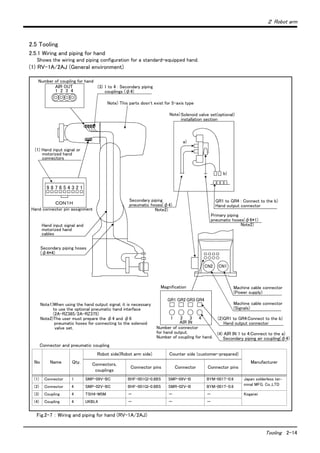
2.5.1 Wiring and piping for hand
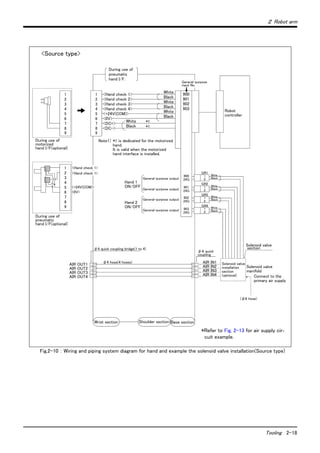
Shows the wiring and piping configuration for a standard-equipped hand.
(1) RV-1A/2AJ (General environment)
Fig.2-7 : Wiring and piping for hand (RV-1A/2AJ)
Number of coupling for hand
1 2 3 4
(3) 1 to 4 : Secondary piping
couplings (φ4)
Note) This parts dosn't exist for 5-axis type
Solenoid valve set(optional)
installation section
a)
b)
9 8 7 6 5 4 3 2 1
Secondary piping hoses
(φ4*4)
GR1 to GR4 : Connect to the b)
Hand output connector
Machine cable connector
(Power supply)
CN2 CN1
GR1 GR2 GR3 GR4
1 2 3 4
CON1H
Note1)When using the hand output signal, it is necessary
to use the optional pneumatic hand interface
(2A-RZ365/2A-RZ375)
Note2)The user must prepare the φ4 and φ6
     pneumatic hoses for connecting to the solenoid
valve set.
Note)
AIR OUT
AIR IN
Magnification
(1) Hand input signal or
motorized hand
connectors
Hand connector pin assignment
Hand input signal and
motorized hand
cables
Secondary piping
pneumatic hoses(φ4)
Note2)
Primary piping
pneumatic hoses(φ6*1)
Note2)
Machine cable connector
(Signals)
(2)GR1 to GR4:Connect to the b)
Hand output connector
(4) AIR IN 1 to 4:Connect to the a)
Secondary piping air coupling(φ4)
Number of connector
for hand output.
Number of coupling for hand.
Connector and pneumatic coupling
No Name Qty.
Robot side(Robot arm side) Counter side (customer-prepared)
ManufacturerConnectors,
couplings
Connector pins Connector Connector pins
(1) Connector 1 SMP-09V-BC BHF-001GI-0.8BS SMP-09V-B BYM-001T-0.6 Japan solderless ter-
minal MFG. Co.,LTD(2) Connector 4 SMP-02V-BC BHF-001GI-0.8BS SMR-02V-B BYM-001T-0.6
(3) Coupling 4 TSH4-M5M - - - Koganei
(4) Coupling 4 UKBL4 - - -
2-15 Tooling
2 Robot arm
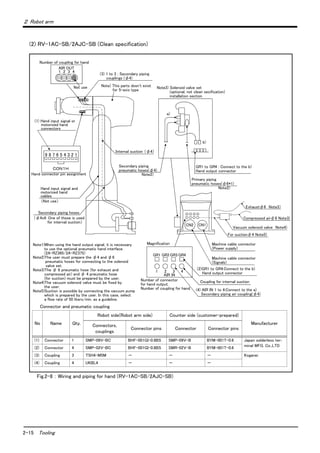
(2) RV-1AC-SB/2AJC-SB (Clean specification)
Fig.2-8 : Wiring and piping for hand (RV-1AC-SB/2AJC-SB)
Number of coupling for hand
(3) 1 to 3 : Secondary piping
couplings (φ4)
Note) This parts dosn't exist
for 5-axis type
Note3) Solenoid valve set
(optional, not clean secification)
installation section
a)
b)
9 8 7 6 5 4 3 2 1
Secondary piping hoses
GR1 to GR4 : Connect to the b)
Hand output connector
Machine cable connector
(Power supply)
CN2 CN1
GR1 GR2 GR3 GR4
1 2 3 4
CON1H
Note1)When using the hand output signal, it is necessary
to use the optional pneumatic hand interface.
(2A-RZ365/2A-RZ375)
Note2)The user must prepare the φ4 and φ6
     pneumatic hoses for connecting to the solenoid
valve set.
Note3)The φ 6 pneumatic hose (for exhaust and
compressed air) and φ 4 pneumatic hose
(for suction) must be prepared by the user.
Note4)The vacuum solenoid valve must be fixed by
the user.
Note5)Suction is possible by connecting the vacuum pump
which is prepared by the user. In this case, select
a flow rate of 50 liters/min. as a guideline.
AIR IN
Magnification
(1) Hand input signal or
motorized hand
connectors
Hand connector pin assignment
Hand input signal and
motorized hand
cables
Secondary piping
pneumatic hoses(φ4)
Note2)
Primary piping
pneumatic hoses(φ6*1)
Note2)
Machine cable connector
(Signals)
(2)GR1 to GR4:Connect to the b)
Hand output connector
(4) AIR IN 1 to 4:Connect to the a)
Secondary piping air coupling(φ4)
Number of connector
for hand output.
Number of coupling for hand.
Vacuum solenoid valve Note4)
For suctionφ4 Note5)
Compressed airφ6 Note3)
Exhaustφ6 Note3)
(Not use)
(φ4x4: One of those is used
for internal suction)
Coupling for internal suction
1 2 3 4
AIR OUT
Not use
Internal suction (φ4)
Connector and pneumatic coupling
No Name Qty.
Robot side(Robot arm side) Counter side (customer-prepared)
ManufacturerConnectors,
couplings
Connector pins Connector Connector pins
(1) Connector 1 SMP-09V-BC BHF-001GI-0.8BS SMP-09V-B BYM-001T-0.6 Japan solderless ter-
minal MFG. Co.,LTD
(2) Connector 4 SMP-02V-BC BHF-001GI-0.8BS SMR-02V-B BYM-001T-0.6
(3) Coupling 3 TSH4-M5M - - - Koganei
(4) Coupling 4 UKBL4 - - -
2 Robot arm
Tooling 2-16
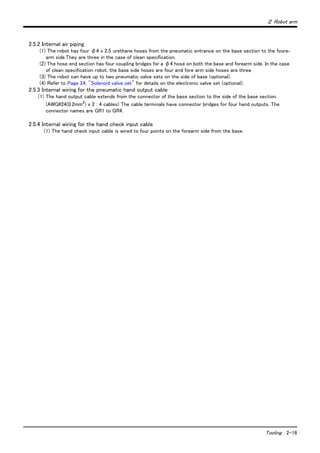
2.5.2 Internal air piping
(1) The robot has four φ4 x 2.5 urethane hoses from the pneumatic entrance on the base section to the foure-
arm side.They are three in the case of clean specification.
(2) The hose end section has four coupling bridges for a φ4 hose on both the base and forearm side. In the case
of clean specification robot, the base side hoses are four and fore arm side hoses are three.
(3) The robot can have up to two pneumatic valve sets on the side of base (optional).
(4) Refer to Page 24, "Solenoid valve set" for details on the electronic valve set (optional).
2.5.3 Internal wiring for the pneumatic hand output cable
(1) The hand output cable extends from the connector of the base section to the side of the base section.
(AWG#24(0.2mm2
) x 2 : 4 cables) The cable terminals have connector bridges for four hand outputs. The
connector names are GR1 to GR4.
2.5.4 Internal wiring for the hand check input cable
(1) The hand check input cable is wired to four points on the forearm side from the base.
2-17 Tooling
2 Robot arm
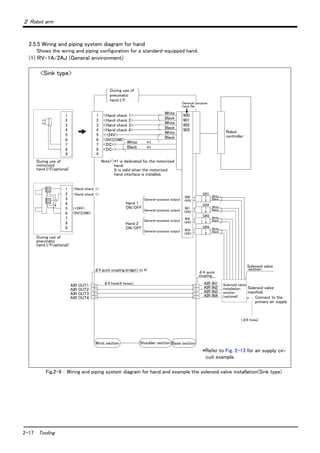
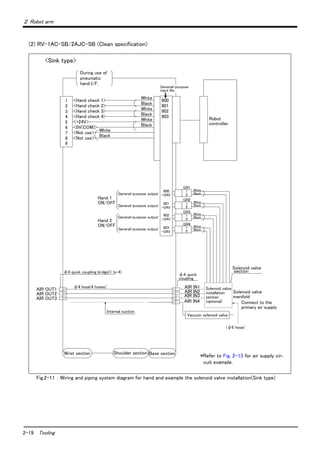
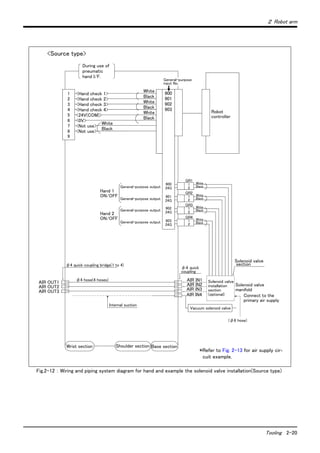
2.5.5 Wiring and piping system diagram for hand
Shows the wiring and piping configuration for a standard-equipped hand.
(1) RV-1A/2AJ (General environment)
Fig.2-9 : Wiring and piping system diagram for hand and example the solenoid valve installation(Sink type)
1
2
3
4
5
6
7
8
*1
1
2
3
4
5
6
7
8
9
<+24V>
<0V(COM)>
<Hand check 1>
<Hand check 2>
<Hand check 3>
<Hand check 4>
<+24V>
<0V(COM)>
<DC+>
<DC->
1
2
3
4
5
6
7
8
White
Black
White
Black
White
Black
White
Black
During use of
pneumatic
hand I/F.
*1 is dedicated for the motorized
hand.
It is valid when the motorized
hand interface is installed.
Note1)
Robot
controller
Solenoid valve
section
Solenoid valve
manifold
AIR IN1
AIR IN2
AIR IN3
AIR IN4
(φ6 hose)
φ4 quick
coupling
φ4 hose(4 hoses)
φ4 quick coupling bridge(1 to 4)
AIR OUT1
AIR OUT2
AIR OUT3
AIR OUT4
Wrist section Shoulder section Base section
Hand 1
ON/OFF
Hand 2
ON/OFF
900
+24V
901
+24V
902
+24V
903
+24V
GR1
GR2
GR3
GR4
White
Black
1
2
1
2
1
2
1
2
99
Connect to the
primary air supply
*1
<Hand check 1>
<Hand check 1>
During use of
motorized
hand I/F(optional)
During use of
pneumatic
hand I/F(optional)
General-purpose output
White
Black
White
Black
White
Black
Solenoid valve
installation
section
(optional)
900
901
902
903
General-purpose
input No.
*Refer to Fig. 2-13 for air supply cir-
cuit example.
<Sink type>
2 Robot arm
Tooling 2-18
Fig.2-10 : Wiring and piping system diagram for hand and example the solenoid valve installation(Source type)
1
2
3
4
5
6
7
8
*1
1
2
3
4
5
6
7
8
9
<Hand check 1>
<Hand check 2>
<Hand check 3>
<Hand check 4>
<+24V(COM)>
<0V>
<DC+>
<DC->
1
2
3
4
5
6
7
8
White
Black
White
Black
White
Black
White
Black
During use of
pneumatic
hand I/F.
*1 is dedicated for the motorized
hand.
It is valid when the motorized
hand interface is installed.
Note1)
Robot
controller
Solenoid valve
section
Solenoid valve
manifold
AIR IN1
AIR IN2
AIR IN3
AIR IN4
(φ6 hose)
φ4 hose(4 hoses)
φ4 quick coupling bridge(1 to 4)
AIR OUT1
AIR OUT2
AIR OUT3
AIR OUT4
Wrist section Shoulder section Base section
Hand 1
ON/OFF
Hand 2
ON/OFF
900
24G
901
24G
902
24G
903
24G
GR1
GR2
GR3
GR4
White
Black
1
2
1
2
1
2
1
2
99
Connect to the
primary air supply
*1
<Hand check 1>
<Hand check 1>
During use of
motorized
hand I/F(optional)
During use of
pneumatic
hand I/F(optional)
General-purpose output
White
Black
White
Black
White
Black
Solenoid valve
installation
section
(optional)
900
901
902
903
General-purpose
input No.
φ4 quick
coupling
<+24V(COM)>
<0V>
*Refer to Fig. 2-13 for air supply cir-
cuit example.
<Source type>
2-19 Tooling
2 Robot arm
(2) RV-1AC-SB/2AJC-SB (Clean specification)
Fig.2-11 : Wiring and piping system diagram for hand and example the solenoid valve installation(Sink type)
<Hand check 1>
<Hand check 2>
<Hand check 3>
<Hand check 4>
<+24V>
<0V(COM)>
<Not use>
<Not use>
1
2
3
4
5
6
7
8
White
Black
White
Black
White
Black
White
Black
During use of
pneumatic
hand I/F.
Robot
controller
Solenoid valve
section
Solenoid valve
manifold
AIR IN1
AIR IN2
(φ6 hose)
φ4 quick
coupling
φ4 hose(4 hoses)
φ4 quick coupling bridge(1 to 4)
AIR OUT1
AIR OUT2
AIR OUT3
Wrist section Shoulder section Base section
Hand 1
ON/OFF
Hand 2
ON/OFF
900
+24V
901
+24V
902
+24V
903
+24V
GR1
GR2
GR3
GR4
White
Black
1
2
1
2
1
2
1
2
9
Connect to the
primary air supply
General-purpose output
White
Black
White
Black
White
Black
Solenoid valve
installation
section
(optional)
900
901
902
903
General-purpose
input No.
Vacuum solenoid valve
AIR IN3
Internal suction
AIR IN4
*Refer to Fig. 2-13 for air supply cir-
cuit example.
<Sink type>
2 Robot arm
Tooling 2-20
Fig.2-12 : Wiring and piping system diagram for hand and example the solenoid valve installation(Source type)
<Hand check 1>
<Hand check 2>
<Hand check 3>
<Hand check 4>
<24V(COM)>
<0V>
<Not use>
<Not use>
1
2
3
4
5
6
7
8
White
Black
White
Black
White
Black
White
Black
During use of
pneumatic
hand I/F.
Robot
controller
Solenoid valve
section
Solenoid valve
manifold
AIR IN1
AIR IN2
(φ6 hose)
φ4 hose(4 hoses)
φ4 quick coupling bridge(1 to 4)
AIR OUT1
AIR OUT2
AIR OUT3
Wrist section Shoulder section Base section
Hand 1
ON/OFF
Hand 2
ON/OFF
900
24G
901
24G
902
24G
903
24G
GR1
GR2
GR3
GR4
White
Black
1
2
1
2
1
2
1
2
9
Connect to the
primary air supply
General-purpose output
White
Black
White
Black
White
Black
Solenoid valve
installation
section
(optional)
900
901
902
903
General-purpose
input No.
φ4 quick
coupling
Vacuum solenoid valve
AIR IN3
Internal suction
AIR IN4
*Refer to Fig. 2-13 for air supply cir-
cuit example.
<Source type>
2-21 Tooling
2 Robot arm
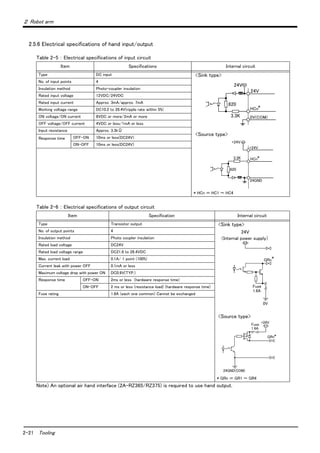
2.5.6 Electrical specifications of hand input/output
Table 2-5 : Electrical specifications of input circuit
Table 2-6 : Electrical specifications of output circuit
Note) An optional air hand interface (2A-RZ365/RZ375) is required to use hand output.
Item Specifications Internal circuit
Type DC input <Sink type>
<Source type>
* HCn = HC1 ~ HC4
No. of input points 4
Insulation method Photo-coupler insulation
Rated input voltage 12VDC/24VDC
Rated input current Approx. 3mA/approx. 7mA
Working voltage range DC10.2 to 26.4V(ripple rate within 5%)
ON voltage/ON current 8VDC or more/2mA or more
OFF voltage/OFF current 4VDC or less/1mA or less
Input resistance Approx. 3.3kΩ
Response time OFF-ON 10ms or less(DC24V)
ON-OFF 10ms or less(DC24V)
Item Specification Internal circuit
Type Transistor output <Sink type>
<Source type>
* GRn = GR1 ~ GR4
No. of output points 4
Insulation method Photo coupler insulation
Rated load voltage DC24V
Rated load voltage range DC21.6 to 26.4VDC
Max. current load 0.1A/ 1 point (100%)
Current leak with power OFF 0.1mA or less
Maximum voltage drop with power ON DC0.9V(TYP.)
Response time OFF-ON 2ms or less (hardware response time)
ON-OFF 2 ms or less (resistance load) (hardware response time)
Fuse rating 1.6A (each one common) Cannot be exchanged
3.3K
24V
0V(COM)
820
HCn*
24V
3.3K
820
24GND
+24V
HCn*
+24V
24V
(Internal power supply)
*
GRn
Fuse
1.6A
0V
Fuse
1.6A
*GRn
+24V
24GND(COM)
2 Robot arm
2-22
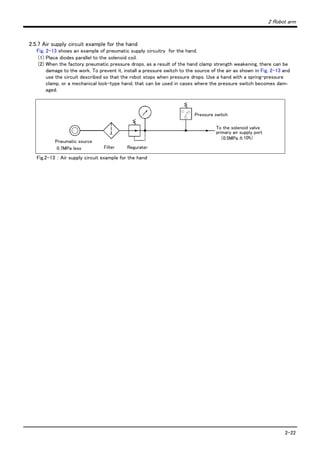
2.5.7 Air supply circuit example for the hand
Fig. 2-13 shows an example of pneumatic supply circuitry for the hand.
(1) Place diodes parallel to the solenoid coil.
(2) When the factory pneumatic pressure drops, as a result of the hand clamp strength weakening, there can be
damage to the work. To prevent it, install a pressure switch to the source of the air as shown in Fig. 2-13 and
use the circuit described so that the robot stops when pressure drops. Use a hand with a spring-pressure
clamp, or a mechanical lock-type hand, that can be used in cases where the pressure switch becomes dam-
aged.
Fig.2-13 : Air supply circuit example for the hand
Pressure switch
To the solenoid valve
primary air supply port
(0.5MPa±10%)
Pneumatic source
0.7MPa less Filter Regurater
2-23 Shipping special specifications, options, and maintenance parts
2 Robot arm
2.6 Shipping special specifications, options, and maintenance parts
2.6.1 Shipping special specifications
■ What are sipping special specifications?
Shipping special specifications are changed at the time of shipment from the factory. Consequently, customer
need to confirm the delivery date.
To make changes to the specifications after shipment, service work must be performed at the work site or the
robot must be returned for service.
■ How to order
(1) Confirm beforehand when the factory special specifications can be shipped, because they may not be
immediately available.
(2) Order before the factory shipping date.
(3) Specified method …… Specify the part name, model, and robot model type.
2 Robot arm
Shipping special specifications, options, and maintenance parts 2-24
(1) Machine cable extension
■ Order type : ● Fixed type(10m) :1A-10CBL-1
● Fixed type(15m) :1A-15CBL-1
● Flexed type(5m) :1A-05LCBL-1
● Flexed type(10m) :1A-10LCBL-1
● Flexed type(15m) :1A-15LCBL-1
■ Outline
This cable is exchanged for the machine cable (5 m) that was supplied as standard to
extend the distance between the controller and the robot arm.
A fixed type and flexible type are available.
Exchanges after shipment will be charged (for packaging, shipping costs).
The fixing and flexible types are both configured of the motor signal cable and motor
power cable.
■ Configuration
Table 2-7 : Configuration equipments and types
Note) The numbers in the boxes □□ refer the length.
■ Specifications
The specifications for the fixed type cables are the same as those for standard cables.
Shows usage conditions for flexed type cables in Table 2-8.
Table 2-8 : Conditions for the flexed type cables
[Caution] The guidance of life count may greatly differ according to the usage state (items related to Table 2-8
and to the amount of silicon grease applied in the cable conduit.
[Caution] This option can be installed on clean-type, but its cleanliness is not under warranty.
Part name Type
Qty. Mass(kg)
Note1)
Note1)Mass indicates one set.
Remarks
Fixed Flexed
Fixed Set of signal and power cables 1A- □□ CBL-1 1 set - 7.0(10m)
10.0(15m)
10m, or 15m each
Motor signal cable (for fixed type) 1E- □□ CBL(S)-N 1 cable -
Motor power cable (for fixed type) 1A- □□ CBL(P)-1 1 cable -
Flexed Set of signal and power cables 1A- □□ LCBL-1 1 set - 5.7(5m)
10.1(10m)
14.2(15m)
5m, 10m, or 15m each
Motor signal cable (for flexed type) 1E- □□ LCBL(S)-N - 1 cable
Motor power cable (for flexed type) 1A- □□ LCBL(P)-1 - 1 cable
Nylon clamp NK-14N - 2 pcs. - for motor signal cable
Nylon clamp NK-18N - 2 pcs. - for motor power cable
Silicon rubber - 4 pcs. -
Item Specifications
Minimum flexed radius 100R or more
Cable bare, etc., occupation rate 50% or less
Maximum movement speed 2000mm/s or less
Guidance of life count 7.5 million times
Environmental proof Oil-proof specification sheath
(for silicon grease, cable sliding lubricant type)
Cable configuration Motor signal cable φ7x6 and φ1.7x1
Motor power cable φ6.5 x 10
2-25 Shipping special specifications, options, and maintenance parts
2 Robot arm
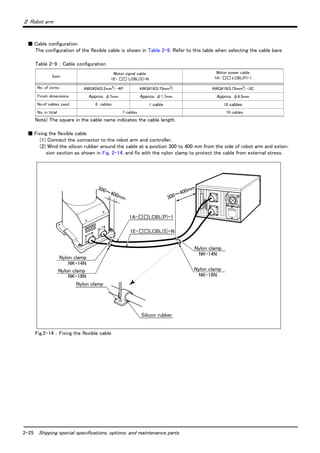
■ Cable configuration
The configuration of the flexible cable is shown in Table 2-9. Refer to this table when selecting the cable bare.
Table 2-9 : Cable configuration
Note) The square in the cable name indicates the cable length.
■ Fixing the flexible cable
(1) Connect the connector to the robot arm and controller.
(2) Wind the silicon rubber around the cable at a position 300 to 400 mm from the side of robot arm and exten-
sion section as shown in Fig. 2-14, and fix with the nylon clamp to protect the cable from external stress.
Fig.2-14 : Fixing the flexible cable
Item
Motor signal cable
1E- □□ LCBL(S)-N
Motor power cable
1A- □□ LCBL(P)-1
No. of cores AWG#24(0.2mm2) -4P AWG#18(0.75mm2) AWG#18(0.75mm2) -3C
Finish dimensions Approx. φ7mm Approx. φ1.7mm Approx. φ6.5mm
No.of cables used 6 cables 1 cable 10 cables
No. in total 7 cables 10 cables
1E-□□LCBL(S)-N
300~400mm 300~400mm
1A-□□LCBL(P)-1
Silicon rubber
NK-14N
NK-18N
Nylon clamp
NK-14N
NK-18N
Nylon clamp
Nylon clamp
Nylon clamp
Nylon clamp
2 Robot arm
Options 2-26
2.7 Options
■ What are options?
There are a variety of options for the robot designed to make the setting up process easier for customer needs.
customer installation is required for the options. Options come in two types: "set options" and "single options".
1. Set options ...................................... A combination of single options and parts that together, from a set for serving
some purpose.
2. Single options ................................. That are configured from the fewest number of required units of a part.
Please choose customer's purpose additionally.
■ Precautions for optional of motorized hand, pneumatic hand and solenoid valve
(1) About clean specification robot
The motorized hand, solenoid valve set and pneumatic hand can be installed, but its cleanliness is not under war-
ranty.
(2) About customer manufactured hand
Though the motorized hand can't be manufactured by customer, the pneumatic hand can be manufactured.
Put the precaution together in the following.
Item
General environment specification
RV-1A/2AJ
Clean specification
RV-1AC-SB/2AJC-SB
Pneumatic hand set
Installation possible
But the cleanliness cannot be guaranteed.
Motorized hand set
Solenoid valve set
Pneumatic hand This can be manufactured by customer
Motorized hand This cannot be manufactured by customer
2-27 Options
2 Robot arm
(1) Motorized hand set
■ Order type : 4A-HM01
■ Outline
・ Motorized hand and the required parts come in a set.
・ As air is not required, the hand can be used in laboratories.
・ The gripping force can be adjusted.
・ The life is 10,000,000 times at a 50% load. The 50% load refers to when the max. load
mass in Table 2-11 are all within 50%.
■ Configuration
Table 2-10 : Configuration equipment
■ Specifications
Table 2-11 : Motorized hand specifications
Part name Type Qty.
Mass(Kg)
Note1)
Note1)Mass indicates one set.
Remarks
Motorized hand set 4A-HM011 0.8
Motorized hand 1A-HM01 1 pc.
Hand curl cable 1A-GHCD 1 pc.
Motorized hand I/F 2A-RZ364 1 pc.
Installation bolt (with hole) M3 × 8 4 bolts
M3 × 12 2 bolts
Hand adapter 1A-HA01 1 pc. The adapter for installing the motor-
ized hand to the robot's mechanical
interface.
Item Spacifications Remarks
Drive method DC servo motor
Grip force 4.9 ~ 68.6N
(Each side grip is2.45 ~ 34.3N)
Life 1,000,000 times cycle 100% load.
10,000,000 times cycle 50% load.
Repetition accuracy 0.03mm
Ambient temperature 0 to 40 ℃
Ambient humidity 45 to 85%
Atomosphere With no of oil mist, chip, powder dust.
Operation confirmation sensors None
Mass 0.59kg Including the adapter.
Maximum load per fin-
ger
Radial 300N
When installing the finger attachment, avoid
shock or excessive moment to the tips.
Mpo moment 6.2N ・ m
Mro moment 10.8N ・ m
Myo moment 6.0N ・ m
2 Robot arm
Options 2-28
Others
The stroke cannot be adjusted.
Prepare the finger procured by the customer.
Item Spacifications Remarks
Lp
Radial
Myo
Mpo
Fp
(=Lp*Fp)
Mro
Lr
(=Lr*Fr)
Fr
Ly
Fy
(=Ly*Fy)
2-29 Options
2 Robot arm
Fig.2-15 : Motorized hand outside dimensional drawing
1A-HA01
Motorized hand body
Approx. 70
(150)
Adapter
(Hexagon socket bolt)
4-M3x8
(Hexagon socket bolt)
2-M3x12
4*2-M3
Hand body
(Φ6.5x4 spot facing on the
reverse side)
[Wiring system diagram]
Connector
Curl cable
Type 1A-GHCD
Curl cable for bending
Connector
Hand curl cable
For
pneumatic
hand
Yellow
Purple
Brown
Blue
Red
Black
4-Φ3.4 hole
(90 degree division)PCD70
(From finger center)
40±10
φ11
160±10
1
2
5
6
7
8
3
4
9
6
5
4
3
1
2
DC+
DC-
Reserve
Reserve
Reserve
2 Robot arm
Options 2-30
(2) Pneumatic hand set
■ Order type: 4A-HP01 (Sink type)
4A-HP01E (Source type)
■ Outline
・ Pneumatic hand and the required parts come in a set.
・ The hand has a life of 10 million cycles.
・ There is a sensor at the open/close end.
■ Configuration
Table 2-12 : Configuration equipment
■ Specifications
Table 2-13 : Pneumatic hand specifications
Part name Type
Qty. Mass(Kg)
Note1)
Note1)Mass indicates one set.
Remarks
4A-HP01 4A-HP01E
Pneumatic hand 1A-HP01 1 pc. - 0.9
Pneumatic hand body.
1A-HP01E - 1 pc.
Hand curl tube (1 set: 2pc.) 1A-ST0402C 1 pc. 1 pc. Refer to the section on Page 37, "(6) Hand
curl tube".
Curl cable 1A-GHCD 1 pc. 1 pc.
Pneumatic hand interface 2A-RZ365 1 pc. - Refer to the section on Page 55, "(2) Pneu-
matic hand interface".2A-RZ375 - 1 pc.
Solenoid valve set (1 set) 1E-VD01 1 pc. - Refer to the section on Page 33, "(3) Sole-
noid valve set".1E-VD01E - 1 pc.
Installation bolt (with hole) M3 x 8 4 bolts 4 bolts
M3 x 12 4 bolts 4 bolts
Adapter 1A-HA01 1 pc. 1 pc. The adapter for installing the pneumatic
hand to the robot's mechanical interface.
Item Spacifications Remarks
Operating fluid Clean air
Operating pressure range 0.04 to 0.7MPa
Operating temperature range 0 to 40 ℃
Open/close stroke 12+2
0 mm
Life 10 million cycles or more
Operating method Double action
Mass 0.45kg Includes the adapter
Open/close confirmation sensor Open edge and close edge
Pneumatic coupling size Φ4 (quick coupling) Connection hose diameter: Φ4
Maximum load per finger Radial 700N
When installing the finger attachment, avoid shock or
excessive moment to the tips.
Mpo moment 6.2N ・ m
Mro moment 10.8N ・ m
Myo moment 6.0N ・ m
2-31 Options
2 Robot arm
Item Spacifications Remarks
Lp
Radial
Myo
Mpo
Fp
(=Lp*Fp)
Mro
Lr
(=Lr*Fr)
Fr
Ly
Fy
(=Ly*Fy)
2 Robot arm
Options 2-32
Fig.2-16 : Pneumatic hand outside dimensional drawing
Type:1A-HA01
0.1 0.2 0.3 0.4 0.5 0.6 0.7
70
60
50
30
20
10
10
20
30
40
50
40
(150)
HC1(open)
HC2(close)
For motorized hand
24.5
85
Adapter
4-M3x12
(Hexagon socket bolt)
4-M3x8
(Hexagon socket bolt)
Approx. 70 (Φ6.5x4 spot facing
on the reverse side)
4-Φ3.4 hole
(90 degree division)PCD70
Hand body
(From finger center)
[Wiring system diagram]
Connector
Yellow
Purple
Brown
Blue
Red
Black
Curl cable
Type 1A-GHCD
Curl cable for bending
Connector
Hand curl cable
Pneumatic hand body
GrippingforceN
Pneumatic pressure MPa
AttachmentmaximumlengthLcm
Indication of gripping force and maximum
length of finger attachment
HC1(open)
HC2(close)
For motorized hand
Yellow
Purple
Brown
Blue
Red
Black
<Sink type>
<Source type>
1
2
5
6
7
8
3
4
9
6
5
4
3
1
2
+24V
0V(COM)
Reserve
Reserve
Reserve
+24V(COM)
0V
Reserve
Reserve
Reserve
1
2
5
6
7
8
3
4
9
6
5
4
3
1
2
40±10
φ11
160±10
2-33 Options
2 Robot arm
(3) Solenoid valve set
■ Order type: One set: 1E-VD01(Sink type)/1E-VD01E(Source type)
Two sets: 1E-VD02(Sink type)/1E-VD02E(Source type)
■ Outline
The solenoid valve set is an option that is used for controlling toolings when various
toolings, such as the hand, are installed at the end of the arm. All have double sole-
noid specification, and either one or two or three sets can be selected. This solenoid
valve set has a hand output cable attached to the solenoid valve. Also, for easy
installation of this electromaagnetic set onto the robot, it comes equipped with a
manifold, couplings, silencers, among other things.
When using the robot arm's hand output signal, the pneumatic hand interface option
must be installed on the separate controller.
■ Configuration
Table 2-14 : Configuration equipment
■ Specifications
Table 2-15 : Valve specifications
Note2) The air to be provided must be clean, i.e., filtered with a mist separator or air
filter. Failing to do so may lead to malfunctions.
Table 2-16 : Solenoid specifications
Part name Type
Qty. Mass(kg)
Note1)
Note1)Mass indicates one set.
Remark
One set Two sets
Solenoid valve set (1 set) 1E-VD01/
1E-VD01E
1 pc. - 0.1 Connecting the Page 36, "(5) Hand output cable".
M3x25 Two screws (Installation screws)
1E-VD01/VD02 are the sink type.
1E-VD01E/VD02E are the source type.
Solenoid valve set (2 sets) 1E-VD02/
1E-VD02E
- 1 pc. 0.1
Part name Type
Q'ty Mass
(kg)
Note1)
Note1)Mass indicates one set.
Remark
One set Two sets Three sets Four sets
Solenoid valve set (1 set) 1S-VD01-0/
1S-VD01E-0
1 pc. - - - 0.3
M4x8 four screws (installation screws).
1S-VD01-0/VD02-0/VD03-0/VD04-0
are the sink type.
1S-VD01E-0/VD02E-0/VD03E-0/
VD04E-0 are the source type.
Solenoid valve set (2 sets) 1S-VD02-0/
1S-VD02E-0
- 1 pc. - - 0.4
Solenoid valve set (3 sets) 1S-VD02-0/
1S-VD02E-0
- - 1 pc. - 0.4
Solenoid valve set (4 sets) 1S-VD02-0/
1S-VD02E-0
- - - 1 pc. 0.5
Item Specifications
Number of positions 2
Port 5)
Valve function Double solenoid
Operating fluid Clean air
Operating method Pilot type
Effective sectional area (CV value) 1.5mm(0.08)
Oiling Unnecessary
Operating pressure range 0.2 to 0.7MPa
Guaranteed proof of pressure 1.0MPa or more
Response time 12msec or less
Max. operating frequency 5c/s
Ambient temperature -5 to 50 ℃
Item Specifications
Method Built-in fly-wheel diodes with surge protection
CAUTION
2 Robot arm
Options 2-34
Fig.2-17 : Outline dimensional drawing
Operation voltage DC24V ± 10%
Current value 40mA
Insulation B type
Insulation resistance 100MΩ or more
Surge protection Fly-wheel diode
Item Specifications
28.4
35.6
36.4
(1)(4) (2) (6)
(5)
(3)
(10)(11)
(1)
2- φ3.3
(28)(24)(30)
(82)
GR1
GR3
GR2
GR4
SOL1A
SOL2A
SOL2B
SOL1B
(20)or less (45)or less
(12)
1 Hand1ON
2 +24V
1 Hand1OFF
2 
1 Hand2ON
2 
1 Hand2OFF
2 
GR1
GR2
GR3
GR4
Connector name
SOL1A
SOL1B
SOL2A
SOL2B
+24V
+24V
+24V
Black
Red
Black
Red
Black
Red
Black
Red
<Sink type>
General purposes
output 900
General purposes
output 901
General purposes
output 902
General purposes
output 903
1 Hand1ON
2 24G
1 Hand1OFF
2 
1 Hand2ON
2 
1 Hand2OFF
2 
GR1
GR2
GR3
GR4
Connector name
SOL1A
SOL1B
SOL2A
SOL2B
Black
Red
Black
Red
Black
Red
Black
Red
<Source type>
24G
24G
24G
General purposes
output 900
General purposes
output 901
General purposes
output 902
General purposes
output 903
Part
no.
Part name 1 sets 2 sets Specifications
(1) Solenoid valve 1 2
(2) Manifold block 1 1
(3) Quick coupling 2 4 φ4
(4) Block plate 1 0
(5) Quick coupling 1 1 φ6
(6) Silencer 1 1
(10) Connector 2 4 SMR-09V-B
(11) Contact 4 8 SYM-001T-0.6
(12) Installation screw 2 2 M3x25
2-35 Options
2 Robot arm
(4) Hand input cable
■ Order type: 1A-HC20
■ Outline
The hand input cable is used for customer-designed pneumatic hands.
It is necessary to use this to receive the hand's open/close confirmation signals and
grasping confirmation signals, at the controller.
One end of the cable connects to the connector for hand input signals, which is in
the wrist section of the hand. The other end of the cable connects to the sensor
inside the hand customer designed.
■ Configuration
Table 2-17 : Configuration equipment
■ Specifications
Table 2-18 : Specifications
Fig.2-18 : Outside dimensional drawing and pin assignment
[Caution] This option can be installed on clean-type, but its cleanliness is not under warranty.
Part name Type Qty. Mass(kg) Remarks
Hand input cable 1A-HC20 1 cable 0.2
Item Specifications Remarks
Size x cable core AWG#24 (0.2mm2
) × 8 cores One-sided connector, one-sided cable bridging
Total length 370mm (Including the curl section, which is 150mmlong)
φ11
60 ±10 150 ± 10 160 ±10
(1)
SMR-09V-N
1
2
3
4
5
6
7
8
9
(Yellow)
(Purple)
(Brown)
(Blue)
(Black)
(Green)
(Red)
(White)
0V
HC1
HC2
HC3
HC4
+24V
0V(COM)
Reserve
Reserve
HC1
HC2
HC3
HC4
+24V(COM)
Reserve
Reserve
Sink Source
type type
Reserve Reserve
2 Robot arm
Options 2-36
(5) Hand output cable
■ Order type: 1E-GR35S
■ Outline
The hand output cable (solenoid valve connection cable) is an option that is used
when an solenoid valve other than one of the solenoid valve set options, is used.
One end of the cable has a connector that connects to the connector on the back of
the robot arm. The other end of the cable is connected.
■ Configuration
Table 2-19 : Configuration equipment
■ Specifications
Table 2-20 : Specifications
Fig.2-19 : Outline dimensional drawing and pin assignment
Part name Type Qty. Mass(kg) Remarks
Hand output cable 1E-GR35S 1 cable 0.1
Item Specifications Remarks
Size x Cable core AWG#22(0.3mm2
) x 2 cores x 4 sets (total 8 cores) One side connector and one side cable connection
Total length 350mm
* End cable connection
350
*
* *
(3)
(1)(2)
1
2
1
2
1
2
1
2
GR1
GR2
GR3
GR4
Connector
White
Black Hand 1 ON
+24V
Hand 1 OFF
+24V
Hand 2 ON
+24V
Hand 2 OFF
+24V
Hand 1 ON
+24G
Hand 1 OFF
+24G
Hand 2 ON
+24G
Hand 2 OFF
+24G
Sink Source
type typegeneral-purpose
output 900
general-purpose
output 901
general-purpose
output 902
general-purpose
output 903
White
Black
White
Black
White
Black
・ Configuration
Part no. Part name Qty. Specifications
( 1 ) Connector 4 SMR-02V-B
( 2 ) Contact 8 BYM-001T-0.6
( 3 ) Twisted cable 4 AWG#22(0.3mm2
) x 2 cores
2-37 Options
2 Robot arm
(6) Hand curl tube
■ Order type: One set (2 pcs.) : 1E-ST0402C
Two sets (4 pcs.) : 1E-ST0404C
■ Outline
The hand curl tube is a curl tube for the pneumatic hand.
■ Configuration
Table 2-21 : Configuration equipment
■ Specifications
This option can be installed on clean-type, but its cleanliness is not under warranty.
Table 2-22 : Specifications
Fig.2-20 : Outline dimensional drawing
[Caution] This option can be installed on clean-type, but its cleanliness is not under warranty.
Part name Type Qty. Mass(kg) Remarks
Hans curl tube (One set: 2 pcs.) 1E-ST0402C 1 pc. 0.1 For single-hand: Φ4 tube, 2pcs.
Hans curl tube (Two set: 4 pcs.) 1E-ST0404C 1 pc. 0.1 For double hand: Φ4 tube, 4pcs.
Item Specifications
Material Urethane
Size Outside diameter: φ4 x Inside diameter: φ2.5
φ28(Oneset),
φ36(Twosets)
250
180
200
(Tooling side)
(Robot side)
2 Robot arm
2-38
(7) Hand adapter
■ Order type : 1A-HA01
■ Outline
This is installed on the robot arm's mechanical interface.
The conventional model RV-M1 and the mechanical interface are compatible.
This is also included with the optional motorized hand set and pneumatic hand set.
■ Configuration
Table 2-23 : Configuration equipment
■ Specifications
Table 2-24 : Specifications
Fig.2-21 : Outline dimensional drawing
Part name Type Qty. Remarks
Adapter BU164D693H01 1 pc.
Installation bolt (with hole) M3 x 8 4 pc.
Item Specifications
Mass 0.07kg
Material Aluminum alloy
4-M3 screw hole
(4-constant pitch)
4-3.4 reamer through
Φ6.5 counterbore
depth 4
*For installation
(4-constant pitch)
Cross-section A-A
2-39 Maintenance parts
2 Robot arm
2.8 Maintenance parts
The consumable parts used in the robot arm are shown in Table 2-25. Purchase these parts from the designated
maker or dealer when required. Some Mitsubishi-designated parts differ from the maker's standard parts. Thus,
confirm the part name, robot arm and controller serial No. and purchase the parts from the dealer.
Table 2-25 : Consumable part list
No. Part name Type Note1)
Note1)Confirm the robot arm serial No., and contact the dealer or service branch of Mitsubishi Electric Co., for
the type.
Usage place Qty. Supplier
1 Lithium battery A6BAT In the shoulder cover 5 Mitsubishi Electric System &
Service;Co.,Ltd.2 Grrase SK-1A Reduction gears of each axis As needed
3Controller
Standard specifications 3-40
3 Controller
3.1 Standard specifications
3.1.1 Standard specifications
Table 3-1 : Standard specifications of controller
Item Unit Specification Remarks
Type CR1-571
Number of control axis Simultaneously 6(Maximum)
CPU 64 bit RISC, and DSP
Memory
capacity
Programmed positions and No.
of steps
point
step
2,500
5,000
Number of programs 88
Robot language MELFA-BASIC Ⅳ
or
MOVEMASTER COMMAND
Teaching method Pose teaching method ,MDI method
External
input and
output
Input and output point 16/16 Max. 240/240 Note1)
Note1) It is the value when seven maximums expand (224/224) the Parallel I/O unit.
(2A-RZ361 or 2A-RZ371:Input 32 points / Output 32 points.)
Dedicated input/output point Assigned with general-purpose input/output "STOP" 1 point is fixed
Hand open/close input/output
point Input 4 point/Output 0 point
Up to output points can be added as
an optionNote2)
Note2)It is when an pneumatic hand interface (2A-RZ365 or 2A-RZ375) is installed. Note that the pneumatic
hand interface has 8 output points, but the robot arm side has 4 points.
Emergency stop input point 1 Single emergency line
Door switch input point 1 Single door switch line
Emergency stop output point 1 Single emergency line
Interface RS-232C port
1
For expansion such as the personal
cpmputer, Vision sensor
RS-422 port 1 Dedicated for T/B
Hand dedicated slot slot 1
Dedicated for pneumatic hand inter-
face
Expansion slot slot 0 3 slot expansion is possible when
using expansion option box.
Robot input/output link channel 1
Used for general-purpose input/out-
put (Max. 240/240)
Power
source
Input voltage range V 1-phase, AC90 to132
1-phase, AC180 to 253
Note3)
Note3) 1-phase,AC180 to 253. This specification is changed for CE-Marking model.
Power capacity KVA 0.7 Does not include rush current Note4)
Note4) The power capacity (0.7kVA) is the maximum rating value for normal operation. The power capacity does
not include the rush current when the power is turned ON. The power capacity is a guideline and the actual
operation is affected by the input power voltage. he power consumption in the specific operation pattern
with the RV-1A/2AJ is approx. 0.2kw.
Outline dimensions mm 212(W)x290(D)x151(H) Excluding protrusions
Mass kg Approx. 8
Construction Self-contained floor type , Opened type IP20 Note5)
Note5) The controller (CR1-571) of this robot is a general environment specification. (Refer to Page 41, "3.1.2
Protection specifications and operating supply") If the robot is used in an oil mist environment, use the
optional controller protection box (CR1B-MB) to protect the controller from the oil mist environment.
Install to the place not to influence the cleanliness when using in the clean environment. (Refer toPage 10,
"2.2.6 Clean specifications")
Operating temperature range deg. 0 to 40
Ambient humidity %RH 45 to 85 Without dew drops
Grounding Ω 100 or less D class grounding earthNote6)
Note6) The robot must be grounded by the customer.
Paint color Light gray Munsell 0.08GY7.64/0.81
3-41 Standard specifications
3Controller
3.1.2 Protection specifications and operating supply
A protection method complying with the IEC Standard IP20(Opened type) is adopted for the controller.
The IEC IP symbols refer only to the degree of protection between the solid and the fluids, and don't indicated
that any special protection has been constructed for the prevention against oil and water.
・ The IEC IP20
It indicates the protective structure that prevents an iron ball 12 0
+0.05
mm diameter, which is being pressed with the
power of 3.1 kg ± 10%, from going through the opening in the outer sheath of the supplied equipment.
Refer to the section Page 106, "6.2 Working environment" for details on the working environment.
If the robot is used in an oil mist environment, use the optional contorller protection box
(CR1B-MB) to protect the controller from the oil mist environment.
Refer to the section Page 62, "(3) Controller protection box"for details on the controller
protection box.
CAUTION
3 Controller
Names of each part 3-42
3.2 Names of each part
Fig.3-1 : Names of controller parts
1) POWER switch..................................... This turns the control power ON/OFF.
2) START button...................................... This executes the program and operates the robot. The program is run continuously.
3) STOP button ........................................ This stops the robot immediately. The servo does not turn OFF.
4) RESET button ...................................... This resets the error. This also resets the program's halted state and resets the program.
5) Emergency stop switch.................... This stops the robot in an emergency state. The servo turns OFF.
6) T/B remove switch............................ This is used to connect/disconnect the T/B without turning OFF the controller's control
power.
7) CHNGDISP button ............................. This changes the details displayed on the display panel in the order of "Override" → "Pro-
gram No." → "Line No.".
8) END button............................................ This stops the program being executed at the last line or END statement.
9) SVO.ON button.................................... This turns ON the servo power. (The servo turns ON.)
10) SVO.OFF button............................... This turns OFF the servo power. (The servo turns OFF.)
11) STATUS NUMBER
  (display panel)...................................... The alarm No., program No., override value (%), etc., are displayed.
12) T/B connection connector ......... This is a dedicated connector for connecting the T/B.
13) Personal computer
  connection connector...................... This is an RS-232C specification connector for connecting the personal computer.
14) MODE key switch............................. This changes the robot's operation mode. Note)
AUTO (Op.).................................. Only operations from the controller are valid. Operations for which the operation mode
must be at the external device or T/B are not possible.
TEACH .......................................... When the T/B is valid, only operations from the T/B are valid. Operations for which the
operation mode must be at the external device or controller are not possible.
AUTO (Ext.)................................. Only operations from the external device are valid. Operations for which the operation
mode must be at the T/B or controller are not possible.
15) UP/DOWN button............................ This scrolls up or down the details displayed on the "STATUS. NUMBER" display panel.
2)
SVO OFF STOP END
SVO ONMODE
TEACH
AUTO
(Ext.)
AUTO
(Op.)
START RESET
DOWN
UP
STATUS NUMBER
REMOVE T/B
EMG.STOP
CHANG DISP
7) 4) 15) 5)
6)
1)
11)
14)
12) 10) 13) 3) 8)Front operation panel
9)
<Front> <Front side of operation panel>
3-43 Names of each part
3 Controller
Note) The servo will turn OFF when the controller's [MODE] switch is changed.
Note that axes not provided with brakes could drop with their own weight.
Carry out the following operations to prevent the servo from turning OFF
whenthe [MODE] switch is changed.
The servo on status can be maintained by changing the mode with keeping pressing
lightly the deadman switch of T/B. The operating method is shown below.
■ When the mode is changed from TEACH to AUTO.
1) While holding down the deadman switch on the T/B, set the [ENABLE/DISABLE]
switch to "DISABLE".
2) While holding down the deadman switch on the T/B, set the controller [MODE]
switch to "AUTO".
3) Release the T/B deadman switch.
■ When the mode is changed from AUTO to TEACH.
1) While the [ENABLE/DISABLE] switch on the T/B is "DISABLE", hold down the
deadman switch.
2) While holding down the deadman switch on the T/B, set the controller [MODE]
switch to "TEACH".
3) While holding down the deadman switch on the T/B, set the [ENABLE/DISABLE]
switch to "ENABLE", then do the operation of T/B that you wish.
Fig.3-2 : Names of each controller part (Rear side)
1) Machine cable connector (for motor power)...........Connects to the robot arm base. (CN1 connector)
2) Machine cable connector (for motor signal)............Connects to the robot arm base. (CN2 connector)
3)Power supply terminals.
4)Fuse box.
5)External input/output signal connector.
6)Network cable connector for parallel I/O unit expansion.
7)Emergency stop switch and door switch terminals connector.
CAUTION
(6)
(7)
(5)
(1)
(2)
(4)
(3)
3 Controller
Outside dimensions/Installation dimensions 3-44
3.3 Outside dimensions/Installation dimensions
3.3.1 Outside dimensions
Fig.3-3 : Outside dimensions of controller
SVO OFF STOP END
SVO ONMODE
TEACH
AUTO
(Ext.)
AUTO
(Op.)
START RESET
DOWN
UP
STATUS NUMBER
REMOVE T/B
EMG.STOP
CHANG DISP
(2.5) 212
151(15)
150(31) (31)
49200
290(13)(38)
(40)
(2.5)
(170ormore)
3-45 Outside dimensions/Installation dimensions
3 Controller
3.3.2 Installation dimensions
Fig.3-4 : Installation of controller
50
170 or more
SVO OFF STOP END
SVO ONMODE
TEACH
AUTO
(Ext.)
AUTO
(Op.)
START RESET
DOWN
UP
STATUS NUMBER
REMOVE T/B
EMG.STOP
CHANG DISP
50
3 Controller
External input/output 3-46
3.4 External input/output
3.4.1 Types
(1) Dedicated input/output...............................These inputs and outputs carry out the robot remote operation and
status display.
(2) General-purpose input/output.................These are inputs and outputs that the customer can program for
peripheral device control. Moreover, it is possible to use parallel input/
output units and input/output signals via CC-Link.
(3) Hand input/output.........................................These are inputs and outputs related to the hand that the customer can
program. (The hand output is an option. The Page 60, "(2) Pneumatic
hand interface" is required.)
3.4.2 Explanation
The parallel input/output unit uses connector bridging. Purchase the "External I/O cable" for connection with
external devices.
The hand output is an option. Refer to Page 60, "(2) Pneumatic hand interface" for details
The parallel input/output unit can be expanded outside of the controller.
The expansion parallel input/output unit is connected with the control unit in the controller using a robot I/O link
cable. Parallel input and output units can be expand as an option to seven maximums. With allows up to input 240
points and output 240 points of maximums can be used including 16 points input and 16 points output of standard.
Refer to Page 67, "(5) Parallel I/O unit" for details on the parallel input/output unit.
Class Name
No. of input/output points Connection
formatInput Output
Standard Emergency stop 1 1 Connector
Standard Door switch 1 -
Standard Parallel input/output Occupies 16 general-purpose points/(6)
dedicated points in general-purpose
Occupies 16 general-purpose points/(4)
dedicated points in general-purpose
3-47 Dedicated input/output
3 Controller
3.5 Dedicated input/output
Show the main function of dedicated input/output in the Table 3-2. Refer to attached instruction manual
"Detailed explanations of functions and operations" in the product for the other functions. Each parameter indi-
cated with the parameter name is used by designated the signal No., assigned in the order of input signal No. and
output signal No. If the number of dedicated inputs and general-purpose input points used exceeds the standard
No. of input/output points, install the parallel input /output unit (1st to 7th station: option).
Table 3-2 : Dedicated input/output list
Parameter
name
Input Note1) Output
Name Function Level Name Function
TEACHMD None Teaching mode out-
put signal
Outputs that the teaching mode is
entered.
ATTOPMD None Automatic mode out-
put signal
Outputs that the automatic mode is
entered.
ATEXTMD None Remote mode output
signal
Outputs that the remote mode is
entered.
RCREADY None Controller power ON
complete signal
Outputs that external input signals can
be received.
AUTOENA Automatic opera-
tion enabled input
signal
Allows automatic operation.
L
Automatic operation
enabled output signal
Outputs the automatic operation
enabled state.
START Start input signal Starts all slots.
E
Operating output sig-
nal
Outputs that the slot is operating.
STOP Stop input signal Stops all slots.
The input signal No. is fixed to 0.
Note) Use the emergency stop
input for stop inputs related
to safety.
L
Wait output signal Outputs that the slot is temporarily
stopped.
SLOTINIT Program reset input
signal
Resets the wait state.
E
Program selection
enabled output signal
Outputs that the slot is in the program
selection enabled state.
ERRRESET Error reset input
signal
Resets the error state.
E
Error occurring out-
put signal
Outputs that an error has occurred.
CYCLE Cycle stop input
signal
Carries out cycle stop.
E
In cycle stop opera-
tion output signal
Outputs that the cycle stop is operat-
ing.
SRVOFF Servo ON enabled
input signal
Turns the servo OFF for all mech-
anisms.
L
Servo ON enabled
output signal
Outputs servo-on disable status.
(Echo back)
SRVON Servo ON input
signal
Turns the servo ON for all mecha-
nisms.
E
In servo ON output
signal
Outputs the servo ON state.
IOENA Operation rights
input signal
Requests the operation rights for
the external signal control.
L
Operation rights out-
put signal
Outputs the operation rights valid state
for the external signal control.
MELOCK Machine lock input
signal
Sets/resets the machine lock
state for all mechanisms.
E
In machine lock out-
put signal
Outputs the machine lock state.
SAFEPOS Evasion point
return input signal
Requests the evasion point return
operation.
E
In evasion point
return output signal
Outputs that the evasion point return
is taking place.
OUTRESET General-purpose
output signal reset
Resets the general-purpose output
signal.
E None
EMGERR
None
Emergency stop out-
put signal
Outputs that an emergency stop has
occurred.
S1START
:
S32START
Start input Starts each slot. E In operation output
Outputs the operating state for each
slot.
S1STOP
:
S32STOP
Stop input Stops each slot. L In wait output
Outputs that each slot is temporarily
stopped.
PRGSEL Program selection
input signal
Designates the setting value for
the program No. with numeric value
input signals.
E None
OVRDSEL Override selection
input signal
Designates the setting value for
the override with the numeric value
input signals.
E None
3 Controller
Dedicated input/output 3-48
IODATA
Note2)
Numeric value input
(start No., end No.)
Used to designate the program
name, override value., mechanism
value.
L
Numeric value output
(start No., end No.)
Used to output the program name,
override value., mechanism No.
PRGOUT Program No. out-
put request
Requests output of the program
name. E
Program No. output
signal
Outputs that the program name is
being output to the numeric value out-
put signal.
LINEOUT Line No. output
request
Requests output of the line No.
E Line No. output signal
Outputs that the line No. is being out-
put to the numeric value output signal.
OVRDOUT Override value out-
put request
Requests the override output.
E
Override value out-
put signal
Outputs that the override value is being
output to the numeric value output sig-
nal.
ERROUT Error No. output
request
Requests the error No. output.
E
Error No. output sig-
nal
Outputs that the error No. is being out-
put to the numeric value output signal.
JOGENA Jog valid input sig-
nal
Validates jog operation with the
external signals
E
Jog valid output sig-
nal
Outputs that the jog operation with
external signals is valid.
JOGM Jog mode input 2-
bit
Designates the jog mode.
L
Jog mode output 2-
bit
Outputs the current jog mode.
JOG+ Jog feed + side for
8-axes
Requests the + side jog operation. L None
JOG- Jog feed - side for
8-axes
Requests the - side jog operation. L None
HNDCNTL1
:
HNDCNTL3
None
Mechanism 1 hand
output signal status
:
Mechanism 3 hand
output signal status
Mechanism 1: Outputs the status of
general-purpose outputs
900 to 907.
Mechanism 2: Outputs the status of
general-purpose outputs
910 to 917.
Mechanism 3: Outputs the status of
general-purpose outputs
920 to 927.
HNDSTS1
:
HNDSTS3
None
Mechanism 1 hand
input signal status
:
Mechanism 3 hand
input signal status
Mechanism 1: Outputs the status of
hand inputs 900 to 907.
Mechanism 2: Outputs the status of
hand inputs 910 to 917.
Mechanism 3: Outputs the status of
hand inputs 920 to 927.
HNDERR1
:
HNDERR3
Mechanism 1 hand
error input signal
:
Mechanism 3 hand
error input signal
Requests the hand error occur-
rence.
L
Mechanism 1 hand
error output signal
:
Mechanism 3 hand
error output signal
Outputs that a hand error is occurring.
AIRERR1
:
AIRERR3
Pneumatic pressure
error 1 input signal
:
Pneumatic pressure
error 3 input signal
Request the pneumatic pressure
error occurrence.
L
Pneumatic pressure
error 1 output signal.
:
Pneumatic pressure
error 3 output signal.
Outputs that a pneumatic pressure
error is occurring.
M1PTEXC
:
M3PTEXC
None L
Maintenance parts
replacement time
warning signal
Outputs that the maintenance parts
have reached the replacement time.
USER-
AREANote3) None
User-designated area
8-points
Outputs that the robot is in the user-
designated area.
Note1) The level indicates the signal level.
L: Level signal → The designated function is validated when the signal is ON, and is invalidated when the sig-
nal is OFF.
E: Edge signal → The designated function is validated when the signal changes from the OFF to ON state, and
the function maintains the original state even when the signal then turns OFF.
Note2) Four elements are set in the order of input signal start No., end No., output signal start No. and end No.
Note3) Up to eight points can be set successively in order of start output signal No. and end output signal No.
Parameter
name
Input Note1) Output
Name Function Level Name Function
3-49 Emergency stop input/output
3 Controller
3.6 Emergency stop input/output
This signal is input from the "emergency stop input" terminal in the controller.
Table 3-3 : Dedicated input terminals in controller
3.6.1 Connection of the external emergency stop
The external emergency stop input and door switch input are short-circuited with a short cable at shipment as
shown in Fig. 3-5.
Connect the external emergency stop switch and door switch with the following procedure.
1) Prepare the "emergency stop switch" and "door switch".
2) Remove the two short pieces 1 and 2.
3) Securely connect the external emergency stop's contacts across "1)-2), and the door switch's contacts
across 3)-4)" on the terminal block.
Fig.3-5 : Connection of the external emergency stop
[Note] Refer to Page 105, "6.1.7 Examples of safety measures" together, and carry out wiring to the emergency stop.
Class Name Details
Input Emergency stop Applies the emergency stop (Single emergency line.)
Input Door switch The servo turns OFF.
Output Emergency stop This output indicates that the emergency stop input or the door switch input is turned on.
RA1
RA2
RA3
RG (24G)
RG (24G)
24V
24V
EMG.
STOP
DOOR
Switch
1
2
3
4
5
6
RA5
1
2
3
4
5
6
1)
2)
3)
4)
5)
6)
Short piece 1
Short piece 2
Emergency stop input
Door switch input
Emergency stop output
Composition of external emergency stop and door switch
System emergency
stop line
(Prepared by customer)
Example of wiring for external emergency stop and door switch
(customer-prepared wiring)
Controller rear side
Terminal block array of
external emergency stop
Wire insert
Wire fixing screw
Note1)
Maker:Phoenix Contact
Type:FRONT-MSTB2.5/6-ST-5.08
(Customer-prepared wiring) (Controller side)
Note 1) Emergency stop output opens when either one of the
emergency stop switches shown below or an input signal turns on.
・Emergency stop switch of the controller.
・Emergency stop switch or deadman switch of the T/B (option).
・External emergency stop input.
・External door input.
・The T/B mount/dismount switch is OFF
when the T/B is unconnected.
3 Controller
Emergency stop input/output 3-50
3.6.2 Door switch function
This function retrieves the status of the switch installed on the door of the safety fence, etc., and stops the robot
when the door is opened. This differs from an emergency stop in that the servo turns OFF when the door is
opened and an error does not occur. Follow the wiring example shown in Fig. 3-5, and wire so that the contact
closes when the door is closed. Details of this function according to the robot status are shown below.
・ During automatic operation .............When the door is opened, the servo turns OFF and the robot stops. An error
occurs.
The process of the restoration : Close the door, reset the alarm, turn on the
servo, and restart
・ During teaching ......................................Even when the door is opened, the servo can be turned ON and the robot
moved using the teaching pendant.
Fig.3-6 : Door switch function
Safeguard
Turns OFF the servo
STOP!!
Open
TEACH
AUTO
(Ext.)
AUTO
(Op.)
Open
TEACH
AUTO
(Ext.)
AUTO
(Op.)
The servo can be turned ON/Off
by turning the deadman switch ON/OFF.
Safeguard
Teaching
pendant
Robot arm
(Example)
Robot arm
(Example)
① Auto executing
② Teaching
3-51 Parallel input/output unit
3 Controller
3.7 Parallel input/output unit
・ A parallel input/output card is mounted as a standard in the controller's control unit.
・ The external input/output circuit specifications are shown in Table 3-4 and Table 3-5.
・ The correspondence of the external input/output connector pin No. and the colors of the connected "external
input/output cable" wires (separate option) is as shown in Page 54, "Table 3-6"and Table 3-7. Refer to Page
76, "(6) External I/O cable" for details of external I/O cable.
・ Pin Nos. described as both general-purpose signal and dedicated signal can be shared.
・ The other dedicated input/output signals that are not assigned can be assigned to required general-purpose
input/output pins when creating the program.
・If the standard inputs and outputs are insufficient, install the parallel input/output unit connection option outside
the controller.
Table 3-4 : Electrical specifications of input circuit
Table 3-5 : Electrical specifications of output circuit
[Caution] When connecting the phototransistor output to the input circuit, be sure to allocate an input current of
approximately 7 mA at 24 VDC. Especially when using a photo diode and a phototransistor (sensor)
away from each other, it is recommended to verify the current that can be carried in the design stage.
Item Specifications Internal circuit
Type DC input <Sink type>
<Source type>
No. of input points 16
Insulation method Photo-coupler insulation
Rated input voltage 12VDC/24VDC
Rated input current Approx. 3mA/approx. 7mA
Working voltage range 10.2VDC to 26.4VDC(ripple rate within 5%)
ON voltage/ON current 8VDC or more/2mA or more
OFF voltage/OFF current 4VDC or less/1mA or less
Input resistance Approx. 3.3kΩ
Response time OFF-ON 10ms or less(DC24V)
ON-OFF 10ms or less(DC24V)
Common method 8 points per common
External wire connection
method
Connector
Item Specifications Internal circuit
Type Transistor output <Sink type>
<Source type>
No. of output points 16
Insulation method Photo-coupler insulation
Rated load voltage DC12V/DC24V
Rated load voltage range DC10.2 ~ 30V(peak voltage 30VDC)
Max. load current 0.1A/point (100%)
Leakage current at OFF 0.1mA or less
Max. voltage drop at ON DC0.9V(TYP.)
Response time
OFF-ON
2ms or less
(hardware response time)
ON-OFF
2ms or less
(Resistance load) (hardware response time)
Fuse rating Fuse 3.2A (one per common) Replacement not pos-
sible
Common method 8 points per common (common terminal: 8 points)
External wire connection
method
Connector
External power
supply
Voltage DC12/24V(DC10.2 ~ 30V)
Current
60mA (TYP. 24VDC per common)
(base drive current)
3.3K Input
820
24V/12V
(COM)
3.3K Input
820
0V(COM)
(24/12V)
Outline
(0V)Fuse
Fuse (24/12V)
Outline
(0V)
3 Controller
Parallel input/output unit 3-52
The output circuit protective fuses prevent failure in case of load short-circuit and
improper connections. Please do not connect loads that cause the current to exceed
the maximum rated current. If the maximum rated current is exceeded, the internal
transistors may be damaged.
CAUTION
3-53 Parallel input/output unit
3 Controller
Fig.3-7 : Connection with a Mitsubishi PLC (Example of sink type)
*The input/output circuit external power supply (24 VDC) must be prepared by the customer.
Fig.3-8 : Connection with a Mitsubishi PLC (Example of source type)
*The input/output circuit external power supply (24 VDC) must be prepared by the customer.
<Sink type>
60mA
(24/12V)
Output
Fuse
(0V)
(COM)
AX41C
(Mitsubishi programmable
controller)
AY51C
(Mitsubishi programmable
controller)
+24V
24V
COM
X
Y
24V
……
Input
Parallel I/O interface
(Output)
(Input)
3.3K
CTL+
Output
Input
External
power supply
CTLG
24G
COM
External
power supply
24G
24V
……
60mA
(24/12V)
Output
Output
Fuse
(0V)
(COM)
AX81C
AY81C
+24V
24G
24V
COM
24G
External
power supply
X
Y
24V
24V
(Output)
(Input)
3.3K
CTLG
CTL+
External
power supply
Input
Input
……
……
<Source type>
3 Controller
Parallel input/output unit 3-54
Table 3-6 : Standard parallel I/O interface CN100pin No. and signal assignment list <Sink type> (2A-CBL □□ )
Table 3-7 : Standard parallel I/O interface CN100pin No. and signal assignment list <Source type> (2A-CBL □□ )
Pin
No.
Line color
Function name
Pin
No.
Line color
Function name
General-purpose Dedicated/power supply, common General-purpose
Dedicated/power supply,
common
1 Orange/Red A FG 26 Orange/Blue A FG
2 Gray/Red A 0V:For pins 4-7, 10-13 27 Gray/Blue A 0V:For pins 29-32, 35-38
3 White/Red A 12V/24V:For pins 4-7 28 White/Blue A 12V/24V:For pins 29-32
4 Yellow/Red A General-purpose output 0 Running 29 Yellow/Blue A General-purpose output 4
5 Pink/Red A General-purpose output 1 Servo on 30 Pink/Blue A General-purpose output 5
6 Orange/Red B General-purpose output 2 Error 31 Orange/Blue B General-purpose output 6
7 Gray/Red B General-purpose output 3 Operation rights 32 Gray/Blue B General-purpose output 7
8 White/Red B 0V:For pins 4-7, 10-13 33 White/Blue B 0V:For pins 29-32, 35-38
9 Yellow/Red B 12V/24V:For pins 10-13 34 Yellow/Blue B 12V/24V:For pins 35-38
10 Pink/Red B General-purpose output 8 35 Pink/Blue B General-purpose output
12
11 Orange/Red C General-purpose output 9 36 Orange/Blue C General-purpose output
13
12 Gray/Red C General-purpose output 10 37 Gray/Blue C General-purpose output
14
13 White/Red C General-purpose output 11 38 White/Blue C General-purpose output
15
14 Yellow/Red C COM0:For pins 15-22 Note1)
Note1)Sink type:24V/12V(COM), Source type:0V(COM)
39 Yellow/Blue C COM1:For pins 40-47 Note1)
15 Pink/Red C General-purpose input 0 Stop(All slot) Note2)
Note2)The assignment of the dedicated input signal "STOP" is fixed.
40 Pink/Blue C General-purpose input 8
16 Orange/Red D General-purpose input 1 Servo off 41 Orange/Blue D General-purpose input 9
17 Gray/Red D General-purpose input 2 Error reset 42 Gray/Blue D General-purpose input 10
18 White/Red D General-purpose input 3 Start 43 White/Blue D General-purpose input 11
19 Yellow/Red D General-purpose input 4 Servo on 44 Yellow/Blue D General-purpose input 12
20 Pink/Red D General-purpose input 5 Operation rights 45 Pink/Blue D General-purpose input 13
21 Orange/Red E General-purpose input 6 46 Orange/Blue E General-purpose input 14
22 Gray/Red E General-purpose input 7 47 Gray/Blue E General-purpose input 15
23 White/Red E Reserved 48 White/Blue E Reserved
24 Yellow/Red E Reserved 49 Yellow/Blue E Reserved
25 Pink/Red E Reserved 50 Pink/Blue E Reserved
Pin
No.
Line color
Function name
Pin
No.
Line color
Function name
General-purpose Dedicated/power supply, common General-purpose
Dedicated/power supply,
common
1 Orange/Red A FG 26 Orange/Blue A FG
2 Gray/Red A 0V:For pins 4-7, 10-13 27 Gray/Blue A 0V:For pins 29-32, 35-38
3 White/Red A 12V/24V:For pins 4-7 28 White/Blue A 12V/24V:For pins 29-32
4 Yellow/Red A General-purpose output 0 Running 29 Yellow/Blue A General-purpose output 4
5 Pink/Red A General-purpose output 1 Servo on 30 Pink/Blue A General-purpose output 5
6 Orange/Red B General-purpose output 2 Error 31 Orange/Blue B General-purpose output 6
7 Gray/Red B General-purpose output 3 Operation rights 32 Gray/Blue B General-purpose output 7
8 White/Red B Reserved 33 White/Blue B Reserved
9 Yellow/Red B Reserved 34 Yellow/Blue B Reserved
10 Pink/Red B General-purpose output 8 35 Pink/Blue B General-purpose output 12
11 Orange/Red C General-purpose output 9 36 Orange/Blue C General-purpose output 13
12 Gray/Red C General-purpose output
10
37 Gray/Blue C General-purpose output 14
13 White/Red C General-purpose output
11
38 White/Blue C General-purpose output 15
14 Yellow/Red C COM0:For pins 15-22 Note1)
Note1)Sink type:24V/12V(COM), Source type:0V(COM)
39 Yellow/Blue C COM1:For pins 40-47 Note1)
15 Pink/Red C General-purpose input 0 Stop(All slot) Note2)
Note2)The assignment of the dedicated input signal "STOP" is fixed.
40 Pink/Blue C General-purpose input 8
16 Orange/Red D General-purpose input 1 Servo off 41 Orange/Blue D General-purpose input 9
17 Gray/Red D General-purpose input 2 Error reset 42 Gray/Blue D General-purpose input 10
18 White/Red D General-purpose input 3 Start 43 White/Blue D General-purpose input 11
19 Yellow/Red D General-purpose input 4 Servo on 44 Yellow/Blue D General-purpose input 12
20 Pink/Red D General-purpose input 5 Operation rights 45 Pink/Blue D General-purpose input 13
21 Orange/Red E General-purpose input 6 46 Orange/Blue E General-purpose input 14
22 Gray/Red E General-purpose input 7 47 Gray/Blue E General-purpose input 15
23 White/Red E Reserved 48 White/Blue E Reserved
24 Yellow/Red E Reserved 49 Yellow/Blue E Reserved
25 Pink/Red E Reserved 50 Pink/Blue E Reserved
3-55 Parallel input/output unit
3 Controller
・The signals assigned as dedicated inputs can be used as general-purpose inputs during program execution. Note
that for safety proposes, these should not be shared with the general-purpose inputs other than for numeric
value inputs. The signals assigned as dedicated outputs cannot be used in the program. An alarm will occur dur-
ing operation if used.
Fig.3-9 : Parallel input/output unit (in the control unit) connection and pin layout
Output 0 to 15
<CN100>
50
1
25
26
Controller back sideConnector pin layout
Input 0 to 15
*The I/O card in the control unit is equal to the PIO unit of the option.
(Input 32/Output 32 points)
3 Controller
3-56
3.8 Options
■ What are options?
There are a variety of options for the robot designed to make the setting up process easier for user needs.
User installation is required for the options.
Options come in two types: "set options" and "single options".
1. Set options......................................A combination of single options and parts that together, form a set for serving
some purpose.
2. Single options.................................That are configured from the fewest number of required units of a part.
Please choose user's purpose additionally.
3-57 Teaching pendant (T/B)
3 Controller
(1) Teaching pendant (T/B)
Order type: R28TB
■ Outline
This is used to create, edit and control the program, teach the operation position and
for jog feed, etc.
For safety proposes, a 3-position deadman switch is mounted.Note1)
If there are several robots, one teaching pendant can be used by connecting it to the
respective robot.
■ Configuration
Table 3-8 : Configuration device
■ Specifications
Table 3-9 : Specifications
Note2) The manual operation section of the teaching pendant has a protection method that complies with the IEC
Standards IP65 (protection type).
[Reference] IProtection against water infiltration as specified in IP65 indicates a protective structure that is
not harmfully affected when 12.5± 5% liters of water is supplied from a test device at a position
approx. 3m away in various directions and a water pressure of 30kPa at the nozzle section. The
water is filled one minute per 1m2 of test device surface area for a total of three minutes.
.
Note1) <3-position deadman switch>
In ISO/10218 (1992) and JIS-B8433 (1993), this is defined as an "enable device". These standards specify that the
robot operation using the teaching pendant is enabled only when the "enable device" is at a specified position.
With the Mitsubishi Electric industrial robot, the above "enable device" is configured of an "Enable/Disable switch"
and "Deadman switch".
The 3-position deadman switch has three statuses. The following modes are entered according to the switch state.
"Not pressed"...............................The robot does not operate. *)
"Pressed lightly"..........................The robot can be operated and teaching is possible.
"Pressed with force" .................The robot does not operate. *)
*) Operations, such as program editing and status display, other than robot operation are possible.
Safety is secured as the servo power is turned OFF simultaneously with the input of the emergency stop.
Part name Type Qty. Mass(kg) Remarks
Teaching pendant R28TB Either one pc. 2.0 Cable length is 7m. Hand strap is attached.
R28TB-15 2.3 Cable length is 15m. Hand strap is attached.
Items Specifications Remarks
Outline dimensions 153(W) x 203(H) x 70(D) (refer to outline drawing)
Body color Light gray (reference Munsell color: 0.08GY7.64/0.81)
Mass Approx. 0.8kg (only arm, excluding cable)
Connection method Connection with controller and round connector (30-pin)
Interface RS-422
Display method LCD method: 16 characters x 4 lines, LCD illumination: with backlight
Operation section 28 keys
Protection specifications IP65 Note2)
3 Controller
Teaching pendant (T/B) 3-58
Fig.3-10 : Outside dimensions of teaching pendant
■ Installation method
The teaching pendant is connected to the T/B connector on the front of the controller.
Hand strap
Hand strap
Enable/Disable switch
Emergency stop
switch
Cable
(with connection connector)
Contrast adjusting
switch
Dead man switch
<Side> <Back><Front>
55 153
203
Display LCD
R28TB
DISABLE
EMG.STOP
TOOL
=*/
STEP
MOVE
+
FORWD
-
BACKWD
ADD
↑
RPL
↓
DEL
←
HAND
→
INP
EXE
COND
ERROR
RESET
POS
   CHAR
JOINT
( )?
XYZ
$" :
MENU
STOP
-X
(J1)
+ X
(J1)
-Y
(J2)
+ Y
(J2)
-Z
(J3)
+ Z
(J3)
-A
(J4)
+ A
(J4)
-B
(J5)
+ B
(J5)
-C
(J6)
+ C
(J6)
SVO ON
ENABLE
# % !
Operation keys
Teaching pendant
70
3-59 Teaching pendant (T/B)
3 Controller
■ Key layout and main functions
Fig.3-11 : Teaching pendant key layout and main functions
R28TB
1)
6)
5)
13)
2)
14)
15)
16)
17)
10)
3)
4)
12)
11)
18)
7)
8)
9)
DISABLE
EMG.STOP
TOOL
=*/
STEP
MOVE
+
FORWD
-
BACKWD
ADD
↑
RPL
↓
DEL
←
HAND
→
INP
EXE
COND
ERROR
RESET
POS
   CHAR
JOINT
( )?
XYZ
$" :
MENU
STOP
-X
(J1)
+ X
(J1)
-Y
(J2)
+ Y
(J2)
-Z
(J3)
+ Z
(J3)
-A
(J4)
+ A
(J4)
-B
(J5)
+ B
(J5)
-C
(J6)
+ C
(J6)
SVO ON
ENABLE
# % !
19)
Back
1) : Emergency stop switch...................The robot servo turns OFF and the operation stops immediately.
2) : T/B enable/disable
  changeover switch............................This switch changes the T/B key operation between enable and dis-
able.
3) : LCD display panel .............................The robot status and various menus are displayed.
4) : <TOOL, JOINT, XYZ> key.............This selects the jog mode (JOINT, XYZ, 3-AXIS XYZ, CYLINDER,
TOOL).
5) : <MENU> key........................................This returns the display screen to the menu screen.
6) : <STOP> key ........................................This stops the program and decelerates the robot to a stop.
7) : <STEP/MOVE> key..........................Jog operation is carried out when this key is pressed simultaneously
with the jog operation key. This also turns the Servo ON and carries
out step jump.
8) : <( + FORWD> key............................This carries out step feed and increases the override.
9) : <( - BACKWD> key.........................This carries out step return (return along operation path) and
decreases the override.
10) : <COND> key.....................................This sets the program.
11) : <ERROR RESET> key...................This resets the error, and releases the software limit.
12) : Jog operation key...........................This operates the robot according to the jog mode. When inputting
numeric values, this inputs each numeric value.
13) : <ADD/ ↑ > key...............................This additionally registers the position data. It also moves the cursor
upward.
14) : <RPL/ ↓ > key................................It also moves the cursor downward.
15) : <DEL/ ← > key................................This deletes the position data. It also moves the cursor to the left.
16) : <HAND/ → > key............................This opens and closes the hand. It also moves the cursor to the right.
17) : <INP/EXE> key................................This inputs the program, and carries out step feed/return.
18) : <POS CHAR> key...........................This changes the edit screen, and changes between numbers and
alphabetic characters.
19) : Deadman switch..............................When the [Enable/Disable] switch "2)" is enabled, and this key is
released or pressed with force, the servo will turn OFF, and the oper-
ating robot will stop immediately.
3 Controller
Pneumatic hand interface 3-60
(2) Pneumatic hand interface
■ Order type: 2A-RZ365(Sink type)
2A-RZ375(Source type)
■ Outline
This interface is required to use the robot arm's hand output signals. This interface is
pre-installed on the controller.
・ Up to eight hand output points can be used with this interface.
・ The eight hand input points can be used without this interface.
・ When using more than eight hand input/output points, install the "Parallel I/O
unit". Refer to Page 67, "Parallel I/O unit" for detail.
■ Configuration
Table 3-10 : Configuration device
■ Specifications
Table 3-11 : Specifications
Part name Type Qty. Mass(kg) Remarks
Pneumatic hand interface 2A-RZ365/
2A-RZ375
1pc. 0.1/0.1 Output 8 points expansion. 2A-RZ365 is the sink type.
2A-RZ375 is the source type.
Item Specification Internal circuit
Type Transistor output <Sink type>
<Source type>
* GRn = GR1 ~ GR8
No. of output points 8Note1)
Note1)Wiring to the robot side will differ according to the model. The No. of output points that can be used will differ accord-
ing to the state of the wiring on the robot arm side. Example) RV-1A/2AJ has 4 points.
Insulation method Photo coupler insulation
Rated load voltage DC24V
Rated load voltage range DC21.6 to 26.4VDC
Max. current load 0.1A/ 1 point (100%)
Current leak with power OFF 0.1mA or less
Maximum voltage drop with power ON DC0.9V(TYP.)
Response time OFF-ON 2ms or less (hardware response time)
ON-OFF 2 ms or less (resistance load) (hardware response time)
Fuse rating Fuses 1.6A (each one common)
Common method 8 points, 1 common
24V
(Internal power supply)
*GRn
Fuse
1.6A
0V
Fuse
1.6A
*GRn
+24V
24GND(COM)
3-61 Pneumatic hand interface
3 Controller
■ Installation method
This is mounted on the control unit (RZ386 or RZ387 card) in the controller.
Securely insert the pneumatic hand interface (2A-RZ365/375) into the CNHNDOUT/CNHND connector on the
control unit.
Fig.3-12 : Installation of pneumatic hand interface
Note)The hand output doesn't work correctly in the case of "RZ386" + "RZ365" or "RZ387" + "RZ375" combi-
nation.
Choose either of sink type/source type properly, and use it.
<RZ386>
CNHNDOUT
CNHNDOUT
CNHND
CNHND
2A-RZ365
or
2A-RZ375
<RZ387>
or
View A
AControl unit
RZ386 or RZ387 card
3 Controller
Controller protection box 3-62
(3) Controller protection box
■ Order type : ● CR1B-MB
■ Outline
The controller protection box is used to protect the controller from an oil mist or
other operating environment. Put the controller and the earth leakage breaker, etc.
in controller protection box, and use it. Since the front cover of the controller pro-
tection box can be removed, it is possible to operate the controller's front panel and
to install and remove the T/B.
■ Configuration
Table 3-12 : Configuration device
■ Specifications
Table 3-13 : Specifications
(1) The installation of the controller, earth leakage breaker and wiring are constructed by customer.
(2) Prepare the 2 power cable and 1 grounding cable (both AWG#14(2mm2
) or more).
(3) The emergency stop box does not come with a cable clamp (wiring connector). The cable clamp must be
provided by the customer according to the size of the cable.
The following table shows recommended cable clamps for your reference.
Table 3-14 : Cable clamp for external emergency stop box (recommendation)
Part name Type Qty.
Mass(kg)
Note1)
Note1)Mass indicates one set.
Remarks
Controller protection box CR1B-MB 1 unit 10
Serial number posting label 1 -
Protection seal transparent 1 - Protection for the serial number posting label.
Cable tie 2 -
Power supply wiring cable 1 - For connecting the power relay terminal and the controller inside
the box.
Grounding cable 1 - For connecting the FG terminal and the controller inside the box.
External emergency stop box
(Controll box)
HW1X-BV401R 1 unit - Single emergency line. Install at a location outside the controller
protection box where operation can be performed easily. The out-
side dimensions is shown in Fig. 3-15.
Item Unit Specifications Remarks
Outside dimensions mm 414(W) × 492(D) × 202(H) Excluding protrusions
Structure Self-contained floor type IP54
Grounding D class grounding earth
Coating color Light gray Munsell 0.08GY7.64/0.81
Type JIS wiring tube Adaptation cable outside diameter Manufacturer
OA-W1606
G1/2
φ4 ~ 6
OHM electric Corp
OA-W1608 φ6 ~ 8
OA-W1609 φ7 ~ 9
OA-W1611 φ9 ~ 11
OA-W1613 φ11 ~ 13
3-63 Controller protection box
3 Controller
■ Names of each part
Fig.3-13 : Names of controller parts
■ The outside dimension and controller layout
Fig.3-14 : The outside dimension and controller layout
Chassis cover (Top board)
Corner type catch clip
Window
Front panel
Rear panel
Cable cover
(Machine cable for power)
Heat exchanger
Cable cover
(Machine cable for signal)
<Front> <Rear>
310
414
(52) (52)
(21.5) (21.5)
187(15)
492
30691.292.2100
Window
Cable cover
Controller arrangement place
3 Controller
Controller protection box 3-64
■ The outside dimensions and installation dimensions of emergency stop box
Fig.3-15 : The outside dimensions and installation dimensions of emergency stop box
■ Installation dimensions
Fig.3-16 : Installation of controller
Operation switch
TOP
32.0 58.0□70.0
BOX cover BOX base
BOX cover installation screw
φ23.0 conduit
(Knockout)
*The M4 screw prepared by customer
TOP
2-φ4.6
(Two M4 installation
screw holes)
58.0
42.4
Panel installation dimension
150mm or more
Note)
Keep the space of
150mm or more for
opening and closing
the corner type catch clip.
150mm or more Note) 150mm or more Note)
3-65 Expansion option box
3 Controller
(4) Expansion option box
■ Order type : ● CR1-EB3
■ Outline
By installing this expansion option box to the side of the controller, the expansion
serial interface, CC-Link interface, Ethernet interface, Addtional interface and
PROFIBUS interface can be used.
Up to three option cards can be mounted.
■ Configuration
Table 3-15 : Configuration device
■ Specifications
Table 3-16 : Specifications
Part name Type Qty.
Mass(kg)
Note1)
Note1)Mass indicates one set.
Remarks
Expansion option box CR1-EB3 1 1,7 With rubber foot
Installation screw 4 -
Item Unit Specifications Remarks
Number of slot slot 3 RT-Bus 1, 2, 3
Power supply method Power supply is supplied from controller by
the RT-Bus coupling(+5V/SG)
Current value A Max. 3 Max. 1A/slot
Ambient temperature deg. 0 to 40
Ambient humidity %RH 45 to 85 Without dew drops
Grounding D class grounding earth Grounding from external terminal
Structure Self-contained floor type opened structure Note1)
Note1) Self-contained floor type, under the condition combined with the body.
Outside dimensions mm 85(W) x 290(D) x 165(H)
Mass kg Approx. 3
3 Controller
Expansion option box 3-66
Fig.3-17 : Outside dimensions and layout
■ Installation method
Remove the side plate of the controller, connect the connectors, and fix to the controller with the four fixing
screws in the expansion option box.
The option cards mounted in the slot are fixed with the plates with rails.
The cables required for the option card are lead out from the cable outlet on the rear side.
60
65
24
(38) 290 (13)
299.7
87.5
151(15)
42
Installation of expansion option box
Expansion option box
Positioning latch Positioning latch
Installation
screw
Four
positions
CR1-571 controller
Rear side
cable outlet
Slot1
Slot2
Slot3
Controller connection connector
Fan
Installation screw(Four positions)
Grounding terminal(M4)
Plates with rails
(Two positions)
Layout of expansion option box
Positioning latch
The example which an option
card was mounted to.
3-67 Parallel I/O unit
3 Controller
(5) Parallel I/O unit
■ Order type: 2A-RZ361(Sink type)
2A-RZ371(Source type)
■ Outline
This is used to expand the external inputs and outputs.
・ The connection cable is not included. Prepare the optional external input/output
cable (2A-CBL05 or 2A-CBL15).
■ Configuration
Table 3-17 : Configuration device
■ Specifications
1) Up to eight stations can be connected to this unit. (One station occupies one unit.)
One unit is built into the controller as a standard, so up to seven units can be installed as expansions.
2) The power supply (24V) must be prepared by the customer and connected with the power connection cable
(DCcable-2)
A separate 24V power supply is required for the input/output circuit wiring.
The detailed specifications of the input/output circuit are the same as the parallel input/output unit mounted as a
standard. Refer to Page 51, "3.7 Parallel input/output unit" for details.
Part name Type Qty.
Mass(kg)
Note1)
Note1)Mass indicates one set.
Remarks
Parallel I/O unit
2A-RZ361/
2A-RZ371
1 pc. 0.7/0.7
Input/output 32 points/32 points
2A-RZ361 is the sink type.
2A-RZ371 is the source type.
Robot I/O link connection connector
NETcable-1 2 sets -
Connector with pins.
The cable must be prepared and wired by the
customer.
Power connection connector
DCcable-2 1 set -
Connector with pins.
The cable must be prepared and wired by the
customer.
Terminator R-TM 1 pc. - 100Ω(1/4W)
3 Controller
Parallel I/O unit 3-68
Table 3-18 : Electrical specifications of input circuits
Table 3-19 : Electrical specifications for the output circuits
The output circuit protective fuses prevent failure in case of load short-circuit and
improper connections. Please do not connect loads that cause the current to exceed
the maximum rated current. If the maximum rated current is exceeded, the internal
transistors may be damaged.
Item Specification Internal circuit
Type DC input <Sink type>
<Source type>
Number of input points 32
Insulation method Photo coupler insulation
Rated input voltage 12VDC/24VDC
Rated input current Approx 3mA/7mA
Working voltage range 10.2 to 26.4VDC(Ripple factor should be less than 5%.)
ON voltage/ON current 8VDC or more/ 2mA or more
OFF voltage/ OFF current 4VDC or less/ 1mA or less
Input resistance Approx. 3.3kΩ
Response time OFF-ON 10ms or less (24VDC)
ON-OFF 10ms or less (24VDC)
Common method 8 points per common
External cable connection method Connector
Item Specification Internal circuit
Type Transistor output <Sink type>
<Source type>
No. of output points 32
Insulation method Photo-coupler insulation
Rated load voltage 12VDC/24VDC
Rated load voltage range 10.2 to 30VDC(peak voltage 30VDC)
Max. load current 0.1A/point (100%)
Leakage current at OFF 0.1mA or less
Max. voltage drop at ON 0.9VDC(TYP.)
Response time
OFF-ON
2ms or less
(hardware response time)
ON-OFF
2ms or less
(Resistance load) (hardware response time)
Fuse rating Fuse 3.2A (one per common) Replacement not possible
Common method 8 points per common (common terminal: 8 points)
External wire connection
method
Connector
External power
supply
Voltage 12VDC/24VDC(10.2 to 30VDC)
Current 60mA (TYP. 24VDC per common) (base drive current)
3.3K Input
820
24V/12V
(COM)
3.3K Input
820
0V(COM)
(24/12V)
Outline
(0V)Fuse
Fuse (24/12V)
Outline
(0V)
CAUTION
3-69 Parallel I/O unit
3 Controller
Fig.3-18 : Spacifications for the connection cable
NETcable-1 (Network cable)
Pin No. RIO1/2 RIO1/2 Pin No.
1 TXRXH TXRXH 1
2 TXRXL TXRXL 2
3 SG(GND) SG(GND) 3
FG
DCcable-2 (Power cable)
Pin No. DCIN
1 24V +
24V Power
2 24G(RG) -
3 FG(PE)
Connected the frame ground or protect ground
R-TM (Terminator)
Pin No. RIO1/2 100Ω
1 TXRXH
2 TXRXL
3 SG(GND)
List of parts and manufacturer
Type Connector type Contact type Resistant Manufacturer
NETcable-1 1-178288-3 (2) 175218-3 (6) - AMP
DCcable-2 2-178288-3 (1) 175218-3 (3) - AMP
R-TM 1-178288-3 (1) 175218-3 (2) 100Ω(1/4W) (1) Equivalent to KOA.
Note 2)
Note 1)
Note 1) The 24V power supply is prepared by customer (The power consumption is approx. 0.3A.)
Note 2) The cable for general purpose can be used to the network cable. However, use the twisted shield cable of
AWG#22(0.3mm2
) or more.
3 Controller
Parallel I/O unit 3-70
■ Installation method
The expansion parallel input/output unit is installed outside of the controller. Connect with the network connec-
tion cable (NETcable-1) from the RIO1 connector in the rear of the controller.(Terminator is connected at the
time of shipment)
Fig.3-19 : Installing the parallel input/output unit
RIO1 connector
(The controller outside installation.)
60
54 6
Radiation/wiringspace
150
61562-M5 screw6
168
Heatradiationspace
128
(175)
100
Wiring
space
(40)
<2A-RZ361>
Installation dimensions of 2A-RZ361
6
downside
upside
Control panel installation dimensions
3-71 Parallel I/O unit
3 Controller
Fig.3-20 : Connection method of expansion parallel input/output unit
<CN100>
<CN300>
<CN100>
<CN300>
DCIN
connector
DCcable-2
cable
RIO1 connector
RIO1 connector
NETcable-1
cable
DCcable-2
cable
RIO2 connector
RIO1 connector
DCIN connector
Front
FGFG
Note)
Controller back side
Parallel I/O unit 1 . . . 6 Parallel I/O unit 7
Station No. setting
1 . . . 6
NETcable-1
cable
Note)
RIO2 connector RIO2 connectorRIO1 connector
R-TM
terminator
Station No. setting
7
I/O unit the bottom
Connecta layout
DCIN
connector
Connect the NET cable-1 to the RIO1 connector on the back of the controller. Each unit is
connected to from a daisy chain.
Always install a terminator (R-TM) to the last unit.
Note) Use a shield cable for NET cable-1 as a measure against noise.
Always connect the shield to FG.
The unit could malfunction because of noise if the shield cable is not used.
3 Controller
Parallel I/O unit 3-72
■ Parallel I/O interface (First expansion unit)
Table 3-20 : Connector CN100pin No. and signal assignment list (2A-CBL □□ )
Table 3-21 : Connector CN300pin No. and signal assignment list (2A-CBL □□ )
Pin
No.
Line color
Function name
Pin
No.
Line color
Function name
General-purpose
Dedicated/power supply,
common
General-purpose
Dedicated/power supply,
common
1 Orange/Red A FG 26 Orange/Blue A FG
2 Gray/Red A 0V:For pins 4-7, 10-13 27 Gray/Blue A 0V:For pins 29-32, 35-38
3 White/Red A 12V/24V:For pins 4-7 28 White/Blue A 12V/24V:For pins 29-32
4 Yellow/Red A General-purpose output 32 29 Yellow/Blue A General-purpose output 36
5 Pink/Red A General-purpose output 33 30 Pink/Blue A General-purpose output 37
6 Orange/Red B General-purpose output 34 31 Orange/Blue B General-purpose output 38
7 Gray/Red B General-purpose output 35 32 Gray/Blue B General-purpose output 39
8 White/Red B 0V:For pins 4-7, 10-13 33 White/Blue B 0V:For pins 29-32, 35-38
9 Yellow/Red B 12V/24V:For pins 10-13 34 Yellow/Blue B 12V/24V:For pins 35-38
10 Pink/Red B General-purpose output 40 35 Pink/Blue B General-purpose output 44
11 Orange/Red C General-purpose output 41 36 Orange/Blue C General-purpose output 45
12 Gray/Red C General-purpose output 42 37 Gray/Blue C General-purpose output 46
13 White/Red C General-purpose output 43 38 White/Blue C General-purpose output 47
14 Yellow/Red C COM0:For pins 15-22 Note1)
Note1)Sink type:24V/12V(COM), Source type:0V(COM)
39 Yellow/Blue C COM1:For pins 40-47 Note1)
15 Pink/Red C General-purpose input 32 40 Pink/Blue C General-purpose input 40
16 Orange/Red D General-purpose input 33 41 Orange/Blue D General-purpose input 41
17 Gray/Red D General-purpose input 34 42 Gray/Blue D General-purpose input 42
18 White/Red D General-purpose input 35 43 White/Blue D General-purpose input 43
19 Yellow/Red D General-purpose input 36 44 Yellow/Blue D General-purpose input 44
20 Pink/Red D General-purpose input 37 45 Pink/Blue D General-purpose input 45
21 Orange/Red E General-purpose input 38 46 Orange/Blue E General-purpose input 46
22 Gray/Red E General-purpose input 39 47 Gray/Blue E General-purpose input 47
23 White/Red E Reserved 48 White/Blue E Reserved
24 Yellow/Red E Reserved 49 Yellow/Blue E Reserved
25 Pink/Red E Reserved 50 Pink/Blue E Reserved
Pin
No.
Line color
Function name
Pin
No.
Line color
Function name
General-purpose
Dedicated/power supply,
common
General-purpose
Dedicated/power supply,
common
1 Orange/Red A FG 26 Orange/Blue A FG
2 Gray/Red A 0V:For pins 4-7, 10-13 27 Gray/Blue A 0V:For pins 29-32, 35-38
3 White/Red A 12V/24V:For pins 4-7 28 White/Blue A 12V/24V:For pins 29-32
4 Yellow/Red A General-purpose output 48 29 Yellow/Blue A General-purpose output 52
5 Pink/Red A General-purpose output 49 30 Pink/Blue A General-purpose output 53
6 Orange/Red B General-purpose output 50 31 Orange/Blue B General-purpose output 54
7 Gray/Red B General-purpose output 51 32 Gray/Blue B General-purpose output 55
8 White/Red B 0V:For pins 4-7, 10-13 33 White/Blue B 0V:For pins 29-32, 35-38
9 Yellow/Red B 12V/24V:For pins 10-13 34 Yellow/Blue B 12V/24V:For pins 35-38
10 Pink/Red B General-purpose output 56 35 Pink/Blue B General-purpose output 60
11 Orange/Red C General-purpose output 57 36 Orange/Blue C General-purpose output 61
12 Gray/Red C General-purpose output 58 37 Gray/Blue C General-purpose output 62
13 White/Red C General-purpose output 59 38 White/Blue C General-purpose output 63
14 Yellow/Red C COM0:For pins 15-22 Note1)
Note1)Sink type:24V/12V(COM), Source type:0V(COM)
39 Yellow/Blue C COM1:For pins 40-47 Note1)
15 Pink/Red C General-purpose input 48 40 Pink/Blue C General-purpose input 56
16 Orange/Red D General-purpose input 49 41 Orange/Blue D General-purpose input 57
17 Gray/Red D General-purpose input 50 42 Gray/Blue D General-purpose input 58
18 White/Red D General-purpose input 51 43 White/Blue D General-purpose input 59
19 Yellow/Red D General-purpose input 52 44 Yellow/Blue D General-purpose input 60
20 Pink/Red D General-purpose input 53 45 Pink/Blue D General-purpose input 61
21 Orange/Red E General-purpose input 54 46 Orange/Blue E General-purpose input 62
22 Gray/Red E General-purpose input 55 47 Gray/Blue E General-purpose input 63
23 White/Red E Reserved 48 White/Blue E Reserved
24 Yellow/Red E Reserved 49 Yellow/Blue E Reserved
25 Pink/Red E Reserved 50 Pink/Blue E Reserved
3-73 Parallel I/O unit
3 Controller
Fig.3-21 : Parallel input/output unit <2A-RZ361/2A-RZ371:First expansion> connection and pin layout
[*1] For the 1st expansion unit, set the channel No. to "1".
The channel No. of 8 to F is used for the maker test. If any value of 8 to F is set, it may
be dangerous since the robot unexpectedly moves. Don't set any value of 8 to F.
50
26
25
1
Channel No. setting
TXD
LED display
Input 32 to 47
Output 32 to 47
<CN100>
<CN300>
Input 48 to 63
Output 48 to 63
(Set channel No. to 1.)
*The 2A-RZ361/2A-RZ371 has 32 input and 32 output points unit
(Occupies one channel)
[*1]
CAUTION
3 Controller
Parallel I/O unit 3-74
■ Parallel I/O interface (Second expansion unit)
Table 3-22 : Connector CN100pin No. and signal assignment list (2A-CBL □□ )
Table 3-23 : Connector CN300pin No. and signal assignment list (2A-CBL □□ )
Pin
No.
Line color
Function name
Pin
No.
Line color
Function name
General-purpose
Dedicated/power supply,
common
General-purpose
Dedicated/power supply,
common
1 Orange/Red A FG 26 Orange/Blue A FG
2 Gray/Red A 0V:For pins 4-7, 10-13 27 Gray/Blue A 0V:For pins 29-32, 35-38
3 White/Red A 12V/24V:For pins 4-7 28 White/Blue A 12V/24V:For pins 29-32
4 Yellow/Red A General-purpose output 64 29 Yellow/Blue A General-purpose output 68
5 Pink/Red A General-purpose output 65 30 Pink/Blue A General-purpose output 69
6 Orange/Red B General-purpose output 66 31 Orange/Blue B General-purpose output 70
7 Gray/Red B General-purpose output 67 32 Gray/Blue B General-purpose output 71
8 White/Red B 0V:For pins 4-7, 10-13 33 White/Blue B 0V:For pins 29-32, 35-38
9 Yellow/Red B 12V/24V:For pins 10-13 34 Yellow/Blue B 12V/24V:For pins 35-38
10 Pink/Red B General-purpose output 72 35 Pink/Blue B General-purpose output 76
11 Orange/Red C General-purpose output 73 36 Orange/Blue C General-purpose output 77
12 Gray/Red C General-purpose output 74 37 Gray/Blue C General-purpose output 78
13 White/Red C General-purpose output 75 38 White/Blue C General-purpose output 79
14 Yellow/Red C COM0:For pins 15-22 Note1)
Note1)Sink type:24V/12V(COM), Source type:0V(COM)
39 Yellow/Blue C COM1:For pins 40-47 Note1)
15 Pink/Red C General-purpose input 64 40 Pink/Blue C General-purpose input 72
16 Orange/Red D General-purpose input 65 41 Orange/Blue D General-purpose input 73
17 Gray/Red D General-purpose input 66 42 Gray/Blue D General-purpose input 74
18 White/Red D General-purpose input 67 43 White/Blue D General-purpose input 75
19 Yellow/Red D General-purpose input 68 44 Yellow/Blue D General-purpose input 76
20 Pink/Red D General-purpose input 69 45 Pink/Blue D General-purpose input 77
21 Orange/Red E General-purpose input 70 46 Orange/Blue E General-purpose input 78
22 Gray/Red E General-purpose input 71 47 Gray/Blue E General-purpose input 79
23 White/Red E Reserved 48 White/Blue E Reserved
24 Yellow/Red E Reserved 49 Yellow/Blue E Reserved
25 Pink/Red E Reserved 50 Pink/Blue E Reserved
Pin
No.
Line color
Function name
Pin
No.
Line color
Function name
General-purpose
Dedicated/power supply,
common
General-purpose
Dedicated/power supply,
common
1 Orange/Red A FG 26 Orange/Blue A FG
2 Gray/Red A 0V:For pins 4-7, 10-13 27 Gray/Blue A 0V:For pins 29-32, 35-38
3 White/Red A 12V/24V:For pins 4-7 28 White/Blue A 12V/24V:For pins 29-32
4 Yellow/Red A General-purpose output 80 29 Yellow/Blue A General-purpose output 84
5 Pink/Red A General-purpose output 81 30 Pink/Blue A General-purpose output 85
6 Orange/Red B General-purpose output 82 31 Orange/Blue B General-purpose output 86
7 Gray/Red B General-purpose output 83 32 Gray/Blue B General-purpose output 87
8 White/Red B 0V:For pins 4-7, 10-13 33 White/Blue B 0V:For pins 29-32, 35-38
9 Yellow/Red B 12V/24V:For pins 10-13 34 Yellow/Blue B 12V/24V:For pins 35-38
10 Pink/Red B General-purpose output 88 35 Pink/Blue B General-purpose output 92
11 Orange/Red C General-purpose output 89 36 Orange/Blue C General-purpose output 93
12 Gray/Red C General-purpose output 90 37 Gray/Blue C General-purpose output 94
13 White/Red C General-purpose output 91 38 White/Blue C General-purpose output 95
14 Yellow/Red C COM0:For pins 15-22 Note1)
Note1)Sink type:24V/12V(COM), Source type:0V(COM)
39 Yellow/Blue C COM1:For pins 40-47 Note1)
15 Pink/Red C General-purpose input 80 40 Pink/Blue C General-purpose input 88
16 Orange/Red D General-purpose input 81 41 Orange/Blue D General-purpose input 89
17 Gray/Red D General-purpose input 82 42 Gray/Blue D General-purpose input 90
18 White/Red D General-purpose input 83 43 White/Blue D General-purpose input 91
19 Yellow/Red D General-purpose input 84 44 Yellow/Blue D General-purpose input 92
20 Pink/Red D General-purpose input 85 45 Pink/Blue D General-purpose input 93
21 Orange/Red E General-purpose input 86 46 Orange/Blue E General-purpose input 94
22 Gray/Red E General-purpose input 87 47 Gray/Blue E General-purpose input 95
23 White/Red E Reserved 48 White/Blue E Reserved
24 Yellow/Red E Reserved 49 Yellow/Blue E Reserved
25 Pink/Red E Reserved 50 Pink/Blue E Reserved
3-75 Parallel I/O unit
3 Controller
Fig.3-22 : Parallel input/output unit <2A-RZ361/2A-RZ371:Second expansion unit> connection and pin layout
[*1] For the 2nd expansion unit, set the channel No. to "2".
The channel No. of 8 to F is used for the maker test. If any value of 8 to F is set, it may
be dangerous since the robot unexpectedly moves. Don't set any value of 8 to F.
Table 3-24 lists the correspondence between the station numbers to be set and the I/O signal assignment.
Refer to this table when the third and subsequent units are used.
Table 3-24 : Station Number Settings and I/O Signal Assignment
Unit No. Station number setting CN100 CN300
1st unit 1 Input: 32 ~ 47
Output: 32 ~ 47
Input: 48 ~ 63
Output: 48 ~ 63
2nd unit 2 Input: 64 ~ 79
Output: 64 ~ 79
Input: 80 ~ 95
Output: 80 ~ 95
3rd unit 3 Input: 96 ~ 111
Output: 96 ~ 111
Input: 112 ~ 127
Output: 112 ~ 127
4th unit 4 Input: 128 ~ 143
Output: 128 ~ 143
Input: 144 ~ 159
Output: 144 ~ 159
5th unit 5 Input: 160 ~ 175
Output: 160 ~ 175
Input: 176 ~ 191
Output: 176 ~ 191
6th unit 6 Input: 192 ~ 207
Output: 192 ~ 207
Input: 208 ~ 223
Output: 208 ~ 223
7th unit 7 Input: 224 ~ 239
Output: 224 ~ 239
Input: 240 ~ 255
Output: 240 ~ 255
50
26
25
1
Channel No. setting
TXD
LED display
Input 64 to 79
Output 64 to 79
<CN100>
<CN300>
Input 80 to 95
Output 80 to 95
(Set channel No. to 2.)
*The 2A-RZ361/2A-RZ371 has 32 input and 32 output points unit
(Occupies one Channel)
[*1]
CAUTION
3 Controller
External I/O cable 3-76
(6) External I/O cable
■ Order type: 2A-CBL □□     Note) The numbers in the boxes □□ refer to the length. (05: 5m、 15: 15m)
■ Outline
This is the dedicated cable used to connect an external peripheral device to the
connector on the parallel input/output unit.
One end matches the connector on the parallel input/output unit, and the other end
is free. Connect the peripheral device's input/output signal using the free end.
One cable correspond to the input 16 points and output 16 points.
Two cables are needed to connection of (input 32 points and output 32 points) with
built-in standard.
■ Configuration
Table 3-25 : Configuration device
■ Specifications
Table 3-26 : Specifications
■ Connector pin numbers and cable colors
Table 3-27 : Connector pin numbers and cable colors
Part name Type Qty. Mass(kg) Remarks
External I/O cable 2A-CBL □□ 1pc. 0.7(5m)
1.84(15m)
5m or 15m
Items Specifications
Number of cables x cable size 50 pairs x AWG #28
Total length 5m or 15m
Pin
no. Cable colors Pin
no. Cable colors
1 Orange/Red A 11 Orange/Red C 21 Orange/Red E 31 Orange/Blue B 41 Orange/Blue D
2 Gray/Red A 12 Gray/Red C 22 Gray/Red E 32 Gray/Blue B 42 Gray/Blue D
3 White/Red A 13 White/Red C 23 White/Red E 33 White/Blue B 43 White/Blue D
4 Yellow/Red A 14 Yellow/Red C 24 Yellow/Red E 34 Yellow/Blue B 44 Yellow/Blue D
5 Pink/Red A 15 Pink/Red C 25 Pink/Red E 35 Pink/Blue B 45 Pink/Blue D
6 Orange/Red B 16 Orange/Red D 26 Orange/Blue A 36 Orange/Blue C 46 Orange/Blue E
7 Gray/Red B 17 Gray/Red D 27 Gray/Blue A 37 Gray/Blue C 47 Gray/Blue E
8 White/Red B 18 White/Red D 28 White/Blue A 38 White/Blue C 48 White/Blue E
9 Yellow/Red B 19 Yellow/Red D 29 Yellow/Blue A 39 Yellow/Blue C 49 Yellow/Blue E
10 Pink/Red B 20 Pink/Red D 30 Pink/Blue A 40 Pink/Blue C 50 Pink/Blue E
3-77 External I/O cable
3 Controller
■ Connections and outside dimensions
The sheath of each signal cable (50 lines) is color indicated and marked with dots. Refer to the cable color speci-
fications in "Table 3-27: Connector pin numbers and cable colors" when making the connections.
Fig.3-23 : Connections and outside dimensions
(Eg.) Pin number: color indication
1 : Orange / Red / A
Type of dot mark (see figure below)
Color of dot mark
Color of sheath
Type of dot mark
A type
B type
C type
D type
E type
F type
G type
H type
I type
J type
Dot pattern
Receptacle type (PCB side):57AE-40500-21D(D8)
Plug type    (cable side):57YE-30500-2(D8)
……DDK
Maker
……DDK
26
5000
66
50 25
1
18.5
1
18.5
18.5
Continuous
18.5
1.5
1.5
1.5
1.5
18.5
3
3
3
18.5
18.5
18.5
7.5
7.5
Continuous
35.7
13.54
16.2 9.27
76.74
64.53
51.816
2.159
Type of dot mark Dot pattern
Note1) The type of the plug shows the specification of this cable.
The following connector is recommended when user make the cable.
・Plug type (cable side) : 57E series (Soldering type).....................................................DDK
57FE series (Flat cable pressure connection type)......DDK
Note1)
3 Controller
Personal computer cable 3-78
(7) Personal computer cable
■ Order type: ● For PC/AT : RS-MAXY-CBL
RS-AT-RCBL (For expansion option box(CR1-EB3).)
■ Outline
This is the RS-232C interface cable used for connecting the controller with a personal
computer. The personal computer on hand may be usable with the above interface cable.
Confirm the connection specifications when placing an order.
Personal computer cables for the PC/AT compatible model is available.
The cable for the NEC PC9821 (half-pitch 14-pin) must be manufactured by the customer.
Use "RS-AT-RCBL" when you use expansion serial I/F with the expansion option box.
■ Configuration
Table 3-28 : Configuration device
■ Specifications
Fig.3-24 : Personal computer cabe connection
Part name Type Qty. Mass(kg) Remarks
Personal computer cable (for PC/AT) RS-MAXY-CBL 1pc. 4 3m, D-SUB 9 pinNote1)
Note1)The personal computer cable is the same as that for use with "Movemaster M1/M2/E/EN series".
RS-AT-RCBL 1pc. 4 3m, D-SUB 9 pin
For expansion serial I/F at expansion option box(CR1-
EB3).
Controller side
(Signal name, pin No.)
Personal computer side
(Signal name, pin No.)
(FG) 1
(SD) 2
(RD) 3
(RS) 4
(CS) 5
(DR) 6
(ER)20
(SG) 7
1 (CD)
2 (RD)
3 (SD)
4 (DTR)
6 (DSR)
8 (CTS)
7 (RTS)
5 (GND)
(FG) 1
(SD) 2
(RD) 3
(RS) 4
(CS) 5
(DR) 6
(ER)20
(SG) 7
1 (FG)
2 (SD)
3 (RD)
4 (RS)
5 (CS)
6 (DR)
20 (ER)
7 (SG)
Controller side
(Signal name, pin No.)
Personal computer side
25 pin connector
(Signal name, pin No.)
RS-MAXY-CBL
RS-AT-RCBL
(1) For PC/AT
(2) For PC98
3-79 Personal computer cable
3 Controller
Fig.3-25 : Personal computer cabe connector
RS-MAXY-CBL
RS-AT-RCBL
31
54
39
1515
54
15 15
39
31
1
13
25
14
113
25 14
Robot side
P/C side
Type:17JE-23250-02(D8A6)-CG(DDK)
Robot side
P/C side
Type:17JE-23250-02(D18A1)-CG (DDK)
1
6
9
5
1
6
9
5
3 Controller
Extended serial interface 3-80
(8) Extended serial interface
■ Order type: ● 2A-RZ581-E
■ Outline
The extension serial interface is the option to add a serial communication function to
the robot controller. One channel of RS-232C interface is provided in the front of the
controller. By using the extension serial interface, more channels can be added in
order to allow the use of a personal computer, vision sensor and PLC at the same
time. Also, in addition to RS-232C communication, RS-422 communication, which is
superior in noise resistance, is also supported.
The extended option box (CR1-EB3) is required separately. Refer to Page 65, "(4)
Expansion option box" for ditails.
Caution) 1)This option can only be used with the robot controller's main unit software
version E1 or later.
2)It is now possible to install up to three expansion serial interface cards per
controller from version B. In addition, the software version of the control-
ler is K8 edition or later, the tracking function has been added
■ Configuration
Table 3-29 : Configuration device
Table 3-30 : Procured by the customer
■ Specifications
Table 3-31 : Specifications
Part name Type Qty.
Mass(kg)
Note1)
Note1)Mass indicates one set.
Remarks
Extended serial interface card RZ581? 1 0.6 The "?" show the version of card.
Instruction Manual BFP-A8106 1 -
Tracking Function Manual BFP-a8524 1 - Refer to this manual, if the tracking function is used.
Ferrite core E04SR301334 4 - Be sure to install this for noise countermeasure.
Part name Type Qty. Remarks
Personal computer, vision sensor, etc. From 1 unit. Two channel per one board.
Communication cable
(used when the length of the standard RS-232C cable is too
short, or when RS-422 communication is implemented)
RS-232C or RS-422 From 1 cable.
Item Specifications Remarks
Mountable optional slots Slot 1 or 2
Number of mountable interface cards Maximum 2
Number of channels 2 Channel 1: Dedicated to RS-232C
Channel 2: Either RS-232C or RS-422
Communication data ASCII data Note1)
Note1)Binary data communication is not supported.
Communication baud rate 2400 / 4800 / 9600 / 19200 This has been set to "9600" at shipment.
Parity Notiong / Odd/ Even This has been set to "even" at shipment.
Stop bit 1 / 2 This has been set to "2" at shipment.
End code CR code/ CR code + LF code This has been set to "CR code" at shipment.
Protocol Nonprocedural / Procedural / Data link Note2) This has been set to "nonprocedural" at shipment.
Remarks Capable of offering the same functions as
provided by the standard RS-232C interface in
the front of the controller
3-81 Extended serial interface
3 Controller
Three cards can be installed on one controller.
(The communication line of maximum 6 channels cable connected.)
Table 3-32 : Difference by the card version
△ : The option slot 1(OPT1) or 2(OPT2) is available. (Up to two boards can be used.)
○ : Every option slot is available. (Up to three boards can be used.)
(*1) Operation is compatible with RZ581A.
■ Functions
(1) Controller communication function
・ This function allows to update and download programs as well as to monitor various statuses.
・The personal computer support software (sold separately) is available as a robot controller programming support
tool. Refer to (9), Page 90, "(12) Personal computer support software/Personal computer support software mini"
of details.
(2) Data link function
・ The data link function allows to link numerical values and position data between robot programs and a personal
computer using the MELFA-BASIC IV language (OPEN/PRINT/INPUT instruction).
・ Data can be exchanged one to one by specifying the COM number at the communication open destination.
■ Pin assignment
(1) RS-232C pin assignment
Refer to Page 78, "(7) Personal computer cable".
(2) RS-422 pin assignment
Fig.3-26 : D-SUB25 Pin Female Connector (RZ581 Board Side)
Note2)Nonprocedural: Nonprocedural protocol with the personal computer support software
Procedural: Procedural protocol with the personal computer support software
Data link: Nonprocedural (ASCII data) protocol for data link between robot programs and a personalcom-
puter/PLC/vision sensor, etc.
Type
Supporting software version
Rmarks
From the E1 to K6 K7 or later
RZ581A or earlier
△ △
Unrelated to the software version, up to two boards can be
used. (Slot 1(OPY1)/ 2(OPT2))
RZ581B or later
△ (*1) ○
Up to three boards can be used, by using with version K7 or
later. (Slot 1(OPY1)/ 2(OPT2)/ 3(OPT3))
Pin no. Abbreviated signal name Signal name
Signal direction
2A-RZ581 ⇔ Device on other end
1 FG Frame ground
7, 9 SG Signal ground
13 TXD+(SDA) Transmission data (+)
25 TXD-(SDB) Transmission data (-)
11 DTR+(RSA) Terminal ready (+)
23 DTR-(RSB) Terminal ready (-)
12 RXD+(RDA) Reception data (+)
24 RXD-(RDB) Reception data (-)
113
25 14
3 Controller
Extended serial interface 3-82
10 DSR+(CSA) Data set ready (+)
22 DSR-(CSB) Data set ready (-)
Pin no. Abbreviated signal name Signal name
Signal direction
2A-RZ581 ⇔ Device on other end
3-83 CC-Link interface
3 Controller
(9) CC-Link interface
■ Order type: ● 2A-HR575-E
■ Outline
The CC-Link interface is the option to not only add bit data to the robot controller.
but also to add CC-Link field network function that allows cyclic transmission of
word data.
The extended option box (CR1-EB3) is required separately. Refer to Page 65, "(4)
Expansion option box" for ditails.
Caution) This option can only be used with the robot controller's main unit software
version E1 or later.
■ Configuration
Table 3-33 : Configuration deviceon
Table 3-34 : Procured by the customer
Part name Type Qty.
Mass(kg)
Note1)
Note1)Mass indicates one set.
Remarks
CC-Link interface 2A-HR575-E 1 0.4
Instruction Manual BFP-A8105 1 -
Ferrite core E04SR301334 2 - Be sure to install this for noise countermeasure.
Part name Type Qty. Remarks
Master station
QJ61BT11(Q series)
1 FX series products are not supported.
AJ61QBT11(QnA series)
A1SJ61QBT11(QnAS series)
AJ61BT11(A series)
A1SJ61BT11(AnS series)
A80BD-J61BT11(personal computer
board)
Communication cable - 1
Shielded 3-core twisted cable
This cable may be manufactured by the customer.
Terminal resistor - 1 110Ω or 130Ω is recommended.
3 Controller
CC-Link interface 3-84
Fig.3-27 : Example of CC-Link Product Configuration
■ Specifications
Table 3-35 : Specifications
■ Functions
(1) Communication function
・ The number of usable points is 126 points maximum for bit control and 16 points maximum for word control.
・ Up to 2,048 points of input bit data can be monitored by a unit being connected. (Input only, output is disabled.)
・Up to 256 points of input word data can be monitored by a unit being connected. (Input only, output is disabled.)
(2) Easy setup
・ The CC-Link interface card can be set by a rotary switch or DIP switch.
Item Specifications Remarks
Communication function Bit data and word data can be transmitted. Word data are used by the registers.
Station type Intelligent device station Note1)
Note1)The CC-Link interface supports neither the transient transmission function nor the FX series.
Support station Local station No master station function
Mountable option slot Slot 2 only
Number of mountable CC-Link interface cards 1 Multiple CC-Link interface cards cannot be
inserted. Note2)
Note2)This product cannot be used together with a PROFIBUS interface card.
Number of stations 1 to 64 stations When four stations are occupied, continuous
station numbers are used. The station
numbers are set by a DIP switch.
Transmission speed 10M/5M/2.5M/625K/156K bps This is set by the rotary SW.
Number of occupied stations One or four occupied stations can be set. When four stations are occupied, continuous
station numbers are used. The station
numbers are set by a DIP switch.
Number of
I/O points
Remote I/O
When one station is
occupied
Input: 30 points Output: 30 points The last two points of 32 points cannot be
used.
When four stations
are occupied
Input: 126 points Output: 126 points The last two points of 128 points cannot be
used.
Remote
registers
When one station is
occupied
Input: 4 registers Output: 4 registers One register consists of 16 bits.
When four stations
are occupied
Input: 16 registers Output: 16 registers
Cc-Link interface
(this option)
Partner manufacturers' devices
I/O unit
Display Sequencer
Robot arm
Controller
Personal computer
Inverter
3-85 CC-Link interface
3 Controller
・No separate space is required to mount the CC-Link interface card as it is embedded in the robot controller (can
only be mounted into slot 2).
・ Easy wiring since only four terminals need to be connected.
・ Dedicated commands have been added to MELFA-BASIC IV (robot programming language); thus, no complex
interface programming is required.
(3) High-speed response
・The link scan time when connecting 64 stations is approximately 7.2 ms, achieving superior high-speed response
performance.
・ A transmission speed can be selected from 10M, 5M, 2.5M, 625K and 156K bps according to the transmission
distance.
3 Controller
Ethernet interface 3-86
(10) Ethernet interface
■ Order type: ● 2A-HR533-E
■ Outline
The Ethernet interface is the option to add an Ethernet communication function to
the robot controller.
The extended option box (CR1-EB3) is required separately. Refer to Page 65, "(4)
Expansion option box" for ditails.
Caution) This option can only be used with the robot controller's main unit software
version E2 or later.
Also, compatible version differs for each function. Refer to "Table 3-40:
Software Versions and Functions of the Controller" for details.
■ Configuration
Table 3-36 : Configuration deviceon
Table 3-37 : Procured by the customer
Table 3-38 : Items required as needed
■ Specifications
Table 3-39 : Specifications
A personal computer and the robot controller that communicates with that personal computer must be located on
the same network. They cannot communication with each other crossing a firewall (from the Internet) or gateway
(from another adjacent network, etc,). If such form of communication must be implemented, consider communicat-
ing via a server connected to the same network as that of the robot controller. Be cautious about safety and
response performance in this case.
Part name Type Qty.
Mass(kg)
Note1)
Note1)Mass indicates one set.
Remarks
Ethernet interface 2A-HR533-E 1 0.3
Instruction Manual BFP-A8108 1 -
Ferrite core E04SR301334 1 - Be sure to install this for noise countermeasure.
Part name Type Qty. Remarks
Personal computer
(A network interface is required.)
Windows 95/98/Me/NT 4.0/2000/XP compatible. Installed
with TCP/IP network functions, including Linux OS
(However, operation has not be verified.)
From 1 unit.
Ethernet cable
(Select either straight cable or cross cable
depending on the connection mode.)
10BASE-T or 10BASE-5 From 1 cable.
Part name Type Qty. Remarks
Hub (Required for use in LAN environment) (Commercially sold) 1
Windows compatible robot controller
programming support tool for Mitsubishi CRn-
500 series controllers
(Separately sold) Personal computer support software 1
Windows compatible development tool (Commercially sold) Microsoft Visual C++, Visual Basic, etc. 1
Item Specifications Remarks
Mountable optional slots Slot 1 only
Number of mountable interface cards 1
LAN interface 10BASE-T or 10BASE-5(changeover type)
Transmission speed 10Mbps
Connector specification RJ-45
3-87 Ethernet interface
3 Controller
■ Functions
(1) Controller communication function
・ This function allows communication with the robot controller via Ethernet.
(Program upload/download, status monitoring, etc.)
The personal computer support software (sold separately) is available as a robot controller programming support
tool.
・ This function allows communication with a maximum of 16 clients on other end.
(2) Data link function
・ The data link function allows to link numerical values and position data between robot programs and a personal
computer using the MELFA-BASIC IV language (OPEN/PRINT/INPUT instruction).
・ Data can be exchanged one to one by specifying the COM number at the communication open destination.
・ This function allows to communicate with up to eight applications of clients on other end by changing COM
numbers.
・ Either server mode or client mode can be selected as the TCP/IP function.
・ The customer needs to write application programs on the personal computer side.
(3) Real-time external control function
・The real-time external control function loads the position command data and performs operation in control cycle
units of the robot. The joint, orthogonality and motor pulse can be specified as the position data. Also, this
function monitors I/O signals and outputs signals at the same time.
・The data that can be monitored include the encoder feedback values, current command, and current feedback of
the position data type mentioned above.
・ This function is valid only for the following models:
RP-1AH/3AH/5AH series
RV-1A series
RV-2A/3AJ series
RV-4A/5AJ/3AL/4AJL series
RH-5AH/10AH/15AH series
RV-6S/6SL/12S/12SL series
RV-6SD/6SDL/12SD/12SDL series
RV-3S/3SJ/3SB/3SJB series
・ In order to control the robot, an application program on the personal computer side must be created by the
customer. It must communicate one to one.
Table 3-40 : Software Versions and Functions of the Controller
Software version of the
robot controller
Controller communication
function
Data link function
(server)
Data link function
(server/client)
Real-time external control
function
Versions A*, B*, C*, D*
and E1
The Ethernet option is disabled.
Versions E2 to E4 ○ ○ × ×
Versions F*, G* and H1 to
H6
○ ○ × ○
Versions H7 and later ○ ○ ○ ○
○ ..... Can be used.
× ..... Cannot be used.
3 Controller
Additional axis interface 3-88
(11) Additional axis interface
■ Order type: ● 2A-RZ541-E
■ Outline
The additional axis interface is an interface, which uses the general-purpose servo
amplifier of Mitsubishi and the corresponding servomotors in order to allow the plural
above servomotors to be controlled from the robot controller.
The extended option box (CR1-EB3) is required separately. Refer to Page 65, "(4)
Expansion option box" for ditails.
Caution) Additional axis interface can be used with a robot controller software
version of G9 or later.
Servo systems that can be used with the additional axis interface are shown in Table 3-41.
Table 3-41 : Applicable servo systems
■ Configuration
Table 3-42 : Configuration deviceon
The products necessary in addition to the additional axis interface are listed in Table 3-43.
For these main products, refer to "Instruction Manual for Servo Amplifier and Servomotor".
Table 3-43 : Procured by the customer
Servo amplifier name Type
Mass(kg)
Note1)
Note1)Mass indicates one set.
Maker name
MELSERVO-J2-Super series Note2)
Note2) The J2-Super Series servo amplifiers, use the servo amplifiers with software version of B0 or later.
MR-J2S- □ B (ABS must be designated.) 0.3 Mitsubishi Electric
Part name Type Qty. Remarks
Additional interface 2A-RZ541-E 1
Instruction Manual BFP-A8107 1
Ferrite core E04SR301334 2 Be sure to install this for noise countermeasure.
Part name Type Qty. Remarks
Servo amplifier, servomotor, option, peripheral
device
Refer to "Instruction Manual for Servo Amplifier and
Servomotor".
-
Battery (for absolute position detection system) MR-BAT or A6BAT Amplifier
quantity
Setup software
(For setup the parameter of servo amplifier and
the graph indication, etc. )
MRZJW3-SETUP131 if the MELSERVO-J2-Super is used.
MRZJW3-SETUP41 or later if the MELSERVO-J2-B is used.
1
Communication cable
(Communication cable between personal
computer and servo amplifier for setup software)
MR-CPCATCBL3M 1
Bus cable between controller and amplifier
(Exclusive cable for communication between
controller and servo amplifier)
MR-J2HBUS □ M
(Cable length in : 0.5, 1 and 5 [m])
Note) The MR-J2HBUS □ M-A can't be used, caution.
1
Terminator MR-A-TM 1
Bus cable between amplifier and amplifier
(Exclusive cable for communication between
servo amplifier and servo amplifier)
MR-J2HBUS □ M
(Cable length in : 0.5, 1 and 5 [m])
Amplifier
quantity-1
3-89 Additional axis interface
3 Controller
■ Specifications
Table 3-44 : Specifications
■ Functions
(1) Additional robot axis function
・ The robot controller can control a maximum of 2 axes such the travel axis, etc., as the 7th and 8th axes of the
robot arm.
・ Additional axes are controlled in such a way that they start moving and stop simultaneously with the standard
robot axes.
(2) Multi-mechanism function
・ The robot controller can control user-created mechanisms, such as a rotation axis and a linear driving axis, for
up to 2 units as multi-mechanisms.
・The robot controller controls multi-mechanisms independent of the standard robot axes (asynchronous control).
It can control up to 3 axes of user-created mechanisms per unit.
(3) Programming language
・ The additional axes can be programmed with MELFA-BASICIV language method and MOVEMASTER command
method.
・ User-created mechanisms can only be controlled using the MELFA-BASIC IV language.
Item Specifications Specification of user mechanism
Number of controllable robots (mechanisms) 3
Number of control axes (total) 8 axes
Number of control axes (for each mechanism) 2 axes 3 axes
Applicable amplifier MELSERVO-J2-Super series
Applicable encoder ABS method only (absolute value encoder)
Communication method SSCNET (differential communication) of Mitsubishi
Mountable optional slots Slot 1 or 3
Number of mountable interface cards 1
Control function Synchronous interpolation control
Path control method CP control/PTP control PTP control
Acceleration/deceleration The trapezoidal method/acceleration/deceleration time pattern can be set.
Position control Distance control/angle control can be selected.
Actual value control with pitch/deceleration ratio setting
Minimum command value 0.01mm or 0.001mm (can be changed by a parameter)
Maximum motion range Max. .80000.00(0) deg. to +80000.00 (0) deg.
3 Controller
Personal computer support software/Personal computer support software mini 3-90
(12) Personal computer support software/Personal computer support software mini
(MELSOFT RT ToolBox)
■ Order type : ● Personal computer support software
*For windows CD-ROM : 3A-01C-WINE
● Personal computer support software mini
*For windows CD-ROM : 3A-02C-WINE
■ Outline
This is handy software that fully uses the personal computer functions. It can be used in
various stages from the robot specifications study (tact study, etc.) to the design support
(creation and editing of programs), start up support (execution, control and debugging of
program), and maintenance (remote maintenance.)
The "personal computer support software" which supports these function fully, and the
"personal computer support software mini" which does not have the simulation function are
available. Select according to the required application.
■ Configuration
Table 3-45 : Product configuration
■ Features
(1) Simple operation with guidance method and menu method
The Windows standard is used for windows operation, so the controller initialization and startup operations can
be carried out easily by following the instructions given on the screen. Even a beginner can easily carry out the
series of operations from program creation to execution.
(2) Increased work efficiency with ample support functions
The work efficiency is greatly improved with the multi-window method that carries out multiple steps and dis-
plays in parallel. The renumbering function, and copy, search, syntax check and step execution are especially
sufficient, and are extremely useful when editing or debugging the program.
With the simulation function support, the program can be debugged and the tact checked before starting the
machine at the site. This allows the on-site startup work efficiently to be greatly improved.
(3) Increased maintenance efficiency with remote maintenance function
With remote operations over a telephone line, the robot's operation status can be monitored without going to
the site. Losses incurred while moving to the site can be reduced, and the time required to investigate the trou-
ble and determine measures to be taken can be shortened.
Part name Type Medium Mass(kg) Remarks
Personal computer support software 3A-01C-WINE CD-ROM 0.2 One operation manual included
Personal computer support software mini 3A-02C-WINE CD-ROM 0.2 One operation manual included
3-91 Personal computer support software/Personal computer support software mini
3 Controller
■ Functions
Table 3-46 : Functions
Function Functional existenceNote1)
Note1)The functions included with the personal computer support software and the personal computer support
software mini are shown below. ○ : Function provided × : Function not provided
Details
Compatible model ○ ○ Personal computer running Microsoft Windows98/2000/NT 4.0/Me/XP.
Program editing
functions
Editing functions
○ ○
・ MELFA BASIC IV language compatible
・ Multiple editing screen simultaneously display
・ Command input, comment writing
・ Position data editing
・ File operation (writing to controller, floppy disk, personal computer)
・ Search and replace function (using characters, line Nos., labels)
・ Copy, cut, paste, insert (per character, line), undo (per command
statement, position conversion)
・ Line No. automatic generation, renumbering
・ Batch syntax check
・ Command template
・ Position conversion batch editing
・ Position variable template
・ Print, print preview
Control func-
tions
○ ○
・ Program file control (list, copy, movement, delete, content compari-
son, name change, protect)
Debugging func-
tions
○ ○
・ Direct editing of program in controller
・ Confirmation of robot program operation (step execution, direct exe-
cution)
・ Tact time measurementNote2)
Note2)When using the "personal computer support software mini", connect with the controller and measure.
Simulation func-
tionNote3)
Note3)A simulation function is available only with "MELFA-BASIC Ⅳ ".
○ ×
・ Off-line simulation of robot program operation using CG (computer
graphics)
・ Tact time calculation
Monitor func-
tions
○ ○
・ Robot operation monitor (robot operation state, stop signal, error
monitor, program monitor (execution program, variables), general-pur-
pose input/output signals (forced output possible), dedicated input/
output signals, operation confirmation (operation range, current posi-
tion, hand, etc.)
・ Operation monitor (working time statistics, production information,
robot version)
・ Servo monitor (position, speed, current, load, power)
Maintenance
function
○ ○
・ Parameter setting
・ Batch, divided backup
Remote mainte-
nance function ○ ○
・ Monitoring and maintenance of robot state at remote site using tele-
phone line.
(A separate modem is required for this function.)
Personal computer support software mini
(3A-02C-WINE)
Personal computer support software
(3A-01C-WINE)
3 Controller
Maintenance parts 3-92
3.9 Maintenance parts
The consumable parts used in the controller are shown in Table 3-47. Purchase these parts from your dealer
when required. Some Mitsubishi-designated parts differ from the maker's standard parts. Thus, confirm the part
name, robot arm and controller serial No. and purchase the parts from your dealer.
Table 3-47 : Contloller consumable parts list
No. Part name Type Note1)
Note1)Confirm the robot arm serial No., and contact the dealer or service branch of Mitsubishi Electric Co., for
the type.
Qty. Usage place Manufacturer
1 Lithium battery ER6 1 RZ182 card Mitsubishi Electric System
& Service;Co.,Ltd
4-93 List of commands
4Software
4 Software
4.1 List of commands
The robot language to use can choose "MELFA-BASIC Ⅳ " (default setting) or "MOVEMASTER language
(MOVEMASTER commands)" by changing the parameter.
Use of "MELFA-BASIC IV" is recommended to effectively use this controller's functions.
The available new functions in MELFA-BASIC IV are given in Table 4-1.
Table 4-1 : The available new functions in MELFA-BASIC IV
(1) The procedure of robot language selection
Table 4-2 : Robot language parameter
Note 1) "MELFA-BASIC Ⅳ " is default setting.
Note 2) Refer to the separate manual "Explanation of MOVEMASTER COMMANDS"(BFP-A8056) for details of
"MOVEMASTER COMMAND"
(2) MELFA-BASIC Ⅳ commands
Class Command example Function
Robot Status Variable P_TOOL keep current tool length
M_SPD keep current speed (linear/circular interpolation)
Built-in functions ABS Produces the absolute value
VAL Converts a character string into a numeric value
ATN Calculates the arc tangent
STR$ Converts the numeric expression value into a decimal character string
ZONE Check current position area
Operation function P1=P1*P2 Relative calculation of position data
M1=M1*M2 Multiplication of numerical variable
P1.X=10 Operation of the position element data
Conditional branching SELECT CASE More than one condition branch
ON GOSUB Condition branch by the value
WHILE WEND Repeat with condition
Optimum acceleration/
deceleration control
LOADSET Load condition setting
OADL valid/invalid setting for the optimum acceleration/deceleration
Float control
(compliance in the XYZ
coordinate system)
CMP POS Compliance control
CMPG Force control
Parallel execution
(Multitask)
XRUN, XSTP, XRST,
XLOAD, XCLR
Parallel executions of another task, the stops, the resets the clear, and, the loads
Conveyor trucking
[Special specification]
TRKON, TRKOFF Valid/invalid of the trucking
TRBASE Setting the base coordinate for the trucking
Impact detection COLCHK Set to enable/disable the impact detection.
COLLVL Set the detection level of the impact detection.
Singular point passage MVS P1 TYPE 0,2 Pass a singular point using linear interpolation.
Parameter
Parameter
name
No. of arrays
No. of characters
Details explanation
Factory
setting
Robot language RLNG Integer 1
Select the robot language to use
1 : MELFA-BASIC Ⅳ
0 : MOVEMASTER COMMAND
1
4Software
List of commands 4-94
Table 4-3 : List of MELFA-BASIC IV commands
Type Class Function Input format (example)
Positionandoperationcontrol
Joint interpolation Moves to the designated position with joint interpolation. MOV P1
Linear interpolation Moves to the designated position with linear interpolation. MVS P1
Circular interpolation Moves along a designated arc (start point → passing point → start point
(end point)) with 3-dimensional circular interpolation (360 degrees).
MVC P1,P2,P1
Moves along a designated arc (start point → passing point → end point) with
3-dimensional circular interpolation.
MVR P1,P2,P3
Moves along the arc on the opposite side of a designated arc (start point →
reference point → end point) with 3-dimensional circular interpolation.
MVR2 P1,P9,P3
Moves along a set arc (start point → end point) with 3-dimensional circular
interpolation.
MVR3 P1,P9,P3
Speed designation Designates the speed for various interpolation operations with a percentage
(0.1% unit).
OVRD 100
Designate the speed for joint interpolation operation with a percentage
(0.1% unit).
JOVRD 100
Designates the speed for linear and circular interpolation with a numerical
value (mm/s unit).
SPD 123.5
Designates the acceleration/deceleration time as a percentage in respect to
the predetermined maximum acceleration/deceleration. (1% unit)
ACCEL 50,80
Automatically adjusts the acceleration/deceleration according to the param-
eter setting value.
OADL ON
ets the hand and work conditions for automatic adjustment of the accelera-
tion/deceleration.
LOADSET 1,1
Operation Adds a process unconditionally to the operation. WTH
Adds a process conditionally to the operation. WTHIF
Designates smooth operation. CNT 1,100,200
Designates the positioning completion conditions with a No. of pulses. FINE 200
Turns the servo power ON/OFF for all axes. SERVO OFF
Limits the operation of each axis so that the designated torque is not
exceeded.
TORQ 4,10
Position control Designates the base conversion data. BASE P1
Designates the tool conversion data. TOOL P1
Float control The robot arm rigidity is lowered and softened. (XYZ coordinate system) CMP POS ,&B00000011
The robot arm rigidity is lowered and softened. (TOOL coordinate system) CMP TOOL ,&B00000011
The robot arm rigidity is returned to the normal state. CMP OFF
The robot arm rigidity is designated. CMPG
1.0,1.0,1.0,1.0,1.0,1.0,1.0,1.0
Pallet Defines the pallet. DEF PLT
1,P1,P2,P3,P4,5,3,1
Operates the pallet grid point position. PLT 1,M1
Programcontrol
Branching Branches unconditionally to the designated place. GOTO 120
Branches according to the designated conditions. IF M1=1 THEN GOTO 100
ELSE GOTO 20
END IF
Repeats until the designated end conditions are satisfied. FOR M1=1 TO 10
NEXT M1
Repeats while the designated conditions are satisfied. WHILE M1<10
WEND
Branches corresponding to the designated expression value. ON M1 GOTO 100,200,300
Executes program block corresponding to the designated expression value.. SELECT
CASE 1
BREAK
CASE 2
BREAK
END SELECT
Moves the program process to the next line. SKIP
4-95 List of commands
4Software
Programcontrol
Subroutine Executes the designated subroutine. (Within program) GOSUB 200
Returns from the subroutine. RETURN
Executes the designated program. CALLP "P10",M1,P1
Defines the program argument executed with the CALLP command. FPRM M10,P10
Executes the subroutine corresponding to the designated expression value. ON M1 GOSUB
100,200,300
Interrupt Defines the interrupt conditions and process. DEF ACT 1, M1=1 GOTO
100
Enables/disables the interrupt. ACT 1=1
Defines the start line of the program to be executed when an interrupt is
generated from the communication line.
ON COM(1) GOSUB 100
Enables the interrupt from the communication line. COM(1) ON
Disables the interrupt from the communication line. COM(1) OFF
Stops the interrupt from the communication line. COM(1) STOP
Wait Designates the wait time, and the output signal pulse output time. (0.01s
unit)
DLY 0.5
Waits until the variable becomes the designated value. WAIT M_IN(1)=1
Stop Stops the program execution. HLT
Generates an error. During program execution, continue, stop or servo OFF
can be designated.
ERROR 9000
End Ends the program execution. END
Hand
Hand open Opens the designated hand. HOPEN 1
Hand close Closes the designated hand. HCLOSE 1
Input/output
Assignment Defines the input/output variables. DEF IO PORT1=BIT,0
Input Retrieves the general-purpose input signal. M1=M_IN (1)
Output Calls out the general-purpose output signal.
M_OUT(1) =0
Parallelexecution
Mechanism designa-
tion
Acquires the mechanism with the designated mechanism No. GETM 1
Releases the mechanism with the designated mechanism No. RELM 1
Selection Selects the designated program for the designated slot. XLOAD 2,"P102"
Start/stop Carries out parallel execution of the designated program. XRUN 3,"100",0
Stops parallel execution of the designated program. XSTP 3
Returns the designated program's execution line to the head and enters the
program selection enabled state.
XRST 3
Others
Definition Defines the integer type or real number type variable. DEF INTE KAISUU
Defines the character string variable. DEF CHAR MESSAGE
efines the layout variable. (Up to 3-dimensional possible) DIM PDATA(2,3)
Defines the joint variable. DEF JNT TAIHI
Defines the position variable. DEF POS TORU
Defines the function. DEF FNTASU(A,B)=A+B
Clear Clears the general-purpose output signal, variables in program, variables
between programs, etc.
CLR 1
File Opens a file. OPEN "COM1:" AS #1
Closes a file. CLOSE #1
Inputs data from a file. INPUT# 1,M1
Outputs data to a file. PRINT# 1,M1
Comment Describes a comment. REM "ABC"
Label Indicates the branching destination. *SUB1
Type Class Function Input format (example)
4Software
List of commands 4-96
(3) MOVEMASTER commands
Table 4-4 : List of MOVEMASTER command
Type Class Function Input format (example)
Positionandoperationcontrol
Joint inter-
polation
Moves to the designated position variable with joint interpolation. MO 1
Moves to the designated position with joint interpolation. MP 100,200,125.3,0,90
Moves to a position obtained by adding two position variables. MA 1,2
Turns the joint by the specified angle from the current position. MJ 10,20,0,0,0,0
Moves the axis by the designated amount from the current position. DJ 1,15
Moves by the specified distance from current position. DW 100,80,0
Moves to the next position in number from current position. IP
Moves to the previous position in number from current position. DP
Moves to a position separated by the designated distance (+/- direction) in the Z axis
direction of the tool coordinates from the designated position variable's position.
MT 1,-50
Moves to the origin in the axis order designated in the parameters. NT
Moves to the user specified origin position. OG
Linear inter-
polation
Moves to the designated position variable with linear interpolation. MS 1
Moves by the specified distance from current position. DS 10,20,0
Continuously moves the position variable with linear interpolation between the two
designated position variables.
MC 10,20
Moves to a position separated by the designated distance (+/- direction) in the Z axis
direction of the tool coordinates from the designated position variable position.
MTS 1,-50
Circular
interpolation
Moves along a designated arc (start point → transient point → end point) with three-
dimensional circular interpolation.
MR 1,2,3
Moves with circular interpolation with the position data of two MRA commands desig-
nated previously or subsequently.
MRA 4
Speed des-
ignation
Establishes program over-ride。 (0.1% unit) OVR 100
Designate the speed level and acceleration/deceleration rate for various interpolation
operations.
SP 25,H
Designate the speed, time constant, acceleration/deceleration rate and CNT setting
validity for linear and circular interpolation.
SD 123.5,50,50,0
Position
control
It establishes die length to hand nose from hand installation. TL 128
Designates the tool matrix. TLM 0,0,128,0,0,0
Waits for in position till all axis ring inward pulse appointing. PW 10
Adds ± 360 degrees to current R axis joint position and rewrites current position. JRC +1
Memorizes current position as the position number. HE 1
Memorizes current position as the origin. HO
Sets the designated coordinate value (x, y, z, a, b, c) in the designated position variable. PD 1,100,200,300,0,90,0
Deletes the position variable between two designated position variables. PC 1,20
Changes the pose of the robot at position。 CF 1,R,A,F
Pallet Defines the pallet. PA 1,5,3
Operates the designated pallet No. grid point position, and substitutes into the corre-
sponding position variable.
PT 1
Programcontrol
Branching Jump to line number. GT 120
Jump to line number if internal register value/strings equals specified value/strings. EQ 20,120
EQ "OK",120
Jump to line number if internal register value/strings does not equal specified value/
strings.
NE 20,120
NE "NG",120
Jump to line number if internal register value/strings is greater than specified value/
strings.
LG 20,120
LG "NG",120
Jump to line number if internal register value/strings is smaller than specified value/
strings.
SM 20,120
SM "NG",120
Jump to line number by internal register bit status. TB +5,100
Jump to line number by external input signal bit status. TBD +5,100
Repeats the loop specified by command NX. RC 8
Specifies the range of a loop in a program by command RC. NX
Subroutine Executes the subroutine of the line designated in the designated program. GS 3,10
Returns from the subroutine. (The return line No. can be designated.) RT
RT 200
4-97 List of commands
4Software
Programcontrol
Interrupt Validates the interrupt by the bit designated by the external input terminal, and desig-
nated the branching method and branching line at the interrupt.
EA +16,100,1
Disables interrupt by the bit of external input signal. DA 16
Wait Stops the operation for the designated time. (0.1 sec unit) TI 50
Select Selects the program. N 1
Start Executes the program between the designated line numbers. RN 10,50
Stop Halts the program. HLT
End Ends the program. ED
Hand
Open Opens the specified hand. GO
Close Closes the specified hand. GC
Setting Sets the motorized hand's gripping force and open/close time. GP 40,30,50
Sets the hand open/close state when the "PD" command is executed. GF 1
Input/output
Input Gets signal from external input. ID
Output Outputs data to external output signal. OD 20
Outputs the counter value to external output signal. OC 1
Sets the output signal bit status. OB +16
Operation/Substitution
addition Adds the designated value to the internal register value. ADD 10
Adds 1 to the designated number's counter. IC 5
Adds the coordinate values of the designated position variable to the coordinate values
of the designated position variable.
SF 1,2
Subtraction Subtracts the designated value from the designated register value. SUB 10
Subtracts one from the designated number's counter. DC 5
Multiplica-
tion
Multiples the designated value to the internal register value.
MUL 2
Division Divides the internal register value by the designated value. DIV 10
AND Logical AND of the internal register value and specified value. AN 7
OR Logical OR of the internal register value and specified value. OR 3
XOR Logical exclusive OR of the internal register value and specified value. XO 2
Substitution Substitutes the designated value (character string) in the designated counter. SC 1,10
SC $1,"OK"
Substitutes the designated position variable coordinate value in the designated position
variable.
PL 1,2
Substitutes the internal register value (character string) in the designated number's
counter.
CL 1
Sets the designated number's counter value (character string) in the internal register. CP 1
Exchange Exchanges the coordinate values of two designated position variables. PX 1,2
Other
RS-232C
read
Reads the selected program No. or designated program information. QN 1
Reads the program of specified line number. LR 10
Reads the program of specified step number. STR 10
Reads the coordinate value of specified position number. PR 1
Reads the value/strings of specified counter number. CR 1
Reads the hand input signal, internal register value and the 16-bit width data from the
designated external output signal bit.
DR 16
Reads the current error No. or error history. ER 10
Reads the coordinate value of current position. WH
Reads the value of current tool length. WT
Reads the current tool matrix. WTM
Reads the name of system software version. VR
Reads the value of specified parameter. PMR "HANDINIT"
Clear Deletes the program between the designated line numbers. DL 10,90
Deletes the selected program and position variables. NW
File Opens the file. OPEN 1,1
Reads the data from the file. INP 1,2,0
Sends the value to the file. PRN 2
Sets the contents of the designated parameter. PMW 1,0,1,0,1,0,1,0
Reset Resets the error, or program line number. RS
Comment Describes a comment. '
Type Class Function Input format (example)
4Software
List of parameters 4-98
4.2 List of parameters
(1) List of parameters
show the main parameter in the Table 4-5.
Table 4-5 : List of parameters
Parameter Details
Standard tool coordinates. MEXTL Set the default value for the tool data.
Unit: mm or deg.
Standard base coordinates MEXBS Set the relation of the world coordinate system and robot coordinate system.
Unit: mm or deg.
XYZ operation range MEPAR Designate the overrun limit value for the world coordinate system.
JOINT operation range MEJAR Set the overrun limit value for each joint axis.
Free plane limit This is the overrun limit set with the free plane.
Create a plane with the three coordinates x1, y1, z1 to x3, y3, z3, and set the outer side of
the plane as the outside operation range (error). The following three types of parameters are
used.
SFC1P
:
SFC8P
Eight types of free plane limits can be set in SFC1P to SFC8P.
There are nine elements, set in the order of x1, y1, z1, x2, y2, z2, x3, y3, z3.
SFC1ME
:
SFC8ME
Designate which mechanism to use eight types of set free plane limits.
The mechanism No. to use is set with 1 to 8.
SFC1AT
:
SFC8AT
Set the validity of the eight types of set free plane limits.
(Valid 1/Valid 2/invalid = 1/-1/0)
User-defined area An area (cube) defined with two XYZ coordinate points can be designated and that area set
as the outside operation range. Furthermore, a signal can be output when the axis enters
that area. Up to eight types of area can be designated.
AREA1P1
:
AREA8P1
Designated the 1st point of the area.
There are eight elements, set in the order of x, y, z, a, b, c, L1, L2.
(L1 and L2 are the additional axes.)
AREA1P2
:
AREA8P2
Designated the 2nd point of the area.
There are eight elements, set in the order of x, y, z, a, b, c, L1, L2.
(L1 and L2 are the additional axes.)
AREA1ME
:
AREA8ME
Designate which mechanism to use the eight types of set area.
The mechanism No. to use is set with 1 to 8
AREA1AT
:
AREA8AT
Designate the area check type.
(Invalid/zone/interference = 0/1/2)
Zone: The dedicated output signal USRAREA turns ON.
Interference: An error occurs..
Automatic return setting RETPATH Set to restart the program after returning to the interrupt position when resuming operation
after an interruption.
Buzzer ON/OFF BZR Designate whether to the turn buzzer ON or OFF.
Jog setting JOGJSP Designate the joint jog and step operation speed.
(Set dimension H/L amount, max. override.)
JOGPSP Designate the linear jog and step operation speed.
(Set dimension H/L amount, max. override.)
Jog speed limit value JOGSPMX Limit the operation speed during the teaching mode. Max. 250[mm/s]
4-99 List of parameters
4Software
Parameter Details
Hand type HANDTYPE Set the hand type of the single/double solenoid, and the signal No.
(Single/double = S/D)
Set the signal No. after the hand type. Example) D900
Stop input B contact desig-
nation
INB Change the dedicated input (stop) between the A contact and B contact.
User-designated origin USERORG Designate the user-designated origin position.
Program selection memory SLOTON Select the program selected previously when initializing the slot. The non-selected state will
be entered when not set.
Communication setting CBAU232 Set the baud rate.
CLEN232 Set the character length.
CPRTY232 Set the parity.
CSTOP232 Set the stop bit.
CTERM232 Set the end code.
Slot table SLT1
:
SLT32
Make settings (program name, operation type, order of priority, etc.) for each slot during slot
initialization.
No. of multi-tasks TASKMAX Designate the No. of programs to be executed simultaneously. (Max. 32)
Select the function of
singular point adjacent alarm
MESNGLSW Designate the valid/invalid of the singular point adjacent alarm.
(Invalid/Valid = 0/1)
When this parameter is set up "VALID", this warning sound is buzzing even if parameter:
BZR (buzzer ON/OFF) is set up "OFF".
Display language.Note1)
表示言語 Note1)
Note1)The procedure of Language as shown in "(2) Change the display language / 表示言語の切り替え ".
注 1) 表示言語切り替え方法の詳細を "(2) Change the display language / 表示言語の切り替え " に示し ます。
LNG Change the language to display on the LCD display of teaching pendant.
テ ィ ーチングボ ッ クスの表示 LCD などに表示する言語を切り替えます。
4Software
List of parameters 4-100
(2) Change the display language / 表示言語の切り替え
The language to display on the LCD display of teaching pendant can be changed by "the display language param-
eter". (Japanese or English)
Show the details of the parameter in the Table 4-5. Refer to the separate "Instruction Manual/Detailed Explana-
tion of Functions and Operations" for details on changing the parameter.
The parameter is set up based on the order specifications before shipment. Order to dealer when the instruction
manual of the other language is necessity.
More, the caution seals that stuck on the robot arm and the controller are made based on the language of the
order specification. Use it carefully when selecting the other language.
表示言語設定パラ メ ータによ って、 テ ィ ーチングボ ッ クスの表示 LCD などに表示する言語を切り替える
こ とができます。 (日本語、 または英語) Table 4-5 にそのパラ メ ータの詳細を示し ます。 パラ メ ータの変
更方法は、 別冊の 「取扱説明書/機能と操作の詳細解説」 を参照願います。
なお、 出荷時はご注文仕様に基づき弊社で設定いた し ます。 別の言語の取扱説明書をご希望の場合はご
用命願います。
また、 ロボ ッ ト 本体と コ ン ト ローラに貼り付けてある注意シールは、 ご注文仕様に基づいた言語で製作
いた し ます。 本パラ メ ータ を変更し て言語を切り替えてご使用の場合はご注意願います。
Table 4-6 : Display language parameter / 表示言語設定パラ メ ータ
Parameter
パラ メ ータ
Parameter
name
パラ メ ータ名
No. of arrays
No. of characters
配列数
文字数
Details explanation
内容説明
Default
setting
出荷時
設定
Display lan-
guage
表示言語設定
LNG Character string 1
文字列 1
Set up the display language.
"JPN" : Japanese
"ENG" : English
The following language is changed.
(1)The display LCD of teaching pendant.
(2) Personal computer support software.
*alarm message of the robot.
*Parameter explanation list.
(3)Alarm message that read from the robot with external
communication. (Standard RS232C, Extended serial I/
F, Ethernet I/F)
表示言語を設定し ます。
"JPN" : 日本語表示
"ENG" : 英語表示
以下に示す表示言語が変更されます。
(1) テ ィ ーチングボ ッ クスの表示 LCD
(2) パソ コ ンサポー ト ソ フ ト ウ ェ ア
・ ロボ ッ ト のアラーム メ ッ セージ
・ パラ メ ータ説明リ ス ト
(3) 外部通信でロボ ッ ト から読み出し たアラーム メ ッ
セージ (標準 RS232C、 増設シ リ アルイ ン タ
フ ェ ース、 イーサネ ッ ト イ ン タ フ ェ ース)
1
5-101 The details of each instruction manuals
5Instruction Manual
5 Instruction Manual
5.1 The details of each instruction manuals
The contents and purposes of the documents enclosed with this product are shown below. Use these documents
according to the application.
Instruction manuals enclosed in dashed lines in the list below are for optional products.
For special specifications, a separate instruction manual describing the special section may be enclosed.
Explains the common precautions and safety measures to be taken for robot handling, sys-
tem design and manufacture to ensure safety of the operators involved with the robot.
Explains the product's standard specifications, factory-set special specifications, option
configuration and maintenance parts, etc. Precautions for safety and technology, when
incorporating the robot, are also explained.
Explains the procedures required to operate the robot arm (unpacking, transportation,
installation, confirmation of operation), and the maintenance and inspection procedures.
Explains the procedures required to operate the controller (unpacking, transportation,
installation, confirmation of operation), basic operation from creating the program to auto-
matic operation, and the maintenance and inspection procedures.
Explains details on the functions and operations such as each function and operation, com-
mands used in the program, connection with the external input/output device, and parame-
ters, etc.
Explains the causes and remedies to be taken when an error occurs. Explanations are given
for each error No.
Explains details on the MOVEMASTER commands used in the program.
(For RV-1A/2AJ, RV-2A/3AJ and RV-3S/3SJ/3SB/3SJB series)
Safety Manual
Standard
Specifications
Robot Arm
Setup &
Maintenance
Controller
Setup, Basic
Operation and
Maintenance
Detailed
Explanation of
Functions and
Operations
Troubleshooting
Explanations of
MOVEMASTER
COMMANDS
5Instruction Manual
The details of each instruction manuals 5-102
Explains the specifications, functions and operations of the expansion serial interface
optional.
Explains the specifications, functions and operations of the CC-Link interface optional.
Explains the specifications, functions and operations of the ETHERNET interface optional.
Explains the specifications, functions and operations of the additional axis interface optional.
Explains the specifications, functions and operations of the Personal computer Support soft-
ware optional.
Extended serial
interface
CC-Link inter-
face
ETHERNET
interface
Additional axis
interface
Personal com-
puter Support
software
5-103 Safety
6Safety
6 Safety
6.1 Safety
Measures to be taken regarding safety of the industrial robot are specified in the "Labor Safety and Sanitation
Rules". Always follow these rules when using the robot to ensure safety.
6.1.1 Self-diagnosis stop functions
This robot has the self-diagnosis stop functions shown in Table 6-1 and the stop functions shown in Table 6-2
for safe use.
Table 6-1 : Self-diagnosis stop functions
Table 6-2 : List of stop functions
6.1.2 External input/output signals that can be used for safety protection measures
Table 6-3 : External input/output signals that can be used for safety protection measures
[Caution] The external emergency stop input is prepared as a b contact for safety proposes. Thus, if the emer-
gency stop input circuit is opened when the robot is started up, the robot will not operate. Refer to
"Fig. 6-1 Example of safety measures"for details.
No. Function Details Remarks
1 Overload protection func-
tion
Activates when the total servo current time exceeds
the specified value.
The drive circuit is shut off. The robot stops, and
an alarm displays.
2 Overcurrent diagnosis
function
Activates when an overcurrent flows to the motor
circuit.
The drive circuit is shut off. The robot stops, and
an alarm displays.
3 Encoder disconnection
diagnosis function
Activates when the encoder cable is disconnected. The drive circuit is shut off. The robot stops, and
an alarm displays.
4 Deflection over diagnosis
function
Activates when an error occurs between the com-
mand value and actual position, and the error
exceeds the specified amount.
The drive circuit is shut off. The robot stops, and
an alarm displays.
5 AC power voltage drop
diagnosis function
Activates when the AC power voltage drops below
the specified value.
The drive circuit is shut off. The robot stops, and
an alarm displays.
6 CPU error detection func-
tion
Activates when an error occurs in the CPU. The drive circuit is shut off. The robot stops, and
an alarm displays.
7 Overrun
prevention
function
Software limit
detection
This is the limit provided by the software to enable
operation only in the operation range.
The drive circuit is shut off. The robot stops, and
an alarm displays.
Mechanical
stopper
This is the mechanical stopper provided outside the
software.
The robot mechanically stops, and function 1 or 2
activates.
Stop
function
Operation
panel
Teaching
pendant
External
input
Details
Emergency
stop ◯ ◯ ◯
This is the stop with the highest degree of emergency. The servo power is shut off,
and the mechanical brakes (all axes) activate to stop the robot.
To recover, reset the alarm, and turn the servo ON with the servo ON command.
Stop ◯ ◯ ◯
This is a stop operation with a high degree of emergency. The robot immediately
decelerates and stops.
Note that the servo power is not shut off. Use this when using the collision evasion
sensor, etc.
Signal Command Functions Usage method
Input
External emer-
gency stop
(Input signal) This servo power is shut off, and the robot
stops immediately.
Externally installed emergency stop switch.
Door switch on safety protection fence.
Stopping at high-level error occurrence.
Stop STOP The program execution is stopped, and the
robot stops. The servo power is not shut off.
The robot is stopped when a peripheral device
fault occurs. The servo power is not shut off.
Servo OFF SRVOFF The servo power can be shut off. The robot is stopped when a peripheral device
fault occurs. The servo power is not shut off.
Automatic opera-
tion enable
AUTOENA Disables automatic operation when inactive. Door switch on safety protection fence
Output
In servo ON SRVON The servo power ON/OFF state is output. The servo power ON/OFF state is shown and
alerted with the display lamps.
Waiting STOP Outputs that the robot is temporarily stopped. The temporary stop state is shown and alerted
with the display lamps.
In alarm ERRRESET Outputs when an alarm occurs in the robot. The alarm state is shown and alerted with the dis-
play lamps.
6Safety
Safety 5-104
6.1.3 Precautions for using robot
The safety measures for using the robot are specified in the "Labor Safety and Sanitation Rules". An outline of
the rules is given below.
(1) Robot installation
・ Secure sufficient work space required to safely perform work such as teaching and maintenance related to the
robot.
・ Install the controller outside the robot's motion space. (If a safety fence is provided, install outside the fence.)
・ Install the controller where the entire robot operation can be viewed.
・ Install display lamps, etc., to indicate the robot's operation state.
・ Securely fix the robot arm onto the fixing table with the designated bolts.
(2) Prevention of contact with operator
・ Install a safety fence or enclosure so that the operator cannot easily enter the robot's motion space.
・ Install an interlock function that will stop the robot if the safety fence or enclosure door is opened.
(3) Work procedures
・ Create and observe work procedures for the robot teaching, operation, inspection and emergencies.
・ Create hand signals to be followed when several operators are working together.
・ Create displays such as "Teaching in Progress" and "Inspection in Progress" to be put up when an operator is
in the robot's motion space so that other operators will not operate the operation panel (controller, control
panel).
(4) Training
・ Train the operators about the operations, maintenance and safety required for the robot work.
・ Only trained and registered operators must operate the robot.
Participation in the "Special training for industrial robots" sponsored by the Labor Safety and Sanitation Com-
mittee, etc., is recommended for safety training.
(5) Daily inspection and periodic inspection
・ lways inspect the robot before starting daily operations and confirm that there are no abnormalities.
・ Set the periodic inspection standards in view of the robot's ambient environment and operation frequency, and
perform periodic inspections.
・ Make records when periodic inspections and repairs have been done, and store the records for three or more
years.
6.1.4 Safety measures for automatic operation
(1) Install safety fences so that operators will not enter the operation area during operation and indicate that
automatic operation is in progress with lamps, etc.
(2) Create signals to be given when starting operation, assign a person to give the signal, and make sure that the
operator follows the signals.
6.1.5 Safety measures for teaching
Observe the following measures when teaching, etc., in the robot's operation range.
(1) Specify and follow items such as procedures related to teaching work, etc.
(2) Take measures so that operation can be stopped immediately in case of trouble, and measures so that oper-
ation can be restarted.
(3) Take measures with the robot start switch, etc., to indicate that teaching work is being done.
(4) Always inspect that stop functions such as the emergency stop device before starting the work.
(5) Immediately stop the work when trouble occurs, and correct the trouble.
(6) Take measures so that the work supervisor can immediately stop the robot operation when trouble occurs.
(7) The teaching operator must have completed special training regarding safety. (Training regarding industrial
robots and work methods, etc.)
(8) Create signals to be used when several operators are working together.
6.1.6 Safety measures for maintenance and inspections, etc.
Turn the power OFF and take measures to prevent operators other than the relevant operator from pressing the
start switch when performing inspections, repairs, adjustments, cleaning or oiling.
If operation is required, take measures to prevent hazards caused by unintentional or mistaken operations.
(1) Specify and follow items such as procedures related to maintenance work, etc.
(2) Take measures so that operation can be stopped immediately in case of trouble, and measures so that oper-
ation can be restarted.
(3) Take measures with the robot start switch, etc., to indicate that work is being done.
(4) Take measures so that the work supervisor can immediately stop the robot operation when trouble occurs.
(5) The operator must have completed special training regarding safety. (Training regarding industrial robots and
work methods, etc.)
(6) Create signals to be used when several operators are working together.
5-105 Safety
6Safety
6.1.7 Examples of safety measures
Emergency stop input circuits are prepared on the user wiring terminal block of the controller. Create a circuit as
shown below for safety measures
.
Fig.6-1 : Example of safety measures
(1) Install a limit switch on the safety fence's door. With a constantly open contact (a contact), wire to the door
switch input terminal so that the switch turns ON (is conducted) when the door is closed, and turns OFF (is
opened) when the door is open.
(2) Use a manual-return type b-contact for the emergency stop button.
(3) Classify the faults into minor faults (faults that are easily restored and that do not have a great effect) and
major faults (faults that cause the entire system to stop immediately, and that require care in restoration),
and wire accordingly.
[Caution] The emergency stop input(terminal block) on the user wiring in the controller can be used for safety
measures as shown in Fig. 6-1. Note that there are limits to the No. of switch contacts, capacity and
cable length, so refer to the following and install.
・ Switch contact capacity........................Use a contact that operates with a switch contact capacity of
approx. 1mA to 100mA/24V.
・ Cable length................................................The length of the wire between the switch and terminal block
must be max. 15m or less.
・ Emergency stop output capacity.......Set it within 300 mA/24 VDC.
Connecting an external device outside of the above range will
cause a controller failure.
[Reference] The specifications of the RA1 and RA2 coil shown in Fig. 6-1 are as follow.
・ Rated voltage ............................DC24V   ± 10%
・ Rated excitation current ......12.5mA   ± 10% (at25 deg.)
* Note that these specifications are subject to change without prior notice for modification purposes.
1
2
3
4
5
6
RA1
24V
MC1
RA3
+
MC1
S/W-EMG
RA1
RA2
RA3
RA2
RA2
RA4
RA1
MC1
<Customer-prepared wiring> <Robot controller system>
To servo main circuit power
External emergency
stop input
Teaching pendant
deadman switch
Operation panel
emergency stop
Teaching pendant
emergency stop
Teaching pendant
deadman switch
Software emergency
stop
External emergency
stop output
T/B remove
switch
Door switch
input
External emergency
stop
Door switch
[Caution] Some information has been omitted for explanation proposes, so some parts may differ.
6Safety
Working environment 5-106
6.2 Working environment
Avoid installation in the following places as the equipment's life and operation will be affected by the ambient
environment conditions. When using in the following conditions, the customer must pay special attention to the
preventive measures.
(1) Power supply
・ Where the voltage fluctuation will exceed the input voltage range.
・ Where a momentary power failure exceeding 20ms may occur.
・ Where the power capacity cannot be sufficiently secured.
Please use the controller with an input power supply voltage fluctuation rate of 10% or
less. In the case of 200 VAC input, for example, if the controller is used with 180 VAC
during the day and 220 VAC during the night, turn the servo off once and then on again.
If this is not performed, an excessive regeneration error may occur.
(2) Noise
・ Where a surge voltage exceeding 1000V, 1μs may be applied on the primary voltage. Near large inverters, high
output frequency oscillator, large contactors and welding machines. Static noise may enter the lines when this
product is used near radios or televisions. Keep the robot away from these items.
(3) Temperature and humidity
・ Where the atmospheric temperature exceeds 40 degree , lower than 0 degree.
・ Where the relative humidity exceeds 85%, lower than 45%, and where dew may condense.
・ Where the robot will be subject to direct sunlight or near heat generating sources such as heaters.
(4) Vibration
・ Where excessive vibration or impact may be applied. (Use in an environment of 34m/s2 or less during transpor-
tation and 5m/s2 or less during operation.)
(5) Installation environment
・ Where strong electric fields or magnetic fields are generated.
・ Where the installation surface is rough. (Avoid installing the robot on a bumpy or inclined floor.)
CAUTION
5-107 Precautions for handling
6Safety
6.3 Precautions for handling
(1) This robot has brakes J1 to J3 and J5 axes. The precision of the robot may drop, looseness may occur and
the reduction gears may be damaged if the robot is moved with force with the brakes applied.
(2) Avoid moving the robot arm by hand. When unavoidable, gradually move the arm. If moved suddenly, the accu-
racy may drop due to an excessive backlash, or the backed up data may be destroyed.
(3) Note that depending on the posture, even when within the movement range, the wrist section could interfere
with the base section. Take care to prevent interference during jog. Note1)
(4) The robot arm is configured of precision parts such as bearings. Grease is used for lubricating these parts.
When cold starting at low temperatures or starting operation after long-term stoppage, the position accuracy
may drop or servo alarms may occur. If these problems occur, perform a 5 to 10 minute running-in operation at
a low speed (about a half of normal operating speed).
(5) The robot arm and controller must be grounded with Class D grounding to secure the noise resistance and to
prevent electric shocks.
(6) The items described in these specifications are conditions for carrying out the periodic maintenance and
inspections described in the instruction manual.
(7) When using the robot arm on a mobile axis or elevating table, the machine cables enclosed as standard config-
uration may break due to the fixed installation specifications. In this case, use the machine cable extension (for
flexed)" factory shipment special specifications or options.
(8) If this robot interferes with the workpiece or peripheral devices during operation, the position may deviate, etc.
Take care to prevent interference with the workpiece or peripheral devices during operation.
(9) The hanging installation jig can be borrowed from the maker. Order to dealer when need.
(10) Do not attach a tape or a label to the robot arm and the controller. If a tape or a label with strong adhesive
power, such as a packaging tape, is attached to the coated surfaces of the robot arm and controller, the
coated surface may be damaged when such tape or label is peeled off.
(11) The fretting may occur on the axis which moving angle is the 30 degree or less, or moving distance is the
30mm or less, or not moves. The fretting is that the required oil film becomes hard to be formed if the moving
angle is small, and wear occurs. The axis which not moved is moving slightly by vibration etc. To prevent the
fretting, recommends to move these axes about once every day the 30 degree or more, or the 30mm or more.
Note1) Jog operation refers to operating the robot manually using the teaching pendant.
7Appendix
Specifications discussion material Appendix-108
7 Appendix
Appendix 1 : Specifications discussion material
■ Customer information
■ Purchased mode
■ Shipping special specifications (Settings can be made only at time of shipment)
■ Options (Installable after shipment)
Note1) Up to eight units, including the one unit mounted as a standard.
Maintenance parts (Consumable parts)
■ Robot selection check list
Copy this page and use the copy.
Company name Name
Address Telephone
Specification Type
Standard specification □ RV-1A □ RV-2AJ
Clean specification □ RV-1AC-SB □ RV-2AJC-SB
Item Standard specifications Special shipping specifications
Robot arm Machine cable □ 5m fixed type
□ 7m fixed type
□ 10m fixed type □ 15m fixed type
□ 5m flexed type □ 10m flexed type □ 15m flexed type
Item Type Provision, and specifications when provided.
Robotarm
Pneumatic hand set 4A-HP01/4A-HP01E □ Not provided □ 4A-HP01 □ 4A-HP01E
Motorized hand set 4A-HM01 □ Not provided □ Provided
Solenoid valve set 1E-VD0 □ /
1E-VD0 □ E
□ Not provided 1E-VD0 □ : □ 1 set □ 2 sets
1E-VD0 □ E: □ 1 set □ 2 sets
Hand input cable 1A-HC20 □ Not provided □ Provided
Hand output cable 1E-GR35S □ Not provided □ Provided
Hand curl tube 1E-ST04 □ C □ Not provided □ 1 pc. □ 2 pc.
Hand adapter 1A-HA01 □ Not provided □ Provided
Controller
Teaching pendant R28TB □ Not provided □ Provided
Pneumatic hand interface 2A-RZ365/2A-RZ375 □ Not provided □ Provided
Parallel I/O interfaceNote1)
2A-RZ361/2A-RZ371 □ Not provided □ 1pc. □ 2pcs. □ 3pcs. □ 4pcs. □ 5pcs. □ 6pcs. □ 7pcs.
External I/O cable 2A-CBL □□ □ Not provided □ 5m-1pc. □ 5m-2pcs. □ 5m-3pcs.
□ 15m-1pcs. □ 15m-2pcs. □ 15m-3pcs.  
CC-Link interface 2A-HR575-E □ Not provided □ Provided
Ethernet interface 2A-HR533-E □ Not provided □ Provided
Extended serial interface 2A-RZ581-E □ Not provided □ Provided
Additional axis interface 2A-RZ541-E □ Not provided □ Provided
Personal computer cable RS-MAXY-CBL/
RS-AT-RCBL
□ Not provided □ RS-MAXY-CBL □ RS-AT-RCBL
Personal computer support
software
3A-01C-WINE □ Not provided □ Windows98/2000/NT4.0/Me/XP CD-ROM
Personal computer support
software mini
3A-02C-WINE □ Not provided □ Windows98/2000/NT4.0/Me/XP CD-ROM
Expansion option box CR1-EB3 □ Not provided □ Provided
Controller protection box CR1B-MB □ Not provided □ Provided
Maintenance parts □ Backup batteries A6BAT ( ) pcs. □ Backup batteries ER6 ( ) pcs. □ Grease ( ) cans
Work description □ Material handring □ Assembly □ Machining L/UL □ Sealing □ Testing and inspection □ Other ( )
Workpiece mass ( ) g Hand mass ( ) g Atmosphere □ General enveronment □ Clean □ Dust provided □ Other( )
Remarks
Oct..2009 MEE Printed in Japan on recycled paper. Specifications are subject to change without notice.
HEAD OFFICE: TOKYO BUILDING, 2-7-3, MARUNOUCHI, CHIYODA-KU, TOKYO 100-8310, JAPAN
NAGOYA WORKS: 5-1-14, YADA-MINAMI, HIGASHI-KU, NAGOYA 461-8670, JAPAN
Authorised representative:
MITSUBISHI ELECTRIC EUROPE B.V. GERMANY
Gothaer Str. 8, 40880 Ratingen / P.O. Box 1548, 40835 Ratingen, Germany

Rv1 a.2aj specs.bfp a8050k

  • 1.
    Mitsubishi Industrial Robot RV-1A/RV-2AJSeries Standard Specifications Manual (CR1-571 Controller) BFP-A8050-K
  • 3.
    Supplemental Instruction This documentadditionally explains the specification and the function of the "emergency stop output terminal (5-6 pin)" which are prepared on the robot controller rear. Therefore, you confirm the details of this document, use the "emergency stop output terminal" correctly, and please utilize for the safety of equipment. 1. Emergency stop output terminal Electric specification:DC24V/300mA Function:Emergency stop output opens when either one of the emergency stop switches shown below or an input signal turns on.。 (1) Emergency stop switch of the controller. (2) Emergency stop switch or deadman switch of the T/B (option). (3) External emergency stop input. (4) The T/B mount/dismount switch is OFF when the T/B is unconnected. 1 2 3 4 5 6 RA1 24V MC1 RA3 + MC1 S/W-EMG RA1 RA2 RA3 RA2 RA2 RA4 RA1 MC1 <Customer-prepared wiring> <Robot controller system> To servo main circuit power External emergency stop input Teaching pendant deadman switch Operation panel emergency stop Teaching pendant emergency stop Teaching pendant deadman switch Software emergency stop External emergency stop output T/B remove switch Door switch input External emergency stop Door switch BFP-A8050-G01 Connecting an external device outside the range of DC24V/300mA will cause a controller failure.
  • 4.
    Supplemental Instruction Thank youfor purchasing the Mitsubishi Industrial Robot MELFA Series. This document explains partial changes and correction to the specifications of parallel inputs and outputs of the CR1, CR1B, CR2A and CR2B Mitsubishi Industrial Robot Controllers. Therefore, check the content, and use it together with your standard specifications and instruction manual. 1. Revision place We found some erroneous descriptions related to the common method for output circuit of the parallel input/output unit mounted as a standard. Revision place Correction Mistake Common method item shown in the table "Electric specifications of output circuit" 8 points per common (common terminal: 8 points) 4 points per common (common terminal: 4 points) <Supplementary notes regarding output circuit fuses> The output circuit protective fuses prevent failure in case of load short-circuit and improper connections. Please do not connect loads that cause the current to exceed the maximum rated current. If the maximum rated current is exceeded, the internal transistors may be damaged. The locations of the fuses are indicated in "4. Locations of Output Circuit Fuses for Parallel Input/Output Unit." 2. Changes The common method for output circuit of the optional parallel input/output unit has been changed. Revision place Correction Mistake Common method item shown in the table "Electric specifications of output circuit" 8 points per common (common terminal: 8 points) 4 points per common (common terminal: 4 points) 3. Signal assignment for parallel input/output connectors The signal assignment for parallel input/output connectors has been changed according to the corrections and changes made to the output circuit above. A list of pin numbers and signals assigned to them is shown below. The following examples are for CN100, but the assignments is the same for all standard and optional parallel input/output units (including the second and subsequent units as well). List of connector CN100 pin numbers and signal assignments after changes (common for sink/source of CR1/CR1B/CR2A/CR2B) Function name Function namePin No. Line color General-purpose Dedicated/power supply, common Pin No. Line color General-purpose Dedicated/power supply, common 1 Orange/Red A FG 26 Orange/Blue A FG 2 Gray/Red A 0V:For pins 4-7, 10-13 27 Gray/Blue A 0V:For pins 29-32, 35-38 3 White/Red A 12V/24V:For pins 4-7 28 White/Blue A 12V/24V:For pins 29-32 4 Yellow/Red A General-purpose output 0 Running 29 Yellow/Blue A General-purpose output 4 5 Pink/Red A General-purpose output 1 Servo on 30 Pink/Blue A General-purpose output 5 6 Orange/Red B General-purpose output 2 Error 31 Orange/Blue B General-purpose output 6 7 Gray/Red B General-purpose output 3 Operation rights 32 Gray/Blue B General-purpose output 7 8 White/Red B 0V:For pins 4-7, 10-13 33 White/Blue B 0V:For pins 29-32, 35-38 9 Yellow/Red B 12V/24V:For pins 10-13 34 Yellow/Blue B 12V/24V:For pins 35-38 10 Pink/Red B General-purpose output 8 35 Pink/Blue B General-purpose output 12 11 Orange/Red C General-purpose output 9 36 Orange/Blue C General-purpose output 13 12 Gray/Red C General-purpose output 10 37 Gray/Blue C General-purpose output 14 13 White/Red C General-purpose output 11 38 White/Blue C General-purpose output 15 14 Yellow/Red C COM0:For pins 15-22 Note1) 39 Yellow/Blue C COM1:For pins 40-47 Note1) 15 Pink/Red C General-purpose input 0 Stop(All slot) Note2) 40 Pink/Blue C General-purpose input 8 16 Orange/Red D General-purpose input 1 Servo off 41 Orange/Blue D General-purpose input 9 17 Gray/Red D General-purpose input 2 Error reset 42 Gray/Blue D General-purpose input 10 18 White/Red D General-purpose input 3 Start 43 White/Blue D General-purpose input 11 19 Yellow/Red D General-purpose input 4 Servo on 44 Yellow/Blue D General-purpose input 12 20 Pink/Red D General-purpose input 5 Operation rights 45 Pink/Blue D General-purpose input 13 21 Orange/Red E General-purpose input 6 46 Orange/Blue E General-purpose input 14 22 Gray/Red E General-purpose input 7 47 Gray/Blue E General-purpose input 15 23 White/Red E Reserved 48 White/Blue E Reserved 24 Yellow/Red E Reserved 49 Yellow/Blue E Reserved 25 Pink/Red E Reserved 50 Pink/Blue E Reserved Note 1) Sink type:24V/12V(COM), Source type:0V(COM) Note 2) The assignment of the dedicated input signal "STOP" is fixed. BFP-A8227-06
  • 5.
    4. Locations ofOutput Circuit Fuses for Parallel Input/Output Unit (1) Parallel input/output mounted as standard CR1-571 controller Enlargement RZ386/RZ387 card RZ386/RZ387 card F3 F4 Pin No. Fuse 4∼7 pin 10∼13 pin F3 29∼32 pin 35∼38 pin F4 (2) Parallel input/output of optional BFP-A8227-06 Connector Pin No. Fuse 4∼7 pin 10∼13 pin F101 CN100 29∼32 pin 35∼38 pin F102 4∼7 pin 10∼13 pin F301 CN300 29∼32 pin 35∼38 pin F302 F101 F102 F301 F302 CN100 CN300
  • 7.
    All teaching workmust be carried out by an operator who has received special training. (This also applies to maintenance work with the power source turned ON.) Enforcement of safety training For teaching work, prepare a work plan related to the methods and procedures of operating the robot, and to the measures to be taken when an error occurs or when restarting. Carry out work following this plan. (This also applies to maintenance work with the power source turned ON.) Preparation of work plan Prepare a device that allows operation to be stopped immediately during teaching work. (This also applies to maintenance work with the power source turned ON.) Setting of emergency stop switch During teaching work, place a sign indicating that teaching work is in progress on the start switch, etc. (This also applies to maintenance work with the power source turned ON.) Indication of teaching work in progress Provide a fence or enclosure during operation to prevent contact of the operator and robot. Installation of safety fence Establish a set signaling method to the related operators for starting work, and fol- low this method. Signaling of operation start As a principle turn the power OFF during maintenance work. Place a sign indicat- ing that maintenance work is in progress on the start switch, etc. Indication of maintenance work in progress Before starting work, inspect the robot, emergency stop switch and other related devices, etc., and confirm that there are no errors. Inspection before starting work CAUTION CAUTION WARNING CAUTION WARNING CAUTION CAUTION CAUTION Always read the following precautions and the separate "Safety Manual" before starting use of the robot to learn the required measures to be taken. Safety Precautions
  • 8.
    The points ofthe precautions given in the separate "Safety Manual" are given below. Refer to the actual "Safety Manual" for details. Use the robot within the environment given in the specifications. Failure to do so could lead to a drop or reliability or faults. (Temperature, humidity, atmosphere, noise environment, etc.) Transport the robot with the designated transportation posture. Transporting the robot in a non-designated posture could lead to personal injuries or faults from dropping. Always use the robot installed on a secure table. Use in an instable posture could lead to positional deviation and vibration. Wire the cable as far away from noise sources as possible. If placed near a noise source, positional deviation or malfunction could occur. Do not apply excessive force on the connector or excessively bend the cable. Fail- ure to observe this could lead to contact defects or wire breakage. Make sure that the workpiece weight, including the hand, does not exceed the rated load or tolerable torque. Exceeding these values could lead to alarms or faults. Securely install the hand and tool, and securely grasp the workpiece. Failure to observe this could lead to personal injuries or damage if the object comes off or flies off during operation. Securely ground the robot and controller. Failure to observe this could lead to mal- functioning by noise or to electric shock accidents. Indicate the operation state during robot operation. Failure to indicate the state could lead to operators approaching the robot or to incorrect operation. When carrying out teaching work in the robot's movement range, always secure the priority right for the robot control. Failure to observe this could lead to personal inju- ries or damage if the robot is started with external commands. Keep the jog speed as low as possible, and always watch the robot. Failure to do so could lead to interference with the workpiece or peripheral devices. After editing the program, always confirm the operation with step operation before starting automatic operation. Failure to do so could lead to interference with periph- eral devices because of programming mistakes, etc. Make sure that if the safety fence entrance door is opened during automatic opera- tion, the door is locked or that the robot will automatically stop. Failure to do so could lead to personal injuries. Never carry out modifications based on personal judgments, or use non-designated maintenance parts. Failure to observe this could lead to faults or failures. When the robot arm has to be moved by hand from an external area, do not place hands or fingers in the openings. Failure to observe this could lead to hands or fin- gers catching depending on the posture. CAUTION CAUTION CAUTION CAUTION CAUTION CAUTION WARNING WARNING CAUTION WARNING CAUTION CAUTION CAUTION CAUTION WARNING
  • 9.
    Do not stopthe robot or apply emergency stop by turning the robot control- ler's main power OFF. If the robot controller main power is turned OFF dur- ing automatic operation, the robot accuracy could be adversely affected.Moreover, it may interfere with the peripheral device by drop or move by inertia of the arm. Do not turn off the main power to the robot controller while rewriting the internal information of the robot controller such as the program or parame- ters. If the main power to the robot controller is turned off while in automatic operation or rewriting the program or parameters, the internal information of the robot controller may be damaged. Precautions for the basic configuration are shown below.(When CR1-571/CR1B-571 is used for the controller.) Provide an earth leakage breaker that packed together on the primary power supply of the controller as protection against electric leakage. Con- firm the setting connector of the input power supply voltage of the controller, if the type which more than one power supply voltage can be used. Then connect the power supply. Failure to do so could lead to electric shock accidents. CAUTION CAUTION CAUTION Cover Terminal cover Rear side of controller Earth leakage breaker (NV) Protective earth terminal (PE) Cover Terminal Power supply *RV-1A/2AJ series and RP-1AH/3AH/5AH series: Single phase 90-132VAC, 180-253VAC. *Except the above: Single phase 180-253VAC.
  • 10.
    ■ Revision history Dateof print Specifications No. Details of revisions 2000-02-08 BFP-A8050Z First print 2000-04-05 BFP-A8050 Formal style 2000-06-09 BFP-A8050-A The power supply voltage of CR1 controller was corrected 2001-03-12 BFP-A8050-B Error in writing correction. 2002-01-23 BFP-A8050-C LNG, RLNG and MESNGLSW parameters were added. Error in writing correction. 2002-04-01 BFP-A8050-D CR1-MB (controller protction box) was added. Error in writing correction. 2002-06-03 BFP-A8050-E RV-1AC-SB, RV-2AJC-SB was added. Error in writing correction. 2002-07-05 BFP-A8050-F The description of input/output circuit terminal was corrected. Error in writing correction. 2007-07-12 BFP-A8050-G Error in writing correction. 2009-06-23 BFP-A8050-H The EC Declaration of Conformity was changed. (Correspond to the EMC directive; 2004/108/EC) 2009-07-29 BFP-A8050-J The EC-Statement of Compliance was added. 2009-09-26 BFP-A8050-K The EC Declaration of Conformity was changed. (Correspond to the EMC directive ; 2006/42/EC.)
  • 11.
    ■ Introduction The "RV-1A"and "RV-2AJ" are compact industrial robots developed with Mitsubishi's advanced technology. These robots respond to users needs for compact and flexible production facilities generated due to the recent diffusion of compact and highly accuracy products such as personal computer related devices, information termi- nal devices and compact electronic devices for mounting on vehicles, and due to shorter product life cycles. However, to comply with the target application, a work system having a well-balanced robot arm, peripheral devices or robot and hand section must be structured. When creating these standard specifications, we have edited them so that the Mitsubishi robot's characteristics and specifications can be easily understood by users considering the implementation of robots. However, if there are any unclear points, please contact your nearest Mitsubishi branch or dealer. Mitsubishi hopes that you will consider these standard specifications and use our robots. Note that in this specification document the specifications related to the robot arm is described "2 Robot arm" on page 5 , the specifications related to the controller "3 Controller" on page 40 , and software functions and a com- mand list "4 Software" on page 93 separately. ・ No part of this manual may be reproduced by any means or in any form, without prior consent from Mitsubishi. ・ The contents of this manual are subject to change without notice. ・ The specifications values are based on Mitsubishi standard testing methods. ・ The information contained in this document has been written to be accurate as much as possible. Please interpret that items not described in this document "cannot be performed." or "alarm may occur". Please contact your nearest dealer if you find any doubtful, wrong or skipped point. ・ This Specifications Manual is original. ・ Microsoft, Windows, Microsoft Windows NT are either registered trademarks or trademarks of Microsoft Corporation in the United States and/or other countries. Copyright(C) 2005 MITSUBISHI ELECTRIC CORPORATION
  • 12.
    Contents i Page 1 General configuration.................................................................................................................................................................... 1-1 1.1 Structural equipment ............................................................................................................................................................. 1-1 1.1.1 Standard structural equipment .................................................................................................................................. 1-1 1.1.2 Shipping special specifications ................................................................................................................................... 1-1 1.1.3 Options ................................................................................................................................................................................. 1-1 1.1.4 Maintenance parts ........................................................................................................................................................... 1-1 1.2 Contents of the structural equipment ............................................................................................................................ 1-2 1.2.1 Robot arm ........................................................................................................................................................................... 1-2 1.2.2 Controller ............................................................................................................................................................................ 1-3 1.3 Contents of the Option equipment and special specification .............................................................................. 1-4 2 Robot arm ........................................................................................................................................................................................... 2-5 2.1 Standard specifications ........................................................................................................................................................ 2-5 2.2 Definition of specifications .................................................................................................................................................. 2-6 2.2.1 Pose repeatability ............................................................................................................................................................ 2-6 2.2.2 Rated load (mass capacity) ......................................................................................................................................... 2-7 2.2.3 Protection specifications and working environment ......................................................................................... 2-8 (1) Types of protection specifications ...................................................................................................................... 2-8 2.2.4 Clean specifications ........................................................................................................................................................ 2-9 (1) Types of clean specifications ................................................................................................................................. 2-9 2.3 Names of each part of the robot .................................................................................................................................... 2-10 2.4 Outside dimensions ・ Operating range diagram ........................................................................................................ 2-11 (1) RV-1A/1AC-SB ........................................................................................................................................................ 2-11 (2) RV-2AJ/2AJC-SB ................................................................................................................................................... 2-12 (3) Mechanical interface and Installation surface of RV-1A/2AJ, RV-1AC-SB/2AJC-SB .......... 2-13 2.5 Tooling ........................................................................................................................................................................................ 2-14 2.5.1 Wiring and piping for hand .......................................................................................................................................... 2-14 (1) RV-1A/2AJ (General environment) .................................................................................................................. 2-14 (2) RV-1AC-SB/2AJC-SB (Clean specification) .............................................................................................. 2-15 2.5.2 Internal air piping ............................................................................................................................................................ 2-16 2.5.3 Internal wiring for the pneumatic hand output cable ...................................................................................... 2-16 2.5.4 Internal wiring for the hand check input cable .................................................................................................. 2-16 2.5.5 Wiring and piping system diagram for hand ......................................................................................................... 2-17 (1) RV-1A/2AJ (General environment) .................................................................................................................. 2-17 (2) RV-1AC-SB/2AJC-SB (Clean specification) .............................................................................................. 2-19 2.5.6 Electrical specifications of hand input/output .................................................................................................. 2-21 2.5.7 Air supply circuit example for the hand ............................................................................................................... 2-22 2.6 Shipping special specifications, options, and maintenance parts ...................................................................... 2-23 2.6.1 Shipping special specifications ................................................................................................................................. 2-23 (1) Machine cable extension ........................................................................................................................................ 2-24 2.7 Options ....................................................................................................................................................................................... 2-26 (1) Motorized hand set ................................................................................................................................................... 2-27 (2) Pneumatic hand set .................................................................................................................................................. 2-30 (3) Solenoid valve set ..................................................................................................................................................... 2-33 (4) Hand input cable ........................................................................................................................................................ 2-35 (5) Hand output cable ..................................................................................................................................................... 2-36 (6) Hand curl tube ............................................................................................................................................................ 2-37 (7) Hand adapter ............................................................................................................................................................... 2-38 2.8 Maintenance parts ................................................................................................................................................................. 2-39 3 Controller .......................................................................................................................................................................................... 3-40 3.1 Standard specifications ...................................................................................................................................................... 3-40 3.1.1 Standard specifications ............................................................................................................................................... 3-40 3.1.2 Protection specifications and operating supply ................................................................................................ 3-41 3.2 Names of each part .............................................................................................................................................................. 3-42 3.3 Outside dimensions/Installation dimensions .............................................................................................................. 3-44 3.3.1 Outside dimensions ....................................................................................................................................................... 3-44 3.3.2 Installation dimensions ................................................................................................................................................. 3-45
  • 13.
    Contents ii Page 3.4 External input/output......................................................................................................................................................... 3-46 3.4.1 Types .................................................................................................................................................................................. 3-46 3.4.2 Explanation ....................................................................................................................................................................... 3-46 3.5 Dedicated input/output ...................................................................................................................................................... 3-47 3.6 Emergency stop input/output ......................................................................................................................................... 3-49 3.6.1 Connection of the external emergency stop ..................................................................................................... 3-49 3.6.2 Door switch function ................................................................................................................................................... 3-50 3.7 Parallel input/output unit .................................................................................................................................................. 3-51 3.8 Options ...................................................................................................................................................................................... 3-56 (1) Teaching pendant (T/B) ........................................................................................................................................ 3-57 (2) Pneumatic hand interface ..................................................................................................................................... 3-60 (3) Controller protection box ...................................................................................................................................... 3-62 (4) Expansion option box .............................................................................................................................................. 3-65 (5) Parallel I/O unit ......................................................................................................................................................... 3-67 (6) External I/O cable .................................................................................................................................................... 3-76 (7) Personal computer cable ....................................................................................................................................... 3-78 (8) Extended serial interface ....................................................................................................................................... 3-80 (9) CC-Link interface ..................................................................................................................................................... 3-83 (10) Ethernet interface .................................................................................................................................................. 3-86 (11) Additional axis interface ...................................................................................................................................... 3-88 (12) Personal computer support software/Personal computer support software mini ..................... 3-90 3.9 Maintenance parts ................................................................................................................................................................ 3-92 4 Software ........................................................................................................................................................................................... 4-93 4.1 List of commands ................................................................................................................................................................. 4-93 (1) The procedure of robot language selection ................................................................................................... 4-93 (2) MELFA-BASIC Ⅳ commands ............................................................................................................................. 4-93 (3) MOVEMASTER commands ................................................................................................................................... 4-96 4.2 List of parameters ................................................................................................................................................................ 4-98 (1) List of parameters .................................................................................................................................................... 4-98 (2) Change the display language / 表示言語の切り替え ............................................................................ 4-100 5 Instruction Manual ...................................................................................................................................................................... 5-101 5.1 The details of each instruction manuals ................................................................................................................... 5-101 6 Safety .............................................................................................................................................................................................. 5-103 6.1 Safety ...................................................................................................................................................................................... 5-103 6.1.1 Self-diagnosis stop functions ................................................................................................................................ 5-103 6.1.2 External input/output signals that can be used for safety protection measures ........................... 5-103 6.1.3 Precautions for using robot .................................................................................................................................... 5-104 6.1.4 Safety measures for automatic operation ........................................................................................................ 5-104 6.1.5 Safety measures for teaching ................................................................................................................................ 5-104 6.1.6 Safety measures for maintenance and inspections, etc. ........................................................................... 5-104 6.1.7 Examples of safety measures ................................................................................................................................ 5-105 6.2 Working environment ......................................................................................................................................................... 5-106 6.3 Precautions for handling .................................................................................................................................................. 5-107 7Appendix ...........................................................................................................................................................................Appendix-108 Appendix 1 : Specifications discussion material ......................................................................................... Appendix-108
  • 14.
    1-1 Structural equipment 1Generalconfiguration 1 General configuration 1.1 Structural equipment Structural equipment consists of the following types. 1.1.1 Standard structural equipment The following items are enclosed as a standard. (1) Robot arm (2) Controller (3) Machine cable (4) Robot arm installation bolts (5) Earth leakage breaker (6) Instruction manual, Safety manual (7) Guarantee card 1.1.2 Shipping special specifications Part of the standard structural equipment is changed at the time of factory shipment. Consequently, kindly con- firm the delivery date. To make changes to the specifications after shipment, service work must be performed at the work site or the robot must be returned for service. 1.1.3 Options Installation is possible after shipment. Customer needs to perform the installation work. 1.1.4 Maintenance parts Consumable parts and spare parts for maintenance use. For items not listed, contact the dealer where you made your purchase.
  • 15.
    1General configuration Contents ofthe structural equipment 1-2 1.2 Contents of the structural equipment 1.2.1 Robot arm The list of structural equipment is shown in Fig. 1-1. Fig.1-1 : Structural equipment (Robot arm) Vertical six-axis RV-1A:General environment RV-1AC-SB:Clean specification Hand output cable ・ 1E-GR35S Hand input cable ・ 1A-HC20 Solenoid valve set With installation bolts. <sink type> ・ 1 set: 1E-VD01 ・ 2 set: 1E-VD02 <source type> ・ 1 set: 1E-VD01E ・ 2 set: 1E-VD02E Note) Not clean specification Hand curl tube ・ 1 set, 2pc. : 1E-ST0402C ・ 2 set, 4pc. : 1E-ST0404C Pneumatic hand set : 4A-HP01(sink type)/4A-HP01E (source type) The set consists of the following parts. ・ Pneumatic hand : 1A-HP01/1A-HP01E ・ Solenoid valve set (1 pc.) : 1E-VD01/1E-VD01E ・ Curl cable : 1A-GHCD/1A-GHCD ・ Hand curl tube : 1A-ST0402C/1A-ST0402C ・ Pneumatic hand I/F : 2A-RZ365/2A-RZ375 ・ Hand adapter : 1A-HA01/1A-HA01 With installation bolts. Note) Not clean specification or Motorized hand set : 4A-HM01 ・ Motorized hand : 1A-HM01 ・ Curl cable : 1A-GHCD ・ Motorized hand I/F : 2A-RZ364 ・ Hand adapter : 1A-HA01 With installation bolts. Note) Not clean specification Hand adapter : 1A-HA01 With installation bolts. Vertical five-axis multiple-jointed type RV-2AJ:General environment RV-2AJC-SB:Clean specification Machine cable fixed type 5m ・ 1A-5CBL-1 Machine cable ・ Fixed type:1A- □□ CBL-1 ・ Flexed type:1A- □□ LCBL-1 Note) □□ refer the length. Refer to section "1.3" for datails. Pneumatichandcustomer-manufacturedparts [Caution] Standard configuration Special shipping Option equipment specifications Prepared by customer
  • 16.
    1-3 Contents ofthe structural equipment 1General configuration 1.2.2 Controller The devices shown below can be installed on the controller. Personal computer Preparedby customer Controller ・ CR1B-571 Pneumatic I/F ・ 2A-RZ365 (Sink) ・ 2A-RZ375 (Source) Personal computer cable ・ RS-MAXY-CBL ・ RS-AT-RCBL Personal computer support software (MS-Windows95/98/NT4.0) ・ 3A-01C-WINE(CD-ROM) Personal computer support software mini (MS-Windows95/98/NT4.0) ・ 3A-02C-WINE(CD-ROM) Teaching pendant (T/B) ・ R28TB Parallel I/O unit ・ 2A-RZ361 (Sink) ・ 2A-RZ371 (Source) External I/O cable ・ 2A-CBL05 (5m) ・ 2A-CBL15 (15m) E x p a n s i o n option box ・ CR1-EB3 Extended serial I/F ・ 2A-RZ581E ETHERNET I/F ・ 2A-HR533E PLC(Programmable Logic Controller) External device Prepared by customer CC-LINK I/F ・ 2A-HR575E Additional axis I/F ・ 2A-RZ541E *1) There are some restrictions on the number of optional interfaces and their combinations. Refer to the separate "Controller setup, basic operation, and maintenance" for details. Controller protection box ・ CR1-MB *1) *1) *1) *1) Standard configuration [Caution] equipment Special shipping Option specifications Prepared by customer
  • 17.
    1General configuration Contents ofthe Option equipment and special specification 1-4 1.3 Contents of the Option equipment and special specification A list of all Optional equipments and special specifications are shown below. Table 1-1 : The list of Option equipment and special specification Item Type Specifications Classificati on Note1) Note1)In the classification column, ○ refers to an option,and □ to a Shipping special specifications. Descripsion Extended machine cables 1A-10CBL-1 For fixing (Two sets for power and signal) □ 10m 1A-15CBL-1 □ 15m 1A-05LCBL-1 For flexed (Two sets for power and signal) □ 5m 1A-10LCBL-1 □ 10m 1A-15LCBL-1 □ 15m Pneumatic hand set 4A-HP01 Pneumatic hand, Solenoid valve set (1 pc.), Curl tube(1 pc.), Pneumatic hand I/F, Hand adapter, Installation bolts ○ The pneumatic hand and required parts are pre- pared in a set.(sink type) 4A-HP01E ○ The pneumatic hand and required parts are pre- pared in a set.(source type) Motorized hand set 4A-HM01 Motorized hand, Hand curl cable, Motorized hand I/F, Hand adapter, Installation bolts ○ The motorized hand and required parts are pre- pared in a set. Solenoid valve set 1E-VD01 1 set(Sink type) ○ A solenoid valve set for the pneumatic hand. 1E-VD02 2 set(Sink type) ○ 1E-VD01E 1 set(Source type) ○ 1E-VD02E 2 set(Source type) ○ Hand output cable 1E-GR35S Length 350mm with robot side con- nector. One terminal is not treated. ○ The cable is connected to the hand output con- nector by the customer. Hand input cable 1A-HC20 Length 200mm with robot side con- nector. One terminal is not treated. ○ The cable is connected to the sensor by the cus- tomer. Hand curl tube 1E-ST0402C For solenoid valve 1set.:Φ4x2 ○ Curl type air tube 1E-ST0404C For solenoid valve 2set.:Φ4x4 ○ Hand adapter 1A-HA01 ○ For RV-M1 hand installation flange conversion. Teaching pendant Cable length 7m ○ Pneumatic hand interface 2A-RZ365 DO: 8 point (Sink type) *1) ○ It is necessary when the hand output signal of the robot arm is used. (Integrated in the control- ler.)*1)In RV-1A/2AJ type, even four points are effective. 2A-RZ375 DO: 8 point (Source type) *1) ○ Parallel I/O Unit 2A-RZ361 DO: 32 point (Sink type)/ DI : 32 point (Sink type) ○ The unit for expansion the external input/output. Electrical isolated Type (100mA/Point) 2A-RZ371 DO: 32 point (Source type)/ DI : 32 point (Source type) ○ External I/O cable (For Parallel I/O Unit) 2A-CBL05 5m ○ Use to connect the external peripheral device to the parallel input/output unit2A-CBL15 15m ○ Personal computer cable RS-MAXY-CBL RS-232C cable 3m for PC-AT com- patible model ○ Use RS-AT-RCBL for the connection from the expansion option box.RS-AT-RCBL ○ Personal computer Support software 3A-01C-WINE CD-ROM ○ MS-Windows98/2000/NT4.0/Me/XP (With the simulation function) Personal computer Support software mini 3A-02C-WINE CD-ROM ○ MS-Windows98/2000/NT4.0/Me/XP RT ToolBox2 (Personal computer Sup- port software) 3D-11C-WINE CD-ROM ○ MS-Windows2000/XP/Vista (With the simulation function) RT ToolBox2 mini (Personal computer Sup- port software mini) 3D-12C-WINE CD-ROM ○ MS-Windows2000/XP/Vista Expansion option boxNote2) Note2)Required, if you use each interface CR1-EB3 Up to three option cards can be mounted ○ Install on the side of the controller Extended serial interface 2A-RZ581-E RS-232C x 1 RS-232C or RS-422 x 1 ○ CR-EB3 is need. CC-Link interface 2A-HR575-E Local station (The local station alone is supported.) ○ for MELSEC PLC with CC-Link connection. CR- EB3 is need. Ethernet interface 2A-HR533-E ETHERNET x 1 ○ CR-EB3 is need. Additional axis interface 2A-RZ541-E SSC x 1 Up to 8 axises can be added ○ MR-J2 servoAmplifer Unit connection. CR-EB3 is need. Controller protection box   CR1B-MB IP54 □ The controller protection box is used to protect the controller from an oil mist or other operating environment
  • 18.
    2-5 Standard specifications 2Robotarm 2 Robot arm 2.1 Standard specifications 2.1.1 Standard specifications Table 2-1 : Tab Standard specifications of robot Item Unit Specifications Type RV-1A RV-1AC-SB RV-2AJ RV-2AJC-SB Degree of freedom 6 5 Installation posture On floor, hanging On floor On floor, hanging On floor Structure Vertical, multiple-joint type Drive system ACservo motor (J1 toJ3:50W with brake, J4,J6:15W no brake, J5:15Wwith brake) Position detection method Absolute encoder Arm length Shoulder shift mm 0 Upper arm 250 Fore arm 160 Elbow shift 90 0 Wrist length 72 Operating range J1 Degree 300(-150 to +150) J2 180(-60 to +120) J3   95(+60 to +155) 230(-110 to +120) J4 320(-160 to +160) - J5 180(-90 to +90) J6 400(-200 to +200) Speed of motion J1 Degree/ s 180 J2 90 J3 135 J4 180 - J5 180 J6 210 Maximum resultant velocity mm/s Approx. 2200 Approx. 2100 Load MaximumNote1) Note1)The maximum load capacity is the mass with the flange posture facing downword at the ± 10 degree limit. kg 1.5 2 Rating 1 1.5 Pose repeatability Note2) Note2)The pose repeatability details are given in Page 6, "2.2.1 Pose repeatability" mm ± 0.02 Ambient temperature ℃ 0 to 40 Mass kg Approx. 19 Approx. 17 Allowable moment load J4 N ・ m 1.44 - J5 1.44 2.16 J6 0.73 1.10 Allowable inertia J4 kg ・ m2 2.16x10⁻² - J5 2.16x10⁻² 3.24x10⁻² J6 5.62x10⁻³ 8.43x10⁻³ Arm reachable radius (front p-axis center point) mm 418 410 Tool wiring Note3) Note3)When using the 4-point hand output, the pneumatic hand interface (option) is required. Four input signals (Hand section), Four output signals (Base section), Motorized hand output (Hand section) Tool pneumatic pipes Φ4x4 (Base to hand section) Φ4x3 (Base to hand section) Φ4x4 (Base to hand section) Φ4x3 (Base to hand section) Supply pressure MPa 0.5 ± 10% Protection specificationNote4) Note4)The protection specification details are given in Page 9, "2.2.5 Protection specifications and working environment" . IP30 - IP30 - Degree of cleanlinessNote5) Note5)The down flow (0.3m/s or more) in the clean room and the internal suction by using attached vacuum generating valve are necessary conditions for the cleanliness. - 100(0.3μm) - 100(0.3μm) Paint color Light gray (Equivalent to Munsell: 7.65Y7.6/0.73)
  • 19.
    2 Robot arm Definitionof specifications 2-6 2.2 Definition of specifications The accuracy of pose repeatability mentioned in catalogs and in the specification manual is defined as follows. 2.2.1 Pose repeatability For this robot, the pose repeatability is given in accordance with JIS 8432 (Pose repeatability). Note that the value is based on 100 measurements (although 30 measurements are required according to JIS). [Caution] The specified "pose repeatability" is not guaranteed to be satisfied under the following conditions. [1] Operation pattern factors 1) When an operation that approaches from different directions and orientations are included in rela- tion to the teaching position during repeated operations 2) When the speed at teaching and the speed at execution are different [2] Load fluctuation factor 1) When work is present/absent in repeated operations [3] Disturbance factor during operation 1) Even if approaching from the same direction and orientation to the teaching position, when the power is turned OFF or a stop operation is performed halfway [4] Temperature factors 1) When the operating environment temperature changes 2) When accuracy is required before and after a warm-up operation [5] Factors due to differences in accuracy definition 1) When accuracy is required between a position set by a numeric value in the robot's internal coor- dinate system and a position within the actual space 2) When accuracy is required between a position generated by the pallet function Note1) and a posi- tion within the actual space Note1) The pallet function is a function that teaches only the position of the work used as reference (3 to 4 points) and obtains the remaining positions by calculations, for an operation that arranges works orderly or for an operation that unloads orderly arranged works. By using this function, for example, in the case of an operation that arranges works on grid points of 100 x 100, by teaching only three points of four corners, the remaining grid points are automatically generated; thus, it is not necessary to teach all 10,000 points. For more information about the pallet function, refer to the separate volume, "Instruction Manual/Detailed Explanation of Functions and Operations."
  • 20.
    2-7 Definition ofspecifications 2 Robot arm 2.2.2 Rated load (mass capacity) The robot's mass capacity is expressed solely in terms of mass, but even for tools and works of similar mass, eccentric loads will have some restrictions. When designing the tooling or when selecting a robot, consider the fol- lowing issues. (1) The tooling should have the value less or equal than the smaller of the tolerable inertia and the tolerable moment found in Page 5, "Table 2-1 : Tab Standard specifications of robot" (2) Fig. 2-1 and Fig. 2-2shows the distribution dimensions for the center of gravity in the case where the vol- ume of the load is relatively small. Use this figure as a reference when designing the tooling. (3) When the load is not mass, but force, you should design the tooling so that it does not exceed the value for allowable moment described in Page 5, "Table 2-1 : Tab Standard specifications of robot" [Caution] The mass capacity is greatly influenced by the operating speed of the robot and the motion posture. Even if you are within the allowable range mentioned previously, an overload or generate an overcurrnt alarm could occur. In such cases, it will be necessary to change the time setting for acceleration/decel- eration, the operating speed, and the motion posture. [Caution] The overhang amount of the load for the specified moment and inertia in this section is the dynamic limit value determined by the motor driving each axis and by the capacity of the reduction gears. Con- sequently, accuracy cannot be guaranteed for the entire tooling area. Since accuracy is based on the center point of the mechanical interface surface, position accuracy can diminish as you go away from the flange surface, or vibration can result, with tooling that is not rigid or that is long. Fig.2-1 : Position of center of gravity for loads (for loads with comparatively small volume) : RV-1A/1AC-SB Fig.2-2 : Position of center of gravity for loads (for loads with comparatively small volume) : RV-2AJ/2AJC-SB 0150200250 100 100 150 136 100 150 72300 268 207 147 97 0.3kg 0.5kg 1.0kg 1.5 kg 136 106 106 75 50 50 75 Maximum load capacity with the flange posture facing downword Rotation center for J5 axis Rotation center for J6 axis 100 150 250 200 150 100 72 0 100 150 300 0.5kg 1.0kg 1.5kg 2kg 129 129 91 91 75 75 56 56 254 180 147 110 Rotation center for J5 axis Rotation center for J6 axis Maximum load capacity with the flange posture facing downword
  • 21.
    2 Robot arm Definitionof specifications 2-8 2.2.3 Protection specifications and working environment (1) Types of protection specifications The robot arm has protection specifications that comply with the IEC Standards. The protection specifications and applicable fields are shown in Table 2-2. Table 2-2 : Protection specifications and applicable fields Use the controller protection box (CR1B-MB) optional to protect the controller from the environment when the controller will be used in the environment such as the oil mist shown in the Table 2-2. Refer to the section Page 62, "(3) Controller protection box" for details on the controller protection box. 【Information】 ・ The IEC IP30 IP30 refers to a protective structure with which the tip of a solid object, such as a tool or wire, having a diameter or thickness exceeding 2.5mm cannot enter. No particular protection is provided against the entry of water. The warranty is invalid for any faults that occur when the robot is used under the following conditions. 1) In surroundings that generate inflammable gases or corrosive gasses. 2) Environment where the robot is exposed to water, oil and/or chips for a long period of time. 3) Mist atmosphere exceeding the specification. 4) Pressurization by the dry air exceeding the specification of Table 2-4 Protection specifications IEC Standards value Applicable field Remarks General-purpose envi- ronment specifications IP30 General assembly Slightly dusty environment CAUTION
  • 22.
    2-9 Definition ofspecifications 2 Robot arm 2.2.4 Clean specifications (1) Types of clean specifications The clean specifications of robot arm shown in Table 2-3. Please confirm the delivery date, because both are special specifications. Table 2-3 : Clean specifications Table 2-4 : Specifications of vacuum generation valve ■ Precautions for use 1) When using a device that moves or rotates the robot arm, the down flow may not be secured because of the air flow. In this case, the degree of cleanliness cannot be ensured. In the case of clean specification robot, the base side hoses are four and fore arm side hoses are three. Prepare the hose of Φ4 x 2.5 and connect this joint to the appended vacuum generating valve or the vac- uum pump prepared by the customer.* If the appended vacuum generating valve is used, connect the rear joint of the robot to the joint on the "VACUUM" side of the vacuum generating valve. Moreover, in order to prevent the exhaust of the vacuum generating valve from impairing the cleanness, install the vacuum generating valve on the downstream side of the down flow or attach the filter to the exhaust section as possible.Install the vacuum generating valve downstream of the downflow or install a filter in the exhaust air section so that the exhaust air from the vacuum generating valve does not affect cleanness. Recommended filter: Exhaust filter EF300-02, Koganei Corporation * If any vacuum pump is prepared by the customer, assure on the vacuum side flow rate 50 liters/min.(ANR) or more . Clean specifications Type Degree of cleanliness Internal suction Remarks Type SB RV-1AC-SB RV-2AJC-SB 100(0.3μm) Internal suction with vaccum generating valve. A vacuum generating valve (refer to Table 2- 4) is enclosed. Type Maker Air pressure MEDT 10 KONEGAI CORPORATION 0.2 to 0.6 MPa
  • 23.
    2 Robot arm Namesof each part of the robot 2-10 2.3 Names of each part of the robot Fig.2-3 : Names of each part of the robot + + J6-axis Mechanical interface (Hand installation flange surface) J5-axis J4-axis Note) Note)J4-axis dosen't exist for 5-axis type. J3-axis J2-axis + + + + - - - - -- J1-axis Elbow block Fore arm Shoulder Upper arm Base
  • 24.
    2-11 Outside dimensions・ Operating range diagram 2 Robot arm 2.4 Outside dimensions ・ Operating range diagram (1) RV-1A/1AC-SB Fig.2-4 : Outside dimensions for RV-1A/1AC-SB X X Flange downward limit line(dotted line) Solenoid valve (optional) installation position Flange downward singular point path P point path pose Machine cable (Connect to the controller) 150 or more (Back projects) Approx.70 (Front) P point path Operating range at section of X-X Note 1) Refer to Fig. 2-6 for the hand installation flange section and installation base section dimensions.
  • 25.
    2 Robot arm Outsidedimensions ・ Operating range diagram 2-12 (2) RV-2AJ/2AJC-SB Fig.2-5 : Outside dimensions for RV-2AJ/2AJC-SB X X Flange downward limit line(dotted line) Solenoid valve (optional) installation position Back side limitations P point path pose Machine cable (Connect to the controller) 150 or more Approx.70 (Front) P point path P (Two dotted line) Operating range at section of X-X Note 1) Refer to Fig. 2-6 for the hand installation flange section and installation base section dimensions.
  • 26.
    2-13 Outside dimensions・ Operating range diagram 2 Robot arm (3) Mechanical interface and Installation surface of RV-1A/2AJ, RV-1AC-SB/2AJC-SB Fig.2-6 : Mechanical interface and Installation surface of RV-1A/2AJ, RV-1AC-SB/2AJC-SB (ISO9409-1 ) φ5H7, depth 8 ( reference hole ) 4-M5 screw,depth 8 4-M3 screw, depth 6 View from A Detail of Mechanical interface φ40H8, depth6.5 φ20H7, depth4 Front 4-φ9 hole (Installation bolts for M8×35) Installation reference surface View from B : Installation dimension details ・The contact section shown with shading on the robot installation surface must be finished to 6.3a. ・The section marked with * must be contacted against the installation surface to ensure the robot rigidity. * 6.3a 6.3a
  • 27.
    2 Robot arm Tooling2-14 2.5 Tooling 2.5.1 Wiring and piping for hand Shows the wiring and piping configuration for a standard-equipped hand. (1) RV-1A/2AJ (General environment) Fig.2-7 : Wiring and piping for hand (RV-1A/2AJ) Number of coupling for hand 1 2 3 4 (3) 1 to 4 : Secondary piping couplings (φ4) Note) This parts dosn't exist for 5-axis type Solenoid valve set(optional) installation section a) b) 9 8 7 6 5 4 3 2 1 Secondary piping hoses (φ4*4) GR1 to GR4 : Connect to the b) Hand output connector Machine cable connector (Power supply) CN2 CN1 GR1 GR2 GR3 GR4 1 2 3 4 CON1H Note1)When using the hand output signal, it is necessary to use the optional pneumatic hand interface (2A-RZ365/2A-RZ375) Note2)The user must prepare the φ4 and φ6      pneumatic hoses for connecting to the solenoid valve set. Note) AIR OUT AIR IN Magnification (1) Hand input signal or motorized hand connectors Hand connector pin assignment Hand input signal and motorized hand cables Secondary piping pneumatic hoses(φ4) Note2) Primary piping pneumatic hoses(φ6*1) Note2) Machine cable connector (Signals) (2)GR1 to GR4:Connect to the b) Hand output connector (4) AIR IN 1 to 4:Connect to the a) Secondary piping air coupling(φ4) Number of connector for hand output. Number of coupling for hand. Connector and pneumatic coupling No Name Qty. Robot side(Robot arm side) Counter side (customer-prepared) ManufacturerConnectors, couplings Connector pins Connector Connector pins (1) Connector 1 SMP-09V-BC BHF-001GI-0.8BS SMP-09V-B BYM-001T-0.6 Japan solderless ter- minal MFG. Co.,LTD(2) Connector 4 SMP-02V-BC BHF-001GI-0.8BS SMR-02V-B BYM-001T-0.6 (3) Coupling 4 TSH4-M5M - - - Koganei (4) Coupling 4 UKBL4 - - -
  • 28.
    2-15 Tooling 2 Robotarm (2) RV-1AC-SB/2AJC-SB (Clean specification) Fig.2-8 : Wiring and piping for hand (RV-1AC-SB/2AJC-SB) Number of coupling for hand (3) 1 to 3 : Secondary piping couplings (φ4) Note) This parts dosn't exist for 5-axis type Note3) Solenoid valve set (optional, not clean secification) installation section a) b) 9 8 7 6 5 4 3 2 1 Secondary piping hoses GR1 to GR4 : Connect to the b) Hand output connector Machine cable connector (Power supply) CN2 CN1 GR1 GR2 GR3 GR4 1 2 3 4 CON1H Note1)When using the hand output signal, it is necessary to use the optional pneumatic hand interface. (2A-RZ365/2A-RZ375) Note2)The user must prepare the φ4 and φ6      pneumatic hoses for connecting to the solenoid valve set. Note3)The φ 6 pneumatic hose (for exhaust and compressed air) and φ 4 pneumatic hose (for suction) must be prepared by the user. Note4)The vacuum solenoid valve must be fixed by the user. Note5)Suction is possible by connecting the vacuum pump which is prepared by the user. In this case, select a flow rate of 50 liters/min. as a guideline. AIR IN Magnification (1) Hand input signal or motorized hand connectors Hand connector pin assignment Hand input signal and motorized hand cables Secondary piping pneumatic hoses(φ4) Note2) Primary piping pneumatic hoses(φ6*1) Note2) Machine cable connector (Signals) (2)GR1 to GR4:Connect to the b) Hand output connector (4) AIR IN 1 to 4:Connect to the a) Secondary piping air coupling(φ4) Number of connector for hand output. Number of coupling for hand. Vacuum solenoid valve Note4) For suctionφ4 Note5) Compressed airφ6 Note3) Exhaustφ6 Note3) (Not use) (φ4x4: One of those is used for internal suction) Coupling for internal suction 1 2 3 4 AIR OUT Not use Internal suction (φ4) Connector and pneumatic coupling No Name Qty. Robot side(Robot arm side) Counter side (customer-prepared) ManufacturerConnectors, couplings Connector pins Connector Connector pins (1) Connector 1 SMP-09V-BC BHF-001GI-0.8BS SMP-09V-B BYM-001T-0.6 Japan solderless ter- minal MFG. Co.,LTD (2) Connector 4 SMP-02V-BC BHF-001GI-0.8BS SMR-02V-B BYM-001T-0.6 (3) Coupling 3 TSH4-M5M - - - Koganei (4) Coupling 4 UKBL4 - - -
  • 29.
    2 Robot arm Tooling2-16 2.5.2 Internal air piping (1) The robot has four φ4 x 2.5 urethane hoses from the pneumatic entrance on the base section to the foure- arm side.They are three in the case of clean specification. (2) The hose end section has four coupling bridges for a φ4 hose on both the base and forearm side. In the case of clean specification robot, the base side hoses are four and fore arm side hoses are three. (3) The robot can have up to two pneumatic valve sets on the side of base (optional). (4) Refer to Page 24, "Solenoid valve set" for details on the electronic valve set (optional). 2.5.3 Internal wiring for the pneumatic hand output cable (1) The hand output cable extends from the connector of the base section to the side of the base section. (AWG#24(0.2mm2 ) x 2 : 4 cables) The cable terminals have connector bridges for four hand outputs. The connector names are GR1 to GR4. 2.5.4 Internal wiring for the hand check input cable (1) The hand check input cable is wired to four points on the forearm side from the base.
  • 30.
    2-17 Tooling 2 Robotarm 2.5.5 Wiring and piping system diagram for hand Shows the wiring and piping configuration for a standard-equipped hand. (1) RV-1A/2AJ (General environment) Fig.2-9 : Wiring and piping system diagram for hand and example the solenoid valve installation(Sink type) 1 2 3 4 5 6 7 8 *1 1 2 3 4 5 6 7 8 9 <+24V> <0V(COM)> <Hand check 1> <Hand check 2> <Hand check 3> <Hand check 4> <+24V> <0V(COM)> <DC+> <DC-> 1 2 3 4 5 6 7 8 White Black White Black White Black White Black During use of pneumatic hand I/F. *1 is dedicated for the motorized hand. It is valid when the motorized hand interface is installed. Note1) Robot controller Solenoid valve section Solenoid valve manifold AIR IN1 AIR IN2 AIR IN3 AIR IN4 (φ6 hose) φ4 quick coupling φ4 hose(4 hoses) φ4 quick coupling bridge(1 to 4) AIR OUT1 AIR OUT2 AIR OUT3 AIR OUT4 Wrist section Shoulder section Base section Hand 1 ON/OFF Hand 2 ON/OFF 900 +24V 901 +24V 902 +24V 903 +24V GR1 GR2 GR3 GR4 White Black 1 2 1 2 1 2 1 2 99 Connect to the primary air supply *1 <Hand check 1> <Hand check 1> During use of motorized hand I/F(optional) During use of pneumatic hand I/F(optional) General-purpose output General-purpose output General-purpose output General-purpose output White Black White Black White Black Solenoid valve installation section (optional) 900 901 902 903 General-purpose input No. *Refer to Fig. 2-13 for air supply cir- cuit example. <Sink type>
  • 31.
    2 Robot arm Tooling2-18 Fig.2-10 : Wiring and piping system diagram for hand and example the solenoid valve installation(Source type) 1 2 3 4 5 6 7 8 *1 1 2 3 4 5 6 7 8 9 <Hand check 1> <Hand check 2> <Hand check 3> <Hand check 4> <+24V(COM)> <0V> <DC+> <DC-> 1 2 3 4 5 6 7 8 White Black White Black White Black White Black During use of pneumatic hand I/F. *1 is dedicated for the motorized hand. It is valid when the motorized hand interface is installed. Note1) Robot controller Solenoid valve section Solenoid valve manifold AIR IN1 AIR IN2 AIR IN3 AIR IN4 (φ6 hose) φ4 hose(4 hoses) φ4 quick coupling bridge(1 to 4) AIR OUT1 AIR OUT2 AIR OUT3 AIR OUT4 Wrist section Shoulder section Base section Hand 1 ON/OFF Hand 2 ON/OFF 900 24G 901 24G 902 24G 903 24G GR1 GR2 GR3 GR4 White Black 1 2 1 2 1 2 1 2 99 Connect to the primary air supply *1 <Hand check 1> <Hand check 1> During use of motorized hand I/F(optional) During use of pneumatic hand I/F(optional) General-purpose output General-purpose output General-purpose output General-purpose output White Black White Black White Black Solenoid valve installation section (optional) 900 901 902 903 General-purpose input No. φ4 quick coupling <+24V(COM)> <0V> *Refer to Fig. 2-13 for air supply cir- cuit example. <Source type>
  • 32.
    2-19 Tooling 2 Robotarm (2) RV-1AC-SB/2AJC-SB (Clean specification) Fig.2-11 : Wiring and piping system diagram for hand and example the solenoid valve installation(Sink type) <Hand check 1> <Hand check 2> <Hand check 3> <Hand check 4> <+24V> <0V(COM)> <Not use> <Not use> 1 2 3 4 5 6 7 8 White Black White Black White Black White Black During use of pneumatic hand I/F. Robot controller Solenoid valve section Solenoid valve manifold AIR IN1 AIR IN2 (φ6 hose) φ4 quick coupling φ4 hose(4 hoses) φ4 quick coupling bridge(1 to 4) AIR OUT1 AIR OUT2 AIR OUT3 Wrist section Shoulder section Base section Hand 1 ON/OFF Hand 2 ON/OFF 900 +24V 901 +24V 902 +24V 903 +24V GR1 GR2 GR3 GR4 White Black 1 2 1 2 1 2 1 2 9 Connect to the primary air supply General-purpose output General-purpose output General-purpose output General-purpose output White Black White Black White Black Solenoid valve installation section (optional) 900 901 902 903 General-purpose input No. Vacuum solenoid valve AIR IN3 Internal suction AIR IN4 *Refer to Fig. 2-13 for air supply cir- cuit example. <Sink type>
  • 33.
    2 Robot arm Tooling2-20 Fig.2-12 : Wiring and piping system diagram for hand and example the solenoid valve installation(Source type) <Hand check 1> <Hand check 2> <Hand check 3> <Hand check 4> <24V(COM)> <0V> <Not use> <Not use> 1 2 3 4 5 6 7 8 White Black White Black White Black White Black During use of pneumatic hand I/F. Robot controller Solenoid valve section Solenoid valve manifold AIR IN1 AIR IN2 (φ6 hose) φ4 hose(4 hoses) φ4 quick coupling bridge(1 to 4) AIR OUT1 AIR OUT2 AIR OUT3 Wrist section Shoulder section Base section Hand 1 ON/OFF Hand 2 ON/OFF 900 24G 901 24G 902 24G 903 24G GR1 GR2 GR3 GR4 White Black 1 2 1 2 1 2 1 2 9 Connect to the primary air supply General-purpose output General-purpose output General-purpose output General-purpose output White Black White Black White Black Solenoid valve installation section (optional) 900 901 902 903 General-purpose input No. φ4 quick coupling Vacuum solenoid valve AIR IN3 Internal suction AIR IN4 *Refer to Fig. 2-13 for air supply cir- cuit example. <Source type>
  • 34.
    2-21 Tooling 2 Robotarm 2.5.6 Electrical specifications of hand input/output Table 2-5 : Electrical specifications of input circuit Table 2-6 : Electrical specifications of output circuit Note) An optional air hand interface (2A-RZ365/RZ375) is required to use hand output. Item Specifications Internal circuit Type DC input <Sink type> <Source type> * HCn = HC1 ~ HC4 No. of input points 4 Insulation method Photo-coupler insulation Rated input voltage 12VDC/24VDC Rated input current Approx. 3mA/approx. 7mA Working voltage range DC10.2 to 26.4V(ripple rate within 5%) ON voltage/ON current 8VDC or more/2mA or more OFF voltage/OFF current 4VDC or less/1mA or less Input resistance Approx. 3.3kΩ Response time OFF-ON 10ms or less(DC24V) ON-OFF 10ms or less(DC24V) Item Specification Internal circuit Type Transistor output <Sink type> <Source type> * GRn = GR1 ~ GR4 No. of output points 4 Insulation method Photo coupler insulation Rated load voltage DC24V Rated load voltage range DC21.6 to 26.4VDC Max. current load 0.1A/ 1 point (100%) Current leak with power OFF 0.1mA or less Maximum voltage drop with power ON DC0.9V(TYP.) Response time OFF-ON 2ms or less (hardware response time) ON-OFF 2 ms or less (resistance load) (hardware response time) Fuse rating 1.6A (each one common) Cannot be exchanged 3.3K 24V 0V(COM) 820 HCn* 24V 3.3K 820 24GND +24V HCn* +24V 24V (Internal power supply) * GRn Fuse 1.6A 0V Fuse 1.6A *GRn +24V 24GND(COM)
  • 35.
    2 Robot arm 2-22 2.5.7Air supply circuit example for the hand Fig. 2-13 shows an example of pneumatic supply circuitry for the hand. (1) Place diodes parallel to the solenoid coil. (2) When the factory pneumatic pressure drops, as a result of the hand clamp strength weakening, there can be damage to the work. To prevent it, install a pressure switch to the source of the air as shown in Fig. 2-13 and use the circuit described so that the robot stops when pressure drops. Use a hand with a spring-pressure clamp, or a mechanical lock-type hand, that can be used in cases where the pressure switch becomes dam- aged. Fig.2-13 : Air supply circuit example for the hand Pressure switch To the solenoid valve primary air supply port (0.5MPa±10%) Pneumatic source 0.7MPa less Filter Regurater
  • 36.
    2-23 Shipping specialspecifications, options, and maintenance parts 2 Robot arm 2.6 Shipping special specifications, options, and maintenance parts 2.6.1 Shipping special specifications ■ What are sipping special specifications? Shipping special specifications are changed at the time of shipment from the factory. Consequently, customer need to confirm the delivery date. To make changes to the specifications after shipment, service work must be performed at the work site or the robot must be returned for service. ■ How to order (1) Confirm beforehand when the factory special specifications can be shipped, because they may not be immediately available. (2) Order before the factory shipping date. (3) Specified method …… Specify the part name, model, and robot model type.
  • 37.
    2 Robot arm Shippingspecial specifications, options, and maintenance parts 2-24 (1) Machine cable extension ■ Order type : ● Fixed type(10m) :1A-10CBL-1 ● Fixed type(15m) :1A-15CBL-1 ● Flexed type(5m) :1A-05LCBL-1 ● Flexed type(10m) :1A-10LCBL-1 ● Flexed type(15m) :1A-15LCBL-1 ■ Outline This cable is exchanged for the machine cable (5 m) that was supplied as standard to extend the distance between the controller and the robot arm. A fixed type and flexible type are available. Exchanges after shipment will be charged (for packaging, shipping costs). The fixing and flexible types are both configured of the motor signal cable and motor power cable. ■ Configuration Table 2-7 : Configuration equipments and types Note) The numbers in the boxes □□ refer the length. ■ Specifications The specifications for the fixed type cables are the same as those for standard cables. Shows usage conditions for flexed type cables in Table 2-8. Table 2-8 : Conditions for the flexed type cables [Caution] The guidance of life count may greatly differ according to the usage state (items related to Table 2-8 and to the amount of silicon grease applied in the cable conduit. [Caution] This option can be installed on clean-type, but its cleanliness is not under warranty. Part name Type Qty. Mass(kg) Note1) Note1)Mass indicates one set. Remarks Fixed Flexed Fixed Set of signal and power cables 1A- □□ CBL-1 1 set - 7.0(10m) 10.0(15m) 10m, or 15m each Motor signal cable (for fixed type) 1E- □□ CBL(S)-N 1 cable - Motor power cable (for fixed type) 1A- □□ CBL(P)-1 1 cable - Flexed Set of signal and power cables 1A- □□ LCBL-1 1 set - 5.7(5m) 10.1(10m) 14.2(15m) 5m, 10m, or 15m each Motor signal cable (for flexed type) 1E- □□ LCBL(S)-N - 1 cable Motor power cable (for flexed type) 1A- □□ LCBL(P)-1 - 1 cable Nylon clamp NK-14N - 2 pcs. - for motor signal cable Nylon clamp NK-18N - 2 pcs. - for motor power cable Silicon rubber - 4 pcs. - Item Specifications Minimum flexed radius 100R or more Cable bare, etc., occupation rate 50% or less Maximum movement speed 2000mm/s or less Guidance of life count 7.5 million times Environmental proof Oil-proof specification sheath (for silicon grease, cable sliding lubricant type) Cable configuration Motor signal cable φ7x6 and φ1.7x1 Motor power cable φ6.5 x 10
  • 38.
    2-25 Shipping specialspecifications, options, and maintenance parts 2 Robot arm ■ Cable configuration The configuration of the flexible cable is shown in Table 2-9. Refer to this table when selecting the cable bare. Table 2-9 : Cable configuration Note) The square in the cable name indicates the cable length. ■ Fixing the flexible cable (1) Connect the connector to the robot arm and controller. (2) Wind the silicon rubber around the cable at a position 300 to 400 mm from the side of robot arm and exten- sion section as shown in Fig. 2-14, and fix with the nylon clamp to protect the cable from external stress. Fig.2-14 : Fixing the flexible cable Item Motor signal cable 1E- □□ LCBL(S)-N Motor power cable 1A- □□ LCBL(P)-1 No. of cores AWG#24(0.2mm2) -4P AWG#18(0.75mm2) AWG#18(0.75mm2) -3C Finish dimensions Approx. φ7mm Approx. φ1.7mm Approx. φ6.5mm No.of cables used 6 cables 1 cable 10 cables No. in total 7 cables 10 cables 1E-□□LCBL(S)-N 300~400mm 300~400mm 1A-□□LCBL(P)-1 Silicon rubber NK-14N NK-18N Nylon clamp NK-14N NK-18N Nylon clamp Nylon clamp Nylon clamp Nylon clamp
  • 39.
    2 Robot arm Options2-26 2.7 Options ■ What are options? There are a variety of options for the robot designed to make the setting up process easier for customer needs. customer installation is required for the options. Options come in two types: "set options" and "single options". 1. Set options ...................................... A combination of single options and parts that together, from a set for serving some purpose. 2. Single options ................................. That are configured from the fewest number of required units of a part. Please choose customer's purpose additionally. ■ Precautions for optional of motorized hand, pneumatic hand and solenoid valve (1) About clean specification robot The motorized hand, solenoid valve set and pneumatic hand can be installed, but its cleanliness is not under war- ranty. (2) About customer manufactured hand Though the motorized hand can't be manufactured by customer, the pneumatic hand can be manufactured. Put the precaution together in the following. Item General environment specification RV-1A/2AJ Clean specification RV-1AC-SB/2AJC-SB Pneumatic hand set Installation possible Installation possible But the cleanliness cannot be guaranteed. Motorized hand set Solenoid valve set Pneumatic hand This can be manufactured by customer Motorized hand This cannot be manufactured by customer
  • 40.
    2-27 Options 2 Robotarm (1) Motorized hand set ■ Order type : 4A-HM01 ■ Outline ・ Motorized hand and the required parts come in a set. ・ As air is not required, the hand can be used in laboratories. ・ The gripping force can be adjusted. ・ The life is 10,000,000 times at a 50% load. The 50% load refers to when the max. load mass in Table 2-11 are all within 50%. ■ Configuration Table 2-10 : Configuration equipment ■ Specifications Table 2-11 : Motorized hand specifications Part name Type Qty. Mass(Kg) Note1) Note1)Mass indicates one set. Remarks Motorized hand set 4A-HM011 0.8 Motorized hand 1A-HM01 1 pc. Hand curl cable 1A-GHCD 1 pc. Motorized hand I/F 2A-RZ364 1 pc. Installation bolt (with hole) M3 × 8 4 bolts M3 × 12 2 bolts Hand adapter 1A-HA01 1 pc. The adapter for installing the motor- ized hand to the robot's mechanical interface. Item Spacifications Remarks Drive method DC servo motor Grip force 4.9 ~ 68.6N (Each side grip is2.45 ~ 34.3N) Life 1,000,000 times cycle 100% load. 10,000,000 times cycle 50% load. Repetition accuracy 0.03mm Ambient temperature 0 to 40 ℃ Ambient humidity 45 to 85% Atomosphere With no of oil mist, chip, powder dust. Operation confirmation sensors None Mass 0.59kg Including the adapter. Maximum load per fin- ger Radial 300N When installing the finger attachment, avoid shock or excessive moment to the tips. Mpo moment 6.2N ・ m Mro moment 10.8N ・ m Myo moment 6.0N ・ m
  • 41.
    2 Robot arm Options2-28 Others The stroke cannot be adjusted. Prepare the finger procured by the customer. Item Spacifications Remarks Lp Radial Myo Mpo Fp (=Lp*Fp) Mro Lr (=Lr*Fr) Fr Ly Fy (=Ly*Fy)
  • 42.
    2-29 Options 2 Robotarm Fig.2-15 : Motorized hand outside dimensional drawing 1A-HA01 Motorized hand body Approx. 70 (150) Adapter (Hexagon socket bolt) 4-M3x8 (Hexagon socket bolt) 2-M3x12 4*2-M3 Hand body (Φ6.5x4 spot facing on the reverse side) [Wiring system diagram] Connector Curl cable Type 1A-GHCD Curl cable for bending Connector Hand curl cable For pneumatic hand Yellow Purple Brown Blue Red Black 4-Φ3.4 hole (90 degree division)PCD70 (From finger center) 40±10 φ11 160±10 1 2 5 6 7 8 3 4 9 6 5 4 3 1 2 DC+ DC- Reserve Reserve Reserve
  • 43.
    2 Robot arm Options2-30 (2) Pneumatic hand set ■ Order type: 4A-HP01 (Sink type) 4A-HP01E (Source type) ■ Outline ・ Pneumatic hand and the required parts come in a set. ・ The hand has a life of 10 million cycles. ・ There is a sensor at the open/close end. ■ Configuration Table 2-12 : Configuration equipment ■ Specifications Table 2-13 : Pneumatic hand specifications Part name Type Qty. Mass(Kg) Note1) Note1)Mass indicates one set. Remarks 4A-HP01 4A-HP01E Pneumatic hand 1A-HP01 1 pc. - 0.9 Pneumatic hand body. 1A-HP01E - 1 pc. Hand curl tube (1 set: 2pc.) 1A-ST0402C 1 pc. 1 pc. Refer to the section on Page 37, "(6) Hand curl tube". Curl cable 1A-GHCD 1 pc. 1 pc. Pneumatic hand interface 2A-RZ365 1 pc. - Refer to the section on Page 55, "(2) Pneu- matic hand interface".2A-RZ375 - 1 pc. Solenoid valve set (1 set) 1E-VD01 1 pc. - Refer to the section on Page 33, "(3) Sole- noid valve set".1E-VD01E - 1 pc. Installation bolt (with hole) M3 x 8 4 bolts 4 bolts M3 x 12 4 bolts 4 bolts Adapter 1A-HA01 1 pc. 1 pc. The adapter for installing the pneumatic hand to the robot's mechanical interface. Item Spacifications Remarks Operating fluid Clean air Operating pressure range 0.04 to 0.7MPa Operating temperature range 0 to 40 ℃ Open/close stroke 12+2 0 mm Life 10 million cycles or more Operating method Double action Mass 0.45kg Includes the adapter Open/close confirmation sensor Open edge and close edge Pneumatic coupling size Φ4 (quick coupling) Connection hose diameter: Φ4 Maximum load per finger Radial 700N When installing the finger attachment, avoid shock or excessive moment to the tips. Mpo moment 6.2N ・ m Mro moment 10.8N ・ m Myo moment 6.0N ・ m
  • 44.
    2-31 Options 2 Robotarm Item Spacifications Remarks Lp Radial Myo Mpo Fp (=Lp*Fp) Mro Lr (=Lr*Fr) Fr Ly Fy (=Ly*Fy)
  • 45.
    2 Robot arm Options2-32 Fig.2-16 : Pneumatic hand outside dimensional drawing Type:1A-HA01 0.1 0.2 0.3 0.4 0.5 0.6 0.7 70 60 50 30 20 10 10 20 30 40 50 40 (150) HC1(open) HC2(close) For motorized hand 24.5 85 Adapter 4-M3x12 (Hexagon socket bolt) 4-M3x8 (Hexagon socket bolt) Approx. 70 (Φ6.5x4 spot facing on the reverse side) 4-Φ3.4 hole (90 degree division)PCD70 Hand body (From finger center) [Wiring system diagram] Connector Yellow Purple Brown Blue Red Black Curl cable Type 1A-GHCD Curl cable for bending Connector Hand curl cable Pneumatic hand body GrippingforceN Pneumatic pressure MPa AttachmentmaximumlengthLcm Indication of gripping force and maximum length of finger attachment HC1(open) HC2(close) For motorized hand Yellow Purple Brown Blue Red Black <Sink type> <Source type> 1 2 5 6 7 8 3 4 9 6 5 4 3 1 2 +24V 0V(COM) Reserve Reserve Reserve +24V(COM) 0V Reserve Reserve Reserve 1 2 5 6 7 8 3 4 9 6 5 4 3 1 2 40±10 φ11 160±10
  • 46.
    2-33 Options 2 Robotarm (3) Solenoid valve set ■ Order type: One set: 1E-VD01(Sink type)/1E-VD01E(Source type) Two sets: 1E-VD02(Sink type)/1E-VD02E(Source type) ■ Outline The solenoid valve set is an option that is used for controlling toolings when various toolings, such as the hand, are installed at the end of the arm. All have double sole- noid specification, and either one or two or three sets can be selected. This solenoid valve set has a hand output cable attached to the solenoid valve. Also, for easy installation of this electromaagnetic set onto the robot, it comes equipped with a manifold, couplings, silencers, among other things. When using the robot arm's hand output signal, the pneumatic hand interface option must be installed on the separate controller. ■ Configuration Table 2-14 : Configuration equipment ■ Specifications Table 2-15 : Valve specifications Note2) The air to be provided must be clean, i.e., filtered with a mist separator or air filter. Failing to do so may lead to malfunctions. Table 2-16 : Solenoid specifications Part name Type Qty. Mass(kg) Note1) Note1)Mass indicates one set. Remark One set Two sets Solenoid valve set (1 set) 1E-VD01/ 1E-VD01E 1 pc. - 0.1 Connecting the Page 36, "(5) Hand output cable". M3x25 Two screws (Installation screws) 1E-VD01/VD02 are the sink type. 1E-VD01E/VD02E are the source type. Solenoid valve set (2 sets) 1E-VD02/ 1E-VD02E - 1 pc. 0.1 Part name Type Q'ty Mass (kg) Note1) Note1)Mass indicates one set. Remark One set Two sets Three sets Four sets Solenoid valve set (1 set) 1S-VD01-0/ 1S-VD01E-0 1 pc. - - - 0.3 M4x8 four screws (installation screws). 1S-VD01-0/VD02-0/VD03-0/VD04-0 are the sink type. 1S-VD01E-0/VD02E-0/VD03E-0/ VD04E-0 are the source type. Solenoid valve set (2 sets) 1S-VD02-0/ 1S-VD02E-0 - 1 pc. - - 0.4 Solenoid valve set (3 sets) 1S-VD02-0/ 1S-VD02E-0 - - 1 pc. - 0.4 Solenoid valve set (4 sets) 1S-VD02-0/ 1S-VD02E-0 - - - 1 pc. 0.5 Item Specifications Number of positions 2 Port 5) Valve function Double solenoid Operating fluid Clean air Operating method Pilot type Effective sectional area (CV value) 1.5mm(0.08) Oiling Unnecessary Operating pressure range 0.2 to 0.7MPa Guaranteed proof of pressure 1.0MPa or more Response time 12msec or less Max. operating frequency 5c/s Ambient temperature -5 to 50 ℃ Item Specifications Method Built-in fly-wheel diodes with surge protection CAUTION
  • 47.
    2 Robot arm Options2-34 Fig.2-17 : Outline dimensional drawing Operation voltage DC24V ± 10% Current value 40mA Insulation B type Insulation resistance 100MΩ or more Surge protection Fly-wheel diode Item Specifications 28.4 35.6 36.4 (1)(4) (2) (6) (5) (3) (10)(11) (1) 2- φ3.3 (28)(24)(30) (82) GR1 GR3 GR2 GR4 SOL1A SOL2A SOL2B SOL1B (20)or less (45)or less (12) 1 Hand1ON 2 +24V 1 Hand1OFF 2  1 Hand2ON 2  1 Hand2OFF 2  GR1 GR2 GR3 GR4 Connector name SOL1A SOL1B SOL2A SOL2B +24V +24V +24V Black Red Black Red Black Red Black Red <Sink type> General purposes output 900 General purposes output 901 General purposes output 902 General purposes output 903 1 Hand1ON 2 24G 1 Hand1OFF 2  1 Hand2ON 2  1 Hand2OFF 2  GR1 GR2 GR3 GR4 Connector name SOL1A SOL1B SOL2A SOL2B Black Red Black Red Black Red Black Red <Source type> 24G 24G 24G General purposes output 900 General purposes output 901 General purposes output 902 General purposes output 903 Part no. Part name 1 sets 2 sets Specifications (1) Solenoid valve 1 2 (2) Manifold block 1 1 (3) Quick coupling 2 4 φ4 (4) Block plate 1 0 (5) Quick coupling 1 1 φ6 (6) Silencer 1 1 (10) Connector 2 4 SMR-09V-B (11) Contact 4 8 SYM-001T-0.6 (12) Installation screw 2 2 M3x25
  • 48.
    2-35 Options 2 Robotarm (4) Hand input cable ■ Order type: 1A-HC20 ■ Outline The hand input cable is used for customer-designed pneumatic hands. It is necessary to use this to receive the hand's open/close confirmation signals and grasping confirmation signals, at the controller. One end of the cable connects to the connector for hand input signals, which is in the wrist section of the hand. The other end of the cable connects to the sensor inside the hand customer designed. ■ Configuration Table 2-17 : Configuration equipment ■ Specifications Table 2-18 : Specifications Fig.2-18 : Outside dimensional drawing and pin assignment [Caution] This option can be installed on clean-type, but its cleanliness is not under warranty. Part name Type Qty. Mass(kg) Remarks Hand input cable 1A-HC20 1 cable 0.2 Item Specifications Remarks Size x cable core AWG#24 (0.2mm2 ) × 8 cores One-sided connector, one-sided cable bridging Total length 370mm (Including the curl section, which is 150mmlong) φ11 60 ±10 150 ± 10 160 ±10 (1) SMR-09V-N 1 2 3 4 5 6 7 8 9 (Yellow) (Purple) (Brown) (Blue) (Black) (Green) (Red) (White) 0V HC1 HC2 HC3 HC4 +24V 0V(COM) Reserve Reserve HC1 HC2 HC3 HC4 +24V(COM) Reserve Reserve Sink Source type type Reserve Reserve
  • 49.
    2 Robot arm Options2-36 (5) Hand output cable ■ Order type: 1E-GR35S ■ Outline The hand output cable (solenoid valve connection cable) is an option that is used when an solenoid valve other than one of the solenoid valve set options, is used. One end of the cable has a connector that connects to the connector on the back of the robot arm. The other end of the cable is connected. ■ Configuration Table 2-19 : Configuration equipment ■ Specifications Table 2-20 : Specifications Fig.2-19 : Outline dimensional drawing and pin assignment Part name Type Qty. Mass(kg) Remarks Hand output cable 1E-GR35S 1 cable 0.1 Item Specifications Remarks Size x Cable core AWG#22(0.3mm2 ) x 2 cores x 4 sets (total 8 cores) One side connector and one side cable connection Total length 350mm * End cable connection 350 * * * (3) (1)(2) 1 2 1 2 1 2 1 2 GR1 GR2 GR3 GR4 Connector White Black Hand 1 ON +24V Hand 1 OFF +24V Hand 2 ON +24V Hand 2 OFF +24V Hand 1 ON +24G Hand 1 OFF +24G Hand 2 ON +24G Hand 2 OFF +24G Sink Source type typegeneral-purpose output 900 general-purpose output 901 general-purpose output 902 general-purpose output 903 White Black White Black White Black ・ Configuration Part no. Part name Qty. Specifications ( 1 ) Connector 4 SMR-02V-B ( 2 ) Contact 8 BYM-001T-0.6 ( 3 ) Twisted cable 4 AWG#22(0.3mm2 ) x 2 cores
  • 50.
    2-37 Options 2 Robotarm (6) Hand curl tube ■ Order type: One set (2 pcs.) : 1E-ST0402C Two sets (4 pcs.) : 1E-ST0404C ■ Outline The hand curl tube is a curl tube for the pneumatic hand. ■ Configuration Table 2-21 : Configuration equipment ■ Specifications This option can be installed on clean-type, but its cleanliness is not under warranty. Table 2-22 : Specifications Fig.2-20 : Outline dimensional drawing [Caution] This option can be installed on clean-type, but its cleanliness is not under warranty. Part name Type Qty. Mass(kg) Remarks Hans curl tube (One set: 2 pcs.) 1E-ST0402C 1 pc. 0.1 For single-hand: Φ4 tube, 2pcs. Hans curl tube (Two set: 4 pcs.) 1E-ST0404C 1 pc. 0.1 For double hand: Φ4 tube, 4pcs. Item Specifications Material Urethane Size Outside diameter: φ4 x Inside diameter: φ2.5 φ28(Oneset), φ36(Twosets) 250 180 200 (Tooling side) (Robot side)
  • 51.
    2 Robot arm 2-38 (7)Hand adapter ■ Order type : 1A-HA01 ■ Outline This is installed on the robot arm's mechanical interface. The conventional model RV-M1 and the mechanical interface are compatible. This is also included with the optional motorized hand set and pneumatic hand set. ■ Configuration Table 2-23 : Configuration equipment ■ Specifications Table 2-24 : Specifications Fig.2-21 : Outline dimensional drawing Part name Type Qty. Remarks Adapter BU164D693H01 1 pc. Installation bolt (with hole) M3 x 8 4 pc. Item Specifications Mass 0.07kg Material Aluminum alloy 4-M3 screw hole (4-constant pitch) 4-3.4 reamer through Φ6.5 counterbore depth 4 *For installation (4-constant pitch) Cross-section A-A
  • 52.
    2-39 Maintenance parts 2Robot arm 2.8 Maintenance parts The consumable parts used in the robot arm are shown in Table 2-25. Purchase these parts from the designated maker or dealer when required. Some Mitsubishi-designated parts differ from the maker's standard parts. Thus, confirm the part name, robot arm and controller serial No. and purchase the parts from the dealer. Table 2-25 : Consumable part list No. Part name Type Note1) Note1)Confirm the robot arm serial No., and contact the dealer or service branch of Mitsubishi Electric Co., for the type. Usage place Qty. Supplier 1 Lithium battery A6BAT In the shoulder cover 5 Mitsubishi Electric System & Service;Co.,Ltd.2 Grrase SK-1A Reduction gears of each axis As needed
  • 53.
    3Controller Standard specifications 3-40 3Controller 3.1 Standard specifications 3.1.1 Standard specifications Table 3-1 : Standard specifications of controller Item Unit Specification Remarks Type CR1-571 Number of control axis Simultaneously 6(Maximum) CPU 64 bit RISC, and DSP Memory capacity Programmed positions and No. of steps point step 2,500 5,000 Number of programs 88 Robot language MELFA-BASIC Ⅳ or MOVEMASTER COMMAND Teaching method Pose teaching method ,MDI method External input and output Input and output point 16/16 Max. 240/240 Note1) Note1) It is the value when seven maximums expand (224/224) the Parallel I/O unit. (2A-RZ361 or 2A-RZ371:Input 32 points / Output 32 points.) Dedicated input/output point Assigned with general-purpose input/output "STOP" 1 point is fixed Hand open/close input/output point Input 4 point/Output 0 point Up to output points can be added as an optionNote2) Note2)It is when an pneumatic hand interface (2A-RZ365 or 2A-RZ375) is installed. Note that the pneumatic hand interface has 8 output points, but the robot arm side has 4 points. Emergency stop input point 1 Single emergency line Door switch input point 1 Single door switch line Emergency stop output point 1 Single emergency line Interface RS-232C port 1 For expansion such as the personal cpmputer, Vision sensor RS-422 port 1 Dedicated for T/B Hand dedicated slot slot 1 Dedicated for pneumatic hand inter- face Expansion slot slot 0 3 slot expansion is possible when using expansion option box. Robot input/output link channel 1 Used for general-purpose input/out- put (Max. 240/240) Power source Input voltage range V 1-phase, AC90 to132 1-phase, AC180 to 253 Note3) Note3) 1-phase,AC180 to 253. This specification is changed for CE-Marking model. Power capacity KVA 0.7 Does not include rush current Note4) Note4) The power capacity (0.7kVA) is the maximum rating value for normal operation. The power capacity does not include the rush current when the power is turned ON. The power capacity is a guideline and the actual operation is affected by the input power voltage. he power consumption in the specific operation pattern with the RV-1A/2AJ is approx. 0.2kw. Outline dimensions mm 212(W)x290(D)x151(H) Excluding protrusions Mass kg Approx. 8 Construction Self-contained floor type , Opened type IP20 Note5) Note5) The controller (CR1-571) of this robot is a general environment specification. (Refer to Page 41, "3.1.2 Protection specifications and operating supply") If the robot is used in an oil mist environment, use the optional controller protection box (CR1B-MB) to protect the controller from the oil mist environment. Install to the place not to influence the cleanliness when using in the clean environment. (Refer toPage 10, "2.2.6 Clean specifications") Operating temperature range deg. 0 to 40 Ambient humidity %RH 45 to 85 Without dew drops Grounding Ω 100 or less D class grounding earthNote6) Note6) The robot must be grounded by the customer. Paint color Light gray Munsell 0.08GY7.64/0.81
  • 54.
    3-41 Standard specifications 3Controller 3.1.2Protection specifications and operating supply A protection method complying with the IEC Standard IP20(Opened type) is adopted for the controller. The IEC IP symbols refer only to the degree of protection between the solid and the fluids, and don't indicated that any special protection has been constructed for the prevention against oil and water. ・ The IEC IP20 It indicates the protective structure that prevents an iron ball 12 0 +0.05 mm diameter, which is being pressed with the power of 3.1 kg ± 10%, from going through the opening in the outer sheath of the supplied equipment. Refer to the section Page 106, "6.2 Working environment" for details on the working environment. If the robot is used in an oil mist environment, use the optional contorller protection box (CR1B-MB) to protect the controller from the oil mist environment. Refer to the section Page 62, "(3) Controller protection box"for details on the controller protection box. CAUTION
  • 55.
    3 Controller Names ofeach part 3-42 3.2 Names of each part Fig.3-1 : Names of controller parts 1) POWER switch..................................... This turns the control power ON/OFF. 2) START button...................................... This executes the program and operates the robot. The program is run continuously. 3) STOP button ........................................ This stops the robot immediately. The servo does not turn OFF. 4) RESET button ...................................... This resets the error. This also resets the program's halted state and resets the program. 5) Emergency stop switch.................... This stops the robot in an emergency state. The servo turns OFF. 6) T/B remove switch............................ This is used to connect/disconnect the T/B without turning OFF the controller's control power. 7) CHNGDISP button ............................. This changes the details displayed on the display panel in the order of "Override" → "Pro- gram No." → "Line No.". 8) END button............................................ This stops the program being executed at the last line or END statement. 9) SVO.ON button.................................... This turns ON the servo power. (The servo turns ON.) 10) SVO.OFF button............................... This turns OFF the servo power. (The servo turns OFF.) 11) STATUS NUMBER   (display panel)...................................... The alarm No., program No., override value (%), etc., are displayed. 12) T/B connection connector ......... This is a dedicated connector for connecting the T/B. 13) Personal computer   connection connector...................... This is an RS-232C specification connector for connecting the personal computer. 14) MODE key switch............................. This changes the robot's operation mode. Note) AUTO (Op.).................................. Only operations from the controller are valid. Operations for which the operation mode must be at the external device or T/B are not possible. TEACH .......................................... When the T/B is valid, only operations from the T/B are valid. Operations for which the operation mode must be at the external device or controller are not possible. AUTO (Ext.)................................. Only operations from the external device are valid. Operations for which the operation mode must be at the T/B or controller are not possible. 15) UP/DOWN button............................ This scrolls up or down the details displayed on the "STATUS. NUMBER" display panel. 2) SVO OFF STOP END SVO ONMODE TEACH AUTO (Ext.) AUTO (Op.) START RESET DOWN UP STATUS NUMBER REMOVE T/B EMG.STOP CHANG DISP 7) 4) 15) 5) 6) 1) 11) 14) 12) 10) 13) 3) 8)Front operation panel 9) <Front> <Front side of operation panel>
  • 56.
    3-43 Names ofeach part 3 Controller Note) The servo will turn OFF when the controller's [MODE] switch is changed. Note that axes not provided with brakes could drop with their own weight. Carry out the following operations to prevent the servo from turning OFF whenthe [MODE] switch is changed. The servo on status can be maintained by changing the mode with keeping pressing lightly the deadman switch of T/B. The operating method is shown below. ■ When the mode is changed from TEACH to AUTO. 1) While holding down the deadman switch on the T/B, set the [ENABLE/DISABLE] switch to "DISABLE". 2) While holding down the deadman switch on the T/B, set the controller [MODE] switch to "AUTO". 3) Release the T/B deadman switch. ■ When the mode is changed from AUTO to TEACH. 1) While the [ENABLE/DISABLE] switch on the T/B is "DISABLE", hold down the deadman switch. 2) While holding down the deadman switch on the T/B, set the controller [MODE] switch to "TEACH". 3) While holding down the deadman switch on the T/B, set the [ENABLE/DISABLE] switch to "ENABLE", then do the operation of T/B that you wish. Fig.3-2 : Names of each controller part (Rear side) 1) Machine cable connector (for motor power)...........Connects to the robot arm base. (CN1 connector) 2) Machine cable connector (for motor signal)............Connects to the robot arm base. (CN2 connector) 3)Power supply terminals. 4)Fuse box. 5)External input/output signal connector. 6)Network cable connector for parallel I/O unit expansion. 7)Emergency stop switch and door switch terminals connector. CAUTION (6) (7) (5) (1) (2) (4) (3)
  • 57.
    3 Controller Outside dimensions/Installationdimensions 3-44 3.3 Outside dimensions/Installation dimensions 3.3.1 Outside dimensions Fig.3-3 : Outside dimensions of controller SVO OFF STOP END SVO ONMODE TEACH AUTO (Ext.) AUTO (Op.) START RESET DOWN UP STATUS NUMBER REMOVE T/B EMG.STOP CHANG DISP (2.5) 212 151(15) 150(31) (31) 49200 290(13)(38) (40) (2.5) (170ormore)
  • 58.
    3-45 Outside dimensions/Installationdimensions 3 Controller 3.3.2 Installation dimensions Fig.3-4 : Installation of controller 50 170 or more SVO OFF STOP END SVO ONMODE TEACH AUTO (Ext.) AUTO (Op.) START RESET DOWN UP STATUS NUMBER REMOVE T/B EMG.STOP CHANG DISP 50
  • 59.
    3 Controller External input/output3-46 3.4 External input/output 3.4.1 Types (1) Dedicated input/output...............................These inputs and outputs carry out the robot remote operation and status display. (2) General-purpose input/output.................These are inputs and outputs that the customer can program for peripheral device control. Moreover, it is possible to use parallel input/ output units and input/output signals via CC-Link. (3) Hand input/output.........................................These are inputs and outputs related to the hand that the customer can program. (The hand output is an option. The Page 60, "(2) Pneumatic hand interface" is required.) 3.4.2 Explanation The parallel input/output unit uses connector bridging. Purchase the "External I/O cable" for connection with external devices. The hand output is an option. Refer to Page 60, "(2) Pneumatic hand interface" for details The parallel input/output unit can be expanded outside of the controller. The expansion parallel input/output unit is connected with the control unit in the controller using a robot I/O link cable. Parallel input and output units can be expand as an option to seven maximums. With allows up to input 240 points and output 240 points of maximums can be used including 16 points input and 16 points output of standard. Refer to Page 67, "(5) Parallel I/O unit" for details on the parallel input/output unit. Class Name No. of input/output points Connection formatInput Output Standard Emergency stop 1 1 Connector Standard Door switch 1 - Standard Parallel input/output Occupies 16 general-purpose points/(6) dedicated points in general-purpose Occupies 16 general-purpose points/(4) dedicated points in general-purpose
  • 60.
    3-47 Dedicated input/output 3Controller 3.5 Dedicated input/output Show the main function of dedicated input/output in the Table 3-2. Refer to attached instruction manual "Detailed explanations of functions and operations" in the product for the other functions. Each parameter indi- cated with the parameter name is used by designated the signal No., assigned in the order of input signal No. and output signal No. If the number of dedicated inputs and general-purpose input points used exceeds the standard No. of input/output points, install the parallel input /output unit (1st to 7th station: option). Table 3-2 : Dedicated input/output list Parameter name Input Note1) Output Name Function Level Name Function TEACHMD None Teaching mode out- put signal Outputs that the teaching mode is entered. ATTOPMD None Automatic mode out- put signal Outputs that the automatic mode is entered. ATEXTMD None Remote mode output signal Outputs that the remote mode is entered. RCREADY None Controller power ON complete signal Outputs that external input signals can be received. AUTOENA Automatic opera- tion enabled input signal Allows automatic operation. L Automatic operation enabled output signal Outputs the automatic operation enabled state. START Start input signal Starts all slots. E Operating output sig- nal Outputs that the slot is operating. STOP Stop input signal Stops all slots. The input signal No. is fixed to 0. Note) Use the emergency stop input for stop inputs related to safety. L Wait output signal Outputs that the slot is temporarily stopped. SLOTINIT Program reset input signal Resets the wait state. E Program selection enabled output signal Outputs that the slot is in the program selection enabled state. ERRRESET Error reset input signal Resets the error state. E Error occurring out- put signal Outputs that an error has occurred. CYCLE Cycle stop input signal Carries out cycle stop. E In cycle stop opera- tion output signal Outputs that the cycle stop is operat- ing. SRVOFF Servo ON enabled input signal Turns the servo OFF for all mech- anisms. L Servo ON enabled output signal Outputs servo-on disable status. (Echo back) SRVON Servo ON input signal Turns the servo ON for all mecha- nisms. E In servo ON output signal Outputs the servo ON state. IOENA Operation rights input signal Requests the operation rights for the external signal control. L Operation rights out- put signal Outputs the operation rights valid state for the external signal control. MELOCK Machine lock input signal Sets/resets the machine lock state for all mechanisms. E In machine lock out- put signal Outputs the machine lock state. SAFEPOS Evasion point return input signal Requests the evasion point return operation. E In evasion point return output signal Outputs that the evasion point return is taking place. OUTRESET General-purpose output signal reset Resets the general-purpose output signal. E None EMGERR None Emergency stop out- put signal Outputs that an emergency stop has occurred. S1START : S32START Start input Starts each slot. E In operation output Outputs the operating state for each slot. S1STOP : S32STOP Stop input Stops each slot. L In wait output Outputs that each slot is temporarily stopped. PRGSEL Program selection input signal Designates the setting value for the program No. with numeric value input signals. E None OVRDSEL Override selection input signal Designates the setting value for the override with the numeric value input signals. E None
  • 61.
    3 Controller Dedicated input/output3-48 IODATA Note2) Numeric value input (start No., end No.) Used to designate the program name, override value., mechanism value. L Numeric value output (start No., end No.) Used to output the program name, override value., mechanism No. PRGOUT Program No. out- put request Requests output of the program name. E Program No. output signal Outputs that the program name is being output to the numeric value out- put signal. LINEOUT Line No. output request Requests output of the line No. E Line No. output signal Outputs that the line No. is being out- put to the numeric value output signal. OVRDOUT Override value out- put request Requests the override output. E Override value out- put signal Outputs that the override value is being output to the numeric value output sig- nal. ERROUT Error No. output request Requests the error No. output. E Error No. output sig- nal Outputs that the error No. is being out- put to the numeric value output signal. JOGENA Jog valid input sig- nal Validates jog operation with the external signals E Jog valid output sig- nal Outputs that the jog operation with external signals is valid. JOGM Jog mode input 2- bit Designates the jog mode. L Jog mode output 2- bit Outputs the current jog mode. JOG+ Jog feed + side for 8-axes Requests the + side jog operation. L None JOG- Jog feed - side for 8-axes Requests the - side jog operation. L None HNDCNTL1 : HNDCNTL3 None Mechanism 1 hand output signal status : Mechanism 3 hand output signal status Mechanism 1: Outputs the status of general-purpose outputs 900 to 907. Mechanism 2: Outputs the status of general-purpose outputs 910 to 917. Mechanism 3: Outputs the status of general-purpose outputs 920 to 927. HNDSTS1 : HNDSTS3 None Mechanism 1 hand input signal status : Mechanism 3 hand input signal status Mechanism 1: Outputs the status of hand inputs 900 to 907. Mechanism 2: Outputs the status of hand inputs 910 to 917. Mechanism 3: Outputs the status of hand inputs 920 to 927. HNDERR1 : HNDERR3 Mechanism 1 hand error input signal : Mechanism 3 hand error input signal Requests the hand error occur- rence. L Mechanism 1 hand error output signal : Mechanism 3 hand error output signal Outputs that a hand error is occurring. AIRERR1 : AIRERR3 Pneumatic pressure error 1 input signal : Pneumatic pressure error 3 input signal Request the pneumatic pressure error occurrence. L Pneumatic pressure error 1 output signal. : Pneumatic pressure error 3 output signal. Outputs that a pneumatic pressure error is occurring. M1PTEXC : M3PTEXC None L Maintenance parts replacement time warning signal Outputs that the maintenance parts have reached the replacement time. USER- AREANote3) None User-designated area 8-points Outputs that the robot is in the user- designated area. Note1) The level indicates the signal level. L: Level signal → The designated function is validated when the signal is ON, and is invalidated when the sig- nal is OFF. E: Edge signal → The designated function is validated when the signal changes from the OFF to ON state, and the function maintains the original state even when the signal then turns OFF. Note2) Four elements are set in the order of input signal start No., end No., output signal start No. and end No. Note3) Up to eight points can be set successively in order of start output signal No. and end output signal No. Parameter name Input Note1) Output Name Function Level Name Function
  • 62.
    3-49 Emergency stopinput/output 3 Controller 3.6 Emergency stop input/output This signal is input from the "emergency stop input" terminal in the controller. Table 3-3 : Dedicated input terminals in controller 3.6.1 Connection of the external emergency stop The external emergency stop input and door switch input are short-circuited with a short cable at shipment as shown in Fig. 3-5. Connect the external emergency stop switch and door switch with the following procedure. 1) Prepare the "emergency stop switch" and "door switch". 2) Remove the two short pieces 1 and 2. 3) Securely connect the external emergency stop's contacts across "1)-2), and the door switch's contacts across 3)-4)" on the terminal block. Fig.3-5 : Connection of the external emergency stop [Note] Refer to Page 105, "6.1.7 Examples of safety measures" together, and carry out wiring to the emergency stop. Class Name Details Input Emergency stop Applies the emergency stop (Single emergency line.) Input Door switch The servo turns OFF. Output Emergency stop This output indicates that the emergency stop input or the door switch input is turned on. RA1 RA2 RA3 RG (24G) RG (24G) 24V 24V EMG. STOP DOOR Switch 1 2 3 4 5 6 RA5 1 2 3 4 5 6 1) 2) 3) 4) 5) 6) Short piece 1 Short piece 2 Emergency stop input Door switch input Emergency stop output Composition of external emergency stop and door switch System emergency stop line (Prepared by customer) Example of wiring for external emergency stop and door switch (customer-prepared wiring) Controller rear side Terminal block array of external emergency stop Wire insert Wire fixing screw Note1) Maker:Phoenix Contact Type:FRONT-MSTB2.5/6-ST-5.08 (Customer-prepared wiring) (Controller side) Note 1) Emergency stop output opens when either one of the emergency stop switches shown below or an input signal turns on. ・Emergency stop switch of the controller. ・Emergency stop switch or deadman switch of the T/B (option). ・External emergency stop input. ・External door input. ・The T/B mount/dismount switch is OFF when the T/B is unconnected.
  • 63.
    3 Controller Emergency stopinput/output 3-50 3.6.2 Door switch function This function retrieves the status of the switch installed on the door of the safety fence, etc., and stops the robot when the door is opened. This differs from an emergency stop in that the servo turns OFF when the door is opened and an error does not occur. Follow the wiring example shown in Fig. 3-5, and wire so that the contact closes when the door is closed. Details of this function according to the robot status are shown below. ・ During automatic operation .............When the door is opened, the servo turns OFF and the robot stops. An error occurs. The process of the restoration : Close the door, reset the alarm, turn on the servo, and restart ・ During teaching ......................................Even when the door is opened, the servo can be turned ON and the robot moved using the teaching pendant. Fig.3-6 : Door switch function Safeguard Turns OFF the servo STOP!! Open TEACH AUTO (Ext.) AUTO (Op.) Open TEACH AUTO (Ext.) AUTO (Op.) The servo can be turned ON/Off by turning the deadman switch ON/OFF. Safeguard Teaching pendant Robot arm (Example) Robot arm (Example) ① Auto executing ② Teaching
  • 64.
    3-51 Parallel input/outputunit 3 Controller 3.7 Parallel input/output unit ・ A parallel input/output card is mounted as a standard in the controller's control unit. ・ The external input/output circuit specifications are shown in Table 3-4 and Table 3-5. ・ The correspondence of the external input/output connector pin No. and the colors of the connected "external input/output cable" wires (separate option) is as shown in Page 54, "Table 3-6"and Table 3-7. Refer to Page 76, "(6) External I/O cable" for details of external I/O cable. ・ Pin Nos. described as both general-purpose signal and dedicated signal can be shared. ・ The other dedicated input/output signals that are not assigned can be assigned to required general-purpose input/output pins when creating the program. ・If the standard inputs and outputs are insufficient, install the parallel input/output unit connection option outside the controller. Table 3-4 : Electrical specifications of input circuit Table 3-5 : Electrical specifications of output circuit [Caution] When connecting the phototransistor output to the input circuit, be sure to allocate an input current of approximately 7 mA at 24 VDC. Especially when using a photo diode and a phototransistor (sensor) away from each other, it is recommended to verify the current that can be carried in the design stage. Item Specifications Internal circuit Type DC input <Sink type> <Source type> No. of input points 16 Insulation method Photo-coupler insulation Rated input voltage 12VDC/24VDC Rated input current Approx. 3mA/approx. 7mA Working voltage range 10.2VDC to 26.4VDC(ripple rate within 5%) ON voltage/ON current 8VDC or more/2mA or more OFF voltage/OFF current 4VDC or less/1mA or less Input resistance Approx. 3.3kΩ Response time OFF-ON 10ms or less(DC24V) ON-OFF 10ms or less(DC24V) Common method 8 points per common External wire connection method Connector Item Specifications Internal circuit Type Transistor output <Sink type> <Source type> No. of output points 16 Insulation method Photo-coupler insulation Rated load voltage DC12V/DC24V Rated load voltage range DC10.2 ~ 30V(peak voltage 30VDC) Max. load current 0.1A/point (100%) Leakage current at OFF 0.1mA or less Max. voltage drop at ON DC0.9V(TYP.) Response time OFF-ON 2ms or less (hardware response time) ON-OFF 2ms or less (Resistance load) (hardware response time) Fuse rating Fuse 3.2A (one per common) Replacement not pos- sible Common method 8 points per common (common terminal: 8 points) External wire connection method Connector External power supply Voltage DC12/24V(DC10.2 ~ 30V) Current 60mA (TYP. 24VDC per common) (base drive current) 3.3K Input 820 24V/12V (COM) 3.3K Input 820 0V(COM) (24/12V) Outline (0V)Fuse Fuse (24/12V) Outline (0V)
  • 65.
    3 Controller Parallel input/outputunit 3-52 The output circuit protective fuses prevent failure in case of load short-circuit and improper connections. Please do not connect loads that cause the current to exceed the maximum rated current. If the maximum rated current is exceeded, the internal transistors may be damaged. CAUTION
  • 66.
    3-53 Parallel input/outputunit 3 Controller Fig.3-7 : Connection with a Mitsubishi PLC (Example of sink type) *The input/output circuit external power supply (24 VDC) must be prepared by the customer. Fig.3-8 : Connection with a Mitsubishi PLC (Example of source type) *The input/output circuit external power supply (24 VDC) must be prepared by the customer. <Sink type> 60mA (24/12V) Output Fuse (0V) (COM) AX41C (Mitsubishi programmable controller) AY51C (Mitsubishi programmable controller) +24V 24V COM X Y 24V …… Input Parallel I/O interface (Output) (Input) 3.3K CTL+ Output Input External power supply CTLG 24G COM External power supply 24G 24V …… 60mA (24/12V) Output Output Fuse (0V) (COM) AX81C AY81C +24V 24G 24V COM 24G External power supply X Y 24V 24V (Output) (Input) 3.3K CTLG CTL+ External power supply Input Input …… …… <Source type>
  • 67.
    3 Controller Parallel input/outputunit 3-54 Table 3-6 : Standard parallel I/O interface CN100pin No. and signal assignment list <Sink type> (2A-CBL □□ ) Table 3-7 : Standard parallel I/O interface CN100pin No. and signal assignment list <Source type> (2A-CBL □□ ) Pin No. Line color Function name Pin No. Line color Function name General-purpose Dedicated/power supply, common General-purpose Dedicated/power supply, common 1 Orange/Red A FG 26 Orange/Blue A FG 2 Gray/Red A 0V:For pins 4-7, 10-13 27 Gray/Blue A 0V:For pins 29-32, 35-38 3 White/Red A 12V/24V:For pins 4-7 28 White/Blue A 12V/24V:For pins 29-32 4 Yellow/Red A General-purpose output 0 Running 29 Yellow/Blue A General-purpose output 4 5 Pink/Red A General-purpose output 1 Servo on 30 Pink/Blue A General-purpose output 5 6 Orange/Red B General-purpose output 2 Error 31 Orange/Blue B General-purpose output 6 7 Gray/Red B General-purpose output 3 Operation rights 32 Gray/Blue B General-purpose output 7 8 White/Red B 0V:For pins 4-7, 10-13 33 White/Blue B 0V:For pins 29-32, 35-38 9 Yellow/Red B 12V/24V:For pins 10-13 34 Yellow/Blue B 12V/24V:For pins 35-38 10 Pink/Red B General-purpose output 8 35 Pink/Blue B General-purpose output 12 11 Orange/Red C General-purpose output 9 36 Orange/Blue C General-purpose output 13 12 Gray/Red C General-purpose output 10 37 Gray/Blue C General-purpose output 14 13 White/Red C General-purpose output 11 38 White/Blue C General-purpose output 15 14 Yellow/Red C COM0:For pins 15-22 Note1) Note1)Sink type:24V/12V(COM), Source type:0V(COM) 39 Yellow/Blue C COM1:For pins 40-47 Note1) 15 Pink/Red C General-purpose input 0 Stop(All slot) Note2) Note2)The assignment of the dedicated input signal "STOP" is fixed. 40 Pink/Blue C General-purpose input 8 16 Orange/Red D General-purpose input 1 Servo off 41 Orange/Blue D General-purpose input 9 17 Gray/Red D General-purpose input 2 Error reset 42 Gray/Blue D General-purpose input 10 18 White/Red D General-purpose input 3 Start 43 White/Blue D General-purpose input 11 19 Yellow/Red D General-purpose input 4 Servo on 44 Yellow/Blue D General-purpose input 12 20 Pink/Red D General-purpose input 5 Operation rights 45 Pink/Blue D General-purpose input 13 21 Orange/Red E General-purpose input 6 46 Orange/Blue E General-purpose input 14 22 Gray/Red E General-purpose input 7 47 Gray/Blue E General-purpose input 15 23 White/Red E Reserved 48 White/Blue E Reserved 24 Yellow/Red E Reserved 49 Yellow/Blue E Reserved 25 Pink/Red E Reserved 50 Pink/Blue E Reserved Pin No. Line color Function name Pin No. Line color Function name General-purpose Dedicated/power supply, common General-purpose Dedicated/power supply, common 1 Orange/Red A FG 26 Orange/Blue A FG 2 Gray/Red A 0V:For pins 4-7, 10-13 27 Gray/Blue A 0V:For pins 29-32, 35-38 3 White/Red A 12V/24V:For pins 4-7 28 White/Blue A 12V/24V:For pins 29-32 4 Yellow/Red A General-purpose output 0 Running 29 Yellow/Blue A General-purpose output 4 5 Pink/Red A General-purpose output 1 Servo on 30 Pink/Blue A General-purpose output 5 6 Orange/Red B General-purpose output 2 Error 31 Orange/Blue B General-purpose output 6 7 Gray/Red B General-purpose output 3 Operation rights 32 Gray/Blue B General-purpose output 7 8 White/Red B Reserved 33 White/Blue B Reserved 9 Yellow/Red B Reserved 34 Yellow/Blue B Reserved 10 Pink/Red B General-purpose output 8 35 Pink/Blue B General-purpose output 12 11 Orange/Red C General-purpose output 9 36 Orange/Blue C General-purpose output 13 12 Gray/Red C General-purpose output 10 37 Gray/Blue C General-purpose output 14 13 White/Red C General-purpose output 11 38 White/Blue C General-purpose output 15 14 Yellow/Red C COM0:For pins 15-22 Note1) Note1)Sink type:24V/12V(COM), Source type:0V(COM) 39 Yellow/Blue C COM1:For pins 40-47 Note1) 15 Pink/Red C General-purpose input 0 Stop(All slot) Note2) Note2)The assignment of the dedicated input signal "STOP" is fixed. 40 Pink/Blue C General-purpose input 8 16 Orange/Red D General-purpose input 1 Servo off 41 Orange/Blue D General-purpose input 9 17 Gray/Red D General-purpose input 2 Error reset 42 Gray/Blue D General-purpose input 10 18 White/Red D General-purpose input 3 Start 43 White/Blue D General-purpose input 11 19 Yellow/Red D General-purpose input 4 Servo on 44 Yellow/Blue D General-purpose input 12 20 Pink/Red D General-purpose input 5 Operation rights 45 Pink/Blue D General-purpose input 13 21 Orange/Red E General-purpose input 6 46 Orange/Blue E General-purpose input 14 22 Gray/Red E General-purpose input 7 47 Gray/Blue E General-purpose input 15 23 White/Red E Reserved 48 White/Blue E Reserved 24 Yellow/Red E Reserved 49 Yellow/Blue E Reserved 25 Pink/Red E Reserved 50 Pink/Blue E Reserved
  • 68.
    3-55 Parallel input/outputunit 3 Controller ・The signals assigned as dedicated inputs can be used as general-purpose inputs during program execution. Note that for safety proposes, these should not be shared with the general-purpose inputs other than for numeric value inputs. The signals assigned as dedicated outputs cannot be used in the program. An alarm will occur dur- ing operation if used. Fig.3-9 : Parallel input/output unit (in the control unit) connection and pin layout Output 0 to 15 <CN100> 50 1 25 26 Controller back sideConnector pin layout Input 0 to 15 *The I/O card in the control unit is equal to the PIO unit of the option. (Input 32/Output 32 points)
  • 69.
    3 Controller 3-56 3.8 Options ■What are options? There are a variety of options for the robot designed to make the setting up process easier for user needs. User installation is required for the options. Options come in two types: "set options" and "single options". 1. Set options......................................A combination of single options and parts that together, form a set for serving some purpose. 2. Single options.................................That are configured from the fewest number of required units of a part. Please choose user's purpose additionally.
  • 70.
    3-57 Teaching pendant(T/B) 3 Controller (1) Teaching pendant (T/B) Order type: R28TB ■ Outline This is used to create, edit and control the program, teach the operation position and for jog feed, etc. For safety proposes, a 3-position deadman switch is mounted.Note1) If there are several robots, one teaching pendant can be used by connecting it to the respective robot. ■ Configuration Table 3-8 : Configuration device ■ Specifications Table 3-9 : Specifications Note2) The manual operation section of the teaching pendant has a protection method that complies with the IEC Standards IP65 (protection type). [Reference] IProtection against water infiltration as specified in IP65 indicates a protective structure that is not harmfully affected when 12.5± 5% liters of water is supplied from a test device at a position approx. 3m away in various directions and a water pressure of 30kPa at the nozzle section. The water is filled one minute per 1m2 of test device surface area for a total of three minutes. . Note1) <3-position deadman switch> In ISO/10218 (1992) and JIS-B8433 (1993), this is defined as an "enable device". These standards specify that the robot operation using the teaching pendant is enabled only when the "enable device" is at a specified position. With the Mitsubishi Electric industrial robot, the above "enable device" is configured of an "Enable/Disable switch" and "Deadman switch". The 3-position deadman switch has three statuses. The following modes are entered according to the switch state. "Not pressed"...............................The robot does not operate. *) "Pressed lightly"..........................The robot can be operated and teaching is possible. "Pressed with force" .................The robot does not operate. *) *) Operations, such as program editing and status display, other than robot operation are possible. Safety is secured as the servo power is turned OFF simultaneously with the input of the emergency stop. Part name Type Qty. Mass(kg) Remarks Teaching pendant R28TB Either one pc. 2.0 Cable length is 7m. Hand strap is attached. R28TB-15 2.3 Cable length is 15m. Hand strap is attached. Items Specifications Remarks Outline dimensions 153(W) x 203(H) x 70(D) (refer to outline drawing) Body color Light gray (reference Munsell color: 0.08GY7.64/0.81) Mass Approx. 0.8kg (only arm, excluding cable) Connection method Connection with controller and round connector (30-pin) Interface RS-422 Display method LCD method: 16 characters x 4 lines, LCD illumination: with backlight Operation section 28 keys Protection specifications IP65 Note2)
  • 71.
    3 Controller Teaching pendant(T/B) 3-58 Fig.3-10 : Outside dimensions of teaching pendant ■ Installation method The teaching pendant is connected to the T/B connector on the front of the controller. Hand strap Hand strap Enable/Disable switch Emergency stop switch Cable (with connection connector) Contrast adjusting switch Dead man switch <Side> <Back><Front> 55 153 203 Display LCD R28TB DISABLE EMG.STOP TOOL =*/ STEP MOVE + FORWD - BACKWD ADD ↑ RPL ↓ DEL ← HAND → INP EXE COND ERROR RESET POS    CHAR JOINT ( )? XYZ $" : MENU STOP -X (J1) + X (J1) -Y (J2) + Y (J2) -Z (J3) + Z (J3) -A (J4) + A (J4) -B (J5) + B (J5) -C (J6) + C (J6) SVO ON ENABLE # % ! Operation keys Teaching pendant 70
  • 72.
    3-59 Teaching pendant(T/B) 3 Controller ■ Key layout and main functions Fig.3-11 : Teaching pendant key layout and main functions R28TB 1) 6) 5) 13) 2) 14) 15) 16) 17) 10) 3) 4) 12) 11) 18) 7) 8) 9) DISABLE EMG.STOP TOOL =*/ STEP MOVE + FORWD - BACKWD ADD ↑ RPL ↓ DEL ← HAND → INP EXE COND ERROR RESET POS    CHAR JOINT ( )? XYZ $" : MENU STOP -X (J1) + X (J1) -Y (J2) + Y (J2) -Z (J3) + Z (J3) -A (J4) + A (J4) -B (J5) + B (J5) -C (J6) + C (J6) SVO ON ENABLE # % ! 19) Back 1) : Emergency stop switch...................The robot servo turns OFF and the operation stops immediately. 2) : T/B enable/disable   changeover switch............................This switch changes the T/B key operation between enable and dis- able. 3) : LCD display panel .............................The robot status and various menus are displayed. 4) : <TOOL, JOINT, XYZ> key.............This selects the jog mode (JOINT, XYZ, 3-AXIS XYZ, CYLINDER, TOOL). 5) : <MENU> key........................................This returns the display screen to the menu screen. 6) : <STOP> key ........................................This stops the program and decelerates the robot to a stop. 7) : <STEP/MOVE> key..........................Jog operation is carried out when this key is pressed simultaneously with the jog operation key. This also turns the Servo ON and carries out step jump. 8) : <( + FORWD> key............................This carries out step feed and increases the override. 9) : <( - BACKWD> key.........................This carries out step return (return along operation path) and decreases the override. 10) : <COND> key.....................................This sets the program. 11) : <ERROR RESET> key...................This resets the error, and releases the software limit. 12) : Jog operation key...........................This operates the robot according to the jog mode. When inputting numeric values, this inputs each numeric value. 13) : <ADD/ ↑ > key...............................This additionally registers the position data. It also moves the cursor upward. 14) : <RPL/ ↓ > key................................It also moves the cursor downward. 15) : <DEL/ ← > key................................This deletes the position data. It also moves the cursor to the left. 16) : <HAND/ → > key............................This opens and closes the hand. It also moves the cursor to the right. 17) : <INP/EXE> key................................This inputs the program, and carries out step feed/return. 18) : <POS CHAR> key...........................This changes the edit screen, and changes between numbers and alphabetic characters. 19) : Deadman switch..............................When the [Enable/Disable] switch "2)" is enabled, and this key is released or pressed with force, the servo will turn OFF, and the oper- ating robot will stop immediately.
  • 73.
    3 Controller Pneumatic handinterface 3-60 (2) Pneumatic hand interface ■ Order type: 2A-RZ365(Sink type) 2A-RZ375(Source type) ■ Outline This interface is required to use the robot arm's hand output signals. This interface is pre-installed on the controller. ・ Up to eight hand output points can be used with this interface. ・ The eight hand input points can be used without this interface. ・ When using more than eight hand input/output points, install the "Parallel I/O unit". Refer to Page 67, "Parallel I/O unit" for detail. ■ Configuration Table 3-10 : Configuration device ■ Specifications Table 3-11 : Specifications Part name Type Qty. Mass(kg) Remarks Pneumatic hand interface 2A-RZ365/ 2A-RZ375 1pc. 0.1/0.1 Output 8 points expansion. 2A-RZ365 is the sink type. 2A-RZ375 is the source type. Item Specification Internal circuit Type Transistor output <Sink type> <Source type> * GRn = GR1 ~ GR8 No. of output points 8Note1) Note1)Wiring to the robot side will differ according to the model. The No. of output points that can be used will differ accord- ing to the state of the wiring on the robot arm side. Example) RV-1A/2AJ has 4 points. Insulation method Photo coupler insulation Rated load voltage DC24V Rated load voltage range DC21.6 to 26.4VDC Max. current load 0.1A/ 1 point (100%) Current leak with power OFF 0.1mA or less Maximum voltage drop with power ON DC0.9V(TYP.) Response time OFF-ON 2ms or less (hardware response time) ON-OFF 2 ms or less (resistance load) (hardware response time) Fuse rating Fuses 1.6A (each one common) Common method 8 points, 1 common 24V (Internal power supply) *GRn Fuse 1.6A 0V Fuse 1.6A *GRn +24V 24GND(COM)
  • 74.
    3-61 Pneumatic handinterface 3 Controller ■ Installation method This is mounted on the control unit (RZ386 or RZ387 card) in the controller. Securely insert the pneumatic hand interface (2A-RZ365/375) into the CNHNDOUT/CNHND connector on the control unit. Fig.3-12 : Installation of pneumatic hand interface Note)The hand output doesn't work correctly in the case of "RZ386" + "RZ365" or "RZ387" + "RZ375" combi- nation. Choose either of sink type/source type properly, and use it. <RZ386> CNHNDOUT CNHNDOUT CNHND CNHND 2A-RZ365 or 2A-RZ375 <RZ387> or View A AControl unit RZ386 or RZ387 card
  • 75.
    3 Controller Controller protectionbox 3-62 (3) Controller protection box ■ Order type : ● CR1B-MB ■ Outline The controller protection box is used to protect the controller from an oil mist or other operating environment. Put the controller and the earth leakage breaker, etc. in controller protection box, and use it. Since the front cover of the controller pro- tection box can be removed, it is possible to operate the controller's front panel and to install and remove the T/B. ■ Configuration Table 3-12 : Configuration device ■ Specifications Table 3-13 : Specifications (1) The installation of the controller, earth leakage breaker and wiring are constructed by customer. (2) Prepare the 2 power cable and 1 grounding cable (both AWG#14(2mm2 ) or more). (3) The emergency stop box does not come with a cable clamp (wiring connector). The cable clamp must be provided by the customer according to the size of the cable. The following table shows recommended cable clamps for your reference. Table 3-14 : Cable clamp for external emergency stop box (recommendation) Part name Type Qty. Mass(kg) Note1) Note1)Mass indicates one set. Remarks Controller protection box CR1B-MB 1 unit 10 Serial number posting label 1 - Protection seal transparent 1 - Protection for the serial number posting label. Cable tie 2 - Power supply wiring cable 1 - For connecting the power relay terminal and the controller inside the box. Grounding cable 1 - For connecting the FG terminal and the controller inside the box. External emergency stop box (Controll box) HW1X-BV401R 1 unit - Single emergency line. Install at a location outside the controller protection box where operation can be performed easily. The out- side dimensions is shown in Fig. 3-15. Item Unit Specifications Remarks Outside dimensions mm 414(W) × 492(D) × 202(H) Excluding protrusions Structure Self-contained floor type IP54 Grounding D class grounding earth Coating color Light gray Munsell 0.08GY7.64/0.81 Type JIS wiring tube Adaptation cable outside diameter Manufacturer OA-W1606 G1/2 φ4 ~ 6 OHM electric Corp OA-W1608 φ6 ~ 8 OA-W1609 φ7 ~ 9 OA-W1611 φ9 ~ 11 OA-W1613 φ11 ~ 13
  • 76.
    3-63 Controller protectionbox 3 Controller ■ Names of each part Fig.3-13 : Names of controller parts ■ The outside dimension and controller layout Fig.3-14 : The outside dimension and controller layout Chassis cover (Top board) Corner type catch clip Window Front panel Rear panel Cable cover (Machine cable for power) Heat exchanger Cable cover (Machine cable for signal) <Front> <Rear> 310 414 (52) (52) (21.5) (21.5) 187(15) 492 30691.292.2100 Window Cable cover Controller arrangement place
  • 77.
    3 Controller Controller protectionbox 3-64 ■ The outside dimensions and installation dimensions of emergency stop box Fig.3-15 : The outside dimensions and installation dimensions of emergency stop box ■ Installation dimensions Fig.3-16 : Installation of controller Operation switch TOP 32.0 58.0□70.0 BOX cover BOX base BOX cover installation screw φ23.0 conduit (Knockout) *The M4 screw prepared by customer TOP 2-φ4.6 (Two M4 installation screw holes) 58.0 42.4 Panel installation dimension 150mm or more Note) Keep the space of 150mm or more for opening and closing the corner type catch clip. 150mm or more Note) 150mm or more Note)
  • 78.
    3-65 Expansion optionbox 3 Controller (4) Expansion option box ■ Order type : ● CR1-EB3 ■ Outline By installing this expansion option box to the side of the controller, the expansion serial interface, CC-Link interface, Ethernet interface, Addtional interface and PROFIBUS interface can be used. Up to three option cards can be mounted. ■ Configuration Table 3-15 : Configuration device ■ Specifications Table 3-16 : Specifications Part name Type Qty. Mass(kg) Note1) Note1)Mass indicates one set. Remarks Expansion option box CR1-EB3 1 1,7 With rubber foot Installation screw 4 - Item Unit Specifications Remarks Number of slot slot 3 RT-Bus 1, 2, 3 Power supply method Power supply is supplied from controller by the RT-Bus coupling(+5V/SG) Current value A Max. 3 Max. 1A/slot Ambient temperature deg. 0 to 40 Ambient humidity %RH 45 to 85 Without dew drops Grounding D class grounding earth Grounding from external terminal Structure Self-contained floor type opened structure Note1) Note1) Self-contained floor type, under the condition combined with the body. Outside dimensions mm 85(W) x 290(D) x 165(H) Mass kg Approx. 3
  • 79.
    3 Controller Expansion optionbox 3-66 Fig.3-17 : Outside dimensions and layout ■ Installation method Remove the side plate of the controller, connect the connectors, and fix to the controller with the four fixing screws in the expansion option box. The option cards mounted in the slot are fixed with the plates with rails. The cables required for the option card are lead out from the cable outlet on the rear side. 60 65 24 (38) 290 (13) 299.7 87.5 151(15) 42 Installation of expansion option box Expansion option box Positioning latch Positioning latch Installation screw Four positions CR1-571 controller Rear side cable outlet Slot1 Slot2 Slot3 Controller connection connector Fan Installation screw(Four positions) Grounding terminal(M4) Plates with rails (Two positions) Layout of expansion option box Positioning latch The example which an option card was mounted to.
  • 80.
    3-67 Parallel I/Ounit 3 Controller (5) Parallel I/O unit ■ Order type: 2A-RZ361(Sink type) 2A-RZ371(Source type) ■ Outline This is used to expand the external inputs and outputs. ・ The connection cable is not included. Prepare the optional external input/output cable (2A-CBL05 or 2A-CBL15). ■ Configuration Table 3-17 : Configuration device ■ Specifications 1) Up to eight stations can be connected to this unit. (One station occupies one unit.) One unit is built into the controller as a standard, so up to seven units can be installed as expansions. 2) The power supply (24V) must be prepared by the customer and connected with the power connection cable (DCcable-2) A separate 24V power supply is required for the input/output circuit wiring. The detailed specifications of the input/output circuit are the same as the parallel input/output unit mounted as a standard. Refer to Page 51, "3.7 Parallel input/output unit" for details. Part name Type Qty. Mass(kg) Note1) Note1)Mass indicates one set. Remarks Parallel I/O unit 2A-RZ361/ 2A-RZ371 1 pc. 0.7/0.7 Input/output 32 points/32 points 2A-RZ361 is the sink type. 2A-RZ371 is the source type. Robot I/O link connection connector NETcable-1 2 sets - Connector with pins. The cable must be prepared and wired by the customer. Power connection connector DCcable-2 1 set - Connector with pins. The cable must be prepared and wired by the customer. Terminator R-TM 1 pc. - 100Ω(1/4W)
  • 81.
    3 Controller Parallel I/Ounit 3-68 Table 3-18 : Electrical specifications of input circuits Table 3-19 : Electrical specifications for the output circuits The output circuit protective fuses prevent failure in case of load short-circuit and improper connections. Please do not connect loads that cause the current to exceed the maximum rated current. If the maximum rated current is exceeded, the internal transistors may be damaged. Item Specification Internal circuit Type DC input <Sink type> <Source type> Number of input points 32 Insulation method Photo coupler insulation Rated input voltage 12VDC/24VDC Rated input current Approx 3mA/7mA Working voltage range 10.2 to 26.4VDC(Ripple factor should be less than 5%.) ON voltage/ON current 8VDC or more/ 2mA or more OFF voltage/ OFF current 4VDC or less/ 1mA or less Input resistance Approx. 3.3kΩ Response time OFF-ON 10ms or less (24VDC) ON-OFF 10ms or less (24VDC) Common method 8 points per common External cable connection method Connector Item Specification Internal circuit Type Transistor output <Sink type> <Source type> No. of output points 32 Insulation method Photo-coupler insulation Rated load voltage 12VDC/24VDC Rated load voltage range 10.2 to 30VDC(peak voltage 30VDC) Max. load current 0.1A/point (100%) Leakage current at OFF 0.1mA or less Max. voltage drop at ON 0.9VDC(TYP.) Response time OFF-ON 2ms or less (hardware response time) ON-OFF 2ms or less (Resistance load) (hardware response time) Fuse rating Fuse 3.2A (one per common) Replacement not possible Common method 8 points per common (common terminal: 8 points) External wire connection method Connector External power supply Voltage 12VDC/24VDC(10.2 to 30VDC) Current 60mA (TYP. 24VDC per common) (base drive current) 3.3K Input 820 24V/12V (COM) 3.3K Input 820 0V(COM) (24/12V) Outline (0V)Fuse Fuse (24/12V) Outline (0V) CAUTION
  • 82.
    3-69 Parallel I/Ounit 3 Controller Fig.3-18 : Spacifications for the connection cable NETcable-1 (Network cable) Pin No. RIO1/2 RIO1/2 Pin No. 1 TXRXH TXRXH 1 2 TXRXL TXRXL 2 3 SG(GND) SG(GND) 3 FG DCcable-2 (Power cable) Pin No. DCIN 1 24V + 24V Power 2 24G(RG) - 3 FG(PE) Connected the frame ground or protect ground R-TM (Terminator) Pin No. RIO1/2 100Ω 1 TXRXH 2 TXRXL 3 SG(GND) List of parts and manufacturer Type Connector type Contact type Resistant Manufacturer NETcable-1 1-178288-3 (2) 175218-3 (6) - AMP DCcable-2 2-178288-3 (1) 175218-3 (3) - AMP R-TM 1-178288-3 (1) 175218-3 (2) 100Ω(1/4W) (1) Equivalent to KOA. Note 2) Note 1) Note 1) The 24V power supply is prepared by customer (The power consumption is approx. 0.3A.) Note 2) The cable for general purpose can be used to the network cable. However, use the twisted shield cable of AWG#22(0.3mm2 ) or more.
  • 83.
    3 Controller Parallel I/Ounit 3-70 ■ Installation method The expansion parallel input/output unit is installed outside of the controller. Connect with the network connec- tion cable (NETcable-1) from the RIO1 connector in the rear of the controller.(Terminator is connected at the time of shipment) Fig.3-19 : Installing the parallel input/output unit RIO1 connector (The controller outside installation.) 60 54 6 Radiation/wiringspace 150 61562-M5 screw6 168 Heatradiationspace 128 (175) 100 Wiring space (40) <2A-RZ361> Installation dimensions of 2A-RZ361 6 downside upside Control panel installation dimensions
  • 84.
    3-71 Parallel I/Ounit 3 Controller Fig.3-20 : Connection method of expansion parallel input/output unit <CN100> <CN300> <CN100> <CN300> DCIN connector DCcable-2 cable RIO1 connector RIO1 connector NETcable-1 cable DCcable-2 cable RIO2 connector RIO1 connector DCIN connector Front FGFG Note) Controller back side Parallel I/O unit 1 . . . 6 Parallel I/O unit 7 Station No. setting 1 . . . 6 NETcable-1 cable Note) RIO2 connector RIO2 connectorRIO1 connector R-TM terminator Station No. setting 7 I/O unit the bottom Connecta layout DCIN connector Connect the NET cable-1 to the RIO1 connector on the back of the controller. Each unit is connected to from a daisy chain. Always install a terminator (R-TM) to the last unit. Note) Use a shield cable for NET cable-1 as a measure against noise. Always connect the shield to FG. The unit could malfunction because of noise if the shield cable is not used.
  • 85.
    3 Controller Parallel I/Ounit 3-72 ■ Parallel I/O interface (First expansion unit) Table 3-20 : Connector CN100pin No. and signal assignment list (2A-CBL □□ ) Table 3-21 : Connector CN300pin No. and signal assignment list (2A-CBL □□ ) Pin No. Line color Function name Pin No. Line color Function name General-purpose Dedicated/power supply, common General-purpose Dedicated/power supply, common 1 Orange/Red A FG 26 Orange/Blue A FG 2 Gray/Red A 0V:For pins 4-7, 10-13 27 Gray/Blue A 0V:For pins 29-32, 35-38 3 White/Red A 12V/24V:For pins 4-7 28 White/Blue A 12V/24V:For pins 29-32 4 Yellow/Red A General-purpose output 32 29 Yellow/Blue A General-purpose output 36 5 Pink/Red A General-purpose output 33 30 Pink/Blue A General-purpose output 37 6 Orange/Red B General-purpose output 34 31 Orange/Blue B General-purpose output 38 7 Gray/Red B General-purpose output 35 32 Gray/Blue B General-purpose output 39 8 White/Red B 0V:For pins 4-7, 10-13 33 White/Blue B 0V:For pins 29-32, 35-38 9 Yellow/Red B 12V/24V:For pins 10-13 34 Yellow/Blue B 12V/24V:For pins 35-38 10 Pink/Red B General-purpose output 40 35 Pink/Blue B General-purpose output 44 11 Orange/Red C General-purpose output 41 36 Orange/Blue C General-purpose output 45 12 Gray/Red C General-purpose output 42 37 Gray/Blue C General-purpose output 46 13 White/Red C General-purpose output 43 38 White/Blue C General-purpose output 47 14 Yellow/Red C COM0:For pins 15-22 Note1) Note1)Sink type:24V/12V(COM), Source type:0V(COM) 39 Yellow/Blue C COM1:For pins 40-47 Note1) 15 Pink/Red C General-purpose input 32 40 Pink/Blue C General-purpose input 40 16 Orange/Red D General-purpose input 33 41 Orange/Blue D General-purpose input 41 17 Gray/Red D General-purpose input 34 42 Gray/Blue D General-purpose input 42 18 White/Red D General-purpose input 35 43 White/Blue D General-purpose input 43 19 Yellow/Red D General-purpose input 36 44 Yellow/Blue D General-purpose input 44 20 Pink/Red D General-purpose input 37 45 Pink/Blue D General-purpose input 45 21 Orange/Red E General-purpose input 38 46 Orange/Blue E General-purpose input 46 22 Gray/Red E General-purpose input 39 47 Gray/Blue E General-purpose input 47 23 White/Red E Reserved 48 White/Blue E Reserved 24 Yellow/Red E Reserved 49 Yellow/Blue E Reserved 25 Pink/Red E Reserved 50 Pink/Blue E Reserved Pin No. Line color Function name Pin No. Line color Function name General-purpose Dedicated/power supply, common General-purpose Dedicated/power supply, common 1 Orange/Red A FG 26 Orange/Blue A FG 2 Gray/Red A 0V:For pins 4-7, 10-13 27 Gray/Blue A 0V:For pins 29-32, 35-38 3 White/Red A 12V/24V:For pins 4-7 28 White/Blue A 12V/24V:For pins 29-32 4 Yellow/Red A General-purpose output 48 29 Yellow/Blue A General-purpose output 52 5 Pink/Red A General-purpose output 49 30 Pink/Blue A General-purpose output 53 6 Orange/Red B General-purpose output 50 31 Orange/Blue B General-purpose output 54 7 Gray/Red B General-purpose output 51 32 Gray/Blue B General-purpose output 55 8 White/Red B 0V:For pins 4-7, 10-13 33 White/Blue B 0V:For pins 29-32, 35-38 9 Yellow/Red B 12V/24V:For pins 10-13 34 Yellow/Blue B 12V/24V:For pins 35-38 10 Pink/Red B General-purpose output 56 35 Pink/Blue B General-purpose output 60 11 Orange/Red C General-purpose output 57 36 Orange/Blue C General-purpose output 61 12 Gray/Red C General-purpose output 58 37 Gray/Blue C General-purpose output 62 13 White/Red C General-purpose output 59 38 White/Blue C General-purpose output 63 14 Yellow/Red C COM0:For pins 15-22 Note1) Note1)Sink type:24V/12V(COM), Source type:0V(COM) 39 Yellow/Blue C COM1:For pins 40-47 Note1) 15 Pink/Red C General-purpose input 48 40 Pink/Blue C General-purpose input 56 16 Orange/Red D General-purpose input 49 41 Orange/Blue D General-purpose input 57 17 Gray/Red D General-purpose input 50 42 Gray/Blue D General-purpose input 58 18 White/Red D General-purpose input 51 43 White/Blue D General-purpose input 59 19 Yellow/Red D General-purpose input 52 44 Yellow/Blue D General-purpose input 60 20 Pink/Red D General-purpose input 53 45 Pink/Blue D General-purpose input 61 21 Orange/Red E General-purpose input 54 46 Orange/Blue E General-purpose input 62 22 Gray/Red E General-purpose input 55 47 Gray/Blue E General-purpose input 63 23 White/Red E Reserved 48 White/Blue E Reserved 24 Yellow/Red E Reserved 49 Yellow/Blue E Reserved 25 Pink/Red E Reserved 50 Pink/Blue E Reserved
  • 86.
    3-73 Parallel I/Ounit 3 Controller Fig.3-21 : Parallel input/output unit <2A-RZ361/2A-RZ371:First expansion> connection and pin layout [*1] For the 1st expansion unit, set the channel No. to "1". The channel No. of 8 to F is used for the maker test. If any value of 8 to F is set, it may be dangerous since the robot unexpectedly moves. Don't set any value of 8 to F. 50 26 25 1 Channel No. setting TXD LED display Input 32 to 47 Output 32 to 47 <CN100> <CN300> Input 48 to 63 Output 48 to 63 (Set channel No. to 1.) *The 2A-RZ361/2A-RZ371 has 32 input and 32 output points unit (Occupies one channel) [*1] CAUTION
  • 87.
    3 Controller Parallel I/Ounit 3-74 ■ Parallel I/O interface (Second expansion unit) Table 3-22 : Connector CN100pin No. and signal assignment list (2A-CBL □□ ) Table 3-23 : Connector CN300pin No. and signal assignment list (2A-CBL □□ ) Pin No. Line color Function name Pin No. Line color Function name General-purpose Dedicated/power supply, common General-purpose Dedicated/power supply, common 1 Orange/Red A FG 26 Orange/Blue A FG 2 Gray/Red A 0V:For pins 4-7, 10-13 27 Gray/Blue A 0V:For pins 29-32, 35-38 3 White/Red A 12V/24V:For pins 4-7 28 White/Blue A 12V/24V:For pins 29-32 4 Yellow/Red A General-purpose output 64 29 Yellow/Blue A General-purpose output 68 5 Pink/Red A General-purpose output 65 30 Pink/Blue A General-purpose output 69 6 Orange/Red B General-purpose output 66 31 Orange/Blue B General-purpose output 70 7 Gray/Red B General-purpose output 67 32 Gray/Blue B General-purpose output 71 8 White/Red B 0V:For pins 4-7, 10-13 33 White/Blue B 0V:For pins 29-32, 35-38 9 Yellow/Red B 12V/24V:For pins 10-13 34 Yellow/Blue B 12V/24V:For pins 35-38 10 Pink/Red B General-purpose output 72 35 Pink/Blue B General-purpose output 76 11 Orange/Red C General-purpose output 73 36 Orange/Blue C General-purpose output 77 12 Gray/Red C General-purpose output 74 37 Gray/Blue C General-purpose output 78 13 White/Red C General-purpose output 75 38 White/Blue C General-purpose output 79 14 Yellow/Red C COM0:For pins 15-22 Note1) Note1)Sink type:24V/12V(COM), Source type:0V(COM) 39 Yellow/Blue C COM1:For pins 40-47 Note1) 15 Pink/Red C General-purpose input 64 40 Pink/Blue C General-purpose input 72 16 Orange/Red D General-purpose input 65 41 Orange/Blue D General-purpose input 73 17 Gray/Red D General-purpose input 66 42 Gray/Blue D General-purpose input 74 18 White/Red D General-purpose input 67 43 White/Blue D General-purpose input 75 19 Yellow/Red D General-purpose input 68 44 Yellow/Blue D General-purpose input 76 20 Pink/Red D General-purpose input 69 45 Pink/Blue D General-purpose input 77 21 Orange/Red E General-purpose input 70 46 Orange/Blue E General-purpose input 78 22 Gray/Red E General-purpose input 71 47 Gray/Blue E General-purpose input 79 23 White/Red E Reserved 48 White/Blue E Reserved 24 Yellow/Red E Reserved 49 Yellow/Blue E Reserved 25 Pink/Red E Reserved 50 Pink/Blue E Reserved Pin No. Line color Function name Pin No. Line color Function name General-purpose Dedicated/power supply, common General-purpose Dedicated/power supply, common 1 Orange/Red A FG 26 Orange/Blue A FG 2 Gray/Red A 0V:For pins 4-7, 10-13 27 Gray/Blue A 0V:For pins 29-32, 35-38 3 White/Red A 12V/24V:For pins 4-7 28 White/Blue A 12V/24V:For pins 29-32 4 Yellow/Red A General-purpose output 80 29 Yellow/Blue A General-purpose output 84 5 Pink/Red A General-purpose output 81 30 Pink/Blue A General-purpose output 85 6 Orange/Red B General-purpose output 82 31 Orange/Blue B General-purpose output 86 7 Gray/Red B General-purpose output 83 32 Gray/Blue B General-purpose output 87 8 White/Red B 0V:For pins 4-7, 10-13 33 White/Blue B 0V:For pins 29-32, 35-38 9 Yellow/Red B 12V/24V:For pins 10-13 34 Yellow/Blue B 12V/24V:For pins 35-38 10 Pink/Red B General-purpose output 88 35 Pink/Blue B General-purpose output 92 11 Orange/Red C General-purpose output 89 36 Orange/Blue C General-purpose output 93 12 Gray/Red C General-purpose output 90 37 Gray/Blue C General-purpose output 94 13 White/Red C General-purpose output 91 38 White/Blue C General-purpose output 95 14 Yellow/Red C COM0:For pins 15-22 Note1) Note1)Sink type:24V/12V(COM), Source type:0V(COM) 39 Yellow/Blue C COM1:For pins 40-47 Note1) 15 Pink/Red C General-purpose input 80 40 Pink/Blue C General-purpose input 88 16 Orange/Red D General-purpose input 81 41 Orange/Blue D General-purpose input 89 17 Gray/Red D General-purpose input 82 42 Gray/Blue D General-purpose input 90 18 White/Red D General-purpose input 83 43 White/Blue D General-purpose input 91 19 Yellow/Red D General-purpose input 84 44 Yellow/Blue D General-purpose input 92 20 Pink/Red D General-purpose input 85 45 Pink/Blue D General-purpose input 93 21 Orange/Red E General-purpose input 86 46 Orange/Blue E General-purpose input 94 22 Gray/Red E General-purpose input 87 47 Gray/Blue E General-purpose input 95 23 White/Red E Reserved 48 White/Blue E Reserved 24 Yellow/Red E Reserved 49 Yellow/Blue E Reserved 25 Pink/Red E Reserved 50 Pink/Blue E Reserved
  • 88.
    3-75 Parallel I/Ounit 3 Controller Fig.3-22 : Parallel input/output unit <2A-RZ361/2A-RZ371:Second expansion unit> connection and pin layout [*1] For the 2nd expansion unit, set the channel No. to "2". The channel No. of 8 to F is used for the maker test. If any value of 8 to F is set, it may be dangerous since the robot unexpectedly moves. Don't set any value of 8 to F. Table 3-24 lists the correspondence between the station numbers to be set and the I/O signal assignment. Refer to this table when the third and subsequent units are used. Table 3-24 : Station Number Settings and I/O Signal Assignment Unit No. Station number setting CN100 CN300 1st unit 1 Input: 32 ~ 47 Output: 32 ~ 47 Input: 48 ~ 63 Output: 48 ~ 63 2nd unit 2 Input: 64 ~ 79 Output: 64 ~ 79 Input: 80 ~ 95 Output: 80 ~ 95 3rd unit 3 Input: 96 ~ 111 Output: 96 ~ 111 Input: 112 ~ 127 Output: 112 ~ 127 4th unit 4 Input: 128 ~ 143 Output: 128 ~ 143 Input: 144 ~ 159 Output: 144 ~ 159 5th unit 5 Input: 160 ~ 175 Output: 160 ~ 175 Input: 176 ~ 191 Output: 176 ~ 191 6th unit 6 Input: 192 ~ 207 Output: 192 ~ 207 Input: 208 ~ 223 Output: 208 ~ 223 7th unit 7 Input: 224 ~ 239 Output: 224 ~ 239 Input: 240 ~ 255 Output: 240 ~ 255 50 26 25 1 Channel No. setting TXD LED display Input 64 to 79 Output 64 to 79 <CN100> <CN300> Input 80 to 95 Output 80 to 95 (Set channel No. to 2.) *The 2A-RZ361/2A-RZ371 has 32 input and 32 output points unit (Occupies one Channel) [*1] CAUTION
  • 89.
    3 Controller External I/Ocable 3-76 (6) External I/O cable ■ Order type: 2A-CBL □□     Note) The numbers in the boxes □□ refer to the length. (05: 5m、 15: 15m) ■ Outline This is the dedicated cable used to connect an external peripheral device to the connector on the parallel input/output unit. One end matches the connector on the parallel input/output unit, and the other end is free. Connect the peripheral device's input/output signal using the free end. One cable correspond to the input 16 points and output 16 points. Two cables are needed to connection of (input 32 points and output 32 points) with built-in standard. ■ Configuration Table 3-25 : Configuration device ■ Specifications Table 3-26 : Specifications ■ Connector pin numbers and cable colors Table 3-27 : Connector pin numbers and cable colors Part name Type Qty. Mass(kg) Remarks External I/O cable 2A-CBL □□ 1pc. 0.7(5m) 1.84(15m) 5m or 15m Items Specifications Number of cables x cable size 50 pairs x AWG #28 Total length 5m or 15m Pin no. Cable colors Pin no. Cable colors Pin no. Cable colors Pin no. Cable colors Pin no. Cable colors 1 Orange/Red A 11 Orange/Red C 21 Orange/Red E 31 Orange/Blue B 41 Orange/Blue D 2 Gray/Red A 12 Gray/Red C 22 Gray/Red E 32 Gray/Blue B 42 Gray/Blue D 3 White/Red A 13 White/Red C 23 White/Red E 33 White/Blue B 43 White/Blue D 4 Yellow/Red A 14 Yellow/Red C 24 Yellow/Red E 34 Yellow/Blue B 44 Yellow/Blue D 5 Pink/Red A 15 Pink/Red C 25 Pink/Red E 35 Pink/Blue B 45 Pink/Blue D 6 Orange/Red B 16 Orange/Red D 26 Orange/Blue A 36 Orange/Blue C 46 Orange/Blue E 7 Gray/Red B 17 Gray/Red D 27 Gray/Blue A 37 Gray/Blue C 47 Gray/Blue E 8 White/Red B 18 White/Red D 28 White/Blue A 38 White/Blue C 48 White/Blue E 9 Yellow/Red B 19 Yellow/Red D 29 Yellow/Blue A 39 Yellow/Blue C 49 Yellow/Blue E 10 Pink/Red B 20 Pink/Red D 30 Pink/Blue A 40 Pink/Blue C 50 Pink/Blue E
  • 90.
    3-77 External I/Ocable 3 Controller ■ Connections and outside dimensions The sheath of each signal cable (50 lines) is color indicated and marked with dots. Refer to the cable color speci- fications in "Table 3-27: Connector pin numbers and cable colors" when making the connections. Fig.3-23 : Connections and outside dimensions (Eg.) Pin number: color indication 1 : Orange / Red / A Type of dot mark (see figure below) Color of dot mark Color of sheath Type of dot mark A type B type C type D type E type F type G type H type I type J type Dot pattern Receptacle type (PCB side):57AE-40500-21D(D8) Plug type    (cable side):57YE-30500-2(D8) ……DDK Maker ……DDK 26 5000 66 50 25 1 18.5 1 18.5 18.5 Continuous 18.5 1.5 1.5 1.5 1.5 18.5 3 3 3 18.5 18.5 18.5 7.5 7.5 Continuous 35.7 13.54 16.2 9.27 76.74 64.53 51.816 2.159 Type of dot mark Dot pattern Note1) The type of the plug shows the specification of this cable. The following connector is recommended when user make the cable. ・Plug type (cable side) : 57E series (Soldering type).....................................................DDK 57FE series (Flat cable pressure connection type)......DDK Note1)
  • 91.
    3 Controller Personal computercable 3-78 (7) Personal computer cable ■ Order type: ● For PC/AT : RS-MAXY-CBL RS-AT-RCBL (For expansion option box(CR1-EB3).) ■ Outline This is the RS-232C interface cable used for connecting the controller with a personal computer. The personal computer on hand may be usable with the above interface cable. Confirm the connection specifications when placing an order. Personal computer cables for the PC/AT compatible model is available. The cable for the NEC PC9821 (half-pitch 14-pin) must be manufactured by the customer. Use "RS-AT-RCBL" when you use expansion serial I/F with the expansion option box. ■ Configuration Table 3-28 : Configuration device ■ Specifications Fig.3-24 : Personal computer cabe connection Part name Type Qty. Mass(kg) Remarks Personal computer cable (for PC/AT) RS-MAXY-CBL 1pc. 4 3m, D-SUB 9 pinNote1) Note1)The personal computer cable is the same as that for use with "Movemaster M1/M2/E/EN series". RS-AT-RCBL 1pc. 4 3m, D-SUB 9 pin For expansion serial I/F at expansion option box(CR1- EB3). Controller side (Signal name, pin No.) Personal computer side (Signal name, pin No.) (FG) 1 (SD) 2 (RD) 3 (RS) 4 (CS) 5 (DR) 6 (ER)20 (SG) 7 1 (CD) 2 (RD) 3 (SD) 4 (DTR) 6 (DSR) 8 (CTS) 7 (RTS) 5 (GND) (FG) 1 (SD) 2 (RD) 3 (RS) 4 (CS) 5 (DR) 6 (ER)20 (SG) 7 1 (FG) 2 (SD) 3 (RD) 4 (RS) 5 (CS) 6 (DR) 20 (ER) 7 (SG) Controller side (Signal name, pin No.) Personal computer side 25 pin connector (Signal name, pin No.) RS-MAXY-CBL RS-AT-RCBL (1) For PC/AT (2) For PC98
  • 92.
    3-79 Personal computercable 3 Controller Fig.3-25 : Personal computer cabe connector RS-MAXY-CBL RS-AT-RCBL 31 54 39 1515 54 15 15 39 31 1 13 25 14 113 25 14 Robot side P/C side Type:17JE-23250-02(D8A6)-CG(DDK) Robot side P/C side Type:17JE-23250-02(D18A1)-CG (DDK) 1 6 9 5 1 6 9 5
  • 93.
    3 Controller Extended serialinterface 3-80 (8) Extended serial interface ■ Order type: ● 2A-RZ581-E ■ Outline The extension serial interface is the option to add a serial communication function to the robot controller. One channel of RS-232C interface is provided in the front of the controller. By using the extension serial interface, more channels can be added in order to allow the use of a personal computer, vision sensor and PLC at the same time. Also, in addition to RS-232C communication, RS-422 communication, which is superior in noise resistance, is also supported. The extended option box (CR1-EB3) is required separately. Refer to Page 65, "(4) Expansion option box" for ditails. Caution) 1)This option can only be used with the robot controller's main unit software version E1 or later. 2)It is now possible to install up to three expansion serial interface cards per controller from version B. In addition, the software version of the control- ler is K8 edition or later, the tracking function has been added ■ Configuration Table 3-29 : Configuration device Table 3-30 : Procured by the customer ■ Specifications Table 3-31 : Specifications Part name Type Qty. Mass(kg) Note1) Note1)Mass indicates one set. Remarks Extended serial interface card RZ581? 1 0.6 The "?" show the version of card. Instruction Manual BFP-A8106 1 - Tracking Function Manual BFP-a8524 1 - Refer to this manual, if the tracking function is used. Ferrite core E04SR301334 4 - Be sure to install this for noise countermeasure. Part name Type Qty. Remarks Personal computer, vision sensor, etc. From 1 unit. Two channel per one board. Communication cable (used when the length of the standard RS-232C cable is too short, or when RS-422 communication is implemented) RS-232C or RS-422 From 1 cable. Item Specifications Remarks Mountable optional slots Slot 1 or 2 Number of mountable interface cards Maximum 2 Number of channels 2 Channel 1: Dedicated to RS-232C Channel 2: Either RS-232C or RS-422 Communication data ASCII data Note1) Note1)Binary data communication is not supported. Communication baud rate 2400 / 4800 / 9600 / 19200 This has been set to "9600" at shipment. Parity Notiong / Odd/ Even This has been set to "even" at shipment. Stop bit 1 / 2 This has been set to "2" at shipment. End code CR code/ CR code + LF code This has been set to "CR code" at shipment. Protocol Nonprocedural / Procedural / Data link Note2) This has been set to "nonprocedural" at shipment. Remarks Capable of offering the same functions as provided by the standard RS-232C interface in the front of the controller
  • 94.
    3-81 Extended serialinterface 3 Controller Three cards can be installed on one controller. (The communication line of maximum 6 channels cable connected.) Table 3-32 : Difference by the card version △ : The option slot 1(OPT1) or 2(OPT2) is available. (Up to two boards can be used.) ○ : Every option slot is available. (Up to three boards can be used.) (*1) Operation is compatible with RZ581A. ■ Functions (1) Controller communication function ・ This function allows to update and download programs as well as to monitor various statuses. ・The personal computer support software (sold separately) is available as a robot controller programming support tool. Refer to (9), Page 90, "(12) Personal computer support software/Personal computer support software mini" of details. (2) Data link function ・ The data link function allows to link numerical values and position data between robot programs and a personal computer using the MELFA-BASIC IV language (OPEN/PRINT/INPUT instruction). ・ Data can be exchanged one to one by specifying the COM number at the communication open destination. ■ Pin assignment (1) RS-232C pin assignment Refer to Page 78, "(7) Personal computer cable". (2) RS-422 pin assignment Fig.3-26 : D-SUB25 Pin Female Connector (RZ581 Board Side) Note2)Nonprocedural: Nonprocedural protocol with the personal computer support software Procedural: Procedural protocol with the personal computer support software Data link: Nonprocedural (ASCII data) protocol for data link between robot programs and a personalcom- puter/PLC/vision sensor, etc. Type Supporting software version Rmarks From the E1 to K6 K7 or later RZ581A or earlier △ △ Unrelated to the software version, up to two boards can be used. (Slot 1(OPY1)/ 2(OPT2)) RZ581B or later △ (*1) ○ Up to three boards can be used, by using with version K7 or later. (Slot 1(OPY1)/ 2(OPT2)/ 3(OPT3)) Pin no. Abbreviated signal name Signal name Signal direction 2A-RZ581 ⇔ Device on other end 1 FG Frame ground 7, 9 SG Signal ground 13 TXD+(SDA) Transmission data (+) 25 TXD-(SDB) Transmission data (-) 11 DTR+(RSA) Terminal ready (+) 23 DTR-(RSB) Terminal ready (-) 12 RXD+(RDA) Reception data (+) 24 RXD-(RDB) Reception data (-) 113 25 14
  • 95.
    3 Controller Extended serialinterface 3-82 10 DSR+(CSA) Data set ready (+) 22 DSR-(CSB) Data set ready (-) Pin no. Abbreviated signal name Signal name Signal direction 2A-RZ581 ⇔ Device on other end
  • 96.
    3-83 CC-Link interface 3Controller (9) CC-Link interface ■ Order type: ● 2A-HR575-E ■ Outline The CC-Link interface is the option to not only add bit data to the robot controller. but also to add CC-Link field network function that allows cyclic transmission of word data. The extended option box (CR1-EB3) is required separately. Refer to Page 65, "(4) Expansion option box" for ditails. Caution) This option can only be used with the robot controller's main unit software version E1 or later. ■ Configuration Table 3-33 : Configuration deviceon Table 3-34 : Procured by the customer Part name Type Qty. Mass(kg) Note1) Note1)Mass indicates one set. Remarks CC-Link interface 2A-HR575-E 1 0.4 Instruction Manual BFP-A8105 1 - Ferrite core E04SR301334 2 - Be sure to install this for noise countermeasure. Part name Type Qty. Remarks Master station QJ61BT11(Q series) 1 FX series products are not supported. AJ61QBT11(QnA series) A1SJ61QBT11(QnAS series) AJ61BT11(A series) A1SJ61BT11(AnS series) A80BD-J61BT11(personal computer board) Communication cable - 1 Shielded 3-core twisted cable This cable may be manufactured by the customer. Terminal resistor - 1 110Ω or 130Ω is recommended.
  • 97.
    3 Controller CC-Link interface3-84 Fig.3-27 : Example of CC-Link Product Configuration ■ Specifications Table 3-35 : Specifications ■ Functions (1) Communication function ・ The number of usable points is 126 points maximum for bit control and 16 points maximum for word control. ・ Up to 2,048 points of input bit data can be monitored by a unit being connected. (Input only, output is disabled.) ・Up to 256 points of input word data can be monitored by a unit being connected. (Input only, output is disabled.) (2) Easy setup ・ The CC-Link interface card can be set by a rotary switch or DIP switch. Item Specifications Remarks Communication function Bit data and word data can be transmitted. Word data are used by the registers. Station type Intelligent device station Note1) Note1)The CC-Link interface supports neither the transient transmission function nor the FX series. Support station Local station No master station function Mountable option slot Slot 2 only Number of mountable CC-Link interface cards 1 Multiple CC-Link interface cards cannot be inserted. Note2) Note2)This product cannot be used together with a PROFIBUS interface card. Number of stations 1 to 64 stations When four stations are occupied, continuous station numbers are used. The station numbers are set by a DIP switch. Transmission speed 10M/5M/2.5M/625K/156K bps This is set by the rotary SW. Number of occupied stations One or four occupied stations can be set. When four stations are occupied, continuous station numbers are used. The station numbers are set by a DIP switch. Number of I/O points Remote I/O When one station is occupied Input: 30 points Output: 30 points The last two points of 32 points cannot be used. When four stations are occupied Input: 126 points Output: 126 points The last two points of 128 points cannot be used. Remote registers When one station is occupied Input: 4 registers Output: 4 registers One register consists of 16 bits. When four stations are occupied Input: 16 registers Output: 16 registers Cc-Link interface (this option) Partner manufacturers' devices I/O unit Display Sequencer Robot arm Controller Personal computer Inverter
  • 98.
    3-85 CC-Link interface 3Controller ・No separate space is required to mount the CC-Link interface card as it is embedded in the robot controller (can only be mounted into slot 2). ・ Easy wiring since only four terminals need to be connected. ・ Dedicated commands have been added to MELFA-BASIC IV (robot programming language); thus, no complex interface programming is required. (3) High-speed response ・The link scan time when connecting 64 stations is approximately 7.2 ms, achieving superior high-speed response performance. ・ A transmission speed can be selected from 10M, 5M, 2.5M, 625K and 156K bps according to the transmission distance.
  • 99.
    3 Controller Ethernet interface3-86 (10) Ethernet interface ■ Order type: ● 2A-HR533-E ■ Outline The Ethernet interface is the option to add an Ethernet communication function to the robot controller. The extended option box (CR1-EB3) is required separately. Refer to Page 65, "(4) Expansion option box" for ditails. Caution) This option can only be used with the robot controller's main unit software version E2 or later. Also, compatible version differs for each function. Refer to "Table 3-40: Software Versions and Functions of the Controller" for details. ■ Configuration Table 3-36 : Configuration deviceon Table 3-37 : Procured by the customer Table 3-38 : Items required as needed ■ Specifications Table 3-39 : Specifications A personal computer and the robot controller that communicates with that personal computer must be located on the same network. They cannot communication with each other crossing a firewall (from the Internet) or gateway (from another adjacent network, etc,). If such form of communication must be implemented, consider communicat- ing via a server connected to the same network as that of the robot controller. Be cautious about safety and response performance in this case. Part name Type Qty. Mass(kg) Note1) Note1)Mass indicates one set. Remarks Ethernet interface 2A-HR533-E 1 0.3 Instruction Manual BFP-A8108 1 - Ferrite core E04SR301334 1 - Be sure to install this for noise countermeasure. Part name Type Qty. Remarks Personal computer (A network interface is required.) Windows 95/98/Me/NT 4.0/2000/XP compatible. Installed with TCP/IP network functions, including Linux OS (However, operation has not be verified.) From 1 unit. Ethernet cable (Select either straight cable or cross cable depending on the connection mode.) 10BASE-T or 10BASE-5 From 1 cable. Part name Type Qty. Remarks Hub (Required for use in LAN environment) (Commercially sold) 1 Windows compatible robot controller programming support tool for Mitsubishi CRn- 500 series controllers (Separately sold) Personal computer support software 1 Windows compatible development tool (Commercially sold) Microsoft Visual C++, Visual Basic, etc. 1 Item Specifications Remarks Mountable optional slots Slot 1 only Number of mountable interface cards 1 LAN interface 10BASE-T or 10BASE-5(changeover type) Transmission speed 10Mbps Connector specification RJ-45
  • 100.
    3-87 Ethernet interface 3Controller ■ Functions (1) Controller communication function ・ This function allows communication with the robot controller via Ethernet. (Program upload/download, status monitoring, etc.) The personal computer support software (sold separately) is available as a robot controller programming support tool. ・ This function allows communication with a maximum of 16 clients on other end. (2) Data link function ・ The data link function allows to link numerical values and position data between robot programs and a personal computer using the MELFA-BASIC IV language (OPEN/PRINT/INPUT instruction). ・ Data can be exchanged one to one by specifying the COM number at the communication open destination. ・ This function allows to communicate with up to eight applications of clients on other end by changing COM numbers. ・ Either server mode or client mode can be selected as the TCP/IP function. ・ The customer needs to write application programs on the personal computer side. (3) Real-time external control function ・The real-time external control function loads the position command data and performs operation in control cycle units of the robot. The joint, orthogonality and motor pulse can be specified as the position data. Also, this function monitors I/O signals and outputs signals at the same time. ・The data that can be monitored include the encoder feedback values, current command, and current feedback of the position data type mentioned above. ・ This function is valid only for the following models: RP-1AH/3AH/5AH series RV-1A series RV-2A/3AJ series RV-4A/5AJ/3AL/4AJL series RH-5AH/10AH/15AH series RV-6S/6SL/12S/12SL series RV-6SD/6SDL/12SD/12SDL series RV-3S/3SJ/3SB/3SJB series ・ In order to control the robot, an application program on the personal computer side must be created by the customer. It must communicate one to one. Table 3-40 : Software Versions and Functions of the Controller Software version of the robot controller Controller communication function Data link function (server) Data link function (server/client) Real-time external control function Versions A*, B*, C*, D* and E1 The Ethernet option is disabled. Versions E2 to E4 ○ ○ × × Versions F*, G* and H1 to H6 ○ ○ × ○ Versions H7 and later ○ ○ ○ ○ ○ ..... Can be used. × ..... Cannot be used.
  • 101.
    3 Controller Additional axisinterface 3-88 (11) Additional axis interface ■ Order type: ● 2A-RZ541-E ■ Outline The additional axis interface is an interface, which uses the general-purpose servo amplifier of Mitsubishi and the corresponding servomotors in order to allow the plural above servomotors to be controlled from the robot controller. The extended option box (CR1-EB3) is required separately. Refer to Page 65, "(4) Expansion option box" for ditails. Caution) Additional axis interface can be used with a robot controller software version of G9 or later. Servo systems that can be used with the additional axis interface are shown in Table 3-41. Table 3-41 : Applicable servo systems ■ Configuration Table 3-42 : Configuration deviceon The products necessary in addition to the additional axis interface are listed in Table 3-43. For these main products, refer to "Instruction Manual for Servo Amplifier and Servomotor". Table 3-43 : Procured by the customer Servo amplifier name Type Mass(kg) Note1) Note1)Mass indicates one set. Maker name MELSERVO-J2-Super series Note2) Note2) The J2-Super Series servo amplifiers, use the servo amplifiers with software version of B0 or later. MR-J2S- □ B (ABS must be designated.) 0.3 Mitsubishi Electric Part name Type Qty. Remarks Additional interface 2A-RZ541-E 1 Instruction Manual BFP-A8107 1 Ferrite core E04SR301334 2 Be sure to install this for noise countermeasure. Part name Type Qty. Remarks Servo amplifier, servomotor, option, peripheral device Refer to "Instruction Manual for Servo Amplifier and Servomotor". - Battery (for absolute position detection system) MR-BAT or A6BAT Amplifier quantity Setup software (For setup the parameter of servo amplifier and the graph indication, etc. ) MRZJW3-SETUP131 if the MELSERVO-J2-Super is used. MRZJW3-SETUP41 or later if the MELSERVO-J2-B is used. 1 Communication cable (Communication cable between personal computer and servo amplifier for setup software) MR-CPCATCBL3M 1 Bus cable between controller and amplifier (Exclusive cable for communication between controller and servo amplifier) MR-J2HBUS □ M (Cable length in : 0.5, 1 and 5 [m]) Note) The MR-J2HBUS □ M-A can't be used, caution. 1 Terminator MR-A-TM 1 Bus cable between amplifier and amplifier (Exclusive cable for communication between servo amplifier and servo amplifier) MR-J2HBUS □ M (Cable length in : 0.5, 1 and 5 [m]) Amplifier quantity-1
  • 102.
    3-89 Additional axisinterface 3 Controller ■ Specifications Table 3-44 : Specifications ■ Functions (1) Additional robot axis function ・ The robot controller can control a maximum of 2 axes such the travel axis, etc., as the 7th and 8th axes of the robot arm. ・ Additional axes are controlled in such a way that they start moving and stop simultaneously with the standard robot axes. (2) Multi-mechanism function ・ The robot controller can control user-created mechanisms, such as a rotation axis and a linear driving axis, for up to 2 units as multi-mechanisms. ・The robot controller controls multi-mechanisms independent of the standard robot axes (asynchronous control). It can control up to 3 axes of user-created mechanisms per unit. (3) Programming language ・ The additional axes can be programmed with MELFA-BASICIV language method and MOVEMASTER command method. ・ User-created mechanisms can only be controlled using the MELFA-BASIC IV language. Item Specifications Specification of user mechanism Number of controllable robots (mechanisms) 3 Number of control axes (total) 8 axes Number of control axes (for each mechanism) 2 axes 3 axes Applicable amplifier MELSERVO-J2-Super series Applicable encoder ABS method only (absolute value encoder) Communication method SSCNET (differential communication) of Mitsubishi Mountable optional slots Slot 1 or 3 Number of mountable interface cards 1 Control function Synchronous interpolation control Path control method CP control/PTP control PTP control Acceleration/deceleration The trapezoidal method/acceleration/deceleration time pattern can be set. Position control Distance control/angle control can be selected. Actual value control with pitch/deceleration ratio setting Minimum command value 0.01mm or 0.001mm (can be changed by a parameter) Maximum motion range Max. .80000.00(0) deg. to +80000.00 (0) deg.
  • 103.
    3 Controller Personal computersupport software/Personal computer support software mini 3-90 (12) Personal computer support software/Personal computer support software mini (MELSOFT RT ToolBox) ■ Order type : ● Personal computer support software *For windows CD-ROM : 3A-01C-WINE ● Personal computer support software mini *For windows CD-ROM : 3A-02C-WINE ■ Outline This is handy software that fully uses the personal computer functions. It can be used in various stages from the robot specifications study (tact study, etc.) to the design support (creation and editing of programs), start up support (execution, control and debugging of program), and maintenance (remote maintenance.) The "personal computer support software" which supports these function fully, and the "personal computer support software mini" which does not have the simulation function are available. Select according to the required application. ■ Configuration Table 3-45 : Product configuration ■ Features (1) Simple operation with guidance method and menu method The Windows standard is used for windows operation, so the controller initialization and startup operations can be carried out easily by following the instructions given on the screen. Even a beginner can easily carry out the series of operations from program creation to execution. (2) Increased work efficiency with ample support functions The work efficiency is greatly improved with the multi-window method that carries out multiple steps and dis- plays in parallel. The renumbering function, and copy, search, syntax check and step execution are especially sufficient, and are extremely useful when editing or debugging the program. With the simulation function support, the program can be debugged and the tact checked before starting the machine at the site. This allows the on-site startup work efficiently to be greatly improved. (3) Increased maintenance efficiency with remote maintenance function With remote operations over a telephone line, the robot's operation status can be monitored without going to the site. Losses incurred while moving to the site can be reduced, and the time required to investigate the trou- ble and determine measures to be taken can be shortened. Part name Type Medium Mass(kg) Remarks Personal computer support software 3A-01C-WINE CD-ROM 0.2 One operation manual included Personal computer support software mini 3A-02C-WINE CD-ROM 0.2 One operation manual included
  • 104.
    3-91 Personal computersupport software/Personal computer support software mini 3 Controller ■ Functions Table 3-46 : Functions Function Functional existenceNote1) Note1)The functions included with the personal computer support software and the personal computer support software mini are shown below. ○ : Function provided × : Function not provided Details Compatible model ○ ○ Personal computer running Microsoft Windows98/2000/NT 4.0/Me/XP. Program editing functions Editing functions ○ ○ ・ MELFA BASIC IV language compatible ・ Multiple editing screen simultaneously display ・ Command input, comment writing ・ Position data editing ・ File operation (writing to controller, floppy disk, personal computer) ・ Search and replace function (using characters, line Nos., labels) ・ Copy, cut, paste, insert (per character, line), undo (per command statement, position conversion) ・ Line No. automatic generation, renumbering ・ Batch syntax check ・ Command template ・ Position conversion batch editing ・ Position variable template ・ Print, print preview Control func- tions ○ ○ ・ Program file control (list, copy, movement, delete, content compari- son, name change, protect) Debugging func- tions ○ ○ ・ Direct editing of program in controller ・ Confirmation of robot program operation (step execution, direct exe- cution) ・ Tact time measurementNote2) Note2)When using the "personal computer support software mini", connect with the controller and measure. Simulation func- tionNote3) Note3)A simulation function is available only with "MELFA-BASIC Ⅳ ". ○ × ・ Off-line simulation of robot program operation using CG (computer graphics) ・ Tact time calculation Monitor func- tions ○ ○ ・ Robot operation monitor (robot operation state, stop signal, error monitor, program monitor (execution program, variables), general-pur- pose input/output signals (forced output possible), dedicated input/ output signals, operation confirmation (operation range, current posi- tion, hand, etc.) ・ Operation monitor (working time statistics, production information, robot version) ・ Servo monitor (position, speed, current, load, power) Maintenance function ○ ○ ・ Parameter setting ・ Batch, divided backup Remote mainte- nance function ○ ○ ・ Monitoring and maintenance of robot state at remote site using tele- phone line. (A separate modem is required for this function.) Personal computer support software mini (3A-02C-WINE) Personal computer support software (3A-01C-WINE)
  • 105.
    3 Controller Maintenance parts3-92 3.9 Maintenance parts The consumable parts used in the controller are shown in Table 3-47. Purchase these parts from your dealer when required. Some Mitsubishi-designated parts differ from the maker's standard parts. Thus, confirm the part name, robot arm and controller serial No. and purchase the parts from your dealer. Table 3-47 : Contloller consumable parts list No. Part name Type Note1) Note1)Confirm the robot arm serial No., and contact the dealer or service branch of Mitsubishi Electric Co., for the type. Qty. Usage place Manufacturer 1 Lithium battery ER6 1 RZ182 card Mitsubishi Electric System & Service;Co.,Ltd
  • 106.
    4-93 List ofcommands 4Software 4 Software 4.1 List of commands The robot language to use can choose "MELFA-BASIC Ⅳ " (default setting) or "MOVEMASTER language (MOVEMASTER commands)" by changing the parameter. Use of "MELFA-BASIC IV" is recommended to effectively use this controller's functions. The available new functions in MELFA-BASIC IV are given in Table 4-1. Table 4-1 : The available new functions in MELFA-BASIC IV (1) The procedure of robot language selection Table 4-2 : Robot language parameter Note 1) "MELFA-BASIC Ⅳ " is default setting. Note 2) Refer to the separate manual "Explanation of MOVEMASTER COMMANDS"(BFP-A8056) for details of "MOVEMASTER COMMAND" (2) MELFA-BASIC Ⅳ commands Class Command example Function Robot Status Variable P_TOOL keep current tool length M_SPD keep current speed (linear/circular interpolation) Built-in functions ABS Produces the absolute value VAL Converts a character string into a numeric value ATN Calculates the arc tangent STR$ Converts the numeric expression value into a decimal character string ZONE Check current position area Operation function P1=P1*P2 Relative calculation of position data M1=M1*M2 Multiplication of numerical variable P1.X=10 Operation of the position element data Conditional branching SELECT CASE More than one condition branch ON GOSUB Condition branch by the value WHILE WEND Repeat with condition Optimum acceleration/ deceleration control LOADSET Load condition setting OADL valid/invalid setting for the optimum acceleration/deceleration Float control (compliance in the XYZ coordinate system) CMP POS Compliance control CMPG Force control Parallel execution (Multitask) XRUN, XSTP, XRST, XLOAD, XCLR Parallel executions of another task, the stops, the resets the clear, and, the loads Conveyor trucking [Special specification] TRKON, TRKOFF Valid/invalid of the trucking TRBASE Setting the base coordinate for the trucking Impact detection COLCHK Set to enable/disable the impact detection. COLLVL Set the detection level of the impact detection. Singular point passage MVS P1 TYPE 0,2 Pass a singular point using linear interpolation. Parameter Parameter name No. of arrays No. of characters Details explanation Factory setting Robot language RLNG Integer 1 Select the robot language to use 1 : MELFA-BASIC Ⅳ 0 : MOVEMASTER COMMAND 1
  • 107.
    4Software List of commands4-94 Table 4-3 : List of MELFA-BASIC IV commands Type Class Function Input format (example) Positionandoperationcontrol Joint interpolation Moves to the designated position with joint interpolation. MOV P1 Linear interpolation Moves to the designated position with linear interpolation. MVS P1 Circular interpolation Moves along a designated arc (start point → passing point → start point (end point)) with 3-dimensional circular interpolation (360 degrees). MVC P1,P2,P1 Moves along a designated arc (start point → passing point → end point) with 3-dimensional circular interpolation. MVR P1,P2,P3 Moves along the arc on the opposite side of a designated arc (start point → reference point → end point) with 3-dimensional circular interpolation. MVR2 P1,P9,P3 Moves along a set arc (start point → end point) with 3-dimensional circular interpolation. MVR3 P1,P9,P3 Speed designation Designates the speed for various interpolation operations with a percentage (0.1% unit). OVRD 100 Designate the speed for joint interpolation operation with a percentage (0.1% unit). JOVRD 100 Designates the speed for linear and circular interpolation with a numerical value (mm/s unit). SPD 123.5 Designates the acceleration/deceleration time as a percentage in respect to the predetermined maximum acceleration/deceleration. (1% unit) ACCEL 50,80 Automatically adjusts the acceleration/deceleration according to the param- eter setting value. OADL ON ets the hand and work conditions for automatic adjustment of the accelera- tion/deceleration. LOADSET 1,1 Operation Adds a process unconditionally to the operation. WTH Adds a process conditionally to the operation. WTHIF Designates smooth operation. CNT 1,100,200 Designates the positioning completion conditions with a No. of pulses. FINE 200 Turns the servo power ON/OFF for all axes. SERVO OFF Limits the operation of each axis so that the designated torque is not exceeded. TORQ 4,10 Position control Designates the base conversion data. BASE P1 Designates the tool conversion data. TOOL P1 Float control The robot arm rigidity is lowered and softened. (XYZ coordinate system) CMP POS ,&B00000011 The robot arm rigidity is lowered and softened. (TOOL coordinate system) CMP TOOL ,&B00000011 The robot arm rigidity is returned to the normal state. CMP OFF The robot arm rigidity is designated. CMPG 1.0,1.0,1.0,1.0,1.0,1.0,1.0,1.0 Pallet Defines the pallet. DEF PLT 1,P1,P2,P3,P4,5,3,1 Operates the pallet grid point position. PLT 1,M1 Programcontrol Branching Branches unconditionally to the designated place. GOTO 120 Branches according to the designated conditions. IF M1=1 THEN GOTO 100 ELSE GOTO 20 END IF Repeats until the designated end conditions are satisfied. FOR M1=1 TO 10 NEXT M1 Repeats while the designated conditions are satisfied. WHILE M1<10 WEND Branches corresponding to the designated expression value. ON M1 GOTO 100,200,300 Executes program block corresponding to the designated expression value.. SELECT CASE 1 BREAK CASE 2 BREAK END SELECT Moves the program process to the next line. SKIP
  • 108.
    4-95 List ofcommands 4Software Programcontrol Subroutine Executes the designated subroutine. (Within program) GOSUB 200 Returns from the subroutine. RETURN Executes the designated program. CALLP "P10",M1,P1 Defines the program argument executed with the CALLP command. FPRM M10,P10 Executes the subroutine corresponding to the designated expression value. ON M1 GOSUB 100,200,300 Interrupt Defines the interrupt conditions and process. DEF ACT 1, M1=1 GOTO 100 Enables/disables the interrupt. ACT 1=1 Defines the start line of the program to be executed when an interrupt is generated from the communication line. ON COM(1) GOSUB 100 Enables the interrupt from the communication line. COM(1) ON Disables the interrupt from the communication line. COM(1) OFF Stops the interrupt from the communication line. COM(1) STOP Wait Designates the wait time, and the output signal pulse output time. (0.01s unit) DLY 0.5 Waits until the variable becomes the designated value. WAIT M_IN(1)=1 Stop Stops the program execution. HLT Generates an error. During program execution, continue, stop or servo OFF can be designated. ERROR 9000 End Ends the program execution. END Hand Hand open Opens the designated hand. HOPEN 1 Hand close Closes the designated hand. HCLOSE 1 Input/output Assignment Defines the input/output variables. DEF IO PORT1=BIT,0 Input Retrieves the general-purpose input signal. M1=M_IN (1) Output Calls out the general-purpose output signal. M_OUT(1) =0 Parallelexecution Mechanism designa- tion Acquires the mechanism with the designated mechanism No. GETM 1 Releases the mechanism with the designated mechanism No. RELM 1 Selection Selects the designated program for the designated slot. XLOAD 2,"P102" Start/stop Carries out parallel execution of the designated program. XRUN 3,"100",0 Stops parallel execution of the designated program. XSTP 3 Returns the designated program's execution line to the head and enters the program selection enabled state. XRST 3 Others Definition Defines the integer type or real number type variable. DEF INTE KAISUU Defines the character string variable. DEF CHAR MESSAGE efines the layout variable. (Up to 3-dimensional possible) DIM PDATA(2,3) Defines the joint variable. DEF JNT TAIHI Defines the position variable. DEF POS TORU Defines the function. DEF FNTASU(A,B)=A+B Clear Clears the general-purpose output signal, variables in program, variables between programs, etc. CLR 1 File Opens a file. OPEN "COM1:" AS #1 Closes a file. CLOSE #1 Inputs data from a file. INPUT# 1,M1 Outputs data to a file. PRINT# 1,M1 Comment Describes a comment. REM "ABC" Label Indicates the branching destination. *SUB1 Type Class Function Input format (example)
  • 109.
    4Software List of commands4-96 (3) MOVEMASTER commands Table 4-4 : List of MOVEMASTER command Type Class Function Input format (example) Positionandoperationcontrol Joint inter- polation Moves to the designated position variable with joint interpolation. MO 1 Moves to the designated position with joint interpolation. MP 100,200,125.3,0,90 Moves to a position obtained by adding two position variables. MA 1,2 Turns the joint by the specified angle from the current position. MJ 10,20,0,0,0,0 Moves the axis by the designated amount from the current position. DJ 1,15 Moves by the specified distance from current position. DW 100,80,0 Moves to the next position in number from current position. IP Moves to the previous position in number from current position. DP Moves to a position separated by the designated distance (+/- direction) in the Z axis direction of the tool coordinates from the designated position variable's position. MT 1,-50 Moves to the origin in the axis order designated in the parameters. NT Moves to the user specified origin position. OG Linear inter- polation Moves to the designated position variable with linear interpolation. MS 1 Moves by the specified distance from current position. DS 10,20,0 Continuously moves the position variable with linear interpolation between the two designated position variables. MC 10,20 Moves to a position separated by the designated distance (+/- direction) in the Z axis direction of the tool coordinates from the designated position variable position. MTS 1,-50 Circular interpolation Moves along a designated arc (start point → transient point → end point) with three- dimensional circular interpolation. MR 1,2,3 Moves with circular interpolation with the position data of two MRA commands desig- nated previously or subsequently. MRA 4 Speed des- ignation Establishes program over-ride。 (0.1% unit) OVR 100 Designate the speed level and acceleration/deceleration rate for various interpolation operations. SP 25,H Designate the speed, time constant, acceleration/deceleration rate and CNT setting validity for linear and circular interpolation. SD 123.5,50,50,0 Position control It establishes die length to hand nose from hand installation. TL 128 Designates the tool matrix. TLM 0,0,128,0,0,0 Waits for in position till all axis ring inward pulse appointing. PW 10 Adds ± 360 degrees to current R axis joint position and rewrites current position. JRC +1 Memorizes current position as the position number. HE 1 Memorizes current position as the origin. HO Sets the designated coordinate value (x, y, z, a, b, c) in the designated position variable. PD 1,100,200,300,0,90,0 Deletes the position variable between two designated position variables. PC 1,20 Changes the pose of the robot at position。 CF 1,R,A,F Pallet Defines the pallet. PA 1,5,3 Operates the designated pallet No. grid point position, and substitutes into the corre- sponding position variable. PT 1 Programcontrol Branching Jump to line number. GT 120 Jump to line number if internal register value/strings equals specified value/strings. EQ 20,120 EQ "OK",120 Jump to line number if internal register value/strings does not equal specified value/ strings. NE 20,120 NE "NG",120 Jump to line number if internal register value/strings is greater than specified value/ strings. LG 20,120 LG "NG",120 Jump to line number if internal register value/strings is smaller than specified value/ strings. SM 20,120 SM "NG",120 Jump to line number by internal register bit status. TB +5,100 Jump to line number by external input signal bit status. TBD +5,100 Repeats the loop specified by command NX. RC 8 Specifies the range of a loop in a program by command RC. NX Subroutine Executes the subroutine of the line designated in the designated program. GS 3,10 Returns from the subroutine. (The return line No. can be designated.) RT RT 200
  • 110.
    4-97 List ofcommands 4Software Programcontrol Interrupt Validates the interrupt by the bit designated by the external input terminal, and desig- nated the branching method and branching line at the interrupt. EA +16,100,1 Disables interrupt by the bit of external input signal. DA 16 Wait Stops the operation for the designated time. (0.1 sec unit) TI 50 Select Selects the program. N 1 Start Executes the program between the designated line numbers. RN 10,50 Stop Halts the program. HLT End Ends the program. ED Hand Open Opens the specified hand. GO Close Closes the specified hand. GC Setting Sets the motorized hand's gripping force and open/close time. GP 40,30,50 Sets the hand open/close state when the "PD" command is executed. GF 1 Input/output Input Gets signal from external input. ID Output Outputs data to external output signal. OD 20 Outputs the counter value to external output signal. OC 1 Sets the output signal bit status. OB +16 Operation/Substitution addition Adds the designated value to the internal register value. ADD 10 Adds 1 to the designated number's counter. IC 5 Adds the coordinate values of the designated position variable to the coordinate values of the designated position variable. SF 1,2 Subtraction Subtracts the designated value from the designated register value. SUB 10 Subtracts one from the designated number's counter. DC 5 Multiplica- tion Multiples the designated value to the internal register value. MUL 2 Division Divides the internal register value by the designated value. DIV 10 AND Logical AND of the internal register value and specified value. AN 7 OR Logical OR of the internal register value and specified value. OR 3 XOR Logical exclusive OR of the internal register value and specified value. XO 2 Substitution Substitutes the designated value (character string) in the designated counter. SC 1,10 SC $1,"OK" Substitutes the designated position variable coordinate value in the designated position variable. PL 1,2 Substitutes the internal register value (character string) in the designated number's counter. CL 1 Sets the designated number's counter value (character string) in the internal register. CP 1 Exchange Exchanges the coordinate values of two designated position variables. PX 1,2 Other RS-232C read Reads the selected program No. or designated program information. QN 1 Reads the program of specified line number. LR 10 Reads the program of specified step number. STR 10 Reads the coordinate value of specified position number. PR 1 Reads the value/strings of specified counter number. CR 1 Reads the hand input signal, internal register value and the 16-bit width data from the designated external output signal bit. DR 16 Reads the current error No. or error history. ER 10 Reads the coordinate value of current position. WH Reads the value of current tool length. WT Reads the current tool matrix. WTM Reads the name of system software version. VR Reads the value of specified parameter. PMR "HANDINIT" Clear Deletes the program between the designated line numbers. DL 10,90 Deletes the selected program and position variables. NW File Opens the file. OPEN 1,1 Reads the data from the file. INP 1,2,0 Sends the value to the file. PRN 2 Sets the contents of the designated parameter. PMW 1,0,1,0,1,0,1,0 Reset Resets the error, or program line number. RS Comment Describes a comment. ' Type Class Function Input format (example)
  • 111.
    4Software List of parameters4-98 4.2 List of parameters (1) List of parameters show the main parameter in the Table 4-5. Table 4-5 : List of parameters Parameter Details Standard tool coordinates. MEXTL Set the default value for the tool data. Unit: mm or deg. Standard base coordinates MEXBS Set the relation of the world coordinate system and robot coordinate system. Unit: mm or deg. XYZ operation range MEPAR Designate the overrun limit value for the world coordinate system. JOINT operation range MEJAR Set the overrun limit value for each joint axis. Free plane limit This is the overrun limit set with the free plane. Create a plane with the three coordinates x1, y1, z1 to x3, y3, z3, and set the outer side of the plane as the outside operation range (error). The following three types of parameters are used. SFC1P : SFC8P Eight types of free plane limits can be set in SFC1P to SFC8P. There are nine elements, set in the order of x1, y1, z1, x2, y2, z2, x3, y3, z3. SFC1ME : SFC8ME Designate which mechanism to use eight types of set free plane limits. The mechanism No. to use is set with 1 to 8. SFC1AT : SFC8AT Set the validity of the eight types of set free plane limits. (Valid 1/Valid 2/invalid = 1/-1/0) User-defined area An area (cube) defined with two XYZ coordinate points can be designated and that area set as the outside operation range. Furthermore, a signal can be output when the axis enters that area. Up to eight types of area can be designated. AREA1P1 : AREA8P1 Designated the 1st point of the area. There are eight elements, set in the order of x, y, z, a, b, c, L1, L2. (L1 and L2 are the additional axes.) AREA1P2 : AREA8P2 Designated the 2nd point of the area. There are eight elements, set in the order of x, y, z, a, b, c, L1, L2. (L1 and L2 are the additional axes.) AREA1ME : AREA8ME Designate which mechanism to use the eight types of set area. The mechanism No. to use is set with 1 to 8 AREA1AT : AREA8AT Designate the area check type. (Invalid/zone/interference = 0/1/2) Zone: The dedicated output signal USRAREA turns ON. Interference: An error occurs.. Automatic return setting RETPATH Set to restart the program after returning to the interrupt position when resuming operation after an interruption. Buzzer ON/OFF BZR Designate whether to the turn buzzer ON or OFF. Jog setting JOGJSP Designate the joint jog and step operation speed. (Set dimension H/L amount, max. override.) JOGPSP Designate the linear jog and step operation speed. (Set dimension H/L amount, max. override.) Jog speed limit value JOGSPMX Limit the operation speed during the teaching mode. Max. 250[mm/s]
  • 112.
    4-99 List ofparameters 4Software Parameter Details Hand type HANDTYPE Set the hand type of the single/double solenoid, and the signal No. (Single/double = S/D) Set the signal No. after the hand type. Example) D900 Stop input B contact desig- nation INB Change the dedicated input (stop) between the A contact and B contact. User-designated origin USERORG Designate the user-designated origin position. Program selection memory SLOTON Select the program selected previously when initializing the slot. The non-selected state will be entered when not set. Communication setting CBAU232 Set the baud rate. CLEN232 Set the character length. CPRTY232 Set the parity. CSTOP232 Set the stop bit. CTERM232 Set the end code. Slot table SLT1 : SLT32 Make settings (program name, operation type, order of priority, etc.) for each slot during slot initialization. No. of multi-tasks TASKMAX Designate the No. of programs to be executed simultaneously. (Max. 32) Select the function of singular point adjacent alarm MESNGLSW Designate the valid/invalid of the singular point adjacent alarm. (Invalid/Valid = 0/1) When this parameter is set up "VALID", this warning sound is buzzing even if parameter: BZR (buzzer ON/OFF) is set up "OFF". Display language.Note1) 表示言語 Note1) Note1)The procedure of Language as shown in "(2) Change the display language / 表示言語の切り替え ". 注 1) 表示言語切り替え方法の詳細を "(2) Change the display language / 表示言語の切り替え " に示し ます。 LNG Change the language to display on the LCD display of teaching pendant. テ ィ ーチングボ ッ クスの表示 LCD などに表示する言語を切り替えます。
  • 113.
    4Software List of parameters4-100 (2) Change the display language / 表示言語の切り替え The language to display on the LCD display of teaching pendant can be changed by "the display language param- eter". (Japanese or English) Show the details of the parameter in the Table 4-5. Refer to the separate "Instruction Manual/Detailed Explana- tion of Functions and Operations" for details on changing the parameter. The parameter is set up based on the order specifications before shipment. Order to dealer when the instruction manual of the other language is necessity. More, the caution seals that stuck on the robot arm and the controller are made based on the language of the order specification. Use it carefully when selecting the other language. 表示言語設定パラ メ ータによ って、 テ ィ ーチングボ ッ クスの表示 LCD などに表示する言語を切り替える こ とができます。 (日本語、 または英語) Table 4-5 にそのパラ メ ータの詳細を示し ます。 パラ メ ータの変 更方法は、 別冊の 「取扱説明書/機能と操作の詳細解説」 を参照願います。 なお、 出荷時はご注文仕様に基づき弊社で設定いた し ます。 別の言語の取扱説明書をご希望の場合はご 用命願います。 また、 ロボ ッ ト 本体と コ ン ト ローラに貼り付けてある注意シールは、 ご注文仕様に基づいた言語で製作 いた し ます。 本パラ メ ータ を変更し て言語を切り替えてご使用の場合はご注意願います。 Table 4-6 : Display language parameter / 表示言語設定パラ メ ータ Parameter パラ メ ータ Parameter name パラ メ ータ名 No. of arrays No. of characters 配列数 文字数 Details explanation 内容説明 Default setting 出荷時 設定 Display lan- guage 表示言語設定 LNG Character string 1 文字列 1 Set up the display language. "JPN" : Japanese "ENG" : English The following language is changed. (1)The display LCD of teaching pendant. (2) Personal computer support software. *alarm message of the robot. *Parameter explanation list. (3)Alarm message that read from the robot with external communication. (Standard RS232C, Extended serial I/ F, Ethernet I/F) 表示言語を設定し ます。 "JPN" : 日本語表示 "ENG" : 英語表示 以下に示す表示言語が変更されます。 (1) テ ィ ーチングボ ッ クスの表示 LCD (2) パソ コ ンサポー ト ソ フ ト ウ ェ ア ・ ロボ ッ ト のアラーム メ ッ セージ ・ パラ メ ータ説明リ ス ト (3) 外部通信でロボ ッ ト から読み出し たアラーム メ ッ セージ (標準 RS232C、 増設シ リ アルイ ン タ フ ェ ース、 イーサネ ッ ト イ ン タ フ ェ ース) 1
  • 114.
    5-101 The detailsof each instruction manuals 5Instruction Manual 5 Instruction Manual 5.1 The details of each instruction manuals The contents and purposes of the documents enclosed with this product are shown below. Use these documents according to the application. Instruction manuals enclosed in dashed lines in the list below are for optional products. For special specifications, a separate instruction manual describing the special section may be enclosed. Explains the common precautions and safety measures to be taken for robot handling, sys- tem design and manufacture to ensure safety of the operators involved with the robot. Explains the product's standard specifications, factory-set special specifications, option configuration and maintenance parts, etc. Precautions for safety and technology, when incorporating the robot, are also explained. Explains the procedures required to operate the robot arm (unpacking, transportation, installation, confirmation of operation), and the maintenance and inspection procedures. Explains the procedures required to operate the controller (unpacking, transportation, installation, confirmation of operation), basic operation from creating the program to auto- matic operation, and the maintenance and inspection procedures. Explains details on the functions and operations such as each function and operation, com- mands used in the program, connection with the external input/output device, and parame- ters, etc. Explains the causes and remedies to be taken when an error occurs. Explanations are given for each error No. Explains details on the MOVEMASTER commands used in the program. (For RV-1A/2AJ, RV-2A/3AJ and RV-3S/3SJ/3SB/3SJB series) Safety Manual Standard Specifications Robot Arm Setup & Maintenance Controller Setup, Basic Operation and Maintenance Detailed Explanation of Functions and Operations Troubleshooting Explanations of MOVEMASTER COMMANDS
  • 115.
    5Instruction Manual The detailsof each instruction manuals 5-102 Explains the specifications, functions and operations of the expansion serial interface optional. Explains the specifications, functions and operations of the CC-Link interface optional. Explains the specifications, functions and operations of the ETHERNET interface optional. Explains the specifications, functions and operations of the additional axis interface optional. Explains the specifications, functions and operations of the Personal computer Support soft- ware optional. Extended serial interface CC-Link inter- face ETHERNET interface Additional axis interface Personal com- puter Support software
  • 116.
    5-103 Safety 6Safety 6 Safety 6.1Safety Measures to be taken regarding safety of the industrial robot are specified in the "Labor Safety and Sanitation Rules". Always follow these rules when using the robot to ensure safety. 6.1.1 Self-diagnosis stop functions This robot has the self-diagnosis stop functions shown in Table 6-1 and the stop functions shown in Table 6-2 for safe use. Table 6-1 : Self-diagnosis stop functions Table 6-2 : List of stop functions 6.1.2 External input/output signals that can be used for safety protection measures Table 6-3 : External input/output signals that can be used for safety protection measures [Caution] The external emergency stop input is prepared as a b contact for safety proposes. Thus, if the emer- gency stop input circuit is opened when the robot is started up, the robot will not operate. Refer to "Fig. 6-1 Example of safety measures"for details. No. Function Details Remarks 1 Overload protection func- tion Activates when the total servo current time exceeds the specified value. The drive circuit is shut off. The robot stops, and an alarm displays. 2 Overcurrent diagnosis function Activates when an overcurrent flows to the motor circuit. The drive circuit is shut off. The robot stops, and an alarm displays. 3 Encoder disconnection diagnosis function Activates when the encoder cable is disconnected. The drive circuit is shut off. The robot stops, and an alarm displays. 4 Deflection over diagnosis function Activates when an error occurs between the com- mand value and actual position, and the error exceeds the specified amount. The drive circuit is shut off. The robot stops, and an alarm displays. 5 AC power voltage drop diagnosis function Activates when the AC power voltage drops below the specified value. The drive circuit is shut off. The robot stops, and an alarm displays. 6 CPU error detection func- tion Activates when an error occurs in the CPU. The drive circuit is shut off. The robot stops, and an alarm displays. 7 Overrun prevention function Software limit detection This is the limit provided by the software to enable operation only in the operation range. The drive circuit is shut off. The robot stops, and an alarm displays. Mechanical stopper This is the mechanical stopper provided outside the software. The robot mechanically stops, and function 1 or 2 activates. Stop function Operation panel Teaching pendant External input Details Emergency stop ◯ ◯ ◯ This is the stop with the highest degree of emergency. The servo power is shut off, and the mechanical brakes (all axes) activate to stop the robot. To recover, reset the alarm, and turn the servo ON with the servo ON command. Stop ◯ ◯ ◯ This is a stop operation with a high degree of emergency. The robot immediately decelerates and stops. Note that the servo power is not shut off. Use this when using the collision evasion sensor, etc. Signal Command Functions Usage method Input External emer- gency stop (Input signal) This servo power is shut off, and the robot stops immediately. Externally installed emergency stop switch. Door switch on safety protection fence. Stopping at high-level error occurrence. Stop STOP The program execution is stopped, and the robot stops. The servo power is not shut off. The robot is stopped when a peripheral device fault occurs. The servo power is not shut off. Servo OFF SRVOFF The servo power can be shut off. The robot is stopped when a peripheral device fault occurs. The servo power is not shut off. Automatic opera- tion enable AUTOENA Disables automatic operation when inactive. Door switch on safety protection fence Output In servo ON SRVON The servo power ON/OFF state is output. The servo power ON/OFF state is shown and alerted with the display lamps. Waiting STOP Outputs that the robot is temporarily stopped. The temporary stop state is shown and alerted with the display lamps. In alarm ERRRESET Outputs when an alarm occurs in the robot. The alarm state is shown and alerted with the dis- play lamps.
  • 117.
    6Safety Safety 5-104 6.1.3 Precautionsfor using robot The safety measures for using the robot are specified in the "Labor Safety and Sanitation Rules". An outline of the rules is given below. (1) Robot installation ・ Secure sufficient work space required to safely perform work such as teaching and maintenance related to the robot. ・ Install the controller outside the robot's motion space. (If a safety fence is provided, install outside the fence.) ・ Install the controller where the entire robot operation can be viewed. ・ Install display lamps, etc., to indicate the robot's operation state. ・ Securely fix the robot arm onto the fixing table with the designated bolts. (2) Prevention of contact with operator ・ Install a safety fence or enclosure so that the operator cannot easily enter the robot's motion space. ・ Install an interlock function that will stop the robot if the safety fence or enclosure door is opened. (3) Work procedures ・ Create and observe work procedures for the robot teaching, operation, inspection and emergencies. ・ Create hand signals to be followed when several operators are working together. ・ Create displays such as "Teaching in Progress" and "Inspection in Progress" to be put up when an operator is in the robot's motion space so that other operators will not operate the operation panel (controller, control panel). (4) Training ・ Train the operators about the operations, maintenance and safety required for the robot work. ・ Only trained and registered operators must operate the robot. Participation in the "Special training for industrial robots" sponsored by the Labor Safety and Sanitation Com- mittee, etc., is recommended for safety training. (5) Daily inspection and periodic inspection ・ lways inspect the robot before starting daily operations and confirm that there are no abnormalities. ・ Set the periodic inspection standards in view of the robot's ambient environment and operation frequency, and perform periodic inspections. ・ Make records when periodic inspections and repairs have been done, and store the records for three or more years. 6.1.4 Safety measures for automatic operation (1) Install safety fences so that operators will not enter the operation area during operation and indicate that automatic operation is in progress with lamps, etc. (2) Create signals to be given when starting operation, assign a person to give the signal, and make sure that the operator follows the signals. 6.1.5 Safety measures for teaching Observe the following measures when teaching, etc., in the robot's operation range. (1) Specify and follow items such as procedures related to teaching work, etc. (2) Take measures so that operation can be stopped immediately in case of trouble, and measures so that oper- ation can be restarted. (3) Take measures with the robot start switch, etc., to indicate that teaching work is being done. (4) Always inspect that stop functions such as the emergency stop device before starting the work. (5) Immediately stop the work when trouble occurs, and correct the trouble. (6) Take measures so that the work supervisor can immediately stop the robot operation when trouble occurs. (7) The teaching operator must have completed special training regarding safety. (Training regarding industrial robots and work methods, etc.) (8) Create signals to be used when several operators are working together. 6.1.6 Safety measures for maintenance and inspections, etc. Turn the power OFF and take measures to prevent operators other than the relevant operator from pressing the start switch when performing inspections, repairs, adjustments, cleaning or oiling. If operation is required, take measures to prevent hazards caused by unintentional or mistaken operations. (1) Specify and follow items such as procedures related to maintenance work, etc. (2) Take measures so that operation can be stopped immediately in case of trouble, and measures so that oper- ation can be restarted. (3) Take measures with the robot start switch, etc., to indicate that work is being done. (4) Take measures so that the work supervisor can immediately stop the robot operation when trouble occurs. (5) The operator must have completed special training regarding safety. (Training regarding industrial robots and work methods, etc.) (6) Create signals to be used when several operators are working together.
  • 118.
    5-105 Safety 6Safety 6.1.7 Examplesof safety measures Emergency stop input circuits are prepared on the user wiring terminal block of the controller. Create a circuit as shown below for safety measures . Fig.6-1 : Example of safety measures (1) Install a limit switch on the safety fence's door. With a constantly open contact (a contact), wire to the door switch input terminal so that the switch turns ON (is conducted) when the door is closed, and turns OFF (is opened) when the door is open. (2) Use a manual-return type b-contact for the emergency stop button. (3) Classify the faults into minor faults (faults that are easily restored and that do not have a great effect) and major faults (faults that cause the entire system to stop immediately, and that require care in restoration), and wire accordingly. [Caution] The emergency stop input(terminal block) on the user wiring in the controller can be used for safety measures as shown in Fig. 6-1. Note that there are limits to the No. of switch contacts, capacity and cable length, so refer to the following and install. ・ Switch contact capacity........................Use a contact that operates with a switch contact capacity of approx. 1mA to 100mA/24V. ・ Cable length................................................The length of the wire between the switch and terminal block must be max. 15m or less. ・ Emergency stop output capacity.......Set it within 300 mA/24 VDC. Connecting an external device outside of the above range will cause a controller failure. [Reference] The specifications of the RA1 and RA2 coil shown in Fig. 6-1 are as follow. ・ Rated voltage ............................DC24V   ± 10% ・ Rated excitation current ......12.5mA   ± 10% (at25 deg.) * Note that these specifications are subject to change without prior notice for modification purposes. 1 2 3 4 5 6 RA1 24V MC1 RA3 + MC1 S/W-EMG RA1 RA2 RA3 RA2 RA2 RA4 RA1 MC1 <Customer-prepared wiring> <Robot controller system> To servo main circuit power External emergency stop input Teaching pendant deadman switch Operation panel emergency stop Teaching pendant emergency stop Teaching pendant deadman switch Software emergency stop External emergency stop output T/B remove switch Door switch input External emergency stop Door switch [Caution] Some information has been omitted for explanation proposes, so some parts may differ.
  • 119.
    6Safety Working environment 5-106 6.2Working environment Avoid installation in the following places as the equipment's life and operation will be affected by the ambient environment conditions. When using in the following conditions, the customer must pay special attention to the preventive measures. (1) Power supply ・ Where the voltage fluctuation will exceed the input voltage range. ・ Where a momentary power failure exceeding 20ms may occur. ・ Where the power capacity cannot be sufficiently secured. Please use the controller with an input power supply voltage fluctuation rate of 10% or less. In the case of 200 VAC input, for example, if the controller is used with 180 VAC during the day and 220 VAC during the night, turn the servo off once and then on again. If this is not performed, an excessive regeneration error may occur. (2) Noise ・ Where a surge voltage exceeding 1000V, 1μs may be applied on the primary voltage. Near large inverters, high output frequency oscillator, large contactors and welding machines. Static noise may enter the lines when this product is used near radios or televisions. Keep the robot away from these items. (3) Temperature and humidity ・ Where the atmospheric temperature exceeds 40 degree , lower than 0 degree. ・ Where the relative humidity exceeds 85%, lower than 45%, and where dew may condense. ・ Where the robot will be subject to direct sunlight or near heat generating sources such as heaters. (4) Vibration ・ Where excessive vibration or impact may be applied. (Use in an environment of 34m/s2 or less during transpor- tation and 5m/s2 or less during operation.) (5) Installation environment ・ Where strong electric fields or magnetic fields are generated. ・ Where the installation surface is rough. (Avoid installing the robot on a bumpy or inclined floor.) CAUTION
  • 120.
    5-107 Precautions forhandling 6Safety 6.3 Precautions for handling (1) This robot has brakes J1 to J3 and J5 axes. The precision of the robot may drop, looseness may occur and the reduction gears may be damaged if the robot is moved with force with the brakes applied. (2) Avoid moving the robot arm by hand. When unavoidable, gradually move the arm. If moved suddenly, the accu- racy may drop due to an excessive backlash, or the backed up data may be destroyed. (3) Note that depending on the posture, even when within the movement range, the wrist section could interfere with the base section. Take care to prevent interference during jog. Note1) (4) The robot arm is configured of precision parts such as bearings. Grease is used for lubricating these parts. When cold starting at low temperatures or starting operation after long-term stoppage, the position accuracy may drop or servo alarms may occur. If these problems occur, perform a 5 to 10 minute running-in operation at a low speed (about a half of normal operating speed). (5) The robot arm and controller must be grounded with Class D grounding to secure the noise resistance and to prevent electric shocks. (6) The items described in these specifications are conditions for carrying out the periodic maintenance and inspections described in the instruction manual. (7) When using the robot arm on a mobile axis or elevating table, the machine cables enclosed as standard config- uration may break due to the fixed installation specifications. In this case, use the machine cable extension (for flexed)" factory shipment special specifications or options. (8) If this robot interferes with the workpiece or peripheral devices during operation, the position may deviate, etc. Take care to prevent interference with the workpiece or peripheral devices during operation. (9) The hanging installation jig can be borrowed from the maker. Order to dealer when need. (10) Do not attach a tape or a label to the robot arm and the controller. If a tape or a label with strong adhesive power, such as a packaging tape, is attached to the coated surfaces of the robot arm and controller, the coated surface may be damaged when such tape or label is peeled off. (11) The fretting may occur on the axis which moving angle is the 30 degree or less, or moving distance is the 30mm or less, or not moves. The fretting is that the required oil film becomes hard to be formed if the moving angle is small, and wear occurs. The axis which not moved is moving slightly by vibration etc. To prevent the fretting, recommends to move these axes about once every day the 30 degree or more, or the 30mm or more. Note1) Jog operation refers to operating the robot manually using the teaching pendant.
  • 121.
    7Appendix Specifications discussion materialAppendix-108 7 Appendix Appendix 1 : Specifications discussion material ■ Customer information ■ Purchased mode ■ Shipping special specifications (Settings can be made only at time of shipment) ■ Options (Installable after shipment) Note1) Up to eight units, including the one unit mounted as a standard. Maintenance parts (Consumable parts) ■ Robot selection check list Copy this page and use the copy. Company name Name Address Telephone Specification Type Standard specification □ RV-1A □ RV-2AJ Clean specification □ RV-1AC-SB □ RV-2AJC-SB Item Standard specifications Special shipping specifications Robot arm Machine cable □ 5m fixed type □ 7m fixed type □ 10m fixed type □ 15m fixed type □ 5m flexed type □ 10m flexed type □ 15m flexed type Item Type Provision, and specifications when provided. Robotarm Pneumatic hand set 4A-HP01/4A-HP01E □ Not provided □ 4A-HP01 □ 4A-HP01E Motorized hand set 4A-HM01 □ Not provided □ Provided Solenoid valve set 1E-VD0 □ / 1E-VD0 □ E □ Not provided 1E-VD0 □ : □ 1 set □ 2 sets 1E-VD0 □ E: □ 1 set □ 2 sets Hand input cable 1A-HC20 □ Not provided □ Provided Hand output cable 1E-GR35S □ Not provided □ Provided Hand curl tube 1E-ST04 □ C □ Not provided □ 1 pc. □ 2 pc. Hand adapter 1A-HA01 □ Not provided □ Provided Controller Teaching pendant R28TB □ Not provided □ Provided Pneumatic hand interface 2A-RZ365/2A-RZ375 □ Not provided □ Provided Parallel I/O interfaceNote1) 2A-RZ361/2A-RZ371 □ Not provided □ 1pc. □ 2pcs. □ 3pcs. □ 4pcs. □ 5pcs. □ 6pcs. □ 7pcs. External I/O cable 2A-CBL □□ □ Not provided □ 5m-1pc. □ 5m-2pcs. □ 5m-3pcs. □ 15m-1pcs. □ 15m-2pcs. □ 15m-3pcs.   CC-Link interface 2A-HR575-E □ Not provided □ Provided Ethernet interface 2A-HR533-E □ Not provided □ Provided Extended serial interface 2A-RZ581-E □ Not provided □ Provided Additional axis interface 2A-RZ541-E □ Not provided □ Provided Personal computer cable RS-MAXY-CBL/ RS-AT-RCBL □ Not provided □ RS-MAXY-CBL □ RS-AT-RCBL Personal computer support software 3A-01C-WINE □ Not provided □ Windows98/2000/NT4.0/Me/XP CD-ROM Personal computer support software mini 3A-02C-WINE □ Not provided □ Windows98/2000/NT4.0/Me/XP CD-ROM Expansion option box CR1-EB3 □ Not provided □ Provided Controller protection box CR1B-MB □ Not provided □ Provided Maintenance parts □ Backup batteries A6BAT ( ) pcs. □ Backup batteries ER6 ( ) pcs. □ Grease ( ) cans Work description □ Material handring □ Assembly □ Machining L/UL □ Sealing □ Testing and inspection □ Other ( ) Workpiece mass ( ) g Hand mass ( ) g Atmosphere □ General enveronment □ Clean □ Dust provided □ Other( ) Remarks
  • 130.
    Oct..2009 MEE Printedin Japan on recycled paper. Specifications are subject to change without notice. HEAD OFFICE: TOKYO BUILDING, 2-7-3, MARUNOUCHI, CHIYODA-KU, TOKYO 100-8310, JAPAN NAGOYA WORKS: 5-1-14, YADA-MINAMI, HIGASHI-KU, NAGOYA 461-8670, JAPAN Authorised representative: MITSUBISHI ELECTRIC EUROPE B.V. GERMANY Gothaer Str. 8, 40880 Ratingen / P.O. Box 1548, 40835 Ratingen, Germany