Python Programming for Scientists

         Alexander Eberspächer


          October 12th 2011
Introduction   Basics   Python Modules for Science   Faster Python and Glueing   Summary


Outline


       1 Introduction


       2 Basics


       3 Python Modules for Science


       4 Faster Python and Glueing


       5 Summary
Introduction   Basics   Python Modules for Science   Faster Python and Glueing   Summary


Outline


       1 Introduction


       2 Basics


       3 Python Modules for Science


       4 Faster Python and Glueing


       5 Summary
Introduction       Basics     Python Modules for Science      Faster Python and Glueing   Summary


Who uses...


               We all use computers to generate or process data
      Question to the audience: who uses...


           C/C++?                                          IDL?
           Fortran?                                        Perl?
           Ada?                                            Ruby?
           Java?                                           Python?
           Matlab/Octave?
Introduction     Basics      Python Modules for Science      Faster Python and Glueing   Summary


What is Python?


      Python is/has...


           a scripting language                           multi-paradigm
           general purpose                                open-source
           interpreted                                    available for all major
           easy to learn                                  platforms
           clean syntax                                   great community
Introduction     Basics     Python Modules for Science    Faster Python and Glueing   Summary


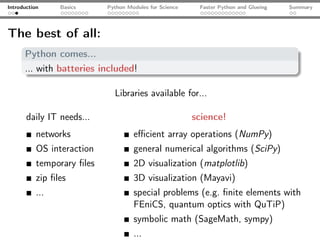
The best of all:
      Python comes...
      ... with batteries included!

                              Libraries available for...

       daily IT needs...                                 science!
           networks                  efficient array operations (NumPy)
           OS interaction            general numerical algorithms (SciPy)
           temporary files            2D visualization (matplotlib)
           zip files                  3D visualization (Mayavi)
           ...                       special problems (e.g. finite elements with
                                     FEniCS, quantum optics with QuTiP)
                                     symbolic math (SageMath, sympy)
                                     ...
Introduction   Basics   Python Modules for Science   Faster Python and Glueing   Summary


Outline


       1 Introduction


       2 Basics


       3 Python Modules for Science


       4 Faster Python and Glueing


       5 Summary
Introduction   Basics   Python Modules for Science   Faster Python and Glueing   Summary


Scientific Hello, World!

 import sys
 from math import sin, pi

 def sincSquare(x):
     """Return sinc(x)^2.                            cmp. H.-P. Langtangen,
     """                                             "Python Scripting for
     if(x <> 0.0):                                   Computational Science"
         return (sin(pi*x)/(pi*x))**2                run with:
     else:
         return 1.0                                  python HelloWorld.py 0.0

 x = sys.argv[1]
 y = sincSquare(float(x))
 print("sinc(%s)^2 = %s"%(x, y))
Introduction   Basics   Python Modules for Science   Faster Python and Glueing   Summary


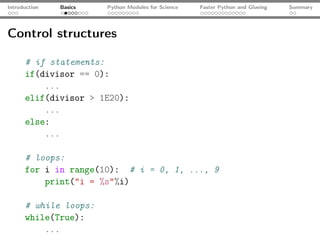
Control structures

      # if statements:
      if(divisor == 0):
          ...
      elif(divisor > 1E20):
          ...
      else:
          ...

      # loops:
      for i in range(10): # i = 0, 1, ..., 9
          print("i = %s"%i)

      # while loops:
      while(True):
          ...
Introduction      Basics   Python Modules for Science   Faster Python and Glueing   Summary


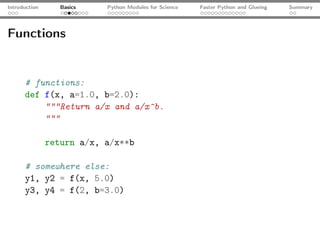
Functions


      # functions:
      def f(x, a=1.0, b=2.0):
          """Return a/x and a/x^b.
          """

               return a/x, a/x**b

      # somewhere else:
      y1, y2 = f(x, 5.0)
      y3, y4 = f(2, b=3.0)
Introduction   Basics   Python Modules for Science   Faster Python and Glueing   Summary


Data types

      a = 2 # integer
      b = 2.0 # float
      c = "3.0" # string
      d = [1, 2, "three"] # list
      e = "1"
      print(a*b) # valid, upcasting
      print(a*c) # valid, but probably not desired: ’3.03.0’
      print(b*c) # invalid
      print(d[1]) # prints 2
      for item in d: # lists are "iterable"
          print(item)
      for character in c: # strings are iterable
          print(character) # prints 3n.n0
      f = e + c # + joins strings: f = ’13.0’
      g = d + [someObj, "foobar"] # + joins lists
Introduction    Basics   Python Modules for Science      Faster Python and Glueing   Summary


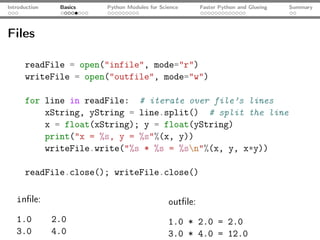
Files

      readFile = open("infile", mode="r")
      writeFile = open("outfile", mode="w")

      for line in readFile: # iterate over file’s lines
          xString, yString = line.split() # split the line
          x = float(xString); y = float(yString)
          print("x = %s, y = %s"%(x, y))
          writeFile.write("%s * %s = %sn"%(x, y, x*y))

      readFile.close(); writeFile.close()

   infile:                                      outfile:
   1.0         2.0                             1.0 * 2.0 = 2.0
   3.0         4.0                             3.0 * 4.0 = 12.0
Introduction   Basics    Python Modules for Science   Faster Python and Glueing   Summary


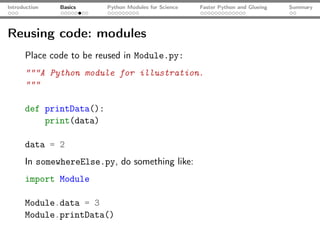
Reusing code: modules
      Place code to be reused in Module.py:
      """A Python module for illustration.
      """

      def printData():
          print(data)

      data = 2
      In somewhereElse.py, do something like:
      import Module

      Module.data = 3
      Module.printData()
Introduction   Basics      Python Modules for Science    Faster Python and Glueing   Summary


Some Python magic

      x, y = y, x       # swapping

      print(1 > 2 > 3)       # prints False

      # filtering (there is also reduce(), map())
      numbers = range(50)
      evenNumbers = filter(lambda x: x % 2 == 0, numbers)
      print("All even numbers in [0; 50): %s"%evenNumbers)

      # list comprehensions:
      squares = [x**2 for x in numbers]

      a += 2    # a = a + 2

      print("string" in "Long string")                  # prints True
Introduction       Basics       Python Modules for Science   Faster Python and Glueing   Summary


Pitfalls
      ☇ Common pitfalls:
               slicing: last index is exclusive, not inclusive as in e.g. Fortran

               x = [1, 2, 3, 4]
               print(x[0:2]) # prints [1, 2], not [1, 2, 3]

               What looks like performing an assignment is actually setting a
               reference:

               a = []
               b = a
               a.append(2)
               print(a) # prints [2]
               print(b) # prints [2], not []!
Introduction   Basics   Python Modules for Science   Faster Python and Glueing   Summary


Outline


       1 Introduction


       2 Basics


       3 Python Modules for Science


       4 Faster Python and Glueing


       5 Summary
Introduction     Basics   Python Modules for Science   Faster Python and Glueing   Summary


The IPython shell
      IPython
      An interactive shell - may replace MatLab [tm] for interactive work

           Syntax
           highlighting
           Tab
           completion
           Inline docu-
           mentation
           Easy
           profiling,
           timing...
           IPython ≥
           0.11: inline
           plots...
Introduction       Basics      Python Modules for Science   Faster Python and Glueing   Summary


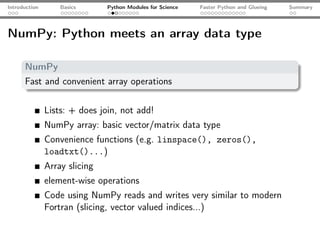
NumPy: Python meets an array data type

      NumPy
      Fast and convenient array operations


               Lists: + does join, not add!
               NumPy array: basic vector/matrix data type
               Convenience functions (e.g. linspace(), zeros(),
               loadtxt()...)
               Array slicing
               element-wise operations
               Code using NumPy reads and writes very similar to modern
               Fortran (slicing, vector valued indices...)
Introduction   Basics       Python Modules for Science   Faster Python and Glueing   Summary


NumPy by examples


      import numpy as np

      a = np.array([1.0, 2.0, 3.0, 4.0])
      b = np.array([4.0, 3.0, 2.0, 1.0])
      for item in a: # arrays are iterable
          print(item)
      c = a + b # c = [5, 5, 5, 5]
      print(a[0:3:2]) # 1.0, 3.0; last element not included!
      a[0:3] = b[0:-1]

      print(a*b)        # prints [4, 6, 6, 4], not the scalar product!
Introduction    Basics      Python Modules for Science      Faster Python and Glueing   Summary


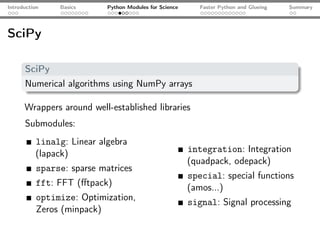
SciPy

      SciPy
      Numerical algorithms using NumPy arrays

      Wrappers around well-established libraries
      Submodules:
          linalg: Linear algebra
          (lapack)                                       integration: Integration
                                                         (quadpack, odepack)
           sparse: sparse matrices
                                                         special: special functions
           fft: FFT (fftpack)                             (amos...)
           optimize: Optimization,                       signal: Signal processing
           Zeros (minpack)
Introduction   Basics   Python Modules for Science   Faster Python and Glueing   Summary


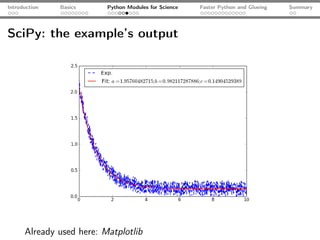
SciPy: an example

      import numpy as np
      from scipy.optimize import curve_fit
      from matplotlib.pyplot import plot, show, legend

      x, yExp = np.loadtxt("func.dat", unpack=True)
      plot(x, yExp, ls="--", c="blue", lw="1.5", label="Exp.")

      def fitFunc(x, a, b, c):
          return a*np.exp(-b*x) + c

      pOpt, pCov = curve_fit(fitFunc, x, yExp)
      yFit = fitFunc(x, a=pOpt[0], b=pOpt[1], c=pOpt[2])
      plot(x, yFit, label="Fit: $a = %s; b = %s; c= %s$"
           %(pOpt[0], pOpt[1], pOpt[2]), ls="-", lw="1.5", c="r")
      legend(); show()
Introduction   Basics     Python Modules for Science   Faster Python and Glueing   Summary


SciPy: the example’s output


      Already used here: Matplotlib
Introduction   Basics     Python Modules for Science   Faster Python and Glueing   Summary


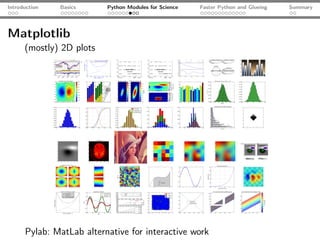
Matplotlib
      (mostly) 2D plots


      Pylab: MatLab alternative for interactive work
Introduction   Basics   Python Modules for Science      Faster Python and Glueing   Summary


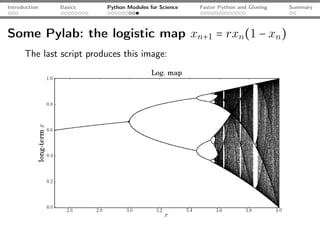
Some Pylab: the logistic map xn+1 = rxn (1 − xn )

      from matplotlib.pylab import *                 # some of NumPy, SciPy, MPL

      rVals = 2000; startVal = 0.5
      throwAway = 300; samples = 800
      vals = zeros(samples-throwAway)

      for r in linspace(2.5, 4.0, rVals): # iterate r
          x = startVal
          for s in range(samples):
              x = r*x*(1-x) # logistic map
              if(s >= throwAway): vals[s-throwAway] = x
          scatter(r*ones(samples-throwAway), vals, c="k", 
                  marker="o", s=0.3, lw=0) # plot

      xlabel("$r$"); ylabel("$x$"); title("Log. map"); show();
Introduction   Basics     Python Modules for Science   Faster Python and Glueing   Summary


Some Pylab: the logistic map xn+1 = rxn (1 − xn )
      The last script produces this image:
Introduction   Basics   Python Modules for Science   Faster Python and Glueing   Summary


Outline


       1 Introduction


       2 Basics


       3 Python Modules for Science


       4 Faster Python and Glueing


       5 Summary
Introduction     Basics      Python Modules for Science     Faster Python and Glueing   Summary


Using Python as glue
      Python can wrap different different other programming languages

      Cython
      compiled, typed Python - interface C/C++ code


      f2py
      Fortran wrapper, included in NumPy

      Why do that?
           Python can be slow                             Wrap external C/Fortran...
           Python loops are slow                          libraries
           calling Python functions is                    Happily/unfortunately (?)
           slow                                           there is legacy code
Introduction      Basics   Python Modules for Science   Faster Python and Glueing   Summary


Problem: sinc(x)2

      import numpy as np
      from math import sin, pi

      def sincSquare(x):
          """Return the sinc(x) = (sin(x)/x)**2 of the array
          argument x.
          """
          retVal = np.zeros_like(x)
          for i in range(len(x)):
              retVal[i] = (sin(pi*x[i]) / (pi*x[i]))**2

               return retVal


      106 array elements: 1 loops, best of 3: 4.91 s per loop
Introduction      Basics   Python Modules for Science   Faster Python and Glueing   Summary


Problem: sinc(x)2

      import numpy as np
      from math import sin, pi

      def sincSquare(x):
          """Return the sinc(x) = (sin(x)/x)**2 of the array
          argument x.
          """
          retVal = np.zeros_like(x)
          for i in range(len(x)):
              retVal[i] = (sin(pi*x[i]) / (pi*x[i]))**2

               return retVal


      106 array elements: 1 loops, best of 3: 4.91 s per loop
Introduction      Basics   Python Modules for Science   Faster Python and Glueing   Summary


First attempt: use NumPy array operations

      import numpy as np

      def sincSquareNumPy1(x):

               return (np.sin(np.pi*x[:])/(np.pi*x[:]))**2

      def sincSquareNumPy2(x):

               return np.sinc(x[:])**2


      106 array elements: first function: 10 loops, best of 3: 73 ms
      per loop, second function: 10 loops, best of 3: 92.9 ms
      per loop
Introduction      Basics   Python Modules for Science   Faster Python and Glueing   Summary


First attempt: use NumPy array operations

      import numpy as np

      def sincSquareNumPy1(x):

               return (np.sin(np.pi*x[:])/(np.pi*x[:]))**2

      def sincSquareNumPy2(x):

               return np.sinc(x[:])**2


      106 array elements: first function: 10 loops, best of 3: 73 ms
      per loop, second function: 10 loops, best of 3: 92.9 ms
      per loop
Introduction       Basics       Python Modules for Science   Faster Python and Glueing   Summary


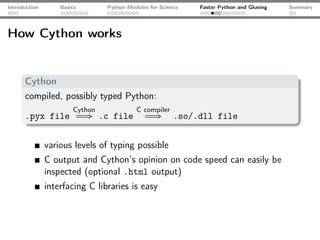
How Cython works


      Cython
      compiled, possibly typed Python:
                       Cython             C compiler
      .pyx file             ⇒ .c file           ⇒       .so/.dll file


               various levels of typing possible
               C output and Cython’s opinion on code speed can easily be
               inspected (optional .html output)
               interfacing C libraries is easy
Introduction      Basics   Python Modules for Science   Faster Python and Glueing   Summary


sinc(x)2 - Cython, Version 1

      cdef extern from "math.h":
          double sin(double)
          double pow(double, int)

      def sincSquareCython1(x):

               pi = 3.1415926535897932384626433
               retVal = np.zeros_like(x)

               for i in range(len(x)):
                   retVal[i] = (sin(pi*x[i]) / (pi*x[i]))**2

               return retVal

      106 array elements: 1 loops, best of 3: 4.39 s per loop
Introduction      Basics   Python Modules for Science   Faster Python and Glueing   Summary


sinc(x)2 - Cython, Version 1

      cdef extern from "math.h":
          double sin(double)
          double pow(double, int)

      def sincSquareCython1(x):

               pi = 3.1415926535897932384626433
               retVal = np.zeros_like(x)

               for i in range(len(x)):
                   retVal[i] = (sin(pi*x[i]) / (pi*x[i]))**2

               return retVal

      106 array elements: 1 loops, best of 3: 4.39 s per loop
Introduction      Basics   Python Modules for Science   Faster Python and Glueing   Summary


sinc(x)2 - Cython, Version 2

      cimport numpy as np # also C-import types

      cpdef np.ndarray[double] sincSquareCython2
          (np.ndarray[double] x):

               cdef int i
               cdef double pi = 3.1415926535897932384626433
               cdef np.ndarray[double] retVal = np.zeros_like(x)

               for i in range(len(x)):
                   retVal[i] = pow(sin(pi*x[i]) / (pi*x[i]), 2)


      106 array elements: 10 loops, best of 3: 49.1 ms per loop
      That’s a speedup by a factor ≈ 100!
Introduction      Basics   Python Modules for Science   Faster Python and Glueing   Summary


sinc(x)2 - Cython, Version 2

      cimport numpy as np # also C-import types

      cpdef np.ndarray[double] sincSquareCython2
          (np.ndarray[double] x):

               cdef int i
               cdef double pi = 3.1415926535897932384626433
               cdef np.ndarray[double] retVal = np.zeros_like(x)

               for i in range(len(x)):
                   retVal[i] = pow(sin(pi*x[i]) / (pi*x[i]), 2)


      106 array elements: 10 loops, best of 3: 49.1 ms per loop
      That’s a speedup by a factor ≈ 100!
Introduction       Basics          Python Modules for Science   Faster Python and Glueing   Summary


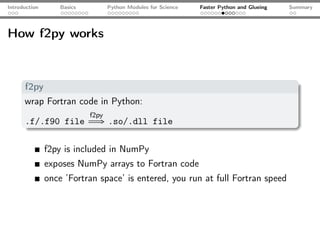
How f2py works


      f2py
      wrap Fortran code in Python:
                            f2py
      .f/.f90 file           ⇒ .so/.dll file

               f2py is included in NumPy
               exposes NumPy arrays to Fortran code
               once ’Fortran space’ is entered, you run at full Fortran speed
Introduction      Basics   Python Modules for Science   Faster Python and Glueing   Summary


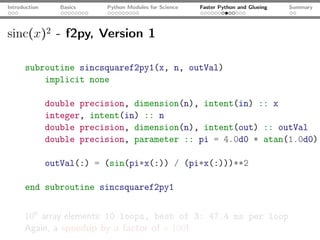
sinc(x)2 - f2py, Version 1

      subroutine sincsquaref2py1(x, n, outVal)
          implicit none

               double precision, dimension(n), intent(in) :: x
               integer, intent(in) :: n
               double precision, dimension(n), intent(out) :: outVal
               double precision, parameter :: pi = 4.0d0 * atan(1.0d0)

               outVal(:) = (sin(pi*x(:)) / (pi*x(:)))**2

      end subroutine sincsquaref2py1


      106 array elements: 10 loops, best of 3: 47.4 ms per loop
      Again, a speedup by a factor of ≈ 100!
Introduction      Basics   Python Modules for Science   Faster Python and Glueing   Summary


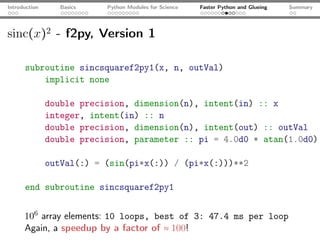
sinc(x)2 - f2py, Version 1

      subroutine sincsquaref2py1(x, n, outVal)
          implicit none

               double precision, dimension(n), intent(in) :: x
               integer, intent(in) :: n
               double precision, dimension(n), intent(out) :: outVal
               double precision, parameter :: pi = 4.0d0 * atan(1.0d0)

               outVal(:) = (sin(pi*x(:)) / (pi*x(:)))**2

      end subroutine sincsquaref2py1


      106 array elements: 10 loops, best of 3: 47.4 ms per loop
      Again, a speedup by a factor of ≈ 100!
Introduction   Basics   Python Modules for Science   Faster Python and Glueing   Summary


Cheating: sinc(x)2 - f2py, Version 2 - OpenMP

      subroutine sincsquaref2py2(x, n, outVal)
          implicit none
          double precision, dimension(n), intent(in) :: x
          integer, intent(in) :: n
          double precision, dimension(n), intent(out) :: outVal
          integer :: i
          double precision, parameter :: pi = 4.0d0 * atan(1.0d0)
          !$OMP PARALLEL DO SHARED(x, outVal)
          do i = 1, n
              outVal(i) = (sin(pi*x(i)) / (pi*x(i)))**2
          end do
          !$OMP END PARALLEL DO
      end subroutine sincsquaref2py2

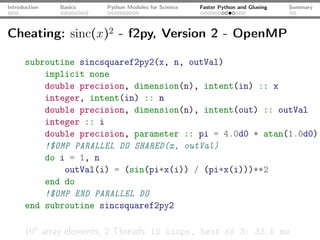
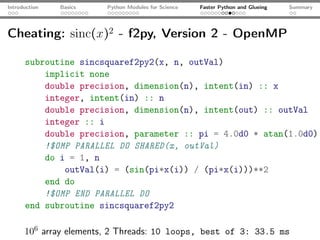
      106 array elements, 2 Threads: 10 loops, best of 3: 33.5 ms
Introduction   Basics   Python Modules for Science   Faster Python and Glueing   Summary


Cheating: sinc(x)2 - f2py, Version 2 - OpenMP

      subroutine sincsquaref2py2(x, n, outVal)
          implicit none
          double precision, dimension(n), intent(in) :: x
          integer, intent(in) :: n
          double precision, dimension(n), intent(out) :: outVal
          integer :: i
          double precision, parameter :: pi = 4.0d0 * atan(1.0d0)
          !$OMP PARALLEL DO SHARED(x, outVal)
          do i = 1, n
              outVal(i) = (sin(pi*x(i)) / (pi*x(i)))**2
          end do
          !$OMP END PARALLEL DO
      end subroutine sincsquaref2py2

      106 array elements, 2 Threads: 10 loops, best of 3: 33.5 ms
Introduction   Basics     Python Modules for Science   Faster Python and Glueing   Summary


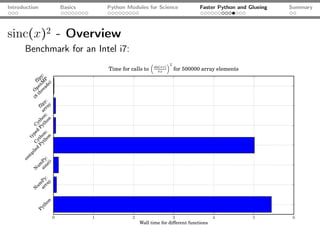
sinc(x)2 - Overview
      Benchmark for an Intel i7:
Introduction       Basics      Python Modules for Science   Faster Python and Glueing   Summary


Techniques for faster Scripts

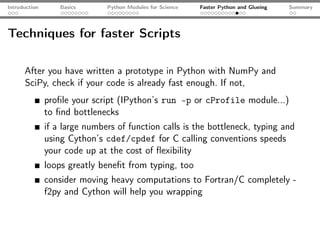
      After you have written a prototype in Python with NumPy and
      SciPy, check if your code is already fast enough. If not,
               profile your script (IPython’s run -p or cProfile module...)
               to find bottlenecks
               if a large numbers of function calls is the bottleneck, typing and
               using Cython’s cdef/cpdef for C calling conventions speeds
               your code up at the cost of flexibility
               loops greatly benefit from typing, too
               consider moving heavy computations to Fortran/C completely -
               f2py and Cython will help you wrapping
Introduction       Basics      Python Modules for Science   Faster Python and Glueing   Summary


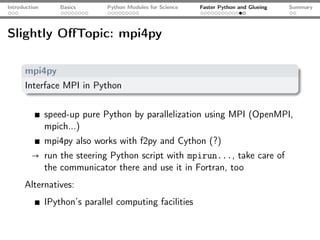
Slightly OffTopic: mpi4py

      mpi4py
      Interface MPI in Python


               speed-up pure Python by parallelization using MPI (OpenMPI,
               mpich...)
               mpi4py also works with f2py and Cython (?)
         → run the steering Python script with mpirun..., take care of
           the communicator there and use it in Fortran, too
      Alternatives:
               IPython’s parallel computing facilities
Introduction   Basics   Python Modules for Science   Faster Python and Glueing   Summary


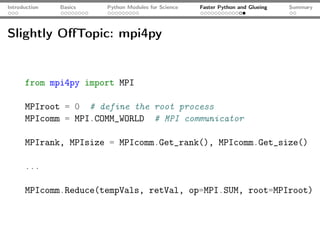
Slightly OffTopic: mpi4py


      from mpi4py import MPI

      MPIroot = 0 # define the root process
      MPIcomm = MPI.COMM_WORLD # MPI communicator

      MPIrank, MPIsize = MPIcomm.Get_rank(), MPIcomm.Get_size()

      ...

      MPIcomm.Reduce(tempVals, retVal, op=MPI.SUM, root=MPIroot)
Introduction   Basics   Python Modules for Science   Faster Python and Glueing   Summary


Outline


       1 Introduction


       2 Basics


       3 Python Modules for Science


       4 Faster Python and Glueing


       5 Summary
Introduction       Basics       Python Modules for Science   Faster Python and Glueing   Summary


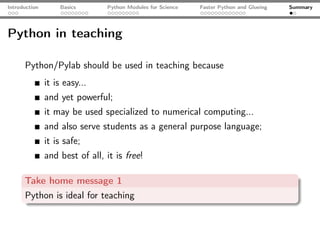
Python in teaching

      Python/Pylab should be used in teaching because
               it is easy...
               and yet powerful;
               it may be used specialized to numerical computing...
               and also serve students as a general purpose language;
               it is safe;
               and best of all, it is free!

      Take home message 1
      Python is ideal for teaching
Introduction      Basics      Python Modules for Science   Faster Python and Glueing   Summary


Summary

      We have...
               introduced basic Python scripting
               shown some basic modules for scientific computing
               demonstrated how to wrap other languages
               learned how to speed Python up

      Take home message 2
      Python is a very valuable tool for Physicists

      Slides, LTEX and Python Sources available at
              A
      http://github.com/aeberspaecher

Python For Scientists

  • 1.
    Python Programming forScientists Alexander Eberspächer October 12th 2011
  • 2.
    Introduction Basics Python Modules for Science Faster Python and Glueing Summary Outline 1 Introduction 2 Basics 3 Python Modules for Science 4 Faster Python and Glueing 5 Summary
  • 3.
    Introduction Basics Python Modules for Science Faster Python and Glueing Summary Outline 1 Introduction 2 Basics 3 Python Modules for Science 4 Faster Python and Glueing 5 Summary
  • 4.
    Introduction Basics Python Modules for Science Faster Python and Glueing Summary Who uses... We all use computers to generate or process data Question to the audience: who uses... C/C++? IDL? Fortran? Perl? Ada? Ruby? Java? Python? Matlab/Octave?
  • 5.
    Introduction Basics Python Modules for Science Faster Python and Glueing Summary What is Python? Python is/has... a scripting language multi-paradigm general purpose open-source interpreted available for all major easy to learn platforms clean syntax great community
  • 6.
    Introduction Basics Python Modules for Science Faster Python and Glueing Summary The best of all: Python comes... ... with batteries included! Libraries available for... daily IT needs... science! networks efficient array operations (NumPy) OS interaction general numerical algorithms (SciPy) temporary files 2D visualization (matplotlib) zip files 3D visualization (Mayavi) ... special problems (e.g. finite elements with FEniCS, quantum optics with QuTiP) symbolic math (SageMath, sympy) ...
  • 7.
    Introduction Basics Python Modules for Science Faster Python and Glueing Summary Outline 1 Introduction 2 Basics 3 Python Modules for Science 4 Faster Python and Glueing 5 Summary
  • 8.
    Introduction Basics Python Modules for Science Faster Python and Glueing Summary Scientific Hello, World! import sys from math import sin, pi def sincSquare(x): """Return sinc(x)^2. cmp. H.-P. Langtangen, """ "Python Scripting for if(x <> 0.0): Computational Science" return (sin(pi*x)/(pi*x))**2 run with: else: return 1.0 python HelloWorld.py 0.0 x = sys.argv[1] y = sincSquare(float(x)) print("sinc(%s)^2 = %s"%(x, y))
  • 9.
    Introduction Basics Python Modules for Science Faster Python and Glueing Summary Control structures # if statements: if(divisor == 0): ... elif(divisor > 1E20): ... else: ... # loops: for i in range(10): # i = 0, 1, ..., 9 print("i = %s"%i) # while loops: while(True): ...
  • 10.
    Introduction Basics Python Modules for Science Faster Python and Glueing Summary Functions # functions: def f(x, a=1.0, b=2.0): """Return a/x and a/x^b. """ return a/x, a/x**b # somewhere else: y1, y2 = f(x, 5.0) y3, y4 = f(2, b=3.0)
  • 11.
    Introduction Basics Python Modules for Science Faster Python and Glueing Summary Data types a = 2 # integer b = 2.0 # float c = "3.0" # string d = [1, 2, "three"] # list e = "1" print(a*b) # valid, upcasting print(a*c) # valid, but probably not desired: ’3.03.0’ print(b*c) # invalid print(d[1]) # prints 2 for item in d: # lists are "iterable" print(item) for character in c: # strings are iterable print(character) # prints 3n.n0 f = e + c # + joins strings: f = ’13.0’ g = d + [someObj, "foobar"] # + joins lists
  • 12.
    Introduction Basics Python Modules for Science Faster Python and Glueing Summary Files readFile = open("infile", mode="r") writeFile = open("outfile", mode="w") for line in readFile: # iterate over file’s lines xString, yString = line.split() # split the line x = float(xString); y = float(yString) print("x = %s, y = %s"%(x, y)) writeFile.write("%s * %s = %sn"%(x, y, x*y)) readFile.close(); writeFile.close() infile: outfile: 1.0 2.0 1.0 * 2.0 = 2.0 3.0 4.0 3.0 * 4.0 = 12.0
  • 13.
    Introduction Basics Python Modules for Science Faster Python and Glueing Summary Reusing code: modules Place code to be reused in Module.py: """A Python module for illustration. """ def printData(): print(data) data = 2 In somewhereElse.py, do something like: import Module Module.data = 3 Module.printData()
  • 14.
    Introduction Basics Python Modules for Science Faster Python and Glueing Summary Some Python magic x, y = y, x # swapping print(1 > 2 > 3) # prints False # filtering (there is also reduce(), map()) numbers = range(50) evenNumbers = filter(lambda x: x % 2 == 0, numbers) print("All even numbers in [0; 50): %s"%evenNumbers) # list comprehensions: squares = [x**2 for x in numbers] a += 2 # a = a + 2 print("string" in "Long string") # prints True
  • 15.
    Introduction Basics Python Modules for Science Faster Python and Glueing Summary Pitfalls ☇ Common pitfalls: slicing: last index is exclusive, not inclusive as in e.g. Fortran x = [1, 2, 3, 4] print(x[0:2]) # prints [1, 2], not [1, 2, 3] What looks like performing an assignment is actually setting a reference: a = [] b = a a.append(2) print(a) # prints [2] print(b) # prints [2], not []!
  • 16.
    Introduction Basics Python Modules for Science Faster Python and Glueing Summary Outline 1 Introduction 2 Basics 3 Python Modules for Science 4 Faster Python and Glueing 5 Summary
  • 17.
    Introduction Basics Python Modules for Science Faster Python and Glueing Summary The IPython shell IPython An interactive shell - may replace MatLab [tm] for interactive work Syntax highlighting Tab completion Inline docu- mentation Easy profiling, timing... IPython ≥ 0.11: inline plots...
  • 18.
    Introduction Basics Python Modules for Science Faster Python and Glueing Summary NumPy: Python meets an array data type NumPy Fast and convenient array operations Lists: + does join, not add! NumPy array: basic vector/matrix data type Convenience functions (e.g. linspace(), zeros(), loadtxt()...) Array slicing element-wise operations Code using NumPy reads and writes very similar to modern Fortran (slicing, vector valued indices...)
  • 19.
    Introduction Basics Python Modules for Science Faster Python and Glueing Summary NumPy by examples import numpy as np a = np.array([1.0, 2.0, 3.0, 4.0]) b = np.array([4.0, 3.0, 2.0, 1.0]) for item in a: # arrays are iterable print(item) c = a + b # c = [5, 5, 5, 5] print(a[0:3:2]) # 1.0, 3.0; last element not included! a[0:3] = b[0:-1] print(a*b) # prints [4, 6, 6, 4], not the scalar product!
  • 20.
    Introduction Basics Python Modules for Science Faster Python and Glueing Summary SciPy SciPy Numerical algorithms using NumPy arrays Wrappers around well-established libraries Submodules: linalg: Linear algebra (lapack) integration: Integration (quadpack, odepack) sparse: sparse matrices special: special functions fft: FFT (fftpack) (amos...) optimize: Optimization, signal: Signal processing Zeros (minpack)
  • 21.
    Introduction Basics Python Modules for Science Faster Python and Glueing Summary SciPy: an example import numpy as np from scipy.optimize import curve_fit from matplotlib.pyplot import plot, show, legend x, yExp = np.loadtxt("func.dat", unpack=True) plot(x, yExp, ls="--", c="blue", lw="1.5", label="Exp.") def fitFunc(x, a, b, c): return a*np.exp(-b*x) + c pOpt, pCov = curve_fit(fitFunc, x, yExp) yFit = fitFunc(x, a=pOpt[0], b=pOpt[1], c=pOpt[2]) plot(x, yFit, label="Fit: $a = %s; b = %s; c= %s$" %(pOpt[0], pOpt[1], pOpt[2]), ls="-", lw="1.5", c="r") legend(); show()
  • 22.
    Introduction Basics Python Modules for Science Faster Python and Glueing Summary SciPy: the example’s output Already used here: Matplotlib
  • 23.
    Introduction Basics Python Modules for Science Faster Python and Glueing Summary Matplotlib (mostly) 2D plots Pylab: MatLab alternative for interactive work
  • 24.
    Introduction Basics Python Modules for Science Faster Python and Glueing Summary Some Pylab: the logistic map xn+1 = rxn (1 − xn ) from matplotlib.pylab import * # some of NumPy, SciPy, MPL rVals = 2000; startVal = 0.5 throwAway = 300; samples = 800 vals = zeros(samples-throwAway) for r in linspace(2.5, 4.0, rVals): # iterate r x = startVal for s in range(samples): x = r*x*(1-x) # logistic map if(s >= throwAway): vals[s-throwAway] = x scatter(r*ones(samples-throwAway), vals, c="k", marker="o", s=0.3, lw=0) # plot xlabel("$r$"); ylabel("$x$"); title("Log. map"); show();
  • 25.
    Introduction Basics Python Modules for Science Faster Python and Glueing Summary Some Pylab: the logistic map xn+1 = rxn (1 − xn ) The last script produces this image:
  • 26.
    Introduction Basics Python Modules for Science Faster Python and Glueing Summary Outline 1 Introduction 2 Basics 3 Python Modules for Science 4 Faster Python and Glueing 5 Summary
  • 27.
    Introduction Basics Python Modules for Science Faster Python and Glueing Summary Using Python as glue Python can wrap different different other programming languages Cython compiled, typed Python - interface C/C++ code f2py Fortran wrapper, included in NumPy Why do that? Python can be slow Wrap external C/Fortran... Python loops are slow libraries calling Python functions is Happily/unfortunately (?) slow there is legacy code
  • 28.
    Introduction Basics Python Modules for Science Faster Python and Glueing Summary Problem: sinc(x)2 import numpy as np from math import sin, pi def sincSquare(x): """Return the sinc(x) = (sin(x)/x)**2 of the array argument x. """ retVal = np.zeros_like(x) for i in range(len(x)): retVal[i] = (sin(pi*x[i]) / (pi*x[i]))**2 return retVal 106 array elements: 1 loops, best of 3: 4.91 s per loop
  • 29.
    Introduction Basics Python Modules for Science Faster Python and Glueing Summary Problem: sinc(x)2 import numpy as np from math import sin, pi def sincSquare(x): """Return the sinc(x) = (sin(x)/x)**2 of the array argument x. """ retVal = np.zeros_like(x) for i in range(len(x)): retVal[i] = (sin(pi*x[i]) / (pi*x[i]))**2 return retVal 106 array elements: 1 loops, best of 3: 4.91 s per loop
  • 30.
    Introduction Basics Python Modules for Science Faster Python and Glueing Summary First attempt: use NumPy array operations import numpy as np def sincSquareNumPy1(x): return (np.sin(np.pi*x[:])/(np.pi*x[:]))**2 def sincSquareNumPy2(x): return np.sinc(x[:])**2 106 array elements: first function: 10 loops, best of 3: 73 ms per loop, second function: 10 loops, best of 3: 92.9 ms per loop
  • 31.
    Introduction Basics Python Modules for Science Faster Python and Glueing Summary First attempt: use NumPy array operations import numpy as np def sincSquareNumPy1(x): return (np.sin(np.pi*x[:])/(np.pi*x[:]))**2 def sincSquareNumPy2(x): return np.sinc(x[:])**2 106 array elements: first function: 10 loops, best of 3: 73 ms per loop, second function: 10 loops, best of 3: 92.9 ms per loop
  • 32.
    Introduction Basics Python Modules for Science Faster Python and Glueing Summary How Cython works Cython compiled, possibly typed Python: Cython C compiler .pyx file ⇒ .c file ⇒ .so/.dll file various levels of typing possible C output and Cython’s opinion on code speed can easily be inspected (optional .html output) interfacing C libraries is easy
  • 33.
    Introduction Basics Python Modules for Science Faster Python and Glueing Summary sinc(x)2 - Cython, Version 1 cdef extern from "math.h": double sin(double) double pow(double, int) def sincSquareCython1(x): pi = 3.1415926535897932384626433 retVal = np.zeros_like(x) for i in range(len(x)): retVal[i] = (sin(pi*x[i]) / (pi*x[i]))**2 return retVal 106 array elements: 1 loops, best of 3: 4.39 s per loop
  • 34.
    Introduction Basics Python Modules for Science Faster Python and Glueing Summary sinc(x)2 - Cython, Version 1 cdef extern from "math.h": double sin(double) double pow(double, int) def sincSquareCython1(x): pi = 3.1415926535897932384626433 retVal = np.zeros_like(x) for i in range(len(x)): retVal[i] = (sin(pi*x[i]) / (pi*x[i]))**2 return retVal 106 array elements: 1 loops, best of 3: 4.39 s per loop
  • 35.
    Introduction Basics Python Modules for Science Faster Python and Glueing Summary sinc(x)2 - Cython, Version 2 cimport numpy as np # also C-import types cpdef np.ndarray[double] sincSquareCython2 (np.ndarray[double] x): cdef int i cdef double pi = 3.1415926535897932384626433 cdef np.ndarray[double] retVal = np.zeros_like(x) for i in range(len(x)): retVal[i] = pow(sin(pi*x[i]) / (pi*x[i]), 2) 106 array elements: 10 loops, best of 3: 49.1 ms per loop That’s a speedup by a factor ≈ 100!
  • 36.
    Introduction Basics Python Modules for Science Faster Python and Glueing Summary sinc(x)2 - Cython, Version 2 cimport numpy as np # also C-import types cpdef np.ndarray[double] sincSquareCython2 (np.ndarray[double] x): cdef int i cdef double pi = 3.1415926535897932384626433 cdef np.ndarray[double] retVal = np.zeros_like(x) for i in range(len(x)): retVal[i] = pow(sin(pi*x[i]) / (pi*x[i]), 2) 106 array elements: 10 loops, best of 3: 49.1 ms per loop That’s a speedup by a factor ≈ 100!
  • 37.
    Introduction Basics Python Modules for Science Faster Python and Glueing Summary How f2py works f2py wrap Fortran code in Python: f2py .f/.f90 file ⇒ .so/.dll file f2py is included in NumPy exposes NumPy arrays to Fortran code once ’Fortran space’ is entered, you run at full Fortran speed
  • 38.
    Introduction Basics Python Modules for Science Faster Python and Glueing Summary sinc(x)2 - f2py, Version 1 subroutine sincsquaref2py1(x, n, outVal) implicit none double precision, dimension(n), intent(in) :: x integer, intent(in) :: n double precision, dimension(n), intent(out) :: outVal double precision, parameter :: pi = 4.0d0 * atan(1.0d0) outVal(:) = (sin(pi*x(:)) / (pi*x(:)))**2 end subroutine sincsquaref2py1 106 array elements: 10 loops, best of 3: 47.4 ms per loop Again, a speedup by a factor of ≈ 100!
  • 39.
    Introduction Basics Python Modules for Science Faster Python and Glueing Summary sinc(x)2 - f2py, Version 1 subroutine sincsquaref2py1(x, n, outVal) implicit none double precision, dimension(n), intent(in) :: x integer, intent(in) :: n double precision, dimension(n), intent(out) :: outVal double precision, parameter :: pi = 4.0d0 * atan(1.0d0) outVal(:) = (sin(pi*x(:)) / (pi*x(:)))**2 end subroutine sincsquaref2py1 106 array elements: 10 loops, best of 3: 47.4 ms per loop Again, a speedup by a factor of ≈ 100!
  • 40.
    Introduction Basics Python Modules for Science Faster Python and Glueing Summary Cheating: sinc(x)2 - f2py, Version 2 - OpenMP subroutine sincsquaref2py2(x, n, outVal) implicit none double precision, dimension(n), intent(in) :: x integer, intent(in) :: n double precision, dimension(n), intent(out) :: outVal integer :: i double precision, parameter :: pi = 4.0d0 * atan(1.0d0) !$OMP PARALLEL DO SHARED(x, outVal) do i = 1, n outVal(i) = (sin(pi*x(i)) / (pi*x(i)))**2 end do !$OMP END PARALLEL DO end subroutine sincsquaref2py2 106 array elements, 2 Threads: 10 loops, best of 3: 33.5 ms
  • 41.
    Introduction Basics Python Modules for Science Faster Python and Glueing Summary Cheating: sinc(x)2 - f2py, Version 2 - OpenMP subroutine sincsquaref2py2(x, n, outVal) implicit none double precision, dimension(n), intent(in) :: x integer, intent(in) :: n double precision, dimension(n), intent(out) :: outVal integer :: i double precision, parameter :: pi = 4.0d0 * atan(1.0d0) !$OMP PARALLEL DO SHARED(x, outVal) do i = 1, n outVal(i) = (sin(pi*x(i)) / (pi*x(i)))**2 end do !$OMP END PARALLEL DO end subroutine sincsquaref2py2 106 array elements, 2 Threads: 10 loops, best of 3: 33.5 ms
  • 42.
    Introduction Basics Python Modules for Science Faster Python and Glueing Summary sinc(x)2 - Overview Benchmark for an Intel i7:
  • 43.
    Introduction Basics Python Modules for Science Faster Python and Glueing Summary Techniques for faster Scripts After you have written a prototype in Python with NumPy and SciPy, check if your code is already fast enough. If not, profile your script (IPython’s run -p or cProfile module...) to find bottlenecks if a large numbers of function calls is the bottleneck, typing and using Cython’s cdef/cpdef for C calling conventions speeds your code up at the cost of flexibility loops greatly benefit from typing, too consider moving heavy computations to Fortran/C completely - f2py and Cython will help you wrapping
  • 44.
    Introduction Basics Python Modules for Science Faster Python and Glueing Summary Slightly OffTopic: mpi4py mpi4py Interface MPI in Python speed-up pure Python by parallelization using MPI (OpenMPI, mpich...) mpi4py also works with f2py and Cython (?) → run the steering Python script with mpirun..., take care of the communicator there and use it in Fortran, too Alternatives: IPython’s parallel computing facilities
  • 45.
    Introduction Basics Python Modules for Science Faster Python and Glueing Summary Slightly OffTopic: mpi4py from mpi4py import MPI MPIroot = 0 # define the root process MPIcomm = MPI.COMM_WORLD # MPI communicator MPIrank, MPIsize = MPIcomm.Get_rank(), MPIcomm.Get_size() ... MPIcomm.Reduce(tempVals, retVal, op=MPI.SUM, root=MPIroot)
  • 46.
    Introduction Basics Python Modules for Science Faster Python and Glueing Summary Outline 1 Introduction 2 Basics 3 Python Modules for Science 4 Faster Python and Glueing 5 Summary
  • 47.
    Introduction Basics Python Modules for Science Faster Python and Glueing Summary Python in teaching Python/Pylab should be used in teaching because it is easy... and yet powerful; it may be used specialized to numerical computing... and also serve students as a general purpose language; it is safe; and best of all, it is free! Take home message 1 Python is ideal for teaching
  • 48.
    Introduction Basics Python Modules for Science Faster Python and Glueing Summary Summary We have... introduced basic Python scripting shown some basic modules for scientific computing demonstrated how to wrap other languages learned how to speed Python up Take home message 2 Python is a very valuable tool for Physicists Slides, LTEX and Python Sources available at A http://github.com/aeberspaecher