Downloaded 30 times







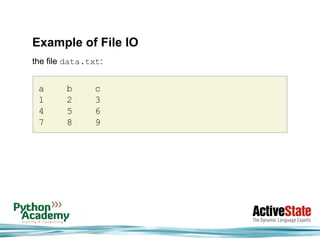
![Example of File IO
>>> fobj = open('data.txt')
>>> header = fobj.next().split()
>>> header
['a', 'b', 'c']
>>> for line in fobj:
... numbers.append([int(entry) for entry in line.split()])
...
>>> numbers
[[1, 2, 3], [4, 5, 6], [7, 8, 9]]](https://image.slidesharecdn.com/migratingfrommatlabtopython-101220151928-phpapp02/85/Migrating-from-matlab-to-python-20-320.jpg)
![Create Arrays
>>> import numpy as np
>>> a = np.array([[1, 2, 3], [4, 5, 6]])
>>> a
array([[1, 2, 3],
[4, 5, 6]])
>>> a.shape
(2, 3)
>>> a.dtype
dtype('int32')
>>> a.size
6](https://image.slidesharecdn.com/migratingfrommatlabtopython-101220151928-phpapp02/85/Migrating-from-matlab-to-python-25-320.jpg)
![Create Arrays
>>> b = np.arange(10)
>>> b
array([0, 1, 2, 3, 4, 5, 6, 7, 8, 9])
>>> c = np.array([[1, 2, 3], [4, 5, 6]],
dtype=np.float32)
>>> c
array([[ 1., 2., 3.],
[ 4., 5., 6.]], dtype=float32)](https://image.slidesharecdn.com/migratingfrommatlabtopython-101220151928-phpapp02/85/Migrating-from-matlab-to-python-26-320.jpg)
![Create Arrays
>>> np.arange(16, dtype=np.float).reshape(4, 4)
array([[ 0., 1., 2., 3.],
[ 4., 5., 6., 7.],
[ 8., 9., 10., 11.],
[ 12., 13., 14., 15.]])
>>> np.zeros((3, 4))
array([[ 0., 0., 0., 0.],
[ 0., 0., 0., 0.],
[ 0., 0., 0., 0.]])](https://image.slidesharecdn.com/migratingfrommatlabtopython-101220151928-phpapp02/85/Migrating-from-matlab-to-python-27-320.jpg)
![Create Arrays
>>> np.ones((3, 4))
array([[ 1., 1., 1., 1.],
[ 1., 1., 1., 1.],
[ 1., 1., 1., 1.]])
>>> np.zeros((3, 4)) + 5
array([[ 5., 5., 5., 5.],
[ 5., 5., 5., 5.],
[ 5., 5., 5., 5.]])](https://image.slidesharecdn.com/migratingfrommatlabtopython-101220151928-phpapp02/85/Migrating-from-matlab-to-python-28-320.jpg)
![Data Types
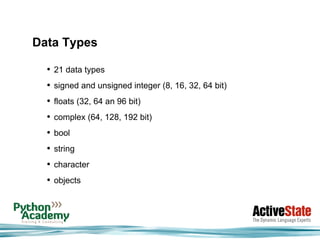
>>> a = np.array([1, 2, 3], dtype=np.int64)
>>> a
array([1, 2, 3], dtype=int64)
>>> a.dtype
dtype('int64')
>>> a.dtype.type
<type 'numpy.int64'>
>>> a.dtype.char
'q'
>>> a.dtype.str
'<i8'](https://image.slidesharecdn.com/migratingfrommatlabtopython-101220151928-phpapp02/85/Migrating-from-matlab-to-python-30-320.jpg)
![Slicing
>>> one_d = np.arange(10)
>>> one_d
array([0, 1, 2, 3, 4, 5, 6, 7, 8, 9])
>>> one_d[0]
0
>>> one_d[1]
1
>>> one_d[-1]
9
>>> one_d[2:5]
array([2, 3, 4])](https://image.slidesharecdn.com/migratingfrommatlabtopython-101220151928-phpapp02/85/Migrating-from-matlab-to-python-31-320.jpg)
![Slicing
>>> two_d = np.arange(25).reshape(5, 5)
>>> two_d
array([[ 0, 1, 2, 3, 4],
[ 5, 6, 7, 8, 9],
[10, 11, 12, 13, 14],
[15, 16, 17, 18, 19],
[20, 21, 22, 23, 24]])
>>> two_d[0, 0]
0
>>> two_d[0]
array([0, 1, 2, 3, 4])](https://image.slidesharecdn.com/migratingfrommatlabtopython-101220151928-phpapp02/85/Migrating-from-matlab-to-python-32-320.jpg)
![Slicing
>>> two_d[:,0]
array([ 0, 5, 10, 15, 20])
>>> two_d[1:-1,1:-1]
array([[ 6, 7, 8],
[11, 12, 13],
[16, 17, 18]])
• advanced selection (integers, booleans, strings)
• "loop-less" programming](https://image.slidesharecdn.com/migratingfrommatlabtopython-101220151928-phpapp02/85/Migrating-from-matlab-to-python-33-320.jpg)
![Broadcasting
>>> two_d
array([[ 0, 1, 2, 3, 4],
[ 5, 6, 7, 8, 9],
[10, 11, 12, 13, 14],
[15, 16, 17, 18, 19],
[20, 21, 22, 23, 24]])
>>> two_d + 5
array([[ 5, 6, 7, 8, 9],
[10, 11, 12, 13, 14],
[15, 16, 17, 18, 19],
[20, 21, 22, 23, 24],
[25, 26, 27, 28, 29]])](https://image.slidesharecdn.com/migratingfrommatlabtopython-101220151928-phpapp02/85/Migrating-from-matlab-to-python-34-320.jpg)
![Broadcasting
>>> a = np.arange(8).reshape(2, 4)
>>> a
array([[0, 1, 2, 3],
[4, 5, 6, 7]])
>>> b = np.arange(4)
>>> b
array([0, 1, 2, 3])
>>> a + b
array([[ 0, 2, 4, 6],
[ 4, 6, 8, 10]])](https://image.slidesharecdn.com/migratingfrommatlabtopython-101220151928-phpapp02/85/Migrating-from-matlab-to-python-35-320.jpg)
![Universal Functions
>>> np.sin(a)
array([[ 0. , 0.84147098, 0.90929743, 0.14112001],
[-0.7568025 , -0.95892427, -0.2794155 , 0.6569866 ]])
>>> np.sin.nin
1
>>> np.sin.nout
1
>>> np.sin.types
['f->f', 'd->d', 'g->g', 'F->F', 'D->D', 'G->G', 'O->O']](https://image.slidesharecdn.com/migratingfrommatlabtopython-101220151928-phpapp02/85/Migrating-from-matlab-to-python-36-320.jpg)
![Matrices
• always 2D
>>> M = np.matrix('1 2 3; 4 5 6')
>>> M
matrix([[1, 2, 3],
[4, 5, 6]])
>>> M.I
matrix([[-0.94444444, 0.44444444],
[-0.11111111, 0.11111111],
[ 0.72222222, -0.22222222]])](https://image.slidesharecdn.com/migratingfrommatlabtopython-101220151928-phpapp02/85/Migrating-from-matlab-to-python-37-320.jpg)
![Basic matplotlib-plotting
• simple, yet powerful plotting package
In [1]: plot(random(100))
Out[1]: [<matplotlib.lines.Line2D object at 0x02A3EA90>]](https://image.slidesharecdn.com/migratingfrommatlabtopython-101220151928-phpapp02/85/Migrating-from-matlab-to-python-40-320.jpg)
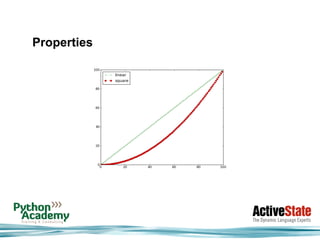
![Properties
In [1]: x = arange(100)
In [2]: linear = x
In [3]: square = arange(0, 10, 0.1) ** 2
In [4]: lines = plot(x, linear, 'g:+', x, square, 'r--o')
In [5]: leg = legend(('linear', 'square'), loc='upper left')](https://image.slidesharecdn.com/migratingfrommatlabtopython-101220151928-phpapp02/85/Migrating-from-matlab-to-python-42-320.jpg)
![Ticks and Formatters
In [6]: major_locator = MultipleLocator(10)
In [7]: major_formatter = FormatStrFormatter('%5.2f')
In [8]: minor_locator = MultipleLocator(5)
In [9]: ax = gca()
In [10]: ax.xaxis.set_major_locator(major_locator)
In [11]: ax.xaxis.set_minor_locator(minor_locator)
In [12]: ax.xaxis.set_major_formatter(major_formatter)
In [13]: draw()](https://image.slidesharecdn.com/migratingfrommatlabtopython-101220151928-phpapp02/85/Migrating-from-matlab-to-python-44-320.jpg)
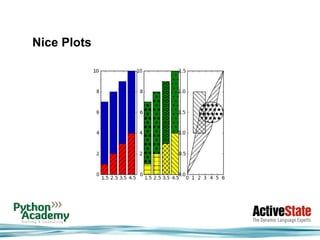




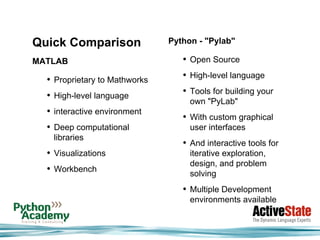
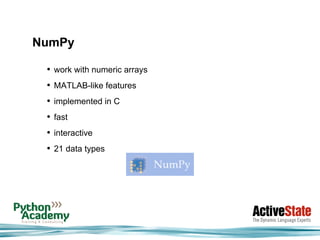
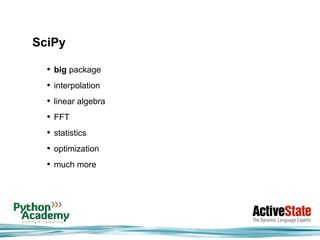
This document summarizes a presentation given by Diane Mueller from ActiveState and Dr. Mike Müller from Python Academy. It compares MATLAB and Python capabilities for scientific computing. Python has many libraries like NumPy, SciPy, IPython and matplotlib that provide similar functionality to MATLAB. Together these are often called "Pylab". The presentation provides an overview of Python, NumPy arrays, visualization with matplotlib, and integrating Python with other languages.


