First Moves
with Puppet
New Delhi Puppet HackDay/
BarCamp March 13, 2010
Presented by
Slideshare Operations Engineering/Julie Tsai
Today

  Quick Primer

  Useful Commands

  Puppeting Sudoers I — Permissions

  Puppeting Sudoers II — OS Conditions

  Puppeting Sudoers III — Inheriting Class

  Facter

  References
                                              2
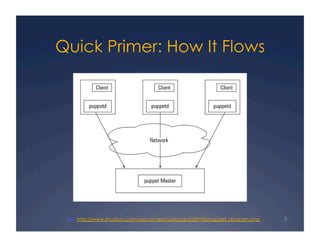
Quick Primer: How It Flows


 Ref. http://www.linuxforu.com/wp-content/uploads/2009/06/puppet_diagram.png   3
Quick Primer: Learning the Lingo
 Resource – instance of native type, plugin, or
   definition, i.e. user, exec, file

   Capitalized resource: invoked by other resources of previously
   defined resource, i.e. file foo.txt laver invoked as File[“foo.txt”]

 Class - resource(s) description with title, file, attributes
 Definition – abstract description of class, can be
   invoked multiple times
 Node – host instance (physical or virtual)
 Collection – groups of resources

 Recipe – sample puppet code (manifests/*.pp)
                                                                          4
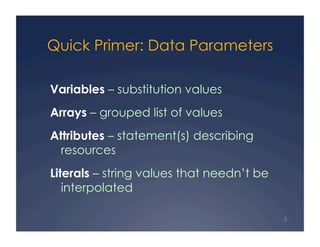
Quick Primer: Data Parameters

Variables – substitution values
Arrays – grouped list of values
Attributes – statement(s) describing
  resources
Literals – string values that needn’t be
   interpolated

                                           5
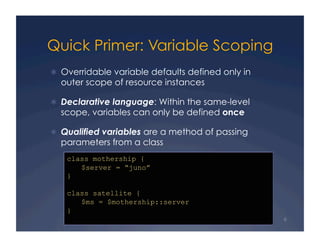
Quick Primer: Variable Scoping
  Overridable variable defaults defined only in
  outer scope of resource instances

  Declarative language: Within the same-level
  scope, variables can only be defined once

  Qualified variables are a method of passing
  parameters from a class
    class mothership {
       $server = “juno”
    }

    class satellite {
       $ms = $mothership::server
    }
                                                   6
Quick Primer: Where Things Are

Note: below assumes default install in /etc
  /etc/puppet/fileserver.conf (used by puppermasterd)

     path /var/lib/puppet/files
     allow 10.100.0.0/24
  /etc/puppet/puppet.conf (used by clients’ puppetd)

     vardir = /var/lib/puppet
     logdir = /var/log/puppet
     classfile = $vardir/classes.txt
  /etc/puppet/manifests/[../..]/*.pp (architecture varies)
                                                              7
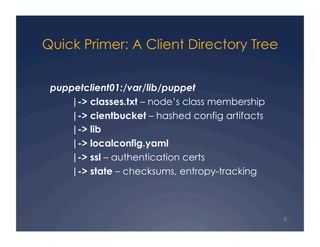
Quick Primer: A Client Directory Tree


 puppetclient01:/var/lib/puppet
     |-> classes.txt – node’s class membership
     |-> cientbucket – hashed config artifacts
     |-> lib
     |-> localconfig.yaml
     |-> ssl – authentication certs
     |-> state – checksums, entropy-tracking


                                                 8
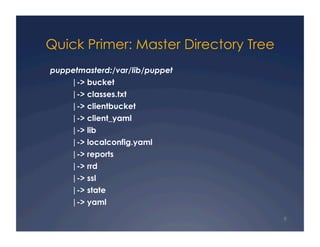
Quick Primer: Master Directory Tree
puppetmasterd:/var/lib/puppet
    |-> bucket
     |-> classes.txt
     |-> clientbucket
     |-> client_yaml
     |-> lib
     |-> localconfig.yaml
     |-> reports
     |-> rrd
     |-> ssl
     |-> state
     |-> yaml

                                      9
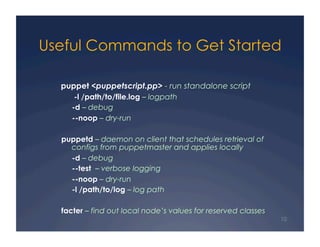
Useful Commands to Get Started

  puppet <puppetscript.pp> - run standalone script
      -l /path/to/file.log – logpath
     -d – debug
     --noop – dry-run

  puppetd – daemon on client that schedules retrieval of
    configs from puppetmaster and applies locally
    -d – debug
    --test – verbose logging
    --noop – dry-run
    -l /path/to/log – log path

  facter – find out local node’s values for reserved classes
                                                               10
Puppeting Sudoers I — Permissions
Configure /etc/puppet/manifests/sudoers.pp :

  file { "/etc/sudoers":
       owner => root,
       group => wheel,
       mode   => 400,
  }


 And run:

  [puppet@puppet manifests]# puppet –noop –d /etc/puppet/
  manifests/sudoers.pp


                                                            11
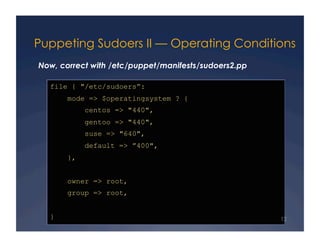
Puppeting Sudoers II — Operating Conditions
Now, correct with /etc/puppet/manifests/sudoers2.pp

  file { "/etc/sudoers”:
       mode => $operatingsystem ? {
            centos => "440",
            gentoo => "440",
            suse => "640",
            default => ”400",
       },


       owner => root,
       group => root,


  }                                                   12
Puppeting Sudoers III — Inheriting Class
/etc/puppet/manifests/sudoers3.pp

  class unix {
           file { "/etc/sudoers":
                   owner => root,
                   group => root,
           }
           service {
                   "sshd":
                   ensure => running,
           }
  }
  class centos_mycompany inherits unix {
           File["/etc/sudoers"] { mode => 440 }
  }
                                                  13
Puppeting Sudoers III — Inheriting Class (cont.)

/etc/puppet/manifests/sudoers3.pp

  node default {
            include unix
  }
  node bastionhost {
          include centos_mycompany
  }


 And run:
  [puppet@puppet manifests]# puppet –d –noop sudoers3.pp

  [puppet@puppet manifests]# cat /var/lib/puppet/classes.txt


                                                               14
Puppeting Sudoers III — Inheriting Class (cont. 2)

Use Facter to defind nodename:

  [puppet@puppet manifests]# facter | egrep -i 'fqdn|hostname’


/etc/puppet/manifests/sudoers3.pp


  node'puppet.us-west-1.compute.internal' {
          include centos_mycompany
  }


                                                                 15
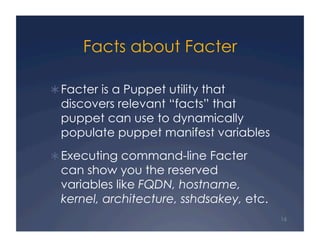
Facts about Facter

 Facter is a Puppet utility that
  discovers relevant “facts” that
  puppet can use to dynamically
  populate puppet manifest variables
 Executing command-line Facter
  can show you the reserved
  variables like FQDN, hostname,
  kernel, architecture, sshdsakey, etc.
                                          16
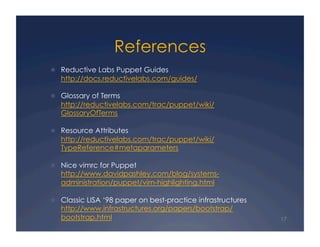
References
  Reductive Labs Puppet Guides
   http://docs.reductivelabs.com/guides/

  Glossary of Terms
   http://reductivelabs.com/trac/puppet/wiki/
   GlossaryOfTerms

  Resource Attributes
   http://reductivelabs.com/trac/puppet/wiki/
   TypeReference#metaparameters

  Nice vimrc for Puppet
   http://www.davidpashley.com/blog/systems-
   administration/puppet/vim-highlighting.html

  Classic LISA ‘98 paper on best-practice infrastructures
   http://www.infrastructures.org/papers/bootstrap/
   bootstrap.html                                            17

Puppet HackDay/BarCamp New Delhi Exercises

  • 1.
    First Moves with Puppet NewDelhi Puppet HackDay/ BarCamp March 13, 2010 Presented by Slideshare Operations Engineering/Julie Tsai
  • 2.
    Today   Quick Primer  Useful Commands   Puppeting Sudoers I — Permissions   Puppeting Sudoers II — OS Conditions   Puppeting Sudoers III — Inheriting Class   Facter   References 2
  • 3.
    Quick Primer: HowIt Flows Ref. http://www.linuxforu.com/wp-content/uploads/2009/06/puppet_diagram.png 3
  • 4.
    Quick Primer: Learningthe Lingo Resource – instance of native type, plugin, or definition, i.e. user, exec, file Capitalized resource: invoked by other resources of previously defined resource, i.e. file foo.txt laver invoked as File[“foo.txt”] Class - resource(s) description with title, file, attributes Definition – abstract description of class, can be invoked multiple times Node – host instance (physical or virtual) Collection – groups of resources Recipe – sample puppet code (manifests/*.pp) 4
  • 5.
    Quick Primer: DataParameters Variables – substitution values Arrays – grouped list of values Attributes – statement(s) describing resources Literals – string values that needn’t be interpolated 5
  • 6.
    Quick Primer: VariableScoping   Overridable variable defaults defined only in outer scope of resource instances   Declarative language: Within the same-level scope, variables can only be defined once   Qualified variables are a method of passing parameters from a class class mothership { $server = “juno” } class satellite { $ms = $mothership::server } 6
  • 7.
    Quick Primer: WhereThings Are Note: below assumes default install in /etc   /etc/puppet/fileserver.conf (used by puppermasterd) path /var/lib/puppet/files allow 10.100.0.0/24   /etc/puppet/puppet.conf (used by clients’ puppetd) vardir = /var/lib/puppet logdir = /var/log/puppet classfile = $vardir/classes.txt   /etc/puppet/manifests/[../..]/*.pp (architecture varies) 7
  • 8.
    Quick Primer: AClient Directory Tree puppetclient01:/var/lib/puppet |-> classes.txt – node’s class membership |-> cientbucket – hashed config artifacts |-> lib |-> localconfig.yaml |-> ssl – authentication certs |-> state – checksums, entropy-tracking 8
  • 9.
    Quick Primer: MasterDirectory Tree puppetmasterd:/var/lib/puppet |-> bucket |-> classes.txt |-> clientbucket |-> client_yaml |-> lib |-> localconfig.yaml |-> reports |-> rrd |-> ssl |-> state |-> yaml 9
  • 10.
    Useful Commands toGet Started puppet <puppetscript.pp> - run standalone script -l /path/to/file.log – logpath -d – debug --noop – dry-run puppetd – daemon on client that schedules retrieval of configs from puppetmaster and applies locally -d – debug --test – verbose logging --noop – dry-run -l /path/to/log – log path facter – find out local node’s values for reserved classes 10
  • 11.
    Puppeting Sudoers I— Permissions Configure /etc/puppet/manifests/sudoers.pp : file { "/etc/sudoers": owner => root, group => wheel, mode => 400, } And run: [puppet@puppet manifests]# puppet –noop –d /etc/puppet/ manifests/sudoers.pp 11
  • 12.
    Puppeting Sudoers II— Operating Conditions Now, correct with /etc/puppet/manifests/sudoers2.pp file { "/etc/sudoers”: mode => $operatingsystem ? { centos => "440", gentoo => "440", suse => "640", default => ”400", }, owner => root, group => root, } 12
  • 13.
    Puppeting Sudoers III— Inheriting Class /etc/puppet/manifests/sudoers3.pp class unix { file { "/etc/sudoers": owner => root, group => root, } service { "sshd": ensure => running, } } class centos_mycompany inherits unix { File["/etc/sudoers"] { mode => 440 } } 13
  • 14.
    Puppeting Sudoers III— Inheriting Class (cont.) /etc/puppet/manifests/sudoers3.pp node default { include unix } node bastionhost { include centos_mycompany } And run: [puppet@puppet manifests]# puppet –d –noop sudoers3.pp [puppet@puppet manifests]# cat /var/lib/puppet/classes.txt 14
  • 15.
    Puppeting Sudoers III— Inheriting Class (cont. 2) Use Facter to defind nodename: [puppet@puppet manifests]# facter | egrep -i 'fqdn|hostname’ /etc/puppet/manifests/sudoers3.pp node'puppet.us-west-1.compute.internal' { include centos_mycompany } 15
  • 16.
    Facts about Facter  Facteris a Puppet utility that discovers relevant “facts” that puppet can use to dynamically populate puppet manifest variables  Executing command-line Facter can show you the reserved variables like FQDN, hostname, kernel, architecture, sshdsakey, etc. 16
  • 17.
    References   Reductive LabsPuppet Guides http://docs.reductivelabs.com/guides/   Glossary of Terms http://reductivelabs.com/trac/puppet/wiki/ GlossaryOfTerms   Resource Attributes http://reductivelabs.com/trac/puppet/wiki/ TypeReference#metaparameters   Nice vimrc for Puppet http://www.davidpashley.com/blog/systems- administration/puppet/vim-highlighting.html   Classic LISA ‘98 paper on best-practice infrastructures http://www.infrastructures.org/papers/bootstrap/ bootstrap.html 17