BUSINESS.COM GUIDE TO PAYROLL SERVICES
CONTENTS 
OVERVIEW OF PAYROLL SERVICES 3 
FEATURES 7 
CALCULATING COSTS 11 
PURCHASING TIPS 12 
COMPARISON CHECKLIST 13 
GLOSSARY OF TERMS 14
3 
OVERVIEW OF PAYROLL SERVICES 
HOW 
Processing payroll used to be a choice between two 
alternatives: using standalone payroll software or 
hiring a payroll management firm. Today, businesses 
large and small have embraced a third choice: online 
payroll services. 
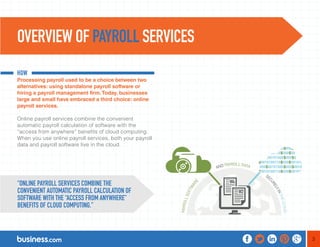
Online payroll services combine the convenient 
automatic payroll calculation of software with the 
“access from anywhere” benefits of cloud computing. 
When you use online payroll services, both your payroll 
data and payroll software live in the cloud. 
“ONLINE PAYROLL SERVICES COMBINE THE 
CONVENIENT AUTOMATIC PAYROLL CALCULATION OF 
SOFTWARE WITH THE “ACCESS FROM ANYWHERE” 
BENEFITS OF CLOUD COMPUTING.”
4 
Even though it’s in the cloud, your payroll data is more secure using 
online payroll services than your own system. That’s because online 
payroll services automatically provide multiple layers of backup to 
ensure that your data is never lost-not in a hurricane, not in a fire, 
and not as the result of a service outage. 
Furthermore, online payroll services allow you to manage access to 
your data better than standalone payroll software. You can assign 
and change passwords and offer different levels of access based 
on a user’s need. For example, you can limit some users, such 
as employees, to viewing their data; while other users, such as 
accountants, can be empowered to make changes to the data. 
“ONLINE PAYROLL SERVICES AUTOMATICALLY PROVIDE 
MULTIPLE LAYERS OF BACKUP TO ENSURE THAT YOUR DATA IS 
NEVER LOST-NOT IN A HURRICANE, NOT IN A FIRE, AND NOT AS 
THE RESULT OF A SERVICE OUTAGE.”
5 
WHAT 
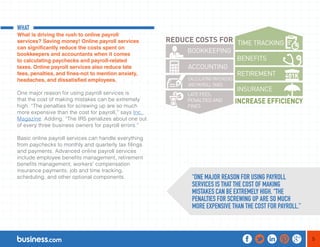
What is driving the rush to online payroll 
services? Saving money! Online payroll services 
can significantly reduce the costs spent on 
bookkeepers and accountants when it comes 
to calculating paychecks and payroll-related 
taxes. Online payroll services also reduce late 
fees, penalties, and fines-not to mention anxiety, 
headaches, and dissatisfied employees. 
One major reason for using payroll services is 
that the cost of making mistakes can be extremely 
high. “The penalties for screwing up are so much 
more expensive than the cost for payroll,” says Inc. 
Magazine. Adding, “The IRS penalizes about one out 
of every three business owners for payroll errors.” 
Basic online payroll services can handle everything 
from paychecks to monthly and quarterly tax filings 
and payments. Advanced online payroll services 
include employee benefits management, retirement 
benefits management, workers’ compensation 
insurance payments, job and time tracking, 
scheduling, and other optional components. “ONE MAJOR REASON FOR USING PAYROLL 
SERVICES IS THAT THE COST OF MAKING 
MISTAKES CAN BE EXTREMELY HIGH. “THE 
PENALTIES FOR SCREWING UP ARE SO MUCH 
MORE EXPENSIVE THAN THE COST FOR PAYROLL.”
6 
WHY 
This guide to payroll services will help you determine 
what kind of services you’ll want, how much they’ll 
cost, and how to negotiate the best possible payroll 
solution-whether you choose a standard package or 
one that is more advanced.
7 
Payroll software vs. online payroll services. With 
payroll software, you are responsible for installing 
software updates and tax table updates, and backing 
up your own data. Although online payroll services 
have the highest level of security, you might feel more 
comfortable having your payroll information stored 
on your own computer system rather than being 
available online. 
The software used in online payroll services is 
continually updated for your payroll system, as are 
the tax tables used to process payroll. Online payroll 
services allow you to access your payroll system via the 
Internet from a computer, tablet, or smartphone. If that’s 
the kind of convenience you want, you’ll be pleased 
with the variety of vendors offering cost-effective, 
secure payroll processing in your area. 
Size: how big is your payroll? If you only have one 
employee, you can easily calculate your own payroll 
deductions using free spreadsheet software. But if you 
have two or more employees, processing payroll starts 
to get complex. If you have employees in more than one 
state or country, processing payroll can quickly turn into 
a nightmare. If you have between 2 and 50 employees, 
online payroll services can save you time and money. 
Companies with more than 50 employees face very 
different regulations in terms of mandatory benefits and 
electronic tax filing. Most online payroll services can 
accommodate these needs, although prices may be 
higher for managing mandatory payroll benefits. 
FEATURES
8 
Which optional payroll services do you want? All 
online payroll services should be able to cover basic 
paycheck calculations, including direct deposit of 
employee paychecks, electronic payroll tax filing, 
and electronic payroll tax payments-all for a nominal 
monthly fee. Most services charge a flat rate for 
that package, plus an extra amount per month, per 
employee. You might also be charged extra for more 
than one user who can access the system. Other fees 
are charged based on the optional extras in the payroll 
package. For example, employers may choose to 
add benefits management, 401K management, health 
insurance management, or other enhancements to 
the basic payroll processing service. Many employers 
require time and attendance tracking systems that allow 
employees to log in, or to log time to specific accounts 
or tasks. Time tracking is usually an optional add-on 
and is available from most payroll services vendors. 
Optional Enhancements 
The trend toward online cloud-based payroll systems is 
the next step in the evolution of payroll services. One 
can add on a variety of enhancements that supercharge 
ordinary payroll services, turning them into employee 
benefit management systems. Let’s take a look at some 
of the most valuable and interesting add-ons: 
Retirement Benefits Management. Some payroll 
systems allow employees to choose how to invest their 
401(k) retirement accounts. Systems will automatically 
make payments to the accounts through payroll 
deductions, to make one-time investments, to track the 
progress of investment accounts, and to shift funds 
between approved accounts. 
“THE TREND TOWARD ONLINE CLOUD-BASED 
PAYROLL SYSTEMS IS THE NEXT STEP IN THE 
EVOLUTION OF PAYROLL SERVICES.”
9 
Medical Benefits Management. Employers are 
increasingly giving employees greater control over their 
health benefits. Some payroll systems allow payroll 
deductions for employee health insurance premiums 
and health savings accounts. Don’t be surprised if your 
online payroll service becomes the gateway to health 
insurance exchanges for employees. 
Time and Attendance Tracking. Most payroll services 
vendors offer optional services to track employee 
attendance, hours, and time-related billings. Systems 
allow employees to “punch in” and “punch out” 
virtually, and to track their time related to specific tasks 
or accounts. 
Deep Data Analytics. Many modern payroll services 
have the ability to go beyond calculating paychecks 
and depositing taxes. They can compare your data 
against industry averages, and alert you to areas where 
your company departs from the norm. For example, 
employees can compare their 401(k) balances and 
deductions with goals they’ve set for themselves. And 
with time-tracking software, managers can compare the 
cost of having different employees do the same task. 
Deep data analytics can help managers grow their 
companies while giving employees better feedback 
about how their performance stacks up. 
“MANY MODERN PAYROLL SERVICES HAVE THE 
ABILITY TO GO BEYOND CALCULATING PAYCHECKS 
AND DEPOSITING TAXES.”
10 
Getting Started: Step by Step 
Setting up a payroll service is complex because it 
involves coordination between the payroll service, banks, 
and government agencies-plus, the data is sensitive 
and needs to be kept secure. In order to take advantage 
of the benefits of an online payroll service, follow these 
steps to get your payroll service, your bank, and your tax 
collectors to all play nicely with each other. 
Step 1: Enroll for a Free Trial. Most services offer a 30- 
day free trial. Take advantage of it and try to test the 
service before your 30 days are up. This is the easiest 
time to get personal assistance with setting up your 
new payroll system. 
Step 2: Migrate Existing Payroll Data. You should be 
able to input historical payroll data into the new payroll 
system electronically. It might require exporting data 
from your old system and importing it into the new 
system. Often you can add employees to the system 
now, and add historical data later. 
Step 3: Adding New Employees to the System. The 
payroll service should provide an easy way to add new 
employees to the system. Ask if the service produces 
employment forms, such as W-4s, which employees 
use to indicate their deductions. 
Step 4: Setting Up Direct Deposit. You may need to 
sign authorization forms for your payroll service, your 
bank, the IRS, and state taxing agencies to allow direct 
deposit of employee paychecks and electronic payment 
of payroll-related taxes. The payroll service will help you 
gather these authorization forms and fax, mail, or email 
them to the proper authorities. 
Step 5: Paying Taxes Electronically. Once electronic 
payments have been authorized, you should be able 
to pay all your federal, state, and local payroll-related 
taxes through your payroll service. Not all taxing 
jurisdictions have implemented ePay or eFile yet, but 
most do; and those who don’t, likely will soon. 
Step 6: Filing Tax Returns Electronically. Your online 
payroll service might charge extra for filing your tax 
returns electronically. Most services now provide 
941 tax deposits, 941 filings, and annual W-2s and 
W-3s. Most online payroll services offer similar eFile 
capabilities for state income taxes, state unemployment 
taxes, and other state and local taxes. 
Step 7: Integrating Payroll with Accounting. Payroll is 
just one piece of a total accounting solution. Information 
from your payroll service needs to be combined with 
the rest of your accounting functions to generate 
financial statements and tax returns. Many payroll 
services offer full-service accounting solutions that 
integrate seamlessly with your payroll data.
11 
Pricing for payroll services is usually quoted on 
a monthly basis, with additional fees depending 
on: (1) the size of your business, or (2) the level of 
services included in the package. 
For example, you might pay $39/month for payroll 
services, plus $1.50/month for each employee covered. 
Expect to pay additional charges for each employee, or 
for multiple users who have access to the system. Also, 
expect to pay additional monthly fees for optional services 
such as employee benefits management, time and 
attendance tracking, or other advanced payroll services. 
Some examples of additional charges might be $1 per 
month for each person with access to the payroll system, 
such as an accountant or a bookkeeper; or $10 per month 
extra for employees to be able to access their pay and 
benefits information online. 
Year-end forms such as W-2s are usually not included in 
the basic plan and often result in additional charges such 
as $2 per W-2. 
CALCULATING COSTS 
“YEAR-END FORMS SUCH AS W-2S ARE 
USUALLY NOT INCLUDED IN THE BASIC PLAN AND 
OFTEN RESULT IN ADDITIONAL CHARGES SUCH AS 
$2 PER W-2.”
12 
PURCHASING TIPS 
Get help importing your existing payroll data. Most 
payroll services will import from a variety of file formats. 
You should be prepared to tell vendors which payroll 
program you currently use and ask specifically if they 
can import from that program. Ask for free assistance 
with importing your data. This is a good way to gauge 
how you like working with the service while you’re still in 
the free-trial period. 
Start small. Don’t be lured into a long-term contract 
by being offered a discount with a company you’re not 
sure you like. Try to buy the minimal payroll services 
package you need, then add advanced features as your 
confidence grows. 
Ask for free training. The monthly fees an online payroll 
service charges are usually not negotiable-they simply 
have a table rate and, if you want to use the service, 
that’s the rate. But you might be able to get free personal 
training that companies sometimes charge extra for. Try 
to arrange free training sessions for all staff members who 
will be working with the new system.
13 
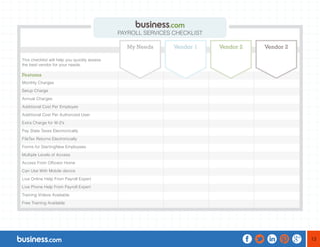
This checklist will help you quickly assess 
the best vendor for your needs. 
Features 
Monthly Charges 
Setup Charge 
Annual Charges 
Additional Cost Per Employee 
Additional Cost Per Authorized User 
Extra Charge for W-2’s 
Pay State Taxes Electronically 
FileTax Returns Electronically 
Forms for StartingNew Employees 
Multiple Levels of Access 
Access From Officeor Home 
Can Use With Mobile device 
Live Online Help From Payroll Expert 
Live Phone Help From Payroll Expert 
Training Videos Available 
Free Training Available 
PAYROLL SERVICES CHECKLIST 
My Needs Vendor 1 Vendor 2 Vendor 2
14 
Cloud Computing: Refers to your files and software that 
live in “the cloud” (large file servers accessed through the 
Internet). Not only is your payroll data stored in the cloud 
(and backed up in yet another cloud), but the software you 
use to access the data also lives in the cloud and not on 
your computer. 
Deep Data Analysis: The ability to compare a company’s 
payroll information with standards established by analyzing 
the records of thousands of other companies. 
Direct Deposit: Paying employees through direct transfer 
from your designated bank account(s) into their designated 
bank account(s). 
Electronic Tax Filing (eFile): Filing tax forms and tax 
returns electronically. Eliminates printing and mailing tax 
forms-and usually automates completing the form. 
Electronic Tax Payments (ePay): Making tax payments 
electronically, directly from your designated banking 
account(s) to taxing authorities including the Internal 
Revenue Service, and state and local tax departments. 
Form W-4: Internal Revenue Service Form W-4 is 
completed by the employee when he or she is first hired. It 
indicates the federal tax-deduction preferences used to set 
up the employee in the payroll system. 
Form W-2: Internal Revenue Service Form W-2 is a 
summary of an employee’s annual wages and deductions. 
It is calculated by the employer and provided to the 
employee and the IRS. 
Form 941: Internal Revenue Service Form 941 is used by 
employers to file statements indicating payroll paid out and 
payroll taxes withheld. 
Levels of Permission: Also called levels of “access,” 
permissions determine who can access what data in the 
payroll system and who can modify it. 
GLOSSARY OF TERMS
15 
System User: Any person who accesses the payroll 
services. Users may have different levels of permission, 
allowing greater or lesser access to payroll data and 
functions. 
Tax Tables: Guidelines published by the Internal Revenue 
Service and state governments for deducting taxes from 
employee paychecks. These tables are automatically 
updated in most online payroll services. 
Unemployment Insurance: Collected by the federal 
government and state governments, unemployment 
insurance is a payroll-based tax that must be remitted to 
the government. 
Withholding Taxes: Social security taxes, Medicaid 
taxes, and federal and state income taxes are usually 
held back from employee paychecks and remitted 
directly to the government. 
Workers’ Compensation Insurance: Many states require 
employers to provide workers’ compensation insurance 
to cover their employees in the event of an accident or 
injury at work.

Process Payroll Anytime, Anywhere

  • 1.
    BUSINESS.COM GUIDE TOPAYROLL SERVICES
  • 2.
    CONTENTS OVERVIEW OFPAYROLL SERVICES 3 FEATURES 7 CALCULATING COSTS 11 PURCHASING TIPS 12 COMPARISON CHECKLIST 13 GLOSSARY OF TERMS 14
  • 3.
    3 OVERVIEW OFPAYROLL SERVICES HOW Processing payroll used to be a choice between two alternatives: using standalone payroll software or hiring a payroll management firm. Today, businesses large and small have embraced a third choice: online payroll services. Online payroll services combine the convenient automatic payroll calculation of software with the “access from anywhere” benefits of cloud computing. When you use online payroll services, both your payroll data and payroll software live in the cloud. “ONLINE PAYROLL SERVICES COMBINE THE CONVENIENT AUTOMATIC PAYROLL CALCULATION OF SOFTWARE WITH THE “ACCESS FROM ANYWHERE” BENEFITS OF CLOUD COMPUTING.”
  • 4.
    4 Even thoughit’s in the cloud, your payroll data is more secure using online payroll services than your own system. That’s because online payroll services automatically provide multiple layers of backup to ensure that your data is never lost-not in a hurricane, not in a fire, and not as the result of a service outage. Furthermore, online payroll services allow you to manage access to your data better than standalone payroll software. You can assign and change passwords and offer different levels of access based on a user’s need. For example, you can limit some users, such as employees, to viewing their data; while other users, such as accountants, can be empowered to make changes to the data. “ONLINE PAYROLL SERVICES AUTOMATICALLY PROVIDE MULTIPLE LAYERS OF BACKUP TO ENSURE THAT YOUR DATA IS NEVER LOST-NOT IN A HURRICANE, NOT IN A FIRE, AND NOT AS THE RESULT OF A SERVICE OUTAGE.”
  • 5.
    5 WHAT Whatis driving the rush to online payroll services? Saving money! Online payroll services can significantly reduce the costs spent on bookkeepers and accountants when it comes to calculating paychecks and payroll-related taxes. Online payroll services also reduce late fees, penalties, and fines-not to mention anxiety, headaches, and dissatisfied employees. One major reason for using payroll services is that the cost of making mistakes can be extremely high. “The penalties for screwing up are so much more expensive than the cost for payroll,” says Inc. Magazine. Adding, “The IRS penalizes about one out of every three business owners for payroll errors.” Basic online payroll services can handle everything from paychecks to monthly and quarterly tax filings and payments. Advanced online payroll services include employee benefits management, retirement benefits management, workers’ compensation insurance payments, job and time tracking, scheduling, and other optional components. “ONE MAJOR REASON FOR USING PAYROLL SERVICES IS THAT THE COST OF MAKING MISTAKES CAN BE EXTREMELY HIGH. “THE PENALTIES FOR SCREWING UP ARE SO MUCH MORE EXPENSIVE THAN THE COST FOR PAYROLL.”
  • 6.
    6 WHY Thisguide to payroll services will help you determine what kind of services you’ll want, how much they’ll cost, and how to negotiate the best possible payroll solution-whether you choose a standard package or one that is more advanced.
  • 7.
    7 Payroll softwarevs. online payroll services. With payroll software, you are responsible for installing software updates and tax table updates, and backing up your own data. Although online payroll services have the highest level of security, you might feel more comfortable having your payroll information stored on your own computer system rather than being available online. The software used in online payroll services is continually updated for your payroll system, as are the tax tables used to process payroll. Online payroll services allow you to access your payroll system via the Internet from a computer, tablet, or smartphone. If that’s the kind of convenience you want, you’ll be pleased with the variety of vendors offering cost-effective, secure payroll processing in your area. Size: how big is your payroll? If you only have one employee, you can easily calculate your own payroll deductions using free spreadsheet software. But if you have two or more employees, processing payroll starts to get complex. If you have employees in more than one state or country, processing payroll can quickly turn into a nightmare. If you have between 2 and 50 employees, online payroll services can save you time and money. Companies with more than 50 employees face very different regulations in terms of mandatory benefits and electronic tax filing. Most online payroll services can accommodate these needs, although prices may be higher for managing mandatory payroll benefits. FEATURES
  • 8.
    8 Which optionalpayroll services do you want? All online payroll services should be able to cover basic paycheck calculations, including direct deposit of employee paychecks, electronic payroll tax filing, and electronic payroll tax payments-all for a nominal monthly fee. Most services charge a flat rate for that package, plus an extra amount per month, per employee. You might also be charged extra for more than one user who can access the system. Other fees are charged based on the optional extras in the payroll package. For example, employers may choose to add benefits management, 401K management, health insurance management, or other enhancements to the basic payroll processing service. Many employers require time and attendance tracking systems that allow employees to log in, or to log time to specific accounts or tasks. Time tracking is usually an optional add-on and is available from most payroll services vendors. Optional Enhancements The trend toward online cloud-based payroll systems is the next step in the evolution of payroll services. One can add on a variety of enhancements that supercharge ordinary payroll services, turning them into employee benefit management systems. Let’s take a look at some of the most valuable and interesting add-ons: Retirement Benefits Management. Some payroll systems allow employees to choose how to invest their 401(k) retirement accounts. Systems will automatically make payments to the accounts through payroll deductions, to make one-time investments, to track the progress of investment accounts, and to shift funds between approved accounts. “THE TREND TOWARD ONLINE CLOUD-BASED PAYROLL SYSTEMS IS THE NEXT STEP IN THE EVOLUTION OF PAYROLL SERVICES.”
  • 9.
    9 Medical BenefitsManagement. Employers are increasingly giving employees greater control over their health benefits. Some payroll systems allow payroll deductions for employee health insurance premiums and health savings accounts. Don’t be surprised if your online payroll service becomes the gateway to health insurance exchanges for employees. Time and Attendance Tracking. Most payroll services vendors offer optional services to track employee attendance, hours, and time-related billings. Systems allow employees to “punch in” and “punch out” virtually, and to track their time related to specific tasks or accounts. Deep Data Analytics. Many modern payroll services have the ability to go beyond calculating paychecks and depositing taxes. They can compare your data against industry averages, and alert you to areas where your company departs from the norm. For example, employees can compare their 401(k) balances and deductions with goals they’ve set for themselves. And with time-tracking software, managers can compare the cost of having different employees do the same task. Deep data analytics can help managers grow their companies while giving employees better feedback about how their performance stacks up. “MANY MODERN PAYROLL SERVICES HAVE THE ABILITY TO GO BEYOND CALCULATING PAYCHECKS AND DEPOSITING TAXES.”
  • 10.
    10 Getting Started:Step by Step Setting up a payroll service is complex because it involves coordination between the payroll service, banks, and government agencies-plus, the data is sensitive and needs to be kept secure. In order to take advantage of the benefits of an online payroll service, follow these steps to get your payroll service, your bank, and your tax collectors to all play nicely with each other. Step 1: Enroll for a Free Trial. Most services offer a 30- day free trial. Take advantage of it and try to test the service before your 30 days are up. This is the easiest time to get personal assistance with setting up your new payroll system. Step 2: Migrate Existing Payroll Data. You should be able to input historical payroll data into the new payroll system electronically. It might require exporting data from your old system and importing it into the new system. Often you can add employees to the system now, and add historical data later. Step 3: Adding New Employees to the System. The payroll service should provide an easy way to add new employees to the system. Ask if the service produces employment forms, such as W-4s, which employees use to indicate their deductions. Step 4: Setting Up Direct Deposit. You may need to sign authorization forms for your payroll service, your bank, the IRS, and state taxing agencies to allow direct deposit of employee paychecks and electronic payment of payroll-related taxes. The payroll service will help you gather these authorization forms and fax, mail, or email them to the proper authorities. Step 5: Paying Taxes Electronically. Once electronic payments have been authorized, you should be able to pay all your federal, state, and local payroll-related taxes through your payroll service. Not all taxing jurisdictions have implemented ePay or eFile yet, but most do; and those who don’t, likely will soon. Step 6: Filing Tax Returns Electronically. Your online payroll service might charge extra for filing your tax returns electronically. Most services now provide 941 tax deposits, 941 filings, and annual W-2s and W-3s. Most online payroll services offer similar eFile capabilities for state income taxes, state unemployment taxes, and other state and local taxes. Step 7: Integrating Payroll with Accounting. Payroll is just one piece of a total accounting solution. Information from your payroll service needs to be combined with the rest of your accounting functions to generate financial statements and tax returns. Many payroll services offer full-service accounting solutions that integrate seamlessly with your payroll data.
  • 11.
    11 Pricing forpayroll services is usually quoted on a monthly basis, with additional fees depending on: (1) the size of your business, or (2) the level of services included in the package. For example, you might pay $39/month for payroll services, plus $1.50/month for each employee covered. Expect to pay additional charges for each employee, or for multiple users who have access to the system. Also, expect to pay additional monthly fees for optional services such as employee benefits management, time and attendance tracking, or other advanced payroll services. Some examples of additional charges might be $1 per month for each person with access to the payroll system, such as an accountant or a bookkeeper; or $10 per month extra for employees to be able to access their pay and benefits information online. Year-end forms such as W-2s are usually not included in the basic plan and often result in additional charges such as $2 per W-2. CALCULATING COSTS “YEAR-END FORMS SUCH AS W-2S ARE USUALLY NOT INCLUDED IN THE BASIC PLAN AND OFTEN RESULT IN ADDITIONAL CHARGES SUCH AS $2 PER W-2.”
  • 12.
    12 PURCHASING TIPS Get help importing your existing payroll data. Most payroll services will import from a variety of file formats. You should be prepared to tell vendors which payroll program you currently use and ask specifically if they can import from that program. Ask for free assistance with importing your data. This is a good way to gauge how you like working with the service while you’re still in the free-trial period. Start small. Don’t be lured into a long-term contract by being offered a discount with a company you’re not sure you like. Try to buy the minimal payroll services package you need, then add advanced features as your confidence grows. Ask for free training. The monthly fees an online payroll service charges are usually not negotiable-they simply have a table rate and, if you want to use the service, that’s the rate. But you might be able to get free personal training that companies sometimes charge extra for. Try to arrange free training sessions for all staff members who will be working with the new system.
  • 13.
    13 This checklistwill help you quickly assess the best vendor for your needs. Features Monthly Charges Setup Charge Annual Charges Additional Cost Per Employee Additional Cost Per Authorized User Extra Charge for W-2’s Pay State Taxes Electronically FileTax Returns Electronically Forms for StartingNew Employees Multiple Levels of Access Access From Officeor Home Can Use With Mobile device Live Online Help From Payroll Expert Live Phone Help From Payroll Expert Training Videos Available Free Training Available PAYROLL SERVICES CHECKLIST My Needs Vendor 1 Vendor 2 Vendor 2
  • 14.
    14 Cloud Computing:Refers to your files and software that live in “the cloud” (large file servers accessed through the Internet). Not only is your payroll data stored in the cloud (and backed up in yet another cloud), but the software you use to access the data also lives in the cloud and not on your computer. Deep Data Analysis: The ability to compare a company’s payroll information with standards established by analyzing the records of thousands of other companies. Direct Deposit: Paying employees through direct transfer from your designated bank account(s) into their designated bank account(s). Electronic Tax Filing (eFile): Filing tax forms and tax returns electronically. Eliminates printing and mailing tax forms-and usually automates completing the form. Electronic Tax Payments (ePay): Making tax payments electronically, directly from your designated banking account(s) to taxing authorities including the Internal Revenue Service, and state and local tax departments. Form W-4: Internal Revenue Service Form W-4 is completed by the employee when he or she is first hired. It indicates the federal tax-deduction preferences used to set up the employee in the payroll system. Form W-2: Internal Revenue Service Form W-2 is a summary of an employee’s annual wages and deductions. It is calculated by the employer and provided to the employee and the IRS. Form 941: Internal Revenue Service Form 941 is used by employers to file statements indicating payroll paid out and payroll taxes withheld. Levels of Permission: Also called levels of “access,” permissions determine who can access what data in the payroll system and who can modify it. GLOSSARY OF TERMS
  • 15.
    15 System User:Any person who accesses the payroll services. Users may have different levels of permission, allowing greater or lesser access to payroll data and functions. Tax Tables: Guidelines published by the Internal Revenue Service and state governments for deducting taxes from employee paychecks. These tables are automatically updated in most online payroll services. Unemployment Insurance: Collected by the federal government and state governments, unemployment insurance is a payroll-based tax that must be remitted to the government. Withholding Taxes: Social security taxes, Medicaid taxes, and federal and state income taxes are usually held back from employee paychecks and remitted directly to the government. Workers’ Compensation Insurance: Many states require employers to provide workers’ compensation insurance to cover their employees in the event of an accident or injury at work.