BUSINESS.COM GUIDE TO COPIERS
CONTENTS 
OVERVIEW OF COPIERS 3 
FEATURES 6 
TYPES OF COPIERS 8 
CHOOSING A VENDOR 10 
CALCULATING COSTS 12 
BUY OR LEASE? 14 
PURCHASING TIPS 15 
COMPARISON CHECKLIST 16 
GLOSSARY OF TERMS 18
3 
OVERVIEW OF COPIERS 
WHAT 
A copier is a machine that replicates a document or 
image, creating an exact copy of the original item. 
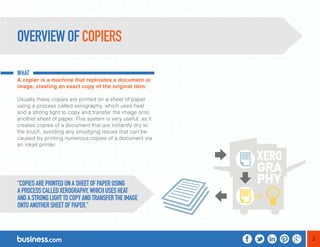
Usually these copies are printed on a sheet of paper 
using a process called xerography, which uses heat 
and a strong light to copy and transfer the image onto 
another sheet of paper. This system is very useful, as it 
creates copies of a document that are instantly dry to 
the touch, avoiding any smudging issues that can be 
caused by printing numerous copies of a document via 
an inkjet printer. 
“COPIES ARE PRINTED ON A SHEET OF PAPER USING 
A PROCESS CALLED XEROGRAPHY, WHICH USES HEAT 
AND A STRONG LIGHT TO COPY AND TRANSFER THE IMAGE 
ONTO ANOTHER SHEET OF PAPER.”
4 
WHY 
Copiers are useful in an office environment, as they 
can make instant replicas of a document at the press 
of a button. 
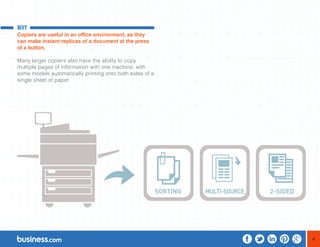
Many larger copiers also have the ability to copy 
multiple pages of information with one machine, with 
some models automatically printing onto both sides of a 
single sheet of paper.
5 
HOW 
These systems can be an efficient way for a 
business to save time and resources, as multiple 
copies of a document can be created quickly and 
automatically once the copier has been programmed 
by an employee. 
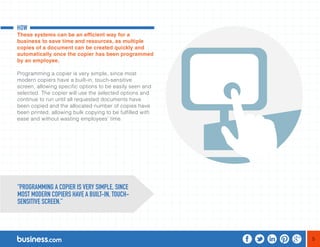
Programming a copier is very simple, since most 
modern copiers have a built-in, touch-sensitive 
screen, allowing specific options to be easily seen and 
selected. The copier will use the selected options and 
continue to run until all requested documents have 
been copied and the allocated number of copies have 
been printed, allowing bulk copying to be fulfilled with 
ease and without wasting employees’ time. 
“PROGRAMMING A COPIER IS VERY SIMPLE, SINCE 
MOST MODERN COPIERS HAVE A BUILT-IN, TOUCH-SENSITIVE 
SCREEN.”
6 
There are many different copier sizes and features to 
choose from, depending on the size of the business 
and the volume of copying the machine will need 
to fulfill. Here are some features that can help a 
business regardless of the workload: 
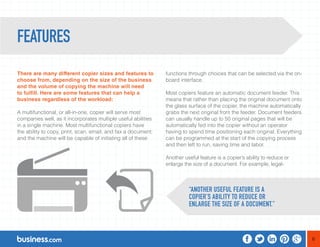
A multifunctional, or all-in-one, copier will serve most 
companies well, as it incorporates multiple useful abilities 
in a single machine. Most multifunctional copiers have 
the ability to copy, print, scan, email, and fax a document; 
and the machine will be capable of initiating all of these 
functions through choices that can be selected via the on-board 
interface. 
Most copiers feature an automatic document feeder. This 
means that rather than placing the original document onto 
the glass surface of the copier, the machine automatically 
grabs the next original from the feeder. Document feeders 
can usually handle up to 50 original pages that will be 
automatically fed into the copier without an operator 
having to spend time positioning each original. Everything 
can be programmed at the start of the copying process 
and then left to run, saving time and labor. 
Another useful feature is a copier’s ability to reduce or 
enlarge the size of a document. For example, legal- 
FEATURES 
“ANOTHER USEFUL FEATURE IS A 
COPIER’S ABILITY TO REDUCE OR 
ENLARGE THE SIZE OF A DOCUMENT.”
7 
size documents can be copied onto letter-size paper 
automatically. Many copiers can enlarge a document by up 
to 600%, allowing a user to get copies in the desired sizes. 
In certain circumstances, a business may need to copy 
a document on a larger or smaller paper size than a 
standard letter-size sheet (8-1/2” x 11”). Some machines 
will allow printing onto paper and envelopes down to 
three inches wide or three inches long. Others will allow 
printing on legal paper (8-1/2” x 14”), oversized paper, 
and many standard paper sizes between the minimum 
and maximum settings. 
Copiers work by taking paper from one or more paper 
drawers. Businesses with high-volume copying needs 
will want a machine with a large paper-drawer capacity. 
Those companies that frequently need different sizes of 
paper-such as legal or letter-should look for multiple paper 
drawers that accommodate different sizes of paper stock. 
Another useful copier feature is automatic sorting, which 
makes copies in the same order as the original. An 
automatic collator will copy and collate multiple copies 
of a long document. Machines with automatic collators 
usually have automatic binding equipment that will staple 
or otherwise bind copies of collated documents. The 
way to measure the performance of feeders, sorters, 
collators, and binders is to determine how large the 
original document is and how many copies can be made, 
collated, and bound in a single batch. 
A money-saving feature that’s now showing up in even 
entry-level copiers is the ability to perform two-sided 
copying, which saves significantly on paper costs. 
“BUSINESSES WITH HIGH-VOLUME COPYING 
NEEDS WILL WANT A MACHINE WITH A 
LARGE PAPER-DRAWER CAPACITY.”
8 
There are two types of copiers currently used by 
businesses; however, one is an older system that is 
quickly becoming obsolete. 
The first type of copier uses the analog system. This is an 
older system that works by using an internal mirror to copy 
the image of the original document onto a drum inside the 
machine. Then, with the use of static electricity, particles 
of toner can be used to create the image that has been 
mirrored on the drum. It then uses a heated element to 
dry and set the toner in place on a sheet of paper-thereby 
creating a copy of the original document. 
Copiers such as these are rapidly being replaced by 
more modern systems, as these older ones lack many of 
the features expected by businesses today. However, a 
number of these copiers are available from established 
vendors at reasonable prices. 
The more modern approach to copying uses a digital 
system, which copies the original document into memory. 
Then a laser is used to imprint the information that has 
been copied from the original document onto a drum 
inside the machine, toner is applied, and the copy of the 
document is printed. Since a digital copier can be linked 
to different networks within an office, it allows for the 
image that has been copied to be sent to another device 
on that network. Digital document sharing is a feature 
that can be extremely useful for many businesses. 
At the home business level, copiers cross over with 
printers. They are compact, designed for the tabletop, 
usually with only one paper tray and one output tray. They 
have high ink costs and a high cost per page (CPP), 
but require little investment or maintenance. Printers at 
this level have a useful life of three to five years, and are 
designed to be replaced rather than repaired. 
TYPES OF COPIERS 
“THE MORE MODERN APPROACH TO COPYING 
USES A DIGITAL SYSTEM, WHICH COPIES THE 
ORIGINAL DOCUMENT INTO MEMORY.”
9 
At the small business level, copiers usually run the full 
gamut of functionality, including the ability to sort, staple, 
and make multiple sets of documents. These copiers 
are either purchased or leased and usually come with 
maintenance plans. The useful life of these machines is 
5 to 10 years. Used machines can be sold or traded in 
for new copiers. The CPP for these machines, even with 
maintenance costs included, is usually excellent. 
Commercial-grade machines are designed for use in 
copy/print establishments, coffee shops, office buildings, 
post offices, and busy offices-anywhere people need to 
make lots of copies of all different shapes and sizes with 
a variety of papers and bindings. Commercial machines 
usually have sophisticated touchscreens that allow for 
departmental accounting, access codes, and card-reader 
attachments. At the high end, these machines 
can produce comb-bound reports, saddle-stitched 
catalogs, and reports in multi-ring binders. Speeds 
are blazingly fast-even for color-and the CPP is very 
low. While these machines don’t have a useful life any 
greater than the small-business-grade machines, they’re 
designed to be run at high volume, day and night. 
“AT THE HIGH END, THESE MACHINES 
CAN PRODUCE COMB-BOUND REPORTS, 
SADDLE-STITCHED CATALOGS, AND REPORTS 
IN MULTI-RING BINDERS.”
10 
There are many features to consider when choosing 
a vendor to buy a copier from; however, this decision 
can be made easier once certain considerations 
have been decided upon. 
An important aspect to consider before settling on a 
particular copier is the volume of copying it will need 
to fulfill within the timeframe of a day and/or week. If 
the workload is going to be very high, it may be worth 
investing in a large multifunctional copier that produces 
a high rate of copied pages per minute (PPM), and 
which also has an automatic feeder and sorting function. 
This is assuming that there are many long documents to 
be copied. If the volume of copying to be done within a 
set timeframe is minimal, consider whether this volume 
will go up in the future. The higher the chance that 
the workload will increase due to business expansion, 
the more worthwhile it may be to invest in a more 
comprehensive system. 
Finishing options. These are finishing touches that 
the copier can add to copied documents, such as 
cover interposing, which automatically inserts cover 
sheets onto printed documents. There’s also a feature 
called the mail bin, which sorts documents that are 
being copied or printed into different bins for different 
employees within an office. 
There are some technical considerations that can be 
addressed if they’re relevant to a particular business. 
These include features such as network security, which 
allows only specific users to be able to copy a certain 
number of documents per day or to print documents 
in color. Another factor is the copier’s ability to send 
signals via the network to certain users when the paper 
is jammed or the paper drawer needs refilling. This can 
serve as an efficient timesaver, as the copier can be 
serviced shortly after the issue arises. 
CHOOSING A VENDOR 
“THERE ARE MANY FEATURES TO CONSIDER WHEN 
CHOOSING A VENDOR TO BUY A COPIER FROM.”
11 
Many businesses are interested in conserving energy 
as much as possible, and there are definitely copiers 
available that can contribute to this goal. Some include 
automatic sleep modes that are activated when the copier 
isn’t in use, as well as toner-saving modes and dual-sided 
printing-all of which conserve energy and help the 
environment since they reduce paper and toner waste. 
Another consideration involves the employees who will 
be using the copier. For example, many copiers come 
with features for employees with disabilities, such as 
accessibility handles, enlarged and tiltable displays 
for the sight-impaired, Braille label kits, and voice-recognition 
software to help users who may otherwise 
struggle to use the machinery. Allowing all team 
members to be able to easily use the equipment is a 
crucial feature for copiers in modern businesses. 
“MANY BUSINESSES ARE INTERESTED IN 
CONSERVING ENERGY AS MUCH AS POSSIBLE, 
AND THERE ARE DEFINITELY COPIERS AVAILABLE 
THAT CAN CONTRIBUTE TO THIS GOAL.”
12 
Copiers tend to have three tiers of pricing. Some of 
the differences are summarized in the chart below. 
Cost 
• Home Business: $100 - $500 
• Small Business: $500 - $5,000 
• Commercial: $5,000 - $25,000 
Page per minute (PPM)-B&W 
• Home Business: Fast 
• Small Business: Very Fast 
• Commercial: Incredibly Fast 
PPM color 
• Home Business: Slow 
• Small Business: Ok 
• Commercial: Fast 
Collating 
• Home Business: Yes 
• Small Business: Yes 
• Commercial: Yes 
CALCULATING COSTS
13 
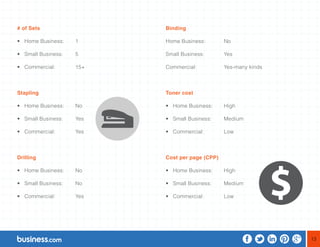
# of Sets 
• Home Business: 1 
• Small Business: 5 
• Commercial: 15+ 
Stapling 
• Home Business: No 
• Small Business: Yes 
• Commercial: Yes 
Drilling 
• Home Business: No 
• Small Business: No 
• Commercial: Yes 
Binding 
Home Business: No 
Small Business: Yes 
Commercial: Yes-many kinds 
Toner cost 
• Home Business: High 
• Small Business: Medium 
• Commercial: Low 
Cost per page (CPP) 
• Home Business: High 
• Small Business: Medium 
• Commercial: Low
14 
There are two payment options available when it 
comes to choosing an office copier. It can be bought 
outright or leased from a provider. The decision will 
depend upon the financial situation of the business 
looking for the copier, as well as its current needs 
and future plans. Refurbished equipment with a good 
service contract is often available at a bargain price. 
Renting the machine from a provider has its benefits 
and downsides. The cost of renting a copier can be 
anywhere from $100 to $500 per month for a large 
multifunctional copier. This may seem costly; however, a 
maintenance contract is usually included. Renting also 
allows businesses to upgrade or downgrade as needed. 
If you’re the person making the leasing decision, be sure 
to carefully examine the rental contract, as there may 
be rules and regulations regarding how often a system 
can be upgraded or downgraded, as well as hidden 
maintenance expenses. 
BUY OR LEASE? 
“BE SURE TO CAREFULLY EXAMINE THE RENTAL 
CONTRACT, AS THERE MAY BE RULES AND 
REGULATIONS REGARDING HOW OFTEN A SYSTEM 
CAN BE UPGRADED OR DOWNGRADED.”
15 
PURCHASING TIPS 
Look for a specialist first. If you’re in an industry that 
has intense documentation regulations, it would be best 
to find a provider with experience in that same field. If 
there is no DMS specialist for your field, then try to find a 
provider with clients in your industry whom you can call 
upon for a reference. 
Negotiate a multi-user package. If your needs require a 
large number of users, investigate multi-user discounts. 
For example, if you have 8 people who need to access 
the system, it might be cheaper to buy a 10-user 
package than pay for just 8. 
Avoid long-term contracts. If your DMS is priced mostly 
based on the amount of storage space you reserve or 
use, then stay away from long-term contracts that don’t 
allow you to renegotiate the rate. The cost of file storage 
has consistently dropped by 50% every 18 months for 
the past several decades. The rate per terabyte you’re 
paying for storage should be cut in half every couple of 
years. Make sure you don’t get locked into a long-term 
contract that doesn’t take this factor into account. 
“IF YOUR NEEDS REQUIRE A LARGE NUMBER OF 
USERS, INVESTIGATE MULTI-USER DISCOUNTS.”
16 
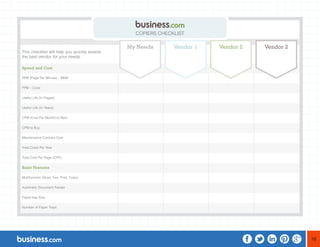
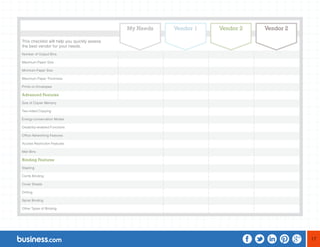
This checklist will help you quickly assess 
the best vendor for your needs. 
Speed and Cost 
PPM (Page Per Minute) – B&W 
PPM – Color 
Useful Life (In Pages) 
Useful Life (In Years) 
CPM (Cost Per Month) to Rent 
CPM to Buy 
Maintenance Contract Cost 
Total Costs Per Year 
Total Cost Per Page (CPP) 
Basic Features 
Multifunction (Scan, Fax, Print, Copy) 
Automatic Document Feeder 
Paper-tray Size 
Number of Paper Trays 
COPIERS CHECKLIST 
My Needs Vendor 1 Vendor 2 Vendor 2
17 
This checklist will help you quickly assess 
the best vendor for your needs. 
Number of Output Bins 
Maximum Paper Size 
Minimum Paper Size 
Maximum Paper Thickness 
Prints on Envelopes 
Advanced Features 
Size of Copier Memory 
Two-sided Copying 
Energy-conservation Modes 
Disability-enabled Functions 
Office Networking Features 
Access Restriction Features 
Mail Bins 
Binding Features 
Stapling 
Comb Binding 
Cover Sheets 
Drilling 
Spiral Binding 
Other Types of Binding 
My Needs Vendor 1 Vendor 2 Vendor 2
18 
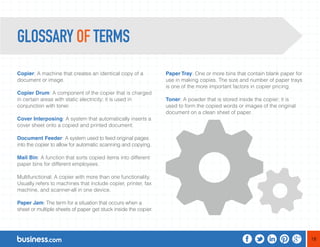
Copier: A machine that creates an identical copy of a 
document or image. 
Copier Drum: A component of the copier that is charged 
in certain areas with static electricity; it is used in 
conjunction with toner. 
Cover Interposing: A system that automatically inserts a 
cover sheet onto a copied and printed document. 
Document Feeder: A system used to feed original pages 
into the copier to allow for automatic scanning and copying. 
Mail Bin: A function that sorts copied items into different 
paper bins for different employees. 
Multifunctional: A copier with more than one functionality. 
Usually refers to machines that include copier, printer, fax 
machine, and scanner-all in one device. 
Paper Jam: The term for a situation that occurs when a 
sheet or multiple sheets of paper get stuck inside the copier. 
Paper Tray: One or more bins that contain blank paper for 
use in making copies. The size and number of paper trays 
is one of the more important factors in copier pricing. 
Toner: A powder that is stored inside the copier; it is 
used to form the copied words or images of the original 
document on a clean sheet of paper. 
GLOSSARY OF TERMS

Roger, Do You Copy?

  • 1.
  • 2.
    CONTENTS OVERVIEW OFCOPIERS 3 FEATURES 6 TYPES OF COPIERS 8 CHOOSING A VENDOR 10 CALCULATING COSTS 12 BUY OR LEASE? 14 PURCHASING TIPS 15 COMPARISON CHECKLIST 16 GLOSSARY OF TERMS 18
  • 3.
    3 OVERVIEW OFCOPIERS WHAT A copier is a machine that replicates a document or image, creating an exact copy of the original item. Usually these copies are printed on a sheet of paper using a process called xerography, which uses heat and a strong light to copy and transfer the image onto another sheet of paper. This system is very useful, as it creates copies of a document that are instantly dry to the touch, avoiding any smudging issues that can be caused by printing numerous copies of a document via an inkjet printer. “COPIES ARE PRINTED ON A SHEET OF PAPER USING A PROCESS CALLED XEROGRAPHY, WHICH USES HEAT AND A STRONG LIGHT TO COPY AND TRANSFER THE IMAGE ONTO ANOTHER SHEET OF PAPER.”
  • 4.
    4 WHY Copiersare useful in an office environment, as they can make instant replicas of a document at the press of a button. Many larger copiers also have the ability to copy multiple pages of information with one machine, with some models automatically printing onto both sides of a single sheet of paper.
  • 5.
    5 HOW Thesesystems can be an efficient way for a business to save time and resources, as multiple copies of a document can be created quickly and automatically once the copier has been programmed by an employee. Programming a copier is very simple, since most modern copiers have a built-in, touch-sensitive screen, allowing specific options to be easily seen and selected. The copier will use the selected options and continue to run until all requested documents have been copied and the allocated number of copies have been printed, allowing bulk copying to be fulfilled with ease and without wasting employees’ time. “PROGRAMMING A COPIER IS VERY SIMPLE, SINCE MOST MODERN COPIERS HAVE A BUILT-IN, TOUCH-SENSITIVE SCREEN.”
  • 6.
    6 There aremany different copier sizes and features to choose from, depending on the size of the business and the volume of copying the machine will need to fulfill. Here are some features that can help a business regardless of the workload: A multifunctional, or all-in-one, copier will serve most companies well, as it incorporates multiple useful abilities in a single machine. Most multifunctional copiers have the ability to copy, print, scan, email, and fax a document; and the machine will be capable of initiating all of these functions through choices that can be selected via the on-board interface. Most copiers feature an automatic document feeder. This means that rather than placing the original document onto the glass surface of the copier, the machine automatically grabs the next original from the feeder. Document feeders can usually handle up to 50 original pages that will be automatically fed into the copier without an operator having to spend time positioning each original. Everything can be programmed at the start of the copying process and then left to run, saving time and labor. Another useful feature is a copier’s ability to reduce or enlarge the size of a document. For example, legal- FEATURES “ANOTHER USEFUL FEATURE IS A COPIER’S ABILITY TO REDUCE OR ENLARGE THE SIZE OF A DOCUMENT.”
  • 7.
    7 size documentscan be copied onto letter-size paper automatically. Many copiers can enlarge a document by up to 600%, allowing a user to get copies in the desired sizes. In certain circumstances, a business may need to copy a document on a larger or smaller paper size than a standard letter-size sheet (8-1/2” x 11”). Some machines will allow printing onto paper and envelopes down to three inches wide or three inches long. Others will allow printing on legal paper (8-1/2” x 14”), oversized paper, and many standard paper sizes between the minimum and maximum settings. Copiers work by taking paper from one or more paper drawers. Businesses with high-volume copying needs will want a machine with a large paper-drawer capacity. Those companies that frequently need different sizes of paper-such as legal or letter-should look for multiple paper drawers that accommodate different sizes of paper stock. Another useful copier feature is automatic sorting, which makes copies in the same order as the original. An automatic collator will copy and collate multiple copies of a long document. Machines with automatic collators usually have automatic binding equipment that will staple or otherwise bind copies of collated documents. The way to measure the performance of feeders, sorters, collators, and binders is to determine how large the original document is and how many copies can be made, collated, and bound in a single batch. A money-saving feature that’s now showing up in even entry-level copiers is the ability to perform two-sided copying, which saves significantly on paper costs. “BUSINESSES WITH HIGH-VOLUME COPYING NEEDS WILL WANT A MACHINE WITH A LARGE PAPER-DRAWER CAPACITY.”
  • 8.
    8 There aretwo types of copiers currently used by businesses; however, one is an older system that is quickly becoming obsolete. The first type of copier uses the analog system. This is an older system that works by using an internal mirror to copy the image of the original document onto a drum inside the machine. Then, with the use of static electricity, particles of toner can be used to create the image that has been mirrored on the drum. It then uses a heated element to dry and set the toner in place on a sheet of paper-thereby creating a copy of the original document. Copiers such as these are rapidly being replaced by more modern systems, as these older ones lack many of the features expected by businesses today. However, a number of these copiers are available from established vendors at reasonable prices. The more modern approach to copying uses a digital system, which copies the original document into memory. Then a laser is used to imprint the information that has been copied from the original document onto a drum inside the machine, toner is applied, and the copy of the document is printed. Since a digital copier can be linked to different networks within an office, it allows for the image that has been copied to be sent to another device on that network. Digital document sharing is a feature that can be extremely useful for many businesses. At the home business level, copiers cross over with printers. They are compact, designed for the tabletop, usually with only one paper tray and one output tray. They have high ink costs and a high cost per page (CPP), but require little investment or maintenance. Printers at this level have a useful life of three to five years, and are designed to be replaced rather than repaired. TYPES OF COPIERS “THE MORE MODERN APPROACH TO COPYING USES A DIGITAL SYSTEM, WHICH COPIES THE ORIGINAL DOCUMENT INTO MEMORY.”
  • 9.
    9 At thesmall business level, copiers usually run the full gamut of functionality, including the ability to sort, staple, and make multiple sets of documents. These copiers are either purchased or leased and usually come with maintenance plans. The useful life of these machines is 5 to 10 years. Used machines can be sold or traded in for new copiers. The CPP for these machines, even with maintenance costs included, is usually excellent. Commercial-grade machines are designed for use in copy/print establishments, coffee shops, office buildings, post offices, and busy offices-anywhere people need to make lots of copies of all different shapes and sizes with a variety of papers and bindings. Commercial machines usually have sophisticated touchscreens that allow for departmental accounting, access codes, and card-reader attachments. At the high end, these machines can produce comb-bound reports, saddle-stitched catalogs, and reports in multi-ring binders. Speeds are blazingly fast-even for color-and the CPP is very low. While these machines don’t have a useful life any greater than the small-business-grade machines, they’re designed to be run at high volume, day and night. “AT THE HIGH END, THESE MACHINES CAN PRODUCE COMB-BOUND REPORTS, SADDLE-STITCHED CATALOGS, AND REPORTS IN MULTI-RING BINDERS.”
  • 10.
    10 There aremany features to consider when choosing a vendor to buy a copier from; however, this decision can be made easier once certain considerations have been decided upon. An important aspect to consider before settling on a particular copier is the volume of copying it will need to fulfill within the timeframe of a day and/or week. If the workload is going to be very high, it may be worth investing in a large multifunctional copier that produces a high rate of copied pages per minute (PPM), and which also has an automatic feeder and sorting function. This is assuming that there are many long documents to be copied. If the volume of copying to be done within a set timeframe is minimal, consider whether this volume will go up in the future. The higher the chance that the workload will increase due to business expansion, the more worthwhile it may be to invest in a more comprehensive system. Finishing options. These are finishing touches that the copier can add to copied documents, such as cover interposing, which automatically inserts cover sheets onto printed documents. There’s also a feature called the mail bin, which sorts documents that are being copied or printed into different bins for different employees within an office. There are some technical considerations that can be addressed if they’re relevant to a particular business. These include features such as network security, which allows only specific users to be able to copy a certain number of documents per day or to print documents in color. Another factor is the copier’s ability to send signals via the network to certain users when the paper is jammed or the paper drawer needs refilling. This can serve as an efficient timesaver, as the copier can be serviced shortly after the issue arises. CHOOSING A VENDOR “THERE ARE MANY FEATURES TO CONSIDER WHEN CHOOSING A VENDOR TO BUY A COPIER FROM.”
  • 11.
    11 Many businessesare interested in conserving energy as much as possible, and there are definitely copiers available that can contribute to this goal. Some include automatic sleep modes that are activated when the copier isn’t in use, as well as toner-saving modes and dual-sided printing-all of which conserve energy and help the environment since they reduce paper and toner waste. Another consideration involves the employees who will be using the copier. For example, many copiers come with features for employees with disabilities, such as accessibility handles, enlarged and tiltable displays for the sight-impaired, Braille label kits, and voice-recognition software to help users who may otherwise struggle to use the machinery. Allowing all team members to be able to easily use the equipment is a crucial feature for copiers in modern businesses. “MANY BUSINESSES ARE INTERESTED IN CONSERVING ENERGY AS MUCH AS POSSIBLE, AND THERE ARE DEFINITELY COPIERS AVAILABLE THAT CAN CONTRIBUTE TO THIS GOAL.”
  • 12.
    12 Copiers tendto have three tiers of pricing. Some of the differences are summarized in the chart below. Cost • Home Business: $100 - $500 • Small Business: $500 - $5,000 • Commercial: $5,000 - $25,000 Page per minute (PPM)-B&W • Home Business: Fast • Small Business: Very Fast • Commercial: Incredibly Fast PPM color • Home Business: Slow • Small Business: Ok • Commercial: Fast Collating • Home Business: Yes • Small Business: Yes • Commercial: Yes CALCULATING COSTS
  • 13.
    13 # ofSets • Home Business: 1 • Small Business: 5 • Commercial: 15+ Stapling • Home Business: No • Small Business: Yes • Commercial: Yes Drilling • Home Business: No • Small Business: No • Commercial: Yes Binding Home Business: No Small Business: Yes Commercial: Yes-many kinds Toner cost • Home Business: High • Small Business: Medium • Commercial: Low Cost per page (CPP) • Home Business: High • Small Business: Medium • Commercial: Low
  • 14.
    14 There aretwo payment options available when it comes to choosing an office copier. It can be bought outright or leased from a provider. The decision will depend upon the financial situation of the business looking for the copier, as well as its current needs and future plans. Refurbished equipment with a good service contract is often available at a bargain price. Renting the machine from a provider has its benefits and downsides. The cost of renting a copier can be anywhere from $100 to $500 per month for a large multifunctional copier. This may seem costly; however, a maintenance contract is usually included. Renting also allows businesses to upgrade or downgrade as needed. If you’re the person making the leasing decision, be sure to carefully examine the rental contract, as there may be rules and regulations regarding how often a system can be upgraded or downgraded, as well as hidden maintenance expenses. BUY OR LEASE? “BE SURE TO CAREFULLY EXAMINE THE RENTAL CONTRACT, AS THERE MAY BE RULES AND REGULATIONS REGARDING HOW OFTEN A SYSTEM CAN BE UPGRADED OR DOWNGRADED.”
  • 15.
    15 PURCHASING TIPS Look for a specialist first. If you’re in an industry that has intense documentation regulations, it would be best to find a provider with experience in that same field. If there is no DMS specialist for your field, then try to find a provider with clients in your industry whom you can call upon for a reference. Negotiate a multi-user package. If your needs require a large number of users, investigate multi-user discounts. For example, if you have 8 people who need to access the system, it might be cheaper to buy a 10-user package than pay for just 8. Avoid long-term contracts. If your DMS is priced mostly based on the amount of storage space you reserve or use, then stay away from long-term contracts that don’t allow you to renegotiate the rate. The cost of file storage has consistently dropped by 50% every 18 months for the past several decades. The rate per terabyte you’re paying for storage should be cut in half every couple of years. Make sure you don’t get locked into a long-term contract that doesn’t take this factor into account. “IF YOUR NEEDS REQUIRE A LARGE NUMBER OF USERS, INVESTIGATE MULTI-USER DISCOUNTS.”
  • 16.
    16 This checklistwill help you quickly assess the best vendor for your needs. Speed and Cost PPM (Page Per Minute) – B&W PPM – Color Useful Life (In Pages) Useful Life (In Years) CPM (Cost Per Month) to Rent CPM to Buy Maintenance Contract Cost Total Costs Per Year Total Cost Per Page (CPP) Basic Features Multifunction (Scan, Fax, Print, Copy) Automatic Document Feeder Paper-tray Size Number of Paper Trays COPIERS CHECKLIST My Needs Vendor 1 Vendor 2 Vendor 2
  • 17.
    17 This checklistwill help you quickly assess the best vendor for your needs. Number of Output Bins Maximum Paper Size Minimum Paper Size Maximum Paper Thickness Prints on Envelopes Advanced Features Size of Copier Memory Two-sided Copying Energy-conservation Modes Disability-enabled Functions Office Networking Features Access Restriction Features Mail Bins Binding Features Stapling Comb Binding Cover Sheets Drilling Spiral Binding Other Types of Binding My Needs Vendor 1 Vendor 2 Vendor 2
  • 18.
    18 Copier: Amachine that creates an identical copy of a document or image. Copier Drum: A component of the copier that is charged in certain areas with static electricity; it is used in conjunction with toner. Cover Interposing: A system that automatically inserts a cover sheet onto a copied and printed document. Document Feeder: A system used to feed original pages into the copier to allow for automatic scanning and copying. Mail Bin: A function that sorts copied items into different paper bins for different employees. Multifunctional: A copier with more than one functionality. Usually refers to machines that include copier, printer, fax machine, and scanner-all in one device. Paper Jam: The term for a situation that occurs when a sheet or multiple sheets of paper get stuck inside the copier. Paper Tray: One or more bins that contain blank paper for use in making copies. The size and number of paper trays is one of the more important factors in copier pricing. Toner: A powder that is stored inside the copier; it is used to form the copied words or images of the original document on a clean sheet of paper. GLOSSARY OF TERMS