1
Business.com Guide
to Commercial
Security Systems
Legal Notice:
© 2014 Business.com Media, Inc. All Rights Reserved.
By reading this e-book, you agree to the following terms and conditions.
Under no circumstances should this e-book be sold, copied, or reproduced in any way
except when you have received written permission.
As with any business, your results may vary and will be based on your background,
dedication, desire, and motivation. Any testimonials and examples used are excep-
tional results, which do not apply to the average purchaser and are not intended to
represent or guarantee that anyone will achieve the same or similar results. You may
also experience unknown or unforeseeable risks which can reduce results. The au-
thors are not responsible for your actions.
The material contained in this report is strictly confidential.
Contents
Overview of Commercial Security Systems	 4
Features of Commercial Security Systems	 9
Trends in Commercial Security Systems	 17
Top Tips for Purchasing Commercial Security Systems	 18
Business.com Checklist for Commercial Security Systems	 19
Glossary of Security System Terms	 22
4
Overview of Commercial
Security Systems
A
security system for your business provides greater peace of mind,
lower insurance rates, and a safer working environment for you and
your employees.
For small- or medium-sized businesses with minimal security needs, an off-the-
shelf home alarm system may be sufficient. In fact, many small offices can likely
get away with using off-the-shelf home security systems.
However, for companies with more extensive operations, a larger physical
location, more employees, or high-value assets a more sophisticated commercial
security system may be needed. These systems usually require professional
installation and continuous monitoring and management.
For small- or medium-sized businesses with minimal
security needs, an off-the-shelf home alarm system may
be sufficient. In fact, many small offices can likely get
away with using off-the-shelf home security systems.
5
Commercial security systems encompass a range of standalone or integrated
configurations that perform one or more of these functions:
ƒƒ premises access control
ƒƒ video surveillance
ƒƒ fire, heat, water, and/or entry alarms
ƒƒ energy management of HVAC systems (heating, ventilation and air
conditioning), control lighting, and power-on and -off and designated
equipment
ƒƒ remote status alerts and management
The individual system or product package that performs these functions is sized
according to the number of sensors required to control and monitor key points. If
your sensor needs to exceed a given package’s capacity, you must either move
up to a higher-capacity, a higher-priced package, combine smaller packages, or
reevaluate the number of sensors that are critical to protect your business assets.
The individual system or product package that performs
these functions is sized according to the number of
sensors required to control and monitor key points.
6
ƒƒ 2GIG Technologies
ƒƒ ADT
ƒƒ Bosch
ƒƒ DSC
ƒƒ GE Security
ƒƒ Honeywell
ƒƒ Siemens
ƒƒ STI
ƒƒ Tyco
ƒƒ Visonic
There are a number of large, national alarm and security companies, as well
as local and regional vendors that are either manufacturer reps or distributors
carrying a single product line exclusively. Some offer systems from multiple
manufacturers. Licensed vendors typically are thoroughly trained by the
manufacturer(s) of the products they carry. This not only ensures the vendors are
qualified to install and maintain the products, it also instills confidence that they
can provide a professional level of service and are likely to remain in business for
as long as their products are in use.
Leading manufacturers of commercial security system hardware and
software include:
7
The security systems company should offer a free consultation to help you
determine your needs. They should also recommend a solution. A discussion
with a professional helps determine if you need more (or less) hardware than you
might have estimated for.
Equipment can be purchased outright or leased from the security systems
company. In addition to the product packages themselves, most security services
companies sell installation, maintenance, and monitoring services.
With all commercial security systems, when an adverse condition is detected,
a signal is sent out. That signal could be to activate an alarm, such as a ringing
bell or flashing lights. The signal could send a message to a monitoring service,
informing the service of an adverse condition at the premises.You can usually
purchase monitoring services separately from hardware and software.
At the most basic level of support, when an alarm is detected, the monitoring
service notifies you, using pre-established communication channels. They
might also notify the police, the fire department, and/or emergency personnel to
dispatch a response.You should be able to work with your security provider to
establish a chain of events depending on the nature of the alarm. For example,
you could require verification by the monitoring service before notifying law
enforcement officials.
8
Beyond sensors that detect adverse conditions and trigger alarms, security
systems can be used for employee monitoring and theft reduction. Access control
systems can monitor the arrival, departure, and movement of people in and
around a secure facility. Video monitoring systems allow for visual verification of
an alarm condition, as well as continuous visual surveillance of an area.
Access control systems can monitor the
arrival, departure, and movement of people
in and around a secure facility.
9
Features of Commercial
Security Systems
T
here are as many ways to configure commercial security systems as
there are ways to steal. A warehouse full of merchandise will need
a different type of system than a drugstore’s pharmacy. The features
you need depend on the risks you face and what you can afford. Use the
Business.com Checklist for Commercial Security Systems to note which
features you need and what vendors charge for them.
Wired Alarm Systems
An alarm system comprises sensors at key points which, when triggered, send
a signal that warns of a potential problem. The signal is often transmitted using
a landline telephone system that phones the alarm company and/or police or
fire department. This is called a “wired” or “hardwired” notification service. One
problem with hardwired alarm systems is they don’t work when the phone line
doesn’t work, such as when lines are down due to bad weather.
Wireless Alarm Systems
An increasingly common alternative to a hardwired alarm system is to send the
alarm or notification wirelessly over a broadband WiFi network or cell phone
network. Again, a call would be initiated when an alarm condition is discovered.
10
Wireless alarm systems will not work, however, if the cell network or WiFi
network is down.
If you opt for wireless, make sure the wireless operates over a cellular
connection, which is generally less likely to fail than an Internet connection. Note
that many systems offer wireless monitoring where you can access your security
system via a cell phone or website and do administrative updates and monitor
condition statuses. If a company offers “wireless” options, make sure to find out
what kind of wireless monitoring is being offered.
Video Monitoring Systems
Camera surveillance protects your all assets, including your employees.
Besides providing 24/7 observation of everything happening on your
premises, recorded footage can help identify intruders and can be used as
evidence in court proceedings.
Reducing Employee Theft
If you are concerned about employee theft, hidden cameras can catch thieves
in the act. Even the mere presence of a camera can deter theft or unauthorized
access. “Dummy” cameras that are not hooked into any monitoring system are
frequently used for their ability to deter crimes.
Boosting Safety and Productivity
Video systems also monitor employee behavior and detect inefficient or unsafe
work habits. Recorded footage can be used as a training aid to point out both
productive and unproductive workflows.
11
Closed Circuit Television (CCTV)
Video systems work in a variety of ways. Closed Circuit TV (CCTV) systems
continuously transmit a signal to one or multiple monitors. For high-risk areas, a
security guard watches the monitor(s) for suspicious or dangerous activity.
Ability to Record Video
DVRs (digital video recorders) allow you to record and date images for future
reference. Footage is stored to either digital video discs (DVDs) or a computer
hard drive. Increasingly, hard drive storage is the simpler, time-saving, and more
manageable option. Cloud-based storage is the latest trend in security video.
Due to the huge size of video files, however, they are still difficult to transmit to
cloud-based systems.
Conditional Recording
Recording may be continuous or begin only when a condition is met. Examples
include motion detection, a door or window opening, or a preset condition to turn
recording on or off depending on time of day. While constant recording requires
more video storage, it may be necessary for observation of high-risk areas where
security considerations are paramount.
Wired Video Monitoring Systems
Video systems can be wired or wireless. Wired systems are more suitable for
permanent and continuous surveillance situations. They do not require batteries
to stay powered, nor do they need slow or unpredictable wireless connections for
transmitting and storing video streams.
12
Wireless Video Monitoring Systems
Wireless cameras are useful when you may need to move cameras around or if
you don’t anticipate staying at a facility long enough to justify the cost of installing
a wired system. Wireless cameras cost about the same as wired, but installation
is less expensive and, in many cases, the business owner can position the
camera as needed, without hiring a professional installer. A disadvantage is that
wireless cameras require batteries to operate and these batteries need to be
changed regularly.
Remote Access to Video Monitoring
Most wireless cameras use the same Internet Protocol (IP) to transmit data
that is used across private and public networks. This makes the digitized
video remotely accessible through a computer, tablet, or smartphone. In some
cases, video monitoring equipment can be remotely operated over an Internet
connection, allowing for visual verification of an alarm condition or triggered
recording and storage of the video stream.
Wireless cameras cost about the same as wired, but
installation is less expensive and, in many cases, the
business owner can position the camera as needed,
without hiring a professional installer.
13
Intercom Systems
An intercom system is one simple way to safely identify visitors before engaging
a remote door release that allows them to enter your building. The one drawback
is that the intercom must be continually monitored, which could be impractical
outside of normal working hours. The intercom system could be an audio-only
operation or it could be combined with video to provide a time- and date-stamped
visual record of people who have entered and left a building.
Access Logs
For situations in which intercoms are not practical, electronic access control not
only eliminates the cumbersome use of keys to enter your office building and
other secure locations, it also tracks who has accessed the location and when.
Data files can be viewed from any authorized, Web-enabled computer. The
access control system can be integrated with the alarm system to trigger alerts if
someone is trying to gain unauthorized entrance.
The intercom system could be an audio-only operation
or it could be combined with video to provide a time-
and date-stamped visual record of people who have
entered and left a building.
14
Identity Verification Systems
In place of a physical key, access authorization is determined in one of three ways:
¾¾ With an employee identification card (or some other smart card or key
fob) with an embedded authorization code swiped in a card reader
¾¾ By a pin (personal identification number) or password entered via
keypad
¾¾ With photo identification
¾¾ By biometric recognition of a fingerprint or face (expensive and for high-
end applications in which tight security is paramount).	
Time and Attendance Integration
Frequently, access control systems are integrated into time and attendance
software. This streamlines the administrative process of payroll accounting for
personnel check-in and check-out.
Remote Hosting
In many cases, the security systems company can host the access control
system. This eliminates the need to invest in software updates and IT
maintenance. However, larger companies with sufficient IT infrastructure
resources and staff may wish to maintain the system on their own.
15
Fire/Smoke and Environmental Hazard Detection
In these systems, sensors detect the presence of carbon monoxide, carbon
dioxide, and/or heightened temperature to trigger alarms. Similarly, low-
temperature sensors can be installed in bathrooms, kitchens, break rooms, and
other areas where water pipes are present. Sensors can be used in flood-prone
areas to detect excessive water levels. Alarms are sent to the security system
vendor, police/fire departments, and/or designated personnel.
Lighting/HVAC/Office Equipment Monitor
Remote control of your heating and air conditioning, lighting and office equipment
systems cost-effectively maintains your premises. When someone forgets to turn
the lights off, leaves the coffee maker on, or fails to reset the thermostat, an email
alert notifies you of the condition.You can remotely turn the lights off, shut down
the coffee maker, and reset the thermostat at the right temperature. Customized
sensors can even detect dangerous conditions within expensive machinery and
then send alerts, shut down the machines, or instigate a repair process.
When someone forgets to turn the lights off, leaves the
coffee maker on, or fails to reset the thermostat, an
email alert notifies you of the condition
16
Monitoring Services
When an alarm is triggered, what is the response? Some alarm systems simply
make a loud noise or flash lights. In some situations, that might be sufficient to
scare off intruders. However, in many cases you’ll want a 24-hour monitoring
service. In that case, a triggered alarm initiates a response.
The response depends on your contract with the monitoring service. They might
be instructed to notify someone at the company before taking additional action.
They might be instructed to investigate themselves, through video monitoring or
sending an employee out to check on the situation. They might be instructed to
immediately contact the police or the fire department.
Connection Fees and Alarm Fees
Many cities require that commercial alarm systems be registered with law
enforcement. Usually, there is a small annual fee, along with a requirement
to keep emergency contact information up to date. Many jurisdictions also
charge for false alarms – anywhere from $50 to $500 and up per incident, often
depending on how often false alarms have happened in the past.
When an alarm is triggered, what is the response?
Some alarm systems simply make a loud noise
or flash lights. In some situations, that might be
sufficient to scare off intruders.
17
Trends in Commercial
Security Systems
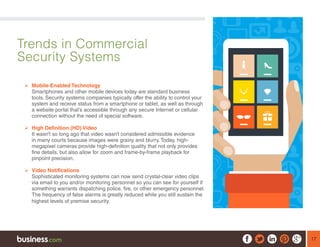
	Mobile-Enabled Technology
Smartphones and other mobile devices today are standard business
tools. Security systems companies typically offer the ability to control your
system and receive status from a smartphone or tablet, as well as through
a website portal that’s accessible through any secure Internet or cellular
connection without the need of special software.
	High Definition (HD) Video
It wasn’t so long ago that video wasn’t considered admissible evidence
in many courts because images were grainy and blurry. Today, high-
megapixel cameras provide high-definition quality that not only provides
fine details, but also allow for zoom and frame-by-frame playback for
pinpoint precision.
	Video Notifications
Sophisticated monitoring systems can now send crystal-clear video clips
via email to you and/or monitoring personnel so you can see for yourself if
something warrants dispatching police, fire, or other emergency personnel.
The frequency of false alarms is greatly reduced while you still sustain the
highest levels of premise security.
18
Top Tips for Purchasing
Commercial Security Systems
¾¾ Make sure all key personnel know how the security system works, are
comfortable with its operation, and have updated access codes.
¾¾ Traditional alarm systems rely on standard telephone wiring to
transmit alerts. Phone lines, however, can be down during an
emergency. Consider using a cellular backup system to protect
against phone line failure.
¾¾ If you are retrofitting an existing facility, wireless may eliminate the labor-
intensive, and possibly expensive, routing of wiring through existing walls.
¾¾ Reduce the cost and stress of false alarms by maintaining your system
regularly. In particular, check window contacts after window cleaning –
a major source of false alarm signals.
19
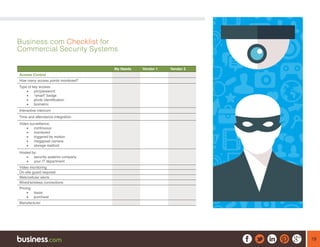
Business.com Checklist for
Commercial Security Systems
My Needs Vendor 1 Vendor 2
Access Control
How many access points monitored?
Type of key access:
•	 pin/password
•	 “smart” badge
•	 photo identification
•	 biometric
Interactive intercom
Time and attendance integration
Video surveillance:
•	 continuous
•	 monitored
•	 triggered by motion
•	 megapixel camera
•	 storage method
Hosted by:
•	 security systems company
•	 your IT department
Video monitoring
On-site guard required
Web/cellular alerts
Wired/wireless connections
Pricing:
•	 lease
•	 purchase
Manufacturer
20
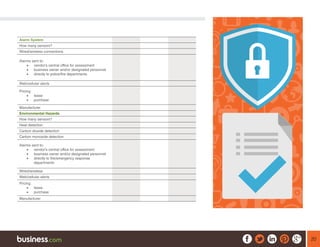
Alarm System
How many sensors?
Wired/wireless connections
Alarms sent to:
•	 vendor’s central office for assessment
•	 business owner and/or designated personnel
•	 directly to police/fire departments
Web/cellular alerts
Pricing:
•	 lease
•	 purchase
Manufacturer
Environmental Hazards
How many sensors?
Heat detection
Carbon dioxide detection
Carbon monoxide detection
Alarms sent to:
•	 vendor’s central office for assessment
•	 business owner and/or designated personnel
•	 directly to fire/emergency response
departments
Wired/wireless
Web/cellular alerts
Pricing:
•	 lease
•	 purchase
Manufacturer
21
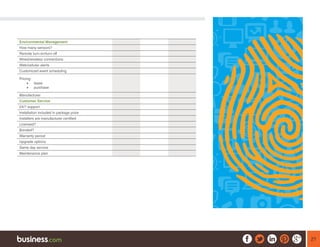
Environmental Management
How many sensors?
Remote turn-on/turn-off
Wired/wireless connections
Web/cellular alerts
Customized event scheduling
Pricing:
•	 lease
•	 purchase
Manufacturer
Customer Service
24/7 support
Installation included in package price
Installers are manufacturer certified
Licensed?
Bonded?
Warranty period
Upgrade options
Same day service
Maintenance plan
22
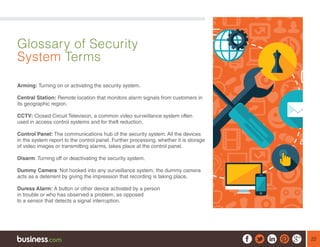
Glossary of Security
System Terms
Arming: Turning on or activating the security system.
Central Station: Remote location that monitors alarm signals from customers in
its geographic region.
CCTV: Closed Circuit Television, a common video surveillance system often
used in access control systems and for theft reduction.
Control Panel: The communications hub of the security system. All the devices
in the system report to the control panel. Further processing, whether it is storage
of video images or transmitting alarms, takes place at the control panel.
Disarm: Turning off or deactivating the security system.
Dummy Camera: Not hooked into any surveillance system, the dummy camera
acts as a deterrent by giving the impression that recording is taking place.
Duress Alarm: A button or other device activated by a person
in trouble or who has observed a problem, as opposed
to a sensor that detects a signal interruption.
23
Entry/Exit Delay: A short, designated time that allows you to enter a building
and enter a code to prevent the system from issuing an alarm. Once you arm
the system, you have the same designated period of time to leave the premises
without triggering the alarm.
IP Cameras: Cameras that use Internet Protocol (IP) to transmit video in digital
format across data networks, both private Local Area Networks (LANs) and more
secure Virtual Private Networks (VPNs) as well as the public Internet.
Multiplexer: Accommodates a larger number of camera feeds and is capable of
recording and displaying them simultaneously.
Partition: A zone that can be armed or disarmed separately from other zones.
Seismic Sensor: Detects vibrations caused by breaking glass, earth tremors, or
other out-of-the-ordinary pulsations.
Ultrasonic Sensor: Sends a stream of high-frequency waves throughout an
area. When a wave is “broken,” it is an indication of motion taking place.
Wired or Hardwired: All devices in the security system are connected by wires
to the control panel.
Wireless: Sensors transmit information, such as an alarm
notification, over a wireless Internet network or cell phone
network to a central station or contact person.

Commercial Security Systems- The Business.com Guide

  • 1.
  • 2.
    Legal Notice: © 2014Business.com Media, Inc. All Rights Reserved. By reading this e-book, you agree to the following terms and conditions. Under no circumstances should this e-book be sold, copied, or reproduced in any way except when you have received written permission. As with any business, your results may vary and will be based on your background, dedication, desire, and motivation. Any testimonials and examples used are excep- tional results, which do not apply to the average purchaser and are not intended to represent or guarantee that anyone will achieve the same or similar results. You may also experience unknown or unforeseeable risks which can reduce results. The au- thors are not responsible for your actions. The material contained in this report is strictly confidential.
  • 3.
    Contents Overview of CommercialSecurity Systems 4 Features of Commercial Security Systems 9 Trends in Commercial Security Systems 17 Top Tips for Purchasing Commercial Security Systems 18 Business.com Checklist for Commercial Security Systems 19 Glossary of Security System Terms 22
  • 4.
    4 Overview of Commercial SecuritySystems A security system for your business provides greater peace of mind, lower insurance rates, and a safer working environment for you and your employees. For small- or medium-sized businesses with minimal security needs, an off-the- shelf home alarm system may be sufficient. In fact, many small offices can likely get away with using off-the-shelf home security systems. However, for companies with more extensive operations, a larger physical location, more employees, or high-value assets a more sophisticated commercial security system may be needed. These systems usually require professional installation and continuous monitoring and management. For small- or medium-sized businesses with minimal security needs, an off-the-shelf home alarm system may be sufficient. In fact, many small offices can likely get away with using off-the-shelf home security systems.
  • 5.
    5 Commercial security systemsencompass a range of standalone or integrated configurations that perform one or more of these functions: ƒƒ premises access control ƒƒ video surveillance ƒƒ fire, heat, water, and/or entry alarms ƒƒ energy management of HVAC systems (heating, ventilation and air conditioning), control lighting, and power-on and -off and designated equipment ƒƒ remote status alerts and management The individual system or product package that performs these functions is sized according to the number of sensors required to control and monitor key points. If your sensor needs to exceed a given package’s capacity, you must either move up to a higher-capacity, a higher-priced package, combine smaller packages, or reevaluate the number of sensors that are critical to protect your business assets. The individual system or product package that performs these functions is sized according to the number of sensors required to control and monitor key points.
  • 6.
    6 ƒƒ 2GIG Technologies ƒƒADT ƒƒ Bosch ƒƒ DSC ƒƒ GE Security ƒƒ Honeywell ƒƒ Siemens ƒƒ STI ƒƒ Tyco ƒƒ Visonic There are a number of large, national alarm and security companies, as well as local and regional vendors that are either manufacturer reps or distributors carrying a single product line exclusively. Some offer systems from multiple manufacturers. Licensed vendors typically are thoroughly trained by the manufacturer(s) of the products they carry. This not only ensures the vendors are qualified to install and maintain the products, it also instills confidence that they can provide a professional level of service and are likely to remain in business for as long as their products are in use. Leading manufacturers of commercial security system hardware and software include:
  • 7.
    7 The security systemscompany should offer a free consultation to help you determine your needs. They should also recommend a solution. A discussion with a professional helps determine if you need more (or less) hardware than you might have estimated for. Equipment can be purchased outright or leased from the security systems company. In addition to the product packages themselves, most security services companies sell installation, maintenance, and monitoring services. With all commercial security systems, when an adverse condition is detected, a signal is sent out. That signal could be to activate an alarm, such as a ringing bell or flashing lights. The signal could send a message to a monitoring service, informing the service of an adverse condition at the premises.You can usually purchase monitoring services separately from hardware and software. At the most basic level of support, when an alarm is detected, the monitoring service notifies you, using pre-established communication channels. They might also notify the police, the fire department, and/or emergency personnel to dispatch a response.You should be able to work with your security provider to establish a chain of events depending on the nature of the alarm. For example, you could require verification by the monitoring service before notifying law enforcement officials.
  • 8.
    8 Beyond sensors thatdetect adverse conditions and trigger alarms, security systems can be used for employee monitoring and theft reduction. Access control systems can monitor the arrival, departure, and movement of people in and around a secure facility. Video monitoring systems allow for visual verification of an alarm condition, as well as continuous visual surveillance of an area. Access control systems can monitor the arrival, departure, and movement of people in and around a secure facility.
  • 9.
    9 Features of Commercial SecuritySystems T here are as many ways to configure commercial security systems as there are ways to steal. A warehouse full of merchandise will need a different type of system than a drugstore’s pharmacy. The features you need depend on the risks you face and what you can afford. Use the Business.com Checklist for Commercial Security Systems to note which features you need and what vendors charge for them. Wired Alarm Systems An alarm system comprises sensors at key points which, when triggered, send a signal that warns of a potential problem. The signal is often transmitted using a landline telephone system that phones the alarm company and/or police or fire department. This is called a “wired” or “hardwired” notification service. One problem with hardwired alarm systems is they don’t work when the phone line doesn’t work, such as when lines are down due to bad weather. Wireless Alarm Systems An increasingly common alternative to a hardwired alarm system is to send the alarm or notification wirelessly over a broadband WiFi network or cell phone network. Again, a call would be initiated when an alarm condition is discovered.
  • 10.
    10 Wireless alarm systemswill not work, however, if the cell network or WiFi network is down. If you opt for wireless, make sure the wireless operates over a cellular connection, which is generally less likely to fail than an Internet connection. Note that many systems offer wireless monitoring where you can access your security system via a cell phone or website and do administrative updates and monitor condition statuses. If a company offers “wireless” options, make sure to find out what kind of wireless monitoring is being offered. Video Monitoring Systems Camera surveillance protects your all assets, including your employees. Besides providing 24/7 observation of everything happening on your premises, recorded footage can help identify intruders and can be used as evidence in court proceedings. Reducing Employee Theft If you are concerned about employee theft, hidden cameras can catch thieves in the act. Even the mere presence of a camera can deter theft or unauthorized access. “Dummy” cameras that are not hooked into any monitoring system are frequently used for their ability to deter crimes. Boosting Safety and Productivity Video systems also monitor employee behavior and detect inefficient or unsafe work habits. Recorded footage can be used as a training aid to point out both productive and unproductive workflows.
  • 11.
    11 Closed Circuit Television(CCTV) Video systems work in a variety of ways. Closed Circuit TV (CCTV) systems continuously transmit a signal to one or multiple monitors. For high-risk areas, a security guard watches the monitor(s) for suspicious or dangerous activity. Ability to Record Video DVRs (digital video recorders) allow you to record and date images for future reference. Footage is stored to either digital video discs (DVDs) or a computer hard drive. Increasingly, hard drive storage is the simpler, time-saving, and more manageable option. Cloud-based storage is the latest trend in security video. Due to the huge size of video files, however, they are still difficult to transmit to cloud-based systems. Conditional Recording Recording may be continuous or begin only when a condition is met. Examples include motion detection, a door or window opening, or a preset condition to turn recording on or off depending on time of day. While constant recording requires more video storage, it may be necessary for observation of high-risk areas where security considerations are paramount. Wired Video Monitoring Systems Video systems can be wired or wireless. Wired systems are more suitable for permanent and continuous surveillance situations. They do not require batteries to stay powered, nor do they need slow or unpredictable wireless connections for transmitting and storing video streams.
  • 12.
    12 Wireless Video MonitoringSystems Wireless cameras are useful when you may need to move cameras around or if you don’t anticipate staying at a facility long enough to justify the cost of installing a wired system. Wireless cameras cost about the same as wired, but installation is less expensive and, in many cases, the business owner can position the camera as needed, without hiring a professional installer. A disadvantage is that wireless cameras require batteries to operate and these batteries need to be changed regularly. Remote Access to Video Monitoring Most wireless cameras use the same Internet Protocol (IP) to transmit data that is used across private and public networks. This makes the digitized video remotely accessible through a computer, tablet, or smartphone. In some cases, video monitoring equipment can be remotely operated over an Internet connection, allowing for visual verification of an alarm condition or triggered recording and storage of the video stream. Wireless cameras cost about the same as wired, but installation is less expensive and, in many cases, the business owner can position the camera as needed, without hiring a professional installer.
  • 13.
    13 Intercom Systems An intercomsystem is one simple way to safely identify visitors before engaging a remote door release that allows them to enter your building. The one drawback is that the intercom must be continually monitored, which could be impractical outside of normal working hours. The intercom system could be an audio-only operation or it could be combined with video to provide a time- and date-stamped visual record of people who have entered and left a building. Access Logs For situations in which intercoms are not practical, electronic access control not only eliminates the cumbersome use of keys to enter your office building and other secure locations, it also tracks who has accessed the location and when. Data files can be viewed from any authorized, Web-enabled computer. The access control system can be integrated with the alarm system to trigger alerts if someone is trying to gain unauthorized entrance. The intercom system could be an audio-only operation or it could be combined with video to provide a time- and date-stamped visual record of people who have entered and left a building.
  • 14.
    14 Identity Verification Systems Inplace of a physical key, access authorization is determined in one of three ways: ¾¾ With an employee identification card (or some other smart card or key fob) with an embedded authorization code swiped in a card reader ¾¾ By a pin (personal identification number) or password entered via keypad ¾¾ With photo identification ¾¾ By biometric recognition of a fingerprint or face (expensive and for high- end applications in which tight security is paramount). Time and Attendance Integration Frequently, access control systems are integrated into time and attendance software. This streamlines the administrative process of payroll accounting for personnel check-in and check-out. Remote Hosting In many cases, the security systems company can host the access control system. This eliminates the need to invest in software updates and IT maintenance. However, larger companies with sufficient IT infrastructure resources and staff may wish to maintain the system on their own.
  • 15.
    15 Fire/Smoke and EnvironmentalHazard Detection In these systems, sensors detect the presence of carbon monoxide, carbon dioxide, and/or heightened temperature to trigger alarms. Similarly, low- temperature sensors can be installed in bathrooms, kitchens, break rooms, and other areas where water pipes are present. Sensors can be used in flood-prone areas to detect excessive water levels. Alarms are sent to the security system vendor, police/fire departments, and/or designated personnel. Lighting/HVAC/Office Equipment Monitor Remote control of your heating and air conditioning, lighting and office equipment systems cost-effectively maintains your premises. When someone forgets to turn the lights off, leaves the coffee maker on, or fails to reset the thermostat, an email alert notifies you of the condition.You can remotely turn the lights off, shut down the coffee maker, and reset the thermostat at the right temperature. Customized sensors can even detect dangerous conditions within expensive machinery and then send alerts, shut down the machines, or instigate a repair process. When someone forgets to turn the lights off, leaves the coffee maker on, or fails to reset the thermostat, an email alert notifies you of the condition
  • 16.
    16 Monitoring Services When analarm is triggered, what is the response? Some alarm systems simply make a loud noise or flash lights. In some situations, that might be sufficient to scare off intruders. However, in many cases you’ll want a 24-hour monitoring service. In that case, a triggered alarm initiates a response. The response depends on your contract with the monitoring service. They might be instructed to notify someone at the company before taking additional action. They might be instructed to investigate themselves, through video monitoring or sending an employee out to check on the situation. They might be instructed to immediately contact the police or the fire department. Connection Fees and Alarm Fees Many cities require that commercial alarm systems be registered with law enforcement. Usually, there is a small annual fee, along with a requirement to keep emergency contact information up to date. Many jurisdictions also charge for false alarms – anywhere from $50 to $500 and up per incident, often depending on how often false alarms have happened in the past. When an alarm is triggered, what is the response? Some alarm systems simply make a loud noise or flash lights. In some situations, that might be sufficient to scare off intruders.
  • 17.
    17 Trends in Commercial SecuritySystems  Mobile-Enabled Technology Smartphones and other mobile devices today are standard business tools. Security systems companies typically offer the ability to control your system and receive status from a smartphone or tablet, as well as through a website portal that’s accessible through any secure Internet or cellular connection without the need of special software.  High Definition (HD) Video It wasn’t so long ago that video wasn’t considered admissible evidence in many courts because images were grainy and blurry. Today, high- megapixel cameras provide high-definition quality that not only provides fine details, but also allow for zoom and frame-by-frame playback for pinpoint precision.  Video Notifications Sophisticated monitoring systems can now send crystal-clear video clips via email to you and/or monitoring personnel so you can see for yourself if something warrants dispatching police, fire, or other emergency personnel. The frequency of false alarms is greatly reduced while you still sustain the highest levels of premise security.
  • 18.
    18 Top Tips forPurchasing Commercial Security Systems ¾¾ Make sure all key personnel know how the security system works, are comfortable with its operation, and have updated access codes. ¾¾ Traditional alarm systems rely on standard telephone wiring to transmit alerts. Phone lines, however, can be down during an emergency. Consider using a cellular backup system to protect against phone line failure. ¾¾ If you are retrofitting an existing facility, wireless may eliminate the labor- intensive, and possibly expensive, routing of wiring through existing walls. ¾¾ Reduce the cost and stress of false alarms by maintaining your system regularly. In particular, check window contacts after window cleaning – a major source of false alarm signals.
  • 19.
    19 Business.com Checklist for CommercialSecurity Systems My Needs Vendor 1 Vendor 2 Access Control How many access points monitored? Type of key access: • pin/password • “smart” badge • photo identification • biometric Interactive intercom Time and attendance integration Video surveillance: • continuous • monitored • triggered by motion • megapixel camera • storage method Hosted by: • security systems company • your IT department Video monitoring On-site guard required Web/cellular alerts Wired/wireless connections Pricing: • lease • purchase Manufacturer
  • 20.
    20 Alarm System How manysensors? Wired/wireless connections Alarms sent to: • vendor’s central office for assessment • business owner and/or designated personnel • directly to police/fire departments Web/cellular alerts Pricing: • lease • purchase Manufacturer Environmental Hazards How many sensors? Heat detection Carbon dioxide detection Carbon monoxide detection Alarms sent to: • vendor’s central office for assessment • business owner and/or designated personnel • directly to fire/emergency response departments Wired/wireless Web/cellular alerts Pricing: • lease • purchase Manufacturer
  • 21.
    21 Environmental Management How manysensors? Remote turn-on/turn-off Wired/wireless connections Web/cellular alerts Customized event scheduling Pricing: • lease • purchase Manufacturer Customer Service 24/7 support Installation included in package price Installers are manufacturer certified Licensed? Bonded? Warranty period Upgrade options Same day service Maintenance plan
  • 22.
    22 Glossary of Security SystemTerms Arming: Turning on or activating the security system. Central Station: Remote location that monitors alarm signals from customers in its geographic region. CCTV: Closed Circuit Television, a common video surveillance system often used in access control systems and for theft reduction. Control Panel: The communications hub of the security system. All the devices in the system report to the control panel. Further processing, whether it is storage of video images or transmitting alarms, takes place at the control panel. Disarm: Turning off or deactivating the security system. Dummy Camera: Not hooked into any surveillance system, the dummy camera acts as a deterrent by giving the impression that recording is taking place. Duress Alarm: A button or other device activated by a person in trouble or who has observed a problem, as opposed to a sensor that detects a signal interruption.
  • 23.
    23 Entry/Exit Delay: Ashort, designated time that allows you to enter a building and enter a code to prevent the system from issuing an alarm. Once you arm the system, you have the same designated period of time to leave the premises without triggering the alarm. IP Cameras: Cameras that use Internet Protocol (IP) to transmit video in digital format across data networks, both private Local Area Networks (LANs) and more secure Virtual Private Networks (VPNs) as well as the public Internet. Multiplexer: Accommodates a larger number of camera feeds and is capable of recording and displaying them simultaneously. Partition: A zone that can be armed or disarmed separately from other zones. Seismic Sensor: Detects vibrations caused by breaking glass, earth tremors, or other out-of-the-ordinary pulsations. Ultrasonic Sensor: Sends a stream of high-frequency waves throughout an area. When a wave is “broken,” it is an indication of motion taking place. Wired or Hardwired: All devices in the security system are connected by wires to the control panel. Wireless: Sensors transmit information, such as an alarm notification, over a wireless Internet network or cell phone network to a central station or contact person.