Copyright © 2015 Oracle and/or its affiliates. All rights reserved.
Primavera Analytics
What’s New in Release 15.2
Doug Larkin
Primavera Product Strategy
Copyright © 2015 Oracle and/or its affiliates. All rights reserved.
Safe Harbor Statement
The following is intended to outline our general product direction. It is intended for
information purposes only, and may not be incorporated into any contract. It is not a
commitment to deliver any material, code, or functionality, and should not be relied upon
in making purchasing decisions. The development, release, and timing of any features or
functionality described for Oracle’s products remains at the sole discretion of Oracle.
Copyright © 2015 Oracle and/or its affiliates. All rights reserved.
Agenda
1. Overview
2. New Features
3. Tested Configuration Updates
4. Wrap-up and Q&A
Copyright © 2015 Oracle and/or its affiliates. All rights reserved.
15.2
The Newest Release of Oracle’s Primavera Analytics
Copyright © 2015 Oracle and/or its affiliates. All rights reserved.
Gain Deeper Understanding of Project Costs and Schedules
• Deeper Primavera P6 schedule insight with support for notebook topics
and UDF trending history.
• Expanded Primavera Unifier cost and business process insight including:
– workflow efficiency and assignee performance
– P6 Summary Sheet cost and performance data
– Deeper project and business process understanding
• Combined Primavera P6 and Primavera Unifier insight leveraging
conformed (shared) dimensions. Cost and Schedule data together!
Key Benefits with Oracle’s Primavera Analytics 15.2
Copyright © 2015 Oracle and/or its affiliates. All rights reserved.
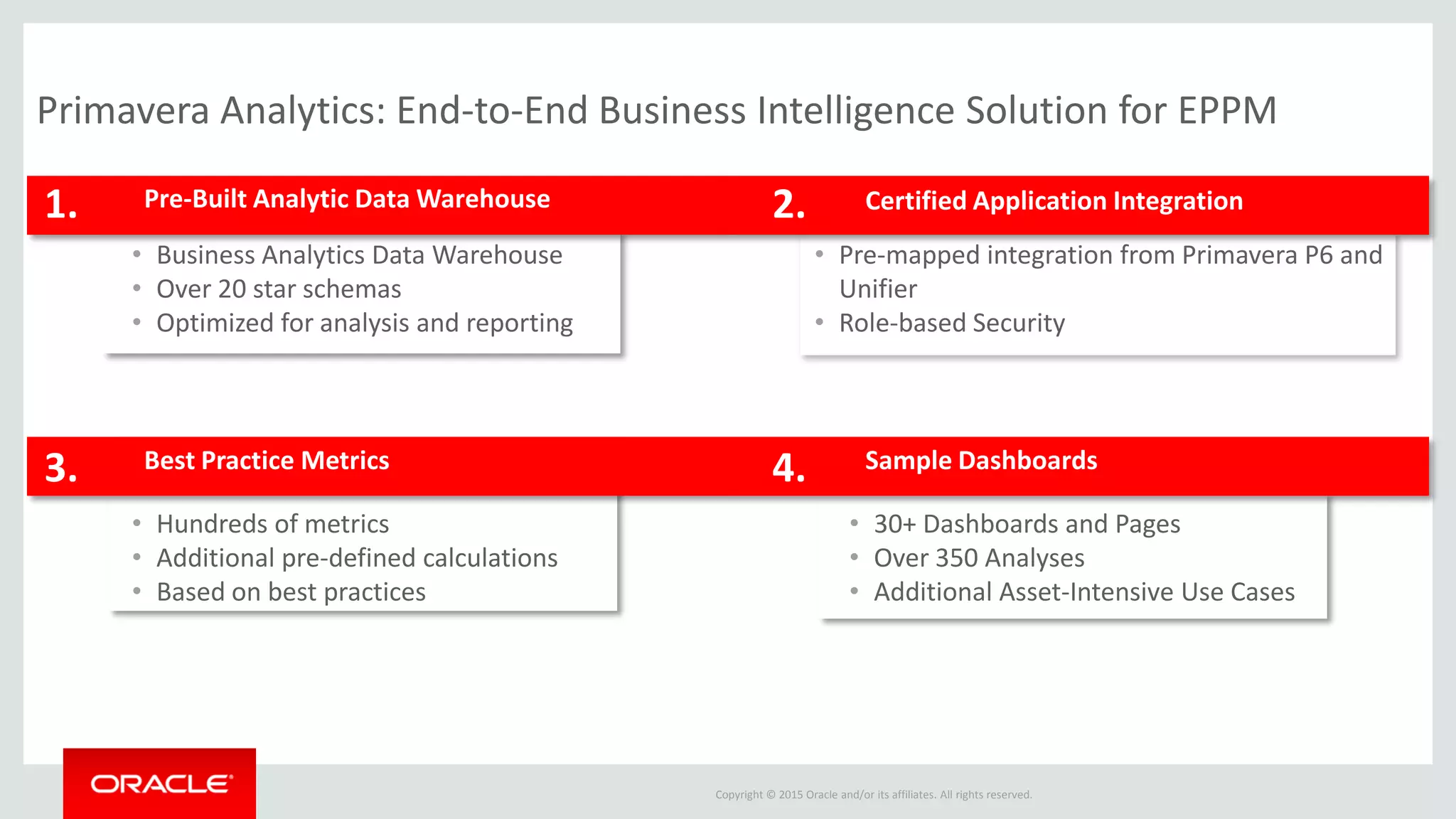
Pre-Built Analytic Data Warehouse1.
• Business Analytics Data Warehouse
• Over 20 star schemas
• Optimized for analysis and reporting
2.
Sample DashboardsBest Practice Metrics3. 4.
• Hundreds of metrics
• Additional pre-defined calculations
• Based on best practices
• Pre-mapped integration from Primavera P6 and
Unifier
• Role-based Security
• 30+ Dashboards and Pages
• Over 350 Analyses
• Additional Asset-Intensive Use Cases
Certified Application Integration
Primavera Analytics: End-to-End Business Intelligence Solution for EPPM
Copyright © 2015 Oracle and/or its affiliates. All rights reserved.
New Features
Copyright © 2015 Oracle and/or its affiliates. All rights reserved.
Greater schedule visibility into your Primavera P6 data
• View notebook topics directly in Primavera Analytics to quickly understand
additional key information related to dashboards and analyses
• Analyze historical changes to user-defined fields to look for key trends in
your projects, activities, and resources
Key Benefits with 15.2
Copyright © 2015 Oracle and/or its affiliates. All rights reserved.
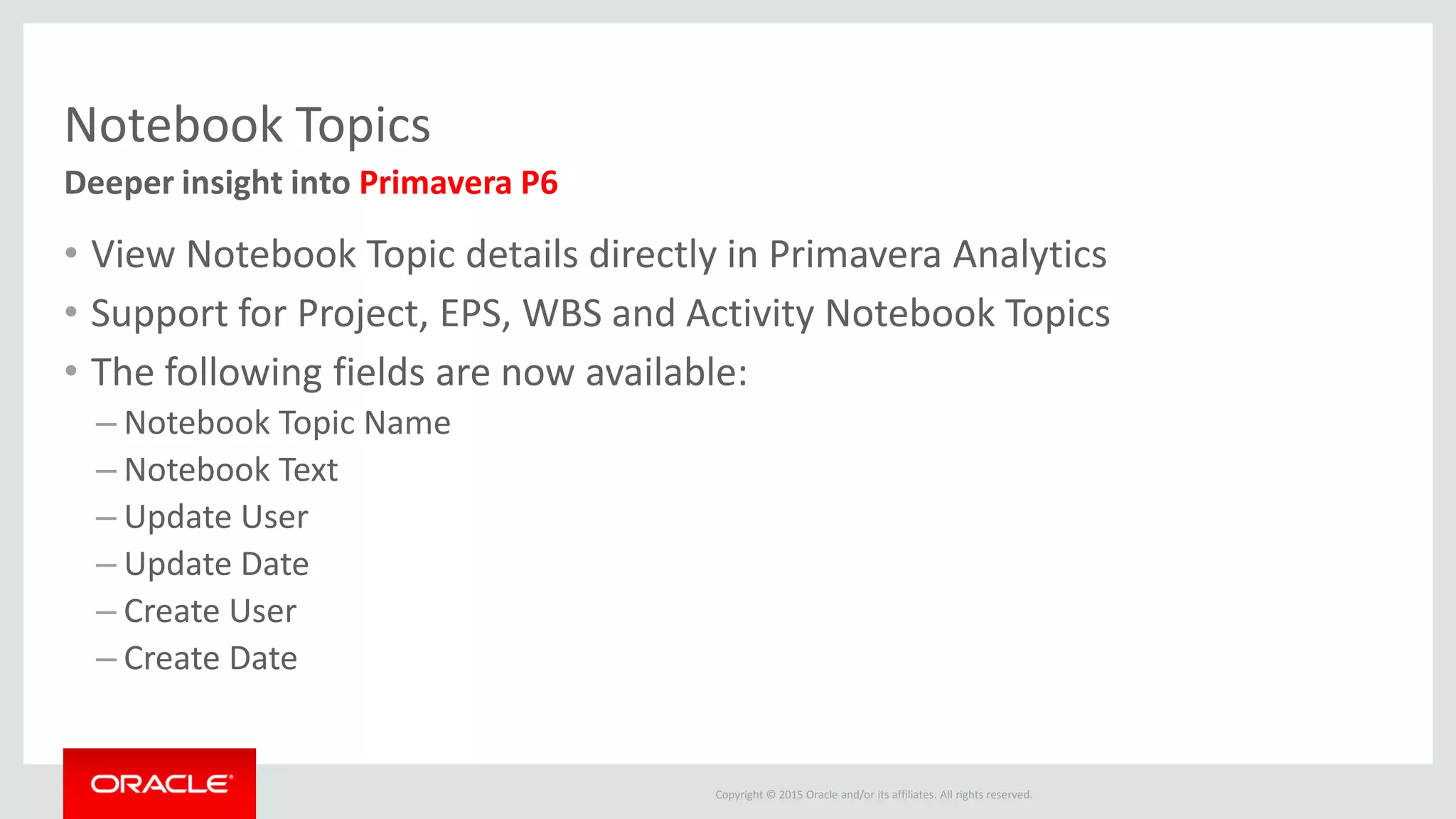
Notebook Topics
• View Notebook Topic details directly in Primavera Analytics
• Support for Project, EPS, WBS and Activity Notebook Topics
• The following fields are now available:
– Notebook Topic Name
– Notebook Text
– Update User
– Update Date
– Create User
– Create Date
Deeper insight into Primavera P6
Copyright © 2015 Oracle and/or its affiliates. All rights reserved.
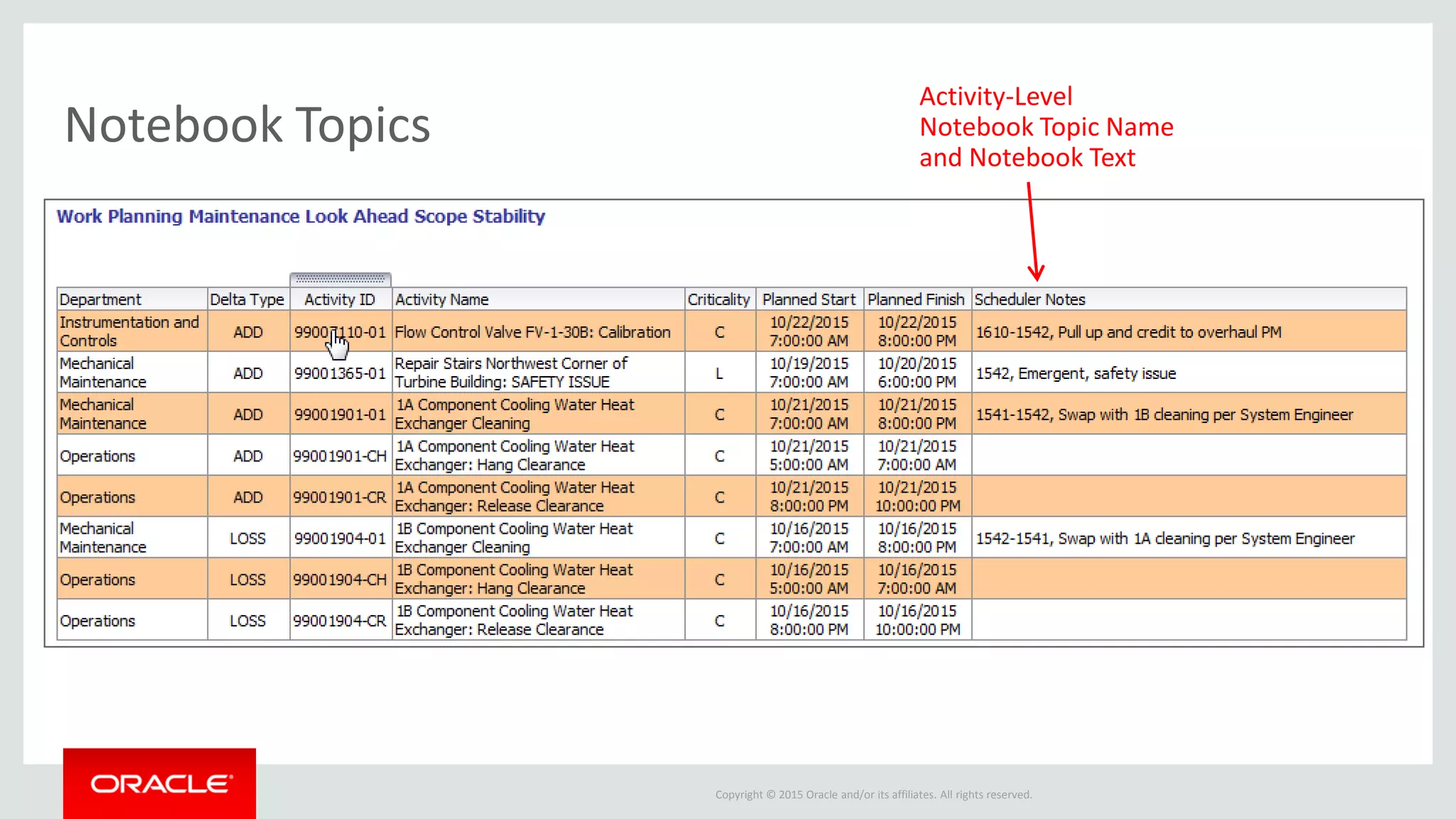
Activity-Level
Notebook Topic Name
and Notebook Text
Notebook Topics
Copyright © 2015 Oracle and/or its affiliates. All rights reserved.
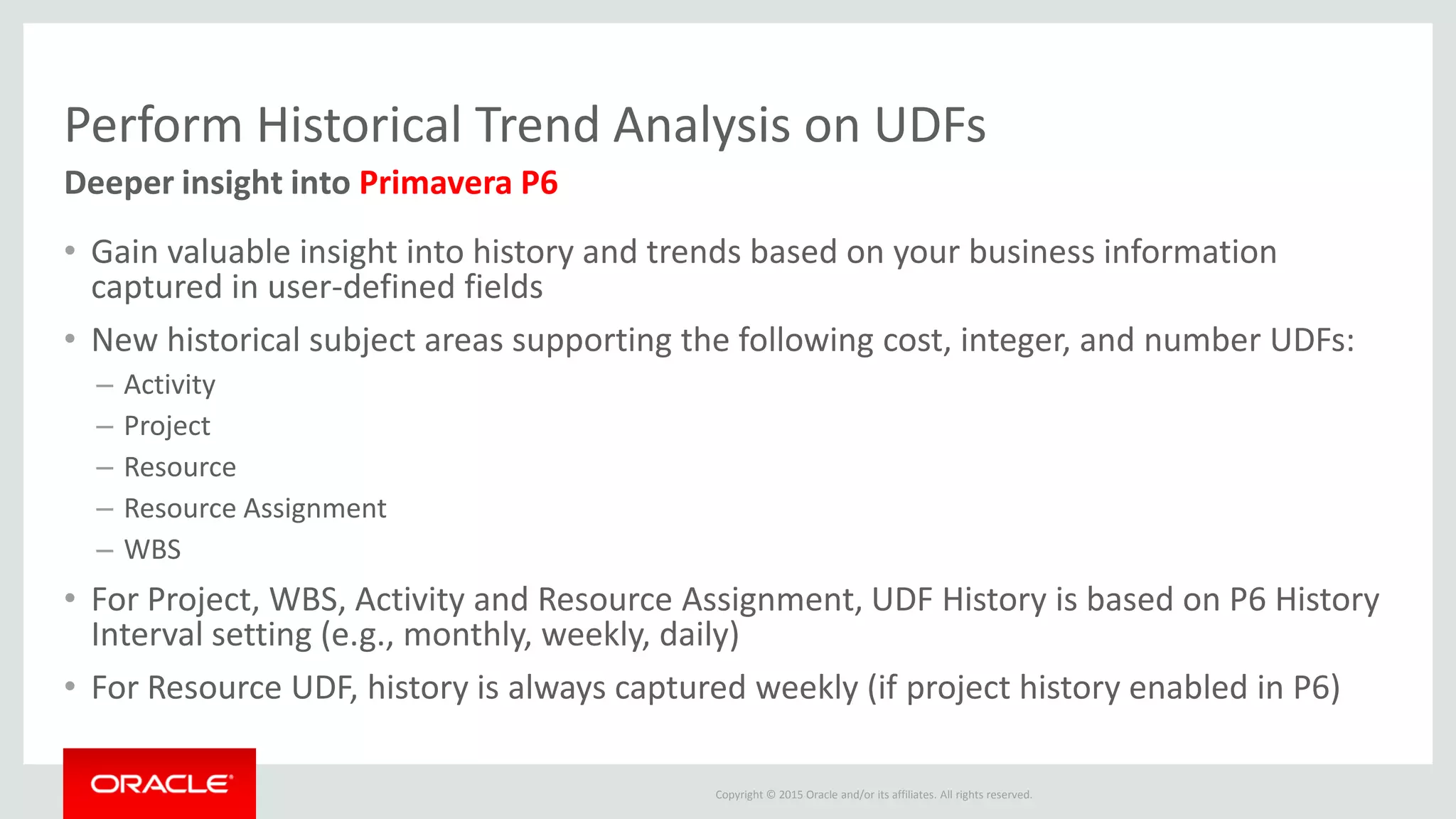
Perform Historical Trend Analysis on UDFs
• Gain valuable insight into history and trends based on your business information
captured in user-defined fields
• New historical subject areas supporting the following cost, integer, and number UDFs:
– Activity
– Project
– Resource
– Resource Assignment
– WBS
• For Project, WBS, Activity and Resource Assignment, UDF History is based on P6 History
Interval setting (e.g., monthly, weekly, daily)
• For Resource UDF, history is always captured weekly (if project history enabled in P6)
Deeper insight into Primavera P6
Copyright © 2015 Oracle and/or its affiliates. All rights reserved.
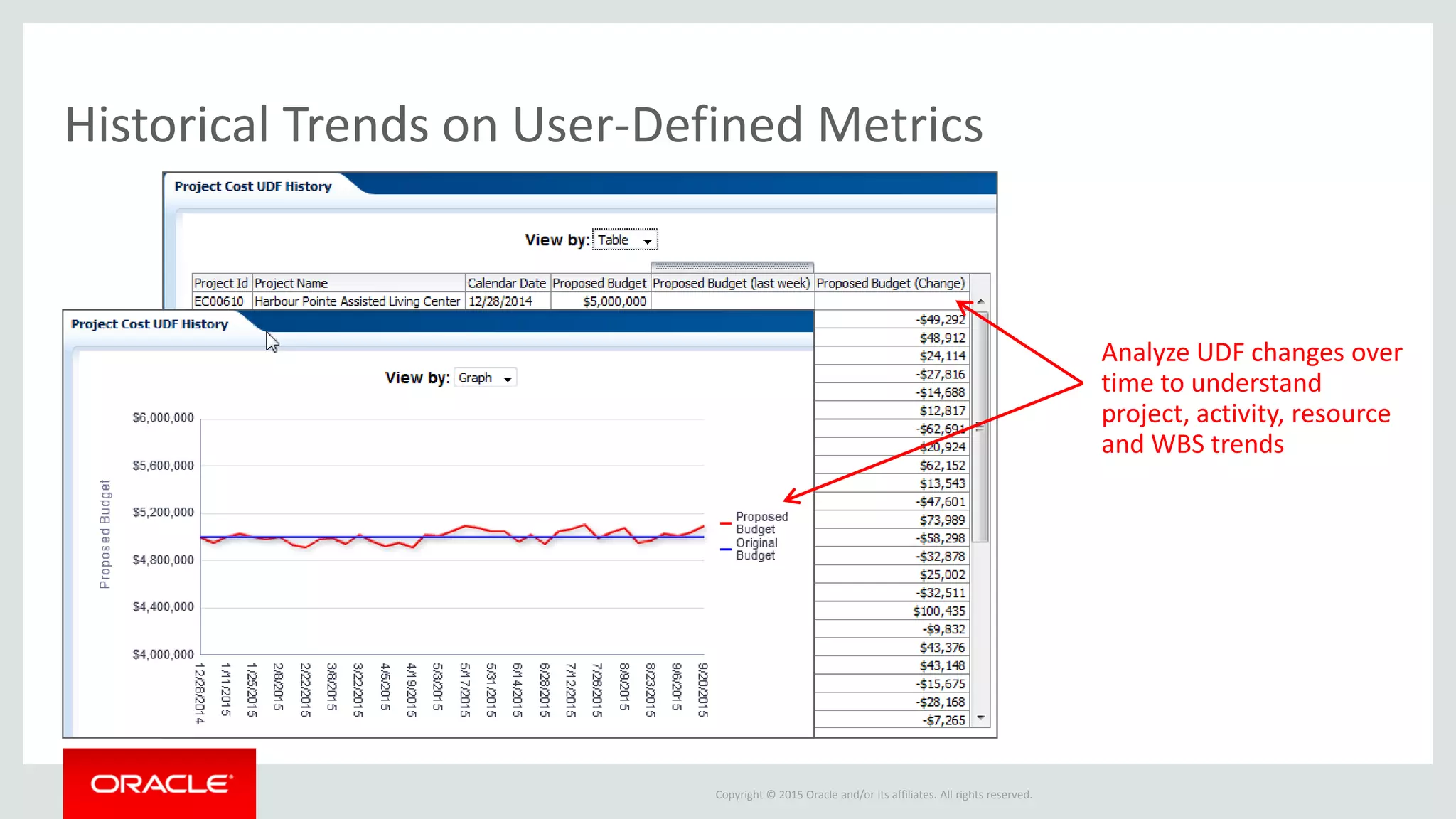
Analyze UDF changes over
time to understand
project, activity, resource
and WBS trends
Historical Trends on User-Defined Metrics
Copyright © 2015 Oracle and/or its affiliates. All rights reserved.
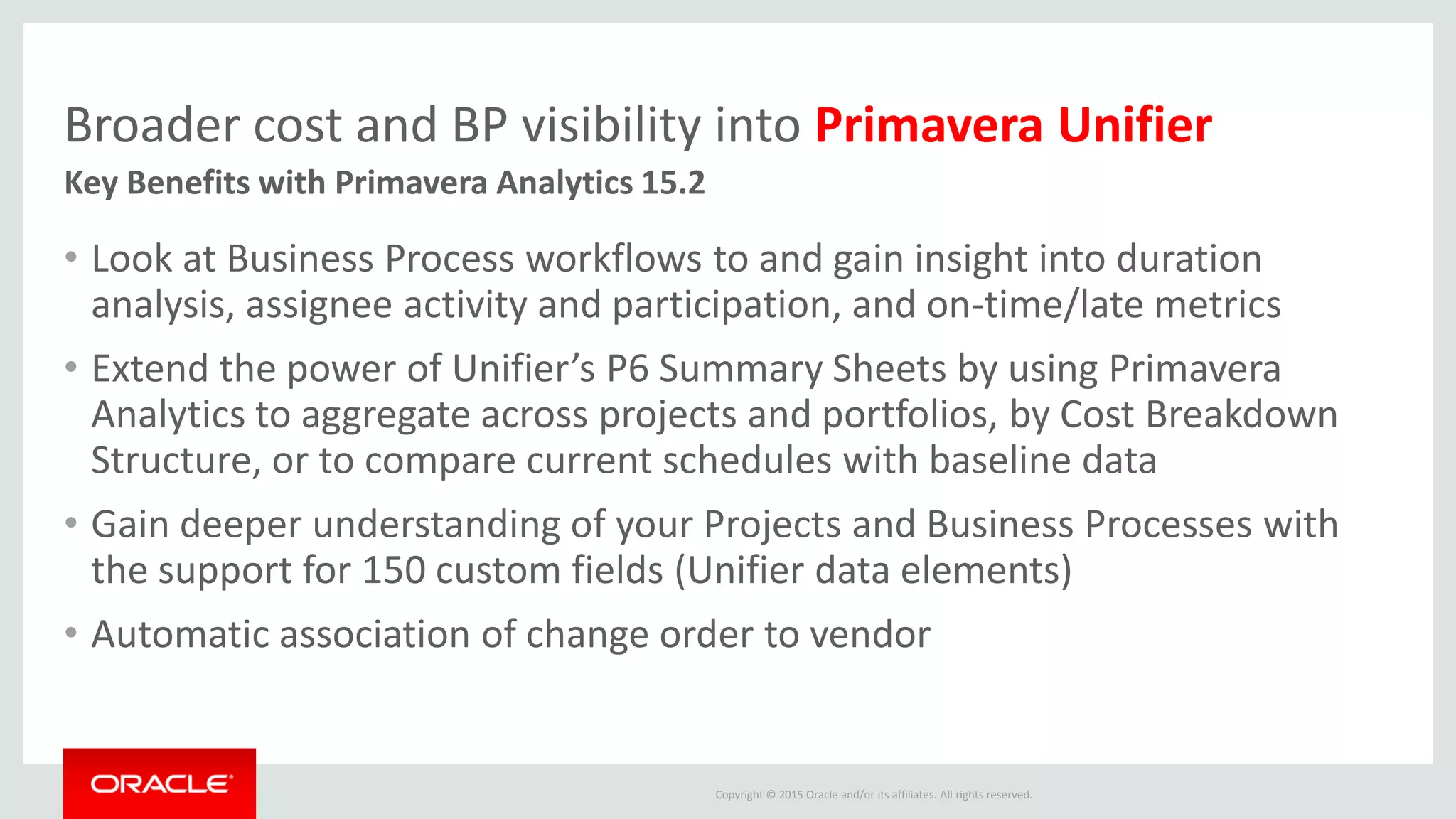
Broader cost and BP visibility into Primavera Unifier
• Look at Business Process workflows to and gain insight into duration
analysis, assignee activity and participation, and on-time/late metrics
• Extend the power of Unifier’s P6 Summary Sheets by using Primavera
Analytics to aggregate across projects and portfolios, by Cost Breakdown
Structure, or to compare current schedules with baseline data
• Gain deeper understanding of your Projects and Business Processes with
the support for 150 custom fields (Unifier data elements)
• Automatic association of change order to vendor
Key Benefits with Primavera Analytics 15.2
Copyright © 2015 Oracle and/or its affiliates. All rights reserved.
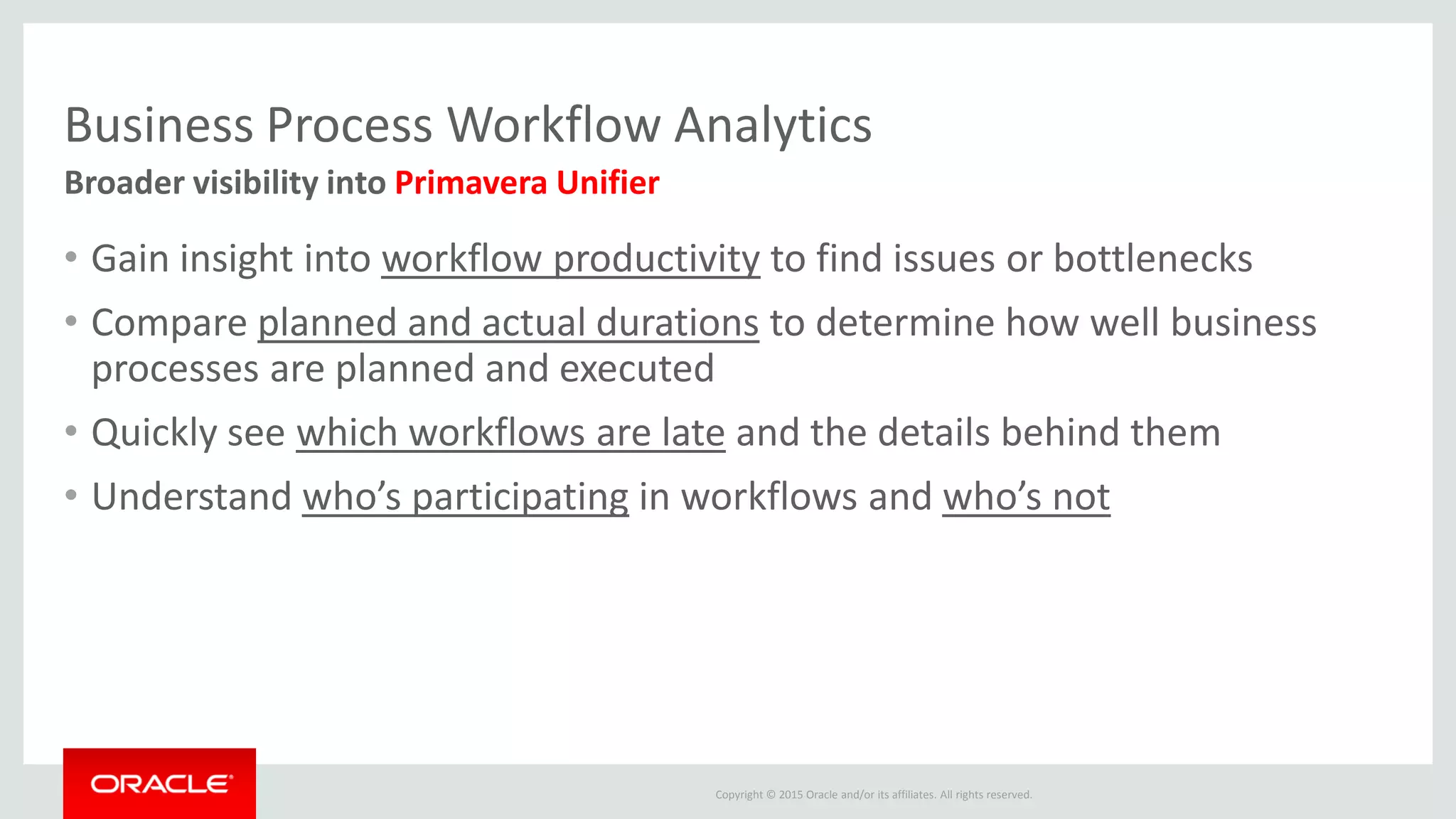
Business Process Workflow Analytics
• Gain insight into workflow productivity to find issues or bottlenecks
• Compare planned and actual durations to determine how well business
processes are planned and executed
• Quickly see which workflows are late and the details behind them
• Understand who’s participating in workflows and who’s not
Broader visibility into Primavera Unifier
Copyright © 2015 Oracle and/or its affiliates. All rights reserved.
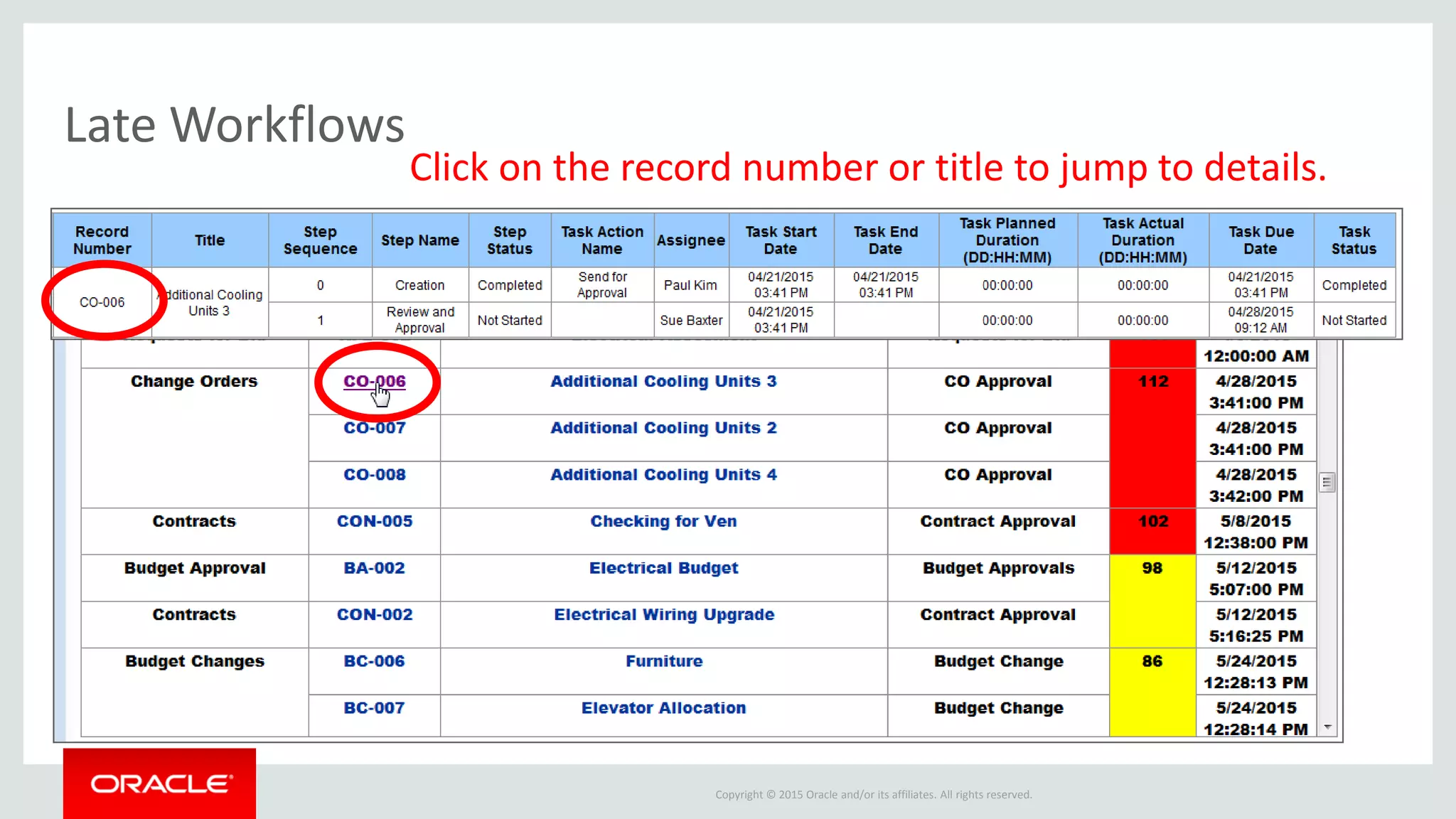
Click on the record number or title to jump to details.
Late Workflows
Copyright © 2015 Oracle and/or its affiliates. All rights reserved.
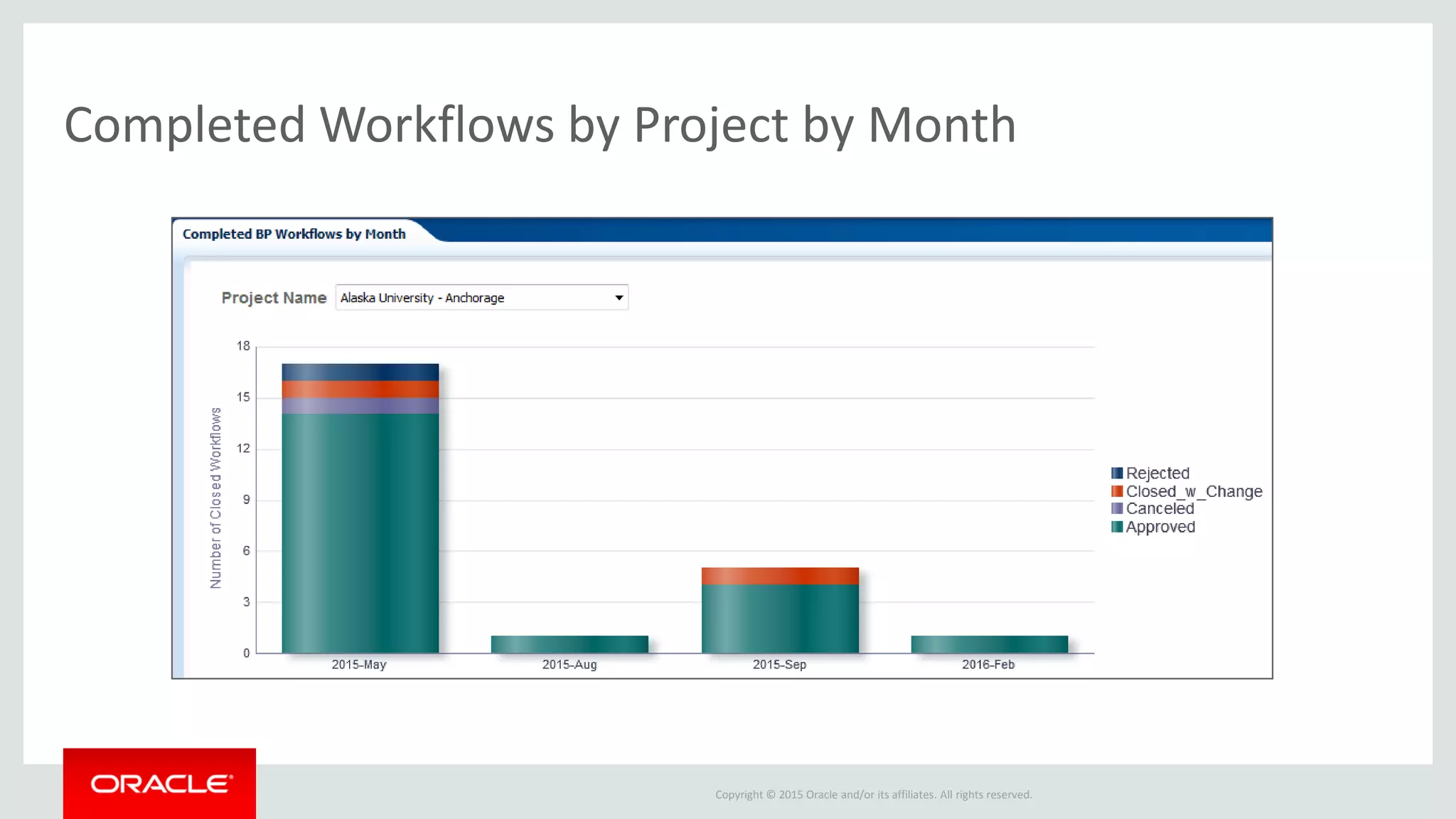
Completed Workflows by Project by Month
Copyright © 2015 Oracle and/or its affiliates. All rights reserved.
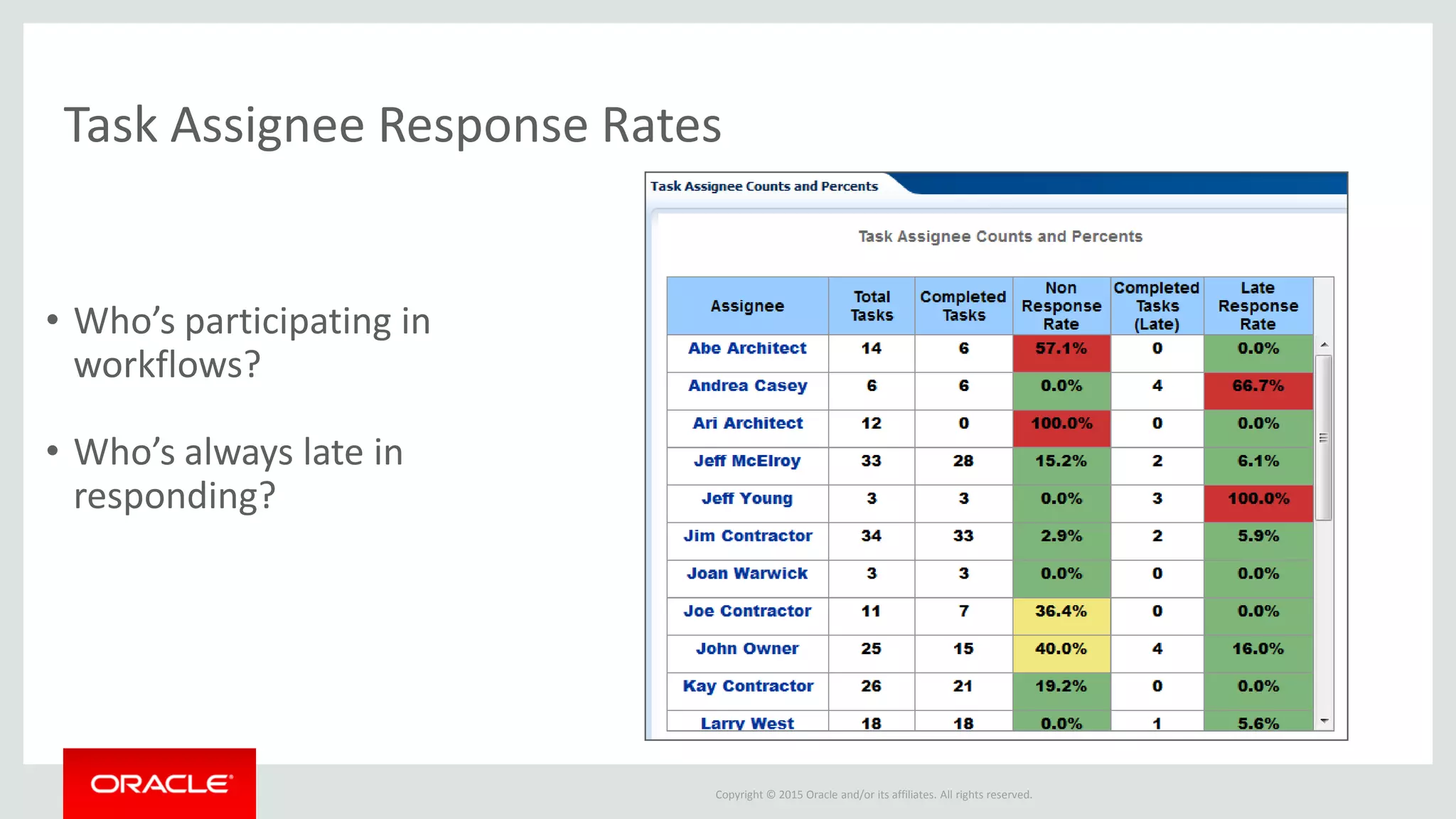
Task Assignee Response Rates
• Who’s participating in
workflows?
• Who’s always late in
responding?
Copyright © 2015 Oracle and/or its affiliates. All rights reserved.
New BP Workflow Samples
• Past Due Workflows
• Completed Workflows by Month
• Steps Past Due by Project
• Planned vs. Actual Workflow Duration
• Revisited Workflow Steps
• Top 10 Open Workflows by Duration
• Completed Tasks by Month
• Task Assignee Details
New Business Process Dashboard “Workflow” Page
Copyright © 2015 Oracle and/or its affiliates. All rights reserved.
P6 Summary Sheet Analytics
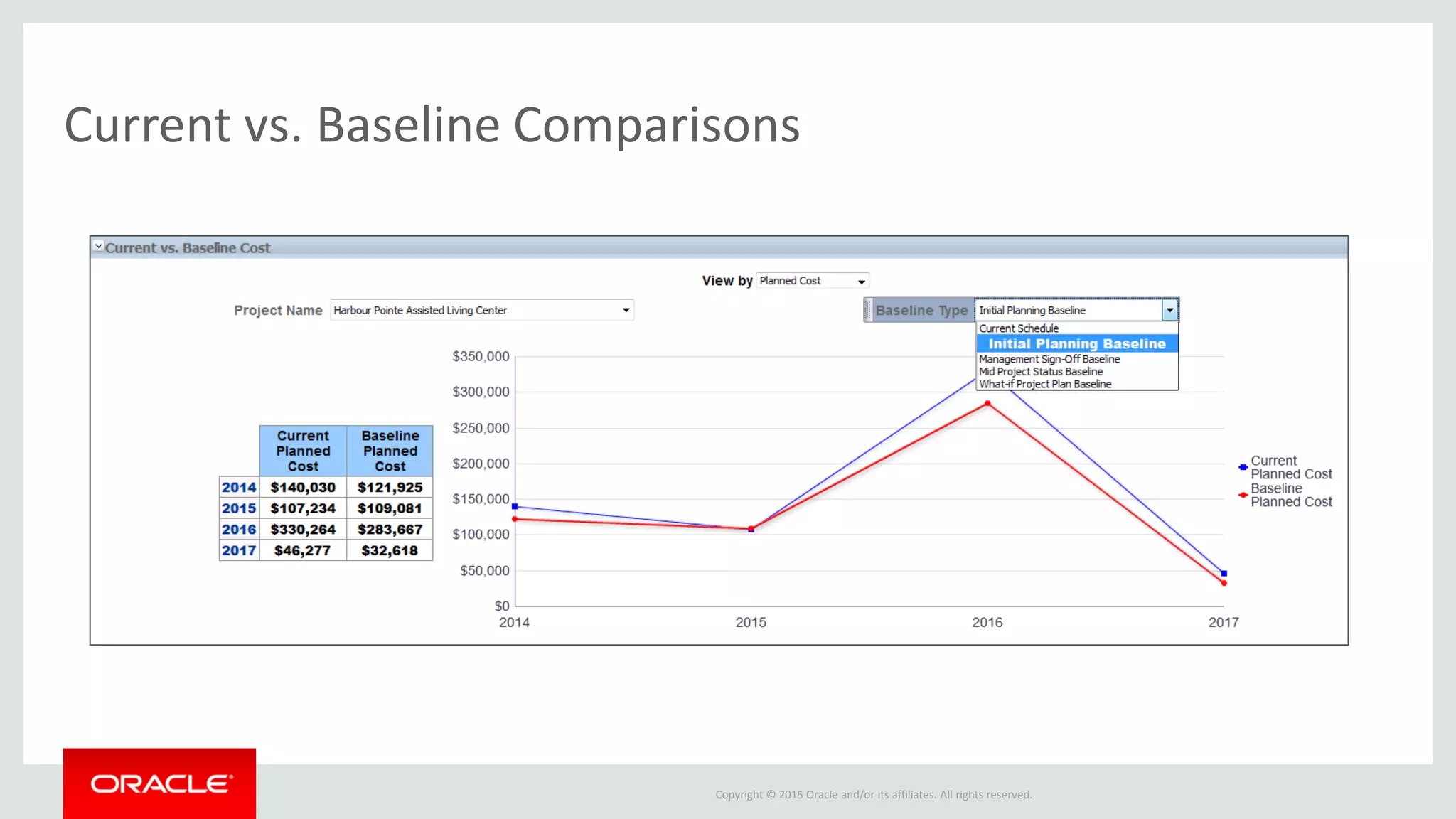
• Analyze P6 Summary Sheet data for greater understanding of cost performance by
project hierarchy and cost breakdown structure
• Support for same duration, cost, and resource-based schedules as in Unifier.
Resource-based schedules include costs calculated in Unifier based on resource
rates.
• Drill down to daily metrics by resource (same as Unifier role), summarized by CBS
• Compare the current project summary sheet to any baseline to measure deltas and
understand changes
• To see out-of-the-box samples, go to the Resource Analysis dashboard > Cost
Summary tab
Broader visibility into Primavera Unifier
Copyright © 2015 Oracle and/or its affiliates. All rights reserved.
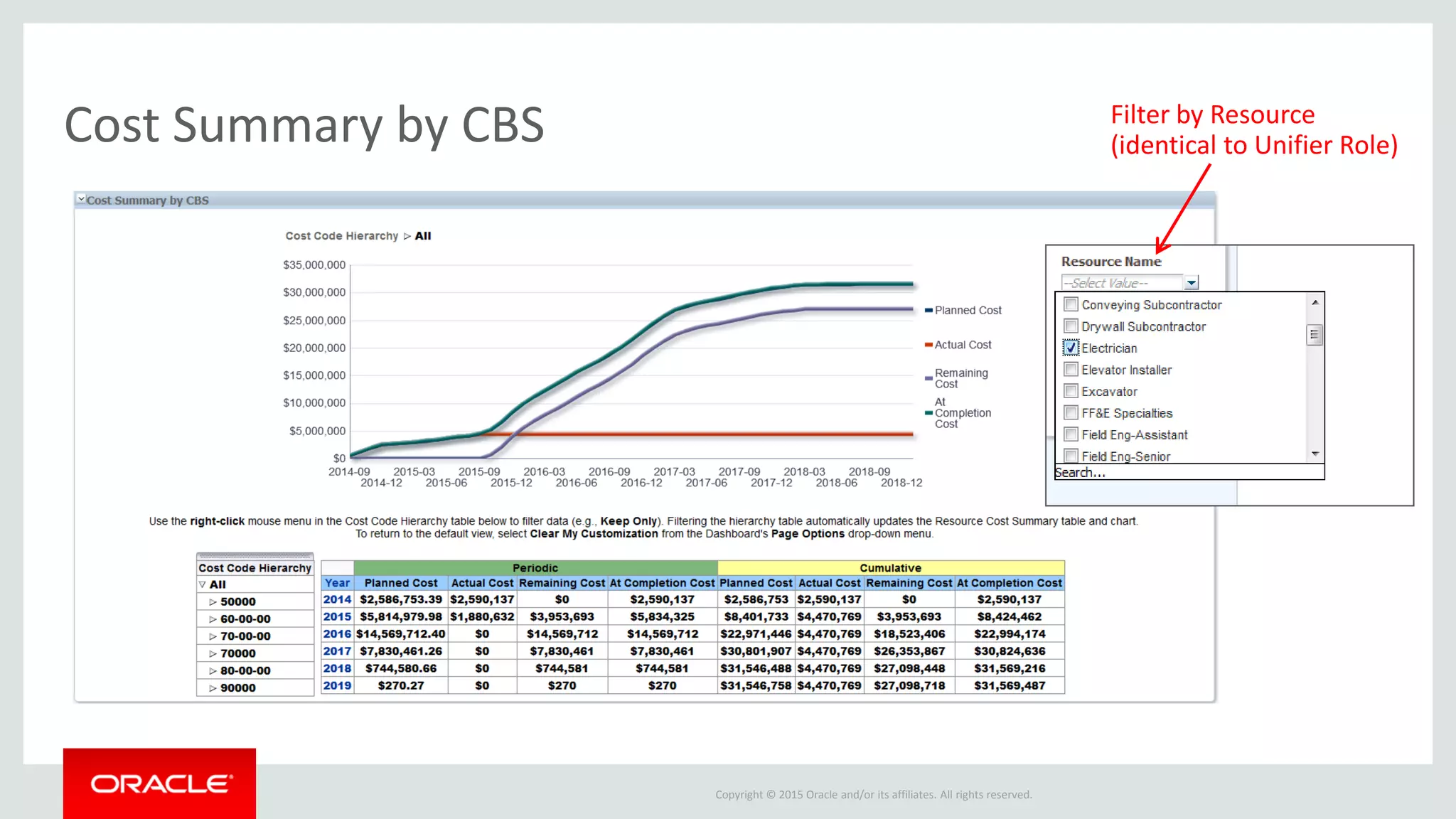
Cost Summary by CBS Filter by Resource
(identical to Unifier Role)
Copyright © 2015 Oracle and/or its affiliates. All rights reserved.
Current vs. Baseline Comparisons
Copyright © 2015 Oracle and/or its affiliates. All rights reserved.
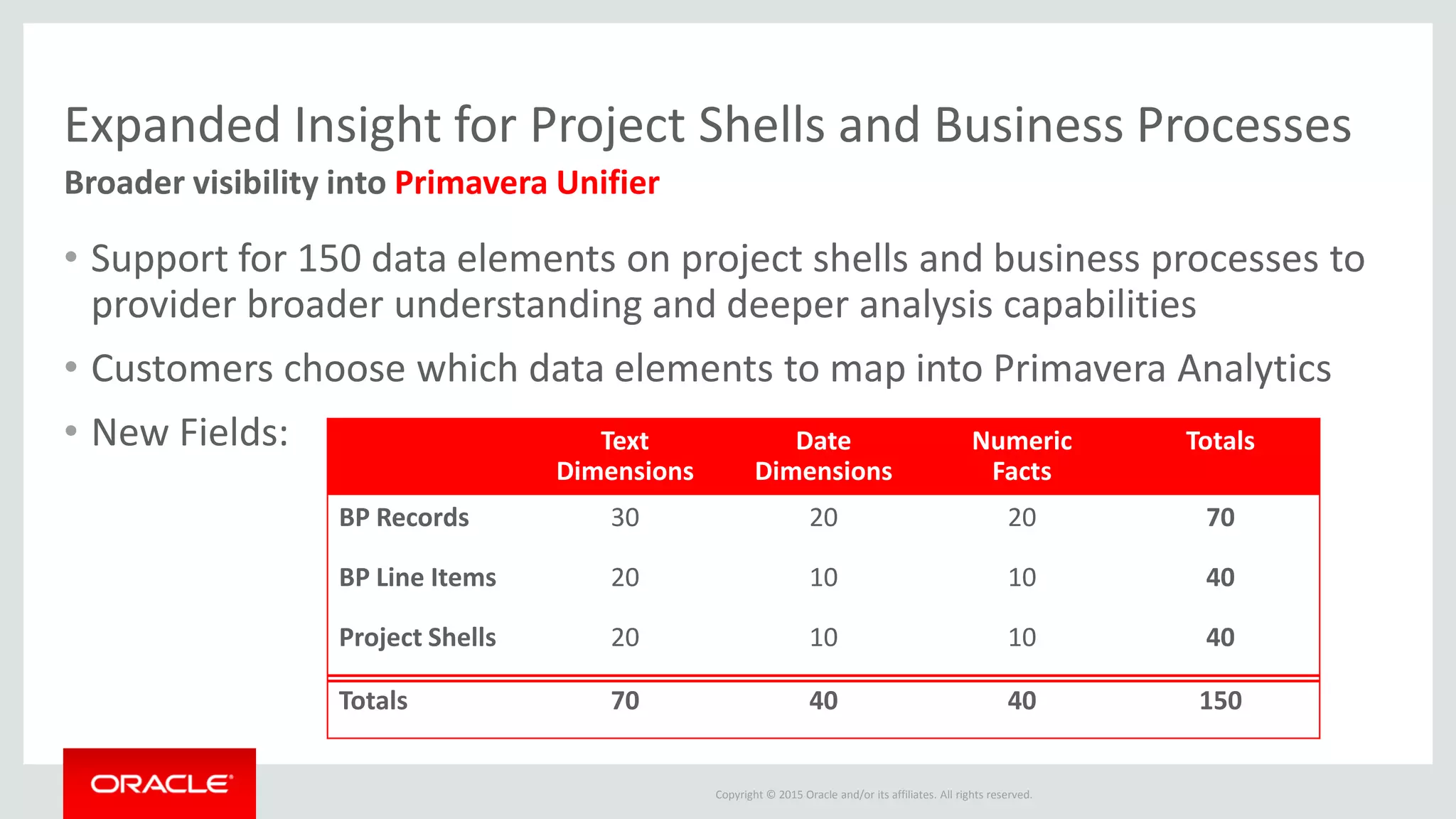
Expanded Insight for Project Shells and Business Processes
• Support for 150 data elements on project shells and business processes to
provider broader understanding and deeper analysis capabilities
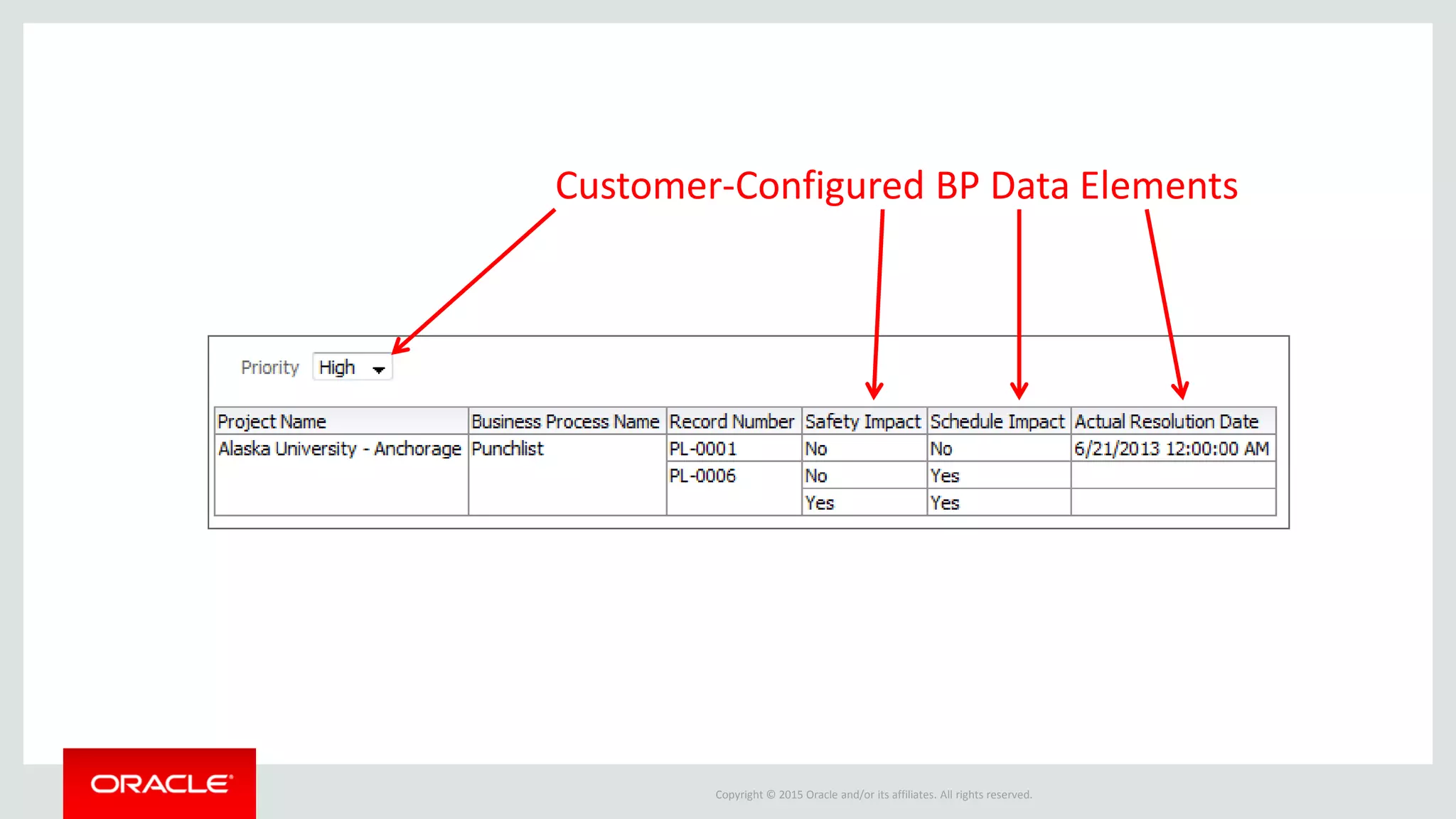
• Customers choose which data elements to map into Primavera Analytics
• New Fields:
Broader visibility into Primavera Unifier
Text
Dimensions
Date
Dimensions
Numeric
Facts
Totals
BP Records 30 20 20 70
BP Line Items 20 10 10 40
Project Shells 20 10 10 40
Totals 70 40 40 150
Copyright © 2015 Oracle and/or its affiliates. All rights reserved.
Customer-Configured BP Data Elements
Copyright © 2015 Oracle and/or its affiliates. All rights reserved.
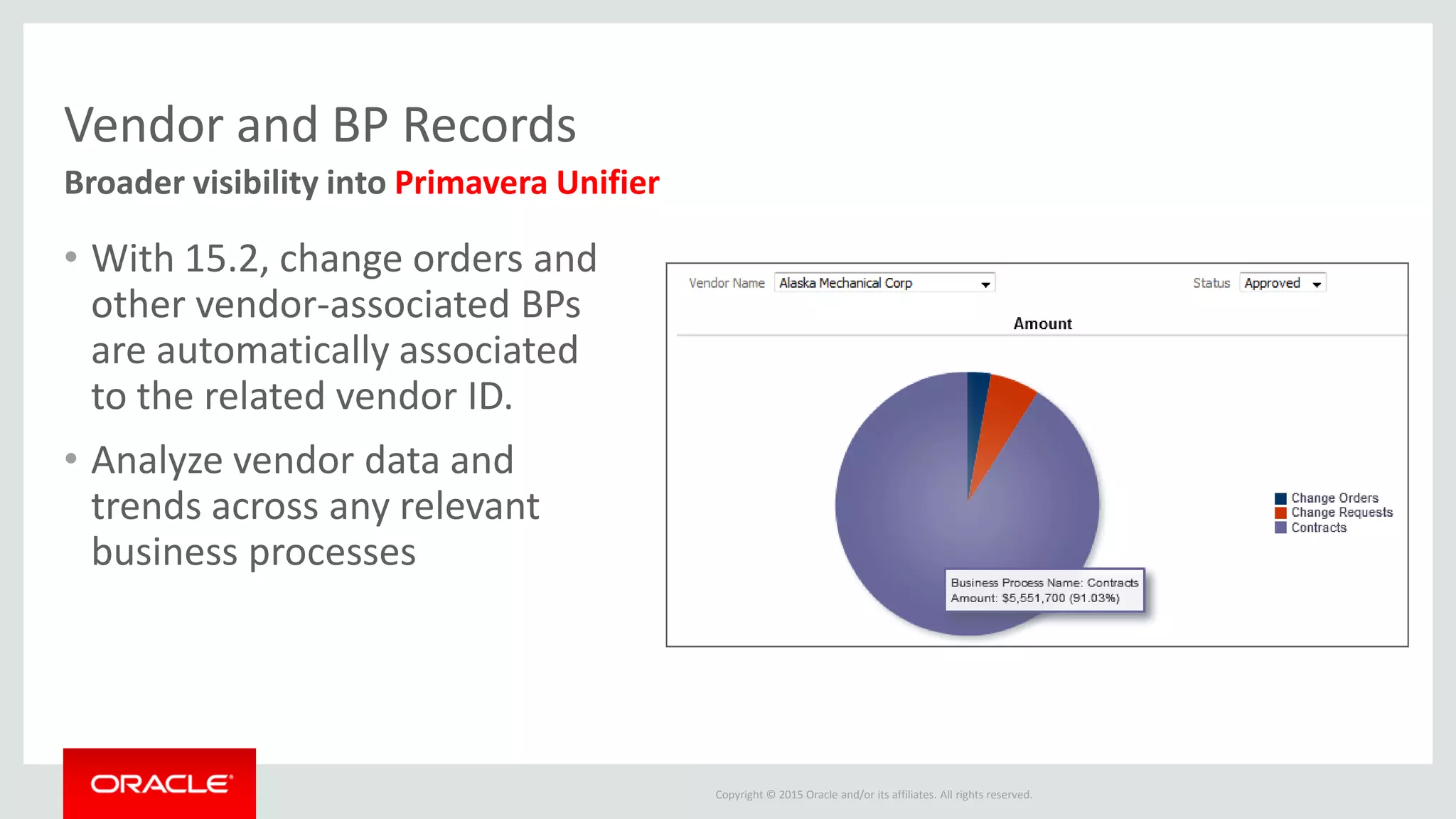
Vendor and BP Records
• With 15.2, change orders and
other vendor-associated BPs
are automatically associated
to the related vendor ID.
• Analyze vendor data and
trends across any relevant
business processes
Broader visibility into Primavera Unifier
Copyright © 2015 Oracle and/or its affiliates. All rights reserved.
Supporting Conformed Dimensions with P6 and Unifier
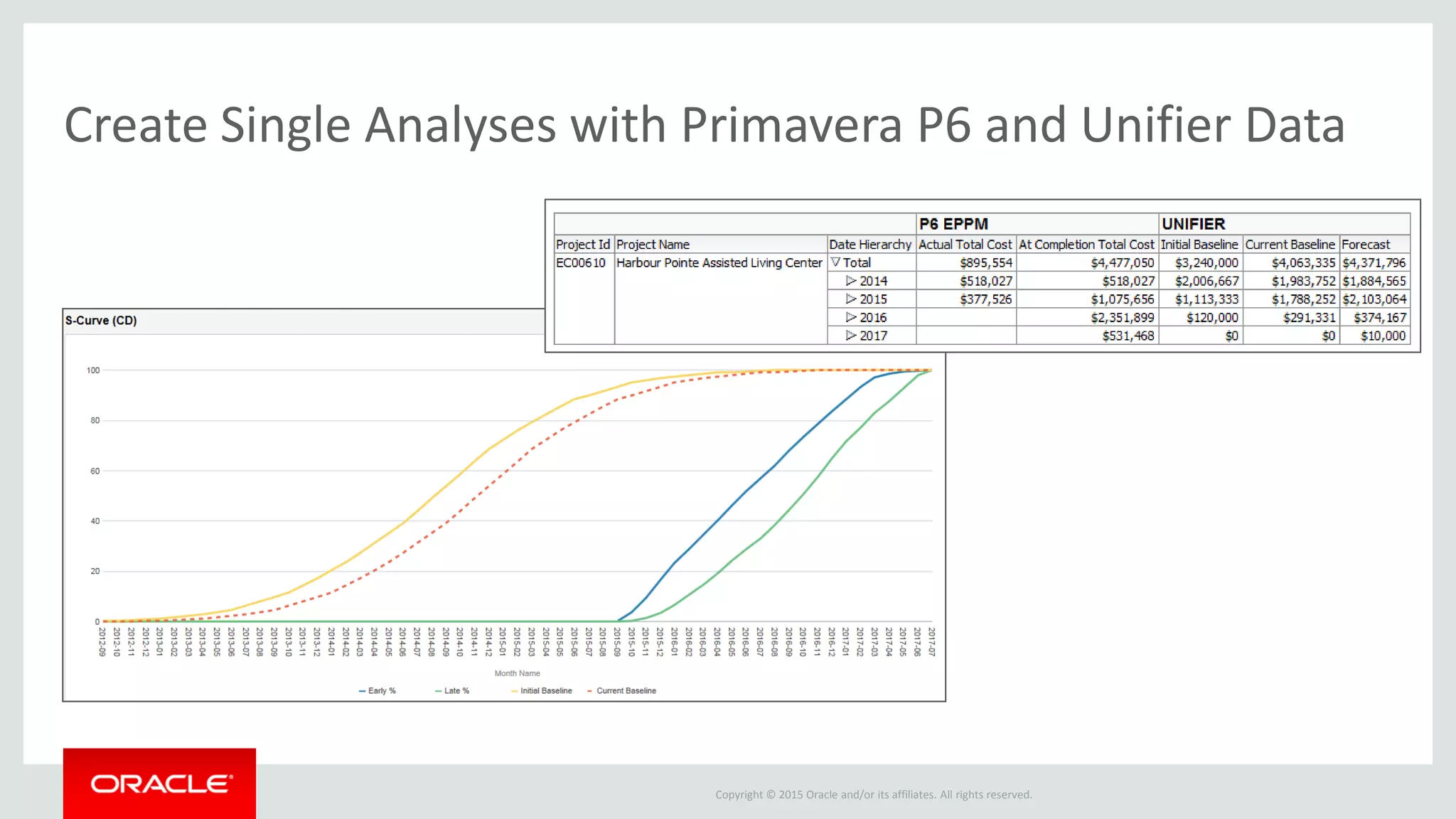
• Compare schedule data from P6 and cost data from Unifier in the same
analysis or dashboard by leveraging conformed dimensions
• Support for conformed dimensions including Project ID, Project Name,
Portfolio, and more
• New ‘About: Primavera Analytics’ Sample Dashboard with links to
Conformed Examples
Cost and Schedule Business Intelligence
Copyright © 2015 Oracle and/or its affiliates. All rights reserved.
Create Single Analyses with Primavera P6 and Unifier Data
Copyright © 2015 Oracle and/or its affiliates. All rights reserved.
About: Primavera Analytics Dashboard
Understand, configure, and navigate the sample Oracle Primavera Analytics sample
catalog and sample data warehouse database.
The dashboard contains the following pages:
– Subject Areas: view all Subject Areas available with Primavera Analytics
– Dashboards: view how analyses are stored in the Primavera Analytics sample catalog
– Codes: understand how Project, Activity, and Resource Codes are configured in the sample
catalog and sample data warehouse
– UDFs: see how UDFs are configured in the sample catalog and sample data warehouse
– Combining Subject Areas: understand how to create analyses using multiple Subject Areas
and conforming dimensions
Provides Overview of Sample Catalog as well as Combining Subject Areas
Copyright © 2015 Oracle and/or its affiliates. All rights reserved.
Newest Unifier Set-Up Options
Copyright © 2015 Oracle and/or its affiliates. All rights reserved.
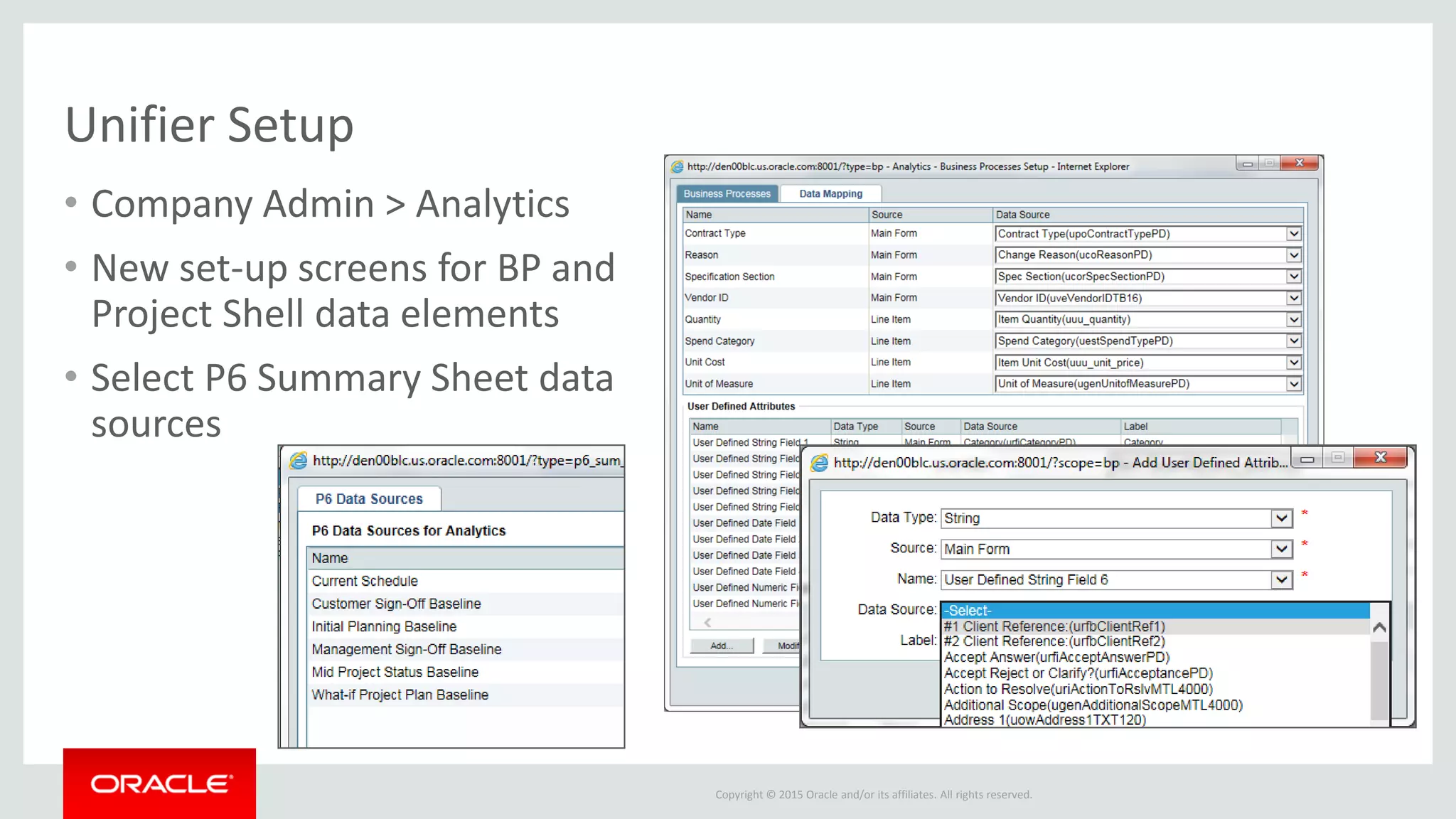
Unifier Setup
• Company Admin > Analytics
• New set-up screens for BP and
Project Shell data elements
• Select P6 Summary Sheet data
sources
Copyright © 2015 Oracle and/or its affiliates. All rights reserved.
Tested Configuration and Release Updates
Copyright © 2015 Oracle and/or its affiliates. All rights reserved.
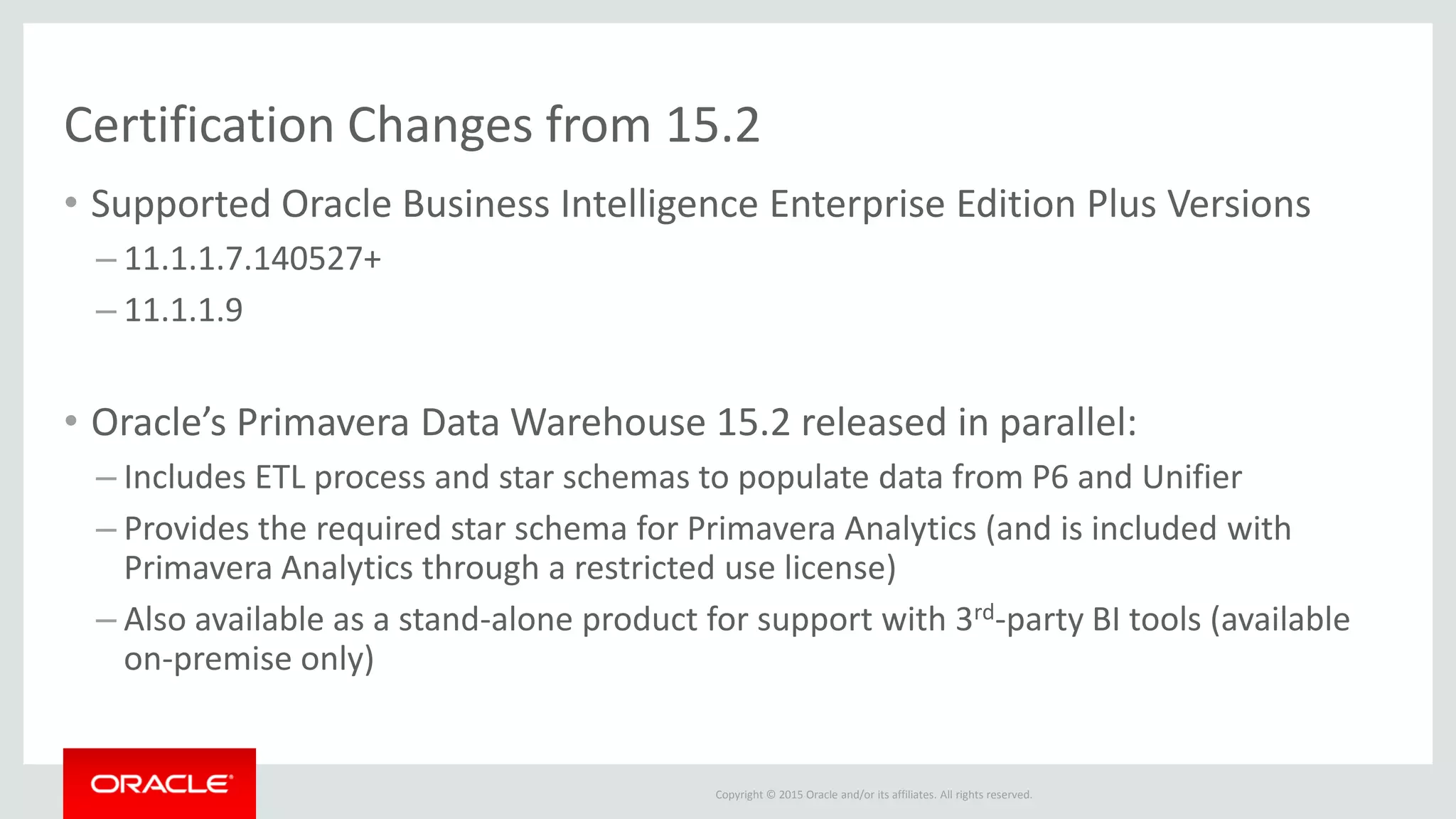
Certification Changes from 15.2
• Supported Oracle Business Intelligence Enterprise Edition Plus Versions
– 11.1.1.7.140527+
– 11.1.1.9
• Oracle’s Primavera Data Warehouse 15.2 released in parallel:
– Includes ETL process and star schemas to populate data from P6 and Unifier
– Provides the required star schema for Primavera Analytics (and is included with
Primavera Analytics through a restricted use license)
– Also available as a stand-alone product for support with 3rd-party BI tools (available
on-premise only)
Copyright © 2015 Oracle and/or its affiliates. All rights reserved.
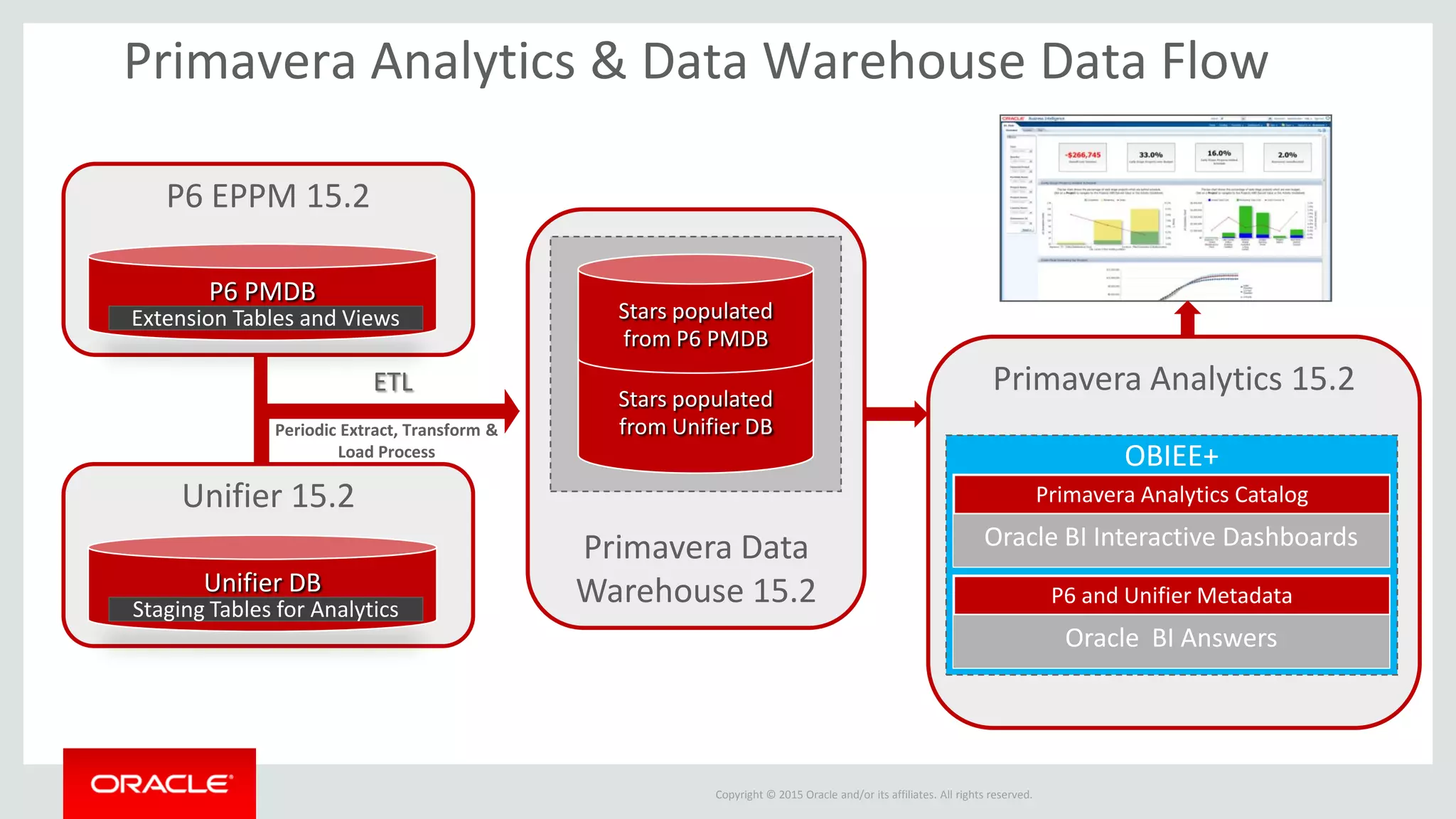
Primavera Data
Warehouse 15.2
Primavera Analytics 15.2
P6 EPPM 15.2
Primavera Analytics & Data Warehouse Data Flow
OBIEE+
Oracle BI Answers
P6 and Unifier Metadata
Oracle BI Interactive Dashboards
Primavera Analytics Catalog
ETL
Periodic Extract, Transform &
Load Process
P6 PMDB
Extension Tables and Views
Stars populated
from Unifier DB
Stars populated
from P6 PMDB
Unifier 15.2
Unifier DB
Staging Tables for Analytics
Copyright © 2015 Oracle and/or its affiliates. All rights reserved.
Primavera Analytics Information
Primavera Analytics overview:
http://www.oracle.com/us/products/applications/primavera/p6-
analytics/overview/index.html
Additional resources:
http://www.oracle.com/us/products/applications/primavera/p6-
analytics/resources/index.html
Product documentation:
http://www.oracle.com/technetwork/documentation/default-1555811.html
Primavera Analytics blog:
https://blogs.oracle.com/P6Analytics/
Useful links on the web……
Primavera Analytics What’s New in Release 15.2

Primavera Analytics What’s New in Release 15.2

  • 2.
    Copyright © 2015Oracle and/or its affiliates. All rights reserved. Primavera Analytics What’s New in Release 15.2 Doug Larkin Primavera Product Strategy
  • 3.
    Copyright © 2015Oracle and/or its affiliates. All rights reserved. Safe Harbor Statement The following is intended to outline our general product direction. It is intended for information purposes only, and may not be incorporated into any contract. It is not a commitment to deliver any material, code, or functionality, and should not be relied upon in making purchasing decisions. The development, release, and timing of any features or functionality described for Oracle’s products remains at the sole discretion of Oracle.
  • 4.
    Copyright © 2015Oracle and/or its affiliates. All rights reserved. Agenda 1. Overview 2. New Features 3. Tested Configuration Updates 4. Wrap-up and Q&A
  • 5.
    Copyright © 2015Oracle and/or its affiliates. All rights reserved. 15.2 The Newest Release of Oracle’s Primavera Analytics
  • 6.
    Copyright © 2015Oracle and/or its affiliates. All rights reserved. Gain Deeper Understanding of Project Costs and Schedules • Deeper Primavera P6 schedule insight with support for notebook topics and UDF trending history. • Expanded Primavera Unifier cost and business process insight including: – workflow efficiency and assignee performance – P6 Summary Sheet cost and performance data – Deeper project and business process understanding • Combined Primavera P6 and Primavera Unifier insight leveraging conformed (shared) dimensions. Cost and Schedule data together! Key Benefits with Oracle’s Primavera Analytics 15.2
  • 7.
    Copyright © 2015Oracle and/or its affiliates. All rights reserved. Pre-Built Analytic Data Warehouse1. • Business Analytics Data Warehouse • Over 20 star schemas • Optimized for analysis and reporting 2. Sample DashboardsBest Practice Metrics3. 4. • Hundreds of metrics • Additional pre-defined calculations • Based on best practices • Pre-mapped integration from Primavera P6 and Unifier • Role-based Security • 30+ Dashboards and Pages • Over 350 Analyses • Additional Asset-Intensive Use Cases Certified Application Integration Primavera Analytics: End-to-End Business Intelligence Solution for EPPM
  • 8.
    Copyright © 2015Oracle and/or its affiliates. All rights reserved. New Features
  • 9.
    Copyright © 2015Oracle and/or its affiliates. All rights reserved. Greater schedule visibility into your Primavera P6 data • View notebook topics directly in Primavera Analytics to quickly understand additional key information related to dashboards and analyses • Analyze historical changes to user-defined fields to look for key trends in your projects, activities, and resources Key Benefits with 15.2
  • 10.
    Copyright © 2015Oracle and/or its affiliates. All rights reserved. Notebook Topics • View Notebook Topic details directly in Primavera Analytics • Support for Project, EPS, WBS and Activity Notebook Topics • The following fields are now available: – Notebook Topic Name – Notebook Text – Update User – Update Date – Create User – Create Date Deeper insight into Primavera P6
  • 11.
    Copyright © 2015Oracle and/or its affiliates. All rights reserved. Activity-Level Notebook Topic Name and Notebook Text Notebook Topics
  • 12.
    Copyright © 2015Oracle and/or its affiliates. All rights reserved. Perform Historical Trend Analysis on UDFs • Gain valuable insight into history and trends based on your business information captured in user-defined fields • New historical subject areas supporting the following cost, integer, and number UDFs: – Activity – Project – Resource – Resource Assignment – WBS • For Project, WBS, Activity and Resource Assignment, UDF History is based on P6 History Interval setting (e.g., monthly, weekly, daily) • For Resource UDF, history is always captured weekly (if project history enabled in P6) Deeper insight into Primavera P6
  • 13.
    Copyright © 2015Oracle and/or its affiliates. All rights reserved. Analyze UDF changes over time to understand project, activity, resource and WBS trends Historical Trends on User-Defined Metrics
  • 14.
    Copyright © 2015Oracle and/or its affiliates. All rights reserved. Broader cost and BP visibility into Primavera Unifier • Look at Business Process workflows to and gain insight into duration analysis, assignee activity and participation, and on-time/late metrics • Extend the power of Unifier’s P6 Summary Sheets by using Primavera Analytics to aggregate across projects and portfolios, by Cost Breakdown Structure, or to compare current schedules with baseline data • Gain deeper understanding of your Projects and Business Processes with the support for 150 custom fields (Unifier data elements) • Automatic association of change order to vendor Key Benefits with Primavera Analytics 15.2
  • 15.
    Copyright © 2015Oracle and/or its affiliates. All rights reserved. Business Process Workflow Analytics • Gain insight into workflow productivity to find issues or bottlenecks • Compare planned and actual durations to determine how well business processes are planned and executed • Quickly see which workflows are late and the details behind them • Understand who’s participating in workflows and who’s not Broader visibility into Primavera Unifier
  • 16.
    Copyright © 2015Oracle and/or its affiliates. All rights reserved. Click on the record number or title to jump to details. Late Workflows
  • 17.
    Copyright © 2015Oracle and/or its affiliates. All rights reserved. Completed Workflows by Project by Month
  • 18.
    Copyright © 2015Oracle and/or its affiliates. All rights reserved. Task Assignee Response Rates • Who’s participating in workflows? • Who’s always late in responding?
  • 19.
    Copyright © 2015Oracle and/or its affiliates. All rights reserved. New BP Workflow Samples • Past Due Workflows • Completed Workflows by Month • Steps Past Due by Project • Planned vs. Actual Workflow Duration • Revisited Workflow Steps • Top 10 Open Workflows by Duration • Completed Tasks by Month • Task Assignee Details New Business Process Dashboard “Workflow” Page
  • 20.
    Copyright © 2015Oracle and/or its affiliates. All rights reserved. P6 Summary Sheet Analytics • Analyze P6 Summary Sheet data for greater understanding of cost performance by project hierarchy and cost breakdown structure • Support for same duration, cost, and resource-based schedules as in Unifier. Resource-based schedules include costs calculated in Unifier based on resource rates. • Drill down to daily metrics by resource (same as Unifier role), summarized by CBS • Compare the current project summary sheet to any baseline to measure deltas and understand changes • To see out-of-the-box samples, go to the Resource Analysis dashboard > Cost Summary tab Broader visibility into Primavera Unifier
  • 21.
    Copyright © 2015Oracle and/or its affiliates. All rights reserved. Cost Summary by CBS Filter by Resource (identical to Unifier Role)
  • 22.
    Copyright © 2015Oracle and/or its affiliates. All rights reserved. Current vs. Baseline Comparisons
  • 23.
    Copyright © 2015Oracle and/or its affiliates. All rights reserved. Expanded Insight for Project Shells and Business Processes • Support for 150 data elements on project shells and business processes to provider broader understanding and deeper analysis capabilities • Customers choose which data elements to map into Primavera Analytics • New Fields: Broader visibility into Primavera Unifier Text Dimensions Date Dimensions Numeric Facts Totals BP Records 30 20 20 70 BP Line Items 20 10 10 40 Project Shells 20 10 10 40 Totals 70 40 40 150
  • 24.
    Copyright © 2015Oracle and/or its affiliates. All rights reserved. Customer-Configured BP Data Elements
  • 25.
    Copyright © 2015Oracle and/or its affiliates. All rights reserved. Vendor and BP Records • With 15.2, change orders and other vendor-associated BPs are automatically associated to the related vendor ID. • Analyze vendor data and trends across any relevant business processes Broader visibility into Primavera Unifier
  • 26.
    Copyright © 2015Oracle and/or its affiliates. All rights reserved. Supporting Conformed Dimensions with P6 and Unifier • Compare schedule data from P6 and cost data from Unifier in the same analysis or dashboard by leveraging conformed dimensions • Support for conformed dimensions including Project ID, Project Name, Portfolio, and more • New ‘About: Primavera Analytics’ Sample Dashboard with links to Conformed Examples Cost and Schedule Business Intelligence
  • 27.
    Copyright © 2015Oracle and/or its affiliates. All rights reserved. Create Single Analyses with Primavera P6 and Unifier Data
  • 28.
    Copyright © 2015Oracle and/or its affiliates. All rights reserved. About: Primavera Analytics Dashboard Understand, configure, and navigate the sample Oracle Primavera Analytics sample catalog and sample data warehouse database. The dashboard contains the following pages: – Subject Areas: view all Subject Areas available with Primavera Analytics – Dashboards: view how analyses are stored in the Primavera Analytics sample catalog – Codes: understand how Project, Activity, and Resource Codes are configured in the sample catalog and sample data warehouse – UDFs: see how UDFs are configured in the sample catalog and sample data warehouse – Combining Subject Areas: understand how to create analyses using multiple Subject Areas and conforming dimensions Provides Overview of Sample Catalog as well as Combining Subject Areas
  • 29.
    Copyright © 2015Oracle and/or its affiliates. All rights reserved. Newest Unifier Set-Up Options
  • 30.
    Copyright © 2015Oracle and/or its affiliates. All rights reserved. Unifier Setup • Company Admin > Analytics • New set-up screens for BP and Project Shell data elements • Select P6 Summary Sheet data sources
  • 31.
    Copyright © 2015Oracle and/or its affiliates. All rights reserved. Tested Configuration and Release Updates
  • 32.
    Copyright © 2015Oracle and/or its affiliates. All rights reserved. Certification Changes from 15.2 • Supported Oracle Business Intelligence Enterprise Edition Plus Versions – 11.1.1.7.140527+ – 11.1.1.9 • Oracle’s Primavera Data Warehouse 15.2 released in parallel: – Includes ETL process and star schemas to populate data from P6 and Unifier – Provides the required star schema for Primavera Analytics (and is included with Primavera Analytics through a restricted use license) – Also available as a stand-alone product for support with 3rd-party BI tools (available on-premise only)
  • 33.
    Copyright © 2015Oracle and/or its affiliates. All rights reserved. Primavera Data Warehouse 15.2 Primavera Analytics 15.2 P6 EPPM 15.2 Primavera Analytics & Data Warehouse Data Flow OBIEE+ Oracle BI Answers P6 and Unifier Metadata Oracle BI Interactive Dashboards Primavera Analytics Catalog ETL Periodic Extract, Transform & Load Process P6 PMDB Extension Tables and Views Stars populated from Unifier DB Stars populated from P6 PMDB Unifier 15.2 Unifier DB Staging Tables for Analytics
  • 34.
    Copyright © 2015Oracle and/or its affiliates. All rights reserved. Primavera Analytics Information Primavera Analytics overview: http://www.oracle.com/us/products/applications/primavera/p6- analytics/overview/index.html Additional resources: http://www.oracle.com/us/products/applications/primavera/p6- analytics/resources/index.html Product documentation: http://www.oracle.com/technetwork/documentation/default-1555811.html Primavera Analytics blog: https://blogs.oracle.com/P6Analytics/ Useful links on the web……