
Contiki Project about RPL
Protocol in WSN
Soultana Ellinidou
UnderGraduate Student at University of Western Macedonia , Kozani
Department of Engineering Informatics & Telecommunications
Introduction: Contiki platform
 Οpen source operating system for the Internet of
Things.
 Focus on low-power wireless Internet of Things
devices.
 Provides powerful low-power Internet
communication.
 Supports fully standard IPv6 and IPv4, along with the
recent low-power wireless standards: 6lowpan, RPL,
CoAP.
 Cooja simulator Contiki networks can be emulated
before burned into hardware.
 Easy and fast development: Contiki applications are
written in standard C.
Introduction: RPL Protocol
 IPv6 routing protocol for Low power and Lossy
Networks
 M2H &H2H
 Forms a tree like topology
 Supports both upward and downward routing
 RPL is responsible for getting routing info and
forwarding packets
 Needs to be optimized to gain performance and
utilize constrained resources
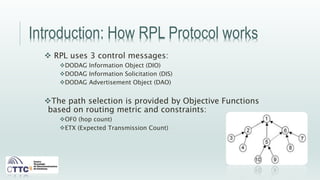
DODAG
Introduction: How RPL Protocol works
 RPL uses 3 control messages:
DODAG Information Object (DIO)
DODAG Information Solicitation (DIS)
DODAG Advertisement Object (DAO)
The path selection is provided by Objective Functions
based on routing metric and constraints:
OF0 (hop count)
ETX (Expected Transmission Count)
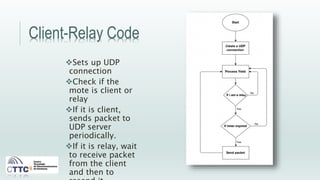
Client-Relay Code
Sets up UDP
connection
Check if the
mote is client or
relay
If it is client,
sends packet to
UDP server
periodically.
If it is relay, wait
to receive packet
from the client
and then to
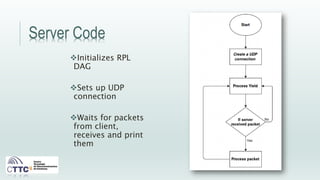
Server Code
Initializes RPL
DAG
Sets up UDP
connection
Waits for packets
from client,
receives and print
them
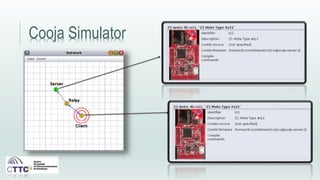
Cooja Simulator
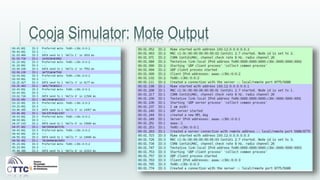
Cooja Simulator: Mote Output
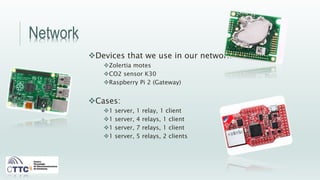
Network
Devices that we use in our network:
Zolertia motes
CO2 sensor K30
Raspberry Pi 2 (Gateway)
Cases:
1 server, 1 relay, 1 client
1 server, 4 relays, 1 client
1 server, 7 relays, 1 client
1 server, 5 relays, 2 clients
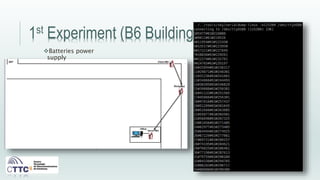
1st Experiment (B6 Building)
Batteries power
supply
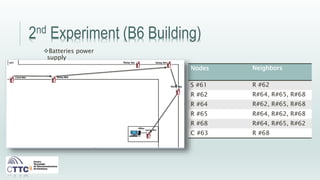
2nd Experiment (B6 Building)
Nodes Neighbors
S #61 R #62
R #62 R#64, R#65, R#68
R #64 R#62, R#65, R#68
R #65 R#64, R#62, R#68
R #68 R#64, R#65, R#62
C #63 R #68
Batteries power
supply
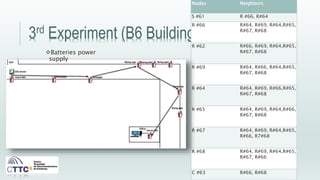
3rd Experiment (B6 Building)
Nodes Neighbors
S #61 R #66, R#64
R #66 R#64, R#69, R#64,R#65,
R#67, R#68
R #62 R#66, R#69, R#64,R#65,
R#67, R#68
R #69 R#64, R#66, R#64,R#65,
R#67, R#68
R #64 R#64, R#69, R#66,R#65,
R#67, R#68
R #65 R#64, R#69, R#64,R#66,
R#67, R#68
R #67 R#64, R#69, R#64,R#65,
R#66, R7#68
R #68 R#64, R#69, R#64,R#65,
R#67, R#66
C #63 R#66, R#68
Batteries power
supply
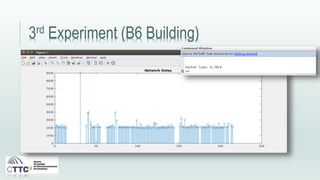
3rd Experiment (B6 Building)
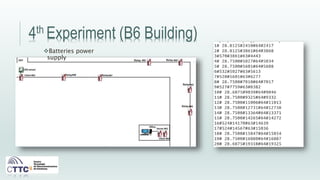
4th Experiment (B6 Building)
Batteries power
supply
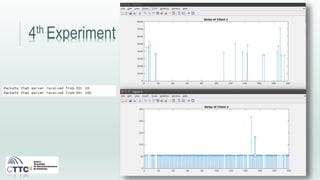
4th Experiment
5th Experiment
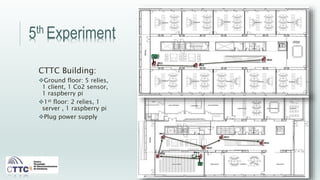
CTTC Building:
Ground floor: 5 relies,
1 client, 1 Co2 sensor,
1 raspberry pi
1st floor: 2 relies, 1
server , 1 raspberry pi
Plug power supply
5th Experiment (B4 Building)
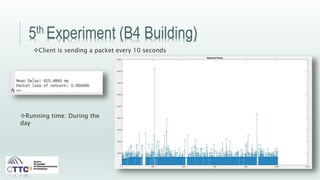
Client is sending a packet every 10 seconds
Running time: During the
day
6th Experiment (B4 Building)
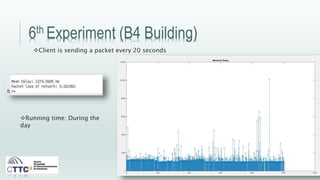
Client is sending a packet every 20 seconds
Running time: During the
day
7th Experiment (B4 Building)
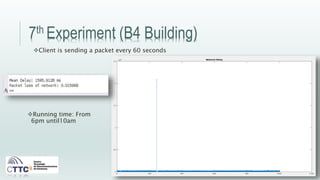
Client is sending a packet every 60 seconds
Running time: From
6pm until10am
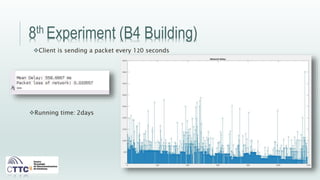
8th Experiment (B4 Building)
Client is sending a packet every 120 seconds
Running time: 2days
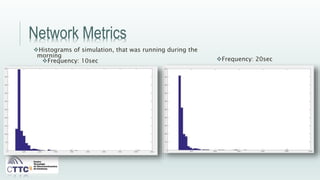
Network Metrics
Histograms of simulation, that was running during the
morning
Frequency: 10sec Frequency: 20sec
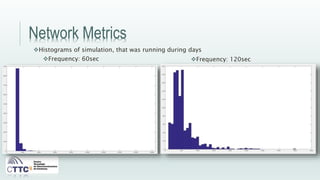
Network Metrics
Histograms of simulation, that was running during days
Frequency: 60sec Frequency: 120sec
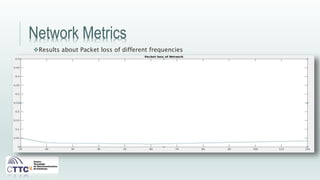
Network Metrics
Results about Packet loss of different frequencies
Future Work
Complete the RPL tests in your network for more
settings(frequencies, time, number of motes).
Add a sensor to track the movement in the stairs.
Make a script to restart the client and server motes in the same
time.
Communication between different network layer protocols.
Thank you for your attention.

CTTC presentation WSN in Contiki

  • 1.
    Contiki Project aboutRPL Protocol in WSN Soultana Ellinidou UnderGraduate Student at University of Western Macedonia , Kozani Department of Engineering Informatics & Telecommunications
  • 2.
    Introduction: Contiki platform Οpen source operating system for the Internet of Things.  Focus on low-power wireless Internet of Things devices.  Provides powerful low-power Internet communication.  Supports fully standard IPv6 and IPv4, along with the recent low-power wireless standards: 6lowpan, RPL, CoAP.  Cooja simulator Contiki networks can be emulated before burned into hardware.  Easy and fast development: Contiki applications are written in standard C.
  • 3.
    Introduction: RPL Protocol IPv6 routing protocol for Low power and Lossy Networks  M2H &H2H  Forms a tree like topology  Supports both upward and downward routing  RPL is responsible for getting routing info and forwarding packets  Needs to be optimized to gain performance and utilize constrained resources DODAG
  • 4.
    Introduction: How RPLProtocol works  RPL uses 3 control messages: DODAG Information Object (DIO) DODAG Information Solicitation (DIS) DODAG Advertisement Object (DAO) The path selection is provided by Objective Functions based on routing metric and constraints: OF0 (hop count) ETX (Expected Transmission Count)
  • 5.
    Client-Relay Code Sets upUDP connection Check if the mote is client or relay If it is client, sends packet to UDP server periodically. If it is relay, wait to receive packet from the client and then to
  • 6.
    Server Code Initializes RPL DAG Setsup UDP connection Waits for packets from client, receives and print them
  • 7.
  • 8.
  • 9.
    Network Devices that weuse in our network: Zolertia motes CO2 sensor K30 Raspberry Pi 2 (Gateway) Cases: 1 server, 1 relay, 1 client 1 server, 4 relays, 1 client 1 server, 7 relays, 1 client 1 server, 5 relays, 2 clients
  • 10.
    1st Experiment (B6Building) Batteries power supply
  • 11.
    2nd Experiment (B6Building) Nodes Neighbors S #61 R #62 R #62 R#64, R#65, R#68 R #64 R#62, R#65, R#68 R #65 R#64, R#62, R#68 R #68 R#64, R#65, R#62 C #63 R #68 Batteries power supply
  • 12.
    3rd Experiment (B6Building) Nodes Neighbors S #61 R #66, R#64 R #66 R#64, R#69, R#64,R#65, R#67, R#68 R #62 R#66, R#69, R#64,R#65, R#67, R#68 R #69 R#64, R#66, R#64,R#65, R#67, R#68 R #64 R#64, R#69, R#66,R#65, R#67, R#68 R #65 R#64, R#69, R#64,R#66, R#67, R#68 R #67 R#64, R#69, R#64,R#65, R#66, R7#68 R #68 R#64, R#69, R#64,R#65, R#67, R#66 C #63 R#66, R#68 Batteries power supply
  • 13.
  • 14.
    4th Experiment (B6Building) Batteries power supply
  • 15.
  • 16.
    5th Experiment CTTC Building: Groundfloor: 5 relies, 1 client, 1 Co2 sensor, 1 raspberry pi 1st floor: 2 relies, 1 server , 1 raspberry pi Plug power supply
  • 17.
    5th Experiment (B4Building) Client is sending a packet every 10 seconds Running time: During the day
  • 18.
    6th Experiment (B4Building) Client is sending a packet every 20 seconds Running time: During the day
  • 19.
    7th Experiment (B4Building) Client is sending a packet every 60 seconds Running time: From 6pm until10am
  • 20.
    8th Experiment (B4Building) Client is sending a packet every 120 seconds Running time: 2days
  • 21.
    Network Metrics Histograms ofsimulation, that was running during the morning Frequency: 10sec Frequency: 20sec
  • 22.
    Network Metrics Histograms ofsimulation, that was running during days Frequency: 60sec Frequency: 120sec
  • 23.
    Network Metrics Results aboutPacket loss of different frequencies
  • 24.
    Future Work Complete theRPL tests in your network for more settings(frequencies, time, number of motes). Add a sensor to track the movement in the stairs. Make a script to restart the client and server motes in the same time. Communication between different network layer protocols.
  • 25.
    Thank you foryour attention.