Reflection Logs as a Dashboard
             John Gordon
              Ken Currie
            Opus Learning
         22nd November 2012
The problem

• Opus Learning provides online
  education, so the usual problems
  – Tracking learning
  – Authentication
  – Identifying problems in learning
  – Recognising need for intervention
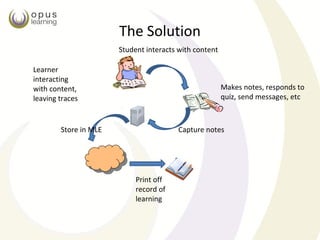
The Solution
                       Student interacts with content

Learner
interacting
with content,                                           Makes notes, responds to
leaving traces                                          quiz, send messages, etc


        Store in MLE                    Capture notes


                            Print off
                            record of
                            learning
Digital Work Book: Challenge

• To develop tools for:
  – Teachers as authors
  – Audit trails from the learning process
  – Identify and understand behaviours
  – Authenticate candidates
  – Identify intervention requirements
  – Develop scalable assessment
What we wanted

•   Interactive content
•   Student to Content Interaction
•   Recording interactions, and reflection
•   Embedded activity and Assessment
•   Multi-user activity
•   Logging and monitoring of learning
What we made

• A portfolio embedded in the content
• A dashboard for learning, from all user points
  of view
• Recording of legacy from learning
• Rich seam of data and behaviours for mining
• Ongoing formative assessment, and potential
  summative assessment
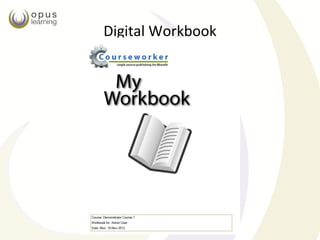
Digital Workbook
Digital Work Book: Features


– Content based, an integral part of the learning
  materials
– Context based, a support mechanism for testing
  concept understanding
– Supporting Reflective Thinking
– A longitudinal form of assessment
The Digital Workbook
Learners interactions

• Classical view - four types of interaction
  – learner-content
  – learner-learner
  – learner-tutor
  – learner-interface
• The Opus view
  – there’s more!
  – the sum of interactions leads to meaningful
    learning
∑ Interactions = Meaningful Learning
                                    Student/Student

                                       Student
                                                       Student/Tutor
                  Student/Content

                                      Student/Environment

        Content                                                        Tutor
                          Tutor/Content
                                                                          Tutor/Tutor
Content/Content

               Content/Environment                    Tutor/Environment

                                     Environment

Based on diagram in
                               Environment/Environment
Anderson 2003
Interaction Table
Interaction                    Methodology
Student/Content                Digital Work Book
Student/Tutor                  Environment + Digital Work Book
Student/Student                Environment + Multiuser Digital
                               Workbook
Student/Environment            Standard VLE such as Moodle 2.3 ( or
                               others)
Content/Content                Rich Single Source Publishing + high level
                               of linkage/integration + objects
Tutor/Tutor                    VLE Features+ SQA QA Processes
Tutor/Environment              VLE Features+ Digital Work Book
                               Dashboard
Content /Environment           VLE Features+ CAPDM Enhancements
Environment/Environment        VLE Audit trail.
Tutor/Content                  CAPDM Single Source Publishing System
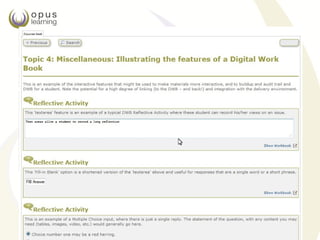
DWB Examples – Source Page
DWB Example workbook
The DigitalWork Book: Benefits
– Learner reflections form a legacy
   • A physical recorded book for the learner
   • A set of behaviour records for the learning provider
– Learning content feedback – improvement of
  content
– A behaviour trail
– A rich source for data mining
– Holistic assessment, across courses and
  programmes
– Authentication Support
DWB Dashboard
Digital Work Book:
            Assessment Strategy

– Provides ‘longitudinal’ assessment to augment
  assignments, exams, quizzes, etc.
– Integrates assessment across courses and
  programmes
– Is part of the ‘dashboard’ for Opus assessment
Example of Assessment screen
Standard Templates
Standardised programme design – all modules have the same feature set


                                                                        21
Concept Maps & Gateways

• The DWB can be used anywhere, but it is
  effective when contextually relevant
  – Study Guides can be useful Concept Maps
  – Key concepts can be thought of a ‘gateways’
    through which a student must pass successfully
  – The DWB can be used to assess understanding of
    these concepts
     • Contextually aware student input
Digital Work Book: Applications
• Audit Trail
   – Very useful to check on student progress
   – Relevant in compliance related training
• Personal portfolio
   – A reflective log
   – Augments and provides alternative to file stores
• Student support
   – Intervention assessment
   – Authentication
   – A navigational aid
Creating the Social Learner

• DWB is part of a social learner strategy
  – Rich interaction spaces
  – Personal interaction with the content (DWB)
  – Interaction on specific issues (traversing the web)
  – Social learner (Forums, Facebook, etc.)
• The DWB is interaction
The Future

• The DWB is sharable, including
   – with the Tutor
   – with other students,
• In the future it will
   – support groups
   – support many content types
   – integrate with other portfolio components
• The DWB will be our main assessment toolset
• The DWB will be our main behaviour manager
References
•   Veronica Thurmond, Karen Wambach “Understanding Interactions in Distance Education: A Review of the Literature”, International
    Journal of Instructional Technology and Distance Learning, 2004, http://www.itdl.org/journal/jan_04/article02.htm
•   Su, Bonk, Magjuka, Liu and Lee; The Importance of Interaction in Web-Based Education: A Program-level Case Study of Online MBA
    Courses; Journal of Interactive Online Learning, Volume 4, Number 1 Summer 2005. http://www.ncolr.org/jiol/issues/pdf/4.1.1.pdf
•   Terry Anderson, Getting the Mix Right Again: An updated and theoretical rationale for interaction, The International Review of
    Research in Open and Distance Learning, Vol 4, No 2 (2003). http://www.irrodl.org/index.php/irrodl/article/view/149/230


• THANK YOU

• www.opuslearning.com

Presentation at eAssessment Tomorrow

  • 1.
    Reflection Logs asa Dashboard John Gordon Ken Currie Opus Learning 22nd November 2012
  • 2.
    The problem • OpusLearning provides online education, so the usual problems – Tracking learning – Authentication – Identifying problems in learning – Recognising need for intervention
  • 3.
    The Solution Student interacts with content Learner interacting with content, Makes notes, responds to leaving traces quiz, send messages, etc Store in MLE Capture notes Print off record of learning
  • 4.
    Digital Work Book:Challenge • To develop tools for: – Teachers as authors – Audit trails from the learning process – Identify and understand behaviours – Authenticate candidates – Identify intervention requirements – Develop scalable assessment
  • 5.
    What we wanted • Interactive content • Student to Content Interaction • Recording interactions, and reflection • Embedded activity and Assessment • Multi-user activity • Logging and monitoring of learning
  • 6.
    What we made •A portfolio embedded in the content • A dashboard for learning, from all user points of view • Recording of legacy from learning • Rich seam of data and behaviours for mining • Ongoing formative assessment, and potential summative assessment
  • 7.
  • 8.
    Digital Work Book:Features – Content based, an integral part of the learning materials – Context based, a support mechanism for testing concept understanding – Supporting Reflective Thinking – A longitudinal form of assessment
  • 9.
  • 10.
    Learners interactions • Classicalview - four types of interaction – learner-content – learner-learner – learner-tutor – learner-interface • The Opus view – there’s more! – the sum of interactions leads to meaningful learning
  • 11.
    ∑ Interactions =Meaningful Learning Student/Student Student Student/Tutor Student/Content Student/Environment Content Tutor Tutor/Content Tutor/Tutor Content/Content Content/Environment Tutor/Environment Environment Based on diagram in Environment/Environment Anderson 2003
  • 12.
    Interaction Table Interaction Methodology Student/Content Digital Work Book Student/Tutor Environment + Digital Work Book Student/Student Environment + Multiuser Digital Workbook Student/Environment Standard VLE such as Moodle 2.3 ( or others) Content/Content Rich Single Source Publishing + high level of linkage/integration + objects Tutor/Tutor VLE Features+ SQA QA Processes Tutor/Environment VLE Features+ Digital Work Book Dashboard Content /Environment VLE Features+ CAPDM Enhancements Environment/Environment VLE Audit trail. Tutor/Content CAPDM Single Source Publishing System
  • 13.
    DWB Examples –Source Page
  • 16.
  • 17.
    The DigitalWork Book:Benefits – Learner reflections form a legacy • A physical recorded book for the learner • A set of behaviour records for the learning provider – Learning content feedback – improvement of content – A behaviour trail – A rich source for data mining – Holistic assessment, across courses and programmes – Authentication Support
  • 18.
  • 19.
    Digital Work Book: Assessment Strategy – Provides ‘longitudinal’ assessment to augment assignments, exams, quizzes, etc. – Integrates assessment across courses and programmes – Is part of the ‘dashboard’ for Opus assessment
  • 20.
  • 21.
    Standard Templates Standardised programmedesign – all modules have the same feature set 21
  • 22.
    Concept Maps &Gateways • The DWB can be used anywhere, but it is effective when contextually relevant – Study Guides can be useful Concept Maps – Key concepts can be thought of a ‘gateways’ through which a student must pass successfully – The DWB can be used to assess understanding of these concepts • Contextually aware student input
  • 23.
    Digital Work Book:Applications • Audit Trail – Very useful to check on student progress – Relevant in compliance related training • Personal portfolio – A reflective log – Augments and provides alternative to file stores • Student support – Intervention assessment – Authentication – A navigational aid
  • 24.
    Creating the SocialLearner • DWB is part of a social learner strategy – Rich interaction spaces – Personal interaction with the content (DWB) – Interaction on specific issues (traversing the web) – Social learner (Forums, Facebook, etc.) • The DWB is interaction
  • 25.
    The Future • TheDWB is sharable, including – with the Tutor – with other students, • In the future it will – support groups – support many content types – integrate with other portfolio components • The DWB will be our main assessment toolset • The DWB will be our main behaviour manager
  • 26.
    References • Veronica Thurmond, Karen Wambach “Understanding Interactions in Distance Education: A Review of the Literature”, International Journal of Instructional Technology and Distance Learning, 2004, http://www.itdl.org/journal/jan_04/article02.htm • Su, Bonk, Magjuka, Liu and Lee; The Importance of Interaction in Web-Based Education: A Program-level Case Study of Online MBA Courses; Journal of Interactive Online Learning, Volume 4, Number 1 Summer 2005. http://www.ncolr.org/jiol/issues/pdf/4.1.1.pdf • Terry Anderson, Getting the Mix Right Again: An updated and theoretical rationale for interaction, The International Review of Research in Open and Distance Learning, Vol 4, No 2 (2003). http://www.irrodl.org/index.php/irrodl/article/view/149/230 • THANK YOU • www.opuslearning.com