Presented By Santosh Kumar
CONTENTS 
1 Indexing 
1.1 Problem 
1.2 What is Indexing 
1.3 Types 
1.4 Clustered Index 
1.5 Non-Clustered Index 
1.6 Unique Index 
1.7 When To Create Index And When Not 
2 Hashing 
2.1 Problem 
2.2 What is Hashing 
2.3 Algorithms Used In Hashing 
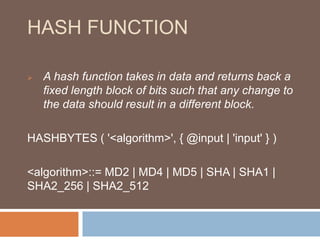
2.4 Hash Function 
3 Encryption 
3.1 What is Encryption 
3.2 Asymmetric Encryption 
3.3 Symmetric Encryption 
3.4 Which one is better. 
3.5 Why Use Encryption 
3.6 Transparent Data Encryption
Indexing
PROBLEM 
 Performance 
 Data Searching
WHAT IS INDEXING 
 An index can be created in a table to find data 
more quickly and efficiently. 
 great indexing can make your application nimble 
and fast.
TYPES 
 Clustered Index 
 Non-Clustered Index 
 Unique Index
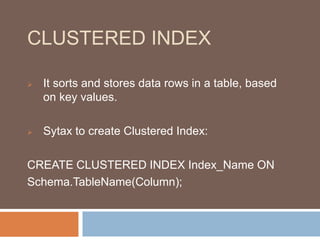
CLUSTERED INDEX 
 It sorts and stores data rows in a table, based 
on key values. 
 Sytax to create Clustered Index: 
CREATE CLUSTERED INDEX Index_Name ON 
Schema.TableName(Column);
CLUSTERED INDEX 
 This is also called implicit index because It is 
automatically created by creating primary key. 
 Why Clustered Index can not created more than 
one column???
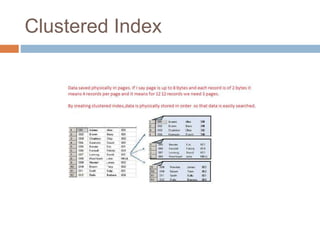
Clustered Index
NON-CLUSTERED INDEX 
 It contains a key value and a pointer to the data 
in the heap or clustered index. 
 Syntax to create non-clustered Index: 
CREATE INDEX Index_Name ON Schema.T 
ableName(Column); 
 Can it be created more than one column in a 
table???
UNIQUE INDEX 
 A unique index ensures that the index key 
contains no duplicate values. 
 The basic system to create : 
CREATE UNIQUE INDEX index_name on 
table_name (column_name); 
 Uniqueness can be a property of both 
clustered and nonclustered indexes.
WHEN TO CREATE INDEX AND 
WHEN NOT 
 Indexes should not be used on small tables. 
 Tables that have frequent, large batch update or 
insert operations. 
 Indexes should not be used on columns that 
contain a high number of NULL values. 
 Columns that are frequently manipulated should 
not be indexed.
Hashing
PROBLEM 
 Security 
 Data Stolen
WHAT IS HASHING 
 Hashing is used to hash some input. 
 In this we use hash function for hashing.
ALGORITHMS USED IN 
HASHING 
 MD2 
 MD4 
 MD5 
 SHA 
 SHA1 
 SHA2-256 
 SHA2-512
HASH FUNCTION 
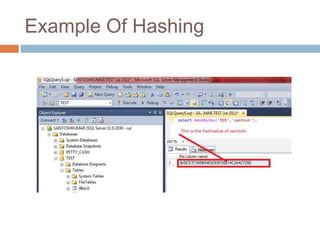
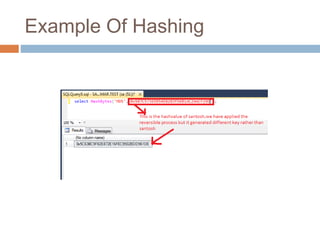
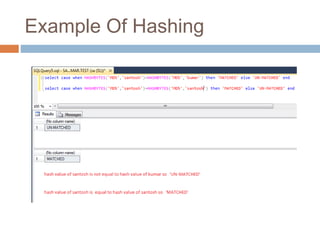
 A hash function takes in data and returns back a 
fixed length block of bits such that any change to 
the data should result in a different block. 
HASHBYTES ( '<algorithm>', { @input | 'input' } ) 
<algorithm>::= MD2 | MD4 | MD5 | SHA | SHA1 | 
SHA2_256 | SHA2_512
HASH FUNCTION
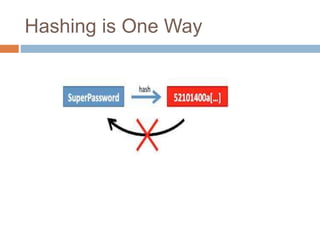
Hashing is One Way
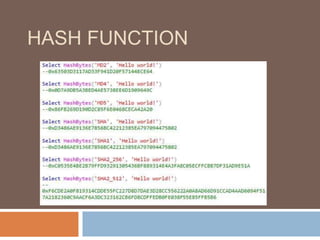
Example Of Hashing
Example Of Hashing
Example Of Hashing
Encryption
WHAT IS ECRYPTION 
 A process that converts original information , 
plain text to difficult to interpret. 
 Done by using encryption algorithm.
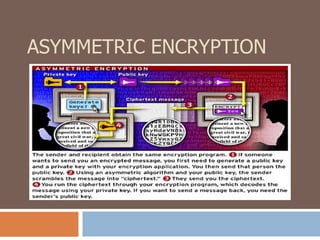
ASYMMETRIC ENCRYPTION
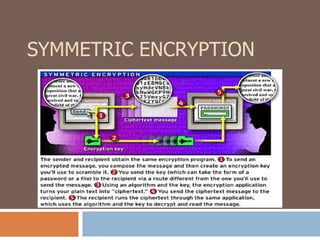
SYMMETRIC ENCRYPTION
WHICH ONE IS BETTER? 
Although, symmetric encryption is fast, it is not as 
safe as asymmetric encryption because someone 
could “steal” the key and decode the messages. But 
because of its speed, it's commonly used for e-commerce 
transactions. 
 Asymmetric encryption is more complex--and 
more secure. Asymmetric encryption's added 
safety comes at a price: More computation is 
required, so the process takes longer.
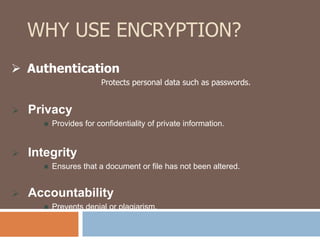
WHY USE ENCRYPTION? 
 Authentication 
 Privacy 
Protects personal data such as passwords. 
 Provides for confidentiality of private information. 
 Integrity 
 Ensures that a document or file has not been altered. 
 Accountability 
 Prevents denial or plagiarism.
TRANSPARENT DATA 
ENCRYPTION 
TDE is a new feature in SQL Server 2008; it 
provides real time encryption of data and log 
files. Data is encrypted before it is written to disk; 
data is decrypted when it is read from disk. The 
"transparent" aspect of TDE is that the encryption is 
performed by the database engine and SQL Server 
clients are completely unaware of it. There is 
absolutely no code that needs to be written to 
perform the encryption and decryption. There are a 
couple of steps to be performed to prepare the 
database for TDE, then the encryption is turned on 
at the database level via an ALTER DATBASE 
command.
TRANSPARENT DATA 
ENCRYPTION 
 Create a master key 
 Create or obtain a certificate protected by the 
master key 
 Create a database encryption key and protect it 
by the certificate 
 Set the database to use encryption
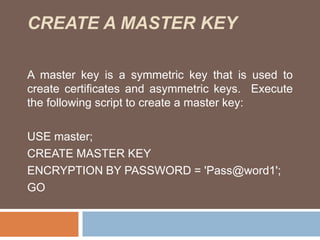
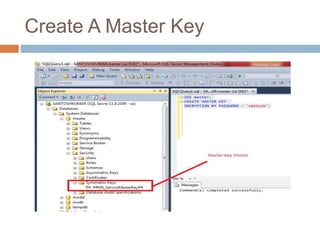
CREATE A MASTER KEY 
A master key is a symmetric key that is used to 
create certificates and asymmetric keys. Execute 
the following script to create a master key: 
USE master; 
CREATE MASTER KEY 
ENCRYPTION BY PASSWORD = 'Pass@word1'; 
GO
Create A Master Key
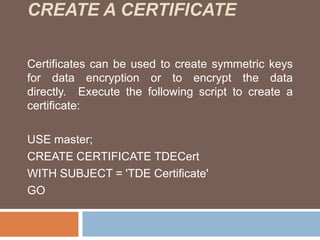
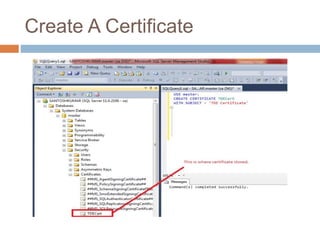
CREATE A CERTIFICATE 
Certificates can be used to create symmetric keys 
for data encryption or to encrypt the data 
directly. Execute the following script to create a 
certificate: 
USE master; 
CREATE CERTIFICATE TDECert 
WITH SUBJECT = 'TDE Certificate' 
GO
Create A Certificate
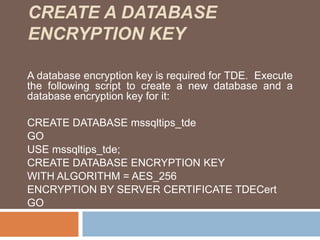
CREATE A DATABASE 
ENCRYPTION KEY 
A database encryption key is required for TDE. Execute 
the following script to create a new database and a 
database encryption key for it: 
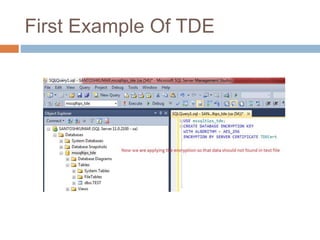
CREATE DATABASE mssqltips_tde 
GO 
USE mssqltips_tde; 
CREATE DATABASE ENCRYPTION KEY 
WITH ALGORITHM = AES_256 
ENCRYPTION BY SERVER CERTIFICATE TDECert 
GO
ENABLE TDE 
The final step required to implement TDE is to 
execute the following script: 
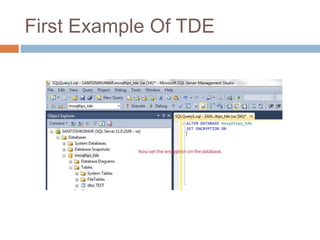
ALTER DATABASE mssqltips_tde 
SET ENCRYPTION ON
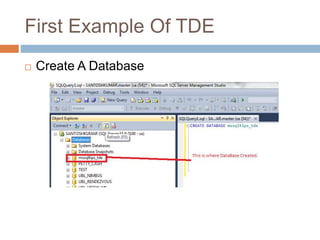
First Example Of TDE 
 Create A Database
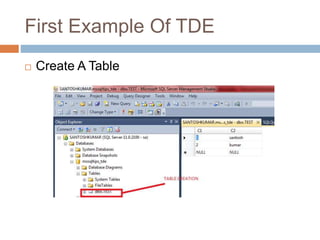
First Example Of TDE 
 Create A Table
First Example Of TDE 
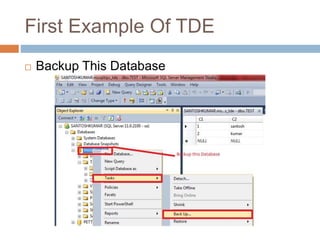
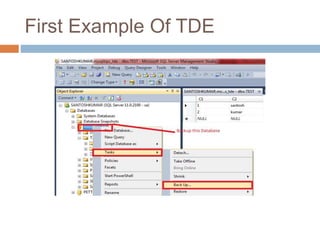
 Backup This Database
First Example Of TDE 
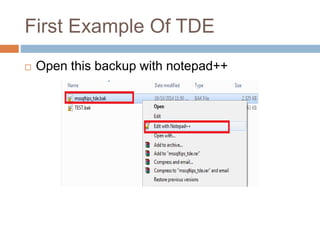
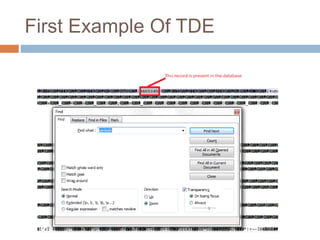
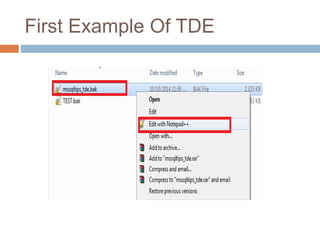
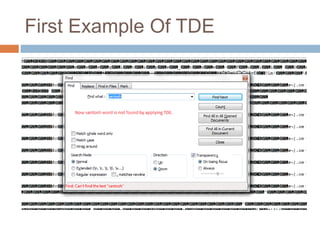
 Open this backup with notepad++
First Example Of TDE
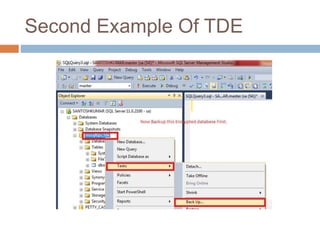
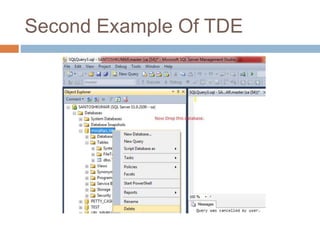
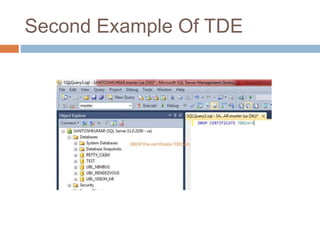
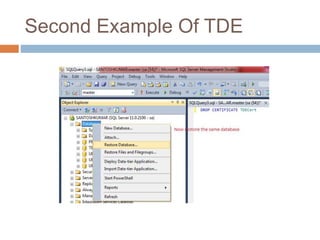
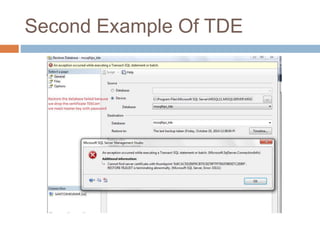
Second Example Of TDE
Any Question???????
Thank you.!

Presentation

  • 1.
  • 2.
    CONTENTS 1 Indexing 1.1 Problem 1.2 What is Indexing 1.3 Types 1.4 Clustered Index 1.5 Non-Clustered Index 1.6 Unique Index 1.7 When To Create Index And When Not 2 Hashing 2.1 Problem 2.2 What is Hashing 2.3 Algorithms Used In Hashing 2.4 Hash Function 3 Encryption 3.1 What is Encryption 3.2 Asymmetric Encryption 3.3 Symmetric Encryption 3.4 Which one is better. 3.5 Why Use Encryption 3.6 Transparent Data Encryption
  • 3.
  • 4.
    PROBLEM  Performance  Data Searching
  • 5.
    WHAT IS INDEXING  An index can be created in a table to find data more quickly and efficiently.  great indexing can make your application nimble and fast.
  • 6.
    TYPES  ClusteredIndex  Non-Clustered Index  Unique Index
  • 7.
    CLUSTERED INDEX It sorts and stores data rows in a table, based on key values.  Sytax to create Clustered Index: CREATE CLUSTERED INDEX Index_Name ON Schema.TableName(Column);
  • 8.
    CLUSTERED INDEX This is also called implicit index because It is automatically created by creating primary key.  Why Clustered Index can not created more than one column???
  • 9.
  • 10.
    NON-CLUSTERED INDEX It contains a key value and a pointer to the data in the heap or clustered index.  Syntax to create non-clustered Index: CREATE INDEX Index_Name ON Schema.T ableName(Column);  Can it be created more than one column in a table???
  • 11.
    UNIQUE INDEX A unique index ensures that the index key contains no duplicate values.  The basic system to create : CREATE UNIQUE INDEX index_name on table_name (column_name);  Uniqueness can be a property of both clustered and nonclustered indexes.
  • 12.
    WHEN TO CREATEINDEX AND WHEN NOT  Indexes should not be used on small tables.  Tables that have frequent, large batch update or insert operations.  Indexes should not be used on columns that contain a high number of NULL values.  Columns that are frequently manipulated should not be indexed.
  • 13.
  • 14.
    PROBLEM  Security  Data Stolen
  • 15.
    WHAT IS HASHING  Hashing is used to hash some input.  In this we use hash function for hashing.
  • 16.
    ALGORITHMS USED IN HASHING  MD2  MD4  MD5  SHA  SHA1  SHA2-256  SHA2-512
  • 17.
    HASH FUNCTION A hash function takes in data and returns back a fixed length block of bits such that any change to the data should result in a different block. HASHBYTES ( '<algorithm>', { @input | 'input' } ) <algorithm>::= MD2 | MD4 | MD5 | SHA | SHA1 | SHA2_256 | SHA2_512
  • 18.
  • 19.
  • 20.
  • 21.
  • 22.
  • 23.
  • 24.
    WHAT IS ECRYPTION  A process that converts original information , plain text to difficult to interpret.  Done by using encryption algorithm.
  • 25.
  • 26.
  • 27.
    WHICH ONE ISBETTER? Although, symmetric encryption is fast, it is not as safe as asymmetric encryption because someone could “steal” the key and decode the messages. But because of its speed, it's commonly used for e-commerce transactions.  Asymmetric encryption is more complex--and more secure. Asymmetric encryption's added safety comes at a price: More computation is required, so the process takes longer.
  • 28.
    WHY USE ENCRYPTION?  Authentication  Privacy Protects personal data such as passwords.  Provides for confidentiality of private information.  Integrity  Ensures that a document or file has not been altered.  Accountability  Prevents denial or plagiarism.
  • 29.
    TRANSPARENT DATA ENCRYPTION TDE is a new feature in SQL Server 2008; it provides real time encryption of data and log files. Data is encrypted before it is written to disk; data is decrypted when it is read from disk. The "transparent" aspect of TDE is that the encryption is performed by the database engine and SQL Server clients are completely unaware of it. There is absolutely no code that needs to be written to perform the encryption and decryption. There are a couple of steps to be performed to prepare the database for TDE, then the encryption is turned on at the database level via an ALTER DATBASE command.
  • 30.
    TRANSPARENT DATA ENCRYPTION  Create a master key  Create or obtain a certificate protected by the master key  Create a database encryption key and protect it by the certificate  Set the database to use encryption
  • 31.
    CREATE A MASTERKEY A master key is a symmetric key that is used to create certificates and asymmetric keys. Execute the following script to create a master key: USE master; CREATE MASTER KEY ENCRYPTION BY PASSWORD = 'Pass@word1'; GO
  • 32.
  • 33.
    CREATE A CERTIFICATE Certificates can be used to create symmetric keys for data encryption or to encrypt the data directly. Execute the following script to create a certificate: USE master; CREATE CERTIFICATE TDECert WITH SUBJECT = 'TDE Certificate' GO
  • 34.
  • 35.
    CREATE A DATABASE ENCRYPTION KEY A database encryption key is required for TDE. Execute the following script to create a new database and a database encryption key for it: CREATE DATABASE mssqltips_tde GO USE mssqltips_tde; CREATE DATABASE ENCRYPTION KEY WITH ALGORITHM = AES_256 ENCRYPTION BY SERVER CERTIFICATE TDECert GO
  • 36.
    ENABLE TDE Thefinal step required to implement TDE is to execute the following script: ALTER DATABASE mssqltips_tde SET ENCRYPTION ON
  • 37.
    First Example OfTDE  Create A Database
  • 38.
    First Example OfTDE  Create A Table
  • 39.
    First Example OfTDE  Backup This Database
  • 40.
    First Example OfTDE  Open this backup with notepad++
  • 41.
  • 42.
  • 43.
  • 44.
  • 45.
  • 46.
  • 47.
  • 48.
  • 49.
  • 50.
  • 51.
  • 52.
  • 53.