SQL SERVER 2016
ALWAYS ENCRYPTED
MIDLANDS UK SQL SERVER USER GROUP
NOVEMBER 2016
Duncan Greaves MSc, CISSP, MCSE
PhD Researcher Centre for Business in Society (CBiS)
WHY ENCRYPT? Increase in Data Breaches (Frequency & Size).
 The database is a single store with millions of rows.
 SQL Server is secure, but all databases are vulnerable to information
loss and leakage.
 Changes in Business Computing
 Adoption of cloud computing, IoT, and Services
 Collaboration with external enterprises.
 Internal Risk is lower
 Enforces Separation of Duties
 Prevents unauthorised browsing using privileges and data visibility.
 Audit Changes / Policy / DLP
 Take an Active Security Posture
 Assume a breach has happened.
 Decrease attack surface area.
ENCRYPTION OPTIONS USING SQL SERVER
Target SQL Server Feature Usage Scenario
Drive BitLocker Laptop / USB Security
Directory Folder NTFS Encryption
Connection SSL/TLS Encryption by Certificate
Database Backup Backup Encryption Backup file encryption
Database Files
Transparent Data Encryption
(TDE)
Database and Backup file
encryption
Data (Column/ Cell)
Encryption by Certificate ,
Symmetric key, Asymmetric key
or Passphrase
Sensitive data encryption
Data (Table/ Column/
Cell)
Always Encrypted End to End encryption.
Also Consider:
Row Level Security Department Data
HashBytes function Credit Card CVV
Data Masking Credit Card Number
SQL SERVER ALWAYS ENCRYPTED
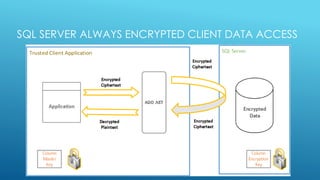
 Data is ‘Always Encrypted’ , stored as encrypted cipher text in
the database.
 Allows client software to handle sensitive data without ever
revealing the Master key to SQL Server.
 Field Encryption and Decryption is performed by a security
layer on the client.
 Client Receives information from SQL Server with encrypted
results to allow it to decrypt – Column encryption key, Key
Store Location, Key Path, Encryption used.
 Encryption keys can be held in the Windows Certificate Store,
External Security module or the Azure key vault.
SQL SERVER ALWAYS ENCRYPTED CLIENT DATA ACCESS
SQL SERVER ALWAYS ENCRYPTED
 SQL Server Always Encrypted uses Symmetric key encryption.
 Involves configuring encryption on the server and performing
encryption or decryption on the client to protect the ‘data
objects’.
 Data Inserts MUST use a client application using ADO.net
parameterised queries.
 (Cannot use SSMS to insert or update)
 SQL client code must use version .Net 4.6 onwards.
 SSMS CAN be used to select encrypted fields using the Connection
Option
 Column Encryption Setting=Enabled
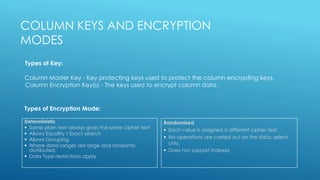
Deterministic
 Same plain text always gives the same cipher text
 Allows Equality / Exact search
 Allows Grouping
 Where data ranges are large and randomly
distributed.
 Data Type restrictions apply
Randomised
 Each value is assigned a different cipher text.
 No operations are carried out on the data, select
only.
 Does not support Indexes
COLUMN KEYS AND ENCRYPTION
MODES
Column Master Key - Key protecting keys used to protect the column encrypting keys.
Column Encryption Key(s) - The keys used to encrypt column data.
Types of Key:
Types of Encryption Mode:
Return Key Path & Details
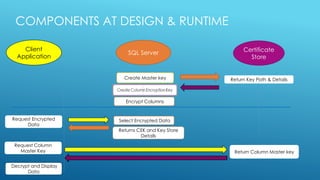
COMPONENTS AT DESIGN & RUNTIME
SQL Server
Certificate
Store
Client
Application
Create Master key
Encrypt Columns
Select Encrypted Data
Decrypt and Display
Data
Returns CEK and Key Store
Details
Request Column
Master Key Return Column Master key
Request Encrypted
Data
CLIENT DEVELOPMENT
 Ensure that the client has access to a key store containing the
Column Master Key .
 Certificate is stored in the /CurrentUser or /Machine store, or
accessed via the Azure key store or Hardware Security Module.
 Azure key store access can be granted using PowerShell scripts.
 The Key store provider name must match the name registered with
the client application.
 Modify connection strings to add Column Encryption
Setting=enabled;
 Parameters that use encrypted columns must always use the
SqlParameter class, not free text.
IMPLEMENTATION CONSIDERATIONS
 Only certain data types are suitable for encryption.
 Keys, Indexes and statistics on encrypted Deterministic fields.
 Cannot use indexes or optimisation on Randomised Fields.
 Increase in storage volume required.
 Decrease in IO due to the Encryption/Decryption round trip
overhead.
 Implement a Key Rotation and Cleansing Policy.
 Use different keys for Development, Test and Production.
STRETCH DATABASE
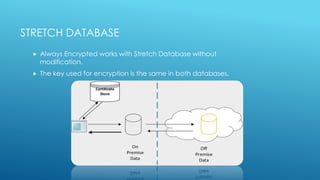
 Always Encrypted works with Stretch Database without
modification.
 The key used for encryption is the same in both databases.
OTHER SQL TOOLS
 Always Encrypted can be utilised by any client written
using the .Net 4.6 library.
 ODBC Clients now available
 SQL Server Reporting Services
 Master Key must be installed on Report Server machine
 SQL Server Integration Services
 Set Connection property Column Encryption Setting = Enabled
 Use parameterised insert using ADO.net connection type
 Can be used to move data between tables
 Always Encrypted is NOT currently supported in Power BI
KEY MANAGEMENT
 Cycle Keys on a frequent basis as part of security policy.
 Rotation creates a second encryption key and uses this to encrypt data
into a second column.
 The keys used by the client application are retired / replaced with the
new encryption key.
 When all clients are using the new key the old encryption column is
removed.
 SSMS Wizard assists in key rotation.
CONCLUSION
 Sensitive data leakage continues to present significant and growing business
challenges.
 Encryption is a major tool in countering this threat when used as part of a
defence in depth approach to information security:
 SQL always encrypted protects data in transit, at rest and in memory by holding
data values as cipher text (non readable).
 The ADO.net 4.6 library works with SQL server to manage the complexity of
implementing the protection of data in use and in transit.
 Can be used in SSIS packages.
 SSMS is already implemented as an Always Encrypted enabled client, aiding
the protection of data from administrators.
 Existing client apps require minor code changes to enable this functionality.
FURTHER READING & CONTACT DETAILS
https://msdn.microsoft.com/en-us/library/mt163865.aspx Database
engine
https://msdn.microsoft.com/library/mt147923.aspx Client
Development
https://blogs.msdn.microsoft.com/sqlsecurity/tag/always-encrypted/
Microsoft Security Blog
greavesd@uni.coventry.ac.uk
@duncan_greaves
InformationWithInsight.com

Sql Server 2016 Always Encrypted

  • 1.
    SQL SERVER 2016 ALWAYSENCRYPTED MIDLANDS UK SQL SERVER USER GROUP NOVEMBER 2016 Duncan Greaves MSc, CISSP, MCSE PhD Researcher Centre for Business in Society (CBiS)
  • 2.
    WHY ENCRYPT? Increasein Data Breaches (Frequency & Size).  The database is a single store with millions of rows.  SQL Server is secure, but all databases are vulnerable to information loss and leakage.  Changes in Business Computing  Adoption of cloud computing, IoT, and Services  Collaboration with external enterprises.  Internal Risk is lower  Enforces Separation of Duties  Prevents unauthorised browsing using privileges and data visibility.  Audit Changes / Policy / DLP  Take an Active Security Posture  Assume a breach has happened.  Decrease attack surface area.
  • 3.
    ENCRYPTION OPTIONS USINGSQL SERVER Target SQL Server Feature Usage Scenario Drive BitLocker Laptop / USB Security Directory Folder NTFS Encryption Connection SSL/TLS Encryption by Certificate Database Backup Backup Encryption Backup file encryption Database Files Transparent Data Encryption (TDE) Database and Backup file encryption Data (Column/ Cell) Encryption by Certificate , Symmetric key, Asymmetric key or Passphrase Sensitive data encryption Data (Table/ Column/ Cell) Always Encrypted End to End encryption. Also Consider: Row Level Security Department Data HashBytes function Credit Card CVV Data Masking Credit Card Number
  • 4.
    SQL SERVER ALWAYSENCRYPTED  Data is ‘Always Encrypted’ , stored as encrypted cipher text in the database.  Allows client software to handle sensitive data without ever revealing the Master key to SQL Server.  Field Encryption and Decryption is performed by a security layer on the client.  Client Receives information from SQL Server with encrypted results to allow it to decrypt – Column encryption key, Key Store Location, Key Path, Encryption used.  Encryption keys can be held in the Windows Certificate Store, External Security module or the Azure key vault.
  • 5.
    SQL SERVER ALWAYSENCRYPTED CLIENT DATA ACCESS
  • 6.
    SQL SERVER ALWAYSENCRYPTED  SQL Server Always Encrypted uses Symmetric key encryption.  Involves configuring encryption on the server and performing encryption or decryption on the client to protect the ‘data objects’.  Data Inserts MUST use a client application using ADO.net parameterised queries.  (Cannot use SSMS to insert or update)  SQL client code must use version .Net 4.6 onwards.  SSMS CAN be used to select encrypted fields using the Connection Option  Column Encryption Setting=Enabled
  • 7.
    Deterministic  Same plaintext always gives the same cipher text  Allows Equality / Exact search  Allows Grouping  Where data ranges are large and randomly distributed.  Data Type restrictions apply Randomised  Each value is assigned a different cipher text.  No operations are carried out on the data, select only.  Does not support Indexes COLUMN KEYS AND ENCRYPTION MODES Column Master Key - Key protecting keys used to protect the column encrypting keys. Column Encryption Key(s) - The keys used to encrypt column data. Types of Key: Types of Encryption Mode:
  • 8.
    Return Key Path& Details COMPONENTS AT DESIGN & RUNTIME SQL Server Certificate Store Client Application Create Master key Encrypt Columns Select Encrypted Data Decrypt and Display Data Returns CEK and Key Store Details Request Column Master Key Return Column Master key Request Encrypted Data
  • 9.
    CLIENT DEVELOPMENT  Ensurethat the client has access to a key store containing the Column Master Key .  Certificate is stored in the /CurrentUser or /Machine store, or accessed via the Azure key store or Hardware Security Module.  Azure key store access can be granted using PowerShell scripts.  The Key store provider name must match the name registered with the client application.  Modify connection strings to add Column Encryption Setting=enabled;  Parameters that use encrypted columns must always use the SqlParameter class, not free text.
  • 10.
    IMPLEMENTATION CONSIDERATIONS  Onlycertain data types are suitable for encryption.  Keys, Indexes and statistics on encrypted Deterministic fields.  Cannot use indexes or optimisation on Randomised Fields.  Increase in storage volume required.  Decrease in IO due to the Encryption/Decryption round trip overhead.  Implement a Key Rotation and Cleansing Policy.  Use different keys for Development, Test and Production.
  • 11.
    STRETCH DATABASE  AlwaysEncrypted works with Stretch Database without modification.  The key used for encryption is the same in both databases.
  • 12.
    OTHER SQL TOOLS Always Encrypted can be utilised by any client written using the .Net 4.6 library.  ODBC Clients now available  SQL Server Reporting Services  Master Key must be installed on Report Server machine  SQL Server Integration Services  Set Connection property Column Encryption Setting = Enabled  Use parameterised insert using ADO.net connection type  Can be used to move data between tables  Always Encrypted is NOT currently supported in Power BI
  • 13.
    KEY MANAGEMENT  CycleKeys on a frequent basis as part of security policy.  Rotation creates a second encryption key and uses this to encrypt data into a second column.  The keys used by the client application are retired / replaced with the new encryption key.  When all clients are using the new key the old encryption column is removed.  SSMS Wizard assists in key rotation.
  • 14.
    CONCLUSION  Sensitive dataleakage continues to present significant and growing business challenges.  Encryption is a major tool in countering this threat when used as part of a defence in depth approach to information security:  SQL always encrypted protects data in transit, at rest and in memory by holding data values as cipher text (non readable).  The ADO.net 4.6 library works with SQL server to manage the complexity of implementing the protection of data in use and in transit.  Can be used in SSIS packages.  SSMS is already implemented as an Always Encrypted enabled client, aiding the protection of data from administrators.  Existing client apps require minor code changes to enable this functionality.
  • 15.
    FURTHER READING &CONTACT DETAILS https://msdn.microsoft.com/en-us/library/mt163865.aspx Database engine https://msdn.microsoft.com/library/mt147923.aspx Client Development https://blogs.msdn.microsoft.com/sqlsecurity/tag/always-encrypted/ Microsoft Security Blog greavesd@uni.coventry.ac.uk @duncan_greaves InformationWithInsight.com