SQL SERVER Column Level Encryption
An important option to be considered during restricting unauthorized access to data is to
encrypt data so that even if somebody was able to reach to data it is not discernable by
a simple query.
Please walk through the below processes of encrypting columns in a table contains
sensitive data by using SQL Server symmetric key encryption. SQL Server has
an encryption hierarchy that needs to be followed in order to support the encryption
capabilities.
Step 1 - Create a sample SQL Server table
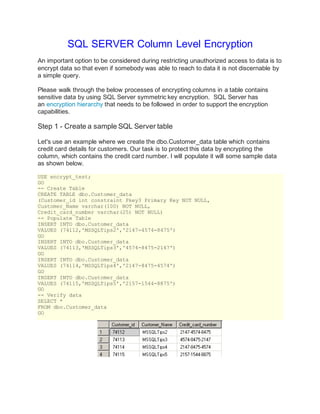
Let's use an example where we create the dbo.Customer_data table which contains
credit card details for customers. Our task is to protect this data by encrypting the
column, which contains the credit card number. I will populate it will some sample data
as shown below.
USE encrypt_test;
GO
-- Create Table
CREATE TABLE dbo.Customer_data
(Customer_id int constraint Pkey3 Primary Key NOT NULL,
Customer_Name varchar(100) NOT NULL,
Credit_card_number varchar(25) NOT NULL)
-- Populate Table
INSERT INTO dbo.Customer_data
VALUES (74112,'MSSQLTips2','2147-4574-8475')
GO
INSERT INTO dbo.Customer_data
VALUES (74113,'MSSQLTips3','4574-8475-2147')
GO
INSERT INTO dbo.Customer_data
VALUES (74114,'MSSQLTips4','2147-8475-4574')
GO
INSERT INTO dbo.Customer_data
VALUES (74115,'MSSQLTips5','2157-1544-8875')
GO
-- Verify data
SELECT *
FROM dbo.Customer_data
GO
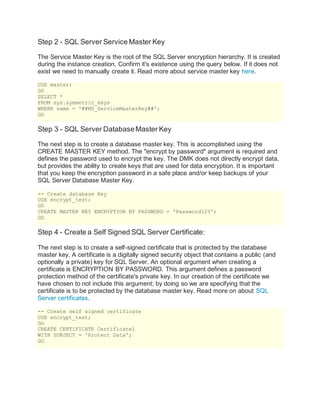
Step 2 - SQL Server Service Master Key
The Service Master Key is the root of the SQL Server encryption hierarchy. It is created
during the instance creation. Confirm it's existence using the query below. If it does not
exist we need to manually create it. Read more about service master key here.
USE master;
GO
SELECT *
FROM sys.symmetric_keys
WHERE name = '##MS_ServiceMasterKey##';
GO
Step 3 - SQL Server DatabaseMaster Key
The next step is to create a database master key. This is accomplished using the
CREATE MASTER KEY method. The "encrypt by password" argument is required and
defines the password used to encrypt the key. The DMK does not directly encrypt data,
but provides the ability to create keys that are used for data encryption. It is important
that you keep the encryption password in a safe place and/or keep backups of your
SQL Server Database Master Key.
-- Create database Key
USE encrypt_test;
GO
CREATE MASTER KEY ENCRYPTION BY PASSWORD = 'Password123';
GO
Step 4 - Create a Self Signed SQL Server Certificate:
The next step is to create a self-signed certificate that is protected by the database
master key. A certificate is a digitally signed security object that contains a public (and
optionally a private) key for SQL Server. An optional argument when creating a
certificate is ENCRYPTION BY PASSWORD. This argument defines a password
protection method of the certificate's private key. In our creation of the certificate we
have chosen to not include this argument; by doing so we are specifying that the
certificate is to be protected by the database master key. Read more on about SQL
Server certificates.
-- Create self signed certificate
USE encrypt_test;
GO
CREATE CERTIFICATE Certificate1
WITH SUBJECT = 'Protect Data';
GO
Step 5 - SQL Server Symmetric Key
A symmetric key is one key that is used for both encryption and decryption. Encryption
and decryption by using a symmetric key is fast, and suitable for routine use with
sensitive data in the database. Read more about SQL Server Symmetric Keys.
-- Create symmetric Key
USE encrypt_test;
GO
CREATE SYMMETRIC KEY SymmetricKey1
WITH ALGORITHM = AES_256
ENCRYPTION BY CERTIFICATE Certificate1;
GO
Step 6 - Schema changes
An Encrypted column can only be of datatype varbinary and since the column we want
to encrypt is of datatype varchar, we have to create a new column and populate it with
encrypted values.
USE encrypt_test;
GO
ALTER TABLE Customer_data
ADD Credit_card_number_encrypt varbinary(MAX) NULL
GO
Step 7 - Encrypting the newly created column
To encrypt the data we will use the encryptbykey command. Below is a sample code
which can be used to encrypt the data. Please note that symmetric key needs to
opened before we can encrypt data and be sure you manually close the key else it will
remain open for the current session.
-- Populating encrypted data into new column
USE encrypt_test;
GO
-- Opens the symmetric key for use
OPEN SYMMETRIC KEY SymmetricKey1
DECRYPTION BY CERTIFICATE Certificate1;
GO
UPDATE Customer_data
SET Credit_card_number_encrypt = EncryptByKey
(Key_GUID('SymmetricKey1'),Credit_card_number)
FROM dbo.Customer_data;
GO
-- Closes the symmetric key
CLOSE SYMMETRIC KEY SymmetricKey1;
GO
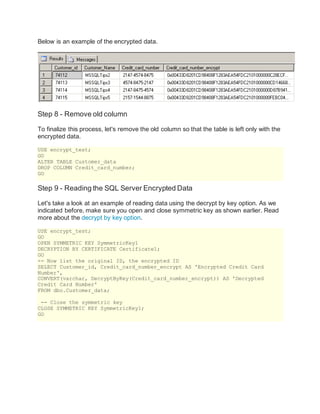
Below is an example of the encrypted data.
Step 8 - Remove old column
To finalize this process, let's remove the old column so that the table is left only with the
encrypted data.
USE encrypt_test;
GO
ALTER TABLE Customer_data
DROP COLUMN Credit_card_number;
GO
Step 9 - Reading the SQL Server Encrypted Data
Let's take a look at an example of reading data using the decrypt by key option. As we
indicated before, make sure you open and close symmetric key as shown earlier. Read
more about the decrypt by key option.
USE encrypt_test;
GO
OPEN SYMMETRIC KEY SymmetricKey1
DECRYPTION BY CERTIFICATE Certificate1;
GO
-- Now list the original ID, the encrypted ID
SELECT Customer_id, Credit_card_number_encrypt AS 'Encrypted Credit Card
Number',
CONVERT(varchar, DecryptByKey(Credit_card_number_encrypt)) AS 'Decrypted
Credit Card Number'
FROM dbo.Customer_data;
-- Close the symmetric key
CLOSE SYMMETRIC KEY SymmetricKey1;
GO
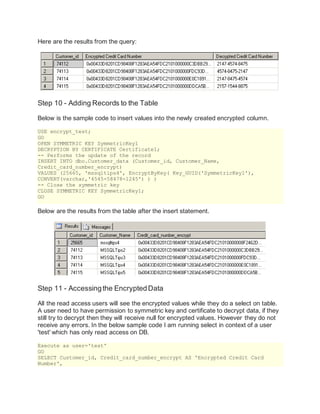
Here are the results from the query:
Step 10 - Adding Records to the Table
Below is the sample code to insert values into the newly created encrypted column.
USE encrypt_test;
GO
OPEN SYMMETRIC KEY SymmetricKey1
DECRYPTION BY CERTIFICATE Certificate1;
-- Performs the update of the record
INSERT INTO dbo.Customer_data (Customer_id, Customer_Name,
Credit_card_number_encrypt)
VALUES (25665, 'mssqltips4', EncryptByKey( Key_GUID('SymmetricKey1'),
CONVERT(varchar,'4545-58478-1245') ) )
-- Close the symmetric key
CLOSE SYMMETRIC KEY SymmetricKey1;
GO
Below are the results from the table after the insert statement.
Step 11 - Accessingthe EncryptedData
All the read access users will see the encrypted values while they do a select on table.
A user need to have permission to symmetric key and certificate to decrypt data, if they
still try to decrypt then they will receive null for encrypted values. However they do not
receive any errors. In the below sample code I am running select in context of a user
'test' which has only read access on DB.
Execute as user='test'
GO
SELECT Customer_id, Credit_card_number_encrypt AS 'Encrypted Credit Card
Number',
CONVERT(varchar, DecryptByKey(Credit_card_number_encrypt)) AS 'Decrypted
Credit Card Number'
FROM dbo.Customer_data;
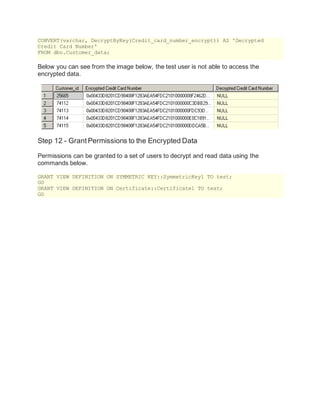
Below you can see from the image below, the test user is not able to access the
encrypted data.
Step 12 - Grant Permissions to the Encrypted Data
Permissions can be granted to a set of users to decrypt and read data using the
commands below.
GRANT VIEW DEFINITION ON SYMMETRIC KEY::SymmetricKey1 TO test;
GO
GRANT VIEW DEFINITION ON Certificate::Certificate1 TO test;
GO
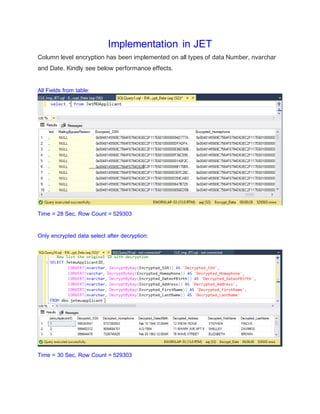
Implementation in JET
Column level encryption has been implemented on all types of data Number, nvarchar
and Date. Kindly see below performance effects.
All Fields from table:
Time = 28 Sec, Row Count = 529303
Only encrypted data select after decryption:
Time = 30 Sec, Row Count = 529303
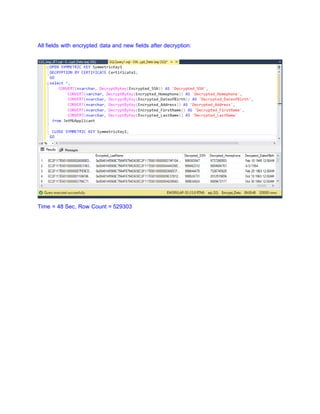
All fields with encrypted data and new fields after decryption:
Time = 48 Sec, Row Count = 529303

Sql server column level encryption

  • 1.
    SQL SERVER ColumnLevel Encryption An important option to be considered during restricting unauthorized access to data is to encrypt data so that even if somebody was able to reach to data it is not discernable by a simple query. Please walk through the below processes of encrypting columns in a table contains sensitive data by using SQL Server symmetric key encryption. SQL Server has an encryption hierarchy that needs to be followed in order to support the encryption capabilities. Step 1 - Create a sample SQL Server table Let's use an example where we create the dbo.Customer_data table which contains credit card details for customers. Our task is to protect this data by encrypting the column, which contains the credit card number. I will populate it will some sample data as shown below. USE encrypt_test; GO -- Create Table CREATE TABLE dbo.Customer_data (Customer_id int constraint Pkey3 Primary Key NOT NULL, Customer_Name varchar(100) NOT NULL, Credit_card_number varchar(25) NOT NULL) -- Populate Table INSERT INTO dbo.Customer_data VALUES (74112,'MSSQLTips2','2147-4574-8475') GO INSERT INTO dbo.Customer_data VALUES (74113,'MSSQLTips3','4574-8475-2147') GO INSERT INTO dbo.Customer_data VALUES (74114,'MSSQLTips4','2147-8475-4574') GO INSERT INTO dbo.Customer_data VALUES (74115,'MSSQLTips5','2157-1544-8875') GO -- Verify data SELECT * FROM dbo.Customer_data GO
  • 2.
    Step 2 -SQL Server Service Master Key The Service Master Key is the root of the SQL Server encryption hierarchy. It is created during the instance creation. Confirm it's existence using the query below. If it does not exist we need to manually create it. Read more about service master key here. USE master; GO SELECT * FROM sys.symmetric_keys WHERE name = '##MS_ServiceMasterKey##'; GO Step 3 - SQL Server DatabaseMaster Key The next step is to create a database master key. This is accomplished using the CREATE MASTER KEY method. The "encrypt by password" argument is required and defines the password used to encrypt the key. The DMK does not directly encrypt data, but provides the ability to create keys that are used for data encryption. It is important that you keep the encryption password in a safe place and/or keep backups of your SQL Server Database Master Key. -- Create database Key USE encrypt_test; GO CREATE MASTER KEY ENCRYPTION BY PASSWORD = 'Password123'; GO Step 4 - Create a Self Signed SQL Server Certificate: The next step is to create a self-signed certificate that is protected by the database master key. A certificate is a digitally signed security object that contains a public (and optionally a private) key for SQL Server. An optional argument when creating a certificate is ENCRYPTION BY PASSWORD. This argument defines a password protection method of the certificate's private key. In our creation of the certificate we have chosen to not include this argument; by doing so we are specifying that the certificate is to be protected by the database master key. Read more on about SQL Server certificates. -- Create self signed certificate USE encrypt_test; GO CREATE CERTIFICATE Certificate1 WITH SUBJECT = 'Protect Data'; GO
  • 3.
    Step 5 -SQL Server Symmetric Key A symmetric key is one key that is used for both encryption and decryption. Encryption and decryption by using a symmetric key is fast, and suitable for routine use with sensitive data in the database. Read more about SQL Server Symmetric Keys. -- Create symmetric Key USE encrypt_test; GO CREATE SYMMETRIC KEY SymmetricKey1 WITH ALGORITHM = AES_256 ENCRYPTION BY CERTIFICATE Certificate1; GO Step 6 - Schema changes An Encrypted column can only be of datatype varbinary and since the column we want to encrypt is of datatype varchar, we have to create a new column and populate it with encrypted values. USE encrypt_test; GO ALTER TABLE Customer_data ADD Credit_card_number_encrypt varbinary(MAX) NULL GO Step 7 - Encrypting the newly created column To encrypt the data we will use the encryptbykey command. Below is a sample code which can be used to encrypt the data. Please note that symmetric key needs to opened before we can encrypt data and be sure you manually close the key else it will remain open for the current session. -- Populating encrypted data into new column USE encrypt_test; GO -- Opens the symmetric key for use OPEN SYMMETRIC KEY SymmetricKey1 DECRYPTION BY CERTIFICATE Certificate1; GO UPDATE Customer_data SET Credit_card_number_encrypt = EncryptByKey (Key_GUID('SymmetricKey1'),Credit_card_number) FROM dbo.Customer_data; GO -- Closes the symmetric key CLOSE SYMMETRIC KEY SymmetricKey1; GO
  • 4.
    Below is anexample of the encrypted data. Step 8 - Remove old column To finalize this process, let's remove the old column so that the table is left only with the encrypted data. USE encrypt_test; GO ALTER TABLE Customer_data DROP COLUMN Credit_card_number; GO Step 9 - Reading the SQL Server Encrypted Data Let's take a look at an example of reading data using the decrypt by key option. As we indicated before, make sure you open and close symmetric key as shown earlier. Read more about the decrypt by key option. USE encrypt_test; GO OPEN SYMMETRIC KEY SymmetricKey1 DECRYPTION BY CERTIFICATE Certificate1; GO -- Now list the original ID, the encrypted ID SELECT Customer_id, Credit_card_number_encrypt AS 'Encrypted Credit Card Number', CONVERT(varchar, DecryptByKey(Credit_card_number_encrypt)) AS 'Decrypted Credit Card Number' FROM dbo.Customer_data; -- Close the symmetric key CLOSE SYMMETRIC KEY SymmetricKey1; GO
  • 5.
    Here are theresults from the query: Step 10 - Adding Records to the Table Below is the sample code to insert values into the newly created encrypted column. USE encrypt_test; GO OPEN SYMMETRIC KEY SymmetricKey1 DECRYPTION BY CERTIFICATE Certificate1; -- Performs the update of the record INSERT INTO dbo.Customer_data (Customer_id, Customer_Name, Credit_card_number_encrypt) VALUES (25665, 'mssqltips4', EncryptByKey( Key_GUID('SymmetricKey1'), CONVERT(varchar,'4545-58478-1245') ) ) -- Close the symmetric key CLOSE SYMMETRIC KEY SymmetricKey1; GO Below are the results from the table after the insert statement. Step 11 - Accessingthe EncryptedData All the read access users will see the encrypted values while they do a select on table. A user need to have permission to symmetric key and certificate to decrypt data, if they still try to decrypt then they will receive null for encrypted values. However they do not receive any errors. In the below sample code I am running select in context of a user 'test' which has only read access on DB. Execute as user='test' GO SELECT Customer_id, Credit_card_number_encrypt AS 'Encrypted Credit Card Number',
  • 6.
    CONVERT(varchar, DecryptByKey(Credit_card_number_encrypt)) AS'Decrypted Credit Card Number' FROM dbo.Customer_data; Below you can see from the image below, the test user is not able to access the encrypted data. Step 12 - Grant Permissions to the Encrypted Data Permissions can be granted to a set of users to decrypt and read data using the commands below. GRANT VIEW DEFINITION ON SYMMETRIC KEY::SymmetricKey1 TO test; GO GRANT VIEW DEFINITION ON Certificate::Certificate1 TO test; GO
  • 7.
    Implementation in JET Columnlevel encryption has been implemented on all types of data Number, nvarchar and Date. Kindly see below performance effects. All Fields from table: Time = 28 Sec, Row Count = 529303 Only encrypted data select after decryption: Time = 30 Sec, Row Count = 529303
  • 8.
    All fields withencrypted data and new fields after decryption: Time = 48 Sec, Row Count = 529303