SECURING YOUR AZURE WEB
APP WITH ASP.NET CORE
DATA PROTECTION
MICHAEL MELUSKY - @MRJAVASCRIPT
OCTOBER 22, 2016 – PHILLY.NET 2016.2
AGENDA
• Discussing Windows encryption standards before ASP.NET core
• Build a basic ASP.NET core MVC application
• Introduce encryption using the new Data Protector framework
• Obtain a free SSL certificate from Lets Encrypt!
ABOUT THE SPEAKER
• Michael Melusky
• Software developer at Audacious Inquiry in Baltimore, MD
• Adjunct instructor at Penn State University and Franklin and Marshall College
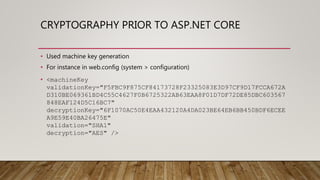
CRYPTOGRAPHY PRIOR TO ASP.NET CORE
• Used machine key generation
• For instance in web.config (system > configuration)
• <machineKey
validationKey="F5FBC9F875CF84173728F23325083E3D97CF9D17FCCA672A
D310BE069361BD4C55C4627F0B6725322AB63EAA8F01D7DF72DE85DBC603567
848EAF124D5C16BC7"
decryptionKey="6F1070AC50E4EAA432120A4DA023BE64EB6BB450BDF6ECEE
A9E59E40BA26475E"
validation="SHA1"
decryption="AES" />
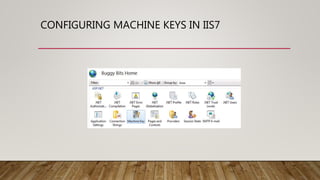
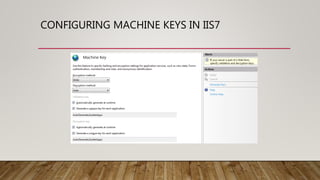
PURPOSE OF MACHINE KEY
• Configures the algorithms and keys used for:
• Encryption and decryption
• Validation of forms-authentication data and view-state data
• And also out of process session-state information
CONFIGURING MACHINE KEYS IN IIS7
HOW DOES THIS RELATE TO MODERN
APPLICATIONS TODAY?
• Microsoft introduced the Data Protector framework with ASP.NET Core 1.0
• Web applications need to store sensitive data
• Windows provides DPAPI for desktop applications but it unsuitable for web
applications
• The ASP.NET Core Data Protection stack provides an easy-to-use API developers can
use to protect data
• Includes key management and rotation
ASP.NET CORE DATA PROTECTION
• *** DEMO: Build a basic ASP.NET Core MVC web application ***
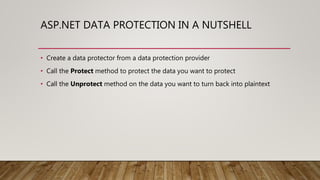
ASP.NET DATA PROTECTION IN A NUTSHELL
• Create a data protector from a data protection provider
• Call the Protect method to protect the data you want to protect
• Call the Unprotect method on the data you want to turn back into plaintext
ASP.NET CORE DATA PROTECTION
• *** DEMO: secure the sample ASP.NET web application ***
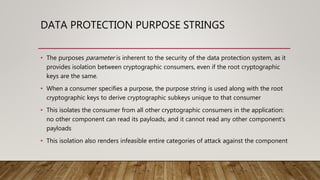
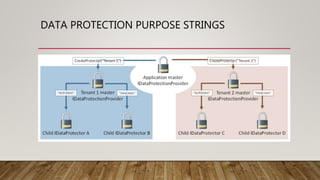
DATA PROTECTION PURPOSE STRINGS
• The purposes parameter is inherent to the security of the data protection system, as it
provides isolation between cryptographic consumers, even if the root cryptographic
keys are the same.
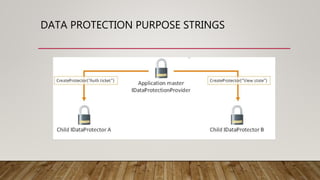
• When a consumer specifies a purpose, the purpose string is used along with the root
cryptographic keys to derive cryptographic subkeys unique to that consumer
• This isolates the consumer from all other cryptographic consumers in the application:
no other component can read its payloads, and it cannot read any other component’s
payloads
• This isolation also renders infeasible entire categories of attack against the component
DATA PROTECTION PURPOSE STRINGS
OTHER FEATURES OF ASP.NET CORE DATA
PROTECTION
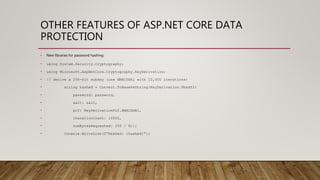
• New libraries for password hashing:
• using System.Security.Cryptography;
• using Microsoft.AspNetCore.Cryptography.KeyDerivation;
• // derive a 256-bit subkey (use HMACSHA1 with 10,000 iterations)
• string hashed = Convert.ToBase64String(KeyDerivation.Pbkdf2(
• password: password,
• salt: salt,
• prf: KeyDerivationPrf.HMACSHA1,
• iterationCount: 10000,
• numBytesRequested: 256 / 8));
• Console.WriteLine($"Hashed: {hashed}");
OTHER FEATURES OF ASP.NET CORE DATA
PROTECTION
• Timed Data Protector:
• developer wants to create a protected payload that expires after a set period of time
• Not recommended to use this for data which requires long-term or indefinite
persistence
POTENTIAL SHORTCOMINGS
• Deployment to a server farm:
• Want to synchronize:
• The application discriminator. This is a unique identifier for the application
• The master encryption key. This is the closest thing to machine key in the new system
• The encrypted set of session keys. This is a set of XML files that contain the valid session key(s) that can
be used to encrypt/decrypt state data
• Azure Web Apps is easier!
• All applications are installed to the same location, so the application discriminator lines up.
• Keys aren’t encrypted at rest, so there is no master encryption key.
• The session keys are put in a special folder location that is “magically” synchronized across all instances
of the Azure Web App
ASP.NET CORE DATA PROTECTION - KEY
MANAGEMENT
• The system tries to detect its operational environment and provide good zero-configuration
behavioral defaults. The heuristic used is as follows.
• If the system is being hosted in Azure Web Sites, keys are persisted to the
“%HOME%ASP.NETDataProtection-Keys” folder. This folder is backed by network storage and is
synchronized across all machines hosting the application. Keys are not protected at rest.
• If the user profile is available, keys are persisted to the “%LOCALAPPDATA%ASP.NETDataProtection-
Keys” folder. Additionally, if the operating system is Windows, they’ll be encrypted at rest using DPAPI.
• If the application is hosted in IIS, keys are persisted to the HKLM registry in a special registry key that is
ACLed only to the worker process account. Keys are encrypted at rest using DPAPI.
• If none of these conditions matches, keys are not persisted outside of the current process. When the
process shuts down, all generated keys will be lost.
ASP.NET CORE DATA PROTECTION - KEY LIFETIME
• Keys by default have a 90-day lifetime.
• When a key expires, the system will automatically generate a new key and set the
new key as the active key.
• As long as retired keys remain on the system you will still be able to decrypt any
data protected with them.
ASP.NET CORE DATA PROTECTION - DEFAULT
ALGORITHMS
• The default payload protection algorithm used is AES-256-CBC for confidentiality
and HMACSHA256 for authenticity.
• A 512-bit master key, rolled every 90 days, is used to derive the two sub-keys
used for these algorithms on a per-payload basis
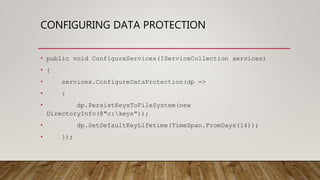
CONFIGURING DATA PROTECTION
• public void ConfigureServices(IServiceCollection services)
• {
• services.ConfigureDataProtection(dp =>
• {
• dp.PersistKeysToFileSystem(new
DirectoryInfo(@"c:keys"));
• dp.SetDefaultKeyLifetime(TimeSpan.FromDays(14));
• });
DEPLOYMENT TO AZURE
• *** DEMO: deploy app to Azure ***
WHAT’S LEFT?
• SSL Certificate for the web site
• Let’s Encrypt! - free, automated, and open certificate authority brought to you
by the non-profit Internet Security Research Group (ISRG).
LET’S ENCRYPT
• *** DEMO Let’s Encrypt on Azure ***
QUESTIONS?
• Thank you for coming
• Michael Melusky - @mrjavascript

Securing your azure web app with asp.net core data protection

  • 1.
    SECURING YOUR AZUREWEB APP WITH ASP.NET CORE DATA PROTECTION MICHAEL MELUSKY - @MRJAVASCRIPT OCTOBER 22, 2016 – PHILLY.NET 2016.2
  • 2.
    AGENDA • Discussing Windowsencryption standards before ASP.NET core • Build a basic ASP.NET core MVC application • Introduce encryption using the new Data Protector framework • Obtain a free SSL certificate from Lets Encrypt!
  • 3.
    ABOUT THE SPEAKER •Michael Melusky • Software developer at Audacious Inquiry in Baltimore, MD • Adjunct instructor at Penn State University and Franklin and Marshall College
  • 4.
    CRYPTOGRAPHY PRIOR TOASP.NET CORE • Used machine key generation • For instance in web.config (system > configuration) • <machineKey validationKey="F5FBC9F875CF84173728F23325083E3D97CF9D17FCCA672A D310BE069361BD4C55C4627F0B6725322AB63EAA8F01D7DF72DE85DBC603567 848EAF124D5C16BC7" decryptionKey="6F1070AC50E4EAA432120A4DA023BE64EB6BB450BDF6ECEE A9E59E40BA26475E" validation="SHA1" decryption="AES" />
  • 5.
    PURPOSE OF MACHINEKEY • Configures the algorithms and keys used for: • Encryption and decryption • Validation of forms-authentication data and view-state data • And also out of process session-state information
  • 6.
  • 7.
  • 8.
    HOW DOES THISRELATE TO MODERN APPLICATIONS TODAY? • Microsoft introduced the Data Protector framework with ASP.NET Core 1.0 • Web applications need to store sensitive data • Windows provides DPAPI for desktop applications but it unsuitable for web applications • The ASP.NET Core Data Protection stack provides an easy-to-use API developers can use to protect data • Includes key management and rotation
  • 9.
    ASP.NET CORE DATAPROTECTION • *** DEMO: Build a basic ASP.NET Core MVC web application ***
  • 10.
    ASP.NET DATA PROTECTIONIN A NUTSHELL • Create a data protector from a data protection provider • Call the Protect method to protect the data you want to protect • Call the Unprotect method on the data you want to turn back into plaintext
  • 11.
    ASP.NET CORE DATAPROTECTION • *** DEMO: secure the sample ASP.NET web application ***
  • 12.
    DATA PROTECTION PURPOSESTRINGS • The purposes parameter is inherent to the security of the data protection system, as it provides isolation between cryptographic consumers, even if the root cryptographic keys are the same. • When a consumer specifies a purpose, the purpose string is used along with the root cryptographic keys to derive cryptographic subkeys unique to that consumer • This isolates the consumer from all other cryptographic consumers in the application: no other component can read its payloads, and it cannot read any other component’s payloads • This isolation also renders infeasible entire categories of attack against the component
  • 13.
  • 14.
  • 15.
    OTHER FEATURES OFASP.NET CORE DATA PROTECTION • New libraries for password hashing: • using System.Security.Cryptography; • using Microsoft.AspNetCore.Cryptography.KeyDerivation; • // derive a 256-bit subkey (use HMACSHA1 with 10,000 iterations) • string hashed = Convert.ToBase64String(KeyDerivation.Pbkdf2( • password: password, • salt: salt, • prf: KeyDerivationPrf.HMACSHA1, • iterationCount: 10000, • numBytesRequested: 256 / 8)); • Console.WriteLine($"Hashed: {hashed}");
  • 16.
    OTHER FEATURES OFASP.NET CORE DATA PROTECTION • Timed Data Protector: • developer wants to create a protected payload that expires after a set period of time • Not recommended to use this for data which requires long-term or indefinite persistence
  • 17.
    POTENTIAL SHORTCOMINGS • Deploymentto a server farm: • Want to synchronize: • The application discriminator. This is a unique identifier for the application • The master encryption key. This is the closest thing to machine key in the new system • The encrypted set of session keys. This is a set of XML files that contain the valid session key(s) that can be used to encrypt/decrypt state data • Azure Web Apps is easier! • All applications are installed to the same location, so the application discriminator lines up. • Keys aren’t encrypted at rest, so there is no master encryption key. • The session keys are put in a special folder location that is “magically” synchronized across all instances of the Azure Web App
  • 18.
    ASP.NET CORE DATAPROTECTION - KEY MANAGEMENT • The system tries to detect its operational environment and provide good zero-configuration behavioral defaults. The heuristic used is as follows. • If the system is being hosted in Azure Web Sites, keys are persisted to the “%HOME%ASP.NETDataProtection-Keys” folder. This folder is backed by network storage and is synchronized across all machines hosting the application. Keys are not protected at rest. • If the user profile is available, keys are persisted to the “%LOCALAPPDATA%ASP.NETDataProtection- Keys” folder. Additionally, if the operating system is Windows, they’ll be encrypted at rest using DPAPI. • If the application is hosted in IIS, keys are persisted to the HKLM registry in a special registry key that is ACLed only to the worker process account. Keys are encrypted at rest using DPAPI. • If none of these conditions matches, keys are not persisted outside of the current process. When the process shuts down, all generated keys will be lost.
  • 19.
    ASP.NET CORE DATAPROTECTION - KEY LIFETIME • Keys by default have a 90-day lifetime. • When a key expires, the system will automatically generate a new key and set the new key as the active key. • As long as retired keys remain on the system you will still be able to decrypt any data protected with them.
  • 20.
    ASP.NET CORE DATAPROTECTION - DEFAULT ALGORITHMS • The default payload protection algorithm used is AES-256-CBC for confidentiality and HMACSHA256 for authenticity. • A 512-bit master key, rolled every 90 days, is used to derive the two sub-keys used for these algorithms on a per-payload basis
  • 21.
    CONFIGURING DATA PROTECTION •public void ConfigureServices(IServiceCollection services) • { • services.ConfigureDataProtection(dp => • { • dp.PersistKeysToFileSystem(new DirectoryInfo(@"c:keys")); • dp.SetDefaultKeyLifetime(TimeSpan.FromDays(14)); • });
  • 22.
    DEPLOYMENT TO AZURE •*** DEMO: deploy app to Azure ***
  • 23.
    WHAT’S LEFT? • SSLCertificate for the web site • Let’s Encrypt! - free, automated, and open certificate authority brought to you by the non-profit Internet Security Research Group (ISRG).
  • 24.
    LET’S ENCRYPT • ***DEMO Let’s Encrypt on Azure ***
  • 25.
    QUESTIONS? • Thank youfor coming • Michael Melusky - @mrjavascript