MSC23Protecting Your SharePoint 2010 Content with SQL Server 2008 Transparent Data EncryptionMichael NoelConvergent ComputingTwitter: @MichaelTNoel
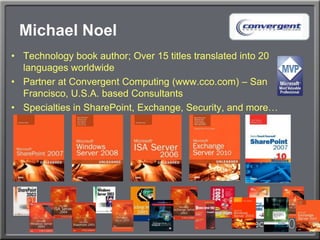
Michael NoelTechnology book author; Over 15 titles translated into 20 languages worldwidePartner at Convergent Computing (www.cco.com) – San Francisco, U.S.A. based ConsultantsSpecialties in SharePoint, Exchange, Security, and more…
Session OverviewDiscussion of various Encryption OptionsCell-level EncryptionFile-Level Encryption (Bitlocker, EFS)Transparent Data EncryptionActive Directory Rights Management Services (AD RMS)TDE OverviewTDE for SharePoint Content Databases
The Problem: Unencrypted DataData Stored Unencrypted on a SQL ServerStolen Backups or Administrators of a Server can have access to all SharePoint ContentGovernmental and Industry Regulation Restricts Storage of Content Unencrypted
The Solution: Data EncryptionMany Options, same conceptFiles are stored in unreadable format, using PKI based encryptionSome Options require Application Support (i.e. Cell-level Encryption), which SharePoint doesn't support
Cell-level EncryptionAvailable with either SQL 2005 or SQL 2008Encrypts individual cells in a databaseRequires a password to access the cellRequires that columns be changed from their original data type to varbinaryAdvantage is that only specific info is encryptedDisadvantage is that you cannot use this for SharePoint Databases
File-level EncryptionTwo forms, older Encrypting File System (EFS) and BitlockerEFS encrypts data at the File LevelBitlocker encrypts data at the Volume LevelBitlocker Encrypts every file on the disk, not just database filesCould be used together with TDE
File-level EncryptionBiggest drawback: Heavy Performance HitNo support for prefetch or asynchrouous I/OI/O operations can become bottlenecked and serializedDoesn't protect the volume when accessed across the networkOnly really feasible in very small workgroup scenarios, rarely applies to SharePoint
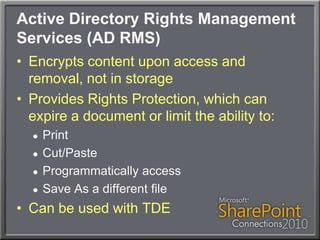
Active Directory Rights Management Services (AD RMS)Encrypts content upon access and removal, not in storageProvides Rights Protection, which can expire a document or limit the ability to:PrintCut/PasteProgrammatically accessSave As a different fileCan be used with TDE
Transparent Data Encryption (TDE)New in SQL Server 2008Only Available with the Enterprise EditionSeamless Encryption of Individual DatabasesTransparent to Applications, including SharePoint
Transparent Data Encryption (TDE)When enabled, encrypts Database, log file, any info written to TempDB, snapshots, backups, and Mirrored DB instance, if applicableOperates at the I/O level through the buffer pool, so any data written into the MDF is encryptedCan be selectively enabled on specific databasesBackups cannot be restored to other servers without a copy of the private key, stolen MDF files are worthless to the thiefEasier Administration, Minimal server resources required (3%-5% performance hit)
Potential TDE LimitationsDoes not encrypt the Communication Channel (IPSec can be added)Does not protect data in memory (DBAs could access)Cannot take advantage of SQL 2008 Backup CompressionTempDB is encrypted for the entire instance, even if only one DB is enabled for TDE, which can have a peprformance effect for other DBsReplication or FILESTREAM data is not encrypted when TDE is enabled
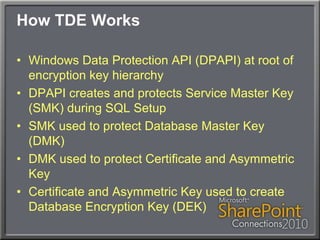
How TDE WorksWindows Data Protection API (DPAPI) at root of encryption key hierarchyDPAPI creates and protects Service Master Key (SMK) during SQL SetupSMK used to protect Database Master Key (DMK)DMK used to protect Certificate and Asymmetric KeyCertificate and Asymmetric Key used to create Database Encryption Key (DEK)
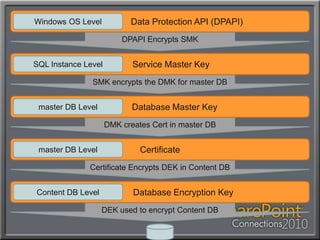
Key and Cert HierarchyDPAPI Encrypts SMKSMK encrypts the DMK for master DB         Service Master Key                      Data Protection API (DPAPI)            Database Master KeyCertificate                   Database Encryption KeySQL Instance LevelWindows OS Levelmaster DB Levelmaster DB LevelContent DB LevelDMK creates Cert in master DBCertificate Encrypts DEK in Content DBDEK used to encrypt Content DB
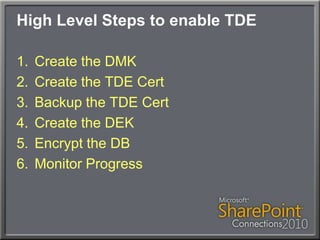
High Level Steps to enable TDECreate the DMKCreate the TDE CertBackup the TDE CertCreate the DEKEncrypt the DBMonitor Progress
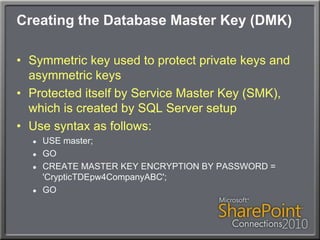
Creating the Database Master Key (DMK)Symmetric key used to protect private keys and asymmetric keysProtected itself by Service Master Key (SMK), which is created by SQL Server setupUse syntax as follows:USE master;GOCREATE MASTER KEY ENCRYPTION BY PASSWORD = 'CrypticTDEpw4CompanyABC';GO
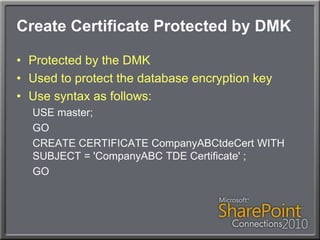
Create Certificate Protected by DMKProtected by the DMKUsed to protect the database encryption keyUse syntax as follows:USE master;GOCREATE CERTIFICATE CompanyABCtdeCert WITH SUBJECT = 'CompanyABCTDE Certificate' ;GO
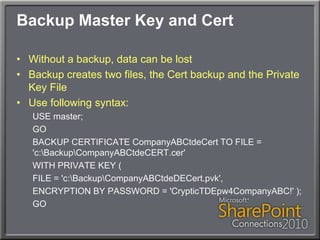
Backup Master Key and CertWithout a backup, data can be lostBackup creates two files, the Cert backup and the Private Key FileUse following syntax:USE master;GOBACKUP CERTIFICATE CompanyABCtdeCert TO FILE = 'c:\Backup\CompanyABCtdeCERT.cer' WITH PRIVATE KEY ( FILE = 'c:\Backup\CompanyABCtdeDECert.pvk', ENCRYPTION BY PASSWORD = 'CrypticTDEpw4CompanyABC!' );GO
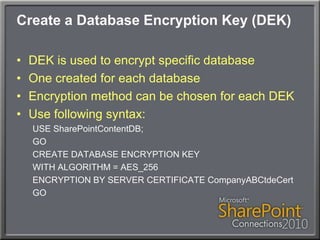
Create a Database Encryption Key (DEK)DEK is used to encrypt specific databaseOne created for each databaseEncryption method can be chosen for each DEKUse following syntax:USE SharePointContentDB;GOCREATE DATABASE ENCRYPTION KEY WITH ALGORITHM = AES_256 ENCRYPTION BY SERVER CERTIFICATE CompanyABCtdeCertGO
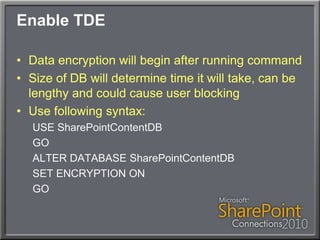
Enable TDEData encryption will begin after running commandSize of DB will determine time it will take, can be lengthy and could cause user blockingUse following syntax:USE SharePointContentDBGOALTER DATABASE SharePointContentDBSET ENCRYPTION ONGO
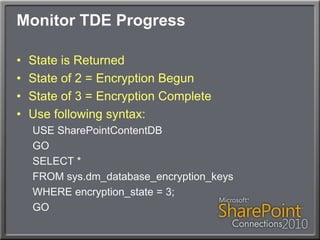
Monitor TDE ProgressState is ReturnedState of 2 = Encryption BegunState of 3 = Encryption CompleteUse following syntax:USE SharePointContentDBGOSELECT *FROM sys.dm_database_encryption_keysWHERE encryption_state = 3;GO
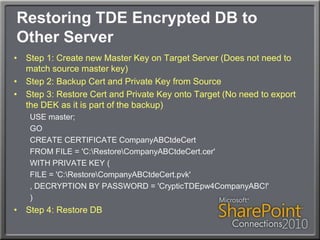
Restoring TDE Encrypted DB to Other ServerStep 1: Create new Master Key on Target Server (Does not need to match source master key)Step 2: Backup Cert and Private Key from SourceStep 3: Restore Cert and Private Key onto Target (No need to export the DEK as it is part of the backup)USE master;GOCREATE CERTIFICATE CompanyABCtdeCertFROM FILE = 'C:\Restore\CompanyABCtdeCert.cer'WITH PRIVATE KEY (FILE = 'C:\Restore\CompanyABCtdeCert.pvk', DECRYPTION BY PASSWORD = 'CrypticTDEpw4CompanyABC!')Step 4: Restore DB
DemoEncrypting SharePoint Content DBs using Transparent Data Encryption
Your Feedback is ImportantPlease fill out a session evaluation form and either put them in the basket near the exit or drop them off at the conference registration desk.Thank you!Session Code: MSC23
Thanks for attending!Questions?Michael NoelTwitter: @MichaelTNoelwww.cco.comSession Code: MSC23

Transparent Data Encryption for SharePoint Content Databases

  • 1.
    MSC23Protecting Your SharePoint2010 Content with SQL Server 2008 Transparent Data EncryptionMichael NoelConvergent ComputingTwitter: @MichaelTNoel
  • 2.
    Michael NoelTechnology bookauthor; Over 15 titles translated into 20 languages worldwidePartner at Convergent Computing (www.cco.com) – San Francisco, U.S.A. based ConsultantsSpecialties in SharePoint, Exchange, Security, and more…
  • 3.
    Session OverviewDiscussion ofvarious Encryption OptionsCell-level EncryptionFile-Level Encryption (Bitlocker, EFS)Transparent Data EncryptionActive Directory Rights Management Services (AD RMS)TDE OverviewTDE for SharePoint Content Databases
  • 4.
    The Problem: UnencryptedDataData Stored Unencrypted on a SQL ServerStolen Backups or Administrators of a Server can have access to all SharePoint ContentGovernmental and Industry Regulation Restricts Storage of Content Unencrypted
  • 5.
    The Solution: DataEncryptionMany Options, same conceptFiles are stored in unreadable format, using PKI based encryptionSome Options require Application Support (i.e. Cell-level Encryption), which SharePoint doesn't support
  • 6.
    Cell-level EncryptionAvailable witheither SQL 2005 or SQL 2008Encrypts individual cells in a databaseRequires a password to access the cellRequires that columns be changed from their original data type to varbinaryAdvantage is that only specific info is encryptedDisadvantage is that you cannot use this for SharePoint Databases
  • 7.
    File-level EncryptionTwo forms,older Encrypting File System (EFS) and BitlockerEFS encrypts data at the File LevelBitlocker encrypts data at the Volume LevelBitlocker Encrypts every file on the disk, not just database filesCould be used together with TDE
  • 8.
    File-level EncryptionBiggest drawback:Heavy Performance HitNo support for prefetch or asynchrouous I/OI/O operations can become bottlenecked and serializedDoesn't protect the volume when accessed across the networkOnly really feasible in very small workgroup scenarios, rarely applies to SharePoint
  • 9.
    Active Directory RightsManagement Services (AD RMS)Encrypts content upon access and removal, not in storageProvides Rights Protection, which can expire a document or limit the ability to:PrintCut/PasteProgrammatically accessSave As a different fileCan be used with TDE
  • 10.
    Transparent Data Encryption(TDE)New in SQL Server 2008Only Available with the Enterprise EditionSeamless Encryption of Individual DatabasesTransparent to Applications, including SharePoint
  • 11.
    Transparent Data Encryption(TDE)When enabled, encrypts Database, log file, any info written to TempDB, snapshots, backups, and Mirrored DB instance, if applicableOperates at the I/O level through the buffer pool, so any data written into the MDF is encryptedCan be selectively enabled on specific databasesBackups cannot be restored to other servers without a copy of the private key, stolen MDF files are worthless to the thiefEasier Administration, Minimal server resources required (3%-5% performance hit)
  • 12.
    Potential TDE LimitationsDoesnot encrypt the Communication Channel (IPSec can be added)Does not protect data in memory (DBAs could access)Cannot take advantage of SQL 2008 Backup CompressionTempDB is encrypted for the entire instance, even if only one DB is enabled for TDE, which can have a peprformance effect for other DBsReplication or FILESTREAM data is not encrypted when TDE is enabled
  • 13.
    How TDE WorksWindowsData Protection API (DPAPI) at root of encryption key hierarchyDPAPI creates and protects Service Master Key (SMK) during SQL SetupSMK used to protect Database Master Key (DMK)DMK used to protect Certificate and Asymmetric KeyCertificate and Asymmetric Key used to create Database Encryption Key (DEK)
  • 14.
    Key and CertHierarchyDPAPI Encrypts SMKSMK encrypts the DMK for master DB Service Master Key Data Protection API (DPAPI) Database Master KeyCertificate Database Encryption KeySQL Instance LevelWindows OS Levelmaster DB Levelmaster DB LevelContent DB LevelDMK creates Cert in master DBCertificate Encrypts DEK in Content DBDEK used to encrypt Content DB
  • 15.
    High Level Stepsto enable TDECreate the DMKCreate the TDE CertBackup the TDE CertCreate the DEKEncrypt the DBMonitor Progress
  • 16.
    Creating the DatabaseMaster Key (DMK)Symmetric key used to protect private keys and asymmetric keysProtected itself by Service Master Key (SMK), which is created by SQL Server setupUse syntax as follows:USE master;GOCREATE MASTER KEY ENCRYPTION BY PASSWORD = 'CrypticTDEpw4CompanyABC';GO
  • 17.
    Create Certificate Protectedby DMKProtected by the DMKUsed to protect the database encryption keyUse syntax as follows:USE master;GOCREATE CERTIFICATE CompanyABCtdeCert WITH SUBJECT = 'CompanyABCTDE Certificate' ;GO
  • 18.
    Backup Master Keyand CertWithout a backup, data can be lostBackup creates two files, the Cert backup and the Private Key FileUse following syntax:USE master;GOBACKUP CERTIFICATE CompanyABCtdeCert TO FILE = 'c:\Backup\CompanyABCtdeCERT.cer' WITH PRIVATE KEY ( FILE = 'c:\Backup\CompanyABCtdeDECert.pvk', ENCRYPTION BY PASSWORD = 'CrypticTDEpw4CompanyABC!' );GO
  • 19.
    Create a DatabaseEncryption Key (DEK)DEK is used to encrypt specific databaseOne created for each databaseEncryption method can be chosen for each DEKUse following syntax:USE SharePointContentDB;GOCREATE DATABASE ENCRYPTION KEY WITH ALGORITHM = AES_256 ENCRYPTION BY SERVER CERTIFICATE CompanyABCtdeCertGO
  • 20.
    Enable TDEData encryptionwill begin after running commandSize of DB will determine time it will take, can be lengthy and could cause user blockingUse following syntax:USE SharePointContentDBGOALTER DATABASE SharePointContentDBSET ENCRYPTION ONGO
  • 21.
    Monitor TDE ProgressStateis ReturnedState of 2 = Encryption BegunState of 3 = Encryption CompleteUse following syntax:USE SharePointContentDBGOSELECT *FROM sys.dm_database_encryption_keysWHERE encryption_state = 3;GO
  • 22.
    Restoring TDE EncryptedDB to Other ServerStep 1: Create new Master Key on Target Server (Does not need to match source master key)Step 2: Backup Cert and Private Key from SourceStep 3: Restore Cert and Private Key onto Target (No need to export the DEK as it is part of the backup)USE master;GOCREATE CERTIFICATE CompanyABCtdeCertFROM FILE = 'C:\Restore\CompanyABCtdeCert.cer'WITH PRIVATE KEY (FILE = 'C:\Restore\CompanyABCtdeCert.pvk', DECRYPTION BY PASSWORD = 'CrypticTDEpw4CompanyABC!')Step 4: Restore DB
  • 23.
    DemoEncrypting SharePoint ContentDBs using Transparent Data Encryption
  • 24.
    Your Feedback isImportantPlease fill out a session evaluation form and either put them in the basket near the exit or drop them off at the conference registration desk.Thank you!Session Code: MSC23
  • 25.
    Thanks for attending!Questions?MichaelNoelTwitter: @MichaelTNoelwww.cco.comSession Code: MSC23