Chapter 5
Introduction to Defining
Classes
Fundamentals of Java
2
Objectives
 Design and implement a simple class from
user requirements.
 Organize a program in terms of a view class
and a model class.
 Use visibility modifiers to make methods
visible to clients and restrict access to data
within a class.
Fundamentals of Java
3
Objectives (cont.)
 Write appropriate mutator methods, accessor
methods, and constructors for a class.
 Understand how parameters transmit data to
methods.
 Use instance variables, local variables, and
parameters appropriately.
 Organize a complex task in terms of helper
methods.
Fundamentals of Java
4
Vocabulary
 Accessor
 Actual parameter
 Behavior
 Constructor
 Encapsulation
Fundamentals of Java
5
Vocabulary (cont.)
 Formal parameter
 Helper method
 Identity
 Instantiation
 Lifetime
Fundamentals of Java
6
Vocabulary (cont.)
 Mutator
 Scope
 State
 Visibility modifier
Fundamentals of Java
7
The Internal Structure of
Classes and Objects
 A class is a template that describes the
characteristics of similar objects.
– Variable declarations define an object’s data.

 Instance variables
– Methods define an object’s behavior in
response to messages.
Fundamentals of Java
8
The Internal Structure of
Classes and Objects (cont.)
 Encapsulation: Combining data and
behavior into a single software package
 An object is an instance of its class.
 Instantiation: Process of creating a new
object
Fundamentals of Java
9
The Internal Structure of
Classes and Objects (cont.)
 During execution, a computer’s memory holds:
– All class templates in their compiled form
– Variables that refer to objects
– Objects as needed
 Memory for data is allocated within objects.
 Objects appear and occupy memory when
instantiated.
– Disappear when no longer needed
Fundamentals of Java
10
The Internal Structure of
Classes and Objects (cont.)
 Garbage collection: JVM’s automated
method for removing unused objects
– Tracks whether objects are referenced by any
variables
 Three characteristics of an object:
– Behavior (methods)
– State (data values)
– Identity (unique ID for each object)
Fundamentals of Java
11
The Internal Structure of
Classes and Objects (cont.)
 When messages sent, two objects involved:
– Client: The message sender
 Only needs to know the interface of the server
– Server: The message receiver
 Supports and implements an interface
 Information hiding: Server’s data
requirements and method implementation
hidden from client
Fundamentals of Java
12
A Student Class
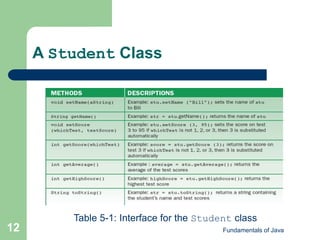
Table 5-1: Interface for the Student class
Fundamentals of Java
13
A Student Class: Using
Student Objects
 Declare and instantiate a Student object:
– Student s1 = new Student();
 Sending messages to a Student object:
– String str = s1.getName();
– s1.setName(“Bill”);
– System.out.println(s1.toString());
Fundamentals of Java
14
A Student Class: Objects,
Assignment, and Aliasing
 Multiple variables can point at the same
object
– Example:
 Student s1 = new Student();
Student s2 = s1;
 To cause a variable to no longer point at any
object, set it equal to null,as in:
– s1 = null;
Fundamentals of Java
15
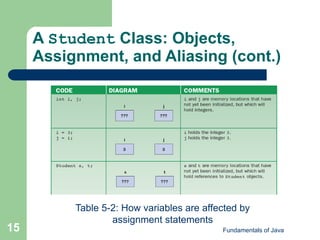
A Student Class: Objects,
Assignment, and Aliasing (cont.)
Table 5-2: How variables are affected by
assignment statements
Fundamentals of Java
16
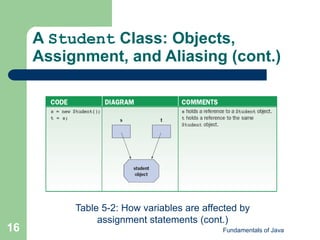
A Student Class: Objects,
Assignment, and Aliasing (cont.)
Table 5-2: How variables are affected by
assignment statements (cont.)
Fundamentals of Java
17
A Student Class (cont.)
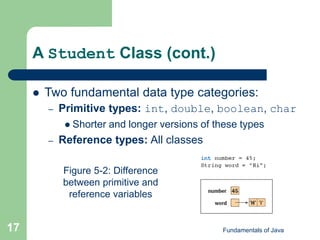
 Two fundamental data type categories:
– Primitive types: int, double, boolean, char
 Shorter and longer versions of these types
– Reference types: All classes
Figure 5-2: Difference
between primitive and
reference variables
Fundamentals of Java
18
A Student Class (cont.)
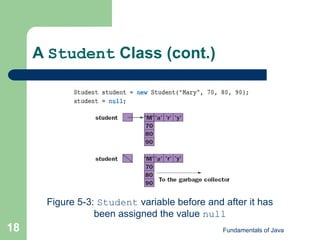
Figure 5-3: Student variable before and after it has
been assigned the value null
Fundamentals of Java
19
A Student Class (cont.)
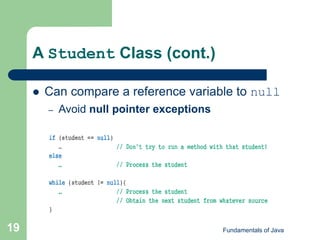
 Can compare a reference variable to null
– Avoid null pointer exceptions
Fundamentals of Java
20
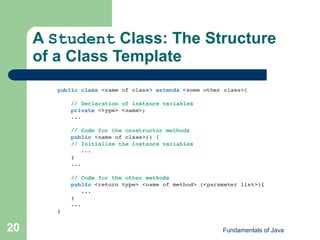
A Student Class: The Structure
of a Class Template
Fundamentals of Java
21
A Student Class: The Structure
of a Class Template (cont.)
 public: Class is accessible to anyone
 Name of class must follow Java naming
conventions
 extends: Optional
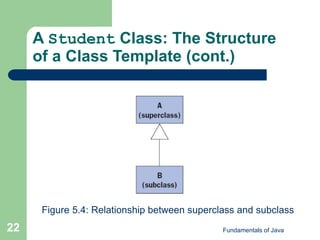
– Java organizes class in a hierarchy.
– If Class B extends Class A, it inherits instance
variables and methods from Class A.
Fundamentals of Java
22
A Student Class: The Structure
of a Class Template (cont.)
Figure 5.4: Relationship between superclass and subclass
Fundamentals of Java
23
A Student Class: The Structure
of a Class Template (cont.)
 private and public are visibility
modifiers.
– Define whether a method or instance variable
can be seen outside of the class
 Instance variables should generally be private.
Fundamentals of Java
24
A Student Class: Constructors
(cont.)
 Initialize a newly instantiated object’s
instance variables
– Activated (called) only by the keyword new
 Default constructors: Empty parameter lists
 A class is easier to use when it has a variety
of constructors.
Fundamentals of Java
25
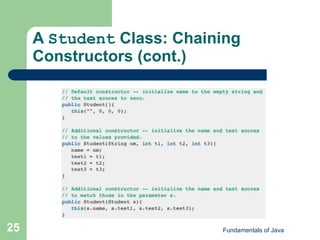
A Student Class: Chaining
Constructors (cont.)
Fundamentals of Java
26
Editing, Compiling, and Testing
the Student Class
 Steps:
– Save source code in Student.java.
– Run javac Student.java.
– Run/test the program.
Fundamentals of Java
27
Editing, Compiling, and Testing
the Student Class (cont.)
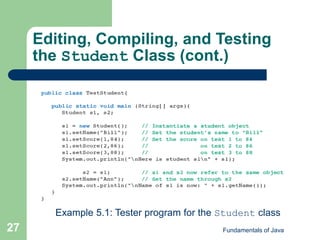
Example 5.1: Tester program for the Student class
Fundamentals of Java
28
Editing, Compiling, and Testing
the Student Class (cont.)
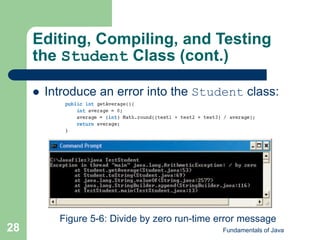
 Introduce an error into the Student class:
Figure 5-6: Divide by zero run-time error message
Fundamentals of Java
29
The Structure and Behavior
of Methods
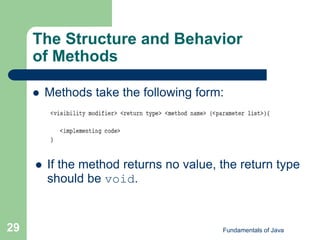
 Methods take the following form:
 If the method returns no value, the return type
should be void.
Fundamentals of Java
30
The Structure and Behavior
of Methods (cont.)
 return statements: If a method has a
return type, implementation must have at
least one return statement that returns a
value of that type.
– A return statement in a void method simply
ends the method.
– Can have multiple return statements
Fundamentals of Java
31
The Structure and Behavior
of Methods (cont.)
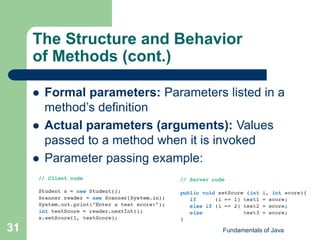
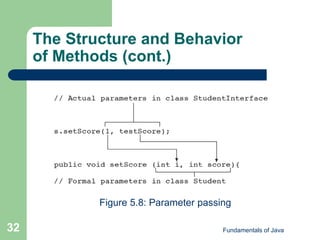
 Formal parameters: Parameters listed in a
method’s definition
 Actual parameters (arguments): Values
passed to a method when it is invoked
 Parameter passing example:
Fundamentals of Java
32
The Structure and Behavior
of Methods (cont.)
Figure 5.8: Parameter passing
Fundamentals of Java
33
The Structure and Behavior
of Methods (cont.)
 Helper methods: Perform a piece of a task
– Used by another method to perform a larger
task
– Usually private
 Only methods already defined within the class
need to use them
 When an object is instantiated, it receives
own copy of its class’s instance variables
Fundamentals of Java
34
Scope and Lifetime of Variables
 Global variables: Declared inside a class
but outside any method
– Accessible to any method in the class
 Local variables: Declared inside a method
– Accessible only within that method
Fundamentals of Java
35
Scope and Lifetime of
Variables (cont.)
 Scope (of a variable): Region where a
variable can validly appear in lines of code
 Variables declared within any compound
statement enclosed in braces have block
scope.
– Visible only within code enclosed by braces
Fundamentals of Java
36
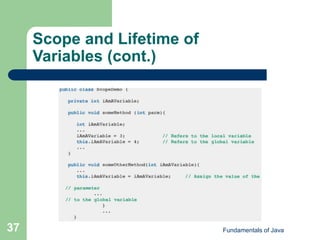
Scope and Lifetime of
Variables (cont.)
 Lifetime: Period when a variable can be
used
– Local variables exist while the method executes.
– Instance variables exist while the object exists.
 Duplicate variable names may exist.
– Local variables in different scopes
– A local and a global variable
 Local overrides global
 Use this keyword to access global variable.
Fundamentals of Java
37
Scope and Lifetime of
Variables (cont.)
Fundamentals of Java
38
Scope and Lifetime of
Variables (cont.)
 Use instance variables to retain data.
– Using local variables will result in lost data.
 Use local variables for temporary storage.
– Using global variables could cause difficult-to-
resolve logic errors.
 Use method parameters rather than global
variables whenever possible.
Fundamentals of Java
39
Graphics and GUIs: Images
 To load an image:
– ImageIcon image =
new ImageIcon(fileName);
 fileName indicates the location and name of a file
containing an image.
 To paint an ImageIcon from a panel class:
– anImageIcon.paintIcon(this, g, x, y);
– g is the graphics context.
– x and y are panel coordinates.
Fundamentals of Java
40
Graphics and GUIs: A Circle
Class
 Useful to represent shapes as objects
– A shape has attributes (color, size, position).
– Can create more shapes than the Graphics
class can draw
– Given its graphics context, a shape can draw
itself.
– Easier to manipulate
Fundamentals of Java
41
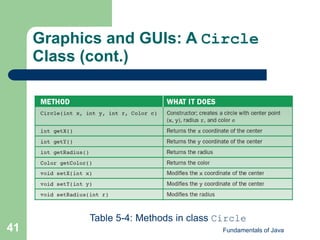
Graphics and GUIs: A Circle
Class (cont.)
Table 5-4: Methods in class Circle
Fundamentals of Java
42
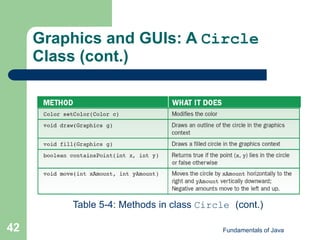
Graphics and GUIs: A Circle
Class (cont.)
Table 5-4: Methods in class Circle (cont.)
Fundamentals of Java
43
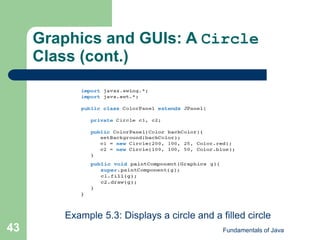
Graphics and GUIs: A Circle
Class (cont.)
Example 5.3: Displays a circle and a filled circle
Fundamentals of Java
44
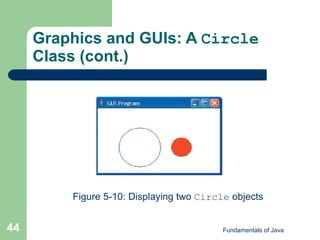
Graphics and GUIs: A Circle
Class (cont.)
Figure 5-10: Displaying two Circle objects
Fundamentals of Java
45
Graphics and GUIs: A Circle
Class (cont.)
 repaint method: Forces a refresh of any
GUI component
– Invokes object’s paintComponent method
– Called automatically by the JVM whenever the
component is moved or altered
– Can programatically call repaint() as well
Fundamentals of Java
46
Graphics and GUIs: Mouse Events
 Program can detect and respond to mouse
events by attaching listener objects to a
panel
– When a particular type of mouse event occurs in a
panel, its listeners are informed.
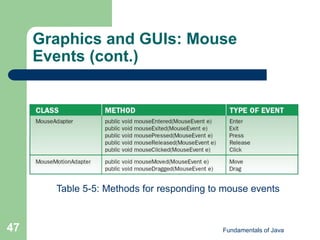
– Listener class for capturing mouse click events
extends MouseAdapter
– Listener class for capturing mouse motion and
dragging events extends MouseMotionAdapter
Fundamentals of Java
47
Graphics and GUIs: Mouse
Events (cont.)
Table 5-5: Methods for responding to mouse events
Fundamentals of Java
48
Graphics and GUIs: Mouse
Events (cont.)
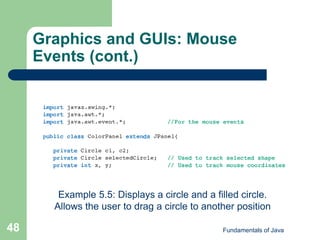
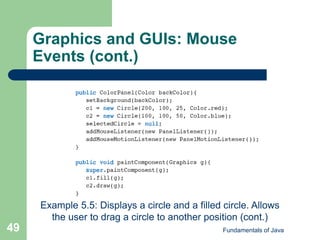
Example 5.5: Displays a circle and a filled circle.
Allows the user to drag a circle to another position
Fundamentals of Java
49
Graphics and GUIs: Mouse
Events (cont.)
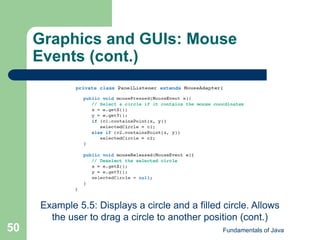
Example 5.5: Displays a circle and a filled circle. Allows
the user to drag a circle to another position (cont.)
Fundamentals of Java
50
Graphics and GUIs: Mouse
Events (cont.)
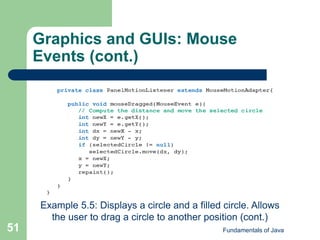
Example 5.5: Displays a circle and a filled circle. Allows
the user to drag a circle to another position (cont.)
Fundamentals of Java
51
Graphics and GUIs: Mouse
Events (cont.)
Example 5.5: Displays a circle and a filled circle. Allows
the user to drag a circle to another position (cont.)
Fundamentals of Java
52
Summary
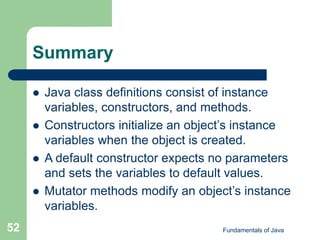
 Java class definitions consist of instance
variables, constructors, and methods.
 Constructors initialize an object’s instance
variables when the object is created.
 A default constructor expects no parameters
and sets the variables to default values.
 Mutator methods modify an object’s instance
variables.
Fundamentals of Java
53
Summary (cont.)
 Accessor methods allow clients to observe
the values of these variables.
 The visibility modifier public makes
methods visible to clients.
 private encapsulates access.
 Helper methods are called from other
methods in a class definition.
– Usually declared to be private
Fundamentals of Java
54
Summary (cont.)
 Instance variables track the state of an
object.
 Local variables are used for temporary
working storage within a method.
 Parameters transmit data to a method.
 A formal parameter appears in a method’s
signature and is referenced in its code.
Fundamentals of Java
55
Summary (cont.)
 Actual parameter is a value passed to a
method when it is called.
 Scope of an instance variable is the entire
class within which it is declared.
 Scope of a local variable or a parameter is
the body of the method where it is declared.
Fundamentals of Java
56
Summary (cont.)
 Lifetime of an instance variable is the same
as the lifetime of a particular object.
 Lifetime of a local variable and a parameter
is the time during which a particular call of a
method is active.

Ppt chapter05

  • 1.
    Chapter 5 Introduction toDefining Classes Fundamentals of Java
  • 2.
    Fundamentals of Java 2 Objectives Design and implement a simple class from user requirements.  Organize a program in terms of a view class and a model class.  Use visibility modifiers to make methods visible to clients and restrict access to data within a class.
  • 3.
    Fundamentals of Java 3 Objectives(cont.)  Write appropriate mutator methods, accessor methods, and constructors for a class.  Understand how parameters transmit data to methods.  Use instance variables, local variables, and parameters appropriately.  Organize a complex task in terms of helper methods.
  • 4.
    Fundamentals of Java 4 Vocabulary Accessor  Actual parameter  Behavior  Constructor  Encapsulation
  • 5.
    Fundamentals of Java 5 Vocabulary(cont.)  Formal parameter  Helper method  Identity  Instantiation  Lifetime
  • 6.
    Fundamentals of Java 6 Vocabulary(cont.)  Mutator  Scope  State  Visibility modifier
  • 7.
    Fundamentals of Java 7 TheInternal Structure of Classes and Objects  A class is a template that describes the characteristics of similar objects. – Variable declarations define an object’s data.  Instance variables – Methods define an object’s behavior in response to messages.
  • 8.
    Fundamentals of Java 8 TheInternal Structure of Classes and Objects (cont.)  Encapsulation: Combining data and behavior into a single software package  An object is an instance of its class.  Instantiation: Process of creating a new object
  • 9.
    Fundamentals of Java 9 TheInternal Structure of Classes and Objects (cont.)  During execution, a computer’s memory holds: – All class templates in their compiled form – Variables that refer to objects – Objects as needed  Memory for data is allocated within objects.  Objects appear and occupy memory when instantiated. – Disappear when no longer needed
  • 10.
    Fundamentals of Java 10 TheInternal Structure of Classes and Objects (cont.)  Garbage collection: JVM’s automated method for removing unused objects – Tracks whether objects are referenced by any variables  Three characteristics of an object: – Behavior (methods) – State (data values) – Identity (unique ID for each object)
  • 11.
    Fundamentals of Java 11 TheInternal Structure of Classes and Objects (cont.)  When messages sent, two objects involved: – Client: The message sender  Only needs to know the interface of the server – Server: The message receiver  Supports and implements an interface  Information hiding: Server’s data requirements and method implementation hidden from client
  • 12.
    Fundamentals of Java 12 AStudent Class Table 5-1: Interface for the Student class
  • 13.
    Fundamentals of Java 13 AStudent Class: Using Student Objects  Declare and instantiate a Student object: – Student s1 = new Student();  Sending messages to a Student object: – String str = s1.getName(); – s1.setName(“Bill”); – System.out.println(s1.toString());
  • 14.
    Fundamentals of Java 14 AStudent Class: Objects, Assignment, and Aliasing  Multiple variables can point at the same object – Example:  Student s1 = new Student(); Student s2 = s1;  To cause a variable to no longer point at any object, set it equal to null,as in: – s1 = null;
  • 15.
    Fundamentals of Java 15 AStudent Class: Objects, Assignment, and Aliasing (cont.) Table 5-2: How variables are affected by assignment statements
  • 16.
    Fundamentals of Java 16 AStudent Class: Objects, Assignment, and Aliasing (cont.) Table 5-2: How variables are affected by assignment statements (cont.)
  • 17.
    Fundamentals of Java 17 AStudent Class (cont.)  Two fundamental data type categories: – Primitive types: int, double, boolean, char  Shorter and longer versions of these types – Reference types: All classes Figure 5-2: Difference between primitive and reference variables
  • 18.
    Fundamentals of Java 18 AStudent Class (cont.) Figure 5-3: Student variable before and after it has been assigned the value null
  • 19.
    Fundamentals of Java 19 AStudent Class (cont.)  Can compare a reference variable to null – Avoid null pointer exceptions
  • 20.
    Fundamentals of Java 20 AStudent Class: The Structure of a Class Template
  • 21.
    Fundamentals of Java 21 AStudent Class: The Structure of a Class Template (cont.)  public: Class is accessible to anyone  Name of class must follow Java naming conventions  extends: Optional – Java organizes class in a hierarchy. – If Class B extends Class A, it inherits instance variables and methods from Class A.
  • 22.
    Fundamentals of Java 22 AStudent Class: The Structure of a Class Template (cont.) Figure 5.4: Relationship between superclass and subclass
  • 23.
    Fundamentals of Java 23 AStudent Class: The Structure of a Class Template (cont.)  private and public are visibility modifiers. – Define whether a method or instance variable can be seen outside of the class  Instance variables should generally be private.
  • 24.
    Fundamentals of Java 24 AStudent Class: Constructors (cont.)  Initialize a newly instantiated object’s instance variables – Activated (called) only by the keyword new  Default constructors: Empty parameter lists  A class is easier to use when it has a variety of constructors.
  • 25.
    Fundamentals of Java 25 AStudent Class: Chaining Constructors (cont.)
  • 26.
    Fundamentals of Java 26 Editing,Compiling, and Testing the Student Class  Steps: – Save source code in Student.java. – Run javac Student.java. – Run/test the program.
  • 27.
    Fundamentals of Java 27 Editing,Compiling, and Testing the Student Class (cont.) Example 5.1: Tester program for the Student class
  • 28.
    Fundamentals of Java 28 Editing,Compiling, and Testing the Student Class (cont.)  Introduce an error into the Student class: Figure 5-6: Divide by zero run-time error message
  • 29.
    Fundamentals of Java 29 TheStructure and Behavior of Methods  Methods take the following form:  If the method returns no value, the return type should be void.
  • 30.
    Fundamentals of Java 30 TheStructure and Behavior of Methods (cont.)  return statements: If a method has a return type, implementation must have at least one return statement that returns a value of that type. – A return statement in a void method simply ends the method. – Can have multiple return statements
  • 31.
    Fundamentals of Java 31 TheStructure and Behavior of Methods (cont.)  Formal parameters: Parameters listed in a method’s definition  Actual parameters (arguments): Values passed to a method when it is invoked  Parameter passing example:
  • 32.
    Fundamentals of Java 32 TheStructure and Behavior of Methods (cont.) Figure 5.8: Parameter passing
  • 33.
    Fundamentals of Java 33 TheStructure and Behavior of Methods (cont.)  Helper methods: Perform a piece of a task – Used by another method to perform a larger task – Usually private  Only methods already defined within the class need to use them  When an object is instantiated, it receives own copy of its class’s instance variables
  • 34.
    Fundamentals of Java 34 Scopeand Lifetime of Variables  Global variables: Declared inside a class but outside any method – Accessible to any method in the class  Local variables: Declared inside a method – Accessible only within that method
  • 35.
    Fundamentals of Java 35 Scopeand Lifetime of Variables (cont.)  Scope (of a variable): Region where a variable can validly appear in lines of code  Variables declared within any compound statement enclosed in braces have block scope. – Visible only within code enclosed by braces
  • 36.
    Fundamentals of Java 36 Scopeand Lifetime of Variables (cont.)  Lifetime: Period when a variable can be used – Local variables exist while the method executes. – Instance variables exist while the object exists.  Duplicate variable names may exist. – Local variables in different scopes – A local and a global variable  Local overrides global  Use this keyword to access global variable.
  • 37.
    Fundamentals of Java 37 Scopeand Lifetime of Variables (cont.)
  • 38.
    Fundamentals of Java 38 Scopeand Lifetime of Variables (cont.)  Use instance variables to retain data. – Using local variables will result in lost data.  Use local variables for temporary storage. – Using global variables could cause difficult-to- resolve logic errors.  Use method parameters rather than global variables whenever possible.
  • 39.
    Fundamentals of Java 39 Graphicsand GUIs: Images  To load an image: – ImageIcon image = new ImageIcon(fileName);  fileName indicates the location and name of a file containing an image.  To paint an ImageIcon from a panel class: – anImageIcon.paintIcon(this, g, x, y); – g is the graphics context. – x and y are panel coordinates.
  • 40.
    Fundamentals of Java 40 Graphicsand GUIs: A Circle Class  Useful to represent shapes as objects – A shape has attributes (color, size, position). – Can create more shapes than the Graphics class can draw – Given its graphics context, a shape can draw itself. – Easier to manipulate
  • 41.
    Fundamentals of Java 41 Graphicsand GUIs: A Circle Class (cont.) Table 5-4: Methods in class Circle
  • 42.
    Fundamentals of Java 42 Graphicsand GUIs: A Circle Class (cont.) Table 5-4: Methods in class Circle (cont.)
  • 43.
    Fundamentals of Java 43 Graphicsand GUIs: A Circle Class (cont.) Example 5.3: Displays a circle and a filled circle
  • 44.
    Fundamentals of Java 44 Graphicsand GUIs: A Circle Class (cont.) Figure 5-10: Displaying two Circle objects
  • 45.
    Fundamentals of Java 45 Graphicsand GUIs: A Circle Class (cont.)  repaint method: Forces a refresh of any GUI component – Invokes object’s paintComponent method – Called automatically by the JVM whenever the component is moved or altered – Can programatically call repaint() as well
  • 46.
    Fundamentals of Java 46 Graphicsand GUIs: Mouse Events  Program can detect and respond to mouse events by attaching listener objects to a panel – When a particular type of mouse event occurs in a panel, its listeners are informed. – Listener class for capturing mouse click events extends MouseAdapter – Listener class for capturing mouse motion and dragging events extends MouseMotionAdapter
  • 47.
    Fundamentals of Java 47 Graphicsand GUIs: Mouse Events (cont.) Table 5-5: Methods for responding to mouse events
  • 48.
    Fundamentals of Java 48 Graphicsand GUIs: Mouse Events (cont.) Example 5.5: Displays a circle and a filled circle. Allows the user to drag a circle to another position
  • 49.
    Fundamentals of Java 49 Graphicsand GUIs: Mouse Events (cont.) Example 5.5: Displays a circle and a filled circle. Allows the user to drag a circle to another position (cont.)
  • 50.
    Fundamentals of Java 50 Graphicsand GUIs: Mouse Events (cont.) Example 5.5: Displays a circle and a filled circle. Allows the user to drag a circle to another position (cont.)
  • 51.
    Fundamentals of Java 51 Graphicsand GUIs: Mouse Events (cont.) Example 5.5: Displays a circle and a filled circle. Allows the user to drag a circle to another position (cont.)
  • 52.
    Fundamentals of Java 52 Summary Java class definitions consist of instance variables, constructors, and methods.  Constructors initialize an object’s instance variables when the object is created.  A default constructor expects no parameters and sets the variables to default values.  Mutator methods modify an object’s instance variables.
  • 53.
    Fundamentals of Java 53 Summary(cont.)  Accessor methods allow clients to observe the values of these variables.  The visibility modifier public makes methods visible to clients.  private encapsulates access.  Helper methods are called from other methods in a class definition. – Usually declared to be private
  • 54.
    Fundamentals of Java 54 Summary(cont.)  Instance variables track the state of an object.  Local variables are used for temporary working storage within a method.  Parameters transmit data to a method.  A formal parameter appears in a method’s signature and is referenced in its code.
  • 55.
    Fundamentals of Java 55 Summary(cont.)  Actual parameter is a value passed to a method when it is called.  Scope of an instance variable is the entire class within which it is declared.  Scope of a local variable or a parameter is the body of the method where it is declared.
  • 56.
    Fundamentals of Java 56 Summary(cont.)  Lifetime of an instance variable is the same as the lifetime of a particular object.  Lifetime of a local variable and a parameter is the time during which a particular call of a method is active.