Chapter 11
Arrays Continued
Fundamentals of Java
2
Objectives
 Use string methods appropriately.
 Write a method for searching an array.
 Understand why a sorted array can be
searched more efficiently than an unsorted
array.
 Write a method to sort an array.
Fundamentals of Java
3
Objectives (cont.)
 Write methods to perform insertions and
removals at given positions in an array.
 Understand the issues involved when
working with arrays of objects.
 Perform simple operations with Java’s
ArrayList class.
Fundamentals of Java
4
Vocabulary
 Array list
 Binary search
 Bubble sort
 Immutable object
 Insertion sort
Fundamentals of Java
5
Vocabulary (cont.)
 Linear search
 Selection sort
 Substring
 Wrapper class
Fundamentals of Java
6
Advanced Operations on Strings
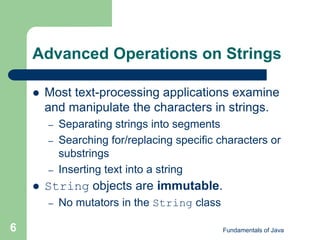
 Most text-processing applications examine
and manipulate the characters in strings.
– Separating strings into segments
– Searching for/replacing specific characters or
substrings
– Inserting text into a string
 String objects are immutable.
– No mutators in the String class
Fundamentals of Java
7
Advanced Operations on
Strings (cont.)
Table 11-1: Some commonly used String methods
Fundamentals of Java
8
Advanced Operations on
Strings (cont.)
Table 11-1: Some commonly used String methods (cont.)
Fundamentals of Java
9
Advanced Operations on
Strings (cont.)
Table 11-1: Some commonly used String methods (cont.)
Fundamentals of Java
10
Advanced Operations on
Strings (cont.)
Example 11.2: Count the words and compute
the average word length in a sentence.
Fundamentals of Java
11
Advanced Operations on
Strings (cont.)
Example 11.2: Count the words and compute the
average word length in a sentence (cont.).
Fundamentals of Java
12
Searching
 Linear search: Search a data structure (such
as an array) from beginning to end
 Searching an array of objects:
Fundamentals of Java
13
Searching (cont.)
 Binary search: An efficient search algorithm
based on eliminating half of the data from the
search at each iteration
– Data must be sorted first.
– Examine midpoint of data, then decide which
half of the data to continue searching on.
 Discard other half of data.
Fundamentals of Java
14
Searching (cont.)
 Binary search code:
Fundamentals of Java
15
Searching (cont.)
Figure 11-1: Trace of a binary search of an array
Fundamentals of Java
16
Searching (cont.)
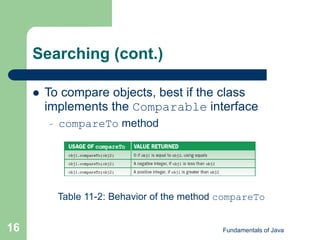
 To compare objects, best if the class
implements the Comparable interface
– compareTo method
Table 11-2: Behavior of the method compareTo
Fundamentals of Java
17
Searching (cont.)
 Binary search for objects:
Fundamentals of Java
18
Searching (cont.)
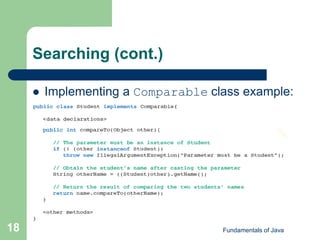
 Implementing a Comparable class example:
Fundamentals of Java
19
Sorting
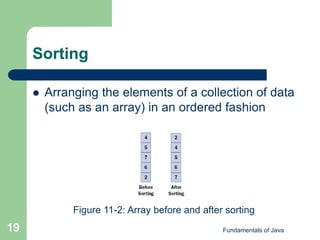
 Arranging the elements of a collection of data
(such as an array) in an ordered fashion
Figure 11-2: Array before and after sorting
Fundamentals of Java
20
Sorting: Selection Sort
 Basic idea:
Table 11-3: Trace of data during a selection sort
Fundamentals of Java
21
Sorting: Selection Sort (cont.)
 Must be able to find smallest number in an
array and swap items in an array
Fundamentals of Java
22
Sorting: Bubble Sort
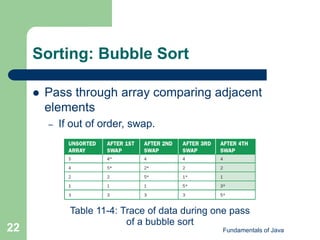
 Pass through array comparing adjacent
elements
– If out of order, swap.
Table 11-4: Trace of data during one pass
of a bubble sort
Fundamentals of Java
23
Sorting: Bubble Sort (cont.)
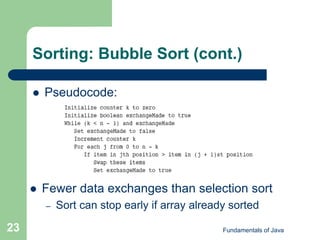
 Pseudocode:
 Fewer data exchanges than selection sort
– Sort can stop early if array already sorted
Fundamentals of Java
24
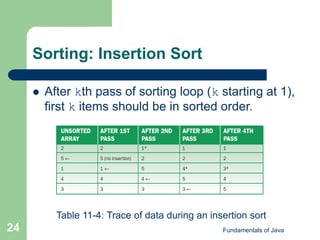
Sorting: Insertion Sort
 After kth pass of sorting loop (k starting at 1),
first k items should be in sorted order.
Table 11-4: Trace of data during an insertion sort
Fundamentals of Java
25
Sorting: Insertion Sort (cont.)
 Pseduocode:
Fundamentals of Java
26
Sorting (cont.)
 Any of the search algorithms can be altered
to support sorting of objects.
– Object’s class(es) should implement Comparable
 Have compareTo method
 Example:
Fundamentals of Java
27
Insertions and Removals
 Steps for insertion:
– 1. Check for available space.
– 2. Check validity of target index.
 Between 0 and logical size
– 3. Shift items from logical end of array to target
index down by one position.
– 4. Assign new item to cell at target index.
– 5. Increment logical size by one.
Fundamentals of Java
28
Insertions and Removals (cont.)
Figure 11-3: Inserting an item into an array
Fundamentals of Java
29
Insertions and Removals (cont.)
 Steps for removal:
– 1. Check validity of target index.
 Between 0 and logical size
– 2. Shift items from target index to logical end of
array up by one position.
– 3. Decrement logical size by one.
Fundamentals of Java
30
Insertions and Removals (cont.)
Figure 11-4: Removing an item from an array
Fundamentals of Java
31
 When array type is an interface type, abstract
class, or superclass of 1+ other classes, array
may contain different object types.
– Might not all respond to common set of
messages
Working with Arrays of Objects
Fundamentals of Java
32
Working with Arrays of
Objects (cont.)
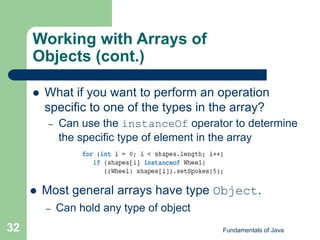
 What if you want to perform an operation
specific to one of the types in the array?
– Can use the instanceOf operator to determine
the specific type of element in the array
 Most general arrays have type Object.
– Can hold any type of object
Fundamentals of Java
33
The Class java.util.ArrayList
 Contains sequence of elements ordered by
position
– Unlike an array in that:
 It uses methods rather than [] to manipulate
elements.
 It tracks the logical size and physical size.
 The logical size is 0 when created.
– Size automatically adjusted as needed
 The positions available for access range from 0 to
the logical size minus 1.
Fundamentals of Java
34
The Class java.util.ArrayList
(cont.)
 Generic array list: Programmer must specify
element type for the list
 Raw array list: Can contain objects of any
reference type
 Declaring/instantiating a generic array list:
Fundamentals of Java
35
The Class java.util.ArrayList
(cont.)
Table 11-6: Some commonly used ArrayList methods
Fundamentals of Java
36
The Class java.util.ArrayList
(cont.)
 ArrayList objects cannot directly store
primitive types.
– Must use wrapper classes
 Classes that contain the value of a primitive type
 Boolean, Integer, Double, Character
Fundamentals of Java
37
The Class java.util.ArrayList
(cont.)
 ArrayList objects automatically “box” and
“unbox” primitive values when used with
ArrayList methods.
Fundamentals of Java
38
The Class java.util.ArrayList
(cont.)
 Advantages of ArrayList over arrays:
– Includes many methods for tasks such as
insertions, removals, and searches
– Tracks own logical size and grows or shrinks
automatically with the number of elements
contained in it
Fundamentals of Java
39
Graphics and GUIs: Menus
 A drop-down menu system consists of a
menu bar, a number of menus, and several
selections for each menu.
– May have sub-menus
– Menu item object for each menu selection
(class JMenuItem)
– Menu object for each menu (class JMenu)
– Menu bar object in which all of the menu
objects will appear (class JMenuBar)
Fundamentals of Java
40
Graphics and GUIs: Menus (cont.)
Figure 11-6: New user interface for the
student test scores program
 Listener objects are attached to menus.
– When menu items are selected, events are fired
and the listener objects respond.
Fundamentals of Java
41
Graphics and GUIs: Menus (cont.)
Example 11.6: TestScoresView class (with menus)
Fundamentals of Java
42
Graphics and GUIs: Menus (Cont.)
Example 11.6: TestScoresView class (with menus, cont.)
Fundamentals of Java
43
Summary
 Linear search: Simple search that works
well for small- and medium-sized arrays
 Binary search: Clever search that works
well for large arrays but assumes that the
elements are sorted
 Comparisons of objects are accomplished by
implementing the Comparable interface,
which requires the compareTo method.
Fundamentals of Java
44
Summary (cont.)
 Selection sort, bubble sort, and insertion sort
are simple sort methods that work well for
small- and medium-sized arrays.
 Insertions and removals of elements at
arbitrary positions are complex operations
that require careful design and
implementation.
Fundamentals of Java
45
Summary (cont.)
 One can insert objects of any class into an
array of Object. When retrieved from the
array, objects must be cast down to their
classes before sending them most
messages.
 The limitation of a fixed-size array can be
overcome by using Java’s ArrayList class.
Fundamentals of Java
46
Summary (cont.)
 An array list tracks and updates its logical
size and provides many useful client
methods.
 Wrapper class, such as Integer, provides a
way of packaging a value of a primitive type,
such as int, in an object so that it can be
stored in an array of Object or an array list.

Ppt chapter11

  • 1.
  • 2.
    Fundamentals of Java 2 Objectives Use string methods appropriately.  Write a method for searching an array.  Understand why a sorted array can be searched more efficiently than an unsorted array.  Write a method to sort an array.
  • 3.
    Fundamentals of Java 3 Objectives(cont.)  Write methods to perform insertions and removals at given positions in an array.  Understand the issues involved when working with arrays of objects.  Perform simple operations with Java’s ArrayList class.
  • 4.
    Fundamentals of Java 4 Vocabulary Array list  Binary search  Bubble sort  Immutable object  Insertion sort
  • 5.
    Fundamentals of Java 5 Vocabulary(cont.)  Linear search  Selection sort  Substring  Wrapper class
  • 6.
    Fundamentals of Java 6 AdvancedOperations on Strings  Most text-processing applications examine and manipulate the characters in strings. – Separating strings into segments – Searching for/replacing specific characters or substrings – Inserting text into a string  String objects are immutable. – No mutators in the String class
  • 7.
    Fundamentals of Java 7 AdvancedOperations on Strings (cont.) Table 11-1: Some commonly used String methods
  • 8.
    Fundamentals of Java 8 AdvancedOperations on Strings (cont.) Table 11-1: Some commonly used String methods (cont.)
  • 9.
    Fundamentals of Java 9 AdvancedOperations on Strings (cont.) Table 11-1: Some commonly used String methods (cont.)
  • 10.
    Fundamentals of Java 10 AdvancedOperations on Strings (cont.) Example 11.2: Count the words and compute the average word length in a sentence.
  • 11.
    Fundamentals of Java 11 AdvancedOperations on Strings (cont.) Example 11.2: Count the words and compute the average word length in a sentence (cont.).
  • 12.
    Fundamentals of Java 12 Searching Linear search: Search a data structure (such as an array) from beginning to end  Searching an array of objects:
  • 13.
    Fundamentals of Java 13 Searching(cont.)  Binary search: An efficient search algorithm based on eliminating half of the data from the search at each iteration – Data must be sorted first. – Examine midpoint of data, then decide which half of the data to continue searching on.  Discard other half of data.
  • 14.
    Fundamentals of Java 14 Searching(cont.)  Binary search code:
  • 15.
    Fundamentals of Java 15 Searching(cont.) Figure 11-1: Trace of a binary search of an array
  • 16.
    Fundamentals of Java 16 Searching(cont.)  To compare objects, best if the class implements the Comparable interface – compareTo method Table 11-2: Behavior of the method compareTo
  • 17.
    Fundamentals of Java 17 Searching(cont.)  Binary search for objects:
  • 18.
    Fundamentals of Java 18 Searching(cont.)  Implementing a Comparable class example:
  • 19.
    Fundamentals of Java 19 Sorting Arranging the elements of a collection of data (such as an array) in an ordered fashion Figure 11-2: Array before and after sorting
  • 20.
    Fundamentals of Java 20 Sorting:Selection Sort  Basic idea: Table 11-3: Trace of data during a selection sort
  • 21.
    Fundamentals of Java 21 Sorting:Selection Sort (cont.)  Must be able to find smallest number in an array and swap items in an array
  • 22.
    Fundamentals of Java 22 Sorting:Bubble Sort  Pass through array comparing adjacent elements – If out of order, swap. Table 11-4: Trace of data during one pass of a bubble sort
  • 23.
    Fundamentals of Java 23 Sorting:Bubble Sort (cont.)  Pseudocode:  Fewer data exchanges than selection sort – Sort can stop early if array already sorted
  • 24.
    Fundamentals of Java 24 Sorting:Insertion Sort  After kth pass of sorting loop (k starting at 1), first k items should be in sorted order. Table 11-4: Trace of data during an insertion sort
  • 25.
    Fundamentals of Java 25 Sorting:Insertion Sort (cont.)  Pseduocode:
  • 26.
    Fundamentals of Java 26 Sorting(cont.)  Any of the search algorithms can be altered to support sorting of objects. – Object’s class(es) should implement Comparable  Have compareTo method  Example:
  • 27.
    Fundamentals of Java 27 Insertionsand Removals  Steps for insertion: – 1. Check for available space. – 2. Check validity of target index.  Between 0 and logical size – 3. Shift items from logical end of array to target index down by one position. – 4. Assign new item to cell at target index. – 5. Increment logical size by one.
  • 28.
    Fundamentals of Java 28 Insertionsand Removals (cont.) Figure 11-3: Inserting an item into an array
  • 29.
    Fundamentals of Java 29 Insertionsand Removals (cont.)  Steps for removal: – 1. Check validity of target index.  Between 0 and logical size – 2. Shift items from target index to logical end of array up by one position. – 3. Decrement logical size by one.
  • 30.
    Fundamentals of Java 30 Insertionsand Removals (cont.) Figure 11-4: Removing an item from an array
  • 31.
    Fundamentals of Java 31 When array type is an interface type, abstract class, or superclass of 1+ other classes, array may contain different object types. – Might not all respond to common set of messages Working with Arrays of Objects
  • 32.
    Fundamentals of Java 32 Workingwith Arrays of Objects (cont.)  What if you want to perform an operation specific to one of the types in the array? – Can use the instanceOf operator to determine the specific type of element in the array  Most general arrays have type Object. – Can hold any type of object
  • 33.
    Fundamentals of Java 33 TheClass java.util.ArrayList  Contains sequence of elements ordered by position – Unlike an array in that:  It uses methods rather than [] to manipulate elements.  It tracks the logical size and physical size.  The logical size is 0 when created. – Size automatically adjusted as needed  The positions available for access range from 0 to the logical size minus 1.
  • 34.
    Fundamentals of Java 34 TheClass java.util.ArrayList (cont.)  Generic array list: Programmer must specify element type for the list  Raw array list: Can contain objects of any reference type  Declaring/instantiating a generic array list:
  • 35.
    Fundamentals of Java 35 TheClass java.util.ArrayList (cont.) Table 11-6: Some commonly used ArrayList methods
  • 36.
    Fundamentals of Java 36 TheClass java.util.ArrayList (cont.)  ArrayList objects cannot directly store primitive types. – Must use wrapper classes  Classes that contain the value of a primitive type  Boolean, Integer, Double, Character
  • 37.
    Fundamentals of Java 37 TheClass java.util.ArrayList (cont.)  ArrayList objects automatically “box” and “unbox” primitive values when used with ArrayList methods.
  • 38.
    Fundamentals of Java 38 TheClass java.util.ArrayList (cont.)  Advantages of ArrayList over arrays: – Includes many methods for tasks such as insertions, removals, and searches – Tracks own logical size and grows or shrinks automatically with the number of elements contained in it
  • 39.
    Fundamentals of Java 39 Graphicsand GUIs: Menus  A drop-down menu system consists of a menu bar, a number of menus, and several selections for each menu. – May have sub-menus – Menu item object for each menu selection (class JMenuItem) – Menu object for each menu (class JMenu) – Menu bar object in which all of the menu objects will appear (class JMenuBar)
  • 40.
    Fundamentals of Java 40 Graphicsand GUIs: Menus (cont.) Figure 11-6: New user interface for the student test scores program  Listener objects are attached to menus. – When menu items are selected, events are fired and the listener objects respond.
  • 41.
    Fundamentals of Java 41 Graphicsand GUIs: Menus (cont.) Example 11.6: TestScoresView class (with menus)
  • 42.
    Fundamentals of Java 42 Graphicsand GUIs: Menus (Cont.) Example 11.6: TestScoresView class (with menus, cont.)
  • 43.
    Fundamentals of Java 43 Summary Linear search: Simple search that works well for small- and medium-sized arrays  Binary search: Clever search that works well for large arrays but assumes that the elements are sorted  Comparisons of objects are accomplished by implementing the Comparable interface, which requires the compareTo method.
  • 44.
    Fundamentals of Java 44 Summary(cont.)  Selection sort, bubble sort, and insertion sort are simple sort methods that work well for small- and medium-sized arrays.  Insertions and removals of elements at arbitrary positions are complex operations that require careful design and implementation.
  • 45.
    Fundamentals of Java 45 Summary(cont.)  One can insert objects of any class into an array of Object. When retrieved from the array, objects must be cast down to their classes before sending them most messages.  The limitation of a fixed-size array can be overcome by using Java’s ArrayList class.
  • 46.
    Fundamentals of Java 46 Summary(cont.)  An array list tracks and updates its logical size and provides many useful client methods.  Wrapper class, such as Integer, provides a way of packaging a value of a primitive type, such as int, in an object so that it can be stored in an array of Object or an array list.