Chapter 1
Background
Fundamentals of Java
2
Objectives
 Give a brief history of computers.
 Describe how hardware and software make
up computer architecture.
 Understand the binary representation of data
and programs in computers.
Fundamentals of Java
3
Objectives (cont.)
 Discuss the evolution of programming
languages.
 Describe the software development process.
 Discuss the fundamental concepts of object-
oriented programming.
Fundamentals of Java
4
Vocabulary
 Application software
 Bit
 Byte
 Central processing unit (CPU)
 Hardware
 Information hiding
 Object-oriented programming
Fundamentals of Java
5
Vocabulary (cont.)
 Primary memory
 Secondary memory
 Software
 Software development life cycle (SDLC)
 System software
 Ubiquitous computing
 Waterfall model
Fundamentals of Java
6
History of Computers
 1940s: ENIAC (One of world’s first digital
electronic computers)
 1950s: IBM sells first business computers
 1960s: Time-sharing computers
 1970s: Networking takes hold
Fundamentals of Java
7
History of Computers (cont.)
 1980s: Many PCs, LANs become popular
 1990s: Explosion in computer use
– Internet becomes prevalent
 21st century: Ubiquitous computing
Fundamentals of Java
8
Computer Hardware and Software
 Hardware: Physical devices that you see on
your desktop
 Software: Programs that give the hardware
useful functionality
Fundamentals of Java
9
Bits and Bytes
 Bit (binary digit): Smallest unit of
information processed by a computer
– A single 0 or 1
 Byte: 8 adjacent bits
 Capacity of computer memory and storage
devices usually expressed in bytes
Fundamentals of Java
10
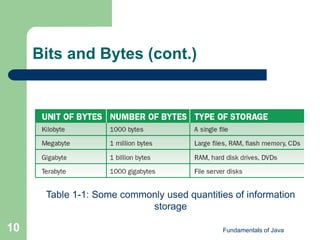
Bits and Bytes (cont.)
Table 1-1: Some commonly used quantities of information
storage
Fundamentals of Java
11
Computer Hardware
 Six major sub-systems:
– User interface: Supports moment-to-moment
communication between user and computer
 Keyboard and mouse
– Auxiliary I/O devices: Printers and scanners
– Auxiliary storage devices: Secondary
memory
 Hard disks, CD-ROMS, flash memory sticks
Fundamentals of Java
12
Computer Hardware (cont.)
 Six major sub-systems (continued):
– Network connection: Connection to Internet
 Modems
– Internal memory: Random access memory
(RAM) or primary memory
 Fast and relatively small
– Central processing unit (CPU): Performs the
work on a computer
 Consists of billions of transistors
Fundamentals of Java
13
Computer Software: System
Software
 Supports basic operations of a computer and
allows human interaction
– Operating system
– Communications software
– Compilers
– User interface subsystem
Fundamentals of Java
14
Computer Software: Application
Software
 Allows human users to accomplish
specialized tasks
– Word processors
– Spreadsheets
– Database systems
– Multimedia software
Fundamentals of Java
15
Binary Representation of
Information & Computer Memory
 Computer memory stores patterns of
electronic signals.
– CPU reads, manipulates, and transforms
patterns.
– Patterns can be stored/viewed as strings of bits.
 Sequences of 1s and 0s
– To determine what a sequence of bits
represents, you must know the context.
Fundamentals of Java
16
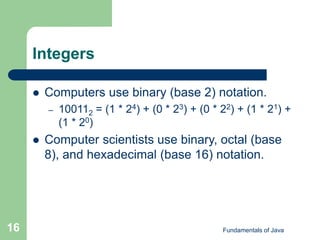
Integers
 Computers use binary (base 2) notation.
– 100112 = (1 * 24) + (0 * 23) + (0 * 22) + (1 * 21) +
(1 * 20)
 Computer scientists use binary, octal (base
8), and hexadecimal (base 16) notation.
Fundamentals of Java
17
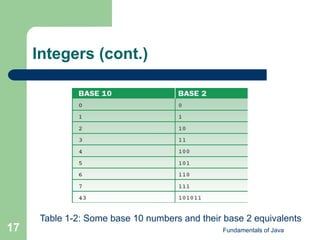
Integers (cont.)
Table 1-2: Some base 10 numbers and their base 2 equivalents
Fundamentals of Java
18
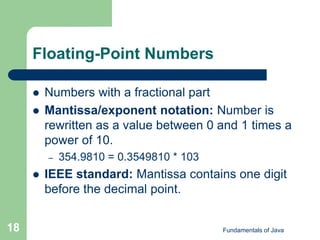
Floating-Point Numbers
 Numbers with a fractional part
 Mantissa/exponent notation: Number is
rewritten as a value between 0 and 1 times a
power of 10.
– 354.9810 = 0.3549810 * 103
 IEEE standard: Mantissa contains one digit
before the decimal point.
Fundamentals of Java
19
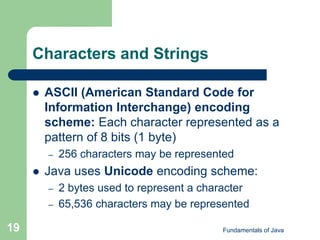
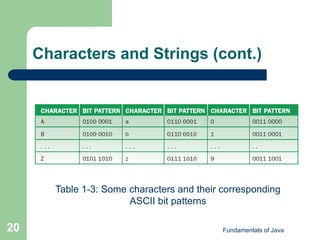
Characters and Strings
 ASCII (American Standard Code for
Information Interchange) encoding
scheme: Each character represented as a
pattern of 8 bits (1 byte)
– 256 characters may be represented
 Java uses Unicode encoding scheme:
– 2 bytes used to represent a character
– 65,536 characters may be represented
Fundamentals of Java
20
Characters and Strings (cont.)
Table 1-3: Some characters and their corresponding
ASCII bit patterns
Fundamentals of Java
21
Sound
 Information contained in sound is analog.
– Continuous waveform
 In order to represent in a computer, sound
must be digitized.
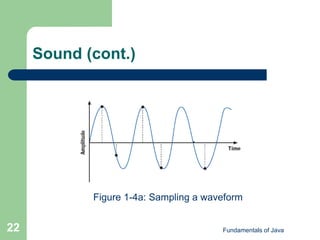
– Sampled at regular intervals on the waveform
– Standard sampling rate is 44,000 samples per
second
 Requires large amount of storage
Fundamentals of Java
22
Sound (cont.)
Figure 1-4a: Sampling a waveform
Fundamentals of Java
23
Images
 Also analog information
– Set of color and intensity values spread across
a two-dimensional space
– Sampling devices: Scanners and digital
cameras
– Measure discrete values at pixels on a grid
 Black-and-white: 2 bits per pixel
 Grayscale: 8 bits per pixel for 256 shades of gray
 True color (RGB): 24 bits per pixel
Fundamentals of Java
24
Video
 Consists of a soundtrack and frames
– Sets of images recorded in sequence during a
given time interval
 Primary challenge in digitizing video is data
compression
Fundamentals of Java
25
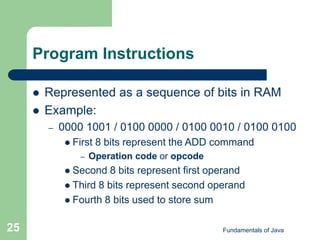
Program Instructions
 Represented as a sequence of bits in RAM
 Example:
– 0000 1001 / 0100 0000 / 0100 0010 / 0100 0100
 First 8 bits represent the ADD command
– Operation code or opcode
 Second 8 bits represent first operand
 Third 8 bits represent second operand
 Fourth 8 bits used to store sum
Fundamentals of Java
26
Computer Memory
 Address: A byte’s location in memory
– Numbered from 0 to 1 less than the number of
bytes of memory installed on the computer
– Adjacent bytes may store different types of
data.
 Depends on context
Fundamentals of Java
27
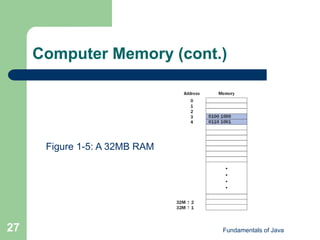
Computer Memory (cont.)
Figure 1-5: A 32MB RAM
Fundamentals of Java
28
Programming Languages
 Generation 1—machine languages:
Program data entered directly into RAM in
form of 1s and 0s
– Using switches and, later, punch cards
– Error prone, tedious, and slow
Fundamentals of Java
29
Programming Languages (cont.)
 Generation 2—assembly languages:
Mnemonic symbols represent instructions
and data.
– One-to-one correspondence with machine-
language instructions
 Assembler: Translates to machine language
 Loader: Loads machine language into memory
Fundamentals of Java
30
Programming Languages (cont.)
 Generation 3—high-level languages:
Designed to be easy to write, read, and
manipulate.
– C, C++, Java
– High-level instructions may represent many
machine-language instructions.
– Compiler translates high-level language into
machine language.
Fundamentals of Java
31
The Software Development
Process
 Software development life cycle (SDLC): A
view of software development in which
phases of development occur incrementally
 Standardizes software development
– Simplifies understanding the project scope
– Minimizes software flaws
Fundamentals of Java
32
The Software Development
Process (cont.)
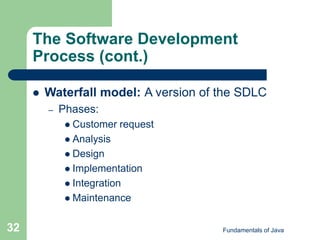
 Waterfall model: A version of the SDLC
– Phases:
 Customer request
 Analysis
 Design
 Implementation
 Integration
 Maintenance
Fundamentals of Java
33
The Software Development
Process (cont.)
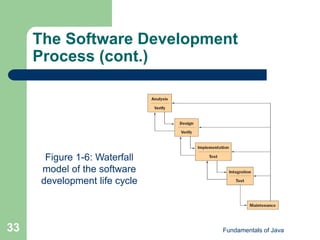
Figure 1-6: Waterfall
model of the software
development life cycle
Fundamentals of Java
34
The Software Development
Process (cont.)
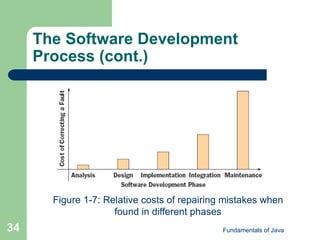
Figure 1-7: Relative costs of repairing mistakes when
found in different phases
Fundamentals of Java
35
The Software Development
Process (cont.)
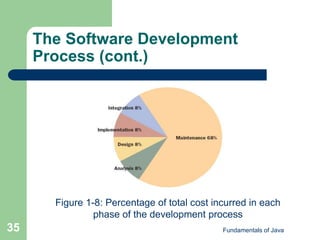
Figure 1-8: Percentage of total cost incurred in each
phase of the development process
Fundamentals of Java
36
Basic Concepts of Object-
Oriented Programming
 Two major groups of high-level languages:
– Procedural languages: COBOL, FORTRAN,
BASIC, C, Pascal
– Object-oriented languages: Smalltalk, C++,
Java
 Object-oriented approach is superior
Fundamentals of Java
37
Basic Concepts of Object-
Oriented Programming (cont.)
 Object-oriented programming takes a divide-
and-conquer approach to reduce code.
– Code can easily be reused
 A program consists of different types of
software components called classes.
– Defines data resources and methods
 Rules of behavior
Fundamentals of Java
38
Basic Concepts of Object-
Oriented Programming (cont.)
 Encapsulation: Combining the description
of resources and behaviors into a single
software entity
 A program is written first and then run.
 A running program is composed of
interacting objects.
– Each object’s data resources (instance
variables) and rules of behavior (methods) are
defined by a class.
Fundamentals of Java
39
Basic Concepts of Object-
Oriented Programming (Cont.)
 While a program is executing, it instantiates
(creates) objects as needed.
 Objects work together to accomplish the
mission of the program.
– Send each other messages to request services
or data
 When an object receives a message, it refers
to its class to find the corresponding method
to execute.
Fundamentals of Java
40
Basic Concepts of Object-
Oriented Programming (cont.)
 Information hiding: Providing access to
services, but not to data resources
 Classes are organized in a hierarchy.
 Root class defines methods and instance
variables shared by its subclasses.
– Those below it in the hierarchy
 Subclasses define additional methods and
instance variables.
Fundamentals of Java
41
Basic Concepts of Object-
Oriented Programming (cont.)
 Inheritance: The hierarchical class structure
and sharing of instance variables and
methods with subclasses
 Polymorphism: Different types of objects
can understand the same message.
– An object’s response to a message depends on
the object’s class.
Fundamentals of Java
42
Summary
 The modern computer age began in the late
1940s with the development of ENIAC.
Business computing became practical in the
1950s, and time-sharing computers
advanced computing in large organizations in
the 1960s and 1970s. The 1980s saw the
development and first widespread sales of
personal computers, and the 1990s saw
personal computers connected in networks.
Fundamentals of Java
43
Summary (cont.)
 Modern computers consist of two primary
components: hardware and software.
Computer hardware is the physical
component of the system. Computer
software consists of programs that enable us
to use the hardware.
Fundamentals of Java
44
Summary (cont.)
 All information used by a computer is
represented in binary form. This information
includes numbers, text, images, sound, and
program instructions.
 Programming languages have been
developed in the course of three generations:
generation 1 is machine language,
generation 2 is assembly language, and
generation 3 is high-level language.
Fundamentals of Java
45
Summary (cont.)
 The software development process consists
of several standard phases: customer
request, analysis, design, implementation,
integration, and maintenance.
 Object-oriented programming is a style of
programming that can lead to better quality
software. Breaking code into easily handled
components simplifies the job of writing a
large program.

Ppt chapter01

  • 1.
  • 2.
    Fundamentals of Java 2 Objectives Give a brief history of computers.  Describe how hardware and software make up computer architecture.  Understand the binary representation of data and programs in computers.
  • 3.
    Fundamentals of Java 3 Objectives(cont.)  Discuss the evolution of programming languages.  Describe the software development process.  Discuss the fundamental concepts of object- oriented programming.
  • 4.
    Fundamentals of Java 4 Vocabulary Application software  Bit  Byte  Central processing unit (CPU)  Hardware  Information hiding  Object-oriented programming
  • 5.
    Fundamentals of Java 5 Vocabulary(cont.)  Primary memory  Secondary memory  Software  Software development life cycle (SDLC)  System software  Ubiquitous computing  Waterfall model
  • 6.
    Fundamentals of Java 6 Historyof Computers  1940s: ENIAC (One of world’s first digital electronic computers)  1950s: IBM sells first business computers  1960s: Time-sharing computers  1970s: Networking takes hold
  • 7.
    Fundamentals of Java 7 Historyof Computers (cont.)  1980s: Many PCs, LANs become popular  1990s: Explosion in computer use – Internet becomes prevalent  21st century: Ubiquitous computing
  • 8.
    Fundamentals of Java 8 ComputerHardware and Software  Hardware: Physical devices that you see on your desktop  Software: Programs that give the hardware useful functionality
  • 9.
    Fundamentals of Java 9 Bitsand Bytes  Bit (binary digit): Smallest unit of information processed by a computer – A single 0 or 1  Byte: 8 adjacent bits  Capacity of computer memory and storage devices usually expressed in bytes
  • 10.
    Fundamentals of Java 10 Bitsand Bytes (cont.) Table 1-1: Some commonly used quantities of information storage
  • 11.
    Fundamentals of Java 11 ComputerHardware  Six major sub-systems: – User interface: Supports moment-to-moment communication between user and computer  Keyboard and mouse – Auxiliary I/O devices: Printers and scanners – Auxiliary storage devices: Secondary memory  Hard disks, CD-ROMS, flash memory sticks
  • 12.
    Fundamentals of Java 12 ComputerHardware (cont.)  Six major sub-systems (continued): – Network connection: Connection to Internet  Modems – Internal memory: Random access memory (RAM) or primary memory  Fast and relatively small – Central processing unit (CPU): Performs the work on a computer  Consists of billions of transistors
  • 13.
    Fundamentals of Java 13 ComputerSoftware: System Software  Supports basic operations of a computer and allows human interaction – Operating system – Communications software – Compilers – User interface subsystem
  • 14.
    Fundamentals of Java 14 ComputerSoftware: Application Software  Allows human users to accomplish specialized tasks – Word processors – Spreadsheets – Database systems – Multimedia software
  • 15.
    Fundamentals of Java 15 BinaryRepresentation of Information & Computer Memory  Computer memory stores patterns of electronic signals. – CPU reads, manipulates, and transforms patterns. – Patterns can be stored/viewed as strings of bits.  Sequences of 1s and 0s – To determine what a sequence of bits represents, you must know the context.
  • 16.
    Fundamentals of Java 16 Integers Computers use binary (base 2) notation. – 100112 = (1 * 24) + (0 * 23) + (0 * 22) + (1 * 21) + (1 * 20)  Computer scientists use binary, octal (base 8), and hexadecimal (base 16) notation.
  • 17.
    Fundamentals of Java 17 Integers(cont.) Table 1-2: Some base 10 numbers and their base 2 equivalents
  • 18.
    Fundamentals of Java 18 Floating-PointNumbers  Numbers with a fractional part  Mantissa/exponent notation: Number is rewritten as a value between 0 and 1 times a power of 10. – 354.9810 = 0.3549810 * 103  IEEE standard: Mantissa contains one digit before the decimal point.
  • 19.
    Fundamentals of Java 19 Charactersand Strings  ASCII (American Standard Code for Information Interchange) encoding scheme: Each character represented as a pattern of 8 bits (1 byte) – 256 characters may be represented  Java uses Unicode encoding scheme: – 2 bytes used to represent a character – 65,536 characters may be represented
  • 20.
    Fundamentals of Java 20 Charactersand Strings (cont.) Table 1-3: Some characters and their corresponding ASCII bit patterns
  • 21.
    Fundamentals of Java 21 Sound Information contained in sound is analog. – Continuous waveform  In order to represent in a computer, sound must be digitized. – Sampled at regular intervals on the waveform – Standard sampling rate is 44,000 samples per second  Requires large amount of storage
  • 22.
    Fundamentals of Java 22 Sound(cont.) Figure 1-4a: Sampling a waveform
  • 23.
    Fundamentals of Java 23 Images Also analog information – Set of color and intensity values spread across a two-dimensional space – Sampling devices: Scanners and digital cameras – Measure discrete values at pixels on a grid  Black-and-white: 2 bits per pixel  Grayscale: 8 bits per pixel for 256 shades of gray  True color (RGB): 24 bits per pixel
  • 24.
    Fundamentals of Java 24 Video Consists of a soundtrack and frames – Sets of images recorded in sequence during a given time interval  Primary challenge in digitizing video is data compression
  • 25.
    Fundamentals of Java 25 ProgramInstructions  Represented as a sequence of bits in RAM  Example: – 0000 1001 / 0100 0000 / 0100 0010 / 0100 0100  First 8 bits represent the ADD command – Operation code or opcode  Second 8 bits represent first operand  Third 8 bits represent second operand  Fourth 8 bits used to store sum
  • 26.
    Fundamentals of Java 26 ComputerMemory  Address: A byte’s location in memory – Numbered from 0 to 1 less than the number of bytes of memory installed on the computer – Adjacent bytes may store different types of data.  Depends on context
  • 27.
    Fundamentals of Java 27 ComputerMemory (cont.) Figure 1-5: A 32MB RAM
  • 28.
    Fundamentals of Java 28 ProgrammingLanguages  Generation 1—machine languages: Program data entered directly into RAM in form of 1s and 0s – Using switches and, later, punch cards – Error prone, tedious, and slow
  • 29.
    Fundamentals of Java 29 ProgrammingLanguages (cont.)  Generation 2—assembly languages: Mnemonic symbols represent instructions and data. – One-to-one correspondence with machine- language instructions  Assembler: Translates to machine language  Loader: Loads machine language into memory
  • 30.
    Fundamentals of Java 30 ProgrammingLanguages (cont.)  Generation 3—high-level languages: Designed to be easy to write, read, and manipulate. – C, C++, Java – High-level instructions may represent many machine-language instructions. – Compiler translates high-level language into machine language.
  • 31.
    Fundamentals of Java 31 TheSoftware Development Process  Software development life cycle (SDLC): A view of software development in which phases of development occur incrementally  Standardizes software development – Simplifies understanding the project scope – Minimizes software flaws
  • 32.
    Fundamentals of Java 32 TheSoftware Development Process (cont.)  Waterfall model: A version of the SDLC – Phases:  Customer request  Analysis  Design  Implementation  Integration  Maintenance
  • 33.
    Fundamentals of Java 33 TheSoftware Development Process (cont.) Figure 1-6: Waterfall model of the software development life cycle
  • 34.
    Fundamentals of Java 34 TheSoftware Development Process (cont.) Figure 1-7: Relative costs of repairing mistakes when found in different phases
  • 35.
    Fundamentals of Java 35 TheSoftware Development Process (cont.) Figure 1-8: Percentage of total cost incurred in each phase of the development process
  • 36.
    Fundamentals of Java 36 BasicConcepts of Object- Oriented Programming  Two major groups of high-level languages: – Procedural languages: COBOL, FORTRAN, BASIC, C, Pascal – Object-oriented languages: Smalltalk, C++, Java  Object-oriented approach is superior
  • 37.
    Fundamentals of Java 37 BasicConcepts of Object- Oriented Programming (cont.)  Object-oriented programming takes a divide- and-conquer approach to reduce code. – Code can easily be reused  A program consists of different types of software components called classes. – Defines data resources and methods  Rules of behavior
  • 38.
    Fundamentals of Java 38 BasicConcepts of Object- Oriented Programming (cont.)  Encapsulation: Combining the description of resources and behaviors into a single software entity  A program is written first and then run.  A running program is composed of interacting objects. – Each object’s data resources (instance variables) and rules of behavior (methods) are defined by a class.
  • 39.
    Fundamentals of Java 39 BasicConcepts of Object- Oriented Programming (Cont.)  While a program is executing, it instantiates (creates) objects as needed.  Objects work together to accomplish the mission of the program. – Send each other messages to request services or data  When an object receives a message, it refers to its class to find the corresponding method to execute.
  • 40.
    Fundamentals of Java 40 BasicConcepts of Object- Oriented Programming (cont.)  Information hiding: Providing access to services, but not to data resources  Classes are organized in a hierarchy.  Root class defines methods and instance variables shared by its subclasses. – Those below it in the hierarchy  Subclasses define additional methods and instance variables.
  • 41.
    Fundamentals of Java 41 BasicConcepts of Object- Oriented Programming (cont.)  Inheritance: The hierarchical class structure and sharing of instance variables and methods with subclasses  Polymorphism: Different types of objects can understand the same message. – An object’s response to a message depends on the object’s class.
  • 42.
    Fundamentals of Java 42 Summary The modern computer age began in the late 1940s with the development of ENIAC. Business computing became practical in the 1950s, and time-sharing computers advanced computing in large organizations in the 1960s and 1970s. The 1980s saw the development and first widespread sales of personal computers, and the 1990s saw personal computers connected in networks.
  • 43.
    Fundamentals of Java 43 Summary(cont.)  Modern computers consist of two primary components: hardware and software. Computer hardware is the physical component of the system. Computer software consists of programs that enable us to use the hardware.
  • 44.
    Fundamentals of Java 44 Summary(cont.)  All information used by a computer is represented in binary form. This information includes numbers, text, images, sound, and program instructions.  Programming languages have been developed in the course of three generations: generation 1 is machine language, generation 2 is assembly language, and generation 3 is high-level language.
  • 45.
    Fundamentals of Java 45 Summary(cont.)  The software development process consists of several standard phases: customer request, analysis, design, implementation, integration, and maintenance.  Object-oriented programming is a style of programming that can lead to better quality software. Breaking code into easily handled components simplifies the job of writing a large program.