PowerPointlessness

   Cathy Rodriguez
     Sarah Silva
    Rebecca Gould

         iTAC
    509 Hale Library
       532-4918
Overview

¡  Examples:  How to ruin a
    presentation
¡  Instruction and Presentation Tips

¡  Technical Tips

¡  Questions and Answers
Instruction and Presentation Tips

¡    Stick to the basics
¡    Focus on the main point(s)
¡    Simplify, simplify, simplify
¡    Divide content into chunks
¡    Eliminate distractions
¡    Make it interesting & interactive
Stick to the basics…
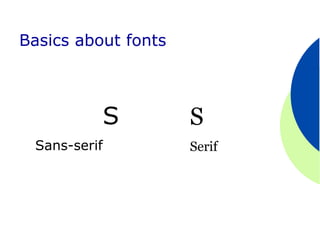
Basics about fonts

¡  AVOID    ALL CAPITAL LETTERS
¡  Use upper and lower case letters

¡  Sans-serif fonts are easier to read

¡  Italics are difficult to read

¡  Use normal or bold fonts

¡  Avoid overuse of underlines
Basics about fonts


              S      S
 Sans-serif          Serif
Basics about fonts
¡    This is Verdana 12

¡    This is Verdana 18
¡    This is Verdana 24
¡  This           is Verdana 32
¡  This             is Verdana 36
¡ This                    is Verdana 44
¡ This                     is Verdana 56
Basics about color

¡    Use eye-pleasing colors
¡    Use high contrast
¡    Use a complementary
      color scheme
Focus on the main point(s)…
Computers and Mistakes
¡  Computers
           rarely make mistakes. Most
 computer mistakes are the result of
  l  No procedures/directions.
  l  Inappropriate processing instructions.
                        Too Busy
  l  Inaccurate

  l  Glitches/bugs/errors in the program code.

  l  Poor systems design.


  Types of
  computer-
   related
   mistakes
Common computer errors

¡  No  procedures/directions
¡  Inappropriate processing
    instructions Focused
¡  Inaccurate

¡  Glitches/bugs/errors in the
    program code
¡  Poor systems design
Types of computer mistakes


¡  Data entry or capture errors
¡  Errors in computer programs

¡  Handling files  Focused
¡  Inadequate control of output

¡  Inadequate control of environmental
    conditions
Simplify…
Simplify

¡  Use   few colors
¡  Use   limited   fonts and styles
¡  Use numbers for lists with sequence
¡  Use few transitions

¡  Limit the use of sound

¡  Design your own template or edit
    one
Simple exponential smoothing
   St = ά At + (1-ά)St-1
   ά =judgment factor (.1-.3)
   St = new forecast
   At = last demand
   St-1 = last forecast

   New forecast = judgment factor (last
     year’s actual) +(1-judgement factor)
     (last year’s budget)
Simple exponential smoothing

   St = ά At + (1-ά)St-1

   ά =judgment factor (.1-.3)
   St = new forecast
   At = last demand
   St-1 = last forecast
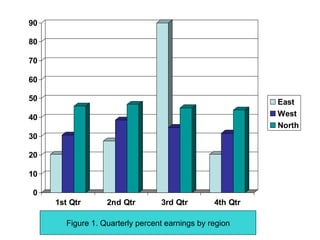
Use simple graphs and tables
90                                                                  80-90
80                                                                  70-80
70                                                                  60-70
60                                                                  50-60
50                                                                  40-50
40
                                                                    30-40
30
                                                                    20-30
20                                                          North   10-20
10
                                                                    0-10
 0                                                   East
     1st Qtr   2nd Qtr      3rd Qtr    4th Qtr


        Figure 1. Quarterly percent earnings by region
90

80

70

60

50                                                         East
40                                                         West
                                                           North
30

20

10

0
     1st Qtr       2nd Qtr        3rd Qtr        4th Qtr

        Figure 1. Quarterly percent earnings by region
Divide content into chunks…
Learning Styles

The analytical learning style tends to
view information as bounded, objective,
and isolated. The relational learning
style views information as embedded in
a larger context and as inherently
unbounded and subjective.

                      Cohen, 1969
Two Learning Styles

The analytical learning style tends to view
  information as bounded, objective, and
  isolated.

The relational learning style views
  information as embedded in a larger
  context and as inherently unbounded and
  subjective.

                           Cohen, 1969
Learning Styles
 Analytical               Relational
 Focus on detail.         Focus on global.
 Impersonal materials.    Social contexts.
 Abstract ideas.          Verbal presentation.
 Relevance unnecessary.   Relevance important.
 Independent opinion.     Consider other opinions.
 Sequential/structured.   Improvisational/intuitive.
 Persistent regardless    Need stimulating work.
   of interest.
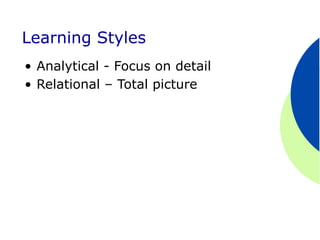
Learning Styles
•  Analytical - Focus on detail
•  Relational – Total picture
Eliminate distractions…
TO SUMMARIZE
¡    How we view information:
       l  This view of information is how we view
           the world and its contents and then
           what we do about that information.
       l  The logical view of information focuses
           on how we need to arrange information
           in the physical world and the virtual
           world.
¡    This is a collection of information about
      the world and its surroundings.
¡    The dictionary provides the structure by
      which we organize material and make
      sense of the world around us.
Make it interesting & interactive…
Technical Tips
 ● Making a master slide
 ● Adding transitions, animation, and
    sound
 ● Adding interactivity
    --the blank slide
    --annotating a slide
 ● Printing
 ● and more…
Where to go for help?
In summary…

¡  Remember    the basics – font, color
¡  Use techniques to focus attention

¡  Keep it simple

¡  Organize information in chunks

¡  Get rid of distractions

¡  Keep the material interesting and
    include interactivity

Powerpoint

  • 1.
    PowerPointlessness Cathy Rodriguez Sarah Silva Rebecca Gould iTAC 509 Hale Library 532-4918
  • 2.
    Overview ¡  Examples: How to ruin a presentation ¡  Instruction and Presentation Tips ¡  Technical Tips ¡  Questions and Answers
  • 3.
    Instruction and PresentationTips ¡  Stick to the basics ¡  Focus on the main point(s) ¡  Simplify, simplify, simplify ¡  Divide content into chunks ¡  Eliminate distractions ¡  Make it interesting & interactive
  • 4.
    Stick to thebasics…
  • 5.
    Basics about fonts ¡ AVOID ALL CAPITAL LETTERS ¡  Use upper and lower case letters ¡  Sans-serif fonts are easier to read ¡  Italics are difficult to read ¡  Use normal or bold fonts ¡  Avoid overuse of underlines
  • 6.
    Basics about fonts S S Sans-serif Serif
  • 7.
    Basics about fonts ¡  This is Verdana 12 ¡  This is Verdana 18 ¡  This is Verdana 24 ¡  This is Verdana 32 ¡  This is Verdana 36 ¡ This is Verdana 44 ¡ This is Verdana 56
  • 8.
    Basics about color ¡  Use eye-pleasing colors ¡  Use high contrast ¡  Use a complementary color scheme
  • 9.
    Focus on themain point(s)…
  • 10.
    Computers and Mistakes ¡ Computers rarely make mistakes. Most computer mistakes are the result of l  No procedures/directions. l  Inappropriate processing instructions. Too Busy l  Inaccurate l  Glitches/bugs/errors in the program code. l  Poor systems design. Types of computer- related mistakes
  • 11.
    Common computer errors ¡ No procedures/directions ¡  Inappropriate processing instructions Focused ¡  Inaccurate ¡  Glitches/bugs/errors in the program code ¡  Poor systems design
  • 12.
    Types of computermistakes ¡  Data entry or capture errors ¡  Errors in computer programs ¡  Handling files Focused ¡  Inadequate control of output ¡  Inadequate control of environmental conditions
  • 13.
  • 14.
    Simplify ¡  Use few colors ¡  Use limited fonts and styles ¡  Use numbers for lists with sequence ¡  Use few transitions ¡  Limit the use of sound ¡  Design your own template or edit one
  • 16.
    Simple exponential smoothing St = ά At + (1-ά)St-1 ά =judgment factor (.1-.3) St = new forecast At = last demand St-1 = last forecast New forecast = judgment factor (last year’s actual) +(1-judgement factor) (last year’s budget)
  • 17.
    Simple exponential smoothing St = ά At + (1-ά)St-1 ά =judgment factor (.1-.3) St = new forecast At = last demand St-1 = last forecast
  • 18.
  • 19.
    90 80-90 80 70-80 70 60-70 60 50-60 50 40-50 40 30-40 30 20-30 20 North 10-20 10 0-10 0 East 1st Qtr 2nd Qtr 3rd Qtr 4th Qtr Figure 1. Quarterly percent earnings by region
  • 20.
    90 80 70 60 50 East 40 West North 30 20 10 0 1st Qtr 2nd Qtr 3rd Qtr 4th Qtr Figure 1. Quarterly percent earnings by region
  • 21.
  • 22.
    Learning Styles The analyticallearning style tends to view information as bounded, objective, and isolated. The relational learning style views information as embedded in a larger context and as inherently unbounded and subjective. Cohen, 1969
  • 23.
    Two Learning Styles Theanalytical learning style tends to view information as bounded, objective, and isolated. The relational learning style views information as embedded in a larger context and as inherently unbounded and subjective. Cohen, 1969
  • 24.
    Learning Styles Analytical Relational Focus on detail. Focus on global. Impersonal materials. Social contexts. Abstract ideas. Verbal presentation. Relevance unnecessary. Relevance important. Independent opinion. Consider other opinions. Sequential/structured. Improvisational/intuitive. Persistent regardless Need stimulating work. of interest.
  • 25.
    Learning Styles •  Analytical- Focus on detail •  Relational – Total picture
  • 26.
  • 28.
    TO SUMMARIZE ¡  How we view information: l  This view of information is how we view the world and its contents and then what we do about that information. l  The logical view of information focuses on how we need to arrange information in the physical world and the virtual world. ¡  This is a collection of information about the world and its surroundings. ¡  The dictionary provides the structure by which we organize material and make sense of the world around us.
  • 29.
    Make it interesting& interactive…
  • 33.
    Technical Tips ●Making a master slide ● Adding transitions, animation, and sound ● Adding interactivity --the blank slide --annotating a slide ● Printing ● and more…
  • 34.
    Where to gofor help?
  • 35.
    In summary… ¡  Remember the basics – font, color ¡  Use techniques to focus attention ¡  Keep it simple ¡  Organize information in chunks ¡  Get rid of distractions ¡  Keep the material interesting and include interactivity