Infrastructure
Ports and Services
1
2
What is Services?
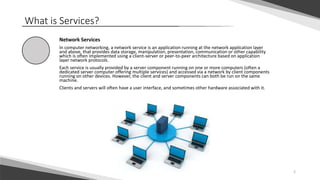
Network Services
In computer networking, a network service is an application running at the network application layer
and above, that provides data storage, manipulation, presentation, communication or other capability
which is often implemented using a client-server or peer-to-peer architecture based on application
layer network protocols.
Each service is usually provided by a server component running on one or more computers (often a
dedicated server computer offering multiple services) and accessed via a network by client components
running on other devices. However, the client and server components can both be run on the same
machine.
Clients and servers will often have a user interface, and sometimes other hardware associated with it.
3
Services and Ports
Services and Prots:
DNS (Domain name system) - 53
DHCP (Dynamic Host Configuration Protocol) - 67,68
http (Hypertext Transfer Protocol) - 80
https (HTTP Secure) - 443
telnet - 23
SSH (Secure Shell) - 22
FTP (File Transfer Protocol) - 21
POP3 - 110
SMTP (Simple Mail Transfer Protocol) - 25
SMB (Server Message Block) - 445 + 139
RDP (Remote Desktop Protocol) - 3389
SQL (Structured Query Language) - 3306
4
DNS – Domain Name Service
DNS
The Domain Name System (DNS) is a hierarchical decentralized naming system for computers, services, or other
resources connected to the Internet or a private network. It associates various information with domain names
assigned to each of the participating entities. Most prominently, it translates more readily memorized domain
names to the numerical IP addresses needed for locating and identifying computer services and devices with the
underlying network protocols. By providing a worldwide, distributed directory service, the Domain Name System
is an essential component of the functionality on the Internet, that has been in use since 1985.
DNS is using port 53.
5
DHCP – Dynamic Host Configuration Protocol
DHCP
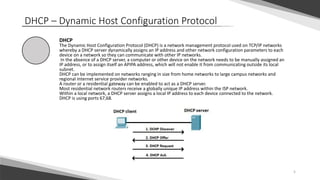
The Dynamic Host Configuration Protocol (DHCP) is a network management protocol used on TCP/IP networks
whereby a DHCP server dynamically assigns an IP address and other network configuration parameters to each
device on a network so they can communicate with other IP networks.
In the absence of a DHCP server, a computer or other device on the network needs to be manually assigned an
IP address, or to assign itself an APIPA address, which will not enable it from communicating outside its local
subnet.
DHCP can be implemented on networks ranging in size from home networks to large campus networks and
regional Internet service provider networks.
A router or a residential gateway can be enabled to act as a DHCP server.
Most residential network routers receive a globally unique IP address within the ISP network.
Within a local network, a DHCP server assigns a local IP address to each device connected to the network.
DHCP is using ports 67,68.
6
HTTP – Hypertext Transfer Protocol
HTTP
The Hypertext Transfer Protocol (HTTP) is an application protocol for distributed, collaborative,
and hypermedia information systems.
HTTP is the foundation of data communication for the World Wide Web.
Hypertext is structured text that uses logical links (hyperlinks) between nodes containing text.
HTTP is the protocol to exchange or transfer hypertext.
HTTP is using port 80.
HTTPS
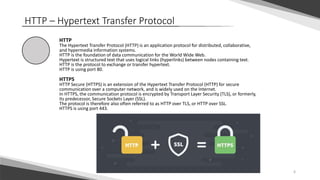
HTTP Secure (HTTPS) is an extension of the Hypertext Transfer Protocol (HTTP) for secure
communication over a computer network, and is widely used on the Internet.
In HTTPS, the communication protocol is encrypted by Transport Layer Security (TLS), or formerly,
its predecessor, Secure Sockets Layer (SSL).
The protocol is therefore also often referred to as HTTP over TLS, or HTTP over SSL.
HTTPS is using port 443.
7
Telnet and SSH
Telnet
Telnet is a protocol used on the Internet or local area networks to provide a bidirectional
interactive text-oriented communication facility using a virtual terminal connection.
The name stands for "teletype network".
Historically, Telnet provided access to a command-line interface on a remote host, including most
network equipment and operating systems with a configuration utility.
However, because of serious security concerns when using Telnet over an open network such as
the Internet, its use for this purpose has waned significantly in favor of SSH.
Telnet is using port 23.
SSH – Secure Shell
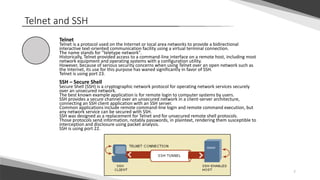
Secure Shell (SSH) is a cryptographic network protocol for operating network services securely
over an unsecured network.
The best known example application is for remote login to computer systems by users.
SSH provides a secure channel over an unsecured network in a client-server architecture,
connecting an SSH client application with an SSH server.
Common applications include remote command-line login and remote command execution, but
any network service can be secured with SSH.
SSH was designed as a replacement for Telnet and for unsecured remote shell protocols.
Those protocols send information, notably passwords, in plaintext, rendering them susceptible to
interception and disclosure using packet analysis.
SSH is using port 22.
8
FTP – File Transfer Protocol
FTP
The File Transfer Protocol (FTP) is a standard network protocol used for the transfer of
computer files between a client and server on a computer network.
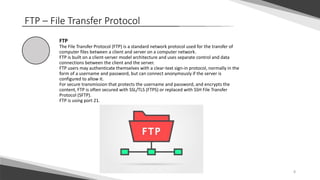
FTP is built on a client-server model architecture and uses separate control and data
connections between the client and the server.
FTP users may authenticate themselves with a clear-text sign-in protocol, normally in the
form of a username and password, but can connect anonymously if the server is
configured to allow it.
For secure transmission that protects the username and password, and encrypts the
content, FTP is often secured with SSL/TLS (FTPS) or replaced with SSH File Transfer
Protocol (SFTP).
FTP is using port 21.
9
POP3 and SMTP
POP3
In computing, the Post Office Protocol (POP) is an application-layer Internet standard protocol
used by e-mail clients to retrieve e-mail from a server in an Internet Protocol (IP) network.
POP version 3 (POP3) is the most recent level of development in common use.
POP has largely been superseded by the Internet Message Access Protocol (IMAP).
POP3 is using port 110.
SMTP – Simple Mail Transfer Protocol
Simple Mail Transfer Protocol (SMTP) is an Internet standard for electronic mail (email)
transmission
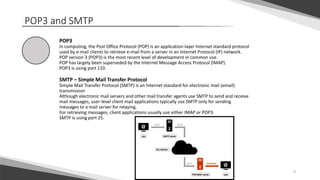
Although electronic mail servers and other mail transfer agents use SMTP to send and receive
mail messages, user-level client mail applications typically use SMTP only for sending
messages to a mail server for relaying.
For retrieving messages, client applications usually use either IMAP or POP3.
SMTP is using port 25.
10
SMB – Server Message Block
SMB
In computer networking, Server Message Block (SMB), one version of which was also known
as Common Internet File System (CIFS),operates as an application-layer network protocol
mainly used for providing shared access to files, printers, and serial ports ,communications
between nodes on a network.
Most usage of SMB involves computers running Microsoft Windows, where it was known as
"Microsoft Windows Network" before the introduction of Active Directory. Corresponding
Windows services are LAN Manager Server (for the server component) and LAN Manager
Workstation (for the client component).
SMB is using ports 445 and 139.
11
RDP – Remote Desktop Protocol
RDP
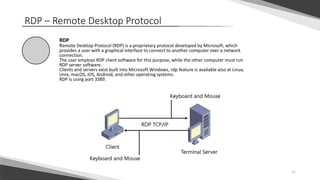
Remote Desktop Protocol (RDP) is a proprietary protocol developed by Microsoft, which
provides a user with a graphical interface to connect to another computer over a network
connection.
The user employs RDP client software for this purpose, while the other computer must run
RDP server software.
Clients and servers exist built into Microsoft Windows, rdp feature is available also at Linux,
Unix, macOS, iOS, Android, and other operating systems.
RDP is using port 3389.
12
SQL – Structured Query Language
SQL
SQL (Structured Query Language) is a domain-specific language used in programming and designed for
Managing DATA.
It is particularly useful in handling structured data where there are relations between different
entities/variables of the data.
The scope of SQL includes data query, data manipulation (insert, update and delete), data definition (schema
creation and modification), and data access control.
SQL is using port 3306.

Ports and services

  • 1.
  • 2.
    2 What is Services? NetworkServices In computer networking, a network service is an application running at the network application layer and above, that provides data storage, manipulation, presentation, communication or other capability which is often implemented using a client-server or peer-to-peer architecture based on application layer network protocols. Each service is usually provided by a server component running on one or more computers (often a dedicated server computer offering multiple services) and accessed via a network by client components running on other devices. However, the client and server components can both be run on the same machine. Clients and servers will often have a user interface, and sometimes other hardware associated with it.
  • 3.
    3 Services and Ports Servicesand Prots: DNS (Domain name system) - 53 DHCP (Dynamic Host Configuration Protocol) - 67,68 http (Hypertext Transfer Protocol) - 80 https (HTTP Secure) - 443 telnet - 23 SSH (Secure Shell) - 22 FTP (File Transfer Protocol) - 21 POP3 - 110 SMTP (Simple Mail Transfer Protocol) - 25 SMB (Server Message Block) - 445 + 139 RDP (Remote Desktop Protocol) - 3389 SQL (Structured Query Language) - 3306
  • 4.
    4 DNS – DomainName Service DNS The Domain Name System (DNS) is a hierarchical decentralized naming system for computers, services, or other resources connected to the Internet or a private network. It associates various information with domain names assigned to each of the participating entities. Most prominently, it translates more readily memorized domain names to the numerical IP addresses needed for locating and identifying computer services and devices with the underlying network protocols. By providing a worldwide, distributed directory service, the Domain Name System is an essential component of the functionality on the Internet, that has been in use since 1985. DNS is using port 53.
  • 5.
    5 DHCP – DynamicHost Configuration Protocol DHCP The Dynamic Host Configuration Protocol (DHCP) is a network management protocol used on TCP/IP networks whereby a DHCP server dynamically assigns an IP address and other network configuration parameters to each device on a network so they can communicate with other IP networks. In the absence of a DHCP server, a computer or other device on the network needs to be manually assigned an IP address, or to assign itself an APIPA address, which will not enable it from communicating outside its local subnet. DHCP can be implemented on networks ranging in size from home networks to large campus networks and regional Internet service provider networks. A router or a residential gateway can be enabled to act as a DHCP server. Most residential network routers receive a globally unique IP address within the ISP network. Within a local network, a DHCP server assigns a local IP address to each device connected to the network. DHCP is using ports 67,68.
  • 6.
    6 HTTP – HypertextTransfer Protocol HTTP The Hypertext Transfer Protocol (HTTP) is an application protocol for distributed, collaborative, and hypermedia information systems. HTTP is the foundation of data communication for the World Wide Web. Hypertext is structured text that uses logical links (hyperlinks) between nodes containing text. HTTP is the protocol to exchange or transfer hypertext. HTTP is using port 80. HTTPS HTTP Secure (HTTPS) is an extension of the Hypertext Transfer Protocol (HTTP) for secure communication over a computer network, and is widely used on the Internet. In HTTPS, the communication protocol is encrypted by Transport Layer Security (TLS), or formerly, its predecessor, Secure Sockets Layer (SSL). The protocol is therefore also often referred to as HTTP over TLS, or HTTP over SSL. HTTPS is using port 443.
  • 7.
    7 Telnet and SSH Telnet Telnetis a protocol used on the Internet or local area networks to provide a bidirectional interactive text-oriented communication facility using a virtual terminal connection. The name stands for "teletype network". Historically, Telnet provided access to a command-line interface on a remote host, including most network equipment and operating systems with a configuration utility. However, because of serious security concerns when using Telnet over an open network such as the Internet, its use for this purpose has waned significantly in favor of SSH. Telnet is using port 23. SSH – Secure Shell Secure Shell (SSH) is a cryptographic network protocol for operating network services securely over an unsecured network. The best known example application is for remote login to computer systems by users. SSH provides a secure channel over an unsecured network in a client-server architecture, connecting an SSH client application with an SSH server. Common applications include remote command-line login and remote command execution, but any network service can be secured with SSH. SSH was designed as a replacement for Telnet and for unsecured remote shell protocols. Those protocols send information, notably passwords, in plaintext, rendering them susceptible to interception and disclosure using packet analysis. SSH is using port 22.
  • 8.
    8 FTP – FileTransfer Protocol FTP The File Transfer Protocol (FTP) is a standard network protocol used for the transfer of computer files between a client and server on a computer network. FTP is built on a client-server model architecture and uses separate control and data connections between the client and the server. FTP users may authenticate themselves with a clear-text sign-in protocol, normally in the form of a username and password, but can connect anonymously if the server is configured to allow it. For secure transmission that protects the username and password, and encrypts the content, FTP is often secured with SSL/TLS (FTPS) or replaced with SSH File Transfer Protocol (SFTP). FTP is using port 21.
  • 9.
    9 POP3 and SMTP POP3 Incomputing, the Post Office Protocol (POP) is an application-layer Internet standard protocol used by e-mail clients to retrieve e-mail from a server in an Internet Protocol (IP) network. POP version 3 (POP3) is the most recent level of development in common use. POP has largely been superseded by the Internet Message Access Protocol (IMAP). POP3 is using port 110. SMTP – Simple Mail Transfer Protocol Simple Mail Transfer Protocol (SMTP) is an Internet standard for electronic mail (email) transmission Although electronic mail servers and other mail transfer agents use SMTP to send and receive mail messages, user-level client mail applications typically use SMTP only for sending messages to a mail server for relaying. For retrieving messages, client applications usually use either IMAP or POP3. SMTP is using port 25.
  • 10.
    10 SMB – ServerMessage Block SMB In computer networking, Server Message Block (SMB), one version of which was also known as Common Internet File System (CIFS),operates as an application-layer network protocol mainly used for providing shared access to files, printers, and serial ports ,communications between nodes on a network. Most usage of SMB involves computers running Microsoft Windows, where it was known as "Microsoft Windows Network" before the introduction of Active Directory. Corresponding Windows services are LAN Manager Server (for the server component) and LAN Manager Workstation (for the client component). SMB is using ports 445 and 139.
  • 11.
    11 RDP – RemoteDesktop Protocol RDP Remote Desktop Protocol (RDP) is a proprietary protocol developed by Microsoft, which provides a user with a graphical interface to connect to another computer over a network connection. The user employs RDP client software for this purpose, while the other computer must run RDP server software. Clients and servers exist built into Microsoft Windows, rdp feature is available also at Linux, Unix, macOS, iOS, Android, and other operating systems. RDP is using port 3389.
  • 12.
    12 SQL – StructuredQuery Language SQL SQL (Structured Query Language) is a domain-specific language used in programming and designed for Managing DATA. It is particularly useful in handling structured data where there are relations between different entities/variables of the data. The scope of SQL includes data query, data manipulation (insert, update and delete), data definition (schema creation and modification), and data access control. SQL is using port 3306.