Five Steps to PLC Program
Development
Paint Spray
Application
1. Define the task:
 What has to happen?
1. Define the task:
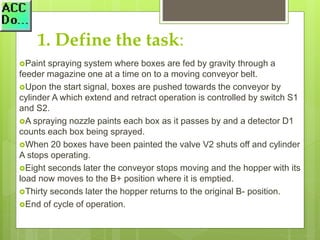
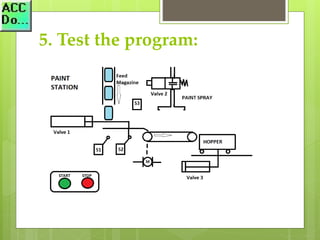
Paint spraying system where boxes are fed by gravity through a
feeder magazine one at a time on to a moving conveyor belt.
Upon the start signal, boxes are pushed towards the conveyor by
cylinder A which extend and retract operation is controlled by switch S1
and S2.
A spraying nozzle paints each box as it passes by and a detector D1
counts each box being sprayed.
When 20 boxes have been painted the valve V2 shuts off and cylinder
A stops operating.
Eight seconds later the conveyor stops moving and the hopper with its
load now moves to the B+ position where it is emptied.
Thirty seconds later the hopper returns to the original B- position.
End of cycle of operation.
2. Define the Inputs and
Outputs:
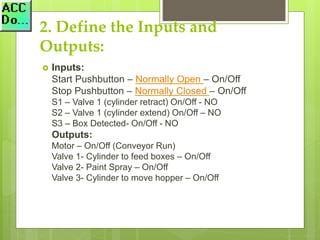
 Inputs:
Start Pushbutton – Normally Open – On/Off
Stop Pushbutton – Normally Closed – On/Off
S1 – Valve 1 (cylinder retract) On/Off - NO
S2 – Valve 1 (cylinder extend) On/Off – NO
S3 – Box Detected- On/Off - NO
Outputs:
Motor – On/Off (Conveyor Run)
Valve 1- Cylinder to feed boxes – On/Off
Valve 2- Paint Spray – On/Off
Valve 3- Cylinder to move hopper – On/Off
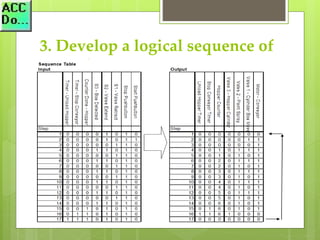
3. Develop a logical sequence of
operation:
Use a flow chart or sequence table.
Fully understanding the logic before starting to program
can save you time and frustration.
What happens when electrical power and/or pneumatic
air is lost? What happens when the input /
output devices fail? Do we need redundancy?
3. Develop a logical sequence of
operation:
3. Develop a logical sequence of
operation:
Review this sequence with the person with the
most knowledge of the machine. This can be the
designer and / or the machine operator.
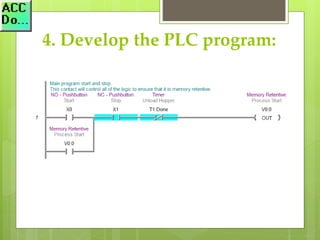
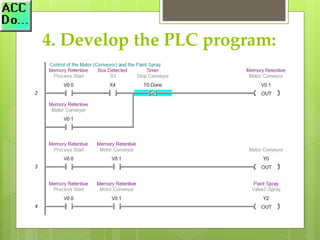
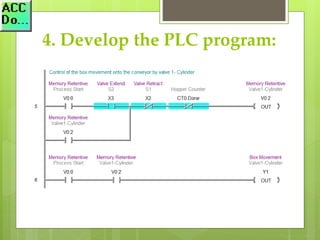
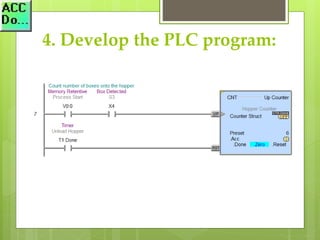
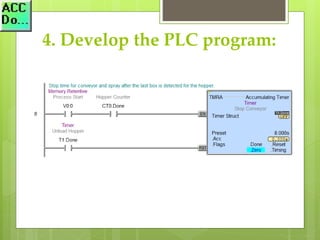
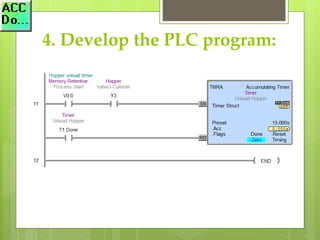
4. Develop the PLC program:
Document, Document, Document!
This save you time and money when you have to
return to the program years later.
5. Test the program:
Test the program with a simulator or actual
machine. Make modifications as necessary.
5. Test the program:
Check with the people most knowledgeable on
the machine, to see if it is doing what they
expect.
5. Test the program:
Follow up after a time frame to see if any
problems arise that need to be addressed in the
PLC program.
PLC Program Development
The five steps form the basis of all PLC
development. You will notice that the actual
programming does not occur until the second
last step. Usually more time is spent on clearly
understanding the task and sequence of
operation.
ACC Automation
Practical Tips and Techniques
Spray Paint Application – More information can
be found on our website
More PLC Programming Examples

PLC programming example - Paint Spray

  • 1.
    Five Steps toPLC Program Development Paint Spray Application
  • 2.
    1. Define thetask:  What has to happen?
  • 3.
    1. Define thetask: Paint spraying system where boxes are fed by gravity through a feeder magazine one at a time on to a moving conveyor belt. Upon the start signal, boxes are pushed towards the conveyor by cylinder A which extend and retract operation is controlled by switch S1 and S2. A spraying nozzle paints each box as it passes by and a detector D1 counts each box being sprayed. When 20 boxes have been painted the valve V2 shuts off and cylinder A stops operating. Eight seconds later the conveyor stops moving and the hopper with its load now moves to the B+ position where it is emptied. Thirty seconds later the hopper returns to the original B- position. End of cycle of operation.
  • 4.
    2. Define theInputs and Outputs:  Inputs: Start Pushbutton – Normally Open – On/Off Stop Pushbutton – Normally Closed – On/Off S1 – Valve 1 (cylinder retract) On/Off - NO S2 – Valve 1 (cylinder extend) On/Off – NO S3 – Box Detected- On/Off - NO Outputs: Motor – On/Off (Conveyor Run) Valve 1- Cylinder to feed boxes – On/Off Valve 2- Paint Spray – On/Off Valve 3- Cylinder to move hopper – On/Off
  • 5.
    3. Develop alogical sequence of operation: Use a flow chart or sequence table. Fully understanding the logic before starting to program can save you time and frustration. What happens when electrical power and/or pneumatic air is lost? What happens when the input / output devices fail? Do we need redundancy?
  • 6.
    3. Develop alogical sequence of operation:
  • 7.
    3. Develop alogical sequence of operation: Review this sequence with the person with the most knowledge of the machine. This can be the designer and / or the machine operator.
  • 8.
    4. Develop thePLC program:
  • 9.
    4. Develop thePLC program:
  • 10.
    4. Develop thePLC program:
  • 11.
    4. Develop thePLC program:
  • 12.
    4. Develop thePLC program:
  • 13.
    4. Develop thePLC program:
  • 14.
    4. Develop thePLC program:
  • 15.
    4. Develop thePLC program: Document, Document, Document! This save you time and money when you have to return to the program years later.
  • 16.
    5. Test theprogram:
  • 17.
    5. Test theprogram: Test the program with a simulator or actual machine. Make modifications as necessary.
  • 18.
    5. Test theprogram: Check with the people most knowledgeable on the machine, to see if it is doing what they expect.
  • 19.
    5. Test theprogram: Follow up after a time frame to see if any problems arise that need to be addressed in the PLC program.
  • 20.
    PLC Program Development Thefive steps form the basis of all PLC development. You will notice that the actual programming does not occur until the second last step. Usually more time is spent on clearly understanding the task and sequence of operation.
  • 21.
    ACC Automation Practical Tipsand Techniques Spray Paint Application – More information can be found on our website More PLC Programming Examples