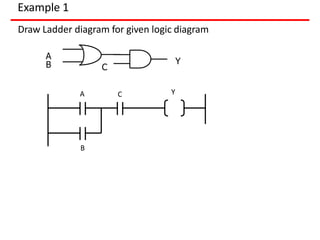
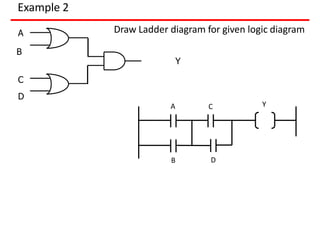
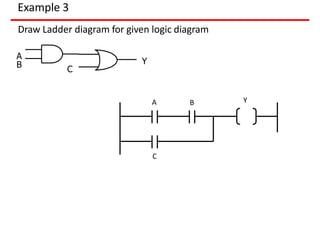
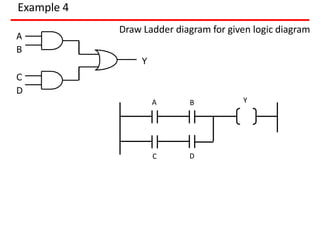
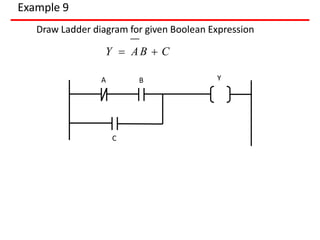
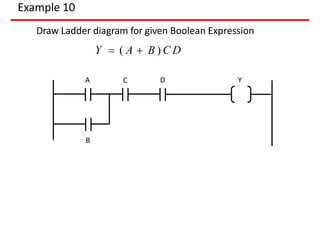
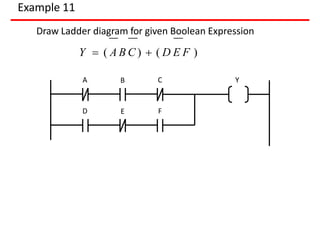
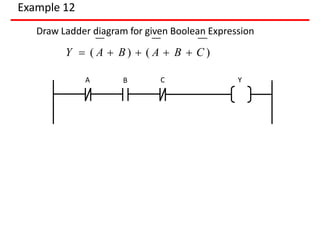
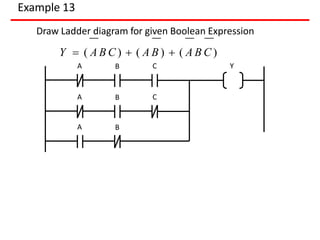
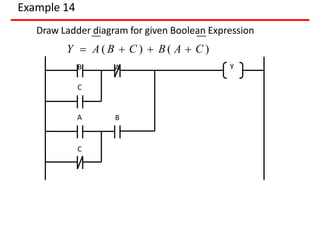
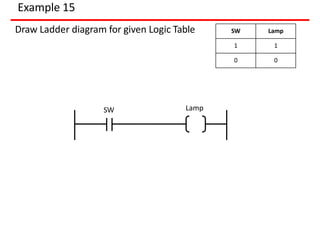
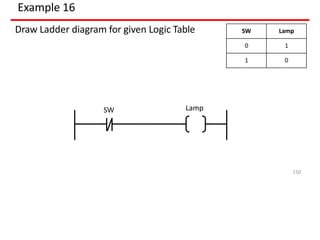
This document provides an introduction to Programmable Logic Controllers (PLCs). It discusses the history and evolution of control systems from humans to relays to PLCs. The key components of a PLC including the input/output modules, central processing unit, memory, and programming terminal are described. Programming methods for PLCs such as ladder logic, Boolean expressions, and mnemonics are also introduced. Examples of using timers, counters, and internal relays in PLC programs are provided.
Introduces the PLC's evolution from relays to modern controllers, highlighting its profound impact on manufacturing controls. Describes the milestones in PLC development, highlighting key advancements from modular designs to networking.
Explains the fundamental components and structure of PLCs, including the CPU, memory, and input/output systems.
Discusses programming languages used in PLCs, emphasizing ladder logic, flowcharts, and mnemonic instructions.
Explains the types and functionalities of timers and counters, detailing their operations and applications in industrial automation.
Describes internal relays in PLCs and the various data handling instructions for data manipulation and logical operations.
Provides step-by-step procedures for programming PLCs and practical examples of ladder diagrams and applications.
Outlines key factors for selecting PLCs, addressing system requirements, application needs, electrical characteristics, and environmental conditions.
INTRODUCTION
Control engineeringhas evolved over time.
In the past humans were the main method for controlling
a system. More recently electricity has been used for
control and early electrical control was based on relays.
These relays allow power to be switched on and off
without a mechanical switch.
It is common to use relays to make simple logical control
decisions.
The development of low cost computer has brought the
most recent revolution, the Programmable Logic
Controller (PLC).
The advent of the PLC began in the 1970s, and has
become the most common choice for manufacturing
controls.
5.
INTRODUCTION
A programmablelogic controller (PLC), or programmable
controller is an industrial digital computer which has been
ruggedized and adapted for the control of manufacturing
processes, such as assembly lines or robotic devices, or any
activity that requires high reliability control and ease of
programming and process fault diagnosis.
They were first developed in the automobile industry to
provide flexible, ruggedized and easily programmable
controllers to replace hard-wired relays, timers and
sequencers.
Since then they have been widely adopted as high-reliability
automation controllers suitable for harsh environments.
A PLC is an example of a "hard" real-time system since output
results must be produced in response to input conditions
within a limited time, otherwise unintended operation will
result.
6.
PLC Origin
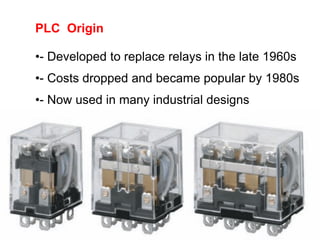
•- Developedto replace relays in the late 1960s
•- Costs dropped and became popular by 1980s
•- Now used in many industrial designs
7.
7
Historical Background
The HydramaticDivision of the General Motors
Corporation specified the design criteria for the first
programmable controller in 1968
Their primary goal
To eliminate the high costs associated with
inflexible, relay-controlled systems.
8.
8
Historical Background
• Thecontroller had to be designed in modular form, so
that sub-assemblies could be removed easily for
replacement or repair.
• The control system needed the capability to pass data
collection to a central system.
• The system had to be reusable.
• The method used to program the controller had to be
simple, so that it could be easily understood by plant
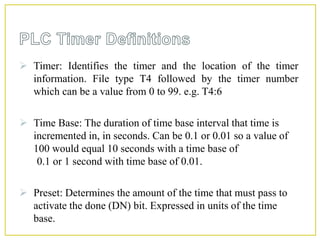
personnel.
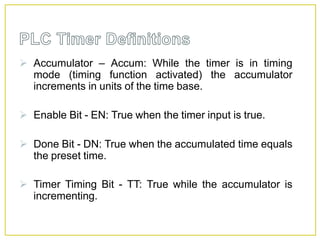
9.
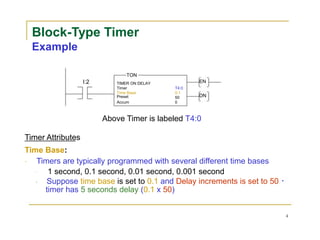
9
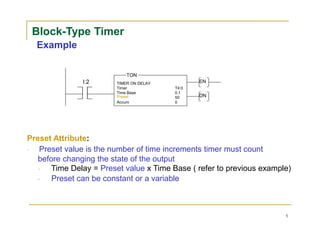
Programmable Controller Development
1968- Programmable concept developed
1969 - Hardware CPU controller, with logic
instructions, 1 K of memory and 128 I/O
points
1974 - Use of several (multi) processors within a
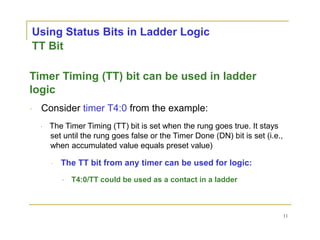
PLC - timers and counters; arithmetic
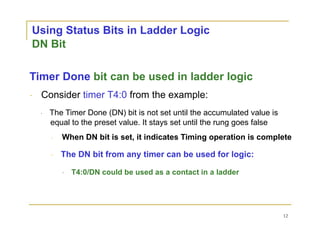
operations; 12 K of memory
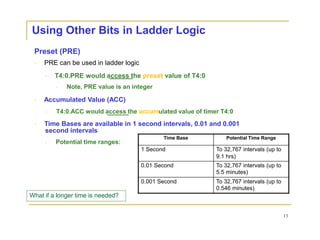
and 1024 I/O points
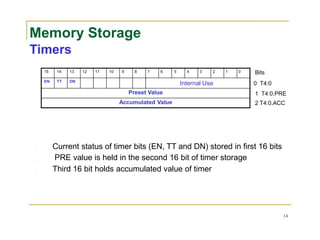
1976 - Remote input/output systems introduced
1977 - Microprocessors - based PLC introduced
10.
10
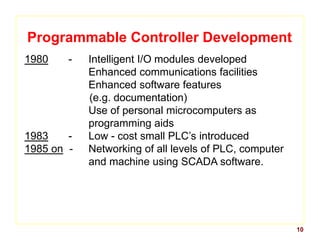
Programmable Controller Development
1980- Intelligent I/O modules developed
Enhanced communications facilities
Enhanced software features
(e.g. documentation)
Use of personal microcomputers as
programming aids
1983 - Low - cost small PLC’s introduced
1985 on - Networking of all levels of PLC, computer
and machine using SCADA software.
11.
PLC
Programmable logic controllers(PLCs) have been
an integral part of factory automation and
industrial process control for decades.
PLCs control a wide array of applications from
simple lighting functions to environmental
systems to chemical processing plants.
These systems perform many functions, providing
a variety of analog and digital input and output
interfaces; signal processing; data conversion;
and various communication protocols.
All of the PLC's components and functions are
centred around the controller, which is
programmed for a specific task.
12.
PLC
The basic PLCmodule must be sufficiently flexible
and configurable to meet the diverse needs of
different factories and applications.
Input stimuli (either analog or digital) are
received from machines, sensors, or process
events in the form of voltage or current.
The PLC must accurately interpret and convert
the stimulus for the CPU which, in turn, defines a
set of instructions to the output systems that
control actuators on the factory floor or in
another industrial environment
13.
Ladder Logic
Ladder logicis the main programming method
used for PLCs.
As mentioned before, ladder logic has been
developed to mimic relay logic.
The decision to use the relay logic diagrams
was a strategic one.
By selecting ladder logic as the main
programming method, the amount of
retraining needed for engineers and
tradespeople was greatly reduced.
14.
Ladder Logic
What isladder logic diagram?
Ladder logic has evolved into a programming
language that represents a program by a
graphical diagram based on the circuit
diagrams of relay logic hardware.
Ladder logic is used to develop software for
programmable logic controllers (PLCs) used in
industrial control applications.
PLC DEFINITION
A PROGRAMMABLELOGIC CONTROLLER
(PLC) is an industrial computer control system that
continuously monitors the state of input devices and
makes decisions based upon a custom program to control
the state of output devices.
(or)
A programmable logic controller (PLC), or programmable
controller is an industrial digital computer which has
been ruggedized and adapted for the control of
manufacturing processes, such as assembly lines, or
robotic devices, or any activity that requires high
reliability control and ease of programming and process
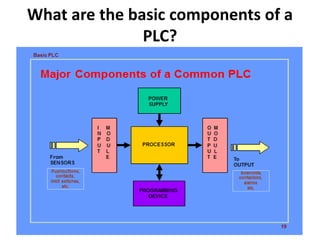
What are thebasic components of a
PLC?
PLCs span a wide range of sizes, but
all contain six basic components as
1. Power supply.
2. Input module.
3. Output module.
4. Processor (CPU)
5. Rack or mounting assembly.
6. Programming unit (software)
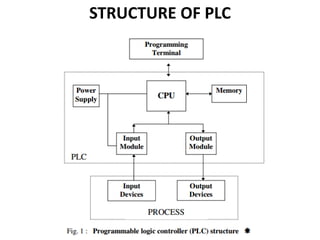
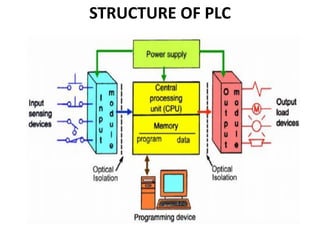
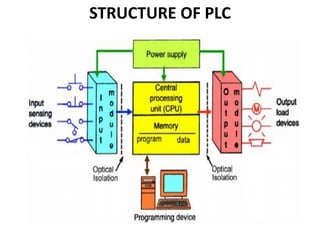
STRUCTURE OF PLC
Thestructure of a PLC can be divided
into four parts. They are
1. Input/output modules
2. Central processing unit (CPU),
3. Memory and
4. Programming terminal.
23.
1. Input/ OutputSection
• The input section or input module consists of
devices like sensors, switches and many other
real world input sources.
• The input from the sources is connected to
the PLC through the input connector rails.
• The output section or output module can be a
motor or a solenoid or a lamp or a heater,
whose functioning is controlled by varying the
input signals.
24.
2. CPU orCentral Processing Unit:
• It is the brain of the PLC.
• It can be a hexagonal or an octal
microprocessor.
• It carries out all the processing related to the
input signals in order to control the output
signals based on the control program.
25.
3. Programming Device
•It is the platform where the program or the
control logic is written.
• It can be a handheld device or a laptop or a
computer itself.
• Power Supply: It generally works on a power
supply of about 24 V, used to power input and
output devices.
26.
4. Memory
• Thememory is divided into two parts- The
data memory and the program memory.
• The program information or the control logic
is stored in the user memory or the program
memory from where the CPU fetches the
program instructions.
• The input and output signals and the timer
and counter signals are stored in the input and
output external image memory respectively.
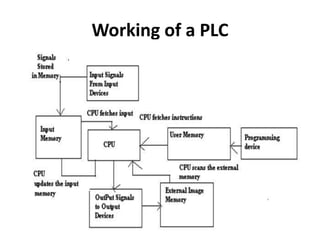
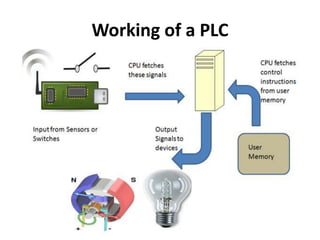
Working of aPLC
• The input sources convert the real time analog
electric signals to suitable digital electric signals
and these signals are applied to the PLC through
the connector rails.
• These input signals are stored in the PLC external
image memory in locations known as bits.
• This is done by the CPU The control logic or the
program instructions are written onto the
programming device through symbols or through
mnemonics and stored in the user memory.
30.
Working of aPLC
• The CPU fetches these instructions from the user
memory and executes the input signals by
manipulating, computing, processing them to
control the output devices.
• The execution results are then stored in the
external image memory which controls the
output drives.
• The CPU also keeps a check on the output signals
and keeps updating the contents of the input
image memory according to the changes in the
output memory.
• The CPU also performs internal programming
functioning like setting and resetting of the timer,
checking the user memory.
31.
What is PLCoperation?
Basic Operation of a PLC system. The
operation of the PLC system is simple and
straightforward. The Process or CPU completes
three processes:
(1) scans, or reads, from the input devices
(2) executes or “solves” the program logic, and
(3) updates, or writes, to the output devices.
32.
What is thedifference between a PLC
and a microcontroller?
A PLC is basically a gigantic microcontroller. It
does the same things a microcontroller can
do, but with higher speed, performance, and
reliability (sometimes).
A microcontroller is really just a tiny low
power CPU/computer with some output
registers wired to pins instead of other
registers or devices.
33.
Reliability.
Flexibility in programmingand reprogramming.
Cost effective for controlling complex systems.
Small physical size, shorter project time.
High speed of operation.
Ability to communicate with computer systems in the
plant.
Ease of maintenance /troubleshooting.
Reduced space.
Energy saving.
34.
Disadvantages of PLCs
PLCdevices are proprietary it means that part or
software of one manufacturer can’t be used in
combination with parts of another manufacturer.
Limited design and cost option
Fixed Circuit Operations.
PLCs manufacturers offer only closed architectures.
35.
Wherever automation isdesired the PLCs are best
suited to meet the task.
Few examples of industries where PLCs are used :
1) Robots manufacturing and control
2) Car park control
3) Train control station system
4) Food processing
5) Materials handling
6)Machine tools
7)Conveyer system etc.
What is programmingin PLC?
A PROGRAMMABLE LOGIC
CONTROLLER (PLC) is an industrial computer
control system that continuously monitors the
state of input devices and makes decisions
based upon a custom program to control the
state of output devices.
38.
What programming languageis used
to program a PLC?
Ladder logic is one of the 5 programming
languages for PLC, the others being
1. FBD (Function block diagram),
2. ST (Structured text, similar to the Pascal
programming language),
3. IL (Instruction list, similar to assembly
language) and
4. SFC (Sequential function chart).
39.
Programming in PLC
•The basic functioning of the PLC relies on the
control logic or the programming technique
used.
• Programming can be done using flowcharts or
using ladder logic or using statement logics or
mnemonics.
• Interlinking all these, let us see how we can
actually write a program in PLC.
40.
Programming in PLC
•Compute the flowchart.
• A flowchart is the symbolic representation of
the instructions.
• It is the most basic and simplest form of
control logic which involves only logic
decisions.
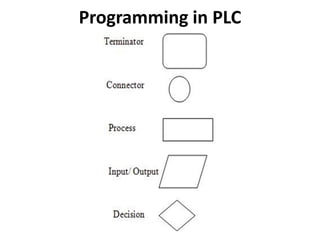
• Different symbols are as given below:
Programming in PLC
Writethe Boolean expression for the different
logic. Boolean algebra usually involves logic
operations like AND, OR, NOT, NAND and NOR.
The different symbols are:
+ OR operator
. AND operator
! NOT operator.
Write the instructions in simple statement
forms like below:
IF Input1 AND Input2 Then SET
Output1 ELSE SET Output
43.
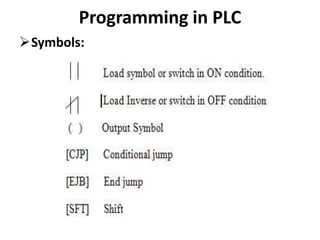
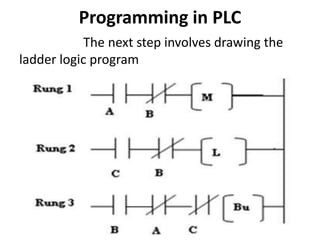
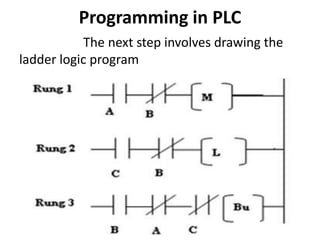
Programming in PLC
Writethe ladder logic program. It is the most
important part of PLC programming. Before
explaining about ladder logic programming, let us
know about few symbols and terminologies
Rung: One step in the ladder is called a rung. In
simpler words, the basic statement or one control
logic is called a Rung.
Y- Normal Output signals
M – Motor symbol
T – Timer
C – Counter
Programming in PLC
WritingMnemonics: Mnemonics are
instructions written in symbolic form.
They are also known as Opcode and are used
in handheld programming devices. Different
Symbols are as given below:
Ldi – Load Inverse
Ld- Load
AND- And logic
OR- Or logic
ANI – NAND logic
ORI- NOR logic
Out – Output
46.
Programming in PLC
ASimple PLC Application
So, now that we have had a brief idea
about programming in PLC, lets get into
developing one simple application.
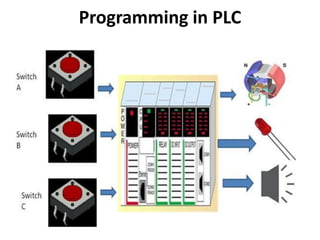
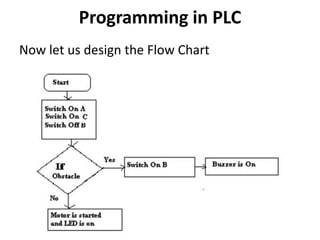
Problem: Design a simple line follower robotic
system to start a motor when a switch is on
and simultaneously switch on the LED. The
sensor on the motor detects any obstacle and
another switch is on to indicate the presence
of the obstacle and the motor is
simultaneously switched off and the buzzer is
switched on and LED is off.
Programming in PLC
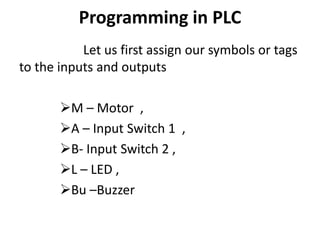
Letus first assign our symbols or tags
to the inputs and outputs
M – Motor ,
A – Input Switch 1 ,
B- Input Switch 2 ,
L – LED ,
Bu –Buzzer
Programming in PLC
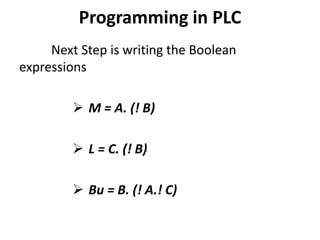
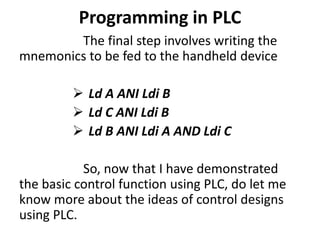
Thefinal step involves writing the
mnemonics to be fed to the handheld device
Ld A ANI Ldi B
Ld C ANI Ldi B
Ld B ANI Ldi A AND Ldi C
So, now that I have demonstrated
the basic control function using PLC, do let me
know more about the ideas of control designs
using PLC.
54.
LADDER DIAGRAM ANDMNEMONIC CODE
OBJECTIVES
1. To recognize the interpretation of mnemonic code from Ladder Diagram.
2. To learn how to draw Ladder Diagram from given mnemonics code
3. To be able to program PLC with mnemonic code
LADDER DIAGRAM AND MNEMONIC CODE
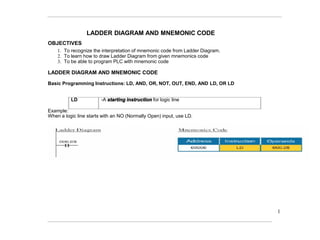
Basic Programming Instructions: LD, AND, OR, NOT, OUT, END, AND LD, OR LD
LD -A starting instruction for logic line
Example:
When a logic line starts with an NO (Normally Open) input, use LD.
1
55.
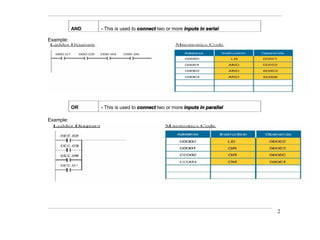
AND - Thisis used to connect two or more inputs in serial
Example:
OR - This is used to connect two or more inputs in parallel
Example:
2
56.
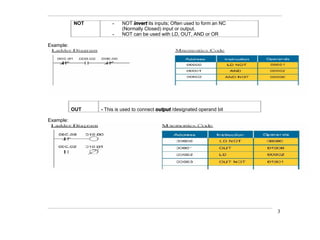
NOT - NOTinvert its inputs; Often used to form an NC
(Normally Closed) input or output.
- NOT can be used with LD, OUT, AND or OR
Example:
OUT - This is used to connect output /designated operand bit
Example:
3
57.
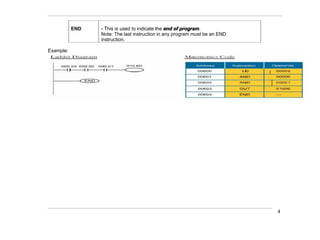
END - Thisis used to indicate the end of program.
Note: The last instruction in any program must be an END
instruction.
Example:
4
58.
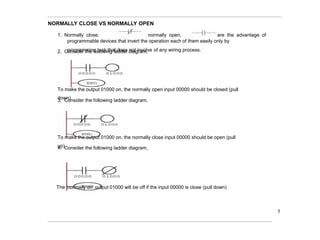
NORMALLY CLOSE VSNORMALLY OPEN
1. Normally close, normally open, are the advantage of
programmable devices that invert the operation each of them easily only by
programming task that does not involve of any wiring process.
2. Consider the following ladder diagram,
To make the output 01000 on, the normally open input 00000 should be closed (pull
down)
3. Consider the following ladder diagram,
To make the output 01000 on, the normally close input 00000 should be open (pull
up)
4. Consider the following ladder diagram,
The 'normally on' output 01000 will be off if the input 00000 is close (pull down)
5
59.
5. Do notget confuse with normal terms on switch
"A switch should be closed to turn on the lamp"
"A switch should be on to turn on the lamp"
because PLC is a programmable device that can program the state of a switch itself!!!
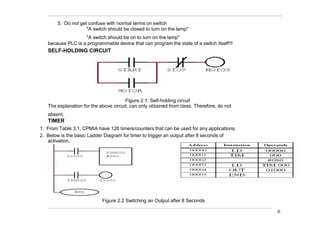
SELF-HOLDING CIRCUIT
Figure 2.1: Self-holding circuit
The explanation for the above circuit, can only obtained from class. Therefore, do not
absent.
TIMER
1. From Table 3.1, CPMIA have 128 timers/counters that can be used for any applications.
2. Below is the basic Ladder Diagram for timer to trigger an output after 8 seconds of
activation.
Figure 2.2 Switching an Output after 8 Seconds
6
TIMERS
PLC timers areinstructions that provide the same
functions as on-delay and off-delay mechanical
and electronic timing relays.
A PLC timer provides a pre-set delay to the
control actions.
There are four fundamental types of timers
1. TON - Timer ON
2. TOF - Timer OFF
3. RTO - Retentive Timer ON
4. RTF - Retentive Timer OFF
63.
TIMERS
An on-delaytimer will wait for a set time after a line of ladder logic
has been true before turning on, but it will turn off immediately.
An off-delay timer will turn on immediately when a line of ladder
logic is true, but it will delay before turning off.
Consider the example of an old car. If you turn the key in the
ignition and the car does not start immediately, that is an on-delay.
If you turn the key to stop the engine but the engine doesn’t stop for
a few seconds, that is an off delay.
An on-delay timer can be used to allow an oven to reach
temperature before starting production.
An off delay timer can keep cooling fans on for a set time after the
oven has been turned off.
64.
Ladder Logic
Learning objectives
Describethe use of timers and counters in ladder
logic
Describe such terms as retentive,cascade,delay on
and delay off
Explain the operation of TON, TOF, and RTO timers
Explain the use of CTU and CTD timers
Utilize timers and counters in ladder logic
2
65.
Timers
Overview
Timers are usedto delay actions
Keep an output on for a specified time after an input turns off
Keep an output off for a specified time before it turns on
Timing functions are vital in PLC applications
Cycle times are critical in many processes
Many PLCs use block-type timers and counters
Compliance with IEC 61131-3 standards
3
66.
Timer: Identifiesthe timer and the location of the timer
information. File type T4 followed by the timer number
which can be a value from 0 to 99. e.g. T4:6
Time Base: The duration of time base interval that time is
incremented in, in seconds. Can be 0.1 or 0.01 so a value of
100 would equal 10 seconds with a time base of
0.1 or 1 second with time base of 0.01.
Preset: Determines the amount of the time that must pass to
activate the done (DN) bit. Expressed in units of the time
base.
67.
Accumulator –Accum: While the timer is in timing
mode (timing function activated) the accumulator
increments in units of the time base.
Enable Bit - EN: True when the timer input is true.
Done Bit - DN: True when the accumulated time equals
the preset time.
Timer Timing Bit - TT: True while the accumulator is
incrementing.
68.
Block-Type Timer
Example
TON
I:2 TIMERON DELAY EN
Timer T4:0
Time Base 0.1
Preset 50 DN
Accum 0
Above Timer is labeled T4:0
Timer Attributes
Time Base:
Timers are typically programmed with several different time bases
1 second, 0.1 second, 0.01 second, 0.001 second
Suppose time base is set to 0.1 and Delay increments is set to 50
timer has 5 seconds delay (0.1 x 50)
4
69.
Block-Type Timer
Example
TON
I:2 TIMERON DELAY EN
Timer T4:0
Time Base 0.1
Preset 50 DN
Accum 0
Preset Attribute:
Preset value is the number of time increments timer must count
before changing the state of the output
Time Delay = Preset value x Time Base ( refer to previous example)
Preset can be constant or a variable
5
70.
Block-Type Timer
Example
TON
I:2 TIMERON DELAY EN
Timer T4:0
Time Base 0.1
Preset 50 DN
Accum 0
Accum Attribute:
[Rockwell] Timers have one input. When the input transits from low
to high, the timer will begin timing (Accum value)
Timers that do not lose their accumulated time when the enable input line
transitions to low again are known as Retentive Timers
Retentive Timers continue to maintain accumulated time and increment
the time when the input line goes to high again
Non-retentive Timers lose the accumulated time whenever the enable
input transitions to low
The accumulated time resets to zero
6
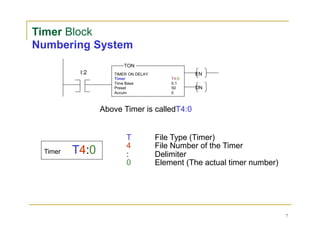
71.
Timer Block
Numbering System
TON
I:2
TimerT4:0
TIMER ON DELAY EN
Timer T4:0
Time Base 0.1
Preset 50 DN
Accum 0
Above Timer is calledT4:0
T File Type (Timer)
4 File Number of the Timer
: Delimiter
0 Element (The actual timer number)
7
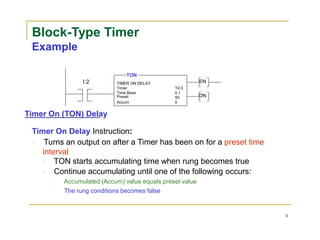
72.
Block-Type Timer
Example
TON
I:2 TIMERON DELAY EN
Timer T4:0
Time Base 0.1
Preset 50 DN
Accum 0
Timer On (TON) Delay
Timer On Delay Instruction:
Turns an output on after a Timer has been on for a preset time
interval
TON starts accumulating time when rung becomes true
Continue accumulating until one of the following occurs:
Accumulated (Accum) value equals preset value
The rung conditions becomes false
8
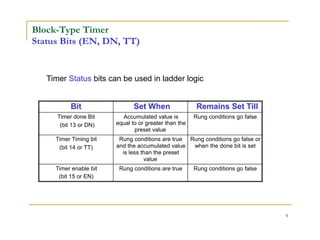
73.
Block-Type Timer
Status Bits(EN, DN, TT)
Timer Status bits can be used in ladder logic
Bit Set When Remains Set Till
Timer done Bit Accumulated value is Rung conditions go false
(bit 13 or DN) equal to or greater than the
preset value
Timer Timing bit Rung conditions are true Rung conditions go false or
(bit 14 or TT) and the accumulated value when the done bit is set
is less than the preset
value
Timer enable bit Rung conditions are true Rung conditions go false
(bit 15 or EN)
9
74.
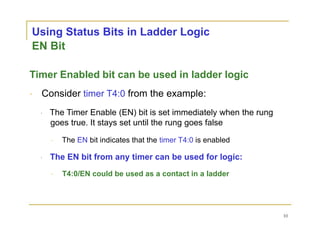
Using Status Bitsin Ladder Logic
EN Bit
Timer Enabled bit can be used in ladder logic
Consider timer T4:0 from the example:
The Timer Enable (EN) bit is set immediately when the rung
goes true. It stays set until the rung goes false
The EN bit indicates that the timer T4:0 is enabled
The EN bit from any timer can be used for logic:
T4:0/EN could be used as a contact in a ladder
10
75.
Using Status Bitsin Ladder Logic
TT Bit
Timer Timing (TT) bit can be used in ladder
logic
Consider timer T4:0 from the example:
The Timer Timing (TT) bit is set when the rung goes true. It stays
set until the rung goes false or the Timer Done (DN) bit is set (i.e.,
when accumulated value equals preset value)
The TT bit from any timer can be used for logic:
T4:0/TT could be used as a contact in a ladder
11
76.
Using Status Bitsin Ladder Logic
DN Bit
Timer Done bit can be used in ladder logic
Consider timer T4:0 from the example:
The Timer Done (DN) bit is not set until the accumulated value is
equal to the preset value. It stays set until the rung goes false
When DN bit is set, it indicates Timing operation is complete
The DN bit from any timer can be used for logic:
T4:0/DN could be used as a contact in a ladder
12
77.
Using Other Bitsin Ladder Logic
Preset (PRE)
PRE can be used in ladder logic
T4:0.PRE would access the preset value of T4:0
Note, PRE value is an integer
Accumulated Value (ACC)
T4:0.ACC would access the accumulated value of timer T4:0
Time Bases are available in 1 second intervals, 0.01 and 0.001
second intervals
Time Base Potential Time Range
Potential time ranges:
1 Second To 32,767 intervals (up to
9.1 hrs)
0.01 Second To 32,767 intervals (up to
5.5 minutes)
0.001 Second To 32,767 intervals (up to
0.546 minutes)
What if a longer time is needed?
13
78.
Memory Storage
Timers
15 1413 12 11 10 9 8 7 6 5 4 3 2 1 0 Bits
EN TT DN
Internal Use 0 T4:0
Preset Value 1 T4:0.PRE
Accumulated Value 2 T4:0.ACC
Current status of timer bits (EN, TT and DN) stored in first 16 bits
PRE value is held in the second 16 bit of timer storage
Third 16 bit holds accumulated value of timer
14
79.
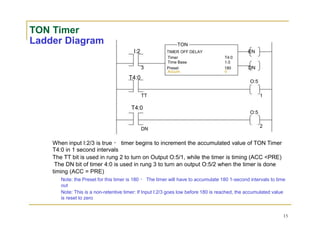
TON Timer
Ladder DiagramTON
I:2 TIMER OFF DELAY EN
Timer T4:0
Time Base 1.0
3 Preset 180 DN
Accum 0
T4:0
O:5
TT 1
T4:0
O:5
2
DN
When input I:2/3 is true timer begins to increment the accumulated value of TON Timer
T4:0 in 1 second intervals
The TT bit is used in rung 2 to turn on Output O:5/1, while the timer is timing (ACC <PRE)
The DN bit of timer 4:0 is used in rung 3 to turn an output O:5/2 when the timer is done
timing (ACC = PRE)
Note: the Preset for this timer is 180 The timer will have to accumulate 180 1-second intervals to time
out
Note: This is a non-retentive timer: If Input I:2/3 goes low before 180 is reached, the accumulated value
is reset to zero
15
80.
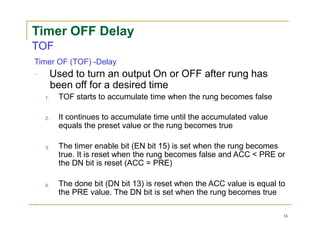
Timer OFF Delay
TOF
TimerOF (TOF) -Delay
Used to turn an output On or OFF after rung has
been off for a desired time
1.
2.
3.
4.
TOF starts to accumulate time when the rung becomes false
It continues to accumulate time until the accumulated value
equals the preset value or the rung becomes true
The timer enable bit (EN bit 15) is set when the rung becomes
true. It is reset when the rung becomes false and ACC < PRE or
the DN bit is reset (ACC = PRE)
The done bit (DN bit 13) is reset when the ACC value is equal to
the PRE value. The DN bit is set when the rung becomes true
16
81.
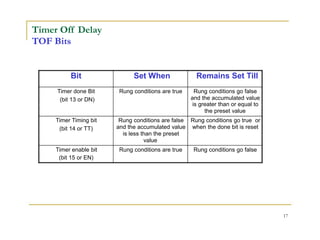
Timer Off Delay
TOFBits
Bit Set When Remains Set Till
Timer done Bit Rung conditions are true Rung conditions go false
(bit 13 or DN) and the accumulated value
is greater than or equal to
the preset value
Timer Timing bit Rung conditions are false Rung conditions go true or
(bit 14 or TT) and the accumulated value when the done bit is reset
is less than the preset
value
Timer enable bit Rung conditions are true Rung conditions go false
(bit 15 or EN)
17
82.
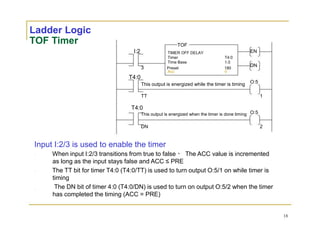
Ladder Logic
TOF Timer
I:2
T4:0
TOF
TIMEROFF DELAY
Timer T4:0
Time Base 1.0
3 Preset 180
Acc 0
This output is energized while the timer is timing
EN
DN
O:5
TT
T4:0
This output is energized when the timer is done timing
DN
Input I:2/3 is used to enable the timer
1
O:5
2
When input I:2/3 transitions from true to false The ACC value is incremented
as long as the input stays false and ACC ≤ PRE
The TT bit for timer T4:0 (T4:0/TT) is used to turn output O:5/1 on while timer is
timing
The DN bit of timer 4:0 (T4:0/DN) is used to turn on output O:5/2 when the timer
has completed the timing (ACC = PRE)
18
83.
Retentive Timer On
RTO
RTOInstruction:
Used to turn an output On after a set time period
1.
2.
The RTO timer is an accumulating timer. It retains the ACC
value even if the rung goes false
To zero the ACC value, use a reset (RES) instruction in another rung with
the same address as the RTO
The status bits can be used as contacts in the ladder diagram
19
84.
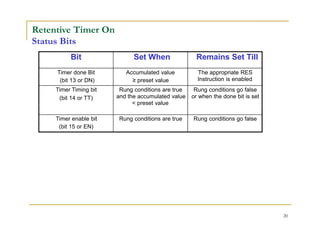
Retentive Timer On
StatusBits
Bit Set When Remains Set Till
Timer done Bit Accumulated value The appropriate RES
(bit 13 or DN) ≥ preset value Instruction is enabled
Timer Timing bit Rung conditions are true Rung conditions go false
(bit 14 or TT) and the accumulated value or when the done bit is set
< preset value
Timer enable bit Rung conditions are true Rung conditions go false
(bit 15 or EN)
20
85.
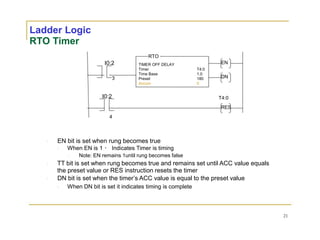
Ladder Logic
RTO Timer
RTO
I0:2TIMER OFF DELAY EN
Timer T4:0
Time Base 1.0
3 Preset 180 DN
Accum 0
I0:2 T4:0
RES
4
EN bit is set when rung becomes true
When EN is 1 Indicates Timer is timing
Note: EN remains 1until rung becomes false
TT bit is set when rung becomes true and remains set until ACC value equals
the preset value or RES instruction resets the timer
DN bit is set when the timer’s ACC value is equal to the preset value
When DN bit is set it indicates timing is complete
21
86.
Cascading Timers
When Applicationrequires longer time delays
than a single timer can provide
Use multiple timers
When the first timer times out, it becomes an input to
start the second timer timing
87.
Cascading Timers
TON
I:2.0 TIMERON DELAY
Timer T4:0
Time Base 1.0
1 Preset 32,767
Accum 0
TON
T4:0 TIMER ON DELAY
Timer T4:1
Time Base 1.0
DN Preset 7233
Accum 0
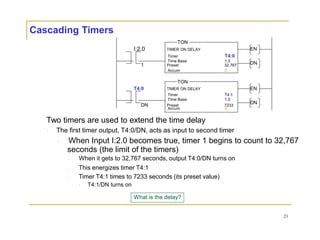
Two timers are used to extend the time delay
The first timer output, T4:0/DN, acts as input to second timer
EN
DN
EN
DN
When Input I:2.0 becomes true, timer 1 begins to count to 32,767
seconds (the limit of the timers)
When it gets to 32,767 seconds, output T4:0/DN turns on
This energizes timer T4:1
Timer T4:1 times to 7233 seconds (its preset value)
T4:1/DN turns on
What is the delay?
23
88.
COUNTERS
Counters are PLCinstructions that either increment or
decrement or decrement the integer value when the input
line make True from False.
The counter which increment value is known as Up
counters and Down counters decrement the integer values
on a trigger.
Both the Up and Down counter starts counting on one
trigger.
And there is an Up-Down counter which does both the
Up and Down counting.
The Up-Down counter has two input triggers one for Up
counting and other for Down counting.
89.
Counters
Counting is criticalin industrial applications
Suppose 24 can go into a case
Then the 24th can must be sensed by the PLC
and the case is sealed
Primary Counter Types
UP Counters - PLC sense how many finished products leaving the machine
Down Counters - PLC sense how many parts are left
Up/Down Counters - PLC monitors an automated storage system to track how
many are coming and how many are leaving to determine total number in stock
Choice used depend on the task
90.
Counters
Attributes
Counters usually uselow-to-high transition from
an input to trigger the counting action
Counters count the number of low-to-high
transitions on the input line
Similar to Timers, which count the number of time
increments
Counters also have a reset instruction to clear
the accumulated count
91.
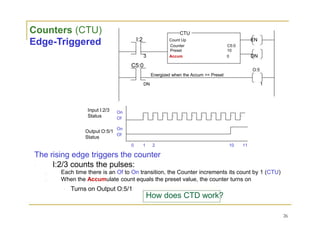
Counters (CTU)
Edge-Triggered
Input I:2/3
Status
OutputO:5/1
Status
CTU
I:2 Count Up EN
Counter C5:0
Preset 10
3 Accum 0 DN
C5:0
O:5
Energized when the Accum >= Preset
DN 1
On
Of
On
Of
0 1 2 10 11
The rising edge triggers the counter
I:2/3 counts the pulses:
Each time there is an Of to On transition, the Counter increments its count by 1 (CTU)
When the Accumulate count equals the preset value, the counter turns on
Turns on Output O:5/1
How does CTD work?
26
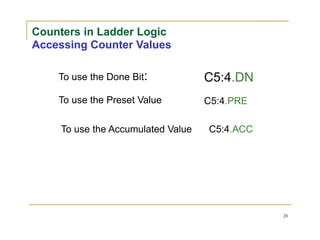
Counters in LadderLogic
Accessing Counter Values
To use the Done Bit:
To use the Preset Value
To use the Accumulated Value
C5:4.DN
C5:4.PRE
C5:4.ACC
28
94.
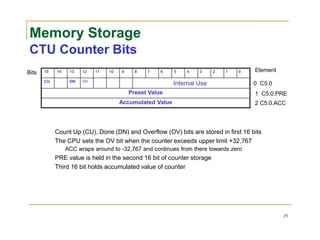
Memory Storage
CTU CounterBits
Bits 15 14 13 12 11 10 9 8 7 6 5 4 3 2 1 0 Element
CU DN OV
Internal Use 0 C5:0
Preset Value 1 C5:0.PRE
Accumulated Value 2 C5:0.ACC
Count Up (CU), Done (DN) and Overflow (OV) bits are stored in first 16 bits
The CPU sets the OV bit when the counter exceeds upper limit +32,767
ACC wraps around to -32,767 and continues from there towards zero
PRE value is held in the second 16 bit of counter storage
Third 16 bit holds accumulated value of counter
29
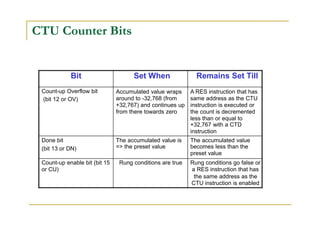
95.
CTU Counter Bits
BitSet When Remains Set Till
Count-up Overflow bit
(bit 12 or OV)
Accumulated value wraps
around to -32,768 (from
+32,767) and continues up
from there towards zero
A RES instruction that has
same address as the CTU
instruction is executed or
the count is decremented
less than or equal to
+32,767 with a CTD
instruction
Done bit The accumulated value is The accumulated value
(bit 13 or DN) => the preset value becomes less than the
preset value
Count-up enable bit (bit 15 Rung conditions are true Rung conditions go false or
or CU) a RES instruction that has
the same address as the
CTU instruction is enabled
96.
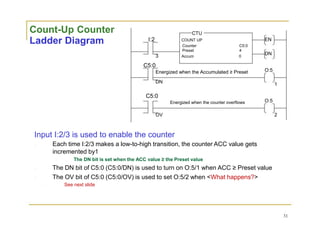
Count-Up Counter
Ladder Diagram
CTU
I:2COUNT UP
Counter C5:0
Preset 4
3 Accum 0
C5:0
Energized when the Accumulated ≥ Preset
DN
C5:0
Energized when the counter overflows
OV
EN
DN
O:5
1
O:5
2
Input I:2/3 is used to enable the counter
Each time I:2/3 makes a low-to-high transition, the counter ACC value gets
incremented by1
The DN bit is set when the ACC value ≥ the Preset value
The DN bit of C5:0 (C5:0/DN) is used to turn on O:5/1 when ACC ≥ Preset value
The OV bit of C5:0 (C5:0/OV) is used to set O:5/2 when <What happens?>
See next slide
31
97.
Count-Up Counter
Ladder Diagram
CTU
I:2COUNT UP
Counter C5:0
Preset 4
3 Accum 0
C5:0
Energized when the Accumulated >= Preset
DN
C5:0
Energized when the counter overflows
OV
I:2
Reset counter to zero
1
EN
DN
O:5
1
O:5
2
C5:0
RES
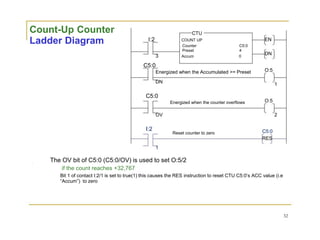
The OV bit of C5:0 (C5:0/OV) is used to set O:5/2
if the count reaches +32,767
Bit 1 of contact I:2/1 is set to true(1) this causes the RES instruction to reset CTU C5:0’s ACC value (i.e
“Accum”) to zero
32
98.
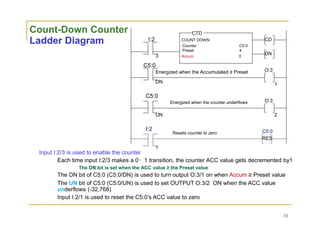
Count-Down Counter
Ladder Diagram
InputI:2/3 is used to enable the counter
CTD
I:2 COUNT DOWN
Counter C5:0
Preset 4
3 Accum 0
C5:0
Energized when the Accumulated ≥ Preset
DN
C5:0
Energized when the counter underflows
UN
I:2
Resets counter to zero
1
CD
DN
O:3
1
O:3
2
C5:0
RES
Each time input I:2/3 makes a 0 1 transition, the counter ACC value gets decremented by1
The DN bit is set when the ACC value ≥ the Preset value
The DN bit of C5:0 (C5:0/DN) is used to turn output O:3/1 on when Accum ≥ Preset value
The UN bit of C5:0 (C5:0/UN) is used to set OUTPUT O:3/2 ON when the ACC value
underflows (-32,768)
Input I:2/1 is used to reset the C5:0’s ACC value to zero
33
99.
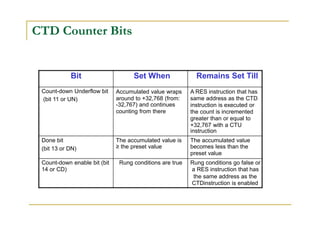
CTD Counter Bits
BitSet When Remains Set Till
Count-down Underflow bit
(bit 11 or UN)
Accumulated value wraps
around to +32,768 (from:
-32,767) and continues
counting from there
A RES instruction that has
same address as the CTD
instruction is executed or
the count is incremented
greater than or equal to
+32,767 with a CTU
instruction
Done bit The accumulated value is The accumulated value
(bit 13 or DN) ≥ the preset value becomes less than the
preset value
Count-down enable bit (bit Rung conditions are true Rung conditions go false or
14 or CD) a RES instruction that has
the same address as the
CTDinstruction is enabled
100.
Memory Storage
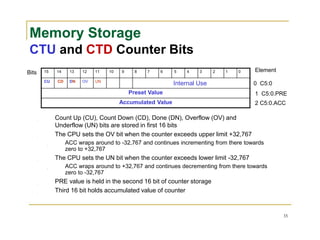
CTU andCTD Counter Bits
Bits 15 14 13 12 11 10 9 8 7 6 5 4 3 2 1 0 Element
CU CD DN OV UN
Internal Use 0 C5:0
Preset Value 1 C5:0.PRE
Accumulated Value 2 C5:0.ACC
Count Up (CU), Count Down (CD), Done (DN), Overflow (OV) and
Underflow (UN) bits are stored in first 16 bits
The CPU sets the OV bit when the counter exceeds upper limit +32,767
ACC wraps around to -32,767 and continues incrementing from there towards
zero to +32,767
The CPU sets the UN bit when the counter exceeds lower limit -32,767
ACC wraps around to +32,767 and continues decrementing from there towards
zero to -32,767
PRE value is held in the second 16 bit of counter storage
Third 16 bit holds accumulated value of counter
35
101.
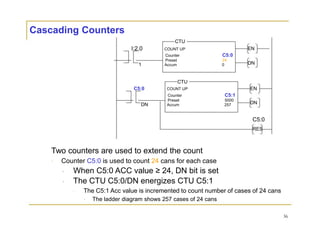
Cascading Counters
CTU
I:2.0 COUNTUP
Counter C5:0
Preset 24
1 Accum 0
CTU
C5:0 COUNT UP
Counter C5:1
Preset 5000
DN Accum 257
Two counters are used to extend the count
Counter C5:0 is used to count 24 cans for each case
When C5:0 ACC value ≥ 24, DN bit is set
The CTU C5:0/DN energizes CTU C5:1
EN
DN
EN
DN
C5:0
RES
The C5:1 Acc value is incremented to count number of cases of 24 cans
The ladder diagram shows 257 cases of 24 cans
36
102.
INTERNAL RELAYS
InPLCs there are elements that are used to hold data, i.e. bits,
and behave like relays, being able to be switched on or off and
switch other devices on or off. Hence the term internal relay.
Such internal relays do not exist as real-world switching
devices but are merely bits in the storage memory that behave
in the same way as relays.
For programming, they can be treated in the same way as an
external relay output and input.
Thus inputs to external switches can be used to give an output
from an internal relay.
This then results in the internal relay contacts being used, in
conjunction with other external input switches to give an
output, e.g. activate a motor. Thus we might have (Figure
7.1):
• On one rung of the program:
– Inputs to external inputs activate the internal relay output.
103.
INTERNAL RELAYS
• Ona later rung of the program:
As a consequence of the internal relay output, internal relay contacts
are activated and so control some output.
In using an internal relay, it has to be activated on one rung of a
program and then its output used to operate switching contacts on
another rung, or rungs, of the program.
Internal relay scan be programmed with as many sets of associated
contacts as desired.
To distinguish internal relay outputs from external relay outputs, they
are given different types of addresses.
Different manufacturers tend to use different terms for internal relays
and have different ways of expressing their addresses.
104.
INTERNAL RELAYS
For example,Mitsubishi uses the term auxiliary
relay or marker and the notation M100, M101, and
so on
Siemens uses the term flag and the notation F0.0,
F0.1, and so on.
Telemecanique uses the term bit and the notation
B0, B1, and so on.
Toshiba uses the term internal relay and the
notation R000, R001, and soon.
Allen-Bradley uses the term bit storage and
notation in the PLC-5 of the form B3/001,B3/002,
and so on.
105.
RELAY
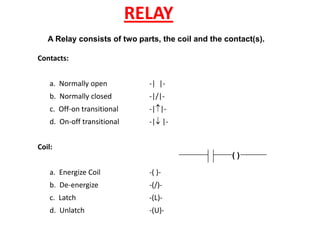
A Relay consistsof two parts, the coil and the contact(s).
Contacts:
a. Normally open -| |-
b. Normally closed -|/|-
c. Off-on transitional -||-
d. On-off transitional -| |-
Coil:
a. Energize Coil -( )-
b. De-energize -(/)-
c. Latch -(L)-
d. Unlatch -(U)-
( )
107
Data Manipulation Instructions
•Data manipulation instructions allow words to be
moved within the PLC
• Data manipulation instructions permit more complex
operations than relay type instructions
• These instructions are divided into three categories:
– Data Transfer
– Data Conversion
– Data Compare
108.
108
Data Transfer Instructions
•Data Transfer Instructions
are implemented by the
move (MOV) instruction
• Contents from one
register are moved to
another based on rung
conditions
109.
109
Data Conversion
• Dataconversion is available as:
– Convert to BCD (TOD)
– Convert from BCD (FRD)
• Both are output instructions
and convert data from or to
binary coded decimal
• A typical application would be
the implementation of BCD
encoded thumbwheel switches
to input data into a PLC
110.
110
Data Compare Instructions
•These commands instruct the PLC to compare the numerical contents of
two registers and make decisions based upon their values and the results
of the comparison
• Compare instructions:
– Compare Equal (EQU)
– Compare Not Equal (NEQ)
– Compare Less Than LES)
– Compare Less Than or Equal (LEQ)
– Compare Greater (GRT)
– Compare Greater Than or Equal (GEQ)
111.
111
Arithmetic Functions
• MostPLCs have the capability to carry out arithmetic
operations
• The output of an arithmetic instruction is stored in a specified
location
• Arithmetic functions available are:
– Addition (ADD)
– Subtraction (SUB)
– Multiplication (MUL)
– Division (DIV)
112.
Data Handling Instructions
Sr.
No.
InstructionName Description
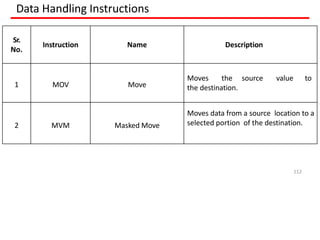
1 MOV Move
Moves the source value to
the destination.
2 MVM Masked Move
Moves data from a source location to a
selected portion of the destination.
112
113.
MOV Instruction
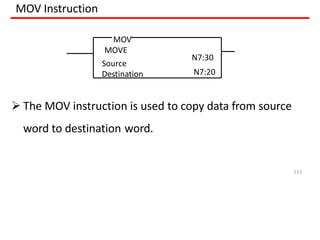
TheMOV instruction is used to copy data from source
word to destination word.
MOV
MOVE
Source
113
Destination
N7:30
N7:20
114.
MOV Instruction
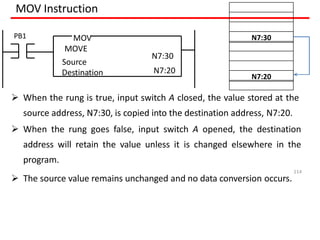
Whenthe rung is true, input switch A closed, the value stored at the
source address, N7:30, is copied into the destination address, N7:20.
When the rung goes false, input switch A opened, the destination
address will retain the value unless it is changed elsewhere in the
program.
The source value remains unchanged and no data conversion occurs.
MOV
MOVE
Source
Destination
N7:30
N7:20
PB1 N7:30
N7:20
114
115.
MVM Instruction
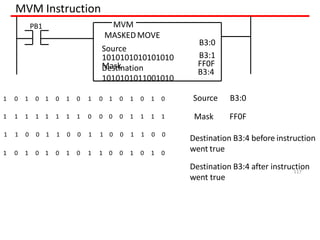
Themove with mask (MVM) instruction differs slightly
from the MOV instruction because a mask word is
involved in the move.
The data being moved must pass through the mask to
get to their destination address.
Masking refers to the action of hiding a portion of a
binary word before transferring it to the destination
address.
115
116.
MVM Instruction
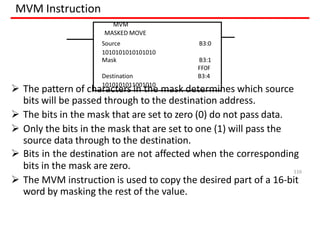
Thepattern of characters in the mask determines which source
bits will be passed through to the destination address.
The bits in the mask that are set to zero (0) do not pass data.
Only the bits in the mask that are set to one (1) will pass the
source data through to the destination.
Bits in the destination are not affected when the corresponding
bits in the mask are zero.
The MVM instruction is used to copy the desired part of a 16-bit
word by masking the rest of the value.
MVM
MASKED MOVE
Source B3:0
1010101010101010
Mask B3:1
FF0F
Destination B3:4
1010101011001010
116
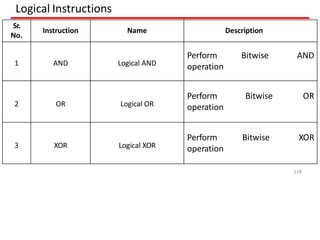
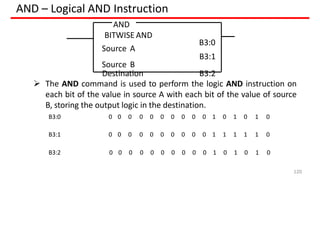
AND – LogicalAND Instruction
The AND command is used to perform the logic AND instruction on
each bit of the value in source A with each bit of the value of source
B, storing the output logic in the destination.
B3:0
120
B3:1
Destination B3:2
AND
BITWISE AND
Source A
Source B
B3:0 0 0 0 0 0 0 0 0 0 0 1 0 1 0 1 0
B3:1 0 0 0 0 0 0 0 0 0 0 1 1 1 1 1 0
B3:2 0 0 0 0 0 0 0 0 0 0 1 0 1 0 1 0
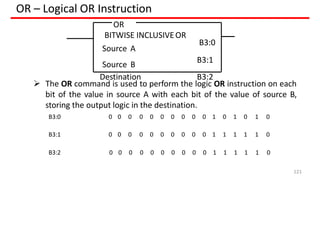
121.
OR – LogicalOR Instruction
The OR command is used to perform the logic OR instruction on each
bit of the value in source A with each bit of the value of source B,
storing the output logic in the destination.
B3:0
121
B3:1
Destination B3:2
OR
BITWISE INCLUSIVEOR
Source A
Source B
B3:0 0 0 0 0 0 0 0 0 0 0 1 0 1 0 1 0
B3:1 0 0 0 0 0 0 0 0 0 0 1 1 1 1 1 0
B3:2 0 0 0 0 0 0 0 0 0 0 1 1 1 1 1 0
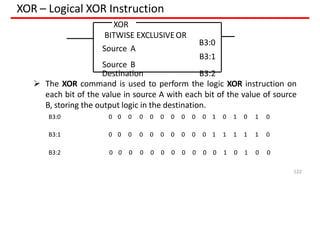
122.
XOR – LogicalXOR Instruction
The XOR command is used to perform the logic XOR instruction on
each bit of the value in source A with each bit of the value of source
B, storing the output logic in the destination.
B3:0
122
B3:1
Destination B3:2
XOR
BITWISE EXCLUSIVEOR
Source A
Source B
B3:0 0 0 0 0 0 0 0 0 0 0 1 0 1 0 1 0
B3:1 0 0 0 0 0 0 0 0 0 0 1 1 1 1 1 0
B3:2 0 0 0 0 0 0 0 0 0 0 0 1 0 1 0 0
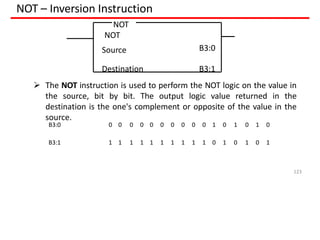
123.
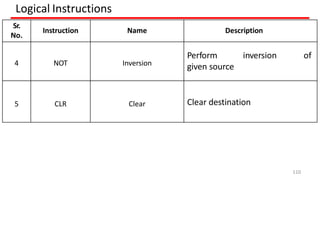
NOT – InversionInstruction
NOT
NOT
123
Source B3:0
Destination B3:1
The NOT instruction is used to perform the NOT logic on the value in
the source, bit by bit. The output logic value returned in the
destination is the one's complement or opposite of the value in the
source.
B3:0 0 0 0 0 0 0 0 0 0 0 1 0 1 0 1 0
B3:1 1 1 1 1 1 1 1 1 1 1 0 1 0 1 0 1
124.
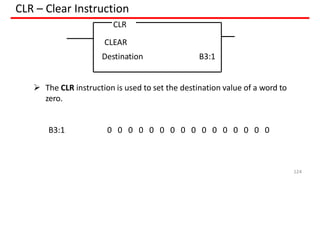
CLR – ClearInstruction
The CLR instruction is used to set the destination value of a word to
zero.
CLR
CLEAR
124
Destination B3:1
0 0 0 0 0 0 0 0 0 0 0 0 0 0 0 0
B3:1
125.
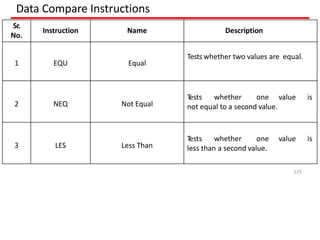
Data Compare Instructions
Sr.
No.
InstructionName Description
1 EQU Equal
Tests whether two values are equal.
2 NEQ Not Equal
T
ests whether one value is
not equal to a second value.
3 LES Less Than
T
ests whether one value is
less than a second value.
125
126.
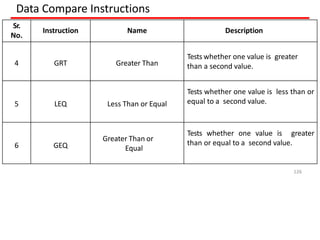
Data Compare Instructions
Sr.
No.
InstructionName Description
4 GRT Greater Than
Tests whether one value is greater
than a second value.
5 LEQ Less Than or Equal
Tests whether one value is less than or
equal to a second value.
6 GEQ
Greater Than or
Equal
Tests whether one value is greater
than or equal to a second value.
126
127.
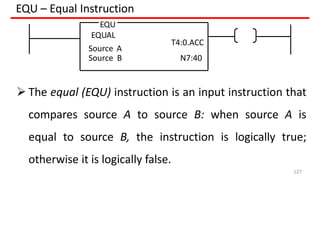
EQU – EqualInstruction
EQU
EQUAL
Source A
T4:0.ACC
Source B N7:40
The equal (EQU) instruction is an input instruction that
compares source A to source B: when source A is
equal to source B, the instruction is logically true;
otherwise it is logically false.
127
128.
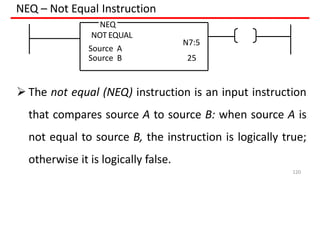
NEQ – NotEqual Instruction
NEQ
NOT EQUAL
Source A
N7:5
Source B 25
The not equal (NEQ) instruction is an input instruction
that compares source A to source B: when source A is
not equal to source B, the instruction is logically true;
otherwise it is logically false.
120
129.
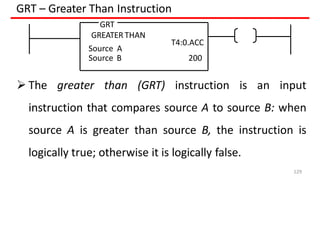
GRT – GreaterThan Instruction
The greater than (GRT) instruction is an input
instruction that compares source A to source B: when
source A is greater than source B, the instruction is
logically true; otherwise it is logically false.
GRT
GREATER THAN
Source A
Source B
T4:0.ACC
200
129
130.
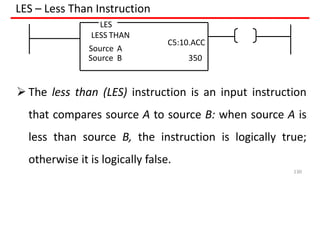
LES – LessThan Instruction
LES
LESS THAN
Source A
C5:10.ACC
Source B 350
The less than (LES) instruction is an input instruction
that compares source A to source B: when source A is
less than source B, the instruction is logically true;
otherwise it is logically false.
130
131.
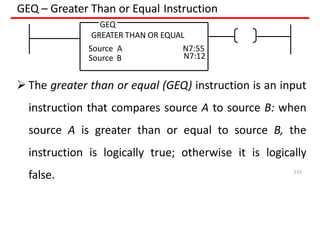
GEQ – GreaterThan or Equal Instruction
The greater than or equal (GEQ) instruction is an input
instruction that compares source A to source B: when
source A is greater than or equal to source B, the
instruction is logically true; otherwise it is logically
false.
Source B
GEQ
GREATER THAN OR EQUAL
Source A N7:55
N7:12
131
132.
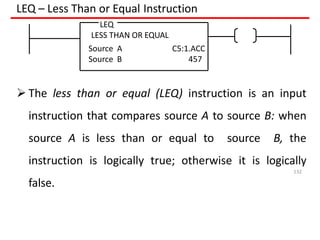
LEQ – LessThan or Equal Instruction
LEQ
LESS THAN OR EQUAL
Source A C5:1.ACC
Source B 457
The less than or equal (LEQ) instruction is an input
instruction that compares source A to source B: when
source A is less than or equal to source B, the
instruction is logically true; otherwise it is logically
false.
132
133.
133
Writing a Program
•Use the following steps when developing a PLC program:
– Choose the sequence you want the I/O devices to operate in
– Write a description and make a drawing showing the sequence and
conditions for each operation
– Use the description to write the ladder diagram
– Connect and label the I/O devices
– Make a written record of each address used and what the address
represents. Document all counters, timers, data instructions, etc.
– Enter the program into the PLC
Writing a Program
•Use the following steps when developing a PLC program:
– Choose the sequence you want the I/O devices to operate in
– Write a description and make a drawing showing the sequence and
conditions for each operation
– Use the description to write the ladder diagram
– Connect and label the I/O devices
– Make a written record of each address used and what the address
represents. Document all counters, timers, data instructions, etc.
– Enter the program into the PLC
PLCprogramming examples based on above
instruction using Ladder programming
136.
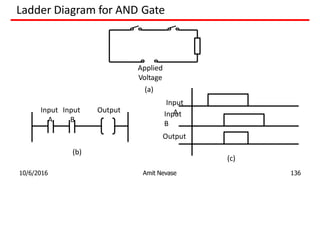
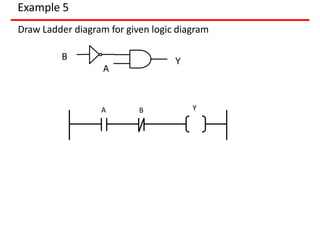
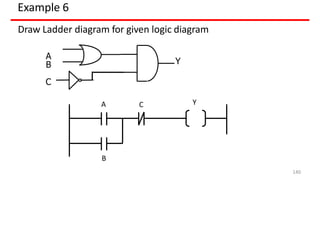
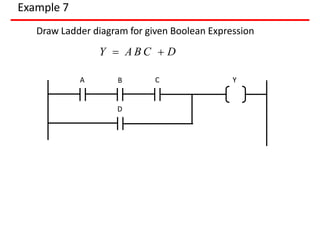
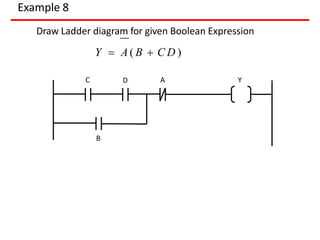
Ladder Diagram forAND Gate
Input Input
A B
Output
Input
B
10/6/2016 Amit Nevase 136
Output
Applied
Voltage
(a)
Input
A
(b)
(c)
137.
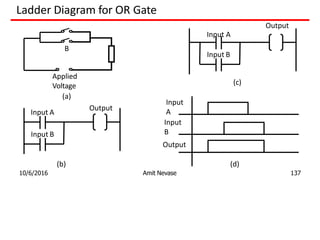
Ladder Diagram forOR Gate
B
Applied
Voltage
Input A
Input B
Output
Input
A
Input
B
Output
Input B
Output
Input A
(a)
10/6/2016 Amit Nevase 137
(b)
(c)
(d)
138.
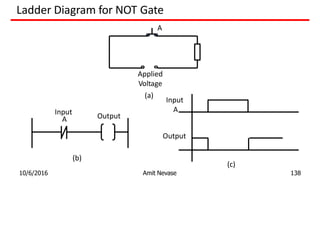
Ladder Diagram forNOT Gate
A
Input
A Output
Input
A
Output
Applied
Voltage
(a)
10/6/2016 Amit Nevase 138
(b)
(c)
139.
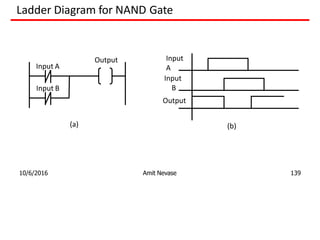
Ladder Diagram forNAND Gate
Input A
Input B
Output Input
A
Input
B
Output
(a)
10/6/2016 Amit Nevase 139
(b)
140.
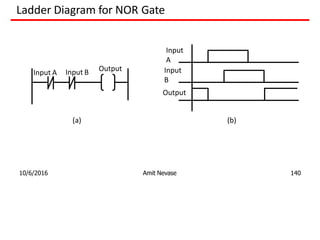
Ladder Diagram forNOR Gate
Input A Input B Output
Input
A
Input
B
Output
(a)
10/6/2016 Amit Nevase 140
(b)
141.
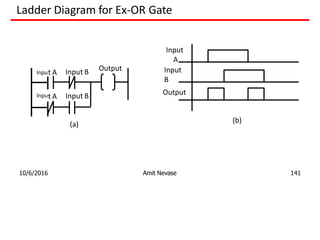
Ladder Diagram forEx-OR Gate
t A Input B Output
Input
A
Input
B
Output
Inpu
Input A Input B
(a)
10/6/2016 Amit Nevase 141
(b)
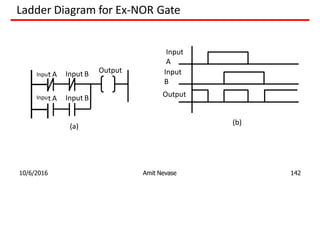
142.
Ladder Diagram forEx-NOR Gate
t A Input B Output
Input
A
Input
B
Output
Inpu
Input A Input B
(a)
10/6/2016 Amit Nevase 142
(b)
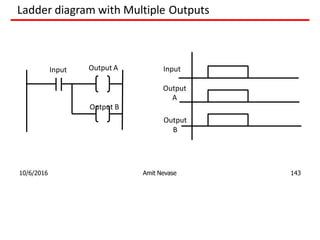
143.
Ladder diagram withMultiple Outputs
Input Output A Input
Output
A
Output B
Output
B
10/6/2016 Amit Nevase 143
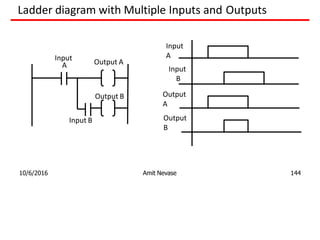
144.
Ladder diagram withMultiple Inputs and Outputs
Input
A Output A
Input
A
Output
A
Input B
Output B
Input
B
Output
B
10/6/2016 Amit Nevase 144
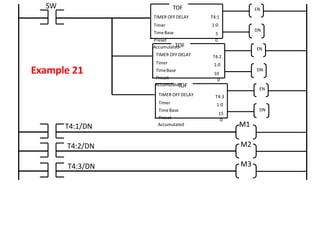
Example 22
for 2motor operations for
Draw Ladder diagram
following conditions
1. Start push button starts motors M1 and M2
2. Stop push button stop motors M1 first and after 10 sec
motor M2
169.
EN
DN
TIMER OFF DELAY
Timer
TimeBase
Preset
Accumulated
T4:1
1:0
10
0
TOF
Start
T4:1/DN M2
Example 22
M1
I:0/0
Stop
I:0/1 O:0/0
O:0/0
O:0/1
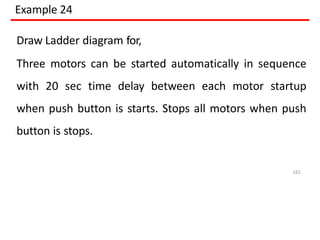
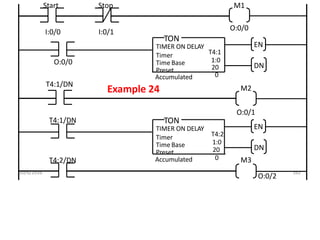
Example 24
Draw Ladderdiagram for,
Three motors can be started automatically in sequence
with 20 sec time delay between each motor startup
when push button is starts. Stops all motors when push
button is stops.
161
173.
10/6/2016 162
EN
DN
TIMER ONDELAY
Timer
Time Base
Preset
Accumulated
T4:1
1:0
20
0
TON
Start
T4:1/DN
M2
Example 24
M1
I:0/0
Stop
I:0/1
O:0/0
O:0/0
O:0/1
EN
DN
TON
T4:2/DN M3
TIMER ON DELAY
Timer
Time Base
Preset
Accumulated
T4:2
1:0
20
0
T4:1/DN
O:0/2
174.
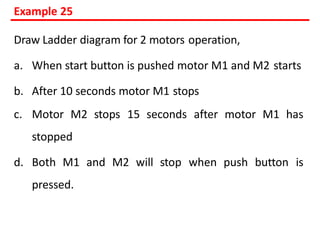
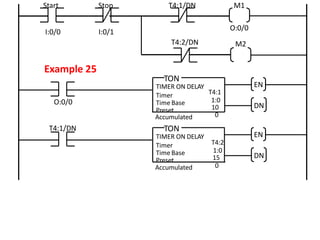
Example 25
Draw Ladderdiagram for 2 motors operation,
a. When start button is pushed motor M1 and M2 starts
b. After 10 seconds motor M1 stops
c. Motor M2 stops 15 seconds after motor M1 has
stopped
d. Both M1 and M2 will stop when push button is
pressed.
175.
EN
DN
TIMER ON DELAY
Timer
TimeBase
Preset
Accumulated
T4:1
1:0
10
0
TON
Start
T4:2/DN M2
Example 25
M1
I:0/0
Stop
I:0/1
O:0/0
O:0/0
EN
DN
TON
TIMER ON DELAY
Timer
Time Base
Preset
Accumulated
T4:2
1:0
15
0
T4:1/DN
T4:1/DN
176.
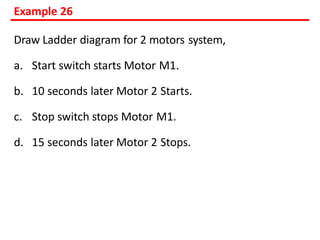
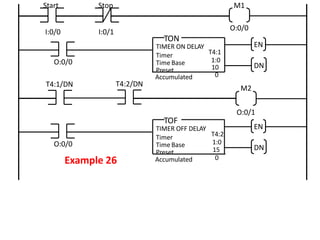
Example 26
Draw Ladderdiagram for 2 motors system,
a. Start switch starts Motor M1.
b. 10 seconds later Motor 2 Starts.
c. Stop switch stops Motor M1.
d. 15 seconds later Motor 2 Stops.
177.
EN
DN
TIMER ON DELAY
Timer
TimeBase
Preset
Accumulated
T4:1
1:0
10
0
TON
Start
T4:1/DN
M2
Example 26
M1
I:0/0
Stop
I:0/1
O:0/0
O:0/0
O:0/1
EN
DN
TOF
O:0/0
TIMER OFF DELAY
Timer
Time Base
Preset
Accumulated
T4:2
1:0
15
0
T4:2/DN
178.
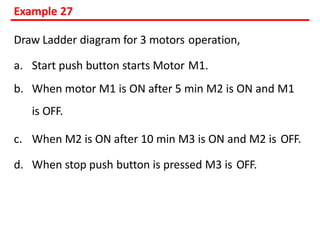
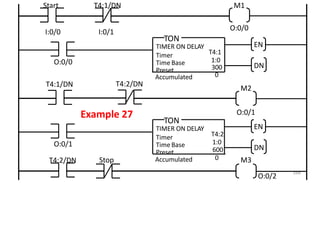
Example 27
Draw Ladderdiagram for 3 motors operation,
a. Start push button starts Motor M1.
b. When motor M1 is ON after 5 min M2 is ON and M1
is OFF.
c. When M2 is ON after 10 min M3 is ON and M2 is OFF.
d. When stop push button is pressed M3 is OFF.
179.
168
EN
DN
TIMER ON DELAY
Timer
TimeBase
Preset
Accumulated
T4:1
1:0
300
0
TON
Start
T4:1/DN
M2
Example 27
M1
I:0/0
T4:1/DN
I:0/1
O:0/0
O:0/0
O:0/1
EN
DN
TON
O:0/1
T4:2/DN M3
TIMER ON DELAY
Timer
Time Base
Preset
Accumulated
T4:2
1:0
600
0
O:0/2
T4:2/DN
Stop
PLC DEFINITION
A PROGRAMMABLELOGIC CONTROLLER
(PLC) is an industrial computer control system that
continuously monitors the state of input devices and
makes decisions based upon a custom program to control
the state of output devices.
(or)
A programmable logic controller (PLC), or programmable
controller is an industrial digital computer which has
been ruggedized and adapted for the control of
manufacturing processes, such as assembly lines, or
robotic devices, or any activity that requires high
reliability control and ease of programming and process
182.
What are thebasic components of a
PLC?
PLCs span a wide range of sizes, but
all contain six basic components as
1. Power supply.
2. Input module.
3. Output module.
4. Processor (CPU)
5. Rack or mounting assembly.
6. Programming unit (software)
183.
What is PLCoperation?
Basic Operation of a PLC system. The
operation of the PLC system is simple and
straightforward. The Process or CPU completes
three processes:
(1) scans, or reads, from the input devices
(2) executes or “solves” the program logic, and
(3) updates, or writes, to the output devices.
STRUCTURE OF PLC
Thestructure of a PLC can be divided
into four parts. They are
1. Input/output modules
2. Central processing unit (CPU),
3. Memory and
4. Programming terminal.
186.
SELECTION OF PLC
Thefollowing points highlight what can be
generally considered the most important factors for
choosing a PLC for machine control. PLC selection
criteria consists of:
* System (task) requirements.
* Application requirements.
* What input/output capacity is required?
* What type of inputs/outputs are required?
* What size of memory is required?
* What speed is required of the CPU?
* Electrical requirements.
* Speed of operation.
* Communication requirements.
* Software.
* Operator interface.
* Physical environments.
187.
SELECTION OF PLC
Systemrequirement
• The starting point in determining any solution
must be to understand what is to be achieved.
• The program design starts with breaking down
the task into a number of simple
understandable elements, each of which can
be easily described.
188.
SELECTION OF PLC
Applicationrequirements
* Input and output device requirements. After
determining the operation of the system, the
next step is to determine what input and
output devices the system requires.
* List the function required and identify a
specific type of device.
* The need for special operations in addition to
discrete (On/Off) logic.
* List the advanced functions required beside
simple discrete logic.
189.
SELECTION OF PLC
Applicationrequirements
* Input and output device requirements. After
determining the operation of the system, the
next step is to determine what input and
output devices the system requires.
* List the function required and identify a
specific type of device.
* The need for special operations in addition to
discrete (On/Off) logic.
* List the advanced functions required beside
simple discrete logic.
190.
SELECTION OF PLC
ElectricalRequirements:
The electrical requirements for
inputs, outputs, and system power; When
determining the electrical requirements of a
system, consider three items:
• Incoming power (power for the control
system);
• Input device voltage; and
• Output voltage and current.
191.
SELECTION OF PLC
Speedof Operation
How fast the control system must operate (speed of
operation).
When determining speed of operation, consider
these points:
– How fast does the process occur or machine
operate?
– Are there “time critical” operations or events that
must be detected?
– In what time frame must the fastest action occur
(input device detection to output device
activation)?
– Does the control system need to count pulses
from an encoder or flow-meter and respond
quickly?
192.
SELECTION OF PLC
Communication
Ifthe application requires sharing data outside
the process, i.e. communication.
Communication involves sharing application
data or status with another electronic device,
such as a computer or a monitor in an
operator’s station.
Communication can take place locally through
a twisted-pair wire, or remotely via telephone
or radio modem.
193.
SELECTION OF PLC
OperatorInterface
If the system needs operator control or
interaction.
In order to convey information about machine or
process status, or to allow an operator to input
data, many applications require operator
interfaces.
Traditional operator interfaces include
pushbuttons, pilot lights and LED numeric display.
Electronic operator interface devices display
messages about machine status in descriptive
text, display part count and track alarms. Also,
they can be used for data input.
194.
SELECTION OF PLC
PhysicalEnvironment
The physical environment in which the control
system will be located.
Consider the environment where the control
system will be located.
In harsh environments, house the control system
in an appropriate IP-rated enclosure.
Remember to consider accessibility for
maintenance, troubleshooting or reprogramming.