GD Library
Jigar Makhija
Introduction
• It is used to create and manipulate image files in a variety of different
image formats, including GIF, PNG, JPEG, WBMP, and XPM.
• Fonts in GD are identified by numbers.
For Reference: https://www.php.net/manual/en/book.image.php
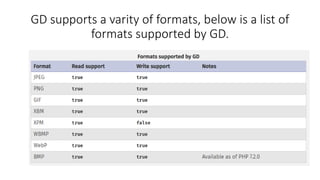
GD supports a varity of formats, below is a list of
formats supported by GD.
Functions
• // Create the size of image or blank image
$image = imagecreate(500, 300);
or
$image=imagecreatetruecolor($w,$h);
• // Set the background color of image and Setting the text color of
image
• $color = imagecolorallocate($image, 255, 255, 255);
Functions
// Function to create image which contains string.
//bool imagestring( $image, $font, $x, $y, $string, $color )
• imagestring($image, 5, 50, 100, " A computer portal", $text_color);
or
• imagettftext($image,40,0,50,50,$blacktext,$font,$text);
• header("content-type: image/png");
• imagepng($image);
• imagedestroy($image);
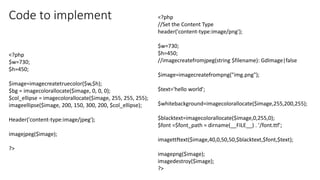
Code to implement <?php
//Set the Content Type
header('content-type:image/png');
$w=730;
$h=450;
//imagecreatefromjpeg(string $filename): GdImage|false
$image=imagecreatefrompng("img.png");
$text='hello world';
$whitebackground=imagecolorallocate($image,255,200,255);
$blacktext=imagecolorallocate($image,0,255,0);
$font =$font_path = dirname(__FILE__) . '/font.ttf';
imagettftext($image,40,0,50,50,$blacktext,$font,$text);
imagepng($image);
imagedestroy($image);
?>
<?php
$w=730;
$h=450;
$image=imagecreatetruecolor($w,$h);
$bg = imagecolorallocate($image, 0, 0, 0);
$col_ellipse = imagecolorallocate($image, 255, 255, 255);
imageellipse($image, 200, 150, 300, 200, $col_ellipse);
Header('content-type:image/jpeg');
imagejpeg($image);
?>

Php gd library

  • 1.
  • 2.
    Introduction • It isused to create and manipulate image files in a variety of different image formats, including GIF, PNG, JPEG, WBMP, and XPM. • Fonts in GD are identified by numbers. For Reference: https://www.php.net/manual/en/book.image.php
  • 3.
    GD supports avarity of formats, below is a list of formats supported by GD.
  • 4.
    Functions • // Createthe size of image or blank image $image = imagecreate(500, 300); or $image=imagecreatetruecolor($w,$h); • // Set the background color of image and Setting the text color of image • $color = imagecolorallocate($image, 255, 255, 255);
  • 5.
    Functions // Function tocreate image which contains string. //bool imagestring( $image, $font, $x, $y, $string, $color ) • imagestring($image, 5, 50, 100, " A computer portal", $text_color); or • imagettftext($image,40,0,50,50,$blacktext,$font,$text); • header("content-type: image/png"); • imagepng($image); • imagedestroy($image);
  • 6.
    Code to implement<?php //Set the Content Type header('content-type:image/png'); $w=730; $h=450; //imagecreatefromjpeg(string $filename): GdImage|false $image=imagecreatefrompng("img.png"); $text='hello world'; $whitebackground=imagecolorallocate($image,255,200,255); $blacktext=imagecolorallocate($image,0,255,0); $font =$font_path = dirname(__FILE__) . '/font.ttf'; imagettftext($image,40,0,50,50,$blacktext,$font,$text); imagepng($image); imagedestroy($image); ?> <?php $w=730; $h=450; $image=imagecreatetruecolor($w,$h); $bg = imagecolorallocate($image, 0, 0, 0); $col_ellipse = imagecolorallocate($image, 255, 255, 255); imageellipse($image, 200, 150, 300, 200, $col_ellipse); Header('content-type:image/jpeg'); imagejpeg($image); ?>