

SAP UI5
LET’S SOLVE SOME HELPFUL QUESTIONS
ABOUT UI5, JS, FIORI
SAPUI5 is a framework for building
responsive web applications.
Responsive means that the web applications
adapt their UI to desktop, tablet, and mobile
devices. One application to rule them all.
SAPUI5 IS A FRAMEWORK TO BUILD WEB APPLICATIONS
SAP UI5, JavaScript, OData & Fiori
1. INDEX.HTML?
2. BOOTSTRAPPING?
3. COMPONENT.JS?
4. MANIFEST.JSON?
5. CUSTOM CONTROLS?
6. TYPES OF BINDING (Property, element & Aggregation)?
7. COMPOSITE BINDING?
8. EXPRESSION BINDING?
9. FORMATTERS?
10. FRAGMENTS?
11. Types of views and Model?
12. Difference between json and OData model.
13. Lifecycle of controller.
14. Difference between “= =” and “= = =”.
15. WHAT IS THE USE OF getBindingContext?
SAP UI5, JavaScript, OData & Fiori
16. OData checking with various T-codes and consuming.
17. FIORI LAUNCHPAD CONFIGURATION WITH T. CODES.
18. Types of Fiori application.
19. Embedded and central hub system?
20. OData service creation by using FM.
21. Knowledge about T.R movements development -> quality -> production.
Sample Interview Questions
1. What is Inline count in OData?
2. What is the difference between Technical Catalog and Business Catalog?
3. What are Deferred Groups?
4. Give some detail about Performance Checklist
5. What is the use of WorkList Object?
6. Explain Binding Modes?
7. Operations on OData?
8. Explain Call Function in UI5?
9. Discuss about creating Tiles in Fiori Launchpad
10. Explain View and according to you which view is better to use and which view is used for better performance?
Sample Interview Questions
1. Discuss about Fiori elements?
2. Annotations in Fiori
3. What is the use of metadata file and where it is available in ui5 application
4. Name some tool which you use to check the JavaScript code
5. Testing in UI5 and knowledge of OPA & Unit testing.
6. Write a code to create element in controller file?
7. What is the use of new keyword in defining any elements
8. Name of tools used to create ui5 application
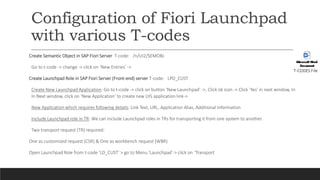
Configuration of Fiori Launchpad
with various T-codes
Create Semantic Object in SAP Fiori Server T-code: /n/UI2/SEMOBJ
Go to t-code -> change -> click on ‘New Entries’ ->
Create Launchpad Role in SAP Fiori Server (Front-end) server T-code: LPD_CUST
Create New Launchpad Application: Go to t-code -> click on button ‘New Launchpad’ ->, Click ok icon -> Click ‘Yes’ in next window, In
In Next window, click on ‘New Application’ to create new UI5 application link->
New Application which requires following details: Link Text, URL, Application Alias, Additional Information
Include Launchpad role in TR: We can include Launchpad roles in TRs for transporting it from one system to another.
Two transport request (TR) required:
One as customized request (CSR) & One as workbench request (WBR)
Open Launchpad Role from t-code ‘LD_CUST’ > go to Menu ‘Launchpad’-> click on ‘Transport
T-CODES File
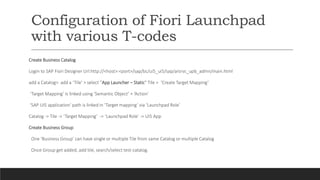
Configuration of Fiori Launchpad
with various T-codes
Create Business Catalog
Login to SAP Fiori Designer Url:http://<host>:<port>/sap/bc/ui5_ui5/sap/arsrvc_upb_admn/main.html
add a Catalog> add a ‘Tile’ > select “App Launcher – Static” Tile > ‘Create Target Mapping’
‘Target Mapping’ is linked using ‘Semantic Object’ + ‘Action’
‘SAP UI5 application’ path is linked in ‘Target mapping’ via ‘Launchpad Role’
Catalog -> Tile -> ‘Target Mapping’ -> ‘Launchpad Role’ -> UI5 App
Create Business Group
One ‘Business Group’ can have single or multiple Tile from same Catalog or multiple Catalog
Once Group get added, add tile, search/select test-catalog.
Configuration of Fiori Launchpad
with various T-codes
Create App’s PFCG Role in SAP Fiori Server (Front-end) server T-code: PFCG
create a PFCG role specific to UI5 application which can be assigned to user-ids
One PFCG Role for Fiori Launchpad accessibility & One PFCG Role for SAPUI5 Application
[A] Create PFCG Role for Fiori Launchpad accessibility
[B] Create PFCG Role for SAPUI5 Application
[C] Role assignment to user-id
Now login SAP Fiori Launchpad using this user-id.
For more details: https://blogs.sap.com/2017/11/19/sap-fiori-ui5-app-configuration-in-sap-fiori-launchpad/
Wish you all the best
For more idea reach me out through my email.
@jigumakhija@gmail.com

SAP Ui5 content

  • 1.
    SAP UI5 LET’S SOLVESOME HELPFUL QUESTIONS ABOUT UI5, JS, FIORI
  • 2.
    SAPUI5 is aframework for building responsive web applications. Responsive means that the web applications adapt their UI to desktop, tablet, and mobile devices. One application to rule them all. SAPUI5 IS A FRAMEWORK TO BUILD WEB APPLICATIONS
  • 3.
    SAP UI5, JavaScript,OData & Fiori 1. INDEX.HTML? 2. BOOTSTRAPPING? 3. COMPONENT.JS? 4. MANIFEST.JSON? 5. CUSTOM CONTROLS? 6. TYPES OF BINDING (Property, element & Aggregation)? 7. COMPOSITE BINDING? 8. EXPRESSION BINDING? 9. FORMATTERS? 10. FRAGMENTS? 11. Types of views and Model? 12. Difference between json and OData model. 13. Lifecycle of controller. 14. Difference between “= =” and “= = =”. 15. WHAT IS THE USE OF getBindingContext?
  • 4.
    SAP UI5, JavaScript,OData & Fiori 16. OData checking with various T-codes and consuming. 17. FIORI LAUNCHPAD CONFIGURATION WITH T. CODES. 18. Types of Fiori application. 19. Embedded and central hub system? 20. OData service creation by using FM. 21. Knowledge about T.R movements development -> quality -> production.
  • 5.
    Sample Interview Questions 1.What is Inline count in OData? 2. What is the difference between Technical Catalog and Business Catalog? 3. What are Deferred Groups? 4. Give some detail about Performance Checklist 5. What is the use of WorkList Object? 6. Explain Binding Modes? 7. Operations on OData? 8. Explain Call Function in UI5? 9. Discuss about creating Tiles in Fiori Launchpad 10. Explain View and according to you which view is better to use and which view is used for better performance?
  • 6.
    Sample Interview Questions 1.Discuss about Fiori elements? 2. Annotations in Fiori 3. What is the use of metadata file and where it is available in ui5 application 4. Name some tool which you use to check the JavaScript code 5. Testing in UI5 and knowledge of OPA & Unit testing. 6. Write a code to create element in controller file? 7. What is the use of new keyword in defining any elements 8. Name of tools used to create ui5 application
  • 7.
    Configuration of FioriLaunchpad with various T-codes Create Semantic Object in SAP Fiori Server T-code: /n/UI2/SEMOBJ Go to t-code -> change -> click on ‘New Entries’ -> Create Launchpad Role in SAP Fiori Server (Front-end) server T-code: LPD_CUST Create New Launchpad Application: Go to t-code -> click on button ‘New Launchpad’ ->, Click ok icon -> Click ‘Yes’ in next window, In In Next window, click on ‘New Application’ to create new UI5 application link-> New Application which requires following details: Link Text, URL, Application Alias, Additional Information Include Launchpad role in TR: We can include Launchpad roles in TRs for transporting it from one system to another. Two transport request (TR) required: One as customized request (CSR) & One as workbench request (WBR) Open Launchpad Role from t-code ‘LD_CUST’ > go to Menu ‘Launchpad’-> click on ‘Transport T-CODES File
  • 8.
    Configuration of FioriLaunchpad with various T-codes Create Business Catalog Login to SAP Fiori Designer Url:http://<host>:<port>/sap/bc/ui5_ui5/sap/arsrvc_upb_admn/main.html add a Catalog> add a ‘Tile’ > select “App Launcher – Static” Tile > ‘Create Target Mapping’ ‘Target Mapping’ is linked using ‘Semantic Object’ + ‘Action’ ‘SAP UI5 application’ path is linked in ‘Target mapping’ via ‘Launchpad Role’ Catalog -> Tile -> ‘Target Mapping’ -> ‘Launchpad Role’ -> UI5 App Create Business Group One ‘Business Group’ can have single or multiple Tile from same Catalog or multiple Catalog Once Group get added, add tile, search/select test-catalog.
  • 9.
    Configuration of FioriLaunchpad with various T-codes Create App’s PFCG Role in SAP Fiori Server (Front-end) server T-code: PFCG create a PFCG role specific to UI5 application which can be assigned to user-ids One PFCG Role for Fiori Launchpad accessibility & One PFCG Role for SAPUI5 Application [A] Create PFCG Role for Fiori Launchpad accessibility [B] Create PFCG Role for SAPUI5 Application [C] Role assignment to user-id Now login SAP Fiori Launchpad using this user-id. For more details: https://blogs.sap.com/2017/11/19/sap-fiori-ui5-app-configuration-in-sap-fiori-launchpad/
  • 10.
    Wish you allthe best For more idea reach me out through my email. @jigumakhija@gmail.com