PV Systems Design 
Tools of the Trade 
Gavin D. J. Harper
Site Visit 
• The Site Visit is an opportunity to collect key 
information to inform a PV system design. 
• Information to be collected on: 
– Customer Wishes 
– Usable Roof, Façade and Open Spaces 
– Overshading 
– Orientation / Angles of Slope 
– Location for Balance of System Component 
– Details of Electrical Installation 
– Access considerations
Survey Tools 
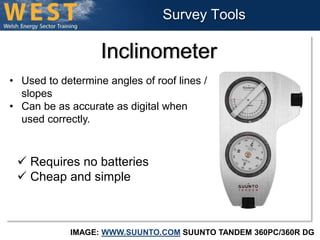
Inclinometer 
• Used to determine angles of roof lines / 
IMAGE: WWW.SUUNTO.COM SUUNTO TANDEM 360PC/360R DG 
slopes 
• Can be as accurate as digital when 
used correctly. 
 Requires no batteries 
 Cheap and simple
Survey Tools 
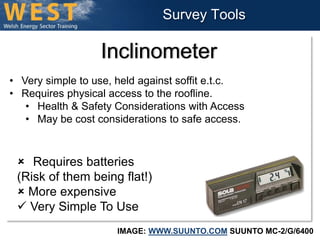
Inclinometer 
• Very simple to use, held against soffit e.t.c. 
• Requires physical access to the roofline. 
• Health & Safety Considerations with Access 
• May be cost considerations to safe access. 
 Requires batteries 
(Risk of them being flat!) 
 More expensive 
 Very Simple To Use 
IMAGE: WWW.SUUNTO.COM SUUNTO MC-2/G/6400
Survey Tools 
Inclinometer App 
• Very simple to use, held against 
soffit e.t.c. 
• Requires physical access to the 
roofline. 
• Don’t drop your phone!!! 
 Requires charge phone 
(Risk of them being flat!) 
 More expensive 
 Very Simple To Use 
 Ubiquitous Smartphones 
 Free / Cheap (If you have phone!) 
 One less tool to carry 
HTTPS://PLAY.GOOGLE.COM/STORE/APPS/DETAILS?ID=COM.ANDROID.INCLINOMETERPRO
Survey Tools 
Inclinometer App 
• HOWEVER: Word of warning! 
• Relies on the accuracy of phones 
internal compasses and sensors. 
• These may not be calibrated to 
the same degree of precision as 
dedicated devices. 
• There may be some margin of 
error. 
• Check against another device to 
ensure both agree. 
HTTPS://PLAY.GOOGLE.COM/STORE/APPS/DETAILS?ID=COM.ANDROID.INCLINOMETERPRO
Shading Analysis 
• Old SAP Calculation gave “Shading Factor”. 
– Very subjective 
– Open to interpretation 
– Insufficient consideration given to near shading. 
– 20% shade will still affect system; yet ignored in the SAP 
method. 
• Shonky installations resulted from the old method, but due to 
subjectivity it was hard to argue in favour of customer due to 
>20% factor. 
– Hence… more sophisticated shading analysis required.
Shading Analysis 
• In order to conduct a shading analysis, we 
need to be able to capture the angular height 
of obstacles and also their bearing. 
• We can do this manually, or in a more 
sophisticated way with expensive equipment.
Shading Analysis 
• When selecting tools we need to consider: 
– Quality of data 
• Junk in, junk out: The better our model, the closer fit to 
real world performance. 
• “Good enough” data, ‘cheap’ equipment can yield 
serviceable results. 
– Speed of capture 
• If we are doing lots of installations, then we want to be 
able to use tools that allow us to work effectively. 
– Workflow process 
• Some automatic tools allow for automatic transfer of 
data into modelling tools.
SURVEY TOOLS 
There are a number of different tools which can be used to help in 
the collection of on site survey data.
Survey Tools 
Sighting Mirror Compass 
• Used to determine bearing and 
measure gradients and altitudes. 
• These are vital considerations when 
calculating azimuths, shading and 
slopes. 
 Requires no batteries 
 Cheap and simple 
IMAGE: WWW.SUUNTO.COM SUUNTO MC-2/G/6400
Survey Tools 
Quick & Dirty Elevation Tool 
• Laminated Sheet of Card 
• String 
• Small Weight 
 Requires no batteries 
 Cheap and simple 
 You will feel like a wally 
 You will envy the cool kids with shinier toys. 
HTTP://WWW.MICROGENERATIONCERTIFICATION.ORG/IMAGES/MCS%20SHADING%202%20FINAL.PDF
Survey Tools 
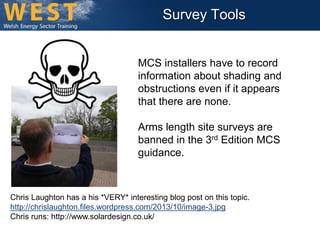
MCS installers have to record 
information about shading and 
obstructions even if it appears 
that there are none. 
Arms length site surveys are 
banned in the 3rd Edition MCS 
guidance. 
Chris Laughton has a his *VERY* interesting blog post on this topic. 
http://chrislaughton.files.wordpress.com/2013/10/image-3.jpg 
Chris runs: http://www.solardesign.co.uk/
Survey Tools 
Printable Sun Path Acetates 
HTTP://WWW.SOLARDESIGN.CO.UK/MCS-DOWNLOAD.PHP
Survey Tools 
Printable Sun Path Acetates 
• Use with a “Solar Site Selector” tool. 
• Tool holds acetate, and contains a Fisheye 
Lens and a Compass 
• Different acetates for different latitudes 
available. 
• Looking through lens, outlines of obstructions 
are drawn onto the diagram using an OHP 
Transparency erasable marker. 
HTTP://WWW.SOLARDESIGN.CO.UK/MCS-DOWNLOAD.PHP
Survey Tools 
Solar Site Selector Tool 
• The following pictures show an acetate type solar site 
selector tool as sold by Solar Design Company. 
HTTP://WWW.SOLARDESIGN.CO.UK/MCS-DOWNLOAD.PHP
Survey Tools 
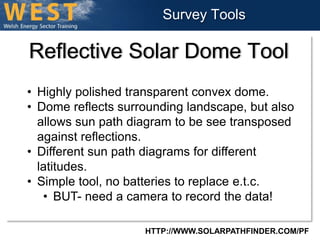
Reflective Solar Dome Tool 
HTTP://WWW.SOLARPATHFINDER.COM/PF
Survey Tools 
Reflective Solar Dome Tool 
• Highly polished transparent convex dome. 
• Dome reflects surrounding landscape, but also 
allows sun path diagram to be see transposed 
against reflections. 
• Different sun path diagrams for different 
latitudes. 
• Simple tool, no batteries to replace e.t.c. 
• BUT- need a camera to record the data! 
HTTP://WWW.SOLARPATHFINDER.COM/PF
Survey Tools 
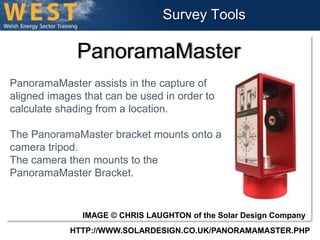
PanoramaMaster 
PanoramaMaster assists in the capture of 
aligned images that can be used in order to 
calculate shading from a location. 
The PanoramaMaster bracket mounts onto a 
camera tripod. 
The camera then mounts to the 
PanoramaMaster Bracket. 
IMAGE © CHRIS LAUGHTON of the Solar Design Company 
HTTP://WWW.SOLARDESIGN.CO.UK/PANORAMAMASTER.PHP
Survey Tools 
PanoramaMaster 
• The images that are captured can then be processed and 
‘stitched together’ using the software. 
• This data can then be imported into software in order to 
generate a skyline that can be used for simulating solar 
shading in a simulation package. 
• A sunpath and horizon can then be overlaid onto the image. 
IMAGE © CHRIS LAUGHTON of the Solar Design Company 
HTTP://WWW.SOLARDESIGN.CO.UK/PANORAMAMASTER.PHP
Survey Tools 
Solmetric Suneye 
Tool for making calibrated 
measurements of solar shading. 
Incorporates: 
• Calibrated fisheye camera 
• Electronic compass 
• Tilt sensor 
• Optional GPS 
HTTP://WWW.SOLARDESIGN.CO.UK/MCS-DOWNLOAD.PHP
Survey Tools 
Solmetric Suneye 
HTTP://WWW.SOLARDESIGN.CO.UK/MCS-DOWNLOAD.PHP
Survey Tools 
Solmetric Suneye 
HTTP://WWW.SOLMETRIC.COM/BUY210.HTML
Survey Tools 
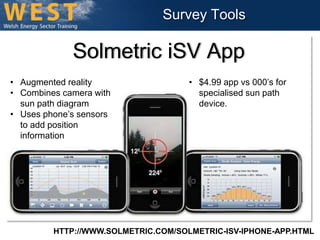
Solmetric iSV App 
• Augmented reality 
• Combines camera with 
sun path diagram 
• Uses phone’s sensors 
to add position 
information 
• $4.99 app vs 000’s for 
specialised sun path 
device. 
HTTP://WWW.SOLMETRIC.COM/SOLMETRIC-ISV-IPHONE-APP.HTML
Survey Tools 
http://www.microgenerationcertification.org/images/MCS%20Shading%202%20FINAL.pdf
SOFTWARE DESIGN TOOLS
Design Tools 
• There are a great many different software design 
tools for Photovoltaic Systems on the market. 
• These range in complexity and cost from free to 
very expensive. 
• It is impossible to provide an exhaustive list, nor to 
give a complete overview of their functionality within 
the scope of this presentation. 
• The following exposition is indicative of some of the 
software available and the range of functionality 
that can be achieved.
Design Tools 
PVGIS 
HTTP://RE.JRC.EC.EUROPA.EU/PVGIS/ 
• Online free solar 
photovoltaic energy 
calculator for stand alone 
or grid connected PV 
systems and plants, in 
Europe and Africa. 
• Solar electricity generator 
simulation and solar 
radiations maps 
• Free Online Tool
Design Tools 
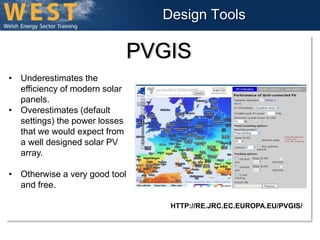
PVGIS 
HTTP://RE.JRC.EC.EUROPA.EU/PVGIS/ 
• Underestimates the 
efficiency of modern solar 
panels. 
• Overestimates (default 
settings) the power losses 
that we would expect from 
a well designed solar PV 
array. 
• Otherwise a very good tool 
and free.
Design Tools 
PV*SOL 
• PV*SOL software is used for the design an 
simulation of PV installations. 
• There are two variations: PC*SOL & PV*SOL 
Premium 
• PV*SOL works in two dimensions, whereas PV*SOL 
Premium has added functionality to allow work in 
three dimensions. 
HTTP://WWW.SOLMETRIC.COM/SOLMETRIC-ISV-IPHONE-APP.HTML
Design Tools 
PV*SOL
Design Tools 
PV*SOL
Design Tools 
PV*SOL Premium 
• PV*SOL software is used for the design an 
simulation of PV installations. 
• There are two variations: PC*SOL & PV*SOL 
Premium 
• PV*SOL works in two dimensions, whereas PV*SOL 
Premium has added functionality to allow work in 
three dimensions. 
HTTP://WWW.SOLARDESIGN.CO.UK/PVSOL-PREMIUM.PHP
Design Tools 
PV*SOL Photoplan 
• PV*SOL Photoplan is used to to generate 
photorealistic rendered diagrams of potential 
solar installations. 
• This can be used to help customers gauge 
the aesthetic impact of a PV installation and 
may be helpful in the process of planning 
applications in certain situations. 
• Listed Buildings 
• Conservation Areas 
• Areas of Outstanding Natural Beauty 
HTTP://WWW.VALENTIN-SOFTWARE.COM/EN/PRODUCTS/PHOTOVOLTAICS/57/PVSOL-PREMIUM
Design Tools 
Helios 3D 
• Software specifically designed for planning utility 
scale ground mounted PV arrays. 
• Will take data into account about the terrain of the 
installation from GIS data. 
• The core functionality of HELIOS 3D is, to place 
the racks without shadows casted on them on any 
suitable terrain. 
HTTP://WWW.HELIOS3D.COM/
LIDAR Data Collection 
Source: 
http://www.beg.utexas.edu/coastal/poster/ 
graphics/Terrain-mapping-plane.gif 
http://www.phoenix-aerial.com/
Orientation 
Analysis 
Helios 3D analyses 
terrain data for 
orientation, noting 
whether the slopes 
face North, South, 
East or West. 
Orientation analysis is important for optimal site selection.
Design Tools 
Helios 3D 
HTTP://WWW.HELIOS3D.COM/
Design Tools 
Helios 3D 
HTTP://WWW.HELIOS3D.COM/ 
The longest 
shadow cast in a 
row is calculated. 
The distance 
between rows is 
then set to this 
measurement to 
prevent 
overshadowing.
Design Tools 
Helios 3D 
HTTP://WWW.HELIOS3D.COM/ 
• The software will also make 
suggestions about how 
earthworks and regarding of the 
terrain may assist in optimisation 
and improving the performance of 
the system. 
• The software considers the 
optimal geometry for the rows of 
PV devices in order to extract the 
most energy from a given space.
Design Tools 
Helios 3D 
HTTP://WWW.HELIOS3D.COM/ 
• The software will take into account access 
requirements for installation and maintenance. 
• Access roads are optimally positioned 
There are factors that are specific to the design of 
ground mounted PV: 
• Soil conditions 
• Piling depth
Design Tools 
Helios 3D 
HTTP://WWW.HELIOS3D.COM/ 
• The software allows 
modelling of obstructions 
and objects which will cast 
shadows on the installation. 
Access road positioning 
optimised to make use of 
overshadowed space as a result 
of tree providing overshadowing.
Other Tools 
• Energy Savings Trust >4kW PV Estimator 
http://www.energysavingtrust.org.uk/Generating-energy/Getting-money-back/Solar-Energy-Calculator
Other Tools 
• Energy Savings Trust >4kW PV Estimator 
– Limited to solar PV systems under 4kWp 
– Limited design choices 
– Overestimates system losses 
– Doesn't factor RPI FIT payment increases 
– Doesn’t factor predicted increases in electricity prices. 
– BUT very easy to use and easy to understand 
– Comprehensive solar PV Return on Investment (ROI) tool 
http://www.energysavingtrust.org.uk/Generating-energy/Getting-money-back/Solar-Energy-Calculator
PV Software 
• For a more exhaustive list of PV Software 
tools, look at: 
• http://photovoltaic-software.com/free.php 
• http://photovoltaic-software.com/professional.php

Photovoltaic Systems: System Design Tools

  • 1.
    PV Systems Design Tools of the Trade Gavin D. J. Harper
  • 2.
    Site Visit •The Site Visit is an opportunity to collect key information to inform a PV system design. • Information to be collected on: – Customer Wishes – Usable Roof, Façade and Open Spaces – Overshading – Orientation / Angles of Slope – Location for Balance of System Component – Details of Electrical Installation – Access considerations
  • 3.
    Survey Tools Inclinometer • Used to determine angles of roof lines / IMAGE: WWW.SUUNTO.COM SUUNTO TANDEM 360PC/360R DG slopes • Can be as accurate as digital when used correctly.  Requires no batteries  Cheap and simple
  • 4.
    Survey Tools Inclinometer • Very simple to use, held against soffit e.t.c. • Requires physical access to the roofline. • Health & Safety Considerations with Access • May be cost considerations to safe access.  Requires batteries (Risk of them being flat!)  More expensive  Very Simple To Use IMAGE: WWW.SUUNTO.COM SUUNTO MC-2/G/6400
  • 5.
    Survey Tools InclinometerApp • Very simple to use, held against soffit e.t.c. • Requires physical access to the roofline. • Don’t drop your phone!!!  Requires charge phone (Risk of them being flat!)  More expensive  Very Simple To Use  Ubiquitous Smartphones  Free / Cheap (If you have phone!)  One less tool to carry HTTPS://PLAY.GOOGLE.COM/STORE/APPS/DETAILS?ID=COM.ANDROID.INCLINOMETERPRO
  • 6.
    Survey Tools InclinometerApp • HOWEVER: Word of warning! • Relies on the accuracy of phones internal compasses and sensors. • These may not be calibrated to the same degree of precision as dedicated devices. • There may be some margin of error. • Check against another device to ensure both agree. HTTPS://PLAY.GOOGLE.COM/STORE/APPS/DETAILS?ID=COM.ANDROID.INCLINOMETERPRO
  • 7.
    Shading Analysis •Old SAP Calculation gave “Shading Factor”. – Very subjective – Open to interpretation – Insufficient consideration given to near shading. – 20% shade will still affect system; yet ignored in the SAP method. • Shonky installations resulted from the old method, but due to subjectivity it was hard to argue in favour of customer due to >20% factor. – Hence… more sophisticated shading analysis required.
  • 8.
    Shading Analysis •In order to conduct a shading analysis, we need to be able to capture the angular height of obstacles and also their bearing. • We can do this manually, or in a more sophisticated way with expensive equipment.
  • 9.
    Shading Analysis •When selecting tools we need to consider: – Quality of data • Junk in, junk out: The better our model, the closer fit to real world performance. • “Good enough” data, ‘cheap’ equipment can yield serviceable results. – Speed of capture • If we are doing lots of installations, then we want to be able to use tools that allow us to work effectively. – Workflow process • Some automatic tools allow for automatic transfer of data into modelling tools.
  • 10.
    SURVEY TOOLS Thereare a number of different tools which can be used to help in the collection of on site survey data.
  • 11.
    Survey Tools SightingMirror Compass • Used to determine bearing and measure gradients and altitudes. • These are vital considerations when calculating azimuths, shading and slopes.  Requires no batteries  Cheap and simple IMAGE: WWW.SUUNTO.COM SUUNTO MC-2/G/6400
  • 12.
    Survey Tools Quick& Dirty Elevation Tool • Laminated Sheet of Card • String • Small Weight  Requires no batteries  Cheap and simple  You will feel like a wally  You will envy the cool kids with shinier toys. HTTP://WWW.MICROGENERATIONCERTIFICATION.ORG/IMAGES/MCS%20SHADING%202%20FINAL.PDF
  • 13.
    Survey Tools MCSinstallers have to record information about shading and obstructions even if it appears that there are none. Arms length site surveys are banned in the 3rd Edition MCS guidance. Chris Laughton has a his *VERY* interesting blog post on this topic. http://chrislaughton.files.wordpress.com/2013/10/image-3.jpg Chris runs: http://www.solardesign.co.uk/
  • 14.
    Survey Tools PrintableSun Path Acetates HTTP://WWW.SOLARDESIGN.CO.UK/MCS-DOWNLOAD.PHP
  • 15.
    Survey Tools PrintableSun Path Acetates • Use with a “Solar Site Selector” tool. • Tool holds acetate, and contains a Fisheye Lens and a Compass • Different acetates for different latitudes available. • Looking through lens, outlines of obstructions are drawn onto the diagram using an OHP Transparency erasable marker. HTTP://WWW.SOLARDESIGN.CO.UK/MCS-DOWNLOAD.PHP
  • 16.
    Survey Tools SolarSite Selector Tool • The following pictures show an acetate type solar site selector tool as sold by Solar Design Company. HTTP://WWW.SOLARDESIGN.CO.UK/MCS-DOWNLOAD.PHP
  • 17.
    Survey Tools ReflectiveSolar Dome Tool HTTP://WWW.SOLARPATHFINDER.COM/PF
  • 18.
    Survey Tools ReflectiveSolar Dome Tool • Highly polished transparent convex dome. • Dome reflects surrounding landscape, but also allows sun path diagram to be see transposed against reflections. • Different sun path diagrams for different latitudes. • Simple tool, no batteries to replace e.t.c. • BUT- need a camera to record the data! HTTP://WWW.SOLARPATHFINDER.COM/PF
  • 19.
    Survey Tools PanoramaMaster PanoramaMaster assists in the capture of aligned images that can be used in order to calculate shading from a location. The PanoramaMaster bracket mounts onto a camera tripod. The camera then mounts to the PanoramaMaster Bracket. IMAGE © CHRIS LAUGHTON of the Solar Design Company HTTP://WWW.SOLARDESIGN.CO.UK/PANORAMAMASTER.PHP
  • 20.
    Survey Tools PanoramaMaster • The images that are captured can then be processed and ‘stitched together’ using the software. • This data can then be imported into software in order to generate a skyline that can be used for simulating solar shading in a simulation package. • A sunpath and horizon can then be overlaid onto the image. IMAGE © CHRIS LAUGHTON of the Solar Design Company HTTP://WWW.SOLARDESIGN.CO.UK/PANORAMAMASTER.PHP
  • 21.
    Survey Tools SolmetricSuneye Tool for making calibrated measurements of solar shading. Incorporates: • Calibrated fisheye camera • Electronic compass • Tilt sensor • Optional GPS HTTP://WWW.SOLARDESIGN.CO.UK/MCS-DOWNLOAD.PHP
  • 22.
    Survey Tools SolmetricSuneye HTTP://WWW.SOLARDESIGN.CO.UK/MCS-DOWNLOAD.PHP
  • 23.
    Survey Tools SolmetricSuneye HTTP://WWW.SOLMETRIC.COM/BUY210.HTML
  • 24.
    Survey Tools SolmetriciSV App • Augmented reality • Combines camera with sun path diagram • Uses phone’s sensors to add position information • $4.99 app vs 000’s for specialised sun path device. HTTP://WWW.SOLMETRIC.COM/SOLMETRIC-ISV-IPHONE-APP.HTML
  • 25.
  • 26.
  • 27.
    Design Tools •There are a great many different software design tools for Photovoltaic Systems on the market. • These range in complexity and cost from free to very expensive. • It is impossible to provide an exhaustive list, nor to give a complete overview of their functionality within the scope of this presentation. • The following exposition is indicative of some of the software available and the range of functionality that can be achieved.
  • 28.
    Design Tools PVGIS HTTP://RE.JRC.EC.EUROPA.EU/PVGIS/ • Online free solar photovoltaic energy calculator for stand alone or grid connected PV systems and plants, in Europe and Africa. • Solar electricity generator simulation and solar radiations maps • Free Online Tool
  • 29.
    Design Tools PVGIS HTTP://RE.JRC.EC.EUROPA.EU/PVGIS/ • Underestimates the efficiency of modern solar panels. • Overestimates (default settings) the power losses that we would expect from a well designed solar PV array. • Otherwise a very good tool and free.
  • 30.
    Design Tools PV*SOL • PV*SOL software is used for the design an simulation of PV installations. • There are two variations: PC*SOL & PV*SOL Premium • PV*SOL works in two dimensions, whereas PV*SOL Premium has added functionality to allow work in three dimensions. HTTP://WWW.SOLMETRIC.COM/SOLMETRIC-ISV-IPHONE-APP.HTML
  • 31.
  • 32.
  • 33.
    Design Tools PV*SOLPremium • PV*SOL software is used for the design an simulation of PV installations. • There are two variations: PC*SOL & PV*SOL Premium • PV*SOL works in two dimensions, whereas PV*SOL Premium has added functionality to allow work in three dimensions. HTTP://WWW.SOLARDESIGN.CO.UK/PVSOL-PREMIUM.PHP
  • 34.
    Design Tools PV*SOLPhotoplan • PV*SOL Photoplan is used to to generate photorealistic rendered diagrams of potential solar installations. • This can be used to help customers gauge the aesthetic impact of a PV installation and may be helpful in the process of planning applications in certain situations. • Listed Buildings • Conservation Areas • Areas of Outstanding Natural Beauty HTTP://WWW.VALENTIN-SOFTWARE.COM/EN/PRODUCTS/PHOTOVOLTAICS/57/PVSOL-PREMIUM
  • 35.
    Design Tools Helios3D • Software specifically designed for planning utility scale ground mounted PV arrays. • Will take data into account about the terrain of the installation from GIS data. • The core functionality of HELIOS 3D is, to place the racks without shadows casted on them on any suitable terrain. HTTP://WWW.HELIOS3D.COM/
  • 36.
    LIDAR Data Collection Source: http://www.beg.utexas.edu/coastal/poster/ graphics/Terrain-mapping-plane.gif http://www.phoenix-aerial.com/
  • 37.
    Orientation Analysis Helios3D analyses terrain data for orientation, noting whether the slopes face North, South, East or West. Orientation analysis is important for optimal site selection.
  • 38.
    Design Tools Helios3D HTTP://WWW.HELIOS3D.COM/
  • 39.
    Design Tools Helios3D HTTP://WWW.HELIOS3D.COM/ The longest shadow cast in a row is calculated. The distance between rows is then set to this measurement to prevent overshadowing.
  • 40.
    Design Tools Helios3D HTTP://WWW.HELIOS3D.COM/ • The software will also make suggestions about how earthworks and regarding of the terrain may assist in optimisation and improving the performance of the system. • The software considers the optimal geometry for the rows of PV devices in order to extract the most energy from a given space.
  • 41.
    Design Tools Helios3D HTTP://WWW.HELIOS3D.COM/ • The software will take into account access requirements for installation and maintenance. • Access roads are optimally positioned There are factors that are specific to the design of ground mounted PV: • Soil conditions • Piling depth
  • 42.
    Design Tools Helios3D HTTP://WWW.HELIOS3D.COM/ • The software allows modelling of obstructions and objects which will cast shadows on the installation. Access road positioning optimised to make use of overshadowed space as a result of tree providing overshadowing.
  • 43.
    Other Tools •Energy Savings Trust >4kW PV Estimator http://www.energysavingtrust.org.uk/Generating-energy/Getting-money-back/Solar-Energy-Calculator
  • 44.
    Other Tools •Energy Savings Trust >4kW PV Estimator – Limited to solar PV systems under 4kWp – Limited design choices – Overestimates system losses – Doesn't factor RPI FIT payment increases – Doesn’t factor predicted increases in electricity prices. – BUT very easy to use and easy to understand – Comprehensive solar PV Return on Investment (ROI) tool http://www.energysavingtrust.org.uk/Generating-energy/Getting-money-back/Solar-Energy-Calculator
  • 45.
    PV Software •For a more exhaustive list of PV Software tools, look at: • http://photovoltaic-software.com/free.php • http://photovoltaic-software.com/professional.php