Photographic
Terminology
Emily Aldred
Unit 57: Photography and Photographic Practice Terminology
P1, P2, M1, M2
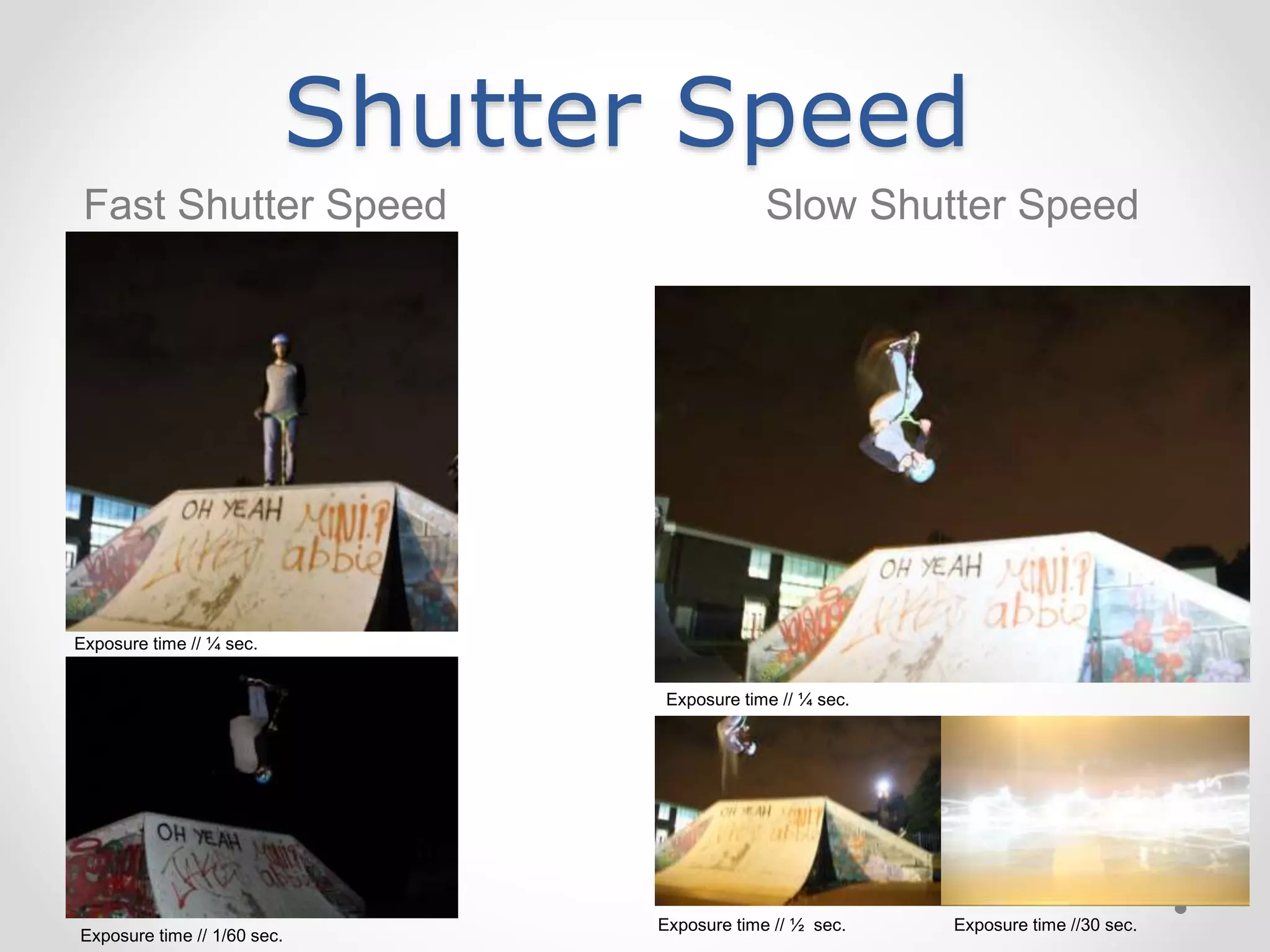
Shutter SpeedShutter speed is the length of time the camera has
exposed through the lens, so it has time to focus on the
light being let in. Shutter speed can help with avoiding
colours and saturation being blurred. If the area you wish
to take a picture of is a dark area, a long exposure is
needed to allow the camera to focus and get the correct
lighting, where if you were to take a light picture, the
exposure would be short as the camera would focus on
the light coming in through the lens as it is easy to
detect. Too much exposure on a light image could cause
the image of over exposed and blurred. Shutter speed is
also a good feature for moving light, as my example
image shows. In the image features my friends friend,
Jacques Laycock on the skate park doing a trick called a
flair. At the time I took this image, it was slightly dark but
there was some lighting from lamp posts very close by
which highlighted Jacques. I used a medium shutter
speed therefore Jacques is in focus and not blurred apart
from near his feet and head, where it has blurred a little
bit from the way he does the trick, where the shutter
speed came into action and caused this effect.
Exposure time // ¼ sec.
Shutter Speed
Fast Shutter Speed Slow Shutter Speed
Exposure time // ¼ sec.
Exposure time // 1/60 sec.
Exposure time // ½ sec. Exposure time //30 sec.
Exposure time // ¼ sec.
Iso
Iso is the amount of light let in by the lens,
which can affect the white balance of the
image, as my example photographs on the
right explain with their captions as the
level of ISO setting. ISO means the lower
the setting of it, the darker the image
appears, and the lighter the image the
higher the ISO setting. Most ISO settings
used for everyday, normal photographs
are around 200-1600. The most common
setting used of ISO for bright situations
like sunlight, is around 100/200. If the
subject you would be photographing is
dark, a high ISO setting could help the
image improve.
ISO // 6400
ISO // 3200
ISO // 400
ISO // 1600
ISO // 200
ISO // 800
ISO // 100
ISOHigh
ISO
Low
ISO
ISO// 1/6400 sec.
F-Stop // 5.6
ISO // 1/6400 sec.
F-Stop // 20
ISO // 1/6400 sec.
F-Stop // 10
Aperture & Depth of Field
• Explanation of term e.g.
what it is used for / the
effect it has on your
images
F-stop // 5
F-stop // 5.6
Aperture is in the lens of the camera, it
can be adjusted to control the amount of
light being let in which can act as a light
sensor. The size of the aperture can
effect the image’s exposure to light.
Depth of field is the foreground, middle
ground and background, and what
appears to be ‘sharp’ or in focus. It is
what the camera lens focus’ on more than
the rest of the image, which it then gives
the rest of the image a slight blur to make
the ‘sharp’ subject in focus and the main
focus point.
Aperture & Depth of Field
Narrow Depth of Field Wide Depth of Field
F-stop // 4.5 F-stop // 5
Manual Exposure
Manual Exposure in photography is the
user of the camera’s settings. This means,
who ever is using the camera, changed
the ISO, shutter speed, depth of field and
the 3X3 grid to their needs. Such as my
example image to the right of my friend,
Olivia, I changed the settings so the back
of her head was visible in decent lighting
and the screen was a bit blurred to make
her hair the main focus.
With the image at the bottom, I took it from
my Fujifilm Finepix camera, so the quality
isn’t as good, but it was on manual setting
so I changed the settings to capture the
separation in the sky.
F-Stop // 4
Exposure time // 1/50 sec.
ISO // 1600
Automatic Exposure
Automatic Exposure in photography is the
camera’s ‘normal’ settings. This applies by
the user of the camera, doesn’t change
anything before taking the photograph.
Sometimes the image can appear dark
(like my example) or too light depending
on the lighting situation. Sometimes
automatic exposure can be the right
setting but a majority of the time, manual
exposure is used. The manual exposure of
my example image was naturally dark, but
the computer screen lit up making it the
main focus because it is a light source.
With the bottom image, the automatic
exposure was dark as it is the same
picture of the sky as the previous slide, but
it is darker due to the camera only noticing
the darker part of the sky.
F-Stop // 4
Exposure time // 1/25 sec.
ISO // 100
Rule of thirds
• Explanation of term e.g.
what it is used for / the
effect it has on your
images
Rule of thirds is the 3X3 grid you can
usually see on a cameras settings.
Everything has the grid as it makes it a bit
easier to take image such as digital
cameras and IPhones. The grid helps to
take image as it helps to focus on the
main subject, such as my example images
of my friend Shauna. In these two images,
she is stood/sat in the central column,
making the viewers eye go to her first.
Close-up images can improve the grid by
the subject over lapping the crossing lines
in the central square, and as they would fill
up most of the image.
Examples of Rule of
thirds

IG4 Task 4 // Photography Terminology Work Sheet

  • 1.
    Photographic Terminology Emily Aldred Unit 57:Photography and Photographic Practice Terminology P1, P2, M1, M2
  • 2.
    Shutter SpeedShutter speedis the length of time the camera has exposed through the lens, so it has time to focus on the light being let in. Shutter speed can help with avoiding colours and saturation being blurred. If the area you wish to take a picture of is a dark area, a long exposure is needed to allow the camera to focus and get the correct lighting, where if you were to take a light picture, the exposure would be short as the camera would focus on the light coming in through the lens as it is easy to detect. Too much exposure on a light image could cause the image of over exposed and blurred. Shutter speed is also a good feature for moving light, as my example image shows. In the image features my friends friend, Jacques Laycock on the skate park doing a trick called a flair. At the time I took this image, it was slightly dark but there was some lighting from lamp posts very close by which highlighted Jacques. I used a medium shutter speed therefore Jacques is in focus and not blurred apart from near his feet and head, where it has blurred a little bit from the way he does the trick, where the shutter speed came into action and caused this effect. Exposure time // ¼ sec.
  • 3.
    Shutter Speed Fast ShutterSpeed Slow Shutter Speed Exposure time // ¼ sec. Exposure time // 1/60 sec. Exposure time // ½ sec. Exposure time //30 sec. Exposure time // ¼ sec.
  • 4.
    Iso Iso is theamount of light let in by the lens, which can affect the white balance of the image, as my example photographs on the right explain with their captions as the level of ISO setting. ISO means the lower the setting of it, the darker the image appears, and the lighter the image the higher the ISO setting. Most ISO settings used for everyday, normal photographs are around 200-1600. The most common setting used of ISO for bright situations like sunlight, is around 100/200. If the subject you would be photographing is dark, a high ISO setting could help the image improve. ISO // 6400 ISO // 3200 ISO // 400 ISO // 1600 ISO // 200 ISO // 800 ISO // 100
  • 5.
    ISOHigh ISO Low ISO ISO// 1/6400 sec. F-Stop// 5.6 ISO // 1/6400 sec. F-Stop // 20 ISO // 1/6400 sec. F-Stop // 10
  • 6.
    Aperture & Depthof Field • Explanation of term e.g. what it is used for / the effect it has on your images F-stop // 5 F-stop // 5.6 Aperture is in the lens of the camera, it can be adjusted to control the amount of light being let in which can act as a light sensor. The size of the aperture can effect the image’s exposure to light. Depth of field is the foreground, middle ground and background, and what appears to be ‘sharp’ or in focus. It is what the camera lens focus’ on more than the rest of the image, which it then gives the rest of the image a slight blur to make the ‘sharp’ subject in focus and the main focus point.
  • 7.
    Aperture & Depthof Field Narrow Depth of Field Wide Depth of Field F-stop // 4.5 F-stop // 5
  • 8.
    Manual Exposure Manual Exposurein photography is the user of the camera’s settings. This means, who ever is using the camera, changed the ISO, shutter speed, depth of field and the 3X3 grid to their needs. Such as my example image to the right of my friend, Olivia, I changed the settings so the back of her head was visible in decent lighting and the screen was a bit blurred to make her hair the main focus. With the image at the bottom, I took it from my Fujifilm Finepix camera, so the quality isn’t as good, but it was on manual setting so I changed the settings to capture the separation in the sky. F-Stop // 4 Exposure time // 1/50 sec. ISO // 1600
  • 9.
    Automatic Exposure Automatic Exposurein photography is the camera’s ‘normal’ settings. This applies by the user of the camera, doesn’t change anything before taking the photograph. Sometimes the image can appear dark (like my example) or too light depending on the lighting situation. Sometimes automatic exposure can be the right setting but a majority of the time, manual exposure is used. The manual exposure of my example image was naturally dark, but the computer screen lit up making it the main focus because it is a light source. With the bottom image, the automatic exposure was dark as it is the same picture of the sky as the previous slide, but it is darker due to the camera only noticing the darker part of the sky. F-Stop // 4 Exposure time // 1/25 sec. ISO // 100
  • 10.
    Rule of thirds •Explanation of term e.g. what it is used for / the effect it has on your images Rule of thirds is the 3X3 grid you can usually see on a cameras settings. Everything has the grid as it makes it a bit easier to take image such as digital cameras and IPhones. The grid helps to take image as it helps to focus on the main subject, such as my example images of my friend Shauna. In these two images, she is stood/sat in the central column, making the viewers eye go to her first. Close-up images can improve the grid by the subject over lapping the crossing lines in the central square, and as they would fill up most of the image.
  • 11.