Phonological
Awareness
Objectives
 To distinguish phonological awareness
and phonics.
To identify the important components of
phonological awareness.
To learn the teaching of phonological
awareness skills.
To understand the different instructional
approaches to reading.
Concept of spoken word
The ability to distinguish words in a sentence.
Rhyme
The ability to recognize rhyme, complete rhyme.
Syllables
The ability to blend, segment and delete syllables.
Phonemes
The ability to recognize initial and final sounds in words.
The ability to blend onset and rime
The ability to blend, segment and delete phonemes
Phoneme manipulation
The ability to add and/or substitute phonemes
The hippopotamus jumps across the river
sentences
the hippopotamus jumps across the river words
syllabus
the hi-ppo-po-ta-mus jumps a-cross the ri-ver
phonemes
Phonemes
The smallest unit of spoken language sounds.
Vowels and consonants
Phonemes are not the same as letters. (graphemes)
Phonics
Phonics is knowing how letter names and
phonemes relate to each other.
Also knowing as ‘letter-sound correspondence’
Phonological awareness
phonics
Auditory and visual skills, and letter – sound correspondence
•The ability to hear and discriminate phonemes require adequate
‘auditory skills’ and ‘auditory perceptual skills’.
•The ability to see and discriminate reversible letters require
adequate ‘visual skills’ and ‘visual perceptual skills’.
•The ability to associate letter with sounds requires integration
of auditory and visual skills.
auditory
perception
production
visual
perception
production
Letter – sound correspondence
What are letter – sound correspondence ?
involve knowledge of ;
The sounds represented by the letters of the
alphabet.
The letters used to represent the sounds.
Why is knowledge of letter sound correspondences
important?
Knowledge of the letter sound
correspondences is essential in
reading and writing
In order to read a word , the
learner must recognize the letters
in the word and associate each
letters with its sounds
In order to write or type a word,
the learner must break the word
into its component sounds and know
the letter that represent these sounds.
Knowledge of letter sound correspondence
and phonological awareness skills are the
basic building blocks of literacy learning.
What sequence should be used to teach letter sound
correspondences ?
LSC should be taught one at a time.
When the pupils acquires one LSC,
introduce a new one.
We suggest teaching the letter and sound in
this sequence
a m t p o
n c d u s
g h i f b
l e r w k
x v y z j
q
Why????????
Letters that occur frequently in simple words
(e.g; a.m.t ) are taught first.
Letters that look similar and have similar sounds
(b and d ) are separated in the instructional sequence
to avoid confusion.
Short vowels are taught before long vowels.
Lower case letters are taught first since these
occur more frequently than upper case.
Is it appropriate to teach letter names as
well as letter sound ?
1. Teaching the sounds of the letter, not their names.
2. Knowing the names of the letters is not necessary
to read or write.
Sample goal for instruction in LSC
The learner will;
•Listen to a target sounds presented orally.
•Identify the letter that represent the sound.
Instructional task
Here is an example of instruction to teach letter
sound correspondence :
The teacher ;
* introduces the new letter and its sound.
* show a card with the letter ‘m’ and says the sound “mmm”
After practice with this letter sound, the teacher provides
review.
The teacher
* says a letter sound.
The learner
•Listen to the sound.
•Select the correct letter.
Group of letter
Alphabet board
From keyboard
Phonological awareness skill sequence
Skill Example
Word
Isolating words in
sentences
She/ is / a / good /player
Rhyme
Recognization
Production
Does glass rhyme with
pass ?
Syllable
Blending
Segmentation
deletion
pan + cake = pancake
Swim/suit
Say hotdog without hot
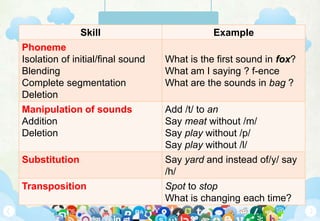
Skill Example
Phoneme
Isolation of initial/final sound
Blending
Complete segmentation
Deletion
What is the first sound in fox?
What am I saying ? f-ence
What are the sounds in bag ?
Manipulation of sounds
Addition
Deletion
Add /t/ to an
Say meat without /m/
Say play without /p/
Say play without /l/
Substitution Say yard and instead of/y/ say
/h/
Transposition Spot to stop
What is changing each time?
Skill Example
Word
Isolating words in sentences
She/ is / a / good /player
Rhyme
Recognization
Production
Does glass rhyme with pass ?
Syllable
Blending
Segmentation
deletion
pan + cake = pancake
Swim/suit
Say hotdog without hot
Skill Example
Phoneme
Isolation of initial/final sound
Blending
Complete segmentation
Deletion
What is the first sound in fox?
What am I saying ? f-ence
What are the sounds in bag ?
Manipulation of sounds
Addition
Deletion
Add /t/ to an
Say meat without /m/
Say play without /p/
Say play without /l/
Substitution Say yard and instead of/y/ say /h/
Transposition Spot to stop
What is changing each time?
Discuss with your group members…
1.Rhyming word activities.
2.Teaching syllable segmentation
3.Teaching beginning sound substitution
4.Teaching sound isolation
5.Teaching phonemic segmentation
6.Manipulation of sounds ; addition and deletion
285/20/2015
THANK YOU 
See you in the next Presentation

Phonological Awareness - LINUS CLASSES

  • 1.
  • 2.
    Objectives  To distinguishphonological awareness and phonics. To identify the important components of phonological awareness. To learn the teaching of phonological awareness skills. To understand the different instructional approaches to reading.
  • 3.
    Concept of spokenword The ability to distinguish words in a sentence. Rhyme The ability to recognize rhyme, complete rhyme. Syllables The ability to blend, segment and delete syllables.
  • 4.
    Phonemes The ability torecognize initial and final sounds in words. The ability to blend onset and rime The ability to blend, segment and delete phonemes Phoneme manipulation The ability to add and/or substitute phonemes
  • 5.
    The hippopotamus jumpsacross the river sentences the hippopotamus jumps across the river words syllabus the hi-ppo-po-ta-mus jumps a-cross the ri-ver phonemes
  • 6.
    Phonemes The smallest unitof spoken language sounds. Vowels and consonants Phonemes are not the same as letters. (graphemes)
  • 7.
    Phonics Phonics is knowinghow letter names and phonemes relate to each other. Also knowing as ‘letter-sound correspondence’
  • 8.
  • 9.
    Auditory and visualskills, and letter – sound correspondence •The ability to hear and discriminate phonemes require adequate ‘auditory skills’ and ‘auditory perceptual skills’. •The ability to see and discriminate reversible letters require adequate ‘visual skills’ and ‘visual perceptual skills’. •The ability to associate letter with sounds requires integration of auditory and visual skills.
  • 10.
  • 11.
    Letter – soundcorrespondence What are letter – sound correspondence ? involve knowledge of ; The sounds represented by the letters of the alphabet. The letters used to represent the sounds.
  • 12.
    Why is knowledgeof letter sound correspondences important? Knowledge of the letter sound correspondences is essential in reading and writing
  • 13.
    In order toread a word , the learner must recognize the letters in the word and associate each letters with its sounds
  • 14.
    In order towrite or type a word, the learner must break the word into its component sounds and know the letter that represent these sounds.
  • 15.
    Knowledge of lettersound correspondence and phonological awareness skills are the basic building blocks of literacy learning.
  • 16.
    What sequence shouldbe used to teach letter sound correspondences ? LSC should be taught one at a time. When the pupils acquires one LSC, introduce a new one.
  • 17.
    We suggest teachingthe letter and sound in this sequence a m t p o n c d u s g h i f b l e r w k x v y z j q
  • 18.
    Why???????? Letters that occurfrequently in simple words (e.g; a.m.t ) are taught first. Letters that look similar and have similar sounds (b and d ) are separated in the instructional sequence to avoid confusion.
  • 19.
    Short vowels aretaught before long vowels. Lower case letters are taught first since these occur more frequently than upper case.
  • 20.
    Is it appropriateto teach letter names as well as letter sound ? 1. Teaching the sounds of the letter, not their names. 2. Knowing the names of the letters is not necessary to read or write.
  • 21.
    Sample goal forinstruction in LSC The learner will; •Listen to a target sounds presented orally. •Identify the letter that represent the sound.
  • 22.
    Instructional task Here isan example of instruction to teach letter sound correspondence : The teacher ; * introduces the new letter and its sound. * show a card with the letter ‘m’ and says the sound “mmm”
  • 23.
    After practice withthis letter sound, the teacher provides review. The teacher * says a letter sound. The learner •Listen to the sound. •Select the correct letter. Group of letter Alphabet board From keyboard
  • 24.
    Phonological awareness skillsequence Skill Example Word Isolating words in sentences She/ is / a / good /player Rhyme Recognization Production Does glass rhyme with pass ? Syllable Blending Segmentation deletion pan + cake = pancake Swim/suit Say hotdog without hot
  • 25.
    Skill Example Phoneme Isolation ofinitial/final sound Blending Complete segmentation Deletion What is the first sound in fox? What am I saying ? f-ence What are the sounds in bag ? Manipulation of sounds Addition Deletion Add /t/ to an Say meat without /m/ Say play without /p/ Say play without /l/ Substitution Say yard and instead of/y/ say /h/ Transposition Spot to stop What is changing each time?
  • 26.
    Skill Example Word Isolating wordsin sentences She/ is / a / good /player Rhyme Recognization Production Does glass rhyme with pass ? Syllable Blending Segmentation deletion pan + cake = pancake Swim/suit Say hotdog without hot Skill Example Phoneme Isolation of initial/final sound Blending Complete segmentation Deletion What is the first sound in fox? What am I saying ? f-ence What are the sounds in bag ? Manipulation of sounds Addition Deletion Add /t/ to an Say meat without /m/ Say play without /p/ Say play without /l/ Substitution Say yard and instead of/y/ say /h/ Transposition Spot to stop What is changing each time?
  • 27.
    Discuss with yourgroup members… 1.Rhyming word activities. 2.Teaching syllable segmentation 3.Teaching beginning sound substitution 4.Teaching sound isolation 5.Teaching phonemic segmentation 6.Manipulation of sounds ; addition and deletion
  • 28.
    285/20/2015 THANK YOU  Seeyou in the next Presentation

Editor's Notes

  • #2 Before edit this PowerPoint template: Please Make sure required fonts installed (this presentation use: League Gothic and Museo) This is a Master file, Just in case you made some modifications, please Save As this file with new file name. -------------------------- Let’s start editing file…  HOW TO (also available in documentation file): Changing the background image: Click the view menu > slide master > insert > picture > select preferred ‘background.jpg’ Insert Background image in the first page of Slide master> Right Click > Send to Back (Note: All elements images are inside ‘images’ folder) Insert a Logo: For better logo quality and avoid the white block, logo should be in *.png format Click the view menu > slide master > insert > picture > select logo, put your logo in desirable area, in the first page of slide master and cover slide. Or you can insert logo in preferred slide by go to insert menu > picture > select logo. Implement Layout Template into a slide: Add new Slide (Ctl +M), Right Click on the new slide > Right Click > Select Layout > select Desirable Template Insert and Edit Date Go to View > Slide Master > Insert > Date and Time > Checklist the date > Select Update automatically or Fixed > Apply to all or Apply in current slide. -------------------------- Animated Image or Text Click the text box or images that you will be modifying, then choose "Custom Animation" from the drop-down list under "Slide Show" on the top menu bar. An area will open up on the right-hand side of the window. -------------------------- Slide Transition All slide using ‘Fade Smoothly’ Transition -------------------------- Title Slide This Slide use “Title Slide” on Master Slide View. The background images can be found in “images” folder named “background.jpg” “Socialita Agency” is an image because it’s difficult to get big size font on ppt, you can found in PSD folder named “cover_tittle.psd” You can add elements or icons in “images” folder Tittle Text: You can modify it, change color, rotate, etc. button_star.jpg” -------------------------- Social Media Icons: http://www.webdesignerdepot.com/2010/08/buddycons-vector-social-media-icons/
  • #3 -------------------------- Company Information Slide This Slide use “About Us” Layout on Master Slide View. Slide tittles is editable, you can change text, color or rotate easily. Fill your company information in the text area an replace the lorem ipsum feed. -------------------------- Navigation Button Navigation Button help you to move slide to next or previous slides The Navigation Button can be found in First Slide in Master Slide View, To make it works as slide navigation, Right click the arrow button image > Select Hyperlink > Select “Place in this document” > Select Next Slide or Previous Slide -------------------------- Insert and Edit Footer If you want to edit the footer text go to View > Slide Master > Select first slide master > Type the Tex Box Area with your company information (company name, address, website, etc) -------------------------- Animations Most of animation using “peek in” effect.
  • #4 -------------------------- Team Slide Introduce your team member in this slide. The Team Slide use “Teams” Layout on Master Slide View. The Photo frame can be found in “PSD” Folder, named “photoplaceholder.psd” Add your photo inside the circle image placeholder layer. Save as your photo to Png format. Insert into A slide. -------------------------- Animation This Slide using ‘Peek in’ animation for some elements Don’t forget grouped image before add animation effect.
  • #29 -------------------------- Closing Slide Put the closing statement here. This Slide use “Section Heade” Layout on Master Slide View.