THE COMMUNITY EVENT FOR
APACHE HBASE™
Phoenix Improvements and
Practices on Cloud HBase at Alibaba
Yun Zhang
Apache Phoenix committer / Alibaba Cloud HBase Phoenix Owner
Introduction
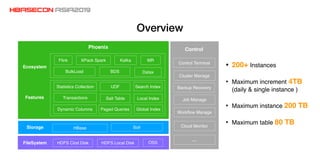
Overview
Control Terminal
Cluster Manage
Backup Recovery
Job Manage
Workflow Manage
Cloud Monitor
…
Control
HDFS Clod Disk OSSHDFS Local DiskFileSystem
HBase SolrStorage
Paged Queries Global Index
Search Index
Salt Table
UDFStatistics Collection
Dynamic Columns
Local IndexTransactionsFeatures
Ecosystem
BulkLoad BDS Datax
Flink XPack Spark Kafka MR
Phoenix
• 200+ Instances
• Maximum increment 4TB
(daily & single instance )
• Maximum instance 200 TB
• Maximum table 80 TB
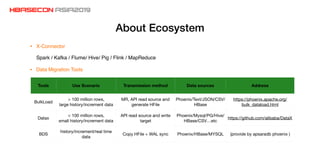
About Ecosystem
Tools Use Scenario Transmission method Data sources Address
BulkLoad
> 100 million rows,

large history/increment data
MR, API read source and
generate HFile
Phoenix/Text/JSON/CSV/
HBase
https://phoenix.apache.org/
bulk_dataload.html
Datax
< 100 million rows,

small history/increment data
API read source and write
target
Phoenix/Mysql/PG/Hive/
HBase/CSV…etc
https://github.com/alibaba/DataX
BDS
history/increment/real time
data
Copy HFile + WAL sync Phoenix/HBase/MYSQL (provide by apsaradb phoenix )
• Data Migration Tools
• X-Connector
Spark / Kafka / Flume/ Hive/ Pig / Flink / MapReduce
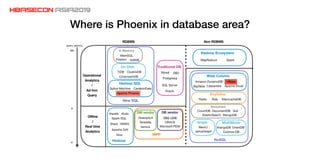
Where is Phoenix in database area?
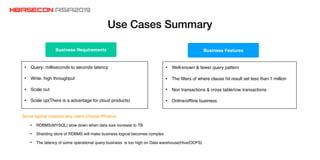
Use Cases Summary
• Query: milliseconds to seconds latency
• Write: high throughput
• Scale out
• Scale up(There is a advantage for cloud products)
• Well-known & fewer query pattern
• The filters of where clause hit result set less than 1 million
• Non transactions & cross table/row transactions
• Online/offline business
Business FeaturesBusiness Requirements
Some typical reasons why users choose Phoenix
• RDBMS(MYSQL) slow down when data size increase to TB
• Sharding store of RDBMS will make business logical becomes complex
• The latency of some operational query business is too high on Data warehouse(Hive/ODPS)
Architecture Evolution
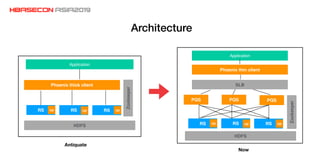
Architecture
RSRS RS cp
HDFS
PQS PQS PQS
SLB
Phoenix thin client
cpcp
Zookeeper
Application
RSRS RS cp
HDFS
Phoenix thick client
cpcp
Application
Zookeeper
Antiquate
Now
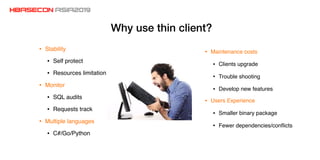
Why use thin client?
• Stability
• Self protect
• Resources limitation
• Monitor
• SQL audits
• Requests track
• Multiple languages
• C#/Go/Python
• Maintenance costs
• Clients upgrade
• Trouble shooting
• Develop new features
• Users Experience
• Smaller binary package
• Fewer dependencies/conflicts
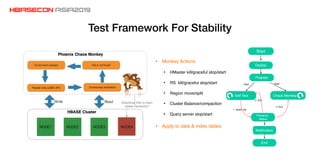
Test Framework For Stability
Self Test Chaos Monkey
Preserve
Status
1. Assert fail
Start Start
2. Exit
3. Exit
Notification
Start
Deploy
Prepare
End
• Monkey Actions
• HMaster kill/graceful stop/start
• RS kill/graceful stop/start
• Region move/split
• Cluster Balance/compaction
• Query server stop/start
• Apply to data & index tables
Search Index
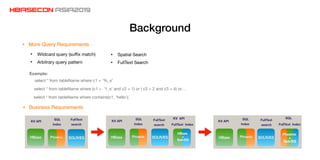
Background
• More Query Requirements
• Wildcard query (suffix match)

• Arbitrary query pattern

HBase SOLR/ES
KV API
SQL
Index
FullText
search
Phoenix HBase SOLR/ES
HBase
+
Solr/ES
Phoenix
KV API
SQL
Index
FullText
search
KV API
FullText Index
HBase SOLR/ES
Phoenix
+
Solr/ES
Phoenix
SQL
FullText Index
KV API
SQL
Index
FullText
search
• Business Requirements
select * from tableName where c1 = ‘%_s’
select * from tableName where contains(c1, ‘hello’);
select * from tableName where (c1 = ‘1_s’ and c2 = 1) or ( c2 = 2 and c3 = 4) or…
Example:
• Spatial Search

• FullText Search
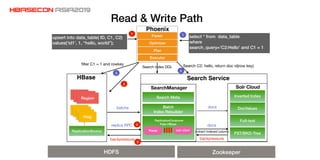
Read & Write Path
hlog
hlog
hlog
hlog
ReplicationSource Parse
SearchManager
replica RPC
HBase
Solr Cloud
ReplicationConsumer
Fake-HBase
Batch
Index Rebuilder
Inverted Index
DocValues
Full-text
FST/BKD-Tree
Region
Region
batchs docs
docs
backpressurebackpressure
solr client
Region
Search Service
Search Meta
Parser
Optimizer
Plan
Executor
Phoenix
select * from data_table
where
search_query=’C2:Hello’ and C1 = 1
upsert into data_table( ID, C1, C2)
values(‘id1’, 1, “hello, world”);
HDFS Zookeeper
Search C2: hello, return doc id(row key)filter C1 = 1 and rowkey
Search index DDL
1
2
3
1
2
4
5
Extract indexed column
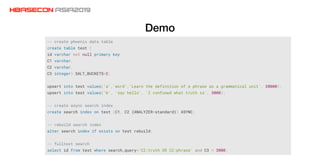
Demo
Global index Query Optimize
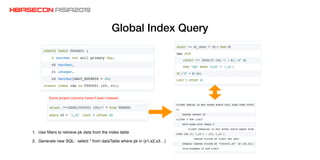
Global Index Query
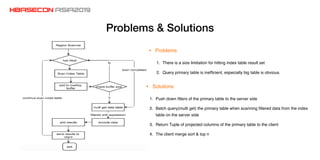
1. Use filters to retrieve pk data from the index table
2. Generate new SQL: select * from dataTable where pk in (x1,x2,x3…)
Some project columns haven't been indexed
Problems & Solutions
1. There is a size limitation for hitting index table result set
2. Query primary table is inefficient, especially big table is obvious.
• Problems
• Solutions
1. Push down filters of the primary table to the server side
2. Batch query(multi get) the primary table when scanning filtered data from the index
table on the server side
3. Return Tuple of projected columns of the primary table to the client
4. The client merge sort & top n
Performance Improvement
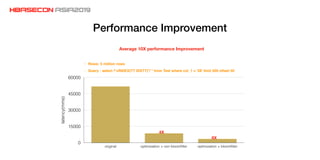
• Rows: 5 million rows
• Query : select /*+INDEX(TT IDXTT)*/ * from Test where col_1 = '28' limit 500 offset 50 
latency(mms)
0
15000
30000
45000
60000
original optimization + non bloomfilter optimization + bloomfilter
8X
4X
Average 10X performance Improvement
Best Practices & Tips
Query Server Tips
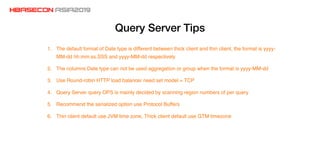
1. The default format of Date type is different between thick client and thin client, the format is yyyy-
MM-dd hh:mm:ss.SSS and yyyy-MM-dd respectively
2. The columns Date type can not be used aggregation or group when the format is yyyy-MM-dd
3. Use Round-robin HTTP load balancer need set model = TCP
4. Query Server query OPS is mainly decided by scanning region numbers of per query
5. Recommend the serialized option use Protocol Buffers
6. Thin client default use JVM time zone, Thick client default use GTM timezone
Avoid Usage Pitfalls
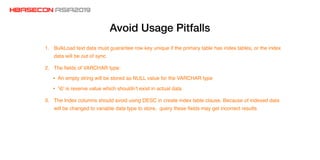
1. BulkLoad text data must guarantee row key unique if the primary table has index tables, or the index
data will be out of sync
2. The fields of VARCHAR type:
• An empty string will be stored as NULL value for the VARCHAR type
• ‘0’ is reserve value which shouldn’t exist in actual data
3. The Index columns should avoid using DESC in create index table clause. Because of indexed data
will be changed to variable data type to store, query these fields may get incorrect results
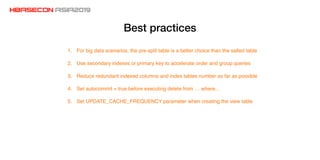
Best practices
1. For big data scenarios, the pre-split table is a better choice than the salted table
2. Use secondary indexes or primary key to accelerate order and group queries
3. Reduce redundant indexed columns and index tables number as far as possible
4. Set autocommit = true before executing delete from … where…
5. Set UPDATE_CACHE_FREQUENCY parameter when creating the view table
Future Work
• Search Index
• Supports native SQL
• CBO
• Index merge
• Support cancel full scan query or slow query
• Query Server memory manage
• Continue contributing the community
Thanks!
Yun Zhang (Wechat)
Dingding

hbaseconasia2019 Phoenix Improvements and Practices on Cloud HBase at Alibaba

  • 1.
    THE COMMUNITY EVENTFOR APACHE HBASE™
  • 2.
    Phoenix Improvements and Practiceson Cloud HBase at Alibaba Yun Zhang Apache Phoenix committer / Alibaba Cloud HBase Phoenix Owner
  • 3.
  • 4.
    Overview Control Terminal Cluster Manage BackupRecovery Job Manage Workflow Manage Cloud Monitor … Control HDFS Clod Disk OSSHDFS Local DiskFileSystem HBase SolrStorage Paged Queries Global Index Search Index Salt Table UDFStatistics Collection Dynamic Columns Local IndexTransactionsFeatures Ecosystem BulkLoad BDS Datax Flink XPack Spark Kafka MR Phoenix • 200+ Instances • Maximum increment 4TB (daily & single instance ) • Maximum instance 200 TB • Maximum table 80 TB
  • 5.
    About Ecosystem Tools UseScenario Transmission method Data sources Address BulkLoad > 100 million rows, large history/increment data MR, API read source and generate HFile Phoenix/Text/JSON/CSV/ HBase https://phoenix.apache.org/ bulk_dataload.html Datax < 100 million rows, small history/increment data API read source and write target Phoenix/Mysql/PG/Hive/ HBase/CSV…etc https://github.com/alibaba/DataX BDS history/increment/real time data Copy HFile + WAL sync Phoenix/HBase/MYSQL (provide by apsaradb phoenix ) • Data Migration Tools • X-Connector Spark / Kafka / Flume/ Hive/ Pig / Flink / MapReduce
  • 6.
    Where is Phoenixin database area?
  • 7.
    Use Cases Summary •Query: milliseconds to seconds latency • Write: high throughput • Scale out • Scale up(There is a advantage for cloud products) • Well-known & fewer query pattern • The filters of where clause hit result set less than 1 million • Non transactions & cross table/row transactions • Online/offline business Business FeaturesBusiness Requirements Some typical reasons why users choose Phoenix • RDBMS(MYSQL) slow down when data size increase to TB • Sharding store of RDBMS will make business logical becomes complex • The latency of some operational query business is too high on Data warehouse(Hive/ODPS)
  • 8.
  • 9.
    Architecture RSRS RS cp HDFS PQSPQS PQS SLB Phoenix thin client cpcp Zookeeper Application RSRS RS cp HDFS Phoenix thick client cpcp Application Zookeeper Antiquate Now
  • 10.
    Why use thinclient? • Stability • Self protect • Resources limitation • Monitor • SQL audits • Requests track • Multiple languages • C#/Go/Python • Maintenance costs • Clients upgrade • Trouble shooting • Develop new features • Users Experience • Smaller binary package • Fewer dependencies/conflicts
  • 11.
    Test Framework ForStability Self Test Chaos Monkey Preserve Status 1. Assert fail Start Start 2. Exit 3. Exit Notification Start Deploy Prepare End • Monkey Actions • HMaster kill/graceful stop/start • RS kill/graceful stop/start • Region move/split • Cluster Balance/compaction • Query server stop/start • Apply to data & index tables
  • 12.
  • 13.
    Background • More QueryRequirements • Wildcard query (suffix match) • Arbitrary query pattern HBase SOLR/ES KV API SQL Index FullText search Phoenix HBase SOLR/ES HBase + Solr/ES Phoenix KV API SQL Index FullText search KV API FullText Index HBase SOLR/ES Phoenix + Solr/ES Phoenix SQL FullText Index KV API SQL Index FullText search • Business Requirements select * from tableName where c1 = ‘%_s’ select * from tableName where contains(c1, ‘hello’); select * from tableName where (c1 = ‘1_s’ and c2 = 1) or ( c2 = 2 and c3 = 4) or… Example: • Spatial Search • FullText Search
  • 14.
    Read & WritePath hlog hlog hlog hlog ReplicationSource Parse SearchManager replica RPC HBase Solr Cloud ReplicationConsumer Fake-HBase Batch Index Rebuilder Inverted Index DocValues Full-text FST/BKD-Tree Region Region batchs docs docs backpressurebackpressure solr client Region Search Service Search Meta Parser Optimizer Plan Executor Phoenix select * from data_table where search_query=’C2:Hello’ and C1 = 1 upsert into data_table( ID, C1, C2) values(‘id1’, 1, “hello, world”); HDFS Zookeeper Search C2: hello, return doc id(row key)filter C1 = 1 and rowkey Search index DDL 1 2 3 1 2 4 5 Extract indexed column
  • 15.
  • 16.
  • 17.
    Global Index Query 1.Use filters to retrieve pk data from the index table 2. Generate new SQL: select * from dataTable where pk in (x1,x2,x3…) Some project columns haven't been indexed
  • 18.
    Problems & Solutions 1.There is a size limitation for hitting index table result set 2. Query primary table is inefficient, especially big table is obvious. • Problems • Solutions 1. Push down filters of the primary table to the server side 2. Batch query(multi get) the primary table when scanning filtered data from the index table on the server side 3. Return Tuple of projected columns of the primary table to the client 4. The client merge sort & top n
  • 19.
    Performance Improvement • Rows:5 million rows • Query : select /*+INDEX(TT IDXTT)*/ * from Test where col_1 = '28' limit 500 offset 50  latency(mms) 0 15000 30000 45000 60000 original optimization + non bloomfilter optimization + bloomfilter 8X 4X Average 10X performance Improvement
  • 20.
  • 21.
    Query Server Tips 1.The default format of Date type is different between thick client and thin client, the format is yyyy- MM-dd hh:mm:ss.SSS and yyyy-MM-dd respectively 2. The columns Date type can not be used aggregation or group when the format is yyyy-MM-dd 3. Use Round-robin HTTP load balancer need set model = TCP 4. Query Server query OPS is mainly decided by scanning region numbers of per query 5. Recommend the serialized option use Protocol Buffers 6. Thin client default use JVM time zone, Thick client default use GTM timezone
  • 22.
    Avoid Usage Pitfalls 1.BulkLoad text data must guarantee row key unique if the primary table has index tables, or the index data will be out of sync 2. The fields of VARCHAR type: • An empty string will be stored as NULL value for the VARCHAR type • ‘0’ is reserve value which shouldn’t exist in actual data 3. The Index columns should avoid using DESC in create index table clause. Because of indexed data will be changed to variable data type to store, query these fields may get incorrect results
  • 23.
    Best practices 1. Forbig data scenarios, the pre-split table is a better choice than the salted table 2. Use secondary indexes or primary key to accelerate order and group queries 3. Reduce redundant indexed columns and index tables number as far as possible 4. Set autocommit = true before executing delete from … where… 5. Set UPDATE_CACHE_FREQUENCY parameter when creating the view table
  • 24.
  • 25.
    • Search Index •Supports native SQL • CBO • Index merge • Support cancel full scan query or slow query • Query Server memory manage • Continue contributing the community
  • 26.