At the end of the workshop, participants will be able to: 
•Understand concept of provident fund. 
•Know Deductions as per new Ceiling limit. 
•Who will be covered under PF scheme? 
•Know the criteria for PF deduction 
•Understand Returns and tax benefits. 
•Understand how greytHRcan help in including employees in PF scheme and file EPF online without much hassle. 
Objectives
What is Provident fund? 
Provident fund can be termed as a social security measure implemented by Government for the benefit of its citizens. An employee contributes some % of his salary towards it and the employer is supposed to make the same contribution. 
The employee can withdraw the PF amount on retirement/resignation from the service/Unemployed.
EPFO revises ceiling limit 
•Ceiling limit increased to Rs. 15000 from Rs. 6500 
•W.e.f1stseptember2014, All the employees with Basic equal to or less than Rs. 15000/-will be mandatorily covered under the act. 
•Employers to ensure that the basic salary is 50% of CTC for all the employees. 
•Upto50 lacsnew employees expected to join PF scheme with the amendment.
Deductions as per new ceiling limit: 
•PF deduction is mandatory for all the employees whose basic + dais less than or equal to 15000. 
•Employees with basic + damore than 15000 have an option to opt out of PF scheme. 
•Deduction will be 12% of basic + dafor an employee. 
•If the basic + dais more than 15000, employer have an option to pay 12% of actual amount or base ceiling limit i.eRs. 15000 (12% of 15000 = Rs. 1800).
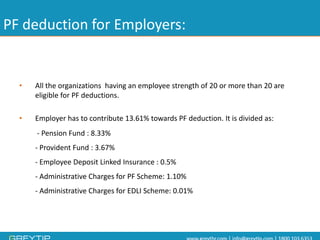
PF deduction for Employers: 
•All the organizations having an employee strength of 20 or more than 20 are eligible for PF deductions. 
•Employer has to contribute 13.61% towards PF deduction. It is divided as: 
-Pension Fund : 8.33% -Provident Fund : 3.67% -Employee Deposit Linked Insurance : 0.5% -Administrative Charges for PF Scheme: 1.10% -Administrative Charges for EDLI Scheme: 0.01%
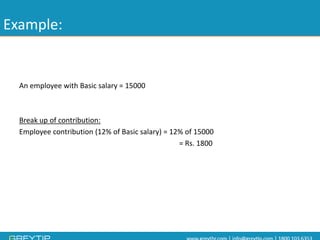
Example: 
An employee with Basic salary = 15000 
Break up of contribution: 
Employee contribution (12% of Basic salary) = 12% of 15000 
= Rs. 1800
Contd.. 
Employer Contribution: 
Employer has to contribute 13.61% towards PF deduction. It is divided as: 
•Pension Fund : 8.33% = Rs. 1249 
•Provident Fund : 3.67% = Rs. 550.5 
•Employee Deposit Linked Insurance : 0.5% = Rs. 75 
•Administrative Charges for PF Scheme: 1.10% = Rs. 165 
•Administrative Charges for EDLI Scheme: 0.01% = Rs. 1.5
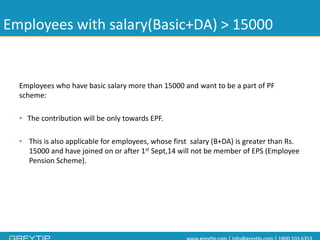
Employees with salary(Basic+DA) > 15000 
Employees who have basic salary more than 15000 and want to be a part of PF scheme: 
•The contribution will be only towards EPF. 
•This is also applicable for employees, whose first salary (B+DA) is greater than Rs. 15000 and have joined on or after 1stSept,14 will not be member of EPS (Employee Pension Scheme).
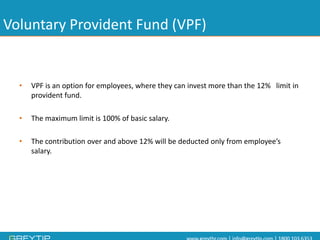
Voluntary Provident Fund (VPF) 
•VPF is an option for employees, where they can invest more than the 12% limit in provident fund. 
•The maximum limit is 100% of basic salary. 
•The contribution over and above 12% will be deducted only from employee’s salary.
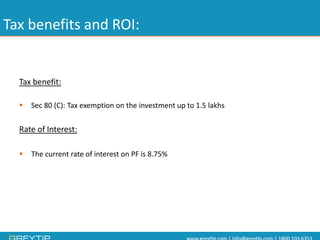
Tax benefits and ROI: 
Tax benefit: 
Sec 80 (C): Tax exemption on the investment up to 1.5 lakhs 
Rate of Interest: 
The current rate of interest on PF is 8.75%
PF E-filing process
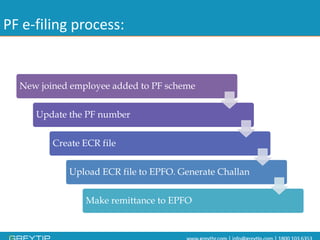
PF e-filing process: 
New joined employee added to PF scheme 
Update the PF number 
Create ECR fileUpload ECR file to EPFO. Generate Challan 
Make remittance to EPFO
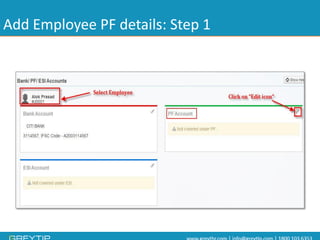
Add Employee PF details: Step 1
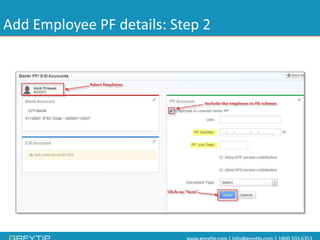
Add Employee PF details: Step 2
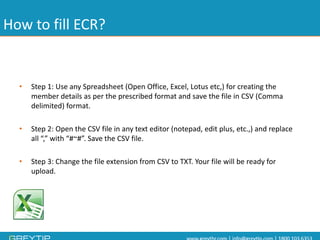
How to fill ECR? 
•Step 1: Use any Spreadsheet (Open Office, Excel, Lotus etc,) for creating the member details as per the prescribed format and save the file in CSV (Comma delimited) format. 
•Step 2: Open the CSV file in any text editor (notepad, edit plus, etc.,) and replace all “,” with “#~#”. Save the CSV file. 
•Step 3: Change the file extension from CSV to TXT. Your file will be ready for upload.
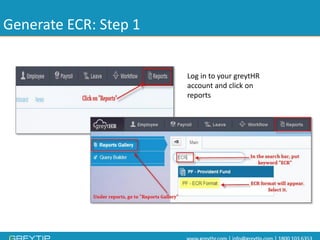
Generate ECR: Step 1 
Log in to your greytHRaccount and click on reports
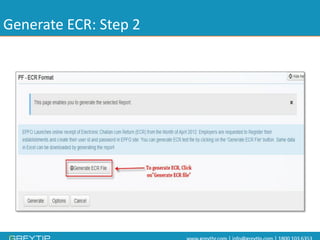
Generate ECR: Step 2
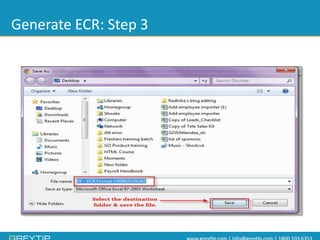
Generate ECR: Step 3
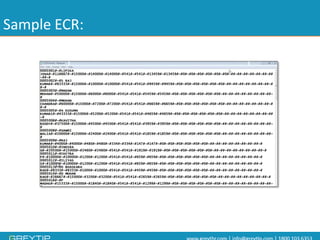
Sample ECR:
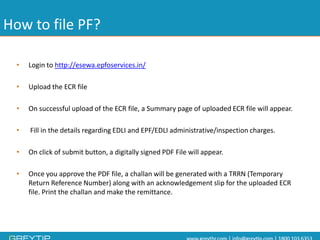
How to file PF? 
•Login to http://esewa.epfoservices.in/ 
•Upload the ECR file 
•On successful upload of the ECR file, a Summary page of uploaded ECR file will appear. 
•Fill in the details regarding EDLI and EPF/EDLI administrative/inspection charges. 
•On click of submit button, a digitally signed PDF File will appear. 
•Once you approve the PDF file, a challanwill be generated with a TRRN (Temporary Return Reference Number) along with an acknowledgement slip for the uploaded ECR file. Print the challanand make the remittance.
Payment Options: 
There are two options: 
A: If you are a CINB (Corporate Internet Banking) customer of any of the 56 banks approved by EPFO, you can make online remittance using the TRRN. 
B: The challanalong with DD/cheque can be deposited to any of the SBI branches. 
Note:The challangenerated will be valid only for 15 days.
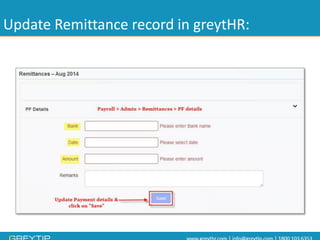
Update Remittance record in greytHR:
@greytip 
/greytip 
/company/greytip-software-pvt-ltd 
For more details 
Write to us at webinar@greytip.com 
Visit our Help Docs 
Thank you 
+greytipIn 
/GreytipOnline 
Stay connected

PF revised wage ceiling limit and its impact

  • 2.
    At the endof the workshop, participants will be able to: •Understand concept of provident fund. •Know Deductions as per new Ceiling limit. •Who will be covered under PF scheme? •Know the criteria for PF deduction •Understand Returns and tax benefits. •Understand how greytHRcan help in including employees in PF scheme and file EPF online without much hassle. Objectives
  • 3.
    What is Providentfund? Provident fund can be termed as a social security measure implemented by Government for the benefit of its citizens. An employee contributes some % of his salary towards it and the employer is supposed to make the same contribution. The employee can withdraw the PF amount on retirement/resignation from the service/Unemployed.
  • 4.
    EPFO revises ceilinglimit •Ceiling limit increased to Rs. 15000 from Rs. 6500 •W.e.f1stseptember2014, All the employees with Basic equal to or less than Rs. 15000/-will be mandatorily covered under the act. •Employers to ensure that the basic salary is 50% of CTC for all the employees. •Upto50 lacsnew employees expected to join PF scheme with the amendment.
  • 5.
    Deductions as pernew ceiling limit: •PF deduction is mandatory for all the employees whose basic + dais less than or equal to 15000. •Employees with basic + damore than 15000 have an option to opt out of PF scheme. •Deduction will be 12% of basic + dafor an employee. •If the basic + dais more than 15000, employer have an option to pay 12% of actual amount or base ceiling limit i.eRs. 15000 (12% of 15000 = Rs. 1800).
  • 6.
    PF deduction forEmployers: •All the organizations having an employee strength of 20 or more than 20 are eligible for PF deductions. •Employer has to contribute 13.61% towards PF deduction. It is divided as: -Pension Fund : 8.33% -Provident Fund : 3.67% -Employee Deposit Linked Insurance : 0.5% -Administrative Charges for PF Scheme: 1.10% -Administrative Charges for EDLI Scheme: 0.01%
  • 7.
    Example: An employeewith Basic salary = 15000 Break up of contribution: Employee contribution (12% of Basic salary) = 12% of 15000 = Rs. 1800
  • 8.
    Contd.. Employer Contribution: Employer has to contribute 13.61% towards PF deduction. It is divided as: •Pension Fund : 8.33% = Rs. 1249 •Provident Fund : 3.67% = Rs. 550.5 •Employee Deposit Linked Insurance : 0.5% = Rs. 75 •Administrative Charges for PF Scheme: 1.10% = Rs. 165 •Administrative Charges for EDLI Scheme: 0.01% = Rs. 1.5
  • 9.
    Employees with salary(Basic+DA)> 15000 Employees who have basic salary more than 15000 and want to be a part of PF scheme: •The contribution will be only towards EPF. •This is also applicable for employees, whose first salary (B+DA) is greater than Rs. 15000 and have joined on or after 1stSept,14 will not be member of EPS (Employee Pension Scheme).
  • 10.
    Voluntary Provident Fund(VPF) •VPF is an option for employees, where they can invest more than the 12% limit in provident fund. •The maximum limit is 100% of basic salary. •The contribution over and above 12% will be deducted only from employee’s salary.
  • 11.
    Tax benefits andROI: Tax benefit: Sec 80 (C): Tax exemption on the investment up to 1.5 lakhs Rate of Interest: The current rate of interest on PF is 8.75%
  • 12.
  • 13.
    PF e-filing process: New joined employee added to PF scheme Update the PF number Create ECR fileUpload ECR file to EPFO. Generate Challan Make remittance to EPFO
  • 14.
    Add Employee PFdetails: Step 1
  • 15.
    Add Employee PFdetails: Step 2
  • 16.
    How to fillECR? •Step 1: Use any Spreadsheet (Open Office, Excel, Lotus etc,) for creating the member details as per the prescribed format and save the file in CSV (Comma delimited) format. •Step 2: Open the CSV file in any text editor (notepad, edit plus, etc.,) and replace all “,” with “#~#”. Save the CSV file. •Step 3: Change the file extension from CSV to TXT. Your file will be ready for upload.
  • 17.
    Generate ECR: Step1 Log in to your greytHRaccount and click on reports
  • 18.
  • 19.
  • 20.
  • 21.
    How to filePF? •Login to http://esewa.epfoservices.in/ •Upload the ECR file •On successful upload of the ECR file, a Summary page of uploaded ECR file will appear. •Fill in the details regarding EDLI and EPF/EDLI administrative/inspection charges. •On click of submit button, a digitally signed PDF File will appear. •Once you approve the PDF file, a challanwill be generated with a TRRN (Temporary Return Reference Number) along with an acknowledgement slip for the uploaded ECR file. Print the challanand make the remittance.
  • 22.
    Payment Options: Thereare two options: A: If you are a CINB (Corporate Internet Banking) customer of any of the 56 banks approved by EPFO, you can make online remittance using the TRRN. B: The challanalong with DD/cheque can be deposited to any of the SBI branches. Note:The challangenerated will be valid only for 15 days.
  • 23.
  • 24.
    @greytip /greytip /company/greytip-software-pvt-ltd For more details Write to us at webinar@greytip.com Visit our Help Docs Thank you +greytipIn /GreytipOnline Stay connected