Know PF – The E Way!
Workshop Objectives:

At the end of the workshop, participants will be able to:
 Understand concept of provident fund.
 Know Deductions as per laws.
 Understand Returns and tax benefits.
 Forms associated with PF.
 Using EPFO website for online payments and submission.
 Use the application for updating PF details.

 Generate Reports.
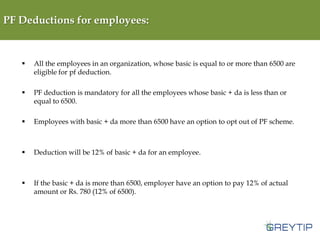
PF Deductions for employees:



All the employees in an organization, whose basic is equal to or more than 6500 are
eligible for pf deduction.



PF deduction is mandatory for all the employees whose basic + da is less than or
equal to 6500.



Employees with basic + da more than 6500 have an option to opt out of PF scheme.



Deduction will be 12% of basic + da for an employee.



If the basic + da is more than 6500, employer have an option to pay 12% of actual
amount or Rs. 780 (12% of 6500).
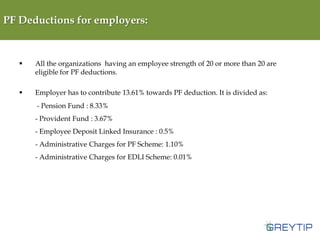
PF Deductions for employers:



All the organizations having an employee strength of 20 or more than 20 are
eligible for PF deductions.



Employer has to contribute 13.61% towards PF deduction. It is divided as:
- Pension Fund : 8.33%
- Provident Fund : 3.67%
- Employee Deposit Linked Insurance : 0.5%
- Administrative Charges for PF Scheme: 1.10%
- Administrative Charges for EDLI Scheme: 0.01%
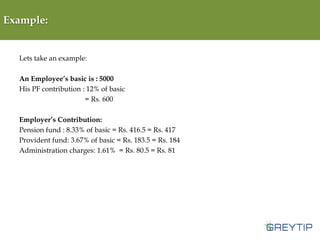
Example:

Lets take an example:

An Employee’s basic is : 5000
His PF contribution : 12% of basic
= Rs. 600
Employer’s Contribution:
Pension fund : 8.33% of basic = Rs. 416.5 = Rs. 417
Provident fund: 3.67% of basic = Rs. 183.5 = Rs. 184
Administration charges: 1.61% = Rs. 80.5 = Rs. 81
Tax Benefit and returns:

Tax benefit:


Sec 80 (C): Tax exemption on the investment up to 1 lac.



Sec 10 10 (C): Avail income tax exemption on the withdrawn PF amount.

Returns:


The current rate of interest on PF is 8.5%
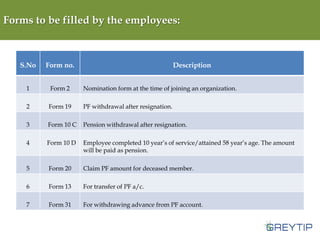
Forms to be filled by the employees:

S.No

Form no.

Description

1

Form 2

Nomination form at the time of joining an organization.

2

Form 19

PF withdrawal after resignation.

3

Form 10 C

Pension withdrawal after resignation.

4

Form 10 D

Employee completed 10 year’s of service/attained 58 year’s age. The amount
will be paid as pension.

5

Form 20

Claim PF amount for deceased member.

6

Form 13

For transfer of PF a/c.

7

Form 31

For withdrawing advance from PF account.
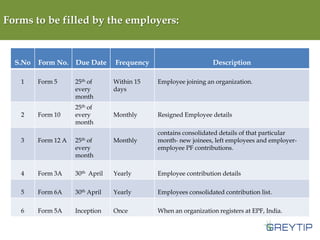
Forms to be filled by the employers:

S.No
1

2

Form No. Due Date
Form 5

Form 10

25th of
every
month
25th of
every
month

Frequency

Description

Within 15
days

Employee joining an organization.

Monthly

Resigned Employee details

3

Form 12 A

25th of
every
month

Monthly

contains consolidated details of that particular
month- new joinees, left employees and employeremployee PF contributions.

4

Form 3A

30th April

Yearly

Employee contribution details

5

Form 6A

30th April

Yearly

Employees consolidated contribution list.

6

Form 5A

Inception

Once

When an organization registers at EPF, India.
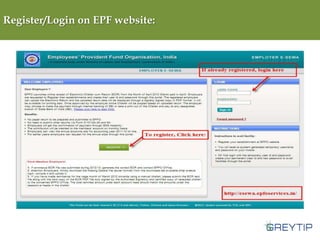
Register/Login on EPF website:
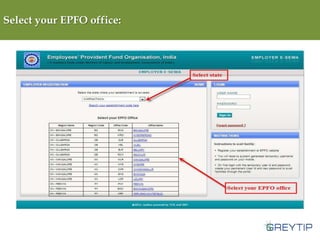
Select your EPFO office:
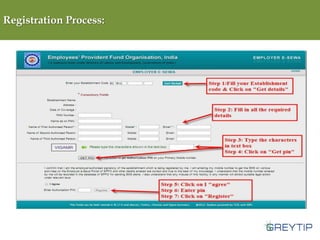
Registration Process:
How to file PF?

•

Login to http://esewa.epfoservices.in/

•

Upload the ECR file

•

On successful upload of the ECR file, a Summary page of uploaded ECR file will
appear.

•

Fill in the details regarding EDLI and EPF/EDLI administrative/inspection charges.

•

On click of submit button, a digitally signed PDF File will appear.

•

Once you approve the PDF file, a Challan will be generated with a TRRN (Temporary
Return Reference Number) along with an acknowledgement slip for the uploaded
ECR file. Print the challan and make the remittance.
Payment Options:

There are two options:

A: If you are a CINB (Corporate Internet Banking) customer of SBI you can make online
remittance using the TRRN.
B: The challan along with DD/cheque can be depositted to any of the SBI branches.

Note: The challan generated will be valid only for 15 days.
How to fill ECR?

•

Step 1: Use any Spreadsheet (Open Office, Excel, Lotus etc,) for creating the member details

as per the prescribed format and save the file in CSV (Comma delimited) format.

•

Step 2: Open the CSV file in any text editor (notepad, edit plus, etc.,) and replace all “,” with

“#~#”. Save the CSV file.

•

Step 3: Change the file extension from CSV to TXT. Your file will be ready for upload.
Complicated???
We have a solution…
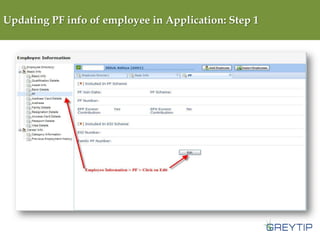
Updating PF info of employee in Application: Step 1
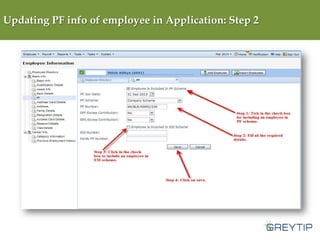
Updating PF info of employee in Application: Step 2
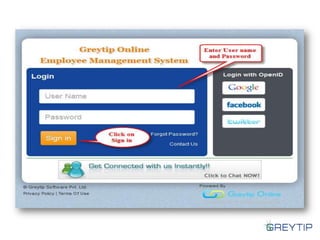
Generate ECR file using
Greytip Online
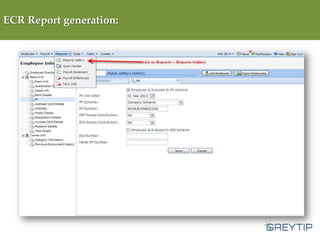
ECR Report generation:
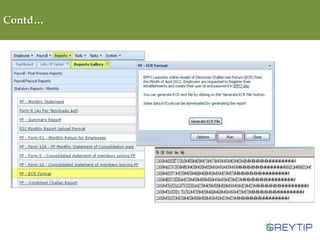
Contd…
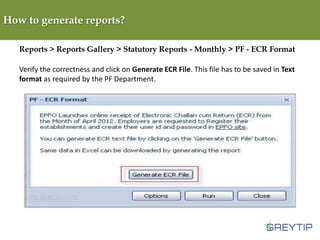
How to generate reports?
Reports > Reports Gallery > Statutory Reports - Monthly > PF - ECR Format
Verify the correctness and click on Generate ECR File. This file has to be saved in Text
format as required by the PF Department.
Sample:
Time for….

Know EPF - The eWay!

  • 1.
    Know PF –The E Way!
  • 2.
    Workshop Objectives: At theend of the workshop, participants will be able to:  Understand concept of provident fund.  Know Deductions as per laws.  Understand Returns and tax benefits.  Forms associated with PF.  Using EPFO website for online payments and submission.  Use the application for updating PF details.  Generate Reports.
  • 3.
    PF Deductions foremployees:  All the employees in an organization, whose basic is equal to or more than 6500 are eligible for pf deduction.  PF deduction is mandatory for all the employees whose basic + da is less than or equal to 6500.  Employees with basic + da more than 6500 have an option to opt out of PF scheme.  Deduction will be 12% of basic + da for an employee.  If the basic + da is more than 6500, employer have an option to pay 12% of actual amount or Rs. 780 (12% of 6500).
  • 4.
    PF Deductions foremployers:  All the organizations having an employee strength of 20 or more than 20 are eligible for PF deductions.  Employer has to contribute 13.61% towards PF deduction. It is divided as: - Pension Fund : 8.33% - Provident Fund : 3.67% - Employee Deposit Linked Insurance : 0.5% - Administrative Charges for PF Scheme: 1.10% - Administrative Charges for EDLI Scheme: 0.01%
  • 5.
    Example: Lets take anexample: An Employee’s basic is : 5000 His PF contribution : 12% of basic = Rs. 600 Employer’s Contribution: Pension fund : 8.33% of basic = Rs. 416.5 = Rs. 417 Provident fund: 3.67% of basic = Rs. 183.5 = Rs. 184 Administration charges: 1.61% = Rs. 80.5 = Rs. 81
  • 6.
    Tax Benefit andreturns: Tax benefit:  Sec 80 (C): Tax exemption on the investment up to 1 lac.  Sec 10 10 (C): Avail income tax exemption on the withdrawn PF amount. Returns:  The current rate of interest on PF is 8.5%
  • 7.
    Forms to befilled by the employees: S.No Form no. Description 1 Form 2 Nomination form at the time of joining an organization. 2 Form 19 PF withdrawal after resignation. 3 Form 10 C Pension withdrawal after resignation. 4 Form 10 D Employee completed 10 year’s of service/attained 58 year’s age. The amount will be paid as pension. 5 Form 20 Claim PF amount for deceased member. 6 Form 13 For transfer of PF a/c. 7 Form 31 For withdrawing advance from PF account.
  • 8.
    Forms to befilled by the employers: S.No 1 2 Form No. Due Date Form 5 Form 10 25th of every month 25th of every month Frequency Description Within 15 days Employee joining an organization. Monthly Resigned Employee details 3 Form 12 A 25th of every month Monthly contains consolidated details of that particular month- new joinees, left employees and employeremployee PF contributions. 4 Form 3A 30th April Yearly Employee contribution details 5 Form 6A 30th April Yearly Employees consolidated contribution list. 6 Form 5A Inception Once When an organization registers at EPF, India.
  • 9.
  • 10.
  • 11.
  • 12.
    How to filePF? • Login to http://esewa.epfoservices.in/ • Upload the ECR file • On successful upload of the ECR file, a Summary page of uploaded ECR file will appear. • Fill in the details regarding EDLI and EPF/EDLI administrative/inspection charges. • On click of submit button, a digitally signed PDF File will appear. • Once you approve the PDF file, a Challan will be generated with a TRRN (Temporary Return Reference Number) along with an acknowledgement slip for the uploaded ECR file. Print the challan and make the remittance.
  • 13.
    Payment Options: There aretwo options: A: If you are a CINB (Corporate Internet Banking) customer of SBI you can make online remittance using the TRRN. B: The challan along with DD/cheque can be depositted to any of the SBI branches. Note: The challan generated will be valid only for 15 days.
  • 14.
    How to fillECR? • Step 1: Use any Spreadsheet (Open Office, Excel, Lotus etc,) for creating the member details as per the prescribed format and save the file in CSV (Comma delimited) format. • Step 2: Open the CSV file in any text editor (notepad, edit plus, etc.,) and replace all “,” with “#~#”. Save the CSV file. • Step 3: Change the file extension from CSV to TXT. Your file will be ready for upload.
  • 15.
  • 16.
    We have asolution…
  • 18.
    Updating PF infoof employee in Application: Step 1
  • 19.
    Updating PF infoof employee in Application: Step 2
  • 20.
    Generate ECR fileusing Greytip Online
  • 21.
  • 22.
  • 23.
    How to generatereports? Reports > Reports Gallery > Statutory Reports - Monthly > PF - ECR Format Verify the correctness and click on Generate ECR File. This file has to be saved in Text format as required by the PF Department.
  • 24.
  • 25.