

Perforce Plugin for Jenkins
An introduction to the ‘P4’ Plugin and update
on the latest features.
Paul Allen – Perforce Software
© Perforce Software Inc. All Rights Reserved.
Paul Allen
Senior Integration Engineer
Perforce
© Perforce Software Inc. All Rights Reserved.
Introduction
◦ The Perfect Monorepo
◦ P4 plugin
◦ Credentials
◦ Workspace management
◦ Perforce Operations
◦ Polling, triggers and reviews
◦ P4 Groovy
The Perfect Monorepo
What is a Monorepo?
© Perforce Software Inc. All Rights Reserved.
One Repo to rule them all, One Repo to find them,
One Repo to bring them all and in the server bind them.
One Repo
© Perforce Software Inc. All Rights Reserved.
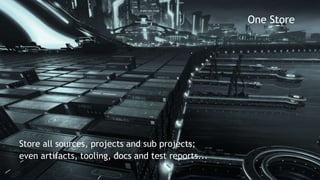
One Store
Store all sources, projects and sub projects;
even artifacts, tooling, docs and test reports...
© Perforce Software Inc. All Rights Reserved.
One History
Boldly go across source and time
Reproduce any source at any point in time
© Perforce Software Inc. All Rights Reserved.
Global Access
Any file any where
Fast Global Distribution
Fine grain protections
P4 Plugin
Perforce plugin support for Jenkins
© Perforce Software Inc. All Rights Reserved.
Disambiguation
◦ Community ‘Perforce’ plugin
https://wiki.jenkins-ci.org/display/JENKINS/Perforce+Plugin
◦ Perforce Supported ‘P4’ plugin
https://wiki.jenkins-ci.org/display/JENKINS/P4+Plugin
© Perforce Software Inc. All Rights Reserved.
The ‘P4’ plugin
◦ Why
Access the power of Perforce from within Jenkins
◦ P4Java
Pure Java solution
No ‘P4’ executable to install and keep up-to-date.
◦ Latest features
Streams, sync and clean up options
Credentials
Connecting to Perforce…
© Perforce Software Inc. All Rights Reserved.
Credentials
◦ Perforce Credentials
Shared Credentials
Managed from one location
Independent from the Job configuration
Update connection details in one location
◦ Credential Types
1. Perforce Password Credential
2. Perforce Ticket Credential
© Perforce Software Inc. All Rights Reserved.
Credentials
◦ Connection information
Username/Password
Perforce address and port
workshop.perforce.com:1666
◦ Password credentials
Username
Password
ID (useful to reference in the DSL)
Description
© Perforce Software Inc. All Rights Reserved.
Credentials
◦ Ticket based security
Perforce generated Ticket String
$ p4 login –p
4E034A8812F81B38229BF8FA62B0FEB1
Location of Perforce P4TICKET file
/home/pallen/.p4ticket
◦ SSL and Trust
Check the SSL box to add the ssl: part to P4PORT
Use p4 trust or click test to get the fingerprint
Workspace Management
Jenkins and Perforce Workspaces
© Perforce Software Inc. All Rights Reserved.
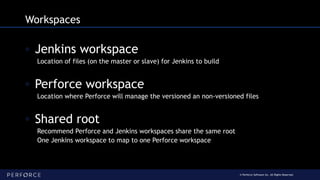
Workspaces
◦ Jenkins workspace
Location of files (on the master or slave) for Jenkins to build
◦ Perforce workspace
Location where Perforce will manage the versioned an non-versioned files
◦ Shared root
Recommend Perforce and Jenkins workspaces share the same root
One Jenkins workspace to map to one Perforce workspace
© Perforce Software Inc. All Rights Reserved.
Workspaces
◦ Workspace Configuration
Streams Workspace
Manual Workspace
Template Workspace
Static Workspace (predefined)
Spec Workspace (spec depot or file)
workspace: [$class: 'StreamWorkspaceImpl',
charset: 'none',
format: 'jenkins-${NODE_NAME}-${JOB_NAME}',
pinHost: false,
streamName: '//streams/st1-main']
Perforce Operations
Checkout, Build and Post Build Steps
© Perforce Software Inc. All Rights Reserved.
CD Pipe
◦ SCM Operations
Artifact
SCM
{"id":[{"name":"bob"}
]}
CI Build pipeline
package main
import "fmt”
func main() {
@change @label@review
populate
unshelve
label
publish
© Perforce Software Inc. All Rights Reserved.
SCM Operations
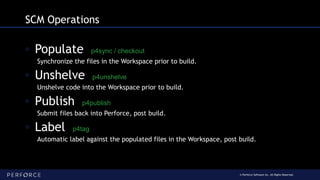
◦ Populate p4sync / checkout
Synchronize the files in the Workspace prior to build.
◦ Unshelve p4unshelve
Unshelve code into the Workspace prior to build.
◦ Publish p4publish
Submit files back into Perforce, post build.
◦ Label p4tag
Automatic label against the populated files in the Workspace, post build.
© Perforce Software Inc. All Rights Reserved.
Populate
◦ Auto Cleanup and Sync
populate:[$class:'AutoCleanImpl',
delete:true, replace:true, modtime:false,
quiet:true, pin:''
]
◦ Force Clean and Sync
populate: [$class: 'ForceCleanImpl',
have:false, pin:'', quiet:true
]
© Perforce Software Inc. All Rights Reserved.
Unshelve
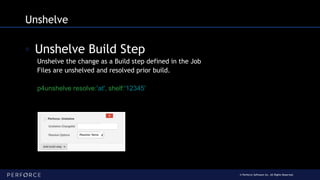
◦ Unshelve Build Step
Unshelve the change as a Build step defined in the Job
Files are unshelved and resolved prior build.
p4unshelve resolve:'at', shelf:'12345'
© Perforce Software Inc. All Rights Reserved.
Publish
◦ Shelve or Submit a change
◦ Connection & Workspace
◦ Use a narrow view
◦ Virtual stream
◦ Read/Write access for files
Set Workspace option ALLWRITE or use filetype +w
© Perforce Software Inc. All Rights Reserved.
Publish
p4publish credential:'phooey1666',
publish: [
$class:'SubmitImpl',
delete:false,
description:'Build: ${BUILD_TAG}',
onlyOnSuccess:false,
reopen:false],
workspace: [
$class:'StreamWorkspaceImpl',
charset:'none',
format:'jenkins-${JOB_NAME}-publish',
pinHost:false,
streamName:'//streams/st1-main']
© Perforce Software Inc. All Rights Reserved.
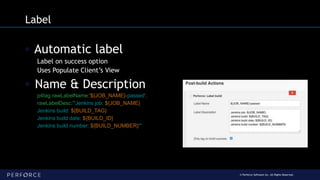
Label
◦ Automatic label
Label on success option
Uses Populate Client’s View
◦ Name & Description
p4tag rawLabelName:'${JOB_NAME}-passed',
rawLabelDesc:'''Jenkins job: ${JOB_NAME}
Jenkins build: ${BUILD_TAG}
Jenkins build date: ${BUILD_ID}
Jenkins build number: ${BUILD_NUMBER}'''
Polling, Triggers and Reviews
Still polling?
© Perforce Software Inc. All Rights Reserved.
Polling… if you must
◦ Polling build Filters
Exclude changes from Depot path
Exclude changes from user
Exclude changes outside view mask
Poll on Master using Latest Build
Polling per Change
◦ Workspace modes
Workspace to check the build - Preview check Only (sync –k)
© Perforce Software Inc. All Rights Reserved.
Triggers
◦ Perforce triggered build
◦ Subscribe Job (P4 Trigger)
curl --header 'Content-Type: application/json' 
--request POST 
--data "payload={change:200,p4port:"perforce.com:1666"}" 
http://jenkins:8080/p4/change
◦ Swarm (P4 Review)
Build triggered by Perforce Swarm.
Review or Change unshelved into workspace prior to build
© Perforce Software Inc. All Rights Reserved.
Swarm
[POST]
https://swarm:deadbeef@perforce.com:8443
/job/myJob/review/build
?change={change}&status={status}&review={review}
&pass={pass}&fail={fail}
P4 Groovy
P4 command access for Groovy
© Perforce Software Inc. All Rights Reserved.
P4Groovy
◦ P4Groovy object
Credential
Workspace
ws = [$class: 'StreamWorkspaceImpl',
charset: 'none', format: 'jenkins-${JOB_NAME}',
pinHost: false, streamName: '//streams/projAce']
p4 = p4(credential: 'phooey', workspace: ws)
© Perforce Software Inc. All Rights Reserved.
P4Groovy Methods
◦ Run
Requires: command, arguments (‘,’ separated String)
Returns: tagged output (specifically Map<String, Object>[])
p4.run(’changes', '-m5, //...')
◦ Getters
p4.getUserName()
p4.getClientName()
© Perforce Software Inc. All Rights Reserved.
P4Groovy Methods
◦ Fetch
Requires: spec type, spec id
Returns: a spec as a Map
client = p4.fetch(‘client’, ‘my_ws’)
◦ Save
Requires: spec type, the spec as a Map
Returns: tagged output (specifically Map<String, Object>[])
p4.save(‘client’, client)
© Perforce Software Inc. All Rights Reserved.
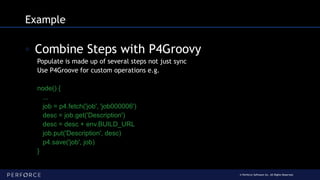
Example
◦ Combine Steps with P4Groovy
Populate is made up of several steps not just sync
Use P4Groove for custom operations e.g.
node() {
...
job = p4.fetch('job', 'job000006')
desc = job.get('Description')
desc = desc + env.BUILD_URL
job.put('Description', desc)
p4.save('job', job)
}
Thanks for Joining us!
End

Perfecting Your Development Tools: Updates to the Helix Plugin for Jenkins

  • 1.
    Perforce Plugin forJenkins An introduction to the ‘P4’ Plugin and update on the latest features. Paul Allen – Perforce Software
  • 2.
    © Perforce SoftwareInc. All Rights Reserved. Paul Allen Senior Integration Engineer Perforce
  • 3.
    © Perforce SoftwareInc. All Rights Reserved. Introduction ◦ The Perfect Monorepo ◦ P4 plugin ◦ Credentials ◦ Workspace management ◦ Perforce Operations ◦ Polling, triggers and reviews ◦ P4 Groovy
  • 4.
  • 5.
    © Perforce SoftwareInc. All Rights Reserved. One Repo to rule them all, One Repo to find them, One Repo to bring them all and in the server bind them. One Repo
  • 6.
    © Perforce SoftwareInc. All Rights Reserved. One Store Store all sources, projects and sub projects; even artifacts, tooling, docs and test reports...
  • 7.
    © Perforce SoftwareInc. All Rights Reserved. One History Boldly go across source and time Reproduce any source at any point in time
  • 8.
    © Perforce SoftwareInc. All Rights Reserved. Global Access Any file any where Fast Global Distribution Fine grain protections
  • 9.
    P4 Plugin Perforce pluginsupport for Jenkins
  • 10.
    © Perforce SoftwareInc. All Rights Reserved. Disambiguation ◦ Community ‘Perforce’ plugin https://wiki.jenkins-ci.org/display/JENKINS/Perforce+Plugin ◦ Perforce Supported ‘P4’ plugin https://wiki.jenkins-ci.org/display/JENKINS/P4+Plugin
  • 11.
    © Perforce SoftwareInc. All Rights Reserved. The ‘P4’ plugin ◦ Why Access the power of Perforce from within Jenkins ◦ P4Java Pure Java solution No ‘P4’ executable to install and keep up-to-date. ◦ Latest features Streams, sync and clean up options
  • 12.
  • 13.
    © Perforce SoftwareInc. All Rights Reserved. Credentials ◦ Perforce Credentials Shared Credentials Managed from one location Independent from the Job configuration Update connection details in one location ◦ Credential Types 1. Perforce Password Credential 2. Perforce Ticket Credential
  • 14.
    © Perforce SoftwareInc. All Rights Reserved. Credentials ◦ Connection information Username/Password Perforce address and port workshop.perforce.com:1666 ◦ Password credentials Username Password ID (useful to reference in the DSL) Description
  • 15.
    © Perforce SoftwareInc. All Rights Reserved. Credentials ◦ Ticket based security Perforce generated Ticket String $ p4 login –p 4E034A8812F81B38229BF8FA62B0FEB1 Location of Perforce P4TICKET file /home/pallen/.p4ticket ◦ SSL and Trust Check the SSL box to add the ssl: part to P4PORT Use p4 trust or click test to get the fingerprint
  • 16.
  • 17.
    © Perforce SoftwareInc. All Rights Reserved. Workspaces ◦ Jenkins workspace Location of files (on the master or slave) for Jenkins to build ◦ Perforce workspace Location where Perforce will manage the versioned an non-versioned files ◦ Shared root Recommend Perforce and Jenkins workspaces share the same root One Jenkins workspace to map to one Perforce workspace
  • 18.
    © Perforce SoftwareInc. All Rights Reserved. Workspaces ◦ Workspace Configuration Streams Workspace Manual Workspace Template Workspace Static Workspace (predefined) Spec Workspace (spec depot or file) workspace: [$class: 'StreamWorkspaceImpl', charset: 'none', format: 'jenkins-${NODE_NAME}-${JOB_NAME}', pinHost: false, streamName: '//streams/st1-main']
  • 19.
  • 20.
    © Perforce SoftwareInc. All Rights Reserved. CD Pipe ◦ SCM Operations Artifact SCM {"id":[{"name":"bob"} ]} CI Build pipeline package main import "fmt” func main() { @change @label@review populate unshelve label publish
  • 21.
    © Perforce SoftwareInc. All Rights Reserved. SCM Operations ◦ Populate p4sync / checkout Synchronize the files in the Workspace prior to build. ◦ Unshelve p4unshelve Unshelve code into the Workspace prior to build. ◦ Publish p4publish Submit files back into Perforce, post build. ◦ Label p4tag Automatic label against the populated files in the Workspace, post build.
  • 22.
    © Perforce SoftwareInc. All Rights Reserved. Populate ◦ Auto Cleanup and Sync populate:[$class:'AutoCleanImpl', delete:true, replace:true, modtime:false, quiet:true, pin:'' ] ◦ Force Clean and Sync populate: [$class: 'ForceCleanImpl', have:false, pin:'', quiet:true ]
  • 23.
    © Perforce SoftwareInc. All Rights Reserved. Unshelve ◦ Unshelve Build Step Unshelve the change as a Build step defined in the Job Files are unshelved and resolved prior build. p4unshelve resolve:'at', shelf:'12345'
  • 24.
    © Perforce SoftwareInc. All Rights Reserved. Publish ◦ Shelve or Submit a change ◦ Connection & Workspace ◦ Use a narrow view ◦ Virtual stream ◦ Read/Write access for files Set Workspace option ALLWRITE or use filetype +w
  • 25.
    © Perforce SoftwareInc. All Rights Reserved. Publish p4publish credential:'phooey1666', publish: [ $class:'SubmitImpl', delete:false, description:'Build: ${BUILD_TAG}', onlyOnSuccess:false, reopen:false], workspace: [ $class:'StreamWorkspaceImpl', charset:'none', format:'jenkins-${JOB_NAME}-publish', pinHost:false, streamName:'//streams/st1-main']
  • 26.
    © Perforce SoftwareInc. All Rights Reserved. Label ◦ Automatic label Label on success option Uses Populate Client’s View ◦ Name & Description p4tag rawLabelName:'${JOB_NAME}-passed', rawLabelDesc:'''Jenkins job: ${JOB_NAME} Jenkins build: ${BUILD_TAG} Jenkins build date: ${BUILD_ID} Jenkins build number: ${BUILD_NUMBER}'''
  • 27.
    Polling, Triggers andReviews Still polling?
  • 28.
    © Perforce SoftwareInc. All Rights Reserved. Polling… if you must ◦ Polling build Filters Exclude changes from Depot path Exclude changes from user Exclude changes outside view mask Poll on Master using Latest Build Polling per Change ◦ Workspace modes Workspace to check the build - Preview check Only (sync –k)
  • 29.
    © Perforce SoftwareInc. All Rights Reserved. Triggers ◦ Perforce triggered build ◦ Subscribe Job (P4 Trigger) curl --header 'Content-Type: application/json' --request POST --data "payload={change:200,p4port:"perforce.com:1666"}" http://jenkins:8080/p4/change ◦ Swarm (P4 Review) Build triggered by Perforce Swarm. Review or Change unshelved into workspace prior to build
  • 30.
    © Perforce SoftwareInc. All Rights Reserved. Swarm [POST] https://swarm:deadbeef@perforce.com:8443 /job/myJob/review/build ?change={change}&status={status}&review={review} &pass={pass}&fail={fail}
  • 31.
    P4 Groovy P4 commandaccess for Groovy
  • 32.
    © Perforce SoftwareInc. All Rights Reserved. P4Groovy ◦ P4Groovy object Credential Workspace ws = [$class: 'StreamWorkspaceImpl', charset: 'none', format: 'jenkins-${JOB_NAME}', pinHost: false, streamName: '//streams/projAce'] p4 = p4(credential: 'phooey', workspace: ws)
  • 33.
    © Perforce SoftwareInc. All Rights Reserved. P4Groovy Methods ◦ Run Requires: command, arguments (‘,’ separated String) Returns: tagged output (specifically Map<String, Object>[]) p4.run(’changes', '-m5, //...') ◦ Getters p4.getUserName() p4.getClientName()
  • 34.
    © Perforce SoftwareInc. All Rights Reserved. P4Groovy Methods ◦ Fetch Requires: spec type, spec id Returns: a spec as a Map client = p4.fetch(‘client’, ‘my_ws’) ◦ Save Requires: spec type, the spec as a Map Returns: tagged output (specifically Map<String, Object>[]) p4.save(‘client’, client)
  • 35.
    © Perforce SoftwareInc. All Rights Reserved. Example ◦ Combine Steps with P4Groovy Populate is made up of several steps not just sync Use P4Groove for custom operations e.g. node() { ... job = p4.fetch('job', 'job000006') desc = job.get('Description') desc = desc + env.BUILD_URL job.put('Description', desc) p4.save('job', job) }
  • 36.
  • 37.

Editor's Notes

  • #4 What makes the perfect monorepo The P4 Plugin …
  • #7 No storage limits Any size any type, users with Petabytes of data
  • #8 Cross project Mapping, map any file from any repo in your view. Global sequential identifier Global change number across all repos; sequential so you know what happened when
  • #9 Global distribution Distributed replicas (edge/commit) and build servers, not to forget proxies (some sites proxies per-switch per-floor) Fine grain protection Any level, from none to fully encrypted traffic. Access level as fine as you like even down to the individual file and restricted to user/group IP even proxy. Distributed Client Little known fact that we have DVCS support built in. Take any portion of the server and its history off-line and push you changes back later.
  • #12 The P4 plugin was designed to allow you to access all the power of the Perforce MonoRepo. Allowing Jenkins to fetch source and artifacts from Perforce and version the resulting build artifacts
  • #17 20minutes here
  • #23 share - appears in the workspace and you can submit and integrate to the parent isolate - appears in the workspace and you can submit, isolated from parent import - appears in the workspace only, cannot submit changes (import+) exclude - will not appear in the workspace, cannot get submitted
  • #28 Preview Check Only – sync -k to trigger polling Sync Only – no cleanup