ClearCase Escape Planning
Follow A Well Trodden Path
Doc Version 1.5
November 7, 2016
2© Perforce Software Inc. All Rights Reserved.
Presenter: C. Thomas Tyler
Tom Tyler, Principal Solutions Consultant
Tom has consulted as a software developer and
development environment architect in many
software development organizations. Once
known as “The ClearCase Guy” before
discovering Perforce in 1999, he has been
rescuing users from ClearCase ever since.
3© Perforce Software Inc. All Rights Reserved.
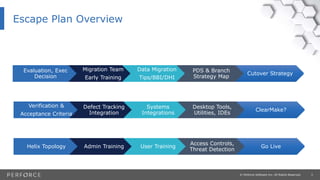
Escape Plan Overview
Evaluation, Exec
Decision
Migration Team
Early Training
Data Migration
Tips/BBI/DHI
PDS & Branch
Strategy Map
Cutover Strategy
Verification &
Acceptance Criteria
Defect Tracking
Integration
Systems
Integrations
Desktop Tools,
Utilities, IDEs
ClearMake?
Helix Topology Admin Training User Training
Access Controls,
Threat Detection
Go Live
4© Perforce Software Inc. All Rights Reserved.
• We’ve Done our Due Diligence, and …
• We’re Going to Perforce!
Evaluation, Executive Decision
5© Perforce Software Inc. All Rights Reserved.
• Select the Migration Team
• Include CM/Release Engineering
• Include Development Management
• Include Developers/Architects from various teams
• Include QA
• Travel With a Guide (Consultant?)
• Provide Training for the Migration Planning Team
Migration Planning Team, Early Training
6© Perforce Software Inc. All Rights Reserved.
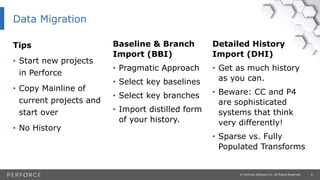
Tips
• Start new projects
in Perforce
• Copy Mainline of
current projects and
start over
• No History
Detailed History
Import (DHI)
• Get as much history
as you can.
• Beware: CC and P4
are sophisticated
systems that think
very differently!
• Sparse vs. Fully
Populated Transforms
Baseline & Branch
Import (BBI)
• Pragmatic Approach
• Select key baselines
• Select key branches
• Import distilled form
of your history.
Data Migration
7© Perforce Software Inc. All Rights Reserved.
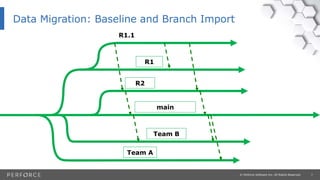
Data Migration: Baseline and Branch Import
R2
main
R1
R1.1
Team A
Team B
8© Perforce Software Inc. All Rights Reserved.
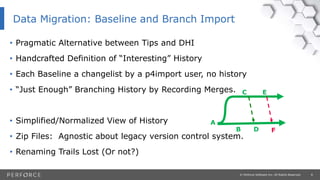
• Pragmatic Alternative between Tips and DHI
• Handcrafted Definition of “Interesting” History
• Each Baseline a changelist by a p4import user, no history
• “Just Enough” Branching History by Recording Merges.
• Simplified/Normalized View of History
• Zip Files: Agnostic about legacy version control system.
• Renaming Trails Lost (Or not?)
Data Migration: Baseline and Branch Import
A
B
C
D
E
F
9© Perforce Software Inc. All Rights Reserved.
• Attempt to get as much history as you can:
• File contents at each change, userid, date, time
• Grouped into Perforce changelists (heuristic guessing)
• ClearCase Merge Hyperlinks  Perforce Integration Records
• Optional (and expensive) Label Conversion
• We have relevant tools, experience, and successes
• We have become connoisseurs of CC2P4 migration tools
Data Migration – Detailed History Import (DHI)
10© Perforce Software Inc. All Rights Reserved.
• Be Warned: You’ll never get it all!
• Some sequences of user actions just don’t map.
• Some concepts don’t map
• Some file types don’t map
• Tool Limitations – Older history has lower accuracy
Data Migration – Detailed History Import (DHI)
11© Perforce Software Inc. All Rights Reserved.
• Phase 1 – Mechanical Import
• Trial: Point and Shoot at a VOB.
• Tools may work “as is” or require updating if your data is gnarly.
• Selective based on file paths (lost+found excluded).
• Sparse Import Only:
• Mainline fully populated.
• Branches sparsely populated, not buildable.
• Useful for history research, code and merge forensics.
Data Migration – Detailed History Import (DHI)
12© Perforce Software Inc. All Rights Reserved.
• Phase 2 – Transforms
• Requires completed Perforce Directory Standard (PDS)
• Defines the vision of ”Life in Perforce”
• Requires Custom Work (effort depending on how gnarly config specs are)
• Manually Intensive
• Creates Perforce-style fully populated branches.
• Branches can be built at tips.
Data Migration – Detailed History Import (DHI)
13© Perforce Software Inc. All Rights Reserved.
• Blend BBI and DHI Strategies
• Experimental Strategy
• End point of DHI is start point for BBI (per-branch).
• Get going faster with BBI.
• Bring in details over time in a separate server.
• Eventual perfmerge to combine servers DHI & BBI servers.
• Then ‘journal injection’ to combine start & end points.
Data Migration – “BBI Now, DHI Later”
14© Perforce Software Inc. All Rights Reserved.
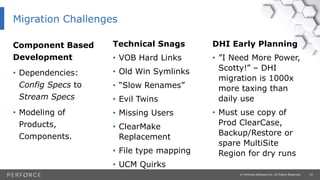
Component Based
Development
• Dependencies:
Config Specs to
Stream Specs
• Modeling of
Products,
Components.
DHI Early Planning
• ”I Need More Power,
Scotty!” – DHI
migration is 1000x
more taxing than
daily use
• Must use copy of
Prod ClearCase,
Backup/Restore or
spare MultiSite
Region for dry runs
Technical Snags
• VOB Hard Links
• Old Win Symlinks
• “Slow Renames”
• Evil Twins
• Missing Users
• ClearMake
Replacement
• File type mapping
• UCM Quirks
Migration Challenges
15© Perforce Software Inc. All Rights Reserved.
• Map your Branching Strategy to Perforce Streams
• Branch Tags are part of fully qualified file path in Perforce
Perforce Directory Standard (PDS)
See: https://swarm.workshop.perforce.com/projects/tom-tyler-pds
16© Perforce Software Inc. All Rights Reserved.
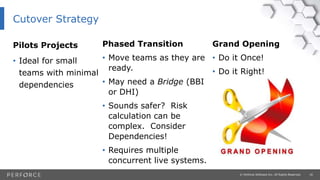
Pilots Projects
• Ideal for small
teams with minimal
dependencies
Grand Opening
• Do it Once!
• Do it Right!
Phased Transition
• Move teams as they are
ready.
• May need a Bridge (BBI
or DHI)
• Sounds safer? Risk
calculation can be
complex. Consider
Dependencies!
• Requires multiple
concurrent live systems.
Cutover Strategy
17© Perforce Software Inc. All Rights Reserved.
Testing may include:
• Test file lists and contents
• Test builds
• QA test build results
• DHI testing is a challenge
Verification and Acceptance Criteria
18© Perforce Software Inc. All Rights Reserved.
Common Options:
• Connect JIRA to Perforce instead of ClearCase
• Replace ClearCase first, then Defect Tracking/Workflow Management
• Replace ClearCase and Defect Tracking at the same time
• To Consider: Migrate Issue Tracking Data?
Defect Tracking Integration
19© Perforce Software Inc. All Rights Reserved.
Common Systems Integrations to Port:
• Defect Tracking/Workflow Management
• Requirements Management
• Code Review (SmartBear  Swarm)
• Build Systems
• Continuous Integration
• Continuous Delivery and DevOps
Systems Integrations
20© Perforce Software Inc. All Rights Reserved.
Planning: Spend time with the Developer at the Desktop!
• IDEs
• Personal utilities and scripts
• Teach Perforce scripting tricks, encourage users to help!
• Like formatted output with p4 -ztag –F users
Desktop Tools, Utilities, IDEs
21© Perforce Software Inc. All Rights Reserved.
Learn to build outside ClearMake:
• Get builds working w/o clearmake, outside dynamic views.
• Don’t use GNU compatibility mode, it’s not that compatible!
• Use gmake.
• Consider makedepends or Electric Accelerator, or jam for dependency
management.
ClearMake?
22© Perforce Software Inc. All Rights Reserved.
Define your Helix Global Topology
• Define High Availability (HA) and Disaster Recovery (DR) Goals
• Plan for Globally Distributed Access
• Direct Connection to Master – Better than you think!
• Proxies, Replicas, Edge Servers
• Better replication than MultiSite (more reliable, faster, simpler for
users/admins, no extra license cost)
Helix Topology
23© Perforce Software Inc. All Rights Reserved.
Admin Training
Follow the Server Deployment Package (SDP) Project:
• https://swarm.workshop.perforce.com/projects/perforce-software-
sdp
24© Perforce Software Inc. All Rights Reserved.
User Training
• On Site, Instructor Lead
• Online, Instructor Lead
• Recorded Training
• Tutorials and Docs
• The Workshop
25© Perforce Software Inc. All Rights Reserved.
• Define and implement security model in Perforce.
• Consider Threat Detection.
Access Controls, Threat Detection
26© Perforce Software Inc. All Rights Reserved.
3 … 2… 1… LAUNCH!
Go Live
27© Perforce Software Inc. All Rights Reserved.
• Survey URL: https://www.surveymonkey.com/r/CC2P4SampleSurvey
• Useful Migration Planning
• Plan Scope of Consulting Services Engagement
Your Next Step: Migration Planning Survey
28© Perforce Software Inc. All Rights Reserved.
Q & A
Questions?
29© Perforce Software Inc. All Rights Reserved.
Thank You
The End

ClearCase Escape Plan

  • 1.
    ClearCase Escape Planning FollowA Well Trodden Path Doc Version 1.5 November 7, 2016
  • 2.
    2© Perforce SoftwareInc. All Rights Reserved. Presenter: C. Thomas Tyler Tom Tyler, Principal Solutions Consultant Tom has consulted as a software developer and development environment architect in many software development organizations. Once known as “The ClearCase Guy” before discovering Perforce in 1999, he has been rescuing users from ClearCase ever since.
  • 3.
    3© Perforce SoftwareInc. All Rights Reserved. Escape Plan Overview Evaluation, Exec Decision Migration Team Early Training Data Migration Tips/BBI/DHI PDS & Branch Strategy Map Cutover Strategy Verification & Acceptance Criteria Defect Tracking Integration Systems Integrations Desktop Tools, Utilities, IDEs ClearMake? Helix Topology Admin Training User Training Access Controls, Threat Detection Go Live
  • 4.
    4© Perforce SoftwareInc. All Rights Reserved. • We’ve Done our Due Diligence, and … • We’re Going to Perforce! Evaluation, Executive Decision
  • 5.
    5© Perforce SoftwareInc. All Rights Reserved. • Select the Migration Team • Include CM/Release Engineering • Include Development Management • Include Developers/Architects from various teams • Include QA • Travel With a Guide (Consultant?) • Provide Training for the Migration Planning Team Migration Planning Team, Early Training
  • 6.
    6© Perforce SoftwareInc. All Rights Reserved. Tips • Start new projects in Perforce • Copy Mainline of current projects and start over • No History Detailed History Import (DHI) • Get as much history as you can. • Beware: CC and P4 are sophisticated systems that think very differently! • Sparse vs. Fully Populated Transforms Baseline & Branch Import (BBI) • Pragmatic Approach • Select key baselines • Select key branches • Import distilled form of your history. Data Migration
  • 7.
    7© Perforce SoftwareInc. All Rights Reserved. Data Migration: Baseline and Branch Import R2 main R1 R1.1 Team A Team B
  • 8.
    8© Perforce SoftwareInc. All Rights Reserved. • Pragmatic Alternative between Tips and DHI • Handcrafted Definition of “Interesting” History • Each Baseline a changelist by a p4import user, no history • “Just Enough” Branching History by Recording Merges. • Simplified/Normalized View of History • Zip Files: Agnostic about legacy version control system. • Renaming Trails Lost (Or not?) Data Migration: Baseline and Branch Import A B C D E F
  • 9.
    9© Perforce SoftwareInc. All Rights Reserved. • Attempt to get as much history as you can: • File contents at each change, userid, date, time • Grouped into Perforce changelists (heuristic guessing) • ClearCase Merge Hyperlinks  Perforce Integration Records • Optional (and expensive) Label Conversion • We have relevant tools, experience, and successes • We have become connoisseurs of CC2P4 migration tools Data Migration – Detailed History Import (DHI)
  • 10.
    10© Perforce SoftwareInc. All Rights Reserved. • Be Warned: You’ll never get it all! • Some sequences of user actions just don’t map. • Some concepts don’t map • Some file types don’t map • Tool Limitations – Older history has lower accuracy Data Migration – Detailed History Import (DHI)
  • 11.
    11© Perforce SoftwareInc. All Rights Reserved. • Phase 1 – Mechanical Import • Trial: Point and Shoot at a VOB. • Tools may work “as is” or require updating if your data is gnarly. • Selective based on file paths (lost+found excluded). • Sparse Import Only: • Mainline fully populated. • Branches sparsely populated, not buildable. • Useful for history research, code and merge forensics. Data Migration – Detailed History Import (DHI)
  • 12.
    12© Perforce SoftwareInc. All Rights Reserved. • Phase 2 – Transforms • Requires completed Perforce Directory Standard (PDS) • Defines the vision of ”Life in Perforce” • Requires Custom Work (effort depending on how gnarly config specs are) • Manually Intensive • Creates Perforce-style fully populated branches. • Branches can be built at tips. Data Migration – Detailed History Import (DHI)
  • 13.
    13© Perforce SoftwareInc. All Rights Reserved. • Blend BBI and DHI Strategies • Experimental Strategy • End point of DHI is start point for BBI (per-branch). • Get going faster with BBI. • Bring in details over time in a separate server. • Eventual perfmerge to combine servers DHI & BBI servers. • Then ‘journal injection’ to combine start & end points. Data Migration – “BBI Now, DHI Later”
  • 14.
    14© Perforce SoftwareInc. All Rights Reserved. Component Based Development • Dependencies: Config Specs to Stream Specs • Modeling of Products, Components. DHI Early Planning • ”I Need More Power, Scotty!” – DHI migration is 1000x more taxing than daily use • Must use copy of Prod ClearCase, Backup/Restore or spare MultiSite Region for dry runs Technical Snags • VOB Hard Links • Old Win Symlinks • “Slow Renames” • Evil Twins • Missing Users • ClearMake Replacement • File type mapping • UCM Quirks Migration Challenges
  • 15.
    15© Perforce SoftwareInc. All Rights Reserved. • Map your Branching Strategy to Perforce Streams • Branch Tags are part of fully qualified file path in Perforce Perforce Directory Standard (PDS) See: https://swarm.workshop.perforce.com/projects/tom-tyler-pds
  • 16.
    16© Perforce SoftwareInc. All Rights Reserved. Pilots Projects • Ideal for small teams with minimal dependencies Grand Opening • Do it Once! • Do it Right! Phased Transition • Move teams as they are ready. • May need a Bridge (BBI or DHI) • Sounds safer? Risk calculation can be complex. Consider Dependencies! • Requires multiple concurrent live systems. Cutover Strategy
  • 17.
    17© Perforce SoftwareInc. All Rights Reserved. Testing may include: • Test file lists and contents • Test builds • QA test build results • DHI testing is a challenge Verification and Acceptance Criteria
  • 18.
    18© Perforce SoftwareInc. All Rights Reserved. Common Options: • Connect JIRA to Perforce instead of ClearCase • Replace ClearCase first, then Defect Tracking/Workflow Management • Replace ClearCase and Defect Tracking at the same time • To Consider: Migrate Issue Tracking Data? Defect Tracking Integration
  • 19.
    19© Perforce SoftwareInc. All Rights Reserved. Common Systems Integrations to Port: • Defect Tracking/Workflow Management • Requirements Management • Code Review (SmartBear  Swarm) • Build Systems • Continuous Integration • Continuous Delivery and DevOps Systems Integrations
  • 20.
    20© Perforce SoftwareInc. All Rights Reserved. Planning: Spend time with the Developer at the Desktop! • IDEs • Personal utilities and scripts • Teach Perforce scripting tricks, encourage users to help! • Like formatted output with p4 -ztag –F users Desktop Tools, Utilities, IDEs
  • 21.
    21© Perforce SoftwareInc. All Rights Reserved. Learn to build outside ClearMake: • Get builds working w/o clearmake, outside dynamic views. • Don’t use GNU compatibility mode, it’s not that compatible! • Use gmake. • Consider makedepends or Electric Accelerator, or jam for dependency management. ClearMake?
  • 22.
    22© Perforce SoftwareInc. All Rights Reserved. Define your Helix Global Topology • Define High Availability (HA) and Disaster Recovery (DR) Goals • Plan for Globally Distributed Access • Direct Connection to Master – Better than you think! • Proxies, Replicas, Edge Servers • Better replication than MultiSite (more reliable, faster, simpler for users/admins, no extra license cost) Helix Topology
  • 23.
    23© Perforce SoftwareInc. All Rights Reserved. Admin Training Follow the Server Deployment Package (SDP) Project: • https://swarm.workshop.perforce.com/projects/perforce-software- sdp
  • 24.
    24© Perforce SoftwareInc. All Rights Reserved. User Training • On Site, Instructor Lead • Online, Instructor Lead • Recorded Training • Tutorials and Docs • The Workshop
  • 25.
    25© Perforce SoftwareInc. All Rights Reserved. • Define and implement security model in Perforce. • Consider Threat Detection. Access Controls, Threat Detection
  • 26.
    26© Perforce SoftwareInc. All Rights Reserved. 3 … 2… 1… LAUNCH! Go Live
  • 27.
    27© Perforce SoftwareInc. All Rights Reserved. • Survey URL: https://www.surveymonkey.com/r/CC2P4SampleSurvey • Useful Migration Planning • Plan Scope of Consulting Services Engagement Your Next Step: Migration Planning Survey
  • 28.
    28© Perforce SoftwareInc. All Rights Reserved. Q & A Questions?
  • 29.
    29© Perforce SoftwareInc. All Rights Reserved. Thank You The End

Editor's Notes

  • #3 Full Text: Tom started his career at the NASA Kennedy Space Center and has consulted as a software developer and development environment architect in many software development organizations.  Clients and colleagues knew Tom as “The ClearCase Guy” before discovering Perforce in 1999.  Since then he has trained, mentored, and consulted with many Perforce customers large and small on topics such as branching strategies, application life cycle management, high availability and disaster recovery, configuration management, systems integrations, build automation, and more.  He is a regular speaker at Perforce user conferences, has authored many white papers and blogs, and is a contributor to the National Consensus Standard for Configuration Management.  He hails from Nashua, NH, where he lives with his wife and two sons.
  • #6 Travel with a Guide! Don’t be a pioneer!
  • #8 Record Merges: “Just Enough” Branching History Renaming: Tooling Exists, but Not Proven
  • #9 Let’s talk about what history do and don’t get in that last diagram … You lose content of files at each checkin, author of each chunk of text changed, timestamp of each change. Record Merges: “Just Enough” Branching History Renaming: Tooling Exists, but Not Proven Simplified View: Time to distill and clean”uninteresting history”, such as changes to branching strategy over the years.
  • #11 Sparse Import: Think of what you would see in a VOB without the benefit of a view -- sparsely populated structure.
  • #12 Sparse Import: Think of what you would see in a VOB without the benefit of a view -- sparsely populated structure.
  • #15 Missing Users: ClearCase relied on the OS for mapping userids to user names, where Perforce stores user information. The problem we see is that users who have left and had their accounts remove show up as something like “592” instead of something like “jsmith.” UCM Quirks: Overzealous labeling, Activities can reference more than one version of the same file. These don’t map to Perforce.
  • #18 Verify like you’re depending on the dry-run imports to do your real job. Because soon you will be.