Sample to Insight
RT2 Profiler PCR Array Data Analysis Tutorial
Anisha Kharkia
Associate Product Manager
Biological Research Content Management- GeneGlobe
RT2 Profiler PCR Array Data AnalysisTutorial 1
Sample to Insight
Welcome to our four-part webinar series on qPCR
2
qPCR technology overview, applications, data
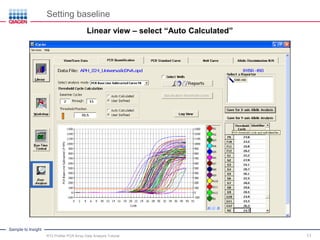
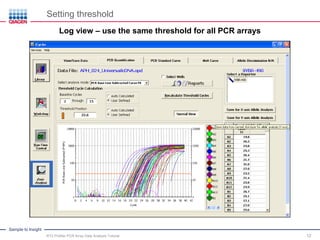
analysis and service solutions
• Part 1: Introduction to Real-Time PCR (Q-PCR / qPCR/ qrt-PCR)
• Part 2: Advanced Real-Time PCR Array Technology – Coding and Noncoding
RNA Expression Analysis
• Part 3: PCR Array Data Analysis Tutorial
• Part 4: Accelerate Your Discovery With QIAGEN Service Solutions for Biomarker
Research
Sample to Insight
Legal disclaimer
QIAGEN products shown here are intended for molecular biology applications. These products are not
intended for the diagnosis, prevention or treatment of a disease.
For up-to-date licensing information and product-specific disclaimers, see the respective QIAGEN kit
handbook or user manual. QIAGEN kit handbooks and user manuals are available at www.QIAGEN.com or
can be requested from QIAGEN Technical Servicesor your local distributor.
Sample to Insight
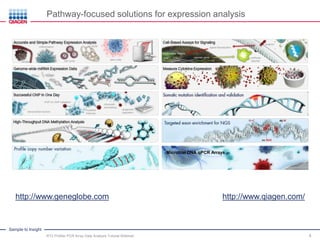
Pathway-focused solutions for expression analysis
http://www.geneglobe.com http://www.qiagen.com/
Microbial DNA qPCR Arrays
RT2 Profiler PCR Array Data AnalysisTutorial Webinar; 4
Sample to Insight
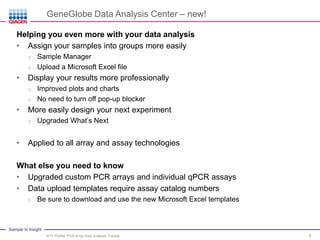
GeneGlobe Data Analysis Center – new!
Helping you even more with your data analysis
• Assign your samples into groups more easily
o Sample Manager
o Upload a Microsoft Excel file
• Display your results more professionally
o Improved plots and charts
o No need to turn off pop-up blocker
• More easily design your next experiment
o Upgraded What’s Next
• Applied to all array and assay technologies
What else you need to know
• Upgraded custom PCR arrays and individual qPCR assays
• Data upload templates require assay catalog numbers
o Be sure to download and use the new Microsoft Excel templates
RT2 Profiler PCR Array Data AnalysisTutorial 5
Sample to Insight
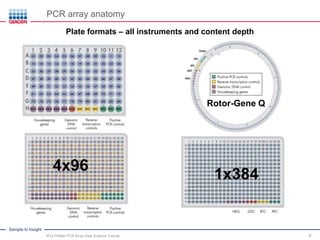
PCR array anatomy
Plate formats – all instruments and contentdepth
4x96
1x384
Rotor-Gene Q
RT2 Profiler PCR Array Data AnalysisTutorial 6
Sample to Insight
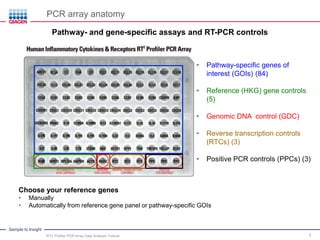
PCR array anatomy
Pathway- and gene-specific assays and RT-PCR controls
RT2 Profiler PCR Array Data AnalysisTutorial 7
• Pathway-specific genes of
interest (GOIs) (84)
• Reference (HKG) gene controls
(5)
• Genomic DNA control (GDC)
• Reverse transcription controls
(RTCs) (3)
• Positive PCR controls (PPCs) (3)
Choose your reference genes
• Manually
• Automatically from reference gene panel or pathway-specificGOIs
Sample to Insight
Uploading your data4
Agenda
Protocol, baseline and threshold overview1
Organizing your raw data2
Sample experiment3
8
What we have covered5
Sample to Insight
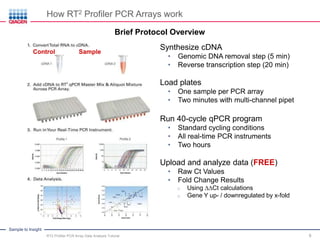
How RT2 Profiler PCR Arrays work
Brief Protocol Overview
Control Sample
Synthesize cDNA
• Genomic DNA removal step (5 min)
• Reverse transcription step (20 min)
Load plates
• One sample per PCR array
• Two minutes with multi-channel pipet
Run 40-cycle qPCR program
• Standard cycling conditions
• All real-time PCR instruments
• Two hours
Upload and analyze data (FREE)
• Raw Ct Values
• Fold Change Results
o Using ∆∆Ct calculations
o Gene Y up- / downregulatedby x-fold
RT2 Profiler PCR Array Data AnalysisTutorial 9
Sample to Insight
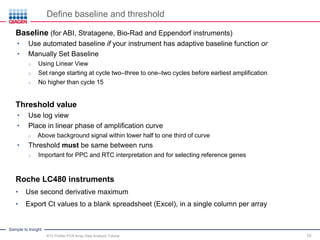
Define baseline and threshold
Baseline(for ABI, Stratagene, Bio-Rad and Eppendorf instruments)
• Use automated baseline if your instrument has adaptive baseline function or
• Manually Set Baseline
o Using Linear View
o Set range starting at cycle two–three to one–two cycles before earliest amplification
o No higher than cycle 15
Threshold value
• Use log view
• Place in linear phase of amplification curve
o Above background signal within lower half to one third of curve
• Threshold must be same between runs
o Important for PPC and RTC interpretation and for selectingreference genes
Roche LC480 instruments
• Use second derivative maximum
• Export Ct values to a blank spreadsheet (Excel), in a single column per array
RT2 Profiler PCR Array Data AnalysisTutorial 10
Sample to Insight
Setting baseline
Linear view – select“Auto Calculated”
RT2 Profiler PCR Array Data AnalysisTutorial 11
Sample to Insight
Setting threshold
Log view – use the same threshold for all PCR arrays
RT2 Profiler PCR Array Data AnalysisTutorial 12
Sample to Insight
Uploading your data4
Agenda
Protocol, baseline and threshold overview1
Organizing your raw data2
Sample experiment3
13
What we have covered5
Sample to Insight
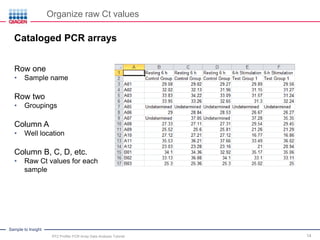
Organize raw Ct values
14
Cataloged PCR arrays
Row one
• Sample name
Row two
• Groupings
Column A
• Well location
Column B, C, D, etc.
• Raw Ct values for each
sample
RT2 Profiler PCR Array Data AnalysisTutorial
Sample to Insight
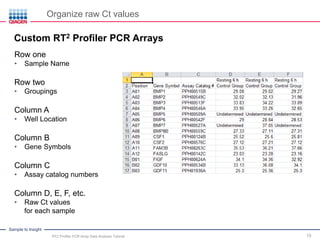
Organize raw Ct values
15
Custom RT2 Profiler PCR Arrays
RT2 Profiler PCR Array Data AnalysisTutorial
Row one
• Sample Name
Row two
• Groupings
Column A
• Well Location
Column B
• Gene Symbols
Column C
• Assay catalog numbers
Column D, E, F, etc.
• Raw Ct values
for each sample
Sample to Insight
Organize raw Ct values
16
Individual RT2 qPCR Assays
RT2 Profiler PCR Array Data AnalysisTutorial
Row one
• Sample Name
Row two
• Groupings
Column A
• Assay numbering
Column B
• Gene symbols
Column C
• Assay catalog numbers
Column D, E, F, etc.
• Raw Ct values
for each sample
Sample to Insight
Uploading your data4
Agenda
Protocol, baseline and threshold overview1
Organizing your raw data2
Sample experiment3
17
What we have covered5
Sample to Insight
Sample experiment – experimental setup
Group three biological replicatesinto three groups and one control
A B C Control: resting 6 h
A B C Group 1: PMA + Ionomycin 6 h
A B C Group 2: resting 24 h
CA B Group 3: PMA + Ionomycin 24 h
RT2 Profiler PCR Array Data AnalysisTutorial 18
Sample to Insight
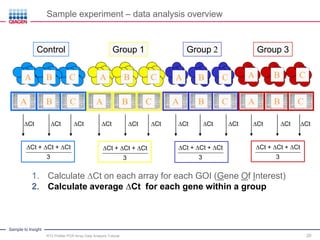
Sample experiment – data analysis overview
A
Group 3
B CA
Group 2
B CA
Group 1
B CA
Control
CB
CtGOI – CtHKG
∆Ct
1. Calculate ∆Ct on each array for each GOI (Gene Of Interest)
A B C A B C A B C A B C
RT2 Profiler PCR Array Data AnalysisTutorial 19
Sample to Insight
Sample experiment – data analysis overview
A
Group 3
B CA
Group 2
B CA
Group 1
B CA
Control
CB
A B C A B C A B C A B C
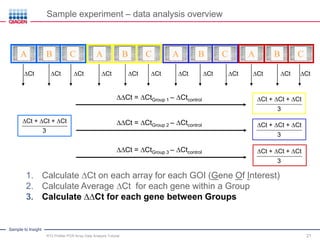
1. Calculate ∆Ct on each array for each GOI (Gene Of Interest)
2. Calculate average ∆Ct for each gene within a group
∆Ct + ∆Ct + ∆Ct
3
∆Ct ∆Ct ∆Ct ∆Ct ∆Ct ∆Ct ∆Ct ∆Ct ∆Ct ∆Ct∆Ct ∆Ct
RT2 Profiler PCR Array Data AnalysisTutorial 20
∆Ct + ∆Ct + ∆Ct
3
∆Ct + ∆Ct + ∆Ct
3
∆Ct + ∆Ct + ∆Ct
3
Sample to Insight
Sample experiment – data analysis overview
A B C A B C A B C A B C
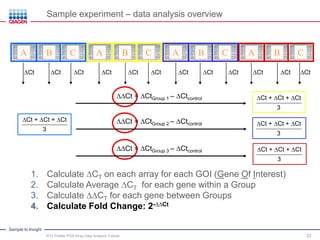
1. Calculate ∆Ct on each array for each GOI (Gene Of Interest)
2. Calculate Average ∆Ct for each gene within a Group
3. Calculate ∆∆Ct for each gene between Groups
∆Ct ∆Ct ∆Ct ∆Ct ∆Ct ∆Ct ∆Ct ∆Ct ∆Ct ∆Ct∆Ct ∆Ct
∆∆Ct = ∆CtGroup 1 – ∆Ctcontrol
RT2 Profiler PCR Array Data AnalysisTutorial 21
∆Ct + ∆Ct + ∆Ct
3
∆Ct + ∆Ct + ∆Ct
3
∆Ct + ∆Ct + ∆Ct
3
∆Ct + ∆Ct + ∆Ct
3
∆∆Ct = ∆CtGroup 2 – ∆Ctcontrol
∆∆Ct = ∆CtGroup 3 – ∆Ctcontrol
Sample to Insight
Sample experiment – data analysis overview
A B C A B C A B C A B C
∆Ct ∆Ct ∆Ct ∆Ct ∆Ct ∆Ct ∆Ct ∆Ct ∆Ct ∆Ct∆Ct ∆Ct
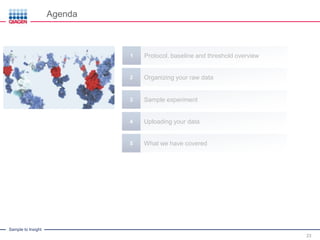
1. Calculate ∆CT on each array for each GOI (Gene Of Interest)
2. Calculate Average ∆CT for each gene within a Group
3. Calculate ∆∆CT for each gene between Groups
4. Calculate Fold Change: 2-∆∆Ct
RT2 Profiler PCR Array Data AnalysisTutorial 22
∆∆Ct = ∆CtGroup 1 – ∆Ctcontrol
∆∆Ct = ∆CtGroup 2 – ∆Ctcontrol
∆∆Ct = ∆CtGroup 3 – ∆Ctcontrol
∆Ct + ∆Ct + ∆Ct
3
∆Ct + ∆Ct + ∆Ct
3
∆Ct + ∆Ct + ∆Ct
3
∆Ct + ∆Ct + ∆Ct
3
Sample to Insight
Uploading your data4
Agenda
Protocol, baseline and threshold overview1
Organizing your raw data2
Sample experiment3
23
What we have covered5
Sample to Insight
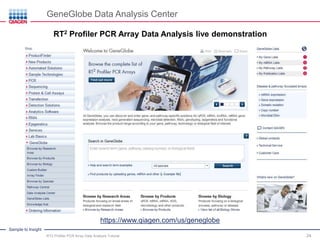
GeneGlobe Data Analysis Center
RT2 Profiler PCRArrayData Analysis live demonstration
RT2 Profiler PCR Array Data AnalysisTutorial 24
https://www.qiagen.com/us/geneglobe
Sample to Insight
Uploading your data4
Agenda
Protocol, baseline and threshold overview1
Organizing your raw data2
Sample experiment3
25
What we have covered5
Sample to Insight
Summary
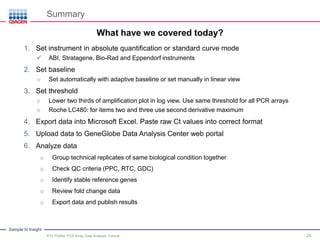
1. Set instrument in absolute quantification or standard curve mode
✓ ABI, Stratagene, Bio-Rad and Eppendorf instruments
2. Set baseline
o Set automatically with adaptive baseline or set manually in linear view
3. Set threshold
o Lower two thirds of amplification plot in log view. Use same threshold for all PCR arrays
o Roche LC480: for items two and three use second derivative maximum
4. Export data into Microsoft Excel. Paste raw Ct values into correct format
5. Upload data to GeneGlobe Data Analysis Center web portal
6. Analyze data
o Group technical replicates of same biological condition together
o Check QC criteria (PPC, RTC, GDC)
o Identify stable reference genes
o Review fold change data
o Export data and publish results
RT2 Profiler PCR Array Data AnalysisTutorial 26
What have we covered today?
Sample to Insight
Summary
• New Sample Manager
o More easily assigns your samples into groups
• Improved plots and charts
o Display your results more professionally
• Upgraded What’s Next
o Designs your next experiment
• Remember: some templates require assaycatalog numbers
• Be sure to download and use the new Microsoft Excel templates
RT2 Profiler PCR Array Data AnalysisTutorial 27
New benefits
Sample to Insight
Thank You for Attending
.Questions? Comments? Suggestions?
.Please contact Technical Support
. US & Canada
. Email: BRCsupport@qiagen.com
GeneRead NGS System
New productfor microbial research
RT2 Profiler PCR Array Data AnalysisTutorial 28
For up-to-date licensing information and product-
specific disclaimers, see the respective QIAGEN kit
handbook or user manual. QIAGEN kit handbooks and
user manuals are available at www.QIAGEN.com or
can be requested from QIAGEN Technical Servicesor
your local distributor.
.Customers outside North America
.Email: SABIO@qiagen.com
.Webinar questions
.Email: QIAWebinars@qiagen.com

PCR Array Data Analysis Tutorial: qPCR Technology Webinar Series Part 3

  • 1.
    Sample to Insight RT2Profiler PCR Array Data Analysis Tutorial Anisha Kharkia Associate Product Manager Biological Research Content Management- GeneGlobe RT2 Profiler PCR Array Data AnalysisTutorial 1
  • 2.
    Sample to Insight Welcometo our four-part webinar series on qPCR 2 qPCR technology overview, applications, data analysis and service solutions • Part 1: Introduction to Real-Time PCR (Q-PCR / qPCR/ qrt-PCR) • Part 2: Advanced Real-Time PCR Array Technology – Coding and Noncoding RNA Expression Analysis • Part 3: PCR Array Data Analysis Tutorial • Part 4: Accelerate Your Discovery With QIAGEN Service Solutions for Biomarker Research
  • 3.
    Sample to Insight Legaldisclaimer QIAGEN products shown here are intended for molecular biology applications. These products are not intended for the diagnosis, prevention or treatment of a disease. For up-to-date licensing information and product-specific disclaimers, see the respective QIAGEN kit handbook or user manual. QIAGEN kit handbooks and user manuals are available at www.QIAGEN.com or can be requested from QIAGEN Technical Servicesor your local distributor.
  • 4.
    Sample to Insight Pathway-focusedsolutions for expression analysis http://www.geneglobe.com http://www.qiagen.com/ Microbial DNA qPCR Arrays RT2 Profiler PCR Array Data AnalysisTutorial Webinar; 4
  • 5.
    Sample to Insight GeneGlobeData Analysis Center – new! Helping you even more with your data analysis • Assign your samples into groups more easily o Sample Manager o Upload a Microsoft Excel file • Display your results more professionally o Improved plots and charts o No need to turn off pop-up blocker • More easily design your next experiment o Upgraded What’s Next • Applied to all array and assay technologies What else you need to know • Upgraded custom PCR arrays and individual qPCR assays • Data upload templates require assay catalog numbers o Be sure to download and use the new Microsoft Excel templates RT2 Profiler PCR Array Data AnalysisTutorial 5
  • 6.
    Sample to Insight PCRarray anatomy Plate formats – all instruments and contentdepth 4x96 1x384 Rotor-Gene Q RT2 Profiler PCR Array Data AnalysisTutorial 6
  • 7.
    Sample to Insight PCRarray anatomy Pathway- and gene-specific assays and RT-PCR controls RT2 Profiler PCR Array Data AnalysisTutorial 7 • Pathway-specific genes of interest (GOIs) (84) • Reference (HKG) gene controls (5) • Genomic DNA control (GDC) • Reverse transcription controls (RTCs) (3) • Positive PCR controls (PPCs) (3) Choose your reference genes • Manually • Automatically from reference gene panel or pathway-specificGOIs
  • 8.
    Sample to Insight Uploadingyour data4 Agenda Protocol, baseline and threshold overview1 Organizing your raw data2 Sample experiment3 8 What we have covered5
  • 9.
    Sample to Insight HowRT2 Profiler PCR Arrays work Brief Protocol Overview Control Sample Synthesize cDNA • Genomic DNA removal step (5 min) • Reverse transcription step (20 min) Load plates • One sample per PCR array • Two minutes with multi-channel pipet Run 40-cycle qPCR program • Standard cycling conditions • All real-time PCR instruments • Two hours Upload and analyze data (FREE) • Raw Ct Values • Fold Change Results o Using ∆∆Ct calculations o Gene Y up- / downregulatedby x-fold RT2 Profiler PCR Array Data AnalysisTutorial 9
  • 10.
    Sample to Insight Definebaseline and threshold Baseline(for ABI, Stratagene, Bio-Rad and Eppendorf instruments) • Use automated baseline if your instrument has adaptive baseline function or • Manually Set Baseline o Using Linear View o Set range starting at cycle two–three to one–two cycles before earliest amplification o No higher than cycle 15 Threshold value • Use log view • Place in linear phase of amplification curve o Above background signal within lower half to one third of curve • Threshold must be same between runs o Important for PPC and RTC interpretation and for selectingreference genes Roche LC480 instruments • Use second derivative maximum • Export Ct values to a blank spreadsheet (Excel), in a single column per array RT2 Profiler PCR Array Data AnalysisTutorial 10
  • 11.
    Sample to Insight Settingbaseline Linear view – select“Auto Calculated” RT2 Profiler PCR Array Data AnalysisTutorial 11
  • 12.
    Sample to Insight Settingthreshold Log view – use the same threshold for all PCR arrays RT2 Profiler PCR Array Data AnalysisTutorial 12
  • 13.
    Sample to Insight Uploadingyour data4 Agenda Protocol, baseline and threshold overview1 Organizing your raw data2 Sample experiment3 13 What we have covered5
  • 14.
    Sample to Insight Organizeraw Ct values 14 Cataloged PCR arrays Row one • Sample name Row two • Groupings Column A • Well location Column B, C, D, etc. • Raw Ct values for each sample RT2 Profiler PCR Array Data AnalysisTutorial
  • 15.
    Sample to Insight Organizeraw Ct values 15 Custom RT2 Profiler PCR Arrays RT2 Profiler PCR Array Data AnalysisTutorial Row one • Sample Name Row two • Groupings Column A • Well Location Column B • Gene Symbols Column C • Assay catalog numbers Column D, E, F, etc. • Raw Ct values for each sample
  • 16.
    Sample to Insight Organizeraw Ct values 16 Individual RT2 qPCR Assays RT2 Profiler PCR Array Data AnalysisTutorial Row one • Sample Name Row two • Groupings Column A • Assay numbering Column B • Gene symbols Column C • Assay catalog numbers Column D, E, F, etc. • Raw Ct values for each sample
  • 17.
    Sample to Insight Uploadingyour data4 Agenda Protocol, baseline and threshold overview1 Organizing your raw data2 Sample experiment3 17 What we have covered5
  • 18.
    Sample to Insight Sampleexperiment – experimental setup Group three biological replicatesinto three groups and one control A B C Control: resting 6 h A B C Group 1: PMA + Ionomycin 6 h A B C Group 2: resting 24 h CA B Group 3: PMA + Ionomycin 24 h RT2 Profiler PCR Array Data AnalysisTutorial 18
  • 19.
    Sample to Insight Sampleexperiment – data analysis overview A Group 3 B CA Group 2 B CA Group 1 B CA Control CB CtGOI – CtHKG ∆Ct 1. Calculate ∆Ct on each array for each GOI (Gene Of Interest) A B C A B C A B C A B C RT2 Profiler PCR Array Data AnalysisTutorial 19
  • 20.
    Sample to Insight Sampleexperiment – data analysis overview A Group 3 B CA Group 2 B CA Group 1 B CA Control CB A B C A B C A B C A B C 1. Calculate ∆Ct on each array for each GOI (Gene Of Interest) 2. Calculate average ∆Ct for each gene within a group ∆Ct + ∆Ct + ∆Ct 3 ∆Ct ∆Ct ∆Ct ∆Ct ∆Ct ∆Ct ∆Ct ∆Ct ∆Ct ∆Ct∆Ct ∆Ct RT2 Profiler PCR Array Data AnalysisTutorial 20 ∆Ct + ∆Ct + ∆Ct 3 ∆Ct + ∆Ct + ∆Ct 3 ∆Ct + ∆Ct + ∆Ct 3
  • 21.
    Sample to Insight Sampleexperiment – data analysis overview A B C A B C A B C A B C 1. Calculate ∆Ct on each array for each GOI (Gene Of Interest) 2. Calculate Average ∆Ct for each gene within a Group 3. Calculate ∆∆Ct for each gene between Groups ∆Ct ∆Ct ∆Ct ∆Ct ∆Ct ∆Ct ∆Ct ∆Ct ∆Ct ∆Ct∆Ct ∆Ct ∆∆Ct = ∆CtGroup 1 – ∆Ctcontrol RT2 Profiler PCR Array Data AnalysisTutorial 21 ∆Ct + ∆Ct + ∆Ct 3 ∆Ct + ∆Ct + ∆Ct 3 ∆Ct + ∆Ct + ∆Ct 3 ∆Ct + ∆Ct + ∆Ct 3 ∆∆Ct = ∆CtGroup 2 – ∆Ctcontrol ∆∆Ct = ∆CtGroup 3 – ∆Ctcontrol
  • 22.
    Sample to Insight Sampleexperiment – data analysis overview A B C A B C A B C A B C ∆Ct ∆Ct ∆Ct ∆Ct ∆Ct ∆Ct ∆Ct ∆Ct ∆Ct ∆Ct∆Ct ∆Ct 1. Calculate ∆CT on each array for each GOI (Gene Of Interest) 2. Calculate Average ∆CT for each gene within a Group 3. Calculate ∆∆CT for each gene between Groups 4. Calculate Fold Change: 2-∆∆Ct RT2 Profiler PCR Array Data AnalysisTutorial 22 ∆∆Ct = ∆CtGroup 1 – ∆Ctcontrol ∆∆Ct = ∆CtGroup 2 – ∆Ctcontrol ∆∆Ct = ∆CtGroup 3 – ∆Ctcontrol ∆Ct + ∆Ct + ∆Ct 3 ∆Ct + ∆Ct + ∆Ct 3 ∆Ct + ∆Ct + ∆Ct 3 ∆Ct + ∆Ct + ∆Ct 3
  • 23.
    Sample to Insight Uploadingyour data4 Agenda Protocol, baseline and threshold overview1 Organizing your raw data2 Sample experiment3 23 What we have covered5
  • 24.
    Sample to Insight GeneGlobeData Analysis Center RT2 Profiler PCRArrayData Analysis live demonstration RT2 Profiler PCR Array Data AnalysisTutorial 24 https://www.qiagen.com/us/geneglobe
  • 25.
    Sample to Insight Uploadingyour data4 Agenda Protocol, baseline and threshold overview1 Organizing your raw data2 Sample experiment3 25 What we have covered5
  • 26.
    Sample to Insight Summary 1.Set instrument in absolute quantification or standard curve mode ✓ ABI, Stratagene, Bio-Rad and Eppendorf instruments 2. Set baseline o Set automatically with adaptive baseline or set manually in linear view 3. Set threshold o Lower two thirds of amplification plot in log view. Use same threshold for all PCR arrays o Roche LC480: for items two and three use second derivative maximum 4. Export data into Microsoft Excel. Paste raw Ct values into correct format 5. Upload data to GeneGlobe Data Analysis Center web portal 6. Analyze data o Group technical replicates of same biological condition together o Check QC criteria (PPC, RTC, GDC) o Identify stable reference genes o Review fold change data o Export data and publish results RT2 Profiler PCR Array Data AnalysisTutorial 26 What have we covered today?
  • 27.
    Sample to Insight Summary •New Sample Manager o More easily assigns your samples into groups • Improved plots and charts o Display your results more professionally • Upgraded What’s Next o Designs your next experiment • Remember: some templates require assaycatalog numbers • Be sure to download and use the new Microsoft Excel templates RT2 Profiler PCR Array Data AnalysisTutorial 27 New benefits
  • 28.
    Sample to Insight ThankYou for Attending .Questions? Comments? Suggestions? .Please contact Technical Support . US & Canada . Email: BRCsupport@qiagen.com GeneRead NGS System New productfor microbial research RT2 Profiler PCR Array Data AnalysisTutorial 28 For up-to-date licensing information and product- specific disclaimers, see the respective QIAGEN kit handbook or user manual. QIAGEN kit handbooks and user manuals are available at www.QIAGEN.com or can be requested from QIAGEN Technical Servicesor your local distributor. .Customers outside North America .Email: SABIO@qiagen.com .Webinar questions .Email: QIAWebinars@qiagen.com

Editor's Notes