Workshop 
Emotional technology driving excellent customer experiences 
(using customer journey mapping to know more about your customer’s need) 
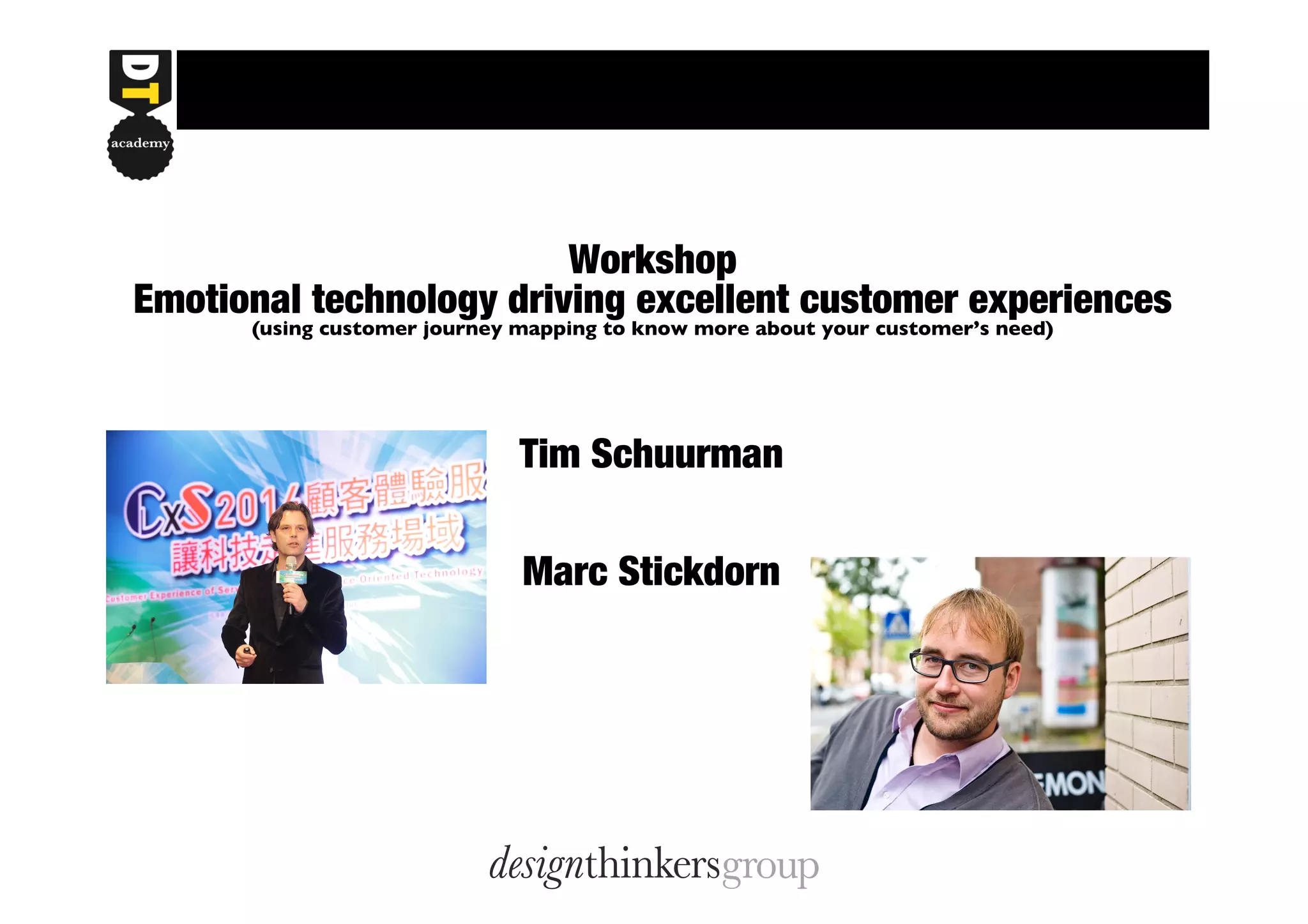
Tim Schuurman 
Marc Stickdorn
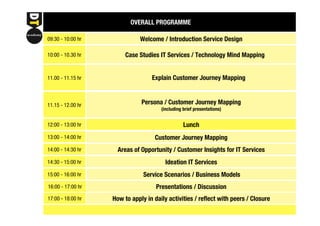
OVERALL PROGRAMME 
09:30 - 10:00 hr Welcome / Introduction Service Design 
10:00 - 10.30 hr Case Studies IT Services / Technology Mind Mapping 
11.00 - 11.15 hr Explain Customer Journey Mapping 
11.15 - 12.00 hr Persona / Customer Journey Mapping 
(including brief presentations) 
12:00 - 13:00 hr 
13:00 - 14:00 hr 
14:00 - 14:30 hr 
14:30 - 15:00 hr 
15:00 - 16:00 hr 
Lunch 
Customer Journey Mapping 
Areas of Opportunity / Customer Insights for IT Services 
Ideation IT Services 
Service Scenarios / Business Models 
Presentations / Discussion 
16:00 - 17:00 hr 
17:00 - 18:00 hr How to apply in daily activities / reflect with peers / Closure
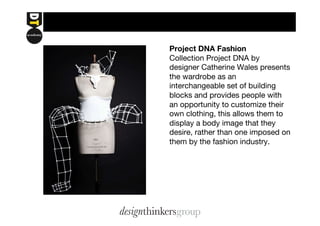
Project DNA Fashion 
Collection Project DNA by 
designer Catherine Wales presents 
the wardrobe as an 
interchangeable set of building 
blocks and provides people with 
an opportunity to customize their 
own clothing, this allows them to 
display a body image that they 
desire, rather than one imposed on 
them by the fashion industry.
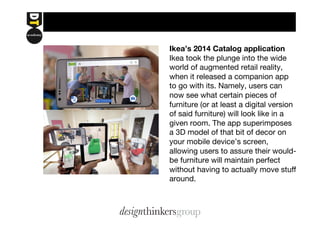
Ikea’s 2014 Catalog appIication 
Ikea took the plunge into the wide 
world of augmented retail reality, 
when it released a companion app 
to go with its. Namely, users can 
now see what certain pieces of 
furniture (or at least a digital version 
of said furniture) will look like in a 
given room. The app superimposes 
a 3D model of that bit of decor on 
your mobile device’s screen, 
allowing users to assure their would-be 
furniture will maintain perfect 
without having to actually move stuff 
around.
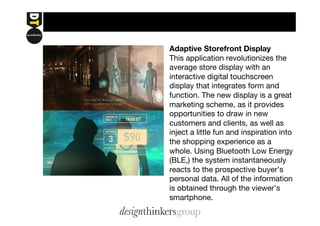
Adaptive Storefront Display 
This application revolutionizes the 
average store display with an 
interactive digital touchscreen 
display that integrates form and 
function. The new display is a great 
marketing scheme, as it provides 
opportunities to draw in new 
customers and clients, as well as 
inject a little fun and inspiration into 
the shopping experience as a 
whole. Using Bluetooth Low Energy 
(BLE,) the system instantaneously 
reacts to the prospective buyer’s 
personal data. All of the information 
is obtained through the viewer’s 
smartphone.
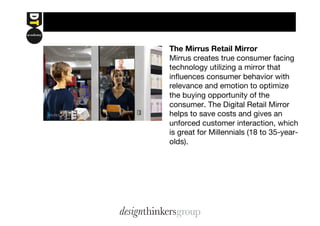
The Mirrus Retail Mirror 
Mirrus creates true consumer facing 
technology utilizing a mirror that 
influences consumer behavior with 
relevance and emotion to optimize 
the buying opportunity of the 
consumer. The Digital Retail Mirror 
helps to save costs and gives an 
unforced customer interaction, which 
is great for Millennials (18 to 35-year-olds).
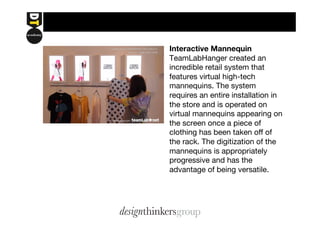
Interactive Mannequin 
TeamLabHanger created an 
incredible retail system that 
features virtual high-tech 
mannequins. The system 
requires an entire installation in 
the store and is operated on 
virtual mannequins appearing on 
the screen once a piece of 
clothing has been taken off of 
the rack. The digitization of the 
mannequins is appropriately 
progressive and has the 
advantage of being versatile.
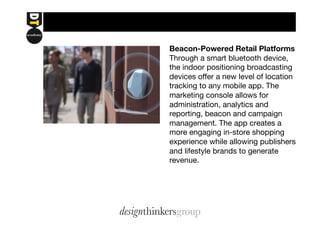
Beacon-Powered Retail Platforms 
Through a smart bluetooth device, 
the indoor positioning broadcasting 
devices offer a new level of location 
tracking to any mobile app. The 
marketing console allows for 
administration, analytics and 
reporting, beacon and campaign 
management. The app creates a 
more engaging in-store shopping 
experience while allowing publishers 
and lifestyle brands to generate 
revenue.
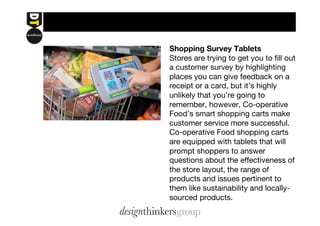
Shopping Survey Tablets 
Stores are trying to get you to fill out 
a customer survey by highlighting 
places you can give feedback on a 
receipt or a card, but it’s highly 
unlikely that you’re going to 
remember, however, Co-operative 
Food’s smart shopping carts make 
customer service more successful. 
Co-operative Food shopping carts 
are equipped with tablets that will 
prompt shoppers to answer 
questions about the effectiveness of 
the store layout, the range of 
products and issues pertinent to 
them like sustainability and locally-sourced 
products.
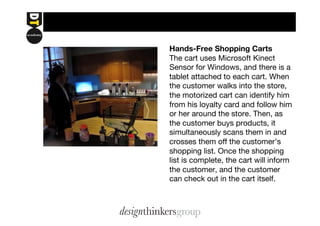
Hands-Free Shopping Carts 
The cart uses Microsoft Kinect 
Sensor for Windows, and there is a 
tablet attached to each cart. When 
the customer walks into the store, 
the motorized cart can identify him 
from his loyalty card and follow him 
or her around the store. Then, as 
the customer buys products, it 
simultaneously scans them in and 
crosses them off the customer’s 
shopping list. Once the shopping 
list is complete, the cart will inform 
the customer, and the customer 
can check out in the cart itself.
CUSTOMER JOURNEY MAPPING designthinkersacademy 
+ 
Explain Emotions 
- 
Customer’s Needs 
Barriers 
EMOTIONAL STATUS OF 
PERSONA 
CONTEXT 
WHAT IS THE PERSONA 
TRYING TO DO? 
JOURNEY STAGES 
TOUCHPOINTS 
WHICH TECHNOLOGY 
SUPPORTS THIS TOUCHPOINT? 
OPPORTUNITY AREAS 
OPPORTUNITIES FOR 
APPLICATION OF 
NEW TECHNOLOGY 
+ 
Name 
Profile 
Behaviour 
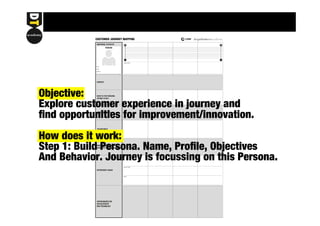
Objective: 
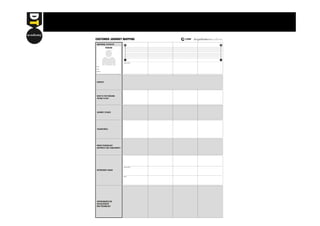
Explore customer experience in journey and 
find opportunities for improvement/innovation. 
How does it work: 
Step 1: Build Persona. Name, Profile, Objectives 
And Behavior. Journey is focussing on this Persona.
CUSTOMER JOURNEY MAPPING designthinkersacademy 
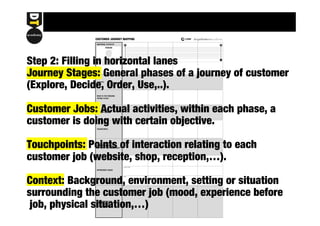
Step 2: Filling in horizontal + 
lanes 
Explain Emotions 
Journey Stages: General - 
phases of a journey of customer 
(Explore, Decide, Order, Use,..). 
Customer Jobs: Actual activities, within each phase, a 
customer is doing with certain objective. 
Touchpoints: Points of interaction relating to each 
customer job (website, shop, reception,…). 
Customer’s Needs 
Context: Background, Barriers 
environment, setting or situation 
surrounding the customer job (mood, experience before 
job, physical situation,…) 
EMOTIONAL STATUS OF 
PERSONA 
CONTEXT 
WHAT IS THE PERSONA 
TRYING TO DO? 
JOURNEY STAGES 
TOUCHPOINTS 
WHICH TECHNOLOGY 
SUPPORTS THIS TOUCHPOINT? 
OPPORTUNITY AREAS 
OPPORTUNITIES FOR 
APPLICATION OF 
NEW TECHNOLOGY 
+ 
Name 
Profile 
Behaviour
CUSTOMER JOURNEY MAPPING designthinkersacademy 
+ 
Explain Emotions 
- 
Customer’s Needs 
Barriers 
EMOTIONAL STATUS OF 
PERSONA 
CONTEXT 
WHAT IS THE PERSONA 
TRYING TO DO? 
JOURNEY STAGES 
TOUCHPOINTS 
WHICH TECHNOLOGY 
SUPPORTS THIS TOUCHPOINT? 
OPPORTUNITY AREAS 
OPPORTUNITIES FOR 
APPLICATION OF 
NEW TECHNOLOGY 
+ 
Name 
Profile 
Behaviour 
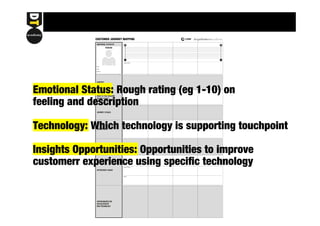
Emotional Status: Rough rating (eg 1-10) on 
feeling and description 
Technology: Which technology is supporting touchpoint 
Insights Opportunities: Opportunities to improve 
customerr experience using specific technology
CUSTOMER JOURNEY MAPPING designthinkersacademy 
+ 
Explain Emotions 
- 
Customer’s Needs 
Barriers 
EMOTIONAL STATUS OF 
PERSONA 
CONTEXT 
WHAT IS THE PERSONA 
TRYING TO DO? 
JOURNEY STAGES 
TOUCHPOINTS 
WHICH TECHNOLOGY 
SUPPORTS THIS TOUCHPOINT? 
OPPORTUNITY AREAS 
OPPORTUNITIES FOR 
APPLICATION OF 
NEW TECHNOLOGY 
+ 
Name 
Profile 
Behaviour 
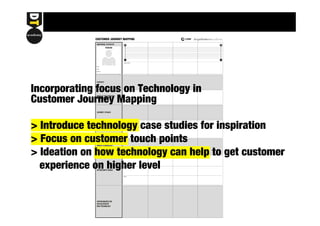
Incorporating focus on Technology in 
Customer Journey Mapping 
> Introduce technology case studies for inspiration 
> Focus on customer touch points 
> Ideation on how technology can help to get customer 
experience on higher level
CUSTOMER JOURNEY MAPPING designthinkersacademy 
+ 
Explain Emotions 
- 
Customer’s Needs 
Barriers 
EMOTIONAL STATUS OF 
PERSONA 
CONTEXT 
WHAT IS THE PERSONA 
TRYING TO DO? 
JOURNEY STAGES 
TOUCHPOINTS 
WHICH TECHNOLOGY 
SUPPORTS THIS TOUCHPOINT? 
OPPORTUNITY AREAS 
OPPORTUNITIES FOR 
APPLICATION OF 
NEW TECHNOLOGY 
+ 
Name 
Profile 
Behaviour
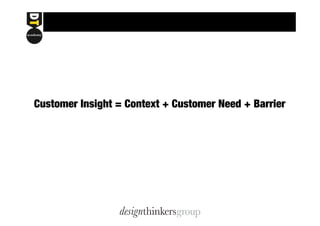
Customer Insight = Context + Customer Need + Barrier
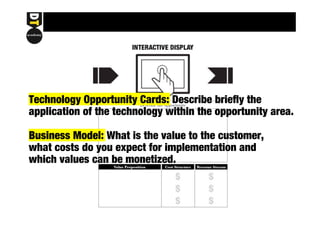
Technology Opportunity Cards: Describe briefly the 
application of the technology within the opportunity area. 
Business Model: What is the value to the customer, 
what costs do you expect for implementation and 
which values can be monetized.
8/22 國際研習會簡報_workshop presentation

8/22 國際研習會簡報_workshop presentation

  • 1.
    Workshop Emotional technologydriving excellent customer experiences (using customer journey mapping to know more about your customer’s need) Tim Schuurman Marc Stickdorn
  • 2.
    OVERALL PROGRAMME 09:30- 10:00 hr Welcome / Introduction Service Design 10:00 - 10.30 hr Case Studies IT Services / Technology Mind Mapping 11.00 - 11.15 hr Explain Customer Journey Mapping 11.15 - 12.00 hr Persona / Customer Journey Mapping (including brief presentations) 12:00 - 13:00 hr 13:00 - 14:00 hr 14:00 - 14:30 hr 14:30 - 15:00 hr 15:00 - 16:00 hr Lunch Customer Journey Mapping Areas of Opportunity / Customer Insights for IT Services Ideation IT Services Service Scenarios / Business Models Presentations / Discussion 16:00 - 17:00 hr 17:00 - 18:00 hr How to apply in daily activities / reflect with peers / Closure
  • 3.
    Project DNA Fashion Collection Project DNA by designer Catherine Wales presents the wardrobe as an interchangeable set of building blocks and provides people with an opportunity to customize their own clothing, this allows them to display a body image that they desire, rather than one imposed on them by the fashion industry.
  • 4.
    Ikea’s 2014 CatalogappIication Ikea took the plunge into the wide world of augmented retail reality, when it released a companion app to go with its. Namely, users can now see what certain pieces of furniture (or at least a digital version of said furniture) will look like in a given room. The app superimposes a 3D model of that bit of decor on your mobile device’s screen, allowing users to assure their would-be furniture will maintain perfect without having to actually move stuff around.
  • 5.
    Adaptive Storefront Display This application revolutionizes the average store display with an interactive digital touchscreen display that integrates form and function. The new display is a great marketing scheme, as it provides opportunities to draw in new customers and clients, as well as inject a little fun and inspiration into the shopping experience as a whole. Using Bluetooth Low Energy (BLE,) the system instantaneously reacts to the prospective buyer’s personal data. All of the information is obtained through the viewer’s smartphone.
  • 6.
    The Mirrus RetailMirror Mirrus creates true consumer facing technology utilizing a mirror that influences consumer behavior with relevance and emotion to optimize the buying opportunity of the consumer. The Digital Retail Mirror helps to save costs and gives an unforced customer interaction, which is great for Millennials (18 to 35-year-olds).
  • 7.
    Interactive Mannequin TeamLabHangercreated an incredible retail system that features virtual high-tech mannequins. The system requires an entire installation in the store and is operated on virtual mannequins appearing on the screen once a piece of clothing has been taken off of the rack. The digitization of the mannequins is appropriately progressive and has the advantage of being versatile.
  • 8.
    Beacon-Powered Retail Platforms Through a smart bluetooth device, the indoor positioning broadcasting devices offer a new level of location tracking to any mobile app. The marketing console allows for administration, analytics and reporting, beacon and campaign management. The app creates a more engaging in-store shopping experience while allowing publishers and lifestyle brands to generate revenue.
  • 9.
    Shopping Survey Tablets Stores are trying to get you to fill out a customer survey by highlighting places you can give feedback on a receipt or a card, but it’s highly unlikely that you’re going to remember, however, Co-operative Food’s smart shopping carts make customer service more successful. Co-operative Food shopping carts are equipped with tablets that will prompt shoppers to answer questions about the effectiveness of the store layout, the range of products and issues pertinent to them like sustainability and locally-sourced products.
  • 10.
    Hands-Free Shopping Carts The cart uses Microsoft Kinect Sensor for Windows, and there is a tablet attached to each cart. When the customer walks into the store, the motorized cart can identify him from his loyalty card and follow him or her around the store. Then, as the customer buys products, it simultaneously scans them in and crosses them off the customer’s shopping list. Once the shopping list is complete, the cart will inform the customer, and the customer can check out in the cart itself.
  • 11.
    CUSTOMER JOURNEY MAPPINGdesignthinkersacademy + Explain Emotions - Customer’s Needs Barriers EMOTIONAL STATUS OF PERSONA CONTEXT WHAT IS THE PERSONA TRYING TO DO? JOURNEY STAGES TOUCHPOINTS WHICH TECHNOLOGY SUPPORTS THIS TOUCHPOINT? OPPORTUNITY AREAS OPPORTUNITIES FOR APPLICATION OF NEW TECHNOLOGY + Name Profile Behaviour Objective: Explore customer experience in journey and find opportunities for improvement/innovation. How does it work: Step 1: Build Persona. Name, Profile, Objectives And Behavior. Journey is focussing on this Persona.
  • 12.
    CUSTOMER JOURNEY MAPPINGdesignthinkersacademy Step 2: Filling in horizontal + lanes Explain Emotions Journey Stages: General - phases of a journey of customer (Explore, Decide, Order, Use,..). Customer Jobs: Actual activities, within each phase, a customer is doing with certain objective. Touchpoints: Points of interaction relating to each customer job (website, shop, reception,…). Customer’s Needs Context: Background, Barriers environment, setting or situation surrounding the customer job (mood, experience before job, physical situation,…) EMOTIONAL STATUS OF PERSONA CONTEXT WHAT IS THE PERSONA TRYING TO DO? JOURNEY STAGES TOUCHPOINTS WHICH TECHNOLOGY SUPPORTS THIS TOUCHPOINT? OPPORTUNITY AREAS OPPORTUNITIES FOR APPLICATION OF NEW TECHNOLOGY + Name Profile Behaviour
  • 13.
    CUSTOMER JOURNEY MAPPINGdesignthinkersacademy + Explain Emotions - Customer’s Needs Barriers EMOTIONAL STATUS OF PERSONA CONTEXT WHAT IS THE PERSONA TRYING TO DO? JOURNEY STAGES TOUCHPOINTS WHICH TECHNOLOGY SUPPORTS THIS TOUCHPOINT? OPPORTUNITY AREAS OPPORTUNITIES FOR APPLICATION OF NEW TECHNOLOGY + Name Profile Behaviour Emotional Status: Rough rating (eg 1-10) on feeling and description Technology: Which technology is supporting touchpoint Insights Opportunities: Opportunities to improve customerr experience using specific technology
  • 14.
    CUSTOMER JOURNEY MAPPINGdesignthinkersacademy + Explain Emotions - Customer’s Needs Barriers EMOTIONAL STATUS OF PERSONA CONTEXT WHAT IS THE PERSONA TRYING TO DO? JOURNEY STAGES TOUCHPOINTS WHICH TECHNOLOGY SUPPORTS THIS TOUCHPOINT? OPPORTUNITY AREAS OPPORTUNITIES FOR APPLICATION OF NEW TECHNOLOGY + Name Profile Behaviour Incorporating focus on Technology in Customer Journey Mapping > Introduce technology case studies for inspiration > Focus on customer touch points > Ideation on how technology can help to get customer experience on higher level
  • 15.
    CUSTOMER JOURNEY MAPPINGdesignthinkersacademy + Explain Emotions - Customer’s Needs Barriers EMOTIONAL STATUS OF PERSONA CONTEXT WHAT IS THE PERSONA TRYING TO DO? JOURNEY STAGES TOUCHPOINTS WHICH TECHNOLOGY SUPPORTS THIS TOUCHPOINT? OPPORTUNITY AREAS OPPORTUNITIES FOR APPLICATION OF NEW TECHNOLOGY + Name Profile Behaviour
  • 16.
    Customer Insight =Context + Customer Need + Barrier
  • 17.
    Technology Opportunity Cards:Describe briefly the application of the technology within the opportunity area. Business Model: What is the value to the customer, what costs do you expect for implementation and which values can be monetized.