Overview of  Introduction to Computers Prepared By : ASM ASHIF ASA University
Topics Meanings of Computer Types of Computers Evolution/Generation of Computers Computer System Hardware  Software Data Information Procedure People Communication/ Connectivity
Meanings of Computer Computer is a device that computes, especially a programmable electronic machine that performs high-speed mathematical or logical operations or that assembles, stores, correlates, or otherwise processes information. According to Collins English Dictionary, Computer is “A device, usually electronic, that processes data according to a set of instructions”.  The actions carried by the computer are either arithmetic or logical in nature.
Types of Computers Computers are either analog or digital in nature. Computers of yesteryears were analog in nature, but modern day computers are digital in nature. Computers can be generally classified by size and power as follows, though there is considerable overlap:  Personal computer   Workstation Minicomputer Mainframe Supercomputer
Types of Computers Personal computer:  A small, single-user computer based on a microprocessor. In addition to the microprocessor, a personal computer has a keyboard for entering data, a monitor for displaying information, and a storage device for saving data. These are cost effective machines which are used for general purpose computations.  Workstation:  A powerful, single-user computer. A workstation is like a personal computer, but it has a more powerful microprocessor and a higher-quality monitor.  Minicomputer:  A multi-user computer capable of supporting from 10 to hundreds of users simultaneously. It is scaled down version of main frame machines designed to meet the computing needs of small and medium enterprise (SME). HP, IBM, SUN and Dell are some of the major vendors of mini computers.
Types of Computers Mainframe:  A powerful multi-user computer capable of supporting many hundreds or thousands of users simultaneously. They are usually installed in very large organizations such as banks, meteorological office, defense establishments etc. These machines have proprietary hardware and software. The cost of acquisition and maintenance of these machines are high.  IBM is the most popular maker of mainframe machines and some of the models are 3090, ES/9000, and S/390 Supercomputer:  An extremely fast computer that can perform hundreds of millions of instructions per second. It works on massively parallel architectures interconnecting more than one processor, has large quantity of main memory and secondary storage devices. It supports multiple users, use proprietary hardware and software, need special environment for working and are very expensive in both procuring and maintaining. Supercomputers are usually used for complicated computations such as weather forecasting and other scientific research requiring massive calculations.
Evolution/Generation of Computers First Generation(1944-1958) Most input and output media were punched cards and magnetic tape. Main memory was almost exclusively made up of hundreds of vacuum tubes. Computers were somewhat unreliable because the vacuum tubes failed. They could run only one program at a time. ENIAC ( E lectrical  N umerical  I ntegrator  A nd  C alculator) ,
Evolution/Generation of Computers Second Generation(1959-1963) Transistors and some other solid-state devices that were much smaller than vacuum tubes. Magnetic cores became the most widely used type of main memory. Removable disk packs were introduced as storage device. Smaller, more reliable and significantly faster than first-generation computers.
Evolution/Generation of Computers Third Generation(1964-1970) Integrated circuit replaced traditional transistorized circuit. The use of magnetic disks for data storage became widespread. Multiprogramming and timesharing.
Evolution/Generation  of Computers Fourth Generation(1971-now) LSI ,VLSI and ULSI circuits were developed. Computers’ main memory capacity increased. Software application like dBASE, electronic spreadsheet became commercially available.
Computer System   A computer system comprises  hardware  and  software .  A computer system processes  data  into  information  according to instructions provided  by  the  user.  Data  are  raw  facts  that  need  to  be  processed,  whereas information  is  meaningful  data.  Instructions   provided  by  the  user  tell  the  computer  hardware  how to perform a task are referred to as the computer  software .
Computer System   It accepts data that is typed to it by the  user ( input data ). The computer then  processes  this data providing a result.  This result is then displayed on the screen or printed on a sheet of paper ( computer output ) .
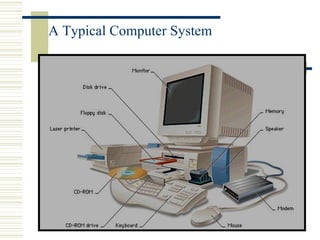
A Typical Computer System
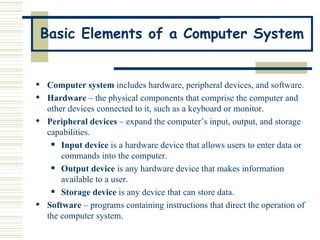
Basic Elements of a Computer System Computer system  includes hardware, peripheral devices, and software.  Hardware  – the physical components that comprise the computer and other devices connected to it, such as a keyboard or monitor. Peripheral devices  – expand the computer’s input, output, and storage capabilities. Input device  is a hardware device that allows users to enter data or commands into the computer.   Output device  is any hardware device that makes information available to a user.   Storage device  is any device that can store data. Software  – programs containing instructions that direct the operation of the computer system.
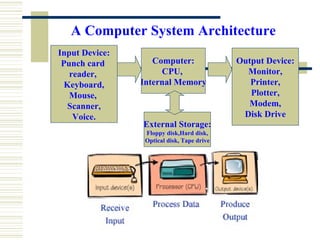
A Computer System Architecture Input Device: Punch card  reader,  Keyboard, Mouse,  Scanner, Voice. Computer: CPU,  Internal Memory Output Device: Monitor, Printer, Plotter, Modem, Disk Drive External Storage: Floppy disk,Hard disk, Optical disk, Tape drive
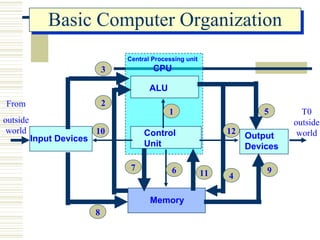
Basic Computer Organization ALU Control  Unit Input Devices Output Devices Memory Central Processing unit CPU 3 8 9 5 2 1 4 6 7 11 10 12 T0 outside world From outside world
Computers Consist of Five Parts Hardware Software Users Data Some authors treat  Communications  as fifth part
Hardware
Types of Hardware The  Input  hardware :  used  to  enter  data  and  instructions  into  a computer.  The  Output  hardware :  used  to  view  information  produced  by  the computer.  The  Processing hardware :  used to process data into information.
Types of Hardware The  Storage hardware : used to store data, information and instructions permanently on media.  The  Communication  hardware :  used  to  enable  connections  between computers (i.e: modems, cable and fax modems).
Software Computer software is often regarded as anything but hardware, meaning that the "hard" are the parts that are tangible (able to hold) while the "soft" part is the intangible objects inside the computer.  Software  is  made  up  of  a  group  of  related  programs .  A  program  is a sequence of instructions to the hardware components of a computer system to perform a specific processing task.
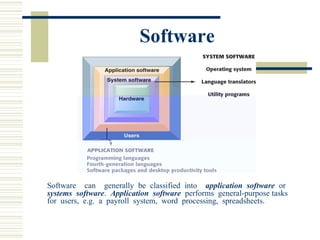
Software Software  can  generally be classified into  application software   or  systems  software .  Application  software   performs  general-purpose tasks  for  users,  e.g.  a  payroll  system,  word  processing,  spreadsheets.
Software Systems  software ,  on  the  other  hand,  runs  basic  computer operations,  manages  computer  resources  and  allows  application software  to run on the computer. Systems software includes operating systems, utility programs and language translators.
Software A software package is software to perform a general business function, e.g.  Microsoft Office . The Microsoft Office programs  Word ,  PowerPoint ,  Excel  and  Access  will be studied in details in this course.
Data As  mentioned  before,  data  is  a  collection  of  raw  facts,  whereas information is processed data.  In a computer system data is represented using two binary digits: 1 ("on")  and  0  ("off").  This  is  referred  to  as  the  binary  system .
Data During processing, 0 is represented by an electrical current being off ( or at low voltage) and 1 by the current being on (or at high voltage).  When  a  letter  is  typed  on  the  keyboard,  the  character  is automatically  converted  into  series  of  1s  and  0s  that  the  computer  can understand.
Data Letters, numbers and special characters are represented within the computer  system  by  means  of  binary  coding  schemes .  Two  common binary coding schemes are the ASCII-8 and EBCDIC. Following, table lists  some  examples  of  how  some  characters  are  represented  using  the ASCII scheme.
Data ASCII stands for American Standard Code for Information Interchange and is typically used to represent data in smaller computers (microcomputers).  EBCEDIC stands for Extended Binary Coded Decimal Interchange and is used to represent data in larger computers.
Procedures A procedure is a sequence of steps describing how to carry out a particular task on the computer. For example,  to  logon  the computer, to  shut down  the computer, to  save a file , etc.
People   People are the most important part of the computer system because they design and develop computer systems, operate computer hardware, create computer software and establish procedures for carrying out tasks.
People People dealing with the computer can mainly be classified into  computer professionals  or  end-users .  Computer professionals  are people having formal education in technical aspects of using computers. Examples are computer programmers, system analysts and network administrators.
People End-users , on the other hand, are people who use a computer system to help them carry out a task specific to their job or profession or just for fun. End-users need not have much technical knowledge about the computer.
Communication/ Connectivity   Connectivity refers to using computers for communication purposes, e.g. sending messages from one computer to another, sharing resources (such as software) and sharing information.
Thank You

Lecture 1 2

  • 1.
    Overview of Introduction to Computers Prepared By : ASM ASHIF ASA University
  • 2.
    Topics Meanings ofComputer Types of Computers Evolution/Generation of Computers Computer System Hardware Software Data Information Procedure People Communication/ Connectivity
  • 3.
    Meanings of ComputerComputer is a device that computes, especially a programmable electronic machine that performs high-speed mathematical or logical operations or that assembles, stores, correlates, or otherwise processes information. According to Collins English Dictionary, Computer is “A device, usually electronic, that processes data according to a set of instructions”. The actions carried by the computer are either arithmetic or logical in nature.
  • 4.
    Types of ComputersComputers are either analog or digital in nature. Computers of yesteryears were analog in nature, but modern day computers are digital in nature. Computers can be generally classified by size and power as follows, though there is considerable overlap: Personal computer Workstation Minicomputer Mainframe Supercomputer
  • 5.
    Types of ComputersPersonal computer: A small, single-user computer based on a microprocessor. In addition to the microprocessor, a personal computer has a keyboard for entering data, a monitor for displaying information, and a storage device for saving data. These are cost effective machines which are used for general purpose computations. Workstation: A powerful, single-user computer. A workstation is like a personal computer, but it has a more powerful microprocessor and a higher-quality monitor. Minicomputer: A multi-user computer capable of supporting from 10 to hundreds of users simultaneously. It is scaled down version of main frame machines designed to meet the computing needs of small and medium enterprise (SME). HP, IBM, SUN and Dell are some of the major vendors of mini computers.
  • 6.
    Types of ComputersMainframe: A powerful multi-user computer capable of supporting many hundreds or thousands of users simultaneously. They are usually installed in very large organizations such as banks, meteorological office, defense establishments etc. These machines have proprietary hardware and software. The cost of acquisition and maintenance of these machines are high. IBM is the most popular maker of mainframe machines and some of the models are 3090, ES/9000, and S/390 Supercomputer: An extremely fast computer that can perform hundreds of millions of instructions per second. It works on massively parallel architectures interconnecting more than one processor, has large quantity of main memory and secondary storage devices. It supports multiple users, use proprietary hardware and software, need special environment for working and are very expensive in both procuring and maintaining. Supercomputers are usually used for complicated computations such as weather forecasting and other scientific research requiring massive calculations.
  • 7.
    Evolution/Generation of ComputersFirst Generation(1944-1958) Most input and output media were punched cards and magnetic tape. Main memory was almost exclusively made up of hundreds of vacuum tubes. Computers were somewhat unreliable because the vacuum tubes failed. They could run only one program at a time. ENIAC ( E lectrical N umerical I ntegrator A nd C alculator) ,
  • 8.
    Evolution/Generation of ComputersSecond Generation(1959-1963) Transistors and some other solid-state devices that were much smaller than vacuum tubes. Magnetic cores became the most widely used type of main memory. Removable disk packs were introduced as storage device. Smaller, more reliable and significantly faster than first-generation computers.
  • 9.
    Evolution/Generation of ComputersThird Generation(1964-1970) Integrated circuit replaced traditional transistorized circuit. The use of magnetic disks for data storage became widespread. Multiprogramming and timesharing.
  • 10.
    Evolution/Generation ofComputers Fourth Generation(1971-now) LSI ,VLSI and ULSI circuits were developed. Computers’ main memory capacity increased. Software application like dBASE, electronic spreadsheet became commercially available.
  • 11.
    Computer System A computer system comprises hardware and software . A computer system processes data into information according to instructions provided by the user. Data are raw facts that need to be processed, whereas information is meaningful data. Instructions provided by the user tell the computer hardware how to perform a task are referred to as the computer software .
  • 12.
    Computer System It accepts data that is typed to it by the user ( input data ). The computer then processes this data providing a result. This result is then displayed on the screen or printed on a sheet of paper ( computer output ) .
  • 13.
  • 14.
    Basic Elements ofa Computer System Computer system includes hardware, peripheral devices, and software. Hardware – the physical components that comprise the computer and other devices connected to it, such as a keyboard or monitor. Peripheral devices – expand the computer’s input, output, and storage capabilities. Input device is a hardware device that allows users to enter data or commands into the computer. Output device is any hardware device that makes information available to a user. Storage device is any device that can store data. Software – programs containing instructions that direct the operation of the computer system.
  • 15.
    A Computer SystemArchitecture Input Device: Punch card reader, Keyboard, Mouse, Scanner, Voice. Computer: CPU, Internal Memory Output Device: Monitor, Printer, Plotter, Modem, Disk Drive External Storage: Floppy disk,Hard disk, Optical disk, Tape drive
  • 16.
    Basic Computer OrganizationALU Control Unit Input Devices Output Devices Memory Central Processing unit CPU 3 8 9 5 2 1 4 6 7 11 10 12 T0 outside world From outside world
  • 17.
    Computers Consist ofFive Parts Hardware Software Users Data Some authors treat Communications as fifth part
  • 18.
  • 19.
    Types of HardwareThe Input hardware : used to enter data and instructions into a computer. The Output hardware : used to view information produced by the computer. The Processing hardware : used to process data into information.
  • 20.
    Types of HardwareThe Storage hardware : used to store data, information and instructions permanently on media. The Communication hardware : used to enable connections between computers (i.e: modems, cable and fax modems).
  • 21.
    Software Computer softwareis often regarded as anything but hardware, meaning that the "hard" are the parts that are tangible (able to hold) while the "soft" part is the intangible objects inside the computer. Software is made up of a group of related programs . A program is a sequence of instructions to the hardware components of a computer system to perform a specific processing task.
  • 22.
    Software Software can generally be classified into application software or systems software . Application software performs general-purpose tasks for users, e.g. a payroll system, word processing, spreadsheets.
  • 23.
    Software Systems software , on the other hand, runs basic computer operations, manages computer resources and allows application software to run on the computer. Systems software includes operating systems, utility programs and language translators.
  • 24.
    Software A softwarepackage is software to perform a general business function, e.g. Microsoft Office . The Microsoft Office programs Word , PowerPoint , Excel and Access will be studied in details in this course.
  • 25.
    Data As mentioned before, data is a collection of raw facts, whereas information is processed data. In a computer system data is represented using two binary digits: 1 ("on") and 0 ("off"). This is referred to as the binary system .
  • 26.
    Data During processing,0 is represented by an electrical current being off ( or at low voltage) and 1 by the current being on (or at high voltage). When a letter is typed on the keyboard, the character is automatically converted into series of 1s and 0s that the computer can understand.
  • 27.
    Data Letters, numbersand special characters are represented within the computer system by means of binary coding schemes . Two common binary coding schemes are the ASCII-8 and EBCDIC. Following, table lists some examples of how some characters are represented using the ASCII scheme.
  • 28.
    Data ASCII standsfor American Standard Code for Information Interchange and is typically used to represent data in smaller computers (microcomputers). EBCEDIC stands for Extended Binary Coded Decimal Interchange and is used to represent data in larger computers.
  • 29.
    Procedures A procedureis a sequence of steps describing how to carry out a particular task on the computer. For example, to logon the computer, to shut down the computer, to save a file , etc.
  • 30.
    People People are the most important part of the computer system because they design and develop computer systems, operate computer hardware, create computer software and establish procedures for carrying out tasks.

  • 31.
    People People dealingwith the computer can mainly be classified into computer professionals or end-users . Computer professionals are people having formal education in technical aspects of using computers. Examples are computer programmers, system analysts and network administrators.
  • 32.
    People End-users ,on the other hand, are people who use a computer system to help them carry out a task specific to their job or profession or just for fun. End-users need not have much technical knowledge about the computer.
  • 33.
    Communication/ Connectivity Connectivity refers to using computers for communication purposes, e.g. sending messages from one computer to another, sharing resources (such as software) and sharing information.
  • 34.