File Formats
Units 54
Lo1
Hashim Pervase

Sources: Initial
PowerPoint by Nafisa +
Fact Sheets; Wikipedia
used for backing
information.
Raster Files
ď‚›   Known as a bitmap, rasters are grids of pixels,
    stored in image files in various formats.
ď‚›   Used primarily in photographs, raster files are good
    for media compression i.e. video, audio, images.
ď‚›   File extensions include Jpeg (Commonly used for
    photos), Gifs (Short sequence of images) and Png
    (set to succeed Gifs).
ď‚›   Software such as adobe, aperture and coral
    aftershot all use raster files in their imaging.
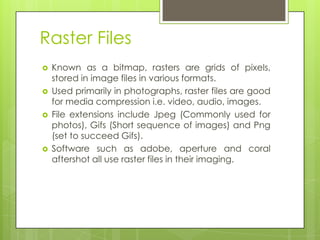
In My Work
ď‚›   Images can also be rasterized, in my magazine
    cover, I rasterized text layers so that I could re
    arrange their positions, as well as merging the
    layers later within the piece.


ď‚›   As you can see, the clarity of the image has
    somewhat been lost
In My Work
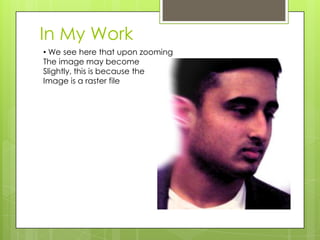
• We see here that upon zooming
The image may become
Slightly, this is because the
Image is a raster file
Raster Based Applications
ď‚›   Pic Master is a bitmap graphics editor
ď‚›   The software uses all the standard editing tools, as
    well as extended functions such as displaying
    anaglyph images, morphing and an integrated
    webcam support.


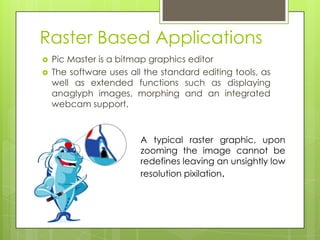
                         A typical raster graphic, upon
                         zooming the image cannot be
                         redefines leaving an unsightly low
                         resolution pixilation.
Vector Files
ď‚›   Mathematically based lines, patterns and paths
    used to represent images in computer graphics.
ď‚›   Can be converted in raster formats if need be.
ď‚›   Used in military defense, arcade games and laser
    lights.
ď‚›   File extensions include CGM (computer graphics),
    SVG (scalable) and CDR (specific to coral draw).
ď‚›   Software such as Artboard, Avery and CorelDraw
    use vectors.
In My Work
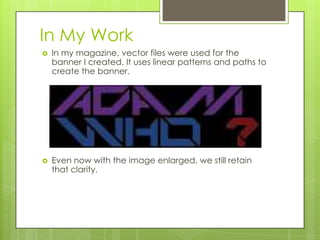
ď‚›   In my magazine, vector files were used for the
    banner I created. It uses linear patterns and paths to
    create the banner.


ď‚›   Even now with the image enlarged, we still retain
    that clarity.
Vector Based Applications
ď‚›   CorelDraw is a vector graphics editor.
ď‚›   Uses a full range of editing tools via multiple pages
    and multiple master layers.

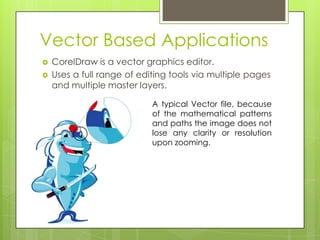
                            A typical Vector file, because
                            of the mathematical patterns
                            and paths the image does not
                            lose any clarity or resolution
                            upon zooming.
The Difference


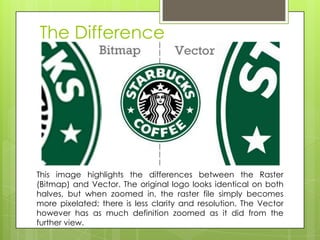
This image highlights the differences between the Raster
(Bitmap) and Vector. The original logo looks identical on both
halves, but when zoomed in, the raster file simply becomes
more pixelated; there is less clarity and resolution. The Vector
however has as much definition zoomed as it did from the
further view.
Metafiles
ď‚›   A standard file format for vector graphics, raster
    graphics and text
ď‚›   Textual source files can be compiled into binary files.
ď‚›   A file containing information that describes or specifies
    another file.
ď‚›   The file extension for this is only .cgm
ď‚›   Metafiles are used universally; as they simply store other
    files of different extensions.


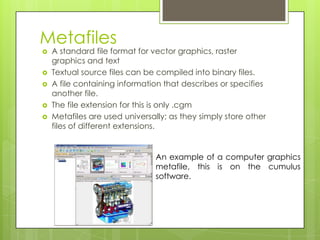
                                An example of a computer graphics
                                metafile, this is on the cumulus
                                software.
In My Work
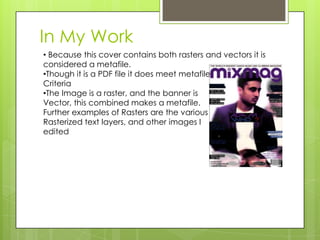
• Because this cover contains both rasters and vectors it is
considered a metafile.
•Though it is a PDF file it does meet metafile
Criteria
•The Image is a raster, and the banner is
Vector, this combined makes a metafile.
Further examples of Rasters are the various
Rasterized text layers, and other images I
edited
File extensions
ď‚›   Simply a suffix to denote the name of a computer file.
ď‚›   This provides the name in short, of the software used to
    create a certain file.
ď‚›   All software has a file extension meaning file can be
    arranged by software if need be.
ď‚›   Within my piece, I had used many file extensions, during
    paperwork I had .doc, but then I worked on Photoshop
    which was .psd and then InDesign was .indd.
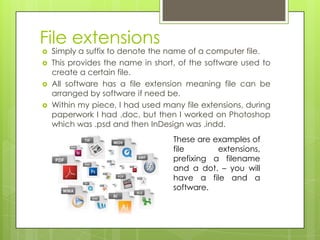
                                   These are examples of
                                   file       extensions,
                                   prefixing a filename
                                   and a dot. – you will
                                   have a file and a
                                   software.

Page 4

  • 1.
    File Formats Units 54 Lo1 HashimPervase Sources: Initial PowerPoint by Nafisa + Fact Sheets; Wikipedia used for backing information.
  • 2.
    Raster Files ď‚› Known as a bitmap, rasters are grids of pixels, stored in image files in various formats. ď‚› Used primarily in photographs, raster files are good for media compression i.e. video, audio, images. ď‚› File extensions include Jpeg (Commonly used for photos), Gifs (Short sequence of images) and Png (set to succeed Gifs). ď‚› Software such as adobe, aperture and coral aftershot all use raster files in their imaging.
  • 3.
    In My Work ď‚› Images can also be rasterized, in my magazine cover, I rasterized text layers so that I could re arrange their positions, as well as merging the layers later within the piece. ď‚› As you can see, the clarity of the image has somewhat been lost
  • 4.
    In My Work •We see here that upon zooming The image may become Slightly, this is because the Image is a raster file
  • 5.
    Raster Based Applications ď‚› Pic Master is a bitmap graphics editor ď‚› The software uses all the standard editing tools, as well as extended functions such as displaying anaglyph images, morphing and an integrated webcam support. A typical raster graphic, upon zooming the image cannot be redefines leaving an unsightly low resolution pixilation.
  • 6.
    Vector Files ď‚› Mathematically based lines, patterns and paths used to represent images in computer graphics. ď‚› Can be converted in raster formats if need be. ď‚› Used in military defense, arcade games and laser lights. ď‚› File extensions include CGM (computer graphics), SVG (scalable) and CDR (specific to coral draw). ď‚› Software such as Artboard, Avery and CorelDraw use vectors.
  • 7.
    In My Work ď‚› In my magazine, vector files were used for the banner I created. It uses linear patterns and paths to create the banner. ď‚› Even now with the image enlarged, we still retain that clarity.
  • 8.
    Vector Based Applications ď‚› CorelDraw is a vector graphics editor. ď‚› Uses a full range of editing tools via multiple pages and multiple master layers. A typical Vector file, because of the mathematical patterns and paths the image does not lose any clarity or resolution upon zooming.
  • 9.
    The Difference This imagehighlights the differences between the Raster (Bitmap) and Vector. The original logo looks identical on both halves, but when zoomed in, the raster file simply becomes more pixelated; there is less clarity and resolution. The Vector however has as much definition zoomed as it did from the further view.
  • 10.
    Metafiles ď‚› A standard file format for vector graphics, raster graphics and text ď‚› Textual source files can be compiled into binary files. ď‚› A file containing information that describes or specifies another file. ď‚› The file extension for this is only .cgm ď‚› Metafiles are used universally; as they simply store other files of different extensions. An example of a computer graphics metafile, this is on the cumulus software.
  • 11.
    In My Work •Because this cover contains both rasters and vectors it is considered a metafile. •Though it is a PDF file it does meet metafile Criteria •The Image is a raster, and the banner is Vector, this combined makes a metafile. Further examples of Rasters are the various Rasterized text layers, and other images I edited
  • 12.
    File extensions  Simply a suffix to denote the name of a computer file.  This provides the name in short, of the software used to create a certain file.  All software has a file extension meaning file can be arranged by software if need be.  Within my piece, I had used many file extensions, during paperwork I had .doc, but then I worked on Photoshop which was .psd and then InDesign was .indd. These are examples of file extensions, prefixing a filename and a dot. – you will have a file and a software.