Android
Application Development
INTRODUCTION TO ANDROID
 Open software platform for mobile development
 An Open Handset Alliance (OHA) project
 Powered by Linux operating system
 Fast application development in Java
 Open source under the Apache 2 license
OPEN HANDSET ALLIANCE
 The open handset alliance(OHA) is a business alliance
of firm to develop open standard for mobile devices.
 Devoted to advancing open standards for mobile
devices
 Develop technologies that will significantly lower the
cost of developing and distributing mobile devices and
services.
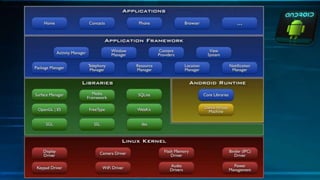
ANDROID ARCHITECTURE
The software stack is split into Four
Layers:
1. The application layer
2. The application framework
3. The libraries and runtime
4. The kernel
APPLICATION BUIDING BLOCKS
1.Activity
2.IntentReceiver
3.Service
4.ContentProvider
ACTIVITIES
a. Typically correspond to one UI screen
b. But, they can:
Be faceless
Be in a floating window
Return a value
IntentReceivers
a. Components that respond to broadcast
‘Intents’
b.Way to respond to external notification
or alarms
c. Apps can invent and broadcast their own
Intent
INTENTS
a. Think of Intents as a verb and object; a
description of what you want done
E.g. VIEW, CALL, PLAY etc..
b. System matches Intent with Activity that can
best provide the service
c. Activities and IntentReceivers describe what
Intents they can service
SERVICES
Faceless components that run in the
background
E.g. music player, network download etc…
ContentProviders
• Enables sharing of data across
applications
E.g. address book, photo gallery
• Provides uniform APIs for:
• querying
• delete, update and insert.
• Content is represented by URI and MIME
type
DEVELOPMENT TOOLS
a. Eclipse or Android Studio
b. Android SDK 2.0 or higher
c. The AVD Manager
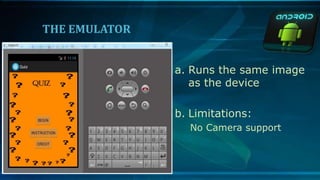
THE EMULATOR
a. Runs the same image
as the device
b. Limitations:
No Camera support
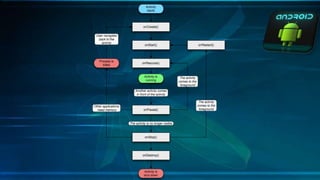
APPLICATION LIFECYCLE
• Application run in their own processes .
• Processes are started and stopped as needed to
run an application's components
• Processes may be killed to reclaim resources
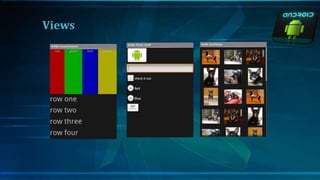
Views
FEATURES OF ANDROID
• Background Wi-Fi location still runs even when
Wi-Fi is turned off
• Developer logging and analyzing enhancements
• It is optimized for mobile devices.
• It enables reuse and replacement of components.
• Java support ,media support, multi touch, video
calling,multi tasking ,voice based features, screen
capture, camera ,bluetooth,gps,compass and
accelerometer,3G
a. The ability for anyone to customize the Google Android
platform
b. It gives you better notification.
c. It lets you choose your hardware.
d. It has better app market(1,80,000 application)
e. A more mature platform
f. With the support of many applications, the user can
change the screen display.
g. Supports all Google services: Android operating system
supports all of Google services ranging from Gmail to
Google reader. all Google services can you have with one
operating system, namely Android.
ADVANTAGES
DIS-ADVANTAGES
a. Android Market is less control of the manager,
sometimes there are malware.
b. Wasteful Batteries, This is because the OS is a lot
of "process" in the background causing the
battery quickly drains.
c. Sometimes slow device company issued an official
version of Android your own .
d. Extremely inconsistence in design among apps.
e. Very unstable and often hang or crash.
CONCLUSION:
a. Android is a truly open, free development platform
based on Linux and open source. Handset makers
can use and customize the platform without
paying a royalty
b. Android is open to all: industry, developers and
users.
c. Participating in many of the successful open
source projects .
d. Aims to be as easy to build for as the web.
e. Google Android is stepping into the next level of
Mobile Internet
REFERENCE
[1]. Hewlett-Packard Education Services Notes
[2]. Android Developers Webpage-
http://developer.android.com/develop/index.html
[3]. Tutorials Point Webpage-
http://www.tutorialspoint.com/android/index.htm
l
THANK YOU

Overview of Android

  • 1.
  • 2.
    INTRODUCTION TO ANDROID Open software platform for mobile development  An Open Handset Alliance (OHA) project  Powered by Linux operating system  Fast application development in Java  Open source under the Apache 2 license
  • 3.
    OPEN HANDSET ALLIANCE The open handset alliance(OHA) is a business alliance of firm to develop open standard for mobile devices.  Devoted to advancing open standards for mobile devices  Develop technologies that will significantly lower the cost of developing and distributing mobile devices and services.
  • 4.
    ANDROID ARCHITECTURE The softwarestack is split into Four Layers: 1. The application layer 2. The application framework 3. The libraries and runtime 4. The kernel
  • 6.
  • 7.
    ACTIVITIES a. Typically correspondto one UI screen b. But, they can: Be faceless Be in a floating window Return a value
  • 8.
    IntentReceivers a. Components thatrespond to broadcast ‘Intents’ b.Way to respond to external notification or alarms c. Apps can invent and broadcast their own Intent
  • 9.
    INTENTS a. Think ofIntents as a verb and object; a description of what you want done E.g. VIEW, CALL, PLAY etc.. b. System matches Intent with Activity that can best provide the service c. Activities and IntentReceivers describe what Intents they can service
  • 10.
    SERVICES Faceless components thatrun in the background E.g. music player, network download etc…
  • 11.
    ContentProviders • Enables sharingof data across applications E.g. address book, photo gallery • Provides uniform APIs for: • querying • delete, update and insert. • Content is represented by URI and MIME type
  • 12.
    DEVELOPMENT TOOLS a. Eclipseor Android Studio b. Android SDK 2.0 or higher c. The AVD Manager
  • 13.
    THE EMULATOR a. Runsthe same image as the device b. Limitations: No Camera support
  • 14.
    APPLICATION LIFECYCLE • Applicationrun in their own processes . • Processes are started and stopped as needed to run an application's components • Processes may be killed to reclaim resources
  • 16.
  • 17.
    FEATURES OF ANDROID •Background Wi-Fi location still runs even when Wi-Fi is turned off • Developer logging and analyzing enhancements • It is optimized for mobile devices. • It enables reuse and replacement of components. • Java support ,media support, multi touch, video calling,multi tasking ,voice based features, screen capture, camera ,bluetooth,gps,compass and accelerometer,3G
  • 18.
    a. The abilityfor anyone to customize the Google Android platform b. It gives you better notification. c. It lets you choose your hardware. d. It has better app market(1,80,000 application) e. A more mature platform f. With the support of many applications, the user can change the screen display. g. Supports all Google services: Android operating system supports all of Google services ranging from Gmail to Google reader. all Google services can you have with one operating system, namely Android. ADVANTAGES
  • 19.
    DIS-ADVANTAGES a. Android Marketis less control of the manager, sometimes there are malware. b. Wasteful Batteries, This is because the OS is a lot of "process" in the background causing the battery quickly drains. c. Sometimes slow device company issued an official version of Android your own . d. Extremely inconsistence in design among apps. e. Very unstable and often hang or crash.
  • 20.
    CONCLUSION: a. Android isa truly open, free development platform based on Linux and open source. Handset makers can use and customize the platform without paying a royalty b. Android is open to all: industry, developers and users. c. Participating in many of the successful open source projects . d. Aims to be as easy to build for as the web. e. Google Android is stepping into the next level of Mobile Internet
  • 21.
    REFERENCE [1]. Hewlett-Packard EducationServices Notes [2]. Android Developers Webpage- http://developer.android.com/develop/index.html [3]. Tutorials Point Webpage- http://www.tutorialspoint.com/android/index.htm l
  • 22.